#🔥︱curseforge-support
1 messages · Page 499 of 1
 queen storm
 junior ravine
That is why im here
queen storm
Does that button go to this discord then?
 narrow minnow
?getcf
 red patioBOT
Looking to install the CurseForge app?
Todo: Place system requirements here.
<:windows:798410728188936222> Windows
<:mac:798410654418862130> Mac
Linux
:person_shrugging:
 upper leaf
?mc-installmod
red patioBOT
How to install mods in CurseForge App.
- Click
+ Create Custom Profile - Name it, select the required Minecraft version, select the Forge version (usually the highest number), click
Create. - Click the profile icon.
- Click
Add New Content - Search and install the desired mods.
- Start the game!
How to install mods not on CurseForge.
- Right click the profile picture or Open the profile and click the
 Icon next to the play button.
 - Click

Open Folder. - Drag the mod(s) into the
modsfolder. (Note: Some mods will require others, to run. Make sure to read the instructions for the mod!) - Start the game!

 rich flint
minecraft 1.17 requires java 16 to be installed. however any minecraft 1.16 and older won't work with 16, and java 8 (64 bit) is the general universally working version pre- MC 1.17
if you don't want to change your OS install of it and make it annoying to play older MC packs then there is a manual workaround to load 16
 spare scroll
I need help

 strong dirge
how to upload it official
 fleet bear
spare scroll
I need help
fleet bear
spare scroll
I need help
your connection isn't working? Not sure what you want us to help with there.
Try a better one?
fleet bear
strong dirge
how to upload it official
"it" what is "it"
strong dirge
a modpack
spare scroll
idk I cant setup
fleet bear
strong dirge
a modpack
!mc-packshare
red patioBOT
There are two ways to share a modpack you've made with others...
Export and Share - For Friends to Small Groups.
- Click the Icon for the modpack.
- Click the button next to play.
- Click

Export. - Select the files that should be included.
- Send the zip to the people that want it! They can follow the instructions in
!mc-installpackto install the pack!
Upload to Curseforge - For Public Release to Everyone.
This options will make your pack public to EVERYONE, it comes with extra requirements and will take some effort to set up.
- Go to here: https://www.curseforge.com/project/432/4471/create
- Fill out the information with a proper description of the pack. This should allow anyone to understand what the pack is.
- Click the Icon for the modpack in the CurseForge app.
- Click the button next to play.
- Click
Export. - Select the files that should be included.
- Open your Project you made on the CurseForge site and Upload the file you just made.
- Wait for Moderation & Sync so it can show up in the client! (See
!syncfor limitations)
 teal glade
!sync
red patioBOT
Sync and your Project.
CurseForge App and site do not share the same requirements! You can find things on the site but this does not mean it will be in the app!
For a mod to show up in the app:
- Projects MUST have a file marked as RELEASE or BETA
- Projects MUST be APPROVED
- Projects MUST have a file marked for the PROFILE VERSION USED
- Projects CAN'T be EXPERIMENTAL
- Projects CAN'T be ABANDON
Files can take a while to show up in the app. If your files still have not shown up either your project is new and you have yet to mark a file as Release/Beta or there is issues with the sync system making it slow.
Vote this issue up if you would like to know when the last sync was! https://curseforge-ideas.overwolf.com/ideas/CF-I-1617
teal glade
!mc-installpack
red patioBOT
How to install modpacks with the search features in app.
- Open the

Minecraftsection of the app. - Click the top search bar where it says
Search for modpacksOR Click theBrowse ModpacksTab. - Find the Modpack you want to install and click install on it.
- Wait for CurseForge app to download and unpack all the required files.
- Once finished, click
Play!
How to install modpacks from a Export. (Custom/Private/Site downloaded Modpack zip)
- Get CurseForge App if you don't have it, use
!downloadfor a link. - Get the exported modpack from CurseForge or someone else,
!mc-packshareexplains how to make them. - Open the
Minecraftsection of the app. - Click

Create Custom Profile - Click the
Importoption. - Find the file you just downloaded in step 2 and select it.
- CurseForge app will now attempt to download and unpack the modpack. If it fails, try steps 4-6 again.
- Once finished, click
Play!

 weak grove
is it possible to play with friends running modpacks on minecraft?
 cursive cipher
it doesnt let me install it from the website
fleet bear
cursive cipher
it doesnt let me install it from the website
Install what?
cursive cipher
a modpack
like, it redirects me to a page where you gotta downlload the curseforge app thingy
and i just want to download it from the website
fleet bear
yes. you need the app or something that can install it. Can't just download packs from the site
cursive cipher
like i just downloaded a mod few weeks ago and it worked tho
 stiff birch
What counts as a customization?
Like, just a collection of scripts for mods?
fleet bear
!!=
red patioBOT
Wording is important!
Forge = Minecraft Forge, This is a modloader often just called "Forge".
Fabric = Fabric MC, this is another modloader, just called "Fabric".
CurseForge = A Website/App that has content for games.
Mods = Individual mod files.
Modpacks = Multiple mods put into the mods folder or downloaded from CurseForge.
These are not Interchangeable! Please use the correct terms as it allows us to help you faster!
fleet bear
stiff birch
What counts as a customization?
Like, just a collection of scripts for mods?
Scripts, configs, etc.
cursive cipher
i mean, i installed it from the app, and when i copy and paste the modpack to the folder where you add them, it just says ''there was an error'' or something like that
fleet bear
you can't copy paste modpacks
cursive cipher
wdym
rich flint
modpack files on curseforge are not a zip file of everything you need to have the install. it is mostly an index file pointing to where to download the various mods - they're what launcher apps use to import everything
teal glade
yep, just used that to get a buddy to import the modpack i made
fleet bear
I can't wait till they fix this
 trail halo
Do we know why the search functionality for addons for games (in this case, WoW) works extremely poorly? There are many addons that I currently have installed that don't pull up when searching See example below:


Is there another way to be searching for addons that is user friendly?
fleet bear
trail halo
Do we know why the search functionality for addons for games (in this case, WoW)...
Search only shows you what works for the profile you currently have and that have files marked to match.
trail halo
Interesting... so if there are any addons that are out of date/haven't been updated by the dev yet, it won't pull in the search?
As well as having the proper gam ver tagged?
fleet bear
If they aren't marked for the game flavor you are using, correct.
You can't see classic addons unless they have a classic file released and marked for example.
I'm not a WoW user so I can't look up the addon to see if it's working correctly or not (yet).
trail halo
Well that's somewhat frustrating when searching for addons
thank you for the information
fleet bear
Well, I'm not sure how else you would want to search for them as anything else would give you things that don't work in the space you are using them in. Then people would complain about that.
I see a classic file uploaded for that project on the site
trail halo
On the website I'm able to find them, it's via the CurseForge desktop app that the addons don't load when using the search functionality
trail halo
Neither? I go from my current addon space (that shows everything installed), and use the search bar at the top
fleet bear
So your using retail?
trail halo
When doing a couple of test queries, it will only pull addons that are tagged as both Classic and for version 2.5.1
 heavy willow
working fine for me 😕
fleet bear
99% sure it's the wrong game install.
heavy willow
 fleet bear
In the top right what profile do you have selected.
 heavy willow
then you likely only have one game flavor installed/detected
trail halo
Which is fine, as I only use Classic
heavy willow
yeah, you are stuck at BCC
fleet bear
There's no files for that version for this addon
heavy willow
MSBT is only tagged for classic (1.x) and retail, not for BCC (2.x)
there also is (currently) no way to install classic addons that haven't been updated for BCC on BCC via the client
trail halo
That certainly clarifies why a number of addons are unable to be queried via the client
As well as some addons that I'm guessing the dev didn't properly tag it to the game version
Using these as an example as I just installed the updates recently (one of them updated yesterday), but both are blank under "Game Ver" column
 fleet bear
That's not releated
trail halo
So these 2 aren't able to be queried for a completely different reason?
Seems like they would fall under the same category
 digital roost
Hey i need some help. Im trying to download but this is what it says

i cant plya my downloaded games either


and i am logged on
Can i please get some help?
hello?
 sharp kettle
i was wondering how to play with a modpack after exporting it cuz its so much easier to open the default directory of minecraft and not open curseforge and play the modpack from there
fleet bear
trail halo
Seems like they would fall under the same category
Likely can't be searched for the same reason but the version not showing is another issue.
fleet bear
digital roost
i cant plya my downloaded games either
Restart the app
digital roost
fleet bear
Restart the app
delete it and restart ?
 flint ether
I imported a modpack my friend made and I have enough space for everything but when I try to launch the modpack on minecraft launcher it keeps crashing for whatever reason. It looks like this then crashes when starting up
 fleet bear
sharp kettle
i was wondering how to play with a modpack after exporting it cuz its so much ea...
fleet bear
sharp kettle
i was wondering how to play with a modpack after exporting it cuz its so much ea...
Exporting is for other people to install with the app, you need to use CF to play a profile
fleet bear
digital roost
delete it and restart ?
No, like Exit the app and open it again
sharp kettle
whats a CF profile?
digital roost
fleet bear
No, like Exit the app and open it again
already done it
fleet bear
flint ether
I imported a modpack my friend made and I have enough space for everything but w...
!mc-log
red patioBOT
Where to find the log on the CurseForge Client.
Right-click the modpack profile icon OR click the button in the modpack profile.
Click Open Folder.
Open the logs folder.
Find the file called latest.log and drag it into discord.
digital roost
fleet bear
No, like Exit the app and open it again
im gonna delete the app and restart
fleet bear
digital roost
already done it
ok
digital roost
i can just log in on old acc
flint ether
fleet bear
flint ether
!mc-installfix
red patioBOT
- Click on the Minecraft Tab on the Left side of the App.
- Click button next to the
Create Custom Profileoption. - Click

Repair Installationoption. - Play game.
NOTE: You will not lose any modpacks or worlds, These are saved in the Instances folder. DO NOT TOUCH THIS FOLDER OR YOU WILL LOSE EVERYTHING

 deft isle
Yeah so I mad a minecraft 1.15.2 mod I am wondering how I put it in my modpack. How do I put it in here
 digital roost
everything is corrupted, destroyed
flint ether
uhh
 digital roost
when i try to delete
trail halo
@fleet bear @heavy willow Thank you again for the information.
digital roost
 fleet bear
trail halo
<@!117433042401886214> <@!263668605218979840> Thank you again for the informatio...
fleet bear
trail halo
<@!117433042401886214> <@!263668605218979840> Thank you again for the informatio...
no problem! It's what we are here for
deft isle
could you help me
fleet bear
deft isle
Yeah so I mad a minecraft 1.15.2 mod I am wondering how I put it in my modpack. ...
Drop it in the mods folder like any other mod.
deft isle
I did that
digital roost
@fleet bear dude i really need help. Everything is destroyed
deft isle
oh ok
fleet bear
digital roost
<@!117433042401886214> dude i really need help. Everything is destroyed
Stop spamming
digital roost

fleet bear
!mc-path
red patioBOT
**Minecraft Files should NOT be installed inside the following locations
.minecraft folder.
OneDrive folders.
Desktop folder.
Drive roots I.E. Directly into the C:\ drive.
iCloud enabled folders.
If any of the above are in the path you need to change/move it by following the instructions below!**
If Minecraft is not installed in CurseForge App, start here.
Click the  in the top left.
Select Minecraft.
Click "Edit".
Move to the "Continue here:" section below.
If Minecraft is installed in CurseForge App, follow these steps.
Click the  in the bottom left.
Select the Minecraft tab.
Click "Change".
Move to the "Continue here:" section below.
Continue here:
Make a folder in the root directory called CurseForge.
Select the folder you just made.
The text box should show something like the following:
For Windows: C:\CurseForge
For Mac: /Users/Shared/CurseForge
 digital roost
i t w o n t w o r k
fleet bear
I don't know what it is
 fleet bear
That's literally not in the instructions.
fleet bear
it doesn't get rid of anything
That's cause they where never there before
you launch the vanilla exe
wherever you installed it
The list doesn't show anything that's not on curseforge
close the app?
you click the x
well yeah, if you use curseforge app it will always open it
You run the minecraft.exe
rich flint
Clay is saying that the curseforge app installs a totally different minecraft setup than what you may have had before - separate and not touching. Find your original minecraft installation
 plain prism
Is there anything I could do to get my project approved soon?
red patioBOT
It is 01:51AM on Saturday for CurseForge my dudes.
Project Moderation Time
Project/File moderation is done on;
Sunday, Monday, Tuesday, Wednesday, Thursday: 10AM - 6PM GMT+2
Friday, Saturday: No Moderation!
This process is First in, First out. Thus files submitted late in the work day may not be checked until the next work day.
New Projects or uploads requiring manual approval: 1-3 Working Days
Updates to approved projects not needing manual approval: 1 Hour
File sync to the Curseforge app may take up to 24 hours after approval.
plain prism
ok
 fallen loom
If you uploaded it today, looks like you had poor timing, OW moderators are off for the weekend
plain prism
yea
 calm tiger
So my power recently when out, it is back now, and I was playing Sky Factory 4 at the time of the power outage, and now when i boot up my world it just sends an instant crash report I was wondering if anyone knew how to fix this. if someone could reply to this message or send me a DM that would be great thx . -N.A
 fading moth
calm tiger
So my power recently when out, it is back now, and I was playing Sky Factory 4 a...
fading moth
calm tiger
So my power recently when out, it is back now, and I was playing Sky Factory 4 a...
Yeah I had this same problem, it completely corrupted my world
No clue for how to fix it
 meager nacelle
i have the game stardew valley installed on steam and it wont let me get mods for it even when i find it in downloads and folders and stuff any help?
calm tiger
fading moth
Yeah I had this same problem, it completely corrupted my world
Is there anything I can do?
calm tiger
calm tiger
Is there anything I can do?
Can I revert saves to yesterday?
meager nacelle
im afraid your screwed
calm tiger
Lol
 slim thunder
calm tiger
So my power recently when out, it is back now, and I was playing Sky Factory 4 a...
slim thunder
calm tiger
So my power recently when out, it is back now, and I was playing Sky Factory 4 a...
?mc-log
red patioBOT
Where to find the log on the CurseForge Client.
Right-click the modpack profile icon OR click the button in the modpack profile.
Click Open Folder.
Open the logs folder.
Find the file called latest.log and drag it into discord.
 white basin
when ever i try to download curseforge launcher i double click on it and it just goes away
is this a problem with my computer or curseforge?
 idle badger
calm tiger
slim thunder
?mc-log
idle badger
calm tiger
slim thunder
?mc-log
Idk what that is
slim thunder
did you read what the bot said
calm tiger
No I did now
 glossy sedge
Hey sorry to bug you. I just got a new PC and I was womder if their is a way to transfer modpack's from that computer to the new one?
calm tiger
I am away from my pc I will send it in a few minutes
slim thunder
glossy sedge
Hey sorry to bug you. I just got a new PC and I was womder if their is a way to...
copy the contents of the instances folder from the old pc to the new pc
glossy sedge
Okay Thank you
slim thunder
calm tiger
do you have a backup of your world
calm tiger
I can boot other worlds just not that one
slim thunder
because that world is corrupted
calm tiger
I know but I don’t think there is anything that I can do
slim thunder
there isn't
 onyx reef
does the curse forge app plan to add the option to create server profiles?
for minecraft
 shy remnant
someone helps me when I'm downloading a modpack gives the exception error during a curseforge webclient request
 main herald
Im missing a mod that one of the mods I have needs to start Minecraft and really confused on what to do next
digital roost
Ok, so how do i use the curseforge desktop app to mod among us
digital roost
Im being stupid right?
digital roost
But the website has mods for among us
main herald
Never played Among Us, but I've never heard of a multiplayer game allow mods
digital roost
ok thank you
 next needle
hate to be the guy who joins just to ask for help, but i have installed the addon now how to i use it in game? (wow)
 main herald
digital roost
ok thank you
main herald
digital roost
ok thank you
👍
fleet bear
onyx reef
does the curse forge app plan to add the option to create server profiles?
No, its. It not for servers.
fleet bear
shy remnant
someone helps me when I'm downloading a modpack gives the exception error during...
!webclient
red patioBOT
WebClient errors are from networking issues to your computer. You can try a few things to fix it:
- Restart the computer.
- Restart your router/modem.
- Try another internet source like a hotspot, wired connection or moving closer to the WiFi.
- Pause/Stop other things using the internet. (Streams, music, etc)
- If this still doesn't work, try again in an hour and hope your connection is stable.
fleet bear
main herald
Im missing a mod that one of the mods I have needs to start Minecraft and really...
Install the missing mod.
fleet bear
digital roost
Ok, so how do i use the curseforge desktop app to mod among us
Doesn't support it.
main herald
fleet bear
Install the missing mod.
Problem is I can't find the missing mod both on CF app and my server host
fleet bear
next needle
hate to be the guy who joins just to ask for help, but i have installed the addo...
Make sure it's for the correct game flavor and then use the instructions the mod provides.
fleet bear
main herald
Problem is I can't find the missing mod both on CF app and my server host
Then you cant use it.
main herald
It sucks because I can't even open the game
fleet bear
Remove the mod that's not working.
main herald
I can't, its a major mod used in my world
fleet bear
Then I guess you cant play that then
main herald
I guess I'll contact the mod author
digital roost
!status
red patioBOT
It is 06:05AM on Saturday for CurseForge my dudes.
Project Moderation Time
Project/File moderation is done on;
Sunday, Monday, Tuesday, Wednesday, Thursday: 10AM - 6PM GMT+2
Friday, Saturday: No Moderation!
This process is First in, First out. Thus files submitted late in the work day may not be checked until the next work day.
New Projects or uploads requiring manual approval: 1-3 Working Days
Updates to approved projects not needing manual approval: 1 Hour
File sync to the Curseforge app may take up to 24 hours after approval.
 hollow merlin
Ok am I dumb or is there no way to make install forge 36.1.17?
rich flint

Forge Files
Downloads for Minecraft Forge for Minecraft 1.16.5
Latest: 36.1.32
Recommended: 36.1.0
rich flint
hollow merlin
Ok am I dumb or is there no way to make install forge 36.1.17?
why do you want that specific version? It currently goes up to 36.1.32
hollow merlin
Because for some reason Forge is stuck at 36.1.0
rich flint
hollow merlin
Because for some reason Forge is stuck at 36.1.0
if you have an issue you need to be more specific about what you are trying to do. are you talking about a modpack profile on the CF app?
hollow merlin
Yes
rich flint
hollow merlin
Yes
on an existing profile you need to go to profile options and check "allow content management" - then edit the forge version
 bronze arrow
Hello i am having issues with accessing 'profile options' for a mod pack to change my forge version, every time i click it the application crashes, i have reinstalled forge twice and this is how its showing on my terminal
.
[EleriumApiImpl] Fetching /minecraft/modloader?includeAll=true ...
app_ver: 0.176.1.4
error_id: SomethingWrong
game_id: null
os_ver: macOS
02:10:21.521 › [AnalyticsService] Failed to send event - Error: getaddrinfo ENOTFOUND undefined
[AnalyticsService] Failed to send event - Error: getaddrinfo ENOTFOUND undefined
rich flint
Curseforge and Forge are different things. Forge is a mod loading system. Curseforge is a website that hosts mods and modpacks for different games, and has an App that handles the content to use. Have you reinstalled the App?
bronze arrow
yes
apologies i meant curseforge
this is this is the support link i was directed towards either way by the crash notif
rich flint
it's kind of quiet at the moment - will probs need to wait for a response. may want to send an issue ticket
 dense nacelle

 round quail
my curseforge is not opening
 novel ether
hey... im launching a forge minecraft server but it seems to load vanilla
probably off topic
but i have no where to ask
queen storm
!notcf
red patioBOT
The question you are asking about isn't related to CurseForge. Please use the appropriate game rooms by getting the role from #786424115535544350 or use #👽︱game-support for help.
This room is only for CurseForge Owned & Maintained features/services.
 rich flint
novel ether
k
rich flint
novel ether
k
did you read the reply? ask minecraft specific questions in minecraft channels by getting the role in #786424115535544350
 viral briar
 echo horizon
!mc-path
red patioBOT
**Minecraft Files should NOT be installed inside the following locations
.minecraft folder.
OneDrive folders.
Desktop folder.
Drive roots I.E. Directly into the C:\ drive.
iCloud enabled folders.
If any of the above are in the path you need to change/move it by following the instructions below!**
If Minecraft is not installed in CurseForge App, start here.
Click the in the top left.
Select Minecraft.
Click "Edit".
Move to the "Continue here:" section below.
If Minecraft is installed in CurseForge App, follow these steps.
Click the in the bottom left.
Select the Minecraft tab.
Click "Change".
Move to the "Continue here:" section below.
Continue here:
Make a folder in the root directory called CurseForge.
Select the folder you just made.
The text box should show something like the following:
For Windows: C:\CurseForge
For Mac: /Users/Shared/CurseForge
 glossy tinsel
why minecraft curseforge always crashed imidiately when i tried to launch my modpack
it said error code 0
glossy tinsel
?
 umbral sun
How to play the Tolkien craft 2?
echo horizon
!mc-path
red patioBOT
**Minecraft Files should NOT be installed inside the following locations
.minecraft folder.
OneDrive folders.
Desktop folder.
Drive roots I.E. Directly into the C:\ drive.
iCloud enabled folders.
If any of the above are in the path you need to change/move it by following the instructions below!**
If Minecraft is not installed in CurseForge App, start here.
Click the in the top left.
Select Minecraft.
Click "Edit".
Move to the "Continue here:" section below.
If Minecraft is installed in CurseForge App, follow these steps.
Click the in the bottom left.
Select the Minecraft tab.
Click "Change".
Move to the "Continue here:" section below.
Continue here:
Make a folder in the root directory called CurseForge.
Select the folder you just made.
The text box should show something like the following:
For Windows: C:\CurseForge
For Mac: /Users/Shared/CurseForge
 strange kayak
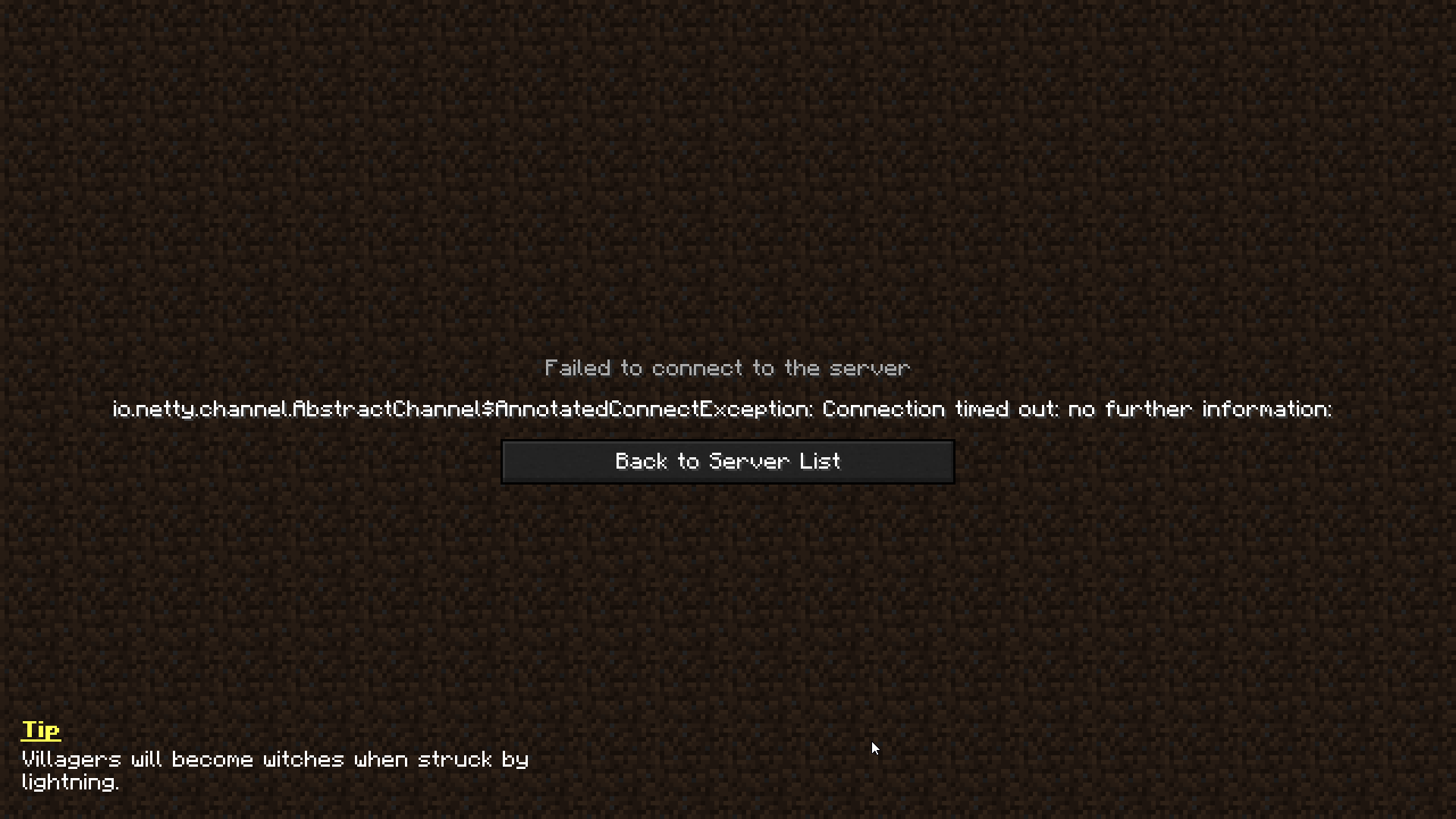
When I try to access multiplayer, this error message keeps showing up. Could someone please help me fix this?
 queen storm
Restart pc, try again
 soft path
I updated all of my WoW addons to work with Patch 9.1.0 yesterday, but some of them are still showing up incorrectly in my list on the CurseForge/Overwolf app.
This screenshot of my addon list for Retail shows what I mean. I updated this addon (DuelResponse) to v6.0.5 yesterday, but the app still shows v6.0.0 as being installed, and thinks that the latest version is v5.11.87-Retail. I've tried refreshing the list numerous times, but it still doesn't correct itself.
If I reinstall the addon via the app, it reverts to v5.11.87-Retail. If I update it manually by copy and pasting, it shows the correct version being installed, but still has the incorrect latest version and that the addon is 'out of date' and 'belongs to Classic TBC.'
Is this a bug, or am I missing something?
 strange kayak
queen storm
Restart pc, try again
strange kayak
queen storm
Restart pc, try again
still getting the same error :/
queen storm
strange kayak
still getting the same error :/
A certain modpack or always?
strange kayak
queen storm
A certain modpack or always?
any modpack and unmodded too
queen storm
Then it is for mojang, not something we can fix
strange kayak
ah okay, thank you
 median kestrel
i have problems with some mods, i delete them but it keeps crashing, in the log it says the mod its still there but i delete it from the mods folder
anyone knows solution?
and there isnt crash-log
the error that appears is error code 0
 soft thunder
hi I have a problem. When I start my modpack it crashes everytime. I have tryed to delete some mods but it still doesnt work and it says exit code 0 I dont know what I have to do ( also excuse my bad english)
 silent karma
soft thunder
hi I have a problem. When I start my modpack it crashes everytime. I have tryed ...
silent karma
soft thunder
hi I have a problem. When I start my modpack it crashes everytime. I have tryed ...
Send crash log pls
 timid gust
?mc-installmod
red patioBOT
How to install mods in CurseForge App.
- Click
+ Create Custom Profile - Name it, select the required Minecraft version, select the Forge version (usually the highest number), click
Create. - Click the profile icon.
- Click
Add New Content - Search and install the desired mods.
- Start the game!
How to install mods not on CurseForge.
- Right click the profile picture or Open the profile and click the Icon next to the play button.
- Click
Open Folder. - Drag the mod(s) into the
modsfolder. (Note: Some mods will require others, to run. Make sure to read the instructions for the mod!) - Start the game!
silent karma
soft thunder
hi I have a problem. When I start my modpack it crashes everytime. I have tryed ...
Fix minecolonies and make it compatible with structurize
I had that hassle once when i added minecolonies to my modpack
soft thunder
silent karma
Fix minecolonies and make it compatible with structurize
ok thanks
 lament sierra
im getting exit code 0 when trying to run any modpack, if I move all the mods to my .minecraft folder it runs, just not with curseforge
silent karma
lament sierra
im getting exit code 0 when trying to run any modpack, if I move all the mods to...
What do you mean
lament sierra
If I choose a modpack and run it from curseforge, I get error code 0
 silent karma
lament sierra
where do I find my crash log?
silent karma
lament sierra
where do I find my crash log?
Appdata - minecraft - crash logs
silent karma
lament sierra
Not the right one
lament sierra
im now getting this, not from curse forge but normal mc
Failed to download file.
Name: purr1.ogg
URL: https://resources.download.minecraft.net/0a/0acdc21b0f56dbe214ae2574d1f02a0ea2e99877
Error details: Send failure: Connection was reset
Filename on disk: 0acdc21b0f56dbe214ae2574d1f02a0ea2e99877
Path: C:\Users\Vrodie\AppData\Roaming.minecraft\assets\objects\0a\0acdc21b0f56dbe214ae2574d1f02a0ea2e99877
Exists: Nonexistent
bruh, soooo many problems 😭
lament sierra
silent karma
Appdata - minecraft - crash logs
cant find that folder in .minecraft
silent karma
lament sierra
cant find that folder in .minecraft
Screenshot your .minecraft folder pls
lament sierra

 unkempt stratus
shouldn't it be in the curse forge - minecraft - instances - <modpack name> - crash logs?
lament sierra
was gonna look there, im an idiot, I changed my directory on cursefore, my modding folder so I cant find it
red patioBOT
Where to find the log on the CurseForge Client.
Right-click the modpack profile icon OR click the button in the modpack profile.
Click Open Folder.
Open the logs folder.
Find the file called latest.log and drag it into discord.
 verbal stirrup
heyah... if big mods are lagging... can i do something about that? more RAM?
 charred panther
How can i autoupdate mods in my modpack?
queen storm
charred panther
How can i autoupdate mods in my modpack?
Update them, export
charred panther
queen storm
Update them, export
uhhhh, what?
do i have to manualy install new version of a mod?
queen storm
Is it your modpack?
charred panther
yes
verbal stirrup
if my MC lagging i need give more RAM?
queen storm
Then you can just edit the pack right?
queen storm
verbal stirrup
if my MC lagging i need give more RAM?
Or get a better pc
verbal stirrup
where i give more RAM to MC?
charred panther
queen storm
Then you can just edit the pack right?
yes, exactly
queen storm
verbal stirrup
where i give more RAM to MC?
!mc-ram
red patioBOT
How to set Global Minecraft RAM value.
- Click the icon in the bottom left to open settings.
- Click the Minecraft tab.
- Scroll down.
- Slide slider to recommended ram range as seen below.
 queen storm
charred panther
yes, exactly
queen storm
charred panther
yes, exactly
Then what are you asking if you can change everything?
charred panther
queen storm
Then what are you asking if you can change everything?
i just want to update every mod
queen storm
Then do so
charred panther
wheres the mighty button
verbal stirrup
thx
queen storm
charred panther
wheres the mighty button
Click the image of the modpack
charred panther
queen storm
Click the image of the modpack
yes, next step
is this the arrow down button?
okok i know
sorry for wasting your time
 hybrid oasis
Hi, i have been waiting for my mod to come out of New since the 19th of last month, should I create a support ticket????
queen storm
hybrid oasis
Hi, i have been waiting for my mod to come out of New since the 19th of last mon...
Link please
queen storm
Did you upload a file?
 queen storm
Was the file approved?
hybrid oasis
I firstly uploaded a file in the 19th and then 5 days later the file was not there and I tought it were a bug so I let it be, now I just re-uploaded a file and it's under review
queen storm
Then wait for that file
 next scaffold
i cannot seem to play with my friend on LAN modded, when i give her my ip4 to direct connect, it won't work, even with hamachi, any ideas?
i'd like some help on this one.
plain prism
they have to have the same version and the same mod, the server also has to be open
Some firewalls block it too
so I would check that
next scaffold
We have exact same mod, also same version, i also opened my server to LAN.
queen storm
!notcf
plain prism
It may be blocked by your anti virus
red patioBOT
The question you are asking about isn't related to CurseForge. Please use the appropriate game rooms by getting the role from #786424115535544350 or use #👽︱game-support for help.
This room is only for CurseForge Owned & Maintained features/services.
next scaffold
oh sorry
 vivid owl
how do i share my mod with friends
 fervent tree
Curseforge is jut the normal forge right?
queen storm
vivid owl
how do i share my mod with friends
Mod or modpack?
vivid owl
queen storm
Mod or modpack?
modpack
queen storm
fervent tree
Curseforge is jut the normal forge right?
!!=
red patioBOT
Wording is important!
Forge = Minecraft Forge, This is a modloader often just called "Forge".
Fabric = Fabric MC, this is another modloader, just called "Fabric".
CurseForge = A Website/App that has content for games.
Mods = Individual mod files.
Modpacks = Multiple mods put into the mods folder or downloaded from CurseForge.
These are not Interchangeable! Please use the correct terms as it allows us to help you faster!
queen storm
vivid owl
modpack
! mc-packshare
red patioBOT
There are two ways to share a modpack you've made with others...
Export and Share - For Friends to Small Groups.
- Click the Icon for the modpack.
- Click the button next to play.
- Click
Export. - Select the files that should be included.
- Send the zip to the people that want it! They can follow the instructions in
!mc-installpackto install the pack!
Upload to Curseforge - For Public Release to Everyone.
This options will make your pack public to EVERYONE, it comes with extra requirements and will take some effort to set up.
- Go to here: https://www.curseforge.com/project/432/4471/create
- Fill out the information with a proper description of the pack. This should allow anyone to understand what the pack is.
- Click the Icon for the modpack in the CurseForge app.
- Click the button next to play.
- Click
Export. - Select the files that should be included.
- Open your Project you made on the CurseForge site and Upload the file you just made.
- Wait for Moderation & Sync so it can show up in the client! (See
!syncfor limitations)
 fluid spindle
i got a probléme its the code 0 my game crash when i start it
queen storm
fluid spindle
i got a probléme its the code 0 my game crash when i start it
!mc-logs
red patioBOT
Where to find the log on the CurseForge Client.
Right-click the modpack profile icon OR click the button in the modpack profile.
Click Open Folder.
Open the logs folder.
Find the file called latest.log and drag it into discord.
fluid spindle
i can't accés to the folder
vivid owl
I did the mod thingy now it needs to be aproved or whatever
queen storm
vivid owl
I did the mod thingy now it needs to be aproved or whatever
Correct
vivid owl
how do i get approved
queen storm
Waiting
silent karma
What channels can you find people to collaborate with?
I know modelling, texturing, and am good with ideas, only thing is, i dont know how to code
fluid spindle
i can't accés to the folder
silent karma
fluid spindle
i can't accés to the folder
Bruh
Fr
There is definitely something wrong with ur pc then
silent karma
fluid spindle
why does staff do not help me
We are not responsible for your technical issues (if thats the case)
 lean glen
Hello
Im playing atm 3 and i get always exit code 0 but not on vanilla launcher only on curseforge. Can somebody help me
fluid spindle
i got the same probleme
 still warren
if i download the curseforge app and i get my mc mods through there do i still have to put them into the files etc or does it auto do it on the app
fluid spindle
auto on app
still warren
ah ok
thanks
if i download a pack like better minecraft am i also able to see all the mods it adds
ok so i downloaded better minecraft and its not added anything
fluid spindle
hello staff anser me
 pallid sun
Hey, I recently made a new profile on curseforge and made a new modpack. I put all my tested mods in the mods folder of the profile but only 5 mods are shown even though I have 47. What's wrong? Thanks
fluid spindle
staff
silent karma
Got skipped. Thanks
queen storm
fluid spindle
staff
We can't fix permission issues
queen storm
Get the logs
queen storm
Show screenshot
 crystal flare
I don't understand this crash, it has been a while since the server started with similar mods, but I made several changes and I can't find the error. The server is sponge, and the packmod works in the minecraft client.
Pastebin
Pastebin.com is the number one paste tool since 2002. Pastebin is a website where you can store text online for a set period of time.
queen storm
Try a forge server and continue the talk in #👽︱game-support
crystal flare
no sponge?
 narrow minnow
digital roost
help
narrow minnow
digital roost
help
please try to relaunch
 digital roost
wheres thay

 sharp quartz
Hey Help! I need continuum modpack 1.7.0 version but not have on curse. Curse have 1.6.0 versiyon. Please update 😇
fallen loom
Uhhhhh
 narrow minnow

Overwolf | Tech for developers who love gaming
Quickly download and install FTB modpacks with ease
fleet bear
stupid ftb and their dammed crap they leave here
pallid sun
I made new profile on curseforge and made a new modpack. I put all my mods in the mods folder of the profile but only a couple mods are shown even though I have 47. What's wrong? Thanks
queen storm
Install them using the app
pallid sun
hmm ok
sharp quartz
fallen loom
Uhhhhh
Thanks
 hybrid kiln
So i want to install this but i dont know how using the overwolf curseforge

and i noticed it did not come up in the overwolf modpack section
viral briar
!sync
red patioBOT
Sync and your Project.
CurseForge App and site do not share the same requirements! You can find things on the site but this does not mean it will be in the app!
For a mod to show up in the app:
- Projects MUST have a file marked as RELEASE or BETA
- Projects MUST be APPROVED
- Projects MUST have a file marked for the PROFILE VERSION USED
- Projects CAN'T be EXPERIMENTAL
- Projects CAN'T be ABANDON
Files can take a while to show up in the app. If your files still have not shown up either your project is new and you have yet to mark a file as Release/Beta or there is issues with the sync system making it slow.
Vote this issue up if you would like to know when the last sync was! https://curseforge-ideas.overwolf.com/ideas/CF-I-1617
viral briar
the fact it is classed as abandoned is why
 meager mist
Just install it manually
hybrid kiln
how?
meager mist
Download the file and add it to mods
viral briar
manual install and drag and drop into the instance's mod folder you use on curseforge app
 sleek inlet
I uploaded a additional file but now it cant be downloaded and i cant delete it
 quick blaze
hey i want to load a forge server so a mod server on a raspberry pi but cant get it to work please help
hybrid kiln
ok so i i dropped it in and it did not show up ant thoughts
queen storm
quick blaze
hey i want to load a forge server so a mod server on a raspberry pi but cant get...
!notcf
red patioBOT
The question you are asking about isn't related to CurseForge. Please use the appropriate game rooms by getting the role from #786424115535544350 or use #👽︱game-support for help.
This room is only for CurseForge Owned & Maintained features/services.
queen storm
hybrid kiln
ok so i i dropped it in and it did not show up ant thoughts
Show up where?
hybrid kiln
oh i figured it out
it was about how to get a custom mod on
the overwolf curseforge
queen storm
I followed the convo
sleek inlet
why i cant edit it?
 rich flint
sleek inlet
why i cant edit it?
rich flint
sleek inlet
why i cant edit it?
click the file name/link next to the green R
queen storm
Is it approved?
sleek inlet
yeah it should be
hybrid kiln
ok I dragged the mod into the mod file because it did not say install on the curseforge overwolf website and this came up about the mods after i tried starting the version up with the mods
 sleek inlet
i even cant download the additional files
rich flint
quick blaze
hey i want to load a forge server so a mod server on a raspberry pi but cant get...
get the MC role in #786424115535544350 and ask there, or you can DM me and i can help you get going if you want
rich flint
hybrid kiln
ok I dragged the mod into the mod file because it did not say install on the cur...
most of the time mods that don't show up on the app search are mods that are not compatible with that MC/loader version the modpack is for
sleek inlet
ok got it
 cerulean gust
I've been trying to import a modpack into the Forge launcher, but it doesn't seem to be working. The first version of the modpack has 24 loaded mods and works perfectly fine, but the new version has the lumberjack mod added and when I import the zip file nothing shows up. My friend has tried it and says it works fine, but it just doesn't seem to work for me. I've tried adding the mod to the first version of the modpack and imported that but still no dice, does anybody have any suggestions?
meager mist
Curseforge is not forge
bronze arrow
Hello i am having issues with accessing 'profile options' for a mod pack to change my forge version, every time i click it the application crashes, i have reinstalled curseforge twice and this is how its showing on my terminal
.
[EleriumApiImpl] Fetching /minecraft/modloader?includeAll=true ...
app_ver: 0.176.1.4
error_id: SomethingWrong
game_id: null
os_ver: macOS
02:10:21.521 › [AnalyticsService] Failed to send event - Error: getaddrinfo ENOTFOUND undefined
[AnalyticsService] Failed to send event - Error: getaddrinfo ENOTFOUND undefined
i know this might not be where i'm supposed to send this but this is where the support link directed me
meager mist
cerulean gust
I've been trying to import a modpack into the Forge launcher, but it doesn't see...
Are you installing the new version with the old one still there? It shouldn't cause any issues but if not maybe try that also make sure you're not mistakenly using the old zip
cerulean gust
I'm not, I got rid of the old zip file and the profile
And also, my bad if there was any confusion. I meant the CurseForge launcher.
rich flint
restarted your PC and start fresh?
cerulean gust
I just restarted, but still nothing
 dusk frigate
Does anyone know roughly how long a project sits in the awaiting moderation phase?
queen storm
dusk frigate
Does anyone know roughly how long a project sits in the awaiting moderation phas...
!status
red patioBOT
It is 08:09PM on Saturday for CurseForge my dudes.
Project Moderation Time
Project/File moderation is done on;
Sunday, Monday, Tuesday, Wednesday, Thursday: 10AM - 6PM GMT+2
Friday, Saturday: No Moderation!
This process is First in, First out. Thus files submitted late in the work day may not be checked until the next work day.
New Projects or uploads requiring manual approval: 1-3 Working Days
Updates to approved projects not needing manual approval: 1 Hour
File sync to the Curseforge app may take up to 24 hours after approval.
digital roost
queen storm
!status
Can you help me out with something.. shouldn't take that long.
queen storm
digital roost
Can you help me out with something.. shouldn't take that long.
Rule 10 and 5
digital roost
I mean you were away for like 10 seconds
that's why i pinged
Anyways, mind helping me or are you occupied
queen storm
Still rule 10
Can't help if I don't know the issue
And if I was there then there is still no reason to ping me
digital roost
i cant seem to run 1.16.5 curseforge on mac
when i open it
a message pops up with saying there is an error
queen storm
Screenshot please
red patioBOT
Where to find the log on the CurseForge Client.
Right-click the modpack profile icon OR click the button in the modpack profile.
Click Open Folder.
Open the logs folder.
Find the file called latest.log and drag it into discord.
charred panther
?mc-log
so my modpack crashes when i try to run it
with error code 0
i arleady repaired the instalation
pls help
queen storm
Remove sodium
rich flint
Sodium Reforged did just update (yesterday i think) to fix some forge compatibility issues fyi
dusk frigate
Is there anyway to speed up moderation on my mod pack at all so me and my kids+friends can start playing it together?
 dim zenith
dusk frigate
Is there anyway to speed up moderation on my mod pack at all so me and my kids+f...
dim zenith
dusk frigate
Is there anyway to speed up moderation on my mod pack at all so me and my kids+f...
when did u make ur modpack? im waiting on the same but i just submitted mine a day ago
viral briar
dusk frigate
Is there anyway to speed up moderation on my mod pack at all so me and my kids+f...
no.
rich flint
dusk frigate
Is there anyway to speed up moderation on my mod pack at all so me and my kids+f...
you can send them the export file manually if it's people you know...
viral briar
!mc-packshare
red patioBOT
There are two ways to share a modpack you've made with others...
Export and Share - For Friends to Small Groups.
- Click the Icon for the modpack.
- Click the button next to play.
- Click
Export. - Select the files that should be included.
- Send the zip to the people that want it! They can follow the instructions in
!mc-installpackto install the pack!
Upload to Curseforge - For Public Release to Everyone.
This options will make your pack public to EVERYONE, it comes with extra requirements and will take some effort to set up.
- Go to here: https://www.curseforge.com/project/432/4471/create
- Fill out the information with a proper description of the pack. This should allow anyone to understand what the pack is.
- Click the Icon for the modpack in the CurseForge app.
- Click the button next to play.
- Click
Export. - Select the files that should be included.
- Open your Project you made on the CurseForge site and Upload the file you just made.
- Wait for Moderation & Sync so it can show up in the client! (See
!syncfor limitations)
 tiny quest
how long does it take to this happen?
 queen storm
!status
red patioBOT
It is 09:57PM on Saturday for CurseForge my dudes.
Project Moderation Time
Project/File moderation is done on;
Sunday, Monday, Tuesday, Wednesday, Thursday: 10AM - 6PM GMT+2
Friday, Saturday: No Moderation!
This process is First in, First out. Thus files submitted late in the work day may not be checked until the next work day.
New Projects or uploads requiring manual approval: 1-3 Working Days
Updates to approved projects not needing manual approval: 1 Hour
File sync to the Curseforge app may take up to 24 hours after approval.
tiny quest
ty
dim zenith
thank u
 cunning nacelle
Hi,
I've got a serious problem, 2 months ago I tried to claim 5 PayPal $.
About 1 month later that I put my Paypal email I've received an email from a fake PayPal site and I immediately stopped. Now I checked the status of the reward and it says it was claimed successfully the same day I received the email. I didn't even read the email the same day !
Please reply.
Thanks
queen storm
cunning nacelle
Hi,
I've got a serious problem, 2 months ago I tried to claim 5 PayPal $.
About ...
! ticket-site
red patioBOT
:bug: Reporting via Website :bug:
Can't open the app or would rather use the website? You can do so here: https://support.curseforge.com/en/support/tickets/new
Fill out the form with accurate detailed information, "It doesn't work" isn't helpful! What exactly doesn't work and why doesn't it work should be easy to answer!
Make sure to upload your Overwolf logs with the Upload File option on the ticket, information on how to get these logs can be found here https://support.overwolf.com/en/support/solutions/articles/9000176827-how-to-get-your-overwolf-logs
queen storm
Different browser?
cunning nacelle
let me try
cunning nacelle
queen storm
Different browser?
thanks
 cunning nacelle
Hi,
I've got a serious problem, 2 months ago I tried to claim 5 PayPal $.
About ...
cunning nacelle
cunning nacelle
Hi,
I've got a serious problem, 2 months ago I tried to claim 5 PayPal $.
About ...
anyway, it's not admissible that curse forge sends scam paypal emails
queen storm
cunning nacelle
anyway, it's not admissible that curse forge sends scam paypal emails
Got proof that they did it? There is no reason for them to do that.
queen storm
Got proof that curse send it?
cunning nacelle
queen storm
Got proof that curse send it?
Overwolf ltd
queen storm
cunning nacelle
Overwolf ltd
Got proof?
cunning nacelle
wait
taking screenshot
bruh, I think I deleted it
but also it says it's claimed
and I don't claimed it
 queen storm
Then wait for the ticket
 rustic jewel
I have an instillation issue, is this where i can ask?
queen storm
Yes
rustic jewel
ok, whenever i try to download the curseforge application (windows). It downloads the installer for all about 2 min then gets deleted. trying to run the installer deletes it anyway.
 muted field
I'm trying to update CF but the "Restart CurseForge Button doesn't work.

Been clicking it yet nothing is happening.
queen storm
rustic jewel
ok, whenever i try to download the curseforge application (windows). It download...
!getcf Try this one
red patioBOT
Looking to install the CurseForge app?
<:windows:798410728188936222> Windows
Minimum Requirements:
- OS Version: 7, 8.1, 10
- 64 bit Required.
- 350MB storage space.
- Microsoft .Net 4.8
- Intel/AMD quad-core CPU
- 8GB ram
Download: https://download.overwolf.com/install/Download?&PartnerId=4047
If you are having issues with the installer use the URL below to install Overwolf then go to the app store to download CurseForge.
https://content.overwolf.com/downloads/setup/latest/regular.html
<:mac:798410654418862130> Mac
Minimum Requirements:
- OS Version 10.14 or newer.
- 64 bit Required.
Download: https://curseforge.overwolf.com/downloads/curseforge-latest.dmg
:penguin: Linux
Minimum Requirements:
Yes.
Download: :person_shrugging:
queen storm
muted field
I'm trying to update CF but the "Restart CurseForge Button doesn't work.
Close overwolf, start curseforge
muted field
Same issue
fleet bear
uninstall and reinstall
muted field
Does that Delete my Modpacks I have Installed?
fleet bear
no
muted field
Ok
fleet bear
all you lose is the settings for the app
muted field
Now I'm getting this. It's just saying Waiting but it's not changing
 rustic jewel
queen storm
!getcf Try this one
rustic jewel
queen storm
!getcf Try this one
i installed the overwolf app, but when i try to download the curseforge app from the appstore i get

my internet is fine btw
fleet bear
muted field
Now I'm getting this. It's just saying Waiting but it's not changing
Huh.
Try a computer restart and then install?
 fervent nebula
Does anyone know why my curseforge wont let me play minecraft 1.17?
viral briar
using curseforge app?
muted field
fleet bear
Huh.
Try a computer restart and then install?
Gives me this and when I click "Update" it checks are says it's Up to date
 fleet bear
🙄
fervent nebula
fervent nebula
Does anyone know why my curseforge wont let me play minecraft 1.17?
sorry if im in the wrong chat im new here but im using a pc
muted field
Weirdly enough, everything else is Installing like normal. It's just Curseforge that won't Reinstall or Update
viral briar
fervent nebula
sorry if im in the wrong chat im new here but im using a pc
are you using the curseforge app ? yes or no?
I ask this as forge and curseforge are different things
fervent nebula
viral briar
are you using the curseforge app ? yes or no?
I ask this as forge and curseforg...
i dont know i had to download it off the internet so i think its an app but it says curseforge beta at the top
viral briar
then yes that's the app if it says curseforge beta
forge mod loader 1.17 does not exist. yet
for 1.17 modding, only fabric mod loader has 1.17 version released
fervent nebula
thank you
fleet bear
muted field
Gives me this and when I click "Update" it checks are says it's Up to date
https://content.overwolf.com/downloads/setup/latest/regular_phased.html
download this, run it and restart overwolf
muted field
fleet bear
https://content.overwolf.com/downloads/setup/latest/regular_phased.html
download...
It worked, Thanks! 👍
fleet bear
Wolf did all the thinking, I just sent message
muted field
fleet bear
Wolf did all the thinking, I just sent message
The Message guides the Ship (Treasure Map in a Bottle Reference)
rustic jewel
thx for the help i found out it was because of SAntivirus that my installation wasn't working.
 delicate smelt
I just put the mod in my mods folder for the profile I made, and its not appearing under the "mods" category
Neither is resource packs or mod
Is there some way to refresh it or something? I restarted my curse forge, and its still not appearing.
(Speaking of minecraft)
Anyone?..
fleet bear
it doesn't show non-curseforge things or ones it can't identify
use the app to install things from curseforge
fleet bear
The curseforge app you are suing?
delicate smelt
fleet bear
The curseforge app you are suing?
Oh
So I can't use anything outside of it?
alright
fleet bear
that's not what I said at all
fallen loom
Minecraft will still detect it, you just can't use the app to manage it (install, uninstall, update, etc.)
dusk frigate
rich flint
you can send them the export file manually if it's people you know...
I have tried but my youngest has a MAC and i have no idea how to gtet the zip file to load onto the curse client
muted field
I have 32 gbs of Ram rn and want to allocate 16gb to MC. The Allocated Memory setting only goes up to 12gb, How do I change this?
fallen loom
dusk frigate
I have tried but my youngest has a MAC and i have no idea how to gtet the zip fi...
The OS should make no different in exporting or importing packs, the process is the same
fleet bear
dusk frigate
I have tried but my youngest has a MAC and i have no idea how to gtet the zip fi...
!mc-packshare
red patioBOT
There are two ways to share a modpack you've made with others...
Export and Share - For Friends to Small Groups.
- Click the Icon for the modpack.
- Click the button next to play.
- Click
Export. - Select the files that should be included.
- Send the zip to the people that want it! They can follow the instructions in
!mc-installpackto install the pack!
Upload to Curseforge - For Public Release to Everyone.
This options will make your pack public to EVERYONE, it comes with extra requirements and will take some effort to set up.
- Go to here: https://www.curseforge.com/project/432/4471/create
- Fill out the information with a proper description of the pack. This should allow anyone to understand what the pack is.
- Click the Icon for the modpack in the CurseForge app.
- Click the button next to play.
- Click
Export. - Select the files that should be included.
- Open your Project you made on the CurseForge site and Upload the file you just made.
- Wait for Moderation & Sync so it can show up in the client! (See
!syncfor limitations)
fleet bear
muted field
I have 32 gbs of Ram rn and want to allocate 16gb to MC. The Allocated Memory se...
You really shouldn't need 16 but you need to change the JVM argument every time you launch the profile in the MC launcher.
dusk frigate
fleet bear
!mc-packshare
I have done started the project but still have to wait for moderation i think
muted field
fleet bear
You really shouldn't need 16 but you need to change the JVM argument every time ...
Ok thanks
dusk frigate
fallen loom
The OS should make no different in exporting or importing packs, the process is ...
When they download the ZIP File and try to import it to curse though it doesn't allow for the whole zip to be chosen only certain elements within the zip
fallen loom
That doesn't sound right
dusk frigate
fallen loom
That doesn't sound right
That's what i thought xD
fallen loom
That sounds like they're going through Export rather than Import
fleet bear
!mc-installpack
red patioBOT
How to install modpacks with the search features in app.
- Open the
Minecraftsection of the app. - Click the top search bar where it says
Search for modpacksOR Click theBrowse ModpacksTab. - Find the Modpack you want to install and click install on it.
- Wait for CurseForge app to download and unpack all the required files.
- Once finished, click
Play!
How to install modpacks from a Export. (Custom/Private/Site downloaded Modpack zip)
- Get CurseForge App if you don't have it, use
!downloadfor a link. - Get the exported modpack from CurseForge or someone else,
!mc-packshareexplains how to make them. - Open the
Minecraftsection of the app. - Click
Create Custom Profile - Click the
Importoption. - Find the file you just downloaded in step 2 and select it.
- CurseForge app will now attempt to download and unpack the modpack. If it fails, try steps 4-6 again.
- Once finished, click
Play!
fleet bear
So when you do step 5/6 it doesn't let you pick the zip downloaded?
dusk frigate
fleet bear
So when you do step 5/6 it doesn't let you pick the zip downloaded?
So it opens the file locator but the zip file is unselectable as a parent file or only lets up choose files within the zip file so like the manifest.json etc
fallen loom
Screenshot please
Now it sounds like the zip was extracted rather than importing it as downloaded
fleet bear
That's a mac setting problem, for whatever reason something makes some macs auto unzip the zip folders. You need to open the folder, select everything inside it and zip it again then import it.
fallen loom
Mac's actually do that on disk?
fleet bear
mhm
fallen loom
Eww
fleet bear
idk if its a specific setting or program but this isn't a new issue
dusk frigate
fallen loom
Screenshot please
Sure i will get a screenshot as soon as they get back with their laptop, i can't get the screenshots rn but i will try to rezip the files its been such a pain as he is the only mac we have but the most excited to play haha
I am good with PC but MAC makes me want to commit lmao
fleet bear
If i knew exactly what to change to stop it from auto unpacking the zip files, I would share it but I stay far away from anything Apple and I don't know of anyone that knows of this "feature"
dusk frigate
fleet bear
If i knew exactly what to change to stop it from auto unpacking the zip files, I...
Yeah I am the same, i try to keep those satan machines away from me but he loves it because child 😅
 indigo scroll
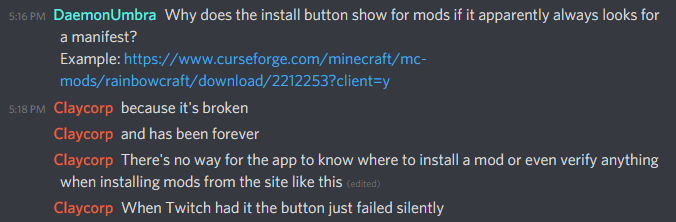
hello im looking for some help with a mod pack, my sister wants to play the "rainbowcraft" mod pack but when i try to download it im getting manifast file dose no exist how can i fix this?
fallen loom
That looks to be a single mod rather than a modpack
indigo scroll
okay but im still not able to download it as im getting this manifest error
how can i fix it
fallen loom
Screenshot please, mods don't have manifests afaik
fleet bear
!mc-installmods
red patioBOT
How to install mods in CurseForge App.
- Click
+ Create Custom Profile - Name it, select the required Minecraft version, select the Forge version (usually the highest number), click
Create. - Click the profile icon.
- Click
Add New Content - Search and install the desired mods.
- Start the game!
How to install mods not on CurseForge.
- Right click the profile picture or Open the profile and click the Icon next to the play button.
- Click
Open Folder. - Drag the mod(s) into the
modsfolder. (Note: Some mods will require others, to run. Make sure to read the instructions for the mod!) - Start the game!
indigo scroll
this is what im getting as im trying to install the mod from the curseforge site

https://www.curseforge.com/minecraft/mc-mods/rainbowcraft/files/2212253 this is the link im using to try and download it
fleet bear
Follow the instructions posted
fallen loom
Oh you're clicking the Curse download button
indigo scroll
@fleet bear clay thank you for the help but im aware of how to normally add mods im running into an error i havnt seen before which is why i came to the discord asking for help not basic info i can google for my self, thanks though
 fallen loom
The issue you're getting is because the button you're using on the site is apparently broken
indigo scroll
thank you @fallen loom its nice to have someone actually try to help and not just talk down to people cause they have a admin title.
dusk frigate
indigo scroll
thank you <@!107667673684377600> its nice to have someone actually try to help ...
You are aware they are both trying to assist you, you dont have to be so rude 😅
indigo scroll
one looked into the issue and one did a basic google search and talked down to me... maybe the admin should be less rude 🤣
fallen loom
!getcf
red patioBOT
Looking to install the CurseForge app?
<:windows:798410728188936222> Windows
Minimum Requirements:
- OS Version: 7, 8.1, 10
- 64 bit Required.
- 350MB storage space.
- Microsoft .Net 4.8
- Intel/AMD quad-core CPU
- 8GB ram
Download: https://download.overwolf.com/install/Download?&PartnerId=4047
If you are having issues with the installer use the URL below to install Overwolf then go to the app store to download CurseForge.
https://content.overwolf.com/downloads/setup/latest/regular.html
<:mac:798410654418862130> Mac
Minimum Requirements:
- OS Version 10.14 or newer.
- 64 bit Required.
Download: https://curseforge.overwolf.com/downloads/curseforge-latest.dmg
:penguin: Linux
Minimum Requirements:
Yes.
Download: :person_shrugging:
fleet bear
indigo scroll
one looked into the issue and one did a basic google search and talked down to m...
ah yes... looked into the issue...
 thick basin
i have curseforge
indigo scroll
someone seems salty im sure the big discord admin isnt used to being told how much of a cuck he is being hahahaha, oh and dont worry about using your admin shit to ban/ punish me im leaving lol you can pretend to be all powerful again but ill enjoy the fact that it was so easy to get under your skin and put you in your place 🙂
plain prism
thats just dumb, moderators have to be like that sometimes and the moderators here are actually very nice compared to others.
 lucid coral
!mc-packshare
red patioBOT
There are two ways to share a modpack you've made with others...
Export and Share - For Friends to Small Groups.
- Click the Icon for the modpack.
- Click the button next to play.
- Click
Export. - Select the files that should be included.
- Send the zip to the people that want it! They can follow the instructions in
!mc-installpackto install the pack!
Upload to Curseforge - For Public Release to Everyone.
This options will make your pack public to EVERYONE, it comes with extra requirements and will take some effort to set up.
- Go to here: https://www.curseforge.com/project/432/4471/create
- Fill out the information with a proper description of the pack. This should allow anyone to understand what the pack is.
- Click the Icon for the modpack in the CurseForge app.
- Click the button next to play.
- Click
Export. - Select the files that should be included.
- Open your Project you made on the CurseForge site and Upload the file you just made.
- Wait for Moderation & Sync so it can show up in the client! (See
!syncfor limitations)
 remote compass
 cold fiber
 ripe iron
I'm trying to run 'Better Minecraft [Forge]' v25.5.zip on a LAN server but we keep getting 'internal server error' with joining
any help?
 real cape
trying to run a bunch of mods in fabric, but getting this in the log: Could not find required mod: eggtab requires {fabric @ [*]}
eggtab is one of the mods
I'm using the latest of both minecraft and fabric
slim thunder
do you have fabric api
 nocturne fern
Why is curseforge like this?
 real cape
okay now I'm getting this: Could not find required mod: cardinal-components-base requires {minecraft @ [<1.17-]}
but I don't have a mod called cardinal-components-base?
fleet bear
nocturne fern
Why is curseforge like this?
No idea. Did you just install it?
nocturne fern
Yes
fleet bear
real cape
okay now I'm getting this: `Could not find required mod: cardinal-components-bas...
Ita telling you to install them.
real cape
oh... I guess so huh? 😅
fleet bear
nocturne fern
Yes
Does it run?
silent karma
plain prism
thats just dumb, moderators have to be like that sometimes and the moderators he...
Yep.
fleet bear
nocturne fern
Opens a ghost app
I'd say try installing it again. I've never seen that icon and dont use mac so I'm not much help here on this one.
nocturne fern
We've reinstalled it 3 times now
 nocturne marsh
If i am having issues loading up a certain modpack, do i ask about it here?
nocturne marsh
ok, thanks
nocturne fern
If it's a crash then go to #👽︱game-support
fleet bear
nocturne fern
We've reinstalled it 3 times now
Well sheit, uh. Not sure what to say.
silent karma
Not a mac user, so can't really help with that one.
nocturne marsh
nocturne fern
We've reinstalled it 3 times now
maybe update ur java (so it can open with java)
fallen loom
Curse shouldn't need Java...
real cape
okay now I'm getting Could not resolve mod collection including mandatory mod 'fabricloader'
far as I can tell there's no mod by that name?
fallen loom
!notcf
red patioBOT
The question you are asking about isn't related to CurseForge. Please use the appropriate game rooms by getting the role from #786424115535544350 or use #👽︱game-support for help.
This room is only for CurseForge Owned & Maintained features/services.
fleet bear
nocturne fern
We've reinstalled it 3 times now
I'll pass this off to the overwolf people to see if they can help you with it.
real cape
ah
fallen loom
There wasn't a recent MacOS update was there, Tyro?
red patioBOT
Looking to install the CurseForge app?
<:windows:798410728188936222> Windows
Minimum Requirements:
- OS Version: 7, 8.1, 10
- 64 bit Required.
- 350MB storage space.
- Microsoft .Net 4.8
- Intel/AMD quad-core CPU
- 8GB ram
Download: https://download.overwolf.com/install/Download?&PartnerId=4047
If you are having issues with the installer use the URL below to install Overwolf then go to the app store to download CurseForge.
https://content.overwolf.com/downloads/setup/latest/regular.html
<:mac:798410654418862130> Mac
Minimum Requirements:
- OS Version 10.14 or newer.
- 64 bit Required.
Download: https://curseforge.overwolf.com/downloads/curseforge-latest.dmg
:penguin: Linux
Minimum Requirements:
Yes.
Download: :person_shrugging:
fallen loom
Ah
fleet bear
Need 10.14
nocturne fern
Ah
fleet bear
Glad I updated that command now.
nocturne fern
Welp we can never run curseforge
fallen loom
Is your hardware incompatible with that MacOS version?
fleet bear
muted field
Where can I report CF bugs?
What issue?
muted field
fleet bear
What issue?
Got this weird bug where the Enable button is Clipping through the Filter bar
 fleet bear
Its known, they haven't gotten to it yet
muted field
Ah ok
 pine ridge
So look
I’m playing Minecraft with Boys right
Car mods on a city map
We chilling
We hear someone pulling up
It was too late
The block opps let off 5 shots
Hitting my homie in the chest
Killing him almost instantly
So we start running
fleet bear
This isnt a place to chat. If you dont have an issue to post with the curseforge platform you can just stop
 fleet bear
 jaunty compass
can anyone help me with this?
jaunty compass
can anyone help me with this?
looks like you are zoomed in or your resolution doesn't match the monitor.
jaunty compass
is there a way i can fix that?
 verbal harness
tryna launch "ATM6 To The Sky"(1.16.5) on minecraft and it didnt work so i had to manually put the files in the mods folder and then get the launcher for it to work. then i tried joining a server and it told me i couldnt join. i dont have this problem on fabric but with forge i do.
that must suck
seems like your troubles are worse than mine
damn
that must REALLY suck
fallen loom
Password reset on twitch isn't locked behind 2FA, is it? If it is that sucks
Specifically the phone number? You can't just tell them to email you a link?
fleet bear
I'll message Gil directly. Though, I'm not sure what they will do as it's really something you should be dealing with via Twtich as it's their account and auths.
fallen loom
I click on "Trouble Logging In" and it just asks me for email/phone and then my username... and I have 2FA active
Is it that you never linked an email to your twitch account or something?
https://www.twitch.tv/user/account-recovery is what I'm testing
It does pause for a bit with a "making sure you're not a bot" phase, so if that hangs I'd try on a clean browser without extensions
Oh, damn
fleet bear
Did you try this? https://support.authy.com/hc/en-us/articles/115012672088-Restoring-Authy-Access-on-a-New-Lost-or-Inaccessible-Phone#new_new

Authy
If your phone has been lost, stolen, or is inaccessible because it’s broken in some way, Authy has options for you to help restore access as quickly and securely as possible. These options will var...
fallen loom
Apparently her Authy has already been GDPR'd
Make sure the clocks are synced I guess, iirc that can affect things
fleet bear
The other option is anything on this page https://support.authy.com/hc/en-us/articles/360033906974-Twitch-Login-Issues#h_32d2d697-fa9f-4010-86d8-57694a99c766
Authy
Twitch Streamers and some viewers may not be able to successfully login to their Twitch account if they are unable to access the Authy two-factor authentication (2FA) code. While the Authy Support ...
Did you contact authy support saying the codes aren't working?
Well, that would be a wise thing to do.
Well if it's linked currently it should be working. I would say that's support ticket worthy.
fallen loom
Oh.... I just found some salt in the wound... apparently uo can add non-authy 2FA now
fleet bear
That's all they can do and that's all down to them + a per account deal. If you can't get useless Twitch to do anything and authy doesn't pull through on anything. They might do it but I'm going to Imagine it's a last resort deal.
 wind hatch
heya! wanna DM a bit? let's see what can be done
 fluid tangle
Hello! So I uploaded a Modpack to curseforge wich includes a datapack,resourcepack ect.
But is it correct the world doesn't start with the datapack? People have to drag it to the world folder after creating the world? 😀
fleet bear
yes or you need to use a mod that can load them from a "global" folder.
fluid tangle
Any suggestions?
 swift portal
How do I fix webclient error?
fleet bear
swift portal
How do I fix webclient error?
!webclient
red patioBOT
WebClient errors are from networking issues to your computer. You can try a few things to fix it:
- Restart the computer.
- Restart your router/modem.
- Try another internet source like a hotspot, wired connection or moving closer to the WiFi.
- Pause/Stop other things using the internet. (Streams, music, etc)
- If this still doesn't work, try again in an hour and hope your connection is stable.
 swift portal
Any ideas on this one?
 unborn basin
swift portal
unborn basin
swift portal
Looks like a bad connection, can you connect via ethernet cable or improve your connection?
 west grail
Hey guys, I got a problem with my CurseForge-app. In the settings "Run CurseForge on startup" is activated. But when i want to deactivate it, it says: "Failed to save settings, please try again". Does anybody know how to fix it or how to manually deactivate it via a settings.ini file or sth like that?
Tim
viral briar
Wouldn’t harm to restart pc and try it again
west grail
Yeah. Already tried that. Didn't help. ty anyways
unborn basin
west grail
Yeah. Already tried that. Didn't help. ty anyways
PMed you
soft path
soft path
I updated all of my WoW addons to work with Patch 9.1.0 yesterday, but some of t...
Still needing help with this, even if it is to tell me something obvious that I've clearly missed (because that's usually the case). 😂
meager mist
This is a warning, not an error, if it works you don't have any problem.
It says "might"
soft path
meager mist
This is a warning, not an error, if it works you don't have any problem.
- The client thinks an older version of the addon is installed (v6.0.0), and not the latest one (v6.0.5).
- The client also thinks that the latest version of the addon is a much older one, and not the one I'd uploaded the day before making that post.
- I never said the addon itself doesn't work; it's the client I'm making the report about.
heavy willow
soft path
1) The client thinks an older version of the addon is installed (v6.0.0), and no...
The "issue" is a result of the latest files being tagged for multiple game flavors; 5.11.87 was the last one exclusively tagged for retail, the newer ones aren't correctly associated to retail by the client due to problems with the server side client API
this has been a problem since classic release, so old stuff inherited from Twitch; it will be fixed at some point in the future but no ETA
soft path
Ah, okay. Thanks for that, and apologies if I came across as impatient or a bit of a jerk.
heavy willow
since you are the author, the current fix would be individual files for each flavor
nah, it's a valid (known) problem 🙂
cunning nacelle
!status
red patioBOT
It is 01:52PM on Sunday for CurseForge my dudes.
Project Moderation Time
Project/File moderation is done on;
Sunday, Monday, Tuesday, Wednesday, Thursday: 10AM - 6PM GMT+2
Friday, Saturday: No Moderation!
This process is First in, First out. Thus files submitted late in the work day may not be checked until the next work day.
New Projects or uploads requiring manual approval: 1-3 Working Days
Updates to approved projects not needing manual approval: 1 Hour
File sync to the Curseforge app may take up to 24 hours after approval.
 elder rune
this error coming when i trying to downland minecraft to curseforge,can anyone help
 queen storm
! mc-path
red patioBOT
**Minecraft Files should NOT be installed inside the following locations
.minecraft folder.
OneDrive folders.
Desktop folder.
Drive roots I.E. Directly into the C:\ drive.
iCloud enabled folders.
If any of the above are in the path you need to change/move it by following the instructions below!**
If Minecraft is not installed in CurseForge App, start here.
Click the in the top left.
Select Minecraft.
Click "Edit".
Move to the "Continue here:" section below.
If Minecraft is installed in CurseForge App, follow these steps.
Click the in the bottom left.
Select the Minecraft tab.
Click "Change".
Move to the "Continue here:" section below.
Continue here:
Make a folder in the root directory called CurseForge.
Select the folder you just made.
The text box should show something like the following:
For Windows: C:\CurseForge
For Mac: /Users/Shared/CurseForge
elder rune
thanks!
 visual plank
I can't open a minecraft modpack (Better Minecraft Modpack), after i decided to put optifine in it. During the loading screen at the end it says "freezing data". I then deleted optifine and its still saying the same thing. can someone help me thx. Before putting optifine everything worked fine.😀
 lyric crescent
did you try reinstalling that pack
 whole parcel
So, my modpack got rejected because it contains a mod that's from curseforge? Confusing Wait nevermind

 dense quail
I need help
How do I connect the curse gorge launcher with my normal Minecraft vanilla launcher
lyric crescent
press play on curse gorge
dense quail
No like how do I link it with the normal minecraft launcher files
lyric crescent
you dont
dense quail
Whyyyyyyy
lyric crescent
it makes it own files to modify
dense quail
😠
 tacit glacier
Eventhough this option has been set to Java 1.8.0.291 (in the curseforge>minecraft game specific options), Minecraft launched via Curseforge still uses the bundled Java version. How can I make it use my preferred Java version?
 swift portal
Any reason my mods I added that are suppose to be put in override, They arent creating the mods folder in override?
queen storm
How did you to install the mods?
swift portal
They are galacticcraft from official site (They are always approved)
never had issues before but now its not doing it
 copper sphinx
Why do not the page sync with the app?
swift portal
!sync
red patioBOT
Sync and your Project.
CurseForge App and site do not share the same requirements! You can find things on the site but this does not mean it will be in the app!
For a mod to show up in the app:
- Projects MUST have a file marked as RELEASE or BETA
- Projects MUST be APPROVED
- Projects MUST have a file marked for the PROFILE VERSION USED
- Projects CAN'T be EXPERIMENTAL
- Projects CAN'T be ABANDON
Files can take a while to show up in the app. If your files still have not shown up either your project is new and you have yet to mark a file as Release/Beta or there is issues with the sync system making it slow.
Vote this issue up if you would like to know when the last sync was! https://curseforge-ideas.overwolf.com/ideas/CF-I-1617
copper sphinx
My Modpack says its have been update but on the app its old and the new versions dont come
queen storm
copper sphinx
My Modpack says its have been update but on the app its old and the new versions...
Link it
copper sphinx
I deleted it and waiting but i tried with the other modpack to upload a file. And its approved but not on the app
queen storm
Yeah, it can take a couple hours
swift portal
So I created the mods override file and it works now, but why is it not creating its own?
viral briar
Takes a bit of time to sync to the app
queen storm
swift portal
So I created the mods override file and it works now, but why is it not creating...
Did you put it in the mods folder and export again?
swift portal
Yes its been in there since my first export
for some reason its not creating itself, I had to create it
Ive had these mods in since my first version of the pack but now they are refusing to connect to client
Thats why Im confused
digital roost
i need help. my file got rejected because the manifest.json file was missing. ive checked multiple times and the manifest file is there

 queen storm
digital roost
i need help. my file got rejected because the manifest.json file was missing. iv...
queen storm
digital roost
i need help. my file got rejected because the manifest.json file was missing. iv...
Open the zip, show screenshot, don't go into any folders
digital roost
 digital roost
So what do I do?
queen storm
Make a ticket or come back tomorrow
 raven copper
More of a general question: Could I basically "update" a pack (to a newer version of MC) that has been not updated for over 2 years and use a similar name (/put something like "reloaded" or "yet again" after the original title?) - The original pack has "All rights reserved" as licence, on the other hand the author hasn't been on the platform for almost half a year now. I would love to bring the pack back/modernise it as it has been fun playing it in the past.
Or could I get around the whole issue by just letting myself be inspired by the old pack and start from scratch?
 serene dust
i need help who i can start ftb invinity evolved skyblock because the outdate version of ex compressum doesnt load ???
the load stuck by ex compressum
 sullen trellis
so anyone know where the add content button is on a modpack?
red patioBOT
How to add/remove mods in a modpack.
- Click on the picture of the modpack.
- Click the

Add More Contentbutton, IF this button is not there, see below before continuing. - Find the Mods, Resource Packs or Maps you wish to Install and click
Installon them. - Wait for all the required mods to be downloaded.
- Start the modpack.
How to Enable/Disable content management for modpacks.
- Click on the picture of the modpack.
- Click on the button next to the
Playbutton. - Click on

Profile Options. - Check the
Allow content management for this profileoption if you want to edit the content of the modpack, uncheck it to disable.
NOTE: The Allow content management for this profile option is what allows you to Delete, Disable, Update or Install any Mods, Resource Packs or Maps managed by CurseForge. It must be on to modify any of them! (Currently)
queen storm
sullen trellis
so anyone know where the add content button is on a modpack?
!mc-editpack
 random lake
How can i make my screen stop from feezing every 3 seconds when ingame?
sullen trellis
queen storm
!mc-editpack
thank you 😄
sullen trellis
random lake
How can i make my screen stop from feezing every 3 seconds when ingame?
you can try and up your memory allocation (ram) on the bottom left or in the individual profile
random lake
How?
strong dirge
how long does it take rn for a custom modpack to be seen by moderator
queen storm
strong dirge
how long does it take rn for a custom modpack to be seen by moderator
!status
red patioBOT
It is 06:47PM on Sunday for CurseForge my dudes.
Project Moderation Time
Project/File moderation is done on;
Sunday, Monday, Tuesday, Wednesday, Thursday: 10AM - 6PM GMT+2
Friday, Saturday: No Moderation!
This process is First in, First out. Thus files submitted late in the work day may not be checked until the next work day.
New Projects or uploads requiring manual approval: 1-3 Working Days
Updates to approved projects not needing manual approval: 1 Hour
File sync to the Curseforge app may take up to 24 hours after approval.
How to set Global Minecraft RAM value.
- Click the icon in the bottom left to open settings.
- Click the Minecraft tab.
- Scroll down.
- Slide slider to recommended ram range as seen below.
queen storm
random lake
How?
!mc-ram
 patent lion
My curseforge is broken. IT lags so hard i cant boot any mod packs
and take like 2 mins to close
queen storm
Tried pc restart?
queen storm
!ticket-site
red patioBOT
:bug: Reporting via Website :bug:
Can't open the app or would rather use the website? You can do so here: https://support.curseforge.com/en/support/tickets/new
Fill out the form with accurate detailed information, "It doesn't work" isn't helpful! What exactly doesn't work and why doesn't it work should be easy to answer!
Make sure to upload your Overwolf logs with the Upload File option on the ticket, information on how to get these logs can be found here https://support.overwolf.com/en/support/solutions/articles/9000176827-how-to-get-your-overwolf-logs
swift portal
Yea I still need help, galactic craft isnt loading on pack and its not registering on curseforge and cf isnt making a mod folder at all, this is major issue because my pack requires it or it crashes
patent lion
Submitted
 neon jay
1.1 Forge doesn't work, when i try to launch it it says: The version manifest is corrupt.
Error details: Missing key 'classifiers' on libraries[*].downloads (should be object, required as there's a classifier) in library org.lwjgl.lwjgl:lwjgl-platform:2.9.0
queen storm
neon jay
1.1 Forge doesn't work, when i try to launch it it says: The version manifest is...
!notcf
red patioBOT
The question you are asking about isn't related to CurseForge. Please use the appropriate game rooms by getting the role from #786424115535544350 or use #👽︱game-support for help.
This room is only for CurseForge Owned & Maintained features/services.
 sturdy basin
is there any way I can make a forge modpack on forge 14.21.1.2443? I don't see an option before 14.23.0.2486
Also do I need to use a modpack as a launcher to play a modded server, or can I just use forge launcher?
queen storm
sturdy basin
is there any way I can make a forge modpack on forge 14.21.1.2443? I don't see a...
Isn't that an earlier minecraft version?
queen storm
sturdy basin
Also do I need to use a modpack as a launcher to play a modded server, or can I ...
Need to have the same mods and configs
sturdy basin
alr
queen storm
What was it?
 narrow star
Hello, download Better-CrewLink-Setup-2.7.2.zip on curseforge the 24th june and kaspersky detect trojan-spy.win32.keylogger.cbur in it. Don't know how to inform curseforge teams. Any help ?
queen storm
narrow star
Hello, download Better-CrewLink-Setup-2.7.2.zip on curseforge the 24th june and ...
Link the mod
queen storm
No, the original curseforge link
narrow star
ok this is my daughter who dowload the file. I try to find where the remove it.
queen storm
narrow star
ok this is my daughter who dowload the file. I try to find where the remove it.
How did you get that link then?
narrow star
Google downloaded page but she visited and download it on many web site !!
visual plank
how can i play a modpack with my friend
queen storm
narrow star
Google downloaded page but she visited and download it on many web site !!
There is only 1 site that has that url -.-
queen storm
visual plank
how can i play a modpack with my friend
Make a server
visual plank
ok
queen storm
Which does not go to media.forgecdn, was looking for this one: https://www.curseforge.com/among-us/all-mods/bettercrewlink-proximity-chat/files
queen storm
narrow star
https://github-releases.githubusercontent.com/319494022/bfe28d80-cf24-11eb-93e0-...
Download the latest version from releases and run the BetterCrewLink-Setup-X.X.X.exe file. you may get antivirus warnings, because this program hooks into the Among Us process to read game data.
 dusky condor
ok eso addons not showing in the addon part in the start menu of eso
queen storm
dusky condor
ok eso addons not showing in the addon part in the start menu of eso
Did you install them?
queen storm
dusky condor
i can see them on curse
Screenshot
dusky condor
 queen storm
dusky condor
queen storm
dusky condor
No idea on that one that, do they work when playing?
queen storm
dusky condor
no
Might want to see if you can contact one of the devs then
narrow star
queen storm
> Download the latest version from releases and run the BetterCrewLink-Setup-X.X...
Ok i will download yours an check if Kaspersky find Trojan in your files. If not, the version she download is a real virus, if so maybe wrong alert
queen storm
narrow star
Ok i will download yours an check if Kaspersky find Trojan in your files. If not...
Wrong alert, and that is the forgecdn link
 blissful herald
I am getting this error when uploading my modpack "FabricApi with no corresponding Minecraft version"
queen storm
blissful herald
I am getting this error when uploading my modpack "FabricApi with no correspondi...
Screenshot please
blissful herald
 queen storm
blissful herald
queen storm
blissful herald
Is fabricapi ever marked for 1.16.4?
queen storm
Yeah, and that is the issue
queen storm
Site doesn't care if it works or not
digital roost
why tf is it so high ...
 blissful herald
damn
queen storm
digital roost
why tf is it so high ...
!notcf
red patioBOT
The question you are asking about isn't related to CurseForge. Please use the appropriate game rooms by getting the role from #786424115535544350 or use #👽︱game-support for help.
This room is only for CurseForge Owned & Maintained features/services.
digital roost
this is curse forge ;/
queen storm
blissful herald
so I cant upload it?
Nope
queen storm
digital roost
this is curse forge ;/
That is a forge server
digital roost
yes
red patioBOT
Wording is important!
Forge = Minecraft Forge, This is a modloader often just called "Forge".
Fabric = Fabric MC, this is another modloader, just called "Fabric".
CurseForge = A Website/App that has content for games.
Mods = Individual mod files.
Modpacks = Multiple mods put into the mods folder or downloaded from CurseForge.
These are not Interchangeable! Please use the correct terms as it allows us to help you faster!
blissful herald
1.16.4 fabric api doesnt work
queen storm
blissful herald
1.16.4 fabric api doesnt work
Then tell the dev to fix the tag
blissful herald
alright
 robust junco
how do i craft suite ring
 queen storm
robust junco
how do i craft suite ring
queen storm
robust junco
how do i craft suite ring
!notcf
red patioBOT
The question you are asking about isn't related to CurseForge. Please use the appropriate game rooms by getting the role from #786424115535544350 or use #👽︱game-support for help.
This room is only for CurseForge Owned & Maintained features/services.
 silver sable
how would i fix webclient error
queen storm
!webclient
red patioBOT
WebClient errors are from networking issues to your computer. You can try a few things to fix it:
- Restart the computer.
- Restart your router/modem.
- Try another internet source like a hotspot, wired connection or moving closer to the WiFi.
- Pause/Stop other things using the internet. (Streams, music, etc)
- If this still doesn't work, try again in an hour and hope your connection is stable.
 real bobcat
I uploaded my mod to curseforge, it was approved but I cannot find it when I try to search for it
hybrid kiln
Is there any way i can manually update a mod for curseforge?
queen storm
hybrid kiln
Is there any way i can manually update a mod for curseforge?
Define manually
queen storm
real bobcat
I uploaded my mod to curseforge, it was approved but I cannot find it when I try...
!sync
red patioBOT
Sync and your Project.
CurseForge App and site do not share the same requirements! You can find things on the site but this does not mean it will be in the app!
For a mod to show up in the app:
- Projects MUST have a file marked as RELEASE or BETA
- Projects MUST be APPROVED
- Projects MUST have a file marked for the PROFILE VERSION USED
- Projects CAN'T be EXPERIMENTAL
- Projects CAN'T be ABANDON
Files can take a while to show up in the app. If your files still have not shown up either your project is new and you have yet to mark a file as Release/Beta or there is issues with the sync system making it slow.
Vote this issue up if you would like to know when the last sync was! https://curseforge-ideas.overwolf.com/ideas/CF-I-1617
hybrid kiln
queen storm
Define manually
Like how can i update it myself with out waiting for the developer
to update it
queen storm
Need to code it yourself
hybrid kiln
How would i do that?
queen storm
Do you know how to code?
queen storm
Then you should know how to do this.
Do make sure that the license allows it.
hybrid kiln
ok
 brisk current
Hi, so it seems that if i upload an image as the icon for a project, it gets added to the screenshots section of the Curseforge page on the Overwolf desktop client, and I cannot remove it. I had a friend try using the API to delete the image, but it would not give. Is there any way to remove things from this section, like old project icons?
 cunning kestrel
heyo not to be dumb but curseforge isnt able to locate a game that i wanted to mod, its just stardew valley. anything i might be missing?
digital roost
I cant run any forge servers anymore. It says a problem occured while running the launcher. Caused by java.langclasscast exception: class jdk.internal.loader something like that
cunning kestrel
cunning kestrel
heyo not to be dumb but curseforge isnt able to locate a game that i wanted to m...
got it nvm
queen storm
digital roost
I cant run any forge servers anymore. It says a problem occured while running th...
!notcf
red patioBOT
The question you are asking about isn't related to CurseForge. Please use the appropriate game rooms by getting the role from #786424115535544350 or use #👽︱game-support for help.
This room is only for CurseForge Owned & Maintained features/services.
digital roost
hey guys, So i downloaded a modpack called stoneblock and i started playing it in survival. But now i want a few guys to join my server so i moved it over to my hosting and whenever i try to move the files the world isnt in stone world and instead is a normal world
please help me
queen storm
They have a discord I believe
digital roost
who
queen storm
Stoneblock
digital roost
whats the discord
queen storm
Google it?
 stone sinew
Do someone know how to up ur ram use on the app
queen storm
!mc-ram
red patioBOT
How to set Global Minecraft RAM value.
- Click the icon in the bottom left to open settings.
- Click the Minecraft tab.
- Scroll down.
- Slide slider to recommended ram range as seen below.
stone sinew
Tyms
digital roost
everytime i export my modpack from the curseforge launcher the zip file only has a few mods.
Theres supposed to be about 70 and it only exports like 10
queen storm
Check the manifest.json, there are the others
digital roost
so even though the rest of the mods dont show, they are there?
queen storm
Curseforge just says that they are there, does not put them in the zip itself
digital roost
ty
sorry for bothering again, but do you know how much it takes for the modpack to show up in the website and in the launcher?
fleet bear
brisk current
Hi, so it seems that if i upload an image as the icon for a project, it gets add...
This was fixed some time ago, update the client.
queen storm
digital roost
sorry for bothering again, but do you know how much it takes for the modpack to ...
When approved and marked as release: 1-24 hours
brisk current
fleet bear
This was fixed some time ago, update the client.
My client is on v 0.176.1.4
fleet bear
Then apparently it wasnt fixed. I'll look into it deeper later.
brisk current
Alright, thank you
 fathom forum
why wont the curseforge app accept the minecraft file location
queen storm
! mc-path
red patioBOT
**Minecraft Files should NOT be installed inside the following locations
.minecraft folder.
OneDrive folders.
Desktop folder.
Drive roots I.E. Directly into the C:\ drive.
iCloud enabled folders.
If any of the above are in the path you need to change/move it by following the instructions below!**
If Minecraft is not installed in CurseForge App, start here.
Click the in the top left.
Select Minecraft.
Click "Edit".
Move to the "Continue here:" section below.
If Minecraft is installed in CurseForge App, follow these steps.
Click the in the bottom left.
Select the Minecraft tab.
Click "Change".
Move to the "Continue here:" section below.
Continue here:
Make a folder in the root directory called CurseForge.
Select the folder you just made.
The text box should show something like the following:
For Windows: C:\CurseForge
For Mac: /Users/Shared/CurseForge
fathom forum
ok thanks alot
 coral solstice
I need help.
I made a modpack for myself with 54 mods and i cant get it to work, whenever i try playing it, game crashes with Error 0 and i cant figure out what the problem is.
dense quail
AUGHH My forge/Minecraft launche keeps opening Minecraft for a split second then closes it, can anyone help me?
 main rover
Hi I'm new here. I need help with some mods on ksp
dense quail
Wdym
main rover
I've been trying to get the mods I've installed to work but only a few do. I've reinstalled them and even refreshed to make sure, but most of the mods are listed as modified as if they are corrupt
dense quail
Are they for the same version?
main rover
For most of them yes
dense quail
Then don’t use the ones that aren’t for the same version
Do they share similar or conflicting features?
main rover
It would be nice if they were all compatible or else why have them
main rover
dense quail
Do they share similar or conflicting features?
as in?
dense quail
Do they change the layout of things like menus
main rover
no
dense quail
Check each pack on its website and check it’s compatibility
main rover
ill try that. Thanks
coral solstice
Can you help me? @dense quail
I made a modpack for myself with 54 mods and i cant get it to work, whenever i try playing it, game crashes with Error 0 and i cant figure out what the problem is.
 worn marten
I have problems with kspie I have deleted all other mods but it still says it needs an update and it gives me the error I/O error occurred and the help page wasn’t very useful
dense quail
coral solstice
Can you help me? <@815217739731697695>
Try checking their compatibility


 rich flint
using the correct URL?
fleet bear
 mellow kestrel
just upload the image to the curseforge project and link it via that instead of using drive as the permissions will be annoying to deal with everytime
mellow kestrel
fleet bear
just upload the image to the curseforge project and link it via that instead of ...
how do i upload it
oh nvm
but how do i move the image to the descriptions
oh i can do it with img address
 frail trout
Hey, I saw my modpack wasn't approved on the name: Vanilla Wishes.
Can I make it something longer like...
Coco Dreams and Vanilla Wishes?
fleet bear
can't use vanilla in the name at all AFAIK
frail trout
What's AFAIK mean?
fleet bear
as far as I know
 cloud copper
hello
 supple mist
hi, sent an issue tracker on cf, but decided to ask here instead to see if I can get a faster response. I got a notification when I was trying to upload a serverpack for my modpack:
The following file versions have been removed from CurseForge:
mods/mostructures-forge-1.2.0-1.16.5.jar
However, this mod IS on curseforge's page, in fact, I downloaded this mod from the Overwolf Launcher: https://www.curseforge.com/minecraft/mc-mods/mo-structures-forge/files/3369347
Is it a bug? How can I fix this? I kinda need this mod in the pack.
cloud copper
can anyone help??
fleet bear
supple mist
hi, sent an issue tracker on cf, but decided to ask here instead to see if I can...
delete the mod and reinstall it, Likely was deleted and re-uploaded and the dev didn't change the version number.
supple mist
fleet bear
delete the mod and reinstall it, Likely was deleted and re-uploaded and the dev ...
Tried it, didn't work
cloud copper
hello??
fleet bear
supple mist
Tried it, didn't work
I doubt that you tried it and it didn't work as it would have worked if you did it.
 slender gale
Where Kidnap Mod in https://www.curseforge.com/minecraft/mc-mods?filter-sort=4
supple mist
fleet bear
I doubt that you tried it and it didn't work as it would have worked if you did ...
I tried it before you gave the suggestion, it was my initial thought before I spammed re-upload in cf
fleet bear
this isn't a search service
cloud copper
so i have bit problem with the installer of curesforge
fleet bear
supple mist
I tried it before you gave the suggestion, it was my initial thought before I sp...
Delete the file, install with the app.
look at the overrides file it makes. there shouldn't be a mods folder.
cloud copper
😠
slender gale
Why is it impossible to find the Kidnap mod
supple mist
fleet bear
Delete the file, install with the app.
i think I didn't make myself clear, it was a serverpack not being able to be processed, but the pack itself was approved
supple mist
cloud copper
😠
u should just ask the whole question if you want to get response promptly
fleet bear
cloud copper
😠
Mate, I don't care that you have a problem. I can't do anything if you don't say what the dam issue is. Continuing to get upset nobody is replying to your spam and continuing to spam will end up in you not getting any support at all
Especially while i'm trying to get someone else's issue taken care of.
cloud copper
so much getting help on here god fucking dannmit claycorp is a dushbag
slender gale
🤬
fleet bear
Well guess they don't want support
supple mist
Would it make a difference that I downloaded the file on cf's page instead? if so i'll try again
fleet bear
supple mist
Would it make a difference that I downloaded the file on cf's page instead? if s...
No. I said exactly what to do.
slender gale
🤬
supple mist
I literally moved the mods from the mods folder to the serverpack though, i don't understand how it can cause an issue if the pack itself was approved.
fleet bear
slender gale
Why is it impossible to find the Kidnap mod
This isn't a search service. Use google.
fleet bear
supple mist
I literally moved the mods from the mods folder to the serverpack though, i don'...
The error you posted has nothing to do with a server pack.
supple mist
It was the error for the server pack. I can send the entire error msg here.
The status of the file MnM_1.4.0_ADVENTURE_SERVERPACK (Mineshafts & Monsters) has been changed to Rejected
Notes:
The following file versions have been removed from CurseForge:
mods/mostructures-forge-1.2.0-1.16.5.jar
The pack itself:
The status of the file MnM_1.4.0 (Adventure) (Mineshafts & Monsters) has been changed to Approved
If you have any questions please contact our support team https://support.curseforge.com.