#🔥︱curseforge-support
1 messages · Page 492 of 1
 magic quiver
 lyric crescent
try wired, curseforge has issues with wifi connections
 halcyon crypt
It's a mod problem, I had it yesterday, they said they will fix it in the upcoming updates
halcyon crypt
but I myself keep getting this error when trying to open my custom profile
 magic quiver
so i dont mind rn
halcyon crypt
magic quiver
its working rn
oh, nice
lyric crescent
where did someone say it was a mod problem
halcyon crypt
lyric crescent
where did someone say it was a mod problem
why?
halcyon crypt
lyric crescent
where did someone say it was a mod problem
Sorry, maybe not a mod problem, but it's the problem with like CF I guess
 mild sundial
Ive ben having issues with the service as its uploading the same file even tho I made sure it ist the same it uploads the previous file and now i belive i have ben blocked from uploading new files :T
magic quiver
damn 😐
mild sundial
ikr
magic quiver
just get a wifi dongle all good lmao fixes everything
 vague thorn
when i download or try to download mods from forge it connectes to a web browser such as internet exploreer i cant download any of these files without it connectting to a web browseer
mild sundial
magic quiver
just get a wifi dongle all good lmao fixes everything
whats that??
magic quiver
usb that helps your computer connect to the wifi my computer runs off it lmao
so when i have internet problems i plug in 2
fixes everything
vague thorn
vague thorn
when i download or try to download mods from forge it connectes to a web browser...
 magic quiver
idk how to sort your problem but i hope it works out
lyric crescent
vague thorn
when i download or try to download mods from forge it connectes to a web browser...
!notcf
 red patioBOT
The question you are asking about isn't related to CurseForge. Please use the appropriate game rooms by getting the role from #786424115535544350 or use #👽︱game-support for help.
This room is only for CurseForge Owned & Maintained features/services.
lyric crescent
!!=
red patioBOT
Wording is important!
Forge = Minecraft Forge, This is a modloader often just called "Forge".
Fabric = Fabric MC, this is another modloader, just called "Fabric".
CurseForge = A Website/App that has content for games.
Mods = Individual mod files.
Modpacks = Multiple mods put into the mods folder or downloaded from CurseForge.
These are not Interchangeable! Please use the correct terms as it allows us to help you faster!
mild sundial
lyric crescent
!notcf
hey any idea whats wrong here?
sorry for the ping
but i cant upload my pack
it just uploaded twice
:T
now its Downloading outdated versions
god damn it
:T
it isnt even updating at this point
I have a server to reset :Y
CurseForge i swear to god we'v ben doing this for hours now this is a NEW FILE plese just let it go through ive ben doing this for hours and your system is just doing me over at this point
 tidal pulsar
Uhhh
So everytime i try to play a modpack that i made the game just close and this appear
 mild sundial
tidal pulsar
So everytime i try to play a modpack that i made the game just close and this ap...
mild sundial
tidal pulsar
So everytime i try to play a modpack that i made the game just close and this ap...
just a mod error
check for mods you dont know or not sure work
mild sundial
then turn it off and check
trust me its easier than my issue
no ones even paying me attention
tidal pulsar
ok man thanks
 violet anchor
I'm trying to import a modpack that I can only get from the curseforge website and its not importing. when I select the zip and press open it just closes and does nothing.
 pine edge
?mc-installfix
red patioBOT
- Click on the Minecraft Tab on the Left side of the App.
- Click
 button next to the
 Create Custom Profileoption. - Click

Repair Installationoption. - Play game.
NOTE: You will not lose any modpacks or worlds, These are saved in the Instances folder. DO NOT TOUCH THIS FOLDER OR YOU WILL LOSE EVERYTHING
pine edge
@violet anchor Try this.
violet anchor
k
pine edge
Hi guys, yesterday I uploaded a file on my modpack page and it was rejected due to the following:
The following files do not appear to belong to any mods on the approved Non-CurseForge list:
overrides / mods / [1.12.2] KingdomsCraftMod-Beta-0.2.jar
I would like to know how to upload mods that are not in curseforge, since in this particular case the mod was developed by me.
violet anchor
does it automaticly appear or do i need to reopen the app?
lyric crescent
pine edge
Hi guys, yesterday I uploaded a file on my modpack page and it was rejected due ...
you either upload the mod to curseforge or get it on the 3rd party approval list.
?mc-3rdparty
red patioBOT
Minecraft Modpack 3rd party
Mods not on CurseForge must be on the 3rd-party list to be included in modpacks uploaded to CurseForge. If a mod is not on this list it can't be included in the export of a modpack and must be removed before uploading. If you upload with a mod that isn't on this list the file will be rejected.
List of approved 3rd party mods:
https://docs.google.com/spreadsheets/d/176Wv-PZUo9hFxy6oC6N8tWdquBLPRtSuLbNK-r0_byM
pine edge
lyric crescent
you either upload the mod to curseforge or get it on the 3rd party approval list...
Thanks!
pine edge
violet anchor
does it automaticly appear or do i need to reopen the app?
You can try restarting your pc.
violet anchor
i did it then reopened app now what do i do

 viral briar
!mc-path
red patioBOT
**Minecraft Files should NOT be installed inside the following locations
.minecraft folder.
OneDrive folders.
Desktop folder.
Drive roots I.E. Directly into the C:\ drive.
iCloud enabled folders.
If any of the above are in the path you need to change/move it by following the instructions below!**
If Minecraft is not installed in CurseForge App, start here.
Click the  in the top left.
Select Minecraft.
Click "Edit".
Move to the "Continue here:" section below.
If Minecraft is installed in CurseForge App, follow these steps.
Click the  in the bottom left.
Select the Minecraft tab.
Click "Change".
Move to the "Continue here:" section below.
Continue here:
Make a folder in the root directory called CurseForge.
Select the folder you just made.
The text box should show something like the following:
For Windows: C:\CurseForge
For Mac: /Users/Shared/CurseForge
 mild sundial
I love how im not getting support and its ben over 6 hours :D
 opal cipher
I can't see that you posted any potential error messages, maybe they're waiting for that.
Otherwise.
!ticket-site
red patioBOT
:bug: Reporting via Website :bug:
Can't open the app or would rather use the website? You can do so here: https://support.curseforge.com/en/support/tickets/new
Fill out the form with accurate detailed information, "It doesn't work" isn't helpful! What exactly doesn't work and why doesn't it work should be easy to answer!
Make sure to upload your Overwolf logs with the Upload File option on the ticket, information on how to get these logs can be found here https://support.overwolf.com/en/support/solutions/articles/9000176827-how-to-get-your-overwolf-logs
mild sundial
opal cipher
I can't see that you posted any potential error messages, maybe they're waiting ...
the error isnt from my side its from curseforge
opal cipher
mild sundial
the error isnt from my side its from curseforge
Yes, did you get an error message when you uploaded the pack/mod?
mild sundial
no
it uploads fine just like i said
just uploads the wrong file
I changed files made sure and still same error
lyric crescent
how can it upload the "wrong" file, that doesnt make sense
opal cipher
When you upload a file, you select the file, the website doesn't choose one for you
Do you have a link to your project?
opal cipher
Would you please paste the link to your modpack in this chatroom, so I don't have to search for it myself?
opal cipher
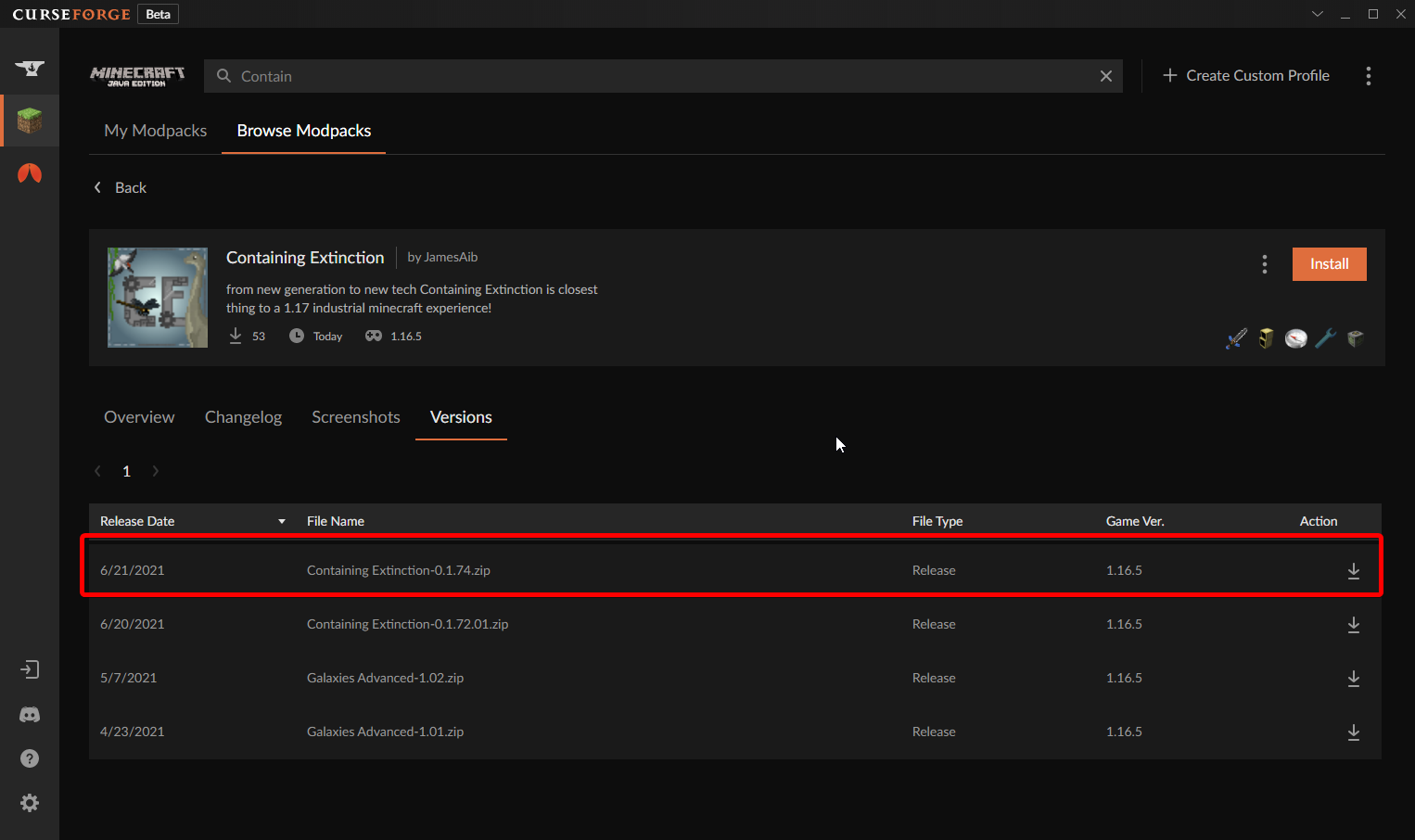
So, this is not the correct version? https://www.curseforge.com/minecraft/modpacks/containedextinction/files/3359943
0.1.76
red patioBOT
Sync and your Project.
CurseForge App and site do not share the same requirements! You can find things on the site but this does not mean it will be in the app!
For a mod to show up in the app:
- Projects MUST have a file marked as RELEASE or BETA
- Projects MUST be APPROVED
- Projects MUST have a file marked for the PROFILE VERSION USED
- Projects CAN'T be EXPERIMENTAL
- Projects CAN'T be ABANDON
Files can take a while to show up in the app. If your files still have not shown up either your project is new and you have yet to mark a file as Release/Beta or there is issues with the sync system making it slow.
Vote this issue up if you would like to know when the last sync was! https://curseforge-ideas.overwolf.com/ideas/CF-I-1617
pine edge
violet anchor
i did it then reopened app now what do i do
Install the app and see if it lets you import the modpack
opal cipher
So, version and everything looks fine, so probably just have to wait for it to sync.
mild sundial
opal cipher
Yeah, takes up to 24 hours for it to sync to the app.
- never happend before
- it updated frequintly
- it still dosent show on my end as approved
lyric crescent
wouldnt be here if it wasnt approved https://i.imgur.com/9uaFTqM.png
 mild sundial
dont even see it :T
 mild sundial
thats the version from 5 hrs ago
opal cipher
Right, I even forgot what version I said. xD
opal cipher
Yeah, probably need to wait for this new version to sync then.
And that can take up to 24 hours
Can go faster, can go slower.
opal cipher
Yeah, no clue. But I saw it in the files-tab
 fallow plover
I need help installing CursedForge... it either won't open, it (used to) open and tell me "error" after downloading 100%, or just remove itself off my download files after it finished downloading.
 fallow plover
I need help installing CursedForge... it either won't open, it (used to) open an...
fallow plover
fallow plover
I need help installing CursedForge... it either won't open, it (used to) open an...
Ok i figured it out myself
Thanks for the "help" guys :)
 subtle fox
guys, i need some help. forge does not let me install a mod because it tells me "the process cannot access the file, because it is in use by another process". what should I do ?
lyric crescent
in this order try:
close any minecraft applications
kill java in task manager
restart your pc
 peak abyss
Hey, I need some help with my Modpack. I've been trying to submit it 2 times, the 2 with the same problem: "Optifine is a mod which isn't featured on CurseForge, therefore we do not allow to include it (file wise) on projects.
To clarify, you can recommend users to install it (externally) when using your modpack / project." I clearly say in the Description of the Modpack that Optifine isn't installed and CAN be installed optionally, and in the zip there isn't any Optifine version or file... Here, a screenshot:
 lyric crescent
show the message
peak abyss
 lyric crescent
have you uploaded a new file without optifine?
peak abyss
Yep
lyric crescent
has it been approved?
lyric crescent
project wont be reviewed until the file gets reviewed
 red patioBOT
It is 07:45PM on Monday for CurseForge my dudes.
Project Moderation Time
Project/File moderation is done on;
Sunday, Monday, Tuesday, Wednesday, Thursday: 10AM - 6PM GMT+2
Friday, Saturday: No Moderation!
This process is First in, First out. Thus files submitted late in the work day may not be checked until the next work day.
New Projects or uploads requiring manual approval: 1-3 Working Days
Updates to approved projects not needing manual approval: 1 Hour
File sync to the Curseforge app may take up to 24 hours after approval.
opal cipher
mild sundial
1 download but it dont appear synced
Might have been downloaded from the website
peak abyss
lyric crescent
and today being monday means it's only been 2 working days
So what do I do? Do I resubmit it with the same zip file?
Idk what to do
lyric crescent
you wait
 queen storm
Broken how?
 ivory pike
when i open profile options it says something went wrong
queen storm
Try a pc restart
 mild sundial
opal cipher
Might have been downloaded from the website
mild sundial
opal cipher
Might have been downloaded from the website
Lets be honest do you use the website?
opal cipher
mild sundial
Lets be honest do you use the website?
I don't, but some people do. And since it was linked in here, maybe someone downloaded it.
ivory pike
can anyone help me
lyric crescent
?ticket-site
red patioBOT
:bug: Reporting via Website :bug:
Can't open the app or would rather use the website? You can do so here: https://support.curseforge.com/en/support/tickets/new
Fill out the form with accurate detailed information, "It doesn't work" isn't helpful! What exactly doesn't work and why doesn't it work should be easy to answer!
Make sure to upload your Overwolf logs with the Upload File option on the ticket, information on how to get these logs can be found here https://support.overwolf.com/en/support/solutions/articles/9000176827-how-to-get-your-overwolf-logs
mild sundial
It's on five now
 digital horizon
What? Im just install 1.17 fabric via curseforge
 left pawn
Im trying to release a modpack I made, And it says It got rejected since of Auto Ban. Can anyone help me fix this. I Can send the file to show it doesn't have any harm
 fallen loom
Can you provide the rejection message?
left pawn
sure\
The status of the file TNA1 (The Newlands) has been changed to Rejected
File is a duplicate of an existing file. AutoBanPlus on AutoBanPlus
If you have any questions please contact our support team https://support.curseforge.com.
fallen loom
Provide the zip please
left pawn
ok
lyric crescent
Something else is the problem, yea.
lyric crescent
you have optifine in the mods folder. Remove it. optifine cannot be included in modpacks.
fallen loom
!notcf
red patioBOT
The question you are asking about isn't related to CurseForge. Please use the appropriate game rooms by getting the role from #786424115535544350 or use #👽︱game-support for help.
This room is only for CurseForge Owned & Maintained features/services.
 digital roost
Alright
where do i find the launcher for minecraft if i installed it with this launcher?
 narrow minnow
Do you have the CurseForge app?
queen storm
digital roost
where do i find the launcher for minecraft if i installed it with this launcher?
Follow the rules, number 4
 supple lynx
how do i get my modloader to fabric and not forge versions
queen storm
supple lynx
how do i get my modloader to fabric and not forge versions
Make a new profile, select fabric?
supple lynx
so i just make a new pack and copy this pack that was apparently made wrong?
fallen loom
left pawn
how long does it take for a modpack to get approoves
!status
red patioBOT
It is 10:21PM on Monday for CurseForge my dudes.
Project Moderation Time
Project/File moderation is done on;
Sunday, Monday, Tuesday, Wednesday, Thursday: 10AM - 6PM GMT+2
Friday, Saturday: No Moderation!
This process is First in, First out. Thus files submitted late in the work day may not be checked until the next work day.
New Projects or uploads requiring manual approval: 1-3 Working Days
Updates to approved projects not needing manual approval: 1 Hour
File sync to the Curseforge app may take up to 24 hours after approval.

 fleet bear
!notcf
red patioBOT
The question you are asking about isn't related to CurseForge. Please use the appropriate game rooms by getting the role from #786424115535544350 or use #👽︱game-support for help.
This room is only for CurseForge Owned & Maintained features/services.


 fleet bear
look at your forge version
digital roost
fleet bear
look at your forge version
the server version mod version and my version are the same tho?
:C
fleet bear
I can't see the forge option in the list
digital roost
its an aternos server nd' its using forge

i downloaded my mods via CurseForge and so did Aternos (?)
lyric crescent
what version of forge
fleet bear
whatever the case this doesn't have anything to do with CF anyway.
Use #👽︱game-support
digital roost
okay
digital roost
lyric crescent
what version of forge
1.7.10
lyric crescent
that is a version of minecraft, not forge
digital roost
lyric crescent
that is a version of minecraft, not forge
how do i check my CurseForge version?
lyric crescent
!!=
red patioBOT
Wording is important!
Forge = Minecraft Forge, This is a modloader often just called "Forge".
Fabric = Fabric MC, this is another modloader, just called "Fabric".
CurseForge = A Website/App that has content for games.
Mods = Individual mod files.
Modpacks = Multiple mods put into the mods folder or downloaded from CurseForge.
These are not Interchangeable! Please use the correct terms as it allows us to help you faster!
digital roost
o
lyric crescent
as clay said, your issue isnt relevent to curseforge
digital roost
i thought curseforge is forge
fleet bear
Read above.
digital roost
where do i ask then
lyric crescent
digital roost
oh okay
i have another question
how do i put my modpack public for my friends to get?
red patioBOT
There are two ways to share a modpack you've made with others...
Export and Share - For Friends to Small Groups.
- Click the Icon for the modpack.
- Click the button next to play.
- Click

Export. - Select the files that should be included.
- Send the zip to the people that want it! They can follow the instructions in
!mc-installpackto install the pack!
Upload to Curseforge - For Public Release to Everyone.
This options will make your pack public to EVERYONE, it comes with extra requirements and will take some effort to set up.
- Go to here: https://www.curseforge.com/project/432/4471/create
- Fill out the information with a proper description of the pack. This should allow anyone to understand what the pack is.
- Click the Icon for the modpack in the CurseForge app.
- Click the button next to play.
- Click
Export. - Select the files that should be included.
- Open your Project you made on the CurseForge site and Upload the file you just made.
- Wait for Moderation & Sync so it can show up in the client! (See
!syncfor limitations)
digital roost
!sync
red patioBOT
Sync and your Project.
CurseForge App and site do not share the same requirements! You can find things on the site but this does not mean it will be in the app!
For a mod to show up in the app:
- Projects MUST have a file marked as RELEASE or BETA
- Projects MUST be APPROVED
- Projects MUST have a file marked for the PROFILE VERSION USED
- Projects CAN'T be EXPERIMENTAL
- Projects CAN'T be ABANDON
Files can take a while to show up in the app. If your files still have not shown up either your project is new and you have yet to mark a file as Release/Beta or there is issues with the sync system making it slow.
Vote this issue up if you would like to know when the last sync was! https://curseforge-ideas.overwolf.com/ideas/CF-I-1617
digital roost
o
 digital pivot
Hello
I have a question
I made a modpack today and was wondering when it will be looked at
lyric crescent
!status
red patioBOT
It is 11:38PM on Monday for CurseForge my dudes.
Project Moderation Time
Project/File moderation is done on;
Sunday, Monday, Tuesday, Wednesday, Thursday: 10AM - 6PM GMT+2
Friday, Saturday: No Moderation!
This process is First in, First out. Thus files submitted late in the work day may not be checked until the next work day.
New Projects or uploads requiring manual approval: 1-3 Working Days
Updates to approved projects not needing manual approval: 1 Hour
File sync to the Curseforge app may take up to 24 hours after approval.
digital pivot
Thanks
 celest turtle
Hey, so everytime I try to boot up a custom mod-pack (for minecraft) that I made it crashes, this wasn't happening before today and I didn't make any changes to it since the last time I played.
lyric crescent
?mc-log
red patioBOT
Where to find the log on the CurseForge Client.
Right-click the modpack profile icon OR click the button in the modpack profile.
Click 
Open Folder.
Open the logs folder.
Find the file called latest.log and drag it into discord.
celest turtle
lyric crescent
nope
lyric crescent
wrong log
 slim thunder
try without optifine
celest turtle
my game will be super laggy though
lyric crescent
crashing or laggy, what a choice
celest turtle
:/ ok then
slim thunder
these mods also improve performance https://gist.github.com/alkyaly/02830c560d15256855bc529e1e232e88

 silent raft
hey, im having an issue with curseforge overwolf; i am trying to pick the folder to install minecraft modpacks to since it says not installed, but even the suggested folder (Mods in .minecraft), the app says is invalid. is there a fix or is it something im doing wrong (im assuming its something im doing)? tried searching on their website and i cant find anything about it :")
red patioBOT
**Minecraft Files should NOT be installed inside the following locations
.minecraft folder.
OneDrive folders.
Desktop folder.
Drive roots I.E. Directly into the C:\ drive.
iCloud enabled folders.
If any of the above are in the path you need to change/move it by following the instructions below!**
If Minecraft is not installed in CurseForge App, start here.
Click the in the top left.
Select Minecraft.
Click "Edit".
Move to the "Continue here:" section below.
If Minecraft is installed in CurseForge App, follow these steps.
Click the in the bottom left.
Select the Minecraft tab.
Click "Change".
Move to the "Continue here:" section below.
Continue here:
Make a folder in the root directory called CurseForge.
Select the folder you just made.
The text box should show something like the following:
For Windows: C:\CurseForge
For Mac: /Users/Shared/CurseForge
silent raft
ah got it, thanks!
 shadow gale
so any clues to when the minecolonies / cf api issue is going to be resolved?
fleet bear
what..?
shadow gale
the api isn't giving people the most recent for about 4 days now
its multi-client so i assume its the api?
sorry, thought you guys knew.
digital roost
hi! i'm getting captchas security check maybe every 15 minutes when i refresh the pages, or just open a new, it's getting boring to access the site like this, I can do something to atleast decrease the amount of captchas? It's my IP? I don't know what's happening :x
shadow gale
sounds like a cookies issue with your browser
it could be a security program you are running which clears them every 15 minutes?
 upper hearth
is this the one where talking about older versions is a big nono?
fleet bear
digital roost
hi! i'm getting captchas security check maybe every 15 minutes when i refresh th...
Sounds like Cloudflair flagged you for whatever reason. Just got to deal with it till its gone.
shadow gale
or that. ouch.
fleet bear
shadow gale
sorry, thought you guys knew.
Yeah, don't assume we know about issues. People actually need to report them and if everyone assumes they where reported then nobody knows of it.
I see it's a day behind, Points is also behind thus the update scripts/whatever is broken. I'll mention it to them.
 zenith cove
I was wondering how long it takes for a new created mod pack to pop up on the curse forge launcher browsing mod packs section?
shadow gale
my last one was about half a day after approval
zenith cove
gotcha cool cool thank you ❤️
shadow gale
but queue problems pre-mentioned so maybe a bit longer this time?
fleet bear
zenith cove
I was wondering how long it takes for a new created mod pack to pop up on the cu...
!status
red patioBOT
It is 01:49AM on Tuesday for CurseForge my dudes.
Project Moderation Time
Project/File moderation is done on;
Sunday, Monday, Tuesday, Wednesday, Thursday: 10AM - 6PM GMT+2
Friday, Saturday: No Moderation!
This process is First in, First out. Thus files submitted late in the work day may not be checked until the next work day.
New Projects or uploads requiring manual approval: 1-3 Working Days
Updates to approved projects not needing manual approval: 1 Hour
File sync to the Curseforge app may take up to 24 hours after approval.
 wheat harbor
Hello, so yesterday I ran in to some issues when trying to play a modpack on minecraft, and it was fixed, but the same issue happened today. I receive this error screen after clicking "Play" on curseforge. It loads for a bit, and after awhile I get the "Java Platform SE binary is not responding" I've made sure I've allocated more than enough memory too. Any other helps/tips would be very appreciated. Thank you!! 🙂
 lyric crescent
how much ram is allocated? how much do you have?
wheat harbor
lyric crescent
how much ram is allocated? how much do you have?
I've allocated 10 080 MB and the Better Minecraft Mod says 7GB-10GB
 lyric crescent
how long have you waited for it to respond?
you dont need to ping reply
wheat harbor
Today I waited just under an hour
lyric crescent
restart your pc, start up the pack again. open task manager while it's loading and see if anything is going to 100%
wheat harbor
So when it first started loading the top that says "CPU" reached 100, but went right back down. The pack is now not responding and nothings has gone over 75.
lyric crescent
?mc-log
red patioBOT
Where to find the log on the CurseForge Client.
Right-click the modpack profile icon OR click the button in the modpack profile.
Click Open Folder.
Open the logs folder.
Find the file called latest.log and drag it into discord.
wheat harbor
Okay, so the game started running just now. Should I restart my PC when I want to run the game everytime??
lyric crescent
i dont see any break in loading here so dont really have anything to tell you
log shows it loaded in 6 minutes
wheat harbor
lyric crescent
i dont see any break in loading here so dont really have anything to tell you
Okay, well thank you for the help!! Yes, it did end up loading when I restarted my PC, so I'll maybe just make sure I restart it when I want to play, and hopefully that fixes the issue. Thank you so much 🙂
 signal ridge
Can download them off the site. But you would need a launcher that supports curseforge to use them from the site.
digital roost

why is it telling me that i have been warned when open my mods page?
it says it should expire on jan 21st 2021, its june 2021
wdym?
 mossy nimbus
wdym by that
digital roost
what did you do that made them disappear?
through the curseforge app?
it doesnt save worlds to the same spot as the official minecraft launcher
so it cant load official minecraft launcher saves
on its own
you open it??
 gaunt fossil
Hello, I need help with SunnArt in burning crusade... I can get it on game...doing /SA or ?sunnArt doesnr come up
/sunnart
digital roost
 steady orbit
How do you make a server with your own modpack?
steady orbit
How do you make a server with your own modpack?
youtube
 thick haven
when i download mods for minecraft it downloads it as a winrar file and ive extracted the files from the .rar file and put them into the mods folder but nothing is working
 royal sinew
Hello, whenever i launch a modpack, it crashes with exit code 1, how can i fix this?
 static verge
How do I increase my ram sent to the mod pack in curseforge?
signal ridge
static verge
How do I increase my ram sent to the mod pack in curseforge?
!mc-ram
red patioBOT
How to set Global Minecraft RAM value.
- Click the icon in the bottom left to open settings.
- Click the Minecraft tab.
- Scroll down.
- Slide slider to recommended ram range as seen below.
 static verge
signal ridge
!mc-ram
static verge
signal ridge
!mc-ram
Thanks!
 frigid moat
how do i find a image for the logo i have been trying for a while and i cant find a image
 steady maple
hey guys ! When i hit f3 on minecraft its telling me its going off my uhd instead of my gpu, does anyone know if theres a way to fix this? or would it be a modpack specific issue
 honest stump
now this has happened while loading a modpack
it crashed and this is the error
Error: cpw.mods.fml.common.LoaderException: java.lang.NoSuchMethodError: com.shinoow.abyssalcraft.client.model.entity.ModelJzahar: method <init>()V not found
fleet bear
digital roost
whats the message link?
digital roost
when i click it it says there was an error
fleet bear
digital roost
when i click it it says there was an error
can you post the error?
 gloomy yew
Any reason a modpack in beta shouldn't sync to the app after 2 days
fleet bear
yes, there's an issue currently that needs to be looked at
gloomy yew
What is the extent of the issue?
fleet bear
things not syncing
gloomy yew
oh, thanks
 oblique carbon
I wanna speak to the creator of botania
me and holmes needa speak for a few
if anyone knows him, send em my way
gloomy yew
im sure vaski is a busy guy
slim thunder
so why are you here and not their discord?
oblique carbon
I couldnt find it lol
slim thunder
it's literally on the mod page...
fleet bear
!notcf
red patioBOT
The question you are asking about isn't related to CurseForge. Please use the appropriate game rooms by getting the role from #786424115535544350 or use #👽︱game-support for help.
This room is only for CurseForge Owned & Maintained features/services.
oblique carbon
I want a botania 2
gloomy yew
this is cureforge support, not complain to mod creator
oblique carbon
lmao
honest stump
yo so like my game keeps crashing when loading a modpack on 1.7.10
this is the error
Error: cpw.mods.fml.common.LoaderException: java.lang.RuntimeException: Invalid id 10470 - maximum id range exceeded.
fallen loom
You've got too many mods
honest stump
100 isnt too many
fallen loom
Well they're registering too many items/blocks/whatever for the registry to handle
honest stump
aight ill remove some
i removed this one that has been causing problems and now this happened
Error: java.lang.RuntimeException: No more entity indicies left
fallen loom
Now it sounds like too many entities, so animals and mobs
honest stump
mk
digital roost
fleet bear
can you post the error?
 fleet bear
Thanks.
 tiny remnant
I need help! im trying to run a modpack and everytime it gets to 3/7 or 5/7 mods complete it crashes after not rresponding for abount 5 minutes can someone anyone hop in a call with me and help me fix it?
its for mc btw
@fleet bear
tiny remnant
wheres logs?
 austere wedge
?mc-logs
red patioBOT
Where to find the log on the CurseForge Client.
Right-click the modpack profile icon OR click the button in the modpack profile.
Click Open Folder.
Open the logs folder.
Find the file called latest.log and drag it into discord.
fleet bear
why are you mentioning me?
 full anvil
Basically I'm no longer able to log into a modded server I've been playing on, and when I do chunks are slow to load and me dying or tping results in a remote disconnect by host
fleet bear
!notcf
red patioBOT
The question you are asking about isn't related to CurseForge. Please use the appropriate game rooms by getting the role from #786424115535544350 or use #👽︱game-support for help.
This room is only for CurseForge Owned & Maintained features/services.
full anvil
Err.. sorry?
If you're talking to me I believe this is the right channel, I'm using curseforge to launch my modpack
If I'm wrong I'm genuinely sorry
fleet bear
CurseForge doesn't connect you to servers
full anvil
Yes, but the issue is with my mods
Or something, sorry, my knowledge with mods isn't very great. All I know is it worked and then didn't and I'm using Curseforge
 rich flint
Clay is saying use the minecraft help channels
full anvil
Ohh, my mistake. So sorry
 inland jasper
i tried putting files in a new project but they keep being deleted, uploaded an aether file and actually additions went poof
help?
on the browser app
fleet bear
There's no such thing as "the browser app"
queen storm
What kind of project?
inland jasper
nevermind
fleet bear
So the site? What are you trying to make with the site as the site doesn't make anything other than projects
inland jasper
i did the hard way
inland jasper
fleet bear
So the site? What are you trying to make with the site as the site doesn't make ...
a custom pack for meself
queen storm
inland jasper
a custom pack for meself
Use the app for that
inland jasper
seems like overwolf would be better
queen storm
Can't make it on the site
inland jasper
can i drag and drop all the files i got for 2 hour?
queen storm
!mc-installmods
red patioBOT
How to install mods in CurseForge App.
- Click
+ Create Custom Profile - Name it, select the required Minecraft version, select the Forge version (usually the highest number), click
Create. - Click the profile icon.
- Click
Add New Content - Search and install the desired mods.
- Start the game!
How to install mods not on CurseForge.
- Right click the profile picture or Open the profile and click the Icon next to the play button.
- Click
Open Folder. - Drag the mod(s) into the
modsfolder. (Note: Some mods will require others, to run. Make sure to read the instructions for the mod!) - Start the game!
 fleet bear
No. Don't drag and drop files
inland jasper
ok
wel
that was a fun 2 hours of finding correct mods
thanks
is there a way to copy files for mods to host a server with them?
or do i need to find them on curseforge again
fleet bear
just copy the mods folder...?
fleet bear
That has nothing do with curseforge though.
inland jasper
up making custom server
fleet bear
so if you want help with that use another room or do some research.
queen storm
Go to bed, come back after you had sleep.
inland jasper
fleet bear
That has nothing do with curseforge though.
i meant is there a file in overolf somewhere where i can copy the mods and put htem in server files
inland jasper
queen storm
Go to bed, come back after you had sleep.
nevr
fleet bear
Again, Curseforge has nothing to do with servers. Sure sounds like you don't know anything thus you should look into how to do it first.
 supple shale
I have a question. So uhh a friend of mine got his mod taken down for Code that is against the TOS. Would he be able to delete the Code and reupload it or is se unable to do such?
fleet bear
supple shale
I have a question. So uhh a friend of mine got his mod taken down for Code that ...
Depends on if they are banned or not.
There should have been information with the removal for whatever happened.
Also your friend should be the one asking for support.
fleet bear
well... if thousands of others can manage to not break the TOS.
supple shale
True
 indigo thistle
i just get a notification saying "curseforge has crashed" in the bottom left of my screen when i launch curseforge, any idea why this happenes? i have looked online for a while but havent found anything that fixes it
queen storm
Sending somebody your way
 unborn basin
indigo thistle
i just get a notification saying "curseforge has crashed" in the bottom left of ...
unborn basin
indigo thistle
i just get a notification saying "curseforge has crashed" in the bottom left of ...
Send me your overwolf logs please
red patioBOT
<:overwolf:798413750981492736> How to get Overwolf logs! <:overwolf:798413750981492736>
unborn basin
!owlogs
inland jasper
i made a custom profile, is htere a way to get that to my fren?
queen storm
inland jasper
i made a custom profile, is htere a way to get that to my fren?
!mc-packshare
red patioBOT
There are two ways to share a modpack you've made with others...
Export and Share - For Friends to Small Groups.
- Click the Icon for the modpack.
- Click the button next to play.
- Click
Export. - Select the files that should be included.
- Send the zip to the people that want it! They can follow the instructions in
!mc-installpackto install the pack!
Upload to Curseforge - For Public Release to Everyone.
This options will make your pack public to EVERYONE, it comes with extra requirements and will take some effort to set up.
- Go to here: https://www.curseforge.com/project/432/4471/create
- Fill out the information with a proper description of the pack. This should allow anyone to understand what the pack is.
- Click the Icon for the modpack in the CurseForge app.
- Click the button next to play.
- Click
Export. - Select the files that should be included.
- Open your Project you made on the CurseForge site and Upload the file you just made.
- Wait for Moderation & Sync so it can show up in the client! (See
!syncfor limitations)
inland jasper
thank
now i can finaly go rest
got everything server and pack set up, thanku evryoen
unborn basin
indigo thistle
"The process cannot access the file 'c:\\users\\47948\\curseforge\\minecraft\\instances\\meatbagcraft\\saves\\_d\\entities\\r.0.0.mca' because it is being used by another process.",
Is this a custom profile?
indigo thistle
yea
unborn basin
Restart your computer and try again
Also, did you delete your world?
Or anything of this sort?
indigo thistle
didnt work, should i try to delete some stuff?
digital roost
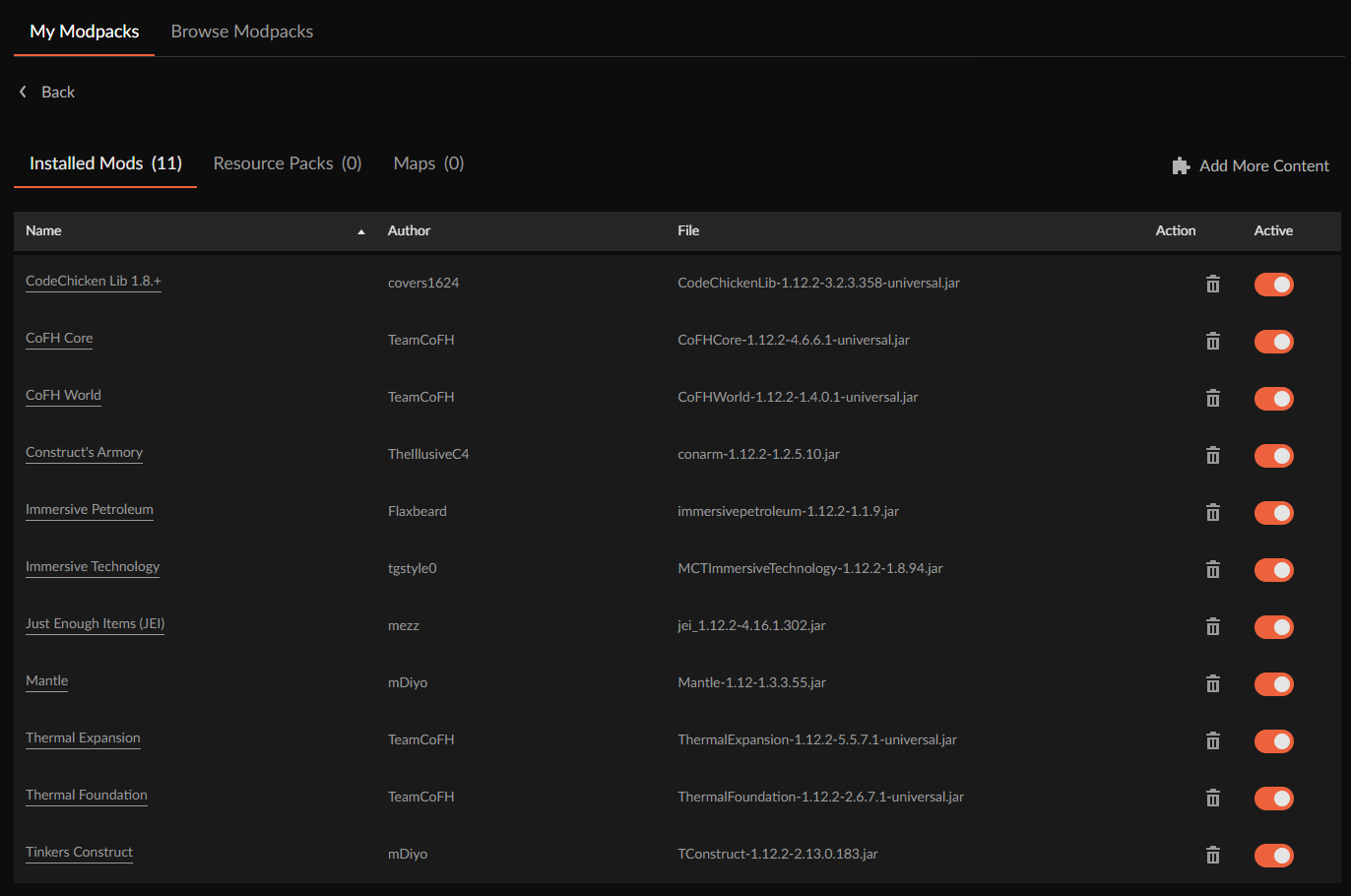
guys, curseforge team, please stop the stupid automatic removal of mods
like, I have a huge pack where I cannot afford random setbacks or mistakes and when I removed conarm's expansion mod, curseforge automatically removed 5 other mods, like ????
it removed IE, thermal expansion, the actual conarm mod, petroleum and immersivetech
digital roost
I'm also not the only one with this issue and my community found deleting mods straight from the folder to be safer
at least a prompt telling you "hey dumbo, I'll be deleting all these other mods, continue?"
viral briar
I’m assuming that some mods have shared “required dependencies” but it doesn’t recognise that and still removes it ?. Yes removing it from folder would be best if that is the case
digital roost
there's no such thing as required dependencies between mods like thermal expansion and immersive petroleum. It's probably some arbitrary piece of code that curse interprets as being a dependency. Thing is, forge already tells you if something can't be loaded cuz it needs something else.
and since when removing an expansion makes the core mod unusable?!
I'll be posting this issue on the tracker as well
viral briar
Well the core mod (con arm) is armoury expansions mods “required dependency”


 mint osprey
can i downloand just a single mod from forge app
queen storm
 wet mantle
Is the latest
queen storm
mint osprey
can i downloand just a single mod from forge app
!mc-installmods
red patioBOT
How to install mods in CurseForge App.
- Click
+ Create Custom Profile - Name it, select the required Minecraft version, select the Forge version (usually the highest number), click
Create. - Click the profile icon.
- Click
Add New Content - Search and install the desired mods.
- Start the game!
How to install mods not on CurseForge.
- Right click the profile picture or Open the profile and click the Icon next to the play button.
- Click
Open Folder. - Drag the mod(s) into the
modsfolder. (Note: Some mods will require others, to run. Make sure to read the instructions for the mod!) - Start the game!
mint osprey
thanks
wet mantle
queen storm
Is the latest
Was afraid of that. Well, ty for reply :)
 gilded grail
how do i send a custom modpack to a friend?
queen storm
!mc-packshare
red patioBOT
There are two ways to share a modpack you've made with others...
Export and Share - For Friends to Small Groups.
- Click the Icon for the modpack.
- Click the button next to play.
- Click
Export. - Select the files that should be included.
- Send the zip to the people that want it! They can follow the instructions in
!mc-installpackto install the pack!
Upload to Curseforge - For Public Release to Everyone.
This options will make your pack public to EVERYONE, it comes with extra requirements and will take some effort to set up.
- Go to here: https://www.curseforge.com/project/432/4471/create
- Fill out the information with a proper description of the pack. This should allow anyone to understand what the pack is.
- Click the Icon for the modpack in the CurseForge app.
- Click the button next to play.
- Click
Export. - Select the files that should be included.
- Open your Project you made on the CurseForge site and Upload the file you just made.
- Wait for Moderation & Sync so it can show up in the client! (See
!syncfor limitations)
gilded grail
!mc-installpack
red patioBOT
How to install modpacks with the search features in app.
- Open the

Minecraftsection of the app. - Click the top search bar where it says
Search for modpacksOR Click theBrowse ModpacksTab. - Find the Modpack you want to install and click install on it.
- Wait for CurseForge app to download and unpack all the required files.
- Once finished, click
Play!
How to install modpacks from a Export. (Custom/Private/Site downloaded Modpack zip)
- Get CurseForge App if you don't have it, use
!downloadfor a link. - Get the exported modpack from CurseForge or someone else,
!mc-packshareexplains how to make them. - Open the
Minecraftsection of the app. - Click

Create Custom Profile - Click the
Importoption. - Find the file you just downloaded in step 2 and select it.
- CurseForge app will now attempt to download and unpack the modpack. If it fails, try steps 4-6 again.
- Once finished, click
Play!
 lyric crescent
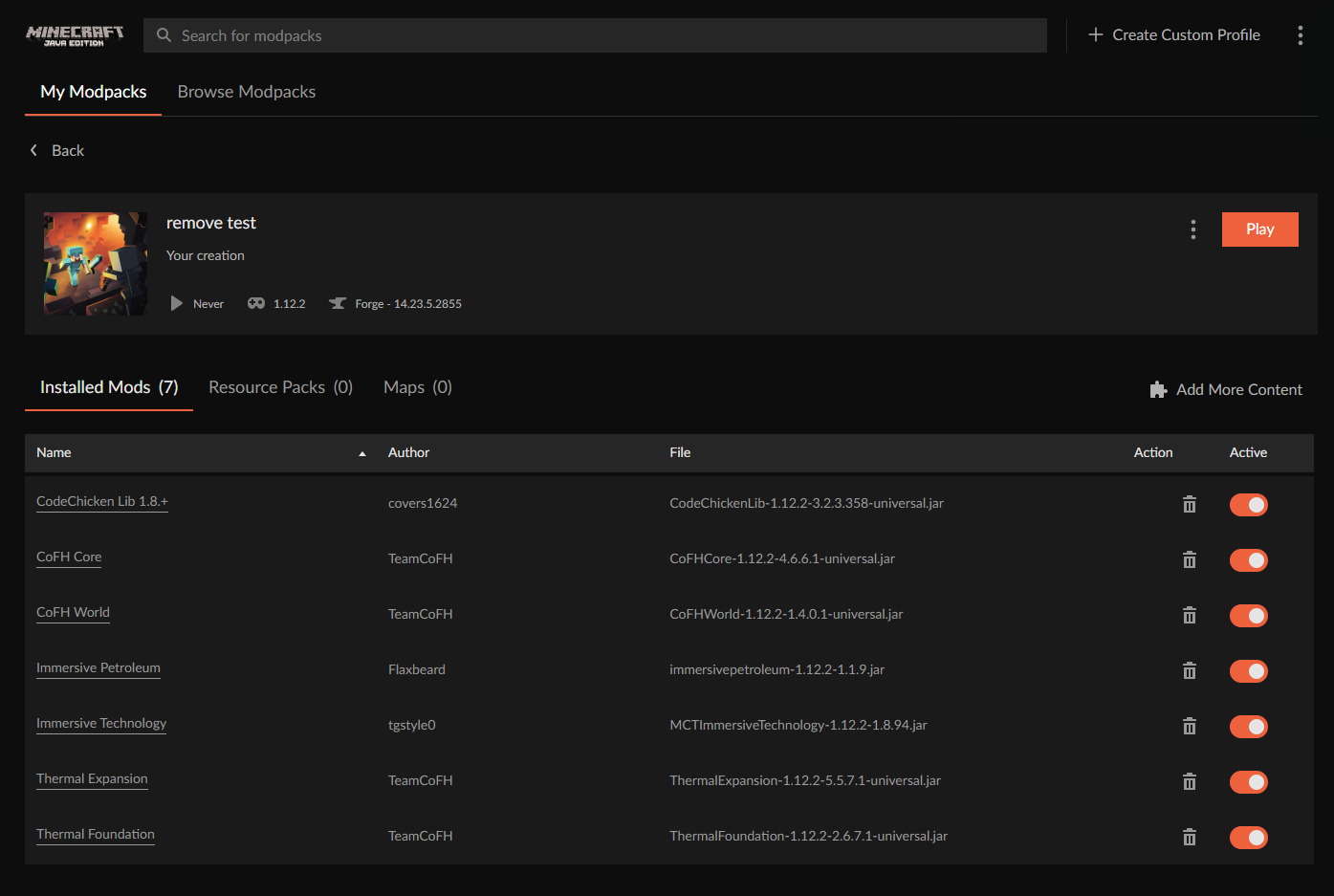
Removing construct armory test:
-Mods added: https://i.imgur.com/b6YQi8b.png
-Removed constructs armory
-Mods remaining: https://i.imgur.com/RZnsrRP.png
Mods erroneously removed: JEI, Mantle, Tinkers Construct
 digital roost
help, i cant download a modpack from the website, when i click install it takes me to the website and it says that my download will start right away, however nothing happens
queen storm
digital roost
help, i cant download a modpack from the website, when i click install it takes ...
Use the app instead
 bronze swan
Sorry for the ping. Those files I mentioned still aren't available. Strangely, though, today's update (.229), which was uploaded about ten minutes ago, is showing... Minecolonies (mod id 245506, in case that helps) v .224, .225, .226, .227 and .228 are the missing ones - in case someone wanted to look into it anyway.
queen storm
228 does have a load of downloads though
lyric crescent
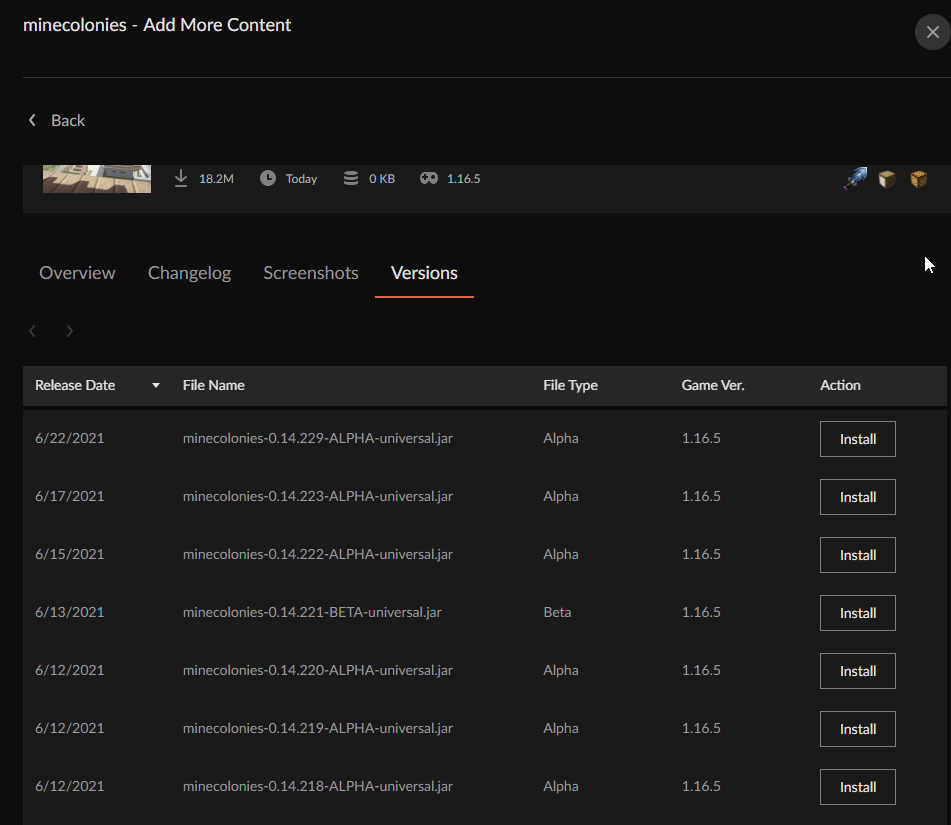
@narrow minnow seems some files from minecolonies got lost in sync issues from yesterday
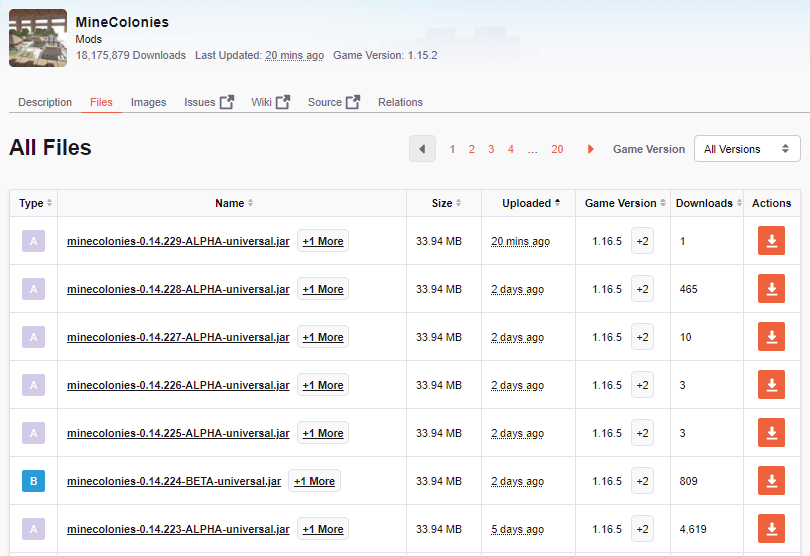 lyric crescent
bronze swan
Sorry for the ping. Those files I mentioned still aren't available. Strangely, t...
lyric crescent
bronze swan
Sorry for the ping. Those files I mentioned still aren't available. Strangely, t...
Should be fixed now.
 amber mauve
hello, how can i download mods from exported curseforge modpack for my app?
queen storm
!mc-installmods
red patioBOT
How to install mods in CurseForge App.
- Click
+ Create Custom Profile - Name it, select the required Minecraft version, select the Forge version (usually the highest number), click
Create. - Click the profile icon.
- Click
Add New Content - Search and install the desired mods.
- Start the game!
How to install mods not on CurseForge.
- Right click the profile picture or Open the profile and click the Icon next to the play button.
- Click
Open Folder. - Drag the mod(s) into the
modsfolder. (Note: Some mods will require others, to run. Make sure to read the instructions for the mod!) - Start the game!
amber mauve
No, you misunderstood me. I have a custom minecraft launcher like MultiMC and I want to add curseforge support to it. I found this but how can i install mods from project and file ids
 queen storm
We don't support that
lyric crescent
curseforge only works with the vanilla launcher
amber mauve
but multimc does
lyric crescent
then use that
amber mauve
MultiMC can automatically download mods from curseforge, why did you allow it?
lyric crescent
it's not "allowed", it simply can due to how the website works. support for that can be stopped at any point.
 gray imp
Hi there Please add the latest version of among us to the version selector.
queen storm
gray imp
Hi there Please add the latest version of among us to the version selector.
Will forward
 shrewd agate
help me i have a problem i dont understand why my modpacks in minecraft has not been accepted and what i need to do to fix it ? help me pls curseforge pros
 fading musk
how do i publish my modpack?
lyric crescent
shrewd agate
help me i have a problem i dont understand why my modpacks in minecraft has not ...
explain
lyric crescent
fading musk
how do i publish my modpack?
?mc-packshare
red patioBOT
There are two ways to share a modpack you've made with others...
Export and Share - For Friends to Small Groups.
- Click the Icon for the modpack.
- Click the button next to play.
- Click
Export. - Select the files that should be included.
- Send the zip to the people that want it! They can follow the instructions in
!mc-installpackto install the pack!
Upload to Curseforge - For Public Release to Everyone.
This options will make your pack public to EVERYONE, it comes with extra requirements and will take some effort to set up.
- Go to here: https://www.curseforge.com/project/432/4471/create
- Fill out the information with a proper description of the pack. This should allow anyone to understand what the pack is.
- Click the Icon for the modpack in the CurseForge app.
- Click the button next to play.
- Click
Export. - Select the files that should be included.
- Open your Project you made on the CurseForge site and Upload the file you just made.
- Wait for Moderation & Sync so it can show up in the client! (See
!syncfor limitations)
shrewd agate
lyric crescent
explain
wdym
lyric crescent
what the issue is
shrewd agate
the problem is idk what is the issue
lyric crescent
then how can we know? 🤔
shrewd agate
maybe with a screenshot of what it shows me
 candid hull
https://gyazo.com/4b4274f4b1f7fbe24e266d0e652773e7
Hi there, I'm getting this error when I'm trying to launch minecraft through curseforge. I'm using the modpack bettter minecraft but when clicking play nothing happens. It keeps saying 'I've already joined the game as this user'. Any help would be appreciated thanks 🙂
 opal cipher
Did it get rejected, or has it just not yet been approved?
 unborn sinew
what does this mean?
 lyric crescent
that you have a duplicate of a mod
shrewd agate
shrewd agate
maybe with a screenshot of what it shows me
yamza
lyric crescent
so send the screenshot?
unborn sinew
thanks


 lyric crescent
question is what did you do to make that
lyric crescent
so the zip just magicked into existance?
shrewd agate
wdym magicked ?
lyric crescent
how did you make the zip that you uploaded
shrewd agate
from cursefor i exported my custom profile with the mods etc...
i clicked at export button
lyric crescent
were you downloading mods from the website, or did you use the app to install them?
lyric crescent
it does, install all the mods using the app. remove the mods that the notification says to remove as well
shrewd agate
yeah but flans isnt on curseforge
i downloaded flans mod for the official flans thing does this also matters ??????
and computercraft from 9minecraft
lyric crescent
okay..
read the notification.
All the mods that the notification says are from curseforge you need to install with the app. the list is right there for you to read.
The ones that don't come from curseforge and are not mentioned in the notification are fine
The ones that dont come from curseforge and are in the notification need to be addressed as it says.
shrewd agate
thx
yamza now what do i do im done with re installing the mods in notifications thing
opal cipher
You export it again, and try to upload that one instead.
And also, remove Optifine.
It's not allowed in modpacks.
 junior hare
can someone help me
to install curseforge is giving connection error but I have internet
and I don't know what to do
lyric crescent
what is the error

 lyric crescent
describe your internet connection
junior hare
she is fine, 30 GB
shrewd agate
yamza how can i change my zip file to the new one with the re installed mods and i added some mods
oh wait i found it
viral briar
Using curseforge app would be the best way for you then
 void gazelle
ya thats what i was doing but i tried to install rlcraft and it stopped at 33% Unzipping the file
and googling it doesnt help because i dont understand what or how to do what they are saying
i have a little knowlegde of how the this works, im not dumb but not enough to help myself
queen storm
!getcf
red patioBOT
Looking to install the CurseForge app?
Todo: Place system requirements here.
<:windows:798410728188936222> Windows
<:mac:798410654418862130> Mac
Linux
:person_shrugging:
viral briar
Did it come up with an error or anything? or did you not give it a little bit of time to progress . Pixelmon modpack especially can take a bit of time which some people mistaken it for being “stuck”
void gazelle
the first time i gave it a little while but after that i just immediately canceled it
mild sundial
!status
lyric crescent
do commands in #🟢︱user-bot-spam please
void gazelle
OH?!
mild sundial
oh wrong channel
viral briar
👍🏻
void gazelle
sorry for the trouble
mild sundial
I missed it by 8 mins :">
viral briar
@void gazelle no trouble at all when you are new to it all
void gazelle
oh wait
and before i forget does the curseforge app have different mods than the website?
because i was looking for one called reqium that was only on the website version
viral briar
The app syncs mods from the website but there is certain requirements for mods to be displayed on the app
red patioBOT
How to install mods in CurseForge App.
- Click
+ Create Custom Profile - Name it, select the required Minecraft version, select the Forge version (usually the highest number), click
Create. - Click the profile icon.
- Click
Add New Content - Search and install the desired mods.
- Start the game!
How to install mods not on CurseForge.
- Right click the profile picture or Open the profile and click the Icon next to the play button.
- Click
Open Folder. - Drag the mod(s) into the
modsfolder. (Note: Some mods will require others, to run. Make sure to read the instructions for the mod!) - Start the game!
 split sky
yo so I wanted to install forge but when i downloaded the recent installer it downloaded a .jar file and idk what to do with it
lyric crescent
!notcf
red patioBOT
The question you are asking about isn't related to CurseForge. Please use the appropriate game rooms by getting the role from #786424115535544350 or use #👽︱game-support for help.
This room is only for CurseForge Owned & Maintained features/services.
lyric crescent
!!=
red patioBOT
Wording is important!
Forge = Minecraft Forge, This is a modloader often just called "Forge".
Fabric = Fabric MC, this is another modloader, just called "Fabric".
CurseForge = A Website/App that has content for games.
Mods = Individual mod files.
Modpacks = Multiple mods put into the mods folder or downloaded from CurseForge.
These are not Interchangeable! Please use the correct terms as it allows us to help you faster!
split sky
my bad
 vast sequoia
what does it mean when it says "failed to get mod loader from manifest"
lyric crescent
that you pressed install on the website for a mod, which doesnt work
use the app to download mods
vast sequoia
i did it on the app
lyric crescent
explain how you got that
vast sequoia
i just pressed install on the mod that i wanted and it says that
lyric crescent
how did you find the mod, which mod
vast sequoia
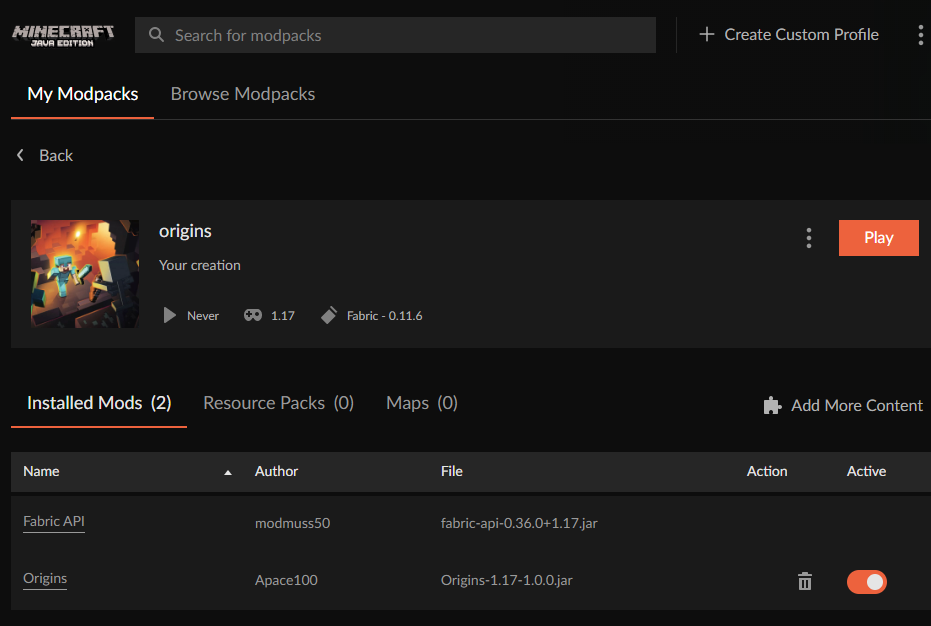
i searched the mod (origins mod for minecraft)
lyric crescent
searched how..
vast sequoia
it said search mod at the top
lyric crescent
so you made a profile?
vast sequoia
yes
lyric crescent
worked fine. need more details https://i.imgur.com/Us5uAh6.png
 vast sequoia
wait soory i didnt sign in
lyric crescent
sign in isnt required
queen storm
For Minecraft it does nothing at all last time I checked
lyric crescent
explain, in detail, what you are doing please
vast sequoia
i search the mod and then i click the install button and it says the error
lyric crescent
that's not detail...
 lyric crescent
?mc-installfix
red patioBOT
- Click on the Minecraft Tab on the Left side of the App.
- Click button next to the
Create Custom Profileoption. - Click
Repair Installationoption. - Play game.
NOTE: You will not lose any modpacks or worlds, These are saved in the Instances folder. DO NOT TOUCH THIS FOLDER OR YOU WILL LOSE EVERYTHING
lyric crescent
vast sequoia
nothing else
!ticket-app
red patioBOT
:bug: Reporting via the CurseForge App :bug:
-
Click the
 icon in the bottom left.
 -
Select

Open a Ticket. -
Fill out the form with accurate detailed information, "It doesn't work" isn't helpful! What exactly doesn't work and why doesn't it work should be easy to answer!
-
Make sure to upload your Overwolf logs with the
Upload Fileoption on the ticket, information on how to get these logs can be found here https://support.overwolf.com/en/support/solutions/articles/9000176827-how-to-get-your-overwolf-logs -
Submit!

 jaunty plaza
I've got a modpack that's been under review for a bit now, nearly 24 hours, is there a way to find out what is causing it to be hung up?
Please @ me with the response
lyric crescent
!status @jaunty plaza
red patioBOT
It is 06:42PM on Tuesday for CurseForge my dudes.
Project Moderation Time
Project/File moderation is done on;
Sunday, Monday, Tuesday, Wednesday, Thursday: 10AM - 6PM GMT+2
Friday, Saturday: No Moderation!
This process is First in, First out. Thus files submitted late in the work day may not be checked until the next work day.
New Projects or uploads requiring manual approval: 1-3 Working Days
Updates to approved projects not needing manual approval: 1 Hour
File sync to the Curseforge app may take up to 24 hours after approval.
jaunty plaza
Thank you Yamza, as always you are quick to the draw 🙂
lyric crescent
digital roost
It still doesn't work when I do this.
is there a log?
digital roost
reauth login also doesn't work when i open mc launcher through the modpack i installed. :[
lyric crescent
Invalid username or password.
digital roost
lyric crescent
`Invalid username or password.`
it's correct, i swear.
maybe it's cuz i use a microsoft acc?
lyric crescent
remove reauth, it doesnt work with microsoft accounts
digital roost
how do i remove it?
lyric crescent
go into the mods folder and hit delete
digital roost
i delete the modpack?
 half sundial
hey. could i be able to get some help?
red patioBOT
╰( ͡° ͜ʖ ͡° )つ──☆*:・゚ *˜”*°•.˜”*°• Many Help •°*”˜.•°*”˜* <:curselit:796985620550385705>
Please provide a description of your issue with as much detail as possible. If you have an issue with a mod or modpack, tell us the name. Explain what you can see happening. Be specific!
 Tell us what is happening, we already know it "doesn't work".
Avoid using words like "it", tell us exactly what "it" is.
Don't assume anyone knows what you are talking about, be specific.
Tell us what you expected to happen.
Provide screenshots or video if possible.
Provide a log if possible. ?mc-log
digital roost
lyric crescent
called reauth
this is what happens when i try to join the server.
 half sundial
when i load up kinda crazy craft it would load up but just before it'll hit the main menu it;ll crash with error 0
lyric crescent
digital roost
this is what happens when i try to join the server.
send your log in #👽︱game-support as this has nothing to do with curseforge
half sundial
ok
lyric crescent
half sundial
when i load up kinda crazy craft it would load up but just before it'll hit the ...
?mc-log
red patioBOT
Where to find the log on the CurseForge Client.
Right-click the modpack profile icon OR click the button in the modpack profile.
Click Open Folder.
Open the logs folder.
Find the file called latest.log and drag it into discord.
 dreamy oasis
hi do somoen know what dis mean its a o'clock already like this
 lyric crescent
means you're waiting for approval
dreamy oasis
is it normal that it is hour al?
lyric crescent
!status
red patioBOT
It is 07:11PM on Tuesday for CurseForge my dudes.
Project Moderation Time
Project/File moderation is done on;
Sunday, Monday, Tuesday, Wednesday, Thursday: 10AM - 6PM GMT+2
Friday, Saturday: No Moderation!
This process is First in, First out. Thus files submitted late in the work day may not be checked until the next work day.
New Projects or uploads requiring manual approval: 1-3 Working Days
Updates to approved projects not needing manual approval: 1 Hour
File sync to the Curseforge app may take up to 24 hours after approval.
digital roost
how long do i need to wait to get my pack approved ?
lyric crescent
3 messages up
digital roost
oh sorry

 wispy ivy
when I try to play skyfactory the error " CMD configuration may be causing issues" shows up. Anybody who knows how to fix this issue?
 misty ferry
i dont know how to help do u know how to with mine
lyric crescent
you on wifi?
misty ferry
yes
lyric crescent
try wired
lyric crescent
wifi =/= wired lol what
misty ferry
i have wired wifi
signal ridge
Huh?
lyric crescent
that literally does not make sense
misty ferry
idc
signal ridge
How does one make a wireless wire? That makes 0 sense
misty ferry
do u know how to help
lyric crescent
cant help if you cant even give basic info
wispy ivy
yamza, help a brother out over here
misty ferry
i load into cursed forge installer and boom
 red patioBOT
Hey there, it is Curseforge, not "Cursed forge"
lyric crescent
wispy ivy
yamza, help a brother out over here
i dont have an answer for your issue, which is why i did not reply
!ticket-app
red patioBOT
:bug: Reporting via the CurseForge App :bug:
-
Click the
icon in the bottom left. -
Select
Open a Ticket. -
Fill out the form with accurate detailed information, "It doesn't work" isn't helpful! What exactly doesn't work and why doesn't it work should be easy to answer!
-
Make sure to upload your Overwolf logs with the
Upload Fileoption on the ticket, information on how to get these logs can be found here https://support.overwolf.com/en/support/solutions/articles/9000176827-how-to-get-your-overwolf-logs -
Submit!
wispy ivy
damn, yamzas got an attitude
misty ferry
so am i the only one with this problem
lyric crescent
no, but the last person to have the problem also coincidentally couldnt answer basic questions
misty ferry
ok what questions
signal ridge
misty ferry
i load into cursed forge installer and boom
3 options. Can try pc and router/modem restart.
If your using wireless to connect to the internet try a wired connection to your router.
Or try again later when your internet is more stable
misty ferry
signal ridge
3 options. Can try pc and router/modem restart.
If your using wireless to conne...
i have restarted router i have got wired connection and my internet is satble for everything but this
signal ridge
Then something on your end is blocking the connection. Vpns and some virus blockers can also affect it.
signal ridge
Probably would need to disable it to see if it is the cause. Not sure what you have so you would have to google that
signal ridge
Arlind your joking right? Seriously?
wispy ivy
nah, some brothers need help
viral briar
Arlind . Patience
signal ridge
Funny thing, googled your issue. People saying you should do a virus scan. Issue is sometimes caused by a virus on your pc
wispy ivy
the man has spoken.
signal ridge
I just answered that actually.
Do a virus scan
Cmd issue do a virus scan.
Not sure how many times I will answer your issue. Can either try it or wait
wispy ivy
no viruses detected
is there a CMD file I have to delete in the instalation folder?
or perhaps download
signal ridge
Soo heres the deal, can either work through the issue and go step by step, or can just continue to call us useless and find help elsewhere? Up too you
misty ferry
red patio
im am confused of how to open a ticket i clicked on link and did what it said what do i do after that
signal ridge
. . . .
wispy ivy
nah dude. Your attitude is disgusting @digital roost
signal ridge
Enough
signal ridge
Doing my best to look at the issue, But I have to keep coming back to defuse issues
wispy ivy
thanks, appreciate it.
I had the forge app for quite some time now, maybe thats causing the issue?
lyric crescent
try the run vanilla option in the ... menu
wispy ivy
cannot seem to find that option in the menu
lyric crescent
 wispy ivy
I get the same error pop up there aswell
should I try uninstalling and reinstalling the app?
signal ridge
Upside tho is its not the app, downside is the fix is to put it nicely fun
wispy ivy
damn, that doesnt sound too good
lyric crescent
can you run vanilla normally, not though the cf app
wispy ivy
yes
misty ferry
hi i have had a look and turned of anti virus and stuff and tried agian it still isnt working
signal ridge
misty ferry
hi i have had a look and turned of anti virus and stuff and tried agian it still...
do you have anything else running on the computer (or on the network) that is using up the internet? Streams, music, etc
lyric crescent
wispy ivy
yes
can you open a command prompt window
winkey + r, cmd
misty ferry
yes
signal ridge
misty ferry
is there any other way to install and not by twitch
The curseforge app? Only way is through overwolf app.
wispy ivy
lyric crescent
can you open a command prompt window
winkey + r, cmd
the cmd window dissapears when i try to open it
misty ferry
signal ridge
The curseforge app? Only way is through overwolf app.
im on the curse forge app that is where im gettign problems
signal ridge
misty ferry
im on the curse forge app that is where im gettign problems
Windows right?
misty ferry
yes
signal ridge
Do you still have the overwolf app installed?
misty ferry
ye
signal ridge
Does it open?
signal ridge
Do you have the overwolf app tho?
misty ferry
how do i get that
 waxen radish
Is there any way to search for the project by id?
signal ridge
misty ferry
how do i get that
!getcf try this one
red patioBOT
Looking to install the CurseForge app?
Todo: Place system requirements here.
<:windows:798410728188936222> Windows
<:mac:798410654418862130> Mac
Linux
:person_shrugging:
signal ridge
waxen radish
Is there any way to search for the project by id?
site or app?
waxen radish
doesnt matter really
signal ridge
In the app can just use the project id in the search bar.
waxen radish
does not seem to work :/
signal ridge
what project are you looking for?
waxen radish
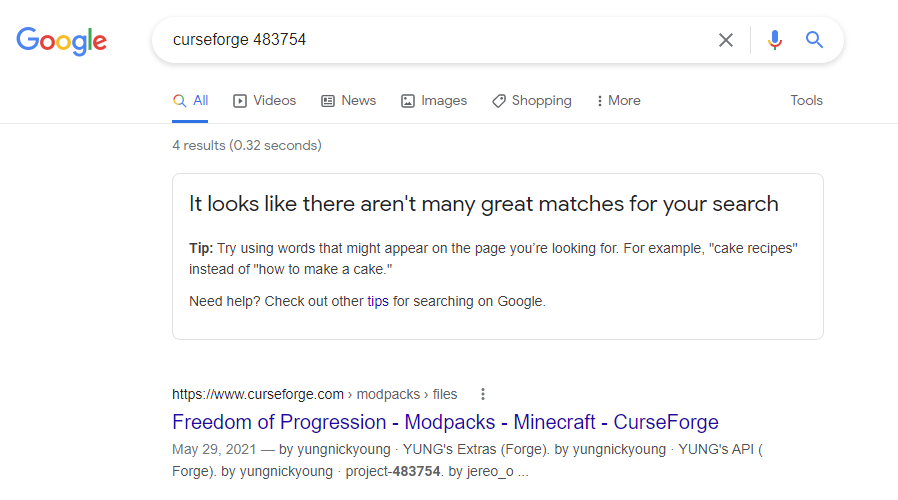
im looking for a minecraft mod with id 483754
my minecraft modpack got rejected bcs of that mod but i didnt get the name of it
lyric crescent
show the message
waxen radish
The status of the file TBN-1.1.zip (TBN Expert) has been changed to Rejected
Notes:
Invalid manifest.json file:
References invalid fileIDs: fileID: 3318317, projectID 483754 (project-483754).
If you have any questions please contact our support team https://support.curseforge.com.
lyric crescent
 opal cipher
Yeah, project looks like it's been removed.
https://www.curseforge.com/minecraft/mc-mods/project-483754
lyric crescent
yup
opal cipher
So only way to fix it, is to remove it. ^^
misty ferry
red patio
i think that worked but i have a question whats diffrence between that and the one on twitch
lyric crescent
open your manifest, remove that entry
waxen radish
is that gonna fix it? mod should still be there in modlist right?
lyric crescent
that would remove it from your export
signal ridge
Screen shot
misty ferry
 opal cipher
digital roost
Has a 1.17 come.out for minecraft?
signal ridge
misty ferry
opal cipher
digital roost
Has a 1.17 come.out for minecraft?
signal ridge
misty ferry
Full app in screen shot please
misty ferry
 opal cipher
That's Overwolf, not CurseForge.
signal ridge
misty ferry
Scroll down or search for the Curseforge app
Need to use the OW app to install the Curesforge app
signal ridge
Try opening the ow app and try again
signal ridge
ok
unborn sinew
im using the newest one
 signal ridge
newest one of what?
digital roost
uh can someone help me dowload a mod on mac?
 tacit glacier
I messed up and deleted the wrong mod from my modpack in the CurseForge software. I don't know which one I deleted. Is there a way to see download history/delete history?
lyric crescent
no
unborn sinew
signal ridge
newest one of what?
forge labs mod loader
lyric crescent
unborn sinew
forge labs mod loader
and what version would that be
digital roost
;c
signal ridge
digital roost
uh can someone help me dowload a mod on mac?
do you have the curseforge app?
digital roost
@signal ridge yea
 dusk frigate
I have been trying to set up a small server for me and some friends but i been having trouble getting it going, i got a vanilla server running but im unsure how to add mods to it could someone help me out please?
lyric crescent
!notcf
red patioBOT
The question you are asking about isn't related to CurseForge. Please use the appropriate game rooms by getting the role from #786424115535544350 or use #👽︱game-support for help.
This room is only for CurseForge Owned & Maintained features/services.
signal ridge
digital roost
<@!217048549706301442> yea
Mod or Modpack?
 brittle owl
where tf is the bot?
signal ridge
Use the app to install mods
signal ridge
digital roost
why it wont let me
!mc-installmods
red patioBOT
How to install mods in CurseForge App.
- Click
+ Create Custom Profile - Name it, select the required Minecraft version, select the Forge version (usually the highest number), click
Create. - Click the profile icon.
- Click
Add New Content - Search and install the desired mods.
- Start the game!
How to install mods not on CurseForge.
- Right click the profile picture or Open the profile and click the Icon next to the play button.
- Click
Open Folder. - Drag the mod(s) into the
modsfolder. (Note: Some mods will require others, to run. Make sure to read the instructions for the mod!) - Start the game!
unborn sinew
lyric crescent
and what version would that be
oh sorry its Hwyla-forge-1.10.11-B78_1.16.2-api.jar
lyric crescent
that's a mod, not forge
signal ridge
brittle owl
where tf is the bot?
What are you looking for?
brittle owl
mcp lookup
 kind maple
hi i need help... lol
so i tried importing a modpack into curseforge but it just disappears
lyric crescent
where did you get the modpack from
lyric crescent
open the zip and screenshot the contents
kind maple
alright
just letting u know that it works with my friends windows but im using a mac so idk if that plays a role in it not working
lyric crescent
nope
kind maple
 lyric crescent
you are going to custom profile > import yes?
lyric crescent
can you install any packs with the app normally?
 cinder violet
not sure what to do about this, im trying to start a modded fabric server
 signal ridge
cinder violet
not sure what to do about this, im trying to start a modded fabric server
signal ridge
cinder violet
not sure what to do about this, im trying to start a modded fabric server
!notcf
red patioBOT
The question you are asking about isn't related to CurseForge. Please use the appropriate game rooms by getting the role from #786424115535544350 or use #👽︱game-support for help.
This room is only for CurseForge Owned & Maintained features/services.
cinder violet
but fabric is part of curseforge now
cinder violet
oh wait sorry im on the wrong server
viral briar
Fabric discord is what you need
kind maple
lyric crescent
can you install any packs with the app normally?
uhh not sure lemme check
lyric crescent
could just ask in the proper channel, the issue is obvious
cinder violet
talking to me?
lyric crescent
mhm
cinder violet
ok
 umbral fractal
hello. i added a bunch of mods to my personal modpack and now it keeps crashing instantly. can you please help.
lyric crescent
start removing stuff you added until it's fixed. log has nothing useful
umbral fractal
rip
question: could i just disable mods instead of removing and try to fix it that way?
lyric crescent
sure
 slate garden
my friend set up a server and i cant get on it.
he however is on it we are thinking its something to do with port forwarding but are not sure.
any help?
signal ridge
slate garden
my friend set up a server and i cant get on it.
he however is on it we are think...
!notcf
red patioBOT
The question you are asking about isn't related to CurseForge. Please use the appropriate game rooms by getting the role from #786424115535544350 or use #👽︱game-support for help.
This room is only for CurseForge Owned & Maintained features/services.
signal ridge
This isnt the channel for server help.
umbral fractal
the server hoster most likely has a discord; try asking there
gloomy yew
Is there a way to manually sync a modpack, my pack has been approved for at least 3 days and has not shown up on the app. I am seeing other packs created a few days ago syncing over too
signal ridge
slate garden
hes hosting it off of his pc
Take this to #👽︱game-support Can help there,
signal ridge
gloomy yew
Is there a way to manually sync a modpack, my pack has been approved for at leas...
Link your project from the site
 solar lance
Hello, I tried to search for games with the scan option but it's not finding stardew Valley, It's in program files (x86); steam; steam apps; common; stardew valley. I also can't add it manually, is there a fix for it or do I need to download the mod and manually put it in a mod folder
gloomy yew
signal ridge
Link your project from the site
signal ridge
solar lance
Hello, I tried to search for games with the scan option but it's not finding sta...
!stardew
red patioBOT
Overwolf maintains a known list of issues here, some with solutions, others without.
https://support.curseforge.com/en/support/solutions/articles/9000196615-curseforge-known-issues
Scroll down, look at "Other games"
narrow minnow
solar lance
Hello, I tried to search for games with the scan option but it's not finding sta...
You need to install SMAPI - and if that won't be detected, just manually select the folder
solar lance
alright thanks!
signal ridge
gloomy yew
https://www.curseforge.com/minecraft/modpacks/imperium
I can see it in the app if I search the project Id,
umbral fractal
well i found the problem; it seemed to be the better portals mod, so now im reenabling each other mod i disabled one by one
gloomy yew
signal ridge
I can see it in the app if I search the project Id,

how do you search on the app with the id
signal ridge
Ill see if there is something going on. Otherwise you copy the packs project id and paste it into the search for the app
gloomy yew
like this?
 signal ridge
interesting
 vague ferry
hey i made a Fabric 1.16.5 modpack with almost all of the performance mods out there and i want to add more normal mods but it wont lets me. some mods work but some basic mods like "apple skin" or "clean cut" doesnt want to open (i have 143 mods and 5 resource packs and no data packs)
signal ridge
gloomy yew
like this?
I brought it up to a higher up to see if something else is going on
gloomy yew
Thank you
 wanton lintel
Can I install the modpack called "The Kingdom of Daldar" on a server? If so, how?
kind maple
lyric crescent
can you install any packs with the app normally?
hey! i can install packs normally
just importing it messes it up
signal ridge
gloomy yew
Thank you
Can you check the mod GeckoLib in your app. Seems your manifest in your export has the mod register twice.
 signal ridge
Should only have one of those. remove the oldest. OR can do both and reinstall the mod
gloomy yew
I disabled it and now am checking if it breaks anything
I guess the app decided to add them both for whatever reason
signal ridge
 dull isle
modpack checked by mod
dull isle
modpack checked by mod
!status
red patioBOT
It is 10:02PM on Tuesday for CurseForge my dudes.
Project Moderation Time
Project/File moderation is done on;
Sunday, Monday, Tuesday, Wednesday, Thursday: 10AM - 6PM GMT+2
Friday, Saturday: No Moderation!
This process is First in, First out. Thus files submitted late in the work day may not be checked until the next work day.
New Projects or uploads requiring manual approval: 1-3 Working Days
Updates to approved projects not needing manual approval: 1 Hour
File sync to the Curseforge app may take up to 24 hours after approval.
signal ridge
1-3 days from when you uploaded. If you did it on friday or Saturday its 1-13d from sunday
dull isle
It got checked but I fixed the thingy it told me to fix
and it didnt update
and i got no notification
signal ridge
So if you made a change to your project, you get put back in at the end of the cue.
signal ridge
just patients
viral briar
It’s a fair play queue system . No special treatment for anyone . All in same queue .
honest stump
i got this error trying to load a modpack for 1.7.10
Error: java.lang.VerifyError: Expecting a stackmap frame at branch target 35
 prime topaz
i have this one modpack its called kealis' bombs guns and war and everytime i lauch is crashes without even showing the forge mod loading screan and ive deleted it and reinstalled it SOOOOOOOOOOOO many times
is it bc of how much ram i give it/
 gloomy yew
signal ridge
Can you check the mod GeckoLib in your app. Seems your manifest in your export h...
gloomy yew
signal ridge
Can you check the mod GeckoLib in your app. Seems your manifest in your export h...
It works now, thanks for the help mate
signal ridge
 rugged widget
what do i do?
rugged widget
what do i do?
This for a server or client?
rugged widget
signal ridge
This for a server or client?
client why?
red patioBOT
Looking to install the CurseForge app?
Todo: Place system requirements here.
<:windows:798410728188936222> Windows
<:mac:798410654418862130> Mac
Linux
:person_shrugging:
rugged widget
signal ridge
Why not use the curseforge app? Would make it easier for you
oh thnamjs
thanks*
it didnt work @signal ridge
signal ridge
rugged widget
it didnt work <@!217048549706301442>
? which part?
rugged widget
signal ridge
? which part?
its working
okay so i got overworlf and froge
can i just play minecraft after i got the mods
signal ridge
rugged widget
can i just play minecraft after i got the mods
Have you installed the curseforge app from the ow app?
rugged widget
signal ridge
Have you installed the curseforge app from the ow app?
yep
signal ridge
Are you wanting to play modpacks or make your own ?
rugged widget
is it safe when i login with my minecraft details ?
signal ridge
Yes
rugged widget
no im playing my childhood youtubers mod
signal ridge
ah ok,
rugged widget
i love the mods so much
signal ridge
Enjoy 🙂
 last portal
why don't you support one drive
signal ridge
Onedrive is known to break games/game saves
 formal rock
(Is this the right place to post this?)
Why am I getting this rejection when submitting an update to my modpack?
Found non-Fabric file Better Leaves 5.2 - 1.13+(3199171) from project Motschen's Better Leaves(380969) in Fabric modpack CC MSC v1.5 - Fully Fabricated.zip(3361439)
I installed Better Leaves from the CF client, then exported and uploaded the pack.
digital roost
hello, i have a question about the usage of curseforge (windows 10 application) can anyone help?
formal rock
digital roost
hello, i have a question about the usage of curseforge (windows 10 application) ...
Best practice is to just ask, rather than asking to ask. I might be able to help!
digital roost
@formal rock when using curseforge i downloaded a mod pack for minecraft (1.16.5) and when i press play it opens up the regular minecraft launcher, but when i press play it doesnt launch with the mods installed
and yes i have the correct forge launcher installed


when i press forge it doesnt launch
formal rock
digital roost
<@!201235689487073280> when using curseforge i downloaded a mod pack for minecra...
when it opens the mc launcher, does it display the name of your profile---- oh I see, no it doesn't.
digital roost
yeah, i press forge but it doesnt open with the mods
formal rock
So when you press the orange play in CF it's supposed to open the launcher, but the drop down next to the green play button should show the name of the profile from CF - likely the modpack name in your case.
digital roost
oh ok i see, let me retry and look
am i suppose to install a client specifically for that mod pack?
formal rock
no, just install the pack via CF like it looks like you did, then press play (orange) and then play (green) and it should be good.
Here's what a modpack I have looks like between one play button and the next:
 digital roost
yoooo i figured it out, i just unpacked all the mods into my personal mod folder lmao
it works haha
formal rock
CF sort of highjacks the vanilla launcher, redirecting it's installation entries to a custom list that only includes the vanilla one and the modded one you just requested. That's why it has to close the regular mc launcher beforehand.
digital roost
ah i see lol
formal rock
digital roost
yoooo i figured it out, i just unpacked all the mods into my personal mod folder...
oh haha yeah that'll do it I guess. You might wanna check out MultiMC if you want another client that keeps all your installs seperate.
formal rock
formal rock
(Is this the right place to post this?)
Why am I getting this rejection when sub...
Can I bump this? (If that's allowed)
formal rock
signal ridge
Posting it in different channels isnt tho. <#777323206884327484> 4
Right! Sorry, which channel is the appropriate one for this?
signal ridge
This one was fine, I am talking to a higher up about it now
formal rock
signal ridge
This one was fine, I am talking to a higher up about it now
Tysm~
I can send you the file I was trying to upload if it helps.
signal ridge
Naa all good, we figured out the issue. Currently the team needed to fix it is asleep, but we will let them know. For now though, if you absolutely need to upload your pack today, you'll need to remove the resource pack for now and tell users to install it manually till this issue is fixed
 iron mason
hello, i am trying to mod stardew valley but curse forge cant find the game. any help?
formal rock
signal ridge
Naa all good, we figured out the issue. Currently the team needed to fix it is a...
Okay, thank you for your help! I'll put the CDN update on the back burner until that gets fixed. Try again in 24 hours?
For now I'll just send that zip to the people who need to be updated in the short term.
signal ridge
iron mason
hello, i am trying to mod stardew valley but curse forge cant find the game. any...
!stardew
red patioBOT
Overwolf maintains a known list of issues here, some with solutions, others without.
https://support.curseforge.com/en/support/solutions/articles/9000196615-curseforge-known-issues
Scroll down, look at "Other games"
iron mason
thank you!
 barren fossil
hey guys! im having trouble starting my LAN world that im running through forge (the other person have the same modpack installed as me and we are also connected to the same network) have u guys any idea why its not working?
 paper lava
Idk does it say timed out?
signal ridge
barren fossil
hey guys! im having trouble starting my LAN world that im running through forge ...
!notcf
red patioBOT
The question you are asking about isn't related to CurseForge. Please use the appropriate game rooms by getting the role from #786424115535544350 or use #👽︱game-support for help.
This room is only for CurseForge Owned & Maintained features/services.
paper lava
barren fossil
hey guys! im having trouble starting my LAN world that im running through forge ...
Some times it glitches try again!
signal ridge
Not the channel for server talk #👽︱game-support or the mc- channels for this
fleet bear
 silk garnet
 coarse ruin
anybody know of a mod so that i can bypass the maximum id limit in my modpack ?
please feel free to dm me directly...
slim thunder
coarse ruin
anybody know of a mod so that i can bypass the maximum id limit in my modpack ?
JustEnoughIDs
 swift fog


 signal ridge
the app is for Java edition. There are some bedrock stuff on the site tho
digital roost
does anyone know how i can publish my modpack?
 signal ridge
digital roost
does anyone know how i can publish my modpack?
signal ridge
digital roost
does anyone know how i can publish my modpack?
!mc-packshare
red patioBOT
There are two ways to share a modpack you've made with others...
Export and Share - For Friends to Small Groups.
- Click the Icon for the modpack.
- Click the button next to play.
- Click
Export. - Select the files that should be included.
- Send the zip to the people that want it! They can follow the instructions in
!mc-installpackto install the pack!
Upload to Curseforge - For Public Release to Everyone.
This options will make your pack public to EVERYONE, it comes with extra requirements and will take some effort to set up.
- Go to here: https://www.curseforge.com/project/432/4471/create
- Fill out the information with a proper description of the pack. This should allow anyone to understand what the pack is.
- Click the Icon for the modpack in the CurseForge app.
- Click the button next to play.
- Click
Export. - Select the files that should be included.
- Open your Project you made on the CurseForge site and Upload the file you just made.
- Wait for Moderation & Sync so it can show up in the client! (See
!syncfor limitations)
 dense storm
So every time i try to install a mod pack from the curseforge app, it stops part way thru and says "An exception occurred during a WebClient request" and stops the download, Why is this happening?
signal ridge
dense storm
So every time i try to install a mod pack from the curseforge app, it stops part...
WebClient is an internet issue on your end. Can try a few things:
- restart your pc
- restart your router/modem
- If your on wifi try a wired connection
- Pause or stop any thing else using the internet. (Streams, music, etc)
- If none of the above works try again later when your internet is more stable
dense storm
signal ridge
WebClient is an internet issue on your end. Can try a few things:
1) restart you...
ah, so thats why, its my wifi for sure
fleet bear
!notcf
red patioBOT
The question you are asking about isn't related to CurseForge. Please use the appropriate game rooms by getting the role from #786424115535544350 or use #👽︱game-support for help.
This room is only for CurseForge Owned & Maintained features/services.