#🔥︱curseforge-support
1 messages · Page 488 of 1
 lyric crescent
 timid gust
ok
 hoary saffron
Hello, I just wanted to download the curseforge app, but I have a few problems. When the downloader starts the download, the message "Connection error - please check you internet connection and try again" appears. I have checked my internet several times, but the error message does not go away. can someone please help me to solve the problem. thanks
lyric crescent
!getcf try this
 red patioBOT
Looking to install the CurseForge app?
Todo: Place system requirements here.
<:windows:798410728188936222> Windows
<:mac:798410654418862130> Mac
Linux
:person_shrugging:
hoary saffron
I've tried it several times and reinstalled it
 eager mesa
I am having this exact same issue and haven't been able to find a solution
That install link for windows works! The one on their website was really bad i guess haha
 daring oracle
yup! can confirm it does
timid gust
lyric crescent
log out, then log back in. check that you are using the account that owns java
Its still not working
 lofty sable
Hi, btw how do i change the main file for another on my modpack?
lyric crescent
timid gust
Its still not working
then you did something wrong. curseforge is not involved in the login process
eager mesa
Minecraft modding here i come 🙂
 prisma notch
if i want to play on a lan world with mods do i share my mods with my friend or do they just create their own modpack but use the same mods that i have?
 signal ridge
Yep, all players need to have the same mods to play together
lyric crescent
can do either, but you both need the same versions as well as the same mods
prisma notch
thanks
lyric crescent
!notcf
red patioBOT
The question you are asking about isn't related to CurseForge. Please use the appropriate game rooms by getting the role from #786424115535544350 or use #👽︱game-support for help.
This room is only for CurseForge Owned & Maintained features/services.
 hot glade
bump
signal ridge
Have you left it alone to load? or close it as soon as it freezes?
 zinc oxide
signal ridge
zinc oxide
signal ridge
How much ram do you have allocated to the cures app?
hot glade
which, obviously it shouldnt take 20+ minutes for a modpack with barely 93 mods in it to load
about 6 gigs
i feel like since it happens during world creation and stuff it has to do with a generation mod, no?
signal ridge
Its possible
Not sure which one tho, you would need to try removing the mods and adding them back in a few at a time till the issue happens again
 drowsy phoenix
when i try to set up minecraft in the curseforge app, it says the modding folder cant be set to onedrive. does it need to be in that twitch folder, or can it be in any folder?
signal ridge
drowsy phoenix
when i try to set up minecraft in the curseforge app, it says the modding folder...
!mc-path follow this
red patioBOT
**Minecraft Files should NOT be installed inside the following locations
.minecraft folder.
OneDrive folders.
Desktop folder.
Drive roots I.E. Directly into the C:\ drive.
iCloud enabled folders.
If any of the above are in the path you need to change/move it by following the instructions below!**
If Minecraft is not installed in CurseForge App, start here.
Click the  in the top left.
Select Minecraft.
Click "Edit".
Move to the "Continue here:" section below.
If Minecraft is installed in CurseForge App, follow these steps.
Click the  in the bottom left.
Select the Minecraft tab.
Click "Change".
Move to the "Continue here:" section below.
Continue here:
Make a folder in the root directory called CurseForge.
Select the folder you just made.
The text box should show something like the following:
For Windows: C:\CurseForge
For Mac: /Users/Shared/CurseForge
 drowsy phoenix
k thx
hot glade
is there a way to sort my mods on curseforge to see which worldgen mods i have or do i have to look at each one to see if it has to do with world gen? 🤔
would "The Outer End" and "The Endergetic Expansion" conflict with eachother as they both use the same "abnormal" library
?
signal ridge
hot glade
is there a way to sort my mods on curseforge to see which worldgen mods i have o...
For the worldgen mods you would have to go throught your mod list and look at each mod.
for the conflict does either mod say it conflics with the other?
hot glade
yeah no they're fine
 signal ridge
Then would need to go through testing each one till you find whats holding up the world gen,
 lilac root
why there isnt a option to add mods after downloading the modpack? so instead of looking for the mods you want and putting them in the folder as an option so that you can download mods from curseforge and add them to the modpack.
 narrow minnow
There is
signal ridge
lilac root
why there isnt a option to add mods after downloading the modpack? so instead of...
Cuz adding mods to premade packs can/will cause issues and/or crashes. Once you change a premade pack your pretty much on your own as well as noone will know what you added
lilac root
narrow minnow
There is
really?
narrow minnow
Yes - but YOYOK has a point
signal ridge
Possible - Yes
Recommended - Not really
lilac root
signal ridge
Cuz adding mods to premade packs can/will cause issues and/or crashes. Once you ...
i didnt understood
 signal ridge
lilac root
i didnt understood
signal ridge
lilac root
i didnt understood
Better and safer to make a custom profile and add the mods that you want too it. Instead of changing someone elses pack
narrow minnow
Go into the modpack's profile page (clicking the image) and then, in the options menu, select Profile Options

and then check this option

but YOYOK is the man - so better listen to him
signal ridge
Just know if you change the pre-made pack. And it doesnt launch or it crashes the only real fix is to delete it and reinstall it.
 jade vortex
who knows a mod/modpack with guns or planes
hot glade
flans
signal ridge
jade vortex
who knows a mod/modpack with guns or planes
#🔎︱mod-hunting for this
lilac root
no but i mean a option to add mods faster than the normal way, i mean instead of searching the mods, downloading it and then put it in the folder a option to download them from the launcher, and then it automatically it puts in the folder of the modpack
signal ridge
lilac root
no but i mean a option to add mods faster than the normal way, i mean instead of...
!mc-installmods
red patioBOT
How to install mods in CurseForge App.
- Click
+ Create Custom Profile - Name it, select the required Minecraft version, select the Forge version (usually the highest number), click
Create. - Click the profile icon.
- Click
Add New Content - Search and install the desired mods.
- Start the game!
How to install mods not on CurseForge.
- Right click the profile picture or Open the profile and click the
 Icon next to the play button.
 - Click

Open Folder. - Drag the mod(s) into the
modsfolder. (Note: Some mods will require others, to run. Make sure to read the instructions for the mod!) - Start the game!
 narrow minnow
lilac root
no but i mean a option to add mods faster than the normal way, i mean instead of...
narrow minnow
lilac root
no but i mean a option to add mods faster than the normal way, i mean instead of...
If you are using the CurseForge app and you did what I wrote - then you'll have this button appear
 lilac root
yeah but to fix is as easy as delete the mod added from the folder right?
signal ridge
Wolf did also explain how to enable editing of premade packs as well #🔥︱curseforge-support message
Easiest fix is to reinstall the pack.
lilac root
... srry im stupid xd
signal ridge
I would highly recommend NOT editing a pre-made pack.
 upbeat fern
If i select original minecraft folder as a curseforge folder will modpacks work with original launcher
signal ridge
no, it will actually just break your vanilla mc launcher all together
signal ridge
!mc-path Best to follow this for the curseforge folder
red patioBOT
**Minecraft Files should NOT be installed inside the following locations
.minecraft folder.
OneDrive folders.
Desktop folder.
Drive roots I.E. Directly into the C:\ drive.
iCloud enabled folders.
If any of the above are in the path you need to change/move it by following the instructions below!**
If Minecraft is not installed in CurseForge App, start here.
Click the in the top left.
Select Minecraft.
Click "Edit".
Move to the "Continue here:" section below.
If Minecraft is installed in CurseForge App, follow these steps.
Click the in the bottom left.
Select the Minecraft tab.
Click "Change".
Move to the "Continue here:" section below.
Continue here:
Make a folder in the root directory called CurseForge.
Select the folder you just made.
The text box should show something like the following:
For Windows: C:\CurseForge
For Mac: /Users/Shared/CurseForge
 midnight wing
i didn't download some requirements, which ones from microsoft should i download?
signal ridge
midnight wing
i didn't download some requirements, which ones from microsoft should i download...
#📛︱rules 4,
 balmy shoal
how to i use optifine in curseforge?
red patioBOT
Optifine and Curseforge
To install Optifine with modpacks on Curseforge:
Right click the modpack icon, select Open Folder.
Put the Optifine.jar into the mods folder.
Now load the modpack normally.
We do not offer support for Optifine. If you have issues with Optifine, remove it. If you want further support try the discord found on their website.
https://www.optifine.net/home
 opal cipher
!mc-optifine
balmy shoal
ty
 heavy cedar
Hello
The new Fabric update is very good addition was waiting for it for a long time, but wanted to know if there is any particular reason to why the website curseforge has modloaders and game versions all in one category? This does not allow for one to search for mods in a specific modloader and game version why not have them separated ?
Linux users like me cannot use the application version of curseforge thus we have to use the website version but the missing feature described from above makes it a bit confused to see which mods are supported and which arent
 drowsy helm
Just get windows it's only like $15
heavy cedar
I prefeer Linux over windows
drowsy helm
How
heavy cedar
Lots of features windows is missing
drowsy helm
Like what I've never used Linux
heavy cedar
Lots of customization, no blootware, better control
 hoary bay
Hi, I'm trying to install some addons for TBC classic, but there's no 2.5.1 version in my client. I tried searching the help files and got nothing. Here's what it looks like on my end:
 drowsy helm
Oh yeah
heavy cedar
Different file types
drowsy helm
Smash your keyboard 3 times it worked for me
 proper parcel
Hi, is there anyway to fix the "modified" issue on some of the addons via the app? On the app I have no update as addon is classified as "modified" however in-game it states "update available" for addon.🤔
drowsy helm
Idk
hoary bay
Search for the addon you want, then click the dropdown for "game version" and look for 2.5.1
... At least, that's how it's supposed to work. Doesn't work for me, either, but it works for my friend.


 timid sage
 hoary bay
Have you updated your curseforge client? Redownloading it seemed to work for me
hoary bay
I had to go to the site and just redownload it. There isn't an option to update in the settings that I could find anywhere
But I'm about as tech-savvy as a particularly ... special ... caveman, soooo
timid sage
ah yeah bc why would they give you that optionm
hoary bay
¯_(ツ)_/¯
Hammers exist. Caveman tech here, remember? If it doesn't work, hit it with a stick. If it still doesn't work, use a bigger stick.
timid sage
ah thank you
it works now
i guess i didnt expect that the program doesnt have an update feature
 fair beacon
How I can publish my own Minecraft mod pack in CurseForge ??
 fleet bear
heavy cedar
The new Fabric update is very good addition was waiting for it for a long time, ...
fleet bear
heavy cedar
The new Fabric update is very good addition was waiting for it for a long time, ...
Old site and systems. Some of CF is ~14 years old.
It will be fixed in the future when they can remake the site and actually work on it without it dying every time.
red patioBOT
There are two ways to share a modpack you've made with others...
Export and Share - For Friends to Small Groups.
- Click the Icon for the modpack.
- Click the button next to play.
- Click

Export. - Select the files that should be included.
- Send the zip to the people that want it! They can follow the instructions in
!mc-installpackto install the pack!
Upload to Curseforge - For Public Release to Everyone.
This options will make your pack public to EVERYONE, it comes with extra requirements and will take some effort to set up.
- Go to here: https://www.curseforge.com/project/432/4471/create
- Fill out the information with a proper description of the pack. This should allow anyone to understand what the pack is.
- Click the Icon for the modpack in the CurseForge app.
- Click the button next to play.
- Click
Export. - Select the files that should be included.
- Open your Project you made on the CurseForge site and Upload the file you just made.
- Wait for Moderation & Sync so it can show up in the client! (See
!syncfor limitations)
fleet bear
fair beacon
How I can publish my own Minecraft mod pack in CurseForge ??
!mc-packshare
fleet bear
timid sage
i guess i didnt expect that the program doesnt have an update feature
you likely had a very old version from before it had an autoupdater.
heavy cedar
fleet bear
Old site and systems. Some of CF is ~14 years old.
It will be fixed in the futur...
I see
wont a remake help not only the minecraft community but the other modding communities as well?
For the website an add to cart feature like in online shopping websites would be very cool to have that will also pick the dependencies/libraries
 digital roost
Hey, I'm interested in making a 1.12.2 Client with Forge, but I got stuck in the first hour of trying to make a client. I followed a guide on YouTube (https://m.youtube.com/watch?v=B0azKVU9t20&t=330s), but already at 05:30 I got an error that said "gradlew not found" or something like that. So now I've been searching all over the internet on how to fix this, but eventually came to the decision of asking the question myself. So just to make it clear, my question is "How do I fix this gradlew problem" or "is there another way of making a 1.12.2 client with Forge?"

yea
intro: (0:00)
setup: (1:17)
coding a base: (28:17)
rendering: (56:18)
outro: (1:34:41)
fleet bear
heavy cedar
wont a remake help not only the minecraft community but the other modding commun...
it will help literally the whole site and everyone that uses it.
New search, new text editors, less/no issues with legacy code breaking the website, the ability to better support the changes from the last few years in all the communites.
A possible dark mode.
It all partly relies on the site rebuild.
heavy cedar
Who is responsible for the development tho? A rebuild would help a lot but you mentioned They failed to do it multiple times
fleet bear
digital roost
Hey, I'm interested in making a 1.12.2 Client with Forge, but I got stuck in the...
- We don't need more clients.
- We don't support hacked clients
- CurseForge is not Forge.... This is a mod hosting and updating platform
fleet bear
heavy cedar
Who is responsible for the development tho? A rebuild would help a lot but you m...
Curseforge has changed hands a few times, Curse LLC used to own it before twitch bought it and ignored it for a couple years. Overwolf now owns it and has been doing everything they can to update, replace and improve everything about CurseForge.
digital roost
fleet bear
1. We don't need more clients.
2. We don't support hacked clients
3. CurseForge ...
Oh, that's my bad.
heavy cedar
I see
Is overwolf releated to twich?
as you still gotta have a twich account in order to register
or is it because the system wasnt changed yet
timid sage
fleet bear
you likely had a very old version from before it had an autoupdater.
Makes sense I did have it installed a long time ago
fleet bear
heavy cedar
Is overwolf releated to twich?
No. Not at all.
The twitch login is legacy from when twitch owned it. Eventually it will be replaced with the usual login options most sites have. Overwolf, Google, Facebook and whatever other systems they add.
fleet bear
Uhhh... news broke June 2020, the switch over was in December 2020 IIRC
heavy cedar
I remember back then it used to say twitch all across the curseforge website
but then Overwolf started to pop up but I thought overwolf is the dev team that is under Twitch control
fleet bear
They only have had the platform for ~6 months and have done more with than twitch ever did.
heavy cedar
Hopefully we see new updates and the dev team can do it a better application
I was talking recently with some people
that curseforge is bias to forge only modloader
because there is no better selection for fabric mods and such but in exactly that day I opened curseforge and I saw the update
which I think is a very good thing to see
fleet bear
It wasn't intended to be. It's just what happens when you add modding support ~7 years ago and there was no other really used options. When fabric because a thing, CF was on life support essentially.
heavy cedar
Pretty much the system is too outdated
fleet bear
Yeah.
heavy cedar
Well good luck to the team really interested in what updates will come next
fleet bear
I don't even know what's next yet, I think they are still squashing bugs from fabric currently.
heavy cedar
I do not think native linux support will come soon but at least better website features would also help
fleet bear
Likely not this year, but it's now officially the most up voted thing on the feedback page
heavy cedar
Sometime is better than never
fleet bear
!feedback
red patioBOT
<:CFidea:798388634972717066> Have an idea on how to improve CurseForge? <:CFidea:798388634972717066>
CurseForge is looking for great ideas and user feedback! Get into the CurseForge Community by providing some feedback and voting on what's important to you!
Think some game should be supported? Post an idea and explain why!
Got a to die for feature idea? Let's hear it!
Location In-app
- Click the
 button on the bottom left of the app.
 - Click on

Suggest a Featureoption!
fleet bear
I recommend you tell anyone that want's it to show they are interested in the client here and any other ideas they have.
heavy cedar
Linux community is pretty small
there probably wont be enough users
to compensate for the time overflow team will spend in developing it
But features on the website will help everyone including windows users and linux users
fleet bear
They have a mac version already, that should have most if not nearly all of what they need.
Id say the linux community is larger than you think as many developers use it.
heavy cedar
It definitely exists and I am part of it
Forge itself is pretty old also
Can see between the Forge and Fabric load times
fleet bear
This is going outside the scope of this room, but not really. They just rewrote it in 1.13, It's two separate ideas of how mods should be loaded and interact.
heavy cedar
Ooo they rewrote it very interesting I did not play a lot of modded back in 1.13-1.15
 vague ridge
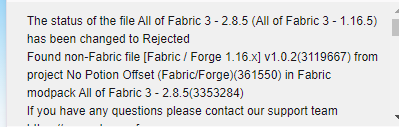
Seems to be a problem with mods that is fabric & forge in the same jar
https://i.imgur.com/L77fHjc.png
 heavy cedar
Well thanks for answering my questions, I will head out for a bit now wish yall goodluck
fleet bear
yes, you can't currently mark files with forge and fabric as it causes issues.
signal ridge
If you want to try out bot commands please use #🟢︱user-bot-spam
vague ridge
That's concerning
fleet bear
They should be separate files marked as forge/fabric for now till better support comes for combo options.
vague ridge
I'll let daniel know
fleet bear
Well currently there's no way within the site to set a file as both, only people using the API can do this.
hence the issue
vague ridge
Someone could in theory manually approve this update even tho it contains this certain jar with both fabric & forge in it?
Kinda what I had to do with AOF4
lyric crescent
they wont
fleet bear
I doubt they will. This is an issue devs need to fix and not just work around as it's going to affect anyone using that mod in any pack that's fabric.
vague ridge
Yeah kinda what I was afraid of as this is not the only mod that contains both loaders
fleet bear
things are still changing and evolving.
vague ridge
Yeah for sure
fleet bear
Hopefully over the next month all the kinks will be worked out.
vague ridge
👍
 brittle jolt
I try to load into this thing with 2 mods and it says they failed to load correctly
signal ridge
what thing? and what game?
brittle jolt
minecraft and I try to load into my profile I made
and it say it didn't load correct
signal ridge
!mc-logs do this for that profile
red patioBOT
Where to find the log on the CurseForge Client.
Right-click the modpack profile icon OR click the button in the modpack profile.
Click Open Folder.
Open the logs folder.
Find the file called latest.log and drag it into discord.
signal ridge
!mc-installfix try this
red patioBOT
- Click on the Minecraft Tab on the Left side of the App.
- Click button next to the
Create Custom Profileoption. - Click

Repair Installationoption. - Play game.
NOTE: You will not lose any modpacks or worlds, These are saved in the Instances folder. DO NOT TOUCH THIS FOLDER OR YOU WILL LOSE EVERYTHING
brittle jolt
ok let me try
signal ridge
 stone junco
my minecraft keeps crashing
stone junco
my minecraft keeps crashing
Do this #🔥︱curseforge-support message
brittle jolt
It still doesn't work

it say this
@signal ridge sorry for ping but you the smart man
signal ridge
stone junco
this is log
Do you remember what you were doing before the crash?
signal ridge
something with adventurersamulets mod by chance?
stone junco
yes
signal ridge
My guess is you may have possibly corrupted your player data. something wasnt happy with what you did
stone junco
umm ok
signal ridge
this a singleplayer world or server?
signal ridge
why?
signal ridge
hmm alright
 real dagger
Can i have a simple info, a friend is trying to install a modpack with the curseforge/overwolf client but can't localise minecraft game files, which file/folder must be located ?
signal ridge
anyways. theres a few options I can think of for this ranging for easier to more complex:
1: open the packs folder > saves > world folder > move your player data in the playerdata folder to somewhere safe then try to log in to your world again (inv will be reset tho)
2: Can try to edit your player data and remove the issue items (doesnt always work/challanging)
3: Unfortunatly a new world would also fix this
signal ridge
real dagger
Can i have a simple info, a friend is trying to install a modpack with the curse...
!mc-path
red patioBOT
**Minecraft Files should NOT be installed inside the following locations
.minecraft folder.
OneDrive folders.
Desktop folder.
Drive roots I.E. Directly into the C:\ drive.
iCloud enabled folders.
If any of the above are in the path you need to change/move it by following the instructions below!**
If Minecraft is not installed in CurseForge App, start here.
Click the in the top left.
Select Minecraft.
Click "Edit".
Move to the "Continue here:" section below.
If Minecraft is installed in CurseForge App, follow these steps.
Click the in the bottom left.
Select the Minecraft tab.
Click "Change".
Move to the "Continue here:" section below.
Continue here:
Make a folder in the root directory called CurseForge.
Select the folder you just made.
The text box should show something like the following:
For Windows: C:\CurseForge
For Mac: /Users/Shared/CurseForge
signal ridge
would recommend backing up your world before trying anything too crazy tho
stone junco
2 are backups
signal ridge
If you have a backup from before the crash that could work as well
stone junco
idk from where they are from but they would be because crashed a soon as i made the asseory
 sterile pelican
all of my friends can join my modded server besides one, and he has a microsoft account (no mojang). what should we do to fix it?
signal ridge
sterile pelican
all of my friends can join my modded server besides one, and he has a microsoft ...
Would either need them to join here or get their latest log from their logs folder.
signal ridge
Using the curseforge app?
stone junco
i am restory a backup of world
atleast modpack has 71 mods so boots in like 3 seconsds
sterile pelican
how do i check the logs i cant find it
signal ridge
sterile pelican
how do i check the logs i cant find it
!mc-logs
red patioBOT
Where to find the log on the CurseForge Client.
Right-click the modpack profile icon OR click the button in the modpack profile.
Click Open Folder.
Open the logs folder.
Find the file called latest.log and drag it into discord.
signal ridge
real dagger
the problem isnt with creating the folder but with locating the game files
this is with the curseforge app yes?
real dagger
yeah
like
it says minecraft isnt installed
and he must locate the game file
but don't know which file/folder to locate
signal ridge
Would be soo much easier if they joined the discord
real dagger
why ?
signal ridge
For screen shot of what they see and easier then going through eachother
sterile pelican
ill add them rn
real dagger
okay
 cinder sail
hey im the dude that cant join the server
real dagger
she is supposed to be there now
signal ridge
cinder sail
hey im the dude that cant join the server
you with weed im guessing?
sterile pelican
si
cinder sail
ya
real dagger
wait her computer ran out of battery 🤡
signal ridge
cinder sail
ya
!mc-logs do this please
red patioBOT
Where to find the log on the CurseForge Client.
Right-click the modpack profile icon OR click the button in the modpack profile.
Click Open Folder.
Open the logs folder.
Find the file called latest.log and drag it into discord.
cinder sail
 north eagle
Hi i'm the one looking for the game files
signal ridge
Just a sec.
real dagger
okay np
signal ridge
north eagle
Hi i'm the one looking for the game files
in the app, screen shot the part your at. Where its looking for game files
north eagle
 real dagger
wait
signal ridge
north eagle
!mc-path follow this
red patioBOT
**Minecraft Files should NOT be installed inside the following locations
.minecraft folder.
OneDrive folders.
Desktop folder.
Drive roots I.E. Directly into the C:\ drive.
iCloud enabled folders.
If any of the above are in the path you need to change/move it by following the instructions below!**
If Minecraft is not installed in CurseForge App, start here.
Click the in the top left.
Select Minecraft.
Click "Edit".
Move to the "Continue here:" section below.
If Minecraft is installed in CurseForge App, follow these steps.
Click the in the bottom left.
Select the Minecraft tab.
Click "Change".
Move to the "Continue here:" section below.
Continue here:
Make a folder in the root directory called CurseForge.
Select the folder you just made.
The text box should show something like the following:
For Windows: C:\CurseForge
For Mac: /Users/Shared/CurseForge
 signal ridge
cinder sail
signal ridge
cinder sail
The version of the pack your using is the same pack version as the server?
cinder sail
yes
we've tried multiple different launchers and packs and I get the same message when trying to join the server.
 indigo gorge
how can i back up my WoW addons?
 silent moth
Does anyone have an idea why I don't get any points from a project that has over 300,000 Downloads? I get points from projects that don't even have half of that, so I'm kinda confused
signal ridge
cinder sail
we've tried multiple different launchers and packs and I get the same message wh...
Can you try joining the server and screen shot the rejection message you get? then post the new latest log for your client. Something doesnt add up in this log
@sterile pelican What version of the pack is the server running?
sterile pelican
1.6.10 and its in version 1.16.5
but weve tried multiple others and specifically he cant join
signal ridge
cinder sail
yes
mineham in your curse app Can you take a screen shot of the pack your trying to connect with.
cinder sail
 signal ridge
Its complaining about recipes not matching.
cinder sail
one sec
signal ridge
cinder sail
huh thats a mojang issue right there
sterile pelican
what should he do?
cinder sail
 signal ridge
That connection error you get when connecting that been the same error?
sterile pelican
the whole time yep
and the servers are online so i dont get why he cant authenticate
signal ridge
... Would have to wait then, if auth servers are down not much anyone here can do.
Issue on mojangs side.
sterile pelican
but they say that its not currently down
signal ridge
Would either need to restart their game or try connecting to a vanilla server and see if its related. Its not a curseforge issue tho
 silk violet
when ever i try loading up rlcraft the game crashes and says exit code 0 i have 16 gb of ram and i tried re instaling minecraft and curseforge
signal ridge
silk violet
when ever i try loading up rlcraft the game crashes and says exit code 0 i have ...
!mc-logs do this
red patioBOT
Where to find the log on the CurseForge Client.
Right-click the modpack profile icon OR click the button in the modpack profile.
Click Open Folder.
Open the logs folder.
Find the file called latest.log and drag it into discord.
silk violet
any ideas how to fix that
signal ridge
Would need the latest log to see whats going on
silk violet
15:41:41.901
Patcher expecting non-empty class data file for net.minecraft.crash.CrashReport$1, but received empty.
15:41:41.901
Unable to launch
java.lang.RuntimeException: java.lang.RuntimeException: Patcher expecting non-empty class data file for net.minecraft.crash.CrashReport$1, but received empty, your vanilla jar may be corrupt.
at net.minecraftforge.fml.relauncher.CoreModManager$FMLPluginWrapper.injectIntoClassLoader(CoreModManager.java:169)
at net.minecraft.launchwrapper.Launch.launch(Launch.java:115)
at net.minecraft.launchwrapper.Launch.main(Launch.java:28)
Caused by: java.lang.RuntimeException: Patcher expecting non-empty class data file for net.minecraft.crash.CrashReport$1, but received empty, your vanilla jar may be corrupt.
at net.minecraftforge.fml.common.patcher.ClassPatchManager.applyPatch(ClassPatchManager.java:113)
at net.minecraftforge.fml.common.patcher.ClassPatchManager.getPatchedResource(ClassPatchManager.java:76)
at net.minecraftforge.fml.common.asm.transformers.deobf.FMLDeobfuscatingRemapper.getFieldType(FMLDeobfuscatingRemapper.java:219)
at net.minecraftforge.fml.common.asm.transformers.deobf.FMLDeobfuscatingRemapper.parseField(FMLDeobfuscatingRemapper.java:192)
at net.minecraftforge.fml.common.asm.transformers.deobf.FMLDeobfuscatingRemapper.setup(FMLDeobfuscatingRemapper.java:161)
at net.minecraftforge.fml.common.asm.FMLSanityChecker.injectData(FMLSanityChecker.java:187)
at net.minecraftforge.fml.relauncher.CoreModManager$FMLPluginWrapper.injectIntoClassLoader(CoreModManager.java:164)
... 2 more
15:41:41.906
[java.lang.ThreadGroup:uncaughtException:1052]: net.minecraftforge.fml.relauncher.FMLSecurityManager$ExitTrappedException
15:41:41.907
[java.lang.ThreadGroup:uncaughtException:1052]: at net.minecraftforge.fml.relauncher.FMLSecurityManager.checkPermission(FMLSecurityManager.java:49)
15:41:41.907
[java.lang.ThreadGroup:uncaughtException:1052]: at java.lang.SecurityManager.checkExit(SecurityManager.java:761)
15:41:41.907
[java.lang.ThreadGroup:uncaughtException:1052]: at java.lang.Runtime.exit(Runtime.java:107)
15:41:41.907
[java.lang.ThreadGroup:uncaughtException:1052]: at java.lang.System.exit(System.java:971)
15:41:41.907
[java.lang.ThreadGroup:uncaughtException:1052]: at net.minecraft.launchwrapper.Launch.launch(Launch.java:138)
15:41:41.907
[java.lang.ThreadGroup:uncaughtException:1052]: at net.minecraft.launchwrapper.Launch.main(Launch.java:28)
15:41:41.940
Java HotSpot(TM) 64-Bit Server VM warning: ignoring option PermSize=256m; support was removed in 8.0
signal ridge
silk violet
15:41:41.901
Patcher expecting non-empty class data file for net.minecraft.crash...
Thats not what the bot said to do
signal ridge
Just need the one called latest
signal ridge
silk violet
!mc-installfix try this
red patioBOT
- Click on the Minecraft Tab on the Left side of the App.
- Click button next to the
Create Custom Profileoption. - Click
Repair Installationoption. - Play game.
NOTE: You will not lose any modpacks or worlds, These are saved in the Instances folder. DO NOT TOUCH THIS FOLDER OR YOU WILL LOSE EVERYTHING
silk violet
i clicked repair and it says minecraft is still running
signal ridge
Restart your pc and try again
 lyric folio
CF is being odd - I can't export my custom profile: undoing of my checkmarks when wanting to export; not exporting at all; giving an error
silk violet
omfg it worked thank you so much
 shell frost
Anyone know why my modpack shows up on the curse forge launcher but not on the website, I feel like if it was a file sync thing it would be the other way around
 fiery rain
PLS HELP ME..I BEG U....my curseforge wont start , i tried to reinstall it... nothing happened. When i open it, the popup come out but instantly crash after the bar is fully recharged.. I ALREADY OPENED A TICKET AND TRIED ALL THE SOLUTIONS, NOTHING HAPPENED...
also the support leave me without answer after i said that i tried everything
idk what to do..
signal ridge
If you opened a ticket then you need to be patient
fiery rain
they answered me
i tried everything
nothing happened
and then they leave me alone
signal ridge
did you reply to the ticket saying it didnt work?
fleet bear
then reply saying the things didn't work.
fiery rain
signal ridge
did you reply to the ticket saying it didnt work?
yes
i did it
they just ignored me
im not the only one having this issue
signal ridge
Need to be patient. I doubt they just ignored you
fiery rain
i tried everything.. net framework, antivirus ecc... everything they told me.. idk why overwolf and curseforge hate me.. hope someone help me to get out of this
 obsidian scarab
were is fabric version 11.5 or 11.6 on curse the other apps have the newer versions
fleet bear
fiery rain
i tried everything.. net framework, antivirus ecc... everything they told me.. i...
ok, then send the logs to them and wait for a reply that's all you can do. Coming here and whining about support not helping you isn't going to do anything.
fleet bear
obsidian scarab
were is fabric version 11.5 or 11.6 on curse the other apps have the newer versi...
Restart the app. Likely takes time for it to show up and if you haven't refreshed lately it might not be there yet.
shell frost
shell frost
Anyone know why my modpack shows up on the curse forge launcher but not on the w...
Anyone know?
fleet bear
That's not how it works at all?
fiery rain
fleet bear
ok, then send the logs to them and wait for a reply that's all you can do. Comin...
im desperate.. srry
fleet bear
You need to upload a modpack to the site for it to be in the launcher.
fiery rain
i already send the logs
fleet bear
Ok, then wait for a reply.
if you got a reply, say it's still not working and then wait for one.
If you are just going to come here to be annoying you will be removed.


 signal ridge
Go to your projects description page. Screen shot the window
shell frost

Thought it was weird it is on the curse forge launch but not displaced on the website
Like you can't search it even though it was approved
signal ridge
Any warnings on the page if you scroll down? Stuff like "project needs to be approved" or anything along those lines
 fleet bear
wait 24 hrs, then come back.
shell frost
The thing that confuses me is that it was pushed to the launcher before the website but it was the other way around the last time
I only sent the files in 2 times and got 3 notifications nthe first time then the accepted the 2nd
Seemed the 2nd time it was accepted automatically
Sense it was done within 2 min
fleet bear
wait 24 hrs and then come back if it's still not there
shell frost
Mk
digital roost
how do i use the mod
fleet bear
Curseforge is not a mod
digital roost
let me rephrase how do i use curseforge to use mods on minecraft
signal ridge
!mc-installmods
red patioBOT
How to install mods in CurseForge App.
- Click
+ Create Custom Profile - Name it, select the required Minecraft version, select the Forge version (usually the highest number), click
Create. - Click the profile icon.
- Click
Add New Content - Search and install the desired mods.
- Start the game!
How to install mods not on CurseForge.
- Right click the profile picture or Open the profile and click the Icon next to the play button.
- Click
Open Folder. - Drag the mod(s) into the
modsfolder. (Note: Some mods will require others, to run. Make sure to read the instructions for the mod!) - Start the game!
prisma notch
how do i share one of my modpacks with someone?
signal ridge
prisma notch
how do i share one of my modpacks with someone?
!mc-packshare
red patioBOT
There are two ways to share a modpack you've made with others...
Export and Share - For Friends to Small Groups.
- Click the Icon for the modpack.
- Click the button next to play.
- Click
Export. - Select the files that should be included.
- Send the zip to the people that want it! They can follow the instructions in
!mc-installpackto install the pack!
Upload to Curseforge - For Public Release to Everyone.
This options will make your pack public to EVERYONE, it comes with extra requirements and will take some effort to set up.
- Go to here: https://www.curseforge.com/project/432/4471/create
- Fill out the information with a proper description of the pack. This should allow anyone to understand what the pack is.
- Click the Icon for the modpack in the CurseForge app.
- Click the button next to play.
- Click
Export. - Select the files that should be included.
- Open your Project you made on the CurseForge site and Upload the file you just made.
- Wait for Moderation & Sync so it can show up in the client! (See
!syncfor limitations)
 obsidian rampart
I'm trying to download the new Curseforge app on my PC but the file keeps deleting itself when I click on it. What can I do to fix this???
signal ridge
!getcf try this one
red patioBOT
Looking to install the CurseForge app?
Todo: Place system requirements here.
<:windows:798410728188936222> Windows
<:mac:798410654418862130> Mac
Linux
:person_shrugging:
obsidian rampart
That worked thanks
lilac root
one question i forgot to ask earlier
is it a way to configure that all the modpacks i download i can add them more mods, or i have to do it separately (srry if i have bad english)
signal ridge
you can set it so that pre-made packs can have the ability to add more mods, But I wouldnt recommend it. Its safer to just make a custom pack and add the mods you want that way. Changing pre-made packs can result in errors/issues that we wont be able to help with as we have no idea what you changed
lilac root
signal ridge
you can set it so that pre-made packs can have the ability to add more mods, But...
yeah i know but i mean, is it a way to make that all the modpacks i add can have the ability to add more mods or i have to individually set that on
signal ridge
So possible = yes
recommend = no
have to do it everytime you add a new pack
lilac root
aaa ok thx
 brittle light
I downloaded rl craft and when i go into my launcher it says demo even though I own mc and it wont let me play because of that
fleet bear
brittle light
I downloaded rl craft and when i go into my launcher it says demo even though I ...
you logged into the wrong account
 tawdry rover
https://www.curseforge.com/minecraft/modpacks/wingtra
so i own this. it even says it on the memebers list. but i cant edit anything.

 manic haven
brittle light
manic haven
brittle light
i retried im logged into my mojang account and it still wont work
tawdry rover
tawdry rover
https://www.curseforge.com/minecraft/modpacks/wingtra
so i own this. it even sa...
all my projects are like this
someone help?
prisma notch
when im creating my own mod pack should i use fabric or forge for the modloader
 dry phoenix
up to u
digital roost
how do i import files into the application?
dry phoenix
also i need help as well
ASM8
i have an errorcode or something and i need help trying to understand what to do
prisma notch
how do i open up a lan world to my friend while using mods?
digital roost
prisma notch
how do i open up a lan world to my friend while using mods?
pretty sure you just go to the settings and click on open to LAN
prisma notch
but my friend cant join it
digital roost
that should get you started at least...
digital roost
prisma notch
but my friend cant join it
why not?
signal ridge
prisma notch
how do i open up a lan world to my friend while using mods?
!notcf
red patioBOT
The question you are asking about isn't related to CurseForge. Please use the appropriate game rooms by getting the role from #786424115535544350 or use #👽︱game-support for help.
This room is only for CurseForge Owned & Maintained features/services.
prisma notch
well i got the ip for it bc it didnt show up by itself and it just gives an error message
prisma notch
signal ridge
!notcf
sorry
dry phoenix
uh if u can help me with the minecraft mods and the error just ping so i can share my screen so we can see what's up if that's ok
fleet bear
tawdry rover
https://www.curseforge.com/minecraft/modpacks/wingtra
so i own this. it even sa...
Did you reclaim the projects from a lost account?
tawdry rover
i dont think so? ive never changed account. only name, but they all updated to the new name. but never had access to edit them
fleet bear
I'll shoot a message off to someone to look at it
brittle light
it still says demo for me
tawdry rover
fleet bear
I'll shoot a message off to someone to look at it
ty
 chilly heron
how to fix this
 prisma notch
i shared my modpack with my friend. how does he use that modpack?
 stiff birch
so I just uploaded an update for my resource pack yesterday.
It's synced and viewable in the launcher, but the launcher thinks an older version is the latest?

if I click update, it goes to the older version
 tepid prairie
how to fix?
 obsidian scarab
i relaunched curse and still no 0,11.5 or 6
my modpack needs 11.5 and 6
so i litterly cant upload a new version onto curse cause of this
 verbal dune
forge is crashing
 fallen loom
!notcf
red patioBOT
The question you are asking about isn't related to CurseForge. Please use the appropriate game rooms by getting the role from #786424115535544350 or use #👽︱game-support for help.
This room is only for CurseForge Owned & Maintained features/services.
 rich lagoon
hoary saffron
Hello, I just wanted to download the curseforge app, but I have a few problems. ...
rich lagoon
hoary saffron
Hello, I just wanted to download the curseforge app, but I have a few problems. ...
Hello, I have the same problem right now. I can't install CurseForge. My internet is fine and I've tried turning off my firewall, and allowed the connection in the Inbound Rules


 timid drum
going on 3 days for the pack verification now.
signal ridge
 fallen marten
i can download curse forge for windows but it wont open
fallen marten
i can download curse forge for windows but it wont open
!getcf try this one
red patioBOT
Looking to install the CurseForge app?
Todo: Place system requirements here.
<:windows:798410728188936222> Windows
<:mac:798410654418862130> Mac
Linux
:person_shrugging:
signal ridge
use overwolf to install the curseforge app
fallen marten
ok il try
signal ridge
timid drum
going on 3 days for the pack verification now.
Check your notifications on the site, make sure you didnt get any reject or change notices
fallen marten
btw does curse forge work on lunar client or now
fallen loom
It only uses Mojang's own launcher and idk why it would use anything else
fallen marten
ok just checking
timid drum
signal ridge
Check your notifications on the site, make sure you didnt get any reject or chan...
no messages
timid drum
signal ridge
Check your notifications on the site, make sure you didnt get any reject or chan...
i just wanted to make a modpack for a bunch of friends to play lmao. i have a server set up for it already
 merry tinsel
how do i fix this i've tried so many thing reinstalling everything related to Curseforge and Minecraft and so much more
 signal ridge
timid drum
i just wanted to make a modpack for a bunch of friends to play lmao. i have a se...
signal ridge
timid drum
i just wanted to make a modpack for a bunch of friends to play lmao. i have a se...
What day did you upload the file?
lyric crescent
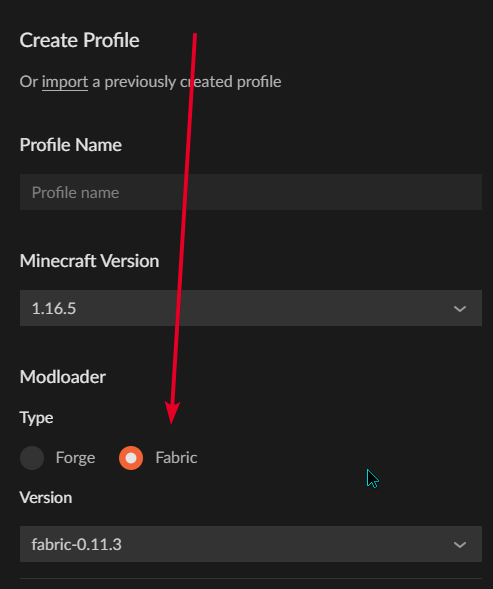
make a profile and select fabric
lyric crescent
how can you miss it https://i.imgur.com/dxOezwN.png
 tawny flicker
am i actualy stupid orrrr
 lyric crescent
restart curseforge
verbal dune
Forge is crashing due to issue involving create and the outer end
signal ridge
verbal dune
Forge is crashing due to issue involving create and the outer end
Are you using curseforge?
verbal dune
yes
signal ridge
Aslo #📛︱rules 4 pick one channel to post your issue, not multiples...
!mc-logs do this
red patioBOT
Where to find the log on the CurseForge Client.
Right-click the modpack profile icon OR click the button in the modpack profile.
Click Open Folder.
Open the logs folder.
Find the file called latest.log and drag it into discord.
verbal dune
Ok here it is
signal ridge
verbal dune
Ok here it is
had to do some searching on this one. Try lowering the mod Abnormal core to version: 3.1.1
verbal dune
ok
verbal dune
yeah thats it its working fine now
 undone marsh
you need to have minecraft Java edition to have mods.
signal ridge
Would need to buy the Java edition of minecraft. Curseforge app uses the java version
 main cloud
Okay sooooo, I've downloaded optifine for my rlcraft and its the right version, it works, but when i try to add a shaderpack into the folder it doesnt show up in the ingame menu, any ideas?
 pulsar sleet
hi how do i make a project to release to public?
signal ridge
main cloud
Okay sooooo, I've downloaded optifine for my rlcraft and its the right version, ...
!mc-optifine
red patioBOT
Optifine and Curseforge
To install Optifine with modpacks on Curseforge:
Right click the modpack icon, select Open Folder.
Put the Optifine.jar into the mods folder.
Now load the modpack normally.
We do not offer support for Optifine. If you have issues with Optifine, remove it. If you want further support try the discord found on their website.
https://www.optifine.net/home
signal ridge
pulsar sleet
hi how do i make a project to release to public?
!mc-packshare
red patioBOT
There are two ways to share a modpack you've made with others...
Export and Share - For Friends to Small Groups.
- Click the Icon for the modpack.
- Click the button next to play.
- Click
Export. - Select the files that should be included.
- Send the zip to the people that want it! They can follow the instructions in
!mc-installpackto install the pack!
Upload to Curseforge - For Public Release to Everyone.
This options will make your pack public to EVERYONE, it comes with extra requirements and will take some effort to set up.
- Go to here: https://www.curseforge.com/project/432/4471/create
- Fill out the information with a proper description of the pack. This should allow anyone to understand what the pack is.
- Click the Icon for the modpack in the CurseForge app.
- Click the button next to play.
- Click
Export. - Select the files that should be included.
- Open your Project you made on the CurseForge site and Upload the file you just made.
- Wait for Moderation & Sync so it can show up in the client! (See
!syncfor limitations)
pulsar sleet
signal ridge
!mc-packshare
no not modpack a texture pack
main cloud
I've done all that, I've followed it closely and still not showing up idk...
signal ridge
main cloud
I've done all that, I've followed it closely and still not showing up idk...
then would need to ask the optifine devs, we dont give support for optifine
signal ridge
pulsar sleet
no not modpack a texture pack
Still the same process, need to create a project on the site but as a resource pack
main cloud
Damn...
 glass hare
Could you guys make a discord bot that posts every new release in a feed-type thing? I'm tired of always having to check the site.
main cloud
Oh wow I'm dumb as hell lol...
I wasn't putting the whole file in there lol...
Rookie mistake...
undone marsh
hi, i have been trying to get 2 forge mods on my minecraft java edition worlds. I have installed forge and have ran it with the mods on my minecraft but it still wont work. (sorry if this made no sense lol)
 mental sinew
!sync
red patioBOT
Sync and your Project.
CurseForge App and site do not share the same requirements! You can find things on the site but this does not mean it will be in the app!
For a mod to show up in the app:
- Projects MUST have a file marked as RELEASE or BETA
- Projects MUST be APPROVED
- Projects MUST have a file marked for the PROFILE VERSION USED
- Projects CAN'T be EXPERIMENTAL
- Projects CAN'T be ABANDON
Files can take a while to show up in the app. If your files still have not shown up either your project is new and you have yet to mark a file as Release/Beta or there is issues with the sync system making it slow.
Vote this issue up if you would like to know when the last sync was! https://curseforge-ideas.overwolf.com/ideas/CF-I-1617
 tiny oriole
this keeps popping up whenever i load a modpack no matter how small

 queen storm
!mc-logs
red patioBOT
Where to find the log on the CurseForge Client.
Right-click the modpack profile icon OR click the button in the modpack profile.
Click Open Folder.
Open the logs folder.
Find the file called latest.log and drag it into discord.
 mild saffron
every time i load my world on the stay true modpack it crashes
wont let me send a crash report bc the app's broke as hell
 lean forge
why does my game keep crashing everytime i load up my world
lean forge
queen storm
https://discord.com/channels/428228256236306434/782027635252920322/8546095402507...
What am i looking for
idk how to read all this
queen storm
lean forge
What am i looking for
Follow the steps?
lean forge
i did
queen storm
Then you didn't follow the last one
lean forge
want me to drag it into this channel?
mental sinew
So I'm trying to upload my modpack to Curseforge and it keeps getting rejected... I try going to the support but the link leads me to "403 forbidden"
queen storm
lean forge
want me to drag it into this channel?
Yes
lean forge
queen storm
mental sinew
So I'm trying to upload my modpack to Curseforge and it keeps getting rejected.....
Show the rejection message
mental sinew
 queen storm
What are you uploading?
mental sinew
A .zip
queen storm
Project link please, and the zip
opal cipher
Did you export it through CurseForge?
queen storm
How big is it then?
queen storm
Then it should be able to upload here fine
queen storm
How is it that big?
mental sinew
almost 200 mods
queen storm
Mods are in the manifest file though
 queen storm
What is in the overrides?
mental sinew
 queen storm
Ahh, resourcepack and mods folder
mental sinew
what should i do??
queen storm
I will send somebody your way
mental sinew
ok thank you
 unborn basin
Which do not work?
 stoic tide
umm
a lot lemme get a list going
expanded origins added origins fox extra origin genesis lato the architect mod (half works half doesnt the origin doesnt show up but its item does)
and the mod list doesnt exist in-game so i cant see if theres a problem there
i have origins extra origins and origins classes working but none of the other mods work :/
my problem is that origins dont appear in the list
stoic tide
i install all of it to forge from the mod menu
i mean i have screenshot of the mod list

they are different screenshots btw
and you deleted one :/

one starts with added
the other starts wih genesis
queen storm
My apologies, they looked very the same
queen storm
!!=
red patioBOT
Wording is important!
Forge = Minecraft Forge, This is a modloader often just called "Forge".
Fabric = Fabric MC, this is another modloader, just called "Fabric".
CurseForge = A Website/App that has content for games.
Mods = Individual mod files.
Modpacks = Multiple mods put into the mods folder or downloaded from CurseForge.
These are not Interchangeable! Please use the correct terms as it allows us to help you faster!
queen storm
So, are they not showing up in game or something?
Because I fail to see the issue
queen storm
stoic tide
what was !!= for?
That scroll thing is curseforge, not forge
stoic tide
theres a difference?
queen storm
See the message
queen storm
Forge = Minecraft Forge, This is a modloader often just called "Forge".
Fabric = Fabric MC, this is another modloader, just called "Fabric".
CurseForge = A Website/App that has content for games.
No, curseforge is mod manager.
Forge is a mod loader, as fabric is as well
queen storm
Try a single mod, see if that works, then keep adding mods till it breaks
stoic tide
k
 glass marsh
@stoic tidereload the launcher to remove the fabric API mod
stoic tide
so deactivate evrything add one and see which one breaks it?
glass marsh
and it will tell you what's for fabric, will be an exclamation mark next to the mod
if that's your issue
stoic tide
w h a t
queen storm
glass marsh
and it will tell you what's for fabric, will be an exclamation mark next to the ...
Fabric API mod is not being checked here though...
glass marsh
same for if you're using fabric and installed a forge mod
glass marsh
queen storm
Fabric API mod is not being checked here though...
too lazy to scroll up lol
stoic tide
we talking about origins not working
glass marsh
what's that?
stoic tide
i think i have a solution
queen storm
glass marsh
too lazy to scroll up lol
It checks modloader, not mods
stoic tide
ill message again if it no work
it broke
i added fox extra origin mod and tested that on its own
and didnt appear
queen storm
Did not appear ingame?
stoic tide
Yeah
queen storm
Show the modlist
stoic tide
 queen storm
Does it launch fine?
queen storm
How are you checking if the mod is loaded?
queen storm
Well, how else can you say that it didn't appear?
stoic tide
i mean
when you start a world it asks you to pick an origin
and when origin not there i think its brok
man if this place had a vc i could screenshare this and i bet it would be so much easier
queen storm
Can also mean that the mod integration is broken, contact the developer of the base mod.
stoic tide
well the thing is only like 2 mods work its not just 2 mods not working its literally only 2 forge origins mods actually work
so i doubt that it is integration
not only that but they arent very old
seeing as they are for 1.16.5
stoic tide
some are built to work off eachother some idk
queen storm
And that is why things are not working as you think they should
stoic tide
ill try using a diffrent on solo but i doubt itll work
2 ideas on the problem
so either
it was origins evolved fucking with mods it didnt know or
it was mods being angry at eachother but i doubt that because my first solo mod test was with fox origin and it worked after i got rid of evolved but not before
i tried no evolved with lato (solo) and fox (solo) but not multiple mods yet so ima try that
aight my problem was just origins evolved
so thats good knowledge for you guys
later
digital roost
hi, when im try to open forge 1.12.2, it's downloading a error text, how can i fix this?
queen storm
digital roost
hi, when im try to open forge 1.12.2, it's downloading a error text, how can i f...
Screenshot please
 summer ridge
Hi Ihave missing libraries in forge 1.8.9 what should i do ?!
queen storm
summer ridge
Hi Ihave missing libraries in forge 1.8.9 what should i do ?!
Screenshot
And follow rule 4
summer ridge
queen storm
And follow rule 4
ok sry
summer ridge
queen storm
Screenshot
this is the problem
 queen storm
!notcf
red patioBOT
The question you are asking about isn't related to CurseForge. Please use the appropriate game rooms by getting the role from #786424115535544350 or use #👽︱game-support for help.
This room is only for CurseForge Owned & Maintained features/services.
digital roost
i have a problem again
how can i fix this error, The game crashed whilst rendering item
Error: java.lang.IllegalStateException: Not building!
Exit Code: -1
summer ridge
queen storm
!notcf
i dont understand you ,
queen storm
summer ridge
i dont understand you ,
Move to #👽︱game-support as it is not a curseforge issue.
queen storm
digital roost
how can i fix this error, The game crashed whilst rendering item
Error: java.lan...
!mc-logs
red patioBOT
Where to find the log on the CurseForge Client.
Right-click the modpack profile icon OR click the button in the modpack profile.
Click Open Folder.
Open the logs folder.
Find the file called latest.log and drag it into discord.
summer ridge
queen storm
Move to <#778097796410376242> as it is not a curseforge issue.
sry , thx
digital roost
queen storm
Screenshot please
 queen storm
digital roost
queen storm
digital roost
That the forge installer?
digital roost
queen storm
That the forge installer?
yes
queen storm
!getcf
red patioBOT
Looking to install the CurseForge app?
Todo: Place system requirements here.
<:windows:798410728188936222> Windows
<:mac:798410654418862130> Mac
Linux
:person_shrugging:
digital roost
queen storm
!getcf
i downloaded this but i can't find the mods i want
queen storm
digital roost
i downloaded this but i can't find the mods i want
Which mod do you want then? And on what are you?
digital roost
modern warfare, npc mod and war vehicles
i found the modern warfare
but i cant found the others
digital roost
queen storm
Find curseforge links.
how
queen storm
digital roost
how
Then you need to install them manually, curseforge does not find mods from random sites
digital roost
 viral briar
https://www.curseforge.com/minecraft/mc-mods/custom-npcs
viral briar
https://www.curseforge.com/minecraft/mc-mods/custom-npcs
ty
viral briar
you are safer with mods being on curseforge than sites like 9minecraft
been years people reporting viruses and other suspicious stuff on 9minecraft so would advise to stay away from downloading stuff from there
digital roost
viral briar
been years people reporting viruses and other suspicious stuff on 9minecraft so ...
oh ok
 wind hatch
mental sinew
https://www.curseforge.com/minecraft/modpacks/modtato-modpack
wind hatch
mental sinew
https://www.curseforge.com/minecraft/modpacks/modtato-modpack
thanks - we're checking this, might require more research on our end, appreciate the patience
 echo needle
How do you start the Medieval Times map?
viral briar
@echo needle
probably should move this question to community support or even one of the MC channels after selecting it in #786424115535544350
lean forge
can someone help me my game keeps crashing
queen storm
lean forge
can someone help me my game keeps crashing
!mc-logs
red patioBOT
Where to find the log on the CurseForge Client.
Right-click the modpack profile icon OR click the button in the modpack profile.
Click Open Folder.
Open the logs folder.
Find the file called latest.log and drag it into discord.
lean forge
wind hatch
tawdry rover
https://www.curseforge.com/minecraft/modpacks/wingtra
so i own this. it even sa...
Hey - please check again - I've fixed it (you may have seen some updated about membership changes - don't worry that was all me!)
tawdry rover
wind hatch
Hey - please check again - I've fixed it (you may have seen some updated about m...
oki. thank you
red patioBOT
Where to find the log on the CurseForge Client.
Right-click the modpack profile icon OR click the button in the modpack profile.
Click Open Folder.
Open the logs folder.
Find the file called latest.log and drag it into discord.
timid gust
Hi
I have crack maincraft es that I can play a one piece mode on curseforgue?
queen storm
No
lyric crescent
Buy the game, then you can play that.
timid gust
There is no code to enter in maincraft to join one of your one piece server
 gilded perch
okay so like i got curseforge but i cant use mods with my login on microsoft
red patioBOT
Hey there, it is Curseforge, not "Cursed forge"
lyric crescent
Curseforge has no servers
queen storm
timid gust
There is no code to enter in maincraft to join one of your one piece server
Rule 8, buy the game.
Asking again will result in a kick
queen storm
gilded perch
okay so like i got curseforge but i cant use mods with my login on microsoft
Show your vanilla launcher
gilded perch
queen storm
Show your vanilla launcher
this?
 queen storm
Yes, now show your curseforge one
gilded perch
i cant login is the problem you want me to show you what i have on curseforge
queen storm
Login on where? The minecraft launcher or curseforge itself?
gilded perch
the minecraft launcher when its used under curseforge
queen storm
Can't login at all?
gilded perch
not at all
it says it isnt an account and i even changed my password and still nothing
queen storm
Got a screenshot? Can you login on vanilla as normal?
Are you hitting the right login button? Microsoft and not mojang?
gilded perch
yes
i'll show you
even running it vanilla
i stand corrected it just didnt update my email sorry for the trouble
 viscid zodiac
I tried to upload my own mod and it always say that:"This project is currently under review by the moderation staff, pending approval of the changes that have been made. Until approved by a moderator, the project will not be visible to others, and its files will not synchronize across CurseForge." But I've been waiting for two days and the mod hasnt been approve.
lyric crescent
!status
red patioBOT
It is 02:36PM on Wednesday for CurseForge my dudes.
Project Moderation Time
Project/File moderation is done on;
Sunday, Monday, Tuesday, Wednesday, Thursday: 10AM - 6PM GMT+2
Friday, Saturday: No Moderation!
This process is First in, First out. Thus files submitted late in the work day may not be checked until the next work day.
New Projects or uploads requiring manual approval: 1-3 Working Days
Updates to approved projects not needing manual approval: 1 Hour
File sync to the Curseforge app may take up to 24 hours after approval.
viscid zodiac
thx
 copper estuary
hi, can I know why my project was rejected?
queen storm
copper estuary
hi, can I know why my project was rejected?
Look at your notifications in the top right of the website
copper estuary
it just say "This does not appear to be an appropriate project."
but what does that mean?
queen storm
copper estuary
it just say "This does not appear to be an appropriate project."
but what does t...
What is it about?
lyric crescent
screenshot the message
copper estuary
 queen storm
What is it about?
copper estuary
improving vanilla animals + add some other animals
queen storm
copper estuary
improving vanilla animals + add some other animals
Post the full description
copper estuary
I can't access it anymore because it was rejected and I can't see the page anymore
put there was some pictures outside of a spoiler
and a spoiler with some information like this
this information was inside the spoiler... do you think the problem might be this word I've used?
 queen storm
Will poke somebody for you
lyric crescent
was your file a .jar?
copper estuary
yes
wind hatch
thanks, we're looking at it
copper estuary
wind hatch
thanks, we're looking at it
thank you
 wicked apex
What sould i do with this?
 queen storm
!mc-path
red patioBOT
**Minecraft Files should NOT be installed inside the following locations
.minecraft folder.
OneDrive folders.
Desktop folder.
Drive roots I.E. Directly into the C:\ drive.
iCloud enabled folders.
If any of the above are in the path you need to change/move it by following the instructions below!**
If Minecraft is not installed in CurseForge App, start here.
Click the in the top left.
Select Minecraft.
Click "Edit".
Move to the "Continue here:" section below.
If Minecraft is installed in CurseForge App, follow these steps.
Click the in the bottom left.
Select the Minecraft tab.
Click "Change".
Move to the "Continue here:" section below.
Continue here:
Make a folder in the root directory called CurseForge.
Select the folder you just made.
The text box should show something like the following:
For Windows: C:\CurseForge
For Mac: /Users/Shared/CurseForge
wicked apex
 queen storm
That is not the path the command says
copper estuary
how can my project appear when I search for it?
also, other people can't see it in my profile
queen storm
Is it approved then?
wind hatch
copper estuary
this information was inside the spoiler... do you think the problem might be thi...
fixed - it was indeed the word that you used in a fine context, but was marked incorrectly in our side. thanks for pinging 🙂
copper estuary
queen storm
Is it approved then?
yes
anything about why does this happen? the mods appear on my profile if I'm logged in, but they do not appear if I'm out of the account
 red patioBOT
Sync and your Project.
CurseForge App and site do not share the same requirements! You can find things on the site but this does not mean it will be in the app!
For a mod to show up in the app:
- Projects MUST have a file marked as RELEASE or BETA
- Projects MUST be APPROVED
- Projects MUST have a file marked for the PROFILE VERSION USED
- Projects CAN'T be EXPERIMENTAL
- Projects CAN'T be ABANDON
Files can take a while to show up in the app. If your files still have not shown up either your project is new and you have yet to mark a file as Release/Beta or there is issues with the sync system making it slow.
Vote this issue up if you would like to know when the last sync was! https://curseforge-ideas.overwolf.com/ideas/CF-I-1617
 swift cliff
so i made a minecraft modpack how do I change the profile pic of it?
red patioBOT
There are two ways to share a modpack you've made with others...
Export and Share - For Friends to Small Groups.
- Click the Icon for the modpack.
- Click the button next to play.
- Click
Export. - Select the files that should be included.
- Send the zip to the people that want it! They can follow the instructions in
!mc-installpackto install the pack!
Upload to Curseforge - For Public Release to Everyone.
This options will make your pack public to EVERYONE, it comes with extra requirements and will take some effort to set up.
- Go to here: https://www.curseforge.com/project/432/4471/create
- Fill out the information with a proper description of the pack. This should allow anyone to understand what the pack is.
- Click the Icon for the modpack in the CurseForge app.
- Click the button next to play.
- Click
Export. - Select the files that should be included.
- Open your Project you made on the CurseForge site and Upload the file you just made.
- Wait for Moderation & Sync so it can show up in the client! (See
!syncfor limitations)
 lime parrot
I’m trying to update my curse forge but it says error every time I try to
red patioBOT
Hey there, it is Curseforge, not "Cursed forge"
queen storm
lime parrot
I’m trying to update my curse forge but it says error every time I try to
Screenshot please
lime parrot
queen storm
Screenshot please
 viral briar
been holding off on your windows updates?
lime parrot
you know what your right
swift cliff
!sync
red patioBOT
Sync and your Project.
CurseForge App and site do not share the same requirements! You can find things on the site but this does not mean it will be in the app!
For a mod to show up in the app:
- Projects MUST have a file marked as RELEASE or BETA
- Projects MUST be APPROVED
- Projects MUST have a file marked for the PROFILE VERSION USED
- Projects CAN'T be EXPERIMENTAL
- Projects CAN'T be ABANDON
Files can take a while to show up in the app. If your files still have not shown up either your project is new and you have yet to mark a file as Release/Beta or there is issues with the sync system making it slow.
Vote this issue up if you would like to know when the last sync was! https://curseforge-ideas.overwolf.com/ideas/CF-I-1617
lime parrot
Ah nice the windows is saying update failed
swift cliff
how do i know if my project is set as experimental or not
queen storm
swift cliff
how do i know if my project is set as experimental or not
It will tell at the top of the description
swift cliff
it doesnt say anything so i guess its not experimental
queen storm
Is it approved?
swift cliff
no i uploaded it less than 10 minutes ago
 elder rose
I published a project, which is an update on a previous resource pack. I have permission from the owner, but it now requires changes and needs proof. How do I provide proof?
queen storm
elder rose
I published a project, which is an update on a previous resource pack. I have pe...
How did you get permission?
elder rose
Via DM on CF
queen storm
elder rose
Via DM on CF
Then screenshot those
 stray scroll
How do I use java installation that doesn't show up under "Java Version" in settings?
elder rose
and put those on the project page? or send them to someone?
queen storm
elder rose
and put those on the project page? or send them to someone?
Ticket
!ticket-site
red patioBOT
:bug: Reporting via Website :bug:
Can't open the app or would rather use the website? You can do so here: https://support.curseforge.com/en/support/tickets/new
Fill out the form with accurate detailed information, "It doesn't work" isn't helpful! What exactly doesn't work and why doesn't it work should be easy to answer!
Make sure to upload your Overwolf logs with the Upload File option on the ticket, information on how to get these logs can be found here https://support.overwolf.com/en/support/solutions/articles/9000176827-how-to-get-your-overwolf-logs
elder rose
Would the author related issue be "appeals"?
queen storm
Yes
elder rose
Alright, thanks.
 burnt trellis
my is also crashing
fallen loom
 shy dirge
the error code is 255
shy dirge
the error code is 255
I assume it mentions Cocoa? Are you on an M1 Mac?
shy dirge
yes
fallen loom
!notcf and this is not something that can be fixed on the CF or Forge end
red patioBOT
The question you are asking about isn't related to CurseForge. Please use the appropriate game rooms by getting the role from #786424115535544350 or use #👽︱game-support for help.
This room is only for CurseForge Owned & Maintained features/services.
 vivid scaffold
how do u combine mods?
lyric crescent
for example?
 unique copper
I installed curseforge but it keeps disappearing every time I close it and I have to keep re-installing it every time I want to use it. Any suggestions?
viral briar
!getcf
red patioBOT
Looking to install the CurseForge app?
Todo: Place system requirements here.
<:windows:798410728188936222> Windows
<:mac:798410654418862130> Mac
Linux
:person_shrugging:
viral briar
try installing it from here
unique copper
oke
vivid scaffold
lyric crescent
for example?
Im trying to add Scape And Run + to Medieval Minecraft
lyric crescent
what are those? modpacks?
vivid scaffold
ya
lyric crescent
you dont combine modpacks
vivid scaffold
wait u cant?
lyric crescent
sure you can, but the fact that you are asking about it here means you dont know how to make packs at all, and it will not be simple. things will crash if its even possible for them to work at all
vivid scaffold
do u know where i can learn how to make modpacks?
red patioBOT
How to install mods in CurseForge App.
- Click
+ Create Custom Profile - Name it, select the required Minecraft version, select the Forge version (usually the highest number), click
Create. - Click the profile icon.
- Click
Add New Content - Search and install the desired mods.
- Start the game!
How to install mods not on CurseForge.
- Right click the profile picture or Open the profile and click the Icon next to the play button.
- Click
Open Folder. - Drag the mod(s) into the
modsfolder. (Note: Some mods will require others, to run. Make sure to read the instructions for the mod!) - Start the game!
 spark patrol
Does anyone know why the cursed forge version is using the wrong GPU? Just checked my vanilla minecraft and it's using the right one
(I tried to change the graphics card from the nvidia settings and graphics system settings)
red patioBOT
Hey there, it is Curseforge, not "Cursed forge"
lyric crescent
?mc-videocard
red patioBOT
How to set minecraft to use your videocard
Got NVIDIA?

 young cypress
When I play Enigmatica 2 Expert, I press the play button and the launcher loads a little bit, then closes, and the game doesn't run. How to I fix this?
lyric crescent
?mc-installfix try this
red patioBOT
- Click on the Minecraft Tab on the Left side of the App.
- Click button next to the
Create Custom Profileoption. - Click
Repair Installationoption. - Play game.
NOTE: You will not lose any modpacks or worlds, These are saved in the Instances folder. DO NOT TOUCH THIS FOLDER OR YOU WILL LOSE EVERYTHING
young cypress
Thanks! It works!
spark patrol
works now thank you 
vivid scaffold
how do u add a mod from your files into your modpack?
unique copper
i dont know
vivid scaffold
oof
 slender vortex
curse forge is crashing always

 lilac ether
Sorry I am new to this server. I am sure someone has asked this but, does anyone know how to change the folder that curse draws from? It won't allow me to change or select it. It is not pulling from the correct folder. This is a new laptop I am using.
slender vortex
slender vortex
curse forge is crashing always
how do I fix this
vivid scaffold
Did u relaunch the app?
slender vortex
yes
slender vortex
vivid scaffold
mabye restart ur computer?
I did
vivid scaffold
oof
lyric crescent
vivid scaffold
how do u add a mod from your files into your modpack?
Put it in the mods folder. Better off using the app to do this
lyric crescent
the instructions i sent previously
 fading moth
sorry if im bothering anyone, but the ticket that I sent to overwolf was like 2 days ago with the status still being being processed
queen storm
Yeah, it isn't the only ticket
 slender vortex
my launcher always crashing how do I fix this?
 calm axle
Why does it crash?
slender vortex
idk
calm axle
Did you install it correctly? Do other programs make it crash?
slender vortex
Curseforge
 potent rivet
hello my curseforge isnt working its only loading and doesnt start.
calm axle
Did it start before?
calm axle
How so? Did you install any modpacks that may not start your CurseForge?
queen storm
!ticket-site
red patioBOT
:bug: Reporting via Website :bug:
Can't open the app or would rather use the website? You can do so here: https://support.curseforge.com/en/support/tickets/new
Fill out the form with accurate detailed information, "It doesn't work" isn't helpful! What exactly doesn't work and why doesn't it work should be easy to answer!
Make sure to upload your Overwolf logs with the Upload File option on the ticket, information on how to get these logs can be found here https://support.overwolf.com/en/support/solutions/articles/9000176827-how-to-get-your-overwolf-logs
 weary field
im trying to download a server but while I was following the tutorail I never got some of the files

never got eula just 1.12.2
In this video, I show you exactly how to make a modded Minecraft server in 1.12.2, so you can start playing modded Minecraft with your friends.
Make sure you leave a like and Comment down below What would you like to see from this Tutorial!
Big Shoutout to The goldwolf94, who is a twitch streamer and helped me make...Maybe try using a server host?
lyric crescent
weary field
!notcf
red patioBOT
The question you are asking about isn't related to CurseForge. Please use the appropriate game rooms by getting the role from #786424115535544350 or use #👽︱game-support for help.
This room is only for CurseForge Owned & Maintained features/services.
obsidian scarab
what do i do my modpack got rejected but the file didnt get removed
 strange anchor
is there a difference between how long it takes for a mod to be approved if a past version has been approved?
 fair fossil
anyone know when curseforge will be available for 1.17? Ik cursefabric is, but forge has so much more on it
queen storm
fair fossil
anyone know when curseforge will be available for 1.17? Ik cursefabric is, but f...
!!=
red patioBOT
Wording is important!
Forge = Minecraft Forge, This is a modloader often just called "Forge".
Fabric = Fabric MC, this is another modloader, just called "Fabric".
CurseForge = A Website/App that has content for games.
Mods = Individual mod files.
Modpacks = Multiple mods put into the mods folder or downloaded from CurseForge.
These are not Interchangeable! Please use the correct terms as it allows us to help you faster!
lyric crescent
strange anchor
is there a difference between how long it takes for a mod to be approved if a pa...
!status
red patioBOT
It is 08:36PM on Wednesday for CurseForge my dudes.
Project Moderation Time
Project/File moderation is done on;
Sunday, Monday, Tuesday, Wednesday, Thursday: 10AM - 6PM GMT+2
Friday, Saturday: No Moderation!
This process is First in, First out. Thus files submitted late in the work day may not be checked until the next work day.
New Projects or uploads requiring manual approval: 1-3 Working Days
Updates to approved projects not needing manual approval: 1 Hour
File sync to the Curseforge app may take up to 24 hours after approval.
lyric crescent
obsidian scarab
what do i do my modpack got rejected but the file didnt get removed
show the reject message
obsidian scarab
 fair fossil
so when will forge support 1.17?
lyric crescent
when it does. this is not forge. they wont have an answer either
lyric crescent
obsidian scarab
make the changes and then it will return to the queue for approval
viral briar
Forge themselves will most likely say “it will be out when it’s out “
 lyric crescent
you dont own java, or logged into an account that doesnt own java
brittle light
i own java on my microsoft account
lyric crescent
which you arnt logged into, see the upper left corner
brittle light
yup
digital roost
When my freinds try to join the server it says this
 lyric crescent
!notcf
red patioBOT
The question you are asking about isn't related to CurseForge. Please use the appropriate game rooms by getting the role from #786424115535544350 or use #👽︱game-support for help.
This room is only for CurseForge Owned & Maintained features/services.
digital roost
digital roost
When my freinds try to join the server it says this
But for me its perfectly fine
Can a <@&524645667818307596> help me out 🙂
lyric crescent
Not a curseforge issue, curseforge isnt involved in servers
Don't ping people, read the #📛︱rules
queen storm
Neither do you need to break rule 5
brittle light
i logged into my account that ownes mc and it just brings me back to the demo thing
lyric crescent
Then you have not logged into an account that owns java.
 grizzled slate
brittle light
grizzled slate
brittle light
i bought java though
lyric crescent
Curseforge is not involved in the login process. If you have an account issue take it to mojang support.
brittle light
its not a mc issue bc when i close the forge app and launch it brings me to the account that i own java on
idk its a weird issue
lyric crescent
Then you logged in with the wrong account.
fleet bear
brittle light
its not a mc issue bc when i close the forge app and launch it brings me to the ...
Screenshot of the top left corner of both.
strange anchor
red patio
** **
**It is 08:36PM on Wednesday for CurseForge my dudes.**
what makes a mod require manual approval
queen storm
strange anchor
what makes a mod require manual approval
Anything
strange anchor
queen storm
Anything
i meant an update
queen storm
strange anchor
i meant an update
Then it can still be anything
strange anchor
queen storm
Then it can still be anything
is there any signs of it needing manual approval?
queen storm
strange anchor
is there any signs of it needing manual approval?
It taking longer than an hour
strange anchor
queen storm
It taking longer than an hour
longer than exactly an hour or longer than around an hour
queen storm
Nothing is exact
strange anchor
queen storm
Nothing is exact
i meant like a little around an hour or a bit around the hour (a little maybe like 15 mins and a bit around like 30 mins)
queen storm
strange anchor
i meant like a little around an hour or a bit around the hour (a little maybe li...
It gets approved when it gets approved.
strange anchor
ok ill stop asking questions
 wraith sandal
minecraft wont launch via curseforge when I press play on a modpack. The solution provided with !mc-installfix does not work
 neon fog
when assembling a modpack what does the rejected mean on the status?
queen storm
That it is denied, check your notifications on why
 iron warren
 neon fog
queen storm
That it is denied, check your notifications on why
neon fog
queen storm
That it is denied, check your notifications on why
thank you rejected for redunancy since im drawing the mods for the pack from curseforge itself that is understandable so do i just upload a zipfile of them ?
iron warren
pls help
queen storm
neon fog
thank you rejected for redunancy since im drawing the mods for the pack from cur...
Read the notification
queen storm
iron warren
!mc-path
red patioBOT
**Minecraft Files should NOT be installed inside the following locations
.minecraft folder.
OneDrive folders.
Desktop folder.
Drive roots I.E. Directly into the C:\ drive.
iCloud enabled folders.
If any of the above are in the path you need to change/move it by following the instructions below!**
If Minecraft is not installed in CurseForge App, start here.
Click the in the top left.
Select Minecraft.
Click "Edit".
Move to the "Continue here:" section below.
If Minecraft is installed in CurseForge App, follow these steps.
Click the in the bottom left.
Select the Minecraft tab.
Click "Change".
Move to the "Continue here:" section below.
Continue here:
Make a folder in the root directory called CurseForge.
Select the folder you just made.
The text box should show something like the following:
For Windows: C:\CurseForge
For Mac: /Users/Shared/CurseForge

 pulsar ruin
hey, can someone help. My curseforge 1.12.2 14.23.4.2759 launcher wont open.
lyric crescent
That is a forge version, how is this related to curseforge?
iron warren
I'm very sorry but I'm Turkish so I don't understand what you are saying and I need help I can't say that I understand the rules very well because my English is not very good
@lyric crescentpls help me
lyric crescent
you've been helped
queen storm
Read the rules, use a translator.
No random pings
iron warren
lyric crescent
you've been helped
but the help did not solve the problem
lyric crescent
Suggest you read the rules.
queen storm
Click Minecraft, select a path
queen storm
Because it was a useless one
 queen copper
Hello, I have used curseforge before with no problems, but I got a new pc. When I went to install curseforge and overwolf on this PC it keeps saying "preparing for first launch" but when the bar reaches the end it just disappears and doesn't open curseforge. Any tips on how I can fix this problem? Thank you!
red patioBOT
Looking to install the CurseForge app?
Todo: Place system requirements here.
<:windows:798410728188936222> Windows
<:mac:798410654418862130> Mac
Linux
:person_shrugging:
fleet bear
use this and then download curseforge via the app store
digital roost
I have uploaded a bunch of mods to a profile, but its only recognizing 85 of the 107 I uploaded
 cold marsh
hello, im trying to upload a modpack to curseforge, and this is what it shows me

it has been liek this for several days
is this normal behaviour?
how long does it take for a modpack to get approved on average?
fallen loom
!status
red patioBOT
It is 11:41PM on Wednesday for CurseForge my dudes.
Project Moderation Time
Project/File moderation is done on;
Sunday, Monday, Tuesday, Wednesday, Thursday: 10AM - 6PM GMT+2
Friday, Saturday: No Moderation!
This process is First in, First out. Thus files submitted late in the work day may not be checked until the next work day.
New Projects or uploads requiring manual approval: 1-3 Working Days
Updates to approved projects not needing manual approval: 1 Hour
File sync to the Curseforge app may take up to 24 hours after approval.
lyric crescent
cold marsh
hello, im trying to upload a modpack to curseforge, and this is what it shows me
Did you make the changes they requested?
digital roost
it says 85 mods total, but theres 107 in the folder. Why is this?
 lyric crescent
were all installed by the app?
digital roost
no, I uploaded them into the folder
 daring fjord
if they weren't downloaded from curseforge it doesn't register
lyric crescent
then that is why. not using the app causes them to not be detected properly
daring fjord
if they are compatibital with curseforge they will still work when you load up the modpack
yes I know I spelled compatibel wrong, deal with it
digital roost
ight that was my concern, was that they wouldn't actually have worked
lyric crescent
they would
daring fjord
for some reason whenever I open my world on skyfactory 3 it crashes almost immediately
red patioBOT
The question you are asking about isn't related to CurseForge. Please use the appropriate game rooms by getting the role from #786424115535544350 or use #👽︱game-support for help.
This room is only for CurseForge Owned & Maintained features/services.
fleet bear
!notcf
daring fjord
mk
lean forge
why does my game keep crashing
daring fjord
what does the error say?
digital roost
I tried starting minecraft with the modpack, it crashed twice


 lyric crescent
?mc-log
red patioBOT
Where to find the log on the CurseForge Client.
Right-click the modpack profile icon OR click the button in the modpack profile.
Click Open Folder.
Open the logs folder.
Find the file called latest.log and drag it into discord.
lean forge
fallen loom
That doesn't look complete, is that the whole thing?
cold marsh
lyric crescent
Did you make the changes they requested?
they didn't request any changes
lyric crescent
says right in the message that they did
signal ridge
!notcf
red patioBOT
The question you are asking about isn't related to CurseForge. Please use the appropriate game rooms by getting the role from #786424115535544350 or use #👽︱game-support for help.
This room is only for CurseForge Owned & Maintained features/services.
cold marsh
lyric crescent
says right in the message that they did
ohh
sorry I misunderstood
they told me to add a description
I did that and resubmitted
signal ridge
lean forge
Does your game crash on its own? OR does it freeze and you force close it?
lyric crescent
cold marsh
I did that and resubmitted
then it would be back in the end of the queue from whenever the change was made
signal ridge
lean forge
it says it stops responding
how long have you left it when it stops responding? OR do you close it right away?
lean forge
when it stops responding i try and click wait for program to respond but it just pops up again
so i usually close it
i crash when i load up my world
signal ridge
How much memory does your pc have total? and how much is allocated to the app?
signal ridge
!mc-ram screen shot what its set too
red patioBOT
How to set Global Minecraft RAM value.
- Click the icon in the bottom left to open settings.
- Click the Minecraft tab.
- Scroll down.
- Slide slider to recommended ram range as seen below.

 hollow zodiac
I need assistance with the fabric loder because whenever I open it with any mod other than fabric api it always crashes
fallen loom
!notcf
red patioBOT
The question you are asking about isn't related to CurseForge. Please use the appropriate game rooms by getting the role from #786424115535544350 or use #👽︱game-support for help.
This room is only for CurseForge Owned & Maintained features/services.
 normal cypress
plz help
 lyric crescent
context?
normal cypress
lyric crescent
context?
curseforge won't work