#🔥︱curseforge-support
1 messages · Page 482 of 1
 fading egret
 viral briar
They are napping it’s almost midnight where they are 😂
 fleet bear
They don't run it
 lilac notch
where is rl craft? i had it downloaded and it seems to have disappeared and i cant find it when i search it
 idle badger
try downloading it again
lilac notch
idle badger
try downloading it again
it doesnt appear when i search for it
idle badger
show me a screenshot
 maiden marsh
I made a modpack, but its telling me "This is a new project. Until approved by a moderator, the project will not be visible to others." Do I need to submit it to anywhere or do I just need to wait? (if so, how long)
fleet bear
!status
 red patioBOT
It is 12:27AM on Monday for CurseForge my dudes.
Project Moderation Time
Project/File moderation is done on;
Sunday, Monday, Tuesday, Wednesday, Thursday: 10AM - 6PM GMT+2
Friday, Saturday: No Moderation!
This process is First in, First out. Thus files submitted late in the work day may not be checked until the next work day.
New Projects or uploads requiring manual approval: 1-3 Working Days
Updates to approved projects not needing manual approval: 1 Hour
File sync to the Curseforge app may take up to 24 hours after approval.
lilac notch
 maiden marsh
fleet bear
!status
maiden marsh
fleet bear
!status
thx

 fallen loom
That's referencing Curse's Minecraft extension, not your own Minecraft installation
Curse uses its own installation anyway
fallen loom
You click Minecraft and it installs the extension...
 still shore
 fallen loom
?mc-path
red patioBOT
**Minecraft Files should NOT be installed inside the following locations
.minecraft folder.
OneDrive folders.
Desktop folder.
Drive roots I.E. Directly into the C:\ drive.
iCloud enabled folders.
If any of the above are in the path you need to change/move it by following the instructions below!**
If Minecraft is not installed in CurseForge App, start here.
Click the  in the top left.
Select Minecraft.
Click "Edit".
Move to the "Continue here:" section below.
If Minecraft is installed in CurseForge App, follow these steps.
Click the  in the bottom left.
Select the Minecraft tab.
Click "Change".
Move to the "Continue here:" section below.
Continue here:
Make a folder in the root directory called CurseForge.
Select the folder you just made.
The text box should show something like the following:
For Windows: C:\CurseForge
For Mac: /Users/Shared/CurseForge

 digital wolf
yo how do i get optifine to work on 1.14.4 forge
fallen loom
You get the correct version of Optifine for your version of Forge and drop it in the mods folder
 green moth
Is 1.12.2 not supported for help here? I can't remember
 digital roost
when i try to open the modpack folder for the zombie apocalypse slow zombies it says that access is denied
 green current
I am new to modded servers so for like a group of 2-3 people and 56 mods how much RAM would I need in a host?
I am thinking of finding a host and don't know how this works and want a good deal
digital wolf
fallen loom
You get the correct version of Optifine for your version of Forge and drop it in...
i have and it gives a error saying optifine is uncompatible
fallen loom
Screenshot?
fleet bear
green moth
Is 1.12.2 not supported for help here? I can't remember
CurseForge support is only for curseforge related issues and the version used doesn't matter.
As for the other rooms, whatever people want to help with is what gets supported, there's no specific rules saying you can't use X version.
green moth
fleet bear
CurseForge support is only for curseforge related issues and the version used do...
Thanks you, I’ll have some questions tomorrow as I’ve spent all day working on my server with little luck
fleet bear
Server related issues would be a #👽︱game-support deal
green moth
Roger that
 ionic ridge
I don't know if i am missing something really obvious, but whenever I try to play a modpack, I click play and nothing happens
fleet bear
!mc-installfix
red patioBOT
- Click on the Minecraft Tab on the Left side of the App.
- Click
 button next to the
 Create Custom Profileoption. - Click

Repair Installationoption. - Play game.
NOTE: You will not lose any modpacks or worlds, These are saved in the Instances folder. DO NOT TOUCH THIS FOLDER OR YOU WILL LOSE EVERYTHING

 kind maple
entire curseforge?
ionic ridge
yep!
kind maple
if im not signed in i will lose progress on modpacks though right?
ionic ridge
fleet bear
!mc-installfix
Now when I press play, it loads, but doesn't open the launcher, just after trying to load it it, it reverts back to the play button
fleet bear
kind maple
help
Click the mod name, go to the version tab, click download.
fleet bear
kind maple
if im not signed in i will lose progress on modpacks though right?
you being logged into the app has nothing to do with game data
fleet bear
ionic ridge
Now when I press play, it loads, but doesn't open the launcher, just after tryin...
What path are you using?
ionic ridge
path?
fleet bear
yes, in the minecraft settings
ionic ridge
i honestly have no idea what that is
kind maple
fleet bear
Click the mod name, go to the version tab, click download.
thanks
it worked
digital roost
I've installed the Skyfactory 4 modpack but this error shows up every time I try joining the server
 fleet bear
You didn't install it correctly or you didn't start the correct profile.
ionic ridge
I have looked in minecraft settings, and i can't find the path settings
fleet bear
you looked at the curseforge app settings in the minecraft tab?
ionic ridge
yes
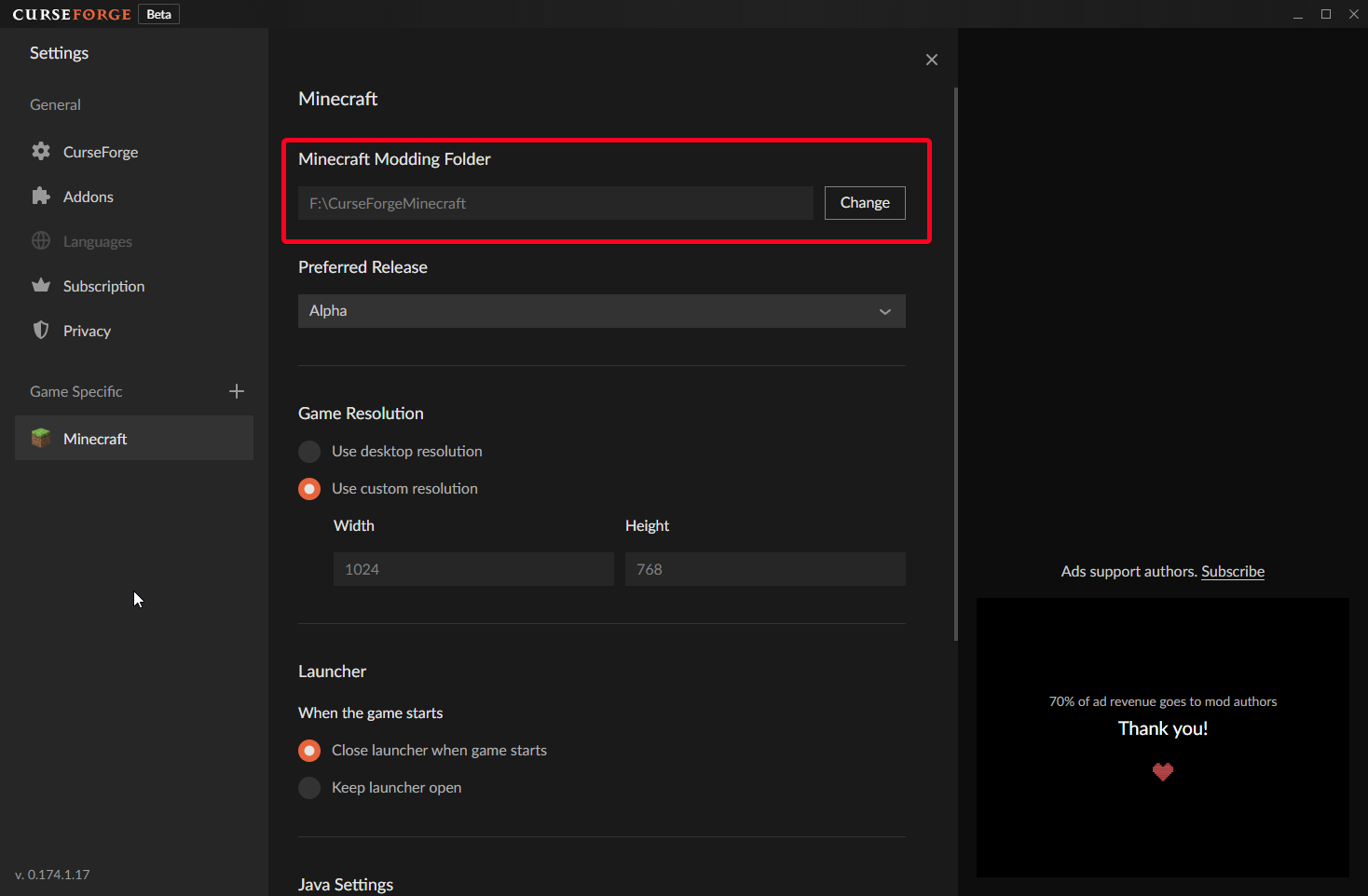 ionic ridge
oohhhhh
thanks for explaining
Im on a mac
and using documents/curseforge/minecraft
idk if that helps
ionic ridge
yay
digital roost
I just got a game crash... after re-installing the profile
 fleet bear
ionic ridge
yay
fleet bear
ionic ridge
yay
do the installfix steps again, then exit the app
fleet bear
digital roost
I just got a game crash... after re-installing the profile
are you using curseforge app?
digital roost
Yes
ionic ridge
it didn't work :(
fleet bear
ionic ridge
it didn't work :(
!owlogs
red patioBOT
<:overwolf:798413750981492736> How to get Overwolf logs! <:overwolf:798413750981492736>
fleet bear
can you get those and post them here please?
fleet bear
digital roost
Yes
Delete and install it again
 thick bridge
Tried to look for an FAQ but im a noob lol, Anyway, is there a way to add mods to en existing modpack on curseforge and then make it your own modpack so its easier for server members to download? For example, Im running a server that has the MechaniCrafters modpack, and I want to add a few mods that better suits the community of our server, so, I know how to add mods to a modpack, by allowing content managment but then that means each person who downloads the modpack will have to look for every individual mod and add it to the pack as well. Is there a way to make this easier? Sorry if its a stupid question lmao
fleet bear
thick bridge
Tried to look for an FAQ but im a noob lol, Anyway, is there a way to add mods t...
!mc-packshare
red patioBOT
There are two ways to share a modpack you've made with others...
Export and Share - For Friends to Small Groups.
- Click the Icon for the modpack.
- Click the button next to play.
- Click

Export. - Select the files that should be included.
- Send the zip to the people that want it! They can follow the instructions in
!mc-installpackto install the pack!
Upload to Curseforge - For Public Release to Everyone.
This options will make your pack public to EVERYONE, it comes with extra requirements and will take some effort to set up.
- Go to here: https://www.curseforge.com/project/432/4471/create
- Fill out the information with a proper description of the pack. This should allow anyone to understand what the pack is.
- Click the Icon for the modpack in the CurseForge app.
- Click the button next to play.
- Click
Export. - Select the files that should be included.
- Open your Project you made on the CurseForge site and Upload the file you just made.
- Wait for Moderation & Sync so it can show up in the client! (See
!syncfor limitations)
thick bridge
Another question, If I do add certain mods, would they integrate together automatically, or would I have to know some coding to combine them?
For example, Create mod and Farmers Delight
fleet bear
you would need to edit configs/recipes/scripts whatever depending on what you add and to what you are adding it to
thick bridge
Oof, I may be in over my head! Thanks! 🙂
 livid crown
when downloading curseforge app it does this

 grim bramble
hey please help idk how to join people on minecraft forge
thick bridge
grim bramble
hey please help idk how to join people on minecraft forge
Join what?
 gray shadow
how to change forge server ip in minecraft?
 restive rain
Anyone know why my curse client freezes when I click import in create custom profile
gray shadow
you mean "not responding"?
restive rain
Idk. I click import and it just stops responding and I cant click anything on it
Okay never mind it randomly works now
fleet bear
gray shadow
how to change forge server ip in minecraft?
what...?
That sure doesn't sound like a curseforge issue to start with
 wet frigate
Is anyone else having issues when trying to install mods for Minecraft through the launcher? When I press the install button, nothing happens. I can only install it if I go to the mod page and go to versions, and manually pick the version I want/need
Is that just me or is anyone else having that problem
Ok well I figured out part of the problem
The mods all show "Game version: NaN undefined"
Well, 95% do
The other 5% that actually display a game version can install just fine
Is there a way to fix this?
fleet bear
wet frigate
Is anyone else having issues when trying to install mods for Minecraft through t...
Click the mod name, go to versions, download from the list.
It's a known bug due to changes in the backend for fabric support.
wet frigate
I'm not even using Fabric, I'm actually just trying to go play classic 1.7.10 haha
fleet bear
yes, but the changes are on the server side that the app uses to get things
When they release the fabric update for the app, it will go away
 limpid plover
What mods get added for performance changes like better fps mods specifically for 1.12.2 I made my own pack everything works it's only 100 so mods yet it seems to be really slow on my half decent pc
wet frigate
fleet bear
yes, but the changes are on the server side that the app uses to get things
Ohhhhh ok. Makes sense
fleet bear
limpid plover
What mods get added for performance changes like better fps mods specifically fo...
!notcf
red patioBOT
The question you are asking about isn't related to CurseForge. Please use the appropriate game rooms by getting the role from #786424115535544350 or use #👽︱game-support for help.
This room is only for CurseForge Owned & Maintained features/services.
 regal oyster
How do I update CurseForge so the dropdown menu will show up and I can do the WoW BCC addons?
fleet bear
It should be updated to the most recent version if you just exit it and open it again
regal oyster
I had to reload it a few times, but it popped up. Thanks
 misty oxide
are you able to view a specific dev's packs or mods that they've made
fleet bear
click the name of the user on the site and go to the projects tab
misty oxide
ah thanks
red patioBOT
Hey there, it is Curseforge, not "Cursed forge"
 valid chasm
Hey I am In the curse forge app when I am making my mod pack and hitting the install button it does not work can some one help me ?
I really need help
 opal cipher
Go to the versions tab of the mod and install it from there.
valid chasm
No I am IN THE APP
opal cipher
Yes?
opal cipher
Yes, go to the versions tab in the app and download it from there.
opal cipher
Because there's currently an issue with how it normally works and I'm giving you a workaround?
 gloomy vale
I recently installed the curseforge app and when it told me to select where I wanted my files to be installed to, I accidentally hit the wrong one, how can I change it
opal cipher
gloomy vale
I recently installed the curseforge app and when it told me to select where I wa...
!mc-path
red patioBOT
**Minecraft Files should NOT be installed inside the following locations
.minecraft folder.
OneDrive folders.
Desktop folder.
Drive roots I.E. Directly into the C:\ drive.
iCloud enabled folders.
If any of the above are in the path you need to change/move it by following the instructions below!**
If Minecraft is not installed in CurseForge App, start here.
Click the in the top left.
Select Minecraft.
Click "Edit".
Move to the "Continue here:" section below.
If Minecraft is installed in CurseForge App, follow these steps.
Click the in the bottom left.
Select the Minecraft tab.
Click "Change".
Move to the "Continue here:" section below.
Continue here:
Make a folder in the root directory called CurseForge.
Select the folder you just made.
The text box should show something like the following:
For Windows: C:\CurseForge
For Mac: /Users/Shared/CurseForge
opal cipher
valid chasm
Nolifeking when will the problem be fixed
When they release a fix for it.
valid chasm
Ok
opal cipher
I don't work for CurseForge/Overwolf, so I don't have any clue.
thick bridge
How long does it usually take for a submitted modpack to be accepted?
fleet bear
!status
red patioBOT
It is 07:56AM on Monday for CurseForge my dudes.
Project Moderation Time
Project/File moderation is done on;
Sunday, Monday, Tuesday, Wednesday, Thursday: 10AM - 6PM GMT+2
Friday, Saturday: No Moderation!
This process is First in, First out. Thus files submitted late in the work day may not be checked until the next work day.
New Projects or uploads requiring manual approval: 1-3 Working Days
Updates to approved projects not needing manual approval: 1 Hour
File sync to the Curseforge app may take up to 24 hours after approval.
 brittle jolt
how do I install a mod from the website to the app?
opal cipher
Install it through the app.
Go to Versions and install it, if it gets an error with the normal install button.
brittle jolt
It's not on the app tho? I be puttin the the name and everything and it don't come up
opal cipher
!mc-installmods
red patioBOT
How to install mods in CurseForge App.
- Click
+ Create Custom Profile - Name it, select the required Minecraft version, select the Forge version (usually the highest number), click
Create. - Click the profile icon.
- Click
Add New Content - Search and install the desired mods.
- Start the game!
How to install mods not on CurseForge.
- Right click the profile picture or Open the profile and click the Icon next to the play button.
- Click

Open Folder. - Drag the mod(s) into the
modsfolder. (Note: Some mods will require others, to run. Make sure to read the instructions for the mod!) - Start the game!
 opal cipher
Must be for the correct version as well.
brittle jolt
ok
brittle jolt
opal cipher
Must be for the correct version as well.
oh thank you bro it worked apperciate it
 strong wadi
my game keeps crahing as soon as i launch it?
 queen storm
strong wadi
my game keeps crahing as soon as i launch it?
queen storm
strong wadi
my game keeps crahing as soon as i launch it?
!mc-logs
red patioBOT
Where to find the log on the CurseForge Client.
Right-click the modpack profile icon OR click the button in the modpack profile.
Click Open Folder.
Open the logs folder.
Find the file called latest.log and drag it into discord.
strong wadi
do i do that?
queen storm
Yes
queen storm
!mc-installfix
red patioBOT
- Click on the Minecraft Tab on the Left side of the App.
- Click button next to the
Create Custom Profileoption. - Click
Repair Installationoption. - Play game.
NOTE: You will not lose any modpacks or worlds, These are saved in the Instances folder. DO NOT TOUCH THIS FOLDER OR YOU WILL LOSE EVERYTHING
strong wadi
ok thank you its doing its thing ill come back if it happens again thank you
 random cedar
When going to my modpack screenshot page in the app it shows the old logos i used. Is there a way to disable that?
fleet bear
no it's a known bug
 rustic lily
Is there a 64 bit version of curseforge? Modpacks that I try to run give me the warning that I don't have enough memory for them to be stable, telling me that I have 3817 MB RAM, while technic launcher has 7168 MB RAM in its 64 bit mode, and I cant find a 64 bit option in settings anywhere in the curseforge launcher.
red patioBOT
How to set Global Minecraft RAM value.
- Click the icon in the bottom left to open settings.
- Click the Minecraft tab.
- Scroll down.
- Slide slider to recommended ram range as seen below.
 queen storm
!mc-ram
rustic lily
thanks
brittle jolt
uh last time I'll be here when I open curseforge the app it won't stay open
nvm fixed it sorry
 pastel osprey
So, does anyone happen to know why i am unable to install certain mods on curseforge client right now. I click install on any mod like say "just enough items" for 1.15.2 and it doesnt install. However I am able to install a mod such as "slashblades"
queen storm
Click the mod, go to versions, hit install there
pastel osprey
Thank you.
 stiff igloo
Hello help...

What could this be about?
By the way, if you know, can I make it so that after I run the build in curse forge, it remains in the minecraft launcher? And after exiting the build and entering the official minecraft launcher, did it stay there?
 lyric crescent
Only loads into the launcher by using curseforge. If you want it there without curseforge you'd need to manually install using forge
stiff igloo
I see, but why did I get this error? Does everyone have it, or just me?
queen storm
stiff igloo
I see, but why did I get this error? Does everyone have it, or just me?
Reinstall curseforge
stiff igloo
Okay
 halcyon crypt
Is it possible to make a copy of an existing modpack, because I want to add some mods to it, and try playing by myself with extra mods
queen storm
halcyon crypt
Is it possible to make a copy of an existing modpack, because I want to add some...
Right click, duplicate
 hardy scroll
Does anyone know why I got this message on my mod?
"This project requires changes in order to be approved. Until the changes are made and the project is approved by a moderator, the project will not be visible to others, and its files will not synchronize across CurseForge.
owner does not allow to redistribute his work to the CurseForge platform, you can recommend users to install it manually, but not to include it."
No real indication of what the issue is
I uploaded a Jar file for the mod and linked my github to it, since my github name and CF username are different do I need to put a note on my github repository or something to indicate I own it?
queen storm
That is not what it says
queen storm
hardy scroll
Does anyone know why I got this message on my mod?
"This project requires chang...
Link your github please
hardy scroll

GitHub
Minecraft Mod that adds a block that serves as a single block clock. - Dalorae/RSOneBlockClock
queen storm
hardy scroll
https://github.com/Dalorae/RSOneBlockClock
Probably best to make a ticket
!ticket-site
red patioBOT
:bug: Reporting via Website :bug:
Can't open the app or would rather use the website? You can do so here: https://support.curseforge.com/en/support/tickets/new
Fill out the form with accurate detailed information, "It doesn't work" isn't helpful! What exactly doesn't work and why doesn't it work should be easy to answer!
Make sure to upload your Overwolf logs with the Upload File option on the ticket, information on how to get these logs can be found here https://support.overwolf.com/en/support/solutions/articles/9000176827-how-to-get-your-overwolf-logs
hardy scroll
I tried and its stonewalling me saying the captcha failed despite the captcha showing a green check mark
stiff igloo
I reinstalled curse forge, it didn't help. What's next?
 queen storm
stiff igloo
I reinstalled curse forge, it didn't help. What's next?
queen storm
stiff igloo
I reinstalled curse forge, it didn't help. What's next?
Poked somebody for you
 unborn basin
stiff igloo
I reinstalled curse forge, it didn't help. What's next?
unborn basin
stiff igloo
I reinstalled curse forge, it didn't help. What's next?
?owlogs
red patioBOT
<:overwolf:798413750981492736> How to get Overwolf logs! <:overwolf:798413750981492736>
unborn basin
Send me your logs please
queen storm
hardy scroll
Does anyone know why I got this message on my mod?
"This project requires chang...
Poked somebody for you as well 😉
hardy scroll
ty
stiff igloo
Sorry for the stupid question, but do you need to send the archive itself, or is there a certain file in it?
And another question, how and where to send it to you?
queen storm
stiff igloo
Sorry for the stupid question, but do you need to send the archive itself, or is...
The archive itself
And can't you drop it in here?
queen storm
@unborn basin
opal cipher
Looks like you can't connect to the curseforge servers.
 left nymph
I cant download CureForge
opal cipher
stiff igloo
How's it going?"
Do you have access to a VPN? Could you try with that active/inactive?
stiff igloo
Yes, unfortunately I can't, this is not the first time such a mistake, but I thought everyone had it.
left nymph
I dont have VPN
opal cipher
left nymph
I cant download CureForge
!getcf
red patioBOT
Looking to install the CurseForge app?
Todo: Place system requirements here.
<:windows:798410728188936222> Windows
<:mac:798410654418862130> Mac
Linux
:person_shrugging:
opal cipher
Install Overwolf, and then install CurseForge from the app store.
stiff igloo
And I don't have access to the VPN either
opal cipher
stiff igloo
And I don't have access to the VPN either
Roger. Then I think Zappah will have to help you out more. ^^
stiff igloo
I have windows
left nymph
I cant download CureForge?
opal cipher
left nymph
I cant download CureForge?
Did you try the link I posted?
left nymph
yes
opal cipher
What did it say then?
stiff igloo
@unborn basin Well, can you help me?
 tulip summit
Is it possible to embed a YouTube playlist in description?
queen storm
tulip summit
Is it possible to embed a YouTube playlist in description?
There is a video icon in the editor
tulip summit
Yes, but this only embeds the first video. If you click on "Watch on YouTube", it only redirects to this one video, not the playlist
queen storm
tulip summit
Yes, but this only embeds the first video. If you click on "Watch on YouTube", i...
Considered putting the playlist link below it?
tulip summit
Good idea, thank you
stiff igloo
Only @unborn basin be able to deal with my problem?
 clear sorrel
how long should i expect for a project to get seen by a moderator? only asking bc there is a certain day coming up that a bunch of people including myself would like to use it and it's been 3 days so far
red patioBOT
It is 02:32PM on Monday for CurseForge my dudes.
Project Moderation Time
Project/File moderation is done on;
Sunday, Monday, Tuesday, Wednesday, Thursday: 10AM - 6PM GMT+2
Friday, Saturday: No Moderation!
This process is First in, First out. Thus files submitted late in the work day may not be checked until the next work day.
New Projects or uploads requiring manual approval: 1-3 Working Days
Updates to approved projects not needing manual approval: 1 Hour
File sync to the Curseforge app may take up to 24 hours after approval.
opal cipher
clear sorrel
how long should i expect for a project to get seen by a moderator? only asking b...
!status
clear sorrel
since it has been the upper band of 3 working days i guess they are just having a big moderation pile or smth?
opal cipher
It's monday today, so it can't possibly be more than 2 working days, and it's only 14:35 so far on day 2.
opal cipher
No worries, we all make mistakes. ^^
stiff igloo
@unborn basinMaybe still?
opal cipher
No need to do multiple pings. ^^
unborn basin
stiff igloo
<@!724559318288039937>Maybe still?
Yes, looking at it now, was busy
stiff igloo
stiff igloo
Here it is, as a matter of fact
Here is strictly speaking, need to explain the problem?
unborn basin
stiff igloo
<@!724559318288039937>Maybe still?
Can you please run ping media.forgecdn.net
queen storm
 round trellis
i cant open the mod
round trellis
i cant open the mod
What mod?
unborn basin
And send the results here
stiff igloo
unborn basin
Can you please run `ping media.forgecdn.net`
In the sense of?
unborn basin
In the sense of opening the start menu, entering "run", and running the command
stiff igloo
What exactly should I do there?
unborn basin
"There"?
unborn basin
Press winkey+R, enter "cmd", enter ping media.forgecdn.net
Send me the results please
stiff igloo
Exchange of packages with media.forgecdn.net [13.32.123.20] with 32 bytes of data:
Response from 13.32.123.20: number of bytes=32 time=60ms TTL=242
Response from 13.32.123.20: number of bytes=32 time=61ms TTL=242
Response from 13.32.123.20: number of bytes=32 time=60ms TTL=242
Response from 13.32.123.20: number of bytes=32 time=60ms TTL=242
Ping statistics for 13.32.123.20:
Packets: sent = 4, received = 4, lost = 0
(0% loss)
Approximate receive-transmit time in ms:
Minimum = 60msec, Maximum = 61msec, Average = 60msec
stiff igloo
And what to do? Yes
 wind hatch
hardy scroll
Does anyone know why I got this message on my mod?
"This project requires chang...
wind hatch
hardy scroll
Does anyone know why I got this message on my mod?
"This project requires chang...
hey - can you please DM?
If you can send me a link to your project i should be able to help you out 🙂
 mental estuary
Guys, i'm trying to download mods for minecraft 1.6.4, but CurseForge dont lemme download the mods, when i click on "Download" it dont download the mod
queen storm
mental estuary
Guys, i'm trying to download mods for minecraft 1.6.4, but CurseForge dont lemme...
Click the mod, go to versions, hit install there
mental estuary
Oh @queen storm thx a lot
stiff igloo
Zappah So what?
unborn basin
stiff igloo
Zappah So what?
Can you connect via cable?
Or through a mobile hotspot?
stiff igloo
Unfortunately, no, without this it will not work?
unborn basin
Can you get closer to the router?
stiff igloo
Yes
 white knot
What is TTL
unborn basin
stiff igloo
Yes
Sent you a PM
opal cipher
white knot
What is TTL
Time To Live.
white knot

digital roost
So i downloaded CurseForge right, i have Stardew valley and i wanted to download mods.
But my CurseForge isnt detecting it
help
opal cipher
!stardew
red patioBOT
Overwolf maintains a known list of issues here, some with solutions, others without.
https://support.curseforge.com/en/support/solutions/articles/9000196615-curseforge-known-issues
Scroll down, look at "Other games"
digital roost
Ah, thank you
 solemn sparrow
what if we play three, but when I connect to the network via radmin vpn, then everyone on the server crashes?
queen storm
solemn sparrow
what if we play three, but when I connect to the network via radmin vpn, then ev...
three?
queen storm
!notcf
red patioBOT
The question you are asking about isn't related to CurseForge. Please use the appropriate game rooms by getting the role from #786424115535544350 or use #👽︱game-support for help.
This room is only for CurseForge Owned & Maintained features/services.
 umbral fractal
been trying to install xaero's minimap, but when i click install nothing happens. I tried right clicking on it and clicking install but a popup at the bottom would say "Cannot read property 'id' of null." how else can i install a mod?
umbral fractal
im in the versions tab now but how do i install from there? it just lists them. left and right clicking dont do anything
 unborn basin
umbral fractal
im in the versions tab now but how do i install from there? it just lists them. ...
unborn basin
umbral fractal
im in the versions tab now but how do i install from there? it just lists them. ...
Scroll right
 mint epoch
when i make a content pack how do i change the photo?
umbral fractal
oh bruh im stupid sorry for
unborn basin
No worries
unborn basin
mint epoch
when i make a content pack how do i change the photo?
Only if you upload it through CF's website
mint epoch
unborn basin
Only if you upload it through CF's website
ty :D
 grim bane
is putting the same number of "xmx" to "xms" safe or is it gonna cause errors
unborn basin
grim bane
is putting the same number of "xmx" to "xms" safe or is it gonna cause errors
Should be fine
 strange lotus
I need some help!
 potent kraken
hello. i'm trying install exorsus raid tools addon for wow clasic tbc, but i'm unable to find this addon in the app. the addon can be downloaded and installed manually from curseforge website, why its not in the app? i read somewhere that app use same database as website so i dont understand this, thank you for your help and sorry for my bad english
 prime jacinth
yo i need help whenever i try to download a mod pack it won't show up it will just have stare at blank screen is there a fix
 lapis sphinx
Hello, guys
I have a sort of trouble
My mouse looks up when I hold any key on my keyboard
Like mouse is ok, but when i touch any key, it flips the camera up to the sky
It relates to Minecraft CurseForge
client
In every modpack
@queen storm
fallen loom
Uhhh
That sounds more like an issue with your keyboard driver or something... do you have a keyboard that can execute macros?
and was the pinging necessary?
lapis sphinx
mm
fallen loom
fallen loom
and was the pinging necessary?
The answer to this question is "no" and it doesn't sound like a CurseForge problem... have you tested without Curse?
viral briar
Would test it on other games first also
lapis sphinx
i don't have any macros, and yeah i tested it without Curse
It's okay with vanilla and modpacks out of curse
viral briar
Can’t say I’ve ever seen that happen to anyone 😂
fallen loom
What if the pack is already running and you kill Curse?
lapis sphinx
Google Drive
lapis sphinx
fallen loom
What if the pack is already running and you kill Curse?
nope, I even tried to uninstall curse
fallen loom
What keyboard do you have?
lapis sphinx
bloody
queen storm
lapis sphinx
<@!525950791710801921>
Rule 5 much?
fallen loom
Pinged Clay too, but removed it
lapis sphinx
uh? I didn't know sorry
fallen loom
Love it when people say "I didn't know" in a community server that makes you agree to the rules before joining in earnest
Wait.... you have teamviewer open?
lapis sphinx
Yes)
fallen loom
Were you using it to record or has it been open the whole time?
lapis sphinx
my friend have this trouble, but he doesn't know English, so I type instead of him
And trying to solve this
queen storm
lapis sphinx
my friend have this trouble, but he doesn't know English, so I type instead of h...
Rule 4
digital roost
does anyone know why overwolfs curseforge app is being so slow now 4/5 weeks ago was fine know it is laggy
 mint pendant
I have a problem with dowloading some Mods in the CUrseforge app. For example the JEI mod wont download. The error is 'Cannot read property 'id' of null'. I've tried reinstalling and restarting my PC. What to do?
queen storm
mint pendant
I have a problem with dowloading some Mods in the CUrseforge app. For example th...
Click the mod, go to versions tab, install there
mint pendant
Oh wow it was that simple. Thanks!
queen storm
Will be fixed in next version
 open prism
where do I go to ask stuff about a minecraft mod? I want a specific one but cant find it in non-modpack form in the modpack-maker app. help would be very nice whenever somone who knows sees this. thank you
queen storm
open prism
where do I go to ask stuff about a minecraft mod? I want a specific one but cant...
#786424115535544350 minecraft, #🧱︱mc-other-help
open prism
thank you
 covert bane
Does anyone know If I put voice chat mod in aternos then install it will I work
queen storm
Why wouldn't it?
livid crown
need help :( bfs computer downloads this when trying to install curseforge..
 queen storm
livid crown
need help :( bfs computer downloads this when trying to install curseforge..
queen storm
livid crown
need help :( bfs computer downloads this when trying to install curseforge..
!getcf
red patioBOT
Looking to install the CurseForge app?
Todo: Place system requirements here.
<:windows:798410728188936222> Windows
<:mac:798410654418862130> Mac
Linux
:person_shrugging:
digital roost
does anyone know why overwolfs curseforge app is being so slow now 4/5 weeks ago was fine know it is laggy
viral briar
it’s not been slow at all for myself 🤷♂️
 plush geyser
how does it work?
i just installed it it doesnt work normal
how do i play mc on it?
I NEED HEEELP
plush geyser
ITS SO STRANGE I CANT EVEN LAUNCH MC ON CURSEFORGE
queen storm
You done with the caps?
queen storm
Then what is happening? Explain step by step
plush geyser
i got to overwolf i got to minecraft then i installed curseforge and idk how to launch minecraft on it and that is where i am now
queen storm
plush geyser
i got to overwolf i got to minecraft then i installed curseforge and idk how to ...
Did you install a modpack?
plush geyser
no
queen storm
Then do so
plush geyser
ok ill do that rq
queen storm
Else there is nothing to start 🤷♂️
plush geyser
gimme a minute
 kindred girder
So ive created a custom profile, is that now public and everyone can just search it up to download it or do i have to publish it to make it public
queen storm
!mc-packshare
red patioBOT
There are two ways to share a modpack you've made with others...
Export and Share - For Friends to Small Groups.
- Click the Icon for the modpack.
- Click the button next to play.
- Click
Export. - Select the files that should be included.
- Send the zip to the people that want it! They can follow the instructions in
!mc-installpackto install the pack!
Upload to Curseforge - For Public Release to Everyone.
This options will make your pack public to EVERYONE, it comes with extra requirements and will take some effort to set up.
- Go to here: https://www.curseforge.com/project/432/4471/create
- Fill out the information with a proper description of the pack. This should allow anyone to understand what the pack is.
- Click the Icon for the modpack in the CurseForge app.
- Click the button next to play.
- Click
Export. - Select the files that should be included.
- Open your Project you made on the CurseForge site and Upload the file you just made.
- Wait for Moderation & Sync so it can show up in the client! (See
!syncfor limitations)
kindred girder
Thanks
queen storm
plush geyser
how do i install a modpack from my folder to curseforge?
!mc-installpack
red patioBOT
How to install modpacks with the search features in app.
- Open the

Minecraftsection of the app. - Click the top search bar where it says
Search for modpacksOR Click theBrowse ModpacksTab. - Find the Modpack you want to install and click install on it.
- Wait for CurseForge app to download and unpack all the required files.
- Once finished, click
Play!
How to install modpacks from a Export. (Custom/Private/Site downloaded Modpack zip)
- Get CurseForge App if you don't have it, use
!downloadfor a link. - Get the exported modpack from CurseForge or someone else,
!mc-packshareexplains how to make them. - Open the
Minecraftsection of the app. - Click

Create Custom Profile - Click the
Importoption. - Find the file you just downloaded in step 2 and select it.
- CurseForge app will now attempt to download and unpack the modpack. If it fails, try steps 4-6 again.
- Once finished, click
Play!
 plush geyser
i think its a bid messed up
queen storm
How so?
plush geyser
so i still cant figure how to put my mods in cuz on the yt vids thay use a different curseforge
queen storm
An old one, why are you even looking at youtube? I posted instructions here
 visual crest
i have an issue with uploading my mod to curseforge it says " Image did not match required aspect ratio." and i dont know how to fix it
queen storm
visual crest
i have an issue with uploading my mod to curseforge it says " Image did not matc...
Width needs to be the same as height
visual crest
yeah i tried that but it did not work too
queen storm
How big did you make it?
plush geyser
btw how do i fix the problem with the normal forge?
 fickle bramble
Anybody else is getting a blank screen when launching Minecraft?
 queen storm
plush geyser
btw how do i fix the problem with the normal forge?
queen storm
plush geyser
btw how do i fix the problem with the normal forge?
What problem? You are not being descriptive
plush geyser
livid crown
need help :( bfs computer downloads this when trying to install curseforge..
cuz i had the same problem as this
queen storm
fickle bramble
Anybody else is getting a blank screen when launching Minecraft?
!mc-installfix
red patioBOT
- Click on the Minecraft Tab on the Left side of the App.
- Click button next to the
Create Custom Profileoption. - Click
Repair Installationoption. - Play game.
NOTE: You will not lose any modpacks or worlds, These are saved in the Instances folder. DO NOT TOUCH THIS FOLDER OR YOU WILL LOSE EVERYTHING
queen storm
plush geyser
cuz i had the same problem as this
That is an install thing -.-
fickle bramble
Yeah I already did that
queen storm
fickle bramble
Yeah I already did that
PC restart?
visual crest
its 1680 by 987
fickle bramble
also did that
queen storm
visual crest
its 1680 by 987
That isn't width==height -.-
plush geyser
yeah i want to use the normal one not the overwolf one
fickle bramble
The OG MC launcher works fine
queen storm
plush geyser
yeah i want to use the normal one not the overwolf one
!notcf
red patioBOT
The question you are asking about isn't related to CurseForge. Please use the appropriate game rooms by getting the role from #786424115535544350 or use #👽︱game-support for help.
This room is only for CurseForge Owned & Maintained features/services.
visual crest
and i tried uploading it with same heigh as width but it did not work too
queen storm
visual crest
and i tried uploading it with same heigh as width but it did not work too
Then what was the new size?
visual crest
i must look
queen storm
fickle bramble
The OG MC launcher works fine
And this isn't the OG MC launcher
queen storm
Was it the same message?
plush geyser
can i use mods on lunar?
queen storm
plush geyser
can i use mods on lunar?
No
queen storm
Then you use Curseforge
plush geyser
im trying but its hella cunfusing
visual crest
so i dont know how to fix this issue with the thumbnail
queen storm
visual crest
so i dont know how to fix this issue with the thumbnail
Was it the same message?
queen storm
plush geyser
im trying but its hella cunfusing
What is confusing about it?
visual crest
uhm yeah
visual crest
queen storm
Was it the same message?
yes
plush geyser
im tryna find the place for my folder mods but its not working it says my folder is empty when its not
queen storm
plush geyser
im tryna find the place for my folder mods but its not working it says my folder...
What are you looking at? Send a screenshot
queen storm
visual crest
yes
Please show it when uploading a new image and send the image here as well
visual crest
queen storm
Was it the same message?
wait now its working this is weird
im sorry its working now idk why i changed nothing
plush geyser
and now to my problem i cant screen somehow it doesnt work
queen storm
plush geyser
and now to my problem i cant screen somehow it doesnt work
Well, then we can't help
queen storm
How can I help if you can't show what you are looking at?
plush geyser
idk
queen storm
So, till that moment I can't do anything for you.
plush geyser
i want to use the kyblock addons mod but it cant find it in my folder
skyblock addons*
queen storm
Keeping talking has no use, I have no idea what you are talking about
plush geyser
and i cant search for it in te mods
digital roost
Hi, we have an issue with something known as "spongeforge" on our server, we don't know how it got on our server, when or even what it does, but we're trying to remove it, however this causes the server to simply not boot up at all, breaking it. Any advice?
fleet bear
!notcf
red patioBOT
The question you are asking about isn't related to CurseForge. Please use the appropriate game rooms by getting the role from #786424115535544350 or use #👽︱game-support for help.
This room is only for CurseForge Owned & Maintained features/services.
digital roost
Apologies, I though it had something to do with curseforge,
Hence the name: "spongeforge"
fleet bear
I don't see any similarity between "CurseForge" and "Spongeforge"
That's two different words.
digital roost
I thought it was something maintained by forge because of the forge relation in their names
My apologies
fleet bear
!!=
red patioBOT
Wording is important!
Forge = Minecraft Forge, This is a modloader often just called "Forge".
Fabric = Fabric MC, this is another modloader, just called "Fabric".
CurseForge = A Website/App that has content for games.
Mods = Individual mod files.
Modpacks = Multiple mods put into the mods folder or downloaded from CurseForge.
These are not Interchangeable! Please use the correct terms as it allows us to help you faster!
fleet bear
It's not Forge either
digital roost
Again, I'm sorry I didn't realise this
 placid crown
Hi, i dont know if this is the right channel to ask this, but i would like my Bukkit Plugin checked by a moderator. I have been waiting for some time (about 10 hours) and i know that there is many other plugins. But i would really like my plugin checked
fleet bear
!status
red patioBOT
It is 08:34PM on Monday for CurseForge my dudes.
Project Moderation Time
Project/File moderation is done on;
Sunday, Monday, Tuesday, Wednesday, Thursday: 10AM - 6PM GMT+2
Friday, Saturday: No Moderation!
This process is First in, First out. Thus files submitted late in the work day may not be checked until the next work day.
New Projects or uploads requiring manual approval: 1-3 Working Days
Updates to approved projects not needing manual approval: 1 Hour
File sync to the Curseforge app may take up to 24 hours after approval.
queen storm
 ashen furnace
i wan dowland mod to minecraft but if i edit folder dont work it
ashen furnace
i wan dowland mod to minecraft but if i edit folder dont work it
!mc-installmods
red patioBOT
How to install mods in CurseForge App.
- Click
+ Create Custom Profile - Name it, select the required Minecraft version, select the Forge version (usually the highest number), click
Create. - Click the profile icon.
- Click
Add New Content - Search and install the desired mods.
- Start the game!
How to install mods not on CurseForge.
- Right click the profile picture or Open the profile and click the Icon next to the play button.
- Click
Open Folder. - Drag the mod(s) into the
modsfolder. (Note: Some mods will require others, to run. Make sure to read the instructions for the mod!) - Start the game!
fleet bear
!mc-path
red patioBOT
**Minecraft Files should NOT be installed inside the following locations
.minecraft folder.
OneDrive folders.
Desktop folder.
Drive roots I.E. Directly into the C:\ drive.
iCloud enabled folders.
If any of the above are in the path you need to change/move it by following the instructions below!**
If Minecraft is not installed in CurseForge App, start here.
Click the in the top left.
Select Minecraft.
Click "Edit".
Move to the "Continue here:" section below.
If Minecraft is installed in CurseForge App, follow these steps.
Click the in the bottom left.
Select the Minecraft tab.
Click "Change".
Move to the "Continue here:" section below.
Continue here:
Make a folder in the root directory called CurseForge.
Select the folder you just made.
The text box should show something like the following:
For Windows: C:\CurseForge
For Mac: /Users/Shared/CurseForge
idle badger
why is optifine not showing up in the mod sections of my modpack in curseforge but the mod is in the folder
queen storm
idle badger
why is optifine not showing up in the mod sections of my modpack in curseforge b...
It is not on curseforge, might not be recognised
idle badger
ok but when i load the modpack it doesn’t say optifine is loaded and none of the optifine features work
 charred panther
is it possible to add data packs to my mod pack so when anyone install my modpack he will have also that data pack?
fleet bear
then you don't have the correct optifine version for the game version
fleet bear
charred panther
is it possible to add data packs to my mod pack so when anyone install my modpac...
you would need a mod.
 jade karma
is there va way set up my xbox controller for minecraft so i can use mods
queen storm
Controllable
queen storm
Give the issue
 arctic burrow
Is there anyway I can send someone my custom modpack?
queen storm
 vague aurora
i had uploaded a mod on forge website
vague aurora
i had uploaded a mod on forge website
It is marked as alpha, mark it as release instead
vague aurora
okay
queen storm
arctic burrow
Is there anyway I can send someone my custom modpack?
! mc-packshare
red patioBOT
There are two ways to share a modpack you've made with others...
Export and Share - For Friends to Small Groups.
- Click the Icon for the modpack.
- Click the button next to play.
- Click
Export. - Select the files that should be included.
- Send the zip to the people that want it! They can follow the instructions in
!mc-installpackto install the pack!
Upload to Curseforge - For Public Release to Everyone.
This options will make your pack public to EVERYONE, it comes with extra requirements and will take some effort to set up.
- Go to here: https://www.curseforge.com/project/432/4471/create
- Fill out the information with a proper description of the pack. This should allow anyone to understand what the pack is.
- Click the Icon for the modpack in the CurseForge app.
- Click the button next to play.
- Click
Export. - Select the files that should be included.
- Open your Project you made on the CurseForge site and Upload the file you just made.
- Wait for Moderation & Sync so it can show up in the client! (See
!syncfor limitations)
arctic burrow
Thanks
queen storm
vague aurora
but it has 7 downloads
Did you mark it as release?
vague aurora
yes
queen storm
Then it should show up in the app
vague aurora
i am new here
queen storm
And that is relevant how?
queen storm
Link it
vague aurora
what do you mean
queen storm
Copy the url from the browser, post it here
queen storm
Just gonna go with lazy website.
Things take time to update
queen storm
No idea, and those are bots / staff
 thin mural
Why do some mods not show up in the CurseForge app that are on the website? Ex "Out of Sight"
queen storm
thin mural
Why do some mods not show up in the CurseForge app that are on the website? Ex "...
Alpha file, wrong Minecraft version
vague aurora
queen storm
No idea, and those are bots / staff
and one comment too
thin mural
queen storm
Alpha file, wrong Minecraft version
Released file and correct version
oh wait, version is auto - main search is all version ... ok, that's what it is - my bad
any way to let the search do all 1.16 vs specifically 1.16.5 ??
queen storm
vague aurora
and one comment too
Google is a thing
queen storm
thin mural
any way to let the search do all 1.16 vs specifically 1.16.5 ??
App: no, needs to be marked for that version
vague aurora
i dont understand
queen storm
vague aurora
i dont understand
Googles search is way better than the one from curseforge
thin mural
queen storm
App: no, needs to be marked for that version
thanks for the help
vague aurora
so i have to search it on google
queen storm
vague aurora
so i have to search it on google
Or recent files.
Why would you need to search it anyways?
vague aurora
queen storm
Or recent files.
Why would you need to search it anyways?
i want to have it in my server
in aternos server
can you help me
i mean how long will it take
to be synced on curse forge
queen storm
!status
red patioBOT
It is 09:52PM on Monday for CurseForge my dudes.
Project Moderation Time
Project/File moderation is done on;
Sunday, Monday, Tuesday, Wednesday, Thursday: 10AM - 6PM GMT+2
Friday, Saturday: No Moderation!
This process is First in, First out. Thus files submitted late in the work day may not be checked until the next work day.
New Projects or uploads requiring manual approval: 1-3 Working Days
Updates to approved projects not needing manual approval: 1 Hour
File sync to the Curseforge app may take up to 24 hours after approval.
 pale flint
 vague aurora
queen storm
!status
vague aurora
queen storm
!status
thanks for helping me
queen storm
pale flint
Follow rule 4
pale flint
queen storm
Follow rule 4
k sorry
viral briar
@pale flint that error mainly points to your own internet connection being the issue. Reset router/modem and don’t be using other apps/programs that may be using up bandwidth needed to download things on curseforge .
 narrow minnow
or try mobile hotspot
charred panther
how do i fix error code 0
narrow minnow
Is this a custom profile or all modpacks?
charred panther
custom profile
narrow minnow
and other modpacks work? specifically for the same game version?
narrow minnow
so it is something about the mods you have - you can try to review the logs or try to disable mods until you figure out the issue
?mc-log
red patioBOT
Where to find the log on the CurseForge Client.
Right-click the modpack profile icon OR click the button in the modpack profile.
Click Open Folder.
Open the logs folder.
Find the file called latest.log and drag it into discord.
pale flint
viral briar
<@512684541287333889> that error mainly points to your own internet connection b...
Thank you I'll try your tip🙂
charred panther
narrow minnow
so it is something about the mods you have - you can try to review the logs or t...
Thanks!
i think thats it
is there something wrong?
narrow minnow
well, something is causing a crash - i'm no expert - so maybe you can try to disable mods, until you find it
charred panther
i disaible mods by just taking them out of the folder right?
oh and is there someone who i can ask for help who is an expert
charred panther
ok thansk
fallen loom
Do you have Blame installed?
fallen loom
Remove it
Forge fixed a Vanilla bug and in doing so broke Blame's coremod-powered reporting of that bug
fleet bear
Moderators, moderate, not support.
queen storm
He is already moderator, just somewhere else 🤫
charred panther
ok
and is there a way to add a datapack to my modpack?
like New in Town or Dungeon now loading 13% ?
fleet bear
charred panther
and is there a way to add a datapack to my modpack?
same way as vanilla.
digital roost
How do u use mods on Minecraft
fleet bear
Are you asking how to add mods to minecraft or how to use a mod ingame?
digital roost
Both
fleet bear
Are you using CurseForge?
digital roost
Yes
fleet bear
!mc-installmods
red patioBOT
How to install mods in CurseForge App.
- Click
+ Create Custom Profile - Name it, select the required Minecraft version, select the Forge version (usually the highest number), click
Create. - Click the profile icon.
- Click
Add New Content - Search and install the desired mods.
- Start the game!
How to install mods not on CurseForge.
- Right click the profile picture or Open the profile and click the Icon next to the play button.
- Click
Open Folder. - Drag the mod(s) into the
modsfolder. (Note: Some mods will require others, to run. Make sure to read the instructions for the mod!) - Start the game!
charred panther
fleet bear
same way as vanilla.
what if i will upload my modpack on curseforge, are everyone going to have that data pack instaled?
fleet bear
As for how the mods work once in game, that's part of the fun. (or frustration) look at the project pages for info/wikis
digital roost
I’m confused
fleet bear
charred panther
what if i will upload my modpack on curseforge, are everyone going to have that ...
Then you need to use a mod to apply the datapacks.
charred panther
ok thanks
digital roost
Is there a good flash mod on this
white knot
how do i make my curseforge games(minecraft) use my dedicated nvdia gpu ??
 pine turret
uhhh
fleet bear
nvida or amd?
digital roost
How do I play with the mods
fleet bear
our command seems to be broken
pine turret
where can i find the lucraft addon with the infinity panther suit clay
fleet bear
!notcf
red patioBOT
The question you are asking about isn't related to CurseForge. Please use the appropriate game rooms by getting the role from #786424115535544350 or use #👽︱game-support for help.
This room is only for CurseForge Owned & Maintained features/services.
fleet bear
white knot
how do i make my curseforge games(minecraft) use my dedicated nvdia gpu ??
!mc-videocard
red patioBOT
How to set minecraft to use your videocard
Got NVIDIA?

 twin forge
Question: I downloaded CurseForge and am trying to play RLCraft but this happens and the forge installation doesn't show.
 fleet bear
!mc-installfix
red patioBOT
- Click on the Minecraft Tab on the Left side of the App.
- Click button next to the
Create Custom Profileoption. - Click
Repair Installationoption. - Play game.
NOTE: You will not lose any modpacks or worlds, These are saved in the Instances folder. DO NOT TOUCH THIS FOLDER OR YOU WILL LOSE EVERYTHING
 loud wharf
fallen loom
loud wharf
fallen loom
You mean a modpack?
red patioBOT
Wording is important!
Forge = Minecraft Forge, This is a modloader often just called "Forge".
Fabric = Fabric MC, this is another modloader, just called "Fabric".
CurseForge = A Website/App that has content for games.
Mods = Individual mod files.
Modpacks = Multiple mods put into the mods folder or downloaded from CurseForge.
These are not Interchangeable! Please use the correct terms as it allows us to help you faster!
umbral fractal
hi
I've been trying to make my own altered version of rlcraft, and i just finished putting together the modpack, but after the mc launcher automatically quits after I try to launch nothing will happen. idk if it matters, but i'm on a mac. when I check on the activity moniter, the launcher is responding/it is actually doing stuff, but nothing has happened after 15 minutes. is there something I'm missing?

 sinful galleon
I'm trying to use thermal dynamics but it's not updated yet even though all of the other thermal mods are
 signal ridge
sinful galleon
I'm trying to use thermal dynamics but it's not updated yet even though all of t...
signal ridge
sinful galleon
I'm trying to use thermal dynamics but it's not updated yet even though all of t...
Then you would need to wait for the author to update it?
sinful galleon
ik I was just wondering what version of forge it uses
signal ridge
Thermal dynamics is still 1.12.2,
sinful galleon
of forge
tho
cuz it says it's for an older version but it doesnt say what version
signal ridge
What version of mc are you currently using?
Forge versions go off the version of minecraft. So if your using mc version 1.16.x for example. Mods for 1.12.2 will not work
sinful galleon
all of the other things in the thermal series are updated
except for thermal dynamics which is weird
signal ridge
Yep. Thermal dynamics hasnt been done yet.
sinful galleon
darn
signal ridge
Probably needing a rewrite for it.
sinful galleon
ok
 main jewel
I have a question about the create mod...
It isn't displaying in the curse forge app...
signal ridge
Did you make a custom profile in the versions the mod is in? 1.15 or 1.16.5?
main jewel
no... did i have to?
signal ridge
If you want to download individual mods, yes
main jewel
ah
signal ridge
!mc-installmods
red patioBOT
How to install mods in CurseForge App.
- Click
+ Create Custom Profile - Name it, select the required Minecraft version, select the Forge version (usually the highest number), click
Create. - Click the profile icon.
- Click
Add New Content - Search and install the desired mods.
- Start the game!
How to install mods not on CurseForge.
- Right click the profile picture or Open the profile and click the Icon next to the play button.
- Click
Open Folder. - Drag the mod(s) into the
modsfolder. (Note: Some mods will require others, to run. Make sure to read the instructions for the mod!) - Start the game!
 proud seal
whenever i try to download the curse forge app it auto deletes from my computer do you know what to do?
signal ridge
!getcf Try this download
red patioBOT
Looking to install the CurseForge app?
Todo: Place system requirements here.
<:windows:798410728188936222> Windows
<:mac:798410654418862130> Mac
Linux
:person_shrugging:
proud seal
works thanks
umbral fractal
I've been trying to make my own altered version of rlcraft, and i just finished putting together the modpack, but after the mc launcher automatically quits after I try to launch nothing will happen. idk if it matters, but i'm on a mac. when I check on the activity moniter, the launcher is responding/it is actually doing stuff, but nothing has happened after 45 minutes. is there something I'm missing?
i have 6 gigs of ram dedicated
please ping me if you have an answer
signal ridge
umbral fractal
I've been trying to make my own altered version of rlcraft, and i just finished ...
!mc-installfix have you tried this?
red patioBOT
- Click on the Minecraft Tab on the Left side of the App.
- Click button next to the
Create Custom Profileoption. - Click
Repair Installationoption. - Play game.
NOTE: You will not lose any modpacks or worlds, These are saved in the Instances folder. DO NOT TOUCH THIS FOLDER OR YOU WILL LOSE EVERYTHING
 sweet urchin
My pack got approved and has a file uploaded, but it won’t show up when searched? It also won’t download to curseforge from the pack page either
fallen loom
!status
red patioBOT
It is 03:14AM on Tuesday for CurseForge my dudes.
Project Moderation Time
Project/File moderation is done on;
Sunday, Monday, Tuesday, Wednesday, Thursday: 10AM - 6PM GMT+2
Friday, Saturday: No Moderation!
This process is First in, First out. Thus files submitted late in the work day may not be checked until the next work day.
New Projects or uploads requiring manual approval: 1-3 Working Days
Updates to approved projects not needing manual approval: 1 Hour
File sync to the Curseforge app may take up to 24 hours after approval.
 tame gazelle
do files submitted after working hours count as being submitted early for the next working day?
😳
👉👈
fallen loom
Kinda sorta, it's first in first out so you're added to the queue, but if there's a TON of backlog it might not appear so
fleet bear
typically there's a 1-2 day backlog depending on how long the weekend is and how many new things got uploaded. Usually they are caught up by Wednesday at the latest.
 woven python
!status
red patioBOT
It is 03:43AM on Tuesday for CurseForge my dudes.
Project Moderation Time
Project/File moderation is done on;
Sunday, Monday, Tuesday, Wednesday, Thursday: 10AM - 6PM GMT+2
Friday, Saturday: No Moderation!
This process is First in, First out. Thus files submitted late in the work day may not be checked until the next work day.
New Projects or uploads requiring manual approval: 1-3 Working Days
Updates to approved projects not needing manual approval: 1 Hour
File sync to the Curseforge app may take up to 24 hours after approval.
 uncut root
I recently submited my mod to curseforge, and got this message after a moderator reviewed it:
owner does not allow to redistribute his work to the CurseForge platform, you can recommend users to install it manually, but not to include it.
what changes do I need to make? i gplv3 licensed the mod, so it should allow freedom of distribution wherever, so I'm not totally sure what I need to do
fleet bear
Link to the original mod and/or project please.
 fleet bear
this is your source or the source of the original mod?
uncut root
i am the mod developer, so the source is mine
fleet bear
oh
uncut root
ig curseforge doesnt know that tho
fleet bear
aight, your part of the group that has seemingly has been rejected for no reason then.
I'm waiting for them to get back to us on other projects yet that also got the same reject message.
It's like someone CTRL clicked through a pile of projects trying to reject one but got a bunch.
fleet bear
Should be fixed here in oh, 10 hrs.
fleet bear
Give me the project URL and i'll make sure it gets fixed. you won't need to do anything
 modest ridge
how do i do this?
 fleet bear
!notcf
red patioBOT
The question you are asking about isn't related to CurseForge. Please use the appropriate game rooms by getting the role from #786424115535544350 or use #👽︱game-support for help.
This room is only for CurseForge Owned & Maintained features/services.
main jewel
Does anyone know why my game keeps crashing while initializing? the error code I get says: Failed to find service port for display...
viral briar
with your own computer hosting and port forwarding
 prime charm
Is there a way to use curseforge offline?
 mossy hamlet
My game is crashing everytime i launch it with the mod installed
viral briar
!mc-logs
red patioBOT
Where to find the log on the CurseForge Client.
Right-click the modpack profile icon OR click the button in the modpack profile.
Click Open Folder.
Open the logs folder.
Find the file called latest.log and drag it into discord.
mossy hamlet
now what
queen storm
mossy hamlet
now what
You drop the files here
fleet bear
Perhaps you should read the rules
 livid trench
fleet bear
Perhaps you should read the rules
livid trench
fleet bear
Perhaps you should read the rules
sorry to ping u but how can i import a mod?
queen storm
livid trench
sorry to ping u but how can i import a mod?
Rule 5 again
queen storm
!mc-installmods
red patioBOT
How to install mods in CurseForge App.
- Click
+ Create Custom Profile - Name it, select the required Minecraft version, select the Forge version (usually the highest number), click
Create. - Click the profile icon.
- Click
Add New Content - Search and install the desired mods.
- Start the game!
How to install mods not on CurseForge.
- Right click the profile picture or Open the profile and click the Icon next to the play button.
- Click
Open Folder. - Drag the mod(s) into the
modsfolder. (Note: Some mods will require others, to run. Make sure to read the instructions for the mod!) - Start the game!
 abstract ledge
Can you make a desktop shortcut to launch a specific modpack?
queen storm
Not yet
fleet bear
they need to fix the current issue with pinned taskbar stuff first >.>
 swift sigil
Anyone else having a problem with Questie right now? for wow clasic tbc
opal cipher
!notcf
red patioBOT
The question you are asking about isn't related to CurseForge. Please use the appropriate game rooms by getting the role from #786424115535544350 or use #👽︱game-support for help.
This room is only for CurseForge Owned & Maintained features/services.
 kind eagle
can you help me to delete mods files for everyone
queen storm
kind eagle
can you help me to delete mods files for everyone
Why do you want that?
 terse peak
Hey y’all, just joined the discord to ask this (so sorry if it’s been asked before cause I can’t find an faq page my b) but how would one get a custom Minecraft modpack to LAN so I can play with my brother?
queen storm
terse peak
Hey y’all, just joined the discord to ask this (so sorry if it’s been asked befo...
Need to make a server instead, can do that on your own machine
!mc-installserver
red patioBOT
How to **manually** install a server - **On your own PC**
- Go to the Forge website http://files.minecraftforge.net/ and download the Installer for the forge version the pack is using.
- Run the installer and choose
Install server. Do not install to your desktop. Also do not install inside a OneDrive folder. - Run the server using the forge.jar. A file called
eula.txtwill be generated. Open it and changeeula=falsetoeula=true - From the Client; Copy the
modsfolder,configfolder, and any other folders needed for the pack to work into the server folder. If the modpack has a server pack, use this instead! - Run the server again.
- Port forward your machine. (Google it)
terse peak
Does that work even w a custom modpack?
queen storm
Yes
terse peak
Thank you!!
kind eagle
can you only say how i can delete mods files
queen storm
kind eagle
can you only say how i can delete mods files
From where?
viral briar
and you are wanting to delete files from your project page? is that what you mean?
queen storm
kind eagle
curseforge make mods
Can mean from modpacks, from project page, from your eclipse (or different IDE)
You are not saying where they are
 brittle barn
guys I am trying to download mods but it says " the remote name could not be resolved : 'media.forgecdn.net'
queen storm
brittle barn
guys I am trying to download mods but it says " the remote name could not be res...
Can you open cmd and run ping media.forgecdn.net
brittle barn
ok I will try
kind eagle
queen storm
Can mean from modpacks, from project page, from your eclipse (or different IDE)
...
yup
viral briar
again not specifying which one you are meaning
brittle barn
hmmm
 kind eagle
i arcive file and delete but the thing is the downloaders of my mod can use that deleted files
queen storm
kind eagle
i arcive file and delete but the thing is the downloaders of my mod can use tha...
Why do you want to remove it?
queen storm
brittle barn
hmmm
You on a VPN or something?
brittle barn
queen storm
You on a VPN or something?
no
kind eagle
queen storm
Why do you want to remove it?
that versions are bad
queen storm
kind eagle
that versions are bad
Archive is the best you can do
brittle barn
weird though I downloaded rl craft and it worked but here I am downloading blockfront and it isn't working
kind eagle
queen storm
Archive is the best you can do
okey ):
then what is pages in my project page
 fleet bear
It's like a really basic wiki
kind eagle
ok thanks
brittle barn
hey clay do you know what to do?
fleet bear
Nope, I dont.
kind eagle
what is the rols like minecraft among us
kind eagle
ok
brittle barn
does anyone know how to fix it or is it just a common issue for everyone?
 urban temple
sorry slight problem, when I launch a modpack the loading screen and game is white and I can’t do anything but close it although I can hear the games music
viral briar
brittle barn
does anyone know how to fix it or is it just a common issue for everyone?
wouldn't say its common at all as i've never seen that issue before, the only other person to have such an error and say about it on this discord had an unstable internet connection
viral briar
would probably reset your router/modem
brittle barn
alright
thanks
didn't work
is this some sort of a sick joke?
I literately downloaded rl craft but when I install other mods it doesn't work
from the website it says this
 viral briar
why would there be a "sick joke" , website is working fine for myself
urban temple
urban temple
sorry slight problem, when I launch a modpack the loading screen and game is whi...
anyone know anything I could do?
queen storm
urban temple
anyone know anything I could do?
!mc-installfix
red patioBOT
- Click on the Minecraft Tab on the Left side of the App.
- Click button next to the
Create Custom Profileoption. - Click
Repair Installationoption. - Play game.
NOTE: You will not lose any modpacks or worlds, These are saved in the Instances folder. DO NOT TOUCH THIS FOLDER OR YOU WILL LOSE EVERYTHING
urban temple
thank you
 iron haven
will the current forge work for 1.17 when it comes out (tomorrow)
red patioBOT
Wording is important!
Forge = Minecraft Forge, This is a modloader often just called "Forge".
Fabric = Fabric MC, this is another modloader, just called "Fabric".
CurseForge = A Website/App that has content for games.
Mods = Individual mod files.
Modpacks = Multiple mods put into the mods folder or downloaded from CurseForge.
These are not Interchangeable! Please use the correct terms as it allows us to help you faster!
viral briar
you'll just have to wait for forge to get round to making a version for 1.17
 iron haven
opal cipher
That's up to Forge, not to CurseForge. ^^
iron haven
opal cipher
That's up to Forge, not to CurseForge. ^^
Ah i see
 obsidian viper
how do i download 1.3 minecraft version for curse forge its just showing me mods
red patioBOT
How to install mods in CurseForge App.
- Click
+ Create Custom Profile - Name it, select the required Minecraft version, select the Forge version (usually the highest number), click
Create. - Click the profile icon.
- Click
Add New Content - Search and install the desired mods.
- Start the game!
How to install mods not on CurseForge.
- Right click the profile picture or Open the profile and click the Icon next to the play button.
- Click
Open Folder. - Drag the mod(s) into the
modsfolder. (Note: Some mods will require others, to run. Make sure to read the instructions for the mod!) - Start the game!
 fallow schooner
Just a heads up the the refresh time for "My Addons" tab has been taking much longer than usual, in recent builds of the Curse App.
Not a big issue, about a minute lately whereas it was just a few seconds a while ago.
 languid spade
Hi, who can tell, how long moderation checking Modpack?
red patioBOT
It is 02:15PM on Tuesday for CurseForge my dudes.
Project Moderation Time
Project/File moderation is done on;
Sunday, Monday, Tuesday, Wednesday, Thursday: 10AM - 6PM GMT+2
Friday, Saturday: No Moderation!
This process is First in, First out. Thus files submitted late in the work day may not be checked until the next work day.
New Projects or uploads requiring manual approval: 1-3 Working Days
Updates to approved projects not needing manual approval: 1 Hour
File sync to the Curseforge app may take up to 24 hours after approval.
languid spade
okey, thx
umbral fractal
signal ridge
!mc-installfix have you tried this?
oh no I have not. what does that do? it said deleting something for a second but i couldn't read it in time
digital roost
i cant find terraria on the app?
queen storm
It isn't on the app
umbral fractal
signal ridge
!mc-installfix have you tried this?
no it didn't work i've let it load for a good 20 minutes now
digital roost
queen storm
It isn't on the app
why?
queen storm
digital roost
why?
Development time, way it is modded
 west raven
Hi, my project has been rejected because of the Nutrition mod. Is this mod not on the approved list anymore?
umbral fractal
i guess it isn't. I just searched it up on the curseforge website and it's not there
west raven
It was never on the curseforge website, but it used to be a 3rd party approved mod.
lyric crescent
west raven
Hi, my project has been rejected because of the Nutrition mod. Is this mod not ...
Show the notice
west raven
 queen storm
Mod got removed from curseforge, remove it from the modpack
west raven
It was never on curseforge. It was always a 3rd party mod.
queen storm
Google it, it has been on curseforge
west raven
I'm very confused. This is where I got the mod from. https://github.com/WesCook/Nutrition/releases
GitHub
A Minecraft mod that ensures you eat healthy. Contribute to WesCook/Nutrition development by creating an account on GitHub.
queen storm
And somebody probably uploaded that file once
west raven
So if someone uploaded that file on curseforge and then removed it, it can't be in any projects anymore?
queen storm
Something weird happened there.
Best to make a ticket
west raven
How do I do that?
queen storm
!ticket-site
red patioBOT
:bug: Reporting via Website :bug:
Can't open the app or would rather use the website? You can do so here: https://support.curseforge.com/en/support/tickets/new
Fill out the form with accurate detailed information, "It doesn't work" isn't helpful! What exactly doesn't work and why doesn't it work should be easy to answer!
Make sure to upload your Overwolf logs with the Upload File option on the ticket, information on how to get these logs can be found here https://support.overwolf.com/en/support/solutions/articles/9000176827-how-to-get-your-overwolf-logs
west raven
Thanks!
tame gazelle
My modpack is being denied because its name is similar to another modpack that I own; I made BBOOS and decided to create a modpack called BBOOS - Saturated Edition which is a slightly more resource-intensive modpack
The requirements that need to be changed say you can only have similar names if you're given permission by the pack's original owner to make one with a similar name but I own both packs
queen storm
Poked staff about it
tame gazelle
Thanks
 gusty spruce
when ever i load minecraft on curseforge it keeps crashing
viral briar
even without mods?
viral briar
have you added anything to it since then?
red patioBOT
- Click on the Minecraft Tab on the Left side of the App.
- Click button next to the
Create Custom Profileoption. - Click
Repair Installationoption. - Play game.
NOTE: You will not lose any modpacks or worlds, These are saved in the Instances folder. DO NOT TOUCH THIS FOLDER OR YOU WILL LOSE EVERYTHING
viral briar
hopefully that solves the issue you're having.
digital roost
hi, so I created a modpack and uploaded the file, but I forgot to put a proper description so the review suspended/stopped, now that I fixed the description should I re-submit/upload something?
 upbeat barn
uhh hey i cant dowload half of the mods off of the browser its say cannot read property id of null
viral briar
click on the mod name , go to versions tab and install from there
digital roost
when are you gonna make it so we can make 1.17 custom modpacks on the app
viral briar
kind of need forge to make a version for 1.17 first
and for all other mods to update
curseforge don't control them
!!=
red patioBOT
Wording is important!
Forge = Minecraft Forge, This is a modloader often just called "Forge".
Fabric = Fabric MC, this is another modloader, just called "Fabric".
CurseForge = A Website/App that has content for games.
Mods = Individual mod files.
Modpacks = Multiple mods put into the mods folder or downloaded from CurseForge.
These are not Interchangeable! Please use the correct terms as it allows us to help you faster!
viral briar
someone's looking for a ban or a kick ^ spamming everywhere
 cedar stump
does anyone know if there is a inventory hud+ mod for 1.8? specifically 1.8, it cant be 1.8.9
or a mod similar to inventory hud+
 west folio
cedar stump
west folio
cedar stump
o ok
 prisma mirage
how do i work with the install part for curseforge on mac? im trying to work with minecraft
 atomic abyss
when i load my modpack does anyone know why it says this:
The game crashed whilst there was a severe problem during mod loading that has caused the game to fail
Error: net.minecraftforge.fml.common.LoaderExceptionModCrash: Caught exception from MPLUS (MPLUS)
Exit Code: -1
 young mauve
if you have mac i suggest starting here https://www.youtube.com/watch?v=qUfWTYkj4Q0 😄
How To Remove Windows from Mac (Boot Camp) - https://youtu.be/ofhVKrV1J-o
Prefer VirtualBox? Check it out: https://youtu.be/uUx8Y5Kj_hs
Download Windows 10 Disc Image (ISO File): https://www.microsoft.com/en-us/software-download/windows10ISO
This is the best way to run Windows 10 on your Mac. It is the easiest to setup and you’ll get the most...
atomic abyss
I have windows
young mauve
@prisma mirage
atomic abyss
none of the mods i have are named MPLUS btw

 wet turtle
Am I just crazy or are like 25% of mods not able to be added to packs
I cant install a ton of mods (Quark, Crafting Tweaks, Oh the Biomes youll go, waystones, and a bunch of others)
idle badger
they prob just require a certain version of forge
queen storm
wet turtle
I cant install a ton of mods (Quark, Crafting Tweaks, Oh the Biomes youll go, wa...
Any errors? What is happening?
wet turtle
I click the install button and nothing happens
In the version box, it shows nothing aswell
 tame gazelle
Hi, sorry to push a bit but when can the staff fix my issue? I own both modpacks, thus the naming issue doesn't apply. I really want to get the modpack up and running since I wanted to use it with friends.
 mint verge
is the new 1.17 is it going to be in forge
young mauve
Propably yes but it's gonna take some time
queen storm
wet turtle
In the version box, it shows nothing aswell
Click the mod, go to versions, hit install there
queen storm
tame gazelle
Hi, sorry to push a bit but when can the staff fix my issue? I own both modpacks...
If for friends: just send then the zip
wet turtle
queen storm
Click the mod, go to versions, hit install there
Oh, thanks!
tame gazelle
queen storm
If for friends: just send then the zip
I rely on CF to help them install the mods since not all of them know how to get Forge up and running
queen storm
tame gazelle
I rely on CF to help them install the mods since not all of them know how to get...
!mc-installpack It has a section for zip files
red patioBOT
How to install modpacks with the search features in app.
- Open the
Minecraftsection of the app. - Click the top search bar where it says
Search for modpacksOR Click theBrowse ModpacksTab. - Find the Modpack you want to install and click install on it.
- Wait for CurseForge app to download and unpack all the required files.
- Once finished, click
Play!
How to install modpacks from a Export. (Custom/Private/Site downloaded Modpack zip)
- Get CurseForge App if you don't have it, use
!downloadfor a link. - Get the exported modpack from CurseForge or someone else,
!mc-packshareexplains how to make them. - Open the
Minecraftsection of the app. - Click
Create Custom Profile - Click the
Importoption. - Find the file you just downloaded in step 2 and select it.
- CurseForge app will now attempt to download and unpack the modpack. If it fails, try steps 4-6 again.
- Once finished, click
Play!
 limpid spindle
Does anyone know where to find this?
https://imgur.com/wrozdg0

 vital flint
Soo everytime I open up CurseForge now, it takes a really long time to load and when I click on any of the modpacks I own, it doesn't show any information other than the mods on the modpack. It also has only been able to start a few times and I'm not sure why. I have a pretty nice computer so I kind of doubt it has to do with that, but I haven't tried the classic turning it on and turning it back off again trick. I only tried completely ending Overwolf's engine and opening up Curseforge again but nothing changed. I also notice that it technically opens Minecraft up, but it doesn't pop up anywhere.
Also you can find that on the three dots I'm pretty sure
limpid spindle
Does anyone know where i can find the "Memory settings" shown in the upper picture?
vital flint
Is it possible for me to put folders in a different area instead of deleting them?
young mauve
yes
vital flint
Ok cool
young mauve
maybe try renaming them
limpid spindle
i see it
queen storm
limpid spindle
Does anyone know where to find this?
https://imgur.com/wrozdg0
!mc-ram
red patioBOT
How to set Global Minecraft RAM value.
- Click the icon in the bottom left to open settings.
- Click the Minecraft tab.
- Scroll down.
- Slide slider to recommended ram range as seen below.
limpid spindle
Ooooh sweet, thanks!
 stoic steeple
When is custom profile going to have 1.17?
vital flint
Ok so I just figured out that the information is only gone on all of the custom modpacks I made.
limpid spindle
vital flint
Soo everytime I open up CurseForge now, it takes a really long time to load and ...
Did you solve the problem? I’m having the same issues rn, it loads the mods and just stops there
vital flint
I'm workin on it right now
I'm going to try taking the mods out of my custom modpacks and into a different folder while I uninstall Curseforge
Mainly because I noticed that the Custom modpacks looked a lot more different than the other ones.
limpid spindle
okay
i don't think this is going nowhere, i'm using "Better minecraft offlinetv edition", and what happens is that the loading bar is full and just stops there and freezes
 hollow thicket
I have Stardew Valley, but CurseForge doesn't detect it. Can I get some assistance with this?
viral briar
Is it on steam?
 dense cradle
is there a way i can export a text list of installed addons, for example for wow classic?
 bleak cosmos
is there a way to chance the ram you give to minecraft?
 viral gorge
bleak cosmos
is there a way to chance the ram you give to minecraft?
viral gorge
bleak cosmos
is there a way to chance the ram you give to minecraft?
instance settings
bleak cosmos
where are they?
viral gorge
bleak cosmos
where are they?
Look at mc launcher there next to play at the top it says installations
bleak cosmos
which modpack are you playing?
 viral gorge
bleak cosmos
which modpack are you playing?
viral gorge
bleak cosmos
which modpack are you playing?
my own
I originally posted this in mc general but someone said here would be better. Anyone know what the yellow text means?
 bleak cosmos
is this what i have to change?
 viral gorge
bleak cosmos
is this what i have to change?
viral gorge
bleak cosmos
is this what i have to change?
yep Xmx number
bleak cosmos
if i want to give it 8 ram
which number should i put there?
viral briar
8G
viral gorge
bleak cosmos
if i want to give it 8 ram
which number should i put there?
How many gigs do you have?
viral gorge
bleak cosmos
if i want to give it 8 ram
which number should i put there?
i have mine set to 22000
 bleak cosmos
i will try with 32768
viral gorge
bleak cosmos
i will try with 32768
try 22000
bleak cosmos
thats what the mod pack recomms
 viral gorge
See mine says 19000 because it subtracts 3 gigs from the number you put
 bleak cosmos
 vital flint
@limpid spindle How many modpacks do you currently have installed on Curseforge?
bleak cosmos
now it isnt freezing but i have heavy fps drops
viral gorge
bleak cosmos
i would put a number that dosent take all your ram like in the 20s if you have 32 gigs of ram the number u put uses all of it and your have issues to say the least
bleak cosmos
wait did i just find a stronghold?
bleak cosmos
bleak cosmos
now it isnt freezing but i have heavy fps drops
any tip to fix that?
viral gorge
i used to have 16 and i used all of it i would have freezing issues because i was using all of it
bleak cosmos
i have 32 and im using 8
viral gorge
im using 22 gigs of mine tho
viral briar
Well yeah you need to leave at least 2gb of ram for your OS to run 😂
bleak cosmos
viral briar
Well yeah you need to leave at least 2gb of ram for your OS to run 😂
i had 1 before
i think its working now
limpid spindle
vital flint
<@!338650272064602114> How many modpacks do you currently have installed on Curs...
The modpack has 200
vital flint
O h
vital flint
What about other modpacks?
limpid spindle
Haven’t tried them out yet
 buoyant anchor
all of my mod packs have gone missing
viral gorge
viral gorge
I originally posted this in mc general but someone said here would be better. An...
Can someone help me with my issue?
 neat apex
Heyy quick question what does a "fabric" mod mean?
 raven copper
fabric is a modloader, just like forge
mods are specifically written for one or the other, there are some mods that have both modloaders - meaning the author wrote the plugin to work with one, and then rewrote it to work with the other
neat apex
So i am guessing i cant add them to my modpack sadly :(
raven copper
check if they have a version for forge, some do!
neat apex
Ohh alright i will try to check for them
raven copper
Mine has been under review since yesterday @hidden cairn the support is most likely working on the backlog from the issues on the 6th
raven copper
please refrain from self-promotion in the wrong channels Michu, and when a pack is still under review it comes up as a blank page for everyone without access
young mauve
@hidden cairn could i use some inspiration from your modpack to mine?
 hidden cairn
but it already has versions
hidden cairn
young mauve
<@!449794763814862849> could i use some inspiration from your modpack to mine?
you can
hidden cairn
young mauve
<@!449794763814862849> could i use some inspiration from your modpack to mine?
don't copy the whole project tho
young mauve
yea ik
 whole fiber
hey anyone know how to fix my minecraft launcher doing this whenever i load atm6 and it also gives me error 0 when i try to launch
 young mauve
whole fiber
hey anyone know how to fix my minecraft launcher doing this whenever i load atm6...
young mauve
whole fiber
hey anyone know how to fix my minecraft launcher doing this whenever i load atm6...
wow
tried reinstalling ?
hidden cairn
whole fiber
hey anyone know how to fix my minecraft launcher doing this whenever i load atm6...
that just looks like a heavy editted image
whole fiber
ive reinstalled the mod pack not curse forge tho
i can stream it lol its not edited
 young mauve
try reinstalling curseforge, if its not first time you played this modpack go to the folder and put your saves folder on desktop or some place you can find it
viral gorge
whole fiber
hey anyone know how to fix my minecraft launcher doing this whenever i load atm6...
Exit code 0 is game crash


 viral gorge
whole fiber
i guess ill try just reinstalling curse foerge
viral gorge
whole fiber
i guess ill try just reinstalling curse foerge
First try more ram
whole fiber
i have 7128 dedicated
viral gorge
usally exit code is not enough ram
viral gorge
whole fiber
i have 7128 dedicated
How many mods tho?
whole fiber
265
young mauve
yep that would be ram propably
go to setting (down left corner
click minecraft
scroll down
viral gorge
whole fiber
265
Most definity be ram
hidden cairn
hidden cairn
My modpack file is getting reviewed for like 10h?
Should i try to add the file again?
 merry fox
is optfine on curserforge
viral gorge
merry fox
is optfine on curserforge
no
young mauve
is it just folder or project?
merry fox
dang i want to add shaders to my profile
vital flint
I figured out my problem @limpid spindle
merry fox
can i download mod and add to folder of curserforge
vital flint
Do you have the Dinocraft modpack on your curseforge?
hollow thicket
viral briar
Is it on steam?
Yes
vital flint
But you should be able to add shaders and mods onto yours
merry fox
how
vital flint
You should be able to open up your folder through the three dots next to the play button and just kinda put it into the mods folder or shaders folder.
You can get mods by either internet or just searching it up once you make your own modpack
limpid spindle
vital flint
Do you have the Dinocraft modpack on your curseforge?
Uh 1 sec
vital flint
Okay
limpid spindle
vital flint
Okay
no but it does contains other things than mods, it has config and defaultconfig folder, and i think the other reason is because i'm not using my "not" gaming computer atm
the modpack i'm using
forge version i used is 36.1 something