#🔥︱curseforge-support
1 messages · Page 479 of 1
 rich heath
 foggy pendant
thanks
 halcyon niche
hi
 digital roost
how do i pley with the cursed forge
 red patioBOT
Hey there, it is Curseforge, not "Cursed forge"
 queen storm
What do you want to do with it?
digital roost
pley demon slayer
queen storm
Isn't that just a different game?
digital roost
no its a mood
digital roost
minecreft
 viral briar
https://www.curseforge.com/minecraft/mc-mods/demonslayer this I guess they mean
queen storm
!mc-installmods
red patioBOT
How to install mods in CurseForge App.
- Click
+ Create Custom Profile - Name it, select the required Minecraft version, select the Forge version (usually the highest number), click
Create. - Click the profile icon.
- Click
Add New Content - Search and install the desired mods.
- Start the game!
How to install mods not on CurseForge.
- Right click the profile picture or Open the profile and click the
 Icon next to the play button.
 - Click

Open Folder. - Drag the mod(s) into the
modsfolder. (Note: Some mods will require others, to run. Make sure to read the instructions for the mod!) - Start the game!

 jagged chasm
Hey, Im getting this error when I try to start MC with the curseforge app

Even if I try to reinstall the installation it still doesn't work
 unborn basin
jagged chasm
Hey, Im getting this error when I try to start MC with the curseforge app
unborn basin
jagged chasm
Hey, Im getting this error when I try to start MC with the curseforge app
Which modpack are you trying to run?
 static cobalt
I might have a stupid question about playing LAN, my wife can't see my game, I can't join hers, we have 1 internet cable going upstairs and have an unmanaged hub between our PCs
queen storm
static cobalt
I might have a stupid question about playing LAN, my wife can't see my game, I c...
jagged chasm
unborn basin
Which modpack are you trying to run?
A custom modpack: https://www.curseforge.com/minecraft/modpacks/the-f-it-bucket
But it also happens when I try to start Vanilla MC
And if I look inside that folder the dll is missing
Can I just download it?
Already tried restarting my PC and installing the latest software of my GPU but didn't help
viral briar
did you restart after the gpu update? , just making sure you did it the right way round
as yes for that error minecraft help center just say to update your graphics and system updates and it should be good to go after restarting

Home
Upon opening the Minecraft: Java Edition launcher, there is a chance you may run into this error.
“Couldn’t load launcher core from C:\Program Files (x86)\Minecraft Launcher\game\launcher...
 fallen loom
jagged chasm
Hey, Im getting this error when I try to start MC with the curseforge app
fallen loom
jagged chasm
Hey, Im getting this error when I try to start MC with the curseforge app
?mc-installfix
red patioBOT
- Click on the Minecraft Tab on the Left side of the App.
- Click button next to the
Create Custom Profileoption. - Click

Repair Installationoption. - Play game.
NOTE: You will not lose any modpacks or worlds, These are saved in the Instances folder. DO NOT TOUCH THIS FOLDER OR YOU WILL LOSE EVERYTHING
jagged chasm
viral briar
did you restart after the gpu update? , just making sure you did it the right wa...
Yes, I restarted. I also followed the minecraft help center
 uneven gale
Hey uh so I uploaded my modpack for 7 times now and it got removed everytime by small reasons, just fixed everything, is there any chance it can get approved in less than 2-3 days? I've been waiting since 20th of april
fallen loom
I don't think there's a fast track
uneven gale
Sad that they take so much time, for us server owners is difficult to keep track with players like this
viral briar
there is no jumping of queue for approvals and such , first come first serve really
 grim echo
i dont think that;s the problem as i was able to play an older version
 fallen loom
grim echo
i dont think that;s the problem as i was able to play an older version
fallen loom
grim echo
i dont think that;s the problem as i was able to play an older version
Where did the zip come from and what are its contents? Is the zip a mod or a modpack that you are meant to extract?
 forest marlin
Some Minecraft mods are not installing. Some are installing, but some are not. A few examples of the ones which are not are: Doggy Talents, Mutant Beasts. etc.
For more info, I am using 1.16.5 version of Minecraft and Forge 36.1.0.
uneven gale
viral briar
there is no jumping of queue for approvals and such , first come first serve rea...
Sucks that the reviewers take up to 6 days to review a modpack, but thanks for the answer I guess
viral briar
soon as you edit project whilst waiting approval will just put the project at the back of the queue
 paper grove
Hi i get this error:
Exception in thread "main" java.lang.ExceptionInInitializerError
at net.minecraftforge.installer.ClientInstall.getSponsorMessage(ClientInstall.java:401)
at net.minecraftforge.installer.InstallerAction.getSponsorMessage(InstallerAction.java:60)
at net.minecraftforge.installer.InstallerPanel.updateFilePath(InstallerPanel.java:334)
at net.minecraftforge.installer.InstallerPanel.<init>(InstallerPanel.java:315)
at net.minecraftforge.installer.SimpleInstaller.launchGui(SimpleInstaller.java:164)
at net.minecraftforge.installer.SimpleInstaller.main(SimpleInstaller.java:51)
Caused by: java.lang.ArrayIndexOutOfBoundsException: 1
at net.minecraftforge.installer.MirrorData.buildMirrorList(MirrorData.java:84)
at net.minecraftforge.installer.MirrorData.<init>(MirrorData.java:63)
at net.minecraftforge.installer.MirrorData.<clinit>(MirrorData.java:17)
... 6 more
If i'm trying to install forge for 1.12.2 Is this because i don't have java?
grim echo
fallen loom
Where did the zip come from and what are its contents? Is the zip a mod or a mod...
im trying to recreate ldshadowlady's shadowcraft 2.0
i was going to add my shaders first and to do that i would need to run the game. i'm downloading and importing them into the mods folder manually, without using curseforge. so it's pretty much vanilla 1.7.2 at the moment
queen storm
paper grove
Hi i get this error:
Exception in thread "main" java.lang.ExceptionInInitializer...
#👽︱game-support as you are not using the curseforge app
paper grove
sorry
fallen loom
grim echo
im trying to recreate ldshadowlady's shadowcraft 2.0
i was going to add my shade...
That didn't answer either of my questions, what is the zip and where did it come from?
 fleet bear
Also if you arent using the app..., should move to #👽︱game-support
grim echo
alright
 unborn oak
Hi
rich heath
How do i fix this? I downloaded the right modpack but cant join. https://gyazo.com/2cc57ad9818bf86a64eac4b97d2ab2ee
 unborn oak
I am Japanese.
fallen loom
rich heath
How do i fix this? I downloaded the right modpack but cant join. https://gyazo.c...
?notcf
red patioBOT
The question you are asking about isn't related to CurseForge. Please use the appropriate game rooms by getting the role from #786424115535544350 or use #👽︱game-support for help.
This room is only for CurseForge Owned & Maintained features/services.
fleet bear
unborn oak
I am not good at English.
This room is for curseforge issue.
You can chat in #curseforge-general #off-topic-general
 light lance
rich heath
How do i fix this? I downloaded the right modpack but cant join. https://gyazo.c...
light lance
rich heath
How do i fix this? I downloaded the right modpack but cant join. https://gyazo.c...
That means you arent using the correct gamemode I think, happened to me a while ago. Just download the correct modpacks and mods and the correct gamemode
fallen loom
light lance
That means you arent using the correct gamemode I think, happened to me a while ...
What are you talking about?
unborn oak
fleet bear
This room is for curseforge issue.
You can chat in #curseforge-general #off-to...
Roger
light lance
fallen loom
What are you talking about?
I'm trying to help thier issue, it happened to me too because I wasnt on the correct gamemode.
OR, their mods have a bug.
fallen loom
That message should not be the result of a player's gamemode before they've even connected...
light lance
Sorry I was just trying to help?
jagged chasm
jagged chasm
This gave me the same error
Still looking for help, anyone?
fallen loom
What happens if you just nuke minecraft.exe, will Curse do a full reinstall then?
queen storm
fallen loom
What happens if you just nuke minecraft.exe, will Curse do a full reinstall then...
Remove the install folder instead
Curseforge will reinitialize everything
unborn basin
grim echo
i dont think that;s the problem as i was able to play an older version
Which one?
fleet bear
That's essentially what the installfix does
forest marlin
I said my problem once before, and everyone ignored it or didn't even notice it. So I am telling again.
Some Minecraft mods are not installing. Some are installing, but some are not. A few examples of the ones which are not are: Doggy Talents, Mutant Beasts. etc.
For more info, I am using 1.16.5 version of Minecraft and Forge 36.1.0.
queen storm
forest marlin
I said my problem once before, and everyone ignored it or didn't even notice it....
Any errors?
forest marlin
queen storm
Any errors?
no
unborn basin
forest marlin
I said my problem once before, and everyone ignored it or didn't even notice it....
Try installing them from the versions tab
forest marlin
I press the install button and nothing happens
unborn basin
Should work
forest marlin
unborn basin
Try installing them from the versions tab
where is that
fleet bear
Click on the project
unborn basin
Enter a mod and navigate to versions
forest marlin
unborn basin
Enter a mod and navigate to versions
ok I will try that
thx it worked
jagged chasm
fallen loom
What happens if you just nuke minecraft.exe, will Curse do a full reinstall then...
@queen storm I can't delete the minecraft.exe because I have no permissions it sayd, but Im admin on my machine :/
fleet bear
That would be why installfix didn't work then.
jagged chasm
But Idk why I can't delete it, in windows security it says that Im the owner :/
Can try to delete it with powershell xD
I know that workded sometimes
 heavy willow
maybe it's somehow still in use? did you try rebooting?
jagged chasm
It isn't it says: You don't have permissions. But then in Dutch
But will try to restart my machine soon
red patioBOT
**Minecraft Files should NOT be installed inside the following locations
.minecraft folder.
OneDrive folders.
Desktop folder.
Drive roots I.E. Directly into the C:\ drive.
iCloud enabled folders.
If any of the above are in the path you need to change/move it by following the instructions below!**
If Minecraft is not installed in CurseForge App, start here.
Click the  in the top left.
Select Minecraft.
Click "Edit".
Move to the "Continue here:" section below.
If Minecraft is installed in CurseForge App, follow these steps.
Click the  in the bottom left.
Select the Minecraft tab.
Click "Change".
Move to the "Continue here:" section below.
Continue here:
Make a folder in the root directory called CurseForge.
Select the folder you just made.
The text box should show something like the following:
For Windows: C:\CurseForge
For Mac: /Users/Shared/CurseForge
 jagged chasm
Well, I installed forge on a disk other then my C:\ so that shouldn't be a problem right?
Or does it need to be on the same disk as the minecraft launcher?
 empty rover
idk tbh
jagged chasm
Lol, even ps with admin perms won't delete it, lemme restart:/
empty rover
suc6 lol
 lyric crescent
?mc-path how about here
red patioBOT
**Minecraft Files should NOT be installed inside the following locations
.minecraft folder.
OneDrive folders.
Desktop folder.
Drive roots I.E. Directly into the C:\ drive.
iCloud enabled folders.
If any of the above are in the path you need to change/move it by following the instructions below!**
If Minecraft is not installed in CurseForge App, start here.
Click the in the top left.
Select Minecraft.
Click "Edit".
Move to the "Continue here:" section below.
If Minecraft is installed in CurseForge App, follow these steps.
Click the in the bottom left.
Select the Minecraft tab.
Click "Change".
Move to the "Continue here:" section below.
Continue here:
Make a folder in the root directory called CurseForge.
Select the folder you just made.
The text box should show something like the following:
For Windows: C:\CurseForge
For Mac: /Users/Shared/CurseForge
 summer rock
mc launcher is stuck on preparing
 wicked wyvern
When I try to add a modpack to curseforge it doesn't do anything
I had this problem once before and after I fiddled around with it enough the modpack worked up it's not working again. I don't think it's a problem with the files because some friends got it to work but they're on windows and I'm on mac.
lyric crescent
Think the name might give it away
 charred arch
I downloaded an addon via the Curse website. How do I add the addon to the Curseforge app?
lyric crescent
?mc-installmods
red patioBOT
How to install mods in CurseForge App.
- Click
+ Create Custom Profile - Name it, select the required Minecraft version, select the Forge version (usually the highest number), click
Create. - Click the profile icon.
- Click
Add New Content - Search and install the desired mods.
- Start the game!
How to install mods not on CurseForge.
- Right click the profile picture or Open the profile and click the Icon next to the play button.
- Click
Open Folder. - Drag the mod(s) into the
modsfolder. (Note: Some mods will require others, to run. Make sure to read the instructions for the mod!) - Start the game!
charred arch
Thank you 🙂
 grand tree
Never mind I think my issue has been fixed, I honestly have no idea how but it just has
charred arch
Oh sorry. I'm trying to do this for World of Warcraft.
 blissful estuary
im trying to import a mc modpack into the create profile thing, but as soon as i click open on the file, the process totally cancels
fleet bear
How did you get the modpack
blissful estuary
i downloaded it on the curseforge site and then zipped it
since it's only allowing me to import zips
 orchid wagon
Is there a list of currently known bugs?
queen storm
blissful estuary
i downloaded it on the curseforge site and then zipped it
!mc-installmods
red patioBOT
How to install mods in CurseForge App.
- Click
+ Create Custom Profile - Name it, select the required Minecraft version, select the Forge version (usually the highest number), click
Create. - Click the profile icon.
- Click
Add New Content - Search and install the desired mods.
- Start the game!
How to install mods not on CurseForge.
- Right click the profile picture or Open the profile and click the Icon next to the play button.
- Click
Open Folder. - Drag the mod(s) into the
modsfolder. (Note: Some mods will require others, to run. Make sure to read the instructions for the mod!) - Start the game!
queen storm
orchid wagon
Is there a list of currently known bugs?
No
orchid wagon
kk
blissful estuary
thank you
fleet bear
blissful estuary
i downloaded it on the curseforge site and then zipped it
Yeah not how it works at all.
!mc-installpack
red patioBOT
How to install modpacks with the search features in app.
- Open the

Minecraftsection of the app. - Click the top search bar where it says
Search for modpacksOR Click theBrowse ModpacksTab. - Find the Modpack you want to install and click install on it.
- Wait for CurseForge app to download and unpack all the required files.
- Once finished, click
Play!
How to install modpacks from a Export. (Custom/Private/Site downloaded Modpack zip)
- Get CurseForge App if you don't have it, use
!downloadfor a link. - Get the exported modpack from CurseForge or someone else,
!mc-packshareexplains how to make them. - Open the
Minecraftsection of the app. - Click

Create Custom Profile - Click the
Importoption. - Find the file you just downloaded in step 2 and select it.
- CurseForge app will now attempt to download and unpack the modpack. If it fails, try steps 4-6 again.
- Once finished, click
Play!

 royal sinew
Hello, I am trying to install mods for a minecraft modpack, but whenever I click install, it doesn't install.
lyric crescent
go to the versions tab and install from there
royal sinew
the versions of what?
blissful estuary
fleet bear
Yeah not how it works at all.
if it's not zipped it doesnt show up anywhere in the files
fleet bear
Just zipping the filendoesnt do anything.
blissful estuary
this is what it looks like unzipped
 fleet bear
That's not a modpack then
blissful estuary
wont show up in the import-file part because it doesnt let me get other file types
 blissful estuary
fleet bear
That's not a modpack then
blissful estuary
fleet bear
That's not a modpack then
when i downloaded it, it automatically saved as a java thing
fleet bear
Yes, because you dont know what you are doing....
blissful estuary
that is true
fleet bear
I'm trying to tell you that just putting things in a zip doesn't work.
And that you arent downloading a modpack even. If it's a jar file it's a mod, not a modpack.
blissful estuary
OH
lyric crescent
royal sinew
the versions of what?
the mod
blissful estuary
i'm told told this is the coremod for what im trying to get
https://www.curseforge.com/minecraft/mc-mods/transport-simulator-official-vehicle-set/files/3304103
royal sinew
lyric crescent
the mod
thank you
fleet bear
If you are using the app you shouldn't even need to be downloading anything outside of it
Follow these instructions
!mc-installmods
red patioBOT
How to install mods in CurseForge App.
- Click
+ Create Custom Profile - Name it, select the required Minecraft version, select the Forge version (usually the highest number), click
Create. - Click the profile icon.
- Click
Add New Content - Search and install the desired mods.
- Start the game!
How to install mods not on CurseForge.
- Right click the profile picture or Open the profile and click the Icon next to the play button.
- Click
Open Folder. - Drag the mod(s) into the
modsfolder. (Note: Some mods will require others, to run. Make sure to read the instructions for the mod!) - Start the game!
fleet bear
The top set, not the bottom.
blissful estuary
what if what i'm looking for doesnt show up in the app
fleet bear
Then it's not made for the version you picked.
blissful estuary
hmmngh alr
 brittle bobcat
Is there a way to separate the loading process between fabric and forge bc rn I have named it “mods” is there a alternative
queen storm
brittle bobcat
Is there a way to separate the loading process between fabric and forge bc rn I ...
!mc-fabric
red patioBOT
How to use Fabric until support to the app is added in the near future.
- Make a Forge modpack of the appropriate version.
- Install a mod called 'Jumploader'
Fabric mods do not work with Forge.
Forge mods do not work with Fabric.
Fabric mods should be marked with a Fabric Icon like this: 
queen storm
Or wait for the next update
brittle bobcat
Ok
 cursive lava
Hey people, I'm having some issues with launching Valhelsia 3 1.16.5. I press play and it doesn't open any windows and I can't see jre running in task manager. I have tried updating java and reinstalling the modpack, but to no avail. I can run vanilla mc just fine.
fleet bear
!mc-installfix
red patioBOT
- Click on the Minecraft Tab on the Left side of the App.
- Click button next to the
Create Custom Profileoption. - Click
Repair Installationoption. - Play game.
NOTE: You will not lose any modpacks or worlds, These are saved in the Instances folder. DO NOT TOUCH THIS FOLDER OR YOU WILL LOSE EVERYTHING
fleet bear
for both of you
cursive lava
Thanks! I'll give it a shot
 charred blaze
thx
cursive lava
It launched, thanks a bunch @fleet bear!
fleet bear
👌
 tight venture
i downloaded curse forge and clicked on minecraft and when i click continue on lets get starting it says 'an invalid folder path was chosen' can i have some help on what to do ?
fleet bear
!mc-path
red patioBOT
**Minecraft Files should NOT be installed inside the following locations
.minecraft folder.
OneDrive folders.
Desktop folder.
Drive roots I.E. Directly into the C:\ drive.
iCloud enabled folders.
If any of the above are in the path you need to change/move it by following the instructions below!**
If Minecraft is not installed in CurseForge App, start here.
Click the in the top left.
Select Minecraft.
Click "Edit".
Move to the "Continue here:" section below.
If Minecraft is installed in CurseForge App, follow these steps.
Click the in the bottom left.
Select the Minecraft tab.
Click "Change".
Move to the "Continue here:" section below.
Continue here:
Make a folder in the root directory called CurseForge.
Select the folder you just made.
The text box should show something like the following:
For Windows: C:\CurseForge
For Mac: /Users/Shared/CurseForge
fleet bear
👌
 thorny patio
which platform has more mods now? fabric or forge?
fleet bear
🤷 Likely Forge cause it's older
thorny patio
half the big mods that im looking to play at the moment are only on fabric :/
viral briar
Forge definitely still has the most mods with its long age but fabric is sprouting many different branches
 mortal steppe
The curseforge app is a real thing and not a virus, right?
Like I trust the forge website but the app is asking to make modifications to the computer
queen storm
mortal steppe
Like I trust the forge website but the app is asking to make modifications to th...
Every program you install does that...
 amber tundra
when i try adding mods to a modpack it says "cannot read property 'id' of null" what does this mean
queen storm
amber tundra
when i try adding mods to a modpack it says "cannot read property 'id' of null" ...
Check last couple messages in #👽︱game-support
 fair terrace
Hello guys i was just wondering what mod makes it so you can support forge and fabric at once?
fleet bear
doesn't exist.
fair terrace
like what the modpacks do
fleet bear
!mc-fabric
red patioBOT
How to use Fabric until support to the app is added in the near future.
- Make a Forge modpack of the appropriate version.
- Install a mod called 'Jumploader'
Fabric mods do not work with Forge.
Forge mods do not work with Fabric.
Fabric mods should be marked with a Fabric Icon like this:
fleet bear
No they don't
fair terrace
I really want to figure out how
 uncut jewel
my curseforge launcher is asking me to choose a minecraft mod folder but it says "An invalid folder path was chosen."
fleet bear
uncut jewel
my curseforge launcher is asking me to choose a minecraft mod folder but it says...
!mc-path
red patioBOT
**Minecraft Files should NOT be installed inside the following locations
.minecraft folder.
OneDrive folders.
Desktop folder.
Drive roots I.E. Directly into the C:\ drive.
iCloud enabled folders.
If any of the above are in the path you need to change/move it by following the instructions below!**
If Minecraft is not installed in CurseForge App, start here.
Click the in the top left.
Select Minecraft.
Click "Edit".
Move to the "Continue here:" section below.
If Minecraft is installed in CurseForge App, follow these steps.
Click the in the bottom left.
Select the Minecraft tab.
Click "Change".
Move to the "Continue here:" section below.
Continue here:
Make a folder in the root directory called CurseForge.
Select the folder you just made.
The text box should show something like the following:
For Windows: C:\CurseForge
For Mac: /Users/Shared/CurseForge
fair terrace
ok :/
mortal steppe
Is there data packs that can be downloaded without the app since the app needs 64 bit—I have 32 bit
fleet bear
From the site
mortal steppe
I tried and I sends me to the download page for the app
mortal steppe
Thanks for the help by the way, forgot to say it
 opaque minnow
Hi guys, I am having a problem with curseforge client, where I am unable to download some mods, and the amount of downloads and size of the mod is N/A:

When I click install nothing happens
fleet bear
open the project page in the app, go to versions, download from that list.
mortal steppe
fleet bear
click the file name
Only main file or also additional files
It’s the engineers life 2
fleet bear
That's not a resource/data pack. it's a modpack
opaque minnow
thanks so much! Do you know if a fix for the problem will come out soon?
mortal steppe
Oh
fleet bear
opaque minnow
thanks so much! Do you know if a fix for the problem will come out soon?
Yes, it's part of the upgrades they are doing for a large feature release coming soon.
opaque minnow
Ok! Thanks!
mortal steppe
I downloaded a hivecraft 1.16.5 version mod. It had only one file so I went that route. How do I install to Minecraft? Sry
Ah, found a vid I’ll try
 compact heart
i recently downloaded 'oh the biomes you'll go' and i added it to an existing world it didn't work at first but then the biomes appeared on places i didnt go, but when i went to the nether it didnt work does anyone know how to fix it without deleting the world :(?
 torn hill
(im not sure if this should go in here or the mc-help channel so sorry if this is the wrong place)
whenever i try and download certain mods (some mods do this and some mods dont) into my custom profile it either doesn't do anything or an error pops up saying "Cannot read property 'id' of null. i have no idea what is going on
fleet bear
compact heart
i recently downloaded 'oh the biomes you'll go' and i added it to an existing wo...
likely need to start over. Adding biome stuff typically requires specific world types or newly generated areas.
fleet bear
torn hill
(im not sure if this should go in here or the mc-help channel so sorry if this i...
Open the project page in CurseForge, Go to Versions, Click download on the version you want
it's a bug from the WIP stuff they are doing that should be fixed soon
compact heart
fleet bear
likely need to start over. Adding biome stuff typically requires specific world ...
sad :((((
mortal steppe
mortal steppe
I downloaded a hivecraft 1.16.5 version mod. It had only one file so I went that...
No luck
Does anyone know how to do it?
It was under a light/small mod pack option
 vagrant haven
Hi I was hoping someone can assist me, Im hoping this is the right place. I am trying to download curse forge app (Coming back for TBC Classic). However, after I download the installer I keep getting this prompt.

I am currently connected and everything runs fine. I have 650 mbps so im not sure why it keeps telling me this. Is there anyone who may have a solution ?
fleet bear
!getcf
red patioBOT
Looking to install the CurseForge app?
Todo: Place system requirements here.
<:windows:798410728188936222> Windows
<:mac:798410654418862130> Mac
Linux
:person_shrugging:
fleet bear
use this one
vagrant haven
OMG ! @fleet bear you are a effin saint !
I was trying for hours last night and you fixed it in less than a minute THANK YOU SO MUCH ! Have a great rest of your day
fleet bear
😛
mortal steppe
Is it possible to download a mod/mod pack to Minecraft without the forge app
It’s only one zip file
digital roost
were di u type !mc-server
 worthy tulip
Hello I’m trying to add the “Iron chest mod” for 1.12.2 and it won’t download
 signal ridge
App or site?
worthy tulip
App
signal ridge
Click on the mod > Click the versions tab > download latest from there
worthy tulip
Ah got it thank you
signal ridge
!mc-installfix
red patioBOT
- Click on the Minecraft Tab on the Left side of the App.
- Click button next to the
Create Custom Profileoption. - Click
Repair Installationoption. - Play game.
NOTE: You will not lose any modpacks or worlds, These are saved in the Instances folder. DO NOT TOUCH THIS FOLDER OR YOU WILL LOSE EVERYTHING
signal ridge
Restart your pc
Will fix that issue, or go into task manager and stop the minecraft instances
Then reboot your pc.
digital roost
Why when
I go to the website it says they have among us mods but when I go to the app among us isnt there
fleet bear
digital roost
I go to the website it says they have among us mods but when I go to the app amo...
Site supports more games than the app does
 halcyon steeple
is there a way to play multiplayer with custom made curseforge modpacks?
fleet bear
setup a server or rent one
halcyon steeple
how do I set one up?
fleet bear
!mc-installserver
red patioBOT
How to **manually** install a server - **On your own PC**
- Go to the Forge website http://files.minecraftforge.net/ and download the Installer for the forge version the pack is using.
- Run the installer and choose
Install server. Do not install to your desktop. Also do not install inside a OneDrive folder. - Run the server using the forge.jar. A file called
eula.txtwill be generated. Open it and changeeula=falsetoeula=true - From the Client; Copy the
modsfolder,configfolder, and any other folders needed for the pack to work into the server folder. If the modpack has a server pack, use this instead! - Run the server again.
halcyon steeple
thanks!
it says do not install to desktop or one drive folder, where should I install it?
 oblique fiber
Im trying to install a mod for minecraft but when i click install it refuses to install?
fleet bear
Make a folder anywhere else on your computer?
fleet bear
oblique fiber
Im trying to install a mod for minecraft but when i click install it refuses to ...
using the Curseforge app or site?
oblique fiber
fleet bear
using the Curseforge app or site?
app
fleet bear
You need to open the mod page, go to versions an download the file from that list.
oblique fiber
When i click install nothing happens
 fleet bear
yes, click on the project
the name
it opens a new window
Go to the "versions" tab
download from there
oblique fiber
okay i got it installed, but why does this happen?
fleet bear
It's a bug from the WIP big update that's coming soon™️
fleet bear
no problem
 storm pagoda
How do I make Fabric mods work on CurseForge Beta?
fleet bear
!mc-fabric
red patioBOT
How to use Fabric until support to the app is added in the near future.
- Make a Forge modpack of the appropriate version.
- Install a mod called 'Jumploader'
Fabric mods do not work with Forge.
Forge mods do not work with Fabric.
Fabric mods should be marked with a Fabric Icon like this:
fleet bear
Proper support is in the works so it will be a normal option like forge eventually.
storm pagoda
Wait, so how do you use Fabric mods at all, then?
fleet bear
the above
storm pagoda
Jumploader?
fleet bear
yes
storm pagoda
Ah, I see
Isn't someone else working on a mod that makes Fabric and Forge mods work together?
I swear I heard that somewhere
fleet bear
yes but it will never be usable for anything large and nobody will support it other than that team.
See: Plugins + mods.
halcyon steeple
Is the one update thing part of the install?
storm pagoda
Why wouldn't anybody support a mod that bridges the gap?
fleet bear
halcyon steeple
Is the one update thing part of the install?
not sure what you mean?
halcyon steeple
Me and my friend are trying to set up a server to play
and something called One Updater popped up
fleet bear
storm pagoda
Why wouldn't anybody support a mod that bridges the gap?
because it's a mess of hacks that causes issues and it's impossible to account for everything a dev will want to do.
fleet bear
halcyon steeple
and something called One Updater popped up
That doesn't have anything to do with CurseForge?
fleet bear
🤷
 last sun
Hello, My curseforge launcher won't let me run my own modpacks, and I do not want to install java of any version, as it also makes it crash when i try to launch it.
and by it, i mean both java 8 and the launcher
in that order
fleet bear
You can't play any modpacks?
last sun
one minute...
I know for certain that i can't run my own
all of them crash as soon as i hit play
on the curseforge's minecraft launcher

and i have no intention of using java
fleet bear
last sun
and i have no intention of using java
How do you plan on playing a game made in java if you arent going to use java?
 main herald
You also need Java for things like Google and other apps
How do I get CF API to update?
I really need the most recent updates of Fabric API
fleet bear
main herald
How do I get CF API to update?
Exit the app and restart
main herald
I've done that
fleet bear
Then it's as updated as it gets
main herald
I was told Fabric API was updated in the app but I don't see it
Can you check if the latest version of your FabricAPI on CF app says 34 please?
fleet bear
I'm currently on mobile
main herald
Oh all cool
fleet bear
In like 30 minutes I can.
signal ridge
I can have a look
signal ridge
main herald
Oh all cool
Which mc version?
main herald
1.16
signal ridge

 signal ridge
Screen shot how your searching in the app. Show the whole app
 signal ridge
Could always download from the site and drop it in the mods folder as well,
main herald
Doesn't work
fleet bear
Go to the mod search and use the refresh button?
main herald
Tried that
signal ridge
downloading it from the site doesnt work?
fleet bear
Starting to think you have a broken file locally.
main herald
signal ridge
downloading it from the site doesnt work?
I put it in the mods folder but it crashes
I'll try and see it Control Panel can repair
It can't repair, it can only Uninstall/change
fleet bear
Uninstall and reinstall
main herald
Would the modpacks I have be removed as well?
 fallow kestrel
ok so, my project for our Pixelmon modpack for a streamer says that it requires changes to be made to be approved.. but like the streamers name plus pixelmon is the title
i dont understand what about that I need to change, is it that its Pixelmon or the name Rex or..?
fleet bear
Well sheit.
fleet bear
fallow kestrel
ok so, my project for our Pixelmon modpack for a streamer says that it requires ...
Post a picture of the reject message.
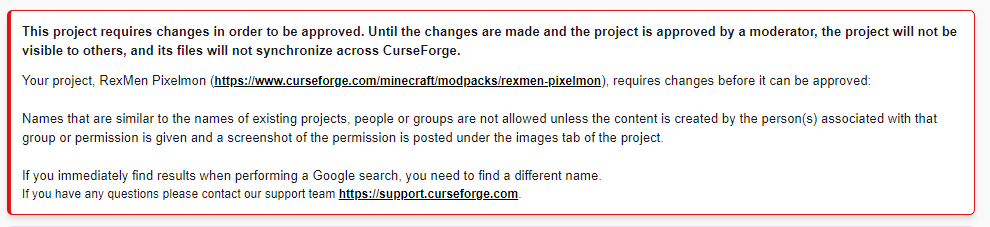 signal ridge
Might be pixelmon
fleet bear
It's the pixelmon
fallow kestrel
but pixelmon is an approved mod on the launcher
would somthing get denied if it was Tinkers Sink?
cuz like...
main herald
its the name
fallow kestrel
im confused as to how the mod pixelmon can get approved, but my pack name with it in it cant...
fleet bear
Yes, and the issue that if you put your name on the project next to pixelmon they are two similar and people cant tell the difference to what it really is.
fleet bear
How about RexMen Pix Pack?
fallow kestrel
can we do RexMen Pixel Pack?
fleet bear
That should pass.
fleet bear
Yep! Just rename the project and it will go back to queue
fallow kestrel
and is pixelmon in the description okay?
fleet bear
Ues.
fleet bear
Nope that's fine.
fallow kestrel
ok thanks 😄
fleet bear
I'm on mobile :p
main herald
For gods sake, im gonna explode, someone figure out something because I can't handle CF anymore
signal ridge
Post the latest log of from the pack thats crashing
fallow kestrel
yeah ill go with pixel pack
there are so many packs on the launcher with pixelmon in them
fleet bear
You could always pull out the random name generator
fallow kestrel
i dont get how mine isnt ok
main herald
The problem is, Industrial Revolution and another mod require 33 and above when I put in the 34 it crashes
fleet bear
Many of the likely got made before overwolf took over.
fallow kestrel
true
fleet bear
They started enforcing rules harder once they took over
main herald
signal ridge
youve made sure the version of fabric your using is for mc 1.16.4 not 1.16.5 yes
signal ridge
I mean your game is registering minecraft 1.16.4, so if you have a 1.16.5 mod its not gunna work
main herald
I have .5 mods in my own mix of mods and it still works
signal ridge
what version of mc is that mix?
main herald
1.16.4
signal ridge
Also have 3 none fabric mods as well in this log:
antighost-1.16.4-forge35.0.7-1.1.2.jar
BowInfinityFix-1.16.x-rv9.1.jar
CraftPresence-Forge-1.16.4-Release-1.7.6.jar
main herald
Excuse me wtf, I thought they were Fabric
fleet bear
Soon™️ This issue will be gone.
signal ridge
As for the fabric issue, Im seeing this Could not find required mod: indrev requires {fabric @ [>=0.32.0]}
And my app now matches the pic you posted earlier for 1.16.4 Latest fabric is 0.29.3+1.16
fleet bear
Sounds like I need to poke something?
 dense rain
quick question: does anybody know if it's possible to change the category of a project? Mine is currently listed as a customization but I want to turn it into a mod
fleet bear
dense rain
quick question: does anybody know if it's possible to change the category of a p...
No.
dense rain
ok thanks
fleet bear
You need to make a new one.
signal ridge
fleet bear
Sounds like I need to poke something?
Nope, its correct. They are looking at the fabric api for 1.16.5 in a 1.16.4 modpack
signal ridge
yep
main herald
signal ridge
And my app now matches the pic you posted earlier for 1.16.4 Latest fabric is 0....
What does that mean tho?
fleet bear
You need to make a 1.16.5 modpack profile
 harsh imp
how do I take a modpack profile and add it to my projects?
signal ridge
main herald
What does that mean tho?
You either need to update your pack to 1.16.5 OR use the latest version of 1.16.4
signal ridge
harsh imp
how do I take a modpack profile and add it to my projects?
!mc-installmods like this
red patioBOT
How to install mods in CurseForge App.
- Click
+ Create Custom Profile - Name it, select the required Minecraft version, select the Forge version (usually the highest number), click
Create. - Click the profile icon.
- Click
Add New Content - Search and install the desired mods.
- Start the game!
How to install mods not on CurseForge.
- Right click the profile picture or Open the profile and click the Icon next to the play button.
- Click
Open Folder. - Drag the mod(s) into the
modsfolder. (Note: Some mods will require others, to run. Make sure to read the instructions for the mod!) - Start the game!
red patioBOT
There are two ways to share a modpack you've made with others...
Export and Share - For Friends to Small Groups.
- Click the Icon for the modpack.
- Click the button next to play.
- Click

Export. - Select the files that should be included.
- Send the zip to the people that want it! They can follow the instructions in
!mc-installpackto install the pack!
Upload to Curseforge - For Public Release to Everyone.
This options will make your pack public to EVERYONE, it comes with extra requirements and will take some effort to set up.
- Go to here: https://www.curseforge.com/project/432/4471/create
- Fill out the information with a proper description of the pack. This should allow anyone to understand what the pack is.
- Click the Icon for the modpack in the CurseForge app.
- Click the button next to play.
- Click
Export. - Select the files that should be included.
- Open your Project you made on the CurseForge site and Upload the file you just made.
- Wait for Moderation & Sync so it can show up in the client! (See
!syncfor limitations)
harsh imp
I'm not talking about installing mods, I'm talking about making it a project
signal ridge
on the site?
harsh imp
on the app
signal ridge
hold up, what game is this and what are you trying to do exactly
harsh imp
so this is for forge, I'm trying to get a link rather than a file to send to people
fleet bear
Bottom part of the command message above
harsh imp
!mc-import
 grave chasm
DM me for good texture pack
signal ridge
grave chasm
DM me for good texture pack
Not the channel for this
main herald
how do I change the modpack version?
grave chasm
o
signal ridge
grave chasm
o
Go to #786424115535544350 Get the mc role and post it in #768717413918179368
signal ridge
main herald
how do I change the modpack version?
You make a new profile
then you can copy the mods over or reinstall em
main herald
Im keeping it low for a server
main herald
signal ridge
Try 194
signal ridge
why?
Thats what modpack making is, downloading mods. App makes it easier as it will download the dependencies as well.
main herald
Lol I was just saying, try download mods from a pack that large 1 by 1
On another note
signal ridge
ah
main herald
Would 1.16.4 mods still work with 1.16.5?
signal ridge
yep
main herald
Anyone know?
 normal verge
Anyone??
 wise frigate
Is there still a issue going on with the app? I'm on the Curseforge App for Minecraft mods. But I'm getting the "Cannot read property 'id' of null" message on trying to install some mods.
 slim thunder
wise frigate
Is there still a issue going on with the app? I'm on the Curseforge App for Mine...
slim thunder
wise frigate
Is there still a issue going on with the app? I'm on the Curseforge App for Mine...
click the mod, go to the versions tab, install it there, also #📛︱rules 4
 smoky cypress
so im getting an error while trying to redownload FTB skyFactory 3 any reason for this?
 neon sluice
Hello
I am trying to play a mod I installed but after downloading it, it always just crashes, am I doing something wrong?
queen storm
neon sluice
I am trying to play a mod I installed but after downloading it, it always just c...
!mc-logs
red patioBOT
Where to find the log on the CurseForge Client.
Right-click the modpack profile icon OR click the button in the modpack profile.
Click Open Folder.
Open the logs folder.
Find the file called latest.log and drag it into discord.

 cosmic delta
there are no pack or mod names
queen storm
Try a different browser
cosmic delta
this is what it looks like when i use a different browser
 queen storm
Which browser is the first then?
cosmic delta
chrome
queen storm
Can't test that one right now
queen storm
Sweet
 opal cipher
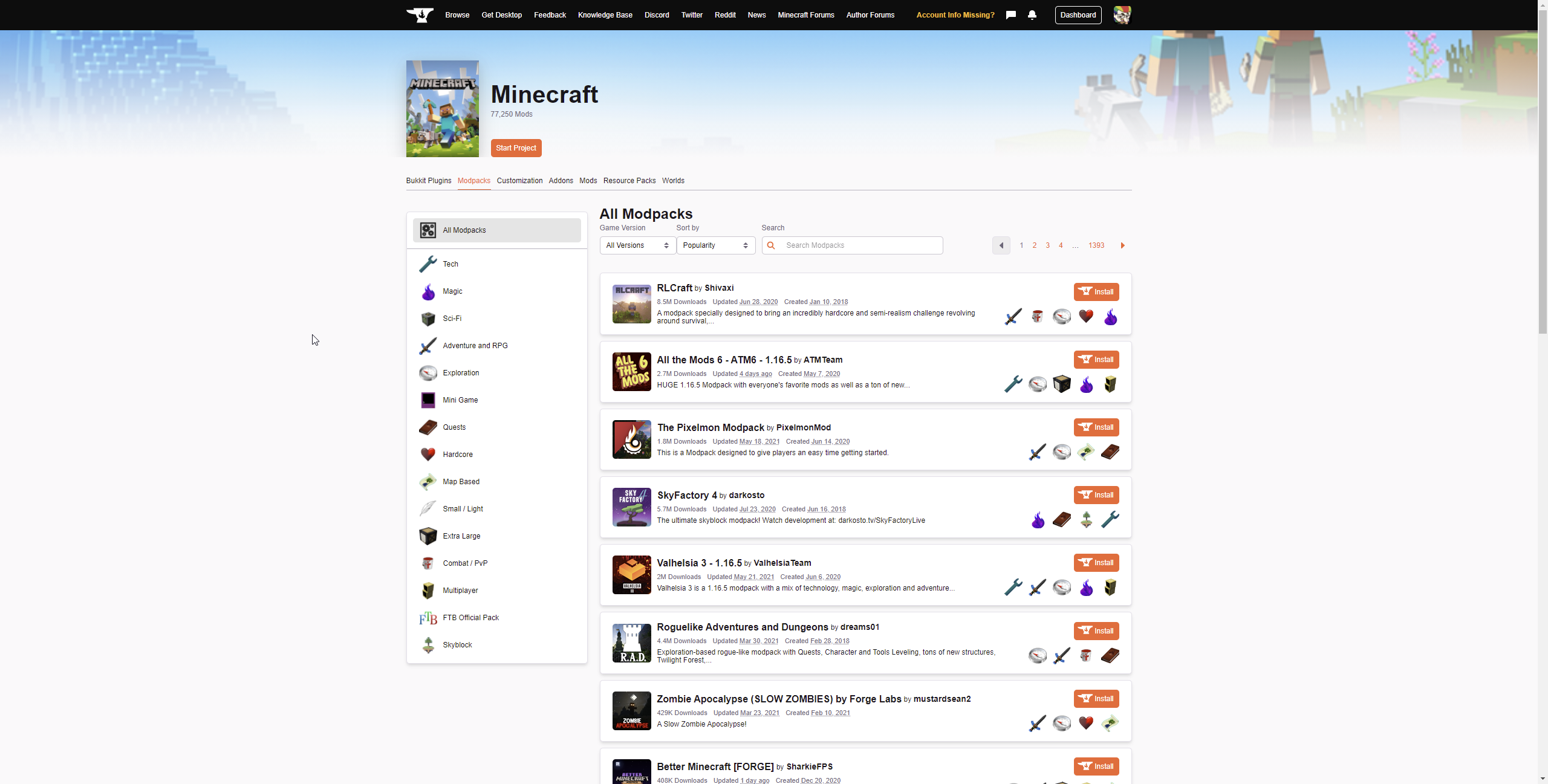
Works fine, press F12 and check console for possible errors.
Or press Ctrl+F5 to clear the cache.
opal cipher
Show the console then, so we can see the errors. ^^
cosmic delta
 opal cipher
Huh, that shouldn't hinder the page to load.
And thank you for the screenshot
Basically just blocked the google ads.
opal cipher
Huh.. No clue then, sorry. :| Could be if ublocker or adblocker thinks the modnames are ads.
Since they can block elements on the page, but it still happens after you disabled it.
cosmic delta
no i let curseforge through the blockers
opal cipher
Yeah, I got that. ^^ Just had to formulate it fully in the second message.
What's strange, is that it's missing the left menu as well.
This one: https://itssm.pl/3vQcP3y
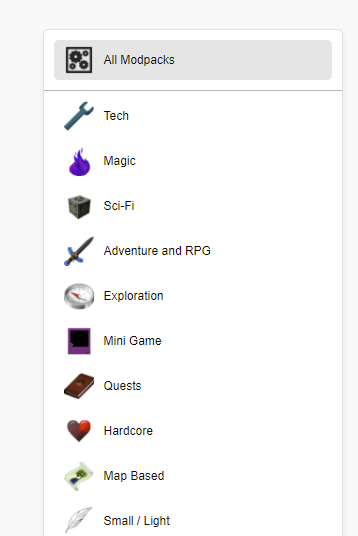
 deep tangle
so me and my friends are trying to play a custom modpack, i press create custom profile put the modpack in and nothing happens help pls
im on mac if that helps
queen storm
deep tangle
so me and my friends are trying to play a custom modpack, i press create custom ...
Where does the zip come from?
deep tangle
my friends gave me it since they made it
queen storm
How did they export it?
deep tangle
they just sent it through discord
queen storm
How did they export it? How did they turn it into a zip?
deep tangle
they just downloaded it and it was already a zip
queen storm
Open the zip, show a screenshot of its contents
deep tangle

 sonic sparrow
Whenever i try to download a mod it doesnt even when i click "click here to download"
opal cipher
sonic sparrow
Whenever i try to download a mod it doesnt even when i click "click here to down...
Use the app, it's so much easier.
red patioBOT
:bug: Reporting via Website :bug:
Can't open the app or would rather use the website? You can do so here: https://support.curseforge.com/en/support/tickets/new
Fill out the form with accurate detailed information, "It doesn't work" isn't helpful! What exactly doesn't work and why doesn't it work should be easy to answer!
Make sure to upload your Overwolf logs with the Upload File option on the ticket, information on how to get these logs can be found here https://support.overwolf.com/en/support/solutions/articles/9000176827-how-to-get-your-overwolf-logs
queen storm
Jumped to overwolf instead 🤦♂️
deep tangle
This is when i open the ZIP
 queen storm
Seems good, how big is the zip?
deep tangle
130kb
digital roost
Is there any way to get forge mods on a fabric loader?
queen storm
deep tangle
130kb
How long are you waiting after you hit import?
queen storm
digital roost
Is there any way to get forge mods on a fabric loader?
Nope
digital roost
ok thanks
queen storm
And how long do you wait there?
queen storm
Then start it, go for a walk, come back to it
deep tangle
ok
neon sluice
!mc-logs
red patioBOT
Where to find the log on the CurseForge Client.
Right-click the modpack profile icon OR click the button in the modpack profile.
Click Open Folder.
Open the logs folder.
Find the file called latest.log and drag it into discord.
neon sluice
queen storm
neon sluice
What do I do after that?
!mc-installfix
red patioBOT
- Click on the Minecraft Tab on the Left side of the App.
- Click button next to the
Create Custom Profileoption. - Click
Repair Installationoption. - Play game.
NOTE: You will not lose any modpacks or worlds, These are saved in the Instances folder. DO NOT TOUCH THIS FOLDER OR YOU WILL LOSE EVERYTHING
queen storm
There is no mc-help
 static mauve
!help
red patioBOT
╰( ͡° ͜ʖ ͡° )つ──☆*:・゚ *˜”*°•.˜”*°• Many Help •°*”˜.•°*”˜* <:curselit:796985620550385705>
Please provide a description of your issue with as much detail as possible. If you have an issue with a mod or modpack, tell us the name. Explain what you can see happening. Be specific!
 Tell us what is happening, we already know it "doesn't work".
Avoid using words like "it", tell us exactly what "it" is.
Don't assume anyone knows what you are talking about, be specific.
Tell us what you expected to happen.
Provide screenshots or video if possible.
Provide a log if possible. ?mc-log
 surreal dove
Help every modpack i have always says “Exit Code: 0” even if they are new or old it always happens, ive also already tried every way to fix it but it wont work, please help me
unborn basin
surreal dove
Help every modpack i have always says “Exit Code: 0” even if they are new or old...
Also vanilla?
surreal dove
unborn basin
Also vanilla?
Only the curseforge launcher
unborn basin
Click on the 3 dots and choose vanilla
surreal dove
unborn basin
Click on the 3 dots and choose vanilla
And then?
unborn basin
Tell me if it works
surreal dove
Yea only vanilla works
queen storm
!mc-logs For the modpack please
red patioBOT
Where to find the log on the CurseForge Client.
Right-click the modpack profile icon OR click the button in the modpack profile.
Click Open Folder.
Open the logs folder.
Find the file called latest.log and drag it into discord.
queen storm
!mc-installfix
red patioBOT
- Click on the Minecraft Tab on the Left side of the App.
- Click button next to the
Create Custom Profileoption. - Click
Repair Installationoption. - Play game.
NOTE: You will not lose any modpacks or worlds, These are saved in the Instances folder. DO NOT TOUCH THIS FOLDER OR YOU WILL LOSE EVERYTHING
surreal dove
ey thanks man
 gentle osprey
Hello, I have a problem, when i try to install mods to a custom modpack, the mods without a specified minecraft version don't download and I get and error. My friends too can't install any mod without a specified minecraft version

 shadow gale
he has a few versions, you need one to match your minecraft version (something you set up first)
 acoustic jewel
i do this but nothing happens to curse haha
 sinful osprey
what?
shadow gale
Asusino i think you just confused everyone here
sinful osprey
does anybody know how to fix?
every time i try to open Curse Forge it deletes itself
shadow gale
you need to get a virus scanner
shadow gale
apparently not.
gentle osprey
sinful osprey
every time i try to open Curse Forge it deletes itself
my friend had the same problem too, the Antivirus deleted Curseforge everytime
sinful osprey
ok
shadow gale
files don't delete themselves unless something tells them to, in your case it sounds like a virus
fleet bear
Read the message in the other room you posted the same question in....
shadow gale
oof
sinful osprey
@fleet bear its downloading now, if it works thank you
shadow gale
reply works as a ping you know..
fleet bear
It's fine, we arnt that anal about the pings.
shadow gale
OK so your going to bed without cocoa then? :p
fleet bear
It's more about intention
shadow gale
My son stealing the pot after I've taken a single serve is intended to complement me, doesn't mean it's not frikin annoying.
 royal cairn
i tried launching a fabric modpack but it doesn't seem to work
queen storm
!mc-logs
red patioBOT
Where to find the log on the CurseForge Client.
Right-click the modpack profile icon OR click the button in the modpack profile.
Click Open Folder.
Open the logs folder.
Find the file called latest.log and drag it into discord.
thorny patio
anyone know about server hosting for minecraft?
I have a server up and running, its a dedicated. I can join it but my partner cant for some reason and i dont know why. were both using the same server IP to join it too
queen storm
thorny patio
thank you 😄
digital roost
hey, so i'm sort of confused on how to upload a file for the modpack in the upload files section of your modpack, i can't find what file I have to attach in order for it to work -klarr
queen storm
!mc-packshare
red patioBOT
There are two ways to share a modpack you've made with others...
Export and Share - For Friends to Small Groups.
- Click the Icon for the modpack.
- Click the button next to play.
- Click
Export. - Select the files that should be included.
- Send the zip to the people that want it! They can follow the instructions in
!mc-installpackto install the pack!
Upload to Curseforge - For Public Release to Everyone.
This options will make your pack public to EVERYONE, it comes with extra requirements and will take some effort to set up.
- Go to here: https://www.curseforge.com/project/432/4471/create
- Fill out the information with a proper description of the pack. This should allow anyone to understand what the pack is.
- Click the Icon for the modpack in the CurseForge app.
- Click the button next to play.
- Click
Export. - Select the files that should be included.
- Open your Project you made on the CurseForge site and Upload the file you just made.
- Wait for Moderation & Sync so it can show up in the client! (See
!syncfor limitations)
digital roost
queen storm
!mc-packshare
i've tried that sadly, but basically when i try to click the file when trying to upload one it just brings me to inside of the file
 queen storm
digital roost
i've tried that sadly, but basically when i try to click the file when trying to...
queen storm
digital roost
i've tried that sadly, but basically when i try to click the file when trying to...
Click it a single time, hit ok
digital roost
queen storm
Click it a single time, hit ok
i've tried double clicking, clicking once then clicking open, but it always just brings me to inside the file or nothing happens
even tried right clicking and using select, but it juts brings me into the file
queen storm
digital roost
i've tried double clicking, clicking once then clicking open, but it always just...
You able to record how you are doing it? Starting from the upload file button?
digital roost
queen storm
You able to record how you are doing it? Starting from the upload file button?
i'd rather not but i can send screenshots
queen storm
digital roost
i'd rather not but i can send screenshots
Also fine
digital roost
queen storm
Also fine
well i dunno how to really screenshot it but, i just click on upload file, i go to my D drive which is where my export is, then i click on the folder, try to double click it, then try to click "open", then try to right click it and click "select", but every time it just puts me into the file and doesn't select it, and if i try to select/open while i'm inside of it just nothing happens
queen storm
digital roost
well i dunno how to really screenshot it but, i just click on upload file, i go ...
Why is it a folder? It should be a zip
digital roost
queen storm
Why is it a folder? It should be a zip
not sure what's a zip because my memory is stupid but the folder looks like this, is it supposed to be a winrar?
 queen storm
digital roost
not sure what's a zip because my memory is stupid but the folder looks like this...
queen storm
digital roost
not sure what's a zip because my memory is stupid but the folder looks like this...
winrar is fine
digital roost
okay, i'll try the original file
i mean, winrar eh whatever it's called
i just won't extract it
queen storm
Yeah, the extracting explains everything
digital roost
that worked and it's uploaded now, thanks for staying patient with me it means a lot to me
 regal scaffold
Hi, my modpack has been approved but the files in the modpack are still under review, does anyone know when it will be marked as released??
queen storm
regal scaffold
Hi, my modpack has been approved but the files in the modpack are still under re...
!status
red patioBOT
It is 01:44PM on Thursday for CurseForge my dudes.
Project Moderation Time
Project/File moderation is done on;
Sunday, Monday, Tuesday, Wednesday, Thursday: 10AM - 6PM GMT+2
Friday, Saturday: No Moderation!
This process is First in, First out. Thus files submitted late in the work day may not be checked until the next work day.
New Projects or uploads requiring manual approval: 1-3 Working Days
Updates to approved projects not needing manual approval: 1 Hour
File sync to the Curseforge app may take up to 24 hours after approval.
regal scaffold
thanks
 ocean ravine
the reward store is fake or what? my order is placed for month already xd

 frail mauve
how do i upload modpacks?
opal cipher
frail mauve
how do i upload modpacks?
!mc-packshare
red patioBOT
There are two ways to share a modpack you've made with others...
Export and Share - For Friends to Small Groups.
- Click the Icon for the modpack.
- Click the button next to play.
- Click
Export. - Select the files that should be included.
- Send the zip to the people that want it! They can follow the instructions in
!mc-installpackto install the pack!
Upload to Curseforge - For Public Release to Everyone.
This options will make your pack public to EVERYONE, it comes with extra requirements and will take some effort to set up.
- Go to here: https://www.curseforge.com/project/432/4471/create
- Fill out the information with a proper description of the pack. This should allow anyone to understand what the pack is.
- Click the Icon for the modpack in the CurseForge app.
- Click the button next to play.
- Click
Export. - Select the files that should be included.
- Open your Project you made on the CurseForge site and Upload the file you just made.
- Wait for Moderation & Sync so it can show up in the client! (See
!syncfor limitations)
frail mauve
i mean i have a zip file i want to upload to curseforge to play
lyric crescent
you upload an export, not just any zip
 tropic marlin
lyric crescent
you upload an export, not just any zip
tropic marlin
lyric crescent
you upload an export, not just any zip
Could you help me?
tropic marlin
Sorry!!!
 slate scroll
lyric crescent
Can you read the <#777323206884327484>
slate scroll
lyric crescent
Can you read the <#777323206884327484>
but mine is that the mod stopped working all of a sudden, I have no clue why
tropic marlin
Can someone help me, whenever I try opening this mod on curse forge it just doesn't work, or curse forge stops working
 plush snow
opal cipher
plush snow
opal cipher
!getcf
red patioBOT
Looking to install the CurseForge app?
Todo: Place system requirements here.
<:windows:798410728188936222> Windows
<:mac:798410654418862130> Mac
Linux
:person_shrugging:
queen storm
tropic marlin
Can someone help me, whenever I try opening this mod on curse forge it just does...
What mod? Info please
queen storm
That is not a mod
unborn basin
tropic marlin
https://www.curseforge.com/minecraft/customization/lucky-block-spiral-1-7-lucky-...
Download it and follow the instructions
 elder plume
Hey, sorry to bother. I've made a nonsense addon recently and published to curse website and when I'm trying to search for that addon it doesn't find anything. Through URL, it works.
https://www.curseforge.com/wow/addons/shieldify
Is there something I did wrong?
opal cipher
elder plume
Hey, sorry to bother. I've made a nonsense addon recently and published to curse...
Need to mark the file as released for it to be visible in the app.
If you look at https://www.curseforge.com/wow/addons/shieldify/files, you can see the "A" next to the file, that means Alpha. ^^
heavy willow
beta should work as well
elder plume
Can I change tpye of the file while its on the website already? or I need to upload again
heavy willow
yeah, just edit it
elder plume
Oh, I got it
One more question bois. You guys seem to know what you are talking aboutr 😄
If I upload next version of my addon, do I need to wait for approve again?
elder plume
Ok thank you
queen storm
And if not: lucky boy
heavy willow
just checked, your file/project now shows both on page and in the client 🙂
frail mauve
ii cant edit my description
queen storm
frail mauve
ii cant edit my description
Any errors? Messages?
frail mauve
i get a server runtime error
queen storm
Screenshot please
 opal cipher
Looks like a generic ASP.NET error, when you include HTML in a field.
What are you trying to post in the description or title?
 grim bane
how much gigabytes should i allocate to run atm6 on
queen storm
6
last sun
fleet bear
How do you plan on playing a game made in java if you arent going to use java?
because when I tried to launch my game/mods, curseforge brought up an old minecraft launcher thing that only showed error messages when I tried to use them. I had java 8, should I be using java 15/newest java version?
digital roost
Its cursed
when I open the installer for curseForge nothing happens and it closes again, knows why
queen storm
digital roost
when I open the installer for curseForge nothing happens and it closes again, kn...
!getcf
red patioBOT
Looking to install the CurseForge app?
Todo: Place system requirements here.
<:windows:798410728188936222> Windows
<:mac:798410654418862130> Mac
Linux
:person_shrugging:
 wise karma
When I try to download anything I get this error: Connot read property id of null
is there anyone who can help
lyric crescent
go to the versions tab for the mod, then install from there
lyric crescent
i hope so
digital roost
so, my file of my modpack has been approved on the curseforge site but on curseforge itself i can't find my modpack anywhere, is there any way to make it public or does it have to wait to go public? as i'm pretty confused on what to do next so that it can be viewed
lyric crescent
link the project
digital roost
lyric crescent
link the project
lyric crescent
!sync
red patioBOT
Sync and your Project.
CurseForge App and site do not share the same requirements! You can find things on the site but this does not mean it will be in the app!
For a mod to show up in the app:
- Projects MUST have a file marked as RELEASE or BETA
- Projects MUST be APPROVED
- Projects MUST have a file marked for the PROFILE VERSION USED
- Projects CAN'T be EXPERIMENTAL
- Projects CAN'T be ABANDON
Files can take a while to show up in the app. If your files still have not shown up either your project is new and you have yet to mark a file as Release/Beta or there is issues with the sync system making it slow.
digital roost
lyric crescent
!sync
i'm a bit confused on some of the things it says, mainly the thing about a marked file for the profile version used and approved
lyric crescent
🇽 * Projects MUST have a file marked as RELEASE or BETA
☑️ * Projects MUST be APPROVED
❓ * Projects MUST have a file marked for the PROFILE VERSION USED
☑️ * Projects CAN'T be EXPERIMENTAL
☑️ * Projects CAN'T be ABANDON
that part is for mod projects, not modpacks
digital roost
lyric crescent
🇽 * Projects MUST have a file marked as RELEASE or BETA
☑️ * Projects MUST be A...
i'm confused by that graph
lyric crescent
click on the file, then you can change it
digital roost
i'll try
i want the canada mod on curseforge please help me
that forgelabs did
without the thirst and heat
lyric crescent
This isn't a place to request mods.
digital roost
i'm a bit confused on how to update my modpack on the curseforge site when i've already submitted files
well, it isn't linked to curseforge yet, i'm a bit confused on how to even do that
here it is but it isn't like, shown on the curseforge/overwolf app and i'm confused how to make it public like that, it's on beta on the launcher
https://www.curseforge.com/minecraft/modpacks/rituals-n-origins
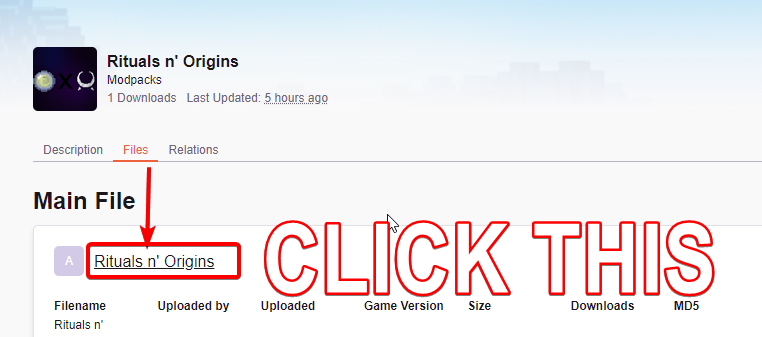 digital roost
lyric crescent
https://i.imgur.com/0cRvxpZ.png
digital roost
lyric crescent
https://i.imgur.com/0cRvxpZ.png
did it and set it to beta, now if it appears on the curseforge launcher I just add a new mod to it to update, right? or?
digital roost
Hey :+] Running a minecraft 1.5.2 profile in the desktop app. It loads the correct mods when I select add new content but won't install them. I noticed the version numbers aren't being displayed on the mods despite them being compatible if that helps
digital roost
lyric crescent
actually, i dont have any idea what you're saying
look, i've uploaded that project to the site, but i have no idea if it's linked to my modpack in the curseforge launcher
 lyric crescent
there is no "link"
you upload it to the website, then download it from the launcher.
you update the modpack by uploading a new file
digital roost
lyric crescent
you upload it to the website, then download it from the launcher.
you update th...
i'm confused, then how do people find the modpack in the curseforge launcher?
lyric crescent
by typing the name in
digital roost
 lyric crescent
yea, if you just changed the type it needs to sync. might be waiting a bit
lyric crescent
no
digital roost
lyric crescent
it's there now btw
got it
digital roost
digital roost
Hey :+] Running a minecraft 1.5.2 profile in the desktop app. It loads the corre...
Nevermind, it seems it's the 1.5.2 mod list in general that's not working (on the site too, hence why I was confused)
does it also take time for recently approved updates/files to the modpack to sync with curseforge?
lyric crescent
!status
red patioBOT
It is 06:55PM on Thursday for CurseForge my dudes.
Project Moderation Time
Project/File moderation is done on;
Sunday, Monday, Tuesday, Wednesday, Thursday: 10AM - 6PM GMT+2
Friday, Saturday: No Moderation!
This process is First in, First out. Thus files submitted late in the work day may not be checked until the next work day.
New Projects or uploads requiring manual approval: 1-3 Working Days
Updates to approved projects not needing manual approval: 1 Hour
File sync to the Curseforge app may take up to 24 hours after approval.
digital roost
i cant open curseforge it says its crashing so ive tried reopening it, restarted my computer, and have waited a week
 tight zenith
What should I do if my Curse forge Is stuck on this screen? Its been stuck on this screen for awhile. 🤔
 red patioBOT
Hey there, it is Curseforge, not "Cursed forge"
lyric crescent
?ticket-site
red patioBOT
:bug: Reporting via Website :bug:
Can't open the app or would rather use the website? You can do so here: https://support.curseforge.com/en/support/tickets/new
Fill out the form with accurate detailed information, "It doesn't work" isn't helpful! What exactly doesn't work and why doesn't it work should be easy to answer!
Make sure to upload your Overwolf logs with the Upload File option on the ticket, information on how to get these logs can be found here https://support.overwolf.com/en/support/solutions/articles/9000176827-how-to-get-your-overwolf-logs
digital roost
I switched back to 1.7.10 assuming my prior issues were lack of support (1.7.10 has worked previously for me, I run a server on it) but my install button isn't working with this version either. I click the install button for a listed mod and it simply doesn't react. Right clicking and picking install from the dropdown menu prints "cannot read property 'id' of null"
lyric crescent
go to the versions tab, then install from there
digital roost
Sorry, but where is that located?
lyric crescent
click the mod
digital roost
Worked, although some of these mods don't seem to have the version I'm clicking add content from. I'll deal :+] Thanks!
 hot agate
Hi ! I have downloaded Minecraft on my laptop and PC. I wish to play this customised modpack i have on my pc on my laptop instead. Is there a way i can link both my forge accs ?
I linked via twitch but my modpacks are not showing
lyric crescent
twitch is not related to curseforge.
you can just copy the instance from one computer to the other
 deep swan
Why am i getting this error?
 hot agate
ahh okay ! so just transfer the files directly right? thanks !
lyric crescent
deep swan
Why am i getting this error?
deep swan
Thankyou
 deep hull
i get this when i try to launch a modpack
couldnt load launcher core from h:\minecraftcurseforge\install\game\launcher.dll loaderrornotpresent
signal ridge
!mc-installfix
red patioBOT
- Click on the Minecraft Tab on the Left side of the App.
- Click button next to the
Create Custom Profileoption. - Click
Repair Installationoption. - Play game.
NOTE: You will not lose any modpacks or worlds, These are saved in the Instances folder. DO NOT TOUCH THIS FOLDER OR YOU WILL LOSE EVERYTHING
signal ridge
try that
deep hull
i did and i get the same error
signal ridge
Try it again then restart your pc
deep hull
will try
same result 😦
unable to start the minecraft runtime enviroment. this most likely caused by a corruption. please try to reinstall minecraft.
i have reinstalled 2 times now
signal ridge
What did you do to reinstall it? Just the install fix?
deep hull
i uninstalled both minecraft and overwolf and curseforge
lyric crescent
Use curseforge to install forge profiles. Else if you wish to complain you're in the wrong discord as this isn't for forge.
 low crystal
Hi! I uploaded a new WoW addon, and got a notification saying it was accepted, followed immediately by a notification saying it had been rejected, with an error message that my addon was missing a .toc file which it... isn't.
Confusingly, the Dashboard claims my addon is approved, but it doesn't show up in search results. What is the actual status of my addon?
signal ridge
deep hull
i uninstalled both minecraft and overwolf and curseforge
Click the > Minecraft tab > Click change > Delete the Install Folder, then restart the app. DO NOT delete the Instances folder this is your modpacks
lyric crescent
low crystal
Hi! I uploaded a new WoW addon, and got a notification saying it was accepted, f...
link?
low crystal
lyric crescent
Status: project is approved but has no files.
low crystal
Huh. It seems the scanner mistakenly believes I'm missing a .toc file.
lyric crescent
you probably made the zip incorrectly if i had to guess
low crystal
Or does Curseforge have file hierarchy constraints that WoW itself doesn't?
lyric crescent
no clue on that. check another mod to compare
lyric crescent
what is your h drive?
deep hull
my only secondary drive
lyric crescent
external?
signal ridge
you added another ssd to the inside of your pc? separate from the m2 drive
deep hull
curseforge just cant find the launcher for some reason
signal ridge
Whats the path chosen for your modded minecraft folder? Screen shot in the app
 opal gazelle
i just created a minecraft modpack, how do i view it from the app
 signal ridge
opal gazelle
i just created a minecraft modpack, how do i view it from the app
signal ridge
opal gazelle
i just created a minecraft modpack, how do i view it from the app
Did you upload it to the site?
opal gazelle
yeah its folder was approved
deep hull
i created the folder just for this
signal ridge
deep hull
https://gyazo.com/33532dbb3b7906a43816da5617566e7f
That should work
signal ridge
opal gazelle
yeah its folder was approved
Send the url link to the project
signal ridge
opal gazelle
alr
... its been 10 min. Can take up to 24h to sync with the app
signal ridge
deep hull
i created the folder just for this
Could try taking the word minecraft out of the path name and just leave curseforge.
signal ridge
Did you try just using a folder called curseforge ?
fallow kestrel
after a project gets approved, the update files should be much faster correct? I think the thing that was sent last time said just an hour or so?
idk what the command is but i remember there being one :p
signal ridge
!status
red patioBOT
It is 08:33PM on Thursday for CurseForge my dudes.
Project Moderation Time
Project/File moderation is done on;
Sunday, Monday, Tuesday, Wednesday, Thursday: 10AM - 6PM GMT+2
Friday, Saturday: No Moderation!
This process is First in, First out. Thus files submitted late in the work day may not be checked until the next work day.
New Projects or uploads requiring manual approval: 1-3 Working Days
Updates to approved projects not needing manual approval: 1 Hour
File sync to the Curseforge app may take up to 24 hours after approval.
 empty yew
helpppp
fallow kestrel
yep that one
lyric crescent
depends if the file gets flagged or not
empty yew
pls
signal ridge
empty yew
helpppp
#📛︱rules 10
empty yew
okok
its a big beefy paragraph hold up
Last night my game was very laggy on minecraft after i changed my skin so when in tried to reopen mine craft it kept getting stuck on a screen and then it stopped working, after a few tries it caused my whole computer to crash, couldnt move my mouse or nothin, so i turned off my computer forcefully When i turned it back on i loaded up minecraft to see it the game would open again but instead it had me login and after i did FORGE WAS GONE </3 i still had all the mods in my folder so i just uninstalled minecraft only to reinstall and forge to not be there. So i reinstalled forge and when i tried to load up the game it kept giving me a game crashed screen with error 0 or something, i tried everything. but the main game opened btw, i i deleted everything and reinstalled everything and nothing worked and idk what to do pls help
signal ridge
you using the curseforge app?
empty yew
i dont think so i was using minecraft app but the forge version 16.5 but it worked that whole time
signal ridge
The one you downloaded from mojang?
empty yew
yes
signal ridge
Would recommend the Curseforge app for modded. Otherwise this isnt a curseforge issue
digital roost
need some help on how to upload a curseforge modpack onto a server
signal ridge
digital roost
need some help on how to upload a curseforge modpack onto a server
!notcf
red patioBOT
The question you are asking about isn't related to CurseForge. Please use the appropriate game rooms by getting the role from #786424115535544350 or use #👽︱game-support for help.
This room is only for CurseForge Owned & Maintained features/services.
empty yew
u got it ill let u know if it works
signal ridge
!getcf
red patioBOT
Looking to install the CurseForge app?
Todo: Place system requirements here.
<:windows:798410728188936222> Windows
<:mac:798410654418862130> Mac
Linux
:person_shrugging:
deep hull
@signal ridge yes
signal ridge
deep hull
<@!217048549706301442> yes
Show screen shot of app with new path
 signal ridge
Do you have the room in your C drive?
 signal ridge
restart your pc, then try again
 thorn galleon
hey does anyone know how to create modpacks i'm new around here
signal ridge
Got the curseforge app?
thorn galleon
yes
signal ridge
!mc-installmods This is how you make your own custom modpack
red patioBOT
How to install mods in CurseForge App.
- Click
+ Create Custom Profile - Name it, select the required Minecraft version, select the Forge version (usually the highest number), click
Create. - Click the profile icon.
- Click
Add New Content - Search and install the desired mods.
- Start the game!
How to install mods not on CurseForge.
- Right click the profile picture or Open the profile and click the Icon next to the play button.
- Click
Open Folder. - Drag the mod(s) into the
modsfolder. (Note: Some mods will require others, to run. Make sure to read the instructions for the mod!) - Start the game!
thorn galleon
thanks
empty yew
it worked tysm
deep hull
for something that worked last summer flawlessly .......... i am at a loss as to why it now just wont work
 scenic dew
Idky but when my friend tries to run my mod on multiplayer it just won’t work
lyric crescent
have your friend join and explain the issue
signal ridge
deep hull
for something that worked last summer flawlessly .......... i am at a loss as to...
!ticket-app
red patioBOT
:bug: Reporting via the CurseForge App :bug:
-
Click the
 icon in the bottom left.
 -
Select

Open a Ticket. -
Fill out the form with accurate detailed information, "It doesn't work" isn't helpful! What exactly doesn't work and why doesn't it work should be easy to answer!
-
Make sure to upload your Overwolf logs with the
Upload Fileoption on the ticket, information on how to get these logs can be found here https://support.overwolf.com/en/support/solutions/articles/9000176827-how-to-get-your-overwolf-logs -
Submit!
 scenic dew
lyric crescent
have your friend join and explain the issue
scenic dew
lyric crescent
have your friend join and explain the issue
He doesn’t have discord I can explain though
So when he launches the server on serverminer it says starting then after like half a minute it says offline again idk if it’s serverminer or
signal ridge
Would either need the latest log from the server OR you ask the support for that host
or both
signal ridge
digital roost
Hi, I can't download some mods from curseforge app
Click on the mod > versions tab > install what you want there
digital roost
Thanks
signal ridge
With the curseforge app?
 rancid bane
yes for windows
signal ridge
Did you install it via the app or download from online?
signal ridge
ok, what pack is it?
rancid bane
stoneblock 2
basically when i click play, it redirects me to minecraft launcher but when i launch it from there
it loads normal minecraft
signal ridge
!mc-logs do this for that pack
red patioBOT
Where to find the log on the CurseForge Client.
Right-click the modpack profile icon OR click the button in the modpack profile.
Click Open Folder.
Open the logs folder.
Find the file called latest.log and drag it into discord.
rancid bane
red patioBOT
How to install modpacks with the search features in app.
- Open the
Minecraftsection of the app. - Click the top search bar where it says
Search for modpacksOR Click theBrowse ModpacksTab. - Find the Modpack you want to install and click install on it.
- Wait for CurseForge app to download and unpack all the required files.
- Once finished, click
Play!
How to install modpacks from a Export. (Custom/Private/Site downloaded Modpack zip)
- Get CurseForge App if you don't have it, use
!downloadfor a link. - Get the exported modpack from CurseForge or someone else,
!mc-packshareexplains how to make them. - Open the
Minecraftsection of the app. - Click
Create Custom Profile - Click the
Importoption. - Find the file you just downloaded in step 2 and select it.
- CurseForge app will now attempt to download and unpack the modpack. If it fails, try steps 4-6 again.
- Once finished, click
Play!
rancid bane
i think i found the issue
no mods where downloaded
in the folder
so im trying to reinstall
signal ridge
Java, Curseforge uses the Java version
rancid bane
seing if that works
signal ridge
rancid bane
in the folder
thats odd, try using the app to install the pack
rancid bane
i did
idk what happend
think its working now tho
becasue now its saying its downloading mods, before it didnt
signal ridge
Do you have the Java Edition of minecraft?
Do you have the curseforge app?
!getcf
red patioBOT
Looking to install the CurseForge app?
Todo: Place system requirements here.
<:windows:798410728188936222> Windows
<:mac:798410654418862130> Mac
Linux
:person_shrugging:
signal ridge
Need that to install Curseforge packs
Install the mods manually of the site and do it the hard way.
Unzip it and run the installer
Once overwolf is installed use that app to download Curseforge
... Do I really need to walk you through how to install a program?
Stop.... Dont need a play by play of you installing the app
If you want
Its in the Overwolf app, Use that to install curseforge
Open the curseforge app
!mc-installpacks
red patioBOT
How to install modpacks with the search features in app.
- Open the
Minecraftsection of the app. - Click the top search bar where it says
Search for modpacksOR Click theBrowse ModpacksTab. - Find the Modpack you want to install and click install on it.
- Wait for CurseForge app to download and unpack all the required files.
- Once finished, click
Play!
How to install modpacks from a Export. (Custom/Private/Site downloaded Modpack zip)
- Get CurseForge App if you don't have it, use
!downloadfor a link. - Get the exported modpack from CurseForge or someone else,
!mc-packshareexplains how to make them. - Open the
Minecraftsection of the app. - Click
Create Custom Profile - Click the
Importoption. - Find the file you just downloaded in step 2 and select it.
- CurseForge app will now attempt to download and unpack the modpack. If it fails, try steps 4-6 again.
- Once finished, click
Play!
slim thunder
then why are you in the wow section
signal ridge
Click the Anvil in the upper left > Click minecraft > install that
sure
Hit play
?
If you want to play with people online need a server
no idea, you would need to google it
Curseforge doesnt touch the .minecraft folder. It is seperate
So you will need to log in again
you hit play?
... Again Curseforge doesnt touch your vanilla minecraft
 oak hinge
hello guys, when i try to start my world it shows this message: Error: java.lang.ExceptionInInitializerError: null can someone help?
signal ridge
oak hinge
hello guys, when i try to start my world it shows this message: Error: java.lang...
!mc-logs
red patioBOT
Where to find the log on the CurseForge Client.
Right-click the modpack profile icon OR click the button in the modpack profile.
Click Open Folder.
Open the logs folder.
Find the file called latest.log and drag it into discord.
oak hinge
kk 1min
signal ridge
you would need to get the Ip of the server and put it into the multiplayer menu. Just like any other minecraft server
oak hinge
lyric crescent
We arn't a lookup service. Ask the people who own the server for the IP. We do not own any servers and thus cannot help.
 peak pine
I'm getting this error when posting a comment:
HTTP Code: 500
Status Text: error
Address: https://www.curseforge.com/minecraft/bukkit-plugins/crayhomes
Date: Thu Jun 03 2021 21:44:38 GMT+0200 (Midden-Europese zomertijd)
Request: POST /comments/create-1682146042-89108
 sturdy valve
Is there a txt file to customize this number?
Having an issue of hitting 100% memory usage after a few hours and having to relaunch MC.
No big deal if not, it would just be a quality of life thing to allocate 20gb of ram to cause less frequent restarts
https://gyazo.com/c9a2f819324a39edb8d68f47f00729b3
I know I can do it manually when the MC launcher opens but just wondering if there is a permanent fix
signal ridge
oak hinge
i never started it before
Do you have Kotlin for forge installed?
oak hinge
yes
signal ridge
oak hinge
yes
Try removing betterfoilage
oak hinge
kk
lyric crescent
sturdy valve
Is there a txt file to customize this number?
Having an issue of hitting 100% me...
More important question would be what you're doing to cap out 12gb. That should not be happening. You might have badly programmed mods.
An actual answer, there is no way to bypass that currently.
 stuck cypress
i have no idea if this would go here but i have a minecraft map folder world like usual and to upload it to curseforge it needs a file but i have no idea how to upload the folder to the curseforge website
oak hinge
signal ridge
Try removing betterfoilage
now it says: mods.toml missing metadata for modid null
signal ridge
oak hinge
now it says: mods.toml missing metadata for modid null
new log
sturdy valve
lyric crescent
More important question would be what you're doing to cap out 12gb. That should ...
Just a modpack, seems like FoamFix isn't working the way it should do tbh
oak hinge
wdym?
signal ridge
oak hinge
wdym?
Post the new latest log
signal ridge
oak hinge
wdym?
Post the new latest log
peak pine
Uhm, I can't post a comment on this project: https://www.curseforge.com/minecraft/bukkit-plugins/crayhomes

 strange linden
There's something wrong with the APP today. I've reinstalled it already


 strange linden
There's something wrong with the APP today. I've reinstalled it already
https:/...
strange linden
strange linden
There's something wrong with the APP today. I've reinstalled it already
https:/...
Some mods won't install. And this ID issue appears
lyric crescent
Click the mod, go to the versions tab. install from there
strange linden
lyric crescent
Click the mod, go to the versions tab. install from there
Thanks. But i hope there will be a patch for it. Doing that for 250+ mods is painful 😆
signal ridge
try removing it as well
oak hinge
kk
peak pine
Is the server partially down or something?
oak hinge
still same message
stuck cypress
dang
oak hinge
if u want it again
stuck cypress
can anyone help me?
peak pine
Can someone explain why I can't post a comment?
 iron python
!status
red patioBOT
It is 09:59PM on Thursday for CurseForge my dudes.
Project Moderation Time
Project/File moderation is done on;
Sunday, Monday, Tuesday, Wednesday, Thursday: 10AM - 6PM GMT+2
Friday, Saturday: No Moderation!
This process is First in, First out. Thus files submitted late in the work day may not be checked until the next work day.
New Projects or uploads requiring manual approval: 1-3 Working Days
Updates to approved projects not needing manual approval: 1 Hour
File sync to the Curseforge app may take up to 24 hours after approval.
signal ridge
peak pine
Can someone explain why I can't post a comment?
No idea
lyric crescent
peak pine
Can someone explain why I can't post a comment?
?ticket-site
red patioBOT
:bug: Reporting via Website :bug:
Can't open the app or would rather use the website? You can do so here: https://support.curseforge.com/en/support/tickets/new
Fill out the form with accurate detailed information, "It doesn't work" isn't helpful! What exactly doesn't work and why doesn't it work should be easy to answer!
Make sure to upload your Overwolf logs with the Upload File option on the ticket, information on how to get these logs can be found here https://support.overwolf.com/en/support/solutions/articles/9000176827-how-to-get-your-overwolf-logs
signal ridge
stuck cypress
can anyone help me?
When uploading a file the site should have directions on what kind of file needs to be uploaded
iron python
What are the rules about description of modpack
peak pine
lyric crescent
?ticket-site
Is CF username the one of myself or the one of the project's owner?
lyric crescent
yours.... why would it be the project owner, that doesnt even make sense
signal ridge
!mc-ram the pack your using recommends 7-10gb of ram need to increase it
red patioBOT
How to set Global Minecraft RAM value.
- Click the icon in the bottom left to open settings.
- Click the Minecraft tab.
- Scroll down.
- Slide slider to recommended ram range as seen below.

How to set Global Minecraft RAM value.
- Click the icon in the bottom left to open settings.
- Click the Minecraft tab.
- Scroll down.
- Slide slider to recommended ram range as seen below.
signal ridge
bot be slow.. great
stuck cypress
signal ridge
When uploading a file the site should have directions on what kind of file needs...
can you send me a link to the directions?
lyric crescent
follow the instructions
signal ridge
READ THE BOT
your pack needs 7-10 gb of ram aka 7168 - 10240MB
try hitting play now
oak hinge
ik u guys are very busy here but pls help :/
signal ridge
oak hinge
ik u guys are very busy here but pls help :/
Havent forgotten about you, been looking into the issue
oak hinge
ok thx
signal ridge
oak hinge
ok thx
How did you get Dynamic trees? With the app or from the site?
oak hinge
from a yt video than followed the link, downloaded and copied the file into mods
signal ridge
Delete the mod and use the app to install it.
signal ridge
you can if you want