#🔥︱curseforge-support
1 messages · Page 472 of 1
 signal ridge
 vale ore
I Have A Strong Internet
signal ridge
Well thats what the webclient issue means
signal ridge
can either try again later, reboot your pc or do both the pc and your router
Which game?
vale ore
Minecraft
signal ridge
!mc-installmods
 red patioBOT
How to install mods in CurseForge App.
- Click
+ Create Custom Profile - Name it, select the required Minecraft version, select the Forge version (usually the highest number), click
Create. - Click the profile icon.
- Click
Add New Content - Search and install the desired mods.
- Start the game!
How to install mods not on CurseForge.
- Right click the profile picture or Open the profile and click the
 Icon next to the play button.
 - Click

Open Folder. - Drag the mod(s) into the
modsfolder. (Note: Some mods will require others, to run. Make sure to read the instructions for the mod!) - Start the game!
 signal ridge
define "Kicks me out"
signal ridge
Like the app itself closes? the minecraft crashes? your pc shuts down?
vale ore
But X Marks The Spot
signal ridge
Either need to explain whats going on or not. Im done trying to guess the issue
signal ridge
ok, cya
 digital roost
so i did everything right it works but when i exported it then launched the game to test its only missing these libs placebo,tconstruct,redstoneflux,ptrmodellib,orelib,stevekung's_lib,patchouli,openmods trackapi,universalmodcore
signal ridge
try deleting and redownloading those mods
 modern bronze
Hi I would like to upload a Minecraft modpack I made however I couldn't find or understand anything that the website said.
 slim thunder
modern bronze
Hi I would like to upload a Minecraft modpack I made however I couldn't find or ...
slim thunder
modern bronze
Hi I would like to upload a Minecraft modpack I made however I couldn't find or ...
?mc-packshare
red patioBOT
There are two ways to share a modpack you've made with others...
Export and Share - For Friends to Small Groups.
- Click the Icon for the modpack.
- Click the button next to play.
- Click

Export. - Select the files that should be included.
- Send the zip to the people that want it! They can follow the instructions in
!mc-installpackto install the pack!
Upload to Curseforge - For Public Release to Everyone.
This options will make your pack public to EVERYONE, it comes with extra requirements and will take some effort to set up.
- Go to here: https://www.curseforge.com/project/432/4471/create
- Fill out the information with a proper description of the pack. This should allow anyone to understand what the pack is.
- Click the Icon for the modpack in the CurseForge app.
- Click the button next to play.
- Click
Export. - Select the files that should be included.
- Open your Project you made on the CurseForge site and Upload the file you just made.
- Wait for Moderation & Sync so it can show up in the client! (See
!syncfor limitations)
modern bronze
slim thunder
?mc-packshare
Thank you this helps a lot but where do I find this and how do I get it?
Never mind didn't see what the bot says thank you.
 oak orbit
Hello! so I'm having trouble getting a custom modpack to work (Minecraft). I made it using the add more mods within curseforge, and i have all the mods used In my modfolder, however when i launch Minecraft, it acts almost as if i have no mods. It does not show the mod button on the home screen, and starting a world shows that some of the mods are there, but not all of them.
 fleet bear
oak orbit
Hello! so I'm having trouble getting a custom modpack to work (Minecraft). I mad...
fleet bear
oak orbit
Hello! so I'm having trouble getting a custom modpack to work (Minecraft). I mad...
Screenshot of the main menu please
oak orbit
 fleet bear
!mc-fabric
red patioBOT
How to use Fabric until support to the app is added in the near future.
- Make a Forge modpack of the appropriate version.
- Install a mod called 'Jumploader'
Fabric mods do not work with Forge.
Forge mods do not work with Fabric.
Fabric mods should be marked with a Fabric Icon like this: 
fleet bear
the bit in the middle is the part that applies to you most
oak orbit
i believe i have added jump loader to it, is the problem that i have fabric and forge content?
fleet bear
Likely if you are complaining about missing mods.
If you remove jumploader you would have all the forge mods without the fabric ones
oak orbit
so i must only have all forge, or all fabric mods for them to work? just making sure this is the case
oak orbit
okay thank you. ill try only using forge ones and see if that fixes the issue
 lyric thunder
I am trying to click the active slider on a minecraft mod to disable it, but I keep receiving this error. I deleted and re-downloaded the mod, but the error persists.

Some other mods have the same problem, but don't throw any errors. The slider will simply just not move
I have around 170 mods and around 90% of them can be disabled.
fleet bear
try a pc restart first
lyric thunder
It did not work
If it adds more context, the specific mod's are Biomes O' Plenty which gives the above error. The Integrated Dynamics series of mods simply just don't let me disable them and give no errors. There are more mods, these are just some examples.
fleet bear
uhhh, perhaps you don't have permission on the files?
lyric thunder
I checked and the permissions are the same for all the mod files
I was able to 'solve' the issue by manually renaming the jar file to include .disabled at the end like other disabled mods
For some reason, the curseforge launcher itself won't do that for certain mods
fleet bear
hm.
Can you open a support ticket for that please?
!bug-app Include my name and the logs from the client.
red patioBOT
:bug: Reporting via the CurseForge App :bug:
-
Click the
 icon in the bottom left.
 -
Select

Open a Ticket. -
Fill out the form with accurate detailed information, "It doesn't work" isn't helpful! What exactly doesn't work and why doesn't it work should be easy to answer!
-
Make sure to upload your Overwolf logs with the
Upload Fileoption on the ticket, information on how to get these logs can be found here https://support.overwolf.com/en/support/solutions/articles/9000176827-how-to-get-your-overwolf-logs -
Submit!
 digital roost
I'm back again o::: my profile is saying all its mods are gone despite them being in the folder and supposedly loading when I start minecraft. Tried repairing, deleting and importing, etc.
fleet bear
the list doesn't have the mods?
digital roost
Yeah. I can install the mods again to get them in the list, but for some reason it won't detect them in the folder
fleet bear
That's an odd one
 hard phoenix
java.awt.HeadlessException:
No X11 DISPLAY variable was set, but this program performed an operation which requires it.
        at java.desktop/java.awt.GraphicsEnvironment.checkHeadless(GraphicsEnvironment.java:208)
        at java.desktop/java.awt.Window.<init>(Window.java:548)
        at java.desktop/java.awt.Frame.<init>(Frame.java:423)
        at net.minecraftforge.installer.InstallerPanel.run(InstallerPanel.java:408)
        at net.minecraftforge.installer.SimpleInstaller.launchGui(SimpleInstaller.java:170)
        at net.minecraftforge.installer.SimpleInstaller.main(SimpleInstaller.java:143)
i keep getting this
when i try to run the server
i am trying to run it on google cloud
i have tried to unset DISPLAY
i have tried export DISPLAY=:0.0
i have tried export DISPLAY=:0
i have tried export DISPLAY=localhost:0
and if i put in the server address instead of localhost, the command line freezes at this
 signal ridge
hard phoenix
```java
java.awt.HeadlessException:
No X11 DISPLAY variable was set, but this p...
signal ridge
hard phoenix
```java
java.awt.HeadlessException:
No X11 DISPLAY variable was set, but this p...
!notcf
red patioBOT
The question you are asking about isn't related to CurseForge. Please use the appropriate game rooms by getting the role from #786424115535544350 or use #👽︱game-support for help.
This room is only for CurseForge Owned & Maintained features/services.
oak orbit
@fleet bear It worked! thank you so very much! one last thing. how do i publish a mod to forge?
fleet bear
You can't publish mods to Forge, it just loads mods
oak orbit
Whats the easiest way to move my custom modpack to a server?
fleet bear
upload the files?
oak orbit
Okay thank you!
 empty plume
Hey everyone i just redownload forge/overwolf and now my minecraft wont boot any idea why?
fleet bear
!mc-log
red patioBOT
Where to find the log on the CurseForge Client.
Right-click the modpack profile icon OR click the button in the modpack profile.
Click Open Folder.
Open the logs folder.
Find the file called latest.log and drag it into discord.
empty plume
i have no log folder
fleet bear
then what isn't booting
empty plume
the minecraft launcher opens but now when i hit play it doesnt load
fleet bear
!mc-installfix
red patioBOT
- Click on the Minecraft Tab on the Left side of the App.
- Click button next to the
Create Custom Profileoption. - Click

Repair Installationoption. - Play game.
NOTE: You will not lose any modpacks or worlds, These are saved in the Instances folder. DO NOT TOUCH THIS FOLDER OR YOU WILL LOSE EVERYTHING
empty plume
Something happened an it fixed itself? I closed overwolf and it auto restarted with all my old setting and now works. thanks for the help though!
 pearl spoke
I have a question, how can me and my friends actually play together while we're playing on the same mod, or i can say how do i create servers with curseforge.
signal ridge
Curseforge doesnt do servers
oak orbit
Is there a way to send my custom modpack to other people. i cant move the files via discord. Or can i submit modpacks to curseforge? so my friends can play the one i made.
signal ridge
!mc-packshare
red patioBOT
There are two ways to share a modpack you've made with others...
Export and Share - For Friends to Small Groups.
- Click the Icon for the modpack.
- Click the button next to play.
- Click
Export. - Select the files that should be included.
- Send the zip to the people that want it! They can follow the instructions in
!mc-installpackto install the pack!
Upload to Curseforge - For Public Release to Everyone.
This options will make your pack public to EVERYONE, it comes with extra requirements and will take some effort to set up.
- Go to here: https://www.curseforge.com/project/432/4471/create
- Fill out the information with a proper description of the pack. This should allow anyone to understand what the pack is.
- Click the Icon for the modpack in the CurseForge app.
- Click the button next to play.
- Click
Export. - Select the files that should be included.
- Open your Project you made on the CurseForge site and Upload the file you just made.
- Wait for Moderation & Sync so it can show up in the client! (See
!syncfor limitations)
 potent orbit
So when I submitted a file to my project, it says "The status of the file (file) has been changed to Rejected There was an error processing your file! " when I've looked over it, and it should be fine. help?
fleet bear
potent orbit
So when I submitted a file to my project, it says "The status of the file (file)...
upload it again, that's just an error with the upload
fleet bear
yes
potent orbit
are you positive that's it? if so I'll just keep trying but it's getting excessive;-;
potent orbit
a .zip file, it's a modpack. i could send it directly to you if that's easier, i exported it from gdlauncher if that matters
or literal file name?
fleet bear
both
potent orbit
you mind if i just dm you it?
fleet bear
you can't post the file name here?
potent orbit
alright thank you
That's what I thought too though, like I didn't see anything wrong with it so ig it just confused me
 fallen loom
I think the issue is that zip's manifest saying that Fabric is the modloader
 fiery copper
?
potent orbit
fallen loom
I think the issue is that zip's manifest saying that Fabric is the modloader
how could i fix that?
fleet bear
does GDL have two export options?
fallen loom
Trying to import the pack into my Curse client fails with "message": "[ModLoaderDatabase] Unable to find appropriate mod loader for manifest!" in the log
potent orbit

it bring this up first then i obv select file

then stuff like this to select what you actually export
fallen loom
Try setting it as a Forge pack and installing jumploader I guess
fleet bear
that^
potent orbit
I was thinking that too i just hope it'll be fully compat w jump
fleet bear
I take it that they jumped the gun on fabric support.
potent orbit
probably tbh, gd can be buggy
fallen loom
"minecraft": {
      "version": "1.16.5",
      "modLoaders": [
        {
          "id": "fabric",
          "primary": true
        }
      ]
    }
``` in the manifest so...well proper fabric support for the site and app is coming. Or they use the same format for the imports they use in the app itself. (kinda dumb on that one)
lyric thunder
Does curseforge support adding mods to an already existing mod pack for minecraft?
fleet bear
!mc-modifypack
red patioBOT
How to add/remove mods in a modpack.
- Click on the picture of the modpack.
- Click the

Add More Contentbutton, IF this button is not there, see below before continuing. - Find the Mods, Resource Packs or Maps you wish to Install and click
Installon them. - Wait for all the required mods to be downloaded.
- Start the modpack.
How to Enable/Disable content management for modpacks.
- Click on the picture of the modpack.
- Click on the button next to the
Playbutton. - Click on

Profile Options. - Check the
Allow content management for this profileoption if you want to edit the content of the modpack, uncheck it to disable.
NOTE: The Allow content management for this profile option is what allows you to Delete, Disable, Update or Install any Mods, Resource Packs or Maps managed by CurseForge. It must be on to modify any of them! (Currently)
lyric thunder
thanks
 tropic aurora
Ok can someone help me
fleet bear
nope
tropic aurora
Oh ok thanks anyway
fleet bear
🤦
fallen loom
tropic aurora
Ok can someone help me
idk, can we?
tropic aurora
I was going with the jo- nvm
fleet bear
I know you were
tropic aurora
POINT BEING
fleet bear
anyway
tropic aurora
Ok so basically i reset my laptop it was being slow
And when i tried to reinstall curseforge it showed me this popup
This is the popup
 potent orbit
ugh with jump I'm getting bugs with immersive portals but I'll see if i can fix it
fallen loom
Looks like norton may be a butt
fleet bear
norton is big gross
fleet bear
yes
fleet bear
You likely could just remove norton anyway (unless you paid for it then... You poor soul..)
tropic aurora
fleet bear
You likely could just remove norton anyway (unless you paid for it then... You p...
No no it just came with my pc
Pre paid for
Some trial or something
fallen loom
Gah, bloatware
tropic aurora
Yup
fleet bear
Yeet that junk to pluto.
tropic aurora
Lol
NO NORTON I WILL NOT START A QUICK SCAN
Oh wait that says starting quick scan
EVEN WORSE
Ok thanks agian for you help
fleet bear
👌
potent orbit
alright new file uploaded, I'll lyk if it works
potent orbit
yeah same, it's my first time even using fabric mods but i decided to make a mp for my friends server because he wanted origins
it's really cool tbh
fleet bear
It's coming soon™️
potent orbit
you heard about patchwork?
fleet bear
yes, it will never work well
potent orbit
agreed but it's still a cool concept
fleet bear
yeah.
potent orbit
"under review", so I think that means it worked?
potent orbit
clear as in be accepted? because that'd be fast tbh
fleet bear
Modpacks that are exports are all automatic.
only new projects are manual for modpacks.
potent orbit
oh I didn't realize, awesome:)
 tight blade
can someone help me
when i load up surse forge it tells me that minecraft isnt installed
wehn it clearly is installed on my pv
fallen loom
Screenshot?
tight blade
why do you mean
fallen loom
Provide a screenshot of the window saying that
tight blade
 fallen loom
That means the Minecraft addon for Curse isn't installed
Just click Minecraft and it should install
Also, Curse uses its own installation of Minecraft so it won't overwrite your standalone game
tight blade

this is the screen it takes me to when i click on minecraft
and when i press continue it tells me invalid folder path
 queen storm
tight blade
and when i press continue it tells me invalid folder path
queen storm
tight blade
and when i press continue it tells me invalid folder path
!mc-path
red patioBOT
**Minecraft Files should NOT be installed inside the following locations
.minecraft folder.
OneDrive folders.
Desktop folder.
Drive roots I.E. Directly into the C:\ drive.
iCloud enabled folders.
If any of the above are in the path you need to change/move it by following the instructions below!**
If Minecraft is not installed in CurseForge App, start here.
Click the  in the top left.
Select Minecraft.
Click "Edit".
Move to the "Continue here:" section below.
If Minecraft is installed in CurseForge App, follow these steps.
Click the  in the bottom left.
Select the Minecraft tab.
Click "Change".
Move to the "Continue here:" section below.
Continue here:
Make a folder in the root directory called CurseForge.
Select the folder you just made.
The text box should show something like the following:
For Windows: C:\CurseForge
For Mac: /Users/Shared/CurseForge
 fallen loom
Thank you I couldn't remember the command
tight blade
minecraft doesent show up when i go to that screen
and when i try to add it it takes me back to the other one
queen storm
tight blade
minecraft doesent show up when i go to that screen
Contains multiple sets of instructions
 fossil drum
i accidentally deleted a profile
and clicked delete profile backups
how i did this, i don't know
is there ANY WAY i could get it back
fallen loom
Probably not
fossil drum
welp
fallen loom
Unless Curse utilizes the recycle bin, idk
fallen loom
I mean you could try file recovery software but there's absolutely no promise that anything will be salvageable
digital roost
help
 fleet bear
!notcf
red patioBOT
The question you are asking about isn't related to CurseForge. Please use the appropriate game rooms by getting the role from #786424115535544350 or use #👽︱game-support for help.
This room is only for CurseForge Owned & Maintained features/services.
fallen loom
That's a general modded question rather than curse-specific
fleet bear
Curseforge doesn't make any of the content on the site
digital roost
oh
 surreal widget
Curse forge wont accept my Minecraft mods folder and says that an invalid path was chosen can anyone help ?
fallen loom
What's the path?
queen storm
surreal widget
Curse forge wont accept my Minecraft mods folder and says that an invalid path w...
!mc-path
red patioBOT
**Minecraft Files should NOT be installed inside the following locations
.minecraft folder.
OneDrive folders.
Desktop folder.
Drive roots I.E. Directly into the C:\ drive.
iCloud enabled folders.
If any of the above are in the path you need to change/move it by following the instructions below!**
If Minecraft is not installed in CurseForge App, start here.
Click the in the top left.
Select Minecraft.
Click "Edit".
Move to the "Continue here:" section below.
If Minecraft is installed in CurseForge App, follow these steps.
Click the in the bottom left.
Select the Minecraft tab.
Click "Change".
Move to the "Continue here:" section below.
Continue here:
Make a folder in the root directory called CurseForge.
Select the folder you just made.
The text box should show something like the following:
For Windows: C:\CurseForge
For Mac: /Users/Shared/CurseForge
 tepid mulch
how do i get it to recognize that i have stardew but just on steam
queen storm
!knownissues Look at " Other games"
red patioBOT
Known Issues with solutions or status of the issue.
Overwolf maintains a known list of issues here, some with solutions, others without.
https://support.curseforge.com/en/support/solutions/articles/9000196615-curseforge-known-issues
tepid mulch
so i cant do anything bout it?

 humble flare
Im having problems w cursed forge/overwolf
red patioBOT
Hey there, it is Curseforge, not "Cursed forge"
queen storm
humble flare
Im having problems w cursed forge/overwolf
Then share those problems
And follow rule 4
humble flare
well, I installed both overwolf and cursedforge but when u try to open them, they are stuck in ,, preparing for 1st launch" and then just closes
 humble flare
i tried to redownload like 4 times
red patioBOT
**Minecraft Files should NOT be installed inside the following locations
.minecraft folder.
OneDrive folders.
Desktop folder.
Drive roots I.E. Directly into the C:\ drive.
iCloud enabled folders.
If any of the above are in the path you need to change/move it by following the instructions below!**
If Minecraft is not installed in CurseForge App, start here.
Click the in the top left.
Select Minecraft.
Click "Edit".
Move to the "Continue here:" section below.
If Minecraft is installed in CurseForge App, follow these steps.
Click the in the bottom left.
Select the Minecraft tab.
Click "Change".
Move to the "Continue here:" section below.
Continue here:
Make a folder in the root directory called CurseForge.
Select the folder you just made.
The text box should show something like the following:
For Windows: C:\CurseForge
For Mac: /Users/Shared/CurseForge
queen storm
 stoic saffron
I get this error, although I have a minecraft license installed
stoic saffron
I get this error, although I have a minecraft license installed
! mc-path
queen storm
humble flare
well, I installed both overwolf and cursedforge but when u try to open them, the...
@unborn basin
 unborn basin
humble flare
well, I installed both overwolf and cursedforge but when u try to open them, the...
unborn basin
humble flare
well, I installed both overwolf and cursedforge but when u try to open them, the...
Can you share a screenshot please?
And are you using mac or windows?
humble flare
windows
unborn basin
humble flare
windows
Tell me what you are getting when you Run -> cmd -> ping media.forgecdn.net
 unborn basin
Can you try again through a mobile hotspot?
humble flare
unborn basin
Can you try again through a mobile hotspot?
how
unborn basin
It's Curse Forge
humble flare
everything worked normally yesterday
unborn basin
Not Cursed
humble flare
typo
 pulsar island
helloo
need
help
i was uploading my mod
i did
but
when i go to upload my file it uploads after 2 min it shows rejected
only accpeted zip
accepted
zip files
pulsar island
like
pulsar island
queen storm
Copy the url, paste here
pulsar island
?
queen storm
 pulsar island
i started a project
queen storm
Wrong type
pulsar island
queen storm
oh like combine of some mods into zip
queen storm
Yes, that is a modpack
 simple oak
it says "not found"
humble flare
i still dont know what to do w my problem
queen storm
humble flare
i still dont know what to do w my problem
Wait till Zappah is back
pulsar island
queen storm
Yes, that is a modpack
so go to mods section the start project
humble flare
i downloaded it, opened it, it got stuck on preparing for 1st launch, disappears, and nothing
queen storm
pulsar island
so go to mods section the start project
Yes, should have done that in the first place
humble flare
now im trying to restart my pc
pulsar island
queen storm
Yes, should have done that in the first place
ok i will try
ty u for help
digital roost
How can I play on curseforge mods with non premium launcher?
queen storm
digital roost
How can I play on curseforge mods with non premium launcher?
You can't, we don't support piracy
humble flare
still nothing
queen storm
humble flare
still nothing
You wait till Zappah gets back!
humble flare
not even restarting works i mean
 rain geyser
digital roost
How can I play on curseforge mods with non premium launcher?
rain geyser
digital roost
How can I play on curseforge mods with non premium launcher?
you buy the game
unborn basin
humble flare
not even restarting works i mean
Can you show me when does it get stuck? Screenshot like I asked before?
 fringe rose
Kinda Long Story but I'm really annoyed right now:
Back in January, I deleted my Authy account after exporting all the 2FA keys to a different app. A few days ago, I tried logging into Twitch to log into Curse but I wasn't able to because Twitch "couldn't verify my 2FA". After a bunch of support e-mails with both companies, Twitch told me they could not help to remove the 2FA as I had failed verification, but Authy told me to ask Twitch to remove the 2FA.
I want to be able to access my Curse account again (to update my mod and stuff), but I can't currently. Should I ask Curse Support to transfer my account to a new Twitch account (if at all possible) or pursue other actions?
unborn basin
fringe rose
Kinda Long Story but I'm really annoyed right now:
Back in January, I deleted m...
Yes, please open a ticket
fringe rose
I should probably go make a new Twitch account first brb
unborn basin
?ticket
red patioBOT
Issue Reporting with Overwolf tickets!
Issues can be reported two ways!
Via the website, or in app. Instructions for both are below!
Make sure to include logs when reporting a problem!
Upload your Overwolf logs with the Upload File option on the ticket, information on how to get these logs can be found here https://support.overwolf.com/en/support/solutions/articles/9000176827-how-to-get-your-overwolf-logs
:bug: Reporting via Website :bug:
Can't open the app or would rather use the website? You can do so here: https://support.curseforge.com/en/support/tickets/new
Fill out the form with accurate detailed information, "It doesn't work" isn't helpful! What exactly doesn't work and why doesn't it work should be easy to answer!
:question: Ticket Status :question:
Tickets you have made can be looked at, replied to and closed if you make/login to an account. If you submit a ticket with a specific Email make sure to use that when you make your account so you can see your past tickets!
https://support.curseforge.com/en/support/tickets
Otherwise you will only get email replies at the email you used to open the ticket.
:bug: Reporting via the CurseForge App :bug:
- Click the icon in the bottom left.
- Select
Open a Ticket. - Fill out the form with accurate detailed information, "It doesn't work" isn't helpful! What exactly doesn't work and why doesn't it work should be easy to answer!!
- Upload your Overwolf logs with the
Upload Filesection. (see the top of this message for details) - Submit!
humble flare
unborn basin
Can you show me when does it get stuck? Screenshot like I asked before?
basically i just try to open it, it shows it loading, loads to the full, and just vanishes
unborn basin
Does it exist in the tray?
 unborn basin
?owlogs
red patioBOT
<:overwolf:798413750981492736> How to get Overwolf logs! <:overwolf:798413750981492736>
unborn basin
Please send your logs zip file here
unborn basin
Logs
humble flare
nope
unborn basin
?
humble flare
it just shows as a shortcut
humble flare
doesn't even open
humble flare
there
unborn basin
This is the only file in that folder?
unborn basin
Do you have Overwolf.exe running?
Open task manager -> details
and see if it's there
unborn basin
Sec
humble flare
everything was working fine till the new overwolf update
fringe rose
fringe rose
I should probably go make a new Twitch account first brb
There we go, ticket has been opened
 junior snow
How can i fix object reference not set to an instance
I am trying to download FTB academy and it shows this
^
queen storm
@lapis fox@junior snowBoth: follow rule 4
 lapis fox
sry xd
pulsar island
queen storm
<@!261843005328195584><@!698967069592518657>Both: follow rule 4
hi
how much time will it take to
review the mod
red patioBOT
It is 01:22PM on Thursday for CurseForge my dudes.
Project Moderation Time
Project/File moderation is done on Sunday - Thursday from 10am - 6pm GMT+2
This process is First in, First out. Thus files submitted late in the work day may not be checked until the next work day.
New Projects or uploads requiring manual approval: 1-3 Working Days
Updates to approved projects not needing manual approval: 1 Hour
File sync to the Curseforge app may take up to 24 hours after approval.
pulsar island
queen storm
Rule 5
ok
queen storm
pulsar island
can i get the dev role
Requirements are in #829596904589361162
 halcyon crypt
game has a really weird crash report, hopefully this provides enough info, please message me if this is not enough

 queen storm
!mc-logs
red patioBOT
Where to find the log on the CurseForge Client.
Right-click the modpack profile icon OR click the button in the modpack profile.
Click Open Folder.
Open the logs folder.
Find the file called latest.log and drag it into discord.
 winged crest
Hi, how can I delete already uploaded files?
queen storm
winged crest
Hi, how can I delete already uploaded files?
Why do you want to delete them?
#👽︱game-support as servers are not a curseforge issue
 toxic zodiac
when is curseforge be out of beta
queen storm
toxic zodiac
when is curseforge be out of beta
When it is done
toxic zodiac
when is the estimated release date
queen storm
There is none
toxic zodiac
do you work for them
toxic zodiac
who does in this server
queen storm
The people with the Overwolf roles, but if you are gonna ask the same questions: they don't have the answer either
toxic zodiac
ok question whats your favorite game
queen storm
Wrong channel for that, #778026316589957140
toxic zodiac
sorry
modern bronze
No I don't think so
winged crest
queen storm
<#778097796410376242> as servers are not a curseforge issue
because optifine is in them and it is not supported
although I figuerd it out by my self now but thanks anyway
modern bronze
I know it said to be patient but I left out an important detail so I'm redoing my text, basically I did with the bot tells me and I went to bed while I was letting the file upload, but one of my siblings close the tab on me and now my project is nowhere else to be found but if I try to remake it the exact same way says a project of this name already exists what can I do to restore it?
 lyric crescent
why would you make a new project?
modern bronze
I don't know I thought it was completely gone
 tiny wren
My Curseforge isnt working for Minecraft mods. Beacause "An invalid path was chosen". I even followed their Learn More page. But still the same error occured.
 sullen lava
ive tried to launch minecraft through the curseforge launcher but the launcher is super slow any tips?
 long barn
My Curseforge is blured. How to fix it?
 queen storm
tiny wren
My Curseforge isnt working for Minecraft mods. Beacause "An invalid path was cho...
queen storm
tiny wren
My Curseforge isnt working for Minecraft mods. Beacause "An invalid path was cho...
!mc-path
red patioBOT
**Minecraft Files should NOT be installed inside the following locations
.minecraft folder.
OneDrive folders.
Desktop folder.
Drive roots I.E. Directly into the C:\ drive.
iCloud enabled folders.
If any of the above are in the path you need to change/move it by following the instructions below!**
If Minecraft is not installed in CurseForge App, start here.
Click the in the top left.
Select Minecraft.
Click "Edit".
Move to the "Continue here:" section below.
If Minecraft is installed in CurseForge App, follow these steps.
Click the in the bottom left.
Select the Minecraft tab.
Click "Change".
Move to the "Continue here:" section below.
Continue here:
Make a folder in the root directory called CurseForge.
Select the folder you just made.
The text box should show something like the following:
For Windows: C:\CurseForge
For Mac: /Users/Shared/CurseForge
queen storm
sullen lava
ive tried to launch minecraft through the curseforge launcher but the launcher i...
Close overwolf after the mc launcher shows up
sullen lava
yeah but i cant even start minecraft up because the launcher is so slow
currently reinstalling overwolf
unborn basin
sullen lava
yeah but i cant even start minecraft up because the launcher is so slow
Where exactly were you experiencing this?
Inside Minecraft's launcher?
sullen lava
no inside the curse launcher sadly
sullen lava
when i press the mincraft modpack menu it tries to load it but does a bad job at it
unborn basin
What does it mean "tries to load"
 unborn basin
Show me your modding folder path
fiery copper
How do which of my mods are related to Forgelin
sullen lava
how zappah?
sullen lava
 sullen lava
yeah i did that
fiery copper
fiery copper
How do which of my mods are related to Forgelin
Pls help
unborn basin
Try now
unborn basin
fiery copper
Pls help
I did not understand your question buddy
unborn basin
Your modpack? You created a custom ptofile?
fiery copper
Ye
unborn basin
fiery copper
Ye
What game version is your profile?
unborn basin
sullen lava
yeah i did that
Did it work?
fiery copper
1.12.2
sullen lava
not yet but i think i need to run vanilla b4 i can download a pack
unborn basin
sullen lava
not yet but i think i need to run vanilla b4 i can download a pack
That shouldn't be the case
You should be able to download a pack
sullen lava
doing so now
fiery copper
unborn basin
It only supports 1.8.9 / 1.8 / 1.8.8
I see thx a lot
fiery copper
unborn basin
You should be able to download a pack
I need to downgrade my mods to 1.8
sullen lava
this now zappah

think its working now
nope nvm
this the same issue
think i fixed it if not ill message later gotta go for now
unborn basin
Alright
The message you got is due to a poor connection
lmk if you're still having problems
unborn basin
Surez :}
halcyon crypt
I am coming back about my problem, i am sorry i forgot to upload logs

this problem
 unborn basin
Is this a custom profile?
halcyon crypt
yes, i tried making one myself
it worked at first, but stopped working after I added a speicific one, or a cpeicific number of mods
because when i played the same profile but with same but less mods it worked
 rugged estuary
can someone help me with curseforge
queen storm
rugged estuary
can someone help me with curseforge
Rule 10
rugged estuary
oh sry
unborn basin
halcyon crypt
yes, i tried making one myself
Looks like you have some corrupted mods, all mods were downloaded from CurseForge?
halcyon crypt
unborn basin
Looks like you have some corrupted mods, all mods were downloaded from CurseForg...
yes, all mods from CurseForge
i thought it might of been a cirrupted mod
rugged estuary
so like i have this problem where my curseforge loads and says forging your library but later it shows me a message like: oops that was not supposed to happen! looks like we couldnt load curseforge. lets try this another time! pls help me ive been trying for hours
halcyon crypt
unborn basin
Looks like you have some corrupted mods, all mods were downloaded from CurseForg...
is there anything I can do to check for that?
unborn basin
halcyon crypt
yes, all mods from CurseForge
Please remove the following mods:
simplemagnets-1.1.2-mc1.16.5.jar
DoggyTalents-1.16.5-2.0.1.8.jar
torohealth-1.16.4-forge-4.jar
KleeSlabs_1.16.5-9.2.1.jar
buildinggadgets-1.16.5-3.8.0.jar
twilightforest-1.16.5-4.0.482-universal.jar
Patchouli-1.16.4-51.jar
OreExcavation-1.8.157.jar
cfm-7.0.0pre21-1.16.3.jar
BloodMagic-1.16.4-3.1.0-15.jar
cofh_core-1.16.4-1.2.1.jar
TConstruct-1.16.5-3.0.3.152.jar
useful_railroads-1.16.5-1.4.6.37.jar
rats-7.2.0-1.16.5.jar
chiselsandbits-0.3.4-RELEASE.jar
halcyon crypt
Thank you very much, are those corrupted?
unborn basin
Looks like it
You can also disable them through CF
Instead of removing them completely
and test maybe you have some clashing mods
halcyon crypt
Thank you so much for your help, i had no idea what was going on
unborn basin
rugged estuary
so like i have this problem where my curseforge loads and says forging your libr...
Are you using mac or windows?
rugged estuary
windows
unborn basin
halcyon crypt
Thank you so much for your help, i had no idea what was going on
lmk if that solves your problem
halcyon crypt
unborn basin
Please remove the following mods:
simplemagnets-1.1.2-mc1.16.5.jar
DoggyTalents...
is there any way i can check it myself, so there will be less trouble for you?
red patioBOT
<:overwolf:798413750981492736> How to get Overwolf logs! <:overwolf:798413750981492736>
unborn basin
halcyon crypt
is there any way i can check it myself, so there will be less trouble for you?
Enable content management for the profile you are testing, that way you can enable and disable mods easily
halcyon crypt
unborn basin
Enable content management for the profile you are testing, that way you can enab...
i mean, so i can check for corrupted mods
lyric crescent
zappa listed all the mods that say error in the log
halcyon crypt
oooooooh
rugged estuary
here are my logs
halcyon crypt
lyric crescent
zappa listed all the mods that say error in the log
I don't really see where the errors are but thank you both very very much
lyric crescent
end of the log
halcyon crypt
still can't see it🤦 sorry, but i can at least disable the error mods
rugged estuary
is someone going to help me now? and when yes who?
halcyon crypt
rugged estuary
is someone going to help me now? and when yes who?
they are trying to help you
they don't do everything in a second
rugged estuary
thank you for the information
lyric crescent
-waits 3 minutes- THIS IS TOO LONG
halcyon crypt
🙂 or they might just me a bit busy
rugged estuary
no i just didnt know
 glad tangle
are you able to change your own modpack icon without uploading it?
halcyon crypt
lyric crescent
end of the log
if you don't mind giving me a minute, can you please send like a photo maybe showing where and how it looks
because maybe it is a problem that i could resolve myself in the future
lyric crescent
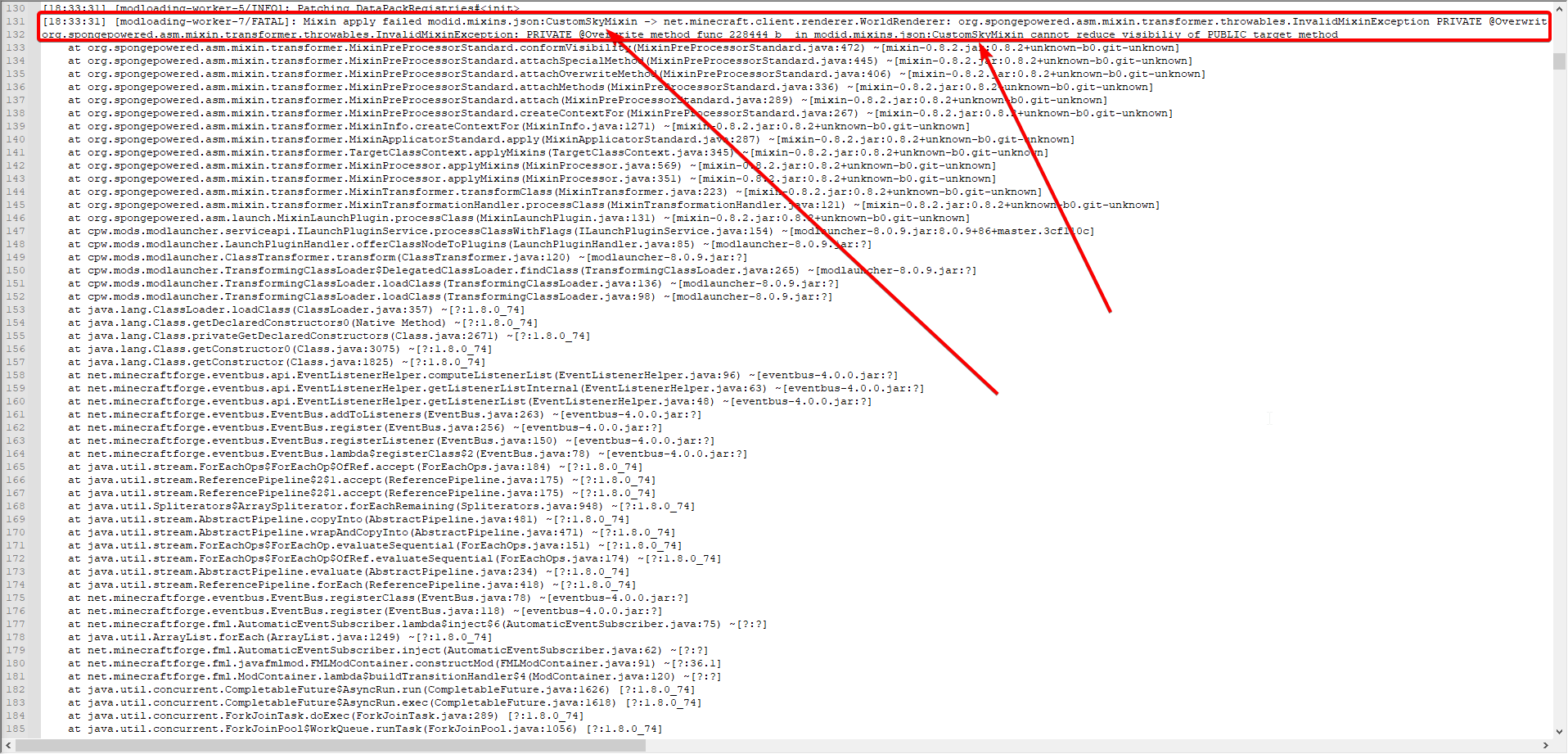
wouldnt really count on it. what zappah said was a guess at best. the issue seems to be some mod adding sky effects, but which mod is not specified
halcyon crypt
lyric crescent
wouldnt really count on it. what zappah said was a guess at best. the issue seem...
i remmember adding a end sky mod, but dont remember the name
that could be the problem
lyric crescent
well that would be this block of text. sometimes there is a mod name somewhere in the chain, but since this is a mixin it's hidden https://i.imgur.com/sKg6u6b.png
 halcyon crypt
lyric crescent
well that would be this block of text. sometimes there is a mod name somewhere i...
halcyon crypt
lyric crescent
well that would be this block of text. sometimes there is a mod name somewhere i...
very interesting
i had no idea
ok, i will delete the sky mod now
hopefully that works
unborn basin
lyric crescent
well that would be this block of text. sometimes there is a mod name somewhere i...
Yamza you're a wizard
unborn basin
rugged estuary
here are my logs
Looks like your connection is not stable
rugged estuary
how do i fix that
lyric crescent
eh my understanding of this stuff is guesswork at best, i just know where to guess from
unborn basin
Can you connect via cable?
rugged estuary
yes
unborn basin
Do that and try again
rugged estuary
im sry i meant to say im already
connected via cable
so does it just mean that my internet isnt good?
rugged estuary
its german should i change language rq?
digital roost
Anyone know what this error is? The modpack is Create Together
 lyric crescent
rugged estuary
how do i screenshot again
digital roost
rugged estuary
how do i screenshot again
lyric crescent
rugged estuary
how do i screenshot again
digital roost
rugged estuary
how do i screenshot again
press Win Key + Alt + Printscreen
rugged estuary
here
 glad tangle
rugged estuary
how do i screenshot again
glad tangle
rugged estuary
how do i screenshot again
for me its just win key + printscreen
digital roost
i think that works too
rugged estuary
you can also do shift-win-S
digital roost
digital roost
Anyone know what this error is? The modpack is Create Together
Anyone know why my curseforge isnt working?
rugged estuary
i dont, but wait for someone to respond and they are going to help
glad tangle
digital roost
Anyone know why my curseforge isnt working?
what do you mean not working?
digital roost
its giving me an error code
glad tangle
the version may be too old
rugged estuary
rugged estuary
here
so what do i have to do now?
maybe look through logs maybe theres a hint or something
rugged estuary
who is helping me rn? i just want to know.
halcyon crypt
no one knows 🤔😆
lyric crescent
Well unless Zappah returns I will suggest that your network is the issue here. If you are on wifi try wired. If not try a router reset.
lyric crescent
¯_(ツ)_/¯
red patioBOT
It is 05:49PM on Thursday for CurseForge my dudes.
Project Moderation Time
Project/File moderation is done on Sunday - Thursday from 10am - 6pm GMT+2
This process is First in, First out. Thus files submitted late in the work day may not be checked until the next work day.
New Projects or uploads requiring manual approval: 1-3 Working Days
Updates to approved projects not needing manual approval: 1 Hour
File sync to the Curseforge app may take up to 24 hours after approval.
tiny wren
queen storm
!mc-path
still no work
digital roost
Hey. When im going in two the inventory (Chest, furance, crafting table and all modded table) its lags for 2 sec and it does in a survival world, multiplayer server. I know it's NEI that creates lagged with all objects that come up on the right side but I do not know why. I've tried to replace NEI with another version but it's still there. Video=https://photos.app.goo.gl/XuvswBCFmmKewCEy5

Google Photos
rugged estuary
rugged estuary
its still not working. is there anything else to try?
?
 fading vessel
Pls help, I try and load ksp mods on curseforge but it doesnt work. the just dont show up. can someone help please?
fading vessel
make sure ur downloading the right version
 swift obsidian
I have been trying to get ANY of my modpacks to work on curse forge but I keep on getting the same error message... I've scourned the internet about my problem, tried all their advice, even fully reset my computer and I still can't fix it... Somebody... Please help me
I have SEVERAL copies of the crash report... And the problem has been with Minecraft, version 1.12.2, Modpack Dungeons Dragons and Space shuttles, though over modpacks give the same error.
This is ONE of the many crash reports I have collected
 hidden kelp
Hello, I have created my first project yesterday, a world of warcraft addon!
I wish guarantee that my github webhook to automatic package is working well, why? I have configured to update on each commig and the webhook on github is working (response 200 for my last commit 30min ago)... But I cant see anything changing in my project: https://www.curseforge.com/wow/addons/per-hour (updated 16 hours ago)
 ivory fractal
I need help
i press play on skyfactory4 and minecraft deos not launch but when i normaly launch minecraft it works
and i can play normal but not curseforge stuff
modern bronze
I have another problem now it won't let me export my profile it won't stop doing this
Basically it won't stop loading then when it stops and I go to choose what I want to say for my profile it'll undo it and start loading again then I'll stop and continue forever
I wanted to show video of it but discord won't let me
Never mind it fixed itself thanks anyways
digital roost
How can I fix the zero error code in minecraft?
rugged estuary
lyric crescent
Well unless Zappah returns I will suggest that your network is the issue here. I...
hey i have been waiting for a long time now is he online?
lyric crescent
if he hasnt replied it's safe to assume he is not
rugged estuary
oh okay
 pastel pumice
how im put the shaders in modpack Better modpack Server?
 sly geode
WoW Question (I did search, but did not spot any answers): How do I persuade the CurseForge app to recognize the old "Classic" game folder ("_classic_era")?
From the screenshot you can see that Battle.net created the new folder to accommodate folks that don't want to move to Burning Crusade just yet - but in my CurseForge UI it is not recognized.
Attempting to manually add the folder fails with "This is an invalid folder or unsupported game."

In the CurseForge UI, this is all I see.

 rapid garnet
hay
lyric crescent
sly geode
WoW Question (I did search, but did not spot any answers): How do I persuade th...
does this help #📢︱news message
rapid garnet
wen i load the game up it whants me to sein in an i do but it ses incerect pass eventho it is cerect
lyric crescent
log out and log back in
rapid garnet
cant
lyric crescent
then either you are using the wrong account type, or the wrong password. curseforge doesnt handle login info, you'll have to take that up with whichever game you're talking about
rapid garnet
minecraft
sly geode
lyric crescent
does this help https://discord.com/channels/428228256236306434/52537233865362638...
Thanks - had to manually add the game as auto-detect didn't work. Appreciate the help!
digital roost
whenever i download a mod for Minecraft and try to start it it doesn't properly work. I still go to the actual Minecraft launcher, that part works but when it loads to go into the main menu of the actual game it just doesn't load.
lyric crescent
what does it do
digital roost
it doesnt load it kinda like keeps jittering back
 chilly pivot
it doesnt let me link curse forge with minecraft
when i try to it says invaild path folder was chosen
fallen loom
?mc-path
red patioBOT
**Minecraft Files should NOT be installed inside the following locations
.minecraft folder.
OneDrive folders.
Desktop folder.
Drive roots I.E. Directly into the C:\ drive.
iCloud enabled folders.
If any of the above are in the path you need to change/move it by following the instructions below!**
If Minecraft is not installed in CurseForge App, start here.
Click the in the top left.
Select Minecraft.
Click "Edit".
Move to the "Continue here:" section below.
If Minecraft is installed in CurseForge App, follow these steps.
Click the in the bottom left.
Select the Minecraft tab.
Click "Change".
Move to the "Continue here:" section below.
Continue here:
Make a folder in the root directory called CurseForge.
Select the folder you just made.
The text box should show something like the following:
For Windows: C:\CurseForge
For Mac: /Users/Shared/CurseForge
chilly pivot
fallen loom
?mc-path
thank you
 marsh rampart
(b) me: clicks my profile on the website
the site:
 fallen loom
Uhhhh
marsh rampart
(b) url for proof
 rugged estuary
hey i have a question. if you right click on curseforge then go all the way down then you click on that then go to compatibility does it say programm for compatibility windows 10 or windows 8?
fallen loom
What page did you originate on, Kenzie?
marsh rampart
(b) the landing page from the profile link in the curseforge client
digital roost
Hey. When im going in two the inventory (Chest, furance, crafting table and all modded table) its lags for 2 sec and it does in a survival world, multiplayer server. I know it's NEI that creates lagged with all objects that come up on the right side but I do not know why. I've tried to replace NEI with another version but it's still there. Video=https://photos.app.goo.gl/XuvswBCFmmKewCEy5

Google Photos
rugged estuary
rule 10
rugged estuary
rugged estuary
hey i have a question. if you right click on curseforge then go all the way down...
can someone tell me that rq?
fallen loom
marsh rampart
(b) the landing page from the profile link in the curseforge client
So your profile picture and "View Profile"?
marsh rampart
(b) yes. which lands me on a profile not found page, per usual when i log in
(b) this is my landing link: https://www.curseforge.com/members/LegendaryGeekGaming
fallen loom
That page is completely and utterly broken for me
marsh rampart
(b) oh.
lyric crescent
just says not found
marsh rampart
(b) i see whats wrong
fallen loom
says Not found and even my profile isn't there in the top right
marsh rampart
(b) somehow you guys arent tracking twitch renames.
(b) so my twitch profile doesnt link up wqith curseforge
fallen loom
Hah, that page is infectious, I click "My Profile" on it and it breaks
lyric crescent
yea, you'll need to make a ticket on that
make sure to submit all info you've sent here
?ticket-app
red patioBOT
:bug: Reporting via the CurseForge App :bug:
-
Click the
icon in the bottom left. -
Select
Open a Ticket. -
Fill out the form with accurate detailed information, "It doesn't work" isn't helpful! What exactly doesn't work and why doesn't it work should be easy to answer!
-
Make sure to upload your Overwolf logs with the
Upload Fileoption on the ticket, information on how to get these logs can be found here https://support.overwolf.com/en/support/solutions/articles/9000176827-how-to-get-your-overwolf-logs -
Submit!
marsh rampart
(b) kay, thanks
digital roost
I still need help with my problem
lyric crescent
tbh i dont even know what you're talking about
digital roost
digital roost
whenever i download a mod for Minecraft and try to start it it doesn't properly ...
this
lyric crescent
yes, that
digital roost
it stays stuck like this with the green loading bar kinda like jittering, thats the best way i could describe it
 fallen loom
How long have you let it sit like that?
digital roost
i let it be like that for like 5 min
then just closed it
i could leave it for longer like 10 min
lyric crescent
probably should
swift obsidian
I have been trying to get ANY of my modpacks to work on curse forge but I keep on getting the same error message... I've scourned the internet about my problem, tried all their advice, even fully reset my computer and I still can't fix it... Somebody... Please help me
fallen loom
Providing the error message might help
swift obsidian
This is ONE of the many crash reports I have collected
swift obsidian
How do I fix it?
fallen loom
How much ram do you have in your machine and how much are you allocating to Minecraft?
swift obsidian
I have 16GB of Ram and I’m Allocating 8GB
fallen loom
Check Task Manager with Minecraft closed and make sure that 8G is actually available
marsh rampart
(b) ive sent my ticket
swift obsidian
How would I do that?
fallen loom
Control + Shift + Escape, if you have it in simple mode click "More Details"
In the processes tab what percentage of ram/memory is in use?
swift obsidian
Oh... Usually 100%, I don’t know... I’m not by my computer right now
fallen loom
If it's 100% with Minecraft closed then you don't have the spare 8G you're telling Minecraft to use
swift obsidian
Okay... So How would I get that 8G?
fallen loom
Close programs that you don't need, or upgrade your PC with more ram
digital roost
ive waited for more than 10 min for this to load but ill wait a little longer, i guess

it finally loaded
feels like that took longer than it should have though
 left echo
The game crashed whilst initializing game
Error: org.spongepowered.asm.mixin.transformer.throwables.MixinTransformerError: An unexpected critical error was encountered
Exit Code: -1
how do i fix this
swift obsidian
Okay, without Curseforge or Overwolf Running.... Memory is 16%
fallen loom
left echo
The game crashed whilst initializing game
Error: org.spongepowered.asm.mixin.tra...
?mc-log
red patioBOT
Where to find the log on the CurseForge Client.
Right-click the modpack profile icon OR click the button in the modpack profile.
Click Open Folder.
Open the logs folder.
Find the file called latest.log and drag it into discord.
 cloud arrow
If I upload now a file it will only be approved in three days right?
fallen loom
What kind of file? Mod? Modpack?
What kind of project? New? Old?
swift obsidian
Running Curse Forge and Overwolf, it’s at 20%
Add the Minecraft Launcher... 22%
The thurthest memory got to was 33% running Minecraft... But CPU got up to 100% along with disk
So what’s the problem I’m facing?
marsh rampart
(b) i want to say cpu issues
swift obsidian
Well... Then how do I fix that?
marsh rampart
(b) i have no idea, becacuse it could be a number of cpu issues.
 west folio
swift obsidian
The thurthest memory got to was 33% running Minecraft... But CPU got up to 100% ...
west folio
swift obsidian
The thurthest memory got to was 33% running Minecraft... But CPU got up to 100% ...
what cpu do you have
 west folio
i'd suggest a new cpu (and maybe motherboard) as that isnt exactly a good one
fallen loom
This looks like a possible issue with Java, I suppose you could try installing Java yourself and setting Curse/Minecraft to use that instead
west folio
west folio
i'd suggest a new cpu (and maybe motherboard) as that isnt exactly a good one
especially considering that is a 4th gen intel cpu, from 2014
west folio
not exactly a tech person but i'd say something from the recent years, best to do your own research and also ask others, i myself am getting a 5 5600x (from AMD) as that is great for gaming, definetly best to find techy places and ask there, as the people there are the smartest to ask
 dense cloak
digital roost
ive waited for more than 10 min for this to load but ill wait a little longer, i...
dense cloak
digital roost
ive waited for more than 10 min for this to load but ill wait a little longer, i...
Blame Forge for the long loading times.
digital roost
it also crashed after trying to create a world
fallen loom
?mc-path ?
red patioBOT
**Minecraft Files should NOT be installed inside the following locations
.minecraft folder.
OneDrive folders.
Desktop folder.
Drive roots I.E. Directly into the C:\ drive.
iCloud enabled folders.
If any of the above are in the path you need to change/move it by following the instructions below!**
If Minecraft is not installed in CurseForge App, start here.
Click the in the top left.
Select Minecraft.
Click "Edit".
Move to the "Continue here:" section below.
If Minecraft is installed in CurseForge App, follow these steps.
Click the in the bottom left.
Select the Minecraft tab.
Click "Change".
Move to the "Continue here:" section below.
Continue here:
Make a folder in the root directory called CurseForge.
Select the folder you just made.
The text box should show something like the following:
For Windows: C:\CurseForge
For Mac: /Users/Shared/CurseForge
fallen loom
What are we looking for?
 dreamy mural
how to make a modpack
fallen loom
?mc-installmods ?
red patioBOT
How to install mods in CurseForge App.
- Click
+ Create Custom Profile - Name it, select the required Minecraft version, select the Forge version (usually the highest number), click
Create. - Click the profile icon.
- Click
Add New Content - Search and install the desired mods.
- Start the game!
How to install mods not on CurseForge.
- Right click the profile picture or Open the profile and click the Icon next to the play button.
- Click
Open Folder. - Drag the mod(s) into the
modsfolder. (Note: Some mods will require others, to run. Make sure to read the instructions for the mod!) - Start the game!
west folio
you managed to get the mc role but didnt see the custom profile?
dreamy mural
how do u get a picture for it tho
fallen loom
iirc that comes from when a pack is uploaded and published on the Curse site
swift obsidian
Will an HP Elite 8100 tower intel core i5 3.2Ghz processor work?
dreamy mural
how do u make one on the curse web
fallen loom
Are you wanting to do this just for the image?
dreamy mural
and so it can appear on the app
fallen loom
Well you have to make the pack first
 median oak
Heya guys, trying to import a custom created Minecraft mod pack on a Mac computer however when clicking “create custom profile” and selecting import then the Modpack nothing appears and the mods do not begin to download. Any help would be amazing! X
fallen loom
median oak
Heya guys, trying to import a custom created Minecraft mod pack on a Mac compute...
Does a red box appear at the bottom when you try to import it?
median oak
I don’t believe so x
Hold on x
Nope x
Just nothing really x
Like it’s about to do it but it just doesn’t x
fallen loom
Does the pack show if you completely close Curse and Overwolf, then reopen Curse?
 sick venture
so I'm not sure if this is an actual problem I'm having but it's kinda weird:
when i start up my modpack and click "mods" on the minecraft menu, in each mods description it says "secure mod features disabled, update jdk"
anyone know what that means?
fallen loom
That means your JRE is too old for Forge's signature reading stuff to work, it's safe to ignore
fallen loom
Java Runtime Environment
sick venture
i thought it might be java related so I tried updating it. do i need to have java 11 to be completely up to date?
 tough cedar
im trying to look for mods on the curseforge app for minecraft but all I see is modpacks where do I find singular mods?
fallen loom
sick venture
i thought it might be java related so I tried updating it. do i need to have jav...
Minecraft versions up to and including 1.16 are designed for Java 8 so it's preferred
fallen loom
tough cedar
im trying to look for mods on the curseforge app for minecraft but all I see is ...
Do you have a Profile to put the mods in?
sick venture
tough cedar
im trying to look for mods on the curseforge app for minecraft but all I see is ...
click create custom profile
then click on the profile you created and go to add content
sick venture
another "problem" I'm having is that when I'm in game (using a popular modpack) and I look at my mods through the pause menu, about half of them are colored red and say "for an older version of minecraft" when i hover my cursor over them
I'm pretty sure theyre working though.
 tawdry rapids
hi how can ı instal the force for my windows computer ?
fallen loom
Installing Forge?
Installing CurseForge or MinecraftForge?
tawdry rapids
curseforce
fallen loom
Where are you getting the c from?
fallen loom
Is English a second language for you?
fallen loom
?download
red patioBOT
Looking to install the CurseForge app?
Todo: Place system requirements here.
<:windows:798410728188936222> Windows
<:mac:798410654418862130> Mac
Linux
:person_shrugging:
tawdry rapids
for instal the curse force thanks
fallen loom
It's CurseForge, not CurseForce
tawdry rapids
ok 😄
fallen loom
Can you be more specific?
 cerulean turret
as soon as i click on the option to install curseforge on windows it downloads the installer from there when i click the installer to install curseforge it doesnt download it
 spring cove
When dragging the mod - Pehkui-2.0.0+ 1.16.5-forge - to the custom profile mod folder, I found that for some reason, It automatically assumes that pehkui is a fabric mod. I know that the specific file works on forge because I have tested it there.
fallen loom
I can't recall if Curse supports manual installation of mods at this time
and by that I mean downloading a Curse-Hosted mod manually and having the client detect it as a Curse-Hosted mod
cerulean turret
what avbout my problem?
spring cove
fallen loom
and by that I mean downloading a Curse-Hosted mod manually and having the client...
Okay, thank you for your assistance!
fallen loom
cerulean turret
what avbout my problem?
I can't recall what the installer looks like so I have no idea what you're clicking on
fallen loom
spring cove
Okay, thank you for your assistance!
That was a warning that if you're installing the mod manually I'm not sure Curse supports it
spring cove
fallen loom
That was a warning that if you're installing the mod manually I'm not sure Curse...
I understand.
fallen loom
I can't remember what the installer looks like, you'll have to provide screenshots


 unborn sail
evening I require assistance
fallen loom
cerulean turret
thats everything i can provide
So double clicking the installer does literally nothing?
fallen loom
fallen loom
So double clicking the installer does literally nothing?
Not even a UAC prompt?


 south solar
how do u make demon slayer modded server
fleet bear
south solar
how do u make demon slayer modded server
!notcf
red patioBOT
The question you are asking about isn't related to CurseForge. Please use the appropriate game rooms by getting the role from #786424115535544350 or use #👽︱game-support for help.
This room is only for CurseForge Owned & Maintained features/services.
fallen loom
cerulean turret
Have you checked Overwolf to see if it installed silently which would be really annoying?
south solar
!notcf
red patioBOT
The question you are asking about isn't related to CurseForge. Please use the appropriate game rooms by getting the role from #786424115535544350 or use #👽︱game-support for help.
This room is only for CurseForge Owned & Maintained features/services.
cerulean turret
ill check
fleet bear
cerulean turret
!getcf
red patioBOT
Looking to install the CurseForge app?
Todo: Place system requirements here.
<:windows:798410728188936222> Windows
<:mac:798410654418862130> Mac
Linux
:person_shrugging:
fleet bear
Use this link, install overwolf and then use the app store to get curseforge.
fallen loom
Oh does the addon installer not work anymore?
fleet bear
Some antivirus software breaks it.
fallen loom
Ah
unborn sail
I need help with installing curse forge, for a friend.
Everytime he goes to install he gets error on the download button, and he cant log in
fleet bear
We dont help people that arent having the issue.
If your freind has a problem they can come here and get support.
 frosty bolt
i am the friend
fleet bear
Post the error you have
 fleet bear
I dont know of that issue, have you tried a fresh install of overwolf?
frosty bolt
like 10 times im not even joking
fleet bear
Ok, you need to go to the overwolf app support then, they will want to know what's going on.
I should yell at them for bad errors too it seems ahaha
fallen loom
Cases like this I get kinda curious about the log anyway because I want to know just how dumb the error is
fleet bear
Out of all possibilities dumb fills that vast majority.
fallen loom
It's fun water cooler reading
 flint sentinel
is this URL the best place to report a CF site problem? https://support.overwolf.com/en/support/tickets/new

Overwolf Support Help Center
We're here to get you informed on everything you need to know about Overwolf, including helpful guides and troubleshooting articles to back you up when you get in a pickle
fleet bear
flint sentinel
is this URL the best place to report a CF site problem? https://support.overwolf...
What issue with what site?
flint sentinel
the way version MC 1.17 is ordered internally. it was added after the migration from Twitch and is ordered as if it's older than MC 1.0
 fleet bear
That's been reported before but it's just not something they really care about currently.
flint sentinel
good to know. I think it's going to be a bigger issue soon because users won't see 1.17 under Recent Files on project pages
fleet bear
The site has lots of quirks like this that they want to fix in the site remake.
flint sentinel
I'm looking forward to that :)
fleet bear
Arent we all.
fallen loom
Still working with what was transferred from Twitch, eh?
fleet bear
The site is some 6+ year old monstrosity that's gone through the initial curse -> curseforge change then to twitch and now overwolf tried to unwrap it all just to decide to throw out a bunch of it and start over.
That's what part of the CF Core stuff is.
fallen loom
Hacks upon hacks upon hacks?
 golden turret
Hey, non of my Minecraft modpacks will load when i click play, any solutions?
fleet bear
frosty bolt
no response after 2 days
Then post it again with enough info.
fallen loom
Oh, someone earlier mentioned that accounts linked to a twitch name are breaking when that twitch name is changed, iirc they already made a ticket with OW
fleet bear
golden turret
Hey, non of my Minecraft modpacks will load when i click play, any solutions?
!mc-installfix
red patioBOT
- Click on the Minecraft Tab on the Left side of the App.
- Click button next to the
Create Custom Profileoption. - Click
Repair Installationoption. - Play game.
NOTE: You will not lose any modpacks or worlds, These are saved in the Instances folder. DO NOT TOUCH THIS FOLDER OR YOU WILL LOSE EVERYTHING
fleet bear
fallen loom
Oh, someone earlier mentioned that accounts linked to a twitch name are breaking...
Logging out and back in should fix that. It syncs the info again as all accounts are still linked to twitch.
for now
golden turret
oh it was that easy... been googeling for half an hour now Cx
 mellow magnet
is anyone online because i need help
 coral flame
Hey i have a problem
fallen loom
Is anyone going to provide info about their issues or are they all waiting for someone to offer assistance first?
coral flame
I doenloaded a minecraft mod on the curseforge app and my skin doasnt load and i cant do anything
mellow magnet
fallen loom
Is anyone going to provide info about their issues or are they all waiting for s...
im waiting
fallen loom
mellow magnet
im waiting
Do you buy things without knowing what they are?
mellow magnet
fallen loom
Do you buy things without knowing what they are?
no it just im wondering how to get course forge alpha
 slim robin
Does anyone know any good resources to view for learning how to use Fabric to make mods, I have the general environment setup already and I have been watching a few more tutorials, but I was wondering if there were any extra resources
fallen loom
?notcf for a lot of this, you're in the wrong channel
red patioBOT
The question you are asking about isn't related to CurseForge. Please use the appropriate game rooms by getting the role from #786424115535544350 or use #👽︱game-support for help.
This room is only for CurseForge Owned & Maintained features/services.
coral flame
coral flame
I doenloaded a minecraft mod on the curseforge app and my skin doasnt load and i...
Can someone help me?
If i play Minecraft with curseforge my skin doesnt load
coral flame
coral flame
If i play Minecraft with curseforge my skin doesnt load
Pls help
fallen loom
Does it happen without Curse?
fallen loom
I'm not familiar with anything Curse does that could cause that
fallen loom
You didn't provide the info they asked for
 young mural
oh shoot my bad
swift obsidian
I don’t understand my problem... The info given to me was a problem with my CPU... However... I have played those mod packs on my computer... Sometimes they’ll load and I can play em just fine... What changed?
fallen loom
I don't think it's a hardware problem, I think it's a software problem, did you try my solution of trying a different version of Java?
swift obsidian
No... How do I do that?
fallen loom
I'm not sure how to explain it without recommending a specific Java vendor and idk what vendor Curse recommends
swift obsidian
How would I find out?
fleet bear
Link to the issue?
fallen loom
ExceptionAccessViolation JVM crash, one second
swift obsidian
 cloud belfry
fallen loom
cloud belfry
fallen loom
!status
red patioBOT
It is 11:59PM on Thursday for CurseForge my dudes.
Project Moderation Time
Project/File moderation is done on Sunday - Thursday from 10am - 6pm GMT+2
This process is First in, First out. Thus files submitted late in the work day may not be checked until the next work day.
New Projects or uploads requiring manual approval: 1-3 Working Days
Updates to approved projects not needing manual approval: 1 Hour
File sync to the Curseforge app may take up to 24 hours after approval.
fleet bear
uhhg, gotta love JVM crashes...
swift obsidian
Log out through Curse? Or just my launcher
fallen loom
Through the Mojang Launcher
fleet bear
swift obsidian
is this for all modpacks via curseforge app?
swift obsidian
Yes
fleet bear
!mc-installfix
red patioBOT
- Click on the Minecraft Tab on the Left side of the App.
- Click button next to the
Create Custom Profileoption. - Click
Repair Installationoption. - Play game.
NOTE: You will not lose any modpacks or worlds, These are saved in the Instances folder. DO NOT TOUCH THIS FOLDER OR YOU WILL LOSE EVERYTHING
fleet bear
Corrupt java install
fallen loom
fleet bear
uhhg, gotta love JVM crashes...
Best part is it all looks like native and JVM, no GL natives involved
swift obsidian
Okay I logged out
fleet bear
Once you do the above, it should work.
swift obsidian
Do I log back in?
fallen loom
Yes
The logout was just because you had sensitive info in the logs you provided, and iirc relogging should have invalidated those tokens
swift obsidian
It crashed... No Crash Log given
fleet bear
did you do the installfix steps?
swift obsidian
Yes
fleet bear
Did it crash at the same point as before?
swift obsidian
It loaded the green loading bar on the launcher then it crashed...
I ran it again and then gave me the crash log as all the rest of the times
fleet bear
post the new log
swift obsidian
Hold on I gotta start Discord on my Computer
 dry thicket
Im having trouble finding my own project in the search bar on modpacks its name is M e p and im trying to get my friend to download it so we can play it but it seems to not be anywhere
How can I find it or find the link
To send it to him
fleet bear
Link me to the project
swift obsidian
Here it is
fleet bear
well.... It's not the same this time.
So it's either a new issue or the same one changes every launch 😄
fallen loom
Once again I recommend relogging to invalidate that token
swift obsidian
you got it
fleet bear
do you happen to have a regular mc launcher installed? Does it work?
swift obsidian
A small amount of information... It takes forever for the Launcher to load
fleet bear
Intresting.
 fleet bear
:|
swift obsidian
And Minecraft crashed... No Crash log
fleet bear
Shot in the dark here, disable any antivirus stuff you have enabled currently.
just turn it off for like 30 minutes.
does that speed it up at all?
swift obsidian
All I have in Windows Security... How do I turn that off?
fleet bear
open the security panel settings
Go to Virus & threat protection
Click manage settings under virus & threat protection settings
Disable real-time protection.
swift obsidian
Nope, doesn’t work
fleet bear
i'm running out of ideas here man. is everything on the PC updated?
swift obsidian
Yep
lyric crescent
adware?
swift obsidian
Do you mean Adblock?
fleet bear

Malwarebytes
Download Malwarebytes AdwCleaner for free to remove adware, bloatware, unwanted toolbars, and other potentially unwanted programs (PUPs) from your Windows PC.
run that
lyric crescent
no im suggesting you might have adware/malware
swift obsidian
It says no items were detected... though it says I can run basic repair which will reset windsock and other settings to their default values
fleet bear
Yeah. At a loss on this one.
fleet bear
What changed when it started?
fallen loom
Have we tried a version of Java 8 from Adopt?
swift obsidian
It all started when I bought a new game on steam... Maybe a little before that..
slim thunder
!!=
red patioBOT
Wording is important!
Forge = Minecraft Forge, This is a modloader often just called "Forge".
CurseForge = A Website/App that has content for games.
Mods = Individual mod files.
Modpacks = Multiple mods put into the mods folder or downloaded from CurseForge.
These are not Interchangeable! Please use the correct terms as it allows us to help you faster!
swift obsidian
Anyway, what about this Java 8 from adopt?
fleet bear
swift obsidian
I trust this isn’t some virus
fleet bear
It's Java.
swift obsidian
Okay, installed... Now what?
fleet bear
open your vanilla launcher.
go to the installations tab,
hover over one of the profile and click the 3 dots then select edit,
click more options,
use the java executable browse button and point it to what you just installed.
 remote fern
ok, so im having this problem where i download the forge installer
and when ever i try run it, it just doesnt open up
it creates a log
any help would be appreciated
fleet bear
swift obsidian
Okay, installed... Now what?
the default install location is this C:\Program Files\AdoptOpenJDK\jdk-8.0.292.10-hotspot\ btw.
swift obsidian
Thank you
red patioBOT
The question you are asking about isn't related to CurseForge. Please use the appropriate game rooms by getting the role from #786424115535544350 or use #👽︱game-support for help.
This room is only for CurseForge Owned & Maintained features/services.
swift obsidian
I’m sorry this is taking so long...
fleet bear
not your fault
Not sure if this has taken as long as the time I helped some kid update their computer drivers and walked through a pile of other steps only to find out when they set up the computer they plugged into the motherboard and not the graphics card then we walked em through moving it and fixing everything.
 fervent wyvern
can you make a modpack on the website or does it need to be through the launcher?
fleet bear
Need to make the pack on a launcher and export it
fervent wyvern
thanks
fallen loom
Meta is through the site, pack is through the launcher
remote fern
fleet bear
!notcf
mb bro
swift obsidian
If it helps... My computer is an Hp ProDesk 600 G1 Sff
fleet bear
that sounds old....?
swift obsidian
Probably... I got it from a college surplus store
fleet bear
but sadly computer doesn't really help at all. it's all about the stuff inside and installed
swift obsidian
Right... Just thought maybe it would confirm the CPU theory
lyric crescent
send the dxdiag maybe?
swift obsidian
Uh, where do I find that?
lyric crescent
windows key + r, type dxdiag, enter
swift obsidian
 fallen loom
Ewww, cellphone pictures of a screen
swift obsidian
Sorry
fallen loom
(Win + Shift + S is Snip & Sketch)
lyric crescent
specs seem sufficient
swift obsidian
Oh! 🤦♀️ right... I use Snip & Sketch all the time
fleet bear
did the java change work?
swift obsidian
Minecraft finally loaded
 balmy flax
just saw this but i wasnt talking to you i was talking about carl bot. I even replied to the message
but wtv
lyric crescent
...ok
swift obsidian
 fleet bear
is that while it was loading?
swift obsidian
No
fleet bear
is anything else super slow when you use the computer?
swift obsidian
Mmm... Curse Forge
fleet bear
just CF and MC?
swift obsidian
Yup...
What do I select once I get to the file location... I have multiple files to choose from
 fleet bear
uh, bin/java.exe i think is what it's after
fallen loom
javaw
fleet bear
that
swift obsidian
K it’s working on it
It crashed... And CPU went up to 100%
I also noticed that once it gets over that long wait period... If I close it and open it again, It goes super fast
fleet bear
Quick solution. 🖥️ ➡️ 🚽
I think you have exhausted everything we are capable of here.
swift obsidian
Oof. Great...
fleet bear
you can try mojang support?
Another option would be to backup everything on the computer and do a fresh install of windows.
swift obsidian
Did that...
fleet bear
😓
 amber light
