#🔥︱curseforge-support
1 messages · Page 471 of 1
 queen storm
 past ledge
thanks for the help I got it approved now
 toxic zodiac
Every time I try to play any modpack it takes me to the login of minecraft java and I forgot my password
 lyric crescent
cant help you with that
past ledge
@toxic zodiac just use forge on your original minecraft launcher or reset your password
queen storm
past ledge
<@!702658825144238091> just use forge on your original minecraft launcher or res...
Kinda tricky to play modpacks that way
past ledge
all u gotta do is drag the modpacks from curseforge into your minecraft mods folder
i guess its case to case because of other files that change things
lyric crescent
past ledge
all u gotta do is drag the modpacks from curseforge into your minecraft mods fol...
You tried this yet?
past ledge
ive done it before yeah
lyric crescent
oh really? you're definitely missing a few steps there though
past ledge
i just did it for pixelmon so it didnt reallly matter
toxic zodiac
do we have a vc
lyric crescent
no
past ledge
also yamza i said it was a case by case thing because cerrtain modpacks wont work if you do that
lyric crescent
it's not case by case though
toxic zodiac
you should so you can go step by step talking because people dont like typing and they might under stand it better when somebody is activiley talking
past ledge
okay then I guess i got lucky or something
queen storm
toxic zodiac
you should so you can go step by step talking because people dont like typing an...
No, we can't moderate it
toxic zodiac
you can make it an invite only chat
past ledge
when you want to add mods to your modpack do you add the updated modpack file or just the mod .jar
toxic zodiac
I have done it before
queen storm
toxic zodiac
you can make it an invite only chat
Still has no use for use for us as we don't want to do voice 9/10 times
lyric crescent
you make a new export and upload it
past ledge
okay thats what i thought i did thanks
toxic zodiac
o yeah what is forge
queen storm
toxic zodiac
o yeah what is forge
!!=
 red patioBOT
Wording is important!
Forge = Minecraft Forge, This is a modloader often just called "Forge".
CurseForge = A Website/App that has content for games.
Mods = Individual mod files.
Modpacks = Multiple mods put into the mods folder or downloaded from CurseForge.
These are not Interchangeable! Please use the correct terms as it allows us to help you faster!
toxic zodiac
Thank you
can some one pls show me how to install system zees pillagers plus modpack
mod
past ledge
@toxic zodiac do you have the curseforge application
toxic zodiac
yes
past ledge
just seach it up in modpacks and click install
toxic zodiac
It is not in there
queen storm
toxic zodiac
It is not in there
Post a link to it
queen storm
!mc-installmods
red patioBOT
How to install mods in CurseForge App.
- Click
+ Create Custom Profile - Name it, select the required Minecraft version, select the Forge version (usually the highest number), click
Create. - Click the profile icon.
- Click
Add New Content - Search and install the desired mods.
- Start the game!
How to install mods not on CurseForge.
- Right click the profile picture or Open the profile and click the
 Icon next to the play button.
 - Click

Open Folder. - Drag the mod(s) into the
modsfolder. (Note: Some mods will require others, to run. Make sure to read the instructions for the mod!) - Start the game!
 toxic zodiac
it wont let me do that
lyric crescent
beacuse?
toxic zodiac
yes
lyric crescent
that is a mod, not a modpack
toxic zodiac
It is curseforges website i want to know how to install it
lyric crescent
 rocky bronze
how do I make a server with rlcraft for free?
lyric crescent
!notcf
red patioBOT
The question you are asking about isn't related to CurseForge. Please use the appropriate game rooms by getting the role from #786424115535544350 or use #👽︱game-support for help.
This room is only for CurseForge Owned & Maintained features/services.
 gilded violet
Any idea how long it is taking for a mod to show up in the WoW BCC version for Curseforge app? I asked a question about it last night. I did read over where someone else was answered about sync between the site and app. I am trying to figure out how long a project that has been around for quiet a while would take to show up on a new WoW expansion. Thanks.
queen storm
gilded violet
Any idea how long it is taking for a mod to show up in the WoW BCC version for C...
Link please
queen storm
Should be there by now
gilded violet
It doesn't show up when I search for it under the BCC heading
I have restarted the app several times in case it was me.
 reef lichen
Hey guys how much ram should I allocate to Forge??
 viral briar
depends on if you are playing on modpacks
viral briar
you know how much ram you have in laptop/pc?
reef lichen
I have around 16gb.
viral briar
6gb ram is recommended for majority of modpacks , with your 50 mods i'm sure that will be more than enough
viral briar
when you do the allocation , restart curseforge
 queen jolt
Hi. Is there a way to get CF to rescan my WoW addons? I added an addon on another computer last night, which syncs to OneDrive. Second PC sync'd, picked up the new addon folder, but CF doesn't recognize it is installed. Rescanning for games did not resolve it.
reef lichen
viral briar
6gb ram is recommended for majority of modpacks , with your 50 mods i'm sure tha...
You sure????
Kinda confused why it stays at a hundred percent.
viral briar
as I said you need to restart curseforge app for it to take effect
screenshot the F3 debug screen showing the allocation when in game.

 digital roost
Uh

Just installed forge 1.16.5 v 36.1.0
Well
This happened
Need help ;-;
Please ;-;
I reinstalled the forge trice
past ledge
Is there an optifine mod on forge because its not showing on curseforge
 marsh shadow
I think you have to download that from the Optifine website. I don't think its hosted on CurseForge.
 heavy willow
?mc-optifine
red patioBOT
Optifine and Curseforge
To install Optifine with modpacks on Curseforge:
Right click the modpack icon, select Open Folder.
Put the Optifine.jar into the mods folder.
Now load the modpack normally.
We do not offer support for Optifine. If you have issues with Optifine, remove it. If you want further support try the discord found on their website.
https://www.optifine.net/home
 remote flicker
Hi!
Does CurseForge app read mod file extensions? Because it didn't want to enable/disable installed mods so I made it manually. Now they seems to be disabled, but they are all enabled. MultiMC worked fine in this case. I tried CF app because of the easy update, but this is weird...
lyric crescent
not entirely sure what it is you're saying you are doing
remote flicker
lyric crescent
not entirely sure what it is you're saying you are doing
When you click on the mod's swich in the CurseForge app, the file will get a .disabled extension. When you click on it again, the app removes the .disabled extension.
I deleted the .disabled extension manually.
But the app didn't see the change.
lyric crescent
yea, app still has issues checking for what's going on in the mod folder. would probably work if you take the mod out of the folder and put it back. otherwise you can make a ticket for this so it can get fixed
 thorn falcon
when I try to download rlcraft it keeps saying unable to download the minecraft native launcher
lyric crescent
?mc-installfix try this
red patioBOT
- Click on the Minecraft Tab on the Left side of the App.
- Click button next to the
Create Custom Profileoption. - Click

Repair Installationoption. - Play game.
NOTE: You will not lose any modpacks or worlds, These are saved in the Instances folder. DO NOT TOUCH THIS FOLDER OR YOU WILL LOSE EVERYTHING
thorn falcon
thank u it worked but now its saying could not verify minecraft version
lyric crescent
try once more
 lyric crescent
do repair, then try restarting your pc and having it install again
 thorn falcon
thorn falcon
thorn falcon
now its saying this
lyric crescent
so it's either a problem with the folder you're using or an internet issue
?mc-path try changing your path to this
red patioBOT
**Minecraft Files should NOT be installed inside the following locations
.minecraft folder.
OneDrive folders.
Desktop folder.
Drive roots I.E. Directly into the C:\ drive.
iCloud enabled folders.
If any of the above are in the path you need to change/move it by following the instructions below!**
If Minecraft is not installed in CurseForge App, start here.
Click the  in the top left.
Select Minecraft.
Click "Edit".
Move to the "Continue here:" section below.
If Minecraft is installed in CurseForge App, follow these steps.
Click the  in the bottom left.
Select the Minecraft tab.
Click "Change".
Move to the "Continue here:" section below.
Continue here:
Make a folder in the root directory called CurseForge.
Select the folder you just made.
The text box should show something like the following:
For Windows: C:\CurseForge
For Mac: /Users/Shared/CurseForge

 crude locust
I NEED HELP!
queen storm
crude locust
I NEED HELP!
Rule 10
 tranquil slate
could someone send me the link for the server hosting for curse forge like the download for me to host my own server
lyric crescent
curseforge has nothing to do with server hosting
 subtle hazel
Hey so my friends and I are trying to play RLCraft using curseforge, and while most of my friends and myself have it working. One of my friends is only given the option to open the demo when he opens the launcher
I've googled as much as I can and can't find any solution to this problem or even any mention of it by the developers
lyric crescent
friend should come here
 scenic pine
Hey curseforge doesnt recognize TBC in the wow addons and i think its preventing me from getting the right addon versions. I tried to scan for games but it wont work
subtle hazel
I will attempt to send him here, but it's the kind of situation where I'll have to solve it for him anyways
lyric crescent
have them log out, then log in with the correct account
subtle hazel
I've had them log in and out multiple times, re install, re install to a different hard drive
lyric crescent
then the account used doesnt own java minecraft
lyric crescent
only options are wrong account or account doesnt own java
curseforge is not invloved in the login process
subtle hazel
I've seen a few different forum posts that went unanswered where they claimed the same problem, and it might be something to do with newer Microsoft accounts I'm just guessing
But its the same account name as his java account that was being used
 ancient coral
where I change the account (I'm using google translator)
 floral wagon
1.Settings
2. Accound and there you can add and remove accounds
ancient coral
does not appear
floral wagon
Is it the minecraft Launcher or something else
ancient coral
I am going to try
floral wagon
ancient coral
does not appear
you said it doesnt apper so you tried it or not?
floral wagon
do you want to change your accound from curse forge or the minecraft laucher?
ancient coral
when i open the normal minecraft it has my account, when i open it with modifications it opens with the account of my friend that i was using before.
because I had added my account in the normal launcher but not in the curseforge, now that you explained it to me I got it, sorry for the inconvenience
 floral wagon
ancient coral
because I had added my account in the normal launcher but not in the curseforge,...
floral wagon
ancient coral
because I had added my account in the normal launcher but not in the curseforge,...
Ah ok I just read it now xD
marsh shadow
How to I turn My modpack into a server pack?
 signal sparrow
 snow fossil
i keep having fml.modloading.dupedmod pop up now after it was working perfectly fine for a week and i didn't touch it. So can anyone tell me what that error message means??
 flint sedge
im trying to delete some old-ish modpacks i made, and when i go to delete them it shows this.

and when i go to open the files, it shows this. is there any way to fix this?

 fleet bear
flint sedge
im trying to delete some old-ish modpacks i made, and when i go to delete them i...
fleet bear
flint sedge
im trying to delete some old-ish modpacks i made, and when i go to delete them i...
Delete the instance folder.
flint sedge
fleet bear
Delete the instance folder.
how would i get to that?
when i try to open the files, it shows the second image
fleet bear
Open a modpack that does work and go up a folder.
flint sedge
fleet bear
Open a modpack that does work and go up a folder.
go up a folder?
flint sedge
flint sedge
and when i go to open the files, it shows this. is there any way to fix this?
when i press this it shows that
 fleet bear
On every modpack?
fleet bear
Are you using profiles from twitch app?
fleet bear
That's why
flint sedge
ah
fleet bear
Go to the mc settings and open the install location.
flint sedge
oh, so the little settings buttons and the "game specific" tab and click minecraft?
fleet bear
Yes
flint sedge
alright, what do i click next?
fleet bear
You use the path in the modding folder location to open it in your file browser.
flint sedge
oh, thanks! :D
 summer sequoia
Hello! I have a problem with Valhelsia 3. When i start it it loads(5min). Then i try to join a server. It loads. And shows joining server. At server they see that i joined. i see dirt screen. And then it crashes.
fleet bear
summer sequoia
Hello! I have a problem with Valhelsia 3. When i start it it loads(5min). Then i...
!notcf
red patioBOT
The question you are asking about isn't related to CurseForge. Please use the appropriate game rooms by getting the role from #786424115535544350 or use #👽︱game-support for help.
This room is only for CurseForge Owned & Maintained features/services.
 mental sinew
So my server is not running. I get this crash report everytime.. I have updated to the latest Java but still not working.. any help https://paste.feed-the-beast.com/view/4e8883da
 signal ridge
mental sinew
So my server is not running. I get this crash report everytime.. I have updated ...
signal ridge
mental sinew
So my server is not running. I get this crash report everytime.. I have updated ...
#📛︱rules 4 ... You had the right channel the first time
 buoyant tree
can someone help me choose a pack to play on that's still good but less intensive than ATM3L
 subtle citrus
is this the same/similer to forge? because i have a problem related to forge
signal ridge
subtle citrus
is this the same/similer to forge? because i have a problem related to forge
For forge support need to go to their discord. Curseforge == forge
subtle citrus
Thank you!
signal ridge
Forge discord: https://t.co/7qYZt8OubG?amp=1
 steady galleon
Hello, my project got approved but the modpack did not. the reason given was because of optifine, how would i add optifine to the pack for the players
steady galleon
Really? wow
 quaint wyvern
i have been trying to figure this out for quite some time now, but i cant use any fabric mods or modpacks even ones made by other people, and before you say anything i do turn jumploader on i always turn jumploader on when using fabric mods but even if i set it up with jumploader or on the normal minecraft launcher it still does not let me use fabric mods
signal ridge
Yep. Rules of optifine. The author wants people to only download it from their site. Nowhere else
steady galleon
Ahh i see, thank you
signal ridge
quaint wyvern
i have been trying to figure this out for quite some time now, but i cant use an...
!mc-logs send one of the logs from a pack that isnt working
red patioBOT
Where to find the log on the CurseForge Client.
Right-click the modpack profile icon OR click the button in the modpack profile.
Click Open Folder.
Open the logs folder.
Find the file called latest.log and drag it into discord.
quaint wyvern
ive been trying to use origins so yeah
im trying to figure out if its the origins mod not getting something it needs or if its just my pc being broken
digital roost
when ever i run mods on curse forge this keeps popping up and closing curse forge does anybody know hot to fix it?

 brave tulip
Hey guys, I made a modpack yesterday and published a release file / got approved, but when I search it still doesn't appear in the search results. However, if I scroll down manually through the "last updated" I can see it. I assume it just takes a while for it to show up in searches, but it has been about 48 hours now. Does anybody know how long this normally takes?
signal ridge
brave tulip
Hey guys, I made a modpack yesterday and published a release file / got approved...
!sync
red patioBOT
Sync and your Project.
CurseForge App and site do not share the same requirements! You can find things on the site but this does not mean it will be in the app!
For a mod to show up in the app:
- Projects MUST have a file marked as RELEASE or BETA
- Projects MUST be APPROVED
- Projects MUST have a file marked for the PROFILE VERSION USED
- Projects CAN'T be EXPERIMENTAL
- Projects CAN'T be ABANDON
Files can take a while to show up in the app. If your files still have not shown up either your project is new and you have yet to mark a file as Release/Beta or there is issues with the sync system making it slow.
brave tulip
oh my 😮 lemme give this a read here
I did just verify it is showing up in the app when doing a search, but not the site itself. I prob just have to be patient =]
 deft delta
Im not sure If I ask questions here but is it possible to get a modpack downloaded without needing curse forge downloaded because sometimes it tells me to download the app
signal ridge
If the pack is from curseforge then no.
deft delta
Oh so if its from a different creator I have to download the app?
signal ridge
What mod or modpack you trying to get?
flint sedge
flint sedge
when i press this it shows that
i was trying to play a pack, that was made on curseforge, and all this stuff was on it aswell. i dont think its a twitch transferring problem, as this happened just today.
ive got 54 modpacks installed and was tryna delete some, maybe its because theres so many??
 last pilot
Hey can someone help me? I get really really bad fps when running minecraft mods...
Don't know what the problem is because i think I have a mediocre computer... for some reference it can run msfs 2020 on high graphics so it should be able to run a block game
quaint wyvern
last pilot
Hey can someone help me? I get really really bad fps when running minecraft mods...
have you tried dedicating more ram to it
last pilot
Yeah I have about 5 gb dedicated... is more needed?
quaint wyvern
i usually have it set to 8g
last pilot
ok, upped it to 10 gb
quaint wyvern
that might not be a good idea there is such a thing as dedicating too much ram to one thing
keep it at 8g thats about the max any modpack would need
flint sedge
flint sedge
i was trying to play a pack, that was made on curseforge, and all this stuff was...
oh, and when i press play it doesnt load, and when i click on it and press play there is shows another error-message type thing
signal ridge
There are things other than ram that you need to take into acount for minecraft
signal ridge
flint sedge
oh, and when i press play it doesnt load, and when i click on it and press play ...
What error?
flint sedge
signal ridge
What error?
the image didnt send, its this one

 modern sky
hello! i need help, i am trying to delete a modpack for minecraft on overwolf, but it says that there was an error.
flint sedge
same!
quaint wyvern
yeah i am aware of that however im not the best i just know that ram is one of the more important factors
signal ridge
Restart your pc
flint sedge
how would that do anything??
literally everything else works perfectly fine and normal and this just started today
modern sky
signal ridge
Restart your pc
ill try
signal ridge
If the app is stuck on something. Sometimes rebooting a pc will fix things
flint sedge
ill try task manager resetting it, if that doesnt work then ill reboot my pc
quaint wyvern
restarting your pc is what is generally the first thing you should try doing in whenever things stop working, while i dont know why its important because im not very smart i am aware its like the first thing you do
modern sky
it still says theres a error, also pretty much the whole file foulder dissapeared
signal ridge
What is the error?
last pilot
RAM is not the problem 😦
modern sky
it just says,"One or more errors occured."
flint sedge
its not letting me open the files on mine
and its not letting me edit them in any way
signal ridge
flint sedge
its not letting me open the files on mine
Is it saying they are locked or inuse?
flint sedge
flint sedge
oh, and when i press play it doesnt load, and when i click on it and press play ...
go to the thing this is replying to @signal ridge
signal ridge
!mc-installfix try this
red patioBOT
- Click on the Minecraft Tab on the Left side of the App.
- Click button next to the
Create Custom Profileoption. - Click
Repair Installationoption. - Play game.
NOTE: You will not lose any modpacks or worlds, These are saved in the Instances folder. DO NOT TOUCH THIS FOLDER OR YOU WILL LOSE EVERYTHING
flint sedge
where is said option? ;-;
 modern sky
in the modpack?
flint sedge
i also cant click profile options
it doesnt show anything
oH wait im dumb
pressed wrong button yeah the repair thing is thee
there
signal ridge
Next to the create option... Read the bot again
flint sedge
i dont have my glasses on, sorry ;w;
modern sky
i pressed repair, but i still wasent able to delet the modpack
flint sedge
i pressed repair then clicked a modpack and its not loading
signal ridge
Restart the app. Close and open it.
 signal ridge
In the app or the launcher?
flint sedge
it still shows them as no name no play date no nothing
modern sky
im just gonna try playing it
modern sky
well see, mby the file gliched
flint sedge
is it the folder its in?
modern sky
yes, there are nothing expt the mod foulder, and that has nothing in it
flint sedge
its in the folder C:/Users/(my name)/Twitch/Minecraft
 zealous smelt
sorry but how do i select my logo instead of the stock one for my modpack?
signal ridge
zealous smelt
sorry but how do i select my logo instead of the stock one for my modpack?
When you upload the pack to the site you can change the logo there. Currently that is the only way
signal ridge
flint sedge
its in the folder C:/Users/(my name)/Twitch/Minecraft
Could try a new path
zealous smelt
ok but i made it in the app lol
signal ridge
!mc-path
red patioBOT
**Minecraft Files should NOT be installed inside the following locations
.minecraft folder.
OneDrive folders.
Desktop folder.
Drive roots I.E. Directly into the C:\ drive.
iCloud enabled folders.
If any of the above are in the path you need to change/move it by following the instructions below!**
If Minecraft is not installed in CurseForge App, start here.
Click the in the top left.
Select Minecraft.
Click "Edit".
Move to the "Continue here:" section below.
If Minecraft is installed in CurseForge App, follow these steps.
Click the in the bottom left.
Select the Minecraft tab.
Click "Change".
Move to the "Continue here:" section below.
Continue here:
Make a folder in the root directory called CurseForge.
Select the folder you just made.
The text box should show something like the following:
For Windows: C:\CurseForge
For Mac: /Users/Shared/CurseForge
signal ridge
zealous smelt
ok but i made it in the app lol
!mc-packshare Then you export the pack and upload it to the site
red patioBOT
There are two ways to share a modpack you've made with others...
Export and Share - For Friends to Small Groups.
- Click the Icon for the modpack.
- Click the button next to play.
- Click

Export. - Select the files that should be included.
- Send the zip to the people that want it! They can follow the instructions in
!mc-installpackto install the pack!
Upload to Curseforge - For Public Release to Everyone.
This options will make your pack public to EVERYONE, it comes with extra requirements and will take some effort to set up.
- Go to here: https://www.curseforge.com/project/432/4471/create
- Fill out the information with a proper description of the pack. This should allow anyone to understand what the pack is.
- Click the Icon for the modpack in the CurseForge app.
- Click the button next to play.
- Click
Export. - Select the files that should be included.
- Open your Project you made on the CurseForge site and Upload the file you just made.
- Wait for Moderation & Sync so it can show up in the client! (See
!syncfor limitations)
flint sedge
signal ridge
Could try a new path
its only done this today though
but ill do that, yeah
zealous smelt
what does the "packet version" mean
flint sedge
i closed out of it and its not opening ;v;
ive gotta go do somethin so ill come back tmr to fix this shit
signal ridge
The version of the pack. Ex 1.1.3.8
 covert jolt
I can't get this modpack to download https://www.curseforge.com/minecraft/modpacks/journey-from-the-center-of-the-earth/files
modern sky
im confused😑
covert jolt
All the other modpacks download fine into the launcher
but when I click install it opens the launcher and nothing happens
signal ridge
Where are you installing from? Site or app?
modern sky
im just gonna figure this out later
zealous smelt
does the disciption have to be long for a modpack
modern sky
no?
zealous smelt
ok ty
signal ridge
modern sky
no?
In the curse app what is your current Modded Minecraft Folder? > minecraft tab. Screen shot the path
modern sky
wdm
signal ridge
In the app click the > click the minecraft tab > take a screen shot of the Modded Minecraft Folder box.
 signal ridge
Yeah. Looks fine
modern sky
the other modpack are fine
signal ridge
So basically you deleted a pack and its not going away? Or cant make them
modern sky
i cant delete it
signal ridge
If you go to its folder in the instances folder is it there?
modern sky
i dont know whrer that si]
signal ridge
modern sky
Go to the location this picture says on your pc. Once in the mimecraft folder open the instances folder
 signal ridge
... Paste the path in the bar that says 'search results for quick access'
signal ridge
What u are trying to search for on the right. Copy and paste it into what I had said
 covert jolt
signal ridge
Where are you installing from? Site or app?
covert jolt
signal ridge
Where are you installing from? Site or app?
site
brave tulip
What are the policies on swears/lewd stuff in mod descriptions? Could I for example have "A thicc ass pack"? Pretty tame but I wanna make sure lol.
Or more to the point, can I have the banner on my modpack page be a bunch of model edited thicc ass steves twerking
signal ridge
covert jolt
site
Why not use the app to download packs or mods? If its on the site its on the app
signal ridge
brave tulip
What are the policies on swears/lewd stuff in mod descriptions? Could I for exam...
Probably the same as #📛︱rules 3
covert jolt
signal ridge
Why not use the app to download packs or mods? If its on the site its on the app
hm I couldn't find it by searching in the app
signal ridge
Mod or pack?
covert jolt
pack
 uncut python
Im trying to launch WoW BCC through curseforge but i keep getting
We couldn't verify your account with that information. (WOW51900314). I've made sure my password is correct and I can log into battle net no problem. I can even log into wow fine but through curseforge. Any idea how to fix?
signal ridge
What pack?
covert jolt
signal ridge
Did you make the pack?
covert jolt
no
signal ridge
Then the author needs to either change the file from alpha to release OR upload a version marked as release. Alpha projects do not sync
!sync
red patioBOT
Sync and your Project.
CurseForge App and site do not share the same requirements! You can find things on the site but this does not mean it will be in the app!
For a mod to show up in the app:
- Projects MUST have a file marked as RELEASE or BETA
- Projects MUST be APPROVED
- Projects MUST have a file marked for the PROFILE VERSION USED
- Projects CAN'T be EXPERIMENTAL
- Projects CAN'T be ABANDON
Files can take a while to show up in the app. If your files still have not shown up either your project is new and you have yet to mark a file as Release/Beta or there is issues with the sync system making it slow.
covert jolt
Ah okay, thank you!
 neat apex
Heyy i just made my own custom modpack but how can i send to a friend of mine. I looked it up but could not find anything specific.
signal ridge
!mc-packshare
red patioBOT
There are two ways to share a modpack you've made with others...
Export and Share - For Friends to Small Groups.
- Click the Icon for the modpack.
- Click the button next to play.
- Click
Export. - Select the files that should be included.
- Send the zip to the people that want it! They can follow the instructions in
!mc-installpackto install the pack!
Upload to Curseforge - For Public Release to Everyone.
This options will make your pack public to EVERYONE, it comes with extra requirements and will take some effort to set up.
- Go to here: https://www.curseforge.com/project/432/4471/create
- Fill out the information with a proper description of the pack. This should allow anyone to understand what the pack is.
- Click the Icon for the modpack in the CurseForge app.
- Click the button next to play.
- Click
Export. - Select the files that should be included.
- Open your Project you made on the CurseForge site and Upload the file you just made.
- Wait for Moderation & Sync so it can show up in the client! (See
!syncfor limitations)
neat apex
Ohh thanks going to check it out
lyric crescent
 balmy flax
nerd
balmy flax
nerd
Got a problem?
neat apex
!mc-installpack
red patioBOT
How to install modpacks with the search features in app.
- Open the

Minecraftsection of the app. - Click the top search bar where it says
Search for modpacksOR Click theBrowse ModpacksTab. - Find the Modpack you want to install and click install on it.
- Wait for CurseForge app to download and unpack all the required files.
- Once finished, click
Play!
How to install modpacks from a Export. (Custom/Private/Site downloaded Modpack zip)
- Get CurseForge App if you don't have it, use
!downloadfor a link. - Get the exported modpack from CurseForge or someone else,
!mc-packshareexplains how to make them. - Open the
Minecraftsection of the app. - Click

Create Custom Profile - Click the
Importoption. - Find the file you just downloaded in step 2 and select it.
- CurseForge app will now attempt to download and unpack the modpack. If it fails, try steps 4-6 again.
- Once finished, click
Play!
 flint sedge
ok, im back earlier than i thought i would be and i think i fixed it??
i went to the file location
and clicked instances
it showed all the modpacks i had installed so i just deleted the spam ones i wanted to get rid of from there
ayy it worked!
 green ruin
hey
brave tulip
When I upload a mod, is that thumbnail permanent or is there a way I can change it later? Didn't see a way to change a modpack thumnail so thats why I ask.
lyric crescent
you would just upload a new one
brave tulip
Like "Mod v2" so they would both still exist? Or would it replace the previous if they are named the same?
lyric crescent
huh
brave tulip
Sorry lol, that was a slur of words
Like if I upload a new mod, but name it the exact same as my old mod will it replace it with the new thumbnail
or will it complain a mod with that name already exists, and I would have to call it something else
lyric crescent
what in the world
brave tulip
😮 still don't know what I mean? Sry lol
lyric crescent
what do you mean "upload a new mod"
brave tulip
I am dumbdumb sometimes
so say I have an existing mod called "Great Mod" right
I have it approved and its released
I want to update the thumbnail
lyric crescent
 brave tulip
Thats only on the initial creation though right?
lyric crescent
no
brave tulip
AHHHH ok, thats what I was missing, thank you =]
So I can go ahead and start my project now, and do the thumnail art later
brave tulip
For sure, I just am feeling codey, not artsy atm =]
marsh shadow
I've recently created a modpack for some friends and I, and uploaded it to Curseforge, but I'm stuck on how to create a server pack to upload aswell. Any advice?
brave tulip
I haven't done it yet but I think you wanna click that "Upload additional files" after your initial upload
will be on the success screen after an upload
marsh shadow
No, I mean creating those additional files. I understand how to upload them. I don't understand the step-by-step process. I don't know what parts I need either.
 fading olive
i can't join the server its a lan server that my friends made i can't join and my other friend it uses hamachi. i tried to match my settings and it didnt work its a modpack of curse forge
 fleet bear
fading olive
i can't join the server its a lan server that my friends made i can't join and m...
fleet bear
fading olive
i can't join the server its a lan server that my friends made i can't join and m...
!notcf
red patioBOT
The question you are asking about isn't related to CurseForge. Please use the appropriate game rooms by getting the role from #786424115535544350 or use #👽︱game-support for help.
This room is only for CurseForge Owned & Maintained features/services.
fleet bear
marsh shadow
No, I mean creating those additional files. I understand how to upload them. I d...
whatever files you need to provide to for the server owner to set up the pack correctly.
lyric crescent
marsh shadow
No, I mean creating those additional files. I understand how to upload them. I d...
marsh shadow
Thank you, Yamza.
 vivid badger
Where can i log some bugs found in the Curseforge app for WoW? I manually added _classic_era folder via "Manually add a game" menu option, but Classic Era does not appear in the drop-down list for wow games, so i cannot update my Classic Era addons. If i try to add that _classic_era folder again then i get an error message "This game is already being tracked by the Curseforge App". Also there is no way to see the wow games configurations to be able to see how they are configured and to edit their configuration. This is needed to solve my problem. Other apps such as WowUp and the Blizz Battle.net launcher allow you to manually configure already added games but Overwolf Curseforge app does not, which is really frustrating!! I have a game called "World of Warcraft 4" in the Overwolf Curesforge app drop-down list and i do not know what that is and cannot edit it!
fleet bear
vivid badger
Where can i log some bugs found in the Curseforge app for WoW? I manually added ...
Configure what?
You point the app to the correct spot and it adds it to the list. There's nothing more to configure?
Each instance should have a location attached to it.
lyric crescent
deja vu 🤔
vivid badger
@fleet bear heya..i need to configure the name of the game and where it is located. The curseforge app generates its own name "such as World of Warcraft 4" and i want to change that name and i want to know what location that is. Also the classic era game has not been added to my drop-down list so i need to verify what the configuration for that is. Generally i need to customize the names of the games and their locations, especially when the curseforge app does not add a game to the drop-down list or has obscure game names that i do not know what they are. The WowUp and Battle Net apps do this, to see an example of how to do this.
fleet bear
That's just the same thing you said the first time?
vivid badger
so do you think it is ok for a game manually added to not appear in the drop-down list and a name in the drop-down list to have no visible info for what it is and where it is?
fleet bear
Each instance should have a location attached to it.
vivid badger
Internally within the curseforge app i imagine that each game's configuration is stored, but that is not visible to the user at all and there is no menu option to display that hidden internal configuration. Also the game that i manually added via the menu option for _classic_era does not appear in the drop-down list. There is no visibility of the game configurations and no ability/options to edit them. For that matter, there is no menu option to delete /disable a game from the game configurations and the drop-down list.
fleet bear
All of that exists but I can't tell you how to do it.
Either you are using a really old version of the app or you just aren't noticing the options.
 misty onyx
@raw vale it is a mod from curseforge i downloaded the demonslayer modpack from curseforge website and it wont show up in the curseforge
lyric crescent
install it with the app?
vivid badger
ok i have just found within Settings and Game Specific settings for World of Warcraft that there is a drop-down list of wow games and their folder locations where the game name can be changed. My apologies for not finding that before. So my problem remains that after manually adding _classic_era folder via the "Manually add a game" option, it did not add a configuration in the configurations drop-down list and it does not appear in the games drop-down list. However if i try and add this configuration again i get the error message ""This game is already being tracked by the Curseforge App".
Also there s no way to delete a specific game configuration. The only option appears to be a button to "Manage addons for this instance" to be set on/off.
fleet bear
vivid badger
ok i have just found within Settings and Game Specific settings for World of War...
Restart overwolf
vivid badger
Just restarted overwolf again, and the _classic_era folder configuration and drop-down option is still not visible. Been this way for several days now. How can i delete the internal configuration for the _classic_era folder which must be corrupt, so i can try re-adding it again?
fleet bear
No idea
vivid badger
Completely uninstall the overwolf cursforge app and its configurations data and then download and do a clean re-install?
fleet bear
if you want to sure
digital roost
how do i play with friends?
fleet bear
curseforge isn't a game
digital roost
i know i know but does someone here know how to play minecraft with friends with cursseforge?
lyric crescent
same way as without curseforge
digital roost
But idk💀 i used to play on ps4 but now that im on pc idk how
lyric crescent
make a server, find a server, buy a server. curseforge has nothing to do with this
digital roost
Oh ok thx
 quasi timber
is posible to assign more than 12 gb of ram to minecraft ?
 idle badger
idk you should ask the minecraft discord about that cuz that has nothing to do with curseforge
 crystal aspen
can anyone help me? im trying to install curse forge, but the download is just 0.04 mb/s
 quasi timber
REally ? i am talking about settings on curseforge
signal ridge
idle badger
idk you should ask the minecraft discord about that cuz that has nothing to do w...
That depends if they are using the curseforge app or normal minecraft
crystal aspen
crystal aspen
can anyone help me? im trying to install curse forge, but the download is just 0...
and when it is running out, the download stops and asks to restart
quasi timber
 signal ridge
Why do you want to use more then 12Gb?
crystal aspen
 signal ridge
Could be a network issue. Either your internet isnt strong enough or is unstable atm
crystal aspen
 signal ridge
have you tried rebooting your pc and trying to install it again?
signal ridge
!ticket
red patioBOT
Issue Reporting with Overwolf tickets!
Issues can be reported two ways!
Via the website, or in app. Instructions for both are below!
Make sure to include logs when reporting a problem!
Upload your Overwolf logs with the Upload File option on the ticket, information on how to get these logs can be found here https://support.overwolf.com/en/support/solutions/articles/9000176827-how-to-get-your-overwolf-logs
:bug: Reporting via Website :bug:
Can't open the app or would rather use the website? You can do so here: https://support.curseforge.com/en/support/tickets/new
Fill out the form with accurate detailed information, "It doesn't work" isn't helpful! What exactly doesn't work and why doesn't it work should be easy to answer!
:question: Ticket Status :question:
Tickets you have made can be looked at, replied to and closed if you make/login to an account. If you submit a ticket with a specific Email make sure to use that when you make your account so you can see your past tickets!
https://support.curseforge.com/en/support/tickets
Otherwise you will only get email replies at the email you used to open the ticket.
:bug: Reporting via the CurseForge App :bug:
- Click the
 icon in the bottom left.
 - Select

Open a Ticket. - Fill out the form with accurate detailed information, "It doesn't work" isn't helpful! What exactly doesn't work and why doesn't it work should be easy to answer!!
- Upload your Overwolf logs with the
Upload Filesection. (see the top of this message for details) - Submit!
quasi timber
signal ridge
Why do you want to use more then 12Gb?
Cuz i want more? 12 is max ?
signal ridge
For what tho? More ram isnt always good.
quasi timber
:/
brave tulip
more ram allocation can actually hurt you depending on your clock rate / processor too
 timber shuttle
I need help i wanna download a mod but its not on the app only on the website how do i play it in minecraft?
signal ridge
Which website?
timber shuttle
signal ridge
If its on the site its probably on the app. Link the mod you want to download
signal ridge
This one?
 timber shuttle
yes but i cant find it
signal ridge
Screen shot your search in the app
fleet bear
50$ on modpack search being used for a mod.
timber shuttle
 red patioBOT
How to install mods in CurseForge App.
- Click
+ Create Custom Profile - Name it, select the required Minecraft version, select the Forge version (usually the highest number), click
Create. - Click the profile icon.
- Click
Add New Content - Search and install the desired mods.
- Start the game!
How to install mods not on CurseForge.
- Right click the profile picture or Open the profile and click the Icon next to the play button.
- Click
Open Folder. - Drag the mod(s) into the
modsfolder. (Note: Some mods will require others, to run. Make sure to read the instructions for the mod!) - Start the game!
signal ridge
Your searching in modpacks not mods
fleet bear
 timber shuttle
ok thanks ❤️
crystal aspen
:/
 gentle cradle
 red patioBOT
It is 04:21AM on Wednesday for CurseForge my dudes.
Project Moderation Time
Project/File moderation is done on Sunday - Thursday from 10am - 6pm GMT+2
This process is First in, First out. Thus files submitted late in the work day may not be checked until the next work day.
New Projects or uploads requiring manual approval: 1-3 Working Days
Updates to approved projects not needing manual approval: 1 Hour
File sync to the Curseforge app may take up to 24 hours after approval.
fleet bear
server packs are manually moderated.
 serene niche
when you click play or after you join/start a world
 serene niche
how much ram did you allocate and what mod pack are you playing
serene niche
you see the cog on the bottom left click it click the minecraft then scroll down and you'll see it
 brave tulip
Look at the forge logs in the \logs folder
serene niche
how much ram do you have?
brave tulip
no idea what the prob could be without an error message
brave tulip
wherever your minecraft instance is then \logs
can prob right click the instance and do open instance folder
serene niche
click on the 3 dots of the modpack and open the file logs and then drag in latest
 brave tulip
get that latest =]
 rare nimbus
brave tulip
rare nimbus
brave tulip
java.lang.RuntimeException: java.lang.RuntimeException: Patcher expecting non-empty class data file for net.minecraft.crash.CrashReport$1, but received empty, your vanilla jar may be corrupt.
    at net.minecraftforge.fml.relauncher.CoreModManager$FMLPluginWrapper.injectIntoClassLoader(CoreModManager.java:169) ~[forge-1.12.2-14.23.5.2838.jar:?]
    at net.minecraft.launchwrapper.Launch.launch(Launch.java:115) [launchwrapper-1.12.jar:?]
    at net.minecraft.launchwrapper.Launch.main(Launch.java:28) [launchwrapper-1.12.jar:?]
Caused by: java.lang.RuntimeException: Patcher expecting non-empty class data file for net.minecraft.crash.CrashReport$1, but received empty, your vanilla jar may be corrupt.
    at net.minecraftforge.fml.common.patcher.ClassPatchManager.applyPatch(ClassPatchManager.java:113) ~[forge-1.12.2-14.23.5.2838.jar:?]
    at net.minecraftforge.fml.common.patcher.ClassPatchManager.getPatchedResource(ClassPatchManager.java:76) ~[forge-1.12.2-14.23.5.2838.jar:?]
    at net.minecraftforge.fml.common.asm.transformers.deobf.FMLDeobfuscatingRemapper.getFieldType(FMLDeobfuscatingRemapper.java:219) ~[forge-1.12.2-14.23.5.2838.jar:?]
    at net.minecraftforge.fml.common.asm.transformers.deobf.FMLDeobfuscatingRemapper.parseField(FMLDeobfuscatingRemapper.java:192) ~[forge-1.12.2-14.23.5.2838.jar:?]
    at net.minecraftforge.fml.common.asm.transformers.deobf.FMLDeobfuscatingRemapper.setup(FMLDeobfuscatingRemapper.java:161) ~[forge-1.12.2-14.23.5.2838.jar:?]
    at net.minecraftforge.fml.common.asm.FMLSanityChecker.injectData(FMLSanityChecker.java:187) ~[forge-1.12.2-14.23.5.2838.jar:?]
    at net.minecraftforge.fml.relauncher.CoreModManager$FMLPluginWrapper.injectIntoClassLoader(CoreModManager.java:164) ~[forge-1.12.2-14.23.5.2838.jar:?]
theres your actual crash
serene niche
your vanilla jar may be corrupt.
brave tulip
im a little (more than a little) drunk, but I don't see anything that I can actually decipher doesn't look like a particular mod is causing it
looks like forge is just freaking tf out, try doing a reinstall of the modpack
rare nimbus
alr
fleet bear
!mc-installfix
red patioBOT
- Click on the Minecraft Tab on the Left side of the App.
- Click button next to the
Create Custom Profileoption. - Click
Repair Installationoption. - Play game.
NOTE: You will not lose any modpacks or worlds, These are saved in the Instances folder. DO NOT TOUCH THIS FOLDER OR YOU WILL LOSE EVERYTHING
brave tulip
^
 jade elk
does anyone know how to get these widgets on curseforge pages? I see them all over the place; but I'm not sure if they're built into the site or if its external

ah nvm, I just inspected element and I believe they come from shields.io and not built into curseforge
vivid badger
@fleet bear I uninstalled Curseforge, rebooted computer, downloaded and installed Curseforge v.0.173.1.8, and scanned for games. Wow Classic Era then was added to the games configuration list ok. However Classic Era does not appear in the drop-down list of games to display the addons for that game. Is Curseforge limited to displaying only 5 games in the games drop-down list, should the drop-down list be scrollable or this a bug? See screenshots below


 fleet bear
vivid badger
<@!117433042401886214> I uninstalled Curseforge, rebooted computer, downloaded a...
fleet bear
vivid badger
<@!117433042401886214> I uninstalled Curseforge, rebooted computer, downloaded a...
no idea.
vivid badger
i will raise a ticket then to get it fixed
vivid badger
I opened a ticket to get it fixed. After some more testing i found that the games drop-down list is limited to 5 max entries. By disabling some of my game configurations (beta and PTR games) by turning OFF the "Manage addons for this instance" configuration setting, then I did get Classic Era to display in the drop-down list (see SS)! The bug is that only a max of 5 games can be displayed and selected. The drop-down list should have no limit and be scrollable (like WowUp).

 worn sedge
Hello folks, how am I sure that a modpack is updated to its latest update? For example my current Seaoplolis pack is B2.2 but I see that its has been updated to b5.5 blah dee blah.... was just wondering
fleet bear
worn sedge
Hello folks, how am I sure that a modpack is updated to its latest update? For e...
you hover over the profile and it will give you a download arrow
worn sedge
Many thanks @fleet bear
fleet bear
 mossy vigil
!mc-installfix
red patioBOT
- Click on the Minecraft Tab on the Left side of the App.
- Click button next to the
Create Custom Profileoption. - Click
Repair Installationoption. - Play game.
NOTE: You will not lose any modpacks or worlds, These are saved in the Instances folder. DO NOT TOUCH THIS FOLDER OR YOU WILL LOSE EVERYTHING
mossy vigil
that did it thank you so much
 icy spruce
Hey, I'm trying to make a mod through curseforge- it's my first time- and I'm following a tutorial from the curseforge app while making it, but I don't know if it's outdated or something, because when I follow the instructions to submit the project, it's not the same as what it says and I can't figure it out, if anyone can help that'd be great!
Nevermind! I figured it out
 uncut kestrel
Hello I'm new to kind of new to CurseForge and I was having a fun time until I kept getting text on the page saying module disabled what do I do?
red patioBOT
Hey there, it is Curseforge, not "Cursed forge"
fleet bear
uncut kestrel
Hello I'm new to kind of new to CurseForge and I was having a fun time until I k...
what?
uncut kestrel
fleet bear
what?
On the website for CurseForge It kept saying module disabled
fleet bear
what are you clicking to get that?
uncut kestrel
In the app I wanted to try a separate mod from the modpacks
fleet bear
link it here
uncut kestrel
uncut kestrel
The app from overwolf
 upbeat maple
i am trying to delete cruse forge installer but i can't
uncut kestrel
launcher
fleet bear
uncut kestrel
The app from overwolf
You didn't get that from the app. Perhaps from a project but the app wouldn't have given you that link.
fleet bear
upbeat maple
i am trying to delete cruse forge installer but i can't
it's just a file?
upbeat maple
so how do i delete then
uncut kestrel
So did I get an older version?
fleet bear
No...
uncut kestrel
?
fleet bear
post a picture of what you are clicking on
upbeat maple
who me
fleet bear
upbeat maple
so how do i delete then
you right click it and click delete
upbeat maple
i did but it still does not delete
uncut kestrel
give me a sec...
fleet bear
upbeat maple
i did but it still does not delete
why are you so worried about deleting it anyway?
upbeat maple
cause i dont want it anymore
fleet bear
then whats the error you get when you try to delete it
fleet bear
upbeat maple
it just does not let me
"It just doesn't let me" isn't an error. If you can't delete it you would get a popup saying why you can't delete it.
uncut kestrel
Also this is what I’ve been clicking on
 upbeat maple
do you want me to show you what it says
fleet bear
uncut kestrel
Also this is what I’ve been clicking on
Why are you clicking on that anyway? Use the app to install the mods you want to play.
thats a description from a modpack.
fleet bear
upbeat maple
do you want me to show you what it says
Well yes, i only asked for it once already...
upbeat maple
there it is
 fleet bear
sync pending makes me think you have it in a onedrive folder
restart your computer and then do it
why are you mentioning me
upbeat maple
@fleet bear ty so much
 manic dirge
Hi, my CurseForge has disappeared I launched it yesterday and today I can't find it in my files
pls help
also when I search up curseforge in file explorer it only shows the curseforge installer
fleet bear
manic dirge
Hi, my CurseForge has disappeared I launched it yesterday and today I can't find...
Your antivirus likely removed it.
 stray flame
Hi everyone, I recently got into the development of a World of Warcraft classic TBC mod that is now on CurseForge. The addon is a fork of another addon for Classic WoW. The CurseForge app does have a problem with it, it seems to think there's always an update for the addon even though there is not. Does anyone recognise this problem?
The addon now has two versions, the first manual upload and the second version that comes directly from GitHub via a webhook
I just manually archived the manual upload and that seems to break the addon in the app
I think I solved the problem, sorry for the spam
 cyan radish
hi will necrosis work in 2.5.1. for schaman and hunter?
 wind hatch
stray flame
I think I solved the problem, sorry for the spam
wind hatch
stray flame
I think I solved the problem, sorry for the spam
hey - care sharing what was the issue? would help us resolve for others as well in the future!
wind hatch
vivid badger
I opened a ticket to get it fixed. After some more testing i found that the game...
that's great feedback, thank you!
 rich terrace
?
stray flame
wind hatch
hey - care sharing what was the issue? would help us resolve for others as well ...
Somehow when having manual and automatic files in the CurseForge project the app can't see the version history correctly. Therefore it installed the manual files when initially installing the addon. After that it recognised the new automatic version and tried to update, it did not however overwrite the manual version correctly. By archiving the old manual version and pushing a new automatic version via GitHub (webhook) the problem was gone.
 spring fable
Can anyone help me
digital roost
its been over a day since my modpack was approved but its still not coming up when i search for it
queen storm
digital roost
its been over a day since my modpack was approved but its still not coming up wh...
Link please
queen storm
spring fable
Can anyone help me
Rule 10
digital roost
queen storm
Link please
queen storm
!sync
red patioBOT
Sync and your Project.
CurseForge App and site do not share the same requirements! You can find things on the site but this does not mean it will be in the app!
For a mod to show up in the app:
- Projects MUST have a file marked as RELEASE or BETA
- Projects MUST be APPROVED
- Projects MUST have a file marked for the PROFILE VERSION USED
- Projects CAN'T be EXPERIMENTAL
- Projects CAN'T be ABANDON
Files can take a while to show up in the app. If your files still have not shown up either your project is new and you have yet to mark a file as Release/Beta or there is issues with the sync system making it slow.
 granite otter
can someone help me with my modpack because i tried uploading it on curseforge but for some reason the image file i use just doesn't work so i can't upload the modpack
 turbid yacht
Heloo, I have migrated from Twich allgood. But with my other computer I can't log though the system recognise my character. It is not a fireball problem. Any ideas please.?
lyric crescent
not understanding your issue
lyric crescent
granite otter
can someone help me with my modpack because i tried uploading it on curseforge b...
what is the error
granite otter
i cannot use any image either within the limit of 400x400 or bigger than the minimum size
lyric crescent
what is your image size
granite otter
400x400
lyric crescent
send it here
granite otter
 lyric crescent
 granite otter
oh
 south tapir
hey guys when i want to install minecraft i have red inscription: An invalid folder path was chosen
i want to install this in original mc folder
lyric crescent
?mc-path
red patioBOT
**Minecraft Files should NOT be installed inside the following locations
.minecraft folder.
OneDrive folders.
Desktop folder.
Drive roots I.E. Directly into the C:\ drive.
iCloud enabled folders.
If any of the above are in the path you need to change/move it by following the instructions below!**
If Minecraft is not installed in CurseForge App, start here.
Click the in the top left.
Select Minecraft.
Click "Edit".
Move to the "Continue here:" section below.
If Minecraft is installed in CurseForge App, follow these steps.
Click the in the bottom left.
Select the Minecraft tab.
Click "Change".
Move to the "Continue here:" section below.
Continue here:
Make a folder in the root directory called CurseForge.
Select the folder you just made.
The text box should show something like the following:
For Windows: C:\CurseForge
For Mac: /Users/Shared/CurseForge
 weary bobcat
Hello!! I'm wondering if the app can offer addon synchronization across multiple computers if you have a premium account? I have WoW on 2 different PCs and if I can sync the addons between them, that would be so helpful 🙂
lyric crescent
You can use sync with a normal account, however sync is quite buggy and not really recommended currently.
 cinder ravine
My modpack got rejected because of a mod included directly from curseforge. I made the pack on the curseforge app. The status of the file Playing with trains!-1.16.5-1.0.zip (Playing with trains!) has been changed to Rejected
Notes:
Archive contains blacklisted file extensions: overrides/mods/nicephore/ect-0.8.3.exe, overrides/mods/nicephore/oxipng.exe.
If you have any questions please contact our support team https://support.curseforge.com.
weary bobcat
@lyric crescent okay thanks for letting me know!
lyric crescent
cinder ravine
My modpack got rejected because of a mod included directly from curseforge. I ma...
that mod does not have any .exe files that i see on curseforge
cinder ravine
It just got updated, I guess. I'll update the pack and see what happens. thanks
 dull scaffold
Hi ; how do we make our mods pack public?
lyric crescent
?mc-packshare
red patioBOT
There are two ways to share a modpack you've made with others...
Export and Share - For Friends to Small Groups.
- Click the Icon for the modpack.
- Click the button next to play.
- Click
Export. - Select the files that should be included.
- Send the zip to the people that want it! They can follow the instructions in
!mc-installpackto install the pack!
Upload to Curseforge - For Public Release to Everyone.
This options will make your pack public to EVERYONE, it comes with extra requirements and will take some effort to set up.
- Go to here: https://www.curseforge.com/project/432/4471/create
- Fill out the information with a proper description of the pack. This should allow anyone to understand what the pack is.
- Click the Icon for the modpack in the CurseForge app.
- Click the button next to play.
- Click
Export. - Select the files that should be included.
- Open your Project you made on the CurseForge site and Upload the file you just made.
- Wait for Moderation & Sync so it can show up in the client! (See
!syncfor limitations)
dull scaffold
this mods pack
 lyric crescent
those instructions
dull scaffold
i put a mod pack in .zip ?
lyric crescent
you read the instructions
 lyric crescent
seems like you did not follow the instructions ( i sense a theme here)
dull scaffold
I am French I do not understand the instructions well
 frosty yew
I’m trying to make my own modpack but we I get to about 130 mods it crashes and I want to play it and put more mods on it can you help me
lyric crescent
translate it
lyric crescent
frosty yew
I’m trying to make my own modpack but we I get to about 130 mods it crashes and ...
!notcf
red patioBOT
The question you are asking about isn't related to CurseForge. Please use the appropriate game rooms by getting the role from #786424115535544350 or use #👽︱game-support for help.
This room is only for CurseForge Owned & Maintained features/services.
dull scaffold
lyric crescent
translate it
ookk merci
modern sky
how do u make a modpack?
vivid badger
@wind hatch glad to provide feedback about the max 5 limit to the games drop-down list. By the way, it would be really useful to also have an additional menu option in the "..." menu for "spanner icon Game Settings" which would take you directly to the game settings for the current game selected. It was not obvious to me that the game settings could be edited or displayed in detail until i spent a lot of time navigating through all the other menus. The "...." menu has a lot of options to create game settings, so i expected to see an Edit Game Settings option there. I assumed it did not exist because it was not there. Also a Delete Game Instance Settings button is needed on the Game Instance Settings page so that the entire entry for a game instance can be deleted. At the moment there is no way to delete unused entries created from a computer scan. For example some Wow BETA and PTR entries and a Wow Studio entry were automatically created for me that I did not want to use. It would be useful to be able to eliminate the unused clutter in the list of games that i wanted to have configured by having a delete button for an unused entry. Hope that helps 🙂
modern sky
and how do u know if you are allowed to use a mod or not?
lyric crescent
if it's on curseforge you are allowed. if not
lyric crescent
?mc-3rdparty
red patioBOT
Minecraft Modpack 3rd party
Mods not on CurseForge must be on the 3rd-party list to be included in modpacks uploaded to CurseForge. If a mod is not on this list it can't be included in the export of a modpack and must be removed before uploading. If you upload with a mod that isn't on this list the file will be rejected.
List of approved 3rd party mods:
https://docs.google.com/spreadsheets/d/176Wv-PZUo9hFxy6oC6N8tWdquBLPRtSuLbNK-r0_byM
modern sky
so i can use any mods on this?https://www.curseforge.com/minecraft/mc-mods#
lyric crescent
yes
lyric crescent
?mc-installmods to make a pack
red patioBOT
How to install mods in CurseForge App.
- Click
+ Create Custom Profile - Name it, select the required Minecraft version, select the Forge version (usually the highest number), click
Create. - Click the profile icon.
- Click
Add New Content - Search and install the desired mods.
- Start the game!
How to install mods not on CurseForge.
- Right click the profile picture or Open the profile and click the Icon next to the play button.
- Click
Open Folder. - Drag the mod(s) into the
modsfolder. (Note: Some mods will require others, to run. Make sure to read the instructions for the mod!) - Start the game!
modern sky
thx!
 upbeat hound
how do i set the type of the world to bedrock your world in a sky factory 4 server?
lyric crescent
!notcf
red patioBOT
The question you are asking about isn't related to CurseForge. Please use the appropriate game rooms by getting the role from #786424115535544350 or use #👽︱game-support for help.
This room is only for CurseForge Owned & Maintained features/services.
 wind dragon
hi, my modded minecraft crashes right after loading
idk what im doing wrong
modern sky
kk
wind dragon
its called Seaopolis
does it matter if im on a mac
what do i do
i cant even do anything it just crashes
i have a really good mac
Seaopolis
i can load the launcher
what?
well i think 150
why
it works with 250
mods
modern sky
how do u cahnge the icon of the mod?
the picture
wdm
the picture of the modpack
how can u change it
um
lyric crescent
currently only uploaded and approved packs get a picture
lyric crescent
?mc-packshare
red patioBOT
There are two ways to share a modpack you've made with others...
Export and Share - For Friends to Small Groups.
- Click the Icon for the modpack.
- Click the button next to play.
- Click
Export. - Select the files that should be included.
- Send the zip to the people that want it! They can follow the instructions in
!mc-installpackto install the pack!
Upload to Curseforge - For Public Release to Everyone.
This options will make your pack public to EVERYONE, it comes with extra requirements and will take some effort to set up.
- Go to here: https://www.curseforge.com/project/432/4471/create
- Fill out the information with a proper description of the pack. This should allow anyone to understand what the pack is.
- Click the Icon for the modpack in the CurseForge app.
- Click the button next to play.
- Click
Export. - Select the files that should be included.
- Open your Project you made on the CurseForge site and Upload the file you just made.
- Wait for Moderation & Sync so it can show up in the client! (See
!syncfor limitations)
modern sky
thx
cinder ravine
I updated the pack and uploaded it again and I'm still getting the same rejection. The status of the file Playing with trains!-playing.with.trains-1.16.5-1.1.zip (Playing with trains!) has been changed to Rejected
Notes:
Archive contains blacklisted file extensions: overrides/mods/nicephore/ect-0.8.3.exe, overrides/mods/nicephore/oxipng.exe.
If you have any questions please contact our support team https://support.curseforge.com.
 latent solstice
i keep on getting the exit code 0 message upon starting one of my profiles, how do i fix this?
 carmine sparrow
is there anyway to change the minecraft version of a profile, instead of making an entirely new profile?
cinder ravine
@lyric crescent I'm still having the same problem with my modpack being rejected.
lyric crescent
report to the mod dev then
cinder ravine
I have, but it's weird that the mod is on curseforge but I can't use it in my pack.
lyric crescent
no, what's weird is that the mod would be making an .exe of any sort
cinder ravine
mods don't get the same checks that modpacks do?
lyric crescent
dont know the specifics
 zinc saffron
Hello i need help
queen storm
zinc saffron
Hello i need help
You need to read rule 10
zinc saffron
My game is already crashing and i don't know why
queen storm
!mc-logs
red patioBOT
Where to find the log on the CurseForge Client.
Right-click the modpack profile icon OR click the button in the modpack profile.
Click Open Folder.
Open the logs folder.
Find the file called latest.log and drag it into discord.
queen storm
Yeah, can't access that
zinc saffron
i'ts from a friend the game is crashing
queen storm
So is your game crashing or your friends?
zinc saffron
The game from ma friend i have forgotten it it to say
queen storm
So get your friend in here, I am not gonna deal with proxy chats
zinc saffron
okay
modern sky
im having a problem, i cant find any files like this
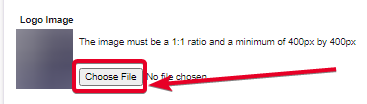
The image must be a 1:1 ratio and a minimum of 400px by 400px
queen storm
You make it?
modern sky
no?
queen storm
You should make one
queen storm
Paint...
modern sky
???
queen storm
You use the program "Paint" to make one
modern sky
kk
 ebon rune
Hello my game is already crashing what should i do
queen storm
ebon rune
Hello my game is already crashing what should i do
!mc-logs
red patioBOT
Where to find the log on the CurseForge Client.
Right-click the modpack profile icon OR click the button in the modpack profile.
Click Open Folder.
Open the logs folder.
Find the file called latest.log and drag it into discord.
ebon rune
here
queen storm
Who made the modpack?
ebon rune
I
queen storm
How did you install the mods?
ebon rune
About CurseForge
queen storm
Only the app or also the site?
ebon rune
Only the app
 reef cloud
I need help when downloading Forge ( I have before ) and click the file it come up with a small black screen with nothing and after couple ms it goes and nothing happens
queen storm
reef cloud
I need help when downloading Forge ( I have before ) and click the file it come ...
ebon rune
one time
queen storm
!mc-installfix
red patioBOT
- Click on the Minecraft Tab on the Left side of the App.
- Click button next to the
Create Custom Profileoption. - Click
Repair Installationoption. - Play game.
NOTE: You will not lose any modpacks or worlds, These are saved in the Instances folder. DO NOT TOUCH THIS FOLDER OR YOU WILL LOSE EVERYTHING
queen storm
See if that fixes anything
 cerulean sky
my brother is trying to launch pixelmon, we have the same laptop with the same specs, mine runs fine, his keeps crashing
what do do
queen storm
!mc-logs
red patioBOT
Where to find the log on the CurseForge Client.
Right-click the modpack profile icon OR click the button in the modpack profile.
Click Open Folder.
Open the logs folder.
Find the file called latest.log and drag it into discord.
 fiery copper
these mods are compatible right?
 fiery copper
it crashed
signal ridge
!mc-logs
red patioBOT
Where to find the log on the CurseForge Client.
Right-click the modpack profile icon OR click the button in the modpack profile.
Click Open Folder.
Open the logs folder.
Find the file called latest.log and drag it into discord.
fiery copper
how do i kno which one isnt
signal ridge
Do what the bot said and I can have a look at what happened
fiery copper
signal ridge
Do you have the mod Shadowfacts' Forgelin? If not download it.
past ledge
my newest modpack update wont update on the curseforge launcher*
in the past its been there nearly instantly
past ledge
yes
signal ridge
!sync
red patioBOT
Sync and your Project.
CurseForge App and site do not share the same requirements! You can find things on the site but this does not mean it will be in the app!
For a mod to show up in the app:
- Projects MUST have a file marked as RELEASE or BETA
- Projects MUST be APPROVED
- Projects MUST have a file marked for the PROFILE VERSION USED
- Projects CAN'T be EXPERIMENTAL
- Projects CAN'T be ABANDON
Files can take a while to show up in the app. If your files still have not shown up either your project is new and you have yet to mark a file as Release/Beta or there is issues with the sync system making it slow.
signal ridge
can also take up to 24h to sync with the app
past ledge
my last 4 updates were on the app in less than a minute
lyric crescent
and..?
queen storm
And this time they aren't
past ledge
i didnt know it was done by a person
queen storm
It isn't
past ledge
they were on nearly instantly so i thought it was automated
cinder ravine
@lyric crescent I found it. The mod installs a couple of programs into a folder in the mod folder.
 pine spoke
how can i send a modpack to my pals?
queen storm
pine spoke
how can i send a modpack to my pals?
!mc-packshare
red patioBOT
There are two ways to share a modpack you've made with others...
Export and Share - For Friends to Small Groups.
- Click the Icon for the modpack.
- Click the button next to play.
- Click
Export. - Select the files that should be included.
- Send the zip to the people that want it! They can follow the instructions in
!mc-installpackto install the pack!
Upload to Curseforge - For Public Release to Everyone.
This options will make your pack public to EVERYONE, it comes with extra requirements and will take some effort to set up.
- Go to here: https://www.curseforge.com/project/432/4471/create
- Fill out the information with a proper description of the pack. This should allow anyone to understand what the pack is.
- Click the Icon for the modpack in the CurseForge app.
- Click the button next to play.
- Click
Export. - Select the files that should be included.
- Open your Project you made on the CurseForge site and Upload the file you just made.
- Wait for Moderation & Sync so it can show up in the client! (See
!syncfor limitations)
pine spoke
ooh it is export time then
pine spoke
queen storm
!mc-packshare
thx!
queen storm
fiery copper
It doesn't work
"Doesn't work"
What doesn't work?
fiery copper
It doesn't download the mods
signal ridge
the app?
queen storm
How are you import it again?
fiery copper
I went to mod pack
3 dots
Export
Then put it in discord
Then to test I downloaded it
And doesn't download mods
queen storm
Try hitting enter less
Curseforge does not automatically import the thing
!mc-installpack
red patioBOT
How to install modpacks with the search features in app.
- Open the
Minecraftsection of the app. - Click the top search bar where it says
Search for modpacksOR Click theBrowse ModpacksTab. - Find the Modpack you want to install and click install on it.
- Wait for CurseForge app to download and unpack all the required files.
- Once finished, click
Play!
How to install modpacks from a Export. (Custom/Private/Site downloaded Modpack zip)
- Get CurseForge App if you don't have it, use
!downloadfor a link. - Get the exported modpack from CurseForge or someone else,
!mc-packshareexplains how to make them. - Open the
Minecraftsection of the app. - Click
Create Custom Profile - Click the
Importoption. - Find the file you just downloaded in step 2 and select it.
- CurseForge app will now attempt to download and unpack the modpack. If it fails, try steps 4-6 again.
- Once finished, click
Play!
red patioBOT
Looking to install the CurseForge app?
Todo: Place system requirements here.
<:windows:798410728188936222> Windows
<:mac:798410654418862130> Mac
Linux
:person_shrugging:
red patioBOT
There are two ways to share a modpack you've made with others...
Export and Share - For Friends to Small Groups.
- Click the Icon for the modpack.
- Click the button next to play.
- Click
Export. - Select the files that should be included.
- Send the zip to the people that want it! They can follow the instructions in
!mc-installpackto install the pack!
Upload to Curseforge - For Public Release to Everyone.
This options will make your pack public to EVERYONE, it comes with extra requirements and will take some effort to set up.
- Go to here: https://www.curseforge.com/project/432/4471/create
- Fill out the information with a proper description of the pack. This should allow anyone to understand what the pack is.
- Click the Icon for the modpack in the CurseForge app.
- Click the button next to play.
- Click
Export. - Select the files that should be included.
- Open your Project you made on the CurseForge site and Upload the file you just made.
- Wait for Moderation & Sync so it can show up in the client! (See
!syncfor limitations)
modern sky
does anyone have a good minecraft dragon pic i can use for my modpack?
signal ridge
modern sky
does anyone have a good minecraft dragon pic i can use for my modpack?
Not the channel for this. #🧱︱minecraft-chat or #🧱︱minecraft-chat ( #786424115535544350 get the mc role)
modern sky
where is mc-general
past ledge
 lyric crescent
!notcf @past ledge@modern sky
red patioBOT
The question you are asking about isn't related to CurseForge. Please use the appropriate game rooms by getting the role from #786424115535544350 or use #👽︱game-support for help.
This room is only for CurseForge Owned & Maintained features/services.
modern sky
lyric crescent
!notcf <@!481460102726025228><@!789295625073459221>
yes?
lyric crescent
read
signal ridge
...
signal ridge
Curseforge doesnt do servers
lyric crescent
no, it has nothing to do with curseforge actually
modern sky
how do u get a role?
lyric crescent
read
signal ridge
modern sky
how do u get a role?
past ledge
curseforge is supposed to have a button that is download server files right?
modern sky
signal ridge
https://discord.com/channels/428228256236306434/786424115535544350/7889310985866...
yes, how do i do it
signal ridge
past ledge
curseforge is supposed to have a button that is download server files right?
Did you add server files to your project?
modern sky
oh nvr mind
lyric crescent
If server files are uploaded to the project they can be downloaded with the launcher. The availability or contents of those files are not curseforges responsibility.
brave tulip
If the mods in my modpack get an update, do I need to upload a new file to my curse page? Or will the related mods automatically be kept up to date?
signal ridge
brave tulip
If the mods in my modpack get an update, do I need to upload a new file to my cu...
Need to update and reupload
brave tulip
Ah nevermind I see, I looked at the manifest it points to a specific mod, then to a specific file. Looks like it will require manual.
Ahh ty ty yoyo for confirming =]
Would be cool if you could flag a mod in the manifest as "keep up to date" for your modpack, but I have no idea what that would entail for curseforge and how they have the backend set up
signal ridge
That would cause soo many issues...
queen storm
brave tulip
Would be cool if you could flag a mod in the manifest as "keep up to date" for y...
Things will break with this though
brave tulip
Hahaha I knew you guys prob already thought of that
Good point since theres no way to guarantee that an update would work with the other mods, gotta be explicit
queen storm
Looks at non-auto updating servers
 white hound
im on the lets get started for minecraft and idk where to continue to because when i press continue this pops up
 signal ridge
white hound
im on the lets get started for minecraft and idk where to continue to because wh...
signal ridge
white hound
im on the lets get started for minecraft and idk where to continue to because wh...
!mc-path
red patioBOT
**Minecraft Files should NOT be installed inside the following locations
.minecraft folder.
OneDrive folders.
Desktop folder.
Drive roots I.E. Directly into the C:\ drive.
iCloud enabled folders.
If any of the above are in the path you need to change/move it by following the instructions below!**
If Minecraft is not installed in CurseForge App, start here.
Click the in the top left.
Select Minecraft.
Click "Edit".
Move to the "Continue here:" section below.
If Minecraft is installed in CurseForge App, follow these steps.
Click the in the bottom left.
Select the Minecraft tab.
Click "Change".
Move to the "Continue here:" section below.
Continue here:
Make a folder in the root directory called CurseForge.
Select the folder you just made.
The text box should show something like the following:
For Windows: C:\CurseForge
For Mac: /Users/Shared/CurseForge
 signal ridge
white hound
ive tried searching for .minecraft and it doesnt show anything
signal ridge
white hound
ive tried searching for .minecraft and it doesnt show anything
Read what the bot says
white hound
ty, im bad at reading :} but its working now
 jagged quartz
hey, so i added starborn to my origin modpack and idk why it isn't showing up. when i look at the mods in files, the starborn mod says not to be unziped
 random wedge
My modded instance keeps crashing.
digital roost
Sorry for interrupting but if i add mods to a modpack thats not mine am i able to let others play it?
Ok nvm
fleet bear
jagged quartz
hey, so i added starborn to my origin modpack and idk why it isn't showing up. ...
!notcf
red patioBOT
The question you are asking about isn't related to CurseForge. Please use the appropriate game rooms by getting the role from #786424115535544350 or use #👽︱game-support for help.
This room is only for CurseForge Owned & Maintained features/services.
queen storm
digital roost
Ok nvm
Impatience much?
digital roost
Very
fleet bear
random wedge
My modded instance keeps crashing.
!mc-log
red patioBOT
Where to find the log on the CurseForge Client.
Right-click the modpack profile icon OR click the button in the modpack profile.
Click Open Folder.
Open the logs folder.
Find the file called latest.log and drag it into discord.
random wedge
random wedge
fleet bear
!mc-log
Can you salvage anything form this?
lyric crescent
remove dynamic surroundings
random wedge
That did not help.
lyric crescent
send a new log then
digital roost
cuz it looked sketch first
I got a thing when launching curseforge
saying i gotta update
smth 4.8
random wedge
lyric crescent
looks like it helped since this is diffrent now
jagged quartz
does anyone know why starborn won't load?
digital roost
no clue
random wedge
I wouldn't know, being a complete dolt. Anything else?
fleet bear
jagged quartz
does anyone know why starborn won't load?
!notcf
red patioBOT
The question you are asking about isn't related to CurseForge. Please use the appropriate game rooms by getting the role from #786424115535544350 or use #👽︱game-support for help.
This room is only for CurseForge Owned & Maintained features/services.
fleet bear
Not asking again.
digital roost
guys, I wanna like confirm smth
fleet bear
Yes curseforge uses overwolf to run.
digital roost
when launching curseforge, it says It has to update, to like .net 4.8 thing
fleet bear
Its fine.
lyric crescent
random wedge
I wouldn't know, being a complete dolt. Anything else?
remove optifine
random wedge
Alright, but it still crashes.
lyric crescent
log
random wedge
lyric crescent
dont know then, it's not specifying the issue. gunna have to remove stuff until it works
could be performant
random wedge
MixinBootstrap.
lyric crescent
is required for many mods, and is not the cause
 still raven
you ever going to fix flo totem bar ?
random wedge
No, literally.
lyric crescent
still raven
you ever going to fix flo totem bar ?
who are you talking to
random wedge
It was MixinBootstrap. A .jar named it, at least.
digital roost
May i ask what Enable Project Pages Does with a Minecraft Modpack?
queen storm
Wiki type pages, multiple instead of single description
digital roost
Ah ok that makes sense thanks
 prime delta
where to install it because I do not know?
 fleet bear
!mc-path
red patioBOT
**Minecraft Files should NOT be installed inside the following locations
.minecraft folder.
OneDrive folders.
Desktop folder.
Drive roots I.E. Directly into the C:\ drive.
iCloud enabled folders.
If any of the above are in the path you need to change/move it by following the instructions below!**
If Minecraft is not installed in CurseForge App, start here.
Click the in the top left.
Select Minecraft.
Click "Edit".
Move to the "Continue here:" section below.
If Minecraft is installed in CurseForge App, follow these steps.
Click the in the bottom left.
Select the Minecraft tab.
Click "Change".
Move to the "Continue here:" section below.
Continue here:
Make a folder in the root directory called CurseForge.
Select the folder you just made.
The text box should show something like the following:
For Windows: C:\CurseForge
For Mac: /Users/Shared/CurseForge
 spice mason
My minecraft mods are geting stuck loading and when they do it just say mod could not be loaded
 narrow minnow
spice mason
My minecraft mods are geting stuck loading and when they do it just say mod coul...
narrow minnow
spice mason
My minecraft mods are geting stuck loading and when they do it just say mod coul...
Is this for a custom profile or for existing modpacks as well?
spice mason
Both
fleet bear
spice mason
Both
can you post a picture of the error you get?
narrow minnow
fleet bear
can you post a picture of the error you get?
with him on this one
fleet bear
Ah ok
narrow minnow
didn't have privileges - the app couldn't access local disk
I guest a student computer
digital roost
Apologies for my first post being in support :|, but I'm a bit confused about how to set up a minecraft server in the desktop client. I already have a modpack (profile?) set up and have been using it just fine for singleplayer, but I'm not seeing any options for servers and trying to download the old forge installers causes errors (I'm trying to host locally)
fleet bear
digital roost
Apologies for my first post being in support :|, but I'm a bit confused about ho...
CurseForge app doesn't support servers
digital roost
Ah, so should I just uninstall and grab the old installer?
signal ridge
Ill post the installserver thing in #👽︱game-support


 fleet bear
 hazy cedar
when it says approved does that mean its puplic?
hazy cedar
when it says approved does that mean its puplic?
!sync
red patioBOT
Sync and your Project.
CurseForge App and site do not share the same requirements! You can find things on the site but this does not mean it will be in the app!
For a mod to show up in the app:
- Projects MUST have a file marked as RELEASE or BETA
- Projects MUST be APPROVED
- Projects MUST have a file marked for the PROFILE VERSION USED
- Projects CAN'T be EXPERIMENTAL
- Projects CAN'T be ABANDON
Files can take a while to show up in the app. If your files still have not shown up either your project is new and you have yet to mark a file as Release/Beta or there is issues with the sync system making it slow.
digital roost
How long does it usually take for a modpack to show up to the curse forge launcher for Minecraft?
signal ridge
Has the project been approved ?
signal ridge
Link the project
digital roost
signal ridge
!sync
red patioBOT
Sync and your Project.
CurseForge App and site do not share the same requirements! You can find things on the site but this does not mean it will be in the app!
For a mod to show up in the app:
- Projects MUST have a file marked as RELEASE or BETA
- Projects MUST be APPROVED
- Projects MUST have a file marked for the PROFILE VERSION USED
- Projects CAN'T be EXPERIMENTAL
- Projects CAN'T be ABANDON
Files can take a while to show up in the app. If your files still have not shown up either your project is new and you have yet to mark a file as Release/Beta or there is issues with the sync system making it slow.
digital roost
Alright
signal ridge
Like the app version?
 lofty path
how to i import a modded minecraft jar into curse forge?
signal ridge
Mod or modpack?
lofty path
just a single mod i believe
signal ridge
!mc-installmods
red patioBOT
How to install mods in CurseForge App.
- Click
+ Create Custom Profile - Name it, select the required Minecraft version, select the Forge version (usually the highest number), click
Create. - Click the profile icon.
- Click
Add New Content - Search and install the desired mods.
- Start the game!
How to install mods not on CurseForge.
- Right click the profile picture or Open the profile and click the Icon next to the play button.
- Click
Open Folder. - Drag the mod(s) into the
modsfolder. (Note: Some mods will require others, to run. Make sure to read the instructions for the mod!) - Start the game!
lofty path
ty
neat apex
Heyy is it possible for me to add new mods in my own modpack even though i already started a world?
I wanted to add some adventure/structures mods
signal ridge
sure
Read the bot above
Just know that world gen mods you will need to explore new ungenerated chunks for the new stuff to load in
neat apex
Yee i know how to add them but i was just worried it might glitch my world or something
Ooh ye
signal ridge
Make a back up of the world first
 verbal dune
How much time does it take for a new mod pack to be approved?
signal ridge
!status
red patioBOT
It is 11:48PM on Wednesday for CurseForge my dudes.
Project Moderation Time
Project/File moderation is done on Sunday - Thursday from 10am - 6pm GMT+2
This process is First in, First out. Thus files submitted late in the work day may not be checked until the next work day.
New Projects or uploads requiring manual approval: 1-3 Working Days
Updates to approved projects not needing manual approval: 1 Hour
File sync to the Curseforge app may take up to 24 hours after approval.
digital roost
Any reason why on exsporting a modpack from the launcher it misses like 70 mods in the manifest.json
fleet bear
Bad file relations.
Reinstall them. If it's a profile from before the twitch transfer remake the profile.
digital roost
alr
would it be smart to copy and paste the mods to the new one as its 286 mods and thiers no way ima be able to switch all 286 mods
fleet bear
Is it a pack you already have released before?
digital roost
yes
fleet bear
Download the pack in the launcher. That should fix it and then allow you to just use the update button on the mods. Then copy whatever you need from the old profile
digital roost
alr
that got some mods still missing a few tho
actually alot of them are still missing added maybe 30 of them
signal ridge
is the pack Forge or Fabric?
digital roost
Forge
signal ridge
Do you have fabric mods installed?
signal ridge
right, what mods are missing? Are they in the pack and just not loading? or not in the pack at all?
digital roost
i dount know what exsact mods are looking as im not gonna look threw 286 mods but atm i have 182 mods in the file and 286 in the file that i am working on the pack on
signal ridge
!mc-logs
red patioBOT
Where to find the log on the CurseForge Client.
Right-click the modpack profile icon OR click the button in the modpack profile.
Click Open Folder.
Open the logs folder.
Find the file called latest.log and drag it into discord.
digital roost
thats the one where im working on the pack on
let me get you the one with the missing mods
i dount have longs for the one with the missing mods
let me launch that real fast
signal ridge
ok so I actually see one big issue here
digital roost
yes?
red patioBOT
**Minecraft Files should NOT be installed inside the following locations
.minecraft folder.
OneDrive folders.
Desktop folder.
Drive roots I.E. Directly into the C:\ drive.
iCloud enabled folders.
If any of the above are in the path you need to change/move it by following the instructions below!**
If Minecraft is not installed in CurseForge App, start here.
Click the in the top left.
Select Minecraft.
Click "Edit".
Move to the "Continue here:" section below.
If Minecraft is installed in CurseForge App, follow these steps.
Click the in the bottom left.
Select the Minecraft tab.
Click "Change".
Move to the "Continue here:" section below.
Continue here:
Make a folder in the root directory called CurseForge.
Select the folder you just made.
The text box should show something like the following:
For Windows: C:\CurseForge
For Mac: /Users/Shared/CurseForge
signal ridge
try changing it to this path and then try your pack
digital roost
Alright
signal ridge
The old path will still be there, will have to copy the profiles over or just re make em
digital roost
Alright
 lilac venture
how do I set up a forge server?
fleet bear
!notcf
red patioBOT
The question you are asking about isn't related to CurseForge. Please use the appropriate game rooms by getting the role from #786424115535544350 or use #👽︱game-support for help.
This room is only for CurseForge Owned & Maintained features/services.
digital roost
Im exporting the profile atm ill let you know if it works or not
still missing some mods
fleet bear
how many?
signal ridge
Does the pack load the 286?
digital roost
let me see
signal ridge
test the pack first before exporting
digital roost
yep probably would of been smart
 tiny pier
i need help downloading
signal ridge
tiny pier
i need help downloading
Downloading what?
tiny pier
forge
lyric crescent
!!=
red patioBOT
Wording is important!
Forge = Minecraft Forge, This is a modloader often just called "Forge".
CurseForge = A Website/App that has content for games.
Mods = Individual mod files.
Modpacks = Multiple mods put into the mods folder or downloaded from CurseForge.
These are not Interchangeable! Please use the correct terms as it allows us to help you faster!
lyric crescent
then no
 lethal prairie
how can i play wiht friends using the fire and ice modpack since i cant use mods on a realm
 desert fable
Hamachi
signal ridge
lethal prairie
how can i play wiht friends using the fire and ice modpack since i cant use mods...
Cant mod realms
hehe miss read
lyric crescent
!notcf
red patioBOT
The question you are asking about isn't related to CurseForge. Please use the appropriate game rooms by getting the role from #786424115535544350 or use #👽︱game-support for help.
This room is only for CurseForge Owned & Maintained features/services.
lethal prairie
o ok
desert fable
where can i report an issue with curseforge client?
signal ridge
desert fable
Hamachi
Never recommend Hamachi, it can really mess up networks btw
lethal prairie
good to know thanks
lyric crescent
what issue
fleet bear
desert fable
where can i report an issue with curseforge client?
what issue?
desert fable
well i've notice that if i scroll further down in the client, somehow the client struggle like it loads a bunch of things
it takes around 2 min to refresh
fleet bear
Yes, loading lots of stuff will do that. It's known
desert fable
ah
 snow frost
Is anyone there?
signal ridge
sure?
snow frost
I just downloaded cursed forge and I want to select a certain mod pack but I don't know where to link it to
red patioBOT
Hey there, it is Curseforge, not "Cursed forge"
signal ridge
like the path?
snow frost
Ye
signal ridge
!mc-path
red patioBOT
**Minecraft Files should NOT be installed inside the following locations
.minecraft folder.
OneDrive folders.
Desktop folder.
Drive roots I.E. Directly into the C:\ drive.
iCloud enabled folders.
If any of the above are in the path you need to change/move it by following the instructions below!**
If Minecraft is not installed in CurseForge App, start here.
Click the in the top left.
Select Minecraft.
Click "Edit".
Move to the "Continue here:" section below.
If Minecraft is installed in CurseForge App, follow these steps.
Click the in the bottom left.
Select the Minecraft tab.
Click "Change".
Move to the "Continue here:" section below.
Continue here:
Make a folder in the root directory called CurseForge.
Select the folder you just made.
The text box should show something like the following:
For Windows: C:\CurseForge
For Mac: /Users/Shared/CurseForge
 vale ore
It Says There Is a Problem WIth My WebClient