
#🔥︱curseforge-support
1 messages · Page 470 of 1
 unborn basin
 sick hemlock
unborn basin
sick hemlock
unborn basin
got the same problem

 worn egret
@unborn basin hi im having a error when trying to play the modded minecraft
 quick blaze
hi I can not get it to install a minecraft mod server on his pc hin,can someone help me?
worn egret
<@&524645667818307596> apologies for asking again, I would like to get this problem resolved so I can play modded minecraft with my friends
this is the problem

 devout fog
have you tried reinstalling?
worn egret
Ill try again
 lyric crescent
Try reading the rules also
 random turtle
hello so im having trouble with curseforge i cant launch any modpack it says MC is already running ive tried reinstalling MC and curseforge and still nothing. if anyone could help me please ❤️
worn egret
lyric crescent
Try reading the rules also
ah apologies
 idle badger
worn egret
<@&524645667818307596> apologies for asking again, I would like to get this prob...
idle badger
worn egret
<@&524645667818307596> apologies for asking again, I would like to get this prob...
just try to launch again
 void jay
so i have to do that every time i want to open the app?
void jay
windows
idle badger
did you install the windows version
void jay
yes
idle badger
can you send some screenshots of what happens when you open the installer setup
 idle badger
you don’t have java edition?
void jay
i have it
idle badger
ok then try using a different browser to install
void jay
like what?
idle badger
i used chrome
void jay
i did chrome and internet explorer
idle badger
hmm try going to the files app and finding the file then opening it from there and if that doesn’t work i’m out of ideas and you should ask a mod or someone who would know
void jay
same thing
i give
no but once i downloaded it it sdaid that there was an in game way to open it
idle badger
idk what you mean by that
void jay
right when you finish downloading it
lyric crescent
go to where it installed to and make a shortcut?
void jay
no
on the left side of the screen there was a half circle. when i moved my mouse over it, it showed that i can open the curseforge app
 midnight forum
When I download a mod for minecraft, it sends me to the demo version except for the version I bought. Why is that?
lyric crescent
you didnt log in with your account that owns java minecraft
midnight forum
thanks
void jay
gave up?
midnight forum
it actually works thank you so much 😄
void jay
how do you open the app?
lyric crescent
use overwolf to open it
void jay
i dont have that
 red patioBOT
Looking to install the CurseForge app?
Todo: Place system requirements here.
<:windows:798410728188936222> Windows
<:mac:798410654418862130> Mac
Linux
:person_shrugging:
lyric crescent
try that link
 civic moon
how do i share my mod pack with my friends
lyric crescent
?mc-packshare
red patioBOT
There are two ways to share a modpack you've made with others...
Export and Share - For Friends to Small Groups.
- Click the Icon for the modpack.
- Click the
 button next to play.
 - Click

Export. - Select the files that should be included.
- Send the zip to the people that want it! They can follow the instructions in
!mc-installpackto install the pack!
Upload to Curseforge - For Public Release to Everyone.
This options will make your pack public to EVERYONE, it comes with extra requirements and will take some effort to set up.
- Go to here: https://www.curseforge.com/project/432/4471/create
- Fill out the information with a proper description of the pack. This should allow anyone to understand what the pack is.
- Click the Icon for the modpack in the CurseForge app.
- Click the button next to play.
- Click
Export. - Select the files that should be included.
- Open your Project you made on the CurseForge site and Upload the file you just made.
- Wait for Moderation & Sync so it can show up in the client! (See
!syncfor limitations)
red patioBOT
How to install modpacks with the search features in app.
- Open the

Minecraftsection of the app. - Click the top search bar where it says
Search for modpacksOR Click theBrowse ModpacksTab. - Find the Modpack you want to install and click install on it.
- Wait for CurseForge app to download and unpack all the required files.
- Once finished, click
Play!
How to install modpacks from a Export. (Custom/Private/Site downloaded Modpack zip)
- Get CurseForge App if you don't have it, use
!downloadfor a link. - Get the exported modpack from CurseForge or someone else,
!mc-packshareexplains how to make them. - Open the
Minecraftsection of the app. - Click

Create Custom Profile - Click the
Importoption. - Find the file you just downloaded in step 2 and select it.
- CurseForge app will now attempt to download and unpack the modpack. If it fails, try steps 4-6 again.
- Once finished, click
Play!

 dusty ridge
I'm trying to select the minecraft file path as the "mods" folder in the ".minecraft" file, but it's still saying "
an invalid folder path was chosen
lyric crescent
?mc-path
red patioBOT
**Minecraft Files should NOT be installed inside the following locations
.minecraft folder.
OneDrive folders.
Desktop folder.
Drive roots I.E. Directly into the C:\ drive.
iCloud enabled folders.
If any of the above are in the path you need to change/move it by following the instructions below!**
If Minecraft is not installed in CurseForge App, start here.
Click the  in the top left.
Select Minecraft.
Click "Edit".
Move to the "Continue here:" section below.
If Minecraft is installed in CurseForge App, follow these steps.
Click the  in the bottom left.
Select the Minecraft tab.
Click "Change".
Move to the "Continue here:" section below.
Continue here:
Make a folder in the root directory called CurseForge.
Select the folder you just made.
The text box should show something like the following:
For Windows: C:\CurseForge
For Mac: /Users/Shared/CurseForge
 dusty ridge
thank you
 wheat raven
guys everytime i open my world in all the mods 6 it wont do it and says there is a error with the datapack
can anyone help me?
 sudden osprey
What modpack?
sudden osprey
Gotcha. Have you been able to play it before?
sudden osprey
Not sure, I would try to reinstall the datapack and also download the server world you want to keep that way it's the same world when you log back into it.
 crude sentinel
Hey so i went to change my minecraft modding folder to my hard drive so i dont use up my ssd. After changing it. i noticed my modpack list was empty. Not sure what the path was at first. some help would be very much appreciated
red patioBOT
**Minecraft Files should NOT be installed inside the following locations
.minecraft folder.
OneDrive folders.
Desktop folder.
Drive roots I.E. Directly into the C:\ drive.
iCloud enabled folders.
If any of the above are in the path you need to change/move it by following the instructions below!**
If Minecraft is not installed in CurseForge App, start here.
Click the in the top left.
Select Minecraft.
Click "Edit".
Move to the "Continue here:" section below.
If Minecraft is installed in CurseForge App, follow these steps.
Click the in the bottom left.
Select the Minecraft tab.
Click "Change".
Move to the "Continue here:" section below.
Continue here:
Make a folder in the root directory called CurseForge.
Select the folder you just made.
The text box should show something like the following:
For Windows: C:\CurseForge
For Mac: /Users/Shared/CurseForge
crude sentinel
That did not make the modpack appear, if i were to just copy the save file (since i can search it in my folders) and put it into the saves folder into the new modpack download would that work normally?
lyric crescent
you would have to move the pack from the old folder to the new folder for it to appear again. yes that should work
crude sentinel
Ill give that a try
 digital roost
i can't get the thing to work for stardew valley i've tryed evrything and i can't get it to wark
lyric crescent
!knownissues under other games
red patioBOT
Known Issues with solutions or status of the issue.
Overwolf maintains a known list of issues here, some with solutions, others without.
https://support.curseforge.com/en/support/solutions/articles/9000196615-curseforge-known-issues
digital roost
i keep having issues trying to play mod packs in 1.16.5
cause i wanna play with a mod pack and add Kimetsu no Yaiba mod into it cause i really love demon slayer
but everytime i try and open 1.16.5 minecraft with a modpack it opens with the curse forge add directly and it wont open
i could really use the help ive been trying for 4 hours trying to get it to work
digital roost
but it works whenever i try anyother modpack that isnt in 1.16
 wanton lichen
I want help in KSP mods, they are not working for some reason
i installed them from curse forge app
but when open game they are not there
I installed
"Kerbalized Space X"
but not working
 glad hatch
Hey can someone hide a deleted comment?
digital roost
ive been trying to figure out how to play it for 6 hours now i could really use help firguring out whats wrong
i really wanted to play this modpack
it wont let me play any modpack on 1.16.5
 dire scarab
Im getting an error message when Minecraft launches: Couldn't Load Launcher core from dl.file missing any help will be appreciated.
digital roost
i got it figured out
 hard pagoda
whenever i try to run my modded singleplayer world, occasionaly it keeps freezing every 4 seconds. This only started a few hours ago, and i couldnt find any solution.
Im using curseforge to launch modded minecraft.
It's not bad when I'm in my base, but when I go a tad bit away, thats when it starts losing fps.
 languid sorrel
It might be ur pc
 plain eagle
Question, if I upload new versions to a project pending approval, does that 'reset' the spot in the queue for approval? Or is it based on the first file upload?
 queen storm
plain eagle
Question, if I upload new versions to a project pending approval, does that 'res...
queen storm
plain eagle
Question, if I upload new versions to a project pending approval, does that 'res...
Is file based
Just leave the old ones there
plain eagle
Thanks 🙂
 cunning hedge
Hi
i need support
in curseforge i am trying to download Seopolis modpack
but it says the system cannot find the spicified file
but other modpacks can be downloaded
it is happening for all the mods 6 too
hard pagoda
languid sorrel
It might be ur pc
It probably isn't, as i said, it was fine until now
unborn basin
@cunning hedge your internet connection is not stable, try getting closer to your router / connect your computer via cable
hard pagoda
Can someone help me out with my issue?
cunning hedge
i am near the router like besides it
cunning hedge
unborn basin
<@!716942356464533617> your internet connection is not stable, try getting close...
now its happening with other modpacks too
unborn basin
Now?.. Did you changing anything?
cunning hedge
nothing
i just dowloaded the curse launcher
then followed what it said
did not change the default settings
searched Seopolis and clicked install
and its giving me this erro
r
cunning hedge
ya
unborn basin
unborn basin
<@!716942356464533617> your internet connection is not stable, try getting close...
@cunning hedge Did you do that?
 viral briar
make sure you are not downloading anything else at the time of downloading something on curseforge
even like watching youtube , using a streaming app like spotify and such as anything like that will take bandwidth away from curseforge app download
cunning hedge
@viral briar @unborn basin problems fixed something happened with my java 291 thee problem was in it
so i uninstalled it
so now i have 271
so is it ok to use 271
?
red patioBOT
<:overwolf:798413750981492736> How to get Overwolf logs! <:overwolf:798413750981492736>
 weary flax
I exadentally clicked on dont give permission to the curseforge app for something on my mac but i cant give it now cus it doesnt ask again. So does anyone know the permissions curseforge needs to work?
 uneven seal
My solution would be to remove and then reinstall the CurseForge-Launcher.
If I understand that correctly it should then Ask you again.
hard pagoda
whenever i try to run my modded singleplayer world, occasionaly it keeps freezing every 4 seconds. This only started a few hours ago, and i couldnt find any solution.
Im using curseforge to launch modded minecraft.
This starts happening after a few minutes i launch up the world
uneven seal
Not a technican but have you opened the TaskManager and look at what the modpack uses ram wise?
Maybe somewhere in your modpack is a memory leak?
hard pagoda
no, and along with that im having to press respawn like 10 times before it respawns me again.
when i die, of course
hard pagoda
uneven seal
Maybe somewhere in your modpack is a memory leak?
i have 8.00 RAM
uneven seal
how much Ram did you allocate to CurseForge?
hard pagoda
uneven seal
how much Ram did you allocate to CurseForge?
I.... dont know
I didn't really check if that was a thing or not
I'm using Mineshafts and Monsters modpack to pass some time, along with fps improving mods.
uneven seal
Open the CurseForge Launcher and go to settings. (Located bottom left Corner the Icon.
Click on Game Specific (minecraft)
And then scroll down the middle until you find "Java Setting"
uneven seal
okay so you have allocated 4 GB of Ram. Which is the half of what you got on your machine
Normally 4GB should be sufficient...
hard pagoda
its an amount of 196 ish mods
weary flax
uneven seal
My solution would be to remove and then reinstall the CurseForge-Launcher.
If I...
yeah i have tried this just a sec ago but for some reason it doesnt ask again and i dont think i have seen anyone with the same problem /:
hard pagoda
uneven seal
Normally 4GB should be sufficient...

It's a laptop.
it shouldnt be running this badly though.
uneven seal
weary flax
yeah i have tried this just a sec ago but for some reason it doesnt ask again an...
Mh that is a bummer... but does CuresForge work normally?
Maybe it is your GPU that is having the issue then?
Although that seems unlikely
hard pagoda
uneven seal
Maybe it is your GPU that is having the issue then?
Although that seems unlikely
GPU?
weary flax
let me check
hard pagoda
were u talking to him or me
uneven seal
hard pagoda
GPU?
Grafic Card
hard pagoda
uneven seal
Grafic Card
me or him
idk who you were talking to
should i try perhaps increasing the RAM usage then?
uneven seal
I was responding to you @hard pagoda
 weary flax
uneven seal
Mh that is a bummer... but does CuresForge work normally?
weary flax
uneven seal
Mh that is a bummer... but does CuresForge work normally?
it does allow me to play normal vanilla minecraft but i tried a different mod and all mods dont work
hard pagoda
uneven seal
I was responding to you <@!306447307925225474>
hmm, where can I see my GPU? I'll send a pic of it incase that matters
nvm found it
 uneven seal
That is strange @weary flax ... sorry don't know what permission CurseForge needed from you...
weary flax
uneven seal
That is strange <@!485533456554524672> ... sorry don't know what permission Curs...
hmmm oke thx dor tying to help tho, have a nice day
uneven seal
@hard pagoda Yeah so you GPU should not be the problem. Since it is better then mine
hard pagoda
uneven seal
<@!306447307925225474> Yeah so you GPU should not be the problem. Since it is be...
lmao
so like, increase the ram usage then?
uneven seal
weary flax
hmmm oke thx dor tying to help tho, have a nice day
You too and good luck with your problem. Hope you get helped soon
hard pagoda
will that harm anything on the computer?
uneven seal
Well RAM is the Memory of your Computer. If you give MC more other programs might get slower
But no expert on that to be honest
uneven seal
Yeah 6 should be okay. But don't try 8Gb
hard pagoda
that way i have 2k to run background stuff
uneven seal
Yeah exactly
hard pagoda
hopefully this fixes it
uneven seal
We'll see
hard pagoda
6k should be enough for a modpack thats the size of 180 ish mods right
uneven seal
Yeah. Normally
 raw vale
Could be worse, I can't even log into curseforge
hard pagoda
raw vale
Could be worse, I can't even log into curseforge
wdym
raw vale
I can log into the app just fine. but the website throws an internal server error
hard pagoda
raw vale
I can log into the app just fine. but the website throws an internal server erro...
Im guessing thats related to my issue?
uneven seal
Reinstalled CurseForge already?
hard pagoda
oh
raw vale
the app works fine
uneven seal
Maybe the Website is blocked from your Internet Provider or From a Firewall
Can you open curesforge in the browser?
raw vale
yes
 warm fractal
anyone know how to update this higher? cuz the mod pack i am downloading says it need to be 37. something
 uneven seal
ahh okay
uneven seal
warm fractal
anyone know how to update this higher? cuz the mod pack i am downloading says it...
Click on your Modpack and then on the next to Play
Then  Profile Options
warm fractal
okay thx
uneven seal
Advanced Settings
Current Modloader Version
warm fractal
its doesnt go to 37 do i need to reinstall or something?
 unborn basin
weary flax
I exadentally clicked on dont give permission to the curseforge app for somethin...
unborn basin
weary flax
I exadentally clicked on dont give permission to the curseforge app for somethin...

Want to know how to give or change app permissions on macOS or a MacBook Air/Pro? This video will show you how to give apps permissions or change app permissions in macOS. This will work on Macs and MacBooks. You might need to allow apps access to the microphone, your camera or screen recording for them to work correctly for example. Hopefully t...
This might help
warm fractal
k
unborn basin
warm fractal
anyone know how to update this higher? cuz the mod pack i am downloading says it...
Where is this ?
queen storm
warm fractal
anyone know how to update this higher? cuz the mod pack i am downloading says it...
Screenshot please
uneven seal
forge-36.1.24 is higher than forge-36.0.37
queen storm
uneven seal
`forge-36.1.24` is higher than `forge-36.0.37`
That is normal
uneven seal
I know
queen storm
So what is saying that you need 37?
warm fractal
queen storm
So what is saying that you need 37?
yesh
warm fractal
queen storm
Screenshot please
yes one second
hard pagoda
@uneven seal it still has occasional freezes every few minutes, but it runs better.
thanks
 high storm
Can i get mods for terraria on curseforge
queen storm
high storm
Can i get mods for terraria on curseforge
There aren't a lot on curseforge I believe, but they are available on the site
high storm
oke ty
hard pagoda
high storm
Can i get mods for terraria on curseforge
you can find them on the tmodloader itself
forge doesnt really focus on terraria
hard pagoda
queen storm
And mainly due to the lack of mods on the platform afaik
yeah the terraria mod developers prefer to use the tmodloader
as it has its own thing for it
warm fractal
more errors came up :l, how do i fix this now
 digital roost
When trying to import a modpack on curseforge (I'm using MacOS), it won't allow me to actually import the .zip file. What am I doing wrong? (Since it was easier on Windows)
 warm fractal
i think u need to click twice on the zip when do it
digital roost
Have tried, doesn't work
unborn basin
Are you importing the zip file?
unborn basin
Which one is it? from the picture it looks like you are importing a folder
digital roost
The one that is selected, and yes MacOS does that for some reason
I installed a .zip and it's in my downloads
digital roost
You want me to send it here?
unborn basin
No, right click it and properties
You should be able to see its format
And it probably doesn't have one because it's a folder
You need to import the zip file
Not the extraction of it
digital roost
For some reason MacOS automatically decompresses .zip files
I'll look out for that from now on
 fiery star
I put it in #🧱︱mc-other-help but I guess it's more fitting here... so
Hi ! I'm having quite a bit of issues this morning with Curse Forge... I had to turn off my pc a few times to fix an intern problem, and after turning it on normally, the modpack I wanted to launch started the MC launcher like normal, but as soon as the loading bar at the bottom was almost full it closed itself, no crash report or anything everytime.
After this I decided to uninstall the modpack and reinstall it again, it didn't change the first outcome. So then, I uninstalled both Overwold and CF then reinstalled them, then the modpack. The downloading and installations went well, but the same problem came, only this time the MC launcher doesn't appear and CF closes itself when the loading bar of the modpack start charging. I turned off and on my PC again, and this time CF is stuck on this screen where nothing moves ( for CF, not the whole PC ).
Does anyone have an idea of what's going on and what I could do to further try to fix it ?
 unborn basin
?owlogs
red patioBOT
<:overwolf:798413750981492736> How to get Overwolf logs! <:overwolf:798413750981492736>
unborn basin
Send me the logs please
digital roost
Another problem emerged, when I have selected the .zip file it won't import, absolutely nothing changes
unborn basin
digital roost
Another problem emerged, when I have selected the .zip file it won't import, abs...
Show me the file that you are importing
fiery star
Uhm, it just got stuck on this...
 unborn basin
fiery star
Uhm, it just got stuck on this...
unborn basin
fiery star
Uhm, it just got stuck on this...
It is not resolved if you wait a bit?
fiery star
No it stays like that, It did the same for the first screenshot I took ( the window stayed like that for 10+ min )
digital roost
unborn basin
Show me the file that you are importing
I mean, I can definitely do that but it's in Dutch
unborn basin
fiery star
No it stays like that, It did the same for the first screenshot I took ( the win...
Navigate to C:\Users\{USERNAME}\AppData\Local\Overwolf\Log zip it and send it here please
digital roost
It does say it's a .zip archive
unborn basin
digital roost
I mean, I can definitely do that but it's in Dutch
It's ok I'm dutch
digital roost
Ah, cool
fiery star
Zip the Log folder ?
 unborn basin
digital roost
unborn basin
digital roost
And you import it and nothing happens?
unborn basin
fiery star
Thanks
fiery star

digital roost
unborn basin
And you import it and nothing happens?
Precisely
Import the .zip file and it does absolutely nothing in curseforge
unborn basin
Can you send the zip file?
fiery star
So is it bad, doctor ?
unborn basin
fiery star
So is it bad, doctor ?
Does Overwolf work for you at all?
fiery star
Well, right now no
unborn basin
What do you see?
fiery star
Well basically the screenshots i sent above, the window appears, something start charging and it freezes indefinitely
digital roost
unborn basin
This should work
Sadly it doesn't
unborn basin
digital roost
Sadly it doesn't
Works for me, which version of CF are you on?
digital roost
I assume the latest since I just installed it
digital roost
Where do I see that?
unborn basin
CF Settings
 lyric crescent
fiery star
Well basically the screenshots i sent above, the window appears, something start...
lyric crescent
fiery star
Well basically the screenshots i sent above, the window appears, something start...
Try going to the location that curseforge is installing modpacks to, and remove the instance folder. Just move it to your desktop for now. Don't delete it.
unborn basin
digital roost
I am currently in the settings
Are you on mac?
digital roost
Yes
unborn basin
Can you install other modpacks?
digital roost
digital roost
When trying to import a modpack on curseforge (I'm using MacOS), it won't allow ...
It's the first thing I mentioned
digital roost
unborn basin
Can you install other modpacks?
I'll try
unborn basin
Oh right, my bad
Try installing modpacks, and creating a custom profile
Tell me if that works
Also, if you can send me a screenshot of your modding folder (go to settings -> minecraft and it should be there)
digital roost
unborn basin
Try installing modpacks, and creating a custom profile
Looks like it works
digital roost
unborn basin
Also, if you can send me a screenshot of your modding folder (go to settings -> ...
Alright
 digital roost
Oh, right
unborn basin
Yes but I don't actually know what the directory is from this screenshot
I need to know the path
digital roost
 digital roost
unborn basin
Yes but I don't actually know what the directory is from this screenshot
digital roost
unborn basin
Yes but I don't actually know what the directory is from this screenshot
Oh, right
Yeah hold on
 unborn basin
Exit CF, rename that folder to _minecraft, open CF and navigate to minecraft, click continue
digital roost
Alright, done
unborn basin
!mc-packshare
red patioBOT
There are two ways to share a modpack you've made with others...
Export and Share - For Friends to Small Groups.
- Click the Icon for the modpack.
- Click the button next to play.
- Click
Export. - Select the files that should be included.
- Send the zip to the people that want it! They can follow the instructions in
!mc-installpackto install the pack!
Upload to Curseforge - For Public Release to Everyone.
This options will make your pack public to EVERYONE, it comes with extra requirements and will take some effort to set up.
- Go to here: https://www.curseforge.com/project/432/4471/create
- Fill out the information with a proper description of the pack. This should allow anyone to understand what the pack is.
- Click the Icon for the modpack in the CurseForge app.
- Click the button next to play.
- Click
Export. - Select the files that should be included.
- Open your Project you made on the CurseForge site and Upload the file you just made.
- Wait for Moderation & Sync so it can show up in the client! (See
!syncfor limitations)
digital roost
I know how the exporting and importing works
unborn basin
Yeah so create a custom profile and import it now
digital roost
unborn basin
Yeah so create a custom profile and import it now
You mean make a whole new pack and then export and import it?
unborn basin
Zip and send me this folder /Users/{USERNAME}/Library/Application Support/CurseForge
digital roost
Just a screenshot of that folder?
digital roost
Oh, right
digital roost
unborn basin
Zip and send me this folder `/Users/{USERNAME}/Library/Application Support/Curse...
I don't have that folder, Library
not even in Dutch haha
unborn basin
Huh
digital roost
It's not there
unborn basin
digital roost
It's not there

MacRumors
In macOS, the library folder is used to store user account settings, preference files, app support files, caches, and other important data that...
How to Keep the Library Folder Visible
 stiff canyon
When I set Preferred Release Type to Alpha, will it ALWAYS download the newest alpha, or only if there is an alpha newer than the newest beta/release?
fiery star
lyric crescent
Try going to the location that curseforge is installing modpacks to, and remove ...
Oh i didn't see the message, i'll try in a few minutes
queen storm
stiff canyon
When I set Preferred Release Type to Alpha, will it ALWAYS download the newest a...
Only if alpha is newer
stiff canyon
ok
unborn basin
digital roost
Alright cool
unborn basin
digital roost
Alright cool
Can you try this?
 zenith garnet
Why did my project got marked with "Broken Screenshots"?
I just placed the screenshots in the description, and they work perfectly fine
About the license, it says i need to add a license, but i already added an agreement to my project
unborn basin
unborn basin
digital roost
Still nothing
And this one
queen storm
zenith garnet
Why did my project got marked with "Broken Screenshots"?
Screenshot please
 regal stump
ok
zenith garnet
queen storm
Screenshot please
It's a configuration file for BSL Shaders
 queen storm
zenith garnet
It's a configuration file for BSL Shaders
queen storm
zenith garnet
It's a configuration file for BSL Shaders
Screenshot of the message that says that things are broken
zenith garnet
queen storm
Screenshot of the message that says that things are broken
But what do broken screenshots mean?
I can't understand what's broken
queen storm
zenith garnet
Why did my project got marked with "Broken Screenshots"?
Show where it says that
zenith garnet
queen storm
Show where it says that
 unborn basin
digital roost
Sure
unborn basin
digital roost
Sure
Do you have icloud enabled?
queen storm
@unborn basin Could you check screenshot above?
digital roost
unborn basin
Do you have icloud enabled?
Yes
queen storm
zenith garnet
It's a configuration file for BSL Shaders
Can you post a link to the project?
digital roost
unborn basin
And this one
Theres still nothing happening
zenith garnet
queen storm
Can you post a link to the project?
queen storm
zenith garnet
https://www.curseforge.com/minecraft/customization/mbbsl-configuration-re-write
In the images tab everything is fine as well?
unborn basin
digital roost
Yes
Please disable it and try again
zenith garnet
queen storm
In the images tab everything is fine as well?
Well, i didn't upload any image in the images tab at all
I just uploaded them in the description
queen storm
Should work fine
 broken cove
how do i sare my modpack in the curse forge app????
lyric crescent
?mc-packshare
red patioBOT
There are two ways to share a modpack you've made with others...
Export and Share - For Friends to Small Groups.
- Click the Icon for the modpack.
- Click the button next to play.
- Click
Export. - Select the files that should be included.
- Send the zip to the people that want it! They can follow the instructions in
!mc-installpackto install the pack!
Upload to Curseforge - For Public Release to Everyone.
This options will make your pack public to EVERYONE, it comes with extra requirements and will take some effort to set up.
- Go to here: https://www.curseforge.com/project/432/4471/create
- Fill out the information with a proper description of the pack. This should allow anyone to understand what the pack is.
- Click the Icon for the modpack in the CurseForge app.
- Click the button next to play.
- Click
Export. - Select the files that should be included.
- Open your Project you made on the CurseForge site and Upload the file you just made.
- Wait for Moderation & Sync so it can show up in the client! (See
!syncfor limitations)
broken cove
ok thnaks
digital roost
unborn basin
Please disable it and try again
Didn't work
 digital roost
Nope, nothing
unborn basin
Can you send me your curseforge folder again please?
/Users/{USERNAME}/Library/Application Support/CurseForge
digital roost
 snow nacelle
an invalid path was choosen says when im trying to download
lyric crescent
?mc-path
red patioBOT
**Minecraft Files should NOT be installed inside the following locations
.minecraft folder.
OneDrive folders.
Desktop folder.
Drive roots I.E. Directly into the C:\ drive.
iCloud enabled folders.
If any of the above are in the path you need to change/move it by following the instructions below!**
If Minecraft is not installed in CurseForge App, start here.
Click the in the top left.
Select Minecraft.
Click "Edit".
Move to the "Continue here:" section below.
If Minecraft is installed in CurseForge App, follow these steps.
Click the in the bottom left.
Select the Minecraft tab.
Click "Change".
Move to the "Continue here:" section below.
Continue here:
Make a folder in the root directory called CurseForge.
Select the folder you just made.
The text box should show something like the following:
For Windows: C:\CurseForge
For Mac: /Users/Shared/CurseForge
fiery star
Ok I'm starting to think it's more of a PC problem than CF/Overwolf...
I just had it get a sort of repair that lasted an hour, and now whatever I do nearby Overwolf just makes everything crash, Windows just crashed and I can't even close a folder
Yeah whatever I do, if it's around Overwolf it just kills everything
red patioBOT
<:overwolf:798413750981492736> How to get Overwolf logs! <:overwolf:798413750981492736>
 queen storm
Safe mode
 tepid hatch
but won't the mods be turned off?
queen storm
Datapacks will
fiery star
Honestly, even searching overwolf in my folders would kill everything
I had to delete everything the raw way
It sucks because I want to know what could have been wrong
I'll try to install it again and see how it goes this time
 deep sigil
uhhhhhhhhhhhhhhhh is 17 mods alot
queen storm
deep sigil
uhhhhhhhhhhhhhhhh is 17 mods alot
No
unborn basin
fiery star
I'll try to install it again and see how it goes this time
Doesn't sound like an Overwolf problem tbh..
deep sigil
i have overwolf to what happens if i didnt have it will be the same getting mods or have a problem playing with mods in a game?
lyric crescent
what
queen storm
No, curseforge won't run though
lyric crescent
the curseforge app requires overwolf
deep sigil
ok
good thing i got overwolf
and yesterday i just downloaded cursedforge and overwolf
red patioBOT
Hey there, it is Curseforge, not "Cursed forge"
deep sigil
but theres a cursedforge and a forge right?
lyric crescent
!!=
red patioBOT
Wording is important!
Forge = Minecraft Forge, This is a modloader often just called "Forge".
CurseForge = A Website/App that has content for games.
Mods = Individual mod files.
Modpacks = Multiple mods put into the mods folder or downloaded from CurseForge.
These are not Interchangeable! Please use the correct terms as it allows us to help you faster!
fiery star
I mean i would say the same, but as long as I didn't do anything related with Overwolf, the PC was fine
If I eve, tried to right click on it, it went bonobo
So I don't see anything else
 low meteor
tepid hatch
low meteor
tepid hatch
I have the same issue and when I click safe mode it doesn't work
lyric crescent
?mc-log
red patioBOT
Where to find the log on the CurseForge Client.
Right-click the modpack profile icon OR click the button in the modpack profile.
Click 
Open Folder.
Open the logs folder.
Find the file called latest.log and drag it into discord.
lyric crescent
upload the log to gist
tepid hatch
what's that
lyric crescent
 tepid hatch
did it

GitHub
i'm duckhub from dc and i need help . Contribute to duckhubb/log development by creating an account on GitHub.
lyric crescent
?mc-installfix
red patioBOT
- Click on the Minecraft Tab on the Left side of the App.
- Click button next to the
Create Custom Profileoption. - Click

Repair Installationoption. - Play game.
NOTE: You will not lose any modpacks or worlds, These are saved in the Instances folder. DO NOT TOUCH THIS FOLDER OR YOU WILL LOSE EVERYTHING
lyric crescent
start there. if that doesnt work reinstall the pack.
I assume you have a world made on this?
tepid hatch
yes
low meteor
Please someone help.
 deep sigil
Safe mode
lyric crescent
could maybe follow the advise given to the person you said had the same issue
low meteor
deep sigil
Safe mode
safe mode doesnt work
deep sigil
i know
i am dumb
the only reason why im not playing minecraft is bc i got logged out of my acc :/
now i need my brother to login
tepid hatch
lyric crescent
could maybe follow the advise given to the person you said had the same issue
if i reinstall the modpack will my world save ?
lyric crescent
no, save it first
deep sigil
just pretend that there was mods for everything bruh
lyric crescent
do you have anything support related to say? if not please use another channel
deep sigil
mk
low meteor
lyric crescent
could maybe follow the advise given to the person you said had the same issue
i did all of that and it didnt work
lyric crescent
didnt see you send a log
low meteor
lyric crescent
didnt see you send a log
i need nitro to send in
lyric crescent
lyric crescent
make an account
tepid hatch
lyric crescent
no, save it first
i'm so sorry for this stupid question . but how do i save?
lyric crescent
copy the saves folder somewhere else
low meteor
the gist thing is not uploading my Log
tepid hatch
and then i just put it somewhere
lyric crescent
saves folder is inside the modpack folder
tepid hatch
lyric crescent
saves folder is inside the modpack folder
i saved it and have the save copy on the desktop
do i delete profile now ?
lyric crescent
uh huh
tepid hatch
do i delete the modpack?
lyric crescent
yes
tepid hatch
 low meteor
i cant do the git hub thing it wont let me upload the log can you help please
lyric crescent
not without a log
low meteor
what?
queen storm
 solemn swift
It Curseforge have any C# Api?
solemn swift
It Curseforge have any C# Api?
No
low meteor
lyric crescent
not without a log
is there any other way i can send you the log?
lyric crescent
only way i know
low meteor
because it doesnt load
 marsh grotto
!status
red patioBOT
It is 05:59PM on Monday for CurseForge my dudes.
Project Moderation Time
Project/File moderation is done on Sunday - Thursday from 10am - 6pm GMT+2
This process is First in, First out. Thus files submitted late in the work day may not be checked until the next work day.
New Projects or uploads requiring manual approval: 1-3 Working Days
Updates to approved projects not needing manual approval: 1 Hour
File sync to the Curseforge app may take up to 24 hours after approval.
 arctic python
red patio
** **
**It is 05:59PM on Monday for CurseForge my dudes.**
arctic python
red patio
** **
**It is 05:59PM on Monday for CurseForge my dudes.**
been 5 days for me 😦
lyric crescent
low meteor
is there any other way i can send you the log?
then without a log, explain what you tried
arctic python
yea ik lol
solemn swift
queen storm
No
But Overwolf and Curseforge written in C#.
marsh grotto
!status
red patioBOT
It is 06:03PM on Monday for CurseForge my dudes.
Project Moderation Time
Project/File moderation is done on Sunday - Thursday from 10am - 6pm GMT+2
This process is First in, First out. Thus files submitted late in the work day may not be checked until the next work day.
New Projects or uploads requiring manual approval: 1-3 Working Days
Updates to approved projects not needing manual approval: 1 Hour
File sync to the Curseforge app may take up to 24 hours after approval.
 tough nebula
i need some help/advise
im trying to download mc create mod pack and i keep getting a "access denied" message any one know why
or how to fix it
red patioBOT
**Minecraft Files should NOT be installed inside the following locations
.minecraft folder.
OneDrive folders.
Desktop folder.
Drive roots I.E. Directly into the C:\ drive.
iCloud enabled folders.
If any of the above are in the path you need to change/move it by following the instructions below!**
If Minecraft is not installed in CurseForge App, start here.
Click the in the top left.
Select Minecraft.
Click "Edit".
Move to the "Continue here:" section below.
If Minecraft is installed in CurseForge App, follow these steps.
Click the in the bottom left.
Select the Minecraft tab.
Click "Change".
Move to the "Continue here:" section below.
Continue here:
Make a folder in the root directory called CurseForge.
Select the folder you just made.
The text box should show something like the following:
For Windows: C:\CurseForge
For Mac: /Users/Shared/CurseForge
low meteor
lyric crescent
then without a log, explain what you tried
removing mods and taking all of the datapacks out and putting them back in
lyric crescent
?mc-installfix, next step was to reinstall the mods. not take them out and put them back. Last step is your world is corrupt and there is no fix for that.
red patioBOT
- Click on the Minecraft Tab on the Left side of the App.
- Click button next to the
Create Custom Profileoption. - Click
Repair Installationoption. - Play game.
NOTE: You will not lose any modpacks or worlds, These are saved in the Instances folder. DO NOT TOUCH THIS FOLDER OR YOU WILL LOSE EVERYTHING
queen storm
solemn swift
But Overwolf and Curseforge written in C#.
Doesn't mean that there is a public api
 tawdry rover
so. immersive portals keeps giving me a render error. how does one fix?
lyric crescent
report it to the dev
tawdry rover
oki doki
 past ledge
Will I get notified if my modpack isnt verified or will it just stay pending
queen storm
Will get notified
queen storm
If it is denied then it will be put at the back of the queue again after you made the changes
raw vale
Which is why it’s important to make sure it’s good the first time
past ledge
All I did was look at another small mod that was on the website and use a similiar format but for mine so it should be verified
raw vale
There’s a guide on the support page if you need more help with it
past ledge
I read it
seems like its not too difficult you just gotta write down whats in your modpack
and not be vague
low meteor
lyric crescent
not without a log
I just got nitro to send this LOL
queen storm
low meteor
I just got nitro to send this LOL
Looks at dropbox, onedrive, other file sharing sites
low meteor
queen storm
_Looks at dropbox, onedrive, other file sharing sites_
wait what
queen storm
low meteor
wait what
There are many ways to share files, lot of them free as well
 steady galleon
Hey so how long does the modpack moderation process usually take?
lyric crescent
 This ConfiguredFeature was found to be not registered. Look at the JSON info and try to
 find which mod it belongs to. Then go tell that mod owner to register their ConfiguredFeature
 as otherwise, it will break other mods or datapacks that registered their stuff.```
`"Name": "extcaves:moss_hanging_roots"`
good place to start!status
red patioBOT
It is 06:58PM on Monday for CurseForge my dudes.
Project Moderation Time
Project/File moderation is done on Sunday - Thursday from 10am - 6pm GMT+2
This process is First in, First out. Thus files submitted late in the work day may not be checked until the next work day.
New Projects or uploads requiring manual approval: 1-3 Working Days
Updates to approved projects not needing manual approval: 1 Hour
File sync to the Curseforge app may take up to 24 hours after approval.
low meteor
lyric crescent
```****************** Blame Report 1.16.5-3.0.1-forge ******************
This ...
what do you mean?
steady galleon
Gotcha, its been in review for like a day, so i guess ill just keep waiting
lyric crescent
i mean there are so many diffrent errors here that it's hard to say what is the actual issue. you're going to need to do a lot of work to make this work correctly.
low meteor
like what?
lyric crescent
first would be removing all the mods, and adding a few at a time to make sure it works
when it doesnt work, remove mods until it does. learning to read logs would help too
or.. just use a pack made by people who know how to make packs
low meteor
i just took mods from packs and added them to my pack to make one big pack
lyric crescent
that would certainly explain the issue
viral briar
The fact that the log is 99mb suggests too many mods = high risk of conflict
Trial and error with a few mods at a time is the best way making your own modpack
 lyric spire
lyric crescent
lyric spire
lyric crescent
care to explain?
wanton lichen
I want help in KSP mods, they are not working for some reason
i installed them from curse forge app
but when open game they are not there
I installed
"Kerbalized Space X"
but not working
queen storm
wanton lichen
I want help in KSP mods, they are not working for some reason
i installed them f...
Find the gamedata folder, is the mod in there?
wanton lichen
yes
 wanton lichen
queen storm
And follow rule 4
wanton lichen
queen storm
And follow rule 4
what is rule 4?
queen storm
wanton lichen
what is rule 4?
wanton lichen
queen storm
<#777323206884327484>
oh ok sorry
queen storm
Should work, what does it add?
wanton lichen
the mod adds a space x capsule and rocket and some other stuff but it does not work for me
queen storm
That a new sandbox world?
 fallow spear
hey, someone know what is this issue?
 wanton lichen
queen storm
That a new sandbox world?
wanton lichen
queen storm
That a new sandbox world?
yes
wanton lichen
queen storm
That a new sandbox world?
i did in new sandbox game
queen storm
Yeah, that might not work anymore
wanton lichen
wdym?
lyric crescent
fallow spear
hey, someone know what is this issue?
!notcf
 sharp fulcrum
fallow spear
hey, someone know what is this issue?
sharp fulcrum
fallow spear
hey, someone know what is this issue?
did you do something with wheat? it looks like something with wheat changed/doesn't work
red patioBOT
The question you are asking about isn't related to CurseForge. Please use the appropriate game rooms by getting the role from #786424115535544350 or use #👽︱game-support for help.
This room is only for CurseForge Owned & Maintained features/services.
queen storm
wanton lichen
wdym?
It is old, very old
wanton lichen
😩
wanton lichen
queen storm
It is old, very old
ok thanks anyway
fallow spear
sharp fulcrum
did you do something with wheat? it looks like something with wheat changed/does...
hey, nothing.
and I moved the question to #🧱︱mc-other-help message
 cunning dome
hello
im new to downloading minecraft mods can someone tell me how i can download veinminer?
arctic python
cunning dome
im new to downloading minecraft mods can someone tell me how i can download vein...
well that depends are you making a mod pack?
viral briar
!mc-installmods
red patioBOT
How to install mods in CurseForge App.
- Click
+ Create Custom Profile - Name it, select the required Minecraft version, select the Forge version (usually the highest number), click
Create. - Click the profile icon.
- Click
Add New Content - Search and install the desired mods.
- Start the game!
How to install mods not on CurseForge.
- Right click the profile picture or Open the profile and click the Icon next to the play button.
- Click
Open Folder. - Drag the mod(s) into the
modsfolder. (Note: Some mods will require others, to run. Make sure to read the instructions for the mod!) - Start the game!
 cunning dome
arctic python
well that depends are you making a mod pack?
cunning dome
arctic python
well that depends are you making a mod pack?
no just to download
 cinder fossil
hey can anyone help me with this problem? it happens to me on every mod
 cunning dome
ok
 rotund coral
how can i apply a texture pack that i downloaded?
digital roost
How do I turn my project into no more experimental?
queen storm
digital roost
How do I turn my project into no more experimental?
There is a link in the message
rotund coral
rotund coral
how can i apply a texture pack that i downloaded?
uhmm anyone?
queen storm
rotund coral
uhmm anyone?
Same as normal?
queen storm
rotund coral
i mean i dont know how to
digital roost
queen storm
There is a link in the message
There's not, I tried clicking everywhere in the message
queen storm
digital roost
There's not, I tried clicking everywhere in the message
Screenshot please
digital roost
 queen storm
Yeah, was a different thing then 🤦
Report the project
Why did you put it in experimental in the first place?
digital roost
The author did because it was back then, now I've since taken up the project and it's no longer experimental
queen storm
Then reporting is the way to go
 lyric crescent
I think a ticket would be preferable for this particular issue, simply because they may need to communicate with you.
queen storm
digital roost
Report our own project? Isn't that bad though?
Not always
cinder fossil
i cant play
 lyric crescent
try restarting?
 frosty sandal
hello.
I had to reinstall wow on my pc and just reinstalled all the addons however in the wow game i have no addons or the addon button amI doing something wrong?
 narrow minnow
frosty sandal
I had to reinstall wow on my pc and just reinstalled all the addons however in t...
narrow minnow
frosty sandal
I had to reinstall wow on my pc and just reinstalled all the addons however in t...
Are you sure you are running the correct WoW flavor?
In which the addons are in?
frosty sandal
yes shadowlands?
 sweet creek
The installer for forge 1.12.2- 14.23.5.2847 is bugged. It wont open. anyone else got this problem?
narrow minnow
for server?
for client it is working well for me - just installed it (via CurseForgE)

 somber mulch
hello why is 36.1.12 not a possible version?
 narrow minnow
somber mulch
hello why is 36.1.12 not a possible version?
narrow minnow
somber mulch
hello why is 36.1.12 not a possible version?
something about the installer that our servers do not like - but 36.1.13 is better
somber mulch
well nitrado only has 36.1.12 so yeah :/
red patioBOT
Issue Reporting with Overwolf tickets!
Issues can be reported two ways!
Via the website, or in app. Instructions for both are below!
Make sure to include logs when reporting a problem!
Upload your Overwolf logs with the Upload File option on the ticket, information on how to get these logs can be found here https://support.overwolf.com/en/support/solutions/articles/9000176827-how-to-get-your-overwolf-logs
:bug: Reporting via Website :bug:
Can't open the app or would rather use the website? You can do so here: https://support.curseforge.com/en/support/tickets/new
Fill out the form with accurate detailed information, "It doesn't work" isn't helpful! What exactly doesn't work and why doesn't it work should be easy to answer!
:question: Ticket Status :question:
Tickets you have made can be looked at, replied to and closed if you make/login to an account. If you submit a ticket with a specific Email make sure to use that when you make your account so you can see your past tickets!
https://support.curseforge.com/en/support/tickets
Otherwise you will only get email replies at the email you used to open the ticket.
:bug: Reporting via the CurseForge App :bug:
- Click the
 icon in the bottom left.
 - Select

Open a Ticket. - Fill out the form with accurate detailed information, "It doesn't work" isn't helpful! What exactly doesn't work and why doesn't it work should be easy to answer!!
- Upload your Overwolf logs with the
Upload Filesection. (see the top of this message for details) - Submit!
 bold temple
How do I find my screenshots that I took in RLCraft, minecraft
 signal ridge
bold temple
How do I find my screenshots that I took in RLCraft, minecraft
signal ridge
bold temple
How do I find my screenshots that I took in RLCraft, minecraft
In the curseforge app, Right click the packs profile picture > open folder > screenshot folder
bold temple
Thank you 😄
 serene niche
is their a guide/video to help with making your own mod pack because i added a few and it crashes instantly(ill add the crash log if anyone understands it)
digital roost
Internal Exception: io.netty.handler.codec.DecoderException: java.io.IOException: Packet 0/14 (b) was larger than I expected, found 58 bytes extra whilst reading packet 14 this is the error sent in server console when someone tries to join, on client side it just says disconnected
 fickle kraken
Me and my buddy have been having that problem on our Valhesia 3 server
signal ridge
fickle kraken
Me and my buddy have been having that problem on our Valhesia 3 server
Curseforge doesnt do servers #👽︱game-support for server issues.
fickle kraken
signal ridge
Curseforge doesnt do servers <#778097796410376242> for server issues.
OOF Gotchu, thank you!
sweet creek
@narrow minnow the client wont open
lyric crescent
sweet creek
<@!141637151375753216> the client wont open
are you using curseforge?
sweet creek
like the app?
lyric crescent
yes, that is what this place is for
 strange gulch
Here's a WoW interface addon. Can someone tell me why this keeps getting rejected when uploading this file to CurseForge? CurseForge complains about missing core/cores.toc and textures/textures.toc, yet these files should not be needed as Lorti-UI-TBC.toc is present at root.
lyric crescent
strange gulch
Here's a WoW interface addon. Can someone tell me why this keeps getting rejecte...
should probably start with what this even is. Also send the reject message.
strange gulch
It's a WoW interface addon and the reject message is
Notes:
Archive contains root-level files: config.lua, Lorti-UI-TBC.toc, README.md.
If you have any questions please contact our support team https://support.curseforge.com.```My understanding is the file submitted must be a .zip and so long as there is a .toc matching the exact name as the file submitted you're good. For example, MyAddon.zip would need to have MyAddon.toc at the root of the zip submission.
lyric crescent
just downloaded a wow mod and the only thing in the root is a folder
strange gulch
Are you referring to my addon or some random addon you just found?
lyric crescent
questie specifically
strange gulch
Take a look at like AtlasLootClassic or Details.
lyric crescent
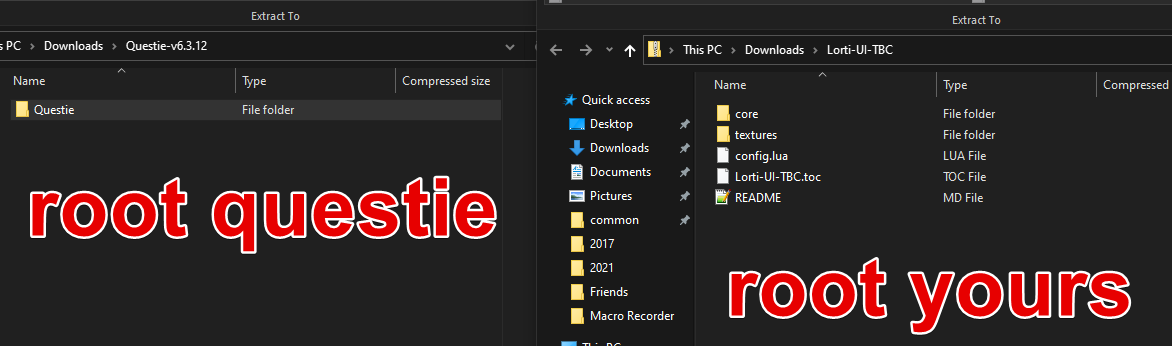 strange gulch
Every addon I use has a *.toc file matching the exact name of the directory the file is located within. Here's another reference: https://wowpedia.fandom.com/wiki/TOC_format#Basic_rules

Wowpedia
.toc (Table of Contents) files contain information about a particular addon (such as its name, description, saved variables, etc), as well as instructions on how the addon should be loaded by the client (for example, the order in which lua and xml files should be loaded). The file must be present, and have the same name (plus extension) as its p...
lyric crescent
atlaslootclassic looks just like questie
as does details
should look like zip then folder, then stuff
strange gulch
Hmm so you're saying I should nest my files within another folder of the same name as the zip. Let me try that.
Hah, that worked! Thanks for the second pair of eyes @lyric crescent.
lyric crescent
hi clay
 fleet bear
Was trying to say that the error is clear about the issue
but discord refused to send any messages.
somber mulch
this person is the only person with this issue, solo world works but when she tries to join a server it does this anyone know why?
 lyric crescent
!notcf
red patioBOT
The question you are asking about isn't related to CurseForge. Please use the appropriate game rooms by getting the role from #786424115535544350 or use #👽︱game-support for help.
This room is only for CurseForge Owned & Maintained features/services.
somber mulch
oh ok sorry
 dry spear
So I tried to install curseforge and it keeps saying
“Windows cannot access the specified device, path or fire. You may not have the appropriate permissions to access the item.”
And I’ve been wondering if it’s just been PURELY because of Norton.
red patioBOT
**Minecraft Files should NOT be installed inside the following locations
.minecraft folder.
OneDrive folders.
Desktop folder.
Drive roots I.E. Directly into the C:\ drive.
iCloud enabled folders.
If any of the above are in the path you need to change/move it by following the instructions below!**
If Minecraft is not installed in CurseForge App, start here.
Click the in the top left.
Select Minecraft.
Click "Edit".
Move to the "Continue here:" section below.
If Minecraft is installed in CurseForge App, follow these steps.
Click the in the bottom left.
Select the Minecraft tab.
Click "Change".
Move to the "Continue here:" section below.
Continue here:
Make a folder in the root directory called CurseForge.
Select the folder you just made.
The text box should show something like the following:
For Windows: C:\CurseForge
For Mac: /Users/Shared/CurseForge
 rich raven
i need help
when I start minecraft my screen goes black for 5 seconds and then it starts to load but only mojang and without loading mods so characteristic that it appears below the logo


please help me
lyric crescent
?mc-installfix try this
red patioBOT
- Click on the Minecraft Tab on the Left side of the App.
- Click button next to the
Create Custom Profileoption. - Click
Repair Installationoption. - Play game.
NOTE: You will not lose any modpacks or worlds, These are saved in the Instances folder. DO NOT TOUCH THIS FOLDER OR YOU WILL LOSE EVERYTHING
signal ridge
Got the curseforge app?
signal ridge
...
signal ridge
you use the app to create the modpack zips that you then upload to the site. Otherwise would have to manually make a modpack, test it, manually make the manifest file and the rest of the export zip.
lyric crescent
cant make a pack if you cant use the app basically
signal ridge
pretty much
 vestal compass
are you not able to add mods to the modpacks if there not on curseforge?
because i've tryed dragging them directly to the modlist and by putting in mod folder
 upbeat light
whenever i open curseforge, the mods ive installed arent there anymore no matter how many times i install, whats happening?
lyric crescent
vestal compass
because i've tryed dragging them directly to the modlist and by putting in mod f...
Putting them in the mod folder would work fine
vestal compass
does it add em but just not show?
lyric crescent
Non cf mods won't be in the mods list on cf. If that's what you mean
lyric crescent
upbeat light
whenever i open curseforge, the mods ive installed arent there anymore no matter...
What mods arnt where
 ebon tiger
hello
i have question
how do i add a mod from the curse forge website
to the curse forge??
desktop
lyric crescent
?mc-installmods
red patioBOT
How to install mods in CurseForge App.
- Click
+ Create Custom Profile - Name it, select the required Minecraft version, select the Forge version (usually the highest number), click
Create. - Click the profile icon.
- Click
Add New Content - Search and install the desired mods.
- Start the game!
How to install mods not on CurseForge.
- Right click the profile picture or Open the profile and click the Icon next to the play button.
- Click
Open Folder. - Drag the mod(s) into the
modsfolder. (Note: Some mods will require others, to run. Make sure to read the instructions for the mod!) - Start the game!
ebon tiger
🙏
upbeat light
lyric crescent
What mods arnt where
i use RLCraft and that disappears. even when i add minecraft to my list of games, it disappears when i close the app and turn it back on
 blazing dune
help everytime it loads my mods into my world it crashes once it loads them here is the report pls help I don’t know what to do
 lyric crescent
upbeat light
i use RLCraft and that disappears. even when i add minecraft to my list of games...
lyric crescent
upbeat light
i use RLCraft and that disappears. even when i add minecraft to my list of games...
?mc-path try changing your path
red patioBOT
**Minecraft Files should NOT be installed inside the following locations
.minecraft folder.
OneDrive folders.
Desktop folder.
Drive roots I.E. Directly into the C:\ drive.
iCloud enabled folders.
If any of the above are in the path you need to change/move it by following the instructions below!**
If Minecraft is not installed in CurseForge App, start here.
Click the in the top left.
Select Minecraft.
Click "Edit".
Move to the "Continue here:" section below.
If Minecraft is installed in CurseForge App, follow these steps.
Click the in the bottom left.
Select the Minecraft tab.
Click "Change".
Move to the "Continue here:" section below.
Continue here:
Make a folder in the root directory called CurseForge.
Select the folder you just made.
The text box should show something like the following:
For Windows: C:\CurseForge
For Mac: /Users/Shared/CurseForge
blazing dune
?
lyric crescent
blazing dune
help everytime it loads my mods into my world it crashes once it loads them here...
Restart your pc. If you want to show a log then send the file not a screenshot
blazing dune
are u sure restarting my pc is gonna work cause I think it’s a driver problem or I should update forge
upbeat light
lyric crescent
Restart your pc. If you want to show a log then send the file not a screenshot
i think that worked, thanks so much 😄
lyric crescent
Do what you want
 deft dawn
hello iv been trying for 4 days to install it again and it wont work
 lyric crescent
!getcf try this one
red patioBOT
Looking to install the CurseForge app?
Todo: Place system requirements here.
<:windows:798410728188936222> Windows
<:mac:798410654418862130> Mac
Linux
:person_shrugging:
 crude locust
well this is a scam
lyric crescent
???
crude locust
i play them
i was playing direwolf 1.10.2
you are able!
and i tried to upgrade but did not work
so yeah
you should make a 32 bits version
ebon tiger
he means upgrade by getting a better pc
lyric crescent
Upgrade means a new computer. You can't make a 32 bit pc 64 bit
32 bit was obsolete years ago
crude locust
yes you can + a new pc is very expensieve or idk what
crude locust
what
signal ridge
32bit *
ebon tiger
it doesn't matter he knew what I meant
crude locust
ok so u mean i have to wait 2 more years to make a pack
signal ridge
your pc, you 100% sure its a 32 bit?
crude locust
signal ridge
your pc, you 100% sure its a 32 bit?
yeah yeah
ebon tiger
crude locust
ok so u mean i have to wait 2 more years to make a pack
they arent gonna add it at all
lyric crescent
Nope they arnt
signal ridge
32bit is old school, Most programs today will be 64 bit. Not many will make a 32bit version at this point in time or ever
lyric crescent
Not sure you know what scam means..
crude locust
no i got scammed when i bought the pc
signal ridge
Guessing person who the pc was bought from false advertised it
lyric crescent
Oh lol..
crude locust
signal ridge
Guessing person who the pc was bought from false advertised it
i told him i wanna 64 bits + 8 ram
he said that will be 300$
money alot
signal ridge
Feel like you should have fought them on it after or money back.
crude locust
crude locust
i told him i wanna 64 bits + 8 ram
he said that will be 300$
that was 1 year ago... i was noob at pcs
crude locust
first of all
i'm from asia
second of all
i'm from kurdistan/iraq
and this is the problem
or proplem
wait i should go to #💬︱general-chat to chat
signal ridge
Probably
crude locust
then i'm going
 glossy tinsel
Hello everyone, can anyone help me that why i cant launch minecraft 1.12.2 😦
My specs Are:
Main Board: B460M DS3H
CPU: Intel Corei5 10400F
RAM: 16G
GPU: RTX 2060
SSD: 240 GB
lyric crescent
So what happens
glossy tinsel
It wont launch minecraft ;-;
signal ridge
Curse app?
digital roost
Hello, im a MacOS user, i have curse forge installed and it wont open a modpack called decimation.
glossy tinsel
hmm idk about that, i can play it
lyric crescent
Need an actual explaination of what you are doing and what is happening. It won't launch doesn't tell anything
signal ridge
glossy tinsel
Curseforge App
Anyways, which part is not launching? When you press play in the app does it open the minecraft launcher? OR does it open the launcher then not load from there
signal ridge
digital roost
Hello, im a MacOS user, i have curse forge installed and it wont open a modpack ...
Do other modpacks play?
digital roost
lyric crescent
Need an actual explaination of what you are doing and what is happening. It won'...
im hitting play, and it will buffer for a second, but nothing will change.
digital roost
signal ridge
Do other modpacks play?
I dont have any other modpacks, but ill download one and try it out.
glossy tinsel
lyric crescent
Need an actual explaination of what you are doing and what is happening. It won'...
I mean that curseforge open the minecraft launcher, the minecraft launcher launched minecraft and it crashed imidiately Exit Code : 0
signal ridge
glossy tinsel
I mean that curseforge open the minecraft launcher, the minecraft launcher launc...
!mc-logs do this
red patioBOT
Where to find the log on the CurseForge Client.
Right-click the modpack profile icon OR click the button in the modpack profile.
Click Open Folder.
Open the logs folder.
Find the file called latest.log and drag it into discord.
digital roost
signal ridge
Do other modpacks play?
No, other modpacks will not play.
signal ridge
digital roost
No, other modpacks will not play.
!mc-installfix try this
red patioBOT
- Click on the Minecraft Tab on the Left side of the App.
- Click button next to the
Create Custom Profileoption. - Click
Repair Installationoption. - Play game.
NOTE: You will not lose any modpacks or worlds, These are saved in the Instances folder. DO NOT TOUCH THIS FOLDER OR YOU WILL LOSE EVERYTHING
glossy tinsel
Here there ya go
signal ridge
glossy tinsel
Here there ya go
Do the same as what the bot above says
digital roost
signal ridge
!mc-installfix try this
thank you, your a legend.
ebon tiger
glossy tinsel
Curseforge App
you need to click on it again
that happens to me
try to open it again
wait a bit
then try again
signal ridge
What?
ebon tiger
should open after a few tries
signal ridge
This is the fix for that issue #🔥︱curseforge-support message
ebon tiger
OH
ok i should have read the rest
of what he said
thought he meant curseforge desktop not working
im a idiot 🤦♂️
signal ridge
If your game ever crashes and you see this Patcher expecting non-empty class data file for net.minecraft.entity.passive.EntityOcelot, but received empty, your vanilla jar may be corrupt in the latest log, the Repair Installation is the fix
glossy tinsel
hmm ok
 uneven gale
Hey
I can't put lang files in my mods downloaded from curseforge
When done it just deletes it
glossy tinsel
Everyone helped me is a legend especialy YoYok9
uneven gale
Im guessing it's due to CF launcher being bad itself but it's there a work around?
glossy tinsel
hm
uneven gale
Also Neko's books main atraction to put new enchantments books textures and such is gone because you can't put the png files inside the jar file
glossy tinsel
I think YoYok9 is the best fixxer around here, he just helped me, DM him
i im not good at fixing issues, if i can i really love to help you
rich raven
lyric crescent
?mc-installfix try this
my problem its with forge no with curseforge app
lyric crescent
Then you're in the wrong discord
rich raven
and what is the discord of forge?
uneven gale
thanks cf

so yeah changing the jar file deletes the file
if the launcher if open
if the launcher is closed and you place a lang file or whatever in the jar
it will create an error in the setup phase
signal ridge
rich raven
and what is the discord of forge?
Forge discord: https://t.co/7qYZt8OubG?amp=1
signal ridge
uneven gale
thanks cf
!mc-logs and what are you trying to do exactly?
red patioBOT
Where to find the log on the CurseForge Client.
Right-click the modpack profile icon OR click the button in the modpack profile.
Click Open Folder.
Open the logs folder.
Find the file called latest.log and drag it into discord.
digital roost
wacky
uneven gale
signal ridge
!mc-logs and what are you trying to do exactly?
So, Neko's enchanted book adds an api that handles book textures
via json and png
Thing is
Modifiying the jar file will cause it to be deleted from the instance
signal ridge
thats not the file the bot said.... Latest not crash report..
uneven gale
And yes, before you ask, i've done this before, like 5 more times
The jar file works everywhere except for CF
signal ridge
first off shouldnt be modifying the jar itself, unless you made it
uneven gale
That's the whole point of the mod? lmao
signal ridge
Link the mod
uneven gale

GitHub
Contribute to CGessinger/Nekos-Enchanted-Books development by creating an account on GitHub.
It's on cf too
same name
rich raven
signal ridge
Forge discord: <https://t.co/7qYZt8OubG?amp=1>
thanks
signal ridge
uneven gale
https://github.com/CGessinger/Nekos-Enchanted-Books
I dont think (could be wrong tho) your supposed to edit the actual jar file for the mod itself. But more the properties.json file
uneven gale
if you do that there's no textures to load
You need to add png's, the respective json's for each book and change the properties json
BUT if you do that
cf says yeet
and it deletes it
or makes the game crash
signal ridge
After adding the correct enchantment name to the properties, we want to add the according texture file to resources/assets/nebs/textures/items. We want to name this file exactly like the enchantment name, without the extra enchantment.modid part. The protection texture for example is just called protection.png.
have you done this?
uneven gale
This is like my 5 time modifying the mod itself
Always has worked
Not using CF tho
lyric crescent
how does cf have any involvement here?
signal ridge
Shouldnt need to modify the mod jar at all. Plus if you modify the jar cant upload it.
Since its very against the authors license. ARR
uneven gale
lyric crescent
how does cf have any involvement here?
Changing the file even by adding a lang file results in being deleted if the launcher is opened
So yes, it is involved
lyric crescent
that is not a function of cf
uneven gale
Try it by yourself
signal ridge
Like I said, If you are following the directions of the author. Shouldnt even need to touch the physical Jar file
lyric crescent
doesnt matter, you cant upload custom mods in a modpack. it needs to be uploaded and approved on curseforge to be used in packs. doubt the mod author is giving you permission to do that
 vagrant silo
Hey I need some assistance with why MC runs like crap lol. I have good enough specs to run any modpack fine and yet I get like a max of 50-75 and it skips a bunch. Anyone know of any common problems that would cause this? Or ways to fix them? Very annoying when trying out modpacks and none run decent at all.
lyric crescent
#👽︱game-support for that
uneven gale
lyric crescent
doesnt matter, you cant upload custom mods in a modpack. it needs to be uploaded...
Yeah except he did lmfao
vagrant silo
damn thought it would be here mb. Normal MC runs fine I should of specified
signal ridge
Where did you ask em?
uneven gale
Anyways, since you guys really didn't help it's being implemented officially
uneven gale
signal ridge
Where did you ask em?
He's added me on discord
Since I asked him for help 2 months ago
lyric crescent
oh no, really didnt help. im so sad now 🙄
uneven gale
lyric crescent
oh no, really didnt help. im so sad now 🙄
Good
 cobalt ore
Hi, I'm having a few issues with a modpack I've created. The curseforge app shows mods as being up to date when they are not; for example showing Rats as being version 1.2.0, but the file path only has version 1.1.1 installed.
signal ridge
?
cobalt ore
It appears when attempting to update mods, the app has marked the mod as the latest version without installing the new files
lyric crescent
click the mod name, go to versions and select the correct one
cobalt ore
This allows me to see the updates and install them. It still displays them as already being updated in the 'installed mods' section however
More information, setting profile options to prefer alpha releases, and then back to normal has fixed the behaviour I was noticing.
 gilded violet
We updated and uploaded the Healium add-on World of Warcraft BCC. I can go to Browse on the Curseforge webiste and do a search for it and see it fine (under the BCC area) but it is not showing up in the Curseforge app when I search for it under WoW BCC there. We had also done an update for the Classic version and it showed up fine in both places. Thanks for any help or info.
 broken plank
Idk if this is the right channel but for some reason none of my mods will run. They run a two second start up thing then nothing happens. Any idea how I can fix this?
signal ridge
!mc-logs try this
red patioBOT
Where to find the log on the CurseForge Client.
Right-click the modpack profile icon OR click the button in the modpack profile.
Click Open Folder.
Open the logs folder.
Find the file called latest.log and drag it into discord.
broken plank
There doesnt seem to be a logs folder
signal ridge
!mc-installfix do this
red patioBOT
- Click on the Minecraft Tab on the Left side of the App.
- Click button next to the
Create Custom Profileoption. - Click
Repair Installationoption. - Play game.
NOTE: You will not lose any modpacks or worlds, These are saved in the Instances folder. DO NOT TOUCH THIS FOLDER OR YOU WILL LOSE EVERYTHING
broken plank
I dont see the three dots next to the create custom profile button

some of the other mods have logs but not the one Im trying to open, none will open though
signal ridge
Click the :CFsettings, Whats the number in the bottom left corner? V.?
broken plank
0.168.2.4
signal ridge
... Yeah your app is rather outdated.
broken plank
hmm I litterally just updated it
signal ridge
np
 mossy vigil
anyone know how to fix this?
 signal ridge
mossy vigil
anyone know how to fix this?
signal ridge
mossy vigil
anyone know how to fix this?
!mc-logs do this
red patioBOT
Where to find the log on the CurseForge Client.
Right-click the modpack profile icon OR click the button in the modpack profile.
Click Open Folder.
Open the logs folder.
Find the file called latest.log and drag it into discord.
signal ridge
Exit code 0 means like 100+ different things
 simple oak
do I need to log in for minecraft to show "installed"?
 fleet bear
click it to set it up


 fleet bear
you read it and do what it says
simple oak
by minecraft modding files does it mean the "mod" folder in .minecraft ?
fleet bear
try reading it again
simple oak
does it install curseforge stuff
signal ridge
the folder you choose is where everything curseforge related (minecraft wise) is stored.
 gilded wing
hi
simple oak
yay I got a modpack now
digital roost
How long does it take for my project to be approved?
red patioBOT
It is 08:14AM on Tuesday for CurseForge my dudes.
Project Moderation Time
Project/File moderation is done on Sunday - Thursday from 10am - 6pm GMT+2
This process is First in, First out. Thus files submitted late in the work day may not be checked until the next work day.
New Projects or uploads requiring manual approval: 1-3 Working Days
Updates to approved projects not needing manual approval: 1 Hour
File sync to the Curseforge app may take up to 24 hours after approval.
signal ridge
!status
 upper shore
can someone teach me how to make a modded server
signal ridge
Not the channel for this #👽︱game-support Curseforge doesnt do servers
 misty onyx
hey im having trouble with the curseforge installment process anyone around to help me out with it?
fleet bear
misty onyx
hey im having trouble with the curseforge installment process anyone around to h...
only ~14k people
raw vale
misty onyx
hey im having trouble with the curseforge installment process anyone around to h...
What’s wrong?
misty onyx
so i think i installed it wrong im not sure but i downladed it from the website for windows and i didnt get a folder for anything i just got a program that said curseforge installer so i downloaded it and everything is loading but it wont show any mods that i have
raw vale
What do you mean it won’t show your mods? If it’s a mod not from curseforge it won’t show up in the launcher
digital roost
Can I use Optifine on my modpack and share this to my project (Modpack)?
signal ridge
digital roost
Can I use Optifine on my modpack and share this to my project (Modpack)?
Yes, and cant upload the project to the site with optifine in the pack
 static mauve
Is there a way to automatically create a server file from a custom curseforge modpack?
signal ridge
automatically? nope. Have to make them yourself. As curseforge doesnt do servers. Authors have to make their own server files
 plucky nexus
Having an issue with a modpack and installations, I just need help so i can go to sleep
digital roost
signal ridge
Yes, and cant upload the project to the site with optifine in the pack
seriously? bruh
Whats mod for the fps boost for forge 1.16.5?
signal ridge
digital roost
seriously? bruh
Yep. optifine cannot be uploaded to the site. Author of the mod only wants people to be able to download it from their site.
digital roost
signal ridge
Yep. optifine cannot be uploaded to the site. Author of the mod only wants peopl...
Can I use Experimental mod in my modpack and upload it to curseforge?
signal ridge
digital roost
Can I use Experimental mod in my modpack and upload it to curseforge?
Experimental mods dont always sync with the curse app. I wouldnt recommend it
plucky nexus
nvm i guess i got it working the wrong way
 tribal oak
Hey guys we get this error in our server console,
[11:57:26] [Server thread/WARN] [FML]: Quark loaded a new chunk [-54, -39] in dimension 0 (overworld) while populating chunk [-53, -39], causing cascading worldgen lag.
[11:57:26] [Server thread/WARN] [FML]: Please report this to the mod's issue tracker. This log can be disabled in the Forge config.
Just wanted to confirm that FML is the Forge Mod Loader so that I dont report to the wrong issue tracker.
queen storm
It is, but you need to report it to the mod
tribal oak
Right, although we have this issue with multiple mods which raises the question who exactly causes this issue. But thanks, will report it to Quark
past ledge
will i be able to find my modpack on the curseforge launcher if its verified or does it need to go through some other thing
also wondering how to add mods to my created modpack because I cannot find any info on it
queen storm
past ledge
will i be able to find my modpack on the curseforge launcher if its verified or ...
!sync
red patioBOT
Sync and your Project.
CurseForge App and site do not share the same requirements! You can find things on the site but this does not mean it will be in the app!
For a mod to show up in the app:
- Projects MUST have a file marked as RELEASE or BETA
- Projects MUST be APPROVED
- Projects MUST have a file marked for the PROFILE VERSION USED
- Projects CAN'T be EXPERIMENTAL
- Projects CAN'T be ABANDON
Files can take a while to show up in the app. If your files still have not shown up either your project is new and you have yet to mark a file as Release/Beta or there is issues with the sync system making it slow.
past ledge
i mean I think that I should have all this stuff done?
queen storm
past ledge
i mean I think that I should have all this stuff done?
Did everything get approved already?
past ledge
My modpack got approved but I see no files
queen storm
Did you upload one?
past ledge
I thought I uploaded one when I uploaded my modpack
I am gonna try re uploaded my main modpack file and see if it does anything for me
queen storm
Also look at the notifications
past ledge
what does this mean how am i supposed to add a modpack
 queen storm
Reinstall the files that are in that list, export, check the overrides/mods folder, should be empty (with a few exceptions)
past ledge
i used curseforge to make the modpack though?
queen storm
Things are still not 100%
past ledge
do i upload a zip file or a folder
queen storm
Zip, the one your export made
past ledge
k
thats what i thought
do i just re export or do a full re install of all the mods from the pack
by making a new pack
queen storm
You are not reading what I said: #🔥︱curseforge-support message