#🔥︱curseforge-support
1 messages · Page 468 of 1
 digital roost
 lyric crescent
buy it then
 dense osprey
@queen storm it doesnt work..i putted on addons but nothing
digital roost
anyone able to assist with curseforge recognising minecraft? i have the java edition but it refuses to show the game as being installed
lyric crescent
curseforge installs it's own launcher to modify, it will not use the default one
digital roost
lyric crescent
curseforge installs it's own launcher to modify, it will not use the default one
i'm not sure how you do that... i have wow but minecraft is blanked out
lyric crescent
click minecraft, then press continue
digital roost
invalid folder path war chosen
lyric crescent
?mc-path
 red patioBOT
**Minecraft Files should NOT be installed inside the following locations
.minecraft folder.
OneDrive folders.
Desktop folder.
Drive roots I.E. Directly into the C:\ drive.
iCloud enabled folders.
If any of the above are in the path you need to change/move it by following the instructions below!**
If Minecraft is not installed in CurseForge App, start here.
Click the  in the top left.
Select Minecraft.
Click "Edit".
Move to the "Continue here:" section below.
If Minecraft is installed in CurseForge App, follow these steps.
Click the  in the bottom left.
Select the Minecraft tab.
Click "Change".
Move to the "Continue here:" section below.
Continue here:
Make a folder in the root directory called CurseForge.
Select the folder you just made.
The text box should show something like the following:
For Windows: C:\CurseForge
For Mac: /Users/Shared/CurseForge

 arctic python
what days are mod packs aproved
 queen storm
dense osprey
<@!525950791710801921> it doesnt work..i putted on addons but nothing
queen storm
dense osprey
<@!525950791710801921> it doesnt work..i putted on addons but nothing
I do not have enough knowledge about wow to help with that
queen storm
arctic python
what days are mod packs aproved
!status
red patioBOT
It is 03:12PM on Thursday for CurseForge my dudes.
Project Moderation Time
Project/File moderation is done on Sunday - Thursday from 10am - 6pm GMT+2
This process is First in, First out. Thus files submitted late in the work day may not be checked until the next work day.
New Projects or uploads requiring manual approval: 1-3 Working Days
Updates to approved projects not needing manual approval: 1 Hour
File sync to the Curseforge app may take up to 24 hours after approval.
arctic python
queen storm
!status
ok thanks i submited mine 12 hours ago and was wondering how long it takes thank you
digital roost
okay i can't find where root directory is.
lyric crescent
it's c
digital roost
i got it
now my next issue is my pc was rejecting all my jar files, i have kept them and they're sat in the folder but i can't get my pc to accept them
nvm i think i might have resolved it
lyric crescent
why not just install them with the app?
 glacial comet
maybe somebody was asked about that, but i didnt find the answer. how i can change WoW version from classic to tbcc? I have this now

i tried to rescan, tried to restart both overwolf and curse
 unborn basin
glacial comet
maybe somebody was asked about that, but i didnt find the answer. how i can chan...
unborn basin
glacial comet
maybe somebody was asked about that, but i didnt find the answer. how i can chan...
Go to CF's settings and tell me which version are you currently running please
glacial comet
0.173.1.6
 scenic jetty
i haev same problem and same version
lyric crescent
try restarting curseforge
unborn basin
glacial comet
0.173.1.6
Restart CF if that doesn't help restart Overwolf
scenic jetty
thanks, it worked
glacial comet
works also. its strange, i restarted 10 min ago 😄
unborn basin
*<|:D\-<
digital roost
i have been waiting 5hrs and my modpack for minecraft hasnt still been approved before it only took 15 mins pls tell me how long do i ahve to wait
queen storm
digital roost
i have been waiting 5hrs and my modpack for minecraft hasnt still been approved ...
!status
red patioBOT
It is 04:09PM on Thursday for CurseForge my dudes.
Project Moderation Time
Project/File moderation is done on Sunday - Thursday from 10am - 6pm GMT+2
This process is First in, First out. Thus files submitted late in the work day may not be checked until the next work day.
New Projects or uploads requiring manual approval: 1-3 Working Days
Updates to approved projects not needing manual approval: 1 Hour
File sync to the Curseforge app may take up to 24 hours after approval.
digital roost
ok thanks
 celest meteor
how come i cant find a modpack on curseforge but i can find it on the website version
queen storm
celest meteor
how come i cant find a modpack on curseforge but i can find it on the website ve...
Link it
red patioBOT
How to install mods in CurseForge App.
- Click
+ Create Custom Profile - Name it, select the required Minecraft version, select the Forge version (usually the highest number), click
Create. - Click the profile icon.
- Click
Add New Content - Search and install the desired mods.
- Start the game!
How to install mods not on CurseForge.
- Right click the profile picture or Open the profile and click the
 Icon next to the play button.
 - Click

Open Folder. - Drag the mod(s) into the
modsfolder. (Note: Some mods will require others, to run. Make sure to read the instructions for the mod!) - Start the game!

 gray moth
3 Days already without any updates on modpack review sadge
 viral briar
can depend on when it was uploaded as it was at end or after working day hours then it wouldn't really count till the next day onward and it will be in the queue system and i'm sure it's not exactly small.
if does get past a week or so ,you could always make a ticket probably
queen storm
Things are also pretty crazy over there now with the rockets...
viral briar
and all that stuff yep
 bronze pendant
does anyone know if bagnon for wow classic/tbc will have an update soon its got some bugs going on with the clean up button
queen storm
bronze pendant
does anyone know if bagnon for wow classic/tbc will have an update soon its got ...
Have you tried asking the dev?
bronze pendant
didnt know who to contact
queen storm
Can you link the project?
queen storm
Comments section, and you are not the only one that wants it
bronze pendant
yeah i just noticed sorry kinda new to the add on scene so wasn't sure if they knew
 runic wigeon
bruh what does this mean
 lyric crescent
seems clear
viral briar
needs to be same dimensions height and width as it says
runic wigeon
oh is that what the 1:1 radio
lyric crescent
ratio
runic wigeon
yes sorry
viral briar
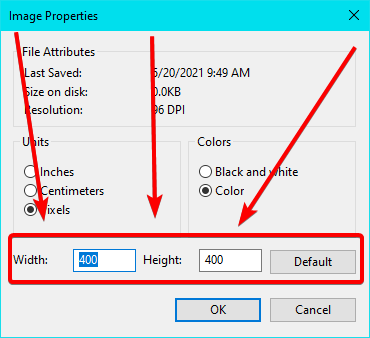
yes 1:1 ratio means it has be exact same size both in height and width which the minimum requirement is 400x400
not 401x400 for example
runic wigeon
oh ok
lyric crescent
1:1 means that for every 1 unit of height you need 1 unit of width
so if the height is 200 the width also must be 200
just keep it simple and make your thing 400x400
runic wigeon

 viral briar
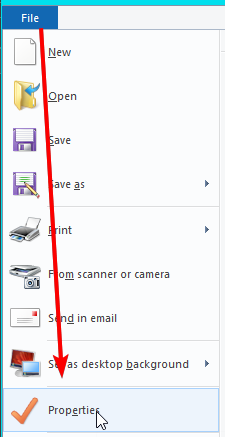
for paint
file > properties
lyric crescent
 runic wigeon
I AM IN PROPERTIES
lyric crescent
you are not in that one though
if you were you'd see https://i.imgur.com/44N3npT.png
 runic wigeon
i litterly went in the same way you did went into the file and press properties
 stuck ocean
i didnt change the folder i just pressed continou and i got this error help me plz

plz help
 weak frost
Should all addons work for tbc prepatch now?
lyric crescent
If they are updated for that
lyric crescent
stuck ocean
i didnt change the folder i just pressed continou and i got this error help me p...
? mc-path
red patioBOT
**Minecraft Files should NOT be installed inside the following locations
.minecraft folder.
OneDrive folders.
Desktop folder.
Drive roots I.E. Directly into the C:\ drive.
iCloud enabled folders.
If any of the above are in the path you need to change/move it by following the instructions below!**
If Minecraft is not installed in CurseForge App, start here.
Click the in the top left.
Select Minecraft.
Click "Edit".
Move to the "Continue here:" section below.
If Minecraft is installed in CurseForge App, follow these steps.
Click the in the bottom left.
Select the Minecraft tab.
Click "Change".
Move to the "Continue here:" section below.
Continue here:
Make a folder in the root directory called CurseForge.
Select the folder you just made.
The text box should show something like the following:
For Windows: C:\CurseForge
For Mac: /Users/Shared/CurseForge
 steady parcel
@unborn basin is god
digital roost
can someone help me
I keep getting a error saying "Errors in currently selected datapacks prevented world from loading. You can either try to load only with vanilla datapack ("safe mode") or go back to title screen and fix it manually." , I tried loading in my world and this is what i get all the time.
lyric crescent
world is corrupted. load a backup if you have one.
lyric crescent
find the thing that is corrupting it
digital roost
How, thats where im stuck at.
lyric crescent
no idea. you can send your log but i've yet to see one that pointed to the cause. trial and error is the only way.
digital roost
latest log?, or debug log
lyric crescent
latest
digital roost
arctic python
digital roost
sorry your world got messed up gamer
digital roost
My 3rd time dog
arctic python
OOF
arctic python
what mods or mod pack?
arctic python
oof
lyric crescent
try removing adorn?
arctic python
i feel for yall i lost my hardcore world of 3 years
lyric crescent
might be too late either way
digital roost
lyric crescent
try removing adorn?
Alr
how can I be able to browse my modpack? I can't see it anywhere
lyric crescent
link it
digital roost
@lyric crescent thanks it worked
arctic python
digital roost
<@125588118538682368> thanks it worked
congrats
arctic python
lyric crescent
should go report that to the dev
yea just to be safe
digital roost
lyric crescent
link it
where
lyric crescent
here
lyric crescent
!sync
red patioBOT
Sync and your Project.
CurseForge App and site do not share the same requirements! You can find things on the site but this does not mean it will be in the app!
For a mod to show up in the app:
- Projects MUST have a file marked as RELEASE
- Projects MUST be APPROVED
- Projects MUST have a file marked for the PROFILE VERSION USED
- Projects CAN'T be EXPERIMENTAL
- Projects CAN'T be ABANDON
Files can take a while to show up in the app. If your files still have not shown up either your project is new and you have yet to mark a file as Release or there is issues with the sync system making it slow.
lyric crescent
you read what the bot said
digital roost
ok
ok I made my file release
cuz i made it alpha for whatever reason
!sync livez
red patioBOT
Sync and your Project.
CurseForge App and site do not share the same requirements! You can find things on the site but this does not mean it will be in the app!
For a mod to show up in the app:
- Projects MUST have a file marked as RELEASE
- Projects MUST be APPROVED
- Projects MUST have a file marked for the PROFILE VERSION USED
- Projects CAN'T be EXPERIMENTAL
- Projects CAN'T be ABANDON
Files can take a while to show up in the app. If your files still have not shown up either your project is new and you have yet to mark a file as Release or there is issues with the sync system making it slow.
digital roost
so how do I sync, i don't really understand this
lyric crescent
you wait until it syncs. you do not do anything to make it sync
digital roost
oh ok
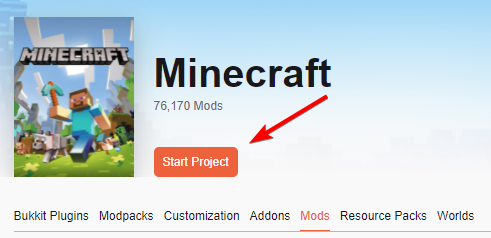
Hi everyone, how can I publish a mod for minecraft on the site? Is it really possible to do this?
 digital roost
lyric crescent
you make a mod project and upload to it
digital roost
lyric crescent
you make a mod project and upload to it
Thank you
 tepid cloud
can I publish a modpack that doesn't need twitch, or do I have to use twitch instead of just a .zip?
(for minecraft)
lyric crescent
twitch has nothing to do with curseforge
tepid cloud
Well, I tried to upload a .zip with a bunch of mods, and it said I had to make it with twitch
red patioBOT
There are two ways to share a modpack you've made with others...
Export and Share - For Friends to Small Groups.
- Click the Icon for the modpack.
- Click the button next to play.
- Click

Export. - Select the files that should be included.
- Send the zip to the people that want it! They can follow the instructions in
!mc-installpackto install the pack!
Upload to Curseforge - For Public Release to Everyone.
This options will make your pack public to EVERYONE, it comes with extra requirements and will take some effort to set up.
- Go to here: https://www.curseforge.com/project/432/4471/create
- Fill out the information with a proper description of the pack. This should allow anyone to understand what the pack is.
- Click the Icon for the modpack in the CurseForge app.
- Click the button next to play.
- Click
Export. - Select the files that should be included.
- Open your Project you made on the CurseForge site and Upload the file you just made.
- Wait for Moderation & Sync so it can show up in the client! (See
!syncfor limitations)
tepid cloud
 lyric crescent
yes, read the bot message
tepid cloud
!sync
red patioBOT
Sync and your Project.
CurseForge App and site do not share the same requirements! You can find things on the site but this does not mean it will be in the app!
For a mod to show up in the app:
- Projects MUST have a file marked as RELEASE
- Projects MUST be APPROVED
- Projects MUST have a file marked for the PROFILE VERSION USED
- Projects CAN'T be EXPERIMENTAL
- Projects CAN'T be ABANDON
Files can take a while to show up in the app. If your files still have not shown up either your project is new and you have yet to mark a file as Release or there is issues with the sync system making it slow.
tepid cloud
I don't see anything about twitch and why I can't send a modpack as simply a .zip
lyric crescent
curseforge does not accept "just a zip", it needs to be formatted properly by using export
like the instructions above say
lyric crescent
you need to use the app like it says
lyric crescent
then you cant make a pack
tepid cloud
🙁
digital roost
Im trying to download seaopolis but it keeps saying there was an error with the web client or smfin?
 red patioBOT
Where to find the log on the CurseForge Client.
Right-click the modpack profile icon OR click the button in the modpack profile.
Click Open Folder.
Open the logs folder.
Find the file called latest.log and drag it into discord.
lyric crescent
?mc-log
lyric crescent
digital roost
Im trying to download seaopolis but it keeps saying there was an error with the ...
try a pc restart
 marsh topaz
lyric crescent
marsh topaz
lyric crescent
try removing chance cubes?
marsh topaz
ight ill let you klnow what happens
 haughty merlin
Can anyone help me?
I just installed Curseforge and didn't change anything, created a modpack with jumploader and a few fabric mods, started the game but it didn't save my setting/servers/singleplayer worlds
marsh topaz
 lyric crescent
are you trying to use fabric?
lyric crescent
then remove the fabric mods
marsh topaz
lol ok
digital roost
Thank-you for helping me
haughty merlin
lyric crescent
are you trying to use fabric?
yes of course. that should work with jumploader right?
lyric crescent
wasnt talking to you, i have no idea what your issue could be
haughty merlin
ok sorry
 wheat yoke
hey does anyone know how to actually download a modpack onto a server
digital roost
Why did my message got deleted
lyric crescent
doesnt belong in support..
lyric crescent
wheat yoke
hey does anyone know how to actually download a modpack onto a server
Try #👽︱game-support
wheat yoke
ok
 marble hedge
hello, i published a modpack a year ago, but i don't have it in my projects and why is this the name of the account ?
 lyric crescent
marble hedge
hello, i published a modpack a year ago, but i don't have it in my projects and ...
lyric crescent
marble hedge
hello, i published a modpack a year ago, but i don't have it in my projects and ...

CurseForge Support
We're here to get you informed on everything you need to know about CurseForge, including helpful guides and troubleshooting articles to back you up when you get in a pickle
marble hedge
lyric crescent
https://support.curseforge.com/en/support/solutions/articles/9000196375-transfer...
Thx
 wind harness
!status
red patioBOT
It is 08:30PM on Thursday for CurseForge my dudes.
Project Moderation Time
Project/File moderation is done on Sunday - Thursday from 10am - 6pm GMT+2
This process is First in, First out. Thus files submitted late in the work day may not be checked until the next work day.
New Projects or uploads requiring manual approval: 1-3 Working Days
Updates to approved projects not needing manual approval: 1 Hour
File sync to the Curseforge app may take up to 24 hours after approval.
digital roost
I have a problem
I have minecraft
But for some reason, curseforge is not launching minecraft from Minecraft Launcher, it's just making itself a minecraft.exe and then launches that?
How do I fix?
wind harness
i don't think u can
digital roost
Y
wind harness
because it runs it's own versions of minecraft
digital roost
bruh
lyric crescent
digital roost
But for some reason, curseforge is not launching minecraft from Minecraft Launch...
this is what it is supposed to do. it doesnt touch the default files at all
digital roost
why?
lyric crescent
it stores profiles diffrently than the vanilla client can use
red patioBOT
**Minecraft Files should NOT be installed inside the following locations
.minecraft folder.
OneDrive folders.
Desktop folder.
Drive roots I.E. Directly into the C:\ drive.
iCloud enabled folders.
If any of the above are in the path you need to change/move it by following the instructions below!**
If Minecraft is not installed in CurseForge App, start here.
Click the in the top left.
Select Minecraft.
Click "Edit".
Move to the "Continue here:" section below.
If Minecraft is installed in CurseForge App, follow these steps.
Click the in the bottom left.
Select the Minecraft tab.
Click "Change".
Move to the "Continue here:" section below.
Continue here:
Make a folder in the root directory called CurseForge.
Select the folder you just made.
The text box should show something like the following:
For Windows: C:\CurseForge
For Mac: /Users/Shared/CurseForge
viral briar
It’s supposed to be like that and be separated from the vanilla client
lyric crescent
if you install mods to vanilla you can only have one profile
CF is made to have many profiles
digital roost
I doooo
 random flicker
how do i sharee profiles
lyric crescent
?mc-packshare
red patioBOT
There are two ways to share a modpack you've made with others...
Export and Share - For Friends to Small Groups.
- Click the Icon for the modpack.
- Click the button next to play.
- Click
Export. - Select the files that should be included.
- Send the zip to the people that want it! They can follow the instructions in
!mc-installpackto install the pack!
Upload to Curseforge - For Public Release to Everyone.
This options will make your pack public to EVERYONE, it comes with extra requirements and will take some effort to set up.
- Go to here: https://www.curseforge.com/project/432/4471/create
- Fill out the information with a proper description of the pack. This should allow anyone to understand what the pack is.
- Click the Icon for the modpack in the CurseForge app.
- Click the button next to play.
- Click
Export. - Select the files that should be included.
- Open your Project you made on the CurseForge site and Upload the file you just made.
- Wait for Moderation & Sync so it can show up in the client! (See
!syncfor limitations)
 elfin tartan
I keep getting “oops, they was not supposed to happen”
lyric crescent
?ticket-site
red patioBOT
:bug: Reporting via Website :bug:
Can't open the app or would rather use the website? You can do so here: https://support.curseforge.com/en/support/tickets/new
Fill out the form with accurate detailed information, "It doesn't work" isn't helpful! What exactly doesn't work and why doesn't it work should be easy to answer!
Make sure to upload your Overwolf logs with the Upload File option on the ticket, information on how to get these logs can be found here https://support.overwolf.com/en/support/solutions/articles/9000176827-how-to-get-your-overwolf-logs
runic wigeon
how long does it usally take to get your mod accepted by a moderatior on curse forge
red patioBOT
It is 09:11PM on Thursday for CurseForge my dudes.
Project Moderation Time
Project/File moderation is done on Sunday - Thursday from 10am - 6pm GMT+2
This process is First in, First out. Thus files submitted late in the work day may not be checked until the next work day.
New Projects or uploads requiring manual approval: 1-3 Working Days
Updates to approved projects not needing manual approval: 1 Hour
File sync to the Curseforge app may take up to 24 hours after approval.
lyric crescent
!status
 slate shard
Hi - I'm trying to get my Mod pack approved but I need to update the description, however when I go to update it's saying I don't have permission. Am I missing something?
lyric crescent
screenshot?
slate shard

All of the items say I don't have permission when I hover over them and not clickable
lyric crescent
can you show that
slate shard
 lyric crescent
Do you own this project? Are you logged into the account that owns it?
slate shard
Yep sure am - do you need the user account?
slate shard
Tried, still the same. Even tried another browser
If it helps the only option I can click on is delete project
 ashen robin
Hello, how to update addons to BC Classic? Also app suggest only Vanilla addons... So i can download only from the site
 glacial glacier
Same, the website shows weakauras having a version out for 2.5.1, but in the client it only shows files for 1.13.7 https://www.curseforge.com/wow/addons/weakauras-2/files

WeakAuras is just an example I used though, same applies to most if not all BC Classic addons
lyric crescent
slate shard
If it helps the only option I can click on is delete project
Think you'll need a ticket on this, no clue what's going on. Seems like somehow you're either on the wrong account or you werent given permissions.
ashen robin
Yea, the same
lyric crescent
?ticket-site
red patioBOT
:bug: Reporting via Website :bug:
Can't open the app or would rather use the website? You can do so here: https://support.curseforge.com/en/support/tickets/new
Fill out the form with accurate detailed information, "It doesn't work" isn't helpful! What exactly doesn't work and why doesn't it work should be easy to answer!
Make sure to upload your Overwolf logs with the Upload File option on the ticket, information on how to get these logs can be found here https://support.overwolf.com/en/support/solutions/articles/9000176827-how-to-get-your-overwolf-logs
lyric crescent
@rare prairietake that to #💬︱general-chat ty
 willow elm

 fallen dagger
for some reason i cant even get into vanilla Minecraft. any suggestions on what i could do to fix it?
latest log
lyric crescent
that's not vanilla
lyric crescent
has forge, not vanilla
fallen dagger
ah
lyric crescent
delete this C:\Users\17542\curseforge\minecraft\Instances\i\config\fml.toml
willow elm
willow elm
Can you help me please
willow elm
willow elm
Can you help me please
please
lyric crescent
?mc-log
red patioBOT
Where to find the log on the CurseForge Client.
Right-click the modpack profile icon OR click the button in the modpack profile.
Click Open Folder.
Open the logs folder.
Find the file called latest.log and drag it into discord.
lyric crescent
no
willow elm
my bad
lyric crescent
still no
 unborn birch
why does my friend's curseforge show him "BCC" and mine still shows "Classic"? he's able to update all his wow addons to bc, and i'm stuck with broken classic ones
willow elm
lyric crescent
still no
what do i do
lyric crescent
latest.log
lyric crescent
unborn birch
why does my friend's curseforge show him "BCC" and mine still shows "Classic"? ...
what version of curseforge are you on. click the gear, lower left corner
willow elm
lyric crescent
try without pneumaticcraft?
I'm on my own modpack
lyric crescent
yes.. i saw that
 fleet bear
unborn birch
why does my friend's curseforge show him "BCC" and mine still shows "Classic"? ...
fleet bear
unborn birch
why does my friend's curseforge show him "BCC" and mine still shows "Classic"? ...
Restart overwolf.
willow elm
lyric crescent
yes.. i saw that
So what should I do?
lyric crescent
lyric crescent
try without pneumaticcraft?
^
willow elm
lyric crescent
^
Can't I make my own modpack?
unborn birch
fleet bear
Restart overwolf.
That worked thanks
willow elm
lyric crescent
im telling you to remove a mod from your pack
ok sorry
marble hedge
hello, i'm making a modpack, how i can know if i'm allowed to add a specific mod ?
red patioBOT
Minecraft Modpack 3rd party
Mods not on CurseForge must be on the 3rd-party list to be included in modpacks uploaded to CurseForge. If a mod is not on this list it can't be included in the export of a modpack and must be removed before uploading. If you upload with a mod that isn't on this list the file will be rejected.
List of approved 3rd party mods:
https://docs.google.com/spreadsheets/d/176Wv-PZUo9hFxy6oC6N8tWdquBLPRtSuLbNK-r0_byM
marble hedge
lyric crescent
if it's on curseforge you can, if it's not on curseforge...
all are on curseforge, thx
willow elm
lyric crescent
im telling you to remove a mod from your pack
Thanks it's work
slate shard
lyric crescent
Think you'll need a ticket on this, no clue what's going on. Seems like somehow ...
Perfect thank you!
 quartz meadow
When I download 1.16.4 forge, it will replace 1.12.2 forge (and vise versa). Any way I can force them to be different installations (or are they just the same)?
 quartz meadow
Did you try just refreshing the server list?
quartz meadow
Try closing and reopening minecraft ig
quartz meadow
Well I mean some people dont
 ember snow
xd
 viral dagger
hello, I'm not sure if I can ask about it here, but I bought Stardew Valley and would like to add some mods to it and when I try Curseforge, it says that the game cannot be found.
digital roost
hi there
need some help
been trying to play blood and bones
classic
but im getting this error
The game crashed whilst initializing game
Error: java.lang.ArrayIndexOutOfBoundsException: 0
Exit Code: -1
any1 know a fix?

 waxen crescent
?mc-videocard
 slim thunder
 digital roost
slim thunder
https://i.imgur.com/TH7lPhr.png
digital roost
slim thunder
https://i.imgur.com/TH7lPhr.png
do u know how to ix this error?
The game crashed whilst initializing game
Error: java.lang.ArrayIndexOutOfBoundsException: 0
Exit Code: -1
slim thunder
?mc-log
red patioBOT
Where to find the log on the CurseForge Client.
Right-click the modpack profile icon OR click the button in the modpack profile.
Click Open Folder.
Open the logs folder.
Find the file called latest.log and drag it into discord.
digital roost
ive got the full crashreport aswell
slim thunder
post the latest.log
digital roost
there is none
slim thunder
screenshot the folder you're looking at
digital roost
 slim thunder
maybe ForgeModLoader-client-0 has something
slim thunder
so go into the config folder
find the config for bspkrscore
and disable the update checker
digital roost
so whats highlighted need to be set to false?

ok i set to false lemme test
it worked tyvm
 wicked anvil
as soon as i load in a world in a modpack in instantly crashes
slim thunder
wicked anvil
as soon as i load in a world in a modpack in instantly crashes
?mc-log
red patioBOT
Where to find the log on the CurseForge Client.
Right-click the modpack profile icon OR click the button in the modpack profile.
Click Open Folder.
Open the logs folder.
Find the file called latest.log and drag it into discord.
 tame tiger
when i play curseforge i get 1 fps but when i play something else i get 100 fps
lyric crescent
when you play curseforge? pretty sure curseforge isnt a game
 haughty robin
is there a way to fix the game not launching from the launcher after having JustEnoughID's installed?
using JEID is not an option as it makes my entire world void, however the game will not launch without it now for some reason
in Minecraft I should maybe add
fleet bear
!notcf
red patioBOT
The question you are asking about isn't related to CurseForge. Please use the appropriate game rooms by getting the role from #786424115535544350 or use #👽︱game-support for help.
This room is only for CurseForge Owned & Maintained features/services.
haughty robin
my bad
okay so actual cf question then, is there any way to improve performance in the cf app?
fleet bear
uh? what?
haughty robin
it is super slow
fleet bear
like you need to explain that because the app doesn't really do anything so I'm not sure how you would expect to improve the performance of it.
haughty robin
when loading modpacks n stuff
fleet bear
explain
haughty robin
and browsing for mods
fleet bear
that's your internet.
haughty robin
no?
fleet bear
yes
haughty robin
how
fleet bear
because where do you think all that info comes from?
fleet bear
You didn't say that
I can't read your mind.
This is why I said to explain it two times
red patioBOT
:bug: Reporting via the CurseForge App :bug:
-
Click the
 icon in the bottom left.
 -
Select

Open a Ticket. -
Fill out the form with accurate detailed information, "It doesn't work" isn't helpful! What exactly doesn't work and why doesn't it work should be easy to answer!
-
Make sure to upload your Overwolf logs with the
Upload Fileoption on the ticket, information on how to get these logs can be found here https://support.overwolf.com/en/support/solutions/articles/9000176827-how-to-get-your-overwolf-logs -
Submit!
 fleet bear
make sure to include your logs and then mention me in the ticket.
haughty robin
so nothing i can do myself?
fleet bear
If I knew what the issue was why would I send you to a support ticket?
haughty robin
just clarifying...... misunderstandings happen, especially because I believe everything wasn't perfectly clear
 unkempt steeple
Does anyone know why there are you numbers of top of each other? I can't figure out whats wrong. The addon I'm using for this nameplates is Plater Nameplates
 fleet bear
unkempt steeple
Does anyone know why there are you numbers of top of each other? I can't figure ...
fleet bear
unkempt steeple
Does anyone know why there are you numbers of top of each other? I can't figure ...
!notcf
red patioBOT
The question you are asking about isn't related to CurseForge. Please use the appropriate game rooms by getting the role from #786424115535544350 or use #👽︱game-support for help.
This room is only for CurseForge Owned & Maintained features/services.
unkempt steeple
Where should I address it then? I thought this is the addon app
fleet bear
The question you are asking about isn't related to CurseForge. Please use the appropriate game rooms by getting the role from #786424115535544350 or use #👽︱game-support for help.
it says right in the message?
unkempt steeple
Yup, i chose wow. thanks a lot
digital roost
does anyone know how to unlock files?
im trying to delete a mod and it says i cant cuz the files are locked
fleet bear
did you try restarting the computer yet?
lyric crescent
check your task manager for java and end it, otherwise ^
digital roost
ight ill try it, thanks
Hello,
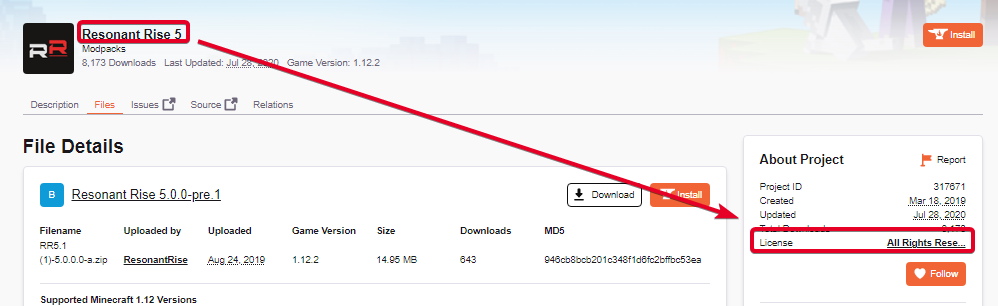
My project has been under review for more than 3 days now. I wanted to check with someone on the review team to see what is going on.
fleet bear
Post a picture of the file uploaded and the main project page
digital roost
fleet bear
did you try restarting the computer yet?
Thank you
digital roost
lyric crescent
check your task manager for java and end it, otherwise ^
Thank you too
 fleet bear
digital roost
fleet bear
digital roost
other picture of the main page?
 fleet bear
why are you uploading a modified modpack?
digital roost
fleet bear
why are you uploading a modified modpack?
What do you mean?
lyric crescent
 fleet bear
i mean exactly what I said that you yourself claimed?
digital roost
So it can be distributed on curse related launchers for users to use on our server(s), why else?
fleet bear
do you have permission from the original pack to use the scripts/configs or other specialty stuff they made?
digital roost
Is that what is pending on the review or are you bringing this up now due to the screenshots?
lyric crescent
 digital roost
If the ladder its irrelevant, if the former, tell me the means of where to upload them.
Wouldn't it of been rejected due to license rights?
fleet bear
Well it clearly hasn't been moderated yet and that could be to them trying to figure out if it's allowed or not
digital roost
Ok so you don't know? Do you have an ETA?
fleet bear
You really shouldn't be taking other peoples packs adding a few mods and then uploading them.
arctic python
what times and days are mod packs added/approved
fleet bear
!status
red patioBOT
It is 01:39AM on Friday for CurseForge my dudes.
Project Moderation Time
Project/File moderation is done on Sunday - Thursday from 10am - 6pm GMT+2
This process is First in, First out. Thus files submitted late in the work day may not be checked until the next work day.
New Projects or uploads requiring manual approval: 1-3 Working Days
Updates to approved projects not needing manual approval: 1 Hour
File sync to the Curseforge app may take up to 24 hours after approval.
digital roost
fleet bear
You really shouldn't be taking other peoples packs adding a few mods and then up...
What other point is there to uploading modpacks then to do just that unless you are making your own.. Its a distribution center for many users and takes out the technical issues out of hosting a zip on a cloud drive or something similar.
fleet bear
because it's for people who make there own packs and not just take other peoples work and slightly modify it?
If you want to do that just give it to them via dsicord.
lyric crescent
it's almost like licences exist for a reason
fleet bear
Your putting a pack up for hundreds of thousands of people when you upload to curseforge. Not just your mates.
digital roost
not hundreds of thousands, but thousands ~3k over a few servers
fleet bear
what...?
digital roost
distribution is getting too annoying
fleet bear
There's hundreds of thousands of people that use Curseforge.
arctic python
digital roost
not hundreds of thousands, but thousands ~3k over a few servers
it really is hundreds of thousands
fleet bear
There's nearly 100K people here
digital roost
No for us, not for curse
fleet bear
Your putting a pack up for hundreds of thousands of people when you upload to curseforge.
digital roost
how does one distribute a custom mod pack to many users that has various changes on a weekly or monthly basis normally?
lyric crescent
usually by making a pack themselves and not stealing most of it
digital roost
... ok what is "making" a mod pack
I could literally talk to each mod maker in resonant rise and put them all together + other mods that we want and make it "my" mod pack. You're talking about the english in my description.
fleet bear
Download the mods you want, make your own configs, spend your own time making whatever you need.
Otherwise, use the modpacks as they are
lyric crescent
so do that, and stop modifying someone elses pack
digital roost
lyric crescent
so do that, and stop modifying someone elses pack
thats the joke, unless its someone making mods from scratch, its is that. I've modified it
idc who owns it, they can have all the rights, we just need the distribution.
lyric crescent
ok then make it yourself, problem solved
put the mods together yourself, adjust configs and scripts yourself.
digital roost
thats what i did
thats what I'm saying. You're arguing about my english description of what i did and modified.
I can be less specific and just list all the mods I *added in the modpack
fleet bear
digital roost
I can be less specific and just list all the mods I *added in the modpack
If you made it yourself why would you say its another modpack that you just added mods to...? How would you know that?
digital roost
fleet bear
If you made it yourself why would you say its another modpack that you just adde...
Because instead of saying this includes x,y,z mods; they're all included in resonant rise, why not just say that
lyric crescent
beacuse it sounds like you just stole resonant rise, thus this conversation
fleet bear
Plus all the mods already listed in the "Relations" tab so there's no reason to be listing out what mods are in the pack.
Plus if you are making the pack for a group of people why would it matter what mods are in it?
Push F3+ T
digital roost
ok thats good information.. I didn't know that
So if the description isn't to list mods what do you put there? It said to "describe what is in your modpack and what its about" so thats what i did
fleet bear
A mod list doesn't describe anything about the pack
digital roost
I am an engineer and english is not my first language. "describe" is exactly that no?
fleet bear
If you really don't know what "describe what's in the pack and what it's about" means look at some other modpacks.
Lots of examples to use on how to make a project description
lyric crescent
Explain what makes your pack unique. Having mods is not unique, all packs have mods.
digital roost
Ok like a story, yes?
 lyric crescent
I mean that might be acceptable, but that just sounds like any other pack to me
digital roost
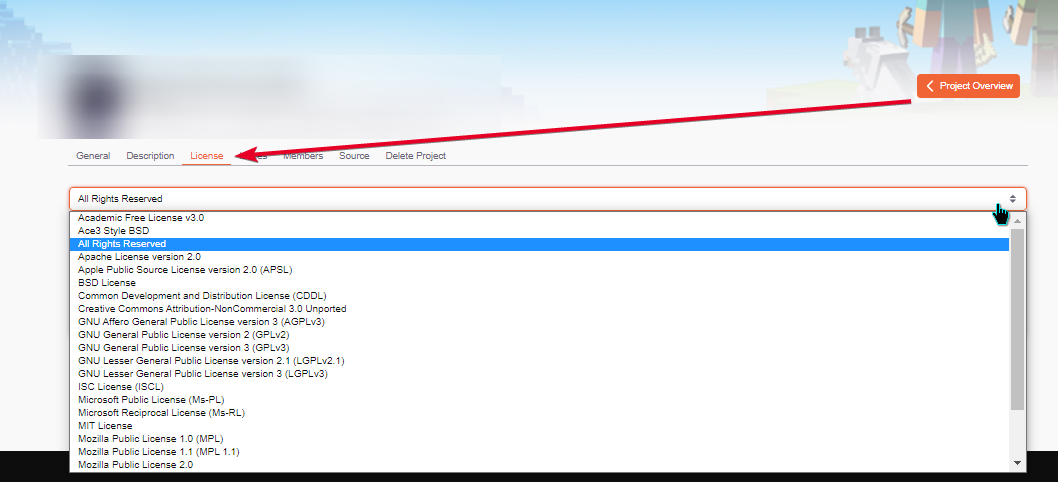
Also I did not get the description of licensing right. Can that be updated?
Can a "Custom License" be "TBD"?
lyric crescent
can change it here https://i.imgur.com/9ZG3Zk3.png
 lyric crescent
Choose a License
Non-judgmental guidance on choosing a license for your open source project
digital roost
ok all set, back to original question, why is it greater than 3 days? Is there a backlog?
lyric crescent
we have no way to know that, only that it usually is less than 3. since it's more than 3 that means they had to check something on it.
were you including non-curseforge mods?
lyric crescent
is there anything in the overrides/mods folder of your zip
digital roost
Also understandable, I will wait 1 more day.
Uh everything was in the mods folder before it was zipped if thats what you mean
lyric crescent
well they are off the next 2 days, so i wouldnt expect it before 3 more days at this point
say what
did you use the app to make an export?
digital roost
we tested the mods for combatibility and tweaks over 3 people, once we were satisfied it was zipped. The zip is the mods folder contents
yes
it was an export from AT for curse
digital roost
Can i download copy on the site? Its probably already deleted off of the staging server.
lyric crescent
dont think so

 lyric crescent
anything in overrides/mods

 lyric crescent
what is that zip
 digital roost
where do they go then lol...?
lyric crescent
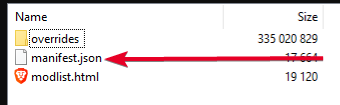 digital roost
also if they see that they should say that asap
lyric crescent
yea it should have, but when people do unexpectedly weird things stuff breaks
digital roost
mods should be in the json?
lyric crescent
mods should already be in the json, if you exported this correctly
digital roost
They are by id, not the mods themselves
 digital roost
ok what is the problem then
lyric crescent
your zip is the problem
lyric crescent
the two folders are fine
digital roost
so when modpack is selected client will pull mods into mods folder with client?
lyric crescent
yes
 frosty dew
I have 4 mods that keep showing up as "Modified" no matter how many times I update or reinstall them :/
Anyone know what's up?
addons*
 undone echo
 fleet bear
what are you trying to pack?
 vapid dragon
trying to move WOW addons from my laptop to my desktop.
fleet bear
vapid dragon
trying to move WOW addons from my laptop to my desktop.
use a cloud folder or USB drive. Sync doesn't work right
 plain niche
I'm trying to install curseforge but when I run the installer it asks for permission then nothing happens. Do I need to install overwolf? The same thing is happening when I try to install that too.
red patioBOT
Looking to install the CurseForge app?
Todo: Place system requirements here.
<:windows:798410728188936222> Windows
<:mac:798410654418862130> Mac
Linux
:person_shrugging:
fleet bear
use this instead
plain niche
That got me onto overwolf but how do I get to the mods tab? its just greyed out
fleet bear
you go to the apps tab and install curseforge
plain niche
I think I got it thanks for the help
 wispy trail
hello i can not figure out how to download astral lucky blocks and play on mac
fleet bear
!mc-installmods
red patioBOT
How to install mods in CurseForge App.
- Click
+ Create Custom Profile - Name it, select the required Minecraft version, select the Forge version (usually the highest number), click
Create. - Click the profile icon.
- Click
Add New Content - Search and install the desired mods.
- Start the game!
How to install mods not on CurseForge.
- Right click the profile picture or Open the profile and click the Icon next to the play button.
- Click
Open Folder. - Drag the mod(s) into the
modsfolder. (Note: Some mods will require others, to run. Make sure to read the instructions for the mod!) - Start the game!
 bitter herald
i am trying to install optifine with a modpack but it keeps crashing when booting up
 tranquil gulch
Hello, I came into the discord because I came across a problem that I tried everything I could to solve but was not successful. The underlined file is a temp file when I searched for it but it says it couldn't find it and I don't exactly know what it is. I even tried searching for videos/information on this exact issue.. I tried Reinstalling and Installing, Restarting my computer, making sure I have the right path/folders to put them in but still nothing.
 fleet bear
bitter herald
i am trying to install optifine with a modpack but it keeps crashing when bootin...
fleet bear
bitter herald
i am trying to install optifine with a modpack but it keeps crashing when bootin...
!mc-optifine
red patioBOT
Optifine and Curseforge
To install Optifine with modpacks on Curseforge:
Right click the modpack icon, select Open Folder.
Put the Optifine.jar into the mods folder.
Now load the modpack normally.
We do not offer support for Optifine. If you have issues with Optifine, remove it. If you want further support try the discord found on their website.
https://www.optifine.net/home
fleet bear
tranquil gulch
Hello, I came into the discord because I came across a problem that I tried ever...
What are you trying to installl?
tranquil gulch
fleet bear
What are you trying to installl?
I wanted to update Valhelsia Minecraft ModPack
fleet bear
try installing to a new profile
tranquil gulch
I'll try it and I'll let you know what happens
Did you want me to Duplicate it?
Im not sure if I know how to just create a profile and place the modpack in it
What?
fleet bear
tranquil gulch
Im not sure if I know how to just create a profile and place the modpack in it
click the update icon, then select the install to new profile
tranquil gulch
Oohh, Well the other issue I have is that I already uninstalled the entire modpack when I was trying to solve the issue aswell, And it still wont let me install it back.
Still with the "Cant find File" issue
tranquil gulch
I'll try to install RL Craft
So it actually installed RL Craft
without the error
wispy trail
pls help get lucky block astral for mac send me a video
tranquil gulch
But it still has the same issue with Valhelsia
wispy trail
i need help plsss ive tried for days is it even posibble
fallen dagger
halp pls
fleet bear
tranquil gulch
So it actually installed RL Craft
can you install the other pack now?
fleet bear
wispy trail
pls help get lucky block astral for mac send me a video
!mc-installmods
red patioBOT
How to install mods in CurseForge App.
- Click
+ Create Custom Profile - Name it, select the required Minecraft version, select the Forge version (usually the highest number), click
Create. - Click the profile icon.
- Click
Add New Content - Search and install the desired mods.
- Start the game!
How to install mods not on CurseForge.
- Right click the profile picture or Open the profile and click the Icon next to the play button.
- Click
Open Folder. - Drag the mod(s) into the
modsfolder. (Note: Some mods will require others, to run. Make sure to read the instructions for the mod!) - Start the game!
fleet bear
fallen dagger
halp pls
!notcf
red patioBOT
The question you are asking about isn't related to CurseForge. Please use the appropriate game rooms by getting the role from #786424115535544350 or use #👽︱game-support for help.
This room is only for CurseForge Owned & Maintained features/services.
fallen dagger
?
fleet bear
tranquil gulch
But it still has the same issue with Valhelsia
oh, sorry, didn't see this in the others. open a support ticket
tranquil gulch
fleet bear
can you install the other pack now?
I cannot, It still says it cant find the file
wispy trail
how does this help im 10 and dumb
fleet bear
!bug-app include the logs and mention my name
red patioBOT
:bug: Reporting via the CurseForge App :bug:
-
Click the
icon in the bottom left. -
Select
Open a Ticket. -
Fill out the form with accurate detailed information, "It doesn't work" isn't helpful! What exactly doesn't work and why doesn't it work should be easy to answer!
-
Make sure to upload your Overwolf logs with the
Upload Fileoption on the ticket, information on how to get these logs can be found here https://support.overwolf.com/en/support/solutions/articles/9000176827-how-to-get-your-overwolf-logs -
Submit!
fleet bear
wispy trail
how does this help im 10 and dumb
Then you likely shouldn't be here.
viral briar
wispy trail
how does this help im 10 and dumb
word of advice , dont say age ever
fallen dagger
fleet bear
!notcf
should i j go to community then?
wispy trail
ok fine
fleet bear
fallen dagger
should i j go to community then?
read the message, follow it
fallen dagger
oh thats for me. got it
tranquil gulch
I did a support ticket already before coming here (For more advice just incase)
wispy trail
im doing this for me and a friend can you send me a video to simplify this for mac
viral briar
masyn , the instructions given to you ARE simple
fallen dagger
viral briar
masyn , the instructions given to you ARE simple
he did say that he was 10 and dumb lmfao
wispy trail
ok ill look again
fleet bear
tranquil gulch
I did a support ticket already before coming here (For more advice just incase)
Ok, Just wait for that then
fallen dagger
fleet bear
read the message, follow it
cant do step one, button thing isnt there
fleet bear
What are you talking about?
fleet bear
Why are you making a ticket? I never asked you to do that. I already told you this isn't the room for your problem and to move.
fallen dagger
ah
viral briar
the ticket thing was for another users issue
fallen dagger
fleet bear
read the message, follow it
got confused when you said "message"
my fault
fleet bear
yes, the one you were mentioned for.
tranquil gulch
fleet bear
Ok, Just wait for that then
Hopefully the issue can be solved
fallen dagger
makes sense lol
fleet bear
tranquil gulch
Hopefully the issue can be solved
Support will know what to do.
they are good
though...
I just realized. Tomorrow is Friday...
Tickets won't get looked at till sunday.
tranquil gulch
Thats fine, I can wait a little longer
wispy trail
im about to send a video on my phone
brb
I can’t do it but Astro lucky blocks is customization and I’ve made many more packs of Coors Forge and it does not work so I don’t know what to tell you I have a super good YouTube or that I really want to impress and that’s why I’m trying to do this not only for my friend for this you tuber and you’re really not giving me a good information like it’s customization it doesn’t pop up on Minecraft when I download forge 1.8.9 doesn’t show up and I can’t put astral lucky blocks
Auto text be like
ill see what you say tommarow
fleet bear
wispy trail
I can’t do it but Astro lucky blocks is customization and I’ve made many more pa...
You need to follow the install directions for luckyblocks then. this is why you explain what you are trying to do when you ask for help.
This isn't a Curseforge issue anymore then either so if you need more help #👽︱game-support
wispy trail
ok
 dire coyote
I can't find the folder for CurseForge

 tender panther
eta on pack approvals?? ive been waiting 3 day now...
fleet bear
dire coyote
I can't find the folder for CurseForge
- You crossed out the part that's important to help you.
- There's no folder to find. If you read the instructions it says to Choose a folder for your files, not find the files.
fleet bear
tender panther
eta on pack approvals?? ive been waiting 3 day now...
3 more days as it's now the weekend.
Are you sure you uploaded the correct files?
wispy trail
@viral briar what was that about
tender panther
they do nothing over the weekend?? this is dumb man
 karmic rapids
i have a question
fleet bear
Never in the history of Curse/CurseForge am I aware of a time they worked 7 days a week.
fleet bear
karmic rapids
how do u do multiplayer in curse forge
CurseForge is a mod managing app. There's no such thing as multiplayer.
karmic rapids
o
 lament meteor
fleet bear
CurseForge is a mod managing app. There's no such thing as multiplayer.
lament meteor
fleet bear
CurseForge is a mod managing app. There's no such thing as multiplayer.
yes you can

as long as you know how to set up a normal minecraft server
you can find a way
and thats why ive come here!
whenever i create a server using a server pack
i can join and play on my server just fine
and ive hosted servers before on forge an shit like that
but for some reason
when someone tries to join my server using the cursed forge server pack
red patioBOT
Hey there, it is Curseforge, not "Cursed forge"
 fleet bear
lament meteor
yes you can
fleet bear
lament meteor
yes you can
I would like to see you try and make curseforge multiplayer....
!notcf <-- your issue
red patioBOT
The question you are asking about isn't related to CurseForge. Please use the appropriate game rooms by getting the role from #786424115535544350 or use #👽︱game-support for help.
This room is only for CurseForge Owned & Maintained features/services.
 flat parcel
can anyone help me every time i try and download it says network error (windows)
fleet bear
flat parcel
can anyone help me every time i try and download it says network error (windows)
Exit overwolf and reload the app. Try again
flat parcel
for cursedforge
red patioBOT
Hey there, it is Curseforge, not "Cursed forge"
 broken lily
I need help
fleet bear
don't we all
broken lily
Everytime I loaded up rlcraft and try to get into a server it says this:
 broken lily
update I fixed it
 lone mulch
curseforge doesnt even work for minecraft for me
i put in a support ticket but its been being processed for 27 minutes
 split hare
Curseforge can't find my stardew valley folder, even when i go to it manually in the directory anyone know what i can do?
lone mulch
curseforge says "invalid folder path" to my minecraft mods folder
fleet bear
split hare
Curseforge can't find my stardew valley folder, even when i go to it manually in...
!knownissue under other
red patioBOT
Known Issues with solutions or status of the issue.
Overwolf maintains a known list of issues here, some with solutions, others without.
https://support.curseforge.com/en/support/solutions/articles/9000196615-curseforge-known-issues
fleet bear
lone mulch
curseforge says "invalid folder path" to my minecraft mods folder
!mc-path
red patioBOT
**Minecraft Files should NOT be installed inside the following locations
.minecraft folder.
OneDrive folders.
Desktop folder.
Drive roots I.E. Directly into the C:\ drive.
iCloud enabled folders.
If any of the above are in the path you need to change/move it by following the instructions below!**
If Minecraft is not installed in CurseForge App, start here.
Click the in the top left.
Select Minecraft.
Click "Edit".
Move to the "Continue here:" section below.
If Minecraft is installed in CurseForge App, follow these steps.
Click the in the bottom left.
Select the Minecraft tab.
Click "Change".
Move to the "Continue here:" section below.
Continue here:
Make a folder in the root directory called CurseForge.
Select the folder you just made.
The text box should show something like the following:
For Windows: C:\CurseForge
For Mac: /Users/Shared/CurseForge
 noble arrow
Hi. I try to maintain both my WoW retail addons and WoW ptr addons with cursforge app. I cant find a way to add the "ptr" game. Someone knows if it's doable and how to do that ? ty 🙂
queen storm
Click settings in the bottom left, what version are you on?
 long tusk
yo i need help man
queen storm
long tusk
yo i need help man
Rule 10
long tusk
my bad
regardless i downloaded a bunch of mods to make a modpack for me and my friends, and it crashes every time.
- i try to load it
red patioBOT
Where to find the log on the CurseForge Client.
Right-click the modpack profile icon OR click the button in the modpack profile.
Click Open Folder.
Open the logs folder.
Find the file called latest.log and drag it into discord.
queen storm
!mc-logs
queen storm
java.lang.RuntimeException: Invalid id 4096 - maximum id range exceeded
Install JEID
queen storm
That is a mod, google it
long tusk
okay cause i didnt find it on curseforge
queen storm
No, it is a short name because I can't remember the long one
queen storm
Yes
long tusk
it worked.. Thanks!
noble arrow
queen storm
Click settings in the bottom left, what version are you on?
Me ?
queen storm
noble arrow
Me ?
Yes
noble arrow
v. 0.173.1.8
queen storm
Should work just fine
 raven bluff
Hi all, my name is kriokar. I hope someone can help me. I'd like to install stoneblock 2 version 1.21.2 but on curseforge the last version is 1.16. How i can update to the last version?
queen storm
raven bluff
Hi all, my name is kriokar. I hope someone can help me. I'd like to install ston...
Link it please
raven bluff
sorry, what link?
queen storm
Stoneblock 2
queen storm
That is not a curseforge link
raven bluff
ok but i don't have the curseforge link, i used the app curseforge
queen storm
Is the new version on curseforge?
raven bluff
i downloaded it yesterday, I suppose it is
queen storm
Post a link to the curseforge page then
 silent saffron
Many of my WoW addons are still out of date even some of them already have TBC pre-patch version (2.5.1), but not in a CurseForge client. There are only 2 games to pick up - WoW (retail) and WoW 2 (classic) showing probably classic era realm out of date (1.13.7). Does anybody know where this could be updated?
 queen storm
raven bluff
https://www.curseforge.com/minecraft/modpacks/ftb-presents-stoneblock-2
queen storm
raven bluff
https://www.curseforge.com/minecraft/modpacks/ftb-presents-stoneblock-2
They did not update it there probably
raven bluff
ok, thanks for the help
fleet bear
silent saffron
Many of my WoW addons are still out of date even some of them already have TBC p...
Restart overwolf
 half acorn
How I can upload my modpack
fleet bear
!mc-packshare
red patioBOT
There are two ways to share a modpack you've made with others...
Export and Share - For Friends to Small Groups.
- Click the Icon for the modpack.
- Click the button next to play.
- Click
Export. - Select the files that should be included.
- Send the zip to the people that want it! They can follow the instructions in
!mc-installpackto install the pack!
Upload to Curseforge - For Public Release to Everyone.
This options will make your pack public to EVERYONE, it comes with extra requirements and will take some effort to set up.
- Go to here: https://www.curseforge.com/project/432/4471/create
- Fill out the information with a proper description of the pack. This should allow anyone to understand what the pack is.
- Click the Icon for the modpack in the CurseForge app.
- Click the button next to play.
- Click
Export. - Select the files that should be included.
- Open your Project you made on the CurseForge site and Upload the file you just made.
- Wait for Moderation & Sync so it can show up in the client! (See
!syncfor limitations)
silent saffron
@fleet bear Thanks. Updating directly from client didn't worked for me, I had to visit website and download new client. After that, everything worked fine. MacOS here 🙂
 halcyon tree
Yo does anyone know how I can let it know that I want TBCC addons in this folder (previously used for vanilla addons)?

i manually put the addons in the folder since the app didnt work for this purpose
hence the yellow ! mark
tried to click update and it puts vanilla addons in the folder instead of tbcc addons
arctic python
!status
red patioBOT
It is 12:59PM on Friday for CurseForge my dudes.
Project Moderation Time
Project/File moderation is done on Sunday - Thursday from 10am - 6pm GMT+2
This process is First in, First out. Thus files submitted late in the work day may not be checked until the next work day.
New Projects or uploads requiring manual approval: 1-3 Working Days
Updates to approved projects not needing manual approval: 1 Hour
File sync to the Curseforge app may take up to 24 hours after approval.
 steep thorn
Hi,
Can you please help?
I can't seem to find classic option in the drop down

 daring bane
Does nyone know how to play modded minecraft together
red patioBOT
It is 01:46PM on Friday for CurseForge my dudes.
Project Moderation Time
Project/File moderation is done on Sunday - Thursday from 10am - 6pm GMT+2
This process is First in, First out. Thus files submitted late in the work day may not be checked until the next work day.
New Projects or uploads requiring manual approval: 1-3 Working Days
Updates to approved projects not needing manual approval: 1 Hour
File sync to the Curseforge app may take up to 24 hours after approval.
gray moth
!status
daring bane
i dint mean that
gray moth
No, I was checking something
queen storm
daring bane
do you know any way to play curseforge mods with friends
Make a server
arctic python
!status
red patioBOT
It is 02:50PM on Friday for CurseForge my dudes.
Project Moderation Time
Project/File moderation is done on Sunday - Thursday from 10am - 6pm GMT+2
This process is First in, First out. Thus files submitted late in the work day may not be checked until the next work day.
New Projects or uploads requiring manual approval: 1-3 Working Days
Updates to approved projects not needing manual approval: 1 Hour
File sync to the Curseforge app may take up to 24 hours after approval.
queen storm
Any context?
 snow holly
is there anyway to transfer your world and settings to a more updated version of a modpack
queen storm
Copy paste them
snow holly
copy paste them in the files?
queen storm
snow holly
copy paste them in the files?
Yes, where else?
 rotund cloak
why dosent curseforge detect stardew valley on my computer when i have it on steam
 queen storm
rotund cloak
why dosent curseforge detect stardew valley on my computer when i have it on ste...
queen storm
rotund cloak
why dosent curseforge detect stardew valley on my computer when i have it on ste...
!knownissues Look at "Other games"
red patioBOT
Known Issues with solutions or status of the issue.
Overwolf maintains a known list of issues here, some with solutions, others without.
https://support.curseforge.com/en/support/solutions/articles/9000196615-curseforge-known-issues
queen storm
willow elm
Custom modpack? What is it?
willow elm
Yeah it's my modpack
queen storm
Did you add all those mods at once?
queen storm
Limit the amount, do it in steps, test in between and have an old version as backup.
willow elm
ok
 full light
I have a problem
 hushed plover
hey everyone, i use curseforge for wow classic, but I dont seem to have access to the tbc stuff, guildies say that there curseforge now show it. I tried restarting curseforge but no joy
full light
I want to play RLCraft with my friends but when I try to install curseforge app it gets stuck extracting flies so how long does this take?
hushed plover
is it because of something i've done wrong or do i need to just wait
arctic python
!status
red patioBOT
It is 05:01PM on Friday for CurseForge my dudes.
Project Moderation Time
Project/File moderation is done on Sunday - Thursday from 10am - 6pm GMT+2
This process is First in, First out. Thus files submitted late in the work day may not be checked until the next work day.
New Projects or uploads requiring manual approval: 1-3 Working Days
Updates to approved projects not needing manual approval: 1 Hour
File sync to the Curseforge app may take up to 24 hours after approval.
 short belfry
Hi, could use some help here: I am trying to create a new modpack (custom profile) for Minecraft with curseforge. I seem to be able to create it fine, and when Minecraft loads it is says it is loading the mods, but then in the game (say a new world I created) the mods are not available.
I tried it with multiple different mods (for example "biomes a plenty" or "journey map" or others), even just on their own, and still can't get it to work.
Any ideas?
lyric crescent
close any launchers you have open, press play on curseforge and use the launcher that appears
 covert vine
Hello, I'm downloading the old FTB Ultimate modpack (1.4.7) however everytime i launch it the mods don't load up so I'm left with a vanilla 1.4.7 world. Any idea on a solution? Thanks in advance ❤️
 lyric crescent
?mc-ftb
red patioBOT
We do not provide support for FTB Modpacks or the FTB App.
If you are looking to play FTB modpacks use the FTB launcher.
https://www.feed-the-beast.com/
Any Overwolf FTB launcher issues you have should be directed here:
https://github.com/FTBTeam/FTB-App-Overwolf/issues
covert vine
Thanks anyway
willow elm
willow elm
I don't understand, it's the same thing as yesterday
fleet bear
halcyon tree
Yo does anyone know how I can let it know that I want TBCC addons in this folder...
Restart overwolf, scan for games.
fleet bear
steep thorn
Hi,
Can you please help?
I can't seem to find classic option in the drop down
Did you download the new classic? If so, scan for games again.
fleet bear
hushed plover
hey everyone, i use curseforge for wow classic, but I dont seem to have access t...
Exit overwolf and restart it. Cf app should update then.
fleet bear
halcyon tree
theres nothing new to find since its still the same folder
I dont understand how you can use the same folder for two separate game types?
halcyon tree
cus its not two seperate games
vanilla transitioned into tbcc with pre patch
the client doenst know
so it thinks i want 1.13 addons
 toxic salmon
how do I Download wow classic addons?
sry if its already been asked

 vital frigate
how can i update my addons to TBC?
hushed plover
is that display correct ?
fleet bear
halcyon tree
vanilla transitioned into tbcc with pre patch
? Vanilla is the retail version?
Classic is what turned into tbc?
halcyon tree
....
 heavy willow
hushed plover
is that display correct ?
heavy willow
hushed plover
is that display correct ?
it is correct since as you can see some of your addons are for 2.5.1
vital frigate
how can i update my vanilla addons to TBC?
hushed plover
guildies telling me they have a separate tbc section in curseforge
fleet bear
vital frigate
how can i update my addons to TBC?
Restart overwolf.
hushed plover
maybe i'm blind but i can't seem to find it
fleet bear
There isn't. It's still under the wow section afaik and it's just a file type designator.
hushed plover
ok thanks for your help
was able to download details at least, it would not update
heavy willow
yeah, check in the setting which path is used for WoW
if you only have one client installed, it should match it
fleet bear
halcyon tree
....
Well, I cant help you if I dont know what you are talking about when it doesn't line up with what everyone else is saying.
I dont play the game.
heavy willow
if you have more than one flavor installed and the client didn't pick them up, manually add the others
hushed plover
kind of strange what blizz have done, you can choose to move characters to stay on classic or move to tbc, as far as i know its not a separate client install
but you can play either / or which kind of complicates things i guess
heavy willow
they are split: if you want to continue playing Classic era (i.e. no Outlands), you have to install a new client; they share their data though if you put them in the same folder
hushed plover
ah ok, I havent selected any characters for classic yet, but at the same time i havent moved all to tbc
 plain blaze
I have separate instances set up for my two WoW installs (one for _classic_, one for _retail_), but since the BC update it appears the addon sync is confused: Addons for retail are getting copied to classic, and vice versa. Reinstalling the addons fixes it temporarily, but as soon as I swap profiles to update the other side, it confuses them again. Temporarily I've disabled addons for BC, but is there a good way to debug this further?
fleet bear
Dont use sync
heavy willow
first time you log into one of your old Classic chars you have to decide if you want to use it for Classic or BCC; you also have the option to clone it for the other game flavor for a "small" price
plain blaze
Oh, is sync the core of the confusion? Hmm, ok. I can live without that for now.
hushed plover
yes i know, just wondered if that might be confusing curseforge ?
fleet bear
Yes, I dont believe it has any understanding of any of the new limitations
heavy willow
yeah, sync was never fixed to work correctly with multiple flavors when Classic was introduced 😢 it's on OW's todo but likely not in the near future
plain blaze
Ah @fleet bear thanks, I didn't realize there was a difference. It worked fine with the same folders before (but maybe the API changed in Lua?)
fleet bear
If it worked fine for you it was pure luck.
plain blaze
Haha, good to know! I guess I was lucky then 🙂 My luck has run out.
Yeah, disabling sync seems to have made things better, even with the second instance re-enabled. Thanks for the tip!
fleet bear
It will get fixed someday hopefully.
plain blaze
fleet bear
It will get fixed someday hopefully.
I spoke too soon. Turning off sync seems to reduce how quickly it happens, but it still confuses them. What does seem to work is disabling management for the other instance. So I can:
- Disable (say) classic, update retail.
- Disable retail, enable classic, update classic.
- Quit the app.
And that seems to keep things from merging.
I'd be happy to help debug and fix the problem, if that is useful.
heavy willow
so the problem isn't installing addons you didn't have for that flavor but rather installing versions for the wrong flavor?
plain blaze
heavy willow
so the problem isn't installing addons you didn't have for that flavor but rathe...
Correct: For example, I have Clique installed for both BCC and Retail. It recognizes the difference correctly when I install them, but on update it will move (or merge or ? i'm not sure what) the retail version to classic, or vice versa.
But it's not limited to addons I have in both: It installed a copy of Questie (BCC only) for Retail.
heavy willow
did you completely restart the client since deactivating sync?
plain blaze
heavy willow
did you completely restart the client since deactivating sync?
Yes, I did, I usually quit it completely before starting the game.
plain blaze
heavy willow
did you completely restart the client since deactivating sync?
And I think I have it set to exit the O'wolf platform on exit, but I could try rebooting the PC too.
 torn plinth
can someone help me, i don know why but i cant install modpacks anymore?
 zealous pagoda
 heavy willow
plain blaze
And I think I have it set to exit the O'wolf platform on exit, but I could try r...
heavy willow
plain blaze
And I think I have it set to exit the O'wolf platform on exit, but I could try r...
shouldn't be necessary; my guess is that it still has some cached data somewhere that it's using
arctic python
!status
red patioBOT
It is 06:33PM on Friday for CurseForge my dudes.
Project Moderation Time
Project/File moderation is done on Sunday - Thursday from 10am - 6pm GMT+2
This process is First in, First out. Thus files submitted late in the work day may not be checked until the next work day.
New Projects or uploads requiring manual approval: 1-3 Working Days
Updates to approved projects not needing manual approval: 1 Hour
File sync to the Curseforge app may take up to 24 hours after approval.
plain blaze
heavy willow
shouldn't be necessary; my guess is that it still has some cached data somewhere...
Yeah. But I don't know where that might be >.>
heavy willow
plain blaze
Yeah. But I don't know where that might be >.>
try renaming C:\Users\{your_user_name}\AppData\Local\Overwolf\Curse
you'll likely reset some of your settings with that though
runic wigeon
!status
red patioBOT
It is 06:35PM on Friday for CurseForge my dudes.
Project Moderation Time
Project/File moderation is done on Sunday - Thursday from 10am - 6pm GMT+2
This process is First in, First out. Thus files submitted late in the work day may not be checked until the next work day.
New Projects or uploads requiring manual approval: 1-3 Working Days
Updates to approved projects not needing manual approval: 1 Hour
File sync to the Curseforge app may take up to 24 hours after approval.
plain blaze
heavy willow
you'll likely reset some of your settings with that though
I'll give it a try. I don't think any of my settings are complicated enough to worry about losing.
runic wigeon
dang that means i have to wait till sunday
 dawn hemlock
hey im having a problem downloading modpack i dont know what to do i just have 2 modpacks and i cant download the ones that i want like stoneblock2 and mc ultimato
heavy willow
plain blaze
I'll give it a try. I don't think any of my settings are complicated enough to w...
likely [...]\Curse\GameInstances\AddonGameInstance.json is at fault as it seems to hold infos about the detected addons
(which would explain why it started to detect one of my working copies after replacing a downloaded version 🙈 )
plain blaze
heavy willow
likely `[...]\Curse\GameInstances\AddonGameInstance.json` is at fault as it seem...
Well I blew that whole directory away, and restarted the client. So far it seems to be doing OK, but it usually takes a while to manifest the problem. I'll check back in a bit 🙂
heavy willow
you likely have to readd some game flavors, at least I had to
plain blaze
heavy willow
you likely have to readd some game flavors, at least I had to
I thought I would have to, but the auto-detect seems to have worked.
It did lose track of a few addons, but I don't care 🙂
 trail hollow
Uhm, sorry for a dumb question but sometimes mods needs another mods to configure correctly. (Example : Fabric API) does the players in my server need to download them too?
 hard pagoda
are we able to open up and launch a minecraft modpack from overwolf without internet connection? and is it still needed after launching? [singleplayer, of course]
lyric crescent
trail hollow
Uhm, sorry for a dumb question but sometimes mods needs another mods to configur...
Anyone connecting needs to have the same mods as the server
trail hollow
lyric crescent
Anyone connecting needs to have the same mods as the server
So literal EVERYTHING ok ty
lyric crescent
there are exceptions, but 99% of the time yes
 teal timber
can somebody help me?
hard pagoda
hard pagoda
are we able to open up and launch a minecraft modpack from overwolf without inte...
?
teal timber
my curseforge won't let me continue on minecraft
red patioBOT
Hey there, it is Curseforge, not "Cursed forge"
teal timber
 slim thunder
teal timber
slim thunder
teal timber
?mc-path
red patioBOT
**Minecraft Files should NOT be installed inside the following locations
.minecraft folder.
OneDrive folders.
Desktop folder.
Drive roots I.E. Directly into the C:\ drive.
iCloud enabled folders.
If any of the above are in the path you need to change/move it by following the instructions below!**
If Minecraft is not installed in CurseForge App, start here.
Click the in the top left.
Select Minecraft.
Click "Edit".
Move to the "Continue here:" section below.
If Minecraft is installed in CurseForge App, follow these steps.
Click the in the bottom left.
Select the Minecraft tab.
Click "Change".
Move to the "Continue here:" section below.
Continue here:
Make a folder in the root directory called CurseForge.
Select the folder you just made.
The text box should show something like the following:
For Windows: C:\CurseForge
For Mac: /Users/Shared/CurseForge
 pulsar pecan
Hey, everytime I try opening RLCraft using curseforge, it shows me an error. Is there any fix for this.?
 zealous pagoda
ive posted my error here as well as the otehr channel with a screenshot but i havent gotten a response, is there a proper way to ask for help?
slim thunder
pulsar pecan
Hey, everytime I try opening RLCraft using curseforge, it shows me an error. Is ...
?mc-installfix
red patioBOT
- Click on the Minecraft Tab on the Left side of the App.
- Click button next to the
Create Custom Profileoption. - Click

Repair Installationoption. - Play game.
NOTE: You will not lose any modpacks or worlds, These are saved in the Instances folder. DO NOT TOUCH THIS FOLDER OR YOU WILL LOSE EVERYTHING
pulsar pecan
slim thunder
?mc-installfix
where do i type that?
slim thunder
hard pagoda
?
have the app open before you lose your internet
pulsar pecan
does this proccess also work on mac?
slim thunder
pulsar pecan
does this proccess also work on mac?
yes
hard pagoda
slim thunder
have the app open before you lose your internet
ok ty
oh yeah it says "Play Offline"
fleet bear
hard pagoda
are we able to open up and launch a minecraft modpack from overwolf without inte...
No. Overwolf and curseforge app current requires internet at launch to work. But it will still work if the app is already open.
pulsar pecan
slim thunder
yes
hey. it still gives me the same error. is there anything else for me to do?
hard pagoda
fleet bear
No. Overwolf and curseforge app current requires internet at launch to work. But...
yeah that's what i was asking, thank you.
hard pagoda
fleet bear
And someone replied already lawl
yeah i know, I'm still thankful that you replied aswell
fleet bear
It's a highly requested item.
arctic python
!status
red patioBOT
It is 07:17PM on Friday for CurseForge my dudes.
Project Moderation Time
Project/File moderation is done on Sunday - Thursday from 10am - 6pm GMT+2
This process is First in, First out. Thus files submitted late in the work day may not be checked until the next work day.
New Projects or uploads requiring manual approval: 1-3 Working Days
Updates to approved projects not needing manual approval: 1 Hour
File sync to the Curseforge app may take up to 24 hours after approval.
 cunning dome
 floral cave
how do i add minecraft mods in minecraft so i can use them
 signal ridge
floral cave
how do i add minecraft mods in minecraft so i can use them
signal ridge
floral cave
how do i add minecraft mods in minecraft so i can use them
Do you have the curseforge app?
red patioBOT
Looking to install the CurseForge app?
Todo: Place system requirements here.
<:windows:798410728188936222> Windows
<:mac:798410654418862130> Mac
Linux
:person_shrugging:
signal ridge
mac or win?
floral cave
win
 analog summit
Can help me someone
floral cave
what is this
signal ridge
floral cave
win
Open overwolf and install the curseforge app
signal ridge
analog summit
Can help me someone
Install JEID
red patioBOT
How to install mods in CurseForge App.
- Click
+ Create Custom Profile - Name it, select the required Minecraft version, select the Forge version (usually the highest number), click
Create. - Click the profile icon.
- Click
Add New Content - Search and install the desired mods.
- Start the game!
How to install mods not on CurseForge.
- Right click the profile picture or Open the profile and click the Icon next to the play button.
- Click
Open Folder. - Drag the mod(s) into the
modsfolder. (Note: Some mods will require others, to run. Make sure to read the instructions for the mod!) - Start the game!
signal ridge
floral cave
i installated it
!mc-installmods
analog summit
signal ridge
Install JEID
waht is JEID
queen storm
A mod
analog summit
ok thanks
arctic python
!status
red patioBOT
It is 08:00PM on Friday for CurseForge my dudes.
Project Moderation Time
Project/File moderation is done on Sunday - Thursday from 10am - 6pm GMT+2
This process is First in, First out. Thus files submitted late in the work day may not be checked until the next work day.
New Projects or uploads requiring manual approval: 1-3 Working Days
Updates to approved projects not needing manual approval: 1 Hour
File sync to the Curseforge app may take up to 24 hours after approval.
arctic python
AHHHHHHHHHHHHHHHHHHHHHHHHHH JUST BE SUNDAY ALREADY
signal ridge
Sleep helps time fly.
 past hull
help me i'm trying to install forge 1.8.9 it says "successfully installed" but when.i check in the minecraft new installation there isn't 1.8.9 although i checked in the folders and 1.8.9 is in the versions folder i don't understand can anyone pls help me
when i download any other forge it work
lyric crescent
Is this related to Curseforge?
analog summit
yes @lyric crescent
lyric crescent
........
past hull
yes
lyric crescent
wasnt talking to you
past hull
oh ok
analog summit
ok
lyric crescent
lmao 🤦♂️
lyric crescent
analog summit
wahts the problem now
Caused by: java.lang.RuntimeException: You have a double version of the same space station, station for planet ID: -31 You will most likely fix this by checking out compatibility guide over at https://docs.mjrlegends.com/ExtraPlanets/1.12.2compact/
lyric crescent
past hull
help me i'm trying to install forge 1.8.9 it says "successfully installed" but w...
How is this related to curseforge?
past hull
because it is forge
lyric crescent
!!=
red patioBOT
Wording is important!
Forge = Minecraft Forge, This is a modloader often just called "Forge".
CurseForge = A Website/App that has content for games.
Mods = Individual mod files.
Modpacks = Multiple mods put into the mods folder or downloaded from CurseForge.
These are not Interchangeable! Please use the correct terms as it allows us to help you faster!
lyric crescent
google? their website?
past hull

Forge Files
Downloads for Minecraft Forge for Minecraft 1.8.9
Latest: 11.15.1.2318
Recommended: 11.15.1.2318
 hollow jasper
Hello!
I ran into a problem the other day
So I installed this modpack here
And everything is fine
till I run Minecraft
signal ridge
ok?
hollow jasper
and it gives me error code 0
signal ridge
!mc-logs
red patioBOT
Where to find the log on the CurseForge Client.
Right-click the modpack profile icon OR click the button in the modpack profile.
Click Open Folder.
Open the logs folder.
Find the file called latest.log and drag it into discord.
hollow jasper
signal ridge
!mc-installfix do this
red patioBOT
- Click on the Minecraft Tab on the Left side of the App.
- Click button next to the
Create Custom Profileoption. - Click
Repair Installationoption. - Play game.
NOTE: You will not lose any modpacks or worlds, These are saved in the Instances folder. DO NOT TOUCH THIS FOLDER OR YOU WILL LOSE EVERYTHING



 arctic python
!status
red patioBOT
It is 08:26PM on Friday for CurseForge my dudes.
Project Moderation Time
Project/File moderation is done on Sunday - Thursday from 10am - 6pm GMT+2
This process is First in, First out. Thus files submitted late in the work day may not be checked until the next work day.
New Projects or uploads requiring manual approval: 1-3 Working Days
Updates to approved projects not needing manual approval: 1 Hour
File sync to the Curseforge app may take up to 24 hours after approval.
queen storm
arctic python
!status
Running the command every hour won't make it skip 2 days, please use #🟢︱user-bot-spam
arctic python
queen storm
Running the command every hour won't make it skip 2 days, please use <#525819185...
oh sorry forgot that was there lol
 worn wasp
For some reason i cant get it to detect stardew and even manual says its not supported any way to fix this?
queen storm
worn wasp
For some reason i cant get it to detect stardew and even manual says its not sup...
!knownissues Look at "Other games"
red patioBOT
Known Issues with solutions or status of the issue.
Overwolf maintains a known list of issues here, some with solutions, others without.
https://support.curseforge.com/en/support/solutions/articles/9000196615-curseforge-known-issues
worn wasp
Thanks 😁
 shell marlin
I was hoping that CurseForge would have fixed this by now... but how do I make CurseForge differentiate between World of Warcraft Classic and World of Warcraft Burning Crusade Classic... in the same way that it used to differentiate between Classic and Retail? Unfortunately I did not realize that it wasn't differentiated at the start... meaning that I did not create a backup of my UI and addons for Classic before I began updating addons for Burning Crusade Classic. So, I cannot just put that backup into the correct place manually.
Until there is a way to differentiate between the two I cannot install addons for WoW Classic. This is a major problem for me and many others.
queen storm
shell marlin
I was hoping that CurseForge would have fixed this by now... but how do I make C...
Which version is your curseforge? Click settings, bottom left
fleet bear
If they are having this issue tim they just need to restart overwolf.
shell marlin
V.0.173.1.8. I have restarted dozens of times (No exaggeration) since BCC Prepatch Launched Clay.
fleet bear
Then I'm not understanding the issue. TBC is old classic and then you have new classic.
You updated the existing classic stuff to TBC as it should have. You need a new install for Classic now?
lyric crescent
 gaunt ermine
the curseforge won't detect my minecraft
gaunt ermine
the curseforge won't detect my minecraft
Curseforge does not use your default minecraft installation. It makes it's own copy to modify.
gaunt ermine
lyric crescent
Curseforge does not use your default minecraft installation. It makes it's own c...
so what i should i do
im confused
lyric crescent
press continue
gaunt ermine
it sayts the folder isn't valid
lyric crescent
?mc-path
red patioBOT
**Minecraft Files should NOT be installed inside the following locations
.minecraft folder.
OneDrive folders.
Desktop folder.
Drive roots I.E. Directly into the C:\ drive.
iCloud enabled folders.
If any of the above are in the path you need to change/move it by following the instructions below!**
If Minecraft is not installed in CurseForge App, start here.
Click the in the top left.
Select Minecraft.
Click "Edit".
Move to the "Continue here:" section below.
If Minecraft is installed in CurseForge App, follow these steps.
Click the in the bottom left.
Select the Minecraft tab.
Click "Change".
Move to the "Continue here:" section below.
Continue here:
Make a folder in the root directory called CurseForge.
Select the folder you just made.
The text box should show something like the following:
For Windows: C:\CurseForge
For Mac: /Users/Shared/CurseForge
fleet bear
shell marlin
V.0.173.1.8. I have restarted dozens of times (No exaggeration) since BCC Prepat...
You have all 3 game types installed and detected in CF spp?
gaunt ermine
red patio
o don't understand
should i select the .minecraft fodler
or the mods one
queen storm
Neither, you make a new folder
fleet bear
I guess whatever the issue was with wow wasnt that important
shell marlin
It's been a few minutes Clay. I don't know what you are talking about with old classic and new classic. There are three functionally separate games now. World of Warcraft Retail. World of Warcraft Classic. And World of Warcraft BCC (Burning Crusade Classic). Last week CurseForge had a drop down menue for Retail and Classic. This week it has a drop down menue for retail and BCC. It does NOT have Classic anymore. All 3 games are installed on my PC. CurseForge is not differentiating between BCC and Classic.
 tame tiger
shell marlin
It's been a few minutes Clay. I don't know what you are talking about with old c...
tame tiger
shell marlin
It's been a few minutes Clay. I don't know what you are talking about with old c...
clay like dream?
shell marlin
Meaning all my addons for classic are gone. When i play the game it does not detect any addons and I have no way to install them (I mean I may be able to do it manually)
hard pagoda
tame tiger
clay like dream?
bruh... the moderator........................
tame tiger
how do i make the server NOT LAGGY
tame tiger
k
fleet bear
Yes, but if you came here for help I'd hope that you set aside some time to get the help. Otherwise everyone's time is getting waisted.
Classic before TBC was updated to TBC, this was blizzard's doing. Not curseforge.
You would need to download a separate classic install to play it.
Once you have the separate classic install you need to scan again or manually point to it.
shell marlin
I don't exactly know why you are being confrontational about my picking up my daughter off the bus... but I was gone for 5 minutes. The person who had asked me about the version still has not even responded. What is your problem?
Classic was not updated to TBC. That happened 16 years ago. This week, on Tuesday, Blizzard released a new game: Burning Crusade Classic. This is a totally separate game. There are now 3 separate games... as I said above. The problem is that CurseForge is not differentiating between two of the three games. That is the problem I am asking to find a solution for... how do we get CurseForge to differentiate between World of Warcraft Classic and World of Warcraft Burning Crusade Classic?
queen storm
Might want to get the wow role from #786424115535544350 and ask in #768028293231542303
shell marlin
I can try tim but this isn't a wow problem... this is a CurseForge problem.
fleet bear
It does what you say it doesn't do though
queen storm
shell marlin
I can try tim but this isn't a wow problem... this is a CurseForge problem.
One they know more about in the wow channels
shell marlin
Okay, Clay, brilliant. That's what I want to hear. Would you mind telling me how to get that working then?
fleet bear
And I've had someone who knows what's going on say the exact opposite that you are.
I already told you but you dismissed it as being wrong.
shell marlin
I have just regone over everything you said and I don't know what you are referring to. Did you delete a message on accident by chance?
fleet bear
Once you have the separate classic install you need to scan again or manually point to it.
shell marlin
I did that on tuesday Clay. All 3 games are installed on my PC (On the same drive). I have scanned for the games multiple times. I do not know how to manually look though. I understand how that works but I don't know which file specifically to point it to. Scanning did not work.
fleet bear
@heavy willow if your available please take care of this.
I dont know the exact files either. I'm not a wow player, only have the info provided by ow, and other players.
And Elkano, who is our resident wow moderator.
shell marlin
Brilliant. Thank you for trying though. I have just attempted to automatically scan again. Hopefully Elkano can help... in the meantime I will attempt to figure out how to manually add it.
fleet bear
I'd imagine it's the exe or modding folder
 left nymph
how do I do soo I get my modpack to the public???