#🔥︱curseforge-support
1 messages · Page 466 of 1
 plush bobcat
alright yeah, thats what I thought
 verbal isle
 signal ridge
Your internet may now be stable atm
signal ridge
Your internet may now be stable atm
owh ok thnx
 rancid river
Hihi I don't know if this is the right place to ask but I was wondering if anyone knew where to get a working version of the RepReward addon for Shadowlands? The current version kind of works but it wont allow me to open quest details of quests I already have and it only shows up at the quest givers.
 untold oriole
is the approval team backed up atm? I was just wondering. I submitted a minecraft modpack project for approval 4 days ago on may 13 at 4:30pm so I just figured I would be at the top of the list this week. I don't care much about the wait, but I just want to make sure that I've not fallen prey to some glitch in the system.
 signal ridge
!status
 red patioBOT
It is 01:29AM on Tuesday for CurseForge my dudes.
Project Moderation Time
Project/File moderation is done on Sunday - Thursday from 10am - 6pm GMT+2
This process is First in, First out. Thus files submitted late in the work day may not be checked until the next work day.
New Projects or uploads requiring manual approval: 1-3 Working Days
Updates to approved projects not needing manual approval: 1 Hour
File sync to the Curseforge app may take up to 24 hours after approval.
signal ridge
Friday and saturday are not working days.
signal ridge
untold oriole
is the approval team backed up atm? I was just wondering. I submitted a minecraf...
Does your pack have 3rd party mods?
untold oriole
ahh do I have to fix that? or does it just take longer to approve?
red patioBOT
Minecraft Modpack 3rd party
Mods not on CurseForge must be on the 3rd-party list to be included in modpacks uploaded to CurseForge. If a mod is not on this list it can't be included in the export of a modpack and must be removed before uploading. If you upload with a mod that isn't on this list the file will be rejected.
List of approved 3rd party mods:
https://docs.google.com/spreadsheets/d/176Wv-PZUo9hFxy6oC6N8tWdquBLPRtSuLbNK-r0_byM
untold oriole
It's definitely a possibility. Does having third party mods in a file prevent the project from becoming approved?
I would have to go through and check
I was able to tag every mod in the related projects part so I just assumed they are all supported
 signal ridge
3rdparty mods need to be manually approved by the team
If you downloaded mods with the app OR from the curseforge site then it is not 3rd party
untold oriole
yeah I tried to stay on the curseforge site. The project itself is not approved so I doubt it has anything to do with the file I also uploaded
I'm prolly just far back in the queue
But I didn't get any rejections either so I don't know if I have to change anything or not
 umbral cipher
What would make Curseforge not see mods I have in a packs mod folder
 heady birch
I see the "create" mod in the curse forge website but do not see the mod in curse forge app
 lyric crescent
then you need to make a profile with the version that mod exists on
umbral cipher
umbral cipher
What would make Curseforge not see mods I have in a packs mod folder
Anyone wanna answer my question?
 fleet bear
CurseForge only lists mods it has on the service
umbral cipher
I know that and am using them said mods but the folder for it say less then what the folder has
fleet bear
I don't know what that means
 errant adder
Yeah
 warped mantle
Hi
 pure robin
I cant join my sever, it keeps kicking me with a error server kick internal exception io.netty.handler.codec."decoderexception" java..ioexception: packet was larger than i expected
signal ridge
pure robin
I cant join my sever, it keeps kicking me with a error server kick internal exce...
#👽︱game-support for server related stuff. Curseforge doesnt do servers
pure robin
Ok
 calm nebula
untold oriole
yeah I tried to stay on the curseforge site. The project itself is not approved ...
calm nebula
untold oriole
yeah I tried to stay on the curseforge site. The project itself is not approved ...
lemme know when urs gets approved cos ur 1 day ahead of me
curious to see how far i am behind
in the queue
 leaden pagoda
Hey folks I'm stuck on "forging your library" forever. Using macbook with macos Big Sur. My gf's macbook had the same problem but when I left the program running, it somehow snapped and opened successfully. Mine doesn't have that kind of luck.
 barren wind
Can anyone help me out Ive tried restarting, reinstalling and it still gives me this prompt whenever i try to join. Using Valhelsia 2 modpack
 untold oriole
calm nebula
lemme know when urs gets approved cos ur 1 day ahead of me
untold oriole
calm nebula
lemme know when urs gets approved cos ur 1 day ahead of me
Will do
 grand prism
I am having issues trying to publish a Pixelmon modpack, I keep getting denied
Only to get this message "Invalid manifest.json file:
References file with invalid status: 3159459 (projectID 433968 - UnderReview)."
signal ridge
grand prism
Only to get this message "Invalid manifest.json file:
References file with inval...
How many mods are in your pack?
grand prism
signal ridge
How many mods are in your pack?
26
signal ridge
Can you post a mods list
grand prism
um- as a modpack creator i feel uncomfortable with that since this modpack hasnt been published yet
I fear my idea might be taken
signal ridge
Well that id matches a mod that may have been removed from the site. That is why you cannot upload the pack
grand prism
signal ridge
Well that id matches a mod that may have been removed from the site. That is why...
Oh!
Ok! I will find out which one thanks
signal ridge
you will have to go through each one and fined the same version on the app or Curseforge site
 rustic hearth
hey yoyok9, sorry to interject but someone needs help in #👽︱game-support and i'm not sure how that problem would be solved
grand prism
signal ridge
you will have to go through each one and fined the same version on the app or Cu...
Found it thanks!
It was Gameshark
it no longer exists
signal ridge
grand prism
it no longer exists
Remove it and try reexporting the pack
grand prism
signal ridge
Remove it and try reexporting the pack
Already ahead of you, thanks! I know what to do from here 🙂
signal ridge
np
 halcyon blade
so my friend has been waiting for her modpack to get synced over to the curseforge client for at least 3 days now
signal ridge
Link the project
halcyon blade
just a sec, also edit to that message, it also doesnt appear when searching on the website either
signal ridge
!sync
red patioBOT
Sync and your Project.
CurseForge App and site do not share the same requirements! You can find things on the site but this does not mean it will be in the app!
For a mod to show up in the app:
- Projects MUST have a file marked as RELEASE
- Projects MUST be APPROVED
- Projects MUST have a file marked for the PROFILE VERSION USED
- Projects CAN'T be EXPERIMENTAL
- Projects CAN'T be ABANDON
Files can take a while to show up in the app. If your files still have not shown up either your project is new and you have yet to mark a file as Release or there is issues with the sync system making it slow.
signal ridge
the file is an Alpha, need to change it to release
halcyon blade
okay, i'll let her know thank you!!
 terse badge
I ticked the new java version boxes now it thinks java 11 is the minecraft version

 digital roost
Do modpacks automatically get approved or do curseforge moderators have to approve them because if the curseforge moderators have to approve them then they probably hate me
 lyric folio
How do I add a Resourse Packs Tab on my modpack site?
 opal cipher
digital roost
Do modpacks automatically get approved or do curseforge moderators have to appro...
opal cipher
digital roost
Do modpacks automatically get approved or do curseforge moderators have to appro...
It's been a weekend over at CF. With holidays and such. They work (normally) between sunday to thursday
!status
red patioBOT
It is 07:01AM on Tuesday for CurseForge my dudes.
Project Moderation Time
Project/File moderation is done on Sunday - Thursday from 10am - 6pm GMT+2
This process is First in, First out. Thus files submitted late in the work day may not be checked until the next work day.
New Projects or uploads requiring manual approval: 1-3 Working Days
Updates to approved projects not needing manual approval: 1 Hour
File sync to the Curseforge app may take up to 24 hours after approval.
digital roost
ok so its not manual
opal cipher
New Projects or uploads requiring manual approval: 1-3 Working Days
 viral briar
Has to meet certain criteria to be approved . First come first serve . Due to the many files that go to them . Queue system . No special treatment
- Just need to be mindful of the time scale of when they are working and not. Then also just being patient with the status and never to jump at people due to waiting for approval or not
opal cipher
Yes, as explained by the command.
calm nebula
hey can any mod possibly help me with something regarding a modpack i uploaded?
 queen storm
Don't need a mod for that
calm nebula
i'm a partnered streamer and created a modpack to use specifically for my streams community server.
i use curseforge as its easier for people to download the modpack
i got my modpack denied due to not having an original enough of a name?
Its just called The Cave (Vanilla+) as its based on my community (The Cave)
calm nebula
queen storm
Don't need a mod for that
oh hi!
calm nebula
would changing it to "The Cave SMP Modpack" be better?
because i cant name it something too complicated for my viewers to find
my last modpack was approved with the name "The_Cave" without anything extra
queen storm
That sounds better
Then how is this one different from the previous one?
Isn't this just an update?
calm nebula
i have to resubmit now though and my server launch date is for 5/22
calm nebula
queen storm
Isn't this just an update?
last modpack was RLcraft based
this is vanilla based
i appreciate the guidance though
queen storm
Ahh, a fine example of getting stuff ready before announcing dates
fleet bear
CF only works 5 days a week.
calm nebula
i know that, but tim was sarcastically mentioning "a fine example"
considering approval turnaround was 1-3 days, over 5 days before launch date seems acceptable
either way, im not here to argue
calm nebula
fleet bear
CF only works 5 days a week.
because this is a correction to the name only, i got this new approval message "This project is currently under review by the moderation staff, pending approval of the changes that have been made. Until approved by a moderator, the project will not be visible to others, and its files will not synchronize across CurseForge."
Would that be the standard 1-3 days approval, or does that come under the 1 business hour estimate?
fleet bear
Falls under the standard moderation guidelines. If it's manual, 1-3 days. Automated, 1 normal hour.
calm nebula
so this would be manual I assume?
fleet bear
New projects are always manual.
calm nebula
fleet bear
New projects are always manual.
even though it was already reviewed? i was just told to change the name itself
Thanks anyways
fleet bear
Yes, rejection takes it out of queue to be fixed and then it's added back at the end once fixed.
calm nebula
i know you guys get a lot of spam and dumb messages but still no need to take it out on someone asking valid questions above
calm nebula
fleet bear
Yes, rejection takes it out of queue to be fixed and then it's added back at the...
alright perfect thanks!
fingers crossed i guess
:p
 finite robin
when i try to install this it doesnt
 queen storm
Use the app instead
digital roost
how do I change my graphics card for minecraft?
opal cipher
finite robin
if someones knoe pls help
This project is abandoned
Abandoned projects won't show up in the app
finite robin
i cant download it?
opal cipher
You have to download the file and then create a custom profile, for version 1.12.2 and then import the modpack.
This is the latest version: https://www.curseforge.com/minecraft/modpacks/superheroes-coming/files/2722804
 queen storm
digital roost
how do I change my graphics card for minecraft?
queen storm
digital roost
how do I change my graphics card for minecraft?
!mc-videocard
red patioBOT
How to set minecraft to use your videocard
 digital roost
thanks
opal cipher
finite robin
iam there
Are you clicking the "DOWNLOAD" button and not the "INSTALL" button?


 finite robin
ok sry
digital roost
queen storm
!mc-videocard
I have AMD so what should I do?
queen storm
digital roost
I have AMD so what should I do?
I don't know
viral briar
https://windowsreport.com/minecraft-not-using-gpu/ scroll down to the amd section

Windows Report - Error-free Tech Life
If Minecraft is not using the dedicated GPU, follow the steps below to configure correctly the video graphic settings.
digital roost
thanks
 gloomy orchid
I am constantly getting notifications on every little comment someone post on one of My following threads, I do not know how to turn that off, very annoying.
queen storm
Follow threads where?
gloomy orchid
On the Mars.
 viscid light
Hello, since Friday, my project for a modpack is await for the approbation. it's very long..
https://www.curseforge.com/minecraft/modpacks/helios-factory
red patioBOT
It is 11:58AM on Tuesday for CurseForge my dudes.
Project Moderation Time
Project/File moderation is done on Sunday - Thursday from 10am - 6pm GMT+2
This process is First in, First out. Thus files submitted late in the work day may not be checked until the next work day.
New Projects or uploads requiring manual approval: 1-3 Working Days
Updates to approved projects not needing manual approval: 1 Hour
File sync to the Curseforge app may take up to 24 hours after approval.
 lapis mason
i creatied my own mod pack from cursforge but when i try to open any worlds new/old game crahes there
can i do somethink for opening the game
I give 9Gb ram to minecraft
Ryzen 3600
i have 94 Mods
queen storm
!mc-logs
red patioBOT
Where to find the log on the CurseForge Client.
Right-click the modpack profile icon OR click the  button in the modpack profile.
Click 
Open Folder.
Open the logs folder.
Find the file called latest.log and drag it into discord.
digital roost
Hey, so... what mod renders the second skin layer in 3d?
viral briar
? that's just a part of the vanilla game , not a mod
 amber mauve
Is curseforge client works with Wine in Ubuntu 20.04? Anyone knows?
queen storm
You can check but probably not
digital roost
are mutliplayer servers down?
lyric crescent
Curseforge does not have any servers.
digital roost
for minecraft cuz it says all the servers are down for maintnince
lyric crescent
Curseforge does not have servers.
amber mauve
queen storm
You can check but probably not
yeah, not working 😦
 inland tide
just installed wow and curse with my old addons but curse forge made a new profil where my addons are and when i open wow the game cant find any addons plz help
 unborn basin
inland tide
just installed wow and curse with my old addons but curse forge made a new profi...
unborn basin
inland tide
just installed wow and curse with my old addons but curse forge made a new profi...
Are you playing tbc?
inland tide
no its retail
unborn basin
How did you install your old addons?
inland tide
its saved in from my twitch
unborn basin
Where is it saved?
inland tide
in what folder?
unborn basin
Yes
inland tide
it was in the wrong hard drive just reinstalled it on the same hard drive that i have wow on now so i will see if that will do ti
well now i cant even see my addons anymore in curse
found them it was under azention
now this is happening

the addons are installing in the wrong ssd idk why when i installed the program in another ssd
queen storm
 broken cove
how do i see how much my modpack weighs in the forge course?
broken cove
how do i see how much my modpack weighs in the forge course?
Modpacks don't have weight
And it is Curseforge, not forgecourse
queen storm
RAM: there is no number
queen storm
Ask them instead
 formal pier
Hi I have issues with my set of addons, I think I now have an idea about where the problem is, but I can't outright find a source and way to get it solved... -or at least, not sure, how I do it
queen storm
Waits till the issue is given
formal pier
The thing is, I have for some reason TWO wow-accounts, or TWO installations. And so far, when I have installed the addons from Curseforge, it doesn't show more than once every now and then
Curseforge, have got itself into my wow2... but it's on wow1 that I play
I have got them to at least show now in Classic, or they did, when I was in, last time
unborn basin
inland tide
the addons are installing in the wrong ssd idk why when i installed the program ...
Did you scan for WoW through CF and found it?
formal pier
???
I have it shown for wow on Curseforge, but when I click on where it says "World of Warcraft" it says "World of Warcraft 2" and I can't edit that setting
unborn basin
Can you please send a picture of this issue?
formal pier
not sure how I do it the best, really
unborn basin
Winkie+shift+S then paste it here
opal cipher
Windows Key
unborn basin
The windows key
formal pier
ah
opal cipher
Winkie sounds cute though.
formal pier
My CurseForge frontpage
 unborn basin
Navigate to settings -> WoW
Send me a picture of your dropdown menu under "Game Instace"
formal pier
and my battlenet playbutton-settings
 unborn basin
In curseforge...
formal pier
erh, "Game Instance" in CurseForge-settings?
opal cipher
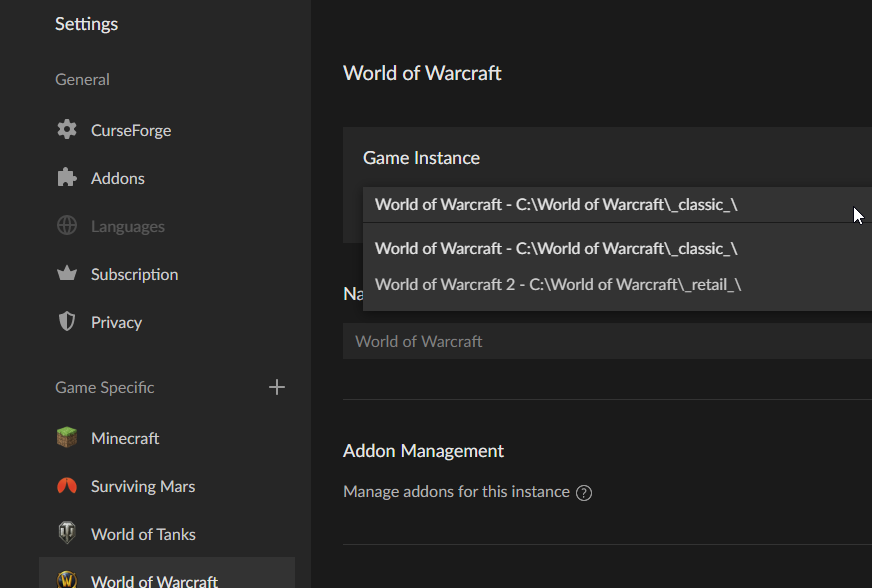
This one
Click the settings (cogwheel) down in the left, and then select World of Warcraft

 opal cipher
Open the version instance dropdown
formal pier
Yes...?
 unborn basin
So it looks like you have installed WoW twice: first one is under D:\games and the other is under D:\Program Files (x86)
formal pier
I had to move it there, as there wasn't enough space, on my C-drive
unborn basin
If you install addons under World of Warcraft 2 and your actual game runs from D:\Games you are not going to see the addons you've installed since it's located in a different directory
Makes sense?
formal pier
yes... it does
unborn basin
So.. the rest is up to you. Install the addons you'd like in the proper directory. If you want a quickfix you can copy your addons folder to the proper one, \World of Warcraft\_retail\_(or _classic_)\Interface\Addons
formal pier
if I move the one in Prgrames(x86), to the Games-folder, you think that would help a bit more?
unborn basin
Yes
Just a heads up - classic addons and retail addons are different, as as long as you copy addons that are supported in the same flavor it should be fine
formal pier
I have to go for Classic-addons, for the Classic-version, that's what you say?
unborn basin
If you copy your classic addons folder and paste it in the retail one - you're going to have a bad time
formal pier
Because I have downloaded some addons, moved the downloaded files to each folder, and unpacked it there?
how about vise versa? Same problem?
unborn basin
So if you move a Retail addon to your Classic addons folder, it will not necessarily work
And vice versa
That's all
unborn basin
Dudette it is then
lyric crescent
was it really necessary to point that out..
formal pier
To some it matters more than others...
but thanks .... I think I'll do a reboot, to be on the safe side
 steady parcel
Hi
So im trying to open curseforge
but
i keep getting an error
it goes to "forging your library"
then
after that it goes to another screen
thats like "oops"
queen storm
Try putting more in a single line
steady parcel
oh kk, sorry
queen storm
!ticket-site
red patioBOT
:bug: Reporting via Website :bug:
Can't open the app or would rather use the website? You can do so here: https://support.curseforge.com/en/support/tickets/new
Fill out the form with accurate detailed information, "It doesn't work" isn't helpful! What exactly doesn't work and why doesn't it work should be easy to answer!
Make sure to upload your Overwolf logs with the Upload File option on the ticket, information on how to get these logs can be found here https://support.overwolf.com/en/support/solutions/articles/9000176827-how-to-get-your-overwolf-logs
steady parcel
How long do they take to help on the website?

This is the screen I get and when I click retry it just goes to loading for around a half second and comes back here
lyric crescent
few days usually
lyric crescent
if we did we wouldnt suggest a ticket
steady parcel
Oh right, my bad, thanks
 next rain
How do I cancel the server subscription?
queen storm
What server subscription?
next rain
queen storm
What server subscription?
I don't understand what do you mean exactly?
opal cipher
And we don't know what you mean by server subscription, CurseForge doesn't handle servers.
queen storm
next rain
I don't understand what do you mean exactly?
How do I cancel the server subscription?
What server subscription?
next rain
queen storm
> How do I cancel the server subscription?
What server subscription?
I subscribed to the apex hosting server
formal pier
sorry to interfer, don't you have to have a "serversubscription" to get Curseforge?
queen storm
next rain
I subscribed to the apex hosting server
Ask them
queen storm
formal pier
sorry to interfer, don't you have to have a "serversubscription" to get Cursefor...
What is Curseforge+ ?
opal cipher
I think that was a thing back in the days, from the previous CurseForge, to get rid of ads on the website or something
queen storm
Wasn't called + though
formal pier
a miss-registration so to say... the computer/keyboard connection didn't register that I had my Shift-key pushed down
queen storm
Still: curseforge does nothing with servers
lyric crescent
Curseforge has a subscription to remove ads, but nothing related to servers or server subscriptions.
opal cipher
next rain
I subscribed to the apex hosting server
Should probably go to https://apexminecrafthosting.com/ and unsubscribe then.
 tight magnet
hey, it seems like my mod channels won't load it just looks like it's constantly loading
lyric crescent
What is a mod channel?
tight magnet
like the mod pack things that you click on
 viscid wren
hello!
So
I am using the Forge for 1.12.2 (atleast trying to)
every time i try to open any 1.12.2 installer it creates a .txt file
in notepad
but if i try to launch any other version forge launcher than 1.12.2 it works with no errors?
whats the issue here
lyric crescent
Curseforge isnt forge. Issues with forge should be in #👽︱game-support or their own discord.
viscid wren
lyric crescent
Curseforge isnt forge. Issues with forge should be in <#778097796410376242> or t...
whats their discord if you know by any chance?
lyric crescent
i dont have the link, google should work
viscid wren
Okay, thanks
 gray moth
How does it usually take for a project to be accepted or rejected?
 slim thunder
gray moth
How does it usually take for a project to be accepted or rejected?
slim thunder
gray moth
How does it usually take for a project to be accepted or rejected?
!status
red patioBOT
It is 05:58PM on Tuesday for CurseForge my dudes.
Project Moderation Time
Project/File moderation is done on Sunday - Thursday from 10am - 6pm GMT+2
This process is First in, First out. Thus files submitted late in the work day may not be checked until the next work day.
New Projects or uploads requiring manual approval: 1-3 Working Days
Updates to approved projects not needing manual approval: 1 Hour
File sync to the Curseforge app may take up to 24 hours after approval.
gray moth
Thank you, but damnit :c
digital roost
hello
you have a gun mode for maincraft
so
how can i charge the gun?
plz answer
queen storm
 shy dirge
how can i upload my modpack
queen storm
!mc-packshare
red patioBOT
There are two ways to share a modpack you've made with others...
Export and Share - For Friends to Small Groups.
- Click the Icon for the modpack.
- Click the button next to play.
- Click

Export. - Select the files that should be included.
- Send the zip to the people that want it! They can follow the instructions in
!mc-installpackto install the pack!
Upload to Curseforge - For Public Release to Everyone.
This options will make your pack public to EVERYONE, it comes with extra requirements and will take some effort to set up.
- Go to here: https://www.curseforge.com/project/432/4471/create
- Fill out the information with a proper description of the pack. This should allow anyone to understand what the pack is.
- Click the Icon for the modpack in the CurseForge app.
- Click the button next to play.
- Click
Export. - Select the files that should be included.
- Open your Project you made on the CurseForge site and Upload the file you just made.
- Wait for Moderation & Sync so it can show up in the client! (See
!syncfor limitations)
 gloomy rapids
The status of the file TMN_advancedVanilla has been changed to Processing
Invalid file extension, expected jar, litemod.
If you have any questions please contact our support team https://support.curseforge.com.
I have tryed to upload a Projekt on Curseforge. What this "Invalid file extension, expected jar, litemod." means?
lyric crescent
what are you trying to do
gloomy rapids
i wanted to publish a small modpack on curseforge. i exported the project in the curseforge launcher and tried to upload the zip.
queen storm
Link your project
queen storm
That is a mod project, not modpack
gloomy rapids
queen storm
That is a mod project, not modpack
when I try to upload the zip that I exported at the curseforge launcher, this message comes up that I wrote in the first message. I don't know why the file is not uploaded or where the error is. where can i see the link for my modpack? there is only export in the launcher
queen storm
gloomy rapids
when I try to upload the zip that I exported at the curseforge launcher, this me...
Because you are uploading to a mod, not to a modpack
lyric crescent
steady parcel
Hi
when i open curseforge

i get this screen
and after i while i get this screen:
queen storm
For how long?
 queen storm
So a couple hours ago we told you to make a ticket
steady parcel
i made one
queen storm
Did you make the ticket?
Then wait for a reply, we couldn't help you a couple hours ago, can't help you now
steady parcel
they responded once saying add whatever files and i sent the files
but they didnt respond three hours since then
lyric crescent
which is normal, tickets usually take a few days
steady parcel
oh okay
thanks
do you know of any other loaders i can use where i can customize modpacks?
gloomy rapids
queen storm
Because you are uploading to a mod, not to a modpack
what should I upload? As in other tutorials, I looked for the mods in the launcher, tested them and exported a zip. According to the tutorials, I should upload them to a project and wait for approval.
queen storm
gloomy rapids
what should I upload? As in other tutorials, I looked for the mods in the launch...
Modpack project yes
!mc-packshare
red patioBOT
There are two ways to share a modpack you've made with others...
Export and Share - For Friends to Small Groups.
- Click the Icon for the modpack.
- Click the button next to play.
- Click
Export. - Select the files that should be included.
- Send the zip to the people that want it! They can follow the instructions in
!mc-installpackto install the pack!
Upload to Curseforge - For Public Release to Everyone.
This options will make your pack public to EVERYONE, it comes with extra requirements and will take some effort to set up.
- Go to here: https://www.curseforge.com/project/432/4471/create
- Fill out the information with a proper description of the pack. This should allow anyone to understand what the pack is.
- Click the Icon for the modpack in the CurseForge app.
- Click the button next to play.
- Click
Export. - Select the files that should be included.
- Open your Project you made on the CurseForge site and Upload the file you just made.
- Wait for Moderation & Sync so it can show up in the client! (See
!syncfor limitations)
gloomy rapids
queen storm
Modpack project yes
that's exactly what I did. but this message comes up every time after uploading
queen storm
gloomy rapids
that's exactly what I did. but this message comes up every time after uploading
You made a mod project! Not modpack! https://i.imgur.com/AK15qc1.png
 gloomy rapids
the link takes me directly to the page where i created the project. That's exactly what I filled out and clicked on start project. the modpack is in my curseforge launcher where I click on export
lyric crescent
You need to select a modpack project to upload to. Not a mod project...
@gloomy rapids#📛︱rules 1
Overwolf
?ticket-app
red patioBOT
:bug: Reporting via the CurseForge App :bug:
-
Click the
 icon in the bottom left.
 -
Select

Open a Ticket. -
Fill out the form with accurate detailed information, "It doesn't work" isn't helpful! What exactly doesn't work and why doesn't it work should be easy to answer!
-
Make sure to upload your Overwolf logs with the
Upload Fileoption on the ticket, information on how to get these logs can be found here https://support.overwolf.com/en/support/solutions/articles/9000176827-how-to-get-your-overwolf-logs -
Submit!

 quartz mauve
hello can i ask on this discord server about my minecraft world?
 sudden oyster
Hi
 raw hamlet
Hi, I was looking for two mods on the client (Astral Sorcery and Observerlib) and even though they're on the website it's not showing up on the launcher. I was wondering if it's something to do with the client, something on the content creator's end, or if there's anything specific I need to do?
 tawdry pine
whats the best mod
steady parcel
minecraft
tawdry pine
but which mod on mc
queen storm
tawdry pine
but which mod on mc
queen storm
raw hamlet
Hi, I was looking for two mods on the client (Astral Sorcery and Observerlib) an...
Link the mod
signal ridge
Are you searching in add more content or modpacks?
queen storm
And for which minecraft version?
queen storm
Yeah, but they won't show up in 1.16.5
 tender iron
how do i get app to look for 2.5.1 under the new classic TBC it is only listing reg classics or do i have to wait on dev to put more out
queen storm
tender iron
how do i get app to look for 2.5.1 under the new classic TBC it is only listing...
Is that the version that was released today?
tender iron
yes
queen storm
Then patience is the way to go
tender iron
so ill go into bata a pull them out for now
raw hamlet
I'd have to wait for the mods to update or is there a way to search for them?
queen storm
Install them by hand and tell the dev to update the version tags
 fossil pecan
tender iron
how do i get app to look for 2.5.1 under the new classic TBC it is only listing...
fossil pecan
tender iron
how do i get app to look for 2.5.1 under the new classic TBC it is only listing...
i'd recommend having copies of the 2.5.1 versions of the more vital addons standing by for manual installation when the servers come up, just incase installation via the desktop app isn't available at that point
raw hamlet
okay thank you!
 viscid marten
!status
red patioBOT
It is 08:31PM on Tuesday for CurseForge my dudes.
Project Moderation Time
Project/File moderation is done on Sunday - Thursday from 10am - 6pm GMT+2
This process is First in, First out. Thus files submitted late in the work day may not be checked until the next work day.
New Projects or uploads requiring manual approval: 1-3 Working Days
Updates to approved projects not needing manual approval: 1 Hour
File sync to the Curseforge app may take up to 24 hours after approval.
signal ridge
digital roost
!mc-installfix do this
red patioBOT
- Click on the Minecraft Tab on the Left side of the App.
- Click button next to the
Create Custom Profileoption. - Click

Repair Installationoption. - Play game.
NOTE: You will not lose any modpacks or worlds, These are saved in the Instances folder. DO NOT TOUCH THIS FOLDER OR YOU WILL LOSE EVERYTHING
signal ridge
digital roost
I got this crash report when I tried to play my modpack what does it mean?
Looks like an issue with mekanism
 unborn sundial
hello i'l tried to install pokehaan craft in curse but i have an error report
traduction : unable to update native minecraft launcher
 queen storm
!mc-installfix
red patioBOT
- Click on the Minecraft Tab on the Left side of the App.
- Click button next to the
Create Custom Profileoption. - Click
Repair Installationoption. - Play game.
NOTE: You will not lose any modpacks or worlds, These are saved in the Instances folder. DO NOT TOUCH THIS FOLDER OR YOU WILL LOSE EVERYTHING
digital roost
signal ridge
!mc-installfix do this
k
 wind harness
!status
red patioBOT
It is 09:35PM on Tuesday for CurseForge my dudes.
Project Moderation Time
Project/File moderation is done on Sunday - Thursday from 10am - 6pm GMT+2
This process is First in, First out. Thus files submitted late in the work day may not be checked until the next work day.
New Projects or uploads requiring manual approval: 1-3 Working Days
Updates to approved projects not needing manual approval: 1 Hour
File sync to the Curseforge app may take up to 24 hours after approval.
 jagged quartz
so, my project still hasn't been approved and i'm wondering if i need to make a new one for them to actually do mine
signal ridge
When did you submit your file?
jagged quartz
on thursday of last week, i completed the edits needed on firday and have been making slight edits since sunday, trying to ping the admins this way
signal ridge
So friday-saturday are days off. When you were asked to make edits it took you out of the queue and put you back at the end when it was done. Takes 1-3 working days
jagged quartz
so, it should be done sometime today
red patioBOT
It is 09:42PM on Tuesday for CurseForge my dudes.
Project Moderation Time
Project/File moderation is done on Sunday - Thursday from 10am - 6pm GMT+2
This process is First in, First out. Thus files submitted late in the work day may not be checked until the next work day.
New Projects or uploads requiring manual approval: 1-3 Working Days
Updates to approved projects not needing manual approval: 1 Hour
File sync to the Curseforge app may take up to 24 hours after approval.
jagged quartz
yea, i know
lyric crescent
making slight edits will not help you, if anything it would push the project back to the end
jagged quartz
usually, i check it for sure at around 11:30 pm
jagged quartz
lyric crescent
making slight edits will not help you, if anything it would push the project bac...
ok, thats anoying
lyric crescent
i mean.. trying to be annoying is also annoying
just wait patiently like everyone else
jagged quartz
yea, i guess
ok
btw, imma look for the self advertising room and say the name of my modpack for if anyone wants to play it and when it is approved
signal ridge
This for minecraft?
lyric crescent
perhaps wait until it's approved
viral briar
Get the mc role too then
jagged quartz
idk how to get it
signal ridge
Same way you got the amung us one
jagged quartz
and idk how i even got the among us role
signal ridge
jagged quartz
thanks
signal ridge
Id still hold off on posting till your pack is approved. Less confusion that way
jagged quartz
ok
 full siren
when i go into curseforge and try to play rlcraft it just calls me player and i need help
lyric crescent
log out, then log into your account
 autumn island
for about the last 5 minutes ive been trying to open curseforge and it shows the loading "Launching app on Overwolf..." screen but crashes immediately after the loading bar fills up. any clue why??
autumn island
nvm i fixed it
 still spear
when it says lets get started on Minecraft and i press continue it says invalid file
lyric crescent
?mc-installfix
red patioBOT
- Click on the Minecraft Tab on the Left side of the App.
- Click button next to the
Create Custom Profileoption. - Click
Repair Installationoption. - Play game.
NOTE: You will not lose any modpacks or worlds, These are saved in the Instances folder. DO NOT TOUCH THIS FOLDER OR YOU WILL LOSE EVERYTHING
fleet bear
still spear
when it says lets get started on Minecraft and i press continue it says invalid ...
!mc-path
red patioBOT
**Minecraft Files should NOT be installed inside the following locations
.minecraft folder.
OneDrive folders.
Desktop folder.
Drive roots I.E. Directly into the C:\ drive.
iCloud enabled folders.
If any of the above are in the path you need to change/move it by following the instructions below!**
If Minecraft is not installed in CurseForge App, start here.
Click the  in the top left.
Select Minecraft.
Click "Edit".
Move to the "Continue here:" section below.
If Minecraft is installed in CurseForge App, follow these steps.
Click the  in the bottom left.
Select the Minecraft tab.
Click "Change".
Move to the "Continue here:" section below.
Continue here:
Make a folder in the root directory called CurseForge.
Select the folder you just made.
The text box should show something like the following:
For Windows: C:\CurseForge
For Mac: /Users/Shared/CurseForge

 snow briar
good night
to someone who can help me
 still spear
plz help

 crimson talon
Hello, can a get a link to the policy/license on using the CF discord emoji in another discord server? this one
fleet bear
still spear
plz help
Restart the app and try again?
still spear
did that
 gloomy musk
how can you download minecraft it says launch game fail
still spear
what
digital roost
How do i get the second minecraft skin layer to render in 3d, fabric loader?
fleet bear
crimson talon
Hello, can a get a link to the policy/license on using the CF discord emoji in a...
There's no branding guidelines for CF.
There's nothing wrong with using it as an emoji somewhere else.
fleet bear
still spear
did that
!mc-installfix
red patioBOT
- Click on the Minecraft Tab on the Left side of the App.
- Click button next to the
Create Custom Profileoption. - Click
Repair Installationoption. - Play game.
NOTE: You will not lose any modpacks or worlds, These are saved in the Instances folder. DO NOT TOUCH THIS FOLDER OR YOU WILL LOSE EVERYTHING
fleet bear
gloomy musk
how can you download minecraft it says launch game fail
See the above.
crimson talon
Thanks. I will need an explicit permission from someone from CF or an online license to be able to add it. The branding link on the CF page points to Overwolf
fleet bear
You don't need explicit permission to use a companies branding in this way though.
fleet bear
digital roost
How do i get the second minecraft skin layer to render in 3d, fabric loader?
That sounds like an issue for you to take to the fabric people or whatever mods that do that.
crimson talon
You are probably right, but thats the policy we have. We need something like this https://github.com/logos or this https://www.overwolf.com/brand-guidelines but for CurseForge
red patioBOT
:bug: Reporting via Website :bug:
Can't open the app or would rather use the website? You can do so here: https://support.curseforge.com/en/support/tickets/new
Fill out the form with accurate detailed information, "It doesn't work" isn't helpful! What exactly doesn't work and why doesn't it work should be easy to answer!
Make sure to upload your Overwolf logs with the Upload File option on the ticket, information on how to get these logs can be found here https://support.overwolf.com/en/support/solutions/articles/9000176827-how-to-get-your-overwolf-logs
crimson talon
ok thanks Claycorp
 sick pivot
I just updated my minecraft mod pack to a new version and while I've had long waits in the past this time everything went smoothly and the approval came quite fast. I figure I should drop in here and say I appreciate that.
digital roost
Anyone know if there is a way to see an ETA for manual approval of a new project?
lyric crescent
!status
red patioBOT
It is 12:08AM on Wednesday for CurseForge my dudes.
Project Moderation Time
Project/File moderation is done on Sunday - Thursday from 10am - 6pm GMT+2
This process is First in, First out. Thus files submitted late in the work day may not be checked until the next work day.
New Projects or uploads requiring manual approval: 1-3 Working Days
Updates to approved projects not needing manual approval: 1 Hour
File sync to the Curseforge app may take up to 24 hours after approval.
digital roost
lyric crescent
!status
Hey if thats for me I'm asking for specific projects not in general
lyric crescent
that is the only eta
sick pivot
You can't get a specific time table. Sometimes it takes a while. Today they were really quick with me and I came to actually say I appreciated it. On average though it's between a couple of hours and a couple of days. It really depends on how busy things are. You can speed up the process a bit by only using hosted mod packs and sticking within a standard framework.
I had an issue where I kept getting weird rejections and it turned out to be because I compressed my custom resource pack and it was showing up somehow has an unsupported mod. I had to put in a ticket for that, I was SO confused. Took a few weeks for even the staff to figure it out. lol
It also helps if you start small and build up with small changes and additions. That way what you have changed can be checked quickly, approved or rejected, and then they can get on to the next person. 🙂
fleet bear
There is no special treatment for specific projects. There's just one big queue split up by game type.
 quiet shale
is it possible to add / remove mods from a modpack through curseforge?
fleet bear
!mc-modifypack
red patioBOT
How to add/remove mods in a modpack.
- Click on the picture of the modpack.
- Click the

Add More Contentbutton, IF this button is not there, see below before continuing. - Find the Mods, Resource Packs or Maps you wish to Install and click
Installon them. - Wait for all the required mods to be downloaded.
- Start the modpack.
How to Enable/Disable content management for modpacks.
- Click on the picture of the modpack.
- Click on the button next to the
Playbutton. - Click on

Profile Options. - Check the
Allow content management for this profileoption if you want to edit the content of the modpack, uncheck it to disable.
NOTE: The Allow content management for this profile option is what allows you to Delete, Disable, Update or Install any Mods, Resource Packs or Maps managed by CurseForge. It must be on to modify any of them! (Currently)
quiet shale
thanks
digital roost
Every time I try to run the installer, it puts this on my desktop and just doesnt open at all.
fleet bear
That's not a CurseForge problem.
fleet bear
 terse jewel
I am having difficulty downloading updates to my Warcraft mods. I click on the update button and all i get is "General Install Error." What is going on? Any help appreciated. Thanks!
fleet bear
terse jewel
I am having difficulty downloading updates to my Warcraft mods. I click on the u...
Did you try a PC restart yet by chance?
 cunning spindle
every time I try to launch HR new beginnings 2 i get taken out of the launcher and "fml early progress" pops up then it crashes, I have no idea how to fix it and the crash report is just a bunch or robot language that I cant read.
fleet bear
Not a CurseForge problem #👽︱game-support
 fallow raptor
oh ok sorry
terse jewel
fleet bear
Did you try a PC restart yet by chance?
Yes several times
fleet bear
terse jewel
Yes several times
Ok, Gonna need to do a support ticket for that one. I don't know what all triggers it.
!bug-app Make sure to include your logs and mention my name somewhere in the ticket.
red patioBOT
:bug: Reporting via the CurseForge App :bug:
-
Click the
icon in the bottom left. -
Select
Open a Ticket. -
Fill out the form with accurate detailed information, "It doesn't work" isn't helpful! What exactly doesn't work and why doesn't it work should be easy to answer!
-
Make sure to upload your Overwolf logs with the
Upload Fileoption on the ticket, information on how to get these logs can be found here https://support.overwolf.com/en/support/solutions/articles/9000176827-how-to-get-your-overwolf-logs -
Submit!
fleet bear
 brave current
Hello I am having a game breaking problem
My addons are getting shared between classic and retail.
When I delete retail addons it deletes them for classic so it's impossible to play both with this tool.
 sleek stirrup
wow
brave current
Yes, big bad horrible bug
sleek stirrup
have you tried uninstalling and reinstalling the addons?
oh nvm, I just got what you mean
brave current
Yeah it's nuts.
sleek stirrup
maybe try uninstalling and reinstalling curseforge
brave current
Yep tried it
Plus if I uninstall again I will have to resetup all my bars for classic again.
What else is strange is that when I toggle classic and world of warcraft it shows DIFFERENT ADDONS as if they weren't synced.
sleek stirrup
you mean classic vs retail?
brave current
Yeah but it doesn't say retail it just says World of Warcraft.
lyric crescent
#📛︱rules 4, keep it here.
probably gunna need to make a ticket, dont think anyone is around that knows wow stuff
fleet bear
Whos that to?
lyric crescent
?ticket-app
red patioBOT
:bug: Reporting via the CurseForge App :bug:
-
Click the
icon in the bottom left. -
Select
Open a Ticket. -
Fill out the form with accurate detailed information, "It doesn't work" isn't helpful! What exactly doesn't work and why doesn't it work should be easy to answer!
-
Make sure to upload your Overwolf logs with the
Upload Fileoption on the ticket, information on how to get these logs can be found here https://support.overwolf.com/en/support/solutions/articles/9000176827-how-to-get-your-overwolf-logs -
Submit!
fleet bear
The app shouldn't be giving you addons for classic if you have retail selected.
brave current
 sleek stirrup
Ya, that's really strange, wish I could help but I've never had that issue before. Only other thing could think is make sure that the version is 1.13 as opposed to 9.0.5, when you are getting more addons
brave current
If you look, some are for retail and some are for classic.
fleet bear
are you using sync?
brave current
Yep.
sleek stirrup
wow, I always wondered what that does
fleet bear
Sync doesn't understand the separation between everything from my understanding.
brave current
Okay I disabled sync, how do I try to fix it?
Classic is correct, all my addons are for 1.13
fleet bear
installing the correct ones should fix it.
brave current
But retail has my classic addons and if I delete them it deletes them from classic.
fleet bear
then it won't mess them up anymore.
backup your configs.
delete the broken ones, install the correct addons for retail, then do so for classic and it should work fine
brave current
That fixed it.
fleet bear
They are working on getting stuff fixed, it's just slow when you have a 1000 problems. They are currently trying to get support done for all the new stuff coming out too.
brave current
I was able to delete my addons and readd them and now they are good thanks.
I honestly wish I could not use a mod manager but it takes forever and all the mods are hosted on manager sites.
It was so much simpler in the past when all you do is copy files.
fleet bear
That might be an option eventually.
I'm trying to get better site support for downloading content and getting the required files with it.
 formal mantle
fleet bear
cunning spindle
formal mantle
fleet bear
cunning spindle
well i went to community support and no one is helping me out. Ive been trying to fix fml early loading progress for an hour. No one is helping me.
 last trail
I'm trying to set up a minecraft server and it keeps showing up with this error code "NoInternetConnectivityMinecraftForgeNet" anyone know a potential fix?
 humble jolt
my RLcraft minecraft is stopping me from playing on my server
fleet bear
last trail
I'm trying to set up a minecraft server and it keeps showing up with this error ...
!notcf
red patioBOT
The question you are asking about isn't related to CurseForge. Please use the appropriate game rooms by getting the role from #786424115535544350 or use #👽︱game-support for help.
This room is only for CurseForge Owned & Maintained features/services.
last trail
I managed to figure out the issue
fleet bear
digital roost
helpl
- don't spam.
- post the problem otherwise nobody can help you
last trail
I manually put the forge version in the server files
digital roost
I just want to have a modpack that is like private but can only be shared with a link
on curseofrge
fleet bear
why does it need to be on curseforge?
just share the file you make via any file sharing service or even discord.
 slate roost
i have a question
im new on here so yea
everytime i load up the modpack
like it goes to the screen it loads all the mod then the minecraft screen goes and doesnt come back
kinda crazycradt modpack btw
signal ridge
slate roost
like it goes to the screen it loads all the mod then the minecraft screen goes a...
!mc-installfix try this
red patioBOT
- Click on the Minecraft Tab on the Left side of the App.
- Click button next to the
Create Custom Profileoption. - Click
Repair Installationoption. - Play game.
NOTE: You will not lose any modpacks or worlds, These are saved in the Instances folder. DO NOT TOUCH THIS FOLDER OR YOU WILL LOSE EVERYTHING
slate roost
ok im trying it now
 tight breach
if anyone is available, I'm having an issue with minecraft modpacks on curseforge. Everytime I try to download a modpack for version 1.15.2 or later, it gives an error saying "No Java executable found. Cannot execute post-installation tasks for Forge". I uninstalled Java on my machine and redownloaded the latest version, but it didn't fix anything. I know it isn't an issue with minecraft either because the latest version of vanilla Java minecraft runs fine.
slate roost
slate roost
ok im trying it now
it doesnt work ill try again later
fleet bear
tight breach
if anyone is available, I'm having an issue with minecraft modpacks on curseforg...
click the 3 dots next to the create profile button and click the Run Vanilla Minecraft option. Load up a world and then exit to start the pack.
 quartz oriole
Just a general question, but what does the "Hardcore" icon mean with the modpacks? Does it set you into hardcore mode, or is it more just how hard the mod can relatively be?
fleet bear
It's just a category to show it's a "hardcore" style pack.
quartz oriole
So just expect some pain, then?
fleet bear
possibly yes.
tight breach
fleet bear
click the 3 dots next to the create profile button and click the `Run Vanilla Mi...
I tried it, but the same error occured during the modpack download. In case it matters, the error always occurs during the portion of the download that says "fetching java runtime files".
 severe tundra
so i downloaded the create mod from zedaph's description but i don't know how to get it onto curseforge and play it
fleet bear
tight breach
I tried it, but the same error occured during the modpack download. In case it m...
restart the app
tight breach
I did.
tight breach
fleet bear
restart the app
I did. I'm new to discord, so I'm sending the same message in a reply because I don't know if u will see it if it isn't in a reply.
fleet bear
So you used the run vanilla minecraft, it opened the launcher and you started a world then closed the vanilla launcher?
 icy scaffold
hi there, was wondering how can the zygor addon aint on curse?
fleet bear
Ask the people who make it
icy scaffold
well they dont respect the tos anyway but, as long the credit is given and everything, could someone else actualy post it or would that be a prob?
tight breach
fleet bear
So you used the run vanilla minecraft, it opened the launcher and you started a ...
Yeah. I did the run vanilla minecraft, made a world, exited. Just for good measure I opened it again, loaded the world, and exited. I tried to download, it didn't work. I exited the browser and tried to download again and it gave the same error message.
fleet bear
icy scaffold
well they dont respect the tos anyway but, as long the credit is given and every...
The makers need to post it.
fleet bear
tight breach
Yeah. I did the run vanilla minecraft, made a world, exited. Just for good measu...
restart your computer
icy scaffold
mm k so they basicaly scam ppl by selling something they are not allowed to and even if giving the credit no one else can rha hate this xD
so be it
 frail plover
i have tryed to downlode forge for modded mincraft but can not seem for the life of me to be able to set it up with the mod folder thing
signal ridge
Forge or Curseforge?
frail plover
curseforge srry
signal ridge
Whats the error your getting?
tight breach
fleet bear
restart your computer
Just got back from the restart. The same error keeps coming up.
frail plover
signal ridge
Whats the error your getting?
nvm me so sorry but hay love that bearded dragon
fleet bear
icy scaffold
mm k so they basicaly scam ppl by selling something they are not allowed to and ...
That has nothing to do with curseforge. Don't like it report it to the game devs.
 night stream
Hi i was wondering how do i switch the minecraft account that the mods go to?
fleet bear
night stream
Hi i was wondering how do i switch the minecraft account that the mods go to?
you log into the account.
fleet bear
tight breach
Just got back from the restart. The same error keeps coming up.
then open a support ticket
night stream
on what minecraft or curseforge
fleet bear
!bug-app
red patioBOT
:bug: Reporting via the CurseForge App :bug:
-
Click the
icon in the bottom left. -
Select
Open a Ticket. -
Fill out the form with accurate detailed information, "It doesn't work" isn't helpful! What exactly doesn't work and why doesn't it work should be easy to answer!
-
Make sure to upload your Overwolf logs with the
Upload Fileoption on the ticket, information on how to get these logs can be found here https://support.overwolf.com/en/support/solutions/articles/9000176827-how-to-get-your-overwolf-logs -
Submit!
fleet bear
night stream
on what minecraft or curseforge
Why would curseforge have anything to do with your minecraft account?
night stream
i am just asking how to switch accounts not to put a complaint or anything
signal ridge
As in log out and back into a different minecraft account?
tight breach
fleet bear
!bug-app
Once I submit the ticket, where should I check for a response?
fleet bear
your email
 wet dagger
Hello, I am trying to log into curse forge on the desktop but it is just
loading. Any suggestions?
fleet bear
wet dagger
Hello, I am trying to log into curse forge on the desktop but it is just
loadi...
You don't need to log in to use the app.
If you are having issues you would be best off reaching out to support for that.
!ticket-app
red patioBOT
:bug: Reporting via the CurseForge App :bug:
-
Click the
icon in the bottom left. -
Select
Open a Ticket. -
Fill out the form with accurate detailed information, "It doesn't work" isn't helpful! What exactly doesn't work and why doesn't it work should be easy to answer!
-
Make sure to upload your Overwolf logs with the
Upload Fileoption on the ticket, information on how to get these logs can be found here https://support.overwolf.com/en/support/solutions/articles/9000176827-how-to-get-your-overwolf-logs -
Submit!
fleet bear
!notcf
red patioBOT
The question you are asking about isn't related to CurseForge. Please use the appropriate game rooms by getting the role from #786424115535544350 or use #👽︱game-support for help.
This room is only for CurseForge Owned & Maintained features/services.
fleet bear
Whatever is appropriate. Read the room description.
 near ridge
Hey is anyone else having the issue that their game is insta crashing while loading with unexpected issue 0 i was playing yesterday and now its just not working
 thin sundial
Is there anyway to link my modpack from CurseForge App to the website? I had to make a separate project to post it to the website but I'd love to be able to edit the packs files from CF app
fleet bear
thin sundial
Is there anyway to link my modpack from CurseForge App to the website? I had to ...
the app and site are two separate things. It doesn't work like that
 obtuse citrus
The app is not showing wow pre patch version 2.5.1. My game is updated.
 steel oriole
i need help
please
i have a decent computer and my game is so laggy once i download a mod pack....But my friends have worse computers and its running fine
 thorn anchor
Dont doubt about it, actually ur computer is the worst among ur friend
steel oriole
i just spent 1200 on building it and his cost 200 dollars
i know for a fact his is worse
fleet bear
!notcf
red patioBOT
The question you are asking about isn't related to CurseForge. Please use the appropriate game rooms by getting the role from #786424115535544350 or use #👽︱game-support for help.
This room is only for CurseForge Owned & Maintained features/services.
calm nebula
!status
red patioBOT
It is 08:34AM on Wednesday for CurseForge my dudes.
Project Moderation Time
Project/File moderation is done on Sunday - Thursday from 10am - 6pm GMT+2
This process is First in, First out. Thus files submitted late in the work day may not be checked until the next work day.
New Projects or uploads requiring manual approval: 1-3 Working Days
Updates to approved projects not needing manual approval: 1 Hour
File sync to the Curseforge app may take up to 24 hours after approval.
 wild relic
so
TBBC Addons
are not showing up
on curse forge
when i click install nothing happens

that is the current version of questie but curse only shows the one from april
queen storm
wild relic
so
How about not breaking rules? Rule 5
 lavish ingot
Hello there, I "purchased" some paypal coupons with rewards store points and it look like it was never credited to my paypal account, could I get some help ?
 scenic cradle
quick question when will tbc classic be updated for curseforge?
 livid dew
the curseforge app still thinks i'm in classic 1.13 while I'm actually running TBC now.
how do we get it to recognize TBC client?
wild relic
u guy's have literally had a week to work on this
 boreal shale
@queen storm forgive my ignorance but does that announcement mean they are working on getting the client to work for TBC? I dont see anything about having to do anything on my end. Thank you 🙂
wild relic
same
queen storm
wild relic
u guy's have literally had a week to work on this
Welcome to development
queen storm
boreal shale
<@525950791710801921> forgive my ignorance but does that announcement mean they ...
There is nothing you can do at this point
boreal shale
okay thought so, thank you.
lavish ingot
queen storm
They get handled at the start of the next month I believe
I'll wait a bit more then
wild relic
its not like TBBC was a suprise for at least the last month they have even had a beta running was the team just to small or were u not given enough money/resources from overwolf
queen storm
- I don't work for them.
- This is not the only thing that is going on
 boreal shale
A very /slight/ work around @wild relic if you are very urgently requiring addons. There are a few addons that are compatible with the current version of TBCC but you will have to put in some work on your end if you truly cannot wait. If you are familiar with the old way of installing addons manually then you can go to the website and locate ones that have been updated within the past ~12 hours or so and those seem to work. Bartender works for me without running into any errors. I would explain step by step but I'm sure you can figure it out if it means that much to you 🙂
Edit Questie works as well with this method
Just make sure you delete the incompatible addons and replace them with the updated versions in the Classic folder. Don't install them in the classic_era as that one seems to not be linked to TBCC
 glossy rivet
I reeeeaaaally don't want to have to manually download and install 50+ addons 
boreal shale
Then yeah you'll have to wait until the devs finish their work 🙂
wild relic
Yeah
i have almost 40
i've done important ones by hand
the ones i cant live without
bartender and questie
 crisp marsh
HELLO! When does Curse update the Classic Client for TBC so i can update my addons from 1.3.7 tooooooo 2.5.
queen storm
crisp marsh
HELLO! When does Curse update the Classic Client for TBC so i can update my addo...
Scroll up please
crisp marsh
queen storm
Scroll up please
Sooooo.... I gotta wait?
queen storm
Yes
boreal shale
I posted a small work around if you are comfortable finding the information on your own on how to do it if you need them urgently
However this fix only works for addons that are compatible with 2.4.3
I can confirm questie and bartender work
crisp marsh
boreal shale
I posted a small work around if you are comfortable finding the information on y...
Ik, but i use curse cause i dont have to do that.. BUT if curse is as slow as blizz.. I'm out
wild relic
@crisp marsh they really had time to actually work on this and should have pushed it out yesterday its not like TBBC was a surprise or anything curse under twitch leadership would have had it ready day one i think curse under overwatch is gonna be doomed

 wind hatch
lavish ingot
Hello there, I "purchased" some paypal coupons with rewards store points and it ...
wind hatch
lavish ingot
Hello there, I "purchased" some paypal coupons with rewards store points and it ...
DM me your order # please and I'll have a check 🙂
hey all, regarding BCC support in the client and updating from Classic -> BCC -
It's coming in the next app version which will be deployed later on today.
'Update All' should then properly pull the new BCC versions of your favorite addons (of course if the authors uploaded them)
fleet bear
wild relic
<@!185434738641600512> they really had time to actually work on this and shoul...
Mate, they are working in a legacy system that most of witch has been cobbled together over 14 years.
Stuff doesn't magically happen over night and they would like to properly support all the changes instead of adding onto the mess.
If you dont like that then I'm not sure what you really want from them.
wild relic
which*
fleet bear
Good for you, you noticed autocorrect making a mistake, want a gold star?
wind hatch
BCC is more than just another game version as you know very well - it'll be out later today and is our top priority at the moment 🙂
 gray moth
!status
red patioBOT
It is 12:38PM on Wednesday for CurseForge my dudes.
Project Moderation Time
Project/File moderation is done on Sunday - Thursday from 10am - 6pm GMT+2
This process is First in, First out. Thus files submitted late in the work day may not be checked until the next work day.
New Projects or uploads requiring manual approval: 1-3 Working Days
Updates to approved projects not needing manual approval: 1 Hour
File sync to the Curseforge app may take up to 24 hours after approval.
opal cipher
fleet bear
Good for you, you noticed autocorrect making a mistake, want a gold star?
Speaking much with witches then? Since autocorrect predicts use after what you've typed earlier!
viral briar
you can't
 vale axle
😱
I hope it will be planned in future, because I had things to do on direwolf20 1.1.2.2
queen storm
Start the game, close curseforge
As long as the game is running you can disable your internet
vale axle
I can't, I have no internet at the moment, unless you didn't read above I'm using data
queen storm
And I am telling you a way to start it with internet, then disable it.
But need to install it first of course
vale axle
Ugh
vale axle
Curseforge should have a offline mode feature if you want to switch to it, think about it.
queen storm
vale axle
Curseforge should have a offline mode feature if you want to switch to it, think...
It is on the feedback tracker already
 outer torrent
How do i search by Project ID?
queen storm
Put it in the search field
outer torrent
just the number?
queen storm
Yes
 viscid kestrel
Hey i need help with Curse Forge
queen storm
Waits for issue
viscid kestrel
I have Wow TBC installed and ive downloaded some addons for it, theyre coming up with the error "This addon might be corrupt (Belongs to 'Classic TBC').
queen storm
Burning Crusade Classic is here and we are here to help you transition smoothly!
When opening the app for the first time after you updated your game from Classic to BCC, a lot of your addons are likely to still be set as "Classic" versions.
Update them in order to get the BCC supported ones - you can do that one at a time or with the "Update A...
Labels
Product, Community, WoW
viscid kestrel
i havent gotten that popup sayings things have converted, it seems to think the only version i have is classic although i have both versions installed
queen storm
It is still WIP
viscid kestrel
Is classic_era supposed to be tbc?
 prisma scroll
So if Curse says all the addons are up to date, but the highest game version is 1.13.7, is that a Curse problem or an addon problem?
outer torrent
i tried searching by project Id but it isnt working
queen storm
outer torrent
i tried searching by project Id but it isnt working
Link it
outer torrent
i can't im looking for this mod the id is 418018
 hollow hound
Hi, tell me how to install addons on TBC WoW in the application available 1.13.5
queen storm
outer torrent
i can't im looking for this mod the id is 418018
Which is from?
queen storm
hollow hound
Hi, tell me how to install addons on TBC WoW in the application available 1.13.5
Check last pinned message
outer torrent
queen storm
Which is from?
Im looking for the mod Fisk File's superheroes so i can suggest it to Aternos (a minecraft server website) which only accepts curse forge links. So i tried to upload it myself but it says that its already there.
 wraith crane
queen storm
Check last pinned message
wraith crane
queen storm
Check last pinned message
we are just waiting for curse side to update? - if i click on pinned messages i do not see any messages from you
Sorry i know you would have been getting this question all day :p
queen storm
outer torrent
Im looking for the mod Fisk File's superheroes so i can suggest it to Aternos (a...
Then the project got removed
queen storm
wraith crane
we are just waiting for curse side to update? - if i click on pinned messages i ...
Yes, and it wasn't my message
outer torrent
queen storm
Then the project got removed
is there any way for me to still upload it?
queen storm
outer torrent
is there any way for me to still upload it?
No, as it isn't your mod
boreal shale
Hey everyone the current version of Curseforge is not compatible with the current version of TBCC. It is being worked on and will be released at some point today. However, most of the popular addons have been updated by their publisher(questie included) and if you don't want to wait for the new curseforge update then you will need to manually add them to your addons folder. Here are 4 very simple steps to manually update addons.
- Download updated addon from https://www.curseforge.com/wow/addons
2)Open ' World of Warcraft\ classic\Interface\AddOns ' and delete existing addon that you wish to update(Deleting the existing addon is a critical step. Your settings will still be saved)
- Extract new download into same AddOns directory
4)Relaunch WoW
hollow hound
boreal shale
A very /slight/ work around <@!193896815245000705> if you are very urgently requ...
thanks
wraith crane
will this lose your previous data and configurations?
boreal shale
No
that information is stored in your WTF folder(which you should back up semi-regularly) 🙂
wraith crane
That's awesome then 🙂
boreal shale
@queen storm I made a short step by step if youd rather pin that instead. Might make things easier on people that are running into the same issue and don't know how to change addons manually
queen storm
boreal shale
Hey everyone the current version of Curseforge is not compatible with the curren...
queen storm
boreal shale
<@!525950791710801921> I made a short step by step if youd rather pin that inste...
Switched pins
 tight holly
Hi! Is the curseforge addon up to date with all its addons?
boreal shale
They are releasing a new client today that will support TBCC if thats what you are referring to
tight holly
Okey, thanks 🙂
boreal shale
new update rather
tight holly
And if i want my addons to be up2date now that prepatch launches in 5 minues, i need to manually download them from the site?
boreal shale
If you want them right away then yes so long as the author has updated their addon to work with 2.4.3. Otherwise if you are patient at some point today the update for Curseforge client /should/ be released
But as of right now you have to update your addons manually.
tight holly
Okey, thanks for the help :)!
 finite shard
so, all my addons say they are up to date on Curseforge, but when i log in to WoW BCC, everyone of them says out of date.... does this mean that there aren't versions of them for BCC yet?
boreal shale
most likely the author hasnt published a version compatible with 2.4.3. That being said technically the version of bartender I have installed is for Retail WoW but it works in classic. Also the version of questie I am using is for 1.13. Most authors likely havent officially released their addon for 2.4.3 yet.
finite shard
thanks
boreal shale
Actgually no I lied the version of questie I have is 2.5.1
 outer valve
Is it possible to update CurseForge so it recognizes my wow client as BCC?
boreal shale
You have to wait for the Devs to release an update coming later today
outer valve
Oh, thanks. Was confused about support msg that I should get a popup window
boreal shale
Yeah we're in that dev limbo right now. It happens on most platforms from what I understand. Since Curseforge is not affiliated with Blizzard they can't just release a build in tandem with a major release.
At lease thats how it was explained to me 😄
outer valve
All g, manual downloading/updating is a go then 😄
lyric crescent
Blizzard does not care. That is for sure.
boreal shale
Blizzard: Major release
3rd party devs: But wait
Blizzard: Good luck
sound about right?
 dim oxide
I’m not clear on how you can manually download the TBC addons, when you already have the CurseForge client installed. Every time I try, my computer launches the client and I’m at a full stop. Help?
unborn basin
viscid kestrel
Is classic_era supposed to be tbc?
Nope, it's the old classic, but new
 azure meadow
Is there a general timeline as to when we might expect TBC to show up in the desktop client?
lyric crescent
soon
boreal shale
@dim oxide if you go directly to the addons page on Curseforge and click download (not install) it should prompt you with a count down timer saying your download is getting ready and will start automatically if not click here etc. If you click on the anvil it will launch Curseforge
addon's*
dim oxide
@boreal shale, And then I have to follow the steps in your pinned message correct?
boreal shale
yes
dim oxide
OK, I'm hoping the client will be updated this morning. If this afternoon rolls around, and it's still a problem, I'll try the manual install method for absolutely essential stuff.
 bleak delta
hello... i have this problem... everytime i try to download a modpack... can someone help me?
 viral briar
webclient request usually points to your internet connection, wired connection is better than a wifi connection for instance
but if not, usually resetting router/modem and having only curseforge app open to download will help , do not watch youtube, stream music , movies whilst downloading curseforge stuff
unborn basin
Also you can try using a mobile hotspot, might work
viral briar
have seen people do that in the past with bad internet for a day and does work quite well.
 hidden talon
Will curseforge app automatically update? If not how can I make sure it updates so I can get those tasty TBCC addons
steady parcel
Curseforge still isnt working for mee
boreal shale
@steady parcel check pin
steady parcel
i made a ticket they responded saying try this version
lyric crescent
hidden talon
Will curseforge app automatically update? If not how can I make sure it updates ...
When an update is available, simply restarting curseforge will update.
steady parcel
boreal shale
<@!255480557599719424> check pin
oh my bad
I mean i said this before and i was told they couldnt help me and to make a ticket
so made a ticket
boreal shale
What kind of issue are you having with curseforge? Classic addon install?
Or is it a client functionality issue
steady parcel
client
boreal shale
I had some issues getting curseforge to run on my PC, what issue were you having?
steady parcel
When I open the app it says

then after that
it says like
"oops"
and then something
but when i clicked retry it just went back to the oops screen
boreal shale
Do you have any applications that monitor your fan speed?
boreal shale
Oh
steady parcel
 boreal shale
Thats unfortunate
steady parcel
This is the screen btw
I mean I can tell when my laptop's fans are going faster because
well
i hear it and feel it
boreal shale
Well I only ask because there is this weird issue with curseforge compatibility and some fan monitoring applications. I had this issue for the longest and after some digging and trial and error I found it was some old fan monitoring application that was running in the background
and it solved all my issues
not your issue, but just saying thats how finicky it can be
red patioBOT
:bug: Reporting via Website :bug:
Can't open the app or would rather use the website? You can do so here: https://support.curseforge.com/en/support/tickets/new
Fill out the form with accurate detailed information, "It doesn't work" isn't helpful! What exactly doesn't work and why doesn't it work should be easy to answer!
Make sure to upload your Overwolf logs with the Upload File option on the ticket, information on how to get these logs can be found here https://support.overwolf.com/en/support/solutions/articles/9000176827-how-to-get-your-overwolf-logs
steady parcel
lyric crescent
You're going to want to make a ticket and send your logs.
I did that
boreal shale
He made the ticket
steady parcel
I made a ticket and sent my logs
lyric crescent
okay then, wait for a reply
lyric crescent
tell them?
steady parcel
I did
 devout root
Good day all -- I am sure we all ask the same question, so if you could just tell me where to find the info : My TBC WoW is not recognized as TBC but as Classic, as such it does not offer me the possibility to install 2.5.1 addons (keeps offering me 1.13.*) - How can I tell curseforge that my classic is now TBC
 fallow warren
devout root
Good day all -- I am sure we all ask the same question, so if you could just tel...
fallow warren
devout root
Good day all -- I am sure we all ask the same question, so if you could just tel...
I am also in the same boat, looking for the fix
 wraith marsh
Is the curseforge program updated for classic tbc?
 lavish parrot
I have have the same problem with curseforge program.. it is not recognizing tbc
boreal shale
@devout root Check the pin
wraith marsh
anything we should do on our end?
boreal shale
@fallow warren check pin
wraith marsh
so the curseforge app will be updated today to recognise tbc addons?
 gritty needle
boreal shale
<@!396430026284728321> Check the pin
gritty needle
boreal shale
<@!396430026284728321> Check the pin
I am new to discord, how do i check the pin?
boreal shale
Correct
wraith marsh
we can all wait a bit then 🙂
boreal shale
at the top of the client click the thumb tack with the red dot on it
lyric crescent
Did someone actually say today?
boreal shale
Gilgamesh did
lyric crescent
kk
boreal shale
wraith marsh
deleting the addon doesnt normally delete it's settings right?
gritty needle
hey. the version is 2.5.1 but when i use your pin up message method to try to search and manually download. you dont have a filter for 2.5.1
you only have up to 2.4.3
gritty needle
https://www.curseforge.com/wow/addons?filter-game-version=1738749986%3A517&filter-sort=1 <--- are u referring to this
sleek stirrup
so the burning crusade pre-patch was just released and there is no way to select TBC in curseforge and it is saying when you start the game, "your addons are not up to date..."
what do we do?
gritty needle
having the same problem
boreal shale
@sleek stirrup check pin
gritty needle
while other website have done their update
boreal shale
Gnome, just search the addon you want. If it says it was updated within the last 24 hours and it reads patch 2.X.X then chances are its going to work
gritty needle
but it is not 2.5.1
boreal shale
Yes, ideally you want 2.5.1
sleek stirrup
i have everything on auto-update and none of them say 2.x
boreal shale
Moonpetal just follow the directions on the pin you have to add them manually
Gnome you have to give the publishers time to release the 2.5.1 build
if im notmistaken the beta was based on 2.4.3
So publishers may have to make some minor adjustments and release their new build
 lost orchid
boreal shale
lost orchid
boreal shale
Classic
 compact drift
Really got a big problem here, Trying to download the Valhelsia 3 Server Pack and it just stops at exactly 40 mb and then network error
 hushed yacht
the classic option on curseforge just gives me vanilla addons and not tbc
compact drift
goes with every download 😦
 placid galleon
do we have nay turn around on when it will update to TBC?
lyric crescent
compact drift
Really got a big problem here, Trying to download the Valhelsia 3 Server Pack an...
Sounds like an issue with your connection.
compact drift
not at all sadly
boreal shale
@hushed yacht check pin
hushed yacht
yeah i saw it now, sorry about that.
hushed yacht
pins dont load immediately for me when i join a server and check 
compact drift
@lyric crescent server Connection reset error
 halcyon stream
Hello everyone! I am using CurgeForge app for AddOn management. Is it possible to change the Classic version to look for TBC addons?
boreal shale
@halcyon stream nope, you will have to wait for the client to update
lyric crescent
compact drift
<@!125588118538682368> server Connection reset error
Are you using the website or the app?
 serene vine
if i get the addons for tbc classic beta and then move folders will that be ok?
however not all addons are listed for tbc beta
compact drift
both app connects me to website and website has the same error. tried farming valley and the same after 40 but it worked after a few seconds again
digital roost
can we download mods from curse forge on mac?
boreal shale
and I am not sure if the beta addons will work. you can try but chances are you will run into an out of date error
and likely have some functionality issues, but its worth a shot
lyric crescent
compact drift
both app connects me to website and website has the same error. tried farming va...
Then it is something with your connection. Both have downloaded normally.
 obtuse nacelle
Hello! How do I make all my classic addons work through curseforge onto TBC classic
?
boreal shale
@obtuse nacelle check pin
boreal shale
🙂
digital roost
digital roost
can we download mods from curse forge on mac?
my q
 crystal lynx
digital roost
my q
crystal lynx
digital roost
my q
yes, i use curseforge on mac
digital roost
how? i have macbook pro
bc people keep telling me yes but when it works for me it doesnt
crystal lynx
open curseforge, select game, find addons?
digital roost
crystal lynx
open curseforge, select game, find addons?
could u show me sorry
lyric crescent
how about you explain what issue you are having instead
crystal lynx
yeah tell us where you are getting stuck. i don't want to flood the channel with screenshots. have you downloaded and installed curseforge?
digital roost
my issue is when i download it it works as normal and add and yh but once i have it and i press open it says my mac cant dectect smthing
and yes i have
lyric crescent
show the error
 glossy zenith
Hey guys
Does any1 knows if guidelime is updated to tbc?
and which guide in particular?
digital roost
 lyric crescent
Have you tried using the curseforge app?
 pale dome
is there any way to update classic to classic tbc already? nothing works for me there right now ^^
digital roost
the curse forge app not entirely sure cause when i search up a mod i want it says they cant find it
glossy zenith
pale dome
is there any way to update classic to classic tbc already? nothing works for me ...
check pinned
lyric crescent
digital roost
the curse forge app not entirely sure cause when i search up a mod i want it say...
?mc-installmods
red patioBOT
How to install mods in CurseForge App.
- Click
+ Create Custom Profile - Name it, select the required Minecraft version, select the Forge version (usually the highest number), click
Create. - Click the profile icon.
- Click
Add New Content - Search and install the desired mods.
- Start the game!
How to install mods not on CurseForge.
- Right click the profile picture or Open the profile and click the Icon next to the play button.
- Click
Open Folder. - Drag the mod(s) into the
modsfolder. (Note: Some mods will require others, to run. Make sure to read the instructions for the mod!) - Start the game!

 royal inlet
will the app get updated for TBC anytime soon?
digital roost
when it says like modloader whats that
lyric crescent
step 2
placid galleon
do we have an ETA on it?
viral briar
later today is an answer and = patience 🙂
queen storm
If there was one then it would be in that same announcement
lyric crescent
If they had a time then they would know it's ready.
If they know it's ready then it would be out.
🤔
queen storm
Awesome, joined, asked the question, left
lavish parrot
cant wait until curse forge gets update to tbc.. im too lazy to manually update addons.
 wooden bay
😄
fwiw I worked around this by updating the classic-ptr addons via curse forge and just copied them over to my classic tbc folder
seems to work fine. obviously you'd want to turn off auto updating
lavish parrot
i run too many addons.. so I will have to wait
viral briar
not long enough for them to enjoy the banter timtower 😆
 glacial fulcrum
Uh so help?
 opal cipher
!mc-path
red patioBOT
**Minecraft Files should NOT be installed inside the following locations
.minecraft folder.
OneDrive folders.
Desktop folder.
Drive roots I.E. Directly into the C:\ drive.
iCloud enabled folders.
If any of the above are in the path you need to change/move it by following the instructions below!**
If Minecraft is not installed in CurseForge App, start here.
Click the in the top left.
Select Minecraft.
Click "Edit".
Move to the "Continue here:" section below.
If Minecraft is installed in CurseForge App, follow these steps.
Click the in the bottom left.
Select the Minecraft tab.
Click "Change".
Move to the "Continue here:" section below.
Continue here:
Make a folder in the root directory called CurseForge.
Select the folder you just made.
The text box should show something like the following:
For Windows: C:\CurseForge
For Mac: /Users/Shared/CurseForge
glacial fulcrum
Then what do I do?
opal cipher
.. you follow the instructions
And then you install modpacks, or create profiles to create your own.
glacial fulcrum
Whats a root directory ?
opal cipher
Their example states: C:\CurseForge
lyric crescent
there is a video
lyric crescent
under the instructions...
glacial fulcrum
I dont get it..
opal cipher
You click the "Edit" button, go to the root of the harddrive, right click in the space where folders and files are, click "Create new folder"
Click this ☝️
 vital frigate
hello, how can i update classic to tbc addons?
lyric crescent
check the pin
glacial fulcrum
Hello?
lyric crescent
dont know what you're talking about. just follow the instructions
vital frigate
ok ty
lyric crescent
click the pin icon at the top of discord
 zenith garnet
ty
 zinc saffron
How I Aktualisiere curse forge it not open a modpack for minecraft the game is already crashing
lyric crescent
?mc-log
red patioBOT
Where to find the log on the CurseForge Client.
Right-click the modpack profile icon OR click the button in the modpack profile.
Click Open Folder.
Open the logs folder.
Find the file called latest.log and drag it into discord.
zinc saffron
i don't now what i schould do i nees help i can't play my modpack
lyric crescent
zinc saffron
i don't now what i schould do i nees help i can't play my modpack
send your log
zinc saffron
how i do that
lyric crescent
read the instructions 3 messages up
zinc saffron
yes i have but i don't now how to send it
lyric crescent
drag it into discord.
zinc saffron
but i don't know how
lyric crescent
you dont know how to click a file and drag it?
zinc saffron
I don't now how to trag it
 opaque kite
😆
lyric crescent
step 1: click it
step 2: hold the mouse button
step 3: move the file to the discord window
step 4: release
lyric crescent
remove better foliage
 tired frigate
any info when curseforge will work with tbc classic prepatch?

 lyric crescent
install the mods it needs
 old galleon
hi , i want report two curse forge windows problems
1- some times windows edition gets updates with so many hours delays, like 8 hours after i seen add one update in the site!
queen storm
old galleon
1- some times windows edition gets updates with so many hours delays, like 8 hou...
!status
red patioBOT
It is 05:58PM on Wednesday for CurseForge my dudes.
Project Moderation Time
Project/File moderation is done on Sunday - Thursday from 10am - 6pm GMT+2
This process is First in, First out. Thus files submitted late in the work day may not be checked until the next work day.
New Projects or uploads requiring manual approval: 1-3 Working Days
Updates to approved projects not needing manual approval: 1 Hour
File sync to the Curseforge app may take up to 24 hours after approval.