#🔥︱curseforge-support
1 messages · Page 463 of 1
 fair terrace
 hearty rampart
could someone help its forge latest 1.16.5 version and every fabric mod should be gone
oh wait lemme send new log in a sec
ok now i get this
Failed to download file.
Name: forge-36.1.17.jar
URL: https://s3.amazonaws.com/Minecraft.Download/versions/forge-36.1.17/forge-36.1.17.jar
Filename on disk: forge-36.1.17.jar
Path: C:\Users\Thinc\Twitch\Minecraft\Install\versions\forge-36.1.17\forge-36.1.17.jar
Exists: File
 signal ridge
What were you doing? to get that
hearty rampart
i just updated mods and forge version to see if it would fix
signal ridge
restart your app
signal ridge
sure
 broken urchin
hey guys i have a problem. When I run CurseForge's Minecraft Launcher I can only play demo mode, but I bought Minecraft.
It's normal ?
(my english is not sure sorry)
signal ridge
broken urchin
hey guys i have a problem. When I run CurseForge's Minecraft Launcher I can only...
Log out of the account your logged into and sign in again.
broken urchin
the account on the minecraft's launcher ?
signal ridge
yep
broken urchin
signal ridge
yep
it's done but I still have the demo mode
signal ridge
 heady cloak
so can i convert the mods to 1.16.5
heady cloak
so can i convert the mods to 1.16.5
Are you the author of those mods
signal ridge
broken urchin
it's done but I still have the demo mode
When did you buy minecraft?
heady cloak
signal ridge
Are you the author of those mods
no
signal ridge
heady cloak
no
Then you ask the mods authors to upgrade them if they havent already
broken urchin
signal ridge
When did you buy minecraft?
in summer 2020
heady cloak
signal ridge
Then you ask the mods authors to upgrade them if they havent already
But I cant upgrade them myslef
signal ridge
broken urchin
in summer 2020
Are you signing in with the right microsoft account? Make sure its the same email that you used to buy the java edition
signal ridge
heady cloak
But I cant upgrade them myslef
Hence the ask the original authors to update them, if you cant.
broken urchin
signal ridge
Are you signing in with the right microsoft account? Make sure its the same emai...
I will check it all out
signal ridge
Have you looked to see if the mods you want have updated to 1.16.5?
broken urchin
signal ridge
Are you signing in with the right microsoft account? Make sure its the same emai...
It's good, I was wrong on one of my E-mail, thanks
hearty rampart
sponge is back with errors
signal ridge
How many mods is this?
 celest ledge
can anyone help me?
 signal ridge
hearty rampart
sponge is back with errors
signal ridge
hearty rampart
sponge is back with errors
One of your mods is broken. With all the mods you have may be easier to make a new profile and add a few mods at a time till you find the one that is causing the issue
signal ridge
celest ledge
can anyone help me?
With?
 unique raptor
i think he has the same problem i have it takes forever to load a mod pack
signal ridge
Do other packs have the same issue?
unique raptor
its just that curse forge for me takes like a hour to load up the list of mods for mc and then when i launch it stops at the same thing as milo
signal ridge
That sounds more like a pc issue.
unique raptor
i was playing perfectly fine the other day it started when i updated
celest ledge
Yeah its doesnt load
signal ridge
unique raptor
i was playing perfectly fine the other day it started when i updated
The app updated or the pack?
unique raptor
the app
signal ridge
And check your drives, are they getting full?
unique raptor
8 terabytes so no
signal ridge
When was the last pc restart?
unique raptor
i turn my pc offwhen im done with it
unique raptor
10 mins
signal ridge
Is it just cf that runs slow? or do other apps as well
unique raptor
just cf and the mc mod list
signal ridge
For just pixel? or other packs too
unique raptor
im trying to play all the mods 6
signal ridge
So its not the same issue as Milolklp its not for pixel mon
unique raptor
if you look at the load progress on his that is the same thing as mine
 digital roost
Hey Mods, my Modpack File got approved but my update is still not downloadable at the launcher
signal ridge
digital roost
Hey Mods, my Modpack File got approved but my update is still not downloadable a...
Link the pack
digital roost
and will the devs rework the description in the new curse launcher? because the pics are not formattet like on the website
signal ridge
unique raptor
if you look at the load progress on his that is the same thing as mine
I can think of 2 options.
1: Reinstalling the curse app
2: Possible virus or internet is slow/unstable atm
digital roost
signal ridge
I can think of 2 options.
1: Reinstalling the curse app
2: Possible virus or int...
just added new mods and edited a few config files no 3rd party mods or files all data is from curse forge
signal ridge
digital roost
https://www.curseforge.com/minecraft/modpacks/plexo-95
Can take up to 24h to sync with the app. The description and such will sync eventually as well)
digital roost
signal ridge
Can take up to 24h to sync with the app. The description and such will sync even...
description format is wrong since the release of the new curse app
one pic is small one is to big and on the website anything is fine
digital roost
signal ridge
Can take up to 24h to sync with the app. The description and such will sync even...
okay so in 24 my update is live on the app?
signal ridge
Should be, if not come back and let us know
digital roost
signal ridge
Should be, if not come back and let us know
alright thanks for answering that fast.
unique raptor
i think it is anything 1.12.2 that has the problem cause i go and launch atm6 and it launchs then i play Antimatter Chemistry it has the same thing as milo
signal ridge
Now when you hit play in the app does the launcher open?
or just sit there? and load slowly
hearty rampart
signal ridge
One of your mods is broken. With all the mods you have may be easier to make a n...
k
digital roost
signal ridge
Should be, if not come back and let us know
But you cant speed up the progress manually? Need to test something 😄
 queen storm
Nope
digital roost
The sad thing is, everyone that saw my update cant download it now and i wont get any downloads now because its not listed under recent upadtes anymore.
queen storm
🤷♂️
 lyric crescent
people who do stuff on the website don't read here
 fleet bear
digital roost
The sad thing is, everyone that saw my update cant download it now and i wont ge...
fleet bear
digital roost
The sad thing is, everyone that saw my update cant download it now and i wont ge...
Everyone can download it the same way it's always been available. From the site and import until it syncs. Everyone has the same problem, you aren't special.
hearty rampart
The game crashed whilst rendering overlay
Error: com.electronwill.nightconfig.core.io.WritingException: An I/O error occured
Exit Code: -1
theirs thousands of mods maps resource packs mod-packs updated per hour likely blaze and hence why theirs a delay
 winter niche
how do i upload a project
hearty rampart
?mc-packshare
 red patioBOT
There are two ways to share a modpack you've made with others...
Export and Share - For Friends to Small Groups.
- Click the Icon for the modpack.
- Click the
 button next to play.
 - Click

Export. - Select the files that should be included.
- Send the zip to the people that want it! They can follow the instructions in
!mc-installpackto install the pack!
Upload to Curseforge - For Public Release to Everyone.
This options will make your pack public to EVERYONE, it comes with extra requirements and will take some effort to set up.
- Go to here: https://www.curseforge.com/project/432/4471/create
- Fill out the information with a proper description of the pack. This should allow anyone to understand what the pack is.
- Click the Icon for the modpack in the CurseForge app.
- Click the button next to play.
- Click
Export. - Select the files that should be included.
- Open your Project you made on the CurseForge site and Upload the file you just made.
- Wait for Moderation & Sync so it can show up in the client! (See
!syncfor limitations)
 shrewd tide
So... my modpack is acting kinda weird. I created a new file for my project, and it was submiited about 2 hours ago.
Now though, my modpack dosent even show up when I use the Curseforge app. Is it beacuse I deleted the original file?
hearty rampart
no as long as theres a file on it and once a gain threes a delay with it
shrewd tide
Alright, I suppose i'll check again after like a day
hearty rampart
k
 shrewd condor
Hello! having problems seeing the new file i updated show up under the versions tab on my modpack. Had to switch out some mods and its been 3 hours sinces its been approved. Still hasnt shown up! Tried reuploading it but it was rejected cause it was a duplicate.
hearty rampart
hearty rampart
theirs thousands of mods maps resource packs mod-packs updated per hour likely b...
@shrewd condor
thats part of why
shrewd condor
Okay, just frustrated me. Before it was uploaded super quick! like within 15 mins it was approved and uploaded so i thought there was something particularly wrong with the file.
 tepid lichen
could anyone help?
red patioBOT
╰( ͡° ͜ʖ ͡° )つ──☆*:・゚ *˜”*°•.˜”*°• Many Help •°*”˜.•°*”˜* <:curselit:796985620550385705>
Please provide a description of your issue with as much detail as possible. If you have an issue with a mod or modpack, tell us the name. Explain what you can see happening. Be specific!
 Tell us what is happening, we already know it "doesn't work".
Avoid using words like "it", tell us exactly what "it" is.
Don't assume anyone knows what you are talking about, be specific.
Tell us what you expected to happen.
Provide screenshots or video if possible.
Provide a log if possible. ?mc-log
tepid lichen
after a couple of deaths in the nether on my modpack, single player world just freezes but i can move just not open chests or anythiung
anything*
lyric crescent
Doesn't sound like a Curseforge issue. Try #👽︱game-support and send your logs.
tepid lichen
oh sorry i didnt know which one thank you
signal ridge
hearty rampart
The game crashed whilst rendering overlay
Error: com.electronwill.nightconfig.co...
Did you try what I had suggested?
Also try finding and deleting this config file:
C:\Users\Thinc\Twitch\Minecraft\Instances\technic skyblock\config\emendatusenigmatica-common.toml
 nocturne umbra
what
 signal ridge
nocturne umbra
what
signal ridge
nocturne umbra
what
!mc-logs
red patioBOT
Where to find the log on the CurseForge Client.
Right-click the modpack profile icon OR click the button in the modpack profile.
Click 
Open Folder.
Open the logs folder.
Find the file called latest.log and drag it into discord.
nocturne umbra
where do i find the modpack profile icon
signal ridge
Are you using the curseforge app?
nocturne umbra
no
signal ridge
What are you using?
nocturne umbra
the jar file one
signal ridge
Why not use the curse app? Would make it easier on you downloading mods
signal ridge
#👽︱game-support then as this isnt a curseforge issue
 verbal dune
how long does it take for files like updates in my modpack to synchronize across curse forge?
signal ridge
!sync
red patioBOT
Sync and your Project.
CurseForge App and site do not share the same requirements! You can find things on the site but this does not mean it will be in the app!
For a mod to show up in the app:
- Projects MUST have a file marked as RELEASE
- Projects MUST be APPROVED
- Projects MUST have a file marked for the PROFILE VERSION USED
- Projects CAN'T be EXPERIMENTAL
- Projects CAN'T be ABANDON
Files can take a while to show up in the app. If your files still have not shown up either your project is new and you have yet to mark a file as Release or there is issues with the sync system making it slow.
signal ridge
Can take up to 24h to sync
digital roost
fleet bear
Everyone can download it the same way it's always been available. From the site ...
how about a bump feature like for disboard? Do a simple captcha and you can bump your mod/modpack every 24/48 hours
would save your servers some space because nobody delivers empty updates to bump their project + active guys would get more rewarded
lyric crescent
uploading a new file bumps it
signal ridge
That would get spammed like nuts. Would be right back to where we are now
digital roost
digital roost
would save your servers some space because nobody delivers empty updates to bump...
.
lyric crescent
that isnt really possible
digital roost
and why?
lyric crescent
cuz uploaded files get rejected if they are duplicates
digital roost
you can just add a txt file..
signal ridge
I mean this topic has come up before. Its a rather bad idea
lyric crescent
pointless even
digital roost
sure saving server capacity is a bad idea and rewarding active users also ^^
signal ridge
Server space isnt the issue.
lyric crescent
im not interested in how active a creator is, im interested in how good their project is
digital roost
well the chance that a project from a active user is filled with more content and much better are a bit higher i gues so yea bad point
lyric crescent
more content =/= a good project
digital roost
lyric crescent
more content =/= a good project
more work should get more attention.
signal ridge
From what I get everytime this convo comes up is: Users dont want to update their files but rather a way to get the project higher on the "updated list". So making an option to updated it without actually updating it. However this will just be pointless as the users that are actually updating their projects will get lost in those that are using the feature. Coming full loop back too the start of the issue of not being in the update page...
 wise blaze
Hi, does anyone know about mac stuff? I'm trying to load up Life in the woods renaissance but it won't because apparently I have the wrong java version? I only have java 8 I think. Apparently I need to delete the other ones?
signal ridge
What game? minecraft?
wise blaze
Ya it's a modpack
digital roost
signal ridge
From what I get everytime this convo comes up is: Users dont want to update thei...
add a new column for bumped projects
signal ridge
Screen shot the error your getting?
wise blaze
Okay give me a sec
lyric crescent
digital roost
add a new column for bumped projects
?feedback
red patioBOT
<:CFidea:798388634972717066> Have an idea on how to improve CurseForge? <:CFidea:798388634972717066>
CurseForge is looking for great ideas and user feedback! Get into the CurseForge Community by providing some feedback and voting on what's important to you!
Think some game should be supported? Post an idea and explain why!
Got a to die for feature idea? Let's hear it!
Location In-app
- Click the
 button on the bottom left of the app.
 - Click on

Suggest a Featureoption!
digital roost
I just want a fair competition mate, its just lame that your project only gets attraction when a Fame person is reviewing it
there must be more ways to have good competition where active producers get more rewarded then those who doesnt invest that much time.
atleast a chance
lyric crescent
so why should be devs be wasting their time bumping projects instead of making content
wise blaze
naissanceLauncher/mac/install.command ; exit;
error: could not find suitable Java installation.
abort.
Saving session...
...copying shared history...
...saving history...truncating history files...
...completed.
Deleting expired sessions...none found.
[Process completed]
lyric crescent
seems counterintuitive
digital roost
lyric crescent
so why should be devs be wasting their time bumping projects instead of making c...
has nothing to do with my points
signal ridge
wise blaze
naissanceLauncher/mac/install.command ; exit;
error: could not find suitable Jav...
Where was that taken from?
wise blaze
Terminal
digital roost
you can make a update where you invested hundreds of hours and 20 min later at a bad time its down and nobody can explore it on the web.
thats my point
lyric crescent
so just like any kind of content on the web. what's your point again?
signal ridge
Chances we can move this confo about the bumping to #💬︱general-chat or something? Getting lost with the actuall issues in this chat
wise blaze
I have to use the install command first apparently, its one of the instructions it gives
digital roost
i talk to a wall forget it im out
signal ridge
I mean, Yamza gave you the link for feedback, the people that do the app and site stuff arent in here.
signal ridge
wise blaze
I have to use the install command first apparently, its one of the instructions ...
What are you doing exactly?
wise blaze
Trying to install Life in the Woods: Renaissance
It's technically external from Curseforge, but I was hoping maybe y'all could help
wise blaze
Indie-focused YouTuber - Twitch Streamer - Life in the Woods modpack creator, download Life in the Woods modpack
signal ridge
Man thats a hard to read site... I dont think this can be downloaded with curse as it looks like they use their own launcher for it
wise blaze
Yeah, if anything I just don't know how to get the version it needs or delete the other versions for it to work because apparently that's a problem
signal ridge
May have to ask the authors. No idea ¯_(ツ)_/¯
wise blaze
Okie thanks
 woeful nimbus
Any reason to why syncing to the launcher is like 4 to 5 hours behind, it has never been this far behind in months
fleet bear
Influx of use typically like always.
hearty rampart
signal ridge
Did you try what I had suggested?
Also try finding and deleting this config fil...
yes and l
k
ya know any skyblock alternatives to garden of glass sense cant have it
wise blaze
Yes and it installed duplicates which made it not functional anymore.
lyric crescent
idk what that means
wise blaze
So when I updated it, for almost every file it made duplicates. So for example, I had two thaumic augmentations mod files that were exactly the same. This was the same for every single mod in the modpack
It was all in one folder though
lyric crescent
are you able to reproduce this?
wise blaze
I'll try. Give me a sec
hearty rampart
he likely means duplicates of every mod likely
wise blaze
Oh actually I didn't use update to new profile shoot
hearty rampart
lol
hearty rampart
wish ya could speed up 1.16.5 loading
wise blaze
Ikr
Still, updating the same profile shouldn't download everything again unless you delete the first mod folder
hearty rampart
no as in loading game
i would like to know why this is taking extra time than usaual and if they find out send mod causing
signal ridge
Depends per pc.
hearty rampart
i dedacate 5 gb
signal ridge
how many mods total?
signal ridge
more mods can == more ram is the pack isnt optimized
Plus more mods == longer load times. Specially if you have larger ones
hearty rampart
yeah well in log i saw something with texture errors
signal ridge
Could just be bad coding on the mod devs end
Does it load to the main menu? or crash?
lyric crescent
wise blaze
Still, updating the same profile shouldn't download everything again unless you ...
It's not smart enough to do this. any folder that is included in a pack gets completely rewritten
signal ridge
If you do that your world wont carry over.
wise blaze
Right, I'll have to copy and paste the world and journeymap settings, and options config
signal ridge
yeah, be easier just updating the current pack. As its just adding more files to your drive everytime you update to new profile. Dosent delete the old one
 drowsy girder
When i create a world with mods, it says "saving world", then freezes
 shut totem
hey im trying to download a mod and it wont let me because it says "the specified path, file name, or both are to long. the fully qualified file name must be less then 260 characters, and the directory name must be less then 248 characters."
shut totem
where do i go to do that
signal ridge
shut totem
hey im trying to download a mod and it wont let me because it says "the specifie...
!mc-path
red patioBOT
**Minecraft Files should NOT be installed inside the following locations
.minecraft folder.
OneDrive folders.
Desktop folder.
Drive roots I.E. Directly into the C:\ drive.
iCloud enabled folders.
If any of the above are in the path you need to change/move it by following the instructions below!**
If Minecraft is not installed in CurseForge App, start here.
Click the  in the top left.
Select Minecraft.
Click "Edit".
Move to the "Continue here:" section below.
If Minecraft is installed in CurseForge App, follow these steps.
Click the  in the bottom left.
Select the Minecraft tab.
Click "Change".
Move to the "Continue here:" section below.
Continue here:
Make a folder in the root directory called CurseForge.
Select the folder you just made.
The text box should show something like the following:
For Windows: C:\CurseForge
For Mac: /Users/Shared/CurseForge
 shut totem
thank you
drowsy girder
Nvmnd
 lean wasp
so everytime i try to download the desktop app it doesnt work?? yet i can literally download stuff of the site
could someone give me a download
 bold kettle
when i want to launch the app it just says forging your library and after some time it says that wasn’t suppose to happen and it just keeps saying that and when i try uninstalling it still wont work any idea how to fix?
 dreamy oracle
This message pops up everytime I try to load up the minecraft mod from the curseforge app. What do I do?

This is the exact mod I'm trying to load

 tough onyx
how do i add vein miner to a mod pack
 neat jacinth
does this happen to everyone or just me, when i launch any minecraft modpack at all above 1.12.2 with optifine, the game crashes and says a nullpointerexeption, will there be a fix to this soon?
lyric crescent
issues with optifine need to be reported to optifine
lyric crescent
tough onyx
how do i add vein miner to a mod pack
?mc-modifypack
red patioBOT
How to add/remove mods in a modpack.
- Click on the picture of the modpack.
- Click the

Add More Contentbutton, IF this button is not there, see below before continuing. - Find the Mods, Resource Packs or Maps you wish to Install and click
Installon them. - Wait for all the required mods to be downloaded.
- Start the modpack.
How to Enable/Disable content management for modpacks.
- Click on the picture of the modpack.
- Click on the button next to the
Playbutton. - Click on

Profile Options. - Check the
Allow content management for this profileoption if you want to edit the content of the modpack, uncheck it to disable.
NOTE: The Allow content management for this profile option is what allows you to Delete, Disable, Update or Install any Mods, Resource Packs or Maps managed by CurseForge. It must be on to modify any of them! (Currently)
neat jacinth
but the issue is with curseforge only, i can launch optifine normaly with out using the curseforge app
 broken ice
Anybody know how I can add loot bags mod to sky factory 4 or can you not do that
 unkempt harness
could anybody explain why the latest version of my modpack was approved hours ago but still can't be downloaded through the launcher or website.
lyric crescent
link it
lyric crescent
!status
red patioBOT
It is 04:28AM on Friday for CurseForge my dudes.
Project Moderation Time
Project/File moderation is done on Sunday - Thursday from 10am - 6pm GMT+2
This process is First in, First out. Thus files submitted late in the work day may not be checked until the next work day.
New Projects or uploads requiring manual approval: 1-3 Working Days
Updates to approved projects not needing manual approval: 1 Hour
File sync to the Curseforge app may take up to 24 hours after approval.
digital roost
I tried to play my modpack but i got a crash report so i opened it and saw this


what does it mean
how do i fix it?
 versed island
https://pastebin.com/yrQuqpHJ
friend is having this problem, anyone know a fix?
Pastebin
Pastebin.com is the number one paste tool since 2002. Pastebin is a website where you can store text online for a set period of time.
don't mind the title name
 zealous pelican
Hiii, someone on my Discord was wondering if there was a guideline on how to add Minecraft Streamer vs Chat into a discord server? I wasn't sure if it was allowed or not, that's why and wanted to reach out. :)
digital roost
if its meant to be added to discord, there probably is a tutorial somewhere
 fresh sinew
Hey guys, I tried to config my mods in my minecraft title screen but it didn't work, i would highlight a mod but the config button stayed blanked. Can i config them through the forge?
I ask because I want to be able to do things for Ice and Fire like decrease dragon spawn rate and disable their block-breaking ability
fleet bear
zealous pelican
Hiii, someone on my Discord was wondering if there was a guideline on how to add...
Not a curseforge problem. Contact the dev that makes it or read the info they provide
fleet bear
fresh sinew
Hey guys, I tried to config my mods in my minecraft title screen but it didn't w...
Not a curseforge problem. Contact the dev that makes it or read the info they provide
 jagged quartz
hey, how do i publish a custom profile that ive made
fleet bear
jagged quartz
hey, how do i publish a custom profile that ive made
!mc-packshare
red patioBOT
There are two ways to share a modpack you've made with others...
Export and Share - For Friends to Small Groups.
- Click the Icon for the modpack.
- Click the button next to play.
- Click
Export. - Select the files that should be included.
- Send the zip to the people that want it! They can follow the instructions in
!mc-installpackto install the pack!
Upload to Curseforge - For Public Release to Everyone.
This options will make your pack public to EVERYONE, it comes with extra requirements and will take some effort to set up.
- Go to here: https://www.curseforge.com/project/432/4471/create
- Fill out the information with a proper description of the pack. This should allow anyone to understand what the pack is.
- Click the Icon for the modpack in the CurseForge app.
- Click the button next to play.
- Click
Export. - Select the files that should be included.
- Open your Project you made on the CurseForge site and Upload the file you just made.
- Wait for Moderation & Sync so it can show up in the client! (See
!syncfor limitations)
jagged quartz
Ok, I've tried both, i'll check again in the morning to see if a moderator has approved my project
 vagrant agate
I made a Modpack so me and my friend can play it, but he can't find it
How do I make it, so he can find it for Minecraft?
 storm pagoda
So I'm trying to load up 64 mods on 1.16.5, but when I launch the world it gets stuck on the loading screen. I'm not sure what's wrong, since some modpacks have, like, 100 mods in them. There has to be some way to make this work
 icy adder
dreamy oracle
This is the exact mod I'm trying to load
icy adder
dreamy oracle
This is the exact mod I'm trying to load
i know how to fix it
dreamy oracle
How so?
fleet bear
vagrant agate
How do I make it, so he can find it for Minecraft?
read 2 messages above this one
vagrant agate
fleet bear
read 2 messages above this one
o thanks
fleet bear
storm pagoda
So I'm trying to load up 64 mods on 1.16.5, but when I launch the world it gets ...
likely a broken mod or something else. Not a Curseforge problem.
storm pagoda
Then what kind of problem is it? Because all of the mods were downloaded through Overwulf.
fleet bear
Curseforge doesn't make any content on the site
use the #👽︱game-support or one of the mc rooms
fleet bear
why are you mentioning me?
 misty basin
You are person
fleet bear
Ok, You are also a person, one that didn't read the rules.
fleet bear
5️⃣ ⪤ Do not blind mention.
Do not mention other members unnecessarily. Picking the first person you see to mention is annoying and rude.
So now that you decided my attention was of utmost importance are you going to post an issue or just argue over the rules
misty basin
This is the right place right
fleet bear
I don't know as you still have yet to post anything other than asking "Dis where report bug"
Bug for what?
Bug in what?
Bug with what?
misty basin
Curseforge
fleet bear
Then post the problem...
misty basin
When startined curseforge i have to do it 3 times
Like once
Wait for it to load
Another time
More loading
Then again
And it starts
fleet bear
You can type more than 3 words per line.
misty basin
Im aware
fleet bear
Then do it.
Sounds like you have a bad connection to the internet or other programs using up internet/blocking Curseforge from working correctly.
misty basin
Connection is fine and it does it no matter what is open
fleet bear
Well clearly the connection isn't fine if it's not loading quickly?
fleet bear
Then you still have yet to explain what the problem is
fleet bear
What loads and what nothing happens
misty basin
Curseforge i belive
fleet bear
The overwolf window loads? The Forging your library loads?
misty basin
\
 fleet bear
ok, so does it do anything after that goes away?
misty basin
No
fleet bear
Reinstall the app
 wintry zinc
hmm, i made a modpack for some friends, it's updated on the website but not on the curseforge app so none of my friends can download the pack through the curseforge app
 viral briar
!sync
red patioBOT
Sync and your Project.
CurseForge App and site do not share the same requirements! You can find things on the site but this does not mean it will be in the app!
For a mod to show up in the app:
- Projects MUST have a file marked as RELEASE
- Projects MUST be APPROVED
- Projects MUST have a file marked for the PROFILE VERSION USED
- Projects CAN'T be EXPERIMENTAL
- Projects CAN'T be ABANDON
Files can take a while to show up in the app. If your files still have not shown up either your project is new and you have yet to mark a file as Release or there is issues with the sync system making it slow.
 grave quarry
I am wondering if there is a better way to do this. I have a resource pack included as an additional file with my project file. this resourcepack doesn't change from version to version, but when I upload the file to any new releases, I get a rejection notice for a duplicate file. However, on the page it still shows up as attached to the new file and the old ones. So it is rejected, but still works like how I want it to. I just wanted to know if there was a better way, because this just feels weird.
 frosty coral
Hey i need some help it says:
Extracting: config/joined.tsrg
Failed to run processor: java.io.FileNotFoundException:.....\libraries\de\oceanlabs\mcp\mcp_config\1.16.5-20210115.111550\mcp_config-1.16.5-20210115.111550-mappings.txt (Access is denied)
See log for more details.
for installing forge server
 fiery obsidian
I need help. I am trying to play Dragon Block and everytime I start the game it gives me an error that says that the log file has more info. But its not helping
digital roost
the log file is not helping because you (and I) dont understand it, just post it here and someone will figure it out for u
fiery obsidian
This is the log it keeps giving me
digital roost
The mod jinryuudragonblockc (Dragon Block C) requires mods [jinryuujrmcore] to be available
 split bloom
When i start the game there is a problem and it crashes the game and i tried it when there as no mods but still crashes
fiery obsidian
Ok. Now some of the controls are not working
 silk sable
is it just me or is curseforge super laggy
when I click a minecraft modpack it takes like 10 seconds before anything happens
and overwolf is just eating my cpu
 dire beacon
Hello i have an issue to report, in the settings on curseforge i have set my most recent and only java installation as the java installation to use, i load up any of my modpacks whether that is my own creations or downloaded, and it still defaults to the bundled version of java, i close the game reopen the pack go in the mc launcher and do the normal way of changing which java version to use, when i open the game it has changed to my specified installation of java but after closing the game and going to play on the same pack later it has defaulted back to the bundled version
digital roost
How I can create a .zip file (i have installed winrar)
queen storm
digital roost
How I can create a .zip file (i have installed winrar)
Rule 5
!mc-packshare
red patioBOT
There are two ways to share a modpack you've made with others...
Export and Share - For Friends to Small Groups.
- Click the Icon for the modpack.
- Click the button next to play.
- Click
Export. - Select the files that should be included.
- Send the zip to the people that want it! They can follow the instructions in
!mc-installpackto install the pack!
Upload to Curseforge - For Public Release to Everyone.
This options will make your pack public to EVERYONE, it comes with extra requirements and will take some effort to set up.
- Go to here: https://www.curseforge.com/project/432/4471/create
- Fill out the information with a proper description of the pack. This should allow anyone to understand what the pack is.
- Click the Icon for the modpack in the CurseForge app.
- Click the button next to play.
- Click
Export. - Select the files that should be included.
- Open your Project you made on the CurseForge site and Upload the file you just made.
- Wait for Moderation & Sync so it can show up in the client! (See
!syncfor limitations)
queen storm
Then why are you in curseforge support?
digital roost
because i want to know how to do a zip file
queen storm
Then you are in the wrong channel
queen storm
digital roost
but i want support they can support me there?
queen storm
You are asking a very basic thing though
viral briar
a zip file is basic stuff you can google how to do
digital roost
im asking because i have installed winrar
queen storm
And it is not a curseforge issue
lyric crescent
And it has nothing to do with curseforge or minecraft
viral briar
plenty of youtube vids
viral briar
again not a curseforge issue
 lusty stump
u guys dont know your own app
i fix the problem and it was not my internet
u cant open browsers when your downloading a mod
queen storm
lusty stump
u cant open browsers when your downloading a mod
My browser is always open
lyric crescent
usually with several tabs as well
viral briar
if I was to use curseforge or anything with a timeout 4-5 years ago
i'm sure I would've had similar issues , so glad to have fibre these days 😆
when you get a timeout/webclient request error , basically points to your internet, best thing to do at that point is to reset router/modem
don't use other programs and such , browsers included
but for a lot of folk these days this will never happen as they have decent connections
so yes the problem was your own internet iggzo
digital roost
good morning, i posted a minecraft modpack on curseforge and i need a moderator to allow it, can someone help me?
https://www.curseforge.com/minecraft/modpacks/duckcraft-adventure
viral briar
!status
red patioBOT
It is 03:22PM on Friday for CurseForge my dudes.
Project Moderation Time
Project/File moderation is done on Sunday - Thursday from 10am - 6pm GMT+2
This process is First in, First out. Thus files submitted late in the work day may not be checked until the next work day.
New Projects or uploads requiring manual approval: 1-3 Working Days
Updates to approved projects not needing manual approval: 1 Hour
File sync to the Curseforge app may take up to 24 hours after approval.
 wild kestrel
How do I use CurseForge on Linux?
lyric crescent
Linux is not supported currently.
wild kestrel
Will It support In future?
lyric crescent
Eventually.
 lament sigil
How would I use a custom java version, the setting isn't doing anything, keeps using default
lyric crescent
Setting doesn't work due to causing issues.
lament sigil
is there a way to make it work? besides doing it in the launcher every time?
lyric crescent
no
wild kestrel
Which launcher can I use instead now?
lyric crescent
No idea.
lament sigil
MultiMC
wild kestrel
Okay, Thank you.
lament sigil
it just doesn't have auto updating/mod selection, which is the main reason I use overwolf version
 uneven vine
could someone help me
how long does it take for the 8.2 version of pixelmon to be accepted
lyric crescent
It's already there and on the app. I do not understand why people keep coming here to ask about this...
uneven vine
it wont let me play
lyric crescent
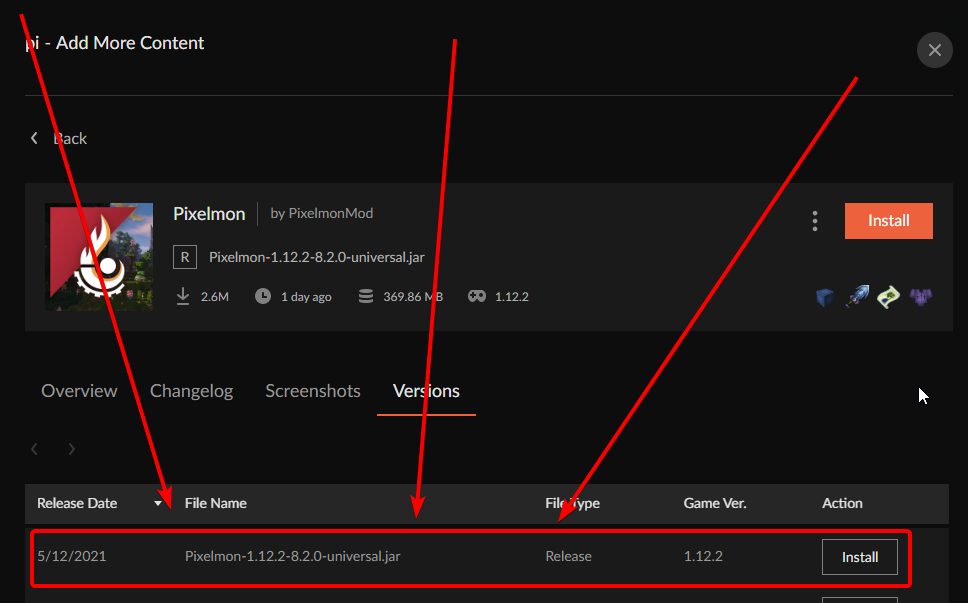 uneven vine
i cant find it
viral briar
its a mod not a modpack
just make sure you are searching in the right section and in a 12.2 profile
 hardy pelican
This might be a stupid question, but why are most of the mods in older versions of minecraft?
viral briar
forge 12.2 was popular for mod devs
 hardy pelican
viral briar
forge 12.2 was popular for mod devs
hardy pelican
viral briar
forge 12.2 was popular for mod devs
Oh why? Is there something special about it?
viral briar
@uneven vine you are looking at modpacks , the 8.2 is a mod not a modpack

 lyric crescent
That would be the fault of the people running the server not waiting until their pack got approved before updating it. Not curseforge problem, poor management choices are to blame.
 winter trail
its working for my friends tho
uneven vine
but how can i install the 8.2 version tho
lyric crescent
Ask the server owner how to get the update
winter trail
winter trail
its working for my friends tho
.
uneven vine
the server has been updated and will allow the 8.2 version
winter trail
winter trail
its working for my friends tho
.
 copper basalt
can anyone help me with mods in minecraft. when i try to launch the modpack i wanna play i just dosent work
 steep stirrup
winter trail
.
steep stirrup
winter trail
.
https://isi.gg/2021/05/14/nsCOUl7Hmd.png - It's in queue, we do the wait
 red patioBOT
It is 05:16PM on Friday for CurseForge my dudes.
Project Moderation Time
Project/File moderation is done on Sunday - Thursday from 10am - 6pm GMT+2
This process is First in, First out. Thus files submitted late in the work day may not be checked until the next work day.
New Projects or uploads requiring manual approval: 1-3 Working Days
Updates to approved projects not needing manual approval: 1 Hour
File sync to the Curseforge app may take up to 24 hours after approval.
viral briar
weekend chill time
lyric crescent
This is why you don't update servers until the thing on your server is available 🤦
viral briar
indeed , its fun to watch others update their servers then realise the things they need are not available or updated yet , our server system is still on 16.4 as 16.5 was not really worth the update really
couple of bug fixes and two server stability things I believe all it was
probably won't update the server till both parts of 1.17 are out and all the plugins we use are updated to that also
so many months away 😆
 regal barn
Hello. I installed Stardew Valey via steam on my computer and curse forge cannot find my game. I tried to do it manually but it still shows like this game wasn't there. What can I do
red patioBOT
Known Issues with solutions or status of the issue.
Overwolf maintains a known list of issues here, some with solutions, others without.
https://support.curseforge.com/en/support/solutions/articles/9000196615-curseforge-known-issues
 blissful elk
Hi, so there is this mod that I want to download, called inventory pets and it wont show up on the app. It shows up on the website, and it is updated to the latest version of minecraft. Is there a way to download it from the website or am i looking in the wrong place.
lyric crescent
?mc-installmods
red patioBOT
How to install mods in CurseForge App.
- Click
+ Create Custom Profile - Name it, select the required Minecraft version, select the Forge version (usually the highest number), click
Create. - Click the profile icon.
- Click
Add New Content - Search and install the desired mods.
- Start the game!
How to install mods not on CurseForge.
- Right click the profile picture or Open the profile and click the Icon next to the play button.
- Click
Open Folder. - Drag the mod(s) into the
modsfolder. (Note: Some mods will require others, to run. Make sure to read the instructions for the mod!) - Start the game!
 blissful elk
thanks
 zealous falcon
i cant seem to add mods to mc
 lyric crescent
Reading the rules would be a good start
queen storm
Did you restart your pc like I told you to in #👽︱game-support ?
winter trail
yes
queen storm
!mc-path
red patioBOT
**Minecraft Files should NOT be installed inside the following locations
.minecraft folder.
OneDrive folders.
Desktop folder.
Drive roots I.E. Directly into the C:\ drive.
iCloud enabled folders.
If any of the above are in the path you need to change/move it by following the instructions below!**
If Minecraft is not installed in CurseForge App, start here.
Click the in the top left.
Select Minecraft.
Click "Edit".
Move to the "Continue here:" section below.
If Minecraft is installed in CurseForge App, follow these steps.
Click the in the bottom left.
Select the Minecraft tab.
Click "Change".
Move to the "Continue here:" section below.
Continue here:
Make a folder in the root directory called CurseForge.
Select the folder you just made.
The text box should show something like the following:
For Windows: C:\CurseForge
For Mac: /Users/Shared/CurseForge
 lyric crescent
need a explanation of what you're doing
zealous falcon
lyric crescent
need a explanation of what you're doing
trying to add a mod to mc where if u break a block it gives u enchantments
 white halo
hello if any1 could help with some questions I have would be amazing :D
zealous falcon
is anyone going to respond to me?
winter trail
winter trail
what do i do
pls da sqeecer
white halo
ik nothin lol
lyric crescent
still dont really understand what you're doing so nothing i can really say
zealous falcon
lyric crescent
still dont really understand what you're doing so nothing i can really say
trying to add a minecraft mod that when u break blocks it gives u enchantment on your pcikaxe or axe but when i try and add the mod it doesnt show up
lyric crescent
i dont need to know what the mod is or does, i need to know what and how your are doing this
zealous falcon
what
zealous falcon
can someone acctualy help me?
lyric crescent
still waiting for a proper explaination
zealous falcon
lyric crescent
still waiting for a proper explaination
i want to add a mod to minecraft?
lyric crescent
then add one
zealous falcon
lyric crescent
then add one
its not working
zealous falcon
i add the mod to the folder then close it go back on to forge restart minecraft then the mod isnt there
it doesnt show
 coral shadow
Hey! I was trying to open my launcher today and its not opening but yesterday it was working. How can I fix this?
lyric crescent
zealous falcon
i add the mod to the folder then close it go back on to forge restart minecraft ...
?mc-installmods is the correct way, using curseforge
red patioBOT
How to install mods in CurseForge App.
- Click
+ Create Custom Profile - Name it, select the required Minecraft version, select the Forge version (usually the highest number), click
Create. - Click the profile icon.
- Click
Add New Content - Search and install the desired mods.
- Start the game!
How to install mods not on CurseForge.
- Right click the profile picture or Open the profile and click the Icon next to the play button.
- Click
Open Folder. - Drag the mod(s) into the
modsfolder. (Note: Some mods will require others, to run. Make sure to read the instructions for the mod!) - Start the game!
coral shadow
what do you mean by repair installation?
zealous falcon
lyric crescent
?mc-installmods is the correct way, using curseforge
ive done that
 indigo skiff
Hello! I want to install a minecraft mod mod name is Terra World Generator but I don't know how to install can someone help me
coral shadow
i cant open the launcher at all. like it says loadnig curseforge it disapears and then nothing
 dull slate
hey so im tryna locate stardew valley been trying for ages
indigo skiff
indigo skiff
Hello! I want to install a minecraft mod mod name is Terra World Generator but I...
I write this in the right channel right?
grave quarry
hardy pelican
Oh why? Is there something special about it?
1.12 became so big on the modding scene because of time. First the 1.13 update came one year after 1.12, this gave developers a lot of time to work on their mods. Second, Mojang made major changes to the codebase (ie The Flattening), which significantly delayed Forge being able to release stable versions of the API. This disruption was so drastic that Forge didn't really get caught up until late-1.14/1.15. This instability deterred the devs from larger mods from forward porting their mods resulting in many mods and players sticking around 1.12.
white halo
question, when will Pixelmon 8.2 Be added to the Launcher :D?
grave quarry
grave quarry
I am wondering if there is a better way to do this. I have a resource pack incl...
would anyone be able to answer my question from earlier?
grave quarry
white halo
question, when will Pixelmon 8.2 Be added to the Launcher :D?
it's already there.
 white halo
o bet
 bronze cloak
How can I download fabric in the curse forge app
lyric crescent
?mc-fabric
red patioBOT
How to use Fabric until support to the app is added in the near future.
- Make a Forge modpack of the appropriate version.
- Install a mod called 'Jumploader'
Fabric mods do not work with Forge.
Forge mods do not work with Fabric.
Fabric mods should be marked with a Fabric Icon like this: 
 queen storm
 lavish canyon
im stuck on instaling pokehaan craft on 24 of 87 mods: picelmon pls help
lavish canyon
im stuck on instaling pokehaan craft on 24 of 87 mods: picelmon pls help
Big mod, just wait
lavish canyon
queen storm
Big mod, just wait
how long
coral shadow
Ok I got overwolf launcher to open but my curseforge isn't opening still
queen storm
lavish canyon
how long
Depends on your internet speed
coral shadow
what should I do
lavish canyon
queen storm
Depends on your internet speed
10mbps
queen storm
coral shadow
Ok I got overwolf launcher to open but my curseforge isn't opening still
Reinstall curseforge using the overwolf app
 fair latch
Why does this keep happening
 queen storm
lavish canyon
10mbps
queen storm
lavish canyon
10mbps
Try a different pack
queen storm
fair latch
Why does this keep happening
!mc-installfix
red patioBOT
- Click on the Minecraft Tab on the Left side of the App.
- Click button next to the
Create Custom Profileoption. - Click

Repair Installationoption. - Play game.
NOTE: You will not lose any modpacks or worlds, These are saved in the Instances folder. DO NOT TOUCH THIS FOLDER OR YOU WILL LOSE EVERYTHING
lavish canyon
queen storm
Try a different pack
all versions are stuck
queen storm
lavish canyon
all versions are stuck
All versions or all packs/
lavish canyon
queen storm
All versions or all packs/
versions leme try packs
fair latch
still happening
 queen storm
fair latch
still happening
queen storm
fair latch
still happening
Restart your pc
lavish canyon
idk than
queen storm
fair latch
Is there a way to manually install patchy-1.1.jar?
No idea, try running vanilla first
fair latch
Using CurseForge?
lavish canyon
no
fair latch
k
queen storm
fair latch
Using CurseForge?
Yes
fair latch
same thing going through curseforge
 lavish canyon
 sad
sad
fair latch
works going through minecraft launcher
queen storm
fair latch
same thing going through curseforge
That when starting vanilla?
fair latch
yes
 fair latch
Would copying my current minecraft into the curseforge folder work?
queen storm
lavish canyon
ReInStAl MiNeCrAfT
Don't tell people to do things if you don't know what you are doing please
lavish canyon
ok...
queen storm
fair latch
Would copying my current minecraft into the curseforge folder work?
Probably not
!mc-path
 queen storm
That was not reinstall minecraft though, as that tends to reinstall the one in .minecraft
fair latch
If I open going through C:\CurseForge\Install\minecraft.exe
it works
but it doesn't have the mods
queen storm
fair latch
but it doesn't have the mods
Because that one is not setup that way.
Tried the "start vanilla" button in the main modpack page?
queen storm
fair latch
Can I install mods manually without having to go through CurseForge?
With more effort yes
fair latch
How?
lavish canyon
as always stuck on pixelmon tried cancelling and runing other packs downloading other packs everything u could imagine till stuck on 24

fair latch
How Timtower?
queen storm
How about some patience?
queen storm
fair latch
How Timtower?
Is it with all packs?
queen storm
lavish canyon
as always stuck on pixelmon tried cancelling and runing other packs downloading ...
Stop the emoji spam
lavish canyon
ok
queen storm
lavish canyon
as always stuck on pixelmon tried cancelling and runing other packs downloading ...
Try a pack without pixelmon please
lavish canyon
i did
digital roost
Hallo I Have a Problem when I want to play a mod in 1.12.2 can someone help me please
 lavish canyon
it worked
queen storm
lavish canyon
it worked
Then it is the size of pixelmon
queen storm
digital roost
Hallo I Have a Problem when I want to play a mod in 1.12.2 can someone help me ...
!mc-logs in #👽︱game-support
red patioBOT
Where to find the log on the CurseForge Client.
Right-click the modpack profile icon OR click the button in the modpack profile.
Click Open Folder.
Open the logs folder.
Find the file called latest.log and drag it into discord.
fair latch
So how do I install it without using curseforge? I'm trying to install atm6
queen storm
fair latch
So how do I install it without using curseforge? I'm trying to install atm6
Can't install modpacks without curseforge, and did you look at the links?
fair latch
yeah, I did
lavish canyon
queen storm
Then it is the size of pixelmon
i mean its using internet like crazy but not moving for past 20 minute
fair latch
oh well, thanks Timtower
queen storm
fair latch
yeah, I did
You on a VPN? Anything?
queen storm
Do you have access to one?
fair latch
nope
lavish canyon
but
lavish canyon
its not internet it would download in half a hour even on 1mbps
fair latch
well, cya later
lavish canyon
im on 10 not that awful but its not working
queen storm
lavish canyon
its not internet it would download in half a hour even on 1mbps
Well, your machine isn't the only one connected to the curseforge server, might not be your side, could be server as well
lavish canyon
oof so u cant help
queen storm
Nope
 marsh geode
I cant find any of the mods I want on minecraft
queen storm
marsh geode
I cant find any of the mods I want on minecraft
Are you looking at modpacks or mods right now?
queen storm
!mc-installmods
red patioBOT
How to install mods in CurseForge App.
- Click
+ Create Custom Profile - Name it, select the required Minecraft version, select the Forge version (usually the highest number), click
Create. - Click the profile icon.
- Click
Add New Content - Search and install the desired mods.
- Start the game!
How to install mods not on CurseForge.
- Right click the profile picture or Open the profile and click the Icon next to the play button.
- Click
Open Folder. - Drag the mod(s) into the
modsfolder. (Note: Some mods will require others, to run. Make sure to read the instructions for the mod!) - Start the game!
marsh geode
trying to get these mods but they not there
queen storm
marsh geode
trying to get these mods but they not there
You do realize that all mods are listed right?
marsh geode
yes, but when i search them they are not there
queen storm
For which minecraft version?
marsh geode
newest
queen storm
Those mods don't exist for 1.16
 cedar musk
guys i need help, when i try to create a mod curseforge it tells me webclient error for any version
queen storm
cedar musk
guys i need help, when i try to create a mod curseforge it tells me webclient er...
If on wifi: get wired
cedar musk
sure because I restarted the application 3 times
 knotty oasis
Im trying to host a server for me and my friend with forge, but it keeps crashing when its loading because it doesn't have enough ram, but when I give it more ram, or change how much ram it has, it instantly crashes when it opens
queen storm
knotty oasis
Im trying to host a server for me and my friend with forge, but it keeps crashin...
 gleaming finch
I have a problem, I can not start my modpack because one of the modes that is JEI does not work. '' JEI Tweaker (jeitweaker) encountered an error during the sided_setup event phase ''. Does anyone know how to fix it?
signal ridge
gleaming finch
I have a problem, I can not start my modpack because one of the modes that is JE...
!mc-logs do this
red patioBOT
Where to find the log on the CurseForge Client.
Right-click the modpack profile icon OR click the button in the modpack profile.
Click Open Folder.
Open the logs folder.
Find the file called latest.log and drag it into discord.
gleaming finch
I have a problem, I can not start my modpack because one of the modes that is JEI does not work. '' JEI Tweaker (jeitweaker) encountered an error during the sided_setup event phase ''. Does anyone know how to fix it?
signal ridge
gleaming finch
I have a problem, I can not start my modpack because one of the modes that is JE...
Do you have craftweaker installed?
gleaming finch
yes
digital roost
how do i change the logo of my modpack?
signal ridge
gleaming finch
yes
What version is craftweaker in your pack?
gleaming finch
1.16.5
signal ridge
digital roost
how do i change the logo of my modpack?
When you upload it to the site you set the logo there
gleaming finch
java
signal ridge
gleaming finch
1.16.5
The rest of the numbers after 1.16.5
digital roost
signal ridge
When you upload it to the site you set the logo there
what site
gleaming finch
MCP: 20210115.111550
 stark spear
is there a mod for forge 1.16.5 that keybinds commands?
signal ridge
digital roost
what site
!mc-packshare
red patioBOT
There are two ways to share a modpack you've made with others...
Export and Share - For Friends to Small Groups.
- Click the Icon for the modpack.
- Click the button next to play.
- Click
Export. - Select the files that should be included.
- Send the zip to the people that want it! They can follow the instructions in
!mc-installpackto install the pack!
Upload to Curseforge - For Public Release to Everyone.
This options will make your pack public to EVERYONE, it comes with extra requirements and will take some effort to set up.
- Go to here: https://www.curseforge.com/project/432/4471/create
- Fill out the information with a proper description of the pack. This should allow anyone to understand what the pack is.
- Click the Icon for the modpack in the CurseForge app.
- Click the button next to play.
- Click
Export. - Select the files that should be included.
- Open your Project you made on the CurseForge site and Upload the file you just made.
- Wait for Moderation & Sync so it can show up in the client! (See
!syncfor limitations)
signal ridge
gleaming finch
MCP: 20210115.111550
Take a screen shot of the crafttweaker mod in your app. Need its version. Ex: 1.16.5-7.1.0.256
 weary lily
Hello, I'm trying to manually add Chronicles of Arcadia and I get an error stating it's in an invalid directory or an unsupported game. The folder is currently on my Desktop (it was the default).
signal ridge
gleaming finch
JEITweaker-1.16.5-1.0.1.15.jar
Asked for Crafttweakers version
gleaming finch
I Do not actually have it my fault sorry. but I have the JEITweaker instead but I tried to turn it off and it works but is it necessary to have?
signal ridge
gleaming finch
I Do not actually have it my fault sorry. but I have the JEITweaker instead but ...
JeiTweaker is looking for Crafttweaker to work. So yes you need it
gleaming finch
But it worked anyway, I do not even have a craftweaker
 prime cape
hi
signal ridge
gleaming finch
But it worked anyway, I do not even have a craftweaker
After you turned off JEITweaker? or Before
prime cape
uhhh when will pixelmon update to 8.2.0?
gleaming finch
I turned of the JEITweaker and it worked i got in the game
signal ridge
prime cape
uhhh when will pixelmon update to 8.2.0?
Need to ask the mod author that.
gleaming finch
off
prime cape
signal ridge
Need to ask the mod author that.
and that is?
signal ridge
gleaming finch
off
That makes sense as the game isnt loading JEITweaker if you turned it off. If you want to use the mod you need to install Craftweaker
signal ridge
prime cape
and that is?
Look at the mods page on the site, might have a discord
gleaming finch
Aha ok thank you so much
lyric crescent
prime cape
uhhh when will pixelmon update to 8.2.0?
This is not an issue with Curseforge. The pixelmon devs decided to update their servers before their modpack was approved and it will likely not be approved for several days. If you want to use their pack before that then you need to get it from them.
prime cape
ah ok so i have to wait till it approved?
lyric crescent
Yep
signal ridge
Pretty much
prime cape
then i will find it updated on curse?
signal ridge
Once approved and some time to sync with the app
prime cape
ah ok and why does it take such a long time to get approved
lyric crescent
Because it's the weekend.
prime cape
but u said 7 days?
signal ridge
!status
red patioBOT
It is 08:18PM on Friday for CurseForge my dudes.
Project Moderation Time
Project/File moderation is done on Sunday - Thursday from 10am - 6pm GMT+2
This process is First in, First out. Thus files submitted late in the work day may not be checked until the next work day.
New Projects or uploads requiring manual approval: 1-3 Working Days
Updates to approved projects not needing manual approval: 1 Hour
File sync to the Curseforge app may take up to 24 hours after approval.
prime cape
ohh
 dusty berry
my curse forge keeps crashin
prime cape
that still means around seven days lol
lyric crescent
it is what it is
signal ridge
dusty berry
my curse forge keeps crashin
the app itself or minecraft?
prime cape
hmm ok well ty
dusty berry
the app
signal ridge
win or mac?
dusty berry
win
signal ridge
dusty berry
win
does overwolf open?
lyric crescent
prime cape
btw is it that curseforge needs to approve it?
curseforge
dusty berry
well that loading thing opens, and when the bar is full it just crashes
signal ridge
dusty berry
well that loading thing opens, and when the bar is full it just crashes
screen shot
dusty berry
k 1 sec
 cerulean sky
is there a way to pin modpacks to your desktop?
lyric crescent
no
dusty berry
yoyok 1 sec my prntscr isnt workin
signal ridge
Windows Key + Shift + S
signal ridge
np
weary lily
Hello, I'm trying to manually add Chronicles of Arcadia and I get an error stating it's in an invalid directory or an unsupported game. The folder is currently on my Desktop (it was the default).
Does anyone have any ideas on this?
dusty berry
imma play forever stranded
 north pumice
Um, guys... I have forge server with damn good specs, however tick time keep rising.... I installed Spark for profilling and turns out that creepers take 30% of it. But it is a new world and there are not overspawned creepers
No idea where to start
lyric crescent
#👽︱game-support as this isnt related to curseforge
 signal ridge
Pixelmon is a rather large pack, can take some time to load
signal ridge
Are you playing or installing?
celest ledge
playing
signal ridge
Has it worked before?
signal ridge
Do other packs work?
celest ledge
Nop
signal ridge
!mc-installfix try this
red patioBOT
- Click on the Minecraft Tab on the Left side of the App.
- Click button next to the
Create Custom Profileoption. - Click
Repair Installationoption. - Play game.
NOTE: You will not lose any modpacks or worlds, These are saved in the Instances folder. DO NOT TOUCH THIS FOLDER OR YOU WILL LOSE EVERYTHING
blissful elk
umm all my blocks in a world turned to this 
celest ledge
f
signal ridge
celest ledge
its nothing help
If you play another modpack does it get stuck as well?
celest ledge
No
signal ridge
Are you on wifi or ethernet?
signal ridge
pc restart?
signal ridge
blissful elk
umm all my blocks in a world turned to this <:missingblock:796992980811644939>
Did you add a texturpack or delete stuff?
celest ledge
its so like 3 days lol
signal ridge
Can try asking the pixelmon devs
celest ledge
Where are they?
signal ridge
They have a discord link on their modpacks page on the site.
celest ledge
ok
white halo
when will the pixelmon 8.2 be approved by curse forge?
lyric crescent
🤦♂️
white halo
ty
signal ridge
!status
red patioBOT
It is 08:48PM on Friday for CurseForge my dudes.
Project Moderation Time
Project/File moderation is done on Sunday - Thursday from 10am - 6pm GMT+2
This process is First in, First out. Thus files submitted late in the work day may not be checked until the next work day.
New Projects or uploads requiring manual approval: 1-3 Working Days
Updates to approved projects not needing manual approval: 1 Hour
File sync to the Curseforge app may take up to 24 hours after approval.
white halo
smh i was just asking a question yamaza
lyric crescent
only the 20th time today
signal ridge
Every 10 min or so someone is asking
white halo
maybe put something saying that on the thing
lyric crescent
This is not an issue with Curseforge. The pixelmon devs decided to update their servers before their modpack was approved and it will likely not be approved for several days. If you want to use their pack before that then you need to get it from them.
lyric crescent
not curseforges problem
digital roost
hello
celest ledge
hi
blissful elk
signal ridge
Did you add a texturpack or delete stuff?
I used a mod on curseforge
signal ridge
what mod?
blissful elk
i downloaded inventory pets on the website for curseforge and then started it using the curseforge app
signal ridge
Why not use the app to download it?
blissful elk
it was not on it
signal ridge
If its on the site its in the app

 signal ridge
blissful elk
signal ridge
blissful elk
Your searching modpacks not mods
blissful elk
ohhhh
signal ridge
!mc-installmods
red patioBOT
How to install mods in CurseForge App.
- Click
+ Create Custom Profile - Name it, select the required Minecraft version, select the Forge version (usually the highest number), click
Create. - Click the profile icon.
- Click
Add New Content - Search and install the desired mods.
- Start the game!
How to install mods not on CurseForge.
- Right click the profile picture or Open the profile and click the Icon next to the play button.
- Click
Open Folder. - Drag the mod(s) into the
modsfolder. (Note: Some mods will require others, to run. Make sure to read the instructions for the mod!) - Start the game!
blissful elk
oops
digital roost
hwo do you get the gun mod
signal ridge
digital roost
hwo do you get the gun mod
#👽︱game-support or #🧱︱minecraft-chat (Goto #786424115535544350 get the minceraft role)
 rustic drift
How do I find the file for the forge broad compatibilty API? The one that is installed with every forge modpack by default
signal ridge
Again, feels like a question for Forge...
lyric crescent
!!=
red patioBOT
Wording is important!
Forge = Minecraft Forge, This is a modloader often just called "Forge".
CurseForge = A Website/App that has content for games.
Mods = Individual mod files.
Modpacks = Multiple mods put into the mods folder or downloaded from CurseForge.
These are not Interchangeable! Please use the correct terms as it allows us to help you faster!
 dense cave
Hi i need some help with Project ozone 3 a new way forward. I cant play on one little island. Can somebody help me guide to play on one little island Like Dancan did.
signal ridge
dense cave
Hi i need some help with Project ozone 3 a new way forward. I cant play on one l...
#👽︱game-support not a curseforge issue
weary lily
Hello, I'm trying to manually add Chronicles of Arcadia in Curseforge and I get an error stating it's in an invalid directory or an unsupported game. The folder is currently on my Desktop (it was the default).
 serene stump
Hey, what does Game Version : Forge mean exactly?
signal ridge
Screen shot what your looking at
 signal ridge
Chisel is a forge mod. It has many different versions of mc. Would have to click on the file itself to see what mc version it is for
signal ridge
weary lily
Hello, I'm trying to manually add Chronicles of Arcadia in Curseforge and I get ...
!ticket
red patioBOT
Issue Reporting with Overwolf tickets!
Issues can be reported two ways!
Via the website, or in app. Instructions for both are below!
Make sure to include logs when reporting a problem!
Upload your Overwolf logs with the Upload File option on the ticket, information on how to get these logs can be found here https://support.overwolf.com/en/support/solutions/articles/9000176827-how-to-get-your-overwolf-logs
:bug: Reporting via Website :bug:
Can't open the app or would rather use the website? You can do so here: https://support.curseforge.com/en/support/tickets/new
Fill out the form with accurate detailed information, "It doesn't work" isn't helpful! What exactly doesn't work and why doesn't it work should be easy to answer!
:question: Ticket Status :question:
Tickets you have made can be looked at, replied to and closed if you make/login to an account. If you submit a ticket with a specific Email make sure to use that when you make your account so you can see your past tickets!
https://support.curseforge.com/en/support/tickets
Otherwise you will only get email replies at the email you used to open the ticket.
:bug: Reporting via the CurseForge App :bug:
- Click the icon in the bottom left.
- Select

Open a Ticket. - Fill out the form with accurate detailed information, "It doesn't work" isn't helpful! What exactly doesn't work and why doesn't it work should be easy to answer!!
- Upload your Overwolf logs with the
Upload Filesection. (see the top of this message for details) - Submit!
 mental mirage
hi. I am download curseforge but minecraft mods is not opened. Why
 signal ridge
mental mirage
hi. I am download curseforge but minecraft mods is not opened. Why
signal ridge
mental mirage
hi. I am download curseforge but minecraft mods is not opened. Why
!mc-path
red patioBOT
**Minecraft Files should NOT be installed inside the following locations
.minecraft folder.
OneDrive folders.
Desktop folder.
Drive roots I.E. Directly into the C:\ drive.
iCloud enabled folders.
If any of the above are in the path you need to change/move it by following the instructions below!**
If Minecraft is not installed in CurseForge App, start here.
Click the in the top left.
Select Minecraft.
Click "Edit".
Move to the "Continue here:" section below.
If Minecraft is installed in CurseForge App, follow these steps.
Click the in the bottom left.
Select the Minecraft tab.
Click "Change".
Move to the "Continue here:" section below.
Continue here:
Make a folder in the root directory called CurseForge.
Select the folder you just made.
The text box should show something like the following:
For Windows: C:\CurseForge
For Mac: /Users/Shared/CurseForge
steep stirrup
lyric crescent
This is not an issue with Curseforge. The pixelmon devs decided to update their ...
We uploaded Wednesday early morning. The update was initially rejected for the pack for a third party mod that was not on the approved list. Except it is on the approved list. Happened each time we updated the pack. Enough that Gil said I should just DM him on update. So yes, Curseforge problem.
queen storm
steep stirrup
We uploaded Wednesday early morning. The update was initially rejected for the p...
Server was updated before file was approved though
mental mirage
signal ridge
!mc-path
thank you
steep stirrup
We don't run servers.
queen storm
Lets start with this: who are you in relation to the pack?
mental mirage
omg good
steep stirrup
If a player using Curseforge has found their server has updated ahead of them, they only need to manually switch out the file, use a different launcher, or wait it out.
queen storm
But how would one update a server to something that is not released?
steep stirrup
The mod is released. The pack is a small mod collection for those who just want to install and go. Has nothing to do with a server.
queen storm
Then the server owners made a mistake
mental mirage
guys I have a question.I download skyFactory mod.Will I install my mod myself or will it install automatically?
signal ridge
mental mirage
guys I have a question.I download skyFactory mod.Will I install my mod myself or...
Skyfactory3 is a modpack not a mod. How did you download it?
steep stirrup
Curseforge made the mistake, to be fair. Again, I am looking at the rejection reason, and I am looking at the google doc. Tickets up, messages have been sent, the wait is fine.
mental mirage
It was in the mods, I wanted to download it.
signal ridge
mental mirage
It was in the mods, I wanted to download it.
? Screen shot what your looking at
 signal ridge
mental mirage
signal ridge
mental mirage
Once its done downloading you will be able to press play. Also thats modpacks not mods (they are not the same)
signal ridge
!!=
red patioBOT
Wording is important!
Forge = Minecraft Forge, This is a modloader often just called "Forge".
CurseForge = A Website/App that has content for games.
Mods = Individual mod files.
Modpacks = Multiple mods put into the mods folder or downloaded from CurseForge.
These are not Interchangeable! Please use the correct terms as it allows us to help you faster!
mental mirage
I use cracked minecraft.would this be a problem
queen storm
mental mirage
I use cracked minecraft.would this be a problem
Yes, we don't support that
mental mirage
hm
mental mirage
I am using TLauncher
hearty rampart
why so many versions of 1.16.5 man
signal ridge
mental mirage
I am using TLauncher
We dont give support for that here
hearty rampart
ive seen one each day
signal ridge
Lets stop this convo here
hearty rampart
im on another now lol
signal ridge
Not the room for random chats
hearty rampart
ok
lyric crescent
steep stirrup
Curseforge made the mistake, to be fair. Again, I am looking at the rejection re...
I'm not sure what you're replying to then? People are complaining they cannot connect to the server because the Pixelmon pack is not updated. Curseforge is not responsible for when the server got updated.
 stray crag
Anybody know how to make a project private?
signal ridge
Dont upload it to the site
hearty rampart
 signal ridge
No bad. Not here
signal ridge
technic is bad... Mod authors get shit all when people upload projects to technic.
queen storm
Rule 10
signal ridge
!mc-logs
red patioBOT
Where to find the log on the CurseForge Client.
Right-click the modpack profile icon OR click the button in the modpack profile.
Click Open Folder.
Open the logs folder.
Find the file called latest.log and drag it into discord.
digital roost
will thhis help me with exist code 0?
hearty rampart
ye it lets peeps know error
digital roost
ok
signal ridge
Exit code 0 means like 100 different things. Only the log will say whats going on
digital roost
here
signal ridge
Shortest log ever.... Do other packs do this too?
signal ridge
?
digital roost
the first one was my curse fordge pack the second one was my basic regulur minecraft pack
so do you guys know the problem?
signal ridge
!mc-installfix try this in the curse app
red patioBOT
- Click on the Minecraft Tab on the Left side of the App.
- Click button next to the
Create Custom Profileoption. - Click
Repair Installationoption. - Play game.
NOTE: You will not lose any modpacks or worlds, These are saved in the Instances folder. DO NOT TOUCH THIS FOLDER OR YOU WILL LOSE EVERYTHING
blissful elk
yoyok9 im still getting the pink and black checkered blocks
even when I downloaded them from the app
tough onyx
how can i share my custom mod pack with a friend so we can play it on my server?
queen storm
! mc-packshare
red patioBOT
There are two ways to share a modpack you've made with others...
Export and Share - For Friends to Small Groups.
- Click the Icon for the modpack.
- Click the button next to play.
- Click
Export. - Select the files that should be included.
- Send the zip to the people that want it! They can follow the instructions in
!mc-installpackto install the pack!
Upload to Curseforge - For Public Release to Everyone.
This options will make your pack public to EVERYONE, it comes with extra requirements and will take some effort to set up.
- Go to here: https://www.curseforge.com/project/432/4471/create
- Fill out the information with a proper description of the pack. This should allow anyone to understand what the pack is.
- Click the Icon for the modpack in the CurseForge app.
- Click the button next to play.
- Click
Export. - Select the files that should be included.
- Open your Project you made on the CurseForge site and Upload the file you just made.
- Wait for Moderation & Sync so it can show up in the client! (See
!syncfor limitations)

 loud geode
so i just delete those?
 vale arrow
you could, but I would just make a whole new folder somewhere
queen storm
! mc-path
red patioBOT
**Minecraft Files should NOT be installed inside the following locations
.minecraft folder.
OneDrive folders.
Desktop folder.
Drive roots I.E. Directly into the C:\ drive.
iCloud enabled folders.
If any of the above are in the path you need to change/move it by following the instructions below!**
If Minecraft is not installed in CurseForge App, start here.
Click the in the top left.
Select Minecraft.
Click "Edit".
Move to the "Continue here:" section below.
If Minecraft is installed in CurseForge App, follow these steps.
Click the in the bottom left.
Select the Minecraft tab.
Click "Change".
Move to the "Continue here:" section below.
Continue here:
Make a folder in the root directory called CurseForge.
Select the folder you just made.
The text box should show something like the following:
For Windows: C:\CurseForge
For Mac: /Users/Shared/CurseForge
 pallid sundial

 obtuse talon
Does anyone know how do download specific mod launchers?
im trying to launch a modpack in 36.1.12, but i dont have it
 stiff birch
how old of a version do I need to use for modded minecraft to run on a macbook
lyric crescent
..huh
stiff birch
1.16.5 forge doesn't work on a macbook, I looked it up and newer versions aren't supported
how early of a version do I need to go to run modded minecraft on a mac
lyric crescent
m1?
stiff birch
?
lyric crescent
obtuse talon
im trying to launch a modpack in 36.1.12, but i dont have it
only way would be to install that manually without curseforge. not sure how any packs can be on curseforge with that forge version to begin with
obtuse talon
ive been trying to install mods seperate from curseforge, but the server im trying to join wont work without .12, and im trying to find out how to grab that mod loader version
the mods work fine, but i cant join the server
lyric crescent
you cant
obtuse talon
well damn
stiff birch
lyric crescent
unless you have an m1 mac they should all work
well what do I do if it is an m1 mac?
is there a playable version?
lyric crescent
nothing you can do
stiff birch
no modded version works on m1??
digital roost
My modpack crashed when I tried to play it and this was the crash info
lyric crescent
send the log, not screenshots of a log
digital roost
you mean copy and paste it?
lyric crescent
?mc-log
red patioBOT
Where to find the log on the CurseForge Client.
Right-click the modpack profile icon OR click the button in the modpack profile.
Click Open Folder.
Open the logs folder.
Find the file called latest.log and drag it into discord.
digital roost
 marsh topaz
 lyric crescent
send your log
marsh topaz
idk how to do any of that
lyric crescent
look 2 messages up
lyric crescent
digital roost
looks like a conflict with tinkers and lucraft. remove one or report it and wait for a fix
marsh topaz
like that?
lyric crescent
marsh topaz
did you make this pack?
marsh topaz
no i didnt
lyric crescent
try reinstalling it
lyric crescent
try another pack
marsh topaz
ok ig
 weak furnace
anyone know a good cheap server host for a modded forge server? i use apex but their crap is overpriced
signal ridge
weak furnace
anyone know a good cheap server host for a modded forge server? i use apex but t...
Not the channel for this. Curseforge doesnt do servers
 gritty token
Does anyone know how to setup a CF Compact Claustrophobia server with no errors?
signal ridge
gritty token
Does anyone know how to setup a CF Compact Claustrophobia server with no errors?
#👽︱game-support curseforge doeant do servers
 maiden locust
is there a way to update the curseforage app? its still on 1.16.1 and i need it to be on 1.16.5 so i can use optifine but im not sure how to update the app
 west cipher
f
signal ridge
maiden locust
is there a way to update the curseforage app? its still on 1.16.1 and i need it ...
This for a custom pack or a downloaded one?
 floral dome
weird error message
 signal ridge
floral dome
weird error message
signal ridge
floral dome
weird error message
!mc-path
red patioBOT
**Minecraft Files should NOT be installed inside the following locations
.minecraft folder.
OneDrive folders.
Desktop folder.
Drive roots I.E. Directly into the C:\ drive.
iCloud enabled folders.
If any of the above are in the path you need to change/move it by following the instructions below!**
If Minecraft is not installed in CurseForge App, start here.
Click the in the top left.
Select Minecraft.
Click "Edit".
Move to the "Continue here:" section below.
If Minecraft is installed in CurseForge App, follow these steps.
Click the in the bottom left.
Select the Minecraft tab.
Click "Change".
Move to the "Continue here:" section below.
Continue here:
Make a folder in the root directory called CurseForge.
Select the folder you just made.
The text box should show something like the following:
For Windows: C:\CurseForge
For Mac: /Users/Shared/CurseForge
signal ridge
screen shot the path of your current curse app


 signal ridge
In the curse app go to > Minecraft tab > Screen shot the Minecraft Modding Folder Path
floral dome
 signal ridge
Try changing it to what the bot said.
floral dome
alright that worked thank you
signal ridge
np
maiden locust
signal ridge
This for a custom pack or a downloaded one?
For a custom pack. I even have the pack in 1.16.5 and it doesn’t show up in my installations
signal ridge
huh?
floral dome
how does the import feature work???
i clicked import old instalation and opend and it just opend the file xD
signal ridge
If you downloaded a modpack zip from the site OR someone gave you an export from the app you use the import feature
signal ridge
Have to export the custom pack with the app. Making a zip file on your own wont work. Unless you manually make the manifest file
 fierce fox
uh, for my mc mod it says that my project description contains links to files on my computer. These links will not work within web browsers.
- file:///C:/Users/orbxu/Downloads/EWbanner.png. I changed it and resubmitted multiple times and it still shows that msg, i've gotten notifications for the same thing as well
signal ridge
Screen shot the reject message
floral dome
oh cool custom pack ive worked on is gone 😅
fierce fox
 signal ridge
floral dome
oh cool custom pack ive worked on is gone 😅
signal ridge
floral dome
oh cool custom pack ive worked on is gone 😅
They will be in the old path, you will need to copy the contents of the instance folder from the old path to the instance folder in the new one
floral dome
so make a new custom and copy the files?
signal ridge
fierce fox
Need to upload the pictures to a hosting site then use that link. Linking them to your pc wont work
lyric crescent
can upload them to CF on the project page
signal ridge
floral dome
so make a new custom and copy the files?
Goto C:\Users\Bugb0\Documents\curseforge\minecraf\instances and copy those folders to the new path you made. C:\curseforge\instances and paste
fierce fox
signal ridge
Need to upload the pictures to a hosting site then use that link. Linking them t...
I did, the images work perfectly fine, I posted on it twitter then deleted the message
floral dome
fixed 👍
tough onyx
!mc-installpack
red patioBOT
How to install modpacks with the search features in app.
- Open the

Minecraftsection of the app. - Click the top search bar where it says
Search for modpacksOR Click theBrowse ModpacksTab. - Find the Modpack you want to install and click install on it.
- Wait for CurseForge app to download and unpack all the required files.
- Once finished, click
Play!
How to install modpacks from a Export. (Custom/Private/Site downloaded Modpack zip)
- Get CurseForge App if you don't have it, use
!downloadfor a link. - Get the exported modpack from CurseForge or someone else,
!mc-packshareexplains how to make them. - Open the
Minecraftsection of the app. - Click

Create Custom Profile - Click the
Importoption. - Find the file you just downloaded in step 2 and select it.
- CurseForge app will now attempt to download and unpack the modpack. If it fails, try steps 4-6 again.
- Once finished, click
Play!

 jolly spade
Yeah ive been trying to get mods with curseforge but i install them and then it will load but during the loading screen the screen will freeze and not respond any advice?
 bitter salmon
hello, the forge installation pack wont work with one of my mods because its set to 1.12.2 but my mod is 1.13 and higher, could someone please help me out?
fleet bear
there's nothing to help you with?
bitter salmon
my mod wont work
fleet bear
That's because you need to make a 1.13 profile
 marble sorrel
I am trying to load up Skyblock 2 and I have been loading it up the last few weeks just fine. I tried loading it up yesterday and to day and it loads up to 80/260 and it freezes.
I have tried deleting profile and reinstalling and nothing has worked.
bitter salmon
im so confused
fleet bear
bitter salmon
im so confused
Mods only work on specific versions. You can't mix them
signal ridge
bitter salmon
im so confused
Cant mix 1.12.2 mods with 1.13 doesnt work that way
 faint skiff
bitter salmon
hello, the forge installation pack wont work with one of my mods because its set...
faint skiff
bitter salmon
hello, the forge installation pack wont work with one of my mods because its set...
your mod is 1.13. 1.13 and 1.12.2 are two different versions of minecraft
bitter salmon
yeah but how do i get the right one
fleet bear
you download the correct version of the mod or make a profile for the correct version of the game.
bitter salmon
so i can change this if i make a profile ?
 signal ridge
bitter salmon
so i can change this if i make a profile ?
signal ridge
bitter salmon
so i can change this if i make a profile ?
if you make a new custom profile set the minecraft version to the one the mod needs. If its 1.13 then the mc version should be 1.13
bitter salmon
on the website? cause thats where i got the mod
signal ridge
the curseforge site?
bitter salmon
yes
bitter salmon
i have the app but the mod is only on the site
signal ridge
!mc-installmods
red patioBOT
How to install mods in CurseForge App.
- Click
+ Create Custom Profile - Name it, select the required Minecraft version, select the Forge version (usually the highest number), click
Create. - Click the profile icon.
- Click
Add New Content - Search and install the desired mods.
- Start the game!
How to install mods not on CurseForge.
- Right click the profile picture or Open the profile and click the Icon next to the play button.
- Click
Open Folder. - Drag the mod(s) into the
modsfolder. (Note: Some mods will require others, to run. Make sure to read the instructions for the mod!) - Start the game!
signal ridge
If its on the site its in the app. Just need to search mods not modpacks
bitter salmon
okay thank you so much
signal ridge
np
bitter salmon
im new to mods so this helps a lot lol
signal ridge
ok? Care to share it or shall I start guessing?
 shrewd crown
everytime he tries to play forever stranded, if he enters fullscreen his mouse dissapears
signal ridge
odd
shrewd crown
and this is a proble,m because unlike most modpacks u cant like enlarge it to fit ur desktop, it just stays as the small little in the middle of the screen
signal ridge
Have you tried not going into fullscreen mode?
shrewd crown
and to advance in this game u need to look at quests which he cant do because he doesent know where his mouse is, + u cant do anything in ur inventory
shrewd crown
signal ridge
Have you tried not going into fullscreen mode?
yea but than its that minecraft box that sits in the middle of ur screen
signal ridge
Screen shot it not in full screen
bitter salmon
okay it says i dont have it even though i downloaded it
 signal ridge
Cant have both fabric and forge mods at the same time. Its one or the other
Are you making a Forge OR a Fabric modpack?
bitter salmon
the pehkui thing is only in fabric and the other thing isnt
signal ridge
!mc-fabric
red patioBOT
How to use Fabric until support to the app is added in the near future.
- Make a Forge modpack of the appropriate version.
- Install a mod called 'Jumploader'
Fabric mods do not work with Forge.
Forge mods do not work with Fabric.
Fabric mods should be marked with a Fabric Icon like this:
shrewd crown
signal ridge
Screen shot it not in full screen
i cant figure out how to screenshot
signal ridge
Win or mac?