#🔥︱curseforge-support
1 messages · Page 449 of 1
 lean grove
too much
modpacks have like 80+ on average
its pretty stupid in my opinion
but im tryna figure out if theres even a mod filter .-.
 wraith haven
I fixed my problem ty . I needled to manually download kbm 2.0.0.5 King Boss Mods. For RIFT ty a manual download is the fix.
 vast yoke
so this isnt working in the beta > cant change my file location

 red patioBOT
**Minecraft Files should NOT be installed inside the following locations
.minecraft folder.
OneDrive folders.
Desktop folder.
Drive roots I.E. Directly into the C:\ drive.
iCloud enabled folders.
If any of the above are in the path you need to change/move it by following the instructions below!**
If Minecraft is not installed, start here.
Click the  in the top left.
Select Minecraft.
Click "Edit".
Move to the "Continue here:" section below.
If Minecraft is installed, follow these steps.
Click the  in the bottom left.
Select the Minecraft tab.
Click "Change".
Move to the "Continue here:" section below.
Continue here:
Make a folder in the root directory called CurseForge.
Select the folder you just made.
The text box should show something like the following:
For Windows: C:\CurseForge
For Mac: /Users/Shared/CurseForge

 lyric crescent
put it where the instructions say
vast yoke
that sus to me that it needs root drive
vast yoke
c:\ < is literally root drive for me
lyric crescent
C is literally a root drive for everyone..
vast yoke
why was i able to install to my desktop in the past?
lyric crescent
beacuse you were able to in the past, now you are not since it causes issues
and desktop was only 1 of 2 issues
lyric crescent
im sure that'll go well
vast yoke
cant be any worse then this rediculousness of not being able to "desktop" my installs folder
but i get it with icloud and all the sync apps doing there things
im such a modding newb
 swift dirge
Hey I downloaded curseforge for minecraft. I downloaded a mod but it requires forge which I installed prior. How do I get the curseforge launcher to read the installation
lyric crescent
you dont, curseforge make it's own installation. just use curseforge to install the mod
swift dirge
I did, but when I join a server with someone who has done it the same way it states that I need forge to run the mods so I can join the server
lyric crescent
then you've done something wrong
vast yoke
so all this is usless then ? and forge cant just use my directory of mods?
 lyric crescent
that is just a mess of mods, what exactly would curseforge even do with it
vast yoke
supuer big OOF
swift dirge
idk what can be done wrong, i just clicked install in curseforge client
lyric crescent
swift dirge
idk what can be done wrong, i just clicked install in curseforge client
restart your pc, press play on curseforge. do not open minecraft at any time other than when pressing play opens it
swift dirge
kk
lyric crescent
vast yoke
in the past i would just dump the folder into curse
that makes zero sense, so i highly doubt
vast yoke
no seriously i would just dump the files into the "looks for path"
 digital roost
ive been getting this ever since i tried overwolf / curse. ive re-downloaded both, ive re-downloaded minecraft, and ive re-downloaded java, wiping all of them before re-downloading them and nothing has worked.
ive seen tons of people with the same issue iva had even people from this server dming me for updates on it lol, ive looked for solutions all over the internet and i havent found anything that worked for me, i got this crash report from RL craft, but i get this with everything, even empty instances and vanilla run through curse.
most of the crash logs will say something along the lines of "invalid version" of what it didnt say. and this one the only one that stands out i can see says "[16:57:57] [main/FATAL]: Patcher expecting non-empty class data file for net.minecraft.crash.CrashReport$1, but received empty.
[16:57:57] [main/ERROR]: Unable to launch" but ill also drop the logs.
 lyric crescent
vast yoke
no seriously i would just dump the files into the "looks for path"
lyric crescent
vast yoke
no seriously i would just dump the files into the "looks for path"
that has never been a method of using curse, mods, modpacks, or anything else
digital roost
digital roost
ive been getting this ever since i tried overwolf / curse. ive re-downloaded bot...
heres the latest log. i cant even start up a smol basic pack so it wont give me a log. this is from rl craft.
previously, i could start one but only for about a micro second. now i cant start them at all
lyric crescent
digital roost
heres the latest log. i cant even start up a smol basic pack so it wont give me ...
?mc-installfix
red patioBOT
- Click on the Minecraft Tab on the Left side of the App.
- Click
 button next to the
 Create Custom Profileoption. - Click

Repair Installationoption. - Play game.
NOTE: You will not lose any modpacks or worlds, These are saved in the Instances folder. DO NOT TOUCH THIS FOLDER OR YOU WILL LOSE EVERYTHING
lyric crescent
do it now, then post another log
digital roost
ok
vast yoke
the downloads folder is used as temp storage when installing packs
nothing you put in there would be used for anything
vast yoke
the only thing i have ever run in the past though is optifine for hypixle
maybie it was the minecraft folder itself that i dumped into
ider
ok so point me at a doc to start over and follow directions since iv never had that
lyric crescent
?mc-installmods
red patioBOT
How to install mods in CurseForge App.
- Click
+ Create Custom Profile - Name it, select the required Minecraft version, select the Forge version (usually the highest number), click
Create. - Click the profile icon.
- Click
Add New Content - Search and install the desired mods.
- Start the game!
How to install mods not on CurseForge.
- Right click the profile picture or Open the profile and click the Icon next to the play button.
- Click

Open Folder. - Drag the mod(s) into the
modsfolder. (Note: Some mods will require others, to run. Make sure to read the instructions for the mod!) - Start the game!
 vast yoke
when all else fails" READ THE DIRECTION"
lyric crescent
for packs you just press install
vast yoke
so dont bother downloading them ever unless i intend on modding them ?
lyric crescent
modding what?
vast yoke
How to install mods not on CurseForge.
- Right click the profile picture or Open the profile and click the Icon next to the play button.
- Click Open Folder.
- Drag the mod(s) into the mods folder. (Note: Some mods will require others, to run. Make sure to read the instructions for the mod!)
- Start the game! < this is what i did in the past
im thinking i never had curse installed correctly
untill now since i never got an install option in the past
note this is 3+ years ago
vast yoke
really? im experincing time dialations again
time to take my vitamins
all i remember is i had to download the files and put them in a folder ,restart my pc ,launcech minecraft restart minecraft and it was ready to go
digital roost
still issue, this one has no mods, should just be forge
ill run rlcraft again see if thats different
just gon take a bit hol on
 lapis imp
Im trying to use optifine in a pack but its been marked as archived and wont load into the game
lyric crescent
say what
lapis imp
this
 lyric crescent
that is normal?
lapis imp
maybe but for some reason the pack isnt loading the mod
lyric crescent
?mc-optifine
red patioBOT
Optifine and Curseforge
To install Optifine with modpacks on Curseforge:
Right click the modpack icon, select Open Folder.
Put the Optifine.jar into the mods folder.
Now load the modpack normally.
We do not offer support for Optifine. If you have issues with Optifine, remove it. If you want further support try the discord found on their website.
https://www.optifine.net/home
lyric crescent
read the end
vast yoke
"REMOVE IT"
been there done that
optifine is a fincay lil ...
http://www.minecraftguides.org/how-to-install-minecraft-mods/ so here is what i found and this is pretty much what i remember having to do

How to install Minecraft mods and how to check mod compatibility.
curse removes all this right?
lyric crescent
the top part anyway
vast yoke
yah ... mod compatability issues pulls hair out
lyric crescent
dont post videos without context
 grim escarp
could someone link me the worldedit mod
 signal ridge
Google world edit curseforge
signal ridge
Why not use the curse app then to download?
lyric crescent
any .jar file will say that 😄
grim escarp
signal ridge
Why not use the curse app then to download?
i cant find it
its just worldmagic mods
lyric crescent
!getcf
red patioBOT
Looking to install the CurseForge app?
Todo: Place system requirements here.
<:windows:798410728188936222> Windows
<:mac:798410654418862130> Mac
Linux
:person_shrugging:
grim escarp
i have curse forge
red patioBOT
How to install mods in CurseForge App.
- Click
+ Create Custom Profile - Name it, select the required Minecraft version, select the Forge version (usually the highest number), click
Create. - Click the profile icon.
- Click
Add New Content - Search and install the desired mods.
- Start the game!
How to install mods not on CurseForge.
- Right click the profile picture or Open the profile and click the Icon next to the play button.
- Click
Open Folder. - Drag the mod(s) into the
modsfolder. (Note: Some mods will require others, to run. Make sure to read the instructions for the mod!) - Start the game!
lyric crescent
and using a version the mod is made for
vast yoke
D:\curseforge\Instances\whats new1\mods apllies all wanted mods to this folder ...
signal ridge
vast yoke
D:\curseforge\Instances\whats new1\mods apllies all wanted mods to this folder ...
huh?
vast yoke
will it break it yamza?
lyric crescent
no clue what your talking about or asking
grim escarp
lyric crescent
and using a version the mod is made for
how do i know what that is
vast yoke
directly movng .jar into curse
lyric crescent
you can, but why would you
signal ridge
grim escarp
how do i know what that is
What are you wanting to add w.e. too?
vast yoke
because what i want isnt appearing in searches ,and i dont know how to load multiple mods otherwise?
signal ridge
What mods?
grim escarp
signal ridge
What are you wanting to add w.e. too?
a normal world
lyric crescent
if its not appearing in search then it doesnt work on the profile youve made
signal ridge
grim escarp
a normal world
Mc version? Modpack?
lyric crescent
thus adding it manually will crash
grim escarp
signal ridge
Mc version? Modpack?
ye
signal ridge
grim escarp
ye
That didnt answer the question...
vast yoke
lyric crescent
thus adding it manually will crash
thank you for the tip you saved me some headachs
swift dirge
after downloading a mod mc launcher has the forge symbol with an ! in the triangle and keeps crashing. I uninstalled and reinstalled it but still keeps happeing
signal ridge
swift dirge
after downloading a mod mc launcher has the forge symbol with an ! in the triang...
Screen shot what your looking at?
vast yoke
signal ridge
Mc version? Modpack?
all this
 swift dirge
@signal ridge give me a sec
lyric crescent
screenshot you searching
signal ridge
Mosstak I have no idea what your doing. The question you replied too was for someone else
swift dirge
 signal ridge
swift dirge
signal ridge
swift dirge
ok? What happens when you hit play?
vast yoke
yamza may i call?
swift dirge
 lyric crescent
no
signal ridge
swift dirge
!mc-logs do this
red patioBOT
Where to find the log on the CurseForge Client.
Right-click the modpack profile icon OR click the button in the modpack profile.
Click Open Folder.
Open the logs folder.
Find the file called latest.log and drag it into discord.
vast yoke
want to shaer screen but no channles in here
lyric crescent
i dont
vast yoke
an image wont cover the search results and im not spamming 50 pics
swift dirge
lyric crescent
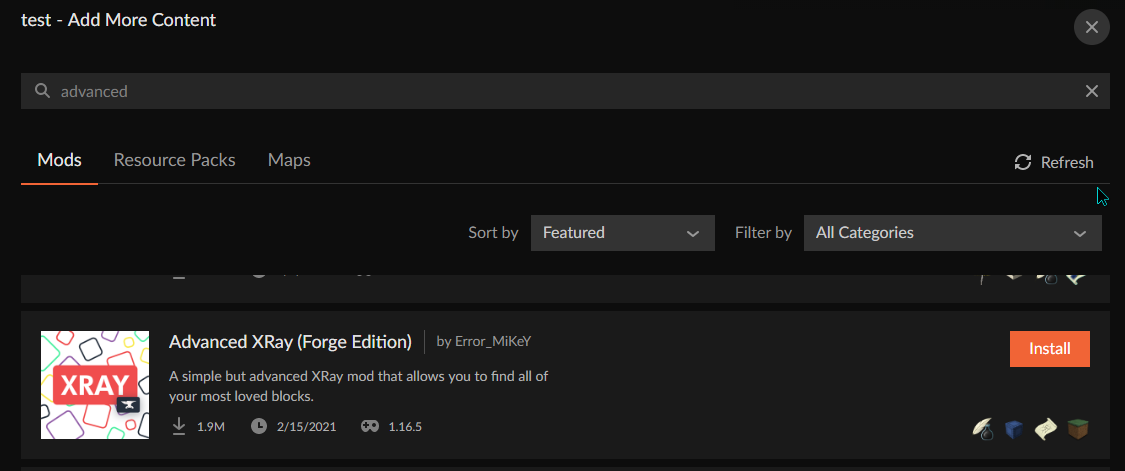
you mean like this image 🙄 https://i.imgur.com/LSsIKvW.png
 signal ridge
swift dirge
signal ridge
swift dirge
This a pack you made or downloaded?
swift dirge
download
vast yoke
tries clicking the pictures install button
swift dirge
lol
red patioBOT
How to install mods in CurseForge App.
- Click
+ Create Custom Profile - Name it, select the required Minecraft version, select the Forge version (usually the highest number), click
Create. - Click the profile icon.
- Click
Add New Content - Search and install the desired mods.
- Start the game!
How to install mods not on CurseForge.
- Right click the profile picture or Open the profile and click the Icon next to the play button.
- Click
Open Folder. - Drag the mod(s) into the
modsfolder. (Note: Some mods will require others, to run. Make sure to read the instructions for the mod!) - Start the game!
vast yoke
hers what i found
 red patioBOT
- Click on the Minecraft Tab on the Left side of the App.
- Click button next to the
Create Custom Profileoption. - Click
Repair Installationoption. - Play game.
NOTE: You will not lose any modpacks or worlds, These are saved in the Instances folder. DO NOT TOUCH THIS FOLDER OR YOU WILL LOSE EVERYTHING
signal ridge
swift dirge
!mc-installfix try this
signal ridge
Restart your app (close and open)
signal ridge
yep, see if it loads now
vast yoke
is trying out Quark first ,it looks the best
vast yoke
lyric crescent
read the instructions
thank you for your help ,it is very much appreciated .Blessing to you for all that you do
 clever abyss
?optifine
signal ridge
!mc-optifine
red patioBOT
Optifine and Curseforge
To install Optifine with modpacks on Curseforge:
Right click the modpack icon, select Open Folder.
Put the Optifine.jar into the mods folder.
Now load the modpack normally.
We do not offer support for Optifine. If you have issues with Optifine, remove it. If you want further support try the discord found on their website.
https://www.optifine.net/home
clever abyss
ty
 signal ridge
swift dirge
signal ridge
swift dirge
!mc-logs
red patioBOT
Where to find the log on the CurseForge Client.
Right-click the modpack profile icon OR click the button in the modpack profile.
Click Open Folder.
Open the logs folder.
Find the file called latest.log and drag it into discord.
vast yoke
omg quark configuration is great
swift dirge
signal ridge
swift dirge
In the folder that the logs folder was in there should be a crashreports folder, Can you drag and drop report crash-2021-04-23_06.44.49-fml.txt please
swift dirge
i dragged the latest into disc, but theres no folder under latest

im stupid
i got it
signal ridge
Reinstall the pack, looks like a mod didnt download correctly
swift dirge
kk
@signal ridge so it woorked, im trying to join a friend with their server and got this, would this be a problem with the mod?
 signal ridge
swift dirge
signal ridge
swift dirge
!mc-logs only this will say
red patioBOT
Where to find the log on the CurseForge Client.
Right-click the modpack profile icon OR click the button in the modpack profile.
Click Open Folder.
Open the logs folder.
Find the file called latest.log and drag it into discord.
swift dirge
signal ridge
this a local hosted server (friends house) or rented from somewhere?
swift dirge
through apex
signal ridge
hmm
signal ridge
swift dirge
through apex
Are you able to get the servers latest log? Or get the buddy that owns the server in here
digital roost
Any explanations on why I can only play a game for like 5-10 minutes before it crashes? It’s consistent and I’m not sure what the issue is
swift dirge
@signal ridge friend is hopping in rn
signal ridge
alright
 distant meteor
hello @signal ridge, I'm the individual @swift dirge was referring to.
signal ridge
Hi, Need the servers latest log to see whats going on
distant meteor
signal ridge
need the one named latest.
distant meteor
signal ridge
Just to make sure you both have legit versions of minecraft right?
swift dirge
yes
 shell frost
How do I get my server files to display separately from the normal modpack files on my page?
 fleet bear
you need to upload it as an additional file, then it needs to be moderated.
shell frost
How do I add it as an additional file? Do I just upload it like I did the other files for the pack?
fleet bear
No, you click the file you uploaded and add it through that.
shell frost
Ah thanks
fleet bear
distant meteor
this is what happened when I tried to whitelist and have them join
send the debug log please
swift dirge
@fleet bear just went to grab food
shell frost
Does it go through auto moderation or do I need to wait for the moderation hours?
fleet bear
wait for moderation hours.
shell frost
Oof mk
swift dirge
@fleet bear theylll be back shortly. i let them know in dm
 blissful scarab
Where can I find backups, it's on Minecraft if that info is needed.
distant meteor
blissful scarab
distant meteor
Didn't you already post that 2 other times
signal ridge
blissful scarab
Didn't you already post that 2 other times
We are working through a bug with them
shell frost
@fleet bear seems that bc the base file was accepted auto moderation handled it.
blissful scarab
Ah, okay then. Kinda looked like he was spamming a code file begging for someone to help him.
signal ridge
blissful scarab
Ah, okay then. Kinda looked like he was spamming a code file begging for someone...
nope was something we asked for before you posted your message. As for backups, if the pack your playing has the backups feature then world backups would be in a backups folder
blissful scarab
Okay, thanks
fleet bear
distant meteor
are we sure everyone has the same pack version?
swift dirge
I have the mst recent one
signal ridge
is the server running the most recent one?
fleet bear
you need the same one the server has
 rocky basalt
hii !
distant meteor
I have modpack version 1.5.8b
signal ridge
swift dirge
I have the mst recent one
What version of the pack is yours?
swift dirge
1.6.1
fleet bear
and that's why it doesn't work
signal ridge
that would do it
Either you need to backdate to 1.5.8b OR the server needs to update
 bleak grove
what does this mean??
fleet bear
bleak grove
what does this mean??
tektopia crashed
bleak grove
how can i make it un crash
fleet bear
remove the mod or update it
 mild sequoia
What is this embed?
fleet bear
?
mild sequoia
The widget
 fleet bear
it's discord?
mild sequoia
Yeah, is it a text file?
signal ridge
yep
 bleak grove
The game crashed whilst loading entity nbt
Error: java.lang.NullPointerException: Loading entity NBT
Exit Code: -1
uninstalled: didnt work. reinstalled: didnt work
it loads all the way till i click on the world than itll load for like 30 seconds and say something along the lines of "shutting server down"
what should i do?
 woven estuary
Okay so question. I created a modpack that I want my friends to use to join me via local. And whenever they search it up in the modpack search on minecraft it doesn't show up. Do I need to publish it or something?
Probably a common question
@fleet bear ?
Im assuming you can help me?
Im not sure.
red patioBOT
There are two ways to share a modpack you've made with others...
Export and Share - For Friends to Small Groups.
- Click the Icon for the modpack.
- Click the button next to play.
- Click

Export. - Select the files that should be included.
- Send the zip to the people that want it! They can follow the instructions in
!mc-installpackto install the pack!
Upload to Curseforge - For Public Release to Everyone.
This options will make your pack public to EVERYONE, it comes with extra requirements and will take some effort to set up.
- Go to here: https://www.curseforge.com/project/432/4471/create
- Fill out the information with a proper description of the pack. This should allow anyone to understand what the pack is.
- Click the Icon for the modpack in the CurseForge app.
- Click the button next to play.
- Click
Export. - Select the files that should be included.
- Open your Project you made on the CurseForge site and Upload the file you just made.
- Wait for Moderation & Sync so it can show up in the client! (See
!syncfor limitations)
woven estuary
I appologize for the blind mention I just scrolled up in chat and saw that he was talking to others and assumed. My appologies.
And thank you
🙂
!mc-installpack
red patioBOT
How to install modpacks with the search features in app.
- Open the

Minecraftsection of the app. - Click the top search bar where it says
Search for modpacksOR Click theBrowse ModpacksTab. - Find the Modpack you want to install and click install on it.
- Wait for CurseForge app to download and unpack all the required files.
- Once finished, click
Play!
How to install modpacks from a Export. (Custom/Private/Site downloaded Modpack zip)
- Get CurseForge App if you don't have it, use
!downloadfor a link. - Get the exported modpack from CurseForge or someone else,
!mc-packshareexplains how to make them. - Open the
Minecraftsection of the app. - Click

Create Custom Profile - Click the
Importoption. - Find the file you just downloaded in step 2 and select it.
- CurseForge app will now attempt to download and unpack the modpack. If it fails, try steps 4-6 again.
- Once finished, click
Play!

 sick kelp
anyone know how to get curseforge minecraft mod packs to work on m1 macs?
signal ridge
Thats a known issue, but with mojang itself, would have to google how to do it.
sick kelp
but its fixable?
signal ridge
Honestly not sure, some have done it but not sure how
 hot shell
yea, i better keep my mouth shut, i have negative snarky opinions about apple products
signal ridge
Its not really a curseforge issue. Between Mojang and apple
digital roost
abble
sick kelp
alright sounds good checks out with what i know so far so separate question is how do i get mods from curseforge to work on multi mc
hot shell
mods or modpacks?
Mods, you simply download the File and add them to 'loader mods' mod packs you can 'new instance', and 'import from zipo'
fleet bear
That would be a question for multimc
digital roost
sick kelp
alright sounds good checks out with what i know so far so separate question is h...
zip file of the modpack
sick kelp
mod packs
digital roost
but why use multimc
sick kelp
cause it works on m1 now
hot shell
yea, DL the sip, and import from zip
digital roost
CurseForge >>>
hot shell
but, yea we can take this convo back to CF...
signal ridge
digital roost
CurseForge >>>
We just went over why they are using multimc, M1 macs dont work well with minecraft...
sick kelp
signal ridge
We just went over why they are using multimc, M1 macs dont work well with minecr...
you mean even on other launchers?
digital roost
no, i know im just giving my support
 slim thunder
yes, even on other launchers
signal ridge
Mojang doesnt have support for M1s, meaning anything that uses the Minecraft launcher (curse, and others) is a no go
Would need to google how to do it or if its possible
digital roost
its unfortunate that the processor becomes problematic with MC
hot shell
You know, i would bet it;s becaise of M$ aqusition of Mojang, and apple 'protesting' that... but that;s just my take on it
bleak grove
bleak grove
what should i do?
yo?
signal ridge
Alright since this is no longer a curse issue and is more just chatting #💬︱general-chat please
signal ridge
bleak grove
yo?
Did you do what clay said earlier?
bleak grove
it didnt work
signal ridge
post the new log
digital roost
hot shell
You know, i would bet it;s becaise of M$ aqusition of Mojang, and apple 'protest...
i think it has to do with the whole "Unified" thing they have going on with the ram and processor
signal ridge
bleak grove
tektopia is crashing, remove or update it
signal ridge
Remove it again, then post the new log after removing it
bleak grove
aye
signal ridge
Same log... Make sure tektopia is removed
bleak grove
it crashed after i interacted with one of the villagers
its entirely removed
ill delete the tektopia harvest compat
signal ridge
Not according to the log you posted. Remove both
bleak grove
what if i try removing the mod "carry on"
what i did that crashed it as was try to carry one of the villagers using the mod "carry on"
after i tried that it immediately crashed
it even goes into detail on the villager in the crash report
signal ridge
Can try it
bleak grove
signal ridge
Can try it
this is w tektopia completly removed
fleet bear
that log still shows tektopia
bleak grove
im going to try and remove carry on now
since thats the mod the initiated the crash
im a fucking genius
it worked
signal ridge
Have you looked online?
digital roost
I'm on the app
signal ridge
ok, doesnt answer the question tho
Have you looked if curseforge site has anything up to date for the mod or modpack?
digital roost
Idk how to im so new to this I'm sorry
signal ridge
google parasite mod curseforge and see what comes up
digital roost
my internets been poopy so ill be back for help once i get it fixed. sorry for ghosting who was originally helping me.
Also is it possible to play on realms etc?
signal ridge
Realms are vanilla only
digital roost
Okay sorry ^^
signal ridge
But you can make modded servers or join existing ones (depends on the modpack)
 viscid dome
How to unban
signal ridge
?
viscid dome
signal ridge
?
i banned someone and /unban doesnt exist
fleet bear
/pardon
 pulsar leaf
Who's idea was it to add curseforge to overwolf?
mild sequoia
pulsar leaf
Who's idea was it to add curseforge to overwolf?
Joe's
pulsar leaf
they could of done so much better if they had their own engine calls to run curseforge and would outperform overwolf
pulsar leaf
mild sequoia
Joe's
thanks
pulsar leaf
mild sequoia
Joe's
joe who?
mild sequoia
pulsar leaf
joe who?
Joe mama
digital roost
pulsar leaf
Who's idea was it to add curseforge to overwolf?
Overwolf acquired CurseForge from Twitch sometime last year
pulsar leaf
digital roost
Overwolf acquired CurseForge from Twitch sometime last year
well I know. I had to download twitch but it was nicer because it was built-in so it didnt need extra programs
 opal cipher
They are though, doing lots of things to improve it, instead of like twitch, ignore all rants from users, and actually acting on feedback. ^^
mild sequoia
You can set Overwolf not to open
 queen storm
mild sequoia
You can set Overwolf not to open
queen storm
mild sequoia
You can set Overwolf not to open
No you can't
pulsar leaf
impossible
opal cipher
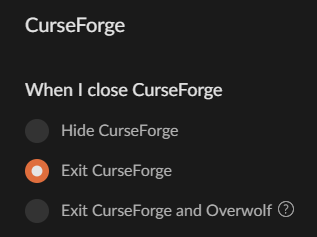
You can although, set Overwolf to close, when you close CurseForge.
pulsar leaf
unless API calls and shit coding to stop overwolf
mild sequoia
You can use CurseForge to install or create modpacks then use a different launcher
pulsar leaf
mild sequoia
You can use CurseForge to install or create modpacks then use a different launch...
then how would I be able to update modpacks lmao
queen storm
pulsar leaf
well I know. I had to download twitch but it was nicer because it was built-in s...
But it had all the streaming stuff instead, in the same thing...
The only difference now is that curseforge has its own window now
mild sequoia
Just don't idk
pulsar leaf
Id have to reopen curseforge to update modpack and stupid overwolf pops up
opal cipher
pulsar leaf
Id have to reopen curseforge to update modpack and stupid overwolf pops up
As I said, you can tell Overwolf to close when you close CurseForge.
digital roost
Overwolf isnt even hardware intensive???
opal cipher
 pulsar leaf
digital roost
Overwolf isnt even hardware intensive???
pulsar leaf
digital roost
Overwolf isnt even hardware intensive???
no but looks unprofessional to have have several programs to demand to meet its requirements
smh
opal cipher
To each their own I guess. ^^;
digital roost
thats kind of a bad take but whatever ¯_(ツ)_/¯
pulsar leaf
yeah its whatever...
opal cipher
They provide a solution at least, instead of Twitch that just let it rot.
And they're trying to improve it with every update.
(And no, I'm not sponsored, it's just a personal opinion)
pulsar leaf
twitch had everything built in one piece and curse forge now split them up 2 other programs and im immediately seeing multiple problems for example java path, folder path has to be a specific letter but it gives a error regardless if its a specific letter, and other problems but cant think off of my head. its shit
mild sequoia
What about something like GDLauncher that lets you install CurseForge modpacks
digital roost
and directories being stupid
opal cipher
And lots of problems with the path is that users install their mods into onedrive.
mild sequoia
I think MultiMC does the same thing
opal cipher
And some modpacks having names that are.. a bit on the long side, so that you reach the maximum length of a path that Windows itself can handle.
pulsar leaf
@digital roost does this look like minecrafts problem?
 opal cipher
This is why it's recommended that you install it into i.e. C:\CurseForge\, to stay within that length.
pulsar leaf
ik
digital roost
pulsar leaf
<@456226577798135808> does this look like minecrafts problem?
Yes, it is minecraft's
not entirely
but partially
but its not like its unsolvable
or truly an issue
opal cipher
Well, can we all just agree to disagree on this part?
digital roost
Yeah
pulsar leaf
succ it up :)
digital roost
:\
pulsar leaf
but i do some magic coding
opal cipher
Yeah, no need to fight over things.
fleet bear
Nobody cares
fleet bear
If you are going to moan about the app do so on the feed back site.
pulsar leaf
buttt
fleet bear
If you want help to fix an actual issue, post it here, get help and move on.
mild sequoia
Forget about complaining about Overworlf and complain about the element scaling at smaller window sizes
pulsar leaf
its not an issue
its a complain that I was discussing
kinda some what has its own issues but mostly a complain
opal cipher
Ramsey, for the error you posted, it's solved by selecting another folder, but you will also have to move the previous instances from the old folder, if you want to keep the profiles. But it's doable! :)
Gotta dip out for now, work meeting starting soon. D;
Peace out o7
pulsar leaf
peace
I tried selecting another folder. still same issue. It just has to be at different part of the root drive
mild sequoia
mild sequoia
Forget about complaining about Overworlf and complain about the element scaling ...
 fleet bear
!mc-path
red patioBOT
**Minecraft Files should NOT be installed inside the following locations
.minecraft folder.
OneDrive folders.
Desktop folder.
Drive roots I.E. Directly into the C:\ drive.
iCloud enabled folders.
If any of the above are in the path you need to change/move it by following the instructions below!**
If Minecraft is not installed, start here.
Click the in the top left.
Select Minecraft.
Click "Edit".
Move to the "Continue here:" section below.
If Minecraft is installed, follow these steps.
Click the in the bottom left.
Select the Minecraft tab.
Click "Change".
Move to the "Continue here:" section below.
Continue here:
Make a folder in the root directory called CurseForge.
Select the folder you just made.
The text box should show something like the following:
For Windows: C:\CurseForge
For Mac: /Users/Shared/CurseForge
fleet bear
mild sequoia
that's because there's an ad below that
mild sequoia
fleet bear
that's because there's an ad below that
They could easily more the ad to a banner at the top or bottom of the screen
opal cipher
To be able to have modpacks that have unreasonably long names x)
pulsar leaf
xD
fleet bear
It doesn't require it but when you deal with 30000 separate machines it's the easier option.
fleet bear
mild sequoia
They could easily more the ad to a banner at the top or bottom of the screen
So you want it to be shorter so you can see less options..?
mild sequoia
fleet bear
So you want it to be shorter so you can see less options..?
I want to be able to look at other things while having a usable window
pulsar leaf
but I kinda like @mild sequoia comment about the wasted space
mild sequoia
Justice for small scaling windows
I'll even volunteer my time to write like 2 lines of CSS
pulsar leaf
same, Id help to make curseforge great again
fleet bear
If you are using a small window it switches to a different format for the ad.
mild sequoia
 fleet bear
Looks fine to me?
mild sequoia
That's the regular scale
fleet bear
"regular scale"
pulsar leaf
they could squeeze like 3 different ads to get max profits on the wasted space lol
fleet bear
It's almost as if the client isn't finished yet.
 queen storm
mild sequoia
queen storm
mild sequoia
!feedback And don't forget to mention how they should make the money to run it then
red patioBOT
<:CFidea:798388634972717066> Have an idea on how to improve CurseForge? <:CFidea:798388634972717066>
CurseForge is looking for great ideas and user feedback! Get into the CurseForge Community by providing some feedback and voting on what's important to you!
Think some game should be supported? Post an idea and explain why!
Got a to die for feature idea? Let's hear it!
Location In-app
- Click the
 button on the bottom left of the app.
 - Click on

Suggest a Featureoption!
opal cipher
But it's pretty art.
mild sequoia
You can see that if you resize the client the mod info is cut off
 fleet bear
Ok, then pay the ~3$ and remove the wasted space? Everyone has the same space unless you are on a tiny screen.
fleet bear
then don't make it smaller?
Regardless of the ad space you had you would be losing out on content or information.
mild sequoia
Fixed solution
 queen storm
mild sequoia
Fixed solution
queen storm
mild sequoia
Fixed solution
!feedback
red patioBOT
<:CFidea:798388634972717066> Have an idea on how to improve CurseForge? <:CFidea:798388634972717066>
CurseForge is looking for great ideas and user feedback! Get into the CurseForge Community by providing some feedback and voting on what's important to you!
Think some game should be supported? Post an idea and explain why!
Got a to die for feature idea? Let's hear it!
Location In-app
- Click the button on the bottom left of the app.
- Click on
Suggest a Featureoption!
queen storm
You are talking to people with absolutely no control over it
fleet bear
Except mod info and options goes to the bottom of the screen
So you rather see less options with an ad on the bottom instead of just using the app at an appropriate size?
mild sequoia
That would be resized as well
It wouldn't cover it lol
It would cause way less usability issues at the bottom then it's current configuration
fleet bear
yes it would. There isn't more room to give all the content in the space
So you would have longer spaces but you don't have more height to work with
So the Modpacks screen and the browse content options would hide a whole entry at that size
queen storm
Did you make a feedback thing already? Because you are still talking to people who can't change anything
queen storm
Okay
fleet bear
Again, you are still missing multiple other listing types
mild sequoia
?
fleet bear
fleet bear
So the Modpacks screen and the browse content options would hide a whole entry a...
.
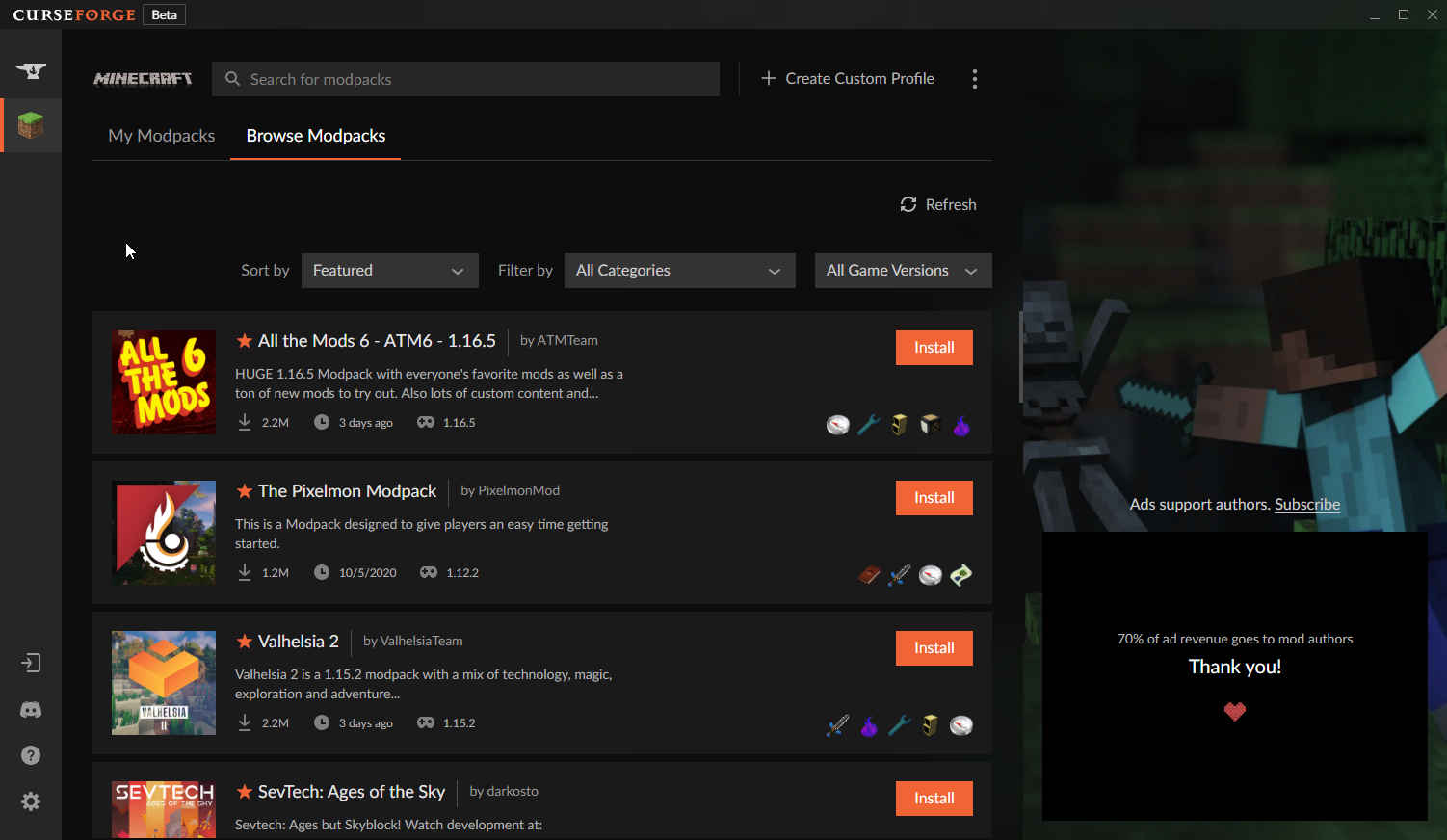
You know, this list that isn't the same as a list of mods
https://i.imgur.com/BggIHiy.png
 mild sequoia
Yeah, but it's functionally identitical
fleet bear
Except there's 10x more information.
mild sequoia
Ok just make the columns taller, it's the same
fleet bear
Then you go right back to the same problem...
You see less content
You can't just create more space from nothing
mild sequoia
Yeah, but still more then you would with the regular sidebar
fleet bear
No...
making it longer doesn't add enough meaningful space to show anything so you would be trading entries in the list for longer bars that show nothing more
As it is at the smallest size of things it becomes annoying to use because the minimum size to show most of names and such is so long.
mild sequoia
It normally cuts off the actions
fleet bear
i'm not talking about the modpack view
There's a minimum of 3 other views you are completely ignoring.
The ad space is the same for all of them
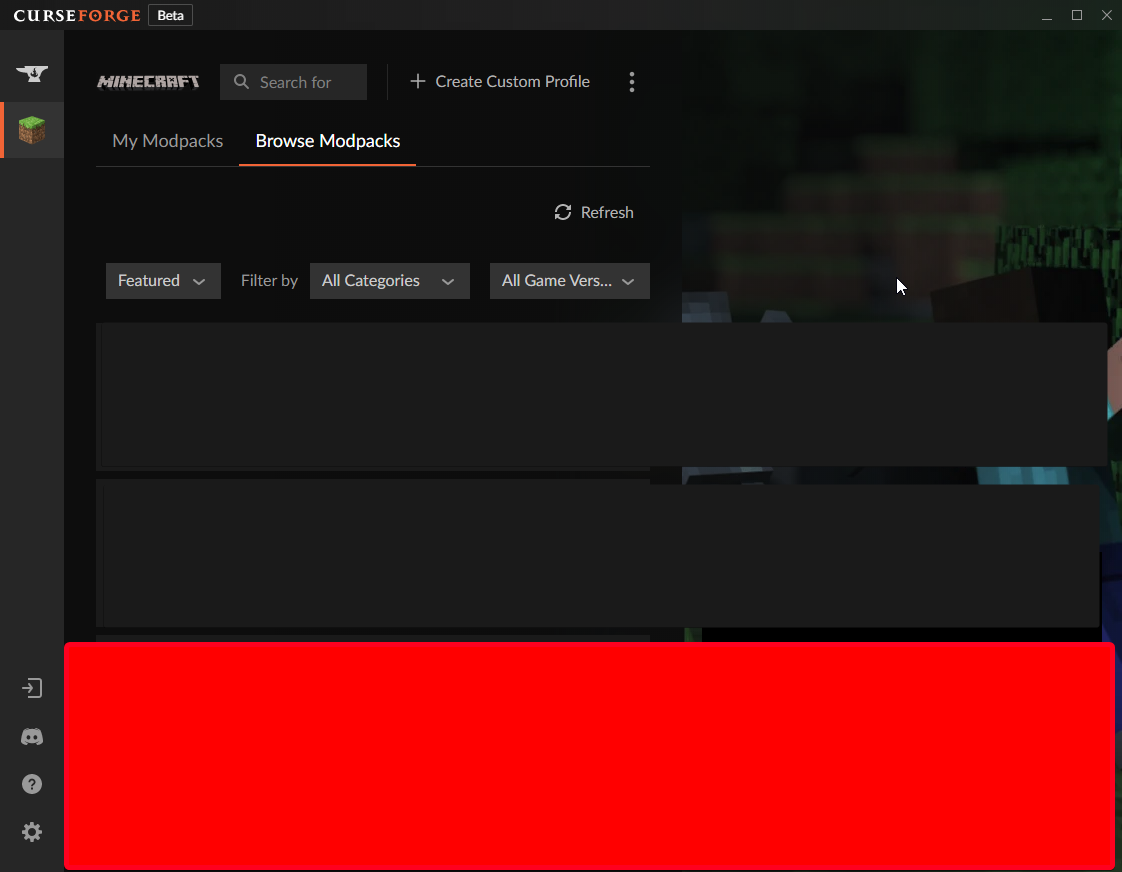
You would go from seeing 4 modpacks to seeing 2 (or less) if you move the ad space.
https://i.imgur.com/mCkmEL1.png
 fleet bear
This is an English discord.
 south flare
i can help
 iron quest
hey i cant download any mods keep having client request pop up
 viral briar
webclient request error? that would point to your internet connection
iron quest
yeah think it was just reset wifi
viral briar
reset your modem/router is best thing to do in this situation , close all random programs that may be using up bandwidth like spotify and such and just run the program on its own
and hopefully it should download and work 🙂
iron quest
thanks man
queen storm
 proven solstice
is there morph mod for forge
proven solstice
is there morph mod for forge
Google it?
viral briar
proven solstice
this for "Morph-1.12.2-7.2.1.jar"
queen storm
And that is weird how?
viral briar
and? , this is the answer to your question , that is morph mod for forge.
proven solstice
where i can find Optifine_1.16.5_HD_U_G8_pre9 ?
lyric crescent
?mc-optifine
red patioBOT
Optifine and Curseforge
To install Optifine with modpacks on Curseforge:
Right click the modpack icon, select Open Folder.
Put the Optifine.jar into the mods folder.
Now load the modpack normally.
We do not offer support for Optifine. If you have issues with Optifine, remove it. If you want further support try the discord found on their website.
https://www.optifine.net/home
queen storm
Then why are you in curseforge-support?
queen storm
Optifine support in this case
proven solstice
What's the difference between forge and curseforge
lyric crescent
!!=
red patioBOT
Wording is important!
Forge = Minecraft Forge, This is a modloader often just called "Forge".
CurseForge = A Website/App that has content for games.
Mods = Individual mod files.
Modpacks = Multiple mods put into the mods folder or downloaded from CurseForge.
These are not Interchangeable! Please use the correct terms as it allows us to help you faster!
proven solstice
oh
lyric crescent
the difference is that they are nothing alike 😄
 north topaz
hi! I have a problem: I can't run crack pack 3, I don't know why
lyric crescent
what is happening
north topaz
when I click play in the minecraft launcher, he give me an error messagge
lyric crescent
?mc-log
red patioBOT
Where to find the log on the CurseForge Client.
Right-click the modpack profile icon OR click the button in the modpack profile.
Click Open Folder.
Open the logs folder.
Find the file called latest.log and drag it into discord.
north topaz
ok
I tried to unistall itbefore, now is dowloading
o he worked
thanks thank you anyway
proven solstice
viral briar
https://www.curseforge.com/minecraft/mc-mods/morph
its didnt worked
bruh
proven solstice
oh sorry
lyric crescent
also "it didnt worked" tells us nothing
proven solstice
i just dowlanded put in the mods enter the game and game want higher version
lyric crescent
are you using the curseforge app?
lyric crescent
then why are we still talking here
this isnt forge support
anyway, you need to actually look at what version the mod is usable on, and make a profile for that version. using the app will make this much easier than whatever you are currently trying to do
 harsh hazel
why cant i play pixelmon on minecraft
lyric crescent
dunno, why
 proven pendant
Hi, I'm hosting a server on an external computer and everything works, however, when I try to join, it says that my client mods are outdated. Is there a way to update all mods in a modpack automatically (client side).
lyric crescent
Curseforge is not involved in servers. Please use #👽︱game-support or #🧱︱mc-other-help (after getting the role).
proven pendant
Yes, it's not about the server though, it's only really about how to update all the mods in a modpack to their latest release
Just forget about the server, I'm just trying to update the mods to their latest version
opal cipher
You should probably use the same version of the modpack as the server has.
lyric crescent
Your client mods dont match the server. You should be copying them over. or ^
proven pendant
hmm, I'll try that
lyric crescent
there is no auto update, that would be terrible
 civic notch
How do I import worlds into forge
digital roost
I mean auto update would be nice as a thing that you can toggle
queen storm
civic notch
How do I import worlds into forge
Drop the in the saves folder
queen storm
!!=
red patioBOT
Wording is important!
Forge = Minecraft Forge, This is a modloader often just called "Forge".
CurseForge = A Website/App that has content for games.
Mods = Individual mod files.
Modpacks = Multiple mods put into the mods folder or downloaded from CurseForge.
These are not Interchangeable! Please use the correct terms as it allows us to help you faster!
queen storm
Curseforge or forge?
civic notch
Forge
 dim summit
I can't seem to find an updated tutorial on how to properly upload a modpack to Curseforge. Am I meant to upload the files after creating the project, if so, how do I also upload the configs, scripts, etc? I also heard that the Curseforge launcher allows drag-n-dropping the files into a folder to upload them, but does that publically upload the modpack on the actual site? Is there somewhere with detailed information about this?
lyric crescent
?mc-packshare
red patioBOT
There are two ways to share a modpack you've made with others...
Export and Share - For Friends to Small Groups.
- Click the Icon for the modpack.
- Click the button next to play.
- Click
Export. - Select the files that should be included.
- Send the zip to the people that want it! They can follow the instructions in
!mc-installpackto install the pack!
Upload to Curseforge - For Public Release to Everyone.
This options will make your pack public to EVERYONE, it comes with extra requirements and will take some effort to set up.
- Go to here: https://www.curseforge.com/project/432/4471/create
- Fill out the information with a proper description of the pack. This should allow anyone to understand what the pack is.
- Click the Icon for the modpack in the CurseForge app.
- Click the button next to play.
- Click
Export. - Select the files that should be included.
- Open your Project you made on the CurseForge site and Upload the file you just made.
- Wait for Moderation & Sync so it can show up in the client! (See
!syncfor limitations)
queen storm
civic notch
Forge
dim summit
So that also allows me to upload configs and whatever other folders define the modpack, not only the mods?
Step 6 that is.
lyric crescent
yes
dim summit
Ay, thanks x3
I take it including Optifine and other outside mods is against the rules?
opal cipher
Yes.
Optifine can't be included into modpacks, because of licensing or something something
dim summit
Gotcha!
 late marsh
On mc how to you individually install a mod
lyric crescent
?mc-installmods
red patioBOT
How to install mods in CurseForge App.
- Click
+ Create Custom Profile - Name it, select the required Minecraft version, select the Forge version (usually the highest number), click
Create. - Click the profile icon.
- Click
Add New Content - Search and install the desired mods.
- Start the game!
How to install mods not on CurseForge.
- Right click the profile picture or Open the profile and click the Icon next to the play button.
- Click
Open Folder. - Drag the mod(s) into the
modsfolder. (Note: Some mods will require others, to run. Make sure to read the instructions for the mod!) - Start the game!
digital roost
How do add in a logo to uploading my modpack curseforge author page everytime i do it it says the picture is to small even tho it is the right size in pixels?
 radiant acorn
I need help when i try to use a modpack my game crashes everytime
lyric crescent
?mc-log
red patioBOT
Where to find the log on the CurseForge Client.
Right-click the modpack profile icon OR click the button in the modpack profile.
Click Open Folder.
Open the logs folder.
Find the file called latest.log and drag it into discord.
lyric crescent
digital roost
How do add in a logo to uploading my modpack curseforge author page everytime i ...
show the message, also send the image
 round rivet
I uploaded a mod yesterday and no one has confirmed or disconfirmed it
lyric crescent
!status
red patioBOT
It is 04:45PM on Friday for CurseForge my dudes.
Project Moderation Time
Project/File moderation is done on Sunday - Thursday from 10am - 6pm GMT+2
This process is First in, First out. Thus files submitted late in the work day may not be checked until the next work day.
New Projects or uploads requiring manual approval: 1-3 Working Days
Updates to approved projects not needing manual approval: 1 Hour
File sync to the Curseforge app may take up to 24 hours after approval.
 warm fractal
Its been like this or 20 mins and its not turning off and its not letting me restart. i cant quit it

can someone help?
lyric crescent
ctrl shift esc, kill java
warm fractal
does it work in mac cuz i am using mac rn and its not working
:0
it worked
thx to much 🙂
wait it started again
round rivet
Please help me it have been like that seens yesterday

 magic sleet
hi, seriously its done 3 times that the scp lockdown pack mod makes me crash so I do what because it makes me ...
 woeful cedar
This is the logs soz for late reply had to go
lyric crescent
round rivet
Please help me it have been like that seens yesterday
Try reading the message directly after yours
woeful cedar
still says game crashing and exit code 0 when i try to play a modpack
signal ridge
woeful cedar
This is the logs soz for late reply had to go
!mc-installfix
red patioBOT
- Click on the Minecraft Tab on the Left side of the App.
- Click button next to the
Create Custom Profileoption. - Click
Repair Installationoption. - Play game.
NOTE: You will not lose any modpacks or worlds, These are saved in the Instances folder. DO NOT TOUCH THIS FOLDER OR YOU WILL LOSE EVERYTHING
lyric crescent
magic sleet
but what is normal if in a certain mod i have a lag?
Report it to whoever made it
 carmine hornet
Help me
 woeful cedar
signal ridge
!mc-installfix
woeful cedar
signal ridge
!mc-installfix
ive done this lik e5 times
magic sleet
oki thx, and i have a big freeze when i change language XD but i think is normal?
lyric crescent
carmine hornet
Help me
Nothing to help with?
Just wait
magic sleet
k
woeful cedar
so what do i do?
digital roost
what problem do you have?
carmine hornet
I've been waiting for 4 hours. My mod is still not approved 😦
signal ridge
!status
red patioBOT
It is 05:07PM on Friday for CurseForge my dudes.
Project Moderation Time
Project/File moderation is done on Sunday - Thursday from 10am - 6pm GMT+2
This process is First in, First out. Thus files submitted late in the work day may not be checked until the next work day.
New Projects or uploads requiring manual approval: 1-3 Working Days
Updates to approved projects not needing manual approval: 1 Hour
File sync to the Curseforge app may take up to 24 hours after approval.
digital roost
@woeful cedar what problem do you have?
signal ridge
 small fiber
hi
small fiber
hi
#📛︱rules 5
small fiber
@signal ridgeلش
signal ridge
Seriously stop
small fiber
ان مش بفهم انجلش
signal ridge
Read the rules, or you will be removed
carmine hornet
signal ridge
!status
Oh thx !
digital roost
Ehhh English only is the rule or no?
signal ridge
number 1
digital roost
oh.. sorry i wasn't sure
woeful cedar
digital roost
<@694974048148521080> what problem do you have?
i keep on getting exit code 0 when trying to play anyy modpack
digital roost
ok
signal ridge
woeful cedar
i keep on getting exit code 0 when trying to play anyy modpack
Give me a sec, will try a different approach
digital roost
@woeful cedar It maybe cause of bad reading or bad installation of CurseForge (Mode) or Minecraft Launcher
it happenned to me too
signal ridge
woeful cedar
i keep on getting exit code 0 when trying to play anyy modpack
- Click on the icon in the bottom left of Curseforge.
- Click the Minecraft Tab.
- Click Change next to the Minecraft Modding Folder Option.
- Select the folder named Install.
- Delete it.
- Restart CurseForge App. (close and open) Reboot pc
- It will ask to install MC again, do so.
- Play game.
NOTE: You will not lose any modpacks or worlds, These are saved in the Instances folder. DO NOT TOUCH THIS FOLDER OR YOU WILL LOSE EVERYTHING
signal ridge
try this bob, its a more hard style of doing it. At step 6 reboot your pc
woeful cedar
ok
digital roost
It's awesome that staff is online and is communicative
i've been on a lot of servers but they have written to me like 1 hour after question
signal ridge
we try our best, different timezones for some tho. so can be hit and miss some hours of the day 😛
digital roost
and that's awesome! 👍
woeful cedar
it didnt ask to reinstall mc
signal ridge
did you reboot your pc?
signal ridge
screen shot
woeful cedar
 digital roost
can anyone help me with this?
 signal ridge
digital roost
can anyone help me with this?
signal ridge
digital roost
can anyone help me with this?
!mc-path
red patioBOT
**Minecraft Files should NOT be installed inside the following locations
.minecraft folder.
OneDrive folders.
Desktop folder.
Drive roots I.E. Directly into the C:\ drive.
iCloud enabled folders.
If any of the above are in the path you need to change/move it by following the instructions below!**
If Minecraft is not installed, start here.
Click the in the top left.
Select Minecraft.
Click "Edit".
Move to the "Continue here:" section below.
If Minecraft is installed, follow these steps.
Click the in the bottom left.
Select the Minecraft tab.
Click "Change".
Move to the "Continue here:" section below.
Continue here:
Make a folder in the root directory called CurseForge.
Select the folder you just made.
The text box should show something like the following:
For Windows: C:\CurseForge
For Mac: /Users/Shared/CurseForge
digital roost
idk what to do, I tried uninstalling and reinstalling but it didnt help
signal ridge
woeful cedar
Whats your path for minecraft? See above to find it
signal ridge
digital roost
idk what to do, I tried uninstalling and reinstalling but it didnt help
Do what the bot says
woeful cedar
ok
digital roost
signal ridge
Do what the bot says
Okay, thank you
signal ridge
... Just asked that
digital roost
sorry :c
woeful cedar
where shoudl it be?
digital roost
it should be in Users/<name>/AppData/Roaming/.minecraft
woeful cedar
what mc files shoudl not be in those files?
signal ridge
Follow the first few steps of the bot post
signal ridge
digital roost
it should be in Users/<name>/AppData/Roaming/.minecraft
That is very wrong for curseforge
woeful cedar
what files shoudl i be looking for
signal ridge
We are talking about curseforge not vanilla 🤦
signal ridge
digital roost
for CurseForge its only Users/<name>/curseforge
Alright, I am asking him not you,
digital roost
i just want to help...
woeful cedar
 signal ridge
woeful cedar
what files shoudl i be looking for
signal ridge
woeful cedar
what files shoudl i be looking for
If Minecraft is installed, follow these steps.
Click the in the bottom left.
Select the Minecraft tab.
Take a screen shot of the path that is there
woeful cedar
that
signal ridge
Try setting it to what the bot says
#🔥︱curseforge-support message
woeful cedar
so make a folder in teh root directory?
signal ridge
digital roost
i just want to help...
I get that, but 2 people on 1 issue can confuse people.
signal ridge
woeful cedar
so make a folder in teh root directory?
Correct. Exactly as it says for windows users
lyric crescent
if only we provided instructions on this
woeful cedar
this is the text box of the new file i made
 signal ridge
thats not the same path as what the bot says
lyric crescent
i suggest, again, reading the instructions
woeful cedar
im so confused
lyric crescent
by what
woeful cedar
the instructions
lyric crescent
specifically
woeful cedar
all of it
signal ridge
Start at If Minecraft is installed, follow these steps. and down, follow the video if needed
woeful cedar
ok
 hidden spire
the application seems to not recognize that I have stardew valley.
woeful cedar
oh the video explains a lot
signal ridge
hidden spire
the application seems to not recognize that I have stardew valley.
?knownissues at the bottom under other games
red patioBOT
Known Issues with solutions or status of the issue.
Overwolf maintains a known list of issues here, some with solutions, others without.
https://support.curseforge.com/en/support/solutions/articles/9000196615-curseforge-known-issues
woeful cedar
i misread the instructions
 iron elm
is there a mod that has lucky blocks?
hidden spire
thank you
signal ridge
iron elm
is there a mod that has lucky blocks?
Not the channel for this, #💬︱general-chat OR #🧱︱minecraft-chat
woeful cedar
is hti sright
 lyric crescent
yes
 stable apex
hey, i have problems launching any 1.16.5 modpacks (even without any mods) i will post the crash log in a few secs
woeful cedar
now what do i do
lyric crescent
the next step in the instructions
woeful cedar
it says The text box should show something like the following:
For Windows: C:\CurseForge
For Mac: /Users/Shared/CurseForge then says nothing else
lyric crescent
Make a folder in the root directory called CurseForge. Select the folder you just made.
lyric crescent
stable apex
dont see anything specificly wrong there, would try the following, and then a pc restart
?mc-installfix
red patioBOT
- Click on the Minecraft Tab on the Left side of the App.
- Click button next to the
Create Custom Profileoption. - Click
Repair Installationoption. - Play game.
NOTE: You will not lose any modpacks or worlds, These are saved in the Instances folder. DO NOT TOUCH THIS FOLDER OR YOU WILL LOSE EVERYTHING
woeful cedar
now it should be fixed?
 signal ridge
Try installing the packs you want and hitting play
woeful cedar
kk
 mossy garnet
I just uploaded a new version of my modpack and i think it gets rejected. I think the first time was rejected because i was missing config? Second time i uploaded a copy of it with config files, it got into review and then it dissappeared. I havent gotten any rejection messages yet.
signal ridge
mossy garnet
I just uploaded a new version of my modpack and i think it gets rejected. I thin...
Screen shot the reject message
lyric crescent
click the notification icon and view all
mossy garnet
signal ridge
Screen shot the reject message
the big problem still is that i dont have the rejection message
woeful cedar
exit code 0 came p again
lyric crescent
?MC-LOG
red patioBOT
Where to find the log on the CurseForge Client.
Right-click the modpack profile icon OR click the button in the modpack profile.
Click Open Folder.
Open the logs folder.
Find the file called latest.log and drag it into discord.
woeful cedar
kk
lyric crescent
show the message
woeful cedar
there
mossy garnet
i got the archived version of jei what caused my modpack rejection
lyric crescent
woeful cedar
there
?mc-installfix
red patioBOT
- Click on the Minecraft Tab on the Left side of the App.
- Click button next to the
Create Custom Profileoption. - Click
Repair Installationoption. - Play game.
NOTE: You will not lose any modpacks or worlds, These are saved in the Instances folder. DO NOT TOUCH THIS FOLDER OR YOU WILL LOSE EVERYTHING
woeful cedar
kk
mossy garnet
lyric crescent
show the message
 lyric crescent
k remove it and install the current one
mossy garnet
aight
mossy garnet
lyric crescent
k remove it and install the current one
thank you. have a nice day
woeful cedar
this again
 stable apex
lyric crescent
dont see anything specificly wrong there, would try the following, and then a pc...
stable apex
lyric crescent
dont see anything specificly wrong there, would try the following, and then a pc...
worked thx
 river oar
hey, i was wondering if anyone could let me know how to make a sky factory 4 world so my friends can join it too. Thanks!
woeful cedar
server
woeful cedar
buy a server
river oar
oh right
signal ridge
This is more a topic for #👽︱game-support Will explain options there
woeful cedar
woeful cedar
this again
so what do i do?
river oar
signal ridge
This is more a topic for <#778097796410376242> Will explain options there
ok there now thanks
signal ridge
woeful cedar
so what do i do?
post the new latest log
 tame gazelle
If I'm making a 1.16.5 modpack and I want to add a mod that's in 1.16.4 to it, and I add it manually, and the CurseForge mod list picks it up, does it mean I can export the file with the mod and it'll be downloaded automatically when others get my modpack?
signal ridge
If its a mod from curseforge site then yes.
?mc-3rdparty or its on the 3rdparty list
red patioBOT
Minecraft Modpack 3rd party
Mods not on CurseForge must be on the 3rd-party list to be included in modpacks uploaded to CurseForge. If a mod is not on this list it can't be included in the export of a modpack and must be removed before uploading. If you upload with a mod that isn't on this list the file will be rejected.
List of approved 3rd party mods:
https://docs.google.com/spreadsheets/d/176Wv-PZUo9hFxy6oC6N8tWdquBLPRtSuLbNK-r0_byM
vast yoke
when you think your done and you get this faceplam
 signal ridge
vast yoke
when you think your done and you get this *faceplam*
signal ridge
vast yoke
when you think your done and you get this *faceplam*
What version of minecraft is your pack?
vast yoke
can anyone explain why forge isnt automatically linking the download button to the latest versions
 serene cedar
chupapi munyanyo
vast yoke
signal ridge
What version of minecraft is your pack?
building my own pack
signal ridge
vast yoke
building my own pack
Didnt answer the question
vast yoke
trying for 1.16.5 though
signal ridge
vast yoke
trying for 1.16.5 though
Soo then 1.12 mods will not work on 1.16.5
Use the app to download mods
vast yoke
i am having issues finding what i want in the app
signal ridge
vast yoke
i am having issues finding what i want in the app
What mods?
vast yoke
all of them ,what you see on forge verses curse app is drastically diffrent
the info about mods on forge just seems alot more informative
signal ridge
When you make a profile for 1.16.5 only mods for 1.16.5 will show in the app
vast yoke
iv got no clue how i got 1.12 mods even downloaded
signal ridge
There are only a few mods that are 1.16.2/3/4 that will work on 1.16.5
vast yoke
nope even those arnt loading
signal ridge
vast yoke
iv got no clue how i got 1.12 mods even downloaded
Did you download mods and add them manually?
vast yoke
signal ridge
Did you download mods and add them manually?
correct
signal ridge
vast yoke
correct
Then thats probably how you got the 1.12 ones
Make sure when you download files that they are for the same version your playing
vast yoke
its a forge issue or dev issue
the mods all had 1.16.5 downloads avalible in the dl sections
signal ridge
Or the 1.12 mods dont work cuz they were not built for that version
vast yoke
i get that
signal ridge
Link a mod you downloaded for "1.16.5" that were 1.12.2 instead
vast yoke
im just wondering why the download button would download link to an older version
signal ridge
pick one of the ones that is the wrong version
signal ridge
ctm is connected textures mod
 void lodge
I’m having a chicken lb crash happen everytime I load in and the mod I’m tryna load is SkyFactory
signal ridge
void lodge
I’m having a chicken lb crash happen everytime I load in and the mod I’m tryna l...
!mc-logs
red patioBOT
Where to find the log on the CurseForge Client.
Right-click the modpack profile icon OR click the button in the modpack profile.
Click Open Folder.
Open the logs folder.
Find the file called latest.log and drag it into discord.
void lodge
Well hold up cus it went away so I’m restarting it
signal ridge
should be in the logs folder, follow the bot
vast yoke
ok decocraft is ptrlib ,glassesentials is ctm ,...
signal ridge
vast yoke
ok decocraft is ptrlib ,glassesentials is ctm ,...
ok? got a link to what you downloaded?
void lodge
Also everytime I start it I always get this fatal log that says ‘Registering transformer shadows.squeezer.Transformer
vast yoke
signal ridge
pick one of the ones that is the wrong version
JEI DOWNLOADED 1.12 INSTEAD OF LATEST version
signal ridge
vast yoke
JEI DOWNLOADED 1.12 INSTEAD OF LATEST version
.... How did you download it? Site or app?
Either answer the questions and do what Im asking or I can come back later when you have calmed down
vast yoke
everything from site nothing came from app , already mentioned its not a curse issue ^^^
signal ridge
vast yoke
everything from site nothing came from app , already mentioned its not a curse i...
This is a you downloading the wrong files then issue.
vast yoke
no i literally clicked the download button
signal ridge
Before you download make sure its for the version you are using, Dont just download the main file. OR Use the Appp
vast yoke
in the upper right corner
signal ridge
Screen shot? links ?
vast yoke
your not getting what i am saying though
void lodge
This is what it’s telling me
 signal ridge
void lodge
This is what it’s telling me
signal ridge
void lodge
This is what it’s telling me
!mc-logs do this
red patioBOT
Where to find the log on the CurseForge Client.
Right-click the modpack profile icon OR click the button in the modpack profile.
Click Open Folder.
Open the logs folder.
Find the file called latest.log and drag it into discord.
signal ridge
vast yoke
your not getting what i am saying though
Your just saying its not downloading what you want, But you arnt providing anything I have asked you for
vast yoke
signal ridge
Screen shot? links ?
you act like you can fix the problem ? im just rambling about a minor thing i noticed
lyric crescent
This isnt a place to ramble, go to #💬︱general-chat or #🥑-off-topic-chat . This is channel is for support.
void lodge
Ok hold on yoyok9 I’m working on it
signal ridge
void lodge
Ok hold on yoyok9 I’m working on it
Sounds good
 tender falcon
can i get some assistance plz i have minecraft but it keeps only giveing me demo when i go to forge?
vast yoke
everything i ownloaded came from the "download button" upper right corner or fro the download button bottom of the pages , j/s
signal ridge
tender falcon
can i get some assistance plz i have minecraft but it keeps only giveing me dem...
Upper left cornner of the launcher, are you signed into the account that owns the JAVA version of minecraft?
vast yoke
lyric crescent
This isnt a place to ramble, go to <#777410474467131423> or <#778026154677239824...
my bad
 halcyon vector
hey why is this like this
 tender falcon
oo i dont think so let me try
signal ridge
halcyon vector
hey why is this like this
!mc-path do this
red patioBOT
**Minecraft Files should NOT be installed inside the following locations
.minecraft folder.
OneDrive folders.
Desktop folder.
Drive roots I.E. Directly into the C:\ drive.
iCloud enabled folders.
If any of the above are in the path you need to change/move it by following the instructions below!**
If Minecraft is not installed, start here.
Click the in the top left.
Select Minecraft.
Click "Edit".
Move to the "Continue here:" section below.
If Minecraft is installed, follow these steps.
Click the in the bottom left.
Select the Minecraft tab.
Click "Change".
Move to the "Continue here:" section below.
Continue here:
Make a folder in the root directory called CurseForge.
Select the folder you just made.
The text box should show something like the following:
For Windows: C:\CurseForge
For Mac: /Users/Shared/CurseForge
tender falcon
logged in on minecraft as the one that owns it. or do you mean the forge
vast yoke
halcyon vector
hey why is this like this
it is a path issue for where you are trying to install to ,change it to a root drive ie c:\
signal ridge
tender falcon
logged in on minecraft as the one that owns it. or do you mean the forge
Which ever account you used to buy mojangs JAVA edition of minecraft
tender falcon
then yep
signal ridge
tender falcon
then yep
log out of it then back in if it still says demo
signal ridge
Make sure its the right account info
signal ridge
When you got minecraft was it with mojang or microsoft?
void lodge
[10:52:04] [Client thread/INFO]: [net.minecraft.init.Bootstrap:func_179870_a:553]: #@!@# Game crashed! Crash report saved to: #@!@# C:\Users\Anonymous\Documents\Instances\SkyFactory 4\crash-reports\crash-2021-04-23_10.52.04-client.txt
late marsh
Im trying to install xaeros minimap mod but only xearos minimap any suggestions on how to install it individually
signal ridge
void lodge
[10:52:04] [Client thread/INFO]: [net.minecraft.init.Bootstrap:func_179870_a:553...
Yeah I can see the report in the log
void lodge
k
signal ridge
late marsh
Im trying to install xaeros minimap mod but only xearos minimap any suggestions ...
!mc-installmods
red patioBOT
How to install mods in CurseForge App.
- Click
+ Create Custom Profile - Name it, select the required Minecraft version, select the Forge version (usually the highest number), click
Create. - Click the profile icon.
- Click
Add New Content - Search and install the desired mods.
- Start the game!
How to install mods not on CurseForge.
- Right click the profile picture or Open the profile and click the Icon next to the play button.
- Click
Open Folder. - Drag the mod(s) into the
modsfolder. (Note: Some mods will require others, to run. Make sure to read the instructions for the mod!) - Start the game!
tender falcon
it was java mojang i believe
halcyon vector
there is no minecraft tab
 signal ridge
tender falcon
it was java mojang i believe
signal ridge
tender falcon
it was java mojang i believe
If you have one try the mojang account
tender falcon
i thought it was all the same
void lodge
signal ridge
Yeah I can see the report in the log
so do you know why its doin it?
signal ridge
halcyon vector
there is no minecraft tab
Go back to the main page for the app, and isntall minecraft
lyric crescent
halcyon vector
there is no minecraft tab
If Minecraft is not installed, start here.
signal ridge
void lodge
so do you know why its doin it?
Just looking at the issue now.
void lodge
k thx
halcyon vector
minecraft is on my computer
lyric crescent
installed on the app..
halcyon vector
ooooh
signal ridge
void lodge
k thx
Reinstall the pack
late marsh
signal ridge
!mc-installmods
thx
signal ridge
void lodge
Im trying to play Skyfactory
Yeah just realised.. Too many files XD Reinstall the pack.
void lodge
XD ok
signal ridge
If you have any worlds you dont want to loose save em first
signal ridge
ah ok, then yeah, delete it then reinstall it.
void lodge
ok
 lyric crescent
late marsh
how to i transfer mods to the mod folder?
lyric crescent
late marsh
how to i transfer mods to the mod folder?
is this forge or curseforge?
void lodge
yoyo forge says my files are locked cannot delete, what do i do>
late marsh
curseforge custom profile
lyric crescent
?mc-installmods
red patioBOT
How to install mods in CurseForge App.
- Click
+ Create Custom Profile - Name it, select the required Minecraft version, select the Forge version (usually the highest number), click
Create. - Click the profile icon.
- Click
Add New Content - Search and install the desired mods.
- Start the game!
How to install mods not on CurseForge.
- Right click the profile picture or Open the profile and click the Icon next to the play button.
- Click
Open Folder. - Drag the mod(s) into the
modsfolder. (Note: Some mods will require others, to run. Make sure to read the instructions for the mod!) - Start the game!
lyric crescent
void lodge
yoyo forge says my files are locked cannot delete, what do i do>
restart your pc
void lodge
gaaaaaaaaaaaaaaaaaaaaa ok
tender falcon
ok so i own it on microsoft i guess but its the java one and iv been playing it for 6 months
why all of a sudden is it demo mode?
only on curse
nvm i got it it was just not loading right 🙂
tyty
late marsh
it says my xaeros is niot upodated and when i try to update it it takes me to some fishy website
got it fixed
vast yoke
compatability question when version matching can future version be used with older when your target version to run is the older one ? refernce twilight forrest 1.12.2 wanting JEI and its oldest version is 1.14.4
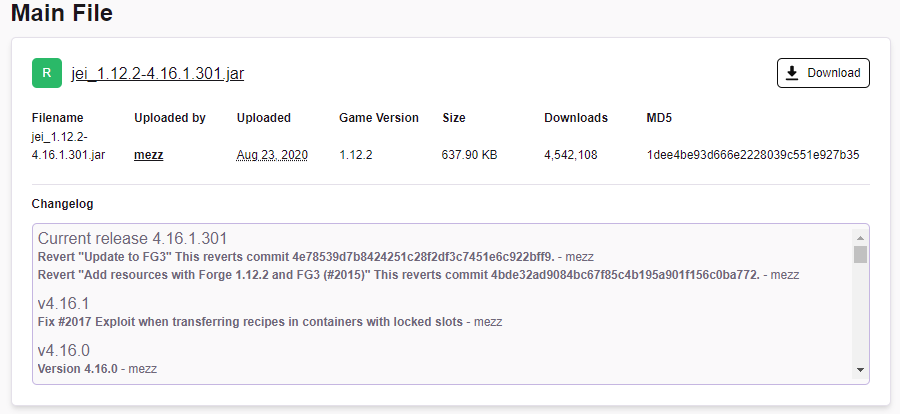 digital roost
press download


 left nest
How exactly do I download the server files for FTB mods?
void lodge
lyric crescent
restart your pc
It worked thanks : )
vast yoke
lyric crescent
https://i.imgur.com/LYX2t7f.png
where are you sorcing your downloads i am obviously in the incorrect place
 vast yoke
signal ridge
????
vast yoke
signal ridge
????
never mind thought you where being chill and providing a download link for JEI 1.12.2
left nest
Hey Yamza, with minecraft curseforge, how do I install the files to start a server?
lyric crescent
not sure what you're asking but hopefully your answer is in here https://pastebin.com/83DXfGTH
Pastebin
Pastebin.com is the number one paste tool since 2002. Pastebin is a website where you can store text online for a set period of time.
lyric crescent
then it does answer your question. also this is not related to curseforge. curseforge does not host servers
signal ridge
digital roost
Hey dose anyone know what it means when I press play on one of the Modpacks it says access denied? im very confuses lol
signal ridge
sounds like a permissions issue with your pc
digital roost
Do you possably know how to fix it? ive looked at the settings and cant seem to find how to idk if im blind or just dumb
lyric crescent
you can use another folder which should avoid the issue, but best way to fix it is gunna be google
digital roost
Ok ill try that thank you
woeful cedar
these r the logs
red patioBOT
- Click on the Minecraft Tab on the Left side of the App.
- Click button next to the
Create Custom Profileoption. - Click
Repair Installationoption. - Play game.
NOTE: You will not lose any modpacks or worlds, These are saved in the Instances folder. DO NOT TOUCH THIS FOLDER OR YOU WILL LOSE EVERYTHING
woeful cedar
😩
signal ridge
If you open your logs and see your vanilla jar may be corrupt. usually its install fix
woeful cedar
where it say vanilla jar may be corrupt?
signal ridge
Your log, near the bottom
java.lang.RuntimeException: java.lang.RuntimeException: Patcher expecting non-empty class data file for net.minecraft.crash.CrashReport$1, but received empty, your vanilla jar may be corrupt.```i must be blind then
signal ridge
If your using notepad++ line 107
woeful cedar
ooh
 weak steeple
Can someone help me with atm6 things
I want to change a recipe
I could not find any youtube video
pls help
signal ridge
Not really a curseforge issue. Goto #786424115535544350 Get the Minecraft role then ask in #🧱︱mc-other-help
weak steeple
ok
lyric crescent
Or just ask the people who made the pack.
weak steeple
how?
lyric crescent
check the pack page for contact info
Not a curseforge issue. #👽︱game-support or #🧱︱mc-other-help (get the role in #786424115535544350 )
digital roost
Ok thx
 modest bane
Hello, so sorry if I'm in the wrong place to ask but I've been having trouble running any mods through curse forge for minecraft. I can download and install the mods but once I get to the FML early loading progress screen the launcher crashes. I don't have an insanely powerful computer (1060, 16GB RAM, i7) but I have friends with lower specs and they run modded mc just fine. Is there any known methods/steps I can take to fix this?
 red patioBOT
How to set Global Minecraft RAM value.
- Click the icon in the bottom left to open settings.
- Click the Minecraft tab.
- Scroll down.
- Slide slider to recommended ram range as seen below.

 thorn pawn
Hello. I made my own Mc Modpack. I installed everything on my own server and on my computer.
My problem is when I join my server on my trash laptop everything works fine and I can play the game. But when I play the mod pack and try to join my server it says "fatally missing blocks and items" can someone help me with my problems?
 lyric crescent
Not a curseforge issue. #👽︱game-support or #🧱︱mc-other-help (get the role in #786424115535544350 )
digital roost
is minecraft
signal ridge
?
 broken nebula
MC is my dream.
digital roost
is fr
broken nebula
how many bad things do you have to do to get a warning ?
signal ridge
digital roost
is fr
Utilisez google translate, en anglais uniquement ici
 balmy gyro
Hi, I have a problem when I launch curseforge it do this and I cannot acces to the main menu
 broken nebula
Oh well, I will not do anything bad.
fleet bear
too late for that
balmy gyro
i dont speak english
signal ridge
Rule 1.
If you dont know English all that well use google translate. Chances are we have no idea what your saying if its not English and will be removed
lyric crescent
If you're not here with an issue regarding Curseforge then use another channel.
broken nebula
ok
lyric crescent
balmy gyro
Hi, I have a problem when I launch curseforge it do this and I cannot acces to t...
Try restarting your computer.
modest bane
lyric crescent
!mc-ram
I appreciate the advice, but unfortunately after allocating more ram and restarting my pc the same issue is occuring. Anything else you might have in mind?
lyric crescent
?mc-log
red patioBOT
Where to find the log on the CurseForge Client.
Right-click the modpack profile icon OR click the button in the modpack profile.
Click Open Folder.
Open the logs folder.
Find the file called latest.log and drag it into discord.
broken nebula
Everytime I try to start a mod, it takes half an hour. then, when i generate a new world, it just freezes on like 20%
modest bane
I believe this is what I needed to copy over to discord
signal ridge
broken nebula
Everytime I try to start a mod, it takes half an hour. then, when i generate a n...
How much ram have you allocated to the app?
!mc-ram
red patioBOT
How to set Global Minecraft RAM value.
- Click the icon in the bottom left to open settings.
- Click the Minecraft tab.
- Scroll down.
- Slide slider to recommended ram range as seen below.
broken nebula
oh
lyric crescent
modest bane
I believe this is what I needed to copy over to discord
need to send it after the issue begins. looks like you just loaded the game
broken nebula
don't know
signal ridge
broken nebula
don't know
Follow what the bot says, then screen shot what you have
broken nebula
That was a while ago. Starting any app will take like 15 minutes. I will come back later.
signal ridge
If the app itself is taking a long time to start sounds like your pc is the issue
modest bane
lyric crescent
need to send it after the issue begins. looks like you just loaded the game
So you're wanting to see the log while the launcher is opened and not responding like this? (picure)
 lyric crescent
yea
 quiet shadow
can you guys launch 1.16.5 modpacks without crashing?
modest bane
Ok, the launcher is still open and not responding, here is the "latest.log".
signal ridge
yep
signal ridge
quiet shadow
can you guys launch 1.16.5 modpacks without crashing?
!mc-logs
red patioBOT
Where to find the log on the CurseForge Client.
Right-click the modpack profile icon OR click the button in the modpack profile.
Click Open Folder.
Open the logs folder.
Find the file called latest.log and drag it into discord.
lyric crescent
modest bane
So you're wanting to see the log while the launcher is opened and not responding...
press ctrl shift esc, anything there maxed out?
quiet shadow
it crashes even when there is no mods
 quartz zealot
Hey can my modpack be reviewed please (ChadPack ZeeBazz)
slim thunder
quartz zealot
Hey can my modpack be reviewed please (ChadPack ZeeBazz)
!status
red patioBOT
It is 08:58PM on Friday for CurseForge my dudes.
Project Moderation Time
Project/File moderation is done on Sunday - Thursday from 10am - 6pm GMT+2
This process is First in, First out. Thus files submitted late in the work day may not be checked until the next work day.
New Projects or uploads requiring manual approval: 1-3 Working Days
Updates to approved projects not needing manual approval: 1 Hour
File sync to the Curseforge app may take up to 24 hours after approval.
slim thunder
this is like the 2nd time you've asked that
signal ridge
quiet shadow
it crashes even when there is no mods
!mc-installfix try this
red patioBOT
- Click on the Minecraft Tab on the Left side of the App.
- Click button next to the
Create Custom Profileoption. - Click
Repair Installationoption. - Play game.
NOTE: You will not lose any modpacks or worlds, These are saved in the Instances folder. DO NOT TOUCH THIS FOLDER OR YOU WILL LOSE EVERYTHING
quartz zealot
yeah cause like I need it yk?
modest bane
lyric crescent
press ctrl shift esc, anything there maxed out?
It doesn't look like it
 slim thunder
quartz zealot
yeah cause like I need it yk?
slim thunder
quartz zealot
yeah cause like I need it yk?
asking won't make it faster
quartz zealot
okok
signal ridge
quartz zealot
yeah cause like I need it yk?
Its friday for them, they are off till sunday.
lyric crescent
modest bane
It doesn't look like it
Try reinstalling the pack
queen storm
quartz zealot
Hey can my modpack be reviewed please (ChadPack ZeeBazz)
I told you last time that it was not gonna change, why do you keep asking and expecting a different result?
lyric crescent
isnt that the definition of something
queen storm
lyric crescent
isnt that the definition of something
Insanity, it is insanity
modest bane
lyric crescent
Try reinstalling the pack
Sorry for spamming pictures, just want you to have a visual but unfortunately same issue
 lyric crescent
log again?
modest bane
lyric crescent
I don't really have any idea what is going on here. It's not even trying to load.