#🔥︱curseforge-support
1 messages · Page 445 of 1
 pulsar leaf
 next parrot
k
 thin rune
So I'm having a really difficult time setting up the server because everytime I try to run the forge server thing through java it always gives me this error

it's a modded thingy
 hot shell
I would not recommend you run/setup anything like that from a folder directly on the desktop
thin rune
hot shell
I would not recommend you run/setup anything like that from a folder directly on...
how would I go about doing it then
 elder narwhal
when i try to connect my minecraft to curseforge it asks me to choose a folder but it says "path can only include english letters and numbers" and i went to the page i just dont know how to change it? im trying to do this being if i run all the mods 6 through FTB i cant join my friends server due to string buffer? i know this is a lot im just very confused and frustrated.
 digital roost
!mc-path
 red patioBOT
**Minecraft Files should NOT be installed inside the following locations
.minecraft folder.
OneDrive folders.
Desktop folder.
Drive roots I.E. Directly into the C:\ drive.
iCloud enabled folders.
If any of the above are in the path you need to change/move it by following the instructions below!**
If Minecraft is not installed, start here.
Click the  in the top left.
Select Minecraft.
Click "Edit".
Move to the "Continue here:" section below.
If Minecraft is installed, follow these steps.
Click the  in the bottom left.
Select the Minecraft tab.
Click "Change".
Move to the "Continue here:" section below.
Continue here:
Make a folder in the root directory called CurseForge.
Select the folder you just made.
The text box should show something like the following:
For Windows: C:\CurseForge
For Mac: /Users/Shared/CurseForge
 digital roost
@elder narwhal do above
 raven mortar
What is this now?
 hot shell
thin rune
how would I go about doing it then
hot shell
thin rune
how would I go about doing it then
The minecraft path info would also apply to you 😛
 tacit hare
really? lol

 opal cipher
Blame Cloudflare, apparently your IP range is marked to be checked. ^^
tacit hare
Hmm yes residential US IP range, definitely sus
 fleet bear
digital roost
/MC mods/
fleet bear
digital roost
/MC mods/
it's not from the space, it's from Desktop
digital roost
oh didnt see that my bad b
 warped dirge
what happent why curseforge don't pay my point 3 days ?
 hollow compass
Hi Everyone, just got into wow addons and I have an issue that I can't seem to fix. Some addons dont work during the copy/pasting. For example, I downloaded Silver Dragon, and the file showed up in folders, and after copying and pasting in the interface folder, it works great. On the other hand, some addons like TomTom, when downloaded, show up in a folder with scrambled files, and pasting them in the interface does not work. I have included pictures to show the difference. Please advice. Thanks in advance. Cheers

When it shows like this, it works

 pseudo rose
Hi i got a new PC and a want to get my old minecraft World on my new Pc i got the savefiles from the old pc but i dont know what the name of the world was. Please can ayone help me
i got the world with mods from curseforge
 queen storm
If you can't find the world then we can't help either
 lyric crescent
if you have the saves folder, then the world would be inside it
pseudo rose
yes but how can i put the save file back in curseforge to play it?
lyric crescent
install the pack you were using, make a new world on it. close the game.
right click the pack icon on curseforge, open folder. See the saves folder. Copy your world into there.
pseudo rose
i got a own pack with much mods i dont know which one are in there
lyric crescent
cant help you with that
pseudo rose
is there no way to got the old world back?
digital roost
If I want to connect to a server with mods (and I have all the mods installed) i get the error: "Failed to synchronised registry data from server, closing connection".
 tacit valve
do you know how to get among us
lyric crescent
pseudo rose
is there no way to got the old world back?
I told you already how to get the world back. You need to know what mods you had for the world to work. What mods you used is not something we can possibly tell you.
digital roost
and If I can connect to the server, the world doesn´t load, I only can see the sky and the sun, but not the ground, and then minecraft crashes
tacit valve
do you know how to among us
lyric crescent
digital roost
and If I can connect to the server, the world doesn´t load, I only can see the s...
send your log, and the server's log if possible
?mc-log
red patioBOT
How to get a Minecraft log file.
Where to find the log on the CurseForge Client.
Right-click the modpack profile icon OR click the  button in the modpack profile.
Click 
Open Folder.
Open the logs folder.
Find the file called latest.log and drag it into discord.
pseudo rose
lyric crescent
I told you already how to get the world back. You need to know what mods you had...
oh noo i don't know which mods i had
 jagged relic
hi, im new to downloading mods and stuff. can someone please help me download "Mowzie's mobs" mod for me? im on a windows 10.
queen storm
!mc-installmods
red patioBOT
How to install mods in CurseForge App.
- Click
+ Create Custom Profile - Name it, select the required Minecraft version, select the Forge version (usually the highest number), click
Create. - Click the profile icon.
- Click
Add New Content - Search and install the desired mods.
- Start the game!
How to install mods not on CurseForge.
- Right click the profile picture or Open the profile and click the Icon next to the play button.
- Click
Open Folder. - Drag the mod(s) into the
modsfolder. (Note: Some mods will require others, to run. Make sure to read the instructions for the mod!) - Start the game!
 jagged relic
wow! thanks a lot! that went really fast.
 sterile otter
How long does it usually take for a Minecraft modpack to get approved by a mod? I did it before and I think it was done in less than a day, but it's been over two days now for a new one I made and I'm wondering if I did something wrong or something.
queen storm
!status
red patioBOT
It is 03:25PM on Friday for CurseForge my dudes.
Project Moderation Time
Project/File moderation is done on Sunday - Thursday from 10am - 6pm GMT+2
This process is First in, First out. Thus files submitted late in the work day may not be checked until the next work day.
New Projects or uploads requiring manual approval: 1-3 Working Days
Updates to approved projects not needing manual approval: 1 Hour
File sync to the Curseforge app may take up to 24 hours after approval.
sterile otter
hmm ok
 grave lake
The minecraft launcher won’t load properly if I uninstall curseforge and reinstall will that help
 signal ridge
Which launcher? the app itself or the minecraft launcher?
grave lake
The minecraft launcher
signal ridge
What is it doing
grave lake
It’s just stuck on the grey screen
signal ridge
Screen shot
 signal ridge
!mc-installfix try this
red patioBOT
- Click on the Minecraft Tab on the Left side of the App.
- Click button next to the
Create Custom Profileoption. - Click

Repair Installationoption. - Play game.
NOTE: You will not lose any modpacks or worlds, These are saved in the Instances folder. DO NOT TOUCH THIS FOLDER OR YOU WILL LOSE EVERYTHING
grave lake
I closed the mc launcher but it says it’s still running
signal ridge
windows or Mac?
grave lake
Windows
signal ridge
Open task manager and make sure no minecraft related things are running
Other option reboot your pc and try again
 glass whale
I dont know how to share/publish my minecraft modpack. Im playing on a mac. Can you help me?
signal ridge
!mc-packshare
queen storm
Silly bot again
signal ridge
glass whale
thanks
i must dowload a picture to it and it says: Image did not match required aspect ratio
 naive stump
 glass whale
how long does it takes for curseforge moderators to rewiew the modpack?
 long willow
lyric crescent
glass whale
how long does it takes for curseforge moderators to rewiew the modpack?
long willow
lyric crescent
glass whale
how long does it takes for curseforge moderators to rewiew the modpack?
!status
red patioBOT
It is 05:00PM on Friday for CurseForge my dudes.
Project Moderation Time
Project/File moderation is done on Sunday - Thursday from 10am - 6pm GMT+2
This process is First in, First out. Thus files submitted late in the work day may not be checked until the next work day.
New Projects or uploads requiring manual approval: 1-3 Working Days
Updates to approved projects not needing manual approval: 1 Hour
File sync to the Curseforge app may take up to 24 hours after approval.
lyric crescent
Link the mod page and screenshot you searching for it
long willow
When a lot of people download my modpack they get the following error:
“The underlying connection was closed: An unexpected error occurred on a send.”
lyric crescent
Link it
 radiant blaze
Every time I try downloading curseforge i get the installer, and it says if I want to make changes to my desktop but when I press accept and wait I check my files and the installer is not there, what do I do? (Edit) now when I download the little box where it downloads just removes it
 tacit iron
y cant i download modpacks
glass whale
it says under review in 46 min
 long willow
tacit iron
y cant i download modpacks
long willow
tacit iron
y cant i download modpacks
What error are you getting
tacit iron
hold on
long willow
Might be the same issue as me
lyric crescent
glass whale
it says under review in 46 min
Please actually read the message I sent
tacit iron
opening curseforge
long willow
No
lyric crescent
Try reading again
glass whale
thanks
tacit iron
when i try to download a modpack it says, "An exception occured during a WebClient request."
???
 gaunt echo
Hi, I cant import a mod-pack into CurseForge and i don't know why, the mod-pack is from the Technic platform and it said i could put it on CurseForge. I don't know if its the mod-pack ( Shadow craft 2.0 ) or if Technic isn't compatible with CurseForge
lyric crescent
technic packs dont work on curseforge
gaunt echo
oh ok ty
 atomic ivy
i need help
for some reason
when i search my mod and resource pack up in curseforge
it doesn't come up
can i fix it
The Resource Pack: https://www.curseforge.com/minecraft/texture-packs/minecraft-and-more
lyric crescent
!sync
red patioBOT
Sync and your Project.
CurseForge REQUIRE a project to have one file marked Released on them for the projects to show up in search. Otherwise only Direct links to the project work.
Files can take a while to show up in the app. If your files still have not shown up either your project is new and you have yet to mark a file as Release or there is issues with the sync system making it slow.
atomic ivy
thx
digital roost
poor yamza, having to work all alone :(((
lyric crescent
I'm not alone, there are so many people here.
digital roost
Can I publish a mod created on MCreator ?
lyric crescent
yes
 serene cedar
i cant play minecraft with the mod mcheli.Can anyone help
lyric crescent
serene cedar
i cant play minecraft with the mod mcheli.Can anyone help
Try #👽︱game-support and explain the issue.
 slim thunder
with?
 calm ice
i made a custom modpack for minecraft using curseforge its crashed 3 times by now
slim thunder
calm ice
i made a custom modpack for minecraft using curseforge its crashed 3 times by no...
digital roost
Hi I sloved the problem from today, but If I connect to the server, my Minecraft crash. I have 15G RAM for Minecraft
 rain shadow
hello all. can anyone tell me how to make curseforge use the most recent version of java. i already changed it in the settings but it goes back to the default java when i load a pack
lyric crescent
cant change java with curseforge currently
rain shadow
so this option does nothing?
 rain shadow
is there anyway i can make the packs use current java?
lyric crescent
jvm argument -version:1.8+
slim thunder
also install 64 bit java and not 32 bit
rain shadow
it was an old photo i have only the 64bit installed
lyric crescent
yeah, 32 bit isnt gunna help you
rain shadow
do i put that argument at the beginning or end of arguement list?
slim thunder
rain shadow
do i put that argument at the beginning or end of arguement list?
shouldn't matter
rain shadow
ok trying it now
that did it, thank you very much. i have been looking all over the internet trying to solve this
digital roost
I need help
its about a modpack that I'm working on
may someone help me?
heres the report
rain shadow
pastebin is a much better way of posting crash reports unless that is all it says
digital roost
click expand
rain shadow
i was always told to add mods one at a time and load it up after each mod to make sure it all worked. then once all mods installed and working proper you can tweak recipies and such
digital roost
it did work
it all launched
the only reason it crashed is bcs I took a specific modded item
Imma remove the mod with that item
and see if it still crashes
rain shadow
you could try to load a back up from before you took the item
digital roost
imma try my way for now
 hasty mauve
is there something i can so my minecraft world can load? i added a lot of mods but now my world dont load, like not at all,. Its not crashed, it just doesnt load
digital roost
hasty mauve
is there something i can so my minecraft world can load? i added a lot of mods b...
happened to me yesterday , I basically just re added all the mods and removed a few
digital roost
hasty mauve
is there something i can so my minecraft world can load? i added a lot of mods b...
use less mods or a smaller modpack
digital roost
digital roost
Hi I sloved the problem from today, but If I connect to the server, my Minecraft...
?
lyric crescent
 languid cairn
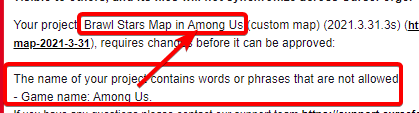
what is this

 oblique nacelle
where and how do i get shaders?
lyric crescent
languid cairn
what is this
 languid cairn
lyric crescent
https://i.imgur.com/Zxl0RZp.png
languid cairn
lyric crescent
https://i.imgur.com/Zxl0RZp.png
so i should remove among us from title ??
lyric crescent
yes
 red patioBOT
It is 08:39PM on Friday for CurseForge my dudes.
Project Moderation Time
Project/File moderation is done on Sunday - Thursday from 10am - 6pm GMT+2
This process is First in, First out. Thus files submitted late in the work day may not be checked until the next work day.
New Projects or uploads requiring manual approval: 1-3 Working Days
Updates to approved projects not needing manual approval: 1 Hour
File sync to the Curseforge app may take up to 24 hours after approval.
lyric crescent
?mc-installmods
red patioBOT
How to install mods in CurseForge App.
- Click
+ Create Custom Profile - Name it, select the required Minecraft version, select the Forge version (usually the highest number), click
Create. - Click the profile icon.
- Click
Add New Content - Search and install the desired mods.
- Start the game!
How to install mods not on CurseForge.
- Right click the profile picture or Open the profile and click the Icon next to the play button.
- Click
Open Folder. - Drag the mod(s) into the
modsfolder. (Note: Some mods will require others, to run. Make sure to read the instructions for the mod!) - Start the game!
 deft lava
whenever I try to set the destination folder for minecraft it just says, must include english letters, but the destination only includes english letters, I think it's broken
lyric crescent
?mc-path
red patioBOT
**Minecraft Files should NOT be installed inside the following locations
.minecraft folder.
OneDrive folders.
Desktop folder.
Drive roots I.E. Directly into the C:\ drive.
iCloud enabled folders.
If any of the above are in the path you need to change/move it by following the instructions below!**
If Minecraft is not installed, start here.
Click the in the top left.
Select Minecraft.
Click "Edit".
Move to the "Continue here:" section below.
If Minecraft is installed, follow these steps.
Click the in the bottom left.
Select the Minecraft tab.
Click "Change".
Move to the "Continue here:" section below.
Continue here:
Make a folder in the root directory called CurseForge.
Select the folder you just made.
The text box should show something like the following:
For Windows: C:\CurseForge
For Mac: /Users/Shared/CurseForge
 tough gust
What do i do if curseforge doesnt find/locate stardew valley?
lyric crescent
?knownissues see other games
red patioBOT
Known Issues with solutions or status of the issue.
Overwolf maintains a known list of issues here, some with solutions, others without.
https://support.curseforge.com/en/support/solutions/articles/9000196615-curseforge-known-issues
tough gust
Thanks 🙂
deft lava
I can't do what that little video tells me to because minecraft isn't even therein settings
lyric crescent
Click the  in the top left.
Select Minecraft.
Click "Edit".```That doesn't work
no matter where I put the destination it says it must only include english letters
HELP!
Why can't I use minecraft
digital roost
Take a screenshot of the path youre using @deft lava
lyric crescent
helps to follow the instructions
digital roost
Ive no intention to be rude, or single anyone out. Im just stating that some people are unaware of what they are looking at, whether that be from inexperience or ignorance.
How do I update a modpack
should be an update button next to the Play button
like a little arrow
"change version"
click it and select verion
boom
thin rune
hot shell
The minecraft path info would also apply to you 😛
Can I dm you?
Because when I install the only issue between me and making a Minecraft server is when I install the forge server thing
thin rune
Or maybe someone else could please help me with this error

 half tiger
Im having trouble when choosing a folder
I even changed my user folder to onky include English lettres
nvm
I fixed it myse;f
i didnt know you cant put the folder in the desktop
 viral briar
It’s best not to put stuff like that on the desktop
half tiger
Does the launcher not support Fabric?
viral briar
@half tiger not yet in the full sense , you can use the jumploader for fabric , it stops forge loading and replaces it with fabric to load
half tiger
oh ok
thin rune
I’m not sure how to go about it then
half tiger
So do i just select the newest forge vrsion and temporarily add jumploader to my pack?
thin rune
Could you assist me via dms?
digital roost
thin rune
Or maybe someone else could please help me with this error
Move the file off of Desktop
move it to like Documents or somethin
thin rune
and it won't have that error
digital roost
yeah
thin rune
ok I'll try that and get back to you
digital roost
!mc-path
red patioBOT
**Minecraft Files should NOT be installed inside the following locations
.minecraft folder.
OneDrive folders.
Desktop folder.
Drive roots I.E. Directly into the C:\ drive.
iCloud enabled folders.
If any of the above are in the path you need to change/move it by following the instructions below!**
If Minecraft is not installed, start here.
Click the in the top left.
Select Minecraft.
Click "Edit".
Move to the "Continue here:" section below.
If Minecraft is installed, follow these steps.
Click the in the bottom left.
Select the Minecraft tab.
Click "Change".
Move to the "Continue here:" section below.
Continue here:
Make a folder in the root directory called CurseForge.
Select the folder you just made.
The text box should show something like the following:
For Windows: C:\CurseForge
For Mac: /Users/Shared/CurseForge
digital roost
just follow this, its the same idea
thin rune
for forge server correct?
digital roost
same idea different folders and the like, yes for forge and fabric servers
thin rune
I'm downloading it from a different thingy
here let me get to my computer and try that
 hot shell
thin rune
Or maybe someone else could please help me with this error
hot shell
thin rune
Or maybe someone else could please help me with this error
it's still on the desktop? it will not work from the desktop.
digital roost
i already told him
hot shell
Yea he was told at least twice before that too
digital roost
¯_(ツ)_/¯
hot shell
 gray adder
There is probably a log file that will tell you what the error is.
thin rune
but yea I'm trying it where I put it in a folder in like dowloads or something
gray adder
Where can I find the log file?
hot shell
right. Personally i MAKE a new folder specifically for that, usually in a separate drive somewhere, but then again, i have 6 different drives in this PC
digital roost
thin rune
but yea I'm trying it where I put it in a folder in like dowloads or something
Put it in documents or something, downloads folder isnt the best idea bc its the "download" folder
 west folio
hello, my curseforge app seems to get a crash error everytime i attempt to open my modpack

it is for minecraft
thin rune
alright it gave me a different error
I'm gonna try again in the meantime unless this is fatal or I did something wrong
 digital roost
!mc-installserver
red patioBOT
How to **manually** install a server - **On your own PC**
- Go to the Forge website http://files.minecraftforge.net/ and download the Installer for the forge version the pack is using.
- Run the installer and choose
Install server. Do not install to your desktop. Also do not install inside a OneDrive folder. - Run the server using the forge.jar. A file called
eula.txtwill be generated. Open it and changeeula=falsetoeula=true - From the Client; Copy the
modsfolder,configfolder, and any other folders needed for the pack to work into the server folder. If the modpack has a server pack, use this instead! - Run the server again.
thin rune
what's DOGMA
digital roost
basically follow it to the word
 lyric crescent
you probably have permission issues. can you move this to #👽︱game-support or #🧱︱mc-other-help as this discussion is unrelated to curseforge.
 unborn plume
Im trying to launch up curse forge minecraft and i dont knwo what to do
digital roost
Do you have Curseforge installed?
unborn plume
 digital roost
ahh
unborn plume
this is what happens everytime i try to launch it
digital roost
!mc-logs
red patioBOT
How to get a Minecraft log file.
Where to find the log on the CurseForge Client.
Right-click the modpack profile icon OR click the button in the modpack profile.
Click Open Folder.
Open the logs folder.
Find the file called latest.log and drag it into discord.
digital roost
do above
unborn plume
ok
 cold cedar
how do i change the logo for my mod pack?
fleet bear
cold cedar
how do i change the logo for my mod pack?
you upload a new image for the project icon on the site.
 tardy laurel
everytime i try to load minecraft with forge on my macbook this happens, does anyone know how to help? it always loads for like 30 seconds, and then crashes
 lyric crescent
m1 mac?
lyric crescent
?mc-log
red patioBOT
How to get a Minecraft log file.
Where to find the log on the CurseForge Client.
Right-click the modpack profile icon OR click the button in the modpack profile.
Click Open Folder.
Open the logs folder.
Find the file called latest.log and drag it into discord.
lyric crescent
three question marks does not convay your issue with the instructions
cold cedar
I didn’t understand what he said
lyric crescent
which part?
cold cedar
Every part
lyric crescent
well that's not very helpful since he said exactly what to do..
cold cedar
what site is he talking about?
 fleet bear
You are in the CurseForge discord asking for help in the #🔥︱curseforge-support room.
lyric crescent
it needs to be an approved pack to have a logo
digital roost
🤦
 fossil fiber
how could i make a fabric modpack in the curseforge app?
cold cedar
im not on a site im on the app so i didn’t understand
lyric crescent
make a forge profile, install the mod jumploader, install fabric mods
fossil fiber
ok thanks
fleet bear
cold cedar
im not on a site im on the app so i didn’t understand
Well we don't know that. You gotta tell us what you are trying to do where.
cold cedar
fleet bear
Well we don't know that. You gotta tell us what you are trying to do where.
Well how was I supposed to know, I had to tell you whether I was using the app or the site?
fleet bear
The fact that mind reading has yet to be invented?
lyric crescent
time to move on from this
digital roost
is that a KubeJS issue?
lyric crescent
yea that's an issue with mac. there is nothing that can be done but wait for apple to fix it (if they ever do)
lyric crescent
fabric might work?
tardy laurel
ok!
lyric crescent
havent seen anyone try anyway
tardy laurel
ill see if it works
 whole wagon

 wide viper
Does curseforge have fabric?
lyric crescent
it has fabric mods
wide viper
i want fabric loader
lyric crescent
?mc-fabric
red patioBOT
Fabric modpacks or the use Fabric mods require you to install a mod called Jumploader.
Fabric mods do not work with Forge.
Forge mods do not work with Fabric.
Fabric mods should be marked with a Fabric Icon like this: 
digital roost
How do I fix this?
 wide viper
Why curseforge dont have 1.17Snapshot
lyric crescent
Curseforge doesn't do snapshot versions
 hollow sapphire
i think since they are snapshots nobody has made mods for them
wide viper
fabric got a lot mod in 1.17
hollow sapphire
lyric crescent
Curseforge doesn't do snapshot versions
and this too
wide viper
...
lyric crescent
...
 jade jewel
I need help, minecraft keeps crashing I have the crash report if anyone is willing to help me figure it out

Crash report
digital roost
This is all that comes up when I try to launch a modpack... idk what to do :')
 digital roost
 pliant mulch
Can i advertise
pliant mulch
Can i advertise
grab the Minecraft role and post in the #768717413918179368
 cobalt canopy
is there anyone who can help me? im trying to download the too many origins mod (i have fabric api fabric loader and origins mod) and everytime I add the jar file to my mods folder and load the game it says my game crashed
 unborn tulip
tardy laurel
forge works on my desktop, but hasnt worked on my macbook
unborn tulip
tardy laurel
forge works on my desktop, but hasnt worked on my macbook
idk what your whole setup is but i have one of the newer mb pros and minecraft usually launches just fine in forge
 velvet moon
Is it normal for things to take 4 days to get approved?
fleet bear
did you upload a file?
velvet moon
Yeah I uploaded a mod pack 4 days ago to be approved and i am still waiting on a moderator to look at/approve or tell me what I need to do for it etc
 fleet bear
then waiting is all there is to do.
tardy laurel
unborn tulip
idk what your whole setup is but i have one of the newer mb pros and minecraft u...
i got mine 2 days ago, so i dont know why its being so weird. its a macbook pro as well
velvet moon
;w; alrighty.
cobalt canopy
cobalt canopy
is there anyone who can help me? im trying to download the too many origins mod ...
can no one help me w this ?
signal ridge
cobalt canopy
can no one help me w this ?
!mc-logs need the latest log
red patioBOT
How to get a Minecraft log file.
Where to find the log on the CurseForge Client.
Right-click the modpack profile icon OR click the button in the modpack profile.
Click Open Folder.
Open the logs folder.
Find the file called latest.log and drag it into discord.
digital roost
cobalt canopy
is there anyone who can help me? im trying to download the too many origins mod ...
are you downloading forge mods?
and do above
signal ridge
Only way to really know whats going on when things crash.
cobalt canopy
im sorry i genuinely dont know what this means
signal ridge
Follow what the bot says for your pack that is crashing
Best thing to do is add the mods that are making it crash, then do the log
cobalt canopy
i just dont know what the curseforge client is i dont usually do any of this stuff its like my first time
signal ridge
What do you use?
cobalt canopy
all i did was download too many origins and drag it into my mods folder, opened mc w fabric loader click play and it says my game crashed
signal ridge
Should give the curse app a try, Might help with auto downloading mods
Makes things less messy
!getcf
red patioBOT
Looking to install the CurseForge app?
Todo: Place system requirements here.
<:windows:798410728188936222> Windows
<:mac:798410654418862130> Mac
Linux
:person_shrugging:
signal ridge
otherwise the folder the mods folder is in, there should be a folder called logs thats where the latest log is. Just drag and drop it here
 flat dock
why can i not add among us to get among us mods
hot shell
That game is trademarked and copyrited, thus that name cannot be used in mods or modpacks w/o written concent of the game company that makes Among Us
flat dock
then why does the website have the mods
signal ridge
flat dock
then why does the website have the mods
The site has the mods, but the app doesn't support the game atm. Should be instructions on the sites mods/packs page on how to install them
hot shell
That mod has dependacy mods that are missing
signal ridge
cobalt canopy
Could not find required mod: toomanyorigins requires {origins @ [>=0.7.0]}
hot shell
at least, that what i read in that error
signal ridge
Need origins 0.7.0 or higher
cobalt canopy
this is my current mod folder. so i just gotta get a new version of origins?

 sharp niche
I'm having an issue with my modded minecraft, simply where whenever I jump a lot of particles start spurring from my feet. I have a pretty common assortment of mods, nothing ridiculous. Is there any common modpack that causes this issue?
hot shell
cobalt canopy
this is my current mod folder. so i just gotta get a new version of origins?
that is 0.4.6, whichj is less than 0.7.x
cobalt canopy
okay thank you ill try installing the new version
fossil fiber
modpack review time is the same as mods right?
fleet bear
all projects share the same time
fossil fiber
ok thanks
 atomic adder
Hello! I just downloaded the CurseForge and in an attempt to create a mod folder for MineCraft, I am met with an error claiming that the folder path can only have English characters and numbers, even though the folder is on the desktob and is in english lettering. What Can i do to resolve that?
red patioBOT
**Minecraft Files should NOT be installed inside the following locations
.minecraft folder.
OneDrive folders.
Desktop folder.
Drive roots I.E. Directly into the C:\ drive.
iCloud enabled folders.
If any of the above are in the path you need to change/move it by following the instructions below!**
If Minecraft is not installed, start here.
Click the in the top left.
Select Minecraft.
Click "Edit".
Move to the "Continue here:" section below.
If Minecraft is installed, follow these steps.
Click the in the bottom left.
Select the Minecraft tab.
Click "Change".
Move to the "Continue here:" section below.
Continue here:
Make a folder in the root directory called CurseForge.
Select the folder you just made.
The text box should show something like the following:
For Windows: C:\CurseForge
For Mac: /Users/Shared/CurseForge
atomic adder
Thank you!

 coral shadow
jade jewel
HELP, IT LOADS THE WORLD AND THEN SAVES AND CRASHES
coral shadow
jade jewel
HELP, IT LOADS THE WORLD AND THEN SAVES AND CRASHES
it just said that with mine
signal ridge
Not a curseforge issue #👽︱game-support
jade jewel
I can load a new local world just fine but not into the host server I was playing. I was using the guard septar from minecolonies
 opal ferry
signal ridge
Not a curseforge issue <#778097796410376242>
opal ferry
signal ridge
Not a curseforge issue <#778097796410376242>
oh shoot my bad
 rugged crag
Why I cant see create mod in curse forge app
lyric crescent
How are you looking
 wispy trail
rugged crag
lyric crescent
How are you looking
wispy trail
rugged crag
lyric crescent
How are you looking
Modpacks
red patioBOT
How to install mods in CurseForge App.
- Click
+ Create Custom Profile - Name it, select the required Minecraft version, select the Forge version (usually the highest number), click
Create. - Click the profile icon.
- Click
Add New Content - Search and install the desired mods.
- Start the game!
How to install mods not on CurseForge.
- Right click the profile picture or Open the profile and click the Icon next to the play button.
- Click
Open Folder. - Drag the mod(s) into the
modsfolder. (Note: Some mods will require others, to run. Make sure to read the instructions for the mod!) - Start the game!
rugged crag
Thanks
 tropic belfry
Hey guys, just got the new launcher for mods, I'm looking to mod minecraft, but my file destination isn't working. I know that only English letters and numbers are allowed but I still can get my path to work. Other than the "" and "D:" I don't have anything in my path that would be considered invalid. The only thing I can think of is that my user name has a space in it, but i can't really change that.
Any ideas that could help?
lyric crescent
What path are you using
tropic belfry
D:\Users\Lightning S Endr\Desktop\Games\MC\ModdedAndLaunchers\Curse
red patioBOT
**Minecraft Files should NOT be installed inside the following locations
.minecraft folder.
OneDrive folders.
Desktop folder.
Drive roots I.E. Directly into the C:\ drive.
iCloud enabled folders.
If any of the above are in the path you need to change/move it by following the instructions below!**
If Minecraft is not installed, start here.
Click the in the top left.
Select Minecraft.
Click "Edit".
Move to the "Continue here:" section below.
If Minecraft is installed, follow these steps.
Click the in the bottom left.
Select the Minecraft tab.
Click "Change".
Move to the "Continue here:" section below.
Continue here:
Make a folder in the root directory called CurseForge.
Select the folder you just made.
The text box should show something like the following:
For Windows: C:\CurseForge
For Mac: /Users/Shared/CurseForge
tropic belfry
Not Desktop folders..
Can I ask why, if it's so restricted, why allot a destination?
lyric crescent
You can ask, as we have. 😋
tropic belfry
Haha fair XD
Maybe it's planned to be updated eventually but it's low on the list of things to do.
idk
rugged crag
Also does the mods auto update?
lyric crescent
No
rugged crag
In curse forge app?
lyric crescent
I assumed we were talking about the app
tropic belfry
auto updating mod can break a pack or anything over 2 mods. Auto updating would be a problem XD Talking from experience XD
lyric crescent
Sure would
 vast mortar
Hey can I ask for help with finding a specific mod?
I'm trying to find a mod that shows recipes you can craft
vast mortar
1.16.5
tropic belfry
Look up JEI
vast mortar
Like they don't show what I can craft?
tropic belfry
Just enough Items
vast mortar
I mean I have to go through like 20 pages
tropic belfry
The whole point of the mod is to show what you can craft. There's tooltips to do simplify, and searching to look for something you have in mind. Also shortcuts to help you know what an Item can be used for and what it is used for in crafting recipes.
What are you trying to do exsactly?
vast mortar
Well I basically need the recipe book to work with mods
tropic belfry
btw @lyric crescent Idk if you know this but long as it's not in a user folder, the launcher can be saved in a folder, bot it to be saved in D:Games/CurseForge
lyric crescent
That is what the instructions said to do..?
tropic belfry
vast mortar
Well I basically need the recipe book to work with mods
Oh, like the vanilla book? Mods might be able to know of a mod that does that, but JEI is gonna replace the vanilla crafting book, at least in my experience.
tropic belfry
lyric crescent
That is what the instructions said to do..?
"Drive roots I.E. Directly into the C:\ drive."
So no, but yes XD
vast mortar
tropic belfry
Oh, like the vanilla book? Mods might be able to know of a mod that does that, b...
I just remove JEI if I have it
lyric crescent
Read the top part. It says what to not do. Anything else is fine.
tropic belfry
Yeah, but I took it as make the "CurseForge" folder directly into the D: location. so you'd end up with "location: D:CurseForge..."
But could just be me being me Sorry XD
lyric crescent
Yes, it is written for people who don't understand to follow.
tropic belfry
vast mortar
I just remove JEI if I have it
Honestly Rem, You're gonna run into similar issues with the book, unless a mod tweaks it to work any better. And some mods aren't even supported by the vanilla book. So I say go ahead try it. but if your having the same issues, you could try and look up more crafting mods. I know there must be so many out there.
Anyhow, good luck!
signal ridge
vast mortar
I mean I have to go through like 20 pages
If too many pages due to multiples of the same item (ae2 facads, buckets, tanks etc) is the issue, there is a feature in JEI that allows you to hide items. In controls if you set a key to the Toggle Edit Mode (or something along those lines) you can click to toggle if things are hidden or not. Hidden recipes are still craftable. Just don't show up in the list. I use it to shorten my jei page #. Just once your happy will need to reload the world I believe (exit and come back, or game reboot)
fleet bear
rugged crag
Also does the mods auto update?
depends on the game
vast mortar
uhh well It's not the issue of pages but the issue that I can't craft 80% of all the items
it would be nice with a sort feature
digital roost
I have an issue, for some reason even after I deleted a modpack and all its backups minecraft thinks its still there
And I can't run any other mod
Another glitch is I can't go into creative mod, it says I'm in a free ''trial period''
When I originally installed forge all I had to do was place mods in the mods file, choose the add-on and boom
Now the forge add-on doesn't even work
 fiery seal
Whenever I try to play any modpack and press play in the launcher, it says "minecraft game directory not found" and then error code 0. i dont know how to fix this
 cloud arrow
Hey I am currently having issues with my avatar in curseforge websites. I recently changed it in Twitch and it is now bugged on curseforge 😭

 queen storm
Logout, now log back in
cloud arrow
Oh lmao it fixed xD
By the way when overwolf login way releases will I be able to stop using twitch to login and yes overwolf?
queen storm
No idea
cloud arrow
Hum ok because I do not want to use twitch for this anymore ....
but ye thx anyways
Also #829596904589361162 needs to be for a specific projects with more than 10K downloads or it can be the total of downloads of all projects?
queen storm
cloud arrow
Also <#829596904589361162> needs to be for a specific projects with more than 10...
1 project
cloud arrow
Hum ok
 zealous falcon
when i download forge for minecraft it doesnt seem to install the minecraft version
bruh
 pale quartz
I need help
 narrow minnow
zealous falcon
when i download forge for minecraft it doesnt seem to install the minecraft vers...
narrow minnow
zealous falcon
when i download forge for minecraft it doesnt seem to install the minecraft vers...
download CurseForge and use it for Minecraft (https://curseforge.overwolf.com)

Overwolf | Tech for developers who love gaming
Welcome to the CurseForge community! Build, manage and download mods and addons for your favorite games
digital roost
I need help
Im trying to find a mod called YUNG'S better portals but cant find it anywhere in the curseforge app. I had it in my previous profile but when I made another profile of the same mods but 1.16.5 the mod wont show up anywhere
Is there any specific thing I need to write
zealous falcon
narrow minnow
download CurseForge and use it for Minecraft (https://curseforge.overwolf.com)
i did
all i want to do is add a mod pack
narrow minnow
zealous falcon
all i want to do is add a mod pack
Where are you unsuccessful in doing so?
digital roost
digital roost
Im trying to find a mod called YUNG'S better portals but cant find it anywhere i...
@narrow minnow /\ please help

 narrow minnow
digital roost
<@!141637151375753216> /\ please help
narrow minnow
digital roost
<@!141637151375753216> /\ please help
?mc-installmod
red patioBOT
How to install mods in CurseForge App.
- Click
+ Create Custom Profile - Name it, select the required Minecraft version, select the Forge version (usually the highest number), click
Create. - Click the profile icon.
- Click
Add New Content - Search and install the desired mods.
- Start the game!
How to install mods not on CurseForge.
- Right click the profile picture or Open the profile and click the Icon next to the play button.
- Click
Open Folder. - Drag the mod(s) into the
modsfolder. (Note: Some mods will require others, to run. Make sure to read the instructions for the mod!) - Start the game!
narrow minnow
zealous falcon
Did you create a custom profile?
zealous falcon
yes
narrow minnow
moving to DM
digital roost
narrow minnow
?mc-installmod
no I know what to do. When I click the add content and search YUNG's better portals. It doesnt show up
I have it in my 1.16.4 profile but it doesnt show in the 1.16.5 profile
and I tested and created another 1.16.4 profile and even in that it doesnt show
narrow minnow
digital roost
no I know what to do. When I click the add content and search YUNG's better port...
ok, i'll take a look - a work around is to download it from: https://www.curseforge.com/minecraft/mc-mods/yungs-better-portals/files/3227968
and place it directly in the instance mods folder
digital roost
narrow minnow
ok, i'll take a look - a work around is to download it from: https://www.cursefo...
hm. Wont it uh disallow me to post the profile on the curseforge website
Because it will not be in the .json file it should need to be in
narrow minnow
no - it should pick it up (hpefully) once you place it there
i'll try to see why it isn't searchable
digital roost
ight
 olive dune
digital roost
olive dune
digital roost
can someone answer this

 worldly rose
can 1.16.4 mods be used with 1.16.5 ?
 slow valley
No matter what path I enter, it always comes up with this error message. I'm really not sure what to do..
 slow valley
worldly rose
can 1.16.4 mods be used with 1.16.5 ?
slow valley
worldly rose
can 1.16.4 mods be used with 1.16.5 ?
99% of the time, yes :)
worldly rose
ok ty
queen storm
slow valley
No matter what path I enter, it always comes up with this error message. I'm rea...
!mc-path
red patioBOT
**Minecraft Files should NOT be installed inside the following locations
.minecraft folder.
OneDrive folders.
Desktop folder.
Drive roots I.E. Directly into the C:\ drive.
iCloud enabled folders.
If any of the above are in the path you need to change/move it by following the instructions below!**
If Minecraft is not installed, start here.
Click the in the top left.
Select Minecraft.
Click "Edit".
Move to the "Continue here:" section below.
If Minecraft is installed, follow these steps.
Click the in the bottom left.
Select the Minecraft tab.
Click "Change".
Move to the "Continue here:" section below.
Continue here:
Make a folder in the root directory called CurseForge.
Select the folder you just made.
The text box should show something like the following:
For Windows: C:\CurseForge
For Mac: /Users/Shared/CurseForge
digital roost
How do I fix this?
 queen storm
digital roost
How do I fix this?
queen storm
digital roost
How do I fix this?
See above
 old torrent
Hey guys! How can I create a server using curse forge, with a modpack donwloaded on it?
queen storm
Which pack?
old torrent
roguelike adventure
queen storm
Check if it has a serverpack on the site
old torrent
Ok, tx friend
digital roost
queen storm
See above
One more question, is it possible to use OptiFine for this?
queen storm
digital roost
One more question, is it possible to use OptiFine for this?
!mc-optifine
red patioBOT
Optifine and Curseforge
To install Optifine with modpacks on Curseforge:
Right click the modpack icon, select Open Folder.
Put the Optifine.jar into the mods folder.
Now load the modpack normally.
We do not offer support for Optifine. If you have issues with Optifine, remove it. If you want further support try the discord found on their website.
https://www.optifine.net/home

 queen storm
Forgot what that one meant, try a pc restart
digital roost
Alright.
 uncut notch
 queen storm
!status
red patioBOT
It is 04:23PM on Saturday for CurseForge my dudes.
Project Moderation Time
Project/File moderation is done on Sunday - Thursday from 10am - 6pm GMT+2
This process is First in, First out. Thus files submitted late in the work day may not be checked until the next work day.
New Projects or uploads requiring manual approval: 1-3 Working Days
Updates to approved projects not needing manual approval: 1 Hour
File sync to the Curseforge app may take up to 24 hours after approval.
 floral magnet
 queen storm
Define "a while"
 open lance
So I had this world thats kinda oldish, (5 or 6 weeks), and i clicked singleplayer this morning and went straight to create new world. The world does not exist according to minecraft, im on the right profile, (i only have one profile) and the weird thing is, its still in the saves folder. anyone know how i can make minecraft recognize it again?
Fixed, ish. I had to make a new profile, paste the mods folder, then paste the world
 civic isle
Hey for some reason my computer wont install the curseforge installer and when it does it it doesnt let me access it, any solutions?
open lance
what do you mean by it wont let you access it?
civic isle
Like it wont install the launcher or even try to
open lance
what OS and browser are you using?
civic isle
Windows
open lance
what browser?
civic isle
Microsoft Edge
open lance
do you get an error when you try to install it or does nothing happen at all
civic isle
Nothing happens
hot shell
ewwww... IMHO edge is good for one thing... installing an ACTUAL web browser 😛
 floral stirrup
can any1 help me pls
queen storm
floral stirrup
can any1 help me pls
Rule 10
floral stirrup
wdym
floral stirrup
ohk
hot shell
Aparently they didn't actually need help
floral stirrup
i need help
hot shell
but not enough to read and follow the rules?
queen storm
Why are there rules then if you don't follow them anyways?
floral stirrup
queen storm
Why are there rules then if you don't follow them anyways?
i am
queen storm
Why would we need to ask for the issue first?
queen storm
Then you need to say with what!
hot shell
If you don't actually state what you need help with, no one can offer support
That's the point of Rule # 10
floral stirrup
i need help downloading overwolf and forge
queen storm
!getcf
red patioBOT
Looking to install the CurseForge app?
Todo: Place system requirements here.
<:windows:798410728188936222> Windows
<:mac:798410654418862130> Mac
Linux
:person_shrugging:
floral stirrup
it gave me a winrar page
queen storm
Yes, it is a zip
floral stirrup
now how do i do it then
queen storm
What did you do then?
Tell it step by step
 queen storm
Because curseforge doesn't do that on its own, you need to install the right modpack first
floral stirrup
how??
queen storm
!mc-installpack
red patioBOT
How to install modpacks with the search features in app.
- Open the

Minecraftsection of the app. - Click the top search bar where it says
Search for modpacksOR Click theBrowse ModpacksTab. - Find the Modpack you want to install and click install on it.
- Wait for CurseForge app to download and unpack all the required files.
- Once finished, click
Play!
How to install modpacks from a Export. (Custom/Private/Site downloaded Modpack zip)
- Get CurseForge App if you don't have it, use
!downloadfor a link. - Get the exported modpack from CurseForge or someone else,
!mc-packshareexplains how to make them. - Open the
Minecraftsection of the app. - Click

Create Custom Profile - Click the
Importoption. - Find the file you just downloaded in step 2 and select it.
- CurseForge app will now attempt to download and unpack the modpack. If it fails, try steps 4-6 again.
- Once finished, click
Play!
 queen storm
Show screenshot then
 queen storm
Close the game, you don't need it
floral stirrup
k
queen storm
Open curseforge
queen storm
No
floral stirrup
k
queen storm
Open overwolf, appstore, find curseforge, install it
queen storm
Now install the correct pack
floral stirrup
kk
hot shell
Now the curseforge app should be able to open, and you can search for the correct modpack
 hot shell
If the mod doesn;t show up in the search, but it is on the site, then it;s likely that the mod is not for the exact MC version you are building the pack for... I had that issue, and had to manually add some mods to my manifest.
lyric crescent
 frail mango
why do I not have among us in my curseforge?
frail mango
why do I not have among us in my curseforge?
beacuse the app does not support it currently. the mods for it are on the website and they include instructions.
frail mango
ah
 clear iron
every time i download a mod it turn in to notepad thing then i cant get it on minecraft
queen storm
! mc-installmods
red patioBOT
How to install mods in CurseForge App.
- Click
+ Create Custom Profile - Name it, select the required Minecraft version, select the Forge version (usually the highest number), click
Create. - Click the profile icon.
- Click
Add New Content - Search and install the desired mods.
- Start the game!
How to install mods not on CurseForge.
- Right click the profile picture or Open the profile and click the Icon next to the play button.
- Click
Open Folder. - Drag the mod(s) into the
modsfolder. (Note: Some mods will require others, to run. Make sure to read the instructions for the mod!) - Start the game!
hot shell
Is there a list of bot commands somewhere? 😛
lyric crescent
Go to #🟢︱user-bot-spam and use !mc-
hot shell
very cool, thanks
 merry sable
can anyone help me? where i must put in mods
 lyric crescent
?mc-path
red patioBOT
**Minecraft Files should NOT be installed inside the following locations
.minecraft folder.
OneDrive folders.
Desktop folder.
Drive roots I.E. Directly into the C:\ drive.
iCloud enabled folders.
If any of the above are in the path you need to change/move it by following the instructions below!**
If Minecraft is not installed, start here.
Click the in the top left.
Select Minecraft.
Click "Edit".
Move to the "Continue here:" section below.
If Minecraft is installed, follow these steps.
Click the in the bottom left.
Select the Minecraft tab.
Click "Change".
Move to the "Continue here:" section below.
Continue here:
Make a folder in the root directory called CurseForge.
Select the folder you just made.
The text box should show something like the following:
For Windows: C:\CurseForge
For Mac: /Users/Shared/CurseForge
 naive hemlock
how can i play with my friends with mods?
merry sable
naive hemlock
how can i play with my friends with mods?
maybe on aternos hosting
lyric crescent
Make a server, buy a server, or find a server. server questions belong in #👽︱game-support
 old hull
I have a student on Mac who tries to run modpacks in curse forge... and they take her to the minecraft Dungeons tab of the launcher instead of the minecraft one, and then any attempt to go to the minecraft tab is met with 'oops something went wrong'
queen storm
old hull
I have a student on Mac who tries to run modpacks in curse forge... and they tak...
Restart pc
merry sable
@lyric crescent how to play this on minecraft nonpremium
 lyric crescent
You don't. Maybe read the rules
hot shell
What is "minecraft nonpremium"? Do they mean 'without an official minecraft account'?
 hazy agate
can i make a minecraft server with the mods?
queen storm
!mc-installserver
red patioBOT
How to **manually** install a server - **On your own PC**
- Go to the Forge website http://files.minecraftforge.net/ and download the Installer for the forge version the pack is using.
- Run the installer and choose
Install server. Do not install to your desktop. Also do not install inside a OneDrive folder. - Run the server using the forge.jar. A file called
eula.txtwill be generated. Open it and changeeula=falsetoeula=true - From the Client; Copy the
modsfolder,configfolder, and any other folders needed for the pack to work into the server folder. If the modpack has a server pack, use this instead! - Run the server again.
hazy agate
damnit why does haveing to set up a server so damn hard
queen storm
This doesn't even mention the port forwarding yet
serene cedar
how can i install traincraft on the newest version ?
queen storm
serene cedar
how can i install traincraft on the newest version ?
Is it out for the newest version?
serene cedar
its only for 1.7.10
queen storm
Then you can't install it on the newest version
serene cedar
ouh ok
 west sorrel
i need help my rl craft insnt installing
it keeps saying an exception has occurred during web clients request
plz help
queen storm
!ticket-app
red patioBOT
:bug: Reporting via the CurseForge App :bug:
-
Click the
 icon in the bottom left.
 -
Select

Open a Ticket. -
Fill out the form with accurate detailed information, "It doesn't work" isn't helpful! What exactly doesn't work and why doesn't it work should be easy to answer!
-
Make sure to upload your Overwolf logs with the
Upload Fileoption on the ticket, information on how to get these logs can be found here https://support.overwolf.com/en/support/solutions/articles/9000176827-how-to-get-your-overwolf-logs -
Submit!
 queen storm
A way to get support from the people that made the app
queen storm
There are 5 steps there, did you follow the all?
queen storm
And where does it tell you to open the log?
queen storm
No, doesn't tell you to open the log, I am talking about the 5 steps that I posted
queen storm
 lone charm
yo could anyone help me? im trying to get the inventory pets on its in file explorer now
west sorrel
how do i fiind out my user on cursedforge
lone charm
top right i think im new so idk
west sorrel
same
lone charm
near top right i think
queen storm
west sorrel
how do i fiind out my user on cursedforge
You can also leave it blank
queen storm
lone charm
yo could anyone help me? im trying to get the inventory pets on its in file expl...
!mc-installmods
red patioBOT
How to install mods in CurseForge App.
- Click
+ Create Custom Profile - Name it, select the required Minecraft version, select the Forge version (usually the highest number), click
Create. - Click the profile icon.
- Click
Add New Content - Search and install the desired mods.
- Start the game!
How to install mods not on CurseForge.
- Right click the profile picture or Open the profile and click the Icon next to the play button.
- Click
Open Folder. - Drag the mod(s) into the
modsfolder. (Note: Some mods will require others, to run. Make sure to read the instructions for the mod!) - Start the game!
lone charm
its just it was on the wbsite but its not on the app so yeah
queen storm
Then drop it in the mods folder?
lone charm
i tried
lyric crescent
link the mod
send a screenshot of you searching it
lone charm
this is the folder
lyric crescent
link the mod page, not send the mod
lone charm
one min
queen storm
Now you wait
lone charm
sorry if i sound rude
digital roost
I click Play and it just doesn't work
queen storm
lone charm
sorry if i sound rude
And why does dropping it in the mods folder not work?
queen storm
digital roost
I click Play and it just doesn't work
!mc-installfix
red patioBOT
- Click on the Minecraft Tab on the Left side of the App.
- Click button next to the
Create Custom Profileoption. - Click
Repair Installationoption. - Play game.
NOTE: You will not lose any modpacks or worlds, These are saved in the Instances folder. DO NOT TOUCH THIS FOLDER OR YOU WILL LOSE EVERYTHING
lone charm
ill try that
digital roost
Thanks.
lone charm
oh thats for them
queen storm
lone charm
ill try that
You said you already did:
#🔥︱curseforge-support message
lone charm
i thought u meant me
digital roost
queen storm
!mc-installfix
It didn't work man
queen storm
That is why I quote people
queen storm
Which launcher?
red patioBOT
How to get a Minecraft log file.
Where to find the log on the CurseForge Client.
Right-click the modpack profile icon OR click the button in the modpack profile.
Click Open Folder.
Open the logs folder.
Find the file called latest.log and drag it into discord.
digital roost
queen storm
Keep forgetting the fix for this one
 coral nymph
question, can someone direct me to where I can download curseforge so I can use the origins mod?
idk where else to ask so I asked here
wait nvm I figured it out
queen storm
You figured it out within 60 seconds after asking, impressive
digital roost
My problem is much more complicated
lyric crescent
happens to the best of us
if this is a modpack you downloaded you should reinstall it.
if it is a pack you made then a mod you installed is broken. you will need to remove mods until it's fixed as there is no indication in the log of which it is.
digital roost
No
 raven talon
hello for some reason when i press play in the Minecraft launcher it doesn't work, also it seems to be using the old launcher how can i fix this?
also im on mac
 mortal otter
Hello, im having issues getting updates for packs and certain mods on the launcher, the pack in question is Kingdom Crafters (my own pack) and everyone else on the server has been able to download it but it hasnt shown as an update for me, this happens often where it takes days sometimes for anything to show up, or sometimes never (like with the mod Create). It currently has been 20 hours since the update has been pushed.
I have restarted the client many times, even my computer a few times in these past 20 hours.
Short of simply installing it from the website im not sure what to do 😂
red patioBOT
- Click on the Minecraft Tab on the Left side of the App.
- Click button next to the
Create Custom Profileoption. - Click
Repair Installationoption. - Play game.
NOTE: You will not lose any modpacks or worlds, These are saved in the Instances folder. DO NOT TOUCH THIS FOLDER OR YOU WILL LOSE EVERYTHING
queen storm
raven talon
hello for some reason when i press play in the Minecraft launcher it doesn't wor...
!mc-installfix
queen storm
mortal otter
Hello, im having issues getting updates for packs and certain mods on the launch...
!status
red patioBOT
It is 08:24PM on Saturday for CurseForge my dudes.
Project Moderation Time
Project/File moderation is done on Sunday - Thursday from 10am - 6pm GMT+2
This process is First in, First out. Thus files submitted late in the work day may not be checked until the next work day.
New Projects or uploads requiring manual approval: 1-3 Working Days
Updates to approved projects not needing manual approval: 1 Hour
File sync to the Curseforge app may take up to 24 hours after approval.
mortal otter
So im just very unlucky and am the last person on the planet to get my own pack update 😅 Nice
queen storm
How long ago was it approved?
raven talon
its still not working
lyric crescent
mortal otter
https://www.curseforge.com/minecraft/modpacks/kingdom-crafters-community-pack
i see it in the app, try a pc restart?
 quartz sequoia
Hello! I'm having trouble with Curseforge because it won't let me change the file to install all the mods, and when I DO select the folder I want it just says that it can't be in English and won't change the file!
mortal otter
it finally appeared :/
lyric crescent
quartz sequoia
Hello! I'm having trouble with Curseforge because it won't let me change the fil...
?mc-path
red patioBOT
**Minecraft Files should NOT be installed inside the following locations
.minecraft folder.
OneDrive folders.
Desktop folder.
Drive roots I.E. Directly into the C:\ drive.
iCloud enabled folders.
If any of the above are in the path you need to change/move it by following the instructions below!**
If Minecraft is not installed, start here.
Click the in the top left.
Select Minecraft.
Click "Edit".
Move to the "Continue here:" section below.
If Minecraft is installed, follow these steps.
Click the in the bottom left.
Select the Minecraft tab.
Click "Change".
Move to the "Continue here:" section below.
Continue here:
Make a folder in the root directory called CurseForge.
Select the folder you just made.
The text box should show something like the following:
For Windows: C:\CurseForge
For Mac: /Users/Shared/CurseForge
quartz sequoia
kk i'll try that
 light folio
exit code 0 i need help with it pls
lyric crescent
beacuse you didnt follow the instructions
lyric crescent
light folio
exit code 0 i need help with it pls
?mc-log
red patioBOT
How to get a Minecraft log file.
Where to find the log on the CurseForge Client.
Right-click the modpack profile icon OR click the button in the modpack profile.
Click Open Folder.
Open the logs folder.
Find the file called latest.log and drag it into discord.
quartz sequoia
lyric crescent
beacuse you didnt follow the instructions
No, The problem is is that it's not CHANGING the folder, it's staying on the same exact one
lyric crescent
good point. try a restart
quartz sequoia
lyric crescent
good point. try a restart
k then 🙂
 torpid jewel
i need some help whenever i try loading into forge on minecraft it says for example The game crashed whilst rendering overlay
Error: net.minecraftforge.fml.config.ConfigFileTypeHandler$ConfigLoadingException: Failed loading config file travelersbackpack-client.toml of type CLIENT for modid travelersbackpack
Exit Code: -1. and it doesnt just say it for that mod and i go to my config files and delete it and it just changes to a diffrent mod
lyric crescent
?mc-log
red patioBOT
How to get a Minecraft log file.
Where to find the log on the CurseForge Client.
Right-click the modpack profile icon OR click the button in the modpack profile.
Click Open Folder.
Open the logs folder.
Find the file called latest.log and drag it into discord.
quartz sequoia
Now it's not letting me open curseforge!
lyric crescent
mind just explaining and screenshot if needed. dont care to download a video
quartz sequoia
k sry
basically when I try to open up curseforge
it says that im opening up overwolf for some reason?
and then it just closes .__.
lyric crescent
well it does open overwolf since curseforge requires it
might want to try reinstalling both
quartz sequoia
hmm ok 😦
lyric crescent
rule 10
torpid jewel
oh sorry about that
quartz sequoia
k it works now thx 😄
digital roost
Whenever I try using this modpack and launch it, it ends up exiting the loading screen, saying exit code zero, we are sorry for any inconvinience without even giving me a reason, can someone find out why?
lyric crescent
?mc-log
red patioBOT
How to get a Minecraft log file.
Where to find the log on the CurseForge Client.
Right-click the modpack profile icon OR click the button in the modpack profile.
Click Open Folder.
Open the logs folder.
Find the file called latest.log and drag it into discord.
lyric crescent
try without optifine
digital roost
k
It crahsed
crashed
The game crashed whilst rendering overlay
Error: com.electronwill.nightconfig.core.io.WritingException: An I/O error occured
Exit Code: -1
oh its the midnight mod
I think
imma try without
lyric crescent
and without immersive portals
digital roost
ok
I fixed the issue, it immersive portals or anything else, just the midnight mod and optifne
@lyric crescent thx for the help :)
lyric crescent
kk
 quartz storm
I need some help- i downloaded stardew valley on steam, and then opened curseforge to download mods/addons- but curseforge cant seem to recongize that I have stardew valley; what do i do?
 exotic plinth
hi i need some help, i keep putting in the directory for my minecraft server, but it keeps giving me the error that it must only include english letters and numbers, however all of it is numbers and letters. Why wont it use the directory?
lyric crescent
quartz storm
I need some help- i downloaded stardew valley on steam, and then opened cursefor...
?knownissues see other games
red patioBOT
Known Issues with solutions or status of the issue.
Overwolf maintains a known list of issues here, some with solutions, others without.
https://support.curseforge.com/en/support/solutions/articles/9000196615-curseforge-known-issues
lyric crescent
exotic plinth
hi i need some help, i keep putting in the directory for my minecraft server, bu...
?mc-path
red patioBOT
**Minecraft Files should NOT be installed inside the following locations
.minecraft folder.
OneDrive folders.
Desktop folder.
Drive roots I.E. Directly into the C:\ drive.
iCloud enabled folders.
If any of the above are in the path you need to change/move it by following the instructions below!**
If Minecraft is not installed, start here.
Click the in the top left.
Select Minecraft.
Click "Edit".
Move to the "Continue here:" section below.
If Minecraft is installed, follow these steps.
Click the in the bottom left.
Select the Minecraft tab.
Click "Change".
Move to the "Continue here:" section below.
Continue here:
Make a folder in the root directory called CurseForge.
Select the folder you just made.
The text box should show something like the following:
For Windows: C:\CurseForge
For Mac: /Users/Shared/CurseForge
exotic plinth
thanks 🙂
 earnest yarrow
how do i play multiplayer in a modpack?
 mellow kindle
how do i update the curseforge launcher
lyric crescent
earnest yarrow
how do i play multiplayer in a modpack?
Make a server, buy a server, or find a server. Server questions belong in #👽︱game-support as Curseforge is not invloved in servers.
lyric crescent
mellow kindle
how do i update the curseforge launcher
close it and open it
 snow niche
Hey can anyone help me with a problem
 sharp hollow
what is it
snow niche
I tried downloading a modpack but then it just froze at 100%
 umbral meteor
Hey I have a question, why is it when I download a modpack trough the website the mods folder barely has anything in it?
lyric crescent
beacuse it doesnt come with mods, it comes with a list of mods that a launcher will download
sharp hollow
that can happen when u extract it wrong
snow niche
What do you mean?
umbral meteor
Is there a way for me to get the mods without using the curseforge launcher?
lyric crescent
figure out what versions you need and manually install them all
umbral meteor
Did they recently change that the modpacks just contain a list of the mods? Because i remember downloading 2 modpacks just a few weeks ago where the mods were included
lyric crescent
recently like 6 years ago
umbral meteor
oh, well thanks for the help
snow niche
Can anyone help me with unfreezing it?
lyric crescent
restart your pc i guess? sounds like a problem with your internet tho
lyric crescent
sometimes its the simple stuff
snow niche
So true
torpid jewel
i need some help whenever i try loading into forge on minecraft it says for example The game crashed whilst rendering overlay
Error: net.minecraftforge.fml.config.ConfigFileTypeHandler$ConfigLoadingException: Failed loading config file travelersbackpack-client.toml of type CLIENT for modid travelersbackpack
Exit Code: -1. and it doesnt just say it for that mod and i go to my config files and delete it and it just changes to a diffrent mod
lyric crescent
could send the log like i asked for last time you posted this
torpid jewel
sure i didnt know you were talking to me
torpid jewel
 polar lichen
is there any mod like smooth boot for forge and 1.8.9
@here
 narrow sinew
How do I upload a mod pack I made so I can add it to my server @here
lyric crescent
torpid jewel
Are you even using the curseforge app?
lyric crescent
narrow sinew
How do I upload a mod pack I made so I can add it to my server @here
You dont need to upload a modpack to put it on a server.
 crude wigeon
is there any way to solve this

ive been dealing with it for half the year
didnt think it was a big deal, just delete it from files and reinstall, right-
well every time i did that
it brought me back here
and i have no idea what to do now
any suggestions?
lyric crescent
?mc-log
red patioBOT
How to get a Minecraft log file.
Where to find the log on the CurseForge Client.
Right-click the modpack profile icon OR click the button in the modpack profile.
Click Open Folder.
Open the logs folder.
Find the file called latest.log and drag it into discord.
 quartz zealot
The status of the file ChadPack 1.3 (ChadPack: ZeeBazz) has been changed to Rejected
Notes:
The following files belong to CurseForge-hosted projects, and should therefore not be added directly to zip files:
overrides/mods/OptiFine_1.16.5_HD_U_G7.jar
These files should, instead, be referenced in the manifest.json file generated by the Twitch Desktop App during a profile export.
If you have any questions please contact our support team
Can someone explain what do?
crude wigeon
lyric crescent
remove optifine, it cannot be included
fleet bear
quartz zealot
The status of the file ChadPack 1.3 (ChadPack: ZeeBazz) has been changed to Reje...
Remove optifine.
You cant upload it
fleet bear
Also that message indicates someone uploaded optifine to curseforge...
lyric crescent
hmm
lyric crescent
crude wigeon
its unsavable isnt it-
?mc-installfix
red patioBOT
- Click on the Minecraft Tab on the Left side of the App.
- Click button next to the
Create Custom Profileoption. - Click
Repair Installationoption. - Play game.
NOTE: You will not lose any modpacks or worlds, These are saved in the Instances folder. DO NOT TOUCH THIS FOLDER OR YOU WILL LOSE EVERYTHING
lyric crescent
will know after you do it and run the game again
crude wigeon
launching..............
😄 its running, thanks @lyric crescent
hmm
spoke too soon
 lyric crescent
send new log
lyric crescent
scroll up
red patioBOT
How to get a Minecraft log file.
Where to find the log on the CurseForge Client.
Right-click the modpack profile icon OR click the button in the modpack profile.
Click Open Folder.
Open the logs folder.
Find the file called latest.log and drag it into discord.
crude wigeon
way more-
i remember now
its ctrl + a
its like
..
thousand more
@lyric crescent ?
lyric crescent
patience..
crude wigeon
oh ur reading it
lyric crescent
dont actually see an issue here so lets start with ram
red patioBOT
How to set Global Minecraft RAM value.
- Click the icon in the bottom left to open settings.
- Click the Minecraft tab.
- Scroll down.
- Slide slider to recommended ram range as seen below.
 lyric crescent
!mc-ram
signal ridge
Raw failed to get data online
lyric crescent
but that didnt crash it
signal ridge
¯_(ツ)_/¯
digital roost
Patience is a virtue
im trying to reinstall curseforge but it wont open to install and it randomly just keeps deleting itself from my computer
digital roost
crude wigeon
i need some instructions what to do now
Yamza said to start with ram even though it wasnt the root cause of it crashed
so increase the ram
4gb for 195 mods is a bit too little
 digital roost
relaunch the modpack
fleet bear
digital roost
im trying to reinstall curseforge but it wont open to install and it randomly ju...
!getcf
red patioBOT
Looking to install the CurseForge app?
Todo: Place system requirements here.
<:windows:798410728188936222> Windows
<:mac:798410654418862130> Mac
Linux
:person_shrugging:
digital roost
its meant to be a zip file?
fleet bear
yes
digital roost
why in the world does it download as a .exe file from the website then
fleet bear
it's two separate options. people that have issues we send the zip.
digital roost
ah well thanks then
torpid jewel
lyric crescent
Are you even using the curseforge app?
no im using the client in minecraft
digital roost
crude wigeon
has your modpack and all crashed yet? or is it working fine now
torpid jewel
oh ok
 little sluice
can somone help me? I just want to download a minecraft modpack. when i downloaded curseforge and clicked Minecraft, it says to choose a folder where modpacks and files will be installed. What should I set it as? Leave it alone and click continue? go to the mods folder?
digital roost
!mc-path
red patioBOT
**Minecraft Files should NOT be installed inside the following locations
.minecraft folder.
OneDrive folders.
Desktop folder.
Drive roots I.E. Directly into the C:\ drive.
iCloud enabled folders.
If any of the above are in the path you need to change/move it by following the instructions below!**
If Minecraft is not installed, start here.
Click the in the top left.
Select Minecraft.
Click "Edit".
Move to the "Continue here:" section below.
If Minecraft is installed, follow these steps.
Click the in the bottom left.
Select the Minecraft tab.
Click "Change".
Move to the "Continue here:" section below.
Continue here:
Make a folder in the root directory called CurseForge.
Select the folder you just made.
The text box should show something like the following:
For Windows: C:\CurseForge
For Mac: /Users/Shared/CurseForge
digital roost
little sluice
can somone help me? I just want to download a minecraft modpack. when i download...
refer to the post above
little sluice
when i create a new folder called "CurseForge" and click select, it says it can only be letters and numbers?
digital roost
are you doing what the .gif is showing?
little sluice
i dont have it installed yet
little sluice
here
 digital roost
ok, do what the .gif is doing
and an underscore is neither a letter or number
but thats only 1 of the many issues with that directory you are trying to use
little sluice
ok thank you so much it worked!
digital roost
mhm
fleet bear
 manic haven
im having trouble loading MC Eternal everytime it says failed to load a mod? in the launcher
digital roost
manic haven
im having trouble loading MC Eternal everytime it says failed to load a mod? in ...
Curseforge Launcher or Minecraft Launcher
manic haven
digital roost
Curseforge Launcher or Minecraft Launcher
like I click play and then minecraft launcher pops up
 grave jasper
Hi guys, is there a tab located somewhere on the launcher to download resource packs for different minecraft modpacks?

 grave jasper
have you launched that version of mc from the vanilla launcher to install the correct version?
digital roost
grave jasper
Hi guys, is there a tab located somewhere on the launcher to download resource p...
!mc-modifymodpack
red patioBOT
How to add/remove mods in a modpack.
- Click on the picture of the modpack.
- Click the

Add More Contentbutton, IF this button is not there, see below before continuing. - Find the Mods, Resource Packs or Maps you wish to Install and click
Installon them. - Wait for all the required mods to be downloaded.
- Start the modpack.
How to Enable/Disable content management for modpacks.
- Click on the picture of the modpack.
- Click on the button next to the
Playbutton. - Click on

Profile Options. - Check the
Allow content management for this profileoption if you want to edit the content of the modpack, uncheck it to disable.
NOTE: The Allow content management for this profile option is what allows you to Delete, Disable, Update or Install any Mods, Resource Packs or Maps managed by CurseForge. It must be on to modify any of them! (Currently)
manic haven
its gets to here then and like 6/7 in says failed to download unknown mod pack
 signal ridge
manic haven
its gets to here then and like 6/7 in says failed to download unknown mod pack
signal ridge
manic haven
its gets to here then and like 6/7 in says failed to download unknown mod pack
!mc-logs do this
red patioBOT
How to get a Minecraft log file.
Where to find the log on the CurseForge Client.
Right-click the modpack profile icon OR click the button in the modpack profile.
Click Open Folder.
Open the logs folder.
Find the file called latest.log and drag it into discord.
manic haven
@digital roost
digital roost
Patience is virtue my man, gimme a minute to see/read the message
Valkyrien Skys seems to be the issue
!mc-installfix
red patioBOT
- Click on the Minecraft Tab on the Left side of the App.
- Click button next to the
Create Custom Profileoption. - Click
Repair Installationoption. - Play game.
NOTE: You will not lose any modpacks or worlds, These are saved in the Instances folder. DO NOT TOUCH THIS FOLDER OR YOU WILL LOSE EVERYTHING
digital roost
try this
wait
thats the wrong one
right click the modpack, click view profile, click the button, and select Repair profile
if that doesnt work, reinstall the modpack itself
make a backup of any worlds you have though
before you reinstall the modpack
manic haven
ok
 ruby valve
how do you add maps to mods?
ruby valve
i did that how to add them tho
signal ridge
new worlds that you want to add, you put their folder in the saves folder within the pack you choose. Just be sure the map is made for that version on minecraft
ruby valve
ok i will try
 silent siren
hello
this is my first mensage here in the server and I'm alredy asking for help

how can I solve this
lyric crescent
Open your mods folder and delete the duplicates
 misty kettle
Hi