
#🔥︱curseforge-support
1 messages · Page 443 of 1
 ancient plank
 fleet bear
!mc-path
 red patioBOT
**Minecraft Files should NOT be installed inside the following locations
.minecraft folder.
OneDrive folders.
Desktop folder.
Drive roots I.E. Directly into the C:\ drive.
iCloud enabled folders.
If any of the above are in the path you need to change/move it by following the instructions below!**
If Minecraft is not installed, start here.
Click the  in the top left.
Select Minecraft.
Click "Edit".
Move to the "Continue here:" section below.
If Minecraft is installed, follow these steps.
Click the  in the bottom left.
Select the Minecraft tab.
Click "Change".
Move to the "Continue here:" section below.
Continue here:
Make a folder in the root directory called CurseForge.
Select the folder you just made.
The text box should show something like the following:
For Windows: C:\CurseForge
For Mac: /Users/Shared/CurseForge
 ancient plank
fuck this shit
 digital roost
ancient plank
fuck this shit
digital roost
ancient plank
fuck this shit
the blue is your issue :\
 ancient plank
.minecraft/mods
fleet bear
Minecraft Files should NOT be installed inside the following locations
.minecraft folder.
OneDrive folders.
Desktop folder.
Drive roots I.E. Directly into the C:\ drive.
iCloud enabled folders.
 viral briar
He needs to move it away from that .Minecraft path
ancient plank
 digital roost
yeah???
fleet bear
And as the command says, you can't use the spot you picked
You shouldn't have changed it at all. It doesn't say "Find minecraft"
 final schooner
i didnt delete it yet and it says
 digital roost
hm
im not too sure
outside of just copying and pasting one from a different pack
final schooner
also im using a mod
digital roost
ive seen the report
i can point you in the direction to just copy and paste a new .toml
for 1.16.3
final schooner
sure
digital roost
simply download a random 1.16.3 Forge modpack
 south maple
hello everyone i was wondering if anyone can help me out on why curseforge will not let me browse minecraft modpacks or let me sign in to twitch in the app?
final schooner
K
 fresh coral
can anyone of the supporters help me
digital roost
go to its config and do the same thing
fresh coral
i cant play minecraft pixelmon
digital roost
viral briar
@fresh coral you can’t download it or ?
fresh coral
yes
viral briar
Does it give you an error after so much time ?
 digital roost
!mc-path
red patioBOT
**Minecraft Files should NOT be installed inside the following locations
.minecraft folder.
OneDrive folders.
Desktop folder.
Drive roots I.E. Directly into the C:\ drive.
iCloud enabled folders.
If any of the above are in the path you need to change/move it by following the instructions below!**
If Minecraft is not installed, start here.
Click the in the top left.
Select Minecraft.
Click "Edit".
Move to the "Continue here:" section below.
If Minecraft is installed, follow these steps.
Click the in the bottom left.
Select the Minecraft tab.
Click "Change".
Move to the "Continue here:" section below.
Continue here:
Make a folder in the root directory called CurseForge.
Select the folder you just made.
The text box should show something like the following:
For Windows: C:\CurseForge
For Mac: /Users/Shared/CurseForge
viral briar
Change the path away from desktop
digital roost
south maple
hello everyone i was wondering if anyone can help me out on why curseforge will ...
go to #👽︱game-support for this
ill help
fresh coral
ok
final schooner
😔 i'm still getting errors when i launch my minecraft...
 queen storm
What errors?
 queen storm
Mod is inside a modpack 🤷
What mod?
queen storm
Make a backup of config folder, remove config folder, start again
final schooner
queen storm
Make a backup of config folder, remove config folder, start again
k so ill duplicate my config folder
 summer wave
'guys so i have all the mods in my curse forge for minecraft and when i want to play it
it either doesnt load
or crashes istantly
can someone help me run it better?
queen storm
!mc-logs
red patioBOT
How to get a Minecraft log file.
Where to find the log on the CurseForge Client.
Right-click the modpack profile icon OR click the  button in the modpack profile.
Click 
Open Folder.
Open the logs folder.
Find the file called latest.log and drag it into discord.
summer wave
like
the mod i want to play
is ATM
like a rlly big modpack
how does the log file help?
queen storm
It tells what is wrong
summer wave
no like
there isnt a problem
there is with running it
like
does it have not enought gb to mod/
fleet bear
!mc-installfix
red patioBOT
- Click on the Minecraft Tab on the Left side of the App.
- Click button next to the
Create Custom Profileoption. - Click

Repair Installationoption. - Play game.
NOTE: You will not lose any modpacks or worlds, These are saved in the Instances folder. DO NOT TOUCH THIS FOLDER OR YOU WILL LOSE EVERYTHING
summer wave
like cuz when i tried to play rl craft it was rlly laggy
ok will try that later thanks
digital roost
ATM needs like 6gb of ram i think? to run minimum
summer wave
how do i put in 6gb of ram into it?
queen storm
!mc-ram
red patioBOT
How to set Global Minecraft RAM value.
- Click the icon in the bottom left to open settings.
- Click the Minecraft tab.
- Scroll down.
- Slide slider to recommended ram range as seen below.
 digital roost
^thats how
digital roost
thats 12gigs
digital roost
laggy or are your frames having an issue
queen storm
!mc-logs
red patioBOT
How to get a Minecraft log file.
Where to find the log on the CurseForge Client.
Right-click the modpack profile icon OR click the button in the modpack profile.
Click Open Folder.
Open the logs folder.
Find the file called latest.log and drag it into discord.
summer wave
ok
digital roost
if it crashes then post crash log
digital roost
what?
summer wave
why when i launched it it only had 557 kb left
digital roost
post a screenshot?
digital roost
of where it says 557kb left
 digital roost
:\ that means that there is 557kb worth of text left to read
digital roost
how much ram do you have dedicated
summer wave
max 12288
digital roost
id recommend making a backup of your worlds if you have any, if not then yes
summer wave
i dont have any backups
digital roost
ok
digital roost
mhm
summer wave
thx for helping
digital roost
mhm it looks like it maybe a java version issue, but im not 100%
summer wave
welp either way gotta go study
digital roost
mhm
digital roost
advanced rocketry is crashing
digital roost
Caused by: java.lang.NoClassDefFoundError: zmaster587/advancedRocketry/block/BlockSmallPlatePress
at thelm.jaopca.modules.ModuleAdvancedRocketry.addPres
digital roost
mhm
 grim quartz
shame if i gotta romove it, i like jaopca but i like AR more
 rugged hinge
how long does it take to review modpack changes? i have been waitimng for 24 hours
red patioBOT
It is 01:33PM on Tuesday for CurseForge my dudes.
Project Moderation Time
Project/File moderation is done on Sunday - Thursday from 10am - 6pm GMT+2
This process is First in, First out. Thus files submitted late in the work day may not be checked until the next work day.
New Projects or uploads requiring manual approval: 1-3 Working Days
Updates to approved projects not needing manual approval: 1 Hour
File sync to the Curseforge app may take up to 24 hours after approval.
 opal cipher
We've told you this 2 times already
rugged hinge
ohhhh
opal cipher
And sometimes, the wait can be longer, if there's a lot of projects needing reviews, or if there's a lot to do with other things.
viral briar
If it gets to a week then I would submit a ticket but you should hear bout it within a few days
 grave lake
!status
red patioBOT
It is 03:32PM on Tuesday for CurseForge my dudes.
Project Moderation Time
Project/File moderation is done on Sunday - Thursday from 10am - 6pm GMT+2
This process is First in, First out. Thus files submitted late in the work day may not be checked until the next work day.
New Projects or uploads requiring manual approval: 1-3 Working Days
Updates to approved projects not needing manual approval: 1 Hour
File sync to the Curseforge app may take up to 24 hours after approval.
 surreal plank
it worked just fine before updating but now it shows this when i click on play, can anyone help?

 lyric crescent
?mc-installfix
red patioBOT
- Click on the Minecraft Tab on the Left side of the App.
- Click button next to the
Create Custom Profileoption. - Click
Repair Installationoption. - Play game.
NOTE: You will not lose any modpacks or worlds, These are saved in the Instances folder. DO NOT TOUCH THIS FOLDER OR YOU WILL LOSE EVERYTHING
surreal plank
still doesnt work
 misty knoll
So i'm not sure if this is the right channel to ask, so pardon me if it's not, but on my new project I am wondering how to add to the "Relations" section?? I can't find how to do this. (it's an MC modpack)
lyric crescent
its automatic
misty knoll
Ah, ok. Thanks
lyric crescent
curseforge will read your manifest file and make the relations tab from it
 loud chasm
hi my curse forge don't wanna dl all the updates for wow say : connection problem any tips?

 ripe atlas
i just updated a mod and curseforge crashed. now whenever i click on the modpack it crashes again. any fixes?
lyric crescent
which mod was it
ripe atlas
i believe jei, but not entirely sure
lyric crescent
before anything make a ticket and send logs
?ticket-app
...why bot do you do this to me
follow the instructions here, also put my name in the ticket #🔥︱curseforge-support message
ripe atlas
ok
grim quartz
how can i make it so that when i add mods to a pack through cs, it automatically downloads the latest beta instead of the release
nvm found it
lyric crescent
did you at least make a ticket first?
 tight crane
Where do data packs go?
Like, say, for custom recipes
It's for Minecraft ☕ Edition
 oak vapor
when i play modpacks i dont have optifine for some reason anyone know how to fix it
lyric crescent
?mc-optifine
red patioBOT
Optifine and Curseforge
To install Optifine with modpacks on Curseforge:
Right click the modpack icon, select Open Folder.
Put the Optifine.jar into the mods folder.
Now load the modpack normally.
We do not offer support for Optifine. If you have issues with Optifine, remove it. If you want further support try the discord found on their website.
https://www.optifine.net/home
tight crane
Yam, you able to help me with my problem?
lyric crescent
no, it's not related to curseforge either.
tight crane
How? I want to upload something to the website!
lyric crescent
your question says nothing that implies that
lyric crescent
greatly, since i dont even know what your trying to ask
tight crane
I want to upload a data pack to the CurseForge website, but I'm unsure where on the site they go
lyric crescent
makes more sense. curseforge doesnt have an option for datapacks currently
?feedback
red patioBOT
<:CFidea:798388634972717066> Have an idea on how to improve CurseForge? <:CFidea:798388634972717066>
CurseForge is looking for great ideas and user feedback! Get into the CurseForge Community by providing some feedback and voting on what's important to you!
Think some game should be supported? Post an idea and explain why!
Got a to die for feature idea? Let's hear it!
Location In-app
- Click the
 button on the bottom left of the app.
 - Click on

Suggest a Featureoption!
lyric crescent
would check if it's suggested in there, if not make one for it
lyric crescent
if you can upload it there, no idea what the criteria for that category is. first i've even noticed its existance
tight crane
Here's what's on here
 lyric crescent
well, doesnt say datapacks
tight crane
Addons?
I'd need to clarify that it's for Java in the description up top in big text.
Nope, that's not got a behaviour pack part
 quasi hound
sorry this is more a curiosity, but how do you release modpack to curse forge?
lyric crescent
?mc-packshare
red patioBOT
There are two ways to share a modpack you've made with others...
Export and Share - For Friends to Small Groups.
- Click the Icon for the modpack.
- Click the button next to play.
- Click

Export. - Select the files that should be included.
- Send the zip to the people that want it! They can follow the instructions in
!mc-installpackto install the pack!
Upload to Curseforge - For Public Release to Everyone.
This options will make your pack public to EVERYONE, it comes with extra requirements and will take some effort to set up.
- Go to here: https://www.curseforge.com/project/432/4471/create
- Fill out the information with a proper description of the pack. This should allow anyone to understand what the pack is.
- Click the Icon for the modpack in the CurseForge app.
- Click the button next to play.
- Click
Export. - Select the files that should be included.
- Open your Project you made on the CurseForge site and Upload the file you just made.
- Wait for Moderation & Sync so it can show up in the client! (See
!syncfor limitations)
red patioBOT
Sync and your Project.
CurseForge REQUIRE a project to have one file marked Released on them for the projects to show up in search. Otherwise only Direct links to the project work.
Files can take a while to show up in the app. If your files still have not shown up either your project is new and you have yet to mark a file as Release or there is issues with the sync system making it slow.
oak vapor
tight crane
It's a seperate download
Ty
 hollow sapphire
!mc-installmods
red patioBOT
How to install mods in CurseForge App.
- Click
+ Create Custom Profile - Name it, select the required Minecraft version, select the Forge version (usually the highest number), click
Create. - Click the profile icon.
- Click
Add New Content - Search and install the desired mods.
- Start the game!
How to install mods not on CurseForge.
- Right click the profile picture or Open the profile and click the Icon next to the play button.
- Click
Open Folder. - Drag the mod(s) into the
modsfolder. (Note: Some mods will require others, to run. Make sure to read the instructions for the mod!) - Start the game!

 ember lynx
My mod has not shown on the curseforge app, I verified it the other day and I was wondering how long it takes to sync
lyric crescent
link it please
lyric crescent
!sync
red patioBOT
Sync and your Project.
CurseForge REQUIRE a project to have one file marked Released on them for the projects to show up in search. Otherwise only Direct links to the project work.
Files can take a while to show up in the app. If your files still have not shown up either your project is new and you have yet to mark a file as Release or there is issues with the sync system making it slow.
lyric crescent
change it from alpha to release
tight crane
Does the website support GIFs as icons?
And can I add screenshots after publication?
 warped flint
or at least as pictures
warped flint
tight crane
And can I add screenshots after publication?
yes
 frank locust
Hi, Does someone how to scan games from other drives for the app? It gives me issues with games from steam as I don't have them installed in drive C. Any solutions? Thanks in advance!!
lyric crescent
what game(s)?
lyric crescent
?knownissues see other games
red patioBOT
Known Issues with solutions or status of the issue.
Overwolf maintains a known list of issues here, some with solutions, others without.
https://support.curseforge.com/en/support/solutions/articles/9000196615-curseforge-known-issues
 finite wolf
how to make a manifest.json file automatically, i can't find a way to
lyric crescent
?mc-packshare
red patioBOT
There are two ways to share a modpack you've made with others...
Export and Share - For Friends to Small Groups.
- Click the Icon for the modpack.
- Click the button next to play.
- Click
Export. - Select the files that should be included.
- Send the zip to the people that want it! They can follow the instructions in
!mc-installpackto install the pack!
Upload to Curseforge - For Public Release to Everyone.
This options will make your pack public to EVERYONE, it comes with extra requirements and will take some effort to set up.
- Go to here: https://www.curseforge.com/project/432/4471/create
- Fill out the information with a proper description of the pack. This should allow anyone to understand what the pack is.
- Click the Icon for the modpack in the CurseForge app.
- Click the button next to play.
- Click
Export. - Select the files that should be included.
- Open your Project you made on the CurseForge site and Upload the file you just made.
- Wait for Moderation & Sync so it can show up in the client! (See
!syncfor limitations)
finite wolf
but i can't upload it to curseforge without the manifest file and it takes a ton of time to write it
lyric crescent
use export
 lofty osprey
i cant down lode the desktop app from the website is there another way
finite wolf
where is it
lyric crescent
read the instructions
finite wolf
ohhhh
lyric crescent
lofty osprey
i cant down lode the desktop app from the website is there another way
?getcf try this link
finite wolf
ok
red patioBOT
Looking to install the CurseForge app?
Todo: Place system requirements here.
<:windows:798410728188936222> Windows
<:mac:798410654418862130> Mac
Linux
:person_shrugging:
lofty osprey
thanks
finite wolf
lyric crescent
read the instructions
is it supposed to have like 2 mods in the mods folder after exporting? i had like 25 in it
lyric crescent
there shouldnt be any mods in the folder unless you have 3rd party stuff
 inland creek
ola eu sou portugues
 wild sail
Does anyone know of an easy way to get the number of quests (from ftb quests) in your pack without having to count them
digital roost
wild sail
Does anyone know of an easy way to get the number of quests (from ftb quests) in...
check the config file? it should store the amount somewhere similar if not there
 turbid kernel
hello
i cant download packs for some reason it says "exception during a web cilent request" it is in the firewall so i dont really know whats wrong
lyric crescent
restart your pc
turbid kernel
already did that multiple timessss
lyric crescent
reinstall curseforge
 queen storm
turbid kernel
happend 3 times in a row rn
queen storm
turbid kernel
happend 3 times in a row rn
 signal ridge
Restart your router (If you can)
turbid kernel
alrr
lyric crescent
is this what ipv6 issue looks like?
signal ridge
Looks more like just internet being unstable
digital roost
isnt there an FAQ with an answer?
lyric crescent
not ipv6, that's just connection issue
signal ridge
ipv6 complains a lot more...
turbid kernel
i mean my inter is stable
 fathom depot
ids architechtury API for forge broken?
signal ridge
Minecraft is Special
digital roost
streaming =/= downloading
signal ridge
Upload vs download
lyric crescent
probably gunna have to make a ticket on this since we're out of options. suppose you count try a router/modem reset
 velvet moon
Hello! Just a question I have ;w;
How long does it usually take to hear back about custom mod pack approvals?
lyric crescent
!status
red patioBOT
It is 07:37PM on Tuesday for CurseForge my dudes.
Project Moderation Time
Project/File moderation is done on Sunday - Thursday from 10am - 6pm GMT+2
This process is First in, First out. Thus files submitted late in the work day may not be checked until the next work day.
New Projects or uploads requiring manual approval: 1-3 Working Days
Updates to approved projects not needing manual approval: 1 Hour
File sync to the Curseforge app may take up to 24 hours after approval.
velvet moon
Okay thank you! I wasnt sure because a friend said up to 4 hours and I've been waiting for 14 hours. Thank for the clarification :D
lyric crescent
turbid kernel
alr
digital roost
hey
viral briar
If all else fails . Router/modem reset is worth a go
digital roost
i need help
queen storm
digital roost
i need help
Rule 10
 graceful plaza
руские есть
queen storm
graceful plaza
руские есть
Only english here, rule 1
turbid kernel
turbid kernel
"exception during a web cilent request"
Tl;dr: Go to settings, addons, set backup space to max. Go to download your modpack and don't do anything else online while it's downloading.
tight crane
I've got a 2-in-1 pack in the works: It's both giving players to (at a high price) craft Bedrock, and it's got advancements
Where on the site do I share it to?
lyric crescent
if its a modpack it goes to modpacks
tight crane
Nope! All data
lyric crescent
"pack"??
tight crane
Data pack
lyric crescent
didnt we go over this already?
tight crane
Be right back, gonna go shoot my foot
 quasi gate
can you share a custom profile you have made
 sullen crater
how do i install the rats mod/
lyric crescent
quasi gate
can you share a custom profile you have made
?mc-packshare
red patioBOT
There are two ways to share a modpack you've made with others...
Export and Share - For Friends to Small Groups.
- Click the Icon for the modpack.
- Click the button next to play.
- Click
Export. - Select the files that should be included.
- Send the zip to the people that want it! They can follow the instructions in
!mc-installpackto install the pack!
Upload to Curseforge - For Public Release to Everyone.
This options will make your pack public to EVERYONE, it comes with extra requirements and will take some effort to set up.
- Go to here: https://www.curseforge.com/project/432/4471/create
- Fill out the information with a proper description of the pack. This should allow anyone to understand what the pack is.
- Click the Icon for the modpack in the CurseForge app.
- Click the button next to play.
- Click
Export. - Select the files that should be included.
- Open your Project you made on the CurseForge site and Upload the file you just made.
- Wait for Moderation & Sync so it can show up in the client! (See
!syncfor limitations)
lyric crescent
sullen crater
how do i install the rats mod/
?mc-installmods
red patioBOT
How to install mods in CurseForge App.
- Click
+ Create Custom Profile - Name it, select the required Minecraft version, select the Forge version (usually the highest number), click
Create. - Click the profile icon.
- Click
Add New Content - Search and install the desired mods.
- Start the game!
How to install mods not on CurseForge.
- Right click the profile picture or Open the profile and click the Icon next to the play button.
- Click
Open Folder. - Drag the mod(s) into the
modsfolder. (Note: Some mods will require others, to run. Make sure to read the instructions for the mod!) - Start the game!
 jade pagoda
Trying to download Mineshafts and Monsters, but it's taking INCREDIBLY long. to the point it cancels it due to timeout.
Tried it with discord and browser closed.
quasi gate
how long does it take for a moderator to approve my prodject
 narrow minnow
jade pagoda
Trying to download Mineshafts and Monsters, but it's taking INCREDIBLY long. to ...
narrow minnow
jade pagoda
Trying to download Mineshafts and Monsters, but it's taking INCREDIBLY long. to ...
Is that the only modpack taking long?
Maybe try LAN connection or mobile hotspot
jade pagoda
narrow minnow
Is that the only modpack taking long?
Maybe try LAN connection or mobile hotspot
Don't got either of those.
As for the modpack, I haven't tested to see if it's the only one taking long, but considering I've had similar problems in the past will all modpacks, that's probably the case.
Oh just great, now I'm back to webclient request errors.
Is there no way to just.. manually download a modpack?
I know you can just download it by editing a link.
What next?
narrow minnow
You can manually download mods from the curseforge website
jade pagoda
modpacks.
not mods.
I know you also can download modpacks manually from the website, but I don't know what to do with them.
narrow minnow
no, but you can create a custom profile and add mods yourself
You import them, however, that is the same as downloading them directly from the client
what next? see if you can get a stable connection
maybe someone is using up a lot of bandwidth, etc
jade pagoda
narrow minnow
no, but you can create a custom profile and add mods yourself
you can just remove client=y to download the file itself manually though.

I just want to know what I can do with this file.
Can I put it in a folder to skip installation in client?
narrow minnow
no, you can - click Create Custom Profile

Click import

but this is the same as just downloading it - you'll probably get the same network issues
narrow minnow
You can't
jade pagoda
Importing a profile is still client
narrow minnow
that is what i'm saying
jade pagoda
Do curseforge modpacks not have a modpack folder?
Can't the manually downlioaded modpack just be dropped there?
jade pagoda
That's seriously irritating.
fleet bear
Well, it's intended that you use the client...
jade pagoda
The client requires way too strong of a bandwidth though, at least for me.
Downloading and installing anything, or just doing stuff in general with my internet works just fine with almost no issues.
Yet whenever I use the curseforge client, it just doesn't work well.
quasi gate
how long does it take for a moderator to approve my project
lyric crescent
!status
red patioBOT
It is 09:25PM on Tuesday for CurseForge my dudes.
Project Moderation Time
Project/File moderation is done on Sunday - Thursday from 10am - 6pm GMT+2
This process is First in, First out. Thus files submitted late in the work day may not be checked until the next work day.
New Projects or uploads requiring manual approval: 1-3 Working Days
Updates to approved projects not needing manual approval: 1 Hour
File sync to the Curseforge app may take up to 24 hours after approval.
digital roost
jade pagoda
Downloading and installing anything, or just doing stuff in general with my inte...
have you tried downloading the pack from the website then importing, if so, does the import take forever or is the download via browser also having an issue?
fleet bear
importing is the exact same as search and installing
digital roost
oh
thats good to know
i thought it was just a harddrive/ssd thing and not a internet connection thing
 fading chasm
I made a modpack of like 200 mods on 1.16.5 and despite that it had some performance issues to say the least...Now i have updated some of the mods and when i want to see my custom profile curseforge just crashes.
digital roost
curseforge crashes or the modpack?
fading chasm
curseforge
fading chasm
Yea i am perplexed
fleet bear
!bug-app
red patioBOT
:bug: Reporting via the CurseForge App :bug:
-
Click the
icon in the bottom left. -
Select

Open a Ticket. -
Fill out the form with accurate detailed information, "It doesn't work" isn't helpful! What exactly doesn't work and why doesn't it work should be easy to answer!
-
Make sure to upload your Overwolf logs with the
Upload Fileoption on the ticket, information on how to get these logs can be found here https://support.overwolf.com/en/support/solutions/articles/9000176827-how-to-get-your-overwolf-logs -
Submit!
 fleet bear
Mention me in the ticket and make sure to include logs
lyric crescent
read part 4
fleet bear
Read the information above...
oak vapor
why does optifine not work with my modpacks
digital roost
some mods aren’t compatible
lyric crescent
?mc-optifine
red patioBOT
Optifine and Curseforge
To install Optifine with modpacks on Curseforge:
Right click the modpack icon, select Open Folder.
Put the Optifine.jar into the mods folder.
Now load the modpack normally.
We do not offer support for Optifine. If you have issues with Optifine, remove it. If you want further support try the discord found on their website.
https://www.optifine.net/home
digital roost
idk what it is with optifine but man, its been dumb in 1.16
 verbal minnow
ye it very glitchy
viral briar
Not had an issue with optifine at all over the years even when it was just optifog . Shaders however yes a few random glitches but thats the shader devs issue and bit of my rig being not the extreme beast I am upgrading it to eventually be 😂
 covert mica
I have an issue with the download whenever i download curseforge and open the file it does nothing no programs nothing
digital roost
screenshot your issue @covert mica and post
covert mica
I can only do video idk how to screenshot my issue
but i have no nitro so no extended limit of files i can upload
signal ridge
windows or mac?
covert mica
Windows
 hollow cobalt
I keep trying to download pixelmon but its stuck at 42% for hours
ive tried like 5 times over these past 3 days. Does pixelmon not work with mac or something? it used to work for me when I downloaded through the twitch launcher
fleet bear
It's a ~500mb file
hollow cobalt
yeah, but it should download at least at some point. my laptop is fairly new and I left it overnight and then some three times now and it still doesn't download.
Like it's got a decent wifi connection and a solid processor and whatnot, nothing is dated for it to take this long. My friend's old chromebook downloaded it in like 20 minutes
pain
fleet bear
It times out after 20 minutes
your computer has nothing to do with your internet speed
hollow cobalt
I know I'm just saying It can't be like a hardware issue I don't think
is there some step I should take, like redownload the app or something?
fleet bear
It times out after 20 minutes
your computer has nothing to do with your internet speed
Your internet isn't good enough of a connection or is too slow, you can't do anything other than find a better connection
hollow cobalt
I can download other modpacks just fine tho
fleet bear
It's a ~500mb file
hollow cobalt
dude yes I know that. I downloaded both FTB and project ozone which are also large files
 hollow cobalt
I just ran a test with a friend who downloaded it and I only have 1 mbps less download speed than her man, idk ill try it in another location
 pulsar leaf
fleet bear
https://i.imgur.com/TRBVPkO.png
pulsar leaf
fleet bear
https://i.imgur.com/TRBVPkO.png
ikr idk whats up with that
i guess it contains updated configs but no mods included but i still dont understand where the 450mb left
 vast shoal
Hello. My project don't appear in Minecraft Mods page
fleet bear
pulsar leaf
i guess it contains updated configs but no mods included but i still dont unders...
thats because the curseforge pack format uses links to files and downloads them at install time.
fleet bear
vast shoal
Hello. My project don't appear in Minecraft Mods page
!sync
red patioBOT
Sync and your Project.
CurseForge REQUIRE a project to have one file marked Released on them for the projects to show up in search. Otherwise only Direct links to the project work.
Files can take a while to show up in the app. If your files still have not shown up either your project is new and you have yet to mark a file as Release or there is issues with the sync system making it slow.
vast shoal
fleet bear
!sync
Ok thanks
ancient plank
How to how?
digital roost
huh
signal ridge
ancient plank
How to how?
? how to how what?
lyric crescent
yes
 wintry latch
hi
 copper geode
I need help
 violet ledge
how do I make an update a modpack that I published?
digital roost
violet ledge
how do I make an update a modpack that I published?
you do the same thing you did when you made the modpack, but with the updates
violet ledge
Im trying and it keeps saying it is a duplicate
even though I changed the name and mods
copper geode
Can someone help me with a issue?
I dont know how to start but I cant play any of my modpacks anymore because its asking me to choose a place to put my modding files again even though I already have one. It wont let me choose the one I already have because its in my onedrive folder and for some reason it doesnt want to set it to onedrive, it says that when I try to on a red bar at the bottom of the screen. So I just lost all of those modpacks that had tons of progress and time go into them. D :
I don't know if it has anything to do with the "Repair Installation" button
but I pressed that and something happened.
lyric crescent
?mc-path
red patioBOT
**Minecraft Files should NOT be installed inside the following locations
.minecraft folder.
OneDrive folders.
Desktop folder.
Drive roots I.E. Directly into the C:\ drive.
iCloud enabled folders.
If any of the above are in the path you need to change/move it by following the instructions below!**
If Minecraft is not installed, start here.
Click the in the top left.
Select Minecraft.
Click "Edit".
Move to the "Continue here:" section below.
If Minecraft is installed, follow these steps.
Click the in the bottom left.
Select the Minecraft tab.
Click "Change".
Move to the "Continue here:" section below.
Continue here:
Make a folder in the root directory called CurseForge.
Select the folder you just made.
The text box should show something like the following:
For Windows: C:\CurseForge
For Mac: /Users/Shared/CurseForge
 sick shore
I've updated both, and now this comes up. I've tried uninstalling both and re-installing, didn't help. Someone, plz help ;-;
 lyric crescent
you can just copy whatever you installed to the new location
copper geode
It takes for ever and looks like it will take hours
lyric crescent
what
copper geode
it stays at 0% because there are so many files in the curseforge folder
lyric crescent
if copy and paste takes hours you got some serious problems
sick shore
^
 fossil marlin
Is it normal I have been waiting 2 days for my support ticket and it hasnt been looked/responded to yet>
?*
digital roost
sick shore
I've updated both, and now this comes up. I've tried uninstalling both and re-in...
does your mod folder include that mod and version?
sick shore
hmm, let me check
lyric crescent
fossil marlin
Is it normal I have been waiting 2 days for my support ticket and it hasnt been ...
try replying to the ticket
fossil marlin
lyric crescent
try replying to the ticket
replied to it
sick shore
sick shore
I've updated both, and now this comes up. I've tried uninstalling both and re-in...
 digital roost
violet ledge
Im trying and it keeps saying it is a duplicate
digital roost
violet ledge
Im trying and it keeps saying it is a duplicate
post a screenshot of the message
sick shore
it has 1.4.4, not 1.4.4.347
digital roost
then get the correct version
sick shore
i cant...?
violet ledge
digital roost
post a screenshot of the message
I'm just trying one more time because I think I was screwing it up the other times.
 digital roost
ok
violet ledge
digital roost
post a screenshot of the message
This is what it says:
The status of the file Update 1 (BetterBunny111's Modpack) has been changed to Rejected
File is a duplicate of an existing file. AutoBanPlus on AutoBanPlus
If you have any questions please contact our support team https://support.curseforge.com.
digital roost
whats your pack called?
violet ledge
BetterBunny111's Modpack
lyric crescent
that message is bogus
violet ledge
?
lyric crescent
there is some kind of issue but i dont recall what it is, the message is unrelated
violet ledge
so what do I do?
copper geode
wtf
digital roost
just get an external harddrive or SSD
lyric crescent
beacuse onedrive breaks minecraft
digital roost
if you really dont want to put it on your computer
lyric crescent
violet ledge
so what do I do?
dm me your zip
violet ledge
How? I cant paste it
lyric crescent
upload it to google drive or dropbox
lyric crescent
copper geode
Well now i cant even use my minecraft that I have been using for like 2 years
i already told you what to do, if you dont want to do it then there is nothing else to discuss
violet ledge
lyric crescent
dm me your zip
I sent it
lyric crescent
trying to upload it
copper geode
ive been using ondrive for minecraft on curseforge unless an update changed it
But if I wasnt then I dont know what happened
lyric crescent
yea we heard. an update did change it to not be allowed. thus it is no longer allowed. we've been over this.
lyric crescent
violet ledge
I sent it
try uploading again, make sure you are giving it a proper file name on the upload page, and not BetterBunny111's modpack.zip
violet ledge
I was
lyric crescent
it got approved in 2 minutes for me 🤷♂️
 granite idol
can someone help me
lyric crescent
copy them to the new location
copper geode
ok ill try again
granite idol
i cant get rlcraft to work every time i try to launch it it says game crashed error code 0
lyric crescent
granite idol
i cant get rlcraft to work every time i try to launch it it says game crashed er...
?mc-log
red patioBOT
How to get a Minecraft log file.
Where to find the log on the CurseForge Client.
Right-click the modpack profile icon OR click the button in the modpack profile.
Click Open Folder.
Open the logs folder.
Find the file called latest.log and drag it into discord.
granite idol
what
lyric crescent
do what it says
lyric crescent
?mc-installfix
red patioBOT
- Click on the Minecraft Tab on the Left side of the App.
- Click button next to the
Create Custom Profileoption. - Click
Repair Installationoption. - Play game.
NOTE: You will not lose any modpacks or worlds, These are saved in the Instances folder. DO NOT TOUCH THIS FOLDER OR YOU WILL LOSE EVERYTHING
granite idol
thx
violet ledge
Thank you so much Yamza, it finally worked
lyric crescent
might i suggest something like BetterBunny111 v1.0.1 or similar in the future
 unique nacelle
so when i tried to create a modpack it only shows forged modloaders. how do i get to pop up fabric api loader?
red patioBOT
Fabric modpacks or the use Fabric mods require you to install a mod called Jumploader.
Fabric mods do not work with Forge.
Forge mods do not work with Fabric.
Fabric mods should be marked with a Fabric Icon like this: 
 dawn matrix
quick question, how do I make a curseforge modpack for minecraft?
lyric crescent
?mc-installmods
red patioBOT
How to install mods in CurseForge App.
- Click
+ Create Custom Profile - Name it, select the required Minecraft version, select the Forge version (usually the highest number), click
Create. - Click the profile icon.
- Click
Add New Content - Search and install the desired mods.
- Start the game!
How to install mods not on CurseForge.
- Right click the profile picture or Open the profile and click the Icon next to the play button.
- Click
Open Folder. - Drag the mod(s) into the
modsfolder. (Note: Some mods will require others, to run. Make sure to read the instructions for the mod!) - Start the game!
 twilit fable
dawn matrix
twilit fable
dawn matrix
k thanks
 vernal trellis
lyric crescent
vernal trellis
lyric crescent
?mc-installfix
red patioBOT
- Click on the Minecraft Tab on the Left side of the App.
- Click button next to the
Create Custom Profileoption. - Click
Repair Installationoption. - Play game.
NOTE: You will not lose any modpacks or worlds, These are saved in the Instances folder. DO NOT TOUCH THIS FOLDER OR YOU WILL LOSE EVERYTHING
lyric crescent
if that doesnt work try a pc restart
 undone drum
i keep trying to choose a folder for mc mods but it keeps saying "it must only include english words or numbers" when it only includes english letters
 red patioBOT
**Minecraft Files should NOT be installed inside the following locations
.minecraft folder.
OneDrive folders.
Desktop folder.
Drive roots I.E. Directly into the C:\ drive.
iCloud enabled folders.
If any of the above are in the path you need to change/move it by following the instructions below!**
If Minecraft is not installed, start here.
Click the in the top left.
Select Minecraft.
Click "Edit".
Move to the "Continue here:" section below.
If Minecraft is installed, follow these steps.
Click the in the bottom left.
Select the Minecraft tab.
Click "Change".
Move to the "Continue here:" section below.
Continue here:
Make a folder in the root directory called CurseForge.
Select the folder you just made.
The text box should show something like the following:
For Windows: C:\CurseForge
For Mac: /Users/Shared/CurseForge
 subtle orbit
why does my cursed forge have no icon and doesnt exist on my pc for some reason
red patioBOT
Hey there, it is Curseforge, not "Cursed forge"
signal ridge
subtle orbit
why does my cursed forge have no icon and doesnt exist on my pc for some reason
Have you installed the overwolf app?
subtle orbit
signal ridge
Have you installed the overwolf app?
yes
signal ridge
subtle orbit
yes
did you install curse using the overwolf app?
subtle orbit
signal ridge
did you install curse using the overwolf app?
i used the website
which installed both
signal ridge
Use overwolf to install curseforge > its in the appstore
subtle orbit
i have cursed forge open
red patioBOT
Hey there, it is Curseforge, not "Cursed forge"
 signal ridge
reboot your pc?
digital roost
Thats an issue you need to bring up with twitch? Curseforge is owned by Overwolf
fleet bear
what's the URL you tried to vist?
 crude cliff
Whenever I launch a mod through curseforge, it resets some of the settings for the launch profile, most notably the amount of ram I have allocated to the game. This means that I have to change the value every time I launch my mods. Any help is appreciated.
signal ridge
How did you set the ram?
fleet bear
!mc-ram
red patioBOT
How to set Global Minecraft RAM value.
- Click the icon in the bottom left to open settings.
- Click the Minecraft tab.
- Scroll down.
- Slide slider to recommended ram range as seen below.
fleet bear
If you need more than 12G then there's nothing you can do currently other than change it each time.
crude cliff
Thanks!
digital roost
man i cant wait until i can run a modpack with 128gb of ram
or until minecraft can run on more than one core
digital roost
yeah, shame!
 glass marsh
why doesn't the feedback site use your CurseForge account....?
 wheat vigil
hi where do i apply for staff ??
lyric crescent
Why
fleet bear
glass marsh
why doesn't the feedback site use your CurseForge account....?
because it's not made by CF it's a separate service.
glass marsh
bruh
oh while I'm here, anyone know how long it takes for author rewards to process? Placed one 4 hours ago and it still hasn't gone through.
fleet bear
for what kind of order?
digital roost
I have a question if you don't mind, i need origin mod 0.7.0 but i have no idea how to get it .>.
digital roost
digital roost
I have a question if you don't mind, i need origin mod 0.7.0 but i have no idea ...
visit the website
i did
Its on the site
fleet bear
Either download it via the app or get the jar off the site
digital roost

 cerulean trout
 tender pelican
how
fleet bear
Make a profile
digital roost
are you making a modpack?
tender pelican
no im trying to get one
like download one
this is my first time getting a minecraft mod so
yeah
fleet bear
!mc-installmods
red patioBOT
How to install mods in CurseForge App.
- Click
+ Create Custom Profile - Name it, select the required Minecraft version, select the Forge version (usually the highest number), click
Create. - Click the profile icon.
- Click
Add New Content - Search and install the desired mods.
- Start the game!
How to install mods not on CurseForge.
- Right click the profile picture or Open the profile and click the Icon next to the play button.
- Click
Open Folder. - Drag the mod(s) into the
modsfolder. (Note: Some mods will require others, to run. Make sure to read the instructions for the mod!) - Start the game!
digital roost
^
 robust bloom
I’m trying to check post history of a comment but I keep getting this error
 tender pelican
i still dont have a mod folder
its not something on the curseforge mod finder
its something im downloading
digital roost
!mc-installmodpacks
red patioBOT
How to install modpacks with the search features in app.
- Open the

Minecraftsection of the app. - Click the top search bar where it says
Search for modpacksOR Click theBrowse ModpacksTab. - Find the Modpack you want to install and click install on it.
- Wait for CurseForge app to download and unpack all the required files.
- Once finished, click
Play!
How to install modpacks from a Export. (Custom/Private/Site downloaded Modpack zip)
- Get CurseForge App if you don't have it, use
!downloadfor a link. - Get the exported modpack from CurseForge or someone else,
!mc-packshareexplains how to make them. - Open the
Minecraftsection of the app. - Click

Create Custom Profile - Click the
Importoption. - Find the file you just downloaded in step 2 and select it.
- CurseForge app will now attempt to download and unpack the modpack. If it fails, try steps 4-6 again.
- Once finished, click
Play!
 digital roost
@tender pelican ^this
fleet bear
robust bloom
I’m trying to check post history of a comment but I keep getting this error
that's not something you can do. It's an old bug.
robust bloom
oh 😔
fleet bear
tender pelican
its not something on the curseforge mod finder
you can only see mods marked for the game version you selected.
 jagged palm
guys I am trying to play engineer's life but it says I am offline
narrow minnow
jagged palm
guys I am trying to play engineer's life but it says I am offline
try to relaunch the modpack
 wraith nimbus
hello I'm trying to create a modpack but it gotrejected because some of the files were overrides
how do i reference them as manifest.json?
 fleet bear
wraith nimbus
hello I'm trying to create a modpack but it gotrejected because some of the file...
fleet bear
wraith nimbus
hello I'm trying to create a modpack but it gotrejected because some of the file...
Delete them and install them with the client
wraith nimbus
i already tried i installed them from the app
fleet bear
then do it again?
fleet bear
delete them from the profile and install them via the app again
wraith nimbus
ok
wraith nimbus
didn't work again what do i do ?
opal cipher
Somewhere along these lines: #🔥︱curseforge-support message
 feral plaza
My Windows username have special letters, and I can't install minecraft
on curseforge. What can I do?
"Path can only include English letters and numbers"
red patioBOT
**Minecraft Files should NOT be installed inside the following locations
.minecraft folder.
OneDrive folders.
Desktop folder.
Drive roots I.E. Directly into the C:\ drive.
iCloud enabled folders.
If any of the above are in the path you need to change/move it by following the instructions below!**
If Minecraft is not installed, start here.
Click the in the top left.
Select Minecraft.
Click "Edit".
Move to the "Continue here:" section below.
If Minecraft is installed, follow these steps.
Click the in the bottom left.
Select the Minecraft tab.
Click "Change".
Move to the "Continue here:" section below.
Continue here:
Make a folder in the root directory called CurseForge.
Select the folder you just made.
The text box should show something like the following:
For Windows: C:\CurseForge
For Mac: /Users/Shared/CurseForge
glass marsh
fleet bear
for what kind of order?
it was 2 PayPal ones (done at the same time)

 opal cipher
feral plaza
opal cipher
feral plaza
And I gave you instructions to put it somewhere else, did you follow the instructions and put it into C:\CurseForge?
feral plaza
yes, but it's not working
opal cipher
Huh..
digital roost
feral plaza
yes, but it's not working
Exactly what part isnt working? Are you able to make a folder in C:\ called CurseForge?
feral plaza
yes
feral plaza
ok
feral plaza
,,Path can only include English letters and mumbers."
because in my Windows Username I have ,,ł"
digital roost
dude
create a folder in C:\ called CurseForge
The file location should only be "C:\CurseForge"
digital roost
ok
feral plaza
I used the C:\Users\Public
 sinful furnace
how do i install optifine
digital roost
!mc-optifine
red patioBOT
Optifine and Curseforge
To install Optifine with modpacks on Curseforge:
Right click the modpack icon, select Open Folder.
Put the Optifine.jar into the mods folder.
Now load the modpack normally.
We do not offer support for Optifine. If you have issues with Optifine, remove it. If you want further support try the discord found on their website.
https://www.optifine.net/home
digital roost
feral plaza
I used the C:\Users\Public
dont use that file location
use the C:\CurseForge location
digital roost
sinful furnace
how do i install optifine
refer to the bot message above
fleet bear
glass marsh
it was 2 PayPal ones (done at the same time)
You will get the payment the first week of May.
glass marsh
fleet bear
You will get the payment the first week of May.
damn, longer than I thought. Thanks for answering, would've been nice if the site told me though.
sinful furnace
where is the modpack icon
digital roost
this entire thing is the icon

 true aspen
How long does it take until my Modpack is fully approved? I changed the Description now but i don't want to wait 24 h
digital roost
!status
red patioBOT
It is 10:30AM on Wednesday for CurseForge my dudes.
Project Moderation Time
Project/File moderation is done on Sunday - Thursday from 10am - 6pm GMT+2
This process is First in, First out. Thus files submitted late in the work day may not be checked until the next work day.
New Projects or uploads requiring manual approval: 1-3 Working Days
Updates to approved projects not needing manual approval: 1 Hour
File sync to the Curseforge app may take up to 24 hours after approval.
true aspen
thx
 orchid trench
so how do i make a path with no special characters?
fleet bear
!mc-path
red patioBOT
**Minecraft Files should NOT be installed inside the following locations
.minecraft folder.
OneDrive folders.
Desktop folder.
Drive roots I.E. Directly into the C:\ drive.
iCloud enabled folders.
If any of the above are in the path you need to change/move it by following the instructions below!**
If Minecraft is not installed, start here.
Click the in the top left.
Select Minecraft.
Click "Edit".
Move to the "Continue here:" section below.
If Minecraft is installed, follow these steps.
Click the in the bottom left.
Select the Minecraft tab.
Click "Change".
Move to the "Continue here:" section below.
Continue here:
Make a folder in the root directory called CurseForge.
Select the folder you just made.
The text box should show something like the following:
For Windows: C:\CurseForge
For Mac: /Users/Shared/CurseForge
orchid trench
huh that was easier than i thought
 slender fern
hey people, i have a probleme with curseForge, i download it to play Valhelsia 3 Mincraft mod pack with friends, they had no problemem with it, but i do, when i click on "play" button, nothing happen, do you think you would have a little bit of time to help plz ?
queen storm
slender fern
hey people, i have a probleme with curseForge, i download it to play Valhelsia 3...
!mc-installfix
red patioBOT
- Click on the Minecraft Tab on the Left side of the App.
- Click button next to the
Create Custom Profileoption. - Click
Repair Installationoption. - Play game.
NOTE: You will not lose any modpacks or worlds, These are saved in the Instances folder. DO NOT TOUCH THIS FOLDER OR YOU WILL LOSE EVERYTHING
slender fern
i tryed to uninstall mod pack & curseForge/overwolf and downloading again, looked into the files, task manager and all and nothing worked 😭 then i come here you saydo that it work on the first try ! 😭
Thx Mod and good bot
 amber kettle
when ı start mode pack give crash
 digital roost
!mc-logs
red patioBOT
How to get a Minecraft log file.
Where to find the log on the CurseForge Client.
Right-click the modpack profile icon OR click the button in the modpack profile.
Click Open Folder.
Open the logs folder.
Find the file called latest.log and drag it into discord.
digital roost
refer to above post
amber kettle
digital roost
refer to above post
me?
digital roost
yes
amber kettle
digital roost
UE llibrary{1.5.1} [LLibrary] (llibrary-1.5.1-1.7.10.jar)
UE jurassicraft{1.5.0} [JurassiCraft] (JurassiCraft-1.4.0.jar)
both the LLibrary mod and Jurassicraft seemed to be messed up
digital roost
gimme a sec
aight
im wrong
its not those mods
make a backup of your world and then repair it
i think its fpsplus causing issues bc of a corrupt jar file
digital roost
ahh ok
 open basin
Hey. Ive got some problems with cursforge and installing modpacks for MC. Ive had packs earlier and just no i was reinstalling some of em. But always gets the same error trying to install. "There was an exeption from a webclient request" or something. Any idea? Ive checked both my RAM, disc space and java version. But idk ..
digital roost
open basin
Hey. Ive got some problems with cursforge and installing modpacks for MC. Ive ha...
Your internet connection is the issue
open basin
Oh? How come. Connection seems to be fine
digital roost
oh wait
nvm im retarded
its not internet connection
go to the settings on Curseforge and edit the backup space allocated to Minecraft instances
open basin
Also tried :3
digital roost
you bumbed it to max?
digital roost
huh ok then
its your connection then
close all other processes and just let it download
idk the reason why this works
but it just does
digital roost
mhm
viral briar
yeah webclient request does point to the internet connection and usually resetting router and just running the download curseforge client on its own without other programs taking bandwidth away helps so not having web browser open , not listening to streamed music or watching stream apps. all can contribute
if it ever timeout's also after taking so long (especially may happen to some if the modpack is quite large) there is a way to increase the timeout timer
 minor crystal
i have downloaded some mods, but they will cause issues with other servers i use, is it possible to have multiple fabric loaders on the mc loader screen, if so how can i do this?
queen storm
minor crystal
i have downloaded some mods, but they will cause issues with other servers i use...
Are you using curseforge?
queen storm
Install multiple instances?
minor crystal
?
opal cipher
Use the application, create multiple profiles, ????, profit
minor crystal
u can have profiles of curseforge?
digital roost
yes?
opal cipher
Every modpack is it's own instance/profile
minor crystal
ok, but when u put the mods in the mc mods folder, they are all together on 1 fabric loader, but i need 2 fabric loader as they wont all work together/on all servers
opal cipher
No, you don't manage mods manually, use the CurseForge application instead.
I mean, you can manage it manually as well, but that'd be much harder.
queen storm
minor crystal
ok, but when u put the mods in the mc mods folder, they are all together on 1 fa...
!mc-installmods
red patioBOT
How to install mods in CurseForge App.
- Click
+ Create Custom Profile - Name it, select the required Minecraft version, select the Forge version (usually the highest number), click
Create. - Click the profile icon.
- Click
Add New Content - Search and install the desired mods.
- Start the game!
How to install mods not on CurseForge.
- Right click the profile picture or Open the profile and click the Icon next to the play button.
- Click
Open Folder. - Drag the mod(s) into the
modsfolder. (Note: Some mods will require others, to run. Make sure to read the instructions for the mod!) - Start the game!
queen storm
!mc-fabric
red patioBOT
Fabric modpacks or the use Fabric mods require you to install a mod called Jumploader.
Fabric mods do not work with Forge.
Forge mods do not work with Fabric.
Fabric mods should be marked with a Fabric Icon like this:
minor crystal
to sign up to cursforge i need a twitch??
red patioBOT
Looking to install the CurseForge app?
Todo: Place system requirements here.
<:windows:798410728188936222> Windows
<:mac:798410654418862130> Mac
Linux
:person_shrugging:
minor crystal
can i do this without downloading this, as fsr i am unable to open this?
queen storm
No, you need it, why would you not be able to open this?
minor crystal
idk, i have winRaR to run replay mod, and it is trying to open the link with winRaR, which isnt working?
queen storm
Define "not working"
minor crystal
it dosent open
queen storm
Then open it manually?
minor crystal
um, how?
queen storm
Find the file, right click it?
minor crystal
ye, but it has auto saved it as a winRaR,
queen storm
Because it is a zip 🤦♂️
That is why you right click it, then you can use open with
minor crystal
ok, but what do i open it with?
queen storm
7zip? winrar? buildin zip manager of windows?
minor crystal
ok, does it matter where it is saved/downloaded?
queen storm
No
minor crystal
ok, so thats installed, and open, now what?
queen storm
Open the appstore, install curseforge
minor crystal
ok, i am now on this page, does the location need to be changed, or is it ok?
 queen storm
It is ok
minor crystal
so do i just search mods (the ones i need are links on another discord)
 queen storm
!mc-installmods
red patioBOT
How to install mods in CurseForge App.
- Click
+ Create Custom Profile - Name it, select the required Minecraft version, select the Forge version (usually the highest number), click
Create. - Click the profile icon.
- Click
Add New Content - Search and install the desired mods.
- Start the game!
How to install mods not on CurseForge.
- Right click the profile picture or Open the profile and click the Icon next to the play button.
- Click
Open Folder. - Drag the mod(s) into the
modsfolder. (Note: Some mods will require others, to run. Make sure to read the instructions for the mod!) - Start the game!
minor crystal
- select the forge, does it matter that i fun fabric mods on a fabric server (ik forge and fabric are different)
queen storm
!mc-fabric
red patioBOT
Fabric modpacks or the use Fabric mods require you to install a mod called Jumploader.
Fabric mods do not work with Forge.
Forge mods do not work with Fabric.
Fabric mods should be marked with a Fabric Icon like this:
minor crystal
ok
there is some mods i cant find (they are still curseforge mods) do i need to use the other method to download them as i have the link for them
nvr mind, i think its done, thanks 🙂
 gentle raft
is there a way I can share the mods with people on discord?
lyric crescent
?mc-packshare
red patioBOT
There are two ways to share a modpack you've made with others...
Export and Share - For Friends to Small Groups.
- Click the Icon for the modpack.
- Click the button next to play.
- Click
Export. - Select the files that should be included.
- Send the zip to the people that want it! They can follow the instructions in
!mc-installpackto install the pack!
Upload to Curseforge - For Public Release to Everyone.
This options will make your pack public to EVERYONE, it comes with extra requirements and will take some effort to set up.
- Go to here: https://www.curseforge.com/project/432/4471/create
- Fill out the information with a proper description of the pack. This should allow anyone to understand what the pack is.
- Click the Icon for the modpack in the CurseForge app.
- Click the button next to play.
- Click
Export. - Select the files that should be included.
- Open your Project you made on the CurseForge site and Upload the file you just made.
- Wait for Moderation & Sync so it can show up in the client! (See
!syncfor limitations)
gentle raft
is there a way I can compress files for discord?
lyric crescent
a zip is a compressed file already. if it doesnt fit you need to upload it somewhere
digital roost
sorry
minor crystal
gentle raft
is there a way I can share the mods with people on discord?
Copy link for mod. Then give link to ppl
 raw sable
Curseforge has been working for me consistently, but it is now crashing when ever I start any mod pack, even if I make it vanilla
lyric crescent
curseforge is crashing or minecraft is crashing?
lyric crescent
?MC-LOG
red patioBOT
How to get a Minecraft log file.
Where to find the log on the CurseForge Client.
Right-click the modpack profile icon OR click the button in the modpack profile.
Click Open Folder.
Open the logs folder.
Find the file called latest.log and drag it into discord.
raw sable
Yes
lyric crescent
not sure how yes is a reply to that
red patioBOT
- Click on the Minecraft Tab on the Left side of the App.
- Click button next to the
Create Custom Profileoption. - Click
Repair Installationoption. - Play game.
NOTE: You will not lose any modpacks or worlds, These are saved in the Instances folder. DO NOT TOUCH THIS FOLDER OR YOU WILL LOSE EVERYTHING
lyric crescent
try that
raw sable
Yes I have tried that it happens to every mod pack
 rustic pebble
hello guys can you plz make curseforge avainable for multiple launguages
lyric crescent
raw sable
Yes I have tried that it happens to every mod pack
send the latest.log like the bot said please
lyric crescent
rustic pebble
hello guys can you plz make curseforge avainable for multiple launguages
?feedback
red patioBOT
<:CFidea:798388634972717066> Have an idea on how to improve CurseForge? <:CFidea:798388634972717066>
CurseForge is looking for great ideas and user feedback! Get into the CurseForge Community by providing some feedback and voting on what's important to you!
Think some game should be supported? Post an idea and explain why!
Got a to die for feature idea? Let's hear it!
Location In-app
- Click the button on the bottom left of the app.
- Click on
Suggest a Featureoption!
raw sable
This is the latest .log file
I had to send it to myself from my pc so that’s why it’s called message.txt
 willow umbra
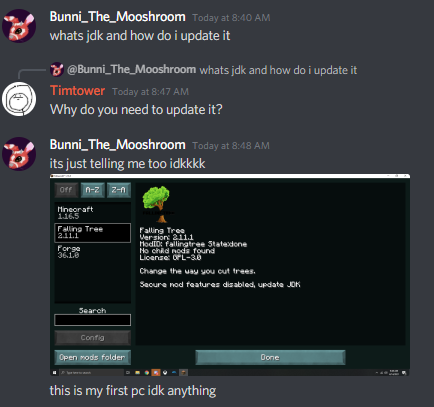
whats jdk and how do i update it
queen storm
willow umbra
whats jdk and how do i update it
Why do you need to update it?
 lyric crescent
ignore that, you can just go to the files and edit the configs. you cant update it with curseforge currently anyway.
willow umbra
nvm then im just not gonna have mods thanks anyways
im sorry but idk what configs are or how to edit them, that sounds too hard and why would it tell me to do that if you cant update it
digital roost
you can just ignore the update warning?
lyric crescent
it's not stoping you from using the mod..
digital roost
then use a different mod
lyric crescent
no, it is not
willow umbra
i just said this is my first pc.
lyric crescent
ok?
willow umbra
idk whats stopping me from using the mod, idk what jdk is, idk why its telling me to update it
all i know is that the mod wasnt working so i went to look at it and it said this
willow umbra
well i didnt know that.
lyric crescent
you not knowing how to use the mod is all that's stopping you from using it.
jdk is java, which is the code the game runs on
it's telling you to update beacuse forge decided you need a specific version to configure mods ingame. this does not stop mods from working.
lyric crescent
there is nothing you need to do
read the mod's webpage for instructions on how to use it
digital roost
Yamza said it way above but sure
 digital roost
happens to the best of us
willow umbra
willow umbra
im sorry but idk what configs are or how to edit them, that sounds too hard and ...
how does that help someone that is brand new to pc??? idk what configs are or how to edit them. i said that here
lyric crescent
first two words was all you needed to read 🙄
willow umbra
"ignore that" ok the mod still didnt work, i didnt know mods came with instructions. i thought you just downloaded them
again
brand'
new
to
pc
digital roost
editing configs takes nothing more than 5 minutes and knowing how to read english
willow umbra
wtf is a config
lyric crescent
your question was not "how do i use a mod", this is purely on you
https://i.imgur.com/5vD54XH.png


 willow umbra
sometimes you have to dumb shit down for people WHEN THEY ARE BRAND NEW
digital roost
:\
lyric crescent
anyway, now you know. so we can move on.
willow umbra
ok
digital roost
tbqh idk why you decided Falling Tree was your first mod, i wouldve done Ultimine or OreExcavator
willow umbra
idk mods
i saw this one in a video and liked it
so i looked it up and downloaded it
thats it
digital roost
mhm
lyric crescent
pretty sure you need to use shift and have a tool to use it. should say on the mod page though
willow umbra
again. first pc. idk whats so hard to understand about that
willow umbra
lyric crescent
pretty sure you need to use shift and have a tool to use it. should say on the m...
well ig that is my fault for not reading everythung
lyric crescent
getting tired of the attitude, my kid has better manners
digital roost
shift either disabled the mod or does a top down cutting?, but yeah read, read, read
willow umbra
you guys are talking to me like i should know what im doing
digital roost
always read before you do stuff
willow umbra
yeah my bad on that tbh
digital roost
its a basic expectation in life to read something before you start it
willow umbra
i didnt know mods came with instructions.
willow umbra
lol no instructions
 lyric crescent
then try what i said
willow umbra
idk how to do that. look. im just gonna do more googling on my own. thanks anywyas
willow umbra
ok yeah that issues tab is tiny. ok. sorry. ill stop asking questions here
digital roost
youre always welcome to ask questions, but you wont learn anything whenever answers are constantly spoon fed.
Am I allowed to post memes inside any of the offtopic channels?
 glad wren
will there be a feature to add mods and make your own modpack on the app, rather than only using modpacks made by others?
lyric crescent
digital roost
Am I allowed to post memes inside any of the offtopic channels?
if they are relevant to the discussion, or at least relevant to curseforge somehow
glad wren
hol up
lyric crescent
glad wren
will there be a feature to add mods and make your own modpack on the app, rather...
?mc-installmods
red patioBOT
How to install mods in CurseForge App.
- Click
+ Create Custom Profile - Name it, select the required Minecraft version, select the Forge version (usually the highest number), click
Create. - Click the profile icon.
- Click
Add New Content - Search and install the desired mods.
- Start the game!
How to install mods not on CurseForge.
- Right click the profile picture or Open the profile and click the Icon next to the play button.
- Click
Open Folder. - Drag the mod(s) into the
modsfolder. (Note: Some mods will require others, to run. Make sure to read the instructions for the mod!) - Start the game!
digital roost
exactly
 uncut notch
hello
i need some help
so i went to the nether and i cant breake anything im invincable and cant go back throu my portal
ill send a list of the mods i use
digital roost
stop
uncut notch
?
digital roost
Did you make the pack yourself or is it a CurseForge one
uncut notch
i made the pack myself
red patioBOT
How to get a Minecraft log file.
Where to find the log on the CurseForge Client.
Right-click the modpack profile icon OR click the button in the modpack profile.
Click Open Folder.
Open the logs folder.
Find the file called latest.log and drag it into discord.
digital roost
do whats above
uncut notch
ok
digital roost
tbh it sounds like a connection issue/ tps issue but who knows
 somber rock
This modpack is crashing my launcher how do i make it work
lyric crescent
should move this to #🧱︱mc-other-help or #👽︱game-support as this isnt related to curseforge
somber rock
its called GT new horizons
digital roost
aight Yamza
lyric crescent
somber rock
This modpack is crashing my launcher how do i make it work
?mc-log
red patioBOT
How to get a Minecraft log file.
Where to find the log on the CurseForge Client.
Right-click the modpack profile icon OR click the button in the modpack profile.
Click Open Folder.
Open the logs folder.
Find the file called latest.log and drag it into discord.
digital roost
@uncut notch get the Minecraft role the well move to the channel
uncut notch
ok
somber rock
K
uncut notch
done
somber rock
uncut notch
digital roost
<@589796466080481301> get the Minecraft role the well move to the channel
i said hi in #🧱︱minecraft-chat
finite wolf
it's not exporting my modpack when i do the export profile
like it creates the folder
but i can't access it and it says that the file doesn't have a location
lyric crescent
somber rock
?mc-installfix try this
red patioBOT
- Click on the Minecraft Tab on the Left side of the App.
- Click button next to the
Create Custom Profileoption. - Click
Repair Installationoption. - Play game.
NOTE: You will not lose any modpacks or worlds, These are saved in the Instances folder. DO NOT TOUCH THIS FOLDER OR YOU WILL LOSE EVERYTHING
finite wolf
ok
lyric crescent
doesnt change what i said to do..
somber rock
k lemme try now
finite wolf
Ok I pressed play on it
and now it basically just reset the launcher
i had to log back in and none of my old installations are there
 lime flare
can i use curseforge with another launcher
lyric crescent
no
somber rock
finite wolf
and now it basically just reset the launcher
same thing here i am trying what yamza said
lyric crescent
@tame gazelle #🟢︱user-bot-spam
 tame gazelle
what's the command to see the current time
digital roost
a clock
lyric crescent
look at your computer clock?
finite wolf
curse is loading super slow and taking a ton of cpu space
tame gazelle
No theCurseForge time thing
lyric crescent
!status
red patioBOT
It is 04:55PM on Wednesday for CurseForge my dudes.
Project Moderation Time
Project/File moderation is done on Sunday - Thursday from 10am - 6pm GMT+2
This process is First in, First out. Thus files submitted late in the work day may not be checked until the next work day.
New Projects or uploads requiring manual approval: 1-3 Working Days
Updates to approved projects not needing manual approval: 1 Hour
File sync to the Curseforge app may take up to 24 hours after approval.
digital roost
look directly at the sun and hope
narrow minnow
finite wolf
curse is loading super slow and taking a ton of cpu space
Are you using it for Minecraft or other addons?
finite wolf
yes
narrow minnow
are you on mac or windows?
finite wolf
windows
narrow minnow
Please check you are on version 0.172.1.5 - we improved the startup time a lot in that version
 finite wolf
i'm in that
it's still giving me a bad file when i export
after i removed the duplicate mod
wait
i'm doing the fix installation ritual
it keeps reloading the list of things to export when i try to export
curse is running really slow, slower than usual
like it's not doing anything when i click something
i fixed it and it's still giving me a bad file
now that i close the export window now it keeps asking me if i want to save the folder
imma restart my computer cuz curse is still running super slow
narrow minnow
hold on
i'll DM you
We have a bug with export which does exactly what you are writing (CPU usage increases) - and this is being fixed for the up coming version
all you have to do for now, is to relaunch cf:

or exit Overwolf

 torpid sluice
Hi, i have a problem with all my modpack downlaod, i had check my log and the error is "Uncaught TypeError: Cannot read property 'gameId' of null" how can i fix it ?
torpid sluice
What's the UI
 exotic raptor
im having an issue where all my custom made modpacks crash upon launch and say exit code: 0 even when the modpack has 1 mod
torpid sluice
a Web Client error
narrow minnow
torpid sluice
a Web Client error
This is usually due to an unstable connection - can you try a LAN connection or mobile hotspot?
narrow minnow
exotic raptor
im having an issue where all my custom made modpacks crash upon launch and say e...
?mc-installfix
red patioBOT
- Click on the Minecraft Tab on the Left side of the App.
- Click button next to the
Create Custom Profileoption. - Click
Repair Installationoption. - Play game.
NOTE: You will not lose any modpacks or worlds, These are saved in the Instances folder. DO NOT TOUCH THIS FOLDER OR YOU WILL LOSE EVERYTHING
narrow minnow
try that
torpid sluice
i can try a mobile hotspot
narrow minnow
torpid sluice
i can try a mobile hotspot
yeah and try a small modpack for testing: MMDJam
torpid sluice
ok thanks
narrow minnow
what's launcher core?
exotic raptor
minecraft launcher
narrow minnow
screenshot please
exotic raptor
i repaired the installation again and its downloading so i think its fixed
 dim sigil
how to do a server with friends so we can play mods together?
torpid sluice
narrow minnow
This is usually due to an unstable connection - can you try a LAN connection or ...
mobile hotspot doenst work
narrow minnow
Do you get the webclient error after a while? or as soon as you click on install?
torpid sluice
after a wile
red patioBOT
How to **manually** install a server - **On your own PC**
- Go to the Forge website http://files.minecraftforge.net/ and download the Installer for the forge version the pack is using.
- Run the installer and choose
Install server. Do not install to your desktop. Also do not install inside a OneDrive folder. - Run the server using the forge.jar. A file called
eula.txtwill be generated. Open it and changeeula=falsetoeula=true - From the Client; Copy the
modsfolder,configfolder, and any other folders needed for the pack to work into the server folder. If the modpack has a server pack, use this instead! - Run the server again.
queen storm
dim sigil
how to do a server with friends so we can play mods together?
!mc-installserver
torpid sluice
while