#🔥︱curseforge-support
1 messages · Page 411 of 1
 proud garnet
 fleet bear
wait for it to load?
fleet bear
the main menu?
 lament dome
Quick question, if I wanna set up a server with my own custom mod pack from curse forge which server host should I use?
fleet bear
That's not a curseforge problem.
proud garnet
what is ti
 signal ridge
Thats really up too you and how much you wanna pay. Try asking in #🧱︱mc-other-help
lament dome
alr
proud garnet
what shall i do then clay
fleet bear
You click play?
fleet bear
so you wait...
proud garnet
how long
fleet bear
till it loads
fleet bear
then wait
fleet bear
 proud garnet
lol
fleet bear
Do you not know what waiting is?
fleet bear
Well then that's a life journey you need to take.
proud garnet
ok
 earnest ore
fleet bear
Well then that's a life journey you need to take.
earnest ore
fleet bear
Well then that's a life journey you need to take.
fun job?
fleet bear
What's the longest you let it sit.
fleet bear
if it doesn't load in 15 then then download the pack again or find a new one to play
proud garnet
ok
fleet bear
earnest ore
fun job?
"job"
If only sitting here telling people to not do dumb things and to read directions paid anything
earnest ore
😛
signal ridge
Uh clay what are the chances of the app also resetting none curse app folders?
signal ridge
Thought soo.. Im gunna go do a restore now. Wish me luck XD
proud garnet
fleet bear
if it doesn't load in 15 then then download the pack again or find a new one to ...
i tried different ones not workijng
fleet bear
!mc-installfix
 red patioBOT
- Click on the
 icon in the bottom left.
 - Click the

MinecraftTab. - Click
Changenext to theMinecraft Modding FolderOption. - Select the folder named
Install. - Delete it.
- Restart CurseForge App.
- It will ask to install MC again, do so.
- Play game.
NOTE: You will not lose any modpacks or worlds, These are saved in the Instances folder. DO NOT TOUCH THIS FOLDER OR YOU WILL LOSE EVERYTHING
fleet bear
then idk
proud garnet
Ok
 rocky vector
Is there a way to make, lets say a MC Mod Project, that already exists, into a modpack? As I accidentally made a Project for a MC mod when I intended to make a Modpack.
fleet bear
rocky vector
Is there a way to make, lets say a MC Mod Project, that already exists, into a m...
No.
rocky vector
Time to remake my entire layout again then, woo.
fleet bear
just copy paste the stuff from the old project to the new one...
 rocky vector
Jokes aside, yeah, Ik, Ty though.
 digital roost
can someone help me with something
 broken saffron
What should you do if it says, "Unable to install addon, due to a missing install path!"?
digital roost
can anyone help me with making a server if u can pls dm me
broken saffron
digital roost
can anyone help me with making a server if u can pls dm me
Search up "Aternos" that is the thing I use to host online servers to play with friends.
 obsidian coral
i made i modpack for my friends so they can join my server but is there a way to send them the profile
digital roost
@broken saffron check your dms
i have got like 60 fps but my pc was alot of money why?
now its 30
 undone monolith
what do i do when curseforge says 'unable to install addon, due to missing install path!' ?
broken saffron
undone monolith
what do i do when curseforge says 'unable to install addon, due to missing insta...
I am having issues with that too.
undone monolith
broken saffron
I am having issues with that too.
is it okay if i dm u? i figured out how to fix it for me and it might work for u too
broken saffron
sure
 potent dagger
can you download single mods on the app
 lyric crescent
?mc-installmods
red patioBOT
How to install mods in CurseForge App.
- Click
+ Create Custom Profile - Name it, select the required Minecraft version, select the Forge version (usually the highest number), click
Create. - Click the profile icon.
- Click
Add New Content - Search and install the desired mods.
- Start the game!
How to install mods not on CurseForge.
- Right click the profile picture or Open the profile and click the
 Icon next to the play button.
 - Click

Open Folder. - Drag the mod(s) into the
modsfolder. (Note: Some mods will require others, to run. Make sure to read the instructions for the mod!) - Start the game!

 jagged swan
Does anyone know why my game is making blocks invisible and making mobs come from the ground and be in different orientations, not modpack specific
 grand dawn
Im having a bit of trouble trying to set up my folders to look at minecraft mods, when ever i choose a folder it says "path can only include english numbers and letters" and im not sure how to change it, can someone please help me
 thorn dune
How long do modpacks take to get approved by a moderator?
 cyan elbow
i'm at the end of my rope here
i have no idea what's happening with my minecraft anymore. i can create a brand new world just fine but after i save it i can't load bakc into it. the game won't let me. it just says theirs an error int he currentley selected datapacks
oh sorry
wrong chat
digital roost
im having a problem getting my custom mod to work with curseforge
i put the .jar file into the mods folder but nothing shows up in the "installed mods" menu of the custom profile
digital roost
pls help
 slim thunder
@digital roost ignore it its still there
digital roost
ok
 harsh slate
Hi, I have downloaded the modpack ATM6, but it shows 'unable to update the minecraft runtime environment' when I hit play
how can I fix it?
 narrow flower
is there a place where i can report a bug
do i do it here?
can someone help me with a bug it wont let me play some minecraft modpacks and it wont let me download any either ive tride freeing some space but that doesnt seem to be the problem
jagged swan
Does anyone know why my game is making blocks invisible and making mobs come from the groiund and be in different orientations
 late spade
how do I post a Modpack?
slim thunder
late spade
how do I post a Modpack?
?mc-packshare
red patioBOT
There are two ways to share a modpack you've made with others...
Export and Share - For Friends to Small Groups.
- Click the Icon for the modpack.
- Click the button next to play.
- Click

Export. - Select the files that should be included.
- Send the zip to the people that want it! They can follow the instructions in
!mc-installpackto install the pack!
Upload to Curseforge - For Public Release to Everyone.
This options will make your pack public to EVERYONE, it comes with extra requirements and will take some effort to set up.
- Go to here: https://www.curseforge.com/project/432/4471/create
- Fill out the information with a proper description of the pack. This should allow anyone to understand what the pack is.
- Click the Icon for the modpack in the CurseForge app.
- Click the button next to play.
- Click
Export. - Select the files that should be included.
- Open your Project you made on the CurseForge site and Upload the file you just made.
- Wait for Moderation & Sync so it can show up in the client! (See
!syncfor limitations)
 south raven
im confused, are you able to get an xray for mc?
digital roost
south raven
im confused, are you able to get an xray for mc?
you must complete the ritual to the xray gods before getting it
look up "xray texture pack" on google
Find a safe website
Download it and put it in your resourcepacks folder, turn it on and see through stuff
south raven
have anything to recommend?
thorn dune
!sync
red patioBOT
Sync and your Project.
CurseForge REQUIRE a project to have one file marked Released on them for the projects to show up in search. Otherwise only Direct links to the project work.
Files can take a while to show up in the app. If your files still have not shown up either your project is new and you have yet to mark a file as Release or there is issues with the sync system making it slow.
 grand moth
how do you make a forge modded server for windows. server mod pack valhelsia 3
 jagged aspen
heya, when im trying to download my saved addon sync, i get this
is the addon sync working for others
 zenith quarry
how do i fix the webclient reqeust error plsss
literally cannot download a single modpack for anything
 sacred scroll
Same
 kind goblet
Hi I need help im quite new to using curseforge
 fiery cave
So, I just downloaded Curseforge and installed the DD & SS modpack for minecraft, though when I try launching it, I get this window open saying it's updating Minecraft runtime environment etc. But then it just stops and says that the update failed, I've been looking around for a solution for quite some time but I couldn't get anything to work..
digital roost
will there eventually be an easy way of adding fabric to the curse forge launcher
 opal cipher
Yes, but right now, easiest way is to add the mod Jumploader.
digital roost
kk thx any idea when lmao
opal cipher
No clue, sorry. :)
 uncut prawn
I can play whit any modpack in curseforge with minecraft window 10 edition?
opal cipher
uncut prawn
I can play whit any modpack in curseforge with minecraft window 10 edition?
Nope, need Java edition for that.
uncut prawn
opal cipher
Nope, need Java edition for that.
k thanks
 robust grail
how do i download the guard villagers pack it isnt on the curseforge app its on the website only
 buoyant torrent
ok wait a sec
 queen storm
robust grail
how do i download the guard villagers pack it isnt on the curseforge app its on ...
queen storm
robust grail
how do i download the guard villagers pack it isnt on the curseforge app its on ...
Link it please
robust grail
queen storm
Link it please
the guard villagers thing?
queen storm
robust grail
the guard villagers thing?
Yes
 wide pumice
why can't I run my modpacks it says impossible to update the minecraft rutime environment
robust grail
@queen storm i linked it
queen storm
robust grail
https://www.curseforge.com/minecraft/mc-mods/guard-villagers/download/3197346
And now a link to the project and not a direct file please
robust grail
its not on the curseforge app
queen storm
And I don't want to get a direct file download, I need to link to the project itself
queen storm
Which version is your pack?
queen storm
Your Minecraft version
queen storm
1.16.5 or 1.16.4?
robust grail
.5
queen storm
Mod is .4, that is why it doesnt show
robust grail
oh but it shows one in the files that is 1.16.5
The first 2 are both 1.16.5
It only shows on website not on the actual forge app
@queen storm you here?
queen storm
robust grail
<@!525950791710801921> you here?
Not 24/7, 60 seconds per minute
queen storm
Yes. And needed to check it.
Where are you looking, screenshot please
robust grail
Look in files it says game verison 1.16.5
queen storm
In the app I mean
robust grail
Its not in the curseforge app for some reason but it is on the website that's why I was confused
queen storm
Show a screenshot of the app then
 tardy dock
how do I downlaod individual mods?
queen storm
robust grail
<@!525950791710801921> see nothimg
You are looking at modpacks
queen storm
tardy dock
how do I downlaod individual mods?
! mc-installmods
red patioBOT
How to install mods in CurseForge App.
- Click
+ Create Custom Profile - Name it, select the required Minecraft version, select the Forge version (usually the highest number), click
Create. - Click the profile icon.
- Click
Add New Content - Search and install the desired mods.
- Start the game!
How to install mods not on CurseForge.
- Right click the profile picture or Open the profile and click the Icon next to the play button.
- Click
Open Folder. - Drag the mod(s) into the
modsfolder. (Note: Some mods will require others, to run. Make sure to read the instructions for the mod!) - Start the game!
tardy dock
ty
robust grail
queen storm
You are looking at modpacks
isnt that what im suppoused to be looking at\
queen storm
robust grail
isnt that what im suppoused to be looking at\
No, because it is a single mod, not a modpack
robust grail
oh so then how do i do that?
queen storm
Look up to what the bot posted
robust grail
oh mb i thought that was for him
queen storm
And for you now
 hazy salmon
i tried to install rl craft and nothing happens when i try to run my launcher can anyone help
queen storm
hazy salmon
i tried to install rl craft and nothing happens when i try to run my launcher ca...
! mc-installfix
red patioBOT
- Click on the icon in the bottom left.
- Click the
MinecraftTab. - Click
Changenext to theMinecraft Modding FolderOption. - Select the folder named
Install. - Delete it.
- Restart CurseForge App.
- It will ask to install MC again, do so.
- Play game.
NOTE: You will not lose any modpacks or worlds, These are saved in the Instances folder. DO NOT TOUCH THIS FOLDER OR YOU WILL LOSE EVERYTHING
robust grail
queen storm
And for you now
what modloader should i use?
robust grail
@queen storm
acuttaly @queen storm i got it thanks for helping
or not 100 percent yet were about to se
queen storm
robust grail
what modloader should i use?
Latest
queen storm
hazy salmon
where do i write this im bad with pcs
You follow the steps below ut
robust grail
thanks tim got it working
also 1 more question
is it possible for my friends to join me on this world?
queen storm
If you have a way to host a server
 small basalt
hey, im just wondering if theres any ETA for when my pack will be reviewed? its been ~4 days of under review
queen storm
!status
red patioBOT
It is 01:36PM on Sunday for CurseForge my dudes.
Project Moderation Time
Project/File moderation is done on Sunday - Thursday from 10am - 6pm GMT+2
This process is First in, First out. Thus files submitted late in the work day may not be checked until the next work day.
small basalt
yeah i just uploaded it wednesday at around 1 am PST, which is 11 GMT+2 i believe, just wondering if i did something wrong or if it usually takes a while
robust grail
queen storm
If you have a way to host a server
Does it cost money?
queen storm
robust grail
Does it cost money?
Depends on how you do it
queen storm
small basalt
yeah i just uploaded it wednesday at around 1 am PST, which is 11 GMT+2 i believ...
Just slow
small basalt
i see, are the people here listed as mods/community admins/community support in charge of that?
robust grail
queen storm
Depends on how you do it
like realms or lan host
queen storm
robust grail
like realms or lan host
If you host it on your pc then it is free (besides power)
robust grail
queen storm
If you host it on your pc then it is free (besides power)
so i would have to host a server for 1 of my friends to join me?
also would my friend have to download the same mods to join me
queen storm
Yes to both
robust grail
so they need forge and the mods i have downloaded
queen storm
robust grail
so they need forge and the mods i have downloaded
! mc-packshare
red patioBOT
There are two ways to share a modpack you've made with others...
Export and Share - For Friends to Small Groups.
- Click the Icon for the modpack.
- Click the button next to play.
- Click
Export. - Select the files that should be included.
- Send the zip to the people that want it! They can follow the instructions in
!mc-installpackto install the pack!
Upload to Curseforge - For Public Release to Everyone.
This options will make your pack public to EVERYONE, it comes with extra requirements and will take some effort to set up.
- Go to here: https://www.curseforge.com/project/432/4471/create
- Fill out the information with a proper description of the pack. This should allow anyone to understand what the pack is.
- Click the Icon for the modpack in the CurseForge app.
- Click the button next to play.
- Click
Export. - Select the files that should be included.
- Open your Project you made on the CurseForge site and Upload the file you just made.
- Wait for Moderation & Sync so it can show up in the client! (See
!syncfor limitations)
 buoyant pendant
Do I need the curseforge application installed to use texture packs downloaded from the site? Because the packs aren’t working
tardy dock
does fabric mod loader not exist in forge?
queen storm
tardy dock
does fabric mod loader not exist in forge?
!mc-fabric
red patioBOT
Fabric modpacks or the use Fabric mods require you to install a mod called Jumploader.
Fabric mods do not work with Forge.
Forge mods do not work with Fabric.
Fabric mods should be marked with a Fabric Icon like this: 
queen storm
buoyant pendant
Do I need the curseforge application installed to use texture packs downloaded f...
Should not
digital roost
hi, I installed Engineer's Life thru curseforge and set up a private server, but when i attempted to join it said i was missing these mods:
 modest elm
Hello! How do I release a self-made profile/modpack for my friends to play?
Thanks in advance for the help and have a good way!
queen storm
modest elm
Hello! How do I release a self-made profile/modpack for my friends to play?
Tha...
! mc-packshare
red patioBOT
There are two ways to share a modpack you've made with others...
Export and Share - For Friends to Small Groups.
- Click the Icon for the modpack.
- Click the button next to play.
- Click
Export. - Select the files that should be included.
- Send the zip to the people that want it! They can follow the instructions in
!mc-installpackto install the pack!
Upload to Curseforge - For Public Release to Everyone.
This options will make your pack public to EVERYONE, it comes with extra requirements and will take some effort to set up.
- Go to here: https://www.curseforge.com/project/432/4471/create
- Fill out the information with a proper description of the pack. This should allow anyone to understand what the pack is.
- Click the Icon for the modpack in the CurseForge app.
- Click the button next to play.
- Click
Export. - Select the files that should be included.
- Open your Project you made on the CurseForge site and Upload the file you just made.
- Wait for Moderation & Sync so it can show up in the client! (See
!syncfor limitations)
modest elm
^TY!
 wooden tapir
 left hazel
Ik that was from last month
left hazel
Ik that was from last month
Nah dw i had the same problem last night so its still relevant
tardy dock
I can't find tinkers construct?
queen storm
For version?
tardy dock
Nvm
 river schooner
Are there any more channels in the "game" second for roles or is it just Minecraft WOW and among us
queen storm
river schooner
Are there any more channels in the "game" second for roles or is it just Minecra...
Only those
river schooner
queen storm
Only those
Ok thanks bud
modest elm
is there tinkers construct for 1.16.5?
fleet bear
If it's there it's on the site.
 turbid heath
modest elm
is there tinkers construct for 1.16.5?
turbid heath
modest elm
is there tinkers construct for 1.16.5?
nope max is 1.12.2
2016/17 was a good year for mods
 rich flint
tinkers 3 is in the works but only on private alpha for now
 opal agate
I need help. I downloaded the Overwolf launcher yesterday and it says that I don't own Minecraft anymore, but only if i launch through the Overwolf launcher. I want to find a fix soon because now my Mojang account is unable to receive new skins.
 raw oriole
Waht can I do with a web client Mistake
lyric crescent
what is a web client mistake?
lyric crescent
opal agate
I need help. I downloaded the Overwolf launcher yesterday and it says that I don...
?mc-installfix
red patioBOT
- Click on the icon in the bottom left.
- Click the
MinecraftTab. - Click
Changenext to theMinecraft Modding FolderOption. - Select the folder named
Install. - Delete it.
- Restart CurseForge App.
- It will ask to install MC again, do so.
- Play game.
NOTE: You will not lose any modpacks or worlds, These are saved in the Instances folder. DO NOT TOUCH THIS FOLDER OR YOU WILL LOSE EVERYTHING
opal agate
ok ty
lyric crescent
!knownissues
red patioBOT
Known Issues with solutions or status of the issue.
Overwolf maintains a known list of issues here, some with solutions, others without.
http://support.curseforge.com/en/support/solutions/articles/9000196615-known-issues
opal agate
@lyric crescent it did not work. i can log into my mojang account but it says that i can only play the demo.
is there somewhere i can contact devs to help me troubleshoot?
 viral wyvern
My friend's curseforge when he opens is green and it can't be fixed when he uninstall and reinstall either
fleet bear
viral wyvern
My friend's curseforge when he opens is green and it can't be fixed when he unin...

Overwolf Support Help Center
We're here to get you informed on everything you need to know about Overwolf, including helpful guides and troubleshooting articles to back you up when you get in a pickle
fleet bear
opal agate
<@!125588118538682368> it did not work. i can log into my mojang account but it...
Then log into the correct account
opal agate
fleet bear
Then log into the correct account
it is the correct account
fleet bear
!mc-installfix
red patioBOT
- Click on the icon in the bottom left.
- Click the
MinecraftTab. - Click
Changenext to theMinecraft Modding FolderOption. - Select the folder named
Install. - Delete it.
- Restart CurseForge App.
- It will ask to install MC again, do so.
- Play game.
NOTE: You will not lose any modpacks or worlds, These are saved in the Instances folder. DO NOT TOUCH THIS FOLDER OR YOU WILL LOSE EVERYTHING
opal agate
i already tried that
opal agate
fleet bear
!mc-installfix
^
fleet bear
Then your account information is wrong
fleet bear
No... You are logged into an account that doesn't own the game.
There's nothing broken about it
You are using the wrong account/information
fleet bear
CurseForge doesn't have anything to do with you owning the game or not
viral wyvern
aaa my friend's curseforge is still green after doing Claycorp's fix
fleet bear
its the same launcher
fleet bear
viral wyvern
aaa my friend's curseforge is still green after doing Claycorp's fix
Then contact overwolf support.
opal agate
@fleet bear you were right. soory
fleet bear
imagine that
fleet bear
viral wyvern
but its on curseforge tho
If CF doesn't show right Overwolf app likely doesn't either as it's a rendering issue
fleet bear
opal agate
i was using the wrong email
You're not the first and won't be the last person to come here and say its broken. lol
opal agate
yeah
digital roost
anyone know how to upload a file that isnt .zip for a mod. DOwnloaded off of curseforge's website
queen storm
digital roost
anyone know how to upload a file that isnt .zip for a mod. DOwnloaded off of cur...
Mods are always jar
digital roost
its a jar. but the curseforge app is making it have to be a .zip
queen storm
Then show the rejection message
digital roost
thre is no rejection message. when I try to create a custom profile on the curseforge app it doesnt show up. Only .zip files do
how do I allow .jar files.
fleet bear
what...
queen storm
digital roost
thre is no rejection message. when I try to create a custom profile on the curse...
That is a different issue, has nothing to do with zips
digital roost
oh so whats the issue. I just noticedf that only .zip files were showing not .jar
queen storm
Sync takes 1-24 hours, yours got approved 6 hours ago, just wait
Zips are modpacks, not mods
fleet bear
what are you trying to do and where are you trying to do it
queen storm
No, you just wait patiently, read again
digital roost
Oh sorry when I sent that message, yours didn't load. Alright thank you
 brittle eagle
Do you know how to fix this error C:\Users[user]\OneDrive\Documents\curseforge\minecraft\Install\game\launcher.dll load error not present
 lapis python
Hello, I have created a modpack, but the image that comes out is the default, I would like to know how it can be changed (if possible). Thanks a lot.
queen storm
brittle eagle
Do you know how to fix this error C:\Users\[user]\OneDrive\Documents\curseforge...
Move it out of onedrive
queen storm
lapis python
Hello, I have created a modpack, but the image that comes out is the default, I ...
Need to upload it to curseforge to change that
brittle eagle
How?
queen storm
brittle eagle
How?
!mc-path
red patioBOT
Minecraft Files should NOT be installed inside the .minecraft folder or inside OneDrive folders. If this shows up in the path at all you need to move it by following the instructions below!
If Minecraft is not installed, start here.
Click the  in the top right.
Select Minecraft.
Click "Edit".
Move to the "Continue here:" section below.
If Minecraft is installed, follow these steps.
Click the in the bottom left.
Select the Minecraft tab.
Click "Change".
Move to the "Continue here:" section below.
Continue here:
Make a folder in the root directory called CurseForge.
Select the folder you just made.
The text box should show something like the following:
For Windows: C:\CurseForge
For Mac: /CurseForge
 lapis python
queen storm
Need to upload it to curseforge to change that
lapis python
queen storm
Need to upload it to curseforge to change that
Ok, and how can i do that?
queen storm
lapis python
Ok, and how can i do that?
!mc-packshare
red patioBOT
There are two ways to share a modpack you've made with others...
Export and Share - For Friends to Small Groups.
- Click the Icon for the modpack.
- Click the button next to play.
- Click
Export. - Select the files that should be included.
- Send the zip to the people that want it! They can follow the instructions in
!mc-installpackto install the pack!
Upload to Curseforge - For Public Release to Everyone.
This options will make your pack public to EVERYONE, it comes with extra requirements and will take some effort to set up.
- Go to here: https://www.curseforge.com/project/432/4471/create
- Fill out the information with a proper description of the pack. This should allow anyone to understand what the pack is.
- Click the Icon for the modpack in the CurseForge app.
- Click the button next to play.
- Click
Export. - Select the files that should be included.
- Open your Project you made on the CurseForge site and Upload the file you just made.
- Wait for Moderation & Sync so it can show up in the client! (See
!syncfor limitations)
lapis python
I don't want to post it, I just want to change the image. There is no way without having to upload it to the community
queen storm
No
lapis python
Ok i did, thank you very much
 dawn leaf
quick question, i am installing Xaero's World Map in a custom mod profile and I am using Jumploader for fabric but when i go to install the fabric one for 1.16.5, it only shows the forge one even though the fabric one is on the website. can some1 help?
brittle eagle
Thanks for the help TimTower
lyric crescent
dawn leaf
quick question, i am installing Xaero's World Map in a custom mod profile and I ...
check versions when looking at the mod
dawn leaf
wdym
lyric crescent
search the mod, click versions
dawn leaf
there is a 1.16.5 fabric one on the website but in the versions tab these are all the 1.16.5 ones
im in the app
the only fabric one on the app is 1.16.3
lyric crescent
then it hasnt been updated to 1.16.5 for fabric
fleet bear
Go to the Curseforge settings in the app and set the version type to beta
 obsidian talon
Hello, just wondering can we share custom profile to friends for easier installation using curseforge? Or that is what export can do
queen storm
obsidian talon
Hello, just wondering can we share custom profile to friends for easier installa...
That is what export does
digital roost
kan i have help
queen storm
digital roost
kan i have help
Sends many helps
queen storm
What error do you get?
queen storm
Then what is going wrong? What are the symptoms?
obsidian talon
obsidian talon
Hello, just wondering can we share custom profile to friends for easier installa...
umm do we unzip the exported file and put it under instances ? But it got an override folder, a json, and a .html
cuz now i just tell them to search the mods one by one/share the mods for them to download
queen storm
obsidian talon
umm do we unzip the exported file and put it under instances ? But it got an ove...
!mc-installmodpack
red patioBOT
How to install modpacks with the search features in app.
- Open the
Minecraftsection of the app. - Click the top search bar where it says
Search for modpacksOR Click theBrowse ModpacksTab. - Find the Modpack you want to install and click install on it.
- Wait for CurseForge app to download and unpack all the required files.
- Once finished, click
Play!
How to install modpacks from a Export. (Custom/Private/Site downloaded Modpack zip)
- Get CurseForge App if you don't have it, use
!downloadfor a link. - Get the exported modpack from CurseForge or someone else,
!mc-packshareexplains how to make them. - Open the
Minecraftsection of the app. - Click

Create Custom Profile - Click the
Importoption. - Find the file you just downloaded in step 2 and select it.
- CurseForge app will now attempt to download and unpack the modpack. If it fails, try steps 4-6 again.
- Once finished, click
Play!
lyric crescent
you dont unzip it, you go to create custom profile and use import
obsidian talon
oh i totally missed the import button in create section
great to know, thank you
one more question, theres no way to change custom profile pic right?
queen storm
Not without uploading
lyric crescent
only by having your pack uploaded and approved on the site
fleet bear
for now
obsidian talon
all noted, thanks again
digital roost
Is curse premium still available?
queen storm
Nope
digital roost
So why do people still have the badge?
queen storm
Legacy stuff that Twitch didn't remove like they should
 wooden anchor
where is replay mod
queen storm
wooden anchor
where is replay mod
Google it
lyric crescent
so bad
queen storm
wooden anchor
ok thx u bad helper
Because we are not your personal search engine?
Will take that
 cinder violet
can anyone help me? so I made a minecraft modpack, and want to put it on my server, but when I export profile, there is only optifine in my mods folder, yet in the config folder, there is files for all the mods
queen storm
cinder violet
can anyone help me? so I made a minecraft modpack, and want to put it on my serv...
Because that is how the export works, if you want to use it on a server then copy the mods folder
cinder violet
how do i copy the mods folder
queen storm
ctrl+c
cinder violet
wait nevermind
 steady vortex
whenever i try to download a mod it says no java executable found what do i do
queen storm
steady vortex
whenever i try to download a mod it says no java executable found what do i do
!mc-java
red patioBOT
Missing Java Fix!
- Click on the icon in the bottom left.
- Click the
MinecraftTab. - Click Change next to the
Minecraft Modding FolderOption. - Right click the folder named
Install. - Select
Open in new window. - Double click the
minecraft.exe. - Close the Launcher once it's done loading.
- Restart Overwolf & CurseForge or the computer.
- Play game!
If the above doesn't work....
Install Java using the installer from here: https://java.com/en/download/manual.jsp
 crystal vale
i installed curseforge launcher yesterday(already had overwolf installed for other app) to play a minecraft modpack, i had no issues with it starting and loading modpack, but i come on today and try to launch the launcher but it keeps coming up saying there is an error. where can i find the logs for the launcher or does anyone know possible reasons without looking at log
lyric crescent
might know if you say what the error is
crystal vale
k ill load it one mroe tiem to get it, but pretty sure it just said "oops there was an error"
sorry "Oops! somethign went wrong"
tried restarting computer
lyric crescent
in that case no idea
crystal vale
and relaunching the app from there doesnt work
lyric crescent
?ticket-site
red patioBOT
:bug: Reporting via Website :bug:
Can't open the app or would rather use the website? You can do so here: https://support.curseforge.com/en/support/tickets/new
Fill out the form with accurate detailed information, "It doesn't work" isn't helpful! What exactly doesn't work and why doesn't it work should be easy to answer!
Make sure to upload your Overwolf logs with the Upload File option on the ticket, information on how to get these logs can be found here https://support.overwolf.com/en/support/solutions/articles/9000176827-how-to-get-your-overwolf-logs
crystal vale
k ty
digital roost
im trying to download the origins mod by Apace100, but i cant seem to find it on the curseforge app despite it being on the website, is there something else i need to do?
 flat jetty
hi, i just finished dl curseforge and it appears lauching and just getting a green screen, does smeone had the same issue?
queen storm
digital roost
im trying to download the origins mod by Apace100, but i cant seem to find it on...
Link it please
queen storm
flat jetty
hi, i just finished dl curseforge and it appears lauching and just getting a gre...
Upgrade your drivers
digital roost
flat jetty
queen storm
Upgrade your drivers
how do i do this?
queen storm
flat jetty
how do i do this?
It is a pc thing, no idea what you are running
queen storm
digital roost
https://www.curseforge.com/minecraft/mc-mods/origins
Show where you are looking, screenshot please
digital roost
queen storm
digital roost
In the app please
queen storm
And you are looking at modpacks
digital roost
i see all sorts of different modpacks, but not from the specific creator
queen storm
digital roost
i see all sorts of different modpacks, but not from the specific creator
Because it is a single mod...
crystal vale
umm i went to make the ticket, but when i click attach file nothing comes up
flat jetty
queen storm
It is a pc thing, no idea what you are running
ok i just tried, they seems to be updated and still have the same issue
 teal stratus
i updated my modpack and ussualy the update shows up instantly and this time its been an hour and the update is not showing up on the curseforge launcher? any help?
queen storm
teal stratus
i updated my modpack and ussualy the update shows up instantly and this time its...
Takes 1-24 hours after approval
teal stratus
ahh thx
 tall root
Every time I try to download a mod I get the message, "Object Reference set to an instance of an object." what does it mean and how can I fix It?
 narrow minnow
tall root
Every time I try to download a mod I get the message, "Object Reference set to a...
narrow minnow
tall root
Every time I try to download a mod I get the message, "Object Reference set to a...
Please try to restart the app - Exit and run again
 humble comet
It wont let me download a mobpack and its saying "unable to install addition,due to missing install path!" how can i fix this?
narrow minnow
humble comet
It wont let me download a mobpack and its saying "unable to install addition,due...
Which modpack?
tall root
narrow minnow
Please try to restart the app - Exit and run again
It Works! thank you so much!
narrow minnow
tall root
It Works! thank you so much!
Should be fixed in the next release
humble comet
narrow minnow
Which modpack?
valhelsia 3 wont work
 merry rapids
How to you make your own mod?
narrow minnow
humble comet
valhelsia 3 wont work
Sounds like a network issue - I'd recommend trying to restart the app as well
humble comet
narrow minnow
Sounds like a network issue - I'd recommend trying to restart the app as well
K thx
merry rapids
how do you upload your own server onto it?
humble comet
narrow minnow
Sounds like a network issue - I'd recommend trying to restart the app as well
It worked tysm
merry rapids
( it = curseforge )
 sinful wharf
hello i m new am i the only pixelmon don't work
narrow minnow
sinful wharf
hello i m new am i the only pixelmon don't work
Nah - what are you experiencing?
sinful wharf
sorry i m bad in english can u reformulate experiencing
flat jetty
hi, me again, does smeone have an idea about that greenscreen issue? drivers updated
merry rapids
@narrow minnow How do you upload your own server onto curseforge?
queen storm
merry rapids
<@!141637151375753216> How do you upload your own server onto curseforge?
No need for the ping
And make a server pack, upload it as adittional file
merry rapids
👍
merry rapids
queen storm
No need for the ping
And make a server pack, upload it as adittional file
Wait how do you make a server pack-
queen storm
merry rapids
Wait how do you make a server pack-
Do you have a server running?
queen storm
merry rapids
We have one but cant upload it to curseforge.
Zip the configs, mods, and add a readme on how to install it
merry rapids
Alrighty ty.
viral wyvern
whenever I open curse forge this happens. any fixes?
flat jetty
viral wyvern
whenever I open curse forge this happens. any fixes?
having the same waiting for any ideas x)
viral wyvern
I contacted curse forge still don't know anything
 wooden musk
what is the project ozone 2 server
 nova forge
This pops up every time I try to start a mod in curseforge does anyone know how to fix it
 arctic burrow
Can I share my mod pack with my friends?
fleet bear
!mc-packshare
red patioBOT
There are two ways to share a modpack you've made with others...
Export and Share - For Friends to Small Groups.
- Click the Icon for the modpack.
- Click the button next to play.
- Click
Export. - Select the files that should be included.
- Send the zip to the people that want it! They can follow the instructions in
!mc-installpackto install the pack!
Upload to Curseforge - For Public Release to Everyone.
This options will make your pack public to EVERYONE, it comes with extra requirements and will take some effort to set up.
- Go to here: https://www.curseforge.com/project/432/4471/create
- Fill out the information with a proper description of the pack. This should allow anyone to understand what the pack is.
- Click the Icon for the modpack in the CurseForge app.
- Click the button next to play.
- Click
Export. - Select the files that should be included.
- Open your Project you made on the CurseForge site and Upload the file you just made.
- Wait for Moderation & Sync so it can show up in the client! (See
!syncfor limitations)
 meager mist
Hello how long can you expect to have to wait before new versions of minecraft modpacks appear in the curseforge app ?
fleet bear
1-24hrs
meager mist
can people update it through the website link in the meantime or do they have to do it by manually downloading the zip file ?
fleet bear
they can install it from the site yes
meager mist
when they do so it creates a new instance
meager mist
so they can't update it through the website only install
 arctic mango
Hello, i have the curseforge app and i own stardew valley on stream, but the app wont find nthe game
fleet bear
meager mist
so they can't update it through the website only install
you can't update a profile any other way other than via the app
fleet bear
arctic mango
Hello, i have the curseforge app and i own stardew valley on stream, but the app...
!knownissues under Other
red patioBOT
Known Issues with solutions or status of the issue.
Overwolf maintains a known list of issues here, some with solutions, others without.
http://support.curseforge.com/en/support/solutions/articles/9000196615-known-issues
arctic mango
is SMAPI safe to download?
small basalt
all of wednesday/thursday/sunday, how long does this modpack verification stuff take??
 deft pasture
can u get mods if u have micororosoft edititon lol
arctic mango
Why does it show this when im trying to download SMAPI?
 acoustic shale
digital roost
acoustic shale
digital roost
My game somehow uses more memory than my friend. He's hosting the server and he barely passes 4gb memory while I'm stuck at 5gb. And my game keep stunning every 30 seconds. Is it something about memory ghz? or do I need more memory (he has 16 and I have 8)
It's for minecraft btw
queen storm
arctic mango
Why does it show this when im trying to download SMAPI?
Ask those devs instead
queen storm
deft pasture
can u get mods if u have micororosoft edititon lol
If that is bedrock: no, only addons
small basalt
seriously is there an active member reviewing modpacks? or should I just manually distribute my pack at this point
 livid plank
i have downloaded fabric bit i still get the message: =1 and stuf
fleet bear
small basalt
seriously is there an active member reviewing modpacks? or should I just manuall...
queue gets worked on every day.
The weekend typically slows things down.
What's the status of the file?
it's also out of work hours
small basalt
Under Review, uploaded last wednesday
yeah but its been in 3 rotations of work hours with no luck
really frustrating, especially since i dont know if itll just get rejected
fleet bear
well if your pack is in queue it likely has 3rd party mods as if it's only CF mods it's automated
small basalt
i downloaded every file from curseforge, so not a clue
fleet bear
give me a link to the project and I'll pass it on, otherwise you can open a support ticket.
small basalt
i included optifine i believe, is that an issue? or is it auto removed
fleet bear
That's not allowed in packs
small basalt
cool cool, should i reupload without optifine?
fleet bear
yes
small basalt
are there any other common mods not found on curseforge that are often included?
fleet bear
anything you put in the mods folder yourself.
small basalt
im fairly certain that was the only one, will it be automatic if I remove optifine and reupload it assuming thats the only non supported mod?
also, i had it marked as beta before, should i just mark it as release to avoid any problems?
lyric crescent
new projects are never automated, updates to already approved projects are usually automated, unless you use 3rd party mods
small basalt
ok and are there any 3rd party mods that people commonly include such as optifine that you know of?
fleet bear
Project and file moderation aren't the same
lyric crescent
?mc-3rdparty
red patioBOT
Minecraft Modpack 3rd party
Mods not on CurseForge must be on the 3rd-party list to be included in modpacks uploaded to CurseForge. If a mod is not on this list it can't be included in the export of a modpack and must be removed before uploading. If you upload with a mod that isn't on this list the file will be rejected.
List of approved 3rd party mods:
https://docs.google.com/spreadsheets/d/176Wv-PZUo9hFxy6oC6N8tWdquBLPRtSuLbNK-r0_byM
small basalt
but even though my pack included optifine, i dont think anybody ever got to it because it was always under review and never denied
it would have been denied once somebody saw it, right? or would they just pass over it since it had that 3rd party mod
lyric crescent
it would be rejected
fleet bear
It shouldn't have taken this long tho
unless they are having a hard time keeping up with queue again
small basalt
how many people work on that sort of thing behind the scenes?
fleet bear
only a few afaik.
small basalt
ah
i cant really blame them for taking so long, its just frustrating having to go through this process regardless
fleet bear
well, you should have known you can't just include anything you want
small basalt
i did, but i forgot about optifine
but that doesnt seem like it was the issue as it wasnt denied either
lyric crescent
it should have been automatically denied, so the bot probably didnt know what to do with it. it is a new project i assume?
small basalt
it is, i just removed the file
lyric crescent
not the first time it's broken like that due to optifine
small basalt
ill reupload without optifine and give it a few more days
should i be using the all rights reserved licence?
lyric crescent
you should use whatever suits you best. not a legal expert so i cant give advice on that.
digital roost
I have a question?
small basalt
does an included texture pack cause any issues?
digital roost
No
 crude aurora
how do you verify the minecraft version
small basalt
lyric crescent
not the first time it's broken like that due to optifine
i had a texture pack included with the exported files, do you think that could have caused an issue
lyric crescent
no idea
small basalt
well thanks for the help
 loud compass
Good morning all,
I'm currently having big problems with my Minecraft (Minecraft Modded, with CurseForge)
My crash as soon as I want to craft something, it takes a lot too long, my game "crashes" then goes back to normal.
I don't understand where it can come from (I allocate more ram to my games, it doesn't change anything)
Can you help me please ?
lyric crescent
 whole violet
how do i get mods for minecraft with curseforge
whole violet
how do i get mods for minecraft with curseforge
?mc-installmods
red patioBOT
How to install mods in CurseForge App.
- Click
+ Create Custom Profile - Name it, select the required Minecraft version, select the Forge version (usually the highest number), click
Create. - Click the profile icon.
- Click
Add New Content - Search and install the desired mods.
- Start the game!
How to install mods not on CurseForge.
- Right click the profile picture or Open the profile and click the Icon next to the play button.
- Click
Open Folder. - Drag the mod(s) into the
modsfolder. (Note: Some mods will require others, to run. Make sure to read the instructions for the mod!) - Start the game!
digital roost
Why when I search a mod on the website it shows up and says its for minecraft it when I try to get it on minecraft it doest work?
lyric crescent
see above
digital roost
i tried that and i tried downloading the file and importing it but it doesnt show up
lyric crescent
you dont import a mod..
digital roost
it said i can?
lyric crescent
where
digital roost
If you go on installing modpacks in the help center its says that if you download the file off of the webpage then you have to import it through the thing above
lyric crescent
you said mod
whole violet
got this when trying to open curseforge
lyric crescent
 somber pewter
?mc-java
red patioBOT
Missing Java Fix!
- Click on the icon in the bottom left.
- Click the
MinecraftTab. - Click Change next to the
Minecraft Modding FolderOption. - Right click the folder named
Install. - Select
Open in new window. - Double click the
minecraft.exe. - Close the Launcher once it's done loading.
- Restart Overwolf & CurseForge or the computer.
- Play game!
If the above doesn't work....
Install Java using the installer from here: https://java.com/en/download/manual.jsp
lyric crescent
whole violet
got this when trying to open curseforge
?mc-installfix
red patioBOT
- Click on the icon in the bottom left.
- Click the
MinecraftTab. - Click
Changenext to theMinecraft Modding FolderOption. - Select the folder named
Install. - Delete it.
- Restart CurseForge App.
- It will ask to install MC again, do so.
- Play game.
NOTE: You will not lose any modpacks or worlds, These are saved in the Instances folder. DO NOT TOUCH THIS FOLDER OR YOU WILL LOSE EVERYTHING
somber pewter
ok
lyric crescent
no
 peak crown
Hi I just installed the curseforge app and when I try to launch a profile with no mods in it nothing happens, it just opens the launcher and there's no profile added in the launcher.
(I'm running java 271)
whole violet
do i delete the "Install" folder
lyric crescent
you read the instructions and do what they say
peak crown
whole violet
do i delete the "Install" folder
yes
whole violet
then restart curseforge?
peak crown
That is step 6 yes.
lyric crescent
peak crown
Hi I just installed the curseforge app and when I try to launch a profile with n...
follow the installfix guide also
peak crown
I already have.
I first deleted the install folder and restarted but same issue.
Then I reinstalled.
whole violet
what folder do i install mc to
lyric crescent
the one it says
lyric crescent
peak crown
Sorry, was this the install fix or is it something else?
?mc-path try this
red patioBOT
Minecraft Files should NOT be installed inside the .minecraft folder or inside OneDrive folders. If this shows up in the path at all you need to move it by following the instructions below!
If Minecraft is not installed, start here.
Click the in the top right.
Select Minecraft.
Click "Edit".
Move to the "Continue here:" section below.
If Minecraft is installed, follow these steps.
Click the in the bottom left.
Select the Minecraft tab.
Click "Change".
Move to the "Continue here:" section below.
Continue here:
Make a folder in the root directory called CurseForge.
Select the folder you just made.
The text box should show something like the following:
For Windows: C:\CurseForge
For Mac: /CurseForge
red patioBOT
Missing Java Fix!
- Click on the icon in the bottom left.
- Click the
MinecraftTab. - Click Change next to the
Minecraft Modding FolderOption. - Right click the folder named
Install. - Select
Open in new window. - Double click the
minecraft.exe. - Close the Launcher once it's done loading.
- Restart Overwolf & CurseForge or the computer.
- Play game!
If the above doesn't work....
Install Java using the installer from here: https://java.com/en/download/manual.jsp
lyric crescent
do that
whole violet
i got this again
 torpid phoenix
Every time i try loading up forge i get the error code 0
do yall know why that is?
peak crown
You'd need to post the crash log.
torpid phoenix
okay
small basalt
my friend had a problem where his user folder was named with an ! and it caused that to happen
torpid phoenix
paste bin right?
peak crown
Mhmm
lyric crescent
whole violet
i got this again
try this #🔥︱curseforge-support message
 hollow cedar
so I installed this for Minecraft and saw I could use it with Stardew Valley as well, for some reason it doesn't recognize that I have the game even though I have it on steam. Is there a way I can make it recognize that I have it?
lyric crescent
hollow cedar
so I installed this for Minecraft and saw I could use it with Stardew Valley as ...
!knownissues
red patioBOT
Known Issues with solutions or status of the issue.
Overwolf maintains a known list of issues here, some with solutions, others without.
http://support.curseforge.com/en/support/solutions/articles/9000196615-known-issues
lyric crescent
show your path folder
whole violet
wym
lyric crescent
if you did that then show me you did it
torpid phoenix
whole violet
whole violet
torpid phoenix
https://paste.ubuntu.com/p/7rHdv4qQ4S/
ubuntu 👀
red patioBOT
How to get a Minecraft log file.
Where to find the log on the CurseForge Client.
Right-click the modpack profile icon OR click the button in the modpack profile.
Click Open Folder.
Open the logs folder.
Find the file called latest.log and drag it into discord.
torpid phoenix
whole violet
ubuntu 👀
what?
torpid phoenix
thats what i used
whole violet
if you are then thats cool
torpid phoenix
yeah
whole violet
there is no log folder
peak crown
I really appreciate the help, keep up the good work.
hollow cedar
thanks for the help
torpid phoenix
I'm confused lmao
i send the launcher.log right
like i paste whats in there to the bin
peak crown
Yeah I'll read it.
whole violet
now it reinstalled the launcher
peak crown
dw I'll help, but this isn't curseforge it's minecraft, so you should be talking about minecraft issues in #👽︱game-support
torpid phoenix
Oh ok
whole violet
it logged me out of the launcher
peak crown
Then log back in.
lyric crescent
deleting it would log you out
torpid phoenix
Bruh the community-suport channel is dead asf
lyric crescent
bruh you need to wait for someone to answer you, this isnt a paid service
whole violet
So it installs another minecraft launcher for curseforge packs
interesting...
got scared for a sec
thought my versions were removed
lyric crescent
that is what it is supposed to do, yes
digital roost
I keep getting this message when i try to download ATM 6 "no java executable found. Cannot execute post-installation tasks for forge" i don't know what it means and don't know what to do.
lyric crescent
?mc-java
red patioBOT
Missing Java Fix!
- Click on the icon in the bottom left.
- Click the
MinecraftTab. - Click Change next to the
Minecraft Modding FolderOption. - Right click the folder named
Install. - Select
Open in new window. - Double click the
minecraft.exe. - Close the Launcher once it's done loading.
- Restart Overwolf & CurseForge or the computer.
- Play game!
If the above doesn't work....
Install Java using the installer from here: https://java.com/en/download/manual.jsp
whole violet
how do i send my friend a my modpack
lament dome
So my friends have been having trouble adding my modpack, they have the zip file and everything, 3 of my friends could but now a cfew of them are having the problem of either can't verify mc version or it is not appearing on curse forge
fleet bear
can't verify mc version = restart the app
Also your friends should be coming for the support, we don't do telephone here.
 vapid tangle
hi im one of the people ozzie was talking abt
when i choose to import a .zip file with all my friends mods, a modpack doesnt appear in the folder
fleet bear
you use the import option and it does nothing?
vapid tangle
yep
fleet bear
did you try restaring the app?
vapid tangle
yes, just restarted
fleet bear
did you try importing again after?
vapid tangle
yes just did
fleet bear
can you take a screenshot of the modding folder setting in the CF app settings under the minecraft tab?
fleet bear
No, in the settings of the app
 sudden sable
im trying to download a mod for mc in curseforge but it keeps going like this what do i do?
slim thunder
sudden sable
im trying to download a mod for mc in curseforge but it keeps going like this wh...
?mc-path
red patioBOT
Minecraft Files should NOT be installed inside the .minecraft folder or inside OneDrive folders. If this shows up in the path at all you need to move it by following the instructions below!
If Minecraft is not installed, start here.
Click the in the top right.
Select Minecraft.
Click "Edit".
Move to the "Continue here:" section below.
If Minecraft is installed, follow these steps.
Click the in the bottom left.
Select the Minecraft tab.
Click "Change".
Move to the "Continue here:" section below.
Continue here:
Make a folder in the root directory called CurseForge.
Select the folder you just made.
The text box should show something like the following:
For Windows: C:\CurseForge
For Mac: /CurseForge
fleet bear
vapid tangle
This is missing a folder too, Could you try making a custom profile?
vapid tangle
sure
sudden sable
but it is?
fleet bear
Perfect, now try importing
vapid tangle
but import no work
fleet bear
:|
fleet bear
You are trying to import something that was exported right?
vapid tangle
yes
fleet bear
can you open the zip and take a screenshot?
vapid tangle
sure
lament dome
Because a few others who have it from me, has had no problems at all
vapid tangle
sudden sable
slim thunder
?mc-path
it is i think (screenshot of what it says on the edit thing)
earnest ore
I made the same mistake as somebody earlier and included Optifine in my modpack that was under review for a few days, but I just fixed it and reuploaded the zip. Is there any way to put me back in the spot I was at? or am I stuck at the back of the line
slim thunder
sudden sable
it is i think (screenshot of what it says on the edit thing)
take a screenshot of the full path
you cropped it
lyric crescent
vapid tangle
this is the zip??
vapid tangle
slim thunder
you didn't follow what the bot said
vapid tangle
slim thunder
?mc-path @sudden sable
red patioBOT
Minecraft Files should NOT be installed inside the .minecraft folder or inside OneDrive folders. If this shows up in the path at all you need to move it by following the instructions below!
If Minecraft is not installed, start here.
Click the in the top right.
Select Minecraft.
Click "Edit".
Move to the "Continue here:" section below.
If Minecraft is installed, follow these steps.
Click the in the bottom left.
Select the Minecraft tab.
Click "Change".
Move to the "Continue here:" section below.
Continue here:
Make a folder in the root directory called CurseForge.
Select the folder you just made.
The text box should show something like the following:
For Windows: C:\CurseForge
For Mac: /CurseForge
vapid tangle
sry
fleet bear
vapid tangle
That's not a valid export
lyric crescent
vapid tangle
that zip was not made using export, and thus you cannot import it
fleet bear
someone zipped there profile
vapid tangle
"THOMAS???"
"DID YOU SCREW UP?"
processing
hold music plays
but how did my friends make it work?
fleet bear
lament dome
So my friends have been having trouble adding my modpack, they have the zip file...
!mc-packshare Follow this, you didn't export something people can import.
red patioBOT
There are two ways to share a modpack you've made with others...
Export and Share - For Friends to Small Groups.
- Click the Icon for the modpack.
- Click the button next to play.
- Click
Export. - Select the files that should be included.
- Send the zip to the people that want it! They can follow the instructions in
!mc-installpackto install the pack!
Upload to Curseforge - For Public Release to Everyone.
This options will make your pack public to EVERYONE, it comes with extra requirements and will take some effort to set up.
- Go to here: https://www.curseforge.com/project/432/4471/create
- Fill out the information with a proper description of the pack. This should allow anyone to understand what the pack is.
- Click the Icon for the modpack in the CurseForge app.
- Click the button next to play.
- Click
Export. - Select the files that should be included.
- Open your Project you made on the CurseForge site and Upload the file you just made.
- Wait for Moderation & Sync so it can show up in the client! (See
!syncfor limitations)
fleet bear
vapid tangle
but how did my friends make it work?
likely unzipped it in the Instances folder.
fleet bear
place zip file in the Instances folder it's located in the same place as downloads & Install.
Right click it and hit extract here
vapid tangle
wat
lament dome
fleet bear
!mc-packshare Follow this, you didn't export something people can import.
Ah okay sorry about that
digital roost
Hello I have an error message when launching my modded minecraft
wooden anchor
my game keeps crashing
vapid tangle
OHH NVM
sudden sable
slim thunder
?mc-path <@!452209539576627210>
i did that now but where did my other modpacks go?
lyric crescent
they are still in the original folder, you can copy them and move them to the new one
vapid tangle
YOOOOOOOOOOOOO
vapid tangle
fleet bear
place zip file in the `Instances` folder it's located in the same place as downl...
GAMING
GAMING
I THINK IT WORK
sudden sable
lyric crescent
they are still in the original folder, you can copy them and move them to the ne...
wheres the new one?
vapid tangle
fleet bear
place zip file in the `Instances` folder it's located in the same place as downl...
GAMING TY
lyric crescent
sudden sable
wheres the new one?
the one you made i assume, if you followed the instructions
digital roost
digital roost
Hello I have an error message when launching my modded minecraft
Thank you to the person who can answer me
lyric crescent
how do you not know where a folder you had to make is
sudden sable
i found it
i put the stuff in there but the mods still are gone
like i put the mod folders in the place but they still dont show up
 left fractal
how to install mods
slim thunder
left fractal
how to install mods
?mc-installmods
red patioBOT
How to install mods in CurseForge App.
- Click
+ Create Custom Profile - Name it, select the required Minecraft version, select the Forge version (usually the highest number), click
Create. - Click the profile icon.
- Click
Add New Content - Search and install the desired mods.
- Start the game!
How to install mods not on CurseForge.
- Right click the profile picture or Open the profile and click the Icon next to the play button.
- Click
Open Folder. - Drag the mod(s) into the
modsfolder. (Note: Some mods will require others, to run. Make sure to read the instructions for the mod!) - Start the game!
left fractal
thanks
left fractal
but why my name is "readable name"
lyric crescent
sudden sable
also
screenshot your path
sudden sable
?
lyric crescent
open your minecraft settings on the curseforge app and take a screenshot
sudden sable
?
lyric crescent
?
sudden sable
where is that
lyric crescent
where is what
sudden sable
lyric crescent
open your minecraft settings on the curseforge app and take a screenshot
a
lyric crescent
b
sudden sable
red patioBOT
Minecraft Files should NOT be installed inside the .minecraft folder or inside OneDrive folders. If this shows up in the path at all you need to move it by following the instructions below!
If Minecraft is not installed, start here.
Click the in the top right.
Select Minecraft.
Click "Edit".
Move to the "Continue here:" section below.
If Minecraft is installed, follow these steps.
Click the in the bottom left.
Select the Minecraft tab.
Click "Change".
Move to the "Continue here:" section below.
Continue here:
Make a folder in the root directory called CurseForge.
Select the folder you just made.
The text box should show something like the following:
For Windows: C:\CurseForge
For Mac: /CurseForge
 pastel hollow
can someone help me in community support please
lyric crescent
read what it says, look at the video. explain what doesnt make sense. "what" is not useful feedback
sudden sable
where does he put the folder
this doesnt make sence:
Make a folder in the root directory called CurseForge.
Select the folder you just made.
The text box should show something like the following:
For Windows: C:\CurseForge
For Mac: /CurseForge
lyric crescent
how so
sudden sable
sense*
lyric crescent
video shows exactly how to do that
sudden sable
where does the folder go
lyric crescent
c
sudden sable
d
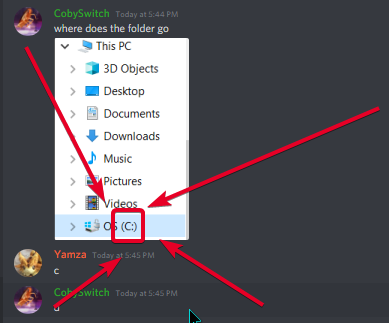 lyric crescent
now read what it says to do
 spiral beacon
Need help, trying to make a modpack and no mobs or monsters are spawning from any mod no matter the difficulty. However when I go near a spawner they spawn.
I think some mod is preventing the spawns
Not sure e
slim thunder
spiral beacon
Need help, trying to make a modpack and no mobs or monsters are spawning from an...
isn't curseforge related, go to one of the minecraft channels
loud compass
Good morning all,
I'm currently having big problems with my Minecraft (Minecraft Modded, with CurseForge)
My crash as soon as I want to craft something, it takes a lot too long, my game "crashes" then goes back to normal.
I don't understand where it can come from (I allocate more ram to my games, it doesn't change anything)
Can you help me please ?
(I can send video for that bug)
lyric crescent
Not a curseforge issue, it's an issue with some mods you have. Also not something that is easy to debug. get the minecraft role #786424115535544350 and use #🧱︱mc-other-help
 digital pivot
Every time I try to download a minecraft mod it says there is no executable java. What do I do?
lyric crescent
?mc-java
red patioBOT
Missing Java Fix!
- Click on the icon in the bottom left.
- Click the
MinecraftTab. - Click Change next to the
Minecraft Modding FolderOption. - Right click the folder named
Install. - Select
Open in new window. - Double click the
minecraft.exe. - Close the Launcher once it's done loading.
- Restart Overwolf & CurseForge or the computer.
- Play game!
If the above doesn't work....
Install Java using the installer from here: https://java.com/en/download/manual.jsp
 upbeat leaf
Me and my friends want to run a cutom modpack on a server we pay for. How would we go about getting it set up? Is it even possible to do that?
lyric crescent
#👽︱game-support as this isnt related to curseforge
upbeat leaf
ok thanks
 pseudo parcel
I downloaded "Kinda Crazy Craft" It didn;t give me a file to put in my Minecraft (I am sure it's meant to I think...) But if it wasn't meant to I pressed the play button that pops up and it Kinda sorta did nothing...
So if anyone can help
 uneven wigeon
Could you help me with this?
earnest ore
I asked earlier but didn't get a response, I made the same mistake as someone else and included optifine in my modpack that was under review, but I removed and fixed the files + reuploaded but I'm pretty sure I'm at the back of the line now where as I initially uploaded my pack last Thursday I believe
Is there a way to get my spot back? Or am I just stuck at the back of the line
pseudo parcel
I ain't getting a response either
earnest ore
I'm sure they're around, give it a bit
pseudo parcel
Okay
rich flint
uneven wigeon
Could you help me with this?
known issue with pixelmon mod being an enormous file making a timeout.
uneven wigeon
rich flint
known issue with pixelmon mod being an enormous file making a timeout.
And how can I fix that, you know?
rich flint
pseudo parcel
I downloaded "Kinda Crazy Craft" It didn;t give me a file to put in my Minecraft...
you don't download from a website ideally - you use launcher app to get modpack installed, then launch it. by default the CF app is broken for alot of people and must do this fix to remedy, then reboot:
?mc-installfix
red patioBOT
- Click on the icon in the bottom left.
- Click the
MinecraftTab. - Click
Changenext to theMinecraft Modding FolderOption. - Select the folder named
Install. - Delete it.
- Restart CurseForge App.
- It will ask to install MC again, do so.
- Play game.
NOTE: You will not lose any modpacks or worlds, These are saved in the Instances folder. DO NOT TOUCH THIS FOLDER OR YOU WILL LOSE EVERYTHING
rich flint
uneven wigeon
And how can I fix that, you know?
I don't know if there is a solution but some people i remember have downloaded the mod straight off of curseforge.com and dropped it in. don't know if that worked
lyric crescent
earnest ore
Is there a way to get my spot back? Or am I just stuck at the back of the line
no
lyric crescent
double check your stuff before you upload it
 empty wraith
Hey, you probably get this question a lot but im on a macbook and im getting an error message that says "No java executable found." I tried the fix the bot gave, but since literally no one uses macbooks, I think its different, anyone know whats up?
uneven wigeon
rich flint
I don't know if there is a solution but some people i remember have downloaded t...
Do you know the link to see if that way I can fix it?
earnest ore
I mean, I'm double checking it now, but there's still a chance that some completely unknown roadblock sets my pack as denied
And then I'll have to wait what, another 48 hours to see if my third attempt is okay?
lyric crescent
then you wait, dont know what else you expect
earnest ore
For sure
rich flint
uneven wigeon
Do you know the link to see if that way I can fix it?
navigate to curseforge.com, search for the pixelmon mods in the 'mods' minecraft folder, then use your file browser
empty wraith
good talk...
rich flint
empty wraith
good talk...
have you re-downloaded and installed java 8?
then reboot just for good measure
uneven wigeon
rich flint
navigate to curseforge.com, search for the pixelmon mods in the 'mods' minecraft...
well I'll try that to see if it works for me, I really want to play that modpack, thanks
rich flint
java is the language minecraft is coded in. you need to download and install java 8
empty wraith
Ah I see, so its a different application that I need?
empty wraith
Gotcha, am I able to download that with the link that the bot put out?
rich flint
idk - nothing google can't fix. use the official java website
empty wraith
Good enough for me, appreciate the help, I'll come back if that doesn't work, thanks.
pseudo parcel
rich flint
you don't download from a website ideally - you use launcher app to get modpack ...
I have successfully done your steps and works, kind of. I can get it to load but it's just opening Minecraft Launcher, not opening Minecraft.
And when I pressed play it took me to the version I had selected before hand.
rich flint
did you restart your computer or at least the curseforge AND overwolf software?
pseudo parcel
Indeed I have
rich flint
rip
pseudo parcel
Yes, it is a Rip, do u have any more suggestions. :/
rich flint
sorry that is the extent i know has helped many others get the beta app to function. deleting the 'installs' folder and restarting it all
lyric crescent
?mc-path
red patioBOT
Minecraft Files should NOT be installed inside the .minecraft folder or inside OneDrive folders. If this shows up in the path at all you need to move it by following the instructions below!
If Minecraft is not installed, start here.
Click the in the top right.
Select Minecraft.
Click "Edit".
Move to the "Continue here:" section below.
If Minecraft is installed, follow these steps.
Click the in the bottom left.
Select the Minecraft tab.
Click "Change".
Move to the "Continue here:" section below.
Continue here:
Make a folder in the root directory called CurseForge.
Select the folder you just made.
The text box should show something like the following:
For Windows: C:\CurseForge
For Mac: /CurseForge
lyric crescent
also an option
 twilit crow
i have mincraft but it says i dont help plz
fleet bear
You logged into the wrong account/used the wrong details
twilit crow
ok! shall i log in to twitch one then???
fleet bear
Why would twitch have anything to do with you owning minecraft?
twilit crow
o sry im new:D
 tawny lance
Is there a workaround to force the client to install mods from "incompatible" versions (e.g. 1.16.4 mods on a 1.16.5 profile)? I tried modifying files temporarily to trick it into treating it as a 1.16.4 profile, but it always reverted itself back.
lyric crescent
add them to the mods folder
twilit crow
wait it still not working
so it says i dont have mincraft
but
i have mincraft
;help
nvm
rich flint
curious - did you recently buy Java minecraft? It changed from mojang accounts to microsoft accounts for new subscribers recently (i think that's the gist of it)
 cold orbit
i try pressing play on the rl craft mod and it just opens my minecraft launcher
crude aurora
how do you verify the minecraft version to play mods on the curse forge launcher pls help
anyone
rich flint
for both of those you should probs try the install fix from what it's been looking like lately
do it then reboot your computer, open app again
?mc-installfix
red patioBOT
- Click on the icon in the bottom left.
- Click the
MinecraftTab. - Click
Changenext to theMinecraft Modding FolderOption. - Select the folder named
Install. - Delete it.
- Restart CurseForge App.
- It will ask to install MC again, do so.
- Play game.
NOTE: You will not lose any modpacks or worlds, These are saved in the Instances folder. DO NOT TOUCH THIS FOLDER OR YOU WILL LOSE EVERYTHING
cold orbit
?mc-installfix
red patioBOT
- Click on the icon in the bottom left.
- Click the
MinecraftTab. - Click
Changenext to theMinecraft Modding FolderOption. - Select the folder named
Install. - Delete it.
- Restart CurseForge App.
- It will ask to install MC again, do so.
- Play game.
NOTE: You will not lose any modpacks or worlds, These are saved in the Instances folder. DO NOT TOUCH THIS FOLDER OR YOU WILL LOSE EVERYTHING
digital roost
hi yall not sure if anyone can help with this but ima throw it in here
i've been trying to install the mod pack "all of fabric 3" and everytime i will get the error message "failed to create modpack: All of Fabric 3 - 1.16.5" can anyone help with this
crude aurora
it say this (object reference not set to an instance of an object) when installing RLcraft
cold orbit
crude aurora
it say this (object reference not set to an instance of an object) when installi...
all i get is the minecraft fashing in the task bar
rich flint
when you deleted the installs folder - you 100% immediately rebooted computer after?
just to be sure everything clicked
crude aurora
k
 lavish fox
hey i kidda need help with something .-. can anyone vc me
cold orbit
rich flint
when you deleted the installs folder - you 100% immediately rebooted computer a...
can you join my call i can screenshare just cant talk
lyric crescent
how could anyone even know what you need help with, never mind randomly vc you for something with no idea what to expect
lyric crescent
explain what your issue is or find somewhere else to get help
lavish fox
lyric crescent
explain what your issue is or find somewhere else to get help
so uhhh there is this mod pack called Kidda crazy craft and it wont let me uninstall it and it said the fails are locked idk what to do it wont let me fix the problem i tried uninstalling curseforge and i installed but still nothing....
 somber smelt
will curse clienct posibly have a option to use fabric mod loader in costom profiles
lyric crescent
lavish fox
so uhhh there is this mod pack called Kidda crazy craft and it wont let me unins...
restart your pc
lyric crescent
guess then you'll try something else...
fleet bear
somber smelt
will curse clienct posibly have a option to use fabric mod loader in costom pro...
you can via jumploader.
They are looking at adding better support for other modloading.
somber smelt
fleet bear
you can via jumploader.
They are looking at adding better support for other modl...
ok
lavish fox
lyric crescent
guess then you'll try something else...
ok thank you it worked
i was scared for a sec that it was going to be locked like that forever
 timid pilot
what happens when u get an exit code 0
lavish fox
timid pilot
what happens when u get an exit code 0
I think that means the game just crashed .-.
timid pilot
it keeps happening
timid pilot
yeah every time i open a pack it does it
timid pilot
all of em
lavish fox
Oh
timid pilot
yeah idk
 exotic panther
Heya.
I've recently uploaded a modpack to CurseForge as a new project, but going back to the site, I can't find it anywhere.
Is this supposed to happen temporarily before it gets approved, or has there been an error?
digital roost
exotic panther
Is this supposed to happen temporarily before it gets approved, or has there bee...
!sync
red patioBOT
Sync and your Project.
CurseForge REQUIRE a project to have one file marked Released on them for the projects to show up in search. Otherwise only Direct links to the project work.
Files can take a while to show up in the app. If your files still have not shown up either your project is new and you have yet to mark a file as Release or there is issues with the sync system making it slow.
exotic panther
I think that answers most of my question, but I can't even find the project in my projects list.
Hold up. Never mind.
I've managed to find it by editing my modpack's name into CurseForge's URL.
Thanks!
digital roost
np
empty wraith
Alright, so now I’ve downloaded Java and I’ve installed the mod I want to use, but when I go to use the installed mod, nothing happens.
🤷♂️
fleet bear
delete and reinstall
empty wraith
...
fleet bear
Then remake the profile.
This isn't a new issue, it's always done it for the entirety of the export feature existing.
 grand bear
Can someone help me
I'm having problems with CurseForge
I can't install modpack it looks like a message
exception during a WebClint request what do I do?
 keen carbon
how do i download the forge launcher for minecraft
 onyx kayak
hi, my cursed forge app is saying there is no java executable?? I dont really know what that means plz help
red patioBOT
Hey there, it is Curseforge, not "Cursed forge"
 tacit lava
onyx kayak
hi, my cursed forge app is saying there is no java executable?? I dont really kn...
tacit lava
onyx kayak
hi, my cursed forge app is saying there is no java executable?? I dont really kn...
I think it means yo must download Java
 simple pelican
help again it says cant conect to webpage when i try to download mods
tacit lava
Can someone tell me how I can fix this? Have already tried hitting fix and uninstalling and reinstalling
 daring crypt
slim thunder
onyx kayak
hi, my cursed forge app is saying there is no java executable?? I dont really kn...
daring crypt
slim thunder
onyx kayak
hi, my cursed forge app is saying there is no java executable?? I dont really kn...
?mc-java
red patioBOT
Missing Java Fix!
- Click on the icon in the bottom left.
- Click the
MinecraftTab. - Click Change next to the
Minecraft Modding FolderOption. - Right click the folder named
Install. - Select
Open in new window. - Double click the
minecraft.exe. - Close the Launcher once it's done loading.
- Restart Overwolf & CurseForge or the computer.
- Play game!
If the above doesn't work....
Install Java using the installer from here: https://java.com/en/download/manual.jsp
 thick radish
Hello
Is possible to update a modpack without importing it as a new profile?
rich flint
thick radish
Hello
Is possible to update a modpack without importing it as a new profile?
If it's hosted on curseforge yes
thick radish
Ok, thanks.
 tacit monolith
Hi, Is it normal that no rewards can currently be paid out?
 normal fulcrum
I may be missing something, but I put out an update to a modpack which hasn't appeared in the Curseforge app after 16 hours of being approved, how can I fix this?
queen storm
normal fulcrum
I may be missing something, but I put out an update to a modpack which hasn't ap...
Can take up to 24 hours, if set as release that is
normal fulcrum
Alright, I guess I was just surprised at the inconsistency
This specific update was a hotfix to another update which appeared in less than an hour
queen storm
Sync is all kinds of broken the past time
 wind hatch
tacit monolith
Hi, Is it normal that no rewards can currently be paid out?
wind hatch
tacit monolith
Hi, Is it normal that no rewards can currently be paid out?
not normal. try clearning your cookies for the page. if you aren't sure how please open a ticket, they have a canned answer with instructions 🙂
wind hatch
normal fulcrum
I may be missing something, but I put out an update to a modpack which hasn't ap...
what is your project ID please?
(preferable if you can send me your project page link as well, as I am sending this to devs too)
 gusty acorn
ever since the new update curse forge uses the old minecraft launcher. how do I fix that?
normal fulcrum
wind hatch
what is your project ID please?
All of the files I have uploaded so far have been uploaded as betas, would that change how they appear in the app?
I assumed this wasn't the issue since the first 3 files appeared in-app quickly, and they were also set to beta.
I don't want to waste anyone's time if the problem is with how I did something, but here are the details anyway:
Project ID: 445118
Link: https://www.curseforge.com/minecraft/modpacks/terrestrial-remnants
queen storm
normal fulcrum
All of the files I have uploaded so far have been uploaded as betas, would that ...
!sync
red patioBOT
Sync and your Project.
CurseForge REQUIRE a project to have one file marked Released on them for the projects to show up in search. Otherwise only Direct links to the project work.
Files can take a while to show up in the app. If your files still have not shown up either your project is new and you have yet to mark a file as Release or there is issues with the sync system making it slow.
normal fulcrum
Yeah, that is why I was asking
I thought I had read that at some point, but the first project file showed up in searches when it was set to beta too, so I assumed it was no longer the case
 true turtle
queen storm
true turtle
queen storm
!mc-path
red patioBOT
Minecraft Files should NOT be installed inside the .minecraft folder or inside OneDrive folders. If this shows up in the path at all you need to move it by following the instructions below!
If Minecraft is not installed, start here.
Click the in the top right.
Select Minecraft.
Click "Edit".
Move to the "Continue here:" section below.
If Minecraft is installed, follow these steps.
Click the in the bottom left.
Select the Minecraft tab.
Click "Change".
Move to the "Continue here:" section below.
Continue here:
Make a folder in the root directory called CurseForge.
Select the folder you just made.
The text box should show something like the following:
For Windows: C:\CurseForge
For Mac: /CurseForge
wind hatch
normal fulcrum
All of the files I have uploaded so far have been uploaded as betas, would that ...
I see you uploaded a release file as well a couple of hours ago that was approved
it should now sync (up to 24 hours)
 grand quarry
How so you change your java version on curseforge?
queen storm
grand quarry
How so you change your java version on curseforge?
Why do you want to change it?
grand quarry
to a newer version for the future when the new update comes out
queen storm
grand quarry
to a newer version for the future when the new update comes out
Forge only works with 8 for now, so no need to change it yet
grand quarry
what do i do when i need to change it
queen storm
Check your settings btw, might even be possible already 🤷♂️
lyric crescent
looks like a not fabric mod
tardy dock
oh
lyric crescent
?mc-fabric
red patioBOT
Fabric modpacks or the use Fabric mods require you to install a mod called Jumploader.
Fabric mods do not work with Forge.
Forge mods do not work with Fabric.
Fabric mods should be marked with a Fabric Icon like this:
 spice tree
can you explain to me why iy is that whenever i try launching it says minecraft failed to launch?
 jade vortex
that happens to me but it just shows it for a second then dissapears
im trying to launch these mods :
lyric crescent
jade vortex
?mc-installfix try this
red patioBOT
- Click on the icon in the bottom left.
- Click the
MinecraftTab. - Click
Changenext to theMinecraft Modding FolderOption. - Select the folder named
Install. - Delete it.
- Restart CurseForge App.
- It will ask to install MC again, do so.
- Play game.
NOTE: You will not lose any modpacks or worlds, These are saved in the Instances folder. DO NOT TOUCH THIS FOLDER OR YOU WILL LOSE EVERYTHING
lyric crescent
spice tree
can you explain to me why iy is that whenever i try launching it says minecraft ...
where are you seeing this
spice tree
This is what I see
red patioBOT
Minecraft Files should NOT be installed inside the .minecraft folder or inside OneDrive folders. If this shows up in the path at all you need to move it by following the instructions below!
If Minecraft is not installed, start here.
Click the in the top right.
Select Minecraft.
Click "Edit".
Move to the "Continue here:" section below.
If Minecraft is installed, follow these steps.
Click the in the bottom left.
Select the Minecraft tab.
Click "Change".
Move to the "Continue here:" section below.
Continue here:
Make a folder in the root directory called CurseForge.
Select the folder you just made.
The text box should show something like the following:
For Windows: C:\CurseForge
For Mac: /CurseForge
jade vortex
lyric crescent
?mc-installfix try this
it didnt ask me to reinstall minecraft, but it removed all the mods i already had on it
lyric crescent
only if you did it wrong
spice tree
hey thank it works now
 craggy herald
heyy i just made a modpack, how can i share it with friends?
opal cipher
craggy herald
heyy i just made a modpack, how can i share it with friends?
?mc-packshare
red patioBOT
There are two ways to share a modpack you've made with others...
Export and Share - For Friends to Small Groups.
- Click the Icon for the modpack.
- Click the button next to play.
- Click
Export. - Select the files that should be included.
- Send the zip to the people that want it! They can follow the instructions in
!mc-installpackto install the pack!
Upload to Curseforge - For Public Release to Everyone.
This options will make your pack public to EVERYONE, it comes with extra requirements and will take some effort to set up.
- Go to here: https://www.curseforge.com/project/432/4471/create
- Fill out the information with a proper description of the pack. This should allow anyone to understand what the pack is.
- Click the Icon for the modpack in the CurseForge app.
- Click the button next to play.
- Click
Export. - Select the files that should be included.
- Open your Project you made on the CurseForge site and Upload the file you just made.
- Wait for Moderation & Sync so it can show up in the client! (See
!syncfor limitations)
craggy herald
Thanks!!
red patioBOT
Sync and your Project.
CurseForge REQUIRE a project to have one file marked Released on them for the projects to show up in search. Otherwise only Direct links to the project work.
Files can take a while to show up in the app. If your files still have not shown up either your project is new and you have yet to mark a file as Release or there is issues with the sync system making it slow.
craggy herald
!sync
 hearty rampart
 craggy herald
how long will it take for it to be approved?
lyric crescent
!status
red patioBOT
It is 03:18PM on Monday for CurseForge my dudes.
Project Moderation Time
Project/File moderation is done on Sunday - Thursday from 10am - 6pm GMT+2
This process is First in, First out. Thus files submitted late in the work day may not be checked until the next work day.
lyric crescent
usually a few working days
craggy herald
kay kay thanks
craggy herald
!mc-installpack
red patioBOT
How to install modpacks with the search features in app.
- Open the
Minecraftsection of the app. - Click the top search bar where it says
Search for modpacksOR Click theBrowse ModpacksTab. - Find the Modpack you want to install and click install on it.
- Wait for CurseForge app to download and unpack all the required files.
- Once finished, click
Play!
How to install modpacks from a Export. (Custom/Private/Site downloaded Modpack zip)
- Get CurseForge App if you don't have it, use
!downloadfor a link. - Get the exported modpack from CurseForge or someone else,
!mc-packshareexplains how to make them. - Open the
Minecraftsection of the app. - Click
Create Custom Profile - Click the
Importoption. - Find the file you just downloaded in step 2 and select it.
- CurseForge app will now attempt to download and unpack the modpack. If it fails, try steps 4-6 again.
- Once finished, click
Play!
 short moss
i updated my modpack on curseforge, the new files is approved and is now the main file. How long until people receive the update on the client?
queen storm
short moss
i updated my modpack on curseforge, the new files is approved and is now the mai...
1-24 hours
normal fulcrum
wind hatch
I see you uploaded a release file as well a couple of hours ago that was approve...
Why was it able to sync for the first 3 beta files I uploaded?
digital roost
i cant get RLcraft
 dusty roost
i am trying to get a mod installed but when i download the files how do i get the files in curseforge?
queen storm
dusty roost
i am trying to get a mod installed but when i download the files how do i get th...
!mc-installmods
red patioBOT
How to install mods in CurseForge App.
- Click
+ Create Custom Profile - Name it, select the required Minecraft version, select the Forge version (usually the highest number), click
Create. - Click the profile icon.
- Click
Add New Content - Search and install the desired mods.
- Start the game!
How to install mods not on CurseForge.
- Right click the profile picture or Open the profile and click the Icon next to the play button.
- Click
Open Folder. - Drag the mod(s) into the
modsfolder. (Note: Some mods will require others, to run. Make sure to read the instructions for the mod!) - Start the game!
queen storm
digital roost
i cant get RLcraft
What error do you get?
digital roost
it was a other laugnwith
queen storm
digital roost
it was a other laugnwith
What?
jade vortex
I added mods into a profile and launched it, but when i pressed play on the minecraft launcher it gave me this message :
queen storm
!mc-logs
red patioBOT
How to get a Minecraft log file.
Where to find the log on the CurseForge Client.
Right-click the modpack profile icon OR click the button in the modpack profile.
Click Open Folder.
Open the logs folder.
Find the file called latest.log and drag it into discord.
jade vortex
queen storm
jade vortex
!mc-installfix
red patioBOT
- Click on the icon in the bottom left.
- Click the
MinecraftTab. - Click
Changenext to theMinecraft Modding FolderOption. - Select the folder named
Install. - Delete it.
- Restart CurseForge App.
- It will ask to install MC again, do so.
- Play game.
NOTE: You will not lose any modpacks or worlds, These are saved in the Instances folder. DO NOT TOUCH THIS FOLDER OR YOU WILL LOSE EVERYTHING
 trim helm
hello, i try to launch a modpack, and nothing appends.
curse say writing lauch profile and it do nothing
lyric crescent
try the fix above your message
trim helm
i've try, it redownload minecraft and forge but, but the modpack won't launch
queen storm
Did you follow the exact steps?
trim helm
yes, i do