#🔥︱curseforge-support
1 messages · Page 408 of 1
 eternal goblet
 red patioBOT
Minecraft Files should NOT be installed inside the .minecraft folder or inside OneDrive folders. If this shows up in the path at all you need to move it by following the instructions below!
If Minecraft is not installed, start here.
Click the  in the top right.
Select Minecraft.
Click "Edit".
Move to the "Continue here:" section below.
If Minecraft is installed, follow these steps.
Click the  in the bottom left.
Select the Minecraft tab.
Click "Change".
Move to the "Continue here:" section below.
Continue here:
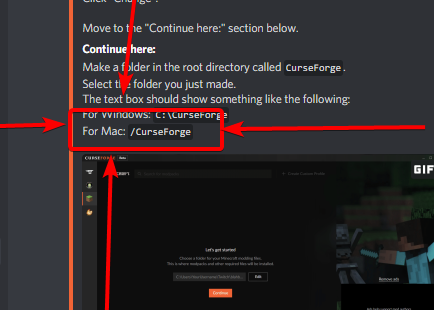
Make a folder in the root directory called CurseForge.
Select the folder you just made.
The text box should show something like the following:
For Windows: C:\CurseForge
For Mac: /CurseForge

 hallow briar
When I try to download a minecraft mod it says it is timed out is there anything to fix that?
 indigo mortar
I was trying to get mods and the download worked but when i press play it doesnt open and minecraft launcher doesnt show the curse forge
 quaint forge
Is it normal for my modpacks to get approved within minutes of upload?
 turbid kestrel
idk
indigo mortar
?help
red patioBOT
╰( ͡° ͜ʖ ͡° )つ──☆*:・゚ *˜”*°•.˜”*°• Many Help •°*”˜.•°*”˜* <:curselit:796985620550385705>
Please provide a description of your issue with as much detail as possible. If you have an issue with a mod or modpack, tell us the name. Explain what you can see happening. Be specific!
 Tell us what is happening, we already know it "doesn't work".
Avoid using words like "it", tell us exactly what "it" is.
Don't assume anyone knows what you are talking about, be specific.
Tell us what you expected to happen.
Provide screenshots or video if possible.
Provide a log if possible. ?mc-log
indigo mortar
I was trying to get mods and the download worked but when i press play it doesnt open and minecraft launcher doesnt show the curse forge
quaint forge
?status
red patioBOT
It is 08:39PM on Tuesday for CurseForge my dudes.
Project Moderation Time
Project/File moderation is done on Sunday - Thursday from 10am - 6pm GMT+2
This process is First in, First out. Thus files submitted late in the work day may not be checked until the next work day.
 lyric crescent
indigo mortar
I was trying to get mods and the download worked but when i press play it doesnt...
lyric crescent
indigo mortar
I was trying to get mods and the download worked but when i press play it doesnt...
?mc-installfix
red patioBOT
- Click on the icon in the bottom left.
- Click the

MinecraftTab. - Click
Changenext to theMinecraft Modding FolderOption. - Select the folder named
Install. - Delete it.
- Restart CurseForge App.
- It will ask to install MC again, do so.
- Play game.
NOTE: You will not lose any modpacks or worlds, These are saved in the Instances folder. DO NOT TOUCH THIS FOLDER OR YOU WILL LOSE EVERYTHING
lyric crescent
quaint forge
Is it normal for my modpacks to get approved within minutes of upload?
if it's an update to an existing project, yes
lyric crescent
hallow briar
When I try to download a minecraft mod it says it is timed out is there anything...
what mod?
hallow briar
pixel mon it timed out at 6/7
lyric crescent
pic?
 wintry comet
Hi guys I am very new to all this :) When I get minecraft into CurseForge, Do i have to select the .minecraft file for the folder or how do I "connect" them?
lyric crescent
you dont connect it, use the folder it gives
hallow briar
I will redownlaod it and send a pic when it timed out
wintry comet
Ah alright Thanks!
Though when I try to make a custom profile it throws me the error "no Java executable found, cannot execute post-installation tasks for forge."
turbid kestrel
install java 8
lyric crescent
Need to install java
SELECT: "Windows Offline (64-bit)" https://java.com/en/download/manual.jsp
wintry comet
Oh okay, thanks :)
hallow briar
this is the picture
lyric crescent
so the pixelmon modpack, not mod
hallow briar
ya sorry bout that
red patioBOT
:bug: Reporting via the CurseForge App :bug:
-
Click the
 icon in the bottom left.
 -
Select

Open a Ticket. -
Fill out the form with accurate detailed information, "It doesn't work" isn't helpful! What exactly doesn't work and why doesn't it work should be easy to answer!
-
Make sure to upload your Overwolf logs with the
Upload Fileoption on the ticket, information on how to get these logs can be found here https://support.overwolf.com/en/support/solutions/articles/9000176827-how-to-get-your-overwolf-logs -
Submit!

 acoustic bridge
hello, if i need help do i write my message here or in the support channel?
lyric crescent
the issue is "your internet" as they say, but other launchers will/should work 🤷♀️
hallow briar
I tryed gd launcher but sense i created my minecrat acount after december 1st i have a microsoft acount
lyric crescent
ahh well...
you can install it with gdlauncher, then move the instance over to curseforge
or can you not even log into gd? 🤔
hallow briar
i cant even login
lyric crescent
hmm
acoustic bridge
hello yamza, can you help me with a problem im having? you really sound like you got the plan 😄
lyric crescent
what about multimc?
hallow briar
same thing
lyric crescent
acoustic bridge
hello yamza, can you help me with a problem im having? you really sound like you...
if you mean the question you put in the other channel, no idea you need to explain. the other channel was the correct place as well since your question isnt related to curseforge
acoustic bridge
okay, thank you very much 🙂
lyric crescent
hallow briar
same thing
last option would be to have someone else install the pack, zip it and send it to you.
hallow briar
do you know if this will happen for every mod?
hallow briar
ok thanks for your help
is there any tutorial for how to do this tho my friend needs some help
lyric crescent
do what? zip the pack?
lyric crescent
install it on CF, right click the instance and open folder, go up one folder level, right click the folder with the correct pack name, zip it. it will need to be uploaded somewhere like dropbox or google drive
 rich trout
hi, I have an issue when downloading addons for world of warcraft via Overwolf. Overwolf is installing nolib versions. I unticked the library setting and that solved it for nearly all addons. But one addon (postal) still prefers nolib over the library version.
Is this something I can affect or is it the author not labeling his versions right?
I checked pins, couldn't find a solution there.
lyric crescent
sounds like a mod issue to me
cant say i fully understand what you're saying though
rich trout
yeah i just realised this channel isn't purely about WoW :D
addons come in two forms, library included and no library (for developers).
Players want lib included. When downloading addons with Overwolf, a setting will distinguish between the two.
But one addon (Postal) doesn't seem to follow suit, and just keeps giving me noLib, no matter the setting.
And I'm suspecting it's the author's fault, and that I can't do anything (except manually downloading it, which is fine, no big problem). Just wanted to confirm that.
lyric crescent
@heavy willow might know more about this. i know nothing about wow, sorry 😛
rich trout
aight :) I tried making it as understandable as possible
 sour sundial
Error code the object reference was not set to an object instance what can i do?
 heavy willow
- check #786424115535544350 to see the WoW specific channels
- on a first glimpse, the latest file for Postal seems fine :/
rich trout
i missed the role select. Thanks. Those channels look much more relevant.
I'll do some more restarting and setting testing then. Thanks for checking
 cunning bane
can someone help me with downloading a modpack
 queen storm
cunning bane
can someone help me with downloading a modpack
queen storm
cunning bane
can someone help me with downloading a modpack
What help do you need?
queen storm
Then hit continue
cunning bane
when i do pick a folder it keeps saying that only english words and letters
i dont understand
it would let me hit continue
queen storm
!mc-path
red patioBOT
Minecraft Files should NOT be installed inside the .minecraft folder or inside OneDrive folders. If this shows up in the path at all you need to move it by following the instructions below!
If Minecraft is not installed, start here.
Click the in the top right.
Select Minecraft.
Click "Edit".
Move to the "Continue here:" section below.
If Minecraft is installed, follow these steps.
Click the in the bottom left.
Select the Minecraft tab.
Click "Change".
Move to the "Continue here:" section below.
Continue here:
Make a folder in the root directory called CurseForge.
Select the folder you just made.
The text box should show something like the following:
For Windows: C:\CurseForge
For Mac: /CurseForge
lyric crescent
that isnt what it said to try
lyric crescent
read what it says
cunning bane
im on mac
lyric crescent
and?
cunning bane
im still confused
lyric crescent
then read the instructions
 grim nymph
hey I just got a bug where I cant download mods anymore. I was playing pixelmon with a couple of friends, but then my game decided to crash and not want to start up anymore. I deleted everything and did a clean install of curseforge, but now when I try to download the pixelmon modpack I get a red bar at the bottom saying "unable to connect to the remote server". Someone knows a solution to this?
cunning bane
I DID
lyric crescent
cunning bane
I DID
 cunning bane
how do i kmake a folder in the root directory
i have never heard of a root directory
lyric crescent
no idea, i dont use a mac
cunning bane
dangit
 pine cipher
So I made a mod pack and made it public but can't find it because of how little downloads it has is there any way I can find it quicker.
lyric crescent
where are you not finding it
pine cipher
me?
lyric crescent
yes
grim nymph
"unable to connect to the remote server". nobody knows a solution to this?
lyric crescent
pic?
 cursive sigil
So how come Applied Energistics 2 doesn't show up in the launcher
lyric crescent
where are you looking?
pine cipher
lyric crescent
yes
because my mod pack has 4 downloads when I look for it a search the name it deosnt come up
lyric crescent
pine cipher
because my mod pack has 4 downloads when I look for it a search the name it deos...
not what i asked. number of downloads is irrelevent.
pine cipher
I am searching "The Better Life Pack" because tahst what I named it.
lyric crescent
where
hallow briar
I have had it zipped to me what do i do now
cursive sigil
pine cipher
in teh curseforge minecraft section
lyric crescent
the app, the website?
cursive sigil
the app
lyric crescent
cursive sigil
what profile version is this? also just try applied
cursive sigil
it does not show up in the mod list either
pine cipher
1.16.4 or you mean the forge version
lyric crescent
cursive sigil
that is in the app
what profile version
 digital roost
this is the curse forge the minecraftr thing right?
lyric crescent
pine cipher
what do you mean
screenshot where you are searching
pine cipher
okay
cursive sigil
forge version 36.0.15 1.16.5
lyric crescent
ae2 is not available for that version
cursive sigil
yes I was searching in the screenshot
hallow briar
once i hae the pixel mon zipped to me what do i do with it
pine cipher
just one sec Yamza having some trouble screen shotting
cursive sigil
it works perfectly fine on that version
lyric crescent
okay... but as you can see on the mod page it is not tagged for that version. that is why you cant find it.
lyric crescent
hallow briar
once i hae the pixel mon zipped to me what do i do with it
put the zip in your curseforge instance folder, then unzip it there. hopefully it shows up
cursive sigil
ok? but The following files belong to CurseForge-hosted projects, and should therefore not be added directly to zip files: overrides/mods/appliedenergistics2-8.2.0.jar can i get help on this?
lyric crescent
you can open the manifest and manually add the mod to it
cursive sigil
ok?
lyric crescent
pine cipher
send the link to your project
cursive sigil
I seen what you mean about the different versions
lyric crescent
pine cipher
https://www.curseforge.com/minecraft/modpacks/the-better-life-pack
probably just hasnt synced yet, that can take up to 24 hours
pine cipher
okay
hallow briar
I dont think it worked
lyric crescent
make yourself a custom profile with the correct forge version
then drag the files over to it
grim nymph
grim nymph
"unable to connect to the remote server". nobody knows a solution to this?
oke nvm did a reinstall of overwolf and that worked 👍
grim nymph
what does it tell you? I remember mac being a pain in the ass about rights on creating folders and such in root
 narrow minnow
cunning bane
how do i create a folder in the root directory
narrow minnow
cunning bane
how do i create a folder in the root directory
It is better to create a folder under your user's documents folder
 zenith iron
minecraft: So im trying to put some mods together just for me to play with but when i try to launch it it comes up with Exit Code: 0
narrow minnow
It will have the necessary privileges (most often)
lyric crescent
the problem is their user folder
narrow minnow
Why? does it contain special chars? spaces?
lyric crescent
that's the error anyway, they didnt give their username
zenith iron
any help would be appriciated?
narrow minnow
I wouldn't go for a root dir - just so that we don't end up on an unsupported partition or something like that. We've seen cases where users don't even have permissions to launch the native launcher due to using a special partition
zenith iron
ill go somewhere else for help dont worry
narrow minnow
zenith iron
minecraft: So im trying to put some mods together just for me to play with but w...
Win/Mac?
zenith iron
windows
hallow briar
should it be looking like ths
narrow minnow
zenith iron
windows
Is this a new profile or an existing one?
hallow briar
zenith iron
its a custom one that i just made
narrow minnow
zenith iron
its a custom one that i just made
I ask, because error 0 could be due to a bad forge installation.
lyric crescent
hallow briar
should it be looking like ths
no, you need to take the stuff out of the zip and put it in the folder
zenith iron
well its made using curse launcher
hallow briar
how do i do that
lyric crescent
hallow briar
should it be looking like ths
actually this is all a bit of a waste of time beacuse you need to change your install folder. you are inside onedrive which wont work
?mc-path
red patioBOT
Minecraft Files should NOT be installed inside the .minecraft folder or inside OneDrive folders. If this shows up in the path at all you need to move it by following the instructions below!
If Minecraft is not installed, start here.
Click the in the top right.
Select Minecraft.
Click "Edit".
Move to the "Continue here:" section below.
If Minecraft is installed, follow these steps.
Click the in the bottom left.
Select the Minecraft tab.
Click "Change".
Move to the "Continue here:" section below.
Continue here:
Make a folder in the root directory called CurseForge.
Select the folder you just made.
The text box should show something like the following:
For Windows: C:\CurseForge
For Mac: /CurseForge
hallow briar
wait so this wont work
lyric crescent
not until you do that
hallow briar
ok ive done that
 rigid robin
Please can you help me?
How do i put a mod that ive downloaded from curseforge to the app?
lyric crescent
hallow briar
ok ive done that
make the custom profile.
unzip that zip somewhere and move the files out of it and into the instance.
cursive sigil
I'm pretty new to this do i have to add the link to the mod page on the website to the modlist.HTML, and add the id to manifest.JSON File? in order to add a mod to the manifest or do i just added in to the manifest.JSON
 thin heath
Whenever I try to change the size of text on my modpack description it turns small
rigid robin
Ok
lyric crescent
cursive sigil
I'm pretty new to this do i have to add the link to the mod page on the website ...
only need to change the manifest
lyric crescent
rigid robin
How do i put a mod that ive downloaded from curseforge to the app?
?mc-installmods
red patioBOT
How to install mods in CurseForge App.
- Click
+ Create Custom Profile - Name it, select the required Minecraft version, select the Forge version (usually the highest number), click
Create. - Click the profile icon.
- Click
Add New Content - Search and install the desired mods.
- Start the game!
How to install mods not on CurseForge.
- Right click the profile picture or Open the profile and click the
 Icon next to the play button.
 - Click

Open Folder. - Drag the mod(s) into the
modsfolder. (Note: Some mods will require others, to run. Make sure to read the instructions for the mod!) - Start the game!
 hallow briar
its stuck on hold tight we are getting minecraft ready for modding screen
narrow minnow
It might be downloading Java and taking a while
 proud lake
Hello quick question about forge server. I installed the client, and server for forge, and I can get into my server but everytime I try to use a mod block, it disappears as I place it?
 cloud arrow
Did you put the mods server side too?
proud lake
Do you do that using filezilla or winscp??
cloud arrow
Any of those you can also use command line or file explorer. I use WinSCP myself.
If your server has web panel with a file manager you can also use it!
You basically need to upload the mods to the mods directory of your server files.
cloud arrow
Just use the recommended one for your minecraft version.
 vernal tendon
I have a question. When i try to make a mod pack, it says "No java executable found. Cannot execute post-installation task for forge". What does that mean?
If it's referring to minecraft, I have it installed
lyric crescent
vernal tendon
I have a question. When i try to make a mod pack, it says "No java executable fo...
Need to install java
SELECT: "Windows Offline (64-bit)" https://java.com/en/download/manual.jsp
 rich flint
proud lake
Hello quick question about forge server. I installed the client, and server for ...
rich flint
proud lake
Hello quick question about forge server. I installed the client, and server for ...
In #786424115535544350 get mc role and use those channels. Sounds like you may be in the spawn point still or on chunk ownership issues
 errant surge
every time i try to install a modpack, it says "object reference not set to an instance of an object". what does this mean and how do i fix it?
lyric crescent
try restarting curseforge
proud lake
what will be my server hostname be when using winscp? I guess I am just stuck at this part
lyric crescent
server stuff would be better discussed in the minecraft channels, as it is unrelated to curseforge
cloud arrow
proud lake
what will be my server hostname be when using winscp? I guess I am just stuck at...
Come to mc help
I can help u
proud lake
Okay I will
cunning bane
so how do you create a a folder in root directory?
cloud arrow
#🧱︱mc-other-help Sliip
proud lake
I dont see #mc-help ?
lyric crescent
#786424115535544350 get the role
cunning bane
go to roles and then assign yourself
cloud arrow
#786424115535544350 get the role
cunning bane
SOMEONE I NEED MACBOOK HELP
lyric crescent
not many people here who have a mac, try google
cunning bane
i been trying
cloud arrow
cunning bane
SOMEONE I NEED MACBOOK HELP
Try explain what's your problem.
lyric crescent
they did
cloud arrow
Oh sorry...
 glad oriole
Guys, hello. Need help. CurseForge saw only few addons in Wow Interface.
Same time on my friends computer all works as intended
Where can i find a problem?
narrow minnow
glad oriole
Guys, hello. Need help. CurseForge saw only few addons in Wow Interface.
Would it be an issue to try and reinstalling them through CF? (at least one of them to see if it fixes it)
Unless you mean they aren't hosted on CF - in which case that is why you don't see them in the UI
glad oriole
narrow minnow
Would it be an issue to try and reinstalling them through CF? (at least one of t...
Ye, some of them isn't hosted, some of them i can't find with actual version, while my friend can) I don't understand why it works that way) But still live 5-6 from them are in CF and he still can't find them
What is interesting - after few refresh he can see another 1 addon. After another - he didn't see it
narrow minnow
One way might be to enter the project id in teh search bar and see if he can reach them without the search
 fossil fulcrum
what i have to do with exit code 0
glad oriole
Tnx^( That's doesn't resolve my problem, but at least i know, that i can't fix it through CF
narrow minnow
glad oriole
Tnx^( That's doesn't resolve my problem, but at least i know, that i can't fix i...
Which of these addons is on CF?
glad oriole
Almost all of them. As example, i just now manually find GladiusEx from SearchBar
He can find it, install it, and even don't add new folder, just update time on that he can't see
 tranquil hornet
can someone help me i cant play any mods on curse, it only loads it for 1 sec and then nothing happens
 white briar
I'm trying to play the latest version of All of Fabric 3 (version 2.6.2) https://www.curseforge.com/minecraft/modpacks/all-of-fabric-3/files but when I try to install it from curseforge launcher it only gives me 2.6.1. When I click the install button on that linked page curseforge launcher opens up but does nothing. Just wondering what the cause of that might be?
tranquil hornet
please help iam trying to play with a friend 🙂
lyric crescent
white briar
I'm trying to play the latest version of All of Fabric 3 (version 2.6.2) https:/...
issue with sync, just need to wait until it is available
white briar
Sorry, just to clarify is curseforge currently having a syncing issue, or is this just something that happens? I've had issues in the past when trying to install something within 20 minutes of a release, but this one is 7 hours old.
 hard magnet
can I download texture packs through curseforge? if so are there any for pvp
lyric crescent
white briar
Sorry, just to clarify is curseforge currently having a syncing issue, or is thi...
Can be up to 24 hours
 still yoke
is there blade and Sorcery mods?
 tardy nymph
So im trying to upload a file to my wow addon but it keeps saying there is a duplicate file with the same name when there isnt and it just gets instantly rejected can someone plz help me?
 tranquil marsh
Question for Curseforge support, as I'm looking to change my name on curseforge.com. I've tried changing the name and picture of my connected Twitch account (several weeks ago) without success. How/where can I submit a name change request?
narrow minnow
tranquil marsh
Question for Curseforge support, as I'm looking to change my name on curseforge....
Once you've updated your username and Avatar on Twitch, just signout and back into curseforge.com and it should do the trick (might take a few minutes to update)
 marble spoke
Hi. I just got the curseforge app for the first time, and none of the modpacks I've tried have launched
There have been no error messages
it just wont start
is this the right place to ask, or is it a different channel
lyric crescent
tardy nymph
So im trying to upload a file to my wow addon but it keeps saying there is a dup...
i know it might seem like the obvious answer, but it sounds like you uploaded a file with the same name
narrow minnow
marble spoke
Hi. I just got the curseforge app for the first time, and none of the modpacks I...
We currently have an issue on Mac - if your modding folder has a space in it - it won't work
narrow minnow
marble spoke
Hi. I just got the curseforge app for the first time, and none of the modpacks I...
a fix will be rolled out tomorrow
narrow minnow
marble spoke
Hi. I just got the curseforge app for the first time, and none of the modpacks I...
You may want to try and change the folder to something without a space in it (e.g. /curseforge)
 fickle idol
um i've attempted to launch 1.12.2 with 3 different mods and whenever i do it always needs to download and after around a minute it will always fail dough to low byte rate I was wondering if this was just a internet problem
 cunning light
i can't start up a world on any modpack and crashes
errors out with The game crashed whilst exception in server tick loop Error: java.util.zip.ZipError: zip END header not found Exit Code: -1
 tribal rapids
Im attempting to play a custom modpack my freind sent me a few days ago on 1.12.2, and I cant launch it, I always get, "The game crashed whilst fml will not run in demo mode
Error: java.lang.RuntimeException
Exit Code: -1"
cunning light
do u have a mc java acc?
tribal rapids
yes
cunning light
are u signed in?
tribal rapids
yes
tribal rapids
yes
cunning light
did it ever ask u do sign in?
tribal rapids
When I clicked "play" on modpack, yes
cunning light
cause sometimes it needs a refesh to work when it was open for long periods
tribal rapids
okay, ty
tardy nymph
@lyric crescent can you explain further?
Can the file not be the same name as the addon?
lyric crescent
open your file archive
 foggy acorn
is there any specific permissions curseforge needs for Mac? (full disk access, accessibility, etc) for it to find apps installed?
tardy nymph
How do i do that?
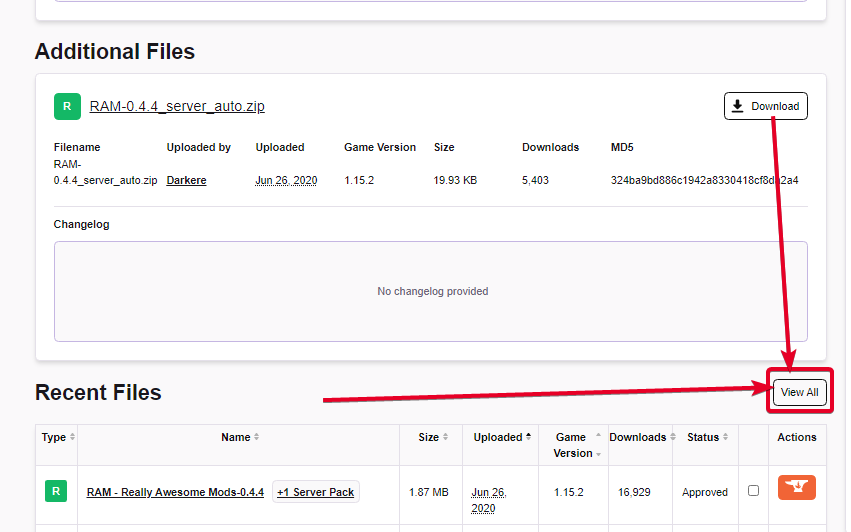 lyric crescent
tardy nymph
lyric crescent
tardy nymph
I have no files what so ever downloaded
 lucid ravine
quick question how do you know what minecraft version to use when making a profile on the curse forge app
lyric crescent
the one you want to use, or one that works with mods you want
lucid ravine
but how do you check that if every mod has a different version
almost every version'
lyric crescent
then it is a matter of opinion
tardy nymph
what now Yamza?
lyric crescent
you still didnt do what i asked
foggy acorn
Anyone use Curseforge with Kerbal Space?
lyric crescent
tardy nymph
i didnt do what u asked?
3rd time #🔥︱curseforge-support message
tardy nymph
How do i delete a file off of an addon?
lyric crescent
archive it then delete it from the archive
digital roost
everytime my friends try to join my server thru himachi it says "failed to synchronize registry data". it was working fine for a few days before this. anyone know how to fix?
 ivory dust
digital roost
everytime my friends try to join my server thru himachi it says "failed to synch...
ivory dust
digital roost
everytime my friends try to join my server thru himachi it says "failed to synch...
try radmin that is what i use
lyric crescent
using hamachi isnt a curseforge issue
lyric crescent
#👽︱game-support or use the minecraft channels please
lyric crescent
?help
red patioBOT
╰( ͡° ͜ʖ ͡° )つ──☆*:・゚ *˜”*°•.˜”*°• Many Help •°*”˜.•°*”˜* <:curselit:796985620550385705>
Please provide a description of your issue with as much detail as possible. If you have an issue with a mod or modpack, tell us the name. Explain what you can see happening. Be specific!
Tell us what is happening, we already know it "doesn't work".
Avoid using words like "it", tell us exactly what "it" is.
Don't assume anyone knows what you are talking about, be specific.
Tell us what you expected to happen.
Provide screenshots or video if possible.
Provide a log if possible. ?mc-log
 icy bane
well yesrerday my curse forge was working. im on a macbook pro 16 inch 2019 and i got the mac version. yesterday i was playing the decimation minecraft modpack and now today when i try to click play on the curse forge it doesnt take me anywhere i just click it and it loads but i stay on curse forge and no windows open up minecraft doesnt load up or anything. im not sure whats going on.
yesterday*
lyric crescent
cunning light
my game can't run a world on modpack
sounds like a modpack issue, not a curseforge issue. try the minecraft channels #786424115535544350
icy bane
i thought so too
lyric crescent
icy bane
well yesrerday my curse forge was working. im on a macbook pro 16 inch 2019 and ...
?mc-installfix try this
red patioBOT
- Click on the icon in the bottom left.
- Click the
MinecraftTab. - Click
Changenext to theMinecraft Modding FolderOption. - Select the folder named
Install. - Delete it.
- Restart CurseForge App.
- It will ask to install MC again, do so.
- Play game.
NOTE: You will not lose any modpacks or worlds, These are saved in the Instances folder. DO NOT TOUCH THIS FOLDER OR YOU WILL LOSE EVERYTHING
icy bane
i thought it was the modpack error
but when i went to go load say another modpack such as a star wars conquest it did the same exact thing
lyric crescent
need a better explaination then
icy bane
also tried making my own modpack and clicking play and it doesnt work
hold on i can maybe send a video of what im doign
doing
lyric crescent
dude i already sent you the solution
icy bane
oh huh
cunning light
Error: java.util.zip.ZipError: zip END header not found
Exit Code: -1```might want to try paying attention to the chat
lyric crescent
cunning light
```The game crashed whilst exception in server tick loop
Error: java.util.zip.Zi...
?mc-log
red patioBOT
How to get a Minecraft log file.
Where to find the log on the CurseForge Client.
Right-click the modpack profile icon OR click the button in the modpack profile.
Click Open Folder.
Open the logs folder.
Find the file called latest.log and drag it into discord.
cunning light
tardy nymph
ty Yamza ur the best
lyric crescent
good now?
tardy nymph
Yes
So how long would it take to show up on the curseforge website and app after getting accepted?
lyric crescent
sync is pretty backed up, so could be up to 24 hours
tardy nymph
ok thats fine
red patioBOT
:bug: Reporting via the CurseForge App :bug:
-
Click the
icon in the bottom left. -
Select
Open a Ticket. -
Fill out the form with accurate detailed information, "It doesn't work" isn't helpful! What exactly doesn't work and why doesn't it work should be easy to answer!
-
Make sure to upload your Overwolf logs with the
Upload Fileoption on the ticket, information on how to get these logs can be found here https://support.overwolf.com/en/support/solutions/articles/9000176827-how-to-get-your-overwolf-logs -
Submit!
cunning light
brb
digital roost
?ticket-app
red patioBOT
:bug: Reporting via the CurseForge App :bug:
-
Click the
icon in the bottom left. -
Select
Open a Ticket. -
Fill out the form with accurate detailed information, "It doesn't work" isn't helpful! What exactly doesn't work and why doesn't it work should be easy to answer!
-
Make sure to upload your Overwolf logs with the
Upload Fileoption on the ticket, information on how to get these logs can be found here https://support.overwolf.com/en/support/solutions/articles/9000176827-how-to-get-your-overwolf-logs -
Submit!
cunning light
lyric crescent
before trying anything please make a ticket with logs
i did
 shell ruin
hi
 full mist
hey i am having a problem running the installer. it says network error try again
lyric crescent
cunning light
i did
?mc-installfix try this
red patioBOT
- Click on the icon in the bottom left.
- Click the
MinecraftTab. - Click
Changenext to theMinecraft Modding FolderOption. - Select the folder named
Install. - Delete it.
- Restart CurseForge App.
- It will ask to install MC again, do so.
- Play game.
NOTE: You will not lose any modpacks or worlds, These are saved in the Instances folder. DO NOT TOUCH THIS FOLDER OR YOU WILL LOSE EVERYTHING
icy bane
hey im back i did all the steps and it still does the same thing im not sure whats going on still smh
it never asked me to install minecraft again i realized
hello?
turbid kestrel
I can help you... I think, but I need some context. What’s your problem?
lyric crescent
icy bane
hello?
is the error its showing exactly the same
icy bane
its not much of an error more of absolutely nothing pops up at all when i click play on anything
lyric crescent
ok delete the install folder again
lyric crescent
?mc-path
red patioBOT
Minecraft Files should NOT be installed inside the .minecraft folder or inside OneDrive folders. If this shows up in the path at all you need to move it by following the instructions below!
If Minecraft is not installed, start here.
Click the in the top right.
Select Minecraft.
Click "Edit".
Move to the "Continue here:" section below.
If Minecraft is installed, follow these steps.
Click the in the bottom left.
Select the Minecraft tab.
Click "Change".
Move to the "Continue here:" section below.
Continue here:
Make a folder in the root directory called CurseForge.
Select the folder you just made.
The text box should show something like the following:
For Windows: C:\CurseForge
For Mac: /CurseForge
 summer mist
Hello. I am trying to play with my friends on a server that uses Enigmatica 6, but each time the Java loads, it open up a Minecraft, that when trying to enter server, it tells me that the server needs Forge installed, yet I loaded up the mod pack through Curse Forge. Any ideas?
icy bane
i just made a new folder and named it "curseforge" and now the thing is saying "error path may only include letters and numbers"🤦♂️
lyric crescent
ew mac
but make a folder name with no spaces
dunno why you even put a space
wait
icy bane
i know :/ but i chose it for college
lyric crescent
what is the actual path here
lyric crescent
im confused at what you're trying to accomplish with this recording
moving it to desktop is even worse
lyric crescent
For Mac: /CurseForge
if you can anyway, no idea how mac works and people keep saying they cant
🤷♂️
if you cant you'll have to wait on the ticket i guess
 sour crescent
i cant open my modpack (for minecraft) and whenever i try opening it, it goes through the whole scanning modpack thing then just turns into a white screen then says "Minecraft 1.16.5 is not responding"
icy bane
just a question Yamza what laptop or computer do you have a desktop? might get it in the future... this macbook is literally 4k bucks so money aint an issue for me
lyric crescent
jfc
i custom build mine, would probably be like $800
you can split the diffrence with me 😉
icy bane
desktop?
lyric crescent
icy bane
lmao same exact thing happened to me trying to work around it right now
lyric crescent
cunning light
i did the reinsall and it pulls this
try it again, if it fails try
?mc-path
red patioBOT
Minecraft Files should NOT be installed inside the .minecraft folder or inside OneDrive folders. If this shows up in the path at all you need to move it by following the instructions below!
If Minecraft is not installed, start here.
Click the in the top right.
Select Minecraft.
Click "Edit".
Move to the "Continue here:" section below.
If Minecraft is installed, follow these steps.
Click the in the bottom left.
Select the Minecraft tab.
Click "Change".
Move to the "Continue here:" section below.
Continue here:
Make a folder in the root directory called CurseForge.
Select the folder you just made.
The text box should show something like the following:
For Windows: C:\CurseForge
For Mac: /CurseForge
cunning light
time to reinstall agin
summer mist
I keep getting that screen as well when trying to open up a Mod pack
cunning light
lyric crescent
try it again, if it fails try
i did try to run it 10 times
im gona try another reintall
lyric crescent
might try reinstalling java
summer mist
Who? Me or Glob?
 vivid depot
im having trouble with creating a modpack
these are the mods im adding but the game wont load
i was wondering if any of these were incompatable and that may be why?
 late loom
Does it work with Forge?
vivid depot
It's found on forge
lyric crescent
summer mist
Who? Me or Glob?
?mc-installfix you try this
red patioBOT
- Click on the icon in the bottom left.
- Click the
MinecraftTab. - Click
Changenext to theMinecraft Modding FolderOption. - Select the folder named
Install. - Delete it.
- Restart CurseForge App.
- It will ask to install MC again, do so.
- Play game.
NOTE: You will not lose any modpacks or worlds, These are saved in the Instances folder. DO NOT TOUCH THIS FOLDER OR YOU WILL LOSE EVERYTHING
lyric crescent
late loom
Can I use Fabric and Forge at the same time?
?mc-fabric
red patioBOT
Fabric modpacks or the use Fabric mods require you to install a mod called Jumploader.
Fabric mods do not work with Forge.
Forge mods do not work with Fabric.
Fabric mods should be marked with a Fabric Icon like this: 
late loom
vivid depot
It's found on forge
Can you put it in Forge?
vivid depot
 mortal harbor
late loom
Can I use Fabric and Forge at the same time?
mortal harbor
late loom
Can I use Fabric and Forge at the same time?
from what I know, you can't use both fabric and forge, they're sadly incompatible :/
lyric crescent
vivid depot
im having trouble with creating a modpack
need to know the actual issue
late loom
Why does everything disappoint me so much QwQ
lyric crescent
?mc-installfix try this
red patioBOT
- Click on the icon in the bottom left.
- Click the
MinecraftTab. - Click
Changenext to theMinecraft Modding FolderOption. - Select the folder named
Install. - Delete it.
- Restart CurseForge App.
- It will ask to install MC again, do so.
- Play game.
NOTE: You will not lose any modpacks or worlds, These are saved in the Instances folder. DO NOT TOUCH THIS FOLDER OR YOU WILL LOSE EVERYTHING
 limpid raven
I am back again with another question, is it possible to run multiple mods at the same time on curseforge? Such as these two for example?
lyric crescent
no
mortal harbor
you mean modpacks?
mortal harbor
if so then no, you'd have to make your own combining the mods of both
lyric crescent
not a good idea.. lol
 zenith mica
So I’m try to install all the mods 6 pack but every time I do this pops up after anyone know how to fix it
limpid raven
couldn't I go into the CurseForge folder and merge them, is that possible?
lyric crescent
possible sure. good luck making that work though
limpid raven
lol
summer mist
lyric crescent
?mc-installfix you try this
It did not tell me to reinstall Minecraft.
late loom
Well another question
 wanton gate
can anyone help me i keep on getting the no java exuctiable pop up while i am trying to make a porfile
lyric crescent
summer mist
It did not tell me to reinstall Minecraft.
thats fine
mortal harbor
limpid raven
couldn't I go into the CurseForge folder and merge them, is that possible?
you can't merge them easily, you'd have to look at the modlist and work from there, while also taking into account/testing wether some of the mods will be compatible or not
late loom
I had Forge and Fabric installed, would Fabric create a separate mod folder for me?
lyric crescent
or if it even the same mc or forge version
limpid raven
ok
cunning light
@wanton gate did u install the program called "java"
lyric crescent
late loom
I had Forge and Fabric installed, would Fabric create a separate mod folder for ...
no?
limpid raven
what mod is the best on curseforge right now, any suggestions?
wanton gate
i not sure who you are talking to
summer mist
lyric crescent
thats fine
I should be able to load the mod now?
lyric crescent
summer mist
I should be able to load the mod now?
idk try it
cunning light
wanton gate
i not sure who you are talking to
i pinged u so its common sence
wanton gate
i did and it keeps giving me that same pop up and the forums where no help
cunning light
INSTALL the PROGRAM called JAVA
late loom
lyric crescent
no?
So what do I do now if I want to use Fabric mods?
lyric crescent
make a new profile for fabric
late loom
I did
vivid depot
lyric crescent
?mc-installfix try this
i tried that and i cant delete the folder because apparently its open in another program when I have all folder tabs and curseforge closed
late loom
late loom
I did
But what do I do next if I want to install Fabric mods?
I had Forge too BTW
 sleek dagger
I need help to install modpack.
lyric crescent
late loom
But what do I do next if I want to install Fabric mods?
if you had just read the thing i sent you to begin with, it tells you what to do
#🔥︱curseforge-support message
sleek dagger
"No java executable found, cannot execute post-installation tasks to forge".
lyric crescent
vivid depot
i tried that and i cant delete the folder because apparently its open in another...
restart your pc and try again
lyric crescent
no 🤦♀️
late loom
I mean, would Fabric disable those Forge mods?
lyric crescent
no
cunning light
why does no one insall java(program) it is REQIRED to RUN modloader's install
lyric crescent
yes
sleek dagger
Can someone help me please?
late loom
Aww
lyric crescent
someday i pray that people learn discord has a search feature
vivid depot
!mc-installfix
red patioBOT
- Click on the icon in the bottom left.
- Click the
MinecraftTab. - Click
Changenext to theMinecraft Modding FolderOption. - Select the folder named
Install. - Delete it.
- Restart CurseForge App.
- It will ask to install MC again, do so.
- Play game.
NOTE: You will not lose any modpacks or worlds, These are saved in the Instances folder. DO NOT TOUCH THIS FOLDER OR YOU WILL LOSE EVERYTHING
lyric crescent
sleek dagger
"No java executable found, cannot execute post-installation tasks to forge".
Need to install java
SELECT: "Windows Offline (64-bit)" https://java.com/en/download/manual.jsp
sleek dagger
I don't remember if Minecraft comes with java.
cunning light
yea its REQUIRED
i have been trying to say that
lyric crescent
i've had to say it at least 6 times today lol
cunning light
but NONE LISSENS
and 1 even said "i don't know who u talking to" when I PINGED him
🤦♂️
wanton gate
mincraft comes whith java i just looked it up
cunning light
sleek dagger
I don't remember if Minecraft comes with java.
MC JAVA EDITON is a SEPPATE "PROGRAM" then "JAVA"
mc java is a game that has java but can not run .jar files
cunning light
wanton gate
mincraft comes whith java i just looked it up
 dusky flint
Hi, my Curseforge won't update minecraft to the 1.16.5 launcher and I can't find anywhere on it where to download the 1.16.5, anyone can tell me?
sleek dagger
Done, I downloaded Java, now I just need to install the modpack, right?
lyric crescent
Minecraft does come with java. You still need a system java installed for curseforge
wanton gate
oh ok that worked thanks
summer mist
None of the advice given in here that I have followed has helped in the slightest. All it did was crash the Curse Forge App.
 hazy bridge
I'm getting the error "Timeout attempting to download" while trying to download rebirth of the night beta. I have tried uninstalling and reinstalling curseforge with no changes. anyone have some advice?
cunning light
time to waste 40 mins of my time REINSTALLING it
with a download speed of 0.03/sec
vivid depot
@lyric crescent thank you I think it's working!
 pulsar bane
hey guy how to fix this?
lyric crescent
make sure you logged into the correct account
if you did then try
?mc-installfix
red patioBOT
- Click on the icon in the bottom left.
- Click the
MinecraftTab. - Click
Changenext to theMinecraft Modding FolderOption. - Select the folder named
Install. - Delete it.
- Restart CurseForge App.
- It will ask to install MC again, do so.
- Play game.
NOTE: You will not lose any modpacks or worlds, These are saved in the Instances folder. DO NOT TOUCH THIS FOLDER OR YOU WILL LOSE EVERYTHING
lyric crescent
on curseforge
 jovial briar
Hey! I was having an issue and I thought that someone on the discord could help. Everytime I click play on a modpack, it crashes with the message; An unexpected issue occurred and the game has crashed. We're sorry for the inconvenience. If anyone is aware of how to fix this, please tell me
lyric crescent
?mc-log
red patioBOT
How to get a Minecraft log file.
Where to find the log on the CurseForge Client.
Right-click the modpack profile icon OR click the button in the modpack profile.
Click Open Folder.
Open the logs folder.
Find the file called latest.log and drag it into discord.
jovial briar
okay
red patioBOT
Minecraft Files should NOT be installed inside the .minecraft folder or inside OneDrive folders. If this shows up in the path at all you need to move it by following the instructions below!
If Minecraft is not installed, start here.
Click the in the top right.
Select Minecraft.
Click "Edit".
Move to the "Continue here:" section below.
If Minecraft is installed, follow these steps.
Click the in the bottom left.
Select the Minecraft tab.
Click "Change".
Move to the "Continue here:" section below.
Continue here:
Make a folder in the root directory called CurseForge.
Select the folder you just made.
The text box should show something like the following:
For Windows: C:\CurseForge
For Mac: /CurseForge
jovial briar
Tysm!!!!
pulsar bane
why i keep me play minecraft launcher?
lyric crescent
❓
digital roost
pulsar bane
why i keep me play minecraft launcher?
need press play to game
lyric crescent
buy the game
pulsar bane
no money -_-
lyric crescent
no game no curseforge
pulsar bane
f
 smoky sluice
hey, trying to use create on a server and i keep getting incomplete server tags. I can remove it and its fine but i love this mod and would love to include it. any suggestions?
Pastebin
Pastebin.com is the number one paste tool since 2002. Pastebin is a website where you can store text online for a set period of time.
 scarlet helm
my mod packs stay like this and never finish download what do i do?
 iron lily
anyone think they can help me with physica nuclear physics?
 vapid mortar
my curseforge app isnt going fullscreen is there anyway to fix that?
 normal dome
when i try to make a profile it says this, and the profile disappears
turbid kestrel
Curse is broken rn
normal dome
so do i just wait?
turbid kestrel
Idk
 lilac eagle
wait wdym
normal dome
wait what does broken mean
turbid kestrel
It’s been acting weird
rich flint
when in doubt try rebooting computer
turbid kestrel
Yes
normal dome
oh yeah that tends to work
lilac eagle
lyric crescent
need to move your install location since its in onedrive
i moved the file but it doesnt stay, like ill check back and it still says one drive
normal dome
it worked 
 minor mauve
can someone please help me install mods for minecraft? i literally have nooooo idea what im doing. please 😦
rich flint
lilac eagle
i moved the file but it doesnt stay, like ill check back and it still says one d...
you don't move a file - you change the path in settings > minecraft tab >to a new folder such as C:/curseforge (a folder which you need to make - it's easy, watch graphic below)
?mc-path
red patioBOT
Minecraft Files should NOT be installed inside the .minecraft folder or inside OneDrive folders. If this shows up in the path at all you need to move it by following the instructions below!
If Minecraft is not installed, start here.
Click the in the top right.
Select Minecraft.
Click "Edit".
Move to the "Continue here:" section below.
If Minecraft is installed, follow these steps.
Click the in the bottom left.
Select the Minecraft tab.
Click "Change".
Move to the "Continue here:" section below.
Continue here:
Make a folder in the root directory called CurseForge.
Select the folder you just made.
The text box should show something like the following:
For Windows: C:\CurseForge
For Mac: /CurseForge
rich flint
minor mauve
can someone please help me install mods for minecraft? i literally have nooooo i...
you mean how to install single mods using the CF app? or how to load a modpack which is a package of mods and customizations
lilac eagle
rich flint
?mc-path
thx so much
minor mauve
either or. i only have a few mods i want to install that ive found on the curseforge app. however, when i try and download something it says "no java executable found. cannot complete post-installation tasks for forge"
rich flint
lilac eagle
thx so much
yup - watch the graphic. after you change the path do nothing - immediately close CF up and reboot computer
rich flint
minor mauve
either or. i only have a few mods i want to install that ive found on the cursef...
need to install java 8
do that and reboot
 vale charm
everytime i try to install rlcraft it says "unable to install addon, due to a missing install path" how to i fix this
rich flint
ah when you go to settings > minecraft tab > file path - what is the path?
rich flint
yes
vale charm
oof idk what im looking for sorry
i dont see anything saying file path or whatever
nvm i updated curseforge and its working
am installing rlcraft
 true flax
this sounds like a similar problem my group is having. I correctly installed curseforge and am playing with modpacks. but @rotund patio just installed it and is unable to install modpacks. It is telling her "No Java executable found. Cannot execute post-installation tasks for forge."
Do I need to have her install forge first and then install curseforge?
 rotund patio
It worked. Thank you Briar!
 maiden bloom
curseforge cant scan my steam stardew valley
how to use stardew valley mod in curseforge
help me
 wooden abyss
i need help
it says no java exutable found everytime i try to download a mod for minecraft
 opal cipher
wooden abyss
it says no java exutable found everytime i try to download a mod for minecraft
opal cipher
wooden abyss
it says no java exutable found everytime i try to download a mod for minecraft
Please try following these instructions: #🔥︱curseforge-support message
wooden abyss
which one should i download
opal cipher
Read the message I linked again.
Windows Offline Installer.
Probably 64bit.
And then when it's installed, you might to restart your computer
 balmy quail
Does anyone know where to find a texture template from new snapshots?
 light geyser
Can i get some help
Everytime i go to load a modpack like rlcraft or something it wont respond after a bit
opal cipher
!mc-ram
red patioBOT
How to set Global Minecraft RAM value.
- Click the icon in the bottom left to open settings.
- Click the Minecraft tab.
- Scroll down.
- Slide slider to recommended ram range as seen below.
 light geyser
I did all of that and it still will just crash or not respond
opal cipher
Do you have a crash log?
maiden bloom
curseforge cant scan my steam stardew valley
how to use stardew valley mod in curseforge
help me
light geyser
Its just does this
or its get to the Screen where it says mojang and wont load up
minor mauve
hi y'all. quick question- is it possible to uninstall certain mods from a modpack while keeping the others? im using valhesia and wont be using all of the included mods, and want to cut down on lag. tia!
maiden bloom
curseforge cant scan my steam stardew valley
how to use stardew valley mod in curseforge
help me
rich flint
light geyser
you need to allocate more than 4gb of ram in curseforge app settings (minecraft tab > bottom)
rich flint
minor mauve
hi y'all. quick question- is it possible to uninstall certain mods from a modpac...
yup - in curseforge app go to the modpack screen and to the left of play there is 3-dot button where 'profile options' is - check box allow content management.
exactly why i made my own modpack - valhelsia and atm similar to what i wanted but too bloated
opal cipher
maiden bloom
how to scan stardew valley
Please read through the "Other games"-section here: https://support.overwolf.com/en/support/solutions/articles/9000196615-curseforge-known-issues You need to install SMAPI for it to be detectable.

Overwolf Support Help Center
We're here to get you informed on everything you need to know about Overwolf, including helpful guides and troubleshooting articles to back you up when you get in a pickle
maiden bloom
thx i fix it
 zealous kelp
Anyone here that can help me with my curseforge problem'?
queen storm
zealous kelp
Anyone here that can help me with my curseforge problem'?
What problem do you have then?
 fathom glacier
Hello
Some Modpacks show (0 mods installed) ... But there are all there in Windows Explorer but Curseforge not show it at all. My internet is sometimes offline and at seems to be a bug. How i can fix this ?
queen storm
This is a known bug without a fix, you can still play those modpacks.
fathom glacier
hmm, i play with some friends a custom modpack and i gan not check myself for updates from over 100 of mods... Hope they can get rid of this in the next update. Thx for answering 🙌
 vagrant cairn
I Uploaded a Lucky Block under Customisation/Lucky Block and it didn't showed the Lucky Block, but the Project was approved. So i deleted the Project and maked a new one. But now it says: "Duplication of another Project" What i can do, that it gets approved? pls help!
queen storm
Why did you remove the project?
vagrant cairn
it didnt showed the project
queen storm
Show it where?
vagrant cairn
in luckyblock, but it was approved
queen storm
Where did you look?\
queen storm
Link your project
vagrant cairn
cant see it
this is my profile
my project isn't there
i deleted the approved one and made another, wich exists
queen storm
Open the project, show a screenshot
 mild jolt
what do you do when you download a modpack and it says download timeout
queen storm
mild jolt
what do you do when you download a modpack and it says download timeout
Nothing to do against it
mild jolt
ight
vagrant cairn
thats the main page
queen storm
vagrant cairn
thats the main page
So, it is not approved yet, not weird that it isn't showing up in the search
vagrant cairn
no you understand it false, i made a project a few weeks ago, wich was approved, but not shown
i deleted this project and made a new one, this one
but now it says for the new project: "duplication of another project"
queen storm
vagrant cairn
but now it says for the new project: "duplication of another project"
Because you should not have made the second one.
vagrant cairn
but i made, what can i do now
queen storm
So that last screenshot, is that the new project or the old one?
vagrant cairn
the new one
queen storm
Then you report it, explain the situation
And next time if something doesn't show up: ask for help instead of creating new projects
vagrant cairn
can you send the report link
queen storm
Your project, top right of the info box
vagrant cairn
wich one is the best?
queen storm
vagrant cairn
wich one is the best?
Incorrect Category, tell in the report that I send you there
vagrant cairn
ok thanks!
 wary jetty
The modpack combines : Magic , Adventure , Technologies mods :
You can tame and pfly with Ice & fire dragons and birds , travel through many biomes from BiomeO plenty , explore dangerous and rich structure and fight many bosses and monsters and use their loot to make new cool weapons and armors , even discover a new mystery dimension full of dark secrets . There are also plenty of technologies and advanced machines you can craft in this modpack , you can make cars , planes , guns , futuristic furniture ,technologiv weapons & armors , reactors ... you can even build rockets and go to discover the mysteries of the space .

these mods are PotatoPc-friendly ( tested on 1.9 gb ram allocated and i3 cpu )

Notes :
You have to install optifine manually bc i cant add it to the modpack .
I do not own any of these mods ```is this description good for my project to be accepted ?
queen storm
Upload and find out
 uneven trench
give or take how long does it take for curseforge app to sync to the site for pack releases/updates?
queen storm
1-24 hours
uneven trench
danke :)
 steady shard
hm does anyone ever had this problem?
https://gyazo.com/750d6488abae4f654c1420070ee8efe6
Rejected modpack update because there are some mod that is not on curseforge. Yet there is no mods folder. I'd ensure that all mods are downloadable on CurseForge website.

Even used the export feature on curseforge launcher
still nothing had worked
lyric crescent
um that doesnt look like it was made with export
steady shard
https://gyazo.com/241a00c48b3c31ee88efe55ab2ffe410 these zip files

not a single jar file is in this export zip
lyric crescent
it's not specifying that it's a jar causing the problem. think it might be complaining about these
steady shard
Why? nothing had changed within the addonpacks folder. It was in previous of versions that got accepted, nearly 20 times.
red patioBOT
:bug: Reporting via the CurseForge App :bug:
-
Click the
icon in the bottom left. -
Select
Open a Ticket. -
Fill out the form with accurate detailed information, "It doesn't work" isn't helpful! What exactly doesn't work and why doesn't it work should be easy to answer!
-
Make sure to upload your Overwolf logs with the
Upload Fileoption on the ticket, information on how to get these logs can be found here https://support.overwolf.com/en/support/solutions/articles/9000176827-how-to-get-your-overwolf-logs -
Submit!
steady shard
Will do that, it is super annoying having to guess what is the actual root of the issue.
On other platform this was never a problem
lyric crescent
platform is still pretty much the same
hopefully they will get better error messages soon
steady shard
I'm talking about non-curseforge things, I never had any problems making modpacks.
Only Curseforge there one thing after another
lyric crescent
website is still the same website its always been
same with the approval bot, unfortunately
steady shard
now that is just sad...
queen storm
 pseudo anchor
what is collectice 1.53 or above warning?
pseudo anchor
what is collectice 1.53 or above warning?
What are you talking about?
pseudo anchor
im trying to dowload this player tracking mod so i can find the guy that griefed my bas
*base
but he isnt giving it up sooof
queen storm
That is a mod
pseudo anchor
yes
queen storm
You need to install it
queen storm
Curseforge, not forge
pseudo anchor
ohh so the app then
queen storm
But you are in the wrong section anyways, use #👽︱game-support instead
pseudo anchor
oh ok ty
 grizzled summit
hey
im playing a modpack with 116 mods and this shit is lagging like shit. i got my settings on 12 chunks and it worked well yesterday and today it is just lagging. when i turn it on 4 chunks it is working fine but who tf wants to play with 4 chunks.
im using 8gb.
my specs
cpu: ryzen 3600xt
gpu: amd radeon rx 5600xt
ram: 16 gb
should i use less ram?
queen storm
grizzled summit
im playing a modpack with 116 mods and this shit is lagging like shit. i got my ...
#👽︱game-support please as this is not a curseforge issue
 robust thorn
an exception occurred during a webclient request how do i get past this
queen storm
robust thorn
an exception occurred during a webclient request how do i get past this
Rule 4, please follow it
robust thorn
that doesnt help does it
red patioBOT
:bug: Reporting via the CurseForge App :bug:
-
Click the
icon in the bottom left. -
Select
Open a Ticket. -
Fill out the form with accurate detailed information, "It doesn't work" isn't helpful! What exactly doesn't work and why doesn't it work should be easy to answer!
-
Make sure to upload your Overwolf logs with the
Upload Fileoption on the ticket, information on how to get these logs can be found here https://support.overwolf.com/en/support/solutions/articles/9000176827-how-to-get-your-overwolf-logs -
Submit!
digital roost
hi
why can i find the "Create" Mod on the curseforge website but not in the cursforge program
lyric crescent
?mc-installmods
red patioBOT
How to install mods in CurseForge App.
- Click
+ Create Custom Profile - Name it, select the required Minecraft version, select the Forge version (usually the highest number), click
Create. - Click the profile icon.
- Click
Add New Content - Search and install the desired mods.
- Start the game!
How to install mods not on CurseForge.
- Right click the profile picture or Open the profile and click the Icon next to the play button.
- Click
Open Folder. - Drag the mod(s) into the
modsfolder. (Note: Some mods will require others, to run. Make sure to read the instructions for the mod!) - Start the game!
digital roost
you are a life safer, thank you
 autumn lance
hi i have an issue with curseforge
queen storm
Waits till issue is given
autumn lance
can i send photo of issue
queen storm
Yes
autumn lance
i made a custom profile but minecraft isnt recognising it
it only recognises the last profile i used
queen storm
Did you hit play in the curseforge app?
autumn lance
yes
queen storm
Did you close all minecraft things first?
autumn lance
yes
queen storm
Then why do I see a launcher and a game running in your screenshot?
 hearty geode
Hi I have a simple question, is it possible to share a modpack to a friend through curseforge
queen storm
!mc-packshare
red patioBOT
There are two ways to share a modpack you've made with others...
Export and Share - For Friends to Small Groups.
- Click the Icon for the modpack.
- Click the button next to play.
- Click

Export. - Select the files that should be included.
- Send the zip to the people that want it! They can follow the instructions in
!mc-installpackto install the pack!
Upload to Curseforge - For Public Release to Everyone.
This options will make your pack public to EVERYONE, it comes with extra requirements and will take some effort to set up.
- Go to here: https://www.curseforge.com/project/432/4471/create
- Fill out the information with a proper description of the pack. This should allow anyone to understand what the pack is.
- Click the Icon for the modpack in the CurseForge app.
- Click the button next to play.
- Click
Export. - Select the files that should be included.
- Open your Project you made on the CurseForge site and Upload the file you just made.
- Wait for Moderation & Sync so it can show up in the client! (See
!syncfor limitations)
hearty geode
Thank you kindly
 hushed vale
how to solve?
rich flint
?mc-path
red patioBOT
Minecraft Files should NOT be installed inside the .minecraft folder or inside OneDrive folders. If this shows up in the path at all you need to move it by following the instructions below!
If Minecraft is not installed, start here.
Click the in the top right.
Select Minecraft.
Click "Edit".
Move to the "Continue here:" section below.
If Minecraft is installed, follow these steps.
Click the in the bottom left.
Select the Minecraft tab.
Click "Change".
Move to the "Continue here:" section below.
Continue here:
Make a folder in the root directory called CurseForge.
Select the folder you just made.
The text box should show something like the following:
For Windows: C:\CurseForge
For Mac: /CurseForge
rich flint
Do that and reboot after changing path to be sure
narrow minnow
hushed vale
how to solve?
This is when you try to import a modpack?
hushed vale
narrow minnow
This is when you try to import a modpack?
no, it happens when i try to install the roguelike
narrow minnow
hushed vale
no, it happens when i try to install the roguelike
It basically means there is a file that is going to have a very long path inside modpack. So if you can change the install path - that might solve it (something short like: d:\curse).
We'll look into roguelike and see.
lyric crescent
?mc-path
red patioBOT
Minecraft Files should NOT be installed inside the .minecraft folder or inside OneDrive folders. If this shows up in the path at all you need to move it by following the instructions below!
If Minecraft is not installed, start here.
Click the in the top right.
Select Minecraft.
Click "Edit".
Move to the "Continue here:" section below.
If Minecraft is installed, follow these steps.
Click the in the bottom left.
Select the Minecraft tab.
Click "Change".
Move to the "Continue here:" section below.
Continue here:
Make a folder in the root directory called CurseForge.
Select the folder you just made.
The text box should show something like the following:
For Windows: C:\CurseForge
For Mac: /CurseForge
 cedar axle
Hey Hello everyone !
I published a mod for minecraft a while ago and when I wanted to push an update for it I saw that my mod was marked as abandoned and I couldn't connect to the same account as it seems to be kinda deleted.
Here are the liks to the mod / profile:
https://www.curseforge.com/minecraft/mc-mods/bperipherals
https://www.curseforge.com/members/Forge_User_02495480
Do you think it'd be possible to get these back or do I have to create a new page for it ?
narrow minnow
cedar axle
I published a mod for minecraft a while ago and when I wanted to push an update ...
Did you try the "Account Info Missing?" link
cedar axle
Yeah it only brings me back to the home page
 elfin cobalt
I am working on mac and when i try to open the World of Dragons LIte mod, i click play, and nothing happens
narrow minnow
elfin cobalt
I am working on mac and when i try to open the World of Dragons LIte mod, i clic...
Does your modding path contain a space in it?
elfin cobalt
?
narrow minnow
cedar axle
Yeah it only brings me back to the home page
Moving to DM
elfin cobalt
I am new to curseforge
cedar axle
thanks ^^
narrow minnow
elfin cobalt
I am new to curseforge
What do you have here?
elfin cobalt
my documents folder
elfin cobalt
I just downloaded it
elfin cobalt
Ok
narrow minnow
or wait for it to auto update
 cedar sparrow
i have a problem it says could not verify version
 fleet bear
I see someone is spending all night hanging out here again
hallow briar
I had someone send me a zip of the pixelmon mod pack because it wouldnt download for me what should I do now
lyric crescent
same thing i told you to do hours ago
hallow briar
idk how to put it in instances
lyric crescent
copy and paste it there
hallow briar
it says could not find a folder with this name
lyric crescent
what says
lyric crescent
ok well first off you didnt change the install path which i said to do as well
secondly i never said to use import, import will not work for that
please read the things im telling you if you want help
hallow briar
sorry im really bad at this
lyric crescent
?mc-path
red patioBOT
Minecraft Files should NOT be installed inside the .minecraft folder or inside OneDrive folders. If this shows up in the path at all you need to move it by following the instructions below!
If Minecraft is not installed, start here.
Click the in the top right.
Select Minecraft.
Click "Edit".
Move to the "Continue here:" section below.
If Minecraft is installed, follow these steps.
Click the in the bottom left.
Select the Minecraft tab.
Click "Change".
Move to the "Continue here:" section below.
Continue here:
Make a folder in the root directory called CurseForge.
Select the folder you just made.
The text box should show something like the following:
For Windows: C:\CurseForge
For Mac: /CurseForge
lyric crescent
this first
 boreal tinsel
i need help
opal cipher
boreal tinsel
i need help
State what you need help with, and someone can try to help you after they know what issues you have.
boreal tinsel
basically it says the path thing is too long
but
ive tried the tutorial to fix that and it didnt work
 slim thunder
screenshot
slim thunder
the error message
boreal tinsel
best i can do is an take picture with my phone camera but ok
slim thunder
boreal tinsel
best i can do is an take picture with my phone camera but ok
alt prtscrn
boreal tinsel
oh ok
slim thunder
copies a picture of the selected window to clipboard
lyric crescent
please screenshot so i know you've done it correctly
boreal tinsel
slim thunder
copies a picture of the selected window to clipboard
how do i select a window to sreenshot
slim thunder
go to the curseforge window, click anywhere, alt prtscrn
hallow briar
slim thunder
it shows you made the folder but did you select it
lyric crescent
hallow briar
ok perfect
now go to the folder in file explorer
boreal tinsel
ok for some reason my computer wont screenshot so i will take a pic with my phone
 devout creek
lyric crescent
ok perfect
now go to the folder in file explorer
devout creek
lyric crescent
ok perfect
now go to the folder in file explorer
wait whats the next step
lyric crescent
??
devout creek
im just following without speaking
slim thunder
devout creek
im just following without speaking
?mc-path
red patioBOT
Minecraft Files should NOT be installed inside the .minecraft folder or inside OneDrive folders. If this shows up in the path at all you need to move it by following the instructions below!
If Minecraft is not installed, start here.
Click the in the top right.
Select Minecraft.
Click "Edit".
Move to the "Continue here:" section below.
If Minecraft is installed, follow these steps.
Click the in the bottom left.
Select the Minecraft tab.
Click "Change".
Move to the "Continue here:" section below.
Continue here:
Make a folder in the root directory called CurseForge.
Select the folder you just made.
The text box should show something like the following:
For Windows: C:\CurseForge
For Mac: /CurseForge
lyric crescent
slim thunder
wrong person
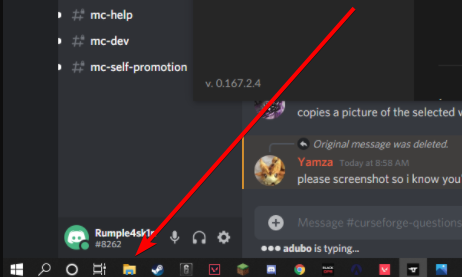 boreal tinsel
wait is your file thing on onedrive
lyric crescent
devout creek
it says no java executable found
Need to install java
SELECT: "Windows Offline (64-bit)" https://java.com/en/download/manual.jsp
hallow briar
its not showing up
devout creek
alr
hallow briar
lyric crescent
what have you done to your file explorer ..
devout creek
lyric crescent
Need to install java
SELECT: "Windows Offline (64-bit)" <https://java.com/en/dow...
ok i installed now do i try the mods again?
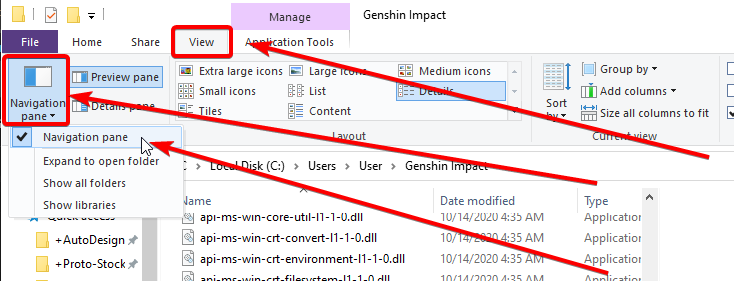


 lyric crescent
open the instances folder
hallow briar
k
lyric crescent
now go to your zip and open it. screen shot it
devout creek
devout creek
ok i installed now do i try the mods again?
it still says no java executable found
bruuuuhhhhh
lyric crescent
restart your computer
devout creek
k
narrow minnow
One trick is to manually launch minecraft.exe from the modding path
it downloads the Java runtime and the app can also use that
lyric crescent
oh that will fix it?
fleet bear
yes
turbid kestrel
devout creek
it still says no java executable found
Install Java 8
fleet bear
we talked about it some yesterday
The included Java is only downloaded when the minecraft launcher is ran.
NLK also asked about including an OpenJDK/JRE option to fix it.
devout creek
turbid kestrel
Install Java 8
send me the link please
lyric crescent
did that already
narrow minnow
If that still doesn't work - you might be on an old version
narrow minnow
Can you take a screenshot of your settings?
devout creek
opal cipher
Type in cmd
ok
devout creek
k
narrow minnow
opal cipher
Without the quotes
We had a fix released last week - where users had a bad Java exe selected in their settings (migrated from Twitch) - it might be that too
opal cipher
narrow minnow
We had a fix released last week - where users had a bad Java exe selected in the...
Ah, ok. :o
lyric crescent
hallow briar
almost correct.. but that zip wont work. you need one with everything downloaded which that is not.
devout creek
narrow minnow
If that still doesn't work - you might be on an old version
older version?
hallow briar
so do i need it to be sended to me agian?
devout creek
narrow minnow
Can you take a screenshot of your settings?
ok
narrow minnow
devout creek
older version?
In the Minecraft settings - can you select a Java path?
lyric crescent
hallow briar
so do i need it to be sended to me agian?
who ever is sending it to you needs to zip their instance folder for the modpack
devout creek
narrow minnow
In the Minecraft settings - can you select a Java path?
lemme check
hallow briar
ok
devout creek
@narrow minnow this is what shows
rich flint
Wolf - fwiw people who get that and then install Java 8 and reboot remedy the issue
lyric crescent
but we did that
narrow minnow
rich flint
Wolf - fwiw people who get that and then install Java 8 and reboot remedy the is...
yep - but that is the hard way
rich flint
Ah k
narrow minnow
devout creek
<@!141637151375753216> this is what shows
can you focus the CurseForge app window
narrow minnow
devout creek
Clicking refresh does nothing, i assume?
fleet bear
rich flint
Wolf - fwiw people who get that and then install Java 8 and reboot remedy the is...
Wolf knows what hes doin 😉
narrow minnow
go to the modding path folder - you should see an Install folder
inside it minecraft.exe
devout creek
alr
narrow minnow
try to launch it and return back to the app and refresh
rich flint
I enjoy stating the obvious for screening out the obvious? lol You'd be surprised at the results in some meetings. No offense was intended
narrow minnow
devout creek
moving to DM
devout creek
k
lyric crescent
didnt even install properly 🙃
devout creek

turbid kestrel
devout creek
send me the link please
Just look up Java 8 install
 marble geyser
Anyone know how to fix no java executable cannot execute post instalation tasks for forge?
turbid kestrel
Install Java 8
marble geyser
installed it still doesnt work
marble geyser
oh i did also install and play rlcraft a few days ago and it was working
 cinder pecan
when i try and play all them mode 6 it says could not verify Minecraft version what should i do??
queen storm
!mc-installfix
red patioBOT
- Click on the icon in the bottom left.
- Click the
MinecraftTab. - Click
Changenext to theMinecraft Modding FolderOption. - Select the folder named
Install. - Delete it.
- Restart CurseForge App.
- It will ask to install MC again, do so.
- Play game.
NOTE: You will not lose any modpacks or worlds, These are saved in the Instances folder. DO NOT TOUCH THIS FOLDER OR YOU WILL LOSE EVERYTHING
marble geyser
hm rlcraft is showing up in mod library but i still cant download any other mods
slim thunder
marble geyser
hm rlcraft is showing up in mod library but i still cant download any other mods
?mc-installmods
red patioBOT
How to install mods in CurseForge App.
- Click
+ Create Custom Profile - Name it, select the required Minecraft version, select the Forge version (usually the highest number), click
Create. - Click the profile icon.
- Click
Add New Content - Search and install the desired mods.
- Start the game!
How to install mods not on CurseForge.
- Right click the profile picture or Open the profile and click the Icon next to the play button.
- Click
Open Folder. - Drag the mod(s) into the
modsfolder. (Note: Some mods will require others, to run. Make sure to read the instructions for the mod!) - Start the game!
slim thunder
also rlcraft is a modpack
marble geyser
i know
o yea
wrong wording
trying to instal create+ modpack
when i clicked play for rlcraft it redownloaded and worked but still wont download create+ modpack or any other modpacks if any of that helps
also cant create profiles
slim thunder
are you getting error messages when trying to do any of these @marble geyser
marble geyser
yea
slim thunder
what error messages
marble geyser
no java executable found cannot run post instalation tasks for forge
slim thunder
marble geyser
no java executable found cannot run post instalation tasks for forge
Need to install java
SELECT: "Windows Offline (64-bit)" https://java.com/en/download/manual.jsp
 south sparrow
#786424115535544350 message @marble geyser
slim thunder
see if restarting the app helps
marble geyser
ok
south sparrow
why do people not read the rules?
south sparrow
is there a command in the bot for directions on updating java
lyric crescent
there is but it links to openjdk which doesnt work currently
 cyan elbow
i'm having a really weired issue with the curse forge client beta. i have some mods i installed through the client that are still in the mods folder of the profile. miencraft reads them no problem but the curse forge client beta is saying i have nothing installed
normally this wouldn't be a huge issue but it made updating them a cakewalk
queen storm
Known bug, not much to do against it
cyan elbow
dang i guess i'll jsut have th eclient re download them for the time being
it won't cause any any issue will it?
like do i need to delet the mods before hand
queen storm
cyan elbow
dang i guess i'll jsut have th eclient re download them for the time being
The what?
cyan elbow
i was going to have the client redownload all the mods so it can see them again
wait i think i fixed it
queen storm
How?
cyan elbow
i told curse to duplicate the profile
and the duplicated profile was showing all the mods
i did it twice and it worked both times
even the resource packs i downloaded are showing up agaain
queen storm
We want it fixed in the original profile though
cyan elbow
@queen storm i mean yeah i guess but it's an esay work around for the time being. it's an exact duplicate so you don't lose anything not even the world data
so until it's patched it will work
marble geyser
just completly reinstalled curseforge still am getting no java executable
wat
rl craft modpack installed is working but still nothing else works
hm
i tried installing pixelmon too and it worked
does the create mod have something in it that other mods dont
 zealous tide
Where do I find the server files for the mods i download?
queen storm
You install the mod itself on the server
marble geyser
does the create mod require somehting extra that other mods dont
queen storm
zealous tide
That is not a mod
zealous tide
I'm cconfused
marble geyser
can't install any modpacks that have create in them
queen storm
zealous tide
I'm cconfused
It is a modpack, not a mod
queen storm
marble geyser
can't install any modpacks that have create in them
Then make a custom profile and install it
marble geyser
cant
zealous tide
so how do i do it with a modpack
marble geyser
get no java executable
queen storm
marble geyser
get no java executable
Did you install java 8 from the official site?
marble geyser
yea
fleet bear
or they can run the minecraft exe in the install folder
queen storm
zealous tide
so how do i do it with a modpack
!mc-installserver
red patioBOT
How to **manually** install a server - **On your own PC**
- Go to the Forge website http://files.minecraftforge.net/ and download the Installer for the forge version the pack is using.
- Run the installer and choose
Install server. Do not install to your desktop. Also do not install inside a OneDrive folder. - Run the server using the forge.jar. A file called
eula.txtwill be generated. Open it and changeeula=falsetoeula=true - From the Client; Copy the
modsfolder,configfolder, and any other folders needed for the pack to work into the server folder. If the modpack has a server pack, use this instead! - Run the server again.
queen storm
fleet bear
or they can run the minecraft exe in the install folder
Does that fully fix it?
fleet bear
yes
it installs the JRE the vanilla client will use
then CF app will pick up on it
Wolfgang was talking about it with me and NLK the other day
queen storm
Yeah, that got a bit much and had work to do. You gonna change the java command?
fleet bear
it's nice having him around now instead of going through gil on everything as I think sometime more technical stuff gets lost 😉
queen storm
fleet bear
it's nice having him around now instead of going through gil on everything as I ...
It is
fleet bear
We might not need to change the command.