#🔥︱curseforge-support
1 messages · Page 400 of 1
 queen storm
 quick dagger
im looking for dragon block super on curseforge but i cant find it
quick dagger
im looking for dragon block super on curseforge but i cant find it
Link it please
queen storm
What version is your modpack?
quick dagger
1.15.2
queen storm
Download the mod from the website, drop it in the mods folder
 indigo saffron
hi, i have a few modpacks installed on my pc but when i use my laptop, the modpacks arent there and i have to install new ones. Can anyone help show me if there is a way to transfer the packs?
 jagged crater
indigo saffron
hi, i have a few modpacks installed on my pc but when i use my laptop, the modpa...
jagged crater
indigo saffron
hi, i have a few modpacks installed on my pc but when i use my laptop, the modpa...
I think you need to export the modpacks, and then with the zip files, import them as new custom profiles.
 oblique nebula
I'm playing Stoneblock and I made a sever of my own to play with my friends but the server doesn't have the map of the Stoneblock
How can I fix this
jagged crater
I think you should contact the server hosting company maybe?
oblique nebula
I'm hosting the server?
jagged crater
But you must be using a client right?
oblique nebula
I don't know about the client but I downloaded this server files from the actual launcher on Curse Forge
jagged crater
I think you need to launch the modpack via CurseForge.
oblique nebula
I did
jagged crater
I'm not sure what is wrong either, and maybe someone else can help, but I would recommend opening a ticket on CurseForge for now.
?ticket-app
 red patioBOT
:bug: Reporting via the CurseForge App :bug:
-
Click the
 icon in the bottom left.
 -
Select

Open a Ticket. -
Fill out the form with accurate detailed information, "It doesn't work" isn't helpful! What exactly doesn't work and why doesn't it work should be easy to answer!
-
Make sure to upload your Overwolf logs with the
Upload Fileoption on the ticket, information on how to get these logs can be found here https://support.overwolf.com/en/support/solutions/articles/9000176827-how-to-get-your-overwolf-logs -
Submit!
 oblique nebula
The thing is it's probably a really easy thing to fix
I'm just a monkey about servers
jagged crater
Same haha I like opened a server just a week ago so I'm not really the person to ask about technical difficulties on servers.
jagged crater
Yeah, sorry about that 😅
oblique nebula
Is there anybody that can help me to fix a problem at opening servers ?
 heavy grotto
hey how do I download multiple diffrent mods
like can I merge mods of the same version
jagged crater
heavy grotto
hey how do I download multiple diffrent mods
like can I merge mods of the same v...
You can open a custom profile, and install them there
on CurseForge
oblique nebula
I'm opening a server of Stoneblock the server launches perfectly expect the world isn't the map that Stoneblock has
Can someone help me ?
I changed the save file with a normal singleplayer save file
But it just corrupted the server and there is now only void in the server
 vale crow
I have downloaded "New Beginnings" and have placed it in the mods for minecraft folder
but when I go to create a world the mod pack just does not register
What can I do to get this mod pack to register
 digital roost
Was curious if there's any mods relating to xray or the old too many items mod.
 amber bramble
for some reason, restarting my pc fixed the problem 🤷♂️
 sturdy shore
my modpack status has been changed to changes required, but i dont understand the problem
 crimson flame
when are you guys making seurity craft for minecraft 1.16.5
sturdy shore
Your project, ChicnCraft (https://www.curseforge.com/minecraft/modpacks/chicncraft), requires changes before it can be approved:
Your project description contains links to files on your computer. These links will not work within web browsers.
- file:///Users/------/Downloads/hqdefault.jpg
i cant find where that is in my description
i tried to import an image but it didn't work, so i deleted it, but i still get this message that my modpack cant be approved
 rich flint
'you guys'? no mods are made by curseforge - they're all made by people who decide to make them and publish them on curesforge
 magic ocean
ello
rich flint
you can view the code of your description page text editor to find where the bad stuff is still stuck fishnchips
magic ocean
uhm can i get sum help
rich flint
just ask what your problem is
sturdy shore
how do i view the code?
rich flint
don't spam all channels
sturdy shore
nvm i got it
magic ocean
ok so when i try to download a mod it doesnt let me and it says unable to install addition
'missing install path'
rich flint
?mc-installfix
red patioBOT
- Click on the
 icon in the bottom left.
 - Click the

MinecraftTab. - Click
Changenext to theMinecraft Modding FolderOption. - Select the folder named
Install. - Delete it.
- Restart CurseForge App.
- It will ask to install MC again, do so.
- Play game.
NOTE: You will not lose any modpacks or worlds, These are saved in the Instances folder. DO NOT TOUCH THIS FOLDER OR YOU WILL LOSE EVERYTHING
rich flint
do that and then restart your overwolf and curseforge
magic ocean
ok
rich flint
for some reason CF is having technical problems fixing it so that isn't a problem
 magic zodiac
Is there some restriction for naming his project ? (NSFW and things like that excluded)
digital roost
is there a video or some other rescource i could look at for manually dowloading a mod into curseforge
everything i find only tells me how to look things up in the browser
 lyric crescent
magic zodiac
Is there some restriction for naming his project ? (NSFW and things like that ex...
lyric crescent
magic zodiac
Is there some restriction for naming his project ? (NSFW and things like that ex...
think that should be fairly obvious. cant name things "vanilla" or use the mc version either
indigo saffron
jagged crater
I think you need to export the modpacks, and then with the zip files, import the...
how do i esxport a pack?
 quick shore
Hello can anyone help me tonight
My resource pack just got approved but my friend said it's not showing up in curseforge proggy.
On site it said 11 dls already
 main lantern
quick q, im playing with a handmade modpack and it crashes whenever i load a new chunk. hwy?
magic zodiac
lyric crescent
think that should be fairly obvious. cant name things "vanilla" or use the mc ve...
Is somthing like Minecraft2Discord fine?
 unborn topaz
@lyric crescent my modpack is not working when i try to launch it help pls
unborn topaz
@everyone my modpack is not working when i try to launch it
 opal cipher
Nice try with that tag
 ivory junco
Im trying to install mods for kerbal space program and I dont have the mods in the game. Can someone please help?
unborn topaz
@gusty aspen @scenic lynx @digital roost @fringe iris @lyric crescent @fleet bear @heavy willow @small mortar my modpack is not working when i try to launch it PLZ HELP PLZ PLS
quick shore
Am I in the right room ?
main lantern
bro, ender, thats agaisnt the rules
quick shore
Should I post in another token
main lantern
like im new here and i know that shits against the rules
quick shore
*Room
vale crow
How do I get "The beginning mod pack to work? I put the folder into the mods folder under minecraft
 upbeat prism
How do I connect Curseforge to Minecraft? When i try to make a new version for curseforge, I don't find curseforge there.
 quick crypt
can you make another section of just 1 mod areas and then a combiner where we cam make one out of mods we choose?
rich flint
@upbeat prism curseforge doesn't connect to your other minecraft installs - it harvests and installs its' own copy of minecraft automatically from the web. sometimes (usually cough) the software goofs up and you need to delete it for curseforge to get it again...
@quick crypt custom profile - then add mods. that's it.
upbeat prism
rich flint
<@!715169988352278530> curseforge doesn't connect to your other minecraft instal...
So I have to ReInstall curseforge then put the curseforge file into the minecraft file?
rich flint
no
curseforge can be installed where it is
in minecraft settings you change the folder where it installs minecraft and looks for things
as long as the folder it points to is ok then it does all the minecraft stuff behind the scenes
indigo saffron
how do i export a modpack and can i, for example, export from one device then put the same pack in another?
main lantern
i dont understand teh second question, but you can export by clicking on the modpack, then the little vertical ... and select export profile
 fleet bear
indigo saffron
how do i export a modpack and can i, for example, export from one device then pu...
fleet bear
indigo saffron
how do i export a modpack and can i, for example, export from one device then pu...
!mc-packshare
red patioBOT
There are two ways to share a modpack you've made with others...
Export and Share - For Friends to Small Groups.
- Click the Icon for the modpack.
- Click the
 button next to play.
 - Click

Export. - Select the files that should be included.
- Send the zip to the people that want it! They can follow the instructions in
!mc-installpackto install the pack!
Upload to Curseforge - For Public Release to Everyone.
This options will make your pack public to EVERYONE, it comes with extra requirements and will take some effort to set up.
- Go to here: https://www.curseforge.com/project/432/4471/create
- Fill out the information with a proper description of the pack. This should allow anyone to understand what the pack is.
- Click the Icon for the modpack in the CurseForge app.
- Click the button next to play.
- Click
Export. - Select the files that should be included.
- Open your Project you made on the CurseForge site and Upload the file you just made.
- Wait for Moderation & Sync so it can show up in the client! (See
!syncfor limitations)
indigo saffron
thanks
 odd osprey
!sync
red patioBOT
Sync and your Project.
CurseForge REQUIRE a project to have one file marked Released on them for the projects to show up in search. Otherwise only Direct links to the project work.
Files can take a while to show up in the app. If your files still have not shown up either your project is new and you have yet to mark a file as Release or there is issues with the sync system making it slow.
odd osprey
!mc-installpack
red patioBOT
How to install modpacks with the search features in app.
- Open the
Minecraftsection of the app. - Click the top search bar where it says
Search for modpacksOR Click theBrowse ModpacksTab. - Find the Modpack you want to install and click install on it.
- Wait for CurseForge app to download and unpack all the required files.
- Once finished, click
Play!
How to install modpacks from a Export. (Custom/Private/Site downloaded Modpack zip)
- Get CurseForge App if you don't have it, use
!downloadfor a link. - Get the exported modpack from CurseForge or someone else,
!mc-packshareexplains how to make them. - Open the
Minecraftsection of the app. - Click

Create Custom Profile - Click the
Importoption. - Find the file you just downloaded in step 2 and select it.
- CurseForge app will now attempt to download and unpack the modpack. If it fails, try steps 4-6 again.
- Once finished, click
Play!
 glass marsh
are they ever gonna fix the app not creating new instances or updating existing ones?
lyric crescent
fix what though? it works
 unique cape
why is crashing???
red patioBOT
╰( ͡° ͜ʖ ͡° )つ──☆*:・゚ *˜”*°•.˜”*°• Many Help •°*”˜.•°*”˜* <:curselit:796985620550385705>
Please provide a description of your issue with as much detail as possible. If you have an issue with a mod or modpack, tell us the name. Explain what you can see happening. Be specific!
 Tell us what is happening, we already know it "doesn't work".
Avoid using words like "it", tell us exactly what "it" is.
Don't assume anyone knows what you are talking about, be specific.
Tell us what you expected to happen.
Provide screenshots or video if possible.
Provide a log if possible. ?mc-log
 vale ravine
how do i make a server
rich flint
pretty easy - you download a server pack file (like on a modpack page on curseforge.com), unzip it, and follow the instructions for running it (good ones come with instructions cough)
 quick quartz
hey so i've tried downloading some mod packs but they download and get like halfway through then an error pops up at the bottom saying something about a time out error, i've tried redownloading the modpack but it still says the same thing, how do i fix this?
digital roost
I have Minecraft Valhelsia, but it's refusing to launch.
jagged crater
!status
red patioBOT
It is 03:34AM on Monday for CurseForge my dudes.
Project Moderation Time
Project/File moderation is done on Sunday - Thursday from 10am - 6pm GMT+2
This process is First in, First out. Thus files submitted late in the work day may not be checked until the next work day.
jagged crater
How long does it take on average for a modpack to be reviewed by moderation?
 ebon ocean
i too cant launch any minecraft mods today all of a sudden
magic ocean
uhm am i only allowed to play mods for 16.5 or can i play earlier versions of MC
jagged crater
you can install mods of earlier versions yes
magic ocean
but can i play them ?
jagged crater
i think you need to download and add them to the mods folder
 dense charm
so im trying to do stardew valley mods and it says scan now and locate game
scan now doesnt work and im not sure how to locate the game and idk what ffolder to do
lyric crescent
dense charm
alright thank ya
 wooden scaffold
Hey, I've been having issues running minecraft modpacks, the game just crashes with error code 0 every time I try to use a modpack, I had no issues before when the packs were through twitch, this only started after using curseforge.
fleet bear
!mc-installfix
red patioBOT
- Click on the icon in the bottom left.
- Click the
MinecraftTab. - Click
Changenext to theMinecraft Modding FolderOption. - Select the folder named
Install. - Delete it.
- Restart CurseForge App.
- It will ask to install MC again, do so.
- Play game.
NOTE: You will not lose any modpacks or worlds, These are saved in the Instances folder. DO NOT TOUCH THIS FOLDER OR YOU WILL LOSE EVERYTHING
digital roost
quick quartz
hey so i've tried downloading some mod packs but they download and get like half...
installing through the website should work
It times out because the files are downloading too slowly
quick quartz
mm okay
wooden scaffold
Thank you.
 drowsy swan
Is there any reason a modpack shouldn't be showing the most recent update in the launcher despite being approved on the website?
fleet bear
it takes 1-24hrs to sync
 shrewd bison
Why does the mod pixelmon crash every time I load it Minecraft launcher.
fleet bear
because it can
quick quartz
digital roost
i mean installing the filr through the website
wait how do i do that
digital roost
quick quartz
wait how do i do that
Find the modpack
In the site
Click the name of the modpack's file you want to download
Theres gonna be a download button near the curseforge button
Click that and import it in the launcher
digital roost
ye
wooden scaffold
Minecraft still crashes with error code 0 if I try to launch a modpack. The install fix did not no anything even if I redownload the modpack.
 drifting ingot
?mc-logs
red patioBOT
How to get a Minecraft log file.
Where to find the log on the CurseForge Client.
Right-click the modpack profile icon OR click the button in the modpack profile.
Click 
Open Folder.
Open the logs folder.
Find the file called latest.log and drag it into discord.
drifting ingot
also you should probably move this to #👽︱game-support
wooden scaffold
Ok
drifting ingot
this isn't related to curseforge
wooden scaffold
This only happened when I switched to curseforge so I assumed it applied but ok.
jagged crater
How long does it take on average for a modpack to be reviewed by moderation?
fleet bear
1-4 days.
 rugged swallow
my modpack was reviewed and approved by moderation team a few days ago, but my friends and i cannot find it when we search the Minecraft mods list, by author nor by modpack name. is there a turnaround time between the modpack being approved and being searchable?
fleet bear
link
rugged swallow
digital roost
what is the mod called when u get to see your amour without looking in your inventory
fleet bear
That's not a Curseforge problem.
rugged swallow
clay, are you talking to me or leg?
fleet bear
leg
rich flint
beans you must have at least 1 release version for it to show
 signal ridge
Thought Alpha packs/mods did not sync to the launcher?
digital roost
sorry
rugged swallow
briar can i ask what that means? i have a zip file of the modpack up (well, i thought i did) what else do i need to add?
fleet bear
The file status system is a bit broken with the app
but yes, You need to mark a file as beta/release to get the app to sync
you currently have one marked as alpha
rich flint
i see 1 file on your modpack page, which is listed as alpha flagged
you need to submit a modpack zip file as a release flagged version
fleet bear
We don't know if that's true anymore Briar.
rich flint
oh rlly... ok
fleet bear
Beta/Release might both sync while alpha won't.
rugged swallow
intersting! how do you see that its alpha? im not seeing it anywhere haha
fleet bear
The file you uploaded mate
signal ridge
Has a big "A" beside the file name
fleet bear
Did you not look at the upload page when you where uploading it...?
rugged swallow
I followed a tutorial, which didn't call out changing it from alpha to beta/release
however i now see it
sorry for not knowing? this is still fresh territory for me aha
rich flint
hm i wonder if you can edit the file to change the flag - never actually attempted that
rugged swallow
i think i can just re-submit it as the release ver?
rugged swallow
can i edit it through manage project?
rich flint
go to files tab and then left click on the file name itself (it won't show the edit buttons until you do the file click-on)
rugged swallow
oh i saw the edit come up! thanks for that, i made the change (: does it take a few days to process then?
fleet bear
today's lesson. Don't blindly follow tutorials.
rich flint
yeah it took me a solid half a year before someone pointed out where the edit buttons were too - been there lol
rugged swallow
well when youre starting out you cant exactly tell between the good tutorials and bad ones
but i appreciate all the help!
rich flint
ye it's a hodgepodge especially because cf has changed hands a few times. no sweat
 smoky tapir
Does Curseforge/Overwolf make backups of settings for WoW addons like Twitch did I think?
fleet bear
Whatever existed at the end of twitch app should work mostly the same as it did before.
 nocturne rose
hey so in some mod packs when i add optifine it crashes when i open it.. some other modpacks open but they dont go in full screen and when i go into fullscreen it crashes. please help!
fleet bear
don't use optifine?
 clever jackal
Is there a way to allocate more than 12GB to MC?
 slim thunder
why would you need to
clever jackal
high quality resource packs on a modpack with lots of mods
resource packs wont enable because i'm running out of ram
rugged swallow
wish I had that problem LOL my computer would melt
jagged crater
How long does it take on average for a modpack to be reviewed by moderation?
rugged swallow
i think a few days typically pat!
fleet bear
jagged crater
How long does it take on average for a modpack to be reviewed by moderation?
1-3 days
jagged crater
Thank you!
fleet bear
 blazing torrent
hello i ahve problems opening rlcraft can you guys help me
blazing torrent
hello i ahve problems opening rlcraft can you guys help me
!mc-installfix (just a gurss
red patioBOT
- Click on the icon in the bottom left.
- Click the
MinecraftTab. - Click
Changenext to theMinecraft Modding FolderOption. - Select the folder named
Install. - Delete it.
- Restart CurseForge App.
- It will ask to install MC again, do so.
- Play game.
NOTE: You will not lose any modpacks or worlds, These are saved in the Instances folder. DO NOT TOUCH THIS FOLDER OR YOU WILL LOSE EVERYTHING
blazing torrent
thanks i will try!
it has not asked me to download minecraft again its still grey
digital roost
blazing torrent
it has not asked me to download minecraft again its still grey
can you specify your issue
digital roost
clever jackal
high quality resource packs on a modpack with lots of mods
Then dont use resource packs?
They arent needed
But if you hva enough ram, you can change that in the launcher paramenters
rugged swallow
i got this error the first time i tried opening my modpack from curseforge, the get link button failed so i couldnt get a crash report... is this too general of an error to try and get help on?
red patioBOT
How to get a Minecraft log file.
Where to find the log on the CurseForge Client.
Right-click the modpack profile icon OR click the button in the modpack profile.
Click Open Folder.
Open the logs folder.
Find the file called latest.log and drag it into discord.
rugged swallow
rugged swallow
i see a line that says "The coremod blusunrize.immersiveengineering.common.asm.IELoadingPlugin does not have a MCVersion annotation, it may cause issues with this version of Minecraft"
Is there a more... palatable explanation for that? i dont quite know what that means aha
rugged swallow
is there anyway to remove it and test it w/o having to post a new release and wait for it to be re-approved by mods?
hmmmm
thanks for ur help applied!
 hearty barn
Hello gamers, I decided I want to create a modpack of my own for my friends and I to play, I have no clue how coding works but It looked like the curseforge app would handle most of my problems for me, unfortunately that seems to not be the case.
The modpack will open and run just fine (after including jumploader), but only the worldgen, general UI, and optimization mods are loaded,(appleskin, WAWLA, lithium/sodium) the main mods (Create, Ars magica, and JEI) seem to not be loaded at all.
No clue why, but I did get this error message before I included jumploader
i see that it needs a newer version of forgeloader but I don't know how to fix that as when I go to create a modpack for 1.16.4 I am already using the most recent version
in case it helps
hold on i may just be stupid
opal cipher
I'm gonna be obvious here and say that I think that your Forge needs updating.
hearty barn
how do I do that though? I just installed everything today
 snow fractal
what version of MC?
hearty barn
1.16.4
I may have somehow selected just a wrong version of the modloader when I created the mod profile in the first place because i assumed bigger number = newer
ok so after light testing its looking like jumploader may have disabled all non-fabric mods. I thought jumploader allowed you to run both forge and fabric mods though?
queen storm
Not both, it stops all forge things and only allows fabric
hearty barn
ahhhhh, silly me
ok so it looks like a combination of that + me selecting the wrong version when I started the mod. feel free to ignore this but I will come back to it if I have more issues.
queen storm
Fabric integration is non-existing, so can't blame you for having these mistakes 😉
snow fractal
it's only one or the other I believe
hearty barn
I probably should have actually read more than 2 lines of the description tbh 😞
it be like that
snow fractal
no its fine, you see error and panic lol
hearty barn
that and this is the first time ever ive tried to fiddle with mods aside from downloading already complete modpacks
snow fractal
hope you enjoy it
hearty barn
thank you, I mean solving problems itself is some kind of enjoyability. now I just need a minimap mod for 1.16.4 thats not fabric
 gilded dew
Is there a way to submit your own modpacks to cursed forge?
queen storm
!mc-packshare
red patioBOT
There are two ways to share a modpack you've made with others...
Export and Share - For Friends to Small Groups.
- Click the Icon for the modpack.
- Click the button next to play.
- Click
Export. - Select the files that should be included.
- Send the zip to the people that want it! They can follow the instructions in
!mc-installpackto install the pack!
Upload to Curseforge - For Public Release to Everyone.
This options will make your pack public to EVERYONE, it comes with extra requirements and will take some effort to set up.
- Go to here: https://www.curseforge.com/project/432/4471/create
- Fill out the information with a proper description of the pack. This should allow anyone to understand what the pack is.
- Click the Icon for the modpack in the CurseForge app.
- Click the button next to play.
- Click
Export. - Select the files that should be included.
- Open your Project you made on the CurseForge site and Upload the file you just made.
- Wait for Moderation & Sync so it can show up in the client! (See
!syncfor limitations)
rich flint
@hearty barn Xaero's world world map, and Xaero's mini map (separate mod files) are really good for 1.16+
hearty barn
Ty
rich flint
they have tons of configuration options, be sure to use the in-game gui menus
digital roost
Hello. Me and my brother are trying to play moded minecraft for the first time using curse forage.... we have our own custem mod pack with the exact same mod packs in it, How can he join my game with the mods??
queen storm
digital roost
Hello. Me and my brother are trying to play moded minecraft for the first time u...
 jolly vector
how would i be able to get a mod folder if i dont have one
queen storm
jolly vector
how would i be able to get a mod folder if i dont have one
Did you make a custom modpack?
jolly vector
no i went to get stoneblock and when i hit play it dosent do anything
so idk if i have a mod folder or not but it isnt working
queen storm
!mc-installfix
red patioBOT
- Click on the icon in the bottom left.
- Click the
MinecraftTab. - Click
Changenext to theMinecraft Modding FolderOption. - Select the folder named
Install. - Delete it.
- Restart CurseForge App.
- It will ask to install MC again, do so.
- Play game.
NOTE: You will not lose any modpacks or worlds, These are saved in the Instances folder. DO NOT TOUCH THIS FOLDER OR YOU WILL LOSE EVERYTHING
jolly vector
when i did that it didnt ask to install minecraft
queen storm
Did you hit play?
jolly vector
it now says when i do that that there is a missing install path
queen storm
!ticket-app
red patioBOT
:bug: Reporting via the CurseForge App :bug:
-
Click the
icon in the bottom left. -
Select
Open a Ticket. -
Fill out the form with accurate detailed information, "It doesn't work" isn't helpful! What exactly doesn't work and why doesn't it work should be easy to answer!
-
Make sure to upload your Overwolf logs with the
Upload Fileoption on the ticket, information on how to get these logs can be found here https://support.overwolf.com/en/support/solutions/articles/9000176827-how-to-get-your-overwolf-logs -
Submit!
 alpine herald
Hi guys, im trying to make a server for my and my friend does anyone know what the latest version of forge is?
 snow raptor
A good idea I think cf should enable is to make it so mods that consider themselves libs (or any mod for that matter) can put a "Required By" list of mods, so when you find a lib in your mods folder and lost track of why you have it you can easily find it on the cf project
fleet bear
 sage hamlet
hearty barn
sage hamlet
hearty barn
Any of the "big" tech tree mods are probably a good idea (things like thaumcraft, industrial craft, thermal expansion, galaticraft, etc)
queen storm
#🧱︱minecraft-chat maybe? As it is not curseforge related?
 regal goblet
On curseforge, when moving an addon from alpha to release, does it need a new approval then?
regal goblet
Ah, i made the new commit with “1.0-release” as tag, its built but not yet available when i check addon files
queen storm
Not on site either?
regal goblet
I would expect it to show up here
fleet bear
🤷 WoW isn't my area of knowing.
@heavy willow You know this stuff, please do the informing.
regal goblet
Ok, its probably cus my tag wasnt pushed. hate sourcetree for this 😅 edit: yeah it was 😂
digital roost
Whenever I launch Skyfactory 4 on the app it launches the old launcher (mac os catalina)
fleet bear
Change to native in the settigns
digital roost
I always get this error
digital roost
fleet bear
Change to native in the settigns
Its on native
im not sure why it keeps launch on the old version
fleet bear
then uninstall the app and reinstall it
digital roost
alright
 clear stream
Unable to install add on due to a missing install path
I might’ve messed up some files XP
fleet bear
!mc-path
red patioBOT
Path too long/Path must be English letters or numbers only fix!
If Minecraft is not installed, start here.
Click the  in the top right.
Select Minecraft.
Click "Edit".
Move to the "Continue here:" section below.
If Minecraft is installed, follow these steps.
Click the in the bottom left.
Select the Minecraft tab.
Click "Change".
Move to the "Continue here:" section below.
Continue here:
Make a folder in the root directory called CurseForge.
Select the folder you just made.
The text box should show something like the following:
For Windows: C:\CurseForge
For Mac: /CurseForge
 clear stream
Thank you ❤️
jagged crater
!status
red patioBOT
It is 01:14PM on Monday for CurseForge my dudes.
Project Moderation Time
Project/File moderation is done on Sunday - Thursday from 10am - 6pm GMT+2
This process is First in, First out. Thus files submitted late in the work day may not be checked until the next work day.
 naive stump
where do i ask about minecraft mods-
jagged crater
I think this is the place-
naive stump
ohk
 nova pewter
For some reason i can install a mod pack
naive stump
kthx
nova pewter
Saying thw name is to long ?
naive stump
cause the name of the modpack is probably too long lol
nova pewter
Nah its talking about the installation path
naive stump
whats the exact path tho
like is it C:\Program Files (x86)[insert folder here] or is it a lot longer
 arctic vapor
I used to install my modpacks in the mods folder
nova pewter
I just made a new folder and switched it to that it worked
arctic vapor
Idk why but it worked
naive stump
nova pewter
I just made a new folder and switched it to that it worked
epic
nova pewter

 rough ruin
Do you know per chance if this is sorted out?^^
drowsy swan
rough ruin
Do you know per chance if this is sorted out?^^
I know it's not lol

 faint quail
did they change how the popularity tab works?
fleet bear
It's broken and getting looked into.
faint quail
ty
digital roost
nova pewter
Nah its talking about the installation path
hi uhh the same thing is happeneing fr mee :/
and also i cant play the ones i already have downloaded it says "could not verify mc version"
idk why
red patioBOT
- Click on the icon in the bottom left.
- Click the
MinecraftTab. - Click
Changenext to theMinecraft Modding FolderOption. - Select the folder named
Install. - Delete it.
- Restart CurseForge App.
- It will ask to install MC again, do so.
- Play game.
NOTE: You will not lose any modpacks or worlds, These are saved in the Instances folder. DO NOT TOUCH THIS FOLDER OR YOU WILL LOSE EVERYTHING
jagged crater
!status
red patioBOT
It is 03:41PM on Monday for CurseForge my dudes.
Project Moderation Time
Project/File moderation is done on Sunday - Thursday from 10am - 6pm GMT+2
This process is First in, First out. Thus files submitted late in the work day may not be checked until the next work day.
jagged crater
!status
red patioBOT
It is 04:20PM on Monday for CurseForge my dudes.
Project Moderation Time
Project/File moderation is done on Sunday - Thursday from 10am - 6pm GMT+2
This process is First in, First out. Thus files submitted late in the work day may not be checked until the next work day.
opal cipher
You waited for that, didn't you? :P
digital roost
uh why are modpacks with like 2 or 1 downloads appearing before skyfactory 4 and other very popular modpacks on the popularity filter
lyric crescent
digital roost
oh thanks
 trim lodge
whenever i try to load a game it takes like 0 seconds then doesent work. is there a good fix? ive already re installed curse forge and have re installed the games
pls help
btw im trying to load skyfactory and rlcraft
 jaunty pecan
i need help please. tryed: reinstall, pc new start, run as admin
 gaunt jetty
i just got Stardew Valley but it doesnt find it and when i find it manually it say its not a supported game
queen storm
gaunt jetty
i just got Stardew Valley but it doesnt find it and when i find it manually it s...
#524356729971146767 has some info in the pinned messages
opal cipher
I don't think we normal people can see that one
gaunt jetty
oh ok
opal cipher
I can't see it at least.
queen storm
Okay, so that is not helping
opal cipher
Nope :D
queen storm
from what I understood, installing the SMAPI mod loader from smapi.io resolves this
#👽︱game-support please for that
 wanton cobalt
queen storm
<#778097796410376242> please for that
wanton cobalt
queen storm
<#778097796410376242> please for that
thank you!
 short flame
why when i open a world in ftb it makes minecraft not respond?
digital roost
When i try to play a mod it says "Play Demo" and i dont know what i've done wrong.
lyric crescent
you've logged into an account that doesnt own java minecraft.
digital roost
would i use a microsoft or a mojang account?
lyric crescent
whichever one you have minecraft on
 orchid anvil
Hello there. I'm using Chocapic13 shaders with the Hardcore Darkness mod and anytime my screen gets dark, lines appear everywhere and all the colors go weird, is there any fix to this? I realize this isn't necessarily related to CurseForge but I don't know where else to ask
lyric crescent
orchid anvil
Hello there. I'm using Chocapic13 shaders with the Hardcore Darkness mod and any...
optifine discord or the mod dev would be better places.
orchid anvil
thank you
 young totem
can someone help
red patioBOT
╰( ͡° ͜ʖ ͡° )つ──☆*:・゚ *˜”*°•.˜”*°• Many Help •°*”˜.•°*”˜* <:curselit:796985620550385705>
Please provide a description of your issue with as much detail as possible. If you have an issue with a mod or modpack, tell us the name. Explain what you can see happening. Be specific!
Tell us what is happening, we already know it "doesn't work".
Avoid using words like "it", tell us exactly what "it" is.
Don't assume anyone knows what you are talking about, be specific.
Tell us what you expected to happen.
Provide screenshots or video if possible.
Provide a log if possible. ?mc-log
young totem
oh
basically it says it has downloaded but when i start playing it hasnt downloaded
the mod pack
so the mod pack says it is downloaed
lyric crescent
?mc-installfix
red patioBOT
- Click on the icon in the bottom left.
- Click the
MinecraftTab. - Click
Changenext to theMinecraft Modding FolderOption. - Select the folder named
Install. - Delete it.
- Restart CurseForge App.
- It will ask to install MC again, do so.
- Play game.
NOTE: You will not lose any modpacks or worlds, These are saved in the Instances folder. DO NOT TOUCH THIS FOLDER OR YOU WILL LOSE EVERYTHING
lyric crescent
usually down and to the left, but in Australia it might be up and to the right
quick quartz
@digital roost hey i installed it from the website but i'm not sure what you mean by " importing it into the launcher "
digital roost
quick quartz
<@456226577798135808> hey i installed it from the website but i'm not sure what ...
basically
there should be a button somewhere to import a modpack
you click that, import the zip you downloaded
and the launcher should do the rest
quick quartz
digital roost
there should be a button somewhere to import a modpack
is the button on curseforge or on the website
queen storm
quick quartz
is the button on curseforge or on the website
Client, create custom pack, top of the window
quick quartz
huh
digital roost
client = curseforge launcher
quick quartz
OH
 fiery prawn
does anyone knows how can i install twitchspawn with curseforge?
quick quartz
this?
lyric crescent
that button doesnt exist on the client
quick quartz
i don't believe i'm following then
lyric crescent
?getcf
red patioBOT
Looking to install the CurseForge app?
Todo: Place system requirements here.
<:windows:798410728188936222> Windows
<:mac:798410654418862130> Mac
Linux
:person_shrugging:
lyric crescent
that's the client
quick quartz
yeah i have that
queen storm
quick quartz
yeah i have that
What are you trying to do? Lets start with that?
quick quartz
okay so i've been trying to install a modpack on the client but every time i try it, it shows a timed out error
this has happened to me with other modpacks too
queen storm
quick quartz
okay so i've been trying to install a modpack on the client but every time i try...
Then why didn't you say that?
quick quartz
i told the other guy that last night-
 spice echo
how do I get the java thing for mods
queen storm
Last night is not something we will remember.
queen storm
spice echo
how do I get the java thing for mods
What java thing?
spice echo
to launch mods on the curseforge app
quick quartz
queen storm
Last night is not something we will remember.
that's fair
queen storm
spice echo
to launch mods on the curseforge app
Do you have an error? If so: show it
spice echo
red patioBOT
- Click on the icon in the bottom left.
- Click the
MinecraftTab. - Click
Changenext to theMinecraft Modding FolderOption. - Select the folder named
Install. - Delete it.
- Restart CurseForge App.
- It will ask to install MC again, do so.
- Play game.
NOTE: You will not lose any modpacks or worlds, These are saved in the Instances folder. DO NOT TOUCH THIS FOLDER OR YOU WILL LOSE EVERYTHING
queen storm
quick quartz
that's fair
!ticket-app
red patioBOT
:bug: Reporting via the CurseForge App :bug:
-
Click the
icon in the bottom left. -
Select
Open a Ticket. -
Fill out the form with accurate detailed information, "It doesn't work" isn't helpful! What exactly doesn't work and why doesn't it work should be easy to answer!
-
Make sure to upload your Overwolf logs with the
Upload Fileoption on the ticket, information on how to get these logs can be found here https://support.overwolf.com/en/support/solutions/articles/9000176827-how-to-get-your-overwolf-logs -
Submit!
spice echo
queen storm
!mc-installfix
got it to work thx
 celest quail
Are there plans to make the app's mod search filterable like the site is? With Minecraft in particular, the site allows filtering for all 1.16 versions (1.16 through 1.16.5) but the app only works with whatever the current profile version is, making it effectively useless.
lyric crescent
how is that useless? why would it show mods that arn't for the version you are installing?
celest quail
Because most mods that haven't been updated in the last 10 days are on 1.16.4. The update that released 10 days ago, 1.16.5, changed effectively nothing that would affect compatibility. 99.9% (and maybe even 100%) of mods for 1.16.4 will work without any changes on 1.16.5. That extends (to a lesser degree) to all sub-versions of 1.16, really. Compatibility should only be opinionated in the app when you're dealing with major version changes.
lyric crescent
mm no.
things breaking are not solely due to minecraft versions changes. forge changes break things too. it's up to mod devs to test their mods and select the versions they work with.
celest quail
That doesn't really make any sense, since allowing people to install a mod doesn't force the mod author to use a different version of Forge. When you're posting error logs or reporting bugs in general, it's almost always accompanied by the version of Forge you're using.
If the aim of the app is to be as idiot-proof as possible in terms of compatibility - it already fails, since inter-mod incompatibility will be way more common than the above issue as it is.
lyric crescent
clearly you havent been around long
celest quail
I've been playing modded MC since beta, I think I have.
lyric crescent
seen plenty of people trying to manually install things of diffrent versions and be like "Y DIS NOT WERK"
celest quail
Yes, and they get ignored. And those people are going to do that regardless.
lyric crescent
anyway, i fully disagree with what you want, but you're welcome to pass it on
!feedback
red patioBOT
<:CFidea:798388634972717066> Have an idea on how to improve CurseForge? <:CFidea:798388634972717066>
CurseForge is looking for great ideas and user feedback! Get into the CurseForge Community by providing some feedback and voting on what's important to you!
Think some game should be supported? Post an idea and explain why!
Got a to die for feature idea? Let's hear it!
Location In-app
- Click the button on the bottom left of the app.
- Click on

Suggest a Featureoption!
celest quail
Just trying to figure out the point of the app's content management feature if it isn't functional. But sure, I'll put in a feedback ticket.
queen storm
It is functional, just not how you want it to function.
Filter does exactly what it is supposed to do.
2 very different things
lyric crescent
people who know what they are doing can do manual mod installs, people who dont are better off not having that ability
celest quail
It isn't functional, because Minecraft updates pretty frequently, meaning half (or more) of your entire payload could get left behind if you try to upgrade. 1.16.5 fixed major stability issues on the serverside, so anyone running a server would obviously want to upgrade. Waiting for all of the mods in a pack to update to a very minor, non-breaking version (IF they update at all) would be impossible.
The whole point of the content management system is convenience - one-click installs AND update checking/downloading. The launcher's mod update button ceases to work at all if the mod was installed manually (unless, maybe, the update is on the same version as the profile). Yes, I'm more than capable of doing it manually - but I have a full time job and I'd rather not spend time looking up whether or not the mods I'm using have updated recently.
rich flint
You're wasting your breath. The peeps here are chat moderators and helpers, not curseforge Overwolf employees. Put up a suggestion on their widget thing
lyric crescent
there are plenty of instances of "minor" versions breaking mods, so it's the safer route to take.
rich flint
That being said a few OW ppl do lurk occasionally
lyric crescent
if you are smart enough to know and test previous versions than it's still easy enough to assemble mods without the app.
hopefully forge versioning can eventually be a thing too to filter it even more accurately
celest quail
Is there another app/launcher that interfaces with CurseForge (the site) to check versions? I haven't checked if there's a mod management section inside the CurseForge website accounts that'd allow for a "mods updated since you last downloaded them" check or not. That's really the main reason I was interested in using the app's content manager, the versioning thing we've been talking about is sorta just the cause of the symptom.
lyric crescent
there is no feature like that. mods not being detected manually is a bug with the app which will hopefully be fixed someday. the update button should work but it is also bugged, you may need to go to the browse modpacks tab and refresh there to get it to go.
celest quail
Yeah, seems like it's bugged even after that. Do you know of any manifest that's kept within the launcher's files that keeps track of app-installed mods? It might be possible to edit that manually to trick the app into thinking they were installed via the content manager so that the mods can update.
lyric crescent
it's kept in appdata somewhere. i've messed with it a bit and had nothing come of it
digital roost
How does curseforge make money? Because in order for overwolf to pay people, they must be earning money off of them, but you don't pay for plugins, I never see ads on the site, do they eaarn money thru collecting data?
celest quail
Alright, I'll dig around and see what I can find.
queen storm
digital roost
How does curseforge make money? Because in order for overwolf to pay people, the...
Ads, client will have them, website should have them
digital roost
Huh, I never see them on the website
lyric crescent
adblocker?
digital roost
nope
I don't use it
maybe my browser has it or something
not sure
I use firefox
Also sorry for being an idiot in your messages like a year ago tim
on bukkit
lol
lyric crescent
i dont see any either, might be disabled for now?
queen storm
Yeah, don't expect me to remember everybody, no idea who you are.
digital roost
I was angry because it was only a day and my plugin wasn't approved, I was an idiot
 digital roost
lol
 rough swift
how to i use a minecraft mod .jar file i downloaded on the website on the curseforge app?
queen storm
rough swift
how to i use a minecraft mod .jar file i downloaded on the website on the cursef...
You need to make a custom profile, then drop it on there
digital roost
why are some mods missing in the app for example wailia?
queen storm
digital roost
why are some mods missing in the app for example wailia?
Correct version?
digital roost
1.16.4
rough swift
yeah i got to that part but when i drop it in nothing shows installed
queen storm
digital roost
1.16.4
Last version is 1.11
queen storm
rough swift
yeah i got to that part but when i drop it in nothing shows installed
Where did you get the jar from?
queen storm
rough swift
https://www.curseforge.com/minecraft/mc-mods/biomes-o-plenty/files
That detection is bugged
digital roost
queen storm
Last version is 1.11
really? when I look at the page it's probably even 1.16.5
rough swift
what do u mean by that? what can i do?
queen storm
rough swift
what do u mean by that? what can i do?
Where are you dropping the file exactly?
rough swift
minecraft/instances/custom profile
queen storm
rough swift
minecraft/instances/custom profile
In the mods folder?
celest quail
@lyric crescent Found a fix for the update bug, feel free to pass it on to the devs if you have contact with them (otherwise I can make a ticket or whatever).
Basically AppData/Local/Overwolf/Curse/GameInstances/MinecraftGameInstance.json is the manifest for the entire Minecraft section of the launcher. It'll have each of your packs listed there along with the mods in each pack (and a LOT of JSON parameters for each mod).
The bug is that mods installed manually (and maybe even ones installed through the app - didn't test) have a preferenceReleaseType of null which means the launcher has no idea which version of the mod to actually download/update to. I compared with the pack's setting which is named the same thing, but has a default value of 1 which is full release - I imagine 2 is beta and 3 is alpha. So I replaced all the mods' preferenceReleaseType values with 1 and they updated perfectly and automatically, even ones not previously installed through the launcher as well as mods for 1.16.4 or lower.
The above fix isn't going to be simple for the inexperienced to do though, so it'd be best if they would set the default value to 1 for all .jars that get detected.
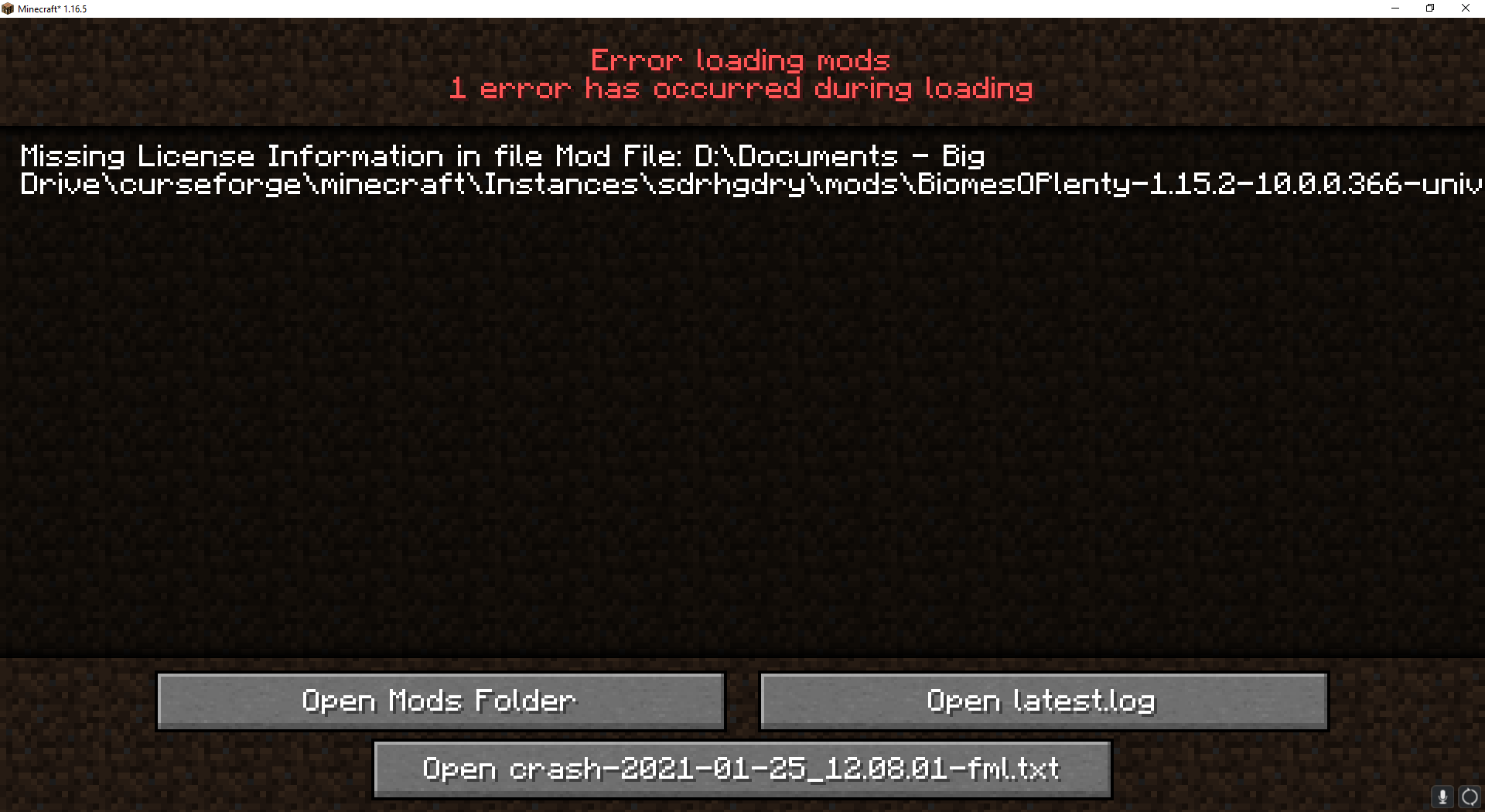
rough swift
hey now i get this @queen storm https://i.imgur.com/Tknh8nu.png
 queen storm
rough swift
hey now i get this <@!525950791710801921> https://i.imgur.com/Tknh8nu.png
queen storm
rough swift
hey now i get this <@!525950791710801921> https://i.imgur.com/Tknh8nu.png
Not one I know
lyric crescent
celest quail
<@!125588118538682368> Found a fix for the update bug, feel free to pass it on t...
lmao... will pass that on
queen storm
celest quail
<@!125588118538682368> Found a fix for the update bug, feel free to pass it on t...
Thank you for finding that one
celest quail
Yup, no problem. Wanted it fixed badly myself. Only issue with the fix is that you'll have to do that for each new mod you install, so it'll be best to do it in batches until the devs fix it in-app.
queen storm
Can make a regex replace for it 🤷♂️
celest quail
Very true.
sturdy shore
Hey my recently approved modpack cant be found on the curseforge website or the application. I switched the attached file from alpha to release, thinking that might help, but no. I've reloaded the site and the applicatioln, but still no results. Is it just a waiting game or is there something I have to do for it to be shown?
queen storm
sturdy shore
Hey my recently approved modpack cant be found on the curseforge website or the ...
Link please
queen storm
I gonna guess that you need to play the waiting game
sturdy shore
ye thats what i expected, thx!
 keen oar
why when i installed mc eternal mod pack i press 'Play' it doesnt launch what might be the problem?
sturdy shore
hey i have the same exact problem
some of my friends have it too, we couldn't figure it out
it happens for all my modpacks in fact
@keen oar one suggestion i have is to download GDlauncher, then export the mc eternal profile as a .zip, then upload it onto GDlauncher, then launch it from there
wait nvm
lyric crescent
why would you do all that, you could just download the pack on gd 🤔
anyway, to fix that issue
?mc-installfix
red patioBOT
- Click on the icon in the bottom left.
- Click the
MinecraftTab. - Click
Changenext to theMinecraft Modding FolderOption. - Select the folder named
Install. - Delete it.
- Restart CurseForge App.
- It will ask to install MC again, do so.
- Play game.
NOTE: You will not lose any modpacks or worlds, These are saved in the Instances folder. DO NOT TOUCH THIS FOLDER OR YOU WILL LOSE EVERYTHING
sturdy shore
yamza i didn't know u could do that on gd lol
also that didn't work, it continues to not open mc
lyric crescent
?mc-path
red patioBOT
Path too long/Path must be English letters or numbers only fix!
If Minecraft is not installed, start here.
Click the in the top right.
Select Minecraft.
Click "Edit".
Move to the "Continue here:" section below.
If Minecraft is installed, follow these steps.
Click the in the bottom left.
Select the Minecraft tab.
Click "Change".
Move to the "Continue here:" section below.
Continue here:
Make a folder in the root directory called CurseForge.
Select the folder you just made.
The text box should show something like the following:
For Windows: C:\CurseForge
For Mac: /CurseForge
sturdy shore
i dont believe you can add a folder to the root directory on mac, as of catalina i think it is read only
queen storm
Then put it a folder higher?
sturdy shore
you cant
queen storm
Then find a place for it, or use a terminal to make the folder
sturdy shore
are there any ideal locations?
lyric crescent
point is to make a folder away from any kind of cloud saving apps
sturdy shore
uh huh, so where would that be
lyric crescent
¯_(ツ)_/¯
sturdy shore
so it cant be just anywhere
lyric crescent
normally can, unless you have issues like you are
sturdy shore
i have an idea of where it could go, lemme try it real quick
 raven pulsar
#🔥︱curseforge-support How do I post a modpack I made?
red patioBOT
There are two ways to share a modpack you've made with others...
Export and Share - For Friends to Small Groups.
- Click the Icon for the modpack.
- Click the button next to play.
- Click
Export. - Select the files that should be included.
- Send the zip to the people that want it! They can follow the instructions in
!mc-installpackto install the pack!
Upload to Curseforge - For Public Release to Everyone.
This options will make your pack public to EVERYONE, it comes with extra requirements and will take some effort to set up.
- Go to here: https://www.curseforge.com/project/432/4471/create
- Fill out the information with a proper description of the pack. This should allow anyone to understand what the pack is.
- Click the Icon for the modpack in the CurseForge app.
- Click the button next to play.
- Click
Export. - Select the files that should be included.
- Open your Project you made on the CurseForge site and Upload the file you just made.
- Wait for Moderation & Sync so it can show up in the client! (See
!syncfor limitations)
raven pulsar
lol idk how to do this lol
 slim quartz
(i am new to ksp addons) when installing ksp addons all of them get a warning that they might be corrupt
lyric crescent
uh pic?
slim quartz
lyric crescent
honestly didnt even know ksp was working with cf yet
slim quartz
oh maybe thats why
raven pulsar
what of the zip is too powerful to send over discord?
lyric crescent
why are you sending a zip over discord?
raven pulsar
idk how else would I
lyric crescent
slim quartz
oh maybe thats why
all i can tell you is i tried one and it doesnt say that. not very helpful i know https://i.imgur.com/sIrDc9V.png
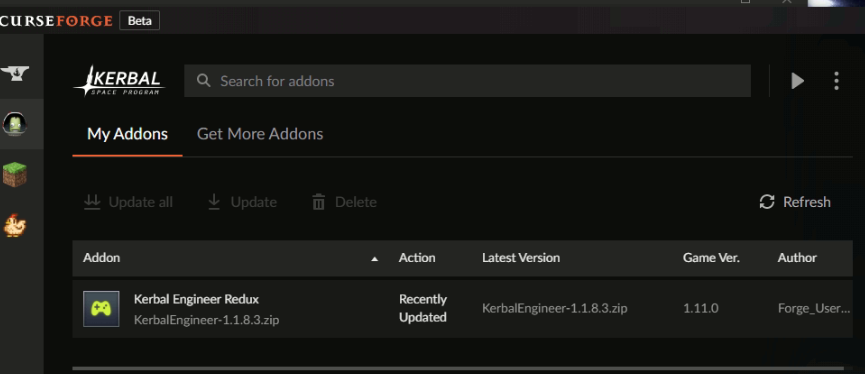
maybe make a ticket
celest quail
raven pulsar
idk how else would I
google drive, mega, etc. are all options. Discord has a file size limit depending on your Discord Nitro status and the server you're in.
slim quartz
ok thanks yamza
sturdy shore
how do u look up modpacks on GDlauncher?
lyric crescent
slim quartz
ok thanks yamza
now it says it after i refreshed the modlist.. it also lost mechjeb... 🙄
 vast locust
For some odd reason I cant can't download packs on Curseforge it says in a red box in the bottom "The system can't find the specified file."
lyric crescent
sturdy shore
how do u look up modpacks on GDlauncher?
probably a better question for a discord related to gd
lyric crescent
slim quartz
ok thanks yamza
seems like a known issue, just had to click the message https://support.overwolf.com/en/support/solutions/articles/9000194900-curseforge-troubleshooting
magic ocean
aye can i get some help
lyric crescent
vast locust
For some odd reason I cant can't download packs on Curseforge it says in a red b...
magic ocean
i downloaded a mod that is for an older version of minecraft mow how do i play it?
lyric crescent
make a profile for that version
magic ocean
how
lyric crescent
?mc-installmods
red patioBOT
How to install mods in CurseForge App.
- Click
+ Create Custom Profile - Name it, select the required Minecraft version, select the Forge version (usually the highest number), click
Create. - Click the profile icon.
- Click
Add New Content - Search and install the desired mods.
- Start the game!
How to install mods not on CurseForge.
- Right click the profile picture or Open the profile and click the Icon next to the play button.
- Click
Open Folder. - Drag the mod(s) into the
modsfolder. (Note: Some mods will require others, to run. Make sure to read the instructions for the mod!) - Start the game!
 lyric crescent
well you cant "play a mod", it needs to be installed to the profile like the instructions say
 vagrant pivot
So what determines when Forge 1.16 will be released from Beta?
lyric crescent
forge does
vast locust
Yeah I tried to do what the website told me and it didn't work
 weak mortar
wheres 1.12.2 for jurassicraft
lyric crescent
vast locust
Yeah I tried to do what the website told me and it didn't work
?ticket-app
red patioBOT
:bug: Reporting via the CurseForge App :bug:
-
Click the
icon in the bottom left. -
Select
Open a Ticket. -
Fill out the form with accurate detailed information, "It doesn't work" isn't helpful! What exactly doesn't work and why doesn't it work should be easy to answer!
-
Make sure to upload your Overwolf logs with the
Upload Fileoption on the ticket, information on how to get these logs can be found here https://support.overwolf.com/en/support/solutions/articles/9000176827-how-to-get-your-overwolf-logs -
Submit!
 arctic python
hi all i need help
mainly i need to someone to hop in a call or somthing wiht me and help me with my minecraft mod pack cus i neeeed help i am really bad at this
weak mortar
arctic python
mainly i need to someone to hop in a call or somthing wiht me and help me with m...
lmfao no
arctic python
i am talking to anyone and evryone so thats fine if you dont wanna help
my problem is adding the files to my modpack i am making
 hard socket
hello
arctic python
hi
hard socket
i was wondering
how do you download individual mods from the curseforge app?
i tried doing it from the site but it didn't work
arctic python
i am trying to make a mod pack and add files i think ik how to do that tho
arctic python
are you making a mod pack?
fleet bear
hard socket
how do you download individual mods from the curseforge app?
!mc-installmods
red patioBOT
How to install mods in CurseForge App.
- Click
+ Create Custom Profile - Name it, select the required Minecraft version, select the Forge version (usually the highest number), click
Create. - Click the profile icon.
- Click
Add New Content - Search and install the desired mods.
- Start the game!
How to install mods not on CurseForge.
- Right click the profile picture or Open the profile and click the Icon next to the play button.
- Click
Open Folder. - Drag the mod(s) into the
modsfolder. (Note: Some mods will require others, to run. Make sure to read the instructions for the mod!) - Start the game!
arctic python
i didnt help
hard socket
a little
arctic python
could someone help me with my mod pack credit will be given if anyone knows how all i need is file help so if you know how please help
and when i say mod pack i mean one i want to post to curse forge
fleet bear
!mc-packshare
red patioBOT
There are two ways to share a modpack you've made with others...
Export and Share - For Friends to Small Groups.
- Click the Icon for the modpack.
- Click the button next to play.
- Click
Export. - Select the files that should be included.
- Send the zip to the people that want it! They can follow the instructions in
!mc-installpackto install the pack!
Upload to Curseforge - For Public Release to Everyone.
This options will make your pack public to EVERYONE, it comes with extra requirements and will take some effort to set up.
- Go to here: https://www.curseforge.com/project/432/4471/create
- Fill out the information with a proper description of the pack. This should allow anyone to understand what the pack is.
- Click the Icon for the modpack in the CurseForge app.
- Click the button next to play.
- Click
Export. - Select the files that should be included.
- Open your Project you made on the CurseForge site and Upload the file you just made.
- Wait for Moderation & Sync so it can show up in the client! (See
!syncfor limitations)
hard socket
hm
none of the mods appearing here are any of the mods i wanted
where are JEI and Draconic Evolution?
fleet bear
Then they are not marked to work for the version of minecraft you picked.
arctic python
red patio
not what i meant
if someone can add me and go in a vc so i can exsplain that would be great
fleet bear
Then perhaps you should state and explain the problem clearly.
no
If you can talk it, you can type it.
arctic python
ok
ill try english is not my first langeage
the files are being rejected and i dont know how to fix that or add it all to one file
fleet bear
post the rejection message
arctic python
ok
here
The status of the file [1.16.1-1.16.4][Forge]TorchBowMod_v1.4.jar (BioSliver) has been changed to Rejected
File is a duplicate of an existing file. [1.16.1-1.16.4][Forge]TorchBowMod_v1.4.jar on TorchBowMod
If you have any questions please contact our support team https://support.curseforge.com.
Jan 25, 2021
wait thats not the right one
(BioSliver) has been changed to Rejected
File is a duplicate of an existing file. [1.16.1-1.16.4]
fleet bear
did you upload the pack before?
arctic python
i have been trying most of what i know about curse forge but now i needed help
fleet bear
How are you making the file you uploaded
arctic python
well i made the mod profile in the curse forge app and now i am trying to post it for anyone that wants to play it
on the website
but the mod pack is called bio silver and i am trying to make it so anyone can play it
fleet bear
and how are you doing that
arctic python
the website for curse forge
fleet bear
Not what I'm asking
You are trying to upload files.
How are you getting the file you are uploading
The message above you said "not what I meant" explains how to upload a modpack to Curseforge.
arctic python
i mean i want it to be open to the public tho
 viral marsh
so i have a question, apparently i try to play and it says "cant verify minecraft version" when i have the launcher open
what the heck is wrong
hello?
fleet bear
arctic python
i mean i want it to be open to the public tho
That's why you read the whole thing instead of just looking at the first few words.
fleet bear
viral marsh
so i have a question, apparently i try to play and it says "cant verify minecraf...
!bug-app Please report this, mention me and include your overwolf logs.
red patioBOT
:bug: Reporting via the CurseForge App :bug:
-
Click the
icon in the bottom left. -
Select
Open a Ticket. -
Fill out the form with accurate detailed information, "It doesn't work" isn't helpful! What exactly doesn't work and why doesn't it work should be easy to answer!
-
Make sure to upload your Overwolf logs with the
Upload Fileoption on the ticket, information on how to get these logs can be found here https://support.overwolf.com/en/support/solutions/articles/9000176827-how-to-get-your-overwolf-logs -
Submit!
viral marsh
how is that supposed to help me
arctic python
thank you claycrop i think i get it now
fleet bear
It's so I can get the issue properly fixed.
I can help you get your game running once you do that
fleet bear
click dashboard in the top right
 violet verge
I have a question, I am trying to use the new minecraft launcher but cursforge does not let me use the new one but the old one, is there anyway to fix this?
fleet bear
mac?
violet verge
pc
fleet bear
select native in the settings
violet verge
i did
fleet bear
if it doesn't switch reinstall CF
violet verge
I have before is there any residue folders I need to delete as well?
arctic python
nope i saw it the project in the deleted its self
 heady chasm
so https://www.curseforge.com/minecraft/mc-mods/ichunutil why do mods depend on this
fleet bear
arctic python
nope i saw it the project in the deleted its self
projects don't delete there self.
arctic python
i messed it up by moving it to a diffrent file
fleet bear
heady chasm
so https://www.curseforge.com/minecraft/mc-mods/ichunutil why do mods depend on ...
because the dev says so.
violet verge
@fleet bear still using legacy launcher ;/
rough swift
hey @fleet bear do you have any idea on how to fix this? https://i.imgur.com/Tknh8nu.png
fleet bear
violet verge
<@!117433042401886214> still using legacy launcher ;/
ok, pick jar launcher in settings, restart app. Then open it back up select native and restart. If this doesn't work i'm going to throw something
fleet bear
rough swift
hey <@!117433042401886214> do you have any idea on how to fix this? https://i.im...
This isn't a curseforge problem.
violet verge
@fleet bear it doesnt let me it just says coming soon and its greyed out
violet verge
should I just give up
fleet bear
No, I want you to open a ticket. cause this is absolute bull the dam thing still exists.
 ivory grove
When i try to download a mod it says file name to long
fleet bear
They know it won't work here in a few months, I told them they should just remove it. Here we are with issues because they didn't disable the jar launcher...
!bug-app Say that you are stuck on the old jar launcher, include overwolf logs and mention me. I'll be complaining about this one too.
red patioBOT
:bug: Reporting via the CurseForge App :bug:
-
Click the
icon in the bottom left. -
Select
Open a Ticket. -
Fill out the form with accurate detailed information, "It doesn't work" isn't helpful! What exactly doesn't work and why doesn't it work should be easy to answer!
-
Make sure to upload your Overwolf logs with the
Upload Fileoption on the ticket, information on how to get these logs can be found here https://support.overwolf.com/en/support/solutions/articles/9000176827-how-to-get-your-overwolf-logs -
Submit!
fleet bear
ivory grove
When i try to download a mod it says file name to long
!mc-path
red patioBOT
Path too long/Path must be English letters or numbers only fix!
If Minecraft is not installed, start here.
Click the in the top right.
Select Minecraft.
Click "Edit".
Move to the "Continue here:" section below.
If Minecraft is installed, follow these steps.
Click the in the bottom left.
Select the Minecraft tab.
Click "Change".
Move to the "Continue here:" section below.
Continue here:
Make a folder in the root directory called CurseForge.
Select the folder you just made.
The text box should show something like the following:
For Windows: C:\CurseForge
For Mac: /CurseForge
ivory grove
Thanks claytrap that worked
 half onyx
Can someone help me with something really quick
I had tried to download technic for my minecraft Java I just got and I wanted to play pocket pixels and I can not get an account for that now due to microsoft and they said to ask you guys if you can host the modpack for me to download
 rugged osprey
im having issues getting custom rules for twitch spawn to work properly could i get help to figure out what im doing wrong?
lyric crescent
half onyx
I had tried to download technic for my minecraft Java I just got and I wanted to...
no. technic packs are made in a way that denies mod makers their rewards. technic is also not very safe to use.
lyric crescent
rugged osprey
im having issues getting custom rules for twitch spawn to work properly could i ...
i've no clue what you're talking about.
 daring crypt
in the app, are there ways to use just single mods instead of modpacks?
lyric crescent
?mc-installmods
red patioBOT
How to install mods in CurseForge App.
- Click
+ Create Custom Profile - Name it, select the required Minecraft version, select the Forge version (usually the highest number), click
Create. - Click the profile icon.
- Click
Add New Content - Search and install the desired mods.
- Start the game!
How to install mods not on CurseForge.
- Right click the profile picture or Open the profile and click the Icon next to the play button.
- Click
Open Folder. - Drag the mod(s) into the
modsfolder. (Note: Some mods will require others, to run. Make sure to read the instructions for the mod!) - Start the game!
half onyx
oh well then im out of luck to ever play a really cool pokemon addon in minecraft now im super sad
Thanks for the help though
lyric crescent
why not play the pixelmon pack on the cf app
daring crypt
@lyric crescent thank you
half onyx
because theres so many pokemon addons it will take forever to search through to find the right one and I just doint want millions of packs in my Java account
lyric crescent
??????
half onyx
i type pokemon and ther is a lot
 flint flume
Everytime I click play on a modpack nothing loads. I've tried reinstalling the pack and curseforge and nothing has worked
lyric crescent
so pick one
half onyx
not all are good though
lyric crescent
how do you even know what is good?
half onyx
I dont and thats why I dont want to download every pack to see which is best
lyric crescent
wtf logic is this
lyric crescent
could try to figure out why it crashes
half onyx
it happened to every mod I installed
so thats why I went to technic
to see if it would work but no
The game crashed whilst fml will not run in demo mode
Error: java.lang.RuntimeException
Exit Code: -1
thats what it says
after I hit play
lyric crescent
?mc-log
red patioBOT
How to get a Minecraft log file.
Where to find the log on the CurseForge Client.
Right-click the modpack profile icon OR click the button in the modpack profile.
Click Open Folder.
Open the logs folder.
Find the file called latest.log and drag it into discord.
lyric crescent
need to see a log
half onyx
from me?
lyric crescent
someone else's log isnt going to tell me why your game is crashing
half onyx
oh sorry im stupid sometimes
half the time with these things confuses me due to handling with so much of these websites that dont even help
lyric crescent
yea modding is rough to get into
half onyx
when you figure out the problem let me know
lyric crescent
uh, log?
half onyx
yeah
i want to try to play as soon as I can because im just tired not finding what im looking for with mods
I can never find them
lyric crescent
you need to send a log for anyone to know what's going on..
digital roost
Ok. So I have Valhelsia installed, but every time I try to launch a modpack, it just gives me vanilla Minecraft.
lyric crescent
restart curseforge
lyric crescent
close it and reopen it
glass marsh
welp my app refuses to open so now I'm stuck :v
I've ended all the tasks associated with it and reset my PC, but it just doesn't open at all.
lyric crescent
what doesnt open?
glass marsh
nevermind, I fixed it. Had ti open it through overwolf instead of the shortcut. Hope this is a one-time issue, I already have too many launchers to open.
 patent bronze
the app isnt opening
 mental charm
hey i was wondering if anybody knows why i cant see my newly approved mod pack on the app. i was just wanting to know if it will like be a little before it appears on the app
fleet bear
takes 1-24hrs for sync to make it show
digital roost
is this the right place to ask a question about the curseforge app?
 errant basin
curseforge
fleet bear
yes
digital roost
i consider my browser cookies as a secret place, the content of which is nobody's business. they can include usernames for any websites you visit and probably even things you can use to log into websites, right?
fleet bear
what does this have to do with the app?
digital roost
good you ask 👍 then why is the CurseForge App reading the contents of my Firefox cookie database?
fleet bear
CurseForge is not Overwolf.
You would need to ask what they need cookies for then from them
digital roost
i start the curseforge app, why does it want's to know my Firefox cookies?
fleet bear
I have no idea what you are even talking about?
Where are you seeing this?
As I said before CurseForge is not Overwolf.
lyric crescent
not forge either
fleet bear
Two separate apps, managed by two separate groups within the Overwolf Company.
Read the Overwolf Privacy policy on cookies if you want to know what it does.
Overwolf | Tech for developers who love gaming
Overwolf adds epic overlay apps to your favorite games. We use cookies and similar technologies for a number of reasons, for example, for example to help personalize your experience. Read more about our cookies policy here.
If you have issues with it, use the overwolf discord or support. There's a link to the overwolf discord in #👋︱welcome
digital roost
Thank you for referring to the cookie policy of Overwolf. I don't mind that Overwolf uses cookies. Why is the CurseForge App interested in cookies from a application which has nothing to to with it in the first place? If this other app is not the CurseForge App, where can I get the real app?
 vague cedar
Hello i dont know if this is the right place to ask this question but is the addon sync thing not working or am i just not doing it right ?
fleet bear
Again, CurseForge isn't doing this. You can clearly see the Overwolf part of the app is.
CurseForge is built on the Overwolf platform, whatever it does, is done for whatever reasons they need within the Overwolf ecosystem.
fleet bear
vague cedar
Hello i dont know if this is the right place to ask this question but is the add...
It's best to not use it as there is lots of reports of it not working correctly.
vague cedar
ok is there any other way that i could save all my addons
fleet bear
Make a backup yourself?
 dark flame
I need some help
I have just installed curseforge so I'm not familiar with it
Right now I'm trying to launch World Of Tanks with some mods but the game won't launch
Anyone got any idea about this?
forge scanned for the game and forge found it, but it doesnt seem to launch
fleet bear
!!=
red patioBOT
Wording is important!
Forge = Minecraft Forge, This is a modloader often just called "Forge".
CurseForge = A Website/App that has content for games.
Mods = Individual mod files.
Modpacks = Multiple mods put into the mods folder or downloaded from CurseForge.
These are not Interchangeable! Please use the correct terms as it allows us to help you faster!
vague cedar
ok i thought if i can do it trought the app
fleet bear
I can't tell you why it won't work. I don't know anything about WoT.
Make a ticket is all I can say
dark flame
How do I make a ticket
fleet bear
!bug-app Include the Overwolf logs, be detailed and mention me in the ticket.
red patioBOT
:bug: Reporting via the CurseForge App :bug:
-
Click the
icon in the bottom left. -
Select
Open a Ticket. -
Fill out the form with accurate detailed information, "It doesn't work" isn't helpful! What exactly doesn't work and why doesn't it work should be easy to answer!
-
Make sure to upload your Overwolf logs with the
Upload Fileoption on the ticket, information on how to get these logs can be found here https://support.overwolf.com/en/support/solutions/articles/9000176827-how-to-get-your-overwolf-logs -
Submit!
digital roost
Thank you for your patience. All I want is to update my addons. I have downloaded and installed the CurseForge app but see that sensitive data is being read. How can I stop this? Where can I get help?
fleet bear
#👋︱welcome Overwolf discord as mentioned before.
lyric crescent
What kind of help are you even expecting really? They arn't going to magically turn off the trackers because you don't like them for whatever reason. If you don't like it don't use the software.
fleet bear
You can opt out of most of it via the Overwolf settings.
dark flame
fleet bear
!bug-app Include the Overwolf logs, be detailed and mention me in the ticket.
Forgot to mention you but the ticket has been made
fleet bear
👌
dark flame
fleet bear
👌
Number: 81852 in case that's usefull to you
patent bronze
I am agreeing to the terms i have a twitch account but it always appears as a file and never downloads
dark flame
fleet bear
👌
I always mute servers I'm in. So in case you need me, please tag me or message me directly 😄
patent bronze
Will someone answer me
 normal otter
my friend is getting curseforge, and it keeps saying download failed why?
 bitter salmon
hi so, my computer wont work with the forge web page, so i downloaded the app however i noticed that there isnt as many mods for minecraft on there so i was wondering if someone could help me figure it out on the web page?
 wooden tapir
any extra information would be nice, It might have to do with his specs ect.
normal otter
i think its similar to mine but they cant download it i dont know ;-;
digital roost
Thanks, I'll try the discord there. Although I agree with Yamza, they probably won't care what a CurseForge App does with data from Firefox that isn't even running ...
normal otter
because i wanted to get jurrasicraft world but my friend cant because its only in the curseforge app
lyric crescent
still has nothing to do with curseforge...
digital roost
Yamza, of course it has, even if it's hard to understand, I'm running the CurseForge app ...
lyric crescent
 bitter salmon
im still super confused on what to do because ive tried to download mods from the website a hundred times but it never works, like it will tell me to save it so i do then i open it then it goes back to the same thing saying to save it again so i download the forge thing and it did the same exact thing ):
digital roost
@lyric crescent
lyric crescent
🤦♀️ whatever
lyric crescent
bitter salmon
im still super confused on what to do because ive tried to download mods from th...
no clue what you're saying
bitter salmon
okay so im using the app, doesnt have the mods i wanted so i went to the website and it wont let me download any mods
lyric crescent
how does the app not have the mods you wanted? are you even looking in the right spot?
bitter salmon
ive tried looking the mods up and they just never appeared, so i scrolled through the "brows modpacks" to see if they where there but they werent, so all i want to know is how do i get mods from the website?
red patioBOT
How to install mods in CurseForge App.
- Click
+ Create Custom Profile - Name it, select the required Minecraft version, select the Forge version (usually the highest number), click
Create. - Click the profile icon.
- Click
Add New Content - Search and install the desired mods.
- Start the game!
How to install mods not on CurseForge.
- Right click the profile picture or Open the profile and click the Icon next to the play button.
- Click
Open Folder. - Drag the mod(s) into the
modsfolder. (Note: Some mods will require others, to run. Make sure to read the instructions for the mod!) - Start the game!
wooden tapir
Also, I'm having a bit of an issue exporting. The process itself goes fine. However some mods appear in the mods folder without saving to the manifest?
lyric crescent
delete those mods, reinstall them with the app, export again
drifting ingot
yeah that's still baffling to me
i've been doing diff's between my manifests before submitting, and 100% of the time at least one mod goes missing
i wonder if it's an OBOE
lyric crescent
when you notice it make a ticket
drifting ingot
will, do... I need to add some mods here soon, so we shall see
lyric crescent
they want a copy of the instance as well, if you have some way to send that too
We are still learning this problem. If you encounter it, please open a ticket and attach a .zip file of your Instance folder. (if the file is too large please provide a cloud storage service link such as google drive, dropbox etc.)```I have a modpack, but it keeps getting rejected for this reason.
The following files belong to CurseForge-hosted projects, and should therefore not be added directly to zip files:
overrides/mods/minecolonies-0.13.437-RELEASE-universal.jar
These files should, instead, be referenced in the manifest.json file generated by the Twitch Desktop App during a profile export.
The following file versions have been removed from CurseForge:
overrides/mods/exoticbirds-1.16.4-1.0.2.jar
I'm not sure what to do. Should I submit a ticket to CurseForge?
digital roost
exotic birds apparently isnt on curseforge
maybe theres a different version for it
fleet bear
delete and reinstall mine colonies within the app.
Remove or update exotic birds if the project still exists
 bold kelp
quick question on what you have to have on a pc in order to run A.T.M 6 because it crashes 90% of the time for me
jagged crater
Wait, but I played on my own world with the same zip file, and I still had the exotic birds mod functioning.
Oh okay.
 pine cipher
can anyone help me make my minecraft mod pack be released to the public?
drifting ingot
pine cipher
can anyone help me make my minecraft mod pack be released to the public?
quit spamming dude.. no one wants to help you make another modpack
if you can't make a modpack yourself, you have no business being involved with one
jagged crater
pine cipher
can anyone help me make my minecraft mod pack be released to the public?
?mc-packshare
red patioBOT
There are two ways to share a modpack you've made with others...
Export and Share - For Friends to Small Groups.
- Click the Icon for the modpack.
- Click the button next to play.
- Click
Export. - Select the files that should be included.
- Send the zip to the people that want it! They can follow the instructions in
!mc-installpackto install the pack!
Upload to Curseforge - For Public Release to Everyone.
This options will make your pack public to EVERYONE, it comes with extra requirements and will take some effort to set up.
- Go to here: https://www.curseforge.com/project/432/4471/create
- Fill out the information with a proper description of the pack. This should allow anyone to understand what the pack is.
- Click the Icon for the modpack in the CurseForge app.
- Click the button next to play.
- Click
Export. - Select the files that should be included.
- Open your Project you made on the CurseForge site and Upload the file you just made.
- Wait for Moderation & Sync so it can show up in the client! (See
!syncfor limitations)
digital roost
So I tried to download troll craft so i can play it with my friends. When it would be really close to installing, It would say " Timeout attempting to download: https://edge.forgecdn.net/files/2431/420/TrollCraft-1.0.1.zip." please help!
jagged crater
!bug-app
red patioBOT
:bug: Reporting via the CurseForge App :bug:
-
Click the
icon in the bottom left. -
Select
Open a Ticket. -
Fill out the form with accurate detailed information, "It doesn't work" isn't helpful! What exactly doesn't work and why doesn't it work should be easy to answer!
-
Make sure to upload your Overwolf logs with the
Upload Fileoption on the ticket, information on how to get these logs can be found here https://support.overwolf.com/en/support/solutions/articles/9000176827-how-to-get-your-overwolf-logs -
Submit!
 rustic yew
i cant get it help
 ivory oriole
 tepid oracle
how do i make my own modpack
 still sparrow
twitch told me to download overwolf for mods and i did now it says mods are coming soon is there any way i can browse modpacks?
lyric crescent
?getcf
red patioBOT
Looking to install the CurseForge app?
Todo: Place system requirements here.
<:windows:798410728188936222> Windows
<:mac:798410654418862130> Mac
Linux
:person_shrugging:
still sparrow
i install that and it says mods arent out yet
lyric crescent
Show me
 hollow gate
pls make curse forge available for t launcher i have offical mojang minecraft but i want to play with my friend he cant buy it pls make forge available for t laucnher
 hot ledge
Hello i am making a modpack i would like to know if its possible that a mod from a different website can be used
 rugged quarry


 digital roost
I made a ticket, how do i know if they responded to it?
 austere bridge
It says that the file name is too large or something and I cannot download the modpack I want how do I fix that?
digital roost
hollow gate
pls make curse forge available for t launcher i have offical mojang minecraft bu...
Sorry thats not how it works, buy the game.
We dont support piracy here
 quiet bear
Do you know if the Minecraft mods work on bedrock
fleet bear
quiet bear
Do you know if the Minecraft mods work on bedrock
Mods are for Java only. Addons are for bedrock.
 neon glen
why cant i detect the Stardew Valley file on my computer and when i try to locate it myself i cant find the folder for it?
hot ledge
neon glen
why cant i detect the Stardew Valley file on my computer and when i try to locat...
What folder did you put it in? It could be a private folder
neon glen
its in the alredy made steam foldare i dont know where it puts it when I looked there I didin't see a folder just a file of the game with the Icon
fleet bear
neon glen
why cant i detect the Stardew Valley file on my computer and when i try to locat...
!knownissues
red patioBOT
Known Issues with solutions or status of the issue.
Overwolf maintains a known list of issues here, some with solutions, others without.
http://support.curseforge.com/en/support/solutions/articles/9000196615-known-issues
 dusk steppe
Why does Ex Nihilo: Creatio not appear in the 'add more content' list
fleet bear
It wasn't marked for the version you selected or it doesn't sync to the client
dusk steppe
I'm on 1.12.2 and I dunno what "it doesn't sync to the client" means
fleet bear
the mod isn't set correctly to show up in the client search
dusk steppe
How do I add it to my modpack?
fleet bear
!mc-installmods
red patioBOT
How to install mods in CurseForge App.
- Click
+ Create Custom Profile - Name it, select the required Minecraft version, select the Forge version (usually the highest number), click
Create. - Click the profile icon.
- Click
Add New Content - Search and install the desired mods.
- Start the game!
How to install mods not on CurseForge.
- Right click the profile picture or Open the profile and click the Icon next to the play button.
- Click
Open Folder. - Drag the mod(s) into the
modsfolder. (Note: Some mods will require others, to run. Make sure to read the instructions for the mod!) - Start the game!
 timber pier
hollow gate
pls make curse forge available for t launcher i have offical mojang minecraft bu...
timber pier
hollow gate
pls make curse forge available for t launcher i have offical mojang minecraft bu...
Haha no
 small root
can add asetto corsa mods ?
queen storm
small root
can add asetto corsa mods ?
Already has a pretty big mods manager.
digital roost
Will older versions of curseforge be fixed or will they be left behind
Like versions before 1.6.4
fleet bear
CurseForge doesn't have a 1.6.4 version.
I assume you mean will older versions of Minecraft be supported.
Perhaps.
digital roost
Someone who can help me with error codes?
I just keep getting the same error code 0 all the time. I'm playing modded minecraft and no mod works for me, just instanttly exits my minecraft and sends me a exit code 0
queen storm
!mc-installfix Try this
red patioBOT
- Click on the icon in the bottom left.
- Click the
MinecraftTab. - Click
Changenext to theMinecraft Modding FolderOption. - Select the folder named
Install. - Delete it.
- Restart CurseForge App.
- It will ask to install MC again, do so.
- Play game.
NOTE: You will not lose any modpacks or worlds, These are saved in the Instances folder. DO NOT TOUCH THIS FOLDER OR YOU WILL LOSE EVERYTHING
digital roost
When will it be possible to install Minecraft Shaders with the CurseForge desktop app ?
opal cipher
When the devs for the shaders add them to CurseForge.
digital roost
It's already done
 silver snow
hey
can i make the curse forge app open windowed?
i tried with a shortcut but it still open small windowed
sorry for my bad english
 sour raptor
i cant install any modpacks it says there was a problem with the webclint request
how do i fix this?
digital roost
I simply cannot open any modpack with CurseForge.
I hit "play", a lot of text appears for half a second then, everything comes back to normal, and nothing happened.
I am on MacOS if that matters.
sour raptor
i cant install any modpacks it says there was a problem with the webclint request
how do i fix this?
digital roost
sour raptor
i cant install any modpacks it says there was a problem with the webclint reques...
No need to ask the same thing twice, in the same channel. Wait until you get an answer! :)
sour raptor
ok thanks
sour raptor
so if there are any dueps of mods
de3lete one of them
and theres ur problem solved
 slender sinew
i checked the file but there arent any duplicates
sour raptor
refresh the page
in files
and then do it
or if u have soemthing searched inm the search bar
then clear it
and then press enter
slender sinew
still no duplicates
sour raptor
welp then i cant help sorry pal
slender sinew
it fnie
never mind i found the problem
ender io had all the modular installations within it so thats why i had a duplication error
 fickle zephyr
HI I had a problem with curseforge ( the app I am using to play modpacks) and is deleted my stoneblock 2 download and when I reinstalled it my world was gone I really want it back I was working really hard on it.
queen storm
fickle zephyr
HI I had a problem with curseforge ( the app I am using to play modpacks) and is...
Never just remove stuff
fickle zephyr
dang it
I tried to update the modpack because somethings weren't working and I wouldn't let me play it crashed when I opened it so I was forced to delete it
 sly sleet
Hi! Yesterday I was playing regrowth, everything was fine. Today I turned on my computer, curse started, but I can't start any mod packs, but task manager shows minecraft is already running. Any ideas?
 cold rampart
is there a way to change the version of my profile? There doesnt seem to be a button to allow me to change to a previous or later version of the pack
sly sleet
right click on the modpack and versions?
sly sleet
@cold rampart Well... then it has no versions or idk
digital roost
 distant river
@everyone
distant river
@everyone
Firstly, pinging 50k people won't work.
Secondly, why would you even try to ping 50k people ?
cold rampart
sly sleet
<@!183202458577666048> Well... then it has no versions or idk
oO it def has versions, weird
queen storm
distant river
ikd just bored
Yeah, don't do that
 thick shuttle
Hey i have recently started playing with mods and i was wondering. in curse forge i can only download modpacks but what if i only want certain mods that are not part of a modpack, how can i download mods on their own?
queen storm
thick shuttle
Hey i have recently started playing with mods and i was wondering. in curse for...
!mc-installmods
red patioBOT
How to install mods in CurseForge App.
- Click
+ Create Custom Profile - Name it, select the required Minecraft version, select the Forge version (usually the highest number), click
Create. - Click the profile icon.
- Click
Add New Content - Search and install the desired mods.
- Start the game!
How to install mods not on CurseForge.
- Right click the profile picture or Open the profile and click the Icon next to the play button.
- Click
Open Folder. - Drag the mod(s) into the
modsfolder. (Note: Some mods will require others, to run. Make sure to read the instructions for the mod!) - Start the game!
thick shuttle
thanks
 celest hedge
when i download the modpack and click play it brings me to the launcher but no new profile is added. does any1 know why?
lyric crescent
restart curseforge
celest hedge
still nothing
lyric crescent
?mc-installfix
red patioBOT
- Click on the icon in the bottom left.
- Click the
MinecraftTab. - Click
Editnext to theMinecraft Modding FolderOption. - Select the folder named
Install. - Delete it.
- Restart CurseForge App.
- It will ask to install MC again, do so.
- Play game.
NOTE: You will not lose any modpacks or worlds, These are saved in the Instances folder. DO NOT TOUCH THIS FOLDER OR YOU WILL LOSE EVERYTHING
celest hedge
nope but is it because i have overwolf installed on a different drive then curseforge?
lyric crescent
no
go to that install folder and run the vanilla launcher there. close it and try again
celest hedge
nope
lyric crescent
?mc-path
red patioBOT
Path too long/Path must be English letters or numbers only fix!
If Minecraft is not installed, start here.
Click the in the top right.
Select Minecraft.
Click "Edit".
Move to the "Continue here:" section below.
If Minecraft is installed, follow these steps.
Click the in the bottom left.
Select the Minecraft tab.
Click "Change".
Move to the "Continue here:" section below.
Continue here:
Make a folder in the root directory called CurseForge.
Select the folder you just made.
The text box should show something like the following:
For Windows: C:\CurseForge
For Mac: /CurseForge
lyric crescent
doesnt have to be c, just needs to be in the root of whatever drive
celest hedge
ok i did and downloaded the mod again and still nothing happend
lyric crescent
try a computer restart
 rustic hearth
Is MacOS Mojave v10.14.6 no longer supported? When did this change?
it was supported 9 hours ago
queen storm
What makes you say that?
rustic hearth
same message when i reload, was working fine last night
aaaaand i restarted the app and it was fine, sorry for the inconvenience
i've never had that happen before
queen storm
Still weird that you got the error
rustic hearth
are error logs stored anywhere? maybe i can find it
queen storm
!owlogs
red patioBOT
<:overwolf:798413750981492736> How to get Overwolf logs! <:overwolf:798413750981492736>
rustic hearth
there is no overwolf folder, but i have found the curseforge folder
i have also added a black file titled main.log
queen storm
Yeah, mac is different
 stiff stratus
guys you know how to get a modpack into an aternos or serverpro server?
rustic hearth
i have compressed the Curseforge folder, but it's too big to send, how/where shall i send it?
queen storm
rustic hearth
i have compressed the Curseforge folder, but it's too big to send, how/where sha...
The entire curseforge folder? Don't need the instances, I don't need the logs either
!ticket-app
red patioBOT
:bug: Reporting via the CurseForge App :bug:
-
Click the
icon in the bottom left. -
Select
Open a Ticket. -
Fill out the form with accurate detailed information, "It doesn't work" isn't helpful! What exactly doesn't work and why doesn't it work should be easy to answer!
-
Make sure to upload your Overwolf logs with the
Upload Fileoption on the ticket, information on how to get these logs can be found here https://support.overwolf.com/en/support/solutions/articles/9000176827-how-to-get-your-overwolf-logs -
Submit!
rustic hearth
ah
stiff stratus
stiff stratus
guys you know how to get a modpack into an aternos or serverpro server?
anyone?
queen storm
stiff stratus
anyone?
stiff stratus
ok thx
rustic hearth
the ticket won't allow a filesize greater than 20mb, am i not supposed to compress the entire Curseforge folder? The guide you sent me says to "Send us these folders"
rustic hearth
"Go to:
Local user > Library > Application support > Overwolf > Curse > Logs > CurseClient
And
Local user > Library > Application support > CurseForge"
i only have the second one for some reason, and it does not highlight what file(s) to send
am i being stupid?
lyric crescent
rustic hearth
using macOS
lyric crescent
Send us these folders (you can compress them to a ZIP file if they are too big)
lyric crescent
upload it somewhere then i guess. dropbox or google drive work
 dark junco
hey, I uploaded a modpack file onto my project on the curseforge website, and it ended up getting rejected due to an invalid manifest.json file, does anyone know what this means and how I can fix this? also sorry if this is in the wrong channel.
queen storm
Reinstall extradisks
rustic hearth
lyric crescent
upload it somewhere then i guess. dropbox or google drive work
i am unable to copy the drive link into the ticket
dark junco
queen storm
Reinstall extradisks
is that all I need to do to get it to work or is there something else?
queen storm
dark junco
is that all I need to do to get it to work or is there something else?
That is all I can see
dark junco
alright thank you, I'll try that.