#🔥︱curseforge-support
1 messages · Page 397 of 1
 sharp thorn
 fleet bear
duplicate the profile and then export
fleet bear
Remove and reinstall a single mod, does that show up?
fleet bear
make a new profile, Install a single mod, export it
sharp thorn
ok
 digital roost
Is there a way to add a mod to a modpack that is technically outdated for the version? Since 1.16.5 for minecraft was a fairly minor update, almost every mod should work with it, yet if a mod hasn't been flagged as game version 1.16.5 then you can't add it through the add more content button. Is there a workaround for this? Would it be directly dropping a mod file into the profile's files?
sharp thorn
fleet bear
make a new profile, Install a single mod, export it
it works when I do that
fleet bear
D:
All I can say is to re-download all the mods in a new profile and copy the rest over to export it
sharp thorn
I've already had to do that 2 times, I was hoping maybe there was an easy way to solve it this time.
digital roost
digital roost
Is there a way to add a mod to a modpack that is technically outdated for the ve...
look i don't know but probably
Depends on forge
fair enough, ill fiddle with it
You might need to do something to port it
But probably small shit
fleet bear
digital roost
Is there a way to add a mod to a modpack that is technically outdated for the ve...
!mc-installmods
 red patioBOT
How to install mods in CurseForge App.
- Click
+ Create Custom Profile - Name it, select the required Minecraft version, select the Forge version (usually the highest number), click
Create. - Click the profile icon.
- Click
Add New Content - Search and install the desired mods.
- Start the game!
How to install mods not on CurseForge.
- Right click the profile picture or Open the profile and click the
 Icon next to the play button.
 - Click

Open Folder. - Drag the mod(s) into the
modsfolder. (Note: Some mods will require others, to run. Make sure to read the instructions for the mod!) - Start the game!
 fleet bear
The second part applies to what you want to do.
digital roost
thats about what i expected, thanks for the help
fleet bear
If I click on community support and see you posting there first and then you posted here cause nobody helped you....
Thank god
What do you need help with?
 sacred siren
so should i post there first
fleet bear
Well if it's an issue with something CurseForge offers, yes. Otherwise #👽︱game-support
sacred siren
done idk if its an cruseforge issue or from me
 cunning glen
what do i do every time i download a minecraft modpack it says ''exception occurred during a webclient request'' any clues?
anyone?
fleet bear
any modpack?
cunning glen
fleet bear
any modpack?
me?
fleet bear
yes
cunning glen
skyfactory 4
fleet bear
does anything else work?
fleet bear
what's your internet speed?
cunning glen
25-30 mbps
fleet bear
hm. Try a PC restart
cunning glen
i already have a couple of times too
red patioBOT
:bug: Reporting via the CurseForge App :bug:
-
Click the
 icon in the bottom left.
 -
Select

Open a Ticket. -
Fill out the form with accurate detailed information, "It doesn't work" isn't helpful! What exactly doesn't work and why doesn't it work should be easy to answer!
-
Make sure to upload your Overwolf logs with the
Upload Fileoption on the ticket, information on how to get these logs can be found here https://support.overwolf.com/en/support/solutions/articles/9000176827-how-to-get-your-overwolf-logs -
Submit!
 fleet bear
CurseForge
 fair sierra
I have a question anytime i try to load a mod it says this installation has been modified and might not support the latest player safter features and i still continue and press play but all my mod packs seem to to crash from the cursed forge launcher?
red patioBOT
Hey there, it is Curseforge, not "Cursed forge"
fleet bear
the first part is just mojang being mojang.
the second part is likely this
!mc-installfix
red patioBOT
- Click on the
 icon in the bottom left.
 - Click the

MinecraftTab. - Click
Changenext to theMinecraft Modding FolderOption. - Select the folder named
Install. - Delete it.
- Restart CurseForge App.
- It will ask to install MC again, do so.
- Play game.
NOTE: You will not lose any modpacks or worlds, These are saved in the Instances folder. DO NOT TOUCH THIS FOLDER OR YOU WILL LOSE EVERYTHING
fair sierra
thx
 opal cipher
Maybe you can, maybe you can't. We don't support tlauncher here.
 dreamy kestrel
oh ok thanks
 visual bobcat
Hey can someone help me, suddenly my GTFO addon isn't working on wow
it says the addon may be corrupt
fleet bear
reinstall it
visual bobcat
I have, I did the reinstall option and deleted it and reinstalled it manually
fleet bear
Then it's the app being dumb with client/retail marking
if it works, don't worry about it
 fading iris
is there a good modpack that includes proximity chat?
for minecraft
im tryna start a small server for me and my friends to enjoy and laugh at our stupidity
 autumn path
hi,
I was looking for stardew valley on my pc to use the addons, but the app can't find it and manually i wouldn't know what to look for exactly, pointing out that i have the game from steam.
Thanks in advance.
fleet bear
!knownissues
red patioBOT
Known Issues with solutions or status of the issue.
Overwolf maintains a known list of issues here, some with solutions, others without.
http://support.curseforge.com/en/support/solutions/articles/9000196615-known-issues
fleet bear
At the bottom.
autumn path
ty
 pale inlet
what does this mean
im trying to reinstall the pixelmon modpack after it deleted itself & said it couldn't verify minecraft version
 waxen raven
Thanks a bunch I'm on the overwolf dev server
fleet bear
waxen raven
Thanks a bunch I'm on the overwolf dev server
They wont have any clue what your talking about there.
CurseForge and Apps is two separate teams of management and moderation. The only thing shared is devs and support.
waxen raven
OK so overwolf the normal server or just on curse forge server
 queen storm
If you want Curseforge support then the curseforge server
fleet bear
You would be best of opening a support ticket.
 tender summit
Hello, so I was wondering if there was something that is keeping me from putting together a modpack, for example I wanted to add the avatar mod to my game but when I looked for it I couldn't find it, so I don't know if I'm just inputting it wrong or what, so some help would be appreciated. 😀
Thanks for your time.
queen storm
Can you post a link to it?
tender summit
Uh, link? I think I can send a picture of what I mean.
Or are you talking to someone else
Now I feel Dum
queen storm
No, I am asking for a link to the mod you are trying to add
tender summit
I have the author and file name, I'm using the desktop app of the curseforge
If that helps at all
opal cipher
Then tell us what the mod name is. The full name
queen storm
Or better: google it and give us the link to the mod
opal cipher
Is it one of these? https://www.curseforge.com/minecraft/mc-mods/search?search=avatar
tender summit
It's "Avatar mod 2: Out of the iceberg" the author is FavoriteDragon at least that's what I was able to find.
I can send a picture of what I see, I guess it's the curseforge beta, at least that's what it says on my tab
queen storm
And on what version are you trying to install it?
tender summit
The latest I guess, when it was on twitch I was able to use it
tender summit
1.16.4
opal cipher
It only works up to 1.12.2
fleet bear
Why do you think a 1.12.2 mod would show up in 1.16.4?
tender summit
Oh, because it worked on my twitch account.
fleet bear
No, it never did.
opal cipher
That profile probably was 1.12.2 or earlier, depending on when that was.
fleet bear
The client for the whole time modding has existed only shows you files that are marked to work for that version when searching.
You cant use mods in versions they arent made for unless only the 3rd number changes. (In most cases)
If you make a 1.12.2 profile it will show up.
tender summit
Oh ok thanks for telling me about that I was starting to think I need to wipe my computer clean to get it to work.
 soft epoch
good morning i just recently downloaded curseforge and when i try to run a game it begins to launch the game untill it is about half way done and it says that it is not responding any tips on how to fix this
fleet bear
Let's make this ever so fun and exciting real quick.
You can pick one of two options.
- I give you a possible fix blind and by only using the message you just sent.
Or - We go a bit deeper.
What would you like to pick?
soft epoch
go deeper i suppose
fleet bear
!mc-logs Don't like living life on the edge eh?
red patioBOT
How to get a Minecraft log file.
Where to find the log on the CurseForge Client.
Right-click the modpack profile icon OR click the button in the modpack profile.
Click Open Folder.
Open the logs folder.
Find the file called latest.log and drag it into discord.
soft epoch
fleet bear
Going to guess just by the size of that log file you need to do this...
!mc-installfix
red patioBOT
- Click on the icon in the bottom left.
- Click the
MinecraftTab. - Click
Changenext to theMinecraft Modding FolderOption. - Select the folder named
Install. - Delete it.
- Restart CurseForge App.
- It will ask to install MC again, do so.
- Play game.
NOTE: You will not lose any modpacks or worlds, These are saved in the Instances folder. DO NOT TOUCH THIS FOLDER OR YOU WILL LOSE EVERYTHING
soft epoch
when it says delete it what am i deleting
queen storm
Select the folder named Install.
opal cipher
The folder Install
fleet bear
I was wrong unless I looked at the wrong log file.
Level up 2 is crashing the game trying to get a file.
soft epoch
same issue
fleet bear
Yay for people who dont understand that you need to fail safe when getting patreon rewards remotely.....
soft epoch
so im still having the issue of the game not responging
 steel tapir
I wanted to know if for the security craft I had to install the mods in the relations area?
queen storm
steel tapir
I wanted to know if for the security craft I had to install the mods in the rela...
What relations area?
queen storm
Was removed when Twitch took over I believe, at least, the interface for it
 unkempt thicket
I did provide it previously, but this is where I've been getting Forge builds for years. https://files.minecraftforge.net/maven/net/minecraftforge/forge/index_1.16.4.html
Minecraft Forge
red patioBOT
Wording is important!
Forge = Minecraft Forge, This is a modloader often just called "Forge".
CurseForge = A Website/App that has content for games.
Mods = Individual mod files.
Modpacks = Multiple mods put into the mods folder or downloaded from CurseForge.
These are not Interchangeable! Please use the correct terms as it allows us to help you faster!
unkempt thicket
semantics - I know its a different website, don't need to get caught up on names. Why were all the universal jar files removed has been my question.
 lyric crescent
it's not semantics..
curseforge has nothing to do with forge in any way. Ask forge.
unkempt thicket
so no one knows the answer then?
lyric crescent
no one here is a forge dev, so no. no one here knows the answer.
unkempt thicket
thanks
 heady bolt
Can someone update continuum to 1.7.0
lyric crescent
ask the person who made it
 vale jackal
So i created my modpack to minecraft and wanna release it. What folders and files i have to push?
i pushed only config and mods and got that message
lyric crescent
click link
vale jackal
i clicked
lyric crescent
now read it
vale jackal
i read it but i thinks there is different problem. I don't know what is manifest.json file
queen storm
How did you export it
lyric crescent
that would be the thing that tells what mods to get.
vale jackal
queen storm
How did you export it
in .zip file
queen storm
vale jackal
in `.zip` file
!mc-packshare
red patioBOT
There are two ways to share a modpack you've made with others...
Export and Share - For Friends to Small Groups.
- Click the Icon for the modpack.
- Click the button next to play.
- Click

Export. - Select the files that should be included.
- Send the zip to the people that want it! They can follow the instructions in
!mc-installpackto install the pack!
Upload to Curseforge - For Public Release to Everyone.
This options will make your pack public to EVERYONE, it comes with extra requirements and will take some effort to set up.
- Go to here: https://www.curseforge.com/project/432/4471/create
- Fill out the information with a proper description of the pack. This should allow anyone to understand what the pack is.
- Click the Icon for the modpack in the CurseForge app.
- Click the button next to play.
- Click
Export. - Select the files that should be included.
- Open your Project you made on the CurseForge site and Upload the file you just made.
- Wait for Moderation & Sync so it can show up in the client! (See
!syncfor limitations)
vale jackal
ok
vale jackal
blacklisted file? I exported my modpack following up instructions
lyric crescent
read what the message says. what is that file? why is it even there?
vale jackal
i don't know why is it there, i exported my modpack with curseforge desktop application
lyric crescent
it exports whatever you put into the mods folder. you must have put that file there somehow
 lethal quartz
Hello, I am trying to find a game on my D drive through curseforge. Automated scanning is not finding any of my games and manually adding it only says that the directory is invalid or it is an unsupported game (I know for certain the game in question is supported)
lyric crescent
and the game is called?
lethal quartz
Stardew valley.
lyric crescent
lethal quartz
But the game is not the issue, it wont locate any games on my d drive
well ill be damned. i guess I have two issues :/
Okay ty for that. Is there anything that would be preventing it from detecting other games on my D drive?
lyric crescent
i assume that applies to all steam games. what other games are you talking about?
 lost wadi
i got a simple question :3 why won't mods that are recently updated stay be updated manually? my pack rejects the updated mods  but not the older updates
example Electroblob's wizardry's newest update
 patent marlin
uhm so i cant find something here or im just to blind but i cant seem to launch any of my mod packs through the curseforge, they all open the mine craft launcher but never stop loading profiles nor load the play button its jsut stuck on perma load after the launcher of mine craft opened instead of finishing loading and letting me play
lyric crescent
lost wadi
i got a simple question :3 why won't mods that are recently updated stay be upda...
dont really know what you're trying to say
lyric crescent
patent marlin
uhm so i cant find something here or im just to blind but i cant seem to launch ...
are you able to play vanilla without issues?
lost wadi
You know when you export a pack for an update, and it rejects mods sometimes.
patent marlin
vanila through the game launcher works fine
lyric crescent
patent marlin
vanila through the game launcher works fine
?mc-log send a log
red patioBOT
How to get a Minecraft log file.
Where to find the log on the CurseForge Client.
Right-click the modpack profile icon OR click the button in the modpack profile.
Click Open Folder.
Open the logs folder.
Find the file called latest.log and drag it into discord.
lyric crescent
lost wadi
You know when you export a pack for an update, and it rejects mods sometimes.
sure, continue
lost wadi
my question is why updated mods get rejected but older updates from a mod don't. example im trying to update Electroblob's wizardry's newest update but its rejecting it being added to my pack.
if that makes sense
lyric crescent
what does the reject message say
patent marlin
do i send it right here?
lyric crescent
yea
lost wadi
am i allowed to post the full msg?
patent marlin
latest log
lyric crescent
lost wadi
am i allowed to post the full msg?
yea
lost wadi
Notes:
The following files belong to CurseForge-hosted projects, and should therefore not be added directly to zip files:
overrides/mods/AquaAcrobatics-v1.3.1-1.12.2.jar
overrides/mods/dgaf_8.0.1.jar
overrides/mods/ElectroblobsWizardry-4.3.3-MC1.12.2.jar
overrides/mods/LittleTiles_v1.5.0-pre311_mc1.12.2.jar
These files should, instead, be referenced in the manifest.json file generated by the Twitch Desktop App during a profile export.
If you have any questions please contact our support team"
they are on curse and recently updated but it won't let me use the updated mods
lyric crescent
patent marlin
latest log
not sure this log is related to the issue so im guessing that no log is being made when it crashes, try...
?mc-installfix
red patioBOT
- Click on the icon in the bottom left.
- Click the
MinecraftTab. - Click
Changenext to theMinecraft Modding FolderOption. - Select the folder named
Install. - Delete it.
- Restart CurseForge App.
- It will ask to install MC again, do so.
- Play game.
NOTE: You will not lose any modpacks or worlds, These are saved in the Instances folder. DO NOT TOUCH THIS FOLDER OR YOU WILL LOSE EVERYTHING
lyric crescent
lost wadi
they are on curse and recently updated but it won't let me use the updated mods ...
it's a bug with the app, not "it not letting you". delete the mods listed, reinstall them with the app and try exporting again.
lost wadi
ok thanks i thought maybe it was a bug hence why i came here thanks for a solution to the problem ❤️ :3
 idle fable
How do i delete textures without deleting the mod
opal cipher
I'd say.. Disable the Resource Pack
opal cipher
Either directly from Minecraft, in the menu.
I think there's a way to do it in CurseForge as well.
idle fable
Its doesn’t give me the option to remove it just give me arrows thingis
opal cipher
Yes. Move the resource pack to the other side then.
 wicked berry
What to do when the modpacks first weren't laggy but then with a new and a better graphics card are laggy? - minecraft-
 queen plover
@wicked berry you should do optimization stuff (if youre using nvidia, you should open nvidia bench to change its settings) if you did, I dont know. (Sry for ping)
patent marlin
if im not jinxing myself i think i fixed it i uninstalled minecraft as a whole did that thingy you told me about after reinstalling minecraft then isntalled it on curse forge again and its update in the launcher now wich it did not do previously
 sonic cedar
Hey, do you guys know what this is about, this is happening with MC eternal modpack, also the modpack is taking so long to load even having the double of the necessary memory
lyric crescent
sonic cedar
Hey, do you guys know what this is about, this is happening with MC eternal modp...
so instead of replying to me you post this in another channel because...?
sonic cedar
lyric crescent
so instead of replying to me you post this in another channel because...?
why didn't you reply my comment like that before?
sonic cedar
lyric crescent
so instead of replying to me you post this in another channel because...?
i would know more precisely sir
lyric crescent
why post something then immediately forget you posted it...
sonic cedar
lyric crescent
why post something then immediately forget you posted it...
i didn't dumby, i was just seking for more help, is that a problem for this server sir?
lyric crescent
it is a problem when you repost something without actually looking at the reply you got..
opal cipher
It's generally frowned upon to post the same question into multiple channels, yes.
 wooden solstice
not sure if i should put it here so let me know if ive put it wrong,
sonic cedar
lyric crescent
it is a problem when you repost something without actually looking at the reply ...
how i was suppost to know that you replied with out a direct message?
lyric crescent
by looking at the chat...........
sonic cedar
lyric crescent
why post something then immediately forget you posted it...
your joking right?
 analog flower
lets relax everyone
sonic cedar
lyric crescent
by looking at the chat...........
do you see the option that says respond?
sonic cedar
analog flower
lets relax everyone
i am calm
lyric crescent
people who want a ping or a dm ask for a ping or dm. ping is not the default way to have a conversation, typing normally is.
 forest rover
Will curseforge work with apps installed through steam? (Cos I’m looking to mod KSP and stardew valley but they dont show up)
lyric crescent
forest rover
Thanks
 slender briar
is it possible to install mods to gta v through curseforge?
 mystic jasper
when i try to download a modpack I get Missing Addon ID: 309911
is there any way to fix this?
lyric crescent
slender briar
is it possible to install mods to gta v through curseforge?
dont think so. only mods for it on CF are years old anyway
slender briar
ok, thanks!
lyric crescent
mystic jasper
when i try to download a modpack I get Missing Addon ID: 309911
pack name?
full error message?
mystic jasper
RL Craft The modpack requires a dependency that is missing or no longer avalible. Missing Addon ID: 309911
 rancid sky
analog flower
mystic jasper
RL Craft The modpack requires a dependency that is missing or no longer avalible...
rancid sky
analog flower
mystic jasper
RL Craft The modpack requires a dependency that is missing or no longer avalible...
Close the app and run it as an administrator
 topaz dust
Hey i just install curseforge with a modpack on (Valhelsia 3) and i want to know why all time i start the launcher it forgot my version parameters ? (I up ram allowed and screen resolution) (you can tag me if you have a answer)
queen storm
topaz dust
Hey i just install curseforge with a modpack on (Valhelsia 3) and i want to know...
!mc-ram
red patioBOT
How to set Global Minecraft RAM value.
- Click the icon in the bottom left to open settings.
- Click the Minecraft tab.
- Scroll down.
- Slide slider to recommended ram range as seen below.
 queen storm
Change it there instead
topaz dust
oh ok i look in ty 😉
 paper lark
i need some help
i downloaded it loaded up the world and the mod isnt working any reasons y
lyric crescent
please read the pinned message
paper lark
where
queen storm
📌 Top of discord, click it
paper lark
ok
queen storm
!help
red patioBOT
╰( ͡° ͜ʖ ͡° )つ──☆*:・゚ *˜”*°•.˜”*°• Many Help •°*”˜.•°*”˜*
If you wish to get any real help you need to post logs, provide more information like what client you are doing or exact steps you are taking. Otherwise we need to guess to what the issue is and can't help at all.
 rich coral
):
paper lark
so I went on the forge downloaded rlcraft, It says to go on 1.2.1 but i can't go into it bc it keeps crashing
lyric crescent
still dont know what you're talking about
paper lark
idk what else to say
queen storm
!mc-logs
red patioBOT
How to get a Minecraft log file.
Where to find the log on the CurseForge Client.
Right-click the modpack profile icon OR click the button in the modpack profile.
Click Open Folder.
Open the logs folder.
Find the file called latest.log and drag it into discord.
queen storm
Start with that charmer
rich coral
queen storm
rich coral
Check with the modpack dev
queen storm
rich coral
idk how?
Which pack is it?
rich coral
this thing?
rich coral
idk? how tho?
queen storm
rich coral
this thing?
https://www.curseforge.com/minecraft/modpacks/rlcraft
Checked the quick start guide?
queen storm
Read it, read one of the ingame guides
rich coral
idk still
queen storm
Join the official discord here https://discord.gg/2BZseKW for more info regarding public servers and updates to RLCraft.
rich coral
ok
 rigid pumice
can i play this on mac
lyric crescent
?getcf
red patioBOT
Looking to install the CurseForge app?
Todo: Place system requirements here.
<:windows:798410728188936222> Windows
<:mac:798410654418862130> Mac
Linux
:person_shrugging:
 glass marsh
So is there a set way to release a server pack, or should I just label a regular release as such?
queen storm
Server pack is a zipped instance without client mods.
lyric crescent
you would upload that as an additional file, it will be rejected as a regular release
 drifting ingot
i need to figure that out as well... i've been just dumping my client modpack into the server and ignoring the warnings about mods not needing to be on the server 😛
It looked like it was a slightly different format? I couldn't find clear information about it
fleet bear
Modern packs dont need to do anything.
lyric crescent
if it works that's all that matters really. its basically all the same stuff but not zipped
drifting ingot
fleet bear
Modern packs dont need to do anything.
So i guess there's no need to make one, then?
i mean honestly, i made the pack for our community, but it's seemingly getting some extra downloads and i felt bad that I wasn't creating it correctly
fleet bear
If you want to get technical.
No. Theres no point unless you want special setup for the server.
If you want the file to be there then just a zip of the modpack will work fine. (If the mods arent broken to start with)
rigid pumice
can i download one mod only instead of a mod pack
queen storm
rigid pumice
can i download one mod only instead of a mod pack
!mc-installmods
red patioBOT
How to install mods in CurseForge App.
- Click
+ Create Custom Profile - Name it, select the required Minecraft version, select the Forge version (usually the highest number), click
Create. - Click the profile icon.
- Click
Add New Content - Search and install the desired mods.
- Start the game!
How to install mods not on CurseForge.
- Right click the profile picture or Open the profile and click the Icon next to the play button.
- Click
Open Folder. - Drag the mod(s) into the
modsfolder. (Note: Some mods will require others, to run. Make sure to read the instructions for the mod!) - Start the game!
rigid pumice
thanks
digital roost
do any of you guys play modded mc with ur friends and have a way you can tell me to not have to port forward, not have to pay money, and not have to use hamachi?
queen storm
digital roost
do any of you guys play modded mc with ur friends and have a way you can tell me...
Does not exist without those 3
digital roost
does hamachi even work?
lyric crescent
🤔
digital roost
i kept trying and it doesnt
its jsut so annoying how its so overpriced to play with friends
its just weird
lyric crescent
stuff costs money. buy more ram and host it on your own pc
lyric crescent
yes
digital roost
but that stuff is unsafe
lyric crescent
being on the internet is unsafe
queen storm
Then pay a host
rigid pumice
im trying to play rlcraft and it let me play earlier but now it isnt letting me play do u know why that could be
 blazing violet
Do u have a decent pc?
rigid pumice
yes
blazing violet
How much ram?
and check how much ram u let minecraft use
if u put it to high that could cause crashes
rigid pumice
how do i lower the amount of ram that minecraft uses
rigid pumice
no i dont think so
rigid pumice
yes around 10 am est
 jade galleon
How do i download mods through forge?
 frank rover
What do I do when it says the underlying connection was closed an unexpected error occurred on a send
blazing violet
So check how much gb do u have left, If u dont have like 10 gb free. That could be the reason
fleet bear
jade galleon
How do i download mods through forge?
You can't download mods through forge.
Forge is a mod loader.
 crimson niche
Is there a way to share your modpack with someone else?
fleet bear
blazing violet
Do u have a rl craft server?
This is not a CurseForge issue, Use another room.
jade galleon
well how do i play mods i have downloaded
fleet bear
crimson niche
Is there a way to share your modpack with someone else?
!mc-packshare
red patioBOT
There are two ways to share a modpack you've made with others...
Export and Share - For Friends to Small Groups.
- Click the Icon for the modpack.
- Click the button next to play.
- Click
Export. - Select the files that should be included.
- Send the zip to the people that want it! They can follow the instructions in
!mc-installpackto install the pack!
Upload to Curseforge - For Public Release to Everyone.
This options will make your pack public to EVERYONE, it comes with extra requirements and will take some effort to set up.
- Go to here: https://www.curseforge.com/project/432/4471/create
- Fill out the information with a proper description of the pack. This should allow anyone to understand what the pack is.
- Click the Icon for the modpack in the CurseForge app.
- Click the button next to play.
- Click
Export. - Select the files that should be included.
- Open your Project you made on the CurseForge site and Upload the file you just made.
- Wait for Moderation & Sync so it can show up in the client! (See
!syncfor limitations)
fleet bear
jade galleon
well how do i play mods i have downloaded
You install forge and put the mods in the mods folder or install a mod/profile manager.
jade galleon
when i download a modpack from curseforge and put it in the mods folder then launch the game the mods arent there
fleet bear
jade galleon
when i download a modpack from curseforge and put it in the mods folder then lau...
Well imagine that....
modpack isn't mods!
rigid pumice
how long does rl craft normally take to start up
fleet bear
rigid pumice
how long does rl craft normally take to start up
This isn't a CurseForge issue. Use another room.
jade galleon
what file form should the mods be in?
queen storm
Mods are jar
fleet bear
You download them from the part of the site called Mods.
jade galleon
how do i download modpacks then?
 naive grotto
ok so my modpack(minecraft) got approved on curseforge, but i cant see it on the app yet. I know it takes a bit for it to register on the app, but its been 22 hours, and it has never taken that long yet
 fleet bear
With CurseForge app or any other system that supports CurseForge modpacks.
 glossy pewter
how does this make sense
queen storm
jade galleon
how do i download modpacks then?
Through the cliënt
queen storm
naive grotto
ok so my modpack(minecraft) got approved on curseforge, but i cant see it on the...
Link it please
naive grotto
queen storm
Link it please
fleet bear
glossy pewter
how does this make sense
Space is not Alpha Numeric.
queen storm
 idle chasm
Can someone help me put a modpack into minecraft
idle chasm
Can someone help me put a modpack into minecraft
Download, hit play
idle chasm
that makes no sense
queen storm
Why not?
idle chasm
i downloaded it from curseforge online, and it downloaded a zip and when i put it into the mods folder, there was still no mod
queen storm
idle chasm
i downloaded it from curseforge online, and it downloaded a zip and when i put i...
Use the client
 slim thunder
thats now how you do it
idle chasm
what is the client
queen storm
!getcf
red patioBOT
Looking to install the CurseForge app?
Todo: Place system requirements here.
<:windows:798410728188936222> Windows
<:mac:798410654418862130> Mac
Linux
:person_shrugging:
queen storm
Then start it, click Minecraft, browse modpacks
queen storm
Hit play
idle chasm
sooo now if i went to minecraft it would be there?
queen storm
You only hit play in Curseforge, not on the normal Minecraft
queen storm
Login there, hit play
queen storm
Modpack*
idle chasm
yeah
naive grotto
naive grotto
ok so my modpack(minecraft) got approved on curseforge, but i cant see it on the...
so is it an issue on my part?
naive grotto
mk
 narrow totem
Can someone help me? im trying to run minecraft with all the mods 6 on it and everyone time it starts the loading bar it crashes thank you in advance.
naive grotto
its never took that long before, thats why i asked
idle chasm
no wayyy this is so cool
fleet bear
narrow totem
Can someone help me? im trying to run minecraft with all the mods 6 on it and ev...
This isn't a CurseForge problem. Use another room and post your log file.
fleet bear
naive grotto
its never took that long before, thats why i asked
sync is super slow right now.
Hopefully it will improve here in the coming months as more and more of the site/backend get worked on.
naive grotto
👍 thanks
 spice widget
curseforge isn't detecting minecraft for some reason, I was trying to move the install location from OneDrive to my local drive and it won't locate it nor accept the folder when I add it manually. Is there a specific folder i need to select when adding manually?
fleet bear
spice widget
curseforge isn't detecting minecraft for some reason, I was trying to move the i...
CurseForge doesn't locate or find minecraft folders. You point it to an empty space and it puts it's own stuff there.
spice widget
ah
just happened to restart it and now it's letting me specify the location for minecraft
ty 👌
 grim pasture
For some reason when I press play on a modpack my minecraft doesn't show up at all. Does anyone know why?
red patioBOT
- Click on the icon in the bottom left.
- Click the
MinecraftTab. - Click
Changenext to theMinecraft Modding FolderOption. - Select the folder named
Install. - Delete it.
- Restart CurseForge App.
- It will ask to install MC again, do so.
- Play game.
NOTE: You will not lose any modpacks or worlds, These are saved in the Instances folder. DO NOT TOUCH THIS FOLDER OR YOU WILL LOSE EVERYTHING
 twilit dew
how long does it take for an update to show up in the curseforge app?
 hot ledge
twilit dew
hot ledge
twilit dew
https://www.curseforge.com/minecraft/mc-mods/cyclic/files/3173886
this was uploaded 5 hours ago and it's still not showing up on my curseforge app.
jade galleon
my curse forge installer download is stuck on extracting files please help
 fiery dome
i have been trying to play MC Eternal and it just shows the launcher and when i click play nothing happens and then it just says play again
 slim turtle
im trying to install a mod but an error comes up saying file name is too long
crimson niche
Try reloading curse as a whole?
slim turtle
i think i got it
fiery dome
can anyone help
curseforge won't play any games it goes to the launcher and then when i press play it just says play over and over again
 swift yoke
Hello, I am trying to play Project Ozone2 with the new forge launcher app thing I have downloaded and installed everything and when i click play it sends me to the minecraft launcher but when i click play it starts the forge moded minecraft but the mod is not applied. If anyone knows what is going on please let me know. :>
 rough light
just installed curseforge what exactly does it do?
 void grotto
when i submit my modpack, do i put the manifest.json file in the overides folder or just leave it out in the .zip with the overides folder and modlist.html?
 placid estuary
my minecraft modpack got approved on curseforge i was able to see it on the app for a tiny bit but whenever me or anyone else tried to download it, it just gave a error so i just tried reuploading the modpacks file and it got accepted once again but then it completly vanished from the app and i have been waiting all day for it to come back. I know it takes a bit for it to register on the app, but its been 4 hours since it was aproved.
lyric crescent
ponders the reasoning for not providing links to things that issues are being had with
placid estuary
?
lyric crescent
usually can still find it by the project id
placid estuary
ya i even tried to look it up from that
the strangest part is it was on the app at one point but after i uploaded a extra file it just vanished
i dont think thats normal
lyric crescent
reuploading was a mistake. it's a known issue that the files dont properly sync for up to 24 hours, even if the app sees the pack
idk if that might have broken it
placid estuary
ah
lyric crescent
i would say to give it a few hours at least to see if it comes back. if not you'll want to make a ticket for this and explain that it's not showing up on the app. throw my name in too so they'll notice we discussed it.
placid estuary
well acutally the first time i uploaded the file it had been more than atleast 15 hours
lyric crescent
should be able to download the file and import it for now
placid estuary
ya thats what im doing for the time being but it would be nice to ahve it fixed
lyric crescent
it'll get fixed, just might take getting someone to look at it
lyric crescent
if you havent heard back by this time tomorrow let me know
placid estuary
so around a day?
lyric crescent
i dont even have an estimate for normal tickets. it's a few days typically
 kindred narwhal
im sorry for interrupting but ive been having an issue with trying to download any mod pack. it says i timeout every time with every mod and i dont have a clue to fix this sorry, do use no anything that can help me out?
lyric crescent
that would be an internet issue. nothing i can tell you on that. keep trying, or try reducing bandwidth usage. if it continues you can try making a ticket
kindred narwhal
okaaaa that fine lol . im dumb btw but what is a ticket
lyric crescent
?ticket-app
red patioBOT
:bug: Reporting via the CurseForge App :bug:
-
Click the
icon in the bottom left. -
Select
Open a Ticket. -
Fill out the form with accurate detailed information, "It doesn't work" isn't helpful! What exactly doesn't work and why doesn't it work should be easy to answer!
-
Make sure to upload your Overwolf logs with the
Upload Fileoption on the ticket, information on how to get these logs can be found here https://support.overwolf.com/en/support/solutions/articles/9000176827-how-to-get-your-overwolf-logs -
Submit!
kindred narwhal
thanks
digital roost
is there any way to change the java version?
lyric crescent
adding this to the additional arguments box will make it launch with your system installed version of java 8
-version:1.8 -d64
 eternal portal
 dense cloak
Reinstall.
 compact jewel
try on a defrint version
dense cloak
^
digital roost
How do i add optifine to modpacks?
 runic lichen
the curseforge installer isnt fully installing. When I run it out of my downloads folder it starts to run, but partway through the installation it stops and tells me to restart it. Ive restarted, and redownloaded it multiple times
runic lichen
digital roost
How do i add optifine to modpacks?
would it be different from installing optifine to unmodded MC?
digital roost
what
runic lichen
have you installed opti on normal mc before?
digital roost
yes
runic lichen
I assume you tried to do it the same way, putting it into the modded mc instead of your regular mc folder?
 honest badge
will i get virus from dowloading mods im scared
 strong bay
Whenever I try and downloading any mods, it just keeps stopping on 42% and it wont go any past it
runic lichen
honest badge
will i get virus from dowloading mods im scared
not if you only download from the curseforge website, and download mods with 10,000+ other downloads
 scarlet spruce
see if i download a mod pack can i take it off ??
honest badge
why does all the mods 6 keep crashing
 dense mirage
for some reason i cant open any mods on mc idk why.
 rustic raptor
can i play on servers using the app
lyric crescent
 sacred trellis
i need help
sacred trellis
i need help
?mc-installfix try this
red patioBOT
- Click on the icon in the bottom left.
- Click the
MinecraftTab. - Click
Changenext to theMinecraft Modding FolderOption. - Select the folder named
Install. - Delete it.
- Restart CurseForge App.
- It will ask to install MC again, do so.
- Play game.
NOTE: You will not lose any modpacks or worlds, These are saved in the Instances folder. DO NOT TOUCH THIS FOLDER OR YOU WILL LOSE EVERYTHING
lyric crescent
scarlet spruce
see if i download a mod pack can i take it off ??
yes, you can delete it
lyric crescent
curseforge should not be installed to the normal minecraft location
pretty sure i said that clearly
it needs to be seperate
lyric crescent
?mc-installfix
red patioBOT
- Click on the icon in the bottom left.
- Click the
MinecraftTab. - Click
Changenext to theMinecraft Modding FolderOption. - Select the folder named
Install. - Delete it.
- Restart CurseForge App.
- It will ask to install MC again, do so.
- Play game.
NOTE: You will not lose any modpacks or worlds, These are saved in the Instances folder. DO NOT TOUCH THIS FOLDER OR YOU WILL LOSE EVERYTHING
 bold compass
think it works
 icy tapir
hey mat
im just a person but ive seen that happen to me before to
it happens to me cause i already have the minecraft launcher open
bold compass
ok
 dusk forum
how do i get to a config file for a minecraft mod
digital roost
okay
tiny question
how do i find a specific minecraft mod?
im not looking for modpacks
oh.
so the launcher is only for modpacks.
i figured it out.
dusk forum
ok
 cunning jungle
i keep trying to create a custom profile for modpacks but whenever i click the file it just brings me back to my modpacks anyone know a fix?
feel free to @ me
 tulip dock
Hi everyone! I'm trying to download Alex's Mobs (A supposedly popular animal pack) for minecraft and it gives me a manifest not found error when trying to install it.
Thank you so much in advance for any help or guidance
 polar forum
hello
tulip dock
Hi there!
lyric crescent
tulip dock
Hi everyone! I'm trying to download Alex's Mobs (A supposedly popular animal pac...
that is a mod, not a modpack. use the app to download it
?mc-installmods
red patioBOT
How to install mods in CurseForge App.
- Click
+ Create Custom Profile - Name it, select the required Minecraft version, select the Forge version (usually the highest number), click
Create. - Click the profile icon.
- Click
Add New Content - Search and install the desired mods.
- Start the game!
How to install mods not on CurseForge.
- Right click the profile picture or Open the profile and click the Icon next to the play button.
- Click
Open Folder. - Drag the mod(s) into the
modsfolder. (Note: Some mods will require others, to run. Make sure to read the instructions for the mod!) - Start the game!
polar forum
what is profile icon
lyric crescent
the thing the play button sits on
tulip dock
Wow you are awesome. that worked thank you so much @lyric crescent
polar forum
hmm
runic lichen
anyone know a fix for the webclient request error on installing a modpack?
rigid pumice
im trying to launch rlcraft and it says writing launch profile does anyone know how to fix it
 tidal mural
is there a way to publish a custom profile for easy sharing to friends?
rigid pumice
im trying to launch rlcraft and it says writing launch profile does anyone know how to fix it
 compact bobcat
having an issue where it says file name is too long, whats the right way to fix it?
fleet bear
tidal mural
is there a way to publish a custom profile for easy sharing to friends?
!mc-packshare
red patioBOT
There are two ways to share a modpack you've made with others...
Export and Share - For Friends to Small Groups.
- Click the Icon for the modpack.
- Click the button next to play.
- Click
Export. - Select the files that should be included.
- Send the zip to the people that want it! They can follow the instructions in
!mc-installpackto install the pack!
Upload to Curseforge - For Public Release to Everyone.
This options will make your pack public to EVERYONE, it comes with extra requirements and will take some effort to set up.
- Go to here: https://www.curseforge.com/project/432/4471/create
- Fill out the information with a proper description of the pack. This should allow anyone to understand what the pack is.
- Click the Icon for the modpack in the CurseForge app.
- Click the button next to play.
- Click
Export. - Select the files that should be included.
- Open your Project you made on the CurseForge site and Upload the file you just made.
- Wait for Moderation & Sync so it can show up in the client! (See
!syncfor limitations)
fleet bear
compact bobcat
having an issue where it says file name is too long, whats the right way to fix ...
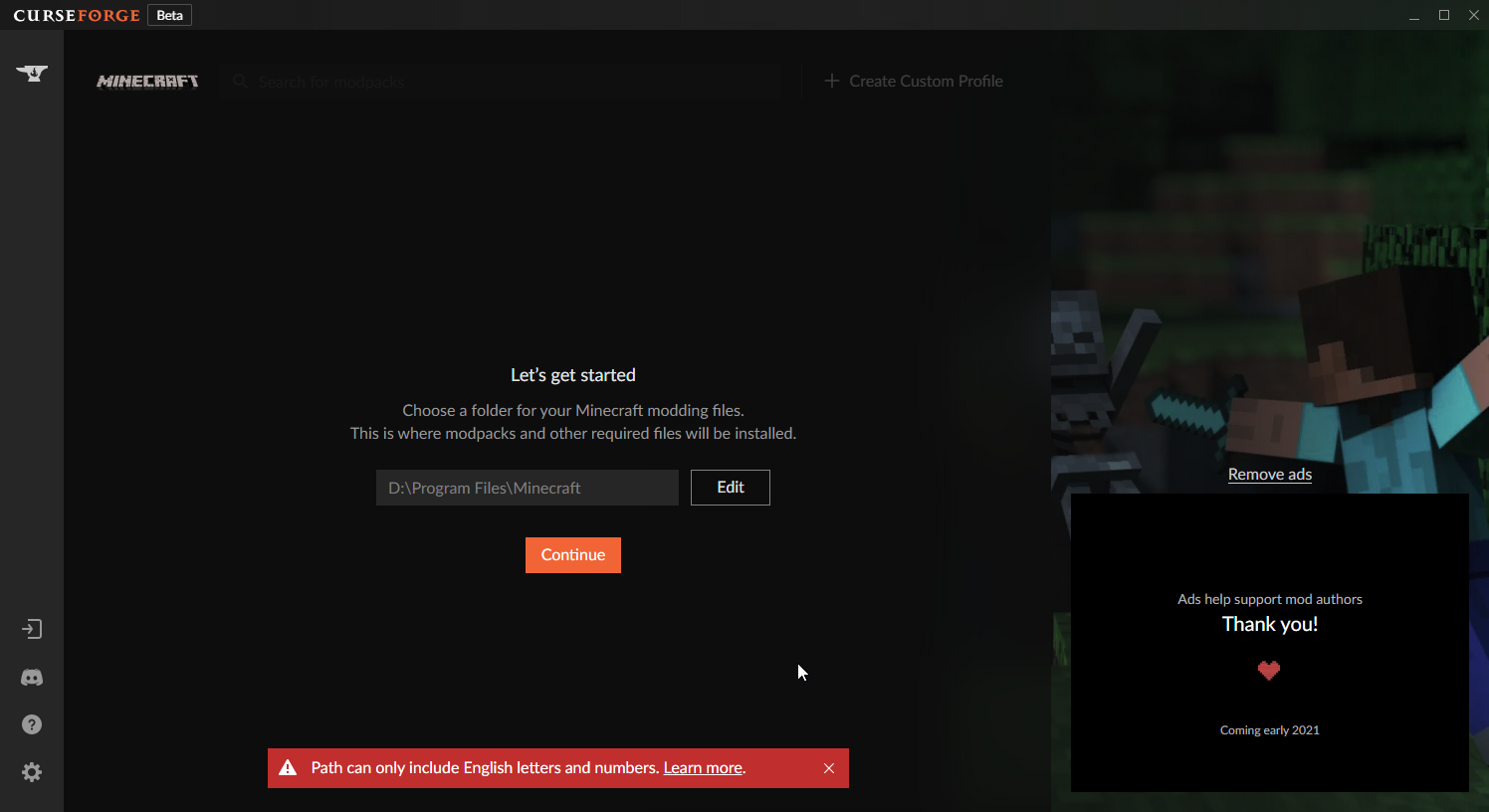
!mc-path
red patioBOT
Path too long/Path must be English letters or numbers only fix!
If Minecraft is not installed, start here.
Click the  in the top right.
Select Minecraft.
Click "Edit".
Move to the "Continue here:" section below.
If Minecraft is installed, follow these steps.
Click the in the bottom left.
Select the Minecraft tab.
Click "Change".
Move to the "Continue here:" section below.
Continue here:
Make a folder in the root directory called CurseForge.
Select the folder you just made.
The text box should show something like the following:
For Windows: C:\CurseForge
For Mac: /CurseForge
 rigid pumice
My thing says couldnt verify minecraft version how do i fix it
fleet bear
!mc-installfix
red patioBOT
- Click on the icon in the bottom left.
- Click the
MinecraftTab. - Click
Changenext to theMinecraft Modding FolderOption. - Select the folder named
Install. - Delete it.
- Restart CurseForge App.
- It will ask to install MC again, do so.
- Play game.
NOTE: You will not lose any modpacks or worlds, These are saved in the Instances folder. DO NOT TOUCH THIS FOLDER OR YOU WILL LOSE EVERYTHING
fleet bear
Instructions tell you exactly step by step what to do
rigid pumice
ok
void grotto
are server files required when uploading a modpack?
 royal rampart
how to fix object reference not set to an instance of a object
 crisp merlin
i downloaded sky factory 4 a while ago now im tryna play it but keeps crashing as soon as i click play.....
what should i do?????
drifting ingot
?mc-logs @crisp merlin
red patioBOT
How to get a Minecraft log file.
Where to find the log on the CurseForge Client.
Right-click the modpack profile icon OR click the button in the modpack profile.
Click Open Folder.
Open the logs folder.
Find the file called latest.log and drag it into discord.
crisp merlin
fleet bear
crisp merlin
!mc-installfix
red patioBOT
- Click on the icon in the bottom left.
- Click the
MinecraftTab. - Click
Changenext to theMinecraft Modding FolderOption. - Select the folder named
Install. - Delete it.
- Restart CurseForge App.
- It will ask to install MC again, do so.
- Play game.
NOTE: You will not lose any modpacks or worlds, These are saved in the Instances folder. DO NOT TOUCH THIS FOLDER OR YOU WILL LOSE EVERYTHING
crisp merlin
ty
digital roost
is it possible to make a fabric modpack from the curse launcher?
and also please consider adding a way to filter out fabric mods from the mod list
 river quiver
what does "object reference not set to an instance of an object" mean?
fleet bear
digital roost
is it possible to make a fabric modpack from the curse launcher?
and also please...
Yes, you need to use jumploader to make it work.
The sorting and proper fabric support will come eventually.
 grim ivy
I want to play bloodynecks 1 block skyblock modded but it doesn't tell me how it just puts something in the folder
digital roost
How can I use texture packs and shaders with curseforge?
grim ivy
pls someone help me
 rich flint
'it just puts something in the folder' - what?
'bloodynecks 1 block skyblock' - what?
rich flint
so what happens when you press play
rich flint
so when you press play your file browser opens?
grim ivy
no they just appear into the folder
red patioBOT
- Click on the icon in the bottom left.
- Click the
MinecraftTab. - Click
Changenext to theMinecraft Modding FolderOption. - Select the folder named
Install. - Delete it.
- Restart CurseForge App.
- It will ask to install MC again, do so.
- Play game.
NOTE: You will not lose any modpacks or worlds, These are saved in the Instances folder. DO NOT TOUCH THIS FOLDER OR YOU WILL LOSE EVERYTHING
grim ivy
ok ill try
rich flint
it will make you reinstall your minecraft core files
grim ivy
now it keeps on saying this error message
queen storm
grim ivy
now it keeps on saying this error message
Did you do the steps?
grim ivy
yep
queen storm
Close overwolf, start curseforge again
grim ivy
ok
grim ivy
same thing
queen storm
grim ivy
same thing
!ticket-app
red patioBOT
:bug: Reporting via the CurseForge App :bug:
-
Click the
icon in the bottom left. -
Select
Open a Ticket. -
Fill out the form with accurate detailed information, "It doesn't work" isn't helpful! What exactly doesn't work and why doesn't it work should be easy to answer!
-
Make sure to upload your Overwolf logs with the
Upload Fileoption on the ticket, information on how to get these logs can be found here https://support.overwolf.com/en/support/solutions/articles/9000176827-how-to-get-your-overwolf-logs -
Submit!
grim ivy
ok
 tight wyvern
Anyone ever have trouble with curseforge deleting all other mods every time you try to install a new mod?
fleet bear
tight wyvern
Anyone ever have trouble with curseforge deleting all other mods every time you ...
Is it actually removing the files or is it just the ui losing them?
fleet bear
This has nothing to do with curseforge, use another room.
tight wyvern
I'm loading up the game currently to see if the mods apply
fleet bear
tight wyvern
So I believe its actually removing them
So, even if you open the mods folder they arent there?
fleet bear
tight wyvern
I'm loading up the game currently to see if the mods apply
It would be faster to just look in the folder.
tight wyvern
Ok so the mods are not working.
They are not in the folder either.
The game in question is Kerbal Space program.
The mods are usually stored inside the game data folder and every time I "reinstall" a new mod it deletes the old mod out of the sub-gamedata folder and installs the new one.
red patioBOT
:bug: Reporting via the CurseForge App :bug:
-
Click the
icon in the bottom left. -
Select
Open a Ticket. -
Fill out the form with accurate detailed information, "It doesn't work" isn't helpful! What exactly doesn't work and why doesn't it work should be easy to answer!
-
Make sure to upload your Overwolf logs with the
Upload Fileoption on the ticket, information on how to get these logs can be found here https://support.overwolf.com/en/support/solutions/articles/9000176827-how-to-get-your-overwolf-logs -
Submit!
tight wyvern
Ok thanks.
digital roost
How would I detect my Stardew Valley? I have it installed on Steam and I've tried scanning and selecting the steamapps/common/Stardew Valley folder and other subfolders but none of my ideas seem to work.
fleet bear
!knownissues
red patioBOT
Known Issues with solutions or status of the issue.
Overwolf maintains a known list of issues here, some with solutions, others without.
http://support.curseforge.com/en/support/solutions/articles/9000196615-known-issues
fleet bear
At the bottom of the page.
digital roost
Gotcha, thanks.
 hollow nacelle
What to do (Modpack: FTB Trident)?
fleet bear
hollow nacelle
What to do (Modpack: FTB Trident)?
Delete and start over if you didn't modify anything.
hollow nacelle
I deleted the Last save
fleet bear
Also this doesn't have anything to do with curseforge, use a different room next time.
Plus you should be using the ftb app for ftb modpacks.
 ornate heath
Is there a way i can run my Forge Server more stable? (Without more Ram, i already gave 10GB to the Server)
digital roost
Hey guys, I have some issues with getting curseforge to work
I picked a modpack and when I press play it just doesn't launch
 still lantern
i was thinking of getting into minecraft modding, however see'ing the state of the comment section on many projects puts me in immense pain (spam comments, comments with no purpose, comments with questions that are already answered in the description, issue posts despite there being a link to github, etc)
is it possible for a project owner to delete comments on the project at their own discretion?
digital roost
When I start like a mod (Minecraft) it doesn't starts it
Why doesn't it work?
Like I'm trying to start the Pixelmon Mod
But it isn't starting
It just says cancel for a little bit
and then its play again :/
still lantern
something could be wrong with how its settup, and is crashing when its trying to load
digital roost
Yes that's probably what's happening rn
still lantern
if theres no popup.... double check everything, check if pixelmon has any dependencies, etc
digital roost
What do you mean with dependencies? I don't know what it means cuz I'm german
still lantern
a dependency mod is a mod that is required to run another mod
some mods will require a library mod to run, i dont know if pixelmon requires such a mod to run
digital roost
It's this Mod
o
In the description it says that I have to download Optifine 12.2.
i mean 16.5
well idk
something like this OptiFine HD U G6
now imma download it
still lantern
you should be able to find it on optifines site
digital roost
It has a link
still lantern
even better!
modpacks arent able to include optifine directly because of copyright or whatever, im surprised its crashing without it though
still lantern

still lantern
lol, i just happened to be here and able to help at the right time
digital roost
oof
digital roost
still lantern
i was thinking of getting into minecraft modding, however see'ing the state of t...
Idk but my friend is making a pixelmon project with others but hes the co owner
Um when im trying to download optifine then this comes
after installing and closing 1.16.5
; - ;
?? ; - ;
what is "missing install path !" ?
idkk
bruh
wait
I think do
At what
When u install optifine?
or mods?
yes
yes to which one ; - ;
all of them
Did u enter a path
Where u want to install it
no
then do it ; - ;
Like this
??
when i install a mod he say " unable to install addon due to a missing path
lyric crescent
This channel isn't for optifine support.
lyric crescent
It's pretty obvious that I'm talking to the person posting stuff about optifine, pay attention please.
digital roost
oh me
sry
Guys, im trying to install the Valhelsia 2 modpack for Minecraft but when I press play it just doesn't launch
For me too
It just doesn't launches
And I need Optifine or so
But I normally already have it
yeah same here
 olive sphinx
Guys can someone help me
i want play RLCraft and if i click start it doesnt do anything
even by other mods
 quasi urchin
When I press start on RLcraft and any other mod it brings me into the launcher fine but I press play and it goes but nothing happens
 autumn ether
lyric crescent
autumn ether
lyric crescent
!feedback
red patioBOT
<:CFidea:798388634972717066> Have an idea on how to improve CurseForge? <:CFidea:798388634972717066>
CurseForge is looking for great ideas and user feedback! Get into the CurseForge Community by providing some feedback and voting on what's important to you!
Think some game should be supported? Post an idea and explain why!
Got a to die for feature idea? Let's hear it!
Location In-app
- Click the button on the bottom left of the app.
- Click on

Suggest a Featureoption!
 magic coral
How to make a server for curseforge Kinda Crazy Craft
 molten drift
uh gusy can someoe help me? i opend trollcraft than i want to open anptehr mod but it keeps showing troll craft
 oak granite
I cant open RLCraft it just brings me to 1.12.1
molten drift
i have a problem like that but when i ope a mod it throws me to troll craft
theres only trollcraft i cant get rid of it
digital roost
when i try to activate the mods, it says to play demo. I dont know what i've done wrong
lyric crescent
you need to sign into an account that owns java minecraft
digital roost
The thing is, every time i try to sign in, it says to use a twitch account, is it meant to say that?
lyric crescent
what is "it"?
digital roost
Well, each time i try to log in, i have to log in to a twitch account to continue
lyric crescent
can you tell me what you're talking about, or send a pic?
digital roost
queen storm
digital roost
You don't need to login, not there at least
digital roost
then where?
lyric crescent
there is no need to log into curseforge/overwolf, it has nothing to do with your minecraft account
explain
 azure gyro
My curseforge doesn't start
 gloomy oar
does it let you have multiple mods installed on separate versions bc it dosent let me can anyone tell me why or is it meant to be like that?
lyric crescent
pressed cancel where, what does it do now? "just didnt work" tells me nothing
which play button
 wind hatch
share your secrets? 🙂
lyric crescent
so play on the curseforge app?
gloomy oar
just close minecraft launcher then click play then it should open minecraft launcher if it says sign in sign in if it dosent and ur already logged it look at the versions @digital roost
lyric crescent
?mc-installfix try this
red patioBOT
- Click on the icon in the bottom left.
- Click the
MinecraftTab. - Click
Changenext to theMinecraft Modding FolderOption. - Select the folder named
Install. - Delete it.
- Restart CurseForge App.
- It will ask to install MC again, do so.
- Play game.
NOTE: You will not lose any modpacks or worlds, These are saved in the Instances folder. DO NOT TOUCH THIS FOLDER OR YOU WILL LOSE EVERYTHING
wind hatch
actually, try the instructions that carl-bot suggested, not actually typing in '?mc-installfix' command 🙂
 blissful atlas
How much ram is good for valhelsia 3 if anyone knows that would be great
gloomy oar
departed keeps crashing can anyone tell me how to fix it? If you do dm me pls bc i got to go
lyric crescent
?mc-path
red patioBOT
Path too long/Path must be English letters or numbers only fix!
If Minecraft is not installed, start here.
Click the in the top right.
Select Minecraft.
Click "Edit".
Move to the "Continue here:" section below.
If Minecraft is installed, follow these steps.
Click the in the bottom left.
Select the Minecraft tab.
Click "Change".
Move to the "Continue here:" section below.
Continue here:
Make a folder in the root directory called CurseForge.
Select the folder you just made.
The text box should show something like the following:
For Windows: C:\CurseForge
For Mac: /CurseForge
 mental vapor
i tried to launch ArtiCraft from Forge labs and when it loaded it shoued this, idk what it is but i need help!
pls DM me if u know how to fix this
lyric crescent
how's this related to curseforge?
mental vapor
i tried to launch it from the curce forge launcher
ho sorry i needed to send tht on community support
yay nevermind prob solved
digital roost
When i want to download a modpack there stands "time out"
 stoic jungle
Does anyone know how to install a minecraft mod after downloading? (I don't have the curse forge app)
fleet bear
stoic jungle
Does anyone know how to install a minecraft mod after downloading? (I don't have...
That's not a curseforge issue then, use another room.
stoic jungle
No, I mean I downloaded it off of curse forge, but I don't have the curse forge app
 cedar hemlock
I am not sure how I would improve this, this is literally all it does, to fix a critical bug
 plucky zealot
Do anyone know what i can do when i try to start an mod it starts with an old Launcher
cedar hemlock
Do I need to write an essay about how it affects the user experience of the user
lyric crescent
you need to explain it in a way that someone looking it would have some idea what is going on
i cant tell from that
cedar hemlock
the link to the bug report should explain it
cedar hemlock
what’s the point, this just fixes the issue
lyric crescent
the point is what i just said, someone should be able to read your description and understand what this does
cedar hemlock
yes, and what it does is to fix the bug
lyric crescent
then explain that
cedar hemlock
whatever
lyric crescent
write your description assuming no one clicks the links.
cedar hemlock
yes so I am just coping the description from the bug report to the page
lyric crescent
probably see you back tomorrow then
 rain light
 lyric crescent
blissful atlas
lyric crescent
blissful atlas
How much ram should I have dedicated for valhelsia 3? If you know dm me please
lyric crescent
not a curseforge issue
 dawn kernel
Hey where in the Curseforge launcher I can find the new 1.16 Direwolf pack ? I can only find his older versions from 1.12.2 down wards
queen storm
dawn kernel
Hey where in the Curseforge launcher I can find the new 1.16 Direwolf pack ? I c...
Can you find it on the site?
dawn kernel
no
slim thunder
thats a ftb pack
queen storm
!mc-ftb
red patioBOT
We do not provide support for FTB Modpacks or the FTB App.
If you are looking to play FTB modpacks use the FTB launcher.
https://www.feed-the-beast.com/
Any Overwolf FTB launcher issues you have should be directed here:
https://github.com/FTBTeam/FTB-App-Overwolf/issues
digital roost
is there a way to get game activity for minecraft when using curseforge so it shows up on discord?
queen storm
There are mods that do that
 novel robin
my curseforge just doesn’t want to load my modpacks, i get to the minecraft page and hit play and it just closes
digital roost
which mod?
 dusk cliff
How do i make a modpack public
lyric crescent
?mc-packshare
red patioBOT
There are two ways to share a modpack you've made with others...
Export and Share - For Friends to Small Groups.
- Click the Icon for the modpack.
- Click the button next to play.
- Click
Export. - Select the files that should be included.
- Send the zip to the people that want it! They can follow the instructions in
!mc-installpackto install the pack!
Upload to Curseforge - For Public Release to Everyone.
This options will make your pack public to EVERYONE, it comes with extra requirements and will take some effort to set up.
- Go to here: https://www.curseforge.com/project/432/4471/create
- Fill out the information with a proper description of the pack. This should allow anyone to understand what the pack is.
- Click the Icon for the modpack in the CurseForge app.
- Click the button next to play.
- Click
Export. - Select the files that should be included.
- Open your Project you made on the CurseForge site and Upload the file you just made.
- Wait for Moderation & Sync so it can show up in the client! (See
!syncfor limitations)
void grotto
I uploaded my pack and it keeps getting denied for missing manifest.json file
I made sure its in the zip file and i also put it in the overides folder
Should i just put it in mods folder and every folder in the zip?
drifting ingot
void grotto
Should i just put it in mods folder and every folder in the zip?
Are you not using the export feature?
digital roost
Is curseforge meant to appear at the bottom left on the minecraft launcher?
 outer maple
hi i have i7 9700k, 16gb ram 3200hz, can i play with that modpacks of 200 mods? like ftb?
 proud thicket
Yes
digital roost
why can`t i install minecraft mods?
 north otter
How do you mean?
lyric crescent
yeah, why cant you?
north otter
As in they just wont install?
Or is it the same issue i was having
That i figured out (Thanks yamza)
lyric crescent
so you installed java? or something else?
north otter
Yep, installed that and it worked fine
digital roost
north otter
How do you mean?
i will install minecraft mods and i not cant
i played on java
north otter
Hmmm
lyric crescent
need to explain
north otter
Try installing a modpack, tell us what shows up
Cause it sounds like what happened to me
digital roost
it works again
 digital spruce
hello when i goto play a mod, its shows that i havent purchased the game
digital spruce
yes
lyric crescent
you signed into an account that doesnt own the game
digital spruce
its the acct that i own it on
lyric crescent
options are
- wrong account
- you dont own it
- that's it, just 1 or 2
digital spruce
3rd option: i own it
lyric crescent
then 1
digital spruce
nope right acct
lyric crescent
then you gunna have to figure it out cuz cf doesnt have anything to do with your minecraft login
 delicate knot
Hey Can i ask how to download the mods i got to forge and im stuck can Somone Help me
 ebon dragon
I'm having an issue installing pixelmon from the curseforge app, the download will get to 3 out of 7 mods at 42% then will stall and say the download timeout. Any suggestions?
red patioBOT
Hey there, it is Curseforge, not "Cursed forge"
slim thunder
i don't think you can install pixelmon right now
because it's 444 megabytes
@ebon dragon
ebon dragon
well that blows
lyric crescent
it's an internet problem, nothing we can do about it.
delicate knot
Hey Can i ask how to download the RL Craft i got to forge and im stuck can Somone Help me
slim thunder
its an internet problem?
red patioBOT
:bug: Reporting via the CurseForge App :bug:
-
Click the
icon in the bottom left. -
Select
Open a Ticket. -
Fill out the form with accurate detailed information, "It doesn't work" isn't helpful! What exactly doesn't work and why doesn't it work should be easy to answer!
-
Make sure to upload your Overwolf logs with the
Upload Fileoption on the ticket, information on how to get these logs can be found here https://support.overwolf.com/en/support/solutions/articles/9000176827-how-to-get-your-overwolf-logs -
Submit!
lyric crescent
delicate knot
Hey Can i ask how to download the RL Craft i got to forge and im stuck can Somon...
open the app, install the pack
delicate knot
Hey Can i ask how to play R L Craft after i downloaded it
lyric crescent
quit spamming
delicate knot
i got on minecraft and the mods folder does not have it in there
slim thunder
you use curseforge to play
lyric crescent
it's not a mod, so it wouldnt be in a mods folder
delicate knot
Yes i use forge
lyric crescent
!!=
red patioBOT
Wording is important!
Forge = Minecraft Forge, This is a modloader often just called "Forge".
CurseForge = A Website/App that has content for games.
Mods = Individual mod files.
Modpacks = Multiple mods put into the mods folder or downloaded from CurseForge.
These are not Interchangeable! Please use the correct terms as it allows us to help you faster!
 sturdy minnow
?ticket-app
red patioBOT
:bug: Reporting via the CurseForge App :bug:
-
Click the
icon in the bottom left. -
Select
Open a Ticket. -
Fill out the form with accurate detailed information, "It doesn't work" isn't helpful! What exactly doesn't work and why doesn't it work should be easy to answer!
-
Make sure to upload your Overwolf logs with the
Upload Fileoption on the ticket, information on how to get these logs can be found here https://support.overwolf.com/en/support/solutions/articles/9000176827-how-to-get-your-overwolf-logs -
Submit!
delicate knot
I mean the mods list in the game the mod is not in it
slim thunder
how are you trying to play it
delicate knot
minecraft 12.2 is the same version that it sent me two
slim thunder
my brain...
slim thunder
same way you normally would
lyric crescent
same way as always
slim thunder
except you need to install forge for servers if you're doing modded
 digital ferry
so even if its modded its the same with normal minecraft right ?
slim thunder
set up a server like you normally would, then install forge for a server
delicate knot
Sorry but i installed the mod and when i launched it it took me to minecraft 12.2 and in the mods list it does not have the mod showing up and only shows 4 items Minecraft , Minecraft Coder Pack , Forge Mod Loader , Minecraft forge
Sorry Never did this and its complex
Is There nothing you guys can Do?
 fallow lichen
How would I go about updating the Minecraft version of a profile?
 outer lagoon
^this
 narrow sorrel
yo
i installed valhesia
on curseforge
and its not showing in the minecraft launcher
any fixes?
lyric crescent
fallow lichen
How would I go about updating the Minecraft version of a profile?
make a new profile
...?
i really have no idea what you're asking about
!!=
red patioBOT
Wording is important!
Forge = Minecraft Forge, This is a modloader often just called "Forge".
CurseForge = A Website/App that has content for games.
Mods = Individual mod files.
Modpacks = Multiple mods put into the mods folder or downloaded from CurseForge.
These are not Interchangeable! Please use the correct terms as it allows us to help you faster!
lyric crescent
neither forge, nor curseforge host servers
nope
curseforge is a place to get mods. forge is the tool used to run mods. not made by the same people
google minecraft forge for forge
red patioBOT
Hey there, it is Curseforge, not "Cursed forge"
lyric crescent
wtf does this even say
red patioBOT
Hey there, it is Curseforge, not "Cursed forge"
Hey there, it is Curseforge, not "Cursed forge"
lyric crescent
i dont care what you call it, but you need to make sense lol
 gloomy kernel
i wanna download a mod made by forge labs and whenever i open the link and press download it opens curseforge and then doesnt show up
fleet bear
Then download it inside the app.
 buoyant torrent
How can i port a mod to another version
fleet bear
gloomy kernel
on the modpack
You wait for it to load?
fleet bear
buoyant torrent
How can i port a mod to another version
This isnt a curseforge issues, use another room.
digital roost
 fickle halo
snuffles it work fine for me
fickle halo
snuffles it work fine for me
"my (thing) is broken, how do i fix it?"
'it works fine for me'
 long path
when i try to play a modpack it says the system cannot find the file specified
lyric crescent
long path
when i try to play a modpack it says the system cannot find the file specified
 tulip jungle
How long will it take from the time my uploaded modpack is approved to when it actually updates on the curseforge client list?
lyric crescent
1 to 24 hours
tulip jungle
thank you
 wicked furnace
I tried downloading MCeternal this time, on the CurseForge client and around 20-30% finished the download cancels automatically and it said : "Install failed due to a missing path". How can I fix that?
?mc-log
red patioBOT
How to get a Minecraft log file.
Where to find the log on the CurseForge Client.
Right-click the modpack profile icon OR click the button in the modpack profile.
Click Open Folder.
Open the logs folder.
Find the file called latest.log and drag it into discord.
fiery dome
i need help i think that when i launch mc eternal on curseforge it opens the wrong launcher and it never works i don't know if it's different for mac and windows or i did something wrong please help
can anyone show me how to set up curseforge on macbook?
lyric crescent
 "Old" Minecraft launcher 1.6.73 opens
What to do: On the Curseforge app, go to
wicked furnace
lyric crescent
<:missingblock:796992980811644939> **"Old" Minecraft launcher 1.6.73 opens**
> *...
is that a fix?
lyric crescent
it's a fix for the issue stated..
wicked furnace
wicked furnace
I tried downloading MCeternal this time, on the CurseForge client and around 20-...
How can I fix this?
What do I do about this?
fleet bear
!mc-installfix
red patioBOT
- Click on the icon in the bottom left.
- Click the
MinecraftTab. - Click
Changenext to theMinecraft Modding FolderOption. - Select the folder named
Install. - Delete it.
- Restart CurseForge App.
- It will ask to install MC again, do so.
- Play game.
NOTE: You will not lose any modpacks or worlds, These are saved in the Instances folder. DO NOT TOUCH THIS FOLDER OR YOU WILL LOSE EVERYTHING
wicked furnace
fleet bear
!mc-installfix
Ok so I did that and started redownloading my custom profiles, but halfway through it said the same thing "Could not verify Minecraft version" again. What should I do?
fleet bear
open a ticket
digital roost
how do I add a mod that is downloaded from the site to minecraft
wicked furnace
u go on your mc launcher
and then go to installations make a new installation with the forge version
digital roost
oh
wicked furnace
make sure you download the version needed for the mod
digital roost
So I have to use the desktop app then
wicked furnace
idk i always use forge for mods
digital roost
Well Im boned then
wicked furnace
are you using Cursedforge?
wicked furnace
try using forge
 twilit bay
You can choose what you want so don’t
wicked furnace
theres also a mods section in curseforge
digital roost
hngh
twilit bay
digital roost
hngh
There is a anime mod I think
digital roost
cool dont even want that
So normal forge wont install
"Uh yea this doesnt have an app or whatever"
twilit bay
Do you want ice cream and to watch boko no pico
digital roost
Do not fucking talk to me ok corn, quit being annoying
wicked furnace
then you run the download
digital roost
wicked furnace
you download the version you want from the website
I did that
the installer wont work
wicked furnace
and select client
fleet bear
If you aren't using CurseForge app and are modding by hand use another room please.
wicked furnace
and press ok
digital roost
Thats my problem, curseforge just will not work
fleet bear
explain?
twilit bay
I sent you a video link on how to do it
twilit bay
digital roost
Thats my problem, curseforge just will not work
Look at dms
twilit bay
No I sent one for forge no curseforge
digital roost
ticket was no help. at all.
fleet bear
what did they tell you in the ticket?
 thorn parrot
hello i was wondering can you have shadders using curse forge
digital roost
At the moment, the app is still in its Beta phase, which means that there are certain issues and bugs that you may be experiencing, but thanks to you and the community of CurseForge, we are now on our way to solving them!
Here you can find a list of the most common ones: CurseForge Known Issues
Is your issue not listed or you still wish to talk to us?
Just reply to this message and describe the issue in as much detail as you can (including logs and relevant screenshots).
If you don't need assistance but do want to share your feedback, you can do that in the CurseForge Ideas site 🙂
this is word. for. word.
The issues were not listed
fleet bear
Then do as it says
fleet bear
and how long did you wait
Is your issue not listed or you still wish to talk to us?
Just reply to this message and describe the issue in as much detail as you can (including logs and relevant screenshots).
reply to the ticket and say in detail the issue, include logs and the screenshot.
digital roost
fleet bear
reply to the ticket and say in detail the issue, include logs and the screenshot...
I did
fleet bear
I'm much more than just a moderator 😛
fleet bear
digital roost
I did
ok did you get a reply back yet?
digital roost
fleet bear
ok did you get a reply back yet?
no this was 2 days ago
and now my java runtime wont work either
this is too frustrating just to put new biomes in minecraft
twilit bay
fleet bear
I'm much more than just a moderator 😛
An admin sorry it late for. Me and I didn’t see if sorry
fleet bear
digital roost
this is too frustrating just to put new biomes in minecraft
you are always welcome to use another modding program. There's a few of em out there
wicked furnace
digital roost
and now my java runtime wont work either
assuming you have windows, go to the windows search bar and search up configure java and open that. Go to the updates tab and press update now in case there's a new update.
twilit bay
Well crazy just said what I was going to say
digital roost
I have to get runtime or something?
idk, just gonna do what it says to do with planet minecraft, hopefully I can figure that out
sorry for wasting your precious time
twilit bay
Do you need Java for this not the game but the app
wicked furnace
pretty sure no, but if your going to use it for minecraft then yes you need java for minecraft
twilit bay
That’s why then probably
drifting ingot
mc ships with java, but you need java to apply forge to the minecraft jar
twilit bay
digital roost
I have to get runtime or something?
https://youtu.be/qrLCrSIcvMA follow this step by step

In this video, we show you exactly how to download and install Java for Minecraft. Wether you are starting a Minecraft server or install Minecraft mods, you need Java in order for them to work. This is because Minecraft runs on Java-based in .jar files. Everything from Minecraft server software to Minecraft mods are .jar files, and this video sh...
twilit bay
drifting ingot
mc ships with java, but you need java to apply forge to the minecraft jar
Let S/he try it
drifting ingot
God I hate the way that guy talks with a passion. Helpful content, but he makes me want to kick puppies
twilit bay
Ik but it help
fleet bear
topic please
gloomy kernel
anyone know how you download shaders when therers already mods using forge 1.16.5
fleet bear
you download shaders by clicking download on the place you get the shaders from.
twilit bay
Do you know any good places to download mods from ?
twilit bay
Other then forgecurse
gloomy kernel
no
twilit bay
K np
drifting ingot
Curseforge is pretty much the defacto place to get mods. At least the ones worth playing
wicked furnace
twilit bay
K np
if you already have the mods you want to download in mind then you can search them up and download them from the original creator's website.
they most likely will have a website if its a popular mod
twilit bay
No it’s ok I was looking for more modes because there wasn’t that much on cursed forge for me idk why
red patioBOT
Hey there, it is Curseforge, not "Cursed forge"
twilit bay
Curseforge sorry
fleet bear
CurseForge is really the primary place to get Minecraft mods currently unless you speak Russian, Chinese or Japanese as they also have there own forums/sites with semi-large collections of mods but they won't be in english.
twilit bay
A bit of Japanese and I’m learning it still tho
But never it’s fine I was just asking to look at a big amount but there all good so it’s ok
wicked furnace
I get this when i try to play through curseforge, and its been a while now but the green bar still hasn't moved?
fleet bear
wait
gloomy kernel
idk how to play mc with both mods and shaders downloaded
wicked furnace
gloomy kernel
idk how to play mc with both mods and shaders downloaded
I heard you need optifine or something like that for shaders