Hello CurseForge Support Team,
I am having an issue with CurseForge not detecting ARK: Survival Ascended, even though the game is correctly installed via Steam.
My setup:
Game: ARK: Survival Ascended
Platform: Steam
Operating System: Windows
Steam Library path (custom):
D:\SteamLibrary\steamapps\common\ARK Survival Ascended\
The game launches normally through Steam and the executable is present in the correct folder.
However, CurseForge does not detect the game automatically, and when I try to add it manually, I receive the message “Game not found”, even when selecting the folder that contains the game executable.
What I already tried:
Restarting CurseForge and Steam
Running CurseForge as administrator
Rescanning for games
Manually selecting the installation directory
Verifying the game files in Steam
Unfortunately, none of these steps resolved the issue.
Because of this, I cannot manage or install mods for ARK: Survival Ascended through the CurseForge app, even though the game itself runs without any problems.
Could you please advise:
Whether ARK: Survival Ascended currently has known detection issues in CurseForge
Or if there is a specific directory structure or configuration required for Steam installations on a non-default drive
Thank you very much for your help.
 toxic bridge
 rich flint
 fluid hawk
 bronze bluff
 copper mural
 near granite
 > Minecraft tab
  > scroll to bottom of window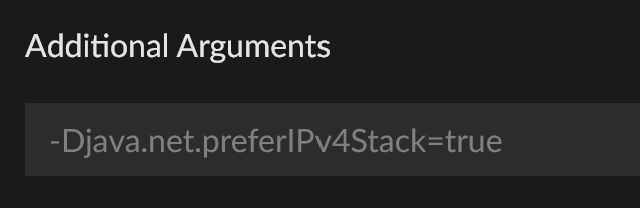
 modern eagle


 pine axle

 modest swallow
 gilded badge
 verbal gate

 prime cave

 ocean lichen
 last idol

 steep perch
 pure remnant
 hoary estuary
 blazing sierra
 mental night
 pliant spoke
 sonic cipher


 quaint orchid
 ivory hedge
 tame meadow

 signal ridge
 button in the Top Right Corner of the app


 menu.
menu.
 iron lynx
 solid gate


 marsh parcel
 timid temple
 vivid bloom
 Windows
 Mac
Mac hallow canyon

 stuck rivet


 astral nexus
 pastel pecan

 austere yew
 wide rapids
 manic sun

 wraith rock


 astral cradle

 austere dove
 worn beacon
 sand girder

 smoky iris
 proven horizon
 remote halo

 jade nova

 keen berry

 solar warren
 acoustic sail


 young bone
 empty relic
 slow ledge



 compact pecan
 waxen tiger
 bright wharf
 unique crown

 jolly scaffold
 gleaming pulsar
 junior nexus
 dense sandal
 last pier

 harsh valve


 cedar crown
 hushed cedar
 severe lichen
 uneven quail
 worthy elbow
 button on the left side of the app? OR the mine is login in the upper right corner?


 vapid musk
 rough night
 @iczani banned

 velvet python
 flat nest
 keen spruce
 cold drum
 steady shard
 coral carbon



 raw shoal
 sweet rock
 upbeat nymph
 vivid elk

 edgy juniper
 modern trail

 leaden skiff
 hexed horizon
 lethal moss
 trail matrix

 neat field
 stone whale
 lost rune


 jade hawk
 dire root
 silk eagle

 velvet basalt

 hollow verge
 manic dagger
 viral void
 unique grail
 swift oar
 unborn wind

 ruby temple
 remote nimbus


 silent cargo
 upbeat thicket
 chrome locust


 unique barn
 torn bolt
 fervent stream

 ember osprey

 graceful swift
 worn dust
 icon in the bottom left then you should see change path after you click your game

 fluid tusk

 runic pond
 ivory swan
 slow lily

 feral silo
 buoyant lava


 digital roost

 azure goblet
 limber moss
 rose shuttle

 fathom lark
 snow grail
 clever spade
 solemn flint
 hexed nova
 woven scroll
 marble goblet
 dawn rover
 static leaf
 dawn cloud
 wintry crown
 chilly ore
 raven cliff


 plain cipher
 tiny sable


 golden moth
 worn lark
 frosty magnet
 fair dagger
 tepid sundial
 glad wharf
 sage elk
 vast cargo
 import option at the top.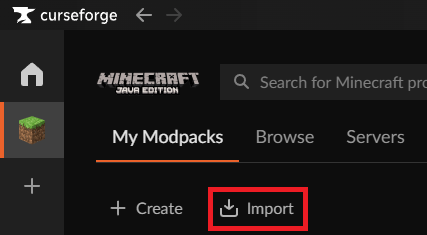
 prisma hazel
 upper root
 steel sand

 split swift
 gleaming delta
 covert cloud
 peak shale
 restive shuttle

 honest sedge
 silver inlet
 wicked wren
 tepid heron
 livid grotto
 modest zodiac

 alpine ether
 twin meteor
 hallow glade
 agile charm
 wet hornet

 frail coral

 teal pebble

 quiet ridge
 golden dragon
 weary dove

 boreal dome
 rotund sandal
 sacred furnace
 hushed gorge