#🔥︱curseforge-support
1 messages · Page 328 of 1
 sterile kestrel
What's the original version of minecraft you are moving from?
 small ibex
1.21.8
sterile kestrel
Not all mods have been made compatible with 1.21.9 yet. You could just be using mods that haven't updated yet
Only solution would be to wait if thats the case. Or clone it for backup purposes and update each mod indicidually
small ibex
ok
But I dont see the switch button to begin with? So I dont know if thier comatible or not. I cant even change my version at all
 opal cipher
You can't for your own modpacks
sterile kestrel
Switch version is only there for premades
Because it's pack version, not mc version
opal cipher
And you cannot change game versions, you need to recreate the profile with the new game version.
sterile kestrel
You can update the modloader within it can't you?
sterile kestrel
opal cipher
Modloader, yes.
Right but I thought it didn't care but I guess i was only thinking you can't change major versions(1.19 to 1.20) vs minor
 lunar finch
Been having trouble not myself but a buddy trying to open up my modpack but keeps crashing on start up i cant seem to find the cause really it doesnt happen to me at all so wondering if something else can be the cause? https://mclo.gs/yb1Ypt0
 bronze bluffBOT
lunar finch
Been having trouble not myself but a buddy trying to open up my modpack but keep...
bronze bluffBOT
lunar finch
Been having trouble not myself but a buddy trying to open up my modpack but keep...
Paste link generated for file uploaded by ScallyDragon.
 little wraith
hello! My curseforge launcher has a very unusual problem, as when I click it the play button of any modpack it opens the web browser "chromium" instead of the minecraft launcher

 ocean lichen
little wraith
https://youtu.be/9aXt5gHKnhE
ocean lichen
little wraith
https://youtu.be/9aXt5gHKnhE
Try a repair installation in the very top right corner of the app, then restart your computer
little wraith
will do
 viral kiln
can somone help me please, my minecraft just leaves when its ready
 formal tusk
viral kiln
can somone help me please, my minecraft just leaves when its ready
formal tusk
viral kiln
can somone help me please, my minecraft just leaves when its ready
Just so you know, https://support.apple.com/guide/mac-help/mh26782/mac
 flat canopy
Hi, recently my modpack crashed and from that i cannot launch any other modpack. Can someone please help e fix this problem?
it says Failed to launch modpack. An unexpected error occurred
 woeful glen
can we get a workaround for the imagur removal from the u.k.
maybe like a built in VPN? cause now I can't see ANY images anymore on mods because everyone uses imagur.
formal tusk
You mean Imgur?
woeful glen
you understood what i meant XD
formal tusk
Didn't know the UK was so aggressive that it's restricting Imgur. Hope that doesn't happen here.
This Discord server is community run. You should contact CF support
Or make a suggestion on the ideas site
woeful glen
oh- no the u.k didnt restrict imgur. imgur backed out of the u.k because the goverment was invenstigating them and threatened to fine the parent company
woeful glen
i know. I hate the OSA, ill leave it at that
formal tusk
Likewise
 tame zealot
So I am trying to download the standalone version of curseforge on my desktop and when I go to download it I can't seem to get it to download like it's not even lettingme click it
Please can someoen herlp me
sterile kestrel
tame zealot
So I am trying to download the standalone version of curseforge on my desktop an...
!getcf
bronze bluffBOT
tame zealot
So I am trying to download the standalone version of curseforge on my desktop an...
-# Trigger requested by Diet_Oxygen.
Where and how to install the CurseForge app
 Windows
-
Windows app
[Windows download]
Minimum Requirements:
OS Version: Windows 10 or 11 - (64-bit)- If you are having issues with the
Windows Downloaduse the [Windows alternative download] to install Overwolf. Then download CurseForge from the App Store.
- If you are having issues with the
-
Windows Standalone app
[Windows Standalone app download]
Note: Games supported - World of Warcraft, Minecraft, and The Sims:tm: 4.
 Mac
Mac
- [Mac download]
Minimum Requirements:
OS Version: MacOS 10.15 or newer - (64-bit)
:penguin: Linux
- [Linux download]
Note: Games supported - World of Warcraft, Minecraft Java.
sterile kestrel
See if you can get it from here
 dense sierra
i have problem with deleting one modpack wath could be problem?
bronze bluffBOT
 haughty glacier
!help
haughty glacier
!help
Please provide some more information to receive assistance
Providing the following information will help the team in assisting you:
- A detailed description of the issue you're experiencing
- If a mod/modpack/addon is involved, please specify the name
- Any screenshot/video/gif of the issue if you have
Some tips for explaining yourself better to save time and additional questions:
- Avoid using words such as 'it', say what it is :]
- Instead of simply saying something doesn't work, try to describe what's happening when you're running it
haughty glacier
hthe modpack is custom made
 compact pecan
haughty glacier
Hey so I want to update my 1.21.8 modpack to 1.21.9 how do I do so?
compact pecan
haughty glacier
Hey so I want to update my 1.21.8 modpack to 1.21.9 how do I do so?
You gotta remake it in 1.21.9
haughty glacier
compact pecan
You gotta remake it in 1.21.9
bruh
 fathom moth
Can you guys please help me?
I wanne play Java on my PC with a controller, but it doesn't work with the mods i tried
Does somebody know, what to do?
sterile kestrel
!notcf #🧱︱mc-other-help
bronze bluffBOT
sterile kestrel
!notcf <#768367574001778729>
This is not related to CurseForge owned/maintained features or services
CurseForge does not make or maintain any of the content or games used on the site or the app.
Just because it's on the site/app does not make it a problem with CurseForge.
Please move to the respective channels as requested, OR use #👽︱game-support for game-related help.
 fresh niche
i want to make a server with a modpack, problem is i didnt make the modpack and the modpack in question doesnt have a server pack on the curseforge page how can i now make a server with the modpack?
ocean lichen
fresh niche
i want to make a server with a modpack, problem is i didnt make the modpack and ...
!mc-univ
bronze bluffBOT
fresh niche
i want to make a server with a modpack, problem is i didnt make the modpack and ...
-# Trigger requested by mattéo 35.
Universalator server tool
-
The Universalator is a file (BAT script) which can be used to install and launch modded Minecraft server files on PCs (and VMs).
- All Minecraft (Java) versions are supported.
- Supports Neoforge, Forge, Fabric, Quilt, Vanilla.
- Java version files are automatically obtained and handled!
- Has additional tools like client-side mod detection.
-
Use it to create custom servers on your PC!
-
Use it to launch existing published server packs on your PC!
Current versions support use with Windows, Linux, MacOS
The script for each OS version is a single file which is placed into, and run from the server folder.
Universalator project download website & wiki
fresh niche
ok ill try it out thx
little wraith
ocean lichen
Try a repair installation in the *very top right* corner of the app, then restar...
didn't work
 ocean lichen
little wraith
didn't work
ocean lichen
little wraith
didn't work
!mc-path
bronze bluffBOT
little wraith
didn't work
-# Trigger requested by mattéo 35.
Changing your Minecraft install path on the CurseForge App
- Click the
 in the bottom left.
 - Select the Minecraft tab.
- Click
Change. - Select the location:
- Windows:
Local Disk (C:)at the left side of the window. If you do not see it, clickThis PCfirst.) - Mac:
/Users/Shared/CurseForge, If it does not exist, make it.
:small_orange_diamond: If Minecraft is not installed yet in CurseForge App:
- Select Minecraft from the list of games, then select the
Advancedoption. - Continue with step 4 above.
little wraith
ocean lichen
!mc-path
thanks!
fresh niche
fresh niche
ok ill try it out thx
so i tried it out but now it says this i looked onl9ine but im not getting any results
-
Missing required dependency or library mods
- Not new enough versions for library or dependency mods
- Incompatible mods
- Mod ID:'minecraft' = MOD FILE VERSION NOT FOR THE CORRECT MINECRAFT VERSION
- Mod ID:'FORGE' = MODLOADER VERSION NOT NEW ENOUGH FOR MOD FILE
Mod ID: 'fabric_api', Requested by: 'continuity', Expected range: '', Actual version: '0.92.6+1.11.14+1.20.1'
Mod ID: 'connectormod', Requested by: 'continuity', Expected range: '', Actual version: '1.0.0-beta.46+1.20.1'
ocean lichen
fresh niche
- Missing required dependency or library mods
- Not new enough versions for l...
You have not setup the Minecraft version and modloader correctly.
fresh niche
ive put in all the files from the modpack and the bat file from the application you showed me aswell as the server jar from minecraft what else could be missing?
ocean lichen
fresh niche
ive put in all the files from the modpack and the bat file from the application ...
You did something wrong while configuring the tool
ocean lichen
You can reput all the settings in the main menu
It's really simple. All you need to do is put the right modloader and Minecraft version
fresh niche
so i redid the settings with all variations but it gives me the sam error still
ik the version modloader etc i redid it with different java versions but still no resuilt
ocean lichen
Take a screenshot in the main menu
 lucid trail
yo?
bronze bluffBOT
lucid trail
yo?
Paste link generated for file uploaded by 𝐏𝐫𝐢𝐜𝐞.
 raw lark
so like I accidentally deleted some files from cursforge I think and now It's acting up and like just wanted to ask will my downloads (mods) still stay there? even if I sign in? (This Is a very stupid question, i know)
lucid trail
lucid trail
yo?
help 🙏
ocean lichen
lucid trail
yo?
Go in one of the Minecraft support channel please
lucid trail
ocean lichen
Go in one of the Minecraft support channel please
i don't see it
ocean lichen
lucid trail
ocean lichen
<id:customize>
game support?
 ocean patrol
Everytime I generate a code it never generates and this also happened 2 weeks ago but i thought it was just a bug that would be fixed but its still happening and yes im logged into twitch
 ocean lichen
ocean patrol
Everytime I generate a code it never generates and this also happened 2 weeks ag...
ocean lichen
ocean patrol
Everytime I generate a code it never generates and this also happened 2 weeks ag...
Try reinstalling the app. If the issue still happens, then your network or another program in your computer is likely faulty of this issue
ocean patrol
ocean lichen
Try reinstalling the app. If the issue still happens, then your network or anoth...
It's a fresh installation. Does this help?
 formal tusk
fresh niche
- Missing required dependency or library mods
- Not new enough versions for l...
formal tusk
fresh niche
- Missing required dependency or library mods
- Not new enough versions for l...
Run Universalator's client side mod detector. It should remove Continuity
ocean lichen
ocean patrol
It's a fresh installation. Does this help?
Not really
ocean patrol
I've shut all programs down in the background besides discord and curseforge app still doesn't work. It's a fresh installation of windows and curseforge too so idk what to say
ocean lichen
Can you send the app log?
ocean lichen
!cflogs-app
bronze bluffBOT
ocean lichen
!cflogs-app
How to get your CurseForge app logs
How to get your CurseForge app logs
- Click the

Create logs zipin the menu.
menu. - Drag and drop the zip file created to this channel.
- Wait for someone to look at it so they can help you.
 ocean patrol
bronze bluffBOT
ocean patrol
ocean patrol
bronze bluffBOT
ocean patrol
Zip paste links generated for archive uploaded by Sʷɪғᴛʏ.
ocean patrol
It used to generate instantly but it could be due to the size of the modpack which is why it's taking longer although don't quote me on it
ocean lichen
ocean patrol
What is your antivirus?
ocean patrol
I don't have one
ocean lichen
Have you tried to run the app as admin?
ocean patrol
I'll try that hold up. It was working without admin perms but lemme try
Nope didn't work
Wait I can see it's loading now on admin perms after I set all users to admin perms that seemed to fix the issue

It's loading but very slow, I think that's due to have 384 mods in the pack
ocean patrol
thats why it took so long to load
 ocean lichen
ocean patrol
thats why it took so long to load
ocean lichen
ocean patrol
thats why it took so long to load
Ah, yeah.
 torpid kraken
whats the average time it takes for a modpack to be approved?
bronze bluffBOT
torpid kraken
whats the average time it takes for a modpack to be approved?
-# Trigger requested by ANTI.VIRUS.
Project moderation time
Project/File moderation is done on these days unless otherwise mentioned:
Sunday, Monday, Tuesday, Wednesday, Thursday: <t:1631170800:t> - <t:1631199600:t> (Your time)
Friday, Saturday: Some moderation is done, but not as quickly as during the other days.
Projects are moderated First in, First out. If you submit late in the work day, it will likely get left until the next day!
New Projects or anything flagged for manual review: 1-3 Working Days
Updates to approved projects not needing manual approval: 1 Hour
-If your file has been "Under Review" for more than an hour, then it is at manual review!
Click here for the Minecraft mod Approval Process
The champions, moderators and helpers are not responsible for any content reviews/moderation.
And we cannot ask the team to "speed up" moderation for a certain project either.
 steep perch
I was faster
 fallen loom
steep perch
I was faster
fallen loom
steep perch
I was faster
Dangit
ocean lichen
fallen loom
Sounds like you're publishing a lot more than you need to
The code automatically copy everything, including resource packs. At least, the last time I tested
fallen loom
ocean lichen
The code automatically copy everything, including resource packs. At least, the ...
Dumb if true
ocean lichen
fallen loom
Dumb if true
I agree
torpid kraken
bronze bluff
-# `Trigger requested by ANTI.VIRUS.`
oh so they wont start on it for another 10 hours 😭
 craggy coyote
i need helppp
i keep getting the same error over and over when i try to play a MC modpack
There is insufficient memory for the Java Runtime Environment to continue.
Native memory allocation (mmap) failed to map 2181038080 bytes. Error detail: G1 virtual space
JVM is running with Zero Based Compressed Oops mode in which the Java heap is
placed in the first 32GB address space. The Java Heap base address is the
maximum limit for the native heap growth. Please use -XX:HeapBaseMinAddress
to set the Java Heap base and to place the Java Heap above 32GB virtual address.
where do i type the XX heap line?
fallen loom
As I said before, provide logs showing the actual issue instead of what you think you need to do
craggy coyote
--------------- S U M M A R Y ------------
Command Line: -XX:HeapDumpPath=MojangTricksIntelDriversForPerformance_javaw.exe_minecraft.exe.heapdump -Xss1M -Djava.library.path=\curseforge\minecraft\Install\bin\693e99ea21a15748adad1e76577d3fbc68ca6505 -Djna.tmpdir=\curseforge\minecraft\Install\bin\693e99ea21a15748adad1e76577d3fbc68ca6505 -Dorg.lwjgl.system.SharedLibraryExtractPath=\curseforge\minecraft\Install\bin\693e99ea21a15748adad1e76577d3fbc68ca6505 -Dio.netty.native.workdir=\curseforge\minecraft\Install\bin\693e99ea21a15748adad1e76577d3fbc68ca6505 -Dminecraft.launcher.brand=minecraft-launcher -Dminecraft.launcher.version=3.20.7 -DFabricMcEmu= net.minecraft.client.main.Main -Xmx5G -XX:+UnlockExperimentalVMOptions -XX:+UseG1GC -XX:G1NewSizePercent=20 -XX:G1ReservePercent=20 -XX:MaxGCPauseMillis=50 -XX:G1HeapRegionSize=32M -Dlog4j.configurationFile=\curseforge\minecraft\Install\assets\log_configs\client-1.12.xml net.fabricmc.loader.impl.launch.knot.KnotClient --version fabric-loader-0.17.2-1.20.1 --gameDir \curseforge\minecraft\Instances\Fantasy MC Fabric --assetsDir \curseforge\minecraft\Install\assets --assetIndex 5 --userType msa --versionType release --quickPlayPath \curseforge\minecraft\Install\quickPlay\java\1759355638644.json
Host: 11th Gen Intel(R) Core(TM) i7-11700KF @ 3.60GHz, 16 cores, 15G, Windows 11 , 64 bit Build 26100 (10.0.26100.5074)
Time: Thu Oct 2 00:55:54 2025 GTB Daylight Time elapsed time: 115.809493 seconds (0d 0h 1m 55s)
fallen loom
?mc-logs
bronze bluffBOT
fallen loom
?mc-logs
How to get your profile logs on CurseForge for support
- Right-click the modpack profile icon OR click the
 button in the modpack profile.
 - Click

Open Folder. - Open the
logsfolder. - Drag and drop the FILE named
latestinto discord.
You can also view this video
craggy coyote
gimme a sec
ocean lichen
If you have any hs_err_pid file in the modpack folder, send one of them as well
craggy coyote
i only see GZ files
324k size
only one text document
i send the whole lines of the text document?
craggy coyote
where do i send the log?
fallen loom
In one of the MC channels like I told you before
fallen loom
If it's crashing yes
and make sure you upload debug.log or latest.log
they might appear as just latest and debug if you have file extensions turned off
 half stream
any1 know a fabric mod for 1.21.1 that is like world guard? making a public server and wondering if theres any mod or other way i can protect my world from people who want to break or interact with blocks etc.
i dont want to use a claim tool or mod
ocean lichen
half stream
any1 know a fabric mod for 1.21.1 that is like world guard? making a public serv...
There is Yet Another World Protector and GriefLogger.
Please use #🔎︱mod-hunting the next time
 vagrant prism
im trying to use ybnf with cataclysm compat mod with cata and for some reason its not working due to it requiring 2.0.2 and above which it is
 ocean lichen
vagrant prism
ocean lichen
vagrant prism
Not a CurseForge issue
betterFortresses is actually not in 2.0.6, but in 1.20-Forge-2.0.6 - these number are read differently by the game
 manic elm
can anyone help me uypdate my modpack to 1.21.9 it is a fabric pack
 young bone
You have to remake the whole pack
manic elm
will my data be deleted
young bone
Packs are always kept separate from each other
bronze bluffBOT
 signal ridge
!ticket-site
signal ridge
!ticket-site
How to open a support ticket on the CurseForge website
Can't open the app or would rather use the website? You can do so here.
Fill out the form with accurate detailed information, keep in mind that simply saying 'it' or 'doesn't work' is very vague. The more details you provide, the more efficient help you will get.
If your problem is with the app, make sure to upload your CurseForge logs with the Upload File option in the ticket. Information on how to get these logs can be found here
 robust rapids
anybody know why this crashed?
bronze bluffBOT
robust rapids
anybody know why this crashed?
Paste link generated for file uploaded by Unemployed Bum.
 marsh wadi
i applied an armor trim and crashed everyone in the vicinity and now i cant join without crashing help please https://mclo.gs/ZSRfGqx
bronze bluffBOT
marsh wadi
i applied an armor trim and crashed everyone in the vicinity and now i cant join...
Paste link generated for file uploaded by 𝓢𝓱𝓻𝓸𝓸𝓶<3.
 carmine whale
are you able to use client side mods in a curseforge modded server?
 rich flint
carmine whale
are you able to use client side mods in a curseforge modded server?
rich flint
carmine whale
are you able to use client side mods in a curseforge modded server?
there is no 'curseforge server'. curseforge is a company that hosts modded gaming files
if you mean forge / modded minecraft -please use minecraft support channels
 jovial pendant
can someone help me pleaseeeeee
rich flint
marsh wadi
i applied an armor trim and crashed everyone in the vicinity and now i cant join...
!notcf please use minecraft support channels
bronze bluffBOT
marsh wadi
i applied an armor trim and crashed everyone in the vicinity and now i cant join...
-# Trigger requested by Briar Thrain.
This is not related to CurseForge owned/maintained features or services
CurseForge does not make or maintain any of the content or games used on the site or the app.
Just because it's on the site/app does not make it a problem with CurseForge.
Please move to the respective channels as requested, OR use #👽︱game-support for game-related help.
rich flint
jovial pendant
can someone help me pleaseeeeee
!help
bronze bluffBOT
jovial pendant
can someone help me pleaseeeeee
-# Trigger requested by Briar Thrain.
Please provide some more information to receive assistance
Providing the following information will help the team in assisting you:
- A detailed description of the issue you're experiencing
- If a mod/modpack/addon is involved, please specify the name
- Any screenshot/video/gif of the issue if you have
Some tips for explaining yourself better to save time and additional questions:
- Avoid using words such as 'it', say what it is :]
- Instead of simply saying something doesn't work, try to describe what's happening when you're running it
jovial pendant
everytime i click play on curseforge to run a minecraft mod pack it takes me to the microsoft sign in and it wont let me do it, it just flickers
rich flint
which launcher are you set to use in app settings
'use mojang launcher' or 'skip launcher with curseforge'
jovial pendant
im using mojang launcher
rich flint
!mc-installfix
bronze bluffBOT
rich flint
!mc-installfix
How to repair your Minecraft installation on CurseForge - **NOT** the same as `Repair Profile` - please follow these exact steps
- Click on the Minecraft Tab on the left side of the CurseForge App.
- Click button in the Top Right Corner of the app
- Click

Repair Installationoption.
NOTE: Although this might seem similar to the instructions of repairing profile, it's different and required. No worries, you will not lose any modpacks or worlds.
 rich flint
try doing this
jovial pendant
i clicked repair already
rich flint
repair what?
jovial pendant
repair installation
bronze bluffBOT
rich flint
!mc-launcherlog
How to get your launcher log
- Click button in the Top Right Corner of the app
- Click the
Open Modding folderbutton - Open the Install folder
- Drag the
launcher_log.txtfile into discord. If there are multiple only send the one without a number in its name

 mental adder
bronze bluffBOT
mental adder
mental adder
bronze bluffBOT
mental adder
Paste link generated for file uploaded by EvilJamir.
rich flint
it looks like a mods problem, not a launcher problem
fallen loom
mental adder
Move to #🧱︱mc-crash-help, then remove essential and send a fresh log
robust rapids
can i get some help?
bronze bluffBOT
robust rapids
can i get some help?
Paste link generated for file uploaded by Unemployed Bum.
formal tusk
robust rapids
can i get some help?
!notcf
bronze bluffBOT
formal tusk
!notcf
This is not related to CurseForge owned/maintained features or services
CurseForge does not make or maintain any of the content or games used on the site or the app.
Just because it's on the site/app does not make it a problem with CurseForge.
Please move to the respective channels as requested, OR use #👽︱game-support for game-related help.
 slim hull
uh i have error code 1
bronze bluffBOT
slim hull
uh i have error code 1
Error/Exit codes aren't helpful. Follow these steps to receive support.
- Right-click the modpack profile icon OR click the button in the modpack profile.
- Click
Open Folder. - Open the
logsfolder. - Drag and drop the FILE named
latestORdebuginto Discord.
Please continue in #🧱︱mc-crash-help.
slim hull
this is it
bronze bluffBOT
slim hull
this is it
Paste link generated for file uploaded by mathalicious.
formal tusk
slim hull
this is it
No, you gotta go to #🧱︱mc-crash-help
slim hull
formal tusk
No, you gotta go to <#1422184972071997450>
mind helpin me rq
go to crash help ill tell
 sick shadow
Is there a way to display the folders that you can create in the launcher openly, so that you can also see the contents of the play button without being in the folder?
 cedar rapids
Yo i just payed for a premium subscription but its not showing on my profile despite the money being grabbed immediately so did i get scammed or is the system just slow af?
 wooden needle
@ancient wolf hello sir, I need a help
I need help related to api
@sterile kestrel
steep perch
!ping
bronze bluffBOT
steep perch
!ping
Pong
🏓
bronze bluffBOT
steep perch
!noping
📛 Please do __**NOT**__ ping or DM unless asked (Rule #6)
Please take the time to read our #📛︱rules
Keep in mind that the reply feature pings the original message's sender by default, so please turn it OFF with every reply (you can hold down shift when replying to do the same), or don’t use the reply feature and simply write your response in the channel.
The Moderators & Helpers volunteer their time and knowledge to help, you might not get your answers instantly. Describe what you need help with in detail and please patiently wait for someone to check and reply.
Do NOT DM staff members without being asked to do so.
Breaking this rule will result in being timed out / banned according to moderation judgment.
steep perch
!i-dev dev discord has more info on API stuff and things like that I feel
bronze bluffBOT
steep perch
!i-dev dev discord has more info on API stuff and things like that I feel
The dedicated developer server for CurseForge can be found here: https://discord.gg/JwUXpc8n8M
Please complete verification in the Verification channel once you join or you will not have access to the main channels
formal tusk
sick shadow
Is there a way to display the folders that you can create in the launcher openly...
I don't understand what you're saying. "Contents of the play button"??
sick shadow
formal tusk
I don't understand what you're saying. "Contents of the play button"??
I don't want to go into the folder to see the contents, but I want everything to be on one screen, but sorted
formal tusk
You mean the content of your profile?
sterile kestrel
sick shadow
I don't want to go into the folder to see the contents, but I want everything to...
!mc-profilefolder this is the closest you are gonna get to that
bronze bluffBOT
sick shadow
I don't want to go into the folder to see the contents, but I want everything to...
-# Trigger requested by Diet_Oxygen.
How to open profile folders
- Right-click the modpack profile icon OR click the button in the modpack profile.
- Click
Open Folder.
sterile kestrel
You cannot display it it in the app
 knotty oak
where I can report infected mod in CurseForge pc app ?
this one trigger the antivirus again
 steep perch
Likely a false positive. What AV?
All mods on CF are scanned for malware before being approved
knotty oak
steep perch
Likely a false positive. What AV?
2 days ago, I had a mod with malware that tried to install over 200 apps into the system at once. I still don’t know exactly which mod caused it, but I reported it here.
This is the 2nd time something similar happened — but this time, there were fewer alerts
 steep perch
it is common for false flags to occur. only source your mods from trusted sites such as curseforge and modrinth
all mods on CF are scanned for malware before approved and if one was found it would be dealt with swiftly
knotty oak
I'm sure about the first one was malware , but this seems safe as u said
thanks for make it clear 
 upper root
CF scans a lot more thoroughly than most antiviruses as CF is focused on mods and can look indepth for mod specific ways to be malware, rather than having to be able to check absolutely everything
 rich ice
i need help
steep perch
rich ice
i need help
!help
bronze bluffBOT
rich ice
i need help
-# Trigger requested by ANTI.VIRUS.
Please provide some more information to receive assistance
Providing the following information will help the team in assisting you:
- A detailed description of the issue you're experiencing
- If a mod/modpack/addon is involved, please specify the name
- Any screenshot/video/gif of the issue if you have
Some tips for explaining yourself better to save time and additional questions:
- Avoid using words such as 'it', say what it is :]
- Instead of simply saying something doesn't work, try to describe what's happening when you're running it
rich ice
im trying to downlound a mincraft mod and i was creating a profile but this happens

@steep perch
@sage granite
help plz
steep perch
rich ice
im trying to downlound a mincraft mod and i was creating a profile but this happ...
have you played MC via curseforge before?
sterile kestrel
 regal tinsel
hello I have a problem by making a server in curseforge
regal tinsel
hello I have a problem by making a server in curseforge
!notcf #🧱︱mc-crash-help
bronze bluffBOT
regal tinsel
hello I have a problem by making a server in curseforge
-# Trigger requested by Diet_Oxygen.
This is not related to CurseForge owned/maintained features or services
CurseForge does not make or maintain any of the content or games used on the site or the app.
Just because it's on the site/app does not make it a problem with CurseForge.
Please move to the respective channels as requested, OR use #👽︱game-support for game-related help.
steep perch
then you need to install MC to curseforge. it uses a seperate version
rich ice
it worked to instal but it was that one part of creating an acc that dodnt work
steep perch
you can hit continue or do advanced to set CF to use a different folder
steep perch
rich ice
it worked to instal but it was that one part of creating an acc that dodnt work
do you own a microsoft account that owns the game?
rich ice
yes
steep perch
how are you logging in now? the icon at the top or into the launcher CF opens?
rich ice
could i just screen share on vc?
steep perch
negative. I only do support via text
rich ice
okay
steep perch
most of us here only do
there are two options. a little steve head at the top of the app (if using skip launcher with curseforge)
or logging into the launcher curseforge opens
steep perch
nice! glad it worked! happy gaming

 tawny jacinth
Can updating mods in my modpack end up breaking some stuff?
steep perch
tawny jacinth
Can updating mods in my modpack end up breaking some stuff?
yes indeed
especially if you have create as not all addons are updated to 6.0
tawny jacinth
Not using Create as of now, but from what I saw there are some mods which can be updated from my modpack
although I was thinking of just installing the more recent 1.20.1 versions of said mods
Cause 1.20.1 is the Minecraft version I'm using
Would that still break stuff?
steep perch
depends on the mods
tawny jacinth
Can I send the screenshots?
steep perch
naturally!


 steep perch
as far as I am aware most of those are good to update. what you can also do is duplicate your pack then update. see if it breaks. if not continue using the original
I did that with my pack when I saw a lot of mods had updated
tawny jacinth
Sure things, forgot I could do that
Also if you dont mind I've got some more questions
it's mainly about me wanting to add a few other mods
steep perch
no worries ask away
tawny jacinth
thanks
steep perch
don't ask to ask just ask
tawny jacinth
So right now I'm trying to add Respawning Animals (which previously didnt work for me and I couldnt find out why) and a Halloween Themed Resource Pack which I'm not sure if it'll break stuff or not cause I'm also using the Patrix resource pack
steep perch
you can swap resource packs ingame
turn one off and switch on the other
as for respawning animals. not familiar with the mod and not used it myself
tawny jacinth
steep perch
you can swap resource packs ingame
I should've been more specific, but what I want to do is "merge" both
Keep what the Patrix resource pack adds while also keeping what the halloween pack adds
steep perch
I am not sure on that regard as I only run one resource pack at a time
tawny jacinth
alright for now that's all, thanks again, although I might need help again soon so keep an eye out if you aint busy
steep perch
We are volunteers so it's likely someone else may help ypu and not me
Just ask your question and if and when someone can answer they will
tawny jacinth
👍
tawny jacinth
So I wanted to try out the Fusion Block Transitions mod (which requires the Fusion mod of course) together with the Patrix resource pack, and it worked, except for one detail

Any way to fix this?
ocean lichen
tawny jacinth
So I wanted to try out the Fusion Block Transitions mod (which requires the Fusi...
!notcf
bronze bluffBOT
tawny jacinth
So I wanted to try out the Fusion Block Transitions mod (which requires the Fusi...
-# Trigger requested by mattéo 35.
This is not related to CurseForge owned/maintained features or services
CurseForge does not make or maintain any of the content or games used on the site or the app.
Just because it's on the site/app does not make it a problem with CurseForge.
Please move to the respective channels as requested, OR use #👽︱game-support for game-related help.
ocean lichen
You need to contact the author of the mod
tawny jacinth
Oh my bad I forgot I was in this channel
lunar finch
can i get help by anyone as to why as my buddy keeps crashing when loading up my modpack but everyone else is fine?
ocean lichen
lunar finch
can i get help by anyone as to why as my buddy keeps crashing when loading up my...
See the bot above
 languid tendon
Bro everytime I downloaded shaders it sends me to the og vanilla mincraft. Like the shaders just dont come what should I do?
steep perch
You need a shader mod to use shaders and need to specifically select them in the shaderpacks menu
 fading egret
Any idea why my modpack is launching as vanilla? the mods folder is there but they arent showing under content, it also doesnt let me change the neo version where it normally does undeer profile options


i tried to re-export it, and repair profile but its still launching vanilla 1.21.1
this is the zip im importing, the modlist is there as well as the overrides for my modrinth mods
 woeful glen
why the hell does the minecraft launcher (only when im opening it with curseforge) open on my 2nd monitor? yet if i open the launcher normally, it opens on my main monitor?
rich flint
fading egret
Any idea why my modpack is launching as vanilla? the mods folder is there but th...
Reinstall - try doing this, follow the uninstall instructions, do not only use Windows remove program
!reinstall
bronze bluffBOT
rich flint
!reinstall
Reinstalling Overwolf & CurseForge
Please uninstall by following the instructions here
Once you're done, you can install again from the main download page
*These steps will not remove any installed mods/addons/modpacks or associated files (worlds, configs etc)
fading egret
its weird because my other modpacks i imported at the same time work no problem, its not all curseforge modpacks just 1
but i will try to reinstall ty
fading egret
rich flint
Reinstall - try doing this, follow the uninstall instructions, do not only use W...
its still launching as vanilla, am i fine to just use the standalone app instead of overwolf?
is someone able to test out this zip for me as an import please, really confused as to why its just this modpack but it looks the same as my normal exports
 slate zephyr
I have a question about uploading a minecraft modpack via curseforge app: exporting in the app then uploading to curseforge, where would be the appropriate channel for that?
fading egret
slate zephyr
I have a question about uploading a minecraft modpack via curseforge app: export...
probably this channel, whats your question?
slate zephyr
well I am making a resource pack and a datapack that is supposed to only work on my modpack. And I was wondering if I need to upload it to CurseForge as a separate pack to install on the modpack, or can I just have a custom zip file inside that isn't uploaded, could also be a normal folder if I plan to change anything.
and does modpack upload support datapacks inside the paxi folder?
fading egret
slate zephyr
and does modpack upload support datapacks inside the paxi folder?
yea you can just include it in you paxi/config folder if you dont plan on it being used for other modpacks/avail for public download
slate zephyr
uploading to curseforge website
what about other people's datapacks that are already on cf
fading egret
those should be in your standard datapack/resourcepack folder/added thru the app
you can set paxi to utilize your datapack/resourcepack folders and its own config>paxi folders
you can also use the kubejs data folders for your custom pack content if you prefer it to be unzipped for easier editing
fading egret
fading egret
is someone able to test out this zip for me as an import please, really confused...

so it doesnt get lost in chat can a member of staff please @ me when you have time - tried reinstalling the app, repair, reexport/reimporting, etc.. still launching as vanilla :/
 timber quartz
why do i need still wait 5 sec. to download, when I boiught the premium?
slate zephyr
timber quartz
why do i need still wait 5 sec. to download, when I boiught the premium?
you're logged in?
timber quartz
slate zephyr
you're logged in?
yes on the website
slate zephyr
maybe it will take time to register you as premium user?
timber quartz
but my profile picture is Orange 😂
slate zephyr
hm, strange
fading egret
idk premium never worked for me.. still had to wait to download on the site and the app would always log me out so id still see ads there as well
love that the majority of the payments go to authors, but the features dont work as they should
slate zephyr
dang
rich flint
fading egret
its still launching as vanilla, am i fine to just use the standalone app instead...
Sure. Another things to try first if you want is this:
!mc-path
bronze bluffBOT
rich flint
!mc-path
Changing your Minecraft install path on the CurseForge App
- Click the in the bottom left.
- Select the Minecraft tab.
- Click
Change. - Select the location:
- Windows:
Local Disk (C:)at the left side of the window. If you do not see it, clickThis PCfirst.) - Mac:
/Users/Shared/CurseForge, If it does not exist, make it.
:small_orange_diamond: If Minecraft is not installed yet in CurseForge App:
- Select Minecraft from the list of games, then select the
Advancedoption. - Continue with step 4 above.
 near dagger
Im trying to update my fabric game version for my modpack to the newest update, but i dont see any options too and the update game version doesnt show up for me
 eternal nexus
Hello. Does anyone know why CurseForge won't let me install in Windows. Apparently it links me to the Overwolf version which I am not willing to install; I prefer getting the Standalone one.
It just keeps saying "Connection error" and I'm pretty sure my WiFi is working just fine. I managed to install it some hours ago (after many failed attempts) and the app was so sluggish, couldn't import a modpack from .zip either (some error related to "Curse.Radium.InstallManagement.InstallTaskFailedException") so I had to uninstall it, and now after hours I'm trying to reinstall.
Is CurseForge down or something?
 ocean lichen
near dagger
Im trying to update my fabric game version for my modpack to the newest update, ...
ocean lichen
near dagger
Im trying to update my fabric game version for my modpack to the newest update, ...
You cannot update the game version as that would break everything in the modpack.
As for the mod loader, you can update it in the profile options
!mc-updatemodloader
bronze bluffBOT
ocean lichen
!mc-updatemodloader
How to update your mod loader within the same game version in the CurseForge app
- Click on the modpack profile you are working with.
- Click on the button next to the play button.
- Click on the
 Profile Options button.
 - Select the mod loader version you want from the dropdown.
- Play!
If you need to update to a new game version, a new profile is required.
ocean lichen
eternal nexus
Hello. Does anyone know why CurseForge won't let me install in Windows. Apparent...
This would be a issue with something in your computer directly
Please test the overwolf version before anything else.
near dagger
ocean lichen
You cannot update the game version as that would break everything in the modpack...
is there a way to get my modpack to update to 1.21.9 while keeping my world? the version im currently on is 1.21.8
ocean lichen
near dagger
is there a way to get my modpack to update to 1.21.9 while keeping my world? the...
You can make a new profile and copy paste every mods, and see if the game load correctly.
However make a backup of your world, it's not guarantee your world will work.
You will probably need to remove some mods as well, removing mods is also likely to corrupt the world
 fast pendant
sup so my modpacks that i made i get crazy fps drops even tho i get like 120 but then i get like 5 for a split second
ocean lichen
fast pendant
sup so my modpacks that i made i get crazy fps drops even tho i get like 120 but...
!notcf
bronze bluffBOT
fast pendant
sup so my modpacks that i made i get crazy fps drops even tho i get like 120 but...
-# Trigger requested by mattéo 35.
This is not related to CurseForge owned/maintained features or services
CurseForge does not make or maintain any of the content or games used on the site or the app.
Just because it's on the site/app does not make it a problem with CurseForge.
Please move to the respective channels as requested, OR use #👽︱game-support for game-related help.
ocean lichen
Please use one of the Minecraft support channel
 warped holly
hey so uh my curseforge app is just permanently stuck in fullscreen, like no task bar no nothing. f11 does not work, esc does not work, button on the top right doesnt work, and the alt space menu has everything greyed out. I can tab out and function it its just really annoying to deal with. can someone help?


i am on windows
ocean lichen
warped holly
hey so uh my curseforge app is just permanently stuck in fullscreen, like no ta...
Try opening a ticket in the website
 north shadow
how can I make Universalator work with modpacks like ATM10SKY?
If it is posible
ocean lichen
north shadow
how can I make Universalator work with modpacks like ATM10SKY?
If it is posible
Download the serverpack of the modpack -> extract it in the same folder than the Universalator bat
tawny jacinth
If I were to lose my pc, would I be able to recover my modpacks by downaloding the curseforge app on a new device? (I basically frogot if you can make accounts on the app)
 burnt jewel
So um what’s up with the mod browser I can’t find or launch any 1.20.1 mods I’m looking for (example JEI) and it literally worked fine 8 hours ago
rich flint
burnt jewel
So um what’s up with the mod browser I can’t find or launch any 1.20.1 mods I’m ...
Screenshot your profile header
 misty sky
i wonder
bronze bluffBOT
misty sky
i wonder
Paste link generated for file uploaded by melixrism (@).
young bone
#🧱︱mc-crash-help for that
ocean lichen
tawny jacinth
If I were to lose my pc, would I be able to recover my modpacks by downaloding t...
Infortunately no
 vernal bramble
Hi, does anyone know how I can fix this website issue?
Whenever I try to download a mod, I get this error.

 open basin
Hello, when will version 1.21.9 come out for MaLiLib and Litematica?
opal cipher
When the authors release those versions
 ebon stag
how can i play this mod ProjectJJK in Minecraft

 half sandal
after a half year break i wanted to play again but i can't update my addons. i have this message. net ok, space ok, server ok. can U guys help me pls? THX
 tawny jacinth
ocean lichen
Infortunately no
tawny jacinth
ocean lichen
Infortunately no
Is there no way to recover a modpack on a different device via curseforge then?
signal ridge
There is not. As the files would need to be hosted somewhere. That would be A LOT of data needed to be stored... seeing how some mc worlds on their own can go over 5-8gb
Modpack profiles are only saved locally. As does the base game itself from Mojang
tawny jacinth
I see
opal cipher
I really should write my sync-tool..
signal ridge
Its still surprises me a bit (very small amount) that a game now owned by Microsoft doesnt have a sync with onedrive at this point.
Tho would cause more issues due to onedrives sync vs game saves speeds.. but still some sort of internal backup solution would be neat for the game
opal cipher
I have even poked some code to have rsync-able C# code for transferring files, with block updates, instead of entire files.. which should be working, technically, but I haven't really tried it out.
I could make it as a paid service, for transferring between devices, with option of temporary storage. 🤑
sterile kestrel
opal cipher
I have even poked some code to have rsync-able C# code for transferring files, w...
Alright microsoft calm down
opal cipher
Wha..
ebon stag
Can I ask a question what is Fabric
And what it does
And why some mode loader said Fabric and other
steep perch
!mc-terms
bronze bluffBOT
steep perch
!mc-terms
📛 Please follow game rules (Rule #7)
Please take the time to read our #📛︱rules
- Please follow the TOS / EULA /RULES of the game/services you use.
- Do NOT Talk about hacking, cheating, pirating, or cracking.
Breaking these rules will result in being timed out / banned according to moderation judgment.
bronze bluffBOT
steep perch
!mc-wording
Please use the correct terms - it allows us to understand and help you faster
CurseForge- A Website/App which has content for and manages games.Mods- Individual mod files.Modpacks- Multiple mods and other customizations packaged in a profile.Forge- Minecraft Forge, this is a mod loader often just called "Forge".NeoForge- A new fork of Forge, also called "Neo". Not compatible with Forge.Fabric- Fabric MC, this is a mod loader, often just called "Fabric".
steep perch
Fabric is a mod loader
Mods are made for specific modloaders and game versions
ebon stag
steep perch
Fabric is a mod loader
Mods are made for specific modloaders and game versions
than do u'all know how to do
 steep perch
Change the version of sodium options
 indigo bone
i made a modpack on curseforge it still needs approval
 steep perch
?mt
bronze bluffBOT
steep perch
?mt
Project moderation time
Project/File moderation is done on these days unless otherwise mentioned:
Sunday, Monday, Tuesday, Wednesday, Thursday: <t:1631170800:t> - <t:1631199600:t> (Your time)
Friday, Saturday: Some moderation is done, but not as quickly as during the other days.
Projects are moderated First in, First out. If you submit late in the work day, it will likely get left until the next day!
New Projects or anything flagged for manual review: 1-3 Working Days
Updates to approved projects not needing manual approval: 1 Hour
-If your file has been "Under Review" for more than an hour, then it is at manual review!
Click here for the Minecraft mod Approval Process
The champions, moderators and helpers are not responsible for any content reviews/moderation.
And we cannot ask the team to "speed up" moderation for a certain project either.
steep perch
We are not the approval team. These are the times the moderation team are active
We cannot approve it for you
It must wait like everyone else
indigo bone
ok
 restive egret
Hi, is this the server/channel where I'd find help to resolve this issue?
 steep perch
restive egret
steep perch
restive egret
Ty!
 polar flare
I am currently trying to upload a modpack to CurseForge but I'm having a bit of trouble. The file I uploaded was exported directly via the CurseForge app and when I try to Import the file back into it, it seems to work flawless. However when I try to upload it to curseforge I get an error message that says there was an error processing the file. I already tried to use 'repair profile' but it didn't work. Is there something else wrong?

 hazy rain
can somebody say to me how to delete my account?
 honest fable
Does anyone know how to fix authentication servers under maintence issue?
 random pasture
steep perch
<#768367574001778729>
random pasture
steep perch
<#768367574001778729>
im with the same problem, but the channel is locked for me, how can i solve that?
sterile kestrel
polar flare
I am currently trying to upload a modpack to CurseForge but I'm having a bit of ...
!ticket-author you will need to submit a ticket as we have no visibility on the moderation process
bronze bluffBOT
polar flare
I am currently trying to upload a modpack to CurseForge but I'm having a bit of ...
-# Trigger requested by Diet_Oxygen.
Author support tickets for Project or Moderation issues
Info for Project Authors:
When opening a support ticket, make sure to select Author Support in the What kind of support do you need? box.
You also need to include a link to the project and your CF name!
Logs, Game and OS boxes can be ignored when opening an author ticket.
steep perch
random pasture
im with the same problem, but the channel is locked for me, how can i solve that...
Get the mc role in #🎭︱pick-your-roles
random pasture
steep perch
Get the mc role in <#1067364025979129907>
ty
 vestal mountain
On curseforge, I downloaded a minecraft modpack. In the zip-folder was a manifest and overrides, not mods (?).
How does one use the modpack zip folder to install a modpack?
edit: grammar
sterile kestrel
vestal mountain
On curseforge, I downloaded a minecraft modpack. In the zip-folder was a manifes...
!mc-packimport
bronze bluffBOT
vestal mountain
On curseforge, I downloaded a minecraft modpack. In the zip-folder was a manifes...
-# Trigger requested by Diet_Oxygen.
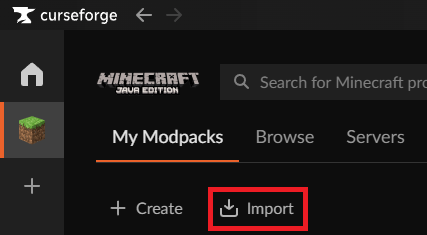
Installing modpacks from a modpack export
Pack Zip Option:
- Click the
 import option at the top.
 - Click the Choose .zip file option
- Find the .zip file of the export and select it.
Pack Code Option:
- Click the import option at the top.
- Enter the Profile code and click Import
The CurseForge app will now attempt to download and unpack the modpack.
Once finished, click Play!
 honest fable
steep perch
Get the mc role in <#1067364025979129907>
honest fable
steep perch
Get the mc role in <#1067364025979129907>
sorry to bother you is there currently maintence going on with the authentication server?
sterile kestrel
That's normal. The modlist.html contains the mod urls used that the mod manager(cf or whatever you use) go to get the mods from curseforge
sterile kestrel
honest fable
sorry to bother you is there currently maintence going on with the authenticatio...
We aren't microsoft so wouldnt know
vestal mountain
sterile kestrel
!mc-packimport
Is there a way for me to extract the mods and resource-packs independent of curseforge?
if not: assumedly, it's some custom modpack thing, not the profile information I guess-
sterile kestrel
vestal mountain
Is there a way for me to extract the mods and resource-packs independent of curs...
No. Why do you need to do this?
vestal mountain
It'd just be easier to get it to my profiles compared to having to install curseforge to get the mods to move to my profiles
but this is fine
mostly just curious I guess
sterile kestrel
What do you mean your profiles?
vestal mountain
in the minecraft launcher, profile instances
sterile kestrel
What mod manager are you using? Most have this capability built in
vestal mountain
minecraft
sterile kestrel
Oh ya no it is HIGHLY recommended you dont use the vanilla files for this reason
sterile kestrel
Mod managers just make it easier and safer to manage your mods
vestal mountain
safer?
sterile kestrel
You risk blowing up your vanilla folders if you dont know what you are doing
vestal mountain
I do
sterile kestrel
Not to mention it's easier to click and manage profiles rather than go and download every mod you need and move to a folder
vestal mountain
anyway, thanks for letting me know there's not an alternative for curseforge modpack downloads :p
(it's fine that there's not)
vestal mountain
TLauncher?
wait .. you're right
hold on
bronze bluffBOT
vestal mountain
TLauncher?
wait .. you're right
hold on
Piracy is not supported.
Tlauncher is a piracy supporting launcher, we do not provide support for it. Talking about or attempting to get support for it will result in a ban as per our rules.
See: https://discord.com/channels/428228256236306434/777323206884327484 #7
steep perch
No not T
sterile kestrel
Not that one...
vestal mountain
I read about it online
didn't know it was Piracy
sterile kestrel
It allows you to play without paying for the game so by definition it is
sterile kestrel
I mainly use prism. Mainly because im a linux Boi and even though cf now supports linux for mc I just am stuck in the ways of prism and am too lazy to move profiles over

 brave lark
is there any info on why when I try to run a 1.7.10 version thru curseforge it "cannot create virtual machine" no matter if I make a fresh install or use a premade modpack?
ocean lichen
brave lark
is there any info on why when I try to run a 1.7.10 version thru curseforge it "...
You most likely added a bad JVM argument
brave lark
is there a per profile way to ignore my default JVM arguments?
 ocean lichen
brave lark
is there a per profile way to ignore my default JVM arguments?
ocean lichen
brave lark
is there a per profile way to ignore my default JVM arguments?
Yes, just go in the profile options
Also note that custom JVM arguments are not recommended. They can cause even more lags and even crashes in some modpacks or scenarios, also depending on the hardware - they are not beneficial for everyone and everycases
brave lark
ocean lichen
Yes, just go in the profile options
in the profile options it gives me the space to add additional arguments, would i just add something there like "none". i got it to run by removing the default in curseforge
 neon sluice
I applied as a helper, when will I get a response?
 hushed topaz
Hey, so I recently updated my datapack to MC version 1.21.9 and then back ported the version to 1.21.8. I uploaded my file as an additional file to this new datapack version but, noticed that it said the wrong minecraft version on the tag. I archived the file before anything happened then went ahead and uploaded it as a new file with the right minecraft version tag. I was told to not re upload it if "I am not sure what is duplicated". I fairly confident it is not duplicated as the difference in version between the two required some different methods for respawn position data and storage. What should I do from here?
 ocean lichen
brave lark
in the profile options it gives me the space to add additional arguments, would ...
ocean lichen
brave lark
in the profile options it gives me the space to add additional arguments, would ...
Ah. I think you will need to delete the default one then
ocean lichen
neon sluice
I applied as a helper, when will I get a response?
It depend on when the applications will be reviewed and when the next round of helpers will join, which is managed by Jonah.
You will be notified if you get accepted, in the meanwhile please be patient and maybe we will accept you 🙂
ocean lichen
hushed topaz
Hey, so I recently updated my datapack to MC version 1.21.9 and then back ported...
Check once again if you haven't done a oopsie, just in case. Otherwise, you will need to make a ticket in the website
hushed topaz
ocean lichen
Check once again if you haven't done a oopsie, just in case. Otherwise, you will...
Differences between datapack V1.5 for 1.21.8 and 1.21.9 ->
Choosing correct dimension based off array stored from player NBT data is deferent because, in 1.21.9 when player has #minecraft:beds as respawn it also has dimension. In 1.21.8 when player has #minecraft:beds as respawn it does not have dimension. However in both version Respawn Anchors do have dimension NBT data so those functions are not different.
Should I reach out to the website then?

 ocean lichen
hushed topaz
Differences between datapack V1.5 for 1.21.8 and 1.21.9 ->
Choosing correct dim...
ocean lichen
hushed topaz
Differences between datapack V1.5 for 1.21.8 and 1.21.9 ->
Choosing correct dim...
Yes
!ticket-author
bronze bluffBOT
ocean lichen
!ticket-author
Author support tickets for Project or Moderation issues
Info for Project Authors:
When opening a support ticket, make sure to select Author Support in the What kind of support do you need? box.
You also need to include a link to the project and your CF name!
Logs, Game and OS boxes can be ignored when opening an author ticket.
neon sluice
ocean lichen
It depend on when the applications will be reviewed and when the next round of h...
Ok Thank you a
 prisma agate
how do i get unbanned from lfg
ocean lichen
prisma agate
how do i get unbanned from lfg
You have been banned for spamming new LFG posts repetitively, after being warned every single times.
I will forward your request to the staff rooms. Note that if you do get unbanned, that will be your last chance to prove yourself.
slate zephyr
Is there a way I can easily filter out mods that aren't from CurseForge in my modpack in the app? I just want to check what Modrinth mods I have installed in case some of them are not available when I upload my modpack. And it would be tedious to go through 300-400 mods 1 by 1
young bone
Mods that aren’t on CF don’t get displayed in the app
 shut python
hey minecraft 1.16.5 randomly stopped loading skins for me and my partner on my lan world and their inventory is now empty when they join after several days of playing just fine very confused and frustrated if anyone can help that would be appreciated weve tried logging in and outve of curseforge microsoft minecraft restarting our pcs restarting curseforge etc not sure what to do
i think it mite be an issue with curseforge? everything works fine when not launching thru curseforge
ocean lichen
shut python
hey minecraft 1.16.5 randomly stopped loading skins for me and my partner on my ...
Look in #🆘︱current-issues🆘
It's a issue with Mojang themselves
shut python
ocean lichen
It's a issue with Mojang themselves
oh wow i didnt know thank you
 dense acorn
okey so im playing on a mac and when i start play on a modpack with or without mods it just gray screens. no logs get created cuz it dosent get that far. idk what to do
ocean lichen
dense acorn
okey so im playing on a mac and when i start play on a modpack with or without m...
Can you screenshot your whole screen or show a video about this "gray" screen?
 dense acorn
ocean lichen
Can you screenshot your whole screen or show a video about this "gray" screen?
ocean lichen
dense acorn
dense acorn
ocean lichen
Can you screenshot your whole screen or show a video about this "gray" screen?
ocean lichen
dense acorn
This is the Minecraft launcher of Mojang having issue
!mc-installfix First test it.
bronze bluffBOT
ocean lichen
!mc-installfix First test it.
How to repair your Minecraft installation on CurseForge - **NOT** the same as `Repair Profile` - please follow these exact steps
- Click on the Minecraft Tab on the left side of the CurseForge App.
- Click button in the Top Right Corner of the app
- Click
Repair Installationoption.
NOTE: Although this might seem similar to the instructions of repairing profile, it's different and required. No worries, you will not lose any modpacks or worlds.
ocean lichen
Restart your computer directly after the repair
dense acorn
ocean lichen
Restart your computer directly after the repair
alright ill let you know how it goes and thanks for the help
 proven stone
Hello everyone, me and my friends are trying to play a private E2E forge server, but when we are logging in an error regarding the server under mainentance pops up. Its not the first time that we play with that server, and we already tried some fixes that are suggested online, anyone has the same problem ? We even tried downloading Project Ozone , but after launching the server and trying to log in, the same error pops up. Thx to everyone in advance
ocean lichen
proven stone
Hello everyone, me and my friends are trying to play a private E2E forge server,...
proven stone
oh ok, i will try that, thx
dense acorn
ocean lichen
Restart your computer directly after the repair
my actual goat love you, i have been trying to fix this for so long😭
it worked btw if you didnt catch that
 trim holly
im trying to use the voice chat radio mod with other mods and it isnt loading. can someone help?
 ocean lichen
trim holly
im trying to use the voice chat radio mod with other mods and it isnt loading. c...
ocean lichen
trim holly
im trying to use the voice chat radio mod with other mods and it isnt loading. c...
!notcf
bronze bluffBOT
trim holly
im trying to use the voice chat radio mod with other mods and it isnt loading. c...
-# Trigger requested by matté🎃35.
This is not related to CurseForge owned/maintained features or services
CurseForge does not make or maintain any of the content or games used on the site or the app.
Just because it's on the site/app does not make it a problem with CurseForge.
Please move to the respective channels as requested, OR use #👽︱game-support for game-related help.
ocean lichen
Please go in one of the Minecraft support channel.
trim holly
ok
 flint rain
Is there a ban appeal for the discord, my somebody wants one
ocean lichen
flint rain
Is there a ban appeal for the discord, my somebody wants one
Let's move in DM.
proven stone
ocean lichen
<#971826395548381186>
It worked! Thank you very much
 modest ice
i cant download an modpack because it says forge modpack installation failed
rich flint
! cflogs-app get this please
bronze bluffBOT
rich flint
! cflogs-app get this please
How to get your CurseForge app logs
How to get your CurseForge app logs
- Click the
Create logs zipin the menu. - Drag and drop the zip file created to this channel.
- Wait for someone to look at it so they can help you.
modest ice
bronze bluffBOT
modest ice
Zip paste links generated for archive uploaded by Garrr_234.
bronze bluffBOT
rich flint
! mc-installfix
How to repair your Minecraft installation on CurseForge - **NOT** the same as `Repair Profile` - please follow these exact steps
- Click on the Minecraft Tab on the left side of the CurseForge App.
- Click button in the Top Right Corner of the app
- Click
Repair Installationoption.
NOTE: Although this might seem similar to the instructions of repairing profile, it's different and required. No worries, you will not lose any modpacks or worlds.
modest ice
already did it like 10 times
rich flint
'Repair installation' - not 'repair profile' right?
modest ice
yeah
rich flint
It says the installer file was corrupted
modest ice
i also redownloaded curseforge
rich flint
So I guess you had 10 sequential corrupted downloads?
Reinstalling Curseforge changes nothing about the forge installer files
modest ice
okay so what can i try?
rich flint
What kind of Internet do you have - wifi? Hotspot? Ethernet?
modest ice
wifi
rich flint
Can you get an Ethernet plugged in?
modest ice
nope
rich flint
Try changing your DNS then. After you do so, do 'repair installation' again to purge your old files
!dns
bronze bluffBOT
rich flint
!dns
Changing your DNS server
-
Please follow these instructions to change your DNS server. The default one (provided by your router/ISP) can sometimes block CurseForge and other programs/websites.
-
After changing the DNS server to be used by your computer, you can enter the following command into a
CMDorpowershellwindow (Windows search either and open).
ipconfig /flushdns
This will reset your DNS records so that new web requests get new addresses using the new DNS.
 tacit hare
Hello, I am a modpack maker for Minecraft 1.12.2, and I have been seeing many reports today about Mojang's authentication servers being offline. Apparently Mojang switched to a new TLS certificate that is not in Java 8u51 that comes default for Minecraft 1.12.2 packs in Curse launcher. The certificate is apparently present as of 8u91 (which is also a really old version of Java 8).
I would like to give my community instructions for Curse launcher to fix this issue. Is it possible to direct Curse launcher to use a system installation of Java, and if so, are there instructions posted somewhere?
I have been unsuccessful in finding such instructions. Thank you for your assistance.
rich flint
tacit hare
Hello, I am a modpack maker for Minecraft 1.12.2, and I have been seeing many re...
tacit hare
Thank you, I had not seen that.
rich flint
The gist is
- install a new java 8
- point the app to the javaw.exe of that new java 8
tacit hare
Yes, I was just unsure of the specific instructions for Curse launcher. Each launcher is a little different. Much appreciated.
rich flint
This has happened before - Mojang might just push out with their launcher a new legacy java 8 that has new certs.
I wish they would just use a new 400u+ one though 🥲
upper root
anything above 50u odd breaks some intel cpus
rich flint
Nooooooo 😭
modest ice
it worked tank you
tacit hare
upper root
anything above 50u odd breaks some intel cpus
Right, Mojang stuck with 8u51 because it was the last version that supported certain very old Intel integrated graphics chipsets.
signal ridge
Essential would be easier as their mod likes to cause issues...
Can try sending the log to #🧱︱mc-other-help but there is a small chance you may be redirected to them as we dont supply much support when that mods involved (too many issues)
 void moth
i have a very tedious problem
im making a modpack with aether and immersive portals
and i am trying to make it work using this
https://modrinth.com/datapack/immersive-aether-portals
but this needs aether-server.toml modifying "Disables Aether Portal creation" from false to true but that aether-server.toml is generating in serverconfigs in the worlds so i can't make it by default to true somehow ?
i tried coding in java a mod that makes this but i can't overwrite that file

Modrinth
Immersive portals for aether to see through.
signal ridge
Should probably ask the dev of the datapack. They would know more for their project
Also if your going to room jump, delete the last post. Stops you from getting multiple different answers and also not to break the copyspam rule we have...
void moth
sorry
rich flint
void moth
i have a very tedious problem
im making a modpack with aether and immersive port...
that is exactly what the defaultconfigs folder is for
 rich timber
ok so I'm trying to find ice and fire community edition config files to configure it BUT I don't see them anywhere anyone know what to do or can help me out?
 ocean lichen
rich timber
ocean lichen
rich timber
You should ask in the Ice and Fire discord.
rich timber
that discord is dust by now
also I don't think there is any support things
the mod is in the pack so idk whats going on
ocean lichen
You need to start the mod before the config appears
rich timber
btw
ocean lichen
This is also not a curseforge issue
rich timber
 ocean lichen
rich timber
ocean lichen
rich timber
ice and fire community edition also have a discord
rich timber
Idk if it was a minecraft or curseforge issue or not
I just figured that out
but thanks for the help-
ocean lichen
CurseForge do not* change how the game, configs, or mods works
 earnest sinew
Why is it doing this when I try to play the just create smp mod pack made by mrbeardstone
 ocean lichen
earnest sinew
Why is it doing this when I try to play the just create smp mod pack made by mrb...
ocean lichen
earnest sinew
Why is it doing this when I try to play the just create smp mod pack made by mrb...
!notcf
bronze bluffBOT
earnest sinew
Why is it doing this when I try to play the just create smp mod pack made by mrb...
-# Trigger requested by matté🎃35.
This is not related to CurseForge owned/maintained features or services
CurseForge does not make or maintain any of the content or games used on the site or the app.
Just because it's on the site/app does not make it a problem with CurseForge.
Please move to the respective channels as requested, OR use #👽︱game-support for game-related help.
ocean lichen
Go in one of the Minecraft support channel
 potent briar
when i open a curseforge modpack with minimap and worldmap mod for mc, it says updating launcher, then says it can't
Im on mac btw
nvm resolved it
 reef crow
how come when i load into sevtech ages when I'm trying to go onto my server it says that i'm not online? only started happening today, my internet is working fine and im able to play other online games. on mac
rich flint
How long ago did you run the client game that you're trying with?
As in, when you first ran it and loaded the game
reef crow
ive restarted the client multiple times and even curseforge
rich flint
Screenshot the exact message you get?
reef crow
yo lemme load it up again hopefully wont take long
these are what im seeing @rich flint the online x is usually a tick

 steep perch
rich flint
steep perch
rich flint
Ah - see #🆘︱current-issues🆘 , do that
reef crow
ah okay thank you
is there any instructions on howw to do it on mac? I can't seem to figure out where to go from selecting choose next too java 8
ocean lichen
reef crow
is there any instructions on howw to do it on mac? I can't seem to figure out wh...
The steps should be relatively the same. Install the file, run the installer, and find the Eclipse Adoptium folder in your computer
reef crow
i dont think it found one because when searching for it nothing comes up after i installed it. its really weird
ocean lichen
Do you see any /Library/Java/JavaVirtualMachines path?
 oak pelican
Looking for some support on why my skin wont show in singeplayer worlds, this is had only come up in the past 24h Have 0 clue why
ocean lichen
oak pelican
Looking for some support on why my skin wont show in singeplayer worlds, this is...
oak pelican
Iv looked into the Minecraft launcher
oak pelican
ocean lichen
<#971826395548381186>
"singleplayer worlds"
ocean lichen
This is also a issue with singleplayer, not only multiplayer.
oak pelican
And following that will fix it for curseforge?
ocean lichen
Yes
oak pelican
Is Adopttium safe?
ocean lichen
Yes.
oak pelican
How do I know its safe?
Could you show me a video or some proof its a sage mod/download
ocean lichen
Because it's one of the most popular Java publisher in the world.
If you want you can google and look at the website
https://adoptium.net/

Adoptium
Eclipse Adoptium provides prebuilt OpenJDK binaries from a fully open source set of build scripts and infrastructure.
reef crow
Would it be the temurin-8?
 ocean lichen
reef crow
Would it be the temurin-8?
ocean lichen
reef crow
Would it be the temurin-8?
Yes
oak pelican
It says windows hotspot, seems like a scam
ocean lichen
oak pelican
It says windows hotspot, seems like a scam
You just don't know what Windows hotspot means.
neon sluice
Good Morning everyone ;D
fallen loom
oak pelican
"singleplayer worlds"
Doesn't matter... client's Java is old with old certificates that the skin server rejects as insecure, so you don't get your skin downloaded
oak pelican
ocean lichen
You just don't know what Windows hotspot means.
Im just looking to get my skin fixed i dont care about multiplayer. Im able to load and Join modpacks, fine and other Launchers have my skin
oak pelican
fallen loom
Doesn't matter... client's Java is old with old certificates that the skin serve...
Every other Launcher has my skin.
fallen loom
oak pelican
Every other Launcher has my skin.
Because they either have updated java or use something entirely separate to download it into the launcher
The game will still fail to download it if it's using old java
fallen loom
Loading the game and downloading the skin are two separate things
oak pelican
So am i Downloading Temurin?
fallen loom
Yes
ocean lichen
Just because you don't understand one thing, doesn't means CurseForge staff/community staff is trying to scam you.
fallen loom
Temurin - Project Codename
HotSpot - Java Virtual Machine Implementation Codename
oak pelican
ocean lichen
Just because you don't understand one thing, doesn't means CurseForge staff/comm...
Il take my chances and ask questions. After what happened with the last Curseforge issue
oak pelican
oak pelican
Il take my chances and ask questions. After what happened with the last Cursefor...
Downloaded a popluar MC mod via curseforge and had a trojan in it
So il ask questions to be sure
Not having that v2
reef crow
do you know what I would search when trying to find it on the curse forge 'choose' section because even when entering the folder pathway nothing is coming up for me?
 fallen loom
oak pelican
Downloaded a popluar MC mod via curseforge and had a trojan in it
fallen loom
oak pelican
Downloaded a popluar MC mod via curseforge and had a trojan in it
Usually that's an overzealous antivirus rather than a genuine trojan, but I will admit breaches have occurred
ocean lichen
oak pelican
Downloaded a popluar MC mod via curseforge and had a trojan in it
It's generally a false positive, unless you investigated the mod
oak pelican
ocean lichen
It's generally a false positive, unless you investigated the mod
IT was a well known Breach, the famous breach
Spartan Weaponary
or something along those lines
fallen loom
Never heard of it
ocean lichen
!malware
bronze bluffBOT
ocean lichen
!malware
Regarding Malware
As of the 11th of June, 2023, we have cleaned all infected files on the platform and have sealed the security breach to prevent similar files from being introduced again.
If you have downloaded any of the affected files and in order to play safely, make sure to follow the steps described in our article.
For more info, please read the news post: #📢︱news message
Do note that in reference to Bleeding Pipe - this isn’t malware, it’s an exploit of Java that in not based in the CurseForge platform.
ocean lichen
Are you talking about it?
oak pelican
You guys might not have been staff when this happened
reef crow
I've managed to get to this part. I don't have a javaw which one should i use
 oak pelican
I was working for a big youtuber on his events at the time, and we had to scrap the mod due to some of us getting trojans
Nearly had 400+ downloading it, tbf the trojan update only lasted like 12h, before it was patched
fallen loom
reef crow
I've managed to get to this part. I don't have a javaw which one should i use
The one that's just java, apparently javaw doesn't exist on Mac
ocean lichen
oak pelican
Nearly had 400+ downloading it, tbf the trojan update only lasted like 12h, befo...
DaemonUmbra would have heard about it. They have been one of the oldest active member within the Minecraft community that I know
Although it's not the first time I've heard about something similar
fallen loom
reef crow
i thought so just wanted to double check
Javaw on Windows is just Java that doesn't pop a console window while regular java does, apparently on mac and linux that's done through other means
oak pelican
Soo i did the download
oak pelican
And followed the steps, says the path doesnt exist
reef crow
are you mac too?
ocean lichen
Do not copy paste the path, navigate it.
fallen loom
oak pelican
Soo i did the download
Did you get the installer or the distribution zip?
oak pelican
fallen loom
Did you get the installer or the distribution zip?
Installer
fallen loom
Did you run the installer or just download it?
oak pelican
Download and ran it
fallen loom
What OS are you on again?
reef crow
Dq are you on mac or windows
oak pelican
Should i make a ticket or sm
fallen loom
Need to remind myself where Temurin installs... it should be in Program Files but I can't remember what it calls its own install folder... might be Eclipse Temurin or Eclipse with a Temurin folder inside it, or just Temurin
ocean lichen
Can you make a clip of how you are doing it?
oak pelican
Navigated to "Eclipse Adoptium" -> "jdk-8.0.462.8-hotspot" -> "bin" folders.
Clicked On the javaexe thingy
And the Error Pops up
fallen loom
Hmm...
ocean lichen
Javaw not java.exe
oak pelican
thats what i meant
fallen loom
?cflogs-app then, I'll see what it's talking about behind the scenes
bronze bluffBOT
fallen loom
?cflogs-app then, I'll see what it's talking about behind the scenes
How to get your CurseForge app logs
How to get your CurseForge app logs
- Click the
Create logs zipin the menu. - Drag and drop the zip file created to this channel.
- Wait for someone to look at it so they can help you.
ocean lichen
Make sure you click there:
 oak pelican
yeh thats where im clicking lmao
ocean lichen
Not any of the other "Choose" button
oak pelican
legit the choose button next to "Java 8"
oak pelican
oak pelican
Navigated to "Eclipse Adoptium" -> "jdk-8.0.462.8-hotspot" -> "bin" folders.
then these steps
ocean lichen
Alright, send the log as Daemon requested
ocean lichen
Now send the log zip here
oak pelican
how do i find it
ocean lichen
That should have opened File Explorer when you created the zip. Otherwise look in your desktop
fallen loom
What does step 2 say in the bot's message?
fallen loom
Look you've been fighting us the whole way, do you want help or not?
ocean lichen
The most sensitive thing inside in your hardware and your computer name
reef crow
fallen loom
What does step 2 say in the bot's message?
it worked thank you and thank you @ocean lichen too
im back online 😍
oak pelican
bronze bluffBOT
oak pelican
Zip paste links generated for archive uploaded by Dqshing.
ocean lichen
Just to be sure, could you make a clip of how you are doing the steps while we are looking at the log?
oak pelican
My pc wont allow me to clip, just always causes issues
Medal, video clipping everything lmao
fallen loom
Just screenshot the error message please
ocean lichen
Even snipping tool?
oak pelican
ocean lichen
Even snipping tool?
Snipping tool works, for screenshots
ocean lichen
And not for videos?
ocean lichen
Alright, let's just see the error message

 oak pelican
oak pelican
oak pelican
Thats what happens when i click on either one or those 2
After clicking

And then going through the steps etc
Has my pc just decided "No" You dont get a skin we dont like this program?
I wouldnt be surprised tbf
ocean lichen
Something is not right. This is how the Bin folder look like

Either it's the wrong folder, you installed it in a different way, or some files failed to install correctly
fallen loom
ocean lichen
Something is not right. This is how the Bin folder look like
Not wrong, they just went with the JRE (Runtime Environment) instead of the JDK (Development Kit)
oak pelican
So is this something i need to change
fallen loom
When you're selecting javaw.exe are you single clicking and then clicking "Open" or are you double clicking?
oak pelican
Tried both, and running as admin
Il do it again just to be 100%
Double clicking does nothing give me the error, "opening it" just does nothing
Admin does nothign either
So im just gonna assume my computer has said screw u!
oak pelican
Ok how do i fix this
fallen loom
I took a second look at the logs and found it
oak pelican
do i delete the current one?
ocean lichen
oak pelican
Ok how do i fix this
Use the direct link I provided in #🆘︱current-issues🆘
oak pelican
ocean lichen
Use the direct link I provided in <#971826395548381186>
yeh i followed that, didnt change anything look where that brought me
ocean lichen
This link install java 8 directly
You also didn't installed Java from this link as the screenshot from the bin folder just do not match
oak pelican
ok went via the link again
Ok got it working, but the bin still doesnt look the same
 fallen loom
It won't look the same as Matteo's unless you got the JDK, which isn't needed unless you plan on programming in Java
oak pelican
fallen loom
It won't look the same as Matteo's unless you got the JDK, which isn't needed un...
i dont
So just try running a modpack now?
fallen loom
Did you select the javaw from that folder and did it go in?
oak pelican
yes
fallen loom
Then try
oak pelican
alright
ocean lichen
fallen loom
It won't look the same as Matteo's unless you got the JDK, which isn't needed un...
The link I given in #🆘︱current-issues🆘 was JDK actually. Maybe I should simply have taken JRE 😅
fallen loom
Ah....
Oh right, that's looking at it through the picker that filters it down to only java.exe and javaw.exe
oak pelican
alright it works
thank you guys, spending 45min helping me crazy work much very thankfull
ocean lichen
oak pelican
thank you guys, spending 45min helping me crazy work much very thankfull
No problem, have a good day 🙂
 viral knot
my friend can't see the option to go to a minecraft modpack profile options
the 'button' to go to those options isn't there
the three dots are tho
 high dew
can someone help me please i try to load a moddpack and it freezes on this but when i click where the play buttons are on minecraft it makes the click noise but im still frozen on this
 ocean lichen
high dew
can someone help me please i try to load a moddpack and it freezes on this but w...
ocean lichen
high dew
can someone help me please i try to load a moddpack and it freezes on this but w...
Go in one of the Minecraft support channel
 brittle mirage
Minecraft crashed. The logs have been uploaded to gnomebot.dev:
latest.log | crash-2025-10-04_10.11.16-client.txt | crash_assistant_app.log | modlist.txt | CurseForge: skip launcher
Mod list changes beyond the latest successful launch:
[2;34mFirst launch with Crash Assistant mod. Diff wasn't saved.[0m
Paste link generated for file uploaded by skierx10.
brittle mirage
@opal hull should I just start from scratch?
 weak haven
need some help, i keep on getting an error 925200 when downloading all the mods 10 on the curseforge client
 jolly minnow
Can someone help me I keep getting exit code 1
bronze bluffBOT
jolly minnow
Can someone help me I keep getting exit code 1
Error/Exit codes aren't helpful. Follow these steps to receive support.
- Right-click the modpack profile icon OR click the button in the modpack profile.
- Click
Open Folder. - Open the
logsfolder. - Drag and drop the FILE named
latestORdebuginto Discord.
Please continue in #🧱︱mc-crash-help.
 strong breach
im new with curseforge, my windows 11 version is 24h2, i try to run it as admin and still doesnt work, maybe someone has a fix for it?
 signal ridge
Are you part of the windows insider program?
strong breach
signal ridge
Are you part of the windows insider program?
nope
 signal ridge
Your up to date on all updates? Including security onesm
strong breach
signal ridge
Your up to date on all updates? Including security onesm
i just got some update now

should i download and install the new one?
signal ridge
Yes, then restart the pc if it doesnt do it for you
strong breach
signal ridge
Yes, then restart the pc if it doesnt do it for you
alright im gonna donwload it first thanks
signal ridge
prisma agate
can soemoen help me get unbanned
Ive asked in the back, may yake some time tho.
You were banned from the lfg room for continuously breaking the #1032224545093984326
 cosmic cipher
I CAN T JOIN THE SERVER
signal ridge
You wait, ill make a note that you asked. But for now you will stay banned.
cosmic cipher
IT SAID THAT ITS DOWN FOR MAINTENANCE FOR 3 DAYS
cosmic cipher
it already up and there 10 ppl in
signal ridge
What server? CF doesnt have any public servers?
cosmic cipher
public.rlcraft.host
young bone
That's not us
cosmic cipher
um huh
signal ridge
Curseforge just allows devs to upload their projects to the site, it doednt make or maintain any of the content devs made.
cosmic cipher
ok
 sour acorn
i got a question.
is there a way to have neo forger work with forger +1? (hopefully i ahve this in the right chat)
young bone
No, NeoForge does not work with Forge, it doesn't in every version past 1.20.1
sour acorn
damn, i was wanting to use both JJThunder King Of The Hill and simple clouds. well thanks for the info
prisma agate
can soemeone help me get appeled from lfg ban?
young bone
Please stop asking about that
young bone
Asking more isn’t going to speed anything up
prisma agate
ive asked 3 times
 cloud parcel
I have a problem with CurseForge linking my Minecraft account. When I also add Essentials to play a modpack with my friends, Essentials gives me an error like “You’re not connected to the Essentials Network.” I noticed that when I reinstall CurseForge and open it, I can see my Minecraft account in the top right corner, but if I close and reopen CurseForge, it disappears. Then, when I try to join a modpack with Essentials, it still doesn’t work and shows the same error. I’ve already tried reinstalling both Essentials and CurseForge, but I still don’t have a solution
Like it doesn't recognize my Minecraft Account sometimes but I've never had some problems with it
strong breach
signal ridge
Yes, then restart the pc if it doesnt do it for you
sadly after update still having same problem

idk why the app icon like this

 rich flint
 hasty trail
hey can someone help me
hasty trail
hey can someone help me
!mc-installfix try doing th is
bronze bluffBOT
hasty trail
hey can someone help me
-# Trigger requested by Briar Thrain.
How to repair your Minecraft installation on CurseForge - **NOT** the same as `Repair Profile` - please follow these exact steps
- Click on the Minecraft Tab on the left side of the CurseForge App.
- Click button in the Top Right Corner of the app
- Click
Repair Installationoption.
NOTE: Although this might seem similar to the instructions of repairing profile, it's different and required. No worries, you will not lose any modpacks or worlds.
hasty trail
rich flint
!mc-installfix try doing th is
where do i type it
rich flint
read the steps 1-3. there is no typing
bronze bluffBOT
rich flint
!cflogs-app
How to get your CurseForge app logs
How to get your CurseForge app logs
- Click the
Create logs zipin the menu. - Drag and drop the zip file created to this channel.
- Wait for someone to look at it so they can help you.
bronze bluffBOT
hasty trail
Zip paste links generated for archive uploaded by Adonis-GOATOUNIS.
 deep cypress
i deserpately need help im trying to port my modpack to a hosting site but everytime i export the profile on CF its sending client side (according to chatgbt) and i keep getting mistacthed mods error because its sending client side mods too
hasty trail
rich flint
get this logs zip
what do i do now
rich flint
deep cypress
i deserpately need help im trying to port my modpack to a hosting site but every...
the export server mods feature does not work and you shouldn't use it. make a temp folder on your pc with a copy of your client game mods folder and scan it with this server making utility script, then once it sorts out the client side mods copy your mods folder to the host server
!mc-univ
bronze bluffBOT
rich flint
!mc-univ
Universalator server tool
-
The Universalator is a file (BAT script) which can be used to install and launch modded Minecraft server files on PCs (and VMs).
- All Minecraft (Java) versions are supported.
- Supports Neoforge, Forge, Fabric, Quilt, Vanilla.
- Java version files are automatically obtained and handled!
- Has additional tools like client-side mod detection.
-
Use it to create custom servers on your PC!
-
Use it to launch existing published server packs on your PC!
Current versions support use with Windows, Linux, MacOS
The script for each OS version is a single file which is placed into, and run from the server folder.
Universalator project download website & wiki
rich flint
hasty trail
what do i do now
looking
hasty trail
ty
bronze bluffBOT
rich flint
!mc-path
Changing your Minecraft install path on the CurseForge App
- Click the in the bottom left.
- Select the Minecraft tab.
- Click
Change. - Select the location:
- Windows:
Local Disk (C:)at the left side of the window. If you do not see it, clickThis PCfirst.) - Mac:
/Users/Shared/CurseForge, If it does not exist, make it.
:small_orange_diamond: If Minecraft is not installed yet in CurseForge App:
- Select Minecraft from the list of games, then select the
Advancedoption. - Continue with step 4 above.
hasty trail
ok
should i click yes
if i click yes it shows this

but i clicked no and its saved here

so i suppose i did this correctly
now what
now i have no modpacks
rich flint
if you follow the directions exactly it says to select c:\ - it automatically makes a folder C:\Curseforge
rich flint
hmm the app should be migrating the folders from the old path to the new path
what version is your CF app? bottom/left
 rich flint
ok that's fine.
you can copy the instances folder from C:\Users\user\Curseforge\ to this new C:\Curseforge location. do not copy the other folders.
hasty trail
uh ok ill try that
ok i did it ty
now waiit lemme check if it will let me join
it says no mods were found
in them
thats ok tho i can just re download them its just some clicks

yo dude i think u fixed it
thanks
yea u fixed it
deep cypress
rich flint
the export server mods feature does not work and you shouldn't use it. make a t...
ok i just downloaded the client and i extracted it how do i get it to work
i made a copy of all my mods too
rich flint
please use #🧱︱mc-other-help for this at this point since it's not a CF app/website thing
deep cypress
ok will do ty for pointing me in the right direction💖
 mossy saffron
can someone help me please, ive been experiecing this for the past two nights, my minecraft was working perfectly fine after the 1.21.9 update but then stopped
i keep gettin the '' game crashed, exit code 1'' message
bronze bluffBOT
mossy saffron
i keep gettin the '' game crashed, exit code 1'' message
Error/Exit codes aren't helpful. Follow these steps to receive support.
- Right-click the modpack profile icon OR click the button in the modpack profile.
- Click
Open Folder. - Open the
logsfolder. - Drag and drop the FILE named
latestORdebuginto Discord.
Please continue in #🧱︱mc-crash-help.
mossy saffron
 rich flint
mossy saffron
rich flint
mossy saffron
read the bot message above
 lilac flicker
I keep seeming to have a resolution error but I cannot figure out what is happening
bronze bluffBOT
lilac flicker
I keep seeming to have a resolution error but I cannot figure out what is happen...
Paste link generated for file uploaded by Poke.
 final ivy
Anyone had any issues with Authentication Servers?
final ivy
rich flint
<#971826395548381186>
Thanking you!!!
 wraith dagger
Just download curse forge for the first time, made a modpack and now I ever time I hit play it starts downloading stuff, the nti gets to Java 17 and gets stuck at 95%
nvm we good
 glass halo
where do i put crash reports?
here or minecraft support?
my thing says "Error details: HTTP server doesn't seem to support byte ranges. "
anyone have an awnser?
 floral sable
Does anyone know why I can't install neoforge modpacks?
 lilac flicker
I keep seeming to have a resolution error but I cannot figure out what is happen...
lilac flicker
lilac flicker
I keep seeming to have a resolution error but I cannot figure out what is happen...
Also, along with that my textures seem to be bugging out
bronze bluffBOT
floral sable
Does anyone know why I can't install neoforge modpacks?
-# Trigger requested by Briar Thrain.
Changing your DNS server
-
Please follow these instructions to change your DNS server. The default one (provided by your router/ISP) can sometimes block CurseForge and other programs/websites.
-
After changing the DNS server to be used by your computer, you can enter the following command into a
CMDorpowershellwindow (Windows search either and open).
ipconfig /flushdns
This will reset your DNS records so that new web requests get new addresses using the new DNS.
floral sable
bronze bluff
-# `Trigger requested by Briar Thrain.`
Thanks, I already did that but it still doesn't work.
ocean lichen
floral sable
Thanks, I already did that but it still doesn't work.
!network
bronze bluffBOT
floral sable
Thanks, I already did that but it still doesn't work.
-# Trigger requested by matté🎃35.
How to tackle Network Issues
Please try the following step(s) to figure out the cause/solution to your network issues:
- Restart the CurseForge app
- Restart your computer
- Disable any programs that interfere with your connection (VPN, ping tunnels, antivirus, firewall etc)
- Restart your router and modem.
- Attempt using a different connection if possible.
- Reinstall Curseforge.
ocean lichen
Follow these steps first. Try to run the app as admin as well
 iron tide
Twitch blocks login on steamdeck/Rog Ally, how to I switch curseforge account to use google login (without creating a new account?
 tropic badge
Hi, I have a problem, Im a bit new at this and I want ro create a modpack, I searched for some mods and marked them as favorite with the star button, but I cant find where to see all marked as favorite
ocean lichen
tropic badge
Hi, I have a problem, Im a bit new at this and I want ro create a modpack, I sea...
You can find the favorite in your profile in the website. Infortunately you cannot find the favorites in the app
tropic badge
Im on the website, but I cant find it
ocean lichen
 tropic badge
I find it, sorry Im a bit blind ngl
ocean lichen
iron tide
Twitch blocks login on steamdeck/Rog Ally, how to I switch curseforge account to...
Try using a account with the same email. Otherwise, you will need to open a ticket in the website.
 lament fractal
Ive tried the fix and I did every single step but for some reason, when I load up a modpack, for example rlcraft that uses 1.12.2, it resets my skin to steve
it doesnt happen with any other modpack that Ive tried
 barren moss
Anyone else getting slow CurseForge after the last update?
ocean lichen
lament fractal
Ive tried the fix and I did every single step but for some reason, when I load u...
Screenshot the change you have made in the app settings
lament fractal
ocean lichen
Screenshot the change you have made in the app settings
this the java changed I made, unless youre asking about something else
 ocean lichen
Test with just java.exe. Otherwise restart your computer
lament fractal
ocean lichen
Test with just ``java.exe``. Otherwise restart your computer
I tried with Java and Javaw, restarted my computer both times but it doesnt seem to help, it just continues to happen with rlcraft
 ocean lichen
Are you able to do a repair installation in the very top right of the app?
lament fractal
Yes, I will try it and see if it works
Tried and it does not seem to work, maybe it is due to it being an old world
ocean lichen
Do you use the mojang launcher feature or skip launcher feature?
lament fractal
ocean lichen
Do you use the mojang launcher feature or skip launcher feature?
I use the mojang launcher, in the release option
ocean lichen
Have you tried to reset the skin inside the mojang launcher?
lament fractal
ocean lichen
Have you tried to reset the skin inside the mojang launcher?
Yeah, I have tried it with both Java and Javaw
ocean lichen
lament fractal
Yeah, I have tried it with both Java and Javaw
Can you try the skip launcher feature?
lament fractal
ocean lichen
Can you try the skip launcher feature?
I tried it and also disabled a mod called everlasting skins, and it appears to have fixed the issue
ocean lichen
 somber cape
i need a 100x100 picture
somber cape
i need a 100x100 picture
Create your own picture
<@&1029742729472782430>
 fluid tusk
gunned
somber cape
how do i compress a zip into a jar file?
i need to know
im trying to upload Mcreator mod i made
 sharp loom
What do I need for a server file just the mods folder and config or do I need anything else?
ocean lichen
somber cape
how do i compress a zip into a jar file?
If I understand your question correctly -> you cannot. Jar is a compilation
You can put the jar file into a zip. But not "compress" it as a zip
!notcf
bronze bluffBOT
-# Trigger requested by matté🎃35.
This is not related to CurseForge owned/maintained features or services
CurseForge does not make or maintain any of the content or games used on the site or the app.
Just because it's on the site/app does not make it a problem with CurseForge.
Please move to the respective channels as requested, OR use #👽︱game-support for game-related help.
ocean lichen
Please move in one of the minecraft support channel
ocean lichen
What are you doing?
You have already been given the instructions to solve the issue. Why are you moving channel?
 mossy widget
ocean lichen
What are you doing?
mossy widget
ocean lichen
What are you doing?
when ever i load up any mods for servers it dosent load up it crashs gives me code error 1 trying to figher out why it doing that as i cant play on any server with mods
bronze bluffBOT
mossy widget
when ever i load up any mods for servers it dosent load up it crashs gives me co...
Error/Exit codes aren't helpful. Follow these steps to receive support.
- Right-click the modpack profile icon OR click the button in the modpack profile.
- Click
Open Folder. - Open the
logsfolder. - Drag and drop the FILE named
latestORdebuginto Discord.
Please continue in #🧱︱mc-crash-help.
ocean lichen
bronze bluffBOT
ocean lichen
https://discord.com/channels/428228256236306434/1422184972071997450/142420245414...

✉️ by CurseForge
[Message](#🧱︱mc-crash-help message) in #🧱︱mc-crash-help :arrow_down:
If Minecraft will not start then use the tool linked at the bottom!
- Start the modpack you wish to fix. If it will not start, then click the in the top right of the app then select
 Run Vanilla Minecraft. In the launcher that opens, go to the Installations tab and choose New Installation. Choose a name and select the Minecraft version of the modpack you are trying to run (like 1.19.4 or 1.7.10). Once created play it by clicking the green Play button that appears when hovering over it in the list of installations.
 - Open Task Mana..
ocean lichen
Follow what you started please
mossy widget
the Vanilla works just not the mods
ocean lichen
It's still a issue with AMD or the game not using the correct GPU. There is barely any doubt there
You cannot say "it's not the issue" if you have not tested the instructions
mossy widget
like i tryed a Proflie that has no mods on it and still crashs with CurseForage proflies
sharp loom
ocean lichen
If I understand your question correctly -> you cannot. Jar is a compilation
How do I have the cursforge app remove unused configs from a modpack or is there any way to do so?
signal ridge
Would need to open your configs folder and manually delete the configs you no longer want
sharp loom
Alright thanks
 zinc venture
i need help on installing create to my minecraft world but im a little stuc because forge keeps launching a seperate launcher
ocean lichen
You already asked in another channel
signal ridge
Pick a room and srick to it, jumping all over wont get you help faster. Instead it will actually slow down your support as we have to chase you all over trying to figure out what roomnyour sticking to..
wraith dagger
anyone know what it means when a modpack doesnt load, like it gets to the point where it lets you kill the instance but minecraft isnt showing, no errors or anything though...
 quick rune
i dont't have skin in skyfac3,how can i fix it
 wraith dagger
anyone know what it means when a modpack doesnt load, like it gets to the point ...
wraith dagger
wraith dagger
anyone know what it means when a modpack doesnt load, like it gets to the point ...
i think i foud the issue... my logs are getting spammed with 1 message "itemborders is not correct. correcting"
wraith dagger
wraith dagger
i think i foud the issue... my logs are getting spammed with 1 message "itembord...
nope not the issue
ocean lichen
wraith dagger
anyone know what it means when a modpack doesnt load, like it gets to the point ...
Go in one of the Minecraft support channel
 sacred bolt
Keep getting exit code 1
bronze bluffBOT
sacred bolt
Keep getting exit code 1
Paste link generated for file uploaded by wristcheck.
sacred bolt
ocean lichen
Wrong channel
mb
sacred bolt
ocean lichen
Wrong channel
Says locked
ocean lichen
Get the Minecraft role in #🎭︱pick-your-roles
 whole fulcrum
bronze bluffBOT
whole fulcrum
whole fulcrum
bronze bluffBOT
whole fulcrum
Paste link generated for file uploaded by Konootti.
 old summit
bronze bluffBOT
old summit
old summit
bronze bluffBOT
old summit
Paste link generated for file uploaded by Issei hyoudou.
 blazing slate
I have an external hard drive with my worlds but i updates my curseforge without the drive connected and wont show my mods
 strange atlas
???

 steel obsidian
help please... cant even launch the game
 steel obsidian
help please... cant even launch the game
steel obsidian
steel obsidian
help please... cant even launch the game
Failed to download file.
Name: forge-47.4.0.jar
URL: https://piston-data.mojang.com/v1/objects/0c3ec587af28e5a785c0b4a7b8a30f9a8f78f838/client.jar
Error details: schannel: failed to receive handshake, SSL/TLS connection failed
Filename on disk: forge-47.4.0.jar
Path: C:\Users\Phili\curseforge\minecraft\Install\versions\forge-47.4.0\forge-47.4.0.jar
Exists: Nonexistent

 icy atlas
Hey, I have a question If I wanted to add my own mod to a mod profile and share it with a friend, would it import the mod I made, or does the mod need to be uploaded to curseforge ?
open basin
HELLO , When will update this mod for 1.21.9? https://www.curseforge.com/minecraft/mc-mods/litematica , https://www.curseforge.com/minecraft/mc-mods/malilib

CurseForge
A modern schematic mod written for Fabric (and LiteLoader on 1.12.x), with extra features for Creative mode work
10.5M Downloads | Mods
 icy atlas
I am trying to add my own mod to my profile for personal use and its not showing up when I add it, but its in the mods folder.
young bone
open basin
HELLO , When will update this mod for 1.21.9? https://www.curseforge.com/minecr...
That’s not something we can answer, you just have to wait
open basin
🙁
young bone
Wrong channel
 wanton jasper
hey guys 🙂 no special request here but I wanted to ask if it is possible to remove Content like a Minecraft Modpack entry from curseforge after deletion or rejrection.
I already deleted it but now it will be there forever as "deleted" modpack ^^ is this just how it is?
 placid coral
is it possible to change the default directory where it is downloaded?

also what is the size of the standalone launcher?
signal ridge
For the app itself no, but you can change where minecraft saves
As for size i am not sure
placid coral
can i move it to another directory?
signal ridge
!mc-path
bronze bluffBOT
signal ridge
!mc-path
Changing your Minecraft install path on the CurseForge App
- Click the in the bottom left.
- Select the Minecraft tab.
- Click
Change. - Select the location:
- Windows:
Local Disk (C:)at the left side of the window. If you do not see it, clickThis PCfirst.) - Mac:
/Users/Shared/CurseForge, If it does not exist, make it.
:small_orange_diamond: If Minecraft is not installed yet in CurseForge App:
- Select Minecraft from the list of games, then select the
Advancedoption. - Continue with step 4 above.
signal ridge
For minecraft yes.
placid coral
but not curseforge's?
signal ridge
Correct. The app itself saves in appdata. 1 reason I can think of for not moving is IF there is an issue and we need a user to manually get the app logs, but they dont remember where they saved the app. We hit a problem..
How much space is left on your boot drive?
placid coral
1.36gb
my hdd has like 200gb free
but my next upgrade to my boot drive is in december 😭
signal ridge
You may want to clean that before doing anything else. If you run out of space your pc will refuse to boot.
Anything under 10gb should be a cause for action imo
placid coral
ive been trying to but i cant do anything, this ssd is only 111gb and its been around 6-8 years before i changed it
signal ridge
Ah ok
Personally I would recommend not installing anything more. As your 1 bad/beefy windows update away from not being able to boot your pc..
My cf folder in appdata is roughly 742MB but ive also been using the app so some logs have generated
placid coral
yeah, thats why all my files has been in my hdd, strange thing though is that when i download curseforge with overwolf, i can download it to hdd instead, whats up with that?
 stray horizon
How do I update my game version?
 prisma agate
how do i get unbanned from lfg?
signal ridge
prisma agate
how do i get unbanned from lfg?
You wait patiently, I have already brought it up innthe back rooms, you just need to wait for now.
There is no eta
 feral saffron
Can someone help me with tweaking a couple of mods? I have a modpack which I hand picked the mods for including some which add custom weapons, they work in the enchanting table but can't use them in anvils with books, how can I fix that? When I open the mod folder and go to the configs of all the mods I can't even see anything about weapons, only about mobs, biomes and other things, this seems to be completely separate and I don't know how to edit the mods to make the custom weapons compatible with the minecraft anvil Help