#🔥︱curseforge-support
1 messages · Page 276 of 1
 fallen loom
 quartz basalt
fallen loom
Do you have the MS Store launcher installed? If so try switching to that
quartz basalt
fallen loom
Do you have the MS Store launcher installed? If so try switching to that
thanks a ton
 daring shale
need help, modpack isnt launching, its a minecraft one when i click play nothing happens
daring shale
i click play and nothing happens
 grizzled tundra
Same issue ^
 wanton umbra
And every time I put it on and restart my curseforge it disappears, do you have a solution?
 daring shale
no help what so ever thanks
 fringe prism
How to fix this??

 polar citrus
Hi, I have a pretty weird issue going on with my CF installation: It starts normally, but as soon as I hover my mouse cursor over an interactable HUD element, CF itself blackscreens and then tells me to restart the launcher, followed by a full crash of the app. Due to that I'm also unable to get the logs. I tried updating CF, since I always get a popup that tells me that a new version is available. As soon as I press "Update" it says "Unable to update" or something along the lines of that. Has anyone experienced/fixed this issue?
 thin flicker
the curseforge app has been basically unuseable for me the past couple days, does anyone know how to fix it
 alpine niche
Hey, someone has any idea of what I should do with that ?

 wary river
 alpine niche
Hey, someone has any idea of what I should do with that ?
alpine niche
alpine niche
Hey, someone has any idea of what I should do with that ?
It's finally okay but

 tall sinew
I have a question, what does it mean by cracking?
alpine niche
alpine niche
It's finally okay but
okay

 rich flint
tall sinew
I have a question, what does it mean by cracking?
rich flint
tall sinew
I have a question, what does it mean by cracking?
usually that means illegally changing a program
rich flint
alpine niche
Hey, someone has any idea of what I should do with that ?
those are not necessarily problems you should care about
rich flint
 serene edge
Why does the install refuse to use forge
serene edge
Why does the install refuse to use forge
if you are having problems setting up a forge server on your pc you can use this
!mc-univ
 bronze bluffBOT
rich flint
!mc-univ
bronze bluffBOT
rich flint
!mc-univ
Universalator server tool
-
The Universalator is a file (BAT script) which can be used to install and launch modded Minecraft server files on PCs (and VMs).
- All Minecraft (Java) versions are supported.
- Supports Neoforge, Forge, Fabric, Quilt, Vanilla.
- Java version files are automatically obtained and handled!
- Has additional tools like client-side mod detection.
-
Use it to create custom servers on your PC!
-
Use it to launch existing published server packs on your PC!
Current versions support use with Windows, Linux, MacOS
The script for each OS version is a single file which is placed into, and run from the server folder.
Universalator project download website & wiki
rich flint
polar citrus
Hi, I have a pretty weird issue going on with my CF installation: It starts norm...
!reinstall
do this and follow the instructions linked in here to do a full uninstall first
bronze bluffBOT
polar citrus
Hi, I have a pretty weird issue going on with my CF installation: It starts norm...
-# Trigger requested by Briar Thrain.
Reinstalling Overwolf & CurseForge
Please uninstall by following the instructions here
Once you're done, you can install again from the main download page
*These steps will not remove any installed mods/addons/modpacks or associated files (worlds, configs etc)
daring shale
ay my modpack isnt booting up, i cant send the logs and it just does nmothing when i click play @rich flint
rich flint
you need to post the logs
bronze bluffBOT
rich flint
!mc-launcherlog
How to get your launcher log
- Click
 button in the Top Right Corner of the app
 - Click the

Open Modding folderbutton - Open the Install folder
- Drag the
launcher_log.txtfile into discord. If there are multiple only send the one without a number in its name
 daring shale
bronze bluffBOT
daring shale
daring shale
bronze bluffBOT
daring shale
Paste link generated for file uploaded by 𝕲𝖊𝖓𝖌𝖆𝖗.
rich flint
please don't ping
daring shale
ok so can you help me please
rich flint
[Warning: 2025-03-20 03:44:41.0362526: ceObnQ==: PlatformWin32.cpp(856)] Failed to get default audio endpoint. Error code: -2147023728```
huh it just ends herejust try doing this first
!mc-path
bronze bluffBOT
rich flint
!mc-path
Changing your Minecraft install path on the CurseForge App
- Click the
 in the bottom left.
 - Select the Minecraft tab.
- Click
Change. - Select the location:
- Windows:
Local Disk (C:)at the left side of the window. If you do not see it, clickThis PCfirst.) - Mac:
/Users/Shared/CurseForge, If it does not exist, make it.
:small_orange_diamond: If Minecraft is not installed yet in CurseForge App:
- Select Minecraft from the list of games, then select the
Advancedoption. - Continue with step 4 above.
 lament fossil
hello for a while now am not able to download any modpack getting one or more errors occured (cannot find central directory)(central directory corrupt
and somtimes no such host is known (edge.forgecdn.net:443
bronze bluffBOT
lament fossil
and somtimes no such host is known (edge.forgecdn.net:443
-# Trigger requested by Briar Thrain.
Changing your DNS server
-
Please follow these instructions to change your DNS server. The default one (provided by your router/ISP) can sometimes block CurseForge and other programs/websites.
-
After changing the DNS server to be used by your computer, you can enter the following command into a
CMDorpowershellwindow (Windows search either and open).
ipconfig /flushdns
This will reset your DNS records so that new web requests get new addresses using the new DNS.
lament fossil
will try and tell you thank you
daring shale
rich flint
```[Warning: 2025-03-20 03:44:40.6697369: pMBc8A==: NetQueue.cpp(122)] Action ht...
i dont have a local disk i just did to "windows:c"
and i tried the other disk too and nothing works
 quick acorn
i am trying to run a SkyFactory5 sever. i downloaded the server pack and loaded up skyfactory5 and port foward but it says Incompatible FML modded server. Can anyone help?
lament fossil
still the same error
rich flint
quick acorn
i am trying to run a SkyFactory5 sever. i downloaded the server pack and loaded ...
try actually joining. for MC issues use #🧱︱mc-other-help
rich flint
daring shale
i dont have a local disk i just did to "windows:c"
C:\ is local disk
quick acorn
alrighty
daring shale
rich flint
C:\ is local disk
so wath do i do???
rich flint
have you always played using a legal MC account?
bronze bluffBOT
rich flint
!dns
Changing your DNS server
-
Please follow these instructions to change your DNS server. The default one (provided by your router/ISP) can sometimes block CurseForge and other programs/websites.
-
After changing the DNS server to be used by your computer, you can enter the following command into a
CMDorpowershellwindow (Windows search either and open).
ipconfig /flushdns
This will reset your DNS records so that new web requests get new addresses using the new DNS.
rich flint
wouldn't hurt to do this ^ also
daring shale
i did that nothing changed
rich flint
you can get the log file again, someone else may know
lament fossil
i did as you told and still not able to download
i tried different network i tried vpn
i even downloaded the files through the website and when i import i get invalid files
 tardy aurora
How do I fix my curse forge not letting me open the any mod for Minecraft
fallen loom
tardy aurora
How do I fix my curse forge not letting me open the any mod for Minecraft
Can you be more specific please?
Does the Minecraft Launcher open but the game won't launch?
Does the play button in Curse pop up an error?
Does the play button in Curse do absolutely nothing?
tardy aurora
I can send a vid if that helps to explain
fallen loom
Are you not able to use words to explain what's happening?
tardy aurora
Like I click the play and it goes to launch then just doesn’t
fallen loom
Can you explain what you mean by "it goes to launch"... does the Minecraft Launcher open and then close or does the Curse app load something then not launch the Minecraft Launcher?
tardy aurora
Minecraft launcher works fine I can get into normal Minecraft I click the “play” button in the pixelmon curse forge mod pack then it goes to try and launch goes through all steps then just stops
fallen loom
?cflogs-app
bronze bluffBOT
fallen loom
?cflogs-app
How to get your CurseForge app logs
How to get your CurseForge app logs
- Click the

Create logs zipin the menu.
menu. - Drag and drop the zip file created to this channel.
- Wait for someone to look at it so they can help you.
 tardy aurora
What’s that gonna help with
fallen loom
It's going to give me more info than you can
tardy aurora
If I sent a vid then you’d know 😭
fallen loom
No... no I wouldn't
tardy aurora
You’d see what’s going on then me explaining it
fallen loom
A video can't tell me what the app is working on in the background
 fallen loom
Please explain to me what step told you to open it
tardy aurora
The big red box you had around the create log zip 💀
fallen loom
?cflogs-app
Read the steps please, don't skip straight to the picture...
bronze bluffBOT
fallen loom
?cflogs-app
Read the steps please, don't skip straight to the picture...
How to get your CurseForge app logs
How to get your CurseForge app logs
- Click the
Create logs zipin the menu. - Drag and drop the zip file created to this channel.
- Wait for someone to look at it so they can help you.
tardy aurora
I just got a pc I looked at all the steps and did the stuff but I’m tryna play soon and ion think anyone gonna get back to me on this
fallen loom
1: Click button that creates file
2: Instead of opening the file, share it here
3: Wait for me to read it
tardy aurora
bronze bluffBOT
tardy aurora
Zip paste links generated for archive uploaded by not_a_real_person.
tardy aurora
now what do i do with that i dont undstand any of that
fallen loom
You wait for me to read it and find the issue
tardy aurora
alr mb
fallen loom
Your game is crashing because it can't find a sound card or other audio device
tardy aurora
Thank you it worked
lament fossil
hi i still have the issue where i cant download modpacksi created the log file if it helps
bronze bluffBOT
lament fossil
Zip paste links generated for archive uploaded by DreamMakerSS.
fallen loom
lament fossil
hi i still have the issue where i cant download modpacksi created the log file i...
?mc-installfix Have you tried this, it looks like the install folder has gotten corrupted
bronze bluffBOT
lament fossil
hi i still have the issue where i cant download modpacksi created the log file i...
-# Trigger requested by DaemonUmbra.
How to repair your Minecraft installation on CurseForge - **NOT** the same as `Repair Profile` - please follow these exact steps
- Click on the Minecraft Tab on the left side of the CurseForge App.
- Click button in the Top Right Corner of the app
- Click

Repair Installationoption.
NOTE: Although this might seem similar to the instructions of repairing profile, it's different and required. No worries, you will not lose any modpacks or worlds.
 lament fossil
thank you it worked now i did try it before and no luck now after trying it again it did thank you and the person before that helped
 topaz inlet
My file that I uploaded to curseforge has been scanning for malware for 20 hours
I don't think it takes that long 😭
 opal cipher
Nah, there's probably an issue ongoing. I've poked some people about it, and they'll check it once they get to the office. ^^
 hollow mortar
i'm sorry if it's a known issue, but when starting curseforge from terminal, it stucks on this step
[ClientOverridesImpl] Fetching https://curseforge.overwolf.com/downloads/client-overrides-v2.json .... []
i can't understand if it's a problem on my side
 tranquil nebula
bronze bluffBOT
tranquil nebula
tranquil nebula
bronze bluffBOT
tranquil nebula
Paste link generated for file uploaded by hiddensquid2031.
fringe prism
How to fix this
 opal cipher
!notcf
bronze bluffBOT
opal cipher
!notcf
This is not related to CurseForge owned/maintained features or services
CurseForge does not make or maintain any of the content or games used on the site or the app.
Just because it's on the site/app does not make it a problem with CurseForge.
Please move to the respective channels as requested, OR use #👽︱game-support for game-related help.
alpine niche
rich flint
those are not necessarily problems you should care about
But the game doesn’t launch and I don’t see other problems
fallen loom
alpine niche
But the game doesn’t launch and I don’t see other problems
?mc-logs Provide the whole log instead of only the part you think is concerning
bronze bluffBOT
alpine niche
But the game doesn’t launch and I don’t see other problems
-# Trigger requested by DaemonUmbra.
How to get your profile logs on CurseForge for support
- Right-click the modpack profile icon OR click the button in the modpack profile.
- Click
Open Folder. - Open the
logsfolder. - Drag and drop the FILE named
latestinto discord.
You can also view this video
serene edge
rich flint
if you are having problems setting up a forge server on your pc you can use this
Thanks
 fossil tulip
Hello
Can we use curse forge on a minecraft realm?
 jagged marsh
is there a way to open multiple windows of curseforge?
 modern vapor
i have a problem with healbot
When I open the healbot tab, it doesn't let me click on any of the options to configure it.
 steep perch
fossil tulip
Hello
Can we use curse forge on a minecraft realm?
steep perch
fossil tulip
Hello
Can we use curse forge on a minecraft realm?
no. realms are vanilla only
 earnest ibex
hallo!!
uhh my curseforge completely stopped working and stuck at the download screen
Their website also doesn't work without vpn
I assume it was banned in my country but i just want to know for sure if it's confirmed!
and uhh any tips on what i could do?
it started to happen today
steep perch
!dns
bronze bluffBOT
steep perch
!dns
Changing your DNS server
-
Please follow these instructions to change your DNS server. The default one (provided by your router/ISP) can sometimes block CurseForge and other programs/websites.
-
After changing the DNS server to be used by your computer, you can enter the following command into a
CMDorpowershellwindow (Windows search either and open).
ipconfig /flushdns
This will reset your DNS records so that new web requests get new addresses using the new DNS.
steep perch
could try this
earnest ibex
steep perch
could try this
thank you :D
 cyan iron
can someone help me with my fps? without using curseforge i get like 800+fps and with shaders on ultra i get 100+, but with curseforge i get like 130 max without shaders and with shaders on the lowest possible settings i get like 20fps
 next spear
Hello,
So I hope I am in the right spot, if not please can someone just point me in the right Direction. I am currently in the Process of making a Modified Create Pack and I got it all working, Sorted and uploaded and got Super Excited when it Said approved, but then Got rejected shortly after and I just need some assistance in figuring out how to fix this. I got the Error message and so forth all at the Ready.
Thank you in advance!
 cursive tide
Can someone help, please? I am trying to create a modpack but when a install a mod to it, it doesn’t show up. After that i search the discover tab to find the mod again and it has completely disappeared.
earnest ibex
steep perch
could try this
i did it and now curseforge closes up if i try to open it !
wait nvm sorry D:
I managed to open it but its still stuck on the forging your library screen
 topaz yacht
someone can help me? the most mods doens´t work, the games crashes before the started and i don´t now why, (sorry if i write someting worg, i´m brazilian an my english is not the best)
 vagrant bough
Whenever I try to open up my modpack through cursedforge it just loads on the cursedforge page then just stops and the cursedforged minecraft launcher doesn't pop up. Does someone know the fix?
 raw forum
how to fix curseforge worlds or shaders not working?
vagrant bough
vagrant bough
Whenever I try to open up my modpack through cursedforge it just loads on the cu...
bronze bluffBOT
vagrant bough
Paste link generated for file uploaded by DROLLYAG.
 stiff imp
just created a curseforge account with Google, it doesn't gave me option to choose my username and also there aren't any option in setting also afaik
topaz yacht
topaz yacht
someone can help me? the most mods doens´t work, the games crashes before the st...
the error report, someone, plis
bronze bluffBOT
topaz yacht
the error report, someone, plis
Paste link generated for file uploaded by LariDias.
 limber marsh
as of this morning, getting an error repeatedly when i try to launch curseforge. what can i do to get it to work?
 limber marsh
as of this morning, getting an error repeatedly when i try to launch curseforge....
limber marsh
limber marsh
as of this morning, getting an error repeatedly when i try to launch curseforge....
nevermind, it's suddenly working again
 acoustic python
Im trying to list my server and I dont have a port due to using srv records but its making me use a port any workaround?

 shrewd agate
game crashed minecraft 1.20.1 forge 47.4.0
bronze bluffBOT
shrewd agate
game crashed minecraft 1.20.1 forge 47.4.0
Paste links generated for files uploaded by Pana321.
 mortal flame
CurseForge logout bug strikes again. Please fix the bug added a few versions ago. thanks!
 signal slate
i loaded my modpack and some of the mods didnt work:(
bronze bluffBOT
signal slate
i loaded my modpack and some of the mods didnt work:(
Paste link generated for file uploaded by gamerjamerpro.
acoustic python
acoustic python
Im trying to list my server and I dont have a port due to using srv records but ...
Anyone.?
rich flint
signal slate
i loaded my modpack and some of the mods didnt work:(
?notcf
bronze bluffBOT
signal slate
i loaded my modpack and some of the mods didnt work:(
-# Trigger requested by Briar Thrain.
This is not related to CurseForge owned/maintained features or services
CurseForge does not make or maintain any of the content or games used on the site or the app.
Just because it's on the site/app does not make it a problem with CurseForge.
Please move to the respective channels as requested, OR use #👽︱game-support for game-related help.
rich flint
acoustic python
Im trying to list my server and I dont have a port due to using srv records but ...
Is this server via tebex?
acoustic python
rich flint
Is this server via tebex?
like hosted?
rich flint
Yes
rich flint
So your issue is with the tebex storefront?
acoustic python
no the issue is im trying to list it on cursedforge
and its making me use a port and you dont use ports with subdomains
if you try and connect with the port you wont be able to.
 iron ledge
Why does it ask me for authentication when I want to claim a reward if I am already authenticated?
rich flint
I've never understood the curseforge servers thing
acoustic python
rich flint
I've never understood the curseforge servers thing
like why use it?
rich flint
How it even works, who the people are who use it on each end. You can send curseforge a ticket asking for help
acoustic python
rich flint
How it even works, who the people are who use it on each end. You can send curs...
Alright, its just for promotion, when you look up towny servers its like the 2nd one so i figured it was worth it
rich flint
iron ledge
Why does it ask me for authentication when I want to claim a reward if I am alre...
Are you talking about the curseforge website?
shrewd agate
shrewd agate
game crashed minecraft 1.20.1 forge 47.4.0
pls help
 red girder
i have a problem, it keep saying me "Log failed. Unable to auth with Xboxlive." but i already have a Xbox live account connected with Mc.net
 hazy shore
I need some help i got rejected right after my mod pack got approved

 delicate bronze
how can i fix this?

 sour frigate
is there a way to filter OUT libraries and cosmetic mods?
delicate bronze
huh?
sour frigate
its all libraries and cosmetic mods at the top because they're needed for other mods or modpacks, im only gonna trust more well known mods because i dont want to install a virus or bitcoin miner
delicate bronze
im trying to install create but it doesnt show up
hazy shore
delicate bronze
im trying to install create but it doesnt show up
restart app
delicate bronze
hazy shore
restart app
u mean like close it and open it?
Browse is the only thing thats blank
My servers,Discover and even Servers are ok
but Browse doesnt show anything
hazy shore
delicate bronze
u mean like close it and open it?
just restart your pc if that doesn't work reinstall curse forge
delicate bronze
alr
 dry pier
hazy shore
just restart your pc if that doesn't work reinstall curse forge
dry pier
hazy shore
just restart your pc if that doesn't work reinstall curse forge
blud
@delicate bronze what version of minecraft and what loader
delicate bronze
dry pier
<@930798080176058388> what version of minecraft and what loader
i restarted the pc
dry pier
did it actually work
delicate bronze
it worked
dry pier
thats crazy
 ocean lichen
hazy shore
I need some help i got rejected right after my mod pack got approved
ocean lichen
hazy shore
I need some help i got rejected right after my mod pack got approved
I'm going to do a guess. If you look in your modpack within the app, you see a mod named exactly project_1141233 and this mod is probably supposed to be a something-delight mod. Right?
hazy shore
ocean lichen
I'm going to do a guess. If you look in your modpack within the app, you see a m...
yes i have a few of those

i see the problem i think
ocean lichen
hazy shore
yes i have a few of those
Recently a author was banned for making low-quality mods and releasing a few of them everydays in order to gain money and visibility. A lot of them are delight mods.
These mods have been removed so you will to remove every mods named "project-###"
ocean lichen
Normally yes
 honest bluff
how come everytime i click play on my modpack it shows this and then closes and doesnt do anything

i cant play my world for minecraft
 buoyant loom
is curseforge down rn? cant access it for like 3 hours
 signal ridge
App or site? Im able to access both
signal ridge
honest bluff
how come everytime i click play on my modpack it shows this and then closes and ...
!mc-installfix try the below then restart your pc as soon as its successful
bronze bluffBOT
honest bluff
how come everytime i click play on my modpack it shows this and then closes and ...
-# Trigger requested by YOYOK9.
How to repair your Minecraft installation on CurseForge - **NOT** the same as `Repair Profile` - please follow these exact steps
- Click on the Minecraft Tab on the left side of the CurseForge App.
- Click button in the Top Right Corner of the app
- Click
Repair Installationoption.
NOTE: Although this might seem similar to the instructions of repairing profile, it's different and required. No worries, you will not lose any modpacks or worlds.
signal ridge
Do not skip the pc restart right after the repair is successful
buoyant loom
signal ridge
App or site? Im able to access both
both, site is slowly loading like that and app is not loading at all. not my internet issue since everything else works fine
 signal ridge
!dns try the below
bronze bluffBOT
signal ridge
!dns try the below
Changing your DNS server
-
Please follow these instructions to change your DNS server. The default one (provided by your router/ISP) can sometimes block CurseForge and other programs/websites.
-
After changing the DNS server to be used by your computer, you can enter the following command into a
CMDorpowershellwindow (Windows search either and open).
ipconfig /flushdns
This will reset your DNS records so that new web requests get new addresses using the new DNS.
buoyant loom
already did it
signal ridge
Then after the flush do a Ctrl + F5 on the browser
buoyant loom
tried that too
signal ridge
Tried with 8.8.8.8 ?
 alpine rock
how do i deletae a mod from my pack
signal ridge
alpine rock
how do i deletae a mod from my pack
Delete it from the mods folder or in the cf list in the app
buoyant loom
signal ridge
Tried with 8.8.8.8 ?
 alpine rock
for some reason it dosnt show in the folder
signal ridge
buoyant loom
What os are you using?
signal ridge
alpine rock
for some reason it dosnt show in the folder
Move to #🧱︱mc-other-help
signal ridge
buoyant loom
worked fine yesterday
Do you use a vpn or 3rd party antivirus?
buoyant loom
no
signal ridge
Any pc updates recently or pending?
buoyant loom
not recently
signal ridge
Any pending?
buoyant loom
nothing
signal ridge
Wifi or ethernet for your network connection?
buoyant loom
ethernet
buoyant loom
i tried connecting using mobile network. same issue
signal ridge
hmm
Can you try this, even if you already have do them again in this order:
- Clear browser caches
- flush dns
- Restart both router and computer
signal ridge
More likely an issue between you and the servers, as we would have a lot more people in here if its a server ends issue
Could also be isp or geolocational issues as well. Something between you and the servers not playing nice
buoyant loom
probably yeah, i checked reports on downdetector and such
some people have isssues too
signal ridge
I dont need an exact location, and you dont have to say if you dont want too, what is your rough geo location?
buoyant loom
ru
signal ridge
Alright, I'll let the team know.
buoyant loom
thanks for help
signal ridge
Guessing the app is also having similar issues? Or just not loading all together?
 signal ridge
Are you able to try a vpn?
buoyant loom
i tried proxy, didnt work
signal ridge
Does the ticket site also show the same issues? https://support.curseforge.com/en/support/tickets/new
Just to add to my note if its not possible to submit a ticket properly
buoyant loom
yeah, same
signal ridge
Alright, thanks for letting us know. Ill add this to my message to support. I have no eta tho
signal ridge
Are you using the overwolf app version of the cf app? OR the standalone?
buoyant loom
standalone
 hidden fern
buoyant loom
after choosing the game its stuck like that
hidden fern
buoyant loom
after choosing the game its stuck like that
Do you know how to use Fiddler?
buoyant loom
hidden fern
Do you know how to use Fiddler?
i can figure it out
 wintry valve
I’m trying to download the Star Wars Conquest mod pack. I keep getting the error “Received an unexpected EOF or 0 bytes from the transport stream.” Any help?
hidden fern
You might also need eanble HTTPS traffic decryption to see requests (That's in Options -> HTTPS -> Decrypt HTTPs traffic)
Awesome, so after you install it and run CurseForge, and pick of the requests that fail (it will be colored red), the right click it -> Copy -> Headers Only and paste that to me please.
Anyway, I'm heading to bed, good luck!
vagrant bough
bronze bluffBOT
vagrant bough
https://discord.com/channels/428228256236306434/782027635252920322/1352292662178...

✉️ by DROLLYAG
[Message](#🔥︱curseforge-support message) in #🔥︱curseforge-support :arrow_down:
Paste link generated for file uploaded by DROLLYAG.
 fluid tusk
Had to look Fiddler up; is that any different from Wireshark?
signal ridge
bronze bluff
#🧱︱mc-other-help would be better spot for minecraft related issues
fluid tusk
They pointed out the launcher doesn't even appear; does that still count?
hidden fern
Wireshark can be lower level. Fiddler is mostly for REST API requests
But much simpler
fluid tusk
Gotcha
buoyant loom
CONNECT tracking.overwolf.com:443 HTTP/1.1
Host: tracking.overwolf.com:443
Connection: keep-alive
User-Agent: Mozilla/5.0 (Windows NT 10.0; Win64; x64) AppleWebKit/537.36 (KHTML, like Gecko) CurseForge/1.274.1-24051 Chrome/126.0.6478.234 Electron/31.7.9 Safari/537.36
HTTP/1.1 200 Connection Established
FiddlerGateway: Direct
StartTime: 01:30:16.927
Connection: close
CONNECT tracking.overwolf.com:443 HTTP/1.1
Host: tracking.overwolf.com:443
Connection: keep-alive
User-Agent: Mozilla/5.0 (Windows NT 10.0; Win64; x64) AppleWebKit/537.36 (KHTML, like Gecko) CurseForge/1.274.1-24051 Chrome/126.0.6478.234 Electron/31.7.9 Safari/537.36
HTTP/1.1 200 Connection Established
FiddlerGateway: Direct
StartTime: 01:30:16.927
Connection: close
got those
hidden fern
That's the analytics end point
Not the one we need
Also send those in a dm it's better
wintry valve
wintry valve
I’m trying to download the Star Wars Conquest mod pack. I keep getting the error...
?
signal ridge
wintry valve
I’m trying to download the Star Wars Conquest mod pack. I keep getting the error...
!cflogs-app
bronze bluffBOT
wintry valve
I’m trying to download the Star Wars Conquest mod pack. I keep getting the error...
-# Trigger requested by YOYOK9.
How to get your CurseForge app logs
How to get your CurseForge app logs
- Click the
Create logs zipin the menu. - Drag and drop the zip file created to this channel.
- Wait for someone to look at it so they can help you.
 dull violet
@signal ridge
signal ridge
Send new cf logs
bronze bluffBOT
dull violet
Zip paste links generated for archive uploaded by .ᐟ🦴stazel🦴.ᐟ.
 sour fossil
Is this where I can get help😔
signal ridge
For CurseForge app or Site specific things, yes, if its game related, use the proper game support room
signal ridge
dull violet
!mc-path try the below
bronze bluffBOT
dull violet
-# Trigger requested by YOYOK9.
Changing your Minecraft install path on the CurseForge App
- Click the in the bottom left.
- Select the Minecraft tab.
- Click
Change. - Select the location:
- Windows:
Local Disk (C:)at the left side of the window. If you do not see it, clickThis PCfirst.) - Mac:
/Users/Shared/CurseForge, If it does not exist, make it.
:small_orange_diamond: If Minecraft is not installed yet in CurseForge App:
- Select Minecraft from the list of games, then select the
Advancedoption. - Continue with step 4 above.
bronze bluffBOT
wintry valve
Zip paste links generated for archive uploaded by EpicMine545.
sour fossil
Okay so I was just wondering if I have to go one by one to reinstall things or if I can do it to all of them at once because after I updated my game it shows these on all my mods
 signal ridge
wintry valve
signal ridge
wintry valve
!webclient
bronze bluffBOT
wintry valve
-# Trigger requested by YOYOK9.
Timeout & Webclient errors
Timeout/WebClient errors are a result of networking issues with your computer. You can try a few things to fix it:
- Restart your computer
- Restart your router/modem
- Try another internet source like a hotspot, wired connection or moving closer to the WiFi
- Pause/Stop other things using the internet. (Streams, music, etc)
- If this still doesn't work, try again in an hour and hope your connection is stable
dull violet
bronze bluff
-# `Trigger requested by YOYOK9.`
no bueno
signal ridge
sour fossil
Okay so I was just wondering if I have to go one by one to reinstall things or i...
Think you have to do them 1 by 1
sour fossil
signal ridge
Think you have to do them 1 by 1
Okay thank you
dull violet
signal ridge
Show the new path the app is using
 signal ridge
Send new logs
dull violet
bronze bluffBOT
dull violet
Zip paste links generated for archive uploaded by .ᐟ🦴stazel🦴.ᐟ.
signal ridge
This is your pc correct? not a school pc or family shared pc with multiple accounts?
dull violet
yes its mine
signal ridge
your logged in as the aministrator account?
dull violet
yes..
signal ridge
Can you try making a new custom profile, 1.19.2, Forge, modloader version forge-1.19.2-43.5.0.
 signal ridge
Can you try 1 version below or above that forge version
dull violet
didnt work
signal ridge
hmm give me a sec, ill see if I can install it on my app... once it decides it wants to open
old pc issues
dull violet
alrighty 
signal ridge
Just out of curiosity, the pack your trying to install, or the custom pack you made. Did the Name of it contain special characters?
 hollow skiff
anyone know why i cant hear sound but i can on everything else?
signal ridge
that should be fin, just waiting on forge to install
signal ridge
dull violet
TheSappyTree
!dns have you tried the below?
bronze bluffBOT
dull violet
TheSappyTree
-# Trigger requested by YOYOK9.
Changing your DNS server
-
Please follow these instructions to change your DNS server. The default one (provided by your router/ISP) can sometimes block CurseForge and other programs/websites.
-
After changing the DNS server to be used by your computer, you can enter the following command into a
CMDorpowershellwindow (Windows search either and open).
ipconfig /flushdns
This will reset your DNS records so that new web requests get new addresses using the new DNS.
 quasi lagoon
yeah so. my minecraft just wont launch through curseforge
tried repairing installation. help is greatly appreciated :>
signal ridge
Any errors?
signal ridge
What os are you on?
quasi lagoon
windows 11
dull violet
bronze bluff
-# `Trigger requested by YOYOK9.`
turns out i did that forever ago for another game :D
signal ridge
dull violet
turns out i did that forever ago for another game :D
Try the flush part at least
signal ridge
quasi lagoon
windows 11
!mc-launcherlog
bronze bluffBOT
quasi lagoon
windows 11
-# Trigger requested by YOYOK9.
How to get your launcher log
- Click button in the Top Right Corner of the app
- Click the
Open Modding folderbutton - Open the Install folder
- Drag the
launcher_log.txtfile into discord. If there are multiple only send the one without a number in its name
quasi lagoon
here
bronze bluffBOT
quasi lagoon
here
Paste link generated for file uploaded by Rok005R.
signal ridge
!mc-ipv4 try the below
bronze bluffBOT
signal ridge
!mc-ipv4 try the below
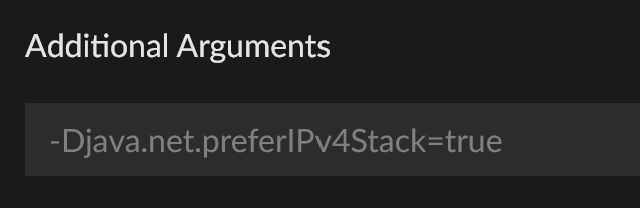
Setting prefer IPv4 stack to Minecraft
Occasionally the Minecraft game when launched tries to use the IPv6 stack to contact Minecraft authorization (auth) services.
Usually this is when trying to join a server but can also happen because of mods trying to contact services.
- To set the game to prefer using the IPv4 stack - put the following string in the 'Additional Arguments' box.
-Djava.net.preferIPv4Stack=true- The text box is located in Curseforge App settings > Minecraft tab
 > scroll to bottom of window
- The text box is located in Curseforge App settings
 dull violet
signal ridge
Try the flush part at least
dull violet
signal ridge
Try the flush part at least
nope
signal ridge
as in no your not trying? or no it didnt work?
dull violet
didnt work
quasi lagoon
bronze bluff
nope. didnt work
signal ridge
dull violet
didnt work
Do you use any third party antivirus softwares or vpns?
signal ridge
quasi lagoon
nope. didnt work
Send new log
quasi lagoon
here
bronze bluffBOT
quasi lagoon
here
Paste link generated for file uploaded by Rok005R.
dull violet
signal ridge
Do you use any third party antivirus softwares or vpns?
nope
signal ridge
quasi lagoon
here
Need the log without the number, as the bot says
signal ridge
dull violet
nope
!ticket-site will need to open a ticket for this one.
bronze bluffBOT
dull violet
nope
-# Trigger requested by YOYOK9.
How to open a support ticket on the CurseForge website
Can't open the app or would rather use the website? You can do so here.
Fill out the form with accurate detailed information, keep in mind that simply saying 'it' or 'doesn't work' is very vague. The more details you provide, the more efficient help you will get.
If your problem is with the app, make sure to upload your CurseForge logs with the Upload File option in the ticket. Information on how to get these logs can be found here
bronze bluffBOT
quasi lagoon
Paste link generated for file uploaded by Rok005R.
signal ridge
!ipv6
bronze bluffBOT
signal ridge
!ipv6
Disabling IPV6
Please follow these instructions to disable IPv6, which when enabled can sometimes cause network issues.
 slate blade
hey peoples, i'm trying to create my own modpack, but it doesn't wanna start up. it has quite a couple mods. i've tried dissabling every single one, then turning them back on one by one, once i get to a certain point, it stops booting up. after then dissabling the mod i just turned on, it still gives me error code 1 on startup. could someone help? i cant figure it out for the life of me...
bronze bluffBOT
slate blade
hey peoples, i'm trying to create my own modpack, but it doesn't wanna start up....
Paste link generated for file uploaded by deep fried edible.
signal ridge
#🧱︱mc-other-help for mc issues
quasi lagoon
it showed that it was updating files. thats about all that happened
slate blade
signal ridge
<#768367574001778729> for mc issues
oh mb
signal ridge
quasi lagoon
it showed that it was updating files. thats about all that happened
Give it time
signal ridge
Send your new log, this is gunna be one of those "one step at a time" issue, which is fine
quasi lagoon
bronze bluffBOT
quasi lagoon
Paste link generated for file uploaded by Rok005R.
signal ridge
oh wait a sec, does your pc have a sound card or audio device built into it?
quasi lagoon
no not that i know of
let me check rq
no soundcard
or audio device built into it
 worthy frigate
Trying to share my minecraft profile with the 7 day code.
I go to login
"Login was succesful"
Aaaand nothing happens. App still shows me not signed in
quasi lagoon
just bt headphones i have :/
signal ridge
Can you try plugging some headphones into the pc if you dont have any plug in atm?
quasi lagoon
dont have any wired ones ngl
signal ridge
just wireless ones? have you installed the needed drivers for them?
quasi lagoon
imma have to search for the drivers brb
for some reason the app aint displaying the headphones itself, only the mouse
says firmware is up to date
nvm
i think i just found out the fix
signal ridge
oh?
quasi lagoon
yeah i dont think i was expecting such an easy fix like
"Turn them on and launch mc"
signal ridge
Its always the easiest not thought about solution to fix weird issues like these.
limber marsh
limber marsh
as of this morning, getting an error repeatedly when i try to launch curseforge....
having this same issue again, restarted computer, checked wifi, switched networks, no luck
on macos btw
quasi lagoon
atleast its fixed its all that matters
signal ridge
limber marsh
having this same issue again, restarted computer, checked wifi, switched network...
!ticket-site my mac support isnt the best, sorry, ticket migh tbe better in this case
bronze bluffBOT
limber marsh
having this same issue again, restarted computer, checked wifi, switched network...
-# Trigger requested by YOYOK9.
How to open a support ticket on the CurseForge website
Can't open the app or would rather use the website? You can do so here.
Fill out the form with accurate detailed information, keep in mind that simply saying 'it' or 'doesn't work' is very vague. The more details you provide, the more efficient help you will get.
If your problem is with the app, make sure to upload your CurseForge logs with the Upload File option in the ticket. Information on how to get these logs can be found here
limber marsh
alr, i will do that now :p
limber marsh
bronze bluff
-# `Trigger requested by YOYOK9.`
what should i select for the issue category? none of the issue sub-categories seem accurate to the issue i'm dealing with
steep perch
 errant violet
Why can't CurseForge see the KSP game?
errant violet
Why can't CurseForge see the KSP game?
Use ksp-ckan for ksp
signal ridge
errant violet
Why can't CurseForge see the KSP game?
Its only supported by the Overwolf version of the Curseforge app, but its recommended to use CKAN. Link for that can be seen on the site below
!cfgames
bronze bluffBOT
signal ridge
!cfgames
CurseForge game support
CurseForge supports many games, however only certain games are supported between the different apps (OW version vs. Standalone). See the link below for what games are supported by which platform.
errant violet
But it used to work, why did it stop?
signal ridge
limber marsh
what should i select for the issue category? none of the issue sub-categories se...
Just to make sure here, you tried all the options from the support pages in the get support button?
limber marsh
would you mind sending a link to that? after a couple of seconds the error i sent a screenshot of dissapears along with the buttons and it goes back to the 'forging your library' loading screen
signal ridge
!oops
bronze bluffBOT
signal ridge
!oops
What to do when getting the 'Oops' message
- Make sure you try all 5 steps here first <- (That is a link, DO NOT SKIP IT!!)
- Click the
Create logs.zipbutton on the bottom of the oops error. - Drag and drop the created file into this channel.
- Wait for someone to look at the logs and help you.
limber marsh
thanks :)
signal ridge
quasi lagoon
atleast its fixed its all that matters
Quick question, what mc version and modloader were you using with this error? Just trying to collect some mroe data on why this issue has started to happen
quasi lagoon
1.12.2, forge
signal ridge
Thanks
limber marsh
signal ridge
Just to make sure here, you tried all the options from the support pages in the ...
tried everything except uninstalling and reinstalling as i don't want to lose my modpack profiles (at least one isn't backed up/i don't have the zip file for)
is there anything else i can try?
daring shale
My game isnt booting up, when i click play nothing happens
I need help because i cant play my modpack
can someone please help me
no modpack is working on minecraft
i cant play anything
i cant even send the luancher logs because i cant get in the game
can someone please help me
 quartz frigate
Hey there! I've been trying to upload a modpack to CurseForge, but it keeps being rejected for not having a manifest.json even though it is right there. I've created it using the CurseForge Launcher so I don't think I've done anything wrong, I can't see any errors with the file either. I'm really confused, would be great to have some help 🫠
steep perch
!mc-packshare
bronze bluffBOT
steep perch
!mc-packshare
Two ways to share a modpack you made with others
:small_orange_diamond: Export and Share - For Friends / Small Groups
- Click the Icon for the modpack.
- Click the button next to play.
- Click

Export. - Select the files that should be included.
- Send the zip to the people that want it! They can follow the instructions in
!mc-installpackto install the pack.
:small_blue_diamond: Upload to Curseforge - For Public Release to Everyone
This option will make your pack public to EVERYONE, it comes with extra requirements and will take some effort to set up.
- Go to create a new project
- Fill out the information with a proper description of the pack. This should allow anyone to understand what the pack is.
- Click the Icon for the modpack in the CurseForge app.
- Click the button next to play.
- Click
Export. - Select the files that should be included.
- Open your Project that you made on the CurseForge site and Upload the file you just made.
- Wait for Moderation & Sync so it can show up in the client! (See
!syncfor limitations and!statusto learn about the moderation process and how long it will take to approve/decline)
steep perch
Did you upload it like this?
quartz frigate
I exported the pack exactly like that, but the project already existed so I just uploaded to the website
But the .zip file contains these three like it should

 worn bobcat
Delete the old one and re-export maybe?
honest bluff
yo why cant i update curseforge it just stays at this
 quartz frigate
worn bobcat
Delete the old one and re-export maybe?
quartz frigate
worn bobcat
Delete the old one and re-export maybe?
Nothing :/
Honestly don't know how to solve this and it's stressing me out
 haughty pecan
Hey I need help. My friends minecraft launcher keeps crashing. He's played on the 1.19.2 - 43.5 curse forge version before a few time and now he can't play anymore. Need help.
 compact pecan
Does the launcher crash or Minecraft?
haughty pecan
it's weird, once he's in the launcher and completed the download the launcher is gone waiting for the game to pop up. for a while the launcher will come back and say the game crashed
bronze bluffBOT
compact pecan
!mc-logs he should post this in <#768367574001778729>
How to get your profile logs on CurseForge for support
- Right-click the modpack profile icon OR click the button in the modpack profile.
- Click
Open Folder. - Open the
logsfolder. - Drag and drop the FILE named
latestinto discord.
You can also view this video
 hollow flicker
anyone able to help me? my curseforge wont launch ANY of my modpacks. i press play and it does essentially nothing, like it wont open the launcher
i've tried uninstalling and reinstalling both curseforge and minecraft, i've also tried repairing the app and my modpack and i dont know what else to do
my firewall is turned off and not blocking it as well
i was able to play perfectly fine 2 days ago
ocean lichen
hollow flicker
anyone able to help me? my curseforge wont launch ANY of my modpacks. i press pl...
!mc-installfix
bronze bluffBOT
hollow flicker
anyone able to help me? my curseforge wont launch ANY of my modpacks. i press pl...
-# Trigger requested by mattéo 35.
How to repair your Minecraft installation on CurseForge - **NOT** the same as `Repair Profile` - please follow these exact steps
- Click on the Minecraft Tab on the left side of the CurseForge App.
- Click button in the Top Right Corner of the app
- Click
Repair Installationoption.
NOTE: Although this might seem similar to the instructions of repairing profile, it's different and required. No worries, you will not lose any modpacks or worlds.
ocean lichen
Restart your computer after the repair
hollow flicker
ocean lichen
Restart your computer after the repair
didn't work, any other ideas?
ocean lichen
hollow flicker
didn't work, any other ideas?
Look in the settings and tell me if you are using "use Mojang launcher" or "skip launcher"
hollow flicker
ocean lichen
Look in the settings and tell me if you are using "use Mojang launcher" or "skip...
mojang launcher
ocean lichen
What happens if you try to use the skip launcher option?
hollow flicker
ocean lichen
What happens if you try to use the skip launcher option?
that worked, apparently i also had to do a log in thing
thanks!
ocean lichen
Enjoy
haughty pecan
@compact pecan I have no access to the link you sent
 young bone
That’s because you don’t have the Minecraft role
haughty pecan
ya
young bone
quartz frigate
So after three hours of research I figured out I'm not supposed to have the mods folder insine the .zip file that should be uploaded, but it's alright to have folders for mod config and resoursepacks right? If not, how should I add those to my modpack?
rich flint
quartz frigate
So after three hours of research I figured out I'm not supposed to have the mods...
what are you trying to do?
quartz frigate
Uploading my modpack to CurseForge 🥲
bronze bluffBOT
rich flint
!mc-packexport
How to export modpacks
- Click the Icon for the modpack.
- Click the button next to Play.
- Click .
- Select files to be included (at least mods and configs)
- Share it with friends or upload to the site!
quartz frigate
Yeah, I did that and it should be right but it keeps getting rejected due to be "missing manifest.json"
but the file is there
rich flint
the project you created is a modpack project and not a mod project?
quartz frigate
It's a modpack
rich flint
i'm reading that as the curseforge project is a modpack project
quartz frigate
Yes, that's right
rich flint
can you screenshot what it looks like directly inside your zip file
quartz frigate
quartz frigate
But the .zip file contains these three like it should
here
And the overrides folder contains both a config and a resourcepack folder
rich flint
if you want those resource packs to automatically be enabled you'll want to include a mod like defaultoptions and have it configured
what is the exact name of the file you uploaded
quartz frigate
Wait, so I can't export a texturepack along with the modpack?
rich flint
i didn't say that
quartz frigate
oh right sorry
rich flint
I said for it to automatically apply and not have to have the end user have to enable it in the resource pack menu
quartz frigate
didn't know that, thanks for the info
but that's beside the point, I just want to know if I'm exporting the right way
rich flint
if you exported it using the curseforge app it should work
quartz frigate
I'm assuming the manifest.json structure is right?
 rich flint
check your notifications again and screenshot the message you got from the last file
 bright sail
hi
quartz frigate
rich flint
check your notifications again and screenshot the message you got from the last ...
 bronze bluffBOT
rich flint
!ticket-author
bronze bluffBOT
rich flint
!ticket-author
Author support tickets for Project or Moderation issues
Info for Project Authors:
When opening a support ticket, make sure to select Author Support in the What kind of support do you need? box.
You also need to include a link to the project and your CF name!
Logs, Game and OS boxes can be ignored when opening an author ticket.
quartz frigate
So I'm not the one at fault? That's good to know 😅
bright sail
i had a modpack that doesn't show the button add more content, anything im doing wrong here?
 ocean lichen
bright sail
i had a modpack that doesn't show the button add more content, anything im doing...
ocean lichen
bright sail
i had a modpack that doesn't show the button add more content, anything im doing...
Go in the -> profile options -> make sure "allow content management" is enabled
bright sail
ocean lichen
Go in the <:zCFmenu:1319318631770751086> -> profile options -> make sure "allow ...
got it ❤️ tq, but is the setting disabled because that i have a current save file going on atm?
ocean lichen
I'm not sure
bright sail
aight, thanks again
 bright echo
im trying to run a modpavk that i ran previosly and itkk say its launching the game but it wont load
 peak torrent
i keep getting this damn exit code for minecraft ( -805306369 dispite me changing the damn ram in the launcher and the app
bronze bluffBOT
peak torrent
i keep getting this damn exit code for minecraft ( -805306369 dispite me changi...
Error/Exit codes aren't helpful. Follow these steps to receive support.
- Right-click the modpack profile icon OR click the button in the modpack profile.
- Click
Open Folder. - Open the
logsfolder. - Drag and drop the FILE named
latestORdebuginto Discord.
Please continue in #🧱︱mc-other-help.
ocean lichen
Don't forget to move in #🧱︱mc-other-help
peak torrent
copy
 little dock
Been trying to get the app to scan my Kerbal Space program mods, but this shows, dispite me having multiple mods in the gamedata folder. i have the right folder selected in the settings
 rich flint
little dock
Been trying to get the app to scan my Kerbal Space program mods, but this shows,...
rich flint
little dock
Been trying to get the app to scan my Kerbal Space program mods, but this shows,...
Yeah many people also have that issue. For now it's recommended to use CKAN to manage and launch mods
little dock
makes sence.
 neat inlet
I've had a mod called "Improving Minecraft" approved in my modpack(https://www.curseforge.com/minecraft/modpacks/progressive-survival) for some time now for 1.7.10. I tried looking for it today to compare it to something, and I can't find any downloads on any reputable sites. It's not in the Curseforge 3rd party approved mods, either. How am I going to update my pack and keep that mod now? It had to have been hosted on CF at one point. The pack I had created using the CF launcher got wiped out, but I had the pack contents backed up on a USB, so I'm trying to rebuild it so I can update it but I'm not sure how to move forward and I can't remove that mod.

CurseForge
Hardcore progression-based pack, with no fixed paths or hard limits on what you can do. You control how you progress!
1.1K Downloads | Modpacks
rich flint
if the mod project was removed from curseforge than you can no longer publish modpack files with it
also previously published modpack export files with it won't work anymore
 slate forge
my curse forge wont work at all
 sweet rock
slate forge
my curse forge wont work at all
sweet rock
slate forge
my curse forge wont work at all
As in its not launching? Or is there a specific issue with the app you're facing?
slate forge
like when i click play it does not open the mod
sweet rock
slate forge
like when i click play it does not open the mod
Does regular MC work?
slate forge
ya
sweet rock
Is it any modpack you click play on? Or do some work while others don't?
slate forge
none of them work
sweet rock
?cflogs-app
bronze bluffBOT
sweet rock
?cflogs-app
How to get your CurseForge app logs
How to get your CurseForge app logs
- Click the
Create logs zipin the menu. - Drag and drop the zip file created to this channel.
- Wait for someone to look at it so they can help you.
 signal bane
I can't add The Sims 4 game to the CurseForge
steep perch
signal bane
I can't add The Sims 4 game to the CurseForge
how are you trying to add it and how do you own the game?
signal bane
I downloaded it by EA games, I was trying to add it manually but the Curseforge doesn't see the app, and while scanning computer for games it's not loading
steep perch
You can add it manually by telling the app where the games folder is
signal bane
I've tried, I selected the folder The Sims 4 but then there's an information that game was not found
steep perch
could you possibly screenshot the error
and show the folder where the game is installed?
signal bane


I don't even know which folder I should select
I tried all of them and none was working
steep perch
you are not selecting the right folder. you need to select where the game is installed
not where mods etc get put (the documents folder)
 steep perch
yeah that is not where the game is installed
that is where content goes
like CC and mods. you need to find where the game is installed. and point curseforge to that
 steep perch
you select the folder
also that doesn't look correct...show me the game in your EA app
or steamif you own it there
signal bane
What exactly should i show you?
steep perch
just bring up your EA app or steam with the game installed. we can then go from there so you can find the correct folder
 steep perch
in your EA app can you find the open game folder option?
I don't have my app for reference right now
signal bane
When I click to open the folder this is what is opening

 steep perch
that is the folder you want to select
signal bane
Thanks!
topaz inlet
I uploaded a file and it just disappears from the files page off my project for some reason, I don't get a notification about it either
 north widget
Could you send me a list explaining the items in the rings and relics mod?
topaz inlet
north widget
Could you send me a list explaining the items in the rings and relics mod?
 static quest
so every time i open curse it says i have an update so i go to update it doesnt work so i click of the update thing and then it just tells me to relauch over and over how can i fix it
static quest
ive tried deleting it and redownloading it but i could delete it and then i tried to download it again didnt work
 royal helm
Hi, every time I open curseforge it says there is an update but says that it failed for an unknown reason. Also, whenever I move my mouse over to the side bar to go to any settings, without even clicking, it crashes. Please see the attached images. Can someone help?


 umbral breach
Hello, I submitted a ton of files yesterday , and I got back a “changed to review” File Cooked Successfully “ can someone tell me what this means? And is it bad? I do most of my files from scratch and I have Never come across this issue before. Can you explain please?
static quest
royal helm
Hi, every time I open curseforge it says there is an update but says that it fai...
thats the same as what im getting
royal helm
static quest
thats the same as what im getting
And whenever I try to click on a file it says "oops, something went wrong"
steep perch
umbral breach
Hello, I submitted a ton of files yesterday , and I got back a “changed to revie...
!ticket-author - seen a lot of this lately. it's ark and hogwarts stuff somehow appearing for sims and minecraft.
bronze bluffBOT
umbral breach
Hello, I submitted a ton of files yesterday , and I got back a “changed to revie...
-# Trigger requested by DIRECT_VIRUS.
Author support tickets for Project or Moderation issues
Info for Project Authors:
When opening a support ticket, make sure to select Author Support in the What kind of support do you need? box.
You also need to include a link to the project and your CF name!
Logs, Game and OS boxes can be ignored when opening an author ticket.
umbral breach
Good grief, I freaked out! I’m like what is cooked? In my line, it’s usually bad
static quest
re downloading it doesnt fix it and i am undable to delete curse to re download it so yeah
steep perch
cooking is what ark and hogwarts mods do to be checked and made
umbral breach
Mines not a mod, it’s just Cc
umbral breach
Ok thanks
static quest
this is what i get everytime my curse crashes
bronze bluffBOT
static quest
this is what i get everytime my curse crashes
Zip paste links generated for archive uploaded by SockoSaurus35.
shrewd agate
shrewd agate
game crashed minecraft 1.20.1 forge 47.4.0
compact pecan
shrewd agate
 winter summit
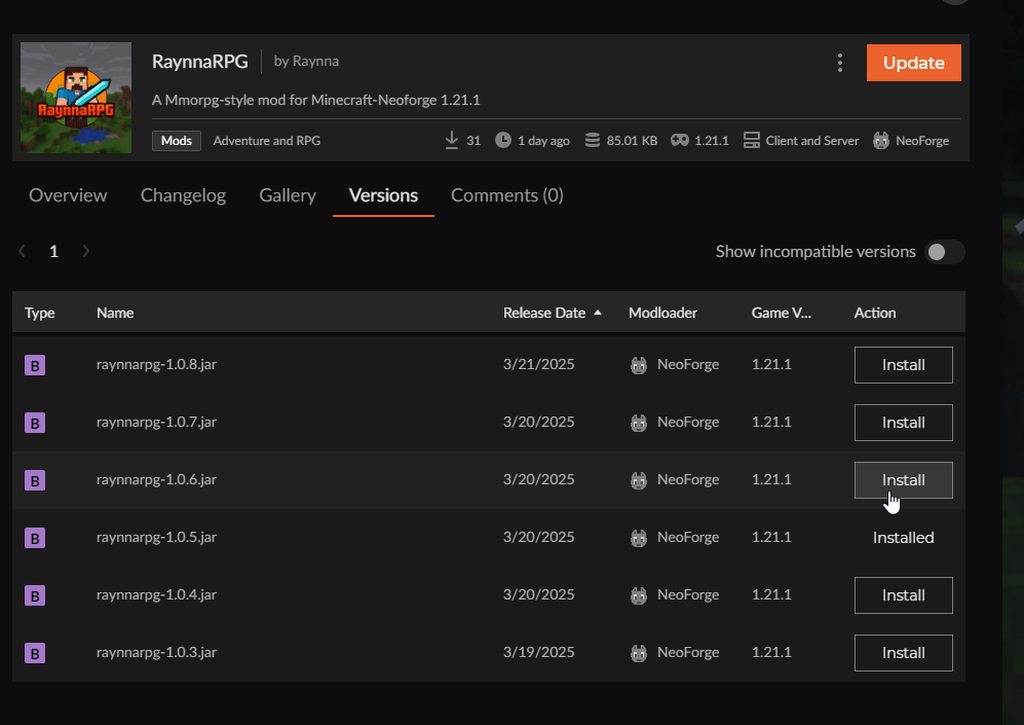
does anyone know why my mod acts like this?
it always suggests to download 1.0.6, not the 1.0.8 which is the latest
 hot bronze
how do i upload my own modpack?
opal cipher
!mc-packshare
bronze bluffBOT
opal cipher
!mc-packshare
Two ways to share a modpack you made with others
:small_orange_diamond: Export and Share - For Friends / Small Groups
- Click the Icon for the modpack.
- Click the button next to play.
- Click
Export. - Select the files that should be included.
- Send the zip to the people that want it! They can follow the instructions in
!mc-installpackto install the pack.
:small_blue_diamond: Upload to Curseforge - For Public Release to Everyone
This option will make your pack public to EVERYONE, it comes with extra requirements and will take some effort to set up.
- Go to create a new project
- Fill out the information with a proper description of the pack. This should allow anyone to understand what the pack is.
- Click the Icon for the modpack in the CurseForge app.
- Click the button next to play.
- Click
Export. - Select the files that should be included.
- Open your Project that you made on the CurseForge site and Upload the file you just made.
- Wait for Moderation & Sync so it can show up in the client! (See
!syncfor limitations and!statusto learn about the moderation process and how long it will take to approve/decline)
opal cipher
Second section 🔷
 hardy rapids
Mods aren't loading

 late mountain
I want to install a mod found in brower, but I get this in the app:
Any ideas what is the issue? Can it be bc the mod has only an alpha version?

 mint linden
Whenever I try to play a Minecraft Mod and it gets to 100% launching it finished but never opens up minecraft launcher
 keen glen
when i go and try to launch a mod pack i click play and it doesnt launch modded minecraft
 onyx rapids
Heyo! I am trying to play a mod combo of Create, Botania, Storage Drawers, and a few other smaller mods. However, there seems to be a few mods (create mod and a few of its addons) that are not loading properly or are incompatible. Here is the mod list code, and any help to figure out what is wrong is appreciated.
pYVvoexY
opal cipher
late mountain
I want to install a mod found in brower, but I get this in the app:
Any ideas wh...
Yes, the app does not allow alpha or experimental mods/files
Need to explicitly allow it in the settings
Or add it manually
late mountain
opal cipher
Yes, the app does not allow alpha or experimental mods/files
I see thank you... Then my guess was true
bronze bluffBOT
opal cipher
?sync
Projects sync from CurseForge website to the app
The CurseForge App and website do not share the same requirements.
You might find content on the website that won't be on the app.
In order to show on the app:
- Projects MUST have a file marked as Release
 or Beta
- Projects MUST be Approved
- Projects MUST have a file marked for the game version selected/loaded
- Projects CANNOT be Experimental
- Projects CANNOT be Abandoned
onyx rapids
onyx rapids
Heyo! I am trying to play a mod combo of Create, Botania, Storage Drawers, and a...
here is the crash report if this also helps
bronze bluffBOT
onyx rapids
here is the crash report if this also helps
Paste link generated for file uploaded by halloandrew5.
onyx rapids
oh it appears that i am in the wrong channel haha
serene edge
bronze bluff
I just got everything set up for this and decided to test the original server starter I used that I got directly from forge and now it’s working completely fine :|
rich flint
serene edge
I just got everything set up for this and decided to test the original server st...
That launches the same files - there is no difference
serene edge
rich flint
That launches the same files - there is no difference
well the curseforge server download didnt create all the required files then because i had to stitch together two different attempts at starting a server to make it work
rich flint
Are you confusing curseforge and forge?
serene edge
rich flint
Are you confusing curseforge and forge?
No, I ment forge
rich flint
Ok. If you ever want support type of help with that helper script, there is a support discord for it
 plucky badge
does anyone know why i cant play my modpacks, everytime i open curseforge and try to play a moldpack it just doesnt open the launcher
ocean lichen
plucky badge
does anyone know why i cant play my modpacks, everytime i open curseforge and tr...
answered in #🧱︱mc-other-help
serene edge
my friend tried to join my server and this showed up. what is going on
 ocean lichen
serene edge
my friend tried to join my server and this showed up. what is going on
ocean lichen
serene edge
my friend tried to join my server and this showed up. what is going on
!notcf
bronze bluffBOT
serene edge
my friend tried to join my server and this showed up. what is going on
-# Trigger requested by mattéo 35.
This is not related to CurseForge owned/maintained features or services
CurseForge does not make or maintain any of the content or games used on the site or the app.
Just because it's on the site/app does not make it a problem with CurseForge.
Please move to the respective channels as requested, OR use #👽︱game-support for game-related help.
serene edge
ocean lichen
!notcf
what channel does this go in then
ocean lichen
 solemn bobcat
yall know how to fix this, i have the most recent ver of jei installed

 sterile ingot
Hi, how are you?
When I go to access the modpack that I downloaded, it doesn't open, and I've tried closing and opening it, uninstalling and installing it again and it didn't work.
 vivid siren
Trying to figure out why the notification shows a 3 when there are only 2 mods that have updates available

 reef jasper
modpakc errors again
ill complain here too curse forge knows im ratting it out
ocean lichen
reef jasper
modpakc errors again
ill complain here too curse forge knows im ratting it out
Any context on the error?
young bone
vivid siren
Trying to figure out why the notification shows a 3 when there are only 2 mods t...
Do you have any shader packs or resource packs installed through CF
vivid siren
young bone
Do you have any shader packs or resource packs installed through CF
No resource packs, might be a shader though - feels a little weird for the notification to refer to things in different tabs, though
young bone
That number with update all is across the 4 different tabs for content
vivid siren
thank you, that is very unintuitive
young bone
What do you think about the numbers being on the tabs that have content with updates available instead
vivid siren
that would make much more sense
young bone
And a solid orange dot on the update all button
vivid siren
either a solid dot on the update all button and numbers on the tabs or vice versa (solid dots on the tabs and the total number on the update all button), both would work
 past thunder
Why can’t a comment on curseforge, or open settings?
 snow gorge
hi everyone i just recently moved my sims 4 folders to my secondary drive, now whenever i download a new mod it makes a new folder in the C: drive and downloads it there, does anyone know how to fix this?
 wraith jasper
Hi everyone whenever I try to launch modpacks through curse forge I keep getting an exit code 1 message from minecraft when I try to launch it I’m on Mac and not sure what to do
bronze bluffBOT
wraith jasper
Hi everyone whenever I try to launch modpacks through curse forge I keep getting...
Error/Exit codes aren't helpful. Follow these steps to receive support.
- Right-click the modpack profile icon OR click the button in the modpack profile.
- Click
Open Folder. - Open the
logsfolder. - Drag and drop the FILE named
latestORdebuginto Discord.
Please continue in #🧱︱mc-other-help.
 warm lantern
I can promote my one mod 2 times on #1032223688180895804 ?
 sharp willow
can someone help me with this I've tried everything
 bronze bluffBOT
sharp willow
can someone help me with this I've tried everything
bronze bluffBOT
sharp willow
can someone help me with this I've tried everything
Error/Exit codes aren't helpful. Follow these steps to receive support.
- Right-click the modpack profile icon OR click the button in the modpack profile.
- Click
Open Folder. - Open the
logsfolder. - Drag and drop the FILE named
latestORdebuginto Discord.
Please continue in #🧱︱mc-other-help.
ocean lichen
Don't forget to move in #🧱︱mc-other-help or #👽︱game-support
sharp willow
thank you
 meager remnant
Everytime i try and log into my minecraft into cursed forge it pops up with this
 neat inlet
how do I add a mod that's in alpha into a pack? it doesn't come up in the results, and I didn't see anywhere to "show alpha files" like you can on the cf website.
signal ridge
If the mod only has alpha files, not beta or release, the project doesnt sync with the app/site search.
You would have to download the project off the site then add it to your pack manually. I think
neat inlet
okay, but will it reject it if I add it manually? it's on CF.
signal ridge
Could try purting the mods projectid into the apps search, it might come up (im not 100% tho)
neat inlet
didn't work, but good idea
signal ridge
If you manually add the mod, then export the pack, you can check to see if the app did or did not add it to the manifest by opening the zip and seeing if it ended up in the overrides/mods folder.
If its there it didnt register correctly. If its not then it stuck it in the manifest
Alpha only projects can be a bit iffy from what Ive seen. Other option would be to ask the dev if they could release a beta, but lable the files name as alpha, just so the project can properly sync on the network
!sync
bronze bluffBOT
signal ridge
!sync
Projects sync from CurseForge website to the app
The CurseForge App and website do not share the same requirements.
You might find content on the website that won't be on the app.
In order to show on the app:
- Projects MUST have a file marked as Release or Beta
- Projects MUST be Approved
- Projects MUST have a file marked for the game version selected/loaded
- Projects CANNOT be Experimental
- Projects CANNOT be Abandoned
neat inlet
signal ridge
Alpha only projects can be a bit iffy from what Ive seen. Other option would be...
it's so old I don't think anyone's doing anything with it anymore. I could try asking, but I doubt anything will come of it. I'll add it and if it's rejected I can share the link in the response/update.
are you able to see a project ID for this? it's no longer loading for me. I've seen a few of these situations where "changes" were needed and the mod page disappeared:
http://minecraft.curseforge.com/projects/difficult-life
trying to update a pack and seems a bunch of stuff has just ...disappeared recently
actually I think I found it.. 230647?
 acoustic sailBOT
Project 230647 is: Difficult Life
Increase difficulty of your game

Project information
Author
Status
Abandoned
Created
<t:1431952987:F>
Modified
<t:1556084469:F>
Released
<t:1522406443:F>
Downloads
203,097
Mod Distribution
Allowed
Categories
 CurseForge
signal ridge
CurseForge
signal ridge
That the project?
Ah its marked as abandoned, that can make this a lot more challenging
signal ridge
meager remnant
Everytime i try and log into my minecraft into cursed forge it pops up with this
!dns try this. With cf fully closed
bronze bluffBOT
meager remnant
Everytime i try and log into my minecraft into cursed forge it pops up with this
-# Trigger requested by YOYOK9.
Changing your DNS server
-
Please follow these instructions to change your DNS server. The default one (provided by your router/ISP) can sometimes block CurseForge and other programs/websites.
-
After changing the DNS server to be used by your computer, you can enter the following command into a
CMDorpowershellwindow (Windows search either and open).
ipconfig /flushdns
This will reset your DNS records so that new web requests get new addresses using the new DNS.
 median viper
i did a minecraft forge server and hosted it on my pc and if i want to play on it it doesnt let but my friends can play
bronze bluffBOT
median viper
i did a minecraft forge server and hosted it on my pc and if i want to play on i...
Paste link generated for file uploaded by Heyron.
median viper
bronze bluffBOT
signal ridge
!notcf
This is not related to CurseForge owned/maintained features or services
CurseForge does not make or maintain any of the content or games used on the site or the app.
Just because it's on the site/app does not make it a problem with CurseForge.
Please move to the respective channels as requested, OR use #👽︱game-support for game-related help.
 split sinew
anytime i hover over an icon on the launcher It crashes and ask to relaunch, doesnt matter if its the launcher itself or a game tab, tried to open curse settings and cant even do so
 raw juniper
On my shortcut, it's called "Cursed Game Forger" for some reason.

 dark jackal
this happens every time i try to create a new modpack


it gets stuck on patch 2, then fails. Importing zip files dont work either, and i reinstalled curseforge and it didnt work.
ocean lichen
dark jackal
this happens every time i try to create a new modpack
!mc-installfix
bronze bluffBOT
dark jackal
this happens every time i try to create a new modpack
-# Trigger requested by mattéo 35.
How to repair your Minecraft installation on CurseForge - **NOT** the same as `Repair Profile` - please follow these exact steps
- Click on the Minecraft Tab on the left side of the CurseForge App.
- Click button in the Top Right Corner of the app
- Click
Repair Installationoption.
NOTE: Although this might seem similar to the instructions of repairing profile, it's different and required. No worries, you will not lose any modpacks or worlds.
ocean lichen
Restart your computer after the repair
dark jackal
i tried that a billion times and did restart my computer afterwards
ocean lichen
!cflogs-app
bronze bluffBOT
ocean lichen
!cflogs-app
How to get your CurseForge app logs
How to get your CurseForge app logs
- Click the
Create logs zipin the menu. - Drag and drop the zip file created to this channel.
- Wait for someone to look at it so they can help you.
dark jackal
bronze bluffBOT
dark jackal
Zip paste links generated for archive uploaded by water.
 winter bison
may i have assistance
i cant play minecraft modded
using this website
i downloaded forge and everything and then i got a mod pack and when i press play on it, it opens a different like minecraft thing on a different account saying i have to buy minecraft again
hello
how do i get help
ocean lichen
!patience
bronze bluffBOT
ocean lichen
!patience
Please be patient, we're helping as fast as we can
The Moderators & Helpers on this server volunteer their time and knowledge to help people as they can.
Not everyone here will have an answer for you the moment you want it.
Time zones, work/life schedules etc. also vary when people are around to help.
TL;DR: Please have patience. IF and WHEN someone knows how to help, they will assist you.
*Note that you can also open a support ticket and wait for a response.
neat inlet
signal ridge
Ah its marked as abandoned, that can make this a lot more challenging
yep...that's the one
signal ridge
neat inlet
yep...that's the one
You might be sol
 robust apex
how can i make it so the people that downloaded my modpack got one specific mod auto-updated instead of me updating the modpack file each time the specific mod gets updated?
signal ridge
Unless the mods dev has an auto update feature in their mod, you would need to upload a new pack version each time
dark jackal
theres this too
 robust apex
signal ridge
Unless the mods dev has an auto update feature in their mod, you would need to u...
robust apex
signal ridge
Unless the mods dev has an auto update feature in their mod, you would need to u...
whats that
signal ridge
robust apex
whats that
Whats what? just to make sure I got this right, you want users to be able to download your modpack, but make it so that 1 of the mods auto updates without you needing to upload a new modpack file every time that mod updates?
robust apex
yes
signal ridge
Unless that specific mod has some auto update feature the mods dev has, then no it is not possible.
And if I am being honest I woulnt personally trust that as what if say the devs accounts were hacked, then your pack would have a mod that would auto update, without the users knowing what is happening, and then you get hit with "your modpack is malware, ban the pack dev" when in reality its the mod doing something sketchy.
Then there is also the, if the mods auto update breaks your pack, youll have a lot more work to do trying to troubleshoot.
Or if you need to downgrade the mod to a specific version to fix an issue, but it auto updates for the user back to the broken version, then what do you do?
I see the pros to it, but as a pack dev myself, Id rather have full control over what my users get, vs having to hope an auto updated mod doesnt break my hard work.
topaz inlet
Every time I upload a curseforge file to my project on the Legacy version it uploads but shows up for a second then disappearing, I also didn't get a notification about it. When I try to upload it on the Authors Beta page it never finishes uploading. It gets stuck right before it finishes
signal ridge
Are you uploading the same exact file everytime? OR uploading a new copy?
topaz inlet
I got the file from exporting it from curseforge, now that I'm thinking on it I probably should've tried again with a diff export. Let me get back to you
But I know that the Authors Beta always never finishes uploading no matter the file
topaz inlet
signal ridge
How big is the zip file?
2 gigabytes
topaz inlet
signal ridge
Also are you on wifi or an ethernet cable?
Wifi, it's not my wifi that's the issue. I can upload it anywhere else and it's fine. It's just curseforge that messes up
signal ridge
Need to check what the file limit was. As for the wifi, was more it can be unstable at time. Im more thinking of the between your pc and servers connection, not the wifi itself
Whats in your zip thats making it 2gb?
signal ridge
if the mods are from the cf site, they shouldnt be in the zip
signal ridge
CF uses a manifest system, so the app knows what mods to download on install. That way the devs of the mods still get download points. Part of CFs rewards program
topaz inlet
Maybe the preset world I put in it
signal ridge
That could be it
See if you can upload the file without the world, just on the authors portal option, set the file as "I would Like to publish this file once approved" that way you can see if its the world, BUT its not live to your users.
topaz inlet
Will do, standby
 manic axle
Hello, quick question
topaz inlet
signal ridge
See if you can upload the file without the world, just on the authors portal opt...
And it uploaded, holy crap I'm stupid lmao
signal ridge
topaz inlet
And it uploaded, holy crap I'm stupid lmao
You might have to upload the world as its own project, then link the 2 together (just like you would with a mod)
manic axle
I have an issue where I can not see any minecraft modpacks when I use the "Browse" tab. How would I go about fixing this?
signal ridge
!dns try the below with the cf app fully closed
bronze bluffBOT
signal ridge
!dns try the below with the cf app fully closed
Changing your DNS server
-
Please follow these instructions to change your DNS server. The default one (provided by your router/ISP) can sometimes block CurseForge and other programs/websites.
-
After changing the DNS server to be used by your computer, you can enter the following command into a
CMDorpowershellwindow (Windows search either and open).
ipconfig /flushdns
This will reset your DNS records so that new web requests get new addresses using the new DNS.
topaz inlet
signal ridge
You might have to upload the world as its own project, then link the 2 together ...
Yeah, will do. Thanks!!!
manic axle
signal ridge
!dns try the below with the cf app fully closed
thank you
 old girder
how do i turn my custom modpack into a server pack so i can play with my friends?
signal ridge
3 options. Ill run both commands after.
- Local host, manually: You copy all your mods, configs, and what ever else you need for the pack to work, remove the client side only mods (shaders, visual mods, etc) then manually install for the needed modloaders and such.
- Local host, server tool: Use the Universaltor tool made by one of our moderators, it does the server side setup for you, java version, mc version, modloader, etc. + it has a wiki.
- Find a host online your willing to pay for, then follow their instructions.
Note: When it comes to minecraft servers, You get what you payed for
!mc-installserver , Option 1
bronze bluffBOT
signal ridge
!mc-installserver , Option 1
How to **manually** install a server - **On your own PC**
- Check if the modpack has a server pack, if it does: use that and skip below.
- Go to the Forge website http://files.minecraftforge.net/ and download the Installer for the forge version the pack is using.
- Run the installer and choose
Install server. Do not install to your desktop. Also do not install inside a OneDrive folder. - Run the server using the forge.jar. A file called
eula.txtwill be generated. Open it and changeeula=falsetoeula=true - From the Client; Copy the
modsfolder,configfolder, and any other folders needed for the pack to work into the server folder. If the modpack has a server pack, use this instead! - Run the server again.
- Port forward your machine if needed. (Google it)
You could also use this community made tool for installing packs! Instructions are provided on the site.
signal ridge
!mc-univ Option 2
bronze bluffBOT
signal ridge
!mc-univ Option 2
Universalator server tool
-
The Universalator is a file (BAT script) which can be used to install and launch modded Minecraft server files on PCs (and VMs).
- All Minecraft (Java) versions are supported.
- Supports Neoforge, Forge, Fabric, Quilt, Vanilla.
- Java version files are automatically obtained and handled!
- Has additional tools like client-side mod detection.
-
Use it to create custom servers on your PC!
-
Use it to launch existing published server packs on your PC!
Current versions support use with Windows, Linux, MacOS
The script for each OS version is a single file which is placed into, and run from the server folder.
Universalator project download website & wiki
old girder
Okay thank you sm
signal ridge
Np, if you need any help with the server part of it, can ask in our #🧱︱mc-other-help room, since servers have nothing to do with the CurseForge app / site itself (what cf support is for)
signal ridge
!dns try the below with the cf app fully closed.
bronze bluffBOT
signal ridge
!dns try the below with the cf app fully closed.
Changing your DNS server
-
Please follow these instructions to change your DNS server. The default one (provided by your router/ISP) can sometimes block CurseForge and other programs/websites.
-
After changing the DNS server to be used by your computer, you can enter the following command into a
CMDorpowershellwindow (Windows search either and open).
ipconfig /flushdns
This will reset your DNS records so that new web requests get new addresses using the new DNS.
signal ridge
If 1.1.1.1 doesnt work, try 8.8.8.8
 chilly lintel
Worked beautifully
 unkempt owl
just wanna check in but these arguments are the ones you can put in the mc launcher right? do you have to add all of them or just exta ones

 solar saddle
Hi new
robust apex
signal ridge
Unless that specific mod has some auto update feature the mods dev has, then no ...
Okay, thank you
Do you have any tips at building a modpack? All im doing right now is just pair the mods and thats it, are there any “pro” modpack tips that i might need to know about?
#1352330841425969223 this is the modpack if you are curious
signal ridge
robust apex
Do you have any tips at building a modpack? All im doing right now is just pair ...
Best I can think about atm, Read through your mods; wikis, configs, etc. See what all they can do. see what you have to play with other then just the default mod itself.
Something that can help is a general goal of the pack, stuff to ask yourself; What is it Im building, whats the plan here? just a general kitchen sink pack or something more?, What makes this pack stand out from the other packs?
Then run with it, see what happens. Can also have a look at this, was a "Creating a modpack" workshop that CF had done last week. #📢︱news message.
signal ridge
unkempt owl
just wanna check in but these arguments are the ones you can put in the mc launc...
Correct, for JVMs other then ram settings.
 thick apex
hello im on a new computer and haven't played curseforge yet and was wondering if anyone can help me with this issue?

 gloomy pebble
Hola amigos, my son has been using curse forge to run a pretty fun pokemon game. He goes back and forth to moms house every 3 days. Last time he was here it worked with no issues. On this visit, when we tried to play it, curse forge will open and display the games but when we try to play the games it wont launch. We uninstalled curseforge, overwolf, reinstalled ensured both were updated, updated java, turned off the fire wall and antivirus and we are still having same issue. Any thoughts on what to try next?
signal ridge
Does the game or minecraft launcher open at all?
gloomy pebble
No they dont, but if you spam click it, it says there is already a minecraft application running
signal ridge
What os is the pc using?
gloomy pebble
Windows 11
signal ridge
!mc-launcherlog see if this file is in the install folder
bronze bluffBOT
signal ridge
!mc-launcherlog see if this file is in the install folder
How to get your launcher log
- Click button in the Top Right Corner of the app
- Click the
Open Modding folderbutton - Open the Install folder
- Drag the
launcher_log.txtfile into discord. If there are multiple only send the one without a number in its name
gloomy pebble
stand by I have to go over to his puter ty so much for the help, just need a minute to go over to his area
i have these to chose from
 signal ridge
One without numbers, as step 4 says
bronze bluffBOT
gloomy pebble
Paste link generated for file uploaded by Ol Jeffy.
signal ridge
What mc version and modloader is the modpack for?
gloomy pebble
1.6.1 he thinks, verifying now
Yes he says 1.6.1
Were not sure what you mean by modloader, overwolf?
signal ridge
Modloader would be Forge, Fabric, NeoForge, Quilt.
The Curseforge app is a mod manager app
Tho 1.6.1 would likley be forge.
gloomy pebble
We can check, just dont know where to look for that
signal ridge
This is going to sound super weird, but does the comuter have an audio card built into it? Or purely just headphones no speakers?
gloomy pebble
I can check, we use wireless headphones but I can look over the specs real quick and see if there is an oboard audio
signal ridge
If you click on the modpacks picture in the app, or right click > view profile, youll see the needed info at the top. EX:

If the computer doesnt have onboard audio, try connecting the headphones. Its been a weird issue lately where minecraft gets upset when it doent have an audio output option
gloomy pebble
giving it a go now
neat inlet
signal ridge
You might be sol
son of a....
okay.. so unless I can find a source code, with a license..
here's a thought though. can I use this link to add it to the 3rd party mods list, since it says "Mod Distribution: Allowed" and the mod is abandoned?
signal ridge
3rd party mods list is for mods not hosted on CF, the tool linked uses the CF api to get the info seen. Its also only for Curseforge projects, not other sites.
As for the reupload bit, unless either the lisence allows it OR you have permission from the devs, you woulndt be able to upload an already uploaded mod to the cf database
neat inlet
signal ridge
3rd party mods list is for mods not hosted on CF, the tool linked uses the CF ap...
even though on that link it says they gave permission for mod distribution..? and isn't it no longer on CF anyway since it's abandoned? The install link doesn't work.
if that worked I could just use that to add it to the pack
signal ridge
Thats for 3rd party launchers that have CF api support, not for users to reupload the mod where they wish.
Allows devs to choose if they want their projects to be on CF only, or allow other mod mamnagers with support to download them. 3rd party downloads dont count towards the rewards system if I remember right tho
neat inlet
signal ridge
Allows devs to choose if they want their projects to be on CF only, or allow oth...
I think it says they don't and warns you before you choose that option.
signal ridge
yeah, been some time since I looked at that setting
gloomy pebble
signal ridge
If the computer doesnt have onboard audio, try connecting the headphones. Its be...
I think you solved it mate. Legend, turns out something is wrong with his headphones, i plugged mine in and its booting up now
yup it loaded
neat inlet
signal ridge
3rd party mods list is for mods not hosted on CF, the tool linked uses the CF ap...
well, that's a lot of wasted years making this thing to have it end like this. bleh.
signal ridge
Welcome to the world of modded games, sometimes devs stop for X reasons. Have to work around it.
 arctic trellis
How to fix this?
 bronze bluffBOT
rich flint
!mc-installfix
bronze bluffBOT
rich flint
!mc-installfix
How to repair your Minecraft installation on CurseForge - **NOT** the same as `Repair Profile` - please follow these exact steps
- Click on the Minecraft Tab on the left side of the CurseForge App.
- Click button in the Top Right Corner of the app
- Click
Repair Installationoption.
NOTE: Although this might seem similar to the instructions of repairing profile, it's different and required. No worries, you will not lose any modpacks or worlds.
arctic trellis
rich flint
!mc-installfix
Did what you said still says the same thing
bronze bluffBOT
rich flint
!mc-launcherlog
How to get your launcher log
- Click button in the Top Right Corner of the app
- Click the
Open Modding folderbutton - Open the Install folder
- Drag the
launcher_log.txtfile into discord. If there are multiple only send the one without a number in its name
 desert jackal
i need big help, i had a modpack and it was doing fine till i added a few mods and now every time i try to make a world it just closes the game and shows error code -1. and i cant find anything on it im using forge 1.20.1 rn and i would really like some help
 bronze bluffBOT
desert jackal
i need big help, i had a modpack and it was doing fine till i added a few mods a...
bronze bluffBOT
desert jackal
i need big help, i had a modpack and it was doing fine till i added a few mods a...
Error/Exit codes aren't helpful. Follow these steps to receive support.
- Right-click the modpack profile icon OR click the button in the modpack profile.
- Click
Open Folder. - Open the
logsfolder. - Drag and drop the FILE named
latestORdebuginto Discord.
Please continue in #🧱︱mc-other-help.
ocean lichen
Don't forget to move in #🧱︱mc-other-help
arctic trellis
bronze bluff
Uhh
 rich flint
if your app is set to 'skip launcher with curseforge' change it back to 'use mojang launcher'
arctic trellis
rich flint
if your app is set to 'skip launcher with curseforge' change it back to 'use moj...
where do i find it
rich flint
look in the app settings > minecraft tab
 full adder
everytime i click to download a file
it directes me to opera gx
and not the actaul file
rich flint
arctic trellis
where do i find it
 arctic trellis
Oh
 neon timber
Hello, when I try to log in Linux deb app version the app return a error, apparently the wan not open the Browser

 rich flint
full adder
everytime i click to download a file
rich flint
full adder
everytime i click to download a file
because that's how the file downloads from the website operate. you should consider just using the app to install mods to profiles you use - from inside of the app
full adder
rich flint
because that's how the file downloads from the website operate. you should cons...
wat about downloading forge
rich flint
neon timber
Hello, when I try to log in Linux deb app version the app return a error, appare...
!ticket-app
bronze bluffBOT
neon timber
Hello, when I try to log in Linux deb app version the app return a error, appare...
-# Trigger requested by Briar Thrain.
How to open a support ticket on the CurseForge app
- Click the icon in the bottom left.
- Select

Open a Ticket. - Fill out the form with accurate detailed information, keep in mind that simply saying 'it' or 'doesn't work' is very vague. The more details you provide, the more efficient help you will get.
- Make sure to upload your CurseForge logs with the
Upload Fileoption on the ticket, information on how to get these logs can be found here https://support.overwolf.com/en/support/solutions/articles/9000176827-how-to-get-your-overwolf-logs - Submit!
 arctic trellis
rich flint
if your app is set to 'skip launcher with curseforge' change it back to 'use moj...
arctic trellis
rich flint
if your app is set to 'skip launcher with curseforge' change it back to 'use moj...
Still says the same thing when I put it on mojang launcher
 rich flint
full adder
wat about downloading forge
rich flint
full adder
wat about downloading forge
you don't download forge on your own to use the cureforge app. the curseforge app automatically gets and installs modded launhcer files
rich flint
arctic trellis
now get launcher_log.txt
arctic trellis
arctic trellis
Still says the same thing when I put it on mojang launcher
Start from scratch? (For the 5th time)
oh
sterile ingot
I am here
ocean lichen
sterile ingot
I am here
You tried the repair installation + computer restart, right?
sterile ingot
yep
arctic trellis
Uhh
 bronze bluffBOT
arctic trellis
Uhh
bronze bluffBOT
arctic trellis
Uhh
Error/Exit codes aren't helpful. Follow these steps to receive support.
- Right-click the modpack profile icon OR click the button in the modpack profile.
- Click
Open Folder. - Open the
logsfolder. - Drag and drop the FILE named
latestORdebuginto Discord.
Please continue in #🧱︱mc-other-help.
arctic trellis
alr
bronze bluffBOT
ocean lichen
!cflogs-app
How to get your CurseForge app logs
How to get your CurseForge app logs
- Click the
Create logs zipin the menu. - Drag and drop the zip file created to this channel.
- Wait for someone to look at it so they can help you.
arctic trellis
Whenever I click confirm send it doesn't really send or open anything
 full adder
so i js download the mod pack and open minecraft?
sterile ingot
this?
bronze bluffBOT
sterile ingot
this?
Zip paste links generated for archive uploaded by Ringer.
rich flint
arctic trellis
Whenever I click confirm send it doesn't really send or open anything
post your log file - you never posted the launcher_log.txt that should now exist

 coarse pier
my install mods button is gone
 rich flint
coarse pier
my install mods button is gone
rich flint
coarse pier
my install mods button is gone
restart your app, then go to the profile again and see
rich flint
full adder
is this wat i am supposed to do?
what are you trying to do?
arctic trellis
rich flint
post your log file - you never posted the launcher_log.txt that should now exist
Alr
bronze bluffBOT
arctic trellis
Alr
Paste link generated for file uploaded by TheFakePlayer.
rich flint
that has numbers, looks like an archive
coarse pier
rich flint
restart your app, then go to the profile again and see
Thanks!
coarse pier
coarse pier
Thanks!
1 small issue, still gone :(
arctic trellis
rich flint
that has numbers, looks like an archive
Idk if that's it or not
Went to the logs
and got the latest one and copy and pasted it here
rich flint
arctic trellis
Alr
looks like either because of betterstats or the voice chat mod. try launching a blank profile. if it works then this is now a mods problem
coarse pier
rich flint
restart your app, then go to the profile again and see
My button is still gone :(
rich flint
is 'allow content management' turned on? in profile settings
rich flint
try launching a blank profile
coarse pier
rich flint
is 'allow content management' turned on? in profile settings
FIXED! Thanks alot!
arctic trellis
rich flint
` try launching a blank profile`
Same thing even with a blank profile
rich flint
get launcher_log.txt after that then
arctic trellis
 arctic trellis
rich flint
get launcher_log.txt after that then
bronze bluffBOT
arctic trellis
arctic trellis
rich flint
get launcher_log.txt after that then
bronze bluffBOT
arctic trellis
Paste link generated for file uploaded by TheFakePlayer.
bronze bluffBOT
rich flint
!mc-launcherlog
How to get your launcher log
- Click button in the Top Right Corner of the app
- Click the
Open Modding folderbutton - Open the Install folder
- Drag the
launcher_log.txtfile into discord. If there are multiple only send the one without a number in its name
sterile ingot
@rich flint you can help me?when i click to enter the modpack it doesn't load, And I've already tried repairing the installation, and restarting my PC and it didn't work.
arctic trellis
bronze bluffBOT
arctic trellis
Paste link generated for file uploaded by TheFakePlayer.
bronze bluffBOT
rich flint
!mc-path
Changing your Minecraft install path on the CurseForge App
- Click the in the bottom left.
- Select the Minecraft tab.
- Click
Change. - Select the location:
- Windows:
Local Disk (C:)at the left side of the window. If you do not see it, clickThis PCfirst.) - Mac:
/Users/Shared/CurseForge, If it does not exist, make it.
:small_orange_diamond: If Minecraft is not installed yet in CurseForge App:
- Select Minecraft from the list of games, then select the
Advancedoption. - Continue with step 4 above.
rich flint
sterile ingot
this?
it's saying it could not find an audio device - lots of people have suddenly been getting that as a problem.
sterile ingot
I connected my headphones and it was
I thought it would be something more serious, sorry about that, but thank you very much
rich flint
it's something that mojang should patch - they probably will soon
sterile ingot
yes, very thank you
 wanton magnet
Hello can some one help me
ocean lichen
wanton magnet
Hello can some one help me
!help
bronze bluffBOT
wanton magnet
Hello can some one help me
-# Trigger requested by mattéo 35.
Please provide some more information to receive assistance
Providing the following information will help the team in assisting you:
- A detailed description of the issue you're experiencing
- If a mod/modpack/addon is involved, please specify the name
- Any screenshot/video/gif of the issue if you have
Some tips for explaining yourself better to save time and additional questions:
- Avoid using words such as 'it', say what it is :]
- Instead of simply saying something doesn't work, try to describe what's happening when you're running it
wanton magnet
I am trying to load my mod pack and they won't go through
ocean lichen
wanton magnet
I am trying to load my mod pack and they won't go through
What game?
wanton magnet
minecraft
ocean lichen
At what point it "won't go through"? It's pretty vague
wanton magnet
Like when try to download a mod or open one it says something like "The decryption operation failed"
ocean lichen
!mc-installfix
bronze bluffBOT
ocean lichen
!mc-installfix
How to repair your Minecraft installation on CurseForge - **NOT** the same as `Repair Profile` - please follow these exact steps
- Click on the Minecraft Tab on the left side of the CurseForge App.
- Click button in the Top Right Corner of the app
- Click
Repair Installationoption.
NOTE: Although this might seem similar to the instructions of repairing profile, it's different and required. No worries, you will not lose any modpacks or worlds.
ocean lichen
Restart your computer after the repair
wanton magnet
I have done that before
ocean lichen
!cflogs-app
bronze bluffBOT
ocean lichen
!cflogs-app
How to get your CurseForge app logs
How to get your CurseForge app logs
- Click the
Create logs zipin the menu. - Drag and drop the zip file created to this channel.
- Wait for someone to look at it so they can help you.
wanton magnet
I did that now what do I do
wanton magnet
bronze bluffBOT
wanton magnet
Zip paste links generated for archive uploaded by zayisthebomb.
ocean lichen
wanton magnet
!network Try these steps first
bronze bluffBOT
wanton magnet
-# Trigger requested by mattéo 35.
How to tackle Network Issues
Please try the following step(s) to figure out the cause/solution to your network issues:
- Restart the CurseForge app
- Restart your computer
- Disable any programs that interfere with your connection (VPN, ping tunnels, antivirus, firewall etc)
- Restart your router and modem.
- Attempt using a different connection if possible.
- Reinstall Curseforge.
 zealous moth
how does near every aspect of curseforge give me an error
cant install the app normally i have to do a work around, cant even create a profile for minecraft in curseforge im given a variety of errors, cant import modpacks anything i literally cannot use the app despite doing every damn fix on the troubleshoot guide
 vital forum
signal ridge
Send your latest.log file to <#768367574001778729>
vital forum
signal ridge
Send your latest.log file to <#768367574001778729>
done, thanks
 serene dew
curse forge really takes so much time to start and when i press the game section it doesnt load
signal ridge
@formal raven do you need support for the curseforge app or site?
Cuz this room is for cf app or site support, not for sharing your xbox account profile
 robust junco
for some reason my curseforge isnt switching to the proper java version
 sage mist
robust junco
for some reason my curseforge isnt switching to the proper java version
sage mist
robust junco
for some reason my curseforge isnt switching to the proper java version
you can manually change the minecraft java versions at the bottom of the settings
 robust junco
sage mist
you can manually change the minecraft java versions at the bottom of the setting...
robust junco
sage mist
you can manually change the minecraft java versions at the bottom of the setting...
the chose is to chose hwat path
serene dew
curse forge really takes so much time to start and when i press the game section it doesnt load
 sharp moon
Hey I have no idea what to do about this

I've tried looking into it and I'm just baffled
Anyone know how I could fix this? I really wanna get my project out before going to bed tonight
acoustic sailBOT
Project 1142887 is: project-1142887
Adds compatibility between YUNG's Cave Biomes and Farmer's Delight. Vanilla style.

Project information
Author
Status
Deleted
Created
<t:1731852767:F>
Modified
<t:1737413157:F>
Released
<t:1737412865:F>
Downloads
231,454
Mod Distribution
Allowed
CurseForge
rich flint
sharp moon
Hey I have no idea what to do about this
all of this mod author's mods were removed from Curseforge, you cannot use them anymore ^
sharp moon
rich flint
all of this mod author's mods were removed from Curseforge, you cannot use them ...
How did you do that command to look it up? Cause there's another one I should check
rich flint
/cflookup <id>
sharp moon
Thank you sir. You are a gentleman and a scholar
serene dew
rich flint
all of this mod author's mods were removed from Curseforge, you cannot use them ...
can you help me with this issue curse forge really takes so much time to start and when i press the game section it doesnt load
acoustic sailBOT
Project 1115498 is: project-1115498
Adds compatibility between Blood Magic and Farmer's Delight. Vanilla style.

Project information
Author
Status
Deleted
Created
<t:1728126560:F>
Modified
<t:1736885134:F>
Released
<t:1736884910:F>
Downloads
18,265
Mod Distribution
Allowed
Categories
 CurseForge
rich flint
CurseForge
rich flint
you can use #🟢︱user-bot-spam
rich flint
serene dew
can you help me with this issue curse forge really takes so much time to start a...
what game - minecraft?
the curseforge app and the games it launches are completely separate things
serene dew
rich flint
what game - minecraft?
no its not even launching curseforge and even if it does i cant open any games it stays on loading screen
rich flint
you say it cannot but then say that it does
serene dew
yeah 90% it doesnt open
rich flint
if it takes a very long time it's probably that you have poor internet connection
serene dew
i said even if it does open
rich flint
you should start by checking how much free hard drive space you have, and do a restart on your computer and internet router
serene dew
i have plenty of space left and i did restart both still same issue
 steel sand
yo when I try to add new game to curseforge app (with this) it doesnt find any games on my pc, none I scanned every folder but the scan is really fast and doesnt find any, I wanted to add wot (world od tanks)

I can see that wot is supported on curse but it only shows on website
signal ridge
Not all games that have site support are supported on the apps, and the ow version of the app supports a bit more games then the standalone. World of Tanks is on the overwolf version only
!cfgames
bronze bluffBOT
signal ridge
!cfgames
CurseForge game support
CurseForge supports many games, however only certain games are supported between the different apps (OW version vs. Standalone). See the link below for what games are supported by which platform.
 digital roost
Ig this is not really how its supposted to be right?
 warm lantern
Can i post 2 rd post about my mod? On #1032223688180895804
 magic dirge
just wondering how i can add cromtas solo leveling mod along with kleiders,gecko and player animation when none are compatible with each other
 north bramble
warm lantern
Can i post 2 rd post about my mod? On <#1032223688180895804>
north bramble
warm lantern
Can i post 2 rd post about my mod? On <#1032223688180895804>
You can post once a week
 last elm
hi, i try uploading a modpack file in curseforge but for some reason it keep getting change to rejected during the last moment while processing the file but i can launch the game and play in it perfectly fine
steep perch
You should have a notification with the rejection reason on the site
 autumn steppe
Hello, I would like to know why and when my modpack will be updated please... This does the same for every update of my modpack and I'd like to understand why thank you for the help.
Modpack "Cobblemon Realms"
 steep perch
?mt
bronze bluffBOT
steep perch
?mt
Project moderation time
Project/File moderation is done on these days unless otherwise mentioned:
Sunday, Monday, Tuesday, Wednesday, Thursday: <t:1631170800:t> - <t:1631199600:t> (Your time)
Friday, Saturday: No Moderation!
Projects are moderated First in, First out. If you submit late in the work day, it will likely get left until the next day!
New Projects or anything flagged for manual review: 1-3 Working Days
Updates to approved projects not needing manual approval: 1 Hour
-If your file has been "Under Review" for more than an hour, then it is at manual review!
steep perch
It is under manual review and it is currently the moderation teams weekend
autumn steppe
Okay, but sometimes I post the update in the middle of the week and it's the same thing
steep perch
That's pretty normal if it gets flagged for manual review
They gotta work through the queue
autumn steppe
Okok thanks !
 lethal dragon
I have a problem that I can't install voice chat on version 1.21
 pine meteor
my friend sended me his modpack code but how do i get his modpack with the code now?
steep perch
Click the import button in curseforge and do import by code
 glad minnow
i shared my modpack code to my friend and we played it. now i added some new mods and i wonder does he get it automatically since he has my profile that i shared.
 soft pumice
 raw tiger
Hello ! I have an issue with making mods work on my MC and I only have the logs of CurseForge to potentially help me find the issue, can I ask for help ?
bronze bluffBOT
 valid nimbus
Paste link generated for file uploaded by kanje_zachut_oficjal.
compact pecan
valid nimbus
hollow skiff
why cant i hear sound but i can on everything else?
 austere tree
so i used to have curseforge a while back and now its not detecting kerbal space program or terratech, is there a fix or did they outright drop support for these games
signal ridge
austere tree
so i used to have curseforge a while back and now its not detecting kerbal space...
!cfgames The Overwolf version of the curseforge app is what has ksp support, however the community uses Ckan instead, can get the link/info from the bot below.
bronze bluffBOT
austere tree
so i used to have curseforge a while back and now its not detecting kerbal space...
-# Trigger requested by YOYOK9.
CurseForge game support
CurseForge supports many games, however only certain games are supported between the different apps (OW version vs. Standalone). See the link below for what games are supported by which platform.
austere tree
Thing is ckan is so annoying to use + idk how to set it up properly since im pretty sure ckan is outdated
signal ridge
Thats what ksp players have told me they use. The cf option is a bit more outdated then ckan tbh.
Imo anyways.
austere tree
Tbh i was more so looking for terratech
signal ridge
Ksp isnt one of my normally supported games. Sorry
 signal coral
Hello is there a way to copy a minecraft world/save to the updated verison of the mod pack or do i have to create a brand new world (BETTER MC V36 -> BETTER MC V37)
ocean lichen
signal coral
Hello is there a way to copy a minecraft world/save to the updated verison of th...
!mc-profilefolder -> save folder. Copy or paste the world here
bronze bluffBOT
signal coral
Hello is there a way to copy a minecraft world/save to the updated verison of th...
-# Trigger requested by mattéo 35.
How to open profile folders
- Right-click the modpack profile icon OR click the button in the modpack profile.
- Click
Open Folder.
ocean lichen
But keep in mind, if it's a different version of the modpack it's not guarantee to work correctly.
signal coral
thank you
 forest inlet
can someone explain why I can't add ars nouveau to a forge loader / 1.21.1 profile? ars nouveau says it meets 1.21.1 and forge (fixed typo curseforge to forge)
ocean lichen
forest inlet
can someone explain why I can't add ars nouveau to a forge loader / 1.21.1 profi...
Any context? "Can't" is a very vague term and doesn't explain what actually prevent you to do so
fluid tusk
Curseforge isn't Forge, FYI
If it's looking for a modloader, there's Forge and NeoForge
?mc-wording
bronze bluffBOT
fluid tusk
?mc-wording
Please use the correct terms - it allows us to understand and help you faster
CurseForge- A Website/App which has content for and manages games.Mods- Individual mod files.Modpacks- Multiple mods and other customizations packaged in a profile.Forge- Minecraft Forge, this is a mod loader often just called "Forge".NeoForge- A new fork of Forge, also called "Neo". Not compatible with Forge.Fabric- Fabric MC, this is a mod loader, often just called "Fabric".
forest inlet
Sorry, typo.
When I select "add more content", the filters "Forge" and "1.21.1" show up (matching the current profile). Typing ars nouveau yields nothing. when you remove "Forge", it will show up. But like this

implying it's compatible with forge?
ocean lichen
No
There is a version who use the "Forge" modloader, but it's not implying this version has to be 1.21.1
A lot of authors moved from Forge to NeoForge in 1.21, Ars Nouveau is one of them
forest inlet
Sure, I'm just not sure what is going wrong. I do see the 16 other minecraft versions supported.
Got it, so it's not that it's either/or, there are specific combinations
fluid tusk
Yes
 oblique oar
trying to play minecraft it was fine yesterday but now i cant log back in
 ocean lichen
oblique oar
trying to play minecraft it was fine yesterday but now i cant log back in
ocean lichen
oblique oar
trying to play minecraft it was fine yesterday but now i cant log back in
In the bottom left, click ⚙️ and tell me what version you see still in the bottom left
oblique oar
ocean lichen
In the bottom left, click ⚙️ and tell me what version you see still in the botto...
v. 1.274.124051
ocean lichen
I'm guessing you login using the button in the top right of the app, right?
oblique oar
yessir
ocean lichen
oblique oar
v. 1.274.124051
In the app settings, go in " Minecraft" and select "Use Mojang launcher". Then click play to open a modpack, and login in the launcher instead.
oblique oar
ocean lichen
In the app settings, go in "<:Minecraft:1328313803976212491> Minecraft" and sele...
haha legand thanks man
 fair summit
Hello, why when I import a modpack in CurseForge, it says "my creation" when the manifest clairly indicates a different author ?
For example, if I download ATM 10 manually then I import it, GameForge says it's my creation
 minor cobalt
Can someone please help me with this error ''We're unable to complete your request
server_error: The contextID supplied in the request did not have a matching cookie''
 ocean lichen
minor cobalt
ocean lichen
minor cobalt
Try to connect into your Microsoft account in your browser, then try the login in the CurseForge app again.
minor cobalt
ocean lichen
minor cobalt
!mc-installfix
bronze bluffBOT
minor cobalt
-# Trigger requested by mattéo 35.
How to repair your Minecraft installation on CurseForge - **NOT** the same as `Repair Profile` - please follow these exact steps
- Click on the Minecraft Tab on the left side of the CurseForge App.
- Click button in the Top Right Corner of the app
- Click
Repair Installationoption.
NOTE: Although this might seem similar to the instructions of repairing profile, it's different and required. No worries, you will not lose any modpacks or worlds.
ocean lichen
Restart your computer after the repair
minor cobalt
doesnt work ;/
ocean lichen
Have you restarted your computer after the repair?
minor cobalt
yes
ocean lichen
Look like you restarted it pretty quickly for replying to me instantly?
 young bone
Pretty sure that's a mod pack code
 hexed kraken
How do I get to the thing to put it in?
young bone
The import button
hexed kraken
Ah I found it