#🔥︱curseforge-support
1 messages · Page 134 of 1
 ocean lichen
 knotty hedge
ocean lichen
Allow content management, click the mod name, go in version
knotty hedge
ocean lichen
Allow content management, click the mod name, go in version
okay thank you, ill see if it fixed it now
appreciate it
it wont launch the game at all now unfortunately
 red patioBOT
How to get your profile logs on CurseForge for support
- Right-click the modpack profile icon OR click the
 button in the modpack profile.
 - Click

Open Folder. - Open the
logsfolder. - Drag and drop the FILE named
latestORdebuginto discord.
 hushed ocean
Can I have help with this please
 carmine galeBOT
Paste created of crash-2023-10-16_05.47.14-fml.txt, uploaded by h2ocean7.
 rich flint
?notcf
red patioBOT
This is not related to CurseForge owned/maintained features or services
CurseForge does not make or maintain any of the content or games used on the site or the app.
Just because it's on the site/app does not make it a problem with CurseForge.
Please move to the respective channels as requested, OR use #👽︱game-support for game-related help.
rich flint
use game support channels for game support
hushed ocean
Oh mb im sorry. Thank you for the help though!
 olive glacier
can you use Curseforge Modpacks offline? we have an all day outage tomorrow and just wanted to know
 upper root
as long as you have launched it before, i believe you can
olive glacier
ok great thank you
 indigo atlas
So i removed Journeymap from a modpack to replace it with xaeros minimap. When i try to install it in a selected profile everything is imcompatible
this happens for ALL mods (even journeymap which is what i removed originally)
ocean lichen
indigo atlas
So i removed Journeymap from a modpack to replace it with xaeros minimap. When i...
Install it direcly in the app
indigo atlas
ocean lichen
Install it direcly in the app
Yes i am
ocean lichen
!mc-installmods
red patioBOT
How to install mods in the CurseForge app
- Click
+ Create Custom Profile - Name it, select the required Minecraft version, select the modloader & modloader version (usually the highest number), click
Create. - Click the profile icon.
- Click

Add More Content - Search and install the desired mods.
- Start the game!
How to install mods that are not on the CurseForge app
- Right click the profile picture or Open the profile and click the Icon next to the play button.
- Click
Open Folder. - Drag the mod(s) into the
modsfolder. (Note: Some mods will require others, to run. Make sure to read the instructions for the mod!) - Start the game!
 indigo atlas
 ocean lichen
indigo atlas
Yes i am
ocean lichen
indigo atlas
Yes i am
wouldn't be incompatible
indigo atlas
alright ill try that
ocean lichen
!mc-modifypack
red patioBOT
How to add/remove mods in a modpack:
- Click on the picture of the modpack.
- Click the
Add More Contentbutton, IF this button is not there, see below before you continue. - Find the Mods, Resource Packs or Maps you wish to Install and click
Installon them. - Wait for all the required mods to be downloaded.
- Start the modpack.
How to Enable/Disable content management for modpacks:
- Click on the picture of the modpack.
- Click on the button next to the
Playbutton. - Click on

Profile Options. - Check the
Allow content management for this profileoption if you want to edit the content of the modpack, uncheck it to disable.
NOTE: The Allow content management for this profile option is what allows you to Delete, Disable, Update or Install any Mods, Resource Packs or Maps managed by CurseForge. It must be ON to modify any of them! (Currently)
ocean lichen
 indigo atlas
WHY AM I BLIND
 digital roost
When I download the Linux version from the site it gives a Zip with just 2 app images
I’m also terrible with Linux and have no idea what I’m doing with this download
 abstract yacht
When I update my addons, it doesn't remove the old files it just adds the new files, is this a known issue?

 topaz lily
Is not enough animations a client sided mod?
 steep perch
As I remember yes
topaz lily
Alr thx
 hot heart
how do you change your profile picture
 primal burrow
hello
I installed standalone curseforge app yesterday
this was my first experience woth curseforge
and after I installed it every time I was going to allow an app through firewall (only when the public firewall profile was off, when firewall was working everything worked fine) I got a message that this setting is managed by my organisation. I did not set up for an organisation and i have a digital license
i am using windows 11
is that a common app behaviour or should i be concerned?
 sterile kestrel
That would be something with your machine. If it says managed by org you have your machine connected in some way to a larger network that's managing policies like work or school.
May be able to Tru disconnecting those accounts
primal burrow
sterile kestrel
That would be something with your machine. If it says managed by org you have yo...
there is no any profiles like that
i contacted Microsoft support and they did not find anything
after uninstalling the app everything went normal
sterile kestrel
Don't know but it wouldn't have been a cf issue
primal burrow
also i have no antiviruses installed other than windows defender
sterile kestrel
Cf doesn't manage admin or firewall settings. Something else would have been interfering to tell you you couldn't change it
primal burrow
could Minecraft mods or modpacks be the issue?
i only installed those along with curseforge from the official website
sterile kestrel
Very unlikely
Its a windows admin setting
Point being minecraft and curseforge is not going to tell you that. Windows is
The apps may ask you to make a change to allow network access. That's normal. But being told by windows you can't dk that because it's managed by org is not something those apps do
primal burrow
that is why i am concerned about it
i never had this issue before and noticed it only after installing curseforge
and noticed the issue disappear after uninstalling it along with everything that was in my minecraft folder that i recently edited
Microsoft employee who was helping me yesterday said that they dont think this could be a result of a malware
if that is a bug how could it possibly occur?
sterile kestrel
Don't know. You would have to talk to Microsoft about that. It can't be a bug with cf
steep perch
lemme just get a graphic real quick
 primal burrow
right lol
maybe if i install it via overwolf it would work properly
what is the difference between standalone and overwolf?
primal burrow
and overwolf is?
 still light
my custom profiles are crushing with code 1. How can I fix it?
ocean lichen
still light
my custom profiles are crushing with code 1. How can I fix it?
move in #🧱︱mc-other-help
still light
ok
 rare dove
I have a problem with starting any NEW created profile with server-sided mods
I mean any
but all the previous ones work just fine and I can configure them as I want to but not the new ones
the copies do work as well, but new profiles not
Does anybody experience the same?
 desert zodiac
Im having a problem with launching all versions of Minecraft the problem has occurred since the windows 10 update i have freshly installed curseforge, forge, minecraft, java and all of my profiles and keep receiving exit code 1 the error only happens when launching with curseforge and i don't get the error while launching the default minecraft dose anyone know how to fix this issue
ocean lichen
desert zodiac
Im having a problem with launching all versions of Minecraft the problem has occ...
move in #🧱︱mc-other-help
 upbeat patio
Does anyone know how to get the server-sided mods and the .jar file for custom profiles?
desert zodiac
ocean lichen
move in <#768367574001778729>
this is not a minecraft issue as normal minecraft runs fine
ocean lichen
desert zodiac
this is not a minecraft issue as normal minecraft runs fine
Is it a minecraft issue.
Once you open the launcher that is no longer related to curseforge, and will be related to in #🧱︱mc-other-help
 faint sparrow
is this the chat for help with my forge server not launching?
 safe panther
faint sparrow
is this the chat for help with my forge server not launching?
safe panther
faint sparrow
is this the chat for help with my forge server not launching?
No, that's a question for #🧱︱mc-other-help. This channel is for questions about CurseForge app or website related issues.
 solemn iron
I need help
steep perch
!help
red patioBOT
Please provide some more information to receive assistance
Providing the following information will help the team in assisting you:
- A detailed description of the issue you're experiencing
- If a mod/modpack/addon is involved, please specify the name
- Any screenshot/video/gif of the issue if you have
- Get your relevant logs ready, you can type
!mc-logs/!cflogs-appfor instructions
Some tips for explaining yourself better to save time and additional questions:
- Avoid using words such as 'it', say what it is :]
- Instead of simply saying something doesn't work, try to describe what's happening when you're running it
 royal dawn
!help
red patioBOT
Please provide some more information to receive assistance
Providing the following information will help the team in assisting you:
- A detailed description of the issue you're experiencing
- If a mod/modpack/addon is involved, please specify the name
- Any screenshot/video/gif of the issue if you have
- Get your relevant logs ready, you can type
!mc-logs/!cflogs-appfor instructions
Some tips for explaining yourself better to save time and additional questions:
- Avoid using words such as 'it', say what it is :]
- Instead of simply saying something doesn't work, try to describe what's happening when you're running it
royal dawn
!cflogs-app
red patioBOT
How to get your CurseForge app logs
- Click the

Create logs zipin the menu.
menu. - Drag and drop the zip file created to this channel.
- Wait for someone to look at it so they can help you.
 steep perch
note you don't need to type the help command to get help. I just sent it as saying I need help or otherwise doesn't provide any information to us to help
 somber jackal
Hello, does anyone know how to permanently delete a project so that it no longer appears on the list?
steep perch
somber jackal
Hello, does anyone know how to permanently delete a project so that it no longer...
an MC pack? right click delete
somber jackal
@steep perch from the curse forge page, in the projects part, or is it not possible? , I want to delete some projects permanently and not see "project deleted"
somber jackal
thank you in every way
ocean lichen
https://legacy.curseforge.com/minecraft/modpacks/"project URL"/settings/general -> delete the project

if that is what you want
somber jackal
I mean, I say it from this list, let it be definitive
 ocean lichen
I don't think you can. I don't really know sorry
somber jackal
no problem, thanks anyway
 river scarab
Heyo, I just downloaded Curseforge and the Vault Hunters Modpack for me and a friend to play. Now i would like to know how i could get shaders for it to work. Cuz in the YT i watched from the Modpack showcase it had shaders and looked way better.
Any advice or tutorial for that ?
ocean lichen
!mc-shaders
red patioBOT
How to get started with shaders
Playing with a shaders mod like Oculus, Iris, or others and want more flair to your world? Don’t know what shader to pick from or where to look? try looking on Shaderlabs or the shaders tab on the CurseForge site.
To get started using shaders:
- Download the shader mod and its requirements for the mod loader you’re using and run the game at least once to generate the shaderpacks folder
- Download the shader you want from either the CurseForge site or Shaderlabs (linked above)
- In the CurseForge app, right-click the modpack profile icon OR click the button in the modpack profile
- Click
Open Folder - Open the
shaderpacksfolder and place the shader file you downloaded in there - Select the shader file in the in-game shaders menu and wait for it to load (if it needs to)
- Play!
WARNING: Shaders do not appear on the CurseForge app. Not every shader will work with Iris or Oculus. Be aware of your computer's ability to handle shaders
river scarab
Thank you very much 🙂
Now i just need to figure out how to setup the server hahaha. Because i downloaded the server files from the Curseforge App for that modpack but it weirdly doesnt have the install files or anything serverlike files it seems
ocean lichen
!mc-installserver
red patioBOT
How to **manually** install a server - **On your own PC**
- Check if the modpack has a server pack, if it does: use that and skip below.
- Go to the Forge website http://files.minecraftforge.net/ and download the Installer for the forge version the pack is using.
- Run the installer and choose
Install server. Do not install to your desktop. Also do not install inside a OneDrive folder. - Run the server using the forge.jar. A file called
eula.txtwill be generated. Open it and changeeula=falsetoeula=true - From the Client; Copy the
modsfolder,configfolder, and any other folders needed for the pack to work into the server folder. If the modpack has a server pack, use this instead! - Run the server again.
- Port forward your machine if needed. (Google it)
You could also use this community made tool for installing packs! Instructions are provided on the site.
 quartz grail
one question to put more mods on the modpack on website its to add file?
ocean lichen
you means "Additionnal file"?
quartz grail
yes
 oblique wave
anyone able to help trying to join a freinds server and keep getting internal exception io.netty.handler ?
steep perch
wrong channel
ocean lichen
quartz grail
yes
That is for add server packs and this kind of stuff, not add more thing to the file
steep perch
I said #🧱︱mc-other-help
quartz grail
ocean lichen
That is for add server packs and this kind of stuff, not add more thing to the f...
so if i want to add any more how i do that?
ocean lichen
quartz grail
so if i want to add any more how i do that?
As far as i know, you can't.
quartz grail
so when people add mods the other people dont need to update the modpack ?
ocean lichen
when people add mods to other people?
quartz grail
yes
steep perch
modifying a premade pack isn't recomended
quartz grail
steep perch
modifying a premade pack isn't recomended
wat?
steep perch
ahh wait I didn't see the original issue- ignore me
ocean lichen
quartz grail
yes
You can't add file to already-published version, you have to upload a another export for a another version of the modpack
quartz grail
here see gets updates with the same version and the arthur just add new mods and recipes
 steep perch
yeah they do a new export
quartz grail
so everytime i need to put new export if i want to add new mods right?
steep perch
if you add new mods you need to submit a new export
can't add after upload. need to create a new version export
quartz grail
ohhh
ok tkz
if i add new export i dont need the moderators saying its approved or not
ocean lichen
You still need to get the file approved
 tall badger
we need a discord embed when you post a cursforge link so you can get the icon, the name and the summary of a project, with other informations like downloads and creator
 quiet belfry
im getting a crash error. error code -1 and this is the link to the paste bin doc https://pastebin.com/XXJx1wBW. help
ocean lichen
quiet belfry
im getting a crash error. error code -1 and this is the link to the paste bin d...
move in #🧱︱mc-other-help
quiet belfry
its a curse forge crash
red patioBOT
This is not related to CurseForge owned/maintained features or services
CurseForge does not make or maintain any of the content or games used on the site or the app.
Just because it's on the site/app does not make it a problem with CurseForge.
Please move to the respective channels as requested, OR use #👽︱game-support for game-related help.
quiet belfry
mb ty
 subtle breach
Do you need Optifine if you want to use any Datapack?
 quasi badger
When i join my friend's server everything is frozen and i start seeing the past of what they did.
Error code: -1073741819
idk what to do lol. They hosted the server on google cloud or smth and everything works fine for them
subtle breach
Also, if I download the Global Packs mod. Do I just download datapacks & put them into my Resource Pack folder?
 untold tree
Hey i recently got back into rlcraft and wanted to put make a world with optifine but when i open minecraft through curse forge i dont see all my worlds. Only the ones i created when i open minecraft through curseforge
river scarab
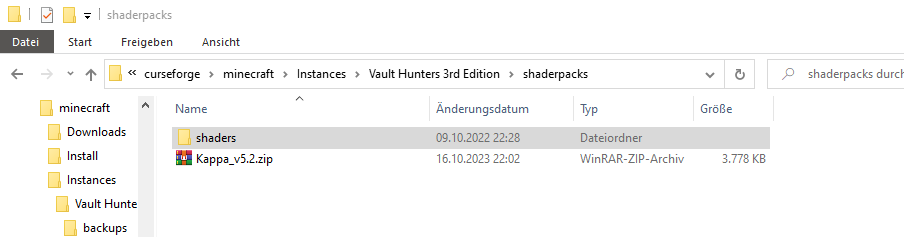
i have done this. the zip itself and just the shaders folder
but whatever i do. i dont find a way to enable it ingame..
its so frustrating
subtle breach
You need Oculus to make Shaders work
red patioBOT
How to get started with shaders
Playing with a shaders mod like Oculus, Iris, or others and want more flair to your world? Don’t know what shader to pick from or where to look? try looking on Shaderlabs or the shaders tab on the CurseForge site.
To get started using shaders:
- Download the shader mod and its requirements for the mod loader you’re using and run the game at least once to generate the shaderpacks folder
- Download the shader you want from either the CurseForge site or Shaderlabs (linked above)
- In the CurseForge app, right-click the modpack profile icon OR click the button in the modpack profile
- Click
Open Folder - Open the
shaderpacksfolder and place the shader file you downloaded in there - Select the shader file in the in-game shaders menu and wait for it to load (if it needs to)
- Play!
WARNING: Shaders do not appear on the CurseForge app. Not every shader will work with Iris or Oculus. Be aware of your computer's ability to handle shaders
sterile kestrel
river scarab
i just followed whats written here
To drive a car you need a key. To use shaders you need a shader mod
river scarab
like optifine ? i didnt play mc for a long time. so i only did it in vanilla so far
sterile kestrel
I mean you can but we don't recommend optifine
subtle breach
Don't try to use Optifine with a modpack
sterile kestrel
Use oculus and rubidium instead
subtle breach
subtle breach
Don't try to use Optifine with a modpack
It will never work
river scarab
ok i downloaded oculus. should i just put it in the mod folder with all the other mods ?
subtle breach
You should use the Curseforge Launcher instead. It will automatically add mods to your modpacks
When you install them
 subtle breach
Add More Content.
Oh
It should be your modpack that you created
Under Create Custom Profile
sterile kestrel
!mc-modifypack
red patioBOT
How to add/remove mods in a modpack:
- Click on the picture of the modpack.
- Click the
Add More Contentbutton, IF this button is not there, see below before you continue. - Find the Mods, Resource Packs or Maps you wish to Install and click
Installon them. - Wait for all the required mods to be downloaded.
- Start the modpack.
How to Enable/Disable content management for modpacks:
- Click on the picture of the modpack.
- Click on the button next to the
Playbutton. - Click on
Profile Options. - Check the
Allow content management for this profileoption if you want to edit the content of the modpack, uncheck it to disable.
NOTE: The Allow content management for this profile option is what allows you to Delete, Disable, Update or Install any Mods, Resource Packs or Maps managed by CurseForge. It must be ON to modify any of them! (Currently)
river scarab
i think i found it and installed it. opening the game rn and hope for the best :3 thanks already for so much help guys
digital roost
i got a new pc but forgot my twich login is there anyway i can log in on my new pc (im still logged in on my old 1)
river scarab
ofcourse. just make forgot password or some shite xD
btw @sterile kestrel and @subtle breach thanks for your help. it worked.
digital roost
river scarab
ofcourse. just make forgot password or some shite xD
for logging into twitch? c when i try my phone number isnt recocognised
 agile citrus
The Windows shortcut i had for CurseForge says it doesn't work anymore what happend?
digital roost
river scarab
hmmm
woops my phone number was wrong 🥲
river scarab
lol then its all good now i guess 🙂 good 4 you
agile citrus
agile citrus
The Windows shortcut i had for CurseForge says it doesn't work anymore what happ...
Note i didn't uninstall Curseforge the shortcut i had to to the .exe stoped working for no reason after i turned on my pc
 blissful zephyr
Is it possible to create a custom Minecraft profile with a Beta Minecraft version?
agile citrus
agile citrus
Note i didn't uninstall Curseforge the shortcut i had to to the .exe stoped work...
Turns out i had to reinstall Forge all good now
digital roost
river scarab
lol then its all good now i guess 🙂 good 4 you
yes thx

 austere lark
sup, i have a little problem, well i used to have hwyla (got it by all the mods 9) and combined it with wthit, because i need to see how much blood is left at the mob , so i dont kill it (vampirism mod) but it looks strange, and i cant find the hwyla mod so i can remove it. anything to help?
river scarab
im confused. why did i got pinged
river scarab
i already did
hot heart
oh
river scarab
but thanks 🙂
hot heart
mb
upper root
river scarab
https://media.discordapp.net/attachments/694667776090177559/1163590218121744504/...
Forge Forums
If you're having trouble with joining servers or sharing to LAN, this thread should help by providing some solutions for common causes. This is my first time writing a comprehensive troubleshooting guide on this forum so if you have any feedback please let me know. 1. Hosts file What's a hosts fi...
 brisk pike
 ocean lichen
!notcf
red patioBOT
This is not related to CurseForge owned/maintained features or services
CurseForge does not make or maintain any of the content or games used on the site or the app.
Just because it's on the site/app does not make it a problem with CurseForge.
Please move to the respective channels as requested, OR use #👽︱game-support for game-related help.
ocean lichen
move in #🧱︱mc-other-help
 formal tusk
Does the CurseForge App for Linux support Minecraft yet?
upper root
no
formal tusk
Damn
blissful zephyr
blissful zephyr
Is it possible to create a custom Minecraft profile with a **Beta** Minecraft ve...
?
abstract yacht
abstract yacht
When I update my addons, it doesn't remove the old files it just adds the new fi...
any updates on this?
 reef jasper
im having issues, curser forge isnt letting me update or download any modpacks
its saying decryption errors
steep perch
!cflogs-app
red patioBOT
How to get your CurseForge app logs
- Click the
Create logs zipin the menu. - Drag and drop the zip file created to this channel.
- Wait for someone to look at it so they can help you.
reef jasper
done that idk how to read logs
steep perch
send them here
reef jasper
the whole ass folder
steep perch
ye
reef jasper
ocean lichen
reef jasper
!network
red patioBOT
How to tackle Network Issues
Please try the following step(s) to figure out the cause/solution to your network issues:
- Restart the CurseForge app
- Restart your computer
- Disable any programs that interfere with your connection (VPN, ping tunnels, antivirus, firewall etc)
- Restart your router and modem.
- Attempt using a different connection if possible.
- Reinstall Curseforge.
abstract yacht
curseforge is duplicating mods when i update a modpack

 pseudo apex
help me bruh
 frozen lagoon
YO I NEED HELP
 young bone
abstract yacht
curseforge is duplicating mods when i update a modpack
young bone
abstract yacht
curseforge is duplicating mods when i update a modpack
?cflogs-app
red patioBOT
How to get your CurseForge app logs
- Click the
Create logs zipin the menu. - Drag and drop the zip file created to this channel.
- Wait for someone to look at it so they can help you.
frozen lagoon
i cant install minecraft to curseforg
young bone
Which operating system are you using
frozen lagoon
?
young bone
?os
red patioBOT
What is my OS
OS Stands for Operating System
Windows, Mac, Linux
If someone asks for your OS you should also say what the version is. For example: Windows 10
If you don't know how to find out, see here
young bone
?win7
red patioBOT
Windows 7 or 8.1 are not supported
You seem to be running Windows 7 or 8.1 which is not supported anymore by Overwolf or Curseforge. Please upgrade your machine if possible.
You can find the download link here
sterile kestrel
Read the bot. Windows 7 is unsupported
 signal ridge
Download from which link? The ow support site OR the microsoft site?
signal ridge
Will need to contact Microsoft support.
signal ridge
https://support.microsoft.com/en-us/home/contact?SourceApp=smc2&ContactUsExperienceEntryPointAssetId=www.microsoft.com
Their site wont let me give a direct link, Click the above then enter the below in the search box and click get help
0x80072F8F-0x20000
frozen lagoon
it will call them?
signal ridge
Nope, it will open spit out something to try, Otherwise you can click the contact support > Windows > technical support
frozen lagoon
Troubleshoot downloading Windows installation media and error code 0x80072F8F - 0x20000
If you are trying to download and use the Windows Media Creation Tool in order to upgrade from Windows 7 to Windows 10, you may encounter the error code 0x80072F8F - 0x20000.
This error happens because the Windows Media Creation Tool can’t use the TLS 1.0 security protocol, but Windows 7 SP1 has the newer replacement protocols--TLS 1.1 and TLS 1.2-- disabled by default, resulting in the display of the error code.
To run the Windows Media Creation Tool on Windows 7 SP1, it is necessary to make registry changes to enable the more recent TLS versions. Once this is complete, the error code 0X80072F8F - 0X20000 will no longer appear during the upgrade.
To add the DefaultSecureProtocols registry subkey automatically, click here. In the File Download dialog box, click Run or Open, and then follow the steps in the easy fix wizard.
Notes
This wizard may be in English only. However, the automatic fix also works for other language versions of Windows.
If you are not on the computer that has the problem, save the easy fix solution to a flash drive or a CD and then run it on the computer that has the problem.
You may have to restart the computer after you apply this update.
More help
Error code: 0x80072F8F
Hi Aryan_Raj - I'm Jerico T., I understand that you're having some issues right now and I'd be more than happy to help you today. I found a post relevant to your concern, kindly click the links below.
Media Creation Tool
Harassment is any behavior intended to disturb or upset a person or group of people. Threats include any threat of suicide, violence, or harm to another.
Upgrading from windows 7 to 10 error code : 0x80072F8F
Harassment is any behavior intended to disturb or upset a person or group of people. Threats include any threat of suicide, violence, or harm to another.
i dont understand
signal ridge
What are you sending them for them to be replying with the harassment notice?
frozen lagoon
SearchRequest history
We're here to help
Tell us your problem so we can get you the right help and support.
0x80072F8F-0x20000
62 characters remainingPrivacy policy | Support policy
signal ridge
Perhaps if you are unsure of what is going on you should find an adult that can help
frozen lagoon
what i must do

Contact Microsoft Support. Find solutions to common problems, or get help from a support agent.
signal ridge
Either follow what Microsoft support is saying OR ask an adult to help you
We arent microsoft support. We can only do so much here
frozen lagoon
how to enable tls 1.2
frozen lagoon
oh ok
 willow hornet
hey need some help with making my server
somehow people cant join though i did do the portforwarding and stuff correctly
 livid wolf
huh does anyone know why curseforge modpacks are using more ram than allocated
signal ridge
#🧱︱mc-other-help for mc issues,
willow hornet
oh alr
 spiral kraken
es funktioniert keine forge version es kommt immer Exit Code 1
young bone
?english
red patioBOT
📛 Please use English only (Rule #1)
Please take the time to read our #📛︱rules
This is an English-speaking discord.
We politely ask that you translate or do your best at using English.
If someone wishes to help you in your native language, we ask you to do that in DMs.
spiral kraken
no forge version works, exit code 1 always comes up
steep perch
spiral kraken
no forge version works, exit code 1 always comes up
!notcf move to #🧱︱mc-other-help
red patioBOT
This is not related to CurseForge owned/maintained features or services
CurseForge does not make or maintain any of the content or games used on the site or the app.
Just because it's on the site/app does not make it a problem with CurseForge.
Please move to the respective channels as requested, OR use #👽︱game-support for game-related help.
steep perch
Once in launcher it is a MC issue
 pine granite
how can i see how many mods i have on the number its gone?
signal ridge
Number of mods where? App or site?
 tight ledge
it says duped mod
carmine galeBOT
Paste created of latest.log, uploaded by minecraftdoggo.
Paste created of crash-2023-10-17_22.42.21-fml.txt, uploaded by minecraftdoggo.
signal ridge
#🧱︱mc-other-help for mc related issue
steep perch
nah this is related to the CF app itself
once the launcher and game is open it's an MC issue
 valid skiff
how do i fix this???
 steep perch
!network
red patioBOT
How to tackle Network Issues
Please try the following step(s) to figure out the cause/solution to your network issues:
- Restart the CurseForge app
- Restart your computer
- Disable any programs that interfere with your connection (VPN, ping tunnels, antivirus, firewall etc)
- Restart your router and modem.
- Attempt using a different connection if possible.
- Reinstall Curseforge.
steep perch
!dns
red patioBOT
Changing your DNS server
Please follow these instructions to change your DNS server. The default one (provided by your router/ISP) can sometimes block CurseForge and other programs/websites.
steep perch
can also be this
 wooden gorge
I think I'm experiencing a bug with CurseForge (for Windows, with Overwolf). I launch CurseForge, create new custom profile, target Minecraft 1.19.2, Forge 43.3.2. I click to add mods and search for 'pick'. I install 'Pick Up Notifier' which has a dependency on 'PuzzlesLib'. Watching the mods folder I see both jar files appear but both are 93k. Attempting to launch Minecraft at this point results in a failure, telling me that Pick Up Notifier requires PuzzlesLib. I then go back to the mod list in Curseforge, click on PuzzlesLib, go to Versions. v4.4.3 is installled, so I install v.4.4.2. I see the file size go up to 386kb. I then install v4.4.3 again and see it hit 387kb. I launch Minecraft and it comes up.
 cloud magnet
Hi are you guys aware of the issue with Curseforge on MacOs M series, where Minecraft insta crashes no matter if modded or vanilla.
wooden gorge
I also saw this happening with other mods where I downloaded a mod with a dependency, the dependency was downloaded but was just a copy of the depending mod.
rich flint
This channel is not for game support - it's for curseforge app and website problems
rich flint
wooden gorge
I think I'm experiencing a bug with CurseForge (for Windows, with Overwolf). I l...
Can you post these logs
?cflogs-app
red patioBOT
How to get your CurseForge app logs
- Click the
Create logs zipin the menu. - Drag and drop the zip file created to this channel.
- Wait for someone to look at it so they can help you.

 red patioBOT
Changing your DNS server
Please follow these instructions to change your DNS server. The default one (provided by your router/ISP) can sometimes block CurseForge and other programs/websites.
wooden gorge
rich flint
Can you post these logs
Here is the latest.log from the "first" run, where the puzzleslib mod file is the same (incorrect) size as the pickupnotifier mod file
carmine galeBOT
Paste created of latest.log, uploaded by hextun.
signal ridge
Those arent the logs asked for
wooden gorge
crash log coming up
signal ridge
Cf app logs. Not mc logs
wooden gorge
?cflogs-app
red patioBOT
How to get your CurseForge app logs
- Click the
Create logs zipin the menu. - Drag and drop the zip file created to this channel.
- Wait for someone to look at it so they can help you.
 fervent crater
rich flint
Try this
fervent crater
rich flint
Try this
Worked, thank you<3
 astral panther
I apologize if this is not the right channel. I'm trying to upload a classic-wotlk wow addon using the curseforge upload api for the current version of the game. the json response for the version returns the version with name 3.4.3 having apiVersion 30402; is this expected? The upload script I have expected to find an apiVersion that matched the verson in the toc file. Is this a faulty assumption on my part?

 wooden gorge
I had embedded images/videos turned off so I didn't see the instructions at first
I can add a new copy that includes the transactions where I downgrade and then upgrade the PuzzlesLib mod if you'd like.
rich flint
Sure. Have linked these logs for CF tech support in back channel
wooden gorge
Here ya go
fervent crater
Any fix for this specific modpack https://www.curseforge.com/minecraft/modpacks/crazy-craft-updated****

Same message keeps popping up, could it just be outdated?
 stiff iris
Is there any reason why after i added only 1 mod (Inventory Sorting), that the file size sky rocketed? Usually when i export a profile it stays very very low in terms of file size
 digital roost
Im getting this error when ever i try to create a modpack

this is after filling out all the details
 deep mirage
Hello, im trying to launch with curse forge, but I keep getting this error, from mc.

 little pasture
hello does anyone know how to change what directory your courseforge loads WoW from?
wooden gorge
rich flint
Sure. Have linked these logs for CF tech support in back channel
So, do I need to hang around for a response or anything?
rich flint
Did now delete the bad dependency mod and install it using the app
Its a known issue that's being worked on
deep mirage
rich flint
Did now delete the bad dependency mod and install it using the app
is this for me, or someone else?
 native ocean
how do i fix this

 next acorn
HI! I made my original curseforge account with my microsoft account, and was logged out. I dont have the option to log in with my original account, and i dont want to lose everything please help!
 fresh shore
ok
i basically have two minecraft launchers
one that opens with curseforge and the other is the original launcher
but now the original wont open and it's just the curseforge minecraft launcher???
next acorn
So I was playing ATM9 and i was having wifi issues and it logged me out of my curse forge account i made without twitch or discord, now its just making a new account and theres no microsoft login
I had all my mods and saves through curse forge, and i dont know if i will lose those
young bone
You don’t log into the CurseForge app to play Minecraft
carmine galeBOT
Paste created of hs_err_pid1544.log, uploaded by imyogyatdamndaddy.
digital roost
.if someone can can u see whats up with that thx.
signal ridge
Using the CF app?
digital roost
yeah
signal ridge
!mc-installfix try the below then restart your pc
red patioBOT
How to repair your Minecraft installation on CurseForge - **NOT** the same as `Repair Profile` - please follow these exact steps
- Click on the Minecraft Tab on the left side of the CurseForge App.
- Click button next to the
Create Custom Profileoption. - Click

Repair Installationoption.
NOTE: Although this might seem similar to the instructions of repairing profile, it's different and required. No worries, you will not lose any modpacks or worlds.
 signal ridge
Do not skip the restart after
signal ridge
Once the repair is complete, you restart your pc, do not touch anything else
digital roost
ok
 frail ember
hello everytime i try to download a mod it tells me "mod file integrity check failed" what do i do?
digital roost
digital roost
Im getting this error when ever i try to create a modpack
This is still happening to me

 orchid kelp
I can't actually OPEN the CurseForge in my WoW Classic
I installed it through Overwolf and use Windows...
I also tried using the link as directed in the FAQ / support section
Yea IDK, tried reinstalling it a few times. I just won't open at all.
 glossy wraith
i've tested integrated dungeons on both 1.19.2 and 1.18.2, neither worked
 inner stag
I only see one game listed and I'm not sure why.
 signal ridge
Cf app for linux only supports wow atm
inner stag
signal ridge
Cf app for linux only supports wow atm
Sigh ok
digital roost
signal ridge
Cf app for linux only supports wow atm
Do you know anything about my issue
i cant create modpacks for minecraft
signal ridge
Check to see if the project was created in your dashboard
inner stag
signal ridge
Cf app for linux only supports wow atm
I'm trying to install this mod and I pressed the "Install" button and that's how I came across the curseforge app. https://www.curseforge.com/minecraft/modpacks/the-diamond-dimensions
signal ridge
If your on linux, the following apps have linux and cf support:
- ftb app
- atlauncher
- gdlaunchet
- prism
inner stag
I pressed the "Download" button and this is what I put in the mods folder and I'm not seeing any detection.
 signal ridge
orchid kelp
Yea IDK, tried reinstalling it a few times. I just won't open at all.
signal ridge
orchid kelp
Yea IDK, tried reinstalling it a few times. I just won't open at all.
Recommend moving to #🧙🏼♂️︱warcraft-support so yhis doesnt get lost.
signal ridge
inner stag
I pressed the "Download" button and this is what I put in the mods folder and I'...
Thats because its a modpack not a mod.
 modest crystal
my modpack for minecraft keeps crashing for some reason
inner stag
signal ridge
Thats because its a modpack not a mod.
Oh.
signal ridge
modest crystal
my modpack for minecraft keeps crashing for some reason
#🧱︱mc-other-help for mc related issues
modest crystal
k
inner stag
signal ridge
Thats because its a modpack not a mod.
So, are modpacks not supported according to the list you gave?
signal ridge
Modpacks from cf are zip files. Built in a specific way. You need an app that can import cfs format.
The list I gave support cf packs
Just need to either import the pack OR use the app to install the pack
inner stag
signal ridge
Just need to either import the pack OR use the app to install the pack
When you say "import the pack" you're saying that the app would need to change the zip to cfs?
Like, is this a conversion?
signal ridge
Ok so basically how CF modpacks work is there is a manifest.json file that contains all the mods and there versions.
Apps that are compatible with CF will read the zip file, and the manifest file and install all the needed files for you
orchid kelp
is there seperate CurseForge specifically for WoW & Wow Classic?
signal ridge
#🧙🏼♂️︱warcraft-support Would be the closest
We only have a couple wow people on the support team, so time zones and availability may vary.
Otherwise can open a ticket, but those can take some time
inner stag
signal ridge
If your on linux, the following apps have linux and cf support:
- ftb app
- atla...
So, I looked at all 4 of those and it seems like gdlaunchet and prism let me import the zip file and ftb app and atlauncher only let me choose certain modpacks.
signal ridge
Then try prism or gdl
 placid spindle
having a weird version mismatch issue. i have 47.1.30 installed and a couple of my mods say they need 47.1.3. are these not the same version?
signal ridge
3 =/= 30
placid spindle
so then how would i fix this issue?
signal ridge
!mc-updatemodloader
red patioBOT
How to update your mod loader within the same game version in the CurseForge app
- Click on the modpack profile you are working with.
- Click on the button next to the play button.
- Click on the Profile Options button.
- Select the mod loader version you want from the dropdown.
- Play!
If you need to update to a new game version, a new profile is required.
signal ridge
Either downgrade Forge to version 47.1.3 OR remove the mods that require the .3 version
inner stag
signal ridge
Then try prism or gdl
Prism seemed pretty appealing since you get to have different instances with different mods and versions. When I tried to use it, I got an error stating that I need Java 8. Do I have to download Java 8 from the Java site or can I just Skip Java compatibility checks?

 fallen loom
!notcf
red patioBOT
This is not related to CurseForge owned/maintained features or services
CurseForge does not make or maintain any of the content or games used on the site or the app.
Just because it's on the site/app does not make it a problem with CurseForge.
Please move to the respective channels as requested, OR use #👽︱game-support for game-related help.
inner stag
Ok
signal ridge
You will manually need to install java yes.
digital roost
carmine galeBOT
Paste created of crash-2023-10-17_22.31.26-client.txt, uploaded by imyogyatdamndaddy.
signal ridge
#🧱︱mc-other-help for mc related issues
inner stag
signal ridge
You will manually need to install java yes.
Solution completed using the Prism server
digital roost
i get this anytime i try to make a modpack
 rich flint
you mean every time you try to make a project on the website? exactly what are you doing at that time
digital roost
Yeah
digital roost
rich flint
you mean every time you try to make a project on the website? exactly what are ...
Nothing besides filling out the information and then submiting
signal ridge
You have checked your author dashboard to make sure the packs arent getting made and its just a weird error?
 near comet
Hello! Each time I want to launch a mod via CF, It brings me to the old laucher and when I click to go to the new one, the version I want and the mod doesn't appear.
signal ridge
CF uses a copy of the official launcher from mojang, its just the legacy version. they are pretty much the same launcher
steep perch
you just need to login to it
signal ridge
That too, since its still the official launcher, it uses Microsofts auth servers
near comet
I am logged onto Minecraft but still, game doesn't seem to detect the mods which is weird
signal ridge
Into the mc launcher cf opens? or the .minecraft mc ?
near comet
mc launcher cf opens
signal ridge
!mc-installfix try the belwo, then restart your pc
red patioBOT
How to repair your Minecraft installation on CurseForge - **NOT** the same as `Repair Profile` - please follow these exact steps
- Click on the Minecraft Tab on the left side of the CurseForge App.
- Click button next to the
Create Custom Profileoption. - Click
Repair Installationoption.
NOTE: Although this might seem similar to the instructions of repairing profile, it's different and required. No worries, you will not lose any modpacks or worlds.
signal ridge
Do not skip the restart after the repair is complete
near comet
ill try
digital roost
signal ridge
You have checked your author dashboard to make sure the packs arent getting made...
yeah
 safe quartz
An update that i tried to push to my modpack was rejected this is what it said
3.notification
The status of the file Survival Enhanced [FORGE] V1.1 (Survival Enhanced [FORGE]) has been changed to Rejected
Notes:
Invalid manifest.json file:
References invalid fileIDs: fileID: 4344148, projectID 333256 (project-333256), fileID: 4362215, projectID 667520 (project-667520).
If you have any questions please contact our support team https://support.curseforge.com/.
2.notification
The status of the file Survival Enhanced [FORGE] V1.1 (Survival Enhanced [FORGE]) has been changed to Rejected
Notes:
file passed advanced malware processor
If you have any questions please contact our support team https://support.curseforge.com/.
 acoustic sailBOT
Project 333256 is: project-333256
Adds Content From Minecraft's Spinoff Game With Revamped!
Game version(s): 1.14.4, 1.16.3, 1.16.4, 1.16.5, 1.17.1, 1.18.1, 1.18.2, 1.19, 1.19.1, 1.19.2, 1.19.3, 1.19.4, 1.20.1
Modloader(s): 6, Forge

Project 667520 is: project-667520
A mod that adds cave ambience, events, and tools.
Game version(s): 1.18.2, 1.19.2
Modloader(s): Forge

Project information
Author
Status
Deleted
Created
<t:1662155795:F>
Modified
<t:1674552049:R>
Released
<t:1674551787:F>
Downloads
72,326
Categories
Mod Distribution
Allowed
ocean lichen
safe quartz
An update that i tried to push to my modpack was rejected this is what it said
...
The projects above is deleted.
safe quartz
ohh okay
ocean lichen
You have to remove SpelunkersCharm and EarthMobs
safe quartz
ocean lichen
You have to remove SpelunkersCharm and EarthMobs
okay thanks for telling me
upper root
server files are provided by the modpack author, not curseforge.
you should probably contact the modpack author, or use #🧱︱mc-other-help if they dont seem to have a server/other way to contact them
 thin stratus
upper root
server files are provided by the modpack author, not curseforge.
you should pro...
thin stratus
upper root
server files are provided by the modpack author, not curseforge.
you should pro...
Got it thank you!
 bright tapir
i just downloaded better mc forge 1.20 are u meant to spawn with 2 books? (tutorial and quest) because i didnt?
 tribal pasture
hey my brothers modpack keeps getting a thing that says it needs to be english + it cant say "Majula is a great modpack" when he does not even have that text no more
tribal pasture
@fallen loom sorry for pinging but we need help
steep perch
!noping
red patioBOT
📛 Please do __**NOT**__ ping or DM unless asked (Rule #3.2)
Please take the time to read our #📛︱rules
Keep in mind that the reply feature pings the original message's sender by default, so please turn it OFF with every reply (you can hold down shift when replying to do the same), or don’t use the reply feature and simply write your response in the channel.
The Moderators & Helpers volunteer their time and knowledge to help, you might not get your answers instantly. Describe what you need help with in detail and please patiently wait for someone to check and reply.
Do NOT DM staff members without being asked to do so.
Breaking this rule will result in being timed out / banned according to moderation judgment.
 cloud shoal
Hi so there is a mod i want to install to my private mod pack but i need neoforge for that, is there a possibility to use NeoForge as a Version?
steep perch
neoforge is already being worked on to be added I belive
though forge and neoforge work the same if I recall rightly
tribal pasture
steep perch
neoforge is already being worked on to be added I belive
stop acting like a staff ik ur being helpful but its the staffsa job ur stealin
ocean lichen
tribal pasture
stop acting like a staff ik ur being helpful but its the staffsa job ur stealin
In fact most helpers was in the past like Anti.virus, me, and anyone that want to help people. The server encourages us to try to help as long we know what to do and if there's no helper/moderator around.

 nova quartz
I need help with Dowloading a shader pack, i know how to do it but it just doesnt install the sahders.


 steep perch
nova quartz
I need help with Dowloading a shader pack, i know how to do it but it just doesn...
steep perch
nova quartz
I need help with Dowloading a shader pack, i know how to do it but it just doesn...
place into the shaders folders in pack
ocean lichen
!mc-shaders
red patioBOT
How to get started with shaders
Playing with a shaders mod like Oculus, Iris, or others and want more flair to your world? Don’t know what shader to pick from or where to look? try looking on Shaderlabs or the shaders tab on the CurseForge site.
To get started using shaders:
- Download the shader mod and its requirements for the mod loader you’re using and run the game at least once to generate the shaderpacks folder
- Download the shader you want from either the CurseForge site or Shaderlabs (linked above)
- In the CurseForge app, right-click the modpack profile icon OR click the button in the modpack profile
- Click
Open Folder - Open the
shaderpacksfolder and place the shader file you downloaded in there - Select the shader file in the in-game shaders menu and wait for it to load (if it needs to)
- Play!
WARNING: Shaders do not appear on the CurseForge app. Not every shader will work with Iris or Oculus. Be aware of your computer's ability to handle shaders
nova quartz
steep perch
place into the shaders folders in pack
What do you mean??
ocean lichen
Read the bot
nova quartz
okey
 tropic ravine
why does the ad block on the right of the desktop app keep getting wider? every time it changes, the rest of the interface gets eaten up for more ad space and reduces usable real estate
 wary needle
im trying to upload my first pack and im confused as to what to do here
 young bone
The two mods it’s pointing out, did you download them directly through the app
wary needle
young bone
The two mods it’s pointing out, did you download them directly through the app
yes
young bone
Delete them in the app and redownload them, export, and check to see if they appear in the overrides folder again
 mighty kestrel
Why is Better Mc Plus 1.16.5 Gone?
wary needle
young bone
Delete them in the app and redownload them, export, and check to see if they app...
now this is showing up
 sterile kestrel
mighty kestrel
Why is Better Mc Plus 1.16.5 Gone?
sterile kestrel
mighty kestrel
Why is Better Mc Plus 1.16.5 Gone?
Dev may have archived it
young bone
wary needle
now this is showing up
Make a completely new profile, same mods same mod loader version, export that and see if anything is in the overrides
mighty kestrel
sterile kestrel
Dev may have archived it
I´m new, what exactly does that mean? can i still download it somewhere?
wary needle
young bone
Make a completely new profile, same mods same mod loader version, export that an...
so copy it or make a brand new one and transfer the mods manualy?
sterile kestrel
mighty kestrel
I´m new, what exactly does that mean? can i still download it somewhere?
It means the project owner removed it. If you wanna know why you'll have to contact them
!projectissue
red patioBOT
Reporting issues to project authors
Please visit the project page for the content you posted about and look for a way to contact the developer.
Somewhere on the page, there is usually a method of contact. Look for one of the following things:
Issuestab like the image below- Discord link
- Twitter link
- Comments section below the project
If no contact method exists you will either have to remove the project or find a solution on your own.
 mighty kestrel
sterile kestrel
It means the project owner removed it. If you wanna know why you'll have to cont...
mighty kestrel
sterile kestrel
It means the project owner removed it. If you wanna know why you'll have to cont...
Ok thanks
young bone
wary needle
so copy it or make a brand new one and transfer the mods manualy?
New pack with all the mods downloaded through the app, manually transferring them over is just going to make this more difficult
wary needle
young bone
New pack with all the mods downloaded through the app, manually transferring the...
any way i can keep just fixing the problem on the original pack because that would 249 mods i have to re config again
young bone
This is just a test, don’t worry about configs right now
You can copy the config over too
?noping
red patioBOT
📛 Please do __**NOT**__ ping or DM unless asked (Rule #3.2)
Please take the time to read our #📛︱rules
Keep in mind that the reply feature pings the original message's sender by default, so please turn it OFF with every reply (you can hold down shift when replying to do the same), or don’t use the reply feature and simply write your response in the channel.
The Moderators & Helpers volunteer their time and knowledge to help, you might not get your answers instantly. Describe what you need help with in detail and please patiently wait for someone to check and reply.
Do NOT DM staff members without being asked to do so.
Breaking this rule will result in being timed out / banned according to moderation judgment.
young bone
All I want you to do is to rebuild the entire pack, export, and check the overrides folder
 young bone
You need something a bit longer for the summary
 sick crane
i'm getting this error for any modpack that i try to install
i have a wired connection, i tried repairing the install and reinstalling the curseforge client
 ocean lichen
sick crane
i'm getting this error for any modpack that i try to install
i have a wired con...
ocean lichen
sick crane
i'm getting this error for any modpack that i try to install
i have a wired con...
!cflogs-app
red patioBOT
How to get your CurseForge app logs
- Click the
Create logs zipin the menu. - Drag and drop the zip file created to this channel.
- Wait for someone to look at it so they can help you.
ocean lichen
sick crane
Do you have any antivirus?
ocean lichen
Sorry no clue. The only thing i see is
2023-10-18 21:40:11,814 (ERROR) </dist/desktop/desktop.js> (:113) - onTaskFailed A connection attempt failed because the connected party did not properly respond after a period of time, or established connection failed because connected host has failed to respond 3.229.194.163:443 NetworkIssue but too isolated for me to think it's the problem, especially since there's another more frequent error (which I don't yet know how to interpret).
!notcf move in #🧱︱mc-other-help
red patioBOT
This is not related to CurseForge owned/maintained features or services
CurseForge does not make or maintain any of the content or games used on the site or the app.
Just because it's on the site/app does not make it a problem with CurseForge.
Please move to the respective channels as requested, OR use #👽︱game-support for game-related help.
 vagrant sluice
can everyone help me my cersforge is averytimes crashing pls 😓
sterile kestrel
sick crane
!network
red patioBOT
How to tackle Network Issues
Please try the following step(s) to figure out the cause/solution to your network issues:
- Restart the CurseForge app
- Restart your computer
- Disable any programs that interfere with your connection (VPN, ping tunnels, antivirus, firewall etc)
- Restart your router and modem.
- Attempt using a different connection if possible.
- Reinstall Curseforge.
sterile kestrel
!dns can also try this
red patioBOT
Changing your DNS server
Please follow these instructions to change your DNS server. The default one (provided by your router/ISP) can sometimes block CurseForge and other programs/websites.
sick crane
i already changed my dns
sterile kestrel
!ipv6 this too
red patioBOT
Disabling IPV6
Please follow these instructions to disable IPv6, which when enabled can sometimes cause network issues.
sick crane
tried also restarting my pc
 nova niche
Hi!
I have a problem when i try to install All the Mods 8. When Applying patch 4/8 comes out it just crashes and an error appears saying: Forge Modloader failed. I tried a lot of things but none of them seem to work. I downloaded the modpack from the internet and tried adding it to a new profile but it fails without an error message. Any suggestions?
ocean lichen
nova niche
Hi!
I have a problem when i try to install All the Mods 8. When Applying patch 4...
Did you try the repair installation?
nova niche
ocean lichen
Did you try the repair installation?
I can't repair it because it never completes the process in the first place
I also tried to download an earlier version, but that doesn't work either.
ocean lichen
What do you means by "never completes the process"? the repair installation don't work or you think you can't do it before installing the modpack?
nova niche
ocean lichen
What do you means by "never completes the process"? the repair installation don'...
Oh I didn't know I can repair the installation itself i thought i can only repair an installed modpack or something. (I was thinking that way because i could download other modpacks). This seemed to solve the issue thank you 🙂
ocean lichen
vagrant sluice
can everyone help me my cersforge is averytimes crashing pls 😓
What do you means by "crashing"? can you provide a screenshot?
 deft flicker
young bone
You need something a bit longer for the summary
deft flicker
young bone
You need something a bit longer for the summary
ok thanks
 cursive basin
hi i want to add my coowner too my modpack but i got this error

and i typed his name good
 stable rock
is there a command ofor a minecraft server where you could summon a player for it to load a redstone contraption ?
signal ridge
stable rock
is there a command ofor a minecraft server where you could summon a player for i...
!notcf
red patioBOT
This is not related to CurseForge owned/maintained features or services
CurseForge does not make or maintain any of the content or games used on the site or the app.
Just because it's on the site/app does not make it a problem with CurseForge.
Please move to the respective channels as requested, OR use #👽︱game-support for game-related help.
signal ridge
cursive basin
hi i want to add my coowner too my modpack but i got this error
Make sure your using the users actual full name, not just their screen name.
An option to see the full name is Start a Private message with them > then copy their username from the URL
send?recipient=CopyUserNameHere
 tacit torrent
how do i download mods
young bone
?mc-installmods
red patioBOT
How to install mods in the CurseForge app
- Click
+ Create Custom Profile - Name it, select the required Minecraft version, select the modloader & modloader version (usually the highest number), click
Create. - Click the profile icon.
- Click
Add More Content - Search and install the desired mods.
- Start the game!
How to install mods that are not on the CurseForge app
- Right click the profile picture or Open the profile and click the Icon next to the play button.
- Click
Open Folder. - Drag the mod(s) into the
modsfolder. (Note: Some mods will require others, to run. Make sure to read the instructions for the mod!) - Start the game!
 dapper hull
What is meaning of this
 sick crane
sterile kestrel
!network
sick crane
sterile kestrel
!network
i tried all these steps and changing my dns nothing worked


 torpid sedge
carmine galeBOT
torpid sedge
carmine galeBOT
Paste created of crash-2023-10-18_11.20.37-client.txt, uploaded by jackforrest.
young bone
dapper hull
I already answered you
dapper hull
How much time does it take
steep perch
!status
red patioBOT
Project moderation time
Project/File moderation is done on these days unless otherwise mentioned:
Sunday, Monday, Tuesday, Wednesday, Thursday: <t:1631170800:t> - <t:1631199600:t> (Your time)
Friday, Saturday: No Moderation!
Projects are moderated First in, First out. If you submit late in the work day, it will likely get left until the next day!
New Projects or anything flagged for manual review: 1-3 Working Days
Updates to approved projects not needing manual approval: 1 Hour
-If your file has been "Under Review" for more than an hour, then it is at manual review!
 jade stratus
Hi! I’m trying to download mods for sims using curseforge but it’s not locating my game? I’ve used it in the past so I’m unsure what I’m doing wrong 🫠
cursive basin
signal ridge
Make sure your using the users actual full name, not just their screen name.
A...
thx 😄
steep perch
jade stratus
Hi! I’m trying to download mods for sims using curseforge but it’s not locating ...
You point it to the game exe
jade stratus
I’ve tried both scanning and adding manually
safe panther
jade stratus
I’ve tried both scanning and adding manually
Have you tried shutting the app and restarting, then scanning for the game again?
Is your game installed on an external (usb) drive of any kind?
 mortal prism
is it possible to delete all of my mods at the same time ? i have other 100 (estimate) sims mods and i really don’t want to select them all at once
 signal mango
I'm trying to upload a modpack to CurseForge, but this happened:
https://cdn.discordapp.com/attachments/1129069799545241703/1164285699579723797/image.png?ex=6542a88e&is=6530338e&hm=54e8477a1c037faaed163ab9ca6444bdddc8c35e987a9b23459ace3a37ea3d61&

If it helps, my modpack is like 73mb
safe panther
mortal prism
is it possible to delete all of my mods at the same time ? i have other 100 (est...
Easiest way is to use CurseForge App to open your mods folder, then select everything in there and delete it.
 mortal prism
i have a lot of mods so selecting them manually is very hard and i just thought there was a select all button like most mod software i use but
mortal prism
ok
thank you
do you mean the folder app or the curseforge app because when i go on folders none of my curseforge stuff appears but it still works
mortal prism
it worked tysm !!!
steep perch
no problemo
mortal prism
just deleted 128 mods all at once 😭😭
steep perch
i've had worse
safe panther
130 ish mods is not a lot in the Sims world. It's a huge amount in Minecraft
mortal prism
i had deleted others before hand also i have like 200 and that is a lot for my old broken crappy laptop
mortal prism
dumb question but if i delete curseforge will my mods stay?
safe panther
Yes, the Curseforge app is just a mod installer, all the mods in your Mods folder will remain even if you uninstall the app.
steep perch
onedrive possibly
safe panther
What are you refreshing?
The app caches the list of mods you have installed, sometimes a refresh doesn't clear the cache but a rescan of the mods folder always will.
If you are deleting the mods directly from the mods folder and they are re-appearing in there without you installing them, then one drive is the most likely culprit
safe panther
Are you installing mods through the app and not seeing them in game, or is it something else?
mortal prism
they are in the game and i download them through curseforge
safe panther
So there's a button in the app to rescan the mods folder. Using this will make sure the app is correctly showing what is actually installed rather than what the app had previously cached.

 alpine girder
Hey my friend has been experiencing a crash when trying to start up a custom modpack that I made. The pack works for me and my server, but crashes for him. And also where do I find the crash log if yall need that?
signal ridge
!mc-launcherlog
red patioBOT
How to get your launcher log
How to get your launcher log
- Click button next to the Create Custom Profile option
- Click the
Open Modding folderbutton - Open the Install folder
- Drag the
launcher_log.txtfile into discord. If there are multiple only send the one without a number in its name
alpine girder
Here is the log! Please help!
carmine galeBOT
Paste created of launcher_log.txt, uploaded by 5ubject.
signal ridge
alpine girder
Here is the log! Please help!
!mc-amd
red patioBOT
Amd Graphic Driver Issue
:small_red_triangle_down: Part 1: Checking your system's GPU
- Open your
Device Manager - Click the drop down for
Display Adapters - Check if you have an AMD (Radeon) device
a - If you have AMD go to Part 2 :small_orange_diamond:
b - If you see AMD and Nvidia or Intel go to Part 3 :small_blue_diamond:
:small_orange_diamond: Part 2 - AMD Drivers Update
- Your AMD drives are broken or out of date, use the link below to get new drivers
Link: https://www.amd.com/en/support - Use either the auto tool AMD provides OR locate your GPU in their search.
- Download and run the installer, leave everything as default.
- Once installed try playing Minecraft again.
:small_blue_diamond: Part 3 - Other GPUs
If you have an Nvidia or Intel GPU, please use the command !mc-videocard for the instructions on how to change CF to use the proper GPU.
 sleek plinth
is there a way when i update a modpack to keep my settings like FOV or keybinds between updates?
signal ridge
Copy the options.txt file to the new pack OR if your updating a pre-made pack, uncheck the "update to new profile"
sleek plinth
wheres that options txt located?
signal ridge
!mc-profilefolder
red patioBOT
How to open profile folders
- Right-click the modpack profile icon OR click the button in the modpack profile.
- Click
Open Folder.
sleek plinth
thanks
 echo grove
so i have made a "custom profile" on my previous computer and now ive changed computers and now its gone. i do have the same harddrive as the previous computer though, so theoretically i have all my files. can i recover it? any suggestions?
sterile kestrel
echo grove
so i have made a "custom profile" on my previous computer and now ive changed co...
You may need to point curseforge to the path of your profile
Or you may need to move the profile into the current path in the instances folder
 woven heron
Can a moderator approve my mod from discord?
red patioBOT
Project moderation time
Project/File moderation is done on these days unless otherwise mentioned:
Sunday, Monday, Tuesday, Wednesday, Thursday: <t:1631170800:t> - <t:1631199600:t> (Your time)
Friday, Saturday: No Moderation!
Projects are moderated First in, First out. If you submit late in the work day, it will likely get left until the next day!
New Projects or anything flagged for manual review: 1-3 Working Days
Updates to approved projects not needing manual approval: 1 Hour
-If your file has been "Under Review" for more than an hour, then it is at manual review!
echo grove
sterile kestrel
You may need to point curseforge to the path of your profile
im not sure where to find it
sterile kestrel
echo grove
im not sure where to find it
Can't be of much help if you yourself don't know where it is
Might as well not exist
echo grove
okay i found the old folder, what folder am i looking for>
sterile kestrel
You found the old instance?
echo grove
yes
sterile kestrel
If so you can click settings on curseforge > Minecraft and you should see where CF is currently putting its install files. You can either a. Put the instance to the instance folder of the current path or
B. If there's more than just instances and an entire CF folder point the current install path to that location
!mc-path
red patioBOT
How to change your Minecraft install path on CurseForge
:small_blue_diamond: If Minecraft is __not installed__ in CurseForge App:
- Click the
 in the top left.
 - Select Minecraft from the list of games.
- Select the
Advancedoption and select:
--- Windows:Local Disk (C:)at the left side of the window. If you do not see it, clickThis PCfirst.)
--- Mac:/Users/Shared/CurseForge, If it does not exist, make it. - Click
Continue.
:small_orange_diamond: If Minecraft is __installed__ in CurseForge App:
- Click the
 in the bottom left.
 - Select the Minecraft tab.
- Click
Change. - Select the location:
--- Windows:Local Disk (C:)at the left side of the window. If you do not see it, clickThis PCfirst.)
--- Mac:/Users/Shared/CurseForge, If it does not exist, make it.
 hushed ivy
submitted alex's caves for review 
 versed flame
And now forge is broken🥹
ocean lichen
versed flame
And now forge is broken🥹
what do you means by "broken"?
versed flame
Neo forge servers r down are they not?
steep perch
it's just a modloader-
versed flame
Ohhh my bad
 oblique nymph
can someone help me with this?

it happens when im trying to create a custom profile
 distant terrace
:)
steep perch
and i'll be honest right now I don't think curseforges priority is on hiring new staff-
(they are located in israel)
sterile kestrel
oblique nymph
can someone help me with this?
!cflogs-app
red patioBOT
How to get your CurseForge app logs
- Click the
Create logs zipin the menu. - Drag and drop the zip file created to this channel.
- Wait for someone to look at it so they can help you.
sterile kestrel
distant terrace
contact them and get a job there
!ticket-site no. You can submit a ticket to them
red patioBOT
How to open a support ticket on the CurseForge website
Can't open the app or would rather use the website? You can do so here.
Fill out the form with accurate detailed information, keep in mind that simply saying 'it' or 'doesn't work' is very vague. The more details you provide, the more efficient help you will get.
Make sure to upload your Overwolf logs with the Upload File option in the ticket, information on how to get these logs can be found here
distant terrace
sterile kestrel
!ticket-site no. You can submit a ticket to them
i really didn't ask for instructions ( it is a joke )
sterile kestrel
Was more to provide assistance 🙂
 grizzled maple
how do i download a modpack?
 sullen heath
Pls help whats the error in here?
carmine galeBOT
Paste created of message.txt, uploaded by gui_coelho.
sterile kestrel
grizzled maple
how do i download a modpack?
!mc-installpack
red patioBOT
How to install modpacks with the search features in the CurseForge app
How to install modpacks with the search features
- Open the

Minecraftsection of the app. - Click the top search bar where it says
Search for modpacksOR Click theBrowse ModpacksTab. - Find the Modpack you want to install and click install on it.
- Wait for the CurseForge app to download and unpack all the required files.
- Once finished, click
Play!
How to install modpacks from an Export (Custom/Private/Site downloaded Modpack zip)
- Get the CurseForge app if you don't have it, use
!downloadfor a link. - Get the exported modpack from CurseForge or someone else,
!mc-packshareexplains how to make them. - Open the
Minecraftsection of the app. - Click

Create Custom Profile - Click the
Importoption. - Find the file you just downloaded in step 2 and select it.
- CurseForge app will now attempt to download and unpack the modpack. If it fails, try steps 4-6 again.
- Once finished, click
Play!
 sterile kestrel
sullen heath
Pls help whats the error in here?
sterile kestrel
sullen heath
Pls help whats the error in here?
!notcf #🧱︱mc-other-help
red patioBOT
This is not related to CurseForge owned/maintained features or services
CurseForge does not make or maintain any of the content or games used on the site or the app.
Just because it's on the site/app does not make it a problem with CurseForge.
Please move to the respective channels as requested, OR use #👽︱game-support for game-related help.
grizzled maple
sterile kestrel
!mc-installpack
?
 sterile kestrel
grizzled maple
?
sterile kestrel
grizzled maple
?
Follow the second set of steps from the bot. Those mods look to be in the wrong locations though. If you added them remove them
Mods should only be in the overrides folder or in the manifest.json
 rare ravine
hi can someone help me my minecraft with modpack better mc (fabric) crashes while starting
sterile kestrel
rare ravine
hi can someone help me my minecraft with modpack better mc (fabric) crashes whi...
!notcf #🧱︱mc-other-help bring logs
red patioBOT
This is not related to CurseForge owned/maintained features or services
CurseForge does not make or maintain any of the content or games used on the site or the app.
Just because it's on the site/app does not make it a problem with CurseForge.
Please move to the respective channels as requested, OR use #👽︱game-support for game-related help.
 hidden pewter
I have a question is it possible to add mods from outside curseforge to packages, e.g. from modrinth?
sterile kestrel
hidden pewter
I have a question is it possible to add mods from outside curseforge to packages...
!mc-installmods
red patioBOT
How to install mods in the CurseForge app
- Click
+ Create Custom Profile - Name it, select the required Minecraft version, select the modloader & modloader version (usually the highest number), click
Create. - Click the profile icon.
- Click
Add More Content - Search and install the desired mods.
- Start the game!
How to install mods that are not on the CurseForge app
- Right click the profile picture or Open the profile and click the Icon next to the play button.
- Click
Open Folder. - Drag the mod(s) into the
modsfolder. (Note: Some mods will require others, to run. Make sure to read the instructions for the mod!) - Start the game!
sterile kestrel
Second set of instructions
 tall sapphire
Hi i just joined the server to get an help from someone that knows how forge, it won't launch minecraft at ALL
ocean lichen
tall sapphire
Hi i just joined the server to get an help from someone that knows how forge, it...
forge or curseforge? not the same thing
tall sapphire
ocean lichen
forge or curseforge? not the same thing
Minecraft's forge ( i don't now much about it )
Wait, are you french?
ocean lichen
So the issue happens when you launch the game? in this case move in #🧱︱mc-other-help
ocean lichen
tall sapphire
Wait, are you french?
yeah
tall sapphire
Ah, cool
tall sapphire
ocean lichen
yeah
Tu pourrais m'aider alors? J'en peut plus, sa fait 2 mois j'essaye de trouver des solutions
 obtuse cedar
hey guys! I need some help trying to update a mod I got from curse forge.
 ocean lichen
tall sapphire
Tu pourrais m'aider alors? J'en peut plus, sa fait 2 mois j'essaye de trouver de...
ocean lichen
tall sapphire
Tu pourrais m'aider alors? J'en peut plus, sa fait 2 mois j'essaye de trouver de...
Sorry we can't really speak french here, the server is english and don't accept another language
tall sapphire
ocean lichen
Sorry we can't really speak french here, the server is english and don't accept ...
Fine, can you still hlep me then?
ocean lichen
Move in #🧱︱mc-other-help
 summer junco
obtuse cedar
hey guys! I need some help trying to update a mod I got from curse forge.
summer junco
obtuse cedar
hey guys! I need some help trying to update a mod I got from curse forge.
let's go to #🚶︱sims-support
obtuse cedar
ok thanks.
 lament ferry
grizzled maple
?
lament ferry
grizzled maple
?
OPERA?!
 north oasis
anyone help pls ?
ocean lichen
north oasis
anyone help pls ?
!help
red patioBOT
Please provide some more information to receive assistance
Providing the following information will help the team in assisting you:
- A detailed description of the issue you're experiencing
- If a mod/modpack/addon is involved, please specify the name
- Any screenshot/video/gif of the issue if you have
- Get your relevant logs ready, you can type
!mc-logs/!cflogs-appfor instructions
Some tips for explaining yourself better to save time and additional questions:
- Avoid using words such as 'it', say what it is :]
- Instead of simply saying something doesn't work, try to describe what's happening when you're running it
woven heron
Is this discription good enough for you curseforge?!?!

 candid storm
Reply tagged as spam?
 rich flint
candid storm
Reply tagged as spam?
rich flint
candid storm
Reply tagged as spam?
All content uploads to curseforge are for public use. Those are the terms. Full stop
Curseforge moderates messages as they see fit - it's their prerogative. That is a lot of words for something you can simply ignore
candid storm
rich flint
All content uploads to curseforge are for public use. Those are the terms. Ful...
i fully agree, but it was tagged immediately upon sending
red patioBOT
How to open a support ticket on the CurseForge website
Can't open the app or would rather use the website? You can do so here.
Fill out the form with accurate detailed information, keep in mind that simply saying 'it' or 'doesn't work' is very vague. The more details you provide, the more efficient help you will get.
Make sure to upload your Overwolf logs with the Upload File option in the ticket, information on how to get these logs can be found here
sick crane
Why does this keep happening. I've tried practically every troubleshooting step i can think of and the launcher keeps failing to install new modpacks
 rich flint
Oof I can't open on phone - perhaps another person will become available. In lieu of that try this
!dns
red patioBOT
Changing your DNS server
Please follow these instructions to change your DNS server. The default one (provided by your router/ISP) can sometimes block CurseForge and other programs/websites.
sick crane
already tried dns
and resetting my network
restarting my network hardware
i have a wired connection
rich flint
Sorry someone will need to look at your OWlogs
sick crane
reinstalling, repairing, switching install folders
hopefully soon i've had this issue since monday
as of now i can only play my existing instances, i can't install new packs at all
signal ridge
A connection attempt failed because the connected party did not properly respond after a period of time, or established connection failed because connected host has failed to respond 34.196.14.202:443"
Seeing lots of network errors in the log.
!network
red patioBOT
How to tackle Network Issues
Please try the following step(s) to figure out the cause/solution to your network issues:
- Restart the CurseForge app
- Restart your computer
- Disable any programs that interfere with your connection (VPN, ping tunnels, antivirus, firewall etc)
- Restart your router and modem.
- Attempt using a different connection if possible.
- Reinstall Curseforge.
signal ridge
Try step 3,
signal ridge
Any vpns?
rich flint
! hosts
red patioBOT
How to get your hosts-file
On Windows
- Press
 +
+Ron your keyboard, and paste:notepad %windir%\system32\drivers\etc\hosts - Screenshot/Copy the contents and paste it into the chat.
On Mac/Linux
- Open a terminal window, paste:
cat /etc/hosts - Screenshot/Copy the contents and paste it into the chat.
sick crane
 rich flint
A the 127.0.0.1 with no comment-out #
sick crane
all of them?
rich flint
I can't say one way or another
 rich flint
It will be in windows/system32/drivers/etc/hosts
rich flint
Save - if successful try to do modpack again. Maybe reboot just to be sure change applied
sick crane
alright i'll get on that, i hope that wasn't a sign of malware tho
rich flint
If it was then at least that part was corrected

 spiral forge
If I use Load My Resources by Keksuccino, and combine multiple resource packs to make a UI in that not allowed on CurseForge?
signal ridge
Curseforge app just helps users mod games easier. Once the mc launcher opens, any issues are on minecrafts end.
Or are you asking about something else?
spiral forge
signal ridge
Or are you asking about something else?
you asking me
signal ridge
Yes
spiral forge
signal ridge
Yes
I mean if I were to post the pack is that against guidelines?
signal ridge
Are all the resources from the cf site?
spiral forge
signal ridge
Are all the resources from the cf site?
yes
signal ridge
Then you can use em in cf packs
spiral forge
ok thanks for the info.
signal ridge
sick crane
its still throwing the same error
!ticket-site will likely need to open a ticket for this.
red patioBOT
How to open a support ticket on the CurseForge website
Can't open the app or would rather use the website? You can do so here.
Fill out the form with accurate detailed information, keep in mind that simply saying 'it' or 'doesn't work' is very vague. The more details you provide, the more efficient help you will get.
Make sure to upload your Overwolf logs with the Upload File option in the ticket, information on how to get these logs can be found here
 mental dragon
hiho i am trying to play minecraft with a list of mods that i just made! everytime i try to open the modpack (minecraft laucher) i get exit code 1. Any fix?
this is the list of the modpack:
 signal ridge
!mc-launcherlog send this log to #🧱︱mc-other-help
red patioBOT
How to get your launcher log
How to get your launcher log
- Click button next to the Create Custom Profile option
- Click the
Open Modding folderbutton - Open the Install folder
- Drag the
launcher_log.txtfile into discord. If there are multiple only send the one without a number in its name
 elder estuary
where would i go about finding a 1.19.2 43.3.2 jar file for a server?
signal ridge
There isnt really one, forge changed how their servers work for 1.17+ you start the server with the run.bat or run.sh if on linux
elder estuary
signal ridge
There isnt really one, forge changed how their servers work for 1.17+ you start ...
its fine i was able to find one from a site that stores .jar files for lots of diff types of server
rich flint
If you are looking for the installer file go directly to the forge website and not from some weird 3rd party place. Note that forge is not curseforge
 unique lodge
Someone help, I downloaded the highest version and it keeps showing this and there is no version 1.3.3.49
 signal ridge
Reinstall all mods involved using the CF app
 vale forge
Hey im trying to get a all of the mods 9 server running on linux, but shouldnt there be a forge.jar that I can run? not sure how to run my server after downloading all the files
 young bone
There is no jar to run the server, that stopped being a thing after 1.17
#🧱︱mc-other-help for Minecraft issues
vale forge
ok sorry thanks
elder estuary
where would i be able to find the offical cruseforge egg? for like running a server and stuff like that
young bone
CurseForge app has nothing to do with running servers
rich flint
elder estuary
where would i be able to find the offical cruseforge egg? for like running a se...
Curseforge is not forge. You're looking for either forge or fabric probably.
 tacit sun
anyone elses server files stuck on scanning for malware?
 reef estuary
help this has been popping up when i try to create a world or use one of my old ones
 young bone
#🧱︱mc-other-help for that
rich flint
tacit sun
anyone elses server files stuck on scanning for malware?
Post your project page - will forward to a back room. However you should still submit a ticket on the site
? ticket-site
red patioBOT
How to open a support ticket on the CurseForge website
Can't open the app or would rather use the website? You can do so here.
Fill out the form with accurate detailed information, keep in mind that simply saying 'it' or 'doesn't work' is very vague. The more details you provide, the more efficient help you will get.
Make sure to upload your Overwolf logs with the Upload File option in the ticket, information on how to get these logs can be found here
tacit sun
rich flint
Post your project page - will forward to a back room. However you should still ...
 dusk echo
my codes from the authenticator app just disappeared and i can’t get new ones without a code?

 steep perch
I would reccomend a two factor authentication app that has backups like authy
Other than that you are going to need a ticket to prove who you are and remove 2 factor me thinks
 last kayak
Yo for some reason it gave me error code "-1"?
carmine galeBOT
Paste created of latest.log, uploaded by silliness7599.
rich flint
?notcf
red patioBOT
This is not related to CurseForge owned/maintained features or services
CurseForge does not make or maintain any of the content or games used on the site or the app.
Just because it's on the site/app does not make it a problem with CurseForge.
Please move to the respective channels as requested, OR use #👽︱game-support for game-related help.
wary needle
got a question, i uploaded a new version of my modpack, using only mods found on the curseforge app, and it got approved but now when i try to download it to test it, or my friends download it, it says mod installation failed. mod is not supported by the application
whats wrong?
young bone
Are you downloading directly through the app or are you trying to use the site to make the app download it
wary needle
well now the pack dosent show up on the app, and when i try to use the site that error comes up
young bone
Give a link to the pack
young bone
?sync
red patioBOT
Projects sync from CurseForge website to the app
The CurseForge App and website do not share the same requirements.
You might find content on the website that won't be on the app.
In order to show on the app:
- Projects MUST have a file marked as __Release __
 or __Beta __
- Projects MUST be Approved
- Projects MUST have a file marked for the game version selected/loaded
- Projects CANNOT be Experimental
- Projects CANNOT be Abandoned
young bone
Your first upload cannot be alpha, as it will not sync to the app
wary needle
ohh okay
okay so i changed them all to Beta, so now i wait for it to get updated on the app so it can be downloaded?
signal ridge
Yep, can take anywhere from a few min to 24h,
wary needle
okay, ill let my players know, thank you
 azure ocean
Hi, when I try to open minecraft through forge I get a popup saying "updating minecraft" for about a half second and then everything crashes
I have tried deleting and reinstalling everything and reparing installation
I use mac, but this wasn't an issue until about 2 days ago
 broken temple
Is there a way to get a share link off of your custom modpack I swear I've gotta be stupid but I can't find anything
rich flint
broken temple
Is there a way to get a share link off of your custom modpack I swear I've gotta...
don't understand what you are wanting to do
 whole kite
Hello, im having a problem with curseforge exit code 1, game crashes in any version above 1.16.5. (it crashes even without mods)
 blazing hollow
Hellloooo I’m having issues with trying to use mods in the newest version, 1.20.2, I don’t have many mods on, the ticket says exit code 1
Is there anything I can do?
azure ocean
whole kite
Hello, im having a problem with curseforge exit code 1, game crashes in any vers...
same
blazing hollow
Is this happening ro everyone right now??
I even downloaded the app but even that crashed
eh i’m gonna go sleep
rich flint
for game problems use game help channels #👽︱game-support #🧱︱mc-other-help
 rustic sphinx
Uhm it won’t let me repair installation
 thick lark
will curseforge's minecraft be added to linux
sick crane
is there any reason that modpacks keep failing to install even after a clean windows install?
steep perch
screenshot error
ocean lichen
!english
red patioBOT
📛 Please use English only (Rule #1)
Please take the time to read our #📛︱rules
This is an English-speaking discord.
We politely ask that you translate or do your best at using English.
If someone wishes to help you in your native language, we ask you to do that in DMs.
 cloud otter
Hello is there someone here German speaking who can help me with Curseforge
 cold badger
Does anybody know how to let your minecraft run on your GPU instead of your CPU?
ocean lichen
cold badger
Does anybody know how to let your minecraft run on your GPU instead of your CPU?
... minecraft can't run without the GPU and the CPU at the same thing, i think you are misunderstood something about how that work
sterile kestrel
cloud otter
Hello is there someone here German speaking who can help me with Curseforge
!english We are an English speaking discord
red patioBOT
📛 Please use English only (Rule #1)
Please take the time to read our #📛︱rules
This is an English-speaking discord.
We politely ask that you translate or do your best at using English.
If someone wishes to help you in your native language, we ask you to do that in DMs.
cloud otter
it is englisch?
sterile kestrel
Read the bot
You can continue to get support in English 🙂 but we don't offer it in german
 hybrid mantle
hello
Hello, I have an error and I want to see if they can fix it here: what happens is that when I try to create a modpack it throws me an error: error in the remote server 502 I already tried to fix it pro I have not been able and it only happens to me with Forge it does not happen to me with Fabric or Vanilla. Please help me.
 ocean lichen
hybrid mantle
Hello, I have an error and I want to see if they can fix it here: what happens i...
ocean lichen
hybrid mantle
Hello, I have an error and I want to see if they can fix it here: what happens i...
!cflogs-app
red patioBOT
How to get your CurseForge app logs
- Click the
Create logs zipin the menu. - Drag and drop the zip file created to this channel.
- Wait for someone to look at it so they can help you.
sterile kestrel
ocean lichen
!cflogs-app
This is unlikely to help him for a website issue
ocean lichen
Oh yeah that is a issue with the website 🤦
 hardy socket
how to change my pfp on curseforge I logged my account through discord but shows my old discord pfp ?
hardy socket
hardy socket
how to change my pfp on curseforge I logged my account through discord but shows...
.
ocean lichen
steep perch
Send your CF Logs
No that is a problem with the website, i misreaded about remote server 502 and the fact that he did not specify
 fast sorrel
hi, I deleted a project I uploaded at one point, but it wont dissapear from my profile or my subscriptions
others cant see it, but I cant get rid of it on my end
 spice estuary
I get hit with this error message everytime I try to launch my modpack, how do I fix it?
 ocean lichen
spice estuary
I get hit with this error message everytime I try to launch my modpack, how do I...
ocean lichen
spice estuary
I get hit with this error message everytime I try to launch my modpack, how do I...
Did you try a repair installation?
woven heron
what the heck is this?!
 ocean lichen
woven heron
what the heck is this?!
ocean lichen
woven heron
what the heck is this?!
Maybe need a little of contexts..
woven heron
they got approved with a description like this...
 ocean lichen
That is useless to report it here. The moderators in this discord is not employees and can't ban this account, if you want to report it for spamming you have to make a ticket in the website
woven heron
if everyone here is not an emplyee of Curseforge then what is this discord?
ocean lichen
Support by volunteers, nothing more
woven heron
then i am out
spice estuary
ocean lichen
Did you try a repair installation?
Yes I did
ocean lichen
spice estuary
Yes I did
!cflogs-app may more informations there
red patioBOT
How to get your CurseForge app logs
- Click the
Create logs zipin the menu. - Drag and drop the zip file created to this channel.
- Wait for someone to look at it so they can help you.
spice estuary
Alright ill do this in a few minutes
 warm axle
How do you add shader without optifine because when I use optifine the world does not work and the mods don't work either
ocean lichen
warm axle
How do you add shader without optifine because when I use optifine the world do...
!mc-shaders
red patioBOT
How to get started with shaders
Playing with a shaders mod like Oculus, Iris, or others and want more flair to your world? Don’t know what shader to pick from or where to look? try looking on Shaderlabs or the shaders tab on the CurseForge site.
To get started using shaders:
- Download the shader mod and its requirements for the mod loader you’re using and run the game at least once to generate the shaderpacks folder
- Download the shader you want from either the CurseForge site or Shaderlabs (linked above)
- In the CurseForge app, right-click the modpack profile icon OR click the button in the modpack profile
- Click
Open Folder - Open the
shaderpacksfolder and place the shader file you downloaded in there - Select the shader file in the in-game shaders menu and wait for it to load (if it needs to)
- Play!
WARNING: Shaders do not appear on the CurseForge app. Not every shader will work with Iris or Oculus. Be aware of your computer's ability to handle shaders
warm axle
I don't have a shader folder
ocean lichen
You have to install Oculus or Iris, then may need to run the game once
warm axle
It worked thank you
hybrid mantle
Hello, I have an error and I want to see if they can fix it here: what happens is that when I try to create a modpack it throws me an error: error in the remote server 502 I already tried to fix it pro I have not been able and it only happens to me with Forge it does not happen to me with Fabric or Vanilla. Please help me.
signal ridge
woven heron
what the heck is this?!
Will forward this along. Thanks for the report
signal ridge
hybrid mantle
Hello, I have an error and I want to see if they can fix it here: what happens i...
Can you screen shot the error?
 sand chasm
I have the version of curseforge that runs on overwolf and I want to replace it with the standalone version of curseforge, if I delete curseforge will it also delete my modpacks?
spice estuary
spice estuary
I get hit with this error message everytime I try to launch my modpack, how do I...
signal ridge
sand chasm
I have the version of curseforge that runs on overwolf and I want to replace it ...
Your packs are saved in a different location then the app itself. You can make backups of the packs if you are worried tho
signal ridge
spice estuary
!mc-installfix try the below then restart your pc as soon as its done
red patioBOT
How to repair your Minecraft installation on CurseForge - **NOT** the same as `Repair Profile` - please follow these exact steps
- Click on the Minecraft Tab on the left side of the CurseForge App.
- Click button next to the
Create Custom Profileoption. - Click
Repair Installationoption.
NOTE: Although this might seem similar to the instructions of repairing profile, it's different and required. No worries, you will not lose any modpacks or worlds.
signal ridge
Do not skip the restart right after
young bone
Did you restart your computer
spice estuary
yes
signal ridge
Send new cf logs
spice estuary
signal ridge
!hosts
red patioBOT
How to get your hosts-file
On Windows
- Press +
Ron your keyboard, and paste:notepad %windir%\system32\drivers\etc\hosts - Screenshot/Copy the contents and paste it into the chat.
On Mac/Linux
- Open a terminal window, paste:
cat /etc/hosts - Screenshot/Copy the contents and paste it into the chat.
spice estuary
alr give me a second
Copyright (c) 1993-2009 Microsoft Corp.
This is a sample HOSTS file used by Microsoft TCP/IP for Windows.
This file contains the mappings of IP addresses to host names. Each
entry should be kept on an individual line. The IP address should
be placed in the first column followed by the corresponding host name.
The IP address and the host name should be separated by at least one
space.
Additionally, comments (such as these) may be inserted on individual
lines or following the machine name denoted by a '#' symbol.
For example:
102.54.94.97 rhino.acme.com # source server
38.25.63.10 x.acme.com # x client host
localhost name resolution is handled within DNS itself.
127.0.0.1 localhost
::1 localhost
Oh lord
spice estuary
should i just send a screenshot of it
signal ridge
That the whole file?
spice estuary
yes it is
red patioBOT
Changing your DNS server
Please follow these instructions to change your DNS server. The default one (provided by your router/ISP) can sometimes block CurseForge and other programs/websites.
spice estuary
its not letting me reach the website
hardy socket
hardy socket
how to change my pfp on curseforge I logged my account through discord but shows...
...
signal ridge
spice estuary
its not letting me reach the website
interesting
steep perch
dns would do that- you can google how to change it
hardy socket
hardy socket
how to change my pfp on curseforge I logged my account through discord but shows...
help
spice estuary
if i do change my dns does it affect anything?
steep perch
yes DNS is how your PC knows where to direct traffic
signal ridge
Dns is basically your computers phone book, changing it is safe.
Dns options:
- 1.1.1.1
- 8.8.8.8
- 8.8.4.4
spice estuary
Ok so i can use any of those?
steep perch
1.1.1.1 is cloudflare
8.8.8.8 is google
signal ridge
Ill leave you with this Virus,
steep perch
8.8.4.4 is google's backup dns server
hardy socket
hardy socket
how to change my pfp on curseforge I logged my account through discord but shows...
:/
spice estuary
and which one do you recommend? Do i just go with the google one
steep perch
go with google with alternative as the google backup
spice estuary
alr give me a sec
steep perch
if google no work try 1.1.1.1
signal ridge
hardy socket
:/
The discord login option is still new. So bugs may be a thing. it may take time for it to update through discords servers.
Could also try logging out of CF then back in
hardy socket
signal ridge
The discord login option is still new. So bugs may be a thing. it may take time ...
already did and nothing
steep perch
!ticket-site - probably going to have to do this then
red patioBOT
How to open a support ticket on the CurseForge website
Can't open the app or would rather use the website? You can do so here.
Fill out the form with accurate detailed information, keep in mind that simply saying 'it' or 'doesn't work' is very vague. The more details you provide, the more efficient help you will get.
Make sure to upload your Overwolf logs with the Upload File option in the ticket, information on how to get these logs can be found here
signal ridge
...
steep perch
could also have just cached the avatar they had when they first logged in. that's a common thing to do-
hence why I thought ticket site since the site mods/devs know more
spice estuary
Do I have to change the Dns for IPv4 and IPv6 or just one of the two
signal ridge
ipv4 should be enough
steep perch
just ipv4
signal ridge
Can disable ipv6 as well if you want. Sometimes it can help
steep perch
was about to say that
signal ridge
But do the dns first
spice estuary
okay, done that now do i restart my pc before i try curseforge again or do i just try straight away
spice estuary
alr one sec
spice estuary
oh
ohh hold on a sec it might be working
YESS
the dns flush did it
Thank you so much anti and y :)
 lavish cedar
i was just about to ask for help because curseforge wasn't repairing its installation path but seconds after i joined this server it fixed itself
signal ridge
the app knew better, didnt want us to yell at it to work 😛
 signal ridge
!mc-installfix try the below then restart your pc
red patioBOT
How to repair your Minecraft installation on CurseForge - **NOT** the same as `Repair Profile` - please follow these exact steps
- Click on the Minecraft Tab on the left side of the CurseForge App.
- Click button next to the
Create Custom Profileoption. - Click
Repair Installationoption.
NOTE: Although this might seem similar to the instructions of repairing profile, it's different and required. No worries, you will not lose any modpacks or worlds.
signal ridge
Do not skip the restart step
 signal ridge
!mc-path follow the 🔶 section below
red patioBOT
How to change your Minecraft install path on CurseForge
:small_blue_diamond: If Minecraft is __not installed__ in CurseForge App:
- Click the in the top left.
- Select Minecraft from the list of games.
- Select the
Advancedoption and select:
--- Windows:Local Disk (C:)at the left side of the window. If you do not see it, clickThis PCfirst.)
--- Mac:/Users/Shared/CurseForge, If it does not exist, make it. - Click
Continue.
:small_orange_diamond: If Minecraft is __installed__ in CurseForge App:
- Click the in the bottom left.
- Select the Minecraft tab.
- Click
Change. - Select the location:
--- Windows:Local Disk (C:)at the left side of the window. If you do not see it, clickThis PCfirst.)
--- Mac:/Users/Shared/CurseForge, If it does not exist, make it.
lavish cedar
thanks 
signal ridge
Should come out looking something like C:\curseforge in the app if done correctly.
lavish cedar
wait which change
signal ridge
There is only 1 path change button under the mc tab
lavish cedar
oh yeah got it mixed with the select
signal ridge
 lavish cedar
just got it fixed thank you
now for the mod, how do i add a folder to the profile?
a youtuber i watch linked a modpack of some mods i wanted so i downloaded it but idk how to implement it
red patioBOT
How to install mods in the CurseForge app
- Click
+ Create Custom Profile - Name it, select the required Minecraft version, select the modloader & modloader version (usually the highest number), click
Create. - Click the profile icon.
- Click
Add More Content - Search and install the desired mods.
- Start the game!
How to install mods that are not on the CurseForge app
- Right click the profile picture or Open the profile and click the Icon next to the play button.
- Click
Open Folder. - Drag the mod(s) into the
modsfolder. (Note: Some mods will require others, to run. Make sure to read the instructions for the mod!) - Start the game!
lavish cedar
so just drag the unzipped folder into the mod folder
signal ridge
Open the zip and screen shot the first thing you see
lavish cedar
 signal ridge
Oh this is a proper modpack zip, dont see that often from youtubers
!mc-installpack
red patioBOT
How to install modpacks with the search features in the CurseForge app
How to install modpacks with the search features
- Open the
Minecraftsection of the app. - Click the top search bar where it says
Search for modpacksOR Click theBrowse ModpacksTab. - Find the Modpack you want to install and click install on it.
- Wait for the CurseForge app to download and unpack all the required files.
- Once finished, click
Play!
How to install modpacks from an Export (Custom/Private/Site downloaded Modpack zip)
- Get the CurseForge app if you don't have it, use
!downloadfor a link. - Get the exported modpack from CurseForge or someone else,
!mc-packshareexplains how to make them. - Open the
Minecraftsection of the app. - Click
Create Custom Profile - Click the
Importoption. - Find the file you just downloaded in step 2 and select it.
- CurseForge app will now attempt to download and unpack the modpack. If it fails, try steps 4-6 again.
- Once finished, click
Play!
signal ridge
Follow the second section of the above

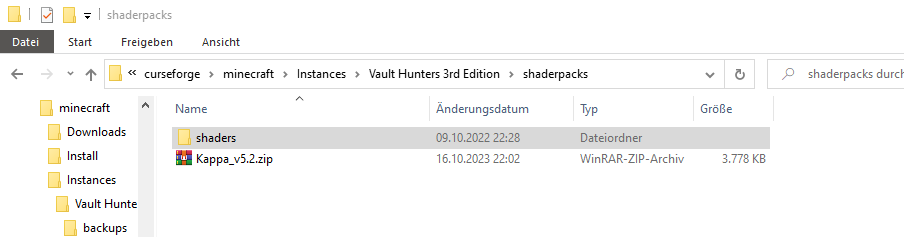

 signal ridge
hybrid mantle
yes:
signal ridge
hybrid mantle
yes:
!hosts
red patioBOT
How to get your hosts-file
On Windows
- Press +
Ron your keyboard, and paste:notepad %windir%\system32\drivers\etc\hosts - Screenshot/Copy the contents and paste it into the chat.
On Mac/Linux
- Open a terminal window, paste:
cat /etc/hosts - Screenshot/Copy the contents and paste it into the chat.
signal ridge
Screen shot the full file
hybrid mantle
signal ridge
Screen shot the full file
how
 signal ridge
Are you able to see carls messages?
hybrid mantle
oh Thanks a lot no I hadn't realized it
lavish cedar
is sodium on curseforge as good as on fabric?
i dont wanna use fabric because i think it wont be compatible with my curseforge modpack
signal ridge
!mc-wording
red patioBOT
Please use the correct terms - it allows us to understand and help you faster
Forge = Minecraft Forge, this is a modloader often just called "Forge".
Fabric = Fabric MC, this is a modloader, often just called "Fabric".
CurseForge = A Website/App that has content for games and serves as a mod manager.
Mods = Individual mod files.
Modpacks = Multiple mods put into the mods folder or downloaded from CurseForge.
signal ridge
Curseforge =/= Forge the minecraft modloader
lavish cedar
so can i run sodium with the modpack
lavish cedar
oh
 hybrid mantle
Hello, I have an error and I want to see if they can fix it here: what happens is that when I try to create a modpack it throws me an error: error in the remote server 502 I already tried to fix it pro I have not been able and it only happens to me with Forge it does not happen to me with Fabric or Vanilla. Please help me.
signal ridge
Sodium is for fabric. Rubidium is the forge port
lavish cedar
oh ty
signal ridge
If your able use embeddium instead of rubiddium. Its a better version
signal ridge
hybrid mantle
Hello, I have an error and I want to see if they can fix it here: what happens i...
!ticket-site open a ticket
red patioBOT
How to open a support ticket on the CurseForge website
Can't open the app or would rather use the website? You can do so here.
Fill out the form with accurate detailed information, keep in mind that simply saying 'it' or 'doesn't work' is very vague. The more details you provide, the more efficient help you will get.
Make sure to upload your Overwolf logs with the Upload File option in the ticket, information on how to get these logs can be found here
hybrid mantle
signal ridge
!ticket-site open a ticket
I not understand
signal ridge
Click the blue "here" in the carl bot post. Open a ticket with support.
Higher cf support will be able to help you
hybrid mantle
thanks
signal ridge
lavish cedar
huh rubidium doesnt work with the modpack
 burnt eagle
The status of the file has been changed to Rejected
Notes:
The following files belong to CurseForge-hosted projects, and should therefore not be added directly to zip files:
overrides/mods/ferritecore-6.0.0-fabric.jar
These files should, instead, be referenced in the manifest.json file generated by the CurseForge App during a profile export.
If you have any questions please contact our support team https://support.curseforge.com.
i think this shouldnt happen
for now i just exclude it from my pack

CurseForge Support
We're here to get you informed on everything you need to know about CurseForge, including helpful guides and troubleshooting articles to back you up when you get in a pickle
red patioBOT
The following files belong to CurseForge-hosted projects, and should therefore not be added directly to zip files:
-
Remove any mods listed in the error message from the profile you exported. Then reinstall them with the CurseForge app. DO NOT drag and drop files from the site.
-
Export the profile again, open the new zip that was just made. Check for the
overrides/modsfolder. If you still see any mods in that folder do the step above again for each mod. -
Upload the zip once complete and no more mods show in the
overrides/modsfolder.
sterile kestrel
Follow the bot ^
steep perch
Carl best turtle
 noble minnow
Good evening, I am experiencing a specific problem when launching "All the Mods: Volcano Block" (ATMVB). I have attached the error or problem for your reference. I would be grateful if you could help me resolve this problem. I'm French, sorry for my level of English
Thank you for your attention to this issue and I look forward to your advice and assistance in resolving it.
carmine galeBOT
Paste created of hs_err_pid26848.log, uploaded by neworld78.
signal ridge
noble minnow
Good evening, I am experiencing a specific problem when launching "All the Mods:...
!mc-amd
red patioBOT
Amd Graphic Driver Issue
:small_red_triangle_down: Part 1: Checking your system's GPU
- Open your
Device Manager - Click the drop down for
Display Adapters - Check if you have an AMD (Radeon) device
a - If you have AMD go to Part 2 :small_orange_diamond:
b - If you see AMD and Nvidia or Intel go to Part 3 :small_blue_diamond:
:small_orange_diamond: Part 2 - AMD Drivers Update
- Your AMD drives are broken or out of date, use the link below to get new drivers
Link: https://www.amd.com/en/support - Use either the auto tool AMD provides OR locate your GPU in their search.
- Download and run the installer, leave everything as default.
- Once installed try playing Minecraft again.
:small_blue_diamond: Part 3 - Other GPUs
If you have an Nvidia or Intel GPU, please use the command !mc-videocard for the instructions on how to change CF to use the proper GPU.
 restive ether
Heya my friends, I have a mod pack that isn’t mine. It’s called RAF 2 and I’m trying to add a mod to it, but I don’t see a button anywhere.
signal ridge
Do note, editing packs you didnt make is the easiest way to break the pack. If the pack does break, you will be on your own to fix it
!mc-modifypack
red patioBOT
How to add/remove mods in a modpack:
- Click on the picture of the modpack.
- Click the
Add More Contentbutton, IF this button is not there, see below before you continue. - Find the Mods, Resource Packs or Maps you wish to Install and click
Installon them. - Wait for all the required mods to be downloaded.
- Start the modpack.
How to Enable/Disable content management for modpacks:
- Click on the picture of the modpack.
- Click on the button next to the
Playbutton. - Click on
Profile Options. - Check the
Allow content management for this profileoption if you want to edit the content of the modpack, uncheck it to disable.
NOTE: The Allow content management for this profile option is what allows you to Delete, Disable, Update or Install any Mods, Resource Packs or Maps managed by CurseForge. It must be ON to modify any of them! (Currently)
restive ether
signal ridge
Do note, editing packs you didnt make is the easiest way to break the pack. If t...
Couldn’t I just delete it and reinstall?
signal ridge
Those are the options we would give if you edit a pack you didnt make
restive ether
Okie thank you
sand chasm
Is there a difference between the overwolf and the standalone version of curseforge?
signal ridge
ow version supports more games, stand alone supports a few.
only other difference is the Ow version needs the ow app to function, vs the standalone that doesnt
deep mirage
 young bone
#🧱︱mc-other-help for Minecraft issues
deep mirage
Im getting this chase message when trying to launch. I have about 7 mods, and tghere all the same version.
thx
blazing hollow
okkkk, i put a mod in the forge mod folder but it's not showing up here, is that normal?
 signal ridge
Are the mods from the CF site?
signal ridge
Re-install the mod using the cf app
blazing hollow
alright
signal ridge
!mc-installmods
red patioBOT
How to install mods in the CurseForge app
- Click
+ Create Custom Profile - Name it, select the required Minecraft version, select the modloader & modloader version (usually the highest number), click
Create. - Click the profile icon.
- Click
Add More Content - Search and install the desired mods.
- Start the game!
How to install mods that are not on the CurseForge app
- Right click the profile picture or Open the profile and click the Icon next to the play button.
- Click
Open Folder. - Drag the mod(s) into the
modsfolder. (Note: Some mods will require others, to run. Make sure to read the instructions for the mod!) - Start the game!
blazing hollow
thanks
signal ridge
Make sure the mods you are wanting to use are for the mc version and modloader you set the custom profile too
digital roost
i have nowhere to put this
can someone show me why my jar file isnt opening when i click it? ive deleted and uninstalled both the file and java
and it just dont open
signal ridge
What jar file are you trying to open?