#🔥︱curseforge-support
1 messages · Page 63 of 1
 upper root
 quick talon
since the new update, how can I upload a new file to my published modpack???
upper root
click the manage project button, then the Upload File button
 terse walrus
Hi I’m having trouble with modding Minecraft
upper root
!help
 red patioBOT
Please provide some more information to receive assistance
Providing the following information will help the team in assisting you:
- A detailed description of the issue you're experiencing
- If a mod/modpack/addon is involved, please specify the name
- Any screenshot/video/gif of the issue if you have
- Get your relevant logs ready, you can type
!mc-logs/!cflogs-appfor instructions
Some tips for explaining yourself better to save time and additional questions:
- Avoid using words such as 'it', say what it is :]
- Instead of simply saying something doesn't work, try to describe what's happening when you're running it
terse walrus
I’m trying to import the mods I want through a minecraft mod folder but it dosent work when I LAUCNH Minecraft
Launch*
 valid ibex
how do i import my current mods into curseforge?
 near thicket
!mc-installmods
red patioBOT
How to install mods in the CurseForge app
- Click
+ Create Custom Profile - Name it, select the required Minecraft version, select the modloader & modloader version (usually the highest number), click
Create. - Click the profile icon.
- Click

Add More Content - Search and install the desired mods.
- Start the game!
How to install mods that are not on the CurseForge app
- Right click the profile picture or Open the profile and click the
 Icon next to the play button.
 - Click

Open Folder. - Drag the mod(s) into the
modsfolder. (Note: Some mods will require others, to run. Make sure to read the instructions for the mod!) - Start the game!
 near thicket
as Curse Forge and Minecraft have their own instances of Minecraft
 royal kiln
Hi, I just updated the curseforge launcher and i lost all of my modpacks. i had spent ages making modpacks and on my worlds and now I've lost them all. is there any way to fix this?
 quasi tangle
do downloads not currently update on the beta website? mine hasnt changed in like 2 months but changes on old curseforge
 hearty heath
How long should the mod review take if i uploaded the file on friday 10th?
red patioBOT
Project moderation time
Project/File moderation is done on these days unless otherwise mentioned:
Sunday, Monday, Tuesday, Wednesday, Thursday: <t:1631170800:t> - <t:1631199600:t> (Your time)
Friday, Saturday: No Moderation!
Projects are moderated First in, First out. If you submit late in the work day, it will likely get left until the next day!
New Projects or anything flagged for manual review: 1-3 Working Days
Updates to approved projects not needing manual approval: 1 Hour
-If your file has been "Under Review" for more than an hour, then it is at manual review!
hearty heath
K thx
 modest ivy
when downloading any mod pack i get "remote name could not be resolved"
also cant create custom profile
upper root
?dns
red patioBOT
Changing your DNS server
Please follow these instructions to change your DNS server. The default one (provided by your router/ISP) can sometimes block CurseForge and other programs/websites.
modest ivy
i cant even run normal minecraft its saying Failed to download file.
Name: forge-43.2.0.jar
URL: https://piston-data.mojang.com/v1/objects/055b30d860ead928cba3849ba920c88b6950b654/client.jar
Error details: schannel: failed to receive handshake, SSL/TLS connection failed
Filename on disk: forge-43.2.0.jar
Path: C:\Users<my user name>\curseforge\minecraft\Install\versions\forge-43.2.0\forge-43.2.0.jar
Exists: Nonexistent
and after i fix it it does another and another
upper root
!ipv6 try this
red patioBOT
Disabling IPV6
Please follow these instructions to disable IPv6, which when enabled can sometimes cause network issues.
modest ivy
it worked thank you
 digital roost
Help :c
 upper root
!cflogs-app
red patioBOT
How to get your CurseForge app logs
- Click the

Create logs zipin the menu.
menu. - Drag and drop the file created to this channel.
- Wait for someone to look at it so they can help you.
 upper root
!mc-installfix try this
red patioBOT
How to repair your Minecraft installation on CurseForge - **NOT** the same as `Repair Profile` - please follow these exact steps
- Click on the Minecraft Tab on the left side of the CurseForge App.
- Click button next to the
Create Custom Profileoption. - Click

Repair Installationoption.
NOTE: Although this might seem similar to the instructions of repairing profile, it's different and required. No worries, you will not lose any modpacks or worlds.
 digital roost
I did that :c
upper root
what folders are in this folder?
C:\Users\<username>\Twitch\Minecraft\Install\java\
digital roost
upper root
what folders are in this folder?
`C:\Users\<username>\Twitch\Minecraft\Install\j...
 upper root
open that, whats in there?
digital roost
 upper root
open the bin folder. is there a java.exe file in there?
digital roost
 upper root
🤔 there is
digital roost
:c
upper root
!mc-modloaderjava
red patioBOT
Changing Java version for installing Forge
- Download and install this
- Open CurseForge and click the
 in the bottom left corner.
 - Go to the

Minecrafttab and scroll down to "Java version used for installing Forge modloader" - Click
Select - In the file explorer window that opens, click on
This PC, thenWindows (C:) - Open the
Program Filesfolder, then theJavafolder, then thejdk-17.0.3.1folder, then thebinfolder. - Click on
javaw.exe, then confirm it withOpen, in the bottom right of file explorer. - Follow the instructions from
!mc-installfix(if your internet is slow the instructions from!mc-updatemodloaderwork but need to be done on every broken profile)
upper root
try this, it should solve it
digital roost
 upper root
did you do step 1
 upper root
did you actually install that (double click) or just download it?
digital roost
download it and ran the installer
upper root
try the java.exe file instead of javaw.exe
digital roost
Same thing
 red patioBOT
How to get your CurseForge app logs
- Click the
Create logs zipin the menu. - Drag and drop the file created to this channel.
- Wait for someone to look at it so they can help you.
digital roost
upper root
is C an ssd or hdd?
digital roost
M.2 ssd
upper root
!mc-path try this
red patioBOT
How to change your Minecraft install path on CurseForge
:small_blue_diamond: If Minecraft is __not installed__ in CurseForge App:
- Click the
 in the top left.
 - Select Minecraft from the list of games.
- Select the
Advancedoption and select:
--- Windows:Local Disk (C:)at the left side of the window. If you do not see it, clickThis PCfirst.)
--- Mac:/Users/Shared/CurseForge, If it does not exist, make it. - Click
Continue.
:small_orange_diamond: If Minecraft is __installed__ in CurseForge App:
- Click the in the bottom left.
- Select the Minecraft tab.
- Click
Change. - Select the location:
--- Windows:Local Disk (C:)at the left side of the window. If you do not see it, clickThis PCfirst.)
--- Mac:/Users/Shared/CurseForge, If it does not exist, make it.

 upper root
yes
 upper root
according to the logs its timing out while trying to access java, any idea what that could be caused by? (antivirus ect)
[JavaFinder] Timeout value of 2500ms exceeded waiting for process response (C:\\Program Files\\Java\\jdk-17.0.3.1\\bin\\java.exe
digital roost
Nah i dont use anti-virus
upper root
!ticket-app im out of ideas, hopefully the ticket people know more
red patioBOT
How to open a support ticket on the CurseForge app
- Click the icon in the bottom left.
- Select

Open a Ticket. - Fill out the form with accurate detailed information, keep in mind that simply saying 'it' or 'doesn't work' is very vague. The more details you provide, the more efficient help you will get.
- Make sure to upload your Overwolf logs with the
Upload Fileoption on the ticket, information on how to get these logs can be found here https://support.overwolf.com/en/support/solutions/articles/9000176827-how-to-get-your-overwolf-logs - Submit!


 digital roost
oh bruh

 hot ledge
any curseforge issues rn
 river plinth
hey, anyone familiar with setting up an RLCraft server on linux? the 1.12.2..2860 forge server starter crashes at startup, with and without mods, so i think it has something to do with the file itself
near thicket
Do you have java installed? Make sure to have the right version of java on your system.
!mc-java
red patioBOT
Specific Java versions required for running Minecraft
Minecraft requires specific Java versions to run, pick the correct one for the version of Minecraft you are playing!
Java for Minecraft versions 1.16.X and below
Java for Minecraft 1.17.X
Java for Minecraft 1.18.X and 1.19.X
Java for other operating systems
river plinth
near thicket
Do you have java installed? Make sure to have the right version of java on your ...
this only occurs with 1.12.2..2860 forge, other versions work fine
digital roost
Hello we are trying to upload a serverpack n we got this note any clue what should we do?
 near thicket
river plinth
this only occurs with 1.12.2..2860 forge, other versions work fine
near thicket
river plinth
this only occurs with 1.12.2..2860 forge, other versions work fine
but do you have java 8 installed or something newer? check your java version by running this in your terminal
java -version
you have to find a version of common logging, that is on curse forge available, as the message tells you
 solemn hound
How do I use the old CurseForge website? I absolutely hate the new one, but most times I open the old one (including refreshing the page) it redirects to the new. Is there a way to enforce use of the old website (like how Reddit has old.reddit.com) such that this doesn't happen?
(Ping me on reply)
near thicket
solemn hound
(Ping me on reply)
#🆘︱current-issues🆘 message read this
solemn hound
I'm asking how to stop it
And also I suppose asking if once the beta becomes the standard, if there will be a way to use the old one
An update should never have complete UI overhaul. Any complete UI overhaul cannot help but make things worse. The best websites were the early 2000s ones which were pure html with very little even CSS, and no "dynamic" content. Every change to web design since then has made the average website worse
 bronze bramble
Every time I load my mod pack I press play like on the Minecraft launcher it crashes right after it doesn’t even let it load I have tried to repair but it doesn’t work
near thicket
!mc-logs can you send this one ?
red patioBOT
How to get your profile logs on CurseForge for support
- Right-click the modpack profile icon OR click the button in the modpack profile.
- Click
Open Folder. - Open the
logsfolder. - Drag and drop the FILE named
latestORdebuginto discord.
near thicket
yeah taht one, but can you provide the debug log too, as i don't know which mod is messing up your minecraft entitys like the Golem or Snowman
!mc-debuglog
red patioBOT
How to enable a missing debug.log file
Please follow these steps in order to enable the missing debug.log file:
- Click the icon in the bottom left.
- Click the
Minecrafttab. - Turn on the
Enable Forge debug.logoption.
bronze bramble
near thicket
yeah taht one, but can you provide the debug log too, as i don't know which mod ...
what mods do you think that could do this
@near thicket
this is the debug one
near thicket
i can't figure out which mod is causing the issue but you could try this to find the mod and remove it
!binarysearch
red patioBOT
How to find a faulty mod/plugin/addon by using 'Binary Search' or '50/50'
A binary search is a way of finding a faulty mod/plugin/addon when you have a lot of them, but without having to remove them one-by-one.
The procedure is simple:
- Take half of the existing mods/plugins/addons, and move them out, into another folder.
- Run the game.
- Does the issue still persist?
- If YES: Repeat from step 1 with the current things.
- If NO: Swap out the current things with the ones you moved out, and repeat from step 1.
- Repeat this process until the problematic mod(s)/plugin(s)/addon(s) have been found.
bronze bramble
ok

 young bone
?mc-installfix
red patioBOT
How to repair your Minecraft installation on CurseForge - **NOT** the same as `Repair Profile` - please follow these exact steps
- Click on the Minecraft Tab on the left side of the CurseForge App.
- Click button next to the
Create Custom Profileoption. - Click
Repair Installationoption.
NOTE: Although this might seem similar to the instructions of repairing profile, it's different and required. No worries, you will not lose any modpacks or worlds.
digital roost
still the same
 near thicket
you could try this again, as the mojang server is a bit bugy
digital roost
nothing
 signal ridge
!mc-launcherlog
red patioBOT
How to get your launcher log
- Click in the top right corner of CurseForge
- Click the
Open Modding folderbutton - Open the
Installfolder - Drag the
launcher_log.txtfile into discord
digital roost
signal ridge
digital roost
!dns try the steps below, if it is already set to 1.1.1.1 change it to 8.8.8.8
red patioBOT
Changing your DNS server
Please follow these instructions to change your DNS server. The default one (provided by your router/ISP) can sometimes block CurseForge and other programs/websites.
digital roost

 signal ridge
Delete those mods from your pack > then reinstall them using the app
young bone
Those specific versions are gone, according to that message
signal ridge
ah, then the devs pulled those versions from their projects, you will need to reinstall them anyways

 signal ridge
Could have been delete between when you posted the pack and the server pack being checked. Or sync finally caught up.
digital roost
they didnt.
signal ridge
Will just need to fix the server pack and modpack to match, we cant control what devs choose to remove from their projects
digital roost
how the hell am i supposed to do that, i need now to archive the entire modpack file, and then post it again

same ad before
 silent ferry
hey guys, can someone tell me how to fix exit code 1?
red patioBOT
Error/Exit codes are useless. Follow these steps so someone can actually help you.
- Right-click the modpack profile icon OR click the button in the modpack profile.
- Click
Open Folder. - Open the
logsfolder. - Drag and drop the FILE named
latestORdebuginto discord.
signal ridge
digital roost
how the hell am i supposed to do that, i need now to *archive* the entire modpac...
This happens from time to time when mod project devs hide/remove their mods for X reasons. Most devs have learned to work around it / bounce back fairly quickly
signal ridge
digital roost
What is your dns set too?
silent ferry
signal ridge
digital roost
how the hell am i supposed to do that, i need now to *archive* the entire modpac...
Edit the pack > make the changes > export > update.
signal ridge
silent ferry
#🧱︱mc-other-help would be better for this
digital roost
signal ridge
Edit the pack > make the changes > export > update.
but then it breaks compatibility with the modpack client version
signal ridge
Push a hotfix for the client
Wouldnt be surprised if the serverpacks dont like archived files like the clients can sometimes use.
digital roost
signal ridge
Push a hotfix for the client
i cant do it becuz CURSEFORGE decided to again block the main website and redirect to beta
signal ridge
Thats sue to load issues on the site. Instead of it just all going down, users are sent to the beta site.
digital roost
signal ridge
What is your dns set too?
iit was in 1111
but now in 8888
but thats fucking annoying, i want to do something, the websites goes down randomly for no apparent reason, and when it is down i need to use half functional beta version which doesnt allow to do anything with project 
signal ridge
I know, I am a pack dev as well, something that is annoying to deal with but would rather a semi functional site vs one that is just down
digital roost
digital roost
but thats fucking annoying, i want to do something, the websites goes down rando...
the official website SOMEHOW worked before but then something happened and now it works and not works randfomly
digital roost
signal ridge
I know, I am a pack dev as well, something that is annoying to deal with but wou...
but the semi functional site has only good search bar
and maybe fixed descriptions
signal ridge
Beta site isnt set in stone, it is still a wip
digital roost
then why the hell it is redirecting to something that doesnt even work properly
signal ridge
load issues, latest message in #🆘︱current-issues🆘
Otherwise if it didnt redirect the site would just go down all together, then we would have everyone in here yelling at us to "fix it"
digital roost
pov: php code from 10 years ago 
signal ridge
Bit of a crude waht of doing it, but try this https://www.curseforge.com/project/####/files/upload where the #### == your projects id

 signal ridge
Something you would need to talk to ticket support about
signal ridge
digital roost
but now in 8888
!hosts
red patioBOT
How to get your hosts-file
On Windows
- Press
 +
+Ron your keyboard, and paste:notepad %windir%\system32\drivers\etc\hosts - Screenshot/Copy the contents and paste it into the chat.
On Mac/Linux
- Open a terminal window, paste:
cat /etc/hosts - Screenshot/Copy the contents and paste it into the chat.
 sweet wing
when i try to use the curse forge installer it goes to the grant access screen i press allow then it starts loading and then it just stops ive been using it for a few months but then one day it stopped working so i tried reinstalling and it just does that everytime i try is there any fixes for this
 feral snow
can someone tell me how i can share my custom modpack to a friend? because I don't see the button to download it
 young bone
?mc-packshare
red patioBOT
Two ways to share a modpack you made with others
Export and Share - For Friends / Small Groups
- Click the Icon for the modpack.
- Click the button next to play.
- Click

Export. - Select the files that should be included.
- Send the zip to the people that want it! They can follow the instructions in
!mc-installpackto install the pack.
Upload to Curseforge - For Public Release to Everyone
This option will make your pack public to EVERYONE, it comes with extra requirements and will take some effort to set up.
- Go to create a new project
- Fill out the information with a proper description of the pack. This should allow anyone to understand what the pack is.
- Click the Icon for the modpack in the CurseForge app.
- Click the button next to play.
- Click
Export. - Select the files that should be included.
- Open your Project that you made on the CurseForge site and Upload the file you just made.
- Wait for Moderation & Sync so it can show up in the client! (See
!syncfor limitations and!statusto learn about the moderation process and how long it will take to approve/decline)
young bone
First set of instructions
feral snow
young bone
First set of instructions
And I have to include which file so that my friend puts it on his server? and for him to play too
signal ridge
Your friend would need to import the pack into his cf app (or apps that support cf) then manually move the files to the server. The export.zips are for clients only.
#🧱︱mc-other-help for server help/aid if needed
feral snow
Ok thank you
feral snow
signal ridge
Your friend would need to import the pack into his cf app (or apps that support ...
why i just have 3 mods in, normally i have 191 mods

 signal ridge
That in the export.zip?
The export.zip should have no mods in it. As the mods that are from the CF app/site are put into the manifest.json file. This helps keep zip sizes down.
feral snow
So my modpack is good ?

 signal ridge
Only include files that are needed for the pack to work,
So loose the journeymap and logs folder, as those are a per client folders.
 signal ridge
If there are any mods in the mods folder: delete them from your pack > then reinstall them using the CF apps add more content section > test the pack > export again
Otherwise yes, that is good.
feral snow
Ok ty i will delete them and reinstall them so
i delete them in the file but they haven't disappeared in CF

 signal ridge
Where did you delete the file?
feral snow
in this file
 signal ridge
Deleting them from the export wont effect the cf app, need to delete them from the app for them disappear from your pack.
If your not planning to upload this pack to the cf site, can just send it to your friend as is. The app should just stick those 3 mods in the correct place
feral snow
Ok, so i just can send the pack with the 3 mods ?
signal ridge
Send an unedited export.zip file to your friend
 calm bramble
red patio
calm bramble
red patio
Am I missing something, or is there no longer a file upload page on the project settings area? I don't see how to upload a new file with the new/changed website.
signal ridge
Not sure its avaliable on the beta site just yet.
calm bramble
Yeah just figured out how to make it go back to old site
signal ridge
Was about to say can try this https://www.curseforge.com/project/####/files/upload where the #### == your projects id
calm bramble
that also works
 echo siren
 orchid creek
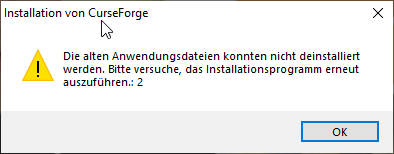
hi, everytime i close the curseforge client, with or without updating addons for wow, im getting this error (german)
https://i.imgur.com/D820teS.png
it says old data couldnt be uninstalled, please try and relaunch the installation wizard:2
 woeful radish
The beta site messes up the order I put the images in.
In normal page its fine but it seems to change the order in beta site
woeful radish
!patience They have multiple support channels to cover
red patioBOT
Please be patient, we're helping as fast as we can
The Moderators & Helpers on this server volunteer their time and knowledge to help people as they can.
Not everyone here will have an answer for you the moment you want it.
Time zones, work/life schedules etc. also vary when people are around to help.
TL;DR: Please have patience. IF and WHEN someone knows how to help, they will assist you.
*Note that you can also open a support ticket and wait for a response.
near thicket
 steady mango
this would be better in #🧱︱mc-other-help , but try removing recipescramble
steady mango
near thicket
this would be better in <#768367574001778729> , but try removing recipescramble
But the recipescramble mod is the whole reason this modpack is for
signal ridge
Remove it, test if it works, if it does > test the mod in its own custom profile. Report your findings to the mods author
steady mango
removing it does work
near thicket
!projectissue than do the below and wait for them to have it fixed
red patioBOT
Reporting issues to project authors
Please visit the project page for the content you posted about and look for a way to contact the developer.
Somewhere on the page, there is usually a method of contact. Look for one of the following things:
Issuestab like the image below- Discord link
- Twitter link
- Comments section below the project
If no contact method exists you will either have to remove the project or find a solution on your own.
 near thicket
!mc-reversesearch you could try this too
red patioBOT
The alternative way to binary search
Follow the steps below for an alternate method to binary search:
- Make a new profile, same versions as the last one
- Test the profile with no mods
- Add 1-5 mods to the profile (using the app)
- Test the profile, does it boot / can you make a world?
- If YES Repeat steps 3 & 4
- If NO Remove the mods you just added then test the pack again
- Repeat this process until the problematic mod(s)/plugin(s)/addon(s) have been found
signal ridge
orchid creek
hi, everytime i close the curseforge client, with or without updating addons for...
!reinstall try the bellow steps.
red patioBOT
Reinstalling Overwolf & CurseForge is required
Please uninstall by following the instructions here
Once you're done, you can install again from the main download page
 placid stirrup

 signal ridge
!mc-installfix try the below
red patioBOT
How to repair your Minecraft installation on CurseForge - **NOT** the same as `Repair Profile` - please follow these exact steps
- Click on the Minecraft Tab on the left side of the CurseForge App.
- Click button next to the
Create Custom Profileoption. - Click
Repair Installationoption.
NOTE: Although this might seem similar to the instructions of repairing profile, it's different and required. No worries, you will not lose any modpacks or worlds.
 tulip hamlet
error 1 modded client please help https://pastebin.com/c96k5zmr
Pastebin
Pastebin.com is the number one paste tool since 2002. Pastebin is a website where you can store text online for a set period of time.
young bone
You were in right place the first time
tulip hamlet
lol
i was getting no help so i thought that i was getting ignored on purpose
cause I was in the wrong channel
signal ridge
Just lots going on, so need to be patient.
 thick bough
hey i just downloaded curforge but it wont work
 signal ridge
What OS are you using?
thick bough
whats OS?
signal ridge
!os
red patioBOT
What is my OS
OS Stands for Operating System
Windows, Mac, Linux
If someone asks for your OS you should also say what the version is. For example: Windows 10
If you don't know how to find out, see here
signal ridge
!oops try the bellow steps
red patioBOT
What to do when getting the 'Oops' message
- Make sure you tried these steps first
- Click the
Create logs.zipbutton on the bottom of the oops error. - Drag and drop the created file into this channel.
- Wait for someone to look at the logs and help you.
placid stirrup
signal ridge
!mc-installfix try the below
worked thank you
 jagged beacon
does anyone know a incompalibity with galacticraft ?
 crude nacelle
Hey, i wanted to download ATM7 and when I click on install, it first starts doing its thing but then it just stops and theres the install button again
 broken marsh
The option to change versions is no longer appearing for my AtM 8 modpack, so I can no longer update it. I've tried closing and reopening both the modpack and curseforge many times, with no change. The modpack still runs fine, but cannot be updated, which is preventing me from joining a server that uses the newest version. Any possible fixes?
 signal ridge
crude nacelle
Hey, i wanted to download ATM7 and when I click on install, it first starts doin...
signal ridge
crude nacelle
Hey, i wanted to download ATM7 and when I click on install, it first starts doin...
!mc-installfix try the bellow
red patioBOT
How to repair your Minecraft installation on CurseForge - **NOT** the same as `Repair Profile` - please follow these exact steps
- Click on the Minecraft Tab on the left side of the CurseForge App.
- Click button next to the
Create Custom Profileoption. - Click
Repair Installationoption.
NOTE: Although this might seem similar to the instructions of repairing profile, it's different and required. No worries, you will not lose any modpacks or worlds.
signal ridge
broken marsh
The option to change versions is no longer appearing for my AtM 8 modpack, so I ...
Click profile options > uncheck the Allow content management option
broken marsh
Wow! That was a fast fix. Thanks a bunch
 topaz bone
How do i change the main file for a modpack? and on the launcher whenever i add a new file to the modpack it doesn't give the option to update the modpack or tell the user that there is an update, you have to do it manually and change the version
 signal ridge
The main file, is whatever the most resent release file is I believe.
topaz bone
it doesnt show that on the website, it says 1.1 is the main version and it hasnt been that version for many days
signal ridge
Link the project
signal ridge
may just be a visual issue, when I clicked on the file it brought me to the 1.43 version
Will bring this up to support.
topaz bone
alright thank you
 keen viper
Hello, i just visited the new page on my mod on the beta website and when i counted the numbers of download i was down by 4 (see the screen attached)
4 + 6 + 14 + 8 + 11 = 43
You can see it at : https://beta.curseforge.com/minecraft/mc-mods/building-dimension/files
I also tried with another mod : https://beta.curseforge.com/minecraft/mc-mods/msg-lock/files and it has the same issue
 crude nacelle
signal ridge
!mc-installfix try the bellow
crude nacelle
signal ridge
!mc-installfix try the bellow
already did that
signal ridge
Do it again, as soon as its done reboot yout pc
signal ridge
keen viper
Hello, i just visited the new page on my mod on the beta website and when i coun...
Its just a visual thing, download count has always been iffy when the servers are having issues. Your downloads are still being counted
red patioBOT
Download counts are fine.
Download counts don't always update properly on the site. They are still counted though, it will update eventually.
crude nacelle
signal ridge
Do it again, as soon as its done reboot yout pc
installed much longer this time but still doesnt work
signal ridge
!cflogs-app
red patioBOT
How to get your CurseForge app logs
- Click the
Create logs zipin the menu. - Drag and drop the file created to this channel.
- Wait for someone to look at it so they can help you.
 analog cosmos
when i click play on a modpack on the cursforge map, nothing happens

theres this on the modpack profil and then nothing
signal ridge
crude nacelle
!hosts
red patioBOT
How to get your hosts-file
On Windows
- Press +
Ron your keyboard, and paste:notepad %windir%\system32\drivers\etc\hosts - Screenshot/Copy the contents and paste it into the chat.
On Mac/Linux
- Open a terminal window, paste:
cat /etc/hosts - Screenshot/Copy the contents and paste it into the chat.
signal ridge
analog cosmos
!mc-installfix try the below then reboot your pc
red patioBOT
How to repair your Minecraft installation on CurseForge - **NOT** the same as `Repair Profile` - please follow these exact steps
- Click on the Minecraft Tab on the left side of the CurseForge App.
- Click button next to the
Create Custom Profileoption. - Click
Repair Installationoption.
NOTE: Although this might seem similar to the instructions of repairing profile, it's different and required. No worries, you will not lose any modpacks or worlds.
crude nacelle
signal ridge
!hosts
i have a macos
signal ridge
Ok? Follow the mac instructions then
crude nacelle
Oh, sorry didnt see that 😅
crude nacelle
signal ridge
!hosts
what do you need the host for?
signal ridge
To make sure everything is as it should be
crude nacelle
 crude nacelle
signal ridge
To make sure everything is as it should be
crude nacelle
signal ridge
To make sure everything is as it should be
there it is
signal ridge
Screen shot the whole file. That is blurry
crude nacelle
signal ridge
Screen shot the whole file. That is blurry
Its just this in the terminal
and the stuff under it is just a line of my macs name
crude nacelle
Yes
signal ridge
Do any other packs of the same mc version install?
 spring carbon
Heya! Could anyone possibly explain how to fix my curseforge app? It's not allowing me to install new modpacks from the website, and when I tried to open my modpack lists it just gets stuck on this screen. I've already tried reinstalling the app.
 signal ridge
spring carbon
Heya! Could anyone possibly explain how to fix my curseforge app? It's not allow...
signal ridge
spring carbon
Heya! Could anyone possibly explain how to fix my curseforge app? It's not allow...
What os are you using?
crude nacelle
signal ridge
Do any other packs of the same mc version install?
imma try it real fast
spring carbon
signal ridge
What os are you using?
Windows 10
crude nacelle
signal ridge
Do any other packs of the same mc version install?
no doesnt work
signal ridge
crude nacelle
no doesnt work
!network try the below, something may be blocking your install
red patioBOT
How to tackle Network Issues
Please try the following step(s) to figure out the cause/solution to your network issues:
- Restart the CurseForge app
- Restart your computer
- Disable any programs that interfere with your connection (VPN, ping tunnels, antivirus, firewall etc)
- Restart your router and modem.
- Attempt using a different connection if possible.
- Reinstall Curseforge.
signal ridge
spring carbon
Windows 10
!cflogs-app
red patioBOT
How to get your CurseForge app logs
- Click the
Create logs zipin the menu. - Drag and drop the file created to this channel.
- Wait for someone to look at it so they can help you.
spring carbon
Let me try restarting my PC really quick, here is my log zip though!
signal ridge
May need to do another repair installation to fix any corrupts installs with the base loader/forge files
spring carbon
Restarting my pc and repairing the installation seems to have fixed it! Thank you!
signal ridge
crude nacelle
did it and doesnt work
otherwise will likely need to open a ticket.
!ticket-app
red patioBOT
How to open a support ticket on the CurseForge app
- Click the icon in the bottom left.
- Select
Open a Ticket. - Fill out the form with accurate detailed information, keep in mind that simply saying 'it' or 'doesn't work' is very vague. The more details you provide, the more efficient help you will get.
- Make sure to upload your Overwolf logs with the
Upload Fileoption on the ticket, information on how to get these logs can be found here https://support.overwolf.com/en/support/solutions/articles/9000176827-how-to-get-your-overwolf-logs - Submit!
 lost maple
how do i like invite my friend to my world on curse?
cuz we aint on the same network n kinda still a minecraft newbie used it like 4x
within the last 2 years iv
had it on pc
signal ridge
Would need to make a local server and portforward OR rent a server online. Those are the safest options. If you need server help use #🧱︱mc-other-help
 subtle spindle
I have a problem downloading mods from the Forge app, the mod name is Better MC (FORGE) BMC1 version 1.16.5
signal ridge
try this https://www.curseforge.com/project/####/files/upload where the #### == your projects id
 near jacinth
Im trying to play rogue like adventures and dungeons but the second I click play forge crashes
signal ridge
subtle spindle
I have a problem downloading mods from the Forge app, the mod name is Better MC ...
Eaxplain the issue
signal ridge
near jacinth
Im trying to play rogue like adventures and dungeons but the second I click play...
CurseForge app? OR forge when the pack boots?
Forge =/= CurseForge
near jacinth
signal ridge
!cflogs-app
red patioBOT
How to get your CurseForge app logs
- Click the
Create logs zipin the menu. - Drag and drop the file created to this channel.
- Wait for someone to look at it so they can help you.
 clear flare
signal ridge
try this <https://www.curseforge.com/project/####/files/upload> where the #### =...
clear flare
signal ridge
try this <https://www.curseforge.com/project/####/files/upload> where the #### =...
it was just that I had to go to the new authors portal, didn't know it was even a thing
signal ridge
ah ok, yeah lots of new (tho the authors panel has been around for a while)
signal ridge
In the cf app?
signal ridge
!mc-installfix try the below then reboot your pc
red patioBOT
How to repair your Minecraft installation on CurseForge - **NOT** the same as `Repair Profile` - please follow these exact steps
- Click on the Minecraft Tab on the left side of the CurseForge App.
- Click button next to the
Create Custom Profileoption. - Click
Repair Installationoption.
NOTE: Although this might seem similar to the instructions of repairing profile, it's different and required. No worries, you will not lose any modpacks or worlds.
signal ridge
near jacinth
So I did that cf is still crashing when I click play
In the app click the > bottom left corner what version is your app?
near jacinth
 signal ridge
Do other packs have this issue?
near jacinth
All of them
signal ridge
have they ever worked?
near jacinth
Yea it was working just fine this morning
signal ridge
any changes to your pc since then? Crashes, updates, unexpected power loss
signal ridge
send new cf logs
near jacinth
red patioBOT
How to open a support ticket on the CurseForge website
Can't open the app or would rather use the website? You can do so here.
Fill out the form with accurate detailed information, keep in mind that simply saying 'it' or 'doesn't work' is very vague. The more details you provide, the more efficient help you will get.
Make sure to upload your Overwolf logs with the Upload File option in the ticket, information on how to get these logs can be found here
near jacinth
what category and sub category would i pick? for this?\
signal ridge
I guess this
 near jacinth
would unistalling and reinstalling mc help?
signal ridge
The repair installation should have handled that, as the CF app doesnt use the mc from the .minecraft folder
near jacinth
guess i just retry the repair
signal ridge
You did repair installation last time yes? which is different from repair profile
near jacinth
Yea
Ticket submitted
I hope it fixes itself or I get a solution soon I just wanted to play R.A.D 😭
 fickle lintel
How do I upload a file to my project on the new beta website?
I can't see any upload button :I
 tawny canopy
Are there any recent videos for adding a modpack to a server?
fickle lintel
Also suddenly the curseforge app is stuck at "copying files" when trying to export.
 ancient surge
help me pls why is my MMC3 wont open everytime i try to open it it always say Java.lang.ExceptionInInitializerError: null
fickle lintel
Uh what the hell is happening?
My file still being exported has now inflated to over 1.4GB in size!?
 signal ridge
fickle lintel
Also suddenly the curseforge app is stuck at "copying files" when trying to expo...
signal ridge
fickle lintel
Also suddenly the curseforge app is stuck at "copying files" when trying to expo...
What all did you check off for the export ?
signal ridge
ancient surge
help me pls why is my MMC3 wont open everytime i try to open it it always say Ja...
Where are you seeing this error?
ancient surge
help me pls
help me pls why is my MMC3 wont open everytime i try to open it it always say Java.lang.ExceptionInInitializerError: null
fickle lintel
signal ridge
What all did you check off for the export ?
Only Mods, Config, Defaultconfig and Resourcepacks are selected for exports.. maybe something snuck in I'm checking my folders right now.
 leaden compass
fickle lintel
Modpack
leaden compass
fickle lintel
Modpack
Well, if the fix that the mod tells you doesnt work you can download memory leak fix. It might work
fickle lintel
I found the issue.
Spark heapdumps lmao
signal ridge
That would do it
leaden compass
Oh 💀
fickle lintel

 signal ridge
ancient surge
help me pls why is my MMC3 wont open everytime i try to open it it always say Ja...
signal ridge
ancient surge
help me pls why is my MMC3 wont open everytime i try to open it it always say Ja...
Where are you seeing this error? What is "it"
ancient surge
signal ridge
Where are you seeing this error? What is "it"
can i send a screen?
leaden compass
Ye
signal ridge
ancient surge
can i send a screen?
yes
ancient surge
 leaden compass
How many mods do you have
signal ridge
ancient surge
!mc-logs send these logs to #🧱︱mc-other-help
red patioBOT
How to get your profile logs on CurseForge for support
- Right-click the modpack profile icon OR click the button in the modpack profile.
- Click
Open Folder. - Open the
logsfolder. - Drag and drop the FILE named
latestORdebuginto discord.
ancient surge
leaden compass
Your using mmc3
ye
leaden compass
Hmm... im not experienced with anything modding related so take my advice with a grain of salt if i give something really out of the box
leaden compass
Google how to fix error code -1 or something. Also, is mmc3 forge?
red patioBOT
Error/Exit codes are useless. Follow these steps so someone can actually help you.
- Right-click the modpack profile icon OR click the button in the modpack profile.
- Click
Open Folder. - Open the
logsfolder. - Drag and drop the FILE named
latestORdebuginto discord.
signal ridge
Or send the logs asked for to #🧱︱mc-other-help
 rare abyss
is there a way to turn on alternating row colors in lists?
leaden compass
rare abyss
is there a way to turn on alternating row colors in lists?
Wdym?
fickle lintel
Oh also where is the upload file button on the new beta website interface?
Am I blind?
 signal ridge
There isnt one yet afaik but try this https://www.curseforge.com/project/####/files/upload where the #### == your projects id
leaden compass
fickle lintel
Oh also where is the upload file button on the new beta website interface?
Am I...
I mean, idk but you could just go to the non beta site if the servers arent full
Well not full
 leaden compass
rare abyss
leaden compass
rare abyss
Not sure you can do that
red patioBOT
Where to suggest new ideas and vote for others on CurseForge
CurseForge is looking for great ideas and user feedback, Get into the CurseForge Community by providing some feedback and voting on what's important to you!
Location In-app
- Click the button on the bottom left of the app.
- Click on

Suggest a Featureoption!
rare abyss
thanks!
fickle lintel
leaden compass
I mean, idk but you could just go to the non beta site if the servers arent full
Yeah how do I switch back to the "normal" site?
rare abyss
change beta to www
fickle lintel
💀
rare abyss
if you get redirected you have to wait
fickle lintel
Alright lol
ancient surge
signal ridge
Or send the logs asked for to <#768367574001778729>
i did now what do i do????
leaden compass
fickle lintel
Yeah how do I switch back to the "normal" site?
Try to go to the website again without the beta or do what sev said
The redirection thing is to prevent down time if a lot of people are on the website im pretty sure
fickle lintel
Oh so the beta website gets displayed when there's too much traffic on the "stable" one?
I see.
signal ridge
ancient surge
i did now what do i do????
Now you wait patiently
leaden compass
Mhm
ancient surge
signal ridge
Now you wait patiently
bruh💀
signal ridge
!patience
red patioBOT
Please be patient, we're helping as fast as we can
The Moderators & Helpers on this server volunteer their time and knowledge to help people as they can.
Not everyone here will have an answer for you the moment you want it.
Time zones, work/life schedules etc. also vary when people are around to help.
TL;DR: Please have patience. IF and WHEN someone knows how to help, they will assist you.
*Note that you can also open a support ticket and wait for a response.
leaden compass
Where can i suggest stuff for the app? I suggested in the reddit, the suggestion website and tweeted curseforge. Is there anywhere else i can suggest to get the most recognition, cause its a really useful feature im suggesting
signal ridge
!ideas
red patioBOT
Where to suggest new ideas and vote for others on CurseForge
CurseForge is looking for great ideas and user feedback, Get into the CurseForge Community by providing some feedback and voting on what's important to you!
Location In-app
- Click the button on the bottom left of the app.
- Click on
Suggest a Featureoption!
leaden compass
I already suggested there, so i guess ill just wait. Thanks
signal ridge
Yep.
leaden compass
Also damn your helping so many people at once, nice job dude. I probably couldnt do that
signal ridge
Lots of practice
fickle lintel
Thanks for the help :)
 signal ridge
ancient surge
sooooooo
signal ridge
signal ridge
ancient surge
sooooooo
signal ridge
 slender zinc
Windows or Mac?
near jacinth
Gona purge overwolf cf and mc from my pc and re install everything
leaden compass
You could get the standalone version and see if it helps but idk
terse walrus
Hay
I’m having trouble with Curse Forge Minecraft Create Above and Beyond

Earlier today it was working fine
Now nothing is working
leaden compass
terse walrus
Try redownloading it. Also, just a bit of info, if your using windows you can do shift+windows key+s to screenshot. If redownloading doesnt work then try sending me the log.
Could you also give a bit more info?
Like does it freeze and never finish, or does it close
terse walrus
So like
So 1.
It loads up the screen and after a while it will either crash or load the memory Heap really slowly
leaden compass
And have you waited until it loaded it?
terse walrus
Yes
terse walrus
30 minutes and still nothing
leaden compass
Oh ok
terse walrus
It’s still loading the memory heap
leaden compass
Try downloading another copy, try not to delete the one you have that isnt working cause it has your worlds
terse walrus
I just deleted the mod and I’ll re download it again
leaden compass
Oh
leaden compass
Well, hopefully it didnt remove your stuff
terse walrus
So I didn’t really care
leaden compass
Oh thats good
terse walrus
Isn’t their another way without forge?
terse walrus
What I would try to do is go to windows search Type in Run,
Then do %appdata% then go to Minecraft, press on it, create a mod folder, and drag the fly wheel, Just Enough items, and create mod into it
leaden compass
Yeah you need forge. Or do you mean curseforge?
terse walrus
 terse walrus
Wait theirs a difference?
leaden compass
Yeah
terse walrus
CurseForge and Forge?
signal ridge
Or use the CF app to make a custom profile
terse walrus
…
signal ridge
!mc-wording
red patioBOT
Please use the correct terms - it allows us to understand and help you faster
Forge = Minecraft Forge, this is a modloader often just called "Forge".
Fabric = Fabric MC, this is a modloader, often just called "Fabric".
CurseForge = A Website/App that has content for games and serves as a mod manager.
Mods = Individual mod files.
Modpacks = Multiple mods put into the mods folder or downloaded from CurseForge.
leaden compass
Forge is a mod loader, curseforge is a modpack loader, but curseforge still uses fabric or forge
terse walrus
So how do I download forge
leaden compass
Depending on what your using, and also depending on if your using minecraft
You can make a profile
terse walrus
Yes
leaden compass
And then add the mods
terse walrus
So I’m using the MC Launcher and using Java for it
leaden compass
Or you can do what you said, and download the correct version of forge
Ill link it if thats fine
signal ridge
CF will auto install the modloader you pick during the custom profile creation
signal ridge
No need to manually use the .minecraft folder
signal ridge
!mc-installmods
red patioBOT
How to install mods in the CurseForge app
- Click
+ Create Custom Profile - Name it, select the required Minecraft version, select the modloader & modloader version (usually the highest number), click
Create. - Click the profile icon.
- Click
Add More Content - Search and install the desired mods.
- Start the game!
How to install mods that are not on the CurseForge app
- Right click the profile picture or Open the profile and click the Icon next to the play button.
- Click
Open Folder. - Drag the mod(s) into the
modsfolder. (Note: Some mods will require others, to run. Make sure to read the instructions for the mod!) - Start the game!
leaden compass
It is easier to use curseforge, but if you try it and it doesnt work, try manual after looking at logs
terse walrus
 leaden compass
Curseforge puts it in the folder itself, and its not for every minecraft version. But whatever you want is good
Yeah it could work, just you do need forge but yoyok9 said it auto installs forge if you use it
terse walrus
I’ll just use curseforge
signal ridge
If you want, but then you need to go to forges main site and download the forge installer needed for the mc version, then run the installer for the client. The .minecraft folder also doesnt play well with multi mod versions. CF app seperates each "profile" into its own area, so no mixing can happen
terse walrus
And second thing
terse walrus
How can I modify the ram I use with Above and Beyond
signal ridge
!mc-ram
red patioBOT
How to set Global Minecraft RAM value
- Click the icon in the bottom left to open settings.
- Click the Minecraft tab.
- Scroll down.
- Set the slider to recommended ram range as seen below.
 leaden compass
Dunno
WHATTT
YOU CAN DO IT IN THE CURSEFORGE APP?!?!
I thought i had to do it manually in the launcher and thats what ive been doing
signal ridge
OR you can do it per profile instead By opening Profile options in the pack > Uncheck the "Use System Memory settings" and move the slider
leaden compass
Damn thats some new info for me
Oh also, what is the difference between log levels?
 terse walrus
Here’s the thing so I’m use a HP Pavilion x360 which is for sure not a gaming laptop so it sometimes causes a lot of lag when I play
How can I fix that
signal ridge
leaden compass
Oh also, what is the difference between log levels?
Not sure, best not to mess with it
leaden compass
Yeah its in advanced so i didnt
leaden compass
terse walrus
Here’s the thing so I’m use a HP Pavilion x360 which is for sure not a gaming la...
Use optifine or rubidium
Your on forge right?
terse walrus
CurseForge
signal ridge
1.16+ use Rubidium
leaden compass
Rubidium is sodium but its ported to forge
terse walrus
 leaden compass
terse walrus
CurseForge
leaden compass
terse walrus
CurseForge
I mean the mod loader
terse walrus
Uh idk
leaden compass
Check like this

Fabric is what i use mainly
If i use forge, im just testing cool mods
terse walrus
Yea Forge
leaden compass
Kk, then rubidium is what you should choose
terse walrus
So do I download that separately
leaden compass
And rubidium extra, although thats just some extra stuff. You can get oculus for shaders
signal ridge
Forge == Modloader, Loads mods for Forge
Fabric == Modloader loads mods for Fabric
CurseForge == An app use to play games / make moding easier. It is also a project hosting site.
CurseForge=/= Forge do not interchange the words
 leaden compass
Oh and also, optifine lets you have really cool texture packs, but you cant really have 3d textures without optifine
Hmmm
red patioBOT
How to install mods in the CurseForge app
- Click
+ Create Custom Profile - Name it, select the required Minecraft version, select the modloader & modloader version (usually the highest number), click
Create. - Click the profile icon.
- Click
Add More Content - Search and install the desired mods.
- Start the game!
How to install mods that are not on the CurseForge app
- Right click the profile picture or Open the profile and click the Icon next to the play button.
- Click
Open Folder. - Drag the mod(s) into the
modsfolder. (Note: Some mods will require others, to run. Make sure to read the instructions for the mod!) - Start the game!
signal ridge
You can see the bot message right?
terse walrus
Ya


 leaden compass
Yep
And rubidium extra if you want
Thats the one under it
And once again, if you want shaders get oculus as well
 signal ridge
Yep
terse walrus
…
signal ridge
Create is uploaded to the CF site, app pulls from the site
 warm vault
Hi, I have a plugin using okhttp3 lib, but the file uploaded has been reject. The info says "We do not allow for projects to store the personal information of users, please remove the "okhttp3.Credentials" part from your files."
This is only the dependency, I am not sure what exactly "store the personal info of users mean", this class does not contains my info or other user's info. Do I have to remove that class or is it a mistake?
terse walrus
Bro and I was playing the Above and beyond version which I hated
signal ridge
You were likely looking at modpacks before that had create in it.
terse walrus
Yea
leaden compass
terse walrus
Bro and I was playing the Above and beyond version which I hated
💀 well now you know
 leaden compass
Yes then it opens the mc launcher and then you press play in that
leaden compass
warm vault
Hi, I have a plugin using okhttp3 lib, but the file uploaded has been reject. Th...
Credentials???? Like credit card credentials? You might wanna remove that
warm vault
No, it is HTTP authorization credentials
leaden compass
Oh
Uhhhh then i dont know. I mean, the part where it says doesnt allow storing info, means that every plugin or mod uploaded, cant collect info, cause in some places i think its illegal. Its also a massive breach in privacy, but i dont think http auth credentials is bad, but you might want info from someone smarter than me
Ask a mod cause im not smart
signal ridge
Whats not?
terse walrus
When I press play
leaden compass
Uh check your open apps
signal ridge
Play on the cf app OR play in the mc launcher?
leaden compass
Or task bar i mean
terse walrus
So it takes me to MC Launcher after I press play on the thing I made
leaden compass
Mhm?
warm vault
leaden compass
Ask a mod cause im not smart
okay, thank you. I did not use this class, so I will try remove that and see if it can be approved
terse walrus
and then I press play and then nothing happens
signal ridge
terse walrus
and then I press play and then nothing happens
!mc-launcherlog
red patioBOT
How to get your launcher log
- Click in the top right corner of CurseForge
- Click the
Open Modding folderbutton - Open the
Installfolder - Drag the
launcher_log.txtfile into discord
terse walrus
Yoyo me and you already have tried that
signal ridge
Win or mac?
signal ridge
ah
right
Can you open a packs folder?
Right click on a packs picture > open folder OR if your in a pack click the beside the play button > open folder
signal ridge
How long have you waited?
terse walrus
6 mins after you told me to do what you told me to do earlier
signal ridge
Right click the pack > view profile > click the beside "Play" > open folder > click the go up a folder button 2 times then open the install folder
 terse walrus
Cant go any farther
signal ridge
Does it error?
terse walrus
Access denied AGAIN
signal ridge
Screen shot the whole folder path
terse walrus
 signal ridge
!mc-path follow the second part of this 🔸
red patioBOT
How to change your Minecraft install path on CurseForge
:small_blue_diamond: If Minecraft is __not installed__ in CurseForge App:
- Click the in the top left.
- Select Minecraft from the list of games.
- Select the
Advancedoption and select:
--- Windows:Local Disk (C:)at the left side of the window. If you do not see it, clickThis PCfirst.)
--- Mac:/Users/Shared/CurseForge, If it does not exist, make it. - Click
Continue.
:small_orange_diamond: If Minecraft is __installed__ in CurseForge App:
- Click the in the bottom left.
- Select the Minecraft tab.
- Click
Change. - Select the location:
--- Windows:Local Disk (C:)at the left side of the window. If you do not see it, clickThis PCfirst.)
--- Mac:/Users/Shared/CurseForge, If it does not exist, make it.
 signal ridge
And unable to open the install folder?
leaden compass
How do i change account settings on the website? I wanna see what notifs and stuff i get
terse walrus
Idk which one to press
leaden compass
Open installs i think
signal ridge
terse walrus
Idk which one to press
Are you following the path bot OR trying to open the installs folder?
terse walrus
Well idk what the bot wanted me to do so I just pressed installs like ilman told me to do
Wait hold up
signal ridge
...
leaden compass
I think i was wrong
signal ridge
Lets start over
terse walrus
Well it shows me the actually create mod now

Ok I did something wrong
Idk what the hell I pressed but I’m for sure looking for this
Holy Jesus
It’s so smith
Smooth
Not a singe trace of lag
leaden compass
Told ya rubidium helps
terse walrus
Wait
leaden compass
Yes?
terse walrus
But I don’t know if this is the doing of my Folder that I made or the Above and Beyond
It might be my folder tho
Cause I see NO trace of any above and beyond stuff
leaden compass
Hmmmm
signal ridge
If you clicked play on your pack, its likely your that booted
terse walrus
I did click on my play pack
Guess it just takes 20 minutes to load up 3 modifications
signal ridge
Possible
Press F3 while in game > take a screen shot of the whole debug menu
Screen shot: Windows Key + Shift + S
leaden compass
Uhhhhhh i suggested on the curseforge ideas website and it wont show up
Its not in my ideas or in the recent tab
And ive already suggested it like 2 times
signal ridge
May take some time to load or sync
leaden compass
The last time i suggested it, that was like an hour ago. It was when i asked if i could suggest it anywhere else
signal ridge
Whats the suggestion again?
leaden compass
Its about adding the website features like commenting and notifications to the app
Cause it would be really useful to me and other people like devs
signal ridge
Try waiting 24h then making a new one if it doesnt show up
leaden compass
Kk
Yeah i was gonna link it to someone on reddit cause they wanted it but i guess i can wait, thanks
btw this is the reddit post cause i have to go to school tomorrow and i prob wont be able to link it so somebody else could link it https://www.reddit.com/r/CurseForge/comments/110qvdv/could_you_guys_make_it_so_we_can_access_comments/?utm_source=share&utm_medium=web2x&context=3
reddit
1 vote and 5 comments so far on Reddit
signal ridge
Tho would worry about comments, feel like that would just be more for the client to load that isnt needed
Anyways any more chat about this would be better for #💬︱general-chat
leaden compass
Kk
 green knoll
When I try to join my friends minecraft server it says I don't have curseforge when I obv do please help
signal ridge
Do you mean Forge? CurseForge =/= Forge
 cloud kiln
how do i get off the beta. Respectfully it sucks and i cant use it
leaden compass
I mean, unless you dont want the normal website to be down more, i think you replace the beta with www
It sends you there if theres a lot of people using the actual website so it doesnt go down
 obtuse flint
 raven bluff
hey can anyone help with a fml dupmod problem
upper root
do you have both jei and rei installed?
signal ridge
Also pick a channel
upper root
!copyspam
red patioBOT
Please avoid copying your message across multiple channels
Please do not copy and paste into multiple channels.
It won't help with getting assistance any faster and just spams the channels.
This is part of #📛︱rules 
upper root
stick to #🧱︱mc-other-help now
 scarlet dune
i already asked this before but if anyone else has any other suggestions i recently added somemods to my server and i dont regen whenever im at max hunger
red patioBOT
This is not related to CurseForge owned/maintained features or services
CurseForge does not make or maintain any of the content or games used on the site or the app.
Just because it's on the site/app does not make it a problem with CurseForge.
Please move to the respective channels as requested, or use #👽︱game-support for game-related help.
upper root
and
red patioBOT
Please avoid copying your message across multiple channels
Please do not copy and paste into multiple channels.
It won't help with getting assistance any faster and just spams the channels.
This is part of #📛︱rules
upper root
you have gotten your answer already
no one else can give you a better one except yourself, cause you know which mods you added
 glossy cipher
Any way to get mods on ksb for older versions of the game
 mystic swift
@glossy cipher which version, for example?
you can see all the available versions here:
 glossy cipher
Ohhh Ty
 upbeat hound
ive made a modpack and im waiting for it to be approved, when i check on my profile its not there
how do i for example edit it when its not approved yet?
mystic swift
@upbeat hound you should be able to access it here: https://authors.curseforge.com/
upbeat hound
ah thank you
 mint acorn
hello for some reason i am having issues when it comes to installing modpacks for some reason it has i dont have java but I have the java for windows and java 17 ? I was hoping I could get some assistance as i would like to play some crazy craft lol

 gray shuttle
Really getting fed up with the curseforge approval team -.-
What about this doesn't explain what the modpack is about and does -.-
 mint acorn
so should i download java 18 or something then?
gray shuttle
It's been 3 days. First it's " we don't approve modpacks with the word vanilla in them" and now it's " your modpack discretion isn't long enough"
gray shuttle
mint acorn
so should i download java 18 or something then?
It's wise to always update to the latest Java
mint acorn
alright thank you
gray shuttle
N
Np*
Can I get a legitimate moderator to look at my modpack? because the one that is doing it keeps being dumb about it -.-
Glad it's fixed lol
gray shuttle
Oof XD
 spice tree
mint acorn
hello for some reason i am having issues when it comes to installing modpacks fo...
spice tree
mint acorn
hello for some reason i am having issues when it comes to installing modpacks fo...
click on the 3 dots on the top right and click repair instalation
gray shuttle
That might work yeah
 opal cipher
!mc-installfix Did you try this one?
red patioBOT
How to repair your Minecraft installation on CurseForge - **NOT** the same as `Repair Profile` - please follow these exact steps
- Click on the Minecraft Tab on the left side of the CurseForge App.
- Click button next to the
Create Custom Profileoption. - Click
Repair Installationoption.
NOTE: Although this might seem similar to the instructions of repairing profile, it's different and required. No worries, you will not lose any modpacks or worlds.
mint acorn
lol all good
gray shuttle
I'm not changing my modpack discretion when it's fine. I demand another mod looks at it on the curseforge site
@misty shard
@near thicket
opal cipher
They can't do anything about moderation issues on the website.
gray shuttle
Well then maybe you can
opal cipher
!ticket-author If you need help with project reviews/moderation, open a ticket
red patioBOT
Author support tickets for Project or Moderation issues
Info for Project Authors:
When opening a support ticket, make sure to select Author Support in the What kind of support do you need? box.
You also need to include a link to the project and your CF name!
Logs, Game and OS boxes can be ignored when opening an author ticket.
gray shuttle
Because it's kinda dumb when the description is plenty big but it gets declined
opal cipher
What exactly does the notification say for the rejection?
gray shuttle
 opal cipher
Summary, not description, summary is the short text. ^^
gray shuttle
I think it's plenty describes what's on it and how it changed Minecraft
Really that's all?
opal cipher
Yeah, they're not complaining about the description, only the summary
There's two fields, one large field (Description) and then the one liner (Summary)
mint acorn
i still cant install modpacks :/
gray shuttle
Maybe try reinstalling curseforge. Or try running it as admin
mint acorn
gray shuttle
Maybe try reinstalling curseforge. Or try running it as admin
i already tried reinstalling
near thicket
are you getting the same error after doing the reapair install? try the repair install then restart your pc and check again
mint acorn
alright thank you ill try that
 near thicket
!mc-installfix try the below
red patioBOT
How to repair your Minecraft installation on CurseForge - **NOT** the same as `Repair Profile` - please follow these exact steps
- Click on the Minecraft Tab on the left side of the CurseForge App.
- Click button next to the
Create Custom Profileoption. - Click
Repair Installationoption.
NOTE: Although this might seem similar to the instructions of repairing profile, it's different and required. No worries, you will not lose any modpacks or worlds.
near thicket
try it again with a system reboot and see if it fixes it
 hollow drift
it wouldn't happen to be possible to search for mods by a specific team in the program, would it?
gray shuttle
You could actually target that kinda thing on the curseforge site I think
 gray shuttle
Looks like the java arguments you might of added are invalid
bronze bramble
gray shuttle
Looks like the java arguments you might of added are invalid
wat does that mean
gray shuttle
Did you add any java arguments in the curseforge client?
near thicket
bronze bramble
<@253870949148000257>
this means your game has crashed
red patioBOT
How to get your profile logs on CurseForge for support
- Right-click the modpack profile icon OR click the button in the modpack profile.
- Click
Open Folder. - Open the
logsfolder. - Drag and drop the FILE named
latestORdebuginto discord.
gray shuttle
Again goes back to what did you add lol
bronze bramble
gray shuttle
Bro using Java 18
near thicket
!mc-launcherlog send this one too
red patioBOT
How to get your launcher log
- Click in the top right corner of CurseForge
- Click the
Open Modding folderbutton - Open the
Installfolder - Drag the
launcher_log.txtfile into discord
near thicket
also try removing optifine
bronze bramble
ok
near thicket
there are better alternatives
bronze bramble
ok
near thicket
for what do you need it?
gray shuttle
Oh yeah optifine sometimes doesn't work and not really any better alternative lol
bronze bramble
what alternative name one
near thicket
if you want shaders use rubidium and oculus
gray shuttle
Try looking up optifine or something close to it. Some versions of Minecraft have mods that fix optifine
What version you trying to run anyways?
bronze bramble
1.19.2
gray shuttle
Oh yeah. That version is tricky
gray shuttle
Should be an optifine mod in the mods list to help fix things I believe
Can't be 100% sure. But I'm pretty sure 1.19.2 has one
As for shaders. Yeah anything can run shaders but few run as well dynamic lights as well lol
That's the main reason I use it tbh lol
No other dynamic lights mod does as good as optifine lol
But feel free to correct me lol
gray shuttle
I'm a little ticked off optifine doesn't work on 1.18.2 tbh lol and interesting. But if you want optifine there should be a mod to help with that
If you look up opti
bronze bramble
best fps mod for me
gray shuttle
In the mod list and true
near thicket
bronze bramble
best fps mod for me
as i have sad rubidium is a pretty good alternative
gray shuttle
@bronze bramble
Here you go bud
https://www.curseforge.com/minecraft/mc-mods/optifine-crash-fix
That may likely fix things
bronze bramble
ok
bronze bramble
near thicket
as i have sad rubidium is a pretty good alternative
anything i need to make it work
bronze bramble
gray shuttle
So should likely for you jetski
and nope it did not
gray shuttle
Well that sucks then lol
It worked for me. But if it's not. It's likely mod conflict with optifine
bronze bramble
HMMMMMMMMMMMMM
 near thicket
send your new logs here
signal ridge
hopefully you tested as you added, not just all 50 at once then test
Fancy menu is having issues as well
signal ridge
!mc-logs send your logs to #🧱︱mc-other-help
red patioBOT
How to get your profile logs on CurseForge for support
- Right-click the modpack profile icon OR click the button in the modpack profile.
- Click
Open Folder. - Open the
logsfolder. - Drag and drop the FILE named
latestORdebuginto discord.
 void moth
it works now i mean im in the error loading mods menu appearently some mods needs jei to be a newer version
i'll update jei and see whats the result
why connected textures fails to load ?
near jacinth
so after uninstalling cf and mc when i launched a modpack the first time it worked but after closeing it and trying to re launch cf instaly crashes
void moth
@signal ridge
signal ridge
Not the log the bot said, or the channel I told you to put it in
void moth
signal ridge
near jacinth
so after uninstalling cf and mc when i launched a modpack the first time it work...
Will have to wait on your ticket.
void moth
signal ridge
void moth
Told you to send them to #🧱︱mc-other-help
void moth
oh
 signal ridge
What OS are you uing?
digital roost
Windows 11
signal ridge
!mc-path follow the first section of the below 🔹
red patioBOT
How to change your Minecraft install path on CurseForge
:small_blue_diamond: If Minecraft is __not installed__ in CurseForge App:
- Click the in the top left.
- Select Minecraft from the list of games.
- Select the
Advancedoption and select:
--- Windows:Local Disk (C:)at the left side of the window. If you do not see it, clickThis PCfirst.)
--- Mac:/Users/Shared/CurseForge, If it does not exist, make it. - Click
Continue.
:small_orange_diamond: If Minecraft is __installed__ in CurseForge App:
- Click the in the bottom left.
- Select the Minecraft tab.
- Click
Change. - Select the location:
--- Windows:Local Disk (C:)at the left side of the window. If you do not see it, clickThis PCfirst.)
--- Mac:/Users/Shared/CurseForge, If it does not exist, make it.
digital roost
signal ridge
!mc-path follow the first section of the below 🔹
❤️
 proper barn
is curseforge down for anyone else right now? trying to access my project leads to a 404 screen
signal ridge
#🆘︱current-issues🆘 is an ongoing thing at this point.
 fresh robin
i have been having issues with minecraft and it was recommended that i reinstall curseforge . i did that and i am trying to reinstall the mod packs i used. i have java but it is telling me that No Java executable found. Cannot execute post-installation tasks for forge. i have java 8 update 361
 jaunty quartz
then again it's me with the same problem and i don't think it's from the mod but from the vanilla java and i don't know what to do

 upper root
that is caused by a bug in the vanilla launcher
mojang are working on a fix but none has been released yet
fresh robin
i can use the vanilla launcher and play vanilla minecraft. i cant load any mods into the curseforge app
If you want we can do a VC and i can share my screen so you can watch what it does

 stoic kraken
kurwy naprawcie strone
young bone
?english
red patioBOT
📛 Please use English only (Rule #1)
Please take the time to read our #📛︱rules
This is an English-speaking discord.
We politely ask that you translate or do your best at using English.
If someone wishes to help you in your native language, we ask you to do that in DMs.
 north anchor

 fresh robin
no ideas on my problem?
 woven heron
so when do you think the beta site will be ready? because i am sick and tired of switching between the two...
 crude kettle
how do u use curseforge i dont understand
young bone
The site or the app?
 wraith cave
how do i delete a modpack file of the website?
i uploaded the wrong modpack and i cant figure out how to delete it
 split roost
yesterday it was working well
and it does this ti me today
I have reinstalled and everything but nothing works

And when i try to click "here", it does nothing
ancient surge
@signal ridge K im back and here are the latest log
red patioBOT
📛 Please do __**NOT**__ ping or DM unless asked (Rule #3.2)
Please take the time to read our #📛︱rules
Please keep in mind that the reply feature pings the original message's sender by default, so please turn it OFF with every reply, or don’t use the reply feature and simply write your response in the channel.
The moderators volunteer their time and knowledge to help, you might not get your answers instantly. Describe what you need help with in detail and please patiently wait for someone to check and reply.
Do NOT DM staff members without being asked to do so.
Breaking this rule will result in being timed out / banned according to moderation judgment.
signal ridge
!projectissue
red patioBOT
Reporting issues to project authors
Please visit the project page for the content you posted about and look for a way to contact the developer.
Somewhere on the page, there is usually a method of contact. Look for one of the following things:
Issuestab like the image below- Discord link
- Twitter link
- Comments section below the project
If no contact method exists you will either have to remove the project or find a solution on your own.
ancient surge
bruh
signal ridge
Pack dev would know more for their pack
ancient surge
signal ridge
Pack dev would know more for their pack
when i click it it send me to the downlad page
signal ridge
Please disable pings on replies
ancient surge
how
signal ridge

 ancient surge
signal ridge
https://tenor.com/view/discord-reply-discord-reply-off-discord-reply-gif-2215076...
ancient surge
signal ridge
https://tenor.com/view/discord-reply-discord-reply-off-discord-reply-gif-2215076...
kk
 simple vapor
i tried everything the learn more option has to say to fix this problem but it still wont fix help
im on windows

 fast sorrel
[23:36:39] [main/ERROR]: Mixin config mixins.oculus.compat.sodium.json does not specify "minVersion" property
[23:36:39] [main/ERROR]: Mixin config imm_ptl.mixins.json does not specify "minVersion" property
[23:36:39] [main/ERROR]: Mixin config imm_ptl_fabric.mixins.json does not specify "minVersion" property
[23:36:39] [main/ERROR]: Mixin config imm_ptl_compat.mixins.json does not specify "minVersion" property
[23:36:39] [main/ERROR]: Mixin config imm_ptl_peripheral.mixins.json does not specify "minVersion" property
[23:36:39] [main/ERROR]: Mixin config q_misc_util.mixins.json does not specify "minVersion" property
simple vapor
w h a t
 lyric linden
how do i add my modpack to the curseforge website?
signal ridge
!mc-packshare
red patioBOT
Two ways to share a modpack you made with others
Export and Share - For Friends / Small Groups
- Click the Icon for the modpack.
- Click the button next to play.
- Click
Export. - Select the files that should be included.
- Send the zip to the people that want it! They can follow the instructions in
!mc-installpackto install the pack.
Upload to Curseforge - For Public Release to Everyone
This option will make your pack public to EVERYONE, it comes with extra requirements and will take some effort to set up.
- Go to create a new project
- Fill out the information with a proper description of the pack. This should allow anyone to understand what the pack is.
- Click the Icon for the modpack in the CurseForge app.
- Click the button next to play.
- Click
Export. - Select the files that should be included.
- Open your Project that you made on the CurseForge site and Upload the file you just made.
- Wait for Moderation & Sync so it can show up in the client! (See
!syncfor limitations and!statusto learn about the moderation process and how long it will take to approve/decline)
signal ridge
simple vapor
i tried everything the learn more option has to say to fix this problem but it s...
!oops
red patioBOT
What to do when getting the 'Oops' message
- Make sure you tried these steps first
- Click the
Create logs.zipbutton on the bottom of the oops error. - Drag and drop the created file into this channel.
- Wait for someone to look at the logs and help you.
signal ridge
fast sorrel
[23:36:39] [main/ERROR]: Mixin config mixins.oculus.compat.sodium.json does not ...
Can report that to the devs to fix, shouldnt be causing issue tho. Also #🧱︱mc-other-help for stuff like this
simple vapor
i tried everything the learn more option has to say to fix this problem but it still wont fix help
im on windows

 hushed slate
signal ridge
Send your logs to <#768367574001778729>
hushed slate
signal ridge
Send your logs to <#768367574001778729>
It’s not a curse forge problem?
signal ridge
CF doesnt make or maintain any of the projects on the site. If minecraft is crashing its a minecraft issue
hushed slate
Oh ok thank you
signal ridge
Once the mc launcher opens, the cf app can be closed
simple vapor
nvm reinstalling fixed the issue
lyric linden
signal ridge
!mc-packshare
where do i upload i don't see a button for that
signal ridge
Are you on the old site OR the beta site?
Follow the most recent post in #🆘︱current-issues🆘
lyric linden
signal ridge
Are you on the old site OR the beta site?
old
signal ridge
Have you created the project page?
lyric linden
yes
signal ridge
You made a modpack project as well not a mod project?
lyric linden
yes
signal ridge
If your on the projects main page click the File button
 lyric linden
signal ridge
If your on the projects main page click the File button
lyric linden
signal ridge
If your on the projects main page click the File button
oh and i do the zip right?
signal ridge
You upload the zip the cf app made to their, yes
lyric linden
signal ridge
You upload the zip the cf app made to their, yes
how do i get it so evryone can see it?
signal ridge
Set the file type to beta or release, then you have to go through the approval process, which takes 1-3 OW working days,
!status
red patioBOT
Project moderation time
Project/File moderation is done on these days unless otherwise mentioned:
Sunday, Monday, Tuesday, Wednesday, Thursday: <t:1631170800:t> - <t:1631199600:t> (Your time)
Friday, Saturday: No Moderation!
Projects are moderated First in, First out. If you submit late in the work day, it will likely get left until the next day!
New Projects or anything flagged for manual review: 1-3 Working Days
Updates to approved projects not needing manual approval: 1 Hour
-If your file has been "Under Review" for more than an hour, then it is at manual review!
lyric linden
so i just have to wait for it to be reviewed?
signal ridge
Yep
You can manually send people the zip for them to import into their cf apps (or apps that support cf) if you dont want to wait
lyric linden
ok thanks
wraith cave
How do i delete a modpack file? i uploaded the wrong modpack to a project
 stoic dagger
How to allocate more ram using the curseforge launcher?
signal ridge
!mc-ram
red patioBOT
How to set Global Minecraft RAM value
- Click the icon in the bottom left to open settings.
- Click the Minecraft tab.
- Scroll down.
- Set the slider to recommended ram range as seen below.
wraith cave
How do i delete a modpack file? i uploaded the wrong modpack to a project
signal ridge
wraith cave
How do i delete a modpack file? i uploaded the wrong modpack to a project
Archive the file,
wraith cave
tyty
stoic dagger
hmm..
 quartz snow
Why has Paragon been removed from curseforge? It’s a config library for Deeper and Darker and I had it in my upload a few weeks ago, now my new file was rejected because of it and it seems to be in the midst of disappearing from curseforge.
signal ridge
maybe the author of the project removed it.
stoic dagger
stoic dagger
why does it update minecraft everytime i boot it up again?
@signal ridge
signal ridge
Didnt need to ping me for that
CF uses a copy of the official launcher Mojang uses, so any little updates they do we get as well
stoic dagger
ye but
i played like 5 minutes before that
and then i crashed so i had to reboot
and it was updating again
lyric linden
how can i edit mods inside of my modpack or the configs for it?
 rancid root
Hey is it possible to run medieval mc moddpack on a raspberry pi 4?
fresh robin
so i am still trying to figure out how to fix this

every mod pack i try to install gets to java and tells me there is no java executables
i have java 8
i can open and play vanilla minecraft just fine
signal ridge
lyric linden
how can i edit mods inside of my modpack or the configs for it?
Open the packs main folder > edit configs
signal ridge
rancid root
Hey is it possible to run medieval mc moddpack on a raspberry pi 4?
Would have to try and see
signal ridge
fresh robin
so i am still trying to figure out how to fix this
!mc-installfix try the below then reboot your pc
red patioBOT
How to repair your Minecraft installation on CurseForge - **NOT** the same as `Repair Profile` - please follow these exact steps
- Click on the Minecraft Tab on the left side of the CurseForge App.
- Click button next to the
Create Custom Profileoption. - Click
Repair Installationoption.
NOTE: Although this might seem similar to the instructions of repairing profile, it's different and required. No worries, you will not lose any modpacks or worlds.
lyric linden
signal ridge
Open the packs main folder > edit configs
Thx
lyric linden
signal ridge
Open the packs main folder > edit configs
On the launcher also how would I save and update changes?
fresh robin
carl if that was aimed at me it did not fix the problem
ohh carls a bot
yoyok9 thanks for the suggestion but it didnt work
 stuck osprey
hello.
 calm plover
fresh robin
yoyok9 thanks for the suggestion but it didnt work
calm plover
fresh robin
yoyok9 thanks for the suggestion but it didnt work
have you rebooted your pc?
sry for ping :/
near thicket
do you mean it by exporting and publishing your pack? or having your config changes being applied?
lyric linden
near thicket
do you mean it by exporting and publishing your pack? or having your config chan...
Config changes being applied. Do I go into my computer files myself and edit them that way then when I am done how do I apply it?
near thicket
if you have changed your config files of your modpack you can just hit the start button and play it
lyric linden
near thicket
if you have changed your config files of your modpack you can just hit the start...
But how do I change them
Do you just go into your files?
On the pc
near thicket
click on your profile then the 3 dots and open folder there you will find a config folder where you can change them
lyric linden
Ok thanks
fresh robin
calm plover
have you rebooted your pc?
Of course I did
 tranquil kelp
it take how many times to approve a project ?
young bone
?status
red patioBOT
Project moderation time
Project/File moderation is done on these days unless otherwise mentioned:
Sunday, Monday, Tuesday, Wednesday, Thursday: <t:1631170800:t> - <t:1631199600:t> (Your time)
Friday, Saturday: No Moderation!
Projects are moderated First in, First out. If you submit late in the work day, it will likely get left until the next day!
New Projects or anything flagged for manual review: 1-3 Working Days
Updates to approved projects not needing manual approval: 1 Hour
-If your file has been "Under Review" for more than an hour, then it is at manual review!
tranquil kelp
young bone
?status
thanks have a good day 🙂
 wintry venture
where are the backups. I ask because after reinstalling a mod pack(Compact Claustrophobia) I can`t find the backup
 jade oyster
Hello, i have an issue with starting minecraft (i want to play BetterMC [Fabric] ) can someone help me?
near thicket
!mc-logs
red patioBOT
How to get your profile logs on CurseForge for support
- Right-click the modpack profile icon OR click the button in the modpack profile.
- Click
Open Folder. - Open the
logsfolder. - Drag and drop the FILE named
latestORdebuginto discord.
 primal ether
idk where to put this but like are there any platforms i can use to share zip files? like im tryna share a modpack w my friends but idk where to share the file
near thicket
you could send him it over discord, per mail, google drive, one drive, any file hosting platform there is a lot just pick one or google for one until you find one that fits for you
 foggy wing
My project, "MC-237017 Fix" was denied because it did not have a descriptive enough name. I changed it to "Deep Underground Lava Fix (MC-237017)" and that was denied for having "MC" in the title.
I could change it to just "Deep Underground Lava Fix," but having Minecraft's Jira bugtracker ID in the title is IMO more useful for search than not.
Is there any way I can get the project approved under the current name, or do I have to change it?
signal ridge
You would need to open a ticket (takes time) or just change the name
foggy wing
Alright thanks
 wheat falcon
hey
how do I make my curseforge app to select my new minecraft launcher instead of the old one because my old one has problems
so with the new one I could play without any issue
signal ridge
You cant, CF uses its own copy of the Official launcher from Mojang.
wheat falcon
then wait lemme screen something if u can help me with
when I launch a modpack named "better minecraft" it launch the old one, so I click on play. First this "stand_tall.ogg" file misses so I go check it on the minecraft files but it stills there with the normal 17 061ko size. Then I click on close and click on play again and this message pop up

 signal ridge
!mc-installfix try the below, as soon as its done reboot your pc
red patioBOT
How to repair your Minecraft installation on CurseForge - **NOT** the same as `Repair Profile` - please follow these exact steps
- Click on the Minecraft Tab on the left side of the CurseForge App.
- Click button next to the
Create Custom Profileoption. - Click
Repair Installationoption.
NOTE: Although this might seem similar to the instructions of repairing profile, it's different and required. No worries, you will not lose any modpacks or worlds.
wheat falcon
I've uninstalled multiple times and installed it back clean but it doesn't change much
wheat falcon
signal ridge
!mc-installfix try the below, as soon as its done reboot your pc
sure ill give u a comeback when I finish it
 peak socket
when i launch a mod profile for my server and try to join it says forge is needed to play thses mods anyone know why
signal ridge
!notcf
red patioBOT
This is not related to CurseForge owned/maintained features or services
CurseForge does not make or maintain any of the content or games used on the site or the app.
Just because it's on the site/app does not make it a problem with CurseForge.
Please move to the respective channels as requested, or use #👽︱game-support for game-related help.
 raw viper
Which license should I use when making a public modpack? I just don't want anyone going out and reposting it as their own modpack