#🔥︱curseforge-support
1 messages · Page 54 of 1
 signal ridge
 ornate wave
i dont hav one
signal ridge
IS it when you download the app itself? OR something using the app?
ornate wave
downloading the app
signal ridge
Win, mac or linux?
ornate wave
win
signal ridge
What version?
ornate wave
idk i just search curseforge download
signal ridge
I meant what version of windows
ornate wave
oh i think 10 or 11
signal ridge
!getcf try the alternative link OR the standalone link
 red patioBOT
Where and how to install the CurseForge app
 Windows
Minimum Requirements:
-
OS Version: 10 or 11
-
64 bit Required
-
Microsoft .Net 4.8
If you are having issues with the Windows Download use the Windows alternative download to install Overwolf. Then download CurseForge from the App Store.
Windows Standalone app
Note: Currently only supports World of Warcraft and Minecraft.
 Mac
Mac
Minimum Requirements:
-
OS Version 10.14 or newer.
-
64 bit Required.
:penguin: Linux
Note: Currently only supports World of Warcraft.
ornate wave
it dosnt work
 novel acorn
Is someone working on the web page?
I keep getting this Error.

 wraith dagger
same for me
signal ridge
There are some issues atm, please be patient
novel acorn
ok, thank you.
ornate wave
yoyo it still dosnt work
signal ridge
ornate wave
yoyo it still dosnt work
!ticket-site
red patioBOT
How to open a support ticket on the CurseForge website
Can't open the app or would rather use the website? You can do so here.
Fill out the form with accurate detailed information, keep in mind that simply saying 'it' or 'doesn't work' is very vague. The more details you provide, the more efficient help you will get.
Make sure to upload your Overwolf logs with the Upload File option in the ticket, information on how to get these logs can be found here
 limpid latch
So, a mod I want to use has been unofficially uploaded to curseforge by another user. Even if I wanted to support this unauthorized re-upload, curseforge places it in the wrong folder. it places the jar under /mods, but it should be placed within /flan. Moving it manually makes it an override, and curseforge rejects my pack. Is there any way to resolve this?
signal ridge
Tell the dev to fix their mod.
limpid latch
signal ridge
Tell the dev to fix their mod.
It's not the developer though, it's an unofficial upload.
https://www.curseforge.com/minecraft/mc-mods/flans-mod-ww2
The 1.7.10 packs are not mods, they are packs to be loaded by flans mod. They are also not supposed to be on curseforge, but rather on the flansmod website
signal ridge
CF doesnt make or maintain any of the projects on the site, if there is an issue with the project you should report it to the person that uploaded the files/project.
limpid latch
signal ridge
CF doesnt make or maintain any of the projects on the site, if there is an issue...
The issue is not with the project though. For one, it is illegally uploaded (The user who uploaded it has no right to!), and for two, it is not a matter of the mod, but rather where curseforge places it.
signal ridge
Flans mod has always been a pain due to the weird way the mod works.
limpid latch
signal ridge
Flans mod has always been a pain due to the weird way the mod works.
Yes, thus why it's not supposed to be on curseforge!
 limpid latch
I don't see a "this person is not allowed to upload this" category
signal ridge
OR have the real owner of the project contact the CF support via a ticket to have it taken down.
Use "other" then with a good description.
OR better would be to have the original author of the addon to open a support ticket with proof they did not allow the upload to cf / proof it is their addon.
limpid latch
that's not hard to prove, it's MD5 matches with the official version on flans website. Contacting flan will be much harder, as far as I know they haven't been involved in the community in any way shape or form since ~2016
novel acorn
The web just timed out again.
limpid latch
ffs
limpid latch
limpid latch
that's not hard to prove, it's MD5 matches with the official version on flans we...
I am incorrect, they briefly appeared, uploaded only the 1.12.2 versions of the official mod and packs to CF, and promptly vanished again, in april 2021
signal ridge
When it comes to stuff like this, tickets would be best
limpid latch
signal ridge
When it comes to stuff like this, tickets would be best
unfortunately my support ticket has gone ignored for 4 days now, leaving me to come back here and ask for a way to temporarily take the unofficial upload and tell the launcher to put it in the right place so I can at least get my users back on my server without having to manually update their modpack.
signal ridge
Tickets can take time
 lyric crescent
It'll most likely be ignored if you are not the owner of the uploaded content.
And if they were to do anything they would need to investigate what's going on which, considering the content owner is not the one presenting the issue, would take a lot of time. Like weeks.
 compact ice
Hello i have just made my dedicated server and 2 of my friends get this error code
signal ridge
compact ice
Hello i have just made my dedicated server and 2 of my friends get this error co...
!notcf
red patioBOT
This is not related to CurseForge owned/maintained features or services
CurseForge does not make or maintain any of the content or games used on the site or the app.
Just because it's on the site/app does not make it a problem with CurseForge.
Please move to the respective channels as requested, or use #👽︱game-support for game-related help.
 quasi cradle
should projects with auto acceptance take 20 - 30 mins to be processed
 hexed plover
after i login my minecraft it shows that i only can play demo but when i start my normal minecraft launcher it works normly
what can i do?
signal ridge
quasi cradle
should projects with auto acceptance take 20 - 30 mins to be processed
Anything more then 1h was tagged with manual review, however due to some server loads file processing was temp disabled. No eta #🆘︱current-issues🆘
quasi cradle
ah ok
lyric crescent
There's no such thing as projects with auto-acceptance. That would be pure insanity.
signal ridge
hexed plover
after i login my minecraft it shows that i only can play demo but when i start m...
Make sure you log into the microsoft account that owns the java edition of minecraft

 hushed jetty
is it possible to make a minecraft modded server with the curseforge app
but seriously is it possible to make a minecraft modded server with the curseforge app
signal ridge
No it is not. The app is only a client mod manager. Has nothing to do with servers. Also next time, no need to spam if noone answers you right away
novel acorn
Is the downloads broken?

 upper root
 quartz snow
Yep well doesn’t change anything for me. They never approve (or even reject) my server files when things are working
lyric crescent
Make a ticket then, if they are not approved within 7 days.
 west ingot
!ticket-site
red patioBOT
How to open a support ticket on the CurseForge website
Can't open the app or would rather use the website? You can do so here.
Fill out the form with accurate detailed information, keep in mind that simply saying 'it' or 'doesn't work' is very vague. The more details you provide, the more efficient help you will get.
Make sure to upload your Overwolf logs with the Upload File option in the ticket, information on how to get these logs can be found here
quartz snow
I’ve already made a ticket, just to be safe. I am sick of not being able to test to see if my server files work automatically
lyric crescent
Why would you not be able to test them? Curseforge doesn't do anything to automate server creating.
signal ridge
quartz snow
I’ve already made a ticket, just to be safe. I am sick of not being able to test...
Really good way to test this, give it to a friend, don't tell them how to set it up, only supply the server files. See if they can do it. If they cant then you have a starting point.
CF really doesnt have anything to do with servers. Its just a file hosting site / client mod manager.
 scenic rivet
can someone teach me how to make a zip file with all my mc mods?
signal ridge
Are you using the CurseForge app?
scenic rivet
curseforge
when i say "it" i mean curseforge
i figured it out'
sorry to wast your time
signal ridge
All good, enjoy
 meager elk
 quartz snow
signal ridge
Really good way to test this, give it to a friend, don't tell them how to set it...
quartz snow
signal ridge
Really good way to test this, give it to a friend, don't tell them how to set it...
I am trying to see if it works with my server host’s automatic mod loader that has a built-in curseforge browser
And curseforge hasn’t approved any of my server files for days, yet they approve the client versions within the hour
quartz snow
lyric crescent
That does happen
They used to approve the server files about 30 minutes after client
quartz snow
lyric crescent
Why would your host not have an option for manual setup though.
They do. I just reformatted it to get it automatic and wanted to see if it worked. That way it’s easier for me and users
lyric crescent
quartz snow
They used to approve the server files about 30 minutes after client
That's just luck. Not how you should expect it to work.
quartz snow
lyric crescent
That's just luck. Not how you should expect it to work.
Got it. How long is a reasonable timeframe, then? I haven’t had one approved since i changed how i packaged the server files
Is it 3 days, a week, 2 weeks, etc?
lyric crescent
!status
red patioBOT
Project moderation time
Project/File moderation is done on these days unless otherwise mentioned:
Sunday, Monday, Tuesday, Wednesday, Thursday: <t:1631170800:t> - <t:1631199600:t> (Your time)
Friday, Saturday: No Moderation!
Projects are moderated First in, First out. If you submit late in the work day, it will likely get left until the next day!
New Projects or anything flagged for manual review: 1-3 Working Days
Updates to approved projects not needing manual approval: 1 Hour
-If your file has been "Under Review" for more than an hour, then it is at manual review!
quartz snow
Thanks. I’ve had client files approved on fri/sat before, I assume they have a skeleton staff?
lyric crescent
That would be the bot passing the check.
quartz snow
Ah, ok. That would be why I haven’t had my server files approved. Thanks so much for the assistance
 ocean garden
Hello, whenever I try to launch my custom modpack I get exit code 1, if someone can help me find the mods and/or the problem that would be nice!
red patioBOT
Error/Exit codes are useless. Follow these steps so someone can actually help you.
- Right-click the modpack profile icon OR click the
 button in the modpack profile.
 - Click

Open Folder. - Open the
logsfolder. - Drag and drop the FILE named
latestORdebuginto discord.
 eager hare
I‘ve been having trouble getting curseforge to start, so far I have updated my laptop and tried restarting it and I‘m just getting „Failed to start application, please contact support.“ every time I try to open it. Suggestions on what I should try next?

 digital roost
i installed a mod so now how do i run it
 fresh sierra
this is probably a dumb question, but how do you get more than 1 mod to run at once? it seems like i can get only one mod to run in my game at a time when i know the 2-3 mods i'd like to run don't conflict and should be able to run together. is there something i'm missing when downloading them or putting them into packs on curseforge?
 heavy temple
 coarse forge
I keep on getting errors whenever i try to make create my own mod pack on the app
 rich flint
coarse forge
I keep on getting errors whenever i try to make create my own mod pack on the ap...
rich flint
coarse forge
I keep on getting errors whenever i try to make create my own mod pack on the ap...
it is difficult to make a lot of mods work with each other. either add mods slowly and confirm works/doesn't work, post log files here for looking at, or find a modpack that does work already to install and play it
quartz snow
How do i tell curseforge what version number the modpack I’ve uploaded is? I see big modpacks with white-on-black tags in the app saying stuff like “v1.4.3b” and would like to know how to do that
rich flint
that is automatically contained inside the manifest.json file that gets created when you make an export file using the app
 remote cypress
hi what java version u guys use for ur server? forge 1.16.5
rich flint
for 1.16.5 the target java version mods are compiled for is 8. it's actually a special version that was made right when things were changing and you might be able to use java 11 or 15 if all of your mods are luckily compatible, but that's not guaranteed.
quartz snow
rich flint
that is automatically contained inside the manifest.json file that gets created ...
Well why doesn’t mine work?
It doesn’t have any version showing up
Do i need to edit it?
red patioBOT
📛 Please do __**NOT**__ ping or DM unless asked (Rule #3.2)
Please take the time to read our #📛︱rules
Please keep in mind that the reply feature pings the original message's sender by default, so please turn it OFF with every reply, or don’t use the reply feature and simply write your response in the channel.
The moderators volunteer their time and knowledge to help, you might not get your answers instantly. Describe what you need help with in detail and please patiently wait for someone to check and reply.
Do NOT DM staff members without being asked to do so.
Breaking this rule will result in being timed out / banned according to moderation judgment.
quartz snow
Sorry, I still forget that replies count as pinging
Will make sure to remember to turn off the ping bit
rich flint
did you use the app to make an export file? did you put a version number in the box named version?
quartz snow
I used the app. What box was named version? I just rename the zip
rich flint
 quartz snow
Somehow. I. Never. Once. Noticed. That.
Thank you so much! Now if only my file could get processed so i could delete and re-upload…
quartz snow
At least i can browse the website now
remote cypress
anyone running a 1.16.5 forge server? what optimization mods u guys use?
quartz snow
They finally approved one of my server files… but it was a buggy, outdated and archived file 😦
 plain obsidian
pls help me

it says this when i try to download a mod and they dont load the images
upper root
!ipv6 try this
red patioBOT
Disabling IPV6
Please follow these instructions to disable IPv6, which when enabled can sometimes cause network issues.
plain obsidian
what one would i do it to
 upper root
which one do you use to connect to the network?
bluetooth, ethernet, hamachi or wifi?
plain obsidian
ethernet
upper root
then you need to change it on that one
plain obsidian
ok
it still says the same error even after i installed it again
and repaird the instalation
upper root
!cflogs-app
red patioBOT
How to get your CurseForge app logs
- Click the

Create logs zipin the menu.
menu. - Drag and drop the file created to this channel.
- Wait for someone to look at it so they can help you.
 plain obsidian
what do i do after i click on the create logs zip?
upper root
Follow step 2 of the instructions
upper root
Can you open https://edge.forgecdn.net/files/4322/138/All the Mods 8-1.0.8.zip in a browser?
 quartz snow
If we submit a file now, will it be processed once processing is back online?
upper root
Yes
upper root
plain obsidian
!hosts
red patioBOT
How to get your hosts-file
On Windows
- Press +
Ron your keyboard, and paste:notepad %windir%\system32\drivers\etc\hosts - Screenshot/Copy the contents and paste it into the chat.
On Mac/Linux
- Open a terminal window, paste:
cat /etc/hosts - Screenshot/Copy the contents and paste it into the chat.
quartz snow
Out of interest, whenever you submit a server pack/additional file, why does it always have the cloudgate error but still submit?
 opal cipher
quartz snow
Out of interest, whenever you submit a server pack/additional file, why does it ...
opal cipher
quartz snow
Out of interest, whenever you submit a server pack/additional file, why does it ...
Because cloudflare is.. strange at times. Should only happen if the files you upload are large.
quartz snow
opal cipher
Because cloudflare is.. strange at times. Should only happen if the files you up...
So server files
upper root
!dns Darry do this
red patioBOT
Changing your DNS server
Please follow these instructions to change your DNS server. The default one (provided by your router/ISP) can sometimes block CurseForge and other programs/websites.
opal cipher
quartz snow
So server files
Could also be if you have a slow upload, and it takes time to upload it, then CloudFlare will say it timed out, but most of the time it will get uploaded properly.
quartz snow
opal cipher
Could also be if you have a slow upload, and it takes time to upload it, then Cl...
Yeah, ok. I learnt that they still upload when i had 3 duplicate files a few days ago
plain obsidian
upper root
!dns Darry do this
it still says error
upper root
open command prompt (press then type in cmd) then run the command ipconfig /flushdns
plain obsidian
like that?
 upper root
yes
plain obsidian
it still says error
upper root
Something is specifically blocking curseforge then.
probably something in your router
plain obsidian
does that mean i cant fix it?
upper root
You could try change your router settings, disable any webfilters or similar in it, or contact your isp.
Or use a different network, like a mobile hotspot
plain obsidian
works fine on my hotspot
if i downloaded the mod on my hotspot could i play it through my wifi
upper root
yes, as long as nothing in the mc launcher is blocked too
upper root
as long as you ask in a public channel and not dms, yes
 odd belfry
upper root
as long as you ask in a public channel and not dms, yes
odd belfry
upper root
as long as you ask in a public channel and not dms, yes
ok cool
ive just been trying to find a solution for like 3 hours and im getting desperate
this is the issue: im having trouble with the valkyrien skies mod, when I launch eureka! by itself it says it needs valkyrien skies 2 or above, but when trying to launch valkyrien skies 2 or above (w/ and w/o eureka) it crashes minecraft
upper root
!mc-logs
red patioBOT
How to get your profile logs on CurseForge for support
- Right-click the modpack profile icon OR click the button in the modpack profile.
- Click
Open Folder. - Open the
logsfolder. - Drag and drop the FILE named
latestORdebuginto discord.
upper root
into #🧱︱mc-other-help or #👽︱game-support
upper root
no ones been online and heelping when youve asked before 🤷
we volunteer our free time to help people
odd belfry
ok sorry, so can we switch to #🧱︱mc-other-help and talk there?
 tall nexus
This is the second time since downloading standalone version, that CF uninstalls itself. Anyone else experienced this issue? Any possible fix?
tall nexus
Because I was playing yesterday and now it's gone. Even the shortcut in my start menu is blank, telling me the program no longer exist. The install folder is empty. I haven't done anything since yesterday, no cleaning, no updates. Like I said, it already happened before, so I just reinstalled it, thinking maybe something got screwed during scans & cleaning, but this time I'm 100% sure I haven't touch anything.
I can reinstall it, no problem, my mod folder is somewhere else and safe so it doesn't matter that much, but it's low-key annoying.
upper root
Can you follow the instructions here to see if it says something uninstalled it, and if so what did?
https://answers.microsoft.com/en-us/windows/forum/all/history-of-uninstalled-apps-in-windows-10/2a8afc9e-c24c-47f9-8098-7ea94bd798a6
 upper root
its not a bug
its just a warning
it means you have a mod that adds worldgen. thats it
digital roost
And why did i lose my world before?
upper root
Probably a bug in a mod
digital roost
How do I resolve this?
upper root
Just click play?
digital roost

And this bug I have on Mine colonies?
I can create the normal world but the world can end in any second because of the problem mentioned in the screenshots :/
digital roost
Ok
 valid robin
digital roost
valid robin
digital roost
bro
 sturdy gust
How to use optifine with curseforge as with optifine my game is crashing.
valid robin
shut up experimental settings exists
upper root
sturdy gust
How to use optifine with curseforge as with optifine my game is crashing.
!mc-optifine
red patioBOT
We do not provide support for Optifine
If you have issues with Optifine, please remove it. If you want further support try the discord found on their website.
https://www.optifine.net/home
Installing Optifine with modpacks on Curseforge:
- Right click the modpack icon, select
Open Folder. - Put the
Optifine.jarinto themodsfolder. - Now start the modpack.
valid robin
sturdy gust
How to use optifine with curseforge as with optifine my game is crashing.
what version are you on?
if you have 1.12+ it makes no sense to use optifine
since there is rubidium and other optimization mods that do not have incompatibility like optifine
valid robin
so don't use optifine if you're going to play with mods
nor without mods
since it has sodium
stop using optifine
and use rubidium in forge
sturdy gust
Is rubidium like sodium?
valid robin
yep
sturdy gust
Is it good at fps boosting
valid robin
for me it is
sturdy gust
and also is it possible to use shaders with it?
valid robin
np
 hasty cape
is there a way to launch minecraft via forge without it opening the mc launcher?
 gleaming mortar
i have made a project but when i try to install the project on my computer it says mod not supported with application
what do i do?
 lunar cedar
hi, does anyone know how to make it be able to install 1.19.2. cause it keeps coming up forge modloader installation failed and any modpack with that version fails.
1.19.3 works and so does 1.19.1 just 1.19.2 doesn't but for my partner across the room it works. i have reinstalled java changed firewall and all that and nothing is working even copying and pasting the files dont work
 brazen osprey
something wrong wiht the website it wont load
 placid pebble
Anyone knows about a modpack update not updating to the App properly ?
It has been approved and it's a release :/
brazen osprey
brazen osprey
something wrong wiht the website it wont load
nvm its back to normal
 sand drum
brazen osprey
something wrong wiht the website it wont load
sand drum
brazen osprey
something wrong wiht the website it wont load
I was having the same issue
placid pebble
placid pebble
Anyone knows about a modpack update not updating to the App properly ?
It has be...
Looking through google to find something but can't find anything useful
lyric crescent
Did you try looking at the channel above this one
 hearty cliff
i have an issue regarding a mod folder
on the forge menu its show me this

but in the folder i have this

 stark ravine
If I have a instance that has the map reset when I log back In. How do I fix
lyric crescent
Bro covered the file path up, the most important thing to check with a folder issue
hearty cliff
lyric crescent
Bro covered the file path up, the most important thing to check with a folder is...
there was my name so yeah better do it
lyric crescent
How anyone gunna help you without seeing it lmao
 lyric crescent
yea that path isnt correct. did you do that yourself?
install a mod using curseforge to see where they should go
placid pebble
lyric crescent
Did you try looking at the channel above this one
Me ?
So you mean the load issue is related ?
lyric crescent
part after the comma bud
placid pebble
So the file processing is disabled, yeah alhough not on the website as everything is okay there, yay
I'll wait a bit more then i s'pose thanks
hearty cliff
the mod went right where the others were
 inner path
help curseforce wont open it says "seems like we could not load curseforce. let's try again one more time!"
 surreal sonnet
Im having a issue with the author side of things, i made a pack on friday, it got approved today
so i went to go look for it on curse (its not there) so i go to the website authors portal and click on the icon on there and it sends me to the app and says Mod not supported, any ideas of what this could be
surreal sonnet
surreal sonnet
Im having a issue with the author side of things, i made a pack on friday, it go...
ya know it would help if i actually looked at all the channels... thanks anyways
signal ridge
surreal sonnet
Im having a issue with the author side of things, i made a pack on friday, it go...
Link the pack, can see if I can find it
surreal sonnet
the pack is called Grassland Gaming Create with style
i dont know how to give u the link
signal ridge
Can you send the cf project link,
 signal ridge
Wondering if this was related to the processing issues yesterday/today.
surreal sonnet
same thought im having

 proud radish
Hi all! Just downloaded curseforge and have never used it before. I have almost 30gb of mods for sims and I'm wondering if theres a way that it will detect the mods I have installed already and upload them? Otherwise, I'm having a really hard time importing the current mods I use.
opal cipher
surreal sonnet
same thought im having
So something has probably changed about your modpack, that you need to fix.
lyric crescent
bet its the name
surreal sonnet
lyric crescent
bet its the name
how so
surreal sonnet
opal cipher
So something has probably changed about your modpack, that you need to fix.
but the authors page said its approved
The status of the file create kitty style-0.5.zip (Grassland Gaming Create with style) has been changed to Approved
If you have any questions please contact our support team https://support.curseforge.com.
21 mins ago

CurseForge Support
We're here to get you informed on everything you need to know about CurseForge, including helpful guides and troubleshooting articles to back you up when you get in a pickle
lyric crescent
check your notices, or make a ticket
surreal sonnet
already did a ticket
surreal sonnet
YAY it fixed it self, im able to search and download
 marsh ivy
Is the curseforge website down?
marsh ivy
because I can't access the non beta website
ocean garden
Im trying to make a very large modpack for my friends, and I've resolved most of the errors, but my game keeps on crashing when making a world because of "-805306369" I think some mods might be incompatible. Can someone take a look? **
signal ridge
!notcf
red patioBOT
This is not related to CurseForge owned/maintained features or services
CurseForge does not make or maintain any of the content or games used on the site or the app.
Just because it's on the site/app does not make it a problem with CurseForge.
Please move to the respective channels as requested, or use #👽︱game-support for game-related help.
ocean garden
Sorry, I thought since I made the modpack through curseforge it would apply
 viscid kraken
im am trying to start a sever and i did the eula and when i try to start the sever it say the system cannnot find the path specified what do i do
signal ridge
viscid kraken
im am trying to start a sever and i did the eula and when i try to start the sev...
!notcf
red patioBOT
This is not related to CurseForge owned/maintained features or services
CurseForge does not make or maintain any of the content or games used on the site or the app.
Just because it's on the site/app does not make it a problem with CurseForge.
Please move to the respective channels as requested, or use #👽︱game-support for game-related help.
 jaunty nova
my friend says he got everything wiped, his minecraft accounts, his minecraft worlds, his minecraft multiplayer servers, everything from installing curseforge and he doesn't know what to do
lyric crescent
Not possible
jaunty nova
no like he showed proof
on the minecraft launcher
his accounts are gone
except for his main wrong
one*
lyric crescent
Curseforge uses a different install of the launcher
 young bone
Minecraft played through CF does not carry over anything from the other launcher
jaunty nova
i told him that
but he says i dont understand and keeps saying
hes on the main minecraft launcher
young bone
Have them join here
young bone
?copyspam
red patioBOT
Please avoid copying your message across multiple channels
Please do not copy and paste into multiple channels.
It won't help with getting assistance any faster and just spams the channels.
This is part of #📛︱rules 
young bone
Something is breaking with the mod, post logs, not snippets of a log
Post the log
?mc-logs
red patioBOT
How to get your profile logs on CurseForge for support
- Right-click the modpack profile icon OR click the button in the modpack profile.
- Click
Open Folder. - Open the
logsfolder. - Drag and drop the FILE named
latestORdebuginto discord.
jaunty nova
nvm
 young bone
Nothing was ever lost
digital roost
How do i increase the ram for my server on 1.18.2
rich flint
?notcf
red patioBOT
This is not related to CurseForge owned/maintained features or services
CurseForge does not make or maintain any of the content or games used on the site or the app.
Just because it's on the site/app does not make it a problem with CurseForge.
Please move to the respective channels as requested, or use #👽︱game-support for game-related help.
rich flint
use a game room
young bone
?noping
red patioBOT
📛 Please do __**NOT**__ ping or DM unless asked (Rule #3.2)
Please take the time to read our #📛︱rules
Please keep in mind that the reply feature pings the original message's sender by default, so please turn it OFF with every reply, or don’t use the reply feature and simply write your response in the channel.
The moderators volunteer their time and knowledge to help, you might not get your answers instantly. Describe what you need help with in detail and please patiently wait for someone to check and reply.
Do NOT DM staff members without being asked to do so.
Breaking this rule will result in being timed out / banned according to moderation judgment.
young bone
Spectrelib is failing to load the config for vein mining
You already have the latest version of vein mining and there is no mod by the name of spectrelib, afaik
Delete config for vein mining, it’s in a different folder though
Mod page tells you https://www.curseforge.com/minecraft/mc-mods/vein-mining
Yes
 topaz zinc
can i talk to someone about disputing a project of mine needing changes cause i don't agree with it ?
i didn't have problem posting it other places but am on cf
lyric crescent
You need to make a ticket for that
upper root
!ticket-author
red patioBOT
Author support tickets for Project or Moderation issues
Info for Project Authors:
When opening a support ticket, make sure to select Author Support in the What kind of support do you need? box.
You also need to include a link to the project and your CF name!
Logs, Game and OS boxes can be ignored when opening an author ticket.
topaz zinc
upper root
!ticket-author
ya submitting one now! thanks though. just feels sus i can't use vanilla in my projects name 😂
lyric crescent
They arnt gunna let you
upper root
A lot of people want to use terms like vanilla and minecraft in the name
it becomes boring and repetitive when every second project is <adjective> vanilla
quartz snow
Mods, you might want to update #🆘︱current-issues🆘
lyric crescent
Why? Issues are still happening.
topaz zinc
i get if it was just a titled saying vanilla and nothing else but but put a lot of work into the art/banners/icons i made for it already etc to have to remove the word vanilla from the title. but hey submitted a ticket. will go from there
lyric crescent
Wouldn't be fair for everyone else who did follow the rules either if it's not applied to all projects.
 merry hearth
Hi i get this error when opening the app what can i do
 young bone
?outdated
red patioBOT
To use CurseForge with the latest features & fixes you should update your CurseForge App.
You can do this by uninstalling the app from your computer programs and then installing it again from the main page
NOTE: Uninstalling CurseForge will not remove any game/mod data, It's entirely safe to remove and install again!
merry hearth
ah ok
young bone
Also, what operating system are you using
merry hearth
win10
 outer isle
whenever i am trying to search for a minecraft pack in the cf launcher it is just showing me the featured packs instead of what i searched for
 upper root
try using a search term with less general words, like just "origins"
outer isle
ohh ok thanks
upper root
the app currently searches each word then puts all the results together, so searching words like "the" returns a lot of useless results
 hybrid kiln
Whenever I try to access curseforge CloudFlare says that it is proceeding but it never goes to curseforge, also I havent installed cloudflare on my computer so im not sure why its there when I try to access curseforge
 signal ridge
Site is still having some issues #🆘︱current-issues🆘 , try the beta site: https://beta.curseforge.com/
hybrid kiln
signal ridge
Site is still having some issues <#971826395548381186> , try the beta site: <htt...
Could you also tell me why cloudflare pops up when I try to go on curseforge? I have never installed it so im not sure why its popping up
young bone
It’s not something you need to install, it pops up for everyone regardless
signal ridge
Cloudflare is one of the worlds leading web performance & security companies. Most sites use it at this point.
young bone
I get it when I go to the CF site from my phone
quasi cradle
should an overwolf ticket take 5 days to process
signal ridge
With the file processing being stopped for a day or so, and now back but slower it may just need more time.
quasi cradle
ah ok I just thought it only applied to uploads for approval
signal ridge
All uploads pass some sort of approval process, Either manual or via the bot. But they both fall under the global processing group.
quasi cradle
ah ok good to know
signal ridge
Give it a few more working days, May just be behind still.
quasi cradle
btw I tried to upload the original 1.12.2 and 1.10.2 Web Displays and MCEF mod files to here https://www.curseforge.com/minecraft/mc-mods/webdisplays and here https://www.curseforge.com/minecraft/mc-mods/webdisplays, I'm getting weird rejections.

both mods are public domain at this point and I have permission email on both cf pages
signal ridge
Will need to open a ticket for this, show proof that you are allowed to upload the mods. May need to edit them tho so that they are slightly different then files already on CF. Dont think you can have 2 mod projects share the exact same files.
quasi cradle
ah ok
 dawn pelican
is file processing still having issues?
quasi cradle
signal ridge
Will need to open a ticket for this, show proof that you are allowed to upload t...
can you send me the link to create a ticket
signal ridge
!ticket-site
red patioBOT
How to open a support ticket on the CurseForge website
Can't open the app or would rather use the website? You can do so here.
Fill out the form with accurate detailed information, keep in mind that simply saying 'it' or 'doesn't work' is very vague. The more details you provide, the more efficient help you will get.
Make sure to upload your Overwolf logs with the Upload File option in the ticket, information on how to get these logs can be found here
signal ridge
dawn pelican
is file processing still having issues?
#🆘︱current-issues🆘 has all the current info on that
digital roost
is the website down rn?
quasi cradle
signal ridge
!ticket-site
thanks
digital roost
i try to go and keep getting 403 error
signal ridge
digital roost
is the website down rn?
Seems to be up, could be slow, Is the beta site the same way?
 signal ridge
Read #🆘︱current-issues🆘
digital roost
beta works
dawn pelican
signal ridge
<#971826395548381186> has all the current info on that
Thanks!
digital roost
thanks
 woeful radish
Hello not sure to ask this here or in minecraft because its about the page
How do I insert images? Instead of using the image tab how do I put images with my description?
It says link source, do I have to put my images somewhere else then link those images to the page?
woeful radish
oooh got it thanks!
woeful radish
upper root
You can put it in the images tab then use ctrl shift i to get the url
So I click on picture then do cntrl shift?
(once I have it uploaded to images tab)
upper root
do ctrl shift i, then use the inspect tool (top left of the window that just opened) and click on the image
The url will be in the highlighted bit of html that opens
woeful radish
I dont think my laptop does this
or it is but I only get a window popping on the right side with stuff
You sure its ctrl shift i?
Im using a surface pro 6
oh i got it working
I just right clicked the image and pressed save image link
instead of the other thing
upper root
ah, that also works lol
young bone
?mc-serverpack
woeful radish
Like how some minecraft modpacks have a download for servers
red patioBOT
How to upload a server pack
Serverpacks are special files uploaded alongside an existing project file. If the main file is rejected the server pack is also rejected.
*In order to upload a server pack you must have a pre-uploaded export file
- Make the server pack by zipping up the required files by selecting the required folders & files. It should include the config and mod folders at a minimum, plus anything else you specifically required to run the server. Start/Run/Setup scripts are optional. Don't include modloader files or the minecraft server jar.
- Go to the
Filestab on the project. - Click the name of the file you wish to upload the server pack to. The pack and server should match pack versions.
- Click
Upload Additional File. - Fill out the form.
woeful radish
thanks
woeful radish
young bone
?mc-serverpack
So manually zip the needed files, dont use export?
upper root
yep
 silent wasp
curseforge went down, and now i have 3 of the same version of my minecraft mod 💀
(idk how to delete 2 of them)
what do i do
woeful radish
in the app?
woeful radish
silent wasp
curseforge went down, and now i have 3 of the same version of my minecraft mod �...
what do u mean? u have 3 profiles in the app or 3 files on your upload page?
 dawn pelican
at least yours are processing
digital roost
silent wasp
3 files
Its curseforge moment
 dawn pelican
You'd probably have to wait for them to be processed then delete the duplicates
silent wasp
well then
digital roost
A hour just to accept 73kb to under review by bots
dawn pelican
lol
silent wasp
so curse forge are making yall under review?
silent wasp
sheesh
digital roost
Yes
silent wasp
did the site get ddosed or something? i am worried
rich flint
it's a good thing it doesn't take 1-3 days huh
silent wasp
true
rich flint
maybe go take a break
dawn pelican
yeah just chilling with some mario kart
silent wasp
(also i have no idea of how to delete a file)
dawn pelican
its the checkbox
silent wasp
ohhhhh
if i check these they are deleted?

okay they fixed it but now its under review
 dawn pelican
go to the all files page
silent wasp
💀
dawn pelican
check the box and click archive in the bottom right
digital roost
 woeful radish
?outdated
red patioBOT
To use CurseForge with the latest features & fixes you should update your CurseForge App.
You can do this by uninstalling the app from your computer programs and then installing it again from the main page
NOTE: Uninstalling CurseForge will not remove any game/mod data, It's entirely safe to remove and install again!
 thin sonnet
why does curseforge not accept file converted from 7z to Zipf files?
im going to lose my mind trying to set up this server..... please help me
rich flint
thin sonnet
im going to lose my mind trying to set up this server..... please help me
What are you trying to do
thin sonnet
figure out why a server side modpack that was sent to me in 7z, that i converted to .zip file and Curseforge will not accept the file
rich flint
Curseforge app does not do servers for Minecraft. Those have to be run on their own separately
unzip the contents of the zip file to a folder, screenshot the contents, and post pic in #🧱︱mc-other-help
thin sonnet
Yes i know all of that, im paying for one. trying to test a modpack....nvm
 main cypress
how do i take my modpack i made on curseforge app and upload to curseforge website (minecraft)
rich flint
?mc-packshare
red patioBOT
Two ways to share a modpack you made with others
Export and Share - For Friends / Small Groups
- Click the Icon for the modpack.
- Click the button next to play.
- Click

Export. - Select the files that should be included.
- Send the zip to the people that want it! They can follow the instructions in
!mc-installpackto install the pack.
Upload to Curseforge - For Public Release to Everyone
This option will make your pack public to EVERYONE, it comes with extra requirements and will take some effort to set up.
- Go to create a new project
- Fill out the information with a proper description of the pack. This should allow anyone to understand what the pack is.
- Click the Icon for the modpack in the CurseForge app.
- Click the button next to play.
- Click
Export. - Select the files that should be included.
- Open your Project that you made on the CurseForge site and Upload the file you just made.
- Wait for Moderation & Sync so it can show up in the client! (See
!syncfor limitations and!statusto learn about the moderation process and how long it will take to approve/decline)
main cypress
!mc-installpack
red patioBOT
How to install modpacks with the search features in the CurseForge app
How to install modpacks with the search features
- Open the

Minecraftsection of the app. - Click the top search bar where it says
Search for modpacksOR Click theBrowse ModpacksTab. - Find the Modpack you want to install and click install on it.
- Wait for the CurseForge app to download and unpack all the required files.
- Once finished, click
Play!===***
How to install modpacks from an Export (Custom/Private/Site downloaded Modpack zip)
- Get the CurseForge app if you don't have it, use
!downloadfor a link. - Get the exported modpack from CurseForge or someone else,
!mc-packshareexplains how to make them. - Open the
Minecraftsection of the app. - Click

Create Custom Profile - Click the
Importoption. - Find the file you just downloaded in step 2 and select it.
- CurseForge app will now attempt to download and unpack the modpack. If it fails, try steps 4-6 again.
- Once finished, click
Play!
 main cypress
ok
i didnt know about the first method so thank you
thats what i need cause its just for a server
signal ridge
!notcf
red patioBOT
This is not related to CurseForge owned/maintained features or services
CurseForge does not make or maintain any of the content or games used on the site or the app.
Just because it's on the site/app does not make it a problem with CurseForge.
Please move to the respective channels as requested, or use #👽︱game-support for game-related help.
 daring anchor
Thanks YoYo!
signal ridge
Tho plugins and mods have never worked all that well, better to talk to the packs authors or server host
 hollow goblet
anyone know why it's crashing and giving me this code when I try and play a modpack I made? -1073741571
signal ridge
Send your logs to #🧱︱mc-other-help
quartz snow
THIs Is aLL A ploT to GeT US oN THE nEw sitE
signal ridge
huh?
quartz snow
signal ridge
huh?
signal ridge
!noping
red patioBOT
📛 Please do __**NOT**__ ping or DM unless asked (Rule #3.2)
Please take the time to read our #📛︱rules
Please keep in mind that the reply feature pings the original message's sender by default, so please turn it OFF with every reply, or don’t use the reply feature and simply write your response in the channel.
The moderators volunteer their time and knowledge to help, you might not get your answers instantly. Describe what you need help with in detail and please patiently wait for someone to check and reply.
Do NOT DM staff members without being asked to do so.
Breaking this rule will result in being timed out / banned according to moderation judgment.
quartz snow
🤦♂️
 potent plank
Curseforge is only opening legacy launcher instead of java launcher. Need some help.
signal ridge
Screen shot the launcher it is opening
potent plank
Minecraft Launcher 1.6.93
signal ridge
Would still like a screen shot of the launcher that cf is opening
Will help determine what steps I will give
potent plank
Ok, I'll try. I am old, first time on Discord, so let me figure out screenshot (Windows 11 not cooperating). Sorry to waste any time. I'll try, lol.
quartz snow
potent plank
Ok, I'll try. I am old, first time on Discord, so let me figure out screenshot ...
Cooperation was not a feature included in Windows 11
potent plank
Lol, I have to restart to get PrtScrn to work. Ooook. I'll try again tomorrow. At least I figured out Discord, lol! Thank you anyway!
signal ridge
!mc-installfix try this before rebooting your pc.
red patioBOT
How to repair your Minecraft installation on CurseForge - **NOT** the same as `Repair Profile` - please follow these exact steps
- Click on the Minecraft Tab on the left side of the CurseForge App.
- Click button next to the
Create Custom Profileoption. - Click

Repair Installationoption. - Play game.
NOTE: Although this might seem similar to the instructions of repairing profile, it's different and required. No worries, you will not lose any modpacks or worlds.
 signal ridge
Did you make both of the modpacks?
Generally it is not recommended to combine 2 modpacks, specially if you didn't make them. It is better to make your own custom profile, then using the CF app install all the mods you wish to use. Makes any trouble shooting issues a lot easier for both you and those helping.
signal ridge
Ah so you want to add mods to a premade modpack, not try to combine 2 modpacks
signal ridge
!mc-modifypack
red patioBOT
How to add/remove mods in a modpack:
- Click on the picture of the modpack.
- Click the

Add More Contentbutton, IF this button is not there, see below before you continue. - Find the Mods, Resource Packs or Maps you wish to Install and click
Installon them. - Wait for all the required mods to be downloaded.
- Start the modpack.
How to Enable/Disable content management for modpacks:
- Click on the picture of the modpack.
- Click on the button next to the
Playbutton. - Click on

Profile Options. - Check the
Allow content management for this profileoption if you want to edit the content of the modpack, uncheck it to disable.
NOTE: The Allow content management for this profile option is what allows you to Delete, Disable, Update or Install any Mods, Resource Packs or Maps managed by CurseForge. It must be ON to modify any of them! (Currently)
signal ridge
Just keep in mind, adding mods to a pack you didnt make may result in the pack to no longer work.
digital roost
ty
 silver finch
Hi, I was trying to export a Minecraft modpack profile from the CurseForge launcher and I ran into an issue. One of the mods I had included (https://www.curseforge.com/minecraft/mc-mods/music-maker-mod/files/4131738) was warned as being "not available on CurseForge", despite the fact that I downloaded it from the link posted above. Initially, I didn't notice before I exported and sent a request to upload the pack, but then I discovered it after receiving a notification saying that it had been rejected. It also told me that a file not available on CurseForge (the mod's .jar file) was found under overrides/mods/ and I have no clue what to do about it.
red patioBOT
The following files belong to CurseForge-hosted projects, and should therefore not be added directly to zip files:
-
Remove any mods listed in the error message from the profile you exported. Then reinstall them with the CurseForge app. DO NOT drag and drop files from the site.
-
Export the profile again, open the new zip that was just made. Check for the
overrides/modsfolder. If you still see any mods in that folder do the step above again for each mod. -
Upload the zip once complete and no more mods show in the
overrides/modsfolder.
silver finch
Ok thanks mr. bot!
rich flint
try using the app to delete and then reinstall the mod and do a new export
silver finch
Also I misread the original notification, my bad
silver finch
rich flint
try using the app to delete and then reinstall the mod and do a new export
Trying right now
Now it's saying that this mod (https://www.curseforge.com/minecraft/mc-mods/swashbucklers/files/4277276) isn't available even though I used the launcher to add it
rich flint
🤔 should use the app to submit a ticket about ones doing this
as long as they show up in the 'files' tab on the website (i.e. not archived by the project author since you downloaded them to your app)
silver finch
Huh, ok
Yeah it is on the files tab on the site, I'll submit a ticket thanks 👍
Sorry how do I submit a ticket?
 hexed panther
How do I update to the newest version of Curseforge? I looked around but can't find the option
signal ridge
hexed panther
How do I update to the newest version of Curseforge? I looked around but can't f...
Restarting the app OR reinstalling it. However do you mean Forge or CuresForge? 2 very different things
hexed panther
Definitely CurseForge
signal ridge
What version is your app atm?
signal ridge
That looks like a forge number, not a cf app number. Screen shot the error you are getting
 signal ridge
!mc-wording yeah that is forge not curseforge
red patioBOT
Please use the correct terms - it allows us to understand and help you faster
Forge = Minecraft Forge, this is a modloader often just called "Forge".
Fabric = Fabric MC, this is a modloader, often just called "Fabric".
CurseForge = A Website/App that has content for games and serves as a mod manager.
Mods = Individual mod files.
Modpacks = Multiple mods put into the mods folder or downloaded from CurseForge.
hexed panther
I didn't notice it just said Forge, autocorrected it in my head to mean CurseForge
signal ridge
!mc-updatemodloader Follow the below for modloader changes
red patioBOT
How to update your mod loader within the same game version in the CurseForge app
- Click on the modpack profile you are working with.
- Click on the button next to the play button.
- Click on the Profile Options button.
- Select the mod loader version you want from the dropdown.
- Play!
If you need to update to a new game version, a new profile is required.
hexed panther
Yep I got it, thanks
 mossy schooner
I'm a little confused about making a serverpack available. I've read the response Carl the bot gives, but I'm unsure about one thing... it seems to imply I should INCLUDE the mod.jar files?
mossy schooner
what about the manifest.json? since I'm not exporting it from the launcher, it won't have one. is that handled by CF once I upload?
rich flint
no server packs are basically ZIPs of what a person would need to run to do a server - but it's not used by the curseforge app
https://www.curseforge.com/minecraft/modpacks/briar-patch-2/files/4286121
if interested can download an existing server pack to see what the format should be
including a script file to install the (core) server files that people will need can be done like this
mossy schooner
ah thank you, I had a look at the server pack for "stoneblock 2" which did include a manifest.json, hence the confusion.
rich flint
it's a little wild west as some people add things that aren't actually needed just because they derp. the one linked has nothing that isn't actually used by the server.
do check that your server pack actually runs and works when launched btw
mossy schooner
I did have it running on a dedicated server, unfortunatly, My computer keeps giving me JNI errors when trying to launch even the default Vanilla server.jar -_-
but that's a different problem, not for here
digital roost
Hey, im getting this error when people try to install my modpack that just got approved.

I get this error
Well and anyone who downloads the modpack
 wide burrow
!fileversions
red patioBOT
Project file felease types
CurseForge uses 3 file release types that devs can tag their files with:
 = Release, or what should be the most stable version.
 = Beta, or a version that is still getting worked on and may have some bugs.
 = Alpha, or a version that is very unfinished and likely to have many features missing/broken.
- Projects with only (Alpha) builds will not show up in search on the app/website. You need at least one file marked as (Release) OR (Beta)
- The app/website prefers (Release) by default. Most users will be using this option but it can be changed to any of the three at any time.
wide burrow
Yours seems to be on Alpha
digital roost
Ah, when i upload a file it gives a option to not put it in alpha?
Yep i see it, thank you 😊
wide burrow

digital roost
wide burrow
<:stitchHappyYay:746792496402661376>
Do i archive, the other zip? Because i submitted it and it said there was a duplicate
wide burrow
You're asking but it seems like you already did archive it?
digital roost
wide burrow
You're asking but it seems like you already did archive it?
Ah, lmao sorry i ment to say i archive it but it's still be rejected after i reupload it
Sorry lol
wide burrow
Because you're not supposed to archive it, we changed it back to Alpha now, and I will DM you with screenshots of the process you should do
 olive glacier
why can you not attach a document when sending a bug report etc... to a modpack owner?????
 mystic swift
@olive glacier this is good feedback. i recommend that you add it to the curseforge ideas portal, since this section of the website will be worked on in near future
!feedback
red patioBOT
Where to suggest new ideas and vote for others on CurseForge
CurseForge is looking for great ideas and user feedback, Get into the CurseForge Community by providing some feedback and voting on what's important to you!
Location In-app
- Click the button on the bottom left of the app.
- Click on

Suggest a Featureoption!
 mild falcon
Please fix this....

It's standalone alpha, can't make the window smaller than this. If the overwolf one it worked.
Sometimes, due to a smaller ad banner its possible to get it onto one display but its hell annoying seeing in on two displays
lyric crescent
As someone with two displays, I have no idea how you've encountered this.
mild falcon
lyric crescent
As someone with two displays, I have no idea how you've encountered this.
vertical display
lyric crescent
Nah, this is actually an issue on your end. You have one monitor set to a different resolution than the other. Every app looks like that when you do so.
mild falcon
lyric crescent
Nah, this is actually an issue on your end. You have one monitor set to a differ...
No surely not, this is a problem with your app. There is a size restriction on the app.
mild falcon
lyric crescent
Nah, this is actually an issue on your end. You have one monitor set to a differ...
That has absolutely nothing to do with resolution, so much i know by myself lol
Edit, they even have the same res lol
You can see the border a bit through the wallpaper change to minecraft
 lyric crescent
Even changing mine to vertical doesnt reproduce this.
mild falcon
lyric crescent
Even changing mine to vertical doesnt reproduce this.
this can be verified, just change the size to the minimal possible. Actually it has nothing to do with displays, there is just a size restriction which doesn't let you make the window smaller than this, that's why it overhangs to my main display.
lyric crescent
What are your settings that the thing doesn't even fit your screen?
mild falcon
lyric crescent
What are your settings that the thing doesn't even fit your screen?
1080x1920
lyric crescent
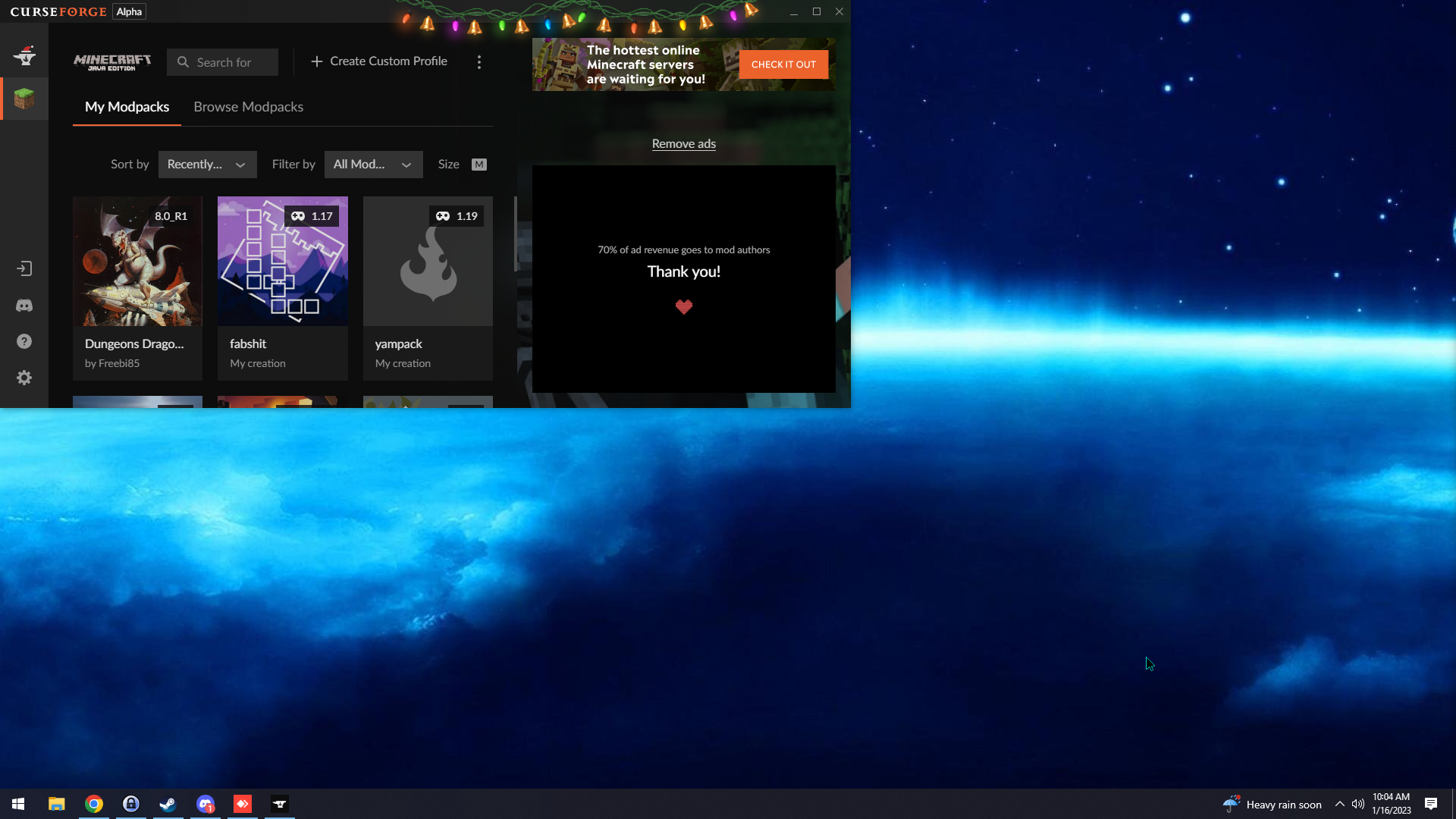 mild falcon
lyric crescent
What are your settings that the thing doesn't even fit your screen?
mild falcon
lyric crescent
What are your settings that the thing doesn't even fit your screen?
It's just annoying because that wasn't an issue on the overwolf version.
lyric crescent
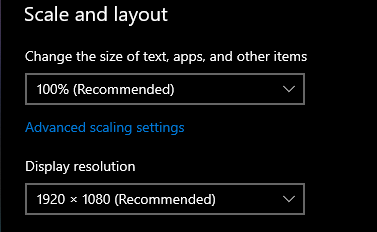 mild falcon
lyric crescent
https://i.imgur.com/7pofPNO.png
mild falcon
lyric crescent
https://i.imgur.com/7pofPNO.png
yeah, see? you can't make i more narrow than this.
mild falcon
lyric crescent
https://i.imgur.com/SR95YaB.png
as said mine is vertical
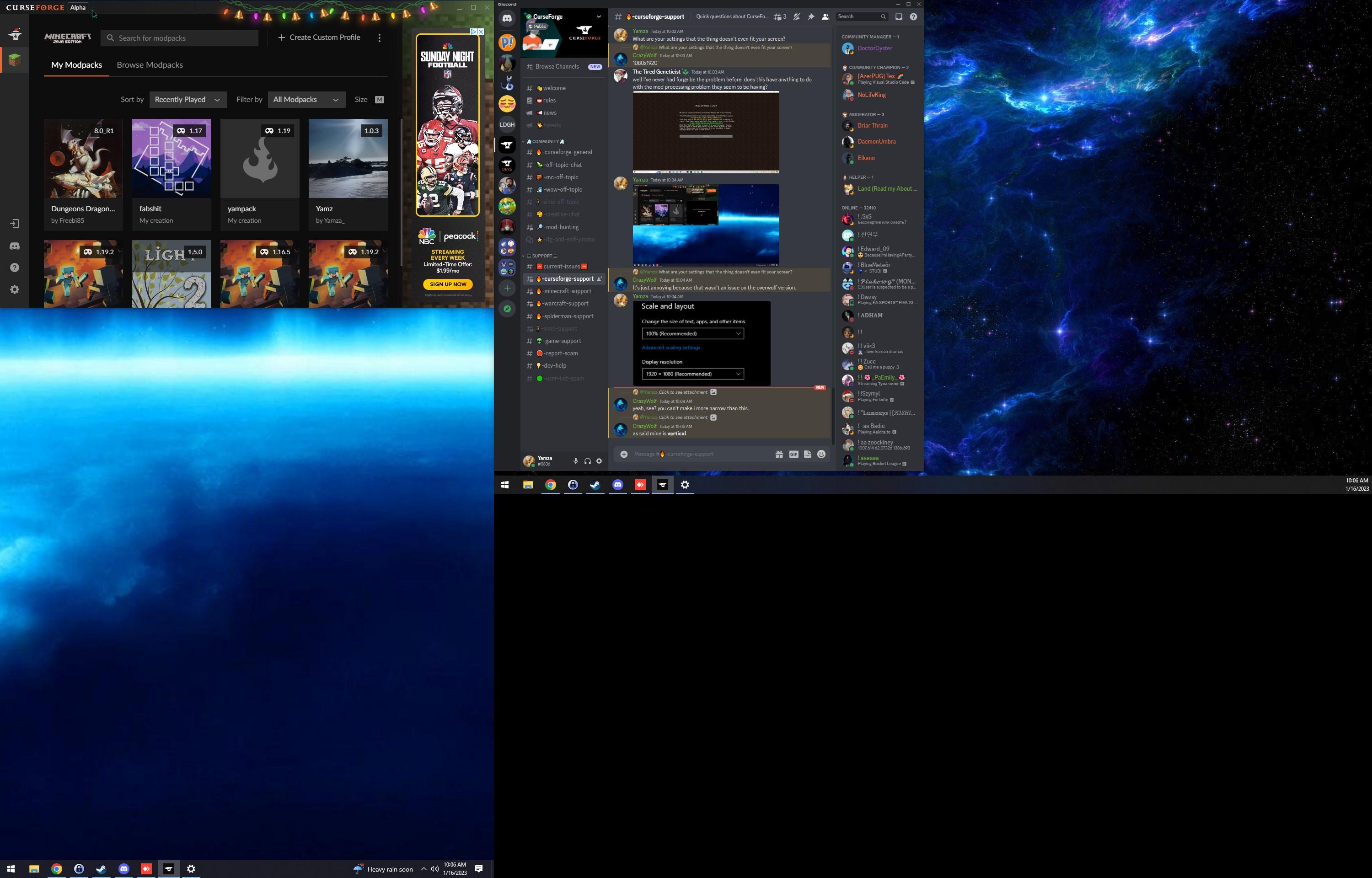 mild falcon
check back later maybe it's your ad banner sometimes it fits well even on mine, if there is a "slim"ad banner
Fact is, i can't make it slimmer than this, which is a problem, and i did work before on the overwolf version, so i really hope curseforge devs can fix this, cause this is just a "easy" sizing restriction.
 tropic prawn
does this have anything to do with the mod processing thing announced yesterday? I'm a bit bewildered because it's never been forge that causes a crash or error. The mods load about halfway then this happens.

 ivory pier

 edgy coyote
When I try to start the CurseForge app it fully loads, it closes the window and doesn't start. Any idea whats causing this?
signal ridge
tropic prawn
does this have anything to do with the mod processing thing announced yesterday?...
Send your logs to #🧱︱mc-other-help
signal ridge
ivory pier
!cflogs-app
red patioBOT
How to get your CurseForge app logs
- Click the
Create logs zipin the menu. - Drag and drop the file created to this channel.
- Wait for someone to look at it so they can help you.
signal ridge
tropic prawn
!mc-logs Not the log Asked for you, Send the below to #🧱︱mc-other-help as this isnt a cf app or site issue
red patioBOT
How to get your profile logs on CurseForge for support
- Right-click the modpack profile icon OR click the button in the modpack profile.
- Click
Open Folder. - Open the
logsfolder. - Drag and drop the FILE named
latestORdebuginto discord.
 upbeat vale
I cant download any modpack it always deletes at patch 2 of 4
I've tried reinstalling Curseforge , doesnt help

 signal ridge
upbeat vale
I cant download any modpack it always deletes at patch 2 of 4
I've tried reinsta...
signal ridge
upbeat vale
I cant download any modpack it always deletes at patch 2 of 4
I've tried reinsta...
!mc-installfix do the below, as soon as its done reboot your pc
red patioBOT
How to repair your Minecraft installation on CurseForge - **NOT** the same as `Repair Profile` - please follow these exact steps
- Click on the Minecraft Tab on the left side of the CurseForge App.
- Click button next to the
Create Custom Profileoption. - Click
Repair Installationoption. - Play game.
NOTE: Although this might seem similar to the instructions of repairing profile, it's different and required. No worries, you will not lose any modpacks or worlds.
upbeat vale
thanks that helped 👍
 olive lichen
im trying to use a modpack and it keeps saying "no disk space" or " java run time environment is missing/out of date" and "curse.radium.installmanagement.installtaskfailedexception was thrown"
my disk space if fine and idk the rest of the error meanings
signal ridge
How much space is left on the drive cf is storing mc on?
olive lichen
how do i check
signal ridge
Win or mac?
olive lichen
signal ridge
Win or mac?
win
 river crescent
how do i log out of curseforge
signal ridge
olive lichen
win
Click the  in the cf app > minecraft tab > look at the path the app is saving mc to at the top
Then open a file folder > click this pc > look at teh drive the path from above was saved too
signal ridge
river crescent
how do i log out of curseforge
App or site?
river crescent
app
signal ridge
On the lower left, should be a user bubble,
river crescent
the question mark?
young bone
Should be above that
 young bone
You’re not logged in in the first place
river crescent
oh i dont know how to because i cant get my twitch log in
young bone
This  is what brings up the login stuff
 young bone
Why do you need to log in anyway
It only benefits WoW and removes the ads off the app
river crescent
i need to get to my account so i can play the modppack that i am playing on my account with all of my stuff
young bone
It only benefits World of Warcraft, Minecraft does not carry over from other logged in instances
signal ridge
Minecraft doesnt have app sync. its per pc
river crescent
oh
young bone
You have to manually move things if you want your packs
 pseudo rune
Why is mc eternal not working
signal ridge
#🔎︱mod-hunting for this, Not a cf issue
 tropic spire
didnt notice the channel at first
 weary nimbus
anyone else not able to get past the "connection is secure, proceeding" screen on the website?
 slow gazelle
website down ?
signal ridge
Site issues? See #🆘︱current-issues🆘
slow gazelle
tanks
woeful radish
Hey
Uh
so I make a project
but I dont upload file yet cause not ready
close tab
come back later
go to profile
I cant see the project
Thats really annoying
How do I see projects I was still working on?
young bone
You don’t close the tab
woeful radish
Oh I have to go to dashboard
nvm found it
I never went to dashboard before
Wish it showed on the normal profile if ur the owner
young bone
Currently the dashboard button directs to the beta site dashboard, from there you can go to the old dashboard where it does display your role in the pack
young bone
There’d be a blue bar across the top of the page where it says there’s no problem with a link to the old dashboard
 wise niche
how do you send a coustom modpack to your friends?
young bone
?mc-packshare
red patioBOT
Two ways to share a modpack you made with others
Export and Share - For Friends / Small Groups
- Click the Icon for the modpack.
- Click the button next to play.
- Click
Export. - Select the files that should be included.
- Send the zip to the people that want it! They can follow the instructions in
!mc-installpackto install the pack.
Upload to Curseforge - For Public Release to Everyone
This option will make your pack public to EVERYONE, it comes with extra requirements and will take some effort to set up.
- Go to create a new project
- Fill out the information with a proper description of the pack. This should allow anyone to understand what the pack is.
- Click the Icon for the modpack in the CurseForge app.
- Click the button next to play.
- Click
Export. - Select the files that should be included.
- Open your Project that you made on the CurseForge site and Upload the file you just made.
- Wait for Moderation & Sync so it can show up in the client! (See
!syncfor limitations and!statusto learn about the moderation process and how long it will take to approve/decline)
young bone
First set of instructions
 limpid trench
i keep having this problem : exit error 1 on minecraft launcher
signal ridge
!mc-logs send the logs to #🧱︱mc-other-help
red patioBOT
How to get your profile logs on CurseForge for support
- Right-click the modpack profile icon OR click the button in the modpack profile.
- Click
Open Folder. - Open the
logsfolder. - Drag and drop the FILE named
latestORdebuginto discord.
 ebon garden
 signal ridge
Said to send it to #🧱︱mc-other-help
limpid trench
my bad
 sudden latch
I added a new mod to my modpack
i downloaded it off of curseforge (but its my modpack)
I updated a mod
and now it wont work ebcause the modlist.html wont update
how to fix?
signal ridge
Need to export the pack again for changes to be made
edgy coyote
edgy coyote
When I try to start the CurseForge app it fully loads, it closes the window and ...
Anyone know?
sudden latch
signal ridge
Need to export the pack again for changes to be made
you mean press "export profile"?
Cuz I did that 4 times
and now the mod is just gone
signal ridge
Open the zip, look in the overrides folder. Is the mod in question in the mods folder?
sudden latch
yup
signal ridge
Delete the mod from the pack, then reboot your pc. Install the mod again using the add more content section. > boot the pack > then export again
sudden latch
signal ridge
Delete the mod from the pack, then reboot your pc. Install the mod again using t...
cant use the add more content
cuz I downloaded the pack from curseforge
and If i move it to a new modpack, ill have to spent hours adding all 200 mods via the add more content section
signal ridge
Why are you adding mods to a pack you didnt make?
signal ridge
you said you downloaded the pack from curseforge?
sudden latch
i dont have access to it so I downloaded it off of curseforge
yes
but im the owner/creator of the pack
mossy schooner
sudden latch
cuz I downloaded the pack from curseforge
If you want to add mods to a pack downloaded from CurseForge, you need to tick "allow content managment for this pack"
I got ninja'd
sudden latch
how?
signal ridge
!mc-modifypack
red patioBOT
How to add/remove mods in a modpack:
- Click on the picture of the modpack.
- Click the
Add More Contentbutton, IF this button is not there, see below before you continue. - Find the Mods, Resource Packs or Maps you wish to Install and click
Installon them. - Wait for all the required mods to be downloaded.
- Start the modpack.
How to Enable/Disable content management for modpacks:
- Click on the picture of the modpack.
- Click on the button next to the
Playbutton. - Click on
Profile Options. - Check the
Allow content management for this profileoption if you want to edit the content of the modpack, uncheck it to disable.
NOTE: The Allow content management for this profile option is what allows you to Delete, Disable, Update or Install any Mods, Resource Packs or Maps managed by CurseForge. It must be ON to modify any of them! (Currently)
 limber sundial
I can't see my statistics but I have more than 300 points


 signal ridge
!mc-logs send your logs to #🧱︱mc-other-help
red patioBOT
How to get your profile logs on CurseForge for support
- Right-click the modpack profile icon OR click the button in the modpack profile.
- Click
Open Folder. - Open the
logsfolder. - Drag and drop the FILE named
latestORdebuginto discord.
 toxic bloom
signal ridge
!mc-logs send your logs to <#768367574001778729>
toxic bloom
signal ridge
!mc-logs send your logs to <#768367574001778729>
done
marsh ivy
what is the command for all commands that is related to minecraft?
 warped kestrel
im like tryna play this mod in 1.16.5 but when I try to launch it says that "sorry, unable to launch minecraft"
 elder cloud
The CurseForge App doesn't show me the most recent version of the Mod. When I try to install it from the Curse Homepage I get the Red error message


 fading vapor
elder cloud
The CurseForge App doesn't show me the most recent version of the Mod. When I tr...
fading vapor
elder cloud
The CurseForge App doesn't show me the most recent version of the Mod. When I tr...
Same happens to me
 glacial spoke
How to fix

 wicked coyote
Does anyone know if curseForge can still be used to install Minecraft modpacks on Windows 7? I understand that it is no longer supported but I have a doubt if it still works
or if there is any way to install the modpacks without the Curseforge client
lyric crescent
likely will not work. the only way to know is to try though. no one could possible tell you if it will or not.
signal ridge
Would highly recommend updating from win7, asides from the apps that dont support it, Microsoft is also not supplying win7 with serious security updates.
fading vapor
So when I try to launch atm8 I get error code1
red patioBOT
Error/Exit codes are useless. Follow these steps so someone can actually help you.
- Right-click the modpack profile icon OR click the button in the modpack profile.
- Click
Open Folder. - Open the
logsfolder. - Drag and drop the FILE named
latestORdebuginto discord.
signal ridge
Send the log to #🧱︱mc-other-help
signal ridge
Screen shot where you get the error
fading vapor
In the launcher
signal ridge
Follow the bot, but instead of putting the log in this channel, put it in #🧱︱mc-other-help
fading vapor
Ok
wicked coyote
signal ridge
Would highly recommend updating from win7, asides from the apps that dont suppor...
I would like to but amd no longer kept updating the drivers for my gpu after windows 8
signal ridge
Not much we can do about that. Sounds like you may need to get new tech
 brittle crag
my curseforge isnt opening but its launches
signal ridge
Reboot your pc then try again
brittle crag
i did i restarted
signal ridge
!cflogs-manual
red patioBOT
Please check out this guide for instructions on how to get your CurseForge logs on all Operating Systems.
brittle crag
so what if you dont have folder for curseforge
signal ridge
What os are you using?
brittle crag
windows
signal ridge
Version? Xp, 7, 8, 10, 11
brittle crag
11
signal ridge
Did you install the normal cf app OR the stand alone version?
signal ridge
Does the Overwolf app open?
brittle crag
where you install apps?
signal ridge
Can differ slightly per pc. Search your pc for the overwolf app
brittle crag
the overwolf app should have apps mods and skins
signal ridge
ok? just want to know if the ow app can open or not
signal ridge
Try running the curseforge app from the ow app
 eternal seal
Hey I just installed forge 1.19 and I put iris and sodium into the mods folder but when I load mc up it wont show up there
 earnest herald
Every time i try to load this modpack it doesn't work and this shows up and i had tried repairing, uninstalling, and resetting curseforge it self so please can i get some help with this

 short atlas
Did the latest update take away the ability to sort my mods by if any needed updating??
I know it removed it as the default but now I can't sort by the Action column at all
young bone
eternal seal
Hey I just installed forge 1.19 and I put iris and sodium into the mods folder b...
Sodium and Iris are Fabric mods, which do not work with Forge
signal ridge
earnest herald
Every time i try to load this modpack it doesn't work and this shows up and i ha...
!mc-launcherlog
red patioBOT
How to get your launcher log
- Click in the top right corner of CurseForge
- Click the
Open Modding folderbutton - Open the
Installfolder - Drag the
launcher_log.txtfile into discord
eternal seal
young bone
Sodium and Iris are Fabric mods, which do not work with Forge
Oh okay thank u
young bone
Use the Forge ports: Rubidium and Oculus
signal ridge
Wifi or cable for internet?
earnest herald
cable in plugged into tower itself
signal ridge
!mc-installfix try the below
red patioBOT
How to repair your Minecraft installation on CurseForge - **NOT** the same as `Repair Profile` - please follow these exact steps
- Click on the Minecraft Tab on the left side of the CurseForge App.
- Click button next to the
Create Custom Profileoption. - Click
Repair Installationoption. - Play game.
NOTE: Although this might seem similar to the instructions of repairing profile, it's different and required. No worries, you will not lose any modpacks or worlds.
earnest herald
Just told me to reinstall minecraft so ima do that real quick
Also thank you very much 🙂
signal ridge
Just note that reinstalling the .minecraft minecraft wont do anything for the mc cf uses.
!notcf
red patioBOT
This is not related to CurseForge owned/maintained features or services
CurseForge does not make or maintain any of the content or games used on the site or the app.
Just because it's on the site/app does not make it a problem with CurseForge.
Please move to the respective channels as requested, or use #👽︱game-support for game-related help.
 grand acorn
i downloaded a mod off of the cureforge website. how do i use it in minecraft
signal ridge
Do you have the CurseForge app?
 signal ridge
earnest herald
signal ridge
earnest herald
!mc-launcherlog send new launcher log
red patioBOT
How to get your launcher log
- Click in the top right corner of CurseForge
- Click the
Open Modding folderbutton - Open the
Installfolder - Drag the
launcher_log.txtfile into discord
earnest herald
signal ridge
!dns try the below
red patioBOT
Changing your DNS server
Please follow these instructions to change your DNS server. The default one (provided by your router/ISP) can sometimes block CurseForge and other programs/websites.
signal ridge
If it is already set to 1.1.1.1 change it to 8.8.8.8
quartz snow
I am getting a warning saying my modpack has items not contained in curseforge when exporting but am 100% sure that isn’t the case. What’s wrong?
earnest herald
signal ridge
If it is already set to 1.1.1.1 change it to 8.8.8.8
thank you for all your help but nothing will work so i give up i will deal with it tomorrow so thank you
signal ridge
quartz snow
I am getting a warning saying my modpack has items not contained in curseforge w...
Export the pack > open the zip > overrides/mods folder > reinstall the mods (if any) using the CF app
Do the same for any resource packs if any
quartz snow
signal ridge
Export the pack > open the zip > overrides/mods folder > reinstall the mods (if ...
Would a homebrew datapack that runs a simple command to stop time passing when players aren’t online trigger it?
signal ridge
Maybe? Could look in the export list for any files with a  beside them.
quartz snow
Yeah ok, will do
quartz snow
signal ridge
Maybe? Could look in the export list for any files with a <:CFwarning:7983889820...
I check the manifest for that, correct?
quartz snow
Sorry
Will make sure to turn it off if i hit the reply option
So would I look under the “select files and folders” section?
signal ridge
Yep, or in the modpack.zip overrides folder
EX of what a file in the export menu would look like
 quartz snow
Never mind, it’s not the datapack as i removed it and still got the warning. The only other things i did was edit my kubejs folder and add 2 mods from inside the app “add content” button lol
It doesnt like variant barrels, even though i installed it inside the app
I think it’s bugged, i hit the delete button on that mod and it still says the jar is there. Just a buggy app issue
signal ridge
Reboot your pc
quartz snow
It just didn’t delete the jar properly so I’ve done it manually. Now I also know how to check which file is offending it next time. Thanks for the help
quartz snow
signal ridge
Reboot your pc
Yeah I will do that. The file is gone but it’s still whining so I will give it a good reset
rich flint
quartz snow
I am getting a warning saying my modpack has items not contained in curseforge w...
i get that message exporting my own pack all the time - it's lying in my case.
grand acorn
I downloaded a mod off of the curse forge website how do I use it in minecraft
red patioBOT
How to install mods in the CurseForge app
- Click
+ Create Custom Profile - Name it, select the required Minecraft version, select the modloader & modloader version (usually the highest number), click
Create. - Click the profile icon.
- Click
Add More Content - Search and install the desired mods.
- Start the game!
How to install mods that are not on the CurseForge app
- Right click the profile picture or Open the profile and click the Icon next to the play button.
- Click
Open Folder. - Drag the mod(s) into the
modsfolder. (Note: Some mods will require others, to run. Make sure to read the instructions for the mod!) - Start the game!
 rich flint
the alternative is installing a modpack which is a collection of mods and other customizations already packaged together
earnest herald
ok ive decided to try once again with a different modpack and this appears

Like im so confused do i even own minecraft at this point??
I just wanna play with my friends man
rich flint
what have you tried so far to resolve this apparent networking issue
earnest herald
i switch it that 1111 and 8888 thing and that didnt work
Reinstalled both curse and minecraft
nothing worked
earnest herald
i have webroot and thats it
nothing should be causing this i played a pack like 2 days ago with 0 issue
and then this problem slowly showed it head
rich flint
"i have webroot" - that is a 3rd party antivirus program. turn it off.
digital roost
my veinminer wont work
 plush bluff
i tried tranferring my curse forge files from one SD (i think) to another and now my profile is missing,
i see all my files where i put them
so luckily all my progress is fine
rich flint
set the path the CF app uses for modding folders to the new location
 settings > minecraft tab > 'minecraft modding folder'
 empty terrace
Just wondering if anyone knows when we'll be able to log into CurseForge without using a twitch account, please? I've shut down my twitch account a few months ago and have no interest in supporting or going back to twitch in the future.
digital roost
my vein miner isnt working
empty terrace
digital roost
my vein miner isnt working
Which mod are you using, and are there multiple keys bound to the same function?
opal cipher
empty terrace
Just wondering if anyone knows when we'll be able to log into CurseForge without...
You don't have to login to CurseForge to use it, neither website or app.
It's only required if you are an author who uploads content to the website, like mods, addons and so on.
And for World of Warcraft addon sync.
quartz snow
When I release a new modpack update, is an update button meant to show up for users in-app or just the switch version arrows?
upper root
just the switch version menu
quartz snow
Ok, thanks. For some reason I remember there being an update button on other modpacks
 misty flame
Will Minecraft ever be added to Curseforge App on linux ?
opal cipher
I think it is in the works, but something is keeping them from adding it.
misty flame
opal cipher
I think it is in the works, but something is keeping them from adding it.
so I guees I gotta use other launcher then 😔
opal cipher
misty flame
so I guees I gotta use other launcher then 😔
Yeah, should be some around that can use CurseForge modpacks. I was looking into making one myself, that would be cross platform, but I haven't gotten my API key approved for that yet. ^^
mossy schooner
this belongs in #🔎︱mod-hunting but you can try holding F3 and pushing H, or install JEI/jade
 cold breach
mossy schooner
this belongs in <#847232261883035718> but you can try holding F3 and pushing H, ...
cold breach
mossy schooner
this belongs in <#847232261883035718> but you can try holding F3 and pushing H, ...
i'm sorry, i have JEI, how can i see the mod name from the biome where i am?
mossy schooner
oh you want to know the biome mod... the F3 screen should provide that info
 glacial bramble
Regarding the "bug" "mod-tastic" in the newest version of the APP, i was under the assumption that was a feature, as it showed me what mods had updates available, as that seems to not be the case, is there going to be a way for the "action" and "active" columns to be sorted by.
eg, click the action column, and get all mods that have updates pushed to the top of the list,
or click the active column to see what mods are enabled/disabled in a sorted manner.
red patioBOT
Error/Exit codes are useless. Follow these steps so someone can actually help you.
- Right-click the modpack profile icon OR click the button in the modpack profile.
- Click
Open Folder. - Open the
logsfolder. - Drag and drop the FILE named
latestORdebuginto discord.
 wide pivot
mossy schooner
wide pivot
my curseforge doesnt work
wide pivot
mossy schooner
wide pivot
my curseforge doesnt work
exitcode 1 should also give you a crash report button, can you send that too? the log seems rather empty
wide pivot
it only gives a copy exit code button and a close button
red patioBOT
Error/Exit codes are useless. Follow these steps so someone can actually help you.
- Right-click the modpack profile icon OR click the button in the modpack profile.
- Click
Open Folder. - Open the
logsfolder. - Drag and drop the FILE named
latestORdebuginto discord.
mossy schooner
can you launch vanilla minecraft?
wide pivot
yes im able to launch it
mossy schooner
from the log, I can only see your trying to launch with just a forge build, no mods?
 hearty relic
My mod is not showing up in the CurseForge app and the browser is as normal please help
red patioBOT
Projects sync from CurseForge website to the app
The CurseForge App and website do not share the same requirements.
You might find content on the website that won't be on the app.
In order to show on the app:
- Projects MUST have a file marked as Release or Beta
- Projects MUST be Approved
- Projects MUST have a file marked for the game version selected/loaded
- Projects CANNOT be Expermintal
- Projects CANNOT be Abandoned
 keen ore
Hi can anyone help me ive been having this issue for a few days and originally wouldnt load the pack up but now it just simply wont let me press f11 without the game crashing on me then refuses to load the pack back up

 tender ingot
oof
 cloud path
hello I need help, I upload a file but It was not the good file so I archive it and then delete it, after that I upload the good one but I steel have this error : The status of the file [Forge] client side V1.3.2 (Mc improvement) has been changed to Rejected
File is a duplicate of an existing file.
But he previous file was deleted.
Can somehone help me ?
rich flint
Change something about the file internally to give a different hash value result. Also is that really the filename? You really should avoid using parentheses especially ending a filename with one
cloud path
rich flint
Change something about the file internally to give a different hash value result...
ok thank you very much
 gilded crag
my minecraft keeps crashing when i start a world can someone help
signal ridge
gilded crag
my minecraft keeps crashing when i start a world can someone help
What modpack were you playing?
 remote socket
im tryna download forge on my mac ive looked at all the tutorials and it wont show up in mc launcher wut do i do
._.
signal ridge
remote socket
im tryna download forge on my mac ive looked at all the tutorials and it wont sh...
Forge OR CurseForge? 2 very different things
gilded crag
signal ridge
What modpack were you playing?
rlcraft with some extra mods on
signal ridge
Well there is the first issue, Adding mods to a pack you didnt make can/will cause issues. That are sometimes next to impossible to fix as we have no idea why the mods/versions in the original pack were chose or what you added and how they may react with eachother.
mossy schooner
gilded crag
rlcraft with some extra mods on
what mods did you add?
did you add "create"?
signal ridge
They cant add create to rlcraft
mossy schooner
right, my bad, create isn't old enough, I just played too much of it to realise my hours spent doesn't make the mod older...
signal ridge
The users easiest fix, would be to reinstall the pack and not add mods to it.
limber sundial
limber sundial
I can't see my statistics but I have more than 300 points
Can somente help me?
signal ridge
limber sundial
Can somente help me?
May have to open a ticket for that one. I know the margin is 15$ not sure what that would be in points
!ticket-site
red patioBOT
How to open a support ticket on the CurseForge website
Can't open the app or would rather use the website? You can do so here.
Fill out the form with accurate detailed information, keep in mind that simply saying 'it' or 'doesn't work' is very vague. The more details you provide, the more efficient help you will get.
Make sure to upload your Overwolf logs with the Upload File option in the ticket, information on how to get these logs can be found here
digital roost
empty terrace
Which mod are you using, and are there multiple keys bound to the same function?
un im using veiminer and no none are conflicting
 clear cairn
what's the approximate review time again?
young bone
?status
red patioBOT
Project moderation time
Project/File moderation is done on these days unless otherwise mentioned:
Sunday, Monday, Tuesday, Wednesday, Thursday: <t:1631170800:t> - <t:1631199600:t> (Your time)
Friday, Saturday: No Moderation!
Projects are moderated First in, First out. If you submit late in the work day, it will likely get left until the next day!
New Projects or anything flagged for manual review: 1-3 Working Days
Updates to approved projects not needing manual approval: 1 Hour
-If your file has been "Under Review" for more than an hour, then it is at manual review!
clear cairn
appreciated
ah that appears to not be accurate for me
my pack just got accepted as we speak, and it'
it's 6 hours after the end time listed on that bot reply
young bone
Is it a brand new pack?
clear cairn
technically yes, but it was approved properly yesterday, it was just a new version being uploaded
going from 1.0 to 1,1
lyric crescent
Then it is accurate, you've just not understood it.
young bone
It was probably approved by the bot, processing is probably still a bit slow
clear cairn
ah okay, yeah wasn't sure if it was able to be reviewed by the bot or if it was still requiring manual review for a short period of time
thank you though
 undone ermine
CurseForge has been crashing for 2 days, how fix it?
 upper root
Can you open the overwolf app?
 fair escarp
still seeing the issue in the curseforge standalone client where i have to manually refresh to see updates.
main cypress
what does xaeros world map mean when its auto generating. does it mean it automatically fill the map? if so, its not working for me.
signal ridge
main cypress
what does xaeros world map mean when its auto generating. does it mean it automa...
Sounds like a good question for the mods author
main cypress
how do i contact them
signal ridge
!projectissue
red patioBOT
Reporting issues to project authors
Please visit the project page for the content you posted about and look for a way to contact the developer.
Somewhere on the page, there is usually a method of contact. Look for one of the following things:
Issuestab like the image below- Discord link
- Twitter link
- Comments section below the project
If no contact method exists you will either have to remove the project or find a solution on your own.
 signal ridge
Works for questions as well, not just issues
 unreal bough
My 1.18.2 fabric profile isn't working
get this error whenever I try to open it, the regular mc launcher works and I tried downloading fabric to solve the issue but haven't gotten any luck. The mods don't seem to effect it and earlier forge/fabric versions work any ideas?
 signal ridge
unreal bough
My 1.18.2 fabric profile isn't working
get this error whenever I try to open it,...
signal ridge
unreal bough
My 1.18.2 fabric profile isn't working
get this error whenever I try to open it,...
!mc-installfix try the below
red patioBOT
How to repair your Minecraft installation on CurseForge - **NOT** the same as `Repair Profile` - please follow these exact steps
- Click on the Minecraft Tab on the left side of the CurseForge App.
- Click button next to the
Create Custom Profileoption. - Click
Repair Installationoption. - Play game.
NOTE: Although this might seem similar to the instructions of repairing profile, it's different and required. No worries, you will not lose any modpacks or worlds.
unreal bough
signal ridge
!mc-installfix try the below
already tried that I'm afraid
signal ridge
Was it successful? or did it fail?
unreal bough
no it's still acting up unfortunately
signal ridge
!mc-launcherlog
red patioBOT
How to get your launcher log
- Click in the top right corner of CurseForge
- Click the
Open Modding folderbutton - Open the
Installfolder - Drag the
launcher_log.txtfile into discord
unreal bough
ty btw for helping
signal ridge
!hosts do this please
red patioBOT
How to get your hosts-file
On Windows
- Press +
Ron your keyboard, and paste:notepad %windir%\system32\drivers\etc\hosts - Screenshot/Copy the contents and paste it into the chat.
On Mac/Linux
- Open a terminal window, paste:
cat /etc/hosts - Screenshot/Copy the contents and paste it into the chat.
unreal bough
Copyright (c) 1993-2009 Microsoft Corp.
This is a sample HOSTS file used by Microsoft TCP/IP for Windows.
This file contains the mappings of IP addresses to host names. Each
entry should be kept on an individual line. The IP address should
be placed in the first column followed by the corresponding host name.
The IP address and the host name should be separated by at least one
space.
Additionally, comments (such as these) may be inserted on individual
lines or following the machine name denoted by a '#' symbol.
For example:
102.54.94.97 rhino.acme.com # source server
38.25.63.10 x.acme.com # x client host
localhost name resolution is handled within DNS itself.
127.0.0.1 localhost
::1 localhost
signal ridge
that the full file?
signal ridge
The launcherlog was correct, However try removing optifine then trying the pack again
unreal bough
kk
optifine isn't on that pack but it is on my normal launcher mod folder so I removed that one testing rn
still have the error
signal ridge
Ah ok, thought that latest.log looked wrong. Screen shot you had sent was fabric, latest.log is forge
unreal bough
ah I see
signal ridge
unreal bough
My 1.18.2 fabric profile isn't working
get this error whenever I try to open it,...
This screen shot here, Were you using the CurseForge app?
unreal bough
yep
signal ridge
Pack you made OR downloaded?
unreal bough
I made the pack it's not limited to this profile either this also happens with more recent versions of forge
signal ridge
!ipv6 do the steps in the link below, then do a repair installation again
red patioBOT
Disabling IPV6
Please follow these instructions to disable IPv6, which when enabled can sometimes cause network issues.
unreal bough
kk ty
unreal bough
signal ridge
!ipv6 do the steps in the link below, then do a repair installation again
still nothing
signal ridge
Send the new launcher log
signal ridge
Wifi or cable for internet?
unreal bough
wifi
signal ridge
Able to try a cable or a different source?
unreal bough
I can try a personal hotspot from a phone
it's not finding the phone should I reactivate IPv6
signal ridge
Doesnt hurt to try.
Looks like something is either blocking or wifi isnt strong enough to install some files needed.
unreal bough
it found the phone
unreal bough
signal ridge
Looks like something is either blocking or wifi isnt strong enough to install so...
hmm okay tysm for all the help
signal ridge
Np
unreal bough
signal ridge
Np
hey figured I should update you I got it to work on my normal launcher (no clue how)
signal ridge
CF app uses its own copy of the vanilla launcher.
 gusty spoke
hello
i want to ask something about curseforge...
why when i wanna install curseforge it say error from overwolf ?
rich flint
gusty spoke
i want to ask something about curseforge...
why when i wanna install curseforge...
try removing and reinstalling both
!reinstall
red patioBOT
Reinstalling Overwolf & CurseForge is required
Please uninstall by following the instructions here
Once you're done, you can install again from the main download page
 red patioBOT
How to repair your Minecraft installation on CurseForge - **NOT** the same as `Repair Profile` - please follow these exact steps
- Click on the Minecraft Tab on the left side of the CurseForge App.
- Click button next to the
Create Custom Profileoption. - Click
Repair Installationoption. - Play game.
NOTE: Although this might seem similar to the instructions of repairing profile, it's different and required. No worries, you will not lose any modpacks or worlds.
gusty spoke
cant i already uninstall it and install again almost 20 times ... and only overwolf get installed. and curseforge install error ...
btw its ok if i using curseforge Alpha for WOW and MC only ???
i try download that alpha app and work now
because i using curseforge just for WOW
rich flint
ok. the alpha is only for WoW. for windows there is a standalone client that can be tried also
?getcf
red patioBOT
Where and how to install the CurseForge app
Windows
Minimum Requirements:
-
OS Version: 10 or 11
-
64 bit Required
-
Microsoft .Net 4.8
If you are having issues with the Windows Download use the Windows alternative download to install Overwolf. Then download CurseForge from the App Store.
Windows Standalone app
Note: Currently only supports World of Warcraft and Minecraft.
Mac
Minimum Requirements:
-
OS Version 10.14 or newer.
-
64 bit Required.
:penguin: Linux
Note: Currently only supports World of Warcraft.
 true fox
it won't launch for me
 restive crystal
Hey everyone, whenever I try to export my custom modpack, it will make a TMP file (like usual) but take a much longer time to export the file than necessary (usually around 5-7 minutes). Once that finishes, it abruptly deletes the exported file out of nowhere, and I can't find where the file is supposed to be
upper root
!cflogs-app
red patioBOT
How to get your CurseForge app logs
- Click the
Create logs zipin the menu. - Drag and drop the file created to this channel.
- Wait for someone to look at it so they can help you.
upper root
yes
restive crystal
 orchid crescent
Hello, I added more ram to my computer and am trying to increase amount of ram allotted, but the slider only goes to what my ram used to be at, not what it’s at currently with added ram. Can I update curseforge so it recognizes how much ram my system has now?
upper root
restive crystal
wmats with all the .tbl files?
the seem to be.. hats or cosmetics based on the names
upper root
orchid crescent
Hello, I added more ram to my computer and am trying to increase amount of ram a...
what is its max atm?
restive crystal
Yes, I have the Hats mod installed
upper root
try not include those in the export
restive crystal
Do you know where those are normally included?
upper root
nope. and the logs dont really help
you could just use windows explorer search in the instance folder for .tbl
restive crystal
Okay, thanks
orchid crescent
16384 (16 gb) is max on slider now. I added more so my system is at 32 gb now
upper root
You dont need to allocate more than 12gb to mc, and even then thats only heavily modded with shaders
orchid crescent
Ok. Thanks. Running sevtech ages and it’s a little laggy. Maybe just loading though. I can mess with settings in game as well.
restive crystal
I don't think Hats ended up being the problem;
I'm trying to export it right now and it's taking a suspiciously long amount of time like usual
I forgot to mention this, but it's also worth saying that my current version of my modpack (Let's say version 2.0) isn't exportable, but version 1.0 of my modpack is exportable, and I've successfully moved it to a playable server where people have been playing on it
Here's what it looks like when it's trying to export

 dull dome
Hey guys, Is it a slow day for modpack approvals? Been waiting alot longer than usual...
restive crystal
restive crystal
I don't think Hats ended up being the problem;
I'm trying to export it right now...
Update: I found out that if I disable the Config file, it exports perfectly fine. Is there any way to figure out which specific config file it doesn't like? @upper root
red patioBOT
How to find a faulty mod/plugin/addon by using 'Binary Search' or '50/50'
A binary search is a way of finding a faulty mod/plugin/addon when you have a lot of them, but without having to remove them one-by-one.
The procedure is simple:
- Take half of the existing mods/plugins/addons, and move them out, into another folder.
- Run the game.
- Does the issue still persist?
- If YES: Repeat from step 1 with the current things.
- If NO: Swap out the current things with the ones you moved out, and repeat from step 1.
- Repeat this process until the problematic mod(s)/plugin(s)/addon(s) have been found.
upper root
dull dome
Hey guys, Is it a slow day for modpack approvals? Been waiting alot longer than ...
?status
red patioBOT
Project moderation time
Project/File moderation is done on these days unless otherwise mentioned:
Sunday, Monday, Tuesday, Wednesday, Thursday: <t:1631170800:t> - <t:1631199600:t> (Your time)
Friday, Saturday: No Moderation!
Projects are moderated First in, First out. If you submit late in the work day, it will likely get left until the next day!
New Projects or anything flagged for manual review: 1-3 Working Days
Updates to approved projects not needing manual approval: 1 Hour
-If your file has been "Under Review" for more than an hour, then it is at manual review!
dull dome
Thanks
 upper root
Install the mods its asking for
clear cairn
wide pivot
you're missing the mods entirely, or you've got outdated versions of the mods listed
wide pivot
okey did it im gonna try again now
it still says some mods are missing but its less im gonna try to download them too
 celest lantern
wide pivot
it still says some mods are missing but its less im gonna try to download them t...
celest lantern
wide pivot
it still says some mods are missing but its less im gonna try to download them t...
if u need further help continue this in #🧱︱mc-other-help


