#🔥︱curseforge-support
1 messages · Page 40 of 1
 bitter blaze
 signal ridge
Did you add, remove or change anything in the pack?
signal ridge
!mc-installfix try this if reinstalling doesnt work
 red patioBOT
This is NOT instructions for Repair Profile! They are NOT the same! You need to do this!
- Click on the Minecraft Tab on the Left side of the CurseForge App.
- Click
 button next to the
 Create Custom Profileoption. - Click

Repair Installationoption. - Play game.
NOTE: You will not lose any modpacks or worlds!
bitter blaze
oh yeah this also pops up when i open the mod pack after it closes the window
 signal ridge
Reboot your pc then try again
bitter blaze
already did
signal ridge
After getting that message? OR a while a go?
signal ridge
open task manager, kill any overwolf, & mc launcher process.
bitter blaze
okay
 grand cairn
Hey so i made a modpack for me and my friends to join but its not showing up for anyone else but me, is there a way i can put it to public or something
 signal ridge
Did you upload it to the site and has it been approved?
grand cairn
How do i get it approved, im a bit new to curseforge
signal ridge
!mc-packshare
red patioBOT
There are two ways to share a modpack you've made with others...
Export and Share - For Friends to Small Groups.
- Click the Icon for the modpack.
- Click the button next to play.
- Click

Export. - Select the files that should be included.
- Send the zip to the people that want it! They can follow the instructions in
!mc-installpackto install the pack!
Upload to Curseforge - For Public Release to Everyone.
This options will make your pack public to EVERYONE, it comes with extra requirements and will take some effort to set up.
- Go to here: https://www.curseforge.com/project/432/4471/create
- Fill out the information with a proper description of the pack. This should allow anyone to understand what the pack is.
- Click the Icon for the modpack in the CurseForge app.
- Click the button next to play.
- Click
Export. - Select the files that should be included.
- Open your Project you made on the CurseForge site and Upload the file you just made.
- Wait for Moderation & Sync so it can show up in the client! (See
!syncfor limitations)
signal ridge
Can also just send your friends the zip if you dont want to wait the 1-3 working days fro approval
bitter blaze
i got it to work after combining everything and restarting my pc one last time thanks

 lavish rivet
got any ideas on why a modpack i made keeps crashing here's the crash log
 rich flint
?notcf
red patioBOT
Your question is not related to CurseForge owned/maintained features or services.
Please pick the appropriate game support channel
Otherwise use #👽︱game-support for game-related help.
CurseForge does not make or maintain any of the content or games used on the site or app. Just because it's on the site/app does not make it a problem with CurseForge. Move channels as requested, arguing about it will result in you being muted.
 white drift
Wanting to install mods for skyrim and saw that the site had some mods but id rather use the app but when i open the app it doesnt display skyrim at all and i tried to manually add it but it doesnt recognize it. anyone know why/how to fix it?
 upper root
The app doesn't support all games, skyrim is one of them
white drift
ok thank you
 edgy garden
how could i report a mod on curseforge?
I believe a mod is claiming to "Speed up your world loading by not loading nearby chunks every time." but instead just returns 441 and spams the log while the game tries to load.
This guys racking up 400k downloads off not only a fake mod but also one negatively effecting people's games:
This is the only real code the game has per its source code (which is provided on its curseforge page for some reason)
https://i.imgur.com/mab1fiJ.png
https://i.imgur.com/kGqKWlb.png
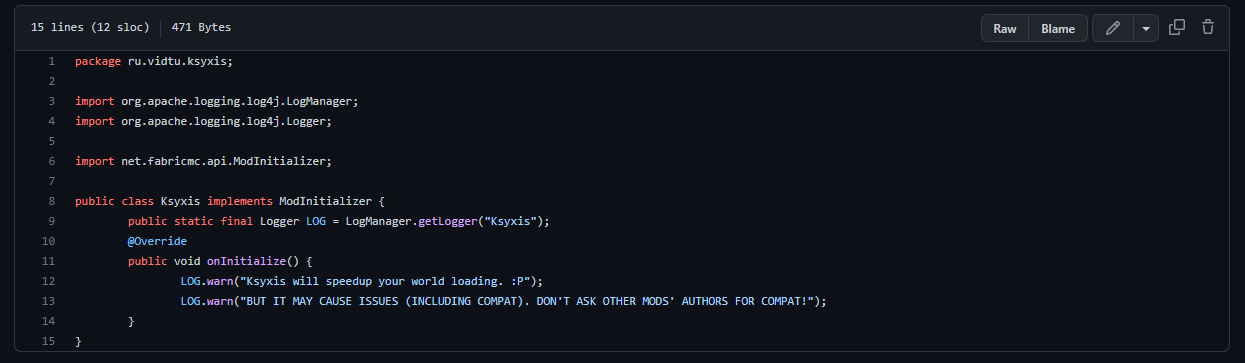
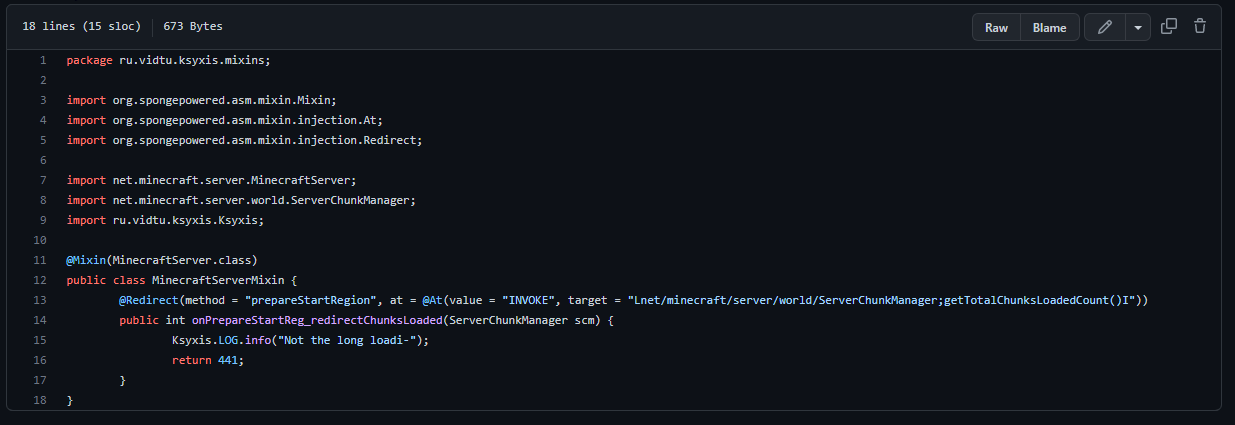
i may be wrong but it looks like its not doing what it says it is.
 granite salmon
hai i need help
i reinstalled warcraft retail because it was messed up and now my addons are still installed but not in sync with the game
i have no clue what im doing, pls help
posting this here cause i imagine it has more to do with the fact i dont know how to work curseforge super well
edgy garden
granite salmon
hai i need help
i reinstalled warcraft retail because it was messed up and now m...
did u restart ur game?
believe u gotta do that for new addons to take effect
 viral elbow
my modpack won't start and this is the last line in the logs folder (it has the latest forge version)
[21:29:41] [main/ERROR]: Missing mandatory dependencies: forge, forge, forge, forge, forge, forge, forge, forge, forge, forge, forge, forge, forge, forge, forge, forge, forge, forge, forge, forge, forge, forge, ortus, forge, forge, forge, forge, forge, forge, forge, forge, forge, commonality, forge, forge, forge, forge, forge, forge, forge, forge, forge, forge, forge, forge, forge, forge, forge, forge, forge, forge
granite salmon
no the addons were always there its just i had to reinstall wow cause the game itself wasnt working. i got it working again but it wont load any of my mods
edgy garden
@viral elbow check for a line in the log that says "Caused By:"
you can use Ctrl + F in the notepad program to find it

 opal cipher
edgy garden
how could i report a mod on curseforge?
I believe a mod is claiming to "Speed up...
opal cipher
edgy garden
how could i report a mod on curseforge?
I believe a mod is claiming to "Speed up...
There's a report button on the website that you can use.
upper root
viral elbow
my modpack won't start and this is the last line in the logs folder (it has the ...
!mc-updatemodloader
red patioBOT
You can update the mod loader within the same game version in the CurseForge app by following these steps!
- Click on the modpack profile you are working with.
- Click on the button next to the play button.
- Click on the
 Profile Options button.
 - Select the mod loader version you want from the dropdown.
- Play!
If you need to update to a new game version, a new profile is required.
edgy garden
opal cipher
There's a report button on the website that you can use.
Couldn’t find it on the mod page is it somewhere else?
opal cipher
Link the mod
opal cipher
 viral elbow
upper root
!mc-updatemodloader
viral elbow
upper root
!mc-updatemodloader
[main/ERROR]: Missing mandatory dependencies: ortus
got rid of the forge thingies but now it tells me I need this but it does not appear on curseforge

sorry might've forgot to turn off ping
upper root
does it have any updates?
 upper root
any other mods have updates?
viral elbow
not at all
upper root
particularly malum
viral elbow
 upper root
downgrade lodestone to ortus then
viral elbow
Malum is fully up-to-date
ok
i'll try
no dice. this might be relevant to mention as it appears marked as error
 upper root
send the full log after downgrading to ortus
viral elbow
upper root
!mc-launcherlog
red patioBOT
How to get the launcher log
- Right click a modpack / profile.
- Select

Open Folder - Go back two folders.
- Open the
Installfolder. - Drag the
launcher_log.txtinto discord.
upper root
send this one too, it often has an actual error near the end, when the latest doesnt
 upper root
ah, you dont have file extensions on
viral elbow
and that means.....
upper root
the .txt bit wont show up in file explorer
 ruby sundial
How can someone set up the loot generation?
red patioBOT
Your question is not related to CurseForge owned/maintained features or services.
Please pick the appropriate game support channel
Otherwise use #👽︱game-support for game-related help.
CurseForge does not make or maintain any of the content or games used on the site or app. Just because it's on the site/app does not make it a problem with CurseForge. Move channels as requested, arguing about it will result in you being muted.
viral elbow
upper root
a server only one and a regular one
solved it 👍
now to spend 1000000 years making quests 😭
upper root
Good luck!
 uneven zodiac
How to optimise the game/or mods so that they dont kill the game
viral elbow
performance mods
opal cipher
!notcf
red patioBOT
Your question is not related to CurseForge owned/maintained features or services.
Please pick the appropriate game support channel
Otherwise use #👽︱game-support for game-related help.
CurseForge does not make or maintain any of the content or games used on the site or app. Just because it's on the site/app does not make it a problem with CurseForge. Move channels as requested, arguing about it will result in you being muted.
opal cipher
But yeah, performance mods.
viral elbow
uneven zodiac
Explain?
due to its close-source, it screws up alot of mods. and the devs aren't that good so its super hard to be compatible
viral elbow
ever played a pack that has twilight forest and optifine? it warns you on launch
uneven zodiac
Fabric that I install and the add on. The mods?
uneven zodiac
viral elbow
ever played a pack that has twilight forest and optifine? it warns you on launch
Not really
O
opal cipher
Gimme a second, link incoming in #🧱︱mc-other-help for you @uneven zodiac
uneven zodiac
Does that add like curseforge or something
uneven zodiac
viral elbow
rubidium for forge. sodium for fabric
I mean does the rubidium apply for curseforge mods ?(ye retarded question but I wasn’t at all into modded mc till like yesterday so)
opal cipher
This is more #🧱︱mc-other-help related, so please move rooms. :)
uneven zodiac
Ok thanks
upper root
!notcf
red patioBOT
Your question is not related to CurseForge owned/maintained features or services.
Please pick the appropriate game support channel
Otherwise use #👽︱game-support for game-related help.
CurseForge does not make or maintain any of the content or games used on the site or app. Just because it's on the site/app does not make it a problem with CurseForge. Move channels as requested, arguing about it will result in you being muted.
viral elbow
mb
 spring python
so im trying to play better minecraft but everytime when i try it says legacy.json is having problems please help
upper root
!mc-installfix try this
red patioBOT
This is NOT instructions for Repair Profile! They are NOT the same! You need to do this!
- Click on the Minecraft Tab on the Left side of the CurseForge App.
- Click button next to the
Create Custom Profileoption. - Click
Repair Installationoption. - Play game.
NOTE: You will not lose any modpacks or worlds!
spring python
so this work with the better minecraft 1.19
also it says minecraf is running but its off
upper root
restart your computer, then try the fix
 upper root
what os?
 fervent atlas
win 11 but its ok now
 main python
fervent atlas
win 11 but its ok now
main python
fervent atlas
win 11 but its ok now
i win11 cant download shit
fervent atlas
?
 modest lily

 high torrent
here we go again
 digital roost
uh theres a pixelmon server that ive been playing but now it says theres things that require forge yet i didnt have to do it before
red patioBOT
Your question is not related to CurseForge owned/maintained features or services.
Please pick the appropriate game support channel
Otherwise use #👽︱game-support for game-related help.
CurseForge does not make or maintain any of the content or games used on the site or app. Just because it's on the site/app does not make it a problem with CurseForge. Move channels as requested, arguing about it will result in you being muted.
 onyx zenith
alright so i'm trying to use a fluid pump from industrial foregoing but it won't pump lava into my fluiducts what is the reason for this?
could anyone dm or call or just send here? your choice
rich flint
-check the device GUI for the side facing the pipe if set to pull/push/null
-check your choice of pipe can be set to extract from faces - for example some older pipe mods needed 'servos'
rich flint
for further minecraft specific general questions use a #👽︱game-support #🧱︱mc-other-help ty
 inner birch
curse forge app cant detect minecraft in my computer
 young bone
What operating system are you using
inner birch
young bone
What operating system are you using
windows 10
i was installing minecraft and curse forge at the same time, so i restarted forge but it still isnt detecting it
should i just completely reinstall it
young bone
Did you download the standalone app?
inner birch
young bone
Did you download the standalone app?
yeah
for minecraft or for curse forge?
young bone
The Curseforge app
 winged ginkgo
hey i need help
winged ginkgo
winged ginkgo
hey i need help
i am creating a modpack just for me and my friend to download so he can play on my server but i cant find a cover image that works i have tried making one i have searched the web for one and if i skip it it says this is a required field
 leaden cairn
MAKE PUPLISHING MODPACKS EASIER PLEASE
Or make every custom mod pack a person makes it automactily in the mods section
 marble bloom
I need help It wont let me set the ram to above 12 gb and I need more for the sky 7 modpack
 north bramble
winged ginkgo
i am creating a modpack just for me and my friend to download so he can play on ...
north bramble
winged ginkgo
i am creating a modpack just for me and my friend to download so he can play on ...
!projecticon
red patioBOT
Can't make a project image? Here's one for you!
The dimensions required for the project icon are 400 x 400.
Feel free to save this template and edit it with your image instead, as it comes in the right size.
 north bramble
marble bloom
I need help It wont let me set the ram to above 12 gb and I need more for the sk...
north bramble
marble bloom
I need help It wont let me set the ram to above 12 gb and I need more for the sk...
You don't need more than 6-8Gb of allocated RAM.
young bone
You’re in the territory of too much RAM by wanting to set it to 12
 torn isle
hi, my client did not detect one addon, Elvui to be more precise, can anyone help me on how do it?
north bramble
Please use the #🧙🏼♂️︱warcraft-support channel
 golden geyser
is anyone willing to help me with getting my modpack accepted?
 scarlet dune
can anyone help i cant kill the ticking entity and i dont have cofh core on fabric 1.19 so idk how to remove the entity being ticked
ive tried killing it on the console but i cant get the uuid right
 warm plank
About how long does it take to get my custom Minecraft modpack approved? I just made it for a couple friends and family, I'm just wondering what the timeframe is gonna look like. Hours, days, or weeks?
young bone
?status
red patioBOT
Project Moderation Time
Project/File moderation is done on these days unless otherwise mentioned:
Sunday, Monday, Tuesday, Wednesday, Thursday: <t:1631170800:t> - <t:1631199600:t> (Your time)
Friday, Saturday: No Moderation!
Projects are moderated First in, First out. If you submit late in the work day, it will likely get left until the next day!
New Projects or anything flagged for manual review: 1-3 Working Days
Updates to approved projects not needing manual approval: 1 Hour
-If your file has been "Under Review" for more than an hour, then it is at manual review!
Changes will only show in the app if the project meets the requirements in the ?sync command and up to 24 hours has passed from when it was accepted.
young bone
If it’s just for friends and family, you don’t need to upload it to Curseforge
warm plank
I'm making a server thou and every server host says I need server files
so what's the work-around for that then
young bone
?mc-packshare
red patioBOT
There are two ways to share a modpack you've made with others...
Export and Share - For Friends to Small Groups.
- Click the Icon for the modpack.
- Click the button next to play.
- Click
Export. - Select the files that should be included.
- Send the zip to the people that want it! They can follow the instructions in
!mc-installpackto install the pack!
Upload to Curseforge - For Public Release to Everyone.
This options will make your pack public to EVERYONE, it comes with extra requirements and will take some effort to set up.
- Go to here: https://www.curseforge.com/project/432/4471/create
- Fill out the information with a proper description of the pack. This should allow anyone to understand what the pack is.
- Click the Icon for the modpack in the CurseForge app.
- Click the button next to play.
- Click
Export. - Select the files that should be included.
- Open your Project you made on the CurseForge site and Upload the file you just made.
- Wait for Moderation & Sync so it can show up in the client! (See
!syncfor limitations)
warm plank
but im making it so everyone can play on the same server though, does that still work?
sorry I think my wording was off there
young bone
So the host is saying they want a server pack?
 warm zodiac
young bone
warm zodiac
young bone
?notcf
red patioBOT
Your question is not related to CurseForge owned/maintained features or services.
Please pick the appropriate game support channel
Otherwise use #👽︱game-support for game-related help.
CurseForge does not make or maintain any of the content or games used on the site or app. Just because it's on the site/app does not make it a problem with CurseForge. Move channels as requested, arguing about it will result in you being muted.
golden geyser
!sync
red patioBOT
Sync and your Project.
CurseForge App and site do not share the same requirements! You can find things on the site but this does not mean it will be in the app!
For a mod to show up in the app:
- Projects MUST have a file marked as RELEASE
 or BETA
- Projects MUST be APPROVED
- Projects MUST have a file marked for the GAME VERSION SELECTED/LOADED
- Projects CAN'T be EXPERIMENTAL
- Projects CAN'T be ABANDONED
Files can take a while to show up in the app. If your files still have not shown up either your project is new and you have yet to mark a file as Release/Beta or there is issues with the sync system making it slow.
Vote this issue up if you would like to know when the last sync was! https://curseforge-ideas.overwolf.com/ideas/CF-I-1617
golden geyser
is anyone willing to help me with getting my modpack accepted?
upper root
?help
red patioBOT
╰( ͡° ͜ʖ ͡° )つ──☆*:・゚ *˜”*°•.˜”*°• Many Help •°*”˜.•°*”˜* <:curselit:796985620550385705>
Please provide a description of your issue with as much detail as possible. If you have an issue with a mod or modpack, tell us the name. Explain what you can see happening. Be specific!
 Tell us what is happening, we already know it "doesn't work".
Avoid using words like "it", tell us exactly what "it" is.
Don't assume anyone knows what you are talking about, be specific.
Tell us what you expected to happen.
- Provide screenshots or video if possible.
- Provide a relevant log if possible.
?mc-log/?cflogs-app
 forest merlin
How long does it normally take to get my pack verified?
young bone
?status
red patioBOT
Project Moderation Time
Project/File moderation is done on these days unless otherwise mentioned:
Sunday, Monday, Tuesday, Wednesday, Thursday: <t:1631170800:t> - <t:1631199600:t> (Your time)
Friday, Saturday: No Moderation!
Projects are moderated First in, First out. If you submit late in the work day, it will likely get left until the next day!
New Projects or anything flagged for manual review: 1-3 Working Days
Updates to approved projects not needing manual approval: 1 Hour
-If your file has been "Under Review" for more than an hour, then it is at manual review!
Changes will only show in the app if the project meets the requirements in the ?sync command and up to 24 hours has passed from when it was accepted.
 fresh ravine
tryna download forge and i got an installation error, when i try direct download it doesnt work
nvm gimme i sec
i think i might be getting somewhere
 shrewd scaffold
I've had this issue with a few modpacks now, both rarely heard of and on the front page of the modpack list. For some reason I can open the launcher, click play, and it'll take a while but open the game window. Then within less of a second, the window will close and it won't even bring up the launcher telling me it crashed. If I wait a while, nothing happens, and if I click play again it asks if I'm sure because "minecraft is already running"
Right now I'm trying to play The Winter Rescue, and I can't seem to enter it at all. Though I've had this same issue with Vault Hunters, and Create Flavored.
 opaque tundra
I'm tring to lauch this pack but everytime when i get on the minecraft launcher and press play it just closes and nothing happens
shrewd scaffold
Sounds almost like my problem
opaque tundra
oh yeah thats whats going on with me lol
upper root
!mc-launcherlog send this file into #🧱︱mc-other-help both of you
red patioBOT
How to get the launcher log
- Right click a modpack / profile.
- Select
Open Folder - Go back two folders.
- Open the
Installfolder. - Drag the
launcher_log.txtinto discord.
opaque tundra
upper root
shrewd scaffold
👍
 indigo dagger
What does T is not a function even mean?
it launched after 5 attempts of this. I still have no idea what happened, maybe because I was typing during launch? idk
 forest merlin
red patio
forest merlin
red patio
It's been ender review for almost 24hrs
under*
"The status of the project trailer like recreation has been changed to Changes Required
Notes:
Your project, trailer modpack recreation (https://www.curseforge.com/minecraft/modpacks/low-res-trailer-recreation-1-19-2), requires changes before it can be approved:
Optifine is not a CurseForge hosted mod, therefore we do not allow to include it (file level) on projects / files.
To clarify, you can recommend users to install it (externally) when using your project / modpack.
The name of your project should give players a hint of what they can expect from your project, not the meta-data information.
Note that you can use the project and file tags to set this instead.
The following information should not be in the project's name,:
- Game name (Minecraft, Terraria)
- Project category class (mod, modpack, etc.)
- Project file version numbers
- Release stage (alpha, beta)
- Project category (tech, raid, pvp)
- Information that is better suited in the project description such as features
"
There is no optifine or optifabric in the modlist, just links to it in the desc.
I changed the name too
upper root
Can you send your mod zip here so i can check it for optifine?
forest merlin
yeah ofc
It's 1.8 from removing mods and fixxes lololol
I'm really lost on what I can fix on it.
Would you like me to send the project link chiefarug* ?
Didnt mean to ping
upper root
you already sent it in the rejection message
forest merlin
oh mb
upper root
I cant see optifine mentioned anywhere in there
Try upload the file again, if that does not work then open a ticket (i believe there is a link for that in the rejection message)
forest merlin
upper root
Try upload the file again, if that does not work then open a ticket (i believe t...
I've uploaded it twice after, I'll open a ticket
Thankyou
 crude dagger
Im not sure if there's a way I can find this easily but
whenever I try to create a minecraft curseforge profile, it says that it can't find the java runtime environment, but when I play a profile it works just fine
I have the latest version of Java 8, also minecraft forge won't install onto my default minecraft directory if those two things are correlated
could I get some help on this issue?
rich flint
your regular .minecraft and the curseforge app's files have no relation to each other. the curseforge app uses copies of its' own java that it uses. try doing this fix as step #1.
?mc-installfix
red patioBOT
This is NOT instructions for Repair Profile! They are NOT the same! You need to do this!
- Click on the Minecraft Tab on the Left side of the CurseForge App.
- Click button next to the
Create Custom Profileoption. - Click
Repair Installationoption. - Play game.
NOTE: You will not lose any modpacks or worlds!
red patioBOT
Sending logs for support.
- Right-click the modpack profile icon OR click the button in the modpack profile.
- Click
Open Folder. - Open the
logsfolder. - Drag and drop the FILE named
latestORdebuginto discord.
crude dagger
rich flint
ok please post this log in <#768367574001778729>
im trying to create a profile, there isn't a profile to get a log from
when I create a profile its saying java runtime environment not found
red patioBOT
<:overwolf:857375414002384916> How to get CurseForge App logs! <:overwolf:857375414002384916>
- Click the

Create logs zipin the menu.
menu. - Drag and drop the file it just made to this chat room to upload it.
- Wait for someone to look at it so they can help you.
 red patioBOT
How to get the launcher log
- Right click a modpack / profile.
- Select
Open Folder - Go back two folders.
- Open the
Installfolder. - Drag the
launcher_log.txtinto discord.
crude dagger
rich flint
ok how about this log then
where is the zip stored
rich flint
i believe desktop
 patent sleet
everytime I try to launch pixelmon via curse forge it stops when it gets to here

anyone know why?
 north raft
Im having trouble starting this modpack. Whenever i click play on the modpack it just does not start or work. no new window appears. the java icon appears for awhile but after 10 seconds it disappears.
rich flint
you put optifine in the profile the packalready includes performance mods as well as oculus which does shaders already.
rich flint
[com.memorysettings.MemorysettingsMod/]: You have more memory allocated than recommended for your system, the recommended amount for your system is: 2500 mb. 🤨
how much total ram does your computer have?
north raft
16 GB I allocated around 6 GB of ram to the modpack
red patioBOT
How to get the launcher log
- Right click a modpack / profile.
- Select
Open Folder - Go back two folders.
- Open the
Installfolder. - Drag the
launcher_log.txtinto discord.
north raft
Will 2.5 Gb be enough to run the modack?
rich flint
no don't listen to that dummy mod
grand cairn
How is someone supposed to set up a modpack I created in curseforge and play the modpack, since my pack isnt approved on curseforge yet
no one can see my profile or my modpacks so im confused on how to have my friend set it up
i sent it to them thru gmail, and they set it up in the curseforge> minecraft> instances folder
grand cairn
what r u talking about
i have no idea what that is
explain it in stupid toddler terms
 fallen loom
They're not talking to you, autumn
north raft
No im asking someone for help on something elsse 🙂
grand cairn
can u help me tho if u can
fallen loom
!mc-packshare
red patioBOT
There are two ways to share a modpack you've made with others...
Export and Share - For Friends to Small Groups.
- Click the Icon for the modpack.
- Click the button next to play.
- Click
Export. - Select the files that should be included.
- Send the zip to the people that want it! They can follow the instructions in
!mc-installpackto install the pack!
Upload to Curseforge - For Public Release to Everyone.
This options will make your pack public to EVERYONE, it comes with extra requirements and will take some effort to set up.
- Go to here: https://www.curseforge.com/project/432/4471/create
- Fill out the information with a proper description of the pack. This should allow anyone to understand what the pack is.
- Click the Icon for the modpack in the CurseForge app.
- Click the button next to play.
- Click
Export. - Select the files that should be included.
- Open your Project you made on the CurseForge site and Upload the file you just made.
- Wait for Moderation & Sync so it can show up in the client! (See
!syncfor limitations)
north raft
rich flint
?mc-launcherlog
The closest thing I can find to launcher_log.txt is launcher_cef_log.txt
fallen loom
Screenshot of the folder please
north raft
 rich flint
try installing a fresh profile for that modpack and see if it will launch. before you do that do this-
?mc-installfix
red patioBOT
This is NOT instructions for Repair Profile! They are NOT the same! You need to do this!
- Click on the Minecraft Tab on the Left side of the CurseForge App.
- Click button next to the
Create Custom Profileoption. - Click
Repair Installationoption. - Play game.
NOTE: You will not lose any modpacks or worlds!
north raft
Ok ill try
fallen loom
Ah, iirc Mac puts it in a weird place...
upper root
we've tried to look for it before, but even after someone ran a full system search the only one that came up was the default .minecraft one
and none of the mods have macs to do anything more than that
fallen loom
Gimme a sec
grand cairn

how do i fix the image ratio
can someone just send me an image that would work with this
im out of options bro
upper root
!projecticon
red patioBOT
Can't make a project image? Here's one for you!
The dimensions required for the project icon are 400 x 400.
Feel free to save this template and edit it with your image instead, as it comes in the right size.
 main gazelle
This crash may be caused by an invalid Java Runtime configuration. Check any custom configuration settings. Exit code: 1 any help?
red patioBOT
Error/Exit codes are useless. Follow these steps so someone can actually help you.
- Right-click the modpack profile icon OR click the button in the modpack profile.
- Click
Open Folder. - Open the
logsfolder. - Drag and drop the FILE named
latestORdebuginto discord.
main gazelle
north raft
It finally works! Thanks for the help!
upper root
main gazelle
!copyspam
red patioBOT
Please avoid copying your message across multiple channels
Please do not copy and paste into multiple channels.
It won't help with getting assistance any faster and just spams the channels.
This is part of #📛︱rules 
upper root
grand cairn
how do i add the modpack file into the public file
!mc-packshare
red patioBOT
There are two ways to share a modpack you've made with others...
Export and Share - For Friends to Small Groups.
- Click the Icon for the modpack.
- Click the button next to play.
- Click
Export. - Select the files that should be included.
- Send the zip to the people that want it! They can follow the instructions in
!mc-installpackto install the pack!
Upload to Curseforge - For Public Release to Everyone.
This options will make your pack public to EVERYONE, it comes with extra requirements and will take some effort to set up.
- Go to here: https://www.curseforge.com/project/432/4471/create
- Fill out the information with a proper description of the pack. This should allow anyone to understand what the pack is.
- Click the Icon for the modpack in the CurseForge app.
- Click the button next to play.
- Click
Export. - Select the files that should be included.
- Open your Project you made on the CurseForge site and Upload the file you just made.
- Wait for Moderation & Sync so it can show up in the client! (See
!syncfor limitations)
 steel ledge
opal cipher
steel ledge
opal cipher
.. what?
 kindred field
Hi all, I'm having a problem with curseforge endlessly loading an assembly, and the task manager shows curseforge is not communicating with the network.
rich flint
Do you have antivirus installed or use a VPN ?
kindred field
no
oops the problem is found I have cuseforge wrote that there are no files in the application
I'm sorry to have disturbed you
rich flint
your curseforge app does not open or you cannot play a game when you press play
 magic osprey
Same i just tried to reinstall both it and minecraft and its currently loading everything slowly, plus it is only error coding me the number 1
rich flint
for minecraft game crashing post the log file as described in #🧱︱mc-other-help in that channel
main python
rich flint
your curseforge app does not open or you cannot play a game when you press play
it cant load
like
this
wait i ss
like this

it load very slow and i cant install any mod for minecraft
or others
rich flint
windows? if yes what version of windows
upper root
Get your friend to join then, we dont do help through proxy
 sacred flare
ive put my question in #🧱︱mc-other-help , and why is that? if you can give me a proper reason i dont mind him joining to explain it, but its just im trying to get him to play and i dont want him going through the hastle trying to fix it himself when its his first time using the launcher and new to all of this and im the more experienced one with this.
main python
rich flint
windows? if yes what version of windows
11
main python
upper root
Get your friend to join then, we dont do help through proxy
ohh okok ty
upper root
sacred flare
ive put my question in <#768367574001778729> , and why is that? if you can give ...
because it adds another layer of communication where things could go wrong.
 winged kelp
Can someone help me?
red patioBOT
╰( ͡° ͜ʖ ͡° )つ──☆*:・゚ *˜”*°•.˜”*°• Many Help •°*”˜.•°*”˜* <:curselit:796985620550385705>
Please provide a description of your issue with as much detail as possible. If you have an issue with a mod or modpack, tell us the name. Explain what you can see happening. Be specific!
Tell us what is happening, we already know it "doesn't work".
Avoid using words like "it", tell us exactly what "it" is.
Don't assume anyone knows what you are talking about, be specific.
Tell us what you expected to happen.
- Provide screenshots or video if possible.
- Provide a relevant log if possible.
?mc-log/?cflogs-app
winged kelp
I can't find Sims 4 and I can't add it
Also how do I remove games?
And I can't log in with Twitch
upper root
!sims-app
red patioBOT
The Sims 4 mods now available on the __CurseForge website__, coming to the __app on December 6__
Sims 4 mods are now available on the CurseForge website - https://www.curseforge.com/sims4. For now, browse & download mods manually.
On December 6, the Sims 4 will be coming to the CurseForge app, that's when you'll be able to add the game and manage your mods via the app.
For more information, check out the timeline - https://thesims4.curseforge.com/#More-to-come
winged kelp
thx
 charred token
can anyone help with crash reports
upper root
If you send them in #🧱︱mc-other-help yes
charred token
i sent it in
 sullen mulch
can someone help me with my modpack that keeps on crashing
 dry creek
Hey can someone help me on how to change where a modpack downloads at
signal ridge
!mc-path
red patioBOT
Instructions for changing CurseForge Minecraft install path!
:small_blue_diamond: If Minecraft is __not installed__ in CurseForge App:
- Click the
 in the top left.
 - Select Minecraft from the list of games.
- Select the
Advancedoption and select:
--- Windows:Local Disk (C:)at the left side of the window. If you do not see it, clickThis PCfirst.)
--- Mac:/Users/Shared/CurseForge, If it does not exist, make it. - Click
Continue.
:small_orange_diamond: If Minecraft is __installed__ in CurseForge App:
- Click the
 in the bottom left.
 - Select the Minecraft tab.
- Click
Change. - Select the location:
--- Windows:Local Disk (C:)at the left side of the window. If you do not see it, clickThis PCfirst.)
--- Mac:/Users/Shared/CurseForge, If it does not exist, make it.
dry creek
Thanks
 placid seal
I have the following observation: each time I run CurseForge (on Overwolf) on Windows10, there is a huge activity on the hard disk: on SSD it takes about 30 seconds of writing at 35 MB/sec (on average), so it writes at least 1 GB of data for each run.
Is that normal ?
Is it really needed for such app ?
placid seal
Can anybody confirm that on your computer ?
(you can watch HDD/SSD activity in system's Task Manager)
I would like to mention that I configured CurseForge so that it closes Overwolf app automatically (to save RAM, because I don't need Overwolf), so Overwolf is started each time the CurseForge starts.
 dusky reef
 young bone
?outdated
red patioBOT
Your CurseForge App version is outdated!
To use CurseForge with the latest features & fixes you should update your CurseForge App.
You can do this by uninstalling the app from your computer programs and then install it again from https://download.curseforge.com/
NOTE: Uninstalling CurseForge will not remove any game/mod data, It's entirely safe to remove and install again!
 sweet brook
so now that the windows standalone version got minecraft too, when are MC (and other games) coming to curseforge for linux?
placid seal
(continuing my question)
I also checked that neither Overwolf app or "FTB" (a similar Minecraft-Modding app) does such a heavy activity on hard-disk, so the problem is caused by CurseForge app itself.
I think this is not a trivial thing, because this causes unnecessary excessive SSD usage, and it shortens SSD lifespan (leading to wear out).
 candid delta
Hey I was wandering if 1 year of inactivity will do any bad to my acc and my projects on curse forge?
digital roost
candid delta
Hey I was wandering if 1 year of inactivity will do any bad to my acc and my pro...
It shouldn’t ? I’m not a master at pc myself but I don’t think it would you’d just need to update the stuff
I have this mod that I got from curseforge but when I downloaded it , it went straight into a normal standard file (not into a Java file to place into my mod folder) how to I convert it into Java
opal cipher
candid delta
Hey I was wandering if 1 year of inactivity will do any bad to my acc and my pro...
A longer period of inactivity could make your projects get marked as abandoned.
opal cipher
digital roost
I have this mod that I got from curseforge but when I downloaded it , it went st...
Use the app to install mods instead.
digital roost
opal cipher
Use the app to install mods instead.
Doesn’t allow me to find the modpacks I want tho
digital roost
I meant mods 😂
opal cipher
!mc-installmods
red patioBOT
How to install mods in CurseForge App.
- Click
+ Create Custom Profile - Name it, select the required Minecraft version, select the modloader & modloader version (usually the highest number), click
Create. - Click the profile icon.
- Click

Add More Content - Search and install the desired mods.
- Start the game!
How to install mods not on CurseForge.
- Right click the profile picture or Open the profile and click the Icon next to the play button.
- Click
Open Folder. - Drag the mod(s) into the
modsfolder. (Note: Some mods will require others, to run. Make sure to read the instructions for the mod!) - Start the game!
 opal cipher
Then you're probably trying to add mods that doesn't work for the modloader and game version.
digital roost
it’s the DFhero mod
digital roost
opal cipher
Then you're probably trying to add mods that doesn't work for the modloader and ...
All mine are 1.12.2 which so is the DF hero one
young bone
Mods are separated by version and mod loader, you won’t find a 1.12 Forge mod while adding mods to a 1.19 Fabric profile
digital roost
I tried searching on my 1.12.2 file and it shows up online but not on the actual app
young bone
And the search function is the app is a little weird
 pliant nest
Hi!! I'm trying to play BigCityLife by Hanz_I from curse forge and its saying I need version 43.1.55 but I cant find anyway to update it, can anyone help or point in the directiopn of where to find help? (i'm v new to using mods and curseforge!!)
digital roost
 pliant nest
and below version 44.
young bone
digital roost
Show a screenshot of what you type in when you search for it in the app
young bone
pliant nest
and below version 44.
?mc-updatemodloader
red patioBOT
You can update the mod loader within the same game version in the CurseForge app by following these steps!
- Click on the modpack profile you are working with.
- Click on the button next to the play button.
- Click on the Profile Options button.
- Select the mod loader version you want from the dropdown.
- Play!
If you need to update to a new game version, a new profile is required.
digital roost
I Just type in DF heroes
young bone
The thing you’re trying to find, is not a mod
Look at your screenshot very carefully, under the name of the project
digital roost
What is it then
young bone
Customization, those don’t appear in the app
digital roost
cause I need it to go and get more hero armour for the pack I’m using
How would I add those then @young bone
young bone
?noping
red patioBOT
⛔**DO NOT PING OR DM UNLESS ASKED**⛔
Please keep in mind:
Replies ping by default, please turn it off with every reply, or don’t use the reply.
⚠️You will be timed out / banned according to moderation judgment.⚠️
young bone
No idea, there may be instructions on the mod page itself
 lapis cosmos
I can't start forge in Minecraft launcher is there a fix to this or anything I did wrong on my end
young bone
Post the latest.log in #🧱︱mc-other-help
pliant nest
Thanks!!!!!!!!!!!!!!!!!
 solid iron
anyone know if it would be laggier to host a modded world through something like playit.gg? than if i were to just do it the normal way being making a folder, port forwarding, etc
pliant nest
How would I get my own server to play big city life on?
do i have to just pay for any old server and use the seed for that?
upper root
solid iron
anyone know if it would be laggier to host a modded world through something like...
depends on how good your computer is compared to whatever that hosting site gives you
 green forum
so i made a modpack, click play, opens all good, mc opens for like a second then it closes. but its still running?
can i get some help
rich flint
green forum
so i made a modpack, click play, opens all good, mc opens for like a second then...
?mc-launcherlog
red patioBOT
How to get the launcher log
- Right click a modpack / profile.
- Select
Open Folder - Go back two folders.
- Open the
Installfolder. - Drag the
launcher_log.txtinto discord.
 frosty spruce
Why is my legitimate comment (on a curseforge project) being marked as spam? (And by the way, the reply button still shows on flagged comments and triggers a 403: forbidden)
I'm assuming it's some sort of heuristic like a keyword match, and I'm not ENTIRELY surprised since I was trying to discuss a complicated topic (relevant to the project, which itself is in response to that topic)… But I'd like to be able to discuss that topic freely.
signal ridge
Found if you answer a lot of questions in a short period of time via comments it will get tagged for what ever reason, Hopping when the new site comes out things will work better.
 limber lodge
what is the curseforge text logo font?
 steel rivet
how do I allow my friend to play with me?
 lyric crescent
Make a server. Or buy one.
steel rivet
uh how do i make a server?
lyric crescent
Ask in #🧱︱mc-other-help
steel rivet
ok thanks Yamza
 mossy crown
Do schematics originally made from the schematica mod work with the structurize mod for minecolonies?
red patioBOT
Your question is not related to CurseForge owned/maintained features or services.
Please pick the appropriate game support channel
Otherwise use #👽︱game-support for game-related help.
CurseForge does not make or maintain any of the content or games used on the site or app. Just because it's on the site/app does not make it a problem with CurseForge. Move channels as requested, arguing about it will result in you being muted.
mossy crown
well darn
young bone
Either way, it’d be better to ask the people behind that mod
digital roost
can someone help me with one of my modpacks it keeps crashing every time i start it up
signal ridge
digital roost
can someone help me with one of my modpacks it keeps crashing every time i start...
!mc-logs send the log latest to #🧱︱mc-other-help
red patioBOT
Sending logs for support.
- Right-click the modpack profile icon OR click the button in the modpack profile.
- Click
Open Folder. - Open the
logsfolder. - Drag and drop the FILE named
latestORdebuginto discord.
signal ridge
Said to send the log to #🧱︱mc-other-help
digital roost
mb
 languid folio
when i export my modpack it doesn't export the mods folder what would be the reason for it not doing so?
signal ridge
The app puts all the mods int the manifest file, which apps like cf read to install the needed mods on import. Helps keep export.zip files smaller. Only things like configs, scripts, etc should show up in the overides folder
Or should say any mods from the cf site or 3rd party approved list will go into the manifest file
signal ridge
Then it did as its supposed to
languid folio
sorry super tired
signal ridge
All good
 molten zealot
hi, this is my first time trying to add mods to minecraft, so I might be leaving something out. I have downloaded Java and minecraft java, but my forge installation file only opens a black window for a second before closing.
languid folio
Playing by yourself?
molten zealot
yes
molten zealot
thank you, I will go try that
languid folio
How long does it take till you can find your modpack by searching for it?
signal ridge
has the file / project been approved? AND is it marked as or ?
languid folio
ahh that must be the marked as A
signal ridge
Can edit the file and change it to Beta or Release
 shut plinth
Guys my minecraft randomly started to have fps drops every few seconds how do I fix that
 solid orchid
I'm trying to use Arcane's Mine Piece modpack on forge, yet it crashes whenever I create a world. How can I fix it?
 rapid musk
Im trying to download the launcher but it won’t pop up at all, I tried everything and nothing pops up after clicking the .exe
opal cipher
shut plinth
Guys my minecraft randomly started to have fps drops every few seconds how do I ...
!notcf Run spark and toss the link in #🧱︱mc-other-help and someone might be able to help you
red patioBOT
Your question is not related to CurseForge owned/maintained features or services.
Please pick the appropriate game support channel
Otherwise use #👽︱game-support for game-related help.
CurseForge does not make or maintain any of the content or games used on the site or app. Just because it's on the site/app does not make it a problem with CurseForge. Move channels as requested, arguing about it will result in you being muted.
opal cipher
solid orchid
I'm trying to use Arcane's Mine Piece modpack on forge, yet it crashes whenever ...
!mc-logs Same for you, but toss the game logs in there
red patioBOT
Sending logs for support.
- Right-click the modpack profile icon OR click the button in the modpack profile.
- Click
Open Folder. - Open the
logsfolder. - Drag and drop the FILE named
latestORdebuginto discord.
candid delta
opal cipher
A longer period of inactivity could make your projects get marked as abandoned.
Aw shucks... Well I guess when I get dismissed ill update stuff >.> Thanks for the tip anyways
opal cipher
I might be wrong though. better to get an answer from the staff :D
 dusk notch
When trying to create a custom profile it is showing java runtime environment missing. What to do please help.
 coral tapir
Hey, so I got a PM from someone named admin_scalacube wanting to partner with me. They want to pay be $25 as a "courtesy gify for establishing our partnership"
They want to place a banner in the description of you CurseForge Projects.
Is this a scam?

Only been a member for 6 months and 15 days
0 followers
0 Total Posts
0 Thanks
 zinc geode
i tried everything, reinstalling curseforge and overwolf, restarting my pc, and moving the files to a different drive and still the same issue

 jaunty token
zinc geode
i tried everything, reinstalling curseforge and overwolf, restarting my pc, and ...
jaunty token
zinc geode
i tried everything, reinstalling curseforge and overwolf, restarting my pc, and ...
just asking does curseforge start when computer turns on
zinc geode
no i have it turned off
jaunty token
jaunty token
I have an error when trying to launch a new profile theres probably a simple fix
i removed starlight and it worked
 frail cosmos
anyone know of any like good power and abilities mods, i wanna be like op but idk what mod to use
rich flint
?notcf
red patioBOT
Your question is not related to CurseForge owned/maintained features or services.
Please pick the appropriate game support channel
Otherwise use #👽︱game-support for game-related help.
CurseForge does not make or maintain any of the content or games used on the site or app. Just because it's on the site/app does not make it a problem with CurseForge. Move channels as requested, arguing about it will result in you being muted.
rich flint
you want to use #🔎︱mod-hunting
scarlet dune
frail cosmos
anyone know of any like good power and abilities mods, i wanna be like op but id...
maryums souls like weaponry
yo how much ram should i allocate to my server im playing medieval mc fabric with 300 mods and my server keeps on saying its overloaded
signal ridge
Also not CF related. Servers have nothing to do with Curseforge
 signal ridge
!noping
red patioBOT
⛔**DO NOT PING OR DM UNLESS ASKED**⛔
Please keep in mind:
Replies ping by default, please turn it off with every reply, or don’t use the reply.
⚠️You will be timed out / banned according to moderation judgment.⚠️
signal ridge
!network
red patioBOT
**Network Issues**
- Try restarting the app
- Try restarting your computer
- Disable any programs that interfere with your connection. VPN, ping tunnels, antivirus, firewall.
- Try restarting your router and modem. Also try using a different connection if possible.
- Try reinstalling Curseforge.
If you still have issues open a ticket (!ticket-site for info) and send your logs with it.
 heady raven
I tried all of them
signal ridge
!cflogs-app
red patioBOT
<:overwolf:857375414002384916> How to get CurseForge App logs! <:overwolf:857375414002384916>
- Click the
Create logs zipin the menu. - Drag and drop the file it just made to this chat room to upload it.
- Wait for someone to look at it so they can help you.
signal ridge
You wait patiently till someone is able to read it
heady raven
ok
signal ridge
Windows 7?
red patioBOT
Hey there,
You seem to be running Windows 7 or 8.1 which is not supported anymore by Overwolf or Curseforge. Please upgrade your machine if possible.
You can find the download link here
heady raven
signal ridge
Windows 7?
yeah
signal ridge
Highly recommend you update to win 10 or 11. Windows 7 is nolonger supported my CF/OW or Microsoft for that matter .
its also not a safe os to use on the internet anymore, as it no longer gets security updates from Microsoft.
heady raven
well have a good day thanks
 surreal canyon
Hi ! I am trying to run a modpack (Medieval Minecraft [FORGE] 1.19.2) but the launcher crashed with output 1. I have tried many issues to fix this but it does not fix the issue. Do you have any ideas to help me?
signal ridge
!mc-installfix try this
red patioBOT
This is NOT instructions for Repair Profile! They are NOT the same! You need to do this!
- Click on the Minecraft Tab on the Left side of the CurseForge App.
- Click button next to the
Create Custom Profileoption. - Click
Repair Installationoption. - Play game.
NOTE: You will not lose any modpacks or worlds!
surreal canyon
I tried this solution but it didn't work
signal ridge
!mc-logs send this to #👽︱game-support
red patioBOT
Sending logs for support.
- Right-click the modpack profile icon OR click the button in the modpack profile.
- Click
Open Folder. - Open the
logsfolder. - Drag and drop the FILE named
latestORdebuginto discord.
signal ridge
Not the channel I said to send it too....
surreal canyon
oops sorry
 ripe gate
why is there no minecraft on linux while it now is on standalone?
signal ridge
It came out for the windows version, linux is still being worked on
 stray sandal
This keeps on happening when I try to start a modpack. I drew on a bit just to hide my name.
 fallen loom
?mc-installfix
red patioBOT
This is NOT instructions for Repair Profile! They are NOT the same! You need to do this!
- Click on the Minecraft Tab on the Left side of the CurseForge App.
- Click button next to the
Create Custom Profileoption. - Click
Repair Installationoption. - Play game.
NOTE: You will not lose any modpacks or worlds!
 misty sleet
can someone dm me that knows what their doing making a modpack that I can play for myself
fallen loom
?mc-installmods
red patioBOT
How to install mods in CurseForge App.
- Click
+ Create Custom Profile - Name it, select the required Minecraft version, select the modloader & modloader version (usually the highest number), click
Create. - Click the profile icon.
- Click
Add More Content - Search and install the desired mods.
- Start the game!
How to install mods not on CurseForge.
- Right click the profile picture or Open the profile and click the Icon next to the play button.
- Click
Open Folder. - Drag the mod(s) into the
modsfolder. (Note: Some mods will require others, to run. Make sure to read the instructions for the mod!) - Start the game!
 orchid moon
Hi, I was just wondering if anyone could help me as to why I cant download 'Details' For retail WoW to my curseforge, it gets to 33 percent and an 'I/O error' pops up
frail cosmos
scarlet dune
maryums souls like weaponry
wish it was forge
high torrent
trying to find which mod is in error
Can anyone take this?
You got any idea chief?
red patioBOT
Please avoid copying your message across multiple channels
Please do not copy and paste into multiple channels.
It won't help with getting assistance any faster and just spams the channels.
This is part of #📛︱rules
 silent raven
im trying to launch skyfac 2.5 and this error comes up and i tried a different mod pack and the same thing happens

ive tried like 4 different fixes and none have worked
scarlet dune
frail cosmos
wish it was forge
trinkets
 rich flint
 loud epoch
In the picture is the alpha launcher which so far only supports WoW. For now MC is on the standalone and full beta
?getcf
red patioBOT
Looking to install the CurseForge app?
<:windows:798410728188936222> Windows
Minimum Requirements:
- OS Version: 10 or 11
- 64 bit Required.
- 350MB storage space.
- Microsoft .Net 4.8
- Intel/AMD quad-core CPU
- 8GB ram
[Windows Download]
[Windows Alternative Download]
If you are having issues with the Windows Download use the Windows Alternative Download to install Overwolf. Then download CurseForge from the App Store.
Windows Standalone: NOTE: ONLY SUPPORTS MINECRAFT AND WORLD OF WARCRAFT CURRENTLY!
Requirements:
Uh, Windows? (No not the ones in your house)
Some sort of zoomy box that does teh verk.
[Windows Standalone] NOTE: ONLY SUPPORTS MINECRAFT AND WORLD OF WARCRAFT CURRENTLY!
<:mac:798410654418862130> Mac
:penguin: Linux
NOTE: ONLY SUPPORTS WORLD OF WARCRAFT CURRENTLY!
Minimum Requirements:
Something not windows or mac would be a start.
Hopefully it turns on.
A screen would be beneficial too.
rich flint
main python
why i cant install cursefoge
you cannot install the curseforge app itself?
 rich flint
did you click the troubleshooting guide and check any things it lists
or the provided button to the direct download?
main python
nope
xd
i try now
the guide said that
maybe i didnt update to the newest window update
main python
ok i done download curseforge
but then

why is it like that?
i cant install minecraft mod pack
rich flint
what version of windows do you use
main python
10
red patioBOT
rich flint
!noping
red patioBOT
⛔**DO NOT PING OR DM UNLESS ASKED**⛔
Please keep in mind:
Replies ping by default, please turn it off with every reply, or don’t use the reply.
⚠️You will be timed out / banned according to moderation judgment.⚠️
rich flint
there are instructions if you follow the links in the message above
 zinc crown
my curseforge app has been acting up this past few days too. tried reinstalling and still the same issue. takes very long to "forging your library", then once in mod updates/downloads take so long and eventually get stuck.
here's my log
 warped steeple
hi i jus downloaded curseforge on my mac and im trying to play a pack it opens the minecrafy launcher i press play and the launcher closes and the game just isnt opening
and when i press play again it says that minecraft is still running do i want to open it again
but it isnt open at least i can see it
i used multimc curseforge modpacks and that worked but it seems that it isnt a feature anymore
 lament cave
Hello I have a question for FTB Infinity Evolved Skyblock. If i start the Server I get an Error that the log4j class is missing, but i provided it via the xml file and the command in the start.sh
red patioBOT
We do not provide support for FTB Modpacks or the FTB App.
If you are looking to play FTB modpacks use the FTB launcher.
https://www.feed-the-beast.com/
Any Overwolf FTB launcher issues you have should be directed here:
https://github.com/FTBTeam/FTB-App/issues/426
lament cave
Alright thank you
 sturdy crown
I can connection to Curseforge only with VPN, wtf? Curseforge has been blocked in Russia?
signal ridge
CF itself hasnt blocked anything, could be your isp or maybe cloudflair?
sturdy crown
signal ridge
CF itself hasnt blocked anything, could be your isp or maybe cloudflair?
I have not heard that CF is blocked by the provider.
signal ridge
Will forward this to support,
sturdy crown
signal ridge
Will forward this to support,
This channel - not a support?
young bone
This is a support channel, but your situation that needs overwolf people to look at
sturdy crown
I have already submitted a ticket in the app.
signal ridge
Looks like you will need to continue using a vpn. Leave your ticket open as that support may have other thoughts.
 soft bobcat
Yo i need help i wanna download mods for other games but it only gives me a couple of options
young bone
What operating system are you using
 open parrot
Is there a guide somewhere for making custom modpack servers? The one I found was from 2016.
soft bobcat
window
young bone
Does it say alpha in the top left corner
young bone
Show a screenshot of the entire app
soft bobcat
there
 young bone
What game are you wanting mods for
soft bobcat
slime rancher 2
young bone
You can’t just add a game and it’s not even on the CF site
soft bobcat
well how about the first one
young bone
Minecraft?
soft bobcat
no i mean the first slime rancher
young bone
Neither are on the site
signal ridge
These are all the games supported by the cf site: https://www.curseforge.com/all-games
signal ridge
For slime rancher? or for the games that the app can use?
signal ridge
You would need to ask the devs or the community for that game for how to get mods. Its not one of CFs games
open parrot
sooo......are there any guides for making custom modpack forge servers?
signal ridge
CF has nothing to do with servers, use #🧱︱mc-other-help or #👽︱game-support for server help
 subtle forge
Hey, how exactly do I change the amount of Ram I'm using in curseforge?
signal ridge
!mc-ram
red patioBOT
How to set Global Minecraft RAM value.
- Click the icon in the bottom left to open settings.
- Click the Minecraft tab.
- Scroll down.
- Slide slider to recommended ram range as seen below.
 subtle forge
Thanks
 vast falcon
i keep getting this error for curseforge when i can load vanilla mc from the minecraft launcher just fine

 crystal tree
Vanilla launches, but when I try to open my own modpack it doesn’t work.
does anybody know what causes this? The game doesn't even launch at all, but the launcher stays open in task manager until I end the task
rich flint
for game issues post in #👽︱game-support or specific game channels such as #🧱︱mc-other-help and #🧙🏼♂️︱warcraft-chat
this channel is for curseforge app and website issues
this is not a general channel
please use #🧱︱minecraft-chat
rich flint
assuming you are asking how to add mods to a minecraft profile
 rich flint
if you are exporting ignore that messge. export anyways. check inside the ZIP file it makes for any mod files in \overrides\mods folder. if none are there then you are good.
if that is the case - please send this log file to chat here and i'll poke CF about this if it's not correct. (it happens to myself on export also)
?owlogs
red patioBOT
<:overwolf:857375414002384916> How to get CurseForge App logs! <:overwolf:857375414002384916>
- Click the
Create logs zipin the menu. - Drag and drop the file it just made to this chat room to upload it.
- Wait for someone to look at it so they can help you.
digital roost
im uploading a new version of my modpack but i will try thanks :)
rich flint
i do the same and the message for myself is erroneous. the export is actually normal. see the above and follow
digital roost
thanks for the help
 compact musk
Hi! Is there a way I can get back my 2fa since I lost my phone nd got a new one.
so i gotta regenerate the 2fa back into myphone
 frozen sun
tryin to load an modpack that works for my friends, my minecraft is just.. very broken on this pc.
 modern grail
Hey, I was tryna load a custom pack and it'll load for like an hour or 2 and then just completely fail and close. Anything I can do to fix this? It only has around 96 mods, and my computer has run RLcraft and All the Mods no problem- but it just seems to not be working with this custom one.
compact musk
compact musk
so i gotta regenerate the 2fa back into myphone
Could I attempt to use the Twitch 2fa code?
well i submitted a ticket, how long does it usually take?
rich flint
compact musk
well i submitted a ticket, how long does it usually take?
ticket is the way to do that - they're usually fairly speedy getting back, assuming we are talking during their business hours of operation
compact musk
guessing not this week haha
is there any proof of ownership i need cus i just sent a ticket but I don't think i did prove it or anything
rich flint
they will contact with requirements i'd think
compact musk
All right thank you
 neon oxide
Hey Curse Forge standalone app is not updating wow addons anymore when i click refresh say up to date ...when i click on the addon it opens up and then shows update ... i need to manually update
rich flint
you should submit a ticket for that kind of issue so that devs can see. should share this log file with the ticket i'd think-
?owlogs
red patioBOT
<:overwolf:857375414002384916> How to get CurseForge App logs! <:overwolf:857375414002384916>
- Click the
Create logs zipin the menu. - Drag and drop the file it just made to this chat room to upload it.
- Wait for someone to look at it so they can help you.
rich flint
?ticket
red patioBOT
Issue Reporting with CF tickets!
Issues can be reported two ways!
Via the website, or in app. Instructions for both are below!
Make sure to include logs when reporting a problem with the client!
Upload your Overwolf logs with the Upload File option on the ticket, information on how to get these logs can be found here https://support.overwolf.com/en/support/solutions/articles/9000176827-how-to-get-your-overwolf-logs
:bug: Author/Client issues via Website :bug:
Can't open the app or are an author trying to get support? https://support.curseforge.com/en/support/tickets/new
Info for Project Authors:
Make sure to select Author Support in the What kind of support do you need? box.
You also need to include a link to the project and your CF name!
Logs, Game and OS boxes can be ignored when opening an author ticket.
:question: Ticket Status :question:
Tickets you have made can be looked at, replied to and closed if you make/login to an account. If you submit a ticket with a specific Email make sure to use that when you make your account so you can see your past tickets!
https://support.curseforge.com/en/support/tickets
Otherwise you will only get email replies at the email you used to open the ticket.
:bug: Reporting via the CurseForge App :bug:
- Click the icon in the bottom left.
- Select

Open a Ticket. - Fill out the form with accurate detailed information, "It doesn't work" isn't helpful! What exactly doesn't work and why doesn't it work should be easy to answer!!
- Upload your Overwolf logs with the
Upload Filesection. (see the top of this message for details) - Submit!
red patioBOT
Sending logs for support.
- Right-click the modpack profile icon OR click the button in the modpack profile.
- Click
Open Folder. - Open the
logsfolder. - Drag and drop the FILE named
latestORdebuginto discord.
upper root
Send the logs, we can't know what the problem is if you don't send them.
upper root
red patio
These ones that the bot explains how to get
In the curseforge app
these things

Ah
!!=
red patioBOT
Wording is important!
Forge = Minecraft Forge, This is a modloader often just called "Forge".
Fabric = Fabric MC, this is another modloader, just called "Fabric".
CurseForge = A Website/App that has content for games.
Mods = Individual mod files.
Modpacks = Multiple mods put into the mods folder or downloaded from CurseForge.
These are not Interchangeable! Please use the correct terms as it allows us to help you faster!
upper root
Yes, but we can still help you if you want
use #🧱︱mc-other-help or #👽︱game-support
!mc-forge
red patioBOT
This is not the Forge Discord server
Dear user, you might be looking for the Forge Discord server or trying to use a command that only works there. While CurseForge does contain the word Forge, they're not the same.
You may find the Forge Discord server here: https://discord.gg/UvedJ9m
upper root
or theres forgecord
 umbral shadow
How come whenever i try joining any of my modpacks it first says it has no internet then if i click ok or the x it says it is not working due to a corruption and to reinstall minecraft when i have watched yt videos that wont help and have tried to unistall and reinstall curseforge and minecraft. Please someone help me!
signal ridge
!mc-installfix try this
red patioBOT
This is NOT instructions for Repair Profile! They are NOT the same! You need to do this!
- Click on the Minecraft Tab on the Left side of the CurseForge App.
- Click button next to the
Create Custom Profileoption. - Click
Repair Installationoption. - Play game.
NOTE: You will not lose any modpacks or worlds!
umbral shadow
signal ridge
!mc-installfix try this
OMG THANK YOU!
 cinder rain
I clicked "repair instillation" then "repair profile"
it showed a error that it could not install Minecraft version...
ok I clicked repair profile again, it seems to have fixed itself
sorry, gave me a scare
 austere nebula
would i ask for help with a mod here or?
upper root
 grizzled saddle
I try loading up rlcraft and it says preparing but just doesnt do anything after words. I already tried restarting my computer and repairing the installation anyone know why?
upper root
!mc-logs send these to #🧱︱mc-other-help
red patioBOT
Sending logs for support.
- Right-click the modpack profile icon OR click the button in the modpack profile.
- Click
Open Folder. - Open the
logsfolder. - Drag and drop the FILE named
latestORdebuginto discord.
upper root
no, #🧱︱mc-other-help
digital roost
If I make a modpack using forge can I add mods through curseforge
rich flint
are you saying manual forge installation over your .minecraft folder?
digital roost
No like i found a Tut on yt on how to make a modpack using forge
Like through coding
rich flint
?!=
red patioBOT
Wording is important!
Forge = Minecraft Forge, This is a modloader often just called "Forge".
Fabric = Fabric MC, this is another modloader, just called "Fabric".
CurseForge = A Website/App that has content for games.
Mods = Individual mod files.
Modpacks = Multiple mods put into the mods folder or downloaded from CurseForge.
These are not Interchangeable! Please use the correct terms as it allows us to help you faster!
rich flint
not sure you are using the correct terms for what you want to say
digital roost
Am i allowed to send links here?
rich flint
are you asking how to code mods? or assemble a modpack using mods that other people have published
digital roost

I wanted to follow this tut
So i wanted to know
If I make a modpack using this tutorial will I be able to add mods to it using cf
Sorry I'm new to making mods
red patioBOT
Wording is important!
Forge = Minecraft Forge, This is a modloader often just called "Forge".
Fabric = Fabric MC, this is another modloader, just called "Fabric".
CurseForge = A Website/App that has content for games.
Mods = Individual mod files.
Modpacks = Multiple mods put into the mods folder or downloaded from CurseForge.
These are not Interchangeable! Please use the correct terms as it allows us to help you faster!
digital roost
Wait so that's for making mods?
upper root
Yes...
digital roost
Shit I'm so dumb sorry
Also how do I use like kube js
Like i want to add custom Items recipes etc
upper root
they have a discord and a wiki
upper root
its on their mod page
 grizzled sleet
Just curious if something is being worked on. I used to be able to see the whole list of wow mods. Now, no matter if I choose retail, classic or wotlk, I only see 20 mods max with no scrolling. If I type a name of a mod (which is pointless if I am exploring mods) it will show up but not from the list of 20.
 deft turret
[Minecraft] hey just a quick question. for the fact that both people in this are minors i would like to keep us both to remain anonymous!!!
so basically i gave my friend a beta update of my mod that is fairly popular to beta test it and they immediately tried to distribute it claiming it was his mod. This was against the license btw. luckily i took precautions and added code into the beta version of the mod that only allowed me and him to join worlds with out being spam killed automatically so he took it down after people complained to him. so what im asking is would it be ok for me to from now on release code with the mod from now on that would kill him and only him due to him doing this and him trying to redistribute version straight from curse forge also. or could i get in any trouble what so ever?
deft turret
as in no i cant?
deft turret
upper root
Do not ever put malicious code in your mod
ok thx
 tacit steeple
why my mod is pending like 2 weeks?
and it not showing pending in status it showing NEW
 upper root
It probably got rejected for some reason
Click on its name to go to its mod page, which will have the rejection reason
 upper root
Have you uploaded a file yet?
upper root
Click on the files tab, what is the status of the file?
tacit steeple
upper root
Click on the files tab, what is the status of the file?
why it's look like this?

no main file??
upper root
A file needs to be approved to be a main file
tacit steeple
upper root
A file needs to be approved to be a main file
oh thank you
tacit steeple
upper root
A file needs to be approved to be a main file
btw why this is still same?
 upper root
That will stay until the file and project have finished the review process
tacit steeple
upper root
That will stay until the file and project have finished the review process
btw how i can delete a file?
from project
upper root
you click on the files name, then on the archive button
after that you can delete it
Though it is not recommended to delete files as that will break modpacks that use it
tacit steeple
upper root
Though it is not recommended to delete files as that will break modpacks that us...
no i have delete a project but the file is still on it
and the project is not getting deleted only the name changed
 loud quartz
Hello everyone, can someone tell me why I can't find Sims 4 MODS in the curseforge application in windows? Did I download this for nothing? 😦
 vague mulch
i have the same problem. i do see World of Warcraft on the CurseForge but not the Sime 4. Why?
upper root
!sims-app
red patioBOT
The Sims 4 mods now available on the __CurseForge website__, coming to the __app on December 6__
Sims 4 mods are now available on the CurseForge website - https://www.curseforge.com/sims4. For now, browse & download mods manually.
On December 6, the Sims 4 will be coming to the CurseForge app, that's when you'll be able to add the game and manage your mods via the app.
For more information, check out the timeline - https://thesims4.curseforge.com/#More-to-come
 rustic sentinel
any clue how to fix this?

 coarse rampart
how do we win some points ?
 astral violet
CurseForge down?

It's loading really slow since few minutes, getting 502 gateway errors too
(not only myself)
 spark parcel
astral violet
It's loading really slow since few minutes, getting 502 gateway errors too
spark parcel
astral violet
It's loading really slow since few minutes, getting 502 gateway errors too
Having the same error. But nothing is loading. No matter what page I try and load
astral violet
Don't trust people with crypto scam links in bio
spark parcel
 past wren
page load times for me are extremely long too
past wren
page load times for me are extremely long too
I tried loading, and nothing happened for 5+ minutes
Thought it was my VPN, so I turned it off and still same thing
astral violet
Why would I ever continue that discussion?
 formal bane
past wren
page load times for me are extremely long too
formal bane
past wren
page load times for me are extremely long too
might be because of a certain vault hunters modpack
past wren
oh did that get released today?
formal bane
nope
in hype everyone is refreshing the page continously XD
and there are hunderds of people here
astral violet
<@&1029742729472782430> ?
 halcyon cipher
lol you're not being respectful and copy-pasting your question into like 8 channels
you literally broke 2 rules 
good luck finding a free host 
halcyon cipher
Yup, it's just really slow but loads most of the time for me.
opal cipher
I've poked some people about it at least, so thank you for telling us @astral violet
halcyon cipher
though, sometimes this happens
 astral violet
opal cipher
I've poked some people about it at least, so thank you for telling us <@23401758...
astral violet
opal cipher
I've poked some people about it at least, so thank you for telling us <@23401758...
You're welcome 🙂
Forgot to turn off ping - sorry for that / too used to it

 tall cairn
 desert cliff
this isnt the first time today
 lunar breach
 marble ridge
so uhhhhhh.... 👀 how are the mod applications lookin?
 prisma roost
is there a way to launch two modpacks together?
signal ridge
Not with the cf app, also wouldnt really recommend it
prisma roost
well one of them is just clientside performance
anyone know how to do it without cf app?
 quasi pewter
 signal ridge
!mc-installfix try this
red patioBOT
This is NOT instructions for Repair Profile! They are NOT the same! You need to do this!
- Click on the Minecraft Tab on the Left side of the CurseForge App.
- Click button next to the
Create Custom Profileoption. - Click
Repair Installationoption. - Play game.
NOTE: You will not lose any modpacks or worlds!
 scarlet vapor
how to redeem points?

tried 2 different browsers and there is no button to confirm the order or something else, is there something I am missing?
oh nice if I set the language to english I finally get an error regarding 2FA (german translation missing?)
 astral hazel
yo can someone help me
red patioBOT
╰( ͡° ͜ʖ ͡° )つ──☆*:・゚ *˜”*°•.˜”*°• Many Help •°*”˜.•°*”˜* <:curselit:796985620550385705>
Please provide a description of your issue with as much detail as possible. If you have an issue with a mod or modpack, tell us the name. Explain what you can see happening. Be specific!
Tell us what is happening, we already know it "doesn't work".
Avoid using words like "it", tell us exactly what "it" is.
Don't assume anyone knows what you are talking about, be specific.
Tell us what you expected to happen.
- Provide screenshots or video if possible.
- Provide a relevant log if possible.
?mc-log/?cflogs-app
signal ridge
scarlet vapor
oh nice if I set the language to english I finally get an error regarding 2FA (g...
May need to open a ticket for the 2FA errors.
astral hazel
whenever i try to open a mod pack, my minecraft launcher gets stuck on a grey screen
signal ridge
Using the cf app?
scarlet vapor
signal ridge
May need to open a ticket for the 2FA errors.
no all good I enabled it now, somehow (maybe also because of german translation) I couldn't find a 2FA section under Settings
signal ridge
ah ok
 limber geyser
Would I need to change the name of my mod if a random gaming company I never heard of is telling me to change the name due to copyright? Even if the content of the mod and games are extremely different?
Its a copyright issue I was wondering about that one of my friends is having trouble with
 agile storm
limber geyser
Would I need to change the name of my mod if a random gaming company I never hea...
agile storm
limber geyser
Would I need to change the name of my mod if a random gaming company I never hea...
Hi, that sounds serious, can you open a ticket with the relevant information?
limber geyser
yeah, let me tell UnOriginal
look's like he already did
its for Ancient Beasts mod
 sharp coral
Im also here in case you need more relevant details
 safe sphinx
if mod req 5gb ram, will giving it 9 cause any issues?
signal ridge
safe sphinx
if mod req 5gb ram, will giving it 9 cause any issues?
Not overly, tho with minecraft there is a known issue of too much ram allocation. More ram =/= better performance for java
 earnest geyser
hello i`m having a problem with a custom modpack after pressing play in the minecraft launcher nothing happens the game does not boot up nor anything
I guess this might be useful
signal ridge
Mod §ecreate§r requires §6forge§r §o40.1.60 or above§r
§7Currently, §6forge§r§7 is §o40.1.0
!mc-updatemodloader need to update forge
red patioBOT
You can update the mod loader within the same game version in the CurseForge app by following these steps!
- Click on the modpack profile you are working with.
- Click on the button next to the play button.
- Click on the Profile Options button.
- Select the mod loader version you want from the dropdown.
- Play!
If you need to update to a new game version, a new profile is required.
frail cosmos
whats the best mod that adds bosses
rich flint
frail cosmos
that channel sucks
rich flint
it's also where looking for mods requests should go - thanks 😉
if someone knows some suggestions they'll surely say so
frail cosmos
rich flint
if someone knows some suggestions they'll surely say so
are you sure because no one has answer a mod question in that channel for 4 hours 😉
red patioBOT
⛔**DO NOT PING OR DM UNLESS ASKED**⛔
Please keep in mind:
Replies ping by default, please turn it off with every reply, or don’t use the reply.
⚠️You will be timed out / banned according to moderation judgment.⚠️
rich flint
there is no staff dedicated to answering questions - if someone has a suggestion for a question there someone will say something
post the profile log folder in #👽︱game-support
green forum
trying to install curseforge it says theirs an error
signal ridge
Screen shot the error
prisma roost
anyone know how to launch a clientside modpack and content modpack in the same instance?
particularly fabulously optimized and vault hunters
fallen loom
Gotta merge them manually
prisma roost
just go to the files and put em together?
is there anyway to know if there's any incompatibilities?
fallen loom
There's no system for merging packs
prisma roost
ah well
fallen loom
prisma roost
just go to the files and put em together?
is there anyway to know if there's any...
The only way to check for incompatibilities is guess and check
 distant igloo
I'm unable to download any 1.19.2 Minecraft modpacks
 mortal blaze

 muted pawn
what mods am i meant to use for this?
 young bone
You install the mods it says
muted pawn
can you give me the link to the mods i've been trying to look for the mods but idk which mod to download
fallen loom
... you can't find Thaumcraft, NEI, and Baubles on CF?
muted pawn
i can but there is too many to know which one it means
young bone
There’s only one official Thaumcraft
young bone
Show a screenshot of what you’re searching
muted pawn
 young bone
That’s pack search
muted pawn
how do i know what search im using?
young bone
Do you have a profile made
muted pawn
i dont know
young bone
For 1.12.2
muted pawn
no i dont sorry for being difficult i dont use CurseForge that much
young bone
?mc-installmods
red patioBOT
How to install mods in CurseForge App.
- Click
+ Create Custom Profile - Name it, select the required Minecraft version, select the modloader & modloader version (usually the highest number), click
Create. - Click the profile icon.
- Click
Add More Content - Search and install the desired mods.
- Start the game!
How to install mods not on CurseForge.
- Right click the profile picture or Open the profile and click the Icon next to the play button.
- Click
Open Folder. - Drag the mod(s) into the
modsfolder. (Note: Some mods will require others, to run. Make sure to read the instructions for the mod!) - Start the game!
muted pawn
thank you
 tough anvil
#💬︱general-chat message I need help, and accidentally posted the question in #💬︱general-chat
upper root
I replied in the first place you asked
distant igloo
I'm having troouble downloading any 1.19.2 modpacks
upper root
!mc-installfix try this
red patioBOT
This is NOT instructions for Repair Profile! They are NOT the same! You need to do this!
- Click on the Minecraft Tab on the Left side of the CurseForge App.
- Click button next to the
Create Custom Profileoption. - Click
Repair Installationoption. - Play game.
NOTE: You will not lose any modpacks or worlds!
muted pawn
young bone
?mc-installmods
which Thaumcraft do i use now there is alot of options
distant igloo
Where do i type that
young bone
muted pawn
which Thaumcraft do i use now there is alot of options
Show a screenshot of what you see
upper root
distant igloo
Where do i type that
Follow the instructions the bot sent
distant igloo
Its not a problem of opening the modapack, whever i try to install one, it gets to patching and stops afterward
young bone
muted pawn
which Thaumcraft do i use now there is alot of options
Like I already said, there is only one official Thaumcraft
muted pawn
 muted pawn
ok thank you
distant igloo
Nevermind, i'm very stupid
Got it to work after re-reading it
I thought it meants the three dots in a modpack
 random owl
when my friend boots up his modpack it closes the launcher like normal but minecraft never boots up
random owl
my friend isnt smart enough for that and has 0 patience can u help me walk him through it
signal ridge
!mc-log send the below to #👽︱game-support
red patioBOT
Sending logs for support.
- Right-click the modpack profile icon OR click the button in the modpack profile.
- Click
Open Folder. - Open the
logsfolder. - Drag and drop the FILE named
latestORdebuginto discord.
 left heron
why is none of the mods I downloaded working I tried everything
young bone
This for Minecraft?
 lyric crescent
3 working days is the expected review time.
upper root
!status
red patioBOT
Project Moderation Time
Project/File moderation is done on these days unless otherwise mentioned:
Sunday, Monday, Tuesday, Wednesday, Thursday: <t:1631170800:t> - <t:1631199600:t> (Your time)
Friday, Saturday: No Moderation!
Projects are moderated First in, First out. If you submit late in the work day, it will likely get left until the next day!
New Projects or anything flagged for manual review: 1-3 Working Days
Updates to approved projects not needing manual approval: 1 Hour
-If your file has been "Under Review" for more than an hour, then it is at manual review!
Changes will only show in the app if the project meets the requirements in the ?sync command and up to 24 hours has passed from when it was accepted.
left heron
young bone
This for Minecraft?
yea it is it was working earlier today and then it stopped and idk why
young bone
left heron
yea it is it was working earlier today and then it stopped and idk why
You aren’t trying to use mods that are for the wrong mod loader are you

 dapper ravine
I'm having an issue with running a server off my computer. Specifically for Skyfactory 2.5. I download the files, run the install, and the command prompt comes up briefly then closes. It didn't seem to do anything, and in the "install" notepad it gives me the "Downloading minecraft server failed, invalid e-tag checksum". Anyone have the same issue?
left heron
young bone
You aren’t trying to use mods that are for the wrong mod loader are you
i honestly have no idea im new to this
rich flint
dapper ravine
I'm having an issue with running a server off my computer. Specifically for Skyf...
Use #👽︱game-support for game issues
 balmy pawn
when i try to export my modpack this happen
balmy pawn
balmy pawn
when i try to export my modpack this happen
i had too much saves in my saves folder or the name of one of the saves was too big
upper root
Were you trying to export the saves folder?
young bone
left heron
i honestly have no idea im new to this
Show a screenshot of the mods folder in #🧱︱mc-other-help
green forum
When I delete mods from curseforge on the application it shows as deleted but later I found out that it wasn't deleted from the folder and had to remove the mods manually. why?
 lapis saddle
Hi, I'm having trouble opening the standalone curseforge app. I click to open and nothing happens, have even tried running as administrator and nothing happens still.
upper root
Try uninstall and remove it completely, then reinstall it with a newly downloaded installer
lapis saddle
I can't uninstall, its not appearing in anything to be able to uninstall
I decided to just reinstall and it seems to be working now, don't know how in uninstalled itself to begin with
 winter rampart
Hi, I‘m trying to upload my own ressource pack, but once I click ”submit file” it gets rejected and I get an message saying the file isn’t a valid ressource pack… Does anyone know how to fix this?
upper root
You need to zip the files inside the resource pack folder, not the main folder.
Like this: https://media.discordapp.net/attachments/782027635252920322/1024959578191953930/unknown.png

(of course it will be an assets folder instead of a data one, and there wil probably be a pack.png too)
 mild sundial
question, how do 126 downloads in a single day get me 2.8 points...?
upper root
Points are generated based on popularity, not on downloads per day
However if you get more average downloads per day you will have a higher popularity score
upper root
more or less, you wont see points do massive jumps in a day
winter rampart
@upper root I forgot to say: I’m on Mac. Do you (or anybody else) know how to do this? Cause on Mac if you put multiple files in one zip file it creates an archiv.zip file, which also doesn’t work…
upper root
Im not sure, ive never used macs much. Google may help you there
winter rampart
I’ve been looking everywhere, but I haven’t found anything
 sweet jungle
what should i do
 rich flint
?owlogs
red patioBOT
<:overwolf:857375414002384916> How to get CurseForge App logs! <:overwolf:857375414002384916>
- Click the
Create logs zipin the menu. - Drag and drop the file it just made to this chat room to upload it.
- Wait for someone to look at it so they can help you.
rich flint
post that log?
 languid plume
my modpacks dont start if i use optfine any way to fix it? i mean play with optfine and make the modpack work
upper root
!mc-optifine
red patioBOT
We do not offer support for Optifine!
If you have issues with Optifine, remove it. If you want further support try the discord found on their website.
https://www.optifine.net/home
Installing Optifine with modpacks on Curseforge:
- Right click the modpack icon, select
Open Folder. - Put the
Optifine.jarinto themodsfolder. - Now start the modpack.
 barren knoll
languid plume
my modpacks dont start if i use optfine any way to fix it? i mean play with optf...
barren knoll
languid plume
my modpacks dont start if i use optfine any way to fix it? i mean play with optf...
if the modpack includes Immersive Engineering, that's probably the issue anyway 🙂 not a curse issue
upper root
There are a lot of mods that are incompatible with optifine
That is why we dont support it
However there are alternatives to most of its features
barren knoll
yeah, it sucks 
languid plume
barren knoll
if the modpack includes Immersive Engineering, that's probably the issue anyway ...
it doesnt
maybe it's create the problem?
languid plume
upper root
That is why we dont support it
However there are alternatives to most of its fea...
can u tell me an alternative please? i dont know any
upper root
Oculus + Rubidium for shaders
languid plume
ty
winter rampart
How do I upload a texture pack on mac ??
 inland eagle
#🔥︱curseforge-support Im installing the betterMC plus 1.16.5 mod pack through the curseforge launcher, am able to add other individual mods to the instance for example minecolonies or is that instance or profile locked to only betterMC?
upper root
You can install other mods, however they have a good chance of not working due to compatibility issues
!mc-modifypack
red patioBOT
How to add/remove mods in a modpack.
- Click on the picture of the modpack.
- Click the
Add More Contentbutton, IF this button is not there, see below before continuing. - Find the Mods, Resource Packs or Maps you wish to Install and click
Installon them. - Wait for all the required mods to be downloaded.
- Start the modpack.
How to Enable/Disable content management for modpacks.
- Click on the picture of the modpack.
- Click on the button next to the
Playbutton. - Click on
Profile Options. - Check the
Allow content management for this profileoption if you want to edit the content of the modpack, uncheck it to disable.
NOTE: The Allow content management for this profile option is what allows you to Delete, Disable, Update or Install any Mods, Resource Packs or Maps managed by CurseForge. It must be on to modify any of them! (Currently)
 shell stone
hello how can i fix this?
all mods updated
its for Fabric
 upper root
Scroll down the mod list, it should have a  icon next tot the mods that are being detected as not on the site
shell stone
upper root
Scroll down the mod list, it should have a <:CFwarning:798388982060417054> icon ...
none of them hav it
upper root
!cflogs-app
red patioBOT
<:overwolf:857375414002384916> How to get CurseForge App logs! <:overwolf:857375414002384916>
- Click the
Create logs zipin the menu. - Drag and drop the file it just made to this chat room to upload it.
- Wait for someone to look at it so they can help you.
shell stone
so?
upper root
Send the logs, I want to have a look at them to see if they reveal more information about the message you are getting
shell stone
upper root
Because if nothing has the symbol next to it then somethings not right
shell stone
k
upper root
I cant see anything relevant in there.
If you export the pack then unzip it, does anything end up in the export.zip/overrides/mods folder?
shell stone
let me try it
oh yea there is some mods (NOT all the mods i put)
what i should do with them?
upper root
Delete them then reinstall them with the cf apps search feature
shell stone
ok
shell stone
upper root
Delete them then reinstall them with the cf apps search feature
well... still that error is showing and, on exported modpack mods still there
like nothing changed...
upper root
What mods are they?
upper root
AB is a forge mod
shell stone
all of them is fabric
shell stone
upper root
what mc version?
1.18.2
upper root
hm
can you send the apps logs again, now you've tried actually exporting it?
shell stone
yea i tried
(sending log file)
ohhhh
wait
there is something
ok
problem solved
the error icon just showed when i opened mods folder on curseforge...
but the icons dont show in the actual mod list lol
but I installed them from the actual mod explorer on CurseForge app...
then why it says "not available on CurseForge"?
upper root
There is no need for the ping please
shell stone
ok srry
upper root
!patience in this case my internet was spazzing out.
red patioBOT
Please be patient, we're helping as fast as we can
We volunteer our time and knowledge to help people as we can.
Not everyone here will have your answer the moment you want it.
Time zones, work/life schedules etc. also vary when people are around to help.
TL;DR: Please have patience. IF and WHEN someone knows, they will assist you.
shell stone
🙏
upper root
shell stone
I can't see anything of note in there, other than it says its going to copy the mod files you mentioned. Doesnt say why though.
upper root
shell stone
problem solved
what did you do?
shell stone
upper root
what did you do?
the mods not compalicable...
can you read this message i reply?
shell stone
shell stone
----
but _I installed them from the actual mod explorer on CurseForge app..._
th...
.
upper root
The app determines if a file is on curseforge by comparing a hash (number output from a fancy calculation based off what the file contains) from the file on your computer to the file curseforge has, but if that doesnt match then it think the mod isnt from curseforge.
Normally the only way for the hash to change is by changing the files contents, but something else is going wrong here because its downloading the files directly from curseforge (the same ones that curseforge has a hash for)
shell stone
upper root
The app determines if a file is on curseforge by comparing a hash (number output...
yea... actually if that mod is not on CurseForge, it actually shows error icon in this list (Picture 1)
but i really dont know why it not showing on this list (Picture 1)
and showing on this list (Picture 2)
Picture 1:

Picture 2: (on Export Page)

can it be because of Owners of Mods Disabled "Third-Party" access?
upper root
It shouldnt be, the app has a first party key so it doesnt matter what owners set for third party access
Ive poked someone more knowledgeable about this, will see what they have to say
shell stone
ok tysm
rich flint
Did you actually create an export file yet? I've found that message to be erroneous sometimes (not always)
upper root
They did
shell stone
rich flint
Did you actually create an export file yet? I've found that message to be errone...
yea i exported it many times, but the mods still there
rich flint
Rats (colloquial)
shell stone
rich flint
Rats (colloquial)
yea ik my english (culture) is dead 💀
 unique vine
lyric crescent
3 working days is the expected review time.
unique vine
lyric crescent
3 working days is the expected review time.
3 days? it's been MINUTES before.
 upper root
If it does not get flagged by the bot then it is approved quickly, however if the bot flags it then it goes to manual review which can take days. Just like when you first made your project
!status
red patioBOT
Project Moderation Time
Project/File moderation is done on these days unless otherwise mentioned:
Sunday, Monday, Tuesday, Wednesday, Thursday: <t:1631170800:t> - <t:1631199600:t> (Your time)
Friday, Saturday: No Moderation!
Projects are moderated First in, First out. If you submit late in the work day, it will likely get left until the next day!
New Projects or anything flagged for manual review: 1-3 Working Days
Updates to approved projects not needing manual approval: 1 Hour
-If your file has been "Under Review" for more than an hour, then it is at manual review!
Changes will only show in the app if the project meets the requirements in the ?sync command and up to 24 hours has passed from when it was accepted.
unique vine
upper root
!status
i mean yeah.. but it doesnt make sense as I didn't change anything crucial.
upper root
🤷 no one knows why the bot flags stuff for manual review, it just does
shell stone
ammmm... nothing happend?
do we need to call Owner/Developer?
 unborn basin
shell stone
yea i tried
(sending log file)
unborn basin
shell stone
yea i tried
(sending log file)
Can you please send the exported zip file?
digital roost
Why can't i find The Sims 4 on the mac APP
I need help I want to make a mod pack on curseforge but I want to add a thirst bars n stuff like that
So will I be fine if I code the thirst bar separately
opal cipher
digital roost
Why can't i find The Sims 4 on the mac APP
!sims-app
red patioBOT
The Sims 4 mods now available on the __CurseForge website__, coming to the __app on December 6__
Sims 4 mods are now available on the CurseForge website - https://www.curseforge.com/sims4. For now, browse & download mods manually.
On December 6, the Sims 4 will be coming to the CurseForge app, that's when you'll be able to add the game and manage your mods via the app.
For more information, check out the timeline - https://thesims4.curseforge.com/#More-to-come
 narrow minnow
shell stone
Additional Bars
narrow minnow
shell stone
Additional Bars
Hi, what MC version is it?
 hollow vapor


 digital roost
can somebody help me?

it always says there is a problem with the summary
I changed it
and still cant accept it
the pack name is: Kova's aesthetic bamboo
what should be the summary?
its "kova" rn, it was "kovabamboo" before when did I went wrong
oh k nvm sry
narrow minnow
looks like you have some double mods in the folder - for example
 shell stone
 narrow minnow
looks like a problem on the CF side of downloading files with spaces - we'll look into it - for now, i'd try to just remove the doubles
shell stone
narrow minnow
looks like a problem on the CF side of downloading files with spaces - we'll loo...
what CF stands for?