#👽︱game-support
1 messages · Page 251 of 1
 devout juniper
 lethal raft
could i get some help working out this crash issue?
Pastebin
Pastebin.com is the number one paste tool since 2002. Pastebin is a website where you can store text online for a set period of time.

 acoustic idol
 fickle helm
yo how do i fix this?
fickle helm
yo how do i fix this?
!mc-logs
 golden muskBOT
Sending logs for support.
- Right-click the modpack profile icon OR click the
 button in the modpack profile.
 - Click

Open Folder. - Open the
logsfolder. - Drag and drop the FILE named
latestORdebuginto discord.
acoustic idol
lethal raft
could i get some help working out this crash issue?
https://pastebin.com/mqd50v...
Has this pack ever worked for you?
acoustic idol
fickle helm
!mc-launcherlog
golden muskBOT
How to get the launcher log
- Right click a profile.
- Select
Open Folder - Go back two folders.
- Open the
Installfolder. - Drag the
launcher_log.txtinto discord.
acoustic idol
 torn meadow
my minecraft still keeps freezing after i open it
torn meadow
my minecraft still keeps freezing after i open it
Did you add, remove or change anything in this pack?
acoustic idol
 whole creek
hello anyone has Mod Litematica on 1.19?
whole creek
hello anyone has Mod Litematica on 1.19?
#🔎︱mod-hunting for this.
 spice cairn
Do I rly have an uncommon problem? There isn't any solution anywhere
spice cairn
I clicked server.jar then eula=true and forge.jar. Now Im just running server.jar
acoustic idol
Screen shot your servers folder
torn meadow
i added 1 mod
spice cairn
 acoustic idol
torn meadow
i added 1 mod
acoustic idol
torn meadow
i added 1 mod
What did you add? It may have broken the pack
acoustic idol
spice cairn
So you click the minecraft_server.jar to start your server now?
torn meadow
i added distant horizons
spice cairn
yup
acoustic idol
spice cairn
yup
Then your starting a vanilla server. Need to run the Forge.jar if you want a modded one
spice cairn
there isn't start.bat for some reaon
acoustic idol
you would need to make one then
acoustic idol
torn meadow
i added distant horizons
back up any worlds you want to keep then reinstall the pack. that should fix the issue
spice cairn
acoustic idol
Then your starting a vanilla server. Need to run the Forge.jar if you want a mod...
rly... I clicked it 80 times earlier but I didn't have java 8
acoustic idol
!java
golden muskBOT
Minecraft requires specific Java versions to run, pick the correct one for the version of Minecraft you are playing!
Java for Minecraft versions 1.16.X and below
Java for Minecraft 1.17.X
Java for Minecraft 1.18.X and 1.19.X
Java for other operating systems.
spice cairn
Should I keep stuff like collectivelib, creativecore etc. on server side?
acoustic idol
Probably as they are library mods needed for other mods.
spice cairn
oki
acoustic idol
This a pack you made OR downloaded?
acoustic idol
then say that. I did answers both...
spice cairn
Yeah sorry
acoustic idol
If a client side mod is made correctly it should auto disable and say that in the log. Otherwise the server will crash and most of the time you can see which one did it
spice cairn
It works now thank you. I just need to add some memory to the server
I have no idea how to do it without the .bat file
acoustic idol
java -Xmx####M -Xms####M -jar forge-YourVersionHere.jar nogui
pause
Make a file named Start.bat > add the text above and edit the ### and forge-version to match what you want. > save and run
spice cairn
thank you
 junior lynx
How can i minimize energy output from generators, reactors, solar panels? Some of mods i want to use generate too much energy.
acoustic idol
What mods?
spice cairn
💀 what now
 spice cairn
 junior lynx
acoustic idol
What mods?
junior lynx
acoustic idol
What mods?
Solar flux rebon, immersive engineering, draconic evolution, thermal and some more.
acoustic idol
junior lynx
Solar flux rebon, immersive engineering, draconic evolution, thermal and some mo...
Draconic has the energy core multiblock. Which can store a bunch of power.
 last parcel
those should all have configs you can adjust.
junior lynx
last parcel
those should all have configs you can adjust.
Ok, I'll try it
acoustic idol
spice cairn
open a normal command prompt and type this: java -version
send output

 autumn agate
i need help
golden muskBOT
╰( ͡° ͜ʖ ͡° )つ──☆*:・゚ *˜”*°•.˜”*°• Many Help •°*”˜.•°*”˜* <:curselit:796985620550385705>
Please provide a description of your issue with as much detail as possible. If you have an issue with a mod or modpack, tell us the name. Explain what you can see happening. Be specific!
 Tell us what is happening, we already know it "doesn't work".
Avoid using words like "it", tell us exactly what "it" is.
Don't assume anyone knows what you are talking about, be specific.
Tell us what you expected to happen.
Provide screenshots or video if possible.
Provide a log if possible. ?mc-log
 golden muskBOT
Looking to install the CurseForge app?
<:windows:798410728188936222> Windows
Minimum Requirements:
- OS Version: 7 (64 bit), 8.1, 10, 11
- 64 bit Required.
- 350MB storage space.
- Microsoft .Net 4.8
- Intel/AMD quad-core CPU
- 8GB ram
[Windows Download]
[Windows Alternative Download]
If you are having issues with the Windows Download use the Windows Alternative Download to install Overwolf. Then download CurseForge from the App Store.
Windows Standalone: NOTE: ONLY SUPPORTS WORLD OF WARCRAFT CURRENTLY!
Requirements:
Uh, Windows? (No not the ones in your house)
WoW as that's all it's useful for..
Some sort of zoomy box that does teh verk.
[Windows Standalone] NOTE: ONLY SUPPORTS WORLD OF WARCRAFT CURRENTLY!
<:mac:798410654418862130> Mac
:penguin: Linux
NOTE: ONLY SUPPORTS WORLD OF WARCRAFT CURRENTLY!
Minimum Requirements:
Something not windows or mac would be a start.
Hopefully it turns on.
A screen would be beneficial too.
autumn agate
acoustic idol
You have the standalone(Alpha), which is only for wow atm.
yoyok
 spice cairn
wut is that
 junior lynx
autumn agate
whats this mean
junior lynx
autumn agate
whats this mean
Go to curseforge-support
autumn agate
ok
acoustic idol
spice cairn
wut is that
the installer for that java version
 barren crystal
hey guys what mod lets enemies ride guardians and parrots so you can't escape them? i want to remove it
spice cairn
barren crystal
hey guys what mod lets enemies ride guardians and parrots so you can't escape th...
improvedmobs
barren crystal
thank you
acoustic idol
beat me too it
barren crystal
i asked in the wrong chat too and didnt even notice
spice cairn
now my game has an issue when loading to a server 😭
acoustic idol
Ticking entity: clownfish from mocreatures
spice cairn
Thank you so much everything works now
 green crypt
I keep getting Exit Code 1 whenever I try to load Mana and Artifice
golden muskBOT
Error/Exit codes are useless. Follow these steps so someone can actually help you.
- Right-click the modpack profile icon OR click the button in the modpack profile.
- Click
Open Folder. - Open the
logsfolder. - Drag and drop the FILE named
latestORdebuginto discord.
green crypt
There was no logs folder
acoustic idol
Screen shot the packs main folder
green crypt
Mk
Here

Theres only the mod folder and thats what in it
But theres no logs folder as you can see
So is there anything I can do to fix the exit code?
golden muskBOT
Error/Exit codes are useless. Follow these steps so someone can actually help you.
- Right-click the modpack profile icon OR click the button in the modpack profile.
- Click
Open Folder. - Open the
logsfolder. - Drag and drop the FILE named
latestORdebuginto discord.
last parcel
can you try a diffrent pack
spice cairn
Do shaders still work on 1.12.2? I've tested 5 shaderpacks and every single one of them crashes my game even tho I remember I've been using them back in the days
green crypt
Well, it's only doing it with this one, and it did something similar in Ars Magica 2
But not the same code
Sorta just wanna use that mod so I can try it out.
acoustic idol
So it crashes when you try other packs as well? Or are you just guessing it will?
acoustic idol
Can you send that log if any
green crypt
It's less of a crash and more of something that kicks me out of the game
But doesn't have a code to it
But I can try
last parcel
we dont want a code anyway..
acoustic idol
codes are useless
green crypt
Mk
last parcel
try reinstalling mana and artiface
acoustic idol
!mc-installfix try this then
golden muskBOT
This is NOT instructions for Repair Profile! They are NOT the same! You need to do this!
- Click on the Minecraft Tab on the Left side of the CurseForge App.
- Click button next to the
Create Custom Profileoption. - Click

Repair Installationoption. - Play game.
NOTE: You will not lose any modpacks or worlds!
green crypt
I can do try it again tho
acoustic idol
then reinstall the pack
green crypt
acoustic idol
!mc-installfix try this then
Do I type that in anywhere or say it here?
acoustic idol
You read the bot, then do what it says
green crypt
Mk
spice cairn
acoustic idol
So it crashes when you try other packs as well? Or are you just guessing it will...
I keep searching for one that will work
devout juniper
hey guys how can i remove this recipe?

idk why bclib adds a recipe for the shield
acoustic idol
Still no log folder?
green crypt
Oh let me check
Ah, its there now
So what now?
Want me to drag the latest log into here? or copy and paste what it says?
acoustic idol
drag and drop like the bot had said
acoustic idol
!mc-launcherlog send this
golden muskBOT
How to get the launcher log
- Right click a profile.
- Select
Open Folder - Go back two folders.
- Open the
Installfolder. - Drag the
launcher_log.txtinto discord.
green crypt
What does it mean by right click a profile?
last parcel
profile = the picture of a modpack with the name of a modpack in the modpacks window
green crypt
Theres no install folder
I right clicker the mod, and hit open folder and did what it said
But I see no install folder
last parcel
screenshot
green crypt
 autumn agate
my insane craft is lagging
 compact hinge
Im creating a modpack, but idk why does minecraft keep crashing. Can someone help me? The crash log is:
green crypt
 wild jewel
Click Minecraft in your case
wild jewel
Click Minecraft in your case
Theres nothing that says minecraft
wild jewel
green crypt
Theres nothing that says minecraft
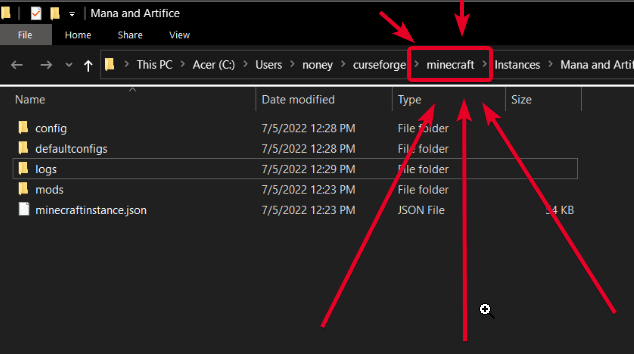
In your path... Top of the screenshot
green crypt
minecraftinstance.json?
last parcel
 golden muskBOT
How to set Global Minecraft RAM value.
- Click the
 icon in the bottom left to open settings.
 - Click the Minecraft tab.
- Scroll down.
- Slide slider to recommended ram range as seen below.
 green crypt
Okay, should I put more then recommended?
acoustic idol
Start with the recommended
last parcel
?MC-PATH
golden muskBOT
Instructions for changing CurseForge Minecraft install path!
If Minecraft is not installed in CurseForge App:
- Click the
 in the top left.
 - Select Minecraft from the list of games.
- Select the
Advancedoption and select:
--- Windows:Local Disk (C:)at the left side of the window. If you do not see it, clickThis PCfirst.)
--- Mac:/Users/Shared/CurseForge, If it does not exist, make it. - Click
Continue.
If Minecraft is installed in CurseForge App:
- Click the in the bottom left.
- Select the Minecraft tab.
- Click
Change. - Select the location:
--- Windows:Local Disk (C:)at the left side of the window. If you do not see it, clickThis PCfirst.)
--- Mac:/Users/Shared/CurseForge, If it does not exist, make it.
green crypt
Who's that for, shade or me?
last parcel
if it was for shade i would have replied to shade. since i did not do that it is for the person directly above the message which is you..
acoustic idol
compact hinge
Im creating a modpack, but idk why does minecraft keep crashing. Can someone hel...
Try increasing the allocated ram, Otherwise will need the latest.log not the crash report
last parcel
i didnt ask where it's installed...!?
i sent you instructions to follow, just like the previous instructions
green crypt
golden musk
I'm talking about this
last parcel
that is also not asking where it's installed
green crypt
Yeah, I meant like do you want me to skip that then? The first part?
Which is most likely yes, I just wanted to make sure
last parcel
yes
 pale hinge
!java
golden muskBOT
Minecraft requires specific Java versions to run, pick the correct one for the version of Minecraft you are playing!
Java for Minecraft versions 1.16.X and below
Java for Minecraft 1.17.X
Java for Minecraft 1.18.X and 1.19.X
Java for other operating systems.
acoustic idol
#🟢︱user-bot-spam if you wanna test out bot commands.
green crypt
last parcel
**yes**
All of my mods are gone now
last parcel
uh huh. can you install and run that pack now?
green crypt
Thats what I'm trying to do right now
 compact delta
hey guys, can anyone help me? when I try to download forge 1.7.10, the file comes in zip, I don't know how to work with windows right, so I wanted to know if someone can send me the file in java instead of coming in zip because even if I press in installer the file is in zip.
all the files I download come like this, and I can only use the mods through the curseforge application, and when I try to enter the mod I want to play through the application, the game crashes
green crypt
Still didn't help
compact delta
zip files are not extracting for some reason
last parcel
green crypt
Still didn't help
is there a log now?
green crypt
I had the log, I already sent it
last parcel
i am not asking for a log from before, or anything else.
is there a log now?
green crypt
You want me to send the newest log in the folder?
last parcel
yes
green crypt
Sorry, I'm not very good with computers
compact hinge
acoustic idol
Try increasing the allocated ram, Otherwise will need the latest.log not the cra...
I already tried, i allocated a lot of ram (increasing each time) but nothing changed, I'll send the latest log in 20 minutes I think
green crypt
last parcel
make a custom profile for mc1.18 with forge 40.1.0 and see if that loads
last parcel
?mc-installmods
golden muskBOT
How to install mods in CurseForge App.
- Click
+ Create Custom Profile - Name it, select the required Minecraft version, select the modloader & modloader version (usually the highest number), click
Create. - Click the profile icon.
- Click

Add More Content - Search and install the desired mods.
- Start the game!
How to install mods not on CurseForge.
- Right click the profile picture or Open the profile and click the Icon next to the play button.
- Click
Open Folder. - Drag the mod(s) into the
modsfolder. (Note: Some mods will require others, to run. Make sure to read the instructions for the mod!) - Start the game!
 last parcel
minus adding mods
 hollow mango
I'm running Minecraft 1.19 with OptiFine's newest release. My game instantly crashes when I press the "PLAY" button on my profile. I receive an exit code of -1 upon crashing. I have allocated all of my RAM to this game installation and it STILL can't fuction.
Any help here?
last parcel
?mc-optifine
golden muskBOT
We do not offer support for Optifine!
If you have issues with Optifine, remove it. If you want further support try the discord found on their website.
https://www.optifine.net/home
Installing Optifine with modpacks on Curseforge:
- Right click the modpack icon, select
Open Folder. - Put the
Optifine.jarinto themodsfolder. - Now start the modpack.
hollow mango
last parcel
?mc-optifine
I'm just mentioning it..
last parcel
yes 1.18.2
last parcel
ok.. good.. do that
hollow mango
hollow mango
I'm running Minecraft 1.19 with OptiFine's newest release. My game instantly cra...
EDIT: I don't think OptiFine is the issue, but I'm not sure.
acoustic idol
hollow mango
EDIT: I don't think OptiFine is the issue, but I'm not sure.
Remove it and see if it works
green crypt
Still crashing
last parcel
is there a log?
green crypt
I mean the same code thing
hollow mango
@last parcel @acoustic idol You guys are awesome, thanks. I didn’t think that would really be the problem.
last parcel
i dont care what the code is. the code means literally nothing
green crypt
This is confusing, heres the log
Well, I just checked the log
And theres nothing there
last parcel
cool.
send it
compact hinge
acoustic idol
Try increasing the allocated ram, Otherwise will need the latest.log not the cra...
acoustic idol
As in no log at all? OR no text at all?
green crypt
As in no log
 green crypt
I mean its been the same
Not that I checked it that time, i just thought it was the same log
And the log doesn't change
acoustic idol
How is it the same log if there is no log?
last parcel
so is there a log
yes/no
green crypt
No, theres no log, and I meant the time before that
Not this time
The two other times
acoustic idol
compact hinge
Remove magnesium mod, then try again
last parcel
if we want to know about other times we will ask. if we do not ask about them assume we dont need to know.
!mc-launcherlog
golden muskBOT
How to get the launcher log
- Right click a profile.
- Select
Open Folder - Go back two folders.
- Open the
Installfolder. - Drag the
launcher_log.txtinto discord.
green crypt
You want the launcher log again?
last parcel
yes
compact hinge
acoustic idol
Remove magnesium mod, then try again
okok lemme try
green crypt
Now the minecraft tab isn't there
Let me find it real quick
Actually, is there a way I can mod it without curse forge, this is proving to be sorta difficult.
Anyways here
last parcel
show the path you used in the curseforge app
green crypt
What do you mean by the path?
acoustic idol
> minecraft tab > screen shot the top of the app showing the path its using
green crypt
Oh thanks
green crypt
last parcel
the thing i told you to change about an hour ago now i think
I changed it
But here
acoustic idol
Show us
torn meadow
ok i got my game loading but now my game keep crashing everytime i try to make or join my world
green crypt
Screenshot? or just what it says
acoustic idol
Screen shot
 last parcel
where did this launcher log come from then, cuz it's not saying it came from there
last parcel
so how about sending me the launcher log from this new location, which can be done by following the instructions given
acoustic idol
C:\CurseForge\Install
compact hinge
acoustic idol
Remove magnesium mod, then try again
It worked, thank you all supporters for being here if needed
last parcel
green crypt
I just launched it, and sent you what it said
Going to assume you're done with this now so you can restore your modding folder to what it was before. Other packs should work fine if they did before. https://i.imgur.com/LTTTSpB.png
 torn meadow
it just keep freezing everytime i try to load a world
acoustic idol
Find and delete this file: Mineshafts & Monsters\config\waystones-server.toml
acoustic idol
torn meadow
i delted the file and the log changed this time
Remove the mod magnesium then try
 deft wagon
hello i want a mod who name 1.6.4 but when i finally download him this is a zip
not a java
jar.
acoustic idol
deft wagon
hello i want a mod who name 1.6.4 but when i finally download him this is a zip
hm? Link what your trying to download
deft wagon

Planeta Minecraft
LittleBlocks is a mod that allows you to polish up your creativity and optimize your redstone systems. Indeed, the size of blocks placed in a little blocks is divided by eight compared to its original size, so you can place 512 blocks instead of one. Be careful though with the size of your creations because the resources (memory, gpu / cpu …) in...
i can send u the zip if u want ?
acoustic idol
I can get it off the site, not that I really trust Planet Minecraft to start with
 drifting steppe
Hello, I am creating my own minecraft 1.18.2 modpack. I am not sure which forge modloader to select. Currently it is set to 40.1.52, but there are already 2 newer versions available since I set it that way. I noticed some mods require at least a certain more recent version or later. I'm using Optifine for 1.18.2 which supports a seemingly much older modloader version (can't go back that far, hopefully they update) ... but it works most of the time on 40.1.52. Sometimes certain objects are invisible, I restart game, usually works then.
.
- Are there modloader update/patch notes somewhere?
- How do I know which one to choose (other than just picking the most recent)?
. - Is the most recent always a stable version?
- Once I've had a modpack for a while, say weeks, months or even years, should I ever switch the modloader to a newer version?
acoustic idol
Optifine is well known to break other mods. Better to just find other performance mods then it. https://github.com/NordicGamerFE/usefulmods/tree/main/Performance
Otherwise:
1: Modloader changelogs would be on the loaders respective site
2: Mods will tell you if your modloader version is too low, generally good to choose the latest or close to it
3: Not always, depends on the changes
4: If your needing to update mods and they need a higher version then yes. Also new versions may have fixes
deft wagon
acoustic idol
I can get it off the site, not that I really trust Planet Minecraft to start wit...
so ? what can i do with the zip mod ?
acoustic idol
Try putting it into your mods folder and see if it boots

 quasi hinge
It wants the mod it has listed there
drifting steppe
acoustic idol
Optifine is well known to break other mods. Better to just find other performanc...
Yes, if I have much more issues I will try something else besides optifine, but I can get around that one issue I'm having for now. I will check that link though thanks.
So in general sounds like best to just pick a fairly recent modloader version (that doesnt have mods giving compatibility error), check changelogs if you can.
and update modloader just as required for mods, or if changelogs mention a fix
deft wagon
deft wagon
this is why i got when i boot the game
@acoustic idol
acoustic idol
yup.
deft wagon
 acoustic idol
!mc-logs
golden muskBOT
Sending logs for support.
- Right-click the modpack profile icon OR click the button in the modpack profile.
- Click
Open Folder. - Open the
logsfolder. - Drag and drop the FILE named
latestORdebuginto discord.
deft wagon
where ?
quasi hinge
Where, what?
quasi hinge
Do what the bot says
 rich spindle
whenever i try to start minecrafft 1.19 (in vanilla) from the curse forge launcher i always get error code 1 i have had this issue for longer than a month now with countless launchers
golden muskBOT
Error/Exit codes are useless. Follow these steps so someone can actually help you.
- Right-click the modpack profile icon OR click the button in the modpack profile.
- Click
Open Folder. - Open the
logsfolder. - Drag and drop the FILE named
latestORdebuginto discord.
autumn agate
How do i make the minecraft narrator not say the name of the block im mining
i cant turn it off
 quasi hinge
It’s supposed to be a jar in there, not a folder
deft wagon
yes i know but when i install the mod its a zip so
idk what to do maybe convert hil ?
him?
acoustic idol
deft wagon
2 gb is very low as well for modded minecraft ram. Need a minimum of 4gb allocated. Recommended 6-8Gb
deft wagon
how we allow more ram ?
autumn agate
for example if i mine a cobblestone block narrator says "Cobblestone"
quasi hinge
deft wagon
how we allow more ram ?
?mc-ram
golden muskBOT
How to set Global Minecraft RAM value.
- Click the icon in the bottom left to open settings.
- Click the Minecraft tab.
- Scroll down.
- Slide slider to recommended ram range as seen below.
acoustic idol
oh... not even using the cf app. least thats not where this log is from 🤦
autumn agate
hey guys for somereason when i open curse forge it sais that "seems like we could not load curseforge. lets try that one more time"
and i keep pressing retry
acoustic idol
Screen shot the whole window
autumn agate
 acoustic idol
!oops try the steps from this
golden muskBOT
You had an "Oops, that was not supposed to happen!"
Follow the instructions in this link!
If the info in the link does not work please do ?cflogs-oops and follow the instructions there to get the log files.
autumn agate
thanks!
acoustic idol
Seems to be how the author uploaded it.
deft wagon
ok i convert it now i ll test
acoustic idol
You just put the zip file itself in the mods folder. Dont unzip it or change it
deft wagon
deft wagon
this is why i got when i boot the game
that give that
acoustic idol
If it still doesnt work then you contact the author about it.
acoustic idol
then either wait OR remove it and find another mod
rich spindle
where is the logs folder?
acoustic idol
!mc-logs
golden muskBOT
Sending logs for support.
- Right-click the modpack profile icon OR click the button in the modpack profile.
- Click
Open Folder. - Open the
logsfolder. - Drag and drop the FILE named
latestORdebuginto discord.
 acoustic idol
You dont have any modpacks so there are no pack logs
Not sure what your trying to do?
rich spindle
well every time i try to run vanilla the game doesnt run and i get error code 1 i have had this issue for over a month with multiple launchers
golden muskBOT
Error/Exit codes are useless. Follow these steps so someone can actually help you.
- Right-click the modpack profile icon OR click the button in the modpack profile.
- Click
Open Folder. - Open the
logsfolder. - Drag and drop the FILE named
latestORdebuginto discord.
acoustic idol
Curseforge doesnt touch the vanilla launcher. So those logs would be in the .minecraft folder
rich spindle
smt is wrong with my .minecraft folder only the update logs are there
what happned?
how do i solve this?
acoustic idol
Try remaking what ever it was you were doing in the .minecraft folder in the cf app
rich spindle
what?
acoustic idol
Sounds like something is wrong with your vanilla installation, likely needs to be reinstalled. If you were using it to do mods and such use the cf app to do that
rich spindle
how do i repair it?
acoustic idol
For the .minecraft folder? Delete and start over. Reinstall everything. Back up any worlds you wanna keep. This is why we tell people to use the cf app instead. Makes playing modded easier
rich spindle
ok hold on i tried to start 1.18.2 and it opened just fine so it seems the problem is only with 1.19
well thanks for your help back to google i go
acoustic idol
If your doing straight vanilla, with no mods at all could try the Mojang support
rich spindle
ok
barren crystal
anyone know why PVJ didnt load correctly? It says something about quests but I have quests updated to it's most recent version
 coarse nest
Nothing to do with quests
Failed to create mod instance. ModID: projectvibrantjourneys, class projectvibrantjourneys.core.ProjectVibrantJourneys
com.electronwill.nightconfig.core.io.ParsingException: Invalid TOML data: entry "[enableJuniperTrees]" defined twice in its table.
 west frost
<@&524645667818307596> ^
barren crystal
coarse nest
Nothing to do with quests
```
Failed to create mod instance. ModID: projectvibra...
thank you
west frost
Ty Tim
 coarse nest
!mc-logs
golden muskBOT
Sending logs for support.
- Right-click the modpack profile icon OR click the button in the modpack profile.
- Click
Open Folder. - Open the
logsfolder. - Drag and drop the FILE named
latestORdebuginto discord.
 ornate relic
coarse nest
ornate relic
coarse nest
!mc-launcherlog
golden muskBOT
How to get the launcher log
- Right click a profile.
- Select
Open Folder - Go back two folders.
- Open the
Installfolder. - Drag the
launcher_log.txtinto discord.
ornate relic
A profile?
In the minecraft launder of curseforge?
Because I havent created one in curseforge
coarse nest
Where did the log come from then?
ornate relic
Sorry, found it]
coarse nest
Download and install this https://download.oracle.com/java/17/archive/jdk-17.0.3.1_windows-x64_bin.msi
Then open CurseForge and click the in the bottom left corner.
Go to the  Minecraft tab and scroll down to the bit about java versions.
Click the  icon and then choose
 Java: 17.0.3.1 (64 Bit) from the list.
Follow the instructions from !mc-installfix (if your internet is slow the instructions from !mc-updatemodloader work but need to be done on every profile made since the error began to happen)
barren crystal
another crash
something with PVJ. I deleted the config file i was told to delete last time
barren crystal
okay. gonna try something
actually i hope im not speaking too soon, but i think i fixed it
there's literally the line being typed out twice. i have no idea why it does that, but i just deleted it
gonna see what happens
you guys are really helping me be able to read configs over time so i think you all so much for the assistance you provide for me on a daily basis
it means the world
 frail rampart
I need some help when i try to launch the game it closes
barren crystal
YES i got it
barren crystal
frail rampart
I need some help when i try to launch the game it closes
post your latest log
frail rampart
Here is the log
coarse nest
Install forgelin
frail rampart
coarse nest
Install forgelin
Ok thx
barren crystal
coarse nest
Install forgelin
if you don't mind me asking, and if its not too hard to explain (you can be honest, if it is), how did you come to the conclusion that he needed forgelin? i dont see anything in the log suggesting that
im trying to understand short crashes like that for my own sake
coarse nest
The log is complaining about missing code from 'kotlin'.
I know kotlin is an alternative programming language to java that can be compiled to the same byte code (what .jar files contain).
I also know that mods that use this need a library mod that adds some special kotlin code for compat or smthn, and the 1.12 library mod for kotlin that people use is called forgelin
barren crystal
okay thank you. so the issue for me was that i didnt know thatt 1.12 kotlin was known as forgelin. that explains it
because i saw the mention of kotlin but didnt know the difference
acoustic idol
some of the time your also able to google some of these errors, specially if they are older mc versions. Eventually we just know em by heart 😉
coarse nest
7 year old reddit threads can be very helpful
acoustic idol
reddit, minecraftforums, github, and on the rare occasion the forge forums
barren crystal
amazing. gonna keep that in mind
ive been doing that for some but i dont know why i havent been doing them for all.
acoustic idol
Will admit some logs are easier then others. Can talk more about it in #💬︱general-chat tho (if wanted)
barren crystal
will do
 zinc jolt
Hey everyone! first time talking here, sorry if I'm in the wrong section ^^' Whenever I try to launch Minecraft with any forge version, I get an exit code 1, I tried updating Java and reinstalling MC, but no luck. I have no mods when this happens. any ideas? Found no solutions on google or reddit...
golden muskBOT
Error/Exit codes are useless. Follow these steps so someone can actually help you.
- Right-click the modpack profile icon OR click the button in the modpack profile.
- Click
Open Folder. - Open the
logsfolder. - Drag and drop the FILE named
latestORdebuginto discord.
zinc jolt
coarse nest
!mc-launcherlog
golden muskBOT
How to get the launcher log
- Right click a profile.
- Select
Open Folder - Go back two folders.
- Open the
Installfolder. - Drag the
launcher_log.txtinto discord.
barren crystal
2 things:
does anyone know the hotkey for the configued mod?
second: my custom NPCs are despawning at my warps. i looked it up, and found this in a forum. any idea what this means? and how i'd go about it?
 golden muskBOT
Error/Exit codes are useless. Follow these steps so someone can actually help you.
- Right-click the modpack profile icon OR click the button in the modpack profile.
- Click
Open Folder. - Open the
logsfolder. - Drag and drop the FILE named
latestORdebuginto discord.
 weary notch
Having issues launching a 1.18.2 Forge instance. Note that I don't have any mods at all installed right now, not even Optifine. Every time I try to press play and launch, it loads for a moment, then immediately crashes.
[15:23:12] [main/INFO]: ModLauncher running: args [--username, MrZubZub, --version, forge-40.1.54, --gameDir, C:\Users\mrzub\curseforge\minecraft\Instances\Zombies (1.18.2), --assetsDir, C:\Users\mrzub\curseforge\minecraft\Install\assets, --assetIndex, 1.18, --uuid, 91b860bb987d4a25b66a7bd1658fdc0c, --accessToken, ????????, --clientId, NmNmZThiM2YtNDA5Yy00YWMyLThjZTgtOTZkNjg4MDRhOGI2, --xuid, 2535415093770508, --userType, msa, --versionType, release, --width, 1024, --height, 768, --launchTarget, forgeclient, --fml.forgeVersion, 40.1.54, --fml.mcVersion, 1.18.2, --fml.forgeGroup, net.minecraftforge, --fml.mcpVersion, 20220404.173914]
[15:23:12] [main/INFO]: ModLauncher 9.1.3+9.1.3+main.9b69c82a starting: java version 17.0.1 by Microsoft
[15:23:13] [main/INFO]: SpongePowered MIXIN Subsystem Version=0.8.5 Source=union:/C:/Users/mrzub/curseforge/minecraft/Install/libraries/org/spongepowered/mixin/0.8.5/mixin-0.8.5.jar%2314!/ Service=ModLauncher Env=CLIENT
[15:23:13] [main/WARN]: Configuration file C:\Users\mrzub\curseforge\minecraft\Instances\Zombies (1.18.2)\config\fml.toml is not correct. Correcting
[15:23:13] [main/WARN]: Incorrect key [defaultConfigPath] was corrected from null to defaultconfigs
coarse nest
weary notch
Having issues launching a 1.18.2 Forge instance. Note that I don't have any mods...
!mc-launcherlog
golden muskBOT
How to get the launcher log
- Right click a profile.
- Select
Open Folder - Go back two folders.
- Open the
Installfolder. - Drag the
launcher_log.txtinto discord.
coarse nest
same for you quid ^
Do this quid
Download and install this https://download.oracle.com/java/17/archive/jdk-17.0.3.1_windows-x64_bin.msi
Then open CurseForge and click the
Go to the
Click theJava: 17.0.3.1 (64 Bit)from the list.
Follow the instructions from!mc-installfix(if your internet is slow the instructions from!mc-updatemodloaderwork but need to be done on every profile made since the error began to happen)
weary notch
coarse nest
Did you double click the file after you downloaded it to install it?
coarse nest
coarse nest
Do this quid
> > Download and install this <https://download.oracle.com/java/17/...
Dusty do this too
golden muskBOT
This is NOT instructions for Repair Profile! They are NOT the same! You need to do this!
- Click on the Minecraft Tab on the Left side of the CurseForge App.
- Click button next to the
Create Custom Profileoption. - Click
Repair Installationoption. - Play game.
NOTE: You will not lose any modpacks or worlds!
weary notch
Yooo thanks guy
golden muskBOT
Error/Exit codes are useless. Follow these steps so someone can actually help you.
- Right-click the modpack profile icon OR click the button in the modpack profile.
- Click
Open Folder. - Open the
logsfolder. - Drag and drop the FILE named
latestORdebuginto discord.
golden muskBOT
How to add/remove mods in a modpack.
- Click on the picture of the modpack.
- Click the
Add More Contentbutton, IF this button is not there, see below before continuing. - Find the Mods, Resource Packs or Maps you wish to Install and click
Installon them. - Wait for all the required mods to be downloaded.
- Start the modpack.
How to Enable/Disable content management for modpacks.
- Click on the picture of the modpack.
- Click on the button next to the
Playbutton. - Click on

Profile Options. - Check the
Allow content management for this profileoption if you want to edit the content of the modpack, uncheck it to disable.
NOTE: The Allow content management for this profile option is what allows you to Delete, Disable, Update or Install any Mods, Resource Packs or Maps managed by CurseForge. It must be on to modify any of them! (Currently)
coarse nest
Scroll down the mod list and find the mod
You should also report this to the modpack author
!projectissue
golden muskBOT
Please visit the project page for the content you posted about and look for a way to contact the developer.
Somewhere on the page there is usually a method of contact. Look for one of the following things:
Issuestab like the image below.- Discord link.
- Twitter link.
- Comments section below the project.
If no contact method exists you will either have to remove the project or find a solution on your own.
 coarse nest
then click the  button
go back a page
the button should be next to the mods name, on the right of it
quasi hinge
You’re not supposed to click on add more content
 gaunt gorge
hello! I am trying to install bobby to my game and I have no idea what I need to do. I have never used CurseForge before this
quasi hinge
Back to pack page, scroll down to BYG, click on
gaunt gorge
anyone know what I need to do to install this mod? https://www.curseforge.com/minecraft/mc-mods/bobby
coarse nest
gaunt gorge
anyone know what I need to do to install this mod? https://www.curseforge.com/mi...
!mc-installmods
golden muskBOT
How to install mods in CurseForge App.
- Click
+ Create Custom Profile - Name it, select the required Minecraft version, select the modloader & modloader version (usually the highest number), click
Create. - Click the profile icon.
- Click
Add More Content - Search and install the desired mods.
- Start the game!
How to install mods not on CurseForge.
- Right click the profile picture or Open the profile and click the Icon next to the play button.
- Click
Open Folder. - Drag the mod(s) into the
modsfolder. (Note: Some mods will require others, to run. Make sure to read the instructions for the mod!) - Start the game!
gaunt gorge
how do I know whether to select Forge, Fabric, or Vanilla?
I'll just try all three ways until something sticks actually
quasi hinge
If you choose Vanilla you’re just going to have the same experience you had before deciding to use mods
gaunt gorge
word
coarse nest
Look at the mods versions to see what it needs

the one you mentioned requires fabric, as show in the screenshot
gaunt gorge
ah, thank you. did not realize that would appear if I had my mouse there
coarse nest
Exception message: java.lang.ArrayIndexOutOfBoundsException: 2048
at net.minecraft.client.renderer.color.BlockColors.handler$bja000$preRegisterColor
Seems its trying to register colours for something but in doing so its accessing part of a list that doesnt exist
barren crystal
Suggested fix?
barren crystal
world's already generated though
 feral jetty
How do i unjail a player on a server with Server utilities installed https://www.curseforge.com/minecraft/mc-mods/server-utilities
acoustic idol
Should be /unjail <player>
coarse nest
barren crystal
world's already generated though
May have to regenerate it then, or see how badly removing bdb affects it
acoustic idol
feral jetty
How do i unjail a player on a server with Server utilities installed https://www...
Looking at the su discord it seems to be a bit of a bug. A user had said they had to manually change it. So guessing somewhere in the configs or server files
acoustic idol
Unfortunately im not at my pc to see where that is. I use the mod as well
feral jetty
ok
acoustic idol
Check the configs for the mod.
feral jetty
i don't have access to the server so i cant access to the configs
acoustic idol
Oh? Is there anyone that does that can look?
Wait how were you able to delete player data but cant access the configs?
feral jetty
i didn't i told a admin that had access to the server
acoustic idol
Ah ok
Have em look in the configs. Otherwise I would pop over to the su discord and see if someone knows a way.
The jail issue is a known bug tho
acoustic idol
One user said they had done it manually. So my guess is theres a config file with it somewhere. Otherwise im not sure. I havent messed with the jail system myself yet
Its the only part of the mod I havent used
feral jetty
in a single player world the config is located world\playerdata<PlayerUUID>.Pdat
but the thing that doesn't make sense is that the player data file was removed from what i was told
the players inventory and Xp was reset
and they were sent back to spawn
but still jailed
acoustic idol
Which makes me wonder if the jail tag is stored elsewhere
Tho from the looks of the command its /jail player jail# cell# time#
 acoustic pier
Just compiled 101 select mods into a Vanilla+ game pack, trying to launch it now but it fizzles out.
 wide panther
wdym fizzles out
acoustic pier
I’ve hit play, it brings up the launcher, I press play in the launcher, it loads up, then the window appears as it does just before going full screen. The Mojang logo appears briefly, but then the window closes as if the game has crashed.
I wonder if the code is too dense or something like that.
golden muskBOT
Sending logs for support.
- Right-click the modpack profile icon OR click the button in the modpack profile.
- Click
Open Folder. - Open the
logsfolder. - Drag and drop the FILE named
latestORdebuginto discord.
 waxen pine
net.minecraftforge.fml.ModLoadingException: Mod §eshards§r requires §6minecraft§r §o1.18.2 or above, and below 1.19§r §7Currently, §6minecraft§r§7 is §o1.19
the mod shards doesn't like 1.19 apparently
barren crystal
okay now biomes o plenty is not loading properly
i can't remove this mod, because i think itll mess up my server permanently
coarse nest
Exactly the same error as before, just a different mod and the number is 1 lower
coarse nest
Probably something else messing them up, yes
barren crystal
that's just great. now i gotta figure out what it is. anything else i can do besides removing mods one by one?
i hate that process so much
coarse nest
Normally id blame some mods mixins (runtime code modifications), but it doesnt seem like any mods have mixins into those classes
barren crystal
so i do have to do it the old fashioned way then?
coarse nest
Yeah
You could also do a binary search, keeping in byg and bdb to see what conflicts with them
!binarysearch
golden muskBOT
Binary search
A binary search is a way of finding a faulty mod/plugin/addon when you have a lot of them, but without having to remove them one-by-one.
The procedure is simple:
- Take half of the existing mods/plugins/addons, and move them out, into another folder.
- Run the game.
- Does the issue still exist?
If YES: Repeat from step 1 with the current things.
IF NO: Swap out the current things with the ones you moved out, and repeat from step 1. - Repeat this process until the problematic mod(s)/plugin(s)/addon(s) have been found.
coarse nest
Its often quicker
barren crystal
so basically make a new profile with BYG and then half of the other mods
and narrow it down by chunk
alright sigh
wide panther
Oh that's pretty smart
barren crystal
the worst part is just waiitng for the pack to load up
ive got a lot of mods in this pack lmao
lots of hours
barren crystal
Any idea what im missing?
waxen pine
crafttweaker?
autumn agate
Liston OK, I play Hypixel minecraft server, And in hypixel there is some mods made for it. Some of my mods are 1.18 and some are 1.8.9. I need a way to switch versions without having to go to the folder and removing the ones incompatible with the selected version im on. Is there a way to easily switch from one version to another having the mods already put into. I am "FORGE" Without a application involved
@autumn agate
autumn agate
el?
 barren crystal
waxen pine
crafttweaker?
barren crystal
waxen pine
crafttweaker?
what line?
waxen pine
Caused by: java.lang.NoClassDefFoundError: com/blamejared/crafttweaker/api/item/IItemStack
waxen pine
please don't spam - complete sentences and such. this is a support channel
autumn agate
waxen pine
please don't spam - complete sentences and such. this is a support channel
Swwy UwU
im a fucking airplane
oops
fricken
 barren crystal
waxen pine
`Caused by: java.lang.NoClassDefFoundError: com/blamejared/crafttweaker/api/item...
barren crystal
waxen pine
`Caused by: java.lang.NoClassDefFoundError: com/blamejared/crafttweaker/api/item...
i dont see the line
coarse nest
barren crystal
i dont see the line
291
autumn agate
done

i dont see done
i alr have a version for my 1.8.9 mods

Yes
add more content?
i alr have the mods installed onto m pc
how to put in there
coarse nest
Right click the profile and Open Folder
Copy the mods into the mods folder there
 coarse nest
the mods...
wide panther
Maybe you should do this when your head is all there, man.
autumn agate

there
is good?
do i push play on the cursefoarge
orr
oh ok
we gotta see if it works
To Late
alr laoding it
how do i fix exit code 1
golden muskBOT
Error/Exit codes are useless. Follow these steps so someone can actually help you.
- Right-click the modpack profile icon OR click the button in the modpack profile.
- Click
Open Folder. - Open the
logsfolder. - Drag and drop the FILE named
latestORdebuginto discord.
coarse nest
exit code 1 means the game crashed, which is very vague.
To fix it we need to know why it crashed, and the logs will help with that.
Follow the bots instructions to get the logs
autumn agate
it no work
me go bed
alr
mods not ther
goofnightt
me not mad
me just tired
goofniht
i had a outdated mod in there thats why
yeah im very smart
 warm garnet
how do i get a mod folder from zip to java?
coarse nest
Where did you get it from?
warm garnet
cursedforge
coarse nest
!mc-installpack
golden muskBOT
How to install modpacks with the search features in app.
- Open the
Minecraftsection of the app. - Click the top search bar where it says
Search for modpacksOR Click theBrowse ModpacksTab. - Find the Modpack you want to install and click install on it.
- Wait for CurseForge app to download and unpack all the required files.
- Once finished, click
Play!
======================================================
** **
======================================================
How to install modpacks from a Export. (Custom/Private/Site downloaded Modpack zip)
- Get CurseForge App if you don't have it, use
!downloadfor a link. - Get the exported modpack from CurseForge or someone else,
!mc-packshareexplains how to make them. - Open the
Minecraftsection of the app. - Click

Create Custom Profile - Click the
Importoption. - Find the file you just downloaded in step 2 and select it.
- CurseForge app will now attempt to download and unpack the modpack. If it fails, try steps 4-6 again.
- Once finished, click
Play!
 warm garnet
huh?
 sage pier
To install modpacks, you need software that can install them
warm garnet
i have java script and i got it from curesed forge
wild jewel
warm garnet
i have java script and i got it from curesed forge
Post the download link
warm garnet
i got it to download from the app
wild jewel
Then you don't need to do anything
wild jewel
If you have it in the app then you can just play
warm garnet
will i be able to create a seperate launcher for it
coarse nest
The curseforge app will install it to its own folder and open the Minecraft Launcher to allow you to play it.
barren crystal
anyone know how i can get the UUID of my CustomNPC? I looked in the config file but there's multiple UUID's and im not sure which one is the one to use
coarse nest
Look at and use tab complete in any command that accepts an entity, like /tp
barren crystal
hmmm
oh wait i see
do you know of anyway to possible have an entity spawn in using commands?
coarse nest
/summon mod:entity x y z {any nbt data you want here}
barren crystal
thank you, and ONE more thing lol
do you know of any mods that work as server startup commands?
like basically it detects when the server starts up after a restart and runs a process
I'm thinking about having that command summon the entities back to their places, every restart
and that will solve my problem
coarse nest
A datapack can do that
barren crystal
ive never messed with one before
do you have any links?
to one that would do that
ima try to research more on datapacks
coarse nest
I dont know of any for this specifically, but i know how you would do it in general.
Make a mcfunction, put your commands in it and place it where those go in a datapack.
Add your mcfunction to the minecraft:load function tag.
barren crystal
I'm not gonna lie, im pretty beginner still
So making an MC-function... im not sure how to do
coarse nest
Google that, it will probably get you further than 'run commands on server startup'
barren crystal
okay thanks lmao cuz yea thats what i was googling
 umbral hatch
Hello, im wondering on something here, the shaderpacks for RL craft 2.9.1c is not really working, the lighting on it is extremely weird. Can anybody help?
 noble needle
can anyone tell me why my modpack crashed?
 lone shard
Can you help me on this problem
 coarse nest
!mc-logs
golden muskBOT
Sending logs for support.
- Right-click the modpack profile icon OR click the button in the modpack profile.
- Click
Open Folder. - Open the
logsfolder. - Drag and drop the FILE named
latestORdebuginto discord.
acoustic pier
So it’s just shards messing up the pack?
Just asking, does assembling a mod pack via CurseForge compress it?
coarse nest
Exporting a modpack through curseforge will get the mods project and file ids, and add them to a manifest inside the zip. The actual mod files are not included.
This dors result in very small zips, compared to the size of the mod jars
 lean sky
I keep getting this error idk why
 golden muskBOT
Sending logs for support.
- Right-click the modpack profile icon OR click the button in the modpack profile.
- Click
Open Folder. - Open the
logsfolder. - Drag and drop the FILE named
latestORdebuginto discord.
last parcel
Was trying to work on this with someone yesterday but they ended up giving up after two hours.
!mc-launcherlog
golden muskBOT
How to get the launcher log
- Right click a modpack / profile.
- Select
Open Folder - Go back two folders.
- Open the
Installfolder. - Drag the
launcher_log.txtinto discord.
lean sky
last parcel
Was trying to work on this with someone yesterday but they ended up giving up af...
lean sky
ok
last parcel
can you make a custom profile with no mods mc1.18.2 forge-40.1.51 and see if that loads?
lean sky
nope it doesnt let me
last parcel
what happens
lean sky
same thing
last parcel
can you send both logs for that again
 left rock
It doesnt load up bc of rubidium but I can't run the game at all without rubidium what do I do?
last parcel
the launcher log again please
lean sky
last parcel
Going to have to ask you to contact Forge on this as it appears to be some issue on their end as far as I can tell. Tell them you're using a 1.18.2 profile with Forge 40.1.54 and send them this launcher log as well as the latest log.
!mc-forge
golden muskBOT
left rock
idk whats happening
It just doesn’t work without rubidium
But with it, it won’t even load the game
last parcel
your log doesnt say anything about rubidium
left rock
left rock
It doesnt load up bc of rubidium but I can't run the game at all without rubidiu...
That’s the log with rubidium
I can’t @ you but I replied to it
last parcel
neither of these even have an error
left rock
It does
main/ERROR] [mixin/]: Mixin config rubidium.mixins.json does not specify "minVersion" property
last parcel
dont believe that means anything useful, but if you think it does then report to the dev
left rock
but i cant run the game without it
but it wont launch with out it
with it*
idk what to do
last parcel
you could do this #💬︱general-chat message
last parcel
report that to the dev then
wild jewel
It does not work for everyone else, trust me
left rock
Tim it’s literally working for my friend rn
He’s literally playing rn
With the same exact mods
last parcel
Then literally report the issue to the literal dev who can actually help you.
 split hinge
When I try to open Minecraft through CurseForge it keeps telling me that the game crashed, is there anything that I can do?
last parcel
!mc-logs
golden muskBOT
Sending logs for support.
- Right-click the modpack profile icon OR click the button in the modpack profile.
- Click
Open Folder. - Open the
logsfolder. - Drag and drop the FILE named
latestORdebuginto discord.
split hinge
 hollow river
here
last parcel
split hinge
Try deleting the config it's complaining about. net.minecraftforge.fml.config.ConfigFileTypeHandler$ConfigLoadingException: Failed loading config file supplementaries-client.toml of type CLIENT for modid supplementaries
last parcel
hollow river
here
Invalid id 4096 - maximum id range exceeded.
golden muskBOT
To fix "Invalid ID 4096" install this mod: https://www.cflookup.com/minecraft/mc-mods/jeid

Remove the block, item, and biome ID limits by using the 1.13 chunk format in 1.12
Issues: https://github.com/DimensionalDevelopment/JustEnoughIDs/issues
Source: https://github.com/DimensionalDevelopment/JustEnoughIDs
Game version(s): 1.12.2, 1.12.1, 1.12
Modloader(s): Forge
 little swan
My CurseForge App requires Set Up CurseForge's Minecraft modding folder, but it has always shown error.
Who can help me?
last parcel
what error
little swan
It seems to be a connection problem
last parcel
can you just show the error
 brave echo
someone make this modpack work bcs ive tried everything ty
little swan
How can I move Fabric 0.14.6 modpack to Fabric 0.14.8?
last parcel
brave echo
someone make this modpack work bcs ive tried everything ty
How about explaining the issue and sending logs instead of that.
last parcel
little swan
How can I move Fabric 0.14.6 modpack to Fabric 0.14.8?
?mc-updatemodloader
golden muskBOT
You can update the mod loader within the same game version in the CurseForge app by following these steps!
- Click on the modpack profile you are working with.
- Click on the button next to the play button.
- Click on the Profile Options button.
- Select the mod loader version you want from the dropdown.
- Play!
If you need to update to a new game version, a new profile is required.
little swan
Will this make the mods lost?
last parcel
no
brave echo
the issue is
it works on my pc
and when i zip it (threw the profile)
and then i import it on my pc again
and try to play it
it gives me this

then i removed optifine
and the mods that said were "crashing"
 last parcel
can you put this all in one message please
brave echo
and then i launched it and it crashed again with exit code 1
golden muskBOT
Error/Exit codes are useless. Follow these steps so someone can actually help you.
- Right-click the modpack profile icon OR click the button in the modpack profile.
- Click
Open Folder. - Open the
logsfolder. - Drag and drop the FILE named
latestORdebuginto discord.
last parcel
ok send the zip
last parcel
send it here
brave echo
ther we go
if u can fix this mess of a modpack ty xD
al wait as long i need to
i just want it to work\
last parcel
i dont plan to fix it, just want to see if i can find where your issue is
brave echo
😭
i spent like 10 hours trying to fix this btw ☠️ none the less i hope its just a small bug or smthn or like a shity mod that making it go crazy
last parcel
how did you end up with that list of mods you removed?
last parcel
well log isnt going to be solving this. either you can start over by installing 2-3 mods at a time and testing each set, or try binary search.
 slate edge
Hey, I was trying to diagnose my stuttering while playing a modpack and I realised that curseforge was using an older version of java (1.8.0.5), while the latest one is 1.8.0.331
I changed it and started the game, only to see it running on the old version specified in curseforge. This was confirmed when I reopened the curseforge app, which still showed that java version mode was set to Automatic (as oppossed to 1.8.0.331 which I had specified). How do I 'save changes' per say and ensure that minecraft is using the latest java version?
last parcel
there isnt really any reason that java would cause that, but if you want to use a custom java you need to use java arguments.
how about a screenshot of the f3 screen ingame when the stuttering is happening?
brave echo
hmm al prob test em out and see
 dry shard
 last parcel
The issue is very obvious. Next time try without the spam. See you tomorrow.

 last parcel
are you generating new chunks?
slate edge
No, all of these chunks have been previously explored by me and my render distance is set to a relatively small value of 16
last parcel
im not sure if that was a joke..
slate edge
last parcel
im not sure if that was a joke..
I'm sorry if I seem ignorant or stupid, but isn't a render distance of 16 not that big a value? I thought it was something near or slightly above the norm, considering that the bar goes all the way up to 32
last parcel
8 is normal
slate edge
Huh, I see. Will lower my render distance and see if that helps, thanks for letting me know
I set my render distance to 8, and while my overall fps increased (averaged around 200) I still experienced the micro-stutters, when it dropped to around 130-140
I took these screenshots away in an area slightly away from my base (I have an environment controller which blocks the fps screen, so I had to move out of range), and the fps in my base is lower (averages 80 but drops to around 30 at times)
I'm not too sure its a render distance issue, as I was playing with a render distance of 12 for most of my playthrough (increased to 16 not too long ago after these issues started)
last parcel
i dont even play the game with 60 fps normally, so your performance issue is way beyond anything i could possibly diagnose.
wild jewel
You get 60?
last parcel
the best are the ones that work for you.
i've never bothered with anything besides optifine as they mostly either did nothing or just made performance worse. but that's just my personal experience.
 nova jasper
Hey guys, so I just noticed that I always get the error code 1 when I make new forge profiles for minecraft. But when i download modpacks or play my old modpacks that I imported from my old pc everything works. Iam so confused on why this isnt working. already tried reinstalling forge and mc
golden muskBOT
Error/Exit codes are useless. Follow these steps so someone can actually help you.
- Right-click the modpack profile icon OR click the button in the modpack profile.
- Click
Open Folder. - Open the
logsfolder. - Drag and drop the FILE named
latestORdebuginto discord.
 magic adder
does anyone know how to install optifabric on forge for minecraft 1.19 java? ive been trying to download it and put it in the mod folder but each time i download its a jar and it won't open :/
 hasty heath
magic adder
does anyone know how to install optifabric on forge for minecraft 1.19 java? ive...
hasty heath
magic adder
does anyone know how to install optifabric on forge for minecraft 1.19 java? ive...
why do you want optifabric for forge
last parcel
you dont open jars, usually. just put it in the folder
nova jasper
nova jasper
Hey guys, so I just noticed that I always get the error code 1 when I make new f...
iam so confused now are u guys able to see this or?
bc the bot replied
last parcel
you havent done what the bot said, so there's nothing we can do yet
magic adder
hasty heath
why do you want optifabric for forge
So I can get BSL shaders and still use cocricot and mizuno's 16 craft
magic adder
last parcel
you dont open jars, usually. just put it in the folder
I only get jars when i download it. Is it supposed to come with something else?
nova jasper
last parcel
you havent done what the bot said, so there's nothing we can do yet
yeah but iam pretty sure that the logs wont help you since i already looked at them aswell and there arent any errors or anything like that
hasty heath
but is optifabric not for fabric and not forge i am pretty sure forge just uses normal optifine
last parcel
nova jasper
yeah but iam pretty sure that the logs wont help you since i already looked at t...
you telling me what you think the logs say helps even less. #📛︱rules 5 applies to you as well, i suggest you take the time to read them now.
magic adder
hasty heath
but is optifabric not for fabric and not forge i am pretty sure forge just uses ...
It's because I just recently installed forge and I've already had Optifine, so when I play on forge and go to settings there isn't a shaders option there
golden muskBOT
We do not offer support for Optifine!
If you have issues with Optifine, remove it. If you want further support try the discord found on their website.
https://www.optifine.net/home
Installing Optifine with modpacks on Curseforge:
- Right click the modpack icon, select
Open Folder. - Put the
Optifine.jarinto themodsfolder. - Now start the modpack.
magic adder
Sorry about that, I thought it was a forge issue since I was trying to install optifabric
last parcel
optifabric is for fabric
forge wouldnt help you for issues with optifine either
this isnt forge btw, it's curseforge
magic adder
What's the difference between the two? Sorry I'm new to all of this
last parcel
!!=
golden muskBOT
Wording is important!
Forge = Minecraft Forge, This is a modloader often just called "Forge".
Fabric = Fabric MC, this is another modloader, just called "Fabric".
CurseForge = A Website/App that has content for games.
Mods = Individual mod files.
Modpacks = Multiple mods put into the mods folder or downloaded from CurseForge.
These are not Interchangeable! Please use the correct terms as it allows us to help you faster!
hasty heath
well i have a problem when i open my self made modpack it chrases i have figured its a mod that is the problem but haven't been able to narrow it enough down to know what mod it is
golden muskBOT
How to get the launcher log
- Right click a modpack / profile.
- Select
Open Folder - Go back two folders.
- Open the
Installfolder. - Drag the
launcher_log.txtinto discord.
last parcel
while i look at this please join this discord as we likely will need their help
!mc-forge
golden muskBOT
last parcel
shit nvm, this is diffrent
Exception in thread "main" java.lang.module.ResolutionException: Modules jei and roughlyenoughitems export package mezz.jei.api.recipe.transfer to module rftoolsstorage
try removing rftoolstorage
wild jewel
Probably not
brave echo
i got a quick question btw
when am in my mod pack
like ingame and i paly it
and am on lets say a 120 fps and then i randomly get a 5 second freeze
is that cuz of optifine
wild jewel
Considered removing it and testing?
 deep shoal
anyone knows how i can get optifine to work ?
last parcel
!mc-optifine
golden muskBOT
We do not offer support for Optifine!
If you have issues with Optifine, remove it. If you want further support try the discord found on their website.
https://www.optifine.net/home
Installing Optifine with modpacks on Curseforge:
- Right click the modpack icon, select
Open Folder. - Put the
Optifine.jarinto themodsfolder. - Now start the modpack.
acoustic pier
Got mine to work
last parcel
did you fail to read the first sentence 🤦♂️
deep shoal
i did do that
 magic musk
okay so im trying to build a custom modpack. i try playing it and it crashes immediately at the launcher. i think the error code was just 1
golden muskBOT
Error/Exit codes are useless. Follow these steps so someone can actually help you.
- Right-click the modpack profile icon OR click the button in the modpack profile.
- Click
Open Folder. - Open the
logsfolder. - Drag and drop the FILE named
latestORdebuginto discord.
magic musk
ah
ive tried completely disabling all mods and get the same problem
game version 1.17.1. forge 37.1.1
wild jewel
!mc-installfix
golden muskBOT
This is NOT instructions for Repair Profile! They are NOT the same! You need to do this!
- Click on the Minecraft Tab on the Left side of the CurseForge App.
- Click button next to the
Create Custom Profileoption. - Click
Repair Installationoption. - Play game.
NOTE: You will not lose any modpacks or worlds!
magic musk
its taking much, much longer to load now which i assume means it did something
it crashed again immediately
just took longer
tried running it with literally a single mod
 candid monolith
I made a custom modpack and everytime I try to open it up it crashes and this pops up
 magic musk
i was suggested !mc-installfix
candid monolith
whats that
hasty heath
candid monolith
I made a custom modpack and everytime I try to open it up it crashes and this po...
i would say its because of a mod that destroy the modpack
magic musk
ive been having this same issue with zero mods enabled
hasty heath
that is usally the problem that happens when you make a custom modpack
last parcel
candid monolith
I made a custom modpack and everytime I try to open it up it crashes and this po...
!mc-log
golden muskBOT
Sending logs for support.
- Right-click the modpack profile icon OR click the button in the modpack profile.
- Click
Open Folder. - Open the
logsfolder. - Drag and drop the FILE named
latestORdebuginto discord.
magic musk
candid monolith
hasty heath
i would say its because of a mod that destroy the modpack
oops i axidentaly responded to that one
hasty heath
WOWOWOW i dont really know how to read log LUL
candid monolith
last parcel
!mc-log
I sent that file what should I do now?
last parcel
you wait for someone to look at it, and probably read the #📛︱rules while you wait would be a good idea
candid monolith
ok
 rocky magnet
i need help on making a server for Infinity Evolved Skyblock
 pine rapids
?mc-installserver
golden muskBOT
How to **manually** install a server - **On your own PC**
- Check if the modpack has a server pack, if it does: use that and skip below.
- Go to the Forge website http://files.minecraftforge.net/ and download the Installer for the forge version the pack is using.
- Run the installer and choose
Install server. Do not install to your desktop. Also do not install inside a OneDrive folder. - Run the server using the forge.jar. A file called
eula.txtwill be generated. Open it and changeeula=falsetoeula=true - From the Client; Copy the
modsfolder,configfolder, and any other folders needed for the pack to work into the server folder. If the modpack has a server pack, use this instead! - Run the server again.
- Port forward your machine if needed. (Google it)
rocky magnet
this doesnt help me though
pine rapids
If you have issues please be specific about what they are
pine rapids
That's supposed to be "the forge jar" not "the forge.jar"
rocky magnet
its asking me to run the server but i dont see how to do that
pine rapids
Depending on the minecraft version you either double-click the forge jar like you do with any other program or you use the run script provided by Forge's installer
pine rapids
Screenshot please
 pine rapids
Oh they provided server files
Well in that case which of those files do you think might start the server?
rocky magnet
well start server but that doesnt work either
pine rapids
Can you be more specific than "Doesn't work"?
rocky magnet
No java binary in path. Can't run server, exiting...
Press any key to continue . . .
pine rapids
rocky magnet
okay so i switched in the eula flase to true then i clicked start server now its loading more things in the command
 signal carbon
does anyone know a simple way i could up the structure generation in my modpack? I have many dungeons in my modpack but they're so few and far between
rocky magnet
i clicked start server and the command system 32 finished what do i do now?
pine rapids
Did you close it or did it close on its own?
pine rapids
Ok then your server should be up and running
rocky magnet
how do i join the server myself
pine rapids
?mc-installserver
golden muskBOT
How to **manually** install a server - **On your own PC**
- Check if the modpack has a server pack, if it does: use that and skip below.
- Go to the Forge website http://files.minecraftforge.net/ and download the Installer for the forge version the pack is using.
- Run the installer and choose
Install server. Do not install to your desktop. Also do not install inside a OneDrive folder. - Run the server using the forge.jar. A file called
eula.txtwill be generated. Open it and changeeula=falsetoeula=true - From the Client; Copy the
modsfolder,configfolder, and any other folders needed for the pack to work into the server folder. If the modpack has a server pack, use this instead! - Run the server again.
- Port forward your machine if needed. (Google it)
pine rapids
Oh that doesn't say...
Assuming you're on the same machine as the server you connect using localhost as the IP
Then you'll need to Google step 7 and provide your external IP to friends so they can connect
rocky magnet
okay ill try that
thanks
i dont know how to access the port forwarding with starlink 😦
wild jewel
rocky magnet
i dont know how to access the port forwarding with starlink 😦
Probably not gonna be able to do it with that either
 subtle flower
Hey for the Cyclic mod 1.18.2, how do I put liquid experience into the disenchanter? I already have the liquid experience.
 azure yacht
Hey i made a modpack and put it on my server but when i try joining it this happens
 coarse nest
rocky magnet
i dont know how to access the port forwarding with starlink 😦
coarse nest
rocky magnet
i dont know how to access the port forwarding with starlink 😦
According to a quick google search:

 unique cipher
I can't figure out how to get my Minecraft not to crash. I have been working on it for about 3 hours now and I'm desperate. Can anyone help me?
coarse nest
!mc-logs
golden muskBOT
Sending logs for support.
- Right-click the modpack profile icon OR click the button in the modpack profile.
- Click
Open Folder. - Open the
logsfolder. - Drag and drop the FILE named
latestORdebuginto discord.
unique cipher
coarse nest
That is not the file the bot said to get
unique cipher
my b
autumn agate
hey
unique cipher
Hey
autumn agate
Is someone able to dig into the content of this file and make sure its not a virus or rat DO NOT use it with forge
Like i joined a discord server that had there own mod pack and i saw this mod.jar in it so i don't know if its safe or why its named mod.jar
when most mods on curse forge have the mod name in the file name and the version number
coarse nest
it seems fine enough, its a technoblade memorial mccreator mod
coarse nest
 autumn agate
coarse nest
autumn agate
coarse nest
What software is that?
unique cipher
is there anything you need from me?
autumn agate
oh
autumn agate
coarse nest
7 zip
wow even win rar works to unzip jars
coarse nest
unique cipher
is there anything you need from me?
!mc-installfix this should fix it
golden muskBOT
This is NOT instructions for Repair Profile! They are NOT the same! You need to do this!
- Click on the Minecraft Tab on the Left side of the CurseForge App.
- Click button next to the
Create Custom Profileoption. - Click
Repair Installationoption. - Play game.
NOTE: You will not lose any modpacks or worlds!
coarse nest
autumn agate
wow even win rar works to unzip jars
jars are literally just zips full of code and renamed to a jar.
(word and powerpoint documents are just zips too 😉)
autumn agate
oh
unique cipher
it works. thanks, dude. you're a legend
 lavish cobalt
!mc-installfix
golden muskBOT
This is NOT instructions for Repair Profile! They are NOT the same! You need to do this!
- Click on the Minecraft Tab on the Left side of the CurseForge App.
- Click button next to the
Create Custom Profileoption. - Click
Repair Installationoption. - Play game.
NOTE: You will not lose any modpacks or worlds!
 grim vine
Having issues with the install wizard for the server

Not adding jar files?
Using forge-1.18.2-40.1.54-installer.jar
coarse nest
the jars are in the libraries folder.
Use run.bat to run the server
 coarse nest
!mc-logs
golden muskBOT
Sending logs for support.
- Right-click the modpack profile icon OR click the button in the modpack profile.
- Click
Open Folder. - Open the
logsfolder. - Drag and drop the FILE named
latestORdebuginto discord.
last parcel
nope
grim vine
coarse nest
!mc-launcherlog
golden muskBOT
How to get the launcher log
- Right click a modpack / profile.
- Select
Open Folder - Go back two folders.
- Open the
Installfolder. - Drag the
launcher_log.txtinto discord.
grim vine
coarse nest
Download and install this https://download.oracle.com/java/17/archive/jdk-17.0.3.1_windows-x64_bin.msi
Then open CurseForge and click the in the bottom left corner.
Go to the Minecraft tab and scroll down to the bit about java versions.
Click the icon and then choose Java: 17.0.3.1 (64 Bit) from the list.
Follow the instructions from !mc-installfix (if your internet is slow the instructions from !mc-updatemodloader work but need to be done on every profile made since the error began to happen)
 near fox


 coarse nest
simple harvest by workshopcraft is trying and failing to harvest tall grass
remove it
 distant sand
hello friends! I got a few new mods and trying to narrow down which one is causing this.
coarse nest
one of your worlgeneration mods is causing sisues
try remove them one by one till it works
distant sand
appreciate it!
distant sand
coarse nest
one of your worlgeneration mods is causing sisues
https://www.curseforge.com/minecraft/mc-mods/torchslabs-mod
https://www.curseforge.com/minecraft/mc-mods/double-slabs
https://www.curseforge.com/minecraft/mc-mods/kleeslabs
https://www.curseforge.com/minecraft/mc-mods/worldedit
if you don't mind, do you it could be one of the slab mods?
distant sand
indeed
coarse nest
at net.minecraft.world.gen.ChunkProviderServer.tick
This is literally the most helpful line
distant sand
haha yep
 dapper ivy
hello guys! I want to know how to play a modpack on minecraft java edition
coarse nest
Do you have the CurseForge app?
dapper ivy
coarse nest
Do you have the CurseForge app?
yes
quasi hinge
Do you have it setup
coarse nest
!mc-installpack
golden muskBOT
How to install modpacks with the search features in app.
- Open the
Minecraftsection of the app. - Click the top search bar where it says
Search for modpacksOR Click theBrowse ModpacksTab. - Find the Modpack you want to install and click install on it.
- Wait for CurseForge app to download and unpack all the required files.
- Once finished, click
Play!
======================================================
** **
======================================================
How to install modpacks from a Export. (Custom/Private/Site downloaded Modpack zip)
- Get CurseForge App if you don't have it, use
!downloadfor a link. - Get the exported modpack from CurseForge or someone else,
!mc-packshareexplains how to make them. - Open the
Minecraftsection of the app. - Click
Create Custom Profile - Click the
Importoption. - Find the file you just downloaded in step 2 and select it.
- CurseForge app will now attempt to download and unpack the modpack. If it fails, try steps 4-6 again.
- Once finished, click
Play!
dapper ivy
when i click play goes to minecraft vanilla
wide panther
Are you clicking on a modpack or jsut. Play.
quasi hinge
The button to play vanilla is in a drop down menu
dapper ivy
on the launcher appears the mod name and when i click play it enters on vanilla
quasi hinge
Show a screenshot
dapper ivy
 dapper ivy
yes but when i click on the play button it goes to vanilla minecraft
wide panther
How do you know.
Have you actually made a world to see if you have the stuff? If it looks like a vanilla title screen it might just be that the pack doesn't have a custom title screen.
dapper ivy
yes i made a world and it was vanilla
coarse nest
!mc-installfix try this
golden muskBOT
This is NOT instructions for Repair Profile! They are NOT the same! You need to do this!
- Click on the Minecraft Tab on the Left side of the CurseForge App.
- Click button next to the
Create Custom Profileoption. - Click
Repair Installationoption. - Play game.
NOTE: You will not lose any modpacks or worlds!
dapper ivy
coarse nest
!mc-installfix try this
it didnt work
coarse nest
!cflogs-app
golden muskBOT
<:overwolf:857375414002384916> How to get CurseForge App logs! <:overwolf:857375414002384916>
- Click the

Create logs zipin the menu.
menu. - Drag and drop the file it just made to this chat room to upload it.
- Wait for someone to look at it so they can help you.
 dapper ivy
golden muskBOT
dapper ivy
golden muskBOT
Error/Exit codes are useless. Follow these steps so someone can actually help you.
- Right-click the modpack profile icon OR click the button in the modpack profile.
- Click
Open Folder. - Open the
logsfolder. - Drag and drop the FILE named
latestORdebuginto discord.
 wise venture
coarse nest
dapper ivy
wise venture
coarse nest
dapper ivy
according to those it seems to be wroking fine, try the installfix again
coarse nest
wise venture
!mc-launcherlog
golden muskBOT
How to get the launcher log
- Right click a modpack / profile.
- Select
Open Folder - Go back two folders.
- Open the
Installfolder. - Drag the
launcher_log.txtinto discord.
wise venture
coarse nest
Download and install this https://download.oracle.com/java/17/archive/jdk-17.0.3.1_windows-x64_bin.msi
Then open CurseForge and click the in the bottom left corner.
Go to the Minecraft tab and scroll down to the bit about java versions.
Click the icon and then choose Java: 17.0.3.1 (64 Bit) from the list.
Follow the instructions from !mc-installfix (if your internet is slow the instructions from !mc-updatemodloader work but need to be done on every profile made since the error began to happen)
wise venture
!mc-installfix
golden muskBOT
This is NOT instructions for Repair Profile! They are NOT the same! You need to do this!
- Click on the Minecraft Tab on the Left side of the CurseForge App.
- Click button next to the
Create Custom Profileoption. - Click
Repair Installationoption. - Play game.
NOTE: You will not lose any modpacks or worlds!
 lethal edge
it broke
coarse nest
!mc-launcherlog
golden muskBOT
How to get the launcher log
- Right click a modpack / profile.
- Select
Open Folder - Go back two folders.
- Open the
Installfolder. - Drag the
launcher_log.txtinto discord.
autumn agate
making a custom mod from mcreator, anyone know a fix?