#👽︱game-support
1 messages · Page 222 of 1
 supple copper
 acoustic idol
Try removing the FPSreducer mod. then try again
supple copper
will do
supple copper
acoustic idol
Try removing the FPSreducer mod. then try again
nope
acoustic idol
Send new latest log
acoustic idol
All mods were downloaded using the cf app right?
supple copper
not cloth config
it said i needed it
and serene seasons
the latest version
cause it said i needed a new one
cause of survive
it might be cause its a beta forge version?
 pine rapids
Please use complete sentences
supple copper
will do, i am sorry.
acoustic idol
Has this pack ever worked? If yes did you change anything since then?
acoustic idol
One of the mods is causing issues, just not sure which one. Maybe byg? May have to disable a few mods at a time, testing inbetween till it starts working. Then slowly add them back in till it stops again
supple copper
oh god this will take a long time. seems byg is a buggy mod. i had to do this with another mod i had
it was torture
acoustic idol
Welcome to pack making,
supple copper
welp, see you in 3 years.
this is a future me problem, see you then. thanks for all the help!
 marsh marlin
does anyone know how to fix modloader version not showing up in curse forge under create custom profile for mc????
 mental gate
So, I'm running a shockbyte 1.16.5 forge server and it was working until it goes into this loop of booting over and over again and it never stops and I cant figure out why. Here is the console log: https://paste.shockbyte.com/cujabugimemebabixuha
 distant stratus
would someone possible be able to help me get my forge server working? im not sure what the problem is but it wont launch properly
acoustic idol
post the servers latest log from the logs folder
 minor peak
Douse anyone know if there is an official patch for the Sphax texture pack for Tekkit Classic Reloaded?
distant stratus
acoustic idol
post the servers latest log from the logs folder
that, i believe?
acoustic idol
distant stratus
that, i believe?
!java using the wrong version of java for 1.16.5
 golden muskBOT
Servers require specific java version, pick yours here!
Java 8 (for MC versions 1.16.5 and below)
Java 16 (for MC version 1.17)
Java 17 (for MC version 1.18)
Other operating systems and versions
distant stratus
ah, so i need to install an earlier version
acoustic idol
need java 8, can get the recommended one from the bot
distant stratus
i see, if a friend was to join the server when its up do they also need java 8? or is that just for my server side?
acoustic idol
If they are using the cf app, it will auto set it for em.
distant stratus
as far as ik they are, alright i'll give that a try and see how it goes
thanks
well i got java 8 installed now when i try to launch it i get "Error: Could not create the Java Virtual Machine." in the cmd
so im assuming that has to do with me switching java versions
minor peak
Douse anyone happen to know if there is a Sphax BdCraft patch for Tekkit Classic Reloaded?
acoustic idol
Sounds like a question for the authors of the pack
acoustic idol
distant stratus
well i got java 8 installed now when i try to launch it i get "Error: Could not ...
send the servers latest log
distant stratus
acoustic idol
send the servers latest log
it did not create one it seems
acoustic idol
Screen shot of the console maybe?
distant stratus

theres the folder and what the cmd says when i try to launch the .bat file
oh, and what i have in the .bat file is:
java -Xmx12G -Xms12G -jar forgeserver.jar nogui
PAUSE
acoustic idol
You do have more then 12Gb of ram on this pc yes?
distant stratus
indeed, 32Gb
acoustic idol
Also 12 is a bit overkill. 5-8gb should be more then enough for a server. Try -Xmx6144M -Xms6144M
distant stratus
the modpack i had planned on using has 300+ mods so i was just going heavy with it
acoustic idol
more ram doesnt == better. try that first tho just to see if it boots
distant stratus
same message in the cmd
acoustic idol
show screen
distant stratus
 acoustic idol
Also can you open a normal cmd and do: java -version
distant stratus
there u be
 golden muskBOT
Servers require specific java version, pick yours here!
Java 8 (for MC versions 1.16.5 and below)
Java 16 (for MC version 1.17)
Java 17 (for MC version 1.18)
Other operating systems and versions
acoustic idol
Use the version of java 8 the bot has. J8v321 has issues
distant stratus
ah i see, give me a moment
ok so uh, what should I click here?

this is new to me lol
acoustic idol
Click the 2 boxes with the ❌ in them, have them look like the above 2 boxes then click next
distant stratus
after clicking on them do i wanna select "will be installed on local hardrive" or "entire feature will be installed on local hardrive"?
acoustic idol
first one.
distant stratus
ok, should be all done, let me try the server again
hell yea, it worked, thanks man your a life saver, i've been dealing with this for the past 3 days
 strange gale
hello, I need some support with minecraft modding. I want to play a mod pack with a couple of friends, but I don't know how to start a server. Any help?
golden muskBOT
How to **manually** install a server - **On your own PC**
- Check if the modpack has a server pack, if it does: use that and skip below.
- Go to the Forge website http://files.minecraftforge.net/ and download the Installer for the forge version the pack is using.
- Run the installer and choose
Install server. Do not install to your desktop. Also do not install inside a OneDrive folder. - Run the server using the forge.jar. A file called
eula.txtwill be generated. Open it and changeeula=falsetoeula=true - From the Client; Copy the
modsfolder,configfolder, and any other folders needed for the pack to work into the server folder. If the modpack has a server pack, use this instead! - Run the server again.
- Port forward your machine if needed. (Google it)
 quartz pagoda
strange gale
hello, I need some support with minecraft modding. I want to play a mod pack wit...
quartz pagoda
strange gale
hello, I need some support with minecraft modding. I want to play a mod pack wit...
If you figure this out, I'd love to know! I'm trying to do the same thing and keep running into issues
acoustic idol
What kind of issues?
quartz pagoda
I bought a server on gportal. I set it up exactly like the videos say to. I'm trying to use filezilla to get the mods from my computer to the server and every time I try to start the world it comes up with a million errors
acoustic idol
Send the servers latest log
strange gale
golden musk
whats the config folder?
acoustic idol
The folder called configs?
strange gale
acoustic idol
The folder called configs?
is it the one at the top?
 acoustic idol
yes
acoustic idol
quartz pagoda
I have no idea how to find the log....
In the folder called logs in the servers files
strange gale
which one?
 acoustic idol
skip i guess?
strange gale
 alr
alr
quartz pagoda
strange gale
7. Port forward your machine if needed. (Google it)```
whatdoes it mean port forwardNeed to open a port in your router to allow people not on your network to be able to connect. Will have to google how as we have no idea what you have
strange gale
alright thank you
acoustic idol
quartz pagoda
This looks like a client log not a server log?
quartz pagoda
Idk, I got it off the filezilla remote site.
acoustic idol
hmmm, well dont see any sort of crash in it.
Might want to double check it is from the actual server and not your own cf files.
quartz pagoda
I've tested the world on a single player game and it worked just fine. So when I bought the server, they said to use filezilla to get the mods onto it.
acoustic idol
ah ok,
quartz pagoda
So I literally dragged the same files from my pc to the remote site and it gave me the errors when I started MC
acoustic idol
Would need the log from the server or a screen shot of the errors.
 acoustic idol
Server and client down match
or world is vanilla, hard to say without a server log
quartz pagoda
I just don't know where to get the server log from....from gportal?
acoustic idol
how ever you access your servers files.
 oblique widget
I keep getting this error when I try to open Minecraft through CurseForge.
The game crashed whilst initializing game
Error: java.lang.RuntimeException: Mixin transformation of net.minecraft.class_312 failed
Exit Code: -1
golden muskBOT
Error/Exit codes are useless. Follow these steps so someone can actually help you.
- Right-click the modpack profile icon OR click the
 button in the modpack profile.
 - Click

Open Folder. - Open the
logsfolder. - Drag and drop the FILE named
latestORdebuginto discord.
oblique widget
 coarse nest
Replay mod is conflicting with soemthlng, not sure what
oblique widget
Okay. that fixed one install. Thanks @coarse nest
 vale dragon
i need help it tell me that im not logged in on mmincraft lancher
 coarse elm
!mc-login
golden muskBOT
Minecraft Logins
Step 1: Get to the Microsoft login screen.
Step 2: Log in with a Microsoft account that owns the Java version of Minecraft.
Done!
Issues: If it says PLAY DEMO then the account used DOES NOT own Java Minecraft. Log in with one that does.
 oblique widget
Now I get this error.
Uncaught exception in thread "main"
java.lang.RuntimeException: Error creating Mixin config fabric-rendering-v1.mixins.json for mod fabric-rendering-v1
at net.fabricmc.loader.impl.launch.FabricMixinBootstrap.init(FabricMixinBootstrap.java:90)
at net.fabricmc.loader.impl.launch.knot.Knot.init(Knot.java:148)
at net.fabricmc.loader.impl.launch.knot.Knot.launch(Knot.java:71)
at net.fabricmc.loader.impl.launch.knot.KnotClient.main(KnotClient.java:23)
Caused by: org.spongepowered.asm.launch.MixinInitialisationError: Error initialising mixin config fabric-rendering-v1.mixins.json
at org.spongepowered.asm.mixin.transformer.Config.create(Config.java:153)
at org.spongepowered.asm.mixin.Mixins.createConfiguration(Mixins.java:100)
at org.spongepowered.asm.mixin.Mixins.addConfiguration(Mixins.java:87)
at net.fabricmc.loader.impl.launch.FabricMixinBootstrap.init(FabricMixinBootstrap.java:88)
... 3 more
Caused by: java.lang.IllegalArgumentException: The specified resource 'fabric-rendering-v1.mixins.json' was invalid or could not be read
at org.spongepowered.asm.mixin.transformer.MixinConfig.create(MixinConfig.java:1290)
at org.spongepowered.asm.mixin.transformer.Config.create(Config.java:148)
... 6 more
golden muskBOT
Sending logs for support.
- Right-click the modpack profile icon OR click the button in the modpack profile.
- Click
Open Folder. - Open the
logsfolder. - Drag and drop the FILE named
latestORdebuginto discord.
oblique widget
oblique widget
after reinstalling everything. I got it to work again.
 agile zodiac
How do i solve rendering entity crashes
 waxen pine
depends what the problem is. often it involves removing optifine 😉
 limpid parcel
 last parcel
means sodium is not working with something
 fringe token
Why my game keep crushing by rendering error
fringe token


 acoustic idol
fringe token
Why my game keep crushing by rendering error
acoustic idol
fringe token
Why my game keep crushing by rendering error
Are you using any sort of texture pack or shadders?
fringe token
no
acoustic idol
This also shows up in the log,
Currently, biomemakeover is not installed```Btw How to boost the performance. After I installed 150+ mods. My computer cannot handle
Even ATM6 with 350+ can handle it
fringe token
acoustic idol
This also shows up in the log,
```compat_makeover requires biomemakeover 1.18.2-...
solved
acoustic idol
Best to get it at least working first before adding in performance stuff.
fringe token
What staff?
acoustic idol
said stuff not staff
acoustic idol
As for the crash itself, seeing some errors from Oh Biomes You go, Try removing it and see if it works.
fringe token
I don't want to remove this mod
acoustic idol
Its more just to test if it is the issue.
golden muskBOT
Please visit the project page for the content you posted about and look for a way to contact the developer.
Somewhere on the page there is usually a method of contact. Look for one of the following things:
Issuestab like the image below.- Discord link.
- Twitter link.
- Comments section below the project.
If no contact method exists you will either have to remove the project or find a solution on your own.
 golden muskBOT
╰( ͡° ͜ʖ ͡° )つ──☆*:・゚ *˜”*°•.˜”*°• Many Help •°*”˜.•°*”˜* <:curselit:796985620550385705>
Please provide a description of your issue with as much detail as possible. If you have an issue with a mod or modpack, tell us the name. Explain what you can see happening. Be specific!
 Tell us what is happening, we already know it "doesn't work".
Avoid using words like "it", tell us exactly what "it" is.
Don't assume anyone knows what you are talking about, be specific.
Tell us what you expected to happen.
Provide screenshots or video if possible.
Provide a log if possible. ?mc-log
quartz pagoda
Hey all! I feel like I'm making SOME progress here. Trying my hand at a minecraft server. Finally got it to connect and added a few mods on. But now I'm coming up with this message when I'm trying to load it after adding some others. Any thoughts?
 acoustic idol
Seems pretty clear what the issue is.
Need to make sure the server and client are running the same mods/versions
acoustic idol
 stone whale
the .jar file of my friend opens as wirar archive
stone whale
the .jar file of my friend opens as wirar archive
Try this:
Open winrar > click options tab > Settings > Integrations tab > Uncheck the JAR option if its checked > click ok > restart the pc
quartz pagoda
acoustic idol
Need to make sure the server and client are running the same mods/versions
They are exactly the same. I've checked them. I did the same thing with Better Nether and it's working just fine.
acoustic idol
then something you did went wrong, may have to do it again
 lethal edge
help
golden muskBOT
Sending logs for support.
- Right-click the modpack profile icon OR click the button in the modpack profile.
- Click
Open Folder. - Open the
logsfolder. - Drag and drop the FILE named
latestORdebuginto discord.
 autumn agate
hello i got crash on gregblock can someone help me
acoustic idol
do what the bot above your message says
autumn agate
coarse nest
One of the machines doesnt like something to do with redstone dust placed next to it, and covers
autumn agate
oh i see
we tried to automate seared tank from tinker and gregblock's lv steam genrator
acoustic idol
that log still has optifine in it. Remove and try again. If it doesnt work send log without optifine
 rustic vale
made
acoustic idol
Possibly an issue with Xaero's maps mod.
 rustic lynx
So I launched my Rl craft server and this is what I got when trying to join it(Not sure if I can post this ;-;)
 acoustic idol
Looks like Client and server arent using the same version of the pack
Client is likely outdated
rustic lynx
client as in?
acoustic idol
client == user
 agile onyx
uh who here can help me with a problem?
golden muskBOT
╰( ͡° ͜ʖ ͡° )つ──☆*:・゚ *˜”*°•.˜”*°• Many Help •°*”˜.•°*”˜* <:curselit:796985620550385705>
Please provide a description of your issue with as much detail as possible. If you have an issue with a mod or modpack, tell us the name. Explain what you can see happening. Be specific!
Tell us what is happening, we already know it "doesn't work".
Avoid using words like "it", tell us exactly what "it" is.
Don't assume anyone knows what you are talking about, be specific.
Tell us what you expected to happen.
Provide screenshots or video if possible.
Provide a log if possible. ?mc-log
agile onyx
ok
im downloading curse forge and this pops up, can you help me with it?

i did this 10 times and this just pops up.
coarse nest
!getcf try the second link
golden muskBOT
Looking to install the CurseForge app?
<:windows:798410728188936222> Windows
Minimum Requirements:
- OS Version: 7 (64 bit), 8.1, 10, 11
- 64 bit Required.
- 350MB storage space.
- Microsoft .Net 4.8
- Intel/AMD quad-core CPU
- 8GB ram
Download: https://download.overwolf.com/install/Download?&PartnerId=4047
If you are having issues with the installer use the URL below to install Overwolf then go to the app store to download CurseForge.
https://content.overwolf.com/downloads/setup/latest/regular.html
<:mac:798410654418862130> Mac
Minimum Requirements:
- OS Version 10.14 or newer.
- 64 bit Required.
Download: https://curseforge.overwolf.com/downloads/curseforge-latest.dmg
:penguin: Linux
Minimum Requirements:
Yes. SOON:tm: ( ͡~ ͜ʖ ͡°)
Download: :person_shrugging:
 coarse elm
Try counting again
pine rapids
coarse elm
Try counting again
Maybe the second link should have Alternate Download: before it for people just counting bolded words
 south yacht
help me
golden muskBOT
╰( ͡° ͜ʖ ͡° )つ──☆*:・゚ *˜”*°•.˜”*°• Many Help •°*”˜.•°*”˜* <:curselit:796985620550385705>
Please provide a description of your issue with as much detail as possible. If you have an issue with a mod or modpack, tell us the name. Explain what you can see happening. Be specific!
Tell us what is happening, we already know it "doesn't work".
Avoid using words like "it", tell us exactly what "it" is.
Don't assume anyone knows what you are talking about, be specific.
Tell us what you expected to happen.
Provide screenshots or video if possible.
Provide a log if possible. ?mc-log
south yacht
help
acoustic idol
Read the bot message
south yacht
 acoustic idol
!mc-path
golden muskBOT
Change your install path to the following:
For Windows: C:\CurseForge
For Mac: /Users/Shared/CurseForge
You will need to make this folder!
If Minecraft is not installed in CurseForge App:
- Click the
 in the top left.
 - Select Minecraft from the list of games.
- Select the
Advancedoption and pick the location for your computer listed above. - Click
Continue.
If Minecraft is installed in CurseForge App:
- Click the
 in the bottom left.
 - Select the Minecraft tab.
- Click
Change. - Select the location for your computer listed above.
:no_entry_sign: Minecraft Files should NOT be installed inside the following locations :no_entry_sign:
:no_entry_sign: .minecraft folder.
:no_entry_sign: OneDrive folders.
:no_entry_sign: Desktop folder.
:no_entry_sign: iCloud enabled folders.
:no_entry_sign: or any other cloud saved folder.
:no_entry_sign: or folders with non-English characters in them.
If any of the above are in the path you need to change/move it!
autumn agate
coarse nest
One of the machines doesnt like something to do with redstone dust placed next t...
hey
i tried to log in to my world but when i join it gave an error how can i fix that
coarse nest
What error?
autumn agate
about redstone on gregblock
coarse nest
You will need to remove the block with an external editor like mcedit then
 foggy star
Does anyone know how to set up a modded server
golden muskBOT
How to **manually** install a server - **On your own PC**
- Check if the modpack has a server pack, if it does: use that and skip below.
- Go to the Forge website http://files.minecraftforge.net/ and download the Installer for the forge version the pack is using.
- Run the installer and choose
Install server. Do not install to your desktop. Also do not install inside a OneDrive folder. - Run the server using the forge.jar. A file called
eula.txtwill be generated. Open it and changeeula=falsetoeula=true - From the Client; Copy the
modsfolder,configfolder, and any other folders needed for the pack to work into the server folder. If the modpack has a server pack, use this instead! - Run the server again.
- Port forward your machine if needed. (Google it)
 golden muskBOT
Sending logs for support.
- Right-click the modpack profile icon OR click the button in the modpack profile.
- Click
Open Folder. - Open the
logsfolder. - Drag and drop the FILE named
latestORdebuginto discord.
coarse nest
!mc-logs
 quasi timber
The mod insane craft by Spark universe is crashing
golden muskBOT
╰( ͡° ͜ʖ ͡° )つ──☆*:・゚ *˜”*°•.˜”*°• Many Help •°*”˜.•°*”˜* <:curselit:796985620550385705>
Please provide a description of your issue with as much detail as possible. If you have an issue with a mod or modpack, tell us the name. Explain what you can see happening. Be specific!
Tell us what is happening, we already know it "doesn't work".
Avoid using words like "it", tell us exactly what "it" is.
Don't assume anyone knows what you are talking about, be specific.
Tell us what you expected to happen.
Provide screenshots or video if possible.
Provide a log if possible. ?mc-log
 main nova
every time I try to launch a mod pack it gives me error code 1
golden muskBOT
Error/Exit codes are useless. Follow these steps so someone can actually help you.
- Right-click the modpack profile icon OR click the button in the modpack profile.
- Click
Open Folder. - Open the
logsfolder. - Drag and drop the FILE named
latestORdebuginto discord.
main nova
waxen pine
?mc-installfix
golden muskBOT
This is NOT instructions for Repair Profile! They are NOT the same! You need to do this!
- Click on the Minecraft Tab on the Left side of the CurseForge App.
- Click button next to the
Create Custom Profileoption. - Click

Repair Installationoption. - Play game.
NOTE: You will not lose any modpacks or worlds!
 heavy dragon
where can i get cool mods for mincraft
coarse elm
Curseforge
 sick galleon
what can i do
 coarse nest
Send the servers logs
coarse nest
I dont see anyone trying to connect to that server
Just a regular server starting up then doing nothing
sick galleon
we tried it often
coarse nest
Make sure you have the ip adress correct
 tropic vapor
I am sorry for asking but can some one tell me the correct way of putting mods or mod packs in minecraft server because I tried and they are fine in Single Player but once I put them inside the server most of them just break.
I did put the config files from my minecraft curse client folder and the mods folder as well
but it doesn't show mobs and the items dissapear
and the mods them selves most are broken once I put them on the server
am I asking this in the wrong channel ?

 wild jewel
!mc-installserver
golden muskBOT
How to **manually** install a server - **On your own PC**
- Check if the modpack has a server pack, if it does: use that and skip below.
- Go to the Forge website http://files.minecraftforge.net/ and download the Installer for the forge version the pack is using.
- Run the installer and choose
Install server. Do not install to your desktop. Also do not install inside a OneDrive folder. - Run the server using the forge.jar. A file called
eula.txtwill be generated. Open it and changeeula=falsetoeula=true - From the Client; Copy the
modsfolder,configfolder, and any other folders needed for the pack to work into the server folder. If the modpack has a server pack, use this instead! - Run the server again.
- Port forward your machine if needed. (Google it)
tropic vapor
yes i did that
and it did not work entirely
they just don't simply spawn 
is there somtin I am doing wrong ?
wild jewel
No idea, you haven't shown anything you do 🤷♂️
tropic vapor
what do i provide
wild jewel
How do you start the server?
wild jewel
Wrong jar, need the forge one
wild jewel
You got 2 jars there probably
tropic vapor
yes
wild jewel
One forge, one Minecraft
wild jewel
Need to run the forge one, the Minecraft one is vanilla
tropic vapor
gonna re do it all again rq
within a new folder i will reinstall a different server

this right ?
there i got these now

now I pasted the config and mods folder from curse client
for the mods

am using Parasites by Forge
I go inside and I try to spawn mobs and nothing again
this is my log file
from the server
and it doesn't even say the names of the
items
wild jewel
What file did you start?
tropic vapor
minecraft_server.1.12.2
wild jewel
Told you that it was the wrong one.
That is vanilla!
tropic vapor
above that
wild jewel
Then say why!
tropic vapor
I don't know
wild jewel
What does it do?
autumn agate
Good morning ! My friend has a problem with forge 1.18.1 39.1.0 when he tries to install it it opens the CMD for him but it closes it instantly. Can someone please help us? Thank you
tropic vapor
this is what happens when I run the non server one
 wild jewel
tropic vapor
this is what happens when I run the non server one
wild jewel
tropic vapor
this is what happens when I run the non server one
!java
golden muskBOT
Servers require specific java version, pick yours here!
Java 8 (for MC versions 1.16.5 and below)
Java 16 (for MC version 1.17)
Java 17 (for MC version 1.18)
Other operating systems and versions
wild jewel
autumn agate
Good morning ! My friend has a problem with forge 1.18.1 39.1.0 when he tries to...
Let him install curseforge
 wild jewel
tropic vapor
I have them already tho <:Cry1:865241193993207828>
wild jewel
tropic vapor
I have them already tho <:Cry1:865241193993207828>
Then you need to let forge start with the correct one by replacing the "java" by the full path to the correct executable
 wild jewel
Show how you did it

 wild jewel
Where is your run.bat?
tropic vapor
 wild jewel
Now replace that java with the full path to the executable
last parcel
lets not with the spam please
tropic vapor
wild jewel
Now replace that java with the full path to the executable
(sry for the ping) but still THANK YOUU
sry i am excited
i tried making it happen for
20 hours
wild jewel
The fact that you apologise for it means you know, so now enjoy your timeout
 fair timber
Hello I have a problem when I launch my game (Minecraft) the game stops working it displays: exit code -805306369, I have installed better Minecraft 1.16.5 as modpack can you help me
golden muskBOT
Error/Exit codes are useless. Follow these steps so someone can actually help you.
- Right-click the modpack profile icon OR click the button in the modpack profile.
- Click
Open Folder. - Open the
logsfolder. - Drag and drop the FILE named
latestORdebuginto discord.
fair timber
waxen pine
?mc-installfix
golden muskBOT
This is NOT instructions for Repair Profile! They are NOT the same! You need to do this!
- Click on the Minecraft Tab on the Left side of the CurseForge App.
- Click button next to the
Create Custom Profileoption. - Click
Repair Installationoption. - Play game.
NOTE: You will not lose any modpacks or worlds!
waxen pine
do the above and then try launching again
fair timber
ok thanks
waxen pine
it's better mc plus - so be sure you have 8-ish gb of memory/ram allocated in the app settings also
fair timber
ok
its not working i tried to repair the installation and i turn up the ram to 8
8 mb
fair timber
so
 sage pier
If it still doesn't work, you probably need to post a new log
waxen pine
do you already have any modpacks / profiles of games you want saved loaded using the app?
fair timber
no
golden muskBOT
Change your install path to the following:
For Windows: C:\CurseForge
For Mac: /Users/Shared/CurseForge
You will need to make this folder!
If Minecraft is not installed in CurseForge App:
- Click the in the top left.
- Select Minecraft from the list of games.
- Select the
Advancedoption and pick the location for your computer listed above. - Click
Continue.
If Minecraft is installed in CurseForge App:
- Click the in the bottom left.
- Select the Minecraft tab.
- Click
Change. - Select the location for your computer listed above.
:no_entry_sign: Minecraft Files should NOT be installed inside the following locations :no_entry_sign:
:no_entry_sign: .minecraft folder.
:no_entry_sign: OneDrive folders.
:no_entry_sign: Desktop folder.
:no_entry_sign: iCloud enabled folders.
:no_entry_sign: or any other cloud saved folder.
:no_entry_sign: or folders with non-English characters in them.
If any of the above are in the path you need to change/move it!
fair timber
what do you mean for minecraft files
waxen pine
read as - the modding folder should NOT be installed inside the following locations
waxen pine
the curseforge app has nothing to do with vanilla .minecraft folder
fair timber
okay so what should I do
waxen pine
did you follow the instructions to point your modding folder to a new location?
after that reinstall the modpack and press play
tropic vapor
I have dumb questions yet again I tried making horrors of the deep server for 1.17.10 and idk why it crashed I copied config and mod folder I tried with the other folders before that as well (also I launched the correct non vanilla server not like before) this is the crash log.
Sry for asking dumb questions and for the emoji usage earlier as well.
wild jewel
So, not all mods work on servers.
I suspect resourceloader here
tropic vapor
I just deleted it and re launched it made another crash log
wild jewel
Then show a new log
tropic vapor
wild jewel
Latest.log please
tropic vapor
that is the latest log
wild jewel
No, that is a crash report
wild jewel
No idea what mod is doing that
fair timber
it didnt work
 subtle skiff
hi i have a problem starting my modpack server. it shows this same thing again and again
 wild jewel
What folder is it in?
subtle skiff
u talking to me ?
acoustic idol
yep. not sure who else they would be talking too?
 wild jewel
That does not show where it is
subtle skiff
 wild jewel
And the issue is the can't keep up?
subtle skiff
sometimes it does sometimes it doesnt show that it cant keep up but it allways shows "stoping aura thread for dim"
it start generating the world and stops at like 10%
but most of the times it shows that it cant keep up
wild jewel
Custom modpack?
wild jewel
Then find their discord, they might know the issue
subtle skiff
and can i do something with it not keeping up?
wild jewel
See my previous message
subtle skiff
i did
wild jewel
Them ask them about it, their modpack
 shut gulch
autumn agate
shut gulch
shut gulch
autumn agate
shut gulch
I think It thinks my whole game is a mod
autumn agate
idk if this would be a factor, but the game only crashes after i kill the ender dragon
 mortal hawk
shut gulch
mortal hawk
shut gulch
you not gonna get help with that here
[14:06:17] [main/INFO]: [org.tlauncher.util.TLModCfg:<clinit>:28]: [TLSkinCape] Current TLSkinCape version is 1.17
autumn agate
i pasted my log
acoustic idol
autumn agate
This a pack you made OR Downloaded?
autumn agate
I had the better minecraft 1.16.5 forge modpack and I had modified it. This is the first time this has happened with these mods however.
acoustic idol
So you modified a premade pack then? There is your issue right there.
autumn agate
how so?
acoustic idol
Looks like Endergetic mod might be messing with the portal spawns after the dragon dies. But if you modified the pack no idea how to fix it without just reinstalling the pack
wild jewel
!mc-installfix
golden muskBOT
This is NOT instructions for Repair Profile! They are NOT the same! You need to do this!
- Click on the Minecraft Tab on the Left side of the CurseForge App.
- Click button next to the
Create Custom Profileoption. - Click
Repair Installationoption. - Play game.
NOTE: You will not lose any modpacks or worlds!
fair timber
doesnt work
 acoustic idol
Is it freezing and you close it? OR is it crashing and closing on its own?
fair timber
yes i close it
acoustic idol
How long do you wait before closing it?
fair timber
10 min
acoustic idol
Do any other packs work?
acoustic idol
Make a custom profile then hit play and see it it loads
fair timber
it doesnt work when i create a acustom profile
acoustic idol
!mc-path follow this exactly
golden muskBOT
Change your install path to the following:
For Windows: C:\CurseForge
For Mac: /Users/Shared/CurseForge
You will need to make this folder!
If Minecraft is not installed in CurseForge App:
- Click the in the top left.
- Select Minecraft from the list of games.
- Select the
Advancedoption and pick the location for your computer listed above. - Click
Continue.
If Minecraft is installed in CurseForge App:
- Click the in the bottom left.
- Select the Minecraft tab.
- Click
Change. - Select the location for your computer listed above.
:no_entry_sign: Minecraft Files should NOT be installed inside the following locations :no_entry_sign:
:no_entry_sign: .minecraft folder.
:no_entry_sign: OneDrive folders.
:no_entry_sign: Desktop folder.
:no_entry_sign: iCloud enabled folders.
:no_entry_sign: or any other cloud saved folder.
:no_entry_sign: or folders with non-English characters in them.
If any of the above are in the path you need to change/move it!
fair timber
i already try that and it doesnt work
acoustic idol
Show in the app what path its using
acoustic idol
> minecraft tab > screen shot app
fair timber
 acoustic idol
Thats not the path the bot said to use.
Read lines 2 & 4 #👽︱game-support message
fair timber
the bot tells me to go to change but when I clicked it tells me this
 acoustic idol
Then you navigate to the folder you made C:\CurseForge > select that folder
 acoustic idol
Now try doing what ever it was you were doing
acoustic idol
!mc-logs send this for the pack
golden muskBOT
Sending logs for support.
- Right-click the modpack profile icon OR click the button in the modpack profile.
- Click
Open Folder. - Open the
logsfolder. - Drag and drop the FILE named
latestORdebuginto discord.
fair timber
acoustic idol
Still freezing and you close it?
fair timber
yes
acoustic idol
Try another pack
fair timber
okay
acoustic idol
Or make a custom blank one
fair timber
make a custom folder in my curseforge folder ?
acoustic idol
What?
 acoustic quartz
Yo does anybody know how to fix the glitch where for example im trying to play pixelmon and then an error that says(Could not verify mincraft verison) but on macbook, because this is my first time on curseforge and I was playing pixelmon and having fun and then that showed up and know I cant play
fair timber
it works with an other pack
coarse nest
acoustic quartz
Yo does anybody know how to fix the glitch where for example im trying to play p...
Restart cursforge
acoustic quartz
Like my Macbook or the actual app cus i dont know how to do that on the actual app
coarse nest
Restarting your macbook should work too if you dont know how to just do the app
acoustic quartz
nope did not work what should I do know
coarse nest
!cflogs
golden muskBOT
<:overwolf:857375414002384916> How to get CurseForge App logs! <:overwolf:857375414002384916>
- Click the

Create logs zipin the menu.
menu. - Drag and drop the file it just made to this chat room to upload it.
- Wait for someone to look at it so they can help you.
 acoustic quartz
I do appreciate your help tho
 bronze cloud
quick question, is there a windows version of the curseforge app java edition?
 quasi hinge
I mean, there is a version of the Curseforge app for Windows, but it isn't just for Minecraft
last parcel
!getcf
golden muskBOT
Looking to install the CurseForge app?
<:windows:798410728188936222> Windows
Minimum Requirements:
- OS Version: 7 (64 bit), 8.1, 10, 11
- 64 bit Required.
- 350MB storage space.
- Microsoft .Net 4.8
- Intel/AMD quad-core CPU
- 8GB ram
[Windows Download]
[Windows Alternative Download]
If you are having issues with the Windows Download use the Windows Alternative Download to install Overwolf. Then download CurseForge from the App Store.
<:mac:798410654418862130> Mac
:penguin: Linux
Minimum Requirements:
Yes. SOON:tm: ( ͡~ ͜ʖ ͡°)
Download: :person_shrugging:
bronze cloud
quasi hinge
I mean, there is a version of the Curseforge app for Windows, but it isn't just ...
lol okay thanks sorry for being dumb
 cursive lion
?mc-log
golden muskBOT
Sending logs for support.
- Right-click the modpack profile icon OR click the button in the modpack profile.
- Click
Open Folder. - Open the
logsfolder. - Drag and drop the FILE named
latestORdebuginto discord.
cursive lion
So my Minecraft launcher is working just fine it seems. I'm using forge 1.16.5 with the latest version and my issue is a mixin.spongepowered issue. When I try to launch the game the Forge Mod Loader with appear windowed for about 10-20 seconds and then crashes. It seems to be caused by MrCrayfish's Backpacked mod and an addon for it. I don't know if this is because it uses sponge or if because of a conflict with sponge. I really don't want to have to not use this mod. Are there any ways I can resolve the issue with removing the mod?
also should this go in another channel?
last parcel
its fine here, but not within our ability to fix. You need to talk to the mod dev.
 spiral cobalt
i am trying to play medieval minecraft and everytime i try to make a world it gets stuck on the the join world screen
 restive field
Hey I just need some help. Every time I try to play one of the mod packs, take RLCraft for example it states, "Error: Could not create the Java Virtual Machine" also, "Error: A fatal exception has occurred. Program will Exit." Whenever the program exits it sends me back to mincraft launcher and then states, "A n unexpected issue occurred and the game has crashed" and so on it states, "This crash may be caused by an invalid Java Runtime configuration. Cheak any custom configuration settings." I am very confused why this is acting the way it is. It has been acting like this for a few days, and I've tried to look through the file location and in my, "crash_reporter.cfg" since it has 1 KB. I will be looking through everything again tommorow, and I will be waiting for a response. Thank you for your time.
golden muskBOT
"Invalid Java Runtime Configuration" does not help us, Follow these steps so someone can actually help you.
- Right-click the modpack profile icon OR click the button in the modpack profile.
- Click
Open Folder. - Open the
logsfolder. - Drag and drop the FILE named
latestORdebuginto discord.
autumn agate
hey idk if this is the right chat but when i try to find a crimson forest biome or a nether wastes i cant seem to find them? ive used a natures compass but still no
ivve also tried going into creative (in a diff world ) and then did/locatebiome and it said there were none in the radius of me even tho it can locate them thousands of blocks away
coarse nest
You may have a mod messing with nether biomes then
autumn agate
yea its messing with my beating all nether bosses
coarse nest
Try remove any biome mods you have, and making a new world
restive field
restive field
Hey I just need some help. Every time I try to play one of the mod packs, take R...
Here is my Latest.log for KindaCrazyCraft
coarse nest
Thats not your full log
autumn agate
damn alr it generates all other normal biomes from normla mc just not those two
weird
 fleet jewel
Sounds more fitting for #🔎︱mod-hunting
coarse nest
!mc-installserver
golden muskBOT
How to **manually** install a server - **On your own PC**
- Check if the modpack has a server pack, if it does: use that and skip below.
- Go to the Forge website http://files.minecraftforge.net/ and download the Installer for the forge version the pack is using.
- Run the installer and choose
Install server. Do not install to your desktop. Also do not install inside a OneDrive folder. - Run the server using the forge.jar. A file called
eula.txtwill be generated. Open it and changeeula=falsetoeula=true - From the Client; Copy the
modsfolder,configfolder, and any other folders needed for the pack to work into the server folder. If the modpack has a server pack, use this instead! - Run the server again.
- Port forward your machine if needed. (Google it)
coarse nest
Seraphina_Snow ☝️
 olive token
coarse nest
Seraphina_Snow ☝️
olive token
coarse nest
Seraphina_Snow ☝️
I have no idea what it is exactly but I am still doing something wrong here..
coarse nest
Which bit?
olive token
I wanna stream it and show you so bad but there is no voice chat here.. uh.. so I downloaded the installer but it did not give me an option to choose the dwnld location nor to run it afterwards
I am also not finding the file known as Forge.jar
coarse nest
What happens when you double click the installer?
You can send screenshots btw,  +
+ Shift + S, then paste it into discord with Ctrl + V
olive token
It asks how I want this file opened but I am not sure what to use to open it as there doesnt seem to be an applicable option
sure sure om
coarse nest
!java
golden muskBOT
Servers require specific java version, pick yours here!
Java 8 (for MC versions 1.16.5 and below)
Java 16 (for MC version 1.17)
Java 17 (for MC version 1.18)
Other operating systems and versions

 wild jewel
With java installed yes, which you don't have by the looks of it
olive token
I think I fixed it
olive token
wild jewel
With java installed yes, which you don't have by the looks of it
That is exactly correct, I downloaded the java I needed and that seems to have resolved my conundrum


ah a new conundrum has appeared. Where shall I dwnld this fellow?
coarse nest
C:\Server\ works well, makes sure it doesnt get touched by onedrive too (onedrive can mess up servers quite badly if its installed in a onedrive enabled folder)
olive token
Ahhh I see... I shall proceed to dwnld it to C:\Server\
Ah yes, now.. where can I find this elusive forge.jar file?
It does not appear to be in the mod package I have downloaded
sage pier
Probably in the c:\server-folder that should've been created by the installer
olive token
ah yes, allow me a moment to check that
5. From the Client; Copy the mods folder, config folder, and any other folders needed for the pack to work into the server folder. If the modpack has a server pack, use this instead!
this is now where I am^^^
What does it mean by copy them? Move them to a new folder?
I also deeply apologize for my lack of understanding in this.
coarse nest
copy them to the servers folder, which in this case is C:/Server

 burnt halo
Does anybody know why my mods downloaded wont work with forge in minecraft launcher?
coarse nest
Both
olive token
I see, very well ^^
coarse nest
burnt halo
Does anybody know why my mods downloaded wont work with forge in minecraft launc...
!help ⤵️
golden muskBOT
╰( ͡° ͜ʖ ͡° )つ──☆*:・゚ *˜”*°•.˜”*°• Many Help •°*”˜.•°*”˜* <:curselit:796985620550385705>
Please provide a description of your issue with as much detail as possible. If you have an issue with a mod or modpack, tell us the name. Explain what you can see happening. Be specific!
Tell us what is happening, we already know it "doesn't work".
Avoid using words like "it", tell us exactly what "it" is.
Don't assume anyone knows what you are talking about, be specific.
Tell us what you expected to happen.
Provide screenshots or video if possible.
Provide a log if possible. ?mc-log
olive token
How to manually install a server - On your own PC
- Check if the modpack has a server pack, if it does: use that and skip below.
- Go to the Forge website http://files.minecraftforge.net/ and download the Installer for the forge version the pack is using.
- Run the installer and choose Install server. Do not install to your desktop. Also do not install inside a OneDrive folder.
- Run the server using the forge.jar. A file called eula.txt will be generated. Open it and change eula=false to eula=true
- From the Client; Copy the mods folder, config folder, and any other folders needed for the pack to work into the server folder. If the modpack has a server pack, use this instead!
- Run the server again.
- Port forward your machine if needed. (Google it)

Forge Files
Downloads for Minecraft Forge for Minecraft 1.18.2
Latest: 40.0.44
this is for me, thats all
I didnt wanna keep scrolling up lol
burnt halo
golden musk
i tried downloading forge since im new to modding, and i downloaded optifine and other mods (visuality, eating animations etc.) and i put them into the forge mods folder (in minecraft menu then mods and open folder) and when i tried restarting forge only detects optifine not the other mods
burnt halo
burnt halo
i tried downloading forge since im new to modding, and i downloaded optifine and...


I know it detects optifine since it says so
 sage pier
You can use CurseForge to make modding easier if you want to
burnt halo
its different from forge?
sage pier
Yup.
burnt halo
oh
golden muskBOT
Looking to install the CurseForge app?
<:windows:798410728188936222> Windows
Minimum Requirements:
- OS Version: 7 (64 bit), 8.1, 10, 11
- 64 bit Required.
- 350MB storage space.
- Microsoft .Net 4.8
- Intel/AMD quad-core CPU
- 8GB ram
[Windows Download]
[Windows Alternative Download]
If you are having issues with the Windows Download use the Windows Alternative Download to install Overwolf. Then download CurseForge from the App Store.
<:mac:798410654418862130> Mac
:penguin: Linux
Minimum Requirements:
Yes. SOON:tm: ( ͡~ ͜ʖ ͡°)
Download: :person_shrugging:
olive token
Alas... I cannot seem to get it to work.

to open the server, am I not to click on start?
wild jewel
What start?
 wild jewel
Talk to better Minecraft about that, their server pack
olive token
No, no. I have to use 1.16 unfortunately
wild jewel
Look at top of screenshot
burnt halo
sage pier
CurseForge is the mod manager, Forge is the mod loader.
do i need to have forge and curseforge at the same time?
coarse nest
wild jewel
Look at top of screenshot
🤦♂️
coarse nest
burnt halo
do i need to have forge and curseforge at the same time?
curseforge installs forge for you
burnt halo
coarse nest
curseforge installs forge for you
oh
coarse nest
olive token
No, no. I have to use 1.16 unfortunately
go talk to the better minecraft people then, server packs are different per modpack and as such we cant offer support for them easily
olive token
I completely understand. How would I go about doing that?
coarse nest
They have a discord on their cf page
olive token
Pardon my lack of knowledge... what is a cf page
burnt halo
do i need overwolf and curseforge at the same time?
coarse nest
yes
olive token
Ah, thank you very kindly for your patience with me on this. Your help was extremely appreciated
burnt halo
coarse nest
yes
even thouigh i dont use overwolf?
coarse nest
yeah.
curseforge requires overwolf installed (unless you are on mac, where overwolf doesnt have an app)
I dont use overwolf, it just sits on my hardrive then boots up when i start curseforge, and stops when i close curseforge
burnt halo
oh alrigt thank you for responding
burnt halo
my minecraft is stuck at an infinite loading screen

it keeps repeating after it gets full
what to do?
sage pier
You wait. This is part of playing modded. You could also increase the amount of RAM it's allowed to use.
coarse nest
up to about 10~20 minutes for slow computers on 1.18
sage pier
Depends on the amount of mods.
burnt halo
oh dang
coarse nest
You may want to try remove any discord integration mods if it takes more than 10 minutes, i have heard recently they can cause issues
olive token
Hi, hi. I play on a server with my hubby and for some reason it isnt showing him on the lan servers. We are on the same wifi and what not so this is strange to both of us
coarse nest
Is it lan or a server?
olive token
lan
it was gonna be our normal lan server minecraft night but it wont allow us to connect
well, he opened it up to lan but when I went to multiplayer, the server doesnt pop up
 umbral geyser
How can i delete mods?
wild jewel
Go to the modpack, browse more content, trash can
umbral geyser
thank you but i cant find "more content"
wild jewel
Then remove from where?
umbral geyser
i dont understand
wild jewel
Are you using the curseforge app?
umbral geyser
yes
wild jewel
Now go to the modpack where you want to remove mods.
wild jewel
Show screenshot
wild jewel
I asked for a screenshot, how is it not working?
 wild jewel
Removing mods from made modpacks will break them
wild jewel
The pack needs all its mods to work as intended
Removing one can break the experience.
Why do you want to remove one?
umbral geyser
im trying to create a server for me and some friends, but some of the mods im trying to download dont work
like the wont add
*they
wild jewel
umbral geyser
im trying to create a server for me and some friends, but some of the mods im tr...
Then you have a different issue, removing mods won't fix that
 supple stream
 sage pier
Please read the rules, especially rule 5.
sage pier
!mc-log
golden muskBOT
Sending logs for support.
- Right-click the modpack profile icon OR click the button in the modpack profile.
- Click
Open Folder. - Open the
logsfolder. - Drag and drop the FILE named
latestORdebuginto discord.
sage pier
!mc-installfix
golden muskBOT
This is NOT instructions for Repair Profile! They are NOT the same! You need to do this!
- Click on the Minecraft Tab on the Left side of the CurseForge App.
- Click button next to the
Create Custom Profileoption. - Click
Repair Installationoption. - Play game.
NOTE: You will not lose any modpacks or worlds!

 hidden spruce
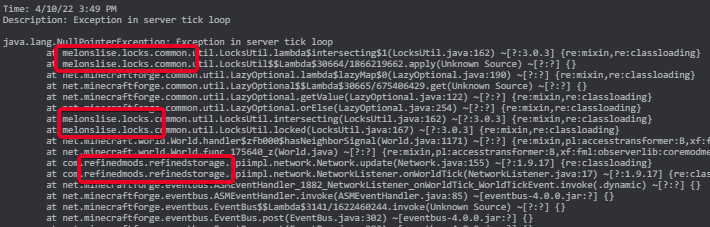
what made it crash?
last parcel
 hidden spruce
?
last parcel
look at stuff in red boxes. report the issue to those mods
hidden spruce
did you give it more ram
pine rapids
textClipping?
Oh... yeah you're a tad hosed
java.lang.IllegalStateException: GLFW error before init: [0x10008]Cocoa: Failed to find service port for display
This is a Mac issue that LWJGL hasn't been updated to fix yet
Nothing you can do on the user end
It does, this was caused by Apple updating their graphics subsystem without backwards compatibility
Windows or Linux, either one should work fine
It's not mods failing here, it's Minecraft's own code
last parcel
working before doesnt change it not working now
Reason:
Certain versions of Forge (1.13 up to 1.16.5) are not compatible with M1 Mac due to Apple removing support for methods used by Forge. This would need to be fixed by Apple
Fix: Use a Forge version below 1.13 or above 1.16.5.
 zenith stump
can someone please help?
pine rapids
...what am I looking at here? What's going wrong?
zenith stump
im trying to make my own modpack, but i always get exit code 1 and -1
pine rapids
?mc-launcherlog
golden muskBOT
How to get the launcher log
- Right click a profile.
- Select
Open Folder - Go back two folders.
- Open the
Installfolder. - Drag the
launcher_log.txtinto discord.
zenith stump
pine rapids
Are you using JEI or REI?
zenith stump
uh, both
pine rapids
That's not how it works
They both do the same thing
What's crashing you is JEI and an REI extension that provides JEIs API to plugins trying to provide the same classes
zenith stump
i removed REI now, i'll try to start
pine rapids
Remove REI Compatibility Workaround too
pine rapids
Provide a fresh launcher_log.txt please
zenith stump
pine rapids
Issue with Radium and/or Blueprint
zenith stump
how do u see that? mabye so i cann see it too'
pine rapids
?mc-logs
golden muskBOT
Sending logs for support.
- Right-click the modpack profile icon OR click the button in the modpack profile.
- Click
Open Folder. - Open the
logsfolder. - Drag and drop the FILE named
latestORdebuginto discord.
last parcel
?projectissue
golden muskBOT
Please visit the project page for the content you posted about and look for a way to contact the developer.
Somewhere on the page there is usually a method of contact. Look for one of the following things:
Issuestab like the image below.- Discord link.
- Twitter link.
- Comments section below the project.
If no contact method exists you will either have to remove the project or find a solution on your own.
pine rapids
zenith stump
its the same for me
That error is basically useless for identifying the actual problem, and unless you know the basics of Java you're going to have a hard time reading stacktraces
zenith stump
pine rapids
That error is basically useless for identifying the actual problem, and unless y...
then why don't u help me then? pliz
pine rapids
I did?
pine rapids
pine rapids
Issue with Radium and/or Blueprint
.
zenith stump
it didn't work. i said that. i removed the 2 mods
last parcel
then send another log
wild jewel
zenith stump
it didn't work. i said that. i removed the 2 mods
Show where you said it, I can't find it.
zenith stump
wild jewel
Show where you said it, I can't find it.
its my bad again. sorry, i thought i said it
last parcel
also, no one here is required to help you. might wanna check that attitude you've got or no one will.
zenith stump
im so sorry guys. i really appriciate all help
just been trying to figure it out for a week
pine rapids
zenith stump
it didn't work. i said that. i removed the 2 mods
You said that to a different issue... JEI/REI... you did NOT say it to Radium/Blueprint
zenith stump
pine rapids
You said that to a different issue... JEI/REI... you did NOT say it to Radium/Bl...
im sorry, i removed them, but it didn't help
pine rapids
Hmm, this is getting annoying. Going to need a fresh launcher log again
distant stratus
if anyone has a minute and would be willing to help im having a mod loading issue with my server. I ran the modpack in singleplayer and it works fine, but it gives me issues when launching a server, i made sure the server is the right version and the forge is the right version, not sure what to do now. its only 7 mods giving me the issue, i'd like to fix them instead of removing them if possible
thats the crash report
pine rapids
This says you still have Radium and Blueprint installed
pine rapids
distant stratus
Try removing Randompatches
distant stratus
pine rapids
Try removing Randompatches
same thing, same 7 mods
wild jewel
It is the same log
distant stratus
no its a different one
wild jewel
Look at the file names
distant stratus
wait wtf, hang on
zenith stump
i removed the other mods, but i can't find randompatches
quasi hinge
That wasn't for you
distant stratus
ur right my bad, sorry
distant stratus
pine rapids
This still shows randompatches
there u go, sorry
pine rapids
zenith stump
i removed the other mods, but i can't find randompatches
Your issue was Radium and/or Blueprint, not RandomPatches
pine rapids
distant stratus
there u go, sorry
Gross EntityCulling mod is poorly made and won't work on servers
zenith stump
i see now. sorry
distant stratus
pine rapids
Gross EntityCulling mod is poorly made and won't work on servers
weird
 sullen bloom
Exception in thread "main" java.lang.IllegalAccessError: class cpw.mods.modlauncher.SecureJarHandler (in unnamed module @0x7ff95560) cannot access class sun.security.util.ManifestEntryVerifier (in module java.base) because module java.base does not export sun.security.util to unnamed module @0x7ff95560 at cpw.mods.modlauncher.SecureJarHandler.lambda$static$1(SecureJarHandler.java:45) at cpw.mods.modlauncher.api.LamdbaExceptionUtils.uncheck(LamdbaExceptionUtils.java:95) at cpw.mods.modlauncher.SecureJarHandler.<clinit>(SecureJarHandler.java:45) at cpw.mods.modlauncher.Launcher.lambda$new$6(Launcher.java:55) at java.base/java.util.concurrent.ConcurrentHashMap.computeIfAbsent(ConcurrentHashMap.java:1708) at cpw.mods.modlauncher.api.TypesafeMap.computeIfAbsent(TypesafeMap.java:52) at cpw.mods.modlauncher.api.TypesafeMap.computeIfAbsent(TypesafeMap.java:47) at cpw.mods.modlauncher.Environment.computePropertyIfAbsent(Environment.java:62) at cpw.mods.modlauncher.Launcher.<init>(Launcher.java:55) at cpw.mods.modlauncher.Launcher.main(Launcher.java:66) at net.minecraftforge.server.ServerMain$Runner.runLauncher(ServerMain.java:63) at net.minecraftforge.server.ServerMain$Runner.access$100(ServerMain.java:60) at net.minecraftforge.server.ServerMain.main(ServerMain.java:57)
Tried running an E6 server and got this, been looking online for a while and cant figure out whats going on to prevent the server from running.
zenith stump
pine rapids
Your issue was Radium and/or Blueprint, not RandomPatches
the game still don't work
pine rapids
zenith stump
the game still don't work
Then I'm going to need a fresh log again, and this time please make sure those mods are removed
zenith stump
pine rapids
Then I'm going to need a fresh log again, and this time please make sure those m...
they should be gone now
pine rapids
sullen bloom
`Exception in thread "main" java.lang.IllegalAccessError: class cpw.mods.modlaun...
What Forge and Java versions?
sullen bloom
1.16.5
pine rapids
zenith stump
they should be gone now
#📛︱rules 5
pine rapids
zenith stump
they should be gone now
Issue with Applied Energistics this time
pine rapids
sullen bloom
1.16.5
That is neither a Forge version nor a Java version
distant stratus
should i remove that random patches and entityculling from my client side too?
pine rapids
sullen bloom
forge-1.16.5-36.2.29
and the Java version?
sullen bloom
pine rapids
That is neither a Forge version nor a Java version
Java: (build 1.8.0_321-b07) Forge: forge-1.16.5-36.2.29
pine rapids
sullen bloom
Java: (build 1.8.0_321-b07) Forge: forge-1.16.5-36.2.29
This issue is supposed to be fixed on that Forge version, what?
zenith stump
pine rapids
distant stratus
should i remove that random patches and entityculling from my client side too?
If they aren't crashing your client and the server isn't rejecting you for not having them you should be fine
distant stratus
alrighty just making sure, gonna try joining the server now and see if it all works
pine rapids
zenith stump
Still seeing AE errors here
sullen bloom
Im genuinely stumped lemme try a diff modpack
zenith stump
i don't get that. i deleted it
sullen bloom
and see if its just this one
 pine pendant
can someone please help me with this still iam still figuring out whats wrong after 5 hours

if anybody is german please help
pine rapids
?owlogs please
golden muskBOT
<:overwolf:857375414002384916> How to get CurseForge App logs! <:overwolf:857375414002384916>
- Click the
Create logs zipin the menu. - Drag and drop the file it just made to this chat room to upload it.
- Wait for someone to look at it so they can help you.
pine pendant
distant stratus
pine rapids
If they aren't crashing your client and the server isn't rejecting you for not h...
"failed to synchronize registry data from server" when i tried to join, is that cause of the mods or something else?
zenith stump
pine rapids
pine pendant
Are you able to access this page in a browser? https://edge.forgecdn.net/files/2235/312/CrashLanding-1.1.3-1.6.4.zip It should download the zip and display nothing else
pine rapids
distant stratus
"failed to synchronize registry data from server" when i tried to join, is that ...
Might be, the error is a tad vague
pine rapids
zenith stump
Looks like an error with Biomes You'll Go
distant stratus
pine rapids
Might be, the error is a tad vague
the cmd also says "login payload for registry minecraft:block is using 77% of max allowed vanilla size" then a bunch of numbers and stuff and disconnects me
 pine pendant
pine rapids
Are you able to access this page in a browser? <https://edge.forgecdn.net/files/...
pine pendant
pine rapids
Are you able to access this page in a browser? <https://edge.forgecdn.net/files/...
what shoud i do with the zip??
pine rapids
I just wanted to know if it worked or not
pine pendant
it worked
 steep temple
Why is this stuck?
steep temple
steep temple
Why is this stuck?
?
pine pendant
pine rapids
I just wanted to know if it worked or not
it works now love ya ur the best thanks
pine rapids
steep temple
?
Could literally be anything with the info you've provided
 pine rapids
Have you tried restarting Curse and Overwolf?
pine rapids
Err... try reinstalling Curse
 autumn agate
how do i get in contact with the stalwart dungeons person?his nether keeper thing isnt spawnign anywhere
acoustic idol
!projectissue
golden muskBOT
Please visit the project page for the content you posted about and look for a way to contact the developer.
Somewhere on the page there is usually a method of contact. Look for one of the following things:
Issuestab like the image below.- Discord link.
- Twitter link.
- Comments section below the project.
If no contact method exists you will either have to remove the project or find a solution on your own.
autumn agate
yes ik but i have to make a twitch acc and i did it but it says i need to verify my emailbut i dont get no message to verify
acoustic idol
Dont think you need a twitch account to click a link on the site? They have a discord link on their project page
autumn agate
oh okay thx
 acoustic idol
Try adding the mod Connectivity to the client
distant stratus
as in looking up that mod on curseforge? or?
acoustic idol
yeah.
acoustic idol
!mc-logs send the client logs
golden muskBOT
Sending logs for support.
- Right-click the modpack profile icon OR click the button in the modpack profile.
- Click
Open Folder. - Open the
logsfolder. - Drag and drop the FILE named
latestORdebuginto discord.
acoustic idol
Also send the Servers latest.log as well
distant stratus
yessir, copied over all the mods directly from my client side
acoustic idol
Did you add anything to either the client or server?
 mighty geyser
distant stratus
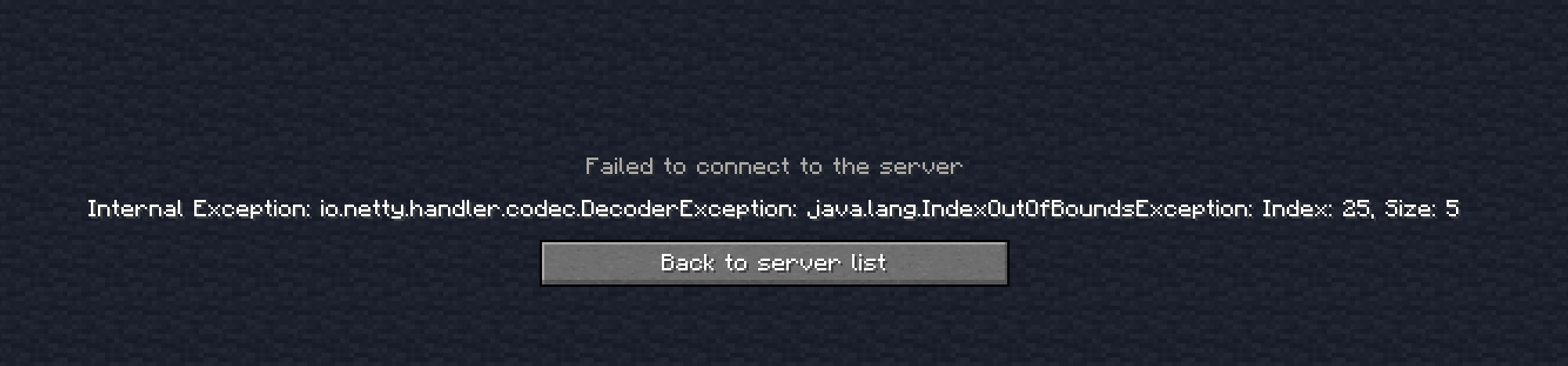
so when i try to connect to my server it says this
mighty geyser
distant stratus
so when i try to connect to my server it says this
this is the server, but what error does the client give?
acoustic idol
May have better luck asking the devs of the pack. They may know more about the issue with their pack.
distant stratus
well, i did add ore excavation and lucky blocks, but i made sure i downloaded the 1.16.5 version and added them to the server and client, and everything runs fine in singleplayer
i can try without them 2
acoustic idol
So you did add more then just connectivity....
distant stratus
mighty geyser
this is the server, but what error does the client give?
only thing i get from client is "failed to synchronize registry data from server"
mighty geyser
fave, how many mods u running?
distant stratus
acoustic idol
So you did add more then just connectivity....
sorry i thought u meant like added to just client or something, hang on i'll take em out and try
distant stratus
mighty geyser
fave, how many mods u running?
300 and some
mighty geyser
have u tried narowing it down
like, adding half your mods
then testing
then adding half of the half
and so on
acoustic idol
Its a premade pack, not a personal. Shouldnt be doing that
distant stratus
well it was a premade pack so i figured it'd be ok
acoustic idol
Best not to add, remove or change premades. It can/will cause issues
mighty geyser
ive been trying to find an issue for a month now
acoustic idol
For?
 distant stratus
yea i only added those 2 cause the pack didnt have any sort of veinminer, and veinminer stopped updating at 1.12
mighty geyser
this error has been haunting me since February
acoustic idol
mighty geyser
https://i.imgur.com/6YEBkwp.png
Send client and server latest.log
mighty geyser
acoustic idol
Send client and server latest.log
thats the thing, it gives no info on it.
acoustic idol
Mind if i have a look?
acoustic idol
Ok thats the client, now the server
mighty geyser
i have not run the server in a while, i have just been testing local connections
port forwarded lan
i can dig up an older one if that help
but it will have significantly different mods
acoustic idol
Lan and modded never go well together. Better to make a local server and connect to that
mighty geyser
yea ik, but the same error occurs both ways
distant stratus
kinda the same boat im in lol, i tested all these mods in singleplayer and it all worked, but the server kept crashing now i cant join it
acoustic idol
Have you tried asking the authors of the pack? they would know more about their content
mighty geyser
mine isnt premade, mine is custom
mighty geyser
distant stratus
kinda the same boat im in lol, i tested all these mods in singleplayer and it al...
your best bet is trial and error
acoustic idol
Custom: Need the logs
Premade: Ask the devs
distant stratus
i removed ore excavation and lucky blocks from client and server and it did the same thing, annoying
 final sentinel
tried downloading Litematica with forge, it constantly shows this when I try to launch it, could anyone help?
 mighty geyser
final sentinel
tried downloading Litematica with forge, it constantly shows this when I try to ...
mighty geyser
final sentinel
tried downloading Litematica with forge, it constantly shows this when I try to ...
litematica is a fabric mod
final sentinel
mighty geyser
litematica is a fabric mod
I used fabric, sorry typo
acoustic idol
distant stratus
i removed ore excavation and lucky blocks from client and server and it did the ...
Is the world of any importance?
distant stratus
acoustic idol
Is the world of any importance?
not at all, delete it and try again?
mighty geyser
final sentinel
I used fabric, sorry typo
logs?
final sentinel
1 sec
distant stratus
in hindsight i should of done that, didnt even cross my mind
final sentinel
 acoustic idol
!mc-logs
golden muskBOT
Sending logs for support.
- Right-click the modpack profile icon OR click the button in the modpack profile.
- Click
Open Folder. - Open the
logsfolder. - Drag and drop the FILE named
latestORdebuginto discord.
final sentinel
final sentinel
below that is just a red message saying Process crashed with exit code 1
golden muskBOT
Error/Exit codes are useless. Follow these steps so someone can actually help you.
- Right-click the modpack profile icon OR click the button in the modpack profile.
- Click
Open Folder. - Open the
logsfolder. - Drag and drop the FILE named
latestORdebuginto discord.
acoustic idol
Follow the bot please
final sentinel
alr
so the problem is that its a jar, so its not a folder
cannot open it in any way shape or form
final sentinel
im new to modding so its rlly confusing
 distant stratus
i deleted the world and tried again and it did the same thing
mighty geyser
litematica needs a library mod right?
acoustic idol
final sentinel
im new to modding so its rlly confusing
Thats not what was asked for. Go back one folder, Open the logs folder > Drag and drop the one called latest here.
Also why not just use the CurseForge app for this? Makes life easier
final sentinel
[14:25:08] [main/INFO]: Loading for game Minecraft 1.18.2
[14:25:08] [main/WARN]: Incomplete remapped file found! This means that the remapping process failed on the previous launch. If this persists, make sure to let us at Fabric know!
[14:25:08] [main/INFO]: Fabric is preparing JARs on first launch, this may take a few seconds...
final sentinel
acoustic idol
Also why not just use the CurseForge app for this? Makes life easier
curseforge makes me open a new world and does not allow me to launch mods on my other ones
final sentinel
acoustic idol
Are you talking about worlds in your .minecraft folder?
correct
final sentinel
final sentinel
[14:25:08] [main/INFO]: Loading for game Minecraft 1.18.2
[14:25:08] [main/WARN]...
this is the folder itself
acoustic idol
The cf app doesnt touch the .minecraft folder. You would need to move the worlds from there to the Custom profiles save folder
final sentinel
is there supposed to be a folder named Custom Profiles in the cf folder
wild jewel
No, it is Instances
acoustic idol
In where?
final sentinel
Instances folder
final sentinel
nope
acoustic idol
Click + Create Custom Profile in the CF app. Select the version of minecraft and the modloader needed for the world. Name the profile.
final sentinel
alright I created all of that
acoustic idol
Right click the profile picture and click Open Folder
final sentinel
done
acoustic idol
Open the saves folder. Put your world there
acoustic idol
Start the pack up once then, make a random world then close it. Then try adding your world
distant stratus
so i deleted the world and tried again and it said the same thing. anymore ideas?
acoustic idol
This is atm yeah?
distant stratus
yes, 6
final sentinel
there it is
acoustic idol
distant stratus
yes, 6
I have 0 clue, could try their discord and see if they have any ideas https://discord.com/invite/allthemods
final sentinel
I pasted my world into the saves folder, do I put Litematica into the mods folder now?
distant stratus
ah didnt know they had one, alrighty i'll give it a try, thanks for the help
acoustic idol
final sentinel
I pasted my world into the saves folder, do I put Litematica into the mods folde...
!mc-installmods Better to use the app to install the mods
golden muskBOT
How to install mods in CurseForge App.
- Click
+ Create Custom Profile - Name it, select the required Minecraft version, select the modloader & modloader version (usually the highest number), click
Create. - Click the profile icon.
- Click
Add More Content - Search and install the desired mods.
- Start the game!
How to install mods not on CurseForge.
- Right click the profile picture or Open the profile and click the Icon next to the play button.
- Click
Open Folder. - Drag the mod(s) into the
modsfolder. (Note: Some mods will require others, to run. Make sure to read the instructions for the mod!) - Start the game!
 acoustic idol
Step 3 of the first part is your starting point
acoustic idol
What mc version is this for?
final sentinel
1.18.2
acoustic idol
Screen shot how your searching in the app. I can see it.
final sentinel
 acoustic idol
Go back to your profile and screen shot the app
final sentinel
 acoustic idol
Close, but no. Right click the profile pic and click View Profile, then screen shot
final sentinel
 acoustic idol
Ah there it is, you made a Forge profile not a Fabric one. Litematica is a Fabric mod
final sentinel
ah
acoustic idol
Will have to make a new custom profile, and move your world again
steep temple
How to fix this eror ?
 acoustic idol
Need to do what the red box says.
steep temple
acoustic idol
Need to do what the red box says.
With me?
acoustic idol
yes,
Looks like you need to migrate your account. click the little link below for how. Its not something we can help you with either
steep temple
semi AccounT
acoustic idol
No idea what that means. You either own an account or you dont
wild jewel
What is a semi account?
steep temple
acoustic idol
No idea what that means. You either own an account or you dont
I do not have my account email
wild jewel
So it is not your account
steep temple
wild jewel
What is a semi account?
its limited mine acc
last parcel
did you buy the game or not
wild jewel
And that is against the TOS, you just lost all support
final sentinel
is it possible to soften the colors? im getting an eyebleed from this
 acoustic idol
Would need to ask the author of the mod that. No idea
wild jewel
What are we looking at?
steep temple
last parcel
did you buy the game or not
ok
last parcel
ok is not an answer
final sentinel
wild jewel
What are we looking at?
a schematic of a potato farm
steep temple
wild jewel
And that is against the TOS, you just lost all support
huh?
wild jewel
steep temple
huh?
Sharing accounts is not allowed.
If that is not what you are doing: explain what you are doing in a single message.
final sentinel
final sentinel
a schematic of a potato farm
all the seeds are creating an insane contrast


 steep temple
If so, why does minecraft luncher have the mojang login option?
wild jewel
steep temple
If so, why does minecraft luncher have the mojang login option?
Do you own an account: yes or no
steep temple
wild jewel
Sharing accounts is not allowed.
If that is not what you are doing: explain what...
no
steep temple
my acc is not full acses
steep temple
wild jewel
Then it is best to stop talking per <#777323206884327484> 8
ok ok
acoustic idol
Take it up with microsoft then, not gunna get support here till you own a legit account
wild jewel
And a timeout for breaking rule 5 as well.
 flat pine
I need help I’m trying to create a server on my MacOS
For the Modpack All the mods 7 for me and my friends but idk how
last parcel
I believe the pack comes with an installer. if you dont understand how to use it you should ask the pack devs
flat pine
last parcel
I believe the pack comes with an installer. if you dont understand how to use it...
Where can I contact the pack devs
last parcel
?projectinfo and dont ping me
flat pine
Srry
last parcel
?projectissue
golden muskBOT
Please visit the project page for the content you posted about and look for a way to contact the developer.
Somewhere on the page there is usually a method of contact. Look for one of the following things:
Issuestab like the image below.- Discord link.
- Twitter link.
- Comments section below the project.
If no contact method exists you will either have to remove the project or find a solution on your own.
flat pine
No help in issues :/
wild jewel
Then try their discord and wait
 cunning timber
Hi there lads, i am having issues with my forge server, it is not booting up (was working fine yesterday) also i have been trying to fix it for hours and i am completely loss right now. Someone please help me
I can provide the server panel logs
distant stratus
@ YOYOK9 just figured i'd let u know i got it figured out finally, idk what the issue was before but i deleted that server and i downloaded a server file directly from the atm6 page on curseforge and it worked fine, even with lucky blocks lol
 meager lagoon
Hi there! I'm currently playing with a small custom pack I made with a friend for 1.16.5 and we're running into a game crash with the ender dragon. I have a crash report I just don't know how to read it to identify what's causing the issue. Would anyone here be willing to take a peak?
acoustic idol
Dont see any crashes in this log. Are you playing on a server?
meager lagoon
I posted the wrong log my bad!
There we go! xP
I think I've identified it as Endergetic Expansion but I just dunno if its something easy I can fix or more technical
acoustic idol
Have you tried asking that mods dev?
Also have you built anything important in the end?
meager lagoon
Nah just finished the dragon fight and as its disintegrating it crashes when the XP balls start raining down it freezes and crashes
acoustic idol
Did you remove the Endergetic mod?
cunning timber
Anyone know how can i fix this?
All of my servers are giving this error and i can't launch any of my forge servers.
I am literally exhausted trying to fix this for hours and i am really desperate...
meager lagoon
acoustic idol
Did you remove the Endergetic mod?
I did and it did fix it, like I said I was just hoping it was an obvious error like a missing requirement or a conflict I could resolve to keep going with EE as I really like the mod.
acoustic idol
If you want to use the mod, report the error to the dev.
meager lagoon
Sounds good, thanks
acoustic idol
cunning timber
Anyone know how can i fix this?
!java Wrong java version for 1.16.5. Need Java 8
golden muskBOT
Servers require specific java version, pick yours here!
Java 8 (for MC versions 1.16.5 and below)
Java 16 (for MC version 1.17)
Java 17 (for MC version 1.18)
Other operating systems and versions
cunning timber
acoustic idol
!java Wrong java version for 1.16.5. Need Java 8
I guess i am using java 8 ?
Let me try that link
acoustic idol
From the look of your log your currently using Java 18
cunning timber
@acoustic idol anything else i have to change here or i just click next?
 acoustic idol
Change the 2 with the ❌ to match the top 2
cunning timber
Okeey waiiit
pine rapids
Err... if it's just a JRE and not a JDK don't select the JAVA_HOME one
cunning timber
AAAAAAAAAAAAAAAAAAAAAAAAAAAAAAAA
IT IS WORKIIING
OH MY GOD
THANK YOU SO MUCH @acoustic idol
cunning timber
I am so relieved damn
acoustic idol
Dont need to keep pining me 🤦
 dusky junco
help ii keep getting installation error
acoustic idol
dusky junco
help ii keep getting installation error
#📛︱rules 4, pick a channel and be patient.
dusky junco
acoustic idol
<#777323206884327484> 4, pick a channel and be patient.
but i didnt spam
the 2 support channels seemed dead so i said it in general
acoustic idol
same message in 3 different channels. thats spamming
dusky junco
i only said it once
acoustic idol
Rule still stands
Even states it in the rule
Spam will be deleted, continuing to spam will result in a kick or ban. This includes posting the same thing repeatedly to multiple rooms. This includes randomly posting memes/content not related to a conversation.
last parcel
Arguing gets you a 1 hour mute. Try again in an hour.
 solar raptor
[17:03:41] [main/INFO]: [java.lang.ThreadGroup:uncaughtException:1052]: at cpw.mods.modlauncher.Launcher.main(Launcher.java:66) what does this error mean? its at the bottom of my log
acoustic idol
Send the whole log, snippets are useless
solar raptor
acoustic idol
!mc-installfix try this
golden muskBOT
This is NOT instructions for Repair Profile! They are NOT the same! You need to do this!
- Click on the Minecraft Tab on the Left side of the CurseForge App.
- Click button next to the
Create Custom Profileoption. - Click
Repair Installationoption. - Play game.
NOTE: You will not lose any modpacks or worlds!
solar raptor
my other modpacks still work
acoustic idol
Still try that tho