#👽︱game-support
1 messages · Page 207 of 1

 coarse nest
And it no longer shows the waiting to upload?
 autumn agate
 coarse nest
Yay.
Does the start.command work now?
 coarse nest
Have you read the read me.txt?
autumn agate
#!/bin/bash
cd "$(dirname "$0")"
exec java -Xmx5G -Xms5G -jar forge_erver.jar nogui
oops
I fixed the forge_server thing
and noow its doing this

 waxen pine
if this is minecraft 1.7.10 based you must use java 8
waxen pine
open command prompt and type
java -version
autumn agate
for the crazy craft thing
.
never mind
I am an idiotic imbecile
How do I download the older version of java?
waxen pine
?java
 golden muskBOT
Servers require specific java version, pick yours here!
Java 8 (for MC versions 1.16.5 and below)
Java 16 (for MC version 1.17)
Java 17 (for MC version 1.18)
Other operating systems and versions
waxen pine
the java 8 link goes to a version that works
waxen pine
actually wait i bet it is auto doing the windows one rofl
autumn agate
yeah
 gleaming hazel

 hushed sparrow
anyone know what error code -1 means on minecraft?
golden muskBOT
Error/Exit codes are useless. Follow these steps so someone can actually help you.
- Right-click the modpack profile icon OR click the
 button in the modpack profile.
 - Click

Open Folder. - Open the
logsfolder. - Drag and drop the FILE named
latestORdebuginto discord.
waxen pine
error codes are useless - provide log(s)
golden muskBOT
Error/Exit codes are useless. Follow these steps so someone can actually help you.
- Right-click the modpack profile icon OR click the button in the modpack profile.
- Click
Open Folder. - Open the
logsfolder. - Drag and drop the FILE named
latestORdebuginto discord.
waxen pine
it must be java 8 - 64 bit version - OLDER than v321
v312 works - don't confuse them
autumn agate
Is it on the oracle website?
hushed sparrow
allright
gleaming hazel
my java is 32-bit and it works
gleaming hazel
oh
gleaming hazel
waxen pine
but nighthawk is this a modpack you made or one off CF
its a mod I put in to a modpack
waxen pine
you have things which are unhappy there are old outdated library mods
or something like that.
gleaming hazel
oh
waxen pine
it's old minecraft - you may need an archeologist 😉
gleaming hazel
waxen pine
it's old minecraft - you may need an archeologist 😉
what is
waxen pine
version 1.7.10 is a fairly old version
waxen pine
uninstall?
waxen pine
it would be easiest for you
undownload is not a word and not the same as uninstalling something if it was 😉
gleaming hazel
will Java 8 mods work from the link you sent me?
autumn agate
ok I've downloaded it
waxen pine
nighthawk your issue is most likely mods you downloaded causing versionn issues.
gleaming hazel
waxen pine
nighthawk your issue is most likely mods you downloaded causing versionn issues.
oh
autumn agate
So if I were to run the server it should work?
waxen pine
soy is using a server so it's not using the proper java that the curseforge app has and uses with client
yes
waxen pine
post the latest.log file
 waxen pine
can you open a command prompt?
autumn agate
ye
waxen pine
open one - type
java -version
to make sure we're good there
autumn agate
it still says 17
waxen pine
ding
autumn agate
I thought I uninstalled it
waxen pine
this is the issue though, once you can open a prompt and the java -version is 8 v312 you are good.
and any changed you do requires the prompt window to close and open again to change the return on java -version
autumn agate
So how do I uninstall java completely
For the java 8 to set?
sudo rm -fr /Library/Internet\ Plug-Ins/JavaAppletPlugin.plugin
sudo rm -fr /Library/PreferencePanes/JavaControlPanel.prefPane
sudo rm -fr ~/Library/Application\ Support/Oracle/Java
Would that work>
coarse nest
If its an orcale version of java then it will, if its not that will not
 coarse nest
Think so
When you install the version Briar linked make sure to tick 'Set Java Home Variable' too
 waxen pine
yeah if you know how to do this stuff then you can do like chief says there and set your "osx java home environmental variable" to the 8
https://docs.daml.com/getting-started/path-variables.html
i think this? i'm not very osx literate
just setting PATH may do it
autumn agate
easy are you proud of me
 coarse nest
Err. almost.
You need 1.8.0_312,. not 322
waxen pine
hah oops. so close. you have the tools though just fix with diff version
autumn agate
it works
autumn agate
waxen pine
hah oops. so close. you have the tools though just fix with diff version
Thank you
 wheat apex
Prob a dumb question but why doesn't it ask me if I wanna backup my world before loading into it like it used to? :/
autumn agate
waxen pine
hah oops. so close. you have the tools though just fix with diff version
sorry one more question
How am I suppossed to run jar files with java
if I no longer have java and jusst have temurin
waxen pine
java -Xmx6G -jar forge.jar nogui
autumn agate
 waxen pine
is that launching your server?
autumn agate
no
the server
works
I am trying to install a different thing
and I can't get the forge installer.jar to open anymore
waxen pine
what MC versioin is the forge installer out of curiosity? java version should not matter though
 waxen pine
hmph weird
autumn agate
should I just redownload the jar file
waxen pine
try reinstalling the java versoin and see if fixes your paths... i'm in over my head on osx - perhaps someone else knows
waxen pine
wouldn't hurt
waxen pine
nah
 autumn agate
waxen pine
nah
autumn agate
waxen pine
nah
Is it the same thing?
yeah I reinstalled everything
it still says that the javavirtualmachines dont exist

 dreamy eagle
I can't do full screen, when I press F11 Minecraft closes and there is an error, can someone help me please?

 stoic mica
I keep getting these EXCEPTION_ACCESS_VIOLATION (0xc0000005) at pc=0x00007ffde5fbcae1, pid=15828, tid=15652
JRE version: OpenJDK Runtime Environment Microsoft-28056 (17.0.1+12) (build 17.0.1+12-LTS)
even if I've actually set the game to use Java 8, not the OpenJDK. Curseforge reinstalls the openJDK if I try to get rid of it
problem seems fairly exclusive to MC 1.18, still testing
 obsidian plover
Trying to put this mod https://www.curseforge.com/minecraft/mc-mods/narutomod/download (Naruto mod) in a server i have with my friends and when i put the mod my server wont open
is a paid server*
 wild jewel
Server logs please
wild jewel
!projectissue Mod is broken
golden muskBOT
Please visit the project page for the content you posted about and look for a way to contact the developer.
Somewhere on the page there is usually a method of contact. Look for one of the following things:
Issuestab like the image below.- Discord link.
- Twitter link.
- Comments section below the project.
If no contact method exists you will either have to remove the project or find a solution on your own.
 wild jewel
Then read the rest of the message
 tired gull
Can someone pls tell me why the hell my game keeps crashing when I want to create a new world? It just says "saving world" and kicking me back to the launcher...
 tough frost
Any help with this? my java config is fine so is it a issue with the mods


 rare python
tough frost
Any help with this? my java config is fine so is it a issue with the mods
rare python
tough frost
Any help with this? my java config is fine so is it a issue with the mods
when i had this issue it was because a mod that was from a different version was added, take a look at the ones in that folder that dont have version labels on them and make sure they are compatible with both your mc version and forge
waxen pine
tough frost
Any help with this? my java config is fine so is it a issue with the mods
?mc-logs
golden muskBOT
Sending logs for support.
- Right-click the modpack profile icon OR click the button in the modpack profile.
- Click
Open Folder. - Open the
logsfolder. - Drag and drop the FILE named
latestORdebuginto discord.
tough frost
Any help?
tough frost
rare python
when i had this issue it was because a mod that was from a different version was...
ive given this a try
rare python
try re-adding that llibrary mod
tough frost
ok
waxen pine
tough frost
Any help?
Better foliage
golden muskBOT
Hey there, it is Curseforge, not "Cursed forge"
 agile frost
Can someone please help me?
golden muskBOT
╰( ͡° ͜ʖ ͡° )つ──☆*:・゚ *˜”*°•.˜”*°• Many Help •°*”˜.•°*”˜* <:curselit:796985620550385705>
Please provide a description of your issue with as much detail as possible. If you have an issue with a mod or modpack, tell us the name. Explain what you can see happening. Be specific!
 Tell us what is happening, we already know it "doesn't work".
Avoid using words like "it", tell us exactly what "it" is.
Don't assume anyone knows what you are talking about, be specific.
Tell us what you expected to happen.
Provide screenshots or video if possible.
Provide a log if possible. ?mc-log
tough frost
waxen pine
Better foliage
Thanks
agile frost
@tough frost
waxen pine
 weak onyx
https://paste.ee/p/04vvh
weak onyx
https://paste.ee/p/04vvh
net.minecraftforge.fml.ModLoadingException: Mod §ejeed§r only supports §3jei§r §o9.3.1 or above§r §7Currently, §3jei§r§7 is §o9.2.1.69
agile frost
Can I ask u a question rq?
tough frost
yes?
weak onyx
waxen pine
net.minecraftforge.fml.ModLoadingException: Mod §ejeed§r only supports §3jei§r §...
??
wild jewel
agile frost
What do I do if my Mod wont let me rejoin
- You don't break rule 5
- You should have started with that
agile frost
wild jewel
1. You don't break rule 5
2. You should have started with that
I didnt read the rules yet
I just joined
wild jewel
agile frost
I didnt read the rules yet
Then you better do that as you agreed to them.
Will give you an hour to do so
rare python
weak onyx
??
your JEI is outdated
 quasi hinge
There was even a message about jei being out of date in the fabric server
 hidden spruce
ive got this weird problem where it doesnt generate the same biome anymore
 wild jewel
Did you change mods after playing the first time?
hidden spruce
im developing a pack and adding mods
but i didnt add biome mods
i still got byg
ice and fire seems to generate structures while i disabled the structures function
wild jewel
If you added mods then things can change.
And that is an issue for ice and fire
hidden spruce
ill try it without ice and fire
ok its weird
i tpd somewhere and it does actually generate byg biomes
i generated the same seed and the beaches were the same but the forest became a swamp
wild jewel
What is "byg" ? That is not an English word
autumn agate
Do you know why this happens timtower?
 autumn agate
autumn agate
autumn agate
Thats inside the file
wild jewel
autumn agate
Do you know why this happens timtower?
Probably because it does not exist
autumn agate
Yes
wild jewel
!mc-installfix
golden muskBOT
This is NOT instructions for Repair Profile! They are NOT the same! You need to do this!
- Click on the Minecraft Tab on the Left side of the CurseForge App.
- Click button next to the
Create Custom Profileoption. - Click

Repair Installationoption. - Play game.
NOTE: You will not lose any modpacks or worlds!
 amber smelt
So I've got an Intel© UHD Graphics 630 , and My PC doesn't show an Update
wild jewel
autumn agate
But how do i get it back
Well, as I have no context: no idea
autumn agate
So you cant get it back?
wild jewel
I have no idea what the context is, when it is happening, or what I am even looking at
autumn agate
Oh sorry
That error comes up when I double click the forge installer.jar file
my version is
 wild jewel
Why are you trying to do that?
wild jewel
I asked because if you were trying to install a client then I would suggest curseforge, but as you are doing server: no idea
autumn agate
is there a way to repair java?
because everything works except running/opening jar files
or the jar file that install things
wild jewel
On windows I know how, but what I see are not from windows
wild jewel
Try running it through a terminal
autumn agate
alr
 dim jungle
Ok so when i load up the game and press play on the launcher it shows this

I checked the crash reports or whatever and there is nothing there for this one
autumn agate
it says this
 wild jewel
You running it from the correct folder?
autumn agate
I have the jar file on the desktop
wild jewel
And where is the terminal when you run the command?
autumn agate
elaborate?
wild jewel
Show the full terminal window
autumn agate
I assume you want this
 autumn agate
 wild jewel
That first part is what I am looking for, you are throwing random strings here that are unusable
autumn agate
Then I don't understand what you're looking for
wild jewel
The part you blurred out, that says /Users/whatever/location
autumn agate
it says my name
wild jewel
And probably a folder, or a ~/name
autumn agate
it says myname@macbook-pro ~ %
wild jewel
Is that the desktop folder?
autumn agate
I dont understand what you're asking
wild jewel
Your terminal needs to be in the desktop folder as well in order to use the file that is there
autumn agate
how do I make the terminal a desktop folder then
because I am sure that it's not on my desktop
wild jewel
you do cd Desktop or what that folder might be called
autumn agate
allr
do I do ls
oh
wait
never mind
I see what you were doing
It works
thank you
Sorry if I am being annoying but.
am I doing this command right
to get the mod folder etc/basis of server hosting
java -jar forge-1.12.2-14.23.5.2860.jar

It gives me this error
wild jewel
!java
golden muskBOT
Servers require specific java version, pick yours here!
Java 8 (for MC versions 1.16.5 and below)
Java 16 (for MC version 1.17)
Java 17 (for MC version 1.18)
Other operating systems and versions
autumn agate
I have java 8 downloaded.
wait what
never mind
I guess
It says now I have 17.0.2
wild jewel
Now you need to change the java to the full path to the java executable
wild jewel
Also: try to write full sentences
hidden spruce
how to copy buildings and paste them in other world?
dim jungle
Ok so when i load up the game and press play on the launcher it shows this
Image
I checked the crash reports or whatever and there is nothing there for this one
 waxen pine
?mc-logs
golden muskBOT
Sending logs for support.
- Right-click the modpack profile icon OR click the button in the modpack profile.
- Click
Open Folder. - Open the
logsfolder. - Drag and drop the FILE named
latestORdebuginto discord.
waxen pine
hm assuming this is a custom test profile you made
may not be loading some required library (dependency) mods?
dim jungle
wait so what do i have to delete
waxen pine
no i'm guessing that you are missing required library mods
do you have "codechicken lib"?
 naive flint
in sky factory 4 why do i get lag spikes every 3-4 seconds
 uneven bolt
Ok I asked in the discord server for this modpack but I have a feeling like its not on their end because the modpack did not update and it is now crashing on startup. I have 2 LITV2 servers and they are both crashing on startup and they did not do this before
https://mclo.gs/xbmQxoR
Forge server log [#xbmQxoR] - mclo.gs
[13Feb2022 12:43:35.143] [main/ERROR] [mixin/]: Mixin config unionlib.mixins.json does not specify "minVersion" property
Also yes I know "Aternos bad" I know I have two paid servers but they are running other things and this is just a small server for my friends and normally it runs fine at 20 TPS and not even using all of its memory
2090 lines | 1 error
uneven bolt
naive flint
in sky factory 4 why do i get lag spikes every 3-4 seconds
I had this problem before try restarting your computer it worked for me
waxen pine
naive flint
in sky factory 4 why do i get lag spikes every 3-4 seconds
do you have lots of any chisels and bits blocks, enderio or mekanism pipes/conduits?
waxen pine
uneven bolt
Ok I asked in the discord server for this modpack but I have a feeling like its ...
java 8 version 322 doesn't work. java made breaking changes with v321 onwards
uneven bolt
waxen pine
do you have lots of any chisels and bits blocks, enderio or mekanism pipes/condu...
none of those mods are on this modpack
waxen pine
sigh... you multiposted
waxen pine
because of the automation you wind up doing in sf4 often it's some spamming of laggy blocks like the above, or accumulating 100,000's of items clogged up in pipes or something
uneven bolt
Sorry but I did not know that there was a minecraft channel thats why but ill delete my other message
because I saw someone with a green roll so I checked rolls and saw minecraft
role*
uneven bolt
waxen pine
because of the automation you wind up doing in sf4 often it's some spamming of l...
Yeah this modpack has 0 automation
waxen pine
i was responding to a different person
 balmy fern
I have a question about a modpack I'm trying to load. The person who gave me instructions It will not play in my launcher :(. I am new this is my first time trying curseforge. Also I have a mid 2012 Macbook Pro if this helps.
Their instructions were: "You will need to download All the mods 7 (ATM7) in curseforge. You will still use the same IP. There is a lot more mods including claiming land. Which was a big one i have been trying to include. I will add a link to check out the modlist.
you need to do the version 0.2.34"
I don't know how to get that version?
Maybe someone can walk me through it in a voice chat?
coarse nest
The particular version of the modpack should not matter
Do you have the curseforge app?
coarse nest
!mc-installpack
golden muskBOT
How to install modpacks with the search features in app.
- Open the

Minecraftsection of the app. - Click the top search bar where it says
Search for modpacksOR Click theBrowse ModpacksTab. - Find the Modpack you want to install and click install on it.
- Wait for CurseForge app to download and unpack all the required files.
- Once finished, click
Play!
How to install modpacks from a Export. (Custom/Private/Site downloaded Modpack zip)
- Get CurseForge App if you don't have it, use
!downloadfor a link. - Get the exported modpack from CurseForge or someone else,
!mc-packshareexplains how to make them. - Open the
Minecraftsection of the app. - Click

Create Custom Profile - Click the
Importoption. - Find the file you just downloaded in step 2 and select it.
- CurseForge app will now attempt to download and unpack the modpack. If it fails, try steps 4-6 again.
- Once finished, click
Play!
 coarse nest
Is there an error? If so, send a screenshot of it
balmy fern
ok
bear with me a sec my computer is a tad slow 🙂
Do I adjust anything in the modded launcher? just play?
coarse nest
Just play


 somber quest
I think Im supposed to put this here
coarse nest
balmy fern
<@!812094192133996624>
Ah, you are trying to join a server that needs that modpack version
Click on the modpacks icon then the three dots to the right by the play button
balmy fern
When I searched for the modpack I only saw one version
coarse nest
Select "change version" and choose the one you want
coarse nest
somber quest
I think Im supposed to put this here
The entire thing please, not a small section
coarse nest
coarse nest
Click on the modpacks icon then the three dots to the right by the play button
Starry: ^^
coarse nest
Thats not a modded minecraft instance, its vanilla
!mc-installfix try tmis JustSwitch
golden muskBOT
This is NOT instructions for Repair Profile! They are NOT the same! You need to do this!
- Click on the Minecraft Tab on the Left side of the CurseForge App.
- Click button next to the
Create Custom Profileoption. - Click
Repair Installationoption. - Play game.
NOTE: You will not lose any modpacks or worlds!
 balmy fern
@coarse nest
 dim jungle
somber quest
dim jungle
somber quest
Its still crashing
waxen pine
dim jungle
i think this is what you need? old minecraft is old
https://www.curseforge.com/minecraft/mc-mods/codechickencore/files/3293859
balmy fern
@coarse nest ok I got the correct modpack version and pressed play, and this happened
 waxen pine
looks like none of your dependency mods are auto-installing
you read the message(s) right?
 junior cloud
Could someone help me deciphering what's going on with my minecraft? Every time I open "Graphics" The game closes and opens this error:

I'm using 1.16.5 and I'm creating a modpack
waxen pine
somber quest
heres the report
remove or downgrade magnesium to an older version
somber quest
how do I do that
waxen pine
in the app profile - click on the mod - find the versions tab
somber quest
does the version matter
waxen pine
yes - versions mean something has changed
somber quest
alr
waxen pine
if you want an easier time with all of this you can install a premade modpack that someone else has already figured out and put together
somber quest
yeah thats what I downloaded
waxen pine
then whoever made this modpack didn't do a good job
 waxen pine
oh i'm sorry i was looking at someone else's log who posted at the same time
autumn agate
someone please help....
I messed with my window firewall settings now when ever I try to get into Minecraft forge ONLY WITH MODS IN MY MODS FOLDER it says this crash may be caused by an invalid Java Runtime configuration. Check any custom configuration settings. Exit code: 1.
I have the log to..
golden muskBOT
Error/Exit codes are useless. Follow these steps so someone can actually help you.
- Right-click the modpack profile icon OR click the button in the modpack profile.
- Click
Open Folder. - Open the
logsfolder. - Drag and drop the FILE named
latestORdebuginto discord.
somber quest
waxen pine
oh i'm sorry i was looking at someone else's log who posted at the same time
np
autumn agate
It will not let me into minecraft forge with mods in my folder after messing with windows firewall settings
waxen pine
somber quest
heres the pack
that's a weird one. try updating your graphics card drivers if there is an update available
waxen pine
autumn agate
It will not let me into minecraft forge with mods in my folder after messing wit...
restart your computer and try again. if doesn't work post your log file
autumn agate
Oh sorry! wont do it again
waxen pine
hm this is vanilla launcher and it's doing all kinds of stuff
optifine's in there
and vivecraft
only 2GB of memory is allocated
what version of forge are you actually trying to launch?
waxen pine
monk
somber quest
k sry abt that
waxen pine
justswitch try updating your graphics card drivers if they have an update, but other than that IDK - fabric has a LOT of issues since it's a patchwork
somber quest
alr thx for the help
amber smelt
My game keeps crashing whenever I want to join my world
 autumn agate
Never mind i got it. It was a stupid mistake
waxen pine
 vestal flint
don't use that much memory. more does not = faster, it's not how java works really. set it down to 8gb and try again
vestal flint
alr
 rugged olive
when will there be an update to fix tinkers construct on skyfactory4
wild jewel
Ask them?
rugged olive
idk how to who do i ask
vestal flint
waiting to see what happens
wild jewel
rugged olive
idk how to who do i ask
!projectissue
golden muskBOT
Please visit the project page for the content you posted about and look for a way to contact the developer.
Somewhere on the page there is usually a method of contact. Look for one of the following things:
Issuestab like the image below.- Discord link.
- Twitter link.
- Comments section below the project.
If no contact method exists you will either have to remove the project or find a solution on your own.
naive flint
waxen pine
do you have lots of any chisels and bits blocks, enderio or mekanism pipes/condu...
im at like the start
amber smelt
My game keeps crashing whenever I want to join a world

 grave kelp
ok so i need help with getting my forge minecraft server working. is this the right place to ask?
theres something wrong with getting the server loaded
it wont work
dim jungle
Yo whatsup with not enough items on 1.7.10 its not working and it keeps wanting to crash my game
i had 41 mods and i figured out it was the thing causing the crashing but how do i fix it
waxen pine
grave kelp
ok so i need help with getting my forge minecraft server working. is this the ri...
you can - there are also mc specific channels hidden behind role in #786424115535544350
waxen pine
dim jungle
i had 41 mods and i figured out it was the thing causing the crashing but how do...
old mods, old minecraft version. see if they offer project support anymore or if just dead, try changing to older mod versions, look at old 1.7.10 modpacks that do work and look at the exact file versions they use
waxen pine
?mc-logs
golden muskBOT
Sending logs for support.
- Right-click the modpack profile icon OR click the button in the modpack profile.
- Click
Open Folder. - Open the
logsfolder. - Drag and drop the FILE named
latestORdebuginto discord.
 hallow furnace
try adding -XX:+IgnoreUnrecognizedVMOptions to your java arguments in curseforge minecraft settings
waxen pine
post the latest.log file you have immediately after that - see above auto-reply
?mc-logs
golden muskBOT
Sending logs for support.
- Right-click the modpack profile icon OR click the button in the modpack profile.
- Click
Open Folder. - Open the
logsfolder. - Drag and drop the FILE named
latestORdebuginto discord.
waxen pine
ah you are not using the Curseforge launcher app?
you will still have a latest.log file in the 'logs' folder
dim jungle
waxen pine
old mods, old minecraft version. see if they offer project support anymore or i...
i’ve looked everywhere tried every old version is there any alternatives or something because it just doesn’t wanna work
 analog drum
Wait does the better minecraft modpack work?? I just downloaded the launcher and the modpack is downloading rn
waxen pine
follow the instructions for getting your latest.log file then? they're pretty clear.
waxen pine
dim jungle
i’ve looked everywhere tried every old version is there any alternatives or some...
idk. it's old.
analog drum
so does "better minecraft" work? it's downloading rn and if it doesnt work i dont want it on my pc
 acoustic idol
Sure?
analog drum
nice
quasi hinge
It’s worked for me, but it wasn’t my kind of modpack
analog drum
Ah ok
acoustic idol
Are you using just Forge or curseforge? They are not the same thing
quasi hinge
I didn’t play it very much when I downloaded it, so I didn’t see much of what it had, but I need my machines and weapons of mass destruction
golden muskBOT
Wording is important!
Forge = Minecraft Forge, This is a modloader often just called "Forge".
Fabric = Fabric MC, this is another modloader, just called "Fabric".
CurseForge = A Website/App that has content for games.
Mods = Individual mod files.
Modpacks = Multiple mods put into the mods folder or downloaded from CurseForge.
These are not Interchangeable! Please use the correct terms as it allows us to help you faster!
acoustic idol
would recommend using the cf app vs manually installing forge. Makes life easier
golden muskBOT
How to install mods in CurseForge App.
- Click
+ Create Custom Profile - Name it, select the required Minecraft version, select the modloader & modloader version (usually the highest number), click
Create. - Click the profile icon.
- Click
Add More Content - Search and install the desired mods.
- Start the game!
How to install mods not on CurseForge.
- Right click the profile picture or Open the profile and click the Icon next to the play button.
- Click
Open Folder. - Drag the mod(s) into the
modsfolder. (Note: Some mods will require others, to run. Make sure to read the instructions for the mod!) - Start the game!
 acoustic idol
!mc-installmods
hallow furnace
ok so i was having the invalid java runtime configuration error and it fixed when i updated curseforge so try that
 digital dust
anyone know why my game keeps crashing?
 potent willow
hey guys can i get some assistance on why when i downloaded enigmatica 6 on the Curse Forge launcher it doesnt select it and only allows me to play oceanblock?
 proven condor
I keep getting this crash. how do i fix it
coarse nest
digital dust
anyone know why my game keeps crashing?
Remove optifine. If it still happens post a new log
coarse nest
proven condor
I keep getting this crash. how do i fix it
Remove optifine
coarse nest
Try change your forge version, either upgrade or downgrade
proven condor
coarse nest
Remove optifine
would updating optifine fix it cause i really wanna use it
coarse nest
Why do you want it?
Shaders? Performance? Zoom?
All of those have fabric alternatives
quasi hinge
Better to use the fabric alternatives, as fabric doesn’t natively support optifine
 past gorge
Hello, when I try to run the modpack, I get an error saying Java runtime configuration, I tried changing the java version but I still get the error, is there a specific java version I should download or is that not the error at all?
coarse nest
!mc-installfix you have a corrupt minecraft install, this will fix it
golden muskBOT
This is NOT instructions for Repair Profile! They are NOT the same! You need to do this!
- Click on the Minecraft Tab on the Left side of the CurseForge App.
- Click button next to the
Create Custom Profileoption. - Click
Repair Installationoption. - Play game.
NOTE: You will not lose any modpacks or worlds!
 wintry drum
so everytime i try to start minecraft 1.18 specifically the better minecraft modpack i keep getting a java arguments error even though im letting the app allocate it for me
 last parcel
remove your additional arguments
coarse nest
wintry drum
so everytime i try to start minecraft 1.18 specifically the better minecraft mod...
Show the error
coarse nest
digital dust
That seems fine? You join a world, leave then join a server
digital dust
then my game just crashed
last parcel
there is no crash in your log
coarse nest
Still nothing

 mental sapphire
how do I fix this
 coarse nest
!mc-logs
golden muskBOT
Sending logs for support.
- Right-click the modpack profile icon OR click the button in the modpack profile.
- Click
Open Folder. - Open the
logsfolder. - Drag and drop the FILE named
latestORdebuginto discord.
mental sapphire
coarse nest
Remove optifine, if it still happens send a new log
mental sapphire
How do I remove optifine
coarse nest
Delete it from your mods folder
mental sapphire
mental sapphire
yes
coarse nest
Try send the log again
mental sapphire
its not making a new log
coarse nest
Try delete it and then run the game again
mental sapphire
delete minecraft?
coarse nest
No, the log file 🤦
mental sapphire
mental sapphire
no
coarse nest
Try remove
Optifine (double check it was deleted properly)
IGW-Mod.jar
Farseek
coarse nest
Is it working? Youve said its crashed then deleted your message a couple times, you still need help?
coarse nest
!mc-optifine
golden muskBOT
We do not offer support for Optifine!
If you have issues with Optifine, remove it. If you want further support try the discord found on their website.
https://www.optifine.net/home
Installing Optifine with modpacks on Curseforge:
- Right click the modpack icon, select
Open Folder. - Put the
Optifine.jarinto themodsfolder. - Now start the modpack.
 wooden wagon
ok
autumn agate
how do i change version?
coarse nest
Change version of what?
autumn agate
curseforge
i downloaded a mod called dynamic trees
sadly
it doesnt work
but i must have another version
since i cant delete the file
coarse nest
Another version of what?
golden muskBOT
Wording is important!
Forge = Minecraft Forge, This is a modloader often just called "Forge".
Fabric = Fabric MC, this is another modloader, just called "Fabric".
CurseForge = A Website/App that has content for games.
Mods = Individual mod files.
Modpacks = Multiple mods put into the mods folder or downloaded from CurseForge.
These are not Interchangeable! Please use the correct terms as it allows us to help you faster!
wild jewel
!mc-updatemodloader
golden muskBOT
You can update the mod loader within the same game version in the CurseForge app by following these steps!
- Click on the modpack profile you are working with.
- Click on the button next to the play button.
- Click on the
 Profile Options button.
 - Select the mod loader version you want from the dropdown.
- Play!
If you need to update to a new game version, a new profile is required.
wild jewel
Show screenshot
autumn agate
No worrys i fixed it
wild jewel
How?
autumn agate
i turned off the mod and deleted it on my server
wild jewel
So instead of properly fixing it you just removed it?
Why did you ask here then?
autumn agate
because i needed help but seeing as i have fixed it now out of random tries it seems to work
wild jewel
Removing mods does that yes
amber smelt
My game keeps crashing whenever I want to join my World
 golden muskBOT
Sending logs for support.
- Right-click the modpack profile icon OR click the button in the modpack profile.
- Click
Open Folder. - Open the
logsfolder. - Drag and drop the FILE named
latestORdebuginto discord.
amber smelt
wild jewel
immersive_portals in combination with sodium does not work
 cosmic panther
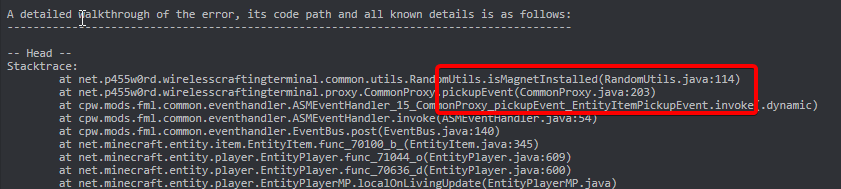
So, I've noted an issue when trying to boot up my world.
It happened when I placed down a charger from AppliedEnergistics2, and then the game crashed, stating that a ticking player was the cause of the crash.
I've tried to find solutions to this, but I couldn't seem to find any, as most seemed to be relating to a ticking entity.
The modpack in question is Project Ozone 2 Reloaded.
The only solution I could find that was related to it was removing the player data, reloading the world and the chunk that caused the error, then putting the old player data back in
But it didn't fix the issue
last parcel
you had a wireless crafting terminal?
last parcel
and it had the magnet upgrade?
 cosmic panther
I guess the magnet is already installed when you craft it in this pack
cosmic panther
last parcel
its trying to pick something up. remove the terminal from your inventory
I'm not sure how given the world crashes the moment I join
last parcel
might require loading a world backup
you would use an nbt editor and edit your player data
 last parcel
have you asked about this in the pack's discord? i expect they should be aware of this issue as it's at least 4 years old now
cosmic panther
I'm not sure if they have one or not
last parcel
seems not, nor an issue tracker. 💩 pack
"Do not send me issues dealing with Curse or Curseapp."
😂
cosmic panther

It's notably popular as well
last parcel
popularity doesnt equal quality
cosmic panther
I know
I was mentioning of it because you'd think they would given how popular it is
last parcel
nah 😄
cosmic panther
At least the third pack does mention of having support
cosmic panther
Oh
I see what it was trying to pick up
A cobblestone block
So
I guess the magnet feature is broken
 agile zodiac
my game keeps freezing
forcing me to force to end the task
it then pops up and says exit code 0, invalid java runtime configuration
golden muskBOT
Error/Exit codes are useless. Follow these steps so someone can actually help you.
- Right-click the modpack profile icon OR click the button in the modpack profile.
- Click
Open Folder. - Open the
logsfolder. - Drag and drop the FILE named
latestORdebuginto discord.
agile zodiac
idk why this keeps happening
golden muskBOT
Please visit the project page for the content you posted about and look for a way to contact the developer.
Somewhere on the page there is usually a method of contact. Look for one of the following things:
Issuestab like the image below.- Discord link.
- Twitter link.
- Comments section below the project.
If no contact method exists you will either have to remove the project or find a solution on your own.
 clear steppe
this pops up, what do i do?
 last parcel
?mc-path
golden muskBOT
Change your install path to the following:
For Windows: C:\CurseForge
For Mac: /Users/Shared/CurseForge
If Minecraft is not installed in CurseForge App:
- Click the
 in the top left.
 - Select Minecraft from the list of games.
- Select the
Advancedoption and pick the location for your computer listed above. - Click
Continue.
If Minecraft is installed in CurseForge App:
- Click the
 in the bottom left.
 - Select the Minecraft tab.
- Click
Change. - Select the location for your computer listed above.
:no_entry_sign: Minecraft Files should NOT be installed inside the following locations :no_entry_sign:
:no_entry_sign: .minecraft folder.
:no_entry_sign: OneDrive folders.
:no_entry_sign: Desktop folder.
:no_entry_sign: iCloud enabled folders.
:no_entry_sign: or any other cloud saved folder.
:no_entry_sign: or folders with non-English characters in them.
If any of the above are in the path you need to change/move it!
clear steppe
last parcel
?mc-path
thank you!
clear steppe
last parcel
?mc-path
it still doesnt work
last parcel
show what youve done
clear steppe
last parcel
show what youve done
ive tried putting in c:\curseforge as it said there, but it didnt work. and in the standard option it says only english letters can be used, but i had my pc prebuilt so when windows was installing they gave my user a name in russian since i live here, and well, i dont know how to fix it, if i could i would
last parcel
you need to make the folder to use it
clear steppe
oh ok
clear steppe
last parcel
you need to make the folder to use it
tysm
clear steppe
Failed to download file.
Name: chirp.ogg
URL: https://resources.download.minecraft.net/ec/ec8a2cbdf68b4e2136098ec33695e1c53625ddb8
Error details: Send failure: Connection was reset
Filename on disk: ec8a2cbdf68b4e2136098ec33695e1c53625ddb8
Path: C:\CurseForge\Install\assets\objects\ec\ec8a2cbdf68b4e2136098ec33695e1c53625ddb8
Exists: File what is this now?
autumn agate
so my shockbyte server keeps crashing and I dont really know the problem. Heres the console log https://paste.shockbyte.com/yevuteqodimogalumexu
last parcel

 vestal flame
I dont speak English well and cant understand something in your texts :(
wild jewel
vestal flame
I dont speak English well and cant understand something in your texts :(
What text
vestal flame
I think mostly all of texts that was and will be can be for me dont understandable
wild jewel
Can't help if we don't know what text is bad 🤷♂️
 swift copper
Game is crashing instantly, doesn't even load to the main menu. All I did was update my existing mods, I did not add anything at all.
last parcel
undo what you did, then update one at a time until you find it. there is nothing specific here.
last parcel
usually you keep a copy from beforehand, which is what i do
swift copper
I did a backup of my world, but I forgot to save a copy of my mods. That's totally my bad
last parcel
guess you can check the timestamp on the files and remove the ones that were obviousally updated
 keen tundra
hello everyone is it possible to extract all possible icons from a minecraft modpack ?
last parcel
why
keen tundra
i will use them as icons in my pc
last parcel
if you decompile the mods in the pack maybe 🤷♂️
keen tundra
is there a way to decompile mods?
last parcel
probably
keen tundra
so do you know ?
last parcel
no
keen tundra
thx
last parcel
could just ask the author of the mod that adds the icon
last parcel
well yea, you probably should since it's their work you're using
keen tundra
thank u well if i use them in my mod or game or whatever it is illegal to use but i will use them for my own pc i think they won't mind it
last parcel
well if you dont know how to decompile mod files, it sounds like that is the option you will be using anyway.
or just take screenshots
swift copper
last parcel
guess you can check the timestamp on the files and remove the ones that were obv...
Ok, so I went though and found each mod I updated, removed them, went and installed the previous version of each one, repaired the profile, and repaired the MC installation, and it is still crashing instantly, and doesn't even load to the main menu
last parcel
something with thonkutil maybe? fabric logs are awful
swift copper
Alright, let me try removing thonkutil. I installed it only just now when all the other mods updated because the goblin trader needed it
Thank you Yamza, it all seems to be working now. :)
I will be smarter now and copy everything before making even the smallest change
last parcel
always backup everything. nothing will ever be guaranteed to work in minecraft modding 😂
swift copper
I've learned that one haha
 summer sedge
so when i install mods for ksp like tweak scale , mechjeb2 everything works fine but when i install for example near future propulsion / near future electrical I dont see the parts in the build menu but i did noticed the curse forge makes game data folder in game data folder but it puts some mods in the right folder and some in the folder that it generated so iam not sure what to do 😄
last parcel
use ckan instead
summer sedge
and whats that ?
last parcel
a mod manager
summer sedge
thanks will try
agile zodiac
What mods use lots of memory
last parcel
Big ones.
agile zodiac
such as?
How can I tell if a mod is big
I want to remove big mods
But I can’t tell which ones taking lots of memory
last parcel
trial and error mostly
mods that add mobs
mods that add blocks that do things
mods that add blocks
in that order
also poorly programmed mods, that should be at the top
 slow crater
coarse nest
Try change your forge version, either upgrade or downgrade
slow crater
coarse nest
Try change your forge version, either upgrade or downgrade
I used the latest version and I got an error, and then in downgraded to the recommended version and then it gave me this crash
vestal flint
I get this when i load up my game. It crashes before i reach the menu. sometimes it doesent crash. but it crashes like 99 percent of the time
 waxen pine
vestal flint
https://paste.ee/p/YWr5I
I get this when i load up my game. It crashes before i...
waxen pine
vestal flint
https://paste.ee/p/YWr5I
I get this when i load up my game. It crashes before i...
Allocate more memory/ram to startup in the CurseForge app settings - 6-8gb would be fine. See if that helps.
 plain grotto
I have a server and I added a mod pack from curse forge and I had to take out a mod for it to work and then I go to my server and it work fine and I join in but when my freinds try to join it dosent work for them they took out the mod and they are using curse forge
someone help
This pops up for them
 acoustic idol
!mc-logs
golden muskBOT
Sending logs for support.
- Right-click the modpack profile icon OR click the button in the modpack profile.
- Click
Open Folder. - Open the
logsfolder. - Drag and drop the FILE named
latestORdebuginto discord.
acoustic idol
Also was this a pack you made or downloaded?
acoustic idol
Did they have a server pack as well? or did you make the server
acoustic idol
When you made the server did you check and see if the modpack had a server pack you could download for servers?
plain grotto
no what is a server pack
acoustic idol
A server pack is the server files some pack authors upload as extra files to run servers for their packs. Not all authors do this tho
Link the pack from the site,
plain grotto
oh u mean like config,jar,library
cause I added those to my server on apex hosting and the mods
Folder
That’s what I was told to do then I got errors and soemone told me to take out a mod and I did and it worked
acoustic idol
ok
acoustic idol
Yep, and they have a server pack you should be using for the server side of things.
acoustic idol
Server packs are made specifically to be run on servers. Where the client that you downloaded with the cf app is for the client only.
Open it up and see if there is a readme file. If not join their discord and ask how they do their server packs. They will now best as they made it
swift copper
Is there a reason playing LAN is such a monumental task? Everytime me and my buddy try to play LAN, I have to disable my firewall, and I have to disable real time protection in windows security, and even then, he almost always can't ever connect unless I restart my PC, which then makes my game crash instantly upon loading a world, and to fix it, the only thing that's worked so far is to delete the serverconfig folder and then use the "optimize world" function
waxen pine
Yes because mods are poor at being compatible with the sketchy "I'm a client and the server" thing that is LAN
For reliable multiplayer use a server pack. It can be on a beefy enough home machine with client
swift copper
Can I set up a server pack with a custom mod pack, or does it have to be an actual mod pack to get the server stuff? I only see the "get server files" option on an actual modpack
waxen pine
Server packs are made manually not with a launcher app
Lots of modpacks already published on curseforge also have server packs in a zip file you can get off the CF.com website to use with their client modpacks
waxen pine
?mc-installserver
golden muskBOT
How to **manually** install a server - **On your own PC**
- Check if the modpack has a server pack, if it does: use that and skip below.
- Go to the Forge website http://files.minecraftforge.net/ and download the Installer for the forge version the pack is using.
- Run the installer and choose
Install server. Do not install to your desktop. Also do not install inside a OneDrive folder. - Run the server using the forge.jar. A file called
eula.txtwill be generated. Open it and changeeula=falsetoeula=true - From the Client; Copy the
modsfolder,configfolder, and any other folders needed for the pack to work into the server folder. If the modpack has a server pack, use this instead! - Run the server again.
- Port forward your machine if needed. (Google it)
Long version: https://pastebin.com/83DXfGTH
waxen pine
I'm actually working on a video but it's not edited yet heh
waxen pine
It's very similar. Head to the fabric website and they have a guide in there somewhere. Id give their website a C- for organization though
 earnest cosmos
would anyone be able to help me with getting modded among us to work?
i havent found any helpful videos that work and i followed the instructions on curse website
 calm vector
Please help my game yeet yeet itself when loading up? What did I do wrong? https://sevy.mcpaste.com/jvUI7lVKNu.yaml
An easy to use Paste site for Minecraft Server logs.
swift copper
I am completely just done with the server thing lol
At every turn there is always an error or something doesn't work, and I can't find a single good tutorial for fabric
waxen pine
Have you thought about using a modpack that had as a working server pack ready to go?
swift copper
I want to, but the best one I can find (Better Minecraft) doesn't have a lot of the mods I'd like to have, mainly machine mods (Industrial Revolution, Tech Reborn, Applied Energistics 2)
waxen pine
calm vector
Please help my game yeet yeet itself when loading up? What did I do wrong? https...
https://www.curseforge.com/minecraft/mc-mods/mixin-0-7-0-8-compatibility
Does pack have this already?
calm vector
I think?
swift copper
swift copper
I want to, but the best one I can find (Better Minecraft) doesn't have a lot of ...
And while I love the machine mods, the friend I play with especially loves the machines. It's his favorite thing. So I'd hate to make multiplayer easier and then remove the thing he likes the most
waxen pine
There is probably a pack out there that firlts your bill. Must it be fabric with those specific tech mods?
swift copper
Gonna be honest, the only reason I went fabric instead of Forge is for Sodium and for Iris. Because Fabric seems to have much better performance than Forge
waxen pine
Imho that's somewhat because forge has more available and pack makers can't help themselves at the buffet
swift copper
It also seems like Forge has a lot less for 1.18 than Fabric does, but maybe I just haven't looked that much. I'll see if I can find anything
calm vector
it was due to phosphor or what ever that mod is
Now just time to figure out how to keep server cpu usage down
waxen pine
Removing mods works great ;)
waxen pine
swift copper
It also seems like Forge has a lot less for 1.18 than Fabric does, but maybe I j...
That much is because fabric is actually vanilla code so simpler to port between versions
 sonic seal
can someone help me with my minecraft modpack, and tell me why it isnt working? if someone would be willing to help me, please msg me directly via dms or just type here
waxen pine
!help
golden muskBOT
╰( ͡° ͜ʖ ͡° )つ──☆*:・゚ *˜”*°•.˜”*°• Many Help •°*”˜.•°*”˜* <:curselit:796985620550385705>
Please provide a description of your issue with as much detail as possible. If you have an issue with a mod or modpack, tell us the name. Explain what you can see happening. Be specific!
Tell us what is happening, we already know it "doesn't work".
Avoid using words like "it", tell us exactly what "it" is.
Don't assume anyone knows what you are talking about, be specific.
Tell us what you expected to happen.
Provide screenshots or video if possible.
Provide a log if possible. ?mc-log
sonic seal
I am currently making a custom modpack, so cant rly link it.
However, this error pops up when the game crashes:
The game crashed whilst initializing game
Error: java.lang.ArrayIndexOutOfBoundsException: 256
Exit Code: -1
If you know how to fix this, that would be great.
golden muskBOT
Error/Exit codes are useless. Follow these steps so someone can actually help you.
- Right-click the modpack profile icon OR click the button in the modpack profile.
- Click
Open Folder. - Open the
logsfolder. - Drag and drop the FILE named
latestORdebuginto discord.
 being violated by a bot
waxen pine
being violated by a bot
waxen pine
Something is wrong with jewelrycraft or bookshelf
 calm vector
waxen pine
Removing mods works great ;)
calm vector
waxen pine
Removing mods works great ;)
But I need the mods in the pack 😦 Its "only" 240 mods 😂
 delicate solar
help
golden muskBOT
╰( ͡° ͜ʖ ͡° )つ──☆*:・゚ *˜”*°•.˜”*°• Many Help •°*”˜.•°*”˜* <:curselit:796985620550385705>
Please provide a description of your issue with as much detail as possible. If you have an issue with a mod or modpack, tell us the name. Explain what you can see happening. Be specific!
Tell us what is happening, we already know it "doesn't work".
Avoid using words like "it", tell us exactly what "it" is.
Don't assume anyone knows what you are talking about, be specific.
Tell us what you expected to happen.
Provide screenshots or video if possible.
Provide a log if possible. ?mc-log
delicate solar
dose anyone have any clue who i can use a controller foe java Minecraft through curse forge cuz i use to through steam but i cant if i want to use mods, plz at me with response thx
slow crater
slow crater
heres the log
delicate solar
i have no clue what to do with this if im being honest
coarse nest
delicate solar
dose anyone have any clue who i can use a controller foe java Minecraft through ...
Install the mod controllable
delicate solar
k
coarse nest
slow crater
You said you tried changing forge versions, did that not work because a mod required a newer/older version?
slow crater
 coarse nest
Ah yep.
So one of your mods requires an older version, so youll need to decide to either remove Minecraft Dungeons Mod, or try find the other mod thats causing the problem
golden muskBOT
Wording is important!
Forge = Minecraft Forge, This is a modloader often just called "Forge".
Fabric = Fabric MC, this is another modloader, just called "Fabric".
CurseForge = A Website/App that has content for games.
Mods = Individual mod files.
Modpacks = Multiple mods put into the mods folder or downloaded from CurseForge.
These are not Interchangeable! Please use the correct terms as it allows us to help you faster!
coarse nest
Do you want to add controllable to an existing modpack?
delicate solar
coarse nest
Do you want to add controllable to an existing modpack?
origin mod w/ controler
coarse nest
So its not a modpack?
delicate solar
no?
coarse nest
!mc-installmods
golden muskBOT
How to install mods in CurseForge App.
- Click
+ Create Custom Profile - Name it, select the required Minecraft version, select the modloader & modloader version (usually the highest number), click
Create. - Click the profile icon.
- Click
Add More Content - Search and install the desired mods.
- Start the game!
How to install mods not on CurseForge.
- Right click the profile picture or Open the profile and click the Icon next to the play button.
- Click
Open Folder. - Drag the mod(s) into the
modsfolder. (Note: Some mods will require others, to run. Make sure to read the instructions for the mod!) - Start the game!
delicate solar
controllable is on the one thing but origin is fabric and they dont combo
... you see the issue
coarse nest
coarse nest
Ah yep.
So one of your mods requires an older version, so youll need to decide ...
If you do decide to try find the other mod, it will be one of these ones. Specifically one that does something with sounds, sound categories or the options menu: ```
(SnowRealMagic-1.12.2-0.5.6.jar)
(MicdoodleCore-1.12.2-4.0.2.280.jar)
(Quark-r1.6-179.jar)
(AppleCore-mc1.12.2-3.4.0.jar)
(future-mc-0.2.8.jar)
(colytra-1.12.2-1.2.0.4.jar)
(MistyWorld-1.12.2-1.2.5.3.jar)
(Bloodmoon-MC1.12.2-1.5.3.jar)
(phosphor-1.12.2-0.2.6+build50-universal.jar)
(Chocolate_Quest_Repoured-1.12.2-2.6.7B.jar)
(PickUpNotifier-v1.1.5-1.12.2.jar)
(levelup2-1.5.8.jar)
(malisiscore-1.12.2-6.5.1.jar)
(Surge-1.12.2-2.0.77.jar)
(IvToolkit-1.3.3-1.12.jar)
(Reskillable-1.12.2-1.13.0.jar)
(Aroma1997Core-1.12.2-2.0.0.2.jar)
(DynamicSurroundings-1.12.2-3.6.1.0.jar)
(RandomThings-MC1.12.2-4.2.7.4.jar)
(randompatches-1.12.2-1.22.1.10.jar)
(SereneSeasons-1.12.2-1.2.18-universal.jar)
(SoManyEnchantments-0.5.5.jar)
(Forgelin-1.8.4.jar)
(themidnight-0.3.5.jar)
(SteveKunG's-Lib-1.12.2-1.2.0.jar)
(foamfix-0.10.14-1.12.2.jar)
(OpenModsLib-1.12.2-0.12.2.jar)
([1.12.2] SecurityCraft v1.9.0.2.jar)
(Apotheosis-1.12.2-1.12.5.jar)
(CTM-MC1.12.2-1.0.2.31.jar)
(Charm-1.12.2-1.4.1.jar)
(llibrary-core-1.0.11-1.12.2.jar)
(ReachFix-1.12.2-1.0.3.jar)
(.mixinbooter-4.1.jar)
(TheBetweenlands-3.8.1-core.jar)
(VanillaFix-1.0.10-150.jar)
(ForgeEndertech-1.12.2-4.5.6.0-build.0619.jar)
(JustEnoughIDs-1.0.4-SNAPSHOT-thin.jar)
(SpartanWeaponry-1.12.2-1.4.1.jar)
eyeballs dynamic surroundings
delicate solar
.... it says im not using 1.18.1?
controler mod wont let me past 1.17 and the server im trying to get on is 1.18.1
coarse nest
From what i can tell the same file should work for both 1.17 and 1.18
delicate solar
The server wont let me on cuz it says I'm not on 18
coarse nest
Do you have a screenshot?
 wintry mist
Hii can someone tell me how to put mods from Files in to CurseForge ModPack
waxen pine
?mc-installmods
golden muskBOT
How to install mods in CurseForge App.
- Click
+ Create Custom Profile - Name it, select the required Minecraft version, select the modloader & modloader version (usually the highest number), click
Create. - Click the profile icon.
- Click
Add More Content - Search and install the desired mods.
- Start the game!
How to install mods not on CurseForge.
- Right click the profile picture or Open the profile and click the Icon next to the play button.
- Click
Open Folder. - Drag the mod(s) into the
modsfolder. (Note: Some mods will require others, to run. Make sure to read the instructions for the mod!) - Start the game!
 wise tartan
does anyone know why me and my friends cant play any mods with optifine on the curseforge app?
waxen pine
are you saying you add optifine and the modpacks you use crash - or that optifine isn't hosted on curseforge to use the app to install
wise tartan
no weve used countless mods and mod packs and weve tried dragging the optifine into the mod folder to no avail, weve checked the versions and tried countless different versions of optifine and still nothing
waxen pine
opticrash doesn't work with a LOT of mods
magnesium is a popular mod that is incompatible with it, as well as several other popular mods that effect rendering
wise tartan
alright so theres not going to be any way to use shaders with modpacks that have magnesium and other similar incompatible mods?
waxen pine
you can remove the mods that are incompatible - or find a lucky modpack that doesn't have major problems
wise tartan
got it thank you
autumn agate
coarse nest
Structure gel is erroring, probably due to another mod erroring ealier. Can you post the full latest.log?
coarse nest
Mod minecolonies requires domum_ornamentum 1.17.1-1.0.9-ALPHA or above
Currently, domum_ornamentum is 1.17.1-1.0.0-RELEASE
oh thanks
 winter quail
crashes at 5/7 when loading
coarse nest
A mod by defeatedcrow called DCsAppleMilk is erroring when it tries to add its villager, likely a mod conflict, but i cant tell what
 stable oracle
yo anybody know a little bit about minecraft mods? i just made my first modpack and i have a novice problem i cant really get in the root to
basically, when i hover over a item in my inventory in my game it shows what mod the item is from but its labelled twice... its a silly little thing but for some reason i cant find what the issue is
coarse nest
Do you have this mod?
https://www.curseforge.com/minecraft/mc-mods/mod-name-tooltip
if so, this adds them, and another mod probably does too
stable oracle
hmm thats what i was looking for cause i was glancing over alot of mods thinking they would be interesting
maybe that might be it
i did have itt... xD
that was it thanks!
 rustic cairn
Anyone know if project ozone 3 is compatible with optifine?
rustic cairn
K
coarse nest
?mc-logs
golden muskBOT
Sending logs for support.
- Right-click the modpack profile icon OR click the button in the modpack profile.
- Click
Open Folder. - Open the
logsfolder. - Drag and drop the FILE named
latestORdebuginto discord.
 lucid flare
does anyone have problem with the launch of Project Architect?

i have something like this and can t launch modpack
coarse nest
How long did you wait after it went white?
lucid flare
yesterday an hour
coarse nest
!mc-logs send these
golden muskBOT
Sending logs for support.
- Right-click the modpack profile icon OR click the button in the modpack profile.
- Click
Open Folder. - Open the
logsfolder. - Drag and drop the FILE named
latestORdebuginto discord.
lucid flare
coarse nest
Is there a debug log?
lucid flare
no
coarse nest
!mc-debuglog do this then send the debug log after it goes white again
golden muskBOT
Missing the debug.log file? Enable it by following these steps.
- Click the icon in the bottom left.
- Click the
Minecrafttab. - Turn on the
Enable Forge debug.logoption.
 languid epoch
could someone explain to me, that if i log off or sky factory and log back on tomorrow why my world isnt there anymore?
wild jewel
What is the path that curseforge is using?
languid epoch
right now curseforge is on my desktop, so idk if that has anything to do with it
wild jewel
!mc-path
golden muskBOT
Change your install path to the following:
For Windows: C:\CurseForge
For Mac: /Users/Shared/CurseForge
If Minecraft is not installed in CurseForge App:
- Click the in the top left.
- Select Minecraft from the list of games.
- Select the
Advancedoption and pick the location for your computer listed above. - Click
Continue.
If Minecraft is installed in CurseForge App:
- Click the in the bottom left.
- Select the Minecraft tab.
- Click
Change. - Select the location for your computer listed above.
:no_entry_sign: Minecraft Files should NOT be installed inside the following locations :no_entry_sign:
:no_entry_sign: .minecraft folder.
:no_entry_sign: OneDrive folders.
:no_entry_sign: Desktop folder.
:no_entry_sign: iCloud enabled folders.
:no_entry_sign: or any other cloud saved folder.
:no_entry_sign: or folders with non-English characters in them.
If any of the above are in the path you need to change/move it!
wild jewel
What is the path that is there?
 velvet notch
Anyone know if i can run minecraft on curseforge with mc non premium?
coarse nest
velvet notch
Anyone know if i can run minecraft on curseforge with mc non premium?
#📛︱rules 4️⃣ and 8️⃣
 mortal hawk
that doesnt exist or you have minecraft or not, there's no midterm
coarse nest
Remove biome based mods, remove optifine
lucid flare
how can i remove optifane ?
wild jewel
languid epoch
C:\Users\turne\Twitch\Minecraft\
That seems fine to me, As long as you are turne
coarse nest
lucid flare
how can i remove optifane ?
Delete it from your mods folder
languid epoch
yea i am, ill see tomorrow when i log back on, thanks though
lucid flare
what I must do ?

 sage pier
 cosmic birch
Hello, I need help. Every time enter a world in a game launched with the curseforge app it always crashes with this message. I have tried every other forge, fabric, and even just blank vanilla instances I have in my curseforge app and it always crashes the same way. It wasn't like this yesterday. But when I tried to run vanilla minecraft using the vanilla launcher it works perfectly fine, so I think this is the problem with curseforge.

This is the latest log from one of the forge instances I tried to play with.
wild jewel
Remove optifine, try again
cosmic birch
I have, it still crashes with the same message
lucid flare
after removing optifine what can I remove because it lags me too much
sonic seal
Hi there, I have set up a modpack, it boots up fine. However, when I kill any mob that isn't lycanites mobs it kicks me off my singleplayer world. Does any1 know a fix?
golden muskBOT
Sending logs for support.
- Right-click the modpack profile icon OR click the button in the modpack profile.
- Click
Open Folder. - Open the
logsfolder. - Drag and drop the FILE named
latestORdebuginto discord.
sonic seal
golden muskBOT
Please visit the project page for the content you posted about and look for a way to contact the developer.
Somewhere on the page there is usually a method of contact. Look for one of the following things:
Issuestab like the image below.- Discord link.
- Twitter link.
- Comments section below the project.
If no contact method exists you will either have to remove the project or find a solution on your own.
sonic seal
last parcel
Looks like morph
ilysm I removed it, and now it works thank bejebus x
lucid flare
what i must do to fix this?
last parcel
lucid flare
what i must do to fix this?
?mc-ram
golden muskBOT
How to set Global Minecraft RAM value.
- Click the icon in the bottom left to open settings.
- Click the Minecraft tab.
- Scroll down.
- Slide slider to recommended ram range as seen below.
 last parcel
try 6gb
sonic seal
Everytime I go into creative mode, and click the compass top right to search for an item, it crashes my game. Can someone help me fix this?
if that helps ^^
golden muskBOT
We do not offer support for Optifine!
If you have issues with Optifine, remove it. If you want further support try the discord found on their website.
https://www.optifine.net/home
Installing Optifine with modpacks on Curseforge:
- Right click the modpack icon, select
Open Folder. - Put the
Optifine.jarinto themodsfolder. - Now start the modpack.
sonic seal
Not sure if you lot help with this kind of stuff, but I added my modpack to a server, and it keeps stopping here (see crash-report.txt)
If someone could tell me what the issue is, that would amazing!
 kind crescent
guys some good minecraft server for synology
I tried itgz server but it din't worked how I wanted
last parcel
This is not a server directory.
last parcel
sonic seal
Not sure if you lot help with this kind of stuff, but I added my modpack to a se...
TardisMod{0.995} [Tardis Mod] (tardismod-1.7.10-0.995-350.jar)
?projectissue
golden muskBOT
Please visit the project page for the content you posted about and look for a way to contact the developer.
Somewhere on the page there is usually a method of contact. Look for one of the following things:
Issuestab like the image below.- Discord link.
- Twitter link.
- Comments section below the project.
If no contact method exists you will either have to remove the project or find a solution on your own.
kind crescent
last parcel
This is not a server directory.
okey but thank you
lucid flare
I have something like that at the end logs "Can't keep up! Is the server overloaded? Running 6097ms or 121 ticks behind" What do I have to do to make my world go about normally?
last parcel
figure out what the source of the lag is and fix it
last parcel
could just be a poorly designed modpack then. that warning can be caused by an almost infinite number of things. the message alone isnt really enough to diagnose a problem.
lucid flare
so how I can diagnose a problem ?
last parcel
First step: Is there actually a problem?
last parcel
lag how. describe it
sonic seal
last parcel
`TardisMod{0.995} [Tardis Mod] (tardismod-1.7.10-0.995-350.jar) `
Removed Tardis Mod, the server booted up further than before, but still stopped, but I think this time its due to a different mod (crash-report.txt)
lucid flare
I move with a great delay
last parcel
Single player or a server?
last parcel
press f3 ingame and take a screenshot, then send it here.
last parcel
sonic seal
Removed Tardis Mod, the server booted up further than before, but still stopped,...
superheroes
sonic seal
last parcel
`superheroes`
Removed Superheroes, but it looks to still be shutting down around the same area. Are there other mods that are causing the issue? Cuz it appears to all work singleplayer.
last parcel
whatever hee is
something that adds biomes is broke
probably gunna break other mods too
sonic seal
biomes o plenty maybe?
lucid flare
 last parcel
do you have a graphics card?
lucid flare
yes
last parcel
which
lucid flare
GTX 1050
last parcel
?mc-videocard
golden muskBOT
How to set minecraft to use your videocard
Got NVIDIA?
 last parcel
its not being used
 sudden bramble
Hey, I have a problem with minecraft. 2 days ago I used the curse forge mod and was logged out of the launcher. When I logged in there was only one version (mod) and everything was fine until yesterday. When I wanted to play minecraft on Fabric Api 1.18.1 it shows "Exit Code 1" and I don't know what to do
golden muskBOT
Error/Exit codes are useless. Follow these steps so someone can actually help you.
- Right-click the modpack profile icon OR click the button in the modpack profile.
- Click
Open Folder. - Open the
logsfolder. - Drag and drop the FILE named
latestORdebuginto discord.
last parcel
sudden bramble
Hey, I have a problem with minecraft. 2 days ago I used the curse forge mod and ...
Pick one place and stick to it. #📛︱rules 4
Send the log like the bot said to do.
last parcel
That doesn't even make sense. There is a file.
sudden bramble

when it starts, it shows log in the app
and
there isnt anything in the logs/files
last parcel
ok, so you arnt using curseforge. you should probably contact the fabric devs for this issue.
golden muskBOT
sudden bramble
they asked me what mods i use and i telld that the latest i use was hacks (wanted to see what is this) and they told me this

i didnt even play it
calm vector
If I leave in client side mods on a server will that cause it to use more cpu?
 coarse elm
If you are that worried about the game using resources on a server then your server likely isnt powerful enough or the pack is poorly made for server play.
lucid flare
I entered the minecraft folder but I did not find the file from point 8
last parcel
i think it's helpful to know just from an optimization perspective, but if i was concerned about optimization i would remove those mods anyway so it wouldnt matter.
coarse elm
But you cant optimize something that does nothing.
last parcel
the question was if it does something or nothing
coarse elm
Theres no way to know.
Every mod is different. The only thing that's gaurenteed is rendering. Cant render anything if theres nothing to render to.
And if you are trying to optimize anything your looking at peanuts by removing mods like this unless they are broken.
last parcel
i like peanuts
lucid flare
I tried to do something with this graphics card but I can't find a single file
In Bin I have something like that
 last parcel
i have no idea what you are doing
lucid flare

If Minecraft is not using the dedicated GPU, follow the steps below to configure correctly the video graphic settings.
this
swift copper
I'm trying to run a server on my PC to avoid the LAN issue with my buddy connecting, but any time I launch the server I get this. Any idea what's wrong?

I have Java 17 installed
last parcel
!mc-fabric would be the place to go for this, and send them the actual log, not a picture.
golden muskBOT
swift copper
So I click copy stacktrace and send that in the server?
swift copper
I went and uninstalled all others besides 17, but maybe it's still trying to use an old version? How do I tell it to use the new one?
coarse elm
Run the jar via command line and use the path to the java exe
swift copper
Um, could you simplify that for me please lol. I don't know what I have to type
I have the command line open
coarse elm
Pathtojavaexe jarname.jar
swift copper
It says 'pathtojavaexe' is not recognized as an internal or external command,
operable program or batch file.
coarse elm
....
swift copper
Am I using the wrong command thing?
swift copper
Ok I found a folder named jdk-17.0.2
Is this what I'm looking for? I apologize for not knowing
Inside the folder is another folder named bin, and inside there, there is a exe file named "Java.exe" along with a ton of other files
autumn agate
im downloading the modpack 'better minecraft' and its been downloading the same mod for like 5 mins! help
last parcel
Sounds like your connection is poor.
autumn agate
oh it just told me i dont have anymore storage space :\
i have deleted some things and am trying again! 🙂
sonic seal
My modpack wont even open anymore, just closes a few seconds after its run, could some one help me out, thxx
sonic seal
last parcel
modernui looks like
ye was modernui, just removed and it worked, thx <3
swift copper
coarse elm
C:/folders/here/to/the/java.exe
I am having a really tough time with this. Is this the right thing: C:\Program Files\Java\jdk-17.0.2\bin
java.exe is in the bin folder
 pliant mortar
I can’t get my game to open forge it errors every time I launch Forge
 mortal turret
forge modloader wont work, fabric loads just fine but forge wont open
 copper spear
blood n bones modpack keeps crashing
 dense fractal

 fleet jewel
on the curseforge app? and did you mean modpack, or did you try to import a singular mod
golden muskBOT
How to install mods in CurseForge App.
- Click
+ Create Custom Profile - Name it, select the required Minecraft version, select the modloader & modloader version (usually the highest number), click
Create. - Click the profile icon.
- Click
Add More Content - Search and install the desired mods.
- Start the game!
How to install mods not on CurseForge.
- Right click the profile picture or Open the profile and click the Icon next to the play button.
- Click
Open Folder. - Drag the mod(s) into the
modsfolder. (Note: Some mods will require others, to run. Make sure to read the instructions for the mod!) - Start the game!
delicate solar
coarse nest
Do you have a screenshot?
help


to revise my question, dose anyone know how to import curseforge to steam and conect controller that way?
Nvm
Controller mod didnt even work
sonic seal
Edited the mods on my server, and now wont boot, if someone could help me fix this, that would be great!
 ocean fossil
golden muskBOT
ocean fossil
golden muskBOT
Hey there, it is Curseforge, not "Cursed forge"
 coarse nest
delicate solar
help
coarse nest
delicate solar
help
Please no pings. #📛︱rules 5️⃣
Make a 1.18.1 profile instead of a 1.17 or whatever one


 jovial kestrel
hey guys how do i load up my game with a mod