#👽︱game-support
1 messages · Page 204 of 1
 coarse nest
 golden muskBOT
We do not offer support for Optifine!
If you have issues with Optifine, remove it. If you want further support try the discord found on their website.
https://www.optifine.net/home
Installing Optifine with modpacks on Curseforge:
- Right click the modpack icon, select
Open Folder. - Put the
Optifine.jarinto themodsfolder. - Now start the modpack.
coarse nest
It wouldn't be unless they do it really weirdly
 unreal cape
if so what?
 oak tundra
unreal cape
if so what?
oak tundra
unreal cape
if so what?
i see it in the logs at the top
at net.minecraftforge.common.chunkio.ChunkIOProvider.callStage2(ChunkIOProvider.java:41)
at net.minecraftforge.common.chunkio.ChunkIOProvider.callStage2(ChunkIOProvider.java:12)
coarse nest
Its something tryin to load an entity or tile entity (like a furnace/chest) but thats all I can tell
 tardy flint
So it kinda works
It loads
But I can’t do much like go into worlds
it crashed when I tried to delete an old world that I loaded a while back with different mods but it was the same profile
here's the latest log if that works, I'm pretty sure it's updated
coarse nest
I see no crash in that
coarse nest
Still nothing
oak tundra
does anyone have an idea how wire collision cause the world to immediately crash under "no net handler"
i've been at this WAY too long
 nocturne spoke
how do i send the crash logs in that format
golden muskBOT
Sending logs for support.
- Right-click the modpack profile icon OR click the
 button in the modpack profile.
 - Click

Open Folder. - Open the
logsfolder. - Drag and drop the FILE named
latestORdebuginto discord.
nocturne spoke
that doesnt match the game output log i have pulled up
nvm im dumb yes it doeds
does
 waxen pine
Can you post the entire log and not only a snip of what you think is the thing?
unreal cape
coarse nest
Its something tryin to load an entity or tile entity (like a furnace/chest) but ...
should i just load up an aroma backup or is there a command that i could use that could help out?
nocturne spoke
i figured out the issue, its a mod called essential mod that allows you to play with your friends without making a server
is there a better alternative to the essential mod?
coarse nest
unreal cape
should i just load up an aroma backup or is there a command that i could use tha...
Probably easiest to load the backup
 spring fjord
im trying to launch mc eternal but i keep getting this screen

link fails every time
waxen pine
right click the profile photo in the CF app > open folder > "crash-report" folder
spring fjord
ok i ran it once more while waiting and didnt change anything but it made past where it normally breaks and gives me that screen if it breaks again ill post the cras-report
waxen pine
mc eternally-loading is pretty much one of the most bloated packs published - you for real should be allocating 8-10gb of memory
spring fjord
ight i think its a memory issue then
oak tundra
waxen pine
Can you post the entire log and not only a snip of what you think is the thing?
a lot of stuff fucks up but it does work
waxen pine
#📛︱rules #5
hm yeah i would try making a duplicate profile and deleting immersive engineering and trying to load world in the duplicate
IE sure does love it's fluid crashes 🧐
 autumn agate
how do i ask for help here
waxen pine
!help
golden muskBOT
╰( ͡° ͜ʖ ͡° )つ──☆*:・゚ *˜”*°•.˜”*°• Many Help •°*”˜.•°*”˜* <:curselit:796985620550385705>
Please provide a description of your issue with as much detail as possible. If you have an issue with a mod or modpack, tell us the name. Explain what you can see happening. Be specific!
 Tell us what is happening, we already know it "doesn't work".
Avoid using words like "it", tell us exactly what "it" is.
Don't assume anyone knows what you are talking about, be specific.
Tell us what you expected to happen.
Provide screenshots or video if possible.
Provide a log if possible. ?mc-log
autumn agate
i just type it here?
waxen pine
yes
 umbral pond
or you could make a thread
autumn agate
ok so I have been trying to start up a server for minecraft java that could have mods. I wanted the 'Better Minecraft [FORGE] 1.16.5' mod but i have been having trouble joining the world due the the game saying "Unexpected data from client"
i installed the Forge client but i may not have done it right so i was hoping someone could show me how
waxen pine
did you download and unzip the better minecraft server pack off of their project page?
waxen pine
that is how you make a server... with the pack author's published server files.
hopefully they did a good job of including instructions
autumn agate
im using a server hosting site and it says that the mod is installed on the server already
waxen pine
whispers i'm guessing they don't since it seems like a low effort modpack series
ah ok.
you should confirm that both server and client have the exact same modpack, and the exact same version of that modpack
better minecraft has like 6 modpacks all named similar
autumn agate
wait the client needs the modpack too?
waxen pine
yes.
easiest way to get and install this on client side is to use a launcher app such as the Curseforge launcher
?getcf
golden muskBOT
Looking to install the CurseForge app?
<:windows:798410728188936222> Windows
Minimum Requirements:
- OS Version: 7 (64 bit), 8.1, 10, 11
- 64 bit Required.
- 350MB storage space.
- Microsoft .Net 4.8
- Intel/AMD quad-core CPU
- 8GB ram
Download: https://download.overwolf.com/install/Download?&PartnerId=4047
If you are having issues with the installer use the URL below to install Overwolf then go to the app store to download CurseForge.
https://content.overwolf.com/downloads/setup/latest/regular.html
<:mac:798410654418862130> Mac
Minimum Requirements:
- OS Version 10.14 or newer.
- 64 bit Required.
Download: https://curseforge.overwolf.com/downloads/curseforge-latest.dmg
:penguin: Linux
Minimum Requirements:
Yes. SOON:tm: ( ͡~ ͜ʖ ͡°)
Download: :person_shrugging:
waxen pine
use it to install the same pack and same version as the server
autumn agate
and after i install the server pack i unzip it then put it on the client or put it in as a zipped file?
waxen pine
no you click play on the profile you've installed in the curseforge app...
you realize curseforge and forge are different things right
autumn agate
oh...
golden muskBOT
Wording is important!
Forge = Minecraft Forge, This is a modloader often just called "Forge".
Fabric = Fabric MC, this is another modloader, just called "Fabric".
CurseForge = A Website/App that has content for games.
Mods = Individual mod files.
Modpacks = Multiple mods put into the mods folder or downloaded from CurseForge.
These are not Interchangeable! Please use the correct terms as it allows us to help you faster!
waxen pine
!!=
autumn agate
the server hosting thingy is telling me that i need the "Forge Client"
so do i still get the file from the curseforge thing?
waxen pine
your server is what everyone connects to
the curseforge app is only for launching clients
autumn agate
ok so let me get this straight
waxen pine
if you're playing single player you only need the cf app for your client
autumn agate
The server has the mod 'better minecraft' and I can use the curseforge app to launch minecraft with forge?
and then just go to multiplayer and put the ip in?
waxen pine
modpack - an assembly of mods and modifications
yes
autumn agate
so i dont need the server pack then right?
 quasi hinge
Not on your client
waxen pine
the server IS THE WORLD you will all connect to
autumn agate
i get that
waxen pine
run the server, load your cleint on your computer. go to multiplayer screen and connect to the server
autumn agate
so would i just press play?
 waxen pine
yep
oh god they call it vanilla plus lol
if that can be vanilla plus then i guess my pack is too
with giant reactors
waxen pine
fyi it's a large pack so you may want to allocate a bit more ram than default (app settings)
autumn agate
is 6gbs enough?
waxen pine
should be alright. if you feel like it's maxing out (f3 menu) alot then bump it up to maybe 8
waxen pine
there are a few that are pretty well known and they're all decent. i use bisect at the moment and it's nice enough
autumn agate
i'll keep bisect in mind but what are the other well known ones
heeelp it keeps crashing evcery second i start it ;-;
waxen pine
for more general mc discussion and such the dedicated MC channels gated through #786424115535544350 are better
waxen pine
did you have a zombie try to use a parrot as a vehicle? O.o lol
waxen pine
yeah
waxen pine
ugh you have 3 large mob adding mods
autumn agate
should i delete a few?
waxen pine
Entity Type: minecraft:zombie (net.minecraft.entity.monster.ZombieEntity) Entity's Vehicle: ParrotEntity['Parrot'/394, l='ServerLevel[New World]', x=193.50, y=38.00, z=-1588.50]
autumn agate
BRUH LOL
waxen pine
AI improvements may help this but i doubt it
autumn agate
which mods should i remove
waxen pine
remember which added that parrot? or is that vanilla i forget
waxen pine
make a duplicate profile, remove all of the mob mods, try and see if you can reload
autumn agate
k
waxen pine
i'd recommend also adding
ai improvements entity culling ferrite core lazydfu
 tender python
waxen pine
tender python
waxen pine
https://www.curseforge.com/minecraft/mc-mods/improved-mobs 🤔 i have the feeling like this one also may be a factor
are you not sure where to find it?
or just not how to change the folder in the app
 left bolt
I made a mod pack and for whatever reason i cant build on the server i made i can break blocks but thats it
I have the same mods on a single player world and i can place blocks
waxen pine
can you post the latest.log file from the server 'logs' folder?
 random tangle
hi bois wanna check da modpack i made also i have a smp for it so dont reuse lol
"without permission/licence"
waxen pine
that doesn't sound like game support
waxen pine
going to elaborate?
autumn agate
oh sorry i had closed my discord, so everything was working for but, i was in the world and everything but then it crashes...so i close it with task manager and now when i launch the game with the forge client it says "1 of the files did not process successfully" and the only options it gives me is to look at the logs and open the mods folder
waxen pine
?mc-logs
golden muskBOT
Sending logs for support.
- Right-click the modpack profile icon OR click the button in the modpack profile.
- Click
Open Folder. - Open the
logsfolder. - Drag and drop the FILE named
latestORdebuginto discord.
waxen pine
drag your latest.log file into chat
 empty crypt
anyone know the best way to get a modded minecraft servre
server
or to play with friends in general
waxen pine
-someone can run a server on a home computer
-can rent a server on webhosts
-can find a modpack that has a public server running to join
empty crypt
ok thank you
waxen pine
fyi there are packs advertised in #768717413918179368 (get the minecrafft role in #786424115535544350 )
 blazing spire
server crashed ranndomly
waxen pine
you should try bumping up your forge version to like 39.0.59 (newer seems to have some weird issues but maybe not with your mods), whatever is causing the chunk error could also be one of the ones listed in mixins next to the 'caused by'
nope. don't do that here or you will get muted
well, that's all from them for awhile xD
 wild jewel
What is the problem then?
left bolt
i started a server with a custom modpack it works in single player but once i got in the server i couldnt place blocks my friend can still place and break blocks (i can also break blocks) i need help figuring out why i cant place blocks its not my mouse either
wild jewel
Move away from spawn, try again
left bolt
My friend can break blocks at spawn i dont think its spawn protection
We can both break blocks actually its just me who cant place em
wild jewel
Both using the same block?
left bolt
Yeah
wild jewel
Did either of you get OP?
left bolt
I started the server i have op and i gave it to her
 twilit kindle
just wondering, am i still vulnerable to the log4j attack if i play on a 1.7.10 modpack?
twilit kindle
wait what do you mean by not supported?
 zinc flint
Whats the best way of making a lite version of a modpack, make a separate page for it or add at as a version for the normal modpack page
 mortal hawk
new page
otherwise ppl might "update" between lite and normal and that could break worlds
wild jewel
zinc flint
Whats the best way of making a lite version of a modpack, make a separate page f...
What is a lite version of a modpack? You will never reach the same gameplay with a lite version
zinc flint
wild jewel
What is a lite version of a modpack? You will never reach the same gameplay with...
Like remove mods that only improve graphical things but dont have effect on gameplay
 last parcel
What graphical things are you adding that would have enough of an impact to consider it a "lite" version?
The bigger issue is mods that add lots of blocks and items (lots of additional textures to load) or mods that add mobs (more ai to compute).
zinc flint
Im not sure if I can make a lite version, Ive just had a lot of people asking for it so Imma look into it
autumn agate
Incompatible FML modded server, server network message list is not compatible
Got this issue with my server
I copied over the mods folder 1:1
So there should be no differences
last parcel
did you try connecting?
autumn agate
 golden muskBOT
Sending logs for support.
- Right-click the modpack profile icon OR click the button in the modpack profile.
- Click
Open Folder. - Open the
logsfolder. - Drag and drop the FILE named
latestORdebuginto discord.
autumn agate
The mods are matching
last parcel
bet they dont 🙂
autumn agate
the only mod which i removed server side was optifine
i thought maybe that was the issue
last parcel
it's not. optifine shouldnt be on a server
last parcel
client?
 true stone
 last parcel
?mc-installfix
golden muskBOT
This is NOT instructions for Repair Profile! They are NOT the same! You need to do this!
- Click on the Minecraft Tab on the Left side of the CurseForge App.
- Click button next to the
Create Custom Profileoption. - Click

Repair Installationoption. - Play game.
NOTE: You will not lose any modpacks or worlds!
 tepid rain
can someone help me with a crash for when I load the game? here it is my crashlog:
 sage pier
.. I suggest dragging the file instead of spamming the channel..
tepid rain
I was trying to stop, a discord extension just forced me to do so, I'm sorry
I'll send the file rn
last parcel
no it was me 😛
tepid rain
I mean the discord extension let me paste the full crashlog without putting it in a text
I should prob remove it
tepid rain
tepid rain
I mean the discord extension let me paste the full crashlog without putting it i...
.txt*
last parcel
oh, yea. or just dont paste long stuff into discord 🤷♂️
sage pier
Never seen so many messages in that short time period in a while.
Seriously thought a bot would go haywire and block it.
sage pier
It's a bad guess, but I think morerespawnanchors.
I'm not that familiar with Fabric crashes yet
last parcel
sounds legit. me either. fabric logs suck

 loud rock
try to get half of your mod out of your minecraft and see if you still got the error. if you do then the causing mod must be in the half that you kept if you don't then it's not , continue until you got the right one (sorry if my english is bad)
tepid rain
I'll try by removing morerespawnanchors first
loud rock
you don't have to remove it just get it in your desktop for exemple
tepid rain
yeah sure
 agile zodiac
i'm getting unexpected error 0 crashes
i tried restarting my launcher
repairing it
it's modded
last parcel
?mc-log
golden muskBOT
Sending logs for support.
- Right-click the modpack profile icon OR click the button in the modpack profile.
- Click
Open Folder. - Open the
logsfolder. - Drag and drop the FILE named
latestORdebuginto discord.

 last parcel
need log, not modlist
 dark gazelle
last parcel
?mc-installfix
dark gazelle
last parcel
?mc-installfix
worked thx
tepid rain
w8 guys, what about this log?
the other one was from not enough crashes, this one is from the logs folder
not sure if it is different
last parcel
says the same thing really
agile zodiac
last parcel
need log, not modlist
There is no log
it’s just showing unexpected error 0
tepid rain
last parcel
says the same thing really
aight, sorry
last parcel
if you get error 0 there should be a log
agile zodiac
where can I check
 lean hull
I think any crash has a log
loud rock
tepid rain
w8 guys, what about this log?
libcd cause the problem for some reason , try another version of it
tepid rain
loud rock
libcd cause the problem for some reason , try another version of it
I don't seem to find it in the .jar list of the mods
loud rock
so you don't have the mod ?
 loud rock
Weird , if you really don't have it maybe logs folder don't find any mod that cause the problem but somehow think it come from that mod Idk i can't help on that one
loud rock
or the mod is not in .jar but on idk what
tepid rain
tepid rain
I'll try to do a binary search for all the mods then
I'm just scared about having to get every library mod probably everytime
loud rock
kay gl
agile zodiac
i wonder what my issue is
loud rock
yea for you it's a token error not retaliated to mod
agile zodiac
i wonder how i can solve this token error
loud rock
and idk how you got a token error but you'll probably need to ask that on another server
loud rock
Yea i know sorry dude , try to search that on google or go to an official minecraft server
agile zodiac
lemme try look it up
last parcel
faction_craft.mixins.json:BellTileEntityMixin
agile zodiac
is that the issue?
last parcel
could be. you will need to try without the mod adding it and check. report to the dev if it is
nocturne spoke
Is there a fix for the error (Mixin config mixins.essential.json does not specify "minVersion" property)
It happens anytime I add the essential mod into MC eternals modpack
waxen pine
Sounds related to the issue ticket I sent that mod yesterday about using old version of mixins 🧐
Possible the error is something else in your case though - latest.log file would be helpful
nocturne spoke
Nope just fixed it,for anybody else who is using the essential mod 1.12.2, the wings mod is incompatible with it
waxen pine
So multiple problems ;)
nocturne spoke
Sorry you're prolly right,I just dont be understanding whatchu said so I just gave the fix. Reading it it kinda sounds rude how I said it lol
last parcel
A single line from a log is usually not enough to compare issues
 hasty raft
i need help with minecraft crashing when loading worlds whenever i'm using forge. the Java se binary doesn't respond whenever the world begins loading and forces the crash
 grizzled lotus
hasty raft
grizzled lotus
hasty raft
anyways, there's the log, the internet never helps me
 vestal flint
game crashes on model manager
tardy flint
can I delete this, I remember seeing somewhere that I can, I was just wondering if it'll be ok
 waxen pine
autumn agate
waxen pine
autumn agate
also
https://www.curseforge.com/minecraft/mc-mods/vics-modern-warfare-mod
This mod crashes on Forge versions higher than 14.23.4.2759 because Forge made a change on their side that we haven't found a workaround for. Here are 3 easy solutions of fixing this:
waxen pine
@long turtle java 8 v321 is incompatible with minecraft (at least Forge). you need to use a java 8 older than that
autumn agate
waxen pine
https://www.curseforge.com/minecraft/mc-mods/mixin-0-7-0-8-compatibility
try add...
Tysm :DD
I’ll try that tomorrow morning I got to sleep
 wintry mist
Hii!!! Someone help me with this Crashed
autumn agate
I’ll save that to my notes
wintry mist
Hii!!! Someone help me with this Crashed
waxen pine
#📛︱rules 5
also - read the mod page and patch notes of the modern warfare mod very carefully
waxen pine
wintry mist
Hii!!! Someone help me with this Crashed
that can't be your whole log
autumn agate
Try reproducing the bug so he can help @wintry mist
oh and state the vers too maybe
 waxen pine
did you launch this with the vanilla launcher or the curseforge app?
is this a modpack from curseforge?
wintry mist
I launch it in Vanilla Launcher and also in the Cursforge App
Wait, I'll try it again
coarse nest
@torn drift bountiful is erroring trying to add a betweenlands item to a bounty. Im not sure why. Did you modify it in anyway?
 calm fable
i installed fabric to my minecraft launcher and it is always crashing
calm fable
wintry mist
Same
i'm getting error 0
waxen pine
error code 0 means almost nothing
golden muskBOT
Error/Exit codes are useless. Follow these steps so someone can actually help you.
- Right-click the modpack profile icon OR click the button in the modpack profile.
- Click
Open Folder. - Open the
logsfolder. - Drag and drop the FILE named
latestORdebuginto discord.
waxen pine
thank you carl - see. carl knows what the real deal is
wintry mist
waxen pine
did you launch this with the vanilla launcher or the curseforge app?
is this a ...
There We Go
This is the error in CurseForge App
golden muskBOT
This is NOT instructions for Repair Profile! They are NOT the same! You need to do this!
- Click on the Minecraft Tab on the Left side of the CurseForge App.
- Click button next to the
Create Custom Profileoption. - Click
Repair Installationoption. - Play game.
NOTE: You will not lose any modpacks or worlds!
waxen pine
just try that button and then a play first
wintry mist
ok
wintry mist
waxen pine
just try that button and then a play first
I'm Done
wintry mist
yeah but it still opening I'll just wait
waxen pine
to be clear the curseforge app has nothing to do with your vanilla mc install somewhere else.
ah thought so. usually takes longer than a minute or two to DL the core mc files again
wintry mist
ok
 torn drift
@coarse nest i haven't even been able to open it
golden muskBOT
This is NOT instructions for Repair Profile! They are NOT the same! You need to do this!
- Click on the Minecraft Tab on the Left side of the CurseForge App.
- Click button next to the
Create Custom Profileoption. - Click
Repair Installationoption. - Play game.
NOTE: You will not lose any modpacks or worlds!
 waxen pine
 cedar spindle
When I try to install a mod it says error.unknownerror please help
cedar spindle
When I try to install a mod it says error.unknownerror please help
?owlogs
golden muskBOT
<:overwolf:857375414002384916> How to get CurseForge App logs! <:overwolf:857375414002384916>
- Click the

Create logs zipin the menu.
menu. - Drag and drop the file it just made to this chat room to upload it.
- Wait for someone to look at it so they can help you.

 golden trellis
I downloaded the modern warfare mod and I loaded into it... I opened up my inventory in creative and the mod didn't load? What can I do do make the mod load?
 fleet jewel
so my game crashed after i had deleted all biomes o plenty mods (the main one and then addons and such) and ive got no idea why
 thorn ledge
Hello, I've a little problem I can't install minecraft in Curseforge :/ (my connection work correctly)

 ripe bison
do you have the minecraft launcher installed?
thorn ledge
yes
ripe bison
hmmmm weird then i dont know the problem.
 ripe bison
yeah i dont know what the problem is. when i installed the launcher and went into cf it instantly found minecraft,
thorn ledge
i can try to re install minecraft launcher, and curseforge
ripe bison
try it but idk if it will help
fleet jewel
fleet jewel
so my game crashed after i had deleted all biomes o plenty mods (the main one an...
now it launched 🤨
alright i see, so the issue is the game is crashing when i attempt to make a world, here are the latest logs and crash reports
 clever shadow
Hello everyone !
I wanted to know how to have all the basic minecraft options (like removing the sky, the fog...)
And also how to prevent my vision from "cutting" when I move (I can change the render distance, it doesn't change anything)

 surreal wharf
yo ik its not like on this server but i need help with forge server whenever i open the jar file thing no eula.txt file pops just folders
pls help
 daring oyster
hello!
i'm making a custom modpack and i need some help.
MOAR tinkers' adds compatibility with mods i have, like mekanism, but also adds items that i can't craft ( and i don't want), like draconic evolution materials and tools.
is there anyway i can remove the draconic and other unwanted "parts" of the mod and leave what i want?
last parcel
Could use a mod like crafttweaker to remove the recipes from view
 minor grotto
clever shadow
Hello everyone !
I wanted to know how to have all the basic minecraft options (l...
minor grotto
clever shadow
Hello everyone !
I wanted to know how to have all the basic minecraft options (l...
Download optifine
fleet jewel
fleet jewel
alright i see, so the issue is the game is crashing when i attempt to make a wor...
poking this just incase
last parcel
remove fpsreducer
fleet jewel
 fleet jewel
ill wait and see if maybe nolife or briar can decode it, ive only got bad memories of modloader discords
last parcel
all it says is that a mouse click is the cause
could be a driver issue, or could be a mod issue, or could be a forge issue
sage pier
Wait for someone who can't code java to solve java issue? :D
(I'm talking about me)
refinedstorage From. Error loading class: com/refinedmods/refinedstorage/apiimpl/network/grid/handler/ItemGridHandler (java.lang.ClassNotFoundException: com.refinedmods.refinedstorage.apiimpl.network.grid.handler.ItemGridHandler)
There's a lot of errors though.
But real error seems to be when something is clicked..
While.. creating the world?
Something crashes while creating the world, because it cannot set a config value without the Config object being there.
Something something Forge-specific, is what I can read from this.
    at com.google.common.base.Preconditions.checkNotNull(Preconditions.java:907) ~[guava-31.0.1-jre.jar%2321!/:?]
    at net.minecraftforge.common.ForgeConfigSpec$ConfigValue.set(ForgeConfigSpec.java:861) ~[forge-1.18.1-39.0.64-universal.jar%23372!/:?]
 lofty bronze
anything on curseforge launcher that helps game preformance, like sodium
fleet jewel
sage pier
Wait for someone who can't code java to solve java issue? :D
(I'm talking about ...
sorry
sage pier
No worries. :D I mean, I can sort of understand things that happens in the logs, but not nearly enough to be good at finding the issues
Unless it's really obvious
fleet jewel
very strange how this started happening after i removed biomes o plenty
 wary sandal
whenever i try launch minecraft through curse forge it alwats crashes im not sure if its the mod pack or curseforge
last parcel
?mc-log
golden muskBOT
Sending logs for support.
- Right-click the modpack profile icon OR click the button in the modpack profile.
- Click
Open Folder. - Open the
logsfolder. - Drag and drop the FILE named
latestORdebuginto discord.
fleet jewel
yep reinstalled biomes o plenty and it works now 🤔
 delicate falcon
can i instal litematica in all the magic mod pack?
wild jewel
!mc-editpack
golden muskBOT
How to add/remove mods in a modpack.
- Click on the picture of the modpack.
- Click the

Add More Contentbutton, IF this button is not there, see below before continuing. - Find the Mods, Resource Packs or Maps you wish to Install and click
Installon them. - Wait for all the required mods to be downloaded.
- Start the modpack.
How to Enable/Disable content management for modpacks.
- Click on the picture of the modpack.
- Click on the button next to the
Playbutton. - Click on

Profile Options. - Check the
Allow content management for this profileoption if you want to edit the content of the modpack, uncheck it to disable.
NOTE: The Allow content management for this profile option is what allows you to Delete, Disable, Update or Install any Mods, Resource Packs or Maps managed by CurseForge. It must be on to modify any of them! (Currently)
 rapid python
can I post a crash log here to get some help on why it crashed?
golden muskBOT
Please visit the project page for the content you posted about and look for a way to contact the developer.
Somewhere on the page there is usually a method of contact. Look for one of the following things:
Issuestab like the image below.- Discord link.
- Twitter link.
- Comments section below the project.
If no contact method exists you will either have to remove the project or find a solution on your own.

 pulsar wagon
My friend is having a hard time joining my server, it says he took to long to join.
Helpful Info:
Both of our internet speeds are good
He isn't crashing, he just isn't connecting
I can join the server fine
when he try's to make a single player world his game fully crashed
I've tried restarting my internet, and server
Hes redownloaded the modpack multiple times
The modpack is Vault Hunters modpack Version 1.12.1 and the Minecraft Version is 1.16.5

 boreal whale
hiya, i do apologize for making a post so soon to joining the server but, when i updated the create mod aswell as the flywheel mod. but are saying that they dont support the current version of forge, requiring version 39.0.46 or something like that, while my launcher wont show any form of updating being stuck at 39.0.20. i did attempt to use the site the moderators use to announce problems and bugs, but no one has gotten back to me
pulsar wagon
What was the game version
last parcel
are you using the curseforge app?
boreal whale
Yuppers
golden muskBOT
You can update the mod loader within the same game version in the CurseForge app by following these steps!
- Click on the modpack profile you are working with.
- Click on the button next to the play button.
- Click on the Profile Options button.
- Select the mod loader version you want from the dropdown.
- Play!
If you need to update to a new game version, a new profile is required.
boreal whale
Do you have a version I should pick? Or should I just pick the highest level?
last parcel
either the one its saying or higher
boreal whale
Kk. Thank you
waxen pine
pulsar wagon
Common issue because of vanilla timeout limits. There are mods to change. For 1.16.5 forge randompatches and connectivity both do. Randompatches needs to be client and server for all. Connectivity can be either/or. In either case after loading once - open their config file and bump up the timeout and packet values to the max allowed
 wild jewel
Probably the config folder
 waxen pine
Which mod? Config will only get created after running with mod present once.
Config toml file will be in either /configs or /yourworld/serverconfigs
pulsar wagon
pulsar wagon
These are all the folders i have for the server
pulsar wagon
pulsar wagon
And this is where the config one goes its just a bunch of mod configs
waxen pine
Read over what I originally posted above a few times.
waxen pine
You have to install one of those 2 mods for what I am talking about
pulsar wagon
Didn't even know you where talking about mods...
waxen pine
You may want to try a modpack premade with these kind of patches already installed
pulsar wagon
im that dumb
pulsar wagon
waxen pine
You may want to try a modpack premade with these kind of patches already install...
The modpack worked yesterday it just randomly started acting weird today
waxen pine
Without more info like logs can't really comment then
pulsar wagon
im downloading the connectivity mod now
ok so what should i change in this

nvm
Figured it out, he joined
waxen pine
Yes just make logintimeout and disconnecttimeout the max values it states you can use
Nice good
tardy flint
I got a "net.minecraft.crash.ReportedException: Ticking player" in my 'latest' report and I was wondering what a possible fix could be
I'm thinking it's the mod 'Epic Fight' that I installed
it is caused by "java.lang.NullPointerException"

 weak ember
hello im trying to switch my server from better mc to RAD 1.12.2 and its asking me to check the server.properties folder for level type and level name and i have RAD selected but it wont change over.
 river sage
I'm looking for a side keyboard for more keys cuz i need more keys for mods mods key binding i don't know what I'm looking for it just shows key boards
weak ember
ive changed what it said to and it still isnt switching from better mc to RAD
 jovial moss
how do i make a server for FTB skyfactory 3 so i can play with a friend
waxen pine
?mc-ftb
golden muskBOT
We do not provide support for FTB Modpacks or the FTB App.
If you are looking to play FTB modpacks use the FTB launcher.
https://www.feed-the-beast.com/
Any Overwolf FTB launcher issues you have should be directed here:
https://github.com/FTBTeam/FTB-App/issues/426
golden trellis
 waxen pine
https://www.curseforge.com/minecraft/mc-mods/vics-modern-warfare-mod
did you read the huge text on the mod project page carefully?
 opal wyvern
Can I enter '-XX:+UseZGC' here to enable ZGC?
 waxen pine
https://docs.oracle.com/en/java/javase/11/gctuning/z-garbage-collector1.html
yes but you also need to enable -XX:+UnlockExperimentalVMOptions
Oracle Help Center
but it is only for java 11+
if you enter that and launch java 8 it will just not run
opal wyvern
thanks~
opal wyvern
waxen pine
https://docs.oracle.com/en/java/javase/11/gctuning/z-garbage-collector1.html
yes...
I'm playing with java 15+ 🙂
whose ZGC is production ready
wild jewel
!mc-logs
golden muskBOT
Sending logs for support.
- Right-click the modpack profile icon OR click the button in the modpack profile.
- Click
Open Folder. - Open the
logsfolder. - Drag and drop the FILE named
latestORdebuginto discord.
 river gulch
wild jewel
!mc-logs
river gulch
wild jewel
!mc-logs
Thanks, I'll attach the logs.
Hi, all,
I installed JEITweaker's latest version for 1.16.5 (JEI vand I got this error:
java.lang.NoClassDefFoundError.
Does someone know how to fix it?
wild jewel
Remove optifine, try again
blazing spire
anyone know how to use/config worldedit snap/backup
 peak belfry
how do we port forwarding
wild jewel
Google it, depends per router
 lethal raft
cant seem to join my server
https://pastebin.com/RGruhHgg
Pastebin
Pastebin.com is the number one paste tool since 2002. Pastebin is a website where you can store text online for a set period of time.
 tight glade
Having an issue where my server fails to load on startup
java.lang.IllegalArgumentException: Negative time
last parcel
Caught exception from ContentTweaker (contenttweaker)
tight glade
i know, but this is a clean install of a skyfactory 4 server
last parcel
report to the pack dev
 autumn agate
Good, I would like you to help me with something strange, in other versions of forge (such as 1.16.1) only a tab would open indicating when the server would open in this case.
Currently I am in 1.18.1 and the cmd plus an additional Java panel opens, how can I make one of those tabs not open?
wild jewel
--nogui as argument to the server
autumn agate
I do not understand
Could you give me a bit more clear specification, even if it is visual?
autumn agate
But my problem occurs in version 1.18.1 and I don't know where the ream theme should be configured, I would be grateful if it was indicated to me how I should execute that file
last parcel
you should have a startup script run.bat, it would go in there.
autumn agate
Where should I put --nogui ?
 autumn agate
I suck not knowing English, I do not understand
last parcel
 autumn agate
-- ¿Nogi?
last parcel
--nogui
 autumn agate
i put together a 1.18.1 modpack on curseforge with optifine. and it just crashes
last parcel
remove optifine
quasi hinge
What Yamza said, you beat me to it
autumn agate
last parcel
remove optifine
well i think i tried it but ill try again
 somber flicker
Hey how to fix? forge 1.18
 wild jewel
Add --nogui
autumn agate
still not working
somber flicker
wild jewel
Add --nogui
but I can't it's not my host for the startup cmd
quasi hinge
autumn agate
still not working
You’re missing a mandatory dependency: Rhino, according to the logs
autumn agate
quasi hinge
You’re missing a mandatory dependency: Rhino, according to the logs
So I dont have the mod you mean? or
wild jewel
somber flicker
but I can't it's not my host for the startup cmd
Then find the one who can change it
quasi hinge
autumn agate
So I dont have the mod you mean? or
It’s not in there, you need it
autumn agate
quasi hinge
It’s not in there, you need it
well i do have the mod
 quasi hinge
It couldn’t read it
autumn agate
quasi hinge
It couldn’t read it
oh is there anything I can do to fix it? or not?
I think i fixed it somehow
daring oyster
hello, i need some help if you don't mind.
I'm making a custom mod pack and so far it launches no problem and it's playable.
but then i added the trash can mod and suddenly i'm getting an error and the game won't launch
daring oyster
daring oyster
hello, i need some help if you don't mind.
I'm making a custom mod pack and so f...
i think this is the error.
Error: java.lang.NoClassDefFoundError: Lnet/minecraft/world/chunk/Chunk;
last parcel
restart it completely
daring oyster
what do you mean with restart?
last parcel
close all the things
open all the things
daring oyster
just closing and opening minecraft?
last parcel
minecraft, the launcher, curseforge. everything related to what you are doing
daring oyster
ok, it is loading now
aaand it just crashed
crashed as soon i thought it would work
last parcel
send the log
daring oyster
to here?
last parcel
yeah
daring oyster
daring oyster
can i add it back?
last parcel
if you figure out why its not working
daring oyster
it works if i take out the trash can mod and it's lib
last parcel
then you should report the issue to that mod as well as ic2
last parcel
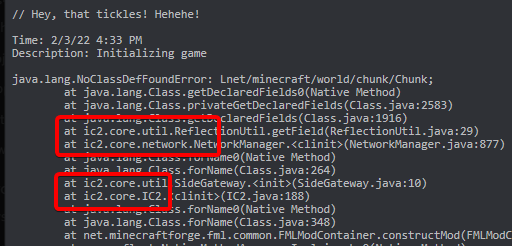
to clarify i am not saying ic2 is the issue, the point is to test without the mod to see if it is the issue.
last parcel
if it works without the mod then it is reasonable to assume that is the issue and you report to the dev. if the dev even still exists they can either fix it or tell you where else to look.
then send a new log
last parcel
cofh
daring oyster
i see it
but it doesn't make sence xDDD
all the mods i had worked without the trash can and the lib
why does a error like this appear out of nowhere
last parcel
then it sounds like you know the issue already
daring oyster
but i don't get it
for example, in FTB Revelations, i know all these mods are loaded and it works
ic2, cofh (thermal mods) and trash cans
but i confess, i don't know exactly which trash can mod it's used in that modpack
last parcel
and you are using the exact same versions of all these mods?
(you dont actually have to answer this, it doesnt really matter)
if you know what mod is causing the problem then you need to take it to the dev for an answer
 somber mantle
are all mod packs messed up right now?
last parcel
what does that mean
somber mantle
I am playing on Valheisa: Enhanced Vanilla and it is not working for anyone on the sever
 last parcel
sounds like you should discuss this with whoever owns the server
daring oyster
last parcel
and you are using the exact same versions of all these mods?
(you dont actually ...
probably not, i only installed the most recent released ones.(execpt the ones that only exist in beta)
okaaaay, i'm beeing stupid
and i just realized
the trash cans i had in mind ( trash can block, and others) are from extra utilities 2
mayba that's why it doesn't work
i'll test my theory later
 gentle matrix
why am I crashing?
wild jewel
 nova wigeon
I installed forge, but I can't start the server
nova wigeon
I installed forge, but I can't start the server
What do you get then?
last parcel
gentle matrix
why am I crashing?
Looks like a GUI rendering error. Nothing else I can tell you about it though.
nova wigeon
wild jewel
What do you get then?
oh, it works now! I used "java -Xmx6G -jar forge-1.18.1-39.0.64-installer.jar nogui" to start the server xD
still thanks
wild jewel
That is an installer, not the actual server...
last parcel
gentle matrix
any tip on what I could do?
remove mods until you find the one doing it
nova wigeon
yeaaa, but it was the only jar file, so I thought it'd work xD
daring oyster
daring oyster
mayba that's why it doesn't work
just launched a mod pack with only extra utilities2 and the trash can mod and it runs fine, so that's not it
gentle matrix
k
 low venture
Does anyone know how to fix this?
internal exception java.net.socketexception connection reset
waxen pine
?mc-logs
golden muskBOT
Sending logs for support.
- Right-click the modpack profile icon OR click the button in the modpack profile.
- Click
Open Folder. - Open the
logsfolder. - Drag and drop the FILE named
latestORdebuginto discord.
low venture
Like I am trying to join my OWN server that ive been playing for weeks, but all of the sudden I get this internal error and I cant figure out how to get around it
 pine spindle
My friend is getting an error when he joins our server it says Fatally missing registry entries
waxen pine
low venture
Is that client or server log
Also within your own home network you use your internal / local IP
waxen pine
Oh byg... still causing grief
waxen pine
pine spindle
My friend is getting an error when he joins our server it says Fatally missing r...
Check they're using the exact same modpack with exact same modpack version
low venture
Ive tried reseting the DNA, changed the thing using 8.8.8.8 8.8.4.4
still cant connect
autumn agate
how can I install my own mod on curseforge
 plucky nacelle
how do i download better minecraft 1.18.1 when i cant find it while browsing modpacks fabric version btw
last parcel
autumn agate
how can I install my own mod on curseforge
?mc-installmods
golden muskBOT
How to install mods in CurseForge App.
- Click
+ Create Custom Profile - Name it, select the required Minecraft version, select the modloader & modloader version (usually the highest number), click
Create. - Click the profile icon.
- Click
Add More Content - Search and install the desired mods.
- Start the game!
How to install mods not on CurseForge.
- Right click the profile picture or Open the profile and click the Icon next to the play button.
- Click
Open Folder. - Drag the mod(s) into the
modsfolder. (Note: Some mods will require others, to run. Make sure to read the instructions for the mod!) - Start the game!
 last parcel
plucky nacelle
how do i download better minecraft 1.18.1 when i cant find it while browsing mod...
last parcel
plucky nacelle
how do i download better minecraft 1.18.1 when i cant find it while browsing mod...
what do you mean you cant find it?
it's #2 and 3 on the list
plucky nacelle
searched it up but it just wasnt there
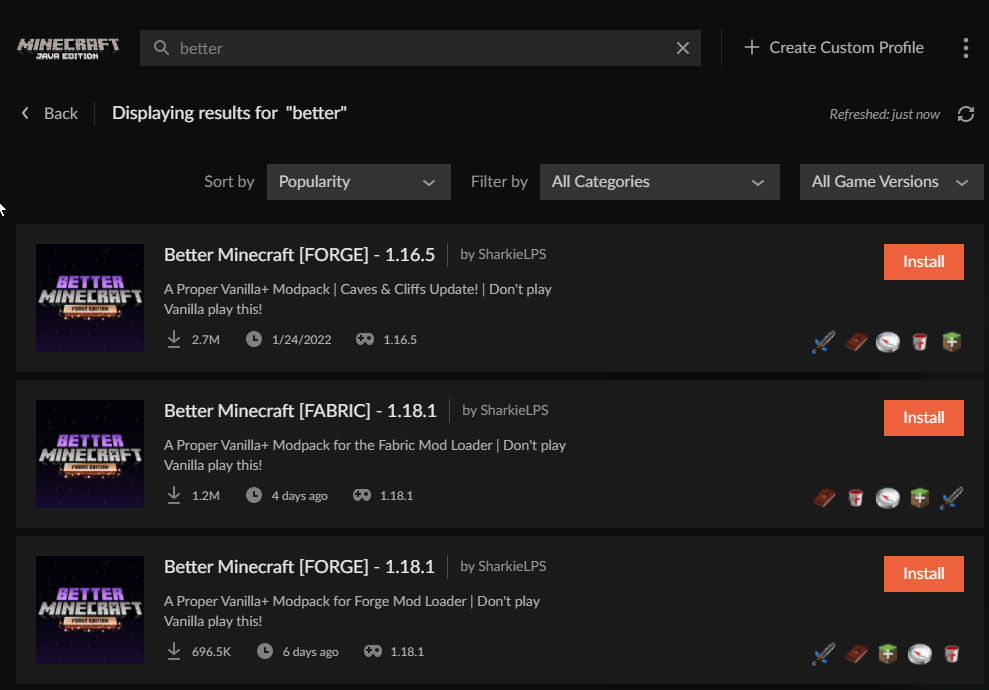
 plucky nacelle
i dont see that
last parcel
what do you see then
plucky nacelle
 last parcel
it's right there..?
plucky nacelle
the fabric version is the one i want
last parcel
restart the app
plucky nacelle
tried that didnt work
last parcel
show the whole window
plucky nacelle
 autumn agate
last parcel
show the whole window
autumn agate
last parcel
show the whole window
can I install my own mod on curseforge?
last parcel
read the message
last parcel
plucky nacelle
the pack is beta only, you need to enable beta in curseforge settings to see it
plucky nacelle
where do i enable beta
last parcel
curseforge settings
plucky nacelle
what section
last parcel
minecraft
plucky nacelle
pretty sure im considered blind at this point but i dont see it
plucky nacelle
o
 lean pewter
Guys does anyone knows how to fix this issue "An existing connection was forcibly closed"
last parcel
could be many things. how did you get it
low venture
waxen pine
Is that client or server log
I think it is internal, but idk why it even after I changed the DNS I still cant connect. I was literally playing last ngith
plucky nacelle
last parcel
preferred release
set it to beta but still cant see it
last parcel
restart the app
plucky nacelle
i did
last parcel
idk then, i see it just fine with those settings
plucky nacelle
ight thanks for the help anyway
last parcel
download from the site and import it
 gray kettle
Hi! when updating mods in custom modpack i get the error "failed to delete addons" for a few of them, what do I do? What does that mean?
last parcel
check the mods folder to see if they are there
gray kettle
Apparently they're all updated I just needed to refresh
waxen pine
low venture
I think it is internal, but idk why it even after I changed the DNS I still cant...
Open a command window and type ipconfig to get your current local ipv4
low venture
waxen pine
Open a command window and type ipconfig to get your current local ipv4
Ok I got it
now what
 solemn jungle
Hello I've been scrounging the net for an answer to this but can't find one. I'm hoping a clever person in here can answer. When a mod uses the same texture for 2 different blocks does mc stitch that texture twice once for each block or only once?
peak belfry
wild jewel
Google it, depends per router
i did i cant find my onw
last parcel
you think we can find it if you cant?

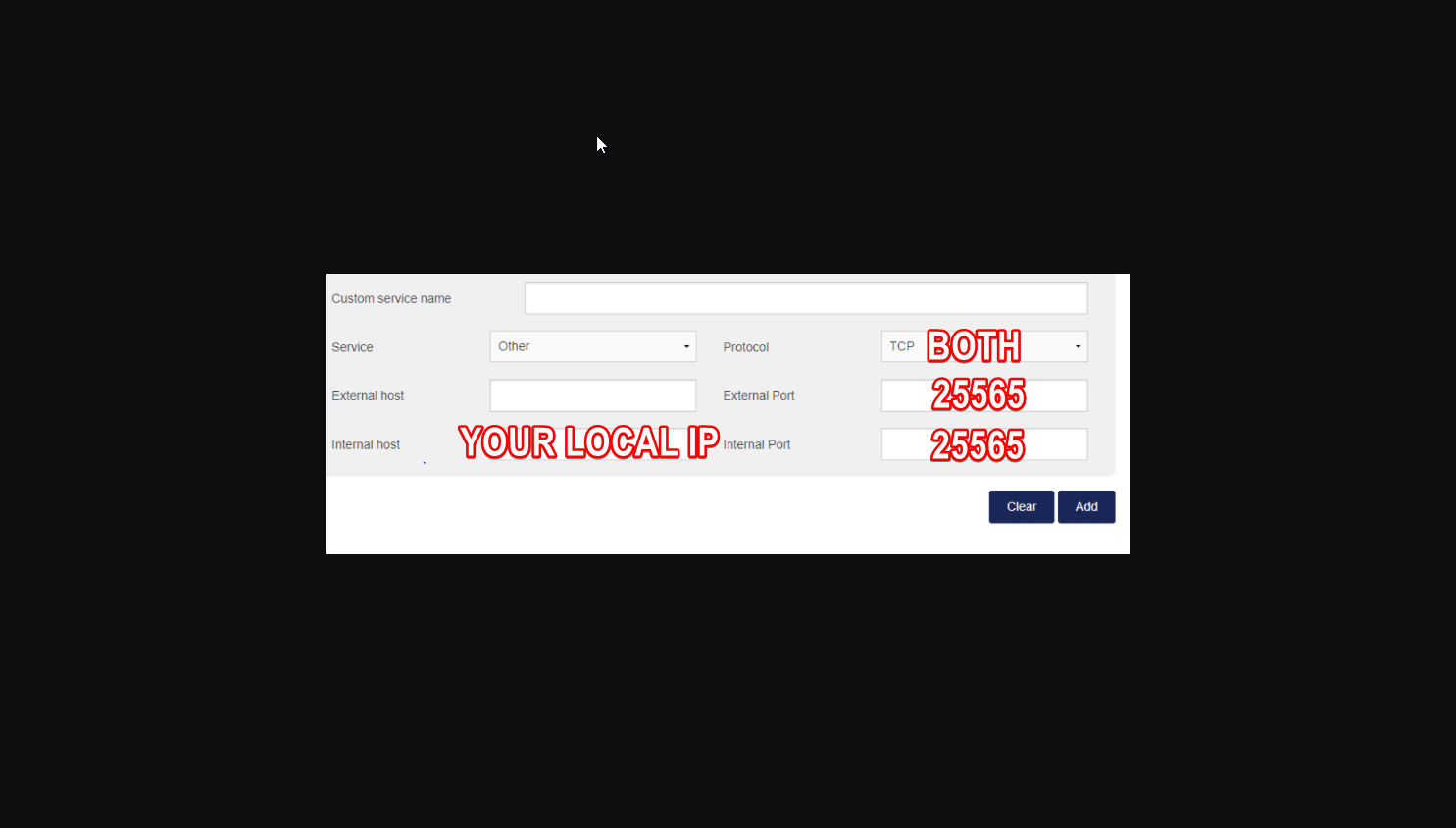 peak belfry
what about external host
last parcel
🤷♂️
peak belfry
it lets me leave external host blank ima try now
waxen pine
solemn jungle
Hello I've been scrounging the net for an answer to this but can't find one. I'm...
The texture is a single resource file(s). Both blocks point to the same resource file(s) to use that texture
 empty mortar
Good evening, I tried to use the modpack another quality 3 for 1.18.1 of minecraft. I keep going at 2 fps, the other modpacks I go quietly at 120 fps. What should I do? Thank you
last parcel
tried asking the people who made it?
 gaunt rain
i have a question
 sinful summit
gaunt rain
i have a question
sinful summit
gaunt rain
i have a question
'i have a question' dont say that, just say the question
gaunt rain
so i want play multiplayer with as friend on a modded survival but i dont know how to
last parcel
make a server or buy a server, install the pack, then both of you join it
 faint forge
hey so Im playing all the mods7 and trying to make a server. (just dropping the mods into my forge server makes it crash) but when I click on the "install server pack" nothing happens.
is there maybe a server downloader somewhere? On the curse website I only found "additional server files"
coarse nest
You need to download forge and install a foege server too probably
faint forge
yes I did and I have a server, but when I copy the mods from the forge client to the server mods folder the server crashes
 plucky zephyr
Does anyone know how I can set up discord to see that im playing modded minecraft so I can stream it?
 lilac sandal
sinful summit
'i have a question' dont say that, just say the question
lilac sandal
sinful summit
'i have a question' dont say that, just say the question
pin this maybe
quasi hinge
plucky zephyr
Does anyone know how I can set up discord to see that im playing modded minecraf...
You go to the activity section in discord settings, there’s a drop down menu where you can manually add things
coarse nest
faint forge
yes I did and I have a server, but when I copy the mods from the forge client to...
So provide the servers crash log, you probably have a client only mod in there
gentle matrix
I cant get my game to start worked all the time for months but today
coarse nest
The mod that goes by the name of something like me.suff.mc.angels is erroring, report it to them
?projectissue
golden muskBOT
Please visit the project page for the content you posted about and look for a way to contact the developer.
Somewhere on the page there is usually a method of contact. Look for one of the following things:
Issuestab like the image below.- Discord link.
- Twitter link.
- Comments section below the project.
If no contact method exists you will either have to remove the project or find a solution on your own.
 ivory otter
I cant download a modpack with the website when it opens the app, it says it would start a download but nothing happens, the modpack is Project Architect for mc
waxen pine
have you tried... just using the search bar in the app?
waxen pine
what modpack?
ivory otter
Project Architect
 keen zinc
Can anybody help me with the one block mc server load crash problem
coarse nest
Have a check of the cf comments, im pretty sure that pack is just broken
 rocky valley
coarse nest
rocky valley
coarse nest
Read the full pin. Im prettty sure it mentions smthn about #786424115535544350
waxen pine
 lime quartz
does your computer use an M1 processor?
lime quartz
yes
coarse nest
Forge for Minecraft versions 1.13-1.16 do not work on M1's due to something that Apple would need to fix, you will have to play a different mc version, like 1.18
blazing spire
Server randomly crashes on startup
sage pier
java.lang.Error: ServerHangWatchdog detected that a single server tick took 60.00 seconds (should be max 0.05)
Something take too long apparently


 sage pier
Virtual memory used (MB): 147439.55
Swap memory total (MB): 95301.00
Swap memory used (MB): 39355.82```
Yikes.95.3GB swapmemory :'D
And 159GB virtual memory.
Sounds like memory leak
blazing spire
how would I fix it?
sage pier
Could be the discord bridge
sage pier
No clue, as there's a lot of stuff in this log file. Discord thing was the first thing that caught my eye
Could also be voicechat
But yeah, could be mc2discord, voicechat
They're the one sticking out in the logs at least
blazing spire
ok thanks ill look into it
 mellow hatch
 shrewd cradle
version
shrewd cradle
version
can you help me?
shrewd cradle
mellow hatch
can you help me?
is it single player ?
mellow hatch
why do you need to know that?
mellow hatch
i can't put the modpack in the curseforge
fleet jewel
the app?
mellow hatch
yes
fleet jewel
did you install it via the app?
mellow hatch
no
mellow hatch
i downloaded the modpack in the site
and i trying to drag the rar into the app
but it's not workin
fleet jewel
thats not how it works
mellow hatch
can i show you my screen?
fleet jewel
no

this is where you install modpacks on the app
you dont install them on the website and then try to drag them onto the app
fleet jewel
but if it was working yesterday, then what changed and whats wrong?
fleet jewel
just do yourself a favour and use the app's modpack browser to install the modpacks
mellow hatch
ok...
quasi hinge
It’ll save you from some confusion and it’ll cut out the extra work when trying to play packs
 vivid marlin
I tried downloading a mod pack and when I tried to launch it it said play demo. I also own the Java edition already
fleet jewel
did you sign in on the right minecraft account?
 wintry oak
can somebody tell me what could be the cause of my crashes? I'm trying to launch a custom modpack i made for 1.8.9, and it keeps on crashing, here is one of the reports:
waxen pine
remove optifine, try again
wintry oak
ok
 tame cypress
i can barely see the chat window and JEI searchbar
of course google is being useless
oak tundra
bro
i hate rendering overlay errors
hold up
im assuming its electrodynamics, but
:(
tardy flint
I've been trying to get this modpack to work but it keeps crashing when trying to join the world
I can't send the latest file because it's too big
trying to upload it to google drive
 dim dome
Wait how can I make mods load faster? I use sky factory 4 and it takes 5 minutes each time
oak tundra
completely unrelated to crashing, but JEI menu just wont load in a world
any ideas
i tried pressing R, unhiding the menu, and rejoining
coarse nest
dim dome
Wait how can I make mods load faster? I use sky factory 4 and it takes 5 minutes...
That is actually a very good loading time for a modpack, most of the time it takes much longer.
coarse nest
Maybe try press Ctrl + O?
coarse nest
That is the default keybind for enabling and disabling jei, not sure what it is if that didn't work
oak tundra
imagine having access to JEI :(
looks like it could be draconic evolution
i'd try removing that and testing
and if it still happens remove codechickencore and its dependants and try again
etc
but yeah
are there any mods that may cause JEI to not load or reload using CTRL+O?
bruh
last parcel
I mean you just asked about the interaction between one mod and thousands of mods. That's not even possible to answer.
If you think you have a mod conflict then remove mods until the issue is gone
coarse nest
rapid python
why did i crash?
Btw, if you haven't already, quit the minecraft launcher and restart it. That log contains a temp access token that is regenerated by following the above steps
lime quartz
coarse nest
Forge for Minecraft versions 1.13-1.16 do not work on M1's due to something that...
Can I play normal 1.16.5 without mods on a m1?
 calm gate
Does anyone know what is causing this strange visual bug? 1.7(I know old version). It's all the lines, kinda like the items hitboxes are showing for all visible items like the torch. I just reset my PC and transferred the pack over from a hard drive, would that have caused it?

Ah nevermind, I fixed it, It was Fast Render from Optifine.
I only fixed it slightly. The torches are still doing it but nothing else now.
autumn agate
how can i turn to item or mob with which mod?
 dim jungle
Ok so i downloaded the mod i wanted, all my friends got it too so i dont know why it isnt letting us play together
i have no clue how it works and i even opened lan and everything and it didnt do anything what am i doing wrong
dim jungle
What do i do tho
 obsidian ginkgo
But I believe that L.A.N. has a very small range
If that may be your problem
If your friends are around a few miles away from where you may be located
Then it may not work
I think
dim jungle
Then what else could we do to play together besides lan
obsidian ginkgo
You could use a server!
dim jungle
How do i make one
obsidian ginkgo
It is relatively challenging to establish a server on your own computer
You are able to search tutorials!
But
You could also use Minehut
obsidian ginkgo
dim jungle
How do i make one
Also, do you plan to play with modifications?
Because I believe you would be required to set up a Forge server for that
There are Vanilla servers and Forge servers
Forge servers are able to run modifications for the Forge mod loader, I believe
And Vanilla servers are for Vanilla Minecraft
obsidian ginkgo
obsidian ginkgo
There are Vanilla servers and Forge servers
There are many more forms of servers
But for the sake of not having to list all of them
Forge and Vanilla servers may be what you may be most interested in
dim jungle
Is minehut free
obsidian ginkgo
Yes!
And Aternos
And, of course, there are many helpful tutorials and articles online about all of these things
So if you are struggling, I would recommend probably Minehut support articles on their website or video tutorials if you are interested in Minehut
obsidian ginkgo
dim jungle
Is minehut free
But Aternos allows you to use modifications
dim jungle
Thank you so much man!
obsidian ginkgo
Of course!
dim jungle
Wait i made a server and it says incomplete set of tags
dim jungle
Yeah
obsidian ginkgo
Hmmm
dim jungle
should i use another one
obsidian ginkgo
Have you created an account for Minehut?
dim jungle
Yeah i did all of that
obsidian ginkgo
Hmm
dim jungle
i made the server and it says incomplete set of tags on it when we join it
dim jungle
Yeah i did
dim jungle
Should i use something else
obsidian ginkgo
Um
Well
Make sure you put in "server name.minehut.gg" when connecting to a server
dim jungle
I did
obsidian ginkgo
Okay
I am guessing you placed it in the "I.P." section of Minecraft when connecting to a server
And I would assume you activated the server
dim jungle
It shows that the server is active and everything
obsidian ginkgo
Are you playing Minecraft with modifications?
dim jungle
Like mods
obsidian ginkgo
Yeah
dim jungle
Yeah
obsidian ginkgo
Okay
dim jungle
its a naruto mod
obsidian ginkgo
Oooh!
Nice!
That sounds quite interesting
But
Because Minehut provides servers that do not allow you to play with mods
dim jungle
Ohhhh
obsidian ginkgo
You will either need to use something like Aternos for server hosting
dim jungle
Thats why
obsidian ginkgo
Or remove your mods
I am so sorry about this
And I apologize that it took me so much time to figure this out
dim jungle
Ok there is like so much 16.5 version i have no clue what to click on lol
dim jungle
Take ur time
obsidian ginkgo
Thank you!
Okay
I am not entirely sure
But I do not believe it may be possible to implement modifications on Minehut currently
So
dim jungle
it says mismatch mod channel list
obsidian ginkgo
Was the version that you selected Spongeforge?
dim jungle
No
obsidian ginkgo
Oh!
Hmm
When I attempted to change a server version, I did not view a "Forge" option
dim jungle
is there any other one like aternos
obsidian ginkgo
Yes!
I would recommend using Aternos
Because I have installed modifications on that
If you are willing to continue this already extremely long attempt at creating a server
I apologize
 next cargo
dim jungle
it says mismatch mod channel list
next cargo
dim jungle
it says mismatch mod channel list
you just need the same mods in the exact same version on your client as on the server
(exclude server & client sided mods)
dim jungle
Yeah the problem is its not showing the mod on the curseforge thing
 sacred marsh
 cursive nova
how do i make the transmutation tablet/table require avaratia xtreme crafting table to craft and require draconic evolution to make energy condensers?
like is there a mod i need 4 it
coarse nest
If it is 1.13+ then use a datapack, otherwise have a look into crafttweaker
coarse nest
Never used crafttweaker, but they have a very extensive wiki
cursive nova
ok thanks
coarse nest
now its ae2 and bclib, seems that bclib really doesnt like other dimensions
 swift copper
And I assume bclib can't be removed, right?
coarse nest
it can be, but you would need to remove the mods that depend on it
swift copper
Is there a way to see what needs bclib? I really wanted to keep AE2
 ornate lance
my forge crashed - with error saying one mod didnt do loadng
waxen pine
ornate lance
my forge crashed - with error saying one mod didnt do loadng
MTR-forge-1.17.1-3.0.0-beta-9-unofficial-3.jar
mod is not compatible with 1.16.5
may I suggest adding
lazydfu (forge) ferrite core roadrunner entity culling randompatches
swift copper
I disabled AE2, and the game is still crashing. Here is the new log
ornate lance
DOH i realised i dropped wrong version of forge thank you!
waxen pine
swift copper
I disabled AE2, and the game is still crashing. Here is the new log
the crash-report.txt mentioned at bottom may be useful
swift copper
Where do I find that?
waxen pine
instead of \logs -- \crash-reports
swift copper
waxen pine
this may be a balm problem
i had the same issue with balm and the bumblezone but with forge
also balm is crashing with newer versions of forge... so uh it seems to be problematic
swift copper
Hm, interesting. I will try loading it with Balm disabled
waxen pine
if not that then try also the bumblezone
swift copper
waxen pine
if not that then try also the bumblezone
Disabled Balm, disabled all mods dependent on Balm, still crashed. Disabled Bumblezone also, still crashing. :( Here's the crash report
waxen pine
jeez something is a bad apple in there eh
swift copper
Ikr. I'm losing all my cool mods I wanted lol
waxen pine
did this ever work?
it's more likely this is one thing bringing the house down and you can add back the others
swift copper
I've never gotten this to run even a single time, nope. Had a ton of curseforge issues first, turned out to be 'Simple' GUI Modifications. After that haven't been able to get a world to load past 0%
waxen pine
making a pack from scratch takes a lot of time, especially with new versions of MC that are actively having bugs worked out with all the ported mods switching over. adding mods very slowly and confirming runs/doesn't run is usually the fastest way
swift copper
Yeah, just sucks when there's 250 of them to go through lol
The thing is too, this isn't even me trying to make a pack from complete scratch, I'm trying to combine two modpacks. Those being Better Minecraft and All of Fabric 5, along with just a few standalone mods, as well as a few mods removed from AoF5. But I guess I shouldn't have expected it to be that easy
waxen pine
to be fair all better MC does is spam the add mods button anyhow
many mods conflict - is always going to be an issue. combining two working modpacks is never a guarantee, and usually causes issues
it also usually winds up being too much stuff
swift copper
True. Maybe I'll just try to do Better MC and some of the Machine mods I like
waxen pine
up to you
there are lesser-known modpacks advertised here in #768717413918179368 fyi - hidden behind role in #786424115535544350
coarse nest
cough cough briar patch
 raw jewel
Hi, I am hosting my own private server to play with some friends. And I am using MCProHosting to do so. I have hosted this modpack on this Service in the past and had no issues. But for some reason I am having issues with my friends not being able to do anything. I would ask the Server Provider but their support isn't available atm. So I came here to see if it is possibly the Mod Pack causing the issue. I am playing Project Ozone 3 A New Way Forward. Anyone have a answer or solution? Thanks!
coarse nest
You are going to have to explaon the problem better, what do you mean by "not able to do anything"?
raw jewel
They cant place destroy or interact with anything
It is like they are in adventure mode
But I made sure they weren't by putting them in Survival by command
 orchid pier
raw jewel
But I made sure they weren't by putting them in Survival by command
orchid pier
raw jewel
But I made sure they weren't by putting them in Survival by command
essential plugin?
are they seeing anything in the chat?
raw jewel
Does that mod have a spawn protecting thing in it?
orchid pier
raw jewel
Does that mod have a spawn protecting thing in it?
maybe
FTB Teams?
i think
raw jewel
I made them apart of my team and all. Still nothing tho
I made apart of any team that was available. Made sure all the settings matched to what would allow them to do things. Still nothing
coarse nest
Vanilla has spawn prot
raw jewel
Hmm
coarse nest
It happens under certain conditions, cant remember them exactly
orchid pier
raw jewel
The mod is on Vanilla 1.12 or something
yeah, project ozone is big
may be a problem with teams / spawn prot
go like 160-200 blocks outside of spawn
raw jewel
Hmm the version I played on in the past didn't have this issue
orchid pier
raw jewel
Hmm the version I played on in the past didn't have this issue
was it a singleplayer world?
orchid pier
on someone else's servers?
raw jewel
It was with the same server hosting thing too
orchid pier
raw jewel
It was with the same server hosting thing too
check the server.properties file for spawn protection
coarse nest
Try run /op @a when both of you are on
 tranquil nebula
im trying to launch a better minecraft server and everytime i put the ip in and click to play it its saying mismatch mod channel list
raw jewel
I looked in the server properties and there isn't anything for spawn protection
waxen pine
tranquil nebula
im trying to launch a better minecraft server and everytime i put the ip in and ...
most likely you launched minecraft-server.jar which is the wrong file. you launch forge-x.x.x.jar
obsidian ginkgo
I am struggling to load Minecraft. I believe I may have altered the conditions of Java when removing files on my computer, and was curious if anybody may be willing to assist. I have attempted to uninstall Java and install it again. I am using MacOS. I am loading a modpack that I have attempted to create.
 tranquil nebula
waxen pine
most likely you launched minecraft-server.jar which is the wrong file. you laun...
tranquil nebula
waxen pine
most likely you launched minecraft-server.jar which is the wrong file. you laun...
and where would i be able to change how i laucnh minecraft
waxen pine
if they did a good job of making a server pack they should have instructions inside
waxen pine
obsidian ginkgo
I am struggling to load Minecraft. I believe I may have altered the conditions o...
?mc-logs
golden muskBOT
Sending logs for support.
- Right-click the modpack profile icon OR click the button in the modpack profile.
- Click
Open Folder. - Open the
logsfolder. - Drag and drop the FILE named
latestORdebuginto discord.
tranquil nebula
i will try