#👽︱game-support
1 messages · Page 202 of 1
 autumn agate
 vocal scarab
 royal oak
server log or client log?
 waxen pine
Start with client
 last parcel
vocal scarab
last parcel
vocal scarab
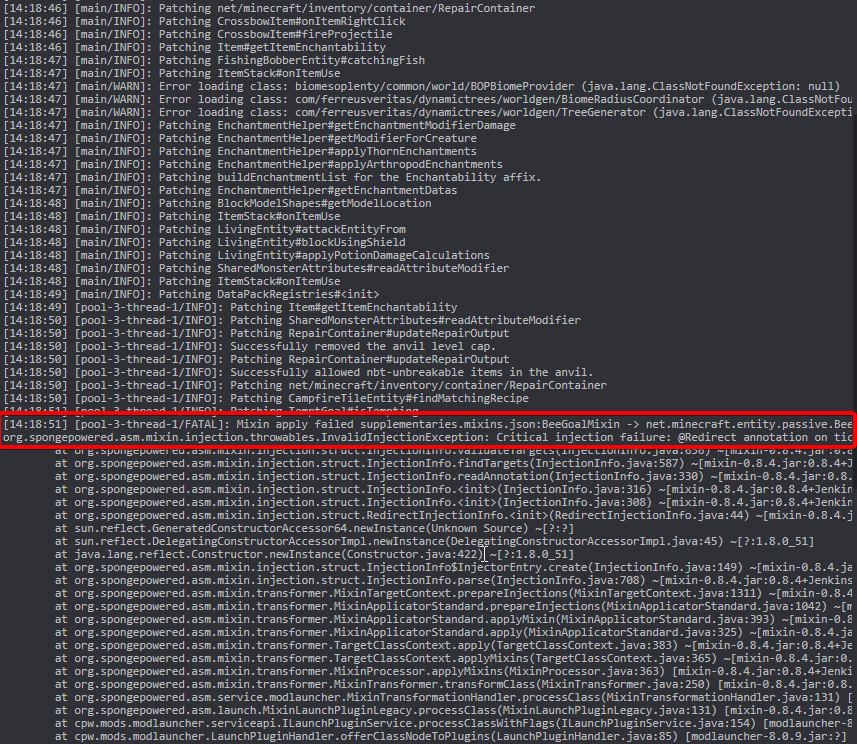 royal oak
waxen pine
Start with client
royal oak
waxen pine
Start with client
that means client log?
vocal scarab
last parcel
https://i.imgur.com/wTQgdGk.png
Thank You!
 sage pier
last parcel
https://i.imgur.com/wTQgdGk.png
sage pier
last parcel
https://i.imgur.com/wTQgdGk.png
Deja vu..
waxen pine
#📛︱rules #5️⃣
Yes client latest.log
Sometimes that is a load order issue and joining a singleplayer world first will fix
royal oak
waxen pine
Sometimes that is a load order issue and joining a singleplayer world first will...
last parcel
?mc-installfix
 golden muskBOT
This is NOT instructions for Repair Profile! They are NOT the same! You need to do this!
- Click on the Minecraft Tab on the Left side of the CurseForge App.
- Click
 button next to the
 Create Custom Profileoption. - Click

Repair Installationoption. - Play game.
NOTE: You will not lose any modpacks or worlds!
royal oak
last parcel
?mc-installfix
same error
waxen pine
Is that a modpack off CF or your own
last parcel
reinstall the pack
golden muskBOT
Error/Exit codes are useless. Follow these steps so someone can actually help you.
- Right-click the modpack profile icon OR click the button in the modpack profile.
- Click

Open Folder. - Open the
logsfolder. - Drag and drop the FILE named
latestORdebuginto discord.
autumn agate
I keep getting exit code 0, vanilla runs fine and java is up to date, and my pc is fully capable of running this amount of mods without an issue.
golden muskBOT
Error/Exit codes are useless. Follow these steps so someone can actually help you.
- Right-click the modpack profile icon OR click the button in the modpack profile.
- Click
Open Folder. - Open the
logsfolder. - Drag and drop the FILE named
latestORdebuginto discord.
 coarse nest
Remove optifine, if it still happens send a new log
coarse nest
You have a bunch of duplicated mods in yoir mods fodler
Likely due to a bug with CF
Remove the older versions from the mods folder manually
autumn agate
Ok
Thanks for the help! i feel a bit dumb for not checking my mods folder before i sought help here lol, but its running now 🙂
 ruby lantern
This looks like a scam
 unreal cape
anybody know a good way to have a minecraft server make backups?
 modest osprey
does anyone know a mod that lets you claim blocks in 1.15.2
 umbral tulip
can someone check a crash log for me please?
it keeps mentioning the sub mod for create, which is flywheel, but thats a dependency for create
coarse nest
Try disabling flywheels rendering system by going to the flywheel config file in the config folder and changing the first option to false
coarse nest
Yep
umbral tulip
it is set to false
#Enable or disable the entire engine
#Allowed Values: OFF, BATCHING, INSTANCING
backend = "INSTANCING"
#Enable or disable a debug overlay that colors pixels by their normal
debugNormals = false
coarse nest
Flywheel is a mod that create uses to make its blocks render (show up on the screen) fast.
It also happens to be a block in create, but it is unrelated to the rendering mod
umbral tulip
still crashes.
The game crashed whilst rendering overlay
Error: java.lang.NullPointerException: Cannot read field "name" because "spec" is null
Exit Code: -
golden muskBOT
Error/Exit codes are useless. Follow these steps so someone can actually help you.
- Right-click the modpack profile icon OR click the button in the modpack profile.
- Click
Open Folder. - Open the
logsfolder. - Drag and drop the FILE named
latestORdebuginto discord.
umbral tulip
there are none
coarse nest
You have two of quite a few mods (caused by a curseforge bug)
 soft yarrow
would anyone be able to help me out with this, worlds just wont load
for ref, it just stays like this forever
 coarse nest
Can you send the latest crash report?
soft yarrow
yes one second
this is the most recent I have, dont know if it generated a report because it never actually crashed, I just closed with taskmanager
yeah this one isnt it, I just disabled architectury and it loads after this report. I will try to get another report to generate
coarse nest
Yeah, its not this report
It says at the end of the log that its generating a crash report, but obviously its not
soft yarrow
yeah i noticed that, although what i sent is my most recent report
i’m loading into mc again rn
 quasi hinge
Wrong place to put that
coarse nest
<@&524645667818307596> ad cleanup here and #🔎︱mod-hunting
 blazing stream
how do I update CurseForge lol
 coarse elm
restart it
 mystic basin
i can't open door
 sudden stream
hey this happened to me what can i do
The game crashed whilst rendering screen
Error: java.lang.ClassCastException: class java.util.Collections$UnmodifiableCollection cannot be cast to class java.util.List (java.util.Collections$UnmodifiableCollection and java.util.List are in module java.base of loader 'bootstrap')
Código de error: -1
 waxen pine
?mc-logs
golden muskBOT
Sending logs for support.
- Right-click the modpack profile icon OR click the button in the modpack profile.
- Click
Open Folder. - Open the
logsfolder. - Drag and drop the FILE named
latestORdebuginto discord.
sudden stream
i dont have a modpack
waxen pine
still - the latest.log file or crash-report.txt file
 raven lotus
thank you but every time i try to start the server it crashes so do i need to remove ice and fire?
raven lotus
ok whatever i removed it and it worked thanks
 wild jewel
!mc-installserver @tawdry adder
golden muskBOT
How to **manually** install a server - **On your own PC**
- Check if the modpack has a server pack, if it does: use that and skip below.
- Go to the Forge website http://files.minecraftforge.net/ and download the Installer for the forge version the pack is using.
- Run the installer and choose
Install server. Do not install to your desktop. Also do not install inside a OneDrive folder. - Run the server using the forge.jar. A file called
eula.txtwill be generated. Open it and changeeula=falsetoeula=true - From the Client; Copy the
modsfolder,configfolder, and any other folders needed for the pack to work into the server folder. If the modpack has a server pack, use this instead! - Run the server again.
- Port forward your machine if needed. (Google it)
Long version: https://pastebin.com/83DXfGTH
 twin kindle
How i can fix it? I'l add some mods and it's don't loading. Can someone help me?

 wild jewel
And you started it by pressing that play button?
twin kindle
yea
wild jewel
!mc-logs
golden muskBOT
Sending logs for support.
- Right-click the modpack profile icon OR click the button in the modpack profile.
- Click
Open Folder. - Open the
logsfolder. - Drag and drop the FILE named
latestORdebuginto discord.
wild jewel
C:\Users\ABC\curseforge\minecraft\Instances\Super paczka modów pogchamp — kopia\mods
Open that folder, are there mods in there?
 golden muskBOT
This is NOT instructions for Repair Profile! They are NOT the same! You need to do this!
- Click on the Minecraft Tab on the Left side of the CurseForge App.
- Click button next to the
Create Custom Profileoption. - Click
Repair Installationoption. - Play game.
NOTE: You will not lose any modpacks or worlds!
twin kindle
Not working
wild jewel
Does the original pack work?
twin kindle
original? What do u mean?
wild jewel
It is a copy right?
twin kindle
Yeah but i don't have original
Maybe i will create new profile With the same mods?
And i will try
Oh it's working
thank you
^^
 ashen oriole
why my 1.16.json file keep getting deleted
Failed to download file, the file contents differ from what was expected.
Name: 1.16.json
URL: https://launchermeta.mojang.com/v1/packages/738b17ea266089b5e384791eb5a2cf1fafe109b6/1.16.json
Filename on disk: 1.16.json
Path: C:\Users\mynameifbobhalf\curseforge\minecraft\Install\assets\indexes\1.16.json
Exists: Nonexistent
 spark oriole
help pls mc keeps crashing
wild jewel
!mc-installfix
golden muskBOT
This is NOT instructions for Repair Profile! They are NOT the same! You need to do this!
- Click on the Minecraft Tab on the Left side of the CurseForge App.
- Click button next to the
Create Custom Profileoption. - Click
Repair Installationoption. - Play game.
NOTE: You will not lose any modpacks or worlds!
spark oriole
shouldnt it b like 3gb ram why is it showing this ?

 spark oriole
wild jewel
!mc-installfix
spark oriole
wild jewel
!mc-installfix
still crashing
coarse nest
Cf set it to 4 by default
spark oriole
coarse nest
Cf set it to 4 by default
so lik 4m or do i have to do 4gb ?
coarse nest
Leave it as it is,if you want to adjust ram get instructions by running !mc-ram in #🟢︱user-bot-spam
Also maje sure to read the installfix instructions carefully, specifically the bit about repair profile being completely different
spark oriole
golden musk
where is repair instillation option ?
 sage pier
Read the instructions and you'll find it
Or watch this video: https://www.youtube.com/watch?v=EeAf_PKXl8c
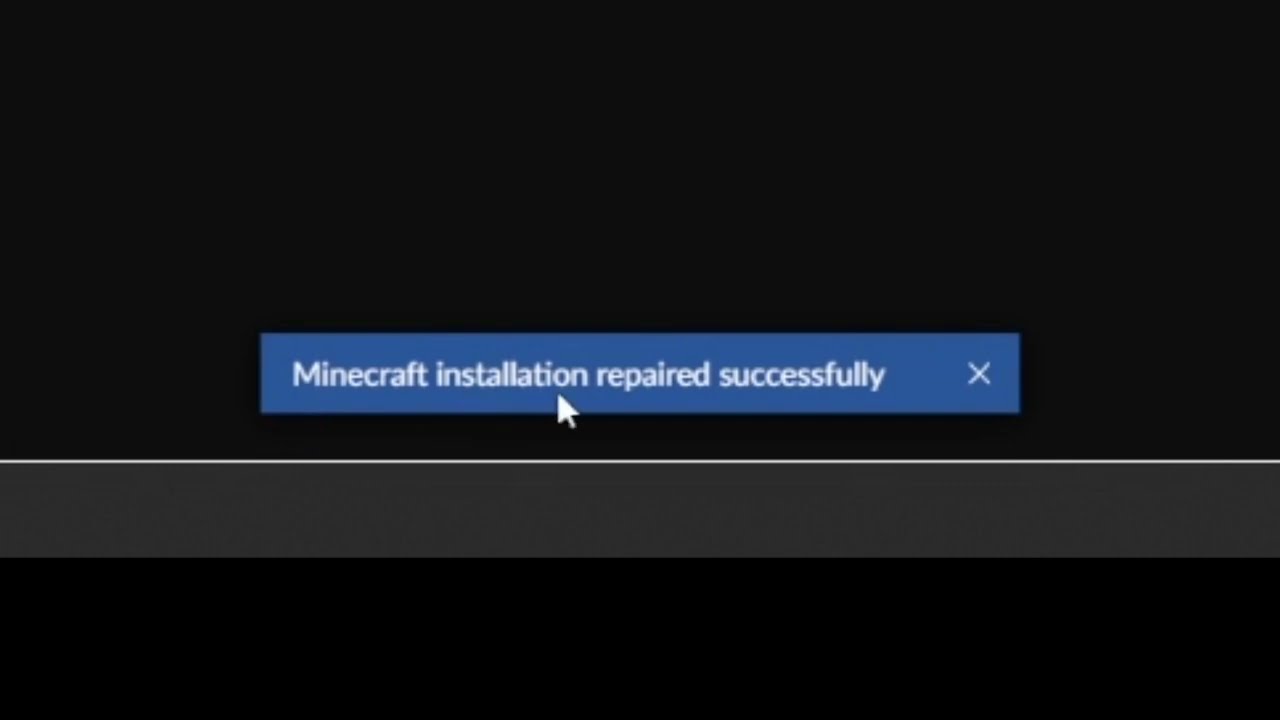
This short video will show you how to find the "Repair installation" for Minecraft in CurseForge.
What it does, is basically check if the local installation of Minecraft that CurseForge uses, is valid/working, and will repair itself, if needed.
 coarse nest
Restart the app
 spark oriole
sage pier
Is Minecraft open? Or the launcher?
spark oriole
sage pier
Is Minecraft open? Or the launcher?
mc is not opn
sage pier
Restart your computer and try to repair the installation again.
 coarse nest
Probably network issues, but wihtout the full error we cant tell
spark oriole
coarse nest
Probably network issues, but wihtout the full error we cant tell
ok i will u show u full error 1 sec


heelp pls i just wanna play modded mc
coarse nest
Try the installfix again
spark oriole
coarse nest
Try the installfix again
ok
wild jewel
And disable your pings
spark oriole
wild jewel
And disable your pings
ok
 tawdry adder
and there is a video showing how to do it
 wild jewel
How good is your internet?
spark oriole
 tawdry adder
and there is a video showing how to create a server on modpack
spark oriole
THIS GUY AGAIN
 spark oriole
tawdry adder
and there is a video showing how to create a server on modpack
spark oriole
tawdry adder
and there is a video showing how to create a server on modpack
what ?
wild jewel
tawdry adder
and there is a video showing how to create a server on modpack
What are you even talking about?
How is it related to this conversation?
spark oriole
yea ?
wild jewel
@tawdry adder Gave you a timeout for shouting random stuff.
Keep it on topic.
spark oriole
do u require wifi at all times to play with mods ?
wild jewel
spark oriole
do u require wifi at all times to play with mods ?
Or wired

 gentle matrix
wild jewel
gentle matrix
wild jewel
Don't put servers in onedrive please
gentle matrix
ignore onedrive its on my desktop
dont know why It says that I deleted onedrive
oh one sec
damn windows 11
its the worst windows ever made
last parcel
no that was 8
delete this file java.lang.RuntimeException: Failed to load FML config fromC:\Users\vpstu\OneDrive\Desktop\mohist server\config\fml.toml
gentle matrix
now it says we cannot find
gentle matrix
last parcel
~~no that was 8~~
delete this file `java.lang.RuntimeException: Failed to load F...
deleted that one now though
tf
it deleted my whole desktop and all my files
fuck windows 11
and onedrive
spark oriole
i have giveon up on lif nothing works lol
gentle matrix
right managed to get back some stuff just coz I got backups but still fuck Windows
thanks for the help!
spark oriole
PLS HELP I BEG

 last parcel
get better internet
spark oriole
last parcel
get better internet
bruh
spark oriole
last parcel
get better internet
u sre it is internet problem
wild jewel
Disable your pings, last warning
last parcel
read the top 4 words
spark oriole
wild jewel
Disable your pings, last warning
sorry forgot
spark oriole
last parcel
read the top 4 words
oh shoot
wild jewel
!mc-installserver @tawdry adder
golden muskBOT
How to **manually** install a server - **On your own PC**
- Check if the modpack has a server pack, if it does: use that and skip below.
- Go to the Forge website http://files.minecraftforge.net/ and download the Installer for the forge version the pack is using.
- Run the installer and choose
Install server. Do not install to your desktop. Also do not install inside a OneDrive folder. - Run the server using the forge.jar. A file called
eula.txtwill be generated. Open it and changeeula=falsetoeula=true - From the Client; Copy the
modsfolder,configfolder, and any other folders needed for the pack to work into the server folder. If the modpack has a server pack, use this instead! - Run the server again.
- Port forward your machine if needed. (Google it)
Long version: https://pastebin.com/83DXfGTH
 onyx sigil
Hi.
I have a problem with playing minecraft with mods. Everytime i start it with a mod it says that the game crashes what can i do to play with mod without crashes
wild jewel
!mc-logs
golden muskBOT
Sending logs for support.
- Right-click the modpack profile icon OR click the button in the modpack profile.
- Click
Open Folder. - Open the
logsfolder. - Drag and drop the FILE named
latestORdebuginto discord.
onyx sigil
last parcel
?mc-installfix
golden muskBOT
This is NOT instructions for Repair Profile! They are NOT the same! You need to do this!
- Click on the Minecraft Tab on the Left side of the CurseForge App.
- Click button next to the
Create Custom Profileoption. - Click
Repair Installationoption. - Play game.
NOTE: You will not lose any modpacks or worlds!
 pure ravine
A recipe of Blacksmith's Anvil from Blast Off v1.3.3 - Ex Nihilo: Double Compressed Cobblestone to BuildCraft Additions: Stone Gear - doesn't work for me on LAN, where only my young brother (The Host) was somehow allowed to use the Blacksmith's Anvil, but excluding this recipe. Any idea?
I downloaded the file from cursedorge website and ran this on MultiMC, could it be a file corruption during installation?
waxen pine
More likely it's LAN not being able to sync recipe or modpacks are not the same on both sides.
 jovial tusk
can someone help how i put a shader in better minecraft?
last parcel
remove optifine, then post a new log
golden muskBOT
Please visit the project page for the content you posted about and look for a way to contact the developer.
Somewhere on the page there is usually a method of contact. Look for one of the following things:
Issuestab like the image below.- Discord link.
- Twitter link.
- Comments section below the project.
If no contact method exists you will either have to remove the project or find a solution on your own.

 stuck flume
any fix on this? my modpack keeps crashing when either choosing my world or starting up
pure ravine
The weird thing is it sometimes syncs and sometimes doesn't, which makes me even more confused as if the script is the main problem or not.
Could the internet instability be considered also a factor?
 naive flint
i made a world and entered it and i crash, the crash error is server tick loop
i just put a few mods together, could it be one of them
the mods i am using are


is there a specific mod that could be causing this
golden muskBOT
Sending logs for support.
- Right-click the modpack profile icon OR click the button in the modpack profile.
- Click
Open Folder. - Open the
logsfolder. - Drag and drop the FILE named
latestORdebuginto discord.
sage pier
java.lang.NoSuchMethodError: 'dev.onyxstudios.cca.api.v3.component.ComponentContainer net.minecraft.class_5268.getComponentContainer()'
Something with the Cardinal Components seems to be wrong
naive flint
it came automatically with a mod
should i download another version
okay the problem is the 1.18 version
i will make my mods 1.17

no breaks i swear
last parcel
?mc-log
golden muskBOT
Sending logs for support.
- Right-click the modpack profile icon OR click the button in the modpack profile.
- Click
Open Folder. - Open the
logsfolder. - Drag and drop the FILE named
latestORdebuginto discord.
 west forum
"connection closed - mismatched mod channel list" Does anyone have an easy way to either install something server side, or client side that makes it clear for users which mod is clashing?
last parcel
send the log
west forum
last parcel
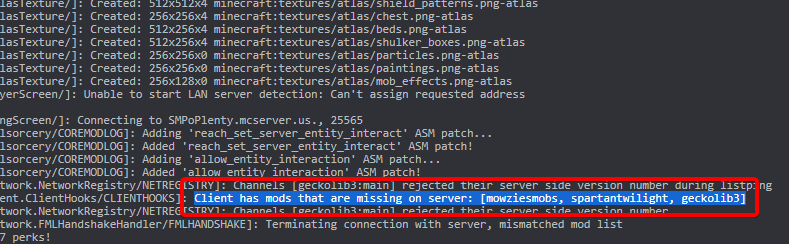 west forum
Nah, they all there. Hosting confirmed it too
 last parcel
log says what log says
west forum
I'm out of my depth here. I'm a dad, trying to do this for my kids LOL
I will send them this log
last parcel
restart the server and try again
 scenic lava
does anyone know why this crashed
coarse nest
The mod cpm is erroring, possibly due to a conflict with another unknown mod
scenic lava
is there a way to check what mods are the problem
coarse nest
Remove them in small groups till it works
scenic lava
ok
 blazing spire
Is there a mod to find out which mod is using the most ram on a server or such
cause Im tying to make a server but its taking so much ram
coarse nest
I think spark can do that, although ine never used it for that
coarse nest
Yeah.
Next time use #🔎︱mod-hunting for mods
waxen pine
You might need to do a heap dump to figure out memory use
 jaunty mesa
just wondering why does minecraft launcher freeze while loading x life 3?

no logs or crash reports
coarse nest
Thats it downloading minecraft files, is that what it freezes on?
jaunty mesa
likely
but wondering why its doing that
seems to work now perhaps was a bad installation
coarse nest
Or just mojangs servers being slow like normal
 coarse nest
yeah, then thats just it downloading required files for the game to run, it has to do it for each minecraft version you play
 trail stirrup
Does anyone know why the Rlcraft modpack isnt starting through the launcher? When i press play it says finalizing for a second and nothing happens.. i tried repairing the installation through cf and still didnt fix, i dont know why this is happening because i was playing fine an hour ago~
and then when i press play again it says its already running
 coarse nest
Did you try repair install or repair profile?
trail stirrup
this?
 coarse nest
Yeah, that
trail stirrup
yes, i did that already and nothing is fixing. :c
coarse nest
What is your minecraft modding path set to?  =>
=> 
trail stirrup
how do i view that?
coarse nest
Settings in the bottom right of cf, then the minecraft cateogyr
trail stirrup
then what?
coarse nest
Send a screenshot of it here. You can black out a part of it if it contains your name if you want

 golden muskBOT
Sending logs for support.
- Right-click the modpack profile icon OR click the button in the modpack profile.
- Click
Open Folder. - Open the
logsfolder. - Drag and drop the FILE named
latestORdebuginto discord.
trail stirrup
there is no logs folder :c

 sacred granite
hello, im really new to the curse forge and have alwyas wanted to build my own modpack, i just put one together and it will bring up my minecraft launcher but when it tries to launch the game it crashes with error code 0, can anyone help with advice or take a peek at the profile?
golden muskBOT
Error/Exit codes are useless. Follow these steps so someone can actually help you.
- Right-click the modpack profile icon OR click the button in the modpack profile.
- Click
Open Folder. - Open the
logsfolder. - Drag and drop the FILE named
latestORdebuginto discord.
coarse nest
trail stirrup
there is no logs folder :c
!mc-launcherlog this might have smthn
golden muskBOT
How to get the launcher log
- Right click a profile.
- Select
Open Folder - Go back two folders.
- Open the
Installfolder. - Drag the
launcher_log.txtinto discord.
trail stirrup
sudden stream
help please

every time that i start my world it crashes when i open my inventory
and sometimes when the world is loading it says at the end of the loading screen something about multiplayer servers and my world is not online
coarse nest
!mc-logs
golden muskBOT
Sending logs for support.
- Right-click the modpack profile icon OR click the button in the modpack profile.
- Click
Open Folder. - Open the
logsfolder. - Drag and drop the FILE named
latestORdebuginto discord.
sacred granite
im sorry if this isnt what i was soposed to do, i tried to get the log but this is all i could get, if anyone has a second to message me for more info it would be greatly appreciated
coarse nest
trail stirrup
Hmm. I cant see anything. Try restart your computer and do the installtion repair agaon?
sudden stream
coarse nest
!mc-logs
i dont have a modpack, where can i open that folder from?
coarse nest
So you aren't using the cf app?
sudden stream
whats that
sacred granite
this is the other option i have
trail stirrup
coarse nest
Hmm. I cant see anything. Try restart your computer and do the installtion repai...
kk
coarse nest
sudden stream
whats that
It manages your modded minecraft installations for you.
Assuming your using the vanilla launcher press  +
+ R. Type in %appdata%. Press enter. Open the .minecraft folder. The logs fodler is in there
coarse nest
sacred granite
this is the other option i have
Seems the mod bookshelf is erroring, possiibly due to a mod concflict with an unknown mod. Remove it and any mods that depend on it, or remove other mlds slowly till it works, then re-add them in, except the one that caused the conflict
coarse nest
sudden stream
Remove optifine. If it still happens send a new log
sudden stream
coarse nest
Remove optifine. If it still happens send a new log
but how do i use shaders then
coarse nest
You don't. Or you remove other mods till it works
sudden stream
ill try it
 gentle tree
Currently unable to launch a Medieval Minecraft server, meanwhile other mod pack servers like Skyfactory 4 and SevTech work fine
 dim quarry
Is there a way to download a modpack without using the curseforge app?
coarse nest
There are other third party launchers (like cf) out there, otherwise no
dim quarry
the file I manually downloaded only contained a manifest.json, a mod list, and an override folder
ah okay
so then I guess I'm forced to use the old legacy minecraft launcher that's bundled with curseforge?
coarse nest
Its not legacy, the new launcher is identical except for the games it launches (it does bedrock and java, not just java)
golden muskBOT
Ignore the new launcher update. CF does not use it or works with it, yet.
Everything will work fine otherwise.
dim quarry
coarse nest
Its not legacy, the new launcher is identical except for the games it launches (...
ah okay. so I can ignore that "legacy" error/warning the minecraft launcher displays then lol
sacred granite
thank you, it keeps crashing but now its telling me what mods caused the error, do i just keep removing them til it runs?
coarse nest
Depends what the error is
sudden stream
coarse nest
Remove optifine. If it still happens send a new log
it happened again, seems like optifine isnt the problem
sacred granite
this is the new one
coarse nest
sudden stream
it happened again, seems like optifine isnt the problem
Silent gear is erroring trying to calculate gear stats, im not too sure why tho
sudden stream
coarse nest
Silent gear is erroring trying to calculate gear stats, im not too sure why tho
do you think that installing another version of the mod could fix the problem?
sudden stream
that mod is a dependence of the mod colytra, a mod that allows you to wear armour and elytras at the same time, do you know any other mod that does that?
and sorry for the pings
coarse nest
sacred granite
this is the new one
Yeah, that one seems to be beyond earth
coarse nest
sudden stream
that mod is a dependence of the mod colytra, a mod that allows you to wear armou...
I know theres a datapack that does it for vanilla stuff, not sure of any mods tho
 gentle torrent
so i used the curseforge app to download 3 ksp mods on my mac (ksp interstellar extended, mechjeb, and stockalike station parts) by pressing the orange install button. i boot up the game, and i see flashing by in the loading progress bar things related to all three mods. but, i enter a sandbox test game and no new parts are there, however the mechjeb button is. anyone know whats going on?
(reposted from #🔥︱curseforge-support because i think this is the appropriate place?)
sudden stream
whats the name of the datapack
coarse nest
Its part of vanilla tweaks (https://vanillatweaks.net)

We tweak parts of vanilla Minecraft that we believe can be a little better through resource packs, data packs, and crafting tweaks.
last parcel
gentle torrent
so i used the curseforge app to download 3 ksp mods on my mac (ksp interstellar ...
Dont use curseforge for ksp, it is broke. use CKAN instead.
sudden stream
thanks
trail stirrup
okie so i restarted my pc and tried repairing the installer once again and it is still not launching rlcraft, i really dont know what to do. i think i have done everything i could
it just says finalizing then nothing happens
 karmic lodge
How would i go about transferring my modded world to an updated version of the pack
sudden stream
coarse nest
Silent gear is erroring trying to calculate gear stats, im not too sure why tho
i installed another version of the silent gear mod but the same happens, does the reason appear this time?
coarse nest
trail stirrup
it just says finalizing then nothing happens
Im really not sure then, maybe change the minecraft modding path to C://Curseforge?
coarse nest
sudden stream
i installed another version of the silent gear mod but the same happens, does th...
Never send logs with optifine in them, remove it and send new logs please (its yet a different error in that log, cna never be sure its not optifine
sudden stream
ok sorry
but i have to remove optifine before the crash right?
or can i do it after
coarse nest
It has to be removed before you launch
gentle torrent
last parcel
Dont use curseforge for ksp, it is broke. use CKAN instead.
thanks, although i cant find stockalike station parts or interstellar in there
sudden stream
ok
karmic lodge
I updated the existing pack but when i loaded the launcher the world save wasnt there
sudden stream
coarse nest
It has to be removed before you launch
hey maybe this has something to do with the problem im just saying what do you think

i opened minecraft again but this time without optifine and even without silent gear
coarse nest
Try update jei
And yes, forge being in beta does partly affect it, all the mods on it are still fixing bugs, and forge occasionly makes unexpected changes that break stuff
sudden stream
is there any non beta version of forge 1.18.1?
bc when i downloaded forge it didnt say it was beta
or at least i didnt see that
coarse nest
There isnt a non beta
Forge will always be in beta for a while after a new version comes out because they can only make breaking changes (stuff that breaks mods code) while in beta
And breaking changes are often needed to add new stuff or fix old stuff
sudden stream
ok thats understandable
sacred granite
is there a mod in 1.18 for health bars?
coarse nest
#🔎︱mod-hunting for looking for mods
sacred granite
sorry
spark oriole
Is is going very slow
 coarse nest
Thats mojangs download servers for you, theyve never been very fast
sacred granite
it was runnign fine and it keeps crashing when i load a new world, any ideas?
coarse nest
Chance cubes requires an older version of forge, see if it has an update, otherwise remove it or downgrade forge
sacred granite
thank you, ill try that
spark oriole
any way of fixing this other than getting better wifi
 coarse nest
Not really
 spark oriole
coarse nest
Not really
spark oriole
coarse nest
Not really
🙁
coarse nest
 narrow vortex
does anyone know how to fix this?
narrow vortex
does anyone know how to fix this?
Download and install java 8
1.16 requires java 8, not 16 to run
spark oriole
spark oriole
any way of fixing this other than getting better wifi
i have good internet tho
spark oriole
pls
any other way to fix
pls
pls
there must be a way
i am ready to do anything
u want me to go mining irl for 7 days and get a diamond i will get it will make this mc work
coarse nest
Find where vanilla keeps its files and copy it to where curseforge is trying to downlaod them too
spark oriole
ok
btw evvery time the file that failed to download changes
does that change anything
lol imma have to download all fish files seperately
but like i reallly have good internet why does it keep crashing ?
karmic lodge
How would i go about transferring my modded world to an updated version of the pack
coarse nest
Can you explain the steps you took to update? It should install the pack in the same location, thus keeping the save file
karmic lodge
ive made a world back up of the old world and tried to bring it to the save on the updated version but it didnt work
I updated the pack and the world wasnt on there
coarse nest
karmic lodge
ive made a world back up of the old world and tried to bring it to the save on t...
How did you do that?
karmic lodge
so in the old version of the pack i made a backup of my world then i went to curse forge to update to the newest profile when i loaded the newer version my world wasnt there so i tried to go to the saves file and paste the back up i made into the new version but it didnt work
coarse nest
Did you unzip it?
karmic lodge
Yes
coarse nest
Is the world folder (that contains the level.dat) directly inside the save folder? Not inside another folder
karmic lodge
No or at least i cant find it
can u list the steps to transfer it to a newer version of a mod pack and ill just try again
coarse nest
You do not transfer saves between versions
karmic lodge
so how would i get my world to the updated version of the pack
coarse nest
You update the existing pack instead of reinstalling it
right click the icon and click change version
 karmic lodge
wow thanks, it worked i was downloading a new one everytime
blazing spire
Anyone know how to disable /back command for non ops with ftb essentials using ftb ranks?
karmic lodge
now im getting a message when trying to load into my world "errors in currently selected datapacks prevented the world from loading"
any fixes for this
waxen pine
karmic lodge
now im getting a message when trying to load into my world "errors in currently ...
?mc-logs
golden muskBOT
Sending logs for support.
- Right-click the modpack profile icon OR click the button in the modpack profile.
- Click
Open Folder. - Open the
logsfolder. - Drag and drop the FILE named
latestORdebuginto discord.
waxen pine
blazing spire
Anyone know how to disable /back command for non ops with ftb essentials using f...
like this
waxen pine
the readme.txt that is auto-generated in the /ftbranks folder lists all the possible things you can plop into ranks
be sure to de-op yourself or only include it in the member section if you're testing
what MC version are you using?
blazing spire
1.18.1
waxen pine
ah. they lost their minds and went with a new *.snbt format in 1.18.1 - so format is a bit diff
waxen pine
enraged me because both .json and .snbt don't copy over from defaultconfigs folders - only .toml can
waxen pine
waxen pine
https://www.notion.so/FTB-Ranks-d56ec50cfa04412485ff0bf63d103b4d
this says that in snbt (i literally get chills when i type that - the bad kind) booleans don't get quotes
make it command.back: false for both members and admin to test
/ftbranks reload or whatever does work btw ingame
 uneven gate
What can I do other than give a modded Minecraft server more ram to stop it from lagging because adding more ram doesn’t fix any more
wild jewel
More ram isn't always better either
uneven gate
wild jewel
More ram isn't always better either
lowering it just makes it lag more
coarse nest
The best thing you can do is find the cause of the lag
coarse nest
Install the mod spark and run /spark profiler. Wait a minute then run /spark profiler --stop. That will give you a link to a profile of code trees, and display how much lag each bit of code makes, you can have a look yourself or share it here for someone else to look at
uneven gate
ok
uneven gate
coarse nest
Install the mod spark and run `/spark profiler`. Wait a minute then run `/spark ...
i can't im on windows 10 not liunx
uneven gate
 sage pier
Yes, the async thing is not supported, but read all the lines, it said it started. :D
coarse nest
And if you read the link it says this:
spark has two profiler engines:
Java (based on WarmRoast)
async-profiler
The async-profiler engine is more accurate than the Java/WarmRoast engine, as it does not suffer from the safe-point sampling bias problem. It will be used automatically if your system supports it.
uneven gate
coarse nest
Spark runs fine on windows
 coarse nest
Your server appears to be fine, 88% of the time is spent sleeping (making sure its not running at like 100 tps)
uneven gate
how do i check that again
coarse nest
Check what?
Tps? /forge tps
 steep ivy
I need help to know if modpack updates work like with not being out untill a few days after its approved just like making a modpack and releasing it
wild jewel
Sync will be the same as before
steep ivy
thanks
uneven gate
would overclocking my cpu help modded Minecraft server performance
wild jewel
What part of the server feels slow?
coarse nest
That is probably not the server lagging then, that will be your client
Can you send a screenshot of your f3 screen?
 golden muskBOT
This is NOT instructions for Repair Profile! They are NOT the same! You need to do this!
- Click on the Minecraft Tab on the Left side of the CurseForge App.
- Click button next to the
Create Custom Profileoption. - Click
Repair Installationoption. - Play game.
NOTE: You will not lose any modpacks or worlds!
spark oriole
golden musk
ALD TRIED
coarse nest
Did you do install, not profile?
spark oriole
coarse nest
Did you do install, not profile?
what ?
coarse nest
There are two repair buttons, double check which one you are clicking
spark oriole
coarse nest
There are two repair buttons, double check which one you are clicking
i did both
? anyone theere
sage pier
Have patience.
coarse nest
And you did them after this crash happened?
spark oriole
coarse nest
And you did them after this crash happened?
yea
spark oriole
sage pier
Have patience.
sorry
MY FRIEND DOWNLOADED THE SAME AND WORKED FOR HIM :(
oops caps
wild jewel
Are you logged in as admin?
spark oriole
wild jewel
Are you logged in as admin?
how do i login as admin ?
wild jewel
spark oriole
how do i login as admin ?
The user admin, are you logged in as that?
spark oriole
SORRY i fogot to switch off ping
spark oriole
wild jewel
The user admin, are you logged in as that?
ofc
wild jewel
And you ping again 🤦♂️
wild jewel
!mc-path Try this
golden muskBOT
Change your install path to the following:
For Windows: C:\CurseForge
For Mac: /Users/Shared/CurseForge
If Minecraft is not installed in CurseForge App:
- Click the
 in the top left.
 - Select Minecraft from the list of games.
- Select the
Advancedoption and pick the location for your computer listed above. - Click
Continue.
If Minecraft is installed in CurseForge App:
- Click the in the bottom left.
- Select the Minecraft tab.
- Click
Change. - Select the location for your computer listed above.
:no_entry_sign: Minecraft Files should NOT be installed inside the following locations :no_entry_sign:
:no_entry_sign: .minecraft folder.
:no_entry_sign: OneDrive folders.
:no_entry_sign: Desktop folder.
:no_entry_sign: iCloud enabled folders.
:no_entry_sign: or any other cloud saved folder.
:no_entry_sign: or folders with non-English characters in them.
If any of the above are in the path you need to change/move it!
spark oriole
and i change it to where ?
spark oriole
ok
sage pier
Tip of the Day
You don't need to use replies in Discord, if there's only two people talking.
- Ancient proverb
spark oriole
oh sorry
hey guys 'Select the Advanced option and pick the location for your computer listed above.' cant find it
wild jewel
Show a screenshot
 sage pier
.. if you already have Minecraft installed, you're supposed to read the second part..
spark oriole
sage pier
.. if you already have Minecraft installed, you're supposed to read the second p...
Ohhhhh
wild jewel
I have told you to read the entire thing already, why didn't you read it?
sage pier
spark oriole
wild jewel
I have told you to read the entire thing already, why didn't you read it?
sorry
spark oriole
golden musk
MY Is Installed in .minecraft :/
wild jewel
No, not the curseforge ones
spark oriole
cant find Windows: C:\CurseForge lol
wild jewel
Then make it
spark oriole
wild jewel
Then make it
just make a new folder ?
coarse nest
Yes
spark oriole
does it have to be in c drive ?
wild jewel
Where else?
spark oriole
wild jewel
Where else?
any other drive ?

will it break if i install in any other drive ?
wild jewel
Why do you want to move it?
spark oriole
wild jewel
Why do you want to move it?
i think it is ald in like f drive
oops
PINg
wild jewel
Stop with the replies then!
wild jewel
Next ping is a timeout
spark oriole
k
sorry
wait a min
i think ik the problem
hey
how much space need to install curseforge ?
wild jewel
Your disk is full?
wild jewel
How much free space do you have?
spark oriole
17 gb
wild jewel
That is plenty
spark oriole
hmm
wild jewel
Is that your C disk?
wild jewel
Why?
spark oriole
bc when i downloaded it earlie i changed its path i want it to be on its default path
wild jewel
We just told you to move it to a different one 🤦♂️
spark oriole
it was ald in a different one
wild jewel
And we wanted you to move to C:\Curseforge
Why are you not just doing that?
spark oriole
because i couldnt find it so i thought i would just reinstall and its directory will go back to normal BUT
 wild jewel
spark oriole
because i couldnt find it so i thought i would just reinstall and its directory ...
wild jewel
spark oriole
because i couldnt find it so i thought i would just reinstall and its directory ...
Then you ask!
 sage pier
Did you click the "troubleshooting guide"?
spark oriole
yea
wild jewel
Did you do all steps?
spark oriole
doing rn
wild jewel
Got you a timeout so you can actually do all the steps instead of asking for help right away when something isn't working and you didn't read anything yet
spark oriole
problem still continues
wild jewel
Did you do all the steps?
spark oriole
wild jewel
Did you do all the steps?
yup disabled antivirus did .NET stuff that i didnt understand
NO
WHY
WHY WOULD I DO THAt
sorry again\
i am not gonna click reply anymore
wild jewel
Does overwolf run?
wild jewel
!getcf Second link
golden muskBOT
Looking to install the CurseForge app?
<:windows:798410728188936222> Windows
Minimum Requirements:
- OS Version: 7 (64 bit), 8.1, 10, 11
- 64 bit Required.
- 350MB storage space.
- Microsoft .Net 4.8
- Intel/AMD quad-core CPU
- 8GB ram
Download: https://download.overwolf.com/install/Download?&PartnerId=4047
If you are having issues with the installer use the URL below to install Overwolf then go to the app store to download CurseForge.
https://content.overwolf.com/downloads/setup/latest/regular.html
<:mac:798410654418862130> Mac
Minimum Requirements:
- OS Version 10.14 or newer.
- 64 bit Required.
Download: https://curseforge.overwolf.com/downloads/curseforge-latest.dmg
:penguin: Linux
Minimum Requirements:
Yes. SOON:tm: ( ͡~ ͜ʖ ͡°)
Download: :person_shrugging:
spark oriole
i am just gona try again tomorrow
 wild jewel
That is not the second link 🤦♂️
spark oriole
still u guys r amazing
 orchid crown
Hello I need your help! I want to play Minecraft FTB Infinity Evolved Skyblock but every time I start the Modpack it crashes and the application says no reply. I already changed RAM but that wasn't the problem. I thought there was something wrong with the Mod Ex Compressum because that was the last Mod before the app said no reply but there was no problem too. I tried to restart the game several times but it didn't work. I also crated a new Profile with the Modpack but it didn't work either. Please help me?
 wild jewel
Did you check your task manager to see how your pc is doing?
orchid crown
Yes. But everything looks normal
orchid crown
And I also tried out other modpacks. All of them work. That's the only one. Yesterday it actually worked but today it doesn't.
 crisp spire
hey can you guys tell my what i did wrong or how to fix
so i added 4mods if not wrong to my vanilla minecraft and i played it yesterday no problem but now when i try to launch into game it says eror even that i didnt change anything
wild jewel
What error?
 wild jewel
Logs please
crisp spire
how to do that xD
wild jewel
!mc-logs
golden muskBOT
Sending logs for support.
- Right-click the modpack profile icon OR click the button in the modpack profile.
- Click
Open Folder. - Open the
logsfolder. - Drag and drop the FILE named
latestORdebuginto discord.
crisp spire
k ty
the latest log
01/06
hm
so what do i do now
if the latest log is 21 days ago
wild jewel
You starting using curseforge?
wild jewel
That is not an answer to my question
crisp spire
i have used 1.16. curse forge
i use the curse forge app for 1year but not like curse forge version on vannila idk
wild jewel
!!=
golden muskBOT
Wording is important!
Forge = Minecraft Forge, This is a modloader often just called "Forge".
Fabric = Fabric MC, this is another modloader, just called "Fabric".
CurseForge = A Website/App that has content for games.
Mods = Individual mod files.
Modpacks = Multiple mods put into the mods folder or downloaded from CurseForge.
These are not Interchangeable! Please use the correct terms as it allows us to help you faster!
crisp spire
ah
i dont use forge much
played only 2 times on 1.18
maybe it crashes because of optifine?
ah wait i found the log
last parcel
You need to be specific with what you are saying.
last parcel
If you are using mods then you are probably using Forge. CurseForge only installs things, it does not run mods.
crisp spire
here
last parcel
remove optifine
last parcel
send the log
last parcel
optifine is still there
quasi hinge
Did you restart the game
last parcel
you need to close the launcher
crisp spire
yes i did
i closed the launcher and opened it still
the optifine is not here anymore i just dont get the new log
its the same time you can see
last parcel
you sent the same log twice
last parcel
no log, no idea 🤷♂️
crisp spire
):
last parcel
remove all the mods
quasi hinge
A new latest log is generated with each crash, there’s only one and it replaces the preexisting log each crash
crisp spire
uh k
still
game crashed
and no new log
ik but its the same log
so what could be crashing my game even that i dont have any mods
last parcel
time to reinstall everything
golden muskBOT
Looking to install the CurseForge app?
<:windows:798410728188936222> Windows
Minimum Requirements:
- OS Version: 7 (64 bit), 8.1, 10, 11
- 64 bit Required.
- 350MB storage space.
- Microsoft .Net 4.8
- Intel/AMD quad-core CPU
- 8GB ram
Download: https://download.overwolf.com/install/Download?&PartnerId=4047
If you are having issues with the installer use the URL below to install Overwolf then go to the app store to download CurseForge.
https://content.overwolf.com/downloads/setup/latest/regular.html
<:mac:798410654418862130> Mac
Minimum Requirements:
- OS Version 10.14 or newer.
- 64 bit Required.
Download: https://curseforge.overwolf.com/downloads/curseforge-latest.dmg
:penguin: Linux
Minimum Requirements:
Yes. SOON:tm: ( ͡~ ͜ʖ ͡°)
Download: :person_shrugging:
crisp spire
ah k
 ocean pollen
anyone know if there is a way to stop the game from crashing without removing tetra?
 mortal hawk
it looks like it's not even tetra that is crashing
[11:39:08] [Render thread/FATAL]: Mixin apply failed cpm.mixins.json:BipedArmorLayerMixin -> net.minecraft.client.renderer.entity.layers.HumanoidArmorLayer: org.spongepowered.asm.mixin.injection.throwables.InvalidInjectionException Critical injection failure: @Inject annotation on preRender could not find any targets matching 'renderModel(Lcom/mojang/blaze3d/vertex/PoseStack;Lnet/minecraft/client/renderer/MultiBufferSource;IZLnet/minecraft/client/model/HumanoidModel;FFFLnet/minecraft/resources/ResourceLocation;)V' in net.minecraft.client.renderer.entity.layers.HumanoidArmorLayer. Using refmap cpm.mixins.refmap.json [PREINJECT Applicator Phase -> cpm.mixins.json:BipedArmorLayerMixin -> Prepare Injections -> -> handler$zcd000$preRender(Lcom/mojang/blaze3d/vertex/PoseStack;Lnet/minecraft/client/renderer/MultiBufferSource;IZLnet/minecraft/client/model/HumanoidModel;FFFLnet/minecraft/resources/ResourceLocation;Lorg/spongepowered/asm/mixin/injection/callback/CallbackInfo;)V -> Parse]
it's whatever cpm is
ocean pollen
i noticed that but the crash says tetra caused the crash
i have no ideia what cpm is
last parcel
cpm.mixins is the thing used to load mods using mixins, it's not the cause
ocean pollen
so is it tetra then?
last parcel
yea
ocean pollen
i need to remove it then?
mortal hawk
i remember something something about a method in forge that was changed
in early versions of 1.18.1 it was method(have something here) and now it's just method()
ocean pollen
lemme see if that works
last parcel
i dont see that in the stacktrace though
mortal hawk
Caused by: org.spongepowered.asm.mixin.injection.throwables.InvalidInjectionException: Critical injection failure: @Inject annotation on preRender could not find any targets matching 'renderModel(Lcom/mojang/blaze3d/vertex/PoseStack;Lnet/minecraft/client/renderer/MultiBufferSource;IZLnet/minecraft/client/model/HumanoidModel;FFFLnet/minecraft/resources/ResourceLocation;)V' in net.minecraft.client.renderer.entity.layers.HumanoidArmorLayer. Using refmap cpm.mixins.refmap.json [PREINJECT Applicator Phase -> cpm.mixins.json:BipedArmorLayerMixin -> Prepare Injections -> -> handler$zcd000$preRender(Lcom/mojang/blaze3d/vertex/PoseStack;Lnet/minecraft/client/renderer/MultiBufferSource;IZLnet/minecraft/client/model/HumanoidModel;FFFLnet/minecraft/resources/ResourceLocation;Lorg/spongepowered/asm/mixin/injection/callback/CallbackInfo;)V -> Parse]
anyways cpm is Customizable Player Models
last parcel
embarrassing
ocean pollen
its working (with tetra), thanks for the help yall
 keen elm
Hello, I have RLCraft for Minecraft. A problem it runs on my primary GPU, but it's really bad. (Can be viewed in photo) I want to run on GPU 1 instead. RX 5500M. I've gotten support from the Minecraft Community Support Server but they were clueless. Help me. Please. I've tried everything and my fps is an hate crime to look at. I've tried changing graphic settings, my AMD Radeon Software settings but nothing seems to work properly.
 autumn agate
but which GPU is primary?
autumn agate
so u need change to another GPU in ur pc as primary becuz u cant just change a GPU for single app
 karmic lantern
i can't transfer my worlds
only the rypr is being recognised
i was told to post here
 last parcel
you could at least have addressed what i said instead of just verbatim reposting the same thing..
"need to explain what you are doing to know how it is failing"
karmic lantern
I made these worlds on 1.16 via different game launcher. I'm now moving to Minecraft Launcher and worlds aren't being recognised
and i was told to post here
any idea of what it might be or how to fix it?
last parcel
to move worlds you just copy from one saves folder and paste to the other. there is nothing particularly complex about it.
karmic lantern
that's exactly what i did
but they are not being recognised
only one of them, the most recent one is
last parcel
the folder shown in your screenshot is not a saves folder
karmic lantern
well previously they were in here (on diff launcher) and there was a saves folder. Do i just manually add it?
 last parcel
i cant see the full path you are using so i cant really answer that
karmic lantern
C:\Users\Name\AppData\Roaming.minecraft
last parcel
that's where you are trying to move them to?
last parcel
C:\Users\Name\AppData\Roaming\.minecraft\saves
karmic lantern
so that's exactly it except the saves folder is missing
last parcel
make it
karmic lantern
did it and it's still not being recognised
last parcel
did you restart the game?
wild jewel
Tried to make a new world and see where it shows up?
karmic lantern
that was the rypr world on previous screenshots
karmic lantern
karmic lantern
here
last parcel
are those worlds from different mc versions than what you are loading?
karmic lantern
they were made on 1.16 but worked on 1.18
wild jewel
Where is that folder with the rypr world then?
karmic lantern
nvm that might be window 10 edition world folder, last edit is october
C:\Users\Name\AppData\Roaming.minecraft\saves - i added a saves folder here, copied everything and it still doesn't work
wild jewel
Are the worlds made on java then?
karmic lantern
yes, i got it working now
performance is still awfully low

36fps on 3070, R5 5600X and 32gb 3200mhz
 vapid folio
Well this is new. I cant place blocks. When i destroy some blocks. The sensor like you see from Minecraft just is there. This is 1.16.5 and nothing is named Sensor
 spark oriole
what do i do ?
 wild jewel
You done with all steps in the troubleshooting guide already?
spark oriole
wild jewel
You done with all steps in the troubleshooting guide already?
yes
GOOD NEWS
finally
idk what i did different but it Downloaded !!
ok
now i need ur help
which one do i choose ?
 keen elm
autumn agate
so u need change to another GPU in ur pc as primary becuz u cant just change a G...
keen elm
autumn agate
so u need change to another GPU in ur pc as primary becuz u cant just change a G...
okay so i've checked, but how would I switch them? It is also kind of weird that in my AMD Radeon Software they are displayed like this:
 spark oriole
which one do i choose ?
spark oriole
spark oriole
which one do i choose ?
idk which one to choose pls tell me
wild jewel
spark oriole
which one do i choose ?
You wanted it to the default 🤷♂️
Pick the top one
spark oriole
wild jewel
You wanted it to the default 🤷♂️
Pick the top one
u sure ?
i mean idk which one is better ?
wild jewel
YOU wanted the default. Why are you even asking? You know where we want you to put it
spark oriole
wild jewel
YOU wanted the default. Why are you even asking? You know where we want you to p...
the advanced one right ?(just to be sure)
keen elm
keen elm
okay so i've checked, but how would I switch them? It is also kind of weird that...
I btw found out that when I plug in my HDMI cable for my monitor, it seems to switch for which GPU I use. So instead it uses my good GPU. So kind of weird. But it's enough to fix the problem
wild jewel
spark oriole
the advanced one right ?(just to be sure)
!mc-path Just like before
golden muskBOT
Change your install path to the following:
For Windows: C:\CurseForge
For Mac: /Users/Shared/CurseForge
If Minecraft is not installed in CurseForge App:
- Click the in the top left.
- Select Minecraft from the list of games.
- Select the
Advancedoption and pick the location for your computer listed above. - Click
Continue.
If Minecraft is installed in CurseForge App:
- Click the in the bottom left.
- Select the Minecraft tab.
- Click
Change. - Select the location for your computer listed above.
:no_entry_sign: Minecraft Files should NOT be installed inside the following locations :no_entry_sign:
:no_entry_sign: .minecraft folder.
:no_entry_sign: OneDrive folders.
:no_entry_sign: Desktop folder.
:no_entry_sign: iCloud enabled folders.
:no_entry_sign: or any other cloud saved folder.
:no_entry_sign: or folders with non-English characters in them.
If any of the above are in the path you need to change/move it!
wild jewel
!mc-logs
golden muskBOT
Sending logs for support.
- Right-click the modpack profile icon OR click the button in the modpack profile.
- Click
Open Folder. - Open the
logsfolder. - Drag and drop the FILE named
latestORdebuginto discord.
wild jewel
Yeah, I am out.
Asked for a path, didn't use the path
 last parcel
very much not
spark oriole
guys i am incredibly sorry i just dont know anything about this at all
it literally cannot be a network issue i have EVERYTHING closed and i dont have bad wifi

 last parcel
and yet every time you show an issue it's corrupt files. if you think it's not a connection issue then what do you think it is?
last parcel
have you tried not using wifi, or using another source?
spark oriole
last parcel
have you tried not using wifi, or using another source?
let me try
1 last time ig
nope
did not wrok
but again guys thx for all the support
bye
autumn agate
hey, im having an issue with trying to connect to servers on minecraft, when i try to connect i get "connection closed - mismatched mod channel list", and im not sure how to fix it
i have tried quite a few resources online to fix it, but all of them are related to trying to connect to a server you own, and/or have the modpack for, but the server i am trying to connect to is a vanilla server?
so im fairly lost on whats going wrong
last parcel
means your mods on the client and server dont match. should say which in the log. send it here if you want
?mc-log
golden muskBOT
Sending logs for support.
- Right-click the modpack profile icon OR click the button in the modpack profile.
- Click
Open Folder. - Open the
logsfolder. - Drag and drop the FILE named
latestORdebuginto discord.
autumn agate
heres the log file
last parcel
in the log folder, on the server
autumn agate
i dont own or run the server
last parcel
then ask your host how to get it
autumn agate
im not hosting it either, its a server hosted and owned by someone else
if thats what you are meaning
last parcel
then ask them to get it..
autumn agate
alright well i have asked the person hosting the server for the logs, and explained the issue, and they have said the minimap mod (the main one im trying to get to work) shouldnt be allowed on the server
so i guess my issue is sorted
 cerulean arrow
I'm having a weirdly specific issue. I'm playing on a friend's multiplayer server using the FTB Presents Crackpack modpack. Everyone else is running the modpack fine, but when I'm loading in or switching between different worlds (tested both nether portal and mining dimension portal so far), the launcher locks up and sits on 'Not Responding' for roughly a minute to a minute and a half. It does this even when I've been to that world and have loaded chunks there. I've found a 'fix' of sorts where if I set my render distance to 7 or lower, I can get around just fine. When within the world, I don't have any lag or other issues. It's only when going from one to another. It also happens in single player. My PC specs are just fine (Ryzen 7 3700X, Radeon 5700, 32gb RAM, 12GB allocated). Others in the server don't have this issue.
I've checked and updated drivers, used both old and new MC launcher, completely uninstalled and reinstalled curseforge and the modpack. I've tested two other 1.7.10 modpacks where one worked just fine and the other also had that issue. I tested two 1.16 modpacks and one had the same issue while the other did not. I'm not sure what to do at this point, or if there's even a real fix for it. It's so sporadic and strange.
waxen pine
Check how much ram/memory you actually have allocated. In launcher app settings
If at 4gb bump it up to 6 or so and try again


 coarse nest
Try lower that to 6~8~10, depending on the size of the modpack
cerulean arrow
Dropped down to 8 and still having the issue. I'll try 6.
 warped badge
?mc-log
golden muskBOT
Sending logs for support.
- Right-click the modpack profile icon OR click the button in the modpack profile.
- Click
Open Folder. - Open the
logsfolder. - Drag and drop the FILE named
latestORdebuginto discord.
coarse nest
I cant see anything obvious in that
cerulean arrow
How fast I can load in seems tied directly to what my render distance is set to. If it's set to 4 or less, it's just a second or two. If it's 6-7 it takes about 5 seconds. Anything over 7 takes a while longer. The launcher just stops responding, I wait, and it'll eventually spit me out.
coarse nest
Could you remove the minimap mod and still connect to the server? It could possibly be that
narrow vortex
which java version should i install
 coarse nest
Java 8
 ionic vapor
hello, recently I downloaded the one block minecraft mod and whenever i join the world it gives me, the whole thing crashes
coarse nest
!mc-logs
golden muskBOT
Sending logs for support.
- Right-click the modpack profile icon OR click the button in the modpack profile.
- Click
Open Folder. - Open the
logsfolder. - Drag and drop the FILE named
latestORdebuginto discord.
ionic vapor
coarse nest
That log says you haven't even fully loaded into the game yet
ionic vapor
oh weird
coarse nest
Is there a crash report?
ionic vapor
exit code 0
golden muskBOT
Error/Exit codes are useless. Follow these steps so someone can actually help you.
- Right-click the modpack profile icon OR click the button in the modpack profile.
- Click
Open Folder. - Open the
logsfolder. - Drag and drop the FILE named
latestORdebuginto discord.
coarse nest
Was the game loading when you grabbed the log?
coarse nest
Yeah
coarse nest
Looking at the comments on the cf page no one can get it to work
 deft latch
i need help i am trying install farming valley i can't install farming valley both the normal and lite versions
i just keeping getting modloader errors
coarse nest
Show a screenshot of the error


 sacred marsh
 coarse nest
deft latch
this won't stop happening when trying to install
coarse nest
deft latch
this won't stop happening when trying to install
How good is your internet?
deft latch
my interent is really good
 fleet pagoda
i need help.. when i export my profiel to make it a zip file for modpack it wont have all the mods in it and only some of them.


the black is what is supposed to be there white is what it is exporting
help would be much appreciated as i cant seem to find much on google
coarse nest
Mods should never be in the mods folder in the export
They should instead be referenced in the manifest.json
Follow the instructions below to fix it
?reject-cfhosted
golden muskBOT
The following files belong to CurseForge-hosted projects, and should therefore not be added directly to zip files:
-
Remove any mods listed in the error message from the profile you exported. Then reinstall them with the CurseForge app. DO NOT drag and drop files from the site.
-
Export the profile again, open the new zip that was just made. Check for the
overrides/modsfolder. If you still see any mods in that folder do the step above again for each mod. -
Upload the zip once complete and no more mods show in the
overrides/modsfolder.
coarse nest
Also including optifine will cause your project to be rejected if you plan to upload it to the site
coarse nest
deft latch
this won't stop happening when trying to install
!cflogs send thesr
golden muskBOT
<:overwolf:857375414002384916> How to get CurseForge App logs! <:overwolf:857375414002384916>
- Click the

Create logs zipin the menu.
menu. - Drag and drop the file it just made to this chat room to upload it.
- Wait for someone to look at it so they can help you.
 fleet pagoda
coarse nest
Follow the instructions below to fix it
fleet pagoda
coarse nest
Follow the instructions below to fix it
what about the mods that arent in the curseforge menu
coarse nest
You mean ones not on curseforge?
fleet pagoda
yes
coarse nest
Those cannot be included unless they are on the third party list. If they are just leave them in the mods overides folder
?mc-3rdparty
golden muskBOT
Minecraft Modpack 3rd party
Mods not on CurseForge must be on the 3rd-party list to be included in modpacks uploaded to CurseForge. If a mod is not on this list it can't be included in the export of a modpack and must be removed before uploading. If you upload with a mod that isn't on this list the file will be rejected.
List of approved 3rd party mods:
https://docs.google.com/spreadsheets/d/176Wv-PZUo9hFxy6oC6N8tWdquBLPRtSuLbNK-r0_byM
waxen pine
Carl digging deep for that one xD
fleet pagoda
thaks!
thanks*
the spread sheet is blank fo rme
like it says they are lsited but nothing is there
coarse nest
I cant open it either..
Which mods are you wanting that aren't on cf?
Wait no its loaded for me now
coarse nest
I can only see enviromental core, but there are probably others
 lofty bronze
there only 1 enviromental core in the mod folder?
coarse nest
Oh wait, i mistook envirotech for another core
lofty bronze
do you want the mods foolder?
coarse nest
Can you post the full log (on a different site, that one really messes with the formatting)
coarse nest
The latest.log, not the crash report
coarse nest
Huh. Not much helpful in there
Remove all the mods you added, and add them back one by one, testing each time
Also some of them are very unneccesary for e6, like all the ores
lofty bronze
i wanted the unobtanium furnace
and i thought thats what added it
which one adds it?
ik i need iron furnaces but unobtanium furnace isnt in the base ironfurnaces mod
coarse nest
Then just play atm6 which has that already in it?
lofty bronze
i wanna play enigmatica tho
coarse nest
Atm and enigmatica are very very similar
lofty bronze
ive already finished atm 3 times
It wasnt an issue with the mods
it was a config folder issue
i replaced the config folder with mine and it seems to be starting up fine
spark oriole
u guys r amazing
pure ravine
Has anyone here occured this issue:
- How to let Xaero's World Map knows that Xaero's Minimap also exists?
- And it seems that Xaero's Minimap's Waypoint resets when I rejoins a LAN Server except the Host.
spark oriole
!mc-forge
golden muskBOT
spark oriole
sorry
pure ravine
golden musk
https://discord.gg/UvedJ9m
This server could help?
coarse nest
No
spark oriole
i am just trying to use forge bc curseforge didnt work
pure ravine
Oh...
coarse nest
- it should detect it automatically
- this is because the exact ip changes each time, try using the dropdown in the world map screen
spark oriole
pure ravine
This server could help?
sorry did not meean to put that thre
pure ravine
Oh... Okay 🙂
 vapid galleon
for some reason when i play any minecraft modpack at all it just crashes and tells me exit code zero and does not give me a crash log
golden muskBOT
Error/Exit codes are useless. Follow these steps so someone can actually help you.
- Right-click the modpack profile icon OR click the button in the modpack profile.
- Click
Open Folder. - Open the
logsfolder. - Drag and drop the FILE named
latestORdebuginto discord.
waxen pine
post the latest.log file ^
golden muskBOT
This is NOT instructions for Repair Profile! They are NOT the same! You need to do this!
- Click on the Minecraft Tab on the Left side of the CurseForge App.
- Click button next to the
Create Custom Profileoption. - Click
Repair Installationoption. - Play game.
NOTE: You will not lose any modpacks or worlds!
autumn agate
do i ask here for help?
waxen pine
sure
vapid galleon
also when the game launcher opens i am not told to switch to the new launcher, is curseforge compatible with the new launcher? maybe it's trying to make me use the new launcher, i'm not sure
golden muskBOT
Ignore the new launcher update. CF does not use it or works with it, yet.
Everything will work fine otherwise.
autumn agate
so im just trying to get it set up but it keeps giving ,e thje general instalation error
 sterile nexus
how do i fix this?
 vapid galleon
so i tried to repair my modpack but it still crashes
waxen pine
sterile nexus
how do i fix this?
looks like OS permission issues
waxen pine
vapid galleon
so i tried to repair my modpack but it still crashes
exact same latest.log?
waxen pine
autumn agate
so im just trying to get it set up but it keeps giving ,e thje general instalati...
try mc-installfix
#👽︱game-support message
sterile nexus
waxen pine
looks like OS permission issues
i think it doesnt have permission to delete?
waxen pine
are there different users on your computer?
sterile nexus
no only one
vapid galleon
autumn agate
it wont even let me isntal it to get thst far
vapid galleon
waxen pine
exact same latest.log?
newest log is above
waxen pine
sterile nexus
no only one
google
How to Turn Standard User to an Administrator on Mac
waxen pine
autumn agate
it wont even let me isntal it to get thst far
install what - curseforge? a profile inside the CF app?
autumn agate
curseforge
vapid galleon
vapid galleon
newest log is above
idk if the log is the same
sterile nexus
waxen pine
google
`How to Turn Standard User to an Administrator on Mac`
it isnt a mac its an hp windows
waxen pine
vapid galleon
idk if the log is the same
do you have any modpack profiles you care about saving?
oh well whatever OS you have
vapid galleon
waxen pine
do you have any modpack profiles you care about saving?
yes
waxen pine
autumn agate
curseforge
?getcf
golden muskBOT
Looking to install the CurseForge app?
<:windows:798410728188936222> Windows
Minimum Requirements:
- OS Version: 7 (64 bit), 8.1, 10, 11
- 64 bit Required.
- 350MB storage space.
- Microsoft .Net 4.8
- Intel/AMD quad-core CPU
- 8GB ram
Download: https://download.overwolf.com/install/Download?&PartnerId=4047
If you are having issues with the installer use the URL below to install Overwolf then go to the app store to download CurseForge.
https://content.overwolf.com/downloads/setup/latest/regular.html
<:mac:798410654418862130> Mac
Minimum Requirements:
- OS Version 10.14 or newer.
- 64 bit Required.
Download: https://curseforge.overwolf.com/downloads/curseforge-latest.dmg
:penguin: Linux
Minimum Requirements:
Yes. SOON:tm: ( ͡~ ͜ʖ ͡°)
Download: :person_shrugging:
waxen pine
vapid galleon
yes
then try
1- update your GFX card driivers to the newest
2-restart your computer and try again
autumn agate
it just keeps giving me the general instalation error
waxen pine
screenshot with error message?
autumn agate
 waxen pine
be sure to uninstall everything overwolf or curseforge, then do the OW part of the
?getcf
golden muskBOT
Looking to install the CurseForge app?
<:windows:798410728188936222> Windows
Minimum Requirements:
- OS Version: 7 (64 bit), 8.1, 10, 11
- 64 bit Required.
- 350MB storage space.
- Microsoft .Net 4.8
- Intel/AMD quad-core CPU
- 8GB ram
Download: https://download.overwolf.com/install/Download?&PartnerId=4047
If you are having issues with the installer use the URL below to install Overwolf then go to the app store to download CurseForge.
https://content.overwolf.com/downloads/setup/latest/regular.html
<:mac:798410654418862130> Mac
Minimum Requirements:
- OS Version 10.14 or newer.
- 64 bit Required.
Download: https://curseforge.overwolf.com/downloads/curseforge-latest.dmg
:penguin: Linux
Minimum Requirements:
Yes. SOON:tm: ( ͡~ ͜ʖ ͡°)
Download: :person_shrugging:
waxen pine
If you are having issues with the installer use the URL below to install Overwolf then go to the app store to download CurseForge.
that part
autumn agate
it says that acess to this website is blocked
spark oriole
i am sorry ik i said i would give up but i cant 😭
i need this to work idk why it isnt my network doesn't even spike a bit when i opne mc it crashed within 1 sec of opening
😭
spark oriole
autumn agate
it says that acess to this website is blocked
try disabling ur firewall and try again workd for me
Not Eveen 1 SEC
 waxen pine
?mc-logs
golden muskBOT
Sending logs for support.
- Right-click the modpack profile icon OR click the button in the modpack profile.
- Click
Open Folder. - Open the
logsfolder. - Drag and drop the FILE named
latestORdebuginto discord.
spark oriole
waxen pine
?mc-logs
u guys say it is a ntwrok issue but ig i will snd logs again 1 sec
here
golden muskBOT
This is NOT instructions for Repair Profile! They are NOT the same! You need to do this!
- Click on the Minecraft Tab on the Left side of the CurseForge App.
- Click button next to the
Create Custom Profileoption. - Click
Repair Installationoption. - Play game.
NOTE: You will not lose any modpacks or worlds!
spark oriole
OFC
waxen pine
try changing to a new folder path then
spark oriole
ok
waxen pine
?mc-path
golden muskBOT
Change your install path to the following:
For Windows: C:\CurseForge
For Mac: /Users/Shared/CurseForge
If Minecraft is not installed in CurseForge App:
- Click the in the top left.
- Select Minecraft from the list of games.
- Select the
Advancedoption and pick the location for your computer listed above. - Click
Continue.
If Minecraft is installed in CurseForge App:
- Click the in the bottom left.
- Select the Minecraft tab.
- Click
Change. - Select the location for your computer listed above.
:no_entry_sign: Minecraft Files should NOT be installed inside the following locations :no_entry_sign:
:no_entry_sign: .minecraft folder.
:no_entry_sign: OneDrive folders.
:no_entry_sign: Desktop folder.
:no_entry_sign: iCloud enabled folders.
:no_entry_sign: or any other cloud saved folder.
:no_entry_sign: or folders with non-English characters in them.
If any of the above are in the path you need to change/move it!
spark oriole
so lik do i just make a new foldr named curseforge and put it in that ?
waxen pine
pretty much yes
spark oriole
i was doing this again it says this vn tho mc isnt running
 waxen pine
restart you computer and do again


 autumn agate
spark oriole
try disabling ur firewall and try again workd for me
autumn agate
spark oriole
try disabling ur firewall and try again workd for me
didnt work
spark oriole
autumn agate
didnt work
did u disable proprly ?
autumn agate
i went into the firewall control panel and turned off public and private network firewall
waxen pine
spark oriole
do i jut make new mod profils ?
yes
waxen pine
autumn agate
i went into the firewall control panel and turned off public and private network...
double check you have admin permissions set for your user
autumn agate
i do
waxen pine
so you did double check? or you're assuming
autumn agate
i mean it says administrator under my acc but idk if that means i have pridvilges
spark oriole
i will try again in a bit bc i have a class rn i will let u know if it worked or not
spark oriole
also i am sorry Timtower did not mean to make u mad
 stark mason
Hi im not 100% sure if this question belongs in this channel but I need help uploading a modpack to be approved (for minecraft java), I tried twice and both times it says i need a "manifest.json" file, I've looked in the support wiki and I cannot understand what this file is or how to get it so my pack can be approved, if anyone knows much appreciated 🙂
coarse nest
!mc-packshare
golden muskBOT
There are two ways to share a modpack you've made with others...
Export and Share - For Friends to Small Groups.
- Click the Icon for the modpack.
- Click the button next to play.
- Click

Export. - Select the files that should be included.
- Send the zip to the people that want it! They can follow the instructions in
!mc-installpackto install the pack!
Upload to Curseforge - For Public Release to Everyone.
This options will make your pack public to EVERYONE, it comes with extra requirements and will take some effort to set up.
- Go to here: https://www.curseforge.com/project/432/4471/create
- Fill out the information with a proper description of the pack. This should allow anyone to understand what the pack is.
- Click the Icon for the modpack in the CurseForge app.
- Click the button next to play.
- Click
Export. - Select the files that should be included.
- Open your Project you made on the CurseForge site and Upload the file you just made.
- Wait for Moderation & Sync so it can show up in the client! (See
!syncfor limitations)
vapid galleon
is a forge 1.16.5 version backwards compatible with and earlier forge 1.16.5 version
last parcel
..what
vapid galleon
if i have forge 1.16.5 version 36.2.23 are 36.1.x version mods compatible
last parcel
32.x.x is a diffrent version of minecraft, so no
vapid galleon
ok
coarse nest
The frst number determines mc version
generally if the second number is different (like 2 and 1) then it wont, but sometimes it will
vapid galleon
i'm not talking about minecraft version, i mean forge version
coarse nest
I am talking about forge versions
vapid galleon
minecraft version is same but forge versions are different
coarse nest
Try it and see. It will sometimes work
last parcel
you edited your message after i answered.
just try it, if there is an issue it will tell you
vapid galleon
i have crash log but idk what it means