#👽︱game-support
1 messages · Page 199 of 1
 waxen pine
 runic hemlock
One message removed from a suspended account.
runic hemlock
One message removed from a suspended account.
One message removed from a suspended account.
 crystal sphinx
any clue why flickering of my screen (consistent flickering of black around the horizon in minecraft) occurs ingame?
waxen pine
Close the CF and background Overwolf apps once your game is running
It's the OW overlay screwing the gfx up
 sage pier
Doesn't it work if you also just turn off the Overlay in Overwolf?
 rocky sail
I can't create a new world, it crashes on like 54% every single time
waxen pine
Post one of the crash report.txt files then
rocky sail
waxen pine
at net.yezon.theabyss.procedures.ReadConfigFileProcedure$GlobalTrigger.onPlayerLoggedIn(ReadConfigFileProcedure.java:36) ~[?:?] {re:classloading,pl:eventbus:A}
🤔
crystal sphinx
ok thanks!
 pine vapor
When ı play with mods it says''an unexpected issue occured and the game has crashed.We're sorry for the inconvenience'' how can ı fix that
 golden muskBOT
Sending logs for support.
- Right-click the modpack profile icon OR click the
 button in the modpack profile.
 - Click

Open Folder. - Open the
logsfolder. - Drag and drop the FILE named
latestORdebuginto discord.
pine vapor
golden muskBOT
This is NOT instructions for Repair Profile! They are NOT the same! You need to do this!
- Click on the Minecraft Tab on the Left side of the CurseForge App.
- Click button next to the
Create Custom Profileoption. - Click

Repair Installationoption. - Play game.
NOTE: You will not lose any modpacks or worlds!
pine vapor
thanks for your help
rocky sail
rocky sail
so any idea how to fix that?
 grizzled lotus
runic hemlock
grizzled lotus
runic hemlock
One message removed from a suspended account.
 last parcel
looks like either galacticraft or spacex
runic hemlock
One message removed from a suspended account.
last parcel
looks like a corrupted config to me from the crash report
 autumn agate
heya i updated my server mods and the server is running fine BUT i get failed to register syncable thing and i know its somthing im missing atleast google says so but i need help to find out witch mod im missing bc i have equaly as many mods as the server
last parcel
send the client log
autumn agate
latest ?
last parcel
yes
autumn agate
last parcel
item registry is busted. only way i know to fix it is with a new world. someone else might have something more helpful though
autumn agate
but my side dont have anything to do with the server world...?
last parcel
the registry saved to the world doesnt match what the client expects to see
autumn agate
ehhh. relly downt want to start fresh again
cant i just copy all the mods make a new profile and rejoin?
last parcel
dont see how that will change the registry saved by the world, but you can try whatever you like. don't need my permission.
last parcel
autumn agate
ehhh. relly downt want to start fresh again
You can try what is suggested here. Seen it before but it was too much effort for me to try myself. make backups!
https://www.reddit.com/r/allthemods/comments/mp3kow/comment/guaxx7t/?utm_source=share&utm_medium=web2x&context=3
autumn agate
now i dont know what to remove or not tho
autumn agate
so i shueld delete those?
last parcel
whatever that person says to do. as i said, i didnt try it so i dont know the specifics of what should be done.
 mental tiger
How can I make a server pack out of a modpack?(minecraft)
there is no option of download server pack
last parcel
?mc-serverpack
golden muskBOT
Serverpacks are special files uploaded alongside an existing project file. If the main file is rejected the server pack is also rejected.
You require an already uploaded export file to upload a server pack!
- Make the server pack by zipping up the required files by selecting the required folders & files. It should include the config and mod folders at a minimum, plus anything else you specifically required to run the server. Start/Run/Setup scripts are optional. Don't include modloader files or the minecraft server jar.
- Go to the
Filestab on the project. - Click the name of the file you wish to upload the server pack to. The pack and server should match pack versions.
- Click
Upload Additional File. - Fill out the form.
mental tiger
When I export the modpack I need to export everything? Like mark all the empty squares?
last parcel
you export what is needed
mental tiger
How do I know what is needed
last parcel
mods always, configs if you touched any. anything else you touched that needs to be included
mental tiger
I basically took an existing modpack and just removed a few mods not more than that
last parcel
not really a good idea. better check the license and see if that is even allowed.
 lapis wing
Anyone know why forge-1.16.5-36.2.23.jar doesn't creating eula.txt file?
lapis wing
???????
last parcel
it's not even getting to that point. guessing you dont have 64 bit java
lapis wing
last parcel
it's not even getting to that point. guessing you dont have 64 bit java
I have and it's showing the same
 last parcel
windows key + r, type cmd, enter.
type java -version
screenshot the result.
 golden muskBOT
autumn agate
golden muskBOT
autumn agate
what can cause my just enough items to not show most of the recipes?
 faint otter
Hey I tried to join my own minecraft server that im running on my computer and when I did it wrote me this while launching with curseforge any idea what it means?
Incomplete Set of Tags Received From Server
 coarse nest
The mod versions are different, or it is a vanilla server
autumn agate
?
coarse nest
autumn agate
what can cause my just enough items to not show most of the recipes?
!help ⤵️
golden muskBOT
╰( ͡° ͜ʖ ͡° )つ──☆*:・゚ *˜”*°•.˜”*°• Many Help •°*”˜.•°*”˜* <:curselit:796985620550385705>
Please provide a description of your issue with as much detail as possible. If you have an issue with a mod or modpack, tell us the name. Explain what you can see happening. Be specific!
 Tell us what is happening, we already know it "doesn't work".
Avoid using words like "it", tell us exactly what "it" is.
Don't assume anyone knows what you are talking about, be specific.
Tell us what you expected to happen.
Provide screenshots or video if possible.
Provide a log if possible. ?mc-log
autumn agate
after som troubleshooting and server issues we dealt with it, in otherhand we now have a issue that mosts of the recipes of the mods downt have a recipe in just enough items (jei) we cant figure it out and there is no explanation to this
waxen pine
19mb log? :/
 bright needle
Everytime i try to play pixelmon it says it cant verify the minecraft version
autumn agate
waxen pine
19mb log? :/
its the latest..
autumn agate
my appologies
autumn agate
how
waxen pine

Eclipse Adoptium provides prebuilt OpenJDK binaries from a fully open source set of build scripts and infrastructure. Supported platforms include Linux, macOS, Windows, ARM, Solaris, and AIX.
faint otter
coarse nest
The mod versions are different, or it is a vanilla server
hi, Even if if its 1.16 but just mixed with 1.16.3 and 1.16.5
?
coarse nest
I mean the mods versions themselves
faint otter
is there a way to know which are outdated?
coarse nest
Look in the latest.log file
faint otter
coarse nest
Look in the latest.log file
tnx
 frozen ruin
hello everyone, I hope someone can help me out 🙂
I tried adding the Easy Villagers mods in my server and now it won't start up 😦
here is the server console, go to the bottom: https://paste.shockbyte.com/unozijoyasuwifejucoj
last parcel
did you try un-adding it?
frozen ruin
yes I tried deleting the jar from the mod folder
and it still doesn't start
I regret not doing a backup before doing it 😦
last parcel
Looks like an issue that your server host needs to deal with actually
Invalid paths argument, contained no existing paths: [libraries/net/minecraftforge/fmlloader/1.18.1-39.0.43/fmlloader-1.18.1-39.0.43.jar]
files seem bork
frozen ruin
I kinda remember this line always being there
but I'll try chatting the server host and see what they say
last parcel
it's the only issue i see here
world is probably fine, but idk. should probably grab a backup now.
maybe reinstall the pack if you can
frozen ruin
yeah and no proper log is present in the logs folder
ah wait maybe I figured it out
yeah I think there's something weird going on hosting side
I used one of those tools they give where they automatically install a modpack
and I think since a new version of better minecraft came out, something is not working because it's expecting the new version
I'll have to figure this out
 muted anchor
can someone please help me with this? im really confused as to what the issue is
 zinc kettle
PLease help, This crashed, Also, thanks to everyone who ever helped anyone with thier game
mental tiger
Hey! I get the Incomplete set of tags received from server and I don't know which mod is causing the problem and I searched the problem and it said to update the mods but even after that it still sends me the same error (minecraft)
I can share the log if needed
 prisma shoal
Hello! I keep having issues with loading worlds. If I create a new world everything works fine but if I exit then go to load the world again it gets stuck on generating terrain. Looking in my latest logs it always gets stuck here
[15:55:36] [Server thread/INFO]: Unloading dimension 1
[15:55:36] [Server thread/INFO]: Saving gamerules of dimension 111 (Please work ISTG) to config
but then there is nothing else no crash report or anything. The window will sit doing nothing till I click and it then goes to not responding. I get error code 0 in the launcher.
Minecraft RLCraft modpack
(please let me know if you need the whole log or something else)
golden muskBOT
Error/Exit codes are useless. Follow these steps so someone can actually help you.
- Right-click the modpack profile icon OR click the button in the modpack profile.
- Click
Open Folder. - Open the
logsfolder. - Drag and drop the FILE named
latestORdebuginto discord.
prisma shoal
prisma shoal
Hello! I keep having issues with loading worlds. If I create a new world everyth...
Here is the log
waxen pine
mental tiger
Hey! I get the Incomplete set of tags received from server and I don't know whic...
What modpack, or is it custom
mental tiger
Infernal Dimensions but I removed some mods that caused me problems
waxen pine
Ok, you took a modpack that worked and broke it then. Reinstall the client side fresh
zinc kettle
If i remove the replay mod, from my Minecraft world, will it corrupt it?
mental tiger
waxen pine
Ok, you took a modpack that worked and broke it then. Reinstall the client side ...
The original one?
waxen pine
You seemed to say you were using a modpack that used to work and broke it. Is that incorrect?
mental tiger
Yes I removed mods
waxen pine
zinc kettle
If i remove the replay mod, from my Minecraft world, will it corrupt it?
You could make a copy of your files and test on the copy
zinc kettle
ok, thanks
mental tiger
I'll try again with the original modpack
waxen pine
If you are confident you fixed the mods back to original you can try joining a singleplayer world, backing up to main menu, then joining server. Otherwise just reinstall the profile
@sleek veldt
?mc-installfix
golden muskBOT
This is NOT instructions for Repair Profile! They are NOT the same! You need to do this!
- Click on the Minecraft Tab on the Left side of the CurseForge App.
- Click button next to the
Create Custom Profileoption. - Click
Repair Installationoption. - Play game.
NOTE: You will not lose any modpacks or worlds!
waxen pine
If that doesn't work out post your log file
 sleek veldt
whats that?
waxen pine
Follow the above and report if you can load all the way or not
sleek veldt
k
 lunar frigate
Hi, I've been trying to host a forge server on my machine for 3 hours now and I can't get it to work. When I launch the forge server it seems to create all the files but the eula.txt (just creating it and setting it to true doesn't fix the issue). The console window also doesn't show up. I've also already tried reinstalling java and using jarfix but it doesn't work. btw, vanilla minecraft server works just fine
log and debug:
lunar frigate
java version "1.8.0_321"
Java(TM) SE Runtime Environment (build 1.8.0_321-b07)
Java HotSpot(TM) 64-Bit Server VM (build 25.321-b07, mixed mode)
waxen pine
In your run line to start this you aren't using javaw.exe are you?
lunar frigate
do you mean in the .bat file?
waxen pine
Yes
lunar frigate
let me see exactly
I've been using this originally: java -jar -Xmx5G -Xms5G -jar forge-1.16.5-36.2.23.jar -nogui
PAUSE
but it doesn't start even when launching it without the bat file
waxen pine
A few people have been reporting weird inexplicable problems today. Did you just install that java 8?
lunar frigate
yeah, i just put a new hard drive into my older pc to turn it into a server
so I had to install everything
I couldn't find anything on the internet
waxen pine
Try installing an older version of java 8 64 bit, uninstall your current
 serene quartz
IDK why I'm getting this. They're up to date.

 waxen pine
Those red ones only matter if the game won't load
lunar frigate
where can i get older versions of java 8?
serene quartz
So they should still work?
waxen pine
If your game loads then those red ones don't matter. It's just vanilla mechanics being dumb.
serene quartz
Awesome! Thanks!
waxen pine
lunar frigate
where can i get older versions of java 8?
Here are some at bottom of page link
https://adoptium.net/archive.html?variant=openjdk8&jvmVariant=hotspot
Eclipse Adoptium provides prebuilt OpenJDK binaries from a fully open source set of build scripts and infrastructure. Supported platforms include Linux, macOS, Windows, ARM, Solaris, and AIX.
muted anchor
Hello, About 2 months ago I started a Minecraft modded survival world. The mod pack was a custom pack and on 1.17, after about a moth of playing I decided I wanted to spice things up some more. I added a whole bunch of new mods but whenever I load the game afterwards, it just crashes. Please help with this as I really miss playing on the world.
I've been trying almost every day to fix the issue but whenever I delete the mod it tells me that is causing issues, nothing happens. This has been consistent ever since I installed the new mods
lunar frigate
waxen pine
Here are some at bottom of page link
https://adoptium.net/archive.html?variant=o...
alright thanks, it actually was the issue
lunar frigate
I knew it had something to do with java but I never thought it could be caused by the newer version
waxen pine
If this is really because if new java ver then Forge will post a patch update for it
lunar frigate
yeah I know, hosting servers really is just pure pain though when stuff like this happens
 timid tree
error everytime i launch a modpack

 jade turret
can someone help me
 rose cedar
Hey, I'm using the 1.18.1 fabric better minecraft modpack, with like 5~ extra mods downloaded.
I know that it crashed because of either immersive portals, the survival adaptation for it, phsyics mod, or appleskin.
But I'd like to know why. like compatibility, or wrong version, or something like that.
Here's the crash report
 gusty dagger
hey im trying play the modpack that i just made and when trying to open and play it it gives me a crash report can someone help me with fixing the problems i have with it?
 hearty mulch
i believe this should be the right channel for me to ask
how would I go about blacklisting certain items in one mod or another when it comes to 1.18.1 forge? Im using Quark and Consistency+ and I don't want multiple types of the same block.
waxen pine
rose cedar
Hey, I'm using the 1.18.1 fabric better minecraft modpack, with like 5~ extra mo...
Easiest way to find us load a fresh copy and add mods one at a time until it breaks.
Everyone with an error problem needs to post logs for support
?mc-logs
golden muskBOT
Sending logs for support.
- Right-click the modpack profile icon OR click the button in the modpack profile.
- Click
Open Folder. - Open the
logsfolder. - Drag and drop the FILE named
latestORdebuginto discord.
waxen pine
So much logs
runic hemlock
One message removed from a suspended account.
One message removed from a suspended account.
 mental karma
how do i get wireless power in PO3 (theres no flux networks)
runic hemlock
mental karma
how do i get wireless power in PO3 (theres no flux networks)
One message removed from a suspended account.
mental karma
o lol
runic hemlock
One message removed from a suspended account.
mental karma
doesnt matter
runic hemlock
runic hemlock
One message removed from a suspended account.
One message removed from a suspended account.
waxen pine
you can make a duplicate profile and mess with the dupe
runic hemlock
One message removed from a suspended account.
One message removed from a suspended account.
One message removed from a suspended account.
zinc kettle
zinc kettle
also, my log is to big for it to upload, what do I do?
What are your ideas? I'm sorry if I'm being impatient
plz let me know if I am
runic hemlock
waxen pine
you can make a duplicate profile and mess with the dupe
One message removed from a suspended account.
runic hemlock
One message removed from a suspended account.
 torpid tartan
Is there a quick fix for client being stuck in this state forever?
Using curseforge launcher 0.190.3.1, ATM 7 2.32
tried repairing the profile, no luck
 coarse nest
How much ram have you allocated, and how long have you waited?
last parcel
runic hemlock
One message removed from a suspended account.
Can you tell how to reproduce what is happening? I'll check it out tomorrow if it hasn't been addressed by then.
autumn agate
when i try joining my server
 torpid tartan
Not sure if ChiefArug is referring to me but if so, 10 GB, and over 10 min (which is at least twice as long as usual)
 blazing spire
anyone know how to fix
torpid tartan
might have hit 15 min even
coarse nest
torpid tartan
Not sure if ChiefArug is referring to me but if so, 10 GB, and over 10 min (whic...
That sounds fine, can you share your latest.log (you too Goku)
coarse nest
Its trying to play a non existent sound, report it to the dev
runic hemlock
One message removed from a suspended account.
torpid tartan
anything I should obfuscate in there other than uuid?
waxen pine
how much memory/ram do you have allocated to your profile
coarse nest
torpid tartan
anything I should obfuscate in there other than uuid?
Only the file paths, uuid is freely available to anyone with your username and internet access
torpid tartan
sorry had to create account https://pastebin.com/4yLGE0DQ
Pastebin
Pastebin.com is the number one paste tool since 2002. Pastebin is a website where you can store text online for a set period of time.
you do if you want to be able to delete it / manage it right?
anyway already did hehe
last parcel
runic hemlock
One message removed from a suspended account.
What cf version do you have? And can you specify mods and versions used?
 primal garnet
Hi, I am looking for help with my modded minecraft server. Which would be the right place to ask for this?
runic hemlock
last parcel
What cf version do you have? And can you specify mods and versions used?
One message removed from a suspended account.
waxen pine
primal garnet
Hi, I am looking for help with my modded minecraft server. Which would be the ri...
here is okay, getting MC role in #786424115535544350 and using game room is better
coarse nest
torpid tartan
sorry had to create account https://pastebin.com/4yLGE0DQ
Nothing obvious standing out, except for a few mods configs getting changed mid load for some reason
torpid tartan
hmm
Suggestions on remedy?
For now, I am trying to update to a new profile to see what if any good it does
Well okie doke. Tried just 'cause and a reboot and retry ; the same UI showed but not forever this time, it eventually got to the menus. Sorry, should have tried that first I suppose
 steep ermine
I'm trying to get a curseforge modpack I made onto my Shockbyte server but I can't find a custom.jar anyone know what I gotta do?
coarse nest
According to their own tutorial on it rename the forge server jar to custom.jar
https://shockbyte.com/billing/knowledgebase/37/How-to-install-Minecraft-Forge-onto-your-server.html
Step 6
steep ermine
coarse nest
According to their own tutorial on it rename the forge server jar to custom.jar
...
Where can I send a screenshot?
I don't see the file they're talking about so idk if it's me being stupid or something else.
steep ermine
Figured it out
 steep temple
Failed to download file.
Name: 1.18.json
URL: https://launchermeta.mojang.com/v1/packages/77ed3c6d51997991b61b8e5a80688602a816115a/1.18.json
Error details: HTTP server doesn't seem to support byte ranges. Cannot resume.
Filename on disk: 1.18.json
Path: C:\Users\yes\AppData\Roaming.minecraft\assets\indexes\1.18.json
Exists: File
how do i fix it
this
blazing spire
game crashing on startup
waxen pine
Caused by: java.io.FileNotFoundException: tombstone:particles/grave_soul.json at net.minecraft.server.packs.resources.FallbackResourceManager.m_142591_(FallbackResourceManager.java:63) ~[client-1.18.1-20211210.034407-srg.jar%23351!:?]
proabably an optifine / tombstone incompat
blazing spire
waxen pine
`Caused by: java.io.FileNotFoundException: tombstone:particles/grave_soul.json
...
disabled optifine but still got an error, would having 2 different versions of the same mod installed also cause the same error?
apparently when I updated some ATM7 mods, it doubles them up
waxen pine
yes
blazing spire
ah
coarse nest
Minecolonies not liking the create deployer fake player
waxen pine
yeah oops
waxen pine
jade turret
In the event log in the town hall, you can see the deployer has been blocked from placing the sapling. Next to it is a button, that will add the deployer to the list of players in the permission tab, after which you can give it block place rights
from MCol discord
I thought so but just wanted to check first
replace deployer with whatever Create entity/thing you are trying to allow
jade turret
how
coarse nest
Turn on the forge config for removing erroring entities
jade turret
wait what
coarse nest
You will probably lose the create contraption tho
jade turret
thats okay
it was 3 items
he didnt even complete the build
i had to move him and me useing nbt edit
coarse nest
To remove it go to serverconfig and find the file labeled forge-server.toml
Open that with notepad and find the line that says something along the lines of remove erroring entitys, change that to true and save the file.
You should now be able to join the world.
Once you have, then i would reccomend you change the config option back to false.
jade turret
emoveErroringBlockEntities = true
coarse nest
No, the other one
jade turret
#Set this to true to remove any BlockEntity that throws an error in its update method instead of closing the server and reporting a crash log. BE WARNED THIS COULD SCREW UP EVERYTHING USE SPARINGLY WE ARE NOT RESPONSIBLE FOR DAMAGES.
removeErroringBlockEntities = true
#Set this to true to check the entire entity's collision bounding box for ladders instead of just the block they are in. Causes noticeable differences in mechanics so default is vanilla behavior. Default: false.
fullBoundingBoxLadders = false
#Base zombie summoning spawn chance. Allows changing the bonus zombie summoning mechanic.
#Range: 0.0 ~ 1.0
zombieBaseSummonChance = 0.1
#Chance that a zombie (or subclass) is a baby. Allows changing the zombie spawning mechanic.
#Range: 0.0 ~ 1.0
zombieBabyChance = 0.05
#Vanilla will treat crafting recipes using empty tags as air, and allow you to craft with nothing in that slot. This changes empty tags to use BARRIER as the item. To prevent crafting with air.
treatEmptyTagsAsAir = false
#Fix advancement loading to use a proper topological sort. This may have visibility side-effects and can thus be turned off if needed for data-pack compatibility.
fixAdvancementLoading = true
#No comment
permissionHandler = "forge:default_handler"
coarse nest
RemoveErroringEntities I think
jade turret
oh thats alot i didnt see that
im not seeing it
am i missing it?
Should I delete this

I have 100 deployers in my base and none of them show up as entities
sage pier
You can also press Windows + Shift + S to take screenshots with your computer, instead of taking a photo of your screen
sage pier
Yeah, no worries. It was just a friendly suggestion ^^
jade turret
im up to 8 players playing and they been waiting all day
should i delete the deployer in the nbt edit
coarse nest
jade turret
Should I delete this
You shouuldnt need to dojthat, forge should do it for you
jade turret
but i did what u told me and its not there
jade turret
coarse nest
You shouuldnt need to dojthat, forge should do it for you

these are the only options there
and my friend moved his whole base near that colony
 visual crystal
crash log here, any ideas why my modpack just crashed at launch?
waxen pine
just try removeerroringBlockEntities = true
waxen pine
just don't forget to turn it back off 😉
jade turret
okay after that do what u said earlier
waxen pine
off/on - i'm tired lol. the same thing right?
waxen pine
i edited what above
oh rlly. hm
i'm assuming you have some create things that you don't want evaporated
 waxen pine
are you saying it won't let you?
jade turret
i havent tried
waxen pine
is this a server on your pc?
jade turret
yea
waxen pine
create a full copy of the server folder and monkey with the copy
waxen pine
sure. i've got to get to bed, good luck
jade turret
gn
visual crystal
visual crystal
crash log here, any ideas why my modpack just crashed at launch?
need help here :v
coarse nest
Some mod is trying to use a non existent tag
 coarse nest
A mod is looking for something that doesnt exist
I have no idea which mod, or why tho
coarse nest
First try remove optifine, it may be messing with it
coarse nest
Im not really too sure what you could do, other than maybe nuking the colony
visual crystal
visual crystal
@coarse nest new log
visual crystal
coarse nest
You still have optifine mentioned
Wouldn't it mess up some texture packs tho?
coarse nest
Stop using those texture packs then
visual crystal
It's like saying to quit using the modpack then 
coarse nest
That is also an option
visual crystal
Isn't this a support channel
coarse nest
It is, but also
!mc-optifine
CARL
That was meant to be dramatic
!mc-optifine
Oh great, the bots dead
Anyway, we dont offer support for optifine, if you can give me the same crash without optifine installed then you can re-add it, but i want to confirm its not tthe cause first
visual crystal
doesn't seem like it's Optifine, sometimes when I load into a world it says that I gotta run in safe mode cuz some data packs were brokey or something liket hat
coarse nest
That is useful information, can you give the full latest.log, it should have the problem mod
coarse nest
That one
visual crystal
any idea chife
jade turret
how do i nuke the colonie
coarse nest
I dont see the datapack error you mentioned, just you joining a local server
coarse nest
jade turret
how do i nuke the colonie
Somehow find the town hall block and delete it, using either amidst, mcaselctor or nbtexplorer
visual crystal
coarse nest
I dont see the datapack error you mentioned, just you joining a local server
It's single-player tho?
coarse nest
Huh... it clearly shows you connecting to a server on 127.0.0.1, which is a local ip range
visual crystal
I can screenshare in dm if you want?
jade turret
how do i use nbt explorer to delete the colonie
coarse nest
Open the region file its in (coords divided by 512 and rounded either up or down) and then find the chunk its in (coords divided by 16)
coarse nest
visual crystal
I can screenshare in dm if you want?
No, screenshots work fine
Oops ping
First try remove additional guns, its mentioned the most in the multiple errors
jade turret
coarse nest
Open the region file its in (coords divided by 512 and rounded either up or down...
i dont understnad
visual crystal
I'm fine with ping I don't know why you guys gotta apply the no pinging rule even though replying is a featured added by Discord lol
coarse nest
It gets annoying when every second message is highlighted yellow.
Also you can still reply, just disable the ping (right hand side of the message box. You have to do it once per reply tho)
jade turret
sorry
coarse nest
jade turret
i dont understnad
Find you worlds .mca files. They should be located somewhere in the saves folder. They are numbered, this is their coordinates in world, but divided by 512 (cause they are 512x512 blocks). Inside each of these is a list of chunks (open them using nbtexplorer to see it), same system but this time its 16. Inside there all the blocks are stored, and their layout in world too. Find the 'master' minecolonies block (the town hall or whatever, the one you use to manage stuffs) and delete it
coarse nest
visual crystal
Can you send a proper log file? I cant open those archive types on my phone
jade turret
ahh ur a god
visual crystal
coarse nest
Can you send a proper log file? I cant open those archive types on my phone
but its saved under .gz
 coarse nest
visual crystal
coarse nest
visual crystal
So its still saying datapacks have errors?
jade turret
 visual crystal
coarse nest
So its still saying datapacks have errors?
visual crystal
coarse nest
So its still saying datapacks have errors?
Yessir
jade turret
so find the cord of the colonie town hall right?
coarse nest
Yeah
jade turret

im asuming that
yea thats the exact cord to the townhall

so how do i find it on the mca
coarse nest
Divide it by 512 and round down
coarse nest
Just x and z
coarse nest
Should be
 coarse nest
Yes. Now divide by 16 and round down, that set should be in that list
Also make sure you have a backup 😅
jade turret
 coarse nest
🤨 well thats a first
jade turret
This is where im suppose to look right
 coarse nest
Yeah
jade turret
what am i deviding by 16
coarse nest
The original coords
coarse nest
Try -2 -2 mca next
jade turret
only goes as far as 31,31
coarse nest
Ahhh great
coarse nest
Youll need to divide (the remainder of dividng the coords by 512) by 16 to get the number for the chunk
Anway, i do have to go now, i wont be back for another 19ish hours, if you havemt figured it out by then i can help some more (ill be at my computer then too)
 lilac warren
is this a problem that could ne fixed?

 fleet jewel
!mc-logs
golden muskBOT
Sending logs for support.
- Right-click the modpack profile icon OR click the button in the modpack profile.
- Click
Open Folder. - Open the
logsfolder. - Drag and drop the FILE named
latestORdebuginto discord.
lilac warren
fleet jewel
!mc-logs
Is that how i can fix it?
 formal dust
Mod pack: Cave Factory 1.0.3
Launcher: Multi MC 5, 0.6.14
Problem: When attempting to launch the modpack it says 'Mod Failed to Load' twice in the Minecraft Instance, and the crash report shows this:
Mod File: CBMultipart-1.16.5-3.0.2.120-universal.jar
Exception message: java.lang.reflect.InaccessibleObjectException: Unable to make protected final java.lang.Class java.lang.ClassLoader.defineClass(byte[],int,int) throws java.lang.ClassFormatError accessible: module java.base does not "opens java.lang" to unnamed module @2bcb1414
Failure message: Failed to load mod
Mod Version: 3.0.2.120
Mod Issue URL: https://github.com/TheCBProject/ForgeMultipart
Mod File: ProjectRed-1.16.5-4.10.0-illumination.jar
Failure message: Failed to load mod
Mod Version: 4.10.0
Mod Issue URL: https://github.com/MrTJP/ProjectRed
Exception message: java.lang.NoClassDefFoundError: Could not initialize class codechicken.microblock.MicroBlockGenerator$
I have the full crash report but didnt want to post the whole thing just yet hoping it was a simple fix that Im being too blind/stupid to catch.

GitHub
An API for dynamically handling different functional parts in the one block space. - GitHub - TheCBProject/CBMultipart: An API for dynamically handling different functional parts in the one block s...

GitHub
Redstone Engineering. Contribute to MrTJP/ProjectRed development by creating an account on GitHub.
formal dust
I fixed the issue
Java needed to be downgraded. I ended up going back to JRE 1.8.0 but I doubt it needed to go back THAT far. Its just what was already available on my pc and available from the list of auto detect the java did from inside the Instance Settings window.
 autumn agate
is there any finx regardin JEI 1.16.5 not showing crafting recipes on the server? like quickfix
recipes is showing in singleplayer but not my server
last parcel
cant fix something we dont have info for, much less "quick fix" it. You should probably report it to jei and send relevant logs.
autumn agate
last parcel
to jei, not here
autumn agate
what ?
last parcel
"You should probably report it to jei and send relevant logs."
autumn agate
okidoki
last parcel
might be related to this
Data:```help with 1.17.1 forge server on mac
last parcel
help with what exactly
autumn agate
seting it up because its different to 1.16.5 and I am confused what to do after i have the server installed into folder
last parcel
not sure what is different about it, care to explain your issue?
autumn agate
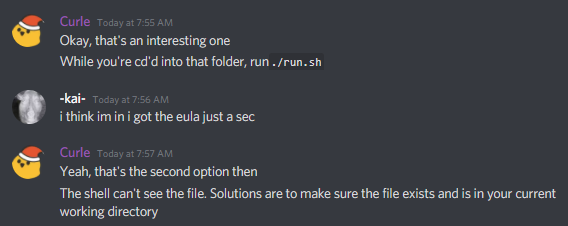
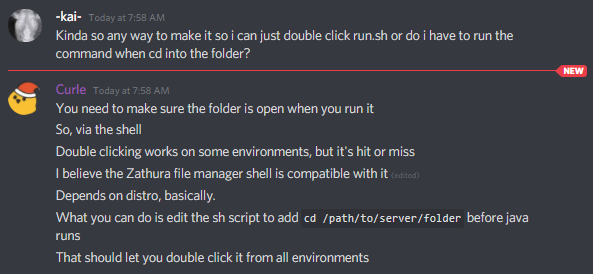
heres where im up to but when i run "run.sh" in terminal i get error saying Error: could not open `user_jvm_args.txt'

the difference from 1.16 is that it used to just have mods folder and jar file to click on which would load your server
golden muskBOT
autumn agate
okay
 autumn agate
thanks btw
but do you know how to fix spawning in regular world type when i make a stoneblock server yes the level-type is set to voidworld
autumn agate
last parcel
might be related to this
```[20Jan2022 12:43:23.017] [Netty Epoll Server IO #1/E...
Was that message for me?
last parcel
it came from your log
autumn agate
Okay ehat does it mean exactly
last parcel
a packet was too big 🤷♂️
 umbral canyon
can anobody help me
 golden muskBOT
Change your install path to the following:
For Windows: C:\CurseForge
For Mac: /Users/Shared/CurseForge
If Minecraft is not installed in CurseForge App:
- Click the
 in the top left.
 - Select Minecraft from the list of games.
- Select the
Advancedoption and pickC:\drive. - Click
Continue.
If Minecraft is installed in CurseForge App:
- Click the
 in the bottom left.
 - Select the Minecraft tab.
- Click
Change. - Select the
C:\drive.
:no_entry_sign: Minecraft Files should NOT be installed inside the following locations :no_entry_sign:
:no_entry_sign: .minecraft folder.
:no_entry_sign: OneDrive folders.
:no_entry_sign: Desktop folder.
:no_entry_sign: iCloud enabled folders.
:no_entry_sign: or any other cloud saved folder.
:no_entry_sign: or folders with non-English characters in them.
If any of the above are in the path you need to change/move it!
last parcel
?mc-log
golden muskBOT
Sending logs for support.
- Right-click the modpack profile icon OR click the button in the modpack profile.
- Click
Open Folder. - Open the
logsfolder. - Drag and drop the FILE named
latestORdebuginto discord.
autumn agate
last parcel
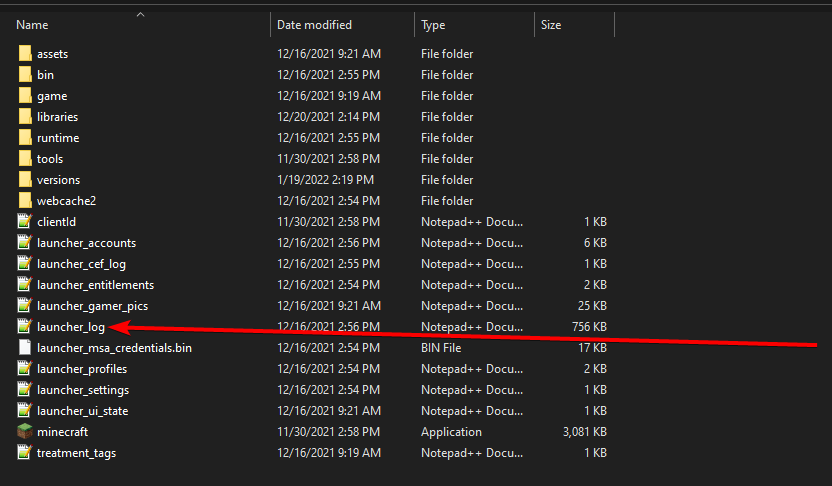
find launcher log and send that
last parcel
neither are what i wanted
 pliant oxide
Why does this always happen when I load? It always crashes.
 last parcel
?mc-log
golden muskBOT
Sending logs for support.
- Right-click the modpack profile icon OR click the button in the modpack profile.
- Click
Open Folder. - Open the
logsfolder. - Drag and drop the FILE named
latestORdebuginto discord.
autumn agate
from which folder
autumn agate
I have curseforge logs and minecraft launcher logs but im currently using curseforge
pliant oxide
Here's my log.
last parcel
?mc-installfix
golden muskBOT
This is NOT instructions for Repair Profile! They are NOT the same! You need to do this!
- Click on the Minecraft Tab on the Left side of the CurseForge App.
- Click button next to the
Create Custom Profileoption. - Click
Repair Installationoption. - Play game.
NOTE: You will not lose any modpacks or worlds!
last parcel
start with that, if not that then its a mod issue so you will need to remove mods until it works
autumn agate
this
last parcel
it's in here Curseforge\Install
autumn agate
theres no logs in there
 autumn agate
sorry about that I didn't see them
wait the cef logs cause thats all i have
only loogs in that folder [0120/234159.218869:INFO:main_context.cpp(136)] CEF initialized successfully.
[0120/234159.219300:INFO:main_context.cpp(138)] CEF version: 85.3.13+gcd6cbe0+chromium-85.0.4183.121
helo?
golden muskBOT
This is NOT instructions for Repair Profile! They are NOT the same! You need to do this!
- Click on the Minecraft Tab on the Left side of the CurseForge App.
- Click button next to the
Create Custom Profileoption. - Click
Repair Installationoption. - Play game.
NOTE: You will not lose any modpacks or worlds!
last parcel
can try that i guess?
autumn agate
okay
launcher still loading so wait a second but still no launcher log only cef log
its half a gig so ill send results soon
so to be completely clear this doesn't help
last parcel
nope
autumn agate
Ok just wondering
Um you know what your'e talking about but theres alot of errors in these logs just saying
last parcel
did you do the installfix?
autumn agate
yeah
last parcel
do it again, but restart the computer before you open anything
autumn agate
what load the game?
last parcel
installfix
autumn agate
oh ok so installfix then restart then go from there
last parcel
yep
autumn agate
one second then
um it says minecraft install directory no found is that okay it was successful the first time then i did it again
last parcel
what says that, show a screenshot
autumn agate

it successfully repaired then i just did a second time to make sure and then this came up
last parcel
gotta love macs 🙃
autumn agate
should i just restart then load a profile
last parcel
i have no idea why this error would even come up as it should know to install minecraft files again
so i can only assume some mac shit is messing with the folders you're using
click the forge icon again and screenshot there
sage pier
Hm.. could the thing "Private Relay" be active or something?
golden muskBOT
Change your install path to the following:
For Windows: C:\CurseForge
For Mac: /Users/Shared/CurseForge
If Minecraft is not installed in CurseForge App:
- Click the in the top left.
- Select Minecraft from the list of games.
- Select the
Advancedoption and pickC:\drive. - Click
Continue.
If Minecraft is installed in CurseForge App:
- Click the in the bottom left.
- Select the Minecraft tab.
- Click
Change. - Select the
C:\drive.
:no_entry_sign: Minecraft Files should NOT be installed inside the following locations :no_entry_sign:
:no_entry_sign: .minecraft folder.
:no_entry_sign: OneDrive folders.
:no_entry_sign: Desktop folder.
:no_entry_sign: iCloud enabled folders.
:no_entry_sign: or any other cloud saved folder.
:no_entry_sign: or folders with non-English characters in them.
If any of the above are in the path you need to change/move it!
autumn agate
my curseforge isnt in shared
last parcel
that's why it says to change it to that ^^
autumn agate
but theres no curseforge folder in shared
last parcel
so make it
autumn agate
oh wait my modpacks are back all i did was give curseforge fulldisk access but i will still do that
last parcel
that might solve your problem too 🤷♂️
autumn agate
I'll just keep saved to documents for now
really there gone again bruhh
nevermind ok whats next repair then restart
after this im going to bed
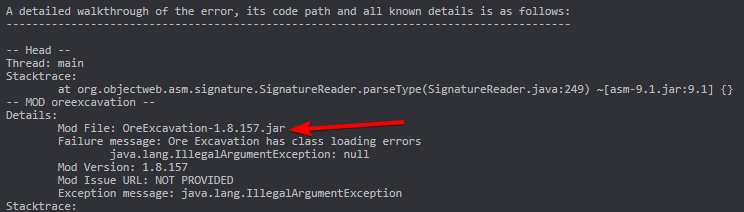
i need help with a crash and whats causing it to crash
last parcel
 autumn agate
if this doenst work im going to leave this till the morning
ik but wasnt giving me this before
last parcel
report to the dev 🤷♂️
last parcel
autumn agate
if this doenst work im going to leave this till the morning
did you try again after giving permission, or have you changed the folder?
autumn agate
try what
last parcel
playing
autumn agate
thats what im trying now
takes a while to load new installation on the launcher
the speed which this is going is dreadful
this is too slow ill try in the morning thanks alot though i appreciate it
 mystic furnace
hi, i just installed shaders for a modpack but when i activate them my screen goes full black, does anyone know why ?
runic hemlock
One message removed from a suspended account.
last parcel
Need curseforge to work 😛
tbh i did forget about that
 sleek aurora
Hi, I have a problem when I connect to my modded server it shows me this:
Internal Exception: i.netty.handler.codec.EncoderException: java.lang.ArrayIn dexOutOfBoundsException:3
Anyone can help me please ?
last parcel
runic hemlock
One message removed from a suspended account.
what kind of profile is used here?
runic hemlock
last parcel
what kind of profile is used here?
One message removed from a suspended account.
One message removed from a suspended account.
last parcel
ok and what exactly is going on? kinda hard to follow what you were saying
you update a mod and it disappears?
it duplicated..
🤦♂️
runic hemlock
One message removed from a suspended account.
One message removed from a suspended account.
last parcel
hmm
running it didnt change anything for me
after running it, both botania versions are still in there
how and why would this even load with dupes..
runic hemlock
One message removed from a suspended account.
One message removed from a suspended account.
 rigid onyx
golden muskBOT
rigid onyx
golden muskBOT
How to **manually** install a server - **On your own PC**
- Check if the modpack has a server pack, if it does: use that and skip below.
- Go to the Forge website http://files.minecraftforge.net/ and download the Installer for the forge version the pack is using.
- Run the installer and choose
Install server. Do not install to your desktop. Also do not install inside a OneDrive folder. - Run the server using the forge.jar. A file called
eula.txtwill be generated. Open it and changeeula=falsetoeula=true - From the Client; Copy the
modsfolder,configfolder, and any other folders needed for the pack to work into the server folder. If the modpack has a server pack, use this instead! - Run the server again.
- Port forward your machine if needed. (Google it)
Long version: https://pastebin.com/83DXfGTH
runic hemlock
One message removed from a suspended account.
One message removed from a suspended account.
last parcel
think maybe you got some file permission issues going on there, but try restarting your pc
runic hemlock
One message removed from a suspended account.
 royal oak
Can you help me with this? Edit: I fixed it
runic hemlock
One message removed from a suspended account.
last parcel
you have git tied to the CF folder 
runic hemlock
One message removed from a suspended account.
One message removed from a suspended account.
One message removed from a suspended account.
sage pier
git shouldn't lock files though.
runic hemlock
sage pier
git _shouldn't_ lock files though.
One message removed from a suspended account.
One message removed from a suspended account.
last parcel
CF shouldnt lock files either tbf, but that does come up time to time
though not sure it's actually the fault of cf
runic hemlock
One message removed from a suspended account.
last parcel
its usually that minecraft doesnt stop running on close
runic hemlock
One message removed from a suspended account.
One message removed from a suspended account.
 humble valve
i have problem with mod valhesia
mystic furnace
hi, i just installed shaders for a modpack but when i activate them my screen goes full black, does anyone know why ?
 stray zealot
DO I NOW REALY HAVE TO EXPLAIN THE PROBLEM AGAIN
sage pier
You can turn off capslock at least.
sage pier
TL;DR. They want to update a modpack, so they can create a server for it.
stray zealot
it was tsill on
sage pier
So, what modpack are you having issues with? The website recently had some issues, but they should be solved now, so that both the CurseForge app and website should be working again
stray zealot
https://www.curseforge.com/minecraft/modpacks/frogoocraftforlive I just want an version without the lag removal
☹️
 wild jewel
Download it, remove the mod?
stray zealot
ye but then everybody would have to do that
last parcel
your options are:
download the pack, remove the mod, export the pack and send it to everyone and tell them all how to import it
or
tell them to install the pack and remove that mod.
stray zealot
ok
coarse nest
Or not needing to bother because it may be server side only
last parcel
If your plan is to upload a modified version of a modpack, you need to refer to the packs license before you are allowed to upload it, as any modifications done to a pack are owned by the person or people who uploaded the pack.
stray zealot
wait question if i download all the mods again and put them in does it accept it to the version
stray zealot
last parcel
If your plan is to upload a modified version of a modpack, you need to refer to ...
it my own modpack
i even turned the setting on
this was the literal message i got:
The status of the file FrogooCraftForLive (No Lag Removal) (FrogooCraftForLive) has been changed to Rejected
Notes:
The following files belong to CurseForge-hosted projects, and should therefore not be added directly to zip files:
overrides/mods/corpse-1.16.5-1.0.6.jar
overrides/mods/SereneSeasons-1.16.5-4.0.1.123-universal.jar
These files should, instead, be referenced in the manifest.json file generated by the Twitch Desktop App during a profile export.
If you have any questions please contact our support team https://support.curseforge.com.

CurseForge Support
We're here to get you informed on everything you need to know about CurseForge, including helpful guides and troubleshooting articles to back you up when you get in a pickle
 loud vapor
what java version is best for a 1.16.5 forge server? I used an older version as well as the lates java 8 but neither works only ending with a "class not found" "fml server tweaker" error
last parcel
suddenly i have something very important to do, bye :runs:
stray zealot
why
last parcel
loud vapor
what java version is best for a 1.16.5 forge server? I used an older version as ...
that's not a java issue. try reinstalling the server, something is broken
yea so anyway
there isnt a fix to that issue currently hehe
stray zealot
could taht be fixed very soon
last parcel
very soon, doubtful. the currently being rolledout curseforge version was intended to fix it, but it doesnt
runic hemlock
One message removed from a suspended account.
last parcel
nah i reported it with logs already
it's reproducable so they should be able to get what they need
stray zealot
couse off forge last minit problems i already extended the release date by 2 weeks
runic hemlock
One message removed from a suspended account.
last parcel
for now, you can just have your users import the pack from your export, just need a place to upload the export to
?mc-packshare top option
golden muskBOT
There are two ways to share a modpack you've made with others...
Export and Share - For Friends to Small Groups.
- Click the Icon for the modpack.
- Click the button next to play.
- Click

Export. - Select the files that should be included.
- Send the zip to the people that want it! They can follow the instructions in
!mc-installpackto install the pack!
Upload to Curseforge - For Public Release to Everyone.
This options will make your pack public to EVERYONE, it comes with extra requirements and will take some effort to set up.
- Go to here: https://www.curseforge.com/project/432/4471/create
- Fill out the information with a proper description of the pack. This should allow anyone to understand what the pack is.
- Click the Icon for the modpack in the CurseForge app.
- Click the button next to play.
- Click
Export. - Select the files that should be included.
- Open your Project you made on the CurseForge site and Upload the file you just made.
- Wait for Moderation & Sync so it can show up in the client! (See
!syncfor limitations)
last parcel
dropbox, google
stray zealot
ok?
last parcel
stray zealot
The status of the file FrogooCraftForLive (No Lag Removal) (FrogooCraftForLive) ...
real quick check one thing for me. in the mods folder, is there more than one version of these mods?
overrides/mods/SereneSeasons-1.16.5-4.0.1.123-universal.jar```@stray zealot ⬆️
stray zealot
last parcel
real quick check one thing for me. in the mods folder, is there more than one ve...
thats exactly what dana said and i checked it and nope then i even tried putting them in by scratch just downloading the same version and then deleting the old ones
golden muskBOT
The following files belong to CurseForge-hosted projects, and should therefore not be added directly to zip files:
-
Remove any mods listed in the error message from the profile you exported. Then reinstall them with the CurseForge app. DO NOT drag and drop files from the site.
-
Export the profile again, open the new zip that was just made. Check for the
overrides/modsfolder. If you still see any mods in that folder do the step above again for each mod. -
Upload the zip once complete and no more mods show in the
overrides/modsfolder.
stray zealot
im done ill just let all the memebers delete the mod
loud vapor
last parcel
that's not a java issue. try reinstalling the server, something is broken
Thanks that worked!
runic hemlock
One message removed from a suspended account.
hearty mulch
Ive used the past 2 most recent versions of Forge for 1.18.1, and for some reason I've had a very difficult time with Saving my worlds, even when i just make a new one in creative mode, fly around for a bit, and try to turn it off.
hearty mulch
I can send my modlist if any mods are currently known to make 1.18 messy, it's a fairly small list not counting the APIs but Im not sure how to really fix this issue.
runic hemlock
One message removed from a suspended account.
hearty mulch
oh heavens
last parcel
are they actually gone from the mods folder?
runic hemlock
One message removed from a suspended account.
last parcel
but are they in the mods folder of your instance
runic hemlock
One message removed from a suspended account.
One message removed from a suspended account.
One message removed from a suspended account.
last parcel
so they are in the mods folder, but they dont export at all, even to overrides?
sage pier
I wonder if they put in the batch-thing.. but it only takes 100 at a time..
runic hemlock
One message removed from a suspended account.
runic hemlock
sage pier
I wonder if they put in the batch-thing.. but it only takes 100 at a time..
One message removed from a suspended account.
last parcel
you're not exporting with curseforge? 🤔
runic hemlock
One message removed from a suspended account.
One message removed from a suspended account.
last parcel
now i dont even know what was and what wasnt related to curseforge
runic hemlock
One message removed from a suspended account.
last parcel
yea, that i confirmed
runic hemlock
One message removed from a suspended account.
hearty mulch
hearty mulch
Ive used the past 2 most recent versions of Forge for 1.18.1, and for some reaso...
eh, would anyone be able to help me figure this out (when yall are done ofc)
runic hemlock
One message removed from a suspended account.
hearty mulch
I don't use fabric, uinfortunately
runic hemlock
One message removed from a suspended account.

 last parcel
?mc-forge
golden muskBOT
last parcel
yea. curseforge isnt forge 😛
 quasi hinge
Has the count been lost for how many people have confused Forge and Curseforge
last parcel
fabric..
C:\Users\porta\curseforge\minecraft\Instances\test\crash-reports\crash-2022-01-20_16.49.00-server.txt send that
runic hemlock
One message removed from a suspended account.
muted anchor
sorry took a bit to find that
autumn agate
bruh
last parcel
ah there we are
autumn agate
i was under shower
so the error is coused by this sht net/minecraft/server/world/ThreadedAnvilChunkStorage
cool namespace for mod
lchunkloader
muted anchor
will that fix it?
autumn agate
remove that mod and will be good
muted anchor
thanks
 coarse elm
autumn agate
so the error is coused by this sht `net/minecraft/server/world/ThreadedAnvilChun...
coarse elm
autumn agate
so the error is coused by this sht `net/minecraft/server/world/ThreadedAnvilChun...
Except, that's wrong.
That's a vanilla class.
autumn agate
thats not like that error was posted on google like 10000 times but its okay 😗
if u search on google lchunkloader u will automatically see a crash logs lol
autumn agate
Caused by: org.spongepowered.asm.mixin.throwables.MixinError: Encountered undecorated Accessor method in lchunkloader.mixins.json:ThreadedAnvilChunkStorageInvoker applying to net.minecraft.class_3898
coarse elm
there you go
autumn agate
GitHub
Hi, I'm getting a crash whenever y click the Play button on any world. Also, I don't think the reason behind this is running Optifine, as I've also experienced this crashwit...
so basically the error is by SnowUnderTrees.
there u go

@muted anchor so u need remove snow under tree and put lchunkloader again
then it will work
autumn agate
😘
autumn agate
last parcel
<@456226577798135808> you got this one right?
look, i did it
last parcel
thanks
autumn agate
so remove lchunkloader
if the developers dont cares about errors
and their github looks kinda ded tho
muted anchor
hope this works
 regal dirge
Can anyone help me identify an issue with my Minecraft server? it throws out an error when I try to log on, but others are able to. My daughter is sitting next to me playing (even though she had the error twice before being able to join the server) but I spammed join and get the error over and over
autumn agate
!mc-logs
golden muskBOT
Sending logs for support.
- Right-click the modpack profile icon OR click the button in the modpack profile.
- Click
Open Folder. - Open the
logsfolder. - Drag and drop the FILE named
latestORdebuginto discord.
regal dirge
Okay lemme grab them, thanks
This is mine, now lemme get the one off Apex website
And here is the server
regal dirge
I get this error when logging in, if it helps
 regal dirge
NP we're all here for help
autumn agate
muted anchor
can u install crashy craft mod? it helps with crashes and im too lazy to read it all so it would help https://github.com/Chocohead/Crafty-Crashes
GitHub
Corrects crash report stack traces to line up with any Mixins they contain - GitHub - Chocohead/Crafty-Crashes: Corrects crash report stack traces to line up with any Mixins they contain
its in releases
regal dirge
Me or Portal
autumn agate
portal, im replying to portal
regal dirge
Okay 🙂
autumn agate
Version Mismatch need 5.8.0beta10 or higher. Current client version attempt -> 5.8.0beta7
regal dirge
Just noticed after selecting a role I get Minecraft chat, should have posted there LOL
autumn agate
autumn agate
Version Mismatch need 5.8.0beta10 or higher. Current client version attempt -> 5...
is there any mod with those versions on server?
regal dirge
Let me check
autumn agate
oh wait
regal dirge
I use the app to update as soon as they're available so should all be the same
muted anchor
autumn agate
can u install crashy craft mod? it helps with crashes and im too lazy to read it...
do i just put the extracted folder into the mods?
regal dirge
Yeah Journey map is 5.8.0beta10 both server and client
muted anchor
you can probally tell im garbage at modding
autumn agate
muted anchor
do i just put the extracted folder into the mods?
u just put the .jar file into mods folder
and run game again
and if there is same errorz just send here
autumn agate
regal dirge
This is mine, now lemme get the one off Apex website
@last parcel im not into forge, have this error
muted anchor
oh 😶
autumn agate
.jar file is like .zip thats why shtty zip unzipers like winzip or other sht like this see it as .zip
muted anchor
so i just put this entire folder into the mods?
 regal dirge
@autumn agate Can you tell what might be the issue by looking at that picture?
autumn agate
no
regal dirge
😢
autumn agate
the only thing i can tell that there is mod version mismatch
regal dirge
Hmmm
That is very strange because I use curseforge app to download all newest and then I upload the mod to my server and delete the older version. I'll double check them all now and make sure I didn't goof, thanks
muted anchor
there ya go @autumn agate
golden muskBOT
This is NOT instructions for Repair Profile! They are NOT the same! You need to do this!
- Click on the Minecraft Tab on the Left side of the CurseForge App.
- Click button next to the
Create Custom Profileoption. - Click
Repair Installationoption. - Play game.
NOTE: You will not lose any modpacks or worlds!
waxen pine
try that and then launch your client
waxen pine
where does that message show - screenshot?
 low venture
waxen pine
where does that message show - screenshot?
low venture
waxen pine
where does that message show - screenshot?
I just reinstalled MC and gonna give it another go one sec
waxen pine
the curseforge app does nothing with regular minecraft installs
it uses it's own copies of minecraft.
unclear what you are doing
low venture
seemed like my current MC was corrupted, but when I did it, ngl it magically is working, so far...
low venture
waxen pine
the curseforge app does nothing with regular minecraft installs
Soooo magically when i did that everything is working 0.0 ima just roll with it lol. Thanks for your help!
waxen pine
the server is another matter - be sure you have java 17 installed for 1.18.1 or it will not work
low venture
waxen pine
the server is another matter - be sure you have java 17 installed for 1.18.1 or ...
yup got everything workin, some random DC msg every now and then but it works
waxen pine
random dc can usually be fixed by having a mod that extends the vanilla timeout disconnect / checks - like randompatches
low venture
waxen pine
random dc can usually be fixed by having a mod that extends the vanilla timeout ...
its like the java DC thing like the excempt thing
but it only happens every now and then
waxen pine
as in "disconnected / timeout"
https://www.curseforge.com/minecraft/mc-mods/randompatches-forge
this mod has something to help that - after launching with it bump the values for timeouts in config settings to like max.
-Dfml.readTimeout=360
you can alternatively put that in your JVM args for the server, but randompatches does more
low venture
waxen pine
as in "disconnected / timeout"
gotcha, thanks for all ur help man!
autumn agate
muted anchor
there ya go <@456226577798135808>
thats not a error that was before
but this error is made by flytre lib
 toxic vessel
Hey guys, I'm playing the "All in One" modpack and I'm currently stuck getting constellation paper, how do I go about getting constellation paper without crafting them with iridescent altar?
 cerulean mulch
I am grateful if anyone could tell me what means of this sentence. I am a Chinese localization of Minecraft mod.
This is not an obsidian part, if it was it would say "Obsidian."
does any meme here?
sage pier
No, we don't meme here.
sage pier
Depends on if its Mandarin or not as well. There's (from what I can see) 3 translations, but as I do not speak Mandarin, I can't tell which one to use.
You have
- 黑曜石 (hēi yào shí) which translates to "obsidian (mining)"
- 十胜石 (shí shèng shí) - "obsidian"
- 黑曜岩 (hēi yào yán) - "obsidian (mining)
Source: https://www.yellowbridge.com/chinese/dictionary.php?searchMode=E&word=obsidian
And then there's 名 which is the noun.
@cerulean mulch 👆
cerulean mulch
why it says that if it is obsidian
i know what obsidian means,but why it says that.
sage pier
It's a material/mineral in Minecraft, used to build portals and other things.
cerulean mulch
i know that ,it is a flavor of a meterial.
autumn agate
obsidian is material that exist irl...
sage pier
Then I don't understand the question, sorry. :\
sage pier
autumn agate
obsidian is material that exist irl...
Thank you Captain Obvious.
cerulean mulch
i think it is a meme of what,like a dialogue
autumn agate
i need 10x 1m3 of bedrock blocks irl, time to make nether portal
sage pier
Do you have an example of where it is used, so we can try and figure out the context?
sage pier
autumn agate
i need 10x 1m3 of bedrock blocks irl, time to make nether portal
Bedrock also exists IRL! :o
autumn agate
sage pier
Bedrock also exists IRL! :o
yes so we can make nether portal
sage pier
Finally.
cerulean mulch
emmmm,it used for introducing an material called Nahuatl in tinkers construct
autumn agate
and go to nether, get blaze rods, kill endermands, and to the end
sage pier
Maybe it's part of the requirements/ingredients to make Nahuatl. Let me google that real quick
cerulean mulch
i can't understand the relationship between Nahuatl and obsidian.
coarse nest
context:
 coarse nest
In old TiC versions obsidian was a material, which it is no longer. Nahuatl is the 'replacement' for it
This is joking on that
cerulean mulch
ohhhhhhhhhhh
sage pier
So, basically, they're just saying that "This is not obsidian, if it was, it would say obsidian"
cerulean mulch
thank you!!!!!!
sage pier
Thanks Chief.
cerulean mulch
lol
sage pier
You clever supporter you.
cerulean mulch
yes he does
waxen pine
I like them, but they are also not actual / real jokes
cerulean mulch
it is hard to translate if you are not skilled
waxen pine
assume anything in quotes " " is a bad joke 😉
cerulean mulch
well i am going to move on ,thank you alllllllllll!
waxen pine
(90% of all tinker's banter)
coarse nest
waxen pine
The Tinker's Construct author likes bad jokes
Yeah.
Also, silencewwh: The author doesnt mind if you change around the jokes to better fit into your language (like pig iron is actually a type of iron alloy, but the texture is a pig. This doesnt work in some languages, so they are encouraged to change it. For example one apparently named it 'salmon iron' because the word for salmon is also a metal type in that language)
sage pier
I wonder if that metal has a bit of pink in it.
cerulean mulch
yes in chinese someone call it raw pig rion.
iron
author'minds are interesting so i am tring to pass it to players
cerulean mulch
hey guys,me again
what does "sharpweight" mean?
oh is it morning for all of you?
sage pier
It's 13:27 for me, but I'm unavailable to help right now, sorry. :)
cerulean mulch
salute you from across the Pacific
wild jewel
We have people all over the world, so don't worry about time
wild jewel
We still talking about tinkers?
cerulean mulch
like website in google which can be searched depands on it.
yeah
all are about tinkers
cerulean mulch
oh thank you
 placid gyro
How do I fix this?
 wild jewel
Assuming you are talking about the double character?
wild jewel
!projectissue
golden muskBOT
Please visit the project page for the content you posted about and look for a way to contact the developer.
Somewhere on the page there is usually a method of contact. Look for one of the following things:
Issuestab like the image below.- Discord link.
- Twitter link.
- Comments section below the project.
If no contact method exists you will either have to remove the project or find a solution on your own.

 steep quest
Hey... i have some Issuers with Kerbal space Programm... At first some Mods aren't loading (eg. Space Y heavy lifters) and Mech Jeb is stuck in the top left corner and jumps always bach if i try to darg it in the middle of the screen.
wild jewel
The not loading: find your gamedata folder
Is there another gamedata folder inside of it?
wild jewel
Get all of the files inside the SECOND gamedata folder, and move them into the first one
wild jewel
Now those mods should load, mech jeb stuck in the corner: no idea on that
steep quest
Check it short
Now Thaaaaats interesting... now ALL parts, even the Vanilla disappiert from the buildmenu
What should i do now?
wild jewel
Show a screenshot of your gamedata folder
steep quest
 wild jewel
Can you send one without cropping?
wild jewel
I want to see the full window, including the path your are on
steep quest
K
wild jewel
Everything is there, don't know what is going wrong
steep quest
K... any idear wehere else i can look?
wild jewel
No idea
 light lily
i cant make an all the mods 7 server, i get this error
Error: Could not find or load main class @libraries.net.minecraftforge.forge.1.18.1-39.0.43.win_args.txt
wild jewel
How are you starting it?
light lily
startserver.bat?
wild jewel
You double clicking it?
light lily
jup
wild jewel
light lily
how do i run that
wild jewel
Did you cd to the server?
light lily
idk what cd means 😦
wild jewel
Do you know how to open cmd?
light lily
last time i played minecraft you just ran the jar file and everything worked
yeah i can open cmd
wild jewel
Forge changed stuff.
Can you navigate to the server folder using cmd?
light lily
dont know how to do that
wild jewel
Google it
light lily
aight i got it
now what
if i run the run.sh file in there it says this:
Error: Could not find or load main class @user_jvm_args.txt
wild jewel
Why are you suddenly using a different file?
wild jewel
Because it was a linux user. I am impressed that it even did something at all.
Yes, stick to startserver.
Run it using cmd
light lily
still get the same error

 wild jewel
Full window please, don't crop lines, I want to see what you are doing
light lily
 wild jewel
Still double clicking it?
light lily
nope
wild jewel
Then ask atm7 for help with this
 empty crypt
hi so I'm playing my mod pack and I'm playing everything is working but then the whole screen just disappears i go to reload the pack, but it will say it is still open but i don't see it ill restart by computer and I can play it again but then it does it again. This just started happening 20 minutes ago. Can anyone help?
the game is not giving a crash error it simply just disappears then i have to restart the whole computer then it happens again
i will reload minecraft it says it is open in another instance
 light scarab
Hi anyone can help me with this i cant play with dungeons, dragons and space shuttles becouse of this i try a lot of things but its dont work..
 wild jewel
!mc-logs
golden muskBOT
Sending logs for support.
- Right-click the modpack profile icon OR click the button in the modpack profile.
- Click
Open Folder. - Open the
logsfolder. - Drag and drop the FILE named
latestORdebuginto discord.
wild jewel
!mc-installfix
golden muskBOT
This is NOT instructions for Repair Profile! They are NOT the same! You need to do this!
- Click on the Minecraft Tab on the Left side of the CurseForge App.
- Click button next to the
Create Custom Profileoption. - Click
Repair Installationoption. - Play game.
NOTE: You will not lose any modpacks or worlds!
light scarab
Thanks you very much
 waxen pine
Ok - right click profile pic in app > open folder > "crash reports" folder
Drag the crash report.txt file to chat
 drifting lark
okay i need just a minute, i'm reinstalling the pack to see if that does anything
 thorny patio
I don't have screenshots but when I run the "kingdom of daldar" modpack every hostile mob drops a leather hat, structure generation is a little weird, and tons of witches/vindicators spawn LITERALLY EVERYWHERE. Idk what went wrong and idk how to fix it
last parcel
?projectissue
golden muskBOT
Please visit the project page for the content you posted about and look for a way to contact the developer.
Somewhere on the page there is usually a method of contact. Look for one of the following things:
Issuestab like the image below.- Discord link.
- Twitter link.
- Comments section below the project.
If no contact method exists you will either have to remove the project or find a solution on your own.
thorny patio
there's no option to click that
last parcel
read the entire message
 obsidian shore
hi everyone, my girlfriend has some trouble starting any modpack, even lightweight ones. the game always gives this error: If you are seeing the Exit Code: 0 then this means that the game has exited your computer. This error is triggered to make sure that the game does not cause any harm to your system. This error can be because of outdated Java, Graphics driver, etc. You can also this error if your computer is not compatible, especially if the RAM is less than what is required to run the game. You can also this error if your computer is not compatible, especially if the RAM is less than what is required to run the game. but she has a lot of ram spare when checking task manager and her java is latest version
golden muskBOT
Error/Exit codes are useless. Follow these steps so someone can actually help you.
- Right-click the modpack profile icon OR click the button in the modpack profile.
- Click
Open Folder. - Open the
logsfolder. - Drag and drop the FILE named
latestORdebuginto discord.
runic hemlock
obsidian shore
hi everyone, my girlfriend has some trouble starting any modpack, even lightweig...
One message removed from a suspended account.
obsidian shore
here you go, no idea what the first questioneven means
runic hemlock
obsidian shore
here you go, no idea what the first questioneven means
One message removed from a suspended account.
drifting lark
waxen pine
Ok - right click profile pic in app > open folder > "crash reports" folder
okay i've got a new error message this time
golden muskBOT
This is NOT instructions for Repair Profile! They are NOT the same! You need to do this!
- Click on the Minecraft Tab on the Left side of the CurseForge App.
- Click button next to the
Create Custom Profileoption. - Click
Repair Installationoption. - Play game.
NOTE: You will not lose any modpacks or worlds!
drifting lark
waxen pine
#📛︱rules 5 please. Ok
com.google.common.util.concurrent.ExecutionError: java.lang.OutOfMemoryError: GC overhead limit exceeded
Boom - add more ram/memory to launcher app
?mc-ram
golden muskBOT
How to set Global Minecraft RAM value.
- Click the icon in the bottom left to open settings.
- Click the Minecraft tab.
- Scroll down.
- Slide slider to recommended ram range as seen below.
 obsidian shore
runic hemlock
One message removed from a suspended account.
obsidian shore
runic hemlock
One message removed from a suspended account.
whe tried, it didnt work cuz minecraft is running, but minecraft isnt running, not even in task mngr
runic hemlock
obsidian shore
whe tried, it didnt work cuz minecraft is running, but minecraft isnt running, n...
One message removed from a suspended account.
waxen pine
-XX:+DisableExplicitGC -XX:+UseG1GC
Can also add those to JVM args to help java 8 you are using to avoid that happening
runic hemlock
obsidian shore
One message removed from a suspended account.
waxen pine
drifting lark
welp
What did you change - how much memory, did you add the above JVMs
drifting lark
oh i didn't know that part was me
i put 6400mb ram
memory
honestly have no idea what that message means lol
waxen pine
What modpack is it?


 last parcel
how much ram is allocated?
last parcel
?mc-log
golden muskBOT
Sending logs for support.
- Right-click the modpack profile icon OR click the button in the modpack profile.
- Click
Open Folder. - Open the
logsfolder. - Drag and drop the FILE named
latestORdebuginto discord.
drifting lark
last parcel
needs more ram
waxen pine
MC eternally loading - should have guessed
drifting lark
how much more 😵💫 cuz if it doesn't work after this i'm liable to give up on forge altogether
waxen pine
Congrats on picking one of the most bloatedly huge modpacks ever published ;)
Not normal
drifting lark
this wasn't my choice, i just wanted to play on a modded server with da homies
waxen pine
8-10 allocation is normal. Adding better jvm args helps