
#👽︱game-support
1 messages · Page 196 of 1
 deep spindle
 last parcel
are you making a new world?
deep spindle
um what happened here?
deep spindle
deep spindle
this is sevtech btw
last parcel
?projectissue
 golden muskBOT
Please visit the project page for the content you posted about and look for a way to contact the developer.
Somewhere on the page there is usually a method of contact. Look for one of the following things:
Issuestab like the image below.- Discord link.
- Twitter link.
- Comments section below the project.
If no contact method exists you will either have to remove the project or find a solution on your own.
 deep spindle
oh yeah sorry i dont think its just sevtech btw bc i just checked and it is happening on another pack
the issue is back
 deep spindle
deep spindle
deep spindle
it does this in game
deep spindle
last parcel
are you making a new world?
yes but its a server
last parcel
wasnt asking you
deep spindle
damn
 median osprey
last parcel
are you making a new world?
median osprey
last parcel
are you making a new world?
MAking a world works fine
Loading that world after exiting it dosen't
last parcel
world is probably corrupted then. try loading a backup if you have one.
median osprey
They are all like this
last parcel
start removing mods until it stops then
median osprey
Now I can't even leave a world
My game crashes when I press "Exit and Save game" Button
last parcel
Cannot invoke "it.unimi.dsi.fastutil.objects.ObjectSet.remove(Object)" because "objectset" is null
median osprey
Yes
last parcel
yep
median osprey
?
last parcel
?
last parcel
if fastutil is a mod you have, remove it. if its not then no idea.
last parcel
ok, back to removing mods then
median osprey
I did
Removed all of them except the very essentials
(Not removed just disabled)
last parcel
ok, back to removing mods then
median osprey
Dissabled all and trying now
last parcel
or better idea. make a new profile and install a few at a time so you can tell when an issue begins
median osprey
last parcel
or better idea. make a new profile and install a few at a time so you can tell w...
ok
 terse flax
Does anyone know what this is and how i can fix it
 median osprey
terse flax
Does anyone know what this is and how i can fix it
median osprey
terse flax
Does anyone know what this is and how i can fix it
Some kind of texture bug
Wait I dissabled all curseforge mods
And I have the rftools creative babs in the game
Why?
Actually the mods themself, not only the tab
Ehh what ever
I found the issue
 zinc kettle
Hi, Sooo Thankyou everyone for everything you do!
terse flax
I fixed my issue turned biome blending off fix it
zinc kettle
also, my game crashed yesterday after i placed down a camp fire from npc commodities 1.12.2 everything was doing well untill I placed that campfire down, crashed.... I reloaded the world, crashed, so the world is corupted now oooooooo spoooooky
 limber briar
Error 0
last parcel
limber briar
Error 0
?mc-debuglog
golden muskBOT
Missing the debug.log file? Enable it by following these steps.
- Click the
 icon in the bottom left.
 - Click the

Minecrafttab. - Turn on the
Enable Forge debug.logoption.
last parcel
then send that log
last parcel
 hoary wedge
I have error 0
hoary wedge
I have error 0
?mc-log
golden muskBOT
Sending logs for support.
- Right-click the modpack profile icon OR click the
 button in the modpack profile.
 - Click

Open Folder. - Open the
logsfolder. - Drag and drop the FILE named
latestORdebuginto discord.
last parcel
zinc kettle
also, my game crashed yesterday after i placed down a camp fire from npc commodi...
You should report this to the dev of the mod.
?projectissue
golden muskBOT
Please visit the project page for the content you posted about and look for a way to contact the developer.
Somewhere on the page there is usually a method of contact. Look for one of the following things:
Issuestab like the image below.- Discord link.
- Twitter link.
- Comments section below the project.
If no contact method exists you will either have to remove the project or find a solution on your own.
hoary wedge
last parcel
remove optifine
hoary wedge
I have Better PVP, Jei, Neat, Optifine, Sit, World Edit, Xaeros Minimap
limber briar
hoary wedge
Ok
hoary wedge
last parcel
remove optifine
Dont work
last parcel
send a log without it then
hoary wedge
last parcel
does it load without any mods?
limber briar
hoary wedge
minecraft launcher is closing and 5 seconds later error 0
Same :'3
last parcel
limber briar
Same :'3
?mc-installfix
golden muskBOT
- Click on the Minecraft Tab on the Left side of the CurseForge App.
- Click button next to the
Create Custom Profileoption. - Click

Repair Installationoption. - Play game.
NOTE: You will not lose any modpacks or worlds, These are saved in the Instances folder. DO NOT TOUCH THIS FOLDER OR YOU WILL LOSE EVERYTHING
hoary wedge
dont work on 1.18 :(
last parcel
what dont
hoary wedge
i will try on 1.17.1
last parcel
try what lol?
hoary wedge
last parcel
what dont
error 0
hoary wedge
last parcel
try what lol?
open minecraft
zinc kettle
last parcel
You should report this to the dev of the mod.
I reported it, but I don't know what to do now... I am stuck... in sticky ooowy goooey oo what can I do now that I reported it? I want to work on my minecraft
last parcel
remove it until fixed
last parcel
hoary wedge
open minecraft
maybe you should just reinstall minecraft
or get the curseforge app as it is much easier than manually installing mods
 autumn agate
my friend get's this error when joining Incomplete set of tags received from server hwhat is causing this
last parcel
mods dont match
 foggy hill
my baubles wont go into their slots
i have three mods that add baubles into my modpack. cyclic, bountiful baubles, and twilight forest
i do have the baubles reborn mod enabled, and its on its latest version
i can't put baubles from both cyclic and bountiful baubles even for the bauble's respective slots
is there any way to fix this?
 coarse nest
What version?
zinc kettle
Sooooooo I figured out that Noppes_ mod Varied Commodities crashes itself when placing a campfire down...... I notified them in thier bug reports tab on discord,,,,,, hope they see it soon!
foggy hill
coarse nest
What version?
mod or modpack?
coarse nest
Minecraft
Like 1.12 or 1.16.5 (when asking for help with specific mods always say your minecraft version)
 sacred marsh
When editing loot tables is there a way to make the game check if the block was destroyed by a player?
foggy hill
1.16.5
coarse nest
Try install curios and remove that baubles mod
foggy hill
does the number at the top right indicate the version of minecraft?
 coarse nest
Yes
foggy hill
i already have curios api installed, so ill just delete baubles
coarse nest
 long cloud
What’s a fun mod?
long cloud
What’s a fun mod?
Depends what you find 'fun'. (I like making processing lines, so xnet is a fun mod to me, but generally not to others 😆)
Also #🔎︱mod-hunting is the place to look for mods to play
autumn agate
errors.unknownError?
autumn agate
oh okay
 onyx shadow
hello, we can't install skyfactory 4 from cursedforged. Another guys have this problem??
autumn agate
will this cause slow loading?
coarse nest
Yes
autumn agate
okay good cause i had an issue before where it was 1 MB per second loading and it was annoying then it got stuck at 27.5%
i need help my mods are crashing
it is not with curseforge
golden muskBOT
Sending logs for support.
- Right-click the modpack profile icon OR click the button in the modpack profile.
- Click
Open Folder. - Open the
logsfolder. - Drag and drop the FILE named
latestORdebuginto discord.
autumn agate
coarse nest
The mod youre-in-grave-danger is erroring, likely due to a conflict with another mod (which I can't tell).
Remove it for now
autumn agate
i think its optifabric
ima go to sodium and see if that works
yep it was optifabric
autumn agate
coarse nest
The mod `youre-in-grave-danger` is erroring, likely due to a conflict with anoth...
thanks
this happened before, i launch the game and stuff, but i cant break blocks in survival
someone help I get this error:
object reference not set to an instance of an object
 trim locust
can someone help me with this error on forge client for minecraft?
Failed to run processor: javax.net.ssl.SSLHandshakeException:PKIX path building failed: sun.security.provider.certpath.SunCertPathBuilderException: unable to find valid certification path to requested target
See log for more details.
 tranquil lantern
I was using the ToolSwap mod for 1.16.4. It worked for a couple days, then all of a sudden the mod stopped auto switching tools. I dont know what happened
last parcel
?projectissue
golden muskBOT
Please visit the project page for the content you posted about and look for a way to contact the developer.
Somewhere on the page there is usually a method of contact. Look for one of the following things:
Issuestab like the image below.- Discord link.
- Twitter link.
- Comments section below the project.
If no contact method exists you will either have to remove the project or find a solution on your own.
 fluid swift
when i add mods it does nothing and is a blank thing
 lapis hemlock
forge-1.16.5-36.2.23-installer.jar.download i got this when downloading forge launcher @coarse nest
coarse nest
That is fine, also no need for the ping
 low bluff
help. everytime I try to download a minecraft modpack an error pops up "one or more errors have occurred"
low bluff
thxs
 jade solar
so hotfix in like 30m?
coarse nest
Hopefully.
 stable summit
anyone know the reason for Bad type on operand stack crash?
last parcel
need context
stable summit
net/minecraft/client/renderer/entity/layers/LayerHeldItem.func_188358_a(Lnet/minecraft/entity/EntityLivingBase;Lnet/minecraft/item/ItemStack;Lnet/minecraft/client/renderer/block/model/ItemCameraTransforms$TransformType;Lnet/minecraft/util/EnumHandSide;)V @31: getfield
last parcel
send the log
stable summit
can i send in ur dm? idk if sending the whole thing will be me banned lol
 quasi hinge
You can send it as a file
last parcel
..why would you get banned?
last parcel
got a mod that adds a camera?
last parcel
not 100% sure, but it looks like the error is related to a camera item
net/minecraft/client/renderer/block/model/ItemCameraTransforms$TransformType
so yea you can try that. maybe backup your world first
 unkempt moss
i need help
im trying to install mods but it keeps saying error:unknown eroor or falied to install the mod.
 wise pumice
unkempt moss
wise pumice
unkempt moss
ok
last parcel
i'm here 16 hours a day baby. 😘
im just around more when it's entertaining 😉
 distant aurora
last parcel
i'm here 16 hours a day baby. 😘
im just around more when it's entertaining 😉
distant aurora
last parcel
i'm here 16 hours a day baby. 😘
im just around more when it's entertaining 😉
you are the entertainment haha
stable summit
anyone know why every god damn mod i use with new minecraft versions have problems with data packs? I don't even use any datapacks
coarse nest
Each mod has a built in datapack, it is likely one of those erroring
stable summit
probably but i gave up on them. its any mod i use its so weird
coarse nest
It should say in the log the specific mod
stable summit
idk why but now It never says the specific mod, even for older versions
coarse nest
The log should, but the error often doesnt
 cobalt wedge


 cobalt wedge
coarse nest
Read <#525372338653626389>
cobalt wedge
coarse nest
Read <#525372338653626389>
ok thanks for your help
coarse nest
!mc-logs @stone cobalt post these here
golden muskBOT
Sending logs for support.
- Right-click the modpack profile icon OR click the button in the modpack profile.
- Click
Open Folder. - Open the
logsfolder. - Drag and drop the FILE named
latestORdebuginto discord.
 carmine sigil
what do i do when im trying to download a pack and before it was saying error.unknownError
carmine sigil
thanks
 slim token
when i open cureseforge the minecraft modpacks start to load in with an orange loading-stick, but when it comes to the end it just stays there and nothing happens. I closed curseforge and tried a few times more but the same thing happened so i exited overwolf and opened it back up and now i have to choose what mod-folder i want, but whatever i select it freezes for a bit and then it crashes and says "oops something went wrong... seems like curseforge has crashed unexpectedly" and this happens every time now. what do i do?
golden muskBOT
Change your install path to the following:
For Windows: C:\CurseForge
For Mac: /Users/Shared/CurseForge
If Minecraft is not installed in CurseForge App:
- Click the
 in the top left.
 - Select Minecraft from the list of games.
- Select the
Advancedoption and pickC:\drive. - Click
Continue.
If Minecraft is installed in CurseForge App:
- Click the in the bottom left.
- Select the Minecraft tab.
- Click
Change. - Select the
C:\drive.
:no_entry_sign: Minecraft Files should NOT be installed inside the following locations :no_entry_sign:
:no_entry_sign: .minecraft folder.
:no_entry_sign: OneDrive folders.
:no_entry_sign: Desktop folder.
:no_entry_sign: iCloud enabled folders.
:no_entry_sign: or any other cloud saved folder.
:no_entry_sign: or folders with non-English characters in them.
If any of the above are in the path you need to change/move it!
 keen dawn
For me that started happening because I was trying to install a new modpack before I realized that everything was busted and it messed up my modpack folder. Once I cleared out the installed modpacks it started working again
 hard blade
what do i do when the modepack cant extract from manifest
 fair hedge
stop putting anoucements in like there is answers there, there isnt
 frosty fox
fair hedge
stop putting anoucements in like there is answers there, there isnt
frosty fox
fair hedge
stop putting anoucements in like there is answers there, there isnt
it literally tells you that curseforge is having issues with MC, and will until the servers can handle the load. wtf else do you want?
last parcel
fair hedge
stop putting anoucements in like there is answers there, there isnt
What answer do you think there is then?
fair hedge
there isnt any answers, thats my point, putting anouncements just a waste of everyones time until it gets fixed, that wtf i wanted renilas
last parcel
 keen dawn
fair hedge
there isnt any answers, thats my point, putting anouncements just a waste of eve...
keen dawn
fair hedge
there isnt any answers, thats my point, putting anouncements just a waste of eve...
Just because it isn't an answer you like doesn't make it not an answer ❤️
frosty fox
fair hedge
there isnt any answers, thats my point, putting anouncements just a waste of eve...
aight, can't argue with someone who refuses to accept reality. So you have a good night
coarse nest
!mc-installserver @lost fossil ⤵️
golden muskBOT
How to **manually** install a server - **On your own PC**
- Check if the modpack has a server pack, if it does: use that and skip below.
- Go to the Forge website http://files.minecraftforge.net/ and download the Installer for the forge version the pack is using.
- Run the installer and choose
Install server. Do not install to your desktop. Also do not install inside a OneDrive folder. - Run the server using the forge.jar. A file called
eula.txtwill be generated. Open it and changeeula=falsetoeula=true - From the Client; Copy the
modsfolder,configfolder, and any other folders needed for the pack to work into the server folder. If the modpack has a server pack, use this instead! - Run the server again.
- Port forward your machine if needed. (Google it)
Long version: https://pastebin.com/83DXfGTH
 lost fossil
how do i make my own server
coarse nest
See the isntructions I posted above
lost fossil
when i use the installer it just takes me to a microsoft edge and downloads again
@coarse nest
coarse nest
Did you click skip in the top right corner?
lost fossil
yes
than i downloaed curse installer
than when i usee it take me to micro edge and downloads again
coarse nest
Curseforge and Forge are different things, you need the Forge Installer to install a server, even if you are using Curseforge to play it

 coarse nest
No need to ping me
lost fossil
lol sorry im impatient
coarse nest
You need to install java to run that
coarse nest
https://java.com/en/download/manual.jsp And select offline 64 bit
 gloomy orbit
hello guys. Im trying to download a modpack for my minecraft but always on finish said '' the install have some error and a number'' do you know how fix that?
lost fossil
i got java but when i click it wont open java
coarse nest
Wdym?
lost fossil
 coarse nest
Did you re-install java?
lost fossil
i ahve to get it rwice
coarse nest
If Edge is insisting on opening the installer then yes
keen dawn
lost fossil
i got java but when i click it wont open java
java requires you to be double vaxxed
lost fossil
where i am u need to get triple vacced for omicron
well soon atelast
better go fast before triplle vacc is a thing
do i uninstall out of date ones
ima just do it
i installed java it still wont open
lost fossil
yes
keen dawn
Don't even know why edge would be a recommended program to open a jar
lost fossil
lol
keen dawn
You've probably got it set as default for some reason
keen dawn
right click on the jar and go to 'open with' dropdown. See if java is in there
coarse nest
Press  .
.
Type cmd and press enter.
In the window that just opened, paste java "C:/Users/nbunt/Downloads/forge-1.16.5-36.2.23-installer.jar" into it and press enter. This should open the forge isntaller
 keen dawn
press enter.
 keen dawn
you haven't installed java
lost fossil
it lied to me
it said java has been installed
i feel betrayed
4th vac it is
like they say 4th times the charm
ok iset it up again
ut still doesnt work
i am going to have a seizure
im dum i ahev no idea
chief arug is helpful ask him
 gleaming hazel
Hello, how do I fix my modpack from crashing?
coarse nest
!mc-logs
golden muskBOT
Sending logs for support.
- Right-click the modpack profile icon OR click the button in the modpack profile.
- Click
Open Folder. - Open the
logsfolder. - Drag and drop the FILE named
latestORdebuginto discord.

 lost fossil
5th time
coarse nest
specifically the one that says set java home variable or whatever
lost fossil
ok
gleaming hazel
lost fossil
thats some complex mumbo jumbo
coarse nest
gleaming hazel
Possibly journymap, although Im not sure
lost fossil
u smart u understand that
gleaming hazel
coarse nest
Possibly journymap, although Im not sure
Do I remove it or no?
last parcel
the random commentary isnt helpful
lost fossil
ok ills hut up now
coarse nest
gleaming hazel
Do I remove it or no?
You can try, although there isnt actually a crash repotr or anything to say that its journey map
lost fossil
wait when i download java again do i do 64 bit or normal bit
last parcel
64
last parcel
still nothing what
lost fossil
when i open curse installer it opens micro edge
last parcel
how did you manage that..
last parcel
what file type is the installer
coarse nest
Its .jar, and the forge isntaller
lost fossil
👍
gleaming hazel
Chief, do you want to see my latest crash report?
last parcel
lost fossil
when i open curse installer it opens micro edge
windows 10?
coarse nest
That would help, if its related to the crash you are getting
 gleaming hazel
 lime quartz
coarse nest
gleaming hazel
lime quartz
coarse nest
gleaming hazel
Something to do with health is returning an empty value, which is causing the crash.
Try remove any mods that might hurt/heal/modify your health in any way
coarse nest
lime quartz
Caught exception from RPG Backpacks (rpg_backpacks)
Remove this mod
gleaming hazel
coarse nest
Something to do with health is returning an empty value, which is causing the cr...
but which mods?
lost fossil
is this how it should go
 coarse nest
yes
coarse nest
gleaming hazel
but which mods?
I dont know
lost fossil
once i downloaded server how do i get ip and add mods
coarse nest
!mc-installserver
golden muskBOT
How to **manually** install a server - **On your own PC**
- Check if the modpack has a server pack, if it does: use that and skip below.
- Go to the Forge website http://files.minecraftforge.net/ and download the Installer for the forge version the pack is using.
- Run the installer and choose
Install server. Do not install to your desktop. Also do not install inside a OneDrive folder. - Run the server using the forge.jar. A file called
eula.txtwill be generated. Open it and changeeula=falsetoeula=true - From the Client; Copy the
modsfolder,configfolder, and any other folders needed for the pack to work into the server folder. If the modpack has a server pack, use this instead! - Run the server again.
- Port forward your machine if needed. (Google it)
Long version: https://pastebin.com/83DXfGTH
coarse nest
Adding mods is step 5
lost fossil
o thank you
coarse nest
the IP is step 7, and is a complicated process that differs per router
lost fossil
idk the i.p of my router
gleaming hazel
wait Chief, does repairing the profile of the game will fix the crash?
coarse nest
Probably not
 coarse nest
Probably
 zinc aurora
What should I do next? This is me creating my on modpack, but "unknown" mod error.
 last parcel
?mc-log
golden muskBOT
Sending logs for support.
- Right-click the modpack profile icon OR click the button in the modpack profile.
- Click
Open Folder. - Open the
logsfolder. - Drag and drop the FILE named
latestORdebuginto discord.
zinc aurora
lost fossil
how o i get to port forwarding
 coarse nest
NAT forwarding
last parcel
zinc aurora
remove vanillafix
 lost fossil
time to test
if it works i just ahve tow ait for my thing to get finished moderation then i can shae with my friends
coarse nest
Note that the ip on the computer it is hosted on will be localhost and for a computer on the same network it will be whatever you put into Internal IP
lost fossil
can i still give the server ip to friends and they can play
coarse nest
Yeah, if the port forwarding worked
coarse nest
Which ip was that using, and where in relation to the server (same computer, same network, different network)?
coarse nest
Is the server hosted on the computer you are joining it from?
lost fossil
im hosting it on my laptop and im in australia
coarse nest
The ip will be localhost for joining it on your laptop
coarse nest
The ip for your friends will be what comes up when you google my ip
lost fossil
i see
coarse nest
lost fossil
how do i get there
Just type that into the ip box in mc
 tacit orbit
I got curseforge to work again to whoever tried to help me before
 zinc kettle
With MCEdit, how do I remove a block/item from a mod so I can't use that item or block in my world? I tried finding out, but i just do not know where to turn to
coarse nest
lost fossil
why are you trying to put it into edge?
lost fossil
is that my local ip
 lost fossil
coarse nest
why are you trying to put it into edge?
lost fossil
coarse nest
why are you trying to put it into edge?
turns out iw as using wrong ip
coarse nest
lost fossil
is that my local ip
is that ipconfig?
lost fossil
yes

 last parcel
you dont need port forwarding to connect to a server on your computer
 coarse nest
IPv6 should be off
you dont want to turn it on if its not already, it can mess some things up
coarse nest
No idea, I can't see whats on your router
 last parcel
the what
lost fossil
!install mc server
coarse nest
!mc-installserver
golden muskBOT
How to **manually** install a server - **On your own PC**
- Check if the modpack has a server pack, if it does: use that and skip below.
- Go to the Forge website http://files.minecraftforge.net/ and download the Installer for the forge version the pack is using.
- Run the installer and choose
Install server. Do not install to your desktop. Also do not install inside a OneDrive folder. - Run the server using the forge.jar. A file called
eula.txtwill be generated. Open it and changeeula=falsetoeula=true - From the Client; Copy the
modsfolder,configfolder, and any other folders needed for the pack to work into the server folder. If the modpack has a server pack, use this instead! - Run the server again.
- Port forward your machine if needed. (Google it)
Long version: https://pastebin.com/83DXfGTH
lost fossil
sterp 4
coarse nest
So the server isn't actually turned on...
coarse nest
Did you run the server at least once?
lost fossil
how do i run server
coarse nest
Double click the forge.x.x.x.jar in the folder you specified when you installed forge
lost fossil
theres nothing
 coarse nest
...
lost fossil
what did i do now
coarse nest
mods go in a mods fodler
last parcel
lol..
lost fossil
told u iw as dum
last parcel
could just try to read the instructions
 coarse nest
find the "mod" you moved called forge
and move it back
same for the one called minecraft server
lost fossil
ok i might be w hile
wait i have no idea where to look...
file explorer needs a search icon
wait forge installer
coarse nest
no, this one:
 lost fossil
not this?
 coarse nest
no
jsut look in the mods folder, it will be near the top
specifically the 13th one down

 coarse nest
...
lost fossil
......
coarse nest
I suggest you delete the server folder and reinstall it
golden muskBOT
How to **manually** install a server - **On your own PC**
- Check if the modpack has a server pack, if it does: use that and skip below.
- Go to the Forge website http://files.minecraftforge.net/ and download the Installer for the forge version the pack is using.
- Run the installer and choose
Install server. Do not install to your desktop. Also do not install inside a OneDrive folder. - Run the server using the forge.jar. A file called
eula.txtwill be generated. Open it and changeeula=falsetoeula=true - From the Client; Copy the
modsfolder,configfolder, and any other folders needed for the pack to work into the server folder. If the modpack has a server pack, use this instead! - Run the server again.
- Port forward your machine if needed. (Google it)
Long version: https://pastebin.com/83DXfGTH
lost fossil
do i open with s jar
lost fossil
wait so do the same thing to open it as i did for the installer
coarse nest
So have you reinstalled the server?
lost fossil
yes
coarse nest
Yes, right click and run with java for now
 timid otter
can someone help me with a my server..?
golden muskBOT
╰( ͡° ͜ʖ ͡° )つ──☆*:・゚ *˜”*°•.˜”*°• Many Help •°*”˜.•°*”˜* <:curselit:796985620550385705>
Please provide a description of your issue with as much detail as possible. If you have an issue with a mod or modpack, tell us the name. Explain what you can see happening. Be specific!
 Tell us what is happening, we already know it "doesn't work".
Avoid using words like "it", tell us exactly what "it" is.
Don't assume anyone knows what you are talking about, be specific.
Tell us what you expected to happen.
Provide screenshots or video if possible.
Provide a log if possible. ?mc-log
lost fossil
coarse nest
Yes, right click and run with java for now
mc server or forge
coarse nest
The forge one
lost fossil
it wont open
timid otter
so i did everything that i was told to do, the server is running and i get a message that says "Incomplete set of tags or lags received from server. Please contact server operator."
keep getting kicked
coarse nest
The server is running a different version of the modpack, or is not a modded server
timid otter
i got it straight from forge tho..?
downloaded the mod then the server pack right next to it
 coarse nest
🤷 the client log should have more info
coarse nest
lost fossil
it wont open
Where did you install java to? (no you dont have to reinstall)
lost fossil
 coarse nest
that looks good
so the forge one just wont run?
lost fossil
yes
coarse nest
what is your minecraft modding path set to in cf?
lost fossil
how do i check
coarse nest
-> Minecraft in the app (bottom left)
lost fossil
 autumn agate
help?
coarse nest
lost fossil
Download this into your server folder and use it to start the server (just double click it).
autumn agate
how-?
coarse nest
not you
autumn agate
oh
 serene pewter
I can only play the demo mode when i use the curseforge launcher but i can play vnla minecraft if i use the minecraft launcher
coarse nest
!mc-login
golden muskBOT
Minecraft Logins
Step 1: Get to the Microsoft login screen.
Step 2: Log in with a Microsoft account that owns the Java version of Minecraft.
Done!
Issues: If it says PLAY DEMO then the account used DOES NOT own Java Minecraft. Log in with one that does.
 lost fossil
i didmit how do i use
serene pewter
Ok but if i use the normal minecraft launcher i does let me play normal mc
coarse nest
autumn agate
help?
Like last time, remove the extra mods you isntalled or resintall the pack
coarse nest
serene pewter
Ok but if i use the normal minecraft launcher i does let me play normal mc
Do you have game pass?
serene pewter
No
coarse nest
Try login again
coarse nest
lost fossil
i didmit how do i use
?? Can you explain?
lost fossil
this is what happens
 lost fossil
lol
coarse nest
This should work
lost fossil
it says i need to agree to eula
lost fossil
ok i did that now what
coarse nest
It should be working if you run the bat again
lost fossil
now i cant type it in
coarse nest
?
lost fossil
wait its just needs to loead i think
coarse nest
Ah yeah, it takes a lot longer to load when there are mods
coarse nest
It is running
coarse nest
No. IPv6 breaks stuff and you should try stay as far away from it as possible for now, especially with mc servers
lost fossil
what do i use ipv4
coarse nest
Yeah
coarse nest
Yes... that command prompt window represents your server, if you close it im pretty sure you close the server
coarse nest
It will temporarily stop everything
 blissful elbow
Is anyone help me with sodium forge port?
I tried all ports (Halogen , Magnesium) and there are no textures
coarse nest
I reccomend you don't use any of them, they aren't made for forge and so dont work well with most mods
blissful elbow
yeah I know there are not much performance mods so
 waxen pine
they don't "change textures". they change how the game engine does rendering
blissful elbow
yeah I know but It's not rendering textures
waxen pine
vanilla rendering works well for me 😉
yeah there are probably just as many mods not currently compatible with those as are compat.
if it won't work with your mod selections, i'd recommend focusing on optimizing your settings and java
timid otter
do you see anything wrong here?
because i cant join my server
keeps kicking me
"Incomplete set of tags or lags received from server."
waxen pine
are you trying to run modded?
timid otter
correct
waxen pine
Starting minecraft server version 1.16.5
that means vanila
 timid otter
How would i do that...?
timid otter
just put that in the folder and start it?
waxen pine
yes - check out the line at the bottom which runs it
forgeserver.jar is the name of the file that the bat file will run. either edit that to your file name or change the name of the file
 waxen pine
correct you need java 8 (or 11 actually cough)
timid otter
whats best for me?
coarse nest
timid otter
Oo, thats nice briar.
Could you get download links in there too?(iirc you ctrl click them to open)
waxen pine

Eclipse Adoptium provides prebuilt OpenJDK binaries from a fully open source set of build scripts and infrastructure. Supported platforms include Linux, macOS, Windows, ARM, Solaris, and AIX.
oh really lol
i made a colored version but i think it only works on windows 10
Slow that is free openjdk java above ^
 coarse nest
Rename the jar to forgeserver.jar
timid otter
something is working
ima need to get more ram for my pc 💀

now i get this message...
coarse nest
Check the client log, it will say what mods are missing
timid otter
should i try redownloading the server pack and run again?
waxen pine
you could. be absolutely certain the client and server are both the same version number of the modpack
timid otter
how do i figure that out for sure
waxen pine
look at the profile in your launcher app for a version number on client, look at the file name of the server pack you got
timid otter
yeah its the same
waxen pine
sometimes if you run a server as one thing and then change it - gets confused. getting a fresh server copy or just make a new world is the next step to try then
coarse nest
!mc-logs put that here
golden muskBOT
Sending logs for support.
- Right-click the modpack profile icon OR click the button in the modpack profile.
- Click
Open Folder. - Open the
logsfolder. - Drag and drop the FILE named
latestORdebuginto discord.
gleaming hazel
its happening to me as well slow but different
timid otter
yeah i have no clue whats up with it
gleaming hazel
my error was caused by java null thing
coarse nest
Connected to a vanilla server. Catching up missing behaviour.
You still seem to be running a vanilla server?
gleaming hazel
Chief, will it fix the Java null thing if I deleted the install folder?
timid otter
thats werid..
waxen pine
timid otter
join a singleplayer game with client, then exit back to main menu, then try to join server - i have a hunch
waxen pine
java.lang.IllegalStateException: Tag farmersdelight:comfort_foods used before it was bound
is a weird thing with load order but you can get around it by joining single player first, assuming it's the same modpack files
server log?
timid otter
waxen pine
the server is still borked
gleaming hazel
brair, what is Java null exception thing?
waxen pine
post a log - that isn't very helpful
gleaming hazel
oh
timid otter
this is so weird
gleaming hazel
waxen pine
post a log - that isn't very helpful
I only have my crash log
waxen pine
did you post it?
gleaming hazel
waxen pine
oof. yeah the latest.log file from 'logs' would be needed
gleaming hazel
can I send you it tomorrow?
waxen pine
yeah post it here there are usually people to look
zinc kettle
Hi, my game crashed. plz help
waxen pine
timid otter
wait this looks like your cleint log not the server latest.log
gleaming hazel
Brair, I sent the lastest.log
timid otter
briar any other ideas...?
waxen pine
night that was crash-report.txt not latest.log
slow you posted the client latest.log not the server
gleaming hazel
gleaming hazel
this
waxen pine
oh my b
[18:46:31] [Client thread/WARN]: Couldn't copy color palette html: java.lang.NullPointerException well that's a little unhelpful
gleaming hazel
now what
waxen pine
what happens if you try to re-run the game
gleaming hazel
it works but sometimes lag, freezes a bit or crash
waxen pine
something in the logs is outputting your ram available / used which is helpful - several times it comes borderline close to maxing out
if that's consistent and not a one time thing that meanns add more or jazz up your java
gleaming hazel
ok
 lone scaffold
Hi, I'm new to curseforge and I've noticed when using shaders and resource packs, my FPS drops from normally 72 FPS on normal minecraft launcher to 48 FPS on curseforge. Is there any reason for this happening? Any help would be much appreciated
All settings are the exact same on both launchers which is why I'm confused
 coarse elm
If you close out of overwolf does it go up?
lone scaffold
Is overwolf the launcher or something different?
coarse elm
Overwolf is the framework curseforge is made on.
Neither are a launcher for minecraft.
lone scaffold
I see. How do i close out of overwolf then? Bottom right of desktop and exit?
coarse elm
Yep
lone scaffold
Ok hold on I'll test that now
No it's still avg 48 fps
As opposed to 72 on normal launcher
coarse elm
Then you must have something else that's messing with it.
coarse elm
Laptop by chance?
coarse elm
Hm. I wouldnt know then. I havent noticed a difference personally.
lone scaffold
It might be just that my shader and resource packs aren't optimised for curseforge
coarse elm
Theres no difference between curseforge and the vanilla launcher.
They use the same app to get the game running.
Curseforge is just a file manager.
lone scaffold
Oh ok. No clue why then
coarse nest
It could be how much ram you have allocated
lone scaffold
How do i change my ram allocation?
coarse elm
!mc-ram
golden muskBOT
How to set Global Minecraft RAM value.
- Click the icon in the bottom left to open settings.
- Click the Minecraft tab.
- Scroll down.
- Slide slider to recommended ram range as seen below.
 coarse nest
That could be the problem, too much ram can lower fps too
coarse elm
Only other thing I can think of is if you have some sort of gaming performance program or something that manages computer resources.
lone scaffold
The only thing I have in terms of performance is the latest optifine, i'll try to lower it and see if that works
I've allocated 6016 but when i check on the JVM arguments on the launcher it says -Xmx6016m -Xms256m. Does the xms mean anything and could that be it?
waxen pine
Xms is the initial allotment, Xmx is the maximum - normal looking numbers
lone scaffold
I see
waxen pine
what modpack is it?
lone scaffold
So changing ram allocation doesn't work either. I'm using my own and these are the mods I use.

I use seus ptgi hrr 3 shader and patrix 128x resource pack
All that i get solid 72 FPS on normal launcher no matter where i am but on curseforge it varies a lot more and most of the time stays at 48 FPS in a forest for example
waxen pine
interesting. like Clay said though the CF app merely launches the vanilla launcher > game.
I'd recommend adding the mod 'entity culling' which can bring ez fps gains by removing the rendering things that aren't line of sight
with that few mods you could lower your slider down to 3-4gb
lone scaffold
Wouldn't that make it so if a zombie is behind me for example it wouldn't make any noise?
lone scaffold
ok I'll test that out
Is entity culling mod client side or do i need it for server too?
lone scaffold
I couldn't install entity culling because there is no 1.18.1 forge version but i'll try performant mod out
median osprey
MAgnesium?
waxen pine
rofl
median osprey
What is rolf
waxen pine
no he's using optifine - magnesium isn't compat
median osprey
Its really more server side
 tacit robin
Is there way to update mods and worlds versions at same time? Or like save Data and update it to newer version?
waxen pine
no - often worlds are not compatible between MC versions also
tacit robin
So you mean there is no way to update My worlds until create new world for newer versions?
median osprey
If you want you could copy the world file and then putting it in the higher version profile
waxen pine
you can - it probably won't work. before you click play, click the world > edit > optimize
but available mods will not be the same between version
median osprey
tacit robin
Can I?
I mean mojang tries
median osprey
waxen pine
but available mods will not be the same between version
Yes
tacit robin
I really don't care about mods version I can wait for it, thanks also
median osprey
median osprey
I mean mojang tries
They usually do a ok job making versions compatible
But mods don't
autumn agate
waxen pine
no - often worlds are not compatible between MC versions also
what about 1.17 and 1.18?
waxen pine
vanilla i believe i read that you can except ofc the existing chunks don't get anything below the old bedrock level - modded don't believe would work
autumn agate
like there are still chunks error if u want use datapacks and/or mods
if u vhange versions
coarse nest
waxen pine
vanilla i believe i read that you can except ofc the existing chunks don't get a...
Anything vanilla to 1.18 is amazing, they did a bunch of stuff to make sure there are no chunk borders or stuff missing below bedorck
waxen pine
oh huh - i must have read something that was pre-release and not right
lone scaffold
@waxen pine Fixed frame rate with performant mod
coarse nest
How on earth did that mod manage to actually do something useful
 opal kiln
Guys is there t launcher mode?
coarse elm
Buy the game
coarse nest
Seems to be structurize/minecolonies doing something with dirt
java.lang.NoSuchFieldError: DIRT at com.ldtteam.structurize
 jade turret
So there's nothing I can. Do bout that
golden muskBOT
Please visit the project page for the content you posted about and look for a way to contact the developer.
Somewhere on the page there is usually a method of contact. Look for one of the following things:
Issuestab like the image below.- Discord link.
- Twitter link.
- Comments section below the project.
If no contact method exists you will either have to remove the project or find a solution on your own.
jade turret
Okay I sent that to my friend told him to do that
So my friend keeps trying to join my server and It says mismatched mod Chanel list
He reinstalled and still says the same
But everyone else joins fine
coarse nest
The server logs may have the missing mods (they will also have your friends ip tho...), his client logs will definitely have the missing mods
jade turret
I'm not home to check the sever
coarse nest
Get him to join and send logs here, or check the end of the log himself
 vivid quiver
which client logs do you need to see?
jade turret
Chief how do we find the client logs
coarse nest
!mc-logs
golden muskBOT
Sending logs for support.
- Right-click the modpack profile icon OR click the button in the modpack profile.
- Click
Open Folder. - Open the
logsfolder. - Drag and drop the FILE named
latestORdebuginto discord.
vivid quiver
coarse nest
I don't see you trying to join the server in that, try join it and then resend logs
vivid quiver
coarse nest
Client has mods that are missing on server: [alexsmobs, rftoolsbase, xnet, tombstone, jei, libx, rftoolspower, theoneprobe, terrablender, rftoolsbuilder, kubejs_immersive_engineering, blue_skies, potionsmaster, out_of_sight, rftoolsstorage, rftoolscontrol, curiouselytra, computercraft, aiimprovements, productivebees, trashcans, voidtotem, tradingpost, inventorysorter, rhino, biggerreactors, rootsclassic, cucumber, trashslot, jmi, additionallanterns, platforms, tinygates, reap, create, waystones, mcwpaintings, fastsuite, clumps, comforts, artifacts, storagenetwork, dimstorage, myserveriscompatible, dungeoncrawl, charginggadgets, lazydfu, mcjtylib, explorerscompass, mahoutsukai, mininggadgets, ftbchunks, selene, mysticalagriculture, rftoolsutility, silentlib, fastbench, beyond_earth_giselle_addon, storagedrawers, enderchests, quartz, minecolonies, pylons, creeperoverhaul, engineersdecor, solcarrot, moredragoneggs, modularrouters, enhancedcelestials, refinedstorageaddons, expandability, createaddition]
Are you sure the server has all the mods??
Cause that seems like an entire modpack missing from the server
vivid quiver
yeah. hes using all the mods 7
coarse nest
Is the server also using it?
vivid quiver
yeah.
vivid quiver
shim here is the one hosting it
coarse nest
Is the server ip correct?
vivid quiver
it shows active. like i get a connection. but then rejects me.
 sage pier
Try connecting with a vanilla client and see what happens.
jade turret
We just might have e to wait till I'm home from work
jade turret
coarse nest
`Client has mods that are missing on server: [alexsmobs, rftoolsbase, xnet, tomb...
So its telling him the server is missing the mods
coarse nest
Yeah
 runic hemlock
One message removed from a suspended account.
coarse nest
So its definitely not a vanilla server
vivid quiver
it prob was updated incorrectly
jade turret
I have 4 other people running around on the server with the same download
I dont understand how other people can log in
I found the problem
He's over updated
I do my best to update the server asap
But it's updated since I been at work
He's got the latest
coarse nest
Afaict that server is not running ATM7
jade turret
Yes it is lol?
coarse nest
The ip in his logs modlist: (further glancing says it may be the same, although a very different order)
vivid quiver
im over updated. thats the issue
jade turret
Wdym
jade turret
coarse nest
Afaict that server is not running ATM7
It's all the mod 7
coarse nest
Seems like it, the modlist I got was in a very different order so it seemed different
jade turret
Ah lol
But yes I been away since the latest update so I'll update it when I get home
 zinc flint
My server always has a big lag spike if I grow a tree, its running on pufferfish
It also has the spike before I switched from paper to pufferfish
runic hemlock
One message removed from a suspended account.
 rain kayak
Is there any way to make your own local server from a custom modpack youve created on curseforge?
golden muskBOT
How to **manually** install a server - **On your own PC**
- Check if the modpack has a server pack, if it does: use that and skip below.
- Go to the Forge website http://files.minecraftforge.net/ and download the Installer for the forge version the pack is using.
- Run the installer and choose
Install server. Do not install to your desktop. Also do not install inside a OneDrive folder. - Run the server using the forge.jar. A file called
eula.txtwill be generated. Open it and changeeula=falsetoeula=true - From the Client; Copy the
modsfolder,configfolder, and any other folders needed for the pack to work into the server folder. If the modpack has a server pack, use this instead! - Run the server again.
- Port forward your machine if needed. (Google it)
Long version: https://pastebin.com/83DXfGTH
sage pier
!owlogs @rotund tiger
golden muskBOT
<:overwolf:857375414002384916> How to get Overwolf logs! <:overwolf:857375414002384916>
sage pier
Grab and post these here.
sage pier
Thank you.
rain kayak
I made the server following the guide, but when I try to join I get 'mismatched mod channel list'
 junior light
 rotund tiger
How did that happen? When were you getting the error?
rotund tiger
everytime i downloaded the mod is stops on 20% and suddenly timeout appeared
junior light
Which mod?
rotund tiger
mineshafts and monsters
junior light
Isn't that a modpack?
last parcel
yes
rotund tiger
yes it is
junior light
I suppose you've tried relaunching CurseForge?
rotund tiger
yes
rotund tiger
i did try it several time and it still doesnt work
zinc flint
runic hemlock
One message removed from a suspended account.
It has 16gb of ram and no mods but we have essentials, fartherviewdistance, coreprotect, geyset, gsit, luckperms ,playerheads, and voicechat plugin
I just realised I put this in the curseforge discord btw and not admincraft oops
Very sorry about that
runic hemlock
One message removed from a suspended account.
 long slate
So i tried launching a custom profile / modpack that was working a few days ago but now the game crashes on startup
 wild jewel
Remove optifine, try again.
wild jewel
!mc-installfix
golden muskBOT
- Click on the Minecraft Tab on the Left side of the CurseForge App.
- Click button next to the
Create Custom Profileoption. - Click
Repair Installationoption. - Play game.
NOTE: You will not lose any modpacks or worlds, These are saved in the Instances folder. DO NOT TOUCH THIS FOLDER OR YOU WILL LOSE EVERYTHING
wild jewel
Why is optifine back?
long slate
removing it didnt fix it so i put it back
last parcel
dont put it back until you find the issue. wont even bother to look at the logs if optifine is there
long slate
ok heres logs without optifine
 slim lion
Hey, I was trying to get mods on Minecraft java using forge, I put the mods in the mod folder, and started Minecraft using forge. When it loaded, something popped up and said I cant use the mod because its a fabric mod?? I posted the error photos on Reddit, to try to get help. https://www.reddit.com/user/Thin-Confection6045/comments/s2kott/helpp_anyone_pls_minecraft_java_forge_mods_not/ The link explains the problem and it has photos. This is the youtube tutorial i was following https://www.youtube.com/watch?v=fx2L0vYowKc&ab_channel=TechInsider
reddit
Posted in the Thin-Confection6045 community.

0:00 Intro
0:10 Preparing for mods
1:04 Downloading and installing Forge
1:44 Installing Forge
2:04 Launching Minecraft
3:22 Downloading mods
Here's how to install mods for Minecraft Java Edition. We will show you how to prepare for installing mods, how to install Forge, and how to install the mods.
Downloads for Minecraft Forge:
http://files...
wild jewel
!mc-installmods
golden muskBOT
How to install mods in CurseForge App.
- Click
+ Create Custom Profile - Name it, select the required Minecraft version, select the Forge version (usually the highest number), click
Create. - Click the profile icon.
- Click
Add More Content - Search and install the desired mods.
- Start the game!
How to install mods not on CurseForge.
- Right click the profile picture or Open the profile and click the Icon next to the play button.
- Click
Open Folder. - Drag the mod(s) into the
modsfolder. (Note: Some mods will require others, to run. Make sure to read the instructions for the mod!) - Start the game!
 last parcel
you cant use fabric mods with forge. use the curseforge app for an easier way to install mods as it wont let you install things that arnt for the correct modloader/version
last parcel
ask the dev
 meager whale
no, the mod is installed, but it is broken for some reason
meager whale
ok
golden muskBOT
Please visit the project page for the content you posted about and look for a way to contact the developer.
Somewhere on the page there is usually a method of contact. Look for one of the following things:
Issuestab like the image below.- Discord link.
- Twitter link.
- Comments section below the project.
If no contact method exists you will either have to remove the project or find a solution on your own.
 maiden kernel
who would know what would cause a void world to go green when you go into any type of menu/gui
last parcel
what mc version?
maiden kernel
1.12.2
last parcel
screenshot?
maiden kernel
cause when i am in my test world/dev world my whole word from a certain y level is just green
will when i exported it
cause i haven't started it yet
you can find my mod list here (https://github.com/ZeroG-Network/ZeroG-Pixelmon-Obsidian-Edition/tree/main/Changelogs/Changelogs-Modlist)
plus i have added the following
In Control
Fx Control
Aroma Mining World
Hunting Dimention
Dimention stages
YAMDA - Yet Another Mining Dimention Attempt
More Overlays
Mystical Agriculture Tiered Crystals
InGame Info XML
InGame Info XML Seasons
InGame Info XML RFTools Dimentions
Loottable Tweaker
More Tweaker
DiscordSuite

GitHub
Official version of "ZeroG Pixelmon: Obsidian Edition". You can get the lite version on curse and on my repositories. This repository is to give updates and bug fixes, to create i...
if you need to enquire the list
last parcel
nope, dont know any of the mods. 🤷♂️
maiden kernel
i thought it might have been me messing with quarks settings but it was not that


as you can see
maiden kernel
it was quark
i disabled the setting better vanilla textures and it fixed it
what font would you recommend to use for minecraft, cursive font not accepted
as i do like it but other don't
 paper yoke
how do i get refined obisidian inside a chemical tank from mekanism?
maiden kernel
paper yoke
how do i get refined obisidian inside a chemical tank from mekanism?
do you want to remove it from tank or add
it to the tank
paper yoke
can i send u pm?
maiden kernel
then you will use a pipe from their mod to pull from the thing
sure
IDK if you can tho
 last karma
Hello, can i get some help with my custom minecraft profile?
golden muskBOT
╰( ͡° ͜ʖ ͡° )つ──☆*:・゚ *˜”*°•.˜”*°• Many Help •°*”˜.•°*”˜* <:curselit:796985620550385705>
Please provide a description of your issue with as much detail as possible. If you have an issue with a mod or modpack, tell us the name. Explain what you can see happening. Be specific!
Tell us what is happening, we already know it "doesn't work".
Avoid using words like "it", tell us exactly what "it" is.
Don't assume anyone knows what you are talking about, be specific.
Tell us what you expected to happen.
Provide screenshots or video if possible.
Provide a log if possible. ?mc-log
last karma
I added some mods to my profile and then i lauched it, everything went on perfectly, but at the last second after all the mods loaded, the game crashed
java.lang.NoSuchMethodError: appeng.api.storage.ICellRegistry.getCellInventory(Lnet/minecraft/item/ItemStack;Lappeng/api/storage/ISaveProvider;Lappeng/api/storage/IStorageChannel;)Lappeng/api/storage/IMEInventoryHandler;
here's the log
?mc-log java.lang.NoSuchMethodError: appeng.api.storage.ICellRegistry.getCellInventory(Lnet/minecraft/item/ItemStack;Lappeng/api/storage/ISaveProvider;Lappeng/api/storage/IStorageChannel;)Lappeng/api/storage/IMEInventoryHandler;
golden muskBOT
Sending logs for support.
- Right-click the modpack profile icon OR click the button in the modpack profile.
- Click
Open Folder. - Open the
logsfolder. - Drag and drop the FILE named
latestORdebuginto discord.
last karma
last parcel
looks like an issue with applied fluidicts
 last karma
Wow im dumb
i willtry it
aaaaaaaaaannd its working
ty i appreciate the help, i was stuck
golden muskBOT
Error/Exit codes are useless. Follow these steps so someone can actually help you.
- Right-click the modpack profile icon OR click the button in the modpack profile.
- Click
Open Folder. - Open the
logsfolder. - Drag and drop the FILE named
latestORdebuginto discord.
 wind bolt
hello i'm french and when i try to run enigmatica2 1.12.2 my game run and instantly stop running and say me "the game stop functionnig with exit code : 0". I try to update my java launcher and i have the latest ver of curseforge can someone help plz.
can help plz
runic hemlock
One message removed from a suspended account.
One message removed from a suspended account.
golden muskBOT
- Click on the Minecraft Tab on the Left side of the CurseForge App.
- Click button next to the
Create Custom Profileoption. - Click
Repair Installationoption. - Play game.
NOTE: You will not lose any modpacks or worlds, These are saved in the Instances folder. DO NOT TOUCH THIS FOLDER OR YOU WILL LOSE EVERYTHING
 gray kettle
Hello
can someone help me out with an error I'm getting when launching the game?
(custom modpack)
golden muskBOT
Sending logs for support.
- Right-click the modpack profile icon OR click the button in the modpack profile.
- Click
Open Folder. - Open the
logsfolder. - Drag and drop the FILE named
latestORdebuginto discord.
gray kettle
golden muskBOT
- Click on the Minecraft Tab on the Left side of the CurseForge App.
- Click button next to the
Create Custom Profileoption. - Click
Repair Installationoption. - Play game.
NOTE: You will not lose any modpacks or worlds, These are saved in the Instances folder. DO NOT TOUCH THIS FOLDER OR YOU WILL LOSE EVERYTHING
gray kettle
I really wish not to...tried turning off forbidden and arcanus, then the game launched, but now it's telling me corail tombstone has failed to load correctly..it worked just fine yesterday
reinstalling corail tombstone and trying again now
still the same error
 fleet jewel
then follow instructions
last parcel
not here to solve issues with optifine, that's their job. it causes too many issues.
gray kettle
got it, I'm repairing, then trying again and I'll let you know
wtf it logged me out of minecraft completely
fleet jewel
yes it does that
gray kettle
Oh alright
waiting rn, I'll be back with an update as soon as it's done loading
Still not working
should I post the log here again?
last parcel
yes
gray kettle
Just a moment, apparently my curseforge custom instance is installing stuff

and applying patches
Still nothing.. sorry to bother you so much with this but I have no idea where else to go for help
last parcel
try installfix again, restart your computer before you open the pack
gray kettle
I'll restart again, as far as I've noticed, the main issue for the launcher crash is Forbidden and arcanus. Upon uninstalling it, next crash I get in game, saying corail tombstone has failed to load correctly (still getting this error after uninstalling corail tombstone)
last parcel
the issue is that the minecraft files are not being installed correctly
 storm perch
hello, i have a problem with prestige, when i press p, he give me a error, but i do on the server console force prestige enabled, but, when i do this, other person on the server can do prestige, without me, can anyone help me? (skyfactory4)
gray kettle
last parcel
try installfix again, restart your computer before you open the pack
Still getting the corail tombstone error
I have uninstalled corail tombstone before restart and repaired the modpack
last parcel
log
gray kettle
last parcel
not the same 😉
gray kettle
this is the only one I have there
last parcel
its not the same error
gray kettle
Oh
last parcel
send this
C:\Users\alexa\curseforge\minecraft\Instances\Latest\crash-reports\crash-2022-01-13_20.55.25-fml.txt
gray kettle
golden muskBOT
Please visit the project page for the content you posted about and look for a way to contact the developer.
Somewhere on the page there is usually a method of contact. Look for one of the following things:
Issuestab like the image below.- Discord link.
- Twitter link.
- Comments section below the project.
If no contact method exists you will either have to remove the project or find a solution on your own.
gray kettle
yes but the thing is I have uninstalled tombstone completely
it's no longer in my mods folder
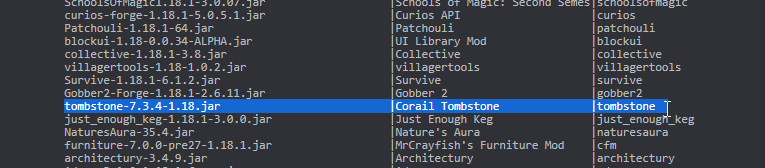
 last parcel
it's called tombstone
gray kettle
OOOOOOH
BOY AM I DUMB
Uninstalled rn
trying again
Works fine now
thanks a lot for your help
Also, quick question: is there an alternative to optifine? I really love playing with shader and I don't see myself enjoying the game as much without, so I'm wondering if there's anything else more optimized that I can use with these modpacks?
storm perch
hello, i have a problem with prestige, when i press p, he give me a error, but i do on the server console force prestige enabled, but, when i do this, other person on the server can do prestige, without me, can anyone help me? (skyfactory4)
last parcel
gray kettle
Also, quick question: is there an alternative to optifine? I really love playing...
for forge, i dont know. not really something i've dealt with.
gray kettle
Oh ok thankss
Also the issue with corail was that multiple versions of the mods installed upon each other, I had 2 versions installed at once I read that was an issue until today
thanks a bunch, have a good one!
last parcel
yep, it was.
wind bolt
What is !mc-installfix
last parcel
a bot command
golden muskBOT
- Click on the Minecraft Tab on the Left side of the CurseForge App.
- Click button next to the
Create Custom Profileoption. - Click
Repair Installationoption. - Play game.
NOTE: You will not lose any modpacks or worlds, These are saved in the Instances folder. DO NOT TOUCH THIS FOLDER OR YOU WILL LOSE EVERYTHING
storm perch
hello, i have a problem with prestige, when i press p, he give me a error, but i do on the server console force prestige enabled, but, when i do this, other person on the server can do prestige, without me, can anyone help me? (skyfactory4)
last parcel
considered yet that no one has an answer and you should maybe ask the people who made the pack
gleaming hazel
how to fix lag? I get 0 to below 20 fps
storm perch
gleaming hazel
how to fix lag? I get 0 to below 20 fps
upgrade your computer
autumn agate
i cant tell why im lagging i dont have anything that should make me lag too much besides better nether and better end, but im in the overworld most of the mods i have dont add crazy builds or biomes
and i can run rl craft at 100 fps fine but i cant run 52 mods with 20
 lost spoke
Game Crash - Exit Code 0
golden muskBOT
Error/Exit codes are useless. Follow these steps so someone can actually help you.
- Right-click the modpack profile icon OR click the button in the modpack profile.
- Click
Open Folder. - Open the
logsfolder. - Drag and drop the FILE named
latestORdebuginto discord.
lost spoke
no my prob
wild jewel
Then you should start telling what is wrong Bahij
lost spoke
saw the embed trying to check logs
wild jewel
If you know to trigger it then you could have scrolled to find one
lost spoke
yeah i guess i can deal with the log
hmm
not signed plugin
@ mods should be in a separate jar from the coremod
coarse nest
That is fine, the error you want is at the end
Or you can post it here for someone else to have a look if you dont feel like doing it yourself
coarse nest
!mc-installfix do this
golden muskBOT
- Click on the Minecraft Tab on the Left side of the CurseForge App.
- Click button next to the
Create Custom Profileoption. - Click
Repair Installationoption. - Play game.
NOTE: You will not lose any modpacks or worlds, These are saved in the Instances folder. DO NOT TOUCH THIS FOLDER OR YOU WILL LOSE EVERYTHING


 coarse nest
Can you send this file: Pitu 1.16\crash-reports\crash-2022-01-13_18.43.46-fml.txt
coarse nest
Check the mods folder, cf installed two HWYLA mod files
Also update, like it says in #📢︱news
zinc aurora
I already am updated and has 1 hwyla too
tried loading again, but it stayed the same
coarse nest
Send a screenshot of your entire mods folder
zinc aurora
 coarse nest
Hmm, im not sure.
Maybe try reinstall the pack?
zinc aurora
this is a handmade pack, so should i reinstall all mods?
coarse nest
zinc aurora
this is a handmade pack, so should i reinstall all mods?
Yeah
lost spoke
I think it doesn't read them when u manually add them
u should directly add them using the app
search, add
coarse nest
It doesnt matter how they added them or readd them