#👽︱game-support
1 messages · Page 187 of 1
 north cloud
IN THE MIDST OF MY HUMNGOUS BRAIN WORKING AT FULL SPEED
i did it
i love you chief
have a good day
i hope you have a wonderful wife in the future man
 coarse nest
👍
 lucid cave
Trying to start up a SkyFactory4 sever, extracted the zip file into a folder, ran the install.bat but no eula showed up. Then I ran the severstart.bat and it immediately crashes. Any ideas on a fix?
 waxen pine
lucid cave
Trying to start up a SkyFactory4 sever, extracted the zip file into a folder, ra...
waxen pine
lucid cave
Trying to start up a SkyFactory4 sever, extracted the zip file into a folder, ra...
Check your current java version being used. Must be java 8 64-bit for that MC version
 deft meadow
I recently migrated my MC account and when i try to login when loading a mod it says to use my Mojang account but i cant use that anymore bc i migrated how do i login?
 last parcel
?mc-login
 golden muskBOT
Minecraft Logins
CurseForge does not handle or touch the Minecraft Login.
You must own JAVA Edition
If you have a DEMO button instead of a PLAY button in the launcher you are logged into an account that does not own the game. CurseForge requires you to own the game to use it.
Follow the steps in the pictures below. If you bought Minecraft after October 2020 or you have transferred your account you will use a Microsoft account.
Otherwise you must use a Mojang account until you transfer it!
 deft meadow
i have realized the simplicity of my fix, i was thinking too hard. Thank you
 proud glen
hi
 autumn agate
OH NO! i got an error trying to load a mod called Helpful Villagers and it shows a black screen with my ui for a moment then crashes
The game crashed whilst ticking memory connection
Error: java.lang.NullPointerException: Ticking memory connection
Exit Code: -1
golden muskBOT
Please visit the project page for the content you posted about and look for a way to contact the developer.
Somewhere on the page there is usually a method of contact. Look for one of the following things:
Issuestab like the image below.- Discord link.
- Twitter link.
- Comments section below the project.
If no contact method exists you will either have to remove the project or find a solution on your own.

 hallow anvil
I request help from the gods/goddesses of support
 hallow anvil
please
last parcel
! webclient
golden muskBOT
Timeout/WebClient errors are from networking issues to your computer. You can try a few things to fix it:
- Restart the computer.
- Restart your router/modem.
- Try another internet source like a hotspot, wired connection or moving closer to the WiFi.
- Pause/Stop other things using the internet. (Streams, music, etc)
- If this still doesn't work, try again in an hour and hope your connection is stable.
 spring jewel
hello i need some help
coarse nest
!help ⤵️
golden muskBOT
╰( ͡° ͜ʖ ͡° )つ──☆*:・゚ *˜”*°•.˜”*°• Many Help •°*”˜.•°*”˜* <:curselit:796985620550385705>
Please provide a description of your issue with as much detail as possible. If you have an issue with a mod or modpack, tell us the name. Explain what you can see happening. Be specific!
 Tell us what is happening, we already know it "doesn't work".
Avoid using words like "it", tell us exactly what "it" is.
Don't assume anyone knows what you are talking about, be specific.
Tell us what you expected to happen.
Provide screenshots or video if possible.
Provide a log if possible. ?mc-log
spring jewel
ok so i got some mods for my minecraft server. for example exotic birds. i can see the eggs and i can use them but nothing spawns. same with other mods where ur able to spawn
coarse nest
You may be in peaceful mode, try /difficulty easy
coarse nest
Probably not, if the items appear then the entities should too.
It is probably an issue with the mod
!projectissue
golden muskBOT
Please visit the project page for the content you posted about and look for a way to contact the developer.
Somewhere on the page there is usually a method of contact. Look for one of the following things:
Issuestab like the image below.- Discord link.
- Twitter link.
- Comments section below the project.
If no contact method exists you will either have to remove the project or find a solution on your own.
 sudden herald
Quick question, when I launch from Curseforge, I have to sign into minecraft, I do that with my Microsoft account but always get the "We could not authenticate you, please try again". When that happens, I retry but still face this issue.
golden muskBOT
Minecraft Logins
CurseForge does not handle or touch the Minecraft Login.
You must own JAVA Edition
If you have a DEMO button instead of a PLAY button in the launcher you are logged into an account that does not own the game. CurseForge requires you to own the game to use it.
Follow the steps in the pictures below. If you bought Minecraft after October 2020 or you have transferred your account you will use a Microsoft account.
Otherwise you must use a Mojang account until you transfer it!
lucid cave
waxen pine
Check your current java version being used. Must be java 8 64-bit for that MC ve...
It seemed like that would work, it allows for the .jar file to work but not the severstart batch file
autumn agate
?mc-log
golden muskBOT
Sending logs for support.
- Right-click the modpack profile icon OR click the
 button in the modpack profile.
 - Click

Open Folder. - Open the
logsfolder. - Drag and drop the FILE named
latestORdebuginto discord.
autumn agate
I'm having trouble with the Material Energy Classic modpack crashing on start-up. Here's the log.
coarse nest
Set allowUpdateCheck=false in mod_bspkrsCore.bsprops.cfg.
waxen pine
lucid cave
It seemed like that would work, it allows for the .jar file to work but not the ...
Want to post the start line inside the .bat file?
Also open a console window and type
java -version
autumn agate
Is the config in the AppData\Roaming.minecraft\config folder or would it be somewhere else for curseforge?
lucid cave
waxen pine
Want to post the start line inside the .bat file?
@echo off
call settings.bat
:start_server
echo Starting Sky Factory 4 Server...
java -server -Xms%MIN_RAM% -Xmx%MAX_RAM% %JAVA_PARAMETERS% -jar %SERVER_JAR% nogui
exit /B
goto start_server
waxen pine
Oh right they have to do all their files all over everywhere shenanigans
Anyways check your java version in console
lucid cave
java version "17.0.1" 2021-10-19 LTS
Java(TM) SE Runtime Environment (build 17.0.1+12-LTS-39)
Java HotSpot(TM) 64-Bit Server VM (build 17.0.1+12-LTS-39, mixed mode, sharing)
autumn agate
coarse nest
Set allowUpdateCheck=false in mod_bspkrsCore.bsprops.cfg.
If that's the config file in AppData\Roaming.minecraft\config I've already changed it to false, but minecraft still crashes.
waxen pine
That is done by replacing the word java with "C:\program files\whatever\java8whatever\bin\java.exe"
Keep the quote marks
lucid cave
The first java in the startsever code?
waxen pine
Yup!
lucid cave
Thank you so much!
waxen pine
java is actually a windows environment variable pointing to the selected priority java folder
Which is 17 for you unless you go change it
sudden herald
waxen pine
java is actually a windows environment variable pointing to the selected priorit...
Don't you edit the "PATH" variable in envvar
 glad forge
can anybody tell me where to put as world save fro minecraft on curse?
 bold burrow
Every time I open Minecraft with Valhelsia 3 from forge it tells me to login but I cant login. It says Invalid credentials. I even tried changing my password and that didn't fix it. Please help
 jovial mural
@glad forge it depends on where you installed forge. what you can do is open the resource pack window, and there should be an open file location button. if you back up from there, you should be able to find the saves folder.
 heady bay
On the pack all the mods 6, are sirens necessary for the creative items? If not, how do I remove them from the mod completely?
From the ice and fire mod
glad forge
i put the file in my saves folder and on my server and still got nada
 frosty ginkgo
hello i need help i cant create a server in curseforge
 wild jewel
!mc-installserver
golden muskBOT
How to **manually** install a server - **On your own PC**
- Check if the modpack has a server pack, if it does: use that and skip below.
- Go to the Forge website http://files.minecraftforge.net/ and download the Installer for the forge version the pack is using.
- Run the installer and choose
Install server. Do not install to your desktop. Also do not install inside a OneDrive folder. - Run the server using the forge.jar. A file called
eula.txtwill be generated. Open it and changeeula=falsetoeula=true - From the Client; Copy the
modsfolder,configfolder, and any other folders needed for the pack to work into the server folder. If the modpack has a server pack, use this instead! - Run the server again.
- Port forward your machine if needed. (Google it)
Long version: https://pastebin.com/83DXfGTH
frosty ginkgo
thx
 inland bronze
Alright, let's try this again...
A series (all I tried, around like 5) of modpacks have 2FPS and in a few modpacks I needed to disable Blockanimation so it doesn't lag, my PC is a beast, it is good, Vanilla with shaders and everything runs with around 600FPS
But curseforging has been messing up, pages also load slower and the RAM useage is extremly high and I have a guess that it has a connection, as I even lag while being in the main menu.
But only modpacks from Curseforge, Modinstaller modpacks do not lag at all, or anything else in that matter.
 ionic egret
when 1.18.1??
 ember thistle
@pseudo shadow sbeev’s industrial revolution? Is that the one you’re talking about running?
If that’s the one I ran it on 4 gb of ram on my old laptop
 pseudo shadow
ember thistle
pseudo shadow
ember thistle
Cool
 half dagger
help
wild jewel
Say with what
 wild jewel
How about not blurring things and actually say what is wrong?
wild jewel
How about making messages that contain multiple words.
Tell the dev
half dagger
um
 fleet obsidian
For some reason, i cannot export my mc modpack
its decently big as it has custom music and such, but its smaller in size than pixelmon
it like
goes through the export process
makes a temp file and everything
then the final file just
doesnt appear
 crude finch
Is game safe ?
 patent terrace
If i update the jar on my server through the hosts panel to the latest for forge 1.16.5 will i be safe then?
 vital relic
my host says yes but i dont think so
 quiet plaza
how do i install the fabric version of better minecraft
i want the extr 30 mods it has
ionic egret
when minecraft 1.18.1 comming to Curseforge
wild jewel
Nobody knows
fleet obsidian
fleet obsidian
For some reason, i cannot export my mc modpack
anyone?
its literally just not creating a final file
 willow marsh
How can I check to make sure my pc is fine? I played minecraft yesterday before knowing about the security thing. I have never turned on the debug log for minecraft.
coarse nest
Only multiplayer was ever affected, so if it was just singleplayer you are fine
willow marsh
That's a relief. Does that mean I can continue playing?
coarse nest
Yes
willow marsh
coarse nest
Yes
That immediately stopped my worries. Thank you so much!
 heady temple
What's a way I can modify the thermal series and Galacticraft so galacticraft machines accept Thermal series fuels?
patent terrace
i updated the jar file in my server panel and disabled the log thinys, is it safe now?
waxen pine
the jar file - you mean you updated your version of Forge or Fabric?
patent terrace
yea to 1.16.5-36.2.20.jar
waxen pine
Your server is good then
patent terrace
ok, thank you
waxen pine
Don't spam - you're less likely to get constructive help, not more. Look in #🧱︱mc-other-help
Maybe focus on looking for your logs?
What is that? What are you running.
You don't know what you're doing?
heady bay
how do I place the mob siren from the ice and fire mod to the blacklist display?
on the JEI blacklist config
 feral plume
Anyone know help me to disable the applied channels? 1.16.5
 coarse elm
coarse nest
Only multiplayer was ever affected, so if it was just singleplayer you are fine
coarse elm
coarse nest
Only multiplayer was ever affected, so if it was just singleplayer you are fine
Just so you are aware, this isnt entirely true.
Singleplayer very much could have been exploited too but it's much less of an issue and very unlikely as it would just be easier to make a bad mod.
coarse nest
feral plume
Anyone know help me to disable the applied channels? 1.16.5
You cannot. Applied energistics 2 removed that config option in 1.16.5
 glass stirrup
Anyone know how to use modpacks on a mac
feral plume
I followed a series and they managed to disable
glass stirrup
it just launches the mc launcher with no custom version
 acoustic idol
feral plume
I followed a series and they managed to disable
acoustic idol
feral plume
I followed a series and they managed to disable
what version of mc is that series? Also Please follow #📛︱rules 4 as well
feral plume
acoustic idol
what version of mc is that series? Also Please follow <#777323206884327484> 4 a...
1.16.5, DripCraft
feral plume
acoustic idol
what version of mc is that series? Also Please follow <#777323206884327484> 4 a...
Sorry
acoustic idol
Looks like they added the mod AE2 Additional Opportunity. Which looks like it changes how ae2 works.
feral plume
acoustic idol
Looks like they added the mod AE2 Additional Opportunity. Which looks like it ch...
Are you on the curse?
acoustic idol
Dont need to keep pinging me. And yes the weird ae2 mod is on cf
 analog cairn
Hi folks- I have a server hosted by apex. Do I need to add Dlog4j2.formatMsgNoLookups=true to the jvm arguments to it for the recently found exploit? And if so, where can I do that? This is my first time doing anything with a server, so I'm kind of lost.
coarse elm
analog cairn
Hi folks- I have a server hosted by apex. Do I need to add Dlog4j2.formatMsgNoLo...
Just update your modloader.
analog cairn
coarse elm
Just update your modloader.
So, that would just be updating forge on my computer? I don't need to do anything with the server?
coarse elm
You update forge on both
analog cairn
coarse elm
You update forge on both
Got it, thank you
 midnight ridge
Can anyone help me find a fix for this?
coarse nest
Can you join a normal world fine?
midnight ridge
You mean singleplayer?
I think so, but I'm gonna try now
same thing happened in a singleplayer world 🙁
coarse nest
!mc-installfix try this, may not work
golden muskBOT
- Click on the Minecraft Tab on the Left side of the CurseForge App.
- Click button next to the
Create Custom Profileoption. - Click

Repair Installationoption. - Play game.
NOTE: You will not lose any modpacks or worlds, These are saved in the Instances folder. DO NOT TOUCH THIS FOLDER OR YOU WILL LOSE EVERYTHING
midnight ridge
Ok, will do
This happens a few seconds after joining a world
I can play for like 10 seconds and then boom
 sonic fulcrum
i made a custom modpack and when i load it its giving me errors. can i get any help can eayone read crash reports to see what i did wrong
or help me know how to read
coarse nest
Post your logs here, no one can help without them
golden muskBOT
Sending logs for support.
- Right-click the modpack profile icon OR click the button in the modpack profile.
- Click
Open Folder. - Open the
logsfolder. - Drag and drop the FILE named
latestORdebuginto discord.
midnight ridge
golden musk
Didn't work 😦
coarse nest
!mc-fabric go ask the fabric people then, they know a lot more about it than anyone here
golden muskBOT
midnight ridge
coarse nest
!mc-fabric go ask the fabric people then, they know a lot more about it than any...
Okay, thanks 🙂
golden muskBOT
- Click on the Minecraft Tab on the Left side of the CurseForge App.
- Click button next to the
Create Custom Profileoption. - Click
Repair Installationoption. - Play game.
NOTE: You will not lose any modpacks or worlds, These are saved in the Instances folder. DO NOT TOUCH THIS FOLDER OR YOU WILL LOSE EVERYTHING
 rapid star
Hi everyone, can someone help me fix this error :"failed to get mod loader from manifest" appear when I try install sky factory mod pack of minecraft
sonic fulcrum
im still getting that same error repairing the installation did nothing
sonic fulcrum
what pack version?
rapid star
Sky factory 4 - mc : 1.12.2 - version: 4.2.3
I played it before but after I remove and install it again, I got this error
sonic fulcrum
did u add any other mods to the pack?
rapid star
No.
sonic fulcrum
hmm idk
explain plz
still trying to make my custom modpack but this keeps happening. i tried repairing the install and nothing
nvm the error was from framed blocks mod
 barren wedge
All the Fabric 4 - mc : 1.17.1 Version: X.X.X (Any)
I played before, but recently I've tried to download it again through curseforge and every time it keeps coming up with missing dependency code for the mod "Pling". Tried on multiple version including version I have already installed.
(Not sure if I should put this here or fabric server)
(No log cause it's a installation error)
 tiny garden
why do i get this error when trying to install skyfactory 4
 glad forge
i have asked multiple times and nobody can seem to help me!!!!! where do I put a world save to play on my muliplayer server?? I tried putting it in my saves folder and I also loaded it to my server. I have tried multiple different world save and nothing load? can somebody please help me?
coarse nest
Rename the world folder to world and place it inside your servers folder (where the mods folder, the forge.jar and the server.properties is)
glad forge
Thank you!! A different answer than "put it in the saves folder"
tiny garden
i tried uninstalling curseforge and resinstalling it and restarted my pc but i still get the error while trying to download sf4
coarse nest
The forge version it requires is not on curseforge yet, you will have to be patient or get an old version of sky factory
tiny garden
which version of sf4?
coarse nest
Anything thats not the newest
 hollow sundial
since the last modpacks I've played all have crashed after using for a few days I decided to made my own modpack for myself and its been working fine for the last few days but since this morning it kept crashing, since I didn't know how to read the crash logs I just went one by one enabling each mod and eventually found which mods were crashing my world, in the end it was just enough items, just enough resources, mantle, tinkers construct, tinkers planner, mekanism , mekanism additions/tools/generators and sophisticated backpacks. I can start up a new world fine with these mods still enabled but on my main world it just crashes, if any one could help that would be great also i have 32 gb of ram and no matter much ram i allocate it still crashes with those mods (edited)
coarse nest
hollow sundial
since the last modpacks I've played all have crashed after using for a few days ...
Delete mantle-server.toml from <instance>/saves/<worldname>/serverconfig
hollow sundial
coarse nest
Delete `mantle-server.toml` from <instance>/saves/<worldname>/serverconfig
didnt work :c
coarse nest
Do the same for Mekanism/additions.toml
if it happens again then read the start of the crash report, it says which file is causing the issue
hollow sundial
coarse nest
if it happens again then read the start of the crash report, it says which file ...
okayi will, but there isnt a mekanism/additions.toml
coarse nest
is there a mekanism folder?
hollow sundial
coarse nest
is there a mekanism folder?
yes in the config file
coarse nest
the / means its a folder, so look in the Mekanism folder for addtions.toml
hollow sundial
coarse nest
the / means its a folder, so look in the Mekanism folder for addtions.toml
It worked thank you vmuch! ❤️
 severe oak
i keep getting this message
The game crashed whilst there was a severe problem during mod loading that has caused the game to fail
Error: net.minecraftforge.fml.common.LoaderExceptionModCrash: Caught exception from Just Enough Items (jei)
Exit Code: -1
coarse nest
!mc-logs
golden muskBOT
Sending logs for support.
- Right-click the modpack profile icon OR click the button in the modpack profile.
- Click
Open Folder. - Open the
logsfolder. - Drag and drop the FILE named
latestORdebuginto discord.
severe oak
wut shal i dop?
it wont let me it says something went wrong
got it
soooooo wut now?
coarse nest
Is there a crash report in the crashreports folder? (if so put it here)
severe oak
2 doncuments
coarse nest
put the most recent one here
severe oak
coarse nest
!mc-ram
golden muskBOT
How to set Global Minecraft RAM value.
- Click the
 icon in the bottom left to open settings.
 - Click the Minecraft tab.
- Scroll down.
- Slide slider to recommended ram range as seen below.
 severe oak
how high?
waxen pine
you know how much total you have?
severe oak
12
coarse nest
6-8 then
severe oak
thx
 serene epoch
how long dose it take for a mod to get approved. it's saing like Under Review for my v1.0.1 for 13 hours and for my ferst vershon nomber v1.0.0 for over a day
coarse nest
!status
golden muskBOT
Project Moderation Time
Project/File moderation is done on these days unless otherwise mentioned:
Sunday, Monday, Tuesday, Wednesday, Thursday: <t:1631170800:t> - <t:1631199600:t> (Your time)
Friday, Saturday: No Moderation!
Projects are moderated First in, First out. If you submit late in the work day, it will likely get left until the next day!
New Projects or anything flagged for manual review: 1-3 Working Days
Updates to approved projects not needing manual approval: 1 Hour
-If your file has been "Under Review" for more than an hour, then it is at manual review!
Changes will only show in the app if the project meets the requirements in the ?sync command and up to 24 hours has passed from when it was accepted.
serene epoch
okay thanks for the help 😄
autumn agate
Hello, how is it with the update of security ?
 grim atlas
Hey guys
I'm trying to host a modded server on my pc but I can't connect to it
It works fine if i have no mods or just biomes o plenty, but as soon as i add more it wont connect

Like this
When i try to join, this is the error message that pops up

Any idea why this is happening
vital relic
check the console what it says
 vital relic
is that your server console?
by the looks of it it has crashed
send the crash report
 ebon pivot
I need help. I restarted curseforge app because i had a problem with an installation of a minecraft modpack and after the restart i lost every minecraft modpack i had installed. Someone know how to get back all the minecraft modpacks that i installed?
grim atlas
vital relic
send the crash report
this is the latest
although ive been trying to remove some mods to see what workks
i have crash reports from when i try all the mods too
either way its the same result
last parcel
better foilage failed to load
autumn agate
excluding long modpack initializations and world initializations, how big of a performance impact (if any) would replacing an hdd with an sdd make to modded mc
ive been getting low frame rates with modded mc
is buying an ssd worth it?
last parcel
probably very little change would be noticable. minecraft cares about ram and cpu mostly. and certain gpu's have issues like AMD.
autumn agate
last parcel
probably very little change would be noticable. minecraft cares about ram and cp...
only amd gpus and not amd cpus right?
last parcel
yes (there is no reason to ping reply someone, especially for something they just said.. #📛︱rules 5)
last parcel
open a world, press f3, screenshot it and send that here
autumn agate
im not currently on my gaming laptop and i dont have mc installed here
i cant sorry
my other laptop is currently charging, do you know what i should keep track of when i open minecraft?
while f3
last parcel
wouldnt do any good to install minecraft on an unrelated device anyway
come back when you can provide what i asked for
ebon pivot
ebon pivot
I need help. I restarted curseforge app because i had a problem with an installa...
And after restart when i want to download something this popup

 half anchor
i have the same problem
last parcel
what pack
ebon pivot
 last parcel
install an older version for now
ebon pivot
ok
autumn agate
autumn agate
my other laptop is currently charging, do you know what i should keep track of w...
 last parcel
fps looks fine here
last parcel
send a new one when its lagging
autumn agate
sure
grim atlas
last parcel
better foilage failed to load
I removed better foliage, still doesnt work
last parcel
so you dont need to ping me next time
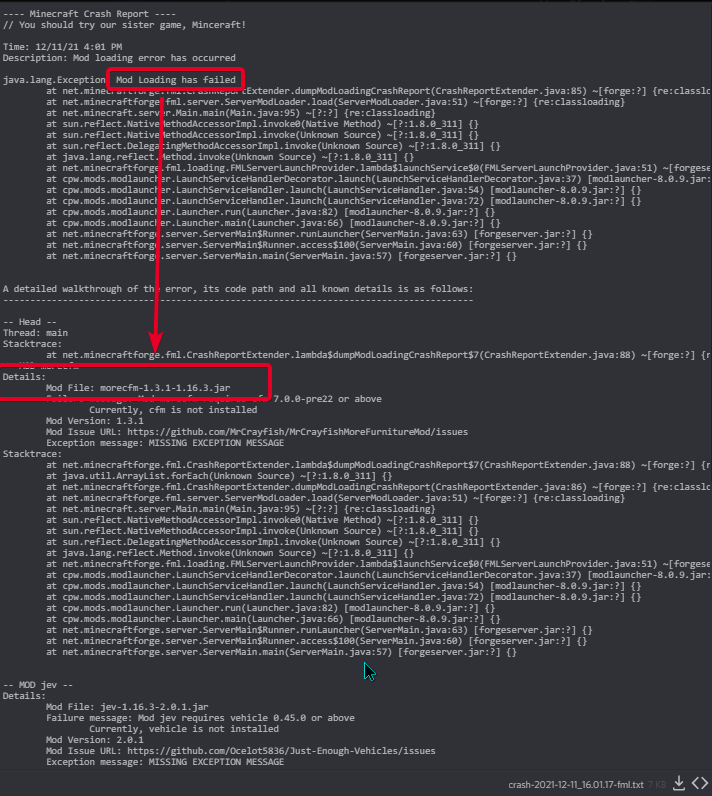
looks like you are missing dependencies actually. how are you installing mods?
    Failure message: Mod morecfm requires cfm 7.0.0-pre22 or above
        Currently, cfm is not installed

    Mod File: jev-1.16.3-2.0.1.jar
    Failure message: Mod jev requires vehicle 0.45.0 or above
        Currently, vehicle is not installed

    Mod File: kelpfertilizer_1.16.5-1.7.jar
    Failure message: Mod kelpfertilizer requires collective 2.52 or above
Currently, collective is not installed```on 1.16.5, Forge 36.2.2, I can run the game, but when the Minecraft starts loading, I got a exit code 0, anyone knows how to solve this?
golden muskBOT
Error/Exit codes are useless. Follow these steps so someone can actually help you.
- Right-click the modpack profile icon OR click the button in the modpack profile.
- Click
Open Folder. - Open the
logsfolder. - Drag and drop the FILE named
latestORdebuginto discord.
 vital relic
can you give mc more ram?
autumn agate
8?
last parcel
ram is fine
vital relic
sounds like your cpu cant load anything fast enoug
autumn agate
whats the recommended cpu for a modpack like farming valley?
i have a ryzen 5 3550h
4core, 8 threads
last parcel
Base Clock 2.1GHz
that's kind of on the lower end
vital relic
last parcel
`Base Clock 2.1GHz`
that's kind of on the lower end
for ryzen 5 cpu that is normal my ryzen 5 4500u can boost to around 4 ghz
vital relic
how much mods do you wanna run/run now
last parcel
there isnt really any recommendation. higher clock speed is just better for minecraft.
fps is never a guarantee when playing with modded. what you get is what you get for the most part.
vital relic
most important is singlecore performance i think a 4 core cpu can do the trick 6 cores is idle
autumn agate
alright then
vital relic
do you wanna buy a pc for mc?
vital relic
do you play on a laptop right now
vital relic
i can help you in #🥑-off-topic-chat
 last parcel
install java, it says what version you need on the screen
last parcel
windows key + r
type cmd, press enter
type java -version
screenshot the output
grim atlas
last parcel
looks like you are missing dependencies actually. how are you installing mods?
I put all the mods and their dependencies in the folder
But still didnt work, so i tried doing less
Seems like i added some mods but forgot to add their dependencies
still trying to figure it out
last parcel
why not just use the cf app?
 grim atlas
 grim atlas
last parcel
why not just use the cf app?
grim atlas
last parcel
why not just use the cf app?
wdym?
last parcel
!getcf
golden muskBOT
Looking to install the CurseForge app?
<:windows:798410728188936222> Windows
Minimum Requirements:
- OS Version: 7 (64 bit), 8.1, 10, 11
- 64 bit Required.
- 350MB storage space.
- Microsoft .Net 4.8
- Intel/AMD quad-core CPU
- 8GB ram
Download: https://download.overwolf.com/install/Download?&PartnerId=4047
If you are having issues with the installer use the URL below to install Overwolf then go to the app store to download CurseForge.
https://content.overwolf.com/downloads/setup/latest/regular.html
<:mac:798410654418862130> Mac
Minimum Requirements:
- OS Version 10.14 or newer.
- 64 bit Required.
Download: https://curseforge.overwolf.com/downloads/curseforge-latest.dmg
:penguin: Linux
Minimum Requirements:
Yes.
Download: :person_shrugging:
last parcel
no.. but you can make the pack with it
 short sand
@last parcel But i playing mc rn
 grim atlas
thats what i did lol
but i need to host it
thats why i made a forge server and tried copying the mods over
last parcel
short sand
<@!125588118538682368> But i playing mc rn
quit tagging me, also idk even know why your tagging me to show me this again. it clearly says you dont have java installed, install it.
short sand
last parcel
quit tagging me, also idk even know *why* your tagging me to show me this again....
wtf bro i instaill it 3x times today..............

 red folio
How does one get hypixel based mods and make them work (Im bad at this)
grim atlas
its a mod that mostly adds clientside stuff like sound effects and markers over mobs heads
are clientside mods not meant to go into server mod folders?
last parcel
report it to the dev. i dont know the issue beyond "it's broke"
short sand
i have java but in another folder
C:\Program Files (x86)\Java\jre1.8.0_311\bin\java.exe
last parcel
then you need to fix your system path for java as it is not being recognized.
short sand
how to fix it?
last parcel
Right click My Computer and select Properties.
On the Advanced tab, select Environment Variables, and then edit JAVA_HOME to point to where the JDK software is located, for example, C:\Program Files\Java\jdk1.6.0_02.``` brazen dragon
Does anyone happen to know of any mods that drastically slow down how long it takes to join a modded server? I'm trying to figure out what might be causing it but I figured I'd ask here as well to see if anyone knows anything
last parcel
no? this is usually due to lack of ram
brazen dragon
Hm weird, cause it never caps out on the RAM or chews through it hardly at all
 ashen spoke
So i moved my OS onto a new SSD and i went to redownload sky factory but now it saying can’t download due to wrong manifest
Plz help
vital relic
You need to reput the path than in the settings
 tacit cargo
My game crashes
last parcel
remove optifine, then post a new log
last parcel
electrodynamics
tacit cargo
Ughh another problem that i have to report
So annoying
Thanks
The survive mod is messing with Electrodynamics
autumn agate
is it possible that i'll have to change these to .clientside?


 graceful pollen
Hello I'm using the Better Minecraft Modpack 1.18 v3 [Forge]. I try to launch the game but i get the error code 0:
An unexpected issue occured and the game has crashed... Exit Code: 0
A freind of mine has the exact same problem with Forge on 1.18
I have latest Java, Forge and Curseforge
golden muskBOT
Error/Exit codes are useless. Follow these steps so someone can actually help you.
- Right-click the modpack profile icon OR click the button in the modpack profile.
- Click
Open Folder. - Open the
logsfolder. - Drag and drop the FILE named
latestORdebuginto discord.
graceful pollen
Hello I'm using the Better Minecraft Modpack 1.18 v3 [Forge]. I try to launch the game but i get the error code 0:
An unexpected issue occured and the game has crashed... Exit Code: 0
A freind of mine has the exact same problem with Forge on 1.18
I have latest Java, Forge and Curseforge
golden muskBOT
Error/Exit codes are useless. Follow these steps so someone can actually help you.
- Right-click the modpack profile icon OR click the button in the modpack profile.
- Click
Open Folder. - Open the
logsfolder. - Drag and drop the FILE named
latestORdebuginto discord.
graceful pollen
Can't launch the game.
tacit cargo
Try without optifine
autumn agate
how can i do this with forge
 autumn agate
graceful pollen
autumn agate
graceful pollen
wolveswitharmor does not work
i think thats why\
The mod "wolveswitharmor" contains invalid entries in its mod json:
- Unsupported root entry "artist" at line 15 column 11
graceful pollen
I already tried to remove it from the mods folder. didn't work
ashen spoke
vital relic
You need to reput the path than in the settings
Thank you, that fixed it
autumn agate
the world itself still has its data
short sand
last parcel
```To set JAVA_HOME, do the following:
Right click My Computer and select Prope...
still nothing
autumn agate
so you need to make a new world
autumn agate
 woven pike
can anybody help??
woven pike
can anybody help??
dont ask to ask
last parcel
short sand
still nothing
Don't have a solution for you then
short sand
nice....
last parcel
Nice...
short sand
and java -version dont work too
last parcel
Then your computer isn't installing java correctly. Way beyond anything I can help with.
 lime kernel
I tried to use a Minecraft PvZ mod and when I tried to boot up a survival world I got this screen and nothing I do can close it. This would be fine if it didn’t lag my entire computer making it unable to play any games. Can someone please help?
 short sand
okay now its is working
but if i start the server the console just open and close
hmm ://
short sand
 waxen pine
post your latest.log or crash report
 autumn agate
i need help
waxen pine
what modpack is it?
serene epoch
how do i add a image to my mod site from my computer
last parcel
go to the image tab and upload it
serene epoch
okay thank you wary much
short sand
last parcel
go to the image tab and upload it
do u have solutions
short sand
short sand
for this?
waxen pine
sorry dont really see what the issue is IndoCZ - looks like the server is launching as forge and nothing too unusual is happening
you should really update the server to the new forge update however
 near grove
im having trouble booting up my modded profile. heres the crash report:
near grove
also, the log:
near grove
waxen pine
if you remove tinkers/mantle it loads?
i havent tried that yet
waxen pine
should also try removing optifine as test
near grove
okay
tacit cargo
How can i remove a specific mob from a mod?
near grove
waxen pine
should also try removing optifine as test
it worked after removing tinkers, unfortunately
waxen pine
i mean is there aanother mod adding a book with that same page name? O.o lol
coarse nest
Haven't looked at the log, but update mantle and tinkers to their latest alpha versions (off the site directly, alphas don't show in app)
 lime whale
why do I keep on getting the error message in minecraft; Not building
last parcel
can you show the message
lime whale
wait 5 min
The game crashed whilst rendering item
Error: java.lang.IllegalStateException: Not building!
Exit Code: -1
golden muskBOT
Error/Exit codes are useless. Follow these steps so someone can actually help you.
- Right-click the modpack profile icon OR click the button in the modpack profile.
- Click
Open Folder. - Open the
logsfolder. - Drag and drop the FILE named
latestORdebuginto discord.
lime whale
@last parcel
golden muskBOT
Please visit the project page for the content you posted about and look for a way to contact the developer.
Somewhere on the page there is usually a method of contact. Look for one of the following things:
Issuestab like the image below.- Discord link.
- Twitter link.
- Comments section below the project.
If no contact method exists you will either have to remove the project or find a solution on your own.
heady bay
How do I make a mob stop showing up on jei?
lime whale
I can't see weaponlib anywhere though
last parcel
Item Type: com.vicmatskiv.weaponlib.Weapon@3391f611
coarse nest
Vic's modern warfare is the modname it seems
last parcel
makes sense
lime whale
how do I get rid of weaponlib and vics modern warfare if they are already deleted
last parcel
..what
 ember cargo
how can i go about getting javafml:39?

 molten glacier
I've tried to load Crucial 2 and Create: Above and Beyond, but both of them crashed just after clicking play.
acoustic idol
!mc-installfix try this
golden muskBOT
- Click on the Minecraft Tab on the Left side of the CurseForge App.
- Click button next to the
Create Custom Profileoption. - Click
Repair Installationoption. - Play game.
NOTE: You will not lose any modpacks or worlds, These are saved in the Instances folder. DO NOT TOUCH THIS FOLDER OR YOU WILL LOSE EVERYTHING
molten glacier
Yeah I attempted that, still does the same thing
I also tried reinstalling minecraft and reinstalling java
Might reinstall curse next
coarse nest
Did you do repair installation, not repair profile?
molten glacier
Uhh lemme try that then xd
autumn agate
Can I ask about specifics in a modpack in this channel
molten glacier
coarse nest
Did you do repair installation, not repair profile?
Yooo it worked, thanks! I had been having a separate problem where it would never load forge, and would instead start up a separate vanilla instance while appearing to load forge, but this fixed that too xd
coarse nest
autumn agate
Can I ask about specifics in a modpack in this channel
Probably better to ask those in a dedicated mc channel, like #🧱︱minecraft-chat
autumn agate
k thanks
 sudden lion
is there a way i can play with my freinds on curseforge or play with all the mods onto a server
acoustic idol
!mc-installserver
golden muskBOT
How to **manually** install a server - **On your own PC**
- Check if the modpack has a server pack, if it does: use that and skip below.
- Go to the Forge website http://files.minecraftforge.net/ and download the Installer for the forge version the pack is using.
- Run the installer and choose
Install server. Do not install to your desktop. Also do not install inside a OneDrive folder. - Run the server using the forge.jar. A file called
eula.txtwill be generated. Open it and changeeula=falsetoeula=true - From the Client; Copy the
modsfolder,configfolder, and any other folders needed for the pack to work into the server folder. If the modpack has a server pack, use this instead! - Run the server again.
- Port forward your machine if needed. (Google it)
Long version: https://pastebin.com/83DXfGTH
 thick nymph
wait so about the security vulnerability glitch, did curseforge patch it?
thick nymph
ok
 torpid smelt
alright so, im back again trying to attempt to create a local minecraft server. The server is up and running smoothly and I can connect to it yet it won't work for my friend. I'm giving him my IPv4 address via IPCONFIG in prompt yet hes still unable to join. We're using the same version of the game with the same mods yet he cannot connect.
Could anyone assist me?
last parcel
need to give them the external ip
torpid smelt
where do I find my external ip
last parcel
ipchicken
thick nymph
so if i just have it like this im good?
 coarse nest
Yep
last parcel
that's what it says
torpid smelt
last parcel
ipchicken
Thanks!
thick nymph
mk
oh yeah one more thing
so im trying to update the mod pack FPSPlus from 1.16.5 beta to 1.17 and when i try to do so it says this:
 last parcel
you cant update packs across mc versions
 wise basalt
torpid smelt
alright so, im back again trying to attempt to create a local minecraft server. ...
wise basalt
torpid smelt
alright so, im back again trying to attempt to create a local minecraft server. ...
is your network port forwarded?
thick nymph
last parcel
you cant update packs across mc versions
o
so do i delete my current one?
last parcel
if you want to
last parcel
install it
thick nymph
ok
torpid smelt
wise basalt
is your network port forwarded?
yes
thick nymph
last parcel
install it
still says object reference not set to an instance of an object
last parcel
restart curseforge
thick nymph
ok
thick nymph
last parcel
pack is broke, report to the dev
o ok
 iron mortar
does anyone know how to read logs? im having a new error code 0 while its loading mods
golden muskBOT
Error/Exit codes are useless. Follow these steps so someone can actually help you.
- Right-click the modpack profile icon OR click the button in the modpack profile.
- Click
Open Folder. - Open the
logsfolder. - Drag and drop the FILE named
latestORdebuginto discord.
coarse nest
iron mortar
Downgrade forge to 36.2.4 or remove immersive portals
iron mortar
oh no its immersive portals?
noo :(
one of the other mids i have needed 36.2.8
i forgot which one, ill just have to find out
coarse nest
And unfortunately immersive portals stopped developing for forge
iron mortar
:(
im guessing it was way too hard to maintain
oh it was portality
yeah i can part with portality
wait what
i dont have portality??
ah the jar file lingered
coarse nest
If you downgrade forge the mods that need a better version should complain and tell you what they are
 stable zinc
Hello, I am trying to run a Forge Server on Mulitcraft but i keep getting this error
11.12 18:15:38 [Server] INFO java.nio.file.InvalidPathException: Illegal char <:> at index 72: libraries/cpw/mods/bootstraplauncher/0.1.17/bootstraplauncher-0.1.17.jar:libraries/cpw/mods/securejarhandler/0.9.54/securejarhandler-0.9.54.jar:libraries/org/ow2/asm/asm-commons/9.1/asm-commons-9.1.jar:libraries/org/ow2/asm/asm-util/9.1/asm-util-9.1.jar:libraries/org/ow2/asm/asm-analysis/9.1/asm-analysis-9.1.jar:libraries/org/ow2/asm/asm-tree/9.1/asm-tree-9.1.jar:libraries/org/ow2/asm/asm/9.1/asm-9.1.jar```

Google has not been much helpturns out deleting the mod didnt delete it for whatever reason
 eager raptor
How do I fix errors in currently selected datapacks
last parcel
figure out which mod is causing the issue and remove/report it
eager raptor
I'll try that
coarse nest
The log will have more info
eager raptor
I looked I the logs and I have no idea what I'm looking at
And there is 358 so I just can't start removing mods
eager raptor
coarse nest
!mc-installfix
golden muskBOT
- Click on the Minecraft Tab on the Left side of the CurseForge App.
- Click button next to the
Create Custom Profileoption. - Click
Repair Installationoption. - Play game.
NOTE: You will not lose any modpacks or worlds, These are saved in the Instances folder. DO NOT TOUCH THIS FOLDER OR YOU WILL LOSE EVERYTHING
 wanton wadi
Hello, is there a way to change curseforge accounts? because i accidentally made a whole new microsoft account (because i forgot the yahoo i used) when i tried to play a modpack
coarse nest
Do you mean curseforge or minecraft?
wanton wadi
When I click the play button on curseforge for a modpack, it sends me to the minecraft launcher but on the other microsoft account
coarse nest
You can sign out and sign back in by clicking the username in the top left of the minecraft launcher
wanton wadi
I tried but it just goes like this:
 coarse nest
!mc-installfix try this
golden muskBOT
- Click on the Minecraft Tab on the Left side of the CurseForge App.
- Click button next to the
Create Custom Profileoption. - Click
Repair Installationoption. - Play game.
NOTE: You will not lose any modpacks or worlds, These are saved in the Instances folder. DO NOT TOUCH THIS FOLDER OR YOU WILL LOSE EVERYTHING
wanton wadi
THANK YOU CHIEF ARUG
 summer hinge
hello all. I need help about stoneblock 2 from curseforge app. I downloaded it and tried running it but it crashed. I tried running it again for a couple of times but it still crashed.
 cursive owl
Hello, I have a problem that when I try to knock on any mod pack, I get an error and write there: Failed to synchronize registry data from server, closing connection and I do not know what to do aternos server and previously I could normally knock on the server on this modpack and now I can't on any
 wild jewel
fleet obsidian
...why was my post deleted
wild jewel
fleet obsidian
...why was my post deleted
Because you keep switching between #👽︱game-support and #🔥︱curseforge-support
Stick to #🔥︱curseforge-support
fleet obsidian
i was told to go here yesterday, then used my own intuition as it wasnt an actual game issue, but an app issue
 wild jewel
Install the mod JEID
 compact hinge
oh thxx
grim atlas
Can someone help me? How do i host a forge server with the mods there from the start? I want the world to generate with the biome mods
wild jewel
! mc-installserver
golden muskBOT
How to **manually** install a server - **On your own PC**
- Check if the modpack has a server pack, if it does: use that and skip below.
- Go to the Forge website http://files.minecraftforge.net/ and download the Installer for the forge version the pack is using.
- Run the installer and choose
Install server. Do not install to your desktop. Also do not install inside a OneDrive folder. - Run the server using the forge.jar. A file called
eula.txtwill be generated. Open it and changeeula=falsetoeula=true - From the Client; Copy the
modsfolder,configfolder, and any other folders needed for the pack to work into the server folder. If the modpack has a server pack, use this instead! - Run the server again.
- Port forward your machine if needed. (Google it)
Long version: https://pastebin.com/83DXfGTH
wild jewel
- Don't put a server in a cloud sync like onedrive.
- Server is running with wrong java version.
- Which is in your onedrive for some weird reason, please move it.
- Need to get the full java path instead of just calling "java"

 wild jewel
What jar did you start?
grim atlas
This one

Ohhh, i get it
Should i delete that one?
Wait but
nothing seems to be happening when i use the forgeserver one
Okay it opened but now its frozen on 99%

huhh??

Okay i guess i corrupted it, ill try again without running the minecraft_server one
What really trips me up here tho is the file size, if the minecraftserver jar is useless why is it so much bigger
 acoustic idol
The forge jar requires the minecraft_server jar, so do not delete it
 acoustic idol
Give your pc a sec to catch up.
 brisk island
grim atlas
brisk island
grim atlas
Okay, installed it into the folder again, was empty
Renaming forge-1.16.5-36.2.20 to forgeserver
Runned it, accepted EULA
Put mods and config folders into it
Doubleclicking forgeserver again
Its taking a while now...
acoustic idol
If it crashes send the servers log called Latest from the logs folder
grim atlas
Ayy, it worked!

Just needed to be more careful
Thanks for the help
Do you have a good port forwarding tutorial by any chance?
 pearl oasis
anyone here know how to use minecraft forge/fabric mods on the data packs? they are not showing up when i add them to the datapack folder
waxen pine
on the datapacks? can you rephrase what is the problem and what you are trying to do?
pearl oasis
im trying to use mods
by on the datapacks i mean when i create a new world and add the mods it does not work
where it says datapacks
waxen pine
mods are files ending in .jar -- they go in the 'mods' folder, not a datapacks folder
waxen pine
no that's fine yw
grim atlas
How do i port forward the simplest way?
wild jewel
grim atlas
How do i port forward the simplest way?
Google it, depends on the router
waxen pine
banging out your router number in your web browser, logging into it, and doing the things
sudden herald
waxen pine
banging out your router number in your web browser, logging into it, and doing t...
you mean its IP? e.g. 192.168.0.1?
waxen pine
actually the internal ip for it, it's usually the same for any router
usually googling your router model will find a result for that if you aren't sure
grim atlas
acoustic idol
If it crashes send the servers log called `Latest` from the logs folder
I cant host it anymore
also oops prolly shouldnt have pinged
Heres the latest, im not sure if it helps
But now legit nothing happens when i open forgeserver.jar
well, this happens
 coarse nest
Restart your pc, there appears to be some background servers running
Yeah
I reccomend you start it with a bat file to give you control over how much ram ect it has
@echo off
java -Xmx4G -jar forgeserver.jar --nogui
pause```
Past this into a new text document in the server folder (same one as forgeserver.jar) and save it as start.bat and make sure to select all file types from the dropdown.
You can change the 4 in it to however many gb of ram you want it to haveWhat does the echo thing do?
coarse nest
I can't remember.
The java actually starts the server and the pause makes sure the console stays open
grim atlas
Okay, restarted
Tried clicking forgeserver, didnt work
tried it two times
Tried using the run file still doesnt work
coarse nest
Can you restart again and only run it once, wait about a minute then send the latest.log here?
coarse nest
Is it showing up in task manager?
coarse nest
Same log as last time..
What folder is the server installed in?
 coarse nest
Move it off the desktop
grim atlas
I put it in my documents now
grim atlas
coarse nest
Move it off the desktop
Tried running, nothing happened
Wait
Okay, it briefly appeared and now its gone
after clicking the forgeserver jar
coarse nest
Post the log
grim atlas
coarse nest
Do you have any other form of server running?
coarse nest
Not that I know of. Did you edit server.properties at all?
grim atlas
this?
 coarse nest
Yeah, that
grim atlas
Only to add IP, i think
coarse nest
No, i have no idea why it has that, but the ip is determined by whatever your isp gives you, not some number you put in there
grim atlas
OH
Found the reason
There were spaces in front of each file in the run.bat file
that i copied
Works now.
Thanks for the help
 crimson mural
when i try loading my minecraft game it crashes a bit after i click playon the launcher so do you have a fix for this?

 stark parrot
its likely infinity that is causing the crash @crimson mural
crimson mural
ok
coarse nest
You actually need to install infinity if i read that correctly
crimson mural
here is what it says so you guys can read it easier
The game crashed whilst initializing game
Error: java.lang.NoClassDefFoundError: lucraft/mods/lucraftcore/infinity/render/ItemRendererFinestTinyIon
Exit Code: -1
golden muskBOT
Error/Exit codes are useless. Follow these steps so someone can actually help you.
- Right-click the modpack profile icon OR click the button in the modpack profile.
- Click
Open Folder. - Open the
logsfolder. - Drag and drop the FILE named
latestORdebuginto discord.
stark parrot
install lucraftcore
coarse nest
You will probably have to remove that and any mods that depend on it then
crimson mural
ok
 stiff mist
my curseforge wont work it keeps saying "oops that was not supposed to happen"
crimson mural
@coarse nest i did that and restarted my computer again and it still crashes
but now it says this
The game crashed whilst initializing game
Error: java.lang.NoClassDefFoundError: com/jdroppert/gauntletmod/superpower/ItemIFExtendedInventory
Exit Code: -1
golden muskBOT
Error/Exit codes are useless. Follow these steps so someone can actually help you.
- Right-click the modpack profile icon OR click the button in the modpack profile.
- Click
Open Folder. - Open the
logsfolder. - Drag and drop the FILE named
latestORdebuginto discord.
coarse nest
Remove all superhero mods as well, they all depend on luraftcore
crimson mural
i removed the ones it said once i loaded into the game when i removed lucraftcore
 quasi bay
 coarse nest
You are using java 17, 1.16.5 servers require java 8
Either uninstall java 17 or launch using a java 8 exe
quasi bay
uhh
how to uninstall java
i’ve tried
can’t figure it out
is it in the control panel?
coarse nest
Yes
 coarse nest
Yes. Make sure to get the 64 bit one
 eager vessel
hello my friend is having issues with lunching a pack i can here is there log
eager vessel
they tried removing both but it did not work
coarse nest
Can you send the new log after removing those?
 weary igloo
there you go
coarse nest
!mc-installfix try this
golden muskBOT
- Click on the Minecraft Tab on the Left side of the CurseForge App.
- Click button next to the
Create Custom Profileoption. - Click
Repair Installationoption. - Play game.
NOTE: You will not lose any modpacks or worlds, These are saved in the Instances folder. DO NOT TOUCH THIS FOLDER OR YOU WILL LOSE EVERYTHING
waxen pine
weary igloo
log
odd - you should seriously consider updating the forge version to 36.2.20 for piece of mind
weary igloo
waxen pine
odd - you should seriously consider updating the forge version to 36.2.20 for pi...
Nice thinking but it didn't work
thanks for the idea!
coarse nest
Try start from nothing again and slowly add mods till it crashes, then you know what mod it is
weary igloo
B-But the 180+ mods
coarse nest
you could do a binary search, by removing half and repeating till it works, the add half back in till you find it
eager vessel
help
quasi bay
is this bad
coarse nest
eager vessel
help
See what i told your friend, one of those mods causing issues and you need to find and remove it
quasi bay
coarse nest
See what i told your friend, one of those mods causing issues and you need to fi...
what port do i need to forward for my servers
 unkempt rain
i play on valhelsia 3
 coarse nest
What are you trying to do?
unkempt rain
join server
coarse nest
The server has a differnet modpack installed, is a vanilla server or has a differen version of valhelsia 3 installed
unkempt rain
i'm sure i play on correct version
coarse nest
Are you running the server?
coarse nest
Is he able to join it?
unkempt rain
yes, on the same version
coarse nest
Then there is something wrong with your version. Try reinstall the modpack
unkempt rain
reinstall 2 times
 dapper yacht
Does anyone here play the MC eternal modpack for minecraft?
I have a question about a weird thing that popped up in chat on my server a while ago and am trying to understand if it's something I should be worried about with the recent stuff going on with vulnerabilities and what not
basically, I saw a message that only I saw, and I can't remember exactly what it said. but it was along the lines of like chicken.death.explosion or something like that
Only I saw it in the chat
I was playing with a friend and he didn't see it
coarse nest
It seems one of your chickens exploded
coarse nest
That is not the format for the vulnerability anyway, its a death message thats missing a translation into whatever language you use
dapper yacht
Just English
okay, thanks, cause I honestly just wasn't sure what to be looking out for
I get really bad anxiety with stuff like this...so I'm really just trying to ease my mind about it. I didn't even know there was a vulnerability exploit thing until I logged off about an hour ago and watched a xisumavoid video about it and thought well dang
coarse nest
You can read through #📢︱news for how curseforge handled it and how to make sure you aren't vulnerable anymore
dapper yacht
yup! I checked to make sure my debugging thing was disabled and it is.
again, just making sure. I appreciate the response!
autumn agate
Can any one help with Forge 1.17 to 1.18 crashing before getting into actual gamea?
golden muskBOT
Sending logs for support.
- Right-click the modpack profile icon OR click the button in the modpack profile.
- Click
Open Folder. - Open the
logsfolder. - Drag and drop the FILE named
latestORdebuginto discord.
autumn agate
I have tried uninstaling launcher but here
wild jewel
Any reason why you are not using curseforge?
autumn agate
Well i just launch 1.16.5 forge from Official MC launcher and it works
but 1.17 plus exit code 0
golden muskBOT
Error/Exit codes are useless. Follow these steps so someone can actually help you.
- Right-click the modpack profile icon OR click the button in the modpack profile.
- Click
Open Folder. - Open the
logsfolder. - Drag and drop the FILE named
latestORdebuginto discord.
wild jewel
1.16 != 1.17
autumn agate
?
wild jewel
They are different versions, they do different things.
But you did not answer my question.
autumn agate
yeah i know sorry um not really
wild jewel
!getcf
golden muskBOT
Looking to install the CurseForge app?
<:windows:798410728188936222> Windows
Minimum Requirements:
- OS Version: 7 (64 bit), 8.1, 10, 11
- 64 bit Required.
- 350MB storage space.
- Microsoft .Net 4.8
- Intel/AMD quad-core CPU
- 8GB ram
Download: https://download.overwolf.com/install/Download?&PartnerId=4047
If you are having issues with the installer use the URL below to install Overwolf then go to the app store to download CurseForge.
https://content.overwolf.com/downloads/setup/latest/regular.html
<:mac:798410654418862130> Mac
Minimum Requirements:
- OS Version 10.14 or newer.
- 64 bit Required.
Download: https://curseforge.overwolf.com/downloads/curseforge-latest.dmg
:penguin: Linux
Minimum Requirements:
Yes.
Download: :person_shrugging:
autumn agate
i thought mc launcher would do same as curse forge app
wild jewel
No, curseforge app is a mod manager, installs things for you so you don't have to do it yourself.
autumn agate
Oh and do you know how to use Optifine with curse forge
golden muskBOT
We do not offer support for Optifine!
If you have issues with Optifine, remove it. If you want further support try the discord found on their website.
https://www.optifine.net/home
Installing Optifine with modpacks on Curseforge:
- Right click the modpack icon, select
Open Folder. - Put the
Optifine.jarinto themodsfolder. - Now start the modpack.
tacit cargo
My game crashes
wild jewel
Remove optifine, try again
 last parcel
Forge (forge) has failed to load correctly
tacit cargo
How!?
last parcel
!mc-forge
golden muskBOT
fleet obsidian
mc 1.18.1 isnt on cf yet is it?
grim atlas
Is there any way to host a server on your computer without a port forward?
i cant log into my router and im starting to lose hope
last parcel
not any safe way
autumn agate
grim atlas
Is there any way to host a server on your computer without a port forward?
except vpns there is no way without port forwarding
grim atlas
autumn agate
except vpns there is no way without port forwarding
wont vpns only work on letting people join your lan or something
autumn agate
nope
autumn agate
vpn work for both server and LAN becuz they still have same tcp port
grim atlas
also isnt port forwarding not safe either since its your own ip
last parcel
it can do both, but if you use a vpn people will have full access to your network
port forwarding is 100000% more safe
autumn agate
last parcel
port forwarding is 100000% more safe
(if at least it was possible on my router)
grim atlas
last parcel
port forwarding is 100000% more safe
i think i have no choice rn
since i for some reason cant log into my router
grim atlas
autumn agate
what about playit.gg?
Hey, that seems to have worked
Im gonna have to try to see if it works for other people tho
 keen spear
Hey guys, facing a problem with Better minecraft plus modpack. Ultimine was working fine for me and my friend, but suddenly it shows him "Ultimine is not active" anything to resolve this issue?
 kind vault
hey is there a program that tells me what mods im missing to fix my modpack???
kind vault
yea it just crashes
last parcel
adding more mods doesnt fix a crash, unless you arnt installing dependencies or something, which the curseforge app does automatically
?mc-log
golden muskBOT
Sending logs for support.
- Right-click the modpack profile icon OR click the button in the modpack profile.
- Click
Open Folder. - Open the
logsfolder. - Drag and drop the FILE named
latestORdebuginto discord.
kind vault
last parcel
[15:31:57] [main/WARN]: Mixin config mixins.wolfarmor.core.json requires mixin subsystem version 0.8 but 0.7.11 was found. The mixin config will not be applied.
grim atlas

Removed a non-essential mod from my server, now this is happening
I can connect just fine, any way to fix this? or anyone know why its happening
last parcel
it's because the mod list doesnt match
kind vault
last parcel
[15:31:57] [main/WARN]: Mixin config mixins.wolfarmor.core.json requires mixin s...
trying now
grim atlas
Its the same amount of mods though
I removed the Stupid Horse Stand Still! mod on both server and from my curseforge modpack
Functions fine

Weird.
Yesterday everything was working fine, but I was kicked for flying while on my horse
I removed the mod to make the callable horses mod work fine, since it only worked when the horse saddle was off
Now my horse wont be called to me at all when i pressed the button
I did enable flying in the config, so maybe that has something to do with it?
 hollow sorrel
I'm having issues starting fabric instances in version 1.17 and above (no mods installed, only Fabric API enabled)

1.16.5 works fine
there are no logs created because minecraft doesn't even start up
last parcel
is this on curseforge?
hollow sorrel
yes
last parcel
what curseforge version do you have. settings, lower left
hollow sorrel
0.188.1.4
last parcel
do you have any additional arguments in your minecraft settings on curseforge?
hollow sorrel
just the ones that were already there
didn't change anything about the java arguments
last parcel
none are already there. if any are there you added them. remove anything there then restart curseforge
hollow sorrel
ok, deleted every additional argument and restarted. Works now, Thanks 🙂
 wild jewel
Install JEID
kind vault
wild jewel
Install JEID
ty
grim atlas
grim atlas
Weird.
Yesterday everything was working fine, but I was kicked for flying while ...
Seriously, any idea how to fix this
I cant call my horse anymore
kind vault
grim atlas
Seriously, any idea how to fix this
cuz you were on it
grim atlas
kind vault
cuz you were on it
wdym
kind vault
grim atlas
wdym
tf u mean wdym YOU DISABLED THE MOD WHEN YOU WERE ON THE HORSE
corrupting the servers mod file
kind vault
:bruh:
last parcel
if your change had an undesirable effect, you should load a backup from before the change.
last parcel
something something knightfall core
grim atlas
last parcel
something something knightfall core
Removed the mod from both
Now it says unexpected data from client
Im worried ive ruined the whole server or something lmao
last parcel
it's possible. removing mods is much more likely to cause issues than adding
grim atlas
What can i do now?
last parcel
add the mods back and restore a backup
grim atlas
how do i restore a backup
last parcel
did you make one?
grim atlas
no
last parcel
then you dont
last parcel
yea
grim atlas
how do
last parcel
open the save, find where it's saved and delete the one related to the player
and uh... back it up first
grim atlas
is it in world ?
 last parcel
probably
 last parcel
log?
grim atlas
last parcel
server log?
grim atlas
isnt that the server log?
last parcel
then send the client log
 grand kraken
Hello

 last parcel
i dont care if it crashed
grim atlas
last parcel
send the latest log from the client
last parcel
[20:01:42] [Netty Client IO #2/INFO]: Server has additional mods that may be needed on the client: environmental@1.1.0
grim atlas
that is bizarre
i didnt even remove it
but yes it was missing
let me try to get the world file i backed up and insert the environmental mod into mods
unexpected custom data again
running without playerdata now
last parcel
might want to look at what the logs say before doing random things
grim atlas
weird, didnt work
grim atlas
last parcel
might want to look at what the logs say before doing random things
its a lot to look at

idk what to search for really
welp, im in a pickle now
lmao
grim atlas
 last parcel
doesnt mean anything to me, also cant read a log from a screenshot
grim atlas
last parcel
still says enviromental isnt there
it is
i restarted now, lets see...
I got in
Playerdata removed
should i try getting on the horse again now?
or is it cursed lmao
nvm. horse gone
guess i was on it when i deleted data
I still have the data files, do you think its worth a shot or nah
Backed it up, trying again now...
alright, im on this cursed af horse again
i actually think its fine now! thanks for the help
 rancid plinth
idk what channel to ask this specific question in but i think it would be better here, how do i use shaders while using curseforge
???
golden muskBOT
We do not offer support for Optifine!
If you have issues with Optifine, remove it. If you want further support try the discord found on their website.
https://www.optifine.net/home
Installing Optifine with modpacks on Curseforge:
- Right click the modpack icon, select
Open Folder. - Put the
Optifine.jarinto themodsfolder. - Now start the modpack.
last parcel
idk enable them? i dont use shaders
grand kraken
This is the official discord?
last parcel
for curseforge
grand kraken
Man
last parcel
🤔
 finite stump
Yooo i might need help here
i try to lunch the game with and without mod but every time the window of the game open run for awile and crasg a few second after
if someone can read crash report i don't say no to a little hand
last parcel
are you using curseforge?
finite stump
yes
golden muskBOT
- Click on the Minecraft Tab on the Left side of the CurseForge App.
- Click button next to the
Create Custom Profileoption. - Click
Repair Installationoption. - Play game.
NOTE: You will not lose any modpacks or worlds, These are saved in the Instances folder. DO NOT TOUCH THIS FOLDER OR YOU WILL LOSE EVERYTHING
finite stump
i'll try that and if it doe'nt work i'll came back here thx
nope it doesn't work eitheir
here's the crash report
waxen pine
Do you have a graphics card? Try reinstalling drivers
waxen pine
Yes I see. You'd need to go to see your computer information, what kind of card you have, then Google search for drivers unless there's an auto update button. Don't know current Mac particulars
Anyone?
last parcel
M1 mac?
last parcel
Certain versions of Forge do not work with M1 mac, between 1.13 and 1.16.5 iirc, due to Apple removing support for some methods used by Forge. Afaik this can only be fixed by Apple and likely will not be.
last parcel
for that version, yep
last parcel
yea
finite stump
all right then i just need to wait for the mod to be uppgraded to 1.17
 arctic valve
Hi, I need help with the Minecraft Launcher. Mainly picking the correct Forge version (for 1.12.2).
I've been using the CurseForge launcher to setup my modpacks, but I want to also be able to play the modpack without CurseForge going. Problem is, it's not using the latest Forge version and I don't know how to make it do so.
I need it to be using 'release forge-14.23.5.2860', and instead it's using 'release forge-14.23.5.2854' and I cannot find the 2860 version in the version list (in the Minecraft Launcher).
What do I do?
coarse nest
Install forge off the official website
https://files.minecraftforge.net/net/minecraftforge/forge/index_1.12.2.html

Forge Files
Downloads for Minecraft Forge for Minecraft 1.12.2
Latest: 14.23.5.2860
Recommended: 14.23.5.2859
arctic valve
What do I set the install path to? .minecraft, or the folder CurseForge uses?
coarse nest
dont think it matters
autumn agate
Still cant run forge 1.17 or 1.18
last parcel
are you using curseforge?
autumn agate
Yes
last parcel
what is the issue
autumn agate
when ever i use forge 1.17 and above i get exit code 0 and cant play just a crash loop
golden muskBOT
Error/Exit codes are useless. Follow these steps so someone can actually help you.
- Right-click the modpack profile icon OR click the button in the modpack profile.
- Click
Open Folder. - Open the
logsfolder. - Drag and drop the FILE named
latestORdebuginto discord.
 harsh sinew
Is it possible to apply shaders to a modpack that I downloaded or use the modpack and a shader in conjunction. If so, how do I go about applying the shader to the modpack/my game
last parcel
 weary heath
i got a zip file for a mod, what am i post to do with it
last parcel
?mc-installmods
golden muskBOT
How to install mods in CurseForge App.
- Click
+ Create Custom Profile - Name it, select the required Minecraft version, select the Forge version (usually the highest number), click
Create. - Click the profile icon.
- Click
Add More Content - Search and install the desired mods.
- Start the game!
How to install mods not on CurseForge.
- Right click the profile picture or Open the profile and click the Icon next to the play button.
- Click
Open Folder. - Drag the mod(s) into the
modsfolder. (Note: Some mods will require others, to run. Make sure to read the instructions for the mod!) - Start the game!
 autumn agate
@last parcel Do you want the latest.log or anything to help?
last parcel
yes, that's why the bot said to send it
last parcel
remove optifine
weary heath
uh its a zip file not a mod on the site rn