#👽︱game-support
1 messages · Page 186 of 1
 dawn pulsar
 coarse nest
!mc-ram allocate more
 golden muskBOT
How to set Global Minecraft RAM value.
- Click the
 icon in the bottom left to open settings.
 - Click the Minecraft tab.
- Scroll down.
- Slide slider to recommended ram range as seen below.
 dawn pulsar
wait can i put in optifine or i can't
coarse nest
Optifine can cause random issues, and i have heard the 1.18 version is more unstable than most
 waxen pine
How much memory is allocated?
dawn pulsar
7168
coarse nest
Sounds like a mod might have a memory leak
waxen pine
Any custom jvm args? Try clicking the reset button on the args box inside the advanced settings of the vanilla launcher
That's what I had to do to kick 1.18 into working
coarse nest
Also, restart the launcher if you haven't already.
dawn pulsar
ok
 drifting harbor
i keep getting fps drops from 90 to 0 randomly can anyone help me
dawn pulsar
its was on the mojang loading screen then it crashed
waxen pine
dawn pulsar
its was on the mojang loading screen then it crashed
Same kind of log? Or is there a latest.log now
Crash I mean
 reef skiff
coarse nest
reef skiff
coarse nest
Appears to be random mixin errors.
I cannot find a mentioned mod (except maybe iris + sodium, not sure if thats the cause), so try remove mods till it starts working
 wispy sable
im playing skyfactory 4, and it feels like i have mouse accel on? it wasnt doing this yesterday but the sensitivity just feels so off all of a sudden
coarse nest
go into controls, there should be a senstivity bar
 warm valley
hey what's up could I get help with this problem
 golden muskBOT
Sending logs for support.
- Right-click the modpack profile icon OR click the
 button in the modpack profile.
 - Click

Open Folder. - Open the
logsfolder. - Drag and drop the FILE named
latestORdebuginto discord.
warm valley
god, I'm sorry, I don't know what thing the modpack is
is there a possibility I could get a screenshot or anything
aight. I'm just going to go bother my friends until they tell me what that is
waxen pine
warm valley
is there a possibility I could get a screenshot or anything
?mc-logs
golden muskBOT
Sending logs for support.
- Right-click the modpack profile icon OR click the button in the modpack profile.
- Click
Open Folder. - Open the
logsfolder. - Drag and drop the FILE named
latestORdebuginto discord.
waxen pine
can you just follow steps 1-4?
warm valley
I would love to, first I need to know what a mod pack is
waxen pine
how did you even get to this discord?
warm valley
well first I was in the minecraft channel of my own server, then a friend directed me to a different server, then that server told me I need to go to a different server, then that server told me I need to go to this server, and here I am
golden muskBOT
Wording is important!
Forge = Minecraft Forge, This is a modloader often just called "Forge".
Fabric = Fabric MC, this is another modloader, just called "Fabric".
CurseForge = A Website/App that has content for games.
Mods = Individual mod files.
Modpacks = Multiple mods put into the mods folder or downloaded from CurseForge.
These are not Interchangeable! Please use the correct terms as it allows us to help you faster!
warm valley
Fantastic, how do I get to it
 wild jewel
!getcf
golden muskBOT
Looking to install the CurseForge app?
<:windows:798410728188936222> Windows
Minimum Requirements:
- OS Version: 7 (64 bit), 8.1, 10, 11
- 64 bit Required.
- 350MB storage space.
- Microsoft .Net 4.8
- Intel/AMD quad-core CPU
- 8GB ram
Download: https://download.overwolf.com/install/Download?&PartnerId=4047
If you are having issues with the installer use the URL below to install Overwolf then go to the app store to download CurseForge.
https://content.overwolf.com/downloads/setup/latest/regular.html
<:mac:798410654418862130> Mac
Minimum Requirements:
- OS Version 10.14 or newer.
- 64 bit Required.
Download: https://curseforge.overwolf.com/downloads/curseforge-latest.dmg
:penguin: Linux
Minimum Requirements:
Yes.
Download: :person_shrugging:
warm valley
I do in fact have curseforge
At least I assume that's the exact form of forge I have, considering the forge server told me to come here
wild jewel
No, that is not forge, check the message with definitions again
warm valley
okay so to recap I need to get to the modpack to drag a log file into the discord
my first step would be knowing where that is
wild jewel
How did you start the game?
warm valley
the launcher
wild jewel
Which launcher? Mojang one?
wild jewel
How did you start that launcher?
warm valley
clicking it
wild jewel
So you are not using curseforge, so you are not running a modpack
warm valley
Fantastic, I have no idea why I'm here
does anybody know anything about the error I sent
wild jewel
Need the log for that, can find it wherever you installed forge
warm valley
I have no idea where to begin
do you mean you want me to go to file explorer in the .minecraft folder and go to the logs to send them to you
or is there another variable I'm missing
wild jewel
warm valley
do you mean you want me to go to file explorer in the .minecraft folder and go t...
If that is where you installed forge: yes
warm valley
I can't stress enough how much I have no idea what I'm doing
wild jewel
Then install the curseforge app and use that to handle your modded games
warm valley
I'm pretty sure at this point that curseforge and forge have less to do with this than my own computer does, and I'd need a lot of previous knowledge to be able to figure out any advice I'm given, thank you for your time I'm just gonna hack at this until something gives
wild jewel
Forge is the thing that is broken, curseforge makes it easier to install it and manage the mods it is using.
The only thing that will give is your brain to be honest if you can't find a logs folder
warm valley
I do have curseforge I just don't understand it
all of the things I have are just things I downloaded because my friends who know more about computers told me to, I really could not understand this less
wild jewel
If you have curseforge then you are not using it.
warm valley
I do have curseforge and no I am very much not
wild jewel
Open it, poke around in it, you will see it makes things easier, and if not: ask your friend to help
wild jewel
If it was the thing you started yes, but it isn't.
That is a file that is not possible anymore because it is sitting in a onedrive folder
warm valley
Alright so what I've gotten from this so far is that nobody has any idea what the error I'm having is, but it definitely isn't curseforge
From what the forge discord told me, it doesn't seem to be Forge either
wild jewel
If you didn't start it using curseforge then you are looking at the wrong folder.
I have no idea how you started it, but sounds like you installed forge manually
warm valley
I guess I did
wild jewel
Then you should be looking in the .minecraft folder, or start using curseforge
warm valley
what would help to give you from the .minecraft folder
wild jewel
latest.log
warm valley
this could be it possibly
wild jewel
What are you trying to play?
warm valley
minecraft
wild jewel
Modded?
warm valley
yes
wild jewel
What mods?
warm valley
cpm and optifine
wild jewel
Then that log is still wrong, as it is starting 1.17, yet cpm is 1.16 max
warm valley
that's weird because I've been playing it in 1.17
yeah no it definitely works in 1.17
wild jewel
https://www.curseforge.com/minecraft/mc-mods/custom-player-model-cpm-remake
Where is the 1.17 file then?
 wild jewel
Well, get your friend to help you using curseforge, not gonna deal with the mess of custom forge installations with somebody who doesn't know how they work
warm valley
it's been working up until today
so like I said, most likely a my computer problem
I'm gonna go hack away at it like I mentioned, byyyye
 frail beacon

 coarse nest
Try reinstall skyfactory
 void dune
Does anyone know how the time djinni in occultism works?
im in enigmatica 6 and when i summon it it just sits there punching
wild jewel
https://discord.com/invite/HCbd8Cz
Could ask on their discord 😉
void dune
Does the iridescent altar need anything else in astral sorc to work?
basically i did the recipe and put the materials in relays
and the altar just makes the crafting noise and shines the whole night
 foggy sonnet

 fast peak
i need a help with with: how can i add a amoung us game to cursefirge ? because i want to play with amoung us mods bu i cant find the amoung us game in curseforge.
 wild jewel
It is only on the site, not in the app
fast peak
but then how can i add a mod to amoung us ? and play with a mod?
wild jewel
Check the install instructions on the page for that
fast peak
where is it?
wild jewel
Link a mod that you want to install
fast peak
i want to doawnload this mod https://www.curseforge.com/among-us/all-mods/reviving-imposter/download
fast peak
wild jewel
Why the heck did you run that command?
idk
fast peak
but can u send me a video tutorial ?
wild jewel
Don't have one, google one
wild jewel
How did you install the game?
fast peak
but i didnt installed the game amoung us
wild jewel
Do you own the game?
fast peak
wild jewel
Do you own the game?
nope
wild jewel
Then how do you think you can mod it?
fast peak
wild jewel
Then how do you think you can mod it?
idk
wild jewel
Can only mod games you own
fast peak
ok
 dark parrot
Hey, I have a problem/bug with my modded Minecraft, after few seconds of playing in my single player world some of the textures getting wierd colors and not loading good.. someone can help me fix it?


 last parcel
should probably give some information about what you have installed

 wide cape
what is the crash code 0
i cant play forge because of this code
golden muskBOT
Sending logs for support.
- Right-click the modpack profile icon OR click the button in the modpack profile.
- Click
Open Folder. - Open the
logsfolder. - Drag and drop the FILE named
latestORdebuginto discord.
wide cape
 autumn agate
named latest not 2021-12-05-1.log.gz
dark parrot
any chance some1 could help me
dark parrot
last parcel
and the issue is?
wide cape
tysm it really worked
dark parrot
dark parrot
im crashing after leaving the minecraft window once, and the world getting wierd textures as i sent above, here ^
last parcel
remove optifine
dark parrot
hm let me try
it still dosent work

then i leave the window and then its crashing
last parcel
is this something you made?
last parcel
the modpack
last parcel
might just want to remove mods until you find the one causing this
dark parrot
already tried that
last parcel
could be your gpu too
last parcel
see if there are any driver updates
fast peak
i need the help with mod (mod name= amazing xray)
so the problem is when i pressed g (g= open xray menu) i get a not responding for a long time and it couldn`t load. so what i need to do ?
 last parcel
?projectissue
golden muskBOT
Please visit the project page for the content you posted about and look for a way to contact the developer.
Somewhere on the page there is usually a method of contact. Look for one of the following things:
Issuestab like the image below.- Discord link.
- Twitter link.
- Comments section below the project.
If no contact method exists you will either have to remove the project or find a solution on your own.
 fast peak
and here is the logs if you need it
 acoustic idol
Report it to the mod author
fast peak
how ?
last parcel
just told you..
acoustic idol
comment section? Discord?
last parcel
can you actually read the message please
fast peak
last parcel
can you actually read the message please
which message ?
last parcel
 sharp spoke
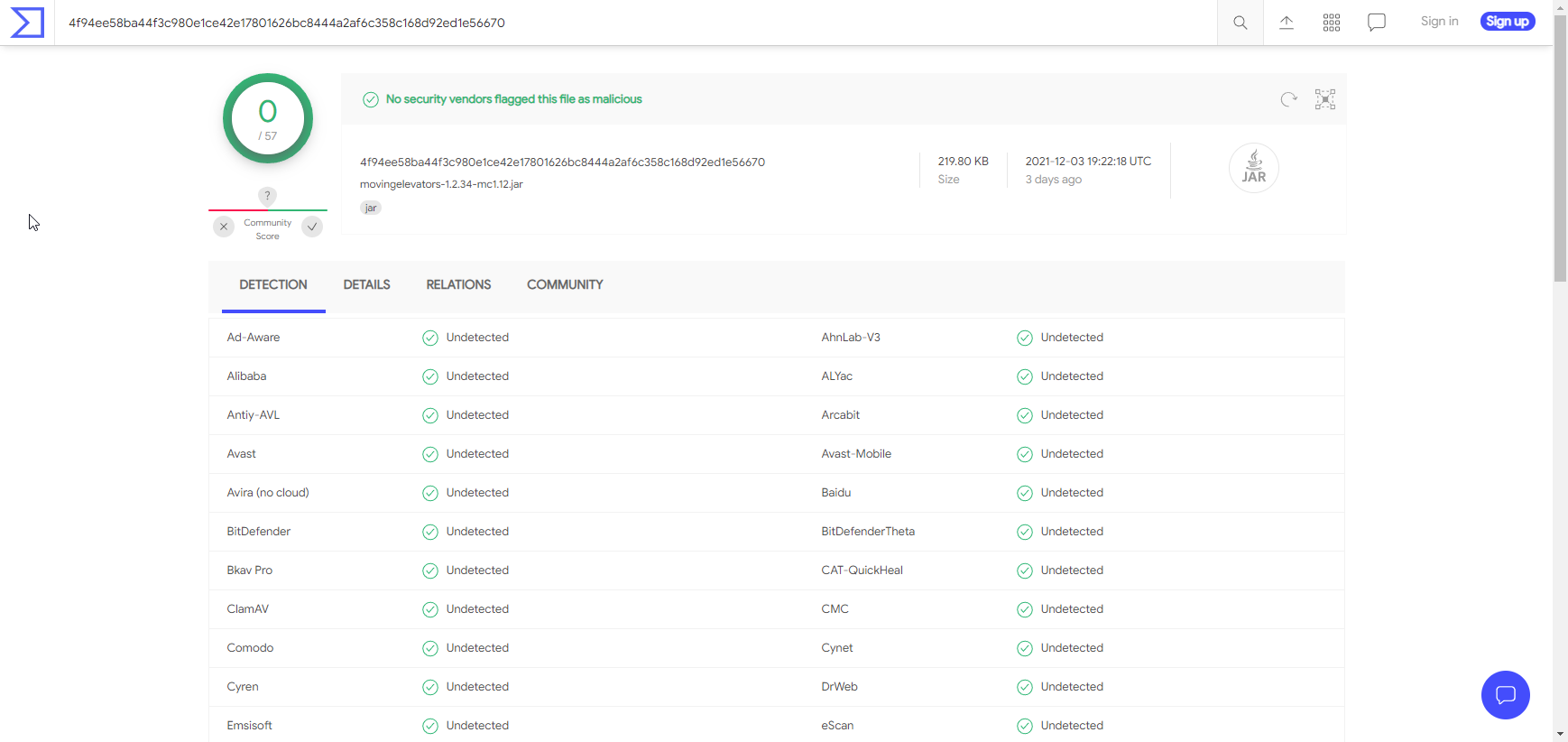
em i get a antivirus warning about a mod being trojan,its the first time that i have this,any help?
last parcel
which mod?
sharp spoke
Moving Elevators
last parcel
and which file
sharp spoke
movingelevators-1.2.34-mc1.12
last parcel
seems like a false flag from your antivirus https://i.imgur.com/274oJ0b.png
 sharp spoke
i see,okay
last parcel
?mc-installfix
golden muskBOT
- Click on the Minecraft Tab on the Left side of the CurseForge App.
- Click button next to the
Create Custom Profileoption. - Click

Repair Installationoption. - Play game.
NOTE: You will not lose any modpacks or worlds, These are saved in the Instances folder. DO NOT TOUCH THIS FOLDER OR YOU WILL LOSE EVERYTHING
wide cape
doesnt work
last parcel
reinstall the pack
last parcel
..
ok, well dont?
or at least remove them until you find the one causing the issue
wide cape
there are too many i put in there
last parcel
guess we know why it broke then lol
wide cape
whats the limmit of mods
last parcel
when stuff breaks
wide cape
haha i have 354 mods in this modpack
 midnight hound
wild jewel
What game pass?
midnight hound
wild jewel
What game pass?
u know xbox game pass
is now with java
and i ve that
is curse forge support it
midnight hound
wild jewel
Curseforge only handles the modding, it does not control the game.
ahh
im saying
can i
wild jewel
Less lines
midnight hound
go with
wild jewel
That is for bedrock, modpacks are for java
midnight hound
wild jewel
That is for bedrock, modpacks are for java
its not
wild jewel
Stop the pings
midnight hound
wild jewel
Stop the pings
sory
midnight hound
last parcel
java is on gamepass now apparently
yea im saying that
last parcel
you need to be able to log in to the minecraft launcher to use curseforge
midnight hound
wild jewel
If you can play the java version then you can mod it
okey ty
last parcel
so if you cannot do that, then gamepass version wont work.
midnight hound
last parcel
you need to be able to log in to the minecraft launcher to use curseforge
i know but im asking for that cuz like the lunar client doesnt support
last parcel
so try it? i cant tell you if you can or cant..
 dull marten
 midnight hound
dull marten
midnight hound
dull marten
whatta
dull marten
i can't get into the server
midnight hound
dull marten
whats that
acoustic idol
dull marten
i can't get into the server
!mc-logs
golden muskBOT
Sending logs for support.
- Right-click the modpack profile icon OR click the button in the modpack profile.
- Click
Open Folder. - Open the
logsfolder. - Drag and drop the FILE named
latestORdebuginto discord.
dull marten
i don't know
midnight hound
dull marten
i think there is an problem with wheat?
acoustic idol
Logs will tell us whats going on. Without the logs can only guess that your not running the same version of the pack as the server
dull marten
wild jewel
midnight hound
i think there is an problem with wheat?
Yeah, guess why they are here.
No need to reply on issues if you can't help with them
midnight hound
wild jewel
Yeah, guess why they are here.
No need to reply on issues if you can't help with...
okey calm down sory
im new
acoustic idol
dull marten
The server your trying to join? Is it yours or one you found online?
dull marten
mine
acoustic idol
Post the servers log called latest from the logs folder
dull marten
dull marten
oh
dull marten
dull marten
this one is server
acoustic idol
Can you send the client one as well then
dull marten
dull marten
dull marten
this one is game
acoustic idol
Well one thing I noticed is your server should not be running off a folder on the desktop for starters. Secondly did you make this modpack or download it?
midnight hound
last parcel
so try it? i cant tell you if you can or cant..
yesss firs it didnt work
dull marten
no
midnight hound
but i solve that
dull marten
rad modpack
acoustic idol
dull marten
rad modpack
Any reason your not using the cf app for the client?
dull marten
 acoustic idol
Then the client log you sent is the wrong one. The cf app doesnt point to the .minecraft folder
!mc-logs do this
golden muskBOT
Sending logs for support.
- Right-click the modpack profile icon OR click the button in the modpack profile.
- Click
Open Folder. - Open the
logsfolder. - Drag and drop the FILE named
latestORdebuginto discord.
acoustic idol
Did you install the server using a server pack? OR did you make it on your own?
 acoustic idol
Use their serve pack, you likely forgot some files that were needed
I also recommend not making the server on your desktop. Make it isn something like C:\Servers for example
 wise schooner
Is there an issue with dbm right now. It is not working for me at all
last parcel
dying bats mobile? 🤔
 steep lance
last parcel
steep lance
last parcel
fix what exactly
autumn agate
Hello, I come here because I have a problem with Curse and Minecraft. Basically when I launch the modpack it launches but at the time of the mod loader it freezes and minecraft passes in ''Do not responding'' and it remains like that it does not move even after 1 hour. Thanks In advance.

 velvet kindle
will there ever be Linux support?
last parcel
yes, it's on the roadmap
 tribal lodge
I am using a custom profile in CurseForge. How do I update the version of Minecraft it is using from 1.17 to 1.18?
coarse nest
You cannot. You need to make a new profile
 tacit cargo
My game crashes
 hexed spade
Hi. Cursforge addons work on tbc but not on classic?
 empty crypt
can someone help me get shaders
My computer does not let me download it because it believes its unsafe
golden muskBOT
We do not offer support for Optifine!
If you have issues with Optifine, remove it. If you want further support try the discord found on their website.
https://www.optifine.net/home
Installing Optifine with modpacks on Curseforge:
- Right click the modpack icon, select
Open Folder. - Put the
Optifine.jarinto themodsfolder. - Now start the modpack.
 naive sierra
yo i downloaded the medieval modpack and it just keeps crashing when making a world
this is my log file
 royal pivot
every time i try to start a custom 1.18 pack it say it has trouble creating a java virtual machine, anyone have any ideas for a fix?
waxen pine
royal pivot
every time i try to start a custom 1.18 pack it say it has trouble creating a ja...
yeah try clearing any JVM args you've entered into the CF app, and then before you hit the play button on the vanilla launcher that pops up - go to the advanced settings and reset the JVM args there also. worked for me - not saying all issues with 1.18 are that though
royal pivot
waxen pine
yeah try clearing any JVM args you've entered into the CF app, and then before y...
that worked thank you
waxen pine
wooo 1 for 1 tonight
 lethal aurora
everytime i try to start the insanecraft mod pack my game keeps crashing but it gave me a crash report
waxen pine
lethal aurora
everytime i try to start the insanecraft mod pack my game keeps crashing but it ...
can you post the crash report then?
lethal aurora
here
waxen pine
oh interesting. do you have a graphics card on your computer separate from your motherboard?
lethal aurora
nope they all connected
waxen pine
hmph what do you have for computer then? it's not detecting any of your system information seemingly
lethal aurora
well i have a ryzen 5 3500 and nivida 2060
waxen pine
... so you do have a dedicated graphics card...
are you launching this using the curseforge launcher app?
lethal aurora
yes
waxen pine
?mc-videocard
golden muskBOT
How to set minecraft to use your videocard
Got NVIDIA?
 waxen pine
do that or try reinstalling your graphics drivers (or both)
lethal aurora
i think i figured the problem cause my nivida drivers needed to updated
yup i needed to update my graphic drivers lmao
waxen pine
nice
 willow venture
Hello, I've been having trouble launching 5 different modpacks recently. I bring up CurseForge, hit play, and as soon as the launcher pops up and I hit play there, game crashes with "Exit Code: 0"
waxen pine
java.lang.RuntimeException: java.lang.RuntimeException: Patcher expecting non-empty class data file for net.minecraft.crash.CrashReport$1, but received empty, your vanilla jar may be corrupt.
do this:
?mc-installfix
golden muskBOT
- Click on the Minecraft Tab on the Left side of the CurseForge App.
- Click button next to the
Create Custom Profileoption. - Click
Repair Installationoption. - Play game.
NOTE: You will not lose any modpacks or worlds, These are saved in the Instances folder. DO NOT TOUCH THIS FOLDER OR YOU WILL LOSE EVERYTHING
willow venture
That's fixed them, thank you
 timber crow
Hey guys, I'm using "Good Ol' Currency" mod and i'm not able to receive more than 12000 currency through the exchanger, is this a limitation through forge essentials or anything of the sort or a mod bug?
 coarse elm
Sounds like an issue to ask the dev.
 solid portal
i wanna play minecraft java edition with my friends and we want to use a mod on cursed forged but its not letting us and im not paying for a server and all the vids that show how to do it for free don't work
golden muskBOT
Hey there, it is Curseforge, not "Cursed forge"
wild jewel
What makes you say it is not working?
solid portal
we still cant play tg lol
wild jewel
Is the server running?
solid portal
not sure if its "active" but we can all download it from cursedforge launcher
waxen pine
multiplayer is done by creating a 'server pack' which is run separately from your client/regular minecraft(modded) running
an easier alternative is finding a modpack witha public server, or rent a webhost that can run a server for you with easy button mashing
but tbh as long as you watch a few how-to vids it's not hard to do
solid portal
ive watched countless and i still just don't get it bro it doesn't help nor make sense to me and i really just wanna play minecraft with mods not sure they made this sped system
golden muskBOT
How to **manually** install a server - **On your own PC**
- Check if the modpack has a server pack, if it does: use that and skip below.
- Go to the Forge website http://files.minecraftforge.net/ and download the Installer for the forge version the pack is using.
- Run the installer and choose
Install server. Do not install to your desktop. Also do not install inside a OneDrive folder. - Run the server using the forge.jar. A file called
eula.txtwill be generated. Open it and changeeula=falsetoeula=true - From the Client; Copy the
modsfolder,configfolder, and any other folders needed for the pack to work into the server folder. If the modpack has a server pack, use this instead! - Run the server again.
- Port forward your machine if needed. (Google it)
Long version: https://pastebin.com/83DXfGTH
wild jewel
!mc-installserver
solid portal
never mind thats alot for me idk any of that at all
solid portal
not finna cap this cursedforge thing sucks like really bad lol
solid portal
im using the curseforge to get mods and stuff for minecraft nun of that shit works the only cool thing it has going for it is pixelmon lol
system is hard dogshit
it is what it is yall take care with whatever tf this fuckass thing offers lol
 sage pier
"Why doesn't servers that CurseForge doesn't provide work when we want to play modpacks together, CurseForge must be bad then!"
.. is what I gathered from that.
coarse elm
guessing they just don't even know what they are trying to do.
 fresh light
 last gate
I did the tests with other mods and it downloads them fine, minus the mod I want, is there any way to download the Mineshafts & Monsters mod without the CurseForge?
last gate
Can you upload the mod to Drive? Simply that mod can't be done, the others can, but that one in particular can't.
last gate
wild jewel
2. Link the pack, there is probably a huge mod in there that is breaking this
I did it and it's still the same :/
wild jewel
You did not link the pack
And uploading to drive won't work if the client still wants to download it itself
last gate
wild jewel
And uploading to drive won't work if the client still wants to download it itsel...
The link is copying the link of the package, paste it in the search engine and download it from there?
wild jewel
No, get me a link to the modpack so I can check!
wild jewel
Oww, the pack itself is 345mb already, that explains a lot.
Download the zip, import it
 coarse elm
click the file name
sage pier
*writes up in Clays little book of services owed*
coarse elm
lawl. I'd need a whole binder to hold all of them at this point.
coarse nest
Well, if you count all the ones that just nope out once you've helped them too
wild jewel
Silly people having things on paper, database is way better
autumn agate
imagine saving things somewhere, use brain
coarse elm
but... That is saving things somewhere...?
sage pier
Silly Vixen.
coarse elm
what are you trying to do?
last gate
The compressed file I downloaded does not contain the mods folder with all the mods it requires
coarse elm
Yes, you need to install it via the CF App
last gate
How do I import the compressed file to the CF?
coarse elm
why aren't you just downloading the pack from in the app?
last gate
Because precisely the application is fatal to me when downloading it! I thought I would download the mod
wild jewel
!mc-installpack
golden muskBOT
How to install modpacks with the search features in app.
- Open the

Minecraftsection of the app. - Click the top search bar where it says
Search for modpacksOR Click theBrowse ModpacksTab. - Find the Modpack you want to install and click install on it.
- Wait for CurseForge app to download and unpack all the required files.
- Once finished, click
Play!
How to install modpacks from a Export. (Custom/Private/Site downloaded Modpack zip)
- Get CurseForge App if you don't have it, use
!downloadfor a link. - Get the exported modpack from CurseForge or someone else,
!mc-packshareexplains how to make them. - Open the
Minecraftsection of the app. - Click

Create Custom Profile - Click the
Importoption. - Find the file you just downloaded in step 2 and select it.
- CurseForge app will now attempt to download and unpack the modpack. If it fails, try steps 4-6 again.
- Once finished, click
Play!
 coarse elm
last gate
Because precisely the application is fatal to me when downloading it! I thought ...
coarse elm
last gate
Because precisely the application is fatal to me when downloading it! I thought ...
And what is the error?
Installing the pack from the zip doesn't change how the pack is installed.
last gate
coarse elm
And what is the error?
Installing the pack from the zip doesn't change how the p...
The error is an unsuccessful attempt for not being able to maintain a stable Internet connection, but I was able to download other mods from the same Course, but not the Mineshafts & Monsters
But it seems to be downloading it already
coarse nest
(Its a 300mb zip)
coarse elm
ah
That might fix the issue then but if you are having trouble with the zip some mods are that large or larger
last gate
Any CF flaws?
wild jewel
Timeout isn't really a flaw
last gate
Limitations by the developers of the application, it is understandable
autumn agate
help i been trying to search something in the creative menu and the game just crashed
wild jewel
!mc-logs
golden muskBOT
Sending logs for support.
- Right-click the modpack profile icon OR click the button in the modpack profile.
- Click
Open Folder. - Open the
logsfolder. - Drag and drop the FILE named
latestORdebuginto discord.
autumn agate
 modest swallow
Hi my curse forge has an error and isnt starting
wild jewel
autumn agate
Weaponlib / mw has an issue
wild jewel
yes
autumn agate
😦
tacit cargo
My game crashes
tacit cargo
What is MUDA MUDA MUDA
wild jewel
Silly error from the dev, solarforge or legendarytooltips
wild jewel
Contact the dev
tacit cargo
Okay
wild jewel
tacit cargo
Okay
https://github.com/FINDERFEED/SolarCraftRepository/blob/416aa2c4bb0b3d90c25de4caaf63419a5fcedbc7/src/main/java/com/finderfeed/solarforge/events/my_events/MyColorEvent.java#L33
Might be worth to mention. No idea why it is there
tacit cargo
Alright, i contacted the dev
tacit cargo
Okay
 untold yew
Heyah, CurseForge is launching all my Minecraft 1.18 installations with -XX:PermSize=256m by default (my additional arguments in the curseforge config for Minecraft is empty) and this flag is not supported in the java version used. I don't want to remove that flag from the launcher installation every single launch. Any quick fix for this?


Also CurseForge should set Xms equal to Xmx for performance.
last parcel
Try reinstalling the pack you are playing, then restart the app
untold yew
Tried that, its also not only on this pack
Its on every single 1.18 pack
At least every single 1.18 pack I have tried
last parcel
What java has an issue with this
untold yew
The one required for 1.18, which is java 17
To be fair PermSize support was removed in java 8
But it stopped giving a warning and just doesn't start with java 17
last parcel
Afaik you are only the 2nd person to have an issue with this so I'm wondering what the actual cause is
untold yew
If I may be frank, I think curseforge is adding the java args as it also sets the default memory allocated to profiles
That other person will have the same issue again on restarting the launcher
As the args in the minecraft launcher will be set every launch
last parcel
It's is adding those args as they are required for some mc versions.
untold yew
Yes I suppose so, but unfortunately it breaks 1.18 packs
last parcel
Which afaik has only been an issue for you and one other.
untold yew
Well 1.18 has only been out for like 8 days and hasn't got many mods yet
I'd gladly change anything is this an error that is being caused on my part
But I unfortunately doubt that is the case
last parcel
Going to check myself in a few, got a pack recommendation to test with?
untold yew
I'm testing that one, works fine after removing the PermSize arg
Could it be I have an old version of curseforge? Does it update automatically? I'm on 0.186.1.6
last parcel
I don't think that is the current version, but I can't check atm
untold yew
I'll look into that

That is probably it
Yes
Thanks for helping me work through debugging this
last parcel
nice
tacit cargo
Umm wha?
 acoustic idol
this a pack your making?
acoustic idol
Downgrade dpanvil so it is inbetween the 2 versions specified
tacit cargo
Ok
last parcel
you mean dpanvil
acoustic idol
yes that
 foggy onyx
.
last parcel
reproduce the issue, then send the latest.log from the server
foggy onyx
me?
last parcel
yes
foggy onyx
ok
tacit cargo
Ok it worked
foggy onyx
last parcel
C:\Users\TolgaBey\Desktop\RAD-Serverpack-1.48\.\crash-reports\crash-2021-12-08_19.42.57-server.txt send this
foggy onyx
last parcel
Caused by: java.lang.IllegalArgumentException: Block: class aroma1997.world.item.BlockMiningOre has property: type with invalidly named value: stıcky_ore
probably need to reinstall the pack
foggy onyx
will it be fix?
last parcel
im not a psychic, i cant read the future
foggy onyx
ı try
coarse elm
That's a lang issue likely due to the Turkish local they are using theres no fix other than to change your computer to english or have the dev fix it.
last parcel
the computer language messes with files... waddafuq?
coarse elm
No. The thing its complaining about is a string for a block state. They likely do some sort of lookup or config whatever that adds the name of the ore to a list. These strings follow the laungage set on the computer. They just need to use the root translation instead.
 pastel patio
While downloading Valhelsia 3 Modpack from Curseforge App after a few minutes I get an error that the modpack is broken and it timed out? Idk what it really says..
But I can download any other modpack
Do you know the issue?
golden muskBOT
Timeout/WebClient errors are from networking issues to your computer. You can try a few things to fix it:
- Restart the computer.
- Restart your router/modem.
- Try another internet source like a hotspot, wired connection or moving closer to the WiFi.
- Pause/Stop other things using the internet. (Streams, music, etc)
- If this still doesn't work, try again in an hour and hope your connection is stable.
pastel patio
I tried all of them. Im waiting 3h now and Im trying to figure out whats wrong..
I tried to install previous versions via inport to the curseforge app but it always crashes at this one mod "Blue Skies" or something..
But everyone else could install it without any issues 
last parcel
then your connection isnt stable/fast enough
pastel patio
Lets say my connection isnt stable/fast enough.
Is there a solution?
last parcel
a better connection
pastel patio
Nothing else?
last parcel
I don't know what else would fix a bad connection other than a not bad connection 🤔
pastel patio
Like. Im not sure if it the connection is the issue.
I just made a speedtest right now and it looks fine I guess
 foggy onyx
coarse elm
No. The thing its complaining about is a string for a block state. They likely d...
foggy onyx
coarse elm
No. The thing its complaining about is a string for a block state. They likely d...
Are you saying that the reason the server crashed is because of the language?
last parcel
are you on wifi
last parcel
foggy onyx
Are you saying that the reason the server crashed is because of the language?
yes
pastel patio
No, Im not.
But I can try wireless connection too but I dont think this will help, this would make my connection even worse
foggy onyx
will it be fix if i do it in english??
last parcel
that's what clay was saying, yes
last parcel
pastel patio
No, Im not.
But I can try wireless connection too but I dont think this will hel...
dont have anything else to tell you other than something on your end is making the download time out
pastel patio
Actually I will try an external client that downloads modpacks from Curseforge.
Maybe it will work there.
foggy onyx
last parcel
that's what clay was saying, yes
ı try
Will I have this problem in other modpacks?
last parcel
possibly
pastel patio
pastel patio
Actually I will try an external client that downloads modpacks from Curseforge.
...
I installed it through an external Client and it worked.
No issues.
 olive hawk
hey guys i have a question
 wild jewel
This is not multimc support.
 south briar
Sorry, I don't know what server I should post this in
autumn agate
south briar
1.norton is kinda sht smh
2.not multimc support ._.
last parcel
the multimc server, assuming they have one
autumn agate
just type multimc into invite
olive hawk
wild jewel
Ask the question
how do i create a server with one of my own modpacks
wild jewel
!mc-installserver
golden muskBOT
How to **manually** install a server - **On your own PC**
- Check if the modpack has a server pack, if it does: use that and skip below.
- Go to the Forge website http://files.minecraftforge.net/ and download the Installer for the forge version the pack is using.
- Run the installer and choose
Install server. Do not install to your desktop. Also do not install inside a OneDrive folder. - Run the server using the forge.jar. A file called
eula.txtwill be generated. Open it and changeeula=falsetoeula=true - From the Client; Copy the
modsfolder,configfolder, and any other folders needed for the pack to work into the server folder. If the modpack has a server pack, use this instead! - Run the server again.
- Port forward your machine if needed. (Google it)
Long version: https://pastebin.com/83DXfGTH
autumn agate
why there is only for forge, not for fabric?
olive hawk
does it coast money
wild jewel
autumn agate
why there is only for forge, not for fabric?
Lazy people
autumn agate
bruh
wild jewel
olive hawk
does it coast money
Not if you do this
wild jewel
If you made the modpack then there is no server pack
olive hawk
bruh
autumn agate
what modloader and version of modloader do u use?
last parcel
it was written before anyone cared about fabric
never installed a fabric server, so wouldnt know the steps
autumn agate
like i know how to install fabic server and steps to do it ._.
autumn agate
olive hawk
does it coast money
if u do that on own pc, nope
(like except energy/power etc)
but if u want hosting u need pay ¯_(ツ)_/¯
olive hawk
i have a sao modpack i want to play with someone but i cant because frigin things
 patent mist
Hi, I'm trying to download mods for Minecraft specifically origins and I can't figure out how to apply it to the actual world in Minecraft Java edition
coarse nest
Are you using the curseforge app?
patent mist
Yes
coarse nest
!mc-installmods
golden muskBOT
How to install mods in CurseForge App.
- Click
+ Create Custom Profile - Name it, select the required Minecraft version, select the Forge version (usually the highest number), click
Create. - Click the profile icon.
- Click
Add More Content - Search and install the desired mods.
- Start the game!
How to install mods not on CurseForge.
- Right click the profile picture or Open the profile and click the Icon next to the play button.
- Click
Open Folder. - Drag the mod(s) into the
modsfolder. (Note: Some mods will require others, to run. Make sure to read the instructions for the mod!) - Start the game!
 patent mist
I got it to work thank youu!
 verbal willow
I cannot get Better Minecraft to start playing on my PC. I have downloaded the app for Windows, deleted the instal folder and restarted AND repaired installation and restarted and it still does not work. I need help!
last parcel
so what happens
verbal willow
i hit play, but it does not load after this launcher window
 last parcel
ok, what happens
verbal willow
the launcher closes and I have to retry opening it from the curseforge app. but it never opens Minecraft past the launcher. it opens if I'm trying vanilla Minecraft, but not better Minecraft
last parcel
does it give an error?
verbal willow
no error
last parcel
?mc-log
golden muskBOT
Sending logs for support.
- Right-click the modpack profile icon OR click the button in the modpack profile.
- Click
Open Folder. - Open the
logsfolder. - Drag and drop the FILE named
latestORdebuginto discord.
verbal willow
last parcel
?mc-path
golden muskBOT
Change your install path to the following:
For Windows: C:\CurseForge
-Go to C:\ drive. Make a new folder. Name it Curseforge.
For Mac: /Users/Shared/CurseForge
If Minecraft is not installed in CurseForge App:
- Click the
 in the top left.
 - Select Minecraft from the list of games.
- Select the
Advancedoption and pick the folder you just made. - Click
Continue.
If Minecraft is installed in CurseForge App:
- Click the in the bottom left.
- Select the Minecraft tab.
- Click
Change. - Select the folder you just made.
:no_entry_sign: Minecraft Files should NOT be installed inside the following locations :no_entry_sign:
:no_entry_sign: .minecraft folder.
:no_entry_sign: OneDrive folders.
:no_entry_sign: Desktop folder.
:no_entry_sign: Drive roots I.E. Directly into the C:\ drive.
:no_entry_sign: iCloud enabled folders.
:no_entry_sign: or any other cloud saved folder.
:no_entry_sign: or folders with non-English characters in them.
If any of the above are in the path you need to change/move it!
last parcel
yes
verbal willow
and then just reinstall better Minecraft?
last parcel
yes
verbal willow
okay thank you! I will get back to you if this doesn't work lol
 woven elk
So I've got a problem and unfortunately few details. Curseforge was working fine yesterday but today when I tried to open it, it just wouldn't open. I could see Overwolf launching in the task manager, but no curseforge. This happens with both shortcuts and the launch button in overwolf
last parcel
try reinstalling curseforge
woven elk
Will that delete save progress on modpacks at all?
last parcel
no, files are not removed
verbal willow
so, I'm still having the same issue. I have deleted all my curseforge files, including the c:\ drive, restarted my computer, made a new curseforge folder in my c:\ drive and redownloaded the Better Minecraft forge edition into that folder and it won't open past the launcher still. and just for fun, my computer likes to bluescreen occasionally while attempting to do anything with Minecraft
last parcel
log any diffrent?
verbal willow
nope- same log
last parcel
?owlogs
golden muskBOT
<:overwolf:857375414002384916> How to get Overwolf logs! <:overwolf:857375414002384916>
verbal willow
last parcel
do you have issues running vanilla minecraft?
verbal willow
its sometimes a little slow to open, or gives me error code 0, but usually opens within a minute or three
waxen pine
verbal willow
its sometimes a little slow to open, or gives me error code 0, but usually opens...
will a blank forge 1.16.5 profile you create using the app load?
verbal willow
took sometime but it did load and is playable.
 steep delta
i have a few issues
last parcel
What are your computer specs
verbal willow
last parcel
What are your computer specs
if you're talking to me: I have Windows 11, AMD Rzyen 7, 15.4 GB usable of ram..
steep delta
when i you press play in the launher it will just go to normal minecraft
coarse nest
!mc-installfix try this
golden muskBOT
- Click on the Minecraft Tab on the Left side of the CurseForge App.
- Click button next to the
Create Custom Profileoption. - Click
Repair Installationoption. - Play game.
NOTE: You will not lose any modpacks or worlds, These are saved in the Instances folder. DO NOT TOUCH THIS FOLDER OR YOU WILL LOSE EVERYTHING
steep delta
it wont download mods either they keep timing out
 noble hull
Does anyone know how to fix aggressive suttering/freezing/aggressive memeroy usage spikes while playing minecraft modpacks? I'm developing my own in 1.16.5 so if there are mods that help I can use them
coarse nest
Have a look through https://gist.github.com/alkyaly/02830c560d15256855bc529e1e232e88 for performance mods. You can also allocate more ram to minecraft (tho don't do more than ~7gb or minecraft freajs out, tries to use it all and you end up where you started
!mc-ram
golden muskBOT
How to set Global Minecraft RAM value.
- Click the icon in the bottom left to open settings.
- Click the Minecraft tab.
- Scroll down.
- Slide slider to recommended ram range as seen below.
coarse nest
7gb should be fine, tho maybe try only 4-5 and see how it works
noble hull
My pack is about 40 mods. Most of which are terrain gen/qol or client side. But it's using around 4500-5000mb
Is this because of mods I'm using, some bad pairings, or minecraft freaking out and using extra ram?
coarse nest
Terrain mods can tank performance sometimes.
If your avergae usage is that then i dont think its a problem with too much ram
wispy sable
does ftbteams share quests too?
im playing cavefactory with a friend and im trying to figure out how to share quests
noble hull
I'm running singleplayer. Is this tanking only on generating new chunks?
coarse nest
Yeah
noble hull
I'm playing with an extremely low render distance and I get these performance tanks even when staying in the same chunk.
Could it be the number of blocks in the pack? I'm using biomes o plenty and chisel so there are a stupid amount of blocks in the pack even though it's quite small
waxen pine
AI Improvements Biome ID Fixer Clumps Connectivity Entity Culling Ferrite Core Get it together drops Lazy DataFixerUpper (Forge) Out of Sight RandomPatches Smooth Boot
i'd recommend all of those for performance mods on 1.16.5
noble hull
Ah. It looks like it is terrain Gen. I dropped to about 3gbs steadily climbed to 5/6, froze, then after about 5 minutes unfreeze and dropped to 2gbs
wispy sable
is it possible to share quests on ftbteams?
verbal willow
is there any way to download better minecraft without the curseforge app?
coarse nest
You can download the zip, but that still needs importing into the app
 viral swallow
is it possible to make my current singleplayer world with around 100 mods into a multiplayer server that my friends can join? (is it even possible? if so do the mods bug out or is there any issues?)
I just really need to know so then im not wasting my time searching
viral swallow
alright, and how do I do that (sorry if these questions may sound stupid.)
wild jewel
!mc-installserver
golden muskBOT
How to **manually** install a server - **On your own PC**
- Check if the modpack has a server pack, if it does: use that and skip below.
- Go to the Forge website http://files.minecraftforge.net/ and download the Installer for the forge version the pack is using.
- Run the installer and choose
Install server. Do not install to your desktop. Also do not install inside a OneDrive folder. - Run the server using the forge.jar. A file called
eula.txtwill be generated. Open it and changeeula=falsetoeula=true - From the Client; Copy the
modsfolder,configfolder, and any other folders needed for the pack to work into the server folder. If the modpack has a server pack, use this instead! - Run the server again.
- Port forward your machine if needed. (Google it)
Long version: https://pastebin.com/83DXfGTH
viral swallow
like so? then do i click on create forge server?
 viral swallow
alright
so just how I installed it before hand?
when it pops up with the "save file" message, what shall i click
shall i not save the file?
coarse nest
Save the file
viral swallow
alright
coarse nest
Then run it as step 3 in the bots message says, and continue following the steps
viral swallow
alright
will this mess up/bug the world entirely if the server doesnt work?
and im using 1.16.5, is that fine?
coarse nest
Yep, make sure you copy the world, not move it so you have a backup.
As long as you downloaded the 1.16.5 installer that is fine (if you didn't go back and get the correct version)
wild jewel
No, get the server running first
coarse nest
Install the server first, it will not install into a folder with files in it already
 wild jewel
No, put it in a folder where you want the server to be, then you follow the instructions
viral swallow
so shall i just make a brand new folder for it?
wild jewel
Yes
viral swallow
kk
so shall i just drag it straight into this folder then follow the extra steps afterwards?
 wild jewel
How about naming the folder to something you can find again?
viral swallow
kk
it might sound stupid, but these steps are confusing me slightly
i've got the installer inside the folder but not too sure what to do afterwards
(just trying to double check so i don't mess anything up thats all)
coarse nest
Run the installer, select install servee and choose the folder it is in to isntall it into
viral swallow
how do i run the installer? by just clicking on it?
do i need to do it before i put it in the folder?
(since ive already put it in the folder)
coarse nest
Run it like you would any other program. Double click it
viral swallow
alright
why does this pop up?

ah nvm i need to change the file location
so now im here, shall i just click open
 coarse nest
Yes
Remember most programs are designed so they don't blow up in your face if you do something wrong, at worst they will show an error
viral swallow
yeah
im assuming i just wait for the installing process to be done
im assuming i copy my world now right?
 coarse nest
Yes. Copy the world folder over, and rename it to world
viral swallow
shall i backup my world before hand or anything?
when you say copy, do you mean copy the world entirely in minecraft, or just copy the files over
coarse nest
Just copy the world folder over (instancename/saves/yourworldname)
viral swallow
sorry, but is it necessary for me to go onto the minecraft folders
 coarse nest
Curseforge does not store its worlds there
viral swallow
alright
coarse nest
In the cf app right click on the profile image and select Open Folder
viral swallow
is it a folder (sorry if these questions are annoying, stupid or long)
or do you mean go into this?
 coarse nest
Yes that is the curseforge app
viral swallow
alright, the only thing is however, I don't use the curseforge app for my minecraft world, I use the curseforge installation on the launcher
is this a problem?
coarse nest
How did you install the modpack
viral swallow
its not a modpack, its separate mods
coarse nest
How did you manaully install the mods
viral swallow
 viral swallow
coarse nest
How did you manaully install the mods
viral swallow
coarse nest
How did you manaully install the mods
on the curseforge website
coarse nest
Ahhh.
So your world will be in the .minecraft folder.
viral swallow
kk
coarse nest
Keep in mind that Curseforge and forge are not the same thing
viral swallow
alright
will this effect it or be a problem? or is it just a different process to make it a server
(sorry for the confusion)
coarse nest
Its fine, just a differrent folder location
viral swallow
alright
ive gone into saves, and found the folder of my world
shall i copy everything inside this folder

or shall i just copy the file in general
coarse nest
Copy the folder itself
coarse nest
Yes
viral swallow
sweet
so now thats done, what shall I do after

do i just need to copy the mods now?
coarse nest
Rename the world folder to world, then copy the mods folder over
Also copy the config folder if you changed anything in there
viral swallow
like so ?
 viral swallow
coarse nest
Also copy the config folder if you changed anything in there
viral swallow
coarse nest
Also copy the config folder if you changed anything in there
yeah i have
if ive done anything wrong, a message should pop up right?
coarse nest
When you start the server, yes
viral swallow
kk
shall i copy any extra things here?

or do i just need to only copy mods, configs
shall i copy the extra mod files too?
coarse nest
Wdym by Extra mod files?
viral swallow
well on .minecraft
although ive copied all mods
it looks like there is extra mod files
"minecolonies"
coarse nest
It shouldn't matter, if you think they are required then copy them, anything that the server doesn't need it will ignore
viral swallow
kk
is it maybe even worth just copying everything from .minecraft if the server will ignore the less-important things?
coarse nest
That would take ages due to some of those folders being massive, so no
viral swallow
alright
coarse nest
Now start the server by double clicking the forge....jar file, thats not the installer
viral swallow
sorry one sec, just copying some files that are required real quick lol
so is this how it should be set in the other file?
 coarse nest
Yes. That is good
coarse nest
coarse nest
Now start the server by double clicking the forge....jar file, thats not the ins...
^^^
viral swallow
this one ive highlighted?
 coarse nest
Yes. You can even delete the installer now, it is no longer needed
viral swallow
kk
do i need to make the eula true first?
since ive double clicked but nothing happened
coarse nest
Yep, there should now be a eula.txt file to edit
coarse nest
It should be instant
 coarse nest
Yay! Server running
coarse nest
Now we need to allocate it more memory or it will probably crash when you try to join
viral swallow
since its like this rn, shall i just leave it running
 coarse nest
No, type stop into the bottom right hand text window thing and press enter to stop it
viral swallow
kk done that
coarse nest
Open notepad and paste this into it: ```bat
@echo off
java -Xmx4G -jar forge-1.16.5-36.2.19.jar --nogui
pause```
Save it in your server directory as start.bat (and select all file types * from the dropdown)
viral swallow
just a normal notepad?
coarse nest
You can change the first 4 to the number of gigabytes of ram to allocate to the server.
viral swallow
or one of the file notepads
viral swallow
coarse nest
You can change the first 4 to the number of gigabytes of ram to allocate to the ...
do you reckon 6-8 would be fine
coarse nest
Depends how much your computer has, and how many people will be playing on it
coarse nest
That is fine then. (You may get problems with that many people on all at once, but thats not solvable with more ram)
viral swallow
ah alright
ive pasted it, shall i saved it and drag it to the modded server folder?
 coarse nest
If you use ctrl shift s you should be ale to save it directly to there
viral swallow
shall i name it anything specific?
coarse nest
Just anything.bat and make sure to select all file types from the dropdown
 coarse nest
Yep!
coarse nest
Yep. If you want to edit it in the future (like change how much ram it has), right click it and select the edit button, near the top
viral swallow
alright sweet
after that, what shall I do?
also another question, can i still edit the config and mods just like a normally would be able to do in a singleplayer world?
coarse nest
Yes
viral swallow
kk
coarse nest
Thats the server set up. You can start it with that .bat file, and join it from an instance on that pc by setting localhost as the ip address.
For anyone else on the same wif network they can join it using the address starting 192.168.1.x that shows up when you type ipconfig into cmd
For anyone elsewhere on the internet to join you need to set up portfowarding (for port 25565 on tcp and udp) which is different per router.
viral swallow
ive done port forwarding before but for a different thing
so do i need to do the whole process again?
coarse nest
Yep
coarse nest
Router settings are often located at 192.168.1.1. I reccomend googling your router model and port fowarding to find out how to do it for your particular router
coarse nest
By 192.168.1.1 i mean a web adress that you type into a browser
coarse nest
Type it in like you would a url for a website
viral swallow
another question, since I juggle between 2 households, will this effect the server in some regard?
coarse nest
Yes. The ip adress of the server will change depending on which house you are at.
You may also need to re set up port forwarding each time as your local ip may change
 coarse nest
It appears that your router is different.
viral swallow
alright
another question, if i reset up the portforwarding per each house hold, will the server address change each time?
coarse nest
No. The address other people see should be constant between the two different ones
coarse nest
Shouldn't be, if you can get it set up
coarse nest
It may be printed on your router somewhere or be on the manual/box it came with
coarse nest
Yes
viral swallow
alright
I’m gonna do it in like 10 mins
I’ll brb for 10 mins
thanks for your time btw, I do really appreciate it
coarse nest
Happy to help!
I am going to have to go now tho, its getting late for me and i need sleep 💤
viral swallow
no worries, shall I just follow a guide on port forwarding
tacit cargo
 wild jewel
Post that crash report please
tacit cargo
wild jewel
ironfurnaces is causing issues
tacit cargo
Oh
viral swallow
coarse nest
Happy to help!
I am going to have to go now tho, its getting late for me and i n...
sorry to ask more questions and you can reply to them whenever:
can I get into the server myself before doing the port forwarding
how will my friends join
how do I start up the server
what do I use to start up the server
wild jewel
viral swallow
sorry to ask more questions and you can reply to them whenever:
can I get into t...
- Yes, you connect to localhost.
- After you port forward.
- You should make a run.bat
- You double click 3
viral swallow
alright thanks
I may send a couple of images just to clarify if thats alright?
whats the usage for this again? is this where i start the server?
 wild jewel
That is the server running already
viral swallow
alright
viral swallow
also will my friends have to download the mods or nah?
last parcel
server and clients must all match (with few exceptions)
viral swallow
last parcel
server and clients must all match (with few exceptions)
?
wild jewel
Yes, the answer is yes
viral swallow
wild jewel
Yes, the answer is yes
alright
im assuming they will also have to download forge itself as well
wild jewel
Or just a modpack if you want to make it easy
viral swallow
well all my mods in my world are individual
last parcel
what do you think a modpack is
wild jewel
Time to change that then
viral swallow
last parcel
what do you think a modpack is
a set of mods like all the mods?
wild jewel
Yes, like you have, but easier
last parcel
"a set of mods" exactly
viral swallow
i thought you were referring to something such as "all the mods"
wild jewel
That is an uploaded modpack, you can make your own
last parcel
all the mods is a set of mods
viral swallow
wild jewel
That is an uploaded modpack, you can make your own
oh right
viral swallow
which one is the .bat file to run it?

 stable jackal
I'm getting exit code 0, I've clicked repair and it still does that
last parcel
?mc-log
golden muskBOT
Sending logs for support.
- Right-click the modpack profile icon OR click the button in the modpack profile.
- Click
Open Folder. - Open the
logsfolder. - Drag and drop the FILE named
latestORdebuginto discord.
stable jackal
last parcel
looks like an issue with elementalcraft. remove it or report to the dev
?projectissus
golden muskBOT
Please visit the project page for the content you posted about and look for a way to contact the developer.
Somewhere on the page there is usually a method of contact. Look for one of the following things:
Issuestab like the image below.- Discord link.
- Twitter link.
- Comments section below the project.
If no contact method exists you will either have to remove the project or find a solution on your own.
 quick verge
hello, I tried opening valhelsi 4 and it didnt work, I restarted my pc and did repair installation and it still didnt work? why is that?
stable jackal
"The game crashed whilst initializing game
Error: java.lang.ArrayIndexOutOfBoundsException: Index 0 out of bounds for length 0
Exit Code: -1"
last parcel
stable jackal
Exit code -1
Looks like something is wrong with your files there, would suggest reinstalling the mods
quick verge
quick verge
hello, I tried opening valhelsi 4 and it didnt work, I restarted my pc and did r...
any reason why this is?
stable jackal
Could I export the pack as a zip and then download that?
last parcel
you can try that
stable jackal
Thx
stable jackal
Sorry for bothering, but I reinstalled, repaired both the installation and profile, restarted, and I'm still getting
Kinda looks like croptopia?
Nope
I deleted konkrete and croptopia, now I'm getting exit code 0 again lmao
 wet pilot
I use the curseforge app for Modded Minecraft. I am in Minecraft version 1.16.5, Forge version 36.2.19. While loading up Minecraft, selecting create a world in singleplayer this is the screen I get after the game finishes loading to 100%. I have tried uninstalling certain mods, changing the server.jar file name, installing Java, deleting everything from my computer and reinstalling everything again. I was not having this issue (the message pop up) a few days ago until I had to reinstall Curseforge due to my own computer issues. I use a shaders pack and texture pack that I was using before perfectly fine. I have searched all over google and nothing the web says has help. Sorry for the super long message, just trying to add as much detail as possible

(For any support please feel free to ping me as this is the only way I will see responses)
last parcel
wet pilot
I use the curseforge app for Modded Minecraft. I am in Minecraft version 1.16.5,...
Usually see this issue when the mods don't match the server, so my assumption is that the mods no longer match what was used in that world. Could also just be that the world is corrupted due to whatever issue caused you to have to reinstall curseforge.
last parcel
start off by removing optifine, then send a new log
dont include optifine until you know everything else works
wet pilot
That file is without optifine, still getting the same error when trying to run singleplayer with no texture pack, no optifine, and no shaders pack
last parcel
yea, nothing in this log point to an actual issue.
best bet is to either remove mods until it works, or rebuild it and test as you go
wet pilot
I think I may have fixed it. at the bottom of the log it says something about "error" with a certain mod. after removing the mod Minecraft loads perfectly fine. Which is odd because I did not have issues with the mod before. But thank you so much for the help I really appriciate it! <3
last parcel
Which error? Missed that I guess
viral swallow
does anyone know why it skips/doesn't scan certain things from mods?
 wet pilot
last parcel
Which error? Missed that I guess
wet pilot
last parcel
Which error? Missed that I guess
When I saw this I uninstalled outer_ends and it must have fixed something

I think what happened, or at least what I have read before, is because minecraft for some reason could not load these Modded blocks, it replaced them with air and had trouble doing so since there were so many.
stable jackal
Anything?
viral swallow
when i load in, this message pops up as well
 last parcel
viral swallow
when i load in, this message pops up as well
last parcel
viral swallow
when i load in, this message pops up as well
?mc-log
golden muskBOT
Sending logs for support.
- Right-click the modpack profile icon OR click the button in the modpack profile.
- Click
Open Folder. - Open the
logsfolder. - Drag and drop the FILE named
latestORdebuginto discord.
last parcel
stable jackal
Anything?
?mc-installfix
golden muskBOT
- Click on the Minecraft Tab on the Left side of the CurseForge App.
- Click button next to the
Create Custom Profileoption. - Click
Repair Installationoption. - Play game.
NOTE: You will not lose any modpacks or worlds, These are saved in the Instances folder. DO NOT TOUCH THIS FOLDER OR YOU WILL LOSE EVERYTHING
tacit cargo
When i create a new world on singleplayer and it reaches 100% it shows me this
 last parcel
?mc-log
golden muskBOT
Sending logs for support.
- Right-click the modpack profile icon OR click the button in the modpack profile.
- Click
Open Folder. - Open the
logsfolder. - Drag and drop the FILE named
latestORdebuginto discord.
tacit cargo
Can't post latest it too powerful
last parcel
upload it to https://gist.github.com
last parcel
send the link to it?
 last parcel
now redo it without optifine installed
tacit cargo
It worked thanks
last parcel
?mc-installfix
golden muskBOT
- Click on the Minecraft Tab on the Left side of the CurseForge App.
- Click button next to the
Create Custom Profileoption. - Click
Repair Installationoption. - Play game.
NOTE: You will not lose any modpacks or worlds, These are saved in the Instances folder. DO NOT TOUCH THIS FOLDER OR YOU WILL LOSE EVERYTHING
last parcel
do this, also restart your computer
 north elbow
Okay i will try
 trail halo
Hey quick question. I'm using CurseForge to load mods for Minecraft. I was curious if there was any way to link the modpacks from CurseForge to the normal Minecraft Launcher instead of having to go through CurseForge every single time?
last parcel
you need a launcher to install modpacks
trail halo
Okay, would Minecraft Forge be able to load them through the normal minecraft launcher? If you know the answer to that lol
last parcel
it will load mods, yes. it will not install modpacks though
trail halo
Got it, thanks!
 north cloud
yo, i load into minecraft, it says 11 mods loaded, but none of them are working...
coarse nest
Wdym by not working
north cloud
like, i load into a world and none of the mods are there
i installed journey map and stuff, but none of it shows up
coarse nest
Do you have them for the correct version and correct mod loader?
north cloud
yes. all 1.18
viral swallow
north cloud
i installed journey map and stuff, but none of it shows up
did you put them in the mods file?
 coarse nest
Forge or fabric?
viral swallow
send a pic of all mods you installed
north cloud
 viral swallow
I have most of those mods and they all work so im not sure
do you have the 1.18 version of forge?
 coarse nest
Are you using the curseforge app?
viral swallow
do you always click play on that version?
north cloud
viral swallow
do you always click play on that version?
mhm
viral swallow
coarse nest
Are you using the curseforge app?
i think hes using launcher
north cloud
coarse nest
Are you using the curseforge app?
no, i am not
i cant use the curseforge app due to using windows 11

thats my build
and it doesnt seem to be compatible with the app.
coarse nest
The cf app works on win11
north cloud
does it?
coarse nest
Yeah
last parcel
yes
 last parcel
so dont use insider, also that's overwolf not curseforge
north cloud
so i can use windows 11, but not insider?
last parcel
yes
 last parcel
🤷♂️ not windows support
 north cloud
coarse nest
The cf app works on win11
north cloud
coarse nest
The cf app works on win11
btw can you show me where you saw it works on windows 11
coarse nest
 coarse nest
You need to disable windows insider. You were at the correct menu before
 coarse nest
What are you trying to do? How does cmd help???
 coarse nest
If you want to follow those instructions then fine, but actually read them and don't copy paste them
north cloud
oh i thought that it just works like that
my bad
ill type it in then.
well, still doesnt work lol
oh oh oh oh wait
i got an idea
nah nvm
its been hitting me with this
 coarse nest
Do you know what an example is?
That is what the file path starting with F that they provide is

 coarse nest
You do not use the f drive tho
 coarse nest
No, you replace it with whatever your drive is.
The rest of the filepath is also wrong because the downloads folder is per user

