#👽︱game-support
1 messages · Page 184 of 1
 coarse nest


 acoustic idol
 worldly iron
1.16.5 needs Java 8. Looks like you have 17 running
worldly iron
acoustic idol
1.16.5 needs Java 8. Looks like you have 17 running
how do i change it ?
acoustic idol
Either unistall 17 if nothing else needs it and install java 8 OR Install java 8 and change the start.bat to point to the java 8 exe
worldly iron
ok i will try
 young egret
One message removed from a suspended account.
One message removed from a suspended account.
worldly iron
acoustic idol
Either unistall 17 if nothing else needs it and install java 8 **OR** Install ja...
thank you so much i its working now
 marble quarry
i loaded mod jei but it wont show up in the world
 steel torrent
my friends forge jar file wont open we have tried multiple way and watched alot of youtube way any ideas
 sacred marsh
Make sure java is installed
If it is then google something called java fix, I believe
Download the file and run it
Should fix
sacred marsh
steel torrent
my friends forge jar file wont open we have tried multiple way and watched alot ...

This should fix it
I usually run into that problem after ive installed mc and java onto a new pc and this was the solution I found
steel torrent
sacred marsh
https://jarfix.en.softonic.com/
he got it your the fucking man bro
sacred marsh
Ye
steel torrent
sacred marsh
Ye
now his game crashes
sacred marsh
Tell them to go to this folder .minecraft>crash-reports>"the newest file" send it here
steel torrent
ok
sacred marsh
Is their client modded?
steel torrent
wym
sacred marsh
Like do they have mods installed
steel torrent
no
sacred marsh
So they launch mc and it just sends them back to the mc launcher?
steel torrent
yeah
steel torrent
sacred marsh
Tell them to go to this folder .minecraft>crash-reports>"the newest file" send i...
he doesnt even have any in there
 pulsar harbor
Question, what is the most recent version of MCA?
Oh wait
I have 1.12.2, and it's missing so many things like crystal ball, divorce papers, preists, how am I even supposed to divorce if I'm doing 100 baby challenge?!
(For Minecraft Comes Alive BTW)
coarse nest
It doesn't seem to be being developed anymore, the last change to code for 1.12 was two years ago, and the last change to 1.15 was one year ago
pulsar harbor
So do I need to download a recent version to get what's missing?
coarse nest
The most recent version can be found here: https://www.curseforge.com/minecraft/mc-mods/minecraft-comes-alive-mca/files, however it is still two years old, if you are looking for missing features
pulsar harbor
Okay, thanks
sacred marsh
My server is crashing and im not sure why
 waxen pine
sacred marsh
My server is crashing and im not sure why
waxen pine
sacred marsh
My server is crashing and im not sure why
Bad character / syntax problem in champions config file
coarse nest
Delete champions-server.toml from either the config folder or the serverconfig folder
sacred marsh
Ah
coarse nest
It appears to be a semicolon (;) near the scalingHealthSpawnModifiers option, if you want to try fix it to keep changes (instead of deleting it)
 fluid socket
hello, I got a question about a modpack called Medieval Minecraft (forge) 1.16.5. This pack keeps on crashing and when it does load into game it is laggy as heck and I could barley do anything. Then it just crashes again
fluid socket
whats that
 golden muskBOT
Sending logs for support.
- Right-click the modpack profile icon OR click the
 button in the modpack profile.
 - Click

Open Folder. - Open the
logsfolder. - Drag and drop the FILE named
latestORdebuginto discord.
waxen pine
Or crash report
fluid socket
ok
waxen pine
That's been a hot one to crash lately
waxen pine
Allocating more ram/memory in launcher app settings is pretty standard for larger modpacks
fluid socket
maybe not a bit lol
i did allocate memory
about another 1000mb
just like that i did get into game but laggy
waxen pine
Take a screenshot with f3 menu open
fluid socket
alr
its taking a while cause i deleted it and reinstalling 😅
but i cant do sc of f3 itll take a few tries to get in game
waxen pine
Allocate like 8gb of ram/memory if you have it to spare
marble quarry
JEI mod isn't visible in game
coarse nest
marble quarry
JEI mod isn't visible in game
Try press ctrl + o ingame.
If that doesnt work check the controls menu for jeis hide keybind
marble quarry
coarse nest
Try press ctrl + o ingame.
If that doesnt work check the controls menu for jeis ...
I tried those but it still didn’t pop up for me
coarse nest
Does it happen without optifine?
Cause optifine can cause issues with a lot of stuff
 harsh pecan
alright not sure if this is the correct chat to start with but we are playing all the mods 7 and having massive issues finding allthemodium, i tried finding the config to figure out what biome its spawn in but came back with nothing we have four people and have searched for hours with nothing, was told the ocean biome is where it can be found and have searched two. can anyone help me with this please or direct me
marble quarry
coarse nest
Cause optifine can cause issues with a lot of stuff
I don’t think so. I’ve used jei and optifine before
 mild flicker
Oh, the server thing my friend was doing, it wouldn't work on her Server computer, but it worked on her gaming computer for whatever reason btw
So she is able to open the server without any problems at all, just not through her Server PC, none of us had any clue why.
 jagged sorrel
So all the mods 6 crashes whenever I try to start it up and i dont know what the problem is and ive tried to uninstall and reinstall but that doesnt do anything
coarse nest
!mc-logs
golden muskBOT
Sending logs for support.
- Right-click the modpack profile icon OR click the button in the modpack profile.
- Click
Open Folder. - Open the
logsfolder. - Drag and drop the FILE named
latestORdebuginto discord.
coarse nest
Finally. Drag and drop that into discord
jagged sorrel
This?
coarse nest
!mc-installfix do this ⤵️
golden muskBOT
- Click on the Minecraft Tab on the Left side of the CurseForge App.
- Click button next to the
Create Custom Profileoption. - Click

Repair Installationoption. - Play game.
NOTE: You will not lose any modpacks or worlds, These are saved in the Instances folder. DO NOT TOUCH THIS FOLDER OR YOU WILL LOSE EVERYTHING
jagged sorrel
Will try, thanks.
 tulip raptor
I cant locate Stardew Vally
 wild jewel
!stardew
golden muskBOT
Overwolf maintains a known list of issues here, some with solutions, others without.
https://support.curseforge.com/en/support/solutions/articles/9000196615-curseforge-known-issues
Scroll down, look at "Other games"
pulsar harbor
coarse nest
The most recent version can be found here: https://www.curseforge.com/minecraft/...
How do I put the correct Version onto my Curse Forge App thingy?
 lament bough
can someone give a tipp how i can get the curselauncher to download a modpack? it always times out and deletes the folder
pulsar harbor
I want to play my game soon as possible, updated or not, but I need help!
I'm sorry to be annoying, but I'm only in the mood to play my MCA but I need/want to update it, and I need help doing so.
 lyric field
yao can some1 help me my game crashes after clicking play in the launcher and this pops up
 pulsar harbor
I'm truly sorry for being annoying, but I am lying in bed with my laptop next to me, waiting for a response, I'm not in the mood to play anything but MCA but I need help.
acoustic idol
Did you make the pack your playing?
acoustic idol
Best not to change pre-made packs, can cause issues/break things
Best option is to make your own custom pack - its easier for us to help fix
pulsar harbor
Well I have 1.12.2, and It's missing things I need like divorce papers, someone told me to update to a recent version, but how do I do that on the CurseForge app?
acoustic idol
!mc-modifypack
golden muskBOT
How to add/remove mods in a modpack.
- Click on the picture of the modpack.
- Click the

Add More Contentbutton, IF this button is not there, see below before continuing. - Find the Mods, Resource Packs or Maps you wish to Install and click
Installon them. - Wait for all the required mods to be downloaded.
- Start the modpack.
How to Enable/Disable content management for modpacks.
- Click on the picture of the modpack.
- Click on the button next to the
Playbutton. - Click on

Profile Options. - Check the
Allow content management for this profileoption if you want to edit the content of the modpack, uncheck it to disable.
NOTE: The Allow content management for this profile option is what allows you to Delete, Disable, Update or Install any Mods, Resource Packs or Maps managed by CurseForge. It must be on to modify any of them! (Currently)
pulsar harbor
pulsar harbor
I have 1.12.2, and it's missing so many things like crystal ball, divorce papers...
Starts here:
acoustic idol
Just know if the pre-made modpack breaks your on your own to fix it.
pulsar harbor
You're not understanding.
acoustic idol
I asked if you made the modpack you said no, so I gave you how to modify pre-made packs. You can updated mods after enabling the content management
pulsar harbor
Ugh, I'll just ask my dad this evening and do nothing all day, you're not understanding me, nor making any sense.
acoustic idol
Ok lets start over, in the curseforge app screen shot the modpack you are playing. Mods and modpacks are not the same thing
You want to update MCA, trying to tell you how

 acoustic idol
Ah ok so you did make the profile then, It is not a pre made
pulsar harbor
To a more recent version, that has Crystal Ball, Divorce Papers etc
acoustic idol
Do you have the updated mod? MCA-1.12.2-6.1.0 is the highest CF has
pulsar harbor
I have 1.12.2, but it doesn't seem to have things like Divorce Papers, Priests etc, which I'm tryting to do the 100 baby challenge, and I cannot divorce my current spouse.
acoustic idol
From the looks of it you have the most recent version of MCA that cf has.
pulsar harbor
Well it's missing things I need, do I need to go to an older version to get what I need?
acoustic idol
maybe, might need to ask the author of the mod.
pulsar harbor
Who is..
acoustic idol
!projectissue
golden muskBOT
Please visit the project page for the content you posted about and look for a way to contact the developer.
Somewhere on the page there is usually a method of contact. Look for one of the following things:
Issuestab like the image below.- Discord link.
- Twitter link.
- Comments section below the project.
If no contact method exists you will either have to remove the project or find a solution on your own.
 pulsar harbor
So what do I do now?
acoustic idol
If you asked the dev then you wait till they answer. I didnt make the mod so not sure why stuff is missing
pulsar harbor
Okay.
Does this mean anything to the situation?
WildBamaBoy commented on Jun 1, 2019
All previous issues in this repository created before this one have been closed. MCA has been rewritten from scratch thus invalidating all previous issues and pull requests.
For any new issues going forward, report only problems with version 6.0.0.
acoustic idol
Basically says anything lower then v6.0.0 has been closed. You have 6.1.0 so your good to ask questions. But due to the rewrite things may be missing
pulsar harbor
Wait, There's this youtuber I watch, she seems to have a diffrent version or something, and it's everything I'm missing, let me get you a video link and maybe you can figure out what version she has?

Minecraft 100 Baby Challenge! - In this episode of the Minecraft 100 Baby Challenge, I ask my boyfriend to marry me on our special date!
The Minecraft 100 Baby Challenge was taken from the Sims 100 Baby Challenge. The Minecraft Challenge is to get at least 100 babies! The rules are, you can only have 5 babies per Minecraft Comes Alive spouse, ...
acoustic idol
She likely has a version before the rewrite. OR some youtubers get beta versions of the mod
pulsar harbor
Is it possible to get a version before the rewrite?
acoustic idol
From the date on the vid they likely have this version https://www.curseforge.com/minecraft/mc-mods/minecraft-comes-alive-mca/files/2483852
And yep it is
pulsar harbor
Is it possible to get that version through the CF app?
acoustic idol
In the app click on the name of the mod > Click the versions tab > Install the version you want
pulsar harbor
What version do I want?
acoustic idol
My guess is she had this one MCA-1.12.x-5.3.1-universal
pulsar harbor
So This? : MCA-1.12.x-5.3.1-universal.jar
acoustic idol
yes
acoustic idol
That im not sure, Would make a backup of it to be safe
pulsar harbor
How do I make backups?
acoustic idol
Go to the saves folder > copy your world folder and save it somewhere safe
That way if the world breaks you have a copy of it somewhere else
acoustic idol
Thats easier
acoustic idol
Enjoy
 hallow anvil
im using curseforge app and whenever i try to launch any minecraft above 1.13 it does this mods or not

 proven basin
Hi, does anyone know how to fix forge 1.17.1 mods not loading or showing?
acoustic idol
hallow anvil
im using curseforge app and whenever i try to launch any minecraft above 1.13 it...
!mc-logs
golden muskBOT
Sending logs for support.
- Right-click the modpack profile icon OR click the button in the modpack profile.
- Click
Open Folder. - Open the
logsfolder. - Drag and drop the FILE named
latestORdebuginto discord.
pulsar harbor
acoustic idol
Enjoy
I got the crystal ball! I think this is it! TYSM!
acoustic idol
proven basin
Hi, does anyone know how to fix forge 1.17.1 mods not loading or showing?
Do the logs as well
proven basin
?
acoustic idol
or wait, loading in the app OR loading in game?
proven basin
umm this is not curseforge
acoustic idol
!mc-installfix
golden muskBOT
- Click on the Minecraft Tab on the Left side of the CurseForge App.
- Click button next to the
Create Custom Profileoption. - Click
Repair Installationoption. - Play game.
NOTE: You will not lose any modpacks or worlds, These are saved in the Instances folder. DO NOT TOUCH THIS FOLDER OR YOU WILL LOSE EVERYTHING
acoustic idol
proven basin
umm this is not curseforge
ok? so what are you using?
acoustic idol
What app are you using? Forge is a modloader not an app
acoustic idol
So your making a server then?
proven basin
I just installed forge
acoustic idol
Is this for a client or server?
proven basin
client
acoustic idol
What client app are you using? Forge is not a client app
acoustic idol
Minecraft launcher, GDLauncher, Curseforge, Multimc, those are all client launchers
proven basin
Minecraft launcher
acoustic idol
ok,
proven basin
:))
acoustic idol
When you start your launcher do you see the forge profile option?
proven basin
no so I created my own with the version I installed
acoustic idol
As long as it is forge based
Also any reason your not just using the cf app for this? Makes your life easier
acoustic idol
ah
proven basin
I've talked about this with another person here awhile ago
but there's no solution so far
acoustic idol
Have you tried the forge discord?
proven basin
I don't have forge discord
acoustic idol
!mc-forge
golden muskBOT
proven basin
oh thank you!
hallow anvil
acoustic idol
!mc-installfix
thank you it worked
 pliant night
how do i stop this happening ?

 steady torrent
Hey, i've been trying to setup a server to play with friends, but everytime we connect we get this error message "io.netty.channel.abstractchannel$annotatedconnectexception connection refused". i'm tryng to set the server on a vps and im following this guide https://wiki.valhelsia.net/navigation/knowledgebase/server-setup

 cobalt ice
So I have GDlauncher and for some reason when I launch my instance, I get this message even though I have 1 in the folder. https://paste.ofcode.org/3a5Sz94xZmtH2NCCpYKpbEN
coarse nest
That link returns a 1033 error. This is also the curseforge support server, the Gdlauncher devs probably know more about their launcher than anyone here
cobalt ice
I asked their support channel and one staff there told me to contact the mod dev but idk if that will help
acoustic idol
cobalt ice
So I have GDlauncher and for some reason when I launch my instance, I get this m...
I can see the log file. Remove optifine and try again
cobalt ice
Ok I tried it without it and same result
 dry siren
sorry
but can you help me?
i just forgot about that rule lol
have you found anything yet?
i didn't do anything then bam! it doesn't work and just crashers
 scarlet summit
i was playing minecraft and out of nowhere, the items in my inventory were appearing on scree without inventory being opened

anyone know how to fix it?
dry siren
press o i and u and see if anything popps up when you do
dry siren
if anything popps up then you have a mod and you can move it so that it's better
also you can adjust it
i think u does it
it opens up a menu with tabs that you can use to drag it around
i have it myself
coarse nest
dry siren
help
Try remove the mod crowdin translate. It seems to be trying to download something and failing
dry siren
crowdin translate?
scarlet summit
coarse nest
Try remove the mod crowdin translate. It seems to be trying to download somethin...
already fixed
coarse nest
scarlet summit
already fixed
I was replying to the person above you, not you
dry siren
he was replying to me
yea i have no mods called crowdin translate
i just cecked the mods folder and it doesn't exist
coarse nest
Ah. you do, but its embedded in another mod file
dry siren
where?
coarse nest
No idea. I don't think its the crash reason either because it happens twice and only uses an INFO logger
is there a crash report generated?
dry siren
ya one sec i'll get it and copy and paste it here
i did nothing and i think that in just one second it'll work again
i'm so confused
yep
it works
what is wrong with my computer?
lets see if i can load my world...
yep
i'm so confused
 lime cove
hey can i have help everytime i try and reinstall pixelmon it says this
 acoustic idol
!webclient
golden muskBOT
Timeout/WebClient errors are from networking issues to your computer. You can try a few things to fix it:
- Restart the computer.
- Restart your router/modem.
- Try another internet source like a hotspot, wired connection or moving closer to the WiFi.
- Pause/Stop other things using the internet. (Streams, music, etc)
- If this still doesn't work, try again in an hour and hope your connection is stable.
lime cove
k thx
 torn kraken
i downloaded a modpack for minecraft, when i go to play it starts to load i get to the mojang pregression screen thing but then it crashes and it doesnt even give me an error
 dim plume
torn kraken
dim plume
torn kraken
02:59:57.295
Couldn't fetch SHA1 checksum for https://s3.amazonaws.com/Minecraft.Download/versions/1.16.5/1.16.5.jar
02:59:57.296
Have local file C:\Users\JAY\Twitch\Minecraft\Install\versions\1.16.5\1.16.5.jar but don't know what size or hash it should be. Have to assume it's good.
02:59:59.153
LEGACY JDK DETECTED, SECURED JAR HANDLING DISABLED
03:00:04.391
Mixin config antiqueatlas.mixins.json does not specify "minVersion" property
03:00:05.875
Process crashed with exit code 1
these are the errors i got on the game output
coarse nest
can you send the full log? those errors do not mean much
 coarse nest
!webclient ⤵️
golden muskBOT
Timeout/WebClient errors are from networking issues to your computer. You can try a few things to fix it:
- Restart the computer.
- Restart your router/modem.
- Try another internet source like a hotspot, wired connection or moving closer to the WiFi.
- Pause/Stop other things using the internet. (Streams, music, etc)
- If this still doesn't work, try again in an hour and hope your connection is stable.
coarse nest
Wait a bit like 5) says.
Webclient is networking issues on your end, theres nothing that can be done on CurseForges end
lime cove
ok thanks for your help
 fickle root
I have received the much despised "Code: 0".
I had been playing on my single player world all day and noticed I had a driver update so I went ahead and updated them. I also realized that there were updates for all mods that McJty made, (RFTools mods). These were the only two things that have changed. NVidia graphics drivers and McJty mods. Now every time I load up a world in a (previously successful) self made modpack it crashes with "Code: 0".
I have already tried un-updating all of the McJty mods back to their previous versions but the issue persisted. I am not computer fluent enough to revert back to a previous graphics driver version and (for the life of me) I cant find the crash logs anywhere.
Pls help ty ❤️
coarse nest
!mc-logs
golden muskBOT
Sending logs for support.
- Right-click the modpack profile icon OR click the button in the modpack profile.
- Click
Open Folder. - Open the
logsfolder. - Drag and drop the FILE named
latestORdebuginto discord.
fickle root
Nice!
coarse nest
Can you drag and drop the latest crash report from Rat Pack/crash-reports into discord
fickle root
There you are!
coarse nest
Theres a mekanism logistical transporter at 861,65,-136 that is erroring.
To remove it go to Rat Pack/saves/Beep Boop/serverconfig and find the file labeled forge-server.toml
Open that with notepad and find the line that says something along the lines of remove erroring tile entitys, change that to true and save the file. (Make sure its the tile entitys not entitys one).
You should now be able to join the world.
Once you have, then i would reccomend you change the config option back to false.
coarse nest
Happy to help!
 vapid copper
I'm having trouble deleting my TFC reloaded server. When I delete the folder, reset my computer, and run the server again, it somehow spawns the exact world that I deleted.
including death markers, inventory, etc
coarse nest
Is the server in a cloud sync enabled folder, like onedrive or icloud?
(Namely desktop, documents, photos)
vapid copper
D:\Games\Minecraftlauncher\TerraFirmaCraft+Reforged+1.6.5.5+Server
Not at all - that I know of
 autumn agate
i think becuz it generated SEED and now it will generate from that seed always
change seed and see
coarse nest
Thats not the problem, inv is kept too
autumn agate
oh wait
coarse nest
vapid copper
Not at all - that I know of
Have you tried changing the level-name in server.properties?
vapid copper
@ECHO OFF
java -Xms1G -Xmx4G -jar forge-1.7.10-10.13.4.1614-1.7.10-universal.jar nogui
pause
what is the syntax for world name? <level-seecoryclimb's_world>
server-name=
coarse nest
Its level-name=string where string is any valid folder name, like string or world, to keep it simple
vapid copper
okay, it looks like each time I spawn at a different location, without inventory, but I still see death markers
coarse nest
Those will be client side
 timid axle
Hello! Can someone help? https://www.toptal.com/developers/hastebin/itewikiqez.sql
wild jewel
Self made pack?
timid axle
yes
wild jewel
There is a kotlin mod somewhere, install it
timid axle
it still doesn't work
wild jewel
Do you get the same error?
timid axle
yes
wild jewel
Post a new log please
wild jewel
Now show which mod you installed by showing your modlist
timid axle
every mod I installed?
wild jewel
The kotlin one
timid axle
the name of the file is "kotlinforforge-1.12.2-obf"
wild jewel
Show a screenshot of the curseforge app, in the mod list, find the mod, show me the entire screen
timid axle
like this?
 wild jewel
Yes, no idea what is going on then
timid axle
what can I do?
wild jewel
No idea, no time for this either anymore.
timid axle
thanks the same
 last parcel
remove better foliage
last parcel
dont spam the chat with that. either send a log or upload it to pastebin
torn kraken
how do i send a log, i joined the server for this issue and dont know the chanels and commands to well?
last parcel
?mc-log
golden muskBOT
Sending logs for support.
- Right-click the modpack profile icon OR click the button in the modpack profile.
- Click
Open Folder. - Open the
logsfolder. - Drag and drop the FILE named
latestORdebuginto discord.
 quaint rampart
I can't start minecraft
 last parcel
send a log
torn kraken
quaint rampart
no logs
 last parcel
?mc-path
golden muskBOT
Change your install path to the following:
For Windows: C:\CurseForge
-Go to C:\ drive. Make a new folder. Name it Curseforge.
For Mac: /Users/Shared/CurseForge
If Minecraft is not installed in CurseForge App:
- Click the
 in the top left.
 - Select Minecraft from the list of games.
- Select the
Advancedoption and pick the folder you just made. - Click
Continue.
If Minecraft is installed in CurseForge App:
- Click the
 in the bottom left.
 - Select the Minecraft tab.
- Click
Change. - Select the folder you just made.
:no_entry_sign: Minecraft Files should NOT be installed inside the following locations :no_entry_sign:
:no_entry_sign: .minecraft folder.
:no_entry_sign: OneDrive folders.
:no_entry_sign: Desktop folder.
:no_entry_sign: Drive roots I.E. Directly into the C:\ drive.
:no_entry_sign: iCloud enabled folders.
:no_entry_sign: or any other cloud saved folder.
:no_entry_sign: or folders with non-English characters in them.
If any of the above are in the path you need to change/move it!
last parcel
torn kraken
?mc-installfix
golden muskBOT
- Click on the Minecraft Tab on the Left side of the CurseForge App.
- Click button next to the
Create Custom Profileoption. - Click
Repair Installationoption. - Play game.
NOTE: You will not lose any modpacks or worlds, These are saved in the Instances folder. DO NOT TOUCH THIS FOLDER OR YOU WILL LOSE EVERYTHING
autumn agate
im hosting a server with custom ores spawning and other generation features
though the ores are not spawning
@last parcel do you know about this?
autumn agate
Sorry :/
 lunar hare
so how would i go about running a modded server for 1.12.2 while having java 8 and java 16 both installed
autumn agate
by just using java 8 for running server becuz u can use other java and version are easy to change so yeah
lunar hare
well yeah but im running a 1.17 server as well that needs java 16
last parcel
i imagine you'd set an argument in the jar that says where to look for the correct java
lunar hare
how do i do that if you know lol
last parcel
i dont
autumn agate
there are on google guides how to do that
timid axle
last parcel
remove better foliage
thanks, it worked
 junior vector
\
crash
when joining server
or it crahsed when i was playing and now i cant join
coarse nest
junior vector
\
Its the mod 'survive' causing this crash, you should report it to the mod author. (https://github.com/Stereowalker/Survive/issues/new)
In the mean time you can try a new world, or if that doesn't work then remove the mod till they fix it
junior vector
coarse nest
Its the mod 'survive' causing this crash, you should report it to the mod author...
ty~
 reef skiff
can you help with my problem?
coarse nest
!help
golden muskBOT
╰( ͡° ͜ʖ ͡° )つ──☆*:・゚ *˜”*°•.˜”*°• Many Help •°*”˜.•°*”˜* <:curselit:796985620550385705>
Please provide a description of your issue with as much detail as possible. If you have an issue with a mod or modpack, tell us the name. Explain what you can see happening. Be specific!
 Tell us what is happening, we already know it "doesn't work".
Avoid using words like "it", tell us exactly what "it" is.
Don't assume anyone knows what you are talking about, be specific.
Tell us what you expected to happen.
Provide screenshots or video if possible.
Provide a log if possible. ?mc-log
reef skiff
reef skiff
1.17.1 game crashed
i already asked
coarse nest
Is there a crash report?
reef skiff
the logs under it
 empty crypt
hello im trying to add polymorph to my modpack and it is not popping up in the mod list when i search it
reef skiff
reef skiff
this
coarse nest
There is no crash in that log
coarse nest
!mc-installfix try this
golden muskBOT
- Click on the Minecraft Tab on the Left side of the CurseForge App.
- Click button next to the
Create Custom Profileoption. - Click
Repair Installationoption. - Play game.
NOTE: You will not lose any modpacks or worlds, These are saved in the Instances folder. DO NOT TOUCH THIS FOLDER OR YOU WILL LOSE EVERYTHING
reef skiff
alr
coarse nest
That wont help actually, im pretty sure that is a different crash report
last parcel
would suggest asking in the fabric discord
reef skiff
wheres that
coarse nest
!mc-fabric
golden muskBOT
reef skiff
thanks
empty crypt
can someone help me add a mod in my pack i cant find it on curseforge
coarse nest
Is the mod for the version of your modpack?
lunar hare
autumn agate
there are on google guides how to do that
i tried and couldnt find any
empty crypt
yes
golden muskBOT
How to add/remove mods in a modpack.
- Click on the picture of the modpack.
- Click the
Add More Contentbutton, IF this button is not there, see below before continuing. - Find the Mods, Resource Packs or Maps you wish to Install and click
Installon them. - Wait for all the required mods to be downloaded.
- Start the modpack.
How to Enable/Disable content management for modpacks.
- Click on the picture of the modpack.
- Click on the button next to the
Playbutton. - Click on
Profile Options. - Check the
Allow content management for this profileoption if you want to edit the content of the modpack, uncheck it to disable.
NOTE: The Allow content management for this profile option is what allows you to Delete, Disable, Update or Install any Mods, Resource Packs or Maps managed by CurseForge. It must be on to modify any of them! (Currently)
 pale ermine
How do I get CurseForge Minecraft to work? I go to CurseForge, I click on Play Minecraft, it takes me to the launcher, and then I press Play.
However, it doesn't start and it says "Error - Game Crashed - An unexpected issue occurred and the game has crashed. We're sorry for the inconvenience - Exit code: 0"
I tried this without having my mods enabled and it still didn't work.
What do I do to fix this problem?
coarse nest
!mc-logs
golden muskBOT
Sending logs for support.
- Right-click the modpack profile icon OR click the button in the modpack profile.
- Click
Open Folder. - Open the
logsfolder. - Drag and drop the FILE named
latestORdebuginto discord.
waxen pine
 topaz swift
How do i change the update the mod is in?
topaz swift
How do i change the update the mod is in?
the update? are you asking how to change the minecraft version of a mod?
or a modpack
waxen pine
modpacks are built with a minecraft version of Forge loader or Fabric loader - you can't change the minecraft version, you can change the version of the loader
why do you want to do that?
timid axle
Hello, the game crashes when I try to search a item. Here's the log: https://www.toptal.com/developers/hastebin/elawelatoj.yaml
wild jewel
Remove weaponlib
timid axle
I don't have "weaponlib" installed
wild jewel
  TransformLoader (DynamicSurroundings-1.12.2-3.6.1.0.jar)
  CreativePatchingLoader (CreativeCore_v1.10.69_mc1.12.2.jar)
  MekanismCoremod (Mekanism-1.12.2-9.8.3.390.jar)
  Quark Plugin (Quark-r1.6-179.jar)
  weaponlib (mw_2.0-0.4.4.6_mc1.12.2.jar)```
Last line compact aurora
can someone help me with this problem ? every time I launched mineshafts mod in minecraft this error comes and I need to reinstall the mod everytime to launch the game 😭

 maiden solar
HELLO GUYS i'm playing minecraft with mc eternal modpack but im lagging in the even tho my pc isn't shity one can any one help im trying to have fun but looks like im not 😦
 heady bay
GitHub
Contribute to yuri70072/why-the-low-fps- development by creating an account on GitHub.
is this how it works?
when I was playing I had 6.6 GB RAM, should I allocate more or less? my CPU processing was peaking at 100%
last parcel
press f3 ingame and send a screenshot
 rich osprey
does anyone have mods on xray
last parcel
pale ermine
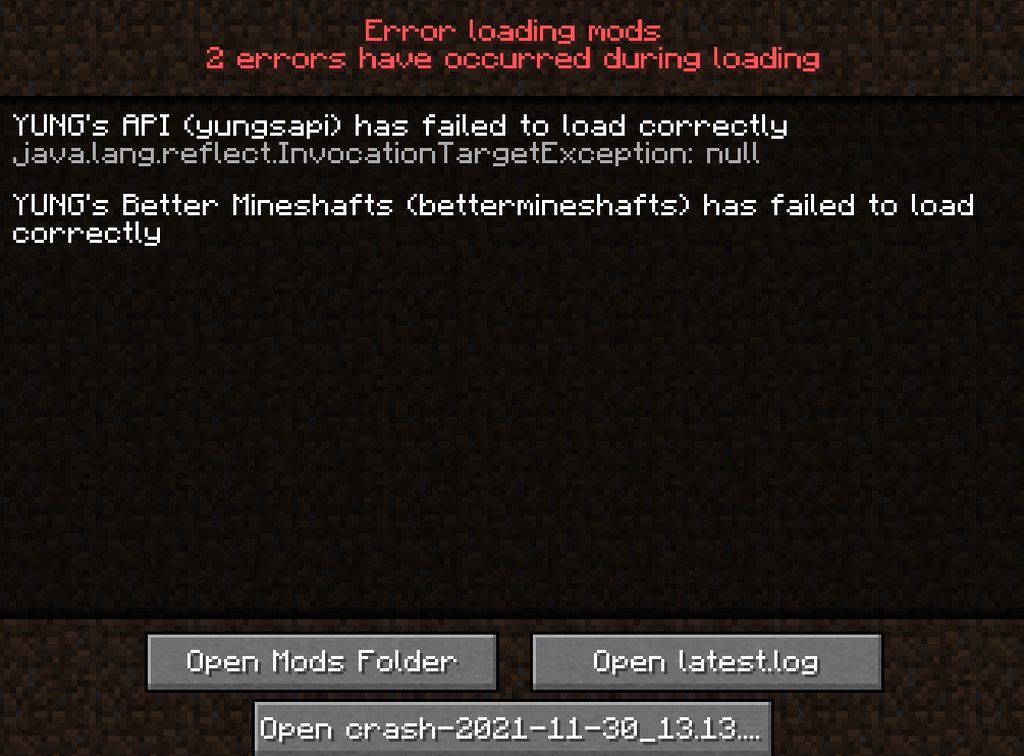
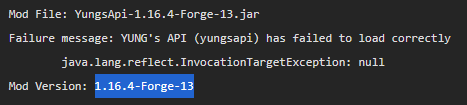
How do I fix YUNG's API and Better Mineshafts not being able to load? https://imgur.com/a/XvXfLCT
latest: https://pastebin.com/ZEf12Kur
crash report: https://pastebin.com/2Dj4fEZM
What do I do?
Pastebin
Pastebin.com is the number one paste tool since 2002. Pastebin is a website where you can store text online for a set period of time.
Pastebin
Pastebin.com is the number one paste tool since 2002. Pastebin is a website where you can store text online for a set period of time.
last parcel
report to the mod developers
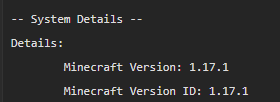
actually, it would probably help to use mods for the version of minecraft you are on
 sacred marsh
Mc keeps crashing when I try to join my server
last parcel
looks like an issue with aurorautils
sacred marsh
What is that
last parcel
a mod you installed, i assume
acoustic idol
Looking like a part of Dynamic Surroundings
There was an old bug between it and shadders. Do you use any type of shadders currently?
sacred marsh
No
Could it of been a resource pack causing that issue?
Also what is this fog im seeing?
coarse nest
Used to, not sure anymore
sacred marsh
acoustic idol
Looking like a part of Dynamic Surroundings
Its an issue with optifine and something else
I removed optifine and im able to load into the world just fine hut when I put it back it crashes
acoustic idol
It was an optifine issue back in 1.12. Only thing I could find that matched the error.
Report it to the mods author
sacred marsh
So report it to dynamic surroundings mod author?
sacred marsh
Its weird because ive used optifine together with other mods including dynamic surroundings up until now and this is the only time it has done this
acoustic idol
¯_(ツ)_/¯
If you really want to use optifine then need to either contact optifines support and see if they have ideas, and/or tell the dynamic suroundings dev about the issue. May likely say to remove optifine tho
 marble sleet
is this the channel where i ask for help with minecraft crashes?
last parcel
that is what the message said, yes
marble sleet
oh ok thanks
basically it worked just fine yesterday and now i cant boot up worlds or make new ones (i didnt change anything) and these are the logs https://github.com/gamingflame99/Crash-logs
GitHub
Contribute to gamingflame99/Crash-logs development by creating an account on GitHub.
last parcel
how much space is available on your drive
last parcel
doesnt seem like it
Failed loading config file C:\Users\mohammed\curseforge\minecraft\Instances\VAMPIRES IN MY TOWN\config\waystones-server.toml of type SERVER for modid waystones
delete this
last parcel
send new logs
marble sleet
alright
oh and btw i captured a screen snip of when it stops responding

this is also after trying to load a world incase that wasnt clear
last parcel
are you letting it load or just closing it?
marble sleet
i let it load one time and it took around 10~ minutes
last parcel
try increasing the ram
last parcel
how much do you have
marble sleet
ill just double it to 6gb for now
last parcel
you had it at 3..?
marble sleet
it worked fine since theres only 100 mods
last parcel
why did your crash report say it was at 6gb then
last parcel
dont really know what to believe at this point so no clue
marble sleet
its become this instead (im still letting it load)

unsure about the 6gb of ram thing but one of the bootup commands went from 3gb to 6gb now
i've also uploaded new logs

GitHub
Contribute to gamingflame99/Crash-logs development by creating an account on GitHub.
 agile cosmos
For the Minecraft launcher install on curseforge, is there a way to set JVM arguments for all different profiles
last parcel
settings page
last parcel
marble sleet
https://github.com/gamingflame99/Crash-logs
you have some gl errors which could be related to your gpu drivers
[18:38:38] [Render thread/ERROR]: @ Render
[18:38:38] [Render thread/ERROR]: 65539: Invalid key -1```

You also have this
```Caused by: com.electronwill.nightconfig.core.io.ParsingException: Not enough data available```
which i would interpret as not enough memory, but could be ram.

And it seems like your configs may be corrupting somehow, folder issues perhaps?
```net.minecraftforge.fml.config.ConfigFileTypeHandler$ConfigLoadingException: Failed loading config file journeymap-server.toml of type SERVER for modid journeymap```

Not really sure which if any are the issue.could start here which would be a fresh install of everything
?mc-path
golden muskBOT
Change your install path to the following:
For Windows: C:\CurseForge
-Go to C:\ drive. Make a new folder. Name it Curseforge.
For Mac: /Users/Shared/CurseForge
If Minecraft is not installed in CurseForge App:
- Click the in the top left.
- Select Minecraft from the list of games.
- Select the
Advancedoption and pick the folder you just made. - Click
Continue.
If Minecraft is installed in CurseForge App:
- Click the in the bottom left.
- Select the Minecraft tab.
- Click
Change. - Select the folder you just made.
:no_entry_sign: Minecraft Files should NOT be installed inside the following locations :no_entry_sign:
:no_entry_sign: .minecraft folder.
:no_entry_sign: OneDrive folders.
:no_entry_sign: Desktop folder.
:no_entry_sign: Drive roots I.E. Directly into the C:\ drive.
:no_entry_sign: iCloud enabled folders.
:no_entry_sign: or any other cloud saved folder.
:no_entry_sign: or folders with non-English characters in them.
If any of the above are in the path you need to change/move it!
marble sleet
so ahould i close minecraft instead of letting it load rn?
also would the fresh install keep the world or would i have to make a new one?
last parcel
world would stay where it currently is
marble sleet
alright ill try it
btw about the config issue
now that i recall i turned off the jumpscares client side for eyes in the night mod and nothing else
should i turn the jumpscares back on?
last parcel
dont see how that would matter
marble sleet
i did the path thing and was able to make a new world, thanks a ton!
last parcel
guess something got corrupted then. you can go back to your old folder and copy the world over now
 woven folio
My game keeps crashing. Can anyone tell me why?
waxen pine
"gravity gun" - unexplained errored
woven folio
Yeah that was it lmao thanks
empty crypt
can i get some help
i have future mc in my pack and im going to smelt something and what smelts is something from another mod and it won't let me get that certain item
autumn agate
Block at 193,49,-39 is ENCHANTMENT_TABLE but has vazkii.quark.oddities.tile.TileMatrixEnchanter@7a855e4e. Bukkit will attempt to fix this, but there may be additional damage that we cannot recover.
coarse nest
And?
autumn agate
thats way under bedrock
autumn agate
those cordinates are under bedrock
coarse nest
Bedrock is y = 0, that block has coords y = 49
autumn agate
when i type it for tp bedrock way above my head
coarse nest
Well then you either have something screwing with world gen or you are typing the tp command wrong
I also highly reccomend not using one of the many spigot/bukkit/paper and forge programs, they are very buggy with a lot of mods
 rigid owl
@everyone im facing a problem in downloading cursforge

i updated my windows but it didnt wrok
acoustic idol
rigid owl
@everyone im facing a problem in downloading cursforge
First off #📛︱rules 5.
!getcf try the second windows link
golden muskBOT
Looking to install the CurseForge app?
<:windows:798410728188936222> Windows
Minimum Requirements:
- OS Version: 7 (64 bit), 8.1, 10, 11
- 64 bit Required.
- 350MB storage space.
- Microsoft .Net 4.8
- Intel/AMD quad-core CPU
- 8GB ram
Download: https://download.overwolf.com/install/Download?&PartnerId=4047
If you are having issues with the installer use the URL below to install Overwolf then go to the app store to download CurseForge.
https://content.overwolf.com/downloads/setup/latest/regular.html
<:mac:798410654418862130> Mac
Minimum Requirements:
- OS Version 10.14 or newer.
- 64 bit Required.
Download: https://curseforge.overwolf.com/downloads/curseforge-latest.dmg
:penguin: Linux
Minimum Requirements:
Yes.
Download: :person_shrugging:
heady bay
https://github.com/yuri70072/why-the-low-fps-.git I increased the allocated RAM to 8192 MB for a modpack and the performance improved a lot but I still have stuttering when chunks are loaded, how can I fix the stuttering in this pack?

GitHub
Contribute to yuri70072/why-the-low-fps- development by creating an account on GitHub.
heady bay
 last parcel
reduce render distance or pregenerate the world
heady bay
how do I pregenerate the world?
last parcel
with a mod that pregenerates
heady bay
thanks
 brave summit
I'm not too sure this is where i suppose to ask, but i tried to host a foreverstranded server but it seems like i messed up some steps? but i couldn't figure it out.
last parcel
explain what you did and what your issue is
brave summit
will i download the foreverstranded server pack, and i click the serverstart.bat then before it downloads anything it say forgedownload url not found.
last parcel
for that you will need to talk to the people who made the pack
brave summit
ah okay thank you for the help though 🙂
 humble robin
Hi, weird question, but my friends and I wanted to do a throwback and head back to minecraft 1.3.2 with barebones mods
I followed old 2012 tutorials and tried the overwolf launcher but every time I launch the modded minecraft it launches in vanilla 1.3.2
Does anyone know how I can fix this?
last parcel
pretty sure curseforge doesnt work with anything that old
humble robin
What about the downloaded old forge launchers, patched into the jar through winRAR? I haven't been able to get that to work either
last parcel
wouldnt know anything about that
humble robin
ok thank you
 livid cosmos
when should CF get updated to fabric 1.18 as its out i believe
livid cosmos
right just saw that
thought i read through it all but it was just discord being wack
 hidden merlin
last parcel
hidden merlin
last parcel
Yea
pale ermine
Why am I unable to play either Aether mods? https://www.curseforge.com/minecraft/mc-mods/aether/files/3280117 https://www.curseforge.com/minecraft/mc-mods/aether-ii/files/2273367
When I have one of the mods active, it won't show up in the Mods area in the game.
coarse nest
is the profile the correct version for the mod?
pale ermine
They are the latest versions.
last parcel
That wasn't the question
 hollow verge
Hey, so... I have this problem with 1.18 forge Minecraft.

I know it is probably something with the mods but I can't quite figure out what's happening
Looked online for a little and the only problem I've seen about it has something to do with environment variables, although any of the probable fixes helped with the problem
 sacred cloak
heya i need some help with rlcraft, i used the curseforge app so it could set up most of my stuff for me and also allocted 6gb of ram for it, but for some reason whenever i go into the server my friend made to play, my game freezes and is stuck there
coarse nest
try more ram if your computer can handle it, RLCraft is a very bloated pack
sacred cloak
i only have 8gb of ram since im on a lenovo laptop
could i possibly download optifine and make it run a bit smoother?
For more context it works for a while and runs smoothly, until it just freezes and wont respond to anything
hollow verge
hollow verge
Looked online for a little and the only problem I've seen about it has something...
About this ^
Tried a pre-made modpack and it didn't work neither
sacred cloak
my friend has 6 dedicated ram for rlcraft and his works smoothly, whilst we are both playing on an aternos server
only difference is he has a gaming pc and i have a laptop
 dense totem
so i just downloaded 1.18 server jar and want it to generate an amplified world type. how do i get it to gen that? online had said level_type in server.properites but i dont see that field. should i just add a line and type it myself?
coarse nest
if you are sure its not there then yes, add it
 nocturne sable
Failed to download file.
Name: en_au.json
URL: https://resources.download.minecraft.net/43/430600291225b5bd53659c58963cb0c9b1c6b4fa
Filename on disk: 430600291225b5bd53659c58963cb0c9b1c6b4fa
Path: C:\Users\User\Twitch\Minecraft\Install\assets\objects\43\430600291225b5bd53659c58963cb0c9b1c6b4fa
Exists: File
Help Please
junior vector
I get this weird error msg
everytime i kill mobs
they wont drop things
i found that error msg in consol
Some mobs drop(only a few)
 coarse elm
hollow verge
Hey, so... I have this problem with 1.18 forge Minecraft.
coarse elm
hollow verge
Hey, so... I have this problem with 1.18 forge Minecraft.
Exit overwolf and restart it.
 barren cedar
I get this error when i try to launch 1.18 fabric/forge

 coarse elm
barren cedar
I get this error when i try to launch 1.18 fabric/forge
coarse elm
barren cedar
I get this error when i try to launch 1.18 fabric/forge
Restart overwolf, make a new profile.
barren cedar
aight
barren cedar
any idea what would cause this?
 golden muskBOT
Sending logs for support.
- Right-click the modpack profile icon OR click the button in the modpack profile.
- Click
Open Folder. - Open the
logsfolder. - Drag and drop the FILE named
latestORdebuginto discord.
waxen pine
@autumn agate
[21:53:56] [Client thread/INFO]: [CHAT] §lWelcome to SCP Lockdown Extras 1.0 [21:53:56] [Client thread/INFO]: [CHAT] - Mod made by Fluffy Doggo
is causing fatal errors - mod made with MCreator... go figure
autumn agate
So lockdown extras is the issue?
 orchid pier
oh snap
yeah
mccreator mods suck
never use
most mod devs mention that its a mccreator mod but some dont
orchid pier
waxen pine
<@456226577798135808>
`[21:53:56] [Client thread/INFO]: [CHAT] §lWelcome to SCP...
didnt actually think of researching the mods...
autumn agate
Alright here's hoping then
Cause I'm getting real sick of this shit after two hours of troubleshooting
waxen pine
it or some other mod is the problem. that is why you never, ever, ever just dump 100+ mods together at once and expect it to work
autumn agate
That's fair
orchid pier
but sometimes it does work 😉
if its a mod list that you know works, dumping all of them with 30 other mods works
waxen pine
creating a modpack takes a fairly significant amount of time usually. can either start manually moving files around to check which is the offender or start from blank profile adding mods slowly and confirm runs
@autumn agate performant in modpack > crashes > try removing Performant
autumn agate
waxen pine
<@456226577798135808> performant in modpack > crashes > try removing Performant
It’s never crashed on me before
autumn agate
waxen pine
<@456226577798135808> performant in modpack > crashes > try removing Performant
I’ve had it in my mod pack before
waxen pine
obviously something is not the same as it used to be
autumn agate
waxen pine
obviously something is not the same as it used to be
Can I ask how you know it’s that mod ?😓
waxen pine
performant fundamentally changes several things that lots of mods break with
barren cedar
coarse elm
Looks like it could be a modloader bug?
there
coarse nest
!mc-installfix try this
golden muskBOT
- Click on the Minecraft Tab on the Left side of the CurseForge App.
- Click button next to the
Create Custom Profileoption. - Click
Repair Installationoption. - Play game.
NOTE: You will not lose any modpacks or worlds, These are saved in the Instances folder. DO NOT TOUCH THIS FOLDER OR YOU WILL LOSE EVERYTHING

 orchid pier
autumn agate
Can I ask how you know it’s that mod ?😓
orchid pier
autumn agate
Can I ask how you know it’s that mod ?😓
its a "dangerous" mod as marked in the github gist of performance mods
coarse nest
barren cedar
!mc-art
golden muskBOT
How do I get rid of the strange white artifacts in my launcher/applications?
If you have a NVIDIA-card, you have to turn off Image Sharpening in the NVIDIA control panel.
 barren cedar
aight ty
autumn agate
coarse nest
!mc-art
barren cedar
coarse nest
!mc-installfix try this
still gives the same error
coarse nest
autumn agate
https://discord.com/channels/428228256236306434/782027635252920322/9158365217838...
And why do i need to be pinged for that?
autumn agate
!mc-installfix
golden muskBOT
- Click on the Minecraft Tab on the Left side of the CurseForge App.
- Click button next to the
Create Custom Profileoption. - Click
Repair Installationoption. - Play game.
NOTE: You will not lose any modpacks or worlds, These are saved in the Instances folder. DO NOT TOUCH THIS FOLDER OR YOU WILL LOSE EVERYTHING
coarse nest
Yeah
coarse nest
No idea then. You can try clearing your java args ( tab in ) but past that 🤷
barren cedar
i have no args lmao
 tame sluice
hey guys im having a problem where my game will not load when using curseforge. The launcher opens but when I press play it does not do anything. Vanilla minecraft launches fine thought. Im trying to launch pixelmon with 8gb of ram and i have decent specs so that is not the problem.
coarse elm
barren cedar
there
try fabric support?
orchid pier
tame sluice
hey guys im having a problem where my game will not load when using curseforge. ...
bro 8gb why
you need max 3
for pixelmon
autumn agate
Is GDLauncher good?
orchid pier
meh, ive seen a lot of people use it, i dont like it tho
autumn agate
orchid pier
meh, ive seen a lot of people use it, i dont like it tho
Please help with my crash report
orchid pier
rendering erro
autumn agate
orchid pier
rendering erro
How to fix?
orchid pier
🤷♂️
coarse nest
autumn agate
https://paste.gg/p/anonymous/d32f7699257f463b81ab8838dc39ced6
Try delete the .lock file inside your worlds folder
autumn agate
What’s a lock file
coarse nest
Its a file extension put on a temporary file that is used by games to determine if something is already using a folder, such as a world
autumn agate
coarse nest
Its a file extension put on a temporary file that is used by games to determine ...
Will it crash my game if I remove c
coarse nest
If you have that world open when you delete it then it may
But if you have that world open then you are obviously no longer having this crash
autumn agate
coarse nest
If you have that world open when you delete it then it may
I get that same crash every time I make a new world on single player
coarse nest
Whats your minecraft modding path set to? ( then category)
 rugged osprey
Hello, so me and my friends made a server and it was running well till some later updates we noticed that most of players fall from the world and get disconnected, altho there is some who can relog and their problem solved but the rest are not
Here's logs
orchid pier
rugged osprey
Hello, so me and my friends made a server and it was running well till some late...
bad ping
no mods problem
rugged osprey
yes its bad ping
orchid pier
its their shitty internet
rugged osprey
but it got worse for everyone
its only when they join or tp
then it gets stable afterwards
orchid pier
yeah, it happens
if someone joins, for a second, tps goes down
rugged osprey
can it be the host ?
orchid pier
not really
rugged osprey
because everyone's internet is pretty good
rugged osprey
1sec
orchid pier
👍
rugged osprey
pebblehost
can it be related to this bug? https://bugs.mojang.com/browse/MC-228420
if it was a shitty internet it wouldn't affect all players right ? we have players from different locations
and most of them are facing problems
the same problem
the log is spammed with these messages
 hexed spade
Hi, I downloaded WoW classic season of mastery, I downloaded questie in curseforge but none of the addons show when I play? It will work fine with TBC but not classic.
 dense roost
what is the support e-mail for overwolf?
wild jewel
There is none
 tame gate
anyone know whats wrong
last parcel
one of the mods that uses mixins is broke. no idea which
tame gate
ill try to disable some small mods
 random hollow
whenever i go into fullscreen it crashes my game but the report says the following
The game crashed whilst updating screen events Error: java.lang.illegalstateException: Keyboard must be created before you can query key state EXIT code: -1
last parcel
dont think you're going to get a solution for this other than dont. i looked it up and found nothing. minecraft has always had issues with fullscreen.
pale ermine
Never mind.
 cerulean nexus
sooo mc enternal isnt launching and we arent very sure why
 dreamy geyser
cerulean nexus
sooo mc enternal isnt launching and we arent very sure why
dreamy geyser
cerulean nexus
sooo mc enternal isnt launching and we arent very sure why
is there a crash report?
autumn agate
so what is the mod called where if you go over a block it tells you what can mine it and the name of the block
cause i just started playing my old server i added some more mods to it and i found a rare ore that i don't know if iron can mine it
 sweet thunder
WAILA/HWYLA/WITHIT
different ones
theres one called "The One Probe" too
they all basically do the same thing
alright
i have an issue creating a world
autumn agate
sweet thunder
WAILA/HWYLA/WITHIT
i need one for 1.16.5
dreamy geyser
sweet thunder
i have an issue creating a world
go on?
autumn agate
ty
i have been looking for ages the only one i saw with hwly and its not supported for 1.16.5 anymore only fabric 1.16.5 i thin
sweet thunder
whenever i try to create a world it says that a datapack is stopping it
sweet thunder
1.18 fabric
dreamy geyser
ah, ok, so there is that menu that says "datapacks"? if so, go in to that and disable fabric datapacks
sweet thunder
yes
dreamy geyser
in the world creation screen


 dreamy geyser
not really, actually. just recipies and worldgen and tags and textures
the mod will still work lol
then idk what to say send logs
sweet thunder
the entire log from when i started minecraft or just the error?
heres the error
also im using adoptium hotspot
and java arguments
dreamy geyser
What mods?
sweet thunder
Pastebin
Pastebin.com is the number one paste tool since 2002. Pastebin is a website where you can store text online for a set period of time.
 dreamy geyser
No clue sorry
 pine rapids
Try removing NotEnoughCrashes
sweet thunder
pine rapids
Try removing NotEnoughCrashes
why?
pine rapids
Things that intervene in crash reporting are usually more harmful than helpful
sweet thunder
so would that change the log in a more helpful way?
 lone crane
Curseforge keeps crashing on me with a little pop-up/notice in my bottom-right corner saying it crashed.
Although I don't agree with @orchid pier about this channel being the place since it's the curseforge app in and of itself (and not a game) that has the issue.
orchid pier
lone crane
Curseforge keeps crashing on me with a little pop-up/notice in my bottom-right c...
ah then it goes into cf support
waxen pine
What game are you attempting to launch
orchid pier
technically you askd for logs and i expected minecraft logs
thats why i redirected you to game support
waxen pine
lone crane
Curseforge keeps crashing on me with a little pop-up/notice in my bottom-right c...
Post a pic of the error message, or log file for the game profile
 keen matrix
lol im having problems with a custom modpack ive made i will post the modlist and log/crash files
golden muskBOT
You can update the mod loader within the same game version in the CurseForge app by following these steps!
- Click on the modpack profile you are working with.
- Click on the button next to the play button.
- Click on the Profile Options button.
- Select the mod loader version you want from the dropdown.
- Play!
If you need to update to a new game version, a new profile is required.
keen matrix
i did but then william withurs wont work
coarse nest
Well you have to choose between that mod or the mods that don't like the old version
orchid pier
quaint rampart
We are using Radmin VPN.
why vpn
coarse nest
That seems to be lenient stack size causing that one
keen matrix
hrm ok
coarse nest
Its probably conflicting with another mod
keen matrix
ty i will check it out
cool beans this has worked it is booting why would lenient stack size cause problems?
oop we have another crash
coarse nest
if another mod tries to do something too similar to it (modifying the same part of minecrafts code) then it causes issues
coarse nest
Is there a crash report?
coarse nest
Fabrics unhelpful sometimes and doesn't append the report to the log like forge does
keen matrix
but it does 'sometimes' show whats wrong directly
keen matrix
no it says its a 1.17.1 mod
coarse nest
Try remove it
coarse nest
In like the fourth error section it mentioned it (line 373)
keen matrix
lol the debug community is litterly looking for a mods mentioning in a haystack
ok it didnt crash fn
coarse nest
Yep, thats pretty much it.
Yay!
keen matrix
lol
it booted in and told me i needed sodium
so thats why i said fn
YAY it worked
ty for ur many helps
coarse nest
Happy to help!
keen matrix
is that ur dog in ur pfp
coarse nest
Yep!
coarse nest
(Moved to #🥑-off-topic-chat)
tame gate
dont know why roost is causing problems
wild jewel
Install the mod JEID
keen matrix
hallo i am return
my game is crashing its a custom profile and i will put logs and modlist
oh im using fabric
 wise yarrow
Hi !
I don't know if there are French but I'm trying anyway ^^
some modpack crash on launch (Exit code: 0)
Thank you in advance good game ^^
wild jewel
!mc-logs
golden muskBOT
Sending logs for support.
- Right-click the modpack profile icon OR click the button in the modpack profile.
- Click
Open Folder. - Open the
logsfolder. - Drag and drop the FILE named
latestORdebuginto discord.
acoustic idol
!mc-installfix try this
golden muskBOT
- Click on the Minecraft Tab on the Left side of the CurseForge App.
- Click button next to the
Create Custom Profileoption. - Click
Repair Installationoption. - Play game.
NOTE: You will not lose any modpacks or worlds, These are saved in the Instances folder. DO NOT TOUCH THIS FOLDER OR YOU WILL LOSE EVERYTHING
acoustic idol
wise yarrow
Did you add remove or change anything in the pack itself?
acoustic idol
autumn agate
Try GD Launcher
Really not the place for that.
acoustic idol
wise yarrow
No
Do other packs work? or just not this one
wise yarrow
It's the same for Better 😦
acoustic idol
Have these packs ever worked?
wise yarrow
acoustic idol
Do other packs work? or just not this one
Some other works perfectly
wise yarrow
acoustic idol
Have these packs ever worked?
No
acoustic idol
Will try this first then:
Back up any worlds you wish to keep > then reinstall the pack
wise yarrow
acoustic idol
Will try this first then:
Back up any worlds you wish to keep > then reinstall t...
Already done
golden muskBOT
Change your install path to the following:
For Windows: C:\CurseForge
-Go to C:\ drive. Make a new folder. Name it Curseforge.
For Mac: /Users/Shared/CurseForge
If Minecraft is not installed in CurseForge App:
- Click the in the top left.
- Select Minecraft from the list of games.
- Select the
Advancedoption and pick the folder you just made. - Click
Continue.
If Minecraft is installed in CurseForge App:
- Click the in the bottom left.
- Select the Minecraft tab.
- Click
Change. - Select the folder you just made.
:no_entry_sign: Minecraft Files should NOT be installed inside the following locations :no_entry_sign:
:no_entry_sign: .minecraft folder.
:no_entry_sign: OneDrive folders.
:no_entry_sign: Desktop folder.
:no_entry_sign: Drive roots I.E. Directly into the C:\ drive.
:no_entry_sign: iCloud enabled folders.
:no_entry_sign: or any other cloud saved folder.
:no_entry_sign: or folders with non-English characters in them.
If any of the above are in the path you need to change/move it!
acoustic idol
Will have to redownload your packs after.
wise yarrow
acoustic idol
Will have to try a new path then follow this exactly
Ragnamod 6 also crash
acoustic idol
Follow the path bot
wise yarrow
Ok thanks
acoustic idol
Ping me if it fails again
wise yarrow
Ok
autumn agate
So Ive tried 5 modpacks get the same single player crash
acoustic idol
Post the log
autumn agate
Every single player world I make with 5 packs get the same error when they get to 100%
acoustic idol
Do you have optifine installed?
wise yarrow
acoustic idol
Ping me if it fails again
Its good !
It works perfectly!
Thank you so much !
Thanks thanks thanks !
autumn agate
acoustic idol
Do you have optifine installed?
What is optifine ?
golden muskBOT
Sending logs for support.
- Right-click the modpack profile icon OR click the button in the modpack profile.
- Click
Open Folder. - Open the
logsfolder. - Drag and drop the FILE named
latestORdebuginto discord.
acoustic idol
Can you post the log called latest
autumn agate
Sure
 near grove
I am playing the modpack "Mystical Skies" but there is no gui. Can anyone help?
acoustic idol
Sounds like a question for the packs dev
near grove
oke
didnt find any useful information on the website
someone said they removed the modpack files and then it worked, but he didnt specify what file she deleted
 next abyss
My friends game is crashing on startup, but he cant join the server (Basically saying it might take me a bit to respond to questions)
https://paste.ee/p/sXRVw
EDIT: Please reply or ping me when you respond, so I dont miss it
 last parcel
Send latest log
 fast peak
and can someone send me a omnichunk mod that are in the curseforge? and the mod name is omnichunk
 sage pier
Omnichunk doesn't exist any longer.
You can do a quick google on "curseforge <modname>" (without <>) to see if the mod is on curseforge, and then click in on the results.
https://www.curseforge.com/minecraft/mc-mods/omnichunk/
fast peak
ok
but why the omnichunk doesnt exist any longer?
becauyse i want to try this mdo
mod
sage pier
¯_(ツ)_/¯
autumn agate
cann someone please tell me how to play with friends on a minecraft server with mods?
wild jewel
!mc-installserver
golden muskBOT
How to **manually** install a server - **On your own PC**
- Check if the modpack has a server pack, if it does: use that and skip below.
- Go to the Forge website http://files.minecraftforge.net/ and download the Installer for the forge version the pack is using.
- Run the installer and choose
Install server. Do not install to your desktop. Also do not install inside a OneDrive folder. - Run the server using the forge.jar. A file called
eula.txtwill be generated. Open it and changeeula=falsetoeula=true - From the Client; Copy the
modsfolder,configfolder, and any other folders needed for the pack to work into the server folder. If the modpack has a server pack, use this instead! - Run the server again.
- Port forward your machine if needed. (Google it)
Long version: https://pastebin.com/83DXfGTH
 spring ermine
One of my games has been broken for a while and I’ve now located the saves folded, how do I load an older save. Rn I can’t even open up the mod pack but I’ll screenshot
 blissful crypt
for port forwarding I have the local IP and Port but my router (orbi) does not require port setting. If someone connects with just my external facing IP will it automatically forward to the internal IP:Port?
autumn agate
can we create custom profiles in 1.18 yet?
wild jewel
autumn agate
can we create custom profiles in 1.18 yet?
Yes
autumn agate
curseforge wont let me
nevermind
i had a character in the name that i couldnt use
 dawn pulsar
Can someone help me it keeps crashing when i try opening it
 coarse nest
!mc-logs
dawn pulsar
?
coarse nest
... the bots down
- Right-click the modpack profile icon OR click the
- Click Folder.
- Open the logs folder.
- Drag and drop the FILE named latest OR debug into discord.
 storm moon
Minecraft Launcher, when opened through CurseForge, won't let me log in with my Mojang account (because I have already migrated to Microsoft) but if I try to login with my Microsoft account, a red banner message pops up that says "something went wrong in the login process." This has been true for a few weeks now, and I miss playing Minecraft!
dawn pulsar
coarse nest
>>> 1. Right-click the modpack profile icon OR click the <:CFmenu:79840276442552...
oh ok
this?
autumn agate
coarse nest
dawn pulsar
this?
Remove optifine
dawn pulsar
ok
autumn agate
please help
dawn pulsar
uhh what does this mean?
 autumn agate
dawn pulsar
uhh what does this mean?
autumn agate
dawn pulsar
uhh what does this mean?
your mod needs a higher version of forge
dawn pulsar
oh
coarse nest
!mc-updatemodloader
golden muskBOT
You can update the mod loader within the same game version in the CurseForge app by following these steps!
- Click on the modpack profile you are working with.
- Click on the button next to the play button.
- Click on the Profile Options button.
- Select the mod loader version you want from the dropdown.
- Play!
If you need to update to a new game version, a new profile is required.
autumn agate
i deleted to lock session and ive made 10 single player worlds still get same crash
coarse nest
autumn agate
Appears to be industrial foregoing's curios integration not working. Make sure both mods are upto date, and if they are then remove one
autumn agate
coarse nest
Appears to be industrial foregoing's curios integration not working. Make sure b...
can you show me where it says that please so i can understand
coarse nest
Line 14717 and around.
It mentions at com.buuz135.industrial, which means industrial foregoing by buuz135 and CuriosPlugin which means curios integration
And it mentions those a lot
dawn pulsar
ok it worked can i now put in optifine?
 south ibex
does curseforge work with the new launcher? i got a crash
golden muskBOT
Ignore the new launcher update. CF does not use it or works with it, yet.
Everything will work fine otherwise.
coarse nest
dawn pulsar
ok it worked can i now put in optifine?
Probably not, it was chunkanimator causing the optifine crash not outdated forge
dawn pulsar
oh
coarse nest
south ibex
can i reinstall the old launcher?
Cf has its own copy of the old launcher it uses
dawn pulsar
wait so can i delete chunk animator and put in optifine?
south ibex
coarse nest
Cf has its own copy of the old launcher it uses
got it
still got a crash tho...
coarse nest
!mc-logs
golden muskBOT
Sending logs for support.
- Right-click the modpack profile icon OR click the button in the modpack profile.
- Click
Open Folder. - Open the
logsfolder. - Drag and drop the FILE named
latestORdebuginto discord.
coarse nest
dawn pulsar
wait so can i delete chunk animator and put in optifine?
That will probably work. I advise to stay away from optifine however unless using it for shaders because it often does more harm than good
dawn pulsar
no i don't use it for shaders i just use it for better fps
south ibex
golden musk
which folder is logs in? ive never used this installation before so i think it might not have created a logs folder yet?
coarse nest
If its crashing then there should be a logs folder
south ibex
which folder should the logs folder be in?
coarse nest
The logs folder, like the command instructs
coarse nest
dawn pulsar
no i don't use it for shaders i just use it for better fps
https://gist.github.com/alkyaly/02830c560d15256855bc529e1e232e88 have a look at these, they are alternative performance mods
south ibex
coarse nest
The logs folder, like the command instructs
mb i cant find it
 coarse nest
Whats the crash message?
south ibex
coarse nest
Whats the crash message?
 coarse nest
Is there anything in your java arguments box in –> ?
south ibex
coarse nest
Is there anything in your java arguments box in <:CFsettings:798388925072408577>...
doesnt look like it
 coarse nest
!mc-installfix try this
golden muskBOT
- Click on the Minecraft Tab on the Left side of the CurseForge App.
- Click button next to the
Create Custom Profileoption. - Click
Repair Installationoption. - Play game.
NOTE: You will not lose any modpacks or worlds, These are saved in the Instances folder. DO NOT TOUCH THIS FOLDER OR YOU WILL LOSE EVERYTHING
south ibex
south ibex
i tried that when i got this
coarse nest
No idea whats wrong then, sorry
south ibex
coarse nest
Is this 1.18?
yea
so far tried disabling all the mods
this https://www.minecraftstation.com/how-to-fix-the-could-not-create-the-java-virtual-machine-error-in-minecraft/
then tried increasing the memory for the installation
updating java now
if that doesnt work ill try reinstalling java
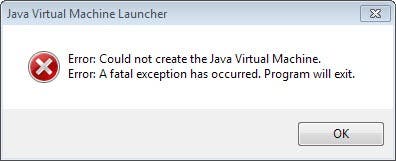
The “Could Not Create the Java Virtual Machine” error in Minecraft is common, and it is not related to a problem with Minecraft, but Java itself. This error typically only happens on Windows computers.
coarse nest
cf uses its own version of java
in its own install folder, updating your system one isnt going to do anything
south ibex
rip
made a profile for 1.17.1 that seems to work
added the mods and seems to be completely fine
coarse nest
yeah, 1.18 is broken for a lot of people
autumn agate
is jei in 1.18
 glossy arch
how can i host the world to my friend?
autumn agate
with a seperate server hoster like minehut, or bisecthosting
waxen pine
autumn agate
is jei in 1.18
https://www.curseforge.com/minecraft/mc-mods/jei
not yet. just uhh - wait a lil longer 😉
there is an alternative mod called "roughly enough items"
https://www.curseforge.com/minecraft/mc-mods/roughly-enough-items-forge
autumn agate
how much longer
waxen pine
when they're ready? - the answer that 99.9% of devs would give
autumn agate
if its not ready within seconds i will be upset
waxen pine
you can try out rei if you are looking for an alternative for now. it'll take a month or two until enough content mods get ported/made to flesh out modpacks getting published. but depends on what level of modding you're accustomed to
keen matrix
hello i am haveing minecraft crash this is a custom modpack here is mods and logs no crash log for some reason
fast peak
what the server operator must to do if i cant join in a multiplayer server when i was with indentity mod.
 keen matrix
does any1 know how to fix my problem from before
fast peak
fast peak
what the server operator must to do if i cant join in a multiplayer server when ...
help me first
keen matrix
is the mod on the server too?
fast peak
fast peak
help me first
i need help first
keen matrix
also please try to rephrase you sentence next time i could barely understand
I am trying to
keen matrix
keen matrix
is the mod on the server too?
is it? on the server @fast peak
fast peak
fast peak
what the server operator must to do if i cant join in a multiplayer server when ...
@coarse elm
fast peak
but i need help
keen matrix
rule 5
fast peak
?
keen matrix
did you read the rules?
keen matrix
fast peak
what the server operator must to do if i cant join in a multiplayer server when ...
is the mod also installed on the server
fast peak
yeahuihienukiow
keen matrix
ok so you need to make sure that the identity mod is installed on the server for you to connect
 slow cypress
fast peak
yeahuihienukiow
slow cypress
fast peak
yeahuihienukiow
youngling
keen matrix
well i am off to analog debug my mods
fast peak
can someone help me?
wild jewel
fast peak
help me first
We don't do that stuff here, there is no "I need help first" in this discord.
fast peak
fast peak
what the server operator must to do if i cant join in a multiplayer server when ...
i need help witht his
wild jewel
I know, but there is no helping first, calm the impatience.
And mods on client and server don't match
fast peak
bbut when how can i play on multiplayer servr with indenttiy mod
wild jewel
Have it on the server as well
fast peak
and i need help with mod immersive portals because i dont know how to get a portal helper
wild jewel
Then check the mod description?
coarse nest
Try /give
fast peak
coarse nest
Try /give
doesnt working. but if this is must to be if i am now trying the: Mystical Immersion
that i got this a very long loading screen.
https://www.curseforge.com/minecraft/modpacks/mystical-immersion/download/3242111

and i dont know how much time i must to wait >
coarse elm
till it loads?
coarse nest
Till it loads or it crashes
Also remove optifine if u have it, it increases loading time by a lot
fast peak
coarse elm
till it loads?
yeah maybe
but i dont have optifine
and i dont know ifit loaded or no because if am now trying to press a minecraft in my taskbar it wont open
and only 1 mod works great
indentity mod
and why it doesnt let me open ?
and now i got a error when i loaded a insansecraft mod
and here is the log if you need it
and error
