#👽︱game-support
1 messages · Page 175 of 1
 modest shoal
 waxen pine
hm idk then. restarted your computer lately? lol
 solemn crypt
Can anyone tell me how to disable the Rats mod in a forge modpack?
waxen pine
Caused by: java.lang.IllegalStateException: Texture creation: Invalid value
uhh. hmm
solemn crypt
I tried changing the file extension but then the pack wouldn't load.
 gritty condor
is that bad
waxen pine
removing mods won't always work with existing worlds. is a dicey thing. changing the extention makes the game blind to it so it's effectively removed
yeah is bad, although in what way is mysterious
solemn crypt
Maybe I start a new world?
waxen pine
always a good check
gritty condor
I mean i didn't do anything to it
other than add a world into the saves file
could that have done it
waxen pine
well ok - if you're desperate for things to try - add slightly more memory allocation in CF app settings for MC, then do this:
?mc-installfix
 golden muskBOT
- Click on the Minecraft Tab on the Left side of the CurseForge App.
- Click
 button next to the
 Create Custom Profileoption. - Click

Repair Installationoption. - Play game.
NOTE: You will not lose any modpacks or worlds, These are saved in the Instances folder. DO NOT TOUCH THIS FOLDER OR YOU WILL LOSE EVERYTHING
waxen pine
won't hurt anything - the CF app equivalent of drinking enough water and getting sleep
gritty condor
alright
waxen pine
note it's the repair installation button - not the 'repair profile' button
waxen pine
reboot computer to clear that - has been happening to people
we might have found the problem
 silver orchid
waxen pine
silver orchid
waxen pine
so you press play and nothing happens? it doesn't open the vanilla launcher?
waxen pine
and you restarted computer, opened app, pressed 'repair installation'', then pressed play?
gritty condor
yes
waxen pine
hrmph
gritty condor
would you like the latest log
waxen pine
sure why not
gritty condor
no just once
oh shit something appeared
oh my god i think it worked this time
it only took a half hour to load up
waxen pine
sounds like 1.12.2
gritty condor
yeah
tbf i'm also on a laptop
oh my
a lot of missing entries
837 in fact
oh well
we shall see waht happens
not worth the hassle
it's literally missing fucking galacticraft
the one thing i put the most work into
 delicate galleon
why would my server crash like this? ```
waxen pine
java.lang.RuntimeException: Attempted to load class net/minecraft/client/gui/screen/inventory/ContainerScreen for invalid dist DEDICATED_SERVER
problem #1 i see - not sure which mod but you have at least 1 client side only mod crashing this
 upper plover
Hello,
I am unable to play older mod packs via Curseforge. This is has happened with RLCraft and SevTech:Ages . I believe the issue is to do with the Minecraft versions; I was able to momentarily get the mod pack to work by manually installing the appropriate version. Sadly I have not been able to have it work since and I am very confused. Any help would be greatly appreciated
Exit Code 0 each time
?mc-log
golden muskBOT
Sending logs for support.
- Right-click the modpack profile icon OR click the button in the modpack profile.
- Click

Open Folder. - Open the
logsfolder. - Drag and drop the FILE named
latestORdebuginto discord.
upper plover
This is the latest log
 earnest abyss
been receiving errors when joining to a server
error: registry remapping failed....
(minecraft)
it would be nice if anyone knows a fix, cant really find any on the internet
 rose hazel
is the 1.16.5 version of spartan weaponry compatible with 1.16.4 modpacks?
waxen pine
maybe - the real question i'd ask is will the rest of your modpack work ok if you update it to 1.16.5
lol
rose hazel
that's true
altho problem is, im using a modpack from curseforge, just tryna add in a few mods
 magic glen
so uh, I'm running into a weird issue where some mods in my instance don't see Cloth Config as installed, while others do
it's really odd
Screenshot to show what I mean

tfw I didn't blur everything
in particular, the mods "Quick Shulker", "Expanding Armor Enchanting", and "Expanded Trident Enchanting" can't seem to find it
but "Expanded Weapon Enchanting" and "Expanded Axe Enchanting" work just fine
which makes negative sense
 rich surge
so i had a laptop and now i have a gaming pc can i transfer worlds between the two or not
 wild jewel
Copy paste to usb
wild jewel
No, just the worlds
rich surge
how like a file
wild jewel
It is a folder
wild jewel
Right click the modpack icon, open folder, saves
rich surge
thx i see it now
 autumn agate
What mod add the saturation and the weight thingie with the blue feather

Also what mod add the thing where if you hover a block it tells you what material you need to break it, for example like Cobalt etc. I have Hwyla if thats the one but it doesnt show me the material, it just give me breaking percentage and if I am able to or not
Please @ me

Also if anyone know how to set up the config for RoughMobs I need help on how to make mobs hit harder, run faster and have more hp. I dont really understand it
 heavy birch
Hello guys, i came here because i got a big issue after installing Curseforge on my computer.
Everything looked good until i noticed my Minecraft was stuck in Offline mode. This already happened not so long ago because my account wasn't migrated, but now i have no idea one how to fix this.
I did :
- Uninstall re-install
- Reboot Router
- Clear Cache
-Log out and Login, but this one turned even worse
Now i cannot log in back to my account. I actually dont know if it's because of Curseforge, but honestly the problem started after the installation, everything was fine yesterday and nothing but Curseforged was installed in the meanwhile. Hope you guys help me find the fix to this. 🙏
 wild jewel
heavy birch
Hello guys, i came here because i got a big issue after installing Curseforge on...
wild jewel
heavy birch
Hello guys, i came here because i got a big issue after installing Curseforge on...
!mc-installfix
golden muskBOT
- Click on the Minecraft Tab on the Left side of the CurseForge App.
- Click button next to the
Create Custom Profileoption. - Click
Repair Installationoption. - Play game.
NOTE: You will not lose any modpacks or worlds, These are saved in the Instances folder. DO NOT TOUCH THIS FOLDER OR YOU WILL LOSE EVERYTHING
heavy birch
Same error after i repaired the game
wild jewel
Did you migrate already?
heavy birch
Yes i did
That fixed the first login problem i encountered few weeks ago
And the game was working perfectly fine yesterday
wild jewel
Can you login on vanilla?
heavy birch
Nope
wild jewel
Then please contact mojang
heavy birch
Sure !
 eager ermine
Hey
I've got a modpack called Better Minecraft downloaded to my server, and I'm trying to get a working mod that let's be pick up spawners
And I've tried a few off of them, but none will work without fabric, how can I fix this?
 worldly ether
so you are trying to use other mod loader mods on the forge/fabric better minecraft
just that you said "none will work without fabric"
eager ermine
worldly ether
so you are trying to use other mod loader mods on the forge/fabric better minecr...
Can you rephrase this please?
worldly ether
what version of "better minecraft" are using? , as there is a fabric version and a forge version
eager ermine
1.16.5
 worldly ether
that is the forge version , have you tried "enhanced mob spawners" mod?
worldly ether
allows spawners to be mined and picked up with silktouch
eager ermine
Oh
 formal tangle
hello, my overwolf CF is 2837 version, but for electroblob need 2847 how do I upgrade Overwolf CF?
eager ermine
Thank you so much!
worldly ether
formal tangle
hello, my overwolf CF is 2837 version, but for electroblob need 2847 how do I up...
that's referring to the forge modloader version,
,not anything to do with overwolf / CF version
 bitter depot
i added blue skies 1.17.1 and Enhanced Celestials - Blood, Blue, & Harvest (Super) Moons
and now this happened
 stuck agate
when I try to open the modpack my minecraft launcher crash
doesnt even open the game
 trail drum
How can I fix this?
 dense solstice
guys i need help i cant set up the files can someone tell me how i do this
 golden muskBOT
Change your install path to the following:
For Windows: C:\CurseForge
-Go to C:\ drive. Make a new folder. Name it Curseforge.
For Mac: /Users/Shared/CurseForge
If Minecraft is not installed in CurseForge App:
- Click the
 in the top left.
 - Select Minecraft from the list of games.
- Select the
Advancedoption and pick the folder you just made. - Click
Continue.
If Minecraft is installed in CurseForge App:
- Click the
 in the bottom left.
 - Select the Minecraft tab.
- Click
Change. - Select the folder you just made.
:no_entry_sign: Minecraft Files should NOT be installed inside the following locations :no_entry_sign:
:no_entry_sign: .minecraft folder.
:no_entry_sign: OneDrive folders.
:no_entry_sign: Desktop folder.
:no_entry_sign: Drive roots I.E. Directly into the C:\ drive.
:no_entry_sign: iCloud enabled folders.
:no_entry_sign: or any other cloud saved folder.
:no_entry_sign: or folders with non-English characters in them.
If any of the above are in the path you need to change/move it!
 coarse scarab
hello youtube!

 wild jewel
Full sentences please
 lyric dagger
I have tow heart
 last parcel
look through the mod list, find the mod that does that, read the info it provides to figure out how to fix
lyric dagger
OK thanks
lyric dagger
last parcel
look through the mod list, find the mod that does that, read the info it provide...
Me and my friend, playing in the same server and same modes but he has this issue but me not ?
 novel current
when i shift-click an item in my inventory to put it on my hotbar, my inventory bugs itself, if i try to move objects the objects doesn't really move, do you know if there's a way to fix it?
maybe a mod that's causing it or some fix?
last parcel
restart?
last parcel
lyric dagger
Me and my friend, playing in the same server and same modes but he has this issu...
I don't know what mods you have, and I certainly don't know how every mod on curseforge works. You will need to figure out which mod you are using does this and find a solution.
novel current
Yeah, reloading the world works
It's just that this has happened in a lot of modpacks and then it's fixed at some point, so idk if it's a common or a rare bug
last parcel
🤷♂️
Might just be that you tabbed out, have had issues caused by tabbing out before, usually tabbing out again fixes it.
If it's not that then you'd have to narrow down what mods cause it and report to them.
novel current
novel current
It's just that this has happened in a lot of modpacks and then it's fixed at som...
It was inventory tweaks, if you disable the auto-fill option it's fixed
autumn agate
@last parcelhey man can u help me?
autumn agate
autumn agate
i get this when i try to turn hexxit on
last parcel
autumn agate
<@!125588118538682368>hey man can u help me?
#📛︱rules read them
autumn agate
last parcel
<#777323206884327484> read them
bro its important
;/
me want to play
cant u just help me
bruh tipical moderator i just need help couz i get error and now im getting ignored
tysm
for this kind
ty for the kick so now can i get help?
heavy birch
Just post your problem right away man
wild jewel
heavy birch
Just post your problem right away man
He already did, scroll up
heavy birch
A mb then


 trim kayak
Anyone know how to get forge 36.2.4 or above?
last parcel
what do you mean how? with the CF app?
trim kayak
ok
autumn agate
is there a claimmod for forge 1.17.1?
 minor lynx
i need help for a problem!!!
golden muskBOT
╰( ͡° ͜ʖ ͡° )つ──☆*:・゚ *˜”*°•.˜”*°• Many Help •°*”˜.•°*”˜* <:curselit:796985620550385705>
Please provide a description of your issue with as much detail as possible. If you have an issue with a mod or modpack, tell us the name. Explain what you can see happening. Be specific!
 Tell us what is happening, we already know it "doesn't work".
Avoid using words like "it", tell us exactly what "it" is.
Don't assume anyone knows what you are talking about, be specific.
Tell us what you expected to happen.
Provide screenshots or video if possible.
Provide a log if possible. ?mc-log
 grim sun
10/10 support bruh
 stoic socket
When I turn on the modpack it shows me the following message "This application will not run on your computer. To find a version for your computer, contact with software publisher" Please help

 wet vapor
me cursforge will not launch mincraft with mods. can somebody help me to fix it?
last parcel
Need to explain
grim sun
when i launch a modpack it opens default launcher and the installation is 1.17.1 not the modpack and i launch the 1.17.1 and it crashes
grim sun
would love some help so i could play modded
 charred dome
My server has been having issues with ghost blocks particularly in the nether. I think it's an issue with one of the mods or a incompatibility. Here's a list of the mods(i apologize for the chat being flooded with images):


 muted parrot
Trying to help a friend install a modpack for minecraft (I'm on windows they are on Mac) after they installed Curseforge on their mac computer we went to import the mod pack I had sent them via discord. For some reason we where unable to select the modpack, the modpack was un-openable. I'm not sure what I screwed up on or if it is even possible
muted parrot
muted parrot
Trying to help a friend install a modpack for minecraft (I'm on windows they are...
if this description of the issue makes no sense I can try to elaborate further
 coarse elm
muted parrot
Trying to help a friend install a modpack for minecraft (I'm on windows they are...
coarse elm
muted parrot
Trying to help a friend install a modpack for minecraft (I'm on windows they are...
!mc-packshare
golden muskBOT
There are two ways to share a modpack you've made with others...
Export and Share - For Friends to Small Groups.
- Click the Icon for the modpack.
- Click the button next to play.
- Click

Export. - Select the files that should be included.
- Send the zip to the people that want it! They can follow the instructions in
!mc-installpackto install the pack!
Upload to Curseforge - For Public Release to Everyone.
This options will make your pack public to EVERYONE, it comes with extra requirements and will take some effort to set up.
- Go to here: https://www.curseforge.com/project/432/4471/create
- Fill out the information with a proper description of the pack. This should allow anyone to understand what the pack is.
- Click the Icon for the modpack in the CurseForge app.
- Click the button next to play.
- Click
Export. - Select the files that should be included.
- Open your Project you made on the CurseForge site and Upload the file you just made.
- Wait for Moderation & Sync so it can show up in the client! (See
!syncfor limitations)
 dawn phoenix
Anyone else having this issue in buildcraft? Refinery crafting isn’t working
Like it shows up in the recipe book in game, but when I click the recipe doesn’t open and I can’t craft it
grim sun
Wish i could be a little more helpfull but i cant even open my modpacks
Could be a issue with that file being corrupted
might need to reinstall it or change versions
@dawn phoenix
dawn phoenix
Thank you sir! I’ll give that a shot. Hope it doesn’t delete my game file
Well shit. I think I made it worse, now it won’t open Minecraft 😂
grim sun
oh shit
thats not very good
@dawn phoenix whats the crashlog?
also you could remake the modpack then shove the world+data in it
dawn phoenix
Update. I can now open Minecraft but not with buildcraft mods
So it’s progress. I just deleted BC and downloaded it again so we will see if it works
grim sun
@dawn phoenix you should try a diffrent version of it if you have trouble
dawn phoenix
Interesting. I got back into buildcraft and am still having that problem
So it must be the version
I just tried a “repair profile” command so will update if that works
grim sun
@dawn phoenix you know how to add a modpack through the minecraft default launcher not useing cursed forge?
golden muskBOT
Hey there, it is Curseforge, not "Cursed forge"
grim sun
bruh
dawn phoenix
I have tried but cannot do it for the life of me
golden muskBOT
Hey there, it is Curseforge, not "Cursed forge"
grim sun
how to do anypart of it
dawn phoenix
Idk man. I’m failing prettt badly over here haha
grim sun
lmao
dawn phoenix
What’s the point of buildcraft without oil refining?
And now I cannot send a crash report because I have no file
 acoustic idol
What’s going on?
dawn phoenix
I’m using buildcraft *IC2 and cannot craft refineries
acoustic idol
Did you make this pack or was it a pre made pack you downloaded?
dawn phoenix
Pre made. I tried deleting curse forge, deleting the mod pack, restarting
acoustic idol
Have you tried contacting the packs author about it? Could just be a bug in their modpack
dawn phoenix
I actually pinged him a few days ago with an unrelated request
Guess I’ll do that again and hope he’s still active haha
acoustic idol
!projectbug
golden muskBOT
Please visit the project page for the content you posted about and look for a way to contact the developer.
Somewhere on the page there is usually a method of contact. Look for one of the following things:
Issuestab like the image below.- Discord link.
- Twitter link.
- Comments section below the project.
If no contact method exists you will either have to remove the project or find a solution on your own.
 acoustic idol
Try that, some authors don’t reply to pings as they can be annoying
acoustic idol
Mod packs follow the same guidelines. Unless the author was really lazy and disabled everything
dawn phoenix
Hard to say. I sent an error report to the buildcraft creator
I think that modpack authors can only lump mods together but typically shouldn’t edit them right?
 coarse nest
No, but they can often do magic with configs and scripts to solve problems
acoustic idol
Pack authors can change a lot in a pack, if there is an issue in a pack with a mod best to tell the pack author so they can fix it. Or look into the issue. Otherwise changing a pre made pack can just cause you more issues, that we can’t help you fix
dawn phoenix
Oh I was just going to try to pull together the original mods apart from the modpack author, didn’t want to try to edit anything
acoustic idol
I mean you can make your own pack with the mods you want, sure. Just be sure to use the cf app to install the mods, don’t just copy paste
dawn phoenix
Oh for sure. I have no idea how to work with that stuff
Ah. And now I can’t even find the mod In CF.
Why is this so difficult 😂
acoustic idol
!mc-installmods
golden muskBOT
How to install mods in CurseForge App.
- Click
+ Create Custom Profile - Name it, select the required Minecraft version, select the Forge version (usually the highest number), click
Create. - Click the profile icon.
- Click
Add More Content - Search and install the desired mods.
- Start the game!
How to install mods not on CurseForge.
- Right click the profile picture or Open the profile and click the Icon next to the play button.
- Click
Open Folder. - Drag the mod(s) into the
modsfolder. (Note: Some mods will require others, to run. Make sure to read the instructions for the mod!) - Start the game!
 dawn phoenix
Trying this. I downloaded BC off CF and dragged it into the folder as notes
Launching now
acoustic idol
Better to use the app to download mods,
 acoustic idol
!webclient
golden muskBOT
WebClient errors are from networking issues to your computer. You can try a few things to fix it:
- Restart the computer.
- Restart your router/modem.
- Try another internet source like a hotspot, wired connection or moving closer to the WiFi.
- Pause/Stop other things using the internet. (Streams, music, etc)
- If this still doesn't work, try again in an hour and hope your connection is stable.
acoustic idol
It’s a network error on your end. Try all the steps the bot says
dawn phoenix
Copy thank you
Download worked. Launching now
So y’all just help people out in here?
Do you work for CF?
acoustic idol
I do not, nor do I work for ow. 100% volunteer
dawn phoenix
Damn, respect
Thank you for your service 😂
Oh my god. Buildcraftia is having the exact same problem. No refinery
acoustic idol
That a mod or modpack? Link it from the site
dawn phoenix
Or more accurately, you can see the refinery in the recipe book but can’t open the recipe
Stand by
acoustic idol
Ok so that’s a modpack
dawn phoenix
yes
So if two modpacks are having the same issue with Buildcraft, does it stand to reason then that the problem is with the mod, Buildcraft?
acoustic idol
Hard to say, you would have to install buildcraft on its own and see if it works. Before going to the mods dev
dawn phoenix
I actually tried doing that earlier and failed
In that I couldn't find the damn mod in CF app
acoustic idol
You made a custom profile for 1.7.10
dawn phoenix
Because I would create new modpack profiles, select a version, and I could never seem to find the one that syncs with the latest Buildcraft profiel
I did try that
I'll pop over to the Buildcraft discord to see if anyone else is having this issue
Thanks for your help
Oh shit!
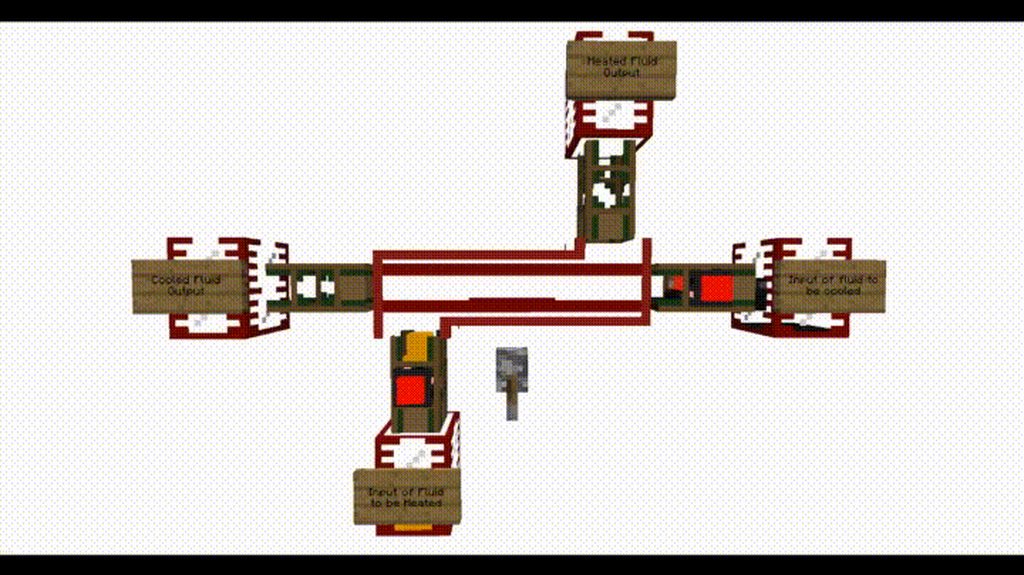
I think the refinery is no more
 celest timber
hello
I have problems trying to install optifine
with forge
i install the optiforge and I copy the optifine to the mods folder but it make a fail and does not launch
waxen pine
!mc-optifine
golden muskBOT
We do not offer support for Optifine!
If you have issues with Optifine, remove it. If you want further support try the discord found on their website.
https://www.optifine.net/home
Installing Optifine with modpacks on Curseforge:
- Right click the modpack icon, select
Open Folder. - Put the
Optifine.jarinto themodsfolder. - Now start the modpack.
celest timber
how I get the optifine.jar
waxen pine
it's not a mod hosted on curseforge
 opaque willow
What do I need to do to host a star factory server? I downloaded the server pack, but I can't get it to generate the correct world.
If I try to replace the world file it wipes everything from the world except the bedrock layer
magic glen
magic glen
Screenshot to show what I mean
Wanna bump this since I'm still having the same issue :x
 tranquil thorn
can you tell me what to do in this situation
 waxen pine
?mc-path
golden muskBOT
Change your install path to the following:
For Windows: C:\CurseForge
-Go to C:\ drive. Make a new folder. Name it Curseforge.
For Mac: /Users/Shared/CurseForge
If Minecraft is not installed in CurseForge App:
- Click the in the top left.
- Select Minecraft from the list of games.
- Select the
Advancedoption and pick the folder you just made. - Click
Continue.
If Minecraft is installed in CurseForge App:
- Click the in the bottom left.
- Select the Minecraft tab.
- Click
Change. - Select the folder you just made.
:no_entry_sign: Minecraft Files should NOT be installed inside the following locations :no_entry_sign:
:no_entry_sign: .minecraft folder.
:no_entry_sign: OneDrive folders.
:no_entry_sign: Desktop folder.
:no_entry_sign: Drive roots I.E. Directly into the C:\ drive.
:no_entry_sign: iCloud enabled folders.
:no_entry_sign: or any other cloud saved folder.
:no_entry_sign: or folders with non-English characters in them.
If any of the above are in the path you need to change/move it!
 kind peak
Hi, I need help, so when I download optifine and move optifine to the mod folder (FORGE), when I open minecraft the game starts but black, then a java error pops up and closes automatically! I am begging you for help
(as if something it gives a screen from the internet)

i Exctract optifine and , after optifine is mod
 coarse nest
!mc-optifine
golden muskBOT
We do not offer support for Optifine!
If you have issues with Optifine, remove it. If you want further support try the discord found on their website.
https://www.optifine.net/home
Installing Optifine with modpacks on Curseforge:
- Right click the modpack icon, select
Open Folder. - Put the
Optifine.jarinto themodsfolder. - Now start the modpack.
 sage pier
You're installing optifine for Minecraft 1.13.2, but you're playing 1.8.9
sage pier
.. ah.

 blazing drift
Can someone tell me which mods provide the mini maps? I know one of them is ftb-chunks-forge and I can configure it, but there is another mini map and I can't figure out which of the 329 mods contains it so I can configure it. Thank you. Forgot to say it was for Enigmatica 6
kind peak
kind peak
blazing drift
Can someone tell me which mods provide the mini maps? I know one of them is ftb-...
Xaeros map
 full otter
how do I fix my forge installer? I keep getting this message
 blazing drift
Not sure, Xaeros is not in the mod list, so Enigmatica 6 has two mini maps and if you enable ftb-chunks mini map both will show. So I want to know what the other one is.
kind peak
install one map? then the problem should disappear and you will have an effect
kind peak
full otter
how do I fix my forge installer? I keep getting this message
you need add file forge to
desktop
full otter
I did
kind peak
and?
full otter
idk, im gonna reinstall java first
blazing drift
When I installed Enigmatica 6 it came with both mini maps. I like the ftb-chunks mini map better and would like to disable the other one but I do not know what mod it belongs to. I did not install either one, they came with the modpack.
kind peak
try instal ftb-chunks mini map , and try Enigmatica 6 , dont instal 2
Listen, is there fashion's fault here? Don't install two mods at once? Maybe install one by one, or throw all your mods to another folder and just try the mini-map?
here it's not Forg's fault. Maybe try to find out something on youtube about these mods?
blazing drift
I will say it again: these came with the mod pack. I did not add anything to the Enigmatica modpack - promise, I just installed the modpack and began playing it.
blazing drift
it is not a problem - they work together and I am not getting any errors. I just want to know how to find out which mod the one mini map came with so I can configure it.
kind peak
Listen, here you are not asking about mod configurations, but the problem with downloading them, if it comes to what you write, try maybe youtube search as I mentioned? or search the internet how to do it?
Maybe try the name of the mod?
blazing drift
Ok, we are both frustrated. I do not know the name of the mod. Enigmatica has 329 mods in the pack so finding the one with the mini map would be slog. I will just use the one mini map I can't configure and turn off the one I can configure - ftb-chunks. Sorry for the bother.
kind peak
okey fine
bitter depot
i need help i added a few mods to my modpack and now it just keeps crashing
kind peak
bitter depot
i need help i added a few mods to my modpack and now it just keeps crashing
have you got optifine?
bitter depot
kind peak
have you got optifine?
no.
kind peak
any mods , to be laggy>
 dusk agate
I've been trying to play minecraft 1.2.5 with a mod for a while, I set my game directory to an alternate file and everything, and tried to download the mod normally, yet when i run the game it's normal 1.2.5 instead of forge 1.2.5
can anyone help?
bitter depot
kind peak
any mods , to be laggy>
i added MineColonies antighost Allthemodium outvoted Creeper Confetti secret rooms The Conjurer
dusk agate
 dusk agate
bitter depot
i added MineColonies antighost Allthemodium outvoted Creeper Confetti secret roo...
dusk agate
bitter depot
i added MineColonies antighost Allthemodium outvoted Creeper Confetti secret roo...
try playing with only half of the new mods added, and then find out wich one gives the error
y/know like
trial and error
bitter depot
wait is gecko even fully updated to 1.17.1?
dusk agate
idk
 hot lotus
is Project Ozone 2 Reloaded still worth playing?
 bitter depot
plz
hot lotus
dusk agate
alright, my issue will be hopefully fixed
umm, mate not sure if you can read correctly, but ain't that suppose to be for MC 1.2.5
dusk agate
hot lotus
umm, mate not sure if you can read correctly, but ain't that suppose to be for M...
yup
hot lotus
oh, so you intend to make a 1.2.5 modpack or something?
hot lotus
umm ok
I have 3 rules on Minecraft.
- Disable Redwood Trees from Natura.
- Disable Taint Spread from Thaumcraft.
- Obey all the rules.
 fleet jewel
this doesnt seem like something to talk about in the support channel my guy
 wild jewel
Did you migrate?
 random salmon
what does that mean
wild jewel
Microsoft or Mojang account?
random salmon
Microsoft
wild jewel
Does that pack contain the mod "reauth"
random salmon
I dont believe so
wild jewel
Please check
random salmon
Yes it does
wild jewel
Remove it, try again
wild jewel
! mc-editpack
golden muskBOT
How to add/remove mods in a modpack.
- Click on the picture of the modpack.
- Click the

Add More Contentbutton, IF this button is not there, see below before continuing. - Find the Mods, Resource Packs or Maps you wish to Install and click
Installon them. - Wait for all the required mods to be downloaded.
- Start the modpack.
How to Enable/Disable content management for modpacks.
- Click on the picture of the modpack.
- Click on the button next to the
Playbutton. - Click on

Profile Options. - Check the
Allow content management for this profileoption if you want to edit the content of the modpack, uncheck it to disable.
NOTE: The Allow content management for this profile option is what allows you to Delete, Disable, Update or Install any Mods, Resource Packs or Maps managed by CurseForge. It must be on to modify any of them! (Currently)
wild jewel
Just delete
wild jewel
Launcher or game itself?
wild jewel
Show that you removed the mod
random salmon
This is all the mods from this pack that start with an R

This the error that I see
 wild jewel
Weird
wild jewel
No, won't fix things
random salmon
Yeah non of this is working
charred dome
My vsync is syncing to 120 instead of 60, I use a macbookpro and i just updated to macOS12
it's really annoying because it's using unnecessary resources that my mac can't even display
it defeats the point of vsync
waxen pine
yeah vsync = off is the usual way
waxen pine
since studies have shown human perception can't tell much above 75hz - i hear you though
charred dome
yeah
my screen only has a refresh rate of 60 anyways
but for some reason it thinks it's 120
waxen pine
there's other stuff to go after like optimizing your java setup and/or other performance mods
charred dome
yeah
 humble coral
(if this is irrelevant, I will take it down if a moderator asks) .Only posting this here because the Minecraft server is full, but; when I launch Minecraft (with and without forge), after the Minecraft launcher has opened up, the game doesn't load for a while. it seems to be much more common with longer waiting times using forge, any1 know why?
 visual belfry
every time i try to join any pack game crashed exit code 0 comes up
golden muskBOT
Sending logs for support.
- Right-click the modpack profile icon OR click the button in the modpack profile.
- Click
Open Folder. - Open the
logsfolder. - Drag and drop the FILE named
latestORdebuginto discord.
wild jewel
!mc-logs
 hallow otter
Does anyone know what this means ?https://cdn.discordapp.com/attachments/877659677368942656/904066299796262932/unknown.png
 waxen pine
humble coral
(if this is irrelevant, I will take it down if a moderator asks) .Only posting t...
waxen pine
humble coral
(if this is irrelevant, I will take it down if a moderator asks) .Only posting t...
modded MC is highly unoptimized - it will always take longer
wild jewel
Your disk is full
waxen pine
.... and ... you checked your hard drive where the modding folder is placed for space?
visual belfry
hallow otter
ok my computer is breaking for some reason
 wild jewel
hallow otter
ok my computer is breaking for some reason
wild jewel
hallow otter
ok my computer is breaking for some reason
Because of the lack of space

 wild jewel
On which disk?
visual belfry
i have 1and a half terabytes so not lack of space
humble coral
waxen pine
modded MC is highly unoptimized - it will always take longer
that doesn't really help me. I don't mean 15-20 seconds longer, what I mean is that it is 15-20 mins longer times to even start up
hallow otter
wild jewel
On which disk?
i think my second one
but i cant open up files because of it
waxen pine
think carefully when you read memory vs space - as memory often refers to ram
wild jewel
visual belfry
Reinstall the modpack
hallow otter
i got 32GB of ram @waxen pine
waxen pine
restarted your computer lately? checked how many background programs you have going?
wild jewel
hallow otter
i think my second one
And the first one?
wild jewel
There might be your issue
 wild jewel
Always got the temp folder that might be causing issues
hallow otter
So delete the temp folder?
wild jewel
No, clear space on your SSD
hallow otter
i literally just did that and its still full
wild jewel
Then clear some more?
wild jewel
Then you move it to the storage one, not delete
hallow otter
Copied the SSD to storage, since it wouldnt let me move it
im just gonna get my tech friend to solve this im extremely confused
visual belfry
i reinstalled it and it works now thx
autumn agate
a server log. We tried to make it work, but it does not
the modpack works
when I was running it on my device (the server)
for me
but my friend got a no further response io.netty
and we tried on his
charred dome
I added yung's better caves to my server, but the cave generation has not changed even in new chunks. What should i do?
autumn agate
and for him, the server didnt work
 cosmic night
 waxen pine
autumn agate
a server log. We tried to make it work, but it does not
waxen pine
autumn agate
a server log. We tried to make it work, but it does not
do you know if you've properly set up port forwarding?
also you have Fabric API in there for some reason
autumn agate
waxen pine
do you know if you've properly set up port forwarding?
it was properly set up
waxen pine
reboot your computer lately?
autumn agate
yes
waxen pine
it claims that port is already occu-pado
waxen pine
sigh
don't do that... it makes your home network open to the world
just read how to port forward - it's not hard
autumn agate
waxen pine
just read how to port forward - it's not hard
Thats what I thought when I read into hamachi, but the guide is all in some random ass language
waxen pine
the guide ?
autumn agate
Theres like a guide on how to port forward on the internet provider's admin site, but its so different than regular port forwarding and its in a language I dunno and Google translate isnt helping a lot
waxen pine
yeah different routers wiill change slightly in specifics - the gist is you log into your router and do it
 gentle matrix
help keeps on crashing
acoustic idol
gentle matrix
help keeps on crashing
Remove optifine and try again
 flat swallow
anyone know why im playing mceternal and its like running at 2 tps i have an I7-10800h and 16 gb of ram 14 of it to mc
acoustic idol
14gb is a little high, try backing that down to 6-8gb
flat swallow
really? it wouldnt even start if i had 8 gb
acoustic idol
ok, looking at eternal now, looks like they recommend 8-10gb. Wouldnt recommend going higher then 10.
flat swallow
aight
waxen pine
mc eternally-loading is usually pretty low performing
flat swallow
rip
 acoustic idol
!mc-path
golden muskBOT
Change your install path to the following:
For Windows: C:\CurseForge
-Go to C:\ drive. Make a new folder. Name it Curseforge.
For Mac: /Users/Shared/CurseForge
If Minecraft is not installed in CurseForge App:
- Click the in the top left.
- Select Minecraft from the list of games.
- Select the
Advancedoption and pick the folder you just made. - Click
Continue.
If Minecraft is installed in CurseForge App:
- Click the in the bottom left.
- Select the Minecraft tab.
- Click
Change. - Select the folder you just made.
:no_entry_sign: Minecraft Files should NOT be installed inside the following locations :no_entry_sign:
:no_entry_sign: .minecraft folder.
:no_entry_sign: OneDrive folders.
:no_entry_sign: Desktop folder.
:no_entry_sign: Drive roots I.E. Directly into the C:\ drive.
:no_entry_sign: iCloud enabled folders.
:no_entry_sign: or any other cloud saved folder.
:no_entry_sign: or folders with non-English characters in them.
If any of the above are in the path you need to change/move it!
 vale jungle
no just myself
acoustic idol
Are you logged into the admin account? Or a users account?
vale jungle
admin
 vestal meadow
hey guys i keep getting a time out error while trying to download Valhelsia 3, is there a way to download it from the website (https://www.curseforge.com/minecraft/modpacks/valhelsia-3/files) and manually add it to the app? thanks
acoustic idol
vale jungle
admin
Easiest fix is to just follow the bot and move the folder. Can just reinstall what you were doing
acoustic idol
vestal meadow
hey guys i keep getting a time out error while trying to download Valhelsia 3, i...
Sounds like your internet isnt strong or stable enough atm. Are you on wifi by chance? OR wired
vestal meadow
yes is my internet 😢
acoustic idol
vale jungle
admin
Could also try a pc reboot
vestal meadow
sadly is nothing i cant do about rn
vale jungle
acoustic idol
Could also try a pc reboot
i am going to see if moving the file would help
acoustic idol
vestal meadow
sadly is nothing i cant do about rn
Can try installing the pack then importing the zip into the app, but that will still involve the app trying to download the mods. May have to wait till your connection is better
!mc-installpack Second part
golden muskBOT
How to install modpacks with the search features in app.
- Open the

Minecraftsection of the app. - Click the top search bar where it says
Search for modpacksOR Click theBrowse ModpacksTab. - Find the Modpack you want to install and click install on it.
- Wait for CurseForge app to download and unpack all the required files.
- Once finished, click
Play!
How to install modpacks from a Export. (Custom/Private/Site downloaded Modpack zip)
- Get CurseForge App if you don't have it, use
!downloadfor a link. - Get the exported modpack from CurseForge or someone else,
!mc-packshareexplains how to make them. - Open the
Minecraftsection of the app. - Click

Create Custom Profile - Click the
Importoption. - Find the file you just downloaded in step 2 and select it.
- CurseForge app will now attempt to download and unpack the modpack. If it fails, try steps 4-6 again.
- Once finished, click
Play!
 waxen pine
there's a G3 class flare currently hitting the daylight side of our planet which probably hasn't been helping the internet tubes today
delicate galleon
On 1.12.2 Resouce Loader won't work with textures packs using random entities, they all look the same
vestal meadow
thanks for the alpha mate
 simple blaze
i get like 3 fps on all the mods modpack
but i get 400 plus on every other modpack ive used and this one has less than 3 of the others ive used
waxen pine
there are modpacks in #768717413918179368 that probably have higher average fps than that
simple blaze
yeah im trying to find big ones
because i already fulling completed better Minecraft after 2 weeks
dawn phoenix
Hello! I am attempting to run the Surviving with Buildcraft modpack but MC keeps crashing. I restarted my computer but am having the same problem
https://www.curseforge.com/minecraft/modpacks/surviving-with-buildcraft-friends
golden muskBOT
Sending logs for support.
- Right-click the modpack profile icon OR click the button in the modpack profile.
- Click
Open Folder. - Open the
logsfolder. - Drag and drop the FILE named
latestORdebuginto discord.
coarse nest
!mc-logs
dawn phoenix
coarse nest
Try removing and re-adding code chicken lib
coarse nest
You should be able to remove it by right clicking it in the mod list, then add it by pressing add more content
coarse nest
dawn phoenix
So maybe delete and redownload the modpack?
That may also work
dawn phoenix
Will try that now
Hmm, deleting the modpack, restarting, and reinstalling did not work. Still crashing
golden muskBOT
Please visit the project page for the content you posted about and look for a way to contact the developer.
Somewhere on the page there is usually a method of contact. Look for one of the following things:
Issuestab like the image below.- Discord link.
- Twitter link.
- Comments section below the project.
If no contact method exists you will either have to remove the project or find a solution on your own.
dawn phoenix
acoustic idol
You make this pack?
dawn phoenix
No sir
acoustic idol
dawn phoenix
https://www.curseforge.com/minecraft/modpacks/surviving-with-buildcraft-friends
...
ok, then all you can do is wait and hope they fix their pack
 south sleet
My RLcraft keeps crashing
 acoustic idol
!mc-logs
golden muskBOT
Sending logs for support.
- Right-click the modpack profile icon OR click the button in the modpack profile.
- Click
Open Folder. - Open the
logsfolder. - Drag and drop the FILE named
latestORdebuginto discord.
south sleet
Here you go
acoustic idol
south sleet
Here you go
You add, remove or change anything in the pack?
south sleet
Oh I think I saw it, I put optifine in the wrong folder
acoustic idol
Remove optifine completely and try again
You also have optifine for 1.17.1 in there. This will not work in a 1.12.2 pack.
south sleet
Oh thanks, that will be helpful
acoustic idol
But start without optifine and make sure the pack boots, Optifine is known to mess things up
south sleet
Yeah I tried it and it worked
 trail bloom
Hi, i need some advice, not sure if you can help, i currently run bedrock win10 edition on my pc but can't mod or join most servers unless i have java. is it possible to have both bedrock and java on the same pc and use either or as wanted? i'd love to be able to use things like optifine and RLcraft but bedrock doesn't support these things. but i have always used bedrock since i started playing minecraft 11 years ago and i don't want to completely swap, i'd like to have the choice of which version i play at each session. hope you can help. x
 mortal hawk
bedrock and java are 2 different games
if you dont own java edition you need buy it
and then to use mods you can use cf
!getcf
golden muskBOT
Looking to install the CurseForge app?
<:windows:798410728188936222> Windows
Minimum Requirements:
- OS Version: 7 (64 bit), 8.1, 10, 11
- 64 bit Required.
- 350MB storage space.
- Microsoft .Net 4.8
- Intel/AMD quad-core CPU
- 8GB ram
Download: https://download.overwolf.com/install/Download?&PartnerId=4047
If you are having issues with the installer use the URL below to install Overwolf then go to the app store to download CurseForge.
https://content.overwolf.com/downloads/setup/latest/regular.html
<:mac:798410654418862130> Mac
Minimum Requirements:
- OS Version 10.14 or newer.
- 64 bit Required.
Download: https://curseforge.overwolf.com/downloads/curseforge-latest.dmg
:penguin: Linux
Minimum Requirements:
Yes.
Download: :person_shrugging:
waxen pine
you can own and use both kinds yes
trail bloom
mortal hawk
!getcf
i know its 2 different things but will one interfere with the other or can i launch as required?
trail bloom
waxen pine
you can own and use both kinds yes
thanks friend
mortal hawk
they dont interfere to each other
i dont even think they share information, besides the microsoft login if you have migrate your mojang acount
waxen pine
fyi modded MC has a lot more content than just the largest mass downloaded things 😉
trail bloom
mortal hawk
they dont interfere to each other
thanks, i wanted to know before i spent money on java incase it conflicted with the bedrock. so do i have to set up another account for java then i take it?
mortal hawk
ouch the ping
waxen pine
might as well just to keep it clean and separate
trail bloom
mortal hawk
ouch the ping
sorry i don't understand?
 trail bloom
waxen pine
fyi modded MC has a lot more content than just the largest mass downloaded thing...
trail bloom
waxen pine
fyi modded MC has a lot more content than just the largest mass downloaded thing...
the reason i'd like java too. can add soooo many things
waxen pine
start spamming that buy button lol
trail bloom
waxen pine
start spamming that buy button lol
i intend to my friend. x
Thanks very muchums for the help. xx much love to the community. x
dawn phoenix
Is there such a thing as buying Minecraft that already has the mods??
last parcel
No?
waxen pine
mods aren't official content - they're things people have made for fun that happen to get posted on file sharing sites for one reason or another
(congressional summary)
gentle matrix
makes no sense worked added mowzies mobs then later it crashed now I removed mowzies mobs now its broke
 meager rose
can anyone identify what mod is causing this?
whenever i try to enter the nether, the server crashes and i got timed out
 mint tinsel
i have a problem downloading a minecraft modpack. Can somebody help me?
wild jewel
What problem?
 limber mica
How can i add a Mod manager to the game? (Its Kerbal space Program)
 wild jewel
Most mods have that already
mint tinsel
whenever i try to download a modpack, it says "an exception occurred during a webclient request."
wild jewel
! webclient
golden muskBOT
WebClient errors are from networking issues to your computer. You can try a few things to fix it:
- Restart the computer.
- Restart your router/modem.
- Try another internet source like a hotspot, wired connection or moving closer to the WiFi.
- Pause/Stop other things using the internet. (Streams, music, etc)
- If this still doesn't work, try again in an hour and hope your connection is stable.
mint tinsel
yeah, i have done all those things, and i still have the same problem
autumn agate
can somebody please help me? My friend has tried to join my server, I portforwarded perfectly and followed all rules, works for me, but not for him

! portforwarding
ugh
sage pier
Try googling "minecraft port forwarding" instead
autumn agate
I portforwarded good istg, I inputted all of the ports like the ones in the server.properties file which were 25565 on the admin site of my provider and set the internal IP as my PC's IP which I got through cmd both on the admin site and server.properties
works for me
but not for my friend
autumn agate
sage pier
Try googling "minecraft port forwarding" instead
I did that
sage pier
And you connected from your external IP, or through localhost? Because you have to give your friend your external IP.
autumn agate
oh
ok
so what I do now
is
find my external IP
I found it through https://myexternalip.com/
and
what do I do now?
and what about the port thing
sage pier
Send it to your friend once the server is up
wild jewel
How about less enters and more on the same line?
sage pier
If you already fixed the ports, that should be it.
autumn agate
sage pier
If you already fixed the ports, that should be it.
it gives me a port as well when I hover over the external IP on the site
I set it as the external IP when portforwarding right?
sage pier
I have no idea, you read the guide, so you should know
 warm pilot
Can someone tell me why when I try to use my mods on my forge server it doesn't work, it's only the models that work, it doesn't do what it's suppose to.
waxen pine
warm pilot
Can someone tell me why when I try to use my mods on my forge server it doesn't ...
Are you launching it with the forge.jar file? Not the minecraft.jar. also you should be using a start script to pass memory allocation and other java arguments
warm pilot
waxen pine
Are you launching it with the forge.jar file? Not the minecraft.jar. also you sh...
When I start my server I click on this one right?
 autumn agate
Hey, can someone help me?
waxen pine
No. Forge.jar. and if you simply just run the file not enough memory will be allocated to elrun
 radiant wadi
ever since i went exploring, i have started to get random lag spikes if there a way to fix this?
warm pilot
waxen pine
No. Forge.jar. and if you simply just run the file not enough memory will be all...
I'm not smart like that, so can you explain to me what the Forge.jar file is and what you mean by allocated elrun?
waxen pine
autumn agate
Hey, can someone help me?
something about world gen freaked out - either from some mod that changes it, or optifine messing with the works messed it up
autumn agate
I think there might me a problem with BYG
 marsh elk
how do I fix this (ftb chunks map)
 autumn agate
Hey so I loaded up curseforge and installed some modpacks and for some reason none of my modpacks have sound
autumn agate
I've tried f3 + t, f3 + s, updating my audio drivers, but nothing's worked so far
odd thing is when I load a vanilla game everything is fine
mint tinsel
Can somebody help me?
 golden muskBOT
WebClient errors are from networking issues to your computer. You can try a few things to fix it:
- Restart the computer.
- Restart your router/modem.
- Try another internet source like a hotspot, wired connection or moving closer to the WiFi.
- Pause/Stop other things using the internet. (Streams, music, etc)
- If this still doesn't work, try again in an hour and hope your connection is stable.
mint tinsel
I have followed these instructions to solve the problem, but nothing changed
acoustic idol
You did all 5 just now?
acoustic idol
Did you just get this error now?
mint tinsel
i have been getting it since i downloaded the app, which was 5 days ago
and i have done all these steps and it doesn't have changed the error
acoustic idol
Are you on wifi or cable connection?
mint tinsel
wifi
acoustic idol
Did you try a wired connection?
mint tinsel
i dont have a wire to connect the router to my computer
autumn agate
idk anyone who does
acoustic idol
Are you able to move closer to your router then?
mint tinsel
and my room isn't close to the router
acoustic idol
autumn agate
idk anyone who does
I do, I hace a bunch of em
acoustic idol
mint tinsel
and my room isn't close to the router
Then you may need to either get yourself a cable, or try restarting everything again. Otherwise your wifi may not be strong enough/ stable enough to download that pack. Better minecraft is on the larger end of most packs
mint tinsel
great, thanks!
charred dome
On my minecraft server trading with wizards from electorblobs wizardry is not working
I have tested it in singleplayer and it worked fine
when i click a wizard on my server nothing happens
 slim rain
Anyone know what mod this ghost is from and what it's use is? 🤔
 acoustic idol
slim rain
Anyone know what mod this ghost is from and what it's use is? 🤔
acoustic idol
slim rain
Anyone know what mod this ghost is from and what it's use is? 🤔
Halloween event from corial tombstone. Just there to scare you nothing more
slim rain
Ah okay, cheers! 😁
 last parcel
probably should explain what is going on if you want help
simple blaze
thats the problem
i dont know what is happening
i setup it up as always its just failing
last parcel
so explain what you've done to set it up? no way we can know what you've done from a picture
simple blaze
you can see the server folder and i used the suggested video to set it up
followed all instructions my run.bat is just failing
im looking for errors righrt now
wait
can i not use java 11 for BMC 1.16.5 server
do i need to use java 8
last parcel
java 8 is used for everything below 1.17
simple blaze
oh ok give me 1 second
 torn walrus
Can I get help
For the thing I said in curseforge support
Im trying to download forge but it wont let me for some reason
I allow for it to go on my system and then it just cancels out
acoustic idol
What version of forge are you installing? And do you have java (the program) installed?
torn walrus
I am using the most recent one as it shows and yes I do have java. Im downloading the left option of forge where it says the most recent version
its the 1.12 through 14
golden muskBOT
Known Working Forge Installers
1.5.2: 7.8.1.738
1.6.4: 9.11.1.1345
1.7.10: 10.13.4.1614
1.8.9: 11.15.1.2318
1.9.4: 12.17.0.2317
1.10.2: 12.18.3.2511
1.11.2: 13.20.1.2588
1.12.2: 14.23.5.2855
acoustic idol
!forgeinstaller
torn walrus
oh nvm they both say that hah but lol
simple blaze
still isnt working :/
acoustic idol
Those are the current working versions of the forge installers.
torn walrus
im just downloading the most recent one
acoustic idol
What version of java itself do you have?
torn walrus
let me check
simple blaze
can someone help me look for the stuff im missing
acoustic idol
You will need tp be patient Bernard
simple blaze
i am?
torn walrus
my bad but how do i check?
acoustic idol
torn walrus
my bad but how do i check?
Windows or mac?
torn walrus
windows
acoustic idol
Open a command prompt and type: java -version
simple blaze
oh i found the issue
torn walrus
ok
acoustic idol
Screen shot what it says and post the pic
simple blaze
[18:52:29] [Server thread/INFO] [minecraft/DedicatedServer]: Starting minecraft server version 1.16.5
[18:52:29] [Server thread/INFO] [minecraft/DedicatedServer]: Loading properties
[18:52:29] [Server thread/INFO] [minecraft/DedicatedServer]: Default game type: SURVIVAL
[18:52:29] [Server thread/INFO] [minecraft/MinecraftServer]: Generating keypair
[18:52:29] [Server thread/INFO] [minecraft/DedicatedServer]: Starting Minecraft server on ip hidden for reasons:25565
[18:52:29] [Server thread/INFO] [minecraft/NetworkSystem]: Using default channel type
[18:52:29] [Server thread/WARN] [minecraft/DedicatedServer]: **** FAILED TO BIND TO PORT!
[18:52:29] [Server thread/WARN] [minecraft/DedicatedServer]: The exception was: java.net.BindException: Cannot assign requested address: bind
[18:52:29] [Server thread/WARN] [minecraft/DedicatedServer]: Perhaps a server is already running on that port?
[18:52:29] [Server thread/INFO] [minecraft/MinecraftServer]: Stopping server
[18:52:29] [Server thread/INFO] [minecraft/MinecraftServer]: Saving worlds
[18:52:29] [Server thread/ERROR] [minecraft/MinecraftServer]: Exception stopping the server
i think this is what is making me crash
do i put my ipv4 or ipv6 for server ip
acoustic idol
In the server.properties file you put nothing in the ip section.
torn walrus
1.8.0
simple blaze
hoping it works now
acoustic idol
torn walrus
1.8.0
ok so you have java 8, and Forge 1.12.2: 14.23.5.2855 installer correct?
torn walrus
yep
 acoustic idol
simple blaze
should i chnage this
acoustic idol
simple blaze
should i chnage this
that seems fine? The failed to bind to port error usually appears if you have another server running on the same port. Do you have any other servers up?
acoustic idol
torn walrus
yep
Before we get any further your making a server right? This isnt for just the client?
simple blaze
SUCCESS
torn walrus
oh no im not making a server im just trynna download some mods so i can join a server
simple blaze
thankyou for the help
acoustic idol
torn walrus
oh no im not making a server im just trynna download some mods so i can join a s...
Why not just use the Curseforge app then? makes it so you dont need to manually install forge and deal with this headach
torn walrus
i mean im new to doing this and I was just told to go to the minecraftforge.net page
golden muskBOT
Looking to install the CurseForge app?
<:windows:798410728188936222> Windows
Minimum Requirements:
- OS Version: 7 (64 bit), 8.1, 10, 11
- 64 bit Required.
- 350MB storage space.
- Microsoft .Net 4.8
- Intel/AMD quad-core CPU
- 8GB ram
Download: https://download.overwolf.com/install/Download?&PartnerId=4047
If you are having issues with the installer use the URL below to install Overwolf then go to the app store to download CurseForge.
https://content.overwolf.com/downloads/setup/latest/regular.html
<:mac:798410654418862130> Mac
Minimum Requirements:
- OS Version 10.14 or newer.
- 64 bit Required.
Download: https://curseforge.overwolf.com/downloads/curseforge-latest.dmg
:penguin: Linux
Minimum Requirements:
Yes.
Download: :person_shrugging:
acoustic idol
Id keep it, no harm there
acoustic idol
Once its installed, make a custom profile for the version of mc you need, then install the mods you need to join
!mc-installmods
golden muskBOT
How to install mods in CurseForge App.
- Click
+ Create Custom Profile - Name it, select the required Minecraft version, select the Forge version (usually the highest number), click
Create. - Click the profile icon.
- Click
Add More Content - Search and install the desired mods.
- Start the game!
How to install mods not on CurseForge.
- Right click the profile picture or Open the profile and click the Icon next to the play button.
- Click
Open Folder. - Drag the mod(s) into the
modsfolder. (Note: Some mods will require others, to run. Make sure to read the instructions for the mod!) - Start the game!
torn walrus
Oh alright thank you so much man I was trynna download forge since like a year ago man 😂
 acoustic idol
simple blaze
acoustic idol
simple blaze
Normal bs warning from forge. Just ignore it
 acoustic idol
post your clients latest log
simple blaze
where do i go to find that
acoustic idol
!mc-logs
golden muskBOT
Sending logs for support.
- Right-click the modpack profile icon OR click the button in the modpack profile.
- Click
Open Folder. - Open the
logsfolder. - Drag and drop the FILE named
latestORdebuginto discord.
simple blaze
acoustic idol
your server and client are the same? mods, configs, scripts if any, etc?
simple blaze
yes
torn walrus
u know if i could put a folder in curseforge?
acoustic idol
torn walrus
u know if i could put a folder in curseforge?
huh?
simple blaze
oh shit
torn walrus
like a custom one? if that makes sense
simple blaze
hold on
torn walrus
like hold on
simple blaze
omg 
acoustic idol
simple blaze
This is the serevrs latest log, need the clients log
simple blaze
i loaded skyfactory instead of BMC
torn walrus
cuz by server i ment like one that my friends got and they are all using the other forge
my bad if i just keep coming up with problems
simple blaze
im having so many brain issues right now
acoustic idol
Not really sure what your talking about? there is only 1 forge. Curseforge =/= Forge
 zinc kettle
my game crashed plz help
torn walrus
hold on
zinc kettle
torn walrus
cuz they all got this forge https://files.minecraftforge.net/net/minecraftforge/forge/index_1.12.2.html

Forge Files
Downloads for Minecraft Forge for Minecraft 1.12.2
Latest: 14.23.5.2855
Recommended: 14.23.5.2855
simple blaze
 acoustic idol
torn walrus
cuz they all got this forge https://files.minecraftforge.net/net/minecraftforge/...
acoustic idol
torn walrus
cuz they all got this forge https://files.minecraftforge.net/net/minecraftforge/...
ok, and ? When you make a custom profile using the CF app it auto downloads that on its own. You dont need to install it. Just add the mods, configs and what not that were given too you in their proper folders
simple blaze
which one is client
torn walrus
oh ok my question was just that how can i add these

there all mods i just gotta download em
i was just wondering if i could add them or not
acoustic idol
Download em either from there and put them in the mods folder in the custom profile you made
torn walrus
oh ok cool
acoustic idol
or can look for the exact versions and use the cf app to install em.

 acoustic idol
torn walrus
so pretty much where it says import
acoustic idol
torn walrus
so pretty much where it says import
Only works for packs that were made by the cf app. It doesnt import mod jars
Follow the second part of this for adding mods manually #👽︱game-support message
acoustic idol
yep
acoustic idol
simple blaze
The server that you have, is it on the same pc your playing on?
torn walrus
oh thats cool alr
torn walrus
thought it would be more complicated lol thx again
acoustic idol
simple blaze
yes
Are you using your ipv4 ip to connect to it or your local ip to connect to it? (127.0.0.1 OR localhost)
simple blaze
im using ipv4 to connect
acoustic idol
Yeah that wont work
acoustic idol
if your playing on the same pc the server is on you need to use either 127.0.0.1 OR localhost. Otherwise your pc is looking on your network for itself
acoustic idol
Others join with your external ip, which is not the same as your local ipv4 address.
simple blaze
acoustic idol
Others join with your external ip, which is not the same as your local ipv4 addr...
ipv6?
acoustic idol
have you set up portforwarding?
simple blaze
yes
acoustic idol
look on here https://whatismyipaddress.com/ the ipv4 address is what you give your friends
acoustic idol
that will give you your external ipv4 address. People not on your network need that ip. People connected to the same router you are need your internal ipv4 address.
No, I have a modpack test running on my pc atm
simple blaze
oh ok thats fine
acoustic idol
If you set up the portforwarding correctly and your friends have the exact same pack as the server then they should be able to connect
zinc kettle
hi there, this crashed, please help. after your done with the person your talking too
I already have JEID's installed, but it's saying it's not....... is that correct?
 acoustic idol
simple blaze
my friend gets this error everytime he joins
acoustic idol
simple blaze
my friend gets this error everytime he joins
Will need your friends latest.log
acoustic idol
zinc kettle
Try removing the Medievalcraft mod and booting the pack
zinc kettle
ok, thankyou!!!
acoustic idol
My guess is you didn't set up the port forwarding right. no idea what you have but make sure it points to your pc/ip for your pc. and is protocols udp/tcp for port 25565.
may also need to open the port in your pcs firewall as well
You will have to google how, as everyone is different for this
 dusty kindle
hello, i have recently started using cursed forge for minecraft mods. My friend purchased a server host with kinda crazy craft mod pack. It works for a little bit, and then whenever i open a chest or crafting table. or really anything with interface, minecraft stops responding. This leads to crashing everysingle time i try and play. Please help!!
golden muskBOT
Hey there, it is Curseforge, not "Cursed forge"
acoustic idol
!mc-logs do this for that pack
golden muskBOT
Sending logs for support.
- Right-click the modpack profile icon OR click the button in the modpack profile.
- Click
Open Folder. - Open the
logsfolder. - Drag and drop the FILE named
latestORdebuginto discord.
dusty kindle
here it is
 acoustic idol
simple blaze
acoustic idol
simple blaze
This for your firewall OR your router?
simple blaze
routed
i already did my firewall inbound and outbound
but even after all of that the port is still timing out
acoustic idol
Not sure what router you have so not sure in this case, may have to contact your service provider for help. There are some that dont even allow it.
acoustic idol
dusty kindle
here it is
Dont see any actual crashes in the log, only thing that really stands out is you only have 4gb of ram allocated. Could try increasing this to 6gb
!mc-ram
golden muskBOT
How to set Global Minecraft RAM value.
- Click the icon in the bottom left to open settings.
- Click the Minecraft tab.
- Scroll down.
- Slide slider to recommended ram range as seen below.
 dusty kindle
hmmm, ill try that
dusty kindle
acoustic idol
!mc-ram
i allocated 32 out of my 64, got in for a couple seconds and crash again.
simple blaze
why allocate 32 most you need is 16
dusty kindle
why not
simple blaze
idk it will bottleneck you performance
dusty kindle
simple blaze
idk it will bottleneck you performance
how?
acoustic idol
32gb is too way too much ram
6-8gb is enough for most packs. More ram =/= good. Can actually start working against you
 acoustic idol
torn walrus
so pretty much what do i do from here?
acoustic idol
torn walrus
so pretty much what do i do from here?
What? thats not what the bot said to do...
torn walrus
im confused man rip
acoustic idol
!mc-installmods
golden muskBOT
How to install mods in CurseForge App.
- Click
+ Create Custom Profile - Name it, select the required Minecraft version, select the Forge version (usually the highest number), click
Create. - Click the profile icon.
- Click
Add More Content - Search and install the desired mods.
- Start the game!
How to install mods not on CurseForge.
- Right click the profile picture or Open the profile and click the Icon next to the play button.
- Click
Open Folder. - Drag the mod(s) into the
modsfolder. (Note: Some mods will require others, to run. Make sure to read the instructions for the mod!) - Start the game!
acoustic idol
Read steps 1-2 of the first part, then 1-4 of the second
torn walrus
where is the profile picture?
acoustic idol
These are all profile pics
 torn walrus
oo ok
simple blaze

for inbound and outbound
am i just curse bro
i contacted att and they said the port was good to go
and he still cant connect
acoustic idol
Could also be a network issue.
acoustic idol
The connection between you and your friends is bad. Not sure on this one.
acoustic idol
There are some stuff I can run from my pc to see if your ports are open. but can be iffy
torn walrus
can i just insert a folder inside the mods thing?
cuz thats where all my mods are
or does it have to be individually
acoustic idol
torn walrus
can i just insert a folder inside the mods thing?
Dont put a folder of the mods in the mods folder. Put the mod jars themselves in the mods folder. You dont need to make any new folders at all
torn walrus
oh ok i see
acoustic idol
this will not be the same set up as what your friends did. they did it the annoying manual way, your doing it the easier way
torn walrus
ah nice ok. my bad for disturbing u a lot lol its cuz this is my first time doing this
 topaz solstice
Can anyone tell why if i have like a download link for a mod pack it wont be put into my modpacks
acoustic idol
topaz solstice
Can anyone tell why if i have like a download link for a mod pack it wont be put...
huh? Are you using the app to install your mods?
topaz solstice
acoustic idol
huh? Are you using the app to install your mods?
No i got a link for demon slayer from curseforge website and when i downloaded it, it wasnt put into my downlaods
acoustic idol
simple blaze
11 years still no direct multiplayer
something is likely either wrong with the portforwarding or there are network issues between you and your other players. I tried to see if the ip in the log would link to a server and it timesout/ no connection.
acoustic idol
topaz solstice
No i got a link for demon slayer from curseforge website and when i downloaded i...
Why not just use the cf app to install it? App does modpacks and mods.
topaz solstice
because i couldnt find that exact modpack that i had downlaoded in in the cf app
i could show u more in dms if you want
acoustic idol
Link the pack from the site
topaz solstice
golden muskBOT
How to install mods in CurseForge App.
- Click
+ Create Custom Profile - Name it, select the required Minecraft version, select the Forge version (usually the highest number), click
Create. - Click the profile icon.
- Click
Add More Content - Search and install the desired mods.
- Start the game!
How to install mods not on CurseForge.
- Right click the profile picture or Open the profile and click the Icon next to the play button.
- Click
Open Folder. - Drag the mod(s) into the
modsfolder. (Note: Some mods will require others, to run. Make sure to read the instructions for the mod!) - Start the game!
topaz solstice
i just follow that and it will work?
acoustic idol
yep, make sure you make the custom profile the same version of minecraft the mod is for
 indigo kelp
hey guys so when i try to scan my pc for stardew valley it says i dont have it but i have it downloaded through steam?
acoustic idol
indigo kelp
hey guys so when i try to scan my pc for stardew valley it says i dont have it b...
!stardew
golden muskBOT
Overwolf maintains a known list of issues here, some with solutions, others without.
https://support.curseforge.com/en/support/solutions/articles/9000196615-curseforge-known-issues
Scroll down, look at "Other games"
charred dome
I'm having issues with electroblobs wizardy
wizard trades aren't working
it works fine on a singleplayer world, but on my server no dice
I've checked the config
dusty kindle
@acoustic idol I changed the ram allocated ram to 8 gb and it worked for a while but still crashed
acoustic idol
dusty kindle
<@!217048549706301442> I changed the ram allocated ram to 8 gb and it worked for...
Would need a log then,
dusty kindle
a log? like the one i sent earlier?
acoustic idol
Yep. Everytime you boot the pack a new latest.log is made. Send the one called latest
dusty kindle
it says its too powerful for discord
acoustic idol
Is it crashing when you do something in game? OR on boot?
dusty kindle
in game, i can do whatever if i dont open my inv or a chest etc
acoustic idol
Does your game crash? or does it freeze and you force close it?
acoustic idol
And if you leave it for a while does it come pack? OR do you close it as soon as it stops responding
dusty kindle
ive left it for a long time and it just sits on not respnding
acoustic idol
This only on a server? or single player?
dusty kindle
only crashed while on a server
seems to run well on single although i havent played that a lot
acoustic idol
Could be a network connection issue between you and the server
dusty kindle
how could i figure out if thats the issue?
acoustic idol
If your using wifi use a wired connection. otherwise can try a pc reboot, router reboot. Or try again later
 pale arrow
anyone know how to stop the console from spamming stuff like this after removing a mod

 proper dew
Hello, I'm currently trying to play the Better Minecraft Plus modpack, but for some reason everytime I press play in Minecraft the game crashes and I'm left with an exit code 0. Can someone help me with this?
coarse nest
!mc-logs
golden muskBOT
Sending logs for support.
- Right-click the modpack profile icon OR click the button in the modpack profile.
- Click
Open Folder. - Open the
logsfolder. - Drag and drop the FILE named
latestORdebuginto discord.
proper dew
coarse nest
That is one of the shortest latest.logs ive ever seen. It doesnt help alot unfortunately
Is there a crash report generated in the crash-reports folder? If so could you drop the most recent one in
autumn agate
Every time I try to play a Forge 1.16.5 profile I get this error. Help?
 proper dew
Is this a bit better?
waxen pine
both above try "repair installation" in options next to "create custom profile"
autumn agate
tried that already


 autumn agate
oh ok thanks
proper dew
Thanks for telling me to repair installation. Everything seems to be working. Once again, thank you so much
waxen pine
i'm going to the suggestion page and suggesting they put that button as a big fat red circle in the middle of the main section
fleet jewel
👍
 fair nest
I installed Kerbal space program mods but they don’t work
I don’t understand the curse forge a lot though
wild jewel
Check the gamedata folder, does it contain a different gamedata folder?
wild jewel
Bad mod, copy the content to the original gamedata folder, then play
fair nest
Ok I’ll launch the game and get back to you
Thanks a lot @wild jewel
It’s working now
bitter depot
having issues with my mod pack by freezing on loading terrian
reading world data...

java not responding
 wintry wraith
How much ram is allocated and what kind of device are you using
bitter depot
wintry wraith
How much ram is allocated and what kind of device are you using
macbook and 1400 i think
wintry wraith
Well for a mod pack you would need 2-4 gigs at minimum depending on modpack
bitter depot
well when i put texture packs it goes up to like 3200
worldly ether
2-6gb usually
wintry wraith
Yeah 4 is a good midpoint
I usually have 8 because my computer can handle it and it doesn’t cause too much lag
As in fps drops
bitter depot
well now it's stuck on 100%
bitter depot
my custom made modpack
wintry wraith
So what did you change it to
bitter depot
wdym? by change it to
wintry wraith
What did you change your allocated ram to
bitter depot
i dunno how u do dat
last parcel
!mc-ram
golden muskBOT
How to set Global Minecraft RAM value.
- Click the icon in the bottom left to open settings.
- Click the Minecraft tab.
- Scroll down.
- Slide slider to recommended ram range as seen below.
 gaunt orbit
does anyone know where I can find a public server list for ATM6?
last parcel
did you consider checking their discord?
wintry wraith
Repair your installation
Restart your oc and boot up only curseforge
!mc-installfix
golden muskBOT
- Click on the Minecraft Tab on the Left side of the CurseForge App.
- Click button next to the
Create Custom Profileoption. - Click
Repair Installationoption. - Play game.
NOTE: You will not lose any modpacks or worlds, These are saved in the Instances folder. DO NOT TOUCH THIS FOLDER OR YOU WILL LOSE EVERYTHING
autumn agate
how do I fix this 1.7.10
 acoustic idol
Try the bot message above your post. The installfix
acoustic idol
oh forge itself? Your not using the Curseforge app?
autumn agate
no
golden muskBOT
Known Working Forge Installers
1.5.2: 7.8.1.738
1.6.4: 9.11.1.1345
1.7.10: 10.13.4.1614
1.8.9: 11.15.1.2318
1.9.4: 12.17.0.2317
1.10.2: 12.18.3.2511
1.11.2: 13.20.1.2588
1.12.2: 14.23.5.2855
acoustic idol
Make sure your using the version of forge listed in the bot for 1.7.10. That is the only installer that "works" Forge broke the rest
autumn agate
ok
acoustic idol
Is this for a client OR are you making a server?
autumn agate
server
acoustic idol
ah ok
autumn agate
still wont work
acoustic idol
Win or mac?