#👽︱game-support
1 messages · Page 174 of 1
 pine rapids
 real laurel
is there any way to alter shaders here?

 smoky ibex
What are some good 1.16.5 shaders?
 fringe vector
any clue what to do about this

 restive wyvern
anyone know why I cant connect to my forge when its act fine?
 acoustic idol
Client and server using the same mods, configs and forge version?
Also are you playing on the same pc the server is running on?

 golden muskBOT
Sending logs for support.
- Right-click the modpack profile icon OR click the
 button in the modpack profile.
 - Click

Open Folder. - Open the
logsfolder. - Drag and drop the FILE named
latestORdebuginto discord.
 vague pebble
how do i fix this im on mac
 acoustic idol
!mc-logs
golden muskBOT
Sending logs for support.
- Right-click the modpack profile icon OR click the button in the modpack profile.
- Click
Open Folder. - Open the
logsfolder. - Drag and drop the FILE named
latestORdebuginto discord.
 night maple
where are all minecraft entity files stored?
 coarse nest
Depends on what you mean by that. Entity positions in a world are stored in the region files, or in a seperate set of region files if your on 1.17(18?)+
If you mean textures then unzip the minecraft jar and look in assets.
If you mean code then your better off asking in a place dedicated to coding mc mods
 astral nest
I'm asking for the log at the moment, but I figured I'd give a quick rundown of the issue currently. 1.16.5, forge version 36.2.8 with a custom pack. The server boots up perfectly fine, and will run until shut down. When it is attempted to be booted a second time, it will crash during startup.
astral nest
The log/latest file has 3 cycles due to Bisect attempting an auto-restart. Otherwise the file is saved as .GZ, I don't know if that would be a problem.
 wild jewel
Tried to run it locally instead?
astral nest
Computer doesn't have the capabilities to run the server, hence using Bisect
Well, more properly my ISP doesn't allow server hosting
wild jewel
It is for testing purposes only
astral nest
I'm not sure I understand what you mean then?
wild jewel
If you run it on your own pc then it is faster to debug, don't need to port forward, just having it running is enough.
astral nest
Ah, I think I understand. I'll see if I can get it running real quick, it has been a hot second since I last ran a server on my PC
astral nest
This seems to be the extent of what I'll be able to get
 sudden dragon
i have a problem,when i want to open stoneblock 1 or 2 it crashes me and says crashed code:0 or something like that its only at me?and i can do anything to fix it?
wild jewel
!mc-logs
golden muskBOT
Sending logs for support.
- Right-click the modpack profile icon OR click the button in the modpack profile.
- Click
Open Folder. - Open the
logsfolder. - Drag and drop the FILE named
latestORdebuginto discord.

 rough falcon
 chrome star
every time i play a 1.12.2 mod this shows:
chrome star
every time i play a 1.12.2 mod this shows:
you should probally put in the latest logs they'll probally ask for it anyways
sudden dragon
sudden dragon
chrome star
me too exactly this shows me
wild jewel
sudden dragon
!mc-installfix
golden muskBOT
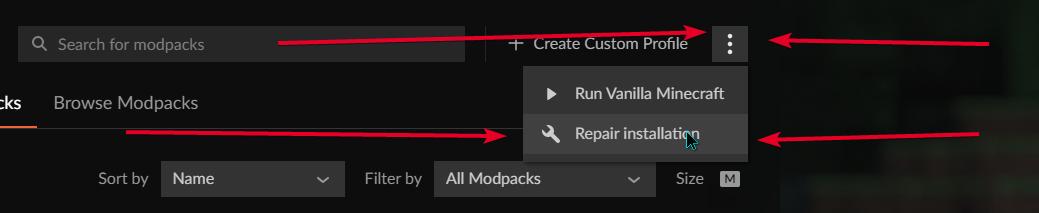
- Click on the Minecraft Tab on the Left side of the CurseForge App.
- Click button next to the
Create Custom Profileoption. - Click

Repair Installationoption. - Play game.
NOTE: You will not lose any modpacks or worlds, These are saved in the Instances folder. DO NOT TOUCH THIS FOLDER OR YOU WILL LOSE EVERYTHING
sudden dragon
thx so much
 rain sun
Everytime I add the optifine file to my game, it crashes. I can take it out, and it works just fine, but I believe I do have the correct optifine and curseforge (G8 and 36.1.51). When I add in G8, it doesn't show on the profile's mod list, but if I add any other version, it does. I tried a newer version, but that's 1.17.1, and I'm playing 1.16.5
 last parcel
!mc-optifine
golden muskBOT
We do not offer support for Optifine!
If you have issues with Optifine, remove it. If you want further support try the discord found on their website.
https://www.optifine.net/home
Installing Optifine with modpacks on Curseforge:
- Right click the modpack icon, select
Open Folder. - Put the
Optifine.jarinto themodsfolder. - Now start the modpack.
 severe crest
can s0omeone help me? after i updated the modpack and the server this happens. its for every npc and for me. when i try to move, the screen glitches out.. https://youtu.be/eTKPMZ2CV9s

i dont know what causes that
the arms spin all the time
last parcel
betterfps probably
 fringe kernel
How to fix exit code 0 ?
last parcel
?mc-log
golden muskBOT
Sending logs for support.
- Right-click the modpack profile icon OR click the button in the modpack profile.
- Click
Open Folder. - Open the
logsfolder. - Drag and drop the FILE named
latestORdebuginto discord.
 glad violet
severe crest
can s0omeone help me? after i updated the modpack and the server this happens. i...
glad violet
severe crest
can s0omeone help me? after i updated the modpack and the server this happens. i...
i watched ur video now what is the mod name
let me look and i try to help
fringe kernel
last parcel
?mc-log
don't find it
last parcel
glad violet
let me look and i try to help
did you miss the part where they fixed this already?
glad violet
oW
 dawn phoenix
Hello! I am using CF on a Macbook Air. I was able to download and operate Buildcraft/IC2. I am attempting to add the Advanced Solar Panels mod, but after downloading it's not showing up in the library. Would anyone be willing to lend an assist?
last parcel
can you open the mods folder and see if the mod is there
severe crest
glad violet
i watched ur video now what is the mod name
the mod that caused that was betterfps
dawn phoenix
I played with moving it around to different folders and haven’t been successful
Will put it back in mods and see what happens
last parcel
did you install the mod with the app?
dawn phoenix
I'm re-downloading right now
I don't think the mod is installed in the app
But I just pulled it from the website
last parcel
use the app, dont manually install mods
dawn phoenix
I found that I can only download modpacks from CF, unless there's something I'm missing
I'm trying to download an individual mod
golden muskBOT
How to install mods in CurseForge App.
- Click
+ Create Custom Profile - Name it, select the required Minecraft version, select the Forge version (usually the highest number), click
Create. - Click the profile icon.
- Click
Add More Content - Search and install the desired mods.
- Start the game!
How to install mods not on CurseForge.
- Right click the profile picture or Open the profile and click the Icon next to the play button.
- Click
Open Folder. - Drag the mod(s) into the
modsfolder. (Note: Some mods will require others, to run. Make sure to read the instructions for the mod!) - Start the game!
 last parcel
?mc-installmods
dawn phoenix
Oh hell yeah. Thank you!
last parcel
?mc-modifypack to add mods to packs, but there is a good chance of breaking the pack doing this
golden muskBOT
How to add/remove mods in a modpack.
- Click on the picture of the modpack.
- Click the

Add More Contentbutton, IF this button is not there, see below before continuing. - Find the Mods, Resource Packs or Maps you wish to Install and click
Installon them. - Wait for all the required mods to be downloaded.
- Start the modpack.
How to Enable/Disable content management for modpacks.
- Click on the picture of the modpack.
- Click on the button next to the
Playbutton. - Click on

Profile Options. - Check the
Allow content management for this profileoption if you want to edit the content of the modpack, uncheck it to disable.
NOTE: The Allow content management for this profile option is what allows you to Delete, Disable, Update or Install any Mods, Resource Packs or Maps managed by CurseForge. It must be on to modify any of them! (Currently)
dawn phoenix
So strange. I found the mod on the website but it doesn't show up in CF when I use the "Add Content" feature
last parcel
then you didnt make a profile that the mod works on
dawn phoenix
Ohhh so it has to be the right version?
last parcel
yup
dawn phoenix
Thank you!
So Advanced Solar Panels works on version 1.12.2 while Buildcraft +IC2 works on 1.7.10, so they can never work together?
last parcel
need to look at the mod page to see what it works for
 distant locust
ehm, help please?
 golden muskBOT
Sending logs for support.
- Right-click the modpack profile icon OR click the button in the modpack profile.
- Click
Open Folder. - Open the
logsfolder. - Drag and drop the FILE named
latestORdebuginto discord.
distant locust
this?
last parcel
dont see any issue here
distant locust
is drag the wrong file?
last parcel
the file is correct, but has no useful info
distant locust
so u don't know what's the problem?
distant locust
the all folder?
last parcel
distant locust
yes and what?
last parcel
last parcel
make it crash again, then send the log
.
 mint cipher
dose anyone know how to setup shadders
last parcel
!mc-optifine then install the shaders
golden muskBOT
We do not offer support for Optifine!
If you have issues with Optifine, remove it. If you want further support try the discord found on their website.
https://www.optifine.net/home
Installing Optifine with modpacks on Curseforge:
- Right click the modpack icon, select
Open Folder. - Put the
Optifine.jarinto themodsfolder. - Now start the modpack.

 sacred hazel
everytime i respawn in a modpack it lags out and sometimes crashes
same with teleporting
and using some options
like chunks
and modded minecraft is one of my favorite things to play
golden muskBOT
Sending logs for support.
- Right-click the modpack profile icon OR click the button in the modpack profile.
- Click
Open Folder. - Open the
logsfolder. - Drag and drop the FILE named
latestORdebuginto discord.
 long nacelle
mint cipher
the downloads?
long nacelle
mint cipher
the downloads?
yes
sacred hazel
wtf is the latest OR debug file
long nacelle
latest.log or debug.log
sacred hazel
i just have the latest log
long nacelle
then post it
sacred hazel
mk
like every single time i die by a mob it takes like 2 to 10 minutes to respawn
or it just crashes
long nacelle
i don't know whats wrong maybe somebody who's more experienced can help
sacred hazel
my friend has the best computer ever and can run everything and im so jealous but he doesn't even like modded minecraft
so might be my computer because his is fine with it
 weary notch
Does anyone know if Traverse biomes appear when Terraforged is loaded as the worldtype? Because I don't think I've found any yet
long nacelle
weary notch
Does anyone know if Traverse biomes appear when Terraforged is loaded as the wor...
- "Will this work with other mods' biomes?"
Yes, it should do. When you select 'TerraForged' as the world type, it will look for all available
overworld biomes (vanilla & modded) and incorporate them into world-gen as best as possible.
taken from the cf page of terraforged, maybe ask on the terraforged dc for more info
 young tree
Could someone please help me understand what is causing the crash?
It happens when the world load reaches around 100%
smoky ibex
What does this mean?
The game crashed whilst rendering ingredient
Error: java.lang.IllegalStateException: Not building!
Exit Code: -1
golden muskBOT
Sending logs for support.
- Right-click the modpack profile icon OR click the button in the modpack profile.
- Click
Open Folder. - Open the
logsfolder. - Drag and drop the FILE named
latestORdebuginto discord.
acoustic idol
smoky ibex
What does this mean?
!mc-logs
smoky ibex
 wraith rivet
im not to sure where to put this Forge 1.12 JAR Universal File Won't Open could ask for some help i tired looking it up and nothing has worked waring and i very dumb and alpolgise in advance if am frustraighting
pine rapids
Open CMD(Windows) or a terminal (Unix) and type java -version, what does it say?
 prime dirge
@waxen pine here you go sir
Error Code 0, no errors, idk whats happening here
Modpack I made
golden muskBOT
How to get the launcher log
- Right click a profile.
- Select
Open Folder - Go back two folders.
- Open the
Installfolder. - Drag the
launcher_log.txtinto discord.
prime dirge
ah.
wraith rivet
pine rapids
Open CMD(Windows) or a terminal (Unix) and type ``java -version``, what does it ...
 pine rapids
prime dirge
ah.
pine rapids
prime dirge
ah.
Hopefully the launcher's log has more info
pine rapids
wraith rivet
Yeah 1.12.2 only works with Java 8
prime dirge
here ya go
pine rapids
Did you restart your launcher between the crash and sending this file?
prime dirge
Um
yes
if by restarting you mean clicking launch again after closing it
yes
from CurseForge
pine rapids
Recreate the crash and send the log again, restarting the launcher creates a new launcher log, wiping the old one
pine rapids
pine rapids
Yeah 1.12.2 only works with Java 8
I recommend Eclipse Adoptium: https://adoptium.net/?variant=openjdk8&jvmVariant=hotspot
wraith rivet
pine rapids
Hopefully the launcher's log has more info
sorry to continue bothering you but could you send me a link or some instrutions i read to do this online but i must of done it wrong
oh wait
pine rapids
I think I posted the link while you were typing that xD
 pine rapids
prime dirge
pine rapids
prime dirge
Why the hell is this not in the regular log? I need to look at Forge's logging this weekend
2021-10-26 17:50:46,535 main WARN Error parsing URI C:\Users\jojos\curseforge\minecraft\Install\assets\log_configs\client-1.12.xml
Init EnhancedVisuals coremods ...
Exception in thread "main" java.lang.IllegalArgumentException: dynamic-surroundings: Invalid module name: 'dynamic-surroundings' is not a Java identifier
    at java.base/jdk.internal.module.Checks.requireModuleName(Checks.java:59)
    at java.base/java.lang.module.ModuleDescriptor$Builder.<init>(ModuleDescriptor.java:1523)
    at java.base/java.lang.module.ModuleDescriptor.newAutomaticModule(ModuleDescriptor.java:2405)
    at MC-BOOTSTRAP/fmlloader@1.17.1-37.0.103/net.minecraftforge.fml.loading.moddiscovery.ModJarMetadata.descriptor(ModJarMetadata.java:72)
    at cpw.mods.securejarhandler@0.9.54/cpw.mods.jarhandling.impl.Jar.computeDescriptor(Jar.java:47)
    at cpw.mods.securejarhandler@0.9.54/cpw.mods.cl.JarModuleFinder$JarModuleReference.<init>(JarModuleFinder.java:50)
    at cpw.mods.securejarhandler@0.9.54/cpw.mods.cl.JarModuleFinder.lambda$new$0(JarModuleFinder.java:28)
    at java.base/java.util.stream.ReferencePipeline$3$1.accept(ReferencePipeline.java:197)
    at java.base/java.util.Spliterators$ArraySpliterator.forEachRemaining(Spliterators.java:948)
    at java.base/java.util.stream.AbstractPipeline.copyInto(AbstractPipeline.java:484)
    at java.base/java.util.stream.AbstractPipeline.wrapAndCopyInto(AbstractPipeline.java:474)
    at java.base/java.util.stream.ReduceOps$ReduceOp.evaluateSequential(ReduceOps.java:913)
    at java.base/java.util.stream.AbstractPipeline.evaluate(AbstractPipeline.java:234)
    at java.base/java.util.stream.ReferencePipeline.collect(ReferencePipeline.java:682)
    at cpw.mods.securejarhandler@0.9.54/cpw.mods.cl.JarModuleFinder.<init>(JarModuleFinder.java:29)
    at cpw.mods.securejarhandler@0.9.54/cpw.mods.cl.JarModuleFinder.of(JarModuleFinder.java:43)
    at MC-BOOTSTRAP/cpw.mods.modlauncher@9.0.7/cpw.mods.modlauncher.ModuleLayerHandler.buildLayer(ModuleLayerHandler.java:70)
    at MC-BOOTSTRAP/cpw.mods.modlauncher@9.0.7/cpw.mods.modlauncher.TransformationServicesHandler.buildTransformingClassLoader(TransformationServicesHandler.java:61)
    at MC-BOOTSTRAP/cpw.mods.modlauncher@9.0.7/cpw.mods.modlauncher.Launcher.run(Launcher.java:104)
    at MC-BOOTSTRAP/cpw.mods.modlauncher@9.0.7/cpw.mods.modlauncher.Launcher.main(Launcher.java:77)
    at MC-BOOTSTRAP/cpw.mods.modlauncher@9.0.7/cpw.mods.modlauncher.BootstrapLaunchConsumer.accept(BootstrapLaunchConsumer.java:26)
    at MC-BOOTSTRAP/cpw.mods.modlauncher@9.0.7/cpw.mods.modlauncher.BootstrapLaunchConsumer.accept(BootstrapLaunchConsumer.java:23)
at cpw.mods.bootstraplauncher@0.1.17/cpw.mods.bootstraplauncher.BootstrapLauncher.main(BootstrapLauncher.java:90)```Have you installed this before?
wraith rivet
ye but i think did it wrong
pine rapids
prime dirge
so get rid of Dynamic surroundings?
I guess, it might be for a different version of Minecraft
 gritty knot
the game does not load or does not respond
 pine rapids
wraith rivet
ye but i think did it wrong
pine rapids
wraith rivet
ye but i think did it wrong
Ok, then you'll want to click repair
wraith rivet
pine rapids
Ok, then you'll want to click repair
did am anything else i got to do ?
pine rapids
Yes, and this is something you'll have to do every time if you keep newer Java versions installed
You need to invoke the Java 8 exe manually, rather than just saying "java" and letting your PC decide which one
wraith rivet
sorry to ask but how do i do that ?
pine rapids
You'll likely want to make a start.bat file and use that to start the server
wraith rivet
sorry again but how do i do that ?
pine rapids
Make a new text file and call it something ending with .bat (make sure the .bat replaces the .txt)
The contents of it should be something like:
"C:\Program Files\Eclipse Foundation\jdk-8.0.302.8-hotspot\bin\java.exe" -jar forge-1.12.2-X.XX.XXX-universal.jar
PAUSE```Another log? Sure
wraith rivet
i just copy paste that right ?
pine rapids
prime dirge
OH MY GOD
I thought this wouldn't happen in the wild again
So amethyst arrows and bigger caves are both developed by idiots who left the example code in their mods... and those two copies of the example code cannot exist in the same session at the same time
last parcel
Lmao..
pine rapids
(Checks to see if Yamza made one of them...)
 waxen pine
Wow. Wow. Lol
last parcel
Save you the trip, I don't make mods for this reason
prime dirge
so Ill just eemove amethyst arrows
wraith rivet
pine rapids
The contents of it should be something like:
```bat
"C:\Program Files\Eclipse Fo...
hay i made a bat file and copy pasted the text
pine rapids
That text won't work for you without some editing
 lethal raft
Having issues with the bad to the bone mod, need help finding out why it's failing.
 waxen pine
If you are making a new modpack - start slow. Only add mods one or two at a time to see where problems are
prime dirge
thats my issue lmao
wraith rivet
pine rapids
That text won't work for you without some editing
what i got to edit ? sorry if i am being frustating
prime dirge
I mean I can always just disable them right
pine rapids
wraith rivet
what i got to edit ? sorry if i am being frustating
The .bat file, you need to edit it so it points to the java.exe on your PC and the forge universal jar on your PC
wraith rivet
pine rapids
The .bat file, you need to edit it so it points to the java.exe on your PC and t...
im sorry but what dose that mean ?
pine rapids
lethal raft
Having issues with the bad to the bone mod, need help finding out why it's faili...
Is Bad to the Bone a mod or a modpack?
lethal raft
A mod
prime dirge
It works thank you sm
pine rapids
wraith rivet
im sorry but what dose that mean ?
Please stop pinging me with every reply, and idk how I could be much clearer
wraith rivet
ok thank you and sorry
pine rapids
lethal raft
A mod
There's a lot more than bad to the bone here, and I'm seeing several errors and warnings that aren't related to it
wraith rivet
i do not understand what i am doing wrong any help woud be apprciated
 pine rapids
That is not the full name of the jar file... and at this point I blame freaking Microsoft for deciding to hide file extensions by default
lethal raft
It launches & does not crash, just does not start with bad to the bone added
wraith rivet
how do i find out the full name ?
waxen pine
Consider downloading and looking inside the server packs of some existing packs with available files - to look at their start.bat files
pine rapids
wraith rivet
how do i find out the full name ?
Go into Explorer, View, and check this box

 pine rapids
Re-read what I sent, you're missing something
wraith rivet
re read re copy pasted it im sorry if im missing something really obvious im dylexic and struggle to read long line of text
 pine rapids
You need -jar to come before the jar filename
wraith rivet
ah ok like this ?
 pine rapids
Yes
wraith rivet
is there any thing else im doing wrong ?
 pine rapids
Is that where your Java is located?
wraith rivet
like the java thing i download at the start of this ?
pine rapids
Where it installed to
wraith rivet
here i think
 pine rapids
No... JAVA_HOME is for development, not running
wraith rivet
ah sorry so what am i doing wrong here ?
pine rapids
Look in C:\Program Files\Eclipse Foundation for where Java installed to
fringe vector
can you help me out with this? it keeps crashing when i load it up
pine rapids
Problem with Cinderscapes
wraith rivet
 pine rapids
That's not how you browse folders...
 pine rapids
Do you know how to use File Explorer?
wraith rivet
i type here ?
 pine rapids
Do you know how to navigate to your C drive?
pine rapids
I feel like this is something you should look up, as we are starting to get into basic "How to use your PC" stuff
wraith rivet
ok
pine rapids
Where Java was installed, look for a similar location to the one I gave in the example
wraith rivet
do you mean the exsample you gave for cheking the box erler ?
also i see no java file in the c drive
 rotund dome
HELP!
I am new and was recommended curseforge by a friend
i just installed it
but...
if someone could help me, that would be great [=
i have worked through the trouble shooting guide but it it is still not working
 pine rapids
wraith rivet
do you mean the exsample you gave for cheking the box erler ?
pine rapids
wraith rivet
do you mean the exsample you gave for cheking the box erler ?
No... the example bat file I gave you included the location of Java 8 on MY PC...
wraith rivet
#👽︱game-support message sorry do you mean this
pine rapids
pine rapids
The contents of it should be something like:
```bat
"C:\Program Files\Eclipse Fo...
.
wraith rivet
wait thats what im looking for i thought i made that erler ?
pine rapids
The first part of it is where Java 8 is on my PC, I gave that as an example, I'm telling you to replace it with where Java 8 is on YOUR PC (as we both installed Adoptium, it will be in a similar but not identical place)
wraith rivet
got it so im looking for java 8 and replaceing with this
 pine rapids
I have no idea what you're talking about now...
 pine rapids
No
wraith rivet
sorry i thought that was java 8
pine rapids
That's the INSTALLER for Java 8
waxen pine
ah fair enough
wraith rivet
so not this ?
 pine rapids
Well if you have Java 8 there then it won't make much difference
wraith rivet
so i need to move from here to somewhere else ?
pine rapids
No... at this point just any Java 8 will do
sacred hazel
i installed crundee craft and removed a couple of big mods so it wouldn't be as big and i wouldn't crash so much but it keeps crashing because of the removed mods and is giving me this crash error
idk how to fix it so i can play with the mods removed
pine rapids
Gratz... you removed a mod that another mod depended on...
wraith rivet
ok so what do i do from here ?
sacred hazel
okay one seconds let me try something
pine rapids
spazz, please try to do things for yourself. You've been given so much information already
wraith rivet
cant get forge universal to open
sacred hazel
what
wraith rivet
it wont open
pine rapids
That's nothing to do with their issue
pine rapids
Their issue is that they don't know how to find where their Java 8 java.exe is after having been given an example and finding their Java installation....
wraith rivet
wait i thought i did find it ?
 pine rapids
You found one that wasn't the one I was trying to lead you to...
"idk how, but you used the wrong formula and got the right answer"
wraith rivet
im confused is this what im looling for ?
 pine rapids
I was trying to lead you to a different one but that one should work
wraith rivet
oh grate so whats the next step ?
pine rapids
find java.exe in it and get the full path to that java.exe
wraith rivet
do i go in lib ?
pine rapids
no, bin
pine rapids
?
wraith rivet
im in bin not sure where to go next i thought it might be sever
pine rapids
java.exe is in bin...
pine rapids
You get its path
It's location
and use it in your batch file to replace the example path I gave
wraith rivet
this right ?
 pine rapids
You'll have to type out the end of it to include the java.exe but yes
wraith rivet
all good ?
 wraith rivet
"C:\Program Files\Eclipse Foundation\jdk-8.0.302.8-hotspot\bin\java.exe" -jar forge-1.12.2-X.XX.XXX-universal.jar
PAUSE what part ?
pine rapids
wraith rivet
"C:\Program Files\Eclipse Foundation\jdk-8.0.302.8-hotspot\bin\java.exe" -jar fo...
Please take a moment to think about it and un-learn your helplessness
wraith rivet
"C:\Program Files\Eclipse Foundation\jdk-8.0.302.8-hotspot\bin\java.exe"C:\Program Files\Java\jre1.8.0_311\bin this right ?
pine rapids
No
waxen pine
resists the urge to just post the line
wraith rivet
i have littery no idea where to put this i am greatful for your patienec and i aplogise for being diffcualt its 5.46 in the morning could please tell me where to paste it
pine rapids
I really thought this would be obvious... replace my
C:\Program Files\Eclipse Foundation\jdk-8.0.302.8-hotspot\bin\java.exe
with your
C:\Program Files\Java\jre1.8.0_311\bin\java.exe
wraith rivet
have i done it right ?
 pine rapids
Needs quotes around it because it contains spaces, and you need to correct the jar name
 cursive terrace
does G1HeapRegionSize affect chunk loading on servers at all as i have mine set to 8m currently
pine rapids
That's a ram/GC setting, it'll affect everything
wraith rivet
quotes do you mean speach marks ?
pine rapids
"these"
cursive terrace
pine rapids
That's a ram/GC setting, it'll affect everything
should I increase it then?
wraith rivet
ye speach marks
waxen pine
the regular G1 region size is fine
wraith rivet
C:\Program Files"Java\jre1.8.0_311\bin\java.exe" -jar forge-1.12.2-14.23.2855-universal.jar
PAUSE
is this corecrt ?
waxen pine
"C:\Program Files\Java\jre1.8.0_311\bin\java.exe" -Xmx5G -Xms5G -jar forge-1.12.2-14.23.2855-universal.jar
PAUSE
give it some memory allocation 😉
wraith rivet
thanks how do i do that ?
waxen pine
see the added terms above (Xmx and Xms)
 wraith rivet
forge universal still wont open ?
 sage pier
Is it on the desktop then?
You have to run that command at the same place as you have that file
wraith rivet
like move the bat file ?
pine rapids
That would do it, I would also recommend moving the server to its own folder, not just loose on your desktop
wraith rivet
like this ?
 severe crest
hey guys. shouldnt there be the green crafting receipe book? im on 1.12.2
 wild jewel
Isn't that a newer versions that added that?
severe crest
i see people in forums and on youtube that have that and are on 1.12
i can give it to me with a command and "use it" abut it still wont appear
wild jewel
Then a mod might have removed it 🤷♂️
severe crest
omg im so blind
i found a mod in ym mod folder taht is litterly called "no recipe book"
wild jewel
I have a very small 🤏 suspicion that that is the mod that removed it 😛
severe crest
yeee me to but i rly dont know why
wild jewel
Did you make the modpack?
severe crest
nope its the pokeehan craft modpack by kehaan
wild jewel
Then the dev of that decided it was not needed, as you have JEI or NEI already as well
severe crest
ye but i was confused since i was pretty sure that it was in 1.12 😄
 wild jewel
!mc-logs
golden muskBOT
Sending logs for support.
- Right-click the modpack profile icon OR click the button in the modpack profile.
- Click
Open Folder. - Open the
logsfolder. - Drag and drop the FILE named
latestORdebuginto discord.
 spiral ruin
wild jewel
spiral ruin
wild jewel
!mc-installfix
golden muskBOT
- Click on the Minecraft Tab on the Left side of the CurseForge App.
- Click button next to the
Create Custom Profileoption. - Click
Repair Installationoption. - Play game.
NOTE: You will not lose any modpacks or worlds, These are saved in the Instances folder. DO NOT TOUCH THIS FOLDER OR YOU WILL LOSE EVERYTHING
spiral ruin
I'm trying thank you
I've been trying for a long time, this time it worked, thank you very much
 autumn agate
I am trying to download a terraria world from curseforge website but it says cant open file i even tried with Zarchiver but it also don’t work :( what should i do?
my modpack keeps crashing when I launch it and idk whyy
wild jewel
autumn agate
my modpack keeps crashing when I launch it and idk whyy
!mc-logs
golden muskBOT
Sending logs for support.
- Right-click the modpack profile icon OR click the button in the modpack profile.
- Click
Open Folder. - Open the
logsfolder. - Drag and drop the FILE named
latestORdebuginto discord.
wild jewel
autumn agate
I am trying to download a terraria world from curseforge website but it says can...
Link please
autumn agate
wild jewel
Link please
Sorry i dont why but i cant paste or share the link so heres the video link the apk is in the description
autumn agate
wild jewel
Can open it just fine
:-: i guess it just Don't work for me
wild jewel
Try to download it again
autumn agate
wild jewel
Did you make this modpack?
autumn agate
mhm
wild jewel
Time to make a bot that deletes replies like that.
Is that a yes or no?
autumn agate
yes
wild jewel
autumn agate
there is no 1.12.2 version
wild jewel
Provide stuff you need
 void wagon
Hello, I have a question, in my modpack I have a problem with biomes.
In the F3 menu, the indicated biome is always the same ...
It is always marked "plains". Do you have a solution this is very important 😄
 hot lotus
the Monk Mod on MC, if I disable it, it won't corrupt my minecraft right?
wild jewel
Best to make a backup first.
Why do you want to disable it?
hot lotus
it's kinda too extreme for me, because I know you get to be like a God with the mod, but the speed and everything else is too extreme for me.
wild jewel
Did you make a world already?
hot lotus
yeah
wild jewel
Might corrupt the world, might not
hot lotus
but I should backup the world just in case
wild jewel
Yes
hot lotus
but where do I find the folder
wild jewel
Right click the profile, open folder
 sage pier
It's somewhere in that folder.
hot lotus
sage pier
It's somewhere in that folder.

As the saying goes "If you want something done, you have to do it yourself"
sage pier
This is not the place for memes. And yes, there's probably tons of information if you take the time to google for it. :D
According to some swift googling, there's a folder called "saves"
hot lotus
just done it
usually I stick with the saying I said but there is like to me a 50 50 percent chance of could go good or bad
hot lotus
young tree
Any idea why my game keeps crashing when I load a world?
Is it a new world or already created before the crash?
hot lotus
did you do anything before starting your minecraft
hot lotus
what are your pc specs
young tree
pretty good
hot lotus
what modpack you trying to run
young tree
a custom one
young tree
huh?
sage pier
Try removing optifine
sage pier
It usually makes things break, so test without it.
young tree
k
sage pier
And if it doesn't work without it, toss it back and try finding what else might be broken
hot lotus
Usually I tried making a custom modpack but that caused problems, it takes more then choosing mods
anyway, removing Optifine might fix it
young tree
Yeah maybe, but thats what i always do. Because shades, dynamic trees & BoP and Mekanism is essensielt to me
Essential
You want me to create a new world?
Oh boi it worked 😢
How do i find which mod that conflicts with optifne?
hot lotus
I think removing the Monk mod caused a slight problem with my walkspeed
but just to be sure gonna create a test world to know the difference
think I'll have to find another modpack, if lucky it would have my fav mods Mekanism ProjectE
young tree
You can use mine 😆
young tree
Oh why
Sweet i fixed it! I just had to remove Immersive Portals and update Optifne
Are you sure you dont want to try my beautiful modpack?
 dreamy delta
hello, I've made a modpack with about 120 mods and I cannot run it... any help would be appreciated!
 wild jewel
!mc-logs
golden muskBOT
Sending logs for support.
- Right-click the modpack profile icon OR click the button in the modpack profile.
- Click
Open Folder. - Open the
logsfolder. - Drag and drop the FILE named
latestORdebuginto discord.
 wild jewel
Remove optifine, try again
wild jewel
Optifine is known to break things, want to know the issue without it being in the way
dreamy delta
Still crashed
wild jewel
Then show the new log
dreamy delta
wild jewel
https://www.curseforge.com/minecraft/mc-mods/reliquary-v1-3
That mod is causing issues
dreamy delta
i dont have that mod
i cannot recall ever getting it
oh wait
nevermind i do have it
let me delete it and check 👍
wild jewel
No idea on that one
last parcel
try cofh
last parcel
remove all of it
last parcel
no, not exactly
but now there really is nothing to go off, you'll have to remove stuff until it works or install mods a few at a time and test.
dreamy delta
why is this so complicated
last parcel
welcome to the world of modding
last parcel
the actual reason though is..
literally any yahoo can make a mod and upload it, and it only takes one shitty developed or buggy mod to break it all
dreamy delta
makes sense
wait
earlier when i was looking for mods
on one of the mods it had a [1.12.2]
would that be a problem?
last parcel
could, also could not
dreamy delta
i deleted like 30 mods and still have the same error
my brother used to disable all mods and everytime it worked he would add another one, and everytime it didn't he would remove it
but ima just look for a pre-made pack from now on
👍
 pallid shore
hm
curseforge an exception occurred during a webclient request hm:d I can't load it
last parcel
!webclient
golden muskBOT
WebClient errors are from networking issues to your computer. You can try a few things to fix it:
- Restart the computer.
- Restart your router/modem.
- Try another internet source like a hotspot, wired connection or moving closer to the WiFi.
- Pause/Stop other things using the internet. (Streams, music, etc)
- If this still doesn't work, try again in an hour and hope your connection is stable.
wild jewel
Yeah, nobody knows what problem that was
wild jewel
pallid shore
idk:D
Then why do you reply?
pallid shore
ye\
last parcel
distant locust
i have the same problem of yesterday
Are you going to do what I asked you to do yesterday then?
distant locust
i have to send the log?
last parcel
yes, you need to send logs for help
distant locust
now it says that i have to revove some files from the C Disc?
 last parcel
ok then do that. you need 10gb+ of free space for curseforge to work
 astral inlet
Hey can someone help me
wild jewel
Not till you say with what
astral inlet
Im gettign the error "modding folder cannot be set on OneDrive" how do I fix this
wild jewel
!mc-path
golden muskBOT
Change your install path to the following:
For Windows: C:\CurseForge
-Go to C:\ drive. Make a new folder. Name it Curseforge.
For Mac: /Users/Shared/CurseForge
If Minecraft is not installed in CurseForge App:
- Click the
 in the top left.
 - Select Minecraft from the list of games.
- Select the
Advancedoption and pick the folder you just made. - Click
Continue.
If Minecraft is installed in CurseForge App:
- Click the
 in the bottom left.
 - Select the Minecraft tab.
- Click
Change. - Select the folder you just made.
:no_entry_sign: Minecraft Files should NOT be installed inside the following locations :no_entry_sign:
:no_entry_sign: .minecraft folder.
:no_entry_sign: OneDrive folders.
:no_entry_sign: Desktop folder.
:no_entry_sign: Drive roots I.E. Directly into the C:\ drive.
:no_entry_sign: iCloud enabled folders.
:no_entry_sign: or any other cloud saved folder.
:no_entry_sign: or folders with non-English characters in them.
If any of the above are in the path you need to change/move it!
pallid shore
hm...
wild jewel
pallid shore
hm...
Are you gonna say anything useful or do you keep spamming?
 wild jewel
!mc-logs
golden muskBOT
Sending logs for support.
- Right-click the modpack profile icon OR click the button in the modpack profile.
- Click
Open Folder. - Open the
logsfolder. - Drag and drop the FILE named
latestORdebuginto discord.
distant locust
last parcel
have you tried with another pack?
distant locust
yes
last parcel
and?
distant locust
it does the same problem
last parcel
?mc-path
golden muskBOT
Change your install path to the following:
For Windows: C:\CurseForge
-Go to C:\ drive. Make a new folder. Name it Curseforge.
For Mac: /Users/Shared/CurseForge
If Minecraft is not installed in CurseForge App:
- Click the in the top left.
- Select Minecraft from the list of games.
- Select the
Advancedoption and pick the folder you just made. - Click
Continue.
If Minecraft is installed in CurseForge App:
- Click the in the bottom left.
- Select the Minecraft tab.
- Click
Change. - Select the folder you just made.
:no_entry_sign: Minecraft Files should NOT be installed inside the following locations :no_entry_sign:
:no_entry_sign: .minecraft folder.
:no_entry_sign: OneDrive folders.
:no_entry_sign: Desktop folder.
:no_entry_sign: Drive roots I.E. Directly into the C:\ drive.
:no_entry_sign: iCloud enabled folders.
:no_entry_sign: or any other cloud saved folder.
:no_entry_sign: or folders with non-English characters in them.
If any of the above are in the path you need to change/move it!
 golden muskBOT
How to set Global Minecraft RAM value.
- Click the icon in the bottom left to open settings.
- Click the Minecraft tab.
- Scroll down.
- Slide slider to recommended ram range as seen below.

 tropic quarry
my minecraft launcher says its demo even tho i have bought the game looong time ago and migrated it like earlyer this year why and what can i do to make it not demo
last parcel
?mc-login
golden muskBOT
Minecraft Logins
CurseForge does not handle or touch the Minecraft Login.
You must own JAVA Edition
If you have a DEMO button instead of a PLAY button in the launcher you are logged into an account that does not own the game. CurseForge requires you to own the game to use it.
Follow the steps in the pictures below. If you bought Minecraft after October 2020 or you have transferred your account you will use a Microsoft account.
Otherwise you must use a Mojang account until you transfer it!
 tropic quarry
golden musk
tropic quarry
golden musk
thats what i have don but still not works
last parcel
then you havent done it
last parcel
as it says above, you either need to change the account or you dont own minecraft.
tropic quarry
down in the left conro it says og no! something went wrong, we couldnt connect to the mineraft services prøv igen/try again

u there @last parcel ?
last parcel
that's some issue with your connection then, nothing i can help you with
 gentle matrix
Hi I need some help with a modpack Im trying to create there is a bug in one of the mods I am not sure which mod though.
golden muskBOT
Sending logs for support.
- Right-click the modpack profile icon OR click the button in the modpack profile.
- Click
Open Folder. - Open the
logsfolder. - Drag and drop the FILE named
latestORdebuginto discord.
hot lotus
I've been trying to use a Modpack that I added Mekanism myself and not it's creator, but it kept crashing because of the mod I think, something to do with ID, can see why it wasn't added
last parcel
yes, adding mods to packs does tend to cause issues
gentle matrix
this?
hot lotus
no matter, I can still use ProjectE 😉
last parcel
gentle matrix
this?
remove optifine, then post another log of the issue
gentle matrix
k
hot lotus
just had an error message come up on the chat, I'll post an image of it
Maybe because I disabled The Monk mod, but meh, what harm done eah?
 gentle matrix
last parcel
gentle matrix
last parcel
untamed wilds
last parcel
hot lotus
Maybe because I disabled The Monk mod, but meh, what harm done eah?
this will break all the custom scripts in the pack
gentle matrix
should I make new singleplayer world to test or doesnt matter?
crashed again used same singleplayer world
hot lotus
had to repair the modpack I'm playing and re-enable The Monk, just gonna have to pretend its not there
still got ProjectE, but no Mekanism 😢
last parcel
gentle matrix
crashed again used same singleplayer world
better animals plus or ffxiimod. or both
gentle matrix
as if by magic wow thanks has not crashed at all best run so far lol really appreciate it
 hasty hollow
hello, whenever I go to open a modpack and play it, it says an unexpected error has occured is there anyway of fixing this?
 iron frost
Hello. If I download CurseForge and then close it after I'm done playing. I can't find it anywhere in my computer. I only have CurseForge Installer in my computer but not the app itself. I tried reinstalling the app many times and I kept having the samme issue. Could someone help me with it please?
wild jewel
iron frost
Hello. If I download CurseForge and then close it after I'm done playing. I can'...
!getcf Use the second link
golden muskBOT
Looking to install the CurseForge app?
<:windows:798410728188936222> Windows
Minimum Requirements:
- OS Version: 7 (64 bit), 8.1, 10, 11
- 64 bit Required.
- 350MB storage space.
- Microsoft .Net 4.8
- Intel/AMD quad-core CPU
- 8GB ram
Download: https://download.overwolf.com/install/Download?&PartnerId=4047
If you are having issues with the installer use the URL below to install Overwolf then go to the app store to download CurseForge.
https://content.overwolf.com/downloads/setup/latest/regular.html
<:mac:798410654418862130> Mac
Minimum Requirements:
- OS Version 10.14 or newer.
- 64 bit Required.
Download: https://curseforge.overwolf.com/downloads/curseforge-latest.dmg
:penguin: Linux
Minimum Requirements:
Yes.
Download: :person_shrugging:
iron frost
wild jewel
!getcf Use the second link
It works now, thank you very much.
 dire iron
I am trying to get a Minecraft modpack to work , I have the ram needed and allocated and I have plenty of storage room. However every time I try to play it takes forever to load just for it to crash before I am able to do anything.
wild jewel
!mc-logs
golden muskBOT
Sending logs for support.
- Right-click the modpack profile icon OR click the button in the modpack profile.
- Click
Open Folder. - Open the
logsfolder. - Drag and drop the FILE named
latestORdebuginto discord.
dire iron
autumn agate
Quick question, what mod is the one that let you eat unique food for more health, I thought it was part of Pam's harvest or whatever. Then What the mod that let you see like when fruit from tree are ready for harvest. On top of that does Optifine make it so you cant see tooltips like what item is from what mod, etc?
weary notch
For anyone who's used both Yung's Better Caves and Orcinus's Caves, which is better? I've used Yung's for a long time now, and I kinda want to see newer stuff
 molten marlin
hello i have issue on my forge server , i reseted end dimension and after that there is no dragon or pedestal i found out that lot of peoples had the same issue 9 months ago yet i can't find any solution does anyone know how to fix it?

i also tryed reseting the dimension multiple times yet it just dosent work
waxen pine
You could make a save of all your files and seeing if your mods will all be cool with updating to the newest Forge for 1.16.5
There is some special compat mojo going on between .4 and .5 (mostly, maybe)
molten marlin
im using version 1.12.2 also how do i change forge version ?
ik how to change it for client idk about server tho
pine rapids
?mc-updatemodloader
golden muskBOT
You can update the mod loader within the same game version in the CurseForge app by following these steps!
- Click on the modpack profile you are working with.
- Click on the button next to the play button.
- Click on the Profile Options button.
- Select the mod loader version you want from the dropdown.
- Play!
If you need to update to a new game version, a new profile is required.
pine rapids
Oh for the server...
Well for that you would just install the new server version on top of the old server
autumn agate
@long nacellety
 delicate galleon

after moving some of my mod files around to identify a mod causing an issue, and moving them all back, curseforge only now recognizes 24 of the like 250 that there actually are, and won't let me export saying that they are not on curseforge (they are)
I've tried restarting curseforge, restarting my computer, etc
molten marlin
pine rapids
Well for that you would just install the new server version on top of the old se...
well my question is how exactly im gonna do that , i searched my folders yet i can't find anything about forge , well i did found forge.cfg but it says nothing about version etc.
im also kidna worried about loosing my world / playerdata etc i never updated forge in server before
pine rapids
molten marlin
well my question is how exactly im gonna do that , i searched my folders yet i c...
You just get the installer for the new version and when it asks for the install location you select the existing server
 coarse elm
delicate galleon
after moving some of my mod files around to identify a mod causing an issue, and...
coarse elm
delicate galleon
after moving some of my mod files around to identify a mod causing an issue, and...
You cant move files it breaks the apps ability to know they are from the site. You need to redownload all of them.
coarse elm
Not sure why you would be moving them anyway. Theres a on/off slider and when dealing with that many mods it's best to just make a copy of the pack to rip apart to debug.
delicate galleon
there's many reasons why people might move them, sometimes I don't want to click the off switch for every single one of the hundreds of mods instead of dragging half at a time into a separate folder to narrow down which mod is causing some crash, and sometimes downloading mod files from the website and dragging them in is better since the search bar in the app is very unreliable and excludes results that the website would show, and whatever version you're on such as 1.16.5, you cannot even see mods that are on 1.16.4 and 1.16.3, which most of the time would be compatible with 1.16.5, and sometimes it will show you mods that are fabric, and install the latest version even if it is for fabric and not forge
coarse elm
It's never a good idea to debug your dev space like that. Make a copy and do destructive edits.
Downloading from the site and moving files causes the same problems as moving the file. You should always be using the app to download mods.
The search in the app works exactly as it should and better than the site. It only shows you mods to be marked working for the version you pick. If you cant find a mod then the dev doesnt say the mod works for that version, it doesnt matter if it loads or not.
If you get fabric mods 99.99% of the time the fabric mods are marked incorrectly. Again, a dev issue.
delicate galleon
my point is the app can't always download the mods you need, and the search is way worse than the site, it takes forever to load usually to tell you there's no results, the search is innacurate (e.g. what you're searching for may be way down the list) and you can't view comments and issues.
coarse elm
They work exactly the same... except the app is version and loader limited.
And as I said, the app only gives you things you should be using.
molten marlin
pine rapids
You just get the installer for the new version and when it asks for the install ...
nvm i found out that i need to go to level.dat and just remove how many times the dragon was killed but thats for the help
delicate galleon
coarse elm
They work exactly the same... except the app is version and loader limited.
well I'm telling you the app search doesn't always work right
coarse elm
And I'm telling you that your wrong.
 coarse elm
Remove "the" from the app search.
delicate galleon
I know but that's still an issue

and here the thing I actually searched for is not what initially shows up, and in some cases is way far down the list
delicate galleon
they are not exactly the same
only point is there are reasons why someone might want to drag n drop
coarse elm
And I just said that you shouldn't because it breaks exports.
 coarse elm
Theres no reason to be dragging files around.
coarse elm
Why would it search the description? Then you would get even more mods that dont match what you want.
delicate galleon
it's a feature the site can do the app can't
coarse elm
🙄
delicate galleon
there could be a slider for searching description, and maybe also a slider for exact or fuzzy searching
coarse elm
Also that's the summary, not the description.
delicate galleon
yes the summary
but it's like I search "better weather" just now and it's the 17th thing on the list, I do it on the site and its at the top
coarse elm
I already explained how that works.
It searches each word.
delicate galleon
but it is an issue
Oh ya, and sometimes with a version of a mod that’s not updated, it’s included as a jar file in the export.
But that was probably because it was Better Witch Huts and they named the latest version same as the last one
molten marlin
pine rapids
That has nothing to do with updating a server
i never said the updating the server is the main issue i said the dragon and pedestal wont spawn someone else said i should update the forge then next issue started lol
 glass fjord
how does one fix this annoying issue? i have had this issue with a specific server, i have followed all the ways to try and fix it and nothing is working, the server tends to have higher MS/ping connection and ive reinstalled java, and nothing is working, does anyone have any ideas to how i could try to fix it?
 waxen pine
Tried adding a mod that increases timeouts? What MC version is it
glass fjord
1.16.5
 silent quail
Does anyone know how to fix this issue. I am getting it while trying to host a lan world on a modpack through curseforge. i can host lan world outside of curseforge but using a modpack in curse forge i get this issue please help. i have tried firewall permissions and restarting computers.
 waxen pine
silent quail
Does anyone know how to fix this issue. I am getting it while trying to host a l...
waxen pine
silent quail
Does anyone know how to fix this issue. I am getting it while trying to host a l...
If LAN actually does work in modded then it's akin to winning the lottery
waxen pine
glass fjord
1.16.5
Try adding the mod "connectivity" server side (or both)
silent quail
Ok
waxen pine
Running a server pack is the reliable way to play multiplayer modded
glass fjord
ill try it
glass fjord
waxen pine
Try adding the mod "connectivity" server side (or both)
does the server also have to have it? i dont own the server
still not working\
whenever i join the server it does encrpting longer than other servers
silent quail
But I am able to host a modpack directly from mojangs launcher just fine but if i go through Curseforge i have issues? is curseforge just like that?
waxen pine
glass fjord
whenever i join the server it does encrpting longer than other servers
Can you post the latest.log of the server?
glass fjord
the debug.log?
waxen pine
latest.log
glass fjord
i dont own the server so i cant do anything with it
waxen pine
silent quail
But I am able to host a modpack directly from mojangs launcher just fine but if ...
Vanilla is one thing - modded is essentially a different game that is highly unoprltimized
Then that's an issue
glass fjord
server owner is frefreshing the server to see if that helps
waxen pine
Looking at the last few things a server spits out may bring clues - kind of last ditch thing.
glass fjord
the ms for the server was really high, so i feel like thats the issue
waxen pine
Probably. Increasing the vanilla default timeouts (via mods) is about all that can be done if both sides are being run adequately and the connectivity can't be changed/helped
glass fjord
nothing helps with this issue
silent quail
I figured out a solution. By hosting the modpack out of curseforge it works.
 rare granite
Been trying to install the insanecraft mod in Minecraft Java, but when I try to launch Minecraft with the mod installed, it won't allow me to log into Minecraft with my account, only option is to play demo. When I run in demo mode, it fails to launch (ERROR Game Crashed. An unexpected issue occured. Exit code:0) If I remove the mod, Minecraft java runs fine and I can log in. Anyone know how to resolved this?
 simple blaze
why did my singleplayer not save
simple blaze
anyway to get optifine with better minecraft
waxen pine
!mc-optifine
golden muskBOT
We do not offer support for Optifine!
If you have issues with Optifine, remove it. If you want further support try the discord found on their website.
https://www.optifine.net/home
Installing Optifine with modpacks on Curseforge:
- Right click the modpack icon, select
Open Folder. - Put the
Optifine.jarinto themodsfolder. - Now start the modpack.
waxen pine
need to obtain it from their website - i'd only use it if you really want shaders
simple blaze
yes that and torch in shield hand
wild jewel
Install the mod JEID
 zinc kettle
allright, THANKYOU!
 potent crag
I know windows 11 isnt officially supported, but i keep disconnecting and ive tried egit everything i know how to try and am at a dead end, i cant play modded on a server with my friends. It is happening frequently and wont stop.
waxen pine
if you get logged into a world and frequent disconnections happen it's usually due to poor internet connectivity to the server. there are mods that can increase the standard timeout system for connections - would need to be on server also. may or may not help
potent crag
i get about 56ms ping to the server
i get about 80ms ping to some of my vanilla bungee network servers but nothing disconnects like that
waxen pine
huh k. have you looked at logs to see if anything useful is showing up?
potent crag
nothing really is
i get this error

we've tried multiple modpacks
even vanilla does just fine
this is a forge issue
wild jewel
Then talk to forge?
potent crag
well what im saying is idk what the issue is
'which is why i come to the game-support channel for help?
wild jewel
Then show your log please, and the server one as well
wild jewel
weary notch
Installed Magnesium (a Sodium port for Forge) and I keep getting this
!projectissue
golden muskBOT
Please visit the project page for the content you posted about and look for a way to contact the developer.
Somewhere on the page there is usually a method of contact. Look for one of the following things:
Issuestab like the image below.- Discord link.
- Twitter link.
- Comments section below the project.
If no contact method exists you will either have to remove the project or find a solution on your own.
 wild jewel
potent crag
im not used to showing lgos for a modded server
wild jewel
potent crag
im not used to showing lgos for a modded server
Try a forge server without mods, you have a lot of errors in that file.
Might also just want to take a nap first if that time is your current time
potent crag
no
yes and no
yes i test, no nap, sleep is for weak
server log incoming
server log
wild jewel
That is with mods, asked for without
potent crag
yeah you also asked for the server logs for the modded server earlier
im working on the second request. patience is a virtue
wild jewel
potent crag
Then what is this from?
potent crag
client side
wild jewel
That is not a full log
wild jewel
No client starts with connecting to a server though
potent crag
then which log do you want
it is legit latest.log from my logs folder
this is 2021-10-28 log
for client side on the modpack, launched from curseforge
waxen pine
forge is not curseforge.
wild jewel
#👽︱game-support message
This is how they normally look
potent crag
then can you show me where to find it
wild jewel
!mc-logs
golden muskBOT
Sending logs for support.
- Right-click the modpack profile icon OR click the button in the modpack profile.
- Click
Open Folder. - Open the
logsfolder. - Drag and drop the FILE named
latestORdebuginto discord.
potent crag
thats the only 2 logs in my stoneblock minecraft folder
do you wish to screenshare?
cus thats where im getting it
the pack is launched through curseforge, that's where im getting it from, is this not understood?

 wild jewel
I just don't get why there is no sign of any mod loading in that file, no forge loading at all, the first line is the client connecting to a server
potent crag
dont look at me, im the guy trying to get help lol
pine rapids
Spot the diff?
 potent crag
it also appears to be a client loading issue anyway
potent crag
pine rapids
Spot the diff?
yeah cus i posted both logs....
it is not referring to what i had just posted, scroll up a few.
pine rapids
Oh I see it now
potent crag
i promise im not on anything, im just trying to get help 😭
pine rapids
This looks like an issue with ingameinfoxml
potent crag
tried removing the mod nothing happened
 simple cape
I have a problem with my modpack, every time I try to launch it, it crashes directly. Here are the logs:
And here is the error:

What's strange is that the mod name in the line Module xxx reads more than one module named org.spongepowered.mixin changes every time I try to restart the game
simple cape
;-;
waxen pine
Dunno what is actually going on there but vaguer errors have been solved by:
?mc-installfix
golden muskBOT
- Click on the Minecraft Tab on the Left side of the CurseForge App.
- Click button next to the
Create Custom Profileoption. - Click
Repair Installationoption. - Play game.
NOTE: You will not lose any modpacks or worlds, These are saved in the Instances folder. DO NOT TOUCH THIS FOLDER OR YOU WILL LOSE EVERYTHING
simple cape
It doesn't work :/
waxen pine
Try a blank 1.17 forge profile.
simple cape
I find ! The error came from the mod MixinBootstrap
 normal stratus
Hey, can i somehow downland FTB revelations 3.5.0.? Is it gonna come to curseforge? The current newest verion i can find on there is 3.4.0. I need the newer one to join a server i wanna play on
golden muskBOT
We do not provide support for FTB Modpacks or the FTB App.
If you are looking to play FTB modpacks use the FTB launcher.
https://www.feed-the-beast.com/
Any Overwolf FTB launcher issues you have should be directed here:
https://github.com/FTBTeam/FTB-App/issues/426
wild jewel
!mc-ftb
autumn agate
Greetings.
I have made a modpack for Minecraft in curseforge containing 31 mods.
When I launch the modpack, I get this error:

and yet, I have searched my mod list multiple times and I do NOT have a mod called "idk".
wild jewel
How did you install the mods?
autumn agate
Through curseforge, I created a 1.17.1 forge modpack.
wild jewel
Only used the app?
autumn agate
Yes
I also have a version of forge on 1.16.5 with a ton of mods
but that shouldn't matter.
wild jewel
Please export the pack and drop here
autumn agate
Okay, one sec, let me launch Curseforge.
I will include the mods, config, and crash-reports
should I include something else?
wild jewel
Don't need the crash reports or configs
autumn agate
wild jewel
Can you send that last crash report?
wild jewel
Mod File: netherite_bow_mod.jar
Failure message: Mod idk requires minecraft 1.16.5
Currently, minecraft is 1.17.1
And please yell at the dev for me
autumn agate
knew it was that
lmao it was a shit mod with like 100 downloads i think
mf named it "idk"
LMFAO
wild jewel
Clearly he didn't test
potent crag
Oh host is trying to label my issue isp related, but that doesn’t explain how I can do any other internet service just fine
last parcel
Restart both client and server. Attempt to connect to the server. Send both client and server "latest" logs.
potent crag
I did
 true flower
what do i do if my modpacks is starting but if i join a world/server it crashes my game when i move a second?
last parcel
what do you mean "i did"? Where is it? I want you to do that now. Not before.
last parcel
true flower
what do i do if my modpacks is starting but if i join a world/server it crashes ...
?mc-log
golden muskBOT
Sending logs for support.
- Right-click the modpack profile icon OR click the button in the modpack profile.
- Click
Open Folder. - Open the
logsfolder. - Drag and drop the FILE named
latestORdebuginto discord.
true flower
i cant find the "logs folder"
last parcel
are you not using the curseforge app?
 last parcel
um its right there
true flower
last parcel
either a hardware issue, or journeymap. try a pc restart.
at net.techbrew.journeymap.Constants.isPressed(Constants.java:121)```i have this problem for a longer time now (restarting doesnt fix it)
last parcel
?projectissue
golden muskBOT
Please visit the project page for the content you posted about and look for a way to contact the developer.
Somewhere on the page there is usually a method of contact. Look for one of the following things:
Issuestab like the image below.- Discord link.
- Twitter link.
- Comments section below the project.
If no contact method exists you will either have to remove the project or find a solution on your own.
true flower
okay
and can you somehow turn off that you have to put in your acc data everytime you start the minecraft launcher in curseforge?
golden muskBOT
How to set Global Minecraft RAM value.
- Click the icon in the bottom left to open settings.
- Click the Minecraft tab.
- Scroll down.
- Slide slider to recommended ram range as seen below.
last parcel
try that first, then report it if more ram doesnt help
you dont have to put in account data more than once..?
golden muskBOT
Change your install path to the following:
For Windows: C:\CurseForge
-Go to C:\ drive. Make a new folder. Name it Curseforge.
For Mac: /Users/Shared/CurseForge
If Minecraft is not installed in CurseForge App:
- Click the in the top left.
- Select Minecraft from the list of games.
- Select the
Advancedoption and pick the folder you just made. - Click
Continue.
If Minecraft is installed in CurseForge App:
- Click the in the bottom left.
- Select the Minecraft tab.
- Click
Change. - Select the folder you just made.
:no_entry_sign: Minecraft Files should NOT be installed inside the following locations :no_entry_sign:
:no_entry_sign: .minecraft folder.
:no_entry_sign: OneDrive folders.
:no_entry_sign: Desktop folder.
:no_entry_sign: Drive roots I.E. Directly into the C:\ drive.
:no_entry_sign: iCloud enabled folders.
:no_entry_sign: or any other cloud saved folder.
:no_entry_sign: or folders with non-English characters in them.
If any of the above are in the path you need to change/move it!
 silver orchid
everytime i try launching up a modpack it takes 5 mins to launch'
last parcel
so what makes this an issue exactly?
 worldly ether
and is this the same modpack that "usually taken 30 seconds" ?
as you do know depending on the mods in a modpack it can take different lengths of time to load up right?
silver orchid
yea ofc but its still not loading
like its just not launching
and i used to be able to launch this modpack in like 30 seconds but now its just not launching
last parcel
you said it takes 5 minutes to launch, implying it launches after 5 minutes.
so does it launch, or not?
last parcel
?mc-log
golden muskBOT
Sending logs for support.
- Right-click the modpack profile icon OR click the button in the modpack profile.
- Click
Open Folder. - Open the
logsfolder. - Drag and drop the FILE named
latestORdebuginto discord.
silver orchid
last parcel
did you just open the launcher, or is it still launching?
last parcel
send the log after it sits there
silver orchid
i pressed play and nothing happend
last parcel
restart your computer and try again
last parcel
?mc-installfix
golden muskBOT
- Click on the Minecraft Tab on the Left side of the CurseForge App.
- Click button next to the
Create Custom Profileoption. - Click
Repair Installationoption. - Play game.
NOTE: You will not lose any modpacks or worlds, These are saved in the Instances folder. DO NOT TOUCH THIS FOLDER OR YOU WILL LOSE EVERYTHING
silver orchid
its launched
potent crag
last parcel
what do you mean "i did"? Where is it? I want you to do that now. Not before.
Bruh you don’t have to be a jerk
 gusty gull
hi i dont have enough ram how can i fix it
last parcel
potent crag
Bruh you don’t have to be a jerk
Reading your past conversation, it seems like you are the one coming here to be a jerk. I gave you instructions to follow to fix your issue and you didn't do it.
If you want your issue solved then drop the argumentative bs and lets get info please.
last parcel
gusty gull
hi i dont have enough ram how can i fix it
?mc-ram
golden muskBOT
How to set Global Minecraft RAM value.
- Click the icon in the bottom left to open settings.
- Click the Minecraft tab.
- Scroll down.
- Slide slider to recommended ram range as seen below.
gusty gull
last parcel
?mc-ram
i dont know i talked to my friend bc i want to play with mods and i cant start anymore and he said i dont have enough ram
last parcel
so follow the instructions
gusty gull
ok i try it
my english is very bad can you help me
can you dm me and show me i really dont understand it
last parcel
Google's free service instantly translates words, phrases, and web pages between English and over 100 other languages.
gusty gull
it dont worked
 golden muskBOT
Sending logs for support.
- Right-click the modpack profile icon OR click the button in the modpack profile.
- Click
Open Folder. - Open the
logsfolder. - Drag and drop the FILE named
latestORdebuginto discord.
 last parcel
wrong folder
gusty gull
ok wich folder
last parcel
step 3
last parcel
?mc-installfix
golden muskBOT
- Click on the Minecraft Tab on the Left side of the CurseForge App.
- Click button next to the
Create Custom Profileoption. - Click
Repair Installationoption. - Play game.
NOTE: You will not lose any modpacks or worlds, These are saved in the Instances folder. DO NOT TOUCH THIS FOLDER OR YOU WILL LOSE EVERYTHING
gusty gull
it dont work i dont know how to do it
long nacelle
where are you stuck i can translate for you if you need it
gusty gull
i dont know whats a Installation
last parcel
 simple blaze
?mc-optifine
golden muskBOT
We do not offer support for Optifine!
If you have issues with Optifine, remove it. If you want further support try the discord found on their website.
https://www.optifine.net/home
Installing Optifine with modpacks on Curseforge:
- Right click the modpack icon, select
Open Folder. - Put the
Optifine.jarinto themodsfolder. - Now start the modpack.
simple blaze
can i use texture packs
do i just drag to same place as always
or differnt for forge
last parcel
not diffrent
simple blaze
are there any mods that take the enchantment off an item and turn it into an enchantment book
 mighty yoke
no idea
long nacelle
simple blaze
are there any mods that take the enchantment off an item and turn it into an enc...
yes which game version do you use
simple blaze
long nacelle
yes which game version do you use
1.16.5
autumn agate
Does anyone know some good fps booster for forge?
waxen pine
autumn agate
Does anyone know some good fps booster for forge?
Refrigerators don't make cold, they remove heat. You mean performance optimization mods? :)
 autumn agate
waxen pine
Refrigerators don't make cold, they remove heat. You mean performance optimizati...
autumn agate
waxen pine
Refrigerators don't make cold, they remove heat. You mean performance optimizati...
yes 🙂
waxen pine
That's a list someone made
autumn agate
waxen pine
That's a list someone made
can you recommend one? 😄
waxen pine
What MC version
autumn agate
1.17.1
waxen pine
Ferrite core - idk what others have been ported to 1.17, as many modders waiting until 1.18
Be sure your in-game vsync is set to off
 rose hazel
can I add base metals to the Mustard Virus modpack? i really wanted to get a platinum weapon
autumn agate
waxen pine
Be sure your in-game vsync is set to off
yes
autumn agate
waxen pine
Ferrite core - idk what others have been ported to 1.17, as many modders waiting...
thanks 🙂
 misty tendon
can someone help me? My modpack crashes shortly after starting
acoustic idol
misty tendon
can someone help me? My modpack crashes shortly after starting
!mc-logs
golden muskBOT
Sending logs for support.
- Right-click the modpack profile icon OR click the button in the modpack profile.
- Click
Open Folder. - Open the
logsfolder. - Drag and drop the FILE named
latestORdebuginto discord.
misty tendon
i think this is the right log
acoustic idol
Nope, one called latest from the logs folder
acoustic idol
misty tendon
i think this is the right log
Did you make this pack or download it?
misty tendon
i did it own my own
acoustic idol
Are you using the Curseforge app to install the mods?
acoustic idol
Use the app to instal your mods. Your missing dependancies for the mods you installed. App does it for you.
Mod quark requires autoreglib 1.6-48 or above
Mod valhelsia_structures requires valhelsia_core 16.0.10 or above
misty tendon
oh ok thank you
 stuck agate
can someone help me? when I click play on a modpack I open de minecraf launcher and after click in play on the launcher the greenbar charge and even like 10 minutes after doenst open anything
acoustic idol
Explain what your trying to do
acoustic idol
Did you make or download this pack?
acoustic idol
Was it a premade modpack?
 mint socket
added them back
yes it is premade
i just downloaded it and added mods to have some more fun
acoustic idol
Reinstall the pack, editing premade packs can/will cause issues. Your one your own to fix it if you do this as we have no idea what you changed. Easiest fix it to reinstall the mod pack and not change anything
acoustic idol
Better to just make your own pack then to edit someone elses
I didint make the pack, nor do I know what you did.
From the looks of it you added or removed something that broke the pack. No idea if the pack had the aether mods or not tho. Hence why we dont recommend doing this
mint socket
Aight
long nacelle
have you added a dimension mod?
 grim sun
When i launch a modpack it opens up the default launcher
 random moat
For what?
If it is minecraft that is normal for me if its minecraft just press play in the launcher and that works for me
grim sun
when i try to open it, it just crashes
stuck agate
grim sun
when i try to open it, it just crashes
it happens the same to me
stuck agate
how can i fix it?
 compact pond
hello/good evening when I want to install a modpack sa me mes sa (see attached image) can you help me because I can not play
 last parcel
compact pond
hello/good evening when I want to install a modpack sa me mes sa (see attached i...
last parcel
compact pond
hello/good evening when I want to install a modpack sa me mes sa (see attached i...
Pick one channel. #📛︱rules 4
 hidden light
howdy every modpack on curse forge is crashing and give me an "exit code 0" is there any news about that or is it something on my end?


 visual matrix
hidden light
howdy every modpack on curse forge is crashing and give me an "exit code 0" is t...
visual matrix
hidden light
howdy every modpack on curse forge is crashing and give me an "exit code 0" is t...
Exit code 0 just means a crash I believe, can you post your crash report?
hidden light
visual matrix
Exit code 0 just means a crash I believe, can you post your crash report?
yeah gimme a sec im not to good at this
 charred dome
I run a server and I've been having issues with ghost blocks. I don't think it's issues with the server performance, but the ping is pretty bad. I think it's being caused by a mod conflict
Here's a list of them:
for 1.12
 last parcel
could use curseforge to install it for you
 somber night
i need to install the server client
last parcel
oh, should ask forge then
somber night
oh ok
hidden light
visual matrix
Exit code 0 just means a crash I believe, can you post your crash report?
hey mate im so sorry but im at a loss would you kindly direct me to where I can find it my minds not in the game but ill do my best
 hallow otter
so
still asking, somehow a multi player sever my friend owns with a bunch of mods, i cant get into the game
its stuck on "loading world"
and there is no crash report
it just freezes
waxen pine
possibly not adequate memory/ram allocation - joining world can do that if you're a bit low
waxen pine
hard to say then. check your computer for extraneous extra programs running, maybe the world has grown such that joining handshake is that much larger
i have no idea how the handshake works lols
 modest shoal
Hey I'm having some trouble with Sky Factory 3. My saved world vanished and now I can't get into it. I looked in the save files in file explorer and it still shows it there, but it won't show up in game. I tried an old trick and started a new world under the same name and now it's stuck in loading world. Do you know what I should do?
waxen pine
this old world - were you playing it via the curseforge app before? are you loading SF3 via the same installed CF app now?
modest shoal
Yes. This world was started after downloading and installing the CF app. I started it last monday
waxen pine
right click the profile picture > open folder > go to 'saves' folder and look to see what's there
 gritty condor
