#👽︱game-support
1 messages · Page 158 of 1
 exotic venture
 junior light
[15:06:34] [Client thread/ERROR]: Exception reading C:\CurseForge\Instances\Enigmatica 2 Light - E2L\saves\New world1\level.dat
Looks like it is having trouble reading it
Do you close the game properly after playing?
Did you make changes to the modpack?
 clear moat
this did happen to me once and what i did was put it in a zip folder then unzip it and put it back in the saves and it worked, but it may not work for you because i have no idea how it worked
exotic venture
junior light
Do you close the game properly after playing?
Yes. Save and quit.
And modpack is clear
clear moat
how long do i have to wait for, and what is taking time? sorry i'm just not patient
 coarse elm
!status
 golden muskBOT
It is 10:29AM on Monday for CurseForge my dudes.
Project Moderation Time
Project/File moderation is done on;
Sunday, Monday, Tuesday, Wednesday, Thursday: 10AM - 6PM GMT+2
Friday, Saturday: No Moderation!
This process is First in, First out. Thus files submitted late in the work day may not be checked until the next work day.
New Projects or uploads requiring manual approval: 1-3 Working Days
Updates to approved projects not needing manual approval: 1 Hour
File sync to the Curseforge app may take up to 24 hours after approval.
junior light
clear moat
how long do i have to wait for, and what is taking time? sorry i'm just not pati...
 exotic venture
So... There is no way to repair this world?
 teal goblet
hi plis hlp me wat dnlod Astral Lucky Blocks
 wild jewel
Use full words please
Link the mod
 delicate venture
So I was making a modpack but i dont know why it only has like 90 mods and lags more than rl craft with shaders
if anyone can help me ill send the list of mods. I was really excited but i get like 2 fps and i have like an amazing pc
teal goblet
wat donlod Lucky Blocks
delicate venture
BRO SPEAK ENGLISH
teal goblet
1.8.9
delicate venture
wild jewel
teal goblet
wat danlod
Make a custom profile, add more content, go to the customization tab
And use full words!
teal goblet
plis go call
wild jewel
No
exotic venture
delicate venture
BRO SPEAK ENGLISH
Lmao
 fleet jewel
game starts up fine and all, lets me do everything main menu related, but when i try to start a world (be it new or pre existing) it gets stuck loading at either 0% or 1%, ive waited awhile to make sure its not something just taking a long time to load
 warm dome
I wanted to install Forge on my Minecraft launcher but had to reinstall Java and after that my Curseforge lost my Minecraft folders and doesn't see any modpacks that i have installed
wild jewel
!mc-path
golden muskBOT
Change your install path to the following:
For Windows: C:\CurseForge
-Go to C:\ drive. Make a new folder. Name it Curseforge.
For Mac: /Users/Shared/CurseForge
If Minecraft is not installed in CurseForge App:
- Click the
 in the top left.
 - Select Minecraft from the list of games.
- Select the
Advancedoption and pick the folder you just made. - Click
Continue.
If Minecraft is installed in CurseForge App:
- Click the
 in the bottom left.
 - Select the Minecraft tab.
- Click
Change. - Select the folder you just made.
:no_entry_sign: Minecraft Files should NOT be installed inside the following locations :no_entry_sign:
:no_entry_sign: .minecraft folder.
:no_entry_sign: OneDrive folders.
:no_entry_sign: Desktop folder.
:no_entry_sign: Drive roots I.E. Directly into the C:\ drive.
:no_entry_sign: iCloud enabled folders.
:no_entry_sign: or any other cloud saved folder.
If any of the above are in the path you need to change/move it!
 quiet swallow
hi

 last parcel
looks like your ram capped out
 potent shell
howwwww
likee ive got 16 gigs right
and it only requires like 3
becasue its light vanilla
and I put 5
so HOWWWWW I just dont get it :(
 last parcel
send log from server and client
potent shell
from server
from client
its got different times from each other
IDK why man I open server
last parcel
looks like you changed something and broke the item registry
[14:02:36] [Render thread/INFO]: Registry EntityType: Found a missing id from the world infernalexp:throwable_nether_brick
[14:02:36] [Render thread/INFO]: Registry SoundEvent: Found a missing id from the world infernalexp:block.quartz_glass.hit
[14:02:36] [Render thread/ERROR]: Unidentified mapping from registry minecraft:entity_type
    infernalexp:throwable_brick: 310
    infernalexp:throwable_nether_brick: 311

[14:02:36] [Render thread/ERROR]: Unidentified mapping from registry minecraft:sound_event
    infernalexp:block.quartz_glass.hit: 1431

[14:02:36] [Render thread/ERROR]: Missing registry data for network connection:
    minecraft:sound_event: infernalexp:block.quartz_glass.hit
    minecraft:entity_type: infernalexp:throwable_brick
minecraft:entity_type: infernalexp:throwable_nether_brick```so should I reinstall server? with client?
I have literally no Idea how since I didn't touch it
last parcel
could just try making a new world
potent shell
how does one do that?
last parcel
delete the current one, then start the server
potent shell
 last parcel
yes
 last parcel
you sure you have the same mods on both sides
potent shell
I literally copy and pasted over the mods from client
to my server
what does this game want from me I've done the server setup the EXACT same way as always
and this has NEVER happened before
last parcel
did you restart the client before trying to connect?
potent shell
yeah
last parcel
send logs again
last parcel
same error. could be an issue with infernalexp then
last parcel
yea
potent shell
thanks
last parcel
um actually
4:12:49] [Netty Client IO #0/INFO]: Client has mods that are missing on server: [infernalexp]
potent shell


wait what
the top one is client
bottom is my server
should I delete the version 6?
last parcel
yes
 last parcel
🤷♂️
last parcel
you're welcome
potent shell
have a good day.
 river bay
Hi guys , I can't download minecraft in curseforge app
wild jewel
river bay
Hi guys , I can't download minecraft in curseforge app
Any errors?
river bay
idk
wild jewel
So it does not download but there is nothing going wrong?
river bay
in fact every time i click on download minecraft then set up curseforge 's minecraft modding folder
and I get an error message that tells me modding folder cannot be set on onedrive
last parcel
?mc-path
golden muskBOT
Change your install path to the following:
For Windows: C:\CurseForge
-Go to C:\ drive. Make a new folder. Name it Curseforge.
For Mac: /Users/Shared/CurseForge
If Minecraft is not installed in CurseForge App:
- Click the in the top left.
- Select Minecraft from the list of games.
- Select the
Advancedoption and pick the folder you just made. - Click
Continue.
If Minecraft is installed in CurseForge App:
- Click the in the bottom left.
- Select the Minecraft tab.
- Click
Change. - Select the folder you just made.
:no_entry_sign: Minecraft Files should NOT be installed inside the following locations :no_entry_sign:
:no_entry_sign: .minecraft folder.
:no_entry_sign: OneDrive folders.
:no_entry_sign: Desktop folder.
:no_entry_sign: Drive roots I.E. Directly into the C:\ drive.
:no_entry_sign: iCloud enabled folders.
:no_entry_sign: or any other cloud saved folder.
If any of the above are in the path you need to change/move it!
 maiden lava
Hello everyone, i wish to ask your help with the "Sync" function on World of Warcraft addons manager.
My question is about the fact that i play WoW on 3 PCs but i can update 2 of them less frequently than the first one.
Last time i used Sync on one of the alternative to duplicate my first pc set it deleted almost everything.
How to set one pc as master and others as "slave" ?
 heady temple
Hi all, as you’ve seen in my previous posts, I’ve done everything I was supposed to do in submitting a modpack to the platform, but why can’t my friend find it on the app, and why can’t he install it when I send him the files?
last parcel
send the link to your project
 steady bobcat
I have no idea what went wrong when making a new world for my custom modpack
 normal arrow
please can someone help me to get a cape in minecraft
 wide silo
normal arrow
please can someone help me to get a cape in minecraft
wide silo
normal arrow
please can someone help me to get a cape in minecraft
I can I guess even though I'm here for another reason
I installed the fabric version of betterminecraft on 1.17.1 and that one worked fine, got like 200-300 fps, but when I tried the forge 1.16.5 version that one lags a lot and looks really stuttery, even with render distance on 2 I'm maxing out 120 fps but it looks like 60. I already turned the screen resolution to 144hz in game if that helps
fleet jewel
crashed when i was just randomly walking around in the world, the world was also not responding, as in nothing was moving, nothing reacted, besides me being able to move and interact with doors and open my inventory, and at a certain point it just crashed
 wanton badger
I want to make a modded server in 1.16.5, but when I click on "forge-1.16.5-36.2.0" it doesn't change anything. If im correct this should create the mods folder. Someone help me please D:

 naive solstice
can someone help me with this

 autumn agate
I started a Gportal server with the Farming Village Modpack, but I cant join he Server because the Server didnt get find, Can somebody help?
naive solstice
wanton badger
I want to make a modded server in 1.16.5, but when I click on "forge-1.16.5-36.2...
you can make a mods folder
just make a new folder called "mods"
 shadow carbon
idk if this is the right place to ask but im making a modpack where you travel world to world to progress but rn im struggling to make a custom starting world
i want basically just a skyblock island but i want the island to be the default for any new worlds so the seed is randomized
 civic gale
naive solstice
can someone help me with this
civic gale
naive solstice
can someone help me with this
go to the settings.cfg and set IGNORE_OFFLINE=1
 calm sparrow
do u now a one piece mod
last parcel
fleet jewel
can anyone see if the logs mention any sort of errors or anything like that? i keep having a problem where after a bit of playing the game gives up and basically freezes everything except me and eventually crashes the game
last parcel
optifine
fleet jewel
last parcel
optifine
(iwanttodie)
 grizzled spade
Hi
Can anyone please explain to me how to install a texture pack
I have downloaded curseforge but I can only searh modpacks
last parcel
?mc-installmods
golden muskBOT
How to install mods in CurseForge App.
- Click
+ Create Custom Profile - Name it, select the required Minecraft version, select the Forge version (usually the highest number), click
Create. - Click the profile icon.
- Click
Add More Content - Search and install the desired mods.
- Start the game!
How to install mods not on CurseForge.
- Right click the profile picture or Open the profile and click the
 Icon next to the play button.
 - Click

Open Folder. - Drag the mod(s) into the
modsfolder. (Note: Some mods will require others, to run. Make sure to read the instructions for the mod!) - Start the game!
 last parcel
step 5 swap mods with resource packs
grizzled spade
thank you
naive solstice
civic gale
go to the settings.cfg and set `IGNORE_OFFLINE=1`
worked thanks
 fallow fern
does anyone know how to fix the hamachi error ´´io.netty.channel.abstractchannel$annotatedconnectexception connection timed out´´?
 merry fiber
nao estou a conseguir baixar o redstone gang
 sullen sapphire
Ñ
 pine rapids
fallow fern
does anyone know how to fix the hamachi error ´´io.netty.channel.abstractchanne...
pine rapids
fallow fern
does anyone know how to fix the hamachi error ´´io.netty.channel.abstractchanne...
That doesn't sound like a Hamachi error, and it means the connection timed out
 sharp kayak
every time i join my friends aternos - stoneblock - server it says Unknown Host
sullen sapphire
N
 acoustic idol
sharp kayak
every time i join my friends aternos - stoneblock - server it says Unknown Host
acoustic idol
sharp kayak
every time i join my friends aternos - stoneblock - server it says Unknown Host
Make sure your using the correct ip, otherwise sounds like an issue on aternos side. Your friend would need to contact their support for help.
sharp kayak
acoustic idol
Make sure your using the correct ip, otherwise sounds like an issue on aternos s...
ok ty the ip is correct
 lament burrow
I tried to use Minecraft with a few mods and ever time I tried it crashed.
acoustic idol
sharp kayak
ok ty the ip is correct
They there may be an issue on the servers end. Not much we can do about that
acoustic idol
lament burrow
I tried to use Minecraft with a few mods and ever time I tried it crashed.
!mc-logs
golden muskBOT
Sending logs for support.
Right-click the modpack profile icon OR click the button in the modpack profile.
Click Open Folder.
Open the logs folder.
Find the file called debug.log OR latest.log and drag it into discord.
lament burrow
acoustic idol
lament burrow
Looks like 1.17.1 mods in a 1.17 project. 1.17.1 needs version 1.17.1 not 1.17
lament burrow
ok i'll see if I can find different ones
acoustic idol
Could just make a new custom profile and set it to 1.17.1
 steep hawk
Hey guys, potato here, I’m new to modding, quick question, I know forge and curseforge are different, but do they share any similarity?
acoustic idol
!!=
golden muskBOT
Wording is important!
Forge = Minecraft Forge, This is a modloader often just called "Forge".
Fabric = Fabric MC, this is another modloader, just called "Fabric".
CurseForge = A Website/App that has content for games.
Mods = Individual mod files.
Modpacks = Multiple mods put into the mods folder or downloaded from CurseForge.
These are not Interchangeable! Please use the correct terms as it allows us to help you faster!
steep hawk
So u get the mods on curseforge, but run them on forge/fabric?
acoustic idol
not really, Curseforge makes making modpacks easier
lament burrow
acoustic idol
Looks like 1.17.1 mods in a 1.17 project. 1.17.1 needs version 1.17.1 not 1.17
I still cannot use Minecraft even with all 1.17.1 mods
acoustic idol
steep hawk
So u get the mods on curseforge, but run them on forge/fabric?
If you use the cf app it will auto install the forge or fabric version for you when making a custom profile depending on the mc version.
acoustic idol
lament burrow
I still cannot use Minecraft even with all 1.17.1 mods
Post the new latest log for the 1.17.1 pack
steep hawk
Ok so, how do I use cf app? I have been using forge from default mc launcher
lament burrow
acoustic idol
steep hawk
Ok so, how do I use cf app? I have been using forge from default mc launcher
After you install it you either search for modpacks to download OR create a custom profile (can have as many as you want), set the mc version and then the mod loader, then pick and isntall mods with the app within the version of mc you chose. Then hit play
acoustic idol
lament burrow
Do other packs for 1.17.1 work?
lament burrow
I'll see
fallow fern
pine rapids
That doesn't sound like a Hamachi error, and it means the connection timed out
@pine rapids I am able to play with him by hamachi in a technich modpack, but neither courseforge nor minecraft launcher are working. Do you know why?
acoustic idol
🤢 Hamachi is soo bad... Dont get why people keep using it.
lament burrow
acoustic idol
Do other packs for 1.17.1 work?
they don't
acoustic idol
lament burrow
they don't
!mc-installfix try this
golden muskBOT
- Click on the Minecraft Tab on the Left side of the CurseForge App.
- Click button next to the
Create Custom Profileoption. - Click

Repair Installationoption. - Play game.
NOTE: You will not lose any modpacks or worlds, These are saved in the Instances folder. DO NOT TOUCH THIS FOLDER OR YOU WILL LOSE EVERYTHING
steep hawk
I started my server!!! But I need a tip, how do I prevent it from being ddosed, last time I opened a factions sever it got ddosed
Well I think it got ddosed
It randomly closed that day
 cedar brook
can someone help me my password wont work after i migrated and now i cant reset it bacause it wont show up in my email i am usingthe correct one
acoustic idol
Contact Microsoft support, not much we can do here about that
lament burrow
acoustic idol
!mc-installfix try this
I still can't use the mods
cedar brook
acoustic idol
Contact Microsoft support, not much we can do here about that
you are no help i cant even do that whnme they wont sned me the email to reset the pasword god
i am so sad and no one will help
last parcel
We are not Microsoft support, so no.. we can't help.
cedar brook
well i guese i cant play minecraft anymore since no one will help me
acoustic idol
cedar brook
well i guese i cant play minecraft anymore since no one will help me
Best we can do https://help.minecraft.net/hc/en-us/requests/new
cedar brook
acoustic idol
Best we can do <https://help.minecraft.net/hc/en-us/requests/new>
i cant do that it does not work
last parcel
Complaining here doesn't help either.
cedar brook
how would you feel when you cant play ,incaft cauzse mojang wont help
i just give up i cant play java editon anymore
whitch means i cant use you app
last parcel
Continue to complain in #🥑-off-topic-chat if you like. This channel is for support, not complaint. We cannot help you. Period.
lament burrow
acoustic idol
!mc-installfix try this
I tried to do that it doesn't work. Ig I can just play without mods
acoustic idol
hmmm
autumn agate
Hello! I'm transferring files from one user to another; however, the curseforge locations are different.
Initial user is IanAv, receiving user is AtPla

it doesn't make sense
on top of this, i can't paste the Frios5pack over the old one, for some reason.
 faint path
Does anyone know why the FTB modpack that I'm playing is suddenly dropping to 0 fps every so often?
 echo nimbus
mismatched mod channel list is an error I keep receiving. I'm only installing the Better MC modpack but I'm not sure where the hang up could be
autumn agate
i have a question to do with modded servers. if anyone can help plz DM me
acoustic idol
autumn agate
i have a question to do with modded servers. if anyone can help plz DM me
or you can just ask what you need?
 slender torrent
Does anyone know how to send my specific modpack to friends and let them play with it on a server?
acoustic idol
slender torrent
Does anyone know how to send my specific modpack to friends and let them play wi...
!mc-packshare
golden muskBOT
There are two ways to share a modpack you've made with others...
Export and Share - For Friends to Small Groups.
- Click the Icon for the modpack.
- Click the button next to play.
- Click

Export. - Select the files that should be included.
- Send the zip to the people that want it! They can follow the instructions in
!mc-installpackto install the pack!
Upload to Curseforge - For Public Release to Everyone.
This options will make your pack public to EVERYONE, it comes with extra requirements and will take some effort to set up.
- Go to here: https://www.curseforge.com/project/432/4471/create
- Fill out the information with a proper description of the pack. This should allow anyone to understand what the pack is.
- Click the Icon for the modpack in the CurseForge app.
- Click the button next to play.
- Click
Export. - Select the files that should be included.
- Open your Project you made on the CurseForge site and Upload the file you just made.
- Wait for Moderation & Sync so it can show up in the client! (See
!syncfor limitations)
slender torrent
!mc-installpack
golden muskBOT
How to install modpacks with the search features in app.
- Open the

Minecraftsection of the app. - Click the top search bar where it says
Search for modpacksOR Click theBrowse ModpacksTab. - Find the Modpack you want to install and click install on it.
- Wait for CurseForge app to download and unpack all the required files.
- Once finished, click
Play!
How to install modpacks from a Export. (Custom/Private/Site downloaded Modpack zip)
- Get CurseForge App if you don't have it, use
!downloadfor a link. - Get the exported modpack from CurseForge or someone else,
!mc-packshareexplains how to make them. - Open the
Minecraftsection of the app. - Click

Create Custom Profile - Click the
Importoption. - Find the file you just downloaded in step 2 and select it.
- CurseForge app will now attempt to download and unpack the modpack. If it fails, try steps 4-6 again.
- Once finished, click
Play!

 waxen heron
The game crashed whilst initializing game
Error: SplashProgress has detected a error loading Minecraft.
Exit Code: -1
anyone need help
wild jewel
Logs please
wild jewel
latest.log
waxen heron
cant find thme rn
wild jewel
.minecraft/logs/latest.log does not exist?
wild jewel
Show screenshot of the folder
 wild jewel
Now scroll down 🤦♂️
wild jewel
Yeah, figured that out already
Send the file itself
wild jewel
Why not? Too big?
wild jewel
No, pics are useless
waxen heron
ok :()
wild jewel
Find a file sharing site, put it there
wild jewel
Renamed does not change file size 🤦♂️
wild jewel
Did you remove mods?
waxen heron
yes i did remove some
wild jewel
Did you clear your world as well?
waxen heron
no
il go delted them if i can
done
i cleard them out the worlds i used the old mods on
tim?
@wild jewel you here?
The game crashed whilst there was a severe problem during mod loading that has caused the game to fail
Error: net.minecraftforge.fml.common.LoaderExceptionModCrash: Caught exception from Just Enough Items (jei)
Exit Code: -1
dont work again
anyone?
help
acoustic idol
waxen heron
The game crashed whilst there was a severe problem during mod loading that has c...
Ok so need to be patient and not just spam the question again in different rooms, did you try making a new world after deleting the old ones?
acoustic idol
Thought you were using normal Minecraft not curseforge?
waxen heron
no i am
acoustic idol
So your not using the .Minecraft folder your using the curseforge app?
waxen heron
i dont have the curse forge app but i am using the .minecraft
acoustic idol
So your using the vanilla launcher and forge then, not curseforge
waxen heron
so im using the insolation of cuseforge
acoustic idol
!!=
golden muskBOT
Wording is important!
Forge = Minecraft Forge, This is a modloader often just called "Forge".
Fabric = Fabric MC, this is another modloader, just called "Fabric".
CurseForge = A Website/App that has content for games.
Mods = Individual mod files.
Modpacks = Multiple mods put into the mods folder or downloaded from CurseForge.
These are not Interchangeable! Please use the correct terms as it allows us to help you faster!
wild jewel
waxen heron
<@!525950791710801921> you here?
Patience, I am not just doing this all day long. I still have my normal job.
I will remove you from the server next time.
 wild jewel
I need new logs in order to fix things
wild jewel
No, I want a new one for the new crash
waxen heron
ok crash report
wild jewel
No latest.log
 shrewd ingot
Hello, I have a question are you able to get rid of your projects in your view projects area so it will just be zero?
wild jewel
waxen heron
here
Got errors on twilight forest
wild jewel
Remove it
waxen heron
still wont work hummm
wild jewel
Why are you not using the app?
waxen heron
its working!
 sage pier
!mc-installmods
golden muskBOT
How to install mods in CurseForge App.
- Click
+ Create Custom Profile - Name it, select the required Minecraft version, select the Forge version (usually the highest number), click
Create. - Click the profile icon.
- Click
Add More Content - Search and install the desired mods.
- Start the game!
How to install mods not on CurseForge.
- Right click the profile picture or Open the profile and click the Icon next to the play button.
- Click
Open Folder. - Drag the mod(s) into the
modsfolder. (Note: Some mods will require others, to run. Make sure to read the instructions for the mod!) - Start the game!
 frail bane
it shows 1.17.1
sage pier
Hard to tell when you split your sentences into 100 parts
frail bane
sage pier
Hard to tell when you split your sentences into 100 parts
actually its 6
sage pier
Close enough, but ok. It shows 1.17.1
sage pier
And you launched the modpack from CF? (CurseForge)
wild jewel
That is not what I asked
frail bane
im on the mac
ive tried many restarts
ive had dis since yesterday when i decided to play it on the macbook
frail bane
wild jewel
Curseforge launcher*, not curse, not forge
thats what the epic ppl at modded mc server call it
wild jewel
Not here though, here is confuses people
wild jewel
Click the 1.17 thingy, what are the other options?
wild jewel
And minecraft isn't running?
frail bane
oh and another thing i noticed
frail bane
wild jewel
And minecraft isn't running?
yes!
the launcher crashes
if i start on the 1.17.1
golden muskBOT
- Click on the Minecraft Tab on the Left side of the CurseForge App.
- Click button next to the
Create Custom Profileoption. - Click
Repair Installationoption. - Play game.
NOTE: You will not lose any modpacks or worlds, These are saved in the Instances folder. DO NOT TOUCH THIS FOLDER OR YOU WILL LOSE EVERYTHING
 barren vortex
i need help
acoustic idol
!help
golden muskBOT
╰( ͡° ͜ʖ ͡° )つ──☆*:・゚ *˜”*°•.˜”*°• Many Help •°*”˜.•°*”˜* <:curselit:796985620550385705>
Please provide a description of your issue with as much detail as possible. If you have an issue with a mod or modpack, tell us the name. Explain what you can see happening. Be specific!
 Tell us what is happening, we already know it "doesn't work".
Avoid using words like "it", tell us exactly what "it" is.
Don't assume anyone knows what you are talking about, be specific.
Tell us what you expected to happen.
Provide screenshots or video if possible.
Provide a log if possible. ?mc-log
 wild jewel
Told staff about it
barren vortex
what happened ?
wild jewel
Nothing yet
barren vortex
so weird cause i can install other mod packs but the one i want wont let me
wild jewel
Because it is a server issue
barren vortex
really ?
wild jewel
Yes, that is what I just said
barren vortex
so i have to install it on a different day or something ?
wild jewel
No, you wait till somebody fixes it on the server.
Already asked them to do so
And follow rule 4
@barren vortex Here, read up
barren vortex
yo
wild jewel
There is nothing to do it faster
barren vortex
my life \
acoustic idol
Just need to be patient
barren vortex
sorry im just hyped
alright bet it downloaded
love you guys
before i go
can i get a kiss?
wild jewel
dis? What is dis?
frail bane
my old problem
wild jewel
!ticket-app
golden muskBOT
:bug: Reporting via the CurseForge App :bug:
-
Click the
 icon in the bottom left.
 -
Select

Open a Ticket. -
Fill out the form with accurate detailed information, "It doesn't work" isn't helpful! What exactly doesn't work and why doesn't it work should be easy to answer!
-
Make sure to upload your Overwolf logs with the
Upload Fileoption on the ticket, information on how to get these logs can be found here https://support.overwolf.com/en/support/solutions/articles/9000176827-how-to-get-your-overwolf-logs -
Submit!
 frail bane
i even updated the curseforge version
dang its hard 2 find mac support too
cus its built off overwolf
and overwolf doesnt exist for mac os
 lyric field
Yo i cant launch minecraft like when i press play on my minecraft modpack it launches the minecraft launcher but its like empty. Theres just a window but nothing there theres no play button or anything
Its like this
 wild jewel
!mc-installfix
golden muskBOT
- Click on the Minecraft Tab on the Left side of the CurseForge App.
- Click button next to the
Create Custom Profileoption. - Click
Repair Installationoption. - Play game.
NOTE: You will not lose any modpacks or worlds, These are saved in the Instances folder. DO NOT TOUCH THIS FOLDER OR YOU WILL LOSE EVERYTHING
frail bane
bruh
was writing ticket (for my problem)
and i acc clicked back
and it didnt save
how nice!
phew done
 solemn flower
hi!
frail bane
hoi
solemn flower
do you guys know if a server can be hosted via curseforge without paying??
with mods ofc
solemn flower
hmm ill see
frail bane
and those ppl need to make money since servers in rl arent cheap
wild jewel
solemn flower
do you guys know if a server can be hosted via curseforge without paying??
Home hosted
wild jewel
Port forwarding
fallow fern
Thank you
wild jewel
@wise roverRule 1
 sage pier
Hang on.
golden muskBOT
Known Working Forge Installers
1.5.2: 7.8.1.738
1.6.4: 9.11.1.1345
1.7.10: 10.13.4.1614
1.8.9: 11.15.1.2318
1.9.4: 12.17.0.2317
1.10.2: 12.18.3.2511
1.11.2: 13.20.1.2588
1.12.2: 14.23.5.2855
sage pier
?forgeinstaller
sage pier
Those versions are the working installers.
sage pier
Then it's probably something wrong with their side.
sage pier
I don't know, seems to be some kind of error with SSL.
 cunning torrent
what is ssl
sage pier
Basically a more secure way to transfer data.
sage pier
I don't know. Maybe there's no fix.
cunning torrent
WTH
i really need forge rn
i need my skyblock stuff
hypixel skyblock mods
i need them
sage pier
Then use CurseForge to install things.
cunning torrent
what the hek is curseforge
sage pier
... You enter the CurseForge Discord, and don't know what CurseForge is?
last parcel
!!=
golden muskBOT
Wording is important!
Forge = Minecraft Forge, This is a modloader often just called "Forge".
Fabric = Fabric MC, this is another modloader, just called "Fabric".
CurseForge = A Website/App that has content for games.
Mods = Individual mod files.
Modpacks = Multiple mods put into the mods folder or downloaded from CurseForge.
These are not Interchangeable! Please use the correct terms as it allows us to help you faster!
sage pier
 stable nexus
i added optifine to better minecraf forge modpack and everytime i launch it freezes at "freezing data"
i have 8GB of ram allocated
wild jewel
Then remove optifine again
wild jewel
stable nexus
i added optifine to better minecraf forge modpack and everytime i launch it free...
Follow rule 4
 wild jewel
!mc-path
golden muskBOT
Change your install path to the following:
For Windows: C:\CurseForge
-Go to C:\ drive. Make a new folder. Name it Curseforge.
For Mac: /Users/Shared/CurseForge
If Minecraft is not installed in CurseForge App:
- Click the in the top left.
- Select Minecraft from the list of games.
- Select the
Advancedoption and pick the folder you just made. - Click
Continue.
If Minecraft is installed in CurseForge App:
- Click the in the bottom left.
- Select the Minecraft tab.
- Click
Change. - Select the folder you just made.
:no_entry_sign: Minecraft Files should NOT be installed inside the following locations :no_entry_sign:
:no_entry_sign: .minecraft folder.
:no_entry_sign: OneDrive folders.
:no_entry_sign: Desktop folder.
:no_entry_sign: Drive roots I.E. Directly into the C:\ drive.
:no_entry_sign: iCloud enabled folders.
:no_entry_sign: or any other cloud saved folder.
If any of the above are in the path you need to change/move it!
 hoary thorn
What are the modules in manifest.json for? What happens if I add more than one and how do I separate them? (Bedrock ResourcePack)
wild jewel
https://minecraft.fandom.com/wiki/Tutorials/Creating_resource_pack_add-ons
Seems an json array
hoary thorn
wild jewel
<https://minecraft.fandom.com/wiki/Tutorials/Creating_resource_pack_add-ons>
See...
It says very little about modules and does not answer the 2nd question.
wild jewel
No idea about that either
 errant atlas
I’m considering installing some new mods that I just found that have around 150K downloads each and because their less popular than most the mods I install I just want to know, has anyone ever got malware from curseforge?
fleet jewel
#💬︱general-chat for that
 vocal trellis
Hi, I hope this is the right place to put this- I've recently started an Enigmatica 6 server for a small group of friends. Most of the players have a Mojang based account and no issue connecting. But- one person has a Microsoft linked account and cannot connect to the server. I don't know if that's the root issue or if it's something else, but they are unable to log in through the launcher- with their Microsoft credentials.
last parcel
you just select the microsoft option when you log in
vocal trellis
Yeah they have it selected and are logged in the launcher- but when Enig6 loads she's logged out and cant sign in.
last parcel
logged out of what
vocal trellis
So when they click on multiplayer and try to connect to the server in the top left corner it shows that she is not signed in -
last parcel
pic?
 last parcel
remove reauth from the pack, it doesnt work with microsoft accounts
last parcel
yes
vocal trellis
I appreciate the help! Thanks!
 short moss
Hello
I have a problem installing the Sigma Modpack.
Other packs work.
The error always appears: "cannot find child addon file: 2875588".Is this problem common ?
short moss
Thank you for the info. I have checked the list and my number is not listed
 desert drum
Having an issue with my modpack after removing optifine, it spits out this log, no crash report and crashes:
autumn agate
Can 2 or more Modpacks be played at the same time in Minecraft with any Launcher.
desert drum
any help would be appreciated, i would like to get the pack uploaded by days end
last parcel
memory tester was the last thing in the log
last parcel
that's the only thing that the log points to. guess you'll be removing stuff til it works
 kind dew
desert drum
Having an issue with my modpack after removing optifine, it spits out this log, ...
kind dew
desert drum
Having an issue with my modpack after removing optifine, it spits out this log, ...
i mean, random crashes could also mean you literally ran out of memory, though i think it freezes a lot instead
desert drum
i was wrong i added optifine and it worked, i removed it and it crashed
 viscid wolf
does anyone know where i can find a toggle sprint mod for 1.17
kind dew
viscid wolf
does anyone know where i can find a toggle sprint mod for 1.17
forge / fabric?
viscid wolf
forge
kind dew
viscid wolf
forge
desert drum
I have this line in the log: [14:00:06] [main/WARN] [mixin]: Error loading class: net/optifine/DynamicLights (java.lang.ClassNotFoundException: The specified class 'net.optifine.DynamicLights' was not found)
kind dew
desert drum
I have this line in the log: ```[14:00:06] [main/WARN] [mixin]: Error loading cl...
does this line happen with or w/o optifine
desert drum
w/o
kind dew
okay so theres a class that depends on optifine (which isnt installed)
meaning optifine wasnt fully uninstalled or another mod is being dumb
desert drum
ok, ill try removing the dynamic lights mod
viscid wolf
kind dew
try this https://www.curseforge.com/minecraft/mc-mods/better-controls
the 1.17 version is fabric
;/
desert drum
kind dew
meaning optifine wasnt fully uninstalled or another mod is being dumb
no luck
kind dew
viscid wolf
the 1.17 version is fabric
kind dew
desert drum
no luck
can you send the full console output start to finish via pastebin?
alr you can delete the link now
just incase
try removing bewitchment?
viscid wolf
kind dew
https://www.curseforge.com/minecraft/mc-mods/auto-sprint
this is literally a bhop mod
kind dew
viscid wolf
this is literally a bhop mod
aight i cant help you w that anymore
 oblique holly
Minecraft has no sound when I use the Dynamic Surroundings mod. Does anyone know how to fix this?
desert drum
kind dew
aight i cant help you w that anymore
nope
kind dew
bewitchment seems to be trying to use some re entrant mixins or smthin
desert drum
it always does that
desert drum
welp
kind dew
wait so did you try removing bewitchment?
desert drum
yeah it still crashed
kind dew
got another crash log?
desert drum
kind dew
got another crash log?
there u go
desert drum
Pastebin
Pastebin.com is the number one paste tool since 2002. Pastebin is a website where you can store text online for a set period of time.
looking like imma have to hop off for the night
but ill check back in the morning
desert drum
k ill try that
kind dew
at org.spongepowered.asm.launch.MixinTweaker.acceptOptions(MixinTweaker.java:55) ~[chiseled-me-1.12-3.0.0.0-git-7c6a1ba.jar:1.12-3.0.0.0-git-7c6a1ba]
try with bewitchment again
kind dew
also if you want you should report this on the chiseled me curseforge page
desert drum
kind dew
also if you want you should report this on the chiseled me curseforge page
yup
viscid wolf
Whenever I launch 1.16.5 forge this happens and it stays like this and doesent change i waited 20 minutes nothing happened. anyone know how to fix

 sacred marsh
so I tried to host a modded minecraft server on my pc and everything seemed to be working well except in the cmd promt run.bat that I used to run the server usually it would say when the server loaded the mods and if it successfully loaded them or failed but instead of doing this the server just skipped all that loaded spawn area and when I joined no mods were present ingame though the server folder had all the mods and im not sure why this is happening if anyone knows how to fix this help would be much appreciated
ping me if you want to get my attention please
acoustic idol
sacred marsh
so I tried to host a modded minecraft server on my pc and everything seemed to b...
Edit your run.bat and screen shot what you have, also screen shot the contents of your server folder
 raven ferry
sorry im back and im having even more problems with my curseforge app
Sometimes, if Im on the app, it just says oops that was not supposed to happen again
Someone else tried to help me but it only worked for a couple minutes
acoustic idol
@viscid stirrup try the stuff here, https://windowsreport.com/kernel-security-check-failure-windows/
 next abyss
So, I launched an isntance a few hours ago, maybe 5, and it went fine. Now my classes are over(school) and when I launch it nothing happens... there is a javaplatformTMbinary in task manager, but nothing happens. At all. Here is the entire latest.log https://paste.ee/p/x8Ynn
ok wow. It launched now (about 3 minutes, I made this after a minute)
 sweet turret
I was in the middle of playing SkyFactory 4 and my game crashed while loading a chunk. I tried to restart the game and now when I try to load into my singleplayer world, it's just stuck on "Loading terrain" and I eventually have to close the system because it's stuck on that screen for what seems like ever. I'm not sure how to fix this issue
 quaint ibex
why is the lava not going in the fluid barrel?

at the top is a fired crucible
and am using cyclic pipes on sky bees modpack
1.16.5
steep hawk
I need help my game keeps crashing candied water used before bound or something
steep hawk
steep hawk
I need help my game keeps crashing candied water used before bound or something
On advent of ascension btw

 trim onyx
Hi guys
I wanted to know how to block crafting. With what mod can I do it? and where can I see a tutorial about it?
raven ferry
sorry im back and im having even more problems with my curseforge app
Sometimes, if Im on the app, it just says oops that was not supposed to happen again
Someone else tried to help me but it only worked for a couple minutes
steep hawk
Where is a good place to buy a forge server?
raven ferry
@steep hawk Aternos.me is a good forge server for free.
steep hawk
raven ferry
<@!882063451491557438> Aternos.me is a good forge server for free.
Every time I use aternos it crashes no matter what
raven ferry
you can always go to the modpack, click on it then right click, then press download server
but it depends on the mod
 amber basalt
Does anyone know how to change loading screen to be custom gift instead of Forge gift?
sacred marsh
acoustic idol
Edit your run.bat and screen shot what you have, also screen shot the contents o...
java -Xmx6G -Xms6G -jar forgeserver.jar nogui

Server files ^
acoustic idol
sacred marsh
Delete the forge jar, forge server and libraries folder, you renamed the Minecraft server file. This is incorrect.
To start a modded server you need to use the forge.x.x.x.x.jar file. The minecraft_server file starts a vanilla server.
sacred marsh
O
acoustic idol
Best to reinstall forge at this point as well. You can rename the forge jar tho if you want.
sacred marsh
So is my run.bat fine?
acoustic idol
Yeah. You just set it to use the wrong file/ you renamed the wrong one
sacred marsh
So the one above the forgeserver is the one I need to rename?
acoustic idol
Correct, I would reinstall forge all together tho, to fix any issues that may pop up as you renamed the vanilla server jar.
sacred marsh
Yeah just reinstalled it into that folder after removing the old files
Which one should I run to install all the required folders for the server?
acoustic idol
The forge jar.
sacred marsh
 acoustic idol
Forge-1.12.2 file double click that one
sacred marsh
Looks promising since the last time I did this it did not create a mods folder and I had to manually put one in
 heady briar
guys
i downloaded
better minecraft
but when i press play it doesnt work
the minecraft launcher doesnt work
it says a error
does anyone know how to fix it
acoustic idol
What’s the error?
sacred marsh
Ok so I ran the server put all mods / config folders
The server crashes most likely due to a mod but im not sure what mod
I checked the crash reports
acoustic idol
Post the latest log from the servers logs folder
acoustic idol
heady briar
but when i press play it doesnt work
!mc-installfix try this Muaaz
golden muskBOT
- Click on the Minecraft Tab on the Left side of the CurseForge App.
- Click button next to the
Create Custom Profileoption. - Click
Repair Installationoption. - Play game.
NOTE: You will not lose any modpacks or worlds, These are saved in the Instances folder. DO NOT TOUCH THIS FOLDER OR YOU WILL LOSE EVERYTHING
sacred marsh
Let me know if you need me to scroll down more
 heady briar
acoustic idol
!mc-installfix try this Muaaz
heady briar
acoustic idol
!mc-installfix try this Muaaz
ok thx
acoustic idol
sacred marsh
Let me know if you need me to scroll down more
… drag and drop the file into discord, screen shots are useless
sacred marsh
heady briar
acoustic idol
!mc-installfix try this Muaaz
i cant find the repair installation option in the custom profile option
 acoustic idol
heady briar
acoustic idol
heady briar
Thats because it isnt in custom profile,
- Click
acoustic idol
sacred marsh
Remove the InventoryHud+ mod from the server.
heady briar
 sacred marsh
Ooooh yeah forgot that was the last client side mod
Knew there was probably one more but theres like 100 mods so I forgot
acoustic idol
heady briar
Restart your pc then try again
acoustic idol
In your servers folder > open the logs folder > post the log called latest
sacred marsh
acoustic idol
optifine should not be in the server for starters
Remove these as well:
 mod baubleshud it is client side only.
 mod betterfoliage it is client side only.
mod chunkanimator it is client side only.
mod ctgui it is client side only.
mod enchdesc it is client side only.
mod soundfilters it is client side only.
mod texfix it is client side only.
 mod torohealthmod it is client side only.
All are client side mods are usually stated in the latest log, and disabled but should still be removed
sacred marsh
Ah ok
 thorny hornet
Forge 1.8.9 isn't showing up in my launcher, even though it is in .minecraft/versions. It's not at the very bottom either, and even when I try to install Forge again, it doesnt show up.
sacred marsh
acoustic idol
optifine should not be in the server for starters
Ye alot of the mods I had saved from my minecraft client so I just copy pasted them into the server so most of the client side ones got put into the server
acoustic idol
thorny hornet
Forge 1.8.9 isn't showing up in my launcher, even though it is in .minecraft/ver...
Why not just use the curseforge app? makes making/playing modpacks easier
thorny hornet
acoustic idol
Why not just use the curseforge app? makes making/playing modpacks easier
I just prefer using forge
acoustic idol
Not sure then, havent done it the old/harder way in a very long time
sacred marsh
acoustic idol
Remove these as well:
```
mod baubleshud it is client side only.
mod betterfol...
Ok so removed all those and tried running, and it still crashed do you need crash report or latest ?
thorny hornet
acoustic idol
Not sure then, havent done it the old/harder way in a very long time
Is there somebody that does have an idea?
acoustic idol
sacred marsh
Ok so removed all those and tried running, and it still crashed do you need cras...
latest is best
thorny hornet
acoustic idol
Not sure then, havent done it the old/harder way in a very long time
if it helps at all, this is what I get when I try to install
acoustic idol
thorny hornet
if it helps at all, this is what I get when I try to install
!forgeinstaller
golden muskBOT
Known Working Forge Installers
1.5.2: 7.8.1.738
1.6.4: 9.11.1.1345
1.7.10: 10.13.4.1614
1.8.9: 11.15.1.2318
1.9.4: 12.17.0.2317
1.10.2: 12.18.3.2511
1.11.2: 13.20.1.2588
1.12.2: 14.23.5.2855
sacred marsh
acoustic idol
golden musk
these are the known working installers for forge 1.12.2 and under.
 west galleon
hello, when I put mods like creative core or mclib, mods that help others to work, when starting minecraft it says that java.exe stopped working.
It only happens to me in version 1.12, in 1.16 it works for me
cedar brook
https://pastebin.com/uTq0ZqBY help me pls
Pastebin
Pastebin.com is the number one paste tool since 2002. Pastebin is a website where you can store text online for a set period of time.
waxen heron
whats the mod were you see the recipes on the right side ?
acoustic idol
waxen heron
whats the mod were you see the recipes on the right side ?
JEI
acoustic idol
cedar brook
https://pastebin.com/uTq0ZqBY help me pls
!mc-logs can you post the log called latest here. Drag and drop the file
golden muskBOT
Sending logs for support.
Right-click the modpack profile icon OR click the button in the modpack profile.
Click Open Folder.
Open the logs folder.
Find the file called debug.log OR latest.log and drag it into discord.
acoustic idol
west galleon
hello, when I put mods like creative core or mclib, mods that help others to wor...
Do the above for logs as well
 left tulip
Is “threaded optimization” supposed to be off in the nvidia control panel for minecraft?
cedar brook
west galleon
acoustic idol
Do the above for logs as well
what logs? what is the above?
acoustic idol
west galleon
what logs? what is the above?
Do this #👽︱game-support message
acoustic idol
cedar brook
try removing FoamFix and trying again
cedar brook
acoustic idol
cedar brook
This is the same log?
cedar brook
i did what the log thing said
acoustic idol
cedar brook
i did what the log thing said
you already had tho? Remove foamfix and try again
acoustic idol
Ok, have asked someone I know about this, I know its a Mixins error though not sure which mod is the source, so just waiting to see if i here back from them
quaint ibex
how do i get mana

boh going to it and using 3 endo flames with the mana infusers and no mana?
ive looked at so many videos
1.16.5 btw
acoustic idol
Right click with the wand from botania on the flowers, then click the mana spreaders. Then do the same on the spreaders but connect them to he pool. Then through something burnable on the endo flames
quaint ibex
oh did not know the last part
acoustic idol
Need to "feed" the flowers. Different mana generating flowers require different things. Botanias book should cover that
 dusty cape
im playing mineshafts and monsters, is there anyway to get the map to .. only render the chunks i walk into or something, like every other map mod? i like exploring when im bored but i get everything spoiled for me. havent moved from spawn btw
 next abyss
I know this is kinda a java issue, but when I launch modded, it takes 5+ minutes to actually start loading, as it just gets stuck.... I feel its java because when I launched a differnt client, lunar, it got stuck on 'finding JVM' - any thing I can do to fix this? (it worked fine this morning)
Ok, I updated to java 8, 301 (I was using 291) and it speed it up a LITTLE - to about 1 minute. Still more then it used to be this morning
last parcel
Java is something you either have or don't have. It doesn't affect loading. Issue is either cpu, ram, or some other problem with your computer.
 coarse elm
 dense basalt
!mc-log
this bot is useless.
Right-click the modpack profile icon OR click the button in the modpack profile.
Click Open Folder.
Open the logs folder.
Find the file called debug.log OR latest.log and drag it into discord.
dense basalt
wut
ok 1 sec
here
i tried to load another modpack and it worked out fine
thats the only one which wont open
dense basalt
dense basalt
@coarse elm
coarse elm
yeah don't need to mention me
coarse elm
Because I'm reading the information that you provided...
dense basalt
srry
coarse elm
- Click on the Minecraft Tab on the Left side of the CurseForge App.
- Click button next to the Create Custom Profile option.
- Click Repair Installation option.
- Play game.
NOTE: You will not lose any modpacks or worlds, These are saved in the Instances folder. DO NOT TOUCH THIS FOLDER OR YOU WILL LOSE EVERYTHING
dense basalt
1 sec
 lethal raft
Need help working out my server issue
coarse elm
and the issue is....?
dense basalt
thanks a lot, it worked :)) good night
coarse elm
MemeMorii lost connection: You have been idle for too long!
You set your idle time out too low?
lethal raft
999999 timeout
coarse elm
delete the entry in the file and let it regenerate it and don't touch it if you don't need it.
 formal minnow
???
 wild jewel
formal minnow
???
wild jewel
formal minnow
???
Your internet is too slow
formal minnow
wild jewel
Your internet is too slow
30KB
:)
 round nimbus
so
i have a question

did i make it change to steel?
if not
how do i do it?
i wanna change the recipe so it would be any steel from any mod instead of brick
wild jewel
Have you tried it already?
round nimbus
i did
but
in jei the recipe didnt show up
and i tried to craft it
and nothing
wild jewel
What are we looking at then?
 pliant river
Is there a way I can add mods to the approved non curse forge mods list?
For mod packs
wild jewel
What do you want to have added then?
 gaunt frigate
round nimbus
gaunt frigate
round nimbus
it should be #forge:ingots/steel (if you're using forge)
pliant river
wild jewel
What do you want to have added then?
Syncmatic
wild jewel
pliant river
Syncmatic
Asked the dev to upload it to curseforge already?
wild jewel
So?
pliant river
Idk
Could I upload it if they dont want to?
Its published under Creative Commons Zero v1.0 Universal
wild jewel
No
pliant river
Like a fork of it?
wild jewel
Do you know how to code then? Just ask the original developer
wild jewel
Their github has a discord at the bottom 🤦♂️
round nimbus
gaunt frigate
it should be `#forge:ingots/steel` (if you're using forge)
doesnt work :((
and yes i have forge
pliant river
Invalid link
wild jewel
Then make an issue on the github
wild jewel
And why do you think that?
pliant river
Because they made one release
wild jewel
So?
Maybe they didn't have the time or need to make more
That does not mean that they aren't reading their email or issue tracker
And I don't know about you, but this seems pretty valid to me
round nimbus
sry for interupting but if anyone has time to help then pls help
wild jewel
round nimbus
sry for interupting but if anyone has time to help then pls help
Which mod are you using? Crafttweaker?
round nimbus
 wild jewel
round nimbus
round nimbus
wild jewel
round nimbus
round nimbus
oh ok
 shell sable
What material is needed for good luck level 1-3 in fashion-Silent's Gems3
lethal raft
I've requested a mod to be added to the approved non curseforge mods list and was wondering if I can add it to my upload yet?
wild jewel
When did you request it?
lethal raft
Maybe like 4-5 days ago?
wild jewel
Did it show up on the list?
lethal raft
Wasn't yesterday, just saw it on the list now 😁
 dense roost
Is there a way to permanently set -Xms AND -Xmx sizes for a modpack?
The way curseforge works right now is that it either uses "System Memory", which is just fancy speak for 'Settings > Minecraft' within the launcher, or you uncheck it and it uses the slider in that Modpack's Options.
Either way you don't have control over -Xms, only Xmx gets changed.
Any other way to do this?
 dense roost
ah damn didn't know that's there
does that solve the Xms Xmx issue?
last parcel
that is how you control xms and xmx
dense roost
Nah using -Xms in that field still doesn't affect the actual game's Xms, it still resets to 256m
also those arguments are appended to the default arguments of minecraft, instead of replacing them, so it doesn't fix my issue
last parcel
which is?
dense roost
alright it seems to "work" but only because the arguments are as follows: -Xmx5120m -Xms256m ..default mc arguments.. -Xmx5G -Xms5G ..addition arguments i specified..
So the second -Xms override the 1st -Xms, so it works in the end lol
I still don't have full control over the arguments, whichever way you put it, Curseforge always puts the default arguments at the beginning, only allowing you to change the -Xmx
Ah well, it's more of a design flaw of curseforge than anything.
last parcel
not that xms really matters though?
if you really want to control it you'd have to edit that in the launcher each time. or make a suggestion to add a way to change it.
!feedback
golden muskBOT
<:CFidea:798388634972717066> Have an idea on how to improve CurseForge? <:CFidea:798388634972717066>
CurseForge is looking for great ideas and user feedback! Get into the CurseForge Community by providing some feedback and voting on what's important to you!
Think some game should be supported? Post an idea and explain why!
Got a to die for feature idea? Let's hear it!
Location In-app
- Click the button on the bottom left of the app.
- Click on

Suggest a Featureoption!
dense roost
Some people have done extensive testing and said it does affect game performance, so it's useful to have the same values for both
Now i'm no expert and i'm only going off by what they said, but it's worth a shot
 dapper badge
i use forge with mods and reset my video setting in minecraft now everything is turning black and white


 last parcel
probably not
last parcel
no
 charred dome
ok
kind dew
dapper badge
are you playing on old versions with the super secret settings?
it was an old option that added filters to the game
autumn agate
Hi I have a problem. When I try to start ATM6 (All the mods 6 minecraft modpack) my launching process always crashed. Can anybody help me?
last parcel
?mc-log
golden muskBOT
Sending logs for support.
Right-click the modpack profile icon OR click the button in the modpack profile.
Click Open Folder.
Open the logs folder.
Find the file called debug.log OR latest.log and drag it into discord.
last parcel
did you do anything to the pack?
last parcel
try reinstalling it. how much ram?
autumn agate
16gb
and 12 allocated
so i dont see a problem there
any idea of what forge version i should use
Ok I reinstalled it ill just start it and sse what heepens on the very basic thing
 terse dew
golden muskBOT
terse dew
golden muskBOT
Sending logs for support.
Right-click the modpack profile icon OR click the button in the modpack profile.
Click Open Folder.
Open the logs folder.
Find the file called debug.log OR latest.log and drag it into discord.
last parcel
send a new log
 slim ore
hey everytime i try to open all the mods 7 it keep saying iron furnace didnt load
 worldly ether
Pick one room and stick to it and be patient for someone to possibly help
golden muskBOT
Change your install path to the following:
For Windows: C:\CurseForge
-Go to C:\ drive. Make a new folder. Name it Curseforge.
For Mac: /Users/Shared/CurseForge
If Minecraft is not installed in CurseForge App:
- Click the in the top left.
- Select Minecraft from the list of games.
- Select the
Advancedoption and pick the folder you just made. - Click
Continue.
If Minecraft is installed in CurseForge App:
- Click the in the bottom left.
- Select the Minecraft tab.
- Click
Change. - Select the folder you just made.
:no_entry_sign: Minecraft Files should NOT be installed inside the following locations :no_entry_sign:
:no_entry_sign: .minecraft folder.
:no_entry_sign: OneDrive folders.
:no_entry_sign: Desktop folder.
:no_entry_sign: Drive roots I.E. Directly into the C:\ drive.
:no_entry_sign: iCloud enabled folders.
:no_entry_sign: or any other cloud saved folder.
If any of the above are in the path you need to change/move it!
last parcel
autumn agate
i think the exact same one
?mc-path do this then reinstall the pack
slim ore
help!!
 autumn agate
So I when i change the minecraft modding folder is that good to go aswell?
last parcel
yes?
autumn agate
ok
last parcel
slim ore
help!!
why not ask the people who made the pack for help, they would know best
slim ore
last parcel
why not ask the people who made the pack for help, they would know best
thank yuu okay
autumn agate
trying it again
 obtuse moss
what should i do?
 acoustic idol
!mc-path follow this
golden muskBOT
Change your install path to the following:
For Windows: C:\CurseForge
-Go to C:\ drive. Make a new folder. Name it Curseforge.
For Mac: /Users/Shared/CurseForge
If Minecraft is not installed in CurseForge App:
- Click the in the top left.
- Select Minecraft from the list of games.
- Select the
Advancedoption and pick the folder you just made. - Click
Continue.
If Minecraft is installed in CurseForge App:
- Click the in the bottom left.
- Select the Minecraft tab.
- Click
Change. - Select the folder you just made.
:no_entry_sign: Minecraft Files should NOT be installed inside the following locations :no_entry_sign:
:no_entry_sign: .minecraft folder.
:no_entry_sign: OneDrive folders.
:no_entry_sign: Desktop folder.
:no_entry_sign: Drive roots I.E. Directly into the C:\ drive.
:no_entry_sign: iCloud enabled folders.
:no_entry_sign: or any other cloud saved folder.
If any of the above are in the path you need to change/move it!
obtuse moss
thanks!
next abyss
Something is really bugging out for me... I launched MC... and its been 15 minutes. The latest.log: https://paste.ee/p/3BeGn - and this happens for any instance no matter what. Its not crashed, as JavaTM Platform SE Binary is in my task manager.
make that 25 minutes now
I am going to relaunch it, hope that works
Relaunching did not help
coarse elm
!mc-installfix
golden muskBOT
- Click on the Minecraft Tab on the Left side of the CurseForge App.
- Click button next to the
Create Custom Profileoption. - Click
Repair Installationoption. - Play game.
NOTE: You will not lose any modpacks or worlds, These are saved in the Instances folder. DO NOT TOUCH THIS FOLDER OR YOU WILL LOSE EVERYTHING
next abyss
that works! thanks
 snow wave
Hello! May I ask a question in regards to using the Replay Mod with a CurseForge modpack? I've been trying to do it for a while and I seem to be stuck. Replay Mod works fine with Vanilla Minecraft but I can't seem to get it to work on Forge
acoustic idol
!mc-logs would needa log to see whats going on
golden muskBOT
Sending logs for support.
Right-click the modpack profile icon OR click the button in the modpack profile.
Click Open Folder.
Open the logs folder.
Find the file called debug.log OR latest.log and drag it into discord.
snow wave
Hello!
okay, so initially when I try to use replay mods in vanilla it works perfectly fine. Dragging and dropping Replay mods along with frabric installer straight into the mods folder of minecraft does the trick
however, I thought maybe if i go into a modpack in curseforce... lets say the Dark And Dangerous modpack, I just come up with I believe it was like Error: 0
snow wave
is that the issue?
I've seen people use it on the modpack, I was wondering how to get Replay along with all those mods to work together
coarse elm
Oh, looks like it's one of those mods that switched from forge to fabric.
You are downloading the correct version for the pack you are using and not trying to use the same file I hope.
also
!mc-logs
golden muskBOT
Sending logs for support.
Right-click the modpack profile icon OR click the button in the modpack profile.
Click Open Folder.
Open the logs folder.
Find the file called debug.log OR latest.log and drag it into discord.
coarse elm
for the 3rd time
acoustic idol
Fabric does not work on forge and forge does not work on fabric
snow wave
well i think I found the issue without needing to grab the logs, I just don't think there is a version of fabric that goes back to like 1.12.2
do you think I could pull the mods out of the file and use them seperately? Maybe that way they'll cooperate somehow
coarse elm
what
That has nothing to do with what your trying to do...
You need to download the correct mod version from the site and put it in the correct modloader.
You can't just download one file and use it everywhere.
snow wave
So forgive me If i am misreading this, should I re-install an alternative version of Replay or is it the Modpack
coarse elm
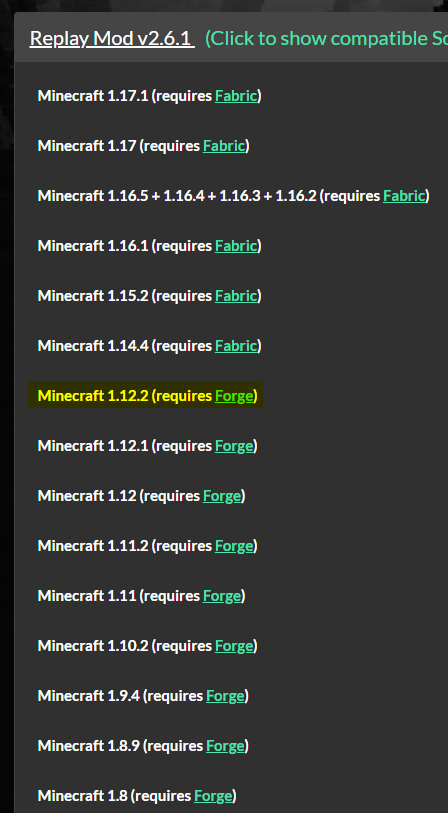 snow wave
oh ya i downloaded that one
coarse elm
Then you put it in the mods folder for the mod pack.
acoustic idol
always make sure the mods you pick match the game version 🤦
snow wave
yes
coarse elm
And if it doesn't work you need to provide the logs.
snow wave
yeah I did, it's on 1.12.2 and I downloaded the 1.12.2 replay and tried using it with the modpack
acoustic idol
Then we need the logs, otherwise we can only guess at the 1000s of things that could be wrong ....
snow wave
oh wait, it's finally working!
I don't know why it wasn't before, even with the correct version but it seems to be running together now
sorry for the confusion lads, I appreciate the help!
acoustic idol
wouldnt know, ¯_(ツ)_/¯
next abyss
This error is getting spammed in the latest.log.. the error:https://paste.ee/p/LLcc9 the end of the latest.log:https://paste.ee/p/asrpL
oh, and my game crashes.... it just stops responding and I have to force shut it down
 quaint vault
https://auto.likes-eating.rocks/OWfQL9TVs i dont quite know what this really means

11.19 KB of wasted hosting
acoustic idol
Just watched some of the video you sent in the other channel. What launcher are you using?
quaint vault
basic minecraft launcher
acoustic idol
open your .minecraft folder > open the logs folder > drag and drop the log called Latest here
quaint vault
acoustic idol
Why not just use the Curseforge launcher? Makes making custom packs soo much easier
quaint vault
https://download.curseforge.com/? @acoustic idol

Overwolf | Tech for developers who love gaming
Welcome to the CurseForge community! Build, manage and download mods and addons for your favorite games
acoustic idol
Yep
 graceful lagoon
anyone know why my server wont let me in because if a mod rejection? i dont have the mod anywhere in the files
quaint vault
acoustic idol
Yep
same thing is happening
acoustic idol
quaint vault
same thing is happening
!mc-logs do this for your custom cf profile on the cf app
golden muskBOT
Sending logs for support.
Right-click the modpack profile icon OR click the button in the modpack profile.
Click Open Folder.
Open the logs folder.
Find the file called debug.log OR latest.log and drag it into discord.
quaint vault
acoustic idol
Remove the Perspective mod and try again
acoustic idol
How did you install the mods? Copy and paste OR using the cf app to install them?
quaint vault
copy and paste from a yt video
acoustic idol
that the video you linked earlier?
acoustic idol
Not sure I would trust those. Seems to be a funky file.
acoustic idol
there is this one that is on CF https://www.curseforge.com/minecraft/mc-mods/perspective-mod-redux
Use the app to install it
quaint vault
acoustic idol
there is this one that is on CF <https://www.curseforge.com/minecraft/mc-mods/pe...
im using 1.8.9 :/

 quaint vault
acoustic idol
The mod has a 1.8.9 version
quaint vault
acoustic idol
The mod has a 1.8.9 version
i havent used curseforge app before, where do you go to see this?
acoustic idol
!mc-installmods
golden muskBOT
How to install mods in CurseForge App.
- Click
+ Create Custom Profile - Name it, select the required Minecraft version, select the Forge version (usually the highest number), click
Create. - Click the profile icon.
- Click
Add More Content - Search and install the desired mods.
- Start the game!
How to install mods not on CurseForge.
- Right click the profile picture or Open the profile and click the Icon next to the play button.
- Click
Open Folder. - Drag the mod(s) into the
modsfolder. (Note: Some mods will require others, to run. Make sure to read the instructions for the mod!) - Start the game!
quaint vault
tysm
next abyss
Ive been dealing with this for hours now. When I launch an installation it just dosnt do anything (after clicking play in MC launcher) the instance is running in task manager, and its not crashing, however nothing happens. The entire latest.log: https://paste.ee/p/3YZeM - I asked this around 2 hours ago I think, adn the answer I got was to 'repair instance' and that worked. Once. Now, it dosnt work... no clue what to do.

I feel something with java is messed up, but no clue what to do about it
autumn agate
hello, when I put mods like creative core or mclib, mods that help others to work, when starting minecraft it says that java.exe stopped working.
 violet mason
Is it just me or has other people been not able to download/change versions of mod packs just not working, freezes, then says "child addons not found #'s"
acoustic idol
violet mason
Is it just me or has other people been not able to download/change versions of m...
Its been an ongoing thing with the Child addons issue. Its a server issue on cf side. More info in #📢︱news . If you tell use the numbers you get though can send em off to be fixed
violet mason
@acoustic idol The numbers for mine were "2753557"
acoustic idol
Sent off to the team
violet mason
Like admins or mods @acoustic idol
acoustic idol
Dont need to keep pinging me, and whoevere is around that can fix it. Will need to be patient
violet mason
Alright, i just sent it, thanks
acoustic idol
autumn agate
Try removing optifine and trying again
autumn agate
acoustic idol
Try removing optifine and trying again
I already did that
acoustic idol
post the new log without optifine
autumn agate
I already did that and it still doesn't work.but I don't understand why
acoustic idol
autumn agate
I already did that and it still doesn't work.but I don't understand why
Can I see the logs without optifine?
acoustic idol
labymod ?
autumn agate
if I upload fps
acoustic idol
Try removing that mod
acoustic idol
Wait what Launcher are you using @autumn agate
autumn agate
tlauncher
 fickle jewel
does anyone know how to get the quest book to work on one billion emc challenge?
acoustic idol
fickle jewel
does anyone know how to get the quest book to work on one billion emc challenge?
Have you tried asking the authors of the pack?
fickle jewel
No, i don't know how. Is it the person that it says by in the launcher?
 mortal hawk
Yoyok, just a curiosity, is this even allow?
https://www.curseforge.com/minecraft/mc-mods/tl-skin-mod
i was very concerned when i found this in curseforge :>
acoustic idol
mortal hawk
Yoyok, just a curiosity, is this even allow?
https://www.curseforge.com/minecraf...
Ill send this up the line.
acoustic idol
fickle jewel
No, i don't know how. Is it the person that it says by in the launcher?
Yep, If you click on the packs icon to get the the overview, then click the Beside the Play button you can click "View Modpack Website" to get the its project page

 compact ice
yo, i just wanna download xaero's minimap to my vanilla minecraft... can anyone that's good with this stuff help me figure out what im doing wrong? or is this not the place to ask that?
fickle jewel
ok i did that and it says the last time they were online was in 2018
acoustic idol
Pack uses the Hardcore Questing Mode mod. Should be a book or maybe keybind for that.
trim onyx
Will someone know why I get that error?
Use magma 1.12.2
I already verified that the error is for the mods
 desert lagoon
question. i was sent a modpack link over discord but im unsure how to download it on the launcher. any help would be great.
acoustic idol
desert lagoon
question. i was sent a modpack link over discord but im unsure how to download i...
Thought I replied to this the first time you sent it in th other channel?
desert lagoon
i didnt see that, let me check again
acoustic idol
desert lagoon
i didnt see that, let me check again
Do you have the CF app installed?
acoustic idol
!mc-installpacks
golden muskBOT
How to install modpacks with the search features in app.
- Open the
Minecraftsection of the app. - Click the top search bar where it says
Search for modpacksOR Click theBrowse ModpacksTab. - Find the Modpack you want to install and click install on it.
- Wait for CurseForge app to download and unpack all the required files.
- Once finished, click
Play!
How to install modpacks from a Export. (Custom/Private/Site downloaded Modpack zip)
- Get CurseForge App if you don't have it, use
!downloadfor a link. - Get the exported modpack from CurseForge or someone else,
!mc-packshareexplains how to make them. - Open the
Minecraftsection of the app. - Click
Create Custom Profile - Click the
Importoption. - Find the file you just downloaded in step 2 and select it.
- CurseForge app will now attempt to download and unpack the modpack. If it fails, try steps 4-6 again.
- Once finished, click
Play!
acoustic idol
Second part
desert lagoon
that was easy. thank you very much!
trim onyx
trim onyx
Will someone know why I get that error?
Use magma 1.12.2
I already verified that...
help me please
acoustic idol
trim onyx
help me please
Please post the whole latest log, not just a snippet
trim onyx
Is that
I haven't tried running after it
acoustic idol
Thats the full log? no edits?
waxen heron
anyone know the mod with the special splings like iron saplings dimond saplings ect
trim onyx
It is not the complete one only where I get the error was
acoustic idol
waxen heron
anyone know the mod with the special splings like iron saplings dimond saplings ...
Use #🔎︱mod-hunting for this
acoustic idol
trim onyx
It is not the complete one only where I get the error was
Need the complete full log, Just giving the error is useless to us
trim onyx
It's okay. In a moment I will start it again
acoustic idol
!mc-installserver
golden muskBOT
How to **manually** install a server - **On your own PC**
- Check if the modpack has a server pack, if it does: use that and skip below.
- Go to the Forge website http://files.minecraftforge.net/ and download the Installer for the forge version the pack is using.
- Run the installer and choose
Install server. Do not install to your desktop. Also do not install inside a OneDrive folder. - Run the server using the forge.jar. A file called
eula.txtwill be generated. Open it and changeeula=falsetoeula=true - From the Client; Copy the
modsfolder,configfolder, and any other folders needed for the pack to work into the server folder. If the modpack has a server pack, use this instead! - Run the server again.
- Port forward your machine if needed. (Google it)
 fallen moat
oh
acoustic idol
For on a pc, as for the Pie you would have to google that one
fallen moat
rasperry pi?
ye alr
my dad thinks he has an idea on how to do it
personally, I'm confused and very bewildered
but it might work idk
thanks for the help
this is probably the best help server im in
acoustic idol
Found this for Pies, probably works for other mc versions as well but dont know 100% https://curtmorgan3.medium.com/hosting-a-modded-minecraft-1-16-4-server-on-a-raspberry-pi-45dec2fd14c6
next abyss
I really need help here. Been another 2 hours, nothing is happening. MC is running in task manager (Java TM Platform SE Binary) but nothing happens. https://paste.ee/p/3YZeM is the entire log still. Ive tried restarting my PC, repairing the instance, and nothing is working!
coarse elm
!mc-installfix
golden muskBOT
- Click on the Minecraft Tab on the Left side of the CurseForge App.
- Click button next to the
Create Custom Profileoption. - Click
Repair Installationoption. - Play game.
NOTE: You will not lose any modpacks or worlds, These are saved in the Instances folder. DO NOT TOUCH THIS FOLDER OR YOU WILL LOSE EVERYTHING