#👽︱game-support
1 messages · Page 156 of 1
 last parcel
probably should read the documentation for the mod
 boreal cloak
ok
boreal cloak
i think i figured it out thanks
 cunning oriole
how do i turn my custom modpack in to a server pack?
 wild jewel
Make a server with it
cunning oriole
i cant just put my client sided modpack in my server
wild jewel
That is how it works though, then you start fixing issues
cunning oriole
i have uploaded my modpack on curseforg but i cant find it in the overwolf launcher is this normal?
last parcel
You wont find modpacks on overwolf
cunning oriole
i always play modpacks via overwolf
last parcel
how? modpacks are on curseforge, not overwolf..
cunning oriole
ow sorry i meant the curseforge laucher
last parcel
send the link to your project
cunning oriole
last parcel
says right at the top why you cant find it
cunning oriole
ow, so i just have to resubmit it
last parcel
there should be a link to remove the experimental tag on the project, use that
cunning oriole
ok thanks
 dark moss
I've played with modpacks containing over 200 mods and today I loaded up like 8 mods and the fps is horrible, any suggestions
wild jewel
Which mods?
 wild jewel
I go for the things from YUNG
 desert drum
when I place a statue the game freezes, blanks out, then crashes over about 7 seconds:
anyone know what could be causing that?
last parcel
Name: bewitchment:statue // com.bewitchment.common.block.tile.entity.TileEntityStatue
boreal cloak
never mind its not working
 last parcel
tile.bewitchment.gold_herne_statue
desert drum
last parcel
`Name: bewitchment:statue // com.bewitchment.common.block.tile.entity.TileEntity...
yeah I figured it was the statue, but is there any way to tell what other mod is conflicting with it, it works fine on its own
last parcel
not from the log
desert drum
alright, i guess Ill start testing each pair of mods then, thanks anyway though 🙂
wait i know why its doing it after all
the FancyBlockParticals place animation is probably doing that
 cerulean kite
my modpack crashes with error code 0 upon rendering a world
can someone help me with that?
last parcel
?mc-log
 golden muskBOT
Sending logs for support.
Right-click the modpack profile icon OR click the  button in the modpack profile.
Click 
Open Folder.
Open the logs folder.
Find the file called debug.log OR latest.log and drag it into discord.
cerulean kite
last parcel
report this to the mod dev or remove it
Parameter specified as non-null is null: method de.intektor.mods.grapple_hooks.caps.GrappleHookEntityCap.getCapability
cerulean kite
ok thanks
 gaunt wagon
supp, server crashing while loading the world, selfmade modpack, forge 36.2.2 (1.16.5), crashlog coming wait
i hope theres nothing private idk xd
 raven lotus
hi i was gonna play a modded minecraft forge thing with 160+ mods when i try to create a new world in singleplayer the game crashes this is the crash report plz help me
last parcel
?projectissue apotheosis
golden muskBOT
Please visit the project page for the content you posted about and look for a way to contact the developer.
Somewhere on the page there is usually a method of contact. Look for one of the following things:
Issuestab like the image below.- Discord link.
- Twitter link.
- Comments section below the project.
If no contact method exists you will either have to remove the project or find a solution on your own.
 raven lotus
thx

 next pivot
Anyone here play project ozone 3 just trying to see if there is an alternative to the Extreme reactors mod in terms of power generation. I understand thermal expansion etc but I was wondering if there was thanks
 gritty spindle
What do I do if my curseforge isnt launching. it says overwolf is launching but when It fully loads nothing happens
last parcel
gritty spindle
What do I do if my curseforge isnt launching. it says overwolf is launching but ...
#📛︱rules 4
last parcel
wait for a reply
gritty spindle
ok then
 atomic crag
my curseforge when i try and download it it says theres a conection error when my internet and wifi are perfectly fine
the problem keeps on happening so i joined here
last parcel
try not using wifi
gaunt wagon
gaunt wagon
now i downgraded the version but now we can't join:
everytime we join, this shows up in console:
[17:42:54] [Netty Epoll Server IO #2/INFO] [co.li.co.ConfigSyncManager/]: Skipping config sync, No mods have registered a syncable config.
gritty spindle
What do I do if my curseforge isnt launching. it says overwolf is launching but when It fully loads nothing happens
 autumn musk
how do i know what season it is???? i just wanna grow my wheat
last parcel
how about providing details..
autumn musk
i really dont know
wheat wont grow
hover over the seeds
and it says only fertile in summer and autumn
autumn musk
doesnt tell me
gaunt wagon
xddd
autumn musk
i've never used whatever mod is doing this before
last parcel
name of the pack? name of the mod doing this?
 autumn agate
hi
autumn musk
Better Minecraft
 shell merlin
rlcraft isn't working for me can anyone help
last parcel
better minecraft has a discord, try asking there
autumn agate
hi
 dapper flicker
Someone could help me? It says ´´modding folder cannot be set on OneDrive
and I try to put it on ´´This PC
wild jewel
!mc-path
golden muskBOT
Change your install path to the following:
For Windows: C:\CurseForge
-Go to C:\ drive. Make a new folder. Name it Curseforge.
For Mac: /Users/Shared/CurseForge
If Minecraft is not installed in CurseForge App:
- Click the
 in the top left.
 - Select Minecraft from the list of games.
- Select the
Advancedoption and pick the folder you just made. - Click
Continue.
If Minecraft is installed in CurseForge App:
- Click the
 in the bottom left.
 - Select the Minecraft tab.
- Click
Change. - Select the folder you just made.
:no_entry_sign: Minecraft Files should NOT be installed inside the following locations :no_entry_sign:
:no_entry_sign: .minecraft folder.
:no_entry_sign: OneDrive folders.
:no_entry_sign: Desktop folder.
:no_entry_sign: Drive roots I.E. Directly into the C:\ drive.
:no_entry_sign: iCloud enabled folders.
:no_entry_sign: or any other cloud saved folder.
If any of the above are in the path you need to change/move it!
 jaunty mesa
 errant harbor
Are mods automatically configured by curse forge to be compatible with one another?
last parcel
no
mods are made by individual people, curseforge is not involved in how mods are developed. it's up to the people that made them to ensure compatibility.
errant harbor
Is there a way to configure them personally and make sure curseforge saves that within the modpack?
 oblique cosmos
i have a modpack that my friend sent me but its not showing up, does anyone know how to be able to find it
last parcel
what did you do with it
 green peak
The server crashes when I tried to join
Pastebin
Pastebin.com is the number one paste tool since 2002. Pastebin is a website where you can store text online for a set period of time.
green peak
last parcel
<@!357554304795541505> <#777323206884327484> 1
sorry
oblique cosmos
who
last parcel
you, meaning you
oblique cosmos
it got published but i cant find it when i search it up
last parcel
send the link to it
oblique cosmos
from private message
last parcel
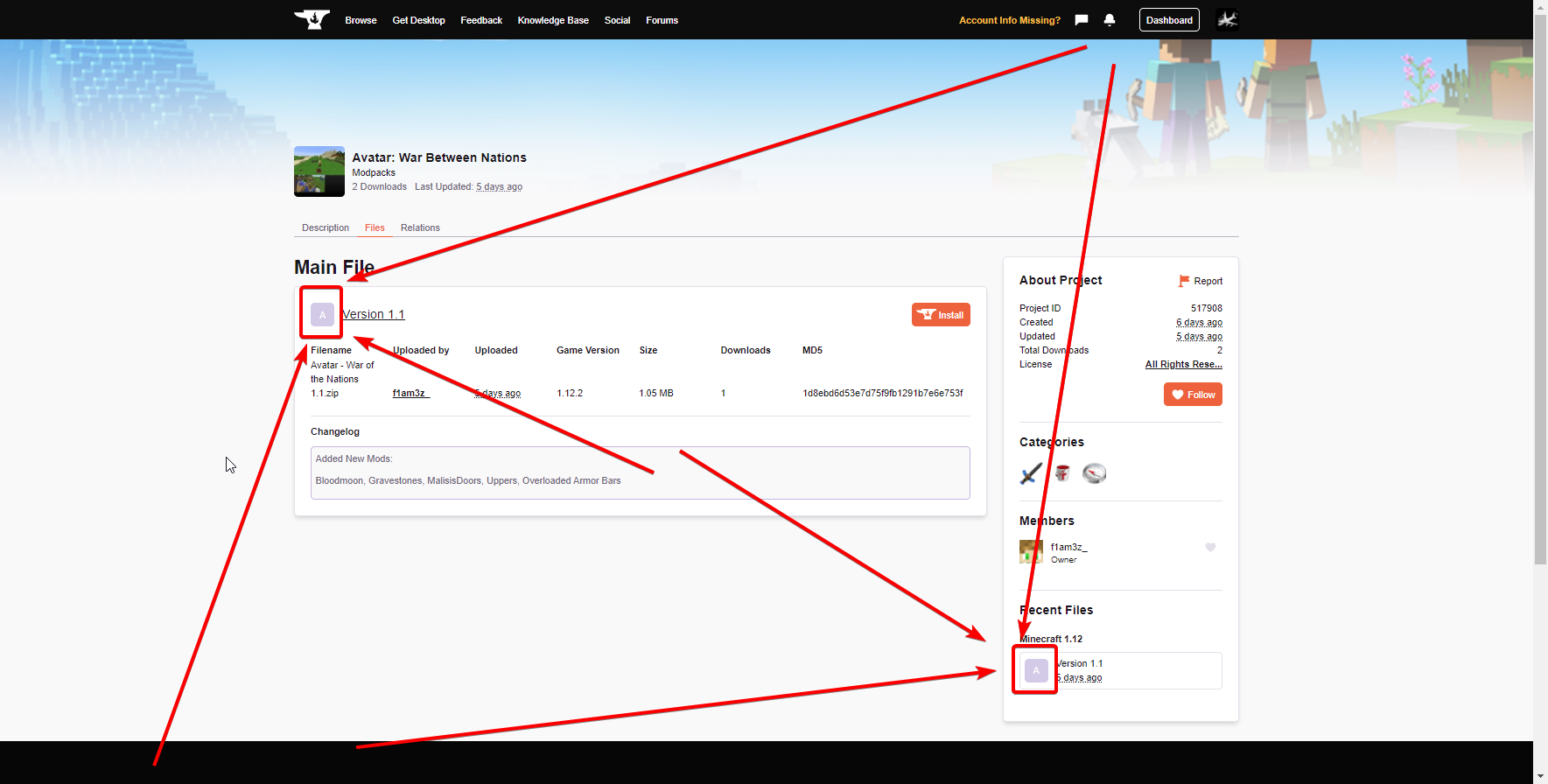
!sync
golden muskBOT
Sync and your Project.
CurseForge App and site do not share the same requirements! You can find things on the site but this does not mean it will be in the app!
For a mod to show up in the app:
- Projects MUST have a file marked as RELEASE
 or BETA
- Projects MUST be APPROVED
- Projects MUST have a file marked for the GAME VERSION SELECTED/LOADED
- Projects CAN'T be EXPERIMENTAL
- Projects CAN'T be ABANDONED
Files can take a while to show up in the app. If your files still have not shown up either your project is new and you have yet to mark a file as Release/Beta or there is issues with the sync system making it slow.
Vote this issue up if you would like to know when the last sync was! https://curseforge-ideas.overwolf.com/ideas/CF-I-1617
last parcel
file is alpha
last parcel
Projects MUST have a file marked as RELEASE or BETA
marked as RELEASE or BETA
last parcel
says on the project page
 - ALPHA
which is not RELEASE or BETA
last parcel
 errant harbor
So pressing the delete button doesn't delete a mod.

And clicking on all the repairs didn't fix it at all. Do I have to get into the mods folder and delete it manually?
I'm trying not to break this thing.
Also: should I be worried about this automatically installed libraries? Will they bloat my modpack and reduce performance?
Even when they're not used?
last parcel
were you messing with the mods folder at all?
errant harbor
I didn't touch it until now when I was looking inside of it, though I didn't modify anything.
This isn't this the first time this happened. Milléniare refused to remove itself as well.
last parcel
do you have some kind of cloud backup set to the folder being used?
errant harbor
I don't think I do.
Would this issue be caused perhaps by the game running? I.e. imagine deleting files from a software whilst it's running and Windows prompting you with an error that you cannot do that because that file is being used.
last parcel
possibly
errant harbor
Also: deactivating the mod didn't seem to do anything, even after I restarted the game and cursforge.
This thing to the right.

Looks like it didn't delete at all.

 scenic bramble
 scenic bramble
scenic bramble
scenic bramble
but in vanilla i run max settings with no problems
autumn agate
I have a question, do you have that too, but you had previously curse forge you could join other servers and now not?
(minecraft)
 unreal sentinel
hello I have a problem with the sound in forge I do not hear anything neither in the menu nor in the game and all the volumes are at the maximum someone knows how to solve?
 runic aurora
does anyone know a good free in-detail YouTube course for Minecraft mod making for beginners?
please ping me if anybody knows
last parcel
pretty sure that does not exist. modding is too complicated to be explained in a video.
scenic bramble
last parcel
pretty sure that does not exist. modding is too complicated to be explained in a...
i sent the ss, anything?
 stuck lichen
why do some mods like pixelmon not have a server tool?
last parcel
scenic bramble
i sent the ss, anything?
i see nothing wrong with that image. also please do not ping me #📛︱rules 5
scenic bramble
sorry ive just been trying to get this problem solved for ages and no one can seem to help.
last parcel
vanilla is completely diffrent from modded
scenic bramble
i have the lowest settings on in that ss
 slender surge
So i just downloaded forge and its not letting me open minecraft in forge now. i tried optifine and others there working but not forge, why?
it says your game crashed sorry on forge but works on others
 coarse elm
slender surge
So i just downloaded forge and its not letting me open minecraft in forge now. i...
coarse elm
slender surge
So i just downloaded forge and its not letting me open minecraft in forge now. i...
Next time don't spam your problem everywhere.
!mc-log
golden muskBOT
Sending logs for support.
Right-click the modpack profile icon OR click the button in the modpack profile.
Click Open Folder.
Open the logs folder.
Find the file called debug.log OR latest.log and drag it into discord.
 radiant wadi
whenever i try and run mc eternal, minecraft just stops loading but curseforge still says there is an instance open.
i have tried restarting my computer but that didnt work
slender surge
coarse elm
Next time don't spam your problem everywhere.
oops sorry
 whole otter
how do i add the tinkers material osoglogas to project ozone 3
 stuck meteor
when i try to import my minecraft mod it says selected zip file contains an invalid profile! does anyone know how to fix?
last parcel
stuck meteor
when i try to import my minecraft mod it says selected zip file contains an inva...
#📛︱rules 4
stuck meteor
sorry
autumn agate
hi guys, im trying to use shaders on a curseforge modpack (Crucial 2, very fun vanilla+ experience so far) but Im not sure how im supposed to do it, ive triend installing iris shaders, because im pretty sure this modpack is running sodium, however it wont launch as it gives an error explaining iris is a fabric mod. So then i tried installing optifine and it just wont launch and crashes. I know its possible thought because there are video trailers of the modpack running shaders. What gives? Sorry for noob havent used mods for like almost a decade.
 soft minnow
question, can you edit others modpacks?
last parcel
?mc-modifypack
golden muskBOT
How to add/remove mods in a modpack.
- Click on the picture of the modpack.
- Click the

Add More Contentbutton, IF this button is not there, see below before continuing. - Find the Mods, Resource Packs or Maps you wish to Install and click
Installon them. - Wait for all the required mods to be downloaded.
- Start the modpack.
How to Enable/Disable content management for modpacks.
- Click on the picture of the modpack.
- Click on the button next to the
Playbutton. - Click on

Profile Options. - Check the
Allow content management for this profileoption if you want to edit the content of the modpack, uncheck it to disable.
NOTE: The Allow content management for this profile option is what allows you to Delete, Disable, Update or Install any Mods, Resource Packs or Maps managed by CurseForge. It must be on to modify any of them! (Currently)
last parcel
dont expect support if you do though
 cold bear
If I uninstall Minecraft and reinstall, will ANYTHING in my modpacks be removed or changed?
coarse elm
cold bear
If I uninstall Minecraft and reinstall, will ANYTHING in my modpacks be removed ...
no.
cold bear
ok
so about an issue i talked about a while ago, cannot log into minecraft because of microsoft migration, well it can be fixed with a simple reinstallation
buuuuut, it didnt work for my modpacks, only vanilla, i have no clue what is causing this
oh wait
i realised... i need to reinstall all my modpacks too
coarse elm
!mc-installfix
golden muskBOT
- Click on the Minecraft Tab on the Left side of the CurseForge App.
- Click button next to the
Create Custom Profileoption. - Click

Repair Installationoption. - Play game.
NOTE: You will not lose any modpacks or worlds, These are saved in the Instances folder. DO NOT TOUCH THIS FOLDER OR YOU WILL LOSE EVERYTHING
cold bear
but how do i reinstall my own modpack that i havent published? i got no clue
coarse elm
this deletes all the vanilla files
coarse elm
can you log into vanilla?
coarse elm
can you log into just vanilla if you run it via curseforge
coarse elm
no... that would be modded
if you click the "Play vanilla" option where the repair install option is
cold bear
ok wiat
wait a sec
i just realised....
i am a total idiot! i did repair profile
now im doing repair installation
and it works
coarse elm
that's why you read instructions before saying "I did that"
cold bear
yeaaaaah
gritty spindle
What do I do if my curseforge isnt launching. it says overwolf is launching but when It fully loads nothing happens
 last parcel
!ticket-site
golden muskBOT
:bug: Reporting via Website :bug:
Can't open the app or would rather use the website? You can do so here: https://support.curseforge.com/en/support/tickets/new
Fill out the form with accurate detailed information, "It doesn't work" isn't helpful! What exactly doesn't work and why doesn't it work should be easy to answer!
Make sure to upload your Overwolf logs with the Upload File option on the ticket, information on how to get these logs can be found here https://support.overwolf.com/en/support/solutions/articles/9000176827-how-to-get-your-overwolf-logs
 eager steeple
Please make sure you have up-to-date drivers (see aka./mcdriver for instructions).
GLFW error 65539: Invalid key 4
While loading the mineshaft and monsters modpack
 strange rain
when i try to open the "Install" folder in a minecraft server pack it says "Windows cannot complete the extraction."
 heady temple
“The status of the file Tramp's Galacticraft.zip (Cosmic Phase) has been changed to Rejected
Notes:
The following files are not allowed to be redistributed due to licensing restrictions:
overrides/mods/OptiFine_1.12.2_HD_U_G5.jar
Modpacks containing these files will not be approved.
The following file versions have been removed from CurseForge:
overrides/mods/chiselsandbits-14.29.jar
overrides/mods/CoFHCore-1.12.2-4.6.1.22-universal.jar
overrides/mods/ICBM-classic-1.12.2-3.0.0b29.jar
overrides/mods/ThermalDynamics-1.12.2-2.5.3.16-universal.jar
overrides/mods/ThermalExpansion-1.12.2-5.5.2.39-universal.jar
overrides/mods/ThermalFoundation-1.12.2-2.6.1.22-universal.jar
The modpack will not be approved until these files are replaced with versions that are currently available.
If you have any questions please contact our support team https://support.curseforge.com.”
How can I correct this?
last parcel
?reject-cfhosted
golden muskBOT
The following files belong to CurseForge-hosted projects, and should therefore not be added directly to zip files:
-
Remove any mods listed in the error message from the profile you exported. Then reinstall them with the CuseForge app. DO NOT drag and drop files from the site.
-
Export the profile again, open the new zip that was just made. Check for the
overrides/modsfolder. If you still see any mods in that folder do the step above again for each mod. -
Upload the zip once complete and no more mods show in the
overrides/modsfolder.
last parcel
and remove optifine, obviousally
stuck lichen
i wanna set up a server for pixelmon but there seems to be no sever starting file to download.
my brains trembling at the thought of setting up the starting tool
someone please save me
 marsh elk
anyone know why the twilight dimension is doing this wierd thing with the complimentary shaders?
 wild jewel
!mc-installmods
golden muskBOT
How to install mods in CurseForge App.
- Click
+ Create Custom Profile - Name it, select the required Minecraft version, select the Forge version (usually the highest number), click
Create. - Click the profile icon.
- Click
Add More Content - Search and install the desired mods.
- Start the game!
How to install mods not on CurseForge.
- Right click the profile picture or Open the profile and click the Icon next to the play button.
- Click
Open Folder. - Drag the mod(s) into the
modsfolder. (Note: Some mods will require others, to run. Make sure to read the instructions for the mod!) - Start the game!

 fading dagger
I created a profile added some mods and then when I opened minecraft none of the mods that I installed loaded. Please help
wild jewel
How did you open minecraft?
fading dagger

 high gale
Hello, I'd love to know if somebody has a fix for what's happening to me:
(it has happened twice, on 2 accounts on the same computer, roughly a month apart)
I downloaded CurseForge (and Overwolf), I selected a modpack, downloaded it, played it, saved and quit normally.....then turned off the computer, turned it on later and both curseforge and the modpack downloaded were gone, had to install from scratch.... except overwolf stayed, so I'm very confused as to why this would happen, any ideas?
last parcel
Some kind of cloud storage program, antivirus or auto cleaner maybe
high gale
there is nothing that would indicate that on my end, it just happens
errant harbor
Any tips for turning a custom curseforge modpack into a dedicated server?
wild jewel
Install mods on server, fix errors till it is working
high gale
then add qol server mods (like login protection), fix more errors and play
errant harbor
high gale
then add qol server mods (like login protection), fix more errors and play
What's qol server mods? :V
high gale
quality of life
 sage pier
Can I add them to my life as well? :D
errant harbor
Ah yes. What would login protection do?
high gale
give players immunity when logging in, so that while the server (and the mobs on it) run, the player doesn't get killed when loading in
errant harbor
thanks!
 next abyss
I just relised that when I launch a curseforge instance, it launches on the wrong graphics card (I have 2) Whats the exe file I have to make use the graphics card?
wild jewel
!mc-videocard
golden muskBOT
How to set minecraft to use your videocard
Got NVIDIA?
 next abyss
Ok, it had it set to minecraftlauncher.exe, not that. Thanks!
 stark solstice
could someone help Im trying to make a forge server but when i go to make a folder this is whats in it

and when a run a start.bat it just opens command prompt and closes it
errant harbor
What did you write in start.bat?
Have you changed the eula's state in eula.txt from false to true?
 winter bane
Someone help me please! Minecraft gets stuck whenever I try to open it by curseforge. Firts appears the launcher, then I press "play" and then, after a few seconds, Minecraft gets a black screen and then says "Java(TM) Platform SE binary" doesn't respond. I tried what the bot said up there thinking it would solve the problem but it's stills the same. I use NVIDIA btw.
last parcel
tried what?
winter bane
This: How to set minecraft to use your videocard
last parcel
?mc-installfix
golden muskBOT
- Click on the Minecraft Tab on the Left side of the CurseForge App.
- Click button next to the
Create Custom Profileoption. - Click
Repair Installationoption. - Play game.
NOTE: You will not lose any modpacks or worlds, These are saved in the Instances folder. DO NOT TOUCH THIS FOLDER OR YOU WILL LOSE EVERYTHING
 worldly ether
😂 Carl being silly
winter bane
Thanks. If it doesn't work i'll be back
Stills the same 😦
Still saying "Java(TM) Platform SE binary" doesn't respond.
last parcel
are you waiting?
winter bane
Yes
last parcel
how long?
last parcel
this is the help............
are you waiting for it to respond
last parcel
can you actually read and answer my question
winter bane
Ok sorry I didn't understand
I'll try what you're saying
I waited untill it showed up: "Java(TM) Platform SE binary doesn't respond" again, like always
last parcel
ok, and then how long did you wait for it to respond?
winter bane
Like 3 or 4 minutes
last parcel
how much ram does your computer have
winter bane
16 Gb
last parcel
?mc-log
golden muskBOT
Sending logs for support.
Right-click the modpack profile icon OR click the button in the modpack profile.
Click Open Folder.
Open the logs folder.
Find the file called debug.log OR latest.log and drag it into discord.
winter bane
Here
last parcel
remove optifine
last parcel
yes
last parcel
send the new log
winter bane
Here
last parcel
try another pack
 jade wolf
Hi! We're making a modpack, and we put the Alchemistry and EnderIO mods into the pack, and it won't work until we remove one of them. The game did not start, it does load until 2/7, then crashes. Does anyone know any solution?
 gloomy ice
Hello! I'm looking for assistance to why my TCP port for minecraft won't open
my UDP port is reachable though
last parcel
jade wolf
Hi! We're making a modpack, and we put the Alchemistry and EnderIO mods into the...
pick one place #📛︱rules 4
jade wolf
Okay, okay... sorry. I'm choosing this, because no one will answer on #🧱︱mc-other-help.
winter bane
@last parcelStills the same, even whith no mods or resource packs
last parcel
?mc-path try this
golden muskBOT
Change your install path to the following:
For Windows: C:\CurseForge
-Go to C:\ drive. Make a new folder. Name it Curseforge.
For Mac: /Users/Shared/CurseForge
If Minecraft is not installed in CurseForge App:
- Click the in the top left.
- Select Minecraft from the list of games.
- Select the
Advancedoption and pick the folder you just made. - Click
Continue.
If Minecraft is installed in CurseForge App:
- Click the in the bottom left.
- Select the Minecraft tab.
- Click
Change. - Select the folder you just made.
:no_entry_sign: Minecraft Files should NOT be installed inside the following locations :no_entry_sign:
:no_entry_sign: .minecraft folder.
:no_entry_sign: OneDrive folders.
:no_entry_sign: Desktop folder.
:no_entry_sign: Drive roots I.E. Directly into the C:\ drive.
:no_entry_sign: iCloud enabled folders.
:no_entry_sign: or any other cloud saved folder.
If any of the above are in the path you need to change/move it!
winter bane
ok
gloomy ice
Yamza would you know?
jade wolf
last parcel
?mc-path try this
Who did you send this to?
last parcel
the person directly above the message.
jade wolf
last parcel
the person directly above the message.
Oh, okay.
last parcel
quit pinging me
 acoustic idol
jade wolf
Hi! We're making a modpack, and we put the Alchemistry and EnderIO mods into the...
acoustic idol
jade wolf
Hi! We're making a modpack, and we put the Alchemistry and EnderIO mods into the...
!mc-logs can have a look
golden muskBOT
Sending logs for support.
Right-click the modpack profile icon OR click the button in the modpack profile.
Click Open Folder.
Open the logs folder.
Find the file called debug.log OR latest.log and drag it into discord.
jade wolf
acoustic idol
Thats not what the bot said....
jade wolf
oopsie
acoustic idol
Install the mod jeid
jade wolf
jeid? I can't find that.
acoustic idol
JustEnoughItemID
jade wolf
It shows only the normal JEI
acoustic idol
 jade wolf
Okay, thanks.
winter bane
@last parcelStills the same. Sorry for taking so much of your time.
I don't know what do I have to do now
last parcel
tried restarting your computer?
winter bane
No
I'll try
Stills the same. Also my computer sounds like an airplane whenever I launch Minecraft
Literally. I'm scared that goes flying out of my house
last parcel
send a new log
golden muskBOT
How to get the launcher log
- Right click a profile.
- Select
Open Folder - Go back two folders.
- Open the
Installfolder. - Drag the
launcher_log.txtinto discord.
winter bane
I'll wait if you guys need some time
 spiral stratus
Hi guays I have a question.
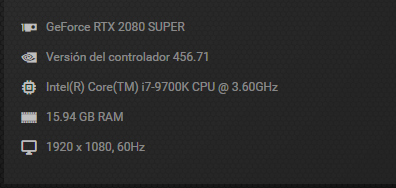
I have a local forge server for 2 player. My PC have this specs:
https://ibb.co/GJMt1ky
This are the mods that I use:
https://ibb.co/R0HyYSk
When we play there is a lot of lag and the server always is saying this:
" Can't keep up! Did the system time change, or is the server overloaded? Running 5085ms behind, skipping 101 tick(s)"
I allocate 6 GB of ram to the serve but I not sure if a do these well. I use this command:
"C:\Program Files\Java\jre1.8.0_301\bin\java.exe" -Xmx6144M -Xmx6144M -jar forge-1.12.2-14.23.5.2855.jar
But I dont note this increment of RAM
Anyone know what way to play without lag or I must to delete some mods?
 winter bane
The lag it's caused because of the conexion. If the conexion is slow or if there is too data to transfer, lag will be there. Personally, deleting some overcharging mods will end the problem.
spiral stratus
I have 120 MB of download and 120 MB of Upload
The conexión i dont think It would be because I have this server in the same pc that I play and I also have Lag🤔
winter bane
Ice and fire is a BIG mod. Meaby, deleting it will cause less lag.
@last parcel I'll come back another day, because the problem stills there
@spiral stratusNice conexion btw
spiral stratus
Yes but the reason is because my PC doesn't support so much mods? ☹️
last parcel
passed the issue to someone else, but they arnt available currently
winter bane
arnt?
aren't you mean?
ok
@spiral stratusIdk, your computer is similar to mine. It should load those and more correctly
@spiral stratusSpanish, btw?
spiral stratus
Ok so I Will wait for another moderator jaja thanks
winter bane
I'm not a moderator, I just wanted to help lol
spiral stratus
winter bane
<@!673356192638304269>Spanish, btw?
Yes Sorry for my english its vert bad
😂 😂
spiral stratus
winter bane
I'm not a moderator, I just wanted to help lol
Oh hahaha sorry
acoustic idol
Take other languages to dms
winter bane
ok sorry I forgot
winter bane
I solved the proble thanks to @spiral stratus so I don't need more help
last parcel
how
autumn agate
hi i am new on discord
stuck lichen
can you guys help me with forge 1.12.2
acoustic idol
in what way?
stuck lichen
im downloading forge 1.12.2 and the forge-1.12.2-14.23.5.2855.jar folder doesnt work and the minecraft_server.1.12.2.jar works but it skips creating a mod folder that i need for a modded server ive tried a .bat file under the code java -Xmx4096M -Xms4096M -jar forgeserver.jar nogui
PAUSE and java -Xmx2048M -Xms2048M -jar forge-1.12.2-14.23.5.2838-universal.jar -o true nogui and neither work only the minecraft_server.1.12.2.jar launches anything
 acoustic idol
Screen shot your servers folder
stuck lichen
 acoustic idol
Edit the start.bat and screen shot
also what version of java is installed on the server?
stuck lichen
its tried changing the name of the forge launch

i tried to get the latest update ill check it and redownload the latest
acoustic idol
1.12.2 needs java 8 to run.

 acoustic idol
open a command prompt and type: java -version
stuck lichen
C:\Users\Pc>java -version
java version "16.0.1" 2021-04-20
Java(TM) SE Runtime Environment (build 16.0.1+9-24)
Java HotSpot(TM) 64-Bit Server VM (build 16.0.1+9-24, mixed mode, sharing)
C:\Users\Pc>
acoustic idol
Do you need java 16 for anything else on your pc?
acoustic idol
1.17+ needs 16. 1.16.5 and below needs 8
stuck lichen
do i delete the newer one?
acoustic idol
that is one option yes, can also force the server to use java 8 as well.
stuck lichen
is it gonna cause me issues or is it just an carefree workaround
acoustic idol
Can always reinstall java 16 if something else needs it.
stuck lichen
okay going with the easier way
spiral stratus
spiral stratus
Hi guays I have a question.
I have a local forge server for 2 player. My PC hav...
Anyone can help?
next abyss
My game randomly crashed (It froze, then I had to kill it in order for it to close) and I looked at latest.log , and EVERY OTHER LINE is https://paste.ee/p/WiVJi - I cannot upload the whole log because paste cannot hold it lol.
What can I do to fix this?
 marsh elk
guys I have a pretty big issue
I am currently playing sevtech ages and every single achievement is revealed
I played a little bit before and it wasn't doing that
 acoustic idol
Need to have the same mods (or modpack version) as the server
 pine rapids
A fresh install of what?
acoustic idol
Client and server are running the same mods versions, configs as the server? Exact same pack version
 potent shell
configs?
pine rapids
Did you install the modpack on the client?
potent shell
no
Right so
I went to curse
and then installed the server pack
and then installed after that my client side
pine rapids
How did you install it on the client?
pine rapids
Did it open the Curse app?
potent shell
no?
pine rapids
!getcf
golden muskBOT
Looking to install the CurseForge app?
<:windows:798410728188936222> Windows
Minimum Requirements:
- OS Version: 7, 8.1, 10
- 64 bit Required.
- 350MB storage space.
- Microsoft .Net 4.8
- Intel/AMD quad-core CPU
- 8GB ram
Download: https://download.overwolf.com/install/Download?&PartnerId=4047
If you are having issues with the installer use the URL below to install Overwolf then go to the app store to download CurseForge.
https://content.overwolf.com/downloads/setup/latest/regular.html
<:mac:798410654418862130> Mac
Minimum Requirements:
- OS Version 10.14 or newer.
- 64 bit Required.
Download: https://curseforge.overwolf.com/downloads/curseforge-latest.dmg
:penguin: Linux
Minimum Requirements:
Yes.
Download: :person_shrugging:
potent shell
I already have the app though
im so confused man
I did everything the usual way and NEVER had this
pine rapids
Where was the Install button you clicked?
potent shell
on curse
pine rapids
Was it on the site or in the app?
potent shell
app
should I reinstall server pack?
basically
on the app
I click install server pack
pine rapids
I'd say repair the client instance
 opaque mauve
Hello 🙂
I got a lil problem here
An Invalid folder path was chose: 'C:': Learn more.
golden muskBOT
Change your install path to the following:
For Windows: C:\CurseForge
-Go to C:\ drive. Make a new folder. Name it Curseforge.
For Mac: /Users/Shared/CurseForge
If Minecraft is not installed in CurseForge App:
- Click the in the top left.
- Select Minecraft from the list of games.
- Select the
Advancedoption and pick the folder you just made. - Click
Continue.
If Minecraft is installed in CurseForge App:
- Click the in the bottom left.
- Select the Minecraft tab.
- Click
Change. - Select the folder you just made.
:no_entry_sign: Minecraft Files should NOT be installed inside the following locations :no_entry_sign:
:no_entry_sign: .minecraft folder.
:no_entry_sign: OneDrive folders.
:no_entry_sign: Desktop folder.
:no_entry_sign: Drive roots I.E. Directly into the C:\ drive.
:no_entry_sign: iCloud enabled folders.
:no_entry_sign: or any other cloud saved folder.
If any of the above are in the path you need to change/move it!
acoustic idol
opaque mauve
Hello 🙂
I got a lil problem here
An Invalid folder path was chose: 'C:': Le...
!mc-path
pine rapids
potent shell
do such?
Click the next to the play button, then click Repair Profile
opaque mauve
Thanks alot <
potent shell
that took like 2 seconds
is that really gonna fix it ? just asking
sorry for bugging you
pine rapids
It should, if it doesn't I'll need more info from you
autumn agate
Not sure Had this server up for almost a week now with a custom modpack and this has been happening since yesterday shortly afted i added baubles into (since now removed but didnt fix it.) Not sure what to do exactly and hoping it isnt the SRP mod thanks to infecting most the world.
Its hosted on shockbyte with 8 gb but i think their rn hosting it in Britain because we didnt pay for the specific hosting.
 potent shell
pine rapids
It should, if it doesn't I'll need more info from you
potent shell
pine rapids
It should, if it doesn't I'll need more info from you
um
pine rapids
How are you launching the client and what does its main menu look like?
 pine rapids
Are you on Mac?
 pine rapids
So you're on Windows?
potent shell
aye
pine rapids
Close every instance of the Minecraft Launcher, including any output windows
Then click play again
pine rapids
No, what you have provided proves your client is vanilla
I'm trying topp figure out where it's going wrong
potent shell
output windows?
pine rapids
If you don't know what they are you probably haven't enabled them
 pine rapids
That looks right, now click play
potent shell
taking awfully long this time round
also
can I say

this has never loaded liek this
pine rapids
That looks right
potent shell
right its fine now
so Imma launch my server

I double click this
um

what is this
im worried
pine rapids
Ignore it

 pine rapids
Connection timed out means your PC might be too slow
coarse elm
how are you connecting to the server?
coarse elm
what ip
potent shell
my public
coarse elm
That won't work.
potent shell
huh
 hard cobalt
coarse elm
hard cobalt
coarse elm
use 127.0.0.1
coarse elm
100%
 coarse elm
Then post a log from the client and server
 buoyant wolf
how do i publish my modpack?
coarse elm
!mc-packshare
golden muskBOT
There are two ways to share a modpack you've made with others...
Export and Share - For Friends to Small Groups.
- Click the Icon for the modpack.
- Click the button next to play.
- Click

Export. - Select the files that should be included.
- Send the zip to the people that want it! They can follow the instructions in
!mc-installpackto install the pack!
Upload to Curseforge - For Public Release to Everyone.
This options will make your pack public to EVERYONE, it comes with extra requirements and will take some effort to set up.
- Go to here: https://www.curseforge.com/project/432/4471/create
- Fill out the information with a proper description of the pack. This should allow anyone to understand what the pack is.
- Click the Icon for the modpack in the CurseForge app.
- Click the button next to play.
- Click
Export. - Select the files that should be included.
- Open your Project you made on the CurseForge site and Upload the file you just made.
- Wait for Moderation & Sync so it can show up in the client! (See
!syncfor limitations)
potent shell
coarse elm
Then post a log from the client and server
how
is it
debug.log
or
lastest.log
coarse elm
you can type more than 2 words per line
potent shell
sorry man
coarse elm
and you drop whatever one you have here from the client and the server.
coarse elm
potent shell
well if the server is crashing that's why you can't connect to it
 coarse elm
thats what the first file is?
coarse elm
then why did you send it?
potent shell
cuz I sent the lastest crash log from my serrver incase that gave some info
since someone said they needed info, sorry man
no clue whether this will hep
coarse elm
Client has mods that are missing on server: [infernalexp, soundfilters]
This seems like you have two separate things installed.
potent shell
how do I miss those
im so confused
did it not install correctly?
so do I uninstall both of them???
what should I do for it to work, do you reckon?
 quick lance
I am having a problem with minecraft modpacks. When I go to launch them, it opens the launcher, but then when I click play, nothing happens.
last parcel
put the missing mods on the server, or remove them from the client
potent shell
last parcel
put the missing mods on the server, or remove them from the client
Thank you man
appreciate it
um

I've installed the mods onto
the server.
still the same thing
 potent shell
coarse elm
> Client has mods that are missing on server: [infernalexp, soundfilters]
This s...
potent shell
coarse elm
> Client has mods that are missing on server: [infernalexp, soundfilters]
This s...
installing these mods
onto the server mod
coarse elm
Screenshot of the main menu of minecraft you are trying to connect with

 coarse elm
Where did you get the log you sent me because that doesn't even match...
That's vanilla..
potent shell
here
coarse elm
There's no mods.

 coarse elm
and you clicked play in the curseforge app
potent shell
yes
coarse elm
Close minecraft, click play take a screenshot of the launcher
potent shell


 coarse elm
yes
potent shell
now what would you like me to do?
coarse elm
does the profile you installed for better minecraft have any worlds you made in it?
coarse elm
delete the profile and resinstall it
coarse elm
the one having issues
 coarse elm
yes
 sage tree
hello i was just wondering if it was possible to host private servers using curseforge
 coarse elm
sage tree
hello i was just wondering if it was possible to host private servers using curs...
coarse elm
sage tree
hello i was just wondering if it was possible to host private servers using curs...
no.
coarse elm
potent shell
and now
you launch the game and see if there's text in the bottom left
potent shell

oh right there is none

what about these
im so annoyed
why in the tarnation does this not work
coarse elm
potent shell
oh right there is none
oh there are mods the pack just removes the text of the screen...
stupid
potent shell
ohh right
coarse elm
I have no idea then. You either are doing something wrong setting up the server or the pack dev made a bad file
potent shell
Oh
im so sorry man
ill go sleep and then I try again tommorow, please have a good day. good night
 uneven bolt
OK can sombody help me with this:
Running Mohist 1.16.5(ill switch to forge if yoou need me to Its just then I have to manually install it) with no plugins but with these mods: tconstruct, voicechat, cgm, biomesoplenty, pamhc2crops, jei, doggytalents, cavesandcliffs, flywheel, cheesemaking, mantle, create, pamhc2foodcore, betterweather, bettertitlescreen, ctm, modernlife, comforts, autoreglib, securitycraft, storagedrawers, lightmanscurrency, moreminecarts, obfuscate, vehicle, fancymenu, cavebiomeapi, constructionwand, lightingwand, cfm, architectury, ftblibrary, chisel, electrodynamics, jeresources, immersive_portals, ballistix, ftbteams, ftbchunks, forge, quark, valhelsia_core, valhelsia_structures, dynamictrees, dtbop, chiselsandbits, konkrete, ironchest
The cilent gets stuck on "Encrypting" then eventually says that it took to long anyone know why
https://mcpaste.io/309b996e6e2fdd9c
A easy to use Paste site for Minecraft Server logs.
coarse elm
uneven bolt
OK can sombody help me with this:
Running Mohist 1.16.5(ill switch to forge if y...
Took too long to log in
Also don't use mohist.
uneven bolt
also some of my friends dont have this issue cuz they can log in
I know it took to long but why
coarse elm
🤷
uneven bolt
but when my friends log in the get the io.netty error so yeah...
coarse elm
slow internet? bad connection? too much data to transfer in the allotted time?
uneven bolt
is it possible to give it more time?
coarse elm
no idea
uneven bolt
f for me then 😦
coarse elm
I don't use mohist. Going to guess it's causing the problem.
uneven bolt
yeah my server host makes you pay more for curseforge auto installations so now ima have to manually install it
coarse elm
what a shitty company.
uneven bolt
ehh its not that much more and its included with liek a better processor and they only do 1$ per gb
coarse elm
All you need to do is replace mohist with forge and it will likely work fine
coarse elm
It shouldn't cost anything more because I can guarantee that they are just piggy backing off CF anyway.
uneven bolt
they call it part pf there "Automatic modpack installer" even though its not a modpack...

at least they made this
https://www.youtube.com/watch?v=5rCQ6k7AWzY
Get Support @ https://pebblehost.com/r/discord
View our knowledgebase article on this topic here: https://help.pebblehost.com/en/article/how-to-install-forge-vpkmz0/
Needing server hosting? Checkout PebbleHost with servers from $1/GB and public node statistics proving we don't oversell be sure to check our website out at https://pebblehost.com
uneven bolt
now i have another issue... please read this log
A easy to use Paste site for Minecraft Server logs.
scroll down a bit btw
i disabled moihst in the last message
A easy to use Paste site for Minecraft Server logs.
there the 2nd one is better
coarse elm
no idea what this is
net/kyori/adventure/audience/ForwardingAudience
but that's the issue
uneven bolt
probably voice chat mod
 rich mauve
hi, whenever i try to install jei, i get the i/o error occured
acoustic idol
rich mauve
hi, whenever i try to install jei, i get the i/o error occured
#📛︱rules 4
rich mauve
thanks
worldly ether
!help
golden muskBOT
╰( ͡° ͜ʖ ͡° )つ──☆*:・゚ *˜”*°•.˜”*°• Many Help •°*”˜.•°*”˜* <:curselit:796985620550385705>
Please provide a description of your issue with as much detail as possible. If you have an issue with a mod or modpack, tell us the name. Explain what you can see happening. Be specific!
 Tell us what is happening, we already know it "doesn't work".
Avoid using words like "it", tell us exactly what "it" is.
Don't assume anyone knows what you are talking about, be specific.
Tell us what you expected to happen.
Provide screenshots or video if possible.
Provide a log if possible. ?mc-log
acoustic idol
Was already dealt with in another channel
 ruby echo
how do add more ram to my server i know its in the run.bat but idk where to change it in the text
 modest aurora
so i made my own modpack, and i can't export it or any of my modpacks. It just says "failed to get Minecraft export tree" it does it with all of my modpacks, but i can open the file location NO PROBLEM
im so confused
its so frustrating and no else online has had this issue
neermind it just fixed itself
i dont understand
autumn agate
Anyone knows why the zombie apocalypse mod isnt working for me?
acoustic idol
autumn agate
Anyone knows why the zombie apocalypse mod isnt working for me?
Not working in what way? Explain whats happening or not happening
autumn agate
Well i downoad it play it and the zombies dont spawn or anything. When im in creative and go to page 2 my game crashes.
golden muskBOT
Sending logs for support.
Right-click the modpack profile icon OR click the button in the modpack profile.
Click Open Folder.
Open the logs folder.
Find the file called debug.log OR latest.log and drag it into discord.
autumn agate
Alr ill get my game crashed rlly quick so you can have the most recent one if thats alr?
autumn agate
same thing is with the fast zombies version
Oh i need to get my account migrated really quick be right back
acoustic idol
Have you tried contacting the devs of the modpack? They would know whats going on better then anyone
ruby echo
when it says sever cant keep up does that mean i need to add more ram?
acoustic idol
Not always. How much do you have allocated now?
acoustic idol
Is it a server pack or something you made?
acoustic idol
Does the pack have an issues page or discord?
ruby echo
no
acoustic idol
What pack?
acoustic idol
They have an issues page?
 grim cairn
i have in issue its said i cant download it said modding folder cannot be set to one drive
acoustic idol
Have you posted a server help?
ruby echo
this is the run.bat
acoustic idol
grim cairn
i have in issue its said i cant download it said modding folder cannot be set t...
!mc-path
golden muskBOT
Change your install path to the following:
For Windows: C:\CurseForge
-Go to C:\ drive. Make a new folder. Name it Curseforge.
For Mac: /Users/Shared/CurseForge
If Minecraft is not installed in CurseForge App:
- Click the in the top left.
- Select Minecraft from the list of games.
- Select the
Advancedoption and pick the folder you just made. - Click
Continue.
If Minecraft is installed in CurseForge App:
- Click the in the bottom left.
- Select the Minecraft tab.
- Click
Change. - Select the folder you just made.
:no_entry_sign: Minecraft Files should NOT be installed inside the following locations :no_entry_sign:
:no_entry_sign: .minecraft folder.
:no_entry_sign: OneDrive folders.
:no_entry_sign: Desktop folder.
:no_entry_sign: Drive roots I.E. Directly into the C:\ drive.
:no_entry_sign: iCloud enabled folders.
:no_entry_sign: or any other cloud saved folder.
If any of the above are in the path you need to change/move it!
ruby echo
usually, i see a -Xmx or -Xms
acoustic idol
ruby echo
this is the run.bat
ok? Doesnt asnwer the question of have you asked the devs about it?
ruby echo
no
acoustic idol
I have no idea how they made their server starter. Only people that will really know is them
ruby echo
alright thanks anyways
autumn agate
acoustic idol
Have you tried contacting the devs of the modpack? They would know whats going o...
I dont really know how to
acoustic idol
autumn agate
I dont really know how to
There is a discord icon on their project page. Click it for their discord
autumn agate
@acoustic idol im kinda stuck in a loophole now ;-; i think im gonna have to wait until they finish migrating accounts cuz i forgot the password i used for mc and i changed it and i think i made a spelling mistake when changing it and now when i change the password it just sends me the migration email ;-;
acoustic idol
Not sure why you chose to start that while getting support for something 🤦
autumn agate
Idk i just wanted to get it over with ;-; im as dissapointed as you are
acoustic idol
Help for that youll have to contact microsoft not much we can do about account migrations
autumn agate
Ik
 orchid pier
i just made a modpack with actual .jar files with my friend
2 questions: 1: how can i make it collaborative like ive seen on other modpacks
2: how much time will it take for a moderator to see my project?
 golden nacelle
orchid pier
i just made a modpack with actual .jar files with my friend
2 questions: 1: how ...
golden nacelle
orchid pier
i just made a modpack with actual .jar files with my friend
2 questions: 1: how ...
Question 2 is answered in the pins of #829596904589361162
Question 1, Idk, someone else will have to answer that
orchid pier
i dont really see it
golden nacelle
orchid pier
i dont really see it
Pinned messages......Go to #829596904589361162 and tap/click the 📌 icon
read the stuff that pops up there
orchid pier
golden nacelle
Pinned messages......Go to <#829596904589361162> and tap/click the 📌 icon
i read that
but i didnt see the answer to q2
golden nacelle
orchid pier
but i didnt see the answer to q2
"You wait paitently"
they'll see it, when they see it
orchid pier
golden nacelle
they'll see it, when they see it
ohk
wild jewel
Rule 5
spiral stratus
oh sorry
 subtle lantern
im getting this error
 sage pier
Rule 5
subtle lantern
can someone help me?
wild jewel
subtle lantern
im getting this error
Irony that your status says "stop the ping" and then you ping yourself
wild jewel
And nobody knows the answer by the looks of it
subtle lantern
even a "coming to help you in some time" is fine
subtle lantern
wild jewel
And nobody knows the answer by the looks of it
im on linux
if that helps
wild jewel
By then it will be pushed away by other questions
sage pier
Looks like the download didn't work, the request for that URL got "Permission Denied", so try again later.
subtle lantern
sage pier
Looks like the download didn't work, the request for that URL got "Permission De...
i dowloaded this before 1.17 was released
subtle lantern
pine rapids
You didn't run the launcher as sudo, did you?
nope
i just opened it like usual
pine rapids
Go into /home/anish/.minecraft/versions and delete the 1.16.5-forge-36.1.0 folder
Close the launcher first
subtle lantern
pine rapids
Go into ``/home/anish/.minecraft/versions`` and delete the ``1.16.5-forge-36.1.0...
ok
done
pine rapids
now rerun the Forge installer
subtle lantern
ok
pine rapids
Oh wait
subtle lantern
hm?
pine rapids
Wait no... nvm
subtle lantern
ok
errant harbor
Anyone here that has experience with messing around with SR:Parasites' config?
 trim onyx
Hi guys
What plugin do you recommend for the pre-loaded of my world?. My Minecraft is version 1.12.2 and I use mods
wild jewel
Plugins and mods don't go together very well
autumn agate
So i'll try with 128 blocks away first.
orchid pier
trim onyx
Hi guys
What plugin do you recommend for the pre-loaded of my world?. My Minecra...
chunk pre-generator
trim onyx
orchid pier
chunk pre-generator
Will you have a reference video of how to configure it?
orchid pier
trim onyx
Will you have a reference video of how to configure it?
you dont need to config it
its a mod
when generating your world, there will be a button for pre-generate
it takes ram to generate a specified amount of chunks
its faster upon world loading
trim onyx
Yes, but I want it for my server, how would I do it?
trim onyx
Time: 8/26/21 7:09 PM
Description: Unexpected error
java.lang.NullPointerException: Unexpected error
at com.deadzoke.ignitehud.gui.GuiWidget.getClock(GuiWidget.java:499)
at com.deadzoke.ignitehud.gui.GuiWidget.renderOverlay(GuiWidget.java:104)
at net.minecraftforge.fml.common.eventhandler.ASMEventHandler_1715_GuiWidget_renderOverlay_Pre.invoke(.dynamic)
at net.minecraftforge.fml.common.eventhandler.ASMEventHandler.invoke(ASMEventHandler.java:90)
at net.minecraftforge.fml.common.eventhandler.EventBus.post(EventBus.java:182)
at net.minecraftforge.client.GuiIngameForge.renderHUDText(GuiIngameForge.java:717)
at net.minecraftforge.client.GuiIngameForge.func_175180_a(GuiIngameForge.java:173)
at net.minecraft.client.renderer.EntityRenderer.func_181560_a(EntityRenderer.java:1426)
at net.minecraft.client.Minecraft.func_71411_J(Minecraft.java:1119)
at net.minecraft.client.Minecraft.func_99999_d(Minecraft.java:398)
at net.minecraft.client.main.Main.main(SourceFile:123)
at sun.reflect.NativeMethodAccessorImpl.invoke0(Native Method)
at sun.reflect.NativeMethodAccessorImpl.invoke(NativeMethodAccessorImpl.java:62)
at sun.reflect.DelegatingMethodAccessorImpl.invoke(DelegatingMethodAccessorImpl.java:43)
at java.lang.reflect.Method.invoke(Method.java:497)
at net.minecraft.launchwrapper.Launch.launch(Launch.java:135)
at net.minecraft.launchwrapper.Launch.main(Launch.java:28)
That error I get when I start on my server. I use the ignteHUB, but it only happens when trying to enter the server directly. To enter my server I first open a personal world and then I can just enter my server. Does anyone know why it happens?
autumn agate
autumn agate
Not sure Had this server up for almost a week now with a custom modpack and this...
Can anyone still help me with why the server keeps having tick issues or at one point memory leaks.
next abyss
I launched a modpack from the FTB app, then when I was done I went to curseforge and started one of my modpacks there. After this, I relised I clicked the wrong pack and closed the launcher.
Now no matter what I do the minecraft launcher won't open
wild jewel
!MC-INSTALLFIX
golden muskBOT
- Click on the Minecraft Tab on the Left side of the CurseForge App.
- Click button next to the
Create Custom Profileoption. - Click
Repair Installationoption. - Play game.
NOTE: You will not lose any modpacks or worlds, These are saved in the Instances folder. DO NOT TOUCH THIS FOLDER OR YOU WILL LOSE EVERYTHING
runic aurora
I know that this isn't CF related but where is the MCreator mods file located?
 sage creek
why did this happen when i launched atm7?
 last parcel
sage creek
last parcel
sage creek
oh ok thanks
autumn agate
What happend to the thing I sent lol
 wicked harness
I'm having trouble downloading forge 1.12.2
It always takes me to a menu where I have to use cursedforge even though I deleted it
 marsh turtle
hello every one i have a problem with ftb present stone block 2 the game get stuck at finishing up smooth font core and stop loading and i need to force stop the launcher and the log dose not open it get lagged too so i dont know how to show the log to you guys is there any fix to it?
 trim igloo
i'm trying to launch RLcraft and every time i do this shows up

this is where i got the RLcraft for extra context
 last parcel
?mc-log
golden muskBOT
Sending logs for support.
Right-click the modpack profile icon OR click the button in the modpack profile.
Click Open Folder.
Open the logs folder.
Find the file called debug.log OR latest.log and drag it into discord.
trim igloo
do i need to do that
last parcel
that's why i sent it
marsh turtle
marsh turtle
hello every one i have a problem with ftb present stone block 2 the game get stu...
 last parcel
?mc-ftb
golden muskBOT
We do not provide support for FTB Modpacks or the FTB App.
If you are looking to play FTB modpacks use the FTB launcher.
https://www.feed-the-beast.com/
Any Overwolf FTB launcher issues you have should be directed here:
https://github.com/FTBTeam/FTB-App-Overwolf/issues
marsh turtle
@last parcel i cant get the log it get lagged when i press it idk why
 terse crescent
Hey! So I keep getting this error each time I try to open minecraft forge 1.12.2, it has only happened in this version, I currently have a 1.8 forge mod for keystrokes. How do I fix it?
 last parcel
?mc-log
golden muskBOT
Sending logs for support.
Right-click the modpack profile icon OR click the button in the modpack profile.
Click Open Folder.
Open the logs folder.
Find the file called debug.log OR latest.log and drag it into discord.
pine rapids
Did you just say you have a 1.8 keylogger installed and you're trying to run 1.12.2?
terse crescent
Yes
I meant like, Im trying to join a modded server from my friend
And it requires 1.12.2 forge
pine rapids
1.8 mods won't work on 1.12...
terse crescent
Im not trying to use 1.8 mods
Im trying to join a server with 1.12.2 mods, use 1.12.2 forge
pine rapids
 terse crescent
I meant something like, I have a version of forge 1.8 installed, and it has keystrokes
pine rapids
Getting mixed signals here
terse crescent
Im not trying to use keystrokes
pine rapids
Ok... then what Yamza said
terse crescent
terse crescent
I meant something like, I have a version of forge 1.8 installed, and it has keys...
Meant as an example that I had no errors
I think its this one
I think I just saw the problem
Its trying to use 1.8 keystrokes for 1.12.2 even though Im not trying to use that
pine rapids
Is the keystrokes mod in your mods folder?
terse crescent
Yep
pine rapids
...
autumn agate
How do i even fix this from happening.
pine rapids
Remove some mods or get better hardware
 dull wolf
how do i make my modpack public
pine rapids
!mc-packshare
golden muskBOT
There are two ways to share a modpack you've made with others...
Export and Share - For Friends to Small Groups.
- Click the Icon for the modpack.
- Click the button next to play.
- Click
Export. - Select the files that should be included.
- Send the zip to the people that want it! They can follow the instructions in
!mc-installpackto install the pack!
Upload to Curseforge - For Public Release to Everyone.
This options will make your pack public to EVERYONE, it comes with extra requirements and will take some effort to set up.
- Go to here: https://www.curseforge.com/project/432/4471/create
- Fill out the information with a proper description of the pack. This should allow anyone to understand what the pack is.
- Click the Icon for the modpack in the CurseForge app.
- Click the button next to play.
- Click
Export. - Select the files that should be included.
- Open your Project you made on the CurseForge site and Upload the file you just made.
- Wait for Moderation & Sync so it can show up in the client! (See
!syncfor limitations)
autumn agate
its a 8 gb server and its overloaded? damn
sad part is i know what modpack is prob doing it then
dull wolf
thx bot man
pine rapids
autumn agate
its a 8 gb server and its overloaded? damn
This has nothing to do with ram...
autumn agate
mind explaining for me then as im just running a shockbyte server on the 8 gb plan. only issues i can see is wherever tf they moved the server to and prob SRP with how its infecting the world
pine rapids
There's more to a server than ram...
and yes the watchdog does seem to indicate that the server is in SRP code when the server slows to a halt
autumn agate
dang scape and run is killing it then
thank you guess that means after my vacay ill have to reset to a older save and modify how far SRP can infect the world.
 soft compass
can anyone help me with creating a forge server? its not working for me
pine rapids
What part are you having trouble wioth?
soft compass
uhh when i download the server into a folder, i'm supposed to get a universal file right? i never get that
pine rapids
Do you get a forge file that doesn't say universal on it?
 pine rapids
So... run the Forge jar
soft compass
it didnt do anything
pine rapids
Run it manually in a command prompt
soft compass
uhhh sorry how do i do that XD
pine rapids
 soft compass
A problem occurred running the Server launcher.java.lang.reflect.InvocationTargetException
it said this
trim igloo
sorry for the delay
trim igloo
trim igloo
do i need to do that
.
dull wolf
how do i know if my modpack has been aproved
coarse elm
The project doesn't have a red box on it saying it needs to be approved and the file says its approved.
 keen flint
I’ve been playing my profile which I created for myself (private modpack) and I added some new mods, but it crashes when loading. Help?
dull wolf
ok but when i try to serch for my modpack it dosent show up for me either
dull wolf
coarse elm
The project doesn't have a red box on it saying it needs to be approved and the ...
when i search for it it dosent pop up
keen flint
keen flint
I’ve been playing my profile which I created for myself (private modpack) and I ...
i really ned help pls
coarse elm
dull wolf
ok but when i try to serch for my modpack it dosent show up for me either
Go to your dashboard and go to the project page.
Search has it's own requurements.
!sync
golden muskBOT
Sync and your Project.
CurseForge App and site do not share the same requirements! You can find things on the site but this does not mean it will be in the app!
For a mod to show up in the app:
- Projects MUST have a file marked as RELEASE or BETA
- Projects MUST be APPROVED
- Projects MUST have a file marked for the GAME VERSION SELECTED/LOADED
- Projects CAN'T be EXPERIMENTAL
- Projects CAN'T be ABANDONED
Files can take a while to show up in the app. If your files still have not shown up either your project is new and you have yet to mark a file as Release/Beta or there is issues with the sync system making it slow.
Vote this issue up if you would like to know when the last sync was! https://curseforge-ideas.overwolf.com/ideas/CF-I-1617
dull wolf
thx
keen flint
keen flint
I’ve been playing my profile which I created for myself (private modpack) and I ...
😦
cerulean kite
my game crashes while the sleep animation ends
with error code 0
<its my modpack>
Latest Log ^^^^^^^
 rain scroll
could be optifine
whole otter
I need mod pack suggestions im into skyblock but am up to try something different (would prefer a quest book)
rain scroll
Seaopolis is kinda like skyblock but youre under water
 grim vault
anyone know what i did wrong java 1.16.5 server wont work
 coarse elm
grim vault
anyone know what i did wrong java 1.16.5 server wont work
coarse elm
grim vault
anyone know what i did wrong java 1.16.5 server wont work
Your trying to run 1.16 with the wrong java version you need to use java 8
whole otter
rain scroll
Seaopolis is kinda like skyblock but youre under water
i already played that anything else
keen flint
keen flint
I’ve been playing my profile which I created for myself (private modpack) and I ...
Wow, the support here isn’t good. I still haven’t gotten a response.
 rough ledge
anyone able to help me with ftb infinity evolved crash
 languid cobalt
yo can anyone help me
when i try to load into forge it says file cannot be loaded outdated verison but i delete the files
and it still wont work
i dont get what i have to do..
autumn agate
idk soz ¯_(ツ)_/¯
rain scroll
whole otter
i already played that anything else
im currently playing AOTM6 and its good fun
 fallen moat
 peak loom
(I havent asked for help in a while so I forgot if I just add the crash report or do sum else) Anyone know whats wrong?
it just crashes whenever I die and its kinda annoying
pine rapids
BaublesInterface is broken
peak loom
ty
 tulip fiber
[22:56:20] [main/INFO]: ModLauncher running: args [--username, TheWitchesCat, --version, forge-36.2.0, --gameDir, C:\Users\caiti_u1d2xoj\Downloads\Forge Mods\Instances\Ultimate Exploration Modpack, --assetsDir, C:\Users\caiti_u1d2xoj\Downloads\Forge Mods\Install\assets, --assetIndex, 1.16, --uuid, 9019870d85eb47b0bbc773fa427e2c88, --accessToken, ????????, --userType, msa, --versionType, release, --width, 1024, --height, 768, --launchTarget, fmlclient, --fml.forgeVersion, 36.2.0, --fml.mcVersion, 1.16.5, --fml.forgeGroup, net.minecraftforge, --fml.mcpVersion, 20210115.111550]
[22:56:20] [main/INFO]: ModLauncher 8.0.9+86+master.3cf110c starting: java version 1.8.0_51 by Oracle Corporation
[22:56:20] [main/WARN]: LEGACY JDK DETECTED, SECURED JAR HANDLING DISABLED
this is everything in the latest.log and I didn't even get to a loading screen before the game crashed entirely
pine rapids
?mc-launcherlog
Carl?
Great, bot's down
Uhhh, provide launcher_log.txt from MCRoot/Install
Where MCRoot is where you told Curse to put its stuff
tulip fiber
I'm still confused :/
pine rapids
C:\Users\caiti_u1d2xoj\Downloads\Forge Mods\Install\launcher_log.txt
No idea why you put Curse in your downloads folder
 exotic venture
The game crashed whilst mouseclicked event handler
Error: java.lang.NumberFormatException: For input string: "(A lot of squares)"
Код завершения: -1
What causes this error?
exotic venture
exotic venture
The game crashed whilst mouseclicked event handler
Error: java.lang.NumberFormat...
Created new world and while it was loading game closed and gave me this:
autumn agate
how when i enter single player and quit game it says shuting down the internet server
autumn agate
im getting this on launch Download from https://launcher.mojang.com/v1/objects/8d9b65467c7913fcf6f5b2e729d44a1e00fde150/client.jar had invalid checksum! Expected: 8d9b65467c7913fcf6f5b2e729d44a1e00fde150 got: 557f3e8ec2ae9ad053e5d0762d0af3f528fa2be6
this is forge 1.17-37.0.45^
my launcher log https://gist.github.com/SDUBZ/58aee598bdf0c4df0c3f63c23ff3c992

 midnight ridge
So I was trying to host and join my own server and this showed up

What does this mean?
autumn agate
help please
 errant harbor
midnight ridge
So I was trying to host and join my own server and this showed up
errant harbor
midnight ridge
So I was trying to host and join my own server and this showed up
Are you hosting and playing on a custom modpack?
trim igloo
can someone help me with this? i already sent the log
 trim igloo
sorry for the delay
trim igloo
trim igloo
sorry for the delay
.
 uneven wraith
how much ram u have
trim igloo
if i'm correct this should be it
 uneven wraith

u click this

then u click the 3 dots
in my case its all the mods 6 but just lets say thats rlcraft
then u click edit
then u click more optins
trim igloo
yeah
 trim igloo
yes
 trim igloo
to what
trim igloo
yeah i just did
trim igloo
aight let's see


 trim igloo
all good
rain scroll
trim igloo
well damn
Usually caused by outdated video driver
While most of the time this error is caused by the video card drivers being out of date, it can also be caused by a gamepad device, or something being interpreted as a gamepad device (headphones, controller, etc)
trim igloo
so what do i need to do about it
rain scroll
Make sure your video drivers are updated
autumn agate
can someone tell me how to switch accounts on curseforge plsease
minecraft accounts
rain scroll
On the Minecraft launcher you can switch accounts
 ember remnant
hello. i am currently trying to install forge 1.8 but the installer wont work. (i tried universal normal and windows installer)
when i am starting the installer i get this
 lean gale
Excuse me, can you tell me how to play minecraft mods after you migrate accounts?
 cunning spindle
lean gale
Excuse me, can you tell me how to play minecraft mods after you migrate accounts...
cunning spindle
lean gale
Excuse me, can you tell me how to play minecraft mods after you migrate accounts...
You cant use an external launcher
Which is why literally no-one is migrating because you can't log in with Microsoft on a launcher such as GDlauncher
lean gale
thx
cunning spindle
You have to install the modloader onto the normal Minecraft launcher
wild jewel
cunning spindle
Which is why literally no-one is migrating because you can't log in with Microso...
CF you can as we don't touch the login...
wild jewel
Yes, to not break stuff like that
lean gale
So how do I play mods?
wild jewel
You install them, press play
lean gale
Yes, but he asks me to do the access in Mojang, but I did the migration and I can’t get in. Is there another way?
wild jewel
You hit the back button, pick microsoft
lean gale
does not give me the option to choose microsoft when I start a mod
wild jewel
Show screenshot of login screen
lean gale
 lean gale
I solved THX
 karmic ocean
how to make a server?
wild jewel
Which modpack?
karmic ocean
zombies cars and tech
winter bane
Help! I need help with this: Java(TM) SE binary doesn't respond.
I went here 2 days ago searching for help and I tried so many things like reinstalling and repairing minecraft to even create a custom folder for curseforge, but the problem stills there. It doesn't care if I close it directly or if I wait for it to respond, it always says: Java(TM) SE binary doesn't respond.
I though I found a "solution" which consist in closing overwolf and minecraft (32) with task manager, but it doesn't work completely since my skin doesn't appear. Also whenever I start Minecraft it consumes 1774 Mb of memory.