
#👽︱game-support
1 messages · Page 154 of 1
 ruby echo
 lucid sigil
its says open with
ruby echo
could I get rid of all this text and replace it with ram codes. trying to add more ram but don't know if I can just get rid of this text
 acoustic idol
windows or mac?
acoustic idol
 lucid sigil
ho9w did u screen shot
acoustic idol
Select the file (left click) then right click it
lucid sigil
OMG
acoustic idol
Windows key + Shift + S to screen shot. Ctrl + V to paste in discord
 acoustic idol
B:allowUpdateCheck=false Set it to this then save and restart your game
lucid sigil
capital f?
acoustic idol
lowercase
acoustic idol
Ctrl + S
acoustic idol
close the file. Close minecraft if it is open still, Hit play
acoustic idol
Enjoy
lucid sigil
thank U
ruby echo
yes
acoustic idol
Link the pack
acoustic idol
usually packs with auto starts like this have a place to edit ram amount
The rest of the text there I wouldnt remove, could end up just breaking the server pack. should be able to add the ram jvms between java and jar` otherwise I would ask on their discord
ruby echo
gotcha will do
 modern linden
I have trojan warnings when updating DBM and AppearanceTooltip. Anything I can do?
acoustic idol
modern linden
I have trojan warnings when updating DBM and AppearanceTooltip. Anything I can d...
 ember spruce
So im looking for the Server pack for the modpack "Cottagecore Life" but it not showing up
or is there a way i could make that modpack into a server pack myself ?
acoustic idol
!mc-installserver
 golden muskBOT
How to **manually** install a server - **On your own PC**
- Check if the modpack has a server pack, if it does: use that and skip below.
- Go to the Forge website http://files.minecraftforge.net/ and download the Installer for the forge version the pack is using.
- Run the installer and choose
Install server. Do not install to your desktop. Also do not install inside a OneDrive folder. - Run the server using the forge.jar. A file called
eula.txtwill be generated. Open it and changeeula=falsetoeula=true - From the Client; Copy the
modsfolder,configfolder, and any other folders needed for the pack to work into the server folder. If the modpack has a server pack, use this instead! - Run the server again.
- Port forward your machine if needed. (Google it)
ember spruce
oh thank you
 kindred hull
why does hexxit keep crashing?
golden muskBOT
╰( ͡° ͜ʖ ͡° )つ──☆*:・゚ *˜”*°•.˜”*°• Many Help •°*”˜.•°*”˜* <:curselit:796985620550385705>
Please provide a description of your issue with as much detail as possible. If you have an issue with a mod or modpack, tell us the name. Explain what you can see happening. Be specific!
 Tell us what is happening, we already know it "doesn't work".
Avoid using words like "it", tell us exactly what "it" is.
Don't assume anyone knows what you are talking about, be specific.
Tell us what you expected to happen.
Provide screenshots or video if possible.
Provide a log if possible. ?mc-log
kindred hull
i will play the game for like 5 minutes then i get a message that says shutting down internal server then it crashes
does that help specify the issue?
 last parcel
log would
kindred hull
?
last parcel
?mc-log
golden muskBOT
Sending logs for support.
Right-click the modpack profile icon OR click the  button in the modpack profile.
Click 
Open Folder.
Open the logs folder.
Find the file called debug.log OR latest.log and drag it into discord.
kindred hull
This?
last parcel
no
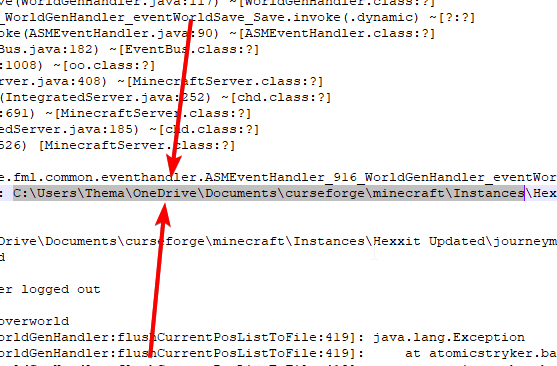 golden muskBOT
Change your install path to the following:
For Windows: C:\CurseForge
-Go to C:\ drive. Make a new folder. Name it Curseforge.
For Mac: /Users/Shared/CurseForge
If Minecraft is not installed in CurseForge App:
- Click the
 in the top left.
 - Select Minecraft from the list of games.
- Select the
Advancedoption and pick the folder you just made. - Click
Continue.
If Minecraft is installed in CurseForge App:
- Click the
 in the bottom left.
 - Select the Minecraft tab.
- Click
Change. - Select the folder you just made.
:no_entry_sign: Minecraft Files should NOT be installed inside the following locations :no_entry_sign:
:no_entry_sign: .minecraft folder.
:no_entry_sign: OneDrive folders.
:no_entry_sign: Desktop folder.
:no_entry_sign: Drive roots I.E. Directly into the C:\ drive.
:no_entry_sign: iCloud enabled folders.
:no_entry_sign: or any other cloud saved folder.
If any of the above are in the path you need to change/move it!
 blazing shale
can i get help
im trying to play the mc eternal modpack and it keeps on freezing
i just wanna play with my friends on it
my pc is good for it
id why its freezing
i put my allocated memory up bc it was freezing
and it still is idk what to do
i know there is a fix to it
 kind kiln
So im trying to play on 1.7.10 but my game keep crashing after I start the minecraft launcher with the exit code 0, and I don't even have mods installed on that instance.
 pine rapids
?mc-logs
golden muskBOT
Sending logs for support.
Right-click the modpack profile icon OR click the button in the modpack profile.
Click Open Folder.
Open the logs folder.
Find the file called debug.log OR latest.log and drag it into discord.
kind kiln
here the log
 signal tundra
heyo we need someone who really really know about aternos and cirsed forge to help us if we can hop in a call that is preferable
we have been trouble shooting for hours and it keeps putting us in loops
 ruby crest

 quasi topaz
Just had windows defender say i had a threat it came from the Curseforge cf instance folder i believe. Is this something to worry about?

 coarse elm
quasi topaz
Just had windows defender say i had a threat it came from the Curseforge cf inst...
quasi topaz
coarse elm
quasi topaz
Just had windows defender say i had a threat it came from the Curseforge cf inst...
quasi topaz
thank you so much
acoustic idol
 chilly coral
How to i change my Minecraft mod picture
chilly coral
How to i change my Minecraft mod picture
When you create a project on the cf site you set it there, then upload your pack to the site.
chilly coral
In CurseForge im trying to make a pack but when i make it there's no option to change the picture
golden muskBOT
There are two ways to share a modpack you've made with others...
Export and Share - For Friends to Small Groups.
- Click the Icon for the modpack.
- Click the button next to play.
- Click

Export. - Select the files that should be included.
- Send the zip to the people that want it! They can follow the instructions in
!mc-installpackto install the pack!
Upload to Curseforge - For Public Release to Everyone.
This options will make your pack public to EVERYONE, it comes with extra requirements and will take some effort to set up.
- Go to here: https://www.curseforge.com/project/432/4471/create
- Fill out the information with a proper description of the pack. This should allow anyone to understand what the pack is.
- Click the Icon for the modpack in the CurseForge app.
- Click the button next to play.
- Click
Export. - Select the files that should be included.
- Open your Project you made on the CurseForge site and Upload the file you just made.
- Wait for Moderation & Sync so it can show up in the client! (See
!syncfor limitations)
signal tundra
signal tundra
heyo we need someone who really really know about aternos and cirsed forge to he...
is anyone able to help with this
 short wave
hi i need help
pine rapids
!help
golden muskBOT
╰( ͡° ͜ʖ ͡° )つ──☆*:・゚ *˜”*°•.˜”*°• Many Help •°*”˜.•°*”˜* <:curselit:796985620550385705>
Please provide a description of your issue with as much detail as possible. If you have an issue with a mod or modpack, tell us the name. Explain what you can see happening. Be specific!
Tell us what is happening, we already know it "doesn't work".
Avoid using words like "it", tell us exactly what "it" is.
Don't assume anyone knows what you are talking about, be specific.
Tell us what you expected to happen.
Provide screenshots or video if possible.
Provide a log if possible. ?mc-log
short wave
i want to get a minecraft mod but it didn't login to my minecraft account instead it just made a new one, what do i do
hello
?
i need help
pine rapids
What do you mean it made a new account?
pine rapids
Please stop with the short messages every time there is the slightest pauase
short wave
ok
pine rapids
I don't know what you're talking about with making a new Minecraft account "for the mod"
 wind glade
when I try to install forge it shows an error like these libraires failed to download . try again
 acoustic idol
pine rapids
I don't know what you're talking about with making a new Minecraft account "for ...
acoustic idol
pine rapids
I don't know what you're talking about with making a new Minecraft account "for ...
Guessing they tried to sign in but it wasnt correct details so minecraft being special gave them a demo account
wind glade
wind glade
when I try to install forge it shows an error like these libraires failed to dow...
help??????????????
acoustic idol
wind glade
help??????????????
What version of Forge*
wind glade
what do you mean, I clicked to install and it appeared
acoustic idol
short wave
ok then ill just ask my friend to do it on realms cuz he knows how to do it
Cant do mods in realms. They are Vanilla only
wind glade
1.8.9
short wave
?
wind glade
acoustic idol
What version of Forge*
1..8.9
pine rapids
short wave
?
Realms are Mojang-run servers that only run vanilla
acoustic idol
wind glade
1.8.9
?forgeinstaller
golden muskBOT
Known Working Forge Installers
1.5.2: 7.8.1.738
1.6.4: 9.11.1.1345
1.7.10: 10.13.4.1614
1.8.9: 11.15.1.2318
1.9.4: 12.17.0.2317
1.10.2: 12.18.3.2511
1.11.2: 13.20.1.2588
1.12.2: 14.23.5.2855
short wave
pine rapids
Realms are Mojang-run servers that only run vanilla
ohhhhhhhh ok
pine rapids
wind glade
1..8.9
That's a Minecraft version, not a Forge version
acoustic idol
wind glade
1..8.9
those are the current working for forge. Make sure you use the one listed for 1.8.9
wind glade
golden musk
my download 18.9
acoustic idol
This for a client or server?
wind glade
client
acoustic idol
are you on Linux?
If no then use the Curseforge app for your client (win & mac). Will save you this headache
 acoustic idol
Thats Forge not CurseForge
wind glade
is not the same thing?]
acoustic idol
!!=
golden muskBOT
Wording is important!
Forge = Minecraft Forge, This is a modloader often just called "Forge".
Fabric = Fabric MC, this is another modloader, just called "Fabric".
CurseForge = A Website/App that has content for games.
Mods = Individual mod files.
Modpacks = Multiple mods put into the mods folder or downloaded from CurseForge.
These are not Interchangeable! Please use the correct terms as it allows us to help you faster!
acoustic idol
Nope,
wind glade
woooowww
acoustic idol
!getcf
golden muskBOT
Looking to install the CurseForge app?
<:windows:798410728188936222> Windows
Minimum Requirements:
- OS Version: 7, 8.1, 10
- 64 bit Required.
- 350MB storage space.
- Microsoft .Net 4.8
- Intel/AMD quad-core CPU
- 8GB ram
Download: https://download.overwolf.com/install/Download?&PartnerId=4047
If you are having issues with the installer use the URL below to install Overwolf then go to the app store to download CurseForge.
https://content.overwolf.com/downloads/setup/latest/regular.html
<:mac:798410654418862130> Mac
Minimum Requirements:
- OS Version 10.14 or newer.
- 64 bit Required.
Download: https://curseforge.overwolf.com/downloads/curseforge-latest.dmg
:penguin: Linux
Minimum Requirements:
Yes.
Download: :person_shrugging:
acoustic idol
thats the Cf app.
wind glade
I don't use linux
acoustic idol
then install the version you do use from the bot above
wind glade
ok
 plain igloo
How do you change your skin on curseforge?
coarse elm
what skin?
plain igloo
Like in game skin
Im using the launcher for modpacks and don't know how to change my minecraft skin
(Forgot this was for other games as well)
wait. i think im just dumb.
I mightve got it
coarse elm
was gonna say has nothing to do with CurseForge
wind glade
acoustic idol
then install the version you do use from the bot above
since I install version 1.8.9 only the curseforge download appears
!getcf
golden muskBOT
Looking to install the CurseForge app?
<:windows:798410728188936222> Windows
Minimum Requirements:
- OS Version: 7, 8.1, 10
- 64 bit Required.
- 350MB storage space.
- Microsoft .Net 4.8
- Intel/AMD quad-core CPU
- 8GB ram
Download: https://download.overwolf.com/install/Download?&PartnerId=4047
If you are having issues with the installer use the URL below to install Overwolf then go to the app store to download CurseForge.
https://content.overwolf.com/downloads/setup/latest/regular.html
<:mac:798410654418862130> Mac
Minimum Requirements:
- OS Version 10.14 or newer.
- 64 bit Required.
Download: https://curseforge.overwolf.com/downloads/curseforge-latest.dmg
:penguin: Linux
Minimum Requirements:
Yes.
Download: :person_shrugging:
wind glade
?version
acoustic idol
wind glade
since I install version 1.8.9 only the curseforge download appears
huh?
wind glade
acoustic idol
huh?
how do i choose the version i want to play minecraft
acoustic idol
!mc-installmods
golden muskBOT
How to install mods in CurseForge App.
- Click
+ Create Custom Profile - Name it, select the required Minecraft version, select the Forge version (usually the highest number), click
Create. - Click the profile icon.
- Click
Add More Content - Search and install the desired mods.
- Start the game!
How to install mods not on CurseForge.
- Right click the profile picture or Open the profile and click the Icon next to the play button.
- Click
Open Folder. - Drag the mod(s) into the
modsfolder. (Note: Some mods will require others, to run. Make sure to read the instructions for the mod!) - Start the game!
 wind glade
I use the lunar client and I wanted to use a mod like the perspective mod and for that I need the forge etendeu?
coarse elm
we don't support modified clients here.
wind glade
coarse elm
we don't support modified clients here.
so what do i do?
acoustic idol
Buy the game is a good start
coarse elm
and find another discord.
pine rapids
w machine broke?
acoustic idol
Find one that supports Cracked. We dont.
pine rapids
I don't think lunar is cracked
wind glade
give you fuck
acoustic idol
Wasnt it?
wind glade
what?
wind glade
semi full access minecraft
pine rapids
Troll in the dungeon?
wind glade
é q eu to traduzindo e dai copiei errado kkk
]
acoustic idol
Its either you own the game or you dont, there is no semi full access
wind glade
pine rapids
Troll in the dungeon?
no
wind glade
acoustic idol
Its either you own the game or you dont, there is no semi full access
yes there is i just cant change the email but the password skin and name i can
pine rapids
That sounds like your account was stolen or you stole the account
or... you're using a public alt
wind glade
search minecraft semi full acess
wind glade
pine rapids
or... you're using a public alt
no
pine rapids
Yep, public alts... come back when you actually own an account
wind glade
wind glade
search minecraft semi full acess
!!!!!!!!!
acoustic idol
I did, Not supported here
wind glade
BUT I HAVEEEEEEEEEEEEEEEEEEEEEEEEEEEEEEEEEEEEEEEEEEEEEEEEEEEEEEEEEE
pine rapids
No, you're borrowing an account that you do not own
acoustic idol
ok, end of convo here. When you own an official account then you can get help
wind glade
yes it's just n I can change the dumb email
acoustic idol
Keep that up and your gone
pine rapids
I've had enough
acoustic idol
that works too
wind glade
yes it's just n I can change the dumb email
you don't care for anything, I give up
useless
acoustic idol
We only support official accounts, owned by the player that bought it.
pine rapids
You do not own an account, at best you're leasing it... which I doubt is allowed in the eula
acoustic idol
As per #📛︱rules 8
⪤ Follow the rules of the games/services used.
You need to follow the TOS/EULA/Rules of the games/services you use. Any talk about hacking, cheating, cracking, pirating or otherwise of any games is not tolerated.
wind glade
it's from my friend he just told me to change the email and that's it
acoustic idol
Dont care, Would need to provide us proof that you own the account
coarse elm
it doesn't matter anyway, they aren't using the client to start with
wind glade
How do I do that?
coarse elm
You aren't getting support even if you do provide account proof. We don't support 3rd party clients.
wind glade
you don't care for anything, I give up
useless
coarse elm
ok, whatever bye.
pine rapids
Says the one who is doing everything they can to not rightfully pay for the software
wind glade
stop talking shit my friend wasn't using the account and he lent it to me, he doesn't say what you don't know idiot
I can no longer use an account that a prossimo friend of mine lent more shit@
pine rapids
Why are you even still here? Just to prove a point or something?
wind glade
n just to see if you bothered to do what you were hired to do your useless
coarse elm
you both can stop >.>
wind glade
bye useless
pine rapids
I'm not being paid, dude... I'm volunteering here

 sage pier
.. you can start talking in here again. I don't bite.
 wild jewel
sage pier
.. you can start talking in here again. I don't bite.
wild jewel
sage pier
.. you can start talking in here again. I don't bite.
It was a spambot
sage pier
Yes, but it's been really quiet since my silence-gif. More that I reacted on.
Maybe the community doesn't need support today. It is friday after all.
 worldly ether
Nothing has hit the fan today . Yet
sage pier
*slaps the fan*
 gusty sinew
anyone know how to set up a modded minecraft server to play with friends
wild jewel
!mc-installserver
golden muskBOT
How to **manually** install a server - **On your own PC**
- Check if the modpack has a server pack, if it does: use that and skip below.
- Go to the Forge website http://files.minecraftforge.net/ and download the Installer for the forge version the pack is using.
- Run the installer and choose
Install server. Do not install to your desktop. Also do not install inside a OneDrive folder. - Run the server using the forge.jar. A file called
eula.txtwill be generated. Open it and changeeula=falsetoeula=true - From the Client; Copy the
modsfolder,configfolder, and any other folders needed for the pack to work into the server folder. If the modpack has a server pack, use this instead! - Run the server again.
- Port forward your machine if needed. (Google it)
 errant merlin
i have uncontrollable/keeps changing sensitivity in better minceraft , is this by any chance an optifine issue or something else?
 willow cloak
 last parcel
!ticket-site
golden muskBOT
:bug: Reporting via Website :bug:
Can't open the app or would rather use the website? You can do so here: https://support.curseforge.com/en/support/tickets/new
Fill out the form with accurate detailed information, "It doesn't work" isn't helpful! What exactly doesn't work and why doesn't it work should be easy to answer!
Make sure to upload your Overwolf logs with the Upload File option on the ticket, information on how to get these logs can be found here https://support.overwolf.com/en/support/solutions/articles/9000176827-how-to-get-your-overwolf-logs
 young heron
Hi everybody. Could you please help me? I have a document with addons. How do I add it to this app?
wild jewel
young heron
Hi everybody. Could you please help me? I have a document with addons. How do I ...
Addons or mods?
young heron
wild jewel
Addons or mods?
addons
wild jewel
Is it a zip? What do you have exactly?
young heron
wild jewel
Is it a zip? What do you have exactly?
My friend made a folder on Google drive in a compressed form, with addons. I would like to install them exactly
wild jewel
Need to find the right folder for that, the people in #768028293231542303 can probably provide more support.
Can get access via #786424115535544350
 neat falcon
curseforge doesnt launch on my pc
 marble ice
So i have this problem, when i run the .bat file to make a 1.17.1 server it give out this error
 wild jewel
Show the bat
marble ice
 pine rapids
You're running it with Java 15 or earlier, which is not going to work
You need Java 16, and also I do NOT recommend putting this in OneDrive
marble ice
ok
neat falcon
curseforge doesnt launch on my pc
wild jewel
neat falcon
curseforge doesnt launch on my pc
Then what do you see?
neat falcon
it loads and then closes
wild jewel
!ticket-site
golden muskBOT
:bug: Reporting via Website :bug:
Can't open the app or would rather use the website? You can do so here: https://support.curseforge.com/en/support/tickets/new
Fill out the form with accurate detailed information, "It doesn't work" isn't helpful! What exactly doesn't work and why doesn't it work should be easy to answer!
Make sure to upload your Overwolf logs with the Upload File option on the ticket, information on how to get these logs can be found here https://support.overwolf.com/en/support/solutions/articles/9000176827-how-to-get-your-overwolf-logs
 autumn agate
Minecraft crashing due to a mod that no longer is in my modpack.
as in, the mod is causing the issue despite not existing
on the crash report thing it says something about baubles
despite it not being in my modpack
i even uninstalled quark

:(
i just want to use my modpack
 mossy parrot
does anyone know mods like sodium but for forge
i tried this one repurposed sodium mod but it wouldnt render any textures
autumn agate
I have clicked repair profile over 10 timesn ow
autumn agate
it isnt installed
blazing shale
can i get help
im trying to play the mc eternal modpack and it keeps on freezing
i just wanna play with my friends on it
my pc is good for it
id why its freezing
i put my allocated memory up bc it was freezing
and it still is idk what to do
i know there is a fix to it
 sinful hearth
what about backpackbaubles?
autumn agate
still doesnt exist anymore
sinful hearth
hmm weird
autumn agate
 sinful hearth
weird
wild jewel
blazing shale
can i get help
im trying to play the mc eternal modpack and it keeps on freezing...
Rule 4
blazing shale
what does that mean
sinful hearth
** Do not spam. Stick to one room for questions. **
sinful hearth
autumn agate
could i perhaps have a copy of that modpack? ill try to see on my end
cause i've read it's still an unknown bug
 autumn agate
oh
 cedar pollen
does anyone know how to download a single mod
wild jewel
!mc-installmods
golden muskBOT
How to install mods in CurseForge App.
- Click
+ Create Custom Profile - Name it, select the required Minecraft version, select the Forge version (usually the highest number), click
Create. - Click the profile icon.
- Click
Add More Content - Search and install the desired mods.
- Start the game!
How to install mods not on CurseForge.
- Right click the profile picture or Open the profile and click the Icon next to the play button.
- Click
Open Folder. - Drag the mod(s) into the
modsfolder. (Note: Some mods will require others, to run. Make sure to read the instructions for the mod!) - Start the game!
cedar pollen
Thanks😀
pine rapids
(Continued from #🔥︱curseforge-support) Are you just invoking "java"?
 sinful garnet
Dose anyone know why my curseforge modpack crashes? yesterday I was playing minecraft sky bees perfectly fine and today its just crashing with error 0
pine rapids
?mc-logs
golden muskBOT
Sending logs for support.
Right-click the modpack profile icon OR click the button in the modpack profile.
Click Open Folder.
Open the logs folder.
Find the file called debug.log OR latest.log and drag it into discord.
 spiral stratus
pine rapids
(Continued from <#782027635252920322>) Are you just invoking "java"?
spiral stratus
pine rapids
(Continued from <#782027635252920322>) Are you just invoking "java"?
how invoking java? sorry i am noob xD
pine rapids
What command are you using?
spiral stratus
java -jar
pine rapids
You need to use the full path to the Java 8 java.exe instead of just putting java
spiral stratus
like this
 sinful garnet
I think this is the log for my crashes
pine rapids
spiral stratus
like this
No, like C:\Program Files\Java\java8\bin\java.exe -jar <jar name>
pine rapids
sinful garnet
I think this is the log for my crashes
Did you make Sky Bees or is it a pack you downloaded?
spiral stratus
Ok, I see
sinful garnet
I play it from the curse forge launcher
pine rapids
sinful garnet
I play it from the curse forge launcher
This does not answer my question
Did you make the pack or did you download it
sinful garnet
downloaded it
pine rapids
Back up your saves and repair the instance
 fresh willow
Has anyone seen this error before.
java.lang.ClassNotFoundException: net.minecraftforge.common.ToolActions
sinful garnet
pine rapids
Back up your saves and repair the instance
I repaired the modpack and even the mc launcher but it still crashes
pine rapids
Delete the config folder and repair the instance again
spiral stratus
pine rapids
No, like ``C:\Program Files\Java\java8\bin\java.exe -jar <jar name>``
Daemon now send me this
but I put eula true
 pine rapids
No no, you need to be in the server's folder for this to work, you have it backwards
You need to use the full path to java from the server's folder, not the full path to the server jar from the java folder
spiral stratus
oooo now thanks very much!!
 unborn tiger
When I try to install RLcraft curseforge this error occours: Cannot find chind addon file: 2811669
acoustic idol
unborn tiger
When I try to install RLcraft curseforge this error occours: Cannot find chind a...
I let a higher up know
 shut hatch
@acoustic idol I have the same issue
acoustic idol
shut hatch
<@!217048549706301442> I have the same issue
#📛︱rules 5
shut hatch
my bad
acoustic idol
Just say what your downloading and the child addon id
shut hatch
im downloading rlcraft, child addon: 2811669
acoustic idol
 ripe echo
Why does it say Modding folder can not be set on hardrive
ripe echo
Why does it say Modding folder can not be set on hardrive
!mc-path
golden muskBOT
Change your install path to the following:
For Windows: C:\CurseForge
-Go to C:\ drive. Make a new folder. Name it Curseforge.
For Mac: /Users/Shared/CurseForge
If Minecraft is not installed in CurseForge App:
- Click the in the top left.
- Select Minecraft from the list of games.
- Select the
Advancedoption and pick the folder you just made. - Click
Continue.
If Minecraft is installed in CurseForge App:
- Click the in the bottom left.
- Select the Minecraft tab.
- Click
Change. - Select the folder you just made.
:no_entry_sign: Minecraft Files should NOT be installed inside the following locations :no_entry_sign:
:no_entry_sign: .minecraft folder.
:no_entry_sign: OneDrive folders.
:no_entry_sign: Desktop folder.
:no_entry_sign: Drive roots I.E. Directly into the C:\ drive.
:no_entry_sign: iCloud enabled folders.
:no_entry_sign: or any other cloud saved folder.
If any of the above are in the path you need to change/move it!
ripe echo
thank you
why does it ask to install it on my onedrive
nvm
YoYo
how do i find this
nvm
sorry
acoustic idol
Follow the bot
ripe echo
i duno were to type C:\CurseForge into to find it
acoustic idol
Open a file folder > Click this pc on the left > click yours C drive > Create a folder in your C drive called CurseForge
then in the app set the path to the new folder you just made

 somber dragon
Does anyone else have the problem where you try to download a mc modpack and halfway through it deletes it and says "cannot find child addon file: 2811669"
acoustic idol
Local Disk C
acoustic idol
somber dragon
Does anyone else have the problem where you try to download a mc modpack and hal...
RlCraft?
somber dragon
acoustic idol
RlCraft?
Yup
acoustic idol
somber dragon
Yup
Have already let the higher ups know about it. Needs to be fixed CF side
somber dragon
acoustic idol
Have already let the higher ups know about it. Needs to be fixed CF side
Damn. That sucks.
ripe echo
ok tysm YoYo
now i can play my fav mods
tysm u made my day
luckily i found a their disco and found you 🙂
again thanks! Hope u have a good day 🙂
somber dragon
acoustic idol
Have already let the higher ups know about it. Needs to be fixed CF side
When did you report this btw?
acoustic idol
About an hour ago, They are on their weekend though.
somber dragon
acoustic idol
About an hour ago, They are on their weekend though.
Okay thank you.
 vapid nexus
How do I solve this error? it happens to me when I want to install a ModPack in this case (RLCraft)
 somber dragon
vapid nexus
How do I solve this error? it happens to me when I want to install a ModPack in ...
somber dragon
vapid nexus
How do I solve this error? it happens to me when I want to install a ModPack in ...
I have the same problem. Haven't been able to do anything about it yet.
 thorny depot
i cant find a mod is there a reason why i cant find it
i searched what it was on the curse forge website and on the app its called the monk mod
if anyone can help me that would be great
acoustic idol
thorny depot
i searched what it was on the curse forge website and on the app its called the ...
Link the mod and say what version your using
 nocturne jackal
hi yes i would like to play modded minecraft multiplayer do you have to pay for a sever or is it free?
acoustic idol
nocturne jackal
hi yes i would like to play modded minecraft multiplayer do you have to pay for ...
Depends one what you want to do.
Option 1: find a public server already running what your want to play (free)
Option 2: Rent a server online and host it (prices range with quality)
Option 3: Host a server on your own pc and set up portforwarding (Free)
nocturne jackal
acoustic idol
Depends one what you want to do.
Option 1: find a public server already running...
thanks for the help
thorny depot
acoustic idol
Link the mod and say what version your using
so i cant link it for some reason but if you go to the curse forge website and then search the monk mod you can find it and it doesnt specify which version
coarse elm
That's impossible.
acoustic idol
This one for 1.12.2? https://www.curseforge.com/minecraft/mc-mods/the-monk-mod

Can see it in the app as well. Make sure you are searching in a custom profile not in modpacks
thorny depot
forge or fabric
acoustic idol
Forge, its a forge mod
thorny depot
ok
coarse elm
Says right on the picture.
acoustic idol
Fabric only came out in 1.14+ so anything below that will be forge
thorny depot
so how do i get to the mnods
acoustic idol
!mc-installmods
golden muskBOT
How to install mods in CurseForge App.
- Click
+ Create Custom Profile - Name it, select the required Minecraft version, select the Forge version (usually the highest number), click
Create. - Click the profile icon.
- Click
Add More Content - Search and install the desired mods.
- Start the game!
How to install mods not on CurseForge.
- Right click the profile picture or Open the profile and click the Icon next to the play button.
- Click
Open Folder. - Drag the mod(s) into the
modsfolder. (Note: Some mods will require others, to run. Make sure to read the instructions for the mod!) - Start the game!
thorny depot
thanks everyone
spiral stratus
Hi anyone can say me how I can give more ram to my server? this error come all the time
 sweet schooner
When I try to make a 1.17.1 modpack it just crashes. I don't have any mods installed.
pine rapids
?mc-logs
golden muskBOT
Sending logs for support.
Right-click the modpack profile icon OR click the button in the modpack profile.
Click Open Folder.
Open the logs folder.
Find the file called debug.log OR latest.log and drag it into discord.
 plain shell
every time when I try to update the fabric api it just says IO error occured and windows defender thinks is a trojan script, anybody know if this is safe to allow it?
 still glen
just had a similar problem with paladin dps helper
still glen
TY
sweet schooner
pine rapids
Please provide launcher_log.txt from your /Minecraft/Install/ folder
(Minecraft or whatever you called the folder you told Curse to put Minecraft in)
sweet schooner
pine rapids
?mc-installfix
golden muskBOT
- Click on the Minecraft Tab on the Left side of the CurseForge App.
- Click button next to the
Create Custom Profileoption. - Click

Repair Installationoption. - Play game.
NOTE: You will not lose any modpacks or worlds, These are saved in the Instances folder. DO NOT TOUCH THIS FOLDER OR YOU WILL LOSE EVERYTHING
sweet schooner
That didn't work
still glen
security and windows update didnt fix the issue with the paladin dps helper addon showing as a false positive, will just uninstall for now since my paladin is sitting on the shelf
 earnest aspen
I accidentally hit cancel on a download for ATM6 (minecraft) now when i try to download it I get stuck at 33% and it says it cant unzip the mod folder. Can anyone help? I tried uninstalling the folder, reinstalling curseforge, downloading another modpack. (not sure which channel this belongs in sorry)
 icy berry
so im using the overwolf curseforge launcher to try and install rlcraft, but it will get to about mod 60/118 and then will give the error "cannot find child addon file: 2811669" and i have no idea how to fix it, can anyone help?
acoustic idol
icy berry
so im using the overwolf curseforge launcher to try and install rlcraft, but it ...
Known issue, needs to be fixed on CF side.
pine rapids
sweet schooner
That didn't work
Delete Minecraft/Install/libraries/net/minecraftforge/forge/1.17.1-37.0.42/ and click play again
icy berry
alright, thanks
earnest aspen
earnest aspen
I accidentally hit cancel on a download for ATM6 (minecraft) now when i try to d...
this is what it says btw
 pine rapids
Close Curse and delete the Temp/CF folder I guess
earnest aspen
i tried that
pine rapids
Who are you logged in as?
 jaunty mesa
I keep getting the same error in my pack im working on and i dont know how to fix it i can send modlist if needed
pine rapids
Same error as who?
jaunty mesa
 frail salmon
hello, I would like to ask a question, I can't open minecraft at all... would you guys have any help?
and in curseforge whenever I click on play it doesn't open
earnest aspen
pine rapids
Who are you logged in as?
not logged in
 waxen pine
frail salmon
hello, I would like to ask a question, I can't open minecraft at all... would yo...
waxen pine
frail salmon
hello, I would like to ask a question, I can't open minecraft at all... would yo...
What version Minecraft is the modpack you are attempting to use? Also - know what version of java you have installed?
frail salmon
it doesn't seem like that, because even my minecraft launcher vanilla doesn't open
acoustic idol
!mc-installfix try this
golden muskBOT
- Click on the Minecraft Tab on the Left side of the CurseForge App.
- Click button next to the
Create Custom Profileoption. - Click
Repair Installationoption. - Play game.
NOTE: You will not lose any modpacks or worlds, These are saved in the Instances folder. DO NOT TOUCH THIS FOLDER OR YOU WILL LOSE EVERYTHING
waxen pine
So not going to answer either part of the question - intending to gather information?
If you're trying to play pre-1.17 go download and install the newest java 8 64 bit. If it's 1.17 install java 16
Without more info that and yokos suggestion is all that could be advised
 bronze needle
I would like to ask a question.
when I open the forge installer everything is fine until the moment of installing the program. them gives me oh no .... error during installation open and close the program, I do it 6 times but it always gives me the same error. what should I do?
acoustic idol
Are you installing Forge for a client OR a server?
acoustic idol
ruby echo
what does this mean?
Can you post the Log called Latest from your logs folder please
ruby echo
@acoustic idol all good I think, i replaced the Ftb chunks with the latest one and the server loaded fine
waxen pine
bronze needle
I would like to ask a question.
when I open the forge installer everything is fi...
Are you trying to install Forge (the mod loader system) or CurseForge (the website and app for modpack hosting)?
bronze needle
l'app
acoustic idol
Windows or Mac?
bronze needle
Windows
acoustic idol
!getcf try the second link for Windows
golden muskBOT
Looking to install the CurseForge app?
<:windows:798410728188936222> Windows
Minimum Requirements:
- OS Version: 7, 8.1, 10
- 64 bit Required.
- 350MB storage space.
- Microsoft .Net 4.8
- Intel/AMD quad-core CPU
- 8GB ram
Download: https://download.overwolf.com/install/Download?&PartnerId=4047
If you are having issues with the installer use the URL below to install Overwolf then go to the app store to download CurseForge.
https://content.overwolf.com/downloads/setup/latest/regular.html
<:mac:798410654418862130> Mac
Minimum Requirements:
- OS Version 10.14 or newer.
- 64 bit Required.
Download: https://curseforge.overwolf.com/downloads/curseforge-latest.dmg
:penguin: Linux
Minimum Requirements:
Yes.
Download: :person_shrugging:
bronze needle
 acoustic idol
!ticket
golden muskBOT
Issue Reporting with Overwolf tickets!
Issues can be reported two ways!
Via the website, or in app. Instructions for both are below!
Make sure to include logs when reporting a problem!
Upload your Overwolf logs with the Upload File option on the ticket, information on how to get these logs can be found here https://support.overwolf.com/en/support/solutions/articles/9000176827-how-to-get-your-overwolf-logs
:bug: Reporting via Website :bug:
Can't open the app or would rather use the website? You can do so here: https://support.curseforge.com/en/support/tickets/new
Fill out the form with accurate detailed information, "It doesn't work" isn't helpful! What exactly doesn't work and why doesn't it work should be easy to answer!
:question: Ticket Status :question:
Tickets you have made can be looked at, replied to and closed if you make/login to an account. If you submit a ticket with a specific Email make sure to use that when you make your account so you can see your past tickets!
https://support.curseforge.com/en/support/tickets
Otherwise you will only get email replies at the email you used to open the ticket.
:bug: Reporting via the CurseForge App :bug:
- Click the
 icon in the bottom left.
 - Select

Open a Ticket. - Fill out the form with accurate detailed information, "It doesn't work" isn't helpful! What exactly doesn't work and why doesn't it work should be easy to answer!!
- Upload your Overwolf logs with the
Upload Filesection. (see the top of this message for details) - Submit!
ruby echo
bruh now every time I try to get into my server it says "failed to synchronize registry data from server closing connection"
why is that
acoustic idol
make sure you and the server are running the same version of the pack. This includes same mod versions and configs
jaunty mesa
jaunty mesa
I keep getting the same error in my pack im working on and i dont know how to fi...
Still how do I fix mine?
last parcel
java.lang.ExceptionInInitializerError at com.SuperJulesBE.ruby_mod.util.handler.RegistryHandler.onBlockRegister(RegistryHandler.java:41)
pine rapids
You never answered my question... same error as who?
jaunty mesa
pine rapids
You never answered my question... same error as who?
I guess me
 pseudo moat
Is there a way to download net 4.8 even if its not compatible with my pc?
pine rapids
What do you mean by not compatible?
pine rapids
jaunty mesa
I guess me
Looks like a conflict between Njarm and Random Things
jaunty mesa
K I'm not at PC atm
pseudo moat
pine rapids
What do you mean by not compatible?
When i install net 4.8 it has an error message "The net 4.8 is not supported on this operating system"
pseudo moat
Windows 10
 empty viper
pine rapids
empty viper
pine rapids
Describes the .NET Framework Repair Tool and how to obtain it.
pine rapids
Have you restarted since trying it?
pseudo moat
Yes
pine rapids
That tool should have repaired it for you... try Curse again
pine rapids
Download what?
pseudo moat
ne 4.8
pine rapids
Have you tried running Curse?
pseudo moat
it says "The .NET Framework 4.8 redistributable does not apply to this operating system. Please download the .NET Framework 4.8 for your operating system from the Microsoft Download Center"
pseudo moat
pine rapids
Have you tried running Curse?
yes
i cant open it since i dont have net 4.8
pine rapids
and running the tool I linked doesn't fix it?
pine rapids
Ok, let's see if the SystemFileChecker finds something...
Open an admin command prompt and run sfc /scannow, it will take a while
 carmine rover
hello when I try to play sevtech or any mod with other people on LAN it freezes every couple seconds for the joining person does anyone know a fix to this? Also it only lags for the joining person
pseudo moat
pine rapids
Ok, let's see if the SystemFileChecker finds something...
Open an admin command ...
 pine rapids
Ok, so if sfc failed to fix it, try DISM /Online /Cleanup-Image /RestoreHealth
pseudo moat
command prompt again?
pine rapids
Yes, and admin as well
pseudo moat
its stuck on 20.0%, is this normal?
pine rapids
It's likely to take a while again
If it sticks then try clicking into it and tapping a key to see if it wakes up
pseudo moat
oh okay, thanks.
pine rapids
Sometimes command line things forget they have a visual to update 😛
pseudo moat
 pine rapids
It's supposed to find the files with Windows Update....what?
pine rapids
Never had this happen before, currently looking into how other people dealt with this issue
I'm seeing recommendations to run these commands in order:
DISM /Online /Cleanup-Image /StartComponentCleanup
Dism /Online /Cleanup-Image /RestoreHealth
sfc /scannow
pseudo moat
If im not mistaken, i think this pc was in windows 7/8 then upgraded to windows 10. I cant clearly remember since this pc is kinda old
 upbeat coyote
which windows 10 flavor is it
pine rapids
(Home or Pro)
pseudo moat
Home
upbeat coyote
so you're missing your recovery partition then
If your security descriptors are screwed up, SFC can't authenticate the shadow copies from the recovery volume
And you're missing the actual cabs to do a hard recovery
autumn agate
anyone know how to fix this wheat issue? I have already tried enablevanillafoodBalance = false in the world per console and per config yet it did not work
 pseudo moat
So what should i do?
upbeat coyote
You can try downloading the media disk builder and use a usb drive to do a refresh. I would do a full offline disk scan tho to make sure the drive doesn't have corruption first
pine rapids
Gimme a minute, working with a disk image to hopefully get you a file source
pseudo moat
Alright, thanks guys.
pine rapids
I'm assuming you're running 64-bit here...
last parcel
doesnt w10 need to be on 64bit?
pine rapids
It gives me the option to make a 32-bit install image
pseudo moat
pine rapids
I'm assuming you're running 64-bit here...
Yes
pine rapids
I'd rather not risk posting this image publicly, vinz... add me as friend so we can DM?
pseudo moat
Added you as a friend
golden muskBOT
╰( ͡° ͜ʖ ͡° )つ──☆*:・゚ *˜”*°•.˜”*°• Many Help •°*”˜.•°*”˜* <:curselit:796985620550385705>
Please provide a description of your issue with as much detail as possible. If you have an issue with a mod or modpack, tell us the name. Explain what you can see happening. Be specific!
Tell us what is happening, we already know it "doesn't work".
Avoid using words like "it", tell us exactly what "it" is.
Don't assume anyone knows what you are talking about, be specific.
Tell us what you expected to happen.
Provide screenshots or video if possible.
Provide a log if possible. ?mc-log
 raven kite
I need help. I am trying to update Raider.io addon in curseforge app. But all i get is "General install error". So I removed the addon and tried to re-install it again.. now i cant reinstall it.. It says the same thing.
Anyone have any ideas on what I can do?
 winter lynx
I need help.
How do i play with friends?
wild jewel
winter lynx
I need help.
How do i play with friends?
Need a server for that
winter lynx
wild jewel
Need a server for that
ok
 crude bobcat
(minecraft) anyone know how to get the world download of my worlds? ive been working in worldedit through curseforge, and the world im working on isnt in my saves folder in .minecraft. im in minecraft 1.8.9 if thats important :D
wild jewel
Right click the modpack icon, open folder
crude bobcat
oh...
thanks a lot! ive spent wayy too much time trying to figure it out <3
i have another question- how do i send this file to someone? i can't send the folder, so do i turn it into a .zip file?
 idle nimbus
crude bobcat
idle nimbus
crude bobcat
okay, thanks for the help. ill be back if it doesnt work :P
 turbid escarp
Hey guys, anyone know if there are any good superhero mods for 1.16? I have tried finding a newer version of the classic superheros unlimited. But, to no avail; if anyone knows of some secret ritual that needs to be done to find this mod for 1.16 it would be much appreciated.
 deep pelican
question is there a way just to download mods using curseforge on minecraft not modpacks ?
last parcel
?mc-installmods
golden muskBOT
How to install mods in CurseForge App.
- Click
+ Create Custom Profile - Name it, select the required Minecraft version, select the Forge version (usually the highest number), click
Create. - Click the profile icon.
- Click
Add More Content - Search and install the desired mods.
- Start the game!
How to install mods not on CurseForge.
- Right click the profile picture or Open the profile and click the Icon next to the play button.
- Click
Open Folder. - Drag the mod(s) into the
modsfolder. (Note: Some mods will require others, to run. Make sure to read the instructions for the mod!) - Start the game!
 slender kettle
how can i turn off dynamic fov in forge 1.8.9
 cedar brook
does anyone why i am getting this in curseforge mod website 404 - File or directory not found.
The resource you are looking for might have been removed, had its name changed, or is temporarily unavailable.
last parcel
by doing what
cedar brook
i was just trying to get mmods oin the curseforge web site and i got this error does anyone why i am getting this in curseforge mod website 404 - File or directory not found.
The resource you are looking for might have been removed, had its name changed, or is temporarily unavailable.
 lyric imp
im trying to play valhelsia 3 with some friends on a LAN world but whenever i start my LAN it doesnt show up for my friends. can anyone help?
 uneven geyser
website ded?
last parcel
link to the thing you were looking for. dont need to repeat what you said
cedar brook
lyric imp
im trying to play valhelsia 3 with some friends on a LAN world but whenever i st...
they need the modpack and lan does not work modded or not does not work anymore
last parcel
yea nvm. site is down
uneven geyser
yup
uneven geyser
ig came back up
lyric imp
LAN doesnt work for modded?
cedar brook
no since 1.17/ 1.17 snapshots lan has never worked ever
uneven geyser
nvm it didnt
lyric imp
the pack is 1.16.5
last parcel
lan works fine
cedar brook
well for me lan never works anymore no mater what version
lyric imp
Yamza do you know any solutions for my issue? were all on the same pack and same wifi network
last parcel
nope
wild jewel
 hasty stone
help please
hasty stone
help please
I have seen you break rule 4 multiple times already.
Don't do that.
You will get removed from the server
wild jewel
Then we don't know the solution or are busy
 severe swallow
is curse down
severe swallow
dame i was about to update my mod to
 radiant matrix
so i downloaded this so i could use the forge minecraft launcher but it wont work
 pine rapids
Are you trying to use Curse?
radiant matrix
it tells me to look for a app to launch it with in microsoft store
no normal forge i have the curse forge app aswell
maybe its forge but all its says is forge this is really confuseing
pine rapids
I'm not sure what you're trying to do, what issue are you having?
radiant matrix
usually it would download to here but instead it just opens microsoft store asking me to look for a app there to open it
 acoustic idol
Why not just use the Curseforge app for your client?
pine rapids
Why aren't you just using Curse though?
radiant matrix
there a curse forge mincraft launcher i thought it was only a app
cus i have the app
 pine rapids
Curse uses the official Minecraft Launcher, it just sets up the necessary data files and launches it with a command line argument
radiant matrix
then what is this
 golden muskBOT
Wording is important!
Forge = Minecraft Forge, This is a modloader often just called "Forge".
Fabric = Fabric MC, this is another modloader, just called "Fabric".
CurseForge = A Website/App that has content for games.
Mods = Individual mod files.
Modpacks = Multiple mods put into the mods folder or downloaded from CurseForge.
These are not Interchangeable! Please use the correct terms as it allows us to help you faster!
radiant matrix
well when i try and download the modloader forge it doesnt work and it doesnt have the java app logo it useually does instead it bring me to microsoft store instead of downloading it to miencraft
pine rapids
Again, why are you not just clicking "Play" in Curse?
Curse will handle installing Forge and launching the launcher
 pine rapids
?mc-installfix
golden muskBOT
- Click on the Minecraft Tab on the Left side of the CurseForge App.
- Click button next to the
Create Custom Profileoption. - Click
Repair Installationoption. - Play game.
NOTE: You will not lose any modpacks or worlds, These are saved in the Instances folder. DO NOT TOUCH THIS FOLDER OR YOU WILL LOSE EVERYTHING
radiant matrix
k ty
 whole stratus
I'm not sure how to really look through this to see what is wrong
I added some mods to a pack but I'm not sure which one is causing it to crash
This is the crash report
acoustic idol
whole stratus
I added some mods to a pack but I'm not sure which one is causing it to crash
What modpack is this? Did you make it or was it downloaded?
 runic crag
hi can someone help me please? im trying to install rlcraft from the curseforge launcher but it keeps saying missing child addon. i tried reinstalling curseforge and minecraft but to no succes. do you guys know anything that might fix it?
acoustic idol
runic crag
hi can someone help me please? im trying to install rlcraft from the curseforge ...
Whats the child addon id?
runic crag
gimme a sec
 cedar veldt
acoustic idol
Whats the child addon id?
cedar veldt
acoustic idol
Whats the child addon id?
also having this problem. addon # 440047
acoustic idol
cedar veldt
also having this problem. addon # 440047
Need pack name and ID#
cedar veldt
Valhelsia 3
runic crag
its 2818064
 eager steeple
Also having this issue, Mineshaft and Monsters 430990
runic crag
runic crag
its 2818064
rlcraft
 knotty rose
i dont think anyone can download anything
acoustic idol
Ill add em to the current list
knotty rose
All the Mods 6 https://gyazo.com/9ff27d1f093f6be5a4d2f9e5620f29ed

 cunning oriole
i have made a project but i cant view it can someone help me
cunning oriole
ok thx
autumn agate
whenever I download a modpack instead of the folder having a java symbol it downloads as a compressed (zipped) folder
acoustic idol
This is correct. Modpacks are zips. Mods are jars
acoustic idol
!mc-installpacks
golden muskBOT
How to install modpacks with the search features in app.
- Open the

Minecraftsection of the app. - Click the top search bar where it says
Search for modpacksOR Click theBrowse ModpacksTab. - Find the Modpack you want to install and click install on it.
- Wait for CurseForge app to download and unpack all the required files.
- Once finished, click
Play!
How to install modpacks from a Export. (Custom/Private/Site downloaded Modpack zip)
- Get CurseForge App if you don't have it, use
!downloadfor a link. - Get the exported modpack from CurseForge or someone else,
!mc-packshareexplains how to make them. - Open the
Minecraftsection of the app. - Click

Create Custom Profile - Click the
Importoption. - Find the file you just downloaded in step 2 and select it.
- CurseForge app will now attempt to download and unpack the modpack. If it fails, try steps 4-6 again.
- Once finished, click
Play!

 spring walrus
someone plz help me i am trying to like manually download something from the curse forge website so i can use it on a server and the download button like isnt there
 autumn agate
a question, I want to upload my server to a host, but normally the "custom.jar" file was used but now in 1.17.1 I want to put it with mods, but when extracting the forge server, I get a Bat file that I cannot upload in FTP, any solution?
 sick lichen
spring walrus
sick lichen
spring walrus
no thats for the app
i have it installed on the app
but i need to download the mod itself
spring walrus
and the button that is usually there is not there
acoustic idol
Click files > Click the File name > Download OR Use the Curseforge app
golden muskBOT
How to install mods in CurseForge App.
- Click
+ Create Custom Profile - Name it, select the required Minecraft version, select the Forge version (usually the highest number), click
Create. - Click the profile icon.
- Click
Add More Content - Search and install the desired mods.
- Start the game!
How to install mods not on CurseForge.
- Right click the profile picture or Open the profile and click the Icon next to the play button.
- Click
Open Folder. - Drag the mod(s) into the
modsfolder. (Note: Some mods will require others, to run. Make sure to read the instructions for the mod!) - Start the game!
spring walrus
acoustic idol
Click files > Click the File name > Download OR Use the Curseforge app
thx
spring walrus
did not get it to work i think it has something to do with the server but i was able to download it so thx
 earnest cairn
Does anyone know whats causing my client side crash here https://bin.bloom.host/raw/ezewusunot
acoustic idol
Can you post the log called Latest from your logs folder please
acoustic idol
earnest cairn
First things first Remove optifine and try again
earnest cairn
acoustic idol
First things first Remove optifine and try again
It only crashes once in a while and its inconsistent
acoustic idol
Just try it
whole stratus
acoustic idol
What modpack is this? Did you make it or was it downloaded?
Custom made
acoustic idol
whole stratus
Custom made
!mc-logs Log called Latest please
golden muskBOT
Sending logs for support.
Right-click the modpack profile icon OR click the button in the modpack profile.
Click Open Folder.
Open the logs folder.
Find the file called debug.log OR latest.log and drag it into discord.
 cerulean kite
i was flying in creative mode testing my modpack and rendered some new chunks
when suddenly game crashed with error code 0
latest log
help
last parcel
could be related to this [Render thread/ERROR]: Entity projectdawn:test has no attributes
spring walrus
anyone know what this means i downloaded a mod from curse forge and im trying to play it on my server yet it isnt working
 acoustic idol
spring walrus
anyone know what this means i downloaded a mod from curse forge and im trying to...
acoustic idol
spring walrus
anyone know what this means i downloaded a mod from curse forge and im trying to...
Make sure the mods/configs your using match the ones the server are using. Same version as well
spring walrus
acoustic idol
Make sure the mods/configs your using match the ones the server are using. Same ...
um i am new to this plz i dont know what any of u said means
lmao
acoustic idol
this a mod or modpack? they are not the same
spring walrus
acoustic idol
this a mod or modpack? they are not the same
um how do i check im pretty sure it is a modpack it has multiple mods in it
acoustic idol
Link what you downloaded
 acoustic idol
Did you copy the mods, configs from your packs folder to the server?
 spring walrus
acoustic idol
Did you copy the mods, configs from your packs folder to the server?
spring walrus
acoustic idol
Did you copy the mods, configs from your packs folder to the server?
ENGLISH
acoustic idol
Send me the link please
last parcel
Being rude is a good way to get removed. Fair warning.
spring walrus
last parcel
Being rude is a good way to get removed. Fair warning.
wdym
im not being rude if u think i am
acoustic idol
!mc-installserver
golden muskBOT
How to **manually** install a server - **On your own PC**
- Check if the modpack has a server pack, if it does: use that and skip below.
- Go to the Forge website http://files.minecraftforge.net/ and download the Installer for the forge version the pack is using.
- Run the installer and choose
Install server. Do not install to your desktop. Also do not install inside a OneDrive folder. - Run the server using the forge.jar. A file called
eula.txtwill be generated. Open it and changeeula=falsetoeula=true - From the Client; Copy the
modsfolder,configfolder, and any other folders needed for the pack to work into the server folder. If the modpack has a server pack, use this instead! - Run the server again.
- Port forward your machine if needed. (Google it)
spring walrus
if i am im sorry
acoustic idol
Follow that.
spring walrus
acoustic idol
Follow that.
thx
spring walrus
acoustic idol
Follow that.
um where do i run the server after step 3 like i said im new to this and i am kinda slow
acoustic idol
have you run the Forge installer?
spring walrus
acoustic idol
have you run the Forge installer?
i did the forge installer and followed the shit and installed the server
and then where do i go
?
 acoustic idol
ok, then you double click the Forge.versionNumbers.jar to run your server. OR make a start.bat file
oh your there
spring walrus
acoustic idol
ok, then you double click the Forge.versionNumbers.jar to run your server. OR ma...
um idk what that means
if im too dificult im sorry
acoustic idol
Will need to change the folder path to something that isnt the .minecraft folder
Open your File folder > Click this pc > Click your C drive > Create a new folder called MinecraftServers
spring walrus
acoustic idol
Open your File folder > Click this pc > Click your C drive > Create a new folder...
done
acoustic idol
Run the forge installer again > Click the 3 little dots . . . > then select the folder you just made in your C drive
 spring walrus
acoustic idol
Run the forge installer again > Click the 3 little dots . . . > then select the ...
spring walrus
acoustic idol
Run the forge installer again > Click the 3 little dots . . . > then select the ...
done
acoustic idol
Hit ok,
spring walrus
yes i did that and they finished downloading
acoustic idol
open the folder you made in your C drive > there should be a Forge.####.jar
spring walrus
acoustic idol
open the folder you made in your C drive > there should be a Forge.####.jar
yup
acoustic idol
Double click that file
spring walrus
yup now i found the eula thing
acoustic idol
Follow the rest of the bots instructions
spring walrus
thx
spring walrus
acoustic idol
Follow the rest of the bots instructions
ok i copied the config and mod folder into the one i just made the moment of truth is coming up
autumn agate
my minecraft will not get to the main menu
applied fluiducts?
im assuming applied fluiducts broke it
acoustic idol
most likely
autumn agate
yup im liek 50% sure it was applied fluiducts
i uninstalled it and now ig ot to the main menu
acoustic idol
From the Applied Fluiducts project page
Not compatible with AE2 RV6!
autumn agate
look at me starting to not be stupid!!
ae2?
applied energetics 2 rv6?
thats a version right
acoustic idol
Think rv6 added fluid support tho
 acoustic idol
spring walrus
it has failed
acoustic idol
spring walrus
it has failed
!mc-logs from your client
golden muskBOT
Sending logs for support.
Right-click the modpack profile icon OR click the button in the modpack profile.
Click Open Folder.
Open the logs folder.
Find the file called debug.log OR latest.log and drag it into discord.
spring walrus
@acoustic idol
it didnt have the .log
but it has debug
there is alos latest
here is the latest
acoustic idol
that from the client OR the server?
spring walrus
um its from the folder in my c drive
acoustic idol
Did you Agree to the Eula?
acoustic idol
Run the server again after setting the Eula to true
acoustic idol
ok, did the server start?
spring walrus
no
acoustic idol
Check the Eula file make sure it says =true. If it doesnt do it again and save the file
spring walrus
 acoustic idol
ok, save and close
try running the server again, then if it crashes send the new log called latest from the logs folder on the server
spring walrus
acoustic idol
try running the server again, then if it crashes send the new log called latest ...
wdym on the server like from the server panel im using
acoustic idol
The logs folder in your MinecraftServers folder
acoustic idol
This is the same one you posted earlier. Did you try to run the server again Like I asked?
spring walrus
yes
acoustic idol
Close the server that opens when you double click the forge.jar file then try again
 acoustic idol
Cant connect to a server that isnt even on?
spring walrus
acoustic idol
Cant connect to a server that isnt even on?
it is on
acoustic idol
you said it wasnt starting?
spring walrus
acoustic idol
you said it wasnt starting?
yes it wont let me connect
thats what i siad
it keeps giving me this bs
acoustic idol
is the server on the same pc you are playing on?
spring walrus
acoustic idol
is the server on the same pc you are playing on?
yes
im using apex server hosting if u are wondering
acoustic idol
then its not on the same server your playing on if your hosting it on apex
Contact apex support for help with their servers
spring walrus
wdym
acoustic idol
Ask this in #🔎︱mod-hunting OR go to #786424115535544350 get the Minecraft role and have a look in #768717413918179368
 formal drum
oh ok thanks
 dry siren
how do i login
acoustic idol
dry siren
how do i login
into what
dry siren
acoustic idol
into what
curse
acoustic idol
The app or site?
dry siren
app
acoustic idol
this for minecraft?
dry siren
this is so that i can post a modpackfor minecraft so i guess yeah
acoustic idol
dry siren
this is so that i can post a modpackfor minecraft so i guess yeah
!mc-packshare
golden muskBOT
There are two ways to share a modpack you've made with others...
Export and Share - For Friends to Small Groups.
- Click the Icon for the modpack.
- Click the button next to play.
- Click
Export. - Select the files that should be included.
- Send the zip to the people that want it! They can follow the instructions in
!mc-installpackto install the pack!
Upload to Curseforge - For Public Release to Everyone.
This options will make your pack public to EVERYONE, it comes with extra requirements and will take some effort to set up.
- Go to here: https://www.curseforge.com/project/432/4471/create
- Fill out the information with a proper description of the pack. This should allow anyone to understand what the pack is.
- Click the Icon for the modpack in the CurseForge app.
- Click the button next to play.
- Click
Export. - Select the files that should be included.
- Open your Project you made on the CurseForge site and Upload the file you just made.
- Wait for Moderation & Sync so it can show up in the client! (See
!syncfor limitations)
acoustic idol
Thats how you get your custom packs on the Curseforge app for the public OR share it with friends without uploading to the site
dry siren
nah imma upload a few things, thx dude
because my friend isn't using curse but i think the servers for storing modpacks are shared
spring walrus
@acoustic idol just to let u know the server was fixed and i can now load in but some of my mods are missing but it works now so thats good again thx for the help
acoustic idol
dry siren
because my friend isn't using curse but i think the servers for storing modpacks...
Just know packs exported using the CF app can only be installed again with apps that have the CF support. So the CF app, multimc and I think maybe gdlauncher(not sure on that one)
dry siren
acoustic idol
Just know packs exported using the CF app can only be installed again with apps ...
but we have to do servers and her thing does create modpack servers but it cant do custom modpacks into servers
acoustic idol
dry siren
but we have to do servers and her thing does create modpack servers but it cant ...
Not sure what your talking about now.
dry siren
it has to be modpacks that're posted to the server
dry siren
minecraft servers vs the server that holds all of the modpack data
dry siren
acoustic idol
What is your friend using?
and i'm waiting for her reply to answer this
dry siren
acoustic idol
Not sure what your talking about now.
a rewording of it is that we have to use minecraft servers to play together and her thing can make them
but it only works with modpacks uploaded to the storage for modpacks
does that make any sence?
acoustic idol
right, got the server bit. uploaded to the storage where? The Curseforge site? or what hosting service?
dry siren
idk all i know is that all of the modpacks i can download, she can download too
which makes me think that whatever is storing all of the data for the modpacks is shared between the two
acoustic idol
What app is she using as her Client? Would be easier if she was here too
dry siren
yeah she doesn't have discord and i'm still waiting for her to tell me what she uses
we're using zoom to talk to eachother
dry siren
ok
dry siren
acoustic idol
Ping me when you get that answer.
she says curse and she uses scalicube for the servers
so yeah
hwo the hell does that work
acoustic idol
Internet cut out as I sent my answer....
Im not sure how their servers work, you would need to look through their help pages or contact their support to find out how to add custom packs
For the Client part all you need to do is export your custom pack from your cf app, and send them the zip file. Then they click Custom profile in their CF app > then the import button and select the zip you sent
 tiny ridge
Yo anyone been playing blood n bones minecraft just stopped working for me the past couple days idk what happened
acoustic idol
tiny ridge
Yo anyone been playing blood n bones minecraft just stopped working for me the p...
Blood n bones is old and had a special error, try this:
go into your packs, go to the config folder. Look for a file called bspkrsCore.cfg and open it. Set allowUpdateCheck=true to false. Save then reboot the pack
tiny ridge
does this clear my saves
acoustic idol
Shouldnt. Just edits a config. Back up your saves if you want to be sure
tiny ridge
Alright sweet, thanks my dude
 west forum
I have not been able to downnload any mods for six months bc of a webclient error how do i fix this
coarse elm
!webclient
golden muskBOT
WebClient errors are from networking issues to your computer. You can try a few things to fix it:
- Restart the computer.
- Restart your router/modem.
- Try another internet source like a hotspot, wired connection or moving closer to the WiFi.
- Pause/Stop other things using the internet. (Streams, music, etc)
- If this still doesn't work, try again in an hour and hope your connection is stable.
coarse elm
west forum
my connection is perfectly fine i use ethernet
!ticket-app
golden muskBOT
:bug: Reporting via the CurseForge App :bug:
-
Click the
icon in the bottom left. -
Select
Open a Ticket. -
Fill out the form with accurate detailed information, "It doesn't work" isn't helpful! What exactly doesn't work and why doesn't it work should be easy to answer!
-
Make sure to upload your Overwolf logs with the
Upload Fileoption on the ticket, information on how to get these logs can be found here https://support.overwolf.com/en/support/solutions/articles/9000176827-how-to-get-your-overwolf-logs -
Submit!
 west forum
its useless
coarse elm
ok so you don't want help then?
west forum
ive tried they tell me the exact same thing everytime
coarse elm
Well there's nothing more we can do here.
coarse elm
I can ask someone to reach out to you directly tomorrow if you wish but thats all there is
west forum
WebClient errors are from networking issues to your computer. You can try a few things to fix it:
- Restart the computer.
- Restart your router/modem.
- Try another internet source like a hotspot, wired connection or moving closer to the WiFi.
- Pause/Stop other things using the internet. (Streams, music, etc)
- If this still doesn't work, try again in an hour and hope your connection is stable.
that would be nice
autumn agate
@acoustic idol my minecraft is crashing, only 2 mods :(
obligatory log
uh
wait, what
thats the tiniest log
 spring ermine
I fell asleep while on my world and had a tick rate mod running to smelt some stuff and when I woke up it was frozen and so I closed out but haven’t been able to reopen it. It just goes back to the main menu after a while and then when I retry it says shutting down internal servers or something. I can take photos if needed, there are no crash reports
 crimson nacelle
its saying failed to create modpack for only 1 mod how do i fix it
acoustic idol
autumn agate
!mc-installfix try this
golden muskBOT
- Click on the Minecraft Tab on the Left side of the CurseForge App.
- Click button next to the
Create Custom Profileoption. - Click
Repair Installationoption. - Play game.
NOTE: You will not lose any modpacks or worlds, These are saved in the Instances folder. DO NOT TOUCH THIS FOLDER OR YOU WILL LOSE EVERYTHING
acoustic idol
Forge has never really supported optifine
acoustic idol
!mc-optifine
golden muskBOT
Optifine and Curseforge
To install Optifine with modpacks on Curseforge:
Right click the modpack icon, select Open Folder.
Put the Optifine.jar into the mods folder.
Now load the modpack normally.
We do not offer support for Optifine. If you have issues with Optifine, remove it. If you want further support try the discord found on their website.
https://www.optifine.net/home
acoustic idol
Ask the optifine devs
autumn agate
im not using curseforgw
acoustic idol
Read the second part
autumn agate
guess im not playing minecraft
acoustic idol
We do not offer support for Optifine. If you have issues with Optifine, remove it. If you want further support try the discord found on their website.
https://www.optifine.net/home
autumn agate
i dont wanna have to wait 10 more minutes
acoustic idol
Remove optifine then
autumn agate
but i dont wanna crash either :( what do i do
acoustic idol
Remove optifine,
autumn agate
is there a mod that adds optifine support? like optifabric
acoustic idol
From what I understood optifine currently doesnt work for 1.17.1 modded. You would need to talk to their team for any more info
autumn agate
found something called optiforge, but it doesnt want me to use optifine in mods folder?
like what am i susposed to do, not use forge??? what does it want?
worldly ether
optifine is still at 99% on it's progress for 1.17 , not compatible with forge so safe to say not compatible with fabric yet either
optiforge/optifabric do help make it compatible but may cause crash without compatibility from optifine itself.
coarse elm
gotta love when people refuse to not use a mod even though the game doesn't boot.
autumn agate
? who
coarse elm
you
autumn agate
bruh
worldly ether
quite a few people tbh
autumn agate
no im not
coarse elm
you very much are. (or where)
autumn agate
i was saying that i really dont want to but if i HAVE to i will
but i did not have to
sorry about the misunderstanding
coarse elm
if a mod I have crashes the game, It's not worth my time.
coarse elm
nothing to be sorry about
autumn agate
ok! my issue fixed
spring ermine
I fell asleep while on my world and had a tick rate mod running to smelt some stuff and when I woke up it was frozen and so I closed out but haven’t been able to reopen it. It just goes back to the main menu after a while and then when I retry it says shutting down internal server, there are no crash reports.
Do y’all know anything about that or what could cause it/fix it
spring ermine
Reset server?
 dark anchor
spring ermine
Reset server?
dark anchor
spring ermine
Reset server?
ye i suggest downloading the world reseting the server
as in just like restarting everything then putting all the mods/datapacks/plugins u had on it
spring ermine
Where do I go to download it
 oblique veldt
does anyone know why forge looks blurrier than lunar?
or what mods lunar has to make it like that
acoustic idol
Let the devs of the mod know
autumn agate
The moment i enter a desert within 5 seconds im dying of hyperthermia
and the moment i go into water i start freezing
who are those?
acoustic idol
Look on the mods project page on the site
autumn agate
un curse?
golden muskBOT
Please visit the project page for the content you posted about and look for a way to contact the developer.
Somewhere on the page there is usually a method of contact. Look for one of the following things:
Issuestab like the image below.- Discord link.
- Twitter link.
- Comments section below the project.
If no contact method exists you will either have to remove the project or find a solution on your own.
 coarse elm
I should have never used my own project in that command cause it gets me EVERY DAMMED TIME
acoustic idol
What they message you to fix it?
acoustic idol
lol
ruby echo
server keeps crashing I tried to read the logs but I just don't understand what to do its something about a chunk
acoustic idol
Post the servers crash report
dark anchor
ruby echo
server keeps crashing I tried to read the logs but I just don't understand what ...
uh
server?
ruby echo
acoustic idol
Looks like your player may be stuck, Can try making a backup of your playerdata and see if that fixes you.
dark anchor
he also has a bunch of incompatible mods
ruby echo
how can you tell ?
dark anchor

at the bottem it lists the mods and if there compatible or not
forge should be doing that for you tho
and if you have all the mods installed on your server
ruby echo
if i get rid of incompatible mods will that help the issue as well
dark anchor
i dunno
i just see a bunch of words that say incompatible next to mods
if there installed on the server that should help but idk
im just a guy
acoustic idol
Those incompatibility at the very bottom are just data packs...
ruby echo
so its not the issue
acoustic idol
not part of this one
ruby echo
man i just wanna play on my server damn... looks like its gunna be while
formal drum
can having alot of packs installed affect gameplay
 steady belfry
how do i share my modpacks again?
acoustic idol
!mc-packshare
golden muskBOT
There are two ways to share a modpack you've made with others...
Export and Share - For Friends to Small Groups.
- Click the Icon for the modpack.
- Click the button next to play.
- Click
Export. - Select the files that should be included.
- Send the zip to the people that want it! They can follow the instructions in
!mc-installpackto install the pack!
Upload to Curseforge - For Public Release to Everyone.
This options will make your pack public to EVERYONE, it comes with extra requirements and will take some effort to set up.
- Go to here: https://www.curseforge.com/project/432/4471/create
- Fill out the information with a proper description of the pack. This should allow anyone to understand what the pack is.
- Click the Icon for the modpack in the CurseForge app.
- Click the button next to play.
- Click
Export. - Select the files that should be included.
- Open your Project you made on the CurseForge site and Upload the file you just made.
- Wait for Moderation & Sync so it can show up in the client! (See
!syncfor limitations)
 cloud river
Anyone know why I might get this message on the server when running any command (except stop)
There doesn't appear to be any client side mods loaded. Server can be joined, but no commands can be run.
pine rapids
Are you running JustEnoughResources on a server?
cloud river
I think I removed that one from the server side, but let me ftp real quick
pine rapids
(I hope that bug gets fixed soon, it's so annoying)
cloud river
Nope, it was there. Already rebooting.
 signal drum
i download the same pack as my friends and i can't join the sever
cloud river
This does happen every time the server is run, which is mildly concerning.
 pine rapids
?mc-logs both of you
golden muskBOT
Sending logs for support.
Right-click the modpack profile icon OR click the button in the modpack profile.
Click Open Folder.
Open the logs folder.
Find the file called debug.log OR latest.log and drag it into discord.
cloud river
Removing JER did the trick. With this fixed the server now functions normally, at least from a front-end perspective. If you thing I should be worried about the startup errors, I can still provide the log.
Building a pack this time around has resulted in some really anomalous behavior that I'm not fond of. I kinda want to revert to 1.12.2 tbh
pine rapids
Looking at it it looks like either Mixin doesn't have a way to set a condition for a certain mixin to run, or ars-nouveau's dev just said "Fuck it" and didn't bother
pine rapids
Yeah this just confirms it, Mixin is trying to coremod classes that don't exist on a server, though it seems to be continuing just fine after that
cloud river
So is this just an issue on the mod dev's side? If it's something I did I'd like to fix it.
 lavish sorrel
vds
cloud river
The server has actually been quite a project over the last week. After updating some mods players weren't able to join the server without a similar invalid class message and a kick from the server. After hours of troubleshooting, the solution seemed to be moving all the functional files to a new folder. No idea why that alone worked, but it did.
It's running on a separate linux machine that I maintain, so the environment might not be the cleanest for running a minecraft server software wise.
That and I really suck at linux cli
 junior light
west forum
I have not been able to downnload any mods for six months bc of a webclient erro...
junior light
west forum
I have not been able to downnload any mods for six months bc of a webclient erro...
Hey, dmed you
 runic aurora
guys, how do I switch to the mods section?
 wild jewel
! mc-installmods
golden muskBOT
How to install mods in CurseForge App.
- Click
+ Create Custom Profile - Name it, select the required Minecraft version, select the Forge version (usually the highest number), click
Create. - Click the profile icon.
- Click
Add More Content - Search and install the desired mods.
- Start the game!
How to install mods not on CurseForge.
- Right click the profile picture or Open the profile and click the Icon next to the play button.
- Click
Open Folder. - Drag the mod(s) into the
modsfolder. (Note: Some mods will require others, to run. Make sure to read the instructions for the mod!) - Start the game!
 fringe whale
Hi, I'm having an issue? When I click play on any modpack the game wont fully initialise. Clicking on start again brings up the a game is already running pop up, there is no Java in the task manager but one does appear in the background processers. I have uninstall and reinstalled both Java (64 bit), curseforge along with the modpack's. I have a 7gig of ram committed to it. I have 16g ram, Gforce RTX2060, i7-10875H CPU, have been running the mod packs with out issue until an a few hours ago. I get no error code, from what I can see, the game launces but doesn't fully initialise. What can I do?
 slim bloom
CF says the game is running if the launcher is open.
autumn agate
Could anyone help with uploading my custom mod pack to my server I don't know what to do
autumn agate
Hey can somebody help me out? I am currently working on a fabric version of a modpack which includes all of the mods Lunar Client mods along with some others like the Optifine previews n stuff for myself. I do not know the waypoints mod and the armor status mod. Can somebody send me a link for the fabric version? (1.17.1 or 1.17)
 carmine wagon
hey i am trying to make a thanos like mode with infinity stonez and stuff but they wont generat i am using infinityheros, infinity craft, lucraft, speedster heros and prob more but the stones dont generate
 nocturne oxide
 last parcel
?mc-path
golden muskBOT
Change your install path to the following:
For Windows: C:\CurseForge
-Go to C:\ drive. Make a new folder. Name it Curseforge.
For Mac: /Users/Shared/CurseForge
If Minecraft is not installed in CurseForge App:
- Click the in the top left.
- Select Minecraft from the list of games.
- Select the
Advancedoption and pick the folder you just made. - Click
Continue.
If Minecraft is installed in CurseForge App:
- Click the in the bottom left.
- Select the Minecraft tab.
- Click
Change. - Select the folder you just made.
:no_entry_sign: Minecraft Files should NOT be installed inside the following locations :no_entry_sign:
:no_entry_sign: .minecraft folder.
:no_entry_sign: OneDrive folders.
:no_entry_sign: Desktop folder.
:no_entry_sign: Drive roots I.E. Directly into the C:\ drive.
:no_entry_sign: iCloud enabled folders.
:no_entry_sign: or any other cloud saved folder.
If any of the above are in the path you need to change/move it!
 lethal raft
Need help working out this crash log
https://pastebin.com/PBS3tPmj
Pastebin
Pastebin.com is the number one paste tool since 2002. Pastebin is a website where you can store text online for a set period of time.
last parcel
what part are you expecting to be free exactly?
last parcel
make a server on your pc
last parcel
sounds like free is not an option then
 paper ferry
hm
do u know a free server hoster
?
that can run modpacks
oh i found that the server hoster i use can run mod packs
lethal raft
lethal raft
Need help working out this crash log
https://pastebin.com/PBS3tPmj
Please help
autumn agate
I will literally pay someone to help me setup my modded minecraft server
wild jewel
! mc-installserver
golden muskBOT
How to **manually** install a server - **On your own PC**
- Check if the modpack has a server pack, if it does: use that and skip below.
- Go to the Forge website http://files.minecraftforge.net/ and download the Installer for the forge version the pack is using.
- Run the installer and choose
Install server. Do not install to your desktop. Also do not install inside a OneDrive folder. - Run the server using the forge.jar. A file called
eula.txtwill be generated. Open it and changeeula=falsetoeula=true - From the Client; Copy the
modsfolder,configfolder, and any other folders needed for the pack to work into the server folder. If the modpack has a server pack, use this instead! - Run the server again.
- Port forward your machine if needed. (Google it)
autumn agate
I keep getting an error when I try join the server due to a mod and I can't figure out what mod it is
wild jewel
Considered looking at the logs?
autumn agate
how would I do that
wild jewel
Logs folder in the server?
autumn agate
ah alright its just whenever I try join the server I get this
 wild jewel
Who made the pack?
wild jewel
! mc-installserver
golden muskBOT
How to **manually** install a server - **On your own PC**
- Check if the modpack has a server pack, if it does: use that and skip below.
- Go to the Forge website http://files.minecraftforge.net/ and download the Installer for the forge version the pack is using.
- Run the installer and choose
Install server. Do not install to your desktop. Also do not install inside a OneDrive folder. - Run the server using the forge.jar. A file called
eula.txtwill be generated. Open it and changeeula=falsetoeula=true - From the Client; Copy the
modsfolder,configfolder, and any other folders needed for the pack to work into the server folder. If the modpack has a server pack, use this instead! - Run the server again.
- Port forward your machine if needed. (Google it)
wild jewel
Nope
 indigo nova
I uploaded a mod pack update and it was approved but no body is seeing the update
.>
I was just curioud
wild jewel
!sync
golden muskBOT
Sync and your Project.
CurseForge App and site do not share the same requirements! You can find things on the site but this does not mean it will be in the app!
For a mod to show up in the app:
- Projects MUST have a file marked as RELEASE
 or BETA
- Projects MUST be APPROVED
- Projects MUST have a file marked for the GAME VERSION SELECTED/LOADED
- Projects CAN'T be EXPERIMENTAL
- Projects CAN'T be ABANDONED
Files can take a while to show up in the app. If your files still have not shown up either your project is new and you have yet to mark a file as Release/Beta or there is issues with the sync system making it slow.
Vote this issue up if you would like to know when the last sync was! https://curseforge-ideas.overwolf.com/ideas/CF-I-1617

