#👽︱game-support
1 messages · Page 145 of 1
 pine rapids
 tropic terrace
Success!!! Thank you DaemonUmbra, you're amazing!
 autumn agate
didnt work daemon
same crash
Install not enough ID its bc your out of IDs
ok trying it
java.lang.NullPointerException
at com.feed_the_beast.ftbutilities.ranks.FTBUtilitiesPermissionHandler.hasPermission(FTBUtilitiesPermissionHandler.java:65)
at net.minecraftforge.server.permission.PermissionAPI.hasPermission(PermissionAPI.java:84)
at net.minecraftforge.server.permission.PermissionAPI.hasPermission(PermissionAPI.java:95)
at techguns.TGPermissions.canUseUnsafeMode(TGPermissions.java:29)
at techguns.capabilities.TGExtendedPlayer.loadFromNBT(TGExtendedPlayer.java:254)
at techguns.capabilities.TGExtendedPlayerStorage.readNBT(TGExtendedPlayerStorage.java:22)
at techguns.capabilities.TGExtendedPlayerStorage.readNBT(TGExtendedPlayerStorage.java:10)
at techguns.capabilities.TGExtendedPlayerCapProvider.deserializeNBT(TGExtendedPlayerCapProvider.java:47)
at net.minecraftforge.common.capabilities.CapabilityDispatcher.deserializeNBT(CapabilityDispatcher.java:135)
at net.minecraft.entity.Entity.readFromNBT(Entity.java:1852)
at net.minecraft.server.management.PlayerList.readPlayerDataFromFile(PlayerList.java:318)
at net.minecraft.server.management.PlayerList.initializeConnectionToPlayer(PlayerList.java:116)
at net.minecraftforge.fml.common.network.handshake.NetworkDispatcher.completeServerSideConnection(NetworkDispatcher.java:255)
at net.minecraftforge.fml.common.network.handshake.NetworkDispatcher.access$100(NetworkDispatcher.java:72)
at net.minecraftforge.fml.common.network.handshake.NetworkDispatcher$1.update(NetworkDispatcher.java:205)
at net.minecraft.network.NetworkManager.processReceivedPackets(NetworkManager.java:285)
at net.minecraft.network.NetworkSystem.networkTick(NetworkSystem.java:180)
at net.minecraft.server.MinecraftServer.updateTimeLightAndEntities(MinecraftServer.java:790)
at net.minecraft.server.MinecraftServer.tick(MinecraftServer.java:668)
at net.minecraft.server.integrated.IntegratedServer.tick(IntegratedServer.java:279)
at net.minecraft.server.MinecraftServer.run(MinecraftServer.java:526)
at java.lang.Thread.run(Thread.java:745)```
Need help torn sundial
can someone help me in #🔥︱curseforge-support
autumn agate
yea uhh
stupid thing doesnt have enough allocated ram its hitting the max ram

i can use a max of 7gb of ram
autumn agate
autumn agate
```
java.lang.NullPointerException
at com.feed_the_beast.ftbutilities.ranks...
everytime VanillaFix says me, its bc of FTB and TechGuns, but i need both
i have 16gb
i use 12 GB from 16 xD
no vanillafix is bad
it is good wtf
no it made me crash
and it was the reason i crashed
hm
come privat
and it didnt even say it was the reason it crashed LOL
What is Curse?
Curseforge is all here
But what is Curse?
a mod launcher for the game Minecraft Java
it runs mods that slightly or very much change the game
Why did Curse offer to support Bukkit?
?????
Dinnerbone said so in his post
Bc curse bought i think
i gtg cya
 oak thunder
I am making a modpack and it crashes on launch. Anyone who can interpret logs, I would greatly appreciate the advice.
 mortal hawk
you're missing a dependence for Better Foliage
 void fog
when I try to launch a specific mod it says "Forge mod loader has found a problem with your minecraft instillation you have mod sources that are duplicate with your system
does anyone know how to fix this?
 coarse elm
void fog
when I try to launch a specific mod it says "Forge mod loader has found a proble...
coarse elm
void fog
when I try to launch a specific mod it says "Forge mod loader has found a proble...
You remove one of the duplicate mods
void fog
how
coarse elm
Delete one of them?
void fog
I am completely technologically inept, idk how to do that
coarse elm
You click the trashcan icon in the mod list?
autumn agate
Can I use curseforge on minecraft windows 10?
 waxen pine
yes
 dense wasp
im trying to run pixelmon generations and reforged at the same time since i am able do disable mods within minecraft but i keep getting this can i get around this
 waxen pine
"have a mod disabling thing within minecraft" -- what?
also - i'm going to go out on a limb and guess they aren't going to coexist nicely
dense wasp
waxen pine
"have a mod disabling thing within minecraft" -- what?
sorry i worded that badly let me edit it
did you manage to fix it?
waxen pine
you're going to have more luck heading over to one of their discords to see if what you are trying to do is even possible
dense wasp
ok thanks
waxen pine
adding/removing mods to a modpack or on their own takes trial and error usually to see what works. there's a lot of factors to make sure another mod added will run
citdel?
dense wasp
basically im trying to run both without reloading mc i thought it would work since i am able to disable them in mod settings
waxen pine
without reloading MC? any mod changes will always require a reboot of the game, if that is what you are talking about
dense wasp
with the better game menu mod you can disable and enable mods
waxen pine
we're talking about 2-5 minutes of booting. it's not like it's a big time commitment
dense wasp
im trying to hop between servers so ill just open two minecrafts thanks for trying to help
waxen pine
oh - so that's what you're on about ok. yes you will need to create 2 instances, one for each type
 regal surge
can anyone pls send a link to a working nei mod for 1.12.2
or any mod that shows what a block is and what mod its from
im having a hard time finding one that doesnt cause an error
waxen pine
you're thinking WAILA / HWYLA / The One Probe
not NEI / JEI
if you mean when you point at a block?
waxen pine
wawla is not a standalone mod - it's an addon for HWYLA
waxen pine
read the mod page lols
coarse elm
Just use curseforge app?
regal surge
waxen pine
read the mod page lols
it sent me straight to the dowload screen so i completely forgot
 ruby wyvern
Im not sure why its happening, but it seems my Dynamic Surroundings is bugging out, it freezes my screen when playing but the game itself still works, like opening menu or breaking blocks, but my screen just stays stuck at the loading terrain screen.
Does anyone know why it's happening ? mods version is 3.6.1.0 for MC forge version latest version 1.12.2
and when I switch to a higher version which is 3.6.2.1 it just crashes, but I've played with it b4.
Which it worked completely fine.
waxen pine
ruby wyvern
and when I switch to a higher version which is **3.6.2.1** it just crashes, but ...
The Mixin scene for 1.12.2 is a mess because of various mods embedding different versions of Mixin. Issues usually manifest themselves as an inexplicable client crash during startup. The latest Dynamic Surroundings BETA versions do not embed Mixin for this reason. This means that Mixin has to be supplied by another mod. If no other mods supply Mixin use MixinBootstrap. In some situations Mixin Compatibility may also be needed,
ruby wyvern
mm I see.
but Dynamic Surroundings' the cause so far, bc when I removed it I could play the game normally. Is there a fix to it like using the MixinBootstrap or just remove it completely, tho I would most likely choose the first option since I want to play with Dynamic Surroundings
waxen pine
try whatever beta version is newest with mixinbootstrap
ruby wyvern
Just choose the newest MixinBootstrap ? Even tho the version isnt the same ?
 waxen pine
use the app to search for and install it. i believe there is one flagged 1.12.2
unless you're doing a totally manual thing you should be installing mods via your launcher app
ruby wyvern
The totally manual thing do u mean manually moving mods to the folder
cuz Im doing that
waxen pine
i mean not using the launcher app. the CF launcher app sometimes doesn't 'like it' when people manually do that
waxen pine
it does some weird registering thing as it adds/removes. i know...
some launcher apps dont care if you do it manually with a file browser, but the CF does
sometimes
ruby wyvern
wait should i try this instead, it says it supports 1.12.2
 waxen pine
ok so. it's even easier if you use the app to view what is compatible...
waxen pine
and there's like a way lower chance of it throwing a complaint
ruby wyvern
alr I will come back l8r. Gonna see if it fixes anything
The launcher sometimes effects the game itself right ?
like for example the official Mojang Launcher ?
waxen pine
it can get 'confused' about what to load and how - if you mess with it via file browser
there are some other launchers besides the official CF one
ruby wyvern
Odd.
 faint imp
help please, i tried editing modpack again by adding mods, had issues when it came time to load craft tweaker though so tried loading the base modpack and still crashed
thats log from regulat modpack
this is the one i added stuff too
whats the difference between asking fro hrlp here and in curseforge support?
got it to go past tweaker by removing another tweaking mod i added but now it crashes once it gets to laggoggles
waxen pine
faint imp
whats the difference between asking fro hrlp here and in curseforge support?
use MC channels for MC problems
faint imp
ok, but i asked here before and no one said anything
 acoustic idol
faint imp
got it to go past tweaker by removing another tweaking mod i added but now it cr...
acoustic idol
faint imp
got it to go past tweaker by removing another tweaking mod i added but now it cr...
Update craft tweaker
faint imp
ok ill try, ty yoyo
ok ty got past that part, now more issues but geuss ill move to mchelp
 gilded lintel
A problem occurred running the Server launcher.java.lang.reflect.InvocationTargetException
at java.base/jdk.internal.reflect.NativeMethodAccessorImpl.invoke0(Native Method)
at java.base/jdk.internal.reflect.NativeMethodAccessorImpl.invoke(NativeMethodAccessorImpl.java:78)
at java.base/jdk.internal.reflect.DelegatingMethodAccessorImpl.invoke(DelegatingMethodAccessorImpl.java:43)
at java.base/java.lang.reflect.Method.invoke(Method.java:567)
at net.minecraftforge.fml.relauncher.ServerLaunchWrapper.run(ServerLaunchWrapper.java:70)
at net.minecraftforge.fml.relauncher.ServerLaunchWrapper.main(ServerLaunchWrapper.java:34)
Caused by: java.lang.ClassCastException: class jdk.internal.loader.ClassLoaders$AppClassLoader cannot be cast to class java.net.URLClassLoader (jdk.internal.loader.ClassLoaders$AppClassLoader and java.net.URLClassLoader are in module java.base of loader 'bootstrap')
at net.minecraft.launchwrapper.Launch.<init>(Launch.java:34)
at net.minecraft.launchwrapper.Launch.main(Launch.java:28)
i ran forge 1.12.2 server and i cannot seem to run the server
keeps crashing
 flint moth
I'm trying to install curseforge from overwolf, however every time I run the installer it gives the normal installer prompt (allow to make changes to your computer), I click yes, and It does nothing.
 wild jewel
flint moth
I'm trying to install curseforge from overwolf, however every time I run the ins...
wild jewel
flint moth
I'm trying to install curseforge from overwolf, however every time I run the ins...
!getcf Use the second link
 golden muskBOT
Looking to install the CurseForge app?
<:windows:798410728188936222> Windows
Minimum Requirements:
- OS Version: 7, 8.1, 10
- 64 bit Required.
- 350MB storage space.
- Microsoft .Net 4.8
- Intel/AMD quad-core CPU
- 8GB ram
Download: https://download.overwolf.com/install/Download?&PartnerId=4047
If you are having issues with the installer use the URL below to install Overwolf then go to the app store to download CurseForge.
https://content.overwolf.com/downloads/setup/latest/regular.html
<:mac:798410654418862130> Mac
Minimum Requirements:
- OS Version 10.14 or newer.
- 64 bit Required.
Download: https://curseforge.overwolf.com/downloads/curseforge-latest.dmg
:penguin: Linux
Minimum Requirements:
Yes.
Download: :person_shrugging:
 timber zinc
Excuse me is any able to walk me threw fixing the an access violation occured while installing minecraft
waxen pine
gilded lintel
****A problem occurred running the Server launcher.java.lang.reflect.InvocationT...
post the latest.log or crash-report.txt in a minecraft help channel (get the role in #786424115535544350 )
 gusty fjord
what mods should i add

 half hamlet
haha
 half hamlet
It opens minecraft launcher
 sage pier
Yeah, it should. ^^ And click play, so we can see that it works properly.
 sage pier
Ok, so Minecraft seems to work, with the same menu as before, try clicking Repair installation.
And after that's done, try starting the modpack again.

 sage pier
The three small dots next to "Create custom profile"
half hamlet
I did two different ones
sage pier
Oh. What installation path did you select? Because it looks like CurseForge can't find the installation directory.
half hamlet
?
sage pier
Go to settings (Cogwheel), minecraft and screenshot the path you selected.

 sage pier
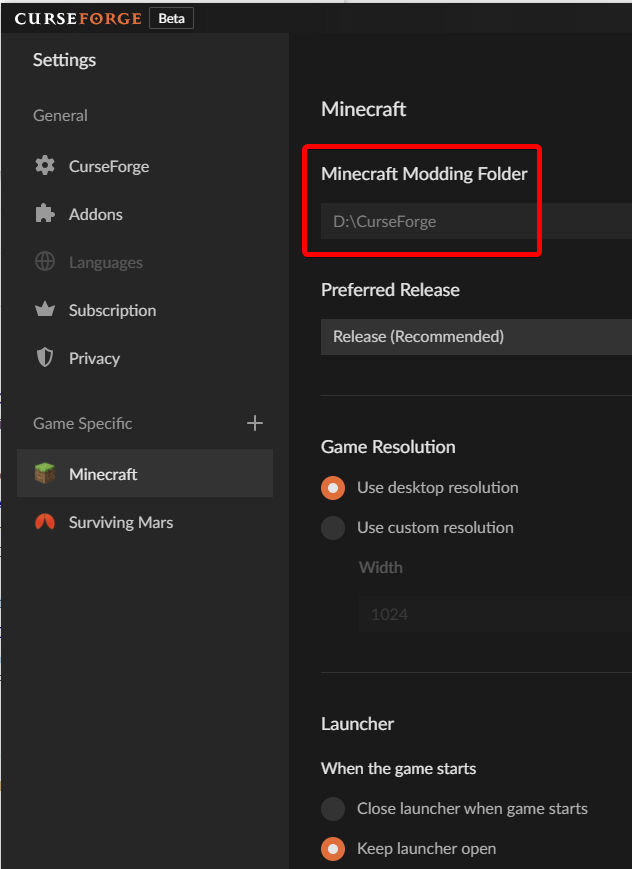 half hamlet
 sage pier
Hm.. Does that path exist? (I mean, it should, since you selected it, just making sure)

 sage pier
Looks about right..
Try restarting CurseForge (right click the anvil in the tray icon holder)
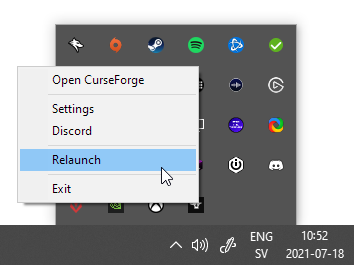
 half hamlet
Do I try set it up again?
sage pier
Yeah, try it again, same folder.
half hamlet
 sage pier
Did it work this time? ^^ Anxious to see the results
half hamlet
 sage pier
Then we wait for it to download the rest. Fingers and toes crossed!
sage pier
Thanks!
half hamlet
202.21mb 😄
@sage pier Sorry for ping, I watched it finish download 3 seconds ago and its disapeared
sage pier
Huh.. strange. o.O
 sage pier
Ignore that.
sage pier
Yeah, try it with the current version (which is the one your friend sent, and it has to match in versions to be able to play with them)
 sage pier
Congrats! Now go play with your friend!
 modest badger
my digital miner bugt can anyone help me
autumn agate
probably me just being dumb but
i downloaded Alex's Mobs mod with minecraft forge the mod is 1.16 however i couldnt find a 1.16 forge
i saw the modpack online on curseforge however i can not find the modpack when im on the app
https://www.curseforge.com/minecraft/mc-mods/alexs-mobs
anyhelp?
waxen pine
autumn agate
probably me just being dumb but
i downloaded Alex's Mobs mod with minecraft ...
The app search will only filter to show mods with an available compatible version with the Minecraft version of the modpack
 dark matrix
The game crashed whilst initializing game
Error: java.lang.NoClassDefFoundError: slimeknights/tconstruct/library/client/MaterialRenderInfo
Exit Code: -1
Does anyone know the fix to this error code?
This is the whole crash report if you need to see it
waxen pine
dark matrix
The game crashed whilst initializing game
Error: java.lang.NoClassDefFoundError:...
it's an issue with Lucraft core I think - this same problem has shown up multiple times the past few weeks
 tame quail
can i have some help? i keep getting error 0
if you want the crash report then here.
waxen pine
@honest marten are you modifying an existing modpack or trying to create a custom profile from scratch?
waxen pine
tame quail
can i have some help? i keep getting error 0
can you post the latest.log file?
?mc-logs
golden muskBOT
Where to find the log on the CurseForge Client.
Right-click the modpack profile icon OR click the  button in the modpack profile.
Click 
Open Folder.
Open the logs folder.
Find the file called latest.log and drag it into discord.
tame quail
waxen pine
that is an archive of one of them. if you've crashed it a few times it's possible the same issue is captured there, but usually you post the fresh one that is literally "latest.log"
 waxen pine
Description: Failed to receive data from URL: http://pastebin.com/raw.php?i=qhA18Kcq
wha wha whaaaaaaat?
in there
 grand zodiac
Hi everybody, idk if this is right and I feel bad for bothering y’all. I downloaded ATM6 last night and wanted to play with my friends but it says incompatible fml modded server when I try to join, how do I fix
tame quail
like your pro pic seoul chris
waxen pine
grand zodiac
Hi everybody, idk if this is right and I feel bad for bothering y’all. I downloa...
if it is Forge 36.1.32+ then it will always show the red X. that is because the Forge devs in their infinite wisdom decided to fix packet sends being too big by chopping off the packets. if you are certain you are all on the same version of the modpack - join anyway
but the issue could also be that they are using a diff version of the modpack - for example maybe their server is an older version than the newest and they haven't updated it yet
grand zodiac
so it doesnt matter whether i have minecraft for windows instead of minecraft java?
 honest marten
waxen pine
<@!696553522170429480> are you modifying an existing modpack or trying to create...
honest marten
waxen pine
<@!696553522170429480> are you modifying an existing modpack or trying to create...
Custom
Now its wprking bte
Btw
Thansk
tame quail
have you got any ideas why mines crashing?
 worldly ether
grand zodiac
so it doesnt matter whether i have minecraft for windows instead of minecraft ja...
worldly ether
grand zodiac
so it doesnt matter whether i have minecraft for windows instead of minecraft ja...
Well to play modded Minecraft . you need Minecraft Java.
grand zodiac
Dumb question haha thanks guys
waxen pine
tame quail
have you got any ideas why mines crashing?
hmm really not sure sorry. i see a Fatal for:
[15:27:15] [Client thread/FATAL]: Error in NBT whitelist file: no item stack found for ExtraUtilities:unstableIngot [15:27:15] [Client thread/FATAL]: At line: 7
if there's a crash-report.txt file in the diff folder named "crash-reports" it may be of some use. there are a lot of mods in there looking for obsolete websites fwiw
tame quail
uh. i believe that may be the first attachment i sent
i can prob get another one if it lets me
the latest crash report
waxen pine
those are what is dumped as a crash-report.txt file?
waxen pine
you may want to consider playing a newer modpack here - what is this one anyhow?
 mortal timber
Is there any mod which lets you modify the color of items through the anivl in survival for 1.16.5?
tame quail
could it be a forge problem if i keep getting the error for all my modpacks?
waxen pine
not enough information. also be aware that CurseForge and Forge are not the same thing
it could be helpful to just right now - download and reinstall the newest java 8 (64 bit), and also do the mcinstallfix to re-load the MC files the CF app uses
 rocky shard
Curseforge failed to send the modding folder to onedrive. I looked up some solutions on the forum and tried using this method for trying to fix the launcher

 waxen pine
rocky shard
Curseforge failed to send the modding folder to onedrive. I looked up some solut...
waxen pine
rocky shard
Curseforge failed to send the modding folder to onedrive. I looked up some solut...
you must go to the app settings page and change the minecraft path to a folder outside of onedrive
or in setup change to a diff
pine rapids
We actively prevent you from setting it to OneDrive because OneDrive is known to screw things up with half-arsed file permissions and random read/write locks on files
rocky shard
okay thanks
 worthy kiln
[0718/200737.085:ERROR:crashpad_client_win.cc(508)] CreateProcess: The system cannot find the path specified. (0x3) Crash on preparing for launch
pine rapids
worthy kiln
[0718/200737.085:ERROR:crashpad_client_win.cc(508)] CreateProcess: The system ca...
Is this coming from launcher_log.txt?
 steady parrot
Hello i am on  and my modpack keeps crashing on world creation
worthy kiln
@pine rapids yes
pine rapids
steady parrot
Hello i am on <:MacOs:662470293402681371> and my modpack keeps crashing on worl...
Where are you getting WorldEdit from and how did you set up your server?
pine rapids
worthy kiln
<@!107667673684377600> yes
Can you provide the full launcher_log.txt?
steady parrot
where is it located?
pine rapids
Not you... please pay attention to who I am replying to
worthy kiln
@pine rapids there is no launcher_log.txt
pine rapids
I just asked you if what you posted came from launcher_log.txt and you said yes... now you're saying it doesn't exist?
worthy kiln
yes it was there not it isnt
 brazen bison
How long does it usally take for a project to be reviewed by admin
wild jewel
!status
golden muskBOT
It is 10:16PM on Sunday for CurseForge my dudes.
Project Moderation Time
Project/File moderation is done on;
Sunday, Monday, Tuesday, Wednesday, Thursday: 10AM - 6PM GMT+2
Friday, Saturday: No Moderation!
This process is First in, First out. Thus files submitted late in the work day may not be checked until the next work day.
New Projects or uploads requiring manual approval: 1-3 Working Days
Updates to approved projects not needing manual approval: 1 Hour
File sync to the Curseforge app may take up to 24 hours after approval.
autumn agate
I'm playing crash landing modpack and I need advice for what to do, me and my friend usually get to the 4th night but run out of water
I finished the tools of the trade quest everytime we play on usually the 2nd night but we always run out of water to fast so I need advice from someone
acoustic idol
autumn agate
I finished the tools of the trade quest everytime we play on usually the 2nd nig...
First thing I try to get going when I play it is a cactus farm, just the vanilla style. Then have them pipe into the wodden crucible. Its a little slow so big farms help. Best way is to try and get something working that doesnt require rf. Saves you in the beginning
autumn agate
acoustic idol
First thing I try to get going when I play it is a cactus farm, just the vanilla...
how do we even get cactuses
remember its 2 people so yes its 2x the rewards but it's also 2x the usage of water and food
we are good on food because we sit in the chair alot but we need more water
acoustic idol
Sorry I am thinking of the wrong version... Crash landing was leaves lots and lots of leaves
autumn agate
yes but how do crucibles work alot of people told me to use them
I still dont understand how to use them
acoustic idol
If your using the wooden ones (If i remember right) you place it on the ground and right click (or use hoppers) with leaves
acoustic idol
Give me a sec, its been a while since Ive played it
autumn agate
ok
acoustic idol
Leaves > to dirt > to dirty water > furnace > clean water
autumn agate
wait frl?
acoustic idol
Thats the way starting out till you get better power. Once you get iron make some hoppers to automate the leaves to dirt and the dirty to clean part
acoustic idol
I think the quest book has all this
autumn agate
I had 2 stacks of dirt
I didnt know you could furnace dirty water for normal
o my god that changes everything
autumn agate
Thank you alot mr
 winter saddle
I am looking to play Valhesia 3 and I would like to be able to live inside a redwood tree like I once did a few years ago in a different modpack. I know the redwoods come from Natura but it doesn't look like that specific mod is installed in Valhesia 3. Is it packaged in with another or do I need to add it myself somehow?
autumn agate
can anyone help me pls?
 acoustic idol
Make sure you are running the exact same pack version as the server
autumn agate
i do
acoustic idol
This your server or someone elses?
autumn agate
my
acoustic idol
!mc-logs post your latest log
golden muskBOT
Where to find the log on the CurseForge Client.
Right-click the modpack profile icon OR click the button in the modpack profile.
Click Open Folder.
Open the logs folder.
Find the file called latest.log and drag it into discord.
autumn agate
i addet my world from singleplayer now
acoustic idol
ok?
autumn agate
wtf, i addet all things from my client to server
my log
can pls someone help me
@acoustic idol
acoustic idol
Woops sorry, working on a pc thats pissing me off, thought you were someone else my bad
acoustic idol
This on boot or on world join?
autumn agate
i click on the server, then its connecting and boom, this msg
acoustic idol
The mods, configs on the server the exact same as on the client?
acoustic idol
Usually if your missing something means that there is somthing different between you and what your connecting too. this could be mod mis match, configs, scripts etc
Can you post the servers latest log please
acoustic idol
Thats the client, asking for the servers latest log
acoustic idol
I dont do dms, when you are able to come back post your issue again,
 craggy heron
@acoustic idol why don't you do DMs.
acoustic idol
craggy heron
<@217048549706301442> why don't you do DMs.
#📛︱rules 5
craggy heron
I didn't blindly ping you, I had a genuine question.
acoustic idol
I dont do it as its easier to just chat here, if something 100% is needed to be done in dms then they will continue there. Otherwise I will provide support here.
craggy heron
Ok thank you.
acoustic idol
Thats my personal reason
 hollow garnet
someone knows about minecolonies? i cant build a supportcamp in a new save game
:/
 rigid kraken
pine rapids
rigid kraken
pine rapids
mo ores and tools is horribly broken and its dev doesn't know how to program
 ivory shoal
why cant i put texture packs in the minecraft setting thingy
when i try and drag the texturepack folder in, it says i cant put it in
 cloud plume
why cant i make a server or how do i atleast
 lost fractal
are you looking to make a server for you and your friends or just you
acoustic idol
!mc-installserver
golden muskBOT
How to **manually** install a server - **On your own PC**
- Check if the modpack has a server pack, if it does: use that and skip below.
- Go to the Forge website http://files.minecraftforge.net/ and download the Installer for the forge version the pack is using.
- Run the installer and choose
Install server. Do not install to your desktop. Also do not install inside a OneDrive folder. - Run the server using the forge.jar. A file called
eula.txtwill be generated. Open it and changeeula=falsetoeula=true - From the Client; Copy the
modsfolder,configfolder, and any other folders needed for the pack to work into the server folder. If the modpack has a server pack, use this instead! - Run the server again.
- Port forward your machine if needed. (Google it)
cloud plume
lost fractal
are you looking to make a server for you and your friends or just you
friends
lost fractal
cloud plume
friends
To play with multiple people you can either go through an external source to pay someone to host your server (ex. serverminer) and you & friends can connect at any time. You would be in control of the server as account owner...but again that's paying someone else to have the equipment to do it. Otherwise, if you have good enough equipment to run it yourself that's also possible where you don't have to pay anyone to run it for you. I am not an expert in that field and I would research to see if your equipment can handle you running a server yourself.
 sage root
i tried to load my curseforge and it failed i tried again and it fails every time
 severe moss
How can I unhide user from my CurseForge account
severe moss
Sorry
 plucky apex
Can someone help me with this
 acoustic idol
plucky apex
Can someone help me with this
acoustic idol
plucky apex
Can someone help me with this
!mc-logs
golden muskBOT
Where to find the log on the CurseForge Client.
Right-click the modpack profile icon OR click the button in the modpack profile.
Click Open Folder.
Open the logs folder.
Find the file called latest.log and drag it into discord.
plucky apex
There is no logs folder
 acoustic idol
!mc-installfix try this
golden muskBOT
- Click on the Minecraft Tab on the Left side of the CurseForge App.
- Click button next to the
Create Custom Profileoption. - Click

Repair Installationoption. - Play game.
NOTE: You will not lose any modpacks or worlds, These are saved in the Instances folder. DO NOT TOUCH THIS FOLDER OR YOU WILL LOSE EVERYTHING
plucky apex
Now it says this when I click play
 acoustic idol
Restart your pc then try again
plucky apex
restarted my PC and it says this now
 autumn agate
I’m getting this error
Connection Lost
Internal Exception: java.io.IOException: An existing connection was forcibly closed by the remote host
 hexed matrix
I am trying to install the mods like optifabric, chat up, shulkerboxtooltip, and fabric for 1.17.1 but the java installer wont open anyone know a fix?
waxen pine
hexed matrix
I am trying to install the mods like optifabric, chat up, shulkerboxtooltip, and...
have you installed java 16?
MC 1.17 requires it
older modpacks/mods will not run on it however, must be earlier version(s)
hexed matrix
yeah I tried on an older version and the newest
plucky apex
Is this supposed to happen

 main sphinx
plucky apex
Is this supposed to happen
main sphinx
plucky apex
Is this supposed to happen
that happened to my old laptop, but it was made in like 2010 so i wasnt surprised
wild jewel
plucky apex
Is this supposed to happen
!mc-installfix
golden muskBOT
- Click on the Minecraft Tab on the Left side of the CurseForge App.
- Click button next to the
Create Custom Profileoption. - Click
Repair Installationoption. - Play game.
NOTE: You will not lose any modpacks or worlds, These are saved in the Instances folder. DO NOT TOUCH THIS FOLDER OR YOU WILL LOSE EVERYTHING
autumn agate
it says failed to get mod from manifest can anyone help
wild jewel
autumn agate
it says failed to get mod from manifest can anyone help
modloader probably, which button did you install?
autumn agate
wich button i can install other mods i want to instakk simple origin
wild jewel
autumn agate
wich button i can install other mods i want to instakk simple origin
Which button did you press?
autumn agate
install then a red thing at the bottom of my page
wild jewel
Where was that button? On the site or in the app?
autumn agate
app
wild jewel
Show a screenshot of the modpack that you are trying to install please

 wild jewel
Probably needs a flush, will make it happen
autumn agate
? what will that fix it
wild jewel
Server side issue this
autumn agate
oh ok thank you
 slim dome
Hi guys why when i launch a forge installer it doesn't open the installer?
wild jewel
Why not use the curseforge app?
 mild ibex
does mutant mobs have a 1.16.5 version yet?
slim dome
wild jewel
Why not use the curseforge app?
And doesn't that take away all ur installation from vanilla mc launcher?
worldly ether
app can do mods and modpacks
slim dome
ohhh
worldly ether
and the modding folder is not to be linked at .minecraft folder , it's to be separate away from the vanilla launcher location
such as c:\ curseforge
for windows
slim dome
kk
worldly ether
it's much easier on the curseforge app than manually moving mods in and out of the mods folder
as on curseforge app each instance/profile you create has its own mods folder
slim dome
So when i launch vanilla mc launcher all the installations will still be there?
worldly ether
yeah because it doesn't interfere with that at all
worldly ether
if you do end up using the app and run into issues then there is always someone around that can help you with it all here.
slim dome
Thanks for all ur help
 warped plank
hi ! did you know why i have this problem when i want to install minecraft on my curseforge ?
 wild jewel
Select advanced, set it to C:\Curseforge
slim dome
When i make a modpack and there is 30 files in the mods folder there is only 25 mods that it says in the modpack
warped plank
wild jewel
Select advanced, set it to C:\Curseforge
that's normal that i don"t have file like that when i select advanced ?
coarse elm
slim dome
When i make a modpack and there is 30 files in the mods folder there is only 25 ...
Curseforge only shows and counts the ones detected by the app.
slim dome
coarse elm
Curseforge only shows and counts the ones detected by the app.
so will it be in the modpack if i give it to my friend tho?
coarse elm
If you export it and send it to them yes. Everything will be there.
slim dome
Ok thanks
wild jewel
warped plank
that's normal that i don"t have file like that when i select advanced ?
You need to make it
slim dome
coarse elm
If you export it and send it to them yes. Everything will be there.
Oh and one more thing, where must he put the .zip folder? (If i export it, it gives me a .zip folder)
coarse elm
!mc-installpack
golden muskBOT
How to install modpacks with the search features in app.
- Open the

Minecraftsection of the app. - Click the top search bar where it says
Search for modpacksOR Click theBrowse ModpacksTab. - Find the Modpack you want to install and click install on it.
- Wait for CurseForge app to download and unpack all the required files.
- Once finished, click
Play!
How to install modpacks from a Export. (Custom/Private/Site downloaded Modpack zip)
- Get CurseForge App if you don't have it, use
!downloadfor a link. - Get the exported modpack from CurseForge or someone else,
!mc-packshareexplains how to make them. - Open the
Minecraftsection of the app. - Click

Create Custom Profile - Click the
Importoption. - Find the file you just downloaded in step 2 and select it.
- CurseForge app will now attempt to download and unpack the modpack. If it fails, try steps 4-6 again.
- Once finished, click
Play!
 coarse elm
The second part
slim dome
So i must give it to him in a .zip file or a unzipped file
coarse elm
The zip.
warped plank
wild jewel
You need to make it
ok i got it thank u :3
autumn agate
Can someone give me advice for the modpack (Crash Landing?) Me and my friend are playing it and we usually have s good water source because we bone meal trees then sheer them but then we run out of bone meal and food, how should we get a good source of water and food without using bonemeal?
we keep dying after that, we get like all basic tools like a bone pickaxes bone mattocks bone shovels
 idle nimbus
etho did a playthrough of it if you want to watch what he did
 primal flax
How much RAM do I need to run MC eternal smoothly (Mineraft)
worldly ether
" → Recommended RAM: 8b+ (Between 8192mb and 10240mb)" according to its description
primal flax
autumn agate
Can someone give me advice for the modpack (Crash Landing?) Me and my friend are...
Don't die, easy advice
autumn agate
primal flax
Don't die, easy advice
Trash advice
primal flax
worldly ether
" → Recommended RAM: 8b+ (Between 8192mb and 10240mb)" according to its descript...
Oh thank you, I have about 11 RAM left
primal flax
autumn agate
Trash advice
Yknow it aint trash if it's good
autumn agate
primal flax
Yknow it aint trash if it's good
Its trash you probably havent even played crash landing
autumn agate
Then you would know it's much harder with another person
primal flax
Havent played it in multiplayer
wild jewel
This is going nowhere, cut it out
worldly ether
but there is also a mc eternal lite modpack for those that can't run the main modpack which is quite the ram hungry version
autumn agate
I need a good source of food and water
primal flax
worldly ether
but there is also a mc eternal lite modpack for those that can't run the main m...
Lite is like better to run right?
worldly ether
basically yes
primal flax
Alr
wild jewel
autumn agate
oh ok thank you
Modpack dev did something weird, uploaded an invalid file, staff is chasing it as we speak
 rough aurora
autumn agate
The fabric one
rough aurora
autumn agate
The fabric one
hey there - we understood why this happened - I'm sending you a DM with the info, hope that's fine 🙂
autumn agate
autumn agate
Can someone give me advice for the modpack (Crash Landing?) Me and my friend are...
^
wild jewel
autumn agate
^
Can't you get bonemeal from the dust?
autumn agate
wild jewel
Can't you get bonemeal from the dust?
yes but its very slow
wild jewel
And don't break rule 4 please
 last parcel
considered looking up a video, or a guide, or asking in that modpacks community?
autumn agate
i dont know where to find that modpacks communitty
i sat there for like an hour just searching for a discord server with crash landing and couldnt find any
wild jewel
Age might not help either
last parcel
 worldly ether
 valid drift
hi, i cant find Towers Of The Wild mod and AtomicStryker's Infernal Mobs mod in curseforge app. is there anyone the same problem?
wild jewel
Link it
golden muskBOT
How to install mods in CurseForge App.
- Click
+ Create Custom Profile - Name it, select the required Minecraft version, select the Forge version (usually the highest number), click
Create. - Click the profile icon.
- Click
Add New Content - Search and install the desired mods.
- Start the game!
How to install mods not on CurseForge.
- Right click the profile picture or Open the profile and click the Icon next to the play button.
- Click
Open Folder. - Drag the mod(s) into the
modsfolder. (Note: Some mods will require others, to run. Make sure to read the instructions for the mod!) - Start the game!
 valid drift
i though minecraft can force older 1.16 version to run in 1.16.5
last parcel
nothing forces anything to work anywhere. the dev needs to tag the file properly
you can manually add it and see if it works yourself
valid drift
ah i see, thank you
 last parcel
?mc-installfix
golden muskBOT
- Click on the Minecraft Tab on the Left side of the CurseForge App.
- Click button next to the
Create Custom Profileoption. - Click
Repair Installationoption. - Play game.
NOTE: You will not lose any modpacks or worlds, These are saved in the Instances folder. DO NOT TOUCH THIS FOLDER OR YOU WILL LOSE EVERYTHING
autumn agate
can pls anyone help me, this message comes everytime i join on my server
autumn agate
last parcel
?mc-installfix
do you think this whould help?
last parcel
that is why i put it here
autumn agate
bc its, when i join on a server
autumn agate
still same error
last parcel
reinstall the pack
autumn agate
uff its 200+ mods
last parcel
is that a problem?
last parcel
?mc-log
golden muskBOT
Where to find the log on the CurseForge Client.
Right-click the modpack profile icon OR click the button in the modpack profile.
Click Open Folder.
Open the logs folder.
Find the file called latest.log and drag it into discord.
 slim island
The curseforge app for modpack loading and other mod loading is very laggy and cant even load a modpack. Any help advice?
last parcel
log?
last parcel
what exactly are you trying to do
 wary stirrup
i have a mod that i downloaded from curse forge.com
and
i forget how to use mods in mc xD
golden muskBOT
Looking to install the CurseForge app?
<:windows:798410728188936222> Windows
Minimum Requirements:
- OS Version: 7, 8.1, 10
- 64 bit Required.
- 350MB storage space.
- Microsoft .Net 4.8
- Intel/AMD quad-core CPU
- 8GB ram
Download: https://download.overwolf.com/install/Download?&PartnerId=4047
If you are having issues with the installer use the URL below to install Overwolf then go to the app store to download CurseForge.
https://content.overwolf.com/downloads/setup/latest/regular.html
<:mac:798410654418862130> Mac
Minimum Requirements:
- OS Version 10.14 or newer.
- 64 bit Required.
Download: https://curseforge.overwolf.com/downloads/curseforge-latest.dmg
:penguin: Linux
Minimum Requirements:
Yes.
Download: :person_shrugging:
 dawn horizon
having issues creating my own server for RLcraft on windows. It says outdated client when I attempt to join after creating the server.
primal flax
Is MC eternal worth playing?
 heavy orchid
im not sure if this is the right channel
but i need help with this quick mod
theres this mod called starlight which i want to try out because it apparently helps with chunk generation
only problem is that i have no idea hot to download it off of github
last parcel
primal flax
Is MC eternal worth playing?
That is an opinion question, not a support question.
worldly ether
Yeah starlight affects the lighting engine
I’ve heard it’s better than phosphor a little
 quick tendon
Help it says i need redstone flux in the pack but i cant find it and it says it no longer needs it


i fixed it
i think
quick tendon
My server crashed help please
coarse elm
remove shulkertooltip
quick tendon
ok thanks
worldly ether
Decently is, especially when it says of versions that do not exist
quick tendon
my Sky factory 4 server isnt working im hosting it and it gives me this as a response same for my friend

And when i try and use local host
It says logging in and never loads
i just got in and its now just not letting my friend in
waxen pine
If it has the mod "random patches" change the server config file to increase the various timeout values
Possibly poor connectivity combined with old MC inefficiency
quick tendon
ok
this is what theirs says

im in the server
but he is not
its also not sending anything in console
When i try joining using my ip rather then local host it wont let me join
acoustic idol
If the server is on the same pc your playing, then using your external ip instead of localhost wouldnt work anyways
quick tendon
both me and him are using my public ip when we try and it fails
acoustic idol
Are you playing on the same pc the server is running on?
acoustic idol
Could you both connect before?
quick tendon
not him
or me
but i could join using local host
and i was hosting a server yesterday
and he could join
so could other people so i dont think its port stuff
acoustic idol
that is correct. Since you are on the same pc you will only be able to connect using your local ip or localhost.
quick tendon
ok
acoustic idol
Does the server see them log in? Or do they time out before even getting that far?
acoustic idol
make sure your allowing java through your firewall as well.
quick tendon
i am
acoustic idol
both udp/tcp rules?
acoustic idol
hmm, can you open the server.properties and send a screen shot of the settings
quick tendon
#Minecraft server properties
#Mon Jul 19 16:01:56 CDT 2021
spawn-protection=0
max-tick-time=60000
generator-settings={"Topography-Preset":"Sky Factory 4"}
force-gamemode=false
allow-nether=true
gamemode=0
broadcast-console-to-ops=true
enable-query=false
player-idle-timeout=0
difficulty=1
spawn-monsters=true
op-permission-level=4
pvp=true
snooper-enabled=true
level-type=DEFAULT
hardcore=false
enable-command-block=true
max-players=20
network-compression-threshold=256
resource-pack-sha1=
max-world-size=29999984
server-port=25565
server-ip=
spawn-npcs=true
allow-flight=true
level-name=world
view-distance=10
resource-pack=
spawn-animals=true
white-list=false
generate-structures=true
online-mode=true
max-build-height=256
level-seed=
prevent-proxy-connections=false
enable-rcon=false
motd=\u00A7d\u00A7oSkyFactory 4: Server\u00A7r - \u00A74v4.2.2
oops
chat spam
my bad
acoustic idol
Also not a screen shot
 acoustic idol
?
quick tendon
im trying to have him join the other server
and its not letting him
he says its the same error
so check firewall?
acoustic idol
Ip is correct as well? the one your giving him
acoustic idol
If you set up the firewall for java then you should be fine.
quick tendon
the mc port is 25565 right?
acoustic idol
yep
quick tendon
yeh
for some reason
the inbound
ports were removed
not the outbound tho
idk
acoustic idol
try adding those back
quick tendon
i did
acoustic idol
and restarted the server?
acoustic idol
Stop the server > go into properties again > change max-tick-time=60000 to max-tick-time=-1 > then start server again and try
quick tendon
same result
acoustic idol
Can you have them post there latest log
quick tendon
acoustic idol
the server on wifi or wired?
quick tendon
wired
acoustic idol
Do you know if he is wired or wireless?
quick tendon
wired
acoustic idol
hmm. It is looking like a networking issue.
quick tendon
ok?
the only thing i did between him being able to join and now not is i shut down my computer for the night
acoustic idol
oh wait I may now. Did you set up portforwarding?
acoustic idol
is your pcs ip set up as static or dhcp?
quick tendon
wat
acoustic idol
Windows or mac?
quick tendon
oh windows
acoustic idol
in your search bar type run > in run type ncpa.cpl > this will open a folder, Rightclick on your ethernet connection > Scroll down to `Internet Protocol version # (tcp/IPv4) and double click it
Dont need a screen shot
Just tell me if the Obtain an IP automaticaly is selected or if use the following IP address is selected
 acoustic idol
yep, double click the Internet Protocol Version 4 option. This will open a new window (Dont screen shot this window)
acoustic idol
Which of these 2 settings is selected
 quick tendon
the obtain ip address auto is selected
acoustic idol
ah ok, so I would recmmend checking your portforward settings and make sure they are still leading to your pc. Sometimes when shutting down your pc and starting up you may get a new ip address when set on auto
acoustic idol
How ever you set it up the first time. Portfarwarding
autumn agate
What's a good modpack that can run on low end pcs? I've played rlcraft and crash landing with my friend
Coop modpack
acoustic idol
autumn agate
What's a good modpack that can run on low end pcs? I've played rlcraft and crash...
How low end are we talking?
 turbid brook
im on sky factory 3 and my phantom placers wont change direction, can anybody help?
acoustic idol
If I remember correctly the place the way you were facing when you selected the place for them to place. they are rather finicky blocks, I never liked using them
autumn agate
acoustic idol
How low end are we talking?
Like 4gb ram, I can run rlcraft fine at like constant 100 fps so take that as a base
acoustic idol
autumn agate
Like 4gb ram, I can run rlcraft fine at like constant 100 fps so take that as a ...
4gb total? for the whole pc OR 4gb is the max you can give the app?
autumn agate
acoustic idol
4gb total? for the whole pc OR 4gb is the max you can give the app?
Whole pc
I got a really good cpu tho
Not like super super good but it's pretty good
acoustic idol
4gb is rather low for modded minecraft. Arent that many options. As most pack need a minimum of 4gb ram to run nicely
autumn agate
I can run most modpack that can open without using 4gh ram
acoustic idol
you 2 on the same network?
autumn agate
yes I just want a modpack that I can play
me and him are looking for a exploration/ a modpack with Pam's harvest craft
Stuff like me system and more ores, tech stuff
bit of magic if possible yk
acoustic idol
Could always just make a pack and add the mods you want? that way you can keep the mod count lower for your pc
autumn agate
It's not like my pc is bad or limited, I can run big modpacks like rlcraft fine
Its just I need to be able to open it because with 4gb of ram
acoustic idol
ok, still an option tho if you want.
autumn agate
Idrk mods tho
acoustic idol
Like I said tho your options are rather limited on 4gb total.
last parcel
download pack, run pack. if it loads you have your answer. people do not test packs with 4gb of ram beacuse it is in general insufficient. you will need to find packs on your own.
autumn agate
I'm not asking people to test it I'm just saying list some coop modpacks
I'll try them and see if I can run them, usually I can run them good if I can open them at all
last parcel
all modpacks are coop. look at the modpack list.
turbid brook
acoustic idol
If I remember correctly the place the way you were facing when you selected the ...
I mean when im placing them in the end and try to change the placing menu from up to down it wont change (sorry it took me so long to respond)
acoustic idol
Im not really sure then sorry, Like I said I always found them rather finicky in 1.10.2. Ended up trying other methods
turbid brook
any recomendations to use? im trying to automate the ender dragon
 crystal cairn
hey does anyone knows some good shaders
 lethal raft
Could I get someone to test my Modpack test versions from my discord?
 nimble bloom
I need some serious help with getting my Stoneblock server up! So, I got the server files directly from the Forge App and I followed the instruction to the tee, reinstalled my Java, and even downloaded a friend's working server and the runserver.bat still won't go! Can anyone DM and help me fix it?
acoustic idol
nimble bloom
I need some serious help with getting my Stoneblock server up! So, I got the ser...
what version of java is on the pc?
nimble bloom
Java 8, the latest from Java
 sand estuary
nimble bloom
sand estuary
nimble bloom
Yes, and then it closes
acoustic idol
nimble bloom
Yes, and then it closes
post your servers latest log from the logs folder (the one called latest)
nimble bloom
I still have my friend's working server files, so I don't know how good this file is
acoustic idol
hmm I dont see any errors that stand out. Run your server again. Then post the new latest log
nimble bloom
 acoustic idol
open a command prompt and type: java -version then screenshot the result
 exotic pewter
yo idk if u can help with this but i got poppularmmoses epic propourtions mods from a download not on curseforge but idk how to put them into minecraft
acoustic idol
exotic pewter
yo idk if u can help with this but i got poppularmmoses epic propourtions mods f...
!mc-installmods second bit
golden muskBOT
How to install mods in CurseForge App.
- Click
+ Create Custom Profile - Name it, select the required Minecraft version, select the Forge version (usually the highest number), click
Create. - Click the profile icon.
- Click
Add New Content - Search and install the desired mods.
- Start the game!
How to install mods not on CurseForge.
- Right click the profile picture or Open the profile and click the Icon next to the play button.
- Click
Open Folder. - Drag the mod(s) into the
modsfolder. (Note: Some mods will require others, to run. Make sure to read the instructions for the mod!) - Start the game!
nimble bloom
 acoustic idol
thats why, you have java 16 not java 8.
exotic pewter
golden musk
it didnt work
acoustic idol
exotic pewter
it didnt work
this a mod or modpack? Link what you downloaded
 acoustic idol
Can you link the site you got it from.
acoustic idol
did something link you to the mediafire site?
exotic pewter
there was a reddit post of someone asking for the link and mulitple people put that link
acoustic idol
can you post the redit post
exotic pewter
reddit
9 votes and 2 comments so far on Reddit
acoustic idol
Follow the first bit. Make a custom profile for forge 1.7.10 then do the second bit and drop the mods from the zips mod folder into the custom profiles mods folder
acoustic idol
you use the app
nimble bloom
Alright, apparently I have Java 8, but it won't let me change it.
acoustic idol
the site just holds the projects people make, you use the app to play em
nimble bloom
 acoustic idol
nimble bloom
Alright, apparently I have Java 8, but it won't let me change it.
acoustic idol
nimble bloom
Alright, apparently I have Java 8, but it won't let me change it.
the start.bat file. Did you guys make it or did it come with the pack?
nimble bloom
Came with the pack
acoustic idol
hmm ok. Will have to give me a few then
Stoneblock 1?
ok so 2 options you can either just uninstall java 16 OR we can alter the start file to use java 8
nimble bloom
Alter it, I run a pure vanilla server as well
acoustic idol
are you running the .bat file or the minecraft_server.jar file?
nimble bloom
The Bat file
acoustic idol
odd
nimble bloom
 acoustic idol
Screen shot your servers main folder
nimble bloom
 acoustic idol
Can you edit the server.properties and screen shot it
What I would do at this point is save any worlds you want to keep and reinstall the latest server files from the site.
just a full clean set of files.
acoustic idol
local or rented?
 bleak gull
rented
acoustic idol
depending on where your renting from should be able to just take the files from their server pack and put them into the server. You will have to see how the company your renting from does that tho
bleak gull
The best Minecraft Server Host for Java Edition and Bedrock Edition. Instant setup for all modpacks and plugins, all server types available, DDoS protection. Starting at $2.50.
i am using this 1
or is their better once
sorry i am legit stepping my big toe into pc gaming
acoustic idol
May have to ask there support on how to install the pack you want. i dont use em
bleak gull
o ok what do u use ?
acoustic idol
I have a server with Bisect hosting
bleak gull
thanks
acoustic idol
np.
 acoustic idol
Follow the instructions they have. Let me know when your done
oh also, what did you end up doing with java 16? Did you uninstall it or leave it?
nimble bloom
I left it, but I don't know how to use Java 8
acoustic idol
so 2 options there, Can just uninstall 16 so that it will just use 8. OR we can edit the start.bat to use java 8 over 16
Does anything else on your pc need java 16 to run?
nimble bloom
I'm not sure, does 1.17.1 Minecraft need it?
acoustic idol
yes
Where you took this pic from, can you full extend the path and ss it #👽︱game-support message
nimble bloom
 acoustic idol
ok so what your going to do is edit the start.bat file and replace the word java with start C:\"Program Files\Java\jre1.8.0_291\bin\java.exe
save then try starting the server
make sure the bit in " " matches the path for java8 in your pic
nimble bloom

So what I have highlighted, you want me to replace it with start C:"Program Files\Java\jre1.8.0_291\bin\java.exe
acoustic idol
Yes replace the highlighted word with that
nimble bloom
 acoustic idol
try adding a space between jer and 1.8.0
 acoustic idol
on your pc go to this location C:Program Files\Java\jre1.8.0_291\bin is there a file there called java.exe?
 meager ibex
Does anyone know how to fix this?
 acoustic idol
nimble bloom
acoustic idol
nimble bloom
er wait, when you installed java 8 did you install the 64bit offline version or the windows online one?
acoustic idol
meager ibex
Does anyone know how to fix this?
!mc-logs
golden muskBOT
Where to find the log on the CurseForge Client.
Right-click the modpack profile icon OR click the button in the modpack profile.
Click Open Folder.
Open the logs folder.
Find the file called latest.log and drag it into discord.
nimble bloom
Offline
acoustic idol
nimble bloom
Offline
64bit or the normal offline one?
acoustic idol
ok, then yeah check the path, i put above see if there is a java.exe file in there.
meager ibex
acoustic idol
!mc-logs
So drag this?
 acoustic idol
meager ibex
So drag this?
acoustic idol
meager ibex
So drag this?
if that is the one called latest for that pack yes
meager ibex
Just opened it from this

 acoustic idol
nimble bloom
acoustic idol
nimble bloom
No I mean open your folders and follow that path to your java
acoustic idol
meager ibex
Just opened it from this
Follow this #👽︱game-support message
nimble bloom
meager ibex
golden musk
Oh i'm not using the cursedforge client but I could open it.
acoustic idol
meager ibex
Oh i'm not using the cursedforge client but I could open it.
What are you using?
 acoustic idol
nimble bloom
Followed those instructions you pointed to
acoustic idol
nimble bloom
Followed those instructions you pointed to
That wasnt for you 🤦
acoustic idol
acoustic idol
No I mean open your folders and follow that path to your java
This was to you

 acoustic idol
Go to your c drive > open programfiles > java > java### > bin. dont copy and paste the path
 acoustic idol
1.8.0
 acoustic idol
scroll down and see if you can find a file called java.exe
nimble bloom
Moneyshot
 acoustic idol
ok. Now in your folder copy the address at the top, then paste it
nimble bloom
C:\Program Files\Java\jre1.8.0_291\bin
 acoustic idol
Start C:\"Program Files\Java\jre1.8.0_291\bin\java.exe" This should work now
nimble bloom
Hopefully
acoustic idol
autumn agate
Are you using the curseforge app?

 acoustic idol
autumn agate
acoustic idol
autumn agate
!mc-installfix try this
golden muskBOT
- Click on the Minecraft Tab on the Left side of the CurseForge App.
- Click button next to the
Create Custom Profileoption. - Click
Repair Installationoption. - Play game.
NOTE: You will not lose any modpacks or worlds, These are saved in the Instances folder. DO NOT TOUCH THIS FOLDER OR YOU WILL LOSE EVERYTHING
nimble bloom
Thanks @acoustic idol
 limpid tiger
Does Java download itself or do you need to install it separately?
wild jewel
Should be automatically
 cunning crag
So... My minecraft told me there's an update to 3.6.2.1 but I don't know if CurseForge is up to date
 wild jewel
Curseforge doesn't see it as it is not marked as release
cunning crag
well Dynamic Surroundings itself does i think
wild jewel
You can change this in the settings, curseforge, settings, minecraft, preferred release
The B in front means Beta, not Release
 wild jewel
Because your client is not configured to do so
Neither are those the correct game versions
Why would they all be marked as beta anyways?
 velvet heart
Is anyone else having problems with the Trinkets tab on Enigmatica 6? I'm on 0.5.6 and the hotkey to open it is not working anymore and i have no idea on how to open it to change trinkets
On 0.3.x it was working perfectly
wild jewel
!mc-installserver
golden muskBOT
How to **manually** install a server - **On your own PC**
- Check if the modpack has a server pack, if it does: use that and skip below.
- Go to the Forge website http://files.minecraftforge.net/ and download the Installer for the forge version the pack is using.
- Run the installer and choose
Install server. Do not install to your desktop. Also do not install inside a OneDrive folder. - Run the server using the forge.jar. A file called
eula.txtwill be generated. Open it and changeeula=falsetoeula=true - From the Client; Copy the
modsfolder,configfolder, and any other folders needed for the pack to work into the server folder. If the modpack has a server pack, use this instead! - Run the server again.
- Port forward your machine if needed. (Google it)
valid drift
hi, where can i put my script folder in my modpack folder (manually)? My curseforge app somehow ignore script folder when export the modpack
 civic nymph
How do you download the demon slayer mod pack
wild jewel
valid drift
hi, where can i put my script folder in my modpack folder (manually)? My cursefo...
Did you select the folder?
wild jewel
civic nymph
How do you download the demon slayer mod pack
!mc-installpack
golden muskBOT
How to install modpacks with the search features in app.
- Open the
Minecraftsection of the app. - Click the top search bar where it says
Search for modpacksOR Click theBrowse ModpacksTab. - Find the Modpack you want to install and click install on it.
- Wait for CurseForge app to download and unpack all the required files.
- Once finished, click
Play!
How to install modpacks from a Export. (Custom/Private/Site downloaded Modpack zip)
- Get CurseForge App if you don't have it, use
!downloadfor a link. - Get the exported modpack from CurseForge or someone else,
!mc-packshareexplains how to make them. - Open the
Minecraftsection of the app. - Click
Create Custom Profile - Click the
Importoption. - Find the file you just downloaded in step 2 and select it.
- CurseForge app will now attempt to download and unpack the modpack. If it fails, try steps 4-6 again.
- Once finished, click
Play!
valid drift
yes i did
civic nymph
wild jewel
!mc-installpack
thanks
wild jewel
valid drift
yes i did
And why do you think it did ignore it?
valid drift
my friend download my modpack and he said that there is 0 file in script folder
so where can i put the script folder manually in modpack zip file?
last parcel
if you made the pack properly then the scripts would be there
export the pack, open the zip. look in overrides. scripts should be there if done correctly
civic nymph
When I tried to start the mod pack it just crashed and i have no clue why
valid drift
last parcel
export the pack, open the zip. look in overrides. scripts should be there if don...
thanks
 sleek adder
Hi, i'm playing Project Ozone 2 and I have a problem, how can I charge my wireless crafting terminal while I'm not at home
wild jewel
civic nymph
When I tried to start the mod pack it just crashed and i have no clue why
!mc-logs
golden muskBOT
Where to find the log on the CurseForge Client.
Right-click the modpack profile icon OR click the button in the modpack profile.
Click Open Folder.
Open the logs folder.
Find the file called latest.log and drag it into discord.
 cobalt tree
me and my friends multiplay in better minecraft mod,
but we can`t get in to friend server
what is wrong?????
meager ibex
acoustic idol
What are you using?
Just downloaded the java files from the website
last parcel
cobalt tree
what is wrong?????
you will need to provide information for anyone to know what is wrong.
what error you see, logs, screenshots, how you are connecting

 storm wolf
 last parcel
That's an overwolf error, you will need to go to their discord for support
wild jewel
 next musk
what other plugin do you need? Jail plugin?
next musk
what other plugin do you need? Jail plugin?
Need the logs to tell that
next musk
wild jewel
Need the logs to tell that
jail
 wild jewel
next musk
jail
wild jewel
next musk
jail
Plugin is way too old for your mc version
next musk
my version server 1.17
wild jewel
And plugin made for?
next musk
wild jewel
And plugin made for?
yes
 wild jewel
Which Minecraft version is the plugin made for?
next musk
I don't know version
https://dev.bukkit.org/projects/jail
wild jewel
1.9
next musk
wild jewel
1.9
wow.
maybe you can suggest something new jail plugin?
wild jewel
Don't know one
next musk
wild jewel
Don't know one
how to report creator owner?
wild jewel
Why would you report him?
next musk
when update 1.17 version
wild jewel
You ask for one, but you don't report him, don't think you will get one though from him.
Go to https://bukkit.org
Go to plugin requests, request a new jail plugin there.
Official Forums for the Bukkit project
next musk
OK, thank you
last parcel
This isnt a place to get tips on how to play modpacks, it's for support regarding technical issues. Use the minecraft channels.
autumn agate
last parcel
This isnt a place to get tips on how to play modpacks, it's for support regardin...
Bruh then where do I ask I asked in #💬︱general-chat and the msg got deleted for spam
last parcel
the answer is the last two words in my reply
last parcel
that would be a channel in the minecraft category, yes
 deft wing
ayo so uh i updated ice and fire on my server which is an rlcraft server but dragons cannot die what now
worldly ether
Delete ISeeDragons mod. That mod is what causes the dragons to be invincible
It was used to fix issues on older versions of Ice and fire but causes problems in the newer version such as the invincible dragons
acoustic idol
meager ibex
Just downloaded the java files from the website
What launcher are you using though? Just the normal vanilla launcher?
meager ibex
acoustic idol
What launcher are you using though? Just the normal vanilla launcher?
Oh I got it working
acoustic idol
Oh ok. Enjoy
 acoustic bison
When will they update Tektopiapack?
acoustic idol
Would need to ask the authors that.

 rancid flare
sorry
golden muskBOT
How to **manually** install a server - **On your own PC**
- Check if the modpack has a server pack, if it does: use that and skip below.
- Go to the Forge website http://files.minecraftforge.net/ and download the Installer for the forge version the pack is using.
- Run the installer and choose
Install server. Do not install to your desktop. Also do not install inside a OneDrive folder. - Run the server using the forge.jar. A file called
eula.txtwill be generated. Open it and changeeula=falsetoeula=true - From the Client; Copy the
modsfolder,configfolder, and any other folders needed for the pack to work into the server folder. If the modpack has a server pack, use this instead! - Run the server again.
- Port forward your machine if needed. (Google it)
acoustic idol
Did you download a mod or modpack? They arent the same thing
rancid flare
I think the modpack
 acoustic idol
They do not have any server packs, So on step 5 ingore the serverpack line, just copy the files from your client
rancid flare
hm can i show you another modpack to see if that one has a serverpack?
acoustic idol
Just look at it on the site, packs with server packs show them as extra files
Example:
 rancid flare

I dont get what you mean
but im guessing this one dosnt have a server pack
if im not able to find it\
acoustic idol

That icon between and the Orange button is the server icon. If a pack has that it has server files
acoustic idol
Follow the bots instructions #👽︱game-support message
 magic grail
I have an issue where my Minecraft crashes with "Exit Code 0" any time I ever try to play a downloaded mod pack. Can anyone assist me with that matter?
acoustic idol
magic grail
I have an issue where my Minecraft crashes with "Exit Code 0" any time I ever tr...
!mc-logs
golden muskBOT
Where to find the log on the CurseForge Client.
Right-click the modpack profile icon OR click the button in the modpack profile.
Click Open Folder.
Open the logs folder.
Find the file called latest.log and drag it into discord.
magic grail
okay
 fathom seal
I downloaded the modpack "equivalent skies" but when I play minecraft this error appears. Does anyone know why this is happening?
 acoustic idol
fathom seal
I downloaded the modpack "equivalent skies" but when I play minecraft this error...
acoustic idol
fathom seal
I downloaded the modpack "equivalent skies" but when I play minecraft this error...
Yamza answered you already #🔥︱curseforge-support message
fathom seal
acoustic idol
Yamza answered you already https://discord.com/channels/428228256236306434/78202...
I will try to do this
fathom seal
acoustic idol
Yamza answered you already https://discord.com/channels/428228256236306434/78202...
It worked great thank you ❤️
 acoustic idol
!mc-logs do this
golden muskBOT
Where to find the log on the CurseForge Client.
Right-click the modpack profile icon OR click the button in the modpack profile.
Click Open Folder.
Open the logs folder.
Find the file called latest.log and drag it into discord.
autumn agate
Could you show it in the picture because I don't get it.
acoustic idol
Are you using the curseforge app?
autumn agate
Yes
acoustic idol
In the app > Rightclick the picture of the pack your playing > Click open folder > Open the logs folder > Drag and drop the file called Latest into discord
autumn agate
Thank
rancid flare
hey
Could you explain these steps a little bit moew
more
How to manually install a server - On your own PC
- Check if the modpack has a server pack, if it does: use that and skip below.
- Go to the Forge website http://files.minecraftforge.net/ and download the Installer for the forge version the pack is using.
- Run the installer and choose Install server. Do not install to your desktop. Also do not install inside a OneDrive folder.
- Run the server using the forge.jar. A file called eula.txt will be generated. Open it and change eula=false to eula=true
- From the Client; Copy the mods folder, config folder, and any other folders needed for the pack to work into the server folder. If the modpack has a server pack, use this instead!
- Run the server again.
- Port forward your machine if needed. (Google it)

Forge Files
Downloads for Minecraft Forge for Minecraft 1.16.5
Latest: 36.1.65
Recommended: 36.1.0
this is where I am

I changed the eula to ture
true
rancid flare
YOYOK9?
acoustic idol
rancid flare
YOYOK9?
- From the Client; Copy the mods folder, config folder, and any other folders needed for the pack to work into the server folder. If the modpack has a server pack, use this instead!
- Run the server again.
- Port forward your machine if needed. (Google it)
Does this happen on server boot OR when you join the server?
acoustic idol
Sorta, its a watch dog error. Basically 20 minecraft ticks is 1 second. However something on your server is causing 1 tick to take more then 60 seconds.
Does this happen on server boot? OR when you join the server?
and can you post the latest log from the server (logs folder > log called latest)
regal surge
acoustic idol
Sorta, its a watch dog error. Basically 20 minecraft ticks is 1 second. However ...
it has done it a few times while in game
acoustic idol
What modpack is this?
regal surge
acoustic idol
What modpack is this?
my own
acoustic idol
I think I see one issue tho at least. Will need you to answer a few things tho.
regal surge
thats fine
acoustic idol
How are you starting the server?
regal surge
.bat
acoustic idol
Edit it and screen shot what you have
regal surge
acoustic idol
Edit it and screen shot what you have
i can just copy and paste
acoustic idol
I guess
regal surge
@echo off
java -Xmx2G -jar forge.jar nogui
PAUSE
acoustic idol
🤦
regal surge
what?
acoustic idol
2Gb is not nearly enough ram for modded minecraft.
regal surge
it works just fine but i had more ram on it
everyone yelled at me for having 8gb dont complain to me
acoustic idol
what? who yelled at you?
regal surge
acoustic idol
what? who yelled at you?
i dont remember
acoustic idol
Modded minecraft at most needs a minimum of 4gb. Some packs depending on the mods recommend 4-8gb at most depending on what you have
regal surge
it was like 4 days ago
acoustic idol
Do you play on the same pc as your server?
acoustic idol
How much ram does your pc have total?
regal surge
32
acoustic idol
You would be safe then to use 6-8gb on your server then
regal surge
acoustic idol
You would be safe then to use 6-8gb on your server then
im putting it back to 8
acoustic idol
Try that and see if the watchdog errors go away
acoustic idol
np
regal surge
sorry for the messup someone is yelling in my ear
exotic pewter
my minecraft keeps crashing and says "mod loader has found a problem with your minecraft installation bspkrscore : minimum version required 6.15 The file 'logs/fm;-client-latest.log' contains more information" can u guys help with this
acoustic idol
exotic pewter
my minecraft keeps crashing and says "mod loader has found a problem with your m...
!mc-logs
golden muskBOT
Where to find the log on the CurseForge Client.
Right-click the modpack profile icon OR click the button in the modpack profile.
Click Open Folder.
Open the logs folder.
Find the file called latest.log and drag it into discord.
exotic pewter
acoustic idol
check, otherwise a mod you have probably needs it. version 6.15 at a minimum
acoustic idol
Add this to your pack https://www.curseforge.com/minecraft/mc-mods/bspkrscore/files/2227503

 hazy steeple
Hi uh it keeps on saying whoops u in countered an bug
acoustic idol
Define "it"
hazy steeple
ill send a ss
acoustic idol
this the same thing you posted in #💬︱general-chat ?

 acoustic idol
Close the app, and curesforge and then try again.
acoustic idol
Got java installed on your pc as well?
hazy steeple
yep
acoustic idol
hmm
Ill see if the higher ups have any thoughs, seeing the same issue on mojangs issue tracker.
hazy steeple
thx
i had this before but i just did the repair installer but ive done it like 20 times
acoustic idol
I have a feeling tho this may be a mojang related issue.
autumn agate
sorry idk if this is realted but does anyone know the best way to download optifine>>??
acoustic idol
autumn agate
sorry idk if this is realted but does anyone know the best way to download opti...
!mc-optifine
golden muskBOT
Optifine and Curseforge
To install Optifine with modpacks on Curseforge:
Right click the modpack icon, select Open Folder.
Put the Optifine.jar into the mods folder.
Now load the modpack normally.
We do not offer support for Optifine. If you have issues with Optifine, remove it. If you want further support try the discord found on their website.
https://www.optifine.net/home