#👽︱game-support
1 messages · Page 142 of 1
 lethal summit
so for a 157 modpack, what would you reccomend gb wise?
 acoustic idol
How much does the client use to run it?
lethal summit
not sure, havent bought a server yet
acoustic idol
My personal rule for when I do servers is see how much my client needs to run the pack in single player. Then add 1-2gb for the server
It differs per hardware tho.
lethal summit
alrighty, much obliged
acoustic idol
Np
 autumn agate
you need to check how many people will join too
acoustic idol
I’ve used both apex and bisect. Both were rather nice. Tho I’m more bisect now for reasons 🙂
That too, more player slots can cost more
acoustic idol
It’s a fun math project for sure XD
acoustic idol
Nice thing is with some of the bigger hosting companies is you can upgrade as needed. So if you need more ram or slots or etc you can go from there
autumn agate
if theydont stay at spawn maybe 4-5 GB
depends if the mods at dimensions too
and biomes etc
lethal summit
I have minecolonies and create
autumn agate
create isnt that heavy
lethal summit
I have mostly biome and structure generation mods
quite a few magic mods
Aight, thank you
 coral briar
How do you config mods? I'm trying to config the bloodmoon and thickentities mods.
I tried using notepad but all i get is nonsense. I think.
 compact patio
@coral briar
go to the config folder
those mods should have a txt file in there where you can config them
coral briar
i figured it out, kinda. I opnended the mod itself instead of the config
I am trying to config bloodmoon, and im not seeing the folder in config nor configs.
nvm, i found it. it wasnt a folder but a cfg file. thx
compact patio
the cfg file is located in the config folder is what i am saying
 safe thistle
Hey, whenever I run a Minecraft mod on curseforge, it will use my integreated GPU rather than my better GPU. Normal Minecraft used to do this, but I went into my graphics settings and forced it to use the better GPU instead. The issue is that the mods run on the same java program that vanilla does, so why are they running on the other GPU? Please ping if you have a solution.
 wild jewel
safe thistle
Hey, whenever I run a Minecraft mod on curseforge, it will use my integreated GP...
wild jewel
safe thistle
Hey, whenever I run a Minecraft mod on curseforge, it will use my integreated GP...
!mc-videocard
 golden muskBOT
How to set minecraft to use your videocard
Got NVIDIA?
 safe thistle
Yes that is what I did @wild jewel
It still uses the worse GPU for curseforge mods.
Oh nevermind, that worked! I had done that to minecraft.exe, not java platform. Thanks for the help Timtower.
 mortal spindle
acoustic idol
mortal spindle
acoustic idol
!mc-installmods
golden muskBOT
How to install mods in CurseForge App.
- Click
+ Create Custom Profile - Name it, select the required Minecraft version, select the Forge version (usually the highest number), click
Create. - Click the profile icon.
- Click
Add New Content - Search and install the desired mods.
- Start the game!
How to install mods not on CurseForge.
- Right click the profile picture or Open the profile and click the
 Icon next to the play button.
 - Click

Open Folder. - Drag the mod(s) into the
modsfolder. (Note: Some mods will require others, to run. Make sure to read the instructions for the mod!) - Start the game!
 acoustic idol
?mc-3rdparty If the mods are not on the CF site but are on this list they will be approved by CF
golden muskBOT
Minecraft Modpack 3rd party
Mods not on CurseForge must be on the 3rd-party list to be included in modpacks uploaded to CurseForge. If a mod is not on this list it can't be included in the export of a modpack and must be removed before uploading. If you upload with a mod that isn't on this list the file will be rejected.
List of approved 3rd party mods:
https://docs.google.com/spreadsheets/d/176Wv-PZUo9hFxy6oC6N8tWdquBLPRtSuLbNK-r0_byM
 next abyss
So, ive been looking everywhere for this, and I haven't found anything: How do I add a custom icon/image to a custom pack I made?
acoustic idol
Currently the only way is to upload your pack to the site and set it there
next abyss
oh ok
autumn agate
need help
acoustic idol
!help
golden muskBOT
╰( ͡° ͜ʖ ͡° )つ──☆*:・゚ *˜”*°•.˜”*°• Many Help •°*”˜.•°*”˜* <:curselit:796985620550385705>
Please provide a description of your issue with as much detail as possible. If you have an issue with a mod or modpack, tell us the name. Explain what you can see happening. Be specific!
 Tell us what is happening, we already know it "doesn't work".
Avoid using words like "it", tell us exactly what "it" is.
Don't assume anyone knows what you are talking about, be specific.
Tell us what you expected to happen.
Provide screenshots or video if possible.
Provide a log if possible. ?mc-log
autumn agate
!help
golden muskBOT
╰( ͡° ͜ʖ ͡° )つ──☆*:・゚ *˜”*°•.˜”*°• Many Help •°*”˜.•°*”˜* <:curselit:796985620550385705>
Please provide a description of your issue with as much detail as possible. If you have an issue with a mod or modpack, tell us the name. Explain what you can see happening. Be specific!
Tell us what is happening, we already know it "doesn't work".
Avoid using words like "it", tell us exactly what "it" is.
Don't assume anyone knows what you are talking about, be specific.
Tell us what you expected to happen.
Provide screenshots or video if possible.
Provide a log if possible. ?mc-log
 acoustic idol
!mc-path follow this
golden muskBOT
**Minecraft Files should NOT be installed inside the following locations
.minecraft folder.
OneDrive folders.
Desktop folder.
Drive roots I.E. Directly into the C:\ drive.
iCloud enabled folders.
If any of the above are in the path you need to change/move it by following the instructions below!**
If Minecraft is not installed in CurseForge App, start here.
Click the  in the top left.
Select Minecraft.
Click "Edit".
Move to the "Continue here:" section below.
If Minecraft is installed in CurseForge App, follow these steps.
Click the  in the bottom left.
Select the Minecraft tab.
Click "Change".
Move to the "Continue here:" section below.
Continue here:
Make a folder in the root directory called CurseForge.
Select the folder you just made.
The text box should show something like the following:
For Windows: C:\CurseForge
For Mac: /Users/Shared/CurseForge
 acoustic idol
The cf app doesnt use the original minecraft app that you get from mojang. It installs its own copy. So you dont accidentally break the original one
wild jewel
No, we don't
acoustic idol
Follow what the bot says.
autumn agate
i tried it didn t work...
acoustic idol
Follow the video at the bottom if your stuck
autumn agate
i tried but it says i need minecraft but i have already...
acoustic idol
Screen shot where it says that, also Screen shot the new path your trying to use
autumn agate
 acoustic idol
Follow this part If Minecraft is not installed in CurseForge App, start here. As minecraft is not already installed (the apps version)
wild jewel
Go to main page, click minecraft, click continue
autumn agate
wild jewel
Go to main page, click minecraft, click continue
it doesn t work
wild jewel
autumn agate
it doesn t work
Then show the error
autumn agate
already showedd
acoustic idol
You cant put the folder in roaming
wild jewel
Then set it to C:\Curseforge
Make a folder in the root directory called CurseForge.
Select the folder you just made.
The text box should show something like the following:
For Windows: C:\CurseForge
For Mac: /Users/Shared/CurseForge
 acoustic idol
If you made the folder as Tim said then yes, your good to go
 acoustic idol
 fleet jewel
crashes immediately and gives me an error message upon launching the game
fleet jewel
crashes immediately and gives me an error message upon launching the game
Remove optifine and try again
fleet jewel
it says ingame that create failed to initialize, is anything informative said in the log or do i have to get rid of create
its the only tech esque mod i have ._.
alright, disabled create, optifine is also gone, still crashes
this aswell
 acoustic idol
fleet jewel
this aswell
acoustic idol
fleet jewel
this aswell
Try downgrading Abnormal Core to version 3.1.1
next abyss
Whenever I put my pickaxe in an anvil with any other item, it crashes. Here is the log: https://paste.ee/p/rD5qG - Wondering whats happening
fleet jewel
bad timing but here you can see a bit of the symbol/artifacting i was talking about sometime in the day

 acoustic idol
Do you have any mods that change the textures in minecraft?
fleet jewel
mods that change the textures?
maybe caves n cliffs backport might change the textures of the vanilla ores
acoustic idol
Other things like optifine or resource packs
acoustic idol
Try removing any added resource packs for now
All mods you are using were downloaded with the app?
fleet jewel
 fleet jewel
acoustic idol
All mods you are using were downloaded with the app?
fleet jewel
acoustic idol
All mods you are using were downloaded with the app?
now they are, yes
acoustic idol
Reinstall cyclic and delete its config
 acoustic idol
this happen on boot or world join?
acoustic idol
if you temp disable cyclic does it happen still?
fleet jewel
still same symbol thing and crash
lemme see
that worked
damn, cyclic was a good mod
acoustic idol
Report it to the cyclic dev
fleet jewel
oh no, human interaction
acoustic idol
Create an issue report on their github or ask on their discrod
 fleet jewel
uh how do i get a link for the log?
acoustic idol
copy the text to pastebin
fleet jewel
it opens a new page thats just the log file with the page name being the directory to that log
log file as in the text
 acoustic idol
yeah, copy the text to pastbin then create at the bottom and copy the url to your report
fleet jewel
yeah i uh managed to just now use my 5 braincells to realize that

i dont see an option to change the visibility anywhere
oh, exposure
doesnt let me select private
acoustic idol
Can try this site then https://gist.github.com/
fleet jewel
look i got a good pic of it
 autumn agate
Hello i need help fiduring ou
figuring out why forge is crashing
im running it through curseforge
acoustic idol
!mc-logs
golden muskBOT
Where to find the log on the CurseForge Client.
Right-click the modpack profile icon OR click the button in the modpack profile.
Click Open Folder.
Open the logs folder.
Find the file called latest.log and drag it into discord.
acoustic idol
ok
autumn agate
thank you for waiting
 faint imp
i have a single stick of 16Gb ddr4 ram, anyoen know why when mc is using 6.5gigs it says 80% of my ram is being used?
next biggestapp open is discord, and then basicaly nothign other than system services
faint imp
i play on laptop
acoustic idol
faint imp
i play on laptop
Screen shot how much memory you have allocated to the Curseforge app
autumn agate
^^ best option
^^ i was totally about to say something that smart
i can't close it or do anything with it its just frozen
faint imp
even though its at 7.4 when it launches it shoes 6.5 alocated
 autumn agate
just alocate everything tbh
faint imp
too much ram can cause issues
acoustic idol
autumn agate
just alocate everything tbh
Never a good idea
autumn agate
fuck ram usaage fry your pc to the ground
acoustic idol
Alright Fakie enough, your not helping
acoustic idol
!mc-ram
golden muskBOT
How to set Global Minecraft RAM value.
- Click the icon in the bottom left to open settings.
- Click the Minecraft tab.
- Scroll down.
- Slide slider to recommended ram range as seen below.
 acoustic idol
faint imp
too much ram can cause issues
acoustic idol
faint imp
too much ram can cause issues
Do you have other apps running in the background? other then cf and discord
autumn agate
 acoustic idol
autumn agate
Found it
acoustic idol
autumn agate
Found it
Remove optifine and try playing the pack again
autumn agate
ok thx
faint imp
so im in the recomended are for ram usage, and im having no fps issues, just wondering why its saying roughly 8-9gigs of ram is 80%, and only other thign would be spotify or overwolf
acoustic idol
autumn agate
Never a good idea. Most packs use 6-8gb no more then 10. after that you have other issues
autumn agate
acoustic idol
Never a good idea. Most packs use 6-8gb no more then 10. after that you have oth...
for some reason i had 4GB ram located and had no issues running modpacks that need 8gb ram
;/
omg thank you so much
acoustic idol
If a pack needs more then 10gb of ram then there are likely stability issues with the pack itself that need to be looked at first. No pack should really need that much ram
autumn agate
i have been searching for weeks on a fix nad all i haad to do was come to discord like wow
acoustic idol
Optifine is known from breaking stuff. If you really want to use it youl have to contact their support
autumn agate
oh so theres no way to play with it
i think you can download optiforge or some shit
thats what i had
acoustic idol
We dont offer support for optifine, So you will have to ask their support for help
autumn agate
Ah wrong version maybe?
acoustic idol
!mc-optifine Bottom bit
golden muskBOT
Optifine and Curseforge
To install Optifine with modpacks on Curseforge:
Right click the modpack icon, select Open Folder.
Put the Optifine.jar into the mods folder.
Now load the modpack normally.
We do not offer support for Optifine. If you have issues with Optifine, remove it. If you want further support try the discord found on their website.
https://www.optifine.net/home
autumn agate
ok well thank you
autumn agate
autumn agate
for some reason i had 4GB ram located and had no issues running modpacks that ne...
YOYO do u have an explanation for this one aye XD
acoustic idol
autumn agate
for some reason i had 4GB ram located and had no issues running modpacks that ne...
It differs pc to pc. Ram isnt the only thing needed for minecraft to run. CPU and other parts of the pc come into play as well
autumn agate
fair enough
will my pc run it easier with more ram allocated
or doesnt matter that much
faint imp
does a texture pack affect gpu?
acoustic idol
Allocating the min ram (4gb) is alright for most packs, packs that state the min needed is usually for stability reasons. Also some bigger mods may require more ram to function better.
autumn agate
ur graphics card
faint imp
cause just started using 512x resource pack and didnt affect me at all
autumn agate
what are ur specs xd
acoustic idol
yeah resource packs can affect the gpu.
 autumn agate
eh
faint imp
cpu is central processing unit
autumn agate
i havent seen that one in some time
acoustic idol
gpu is your graphics card
cpu is the brain of your pc
ram is memory
psu is power source
autumn agate
big brain
acoustic idol
Anyways this is getting off topic now.
 limpid phoenix
monitor is what makes the graphics card worth it btw
autumn agate
limpid phoenix
monitor is what makes the graphics card worth it btw
only if you've got a decent graphics card and a decent monitor ;/
acoustic idol
faint imp
cpu is central processing unit
Anyways back to the original issue. What pack are you trying to play?
faint imp
im playign atm 6
acoustic idol
faint imp
im playign atm 6
If you bump it down to 6144 see if that change anything
 waxen pine
autumn agate
]
waxen pine
autumn agate
]
Jade is a standalone looking-at mod, like HWYLA or the one probe
faint imp
anyone know why refined storage is displaying items like this?

all those thigns that say 32, are really just 1 item
it says 64 for 2 items
 coarse elm
going to guess the items don't stack otherwise?
 naive coral
does anyone else have the problem with trying to import a modpack then nothing happens?
acoustic idol
Where did you get the zip file?
naive coral
one of my friends gave it to me because she made the modpack
acoustic idol
How did they make the zip?
naive coral
let me ask
acoustic idol
Open the zip and take a screen shot
coarse elm
could be, but you need to post the picture like you where asked to
 coarse elm
you zipped it again didn't you?
naive coral
oh yeah because when i download a zipped file it auto unzips it
coarse elm
and you did it wrong
not your fault really cause you don't know better
when you zip it this time select everything inside the folder instead of the folder itself. then zip and import.
naive coral
oh ok
coarse elm
I should just have them fix this...
naive coral
ok
coarse elm
should be simple enough for the importer to follow a single folder chain down till it finds a manifest file.
naive coral
that worked thank you both so much
 wicked snow
So me and my friend have been trying to play the same world on Direct connect, but they can't connect to me because it says "<player> has left the game" before it even said they joined in chat. can someone please help.
forge 1.12.2
modpack combined v1 by automaddic
https://www.curseforge.com/minecraft/modpacks/com-v1/
we tried resetting internet and firewall and we turned off antivirus and firewall so idk was to do. I've looked for a same scenario, but couldn't find a solution that worked.
waxen pine
wicked snow
So me and my friend have been trying to play the same world on Direct connect, b...
get the MC role in #786424115535544350 and use those channels for MC specific Q's. Also - this is a huge modpack that recommends using 8-10GB of ram allocation. with less than ideal memory used games can hang up and timeout
 oblique ruin
I was wondering if anyone here might know how to make mods. I have these two mods, and I wanted to update them to 1.17. It's strictly for personal use because I don't have permission to distribute it from the mod dev, but I don't believe they'll be updating the mods, and they're obnoxious to play without. I've attempted experimenting with modding before, but haven't gotten far. Please dm me if you can help
I'm going to be heading to bed, so please dm me or @ me
 near bronze
how do I use mod coder pack for mc 1.0.0?

I ran 1.0.0 beforehand
works fine for later versions like 1.7.10
nvm, got it. jars were named wrong
coarse elm
oblique ruin
I was wondering if anyone here might know how to make mods. I have these two mod...
Would be wise to post what you are looking to have made and you can do that in #🔎︱mod-hunting too
wild jewel
Curseforge, settings, minecraft
 somber echo
So I need help with a problem i'm having, I play Mceternal and when I open a single player world it crashes.
if you need screenshots or something lmk
waxen pine
somber echo
if you need screenshots or something lmk
post the crash-report.txt or latest.log file
 pine rapids
near bronze
how do I use mod coder pack for mc 1.0.0?
pine rapids
near bronze
how do I use mod coder pack for mc 1.0.0?
You use Forge instead because jarmodding is archaic and barbaric
Or you use a more modern version instead of the oldest one you can possibly find
somber echo
somber echo
waxen pine
post the crash-report.txt or latest.log file
Im not to good at this, its my first time playing a modpack. So let me know if this is the right file
waxen pine
somber echo
yes those are things, thanks. advanced rocketry? someone else may be able to make more sense.
mc eternal being mc eternal imho - lol
somber echo
so are u saying it might be the advanced rocketry mod causing the problems?
if so should i remove it
waxen pine
have you tried re-entering world?
waxen pine
if you dont have anything you will miss can try loading with advancced rocketry removed and see if same error happens
could also make a copy of your save world and load the copy
somber echo
im not sure how to disable the mod
i'll send a screenshot if it
i dont see a disable button
 waxen pine
no you disable it from the launcher before you load game
somber echo
oh
waxen pine
fwiw mc eternal is pretty bloate... i mean large. bumping your memory/ram up to 10gb is not out of the question (in launcher settings also)
waxen pine
yeah this looks more like a conflict or bug thing, not a memory thing. i was just saying
 pine rapids
?mc-modifypack
golden muskBOT
How to add/remove mods in a modpack.
- Click on the picture of the modpack.
- Click the

Add More Contentbutton, IF this button is not there, see below before continuing. - Find the Mods, Resource Packs or Maps you wish to Install and click
Installon them. - Wait for all the required mods to be downloaded.
- Start the modpack.
How to Enable/Disable content management for modpacks.
- Click on the picture of the modpack.
- Click on the button next to the
Playbutton. - Click on

Profile Options. - Check the
Allow content management for this profileoption if you want to edit the content of the modpack, uncheck it to disable.
NOTE: The Allow content management for this profile option is what allows you to Delete, Disable, Update or Install any Mods, Resource Packs or Maps managed by CurseForge. It must be on to modify any of them! (Currently)
pine rapids
The crash and the latest.log do not match
somber echo
oh i might have sent the wrong file then i belive i sent the most recent one for each of them
but i'll check again
if its still the wrong one i'll send a screenshot of them
pine rapids
According to the latest.log you send there was no actual crash because a mod decided to directly shut down the JVM instead of informing Minecraft that somethingt went wrong
FFS
somber echo
it brought me to the minecraft launcher and said the game has crashed
idk if that means much
but i hope it helps
pine rapids
Ok find it did crash, but instead of Minecraft or Forge being in control and shuttding down while dumping info, advanced rocketry shut it down with basically no info given
somber echo
ok i'll disable it
and see if it works
ok so i opened the world
and it gave me this text
i just want to make sure its ok to press yes

btw this is after i removed the advanced rocketry mod
 indigo needle
The message says it'll make a backup
It's possible loading the world will break stuff, but if there's a backup you should be ok
somber echo
ok
and of course
i get a new problem
it didnt work

this is the link it gave me
not sure what it is
but hope it helps
ok so i went back to the title screen
i tried to join my world again
and it says this

here is the link this one gave me
waxen pine
there is a LOT bouncing around on mc eternal - it's a small wonder it ever works
somber echo
yeah
but i really like it
has alot of content
so is there anything i can do now
about this problem
waxen pine
you can keep hunting through error logs and removing mods to see if you can fix whatever is in the world causing a problem, you could go to their discord and see if the modpack authors can help, you could switch to a modpack that isn't a ticking bomb lol
 vestal obsidian
i need viewers
wild jewel
What content?
vestal obsidian
minecraft
wild jewel
#786424115535544350 Pick Minecraft, then #768717413918179368
autumn agate
Hi, I am trying to play All The Mods 6 and the after starting it for the first time I created a world and then closed the game. 1-2 hours later I start the game but it freezes every time on that exact Title - 'Freezing Data'. I restarted my PC and the issue persisted. I would be so happy if someone helped me. :>
When the game freezes and I close it I get Error Code: 0 on the Minecraft Launcher
waxen pine
the latest.log file may help. if it hangs on 'freezing data' on loading then a touch more ram/memory may be the thing
 inland widget
Hi all. Anyone have experiencing with troubleshooting server lag with Spark (or similar CPU profiler). I've read the docs, ran a profile, but haven't solved my issue.
waxen pine
inland widget
Hi all. Anyone have experiencing with troubleshooting server lag with Spark (or ...
how does the lag present itself? are you just noticing in-game or are you getting console messages
inland widget
waxen pine
how does the lag present itself? are you just noticing in-game or are you getti...
In-game - blocks reappear after breaking, eating/drinking takes excessively long. At it's worst, mobs stutter when they move.
Gets worse the more people on. With 2 people, it's playable. At 3, it's too frustrating.
waxen pine
link the spark report? get the MC role in #786424115535544350 and do MC specific stuff there
inland widget
 waxen pine
doesn't look crazy. self-made modpack? dedicated server? how much memory does it use?
inland widget
Yes sir, self made for my kids and I. Dedicated server. 12 GB RAM
Servers specs aren't crazy, but thought it'd be reasonable:
 waxen pine
there are other spark tools that are useful as well. should also do a profile that only records ticks over a certain limit - so /spark profilier --only-ticks-over 400 etc
yeah that is great
inland widget
Ok, I'll try that next.
waxen pine
also using mod 'tellme' which can be on server only can help view actively loaded entities and tile entities for some reality checks
inland widget
I just noticed it's setup with max and initial RAM of 12... does that matter? java -Xmx12288M -Xms12288M Usually when I set these up I do a smaller amount to start, like 6GB. (My buddy set this one up)
waxen pine
should be ok. although if you perm allocate that much ram and it has too much overhead then it causes java GC lags
so try less allocation or at least less xms
want to dm me?
autumn agate
waxen pine
the latest.log file may help. if it hangs on 'freezing data' on loading then a ...
I have set it up for 7GB; also how to find this file you mentioned?
waxen pine
7gb should load up ATM6 every time, should be plenty. "logs" folder (right click modpack picture > open folder)
autumn agate
What should I do?
 worthy ore
hi, I'm trying to use the Pekhui API in a Forge Mod I am making but I don't know how to add it. Can someone help? Here's the pekhui page: https://www.curseforge.com/minecraft/mc-mods/pehkui
 prisma heart
worthy ore
hi, I'm trying to use the Pekhui API in a Forge Mod I am making but I don't know...
prisma heart
worthy ore
hi, I'm trying to use the Pekhui API in a Forge Mod I am making but I don't know...
you are trying to put a fabric mod with a forge mod?
worthy ore
prisma heart
you are trying to put a fabric mod with a forge mod?
Theres a forge version for 1.16.5
pine rapids
They have Forge versions, it's one of those projects where both builds share the same project
 summer dove
hey, I downloaded a mod and put it my instances folder but it wont show up, what should I do?
prisma heart
a mod cant be directly accessed through the instances folder you need to make a profile and drag the mod in to the mod folder for it to show up
summer dove
ok, lemme try it rq
pine rapids
Mods that are manually added can't be managed by curse
summer dove
then how do I use the mod?
prisma heart
did you make a profile and drag the mod into the mod folder?
summer dove
im doing that rn but its only letting me make a fabric profile
pine rapids
What mod?
summer dove
pine rapids
Jesus...
summer dove
wow thats a long link
prisma heart
there should a box to select the profile game version
summer dove
only fabric is in there
pine rapids
Are you using Curse or not?
summer dove
Im using curse
pine rapids
Ok then in Curse, make a profile and then set the Minecraft version
Wait a sec... why were you adding a Curse-hosted mod manually?
summer dove
bc its not showing up when i search for some reason
pine rapids
Screenshot?
summer dove
ss of what? its not showing up lmao
pine rapids
Your client showing the search term you used and what mods did show up, if any
summer dove
 golden muskBOT
How to install mods in CurseForge App.
- Click
+ Create Custom Profile - Name it, select the required Minecraft version, select the Forge version (usually the highest number), click
Create. - Click the profile icon.
- Click
Add New Content - Search and install the desired mods.
- Start the game!
How to install mods not on CurseForge.
- Right click the profile picture or Open the profile and click the Icon next to the play button.
- Click
Open Folder. - Drag the mod(s) into the
modsfolder. (Note: Some mods will require others, to run. Make sure to read the instructions for the mod!) - Start the game!
summer dove
oh... im dumb
pine rapids
This is why I asked for a screenshot 😛
summer dove
thanks for the help!!!
autumn agate
which would be better (laptop)
Acer Predator Helios 300 17"
I7-9750H
16Gb ddr4 ram
Nvidia gforce rtx 2070 Max-Q 8gb
for 1400$
OR
Lenovo Legion 5P 15"
AMD ryzen 7 4800H
16Gb ddr4 ram
Nvidia geforce 2060 6gb
for 1300$
summer dove
for gaming?
autumn agate
yes
summer dove
The Lenovo would prob be better for gaming…but the acer would be better overall
waxen pine
fwiw i've been pretty happy with an Asus ROG laptop for a few years now
which is roughly that price point
summer dove
I’m using a l tower I built
autumn agate
is it worth paying extra 100$ for ram ubgrade from 16 to 32 gb???
mods havy.mods
for mc
 plain moat
Hey all, having issues modding 17.1 Minecraft. Specifically, the Cloth Config API is throwing errors and thus, anything relying on it crashes. Is it me, or just growing pains with the new update?
 quartz parcel
confusing trying to install custom modpack
 fluid pasture
hi, can anyone help me? i keep getting this error in RLcraft 😦 i dont know what to do 😫
 waxen pine
plain moat
Hey all, having issues modding 17.1 Minecraft. Specifically, the Cloth Config AP...
waxen pine
plain moat
Hey all, having issues modding 17.1 Minecraft. Specifically, the Cloth Config AP...
cloth config API has a discord. surely it is a work in progress. 1.17 is seemingly going to be a short term version anyhow
waxen pine
fluid pasture
hi, can anyone help me? i keep getting this error in RLcraft 😦 i dont know what...
it appears you are trying to connect to a server using a different version of the modpack
fluid pasture
waxen pine
it appears you are trying to connect to a server using a different version of th...
how i can fix that? 😦
 smoky obsidian
hay i just installed forge but idk the button to press to pop up the addons
waxen pine
fluid pasture
how i can fix that? 😦
in the profile change the version
 summer path
does anyone know how to enable to /home and /back in the enigmatica 2 expert skyblock server files?
waxen pine
smoky obsidian
hay i just installed forge but idk the button to press to pop up the addons
you installed CurseForge, which is a mod hosting website. Forge is a mod language and loader. in the profile options enable 'manage content' or whatever
fluid pasture
in what profile you are talking about? in the curseforge launcher or in the minecraft launcher
😦
summer path
its a curseforge pack but i was told to ask in here by a friend of mine
waxen pine
fluid pasture
in what profile you are talking about? in the curseforge launcher or in the mine...
ignore your existing minecraft installs. modded minecraft has nothing to do with that via the CF app. check with the server you want to join what exact version you need. click the profile for the modpack. click the menu next to 'play'. click 'versions'. select the correctly needed version.
waxen pine
summer path
its a curseforge pack but i was told to ask in here by a friend of mine
it is hosted on curseforge. the curseforge devs did not make any modpacks on curseforge. not all modpacks have the mods that add those commands - they're not a built-in feature of Forge or Fabric, they're added by mods. FTB utilities, FTB essentials are some examples, but there are many others
summer path
who do i need to ask about this?
waxen pine
whoever made the modpack? what is the name?
summer path
enigmatica 2 expert skyblock
waxen pine
https://www.curseforge.com/minecraft/modpacks/enigmatica2expertskyblock
they have a discord. it's listed on their curseforge.com project page. go there and ask. it's likely you would need to add a mod to add this function
plain moat
@waxen pinethanks!
 desert saffron
Yo I keep getting Exit code 0 every time I launch the modpack I'm using on curseforge this is the first time this has ever happened to me and I have no idea what yo do.. Any suggestions?
waxen pine
desert saffron
Yo I keep getting Exit code 0 every time I launch the modpack I'm using on curse...
post the log files
?mc-log
golden muskBOT
Where to find the log on the CurseForge Client.
Right-click the modpack profile icon OR click the button in the modpack profile.
Click Open Folder.
Open the logs folder.
Find the file called latest.log and drag it into discord.
golden muskBOT
- Click on the Minecraft Tab on the Left side of the CurseForge App.
- Click button next to the
Create Custom Profileoption. - Click

Repair Installationoption. - Play game.
NOTE: You will not lose any modpacks or worlds, These are saved in the Instances folder. DO NOT TOUCH THIS FOLDER OR YOU WILL LOSE EVERYTHING
waxen pine
after you do it close up curseforge app and overwolf app entirely, then restart
desert saffron
waxen pine
after you do it close up curseforge app and overwolf app entirely, then restart
Restart my computer?
waxen pine
i'd do that - yup
take off and nuke it from orbit - it's the only way to be sure
if nobody gets that reference anymore... swear to god
desert saffron
Kk my computer it restarting I'm on my phone now
Iv been trying to fix this all day hopefully this works lol
waxen pine
if that worked correctly it will re-download the core minecraft files and such the next time you press play on the modpack
the core files that curseforge app uses btw - nothing to do with any existing vanilla installs on your computer
desert saffron
Yah only my curse forge is doing it my minecraft launches normal when I don't use curseforge
waxen pine
that's because they are completely separate things
desert saffron
I'm crossing my fingers and hoping it works, my computer is still booting up cuz it's a lil old
fluid pasture
i have 2 questions, anyone knows why this error is happening?

and the other question is, where i can buy/rent a server to play RLcraft with my friends? i cant create a server by myself that error keep happening u.u
waxen pine
well that's a new one 🤔
fluid pasture
i just want to buy/rent a server to play rlcraft at this point lol
where i can get a server uwu?
waxen pine
i've never downloaded the RL craft server pack myself to look at.
any reason you want RL craft specifically? or you really want to get a server for that
fluid pasture
i want to play rlcraft with my friends but we dont know how we can play together 😦
i tried to create my server but the -1 in the image keeps happening
waxen pine
and to be crystal clear - you are running a server pack for RL craft downloaded from curseforge.com?
fluid pasture
yeah, i used the curseforge launcher
to download the RLcraft
but i dont know how to play with my friends together
waxen pine
no - for a server you download a server pack zip file from curseforge.com for that. you cannot use the app to get the server fiile
you run it as a separate thing from your client run
and obviously you would need a beefy computer or multiple computers if you are the one hosting it on a PC
and wanting to also play on a client run
fluid pasture
so there is no way that me and my friend can play rlcraft together?
waxen pine
no there are lots of ways. you get the server pack and run it as a thing on your PC, or a separate pc, or you rent server space on a webhost
fluid pasture
how i can get the server pack to create a server?
we are just 3 😦 i have been trying for like 3 hours
fluid pasture
im sorry my english is not very good uwu
yeah i installed that server pack, and installed the forge server thing too
and that error happen the -1
idk if im missing something or what, but i followed a youtube tutorial
waxen pine
that's okay. if you have a strong computer you can try and figure out downloading and running the server pack on your home PC. if you want the easy route going somewhere like Bisect hosting to get a webhost server would be more automated
your original photo showed what i'm pretty sure were different versions - because every single mod listed was a newer version than the server was looking for. so looked like the server was an older version, and the client attempting to connect was a newer version
fluid pasture
yeah i think i fixed that but now the -1 thing keeps there
and btw, what server should i buy how many gbs?
waxen pine
their project page is a bit inconclusive. it recommends 4gb seemingly. i downloaded their server pack and i see that it doesn't include forge, or even a script to download & unpack a server version of forge. kind of lame imho
autumn agate
server crashes on startup, here are my .logs https://hastebin.com/loporazevi.sql
prisma heart
autumn agate
server crashes on startup, here are my .logs https://hastebin.com/loporazevi.sql
the server seems to have issues with not being able to read multiple mods
waxen pine
#786424115535544350 get MC role and discuss there
is there an actual crash-report.txt file you can post?
 slim sparrow
uhh question; if i add mods manually straight to the mods folder instead of through the app and I try to post it as an official modpack would that mod come up if someone else downloaded or would it just not be there??
autumn agate
waxen pine
is there an actual crash-report.txt file you can post?
none
waxen pine
it would be auto-rejected as CF hosted mods must be referenced in manifest.json instead
slim sparrow
cuz this one modhttps://www.curseforge.com/minecraft/mc-mods/armor-stand-configurator doesn't show up on the app even though its the right version (1.12.2) and i wanna add it to my WIP modpack
waxen pine
it could be because the mod is flagged as abandoned, not sure
prisma heart
to add it youll need to put the project id and the mod id in to a manifest file if i remember correctly
but it many not work cause it is indeed abandoned
waxen pine
yeah that may work - depends on what they allow when flagged as such
prisma heart
its fine
waxen pine
autumn agate
none
if you want help need to discuss in MC channels. get the role in #786424115535544350
slim sparrow
where can i find the manifest file
autumn agate
waxen pine
if you want help need to discuss in MC channels. get the role in <#786424115535...
i did already
prisma heart
slim sparrow
where can i find the manifest file
when you export the modpack open the zip then there should be a thing called manifest.json
 inner willow
What's his problem? It's mod Parasites
 wild jewel
Login with your mojang account
autumn agate
Hi! How to improve my FPS in the Better Minecraft Modpack
I have:
-RADEON RX 580
-Ryzen 7 1700X
-16GB Ram (7GB allocated for Minecraft)
 worldly ether
Reduce render distance
autumn agate
Also when downloading a modpack the first time I start the game everything works
then when I close the game, open it again and load a world this happens

 sage pier
That's just modded Minecraft being Minecraft
autumn agate
Can I just delete some big mods?
sage pier
From a modpack? Would probably break the intended way the modpack works. Best is just to let it continue load in the background.
 wispy galleon
When i want to create my texture pack project, It says "An unknown error occurred, please try again later."
 shadow plank
hello, i will be looking for minecraft forge 1.12.2 developer. I need it because I don't know how to code and I am reduced to using a mod generator which restricts me in my posibiliters.
if you want to contact me deprive my nickname is jimmie9 # 5951
 lime pollen
help idk whats wrong with my modpack
 hybrid obsidian
anyone here who used the demon slayer mod knows how to change the language of breathing forms to english from japanese?
autumn agate
hey does anyone have 2 mc premium acc
worldly ether
Don’t be cheap and buy the game yourself
autumn agate
no money bro
worldly ether
Not our problem
And when you say “premium account” just sounds like you are more talking about a certain illegal launcher compared to just Java edition
worldly ether
Better get saving those pennies then
hybrid obsidian
🗿
 wind fossil
Any idea how to get the amount of downloads of your project using Java?
wild jewel
wind fossil
Any idea how to get the amount of downloads of your project using Java?
You don't
 wispy cobalt
how to instal immersive portals
wild jewel
!mc-installmods
golden muskBOT
How to install mods in CurseForge App.
- Click
+ Create Custom Profile - Name it, select the required Minecraft version, select the Forge version (usually the highest number), click
Create. - Click the profile icon.
- Click
Add New Content - Search and install the desired mods.
- Start the game!
How to install mods not on CurseForge.
- Right click the profile picture or Open the profile and click the Icon next to the play button.
- Click
Open Folder. - Drag the mod(s) into the
modsfolder. (Note: Some mods will require others, to run. Make sure to read the instructions for the mod!) - Start the game!
 tight oriole
I created a forge server with 1.16.5 and whenever i start the server and tell my friend to join, it tells him "Incomplete set of tags recieved from server, please contact server operator". Any helps with this?
 languid void
When will the 1.17 forge come out
wild jewel
languid void
When will the 1.17 forge come out
When it is done
languid void
wild jewel
When it is done
ok but i know that that answer is too vage
wild jewel
languid void
ok but i know that that answer is too vage
And as long as they don't know either I can't change mine
languid void
k
 raven ferry
Can someone plz tell me why I cant get on my sky factory 4 server
Please, I went through 2 days of trying to get onto this one server I just want to get on it and play
autumn agate
Consider adding more details so someone can actually help you ^
 native egret
worldly ether
native egret
worldly ether
never do the everyone tag or blind tag at all
just be glad the tag doesn't actually work as you would probably have quite a few thousand folk a bit annoyed at you
 sand crow
keeps crashing i think ik why
waxen pine
sand crow
keeps crashing i think ik why
18:50:36] [main/FATAL]: A critical error occurred net.fabricmc.loader.discovery.ModResolutionException: Found conflicting mods: modmenu conflicts with {fabric @ [<0.30.0]} at
sand crow
eh?
worldly ether
would say that means you need to do something with the fabric api
worldly ether
what mc version you trying to play?
sand crow
1.16.4
worldly ether
sand crow
1.16.4
right .delete the fabric api which at a guess is 0.29.3 file since by curseforge tag wise that is the latest for 16.4 but newer fabric api versions can work beyond that for 16.4
if you are using curseforge app (the only way to do that is by opening the folder and deleting it from there)
from your mods folder of that instance and replace it with this one - https://www.curseforge.com/minecraft/mc-mods/fabric-api/files/3358614
for mod menu you needed fabric api that was above 0.30
the one i've linked is 0.36.0
i've tested it on 16.4 profile with modmenu mod
 drowsy moth
when i try to run a modpack on minecraft it shows that the minecraft launcher is open on my task bar but wont pop up on my screen. what do I do?
golden muskBOT
Where to find the log on the CurseForge Client.
Right-click the modpack profile icon OR click the button in the modpack profile.
Click Open Folder.
Open the logs folder.
Find the file called latest.log and drag it into discord.
drowsy moth
there is no logs folder
and its for all the modpacks
thats for a different modpack it has the same problem
 fast crescent
hey can someone help out for a sec
i have an issue with codechicken lib
and i got the logs ready
 fiery solar
I've been having an issue. i download a modpack and put some custom mods in it and it's been running fine apart from occasional crashes but today no matter what it just freezes and crashes and i literally can't even play
 tepid yew
anyone know any (no hacks) hitbox mods? a shader im using breaks it and im trying to force them on
 mint spade
does anyone know how to fix this issue? I've been trying to start a server for a while with different modpacks, but i keep getting this message
 waxen pine
mint spade
does anyone know how to fix this issue? I've been trying to start a server for a...
waxen pine
mint spade
does anyone know how to fix this issue? I've been trying to start a server for a...
i believe that may be the message you get when attempting to use java 8 32 bit. download and install java 8 64 bit and you should be good
mint spade
waxen pine
i believe that may be the message you get when attempting to use java 8 32 bit. ...
do i need to uninstall the 32 bit one?
waxen pine
no it will just take precedence
mint spade
ok
waxen pine
mint spade
ok
did that work?
waxen pine
👍
autumn agate
reason why mods dont show up or even install on KSP
 rapid oyster
I've tried so many things to get this modpack to work with my friend and I have had no luck, i've even started my own forge server with MultiMC and it's still not letting her fully join (stuck in "Loading Terrain"). She loads perfectly fine in single player and I made sure she was running java 1.8.0 build 291. She's a mac user so I also deleted fancymenu from her directory, the servers directory, and also mine. No clue what could be an issue and i'm on the verge of giving up. If anyone has any input, i'd literally be willing to pay for someone to spend the time helping me because I just have no idea what could be causing this. Included is a log from the last run of MultiMC.
the modpack is seaopolis 1.5 for reference
 drowsy creek
Getting this on Enigmatica 6 when giving any ore to the ore crusher from Occultism
This crashes my entire server any help would be great
waxen pine
drowsy creek
Getting this on Enigmatica 6 when giving any ore to the ore crusher from Occulti...
https://github.com/klikli-dev/occultism/issues/287
issue thread from a few days ago - known issue which was patched
doens't mean the patched version in the current version of Enigmatica 6 - you should check
 weary vortex
wild jewel
weary vortex
wild jewel
How is that for community support?
drowsy creek
waxen pine
https://github.com/klikli-dev/occultism/issues/287
issue thread from a few days ...
Yeah unfortunate
 last parcel
a few weeks ago
last parcel
forge hasnt updated yet
 uneven compass
Then download link
 cursive heath
Hey I need help. My game stuck at minecraft logo What can I do?
uneven compass
cursive heath
Hey I need help. My game stuck at minecraft logo What can I do?
Reinstall
uneven compass
last parcel
forge hasnt updated yet
But it is released so where to doanload
last parcel
d..did you read what i said
you asked if 1.17 is released, yes minecraft 1.17 is released. you said nothing about forge
uneven compass
I thought website
uneven compass
last parcel
you asked if 1.17 is released, yes minecraft 1.17 is released. you said nothing ...
I am asking forge released
last parcel
and i already said it is not
uneven compass
Ok
 cosmic zenith
any modpack I am trying to play is carshes, this is one of them
this is the other one
last parcel
WGL: The driver does not appear to support OpenGL
update your graphics driver
cosmic zenith
but it worked, before and it's an older gpu as well 🤔
last parcel
do what you did before then?
or fix what the log says is the issue.
your call
cosmic zenith
thanks, I guess. I'll be back if it's not working, but I hope that's the issue, and not my driver corrupted because the lightning that struck near and my computer didn't display anything. I had turn off my computer and back on to work
faint imp
how do i tell which libraries i need to get if any, when adding mods to premade pack?
wild jewel
Will throw errors or install for you
faint imp
ok ty
autumn agate
sooo when i hit play button it starts to load and crashes under it it says exit code 0 how can i fix this
last parcel
first try without optifine
wild jewel
Logs please
autumn agate
autumn agate
sooo when i hit play button it starts to load and crashes under it it says exit...
.
last parcel
log without optifine........
last parcel
looks like offhandcombat has a bad keybind. if you set a keybind for it and broke it delete options.txt in your instance folder. if not report to the dev.
autumn agate
k
 nocturne dome
Im having trouble creating a server on forge 1.12.2. the server loads and im able to join it but none of the mods that are in the server folder load im using the https://www.curseforge.com/minecraft/modpacks/zombie-apocalypse-slow-zombies-by-forge-labs
I have optifine downloaded on both the server and my mod folder and using the server pack the mod gives you
wild jewel
Logs please
nocturne dome
next abyss
So, sometimes on a server I host, it just randomly crashes - By crash, I mean just stops/freeze. Chests dont open, nothing works untill people get kicked with 'Timed Out' - No idea what causes this, as console says nothing, dosnt even say that we left/got kicked. Cannot run commands or anything from console, it just seems in a permanent frozen state. Wont even stop, I have to kill the server, then start it back up. - Modlist: https://paste.ee/p/ckP0l
wild jewel
nocturne dome
That is not forge
nocturne dome
ok im confused because i have the forge-1.12.2-14.23.5.2854-universal JAR file but it does not open at all when i click on it
wild jewel
nocturne dome
ok im confused because i have the forge-1.12.2-14.23.5.2854-universal JAR file b...
Then start it using a run.bat
nocturne dome
ok i changed it to a java executable file and it worked
sorry first time messing with this server stuff
 spice mango
So i made this mod, it had about 40 mods (including apis, and whatnot)
https://www.curseforge.com/minecraft/modpacks/themodpack-for-me-and-m-y-friends/files/all?filter-status=1&filter-game-version=2020709689%3A8203
but i ran into 2 issues
- When i click the link, and download the file, it wont let me
- when i open the game already in my curseforge app, it only loads 2 mods, basic minecraft and forge
Please ping me when responding
golden muskBOT
Sync and your Project.
CurseForge App and site do not share the same requirements! You can find things on the site but this does not mean it will be in the app!
For a mod to show up in the app:
- Projects MUST have a file marked as RELEASE or BETA
- Projects MUST be APPROVED
- Projects MUST have a file marked for the GAME VERSION SELECTED/LOADED
- Projects CAN'T be EXPERIMENTAL
- Projects CAN'T be ABANDON
Files can take a while to show up in the app. If your files still have not shown up either your project is new and you have yet to mark a file as Release/Beta or there is issues with the sync system making it slow.
Vote this issue up if you would like to know when the last sync was! https://curseforge-ideas.overwolf.com/ideas/CF-I-1617
last parcel
spice mango
So i made this mod, it had about 40 mods (including apis, and whatnot)
https://...
#📛︱rules 4
spice mango
last parcel
<#777323206884327484> 4
oh sorry
 vestal crystal
So I've been working on a mod pack and when I've tried exporting it refuses to show more the the config backup and crash reports if i tried scrolling down it doesn't show anything else
 wild jewel
vestal crystal
So I've been working on a mod pack and when I've tried exporting it refuses to s...
wild jewel
vestal crystal
So I've been working on a mod pack and when I've tried exporting it refuses to s...
How did you install the mods?
vestal crystal
via the curseforge app
spice mango
golden musk
i completed these all, but it still wont download, will it just take some time for it to fix?
wild jewel
spice mango
i completed these all, but it still wont download, will it just take some time f...
Download using site?
wild jewel
vestal crystal
via the curseforge app
Show a screenshot of the list
spice mango
wild jewel
Download using site?
i am using the site
vestal crystal
wild jewel
Show a screenshot of the list
I have about 105 mods in the pack its impossible to screenshot the list
wild jewel
spice mango
i am using the site
Use the app instead
wild jewel
vestal crystal
I have about 105 mods in the pack its impossible to screenshot the list
Just need the first part
vestal crystal
 wild jewel
In the app, not somewhere else
vestal crystal
 spice mango
wild jewel
Use the app instead
spice mango
wild jewel
Use the app instead
what does this mean?
The game crashed whilst rendering overlay
Error: com.electronwill.nightconfig.core.io.WritingException: An I/O error occured
Exit Code: -1
wild jewel
spice mango
The game crashed whilst rendering overlay
Error: com.electronwill.nightconfig.co...
!mc-logs
golden muskBOT
Where to find the log on the CurseForge Client.
Right-click the modpack profile icon OR click the button in the modpack profile.
Click Open Folder.
Open the logs folder.
Find the file called latest.log and drag it into discord.
spice mango
ok, sorry for all the trouble
wild jewel
vestal crystal
Restart pc, try again
vestal crystal
ok
wild jewel
spice mango
ok, sorry for all the trouble
The process cannot access the file because it is being used by another process.
Restart your pc, try again
vestal crystal
wild jewel
Restart pc, try again
just did but it hasnt fixed it
wild jewel
vestal crystal
just did but it hasnt fixed it
No idea then
vestal crystal
wild jewel
No idea then
thanks for trying then
spice mango
wild jewel
The process cannot access the file because it is being used by another process.
...
Thank you! that fixed it
sorry for the trouble
fiery solar
I've been having an issue. i download a modpack and put some custom mods in it and it's been running fine apart from occasional crashes but today no matter what it just freezes and crashes and i literally can't even play
wild jewel
vestal crystal
thanks for trying then
!ticket-app
golden muskBOT
:bug: Reporting via the CurseForge App :bug:
-
Click the
 icon in the bottom left.
 -
Select

Open a Ticket. -
Fill out the form with accurate detailed information, "It doesn't work" isn't helpful! What exactly doesn't work and why doesn't it work should be easy to answer!
-
Make sure to upload your Overwolf logs with the
Upload Fileoption on the ticket, information on how to get these logs can be found here https://support.overwolf.com/en/support/solutions/articles/9000176827-how-to-get-your-overwolf-logs -
Submit!

 silver crater
Hello. I write with google translate, so don't be surprised if the sentence is poorly written. My problem is this. I want to uninstall minecraft, including CurseForge. But I can't see where CurseForge is installed (to remove it). and if you try to delete minecraft (folder), then they write there: "close the folder or file and repeat again", but minecraft is not included anywhere. And the memory on my PC is not infinite, and I want to get rid of what I no longer use for a long time. I dug, I rummaged in these folders, but to no avail. So I decided to ask your Discord server.
 next panther
silver crater
Hello. I write with google translate, so don't be surprised if the sentence is p...
next panther
silver crater
Hello. I write with google translate, so don't be surprised if the sentence is p...
Add or Remove programs in Windows - search for CurseForge.
However, it will not delete your modpacks - that you should do via the app
silver crater
next panther
Add or Remove programs in Windows - search for CurseForge.
However, it will not ...
I removed modpacks, but I need to remove CurseForge itself. But I almost don’t understand anything about programs, all sorts of property applications, I don’t understand this, but I need to remove it, and I don’t know how to do it. Help please
 coarse rose
hello
can someone help me to download a mod to minecraft windows 10 edition? i only can find minecraft java edition
wild jewel
coarse rose
hello
can someone help me to download a mod to minecraft windows 10 edition? i o...
Need to do that using the site
worldly ether
Win 10 doesn’t do “mods”
silver crater
next panther
Add or Remove programs in Windows - search for CurseForge.
However, it will not ...
and I found everything, thanks
next panther
silver crater
and I found everything, thanks
cool - hope you'll come visit CF app in the future 🙂
 golden muskBOT
Where to find the log on the CurseForge Client.
Right-click the modpack profile icon OR click the button in the modpack profile.
Click Open Folder.
Open the logs folder.
Find the file called latest.log and drag it into discord.
nocturne dome
having trouble allocating ram to server currently have this set
java -Xmx2048 -Xms2G -jar forge-1.12.2-14.23.5.2854.jar nogui PAUSE
autumn agate
ok i got fix it, but, why all my food stuff have so low saturation and whats the name of the mod that adds these yellow saturation bar?
as exampl

 shadow shard
I tried to download forge 1.12.2 or 1.16.5 and it goes into my mc launcher, but when I launch it, it says “Exit Code 1.”
I have the .exe of minecraft, so I dont know if thats the problem.
 hallow rivet
nocturne dome
java -Xmx2048 -Xms2G -jar forge-1.12.2-14.23.5.2854.jar nogui PAUSE
hallow rivet
nocturne dome
java -Xmx2048 -Xms2G -jar forge-1.12.2-14.23.5.2854.jar nogui PAUSE
change the -Xmx2048 part to -Xmx2G and remove nogui
pine rapids
Why remove nogui?
 broken breach
autumn agate
ok i got fix it, but, why all my food stuff have so low saturation and whats the...
broken breach
autumn agate
ok i got fix it, but, why all my food stuff have so low saturation and whats the...
apple skin
 idle nimbus
please do not remove nogui
add M beside the 2048
you most likely want Xms to be the same value as well
idle nimbus
sounds like that is the case but I wouldnt risk it and set them both to the same notation
pine rapids
I mean I'd recommend changing the Xmx to 2G as well...
idle nimbus
I would indeed recommend 2G
no conversion needed to know what it is
I was just saying that the issue was that they were setting it to 2048 bytes
pine rapids
Oh is that what it does if you don't put a unit it defaults to just Bytes? LMFAO
autumn agate
broken breach
apple skin
ah thx 🙂
idle nimbus
-Xms size in bytes
Sets the initial size of the Java heap.
The default size is 2097152 (2MB).
The values must be a multiple of, and greater than, 1024 bytes (1KB).
(The -server flag increases the default size to 32M.)
source : alvinalexander.com
oops that's xms
he doesn't specify any lower bound for xmx but I assume it's similar
pine rapids
They should have identical rules for parsing I think
Oh you were referring to the bounds not the units
idle nimbus
I doubt many people will need to set it below 1kb in this day and age anyways
pine rapids
Unless you're on a very low budget Pi or something
idle nimbus
in this case I would advise not using java
and pi 0 still has 512 times that amount of ram
wait no
512 000 times
on very large packs if you have users with slow computers or networks you might also want to add -Dfml.readTimeout=big number something like 100
but at 2G of ram I doubt you'll ever encounter such an issue
 distant marsh
Im trying to make my own modded server on Curseforge and it's only loading 5 out of 66 mods can someone help?
last parcel
Curseforge doesn't do servers
last parcel
..what


 snow elm
anyone know how to install the pixelmon mod
last parcel
? mc-installmods
golden muskBOT
How to install mods in CurseForge App.
- Click
+ Create Custom Profile - Name it, select the required Minecraft version, select the Forge version (usually the highest number), click
Create. - Click the profile icon.
- Click
Add New Content - Search and install the desired mods.
- Start the game!
How to install mods not on CurseForge.
- Right click the profile picture or Open the profile and click the Icon next to the play button.
- Click
Open Folder. - Drag the mod(s) into the
modsfolder. (Note: Some mods will require others, to run. Make sure to read the instructions for the mod!) - Start the game!
next abyss
Sometimes, when someone uses a waystone, a server I host freezes. Console stops responding, chests dont open, untill people 'Time Out'... no message of being timed out on console - The server is frozen. This only seems to happen sometimes when someone uses a waystone. Any idea how to fix this?
 potent seal
is there any tricks to help me in this situation ?
autumn agate
whenever i try downloading a minecraft modpack it stops when downloading the mods and says this anyway to fix it?
 coarse elm
autumn agate
whenever i try downloading a minecraft modpack it stops when downloading the mod...
coarse elm
autumn agate
whenever i try downloading a minecraft modpack it stops when downloading the mod...
!webclient
golden muskBOT
WebClient errors are from networking issues to your computer. You can try a few things to fix it:
- Restart the computer.
- Restart your router/modem.
- Try another internet source like a hotspot, wired connection or moving closer to the WiFi.
- Pause/Stop other things using the internet. (Streams, music, etc)
- If this still doesn't work, try again in an hour and hope your connection is stable.
waxen pine
idle nimbus
add M beside the 2048
I've read several actual developers of jvm quoted as saying they recommend Xmx set = Xms as well, I've been running my client this way and seems good
 calm scarab
can yall help me
My forge is not responding
when I start loading my mods
it doesnt work
in mc
 visual ginkgo
Its strange, its like nobody is online... WE NEED HELP PEOPLE (im not trying to be rude but its true)
visual ginkgo
12:13 pm
 cosmic palm
hm
calm scarab
I live in asia
visual ginkgo
australia
calm scarab
noice
cosmic palm
im in austraila
visual ginkgo
indeed
visual ginkgo
but we r getting off track we need answers
calm scarab
I am above you
cosmic palm
yours poor
visual ginkgo
I asked first
calm scarab
ok\
visual ginkgo
Can somebody please help me with an issue ive been having when trying to use modpacks? I tried downloading a modpack today and it went really smoothly. then i tried playing it on minecraft and an error screen popped up. So i tried it again and the same thing happened. i even tried it with different modpacks. Please help me
thats the screen btw
 visual ginkgo
what modpack u installing
calm scarab
I am loading mc
pixelmin
pixelmon
and this happen

this is stuck
like this
trry this

repair instillation

 calm scarab
same
visual ginkgo
i try using help thing in bottom left corner and it no help
 visual ginkgo
i dids... it still no work
visual ginkgo
it was litterally in the help section and it no work
 narrow flame
Is Fabric available on mac? and why is my better minecraft not workin
golden muskBOT
Where to find the log on the CurseForge Client.
Right-click the modpack profile icon OR click the button in the modpack profile.
Click Open Folder.
Open the logs folder.
Find the file called latest.log and drag it into discord.
waxen pine
visual ginkgo
i dids... it still no work
same ^
 digital orbit
would anyone happen to know if its possible to play better minecraft mod with a friend?
calm scarab
waxen pine
post the log file
sorry for the late reply
waxen pine
ah that seems incomplete - what you usually want to post after closing or crashing is the actual file named latest.log
anyhow - that modpack is fairly large sized i think? if it's freezing on startup loading screen, then setting your memory/ram allocation in the CF launcher app settings > minecraft tab to be more like 6-8GB would be a good start
 lilac sinew
Hey

The curseforge file wont appear on my friends files so she cant download the minecraft off of it
How do i fix that? we already uninstalled and reinsatlled
faint imp
https://paste.dimdev.org/alejiquwos.mccrash
anyone able to tell what happened form this? or should i post log
waxen pine
calm scarab
how do I do that?
i said. CF app. settings. minecraft tab. bottom.
faint imp
if i even know what im looking at looks like tinkers world but no clue why
waxen pine
faint imp
if i even know what im looking at looks like tinkers world but no clue why
Caused by: slimeknights.tconstruct.library.TinkerAPIException: [TCon API] Could not register Material "sapphire": It was already registered by Moar Tinkers
faint imp
so i need to remove moar tinkers?
waxen pine
try it
faint imp
does disabling an added mod do same as deleting it?
waxen pine
it should
faint imp
i got no clue why this games crashing , its a premade modpack, i added some mods to it, but the mods its saying are having issues are the ones that were already in it

and crash report again https://paste.dimdev.org/omehohazoq.mccrash
worldly ether
Would have probably tried the modpack before adding new mods to it . Just incase it’s now the fact that the ones that were already in there are now conflicting with ones you’ve added.
faint imp
in process of loading just the premade pack now, but all i really added was tinkers mods, project e mods, and chickens mod
and bonsai
worldly ether
Anything can conflict. Doesn’t matter what it is
Whole point in premade modpacks and why you shouldn’t really add stuff to it is the author has probably come across such issues with these mods and is why they are not in the modpack + the fact adding mods not in the modpack can sometimes mess things up in general.
faint imp
wasn't a conflict i guess? reinstalled pack and mods i wanted to add now its working, wouldnt be first time iv ehad issues with a install before
worldly ether
then there was a slight corruption which is fair enough , just know that if something were to happen , a crash or something , the modpack author probably won't provide support since you've edited the modpack technically by adding more to it.
faint imp
if im editing a pack, only ever gonan come here to see if anyone know what went wrong, or i remove mods little by little to figure out issue
worldly ether
that's the best process
 wild sorrel
so the all the mods 6 pack makes me get like 1-2 fps. and when i look at videos i see people get like normal fps. how can i fix this? are they not using all the mods in the pack or something?
worldly ether
well first off , hows your pc specs? the people you watch video's of may have better pc than you.
second , have you allocated enough ram? most modpacks ask for 6gb usually.
third , reduce render distance , this will raise your fps a little as your pc doesn't need to work as hard rendering so much
wild sorrel
So really quick @worldly ether , i have a 2080 ti, 16 gbs of ram, so i should be okay to run it at reasonable fps. and my only question would be how can i add more ram/allow more to be used?
worldly ether
!mc-ram
golden muskBOT
How to set Global Minecraft RAM value.
- Click the icon in the bottom left to open settings.
- Click the Minecraft tab.
- Scroll down.
- Slide slider to recommended ram range as seen below.
 sleek adder
Sorry how can I load a backup of a modpack in curseforge?
the last backup was 30 minutes ago
I saw this on reddit, is it the right way to do it?

please can someone respond? I don't know what to do
last parcel
sounds right? 🤷♂️
backup your stuff and try
sleek adder
ok i'll try
do i have to replace every file?
- Replace the file
- Ignore these Files

do i have to replace them?
or do I have to delete the world and insert the backup?
languid void
i have no idea it is not english
sleek adder
- Replace the files
- Ignore these files
languid void
i would ignore
last parcel
we dont even know what the backup contains, not sure how we can know the answer here
sleek adder
i have to insert a backup because my Project Ozone 2 world is bugged, so i want to replace it with a backup of 1 hour ago
languid void
get a backup and choose one randomy if it works it works, if it dos not try the other
 viral jetty
what log shows me the mod that crashed my game
last parcel
latest.log
viral jetty
cool
is there something specific that would easily tell me the culprit which crashed my gam
last parcel
look at where the crash happened
last parcel
cant tell without seeing it lol
viral jetty
how would you see it?
last parcel
drop the file here
lilac sinew
Hey

My friend everytime they download curseforge they dont see this file
And when they try to click install on minecraft it wont redirect the file so she cant download mods
viral jetty
last parcel
drop the file here
i will once I'm back from Walmart
 swift grove
i deleted on the other channel
last parcel
lilac sinew
And when they try to click install on minecraft it wont redirect the file so she...
Have them come here and explain the issue please
 golden muskBOT
WebClient errors are from networking issues to your computer. You can try a few things to fix it:
- Restart the computer.
- Restart your router/modem.
- Try another internet source like a hotspot, wired connection or moving closer to the WiFi.
- Pause/Stop other things using the internet. (Streams, music, etc)
- If this still doesn't work, try again in an hour and hope your connection is stable.
swift grove
ok thanks
 plush harbor
I can't open my Install.bat file, supposedly from the modpack I downloaded to create a server, can someone help me?
wild jewel
plush harbor
I can't open my Install.bat file, supposedly from the modpack I downloaded to cr...
Any errors?
 tender pawn
plush harbor
I can't open my Install.bat file, supposedly from the modpack I downloaded to cr...
tender pawn
plush harbor
I can't open my Install.bat file, supposedly from the modpack I downloaded to cr...
Make sure to remember to check if the install.bat has been blocked by windows if your on windows
plush harbor
wild jewel
Any errors?
Just open and close
tender pawn
0-0
plush harbor
Maybe its block yeah
tender pawn
Either it's a block
or
the install.bat is just broken cause of the code inside of it
or you need a specify version of java
to run the install.bat
plush harbor
Maybe, but which version will it be? XD
wild jewel
Run it using a terminal
waxen pine
plush harbor
I can't open my Install.bat file, supposedly from the modpack I downloaded to cr...
what modpack?
 last parcel
right, it doesnt exist
last parcel
when it's ready to come out it will come out
 frosty crown
ok thanks
 marsh elk
How much ram should I use for my server with this modpack? https://www.curseforge.com/minecraft/modpacks/sevtech-ages
last parcel
pack devs will have a better answer than anyone here
marsh elk
Okay
autumn agate
Can someone help me, my friend allways disconnect from my Minecraft Server with the error, Disconnected
 bleak spade
btw can you download mods on curseforge app or only modpacks? i want to download betternether and idk do i have to download it from the site
wild jewel
bleak spade
btw can you download mods on curseforge app or only modpacks? i want to download...
!mc-installmods
golden muskBOT
How to install mods in CurseForge App.
- Click
+ Create Custom Profile - Name it, select the required Minecraft version, select the Forge version (usually the highest number), click
Create. - Click the profile icon.
- Click
Add New Content - Search and install the desired mods.
- Start the game!
How to install mods not on CurseForge.
- Right click the profile picture or Open the profile and click the Icon next to the play button.
- Click
Open Folder. - Drag the mod(s) into the
modsfolder. (Note: Some mods will require others, to run. Make sure to read the instructions for the mod!) - Start the game!
bleak spade
oh thx
 mortal hawk
 midnight ridge
you're missing a mod
rayon
or at least the loader is saying that you're missing that for some reason
midnight ridge
Thanks! gonna try again with rayon
mortal hawk
[19:40:56] [main/WARN]: Error loading class: dev/lazurite/rayon/core/api/PhysicsElement (java.lang.ClassNotFoundException: dev/lazurite/rayon/core/api/PhysicsElement)
midnight ridge
Idk why the dropz mod doesn't have rayon as dependency
autumn agate
[19:06:57] [Netty Epoll Server IO #3/INFO] [CodeChickenLib-ConfigSync]: Skipping config sync, No mods have registered a syncable config.
[19:08:27] [Netty Epoll Server IO #3/ERROR] [FML]: NetworkDispatcher exception
io.netty.handler.timeout.ReadTimeoutException: null
[19:08:27] [Server thread/INFO] [minecraft/NetHandlerPlayServer]: DerZerstorerYT lost connection: Timed out
[19:08:27] [Server thread/INFO] [minecraft/DedicatedServer]: DerZerstorerYT left the game
Can anyone help me?
this happens often
midnight ridge
worldly ether
It should
That's weird. It does show as dependency in the site but it doesn't get installed alongside Dropz in the app
worldly ether
After a second look at dropz . It’s dropz mod dev fault . They’ve tagged it (rayon) as embedded library instead of required dependency
Reason why it does not download and install rayon when you install dropz
 real glade
hi i am new
 wicked sigil
how do you download texture packs for minecraft on the app
last parcel
?mc-installmods
golden muskBOT
How to install mods in CurseForge App.
- Click
+ Create Custom Profile - Name it, select the required Minecraft version, select the Forge version (usually the highest number), click
Create. - Click the profile icon.
- Click
Add New Content - Search and install the desired mods.
- Start the game!
How to install mods not on CurseForge.
- Right click the profile picture or Open the profile and click the Icon next to the play button.
- Click
Open Folder. - Drag the mod(s) into the
modsfolder. (Note: Some mods will require others, to run. Make sure to read the instructions for the mod!) - Start the game!
viral jetty
viral jetty
i will once I'm back from Walmart
@last parcel im back
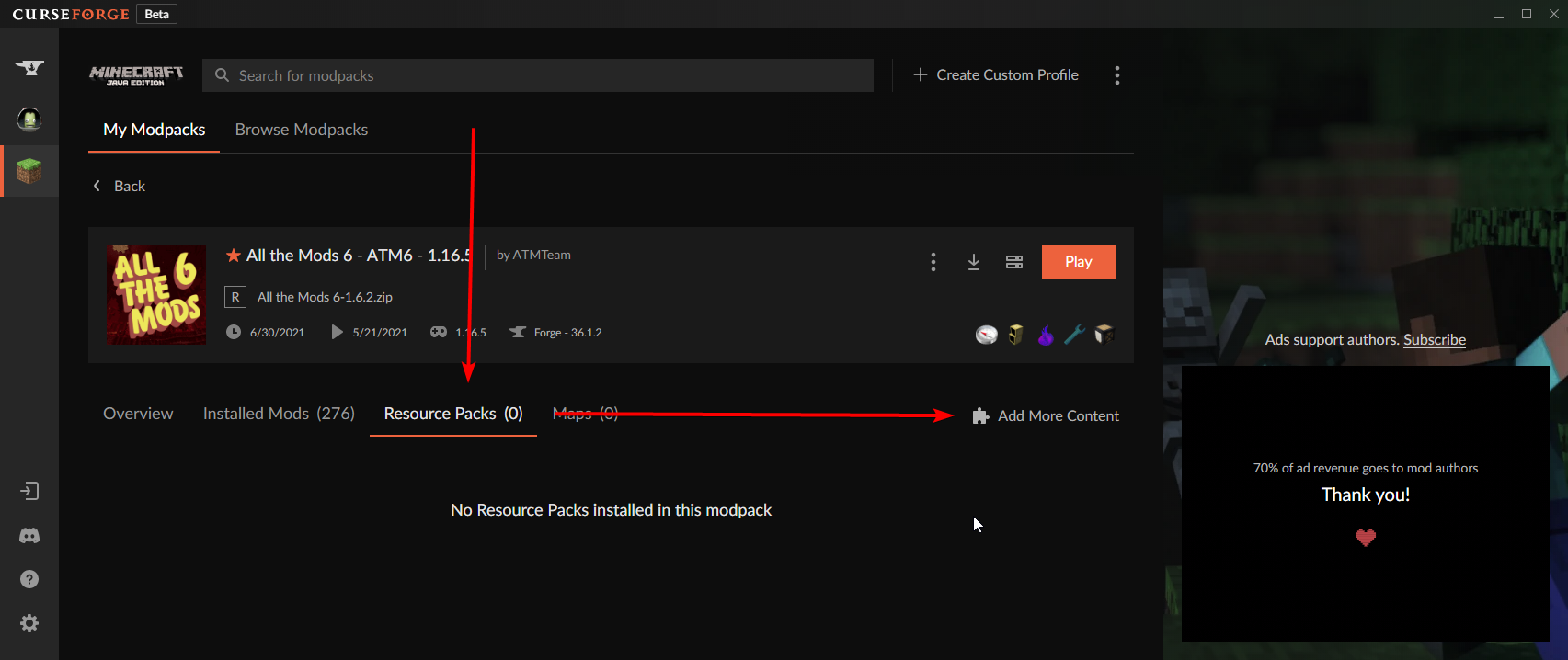


 wicked sigil
how do you download texture packs for minecraft on the app its just modpacks idk y
wicked sigil
last parcel
https://i.imgur.com/dk7jDDY.png
ok thx
worldly ether
Read above winter what the bot message said about installing mods . Texture packs/resource packs are in there too
wicked sigil
ile see if that works
wicked sigil
worldly ether
Read above winter what the bot message said about installing mods . Texture pack...
ight i ill look at both
real glade
hi
worldly ether
You just need to click that resource pack tab after the “add more content “
real glade
its telling me to download curseforge again wtf
and it didnt download this is just sad
viral jetty
@last parcel THE GAME FIXED ITSELF
IT WAS CRASHING IN THE MORNING THEN I WENT TO WALMART
I CAME BACK AND IT JUST WORKS
HOW
real glade
its telling me to download curseforge again wtf
and it didnt download this is just sad
WHY
Y IT BUULLY ME
viral jetty
real glade
WHY
I HAVE THIS QUESTION 24/7 WHEN WORKING WITH MODS
last parcel
why did i need a ping for this
worldly ether
A very overjoyed hyper person that needs to chill it seems
viral jetty
last parcel
why did i need a ping for this
because i love you
worldly ether
real glade
its telling me to download curseforge again wtf
and it didnt download this is ju...
Did your curseforge app fail to install?