#👽︱game-support
1 messages · Page 111 of 1
 autumn agate
 wild jewel
autumn agate
Oh ok
wild jewel
autumn agate
Oh ok
Try without vanillafix
autumn agate
okay
wild jewel
Same on singleplayer?
autumn agate
Oh, give me one moment
wild jewel
Then show the server log instead
autumn agate
wild jewel
Try without vanillafix
It works thanks
autumn agate
wild jewel
Then show the server log instead
Hey 🙂 I have created a modpack and it can be downloaded from the Cursforge site, but if I want to install it on the Cursforge site via Cursforge, does nothing happen in the Cursforge app on the desktop? Can someone help me?
 viral heron
can someone explain me how i can post a modpack? i mean make it public
 junior light
autumn agate
Hey 🙂 I have created a modpack and it can be downloaded from the Cursforge site...
junior light
autumn agate
Hey 🙂 I have created a modpack and it can be downloaded from the Cursforge site...
You want to install it on the site? or play the modpack?
viral heron
if you know pls pm me, i wont see it here i think lol
 last parcel
?mc-packshare
 golden muskBOT
There are two ways to share a modpack you've made with others...
Export and Share - For Friends to Small Groups.
- Click the Icon for the modpack.
- Click the
 button next to play.
 - Click

Export. - Select the files that should be included.
- Send the zip to the people that want it! They can follow the instructions in
!mc-installpackto install the pack!
Upload to Curseforge - For Public Release to Everyone.
This options will make your pack public to EVERYONE, it comes with extra requirements and will take some effort to set up.
- Go to here: https://www.curseforge.com/project/432/4471/create
- Fill out the information with a proper description of the pack. This should allow anyone to understand what the pack is.
- Click the Icon for the modpack in the CurseForge app.
- Click the button next to play.
- Click
Export. - Select the files that should be included.
- Open your Project you made on the CurseForge site and Upload the file you just made.
- Wait for Moderation & Sync so it can show up in the client! (See
!syncfor limitations)
autumn agate
junior light
You want to install it on the site? or play the modpack?
I would like to have it installed via cursforge on the official cursforge website, but nothing happens in the cursforge app on the desktop
last parcel
send the link to your pack
autumn agate
last parcel
send the link to your pack
last parcel
pack isnt synced to the client yet which is why it's not working
@heavy arch idk why you decided to switch channels, the answer is on your screen right here
 heavy arch
ik
autumn agate
last parcel
pack isnt synced to the client yet which is why it's not working
that means that I have to wait until it is synchronized with the client right?
last parcel
autumn agate
https://www.curseforge.com/minecraft/modpacks/marle7ys-world/files/3274829
actually, the pack installed just fine. what issue are you having
autumn agate
last parcel
actually, the pack installed just fine. what issue are you having
if I want to install it like I said yes, then nothing happens in the cursforge app on the pc that is the only problem I have and as you said it has to be synchronized with the client for it to work or Not?
last parcel
dont understand any of that
autumn agate
my englisch ist not very good at all im sorry for that, my problem is , when i want to install it via the cursforge app on the cursforge website, nothing happens on my cursforge app on my pc , i hope you understand it better than befor
last parcel
you mean using the install button?
autumn agate
yes
last parcel
yea that is likely a sync issue, or that your pack is in alpha. not sure exactly which. could be both.
!sync
golden muskBOT
Sync and your Project.
CurseForge REQUIRE a project to have one file marked Released on them for the projects to show up in search. Otherwise only Direct links to the project work.
Files can take a while to show up in the app. If your files still have not shown up either your project is new and you have yet to mark a file as Release or there is issues with the sync system making it slow.
last parcel
sync can take up to 24 hours after approval
autumn agate
can i swich the pack on the website from alpha or beta to release?
autumn agate
aahh thank you very much yamza 🙂
 toxic thicket
east texas courts in general are kinda cursed
my county has like a 95% conviction rate 
 lavish lichen
how can i use optifine with modpacks?
golden muskBOT
Optifine and Curseforge
To install Optifine with modpacks on Curseforge:
Right click the modpack icon, select Open Folder.
Put the Optifine.jar into the mods folder.
Now load the modpack normally.
We do not offer support for Optifine. If you have issues with Optifine, remove it. If you want further support try the discord found on their website.
https://www.optifine.net/home
last parcel
?mc-optifine
lavish lichen
last parcel
?mc-optifine
and how can i add the shaders than? my shaders arent there...
last parcel
google a guide on installing shaders
lavish lichen
i know how to install them, but they arent access able when i play the pack
last parcel
then you did something wrong? im not a shader expert, i dont even use them
lavish lichen
last parcel
then you did something wrong? im not a shader expert, i dont even use them
are there any other sups too?
last parcel
what is a sup
lavish lichen
a supporter
last parcel
try the discord in the info above
lavish lichen
i found it out now...xD there is an extra folder nvm
 crude gate
Anyone here knowledgeable about endergetic expansion. I removed it from ATM 6 cause it's end biome spawned way too much. But now that I removed it, I can't respawn the dragon and when I reset the end by deleting the DIM1 folder, neither the ender dragon or the portal spawn
last parcel
better option might be to just reduce the weight of that biome instead of removing the mod
crude gate
Can't. It's config has nothing about the biome in it
last parcel
well that is just silly
crude gate
It's config has a single line about debugdragonfightmanager. Nothing else. I'm sure there's other data or configs somewhere else messing with it, I just don't know where to look
last parcel
whatabout the serverconfig folder?
crude gate
Don't see anything
 low bolt
The game crashed whilst there was a severe problem during mod loading that has caused the game to fail
Error: net.minecraftforge.fml.common.LoaderException: java.lang.ClassNotFoundException: org.orecruncher.dsurround.client.sound.SoundEngine
Exit Code: -1
what does this mean?^
autumn agate
the soundengine crashed trying to play a client side sound from/for orecruncher
 acoustic idol
low bolt
The game crashed whilst there was a severe problem during mod loading that has c...
acoustic idol
low bolt
The game crashed whilst there was a severe problem during mod loading that has c...
!mc-logs can be many things, only the latest log can tell
golden muskBOT
How to get a Minecraft log file.
Where to find the log on the CurseForge Client.
Right-click the modpack profile icon OR click the button in the modpack profile.
Click 
Open Folder.
Open the logs folder.
Find the file called latest.log and drag it into discord.
acoustic idol
?
autumn agate
can you elaborate?
autumn agate
post a crashlog
acoustic idol
!mc-logs do this please
golden muskBOT
How to get a Minecraft log file.
Where to find the log on the CurseForge Client.
Right-click the modpack profile icon OR click the button in the modpack profile.
Click Open Folder.
Open the logs folder.
Find the file called latest.log and drag it into discord.
autumn agate
^^^
low bolt
The latest log
acoustic idol
Need to see the log...
low bolt
wdym?
acoustic idol
low bolt
wdym?
Not you
low bolt
oh
acoustic idol
Telling me what you see, doesnt help. Need to see the actual log
autumn agate
the log
acoustic idol
low bolt
The latest log
Try removing dynamic surroundings and try again
 tame stump
hello can someone help me?
wild jewel
Rule 10
wild jewel
Yeah expect me to remember things?
tame stump
ok so i have the architectury API for forge but it keeps saying that is failed to load or error how do i fix that? i am using 1.16.4
autumn agate
For context, I'm receiving an internal server error that disconnects a player whenever they swim.
wild jewel
architectury is broken
autumn agate
I've already deleted the UUID, but it doesn't work still.
Now, as far as I'm aware, this problem does not occur in singleplayer
The log is the log server-side, I can pull up the clientside one.
acoustic idol
With?
autumn agate
autumn agate
The log is the log server-side, I can pull up the clientside one.
Caused by: java.lang.NoSuchMethodError: me.shedaniel.architectury.networking.NetworkChannel.sendToServer(Ljava/lang/Object;)V this maybe the issue
[13:31:38] [ForkJoinPool-1-worker-46/WARN]: The mod "autoconfig1u" contains invalid entries in its mod json:
- Unsupported root entry "$schema" at line 2 column 14... (46 KB left)
[13:31:38] [ForkJoinPool-1-worker-45/WARN]: The mod "cardinal-components-base" contains invalid entries in its mod json:
- Unsupported root entry "side" at line 8 column 11
autumn agate
autumn agate
Caused by: java.lang.NoSuchMethodError: me.shedaniel.architectury.networking.Net...
Oh. For real?
fr
Should I bring up the issue w/them or no?
 civic canyon
Yo guys, could anyone tell me how to get brine out of the thermal evaporation machine please
 keen jackal
oh wth
autumn agate
you can on their github if they have one
Alright, thanks Abyssal ^-^
@autumn agate dude, just post the log itself, not text from the thing
no one can help you until you post it
acoustic idol
Just drag and drop the file into discord, that doesnt help at all
autumn agate
the actual file
keen jackal
ye
autumn agate
istg
acoustic idol
Just hold left click the file > move your mouse over discord > release the file. Then send
wild jewel
keen jackal
r the staff like real staff from overwolf
Only those with the overwolf role
 worldly ether
The rest are just helpful nice people as long as you stay on their good side and obey rules
tame stump
wait does pc specs effect architectury API?
autumn agate
if not Clay will take your fingernails
worldly ether
Got a issue with architectury api?
tame stump
YES
worldly ether
For which mod . Light overlay?
tame stump
i acctauly dont know its a modpack my friend made
worldly ether
Well architectury api is just a dependency of other mods
tame stump
yes ik
but here is the thing it works fine on my computer but my laptop no
and i have all the right versions
worldly ether
Well the api did have some compatibility issues a couple months back or even less. People were experiencing crashing when trying to launch and such.
with mods like voxelmap and a couple of others
But they were quickly fixed
Under newer versions of the api
tame stump
ok so i just tried to load my game without the api and its crashed
so i need that api for it work
low bolt
The game crashed whilst loading nbt data
Error: java.io.EOFException: Unexpected end of ZLIB input stream
Exit Code: -1
what does this mean?^
acoustic idol
low bolt
The game crashed whilst loading nbt data
Error: java.io.EOFException: Unexpected...
Log please,
 tall narwhal
can you get shaders on curse forge
autumn agate
Hello somebody can help me to download a mod?
last parcel
?mc-installmods
golden muskBOT
How to install mods in CurseForge App.
- Click
+ Create Custom Profile - Name it, select the required Minecraft version, select the Forge version (usually the highest number), click
Create. - Click the profile icon.
- Click
Add New Content - Search and install the desired mods.
- Start the game!
How to install mods not on CurseForge.
- Right click the profile picture or Open the profile and click the Icon next to the play button.
- Click
Open Folder. - Drag the mod(s) into the
modsfolder. (Note: Some mods will require others, to run. Make sure to read the instructions for the mod!) - Start the game!
 autumn agate
Ya I know how to download normal mod I just want to know how to download "Immersive Vehicles" because every time that I open it its shows me this:
 last parcel
seems to tell you what to do
 oak thunder
my 1.16 modpack is crashing when making a world at 54%
I want to post the latest.log but it is 500,000 lines
and I can't submit it to github because it always lags out
golden muskBOT
How to get a Minecraft log file.
Where to find the log on the CurseForge Client.
Right-click the modpack profile icon OR click the button in the modpack profile.
Click Open Folder.
Open the logs folder.
Find the file called latest.log and drag it into discord.
autumn agate
^
oak thunder
That is going to take so long. It is 500,000 lines and each line is pretty long
it would have to be split into like 300 parts
lemme see if I can post jsut the file
just*
to github
ugh won't work
I don't know why my latest log is so long
my file is 50gb
sorry 60 mb
acoustic idol
Copy the log, paste it at https://gist.github.com/ then send the gist you create.
oak thunder
every time I try to upload the gist it lags out and makes me reload. I can do other text just fine
but for some reason
this one just won't work
acoustic idol
Could try closing out the pack, start it again > make the world then post the log.
oak thunder
yeah if you didn't see before the it freezes at 54% when making a world
so I have to end the task
acoustic idol
yeah, would need the log to see whats up...
oak thunder
ik
acoustic idol
What pack?
acoustic idol
When it freezes how long have you waited before closing?
acoustic idol
Might need more time then that, sometimes when minecraft stops responding it is actually still loading in the background. Just the visuals have stopped
oak thunder
yeah I just hope it doesn't require that to happen for everyone who downloads it. might be a turn off and I might get people asking why it isn't working for them lol
gonna be a pain
acoustic idol
hard to say per pc.
oak thunder
yeah
 coarse elm
if you have a 60mb log file you have a broken pack/mod
acoustic idol
Unless Clay sees something I dont
autumn agate
tryna read these files on my phone is a pain in my butt
oak thunder
well when I restarted it fixed itself like the log did
k just letting it do it's thing
acoustic idol
One thing that does seem off is the locomotives loading GPU mem
coarse elm
Then post the log from like 100 lines before and some after
coarse elm
acoustic idol
One thing that does seem off is the locomotives loading GPU mem
It's just the way the mod is made
oak thunder
it was 122 kb now it is 55000 kb
acoustic idol
coarse elm
It's just the way the mod is made
ah ok
acoustic idol
Do something like lines 0-2000, 1900-4000 and so on
oak thunder
that is through like 1000
i just checked and it has around 500,000 lines literally
acoustic idol
...
coarse elm
Stop posting the same first 1k
Either get the log from where the error starts spamming or post the whole log
oak thunder
Sorry
 soft sparrow
New to minecraft mods, any suggestions for a single player modpacl?
 main tendon
So ive published a modpack and its been approved but its not showing up on the curseforged app
How do I get it to appear in the app?


 autumn agate
!mc-log
golden muskBOT
How to get a Minecraft log file.
Where to find the log on the CurseForge Client.
Right-click the modpack profile icon OR click the button in the modpack profile.
Click Open Folder.
Open the logs folder.
Find the file called latest.log and drag it into discord.
autumn agate
do this
 vale wagon
This is my pack, my game has alot of sudden freezes that are very annoying
coarse elm
main tendon
So ive published a modpack and its been approved but its not showing up on the c...
!sync
vale wagon
know any way to fix?
coarse elm
hm, apparently the bot died
main tendon
@coarse elm you telling me to do the !sync?
coarse elm
Sync and your Project.
CurseForge REQUIRE a project to have one file marked Released on them for the projects to show up in search. Otherwise only Direct links to the project work.
Files can take a while to show up in the app. If your files still have not shown up either your project is new and you have yet to mark a file as Release or there is issues with the sync system making it slow.
main tendon
how do i mark it as released
vale wagon
i have betterfps, optifine, and vanillafix all installed in the pack
coarse elm
main tendon
how do i mark it as released
click the file name from the files page and then edit on the top right. Select release
vale wagon
should they all be installed at one time?
main tendon
thanks @coarse elm imma suck your wee wee and smooch yo mouf. big helps
coarse elm
 last parcel
wow clay, so lucky
 frozen hill
🇼 🅰️ 🇹
autumn agate
That statement just halted support for a good 4 minutes
vale wagon
ok
oak thunder
If Anyone is having the issue of the game freezing every couple seconds in your modpack, go to mods, then open the config for minecraft forge, go to client settings, and turn on force threaded chunk rendering. This fixed my problem and I have spoken to many about the issue so just sayin.
plus restart your pc every once in a while
acoustic idol
hmm
last parcel
?mc-log
golden muskBOT
How to get a Minecraft log file.
Where to find the log on the CurseForge Client.
Right-click the modpack profile icon OR click the button in the modpack profile.
Click Open Folder.
Open the logs folder.
Find the file called latest.log and drag it into discord.
last parcel
?mc-installfix
golden muskBOT
- Click on the Minecraft Tab on the Left side of the App.
- Click button next to the
Create Custom Profileoption. - Click

Repair Installationoption. - Play game.
NOTE: You will not lose any modpacks or worlds, These are saved in the Instances folder. DO NOT TOUCH THIS FOLDER OR YOU WILL LOSE EVERYTHING
last parcel
see if that helps
 robust cliff
thanks
acoustic idol
Remove optifine and try again
 novel current
Hi, my friend can't play because of a crash, can someone help me a little?
autumn agate
!mc-log
golden muskBOT
How to get a Minecraft log file.
Where to find the log on the CurseForge Client.
Right-click the modpack profile icon OR click the button in the modpack profile.
Click Open Folder.
Open the logs folder.
Find the file called latest.log and drag it into discord.
autumn agate
novel current
Hi, my friend can't play because of a crash, can someone help me a little?
refer to the post above
autumn agate
remove optifine and relaunch
novel current
ok
we just added some mods, but, if optifine is the problem, he can't use it anymore?
novel current
I see, thank you
autumn agate
mhm
novel current
wait, it didn't worked
novel current
yep
autumn agate
so
Optifine doesnt go into the .minecraft/mods/ folder
you run it by itself to create a client-profile that uses optifine
last parcel
uhh
novel current
you can do that, but i think you can't use forge+optifine
for that you need to put the optifine in the mods folder
last parcel
you do put it in the mods folder if you use forge
autumn agate
I was getting to that :(((
novel current
I don't know why my friend crashed, me and another friend have the same mods and we are ok
novel current
yeah
in fact, just like 10 minutes ago we were playing and i just added some mods, then my friend started to crash
novel current
autumn agate
Its a render issue caused by GrossAE2Hacks/AE2Extras
novel current
huh?
autumn agate
it has a different name on curseforge
novel current
ooooh, ok, i'll try to delete that one
autumn agate
Not yet
novel current
ok
novel current
no, we just added it
novel current
ok
autumn agate
@novel current actually you can have them repair their profile, first, bc it looks like its just a overlay rendering issue
instead of deleting it if yall do what that mod still
novel current
yeah, it worked, thank you a lot ^^
 unique token
hi, was wondering if theres a way to find my friends custom modpack
last parcel
did they upload it?
 steel tusk
how do i get the jar thing for the mod so i can put it into a server
vale wagon
oak thunder
If Anyone is having the issue of the game freezing every couple seconds in your ...
Oooh
I'll try this
I installed a bunch of performance enhancing mods, but it still freezes, thought not as severe
oak thunder
vale wagon
I'll try this
What about optifine
vale wagon
Already installed
oak thunder
do you have the right settings on
vale wagon
I'm not sure
 prime tapir
why does my cursedforge have no desktop short cut?
oak thunder
for really good performance I usually do these
prime tapir
i enabled the setting
oak thunder
I got to the performance page in video settings
and turn everything on except for smooth fps
fast render does a ton for fps and such
steel tusk
please tell me how to get the jar file from the mod loader
oak thunder
I don't do smooth fps because It felt like it made the game run a little wierd and just isnt needed
vale wagon
Alright
oak thunder
another thing is to turn your render distance down, I normally set mine to 8
for modded at least
frozen hill
Rogue like adventures and dungeons modpack crash not modified
oak thunder
did you allocate it enough ram?
oak thunder
frozen hill
Rogue like adventures and dungeons modpack crash not modified
how much ram did you allocate?
frozen hill
oak thunder
how much ram did you allocate?
XD
 oak thunder
frozen hill
XD
oak thunder
frozen hill
XD
Jesus christ.
acoustic idol
Rams not the issue
oak thunder
hmm
acoustic idol
frozen hill
Rogue like adventures and dungeons modpack crash not modified
!mc-installfix do this
golden muskBOT
- Click on the Minecraft Tab on the Left side of the App.
- Click button next to the
Create Custom Profileoption. - Click
Repair Installationoption. - Play game.
NOTE: You will not lose any modpacks or worlds, These are saved in the Instances folder. DO NOT TOUCH THIS FOLDER OR YOU WILL LOSE EVERYTHING
oak thunder
I didn't look at the logs yet @acoustic idol I was just getting a baseline just in case
acoustic idol
Always look at the log first before adjusting things. Could cause more issues then good
oak thunder
acoustic idol
Always look at the log first before adjusting things. Could cause more issues th...
wasn't really saying to change anything I was just asking how much they had but you are right
acoustic idol
steel tusk
please tell me how to get the jar file from the mod loader
Mods are in the mods folder if thats what your looking for
frozen hill
Repair fix worked
 fresh thunder
hello! I am a bit new to this whole modding mc thing. I am trying to use the manufactio modpack from curseforge but when I run it I am constantly getting an issue of the game crashing that states "The game crashed whilst there was a severe problem during mod loading that has caused the game to fail
Error: net.minecraftforge.fml.common.LoaderExceptionModCrash: Caught exception from Compacter (compacter)
Exit Code: -1". I really am lost and have been looking on forums why this is happening. Maybe im not installing it in the right place or something? Any advice or should I DM someone?
acoustic idol
fresh thunder
hello! I am a bit new to this whole modding mc thing. I am trying to use the man...
!mc-logs do this
golden muskBOT
How to get a Minecraft log file.
Where to find the log on the CurseForge Client.
Right-click the modpack profile icon OR click the button in the modpack profile.
Click Open Folder.
Open the logs folder.
Find the file called latest.log and drag it into discord.
 pliant crow
um hi im trying to do a minecraft mod pack (vintagebeef pixelon) but the folder wont allow me to like add anything, it says Path can only include english lettersa and numbers, any advice?
last parcel
?mc-path
golden muskBOT
**Minecraft Files should NOT be installed inside the following locations
.minecraft folder.
OneDrive folders.
Desktop folder.
Drive roots I.E. Directly into the C:\ drive.
iCloud enabled folders.
If any of the above are in the path you need to change/move it by following the instructions below!**
If Minecraft is not installed, start here.
Click the  in the top left.
Select Minecraft.
Click "Edit".
Move to the "Continue here:" section below.
If Minecraft is installed, follow these steps.
Click the  in the bottom left.
Select the Minecraft tab.
Click "Change".
Move to the "Continue here:" section below.
Continue here:
Make a folder in the root directory called CurseForge.
Select the folder you just made.
The text box should show something like the following:
For Windows: C:\CurseForge
For Mac: /Users/Shared/CurseForge
 fresh thunder
acoustic idol
!mc-logs do this
fresh thunder
acoustic idol
!mc-logs do this
hey so i didnt see this at first, but i completely deleted and redownloaded both forge and mc and it started working???? the modpack has finally successfully loaded in hahah
 slim kraken
I cant play modpacks anymore they just crash
acoustic idol
slim kraken
I cant play modpacks anymore they just crash
the packs or the curse app?
acoustic idol
!mc-logs do this on the current pack your crashing with
golden muskBOT
How to get a Minecraft log file.
Where to find the log on the CurseForge Client.
Right-click the modpack profile icon OR click the button in the modpack profile.
Click Open Folder.
Open the logs folder.
Find the file called latest.log and drag it into discord.
acoustic idol
which ever pack your trying to play
golden muskBOT
- Click on the Minecraft Tab on the Left side of the App.
- Click button next to the
Create Custom Profileoption. - Click
Repair Installationoption. - Play game.
NOTE: You will not lose any modpacks or worlds, These are saved in the Instances folder. DO NOT TOUCH THIS FOLDER OR YOU WILL LOSE EVERYTHING
slim kraken
ok thanks
slim kraken
ok
acoustic idol
Pixelmon can take a while, its a rather large mod/modpack
acoustic idol
Is it timing out at all? or just really slow
acoustic idol
?mc-timeout try this, then try the install again
golden muskBOT
Increase the timeout for downloading mods and modpacks
Increase the timeout for downloading mods and modpacks
If you have issues with CurseForge getting timeouts when you try to download Modpacks or Mods,
you can try running this file: https://cdn.discordapp.com/attachments/778097796410376242/817150662953402368/increase_timeout.reg
What it will do, is increase the download timeout to 20 minutes.
You need to run the increase_timeout.reg, and when it is done, you'll need to restart CurseForge,
you can do this by right clicking the tray icon and select "Relaunch".
 half nebula
acoustic idol
?mc-timeout try this, then try the install again
half nebula
acoustic idol
?mc-timeout try this, then try the install again
still timed out
acoustic idol
did you do all the steps then restart curseforge?
half nebula
acoustic idol
did you do all the steps then restart curseforge?
mhm
acoustic idol
reboot your pc
half nebula
kk
coarse elm
acoustic idol
?mc-timeout try this, then try the install again
I believe this is standard for everyone now.
 dusky spire
I’m how do I change the file for it to not curseforge app needed
autumn agate
What?
 dapper mesa
im trying to play stoneblock 2 on a shockbyte server that i own but the problem is that all of the curse forge mods are out of date

and thats client not server
is there a way to fix this
golden muskBOT
We do not provide support for FTB Modpacks or the FTB App.
If you are looking to play FTB modpacks use the FTB launcher.
https://www.feed-the-beast.com/
Any Overwolf FTB launcher issues you have should be directed here:
https://github.com/FTBTeam/FTB-App-Overwolf/issues
coarse elm
You need to use the FTB launcher for FTB packs because they do dumb stuff.
 languid nebula
Why does crafttweaker
dusky spire
anone know how to change the modpack download to so people can download it without the curseforge app
coarse elm
dusky spire
anone know how to change the modpack download to so people can download it witho...
that's the whole point of the platform, you need the app to use the file.
 rain hawk
hello I'm trying to create a modpack but it gotrejected because some of the files were overrides
how do i reference them as manifest.json?
 sage pier
Delete the mods from the overrides folder, install them through the app and export again
rain hawk
howdo i install them through the app?
golden muskBOT
sage pier
rain hawk
howdo i install them through the app?
!mc-installmods
golden muskBOT
How to install mods in CurseForge App.
- Click
+ Create Custom Profile - Name it, select the required Minecraft version, select the Forge version (usually the highest number), click
Create. - Click the profile icon.
- Click
Add New Content - Search and install the desired mods.
- Start the game!
How to install mods not on CurseForge.
- Right click the profile picture or Open the profile and click the Icon next to the play button.
- Click
Open Folder. - Drag the mod(s) into the
modsfolder. (Note: Some mods will require others, to run. Make sure to read the instructions for the mod!) - Start the game!
sage pier
So it should be the way that you created the modpack. ^^
rain hawk
thanks
 pulsar idol
konw somebody a jetpack mod wich doesn`t need a over tech mod ?
golden muskBOT
How to get a Minecraft log file.
Where to find the log on the CurseForge Client.
Right-click the modpack profile icon OR click the button in the modpack profile.
Click Open Folder.
Open the logs folder.
Find the file called latest.log and drag it into discord.
autumn agate
@autumn agate refer to bot above
okay
[11:05:15] [Client thread/ERROR]: GL Error: Invalid value(1281) @ uploadTextureMaxMips mip=0
[B#625] 2021/04/14 11:05:16 [INFO] #
[B#625] 2021/04/14 11:05:16 [INFO] # A fatal error has been detected by the Java Runtime Environment:
[B#625] 2021/04/14 11:05:16 [INFO] #
[B#625] 2021/04/14 11:05:16 [INFO] # EXCEPTION_ACCESS_VIOLATION (0xc0000005) at pc=0x00007ffbc7b31af0, pid=9316, tid=0x00000000000018d8
[B#625] 2021/04/14 11:05:16 [INFO] #
[B#625] 2021/04/14 11:05:16 [INFO] # JRE version: Java(TM) SE Runtime Environment (8.0_291-b09) (build 1.8.0_291-b09)
[B#625] 2021/04/14 11:05:16 [INFO] # Java VM: Java HotSpot(TM) 64-Bit Server VM (25.291-b09 mixed mode windows-amd64 compressed oops)
[B#625] 2021/04/14 11:05:16 [INFO] # Problematic frame:
[B#625] 2021/04/14 11:05:16 [INFO] # C [nvoglv64.dll+0xcf1af0]
[B#625] 2021/04/14 11:05:16 [INFO] #
[B#625] 2021/04/14 11:05:16 [INFO] # Failed to write core dump. Minidumps are not enabled by default on client versions of Windows
[B#625] 2021/04/14 11:05:16 [INFO] #
[B#625] 2021/04/14 11:05:16 [INFO] # An error report file with more information is saved as:
[B#625] 2021/04/14 11:05:16 [INFO] # C:\Users\themo\AppData\Roaming.technic\modpacks\fastly-pack\hs_err_pid9316.log
[B#625] 2021/04/14 11:05:16 [INFO] #
[B#625] 2021/04/14 11:05:16 [INFO] # If you would like to submit a bug report, please visit:
[B#625] 2021/04/14 11:05:16 [INFO] # http://bugreport.java.com/bugreport/crash.jsp
[B#625] 2021/04/14 11:05:16 [INFO] # The crash happened outside the Java Virtual Machine in native code.
[B#625] 2021/04/14 11:05:16 [INFO] # See problematic frame for where to report the bug.
[B#625] 2021/04/14 11:05:16 [INFO] #
[B#625] 2021/04/14 11:05:16 [INFO] AL lib: (EE) alc_cleanup: 1 device not closed
[B#625] 2021/04/14 11:05:18 [INFO] Starting download of https://cdn.technicpack.net/platform2/pack-icons/1836995.png?1618309076, with 3 tries remaining

the crash happened here
@autumn agate dude, post the log file, not the text of the file
i cant
too big
but this is the problem
Latest.log is too big to upload?
yeah
more than 8 mb
ok first off
thats a technic pack
so thats an issue
yeah
i published it on technic
unless I can see the actual file, i cant help
upload it to Curseforge
if i upload to mega
is it good?
uhhh yeah?
okay
!mc-modpacks
!mc-installmodpacks
golden muskBOT
How to install modpacks with the search features in app.
- Open the

Minecraftsection of the app. - Click the top search bar where it says
Search for modpacksOR Click theBrowse ModpacksTab. - Find the Modpack you want to install and click install on it.
- Wait for CurseForge app to download and unpack all the required files.
- Once finished, click
Play!
How to install modpacks from a Export. (Custom/Private/Site downloaded Modpack zip)
- Get CurseForge App if you don't have it, use
!downloadfor a link. - Get the exported modpack from CurseForge or someone else,
!mc-packshareexplains how to make them. - Open the
Minecraftsection of the app. - Click

Create Custom Profile - Click the
Importoption. - Find the file you just downloaded in step 2 and select it.
- CurseForge app will now attempt to download and unpack the modpack. If it fails, try steps 4-6 again.
- Once finished, click
Play!


 autumn agate
ok
it is
so first off
i have no idea how to read this shit
lmao
create the pack on curseforge
i have java crash log too
this is small enough
but i dont know how to read it XD
OK so
basically make the pack on curseforge
relaunch
if it crashes again, then repost the latest-log.txt
oka
y
so its at least readable
 nocturne turret
guys any mod that auto walk? (backwards too) and i can set time of walking and autorepeat it?
 hollow island
hello, so i crash on minecraft launcher with exit code: 0 and cant open mc with mods (curseforge) any help?
last parcel
?mc-log
golden muskBOT
How to get a Minecraft log file.
Where to find the log on the CurseForge Client.
Right-click the modpack profile icon OR click the button in the modpack profile.
Click Open Folder.
Open the logs folder.
Find the file called latest.log and drag it into discord.
last parcel
wrong log
last parcel
the one the bot said
hollow island
that is the log tho
last parcel
its not
last parcel
C:\Users\Sigurd Antonsen\curseforge\minecraft\Instances\The Minecraft Project\config\fml.toml
delete that file and try again
hollow island
thank you man, big rep in the chat
 naive fjord
When I try to set my mods folder in curseforge it says the path can only include english letters and numbers. I think it's because my minecraft folder is called .minecraft.
last parcel
?MC-PATH
golden muskBOT
**Minecraft Files should NOT be installed inside the following locations
.minecraft folder.
OneDrive folders.
Desktop folder.
Drive roots I.E. Directly into the C:\ drive.
iCloud enabled folders.
If any of the above are in the path you need to change/move it by following the instructions below!**
If Minecraft is not installed, start here.
Click the in the top left.
Select Minecraft.
Click "Edit".
Move to the "Continue here:" section below.
If Minecraft is installed, follow these steps.
Click the in the bottom left.
Select the Minecraft tab.
Click "Change".
Move to the "Continue here:" section below.
Continue here:
Make a folder in the root directory called CurseForge.
Select the folder you just made.
The text box should show something like the following:
For Windows: C:\CurseForge
For Mac: /Users/Shared/CurseForge
naive fjord
ty
 granite silo
My modpack wasn't loading correctly so I tried reinstalling it by updating it to the version it's already on. It has been stuck like this for a while. Any fixes?

To be specific, when the game opened it said that several mods weren't installed.
That's way I updated it.
Also the 'repair' thing didn't do anything for me
granite silo
nvm it finished updating
 digital trench
wanted to try out some shaders with Enigmatica 2 so I dropped the .jar file for optifine 1.12.2 into the mods folder. But now all I get is a black screen after the loading screen instead of the main menu. Anyone else had this issue or have suggestions on fixing? Or should I just give up on optifine?
last parcel
?mc-optifine
golden muskBOT
Optifine and Curseforge
To install Optifine with modpacks on Curseforge:
Right click the modpack icon, select Open Folder.
Put the Optifine.jar into the mods folder.
Now load the modpack normally.
We do not offer support for Optifine. If you have issues with Optifine, remove it. If you want further support try the discord found on their website.
https://www.optifine.net/home
digital trench
ty
 west peak
Hi i have a problem i cant get my modpack installed to test it, when i click install it is directing me to the "CurseForge" app and nothing is happening, and it cannot be found on the site and the app, can you help me ?
 next panther
west peak
Hi i have a problem i cant get my modpack installed to test it, when i click ins...
next panther
west peak
Hi i have a problem i cant get my modpack installed to test it, when i click ins...
Download the app first: https://curseforge.overwolf.com

Overwolf | Tech for developers who love gaming
Welcome to the CurseForge community! Build, manage and download mods and addons for your favorite games
west peak
I already have it.
last parcel
link your project
last parcel
!sync
golden muskBOT
Sync and your Project.
CurseForge REQUIRE a project to have one file marked Released on them for the projects to show up in search. Otherwise only Direct links to the project work.
Files can take a while to show up in the app. If your files still have not shown up either your project is new and you have yet to mark a file as Release or there is issues with the sync system making it slow.
acoustic idol
Your file is set to alpha, edit it on the site and set it to R (release)
west peak
That I put it in "R" ? How ?
last parcel
edit the file, select the correct option
 haughty elk
Uh, this seems, questionable?

no response to commands or movement, I'm guessing the reason is mods and a 255 high superflat world?
leaving the world crashed it
is this server dead or glitched
acoustic idol
World could be corrupted.
haughty elk
eh
been like that since i made it
it seems like large lag
or failure due to there being no air blocks in the world
worldly ether
If reloading chunks with F3+A does not work then the crash will have corrupted the world
 autumn agate
he says exactly were they are
mods -> config -> forge config -> client settings -> force threaded chunk rendering = true
vale wagon
But are they in minecraft or the forge launcher
autumn agate
depends on if youre using the curseforge launcher for your modpacks or not
acoustic idol
In game looking at those instructions
coarse elm
there's no such thing as a forge launcher?
vale wagon
I mean are these settings in minecraft or the forge launcher
acoustic idol
In game, main menu
 acoustic idol
I honestly not sure what he was doing in the first place. ¯_(ツ)_/¯
What issue are you having?
vale wagon
constant sudden freezes
acoustic idol
Any pack or just the one?
vale wagon
just one
acoustic idol
Have you tried others?
vale wagon
no, i put together this one
vale wagon
37
acoustic idol
load into a world, open f3 and take a screenshot
 acoustic idol
Keep the menu open for a bit, move around when it freezes, look at the ram usage in the upper right
vale wagon
the number goes down
 modest marsh
Hey guys, im looking for a mod or method to change minecrafts gathering rates. What I mean is I want to be able to adjust how much resource per block I get. For example, If I mine an iron ore block, I want to make it to where I get 2 or more iron per block, similar to how you can get multiple coal from one block. Or when you mine a tree I would like to get say 5 blocks of wood from one.
acoustic idol
vale wagon
the number goes down
hmm
I did some testing. XFirelords "fix" is a 1.12.2 thing, however it comes with a catch
acoustic idol
Not the channel for this
 young knot
Sorry if this is the wrong channel but are good mods for 1.16.5 that add a lot of building blocks like the old 1.7.10 chisel
autumn agate
@muted flax Open to Lan and allow cheats
autumn agate
/gamerule keepInventory true
autumn agate
clone the world but before you finalize it, make sure cheats are enabled ¯_(ツ)_/¯
 valid wolf
i got it!
 muted flax
he figured it out, lmao
valid wolf
the keep inventory needed the capital I
muted flax
...
valid wolf
so it had to be keepInventory
vale wagon
acoustic idol
I did some testing. XFirelords "fix" is a 1.12.2 thing, however it comes with a ...
Whats the catch
acoustic idol
vale wagon
Whats the catch
If your pc isnt strong enough, or beefy enough it will cause more issues then good.

That and I dont really recommend this route if you dont know how many cores your pc has.
 dapper holly
i am playing the valhesia 2 minecraft modpack. i logged in, my computer crashed, and now my world has chunks just randomly misplaced... one being 3/4 of my atum portal. guess what im asking is, "how do i reload a previous save or backup in the curseforge launcher for a modpack?"
acoustic idol
If the pack had a mod creating world backups there is usually a backups folder in the packs folder. Otherwise not surewhat to tell yeah
acoustic idol
Are there files in it?
dapper holly
its compressed
 rugged shell
Is there any way to play with friends with the mods
acoustic idol
dapper holly
its compressed
Rename your cursent world folder (world1 or something other than world) then open the zip and tell me whats inside
dapper holly
oh i copy and pasted the zip and extracted it in another folder in my documents, it has all the same files as my current world
so do i just copy the folder and drop it next to my original world to see if it will run?
acoustic idol
Yeah. Just make sure the new folder is called world otherwise it wont load
dapper holly
oh just called "world"?
oak thunder
acoustic idol
If your pc isnt strong enough, or beefy enough it will cause more issues then go...
ah I guess I didn't see that It has just always worked perfectly for me
does anyone here know ftb quests?
I am having this problem where when I hover over my rewards it just doesn't tell me what they are. It is like it is invisible because the damage still stays for some reason
 oak thunder
rugged shell
Is there any way to play with friends with the mods
oak thunder
rugged shell
Is there any way to play with friends with the mods
Yeah, but modded servers are hard to run (1.16 is really cpu optimized just takes a lot of ram.) but I recommend just renting a server. It kinda sucks that there isn't really another way 😦 But if anyone has any other better ideas let me know
acoustic idol
It is possible to do for 1.16.x on a local, just need the ram and keep an eye on your mod count.
 near ocean
Hey I have a problem, I'm playing minecraft right? Totally normal gameplay then my game just freezes with a not responding title at the top. Could I get more info on this, and potentially a fix for it?
autumn agate
hey question
if u would get a minecraft gift card to someone
and they redeemed it
but you wanted to give it to someone else
would it be possible?
last parcel
no..
 true hinge
I keep getting exit code 0
 potent tartan
true hinge
I keep getting exit code 0
potent tartan
true hinge
I keep getting exit code 0
?mc-log
golden muskBOT
How to get a Minecraft log file.
Where to find the log on the CurseForge Client.
Right-click the modpack profile icon OR click the button in the modpack profile.
Click Open Folder.
Open the logs folder.
Find the file called latest.log and drag it into discord.
true hinge
 wanton jay
I've got a server crash file here that I can't read, could someone take a look at it?
coarse elm
true hinge
Try a new endertech version.
true hinge
coarse elm
Try a new endertech version.
Ok
wait... i dont have endertech in this modpack
coarse elm
wanton jay
in the server.properties file set max-tick-time to -1
coarse elm
true hinge
wait... i dont have endertech in this modpack
ah, I see AdPother is the mod name.
IDK what that is tho You could try downgrading forge too.
true hinge
Oh that's a pollution mod
near ocean
Does anyone know why my minecraft just stops responding at periods of times?
coarse elm
true hinge
Oh that's a pollution mod
try forge 2847
true hinge
coarse elm
try forge 2847
Ok
coarse elm
near ocean
Does anyone know why my minecraft just stops responding at periods of times?
likely garbage collections, how much ram do you have and how much does the game have
true hinge
coarse elm
try forge 2847
Thank you!
coarse elm
take a picture of the F3 screen while the pack is running
near ocean
coarse elm
take a picture of the F3 screen while the pack is running
Here you go @coarse elm

Like, my fps is just fine I don't know why it keeps not responding like this
When I used other mod loaders like technic and such, It doesn't do this
And it did it again
coarse elm
does it come back if you wait a bit?
near ocean
All the time I've waited and it hasn't came on
The most I've waited was about 15 minutes
coarse elm
yeah that's too long
near ocean
Do you think theres a fix for it?
golden muskBOT
How to get a Minecraft log file.
Where to find the log on the CurseForge Client.
Right-click the modpack profile icon OR click the button in the modpack profile.
Click Open Folder.
Open the logs folder.
Find the file called latest.log and drag it into discord.
coarse elm
Honestly?
Likely.
It's just been so long and I've seen so many issues I just don't recall it
near ocean
Is there anything you got out of the log file that could possibly source the issue?
coarse elm
nothing other than try without optifine
near ocean
Right, let me move that out real quick
last parcel
gpu?
coarse elm
could be?
coarse elm
near ocean
Right, let me move that out real quick
do you have a dedicated GPU in the PC?
near ocean
That I'm aware of, yes
golden muskBOT
How to set minecraft to use your videocard
 near ocean
What if I'm not using nvidia?
near ocean
Uh, I'm using intel
coarse elm
Intel doesn't make Dedicated GPU's?
near ocean
I wouldn't really know about that
coarse elm
then don't worry about the above
low bolt
im having java issues again. my modpacks where working before and now im getting exit code 0 once again. any suggestions?
coarse elm
post the log
low bolt
gotchu
near ocean
This is just the only thing I see
 low bolt
here is the log titled 'latest'
coarse elm
ok, then you don't have a dedicated card and that message doesn't apply
low bolt
i already have ab 5 gb of ram allocated but its not much of an fps problem
lemme check
where do i find that lmfao
near ocean
In your mods folder I would be guessing?
low bolt
oh
coarse elm
did you modify this modpack?
low bolt
ah
coarse elm
Modpacks aren't really intended to have a bunch of stuff piled into them.
low bolt
welp there goes like 20 hours of grinding lol
coarse elm
Sure you can add a few things here or there without issue but essentially a whole other modpack ontop of it? nawh.
low bolt
how come it stopped working out of nowhere?
low bolt
is there a way to fix that?
coarse elm
reinstall stuff.
coarse elm
you could try exporting the profile and then importing it again.
low bolt
how do i do that?
coarse elm
avatarmod valkyrien-skies
Tons of other mods too
low bolt
oh ez, idrc ab those mods anyway lmfao
coarse elm
there's also like 7 other ones
coarse elm
abyssalcraft, advancedRocketry, biomesoplenty, biometweaker, creepingnether, and more
sooo
I'd start over with mods. Back up the world.
last parcel
if you want to add that many mods, you should just make your own pack
low bolt
the thing is, is that they dont work as well. mods like serene seasons wont work the same as it does in rlcraft
coarse elm
thats called configs, and you might as well start figuring them out now if you are going to do stuff like this.
low bolt
oh, i have no idea how to do that
look like taking out valkien skies got me in, lemme try getting into my world
coarse elm
then you should likely stick to adding a couple mods to a pack at the most
last parcel
or dont
near ocean
It seems like it's working actually
low bolt
coarse elm
thats called configs, and you might as well start figuring them out now if you a...
on a 1-10 scale, how hard is it to learn cofigs, and how time consuming is it?
coarse elm
depends on the mod.
Most mods, 3
more pack oriented mods for configuring stuff 7-9
low bolt
ah, well thats a fat no then lmfao
worldly ether
takes a bit of learning to know what you are messing about with
coarse elm
well unless you plan on getting into totally changing stuff the second group will go untouched
low bolt
wdym?
coarse elm
editing recipes, making quests, custom blocks/tools/items, custom worldgen, structures ETC.
last parcel
open config, read options, change what you want
low bolt
coarse elm
editing recipes, making quests, custom blocks/tools/items, custom worldgen, stru...
ah, if only ik how to do that
low bolt
true
dapper mesa
where would i go for ftb launcher help
coarse elm
!mc-ftb
golden muskBOT
We do not provide support for FTB Modpacks or the FTB App.
If you are looking to play FTB modpacks use the FTB launcher.
https://www.feed-the-beast.com/
Any Overwolf FTB launcher issues you have should be directed here:
https://github.com/FTBTeam/FTB-App-Overwolf/issues
dapper mesa
is there a discord server?
 stark socket
do mod forks/continuations count for #829596904589361162 ?
coarse elm
stark socket
do mod forks/continuations count for <#829596904589361162> ?
Depends, but likely it would.
autumn agate
Hi so when I was trying to load up a mod pack I kept getting a Java(TM) error but when I try it in a previous version it runs fine. Is there anything I should do to fix this? I tryed updating java, client repair and restarting my pc
The modpack is Better Minecraft and the version is 13
potent tartan
?mc-log
golden muskBOT
How to get a Minecraft log file.
Where to find the log on the CurseForge Client.
Right-click the modpack profile icon OR click the button in the modpack profile.
Click Open Folder.
Open the logs folder.
Find the file called latest.log and drag it into discord.
low bolt
almighty wise ones. has anything changed since the last log i sent?
low bolt
coarse elm
editing recipes, making quests, custom blocks/tools/items, custom worldgen, stru...
wise one?
low bolt
last parcel
open config, read options, change what you want
wise one #2?
 gusty oar
Im having problems launching compact claustrophobia. problem seems to be the Scavenge Timing Addon. I have send a message to the developer, but was wondering if this is a known issue with a known solution. crash report: https://pastebin.com/kfP6REgT
Pastebin
Pastebin.com is the number one paste tool since 2002. Pastebin is a website where you can store text online for a set period of time.
 carmine fox
hi, i need forge version 35.1.37 but i cant find "universal"
wild jewel
carmine fox
hi, i need forge version 35.1.37 but i cant find "universal"
Why not install it using curseforge?
worldly ether
35.1.37 is 16.4
carmine fox
yes
carmine fox
wild jewel
Why not install it using curseforge?
i need forge file
worldly ether
Can’t you use curseforge or just the forge installer instead?

 wild jewel
carmine fox
i need forge file
wild jewel
carmine fox
i need forge file
For what?
carmine fox
I'm trying something
wild jewel
!mc-installmods
golden muskBOT
How to install mods in CurseForge App.
- Click
+ Create Custom Profile - Name it, select the required Minecraft version, select the Forge version (usually the highest number), click
Create. - Click the profile icon.
- Click
Add New Content - Search and install the desired mods.
- Start the game!
How to install mods not on CurseForge.
- Right click the profile picture or Open the profile and click the Icon next to the play button.
- Click
Open Folder. - Drag the mod(s) into the
modsfolder. (Note: Some mods will require others, to run. Make sure to read the instructions for the mod!) - Start the game!
wild jewel
Then tell what you need it for!
carmine fox
bruh
wild jewel
Can't help if we don't know what you are doing
carmine fox
I try to make my own modpack without using curseforge or anything else
therefore i need a forge file
wild jewel
Then open the installer
carmine fox
okay i try
worldly ether
@carmine fox just use the installer for 16.4 (35.1.37) then once you have installed it
the forge jar alongside a forge json file
can be found in .minecraft/versions and you'll see a folder named 16.4 forge
true hinge
Is there any 1.12.2 forge version of immersive portals?
autumn agate
is there anyone who can make me 3 origins on origins mod?
 fallen mortar
can anyone help with my curseforge? Im trying to hook up my main files to my account but it wont allow me to. It keeps saying "requires english numbers and letters" even tho im sure the files are in english at least from my side. Ive been having issue opening mods as it would tell me "Exit code:0" so I tried the lil wrench fix icon to try and get some mods running
If i need to share my screen and enter a call to get help I am willing to do so. Or if you can link me to somewhere that can help with my specific problem then that would be extremely helpful
golden muskBOT
**Minecraft Files should NOT be installed inside the following locations
.minecraft folder.
OneDrive folders.
Desktop folder.
Drive roots I.E. Directly into the C:\ drive.
iCloud enabled folders.
If any of the above are in the path you need to change/move it by following the instructions below!**
If Minecraft is not installed, start here.
Click the in the top left.
Select Minecraft.
Click "Edit".
Move to the "Continue here:" section below.
If Minecraft is installed, follow these steps.
Click the in the bottom left.
Select the Minecraft tab.
Click "Change".
Move to the "Continue here:" section below.
Continue here:
Make a folder in the root directory called CurseForge.
Select the folder you just made.
The text box should show something like the following:
For Windows: C:\CurseForge
For Mac: /Users/Shared/CurseForge
wild jewel
!mc-path
fallen mortar
wild jewel
!mc-path
Thank you!
 chilly mountain
Hi so im trying to run a public rlcraft server with plugins i was using sponge but someone told me about magma it has more plugins i want to switch to it but my server keeps crashing all i did was rename my sponge server.jar to .old and uploaded the new server.jar
last parcel
Unlikely that you will find help for that here. Magma must have some kind of support.
chilly mountain
last parcel
Unlikely that you will find help for that here. Magma must have some kind of sup...
ok thanks
 lapis zenith
@everyone is anyone curseforge addon not working right i havent had to do any updates for 3 weeks any body else having the same issue? im used it updating everyday
last parcel
why do you think 25k people need to see this message exactly?
sage pier
You know that replies pings people, if you don't tell them not to, right?
 hasty briar
Hello please can someone help me i have an issue witch is this:

 civic gale
There's an argument in the startup scripts that's not recognized, UseParNewGC
hasty briar
this is the start script
java -server -Xms512M -Xmx8G -jar server.jar nogui PAUSE
wait i get a new error now :
 civic gale
What version of Java is being used?
java -version in a cmd will tell you
 last parcel
this is from a server?
you may have java 8 installed, but it is not being used to run the server. reinstall java 8 and it should take over as the primary java, or google how to change it
hasty briar
ok
 agile shard
Hey I wanted to ask a question, is it possible to run some Fabric mods with Forge, I mean change something in the files or literally run Fabric and Forge but I think this is really impossible
wild jewel
agile shard
Hey I wanted to ask a question, is it possible to run some Fabric mods with Forg...
Not possible
last parcel
they are programmed completely different
agile shard
F I hate these developers who make only Forge or Fabric mods
I knew but I wanted to see if there was a solution
Thanks
last parcel
dont see why hating people for making content, seems a bit much
agile shard
Think I'll choose Fabric :/
hasty briar
its a little like mods and plugins they dont work together
agile shard
last parcel
dont see why hating people for making content, seems a bit much
That was humoristic, but it's quite idiot for me
I wanted to install Phosphor, Sodium and Lithium to gain performance but bruh I can't
last parcel
could always install better ram and cpu instead
agile shard
Lmao on my portable computer ???
wild jewel
Those mods can only do so much
agile shard
That's not a good solution, these mods are here to optimize more your game
You're at ~300 FPS, now you're at ~600
And when you think Curseforge will update and let us adding 1.16.3 mods with 1.16.5 modpack please ?
near ocean
Pov my game keeps not responding for whatever reason
agile shard
Ah there is no developers here lmao
wild jewel
agile shard
Ah there is no developers here lmao
You can make a comment on the mod pages...
wild jewel
What are you talking about?
last parcel
curseforge hosts mods, curseforge does not make mods
you need to talk to the developer of the mods you think should be tagged as working on 1.16.5, or whatever version you say they should be installable on
agile shard
You was talking of that ? I've read you was talking about mods
You was talking of that ? I've read you was talking about mods
wild jewel
Which are on curseforge...
agile shard
You don't understand
"And when you think Curseforge will update and let us adding 1.16.3 mods with 1.16.5 modpack please ?"
Read another time
last parcel
i think we both understand perfectly actually
last parcel
mod developers are the ones who control which version their mod works for, not curseforge
agile shard
So you haven't understand
last parcel
you are saying "curseforge should let you install 1.16.3 mods into 1.16.5"
and im saying it will not happen.
agile shard
When you want a mod and its last version 1.16.3 you need to add it manually to the mod folder, and I wanted to know if this will update
last parcel
so i understood correctly the first time
agile shard
last parcel
you are saying "curseforge should let you install 1.16.3 mods into 1.16.5"
and i...
You said : "curseforge hosts mods, curseforge does not make mods" and "you need to talk to the developer of the mods you think should be tagged as working on 1.16.5, or whatever version you say they should be installable on"
last parcel
i know what i said..
wild jewel
Open the page of the mod that you have issues with, scroll to the comments section, tell the developer of the mod to fix the tag
agile shard
What ? Can you just assume instead of rejecting the fact that I explained properly and you haven't understand ???
wild jewel
We know what you want, we also know that it will not be made
agile shard
wild jewel
Open the page of the mod that you have issues with, scroll to the comments secti...
BUT THAT'S NOT WITH THE MOD.
last parcel
you said the same thing 3 times and i understood it each time.
civic gale
Why should CurseForge let you install cross-version mods? That's only a recipe for disaster
agile shard
That's with Curse
civic gale
Just because something is made for 1.16.3 isn't a guarantee that it'll work for 1.16.5
wild jewel
agile shard
That's with Curse
Link a mod with this issue
last parcel
The mod developer is the one who says which version of minecraft a mod works with. if they do not say it works on 1.16.5 then it will not appear in the app as installable. That is not something that is wrong with curseforge.
civic gale
Just because something is made for 1.16.3 isn't a guarantee that it'll work for 1.16.5
agile shard
civic gale
Why should CurseForge let you install cross-version mods? That's only a recipe f...
You can install 1.16.3 for 1.16.5 because it's just a multiplayer fix
civic gale
In most cases, it will work, but not in every
wild jewel
agile shard
You can install 1.16.3 for 1.16.5 because it's just a multiplayer fix
Then tell the developer of the mod to change the file for it
civic gale
So the mod developer has to go in and say "Hey, this mod also works for 1.16.5". That's not on CurseForge
Anything else is simply too dangerous for the average user
agile shard
last parcel
The mod developer is the one who says which version of minecraft a mod works wit...
What the goal of making 2 times the same mod version but for a different version
wild jewel
agile shard
What the goal of making 2 times the same mod version but for a different version
You can tag a mod for multiple versions...
Link one of the mods that you are having issues with
last parcel
If the mod works then the mod developer must tag it saying it works.
no one said they need to remake anything
agile shard
civic gale
So the mod developer has to go in and say "Hey, this mod also works for 1.16.5"....
No but if you let community or developer write it, then it will appear on the menu
Just wait
You don't understand
civic gale
Yes, a CurseForge developer can go in and change it, but they shouldn't
last parcel
Yes. We. Do.
wild jewel
You done? You keep saying the same things but not listening to what the fix is
agile shard
Because you don't understand what I want to say
wild jewel
Link one of the mods that you are having issues with
civic gale
You want the client to be able to show mods for version for prior minecraft versions, yeah?
wild jewel
If above is the case: you won't get it
civic gale
Like a 1.16.5 client showing 1.16.3 mods
Which is just a big nogo
If it works, then it should be the mod dev saying "Hey, it works for 1.16.5", rather than the client taking a guess that it will work
agile shard
Because the mod Spider 2.0 is on 1.16.3 and not on 1.16.5, then it will not appear
 agile shard
civic gale
You want the client to be able to show mods for version for prior minecraft vers...
agile shard
civic gale
You want the client to be able to show mods for version for prior minecraft vers...
THANK YOU ! That's it
wild jewel
WE KNOW, tell the dev to fix it then!
last parcel
Dude, we fully comprehend what you are asking for and have answered you from the beginning. You need to go back and read what we said.
civic gale
agile shard
THANK YOU ! That's it
Like has been said, we know that's what you want
And like we said, that should not be for CurseForge to fix
agile shard
Yes, not developers of a mod, Curse directly
civic gale
No, that is not their job
That is the mod developers responsibility, to properly tag their mod
agile shard
So there will be no updates ok
wild jewel
agile shard
So there will be no updates ok
Like Yamza said in his first message...
last parcel
There is no need for an update. so no.
agile shard
civic gale
That is the mod developers responsibility, to properly tag their mod
They are properly tagged
civic gale
Ask the developer of Spider 2.0 to mark their mod as 1.16.5 compatible
agile shard
wild jewel
Like Yamza said in his first message...
No, after the first and I understood that
agile shard
civic gale
Ask the developer of Spider 2.0 to mark their mod as 1.16.5 compatible
It is lmao
civic gale
Yeah jsut checked
agile shard
Or certain mods yes
civic gale
What version is your modpack on?
agile shard
1.16.5
wild jewel
agile shard
It is lmao
Then talk to the developer to get it fixed
agile shard
That's what I said
agile shard
But it's an exemple
civic gale
Then the issue is different
agile shard
?
last parcel
hold up a second
@agile shard https://i.imgur.com/embNShN.png
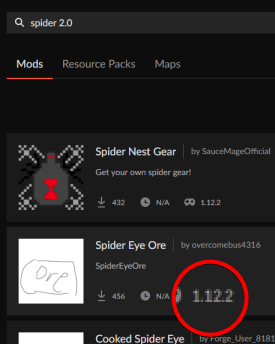
you used a 1.12.2 profile to search for a 1.16.5 mod..
agile shard
Ah I forget for the version of this wait
 last parcel
remove the 2.0
wild jewel
Yeah, search is broken as can be
agile shard
 wild jewel
He said remove the 2.0
agile shard
Now it's marked but before when it was with the 1.16.3 no
civic gale
 agile shard
civic gale
because it's called `spiderS 2.0`
agile shard
civic gale
because it's called `spiderS 2.0`
Ok I see
civic gale
 agile shard
Before it wasn't marked if I remember because it was on 1.16.3 for the last version
civic gale
If it is incorrectly marked, that's still the mod devs fault
agile shard
Now it's fixed alright
civic gale
CurseForge should not compensate for that
agile shard
 civic gale
Because it's properly marked
 agile shard
civic gale
If it is incorrectly marked, that's still the mod devs fault
agile shard
civic gale
If it is incorrectly marked, that's still the mod devs fault
No I try 2-3 time and with the name on the site I think but it's not the fact, I see the mod on 1.16.3 now
wild jewel
Show proof
agile shard
civic gale
Because it's properly marked
Ah here, ok I see
agile shard
wild jewel
Show proof
Now it's fixed, there will be no proofs
civic gale
Can't fix what was never an issue
agile shard
civic gale
Can't fix what was never an issue
Yes it's ok now if you prefer
civic gale
Much better
agile shard
Then now it's easier to make a 1.16.5 modpack, thanks
civic gale
The fact that the search is now and and rather than or is so nice though.
coarse elm
Well, yes.
When everyone uses the system as it's intended to be used things work great.
civic gale
Is there a command to show all of the ?mc- commands?
last parcel
come to #🟢︱user-bot-spam
wild jewel
In #🟢︱user-bot-spam !mc-
civic gale
That it did
Cheers
No mention in !mc-java for the -version:1.8+ though - would be a good thing to have until the Java selection works again?
last parcel
torn on that. you need the 64 bit one for that to work so it would be
-version:1.8 -d64
But it is frustratingly difficult to get people to install the correct java for that to work for pretty much no gain.
civic gale
-version:1.8+ does the same. The + is not recognized by 32bit java.
And you say no gain, but with Immersive Engineering installed, anything below Java _72 has a high chance of crashing on startup. Almost every Java crash is due to _51 being used
last parcel
never personally seen issues like that
civic gale
At least used to be _72, may be even higher now
Never been hs_err files in here? I do find that surprising TBH
last parcel
i dont see anything in their issue tracker either
potent tartan
and there's a pack that stalls on world creation when using java _51
engineers life 2
civic gale
On our discord, crash files like these are quite common
last parcel
tried just having them reinstall vanilla?
civic gale
Fresh installs, even on newly installed Windows.
It was confirmed quite a while back, in 1.12.2, that it's IE that started requiring a higher version of Java than _51
coarse elm
potent tartan
engineers life 2
I've been playing this pack for the last week or so with a group of people. All using the CF launcher and that forces built in java 8-51 only one person had issues but that's with CF it's self.
potent tartan
guess it's only for some people then
but you can always join their discord if you don't believe me
coarse elm
then that's not the issue
civic gale
Hmm seems I can't search for file names on discord, so can't give a number on it :P
potent tartan
this might work?
 civic gale
Yeah, but wont let me search for the name of said file :/
potent tartan

civic gale
But I can at least say, that the amount of hs_err reports we get with up-to-date Java is significantly lower
last parcel
so you do get them?
coarse elm
That could be any number of issues solved by replacing the install files though.
civic gale
We do get them, like 1 in 20. And it's not like we get them daily, but I do hear from more than don't report their crashes, of people crashing on startup
coarse elm
Also, the error you posted above points to foamfix deduplication at the time of the crash.
civic gale
Possibly, just picked the first I could find from our support channel :P
Talked a bit with the team that knows more than I do.
Seemed specifically to be an error between Foamfix and IE, on old Java versions
 queen mountain
i tried to add some mods to ftb infinity evolved and got this crash report can anyone help me ?
 novel hinge
civic gale
Talked a bit with the team that knows more than I do.
Seemed specifically to be ...
novel hinge
civic gale
Talked a bit with the team that knows more than I do.
Seemed specifically to be ...
"knows" . Just what I've seen from the reports over the... years at this point 😄
last parcel
oh it's mah boi
novel hinge
😄 hello
civic gale
Just trying to advocate that newer Java has benefits :V
potent tartan
^
last parcel
i do see that said a lot, but i've never seen any tangible proof of it. this one specific case doesnt really imply we should be telling everyone to use jvm args to change their java versions.
civic gale
Performance wise, it's not the biggest. But a lot of 1.12 packs has both IE and Foamfix in it. I can link up a lot of similar crash reports since 2019 (as far as our Discord history goes back)
All with _51 in it
last parcel
but i cannot find any reference to this in either issue tracker
civic gale
Yeah, been trying to hunt down the discussion I saw on it, but so far without luck
near ocean
Does anyone know why my game just stops responding at periods of times?
last parcel
i did find one actually https://i.imgur.com/s0yA6ag.png
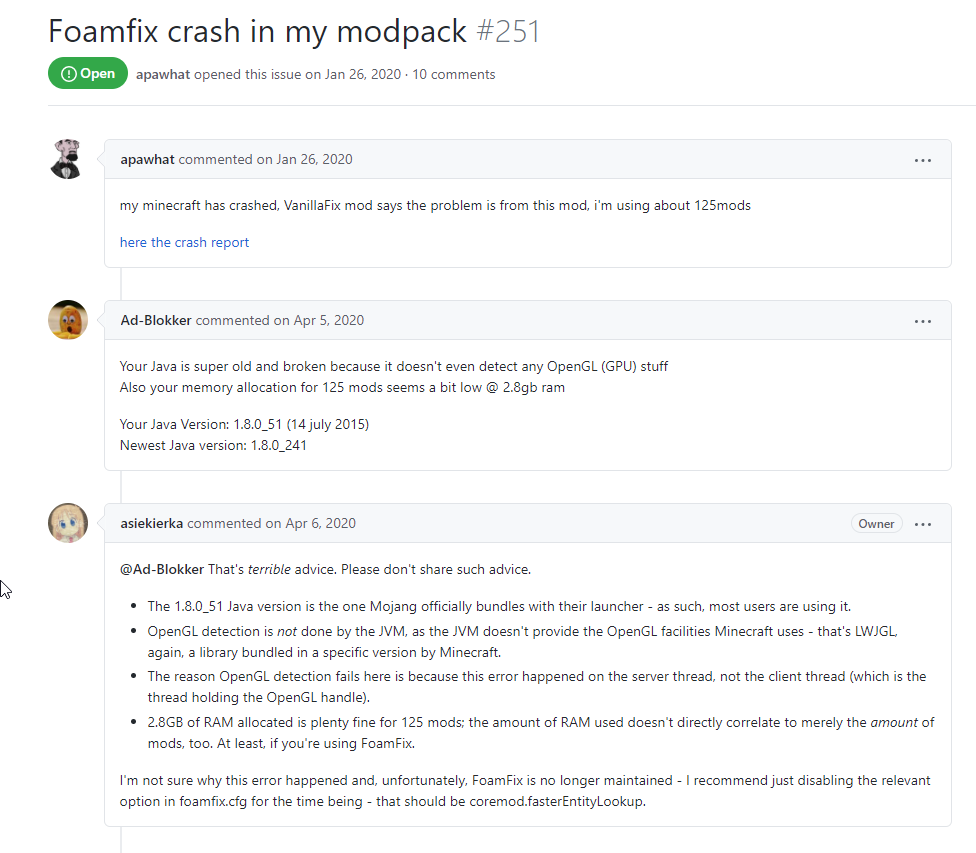


 civic gale
There was a point where looking at 3D models (or something else) in the IE manual would cause crashes with _51
novel hinge