#👽︱game-support
1 messages · Page 110 of 1
 tender vessel
 ruby crest
when i try to start a modpack it starts up with a white screen (normally it doesnt) and i can click and hear the minecraft sounds but my screen stays white

 wild jewel
Remove the . from the minecraft directory
 tawdry jungle
Ok but will it be safe?
 worldly ether
Yes
 cosmic blade
im not sure if anyone can help me but i try to join my friends modded mc server but every time i try and join i get this error internal exception: com.google.common.util.concurrent.uncheckedexecutionexception: Java.lang.illegalstateexception: Recipe minecraft:wooden_door (net.minecraft.item.crafting.shapingrecipes@3356147) produces unregistered item minecraft:wooden_door (net.minecraft.item.ItemDoor@2dcd451f
wild jewel
Got the same modpack?
cosmic blade
its done through forge
not through curse thats why i was unsure if anyone could help
wild jewel
Is it the same modpack? Yes or no?
Need to be the same mods and configs on both sides
wild jewel
Manually? No idea, ask for a mods zip?
cosmic blade
it is the same version their both 4.2.2
wild jewel
What is?
cosmic blade
my mods and the servers
wild jewel
What is 4.2.2? A modpack?
cosmic blade
ye
skyfactory 4
the server automatically sets it up but we have to go through forge
wild jewel
And that is through forge? Not curse? How did you install the client then?
cosmic blade
i installed it from forges website
wild jewel
!!=
 golden muskBOT
Wording is important!
Forge = Minecraft Forge, This is a modloader often just called "Forge".
CurseForge = A Website/App that has content for games.
Mods = Individual mod files.
Modpacks = Multiple mods put into the mods folder or downloaded from CurseForge.
These are not Interchangeable! Please use the correct terms as it allows us to help you faster!
 tropic oyster
Can someone help me with craftpresence. im trying to use excavate but the craftpresence is in the way
cosmic blade
wild jewel
!!=
im going to try via curseforge
because im not 100% sure how the server is based
i loaded into the server but im not in the air i am on the ground im just a little confused
 acoustic idol
Sound like the world settings are wrong, check the server proprties
cosmic blade
How do i check server properties?
acoustic idol
cosmic blade
How do i check server properties?
you edit the file called server properties?
worldly ether
@tropic oyster it’s in the way ? How so?
cosmic blade
acoustic idol
you edit the file called server properties?
i dont have that?
acoustic idol
this a rented server or local?
cosmic blade
rented
acoustic idol
ah ok,
 outer lichen
I am a MacOs user and always when I start my launcher and press play my game crashes. Can someone help me
acoustic idol
cosmic blade
rented
Would need to look on their site to fine how to edit the server properties to change the world type
tropic oyster
worldly ether
<@437810178780299264> it’s in the way ? How so?
everytime i press ~ and im trying to change the controll but i cant find the keybind
worldly ether
@tropic oyster
 acoustic idol
outer lichen
I am a MacOs user and always when I start my launcher and press play my game cra...
acoustic idol
outer lichen
I am a MacOs user and always when I start my launcher and press play my game cra...
!mc-logs post drag and drop the latest please
golden muskBOT
How to get a Minecraft log file.
Where to find the log on the CurseForge Client.
Right-click the modpack profile icon OR click the  button in the modpack profile.
Click 
Open Folder.
Open the logs folder.
Find the file called latest.log and drag it into discord.
 tropic thicket
Hello, I have started playing sevtech ages of the sky today and I have experienced a lot of lag spikes, some are very hard. is there any way I can reduce the lagspikes without buying new parts for my computer?
wild jewel
tropic thicket
Hello, I have started playing sevtech ages of the sky today and I have experienc...
Decrease view radius
tropic thicket
render distance?
wild jewel
Yes
tropic thicket
ok ty
cosmic blade
my world generator is set to {"Topography-Preset":"Sky Factory 4"} but i dont spawn as i should i span on the ground in a normal minecraft world
 noble marsh
hi how can i upload modpack please
wild jewel
noble marsh
hi how can i upload modpack please
!mc-packshare
golden muskBOT
There are two ways to share a modpack you've made with others...
Export and Share - For Friends to Small Groups.
- Click the Icon for the modpack.
- Click the button next to play.
- Click

Export. - Select the files that should be included.
- Send the zip to the people that want it! They can follow the instructions in
!mc-installpackto install the pack!
Upload to Curseforge - For Public Release to Everyone.
This options will make your pack public to EVERYONE, it comes with extra requirements and will take some effort to set up.
- Go to here: https://www.curseforge.com/project/432/4471/create
- Fill out the information with a proper description of the pack. This should allow anyone to understand what the pack is.
- Click the Icon for the modpack in the CurseForge app.
- Click the button next to play.
- Click
Export. - Select the files that should be included.
- Open your Project you made on the CurseForge site and Upload the file you just made.
- Wait for Moderation & Sync so it can show up in the client! (See
!syncfor limitations)
cosmic blade
i downloaded server files in a zip but not sure how implement them to my server i have a fto clien open and signed into my server wondering if anyone can help me
cosmic blade
acoustic idol
Sound like the world settings are wrong, check the server proprties
what do i need to check for
 safe scaffold
hey! So I am trying to get the second version of my modpack uploaded but it keeps getting rejected because I have not added the resourcepack to the manifest. I have all links to the mods, resourcepack, shaders in a pastebin that i post in my changelog. I do not have an option to make a manifest when exporting since i do not use The Curseforge app, I use GDLauncher
 wild jewel
Then remove the resource pack and tell users to install it instead?
safe scaffold
I want it to be forceloaded, which is the way it is setup
I have the Stay True resourcepack in there and have had no issues
where would it fit inside the manifest? if I add it manually from the already created zip
 wild jewel
No idea how curseforge handled that stuff
safe scaffold
exporting through curse-forge app there is also no manifest option to enter links and stuff
 autumn agate
do you guys know how to upload a minecraft server pack?
wild jewel
autumn agate
do you guys know how to upload a minecraft server pack?
Click the normal file on the site, upload addition file
wild jewel
safe scaffold
exporting through curse-forge app there is also no manifest option to enter link...
No, because the app makes it
safe scaffold
so how can I add the link to the resourcepack??
whats the proper json format for a manifest is more what I am confused about
wild jewel
Add it with the curseforge app, export it, see what it does
wild jewel
! ticket-app then, ask how it works
golden muskBOT
:bug: Reporting via the CurseForge App :bug:
-
Click the
 icon in the bottom left.
 -
Select

Open a Ticket. -
Fill out the form with accurate detailed information, "It doesn't work" isn't helpful! What exactly doesn't work and why doesn't it work should be easy to answer!
-
Make sure to upload your Overwolf logs with the
Upload Fileoption on the ticket, information on how to get these logs can be found here https://support.overwolf.com/en/support/solutions/articles/9000176827-how-to-get-your-overwolf-logs -
Submit!
 safe scaffold
already sent a ticket asking about the situation
wild jewel
Then wait for that
safe scaffold
That is the plan, unless someone on this discord is able to help in the meantime
wild jewel
Resource packs aren't that commonly added on modpacks
 wintry cypress
Im trying to start up a Forever Stranded server but when I start it, it comes up with an error saying "ForgeDownloadURLNotFound". I dont know what to do
 wraith cove
How do I download wow classic addons?
I only see WoW from the games list but there doesn't appear to be separate addons on the app (like there are on the website)
 noble sigil
wraith cove
I only see WoW from the games list but there doesn't appear to be separate addon...
noble sigil
wraith cove
I only see WoW from the games list but there doesn't appear to be separate addon...
check your settings that you have at least one WoW instance pointing towards your WoW classic install, then you should be able to select it above the addon list
wraith cove
So i've got two "instances" (retail and classic)
But it is only showing as one game
ahh
I see it
noble sigil
yeah, it will show as one game but when looking at the addon list, you can select the instance you are looking for addons for
 woven cliff
Hi guys, i could really use a little help
No modpacks from minecraft are working
keep getting CMD configuration may be causing issues
 last parcel
grab this debugger and run the cmd fix option https://curseforge.overwolf.com/downloads/troubleshooting/curseforge_troubleshooting.exe
 quaint bone
I need help whenever I try to use a minecraft modpack it crashes
 sand monolith
I can not start Games with the Curseforge launcher anymore.
it starts the Minecraft Launcher but Not the game
 wispy wave
What should I do if my modpack is still under review 4 days after I fixed some of the issues with it?
 grim elbow
I am downloading the dungons and dragons mod and when launching minecraft does not respond at the end of the installation
autumn agate
Does all the mods 6 have any permission system?
grim elbow
Does all the mods have any permission system?
autumn agate
?
autumn agate
Yea the modpack All The Mods 6 does it have ranks/permissions etc?
grim elbow
the modpack i am using is dragons and space shuttle dungeons, how can i verify that it has all permissions?
autumn agate
What are you talking about bro. You make no sense.
 hearty token
ok i deleted cureforge so I can choose where to move it now I can't redownload it and it just does not open neither overwolf or curesfoge will open.
i have restarted my computer twice
 hearty token
you dont have that mod you need to download it or update it
last parcel
i think vehicle requires obfuscate 0.4.0 or above
you should get that
 misty compass
Hi, i have a problem when i try install addons for WOW. The thing is that I install the addon, but a red alert is appears whit the message: "access denied to path".
sorry, my english is not so good
Anyone understand what is going on here?
wispy wave
!status
golden muskBOT
It is 12:43AM on Monday for CurseForge my dudes.
Project Moderation Time
Project/File moderation is done on Sunday - Thursday from 10am - 6pm GMT+2
This process is First in, First out. Thus files submitted late in the work day may not be checked until the next work day.
New Projects or uploads requiring manual approval: 1-3 Working Days
Updates to approved projects not needing manual approval: 1 Hour
File sync to the Curseforge app may take up to 24 hours after approval.
 coarse elm
misty compass
Hi, i have a problem when i try install addons for WOW. The thing is that I inst...
coarse elm
misty compass
Hi, i have a problem when i try install addons for WOW. The thing is that I inst...
The file permissions for the folders are preventing the app fro installing things.
misty compass
Okay, i got it, what i can do?
coarse elm
Fix them?
misty compass
Yes
coarse elm
Use the internet to look up how to change the file permissions for the computer os you are using.
Then fix where the game is installed
misty compass
Okay, thanks bro. What file permission i have to change?
i mean, the file of WOW or Curseforse?
coarse elm
Read above
autumn agate
how do i upload a modpack
 woeful halo
Can someone lend me a play account
 idle wraith
Hello Guys! I'm making a vanilla tweaks modpack with the curseforge app. I seem to be having trouble as it isn't loading properly. The crash report is the attatched picture. If I try to load, make a new world, or press continue (I have the continue button mod installed so you can go directly to your most recent world) it shows this crash report when the world has just finished loading. Even though I have blame and too many crash reports (Or whatever it's called) installed, it doesn't give any helpful info. If anyone is online, can they please help me fix thhise error? I am very inexperienced with mods and modpacks.
 cosmic blade
How do I fix my server not loading properly it initialises all the mods but the map for skyfactory 4 it just loads a normal minecraft server instead of being a dirt block with a tree
 high portal
i downloaded the create mod from the website and i don't know how to put it in my world (first time using a mod). I cannot find the create mod in the app. any help can dm me
idle wraith
I can help with that i think
last parcel
idle wraith
Hello Guys! I'm making a vanilla tweaks modpack with the curseforge app. I seem ...
?mc-log
bot..?
idle wraith
hmm?
idle wraith
high portal
i downloaded the create mod from the website and i don't know how to put it in m...
i think its because create is kind of a big mod, like lucky blocks, or huge mods like that. its not feature din he app fsr. have to do it manualy
thx yamza
last parcel
cosmic blade
How do I fix my server not loading properly it initialises all the mods but the ...
you need to be starting the server with the forge .jar
last parcel
high portal
i downloaded the create mod from the website and i don't know how to put it in m...
how to install mods #👽︱game-support message
cosmic blade
last parcel
you need to be starting the server with the forge .jar
I don’t have the forge.jar?
idle wraith
last parcel
do this https://discord.com/channels/428228256236306434/778097796410376242/83087...
sorry yamza, im very inexperienced and i would have no idea how to understand the log. 😦
last parcel
cosmic blade
I don’t have the forge.jar?
then you did not set up your server correctly
idle wraith
oh i see
last parcel
idle wraith
sorry yamza, im very inexperienced and i would have no idea how to understand th...
that's why you send it here 😉
cosmic blade
last parcel
then you did not set up your server correctly
Anyways how would I do that though?
last parcel
Pastebin
Pastebin.com is the number one paste tool since 2002. Pastebin is a website where you can store text online for a set period of time.
idle wraith
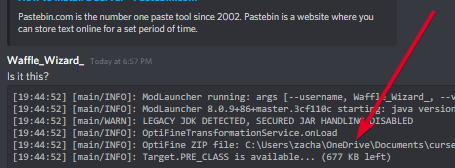
Is it this?
last parcel
start by not installing to a onedrive folder
cosmic blade
last parcel
https://pastebin.com/83DXfGTH
I’m doing it through a rented server
last parcel
yes
idle wraith
wdym
last parcel
cosmic blade
I’m doing it through a rented server
then get instrustions from your host
cosmic blade
last parcel
then get instrustions from your host
Ok
idle wraith
last parcel
start by not installing to a onedrive folder
wdym not installign to onedrive folder?
last parcel
idle wraith
wdym
 idle wraith
ik what onedrive is but, how does that help me, and 2 how do i do that lol
idle wraith
ohohhhh i see onedrive is the problem
If Minecraft is not installed, start here.
Click the  in the top right.
Select Minecraft.
Click "Edit".
whats this mean, if mc is not installed? does that mean like, if i have mc?
oh it means if i dont he=ave mc on curseforge ap right?
idle wraith
last parcel
https://discord.com/channels/428228256236306434/778097796410376242/8307667816467...
I am looking but dont see an edit button.
 last parcel
did you click the gear?
 idle wraith
last parcel
did you click the gear?
idle wraith
last parcel
did you click the gear?
Are you there?
@last parcel ?
What folder should i chnage it to?
idle wraith
last parcel
it says exactly what to do
wait no. i did everything rught, but now it deleted my modpacks from the menu. it says no modpacks match my filters, but i have any fiters
yes, i tried reseting curseforge
and reseting filters
last parcel
since you changed the install location you need to now move the packs over, or just reinstall them
idle wraith
ok thankyou!
so move everything in the old curseforge folder to the new one?
@last parcel ?
 wooden merlin
any idea how to solve this problem? pops up when I try to run the client installer
 idle wraith
and then reload cf
wooden merlin
has been a problem for quite a while
idle wraith
hmm
it seems to be a problem with your pc, or maybe your windows version. what version are you running? i think using 10
idle wraith
hmm i have no idea then. im no expert at all at this knid of thing -_-
last parcel
wooden merlin
any idea how to solve this problem? pops up when I try to run the client install...
this is an issue with either your antivirus or windows defender
wooden merlin
so I should try turning windows defender off?
idle wraith
last parcel
yes
ok. and one more question, what about instances from older versions of mc? from past expereinces ik they have their own separate instances folder
is that nessicary? or can i move them to the same forlder?
last parcel
unsure what you're saying
you shouldnt be manually doing anything unless you know what you're doing
wooden merlin
@last parcel turning off the firewall doesn't solve the problem
idle wraith
last parcel
unsure what you're saying
nvm actualy, i think i fugured it out lol
last parcel
wooden merlin
<@!125588118538682368> turning off the firewall doesn't solve the problem
!knownissue see installation
golden muskBOT
Known Issues with solutions or status of the issue.
Overwolf maintains a known list of issues here, some with solutions, others without.
https://support.curseforge.com/en/support/solutions/articles/9000196615-curseforge-known-issues
idle wraith
you realy love tht bot dont u 😉
idle wraith
thankyou yamza so much. very helpful staff here. 😉 i many be back soon tho lol
last parcel
good luck
idle wraith
Yay! it worked! (sorta) The part that dident work was the thing i was talking about earyer. so basicaly, one time i was editing my instances mods, and i noteced that my custom instance for lucky blocks dident appear in the folder. so that ws strange, but when i clicked open folder in the app, it brought me to a totaly different instances forlder.unfortunatly i cant accses that now because it got rid of my instances
wooden merlin
last parcel
!knownissue see installation
the overwolf installer works fine, just curseforge doesn't work for me
last parcel
try installing curseforge with overwolf
wooden merlin
it worked! thank u so much
idle wraith
yay!
idle wraith
last parcel
good luck
aww dang it. it gave me the same crash report as before!!! 😭 il send the log in a sec
acoustic idol
Try it without optifine
idle wraith
acoustic idol
Try it without optifine
alr fingers crossed
well, it sort of worked, it gave a diff crash report and it acctualy said what the problem is!
acoustic idol
up side I guess
idle wraith
lol now cross fingers again
idle wraith
acoustic idol
up side I guess
OMG UR A GOD THXXXXXXX
Yay it workseiessss
and
i find out what that extra problem was earlyer
 pliant sky
Yo, I keep getting the error message saying path can only include english letters and numbers
but like
everything IS english
last parcel
?mc-path
golden muskBOT
**Minecraft Files should NOT be installed inside the following locations
.minecraft folder.
OneDrive folders.
Desktop folder.
Drive roots I.E. Directly into the C:\ drive.
iCloud enabled folders.
If any of the above are in the path you need to change/move it by following the instructions below!**
If Minecraft is not installed, start here.
Click the in the top right.
Select Minecraft.
Click "Edit".
Move to the "Continue here:" section below.
If Minecraft is installed, follow these steps.
Click the  in the bottom left.
Select the Minecraft tab.
Click "Change".
Move to the "Continue here:" section below.
Continue here:
Make a folder in the root directory called CurseForge.
Select the folder you just made.
The text box should show something like the following:
For Windows: C:\CurseForge
For Mac: /Users/Shared/CurseForge
 pliant sky
so how do I make the folder
Minecraft Files should NOT be installed inside the following locations
.minecraft folder.
OneDrive folders.
Desktop folder.
Drive roots I.E. Directly into the C:\ drive.
last parcel
like the video shows
pliant sky
dude
I dont have minecraft on my side bar though
thats the issue
I havent even gotten that far
last parcel
then click edit
coarse elm
then read the instructions
pliant sky
bro, I did
but theres a reason I am still here
I am either like not understanding this or something just isnt going right
acoustic idol
Are you just installing the app now?
last parcel
 pliant sky
yeah, whats the root directory
acoustic idol
For Windows: C:\CurseForge
For Mac: /Users/Shared/CurseForge
pliant sky
again
how do I get to that
I Literally dont understand what I am supposed to do with that
acoustic idol
Screen shot what you are looking at
acoustic idol
Been a while since Ive done the set up bit.
last parcel
Edit > click C drive > make a folder
coarse elm
so you click the edit button, pick the C drive right click make a folder called curseforge and then select it
as it says right above
last parcel
screenshot the window
pliant sky
which one
last parcel
the one after clicking edit
pliant sky

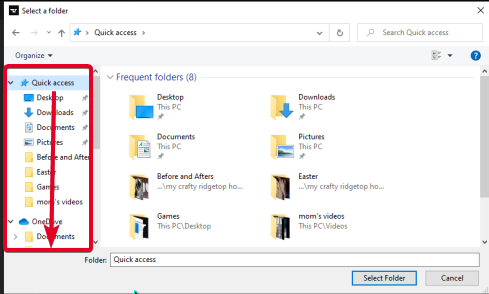 last parcel
that would be it
pliant sky
and I choose that?
last parcel
yes
pliant sky
Why does it have to be that one?
last parcel
beacuse that is your root drive
pliant sky
wait, Can I just put my other folder in that then?
last parcel
can we focus on this now, no idea what "other folder" would be
pliant sky
man
im sorry, Im super small brain with this stuff, but like what im at is just the local disc, do I go to something else after to get it in that file?
last parcel
if you watched the video it shows you exactly how to do this
last parcel
yes
pliant sky
do caps matter?
last parcel
no
pliant sky
oh sheeeeeeeeeeeesh
thanks fellas
so now, is there a way to make a link between the curseforge folder and another folder? or is it exclusive
last parcel
for what
pliant sky
okay so basically
say you have a folder on your desktop
mines called games
can I have the curseforge folder redirect into it
last parcel
for what
coarse elm
you shouldn't be storing anything on your desktop
last parcel
why would you want to do that
last parcel
????
last parcel
there is no reason for you to ever go to the curseforge folder
and if you do need to, you can just use the app to get to it
pliant sky
alright
acoustic idol
Plus can just right click a modpacks picture and open folder that way
 wintry juniper
Is it possible to fix this?
 acoustic idol
Close all related processes, OR pc reboot would close anything still open
wintry juniper
OK thank you
 sudden path
pls help
 acoustic idol
sudden path
pls help
acoustic idol
sudden path
pls help
!mc-logs
golden muskBOT
How to get a Minecraft log file.
Where to find the log on the CurseForge Client.
Right-click the modpack profile icon OR click the button in the modpack profile.
Click Open Folder.
Open the logs folder.
Find the file called latest.log and drag it into discord.
 potent tartan
sudden path
pls help
potent tartan
sudden path
pls help
the client and server have mismatched configs
acoustic idol
This the server or client log?
sudden path
server
acoustic idol
Need the client log
acoustic idol
Was gunna say
 tribal urchin
i need some help, yesterday this was still working now it's getting errors
 acoustic idol
sudden path
acoustic idol
sudden path
This the log from the pack trying to connect to the server?
sudden path
yes
acoustic idol
tribal urchin
i need some help, yesterday this was still working now it's getting errors
!mc-logs do this
golden muskBOT
How to get a Minecraft log file.
Where to find the log on the CurseForge Client.
Right-click the modpack profile icon OR click the button in the modpack profile.
Click Open Folder.
Open the logs folder.
Find the file called latest.log and drag it into discord.
sudden path
enigmatica 2
acoustic idol
sudden path
yes
start the pack > try to connect to the server then send the new latest log, not seeing the connection to the server in this log
acoustic idol
all good
pliant sky
Hey, If I ever wanted to uninstall curse, and all the modpacks what would I do?
Thinking about transferring computers so I want to install it on there instead
If I transfer it via usb Harddrive, would it be cleaned off of this pc?
 sharp wolf
hello i am sorry to bother everybody but i have tried everything to get my overwolf and my curse forge to open but it just wont. can anyone help?
tribal urchin
acoustic idol
!mc-logs do this
im not using launcher
 silk laurel
i tried uploading my recource pack it works but they rejected it saying wasnt valid recource pack file. help. btw it was a zip but you need to unzip it for it to work
sudden path
acoustic idol
all good
i got it working
i synced the config from the client with the server
 fresh saffron
I'm trying to play Better Minecraft , it installs perfectly fine but once I try to play it it doesn't launch Minecraft. It worked perfectly before, a weeks ago it was running fine. I click play on the mod and nothing happens it just loads for like a second and that's it. I don't know what's happening and I tried almost everything including reinstalling Overwolf, reinstalling Minecraft, changing Minecraft to 1.12.2, making Minecraft run as an administrator, updating my drivers to the latest version, and reinstalling Java. I even tried resetting the whole windows and installing it again . I don't know what the problem is so I'm wondering if someone could help me out.
i can open minecraft on the regular vanilla mc launcher but not on CF.
coarse elm
!mc-installfix
golden muskBOT
- Click on the Minecraft Tab on the Left side of the App.
- Click button next to the
Create Custom Profileoption. - Click

Repair Installationoption. - Play game.
NOTE: You will not lose any modpacks or worlds, These are saved in the Instances folder. DO NOT TOUCH THIS FOLDER OR YOU WILL LOSE EVERYTHING
fresh saffron
done that too nothing still does not work 😦
coarse elm
!mc-log
golden muskBOT
How to get a Minecraft log file.
Where to find the log on the CurseForge Client.
Right-click the modpack profile icon OR click the button in the modpack profile.
Click Open Folder.
Open the logs folder.
Find the file called latest.log and drag it into discord.
fresh saffron
I dont have that folder 😦
 coarse elm
open the minecraft launcher then in the settings set it to open the console window
then start the game and show me what it says there
fresh saffron
00:28:48.247
Preparing to launch minecraft client for forge-36.1.0
00:28:48.847
Couldn't fetch SHA1 checksum for https://s3.amazonaws.com/Minecraft.Download/versions/1.16.5/1.16.5.jar
00:28:48.847
Have local file C:\Users\Claudio\curseforge\minecraft\Install\versions\1.16.5\1.16.5.jar but don't know what size or hash it should be. Have to assume it's good.
00:28:48.952
Checking installations.
00:28:48.953
Minecraft client forge-36.1.0 is ready to start.
00:28:48.953
Starting!
00:28:50.206
Using default game log configuration client-1.12.xml (outputs XML)
coarse elm
thats all it says?
coarse elm
fresh saffron
00:28:48.247
Preparing to launch minecraft client for forge-36.1.0
00:28:48.847
...
is it set to show all the output on the top?
tribal urchin
acoustic idol
!mc-logs do this
@acoustic idol , im not using the curseforge launcher
so
i got this
autumn agate
in flans mod 1.12.2 how can i change seats in a plane? i cant find it in controls
 rough aurora
hey, can you kindly DM me you project page link?
 deft ice
Hi there. How does Curse calculate how many points to award per project? Reason for asking is, why do some projects (with less downloads) get more points than projects with more downloads?
(Ping when replying)
coarse elm
deft ice
Hi there. How does Curse calculate how many points to award per project? Reason ...
Nobody knows exactly, nor will it be shared.
Points arent just based off raw downloads though, so that would be why.
deft ice
Hmmm I just found it strange and got curious. Probably also depends on the age of the project
 inner summit
hey, trying to join my mates server on MC all the mods 6 and im getting this error msg, anyone got an idea of whats wrong?

nevermind, needed to update server 🙂
autumn agate
i cant install forge 1.8.9 ugh
golden muskBOT
How to install mods in CurseForge App.
- Click
+ Create Custom Profile - Name it, select the required Minecraft version, select the Forge version (usually the highest number), click
Create. - Click the profile icon.
- Click
Add New Content - Search and install the desired mods.
- Start the game!
How to install mods not on CurseForge.
- Right click the profile picture or Open the profile and click the Icon next to the play button.
- Click
Open Folder. - Drag the mod(s) into the
modsfolder. (Note: Some mods will require others, to run. Make sure to read the instructions for the mod!) - Start the game!
 wild jewel
Use that, nothing else
worldly ether
altur , be nice don't be rude to those who are here to help
autumn agate
i am nice
wild jewel
autumn agate
i am nice
It does that as well 🤦
Why do you want forge without mods? That is just vanilla
wild jewel
What keystrokes?
 wild jewel
Would be a mod though 🤦
wild jewel
Did you use the method I told you to use?
autumn agate
What method
wild jewel
worldly ether
that mod is the sk1er key strokes forge mod
 median light
Looks sus
fresh saffron
Thanks so much to curse forge team my issue was solved and much appreciated !
 low bolt
my game has been running great i j have a quick question. is their anyway to edit the type of loot found in chest?
there's this one mod I have and It just overhauls every chest w useless stuff
 turbid umbra
rough aurora
hey, can you kindly DM me you project page link?
turbid umbra
rough aurora
hey, can you kindly DM me you project page link?
Sent now, thanks!
worldly ether
I only know of loottweaker and thats back on 12.2 @low bolt as for recent mods for recent versions i'm not sure
autumn agate
"Path can only include English letters and numbers" I dont understand why it says this after i try to start curseforge
last parcel
autumn agate
"Path can only include English letters and numbers" I dont understand why it say...
?MC-PATH
golden muskBOT
**Minecraft Files should NOT be installed inside the following locations
.minecraft folder.
OneDrive folders.
Desktop folder.
Drive roots I.E. Directly into the C:\ drive.
iCloud enabled folders.
If any of the above are in the path you need to change/move it by following the instructions below!**
If Minecraft is not installed, start here.
Click the in the top left.
Select Minecraft.
Click "Edit".
Move to the "Continue here:" section below.
If Minecraft is installed, follow these steps.
Click the in the bottom left.
Select the Minecraft tab.
Click "Change".
Move to the "Continue here:" section below.
Continue here:
Make a folder in the root directory called CurseForge.
Select the folder you just made.
The text box should show something like the following:
For Windows: C:\CurseForge
For Mac: /Users/Shared/CurseForge
low bolt
worldly ether
I only know of loottweaker and thats back on 12.2 <@!816813649540415489> as for...
perfect, im on 1.12.2
worldly ether
it's an addon for crafttweaker - it allows the loot tables to be tweaked
low bolt
do I have to download crafttweaker too?
low bolt
thanks, you guys are great 🙌
wild jewel
Need to put it in the right folder probably
worldly ether
@low bolt post the blue line screenshot here
low bolt
ohh, cool I gotchu
 hot widget
Can anyone tell me what the "preferred release type" flag does when creating a modpack profile?
wild jewel
Will change availability of mods based on their release state, alpha, beta, or release
low bolt
 hot widget
wild jewel
Will change availability of mods based on their release state, alpha, beta, or r...
hot widget
wild jewel
Will change availability of mods based on their release state, alpha, beta, or r...
Ohhh I thought that might have been why some mod updates were not showing 😄 I always set it to release before as I thought it was referring to my modpack, not the mods within it. Thank you for confirming this!
 snow plover
hi im new guys, and need help to find a mod i want to play
There is a Wisp video in which he has "Minecraft, but you can craft structures" , and i cant seem to find it anywhere... can someone help?
wild jewel
snow plover
hi im new guys, and need help to find a mod i want to play
Don't post across multiple channels like #🔥︱curseforge-support
worldly ether
@low bolt are you using tektopia?
low bolt
yeah
snow plover
wild jewel
Don't post across multiple channels like <#782027635252920322>
uh ok :/
 burnt crag
wild jewel
Don't post across multiple channels like <#782027635252920322>
burnt crag
wild jewel
Don't post across multiple channels like <#782027635252920322>
I don't think he did.
Sorry if I'm wrong.
snow plover
no i did lol
last parcel
think you can just let the mods handle it
burnt crag
Oops my bad sorry. 😫
snow plover
burnt crag
I don't think he did.
i just thought its " #🔥︱curseforge-support " so questions should be permitted and so asked there as well bcause noone was active here...
worldly ether
https://www.youtube.com/watch?v=MdZ6FOAn9WE , found the one he's talking about
Minecraft, But You Can Craft Structures... (Challenge)
Follow My Socials:
∘ Twitter - @wispexe
∘ Instagram - @wispexe
∘ Twitch - https://www.twitch.tv/wisp
∘ Discord - https://discord.gg/wisp
This is a Minecraft (1.16) challenge in which I am trying to speedrun Minecraft and beat the enderdragon, however, you can CRAFT STRUCTURES! This...
last parcel
might just be command block shenanigans, no sign of any mods used. potentially data packs as well
low bolt
worldly ether
its part of the tektopia mod
ohhh lmfao
 unkempt pine
Can someone help me, forge is crashing all the time
wild jewel
unkempt pine
Can someone help me, forge is crashing all the time
!mc-logs
golden muskBOT
How to get a Minecraft log file.
Where to find the log on the CurseForge Client.
Right-click the modpack profile icon OR click the button in the modpack profile.
Click Open Folder.
Open the logs folder.
Find the file called latest.log and drag it into discord.
unkempt pine
Failed to download file.
Name: forge-1.16.4-35.1.13.jar
Filename on disk: forge-1.16.4-35.1.13.jar
Path: C:\Users\David Beumers\AppData\Roaming\.minecraft\libraries\net\minecraftforge\forge\1.16.4-35.1.13\forge-1.16.4-35.1.13.jar
Exists: Nonexistent
i do not have an modpack
 rain hawk
hello can somone help me?
wild jewel
rain hawk
hello can somone help me?
Rule 10
rain hawk
?
wild jewel
unkempt pine
i cant find another with forge
Any crash reports then?
wild jewel
rain hawk
?
Read rule 10 please
unkempt pine
unkempt pine
```
Failed to download file.
Name: forge-1.16.4-35.1.13.jar
Filename on disk: fo...
.
rain hawk
oh...
sorry
i tried to make amodpack and accidentally uploaded the same file twice
how can delete them?
wild jewel
rain hawk
i tried to make amodpack and accidentally uploaded the same file twice
It probably not allowed that
wild jewel
unkempt pine
.
!mc-installfix
golden muskBOT
- Click on the Minecraft Tab on the Left side of the App.
- Click button next to the
Create Custom Profileoption. - Click
Repair Installationoption. - Play game.
NOTE: You will not lose any modpacks or worlds, These are saved in the Instances folder. DO NOT TOUCH THIS FOLDER OR YOU WILL LOSE EVERYTHING
rain hawk
so do i delete the project?
 wild jewel
unkempt pine
wild jewel
unkempt pine
Curseforge
unkempt pine
nice word, but where
wild jewel
Curseforge app?
unkempt pine
i dont have it
wild jewel
Then I have no idea
unkempt pine
im reinstalling mc
moment
still not working
Failed to download file
-----------[solved]----------------
leaving discord.
 clever terrace
Curseforge is so dumb I upload my image I make sure it's a 1:1 and it says it's not
how am I a noob
worldly ether
altur - respect others is in the #📛︱rules , second person you've randomly said noob to
 arctic fox
Caught in 4k
My Curseforge isn´t logging to my account, it says it´s a DEMO but I have bought my account (Microsoft login). Is there an easy way to fix it?
 worldly ether
@arctic fox log out, log back in ?
clever terrace
how to I fix the image thing
arctic fox
worldly ether
<@!469041734072926229> log out, log back in ?
Tried it didn´t work :((
 worn timber
anybody know how to install better minecraft mods
clever terrace
worldly ether
well what is the dimensions of your image just now?
500x500 1:1
worldly ether
arctic fox
My Curseforge isn´t logging to my account, it says it´s a DEMO but I have bought...
have you actually got minecraft java edition on your microsoft account?
@vague tree https://youtu.be/jBYktThxOGg?t=33

To install the world/arena, simply drag and drop (or copy and paste) the two files inside the "Frost Moon Arena" folder into "C:\Users*USERNAME*\Documents\My Games\Terraria\Worlds", or the equivalent if you have it some where else. Rename BOTH files if it conflicts with another save or simply make a copy just in case.
-------------------------...
this should help you
 vague tree
ok thx
clever terrace
worldly ether
<@!570753792895746048> try 400 x 400 ?
I did it said it was to small
worldly ether
What did it say for the 500x500?
 serene stratus
i have a problem my laucher don't detect stardew valley . You have a solution for that ( sorry for my bad level in english )
acoustic idol
serene stratus
i have a problem my laucher don't detect stardew valley . You have a solution fo...
?knownissues at the bottom under other games
golden muskBOT
Known Issues with solutions or status of the issue.
Overwolf maintains a known list of issues here, some with solutions, others without.
https://support.curseforge.com/en/support/solutions/articles/9000196615-curseforge-known-issues
serene stratus
thank you
autumn agate
@worldly ether minecraft
whats the best skyblock modpack
why r u typing so long
r u good
worldly ether
@clever terrace If it’s still not working I would bring it up in #🔥︱curseforge-support as if you are doing 1:1 and it’s still not accepting it then there is a random issue going on

@autumn agate I personally like sky factory 4
autumn agate
u mean sky factory
i like just another skyblock 2.0
imma try out skyfactory
202 mods wtf
give guide how to play
worldly ether
Yeah sky factory 4 . community group I help run long ago did have sky factory modded server but we have been focusing on vanilla server
 remote ibex
i am unable to open stoneblock mod not only stonebloack i think others as well
pls help
?logs
-logs
how do i open my log to send here
wild jewel
!mc-logs
golden muskBOT
How to get a Minecraft log file.
Where to find the log on the CurseForge Client.
Right-click the modpack profile icon OR click the button in the modpack profile.
Click Open Folder.
Open the logs folder.
Find the file called latest.log and drag it into discord.
wild jewel
remote ibex
i am unable to open stoneblock mod not only stonebloack i think others as well
Stick to this channel
 wild jewel
Then what is happening when you hit play?
wild jewel
Where? In the curseforge app?
wild jewel
!mc-installfix
golden muskBOT
- Click on the Minecraft Tab on the Left side of the App.
- Click button next to the
Create Custom Profileoption. - Click
Repair Installationoption. - Play game.
NOTE: You will not lose any modpacks or worlds, These are saved in the Instances folder. DO NOT TOUCH THIS FOLDER OR YOU WILL LOSE EVERYTHING
remote ibex
ok
it is reinstalling it?
@wild jewel same exact thing happened
should i take a vid of it
wild jewel
Please do
remote ibex
i am on mac btw
ok
@wild jewel
wait 1 sec
let me try gaain
there pls help
@wild jewel
wild jewel
!mc-installfix Try this again, but restart PC after
golden muskBOT
- Click on the Minecraft Tab on the Left side of the App.
- Click button next to the
Create Custom Profileoption. - Click
Repair Installationoption. - Play game.
NOTE: You will not lose any modpacks or worlds, These are saved in the Instances folder. DO NOT TOUCH THIS FOLDER OR YOU WILL LOSE EVERYTHING
wild jewel
Why do you even ask if you are not even waiting for an answer?
 indigo viper
Hi, i'll now explain my prblem
i started my server and it loaded but i can't join it using my external ip
my modem only supports ipv6 host exposure and i exposed 25565 port
last parcel
are you trying to connect from the same computer running the server?
indigo viper
last parcel
are you trying to connect from the same computer running the server?
nope my friend is trying
indigo viper
yeah it does
checking port using it while the server is running tells the port is closed tho
last parcel
cant really help on that
indigo viper
Don't worry
 peak fog
I have a problem with me starting a world on a profile in curseforge and it shows a java crash report i have re-installed java and curseforge, the packs works for a friend and normal MC works as well anyone can help
wild jewel
peak fog
I have a problem with me starting a world on a profile in curseforge and it show...
Show the error please
 hardy skiff
II am making a modpack for my Friends and for some reason it is so laggy. What should I remove or add?
This is the mod list: applied Energistics 2, Baubles, Better Builders Wand, BetterFps, Biomes O'Plenty, Blockcraftery, Bonsai Trees 2, Botania, Brandon's core, Chance Cubes, Clumps, CodeChicken Lib 1.8.+, CoFH Core, CoFH World, Connected Glass, ConnectedTexturesMod, Controlling, Cosmetic Armour Reworked, Cucumber Library, Draconic Evolution, Electroblob's Wizardry, Enchantment Descriptions, EnderIO, Ender Storage 1.8.+, EnderCore, Environmental Tech, Extra Utilities, Extra Planets, Fast Leaf Decay, Fast Furnace, FTB Backups, FTB Libary, GraveStoneMod, Galacticraft, Hwyla, ICBM Classic, Ice and Fire: Dragons, Industrial, Inventory Pets, Iron Chests, Iron Jetpacks, Item Filters, JourneyMap, Just Enough Items, Lag Removal, Lag'B'Gon Reborn, LLibary, Macaw's Bridges, MalisisCore, MalisisDoors, Mantel, Matter Overdrive: Legacy Edition, Mekanism, Mekanism Fluxified, Mekanism Generators, Mekanism Tools, Mekanism Ores, Minecraft Comes Alive, MJRLegends Lib, Morpheus, Mouse Tweaks, Mowzie's Mobs, MrCrayfish's Furniture Mod, Multi Mob Libary, MysticalLib, Neatm Not Enough Items, 1.8.+, OMLib, Open Moduelar Turrets, OpenBlocks Elevator, Optifine, Optifine Albehero, Ore Extraction, Pam's HarvestCraft, PamSimpleHarvest, Patchouli, Pickle Tweaks, Primative Mobs, ProjectE, Redstone Flux, Scannable, Shadowfacts' Forgelin, SimpleHarvest, Tesla Core Lib, THe Twilight Forest, Thermal Foundation, Tinkers Construct, ValkyrieLib, Waystones, Xtones
 civic gale
peak fog
now the report is back
civic gale
peak fog
now the report is back
you need a higher java version to be used. Download the latest Java 8, 64-bit (use Offline installer), and also add -version:1.8+ to the "Additional Arguments" in the CF settings
peak fog
ok thanks
indigo viper
hardy skiff
II am making a modpack for my Friends and for some reason it is so laggy. What s...
How much ram do you allocate?
hardy skiff
dont know
indigo viper
Then when you start the pack in the minecraft launcher go in the advanced options and edit jvm arguments ram
hardy skiff
well my friend is running Minecraft on a Mac Book
indigo viper
What's the matter? He can technically edit jvm arguments as well
hardy skiff
well it does'nt run mods too well
last parcel
uh dont edit options on the mc launcher...
indigo viper
last parcel
uh dont edit options on the mc launcher...
Can you edit them in curseforge?
golden muskBOT
How to set Global Minecraft RAM value.
- Click the icon in the bottom left to open settings.
- Click the Minecraft tab.
- Scroll down.
- Slide slider to recommended ram range as seen below.
 last parcel
you do
hardy skiff
my CPU is capping out my ram is fine
peak fog
I have reinstalled java now but it still won't work
last parcel
thought we were talking about "your friend"
hardy skiff
well Im lagging too
indigo viper
hardy skiff
my CPU is capping out my ram is fine
Well cpu model?
hardy skiff
ryzen 3 3200g
indigo viper
Could be something related to chunk gen?
last parcel
ram?
civic gale
peak fog
I have reinstalled java now but it still won't work
That "Additional Argument" is important. Also case sensitive
hardy skiff
well is there any mods that would help since it works with most modpacks?
or should I remove mods?
hardy skiff
I don't really know when it lags but I just completely freeze for a few seconds
I have a radeon rx5500xt and AMD Ryzen 3 3200G
last parcel
RAM?
hardy skiff
32gb
last parcel
load up a world and open the f3 screen. screen shot it and send it
hardy skiff
why? I just want to know what mods cause lag.
last parcel
right sure. lemme go check my list of how every curseforge mod performs on random enviroments. be back soon
hardy skiff
cant really tell if that's sarcasm
acoustic idol
All pcs are different, what works on one pc may not on another. Its all trial and error. Start with the base mods you want > boot the pack see if it works > close add some more and repeat till issues start
 tawny patrol
hey guys i have a question
whenever i try to download overwolf or cursforge it say virus scan failed and wont download
low bolt
help help help. ive been playing on this world for a good couple of hours now and everything has been fine. like 5 mins ago it crashed while i was breaking a backpack of the floor . when i loaded back in all the stuff i had in the chest were gone. is there a way to get it back or a way to revert the game to how it was 10 mins ago??
is ma boi @worldly ether here?
acoustic idol
Only options tho are load a world backup (if there is one) OR can cheat back what you lost if there are no backups. Depends on the pack or how it was made
low bolt
ah man. lost hours worth of grinding
worldly ether
Unfortunately yoyok9 is correct goose
I’ve once lost a whole weeks worth of work because a previous server owner thought “raid” was a viable option for backups 😂 nope
 small vapor
hey im having some trouble my curse forge keeps crashing when ever i try to launch a mod pack
 vast sorrel
how do I manually backup my world
 frigid ermine


 sage pier
Log out from the microsoft account and log in with your mojang account
 oak thunder
Playing on modpack with shaderpack (project luma) and I keep getting this wierd visual glitch where the sky will do this if I look at it at a certain angle. Anyone have an idea what could be causing this or how to fix it?
 last parcel
?mc-optifine
golden muskBOT
Optifine and Curseforge
To install Optifine with modpacks on Curseforge:
Right click the modpack icon, select Open Folder.
Put the Optifine.jar into the mods folder.
Now load the modpack normally.
We do not offer support for Optifine. If you have issues with Optifine, remove it. If you want further support try the discord found on their website.
https://www.optifine.net/home
last parcel
a better place to ask about shader issues
autumn agate
I have a friend that has uploaded a minecraft mod into curseforge and has waited 2 weeks for approval, how long should he wait?
golden muskBOT
:bug: Reporting via the CurseForge App :bug:
-
Click the
icon in the bottom left. -
Select
Open a Ticket. -
Fill out the form with accurate detailed information, "It doesn't work" isn't helpful! What exactly doesn't work and why doesn't it work should be easy to answer!
-
Make sure to upload your Overwolf logs with the
Upload Fileoption on the ticket, information on how to get these logs can be found here https://support.overwolf.com/en/support/solutions/articles/9000176827-how-to-get-your-overwolf-logs -
Submit!
coarse elm
autumn agate
I have a friend that has uploaded a minecraft mod into curseforge and has waited...
They should come here and ask for help. Not you, as I doubt the mod is waiting for approval.
autumn agate
coarse elm
They should come here and ask for help. Not you, as I doubt the mod is waiting f...
He doesnt have discord thank you very much
last parcel
it's free
autumn agate
Yeah he cant get it
autumn agate
coarse elm
They should come here and ask for help. Not you, as I doubt the mod is waiting f...
Btw it's not your buisness for who asks help for who
potent tartan
helping someone who isn't here through someone else can cause miscommunications
last parcel
well it kinda is, since you have no actual involvement in whatever issue may or may not be happening
median light
He can upload a mod but can't even connect to Discord in a browser? Wait, he's an alien, right?
coarse elm
Ah yes because we love playing telephone.
And it's almost as if I manage this place so I can just add a rule about it and just start banning people for ignoring it instead of even caring to acknowledge the request for support!
coarse elm
median light
He can upload a mod but can't even connect to Discord in a browser? Wait, he's a...
I bet they didn't even upload the mod to the project cause it's been sitting for 2 weeks cause they didn't read the giant red box on the top telling them how it works.
median light
Well having to also upload the mod is pretty unreasonable. Just read the project description. It has a screenshot and everything
coarse elm
🤣
 simple flicker
may i ask a generalized question about a crashing server? My friends boyfriend set the tick speed to 1 billion... yes i wish i was kidding. Now we cant get the server to boot back up. Her server host is scalacube. Do u know how we can fix this? ;-;
last parcel
could restore a backup
simple flicker
for some reason no back ups are showing except one on the 9th
coarse elm
You could find where its stored and then edit it back to sane numbers
simple flicker
coarse elm
You could find where its stored and then edit it back to sane numbers
any idea where that might be, we are both kinda code-dumb
coarse elm
Then remove or lower the op privileges of people who cant handle the power.
simple flicker
coarse elm
Then remove or lower the op privileges of people who cant handle the power.
for sure doing that xD
coarse elm
Best bet would be to look at the minecraft wiki, should have everything required.
simple flicker
coarse elm
Best bet would be to look at the minecraft wiki, should have everything required...
thanks a million
and wish us luck xD
median light
What even is 'set the tick speed'? What exactly did they do?
last parcel
gamerule
median light
Ah. Then NBTExplorer into the level.dat to fix. Huh, have to go learn more about that new thing
simple flicker
median light
Ah. Then NBTExplorer into the level.dat to fix. Huh, have to go learn more about...
what is the NBTExplorer
median light
Oh the randomTickSpeed... Til. Didn't know they exposed that to change it.
Google it: it's a utility for editing the files like level.dat
Which will be where the servers map will store stuff like gamerules
reddit
3 votes and 19 comments so far on Reddit
last parcel
google strikes again
median light
Yeah it's pretty much the solution to all problems. Tech ones anyway
 open summit
So i can tell you exactly what i did up to the point where it started, but i dont know what it is that is causing it, My curseforge app crashes every time i open a modpack, it happened after i accidentally misclicked and updated a mod that was detecting it as fabric and not forge, and then now everytime i click on this custom profile it crashes the app when it loads the mod list
i am able to launch the game with the modpack because i deleted the buggy mod, but i still cant open the profile through the curseforge launcher
last parcel
?ticket-app add my name in your ticket also
golden muskBOT
:bug: Reporting via the CurseForge App :bug:
-
Click the
icon in the bottom left. -
Select
Open a Ticket. -
Fill out the form with accurate detailed information, "It doesn't work" isn't helpful! What exactly doesn't work and why doesn't it work should be easy to answer!
-
Make sure to upload your Overwolf logs with the
Upload Fileoption on the ticket, information on how to get these logs can be found here https://support.overwolf.com/en/support/solutions/articles/9000176827-how-to-get-your-overwolf-logs -
Submit!
open summit
last parcel
?ticket-app add my name in your ticket also
What do i put for CurseForge-Project Link? Sorry ive never done this before
autumn agate
last parcel
well it kinda is, since you have no actual involvement in whatever issue may or ...
I help in development
last parcel
open summit
What do i put for CurseForge-Project Link? Sorry ive never done this before
put nothing if it doesnt apply
open summit
Okay ty
 frozen hill
autumn agate
Dumbass
frozen hill
autumn agate
Dumbass
😐
last parcel
and that's all they wrote
frozen hill
XD
 merry marsh
Hello everyone. I have a technical question I would need help with - Minecraft Java Edition 1.12.2 Server Multi-Threading.
I own my own server hosting computer with great components, it’s a modded server for MC 1.12.2, and I have a few performance issues lately - a month or so ago it was fine, the server running on 1 core was good enough, allowing 5 players with a stable 20 TPS, Unfortunately, this isn’t the case anymore - probably due to mass exploration and other base evolution, right now, with 5 players, I only have an unstable 11 TPS. I have looked around online to see how we could multi-thread a minecraft server, I have read that it was actually possible, but I wasn’t able to find anything on the process needed to set it all up. I have tried a few Java Arguments things, that didn’t work, and most of the things I read are beyond my knowledge for me to understand it clearly. So I came here in the hope to find someone able to help me set it up step by step. My current server hosting computer has those components:
- 32gigs of RAM
- AMD Ryzen 9 5900X 12 core, 24 thread overclocked CPU
Please ping me or PM me if you are able to help 🙂
 uncut sluice
it seems whenever I upload a new file it dupes it https://gyazo.com/dd687d9519051791ba9fbfded9d651cd

don't know if its my connection, and the moderation deletes the duplicated file, but it's just sort of weird
last parcel
merry marsh
Hello everyone. I have a technical question I would need help with - Minecraft J...
probably just typical automation stuff.
you cannot multithread in any meaningful way. some parts of minecraft are multithreaded already, but the stuff that really affects performance is not.
your next steps if you actually want to improve the tps will be to get profilers like spark and laggoggles and learn to use them extensively. you will need to remove peoples stuff and likely break their setups. you will need to ban items. it will not be fun. it will be very tedious.
merry marsh
Sad. But I guess there’s no other options.
Another thing: I have read about multi-threading mods, although it seems they are not always reliable, but are they still worth the try?
autumn agate
@last parcel what kinda mod are you? A shitty one if you ask me, at least a warning would have been nice, and you shouldnt put your nose in places where it shouldnt be, its nun of your buissness. btw you can ban if you want i got many alts in server
last parcel
better be nice, cuz coming back on another account is against discords tos
well that wasnt nice, now i gotta report you
 gaunt minnow
i need help with curseforge how do i create a folder for minecraft modding files as a pathway
with curseforge
how do i create a folder for minecraft modding files
last parcel
just press continue
gaunt minnow
no like it says no special letters or numbers when i dont even have any
last parcel
?mc-path
golden muskBOT
**Minecraft Files should NOT be installed inside the following locations
.minecraft folder.
OneDrive folders.
Desktop folder.
Drive roots I.E. Directly into the C:\ drive.
iCloud enabled folders.
If any of the above are in the path you need to change/move it by following the instructions below!**
If Minecraft is not installed, start here.
Click the in the top left.
Select Minecraft.
Click "Edit".
Move to the "Continue here:" section below.
If Minecraft is installed, follow these steps.
Click the in the bottom left.
Select the Minecraft tab.
Click "Change".
Move to the "Continue here:" section below.
Continue here:
Make a folder in the root directory called CurseForge.
Select the folder you just made.
The text box should show something like the following:
For Windows: C:\CurseForge
For Mac: /Users/Shared/CurseForge
gaunt minnow
how do i make a folder in the root directory folder
last parcel
watch the video
last parcel
you do not select the default minecraft folder, that is why you got the error
if you had just pressed continue instead of messing with it there would likely have been no issue
last parcel
then it's your username, or you have onedrive folders
 fluid schooner
Not to spam but could someone take a look at mc-help? Didnt want to ping or repost problem and be annoying, this is the only active channel
last parcel
either way you need to follow the instructions
open summit
@gaunt minnow you will have to install forge and then launch minecraft at least once for a mod folder to be created
Alright Yamza(sorry im really not trying to make this an issue on you and i understand if your busy im not in a huge rush tbh)i have opened and submitted the ticket, mentioned your name, but i kinda do really need access to the profile to update my modpack, is there any workarounds to export a profile?
last parcel
if i knew a soloution i wouldnt have said to make a ticket
open summit
sounds good, whats the typical wait time for a priority bug fix?
last parcel
depends on what the fix is
open summit
ballpark?
last parcel
12 hours to never
open summit
i see
gaunt minnow
i cant fucking stand curseforge
coarse elm
Ok, then dont use it?
median light
Sorry you're on the wrong Discord, you want Curse@Curseforge.... 2 doors down. Common mistake
coarse elm
Then follow the directions you where given?
coarse elm
If you did, it would have worked.
You make a folder, point the app to it. That simple.
The video shows you everything you need to do
gaunt minnow
so how do i set it up if i dont use one drive or twitch
coarse elm
What....
Where in the instructions given does it say you need onedrive or anything about twitch...
gaunt minnow
cause i see on the root directory gif that it says twitch
last parcel
might want to like watch all of it
last parcel
then you surly know that the folder in the path at the beginning is the old folder, and not the new folder in c:/curseforge which the instructions say to make
 finite blaze
So, I'm having a problem logging into Minecraft using curseforge. When I click minecraft on curseforge, it tells me to login, but it doesn't approve of it. I looked up my email and password for it, and try it again, it still doesn't work. I'm 100% sure that that is the correct email and password, but it still doesn't work. What do I do?
last parcel
contact mojang
finite blaze
ok
 cinder karma
Is there any supported way for me to play with others that isn’t LAN?
worldly ether
How to manually install a server - On your own PC
- Go to the Forge website http://files.minecraftforge.net/ and download the Installer for the forge version the pack is using.
- Run the installer and choose Install server. Do not install to your desktop. Also do not install inside a OneDrive folder.
- Run the server using the forge.jar. A file called eula.txt will be generated. Open it and change eula=false to eula=true
- From the Client; Copy the mods folder, config folder, and any other folders needed for the pack to work into the server folder. If the modpack has a server pack, use this instead!
- Run the server again.
Minecraft Forge
cinder karma
If I installed it to my desktop and moved it to a different folder is that fine
Or should I ask somewhere else
worldly ether
"Do not install to your desktop"
autumn agate
Hey can anyone help me download mumble its not letting me when i try downloading it, it just says error 503
 hollow steppe
help
The game crashed whilst exception in server tick loop
Error: java.lang.ArrayIndexOutOfBoundsException
Exit Code: -1
what does this mean^
last parcel
?mc-log
golden muskBOT
How to get a Minecraft log file.
Where to find the log on the CurseForge Client.
Right-click the modpack profile icon OR click the button in the modpack profile.
Click Open Folder.
Open the logs folder.
Find the file called latest.log and drag it into discord.
autumn agate
I am confuse please help meh
fresh saffron
hey guys i might need ur help again my frames on servers only are stuttering like its ok when i go into a singleplayer but as soon as i join a server my frames stutter from like 170 to 60 to 100 to 2 and stuff like that and it only happens while im on CF if i go to the vanilla launcher and go to a vanilla server everything its ight. 🙂
last parcel
that might be the least useful crash report ive ever seen
coarse elm
I might need to look at that then
 hollow steppe
anyway to fix it?
i have those backup mods installed
whatcha call it.....
aroma core
last parcel
restoring a backup would probably be a good idea. dont delete this world if you dont have to. you could try removing that chunk region.
though i imagine that chunk is probably something you want
hollow steppe
i was in the middle og nowhere when it happened
now i gotta figure out how tf aroma core works
or ftb backups
made sure i was insured lol
last parcel
open the zip, get the world file out
hollow steppe
where is the world file at?
under what folder?
nvm think i found it
i was wrong
last parcel
the folder is called "world"
 last parcel
that sure is a picture of folders
 last parcel
idk what about it? am i supposed to know what your issue is?
last parcel
dont recall telling you anything like that..
last parcel
i wasnt talking to you? what?
low bolt
who were you talking too then? lmao
low bolt
oh
I am damged lmfaoo
my fault
damaged it my discord on my computer
hopped on my phone to take the pictures
low bolt
its j easier ig
last parcel
i assume backups would be in the backup folder. not familiar with the specifics of how the mod works
autumn agate
I think you could also use MCEdit to regen chunks
every time i try to download curseforge it just deletes itself off my computer could someone tell me what im doing wrong
Have you searched for it via File Explorer or the Start menu?
you mean curseforge?
Yes
i just did but it literally just deletes itself off my computer after i download it
Do you have overwolf installed?
ive tried like turning my firewall off and stuff and idek whats wrong
no the same thing happened
ok when you install curseforge, where does it download to
i.e. whats its directory
i have no idea, they usually just download to my downloads in my computer
so do you have any download file inside your downloads folder?
nah i like open my files after it downloads and it's there then after a couple seconds it just disappears and deletes itself
mhm
what browser do you use to download it
or better yet, just check the downloads in the browser
chrome but i tried microsoft edge before
i have done that but it's just like "it was removed" or something
ok
hmmm
do you have enough room on your C: drive?
im pretty sure, i dont have that much on my computer anyway
coarse elm
!getcf
golden muskBOT
Looking to install the CurseForge app?
Todo: Place system requirements here.
<:windows:798410728188936222> Windows
<:mac:798410654418862130> Mac
Linux
:person_shrugging:
coarse elm
use this instead
autumn agate
well yea but it'll like have the
idek what im tryna ask lmao thank you so much:)
Overwolf allows you to access and download both CurseForge and the FTBLauncher
and a bunch of other cool things for other games
 old kiln
is there a way to migrate overwolf/ curseforge to a different drive without a fresh install or exporting all of my minecraft packs for example?
coarse elm
Move the folder via drag and drop then point to it or make a new one and point to it. Once it sets it up copy over the Instances folder
 cinder nest
Can someone get me a doubt about an error that I can't solve?
autumn agate
cinder nest
Can someone get me a doubt about an error that I can't solve?
sure, ask away
autumn agate
@cunning compass do you CurseForge downloaded?


 autumn agate
!mc-path
golden muskBOT
**Minecraft Files should NOT be installed inside the following locations
.minecraft folder.
OneDrive folders.
Desktop folder.
Drive roots I.E. Directly into the C:\ drive.
iCloud enabled folders.
If any of the above are in the path you need to change/move it by following the instructions below!**
If Minecraft is not installed, start here.
Click the in the top left.
Select Minecraft.
Click "Edit".
Move to the "Continue here:" section below.
If Minecraft is installed, follow these steps.
Click the in the bottom left.
Select the Minecraft tab.
Click "Change".
Move to the "Continue here:" section below.
Continue here:
Make a folder in the root directory called CurseForge.
Select the folder you just made.
The text box should show something like the following:
For Windows: C:\CurseForge
For Mac: /Users/Shared/CurseForge
 last oak
yes but on mine dont show minecraft
autumn agate
Click the in the top left.
Select Minecraft.
Click "Edit".
 dull dust
Hello everybody. I want to publish an addon. But the moderator did not approve it. Quote "(Your project, Fast Delete (https://www.curseforge.com/wow/addons/fast-delete) requires a better Summary." I described the functionality of the addon in the description. What else is needed? Can someone help translate the requirements into Russian?
coarse elm
dull dust
Hello everybody. I want to publish an addon. But the moderator did not approve i...
can you post the description please? Screenshot is ok
dull dust
 coarse elm
Perhaps include a picture of what it does?
dull dust
coarse elm
Perhaps include a picture of what it does?
Do you mean upload screenshots of the addon?
coarse elm
Embed one in the description
dull dust
coarse elm
Embed one in the description
Thanks, I'll try
dull dust
coarse elm
Perhaps include a picture of what it does?
thanks, it's work👍
rough aurora
dull dust
hey there - notice that you were asked about the summary and not description. your description is good 🙂
regardless, thanks for making the changes
the summary is where a lot of people check for what addons/mods do, and if they aren't informative it's lost potential since your work is great
 clever umbra
I am trying to download modpacks for Minecraft through Curseforge. Midway through any modpack download, I get an error message stating: "WebClient" error in red on the bottom middle of the screen. Then the modpack resets and didn't download.
coarse elm
rough aurora
hey there - notice that you were asked about the *summary* and not description. ...
Dam, I missed that. Usually I'm good about spotting that too...
 wild trench
Hello, I have one problem and the fact that they rejected it for me, but client doesn't want to generate it (it doesn't even want to be shown in the application), so what should I do?
 coarse elm
wild trench
Hello, I have one problem and the fact that they rejected it for me, but client ...
coarse elm
wild trench
Hello, I have one problem and the fact that they rejected it for me, but client ...
Delete the mods listed and install them with the app again.
rough aurora
clever umbra
I am trying to download modpacks for Minecraft through Curseforge. Midway throug...
recommend checking out the known issues article - you can search for it in-app using the support widget
wild trench
coarse elm
Delete the mods listed and install them with the app again.
But modpack uses texture packs that are not uploaded by those versions on curseforge
 white glen
hello I love this
coarse elm
Then they need to be uploaded to the platform by the owner to be used.
You cant use custom files made from projects on Curseforge.
wild trench
coarse elm
Then they need to be uploaded to the platform by the owner to be used.
But files are published on the official discords of those projects, I already understand why Decocraft does not want to upload 3.6.3.5 or some modpacks that had exclusive access to mods from others ended up
last parcel
They have to be uploaded to Curseforge to be used.
wild trench
So you're telling me that eg VMW, which now has the latest files on curseforgy, but are in beta (I don't have a beta version) put it in beta?
last parcel
huh?
autumn agate
wild trench
So you're telling me that eg VMW, which now has the latest files on curseforgy, ...
you can only use the versions that have been approved by curseforge, on curseforge. so if a ResourcePack only has a beta as its most recent, then you can only use up to that beta. anything outside of whats available via curseforge isnt allowed to be submitted.
wild trench
autumn agate
you can only use the versions that have been approved by curseforge, on cursefor...
And if I get permission from the authors, it's still not possible?
autumn agate
Yes, its not possible
last parcel
no its not. it has to be on curseforge
autumn agate
needed to clarify
now if you wanted to use it for your own personal client, then thats fine.
wild trench
So I've used it somewhere else, I'll see if modpack works on the server, at worst I'll put it away from curseforge
autumn agate
uhh ok?
last parcel
could just not include those texture packs
autumn agate
thats the best option imo
coarse elm
Guarentee they are going to technic.
autumn agate
lmao gotta love the lawless technic platforms
wild trench
Yes, I've seen the move from curseforge to technic launcher several times
last parcel
yea i sure do love having my minecraft account stolen and getting random viruses. technic ALL DA WAY
autumn agate
lol
wild trench
WTF, yes there are problems, but people are to blame, they do not have to download it from unverified sites
coarse elm
"ItS GoOd CaUSe I cAn Do AnYtHiNg!"
median light
I get all my mods from 9Minecraft, cause I want to be safe
last parcel
bad joke, someone is going to believe you
coarse elm
And the majority of platforms like technic are used by kids who dont know any better.
autumn agate
i remember when technic was a good platform, yk, back when it was the only one that existed
coarse elm
Similar to all the rehosting sites they prey on kids to download their garbage.
wild trench
Well, yeah, but when I see and experience what all has to be done, I'm not surprised
autumn agate
its not that difficult?
last parcel
you mean making sure that developers get proper licencing and credit for their work?
sounds rough
coarse elm
You have nobody to blame but the devs that decide to release content off platform for whatever reason when they have a project on the service already for it.
wild trench
autumn agate
its not that difficult?
Well, you'd be surprised, but kids around the age of 11-12 can't even unpack a stupid archive today
autumn agate
im not gonna get into it in a support channel
wild trench
Yes, thanks for support
autumn agate
youve been told how to fix the pack by 2 admins and whoever denied your post
whatever
coarse elm
Just go let them use the clearly superior and loved by everyone platform that is technic.
median light
Ugh
autumn agate
i wonder
is it allowed for someone to take lets say the Tekkit modpack and just straight copy it over to curseforge?
wild trench
I understand you want to have everything safe, but it can sometimes work out
last parcel
sometimes
autumn agate
aight i was just curious
coarse elm
Tekkit wouldn't work on CF.
It's too old, but theres nothing stopping people from rebuilding packs on CF. If it's a direct copy it can be reported and removed for infringement.
autumn agate
ok
man it would suck if copyright on mods acted the same way disney copyright is like
in terms of how long it stands
coarse elm
It is the same.
autumn agate
oh
coarse elm
But as mods are an implementation of an idea, you can just remake the idea yourself.
autumn agate
thats good to know
coarse elm
Plus most mods dont actually use completely closed licences so they allow people to adapt, share, modify and whatever with them in most cases with simple terms attached.
autumn agate
mhm thanks for the lesson on mod copyright
coarse elm
No problem.
Though it's just the tip of the iceberg and it's a constant point of arguments.
autumn agate
as is most copyright
autumn agate
modern us copyright length is pretty garbo
median light
Patents are full of abuse too... Patent trolls? East Texas?
autumn agate
Texas you say
coarse elm
True, but everything will be filled with abuse. Though the abuse doesn't stop information from getting to the hands of the public domain.
median light
Courts in East Texas never met a patent that they didn't love
coarse elm
But we are getting off topic. 😉
median light
Just a tad
autumn agate
I am playing minecraft on overwolf with alot of mods and everytime I press the inventory button, my game crashes. Here is footage of the error.
wild jewel
!mc-logs
golden muskBOT
How to get a Minecraft log file.
Where to find the log on the CurseForge Client.
Right-click the modpack profile icon OR click the button in the modpack profile.
Click Open Folder.
Open the logs folder.
Find the file called latest.log and drag it into discord.
autumn agate
Hello!
wild jewel
Or the crash report
autumn agate
When I try swimming, I uh
Crash due to an internal server error
I've already deleted my UUID on the server, but it happens again
Here
wild jewel
latest.log please