#👽︱game-support
1 messages · Page 103 of 1
 acoustic idol
 manic portal
How can I change the version to a lower one?
 golden muskBOT
Missing Java Fix!
Before you try to fix anything, make sure that minecraft is closed!
If minecraft is open then you will need to close it and try to launch again.
- Click on the
 icon in the bottom left.
 - Click the

MinecraftTab. - Click Change next to the
Minecraft Modding FolderOption. - Right click the folder named
Install. - Select
Open in new window. - Double click the
minecraft.exe. - Close the Launcher once it's done loading.
- Restart Overwolf & CurseForge or the computer.
- Play game!
If the above doesn't work....
Install Java using the installer from here: https://java.com/en/download/manual.jsp
acoustic idol
the link to the new one is at the bottom
 fringe plinth
RIP

I found a modpack for the enhanced version, still, thanks for the help YOYO
and that one has the same issue
I guess thaumcraft is dead
acoustic idol
Thaumcraft should be working still
fringe plinth
all the packs just give me this same error
acoustic idol
modpacks or mods?
fringe plinth
The base mod had that issue, and the Thaumcraft Enhanced pack has this issue too
anyone got this file it's askin for?
manic portal
Well... today I had the same thing with CodeChickenLib for... 1.6.4, I couldn't find it anywhere...
acoustic idol
fringe plinth
The base mod had that issue, and the Thaumcraft Enhanced pack has this issue too
Link the modpacks curesforge url
acoustic idol
ok thought so, I just downloaded it without issue
acoustic idol
Try restarting your app
 solemn spindle
Its happening again
manic portal
I now have selected Java: 1.8.0.281 (64Bit) in Curseforge but still same thing...
acoustic idol
solemn spindle
Its happening again
did you try what I said?
solemn spindle
acoustic idol
did you try what I said?
yes
acoustic idol
manic portal
I now have selected Java: 1.8.0.281 (64Bit) in Curseforge but still same thing.....
restart your pc
acoustic idol
solemn spindle
yes
fully disabled antivirus as well?
fringe plinth
Even with it in the mods folder now, rip
 manic portal
acoustic idol
restart your pc
manic portal
acoustic idol
restart your pc
Didn't work...
Do I need to uninstall the other Java Verssions?
fringe plinth
Lol, it actually deleted the file from the library

okay so yeah it just straight up deletes the baubles addon every time I manually install it
acoustic idol
manic portal
Do I need to uninstall the other Java Verssions?
I would
manic portal
Finally. ^^
It worked, I just deleted the minecraft.exe file from the Installation inside Curseforge and let it reinstall the file itself and now it works.
 modest geyser
can anybody help me with this error?
im trying to play enigmatica 6 but im getting an error with industrial foregoing
 last parcel
seems like the config might be messed up. try reinstalling the pack
modest geyser
i am trying that now thanks
 balmy plume
i need some help
acoustic idol
balmy plume
i need some help
Kinda hard to help if we dont know what we are helping with
balmy plume
well im having trouble with a bunch of different things for 1 im not to sure on what im doing and and every time i try to play mc its gets half way done with the downloading stuff and then a error pops up
 timber oxide
can anyone hlep me with this crash report?
acoustic idol
balmy plume
well im having trouble with a bunch of different things for 1 im not to sure on ...
screen shot the error
balmy plume
and also every time my mc updates it says unable to update the mc native launcher
acoustic idol
!mc-installfix do this
golden muskBOT
- Click on the Minecraft Tab on the Left side of the App.
- Click
 button next to the
 Create Custom Profileoption. - Click

Repair Installationoption. - Play game.
NOTE: You will not lose any modpacks or worlds, These are saved in the Instances folder. DO NOT TOUCH THIS FOLDER OR YOU WILL LOSE EVERYTHING
 acoustic idol
balmy plume
acoustic idol
balmy plume
!mc-logs
golden muskBOT
How to get a Minecraft log file.
Where to find the log on the CurseForge Client.
Right-click the modpack profile icon OR click the button in the modpack profile.
Click 
Open Folder.
Open the logs folder.
Find the file called latest.log and drag it into discord.
acoustic idol
do this
timber oxide
can somone plese help me it says that my game crashes becuase it had trouble rendering entitiy in world does anyone know how to fix that
 next panther
balmy plume
next panther
balmy plume
i'd try to copy the url and see if u can access and download it via your browser. sometimes things like parental control can block downloads
last parcel
timber oxide
can somone plese help me it says that my game crashes becuase it had trouble ren...
com.animania.addons.farm.client.render.goats.RenderBuckAlpine@72f67030
report it, check for a fix, or remove the mod
balmy plume
and i dont have a logs file
timber oxide
k
 hoary birch
Hi! I downloaded modpack when I create a world in single player the mobs do not spawn at all. Tell me where you can find a map for this assembly?
Minecraft
balmy plume
yeah that has 5 tarea bytes
 jovial fractal
how do i apply "Legend of Zelda a link to Terraria" to terraria?
next panther
balmy plume
yeah that has 5 tarea bytes
In the error message - try to copy the url: https://resources.download.minecraft.net....
and paste in your browser - see if you manage to download it - it might be an internet provider issue (like parental control blocking)
 pseudo gale
Hey im playing all the mods 6 to the sky with my friends how can we share quest progress?
acoustic idol
Not supported
acoustic idol
Woops read that 100% wrong, Yeah cracked minecraft isnt supported here
 languid nebula
in any forums like the curse/technic/forge/minecraft etc wont accept cracked
Rule 4.
 autumn agate
in the launcher for minecraft in the installations section isn't there supposed to be a curseforge thing?
autumn agate
is there supposed to be a thing here that isnt here
 languid nebula
autumn agate
is there supposed to be a thing here that isnt here
languid nebula
autumn agate
is there supposed to be a thing here that isnt here
are you using cf app?
autumn agate
languid nebula
are you using cf app?
whats cf
languid nebula
?getcf
golden muskBOT
Looking to install the CurseForge app?
Todo: Place system requirements here.
<:windows:798410728188936222> Windows
<:mac:798410654418862130> Mac
Linux
:person_shrugging:
autumn agate
oh
languid nebula
curseforge app
languid nebula
use that to create/download a modpack and not the vanilla launcher
It will open the vanilla launcher and you will see the modpack
autumn agate
ok
so when it downloads what do i click to open the curseforge version of minecraft launcher
languid nebula
?mc-installpack
golden muskBOT
How to install modpacks with the search features in app.
- Open the
Minecraftsection of the app. - Click the top search bar where it says
Search for modpacksOR Click theBrowse ModpacksTab. - Find the Modpack you want to install and click install on it.
- Wait for CurseForge app to download and unpack all the required files.
- Once finished, click
Play!
How to install modpacks from a Export. (Custom/Private/Site downloaded Modpack zip)
- Get CurseForge App if you don't have it, use
!downloadfor a link. - Get the exported modpack from CurseForge or someone else,
!mc-packshareexplains how to make them. - Open the
Minecraftsection of the app. - Click

Create Custom Profile - Click the
Importoption. - Find the file you just downloaded in step 2 and select it.
- CurseForge app will now attempt to download and unpack the modpack. If it fails, try steps 4-6 again.
- Once finished, click
Play!
languid nebula
i cant trust any excuses, your gonna have to buy minecraft first then you can get support
acoustic idol
Ive got this Frenchfry
languid nebula
ok

 last parcel
No one said anything about bedrock.
Buy the game if you want support.
There is no need to continue this discussion at this point.
Buy the game.
 ocean igloo
why they are not the same?
last parcel
ask your host why
As I said, the discussion is done. Your issue is with Mojang, not us.
 pastel maple
Would this be the right place to ask about a crash error im getting from trying to ATM6s?
golden muskBOT
How to get a Minecraft log file.
Where to find the log on the CurseForge Client.
Right-click the modpack profile icon OR click the button in the modpack profile.
Click Open Folder.
Open the logs folder.
Find the file called latest.log and drag it into discord.
pastel maple
last parcel
try reinstalling the pack. if you get the same error you'll need to contact the devs
pastel maple
ah ok ill have to do that then because ive tried reinstalling and reinstalling my java 64 bit, thank you though!
Also do you know what the best way of reaching them is?
last parcel
issue tracker or discord
pastel maple
ok thank you
next panther
pastel maple
ok thank you
Are you on Mac?
pastel maple
Sadly yea
last parcel
yes
 pastel maple
v. 0.171.1.2
next panther
ok, that is the latest, let me DM
pastel maple
ok thanks
 dusky wolf
how long does usually it take for a modpack to be out of review and people can download it?
 humble dock
i'm on version 0.171.1.5 with the subscription active, the graphic has come back on the right hand side even though i turned it off
 coarse elm
humble dock
i'm on version 0.171.1.5 with the subscription active, the graphic has come back...
coarse elm
humble dock
i'm on version 0.171.1.5 with the subscription active, the graphic has come back...
Are you logged into overwolf?
coarse elm
And you dont have the option to hide it again?
humble dock
i cant seem to find that option
coarse elm
Try restating both apps.
humble dock
but i remember me clicking on hide graphic when i first got the sub
i've tried both closing the apps and stopping the process
coarse elm
dusky wolf
how long does usually it take for a modpack to be out of review and people can d...
!sync
golden muskBOT
Sync and your Project.
CurseForge REQUIRE a project to have one file marked Released on them for the projects to show up in search. Otherwise only Direct links to the project work.
Files can take a while to show up in the app. If your files still have not shown up either your project is new and you have yet to mark a file as Release or there is issues with the sync system making it slow.
coarse elm
!status
golden muskBOT
It is 11:45PM on Saturday for CurseForge my dudes.
Project Moderation Time
Project/File moderation is done on Sunday - Thursday from 10am - 6pm GMT+2
This process is First in, First out. Thus files submitted late in the work day may not be checked until the next work day.
New Projects or uploads requiring manual approval: 1-3 Working Days
Updates to approved projects not needing manual approval: 1 Hour
File sync to the Curseforge app may take up to 24 hours after approval.
humble dock
it worked as usual yesterday and earlier, only started today
coarse elm
Did you try logging out and back in?
humble dock
did that just now, and the graphics are still there
the add popped up when i logged out, but the graphic stayed when i logged in
coarse elm
I dont recall off the top of my head where the layout option is.
humble dock
i feel like i've checked every section there is to check in the options also, it feels like a mystery because i know i've seen the option when i activated the sub
 wise sentinel
so, when I go to the curseforge website to download the curseforge app and click on the file to open it, nothing happens and I don't know why. please help.
 haughty lake
First install the overwolf app then install curseforge from it.
haughty lake
wise sentinel
so, when I go to the curseforge website to download the curseforge app and click...
Research Curseforge when in the app
 novel swallow
so my friend has his own modpack is there a way that he can upload the modpack or he can send the modpack to me?
wise sentinel
haughty lake
First install the overwolf app then install curseforge from it.
so i tried to download overwolf and it does the same thing
haughty lake
wise sentinel
so i tried to download overwolf and it does the same thing
The problem must come from your computer, do you click on the file from the navigator ?
wise sentinel
i guess
haughty lake
Then install it from the actual file in the file browser
haughty lake
I think the windows shit that says "are you sure you want shit to edit pc" doesn't load for a reason. Are you admin on your pc ?
wise sentinel
so that thing does pop up, and i click yes but thats it. yes i am admin
haughty lake
Does it do the same on other installers ?
haughty lake
No, when you try installing other apps
wise sentinel
oh! no i haven't had this problem on anything else
haughty lake
I don't think I can fix your problem, but there maybe an alternative way to do what you wanted to do with curseforge
Did you want to install a modpack ?
haughty lake
You can install forge on normal minecraft then install a modpack from curseforge's website
You want me to find you a good tutorial ?
wise sentinel
yes please
haughty lake
No prob
coarse elm
haughty lake
No prob
If you are going to provide support...
- Do not recomend other launchers because you dont know what's wrong.
- Do not recomend Texhnic or even mention it. It's the worst option there is.
haughty lake
coarse elm
If you are going to provide support...
1. Do not recomend other launchers becaus...
Ok, even if that's wrong, I understand
coarse elm
So you want to support the people who make modpacks by having people install a launcher that is filled with stolen modpacks?
 deft mortar
i made a mod for minecraft how can i post it to curse forge
haughty lake
His problem isn't the policy of the modpacks he installs, now he will play until your launcher works on his pc.
coarse elm
deft mortar
i made a mod for minecraft how can i post it to curse forge
Start a new project on the mods section of curseforge, fill out the information and then upload a file.
deft mortar
thx
coarse elm
haughty lake
His problem isn't the policy of the modpacks he installs, now he will play until...
Technic doesn't even support curse formatted modpacks.
The launcher likely does work fine but as you decided to offer support and didn't let someone who knows how to handle issues take care of it you recomended the worst option there is for them to use. Not only in people reuploading other peoples work but it doesn't even do anything they want it to.
"Use this instead" isnt a solution for anything other than old mac versions and linux.
If you dont know what's wrong, shutup and move on.
haughty lake
coarse elm
Technic doesn't even support curse formatted modpacks.
The launcher likely does ...
The modpacks are made of mods that aren't owned by modpack creators, most of them. Technic just provides a simpler way to install them and existed before the curseforge app. And if you want me to shut up don't call this place "community support"
coarse elm
wise sentinel
so that thing does pop up, and i click yes but thats it. yes i am admin
Your antivirus is likely blocking the installer, download the program from here and install it.
!getcf
golden muskBOT
Looking to install the CurseForge app?
Todo: Place system requirements here.
<:windows:798410728188936222> Windows
<:mac:798410654418862130> Mac
Linux
:person_shrugging:
acoustic idol
Think of it this way, Say you make a mod or modpack, then someone takes it an puts it on technic. The points you would usually get from curse will not be gened when downloaded from the technic launcher. Also the mod authors you are supporting with the curse app also loose out as well. Also People can upload malware on the technic app. There is no scanning process.
coarse elm
That link above
wise sentinel
?
haughty lake
acoustic idol
Think of it this way, Say you make a mod or modpack, then someone takes it an pu...
What points ?
acoustic idol
When ever someone downloads a mod or a modpack the author of it earns points, which then can be exchanged for things
haughty lake
Things ?
acoustic idol
But if mods are stolen and uploaded elsewhere (technic, 9minecraft, etc) they dont.
coarse elm
The curseforge points that devs get for people using their work. Yoyo also forgot to mention the fact that modpacks also are often outdated or outright broken on technic from people not knowing what they are doing or only uploading an old version.
acoustic idol
that too, was on technic for so long till they screwed me out of my own pack,
haughty lake
What are you paying modpack creators with ? And technic worked for me when tje curseforge app didn't exist
acoustic idol
Curseforge is much nicer to devs too.
coarse elm
Literally the entire respectable modding community doesn't support technic in any way what so ever.
Devs get money.
haughty lake
I personnally prefer CurseForge, but why the hell do you not consider an option an other launcher if your app doesn't work, is this discord publicity or help. I'm not going to censure myself when I can help somebody, I even told him Technic was less good than Curseforge
coarse elm
As I said already....
Because you dont know what's wrong doesn't mean the app is broken
haughty lake
Well it seems broken on HIS pc. I gave him temporary solution, as I said
acoustic idol
The only other app that works with curesforge would be the GD Launcher, I think or did that change Clay?
coarse elm
ATLauncher or MultiMc support the packs but not installing mods.
Technic does none of it.
haughty lake
Ok, I didn't know. My bad
coarse elm
And again, if you dont know what's wrong "use this instead" isnt a solution...
haughty lake
Even MultiMC or shit ?
acoustic idol
Multimc is a better temp alternative then Technic by a long shot
coarse elm
Unless they are using linux or an unsupported mac version another launcher should never be the fix.
Theres a reason why the devs are here helping people.
coarse elm
For people who know what the issue is to help the person fix it, regardless of what the issue is....
If you dont know, and dont plan on troubleshooting to get the problem fixed. Dont help.
Just say "I dont know, someone that knows the issue will help you when they see it"
wise sentinel
thanks for the help it is working now
haughty lake
I don't always predict if I can help or not. Technic seemed a solution to me, I understand it's not. Is there any other "not allowed" solution I should be aware of ?
coarse elm
Other than trolly replies of "delete system32" or "alt+f4" like stuff no. But don't just start throwing out random stuff not related if you really dont know. Theres plenty of knowledgable people here. If you get stuck, just let someone else pick it up.
coarse elm
I appreciate it.
 tulip shadow
My minecraft curseforge will not launch my minecraft luancher
acoustic idol
tulip shadow
My minecraft curseforge will not launch my minecraft luancher
Using the curseforge app?
tulip shadow
yep
acoustic idol
Clicking play in the app does noting I take it?
tulip shadow
nothing but do some text below it that flashes super fast
ive launched the pack before i just dont know why it isnt working now
its also one of the super popular packs
acoustic idol
Mac or windows?
tulip shadow
mac
acoustic idol
tulip shadow
mac
!mc-installfix do this
golden muskBOT
- Click on the Minecraft Tab on the Left side of the App.
- Click button next to the
Create Custom Profileoption. - Click
Repair Installationoption. - Play game.
NOTE: You will not lose any modpacks or worlds, These are saved in the Instances folder. DO NOT TOUCH THIS FOLDER OR YOU WILL LOSE EVERYTHING
tulip shadow
where is the :
 acoustic idol
take a screen shot of the whole launcher please
tulip shadow
 acoustic idol
Close the app and re open it
acoustic idol
app might not have updated, do the fix first then try
acoustic idol
np, you too
 azure gyro
hi new here and if im on the wrong channel to ask lemmie know pls
Ive been playing engineering life and it seems after a few hours of playing and shutting down the game when i come back to play my save the next day the map loads to 100% but doesnt load me into the map just sits there. anyone have any possible solutions?
Engineers life 2 i mean not 1
 hollow fractal
Hi! i have this error:(

 tepid summit
I'm struggling to get minecraft mods
 golden muskBOT
Minecraft Files should NOT be installed inside the .minecraft folder or inside OneDrive folders. If this shows up in the path at all you need to move it by following the instructions below!
If Minecraft is not installed, start here.
Click the  in the top right.
Select Minecraft.
Click "Edit".
Move to the "Continue here:" section below.
If Minecraft is installed, follow these steps.
Click the in the bottom left.
Select the Minecraft tab.
Click "Change".
Move to the "Continue here:" section below.
Continue here:
Make a folder in the root directory called CurseForge.
Select the folder you just made.
The text box should show something like the following:
For Windows: C:\CurseForge
For Mac: /Users/Shared/CurseForge

 quasi pollen
Help? For some reason, I cannot get the Wow retail add on adibags to install properly on a new gaming PC. Any help would be appreciated! It shows installed in curseforge and in add on folder but in game under interface, it doesn’t show up.
 raw dust
Hello. I have a problem with specifying the minecraft folder
languid nebula
when i use more than 20 fabric mods it always crashes no matter what, i think it might be the sodium mod but what
 bronze pasture
Could someone help me? the mod X-Life keeps freezing on startup until I close it manually.
 ashen pivot
I made a modpack on CurseForge and im just wondering how long does it normally take for it to be approved?
acoustic idol
!status
golden muskBOT
It is 03:38AM on Sunday for CurseForge my dudes.
Project Moderation Time
Project/File moderation is done on Sunday - Thursday from 10am - 6pm GMT+2
This process is First in, First out. Thus files submitted late in the work day may not be checked until the next work day.
New Projects or uploads requiring manual approval: 1-3 Working Days
Updates to approved projects not needing manual approval: 1 Hour
File sync to the Curseforge app may take up to 24 hours after approval.
last parcel
ping me why..?
autumn agate
server keeps crashing because of some thing called santa and audio
last parcel
and how does this require pinging me?
autumn agate
nevermind
acoustic idol
post the servers crash report
autumn agate
acoustic idol
post the servers crash report
I did
acoustic idol
You posted the log file
acoustic idol
Files called latest. In the base folder of your server there should be a folder called crashreports
autumn agate
fuck
acoustic idol
latest from that folder
autumn agate
I forgot about that
This?
It said its caused by santa ping sound wtf
Wait
I think I know what it is now
acoustic idol
its called ping
autumn agate
its chatping a client side mod?
acoustic idol
No idea, but it is whats causing the issue
 radiant stag
When i launch curseforge via overwolf its super laggy
often more than 25% of my cpu usage
sometimes more than a gb of gpu
is there any way to fix this?
is the problem with curseforge or overwolf itself
 acoustic idol
What pack is this?
acoustic idol
 idle wyvern
Also the path to the folder curseforge is saved in is it on your desktop?
idle wyvern
Server
acoustic idol
ah
acoustic idol
idle wyvern
Server
This a server you made? or was it a server pack off the site?
Will need more info then just a screen shot and a log... Modpack used (Own or someone else made, link the project)
 safe fossil
Okay, is there a way to restore addons with the curse app? Everytime my game gets updated my addons are completely wiped.
 restive wyvern
In buildcraft mod what is the best fuel source for combustion engines
 sand crow
some of my mods wont work could someone help
its joy of painting and wool trim that wont load
acoustic idol
sand crow
some of my mods wont work could someone help
!mc-fabric
golden muskBOT
Fabric modpacks or the use Fabric mods require you to install a mod called Jumploader.
Fabric mods do not work with Forge.
Forge mods do not work with Fabric.
Fabric mods should be marked with a Fabric Icon like this: 
 worn arrow
Hi, I just downloaded FC and it's not reconising Minecraft is installed on my Mac?? how do I get it reconised 🙂 Thanks
coarse elm
click on the minecraft option and follow the instructions
sand crow
acoustic idol
!mc-fabric
i have jumploader
acoustic idol
sand crow
i have jumploader
Also have some none fabric mods as well. Make sure all your mods are for fabric not forge
 quick raven
Does anyone know how long it takes to approve a modpack? I submitted mine 3 days ago and have not heard anything back from the moderators.
coarse elm
!status
golden muskBOT
It is 07:49AM on Sunday for CurseForge my dudes.
Project Moderation Time
Project/File moderation is done on Sunday - Thursday from 10am - 6pm GMT+2
This process is First in, First out. Thus files submitted late in the work day may not be checked until the next work day.
New Projects or uploads requiring manual approval: 1-3 Working Days
Updates to approved projects not needing manual approval: 1 Hour
File sync to the Curseforge app may take up to 24 hours after approval.
quick raven
Ah, that would explain it. Thanks!
sand crow
i deleted pehkui cause i didnt need it but it wont leave my mod folder and the other ones wont show up
 dusky spire
what do i do my modpack has been reviewing for like 7 hours now i think
coarse elm
read 2 messages above
 wild jewel
dusky spire
what time is it like is it us
wild jewel
dusky spire
what time is it like is it us
What?
wild jewel
It even says that in the command... Gmt
wild jewel
!status Now you have the updated time, google for the conversion
golden muskBOT
It is 10:13AM on Sunday for CurseForge my dudes.
Project Moderation Time
Project/File moderation is done on Sunday - Thursday from 10am - 6pm GMT+2
This process is First in, First out. Thus files submitted late in the work day may not be checked until the next work day.
New Projects or uploads requiring manual approval: 1-3 Working Days
Updates to approved projects not needing manual approval: 1 Hour
File sync to the Curseforge app may take up to 24 hours after approval.
 red harbor
i need help installing a mod, but it's not in the curseforge launcher. But it's on their site
wild jewel
red harbor
i need help installing a mod, but it's not in the curseforge launcher. But it's ...
! mc-installmods
golden muskBOT
How to install mods in CurseForge App.
- Click
+ Create Custom Profile - Name it, select the required Minecraft version, select the Forge version (usually the highest number), click
Create. - Click the profile icon.
- Click
Add New Content - Search and install the desired mods.
- Start the game!
How to install mods not on CurseForge.
- Right click the profile picture or Open the profile and click the Icon next to the play button.
- Click
Open Folder. - Drag the mod(s) into the
modsfolder. (Note: Some mods will require others, to run. Make sure to read the instructions for the mod!) - Start the game!
 coarse elm
dusky spire
moderation hours are now then
coarse elm
dusky spire
moderation hours are now then
Please change your avatar, thanks.
dusky spire
Why?
coarse elm
Because its offensive?
coarse elm
Thanks
 rapid bear
hey can you help me please??
wild jewel
rapid bear
hey can you help me please??
Rule 10
rapid bear
Now I am sending you the crash report of my server could you tell me why it crashed?
wild jewel
Could try at least
wild jewel
shadowworld is breaking
rapid bear
isn't it an id problem?
wild jewel
No, tickingentity is different than ID, ID will be an issue on boot, not when running
rapid bear
ok thanks

 fresh prism
Can someone with, with the Forge version 1.8.9. I cant start Minecraft?
wild jewel
fresh prism
Can someone with, with the Forge version 1.8.9. I cant start Minecraft?
Rule 4
fresh prism
sorry
 vivid hare
I wait for yoyok maybe he can help me
vivid hare
12:48:02] [Server thread/ERROR]: Encountered an unexpected exception
java.lang.NullPointerException: null
wild jewel
vivid hare
12:48:02] [Server thread/ERROR]: Encountered an unexpected exception
java.lang.N...
Single lines never told anything, could be better_diving though

 autumn agate
Hi, I'm having a trouble loading a new world in minecraft.
It normally starts to load, but when it gets to 100%, it freezes
and never loads.
So, I looked into latest.log and found this:
[Server thread/WARN]: Tried to add entity minecraft:zombie but it was marked as removed already
Any help would be appreciated.
 idle nimbus
The only issue I'm seeing is big lag
Also I see you have optifine installed
Did you test your pack without it first
dusky wolf
my modpack has not been approved! I did everything, name, file, description, etc! help
idle nimbus
Check your notifications
dusky wolf
nothing there
autumn agate
idle nimbus
Did you test your pack without it first
Oh, I never thought that would be an issue.
Gonna try now.
wild jewel
dusky wolf
my modpack has not been approved! I did everything, name, file, description, etc...
Then is it denied?
idle nimbus
Arguably never put it in if you can avoid it
dusky wolf
wild jewel
Then is it denied?
nope, says its under review still
wild jewel
dusky wolf
nope, says its under review still
Then you just wait
dusky wolf
wild jewel
Then you just wait
oh
autumn agate
idle nimbus
Arguably never put it in if you can avoid it
ok, thanks
idle nimbus
A lot of mods will break completely because of optifine
Immersive engineering is a pretty notable one
autumn agate
OK, it works.
Thanks so much!
 zenith heath
Hi, i got a problem with setting a folder for modpacks...
It says that it only supports English letters and numbers
when there's nothing special in a path to that fodler
C:\Users\marek\AppData\Roaming.minecraft\mods
golden muskBOT
Minecraft Files should NOT be installed inside the .minecraft folder or inside OneDrive folders. If this shows up in the path at all you need to move it by following the instructions below!
If Minecraft is not installed, start here.
Click the in the top right.
Select Minecraft.
Click "Edit".
Move to the "Continue here:" section below.
If Minecraft is installed, follow these steps.
Click the in the bottom left.
Select the Minecraft tab.
Click "Change".
Move to the "Continue here:" section below.
Continue here:
Make a folder in the root directory called CurseForge.
Select the folder you just made.
The text box should show something like the following:
For Windows: C:\CurseForge
For Mac: /Users/Shared/CurseForge
zenith heath
so i have to instal mc from scratch again >
last parcel
uh no. it does that itself
last parcel
correct
zenith heath
Ok... Any idea how much RAM and what cpu is needed for smooth-ish 2-3 player multiplayer experience ?
for
last parcel
it needs a seperate installation of minecraft to modify, which is why its not allowed in .minecraft
zenith heath
SkyFactory 4
last parcel
better to ask the devs of the pack for that kind of info
 pure sonnet
I'm finding mods on the curseforge website that don't show up on the launcher but do show up on the website. The website has a download button for the launcher, but it gives a manifest file does not exist window on my launcher. Is there a way to get these mods into my pack?
last parcel
if the mods dont appear in the launcher you are either using the wrong search or you are not using a profile version that the mods work with
golden muskBOT
How to install mods in CurseForge App.
- Click
+ Create Custom Profile - Name it, select the required Minecraft version, select the Forge version (usually the highest number), click
Create. - Click the profile icon.
- Click
Add New Content - Search and install the desired mods.
- Start the game!
How to install mods not on CurseForge.
- Right click the profile picture or Open the profile and click the Icon next to the play button.
- Click
Open Folder. - Drag the mod(s) into the
modsfolder. (Note: Some mods will require others, to run. Make sure to read the instructions for the mod!) - Start the game!
last parcel
?mc-installmods
pure sonnet
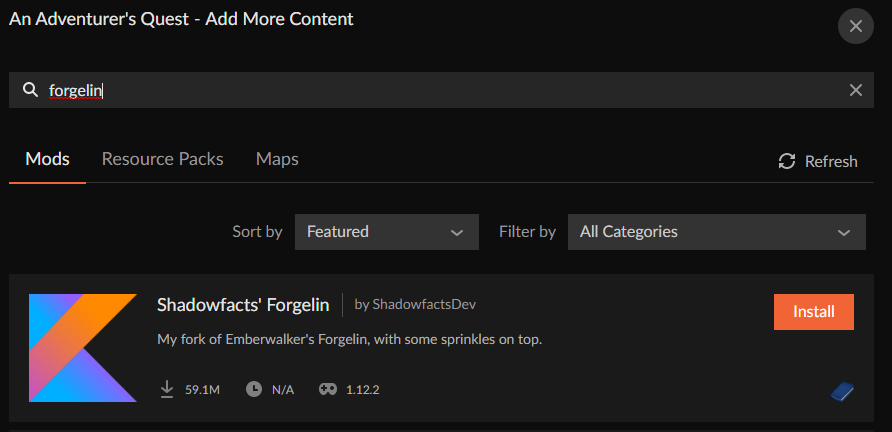
my pack is 1.12.2 and they have a release version of 1.12.2 im trying to add Shadowfacts' Forgelin and FlatBedrock Xplosion's Edition. i've tried several search combos i know curse is finicky with those
last parcel
link the mods and screenshot you searching
idle nimbus
If the mod isn't marked explicitely as compatible with the version it won't show up on the app you'll have to install it manually
last parcel
that makes no sense. if the mod isnt marked for 1.12.2 then it's not for 1.12.2 and doesnt work
pure sonnet
last parcel
first one is not for 1.12.2
pure sonnet
oh i see it, it says 1.12 ok
pure sonnet
I can install it manually thank you
idle nimbus
Plenty of mods for 1.12.1 will work for 1.12.2
last parcel
 pure sonnet
well im not sure how that one was messed up i got that one ill fix my flat bedrock one manually if i have to
zenith heath
What if modpack from the launcher causes crashes
Who do i contact?
wild jewel
zenith heath
What if modpack from the launcher causes crashes
Who do i contact?
The person that made it
 white pond
Before I have a question, I want to make mods on my own server with plugins, I don't know how to do it, please give instructions
Greetings
wild jewel
white pond
Before I have a question, I want to make mods on my own server with plugins, I d...
Need a special server for that, which neither forge or bukkit give support for
idle nimbus
Which version are you running
white pond
Minecraft 1.16.5
idle nimbus
Hi, this is the official website of Mohist ! Mohist is a Minecraft Forge server software which implements Bukkit - Spigot - Paper apis, available in 1.12.2 and 1.16.5. On this site you can download Mohist, have some informations and useful links.
I have not tested this yet use at your own risk
If you want support for sponge plugins you will have to use 1.12.2
idle nimbus
white pond
Kann you speak Germani
white pond
Wei
last parcel
take it to dms then
idle nimbus
A lot of plugins should work even if they are not explicitly made for 1.16.5 depending on what they do, I have had a plugin built for Minecraft 1.0 work on 1.13 although don't expect that to happen a lot that's all the help I'll give you
autumn agate
i'm having some issues

the other pages work fine
but whenever i go to "all files" on a page
this happens
(I do have a profile picture btw)
autumn agate
same here i just joined to try and mention it
 hearty shuttle
hello I have a big problem with a modification I try to enter files and then everything and it does not let me. I get an error
hearty shuttle
autumn agate
i'm having some issues
same as this
autumn agate
i think something's wrong with the server then
 fading hull
Whenever i try to download a mod half way through it says "object reference not sent to an instance of an object"
last parcel
restart curseforge
fading hull
Thx dudits working now, i feel stupid.
last parcel
no worries, sometimes its the simple stuff 😛
fading hull
Thanks Yamza
dusky spire
I thought that my modpack would be done now but it is still not
last parcel
what's that mean
dusky spire
Its still under review for like 12 hours
last parcel
!status
golden muskBOT
It is 06:03PM on Sunday for CurseForge my dudes.
Project Moderation Time
Project/File moderation is done on Sunday - Thursday from 10am - 6pm GMT+2
This process is First in, First out. Thus files submitted late in the work day may not be checked until the next work day.
New Projects or uploads requiring manual approval: 1-3 Working Days
Updates to approved projects not needing manual approval: 1 Hour
File sync to the Curseforge app may take up to 24 hours after approval.
last parcel
then yours was flagged for manual approval
 solemn light
I have a question, if my modpack is already approved, and I upload a new file, do they have to approve it again?
last parcel
every upload needs approval as refrenced in the above message
solemn light
What does this mean?
 last parcel
what is confusing about it
solemn light
There it says that it takes 1 hour for projects already approved, so the file will take about an hour for it to be synchronized with curseforge?
last parcel
no, that is the approval time. sync time is listed below
 tawny cypress
Hey! When I am trying to connect to a server with the same Mods, there is a error: Illegal packet areived, terminating connection..
and sorry for my english I am from austria an I am not very good at English :/
rapid bear
someone can you help me ?
i send you crash reports
Could you tell me the reason why it crashed?
last parcel
cpw.mods.fml.common.LoaderException: java.lang.ClassNotFoundException: com.temportalist.weepingangels.common.WeepingAngels$
remove that mod, or report it to the dev, or look for a solution
rapid bear
ah ok thanks
wild jewel
 remote merlin
Can someone please help find the issue?
remote merlin
Can someone please help find the issue?
Not enough ram
wild jewel
Try 6
remote merlin
kk thank you <3
autumn agate
any idea why quest pointer is not showing the arrow
wild jewel
autumn agate
any idea why quest pointer is not showing the arrow
What is quest pointer?
wild jewel
Then it might be broken
 dapper mesa
when i try to get forge on a macbook pro and i go to install it shows this

how do i fix that
acoustic idol
Do you have java installed?
dapper mesa
uhmmm, srry i dont know much about this but i have mc installed already
this is for minecraft btw
wild jewel
!mc-java
golden muskBOT
Missing Java Fix!
Before you try to fix anything, make sure that minecraft is closed!
If minecraft is open then you will need to close it and try to launch again.
- Click on the icon in the bottom left.
- Click the
MinecraftTab. - Click Change next to the
Minecraft Modding FolderOption. - Right click the folder named
Install. - Select
Open in new window. - Double click the
minecraft.exe. - Close the Launcher once it's done loading.
- Restart Overwolf & CurseForge or the computer.
- Play game!
If the above doesn't work....
Install Java using the installer from here: https://java.com/en/download/manual.jsp
 sharp light
yo my friend cant download curseforge even tho he is doing it right it says "download error"
does anyone know a solution
 compact cradle
minecraft ; friend has this every time he starts our modpack, any solution?
 vast sorrel
@acoustic idol the server crashed
I really do not understand the issue on why it crashes, its such bs
IO did everything listed and it crashes
acoustic idol
Post the crash report
vast sorrel
acoustic idol
This a pack you made?
vast sorrel
No
Its Meat Castle Adventure+
Im trying to maek that into a server so me and my friewnds can play
friends
acoustic idol
Remove Neat from the server and try again
vast sorrel
neat???
acoustic idol
its a mod, it is erroring
vast sorrel
Ok
 delicate lotus
i took 4 mods out of curse forge and put them on my desktop. I wanted them back and they wouldn't go back into forge. i deleted the mods and when i searched them on the mods list they didn't pop up.
acoustic idol
delicate lotus
i took 4 mods out of curse forge and put them on my desktop. I wanted them back ...
are you using the curse app?
delicate lotus
yes
acoustic idol
!mc-installmods
golden muskBOT
How to install mods in CurseForge App.
- Click
+ Create Custom Profile - Name it, select the required Minecraft version, select the Forge version (usually the highest number), click
Create. - Click the profile icon.
- Click
Add New Content - Search and install the desired mods.
- Start the game!
How to install mods not on CurseForge.
- Right click the profile picture or Open the profile and click the Icon next to the play button.
- Click
Open Folder. - Drag the mod(s) into the
modsfolder. (Note: Some mods will require others, to run. Make sure to read the instructions for the mod!) - Start the game!
acoustic idol
Second part of that
compact cradle
anyone able to troubleshoot my problem?
acoustic idol
compact cradle
anyone able to troubleshoot my problem?
#📛︱rules 10
compact cradle
yeah, i guess just seemed like it got burried
 main tendon
I have a question, I created a modpack on curseforge and it was approved. How do I find it in the app? Does it take time showing up? I have tried searching for it but nothing comes up
acoustic idol
vast sorrel
<@!217048549706301442>
DurabilityShow Looking like client side mods which shouldnt be on the server
main tendon
main tendon
I have a question, I created a modpack on curseforge and it was approved. How do...
this is for minecraft btw
acoustic idol
main tendon
I have a question, I created a modpack on curseforge and it was approved. How do...
!sync
golden muskBOT
Sync and your Project.
CurseForge REQUIRE a project to have one file marked Released on them for the projects to show up in search. Otherwise only Direct links to the project work.
Files can take a while to show up in the app. If your files still have not shown up either your project is new and you have yet to mark a file as Release or there is issues with the sync system making it slow.
main tendon
How do i mark it as Released?
acoustic idol
main tendon
How do i mark it as Released?
Go to your mod on the site > click its name > click edit > set it to release
delicate lotus
im still confused
acoustic idol
delicate lotus
im still confused
on?
vast sorrel
yoyok9, how would I find the ip for the server? I use my IPV4 into the server IP in the .properties correct? and launch from the curseforge
?
 pure wave
I downloaded "Vanilla Curseforge" just so I could get NEI's F7 lighting thing, but whenever I activate that it freezes my game. I have 8GB of ram allocated to it
I'm trying to use it in a server that does not have mods but does have some plugins
What do?
delicate lotus
the mods i delted from my desktop where from forge when i search them the dont come up
acoustic idol
delicate lotus
the mods i delted from my desktop where from forge when i search them the dont c...
From forge or curseforge? they are very different
delicate lotus
i ment curse forge
acoustic idol
vast sorrel
<@!217048549706301442>
DamageIndicatorsMod remove it server side
acoustic idol
delicate lotus
i ment curse forge
What mods?
vast sorrel
Server side is in the servers mod folder right?
delicate lotus
they where some of the flans mods
acoustic idol
vast sorrel
Server side is in the servers mod folder right?
correct
acoustic idol
delicate lotus
they where some of the flans mods
Did you make the pack?
delicate lotus
no
acoustic idol
Reinstall the pack
delicate lotus
how?
acoustic idol
Make sure to backup any worlds you want to keep, then right click the profile pic and delete the profile
vast sorrel
@acoustic idol
acoustic idol
TooMuchTNT
languid nebula
Orespawn with toomuchtnt no workie.
deft mortar
 last parcel
yes
pure wave
pure wave
I downloaded "Vanilla Curseforge" just so I could get NEI's F7 lighting thing, b...
How do I fix this?
The alt+F3 thing that shows you your FPS just turns into a red line going offscreen
acoustic idol
F3 on its own will show fps,
vast sorrel
yoyok9 do I have to join the server with the curseforge game launcher? or main minecraft launcher with the mods in the server into the %appdata% mods folder thingy
acoustic idol
It is easier to use the curse app, less of a headach, as for modding the vanilla launcher you will also need the same version of forge as the server
And your vanilla launcher will no longer work as vanilla. Will only play that 1 modpack
vast sorrel
I connect with my IPV4 correct?
pure wave
I'm just going to five up on the mob spawn lighting and just spam torches everywhere
acoustic idol
vast sorrel
I connect with my IPV4 correct?
is the server on the same pc as you play on?
vast sorrel
ye
acoustic idol
pure wave
I'm just going to five up on the mob spawn lighting and just spam torches everyw...
Have you tried F7?
vast sorrel
 acoustic idol
vast sorrel
ye
acoustic idol
vast sorrel
ye
Since you are on the same pc your ip is 127.0.0.1, after your set up portforwarding (google) your friends outside your house use your ipv4 ip
acoustic idol
vast sorrel
!mc-logs
golden muskBOT
How to get a Minecraft log file.
Where to find the log on the CurseForge Client.
Right-click the modpack profile icon OR click the button in the modpack profile.
Click Open Folder.
Open the logs folder.
Find the file called latest.log and drag it into discord.
acoustic idol
!mc-ram try upping your memory
golden muskBOT
How to set Global Minecraft RAM value.
- Click the icon in the bottom left to open settings.
- Click the Minecraft tab.
- Scroll down.
- Slide slider to recommended ram range as seen below.
 acoustic idol
Post the report
vast sorrel
ok
autumn agate
So I've got a problem
I try to load up any modpack and the minecraft launcher comes up
I press play
it closes the launcher then opens it back up with a crash report
I get the Code 0
acoustic idol
autumn agate
I get the Code 0
!mc-logs do this can have a look
golden muskBOT
How to get a Minecraft log file.
Where to find the log on the CurseForge Client.
Right-click the modpack profile icon OR click the button in the modpack profile.
Click Open Folder.
Open the logs folder.
Find the file called latest.log and drag it into discord.
autumn agate
i mayhave fixed it
vast sorrel

nvm
I was fine for a little bit but then it crashed again
: C
My friends also crash
 quick tendon
Help i try and launch my server and it stops loding and says this it worked like yesterday and now its not
 vast sorrel
@noble sigil
last parcel
ping another person and you're gone
vast sorrel
:/
languid nebula
ping people bad
acoustic idol
vast sorrel
!mc-logs this tells us squat, need the latest log to know whats going on
golden muskBOT
How to get a Minecraft log file.
Where to find the log on the CurseForge Client.
Right-click the modpack profile icon OR click the button in the modpack profile.
Click Open Folder.
Open the logs folder.
Find the file called latest.log and drag it into discord.
languid nebula
Windows defender marks curseforge as adware after the update.
acoustic idol
!mc-installserver
golden muskBOT
How to **manually** install a server - **On your own PC**
- Go to the Forge website http://files.minecraftforge.net/ and download the Installer for the forge version the pack is using.
- Run the installer and choose
Install server. Do not install to your desktop. Also do not install inside a OneDrive folder. - Run the server using the forge.jar. A file called
eula.txtwill be generated. Open it and changeeula=falsetoeula=true - From the Client; Copy the
modsfolder,configfolder, and any other folders needed for the pack to work into the server folder. If the modpack has a server pack, use this instead! - Run the server again.
acoustic idol
languid nebula
Windows defender marks curseforge as adware after the update.
?windefender
vast sorrel
acoustic idol
stupid bot...
vast sorrel
lol
vast sorrel
anything there that is making it crash yoyo?
acoustic idol
server crashed or user crashed?
quick tendon
Any one know how to fix my problem
acoustic idol
quick tendon
Any one know how to fix my problem
Need the latest log
last parcel
gunna need to see the log, not a screenshot of some part of a log
vast sorrel
I crashed not the server
last parcel
drop the log here
acoustic idol
Drag and drop the file into discord
last parcel
the file
last parcel
nope
acoustic idol
Thats the start, need the latest log from the logs folder
autumn agate
It says im missing mods but I downloaded it straight frpom cursefoirge
quick tendon
acoustic idol
autumn agate
It says im missing mods but I downloaded it straight frpom cursefoirge
Where does it say missing mods?
autumn agate
 vast sorrel
wait, what do I do?
acoustic idol
autumn agate
what modpack?
autumn agate
SevTech Ages
acoustic idol
redownload it
quick tendon
theres the log
last parcel
are you using the curseforge app?
autumn agate
I am
last parcel
how are you installing it
vast sorrel
yoyok9 what do I do?
autumn agate
Going to versions and downloading the one I want
vast sorrel
send the crash rep[ort right?
acoustic idol
vast sorrel
wait, what do I do?
still looking through the log
vast sorrel
oh ok
acoustic idol
If you have a crash report send it as well
autumn agate
last parcel
quick tendon
dont see anything wrong in your log
vast sorrel
You're looking through the most recent one, but I will send another one in case
If you find nothing maybe add more ram
quick tendon
so what do i do?
vast sorrel
to the server
acoustic idol
vast sorrel
You're looking through the most recent one, but I will send another one in case
See if there is a folder called crash reports. Get the latest from there
last parcel
quick tendon
so what do i do?
provide any more info or start over from the beginning i guess
vast sorrel
Minecraft crashed notr the server
quick tendon
i did start over its the same thing from the first try
vast sorrel
Yea, the server is running fine without crashing, the minecraf6t game itself is crashing
last parcel
talk to the devs then. log doesnt give any info to go off
autumn agate
@acoustic idol you looking over cLogs?
acoustic idol
quick tendon
i did start over its the same thing from the first try
Now is it crashing or is it just freezing?
autumn agate
So I made a modpack for fun and I dont know why its crashing any help?
acoustic idol
autumn agate
<@!217048549706301442> you looking over cLogs?
Are you downloading the latest version?
autumn agate
Yes
acoustic idol
Delete the profile, restart the app and try again, if it doesnt work contact the modpack devs
last parcel
autumn agate
So I made a modpack for fun and I dont know why its crashing any help?
https:/...
send the latest.log
?mc-log
golden muskBOT
How to get a Minecraft log file.
Where to find the log on the CurseForge Client.
Right-click the modpack profile icon OR click the button in the modpack profile.
Click Open Folder.
Open the logs folder.
Find the file called latest.log and drag it into discord.
autumn agate
last parcel
send the latest.log
Its on the link
vast sorrel
is my crash report I sent being looked over or did I send the wrong thing
last parcel
autumn agate
crash was caused by a mod that uses mixinbootstrap. there are many and there is no way to narrow it down. gotta remove stuff until its not broke
vast sorrel
hmm?
acoustic idol
vast sorrel
is my crash report I sent being looked over or did I send the wrong thing
TooMuchTNT is the issue
acoustic idol
Is it in your client ?
 acoustic idol
Your crash is client side, issue is that mod on the client, report it to the dev
vast sorrel
how and who
acoustic idol
Find the pack on the curse site, click issues tab if there is one, if not comment below or see if they have a discord
vast sorrel

I did then this popped up
:/
Gotta love this
welp
Wait
How do I add more ram to minecraft>?
 last parcel
?mc-log
golden muskBOT
How to get a Minecraft log file.
Where to find the log on the CurseForge Client.
Right-click the modpack profile icon OR click the button in the modpack profile.
Click Open Folder.
Open the logs folder.
Find the file called latest.log and drag it into discord.
 ocean maple
last parcel
ocean maple
last parcel
might want to reinstall that pack
ocean maple
Damn.. How can I save my worlds and multiplayer progress?
ocean maple
Could I just repair profile?
last parcel
nope
 faint goblet
Hey guys, I tried starting a modpack today and it worked at first, but later with another modpack my minecraft started crashing as soon as I launched from the minecraft launcher. The error code with error 0 pops up saying that there was an unexpected issue and the game crashed. I tried reinstalling the curseforce launcher, the modpack and java again, but it didn't help. The same thing happened when I tried to launch a different modpack. Does anyone have an idea what the problem may be and what I could do to fix it?:)
last parcel
?mc-log
golden muskBOT
How to get a Minecraft log file.
Where to find the log on the CurseForge Client.
Right-click the modpack profile icon OR click the button in the modpack profile.
Click Open Folder.
Open the logs folder.
Find the file called latest.log and drag it into discord.
 sullen egret
Got this issue when I linked my MC folder
 sullen egret
Show the normal path, i use the appdata one
last parcel
what
sullen egret
C:\Users(thing)\AppData\Roaming.minecraft
last parcel
you need to select a new folder to install to, not the minecraft folder
 last parcel
yes, yes it does
 signal burrow
Hi Guys, i need some help on Minecraft modded. If i play on Vanilla i have good fps... but if i play with modded doesnt matter if its 250 mods or only 23 mods any mod and i get 0 FPS constant.. any ideas?
last parcel
Choose a folder for your minecraft modding files.
=/=
Choose your default minecraft folder
coarse elm
Then your freind needs to learn how to read.
last parcel
Use the default path it said or if you messed that up already do this #👽︱game-support message
faint goblet
faint goblet
Hey guys, I tried starting a modpack today and it worked at first, but later wit...
autumn agate
when i open the curse forge instaler it ask me to say yes or no but when i say yes nothing happens can any one help me?
<@&524645667818307596>
languid nebula
umm
coarse elm
Please dont ping moderators unless you have a moderation issue.
 full igloo
ok
faint goblet
faint goblet
Hey guys, I tried starting a modpack today and it worked at first, but later wit...
does anyone know of a solution to this? Help would be much appreciated:)
 midnight jungle
If you want to use fabric mods use the mod jumploader to use them on curse forge profiles
last parcel
faint goblet
does anyone know of a solution to this? Help would be much appreciated:)
need the log i asked for
faint goblet
I have it there
faint goblet
faint goblet
is this the right one?
last parcel
k lemme see
 gleaming spoke
i also have a problem, When i want to enter the server i can t enter because of "Failed to Log in ; The authentication servers are currently down for maintanc". My friends can join but i can't , Some one who knows what to do?
last parcel
faint goblet
is this the right one?
there are so many errors... not sure i can pinpoint any one cause in this
i would start here to make sure your vanilla stuff is fine
?mc-repair
annnd that's not the command
!mc-installfix
golden muskBOT
- Click on the Minecraft Tab on the Left side of the App.
- Click button next to the
Create Custom Profileoption. - Click
Repair Installationoption. - Play game.
NOTE: You will not lose any modpacks or worlds, These are saved in the Instances folder. DO NOT TOUCH THIS FOLDER OR YOU WILL LOSE EVERYTHING
faint goblet
last parcel
there are so many errors... not sure i can pinpoint any one cause in this
okay thanks for looking at it! I'm just so confused because it used to work and now it just doesn't at all
okay great I will have a look at that
 oak thunder
Hey I really need help, I have my forge 1.7.10 server setup but when I run it crashes halfway through. I can give screenshots or information if needed
 potent tartan
drag and drop into discord
potent tartan
hmmmm
oak thunder
here
faint goblet
last parcel
log seems to say that everything involving mixins is broke
hey, I checked the vanilla minecraft and somehow it works now. Thank you so much, really great support!
potent tartan
oak thunder
cuz it is too big for discord
you can use https://gist.github.com/, but you'll have to create an account
last parcel
glad that worked 😅
oak thunder

Gist
1.7.10 Server crash. GitHub Gist: instantly share code, notes, and snippets.
there
potent tartan
at net.blay09.mods.defaultkeys.DefaultKeys.preInit(DefaultKeys.java:44) ~[DefaultKeys.class:?]
you have a client side mod on a server, remove it
oak thunder
ok lemme try that
in later versions I guess I was under the assumption that it auto disabled them, but I guess not on 1.7.10
potent tartan
in 1.7.10 that exists, but the mod author hasn't enabled that feature
gleaming spoke
gleaming spoke
i also have a problem, When i want to enter the server i can t enter because of ...
??????
vast sorrel
Anyone know what FTB modpack is closes to Meat Castle Adventures+??? that works when creating a server for friends to play on
closest
oak thunder
@potent tartan It is working Now, thank you so much for the help, I have no idea how to navigate the logs.
vast sorrel
yamza
Can you help me figure out what mods are creating an issue with this server thing
last parcel
where is your info
autumn agate
when i open the curse forge instaler it ask me to say yes or no but when i say yes nothing happens can any one help me?
vast sorrel
I dont know why it crashed
My game crashed (minecraft) not the server

I launch it through here
coarse elm
autumn agate
when i open the curse forge instaler it ask me to say yes or no but when i say y...
!getcf
golden muskBOT
Looking to install the CurseForge app?
Todo: Place system requirements here.
<:windows:798410728188936222> Windows
<:mac:798410654418862130> Mac
Linux
:person_shrugging:
vast sorrel
yamza any issues found?
golden muskBOT
How to get a Minecraft log file.
Where to find the log on the CurseForge Client.
Right-click the modpack profile icon OR click the button in the modpack profile.
Click Open Folder.
Open the logs folder.
Find the file called latest.log and drag it into discord.
autumn agate
@coarse elm Thanks !
 last parcel
cuz you're in the wrong place
last parcel
doesnt say anything about using search
vast sorrel
OHHH OK

What files from here do I put into my server
mods, config, scripts? what else
vast sorrel
the mod pack????
last parcel
yes
vast sorrel
how
last parcel
delete it
install it
vast sorrel
nvm
 oak flower
Im Having A Issue Downloading A Mod


It Stays At 24 and wont go any further
I Increased Allocated Memory
Ive Restarted Curseforge
Ive Stopped instalation and re downloaded
I Have No Idea What To Do At This Point
Can Anyone Help?
coarse elm
you wait.
acoustic idol
In what way?
languid nebula
oak flower
Pixelmon is like 500mb.
 tame depot
for some reason the curseforge app will not start up and how my packs, but it doesn't give a reason as to why
just gives me the oops message after about 40 seconds of loading
acoustic idol
As in you press play in the app and nothing happens? Post the error message screen shot
tame depot
the app doesn't start period - lemme get a screenshot ye
vast sorrel
Im good thanks
 sterile vapor
hello, my sister is trying to play a modpack via curse forge and she is trying to do it for the first time so it is asking her where she wants the files to go and it has the preset destination but when she presses submit it says "path can only include english letters and numbers" yet when i did it just 10-15 minutes ago with the same distination, it worked for me.
acoustic idol
sterile vapor
hello, my sister is trying to play a modpack via curse forge and she is trying t...
!mc-path
golden muskBOT
Minecraft Files should NOT be installed inside the .minecraft folder or inside OneDrive folders. If this shows up in the path at all you need to move it by following the instructions below!
If Minecraft is not installed, start here.
Click the in the top right.
Select Minecraft.
Click "Edit".
Move to the "Continue here:" section below.
If Minecraft is installed, follow these steps.
Click the in the bottom left.
Select the Minecraft tab.
Click "Change".
Move to the "Continue here:" section below.
Continue here:
Make a folder in the root directory called CurseForge.
Select the folder you just made.
The text box should show something like the following:
For Windows: C:\CurseForge
For Mac: /Users/Shared/CurseForge
acoustic idol
Follow that ^^
tame depot
it says forging your library for about 40 seconds with no changes and then this shows up

nothing specific
acoustic idol
tame depot
it says forging your library for about 40 seconds with no changes and then this ...
Do you have overwolf installed as well?
Which?
 olive tide
tame depot
it says forging your library for about 40 seconds with no changes and then this ...
olive tide
tame depot
it says forging your library for about 40 seconds with no changes and then this ...
same thing is happening to me
tame depot
i do not, but i've never needed it as it has worked fine on its own for a while now
even earlier today it was working fine
golden muskBOT
Looking to install the CurseForge app?
Todo: Place system requirements here.
<:windows:798410728188936222> Windows
<:mac:798410654418862130> Mac
Linux
:person_shrugging:
tame depot
oh wait i'm dumb
i installed the helper tool and it started working fine again lol
acoustic idol
Where did you download the app from the first time? This comes up a lot and wanna know where people are getting just the curse app from
tame depot
i just followed the directions at https://curseforge.overwolf.com

Overwolf | Tech for developers who love gaming
Welcome to the CurseForge community! Build, manage and download mods and addons for your favorite games


 acoustic idol
vast sorrel
acoustic idol
vast sorrel
!mc-logs
golden muskBOT
How to get a Minecraft log file.
Where to find the log on the CurseForge Client.
Right-click the modpack profile icon OR click the button in the modpack profile.
Click Open Folder.
Open the logs folder.
Find the file called latest.log and drag it into discord.
vast sorrel
acoustic idol
tame depot
i just followed the directions at https://curseforge.overwolf.com
Hmm odd, and it didnt download the Overwolf app first?
acoustic idol
hmm not sure on that one, ill bring it up with support tho
olive tide
did you download the one for mac or for windows?
tame depot
mac lmao
olive tide
ok
vast sorrel
any help on mine yet?
olive tide
its workiung fine for me after i reinstalled overwolf
acoustic idol
vast sorrel
any help on mine yet?
Please be patient, was helping others first
tame depot
i should be good to go since it's working now
if you need anything else from me just lemme know
acoustic idol
If its working now should be,
sterile vapor
acoustic idol
Follow that ^^
ty for the help
acoustic idol
vast sorrel
any help on mine yet?
What pack was this again?
vast sorrel
FDarming Valley
Farming Valley
Its my game crashing not the serever

I even reinstalled it
acoustic idol
Latest version as well
acoustic idol
Error code 0 or -1 can mean like 100 different things, Its long log to look through to find the exact cause. Other option is report it to the pack devs
vast sorrel
Bruuuuuuuuuuuuhhhhh it was working earleir now its not
acoustic idol
Either you changed, added or removed something.
vast sorrel
I think thisi s it
acoustic idol
Where is this from?
vast sorrel
the main server
acoustic idol
That the full log?
last parcel
why sending a server log for a client issue
last parcel
send the client log
acoustic idol
Even if that was the full server log, it looks like a vanilla server, no mods loaded.
vast sorrel
it has mods
acoustic idol
Yamza here #👽︱game-support message
vast sorrel
 acoustic idol
you got optifine in the client?
vast sorrel
idk
last parcel
this is after reinstalling?
last parcel
i mean the step by step is simple
click install
click play
click play
last parcel
how much ram do you have
last parcel
how much is your server using
vast sorrel
How do I check
in the bat file thingy, I put 4 gigs
of ram
its not the server though
Its the launcher
Being special idk y
vast sorrel
oh sorry
last parcel
Error executing task java.util.concurrent.ExecutionException: java.lang.OutOfMemoryError
vast sorrel
???
last parcel
not sure how you can be out of memory with 32gb tho
last parcel
no, 6gb should be plenty for that
last parcel
try a pc restart
vast sorrel
k
acoustic idol
Edit your .bat file and take a screen shot after what Yamza said
vast sorrel
 last parcel
4g is fine for server
acoustic idol
Alright
autumn agate
anybody have rebirth of the night server
acoustic idol
autumn agate
anybody have rebirth of the night server
#786424115535544350 then check out #768717413918179368 or ask in #🧱︱minecraft-chat
autumn agate
k
 outer flicker
anyone know what's causing this crash?
game log:
I've added Ender IO's conduit and base modules, as well as a few recipes to Modular Machinery.
I'm thinking one of those is causing the crash, but can't find anything useful in the log.
acoustic idol
Back you made or downloaded?
outer flicker
custom one I'm making yeah
acoustic idol
Try for now removing artisanWorktables
outer flicker
just checked, I duplicated the ID of 2 of the tools
that's probably why it's crashing. Will let you know.
acoustic idol
Sounds good
acoustic idol
It happens,
 mystic osprey
 acoustic idol
mystic osprey
acoustic idol
mystic osprey
!mc-logs
golden muskBOT
How to get a Minecraft log file.
Where to find the log on the CurseForge Client.
Right-click the modpack profile icon OR click the button in the modpack profile.
Click Open Folder.
Open the logs folder.
Find the file called latest.log and drag it into discord.
mystic osprey
acoustic idol
mystic osprey
!mc-installfix do this
golden muskBOT
- Click on the Minecraft Tab on the Left side of the App.
- Click button next to the
Create Custom Profileoption. - Click
Repair Installationoption. - Play game.
NOTE: You will not lose any modpacks or worlds, These are saved in the Instances folder. DO NOT TOUCH THIS FOLDER OR YOU WILL LOSE EVERYTHING
mystic osprey
Tried that already
acoustic idol
windows or mac?
mystic osprey
windows
acoustic idol
try it this way:
- Click on the icon in the bottom left of Curseforge.
- Click the Minecraft Tab.
- Click Change next to the Minecraft Modding Folder Option.
- Select the folder named Install.
- Delete it.
- Restart CurseForge App.
- It will ask to install MC again, do so.
- Play game.
NOTE: You will not lose any modpacks or worlds, These are saved in the Instances folder. DO NOT TOUCH THIS FOLDER OR YOU WILL LOSE EVERYTHING