
#👽︱game-support
1 messages · Page 92 of 1
 edgy quartz
 languid nebula
Do you have the forge thing?
edgy quartz
wym?
languid nebula
Forge server thing
 wild jewel
Run that
edgy quartz
one of these two?
 edgy quartz
wild jewel
Run that
edgy quartz
wild jewel
Run that
okok
i already ran that before btw, to get this file

now it looks like its doing the same things it did before
wild jewel
Well, the serverstart file is there with a reason, you just started the vanilla server.

 wild jewel
It is
edgy quartz
ok, so the problem is with something else
wild jewel
Don't start the jar files, start with that.
You only run the serverstart file
edgy quartz
okok
i think its working
my game froze for some reason so i cant even alt+tab to see
it works!
thank you so much!
languid nebula
Might be your pc not being able to run a server and play minecraft at the same time modded
 autumn agate
um quick question will they work to make things availble for mac like some mincraft mods?
wild jewel
autumn agate
um quick question will they work to make things availble for mac like some mincr...
Mac is already supported
autumn agate
i know. but some mods arent
 next panther
autumn agate
i know. but some mods arent
next panther
autumn agate
i know. but some mods arent
what app version are you on?
and which modpack isnt working?
autumn agate
the most recent
languid nebula
autumn agate
i know. but some mods arent
Your using vape client
autumn agate
no
next panther
0.168.2.2
languid nebula
I have used many but scaffold is satasfying so i use it in singleplayer
wild jewel
autumn agate
i know. but some mods arent
Which modpack?
languid nebula
All modpacks are on windows linux or macos
wild jewel
Molly, you are not helping
wild jewel
They should, but we want to narrow things down, and the mods can still be broken for that OS
languid nebula
Oh yeah theres alot of mods broken with macintosh and linux
Its a texture thing and not really annoying

Infinity armor from avarita broken on a macintosh
languid nebula
One block skyblock?
wild jewel
autumn agate
its one block
Now we are getting somewhere at least.
How are they not working?
languid nebula
Try to reinstall it maybe
wild jewel
autumn agate
it says no java executble found
!mc-java
 golden muskBOT
Missing Java Fix!
Before you try to fix anything, make sure that minecraft is closed!
If minecraft is open then you will need to close it and try to launch again.
- Click on the
 icon in the bottom left.
 - Click the

MinecraftTab. - Click Change next to the
Minecraft Modding FolderOption. - Right click the folder named
Install. - Select
Open in new window. - Double click the
minecraft.exe. - Close the Launcher once it's done loading.
- Restart Overwolf & CurseForge or the computer.
- Play game!
If the above doesn't work....
Install Java using the installer from here: https://java.com/en/download/manual.jsp
wild jewel
But without the .exe extension
autumn agate
ok ill try
 lavish lichen
can anybody help me making a modpack?
wild jewel
lavish lichen
can anybody help me making a modpack?
!mc-installmods
golden muskBOT
How to install mods in CurseForge App.
- Click
+ Create Custom Profile - Name it, select the required Minecraft version, select the Forge version (usually the highest number), click
Create. - Click the profile icon.
- Click
Add New Content - Search and install the desired mods.
- Start the game!
How to install mods not on CurseForge.
- Right click the profile picture or Open the profile and click the
 Icon next to the play button.
 - Click

Open Folder. - Drag the mod(s) into the
modsfolder. (Note: Some mods will require others, to run. Make sure to read the instructions for the mod!) - Start the game!
 lavish lichen
is this working online too?
wild jewel
lavish lichen
is this working online too?
Define "online"
lavish lichen
when i use curseforge in my browser
wild jewel
No
lavish lichen
ok, can you tell me how it workes there?
or does making a modpack requieres to install the app?
wild jewel
Yes, it does require to install the app, can also install things manually but you can't export those
 opal birch
so i did a modpack and i send it to my friend for some reason just 2 mods were in it so i uploaded it to curseforge now i just need to wait right?
wild jewel
opal birch
so i did a modpack and i send it to my friend for some reason just 2 mods were i...
They can just import that zip though
 visual bloom
Someone know how to tweak the craft of a Moded Item in Minecraft?
with another Mod or something?
autumn agate
can anyone help me setup R.A.D on my pebblehost server. thx 🙂
wild jewel
You got ipv6 enabled?
 naive walrus
anyone know a fix to this?
 wild jewel
naive walrus
anyone know a fix to this?
wild jewel
naive walrus
anyone know a fix to this?
!mc-logs
golden muskBOT
How to get a Minecraft log file.
Where to find the log on the CurseForge Client.
Right-click the modpack profile icon OR click the button in the modpack profile.
Click Open Folder.
Open the logs folder.
Find the file called latest.log and drag it into discord.
 eternal bear
Which mods from engineers life 2 arent compatible with servers?
wild jewel
eternal bear
Which mods from engineers life 2 arent compatible with servers?
https://www.curseforge.com/minecraft/modpacks/engineers-life-2/files/3230763
They have a server pack
naive walrus
wild jewel
crash-reports\crash-2021-03-15_17.16.04-client.txt
Can you send that file as well?
eternal bear
ty @wild jewel are the serverpacks from curseforge page better than the mods from the launcher
wild jewel
eternal bear
ty <@!525950791710801921> are the serverpacks from curseforge page better than t...
They are most of the time ready to run and don't contain client only mods
 eternal junco
guys every time i try to join my own server it keeps giving me the same error, tried on multiple modpacks. it didn't happen to me before.

here's server log

 loud laurel
 thin lark
While Exporting the launcher lags.
wild jewel
thin lark
While Exporting the launcher lags.
Because it is busy
 potent wren
why my curse forge launcher do not found elementarock modpack
wild jewel
potent wren
why my curse forge launcher do not found elementarock modpack
Link it please
wild jewel
Should be on the launcher
potent wren

 last parcel
You don't have the permission to use it on a server other than Elementarock. If you want contact me and we will see lol what
it is indeed not on the launcher. dev should make a ticket
potent wren
oh ok
 tranquil lantern
anyone else having exit code 0 still?
crashes during mod loading or upon joining a server
if i do manage to join a server my screen flashes white constantly
i've tried reinstalling curse, updating gpu drivers, allocating more memory, updating java, and changing jvm arguments
nothing's worked so far
have had multiple people try and help, nobody's found a solution
last parcel
?mc-log
golden muskBOT
How to get a Minecraft log file.
Where to find the log on the CurseForge Client.
Right-click the modpack profile icon OR click the button in the modpack profile.
Click Open Folder.
Open the logs folder.
Find the file called latest.log and drag it into discord.
tranquil lantern
one sec gonna run it rq
crashlog from yesterday if it helps
had the same issue then
last parcel
is your username really ####?
tranquil lantern
nah i just censored my name
last parcel
could be relevent though
tranquil lantern
anything catch your eye so far?
last parcel
the missing username
autumn agate
I NEED HELP!!!
i made my own modpack and it it saying this-
help me with this plz

 proud lion
Can anyone help with with a server issue, Im trying to host a server that is now overloading because i cannot allocate More ram to it.
Whenever i try and allocate more than Xmx1G it says insufficient space. Ive checked my system, im running 64x with 32GB Psyical Memory. Why am i limited to only a GB? when reality i should get at least 4GB?
 frail igloo
@noble sigil please help me
last parcel
two in a row that cant read rules
proud lion
Bruh hahaha
last parcel
gotta get the hammer out
frail igloo
Sry
 weary whale
hey i want to play valhelsia 3 with my friend but i cant join his world what should i do ?
 wind ferry
Every time i try starting ATM 6, it crashes and i get "Exit Code: 0". Anyone know what to do? Couldn't find anything helpful on google
 potent tartan
wind ferry
Every time i try starting ATM 6, it crashes and i get "Exit Code: 0". Anyone kno...
potent tartan
wind ferry
Every time i try starting ATM 6, it crashes and i get "Exit Code: 0". Anyone kno...
?mc-log
golden muskBOT
How to get a Minecraft log file.
Where to find the log on the CurseForge Client.
Right-click the modpack profile icon OR click the button in the modpack profile.
Click Open Folder.
Open the logs folder.
Find the file called latest.log and drag it into discord.
wind ferry
potent tartan
try reinstalling it
wind ferry
did that 3 times
potent tartan
?mc-installfix
golden muskBOT
- Click on the icon in the bottom left.
- Click the
MinecraftTab. - Click
Changenext to theMinecraft Modding FolderOption. - Select the folder named
Install. - Delete it.
- Restart CurseForge App.
- It will ask to install MC again, do so.
- Play game.
NOTE: You will not lose any modpacks or worlds, These are saved in the Instances folder. DO NOT TOUCH THIS FOLDER OR YOU WILL LOSE EVERYTHING
potent tartan
try that
wind ferry
By delete, they mean the Install folder?
potent tartan
wind ferry
By delete, they mean the Install folder?
yes
wind ferry
Now it works, thank you so much, really appreciated. I've been trying to fix that all day
potent tartan
👍
proud lion
whenever i try an allocate more than 1GB of ram my server crashes and wont let me. The thing is i have 32Gb of RAM and running a 64x system
Im always wondering why im limited by so much.
This is my latest.log to show that the tickrate has dropped to almost less than 7TPS
potent tartan
proud lion
whenever i try an allocate more than 1GB of ram my server crashes and wont let m...
you have 32bit java
proud lion
shit. time to upgrade wtf
potent tartan
Java manual download page. Get the latest version of the Java Runtime Environment (JRE) for Windows, Mac, Solaris, and Linux.
download windows offline 64bit
proud lion
that makes sense now, cheers for that i wouldve never guessed, i thought i was running 64x pffft
im a fucking idiot haha, thanks
 distant pivot
Can i get some help? I'm useless when it comes to minecraft and downloading mods, don't know how to actually play them
wild jewel
distant pivot
Can i get some help? I'm useless when it comes to minecraft and downloading mods...
!mc-installmods
golden muskBOT
How to install mods in CurseForge App.
- Click
+ Create Custom Profile - Name it, select the required Minecraft version, select the Forge version (usually the highest number), click
Create. - Click the profile icon.
- Click
Add New Content - Search and install the desired mods.
- Start the game!
How to install mods not on CurseForge.
- Right click the profile picture or Open the profile and click the Icon next to the play button.
- Click
Open Folder. - Drag the mod(s) into the
modsfolder. (Note: Some mods will require others, to run. Make sure to read the instructions for the mod!) - Start the game!
 sinful comet
hey guys can someone help me with a problem?
wild jewel
sinful comet
hey guys can someone help me with a problem?
Rule 10
sinful comet
Sorry. My friends created a custom modpack. They told me to go to "Create Custom profile" and then import it. I did so but it does not show up ...? What can i do?
wild jewel
How was it exported?
sinful comet
.zip
wild jewel
How did he export the modpack? Using the app or just by zipping?
sinful comet
I dont know, but it worked for all of my friends.
wild jewel
Restart your pc, try again
sinful comet
i did already, didnt work
wild jewel
What OS?
sinful comet
ill restart again and try again
 haughty elk
hello, every time i open a minecraft profile it says it failed to update the launcher. i have created multiple profiles, and none of them have worked. i tried using forge outside of curse and it works.
wild jewel
haughty elk
hello, every time i open a minecraft profile it says it failed to update the lau...
!mc-installfix
golden muskBOT
- Click on the icon in the bottom left.
- Click the
MinecraftTab. - Click
Changenext to theMinecraft Modding FolderOption. - Select the folder named
Install. - Delete it.
- Restart CurseForge App.
- It will ask to install MC again, do so.
- Play game.
NOTE: You will not lose any modpacks or worlds, These are saved in the Instances folder. DO NOT TOUCH THIS FOLDER OR YOU WILL LOSE EVERYTHING
 real pasture
this keeps happening on my server.
haughty elk
it says it is open in another window, im guessing i have to close curse?
wild jewel
real pasture
this keeps happening on my server.
at com.flansmod.common.guns.EntityAAGun.onUpdate
Flans has an issue
wild jewel
haughty elk
it says it is open in another window, im guessing i have to close curse?
Yes
wild jewel
Restart pc
real pasture
wild jewel
at com.flansmod.common.guns.EntityAAGun.onUpdate
Flans has an issue
oki. how do i fix it. cause as soon as i get on. the server closes.
haughty elk
oh
wild jewel
real pasture
oki. how do i fix it. cause as soon as i get on. the server closes.
Notify the dev of the issue
 charred sage
hello guys i have exit code 0 problem can enyone help me
wild jewel
charred sage
hello guys i have exit code 0 problem can enyone help me
!mc-logs
golden muskBOT
How to get a Minecraft log file.
Where to find the log on the CurseForge Client.
Right-click the modpack profile icon OR click the button in the modpack profile.
Click Open Folder.
Open the logs folder.
Find the file called latest.log and drag it into discord.
 signal oak
how can i prevent air from replacing gold blocks in ruined portals?
i cant seem to find the .json file in the processor list for ruined portals
 unreal hill
Hey everyone! 😄 I dont know where else to ask this. Hopefully someone can help me out. I tried the Abyss Chapter 2 in a creative world to see what the dimension has and when I returned to the overworld I noticed that I had some Abyss biomes that spread hundreds of blocks in every direction... Is there a way to prevent this from happening?
 vagrant crest
hey all, i try to play a minecraft mod with a buddy but when i press play nothing happens. anyone knows a solution
wild jewel
vagrant crest
hey all, i try to play a minecraft mod with a buddy but when i press play nothin...
!mc-installfix
golden muskBOT
- Click on the icon in the bottom left.
- Click the
MinecraftTab. - Click
Changenext to theMinecraft Modding FolderOption. - Select the folder named
Install. - Delete it.
- Restart CurseForge App.
- It will ask to install MC again, do so.
- Play game.
NOTE: You will not lose any modpacks or worlds, These are saved in the Instances folder. DO NOT TOUCH THIS FOLDER OR YOU WILL LOSE EVERYTHING
unreal hill
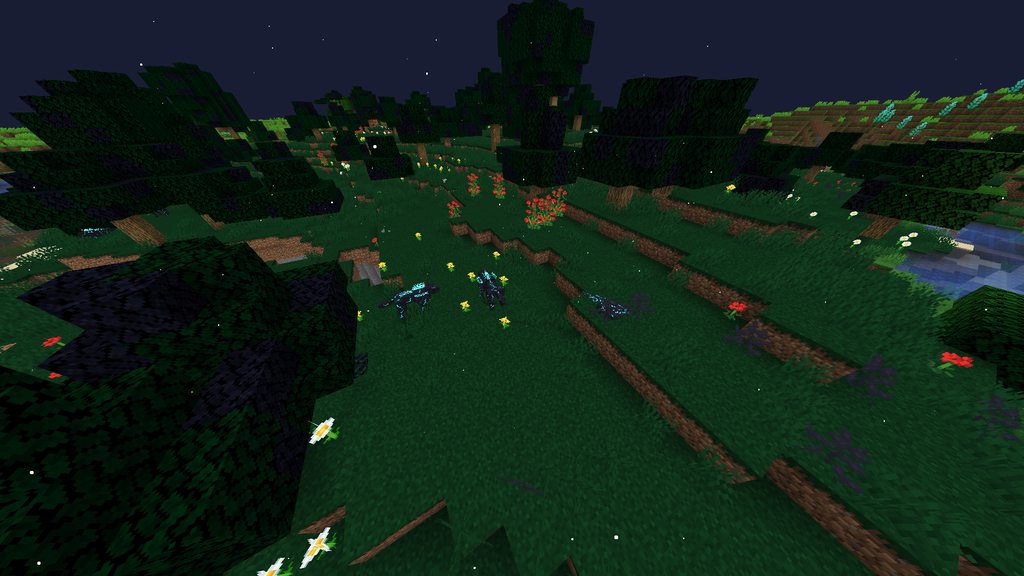 vagrant crest
golden musk
vagrant crest
golden musk
thnx!
 lethal briar
Hey friends! I'm on a mac (don't laugh) and I'm trying to launch Roguelike Adventures mod for minecraft. it worked before, but now it's not even launching! do i need to allocate more ram?
 wise sable
Can someone please verify my mod pack it’s been 24 hours
languid nebula
wise sable
Can someone please verify my mod pack it’s been 24 hours
It could take up to a week
languid nebula
And also its a sunday
wise sable
It’s Monday
languid nebula
what
last parcel
someone living in the past
wise sable
Lol
wild jewel
wise sable
Can someone please verify my mod pack it’s been 24 hours
They have a big backlog
last parcel
but still, no one reading here can or will check your pack. you must wait like everyone else
!status
golden muskBOT
It is 09:12PM on Monday for CurseForge my dudes.
Project Moderation Time
Project/File moderation is done on Sunday - Thursday from 10am - 6pm GMT+2
This process is First in, First out. Thus files submitted late in the work day may not be checked until the next work day.
New Projects or uploads requiring manual approval: 1-3 Working Days
Updates to approved projects not needing manual approval: 1 Hour
File sync to the Curseforge app may take up to 24 hours after approval.
wise sable
How do I make one that does not need manual approval
last parcel
dont upload
languid nebula
Or upload to || technic ||
wild jewel
Molly, you just gonna troll?
last parcel
yea if you like your minecraft account being stolen, or viruses added
languid nebula
At least i dont have to do 40 things just to post something
languid nebula
And then i have to type out an essay on my modpack
wild jewel
languid nebula
And then i have to type out an essay on my modpack
How else are people gonna know what it does 🤷♂️
languid nebula
To get it verified
last parcel
oh no, what a hassle to explain your pack to people
languid nebula
I just want it to be to export and upload
last parcel
then upload to google drive
wild jewel
languid nebula
I just want it to be to export and upload
How are people gonna know what they download then?
languid nebula
But it said i had to put advertisments and youtube tutorials or stuff
wild jewel
#doubt
last parcel
i blieve that would be the opposite of what it said
languid nebula
 last parcel
Yes exactly..
languid nebula
I didnt put anything like that in my descripton
wild jewel
Then show your description
last parcel
its not saying you did, it's simply saying what doesnt count
 chrome summit
is it possible to update a modpack that I made to a newer version of minecraft/forge?
last parcel
not exactly. you need to make it as a completely new thing
you could upload that to an existing project, but that's really not a good idea
chrome summit
will i have to add all the new mods manually?
last parcel
with the app yes
chrome summit
:( okay
next panther
last parcel
with the app yes
forge yes, minecraft no (?)
 wild jewel
 topaz gust
Is there a way to turn off timeout?
topaz gust
Is there a way to turn off timeout?
!mc-timeout
golden muskBOT
Increase the timeout for downloading mods and modpacks
Increase the timeout for downloading mods and modpacks
If you have issues with CurseForge getting timeouts when you try to download Modpacks or Mods,
you can try running this file: https://cdn.discordapp.com/attachments/778097796410376242/817150662953402368/increase_timeout.reg
What it will do, is increase the download timeout to 20 minutes.
You need to run the increase_timeout.reg, and when it is done, you'll need to restart CurseForge,
you can do this by right clicking the tray icon and select "Relaunch".
topaz gust
thx
 slim sparrow
is there an easy way to turn off the pause on lost focus thing on curseforge mc?
wild jewel
slim sparrow
is there an easy way to turn off the pause on lost focus thing on curseforge mc?
Hit T first?
chrome summit
okay well due to a forge bug i need to update my version from 1.16.4 to 1.16.5. Is there a more efficient way to add back all of the mods than just clicking the "add more content" button and searching for the mods?
last parcel
no
slim sparrow
wild jewel
Hit T first?
??? what do u mean by tht
wild jewel
slim sparrow
??? what do u mean by tht
Open chat, then alt+tab, then it won't pause
 delicate patrol
hey Yamza, after what we tried yesterday (if you remember) i still got the same issue whilst trying to connect
last parcel
barely even remember 2 hours ago
delicate patrol
lmfao
wild jewel
last parcel
barely even remember 2 hours ago
You go back that far? O_o
last parcel
well i ate some yummy curry, so i remember that 😛
delicate patrol
ok basically, my game gave me an error whilst trying to join my server saying "failed to synchronise registry data" and u gave me some fixes. it still gives the same issue
curry :0
chrome summit
okay so i am going to manually add all the mods back, but some mods don't have 1.16.5 versions. They work in 1.16.5, but i cant install with curseforge because they don't classify as 1.16.5. If I upload to curseforge, this means it won't be linked in manifest.json, meaning i couldn't upload it to curseforge.
wild jewel
chrome summit
okay so i am going to manually add all the mods back, but some mods don't have 1...
Poke the devs of those mods to fix it
last parcel
delicate patrol
ok basically, my game gave me an error whilst trying to join my server saying "f...
send logs
last parcel
you trying to play lan?
delicate patrol
nah just trying to play with a friend in another household.... unless that is lan ~:0
last parcel
how are you connecting?
delicate patrol
using my ip
last parcel
are you running a server?
delicate patrol
yeah, my own forge server i made
i used to do it before, it used to run fine with other mods
last parcel
try deleting the world
delicate patrol
i have plenty times haha, i can do it again though
last parcel
well either the world has items in the registry that are no longer there, or mods arnt matching
delicate patrol
ill double check again, are those the only issues?
last parcel
all i can think of
delicate patrol
ahh ok
 acoustic idol
Check your server to make sure apotheosis matches with the client.
delicate patrol
i would if i knew what that meant haha
acoustic idol
apotheosis is a mod
acoustic idol
Look at the clients mods and the servers. They need to match
last parcel
you need all the same versions of the mods also
delicate patrol
i mean, i just copied the client mods onto the server
but im checking one by one rn
acoustic idol
Double check em, I had this issues with my own server this morning. Had a mod on the server that didnt match my client
acoustic idol
are they the same mod? just 2 different versions
acoustic idol
Yes, duplicate mods will cause problems as well
delicate patrol
"xaerosworldmap" 1.12.1 and 1.12.2
alright lemme try that
ah, also didnt work
sadge
chrome summit
okay 1 mod called "structurize" does not show the latest versions in the curseforge launcher
wild jewel
How old is that version?
If lower than 24 hours: wait till it syncs
chrome summit
okay nvm. I'm using 1.16.4 while that version is 1.16.5. They are still compatible, but it doesn't show up. If I add that file, and I can't reference it in the manifest, will curseforge still not like it?
wild jewel
Not sure about that myself
 coarse elm
Just use 1.16.5?
delicate patrol
any other ideas YOYOK or we stuck?
coarse elm
Tell devs to mark mods correctly?
acoustic idol
delicate patrol
any other ideas YOYOK or we stuck?
You've checked both server and client mods. Everything is 100% the same? right down to the version numbers
delicate patrol
yeah!
languid nebula
I hate github
Im trying to upload my modpack source and it doesnt work
Can i get some help
delicate patrol
so sad. the issue i have rn sucks. no quick fix haha
languid nebula
What issue?
delicate patrol
if you scroll up itll say, it just says "cannot synchronise the data registry"
been trying to fix for 2 days now
about to give up at this rate xD
languid nebula
a config of some sorts lol
delicate patrol
all mods in both client and server are identical and ive made like 100 diff servers to try see if i did smth wrong haha
idek man but i might try change modpack instead
i wanted to play valhesia cuz of the RPG esque vibes but if there is any good other ones i could try
 topaz mist
having the issue where the modded profiles wont boot up
acoustic idol
topaz mist
having the issue where the modded profiles wont boot up
As in press play and nothing happens at all?
topaz mist
acoustic idol
As in press play and nothing happens at all?
i press play, the profile will load and then go to the front. then nothing happens
itll act like it booted it up but it doesnt
golden muskBOT
- Click on the icon in the bottom left.
- Click the
MinecraftTab. - Click
Changenext to theMinecraft Modding FolderOption. - Select the folder named
Install. - Delete it.
- Restart CurseForge App.
- It will ask to install MC again, do so.
- Play game.
NOTE: You will not lose any modpacks or worlds, These are saved in the Instances folder. DO NOT TOUCH THIS FOLDER OR YOU WILL LOSE EVERYTHING
acoustic idol
!mc-installfix have you tried this?
topaz mist
i have not, let me give that a go
acoustic idol
ok
 trail grail
Hi guys. There is a problem with curseforge app - it shows outdated addon version but site shows new one - any ideas what is wrong? (wow handynotes - shows 9.0.2 but exists 9.0.5) (copied from questons, sorry for it)
topaz mist
acoustic idol
ok
still isnt working
acoustic idol
topaz mist
still isnt working
How much ram is allocated to the curse app? AND how much does your pc have in total
acoustic idol
yea, memory allocated vs how much your pc has total
topaz mist
4096MB and i have 4GB
acoustic idol
ah... yeah that would do it
coarse elm
trail grail
Hi guys. There is a problem with curseforge app - it shows outdated addon versio...
Sync needs to fire, when was it updated ?
acoustic idol
topaz mist
4096MB and i have 4GB
If your pc only has 4gb total wont be able to play modded minecraft, least not any of the big packs only vanilla
topaz mist
ye im not going for any of the big mod packs, ive booted up some modpacks and its worked just fine with it
acoustic idol
Some packs will work with 4gb, others need more. Also you shouldnt allocate all your pcs ram. If you have 4gb total then allocate 3gb, otherwise your pc will have issues
coarse elm
Restart the computer
lethal briar
Yo I got Roguelike adventures installed and it worked like once but it’s not launching anymore. Already allocated more ram, deleted my instances and redownloaded curseforge. Wtf do I do
Didn’t delete instances lol sorry deleted install
languid nebula
?mc-installfix
golden muskBOT
- Click on the icon in the bottom left.
- Click the
MinecraftTab. - Click
Changenext to theMinecraft Modding FolderOption. - Select the folder named
Install. - Delete it.
- Restart CurseForge App.
- It will ask to install MC again, do so.
- Play game.
NOTE: You will not lose any modpacks or worlds, These are saved in the Instances folder. DO NOT TOUCH THIS FOLDER OR YOU WILL LOSE EVERYTHING
lethal briar
Already did. Doesn’t work.
languid nebula
Do you have java?
lethal briar
Ye
languid nebula
Try looking in task manager when you click play
acoustic idol
Have you tried deleting the install folder then rebooting the pc?
languid nebula
Try to see if the minecraft launcher pops up in task manager
lethal briar
Got it!
delicate patrol
hey guys
does anyone know if all the mods 6 have good caving systems at all
i know valhesia has a bunch of added cave structrues and all
autumn agate
E6 keeps crashing on start up
acoustic idol
autumn agate
E6 keeps crashing on start up
!mc-logs
golden muskBOT
How to get a Minecraft log file.
Where to find the log on the CurseForge Client.
Right-click the modpack profile icon OR click the button in the modpack profile.
Click Open Folder.
Open the logs folder.
Find the file called latest.log and drag it into discord.
 timid bloom
languid nebula
Yes
timid bloom
languid nebula
Yes
would i make a folder called plugins
languid nebula

Learn how to make a modded Minecraft 1.12.2 server with plugins!
Leave a like rating if it helped. Thanks! :D
Part 2 (Network Config): https://youtu.be/thQGcRI07zo
Help me reach 70k subs: http://bit.ly/subsplayd
Twitter: https://twitter.com/xsplayd
All of my server videos: http://bit.ly/servertutorials
▬▬▬▬▬▬▬▬▬▬▬▬▼ Links ▼▬▬▬▬▬▬▬▬▬▬▬▬▬
Java: ...
timid bloom
languid nebula
https://youtu.be/v4sqs6Hm5u0
nvm iim on 1.16.5 sponge is only on 1.12.2
languid nebula
Then you cant
timid bloom
Well i know that now
eternal bear
hey there ive tried to join my craft to exile server but it show me this error.
Unvollständiger etikettensatz vom server empfangen. bitte benachrichtige den serverbetreiber.
last parcel
what does that say
acoustic idol
All I can tell is german maybe?
eternal bear
i come from germany xD sry
 noble sigil
roughly "incomplete label set received from server. please inform the server operator"
this seems to be the correct English version: “incomplete set of tags received from server. please contact server operator”
 tame apex
is it possible to get help here?
eternal bear
maybe someone here know the solve ? XD
tame apex
how can i create a modpack with the mod's i just want?
last parcel
?mc-installmods
golden muskBOT
How to install mods in CurseForge App.
- Click
+ Create Custom Profile - Name it, select the required Minecraft version, select the Forge version (usually the highest number), click
Create. - Click the profile icon.
- Click
Add New Content - Search and install the desired mods.
- Start the game!
How to install mods not on CurseForge.
- Right click the profile picture or Open the profile and click the Icon next to the play button.
- Click
Open Folder. - Drag the mod(s) into the
modsfolder. (Note: Some mods will require others, to run. Make sure to read the instructions for the mod!) - Start the game!
tame apex
!!!! that helps a lot thanks
coarse elm
eternal bear
But how i can fix that
You talk to the person that owns the server.
eternal bear
coarse elm
You talk to the person that owns the server.
Its my Server. I bought it but 4netplayers is the host
tame apex
and for the mods do i download them from the actual website correct?
coarse elm
Then your client and server doesn't match files.
eternal bear
:/
tame apex
also is there specific mods that i should download that will help and make the other mods easy to work with?
languid nebula
tame apex
also is there specific mods that i should download that will help and make the o...
What do you mean?
languid nebula
delicate patrol
i managed to get server working
I see you have been on valhesia 3 for 40 minutes
delicate patrol
however game crashes as soon as i load in and i get a ticking entity crash report
languid nebula
Thats a problem with the server
Somewhere in your chunk theres an entity that dunt work
delicate patrol
i mean apparently according to some valhesia staff theres some bug with KubeJS forge mod currently
thats what they said from my crash report
would u know how to fix my issue?
languid nebula

Learn how to fix the ticking entity crashes on your Minecraft server. The crash is caused by a mob that has become corrupted in the data files.
languid nebula
What?
delicate patrol
i found that the entity was a Bat and the video was saying that using "cofh killall bat" would kill all those entities. however the console for my server says its an incorrect command argument
languid nebula
Does enigmaticia have cofhcore?
delicate patrol
valhesia 3 has cofh core
languid nebula
try cofh killall minecraft:bat
delicate patrol
nah didnt work
languid nebula
Try logging in now
languid nebula
Hmm
delicate patrol
yeah just typical game crashes
F
its been too long sorting this out today
i will try again on day 3
languid nebula
Try making a new world
 frozen dust
i tried to install a modpack (Better Minecraft[Forge]) and i get an error that it failed to create the modpack . What can i do to fix that ?
delicate patrol
languid nebula
Try making a new world
ok
 final cypress
hey, I'm new to curseforge, how do i use it with minecraft?
Where do i download the launcher
I mean, i have this app
But when i click launch the modpack, it just opens minecraft launcher
I know that i need some sort of version
But where do i get it
last parcel
you press play on the launcher that opens
dont have it open before pressing play in curseforge
 last parcel
restart your pc and try again
final cypress
uh
oooooook
Well my launcher is updating now or something, and its taking a LONG time, i guess that's good

 neat swallow
it does this when i try to launch a modpack using the curseforge app
 last parcel
make sure no mc launchers are open, or restart your pc
 austere moon
After closing minecraft and adding a new modpack through the curseforge app, Curseforge will no longer open minecraft.
I think I may have the folder that CurseForge installs mods to incorrectly placed
It's currently set to just the minecraft folder
acoustic idol
austere moon
It's currently set to just the minecraft folder
Like the .minecraft folder?
austere moon
Yep (Well, its MacOS counterpart)
acoustic idol
soo you dont want curseforge to save to the .minecraft folder, Like the one mojangs vanilla mc saves too
austere moon
Where should I have it save to?
acoustic idol
!mc-path
golden muskBOT
Minecraft Files should NOT be installed inside the .minecraft folder or inside OneDrive folders. If this shows up in the path at all you need to move it by following the instructions below!
If Minecraft is not installed, start here.
Click the  in the top right.
Select Minecraft.
Click "Edit".
Move to the "Continue here:" section below.
If Minecraft is installed, follow these steps.
Click the in the bottom left.
Select the Minecraft tab.
Click "Change".
Move to the "Continue here:" section below.
Continue here:
Make a folder in the root directory called CurseForge.
Select the folder you just made.
The text box should show something like the following:
For Windows: C:\CurseForge
For Mac: /Users/Shared/CurseForge
 acoustic idol
austere moon
Where should I have it save to?
acoustic idol
austere moon
Where should I have it save to?
Follow that ^^^^
austere moon
Perfect, thanks!
acoustic idol
np
austere moon
Alright, it's now set to /Users/Shared/CurseForge
But it still won't it still won't open the Forge Launcher
(Mod pack I'm attempting to use is Valhelsia 3, most current version)
neat swallow
@last parcel it worked! thank you so much!
 dry lion
What’s the best way to host a server with the mods on curseforge?
languid nebula
PC for free
Hosters for paid
 frozen vortex
Hosters are for lazy ppl
autumn agate
Hosters are for people who wish to take advantage of benefits such as DDOS protection, a support team, Multicraft for free, and the ability to allocate far more memory then one might be capable of at home.
 timber mantle
can someone play skyfactory 4 with me
potent tartan
timber mantle
can someone play skyfactory 4 with me
#📛︱rules 4
potent tartan
 elder iron
@everyone
elder iron
@everyone
#📛︱rules 5
elder iron
potent tartan
<#777323206884327484> 5
Ok sry
 surreal ravine
hey does anyone know why my game crashes as soon as I load the version of mine craft I am playing on for example I am trying to play valhelsia 3 and as soon as I hit play it crashes and says error code 0
potent tartan
surreal ravine
hey does anyone know why my game crashes as soon as I load the version of mine c...
?mc-log
golden muskBOT
How to get a Minecraft log file.
Where to find the log on the CurseForge Client.
Right-click the modpack profile icon OR click the button in the modpack profile.
Click Open Folder.
Open the logs folder.
Find the file called latest.log and drag it into discord.
 teal quarry
hey! im having an issue when trying to update a profile; it gets stuck on "deleting (pack name)" every time no matter which modpack i try
 paper sable
hey i got a problem
i just finished making an EPIC mod pack, but when i try to load a world it gets stuck on 53 percent.
does anyone know the fix?
i can send the mod list if needed
 lone delta
i want to make a custom modpack and share it with my friends, is there away to do that?
 sage pier
Yeah.
First you make your own custom profile, install a few mods and setup configs and such.
And then you export it through the app, and send them the zip-file, so they can import it in CurseForge.
And for instructions on these steps, you can go !mc-installmods and then !mc-packshare
And your friends can check !mc-installpack
autumn agate
is that normal?
 wild jewel
Yes
autumn agate
how much time approximately i have to wait?
golden muskBOT
It is 09:19AM on Tuesday for CurseForge my dudes.
Project Moderation Time
Project/File moderation is done on Sunday - Thursday from 10am - 6pm GMT+2
This process is First in, First out. Thus files submitted late in the work day may not be checked until the next work day.
New Projects or uploads requiring manual approval: 1-3 Working Days
Updates to approved projects not needing manual approval: 1 Hour
File sync to the Curseforge app may take up to 24 hours after approval.
 fresh eagle
i cant open skyfactory 4 on curseforge
wild jewel
What does happen when you try?
fresh eagle
it shows a bunch of text for like 4 seconds
usually something would open
but it didn't
using minecraft launcher would open but its not opening
wild jewel
!mc-installfix Restart PC after
golden muskBOT
- Click on the icon in the bottom left.
- Click the
MinecraftTab. - Click
Changenext to theMinecraft Modding FolderOption. - Select the folder named
Install. - Delete it.
- Restart CurseForge App.
- It will ask to install MC again, do so.
- Play game.
NOTE: You will not lose any modpacks or worlds, These are saved in the Instances folder. DO NOT TOUCH THIS FOLDER OR YOU WILL LOSE EVERYTHING
fresh eagle
ok thanks
it should work now
thanks timetower
timtower*
its still not opening tho
wild jewel
Did you do a pc restart?
fresh eagle
no
i'll do now
do i have to keep the curseforge app open while opening mc launcher, java?
wild jewel
fresh eagle
do i have to keep the curseforge app open while opening mc launcher, java?
You need to start it through curseforge, when it is running you can close curseforge
 misty crater
Guys what to do I run the main with mods, and it gives out "It is impossible to run on your PC" java has put the latest version, who can know what's going on?
wild jewel
misty crater
Guys what to do I run the main with mods, and it gives out "It is impossible to ...
Screenshot pelase
 wild jewel
Can you play vanilla?
misty crater
Of course, well I need mods
wild jewel
Just eliminating issues here.
Where is the modding folder located?
misty crater
And you don't know what to do with this one?
wild jewel
misty crater
And you don't know what to do with this one?
Not yet, that is why I am asking for more information
misty crater
Well I only have this one that gives out nothing else
wild jewel
misty crater
Well I only have this one that gives out nothing else
Where is the modding folder located?
That is why I asked another question
 wild jewel
can you move to the "Minecraft" folder, then install, then run the minecraft.exe there?
wild jewel
Do you have antivirus running?
misty crater
no
wild jewel
I personally don't know, somebody else might hop in though to help
misty crater
they say it can be that the system is 32, well, I have it 64
Okay I'll try to figure it out myself
 urban hemlock
question: How i publish an modpack fo me and my friends?
sage pier
!mc-packshare
golden muskBOT
There are two ways to share a modpack you've made with others...
Export and Share - For Friends to Small Groups.
- Click the Icon for the modpack.
- Click the button next to play.
- Click

Export. - Select the files that should be included.
- Send the zip to the people that want it! They can follow the instructions in
!mc-installpackto install the pack!
Upload to Curseforge - For Public Release to Everyone.
This options will make your pack public to EVERYONE, it comes with extra requirements and will take some effort to set up.
- Go to here: https://www.curseforge.com/project/432/4471/create
- Fill out the information with a proper description of the pack. This should allow anyone to understand what the pack is.
- Click the Icon for the modpack in the CurseForge app.
- Click the button next to play.
- Click
Export. - Select the files that should be included.
- Open your Project you made on the CurseForge site and Upload the file you just made.
- Wait for Moderation & Sync so it can show up in the client! (See
!syncfor limitations)
urban hemlock
many thanks!
autumn agate
Hey, so i got some issues. So if i start up the "Better Minecraft" it starts to load but then stops Responding and then i have to close it with the Task manager. When i closed it it says Exit Code 1 and i just cant figure out what the issue is. Pls Help.
wild jewel
autumn agate
Hey, so i got some issues. So if i start up the "Better Minecraft" it starts to ...
Rule 4
 tropic quarry
where do i get help to solve a problem with curseforge mod loader thingy
last parcel
here
last parcel
no. you can explain your issue and if anyone knows the answer they can help you
tropic quarry
ok its i click download the curseforge but when its down in the bar where other downloads is and that i click on it tho its not doing anything then says down in the bar its removed
languid nebula
My game crashed when trying to enter a curseforge modpack
wild jewel
languid nebula
My game crashed when trying to enter a curseforge modpack
!mc-logs
golden muskBOT
How to get a Minecraft log file.
Where to find the log on the CurseForge Client.
Right-click the modpack profile icon OR click the button in the modpack profile.
Click Open Folder.
Open the logs folder.
Find the file called latest.log and drag it into discord.
wild jewel
Need those logs
languid nebula
Its not when i enter a game
tropic quarry
wild jewel
Need those logs
was it to molly or me
languid nebula
Its when clicking play and it crashes when i click play
tropic quarry
@languid nebula have u alocated enough ram to it
languid nebula
Yes
wild jewel
languid nebula
Its when clicking play and it crashes when i click play
Then send those logs
wild jewel
tropic quarry
was it to molly or me
Molly
tropic quarry
k
languid nebula
Im gonna try to
 plucky skiff
Guys I have very weird problem and I need help. After pressing play on a mod I downloaded with CurseForge it sends me to launcher. But Launcher starts to glitch and it start to change and ends up like this.
 wild jewel
Check your graphic drivers for updates
plucky skiff
wild jewel
Check your graphic drivers for updates
Oh there is update i will update it right now and let you know what happened
plucky skiff
wild jewel
Check your graphic drivers for updates
Okay so i updated it and restarted my PC but it did not work.
it only happens with MC launcher that curseforge sends me. It doen't happen in normal launcher
I really need help with it. It looks really bad
 frigid seal
I have a reoccurring issue with getting my modpacks to work. I'm not sure if its related to the modpack itself, but I use Valhelsia 3. What happens is I click play to launch the modpack and minecraft just won't start. To fix it, every time I have to restart my computer and/or reinstall the modpack. Do I have to keep doing that every time or is there an easier fix?
acoustic idol
frigid seal
I have a reoccurring issue with getting my modpacks to work. I'm not sure if its...
!mc-installfix try this
golden muskBOT
- Click on the icon in the bottom left.
- Click the
MinecraftTab. - Click
Changenext to theMinecraft Modding FolderOption. - Select the folder named
Install. - Delete it.
- Restart CurseForge App.
- It will ask to install MC again, do so.
- Play game.
NOTE: You will not lose any modpacks or worlds, These are saved in the Instances folder. DO NOT TOUCH THIS FOLDER OR YOU WILL LOSE EVERYTHING
frigid seal
Will try now!
It's still doing the same thing, it acts like it's going to load but minecraft doesn't launch
 royal relic
can someone help me out with rl craft
the server I am making is saying its failed to bind port and
The state engine was in incorrect state POSTINITIALIZATION and forced into state SERVER_STOPPED. Errors may have been discarded.
[11:36:43] [Server Shutdown Thread/INFO] [minecraft/MinecraftServer]: Stopping server
[11:36:43] [Server Shutdown Thread/INFO] [minecraft/MinecraftServer]: Saving worlds
what do I do to fix it?
wild jewel
royal relic
the server I am making is saying its failed to bind port and
Did you set an ip in the config?
royal relic
yes
wild jewel
Remove it
wild jewel
Try again
royal relic
like do I run the server again or put the ip back in and try it again
wild jewel
You run the server again
wild jewel
royal relic
now what?
Does it work?
royal relic
yes
wild jewel
royal relic
yes
Then what else do you need?
royal relic
how do I connect to my server
wild jewel
royal relic
how do I connect to my server
Join "localhost"
 sand void
can someone help me?
I made a own folder for minecraft and now the instances don't load.
royal relic
how could my friends join me?
Tim
its saying Fatally missing registry entries
so now what?
I have 2 questions ultimatley
wild jewel
royal relic
how could my friends join me?
How did you make the server?
wild jewel
sand void
can someone help me?
I made a own folder for minecraft and now the instances do...
Did you also point curseforge to the right folder?
royal relic
I downloaded it and did the forge files
wild jewel
And why not use the server pack?
royal relic
because I am trying to make a server for me and my frineds to join without paying money
kinda cheap but IDC
wild jewel
Server pack is on the curseforge site, install for rlcraft server
royal relic
i did
but it didnt come with the forge
so I downloaded it
and did the stuff for it
like the batch file and all that
wild jewel
Did or did you not download the server zip from the website?
royal relic
i did
wild jewel
royal relic
i did
Show me
sand void
sand void
can someone help me?
I made a own folder for minecraft and now the instances do...
Can anyone help me pls?
wild jewel
sand void
but they don't load
Define "don't load"
Don't they show up in curseforge? Don't they start after you hit play?
royal relic
 wild jewel
sand void
they don't show pb
wild jewel
sand void
they don't show pb
Screenshot of the folder where they are, screenshot of "minecraft modding folder"
royal relic
that is it
wild jewel
royal relic
You extracted that and ran the cmd / bat file inside it?
wild jewel
royal relic
there wasnt one in it
Show the content of the zip
sand void
 sand void
ok
royal relic
 sand void
 sand void
?
wild jewel
sand void
?
Curseforge, settings, minecraft, path at the top
sand void
its the one on the first screenshot
wild jewel
royal relic
Downloading the file, please wait
royal relic
ok
wild jewel
sand void
its the one on the first screenshot
Please show me
sand void
 royal relic
tim whenever your ready with the file just put in the caht
chat*
for me to download
wild jewel
royal relic
tim whenever your ready with the file just put in the caht
No, I am not gonna put 183 mb in the chat...
 wild jewel
!mc-installserver
golden muskBOT
How to **manually** install a server - **On your own PC**
- Go to the Forge website http://files.minecraftforge.net/ and download the Installer for the forge version the pack is using.
- Run the installer and choose
Install server. Do not install to your desktop. Also do not install inside a OneDrive folder. - Run the server using the forge.jar. A file called
eula.txtwill be generated. Open it and changeeula=falsetoeula=true - From the Client; Copy the
modsfolder,configfolder, and any other folders needed for the pack to work into the server folder. If the modpack has a server pack, use this instead! - Run the server again.
wild jewel
So you did that?
royal relic
I went and downloaded the forge file
then
installed the server
but I installed on my desktop folder
and I changed the eula
wild jewel
Did you put the rlcraft folder on top of it?
royal relic
wdym
wild jewel
royal relic
wdym
Did you put the configs and mods from the rlcraft zip next to the server file?
royal relic
copied
wild jewel
Rlcraft support
 soft glade
I'm trying to change the folder location for enigmatica 6 to my m.2 ssd from my hard drive, and so i changed the destination folder in the curseforge settings, but when i open the modpack folder it opens in the hard drive location still. Anyone know how to move it over?
tropic quarry
hi i can download the curseforge down to the bar thing but not get it atall to instal when i click on it on the bar thing what shal i do
and if u dont know what the bar thing is then i can show it
 viral vine
you can have a shortcut on the home screen to start a certain mincrft mode?
 viral vine
va
tropic quarry
?
viral vine
what do you mean
tropic quarry
i can get to this part on the picture when i click on it it asks if ts ok if it makes changes then i click yes then nothing happens
viral vine
can you help me "you can have a shortcut on the home screen to start a certain minecraft mode?
" @tropic quarry
viral vine
no
tropic quarry
i can only close them
viral vine
ok
last parcel
sounds like either firewall or antivirus
tropic quarry
i have bullguard if u know that
last parcel
dont really know anything about any firewall or antivirus. disable whatever you have and try again
tropic quarry
ill try to see if it has blocked it
autumn agate
i cant download a mod bcs i dont now where or what the Minecraft modding folder is
last parcel
you just press continue
autumn agate
and when i click on "Install" theres only a Red message with "Exception error during a WebClient request"
 honest axle
i got a mod and i keep crashing because of a sheep and it says that i should disable foamfix core but idk how to do that
last parcel
autumn agate
and when i click on "Install" theres only a Red message with "Exception error du...
reinstall curseforge
acoustic idol
honest axle
i got a mod and i keep crashing because of a sheep and it says that i should dis...
This your own pack or someone else made it?
autumn agate
last parcel
reinstall curseforge
i did it but theres only the same message "Exception error during a WebClient request"
honest axle
someone else
acoustic idol
honest axle
someone else
!mc-logs lets start here, then can see if foamfix is really the issue
golden muskBOT
How to get a Minecraft log file.
Where to find the log on the CurseForge Client.
Right-click the modpack profile icon OR click the button in the modpack profile.
Click Open Folder.
Open the logs folder.
Find the file called latest.log and drag it into discord.
honest axle
k thx
 marsh axle
can you change the clients like change the minecraft launcher to lunar client?
last parcel
no
marsh axle
alr
last parcel
autumn agate
i did it but theres only the same message "Exception error during a WebClient re...
try restarting your pc
autumn agate
hmm ok
honest axle
honest axle
acoustic idol
!mc-logs lets start here, then can see if foamfix is really the issue
this right?
acoustic idol
Yep
honest axle
ok
last parcel
issue with dsurround (dynamic surroundings?)
acoustic idol
A Merino Ewe from animania is the issue
honest axle
its a sheep
acoustic idol
Where you see that Yamza?
honest axle
oh ok
last parcel
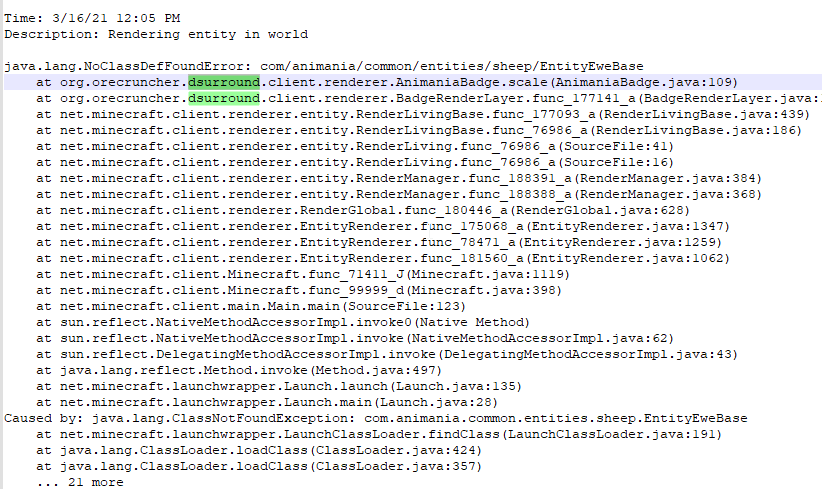 honest axle
so do i remove the mod or
last parcel
remove it, report it, update it, downgrade it, look for a fix
honest axle
ok thank you
 analog root
Hello, my Minecraft modpack has been validated and it can be found on the curseForge site but I cannot find it on the app, how do I find it?
wild jewel
analog root
Hello, my Minecraft modpack has been validated and it can be found on the curseF...
!sync
golden muskBOT
Sync and your Project.
CurseForge REQUIRE a project to have one file marked Released on them for the projects to show up in search. Otherwise only Direct links to the project work.
Files can take a while to show up in the app. If your files still have not shown up either your project is new and you have yet to mark a file as Release or there is issues with the sync system making it slow.
 kind kiln
What might happen if two items got the same id in minecraft and how can i fix it?
wild jewel
kind kiln
What might happen if two items got the same id in minecraft and how can i fix it...
Then you have bad mods.
kind kiln
i never played with mods so im asking in case
analog root
The file is marked Released, so I just have to wait?
kind kiln
so theres no possibility that they got the same id if the mods are popular?
wild jewel
analog root
The file is marked Released, so I just have to wait?
Yes, 1-24 hours
analog root
Okay thank you very much
wild jewel
kind kiln
so theres no possibility that they got the same id if the mods are popular?
Then you got bad devs who aren't fixing it in their mod
wild jewel
Define "not load"
 brazen drum
I don't know how to install it, can you help me
wild jewel
You just said that you have installed a modpack
brazen drum
yes and no i don't know how to install a modpack can you tell me how


 wild jewel
brazen drum
wild jewel
brazen drum
Did you hit the play button on this image?
 pseudo rampart
is there a way to bypass this i even tryed disabling all the mods in the pack and it still comes up
 wild jewel
pseudo rampart
is there a way to bypass this i even tryed disabling all the mods in the pack an...
wild jewel
pseudo rampart
is there a way to bypass this i even tryed disabling all the mods in the pack an...
!mc-logs
golden muskBOT
How to get a Minecraft log file.
Where to find the log on the CurseForge Client.
Right-click the modpack profile icon OR click the button in the modpack profile.
Click Open Folder.
Open the logs folder.
Find the file called latest.log and drag it into discord.
pseudo rampart
wild jewel
pseudo rampart
!mc-installfix
golden muskBOT
- Click on the icon in the bottom left.
- Click the
MinecraftTab. - Click
Changenext to theMinecraft Modding FolderOption. - Select the folder named
Install. - Delete it.
- Restart CurseForge App.
- It will ask to install MC again, do so.
- Play game.
NOTE: You will not lose any modpacks or worlds, These are saved in the Instances folder. DO NOT TOUCH THIS FOLDER OR YOU WILL LOSE EVERYTHING
pseudo rampart
minecraft tab?
wild jewel
pseudo rampart
minecraft tab?
In curseforge
wild jewel
languid nebula
I hate it
Then post your logs for a change
pseudo rampart
im still so confused 😦
languid nebula
Its an easy fix
wild jewel
pseudo rampart
im still so confused 😦
/C:/Users/Dave/Twitch/Minecraft/Install
Delete everything in it
 opaque spear
Hello, I have a problem that occurres when I try and launch any moded proffile, it says, "An unexpected issue occurred and the game crashed. We're sorry for the inconvinience. exit code 0". Idon't know whty this is happening and I would like to politely ask for help. (sorry if my grammar isn't good, english is my second language)
wild jewel
opaque spear
Hello, I have a problem that occurres when I try and launch any moded proffile, ...
!mc-logs
golden muskBOT
How to get a Minecraft log file.
Where to find the log on the CurseForge Client.
Right-click the modpack profile icon OR click the button in the modpack profile.
Click Open Folder.
Open the logs folder.
Find the file called latest.log and drag it into discord.
lone delta
sage pier
And then you export it through the app, and send them the zip-file, so they can ...
Is there a way i do not have to export the modpack and send it to my friends? Cause i do plan on havinh so anyone can download and join my server since the ip will be in the description
wild jewel
lone delta
Is there a way i do not have to export the modpack and send it to my friends? Ca...
!mc-packshare Second part
golden muskBOT
There are two ways to share a modpack you've made with others...
Export and Share - For Friends to Small Groups.
- Click the Icon for the modpack.
- Click the button next to play.
- Click
Export. - Select the files that should be included.
- Send the zip to the people that want it! They can follow the instructions in
!mc-installpackto install the pack!
Upload to Curseforge - For Public Release to Everyone.
This options will make your pack public to EVERYONE, it comes with extra requirements and will take some effort to set up.
- Go to here: https://www.curseforge.com/project/432/4471/create
- Fill out the information with a proper description of the pack. This should allow anyone to understand what the pack is.
- Click the Icon for the modpack in the CurseForge app.
- Click the button next to play.
- Click
Export. - Select the files that should be included.
- Open your Project you made on the CurseForge site and Upload the file you just made.
- Wait for Moderation & Sync so it can show up in the client! (See
!syncfor limitations)
opaque spear
golden musk
here
languid nebula
Pog
wild jewel
opaque spear
here
That is from a month ago
wild jewel
languid nebula
Pog
Molly, final warning
 elfin torrent
When I try to launch a profile with a parasite mod on it the green bar house full but a second later it says it crashed and it says exit code:0.I know it's not just the profile as I've tried with rlcraft too
wild jewel
opaque spear
what?
The file is from 21 feb
Delete all logs
wild jewel
elfin torrent
When I try to launch a profile with a parasite mod on it the green bar house ful...
opaque spear
okay. i'l try
pseudo rampart
i was hoping thus was going to be a good day but guess not 😦
wild jewel
pseudo rampart
i was hoping thus was going to be a good day but guess not 😦
Did you delete everything in the folder?
pseudo rampart
yea
opaque spear
wild jewel
The file is from 21 feb
Delete all logs
i have deleted all old logs but when i launch it it doesn't make any new logs and says the same thing
wild jewel
pseudo rampart
yea
Restart your pc, try to play again
wild jewel
opaque spear
i have deleted all old logs but when i launch it it doesn't make any new logs an...
!mc-installfix
golden muskBOT
- Click on the icon in the bottom left.
- Click the
MinecraftTab. - Click
Changenext to theMinecraft Modding FolderOption. - Select the folder named
Install. - Delete it.
- Restart CurseForge App.
- It will ask to install MC again, do so.
- Play game.
NOTE: You will not lose any modpacks or worlds, These are saved in the Instances folder. DO NOT TOUCH THIS FOLDER OR YOU WILL LOSE EVERYTHING
 wild jewel
pseudo rampart
but didnt see that b4 in bottom left
wild jewel
pseudo rampart
but didnt see that b4 in bottom left
That part is normal because it is modded
wild jewel
Does it generate logs? When does it crash?
pseudo rampart
when i push play it preps the game starts the game window then crash saying exit code 0
then makes the log
i delete them each time they come up same thing
restart nothing
wild jewel
pseudo rampart
then makes the log
Then share that log
elfin torrent
Here are the logs for my mod issue
wild jewel
pseudo rampart
Stop deleting, I need a latest.log
wild jewel
elfin torrent
Here are the logs for my mod issue
!mc-installfix
golden muskBOT
- Click on the icon in the bottom left.
- Click the
MinecraftTab. - Click
Changenext to theMinecraft Modding FolderOption. - Select the folder named
Install. - Delete it.
- Restart CurseForge App.
- It will ask to install MC again, do so.
- Play game.
NOTE: You will not lose any modpacks or worlds, These are saved in the Instances folder. DO NOT TOUCH THIS FOLDER OR YOU WILL LOSE EVERYTHING
wild jewel
pseudo rampart
thats what i gave you earlyer the latest log but will agen
And you deleted that install folder?
pseudo rampart
as far as i know yes
wild jewel
pseudo rampart
as far as i know yes
Did you reboot your pc?
pseudo rampart
3 times
wild jewel
Tried a different pack? Or version?
pseudo rampart
yea other packs work
opaque spear
wild jewel
!mc-installfix
Thank you very much!
wild jewel
pseudo rampart
my own dosnt
Then try a different forge / minecraft version
pseudo rampart
i dont want some of the mods they use thats why i was making my own
oh well guess i cant play my own mods
now i gotta go to work frustrated this never happend b4 with the old way of mods
wild jewel
pseudo rampart
i dont want some of the mods they use thats why i was making my own
Did you try a different version? Yes or no? Regardless of the mods installed on it
wild jewel
Try a different version when you have time please
pseudo rampart
can u show that agen?
wild jewel
!mc-installmods
golden muskBOT
How to install mods in CurseForge App.
- Click
+ Create Custom Profile - Name it, select the required Minecraft version, select the Forge version (usually the highest number), click
Create. - Click the profile icon.
- Click
Add New Content - Search and install the desired mods.
- Start the game!
How to install mods not on CurseForge.
- Right click the profile picture or Open the profile and click the Icon next to the play button.
- Click
Open Folder. - Drag the mod(s) into the
modsfolder. (Note: Some mods will require others, to run. Make sure to read the instructions for the mod!) - Start the game!
elfin torrent
wild jewel
!mc-installfix
It worked! Thx man
soft glade
i know this might be a non-curse problem, but when i play I get a fine fps 144fps+ (RTX 3070), but every minute or so it just freezes for a second or two before resuming?
I've got 16GB ram and it's pretty much at full usage which is weird but i have around 7GB allocated to MC
 wheat copper
Hey I bought a server off of scalacube for all the moods 6 but it wont let me join the server because it says incompatible version back someone help me
 glacial citrus
@wheat copper what mods
glacial citrus
what version where you trying to join the server on?
golden muskBOT
Sync and your Project.
CurseForge REQUIRE a project to have one file marked Released on them for the projects to show up in search. Otherwise only Direct links to the project work.
Files can take a while to show up in the app. If your files still have not shown up either your project is new and you have yet to mark a file as Release or there is issues with the sync system making it slow.
lone delta
!sync
 glacial citrus
make sure you are running forge 1.16.5 if that doesn't work idk
acoustic idol
What version of the pack does the server say its running?
wheat copper
1.5.4b
can someone join a discord and let me screen share whats going on?
or is there a vc in this discord
next panther
What's the issue?
wheat copper
Im using the same version on curse forge for all the mods 6 and on my scalacube server and it wont let me connect
says the versions arent compatible
glacial citrus
ok so i have this problem with my server it "Not Compatible FML server"
the mods are:
abnormals_core-1.16.5-3.1.1.jar
AppleSkin-mc1.16.2-forge-1.0.14.jar
AutoRegLib-1.6-47.jar
BiomesOPlenty-1.16.4-13.0.0.433-universal.jar
cofh_core-1.16.3-1.1.6.jar
create-mc1.16.3_v0.3e.jar
elevatorid-1.16.5-1.7.13.jar
gravestone-1.16.5-1.0.1.jar
Hwyla-forge-1.10.11-B78_1.16.2.jar
invtweaks-1.16.4-1.0.1.jar
jei-1.16.4-7.6.1.72.jar
OreExcavation-1.8.154.jar
Quark-r2.4-308.jar
thermal_expansion-1.16.3-1.1.6.jar
thermal_foundation-1.16.3-1.1.6.jar
oh and if i try to join it says "Failed to sync registry data with server"
acoustic idol
glacial citrus
oh and if i try to join it says "Failed to sync registry data with server"
!mc-logs Post your client log for the pack, servers as well if you can
golden muskBOT
How to get a Minecraft log file.
Where to find the log on the CurseForge Client.
Right-click the modpack profile icon OR click the button in the modpack profile.
Click Open Folder.
Open the logs folder.
Find the file called latest.log and drag it into discord.
wheat copper
this is what pops up for me
 glacial citrus
its not a modpack its my own bunch of mods i downloaded off of forge one by one
 acoustic idol
wheat copper
this is what pops up for me
acoustic idol
wheat copper
this is what pops up for me
The server is probably still booting, It does that while it boots
refresh the screen

 acoustic idol
Looks like it
acoustic idol
the red X?
wheat copper
yeah
acoustic idol
Thats more or less normal, try connecting
 inland summit
how do i add a mod pack to my server? from curseforge (host is pebblehost)
glacial citrus

PebbleHost | Knowledgebase
Unsure on how to setup your new service? Checkout PebbleHost's knowledgebase articles to assist you with your services.
@inland summit
inland summit
ty
wheat copper
@acoustic idol it worked thanks
acoustic idol
Np
glacial citrus
the mods are:
abnormals_core-1.16.5-3.1.1.jar
AppleSkin-mc1.16.2-forge-1.0.14.jar
AutoRegLib-1.6-47.jar
BiomesOPlenty-1.16.4-13.0.0.433-universal.jar
cofh_core-1.16.3-1.1.6.jar
create-mc1.16.3_v0.3e.jar
elevatorid-1.16.5-1.7.13.jar
gravestone-1.16.5-1.0.1.jar
Hwyla-forge-1.10.11-B78_1.16.2.jar
invtweaks-1.16.4-1.0.1.jar
jei-1.16.4-7.6.1.72.jar
OreExcavation-1.8.154.jar
Quark-r2.4-308.jar
thermal_expansion-1.16.3-1.1.6.jar
thermal_foundation-1.16.3-1.1.6.jar

pls hrlp
it also has the X and says "Incompatible FML Modded server
Server has additional mods that may be needed on the client
do they need to maybe be all for the same 1.16.x version
acoustic idol
Mods on a server need to be the same versions as the ones on the client
!mc-logs Drop the latest logs
golden muskBOT
How to get a Minecraft log file.
Where to find the log on the CurseForge Client.
Right-click the modpack profile icon OR click the button in the modpack profile.
Click Open Folder.
Open the logs folder.
Find the file called latest.log and drag it into discord.
 vale plinth
hi how do i share a modpack with someone? my brother and I are trying to play a custom modpack i made together and I can't figure out how to share it
autumn agate
export your profile and upload it on curse forge
vale plinth
ty
 lusty wadi
"These files should, instead, be referenced in the manifest.json file generated by the Twitch Desktop App during a profile export." is what I get when uploading my file with 3 specific mods, so idk what this means and how do I fix it
acoustic idol
lusty wadi
"These files should, instead, be referenced in the manifest.json file generated ...
How did you make the zip for the pack?
lusty wadi
I exported from the curse forge app
acoustic idol
The 3 mods in question, did you download them with the app?
acoustic idol
ok, uninstall them then reinstall them with the app, then try the export again
lusty wadi
okay
 glad briar
Everytime I close and relaunch a modpack through curseforge, the RAM I've allocated resets back to the original amount, even though I tell it to save every time - is there any way to prevent this from happening?
acoustic idol
!mc-ram
golden muskBOT
How to set Global Minecraft RAM value.
- Click the icon in the bottom left to open settings.
- Click the Minecraft tab.
- Scroll down.
- Slide slider to recommended ram range as seen below.
 acoustic idol
Have you done it this way? OR per pack
glad briar
I've just been doing it per-pack, didn't know that setting existed
Thank you so much!
acoustic idol
np
vale plinth
autumn agate
export your profile and upload it on curse forge
I dont understand how to upload it, im relatively new to curseforge
acoustic idol
vale plinth
I dont understand how to upload it, im relatively new to curseforge
!mc-packshare
golden muskBOT
There are two ways to share a modpack you've made with others...
Export and Share - For Friends to Small Groups.
- Click the Icon for the modpack.
- Click the button next to play.
- Click
Export. - Select the files that should be included.
- Send the zip to the people that want it! They can follow the instructions in
!mc-installpackto install the pack!
Upload to Curseforge - For Public Release to Everyone.
This options will make your pack public to EVERYONE, it comes with extra requirements and will take some effort to set up.
- Go to here: https://www.curseforge.com/project/432/4471/create
- Fill out the information with a proper description of the pack. This should allow anyone to understand what the pack is.
- Click the Icon for the modpack in the CurseForge app.
- Click the button next to play.
- Click
Export. - Select the files that should be included.
- Open your Project you made on the CurseForge site and Upload the file you just made.
- Wait for Moderation & Sync so it can show up in the client! (See
!syncfor limitations)
 sage basin
does anyone know why my game is crashing
 bold glacier
does anyone know how to play "flames of Crazycraft" with friends via realms because whenever i click realms it says " buy realms " i i bought it already then when i click buy realms nothing pops uo
btw flames of crazy craft is a minecraft mod
coarse elm
realms is vanilla only, you need to contact mojang realms support for issues with realms
bold glacier
i see
 echo saffron
Hello
coarse elm
sage basin
does anyone know why my game is crashing
goblintraders
echo saffron
Sorry for interrupting, but is anyone here able to help me out with a problem I'm having? Minecraft keeps crashing when I try and create or open a world. I'll explain more once I get confirmation that someone can help.
acoustic idol
echo saffron
Sorry for interrupting, but is anyone here able to help me out with a problem I'...
!mc-logs
golden muskBOT
How to get a Minecraft log file.
Where to find the log on the CurseForge Client.
Right-click the modpack profile icon OR click the button in the modpack profile.
Click Open Folder.
Open the logs folder.
Find the file called latest.log and drag it into discord.
echo saffron
I can't use the curseforge client tho
I use linux
I can still send the log file tho
One sec
coarse elm
You came to the curseforge discord so it's assumed you are using it as you didn't care to include that in the initial explanation due to " I'll explain more once I get confirmation that someone can help."
That is an infinite loop of "Who can help me with something nobody could possibly know what it is because I need to know if you can help first."
coarse elm
Nope.
echo saffron
Oof
potent tartan
i can still look at it
coarse elm
So if you would like help, many people would be willing to help. Just explain the problem and include logs right away.
echo saffron
acoustic idol
any error messages on your screen? OR does it just close on its own
echo saffron
Ok so I'm using ATLauncher because that works on Linux/Debian. I installed an instance of Bevo's Tech Pack. It installed fine and launches fine. But when I try to create a world, it guess through the creating world screens for a minute or so and then promptly crashes. When I re-launch it, the world is there in the world menu. But when I try to play it, it does the loading world screens for a minute and then takes me to the title screen for a second and then freezes and crashes.
I have it set to min 512MB max 4096MB
For Memory/RAM
coarse elm
Need more ram i'm gonna guess
acoustic idol
Soo Most modded minecrafts need at least 4GB+ if your pc has 4GB max, may not be possible
coarse elm
there's a fair few mods here
echo saffron
I'm running it on a chromebook using Linux Beta.
potent tartan
that's probably the issue
acoustic idol
ok yeah, chromebooks cant really play modded
echo saffron
Minecraft levitated and RLCraft work find
coarse elm
Minecraft isn't supported on chromebooks.
acoustic idol
Well java mc anyways in general
echo saffron
It's Linux.
coarse elm
Doesn't matter.
potent tartan

Home
Minecraft will not run on a Chromebook under default settings. Because of this, Minecraft's system requirements list that it is compatible only with Windows, Mac and Linux operating systems.Chromeb...
echo saffron
But how does RLCraft and Levitated work?
coarse elm
🤷
acoustic idol
Did you uninstall the chrome books native OS and reinstall a different flavor of linux?
coarse elm
but please be aware that this does not ensure full compatibility with Minecraft.
acoustic idol
Chromebooks linux is not the normal linux, it is its own version, which isnt supported by mojang.
Trust me I spent hours looking into this for an Client. (IT)
echo saffron
It's Debian flavored
coarse elm
It's not supported.
acoustic idol
The fact you got a pack or 2 to work is a fluke
echo saffron
Well it still works. Java is installed and vanilla minecraft works fine. everything works fine.
acoustic idol
Chromebooks were not designed for this. Sooo Either need to just stick with what works OR figure out duel booting
echo saffron
then why include linux on it?
coarse elm
Ask the manufacture.
echo saffron
because its supposed to be able tp run linux apps
acoustic idol
Soo Linux is the base name, there are a whole bunch of flavors( versions) of linux
last parcel
"run linux apps" does not mean "run all linux apps", this is why minimum requirements exist
acoustic idol
If you want to get real technical the MacOS is also a version of linux, so is Ubunto and centos. But what works in one may not on the others. Need to know what version works with what apps.
echo saffron
well Debian seems to work with minecraft.
other way around sorry
minecraft works with Debian.
acoustic idol
May work with the base game, or the bedrock version. But JAVA adds a new variable to it, that not all linux machines can handle
echo saffron
maybe i just dont have enough RAM?
acoustic idol
Your Kernnel is not supported. Thats the issue
coarse elm
Ok, this is enough of this.
You have been told multiple times, what you are doing isn't supported.
If the base game isn't supporting it, neither are we. You are on your own.
That's what happens when you decide to use things outside of the intended way.
echo saffron
youre thinking inside the box
thinking outside of the box is the way to solve problems like this.
oh by the way, the base game is supported on debian.
 coarse elm
Yeah because I don't try to run giant modpacks and other resource intensive things on bottom of the barrel tech.
Chromebooks have a place and use. Gaming is not one of them.
 kind glen
when ever i go to start a modpack my minecraft launcher keeps crashing how do i fix it??
coarse elm
For the millionth time, it doesn't matter what you are running, you are using a chromebook.
echo saffron
ok jeez
coarse elm
Linux (Beta) is a feature that lets you develop software using your Chromebook. You can install Linux command line tools, code editors, and IDEs on your Chromebook. These can be used to write code, cr
acoustic idol
If the base game doesnt support it the addons wont either
coarse elm
A feature that isn't even fully released at that.
acoustic idol
kind glen
when ever i go to start a modpack my minecraft launcher keeps crashing how do i ...
!mc-logs
golden muskBOT
How to get a Minecraft log file.
Where to find the log on the CurseForge Client.
Right-click the modpack profile icon OR click the button in the modpack profile.
Click Open Folder.
Open the logs folder.
Find the file called latest.log and drag it into discord.
echo saffron
the base game does support it though.
kind glen
how do i fix my minecraft launcher from crashing every time i try to use a modpack??
acoustic idol
kind glen
how do i fix my minecraft launcher from crashing every time i try to use a modpa...
kind glen
ty