#👽︱game-support
1 messages · Page 80 of 1
 coarse elm
 next panther
If it isn't approved yet - end users won't see it, so they won't have this issue
 sinful fossil
I did all testing before uploading . Ill clarify, I wanted test and make sure the download works through curseforge webpage. Manually downloading the files works but the direct port download to the curseforge launcher doesnt work. (using the two buttons I circled)
coarse elm
ok
 solar sleet
So got a large curseforge issue.
My custom modpack, which has been running perfectly fine since I made it, is now suddenly causing minecraft to crash on startup. During the point when you hit Play and it starts to load in all the mods, it'll crash at random times during then. Never the same spot/time.
I haven't changed, added, or discarded a single thing between the time it was working and when the crashes started. Not a single thing was changed with it, or minecraft, or my computer.
What would cause this?
coarse elm
!mc-logs
 golden muskBOT
How to get a Minecraft log file.
Where to find the log on the CurseForge Client.
Right-click the modpack profile icon OR click the  button in the modpack profile.
Click 
Open Folder.
Open the logs folder.
Find the file called latest.log and drag it into discord.
solar sleet
 autumn agate
solar sleet
So got a large curseforge issue.
My custom modpack, which has been running perf...
autumn agate
solar sleet
So got a large curseforge issue.
My custom modpack, which has been running perf...
Ummm bc of new version maybe idk bro
solar sleet
Nope, nothing was updated
No new version to have, it is all the same.
Like I said, nothing has changed.
autumn agate
Oh
coarse elm
solar sleet
!mc-ram
golden muskBOT
How to set Global Minecraft RAM value.
- Click the
 icon in the bottom left to open settings.
 - Click the Minecraft tab.
- Scroll down.
- Slide slider to recommended ram range as seen below.
 solar sleet
Well, it is more accurate to say nothing could change. I ran it last night fine, then went to bed and turned the PC off. Woke up today, turned the PC on, and it isnt working
sinful fossil
Ok thank you for all help. Ill wait to see what happens in the approval process, I assume it will resolved after the sync happens.
solar sleet
@coarse elm Already did that, weeks ago. My allocated ram has not changed
So the ram is not the issue.
Same as it always has been
 coarse elm
It's set to 4G.
Change it to 5-8 if you have the ram available.
solar sleet
Not sure if the allocation edit is working properly. Set it to about 7 but it is only using 5.8


Still crashed
 coarse elm
!mc-installfix
golden muskBOT
- Click on the icon in the bottom left.
- Click the

MinecraftTab. - Click
Changenext to theMinecraft Modding FolderOption. - Select the folder named
Install. - Delete it.
- Restart CurseForge App.
- It will ask to install MC again, do so.
- Play game.
NOTE: You will not lose any modpacks or worlds, These are saved in the Instances folder. DO NOT TOUCH THIS FOLDER OR YOU WILL LOSE EVERYTHING
solar sleet
Figured. If the game worked on 4G before and zero changes were made, it wouldn't make sense for it to suddenly need more
coarse elm
you vastly underestimate the power of modders to fuck shit up.
solar sleet
That's a mute point though. It worked for weeks beforehand, and there hasn't been any updates. Therefore, the files have not been changed. If they were fucked up beforehand, it wouldn't have worked beforehand.
coarse elm
I don't know this now do I?
 urban reef
bonjour
solar sleet
Also, cant delete the Install folder
coarse elm
I can't read your comptuer.
solar sleet
It is in use it says
urban reef
i have a problem
coarse elm
Close out of any minecraft processes in task manager.
solar sleet
I did
coarse elm
There's still something running holding on to it then.
Restart the computer then do it.
solar sleet
Wait, found a curseforge process still going in the background. Ending that fixed it
Damn, crashed again
coarse elm
post the log
solar sleet
coarse elm
are you getting any other error files in the profile folder? cause this is starting to look like a java issue as every log file just abruptly ends.
solar sleet
Nope, just that one. And yea actually when I clicked the minecraft crash log, the top mentioned a java exception. Let me do another crash and grab that
coarse elm
sure
coarse elm
that's a java crash
solar sleet
So minecraft suddenly aint working properly
Also, it seems to crash at about this point each time (right screen)

If that means anything
coarse elm
try removing foamfix
solar sleet
Kk
Oh it might be working, made it farther!
It worked!!
I wonder why that was the issue all of a sudden? Had it all this time, I wonder why now? Oh well, thanks!
 thin coyote
when is there going to be a new modpack
autumn agate
Wdym bro
thin coyote
r they going to add more
thin coyote
like crazy craft or scramble craft
autumn agate
Then make ur own
thin coyote
im to lazy
thin coyote
nah im good
autumn agate
Okay
 somber ember
Hey Guys. Has anyone had a problem with sound installing on their games when launched from curseforge? Ive tried to install multiple packs (valhelsia 2, 3, and a few others) and every time i install a modpack i seem to lose all of the vanilla sounds. But i still have wind blowing, birds chirping, But i do not have mob sounds, blocks breaking, running. Ive tried different mipmap levels, uninstall / reinstall .etc
and tends to only happen on newer packs. MCeternal works.
coarse elm
thin coyote
when is there going to be a new modpack
People make them, not curseforge
 glass nebula
Hello, I have stardew valley through steam but it CF-Beta does not reconize it exists. Is this issue fixable or.
 tame current
LILAnal's username scares me
coarse elm
glass nebula
Hello, I have stardew valley through steam but it CF-Beta does not reconize it e...
!knownissues under "other"
golden muskBOT
Known Issues with solutions or status of the issue.
Overwolf maintains a known list of issues here, some with solutions, others without.
http://support.curseforge.com/en/support/solutions/articles/9000196615-known-issues
glass nebula
Thank you.
 stone violet
how do I share my custom profile with my friends on the curseforge app?
 azure cosmos
 real pasture
quick question for 1.12.2. how do i expand the limit on renaming an item?
 feral thunder
Hey I have a quick question
coarse elm
stone violet
how do I share my custom profile with my friends on the curseforge app?
!mc-packshare
golden muskBOT
There are two ways to share a modpack you've made with others...
Export and Share - For Friends to Small Groups.
- Click the Icon for the modpack.
- Click the button next to play.
- Click

Export. - Select the files that should be included.
- Send the zip to the people that want it! They can follow the instructions in
!mc-installpackto install the pack!
Upload to Curseforge - For Public Release to Everyone.
This options will make your pack public to EVERYONE, it comes with extra requirements and will take some effort to set up.
- Go to here: https://www.curseforge.com/project/432/4471/create
- Fill out the information with a proper description of the pack. This should allow anyone to understand what the pack is.
- Click the Icon for the modpack in the CurseForge app.
- Click the button next to play.
- Click
Export. - Select the files that should be included.
- Open your Project you made on the CurseForge site and Upload the file you just made.
- Wait for Moderation & Sync so it can show up in the client! (See
!syncfor limitations)
feral thunder
I'm running into this problem where I've already started playing on a mod (RLcraft) without logging into CurseForge and now that I logged in, I can't seem to find my progress. I have the game folder from my last attempt so I was wondering how I can just continue without having to start all over again.
tame current
stone violet
!mcinstallpack
!mc-installpack
golden muskBOT
How to install modpacks with the search features in app.
- Open the
Minecraftsection of the app. - Click the top search bar where it says
Search for modpacksOR Click theBrowse ModpacksTab. - Find the Modpack you want to install and click install on it.
- Wait for CurseForge app to download and unpack all the required files.
- Once finished, click
Play!
How to install modpacks from a Export. (Custom/Private/Site downloaded Modpack zip)
- Get CurseForge App if you don't have it, use
!downloadfor a link. - Get the exported modpack from CurseForge or someone else,
!mc-packshareexplains how to make them. - Open the
Minecraftsection of the app. - Click

Create Custom Profile - Click the
Importoption. - Find the file you just downloaded in step 2 and select it.
- CurseForge app will now attempt to download and unpack the modpack. If it fails, try steps 4-6 again.
- Once finished, click
Play!
real pasture
feral thunder
I'm running into this problem where I've already started playing on a mod (RLcra...
put the saves from the old version into the curseforge folder.
stone violet
tame current
!mc-installpack
whoops
tame current
:)
feral thunder
real pasture
put the saves from the old version into the curseforge folder.
I tried that and still nothing 😦
real pasture
have you restarted the pack after putting the saves in?
 vagrant rock
hello
i need help with downloading a mod
when i try and do it
it says no java executable found
 potent tartan
vagrant rock
it says no java executable found
potent tartan
vagrant rock
it says no java executable found
?mc-java
golden muskBOT
Missing Java Fix!
Before you try to fix anything, make sure that minecraft is closed!
If minecraft is open then you will need to close it and try to launch again.
- Click on the icon in the bottom left.
- Click the
MinecraftTab. - Click Change next to the
Minecraft Modding FolderOption. - Right click the folder named
Install. - Select
Open in new window. - Double click the
minecraft.exe. - Close the Launcher once it's done loading.
- Restart Overwolf & CurseForge or the computer.
- Play game!
If the above doesn't work....
Install Java using the installer from here: https://java.com/en/download/manual.jsp
vagrant rock
thx
real pasture
does anyone know how to remove the character limit on anvils for 1.12.2? or is there a mod that does it?
 waxen citrus
Hey, I also have a question, sorry. I've been playing RLCraft for a little while now, and was playing even as recently as earlier today, working fine. However, a little while ago I tried to launch it again and when I pressed 'Play' in the curseforge launcher it switched the button to say 'Cancel' as if it was working normally, but then it instantly switched back to saying 'Play' again. The process took less than a second. For confirmation, usually the Minecraft Launcher opens up next, but I did not get to that step. I have tried the standard, such as making sure minecraft is closed, restarting curseforge, but nothing's worked. Any ideas? I've thought about uninstalling and reinstalling RLCraft, but I don't know how to do that either
golden muskBOT
Hey there, it is Curseforge, not "Cursed forge"
vagrant rock
its not letting me login to microsoft thru the modpack im using
 granite scaffold
whenever i launch minecraft with curseforge and login through Microsoft login it says 'something went wrong in the login process'
vagrant rock
same
 modest moss
Hello there, i have problem loading modpacks of minecraft
tame current
specifically?
modest moss
The deal is that when i click "play" on the downloaded modpack (in my case Sev Tech Ages) it only opens the minecraft launcher , not the game itself, so i have to manually open it (idk if its a feature or a bug), also everytime i want to play this modpack i have to open from curseforge, because everytime i close the minecraft launcher, the "Sev tech ages" version disappears and it will only appear when i click "play" from the curse launcher
tame current
modest moss
The deal is that when i click "play" on the downloaded modpack (in my case Sev T...
okay so the first part is a feature and i'm not a fan of it either, the second thing is also a feature since it is downloaded to the instances folder in the curseforge folder. the reason the modpack disappears everytime you close the minecraft launcher is because it is not saved as a valid version of minecraft, aka its not in the .minecraft folder
modest moss
oh alright, i though it was a bug the second thing, ty
tame current
happy to help :)
modest moss
Also i have another question, can i make the mods load faster when launching minecraft?
I allocated 12gb of ram for this modpack and i have a GTX 1660
12/16 ram
tame current
modest moss
Also i have another question, can i make the mods load faster when launching min...
if you want mods to load faster, you're gonna have to use the fabric loader, sorry lol
forge is just like that
modest moss
F
modest moss
So no matter how much ram i allocate it will mostly load as fast as always?
tame current
modest moss
So no matter how much ram i allocate it will mostly load as fast as always?
yes
modest moss
tame current
<#786424115535544350> if you wanna be green :)
aight
tame current
it'll open up the minecraft channels to you for further help
modest moss
Thank you
tame current
again, happy to help
 amber sphinx
Hi, my friend is trying to play a modpack called "All of fabric" but it just crashes with the error code 0. He's restarted his computer, reinstalling minecraft, reinstalling cursed forge, and moved the curseforge file to another folder. Please help him
golden muskBOT
Hey there, it is Curseforge, not "Cursed forge"
tame current
amber sphinx
Hi, my friend is trying to play a modpack called "All of fabric" but it just cra...
did he actually install the fabric loader
tame current
you dont install fabric off of curseforge
no offense but your friend is a little clueless
:)
amber sphinx
oh thanks!
tame current
tell him to install this, open minecraft, close it, then download all of fabric
amber sphinx
I will uh send the link to him
tame current
happy to help :)
autumn agate
how do i make a server for me and my friends
whats the best way to get a minecraft server with mods (playing with 4-6 people)
 bleak wraith
i tried hosting a lan with my brother and when he tried to connect it gave some random type of error ?
 wintry forge
does anyone know the identity mod
 proven oar
does anyone know how to get back to the page where I can allow access for my firewall
 finite parrot
can someone please help me out, i keep getting exit error 0 on every curseforge game/mod i try to play
 dull seal
what can i do to stop lagging please help me
 hallow socket
@dull seal Context
If minecraft turn down settings, consider increasing the available memory or get performance boosting mods
Google can help you find the latter two
 flint coral
i need help starting up sky bees it keeps crashing before i get into the start menu for it
exit error -1
 safe elm
Can anyone help me? It isnt letting me download any modpacks. Just constantly says there was an error during a "webclient request"?
 wild jewel
flint coral
i need help starting up sky bees it keeps crashing before i get into the start m...
wild jewel
flint coral
i need help starting up sky bees it keeps crashing before i get into the start m...
!mc-logs
golden muskBOT
How to get a Minecraft log file.
Where to find the log on the CurseForge Client.
Right-click the modpack profile icon OR click the button in the modpack profile.
Click Open Folder.
Open the logs folder.
Find the file called latest.log and drag it into discord.
flint coral
Not quite sureee what where my files are or called.. I just know they are barried... I’m looking tho
coarse elm
It tells you exactly how to get to them.
coarse elm
Broken pack. Tell the dev.
 mint seal
so for some reason in curseforge i cant open modpack folders and when im ingame i cant open screenshots
wild jewel
mint seal
so for some reason in curseforge i cant open modpack folders and when im ingame ...
Can't open modpack folders? You on mac?
wild jewel
How are you trying to open them?
mint seal
right click and open folder
wild jewel
Restart curseforge, try again, if that doesn't work, pc restart and try again
mint seal
yea gonna try pc restart
curseforge restart didnt work
yup that worked
so now for the real problem
im making a small modpack for me and some friends but when i am like 20 blocks away from something its like the textures dont fit together
 molten willow
Hi How's it going
 grim sandal
Why is Create not in the launcher?
mint seal
it is
molten willow
I'm here because I'm having issues downloading CurseForge. Every time i try to download it i open the installer file, give it access, and then nothing happens. I've tried updating drivers and restarting my pc
wild jewel
grim sandal
I cant find it
!mc-installmods
golden muskBOT
How to install mods in CurseForge App.
- Click
+ Create Custom Profile - Name it, select the required Minecraft version, select the Forge version (usually the highest number), click
Create. - Click the profile icon.
- Click
Add New Content - Search and install the desired mods.
- Start the game!
How to install mods not on CurseForge.
- Right click the profile picture or Open the profile and click the Icon next to the play button.
- Click
Open Folder. - Drag the mod(s) into the
modsfolder. (Note: Some mods will require others, to run. Make sure to read the instructions for the mod!) - Start the game!
 grim sandal
Ah thx
wild jewel
molten willow
I'm here because I'm having issues downloading CurseForge. Every time i try to d...
Install overwolf first
mint seal
does anyone have a fix for these texture glitches?
 molten willow
thanks for reminding me i could do that @wild jewel
grim sandal
wild jewel
!mc-installmods
Ty
safe elm
😦
No one helped me ;^;
ive uninstalled and reinstalled multiple times but it wont let me download any packs
mint seal
what does it say?
safe elm
webclient error
golden muskBOT
:bug: Reporting via the CurseForge App :bug:
-
Click the
 icon in the bottom left.
 -
Select

Open a Ticket. -
Fill out the form with accurate detailed information, "It doesn't work" isn't helpful! What exactly doesn't work and why doesn't it work should be easy to answer!
-
Make sure to upload your Overwolf logs with the
Upload Fileoption on the ticket, information on how to get these logs can be found here https://support.overwolf.com/en/support/solutions/articles/9000176827-how-to-get-your-overwolf-logs -
Submit!
 wild jewel
safe elm
webclient error
wild jewel
safe elm
webclient error
!ticket-app
 signal pier
Months ago, I changed my name and pfp on twitch but it never showed up on curseforge
I asked about it here and I was told soon people will be able to change their names and profile pictures, interestingly I have now changed my browsers for unrelated reasons and logging into curseforge it did not see my old name as the an account that exists, but it did accept the name I have changed to long ago, my profile picture too is now changed
so can we or can we not change our names and profile pictures? was the issue to do with curseforge or was it my old web browser, either way I got my new pic and name and I'm satisfied 🤔
 wild jewel
There is nothing made to change it yet
mint seal
mint seal
does anyone have a fix for these texture glitches?
anyone know a fix?
coarse elm
wild jewel
There is nothing made to change it yet
Apparently you can still do the changes on twitch and it applies over.
coarse elm
signal pier
I have another question, is there a way to apply dark mode onto the site ?
Use an extension or user script.
Otherwise waiting till they remake the site. It will have a dark and light mode.
signal pier
coarse elm
Apparently you can still do the changes on twitch and it applies over.
that's what I have done, and then I came here asking for help since it didn't work and got notified curseforge currently doesn't really allow that sort of thing
honestly I'm just happy it's changed now for me lol :D
signal pier
coarse elm
Use an extension or user script.
Otherwise waiting till they remake the site. I...
sweet, thanks!
 idle sluice
where can i get help with cursforge and a minecraft mod?
wild jewel
Here
idle sluice
i get an error while im trying to install a mod (valhelsia 3) it says. No java executable found. Cannot execute post-installation tasks for forge
im using curseforge
wild jewel
!mc-java
golden muskBOT
Missing Java Fix!
Before you try to fix anything, make sure that minecraft is closed!
If minecraft is open then you will need to close it and try to launch again.
- Click on the icon in the bottom left.
- Click the
MinecraftTab. - Click Change next to the
Minecraft Modding FolderOption. - Right click the folder named
Install. - Select
Open in new window. - Double click the
minecraft.exe. - Close the Launcher once it's done loading.
- Restart Overwolf & CurseForge or the computer.
- Play game!
If the above doesn't work....
Install Java using the installer from here: https://java.com/en/download/manual.jsp
wild jewel
Then find the folder by hand and run the minecraft launcher there
Feel free to give replacement options for those steps btw!
wild jewel
Yes, you run the file
wild jewel
Close curseforge
idle sluice
maybe i need to install 1.16.5
 wild jewel
Then try a pc restart
 stoic path
idle sluice
again
stoic path
idle sluice
again
https://www.java.com/nl/ instal it
Ga vandaag nog aan de slag met Java
mabey not /nl/ tough hahah
Get started with Java today
golden muskBOT
Missing Java Fix!
Before you try to fix anything, make sure that minecraft is closed!
If minecraft is open then you will need to close it and try to launch again.
- Click on the icon in the bottom left.
- Click the
MinecraftTab. - Click Change next to the
Minecraft Modding FolderOption. - Right click the folder named
Install. - Select
Open in new window. - Double click the
minecraft.exe. - Close the Launcher once it's done loading.
- Restart Overwolf & CurseForge or the computer.
- Play game!
If the above doesn't work....
Install Java using the installer from here: https://java.com/en/download/manual.jsp
idle sluice
im on mac
idle sluice
idle sluice
i cant do step 5,6
.
 sage pier
 slim moss
hey so I uploaded a modpack file to the website for publication, but had to fix it because it wasn't working server side, but when I went to reupload it after deleting the incorrect version, and then fixing the issue, it is now saying it is a duplicate file and is now being rejected, even though I deleted the old file from the website archive and it no longer shows up
idle sluice
i already installed java
slim moss
is the issue just that it is named the same thing you think?
idle sluice
sage pier
https://itssm.pl/3q5E7PK
do i need to download also that?
sage pier
Maybe, I don't know since I can't test on a Mac.
But you might need to restart your computer after it's installed.
coarse elm
slim moss
hey so I uploaded a modpack file to the website for publication, but had to fix ...
Deleting the file doesn't remove it from the duplicate file check. Whatever you fixed should have made it diffrent.
idle sluice
after i installed do i need to put it somewhere?
slim moss
i know, thats why I was confused when It was saying it was a duplicate since I used different versions of the same mods
coarse elm
Are you 100%sure you uploaded the right file?
slim moss
100%
idle sluice
NVM
slim moss
I can re export it but its the same files
slim moss
and theyre deleted from the website so I cant access where they were
so Im unsure what to do at this point
slim moss
like I had uploaded it as an additional file, but deleted it because I wanted it to be a main release, and now its screwy
is there anyway to fix that? Maybe re export it with more things attached to the file so its different?
coarse elm
Just throw an extra text file in the config folder that has some words on it
slim moss
ok
next panther
idle sluice
i only needed to install java
are you on Mac?
sage pier
Yes, they are. ^^
next panther
we are fixing it this week
next panther
for now, gotta install Java
sage pier
Yeah, you just gotta add it manually to the modpack/profile.
sage pier
Yes, you should be able to right click the profile, and then click "Open Folder"
slim moss
ok my issue is fixed! Thanks for the help!
idle sluice
where?
sage pier
And then there should be a "mods"-folder, where you can put the optifine-mod. Make sure that it's the correct version, in this case for your MC version.
idle sluice
????
 sage pier
Is that when you clicked "Open folder" on the modpack?
Should be something like this. https://itssm.pl/3pYIf48
idle sluice
here i got it fro here
 sage pier
That's not what I told you to do though. ^^
wild jewel
Now go to instances
 humble folio
how do I add multiple mods to minecraft
wild jewel
!mc-installmods
golden muskBOT
How to install mods in CurseForge App.
- Click
+ Create Custom Profile - Name it, select the required Minecraft version, select the Forge version (usually the highest number), click
Create. - Click the profile icon.
- Click
Add New Content - Search and install the desired mods.
- Start the game!
How to install mods not on CurseForge.
- Right click the profile picture or Open the profile and click the Icon next to the play button.
- Click
Open Folder. - Drag the mod(s) into the
modsfolder. (Note: Some mods will require others, to run. Make sure to read the instructions for the mod!) - Start the game!
humble folio
mods folder???
wild jewel
humble folio
mods folder???
What are you trying to install? Link it please
golden muskBOT
How to add/remove mods in a modpack.
- Click on the picture of the modpack.
- Click the

Add More Contentbutton, IF this button is not there, see below before continuing. - Find the Mods, Resource Packs or Maps you wish to Install and click
Installon them. - Wait for all the required mods to be downloaded.
- Start the modpack.
How to Enable/Disable content management for modpacks.
- Click on the picture of the modpack.
- Click on the button next to the
Playbutton. - Click on

Profile Options. - Check the
Allow content management for this profileoption if you want to edit the content of the modpack, uncheck it to disable.
NOTE: The Allow content management for this profile option is what allows you to Delete, Disable, Update or Install any Mods, Resource Packs or Maps managed by CurseForge. It must be on to modify any of them! (Currently)
humble folio
well if I was to use two mods
how would I download them both
Into a minecraft game
wild jewel
Install the modpack, add the mod
 chrome orbit
How do i setup a server correctly for All The Mods 6 modpack? It always turns intoo a vanilla server.
Im hosting it on my pc
wild jewel
How are you starting it?
 wild jewel
What is in the run.bat?
chrome orbit
java -Xmx6G -Xms6G -jar minecraft_server.1.16.4.jar nogui
here
i have 16gb of ram
i mean 24
i forgot i upgraded
wild jewel
Did you install that yourself or did you use instructions?
chrome orbit
i was watching multiple videos yesterday on yt
for that particular minecraft version
and it dosent work
i dont know why
wild jewel
https://www.curseforge.com/minecraft/modpacks/all-the-mods-6/files/3221293
You do realize that they have a server pack right?
chrome orbit
...
no
im so stupid
i would never think of that
it dosent downlaod or open on my app
nvm
i got it
how do i use it
the folder
wild jewel
Put the files in your server directory, run the bat file
chrome orbit
which one?

oh
this is good

i hope it works
if i edit the .bat can i allocate more ram to it
wild jewel
Probably
chrome orbit
will it say done. at the end when its finished i presume
wild jewel
No idea, just downloaded the zip and looked at the content, never used the thing
chrome orbit
i appreciate a lot with your help
i tried to do this for weeks now
lmao
how do i know when its finished
because its pausing every now and then
 wild jewel
Looks like done
autumn agate
how to fix no java executable found. can not execute post installations for forge. on mac
wild jewel
autumn agate
how to fix no java executable found. can not execute post installations for for...
!mc-java
golden muskBOT
Missing Java Fix!
Before you try to fix anything, make sure that minecraft is closed!
If minecraft is open then you will need to close it and try to launch again.
- Click on the icon in the bottom left.
- Click the
MinecraftTab. - Click Change next to the
Minecraft Modding FolderOption. - Right click the folder named
Install. - Select
Open in new window. - Double click the
minecraft.exe. - Close the Launcher once it's done loading.
- Restart Overwolf & CurseForge or the computer.
- Play game!
If the above doesn't work....
Install Java using the installer from here: https://java.com/en/download/manual.jsp
humble folio
I keep trying to download mods but it keeps trying to open curse forge on my browser
wild jewel
humble folio
I keep trying to download mods but it keeps trying to open curse forge on my bro...
Use the client instead
wild jewel
 ionic smelt
How do you make an multiplayer pixelmon reforged server
ionic smelt
How do you make an multiplayer pixelmon reforged server
Does the modpack have a server pack?
wild jewel
Project page on the website
 queen ridge
I cant open the modfolder in a modpack
When i click on the three points-menu,
and than click on open folder
than it says access denied

Its german
next panther
can you translate it?
bleak wraith
when i try to host a server off my pc when i try to join it, it says mismatched mod list?
queen ridge
I can try
On C: \ Users \ pinsi \ curseforge \ minecraft \ Downloads \ Instances \ Zombie Apocalypse (SLOW ZOMBIES) by Forge Labs (1) cannot be accessed.
Access denied
 serene gulch
ionic smelt
and it need to be free
serene gulch
ionic smelt
and it need to be free
a bit old but still a good tutorial https://www.youtube.com/watch?v=7J9aq4fV_GE

In this episode of OMGcraft, Chad shows you how to make a modded Minecraft server and also explains the benefits of having a modded server, even if you intend to play on Single Player.
java -Xmx1024M -Xms1024M -jar minecraft_server.jar nogui
Check Out OMGchad Merch at http://helloomg.com
● TWITTER: http://twitter.com/omgchad
● INSTAGRAM: ht...
ionic smelt
is it free
 last parcel
!mc-installserver
golden muskBOT
How to **manually** install a server - **On your own PC**
- Go to the Forge website http://files.minecraftforge.net/ and download the Installer for the forge version the pack is using.
- Run the installer and choose
Install server. Do not install to your desktop. Also do not install inside a OneDrive folder. - Run the server using the forge.jar. A file called
eula.txtwill be generated. Open it and changeeula=falsetoeula=true - From the Client; Copy the
modsfolder,configfolder, and any other folders needed for the pack to work into the server folder. If the modpack has a server pack, use this instead! - Run the server again.
 stable cosmos
can someone tell me how i can play modpacks with my friends without money?
stable cosmos
thanks
 steep swift
Hey, so I've been waiting 2 and a bit days for my modpack to be approved. I was hoping that it'd be out by now, but I presume there might be a delay because of covid, and the pressure it must be getting? Is this the case, or is there some other reasoning? I was told it should take around 2 days.
last parcel
3 working days is pretty normal
steep swift
alright, thanks
last parcel
here's a thing on how to install a server if anyone wants to proof read it
https://pastebin.com/83DXfGTH
Pastebin
Pastebin.com is the number one paste tool since 2002. Pastebin is a website where you can store text online for a set period of time.
wild jewel
Link it
ionic smelt
!mc-installserver
golden muskBOT
How to **manually** install a server - **On your own PC**
- Go to the Forge website http://files.minecraftforge.net/ and download the Installer for the forge version the pack is using.
- Run the installer and choose
Install server. Do not install to your desktop. Also do not install inside a OneDrive folder. - Run the server using the forge.jar. A file called
eula.txtwill be generated. Open it and changeeula=falsetoeula=true - From the Client; Copy the
modsfolder,configfolder, and any other folders needed for the pack to work into the server folder. If the modpack has a server pack, use this instead! - Run the server again.
wild jewel
last parcel
here's a thing on how to install a server if anyone wants to proof read it
https...
Might want to add a note for server pack installs
autumn agate
@wild jewel i have the foreinstall already i need help commetiong it to my mc files
connecting*
wild jewel
autumn agate
<@!525950791710801921> i have the foreinstall already i need help commetiong it ...
What do you have?
last parcel
wild jewel
Might want to add a note for server pack installs
there is a note under installing forge part
autumn agate
wild jewel
What do you have?
 next panther
What's the issue?
autumn agate
next panther
What's the issue?
when i try to play it it redownlaods mc
but i already have it
wild jewel
autumn agate
when i try to play it it redownlaods mc
It does that as it curseforge has its own files
wild jewel
last parcel
there is a note under installing forge part
https://www.curseforge.com/minecraft/modpacks/all-the-mods-6/files/3221293
Does not handle things like this
next panther
I'm in DM with SMOKEY - looks like the modding folder is in the root drive - trying to figure out what else is wrong
wild jewel
next panther
I'm in DM with SMOKEY - looks like the modding folder is in the root drive - try...
You really need to have a notification for that so you can mark it as "Claimed, in dm"
next panther
yeah, i'll tag it with 
autumn agate
I keep running into this issue with my modpacks. After a certain period of time, I will start up my modpack that was working a couple of days ago and then when I start up the modpack from minecraft launcher it crashes without giving me a crash log and it just says exit code 0.
This time however, while my game was starting up, I was editing a config file for one of my mods and thats when it started
it could also be because before then, I left my minecraft on over night because when I restarted it thats when the problems began to occur.
Now it refuses to work.
Each time I try restarting it, the modpack won't start up now.
What should I do?
next panther
Let's start 1 thing at a time
Run this troubleshooter and click the Launch Vanilla button
That should close any "stuck" launcher processes that are blocking the Play to work
This usually happens after a crash
autumn agate
It refuses to run because my modding folder is in the one drive
hold up I am moving out of the one drive folder
Fuck its not working now.
wait
hold on
Nevermind i am just gonna reinstall forge and make it all new
queen ridge
I cant open the modfolder in a modpack. When i click on the three points-menu, and than click on open folderthan it says access denied
wild jewel
queen ridge
I cant open the modfolder in a modpack. When i click on the three points-menu, a...
Can you open it manually?
 burnt leaf
Anyone know why this is happening
 last parcel
got a link to that modpack?
queen ridge
wild jewel
Can you open it manually?
I try
burnt leaf
last parcel
got a link to that modpack?
last parcel
takes up to 24 hours for the files to sync to the app, until it is synced it will fail
burnt leaf
okay
last parcel
burnt leaf
okay
did you download this from the website?
burnt leaf
last parcel
did you download this from the website?
mhm
last parcel
ty
signal pier
Im trying to mess around with config files in my custom modpack I made using the app
but everytime I save a config file after I changed it, it just goes back, it resets as if I've never touched it
and the game doesn't change either
last parcel
close the game first, change the config, open the game
 covert chasm
I have RLcraft from curseforge (version 2.8.2 i believe) and I am thinking about installing optifine, anyone have any recommendations in terms of version or things like that?
 vestal drift
how long does it take to receive a payout?
 ebon sail
I have a little problem could someone help me out???
When i try to play example pixelmon modpack, whenever i enter the multiplayer server for pixelmon realms or any server, it tells me that there is an authentication error that the server is down for maintainence
has this hapenned to anyone
it works with all my friends but not me, i have downloaded JDK, optifine, lunar client to get it to work but i dosent
wild jewel
vestal drift
how long does it take to receive a payout?
Beginning of the next month that you ordered
 long yarrow
hey, i cant download mc eternal because the download always times out when installing the between lands
 near compass
https://gyazo.com/a438a407673f7257369dfb62d9a4aec3
Attempting to download decimation, restarted PC etc and same error. Any help?

?mc-installfix
golden muskBOT
- Click on the icon in the bottom left.
- Click the
MinecraftTab. - Click
Changenext to theMinecraft Modding FolderOption. - Select the folder named
Install. - Delete it.
- Restart CurseForge App.
- It will ask to install MC again, do so.
- Play game.
NOTE: You will not lose any modpacks or worlds, These are saved in the Instances folder. DO NOT TOUCH THIS FOLDER OR YOU WILL LOSE EVERYTHING
near compass
Any and all help appreciated to the issue above.
wild jewel
!ticket-app
golden muskBOT
:bug: Reporting via the CurseForge App :bug:
-
Click the
icon in the bottom left. -
Select
Open a Ticket. -
Fill out the form with accurate detailed information, "It doesn't work" isn't helpful! What exactly doesn't work and why doesn't it work should be easy to answer!
-
Make sure to upload your Overwolf logs with the
Upload Fileoption on the ticket, information on how to get these logs can be found here https://support.overwolf.com/en/support/solutions/articles/9000176827-how-to-get-your-overwolf-logs -
Submit!
 sullen mauve
whast the problem here? https://paste.ee/p/7Ezgn

 visual bloom
Hey hey, im working on a Minecraft Texture pack, but when I try to zip it, it does not show up in the resourcepack list (When its a normal folder it work normally). Someone can help?
 vague arch
Do you use mac or windows
@visual bloom do you use mac or windows
oh it doesnt work as a zip file
it has to be a folder
vague arch
oh ok
vague arch
oh wait it does work as a zip file i actually didnt know that
vague arch
visual bloom
and not the content of it
LOL
 pine patio
ayo need some help bcuz i try and open curseforge but it closes and never opens
<@&761437432791957535>
signal pier
can anyone help me out figuring why I have a crash? it happens twice, might be related to rendering a mob, might be related to a spawner or something
can I get info about this, cause I cant understand too much of these logs
 sudden mauve
Looks like a problem rendering a skeleton to me.
signal pier
yes
its a skeleton from the spawner
how can I fix it?
I tried logging to the world for the 3rd time and it still crashed
okay so after some testing the crash only happens when Im trying to break the spawner
autumn agate
why does a twilight forest minecraft mod say it will harm my even though my friends use it fine
last parcel
where does it say that?
autumn agate
on a twilight forest when im downloading it on my browser
last parcel
pic?
potent tartan
sullen mauve
whast the problem here? https://paste.ee/p/7Ezgn
the aether conflicts with another mod because they have the same dimension id
last parcel
you talking about the warning that you get for any jar file
you get that for any jar file. if you trust the file ignore it. if not then dont use the file
last parcel
it's not saying it's not good. it's saying that type of file can do things you may not expect. you need to use your own judgement weather to use the file or not
autumn agate
ok
last parcel
visual bloom
question, how can I change my profile picture on Curse?
 summer osprey
Hey, I just had a quick question. What's the average time it takes for a modpack to be reviewed and accepted?
 acoustic idol
summer osprey
Hey, I just had a quick question. What's the average time it takes for a modpack...
acoustic idol
summer osprey
Hey, I just had a quick question. What's the average time it takes for a modpack...
If its just an update Its pretty quick(sometimes) If its a brand new pack then:
!status
golden muskBOT
It is 09:46PM on Monday for CurseForge my dudes.
Project Moderation Time
Project/File moderation is done on Sunday - Thursday from 10am - 6pm GMT+2
This process is First in, First out. Thus files submitted late in the work day may not be checked until the next work day.
last parcel
new projects are about 3 working days. updates to projects are usually within an hour
summer osprey
Oh awesome, thanks guys!
 arctic mural
can someone help we with my modpack i have downloaded all the mods i want but i get errors when loading i need to know what i need to get rid of to fix it
summer osprey
Will it be rejected if it has 3rd party jar files not installed using CurseForge? It has OptiFine in it
summer osprey
Sounds good, thank you :)
arctic mural
if they want to use optifine they add it themselves
last parcel
arctic mural
can someone help we with my modpack i have downloaded all the mods i want but i ...
you need a mod to extend the id range, like jeid
 last parcel
restart curseforge
last parcel
@next panther got another one
last parcel
slightly diffrent. game was just working an hour ago, now wont load
arctic mural
no
last parcel
/C:/Users/digge/Twitch/Minecraft/Install
dull seal
Is there any way to not lag as much on pixlemon I had to turn down my chunks all the way
acoustic idol
Could try more ram
 toxic perch
dull seal
Is there any way to not lag as much on pixlemon I had to turn down my chunks all...
toxic perch
dull seal
Is there any way to not lag as much on pixlemon I had to turn down my chunks all...
maybe your internet or storage or computer
arctic mural
dull seal
Is there any way to not lag as much on pixlemon I had to turn down my chunks all...
there are many factors to this you need to be more clear
is it only on servers
if so that is a internet issue
or a server side issue
also if it is a server you dont need to turn down chunks
if it is FPS issue try more ram or lower chunks or a combination of the 2
autumn agate
random question: im new and dont know what overwolf is
I just downloaded curseforge like a few days ago
last parcel
so what's the question
 lone shadow
Hi, I asked something in the forum, but since I found the discord, I will ask here too.
(Question about Minecraft modpack btw 🙂 )
(You can find it, this is the last one posted at the moment)
Is that possible to make mods optional for profile export?
I know that you can disabled mods by unchecking them is mod list, but if I export the profile, after importing it, I end up with both .jar non-disabled mods and the disabled one (with .disabled), so it makes the mod active, and it bugs the check in mod list (because there is the two mods).
Some other weird thing is happening, I did exactly that a minute ago, and other mods has been disabled (I never unchecked them)
Is that a known issue ?
last parcel
hard to follow what you're saying. why would you want mods to be optional
lone shadow
Because I would like to make some client-side mod optional, like mods adding some GUI elements, like Journey Map or Worldedit CUI
By optional I mean disabled by default
last parcel
if it's not working as you expect you should make a ticket, but might want to be more clear about what the issue is
?ticket-app
golden muskBOT
:bug: Reporting via the CurseForge App :bug:
-
Click the
icon in the bottom left. -
Select
Open a Ticket. -
Fill out the form with accurate detailed information, "It doesn't work" isn't helpful! What exactly doesn't work and why doesn't it work should be easy to answer!
-
Make sure to upload your Overwolf logs with the
Upload Fileoption on the ticket, information on how to get these logs can be found here https://support.overwolf.com/en/support/solutions/articles/9000176827-how-to-get-your-overwolf-logs -
Submit!
lone shadow
Well ok, sorry for not being clear.
 fossil pollen
Hi everyone i think i'm having some troubles :/ Just installed my modpack that just got accepted on curseforge, and i wanted to manually add inside of it optifine. But when I add optifine in the mods folder and start the game it will start but without loading optifine :/ Is that normal ?
btw if i'm not in the curseforge version of the modpack (my hand made version) it loads without problems...
 fresh light
Probably need to add optifine to the code in one of the mod list files. Not an expert don’t take me seriously
 brazen charm

I need help again
So I tried loading in a new modpack but it said this when I dont have a mod in the modpack called this
Its the boss_tools one
autumn agate
brazen charm
You already said this in the other chat channel
brazen charm
Yes
fresh light
Try to download it off forge and then install it in the mods folder @brazen charm
brazen charm
Ok
fresh light
Not the one located under appdata, but the curseforge One in documents
brazen charm
How do I do that btw
brazen charm
Ok
 oak needle
how do i get my custom modpack on the website where my friends can play it
 gusty palm
Hello, I’ve attempted to download Rogue like Adventures and dungeons, and it keeps stopping at about 30 files with the error message “the file names exceed 240 characters” or something along those lines. I’ve tried searching on the internet to see if other people have in countered the same issues and if the have a solution but none have found one from what I’ve found. Any help?
coarse elm
gusty palm
Hello, I’ve attempted to download Rogue like Adventures and dungeons, and it ke...
!mc-path
golden muskBOT
Minecraft Files should NOT be installed inside the .minecraft folder or inside OneDrive folders. If this shows up in the path at all you need to move it by following the instructions below!
If Minecraft is not installed, start here.
Click the  in the top right.
Select Minecraft.
Click "Edit".
Move to the "Continue here:" section below.
If Minecraft is installed, follow these steps.
Click the in the bottom left.
Select the Minecraft tab.
Click "Change".
Move to the "Continue here:" section below.
Continue here:
Make a folder in the root directory called CurseForge.
Select the folder you just made.
The text box should show something like the following:
For Windows: C:\CurseForge
For Mac: /Users/Shared/CurseForge

 near wasp
any one know what this mod is pointing to please xD
 fossil pollen
okay i just understood the curseforge app is litterally blocking the manual addition of optifine on official modpack it's nonsense wtf 🤯 🤷♂️
coarse elm
near wasp
any one know what this mod is pointing to please xD
you need minecraft 1.16.4 like it says...
coarse elm
fossil pollen
okay i just understood the curseforge app is litterally blocking the manual addi...
what are you even talking about..?
near wasp
yes i get that but most mods that are on1.16.4 fabric work on 1.16.5 fabric and i have 300 mods in the pack iam just asking what mod this one ins perticular is to try and save my self some time as it take me long enought to update my pack any way
dull seal
toxic perch
maybe your internet or storage or computer
Thanks
dull seal
arctic mural
if it is FPS issue try more ram or lower chunks or a combination of the 2
Thanks
near wasp
its one of the ones i have saved XD
near wasp
i know right and reali?
coarse elm
Xaeros_Minimap_21.4.1_Forge_1.16.5.jar", ignoring
fossil pollen
coarse elm
what are you even talking about..?
maybe i didn't understood anything but it looks like the manually added mods to an official modpack are not started with the game, as my manually added optifine to the modpack never starts while it does on hand made modpacks :/
I looked in the minecraftinstance.json, there was a "isUnlocked : false" entry which I tried to switch to true but restarting the app brings it back to false...
So I assume it's made to be blocked ?...
coarse elm
fossil pollen
maybe i didn't understood anything but it looks like the manually added mods to ...
the app does nothing of the sort.
Perhaps you shouldn't start trying to modify files randomly...?
fossil pollen
You know what is this json entry made for ?
near wasp
god dam still dont know what this modid is
coarse elm
It has nothing to do with anything regardless you don't need to worry about what it's for.
leave the files alone.
coarse elm
near wasp
god dam still dont know what this modid is
could try the fabric discord?
near wasp
i tried the aof discord i cant remember where the fabic discord is aof most of them are pompas gits in there sorry to say
is it the fabric project ?
coarse elm
yes
fossil pollen
ok ok... I just noticed that hand made packs were unlocked and not offical downloaded ones... But it doesn't explains why does optifine never launches when added to official downloaded packs, maybe my error is somewhere else, but i don't get it
coarse elm
you put it in the mods folder. that's it.
if it doesn't work you have other problems
curseforge app doesn't say "you can load this but not this" it just gives the launcher a folder location saying "here, load stuff from this space"
 river zealot
I installed FTB presents sky factory 3 server files, and it says to run install.bat but when I do it just closes. Is it because I don't have enough ram?
fossil pollen
yup so without modifying any files it starts on the same modpack manually made, but never if it's the same downloaded one... I'll try to investigate the issue even more but I feel like it will be meh~
 stoic void
Hey ClayCorp you remember the issue i had with the approval bot? you assume that the addonpack was the issue with the bot. right? will I get notify when this is fix ?
 uneven cloud
Uh does community support also do servers?
I have a problem with serverminer
Its obviously something from my custom modpack but im not sure what
coarse elm
stoic void
Hey ClayCorp you remember the issue i had with the approval bot? you assume that...
It should have been looked at?
stoic void
Ooo my apologies you are correct it was fixed thank you!
coarse elm
remove whatever this is ibeeditor
uneven cloud
oh sad
alr ty
ibe was one of the mods i really wanted to use sadd
alr thank you so much
 ebon lichen
i cant install pixelmon it always stops at 42%
uneven cloud
Im having another problem with the server
Whenever anyone does anything the server crashes
coarse elm
post the log
coarse elm
Remove/update skyblockenchantments
uneven cloud
kkkk ty
gusty palm
coarse elm
!mc-path
Thank you 👍🏻 I’ll look in to this and hope it works lol
 signal goblet
I have a problem. So i mirrored my game drive from a HDD to a SSD and now I located my files but cant get curseforge to notice that they are there
How do i get the launcher to re-recognize the install without having to reinstall, and will my saves be gone or does this back up to a server?
 sage marsh
trying to launch fresh version of all the mods 6 and i keep getting this error
last parcel
signal goblet
I have a problem. So i mirrored my game drive from a HDD to a SSD and now I loca...
How do i get the launcher to re-recognize the install without having to reinstall
restart it, though it may not work.
will my saves be gone or does this back up to a server?
saves are still where they were. make a backup of them before you reinstall.
signal goblet
Alright will see what happens. Thanks
last parcel
sage marsh
trying to launch fresh version of all the mods 6 and i keep getting this error
restart the app
last parcel
?mc-installfix
golden muskBOT
- Click on the icon in the bottom left.
- Click the
MinecraftTab. - Click
Changenext to theMinecraft Modding FolderOption. - Select the folder named
Install. - Delete it.
- Restart CurseForge App.
- It will ask to install MC again, do so.
- Play game.
NOTE: You will not lose any modpacks or worlds, These are saved in the Instances folder. DO NOT TOUCH THIS FOLDER OR YOU WILL LOSE EVERYTHING
sage marsh
thats that worked
 indigo acorn
hi when i want to play a modpack on 1.12.2 or 1.16.5 whe i load it up it says error code 0
 median gate
#🧱︱mc-other-help something of importance to Curseforge moderators or moderators of this discord, might want to blacklist this guy from the website and keep an eye out for his tag in this server
dull seal
Have any of you guys played pixelmon and if so how do you throw a Pokémon (it’s for obsidian edition 1.3)
 stuck lion
my curseforge just broke and when i open it it says its lauching overwolf then nothing happens

 serene gulch
How do you install fabric mods on curseforge?
wild jewel
!mc-fabric
golden muskBOT
Fabric modpacks or the use Fabric mods require you to install a mod called Jumploader.
Fabric mods do not work with Forge.
Forge mods do not work with Fabric.
Fabric mods should be marked with a Fabric Icon like this: 
serene gulch
ok cool thanks
 dusky oak
I've been trying to add Stardew Valley to the program, but for some reason when it scans my files it can't find it and the game doesn't show up in it's folder when I try to manually add it. Is Stardew just not compatible with the program?
wild jewel
dusky oak
I've been trying to add Stardew Valley to the program, but for some reason when ...
!knownissues Look at "Other games"
golden muskBOT
Known Issues with solutions or status of the issue.
Overwolf maintains a known list of issues here, some with solutions, others without.
http://support.curseforge.com/en/support/solutions/articles/9000196615-known-issues
dusky oak
thanks
autumn agate
RLCraft wont open im on mac btw so idk if that changes anything but i need help with this
wild jewel
autumn agate
RLCraft wont open im on mac btw so idk if that changes anything but i need help ...
!mc-installfix
golden muskBOT
- Click on the icon in the bottom left.
- Click the
MinecraftTab. - Click
Changenext to theMinecraft Modding FolderOption. - Select the folder named
Install. - Delete it.
- Restart CurseForge App.
- It will ask to install MC again, do so.
- Play game.
NOTE: You will not lose any modpacks or worlds, These are saved in the Instances folder. DO NOT TOUCH THIS FOLDER OR YOU WILL LOSE EVERYTHING
 gray palm
Hello, help me fix this
 wild jewel
Modlist
 wild jewel
Disable a couple, test it again
autumn agate
wild jewel
!mc-installfix
Still doesn’t work
wild jewel
autumn agate
Still doesn’t work
Tried pc restart?
 true jay
whenever i open the mc laucher if i want my old profiles i need to uninstall any mods i have on curseforge
help
?mc-path
golden muskBOT
Minecraft Files should NOT be installed inside the .minecraft folder or inside OneDrive folders. If this shows up in the path at all you need to move it by following the instructions below!
If Minecraft is not installed, start here.
Click the in the top right.
Select Minecraft.
Click "Edit".
Move to the "Continue here:" section below.
If Minecraft is installed, follow these steps.
Click the in the bottom left.
Select the Minecraft tab.
Click "Change".
Move to the "Continue here:" section below.
Continue here:
Make a folder in the root directory called CurseForge.
Select the folder you just made.
The text box should show something like the following:
For Windows: C:\CurseForge
For Mac: /Users/Shared/CurseForge
wild jewel
true jay
whenever i open the mc laucher if i want my old profiles i need to uninstall any...
Close everything, then start vanilla
true jay
everything related to curseforge
wild jewel
Minecraft more
 low swallow
when im downloading rlcraft modpack at 44/118 i got an error 2times ; time out attemping downloading lycanite mob
how to fix ?
wild jewel
!ticket-app
golden muskBOT
:bug: Reporting via the CurseForge App :bug:
-
Click the
icon in the bottom left. -
Select
Open a Ticket. -
Fill out the form with accurate detailed information, "It doesn't work" isn't helpful! What exactly doesn't work and why doesn't it work should be easy to answer!
-
Make sure to upload your Overwolf logs with the
Upload Fileoption on the ticket, information on how to get these logs can be found here https://support.overwolf.com/en/support/solutions/articles/9000176827-how-to-get-your-overwolf-logs -
Submit!
 gleaming grail
Can i have some help? Ive got Stardew Valley on steam, but when i scan it and look for it manually, it says the game isnt installed, what should i do?
sage pier
Install SMAPI. ^^
gleaming grail
Whats that?
sage pier

Overwolf Support Help Center
We're here to get you informed on everything you need to know about Overwolf, including helpful guides and troubleshooting articles to back you up when you get in a pickle
It's the modloader that is used by Stardew Valley.
Check under Other
gleaming grail
Thank you
sage pier
No problem :)
humble folio
Every time I press play it crashes and sends me back to launcher
 grim maple
!mc-fabric
golden muskBOT
Fabric modpacks or the use Fabric mods require you to install a mod called Jumploader.
Fabric mods do not work with Forge.
Forge mods do not work with Fabric.
Fabric mods should be marked with a Fabric Icon like this:
low swallow
sage pier
No problem :)
pls how to remove the timeout error because i have a slow connection and some mod made my download timeout
sage pier
low swallow
pls how to remove the timeout error because i have a slow connection and some mo...
I don't know how to fix one.. not to 100% at least. Because it involves changing registry settings, and I'm not comfortable with that, since I've only seen it explained once.
last parcel
if you use a mojang account you can try gdlauncher
low swallow
ok
 hard mantle
Every time i press play on any minecraft mod pack it ends up with a crash code 0
wild jewel
hard mantle
Every time i press play on any minecraft mod pack it ends up with a crash code 0
!mc-logs
golden muskBOT
How to get a Minecraft log file.
Where to find the log on the CurseForge Client.
Right-click the modpack profile icon OR click the button in the modpack profile.
Click Open Folder.
Open the logs folder.
Find the file called latest.log and drag it into discord.
hard mantle
it gave me this
Pc\AppData\Roaming.minecraft\mods\Install\versions\1.16.4\1.16.4.jar but don't know what size or hash it should be. Have to assume it's good.
hard mantle
its not thats wher the mods are
last parcel
are you using curseforge?
hard mantle
yes
last parcel
so what are you talking about
hard mantle
it keeps failing to find a resource called forge-1.16.4-35.1.32-client.jar
and ends up in a exit code 0
last parcel
hard mantle
it gave me this
what gave you this?
sage pier
!mc-installfix
golden muskBOT
- Click on the icon in the bottom left.
- Click the
MinecraftTab. - Click
Changenext to theMinecraft Modding FolderOption. - Select the folder named
Install. - Delete it.
- Restart CurseForge App.
- It will ask to install MC again, do so.
- Play game.
NOTE: You will not lose any modpacks or worlds, These are saved in the Instances folder. DO NOT TOUCH THIS FOLDER OR YOU WILL LOSE EVERYTHING
ebon sail
will this help my problem
wild jewel
ebon sail
will this help my problem
Your problem was > 12 hours ago, don't expect that we know what you are talking about
ebon sail
k yeah 😂
hard mantle
it wont let me delete the install folder
wild jewel
hard mantle
it wont let me delete the install folder
Then close overwolf, try again
ebon sail
wild jewel
Your problem was > 12 hours ago, don't expect that we know what you are talking ...
Pretty much whenever i would open a modpack it would tell me that the authentication servers are down for maintenance but it would work for my friends, i couldn't even join my friends servers.
I have installed optifine, JDK, lunar client, and even the wurst client
last parcel
authentication servers are a mojang problem
ebon sail
but it works for all my friends
ive tried every possible thing to fix it but it wouldnt work
I got minecraft on saturday so its been since then
pls find a way to help me
last parcel
did you try vanilla?
ebon sail
what is that
last parcel
not modded
sage pier
The default launcher.
ebon sail
what do i do
sage pier
Open this: https://itssm.pl/2OeDAhg
 ebon sail
k
wild jewel
ebon sail
what do i do
You start minecraft, without curseforge or any other clients
ebon sail
k
sage pier
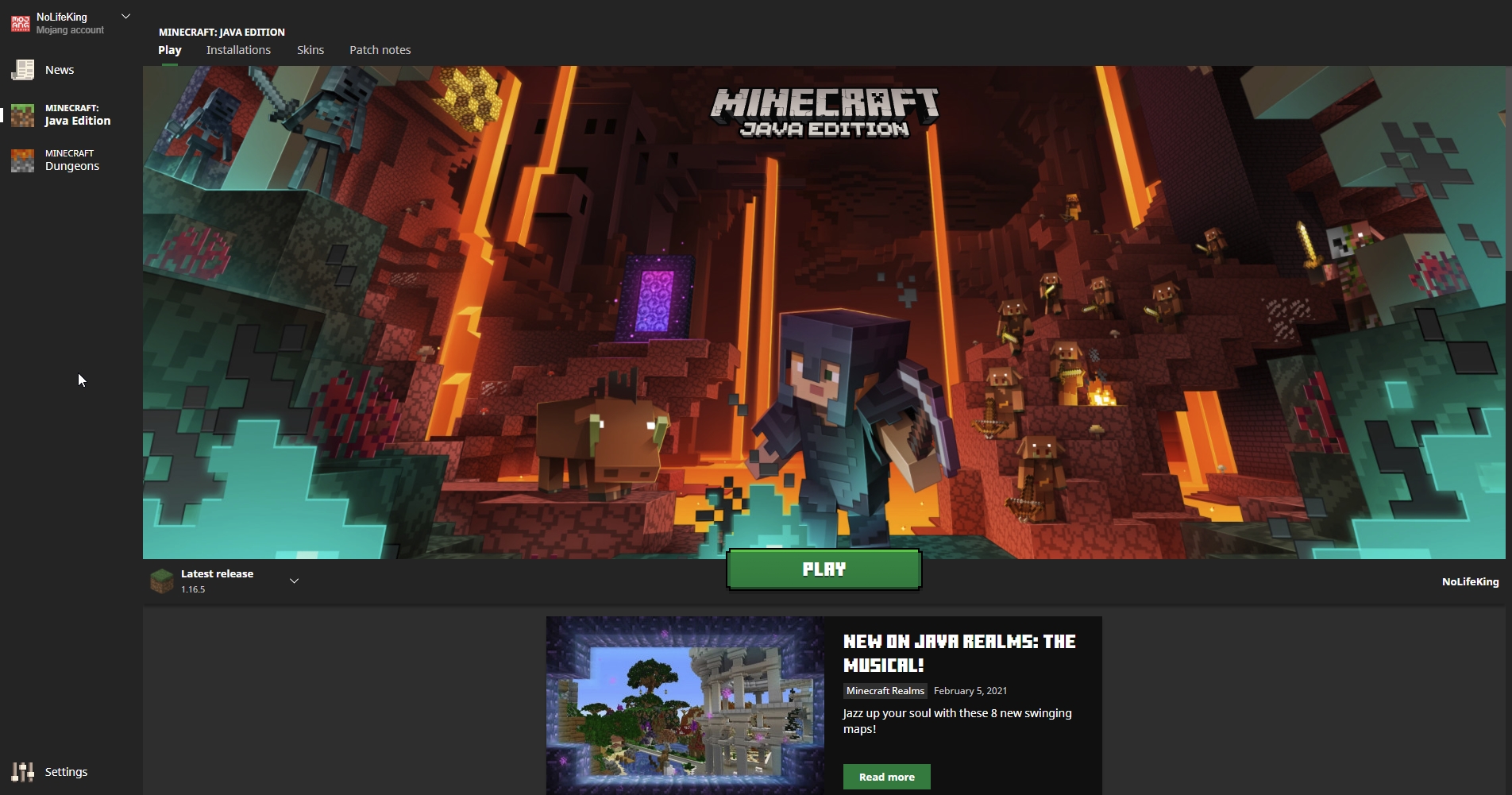
Should look something like this: https://itssm.pl/301aZPg
 true jay
how the fuck do you open overwolf
ebon sail
yep
wild jewel
true jay
how the fuck do you open overwolf
Language please
And windows key, "overwolf"
true jay
it doesnt show up
hard mantle
do you have it downloaded
wild jewel
true jay
it doesnt show up
Then is it installed?
 wild jewel
Windows key, type "overwolf", screenshot
true jay
but if i click that it takes me to edge
 wild jewel
Then find the installation by hand
true jay
where doe
wild jewel
true jay
where doe
Program files?
ebon sail
wild jewel
Then find the installation by hand
help
wild jewel
ebon sail
help
Why do you keep pinging me while just saying "help" ?
wild jewel
ebon sail
you help
Then how does yours look like?
last parcel
you need to use words to explain what you need help with. saying help says nothing
wild jewel
ebon sail
what do you mean
Show a screenshot of your vanilla launcher
ebon sail
you mean minecraft launcher
wild jewel
ebon sail
you mean minecraft launcher
Yes
ebon sail
 wild jewel
Now close that, start curseforge, start the modpack
 last parcel
yes
sage pier
So, it's working like it should.
ebon sail
let me click on a server and show you what happens

this happens for any server i open even the non-modded servers that my friends created
whaarr o i do
if i open it with lunar client, optifine, even wurst, it dosent open
last parcel
optifine is a mod, why would that help
ebon sail
oh

if you look closely in this pic you will see that it has the little interrogation on optifine, could that be a problem
hard mantle
no
last parcel
when you got the popup to allow minecraft through the firewall, did you deny it?
ebon sail
i didnt get anything like that
last parcel
you do, the first time you start it
last parcel
idk
ebon sail
cause i use an antivirus
last parcel
could be that too
ebon sail
and i had disabled the firewall when i start minecraft cause i read that it may be a problem
last parcel

How-To Geek
Minecraft is a fantastic game to play on your local network with friends, but it’s no fun when you have to spend half your time troubleshooting connection problems. Let’s take a look at how to identify and iron out issues with Minecraft LAN play.
ebon sail
oh thanks
true jay
wild jewel
Program files?
i still cant find it
hard mantle
try installing it agian
true jay
i already tried that
hard mantle
uninstall it then install agian
ebon sail
last parcel
https://www.howtogeek.com/242375/how-to-troubleshoot-minecraft-lan-game-problems...
i followed the instructions but it didnt help because i use mcafee, so i went on their websited, allowed the access for all the minecraft related stuff and fingers crossed hope it works
ebon sail
last parcel
https://www.howtogeek.com/242375/how-to-troubleshoot-minecraft-lan-game-problems...
it dosent work
hello, its me, i was wondering when i could play minecraft with my friends, so go over
arctic mural
im having a issue with my modpack it keeps crashing
queen ridge
I cant open the modfolder in a modpack. When i click on the three points-menu, and than click on open folderthan it says access denied and i have no idea how it goes manually
wild jewel
arctic mural
im having a issue with my modpack it keeps crashing
enhancewynn broken, made by kirdow probably
arctic mural
no made by ThatUnknown_
wild jewel
arctic mural
no made by ThatUnknown_
I just looked at the package 🤷
 lusty flame
when i try to use the curseforge installer, it just doesnt install
i already tried uninstalling it and reinstalling but nothing changed
wild jewel
lusty flame
when i try to use the curseforge installer, it just doesnt install
Overwolf Support Help Center
We're here to get you informed on everything you need to know about Overwolf, including helpful guides and troubleshooting articles to back you up when you get in a pickle
lusty flame
ok
 glossy stump
i havent used overwolf to play some modded minecraft in a couple days, and when i try to play it it has a loading bar in minecraft(normally just loads) where i hit play and then it crashes immediately, saying something along the lines of couldnt download and near the end of the error it says exists: doesnt exist?
last parcel
screenshot?
last parcel
google it
 lime oriole
i did it came up as a scam
 loud locust
lime oriole
Hi guys can i have the link to crazy craft pls
loud locust
lime oriole
Hi guys can i have the link to crazy craft pls
https://www.curseforge.com/minecraft/modpacks/kinda-crazy-craft this is the good one, for the official one, use the void launcher
loud locust
ye
lime oriole
not kinda crazycraft
loud locust
ok u want the official one?
lime oriole
yea
loud locust
VoidLauncher Home Page
Voids Wrath is a minecraft mod pack launcher that has created mod packs like Crazy Craft, Scramble Craft, Dream Craft and Jurassic Craft!
lime oriole
i want the real crazycraft
oh nice
thanks
whats a nice place to download it
like winzip or something
loud locust
the site i sent
lime oriole
do u know?
lime oriole
i know i did
lime oriole
yea
loud locust
and do u have a premium mc account
lime oriole
yes
loud locust
https://www.youtube.com/watch?v=tkzEPGWtKQs watch this video and install crazy craft

How can you download and install Crazy Craft 4.0 in Minecraft? Well, in this video, I answer that exact question. We go over every single step from downloading the Crazy Craft 4.0 modpack to install Crazy Craft 4.0 in Minecraft it is all covered in this video, so you can start playing Crazy Craft 4.0 without any issues whatsoever. We go over the...
 somber lark
Do I need to submit a ticket to get assistance with my CurseForge issue?
lime oriole
i cant download it
somber lark
lusty flame
i already tried uninstalling it and reinstalling but nothing changed
This is the Exact same error that I am now getting.
somber lark
I have been playing through Craft of the Titans for about a month. Now I cannot launch the pack. I have deleted and re-installed the pack. Deleted and re-installed Java. I have removed and re-installed my fire-wall. Nothing has worked.
Same.
lime oriole
yea
somber lark
The launcher gets to the "preparing" screen and just sits with the little icon going and does nothing.
lime oriole
im trying to download crazycraft and it has to go to winip[ its like a download launcher
but i have no free triels left
somber lark
Go into Cnet and search for zipping software 😄 There's lots.
lusty flame
somber lark
This is the Exact same error that I am now getting.
i just kept reinstalling and uninstalling till it eventually worked, so i don’t have much actual help on how i fixed it haha
 ivory skiff
Hello, sorry for my bad english, I've an issue with Minecraft/Curse, my game crash on launching 😢 I've the report, somebody can help me ?
last parcel
send the report
ivory skiff
last parcel
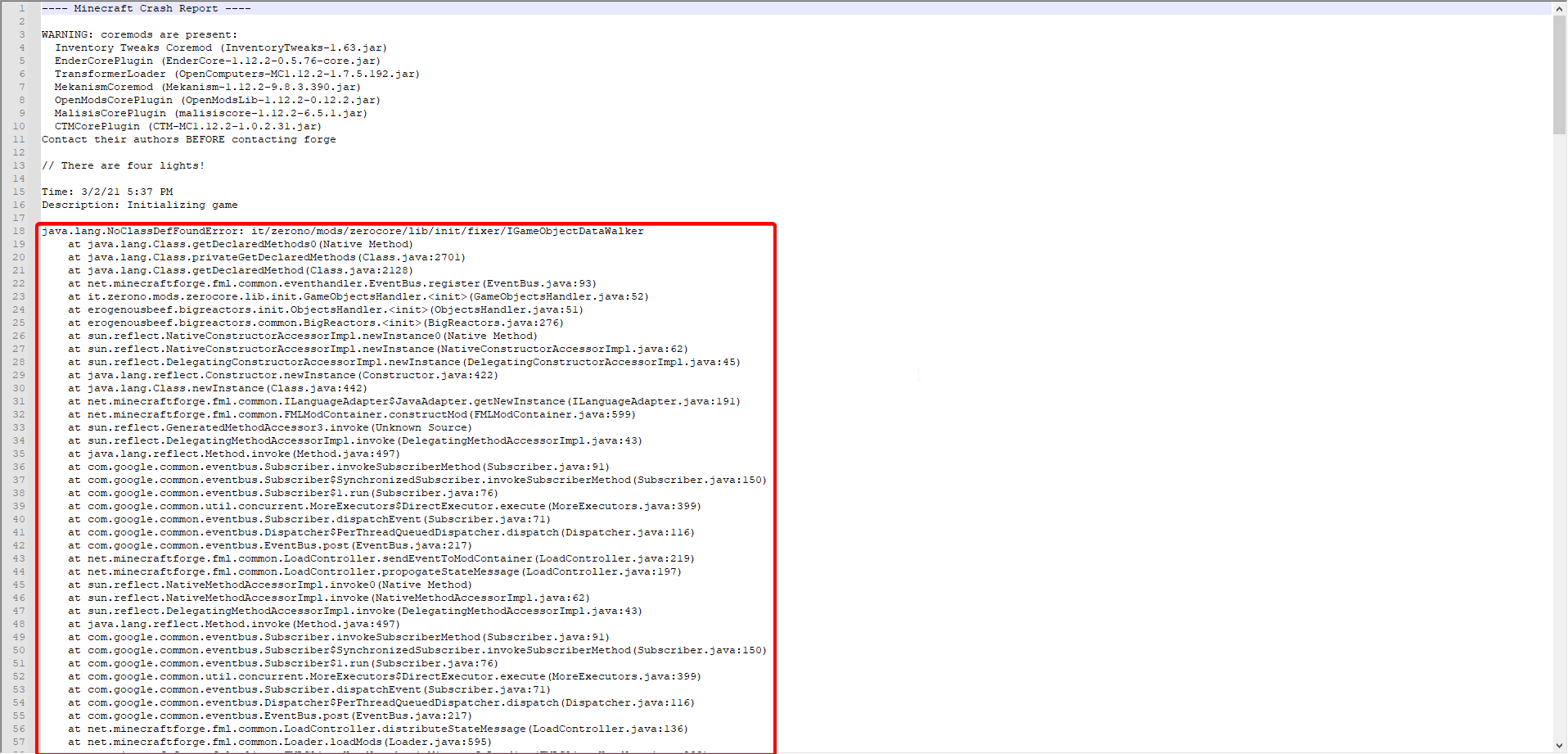
looks like an issue with zerocore and/or bigreactors
ivory skiff
how do you know ?
I tried to put "extreme reactors" but zerocor, I don't know what is it ?
last parcel
look in the stacktrace, both those mods are mentioned.
ivory skiff
stacktrace ?, sorry I'm new in modding 😢
last parcel
 ivory skiff
ah ok, but zerocore wome with what mod ?
last parcel
what
ivory skiff
I don't ask to curse to install it, I think he install this for another mod, do you know what mod can it be ?
last parcel
nope, go to the mod's webpage, click relations and sort by dependants
ivory skiff
Hmm..
on curse when I sort my mods by author, extreme reactors and zerocore is the same author, so...
last parcel
...?
ivory skiff
I don't know what doesn't work but these two mods come both, I don't know why it crash
last parcel
me either. check the issue tracker for the mods or contact the dev
 peak loom
I bought java a few days ago so idk how most of it works.. To play the mods do I just press play and launch the game?
because im doing that and it keeps crashing
last parcel
?mc-log
golden muskBOT
How to get a Minecraft log file.
Where to find the log on the CurseForge Client.
Right-click the modpack profile icon OR click the button in the modpack profile.
Click Open Folder.
Open the logs folder.
Find the file called latest.log and drag it into discord.
peak loom
alright
 hushed inlet
Hello, i just started using curse forge for minecraft mods, i was able to download 2 mods, then it switched to the install button when trying to download, and now whenever i try install a new one, it wont let me
here are some screenshots:
 peak loom
uh try pressing where it says here
hushed inlet
thats what happens after i click the click here button
peak loom
oh
hushed inlet
thats what i did
sage pier
Have you installed CurseForge?
peak loom
idk im new to mods lol wait for someone else to reply
hushed inlet
sage pier
Have you installed CurseForge?
as in the app or as in forge?
sage pier
hushed inlet
as in the app or as in forge?
The app, because Forge and CurseForge are not the same thing.
sage pier
!getcf
golden muskBOT
Looking to install the CurseForge app?
Todo: Place system requirements here.
<:windows:798410728188936222> Windows
<:mac:798410654418862130> Mac
Linux
:person_shrugging:
sage pier
If it doesn't, you might have to install Overwolf first, and then install CurseForge from their appstore.
hushed inlet
Ok
sage pier
And sometimes antiviruses go bananas and scream wolf.
Especially the malware called SAntivirus :'D
hushed inlet
yeah i wont do that.
 viral saffron
my app isnt finding my classic add ons. I have uninstalled curseforge ive scanned and used the manual locate and nothing has worked

anything i can do to fix this?
says 47 addons

 faint imp
is it normal for optifine to crash a modpack?
last parcel
yup
faint imp
is there something i can chenge to get them to wotk?
potent tartan
have to ask the people who made the pack that, but your answer is probably no
faint imp
it was pokehaan, all the automation i have in my base was starting to lag me, and i also wanted the zoom feature to see the pokemon better\
so i didnt have to fly up to them
last parcel
optifine support would be a better place to ask
faint imp
k
hushed inlet
Sorry for another question but, I would like to install RLCraft, and the folder installed and everything, i unzipped the file and put it in mods folder in forge, then started a new world and none of the things were there

oh and i opened the world and minecraft crashed right away
last parcel
what do you mean you unzipped the file? you dont unzip modpacks.
why not just install it using the curseforge app?
hushed inlet
i did install it using curseforge app
oh and i didnt know i was supposed to not unzip files
sorry
last parcel
you have the server pack, which is not for clients (thus being a server pack)
just press install on the app
hushed inlet
i did
last parcel
then can you provide a better explanation of the issue?
hushed inlet
Ok here i go
(btw i changed the zipped file back to the mods folder) When I join my minecraft launcher, i click into installations and hover over forge 1.12.2(the version i installed my mod packs) And i click the folder part, then i add the zipped file into the mods folder, after that i close the mods folder and go back to my minecraft launcher. I open that up and it shows these other loading screens, probably showing that the mod is in the mods folder. I open a new world in my single player parts, and click create new world. After that, none of the stuff the description video said would be in minecraft, is not there.
hushed inlet
You literally said dont unzip the files
last parcel
you dont use zipped files period
hushed inlet
wdym
wild jewel
You trying to make a server or client?
hushed inlet
client
wild jewel
Then use the app
last parcel
open the app, find rlcraft, press install
last parcel
there is nothing else you should be doing
hushed inlet
do i download the folder and put it in the mods folder under forge, or do i just click play on the forge app
last parcel
click play
 wild jewel
Restart curseforge, try again
 quartz valve
how do you mean restart ?
autumn agate
I love CurseForge!
wild jewel
quartz valve
how do you mean restart ?
Exit it fully, start again
last parcel
the X button that closes every window
wild jewel
quartz valve
what x
Top right corner of the window?
solar sleet
So whoever is moderating my modpack approval is not doing their job properly
wild jewel
solar sleet
So whoever is moderating my modpack approval is not doing their job properly
Explain
solar sleet
It was denied for a bad description, yet you guys have approved this

(Right screen)
When mine lists the pack's purpose and all mods
wild jewel
That was 3 years ago, by a different team
 urban dagger
Hello
solar sleet
That's the excuse?
wild jewel
solar sleet
That's the excuse?
Well, rules got stricter
solar sleet
So, you upped your standards but left it there?
last parcel
cant even see your description
solar sleet
I feel like you're lying if that is still there
wild jewel
solar sleet
So, you upped your standards but left it there?
You want people to go through all of those packs?
And not being able to handle your stuff?
solar sleet
My description is too long to post in one screenshot
No Tim
What I want is accuracy, honesty, accountability, and consistency
wild jewel
solar sleet
What I want is accuracy, honesty, accountability, and consistency
And how do you want to achieve that>
solar sleet
By not showing favoritism, upholding the same stuff for everyone, and not shoving around blame lol
last parcel
i dont even see your problem with the description on the right
wild jewel
You want people to lock curseforge down to go over the 80000 projects?
solar sleet
last parcel
i dont even see your problem with the description on the right
Then there should be no problems with this (left screen)
 wild jewel
alt+printscreen only takes the active window
last parcel
listing mods is not a description, it even says so


