#👽︱game-support
1 messages · Page 66 of 1
 signal pier
 last parcel
link it
signal pier
from the first image?
this thing happens to me with some other mods sometimes, and I wonder if there's a reason for that
 sage pier
Looks like the mod is for 1.16.5 and the modpack for 1.16.4
last parcel
it's not showing for 1.16.5 either
sage pier
Oh.
last parcel
thinking it got lost in sync
 topaz lantern
when i try to download any modpack it doesnt download and gives me an error like object reffernce not set to an instance object any help please?
on java mc
last parcel
signal pier
this thing happens to me with some other mods sometimes, and I wonder if there's...
got any more examples?
last parcel
topaz lantern
when i try to download any modpack it doesnt download and gives me an error like...
topaz lantern
oh thanks
signal pier
last parcel
got any more examples?
I have one I think, let me see the mod name and check
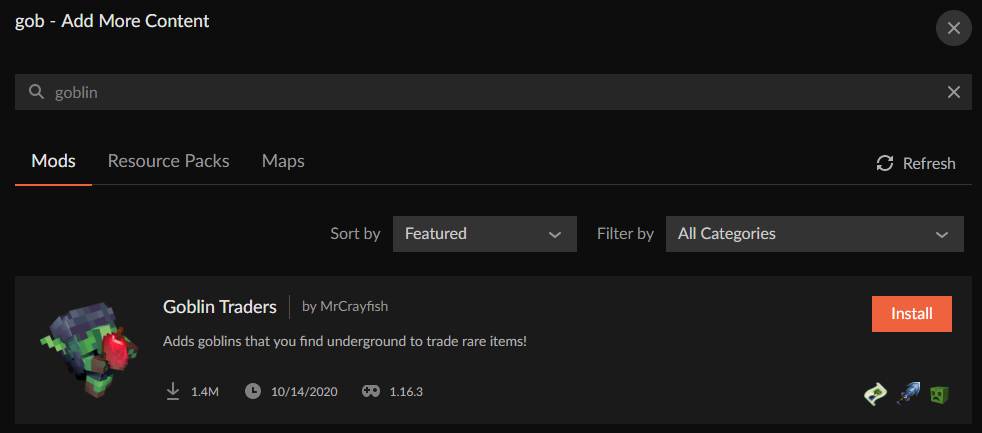
goblin trader by mrcrayfish
last parcel
ok so in the first example there is something legit wrong
as for goblin traders, it's that you are using a profile that the mod isnt made for
 signal pier
cause it's 1.16.3?
last parcel
yea
topaz lantern
so this sounds dumb but how do i update curse?
last parcel
restarting it updates. what version do you have?
topaz lantern
i have 0.167.2.4
last parcel
that is current
sage pier
Newest version according to #📢︱news message
topaz lantern
hm so the restart just magically helped, ty

 finite pebble
When I download CurseForge it says failed to download then when I click it to resume it says Network error. Is there anyway to fix that?
 wild jewel
finite pebble
When I download CurseForge it says failed to download then when I click it to re...
wild jewel
finite pebble
When I download CurseForge it says failed to download then when I click it to re...
Download with what?
finite pebble
What do you mean?
wild jewel
Where do you click resume?
finite pebble
when I click the arrow
wild jewel
Where is that arrow? Firefox? Chrome?
wild jewel
!windefender
 golden muskBOT
Windows defender fix for install getting flagged.
 finite pebble
Thank you I will try it
 shrewd sedge
need help
wild jewel
shrewd sedge
need help
Sends 1 help
shrewd sedge
when i open forge in minecraft without optfine it works fine under 1.13 but with optifine black screen comes in under every version of 1.13 but optfine works fine without forge any fix
finite pebble
How do I do Number 2?
wild jewel
You still have that command prompt open right?
finite pebble
yes
wild jewel
Type those commands there
 wind crane
i try to play modpacks but it says could not verify minecraft version
wild jewel
finite pebble
MpCmdRun.exe-removedefinitions-dynamicsignature?
Image says so
finite pebble
ok
wild jewel
wind crane
i try to play modpacks but it says could not verify minecraft version
!mc-installfix
golden muskBOT
- Click on the
 icon in the bottom left.
 - Click the

MinecraftTab. - Click
Changenext to theMinecraft Modding FolderOption. - Select the folder named
Install. - Delete it.
- Restart CurseForge App.
- It will ask to install MC again, do so.
- Play game.
NOTE: You will not lose any modpacks or worlds, These are saved in the Instances folder. DO NOT TOUCH THIS FOLDER OR YOU WILL LOSE EVERYTHING
wild jewel
finite pebble
Now what?
Now you try again
shrewd sedge
shrewd sedge
when i open forge in minecraft without optfine it works fine under 1.13 but with...
pls reply fast i am in hurry
last parcel
FAST
finite pebble
It did not work should I try it again or should I do something else?
last parcel
optifine has a discord for support, you should ask them
wild jewel
finite pebble
It did not work should I try it again or should I do something else?
Try a pc restart
 tiny ibex
how do i install a mod to my nitrado server from curseforge?
wild jewel
You need to do that manually
 autumn agate
I need help when i want to make a mod profile or i will download one it dosent wor then comes this message: No java executable found. cannot execute post-installation tasks for forge
wild jewel
!mc-java
golden muskBOT
Forge & Fabric currently only officially support Java 8 as this is what the game downloads, Download java 8 from here.
https://adoptopenjdk.net/?variant=openjdk8&jvmVariant=hotspot
 limber cave
anyone know why this is crashing???
 arctic ridge
Help someone
wild jewel
arctic ridge
Help someone
Get better internet
 dusk blaze
Anyone know a mod that doesn't ask for too much RAM?
 half stirrup
arctic ridge
wild jewel
Get better internet
half stirrup
arctic ridge
wild jewel
Get better internet
can't they don't sell it where i am
wild jewel
arctic ridge
can't they don't sell it where i am
There is no fix for this, we have been complaining about this for weeks
arctic ridge
wild jewel
There is no fix for this, we have been complaining about this for weeks
big sad i been trying to get this for about 2 hrs
autumn agate
why when i try to make server on enigmatica 6 it says i have old java even tho i installed newest one like 5 times
wild jewel
autumn agate
why when i try to make server on enigmatica 6 it says i have old java even tho i...
Screenshot please
 stable sapphire
can someone help me, my atm6 teleporter to the mining dim don't work and idk how to fix it i tried restarting and it didnt help
autumn agate
ok i did it
wild jewel
Now hit enter
autumn agate
did
wild jewel
Show the output please
autumn agate
wild jewel
java -version
autumn agate
java version "15.0.2" 2021-01-19
Java(TM) SE Runtime Environment (build 15.0.2+7-27)
Java HotSpot(TM) 64-Bit Server VM (build 15.0.2+7-27, mixed mode, sharing)
wild jewel
The one that you started which is showing that red screen
sage pier
I think he means, right click and then Edit
autumn agate
ohh
wild jewel
I did, should have been more clear
autumn agate
sage pier
Luckily I have my Timtranslator here. ;D
last parcel
that's not java 8
autumn agate
where do i get java 8
wild jewel
!mc-java
golden muskBOT
Forge & Fabric currently only officially support Java 8 as this is what the game downloads, Download java 8 from here.
https://adoptopenjdk.net/?variant=openjdk8&jvmVariant=hotspot
autumn agate
what do i choose?
wild jewel
That one
sage pier
He means the one that says eight (8)
wild jewel
"The one that is selected already"
sage pier
:>
sage pier
That site works for me at least.
Try surfing to https://minecraftforge.net/
You should land in their forums.
last parcel
should probably ask for help where it says
wild jewel
How long did you wait? Just the 10 minutes? If so: give it more time, they might be sleeping
 ripe swift
hey ehh how can i add ram to minecraft forge when i have runned the forge app and like i dont know how to add ram
wild jewel
!mc-ram
golden muskBOT
How to set Global Minecraft RAM value.
- Click the icon in the bottom left to open settings.
- Click the Minecraft tab.
- Scroll down.
- Slide slider to recommended ram range as seen below.
 ripe swift
thx
autumn agate
how do I check what Java I have?
 runic herald
os?
autumn agate
runic herald
os?
windows 10
runic herald
in cmd type java --version
autumn agate
thx
The system cannot find the file specified.
Error occurred while processing: java.
The system cannot find the file specified.
Error occurred while processing: --version.
my pc is dumb
runic herald
u havent installed java then i think
autumn agate
runic herald
u havent installed java then i think
no I have
runic herald
oh
autumn agate
?mc-java
golden muskBOT
Forge & Fabric currently only officially support Java 8 as this is what the game downloads, Download java 8 from here.
https://adoptopenjdk.net/?variant=openjdk8&jvmVariant=hotspot
runic herald
did u set env var path
autumn agate
runic herald
did u set env var path
wdym
runic herald
system envviroinment variable Path for java
autumn agate
runic herald
system envviroinment variable Path for java
never heard of it
runic herald
oh
wait
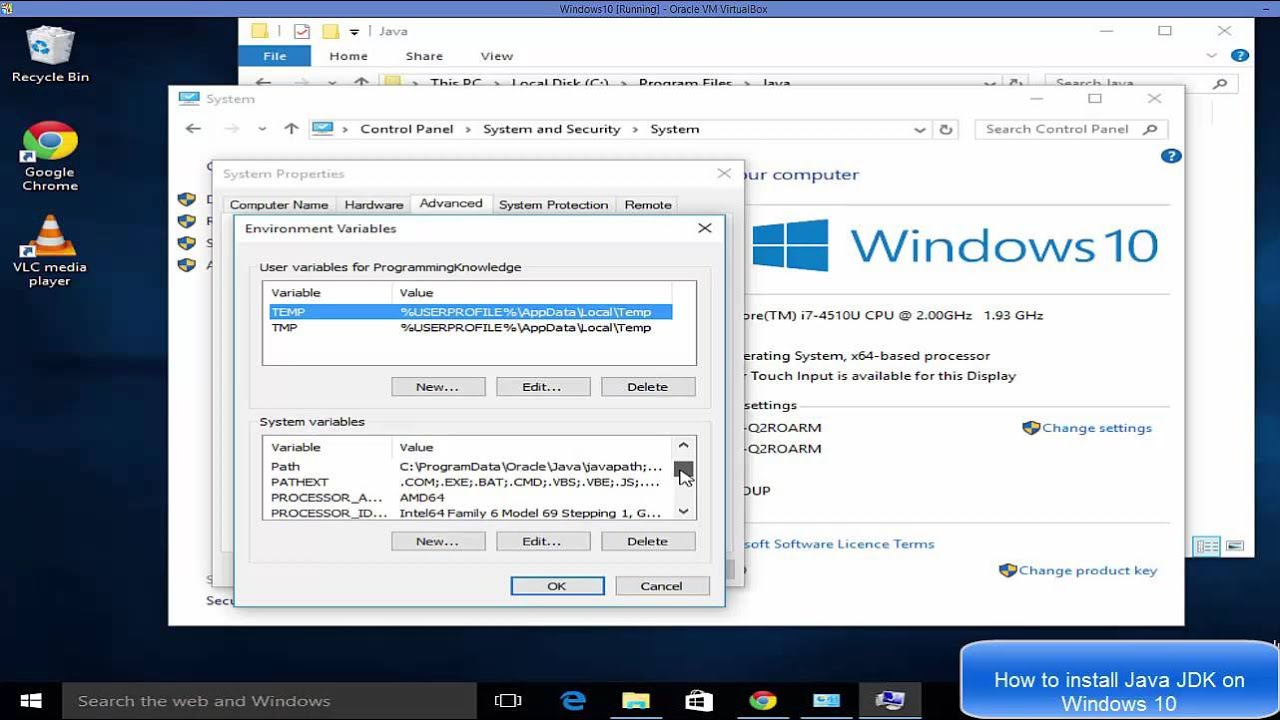
In this video I am going to show How To Download And Install Java on Windows 10 ( Java JDK on Windows 10). In addition I am going to show How to Set JAVA_HOME environment variable.
Install Java Development Kit on Windows 10 in simple and easy steps.
★★★Top Online Courses From ProgrammingKnowledge ★★★
Python Programming Course ➡️ http://bit.ly/2v...
see
ok?
runic herald
i guess
autumn agate
ok thank u
 copper yew
Hi! My account doesn't recognize my projects when I login. I used curseforge on twitch, but then curseforge switched to overwolf, and now I can't find my projects. When I search to find my project, I find that my projects created by Forge_User_92856408.
last parcel
?forgeuser
golden muskBOT
Accounts that have gone missing over the transfer never opted into the transfer as required.
https://account-transfer.curseforge.com/ You can transfer it here!
Will be active on the website after you logout and back in again.
If your username does not contain Forge_User<numbers> then you don't need to do anything!
copper yew
Thank you.
 mortal venture
I have downloaded the compact claustrophobia mod pack on the application and dont know how to convert it to a file to put in the minecraft folder to use the mod. I'm new to downloading mods.
 harsh fog
hey i when i try and launch rlcraft from curseforge nothing happens?
wild jewel
mortal venture
I have downloaded the compact claustrophobia mod pack on the application and don...
You just hit play
wild jewel
harsh fog
hey i when i try and launch rlcraft from curseforge nothing happens?
!mc-installfix
golden muskBOT
- Click on the icon in the bottom left.
- Click the
MinecraftTab. - Click
Changenext to theMinecraft Modding FolderOption. - Select the folder named
Install. - Delete it.
- Restart CurseForge App.
- It will ask to install MC again, do so.
- Play game.
NOTE: You will not lose any modpacks or worlds, These are saved in the Instances folder. DO NOT TOUCH THIS FOLDER OR YOU WILL LOSE EVERYTHING
harsh fog
aight will try this
mortal venture
i did then loaded up the correct version and created a world for it and it didnt work.
wild jewel
mortal venture
i did then loaded up the correct version and created a world for it and it didnt...
Did you close all Minecraft related things first?
mortal venture
i will try that.
copper yew
How long does it takes to update the modpacks on curseforge desktop application. When I transfered my account.
wild jewel
copper yew
How long does it takes to update the modpacks on curseforge desktop application....
1-24 hours
copper yew
Thank you ❤️
 celest gyro
hi i was on the minecraft curse forge server and installed some mods, but how do i put in ion minecraft? i droped it in the mod order and open it with forge but nothing works
mortal venture
wild jewel
Did you close all Minecraft related things first?
It worked thanks.
last parcel
celest gyro
hi i was on the minecraft curse forge server and installed some mods, but how do...
?mc-installmods
golden muskBOT
How to install mods in CurseForge App.
- Click
+ Create Custom Profile - Name it, select the required Minecraft version, select the Forge version (usually the highest number), click
Create. - Click the profile icon.
- Click
Add New Content - Search and install the desired mods.
- Start the game!
How to install mods not on CurseForge.
- Right click the profile picture or Open the profile and click the
 Icon next to the play button.
 - Click

Open Folder. - Drag the mod(s) into the
modsfolder. (Note: Some mods will require others, to run. Make sure to read the instructions for the mod!) - Start the game!
 celest gyro
thank you it worked!
harsh fog
!mc-installfix
golden muskBOT
- Click on the icon in the bottom left.
- Click the
MinecraftTab. - Click
Changenext to theMinecraft Modding FolderOption. - Select the folder named
Install. - Delete it.
- Restart CurseForge App.
- It will ask to install MC again, do so.
- Play game.
NOTE: You will not lose any modpacks or worlds, These are saved in the Instances folder. DO NOT TOUCH THIS FOLDER OR YOU WILL LOSE EVERYTHING
 carmine abyss
Do i have to download curseforge app to use mods that have the logo of curse forge?
 stark seal
I cant download curse forge on overwolf it just says error with no explanation
I press the install button which then gets replaced with "error" or simply nothing happens, or I see "Installing" for a split second before turning back to "install" I have searched support pages and online but cant find any answers or anyone that has even had the same problem.
carmine abyss
I dont think any admins are one right now as of this moment.
stark seal
damn😔
harsh fog
curseforge
not sure i understand completly what you are asking? but like the modpack im currently trying to open ( rlcraft ) i downloaded from curseforge
i have also tried uninstalling curseforge and reinstalling it and then doing the installfix but this also didnt work
carmine abyss
U might need a modpack launcher( if you dont have one look on curseforge app)
harsh fog
oh
ok thanks
will try
i cant seem to find any kinds of modpack launchers?
im trying to open it from the app btw
last parcel
what is your problem
 jaunty solstice
Anyone know the common causes for modpack freeze framing? Just seeing if im doing something incorrectly
harsh fog
im trying to open rlcraft from curseforge but it wont open and so i tried the installfix but that also did not work
does it make any sense at all?
last parcel
?mc-path
golden muskBOT
Minecraft Files should NOT be installed inside the .minecraft folder or inside OneDrive folders. If this shows up in the path at all you need to move it by following the instructions below!
If Minecraft is not installed, start here.
Click the  in the top right.
Select Minecraft.
Click "Edit".
Move to the "Continue here:" section below.
If Minecraft is installed, follow these steps.
Click the in the bottom left.
Select the Minecraft tab.
Click "Change".
Move to the "Continue here:" section below.
Continue here:
Make a folder in the root directory called CurseForge.
Select the folder you just made.
The text box should show something like the following:
For Windows: C:\CurseForge
For Mac: /CurseForge
 last parcel
give that a shot
 prisma gulch
I have been trying to play the slightly vanilla flavored modpack but whenever i load up a world it just freezes and loads forever but never starts the world?
I even tried to make just a new world but it work either
carmine abyss
Can someone give me a link to the curseforge app?
sage pier
!getcf
golden muskBOT
Looking to install the CurseForge app?
Todo: Place system requirements here.
<:windows:798410728188936222> Windows
<:mac:798410654418862130> Mac
Linux
:person_shrugging:
carmine abyss
I figured it out a couple seconds ago but thanks for the help
wild jewel
!mc-java
golden muskBOT
Forge & Fabric currently only officially support Java 8 as this is what the game downloads, Download java 8 from here.
https://adoptopenjdk.net/?variant=openjdk8&jvmVariant=hotspot
 midnight ridge
So I've uploaded my modpack yesterday, and I can't install it through the launcher
wild jewel
Did it get approved?
wild jewel
Which pack?
wild jewel
Well, my pc isn't working like it should, so can't help
midnight ridge
Is this a common issue? Should I re-upload it?
wild jewel
Don't reupload for a server issue please
last parcel
download it from the website and try to import it
midnight ridge
I did and it works
last parcel
then it's just an issue with sync, which has been having issues the last few days
oh wait
midnight ridge
Oh then it will get fixed eventually?
I've noticed it's been taking much longer for the modpacks to become available in the launcher
last parcel
hmm might need to make a ticket for this. pretty sure the game version missing is the issue
midnight ridge
Well, I did specify it at the time of uploading
midnight ridge
I probably should've deleted some config files as I tried many mods 🙄
golden muskBOT
:bug: Reporting via the CurseForge App :bug:
-
Click the
 icon in the bottom left.
 -
Select

Open a Ticket. -
Fill out the form with accurate detailed information, "It doesn't work" isn't helpful! What exactly doesn't work and why doesn't it work should be easy to answer!
-
Make sure to upload your Overwolf logs with the
Upload Fileoption on the ticket, information on how to get these logs can be found here https://support.overwolf.com/en/support/solutions/articles/9000176827-how-to-get-your-overwolf-logs -
Submit!
 midnight ridge
Ok, thanks
midnight ridge
midnight ridge
I probably should've deleted some config files as I tried many mods 🙄
Actually, it's the config file from the mod Fancy Menu, which requires me to place a whole animation inside it in order for it to work
that alone takes 269MB
Is there a limit to the file size?
prisma gulch
I have been trying to play the slightly vanilla flavored modpack but whenever I load up a world it just freezes and loads forever but never starts the world? I even tried to make just a new world but it won"t work either
Can anyone help me pls
wild jewel
Have you contacted their support?
prisma gulch
No, sorry I will do that first
wild jewel
 strange dirge
hello I can't download a modpack I time out every time
strange dirge
hello I can't download a modpack I time out every time
No solution for that at the time
 stiff plinth
hello can someone help me with all the mods 5 server installing?
im using a host but idk how to put it in
strange dirge
wild jewel
No solution for that at the time
oh thanks
 grave condor
hi so I have downloaded the modpack i want to play and it's all set up as expected. but however when i go to open the modpack it immediately stops opening and just hasn't opened at all, any tips?
?mc-installfix
golden muskBOT
- Click on the icon in the bottom left.
- Click the
MinecraftTab. - Click
Changenext to theMinecraft Modding FolderOption. - Select the folder named
Install. - Delete it.
- Restart CurseForge App.
- It will ask to install MC again, do so.
- Play game.
NOTE: You will not lose any modpacks or worlds, These are saved in the Instances folder. DO NOT TOUCH THIS FOLDER OR YOU WILL LOSE EVERYTHING
 wild jewel
 dense mason
Sure do love it when my modpacks been under "review" for a day
dense mason
Sure do love it when my modpacks been under "review" for a day
Welcome to the world of busy people
 midnight ridge
last parcel
make a ticket on this, send your logs. add my name in the ticket too
midnight ridge
last parcel
make a ticket on this, send your logs. add my name in the ticket too
So I opened the ticket but it seems the problem has been fixed
Maybe it was still in the upload process to the app or something?
wild jewel
Or broken sync
midnight ridge
Well, I don't really know how that works, but thanks anyway
 weak orbit
how do you play with friends
 potent tartan
weak orbit
how do you play with friends
potent tartan
weak orbit
how do you play with friends
server
potent tartan
you can rent one or selfhost
potent tartan
weak orbit
where do i go to do that
there are lots of different hosts
last parcel
depends on quite a few things. how much ram is needed to run a server for the pack. do you have the ram. if not does someone else. if not then you need to find a hosting service that does.
weak orbit
i got ram but dont know where to find it
last parcel
yes everyone has ram, but do you have enough? you also need to be able to have a client open
autumn agate
I keep getting exit code 0 for 1.7.10 does anyone know how to fix it?
 marsh harness
is anyone else having problems with pixelmon? it gets to the 3rd mod and just says "timed out"
last parcel
autumn agate
I keep getting exit code 0 for 1.7.10 does anyone know how to fix it?
?mc-installfix try this
golden muskBOT
- Click on the icon in the bottom left.
- Click the
MinecraftTab. - Click
Changenext to theMinecraft Modding FolderOption. - Select the folder named
Install. - Delete it.
- Restart CurseForge App.
- It will ask to install MC again, do so.
- Play game.
NOTE: You will not lose any modpacks or worlds, These are saved in the Instances folder. DO NOT TOUCH THIS FOLDER OR YOU WILL LOSE EVERYTHING
last parcel
marsh harness
is anyone else having problems with pixelmon? it gets to the 3rd mod and just sa...
it's an issue with the app timing out too early. make a ticket for it and they can help you increase the timeout limit. you can also just use gdlauncher instead for now.
golden muskBOT
:bug: Reporting via the CurseForge App :bug:
-
Click the
icon in the bottom left. -
Select
Open a Ticket. -
Fill out the form with accurate detailed information, "It doesn't work" isn't helpful! What exactly doesn't work and why doesn't it work should be easy to answer!
-
Make sure to upload your Overwolf logs with the
Upload Fileoption on the ticket, information on how to get these logs can be found here https://support.overwolf.com/en/support/solutions/articles/9000176827-how-to-get-your-overwolf-logs -
Submit!
last parcel
?ticket-app
marsh harness
thank you!
autumn agate
last parcel
?mc-installfix try this
where do i ut that?
last parcel
what
autumn agate
*put
last parcel
what do you mean? you read the message
autumn agate
oh
 latent harbor
 cyan stratus
To verify, can I (in order):
- create a 1.16.5 modpack
- manually download mods from the curseforge website (mods that are 1.16.4 compatible, but are not labeled 1.16.5 (ie 1.6.4, 1.16.3, Forge)
- export the modpack (mods + config checkmarked)
- remove the jar files in overrides\mods
- manually add their mod id and file id to manifest.json (their file id would be the 1.16.4 file)
- add the mod to the modlist.html
- zip the overrides, manifest.json, and modlist.html
- upload the zip file to my project in curseforge (which is for 1.12 and 1.16)
- it gets approved
- my friends download my modpack (the 1.16.5 one)
A) Will this zip file be Rejected?
B) Will they be unable to play?
C) After a mod gets updated to 1.16.5, and I am able to update it like this image, will curseforge still consider the mod to be manually added? (ie the mod shows up in mods, is not in modlist.json or in modlist.html)
Thank you.
 spiral kayak
my curse forge app on macOS have been stuck on forging library for an 1 hour now is there a way to fix this
cyan stratus
I would kill it (with the mac equivalent of taskbar) and then open and try again
spiral kayak
what do u mean by kill it like deleting the app
cyan stratus
No. I meant to close the application and to make sure that it is not running in the background. I believe the Mac equivelent to End Task is Force Quit
golden muskBOT
- Click on the icon in the bottom left.
- Click the
MinecraftTab. - Click
Changenext to theMinecraft Modding FolderOption. - Select the folder named
Install. - Delete it.
- Restart CurseForge App.
- It will ask to install MC again, do so.
- Play game.
NOTE: You will not lose any modpacks or worlds, These are saved in the Instances folder. DO NOT TOUCH THIS FOLDER OR YOU WILL LOSE EVERYTHING
autumn agate
@last parcel how do i restart curse forge?
last parcel
you close it..
cyan stratus
then reopen it
spiral kayak
cyan stratus
No. I meant to close the application and to make sure that it is not running in ...
still no luck
cyan stratus
do you have a lot of apps/website tabs open? Not sure if that issue is related to the amount of RAM usage your mac is using
spiral kayak
i only have discord open
i cleared the rest
my fans stop runing tho so i think that help
 stoic void
Does anyone know what is the waiting time for approval or rejected from a modpack update?
It's been 4 days now for me
last parcel
depends on how long the queue is
stoic void
very odd because I made a modpack update yesterday for a different modpack and it got approval within minutes
Unless it was some sort of bot?
last parcel
new projects require manual approval, updates to projects usually dont
 rich aurora
do i have to log in with twitch?
stoic void
ah well my projects the one that took days for it's not new it's been about a year ago
last parcel
then it's probably in manual review for some reason
autumn agate
what does java.lang.NullPointerException: Initializing game
Exit Code: -1 mean
 autumn agate
and how do i fix it
stoic void
and i assume that the mod authors deleted their mod
So, I made sure that all of the mods are from curseforge
last parcel
check what's in your overrides folder
autumn agate
Me?
stoic void
Yeah I did, not much has changed from the previous update that was approve to the recent one I'm trying to update. It's just a few mods update included with some config changes that all
last parcel
shouldnt be any mods if they are all from cf
last parcel
autumn agate
what does java.lang.NullPointerException: Initializing game
Exit Code: -1 mean
?mc-log send log
golden muskBOT
How to get a Minecraft log file.
Where to find the log on the CurseForge Client.
Right-click the modpack profile icon OR click the button in the modpack profile.
Click Open Folder.
Open the logs folder.
Find the file called latest.log and drag it into discord.
stoic void
Right right I used the export feature to ensure that everything went fine. I'd even check within the zip file to ensure that the there are no external jars or anything within the mods folder
last parcel
if it gets to 7 days make a ticket
autumn agate
stoic void
Will do ty
last parcel
autumn agate
fossilsarcheology.Revival is the cause
 void epoch
Hi, is it possible to host a server on curseforge? can i use aternos for it?
autumn agate
Damn I really like that mod
last parcel
curseforge has no relation to servers. you can use any host you want if it works
void epoch
i mean like, how would i host one so i can play with friends?
last parcel
depends on how you want to host one. plenty of guides and videos exist on google
rich aurora
im using extreme reactors and it is not outputting to a flux plug, I think it is something wrong with the plug. Does anyone know how to fix it?
 slow cave
Whenever I try to download a modpack on CurseForge it says "No java executable found. Cannot execute post-installation tasks for forge." How do I fix this?
potent tartan
slow cave
Whenever I try to download a modpack on CurseForge it says "No java executable f...
?mc-java
golden muskBOT
Forge & Fabric currently only officially support Java 8 as this is what the game downloads, Download java 8 from here.
https://adoptopenjdk.net/?variant=openjdk8&jvmVariant=hotspot
slow cave
Yes
 bleak coyote
hey guys, im trying to play pokemon adventure in an aternos server and a error always appear... can you help me solving this?
 obsidian ocean
We can’t help you without knowing what the error is. Do you mind showing us?
bleak coyote
is this you want?
last parcel
then you cant use curseforge
bleak coyote
ok man thanks for the hel
you are a nice guy
slow cave
Whenever I try to download a modpack on CurseForge it says "No java executable found. Cannot execute post-installation tasks for forge." How do I fix this? I tried the link the bot put in chat and it didnt fix it.
last parcel
get this java
SELECT: "Windows Offline (64-bit)" https://java.com/en/download/manual.jsp
 iron cave
cyan stratus
To verify, can I (in order):
1) create a 1.16.5 modpack
2) manually download mo...
iron cave
cyan stratus
To verify, can I (in order):
1) create a 1.16.5 modpack
2) manually download mo...
did that work
slow cave
last parcel
get this java
SELECT: "Windows Offline (64-bit)" <https://java.com/en/download/m...
Thank you, it worked.
last parcel
thanks for confirming
 vale monolith
Hey curious, when i try and download a mod it says error, check connection?
it installed but, it doesnt show in WOW addons list
 humble drum
so i got some additional mods in preparation for my next mc world but atleast for the terrain generation ones i would like to know if i can exclude my current world from them so as a whole i can leave it more intact
 sly juniper
i try to install a modpack and it says "unable to install addon due to a missing install path" what did I do wrong
 rustic remnant
Why does my RLcraft keep crashing?
 sick moth
Hey I’m looking to try to play crazy craft but it’s not on here. I found it on the void launcher but I’m not sure if I can trust it. Does anyone here use it and know it’s safe?
obsidian ocean
Voidlauncher is the only legal way to play CrazyCraft
Because it is ran by the people who made it
And it says here http://www.orespawn.com/legal.html (the official website for one of the mods) that you can only get Orespawn from Voidlauncher or aforementioned website. @sick moth
 autumn agate
my curse isnt letting me run any of my mods on minecraft what do i do
autumn agate
it let me run them on twitch but not on the new app
autumn agate
Guys help
I'am trying to install a mod made by my friend and it dosen't work its for Java minecraft
@obsidian ocean is their a way to use it with new accounts?
Help please i need help i installed java id id and it dosen;t work
i need help
 waxen pine
was it java 8 ?
waxen pine
so google search java 8 64 bit and install that
autumn agate
becoming 13 in 3 days
waxen pine
thats ok 🙂
waxen pine
Java manual download page. Get the latest version of the Java Runtime Environment (JRE) for Windows, Mac, Solaris, and Linux.
yes probably
autumn agate
Yep i sintalled taht
autumn agate
how do i make a custom modpack private
 coarse elm
autumn agate
how do i make a custom modpack private
coarse elm
autumn agate
how do i make a custom modpack private
You dont upload it to curseforge. Just share the pack with the people who need it.
autumn agate
what like sending them a zip file or something of the modpack
coarse elm
!mc-packshare
golden muskBOT
There are two ways to share a modpack you've made with others...
Export and Share - For Friends to Small Groups.
- Click the Icon for the modpack.
- Click the button next to play.
- Click

Export. - Select the files that should be included.
- Send the zip to the people that want it! They can follow the instructions in
!mc-installpackto install the pack!
Upload to Curseforge - For Public Release to Everyone.
This options will make your pack public to EVERYONE, it comes with extra requirements and will take some effort to set up.
- Go to here: https://www.curseforge.com/project/432/4471/create
- Fill out the information with a proper description of the pack. This should allow anyone to understand what the pack is.
- Click the Icon for the modpack in the CurseForge app.
- Click the button next to play.
- Click
Export. - Select the files that should be included.
- Open your Project you made on the CurseForge site and Upload the file you just made.
- Wait for Moderation & Sync so it can show up in the client! (See
!syncfor limitations)
autumn agate
obsidian ocean
Voidlauncher is the only legal way to play CrazyCraft
"Legal" do you think you're gonna go to jail for running the modpack?
Voidlauncher is shit and i had to assemble all the mods myself
Let voidlauncher die already
autumn agate
wdym
obsidian ocean
hard to explain
they do a pretty good job of explaining what I mean on their own 4 discords tho
obsidian ocean
basically
they bullied some creators on curseforge for basing a mod off of theirs
 halcyon hatch
When both my friend and myself load the same mods for minecraft and try to join via Lan it always times out(regardless of mods). How do I fix this?
halcyon hatch
We are
obsidian ocean
idk then
waxen pine
halcyon hatch
When both my friend and myself load the same mods for minecraft and try to join ...
Common issue - there are a few mods that can help with that actually. what version of minecraft is it based on? that being said, LAN connection is spotty at best
waxen pine
https://www.curseforge.com/minecraft/mc-mods/randompatches-forge actually does change the timeouts on clients and servers for connect attempts / drops. dunno if it's in old versions such as that
halcyon hatch
looking at it it looks like it's only 1.16+
waxen pine
looks like it started with 1.12.2
autumn agate
honestly i dont doubt optifine is the one crashing with RPatches
obsidian ocean
lol probably
waxen pine
ye i actually have an incompat with a mod in my own 1.16.4 modpack with it at the moment - it's hit and miss
obsidian ocean
happens to me all the time
autumn agate
also, optifine fast render bugs if a mekanism machine and create's mechanical mixer are close together
waxen pine
i have a diff mod (Performant) that fixes the timeout issue anyhow
autumn agate
Very specific
I know
Chances are it was a chenical tank not a machine doing that
Because chemical tanks have different models
 dapper knoll
Hello, I have a custom mod pack that I share with friends. Is it possible to push mod pack updates to them?
autumn agate
dapper knoll
Hello, I have a custom mod pack that I share with friends. Is it possible to pus...
Share the new version
coarse elm
Give then a new file
autumn agate
Just like you did with the old
dapper knoll
thats how we have been doing it, I was wandering if we could make it easier. Its no problem, ill look into other options.
thank you tho
halcyon hatch
So would I download the version appropriate to the mods version (of minecraft)
coarse elm
I'm not sure how you could make it any easier?
The only difference between sharing a file and uploading to CF is that it gives you a notification theres an update and you can update a profile directly.
The first part can be done easily with discord.
The second part will be fixed eventually.
autumn agate
you need to do a riddle before you get your answer
Give us the log, that resides in !mc-log , and your answer, given will be
i mean
nevermind
The game didnt launch
No logs
Bruh im terrible at support comedy
well uh, clay (if you're still here) you got this since i dont understand this type of issue
waxen pine
halcyon hatch
So would I download the version appropriate to the mods version (of minecraft)
yes it's that easy. fyi give yourself the minecraft role in #786424115535544350 to view MC specific chat channels
coarse elm
!mc-installfix
golden muskBOT
- Click on the icon in the bottom left.
- Click the
MinecraftTab. - Click
Changenext to theMinecraft Modding FolderOption. - Select the folder named
Install. - Delete it.
- Restart CurseForge App.
- It will ask to install MC again, do so.
- Play game.
NOTE: You will not lose any modpacks or worlds, These are saved in the Instances folder. DO NOT TOUCH THIS FOLDER OR YOU WILL LOSE EVERYTHING
 ornate forge
does anyone know how to fix a mod saying missing install path?
 tawny dew
Idk if this is the best place to put this, but somethng is majorly messed up with the api as mods that got approved 4 days ago just synced today
coarse elm
tawny dew
Idk if this is the best place to put this, but somethng is majorly messed up wit...
That's been the case for like the last 4 weeks. Sync dies and falls behind till it gets reset.
What's the path you are using for minecraft in the CF settings?
tawny dew
Wish it was back to how twitch had it where there was no sync issues
coarse elm
tawny dew
Wish it was back to how twitch had it where there was no sync issues
You mean the same issues that existed before? They just where aware of it.
tawny dew
idk just explains why I cant get any modpack updates out cause mods sync are like 4 weeks behind
coarse elm
They arent 4 weeks behind...
It was only down for a day or two.
Everyone else has been putting out updates just fine.
tawny dew
they are not syncing with the client at all those
it never took 24+ hours for stuff to sync
coarse elm
It takes 1-24 hrs for a project to sync to the client.
Except when stuff breaks.
There was plenty of times sync broke when twitch owned it.
Hell there was a point where it didn't work for like a week.
tawny dew
I mean if u say so, it still seems very broken
autumn agate
the launcher shouldnt have been launched yet
It shouldve stayed in development
Rhen when its actually good to use without any major issues
It would be released
coarse elm
Then there wouldn't be an app at all.
tawny dew
Its sucks cause these issues hurt modpack and mod creators who are trying to make a good modpack or mod
 tawny patrol
anyone got good shaders for bedrock
tawny patrol
yee
autumn agate
Plus its the second time you do this
tawny patrol
dam so i get banned now huh
tawny patrol
ok
 naive spindle
The launcher won't work, can anyone help?
coarse elm
tawny dew
Its sucks cause these issues hurt modpack and mod creators who are trying to mak...
The issues are getting fixed, very slowly but they are getting fixed.
There's already plans for looking into what can be done to fix the countless large site wide issues. It's not a simple fix for most of the problems.
coarse elm
autumn agate
This isnt about the launcher
This room isn't related to the launcher. it's just general community support.
coarse elm
tawny patrol
anyone got good shaders for bedrock
You can't use shaders on bedrock
tawny patrol
cap i has one
coarse elm
naive spindle
The launcher won't work, can anyone help?
restart the computer, if that doesn't fix it do !mc-installfix for insturctions
naive spindle
coarse elm
restart the computer, if that doesn't fix it do `!mc-installfix` for insturction...
Where do I do that command?
coarse elm
#🟢︱user-bot-spam
naive spindle
coarse elm
<#525819185712988180>
Can you help me in a vc rq?
coarse elm
I don't do calls
Just explain what you don't understand
The instructions are straightforward and everything is explained/showed in detail.
naive spindle
It says "select the folder" named install, what do you mean by delete it?
coarse elm
you never have deleted a folder on your computer before?
It's the same deal.
naive spindle
It didnt work
coarse elm
Restart the app again
 lusty kestrel
hello I have an error that the full file name must be less than 260 characters and the directory name must be less than 240 to which it refers to be able to fix it
waxen pine
naive spindle
Nope, didn't work
deleting the 'installs' folder then rebooting computer is the best way to check that method probably
naive spindle
I've done that
waxen pine
lusty kestrel
hello I have an error that the full file name must be less than 260 characters a...
?mc-path
golden muskBOT
Minecraft Files should NOT be installed inside the .minecraft folder or inside OneDrive folders. If this shows up in the path at all you need to move it by following the instructions below!
If Minecraft is not installed, start here.
Click the in the top right.
Select Minecraft.
Click "Edit".
Move to the "Continue here:" section below.
If Minecraft is installed, follow these steps.
Click the in the bottom left.
Select the Minecraft tab.
Click "Change".
Move to the "Continue here:" section below.
Continue here:
Make a folder in the root directory called CurseForge.
Select the folder you just made.
The text box should show something like the following:
For Windows: C:\CurseForge
For Mac: /CurseForge
waxen pine
naive spindle
I've done that
out of curiosity check your file path like the above shows? if it's in microsoft 'one drive' folder then you should change
naive spindle
Nope it's not there
 hybrid plank
i am haveing problems my modded minecraft wont launch
it worked fine yesterday can anyone help
coarse elm
What's it doing
hybrid plank
i click it it says preparing to launch then nothing
i tried uninstalling it and reinstalling it
and i restarted my computer
coarse elm
!mc-installfix
golden muskBOT
- Click on the icon in the bottom left.
- Click the
MinecraftTab. - Click
Changenext to theMinecraft Modding FolderOption. - Select the folder named
Install. - Delete it.
- Restart CurseForge App.
- It will ask to install MC again, do so.
- Play game.
NOTE: You will not lose any modpacks or worlds, These are saved in the Instances folder. DO NOT TOUCH THIS FOLDER OR YOU WILL LOSE EVERYTHING
hybrid plank
nothing works
coarse elm
You did that?
hybrid plank
trying now
 forest nacelle
Hello, i'm looking for help to download a Minecraft mod using curse forge, It is saying that there is no Java executable found, and I don't exactly know what that means but its showing up whenever i try to download a mod pack. Can anyone help me?
coarse elm
forest nacelle
Hello, i'm looking for help to download a Minecraft mod using curse forge, It is...
Install java 8
coarse elm
yes
forest nacelle
What will happen once ive downloaded it, will it work?
coarse elm
restart overwolf and it will work
forest nacelle
Thank you!
hybrid plank
@coarse elm you are a god god among men it worked thanks
coarse elm
Glad it's working
forest nacelle
Omg it worked tysm!!! 🙂
 dusky pendant
anyone know why it says it cant load launcher core for minecraft
minecraft will work through its own launcher but not through curseforge
sage pier
dusky pendant
minecraft will work through its own launcher but not through curseforge
Try this: #👽︱game-support message
dusky pendant
i did that but now none of my modpacks show up
do i neeed to move them out of instances into install folder
coarse elm
move them from the old Instances folder to the new one
dusky pendant
am i supposed to have a instances folder inside an instances folder?
dusky pendant
and was i supposed to leave the file location on the install?
coarse elm
?
sage pier
I don't see anything in the instructions that I linked, to change any paths. Just delete a folder.
dense mason
ah I sure do love 2 day Under Review days 
wild jewel
dense mason
ah I sure do love 2 day Under Review days <a:lolok:482393932517605386>
Didn't you complain 12 hours ago as well on this? While they haven't worked in that time?
 next panther
dusky pendant
thank you
next panther
dusky pendant
thank you
Are you on Mac or Windows?
We have issues with external drives/partitions on Mac
 acoustic flax
hi i have a problem, when i try to import a modpack downloaded from the curseforge site it doesnt show up when i look for it
wild jewel
acoustic flax
hi i have a problem, when i try to import a modpack downloaded from the cursefor...
Look for it where
sage pier
Any reason you don't download the modpack directly through the app?
sage pier
Oh, so timeouts.
acoustic flax
so is there any way to fix that?
sage pier
The timeout thing is a thing that Overwolf has to fix, to make the things in the background not timeout, preferably by making it download the thing in a better way than it currently does.
But enough techno-mumbo-jumbo.. Have you created a custom profile? Because you should be able to import the file you downloaded for the modpack.
If you can find the modpack locally on your harddrive, you can Shift + right click, and select "Copy as path", then in the import-window in CurseForge, you can paste that path.
That should help. At least on windows.
acoustic flax
im going to try this
Copying the file path didn't work
does the fact that my current windows account isnt the admin account change anything
sage pier
I have no idea.
acoustic flax
Oh okay, thank you
sage pier
Did it give you an error message when you tried to import?
coarse elm
rants about the lack of changes on the timeout issues
sage pier
coarse elm
*rants about the lack of changes on the timeout issues*
I have several ways to solve it, because I think this is more or less something implemented like webClient.Timeout = TimeSpan.FromMinutes(5); webClient.DownloadFile(uriPath); :P I can check the actual code, but I'm too lazy.
coarse elm
I still want to know why it even exists.
sage pier
Best way would to open a stream for the requested resource and just let it write, until it's done.
Because it was poorly designed from the start I guess.
It's not the webserver that denies you the download.
It's the C# code
coarse elm
and the fact it exists at all is dumb...
I wish...
Sure doesn't sound like they are willing to remove it.
that or it's part of the core app and can't be removed.
coarse elm
we did
sage pier
Heck, I'd be happy to fix it.
Only problem is that it's built on an old .NET Framework, because of reasons.
coarse elm
They changed it from 5 minutes to 7. Then we complained again and they said would 20 be enough....
sage pier
Clearly they have not met the internet.
acoustic flax
I changed to the admin account, launched Curseforge with admin privileges and the file was visible and its working now, Thanks for helping!
coarse elm
Apparently.
That or they never had the joy of shit tier DSL/Hostspots/Cellular data.
sage pier
lol, I get better hotspot internet than most people have DSL capability xD
From my cellular provider, that is.
next panther
There is a registry key to turn it up to 20 minutes
sage pier
Just to 20, or even more?
next panther
but users with bad connections won't even have this working
coarse elm
The time out shouldn't even exist and there's no way in hell I'm telling someone who can't even navigate a computer to change a registery key.
sage pier
That's an easy fix though, as long as the user is admin on the computer.
We can just create a registry file, for windows users.
coarse elm
Not all of them are.
coarse elm
Why the extra steps though.
sage pier
And what I think Clay and Tim wants, is for the timeout to go away in total. ^^ And have retries on failed downloads.
coarse elm
That's just more work for everyone.
next panther
Yeah, timeouts is a headache - in order to get it fixed we'd probably need to implement downloads in parts (range)
next panther
btw - this is a small utility we made to test network issues: https://curseforge.overwolf.com/downloads/troubleshooting/curseforge-downloader.exe
coarse elm
We were told the time limit is applied per file.
Hence why only gigantic mods cause issues but not gigantic packs.
next panther
It is per file - but sometimes, on bad connections, downloading multiple files is also causing loads or something
coarse elm
Bad connections is another issue.
next panther
multiple files in a row (that is)
wild jewel
next panther
There is a registry key to turn it up to 20 minutes
There have been told multiple things about that, first there was one, then there wasn't anymore
coarse elm
And as mentioned before, we still don't know why a timeout exists. Whats the reasoning for not removing it and it being so low to start with?
next panther
@wild jewel I might be wrong about the reg key - it might be a localStorage setting, let me check
7 minutes for a file is not low (IMO)
sage pier
Found it.
next panther
it used to be 5 on Twitch
We didn't want to just change it
@sage pier let's save the spying to the more private chats please 😉
sage pier
Roger!
coarse elm
There's no way it was used or it wasn't surfaced as an error then as we never had people complain about timeout issues before.
next panther
@coarse elm I don't know what to tell you - it is pretty much their own code running
coarse elm
and we all know how great that is
next panther
We are thankful for what we were given - and we are gradually trying to improve, every week-two
I have no problem increasing it to 20 minutes, I just don't think this will solve most cases
sage pier
Think I found the setting, but due to wishes I'm keeping quiet about it. :P
next panther
It is a localStorage setting, so it isn't too convenient to explain it to users
coarse elm
It won't as most cases that have problems are the super slow connections.
next panther
on mac it is easier - as it is a json file
storage.json
wait, sorry there is a key: HKEY_CURRENT_USER\Software\Overwolf\CurseForge
download_timeout_minutes
requires a restart of the app after updating
has to be betrween 5 and 20
coarse elm
:|
sage pier
Hm.. Only thing I can see is that localStorage-thing.
I'm more than open for discussion about this somewhere else, since working with .NET (C#) is what my dayjob is :P
coarse elm
Well. I hope that this gets fixed proper and not hodgepodge "fixed"
next panther
@coarse elm you think this is the biggest pain point atm?
We did fix the SSL issues lately
coarse elm
No, but it's an issue that should have been done and fixed in one shot rather than needing 3 followups.
The biggest issue right now we see is all sorts of core files getting messed up.
Id say we have people reset there installed MC folder ~5-10 times a day due to issues coming out of the blue with it.
Most people complaining about a modpack working the day before and then suddenly it doesn't launch.
next panther
You mean, they say the app uninstalls itself?
coarse elm
no
The play minecraft the day before fine, come back to play again and either the launcher doesn't show up or there's corrupt files.
Even after computer restarts
wild jewel
!mc-installfix
golden muskBOT
- Click on the icon in the bottom left.
- Click the
MinecraftTab. - Click
Changenext to theMinecraft Modding FolderOption. - Select the folder named
Install. - Delete it.
- Restart CurseForge App.
- It will ask to install MC again, do so.
- Play game.
NOTE: You will not lose any modpacks or worlds, These are saved in the Instances folder. DO NOT TOUCH THIS FOLDER OR YOU WILL LOSE EVERYTHING
coarse elm
And there's no way to fix all of these issues as nobody knows what the "Repair Profile" option does so we need to nuke the install folder.
sage pier
Could I just break in here, and ask if the ones with access could move the discussion to a more appropriate room, even if I do enjoy reading it. ^^
sage pier
Sure, transparency and all that. But things seems to be a bit heated.
coarse elm
Nawh.
next panther
lol - not heated
sage pier
Ah, my mistake. ^^
sage pier
Sounded like Clay was a tad irritated. So my mistake, sorry. ^^;
next panther
Clay is amazing
wild jewel
sage pier
Sounded like Clay was a tad irritated. So my mistake, sorry. ^^;
That is just Clay being Clay 😛
sage pier
Oh, true.
sage pier
But if you move, how can I read and gain info about things I find interesting and want to help out with? :P
coarse elm
existence blerhg
 valid comet
How do you deal with curseforge moderation saying a mod isn't hosted on curseforge when it is?
wild jewel
What mod are we talking about?
valid comet
I know why it's being rejected, but not sure how to go around dealing with it
It's because CDL doesn't come with a traditional config file, and so you have to edit the .jar file manually to config loot tables
the issue is it then appears in overrides because it's technically a different file, but then of course it's not on the list of non-curse mods because it's on curseforge
wild jewel
And that is why it is complaining
valid comet
ja, mod team sees a mod which doesn't appear on the list and flags it
wild jewel
You should poke the cdl team about this to add a config
valid comet
based on the last update being a rewrite for 1.14 and the 1.12 fork hasn't been updated since jan 2019, I find it unlikely that I'll be able to get an update pushed
and based on this closed bug report, someone already tried
wild jewel
https://www.curseforge.com/minecraft/mc-mods/customized-dungeon-loot?comment=45
He is reading it though
valid comet
Yeah, I'd still assume based on that closed bug report from 2017 that he wouldn't plan on adding it, so I'm not sure on what my best approach would be
possibly to contact curseforge support to get an exception added for CDL?
wild jewel
Doubt it that it is gonna work.
Could take a look at one of the other packs that are using it: https://www.curseforge.com/minecraft/mc-mods/customized-dungeon-loot/relations/dependents
valid comet
The other packs using it don't edit the default loot table within the jar file, which is how they get around curse nuking it. I can't exactly do this as the default loot tables used within the mod are completely busted. A possible alternative was for me to port the custom loot table data to LootTweaker, who I know use .zs files and so won't cause curse to throw a fit
but of course that'll take a bit of time to do and to learn the loottweaker format, but can be done if needed
wild jewel
How do they change the loot table then? Or did they just throw it in and call it a day?
valid comet
threw it in
I'm basing of mc-eternal, who I know left the tables untouched, as I've been using his pack as fork material, with adam's permission of course
wild jewel
Weird that they grab something to configure loot, then don't have it configured
valid comet
well it comes with base configed loot, but it's rather... broken when combined with other mods.
like unbreaking x flint and steel, but you can just use other mods to shift the enchantment over to another tool, basically ruining the game balance pretty early on
wild jewel
I suggest to use another mod for this instead then. CF won't be changing how their system works.
 smoky dust
Hello, I have been using the modpack MineColonies from curseforge for a few days. Yesterday morning, CurseForge has stopped opening the MineCraft launcher. I do not get an error, it is permanently stuck in the background trying to open. I look at my services in Task Manager and it stays at 15,000 k never increasing or decreasing. I have checked and no updates were put in effect and I have tried reinstalling everything including CurseForge multiple times. Opening it through the plain launcher will work but then it doesn't load the MineColonies mods. How can I fix this if there is no error log to reference?
valid comet
yep, really sucks that I just released an update which was a mandatory patch, and now gotta release another one 👀
wild jewel
smoky dust
Hello, I have been using the modpack MineColonies from curseforge for a few days...
!mc-installfix
golden muskBOT
- Click on the icon in the bottom left.
- Click the
MinecraftTab. - Click
Changenext to theMinecraft Modding FolderOption. - Select the folder named
Install. - Delete it.
- Restart CurseForge App.
- It will ask to install MC again, do so.
- Play game.
NOTE: You will not lose any modpacks or worlds, These are saved in the Instances folder. DO NOT TOUCH THIS FOLDER OR YOU WILL LOSE EVERYTHING
smoky dust
@wild jewel Plain and simple you are a God. I am forever grateful for you.
wild jewel
sage pier
I'm a god though.
No, you are a King
sage pier
Oh, right. Keep mixing them up.
smoky dust
I seriously spent all of yesterday looking for an answer in countless forums. I don't like to bother people so I didn't come here first. One command and everything was fixed. It's crazy
wild jewel
Like it happened before 😱
All jokes aside, glad that you got it working
smoky dust
Thank you again can I buy you a coffee?
wild jewel
No need, we are here to help, you having fun is enough reward
Waits till NoLife starts to complain to me
smoky dust
Karma will find you someday and pay you back. If ever you need a tasty beverage hit me up. I'll stop cluttering the support forum now 🤣
sage pier
wild jewel
_Waits till NoLife starts to complain to me_
Why should I complain to you? *secretly complains in DM*
coarse elm
someone wants to buy us things???
wild jewel
See, somebody is complaining!
coarse elm
we ain't getting yelled at for being giant dicks who can't read or are inept at helping??!?
did hell freeze over?
wild jewel
coarse elm
did hell freeze over?
Well, it is cold out here
coarse elm
It's cold here too.... 🤔
wild jewel
sage pier
I have my windows open.
You are just weird sometimes, that is something else.
sage pier
"sometimes"
coarse elm
It's around -26 C here
wild jewel
Points out that this might be best in one of the offtopic channels
coarse elm
yes
wild jewel
We are used to people yelling at us for doing a bad job, so somebody just playing games is totally fine by me 😉
valid comet
lol I'm probs gonna pull my hair out trying to port these loot tables to loottweaker
but I'll let you know how it goes :p
autumn agate
how do i change the modpacks forge version?
coarse elm
you can't change between game versions. but you can update forge via the button then profile optionsthen in the profile page
autumn agate
alright
 nova haven
aight then we go over here
valid comet
level-type in the server.properties file set it to BIOMESOP
valid comet
oh in that case, change it to biomesoplenty
nova haven
can i send the properties file?
valid comet
sorry, I assume 1.12.2 by default
nova haven
bruh i realized
that my older me from yesterday
read level name and thought YEAH thats it
valid comet
lol good job, we all make mistakes like that :)
valid comet
all good
nova haven
re-deleting world to generate a new one
valid comet
yeah, that'll be required, should work
nova haven
im mostly making my own server modpack
 dim igloo
may i ask how to vote in curseforge ideas?
i couldn't see the vote button in any pages
wild jewel
You click the "Votes" thing
dim igloo
i've done ,but only see a long list and a +number at the bottom
wild jewel
Screenshot
wild jewel
Vote button at the top left, next to the title
 civic thicket
So, I am new to this. I own Stardew Valley and I have it installed, but for some reason Curse Forge isn't able to locate the game files.
wild jewel
civic thicket
So, I am new to this. I own Stardew Valley and I have it installed, but for some...
!knownissues There is a stardew valley part in this
golden muskBOT
Known Issues with solutions or status of the issue.
Overwolf maintains a known list of issues here, some with solutions, others without.
http://support.curseforge.com/en/support/solutions/articles/9000196615-known-issues
civic thicket
Oh, thank you 🙂
cyan stratus
iron cave
did that work
I wasn't able to try until right now. I'll let you know.
 rich hare
my ip was banned from curseforge 's website with the this code 61ee3fbcfc21755c i cant figure out what i did to get ban
need some help with this
golden muskBOT
:bug: Reporting via Website :bug:
Can't open the app or would rather use the website? You can do so here: https://support.curseforge.com/en/support/tickets/new
Fill out the form with accurate detailed information, "It doesn't work" isn't helpful! What exactly doesn't work and why doesn't it work should be easy to answer!
Make sure to upload your Overwolf logs with the Upload File option on the ticket, information on how to get these logs can be found here https://support.overwolf.com/en/support/solutions/articles/9000176827-how-to-get-your-overwolf-logs
rich hare
okay thanks you
 sour herald
hey guys how do i add a image to my mods description
sage pier
Should be an icon in the toolbar to embed images there.
sour herald
okay
sour herald
sage pier
Should be an icon in the toolbar to embed images there.
this happens
sour herald
oh okay
 spiral acorn
I believe I have some old AddOn data in my WTF folder causing some interface issues. I noticed a "Backup Space Allocation" slider in the overwolf app for Forge. Does the app save AddOn settings in a backup somewhere? If so, how can I find it? I would like to wipe my interface, reinstall only current addons and ONLY current addon settings.
(World of Warcraft)_
sage pier
(World of Warcraft, for context)
wild jewel
#🟢︱user-bot-spam ? And bot is having issues
 pastel marlin
oh
wild jewel
How about saying what you want?
cyan stratus
- Is there any point to having both of these mods?
https://www.curseforge.com/minecraft/mc-mods/bad-mobs and
https://www.curseforge.com/minecraft/mc-mods/in-control - I'm not sure which one to choose. (not sure the pros and cons for each)
sage pier
Try this: #👽︱game-support message
 solar trench
keep on getting this message. yes I have already made a ticket. no reply. no, this has no non-english characters in it.
really just want to play a modpack, please help.
last parcel
nothing we can do, needs to be fixed by the devs
solar trench
ah well, thanks anyway.
any other methods on how to load modpacks apart from curseforge?
 sage basin
Does anyone know how to load a world with this?
sage basin
it doesnt do anything
 sterile zealot
when i start upp m server it just sayes
[16:57:14] [Server thread/INFO] [minecraft/AdvancementList]: Loaded 788 advancements
[16:57:14] [Server thread/INFO] [FTB Library]: Reloaded server in 20ms
[16:57:14] [Server thread/INFO] [minecraft/DedicatedServer]: /cannibalism set <username>: set the target's wendigo level
[16:57:14] [Server thread/INFO] [minecraft/DedicatedServer]: /cannibalism set <username>: set the target's wendigo level
[16:57:14] [Server thread/INFO] [minecraft/DedicatedServer]: /cannibalism set <username>: set the target's wendigo level
[16:57:14] [Server thread/INFO] [FTB Utilities]: Overridden 179 commands
[16:57:14] [Server thread/INFO] [topography]: Preloading 81 chunks for spawn structure in dimension 0
[16:57:14] [Server thread/INFO] [topography]: Spawning structure for dimension 0
[16:57:15] [Server thread/INFO] [globalgamerules]: Saving gamerules of dimension -1 (world) to config
[16:57:15] [Server thread/INFO] [FML]: Unloading dimension -1
[16:57:15] [Server thread/INFO] [globalgamerules]: Saving gamerules of dimension 1 (world) to config
[16:57:15] [Server thread/INFO] [FML]: Unloading dimension 1
[16:57:15] [Server thread/INFO] [globalgamerules]: Saving gamerules of dimension 17 (world) to config
[16:57:15] [Server thread/INFO] [FML]: Unloading dimension 17
[17:00:00] [Server thread/INFO] [tombstone]: All players have been successfully backed up
and all above it is red text
 undone lagoon
Can someone help me with this java executable thing? I'm new to CurseForge and don't know how to fix it ;-;
 tulip frost
does anyone know why jei is causing so many lags? i have over 200 mods loaded and smooth 60 fps, but when i add jei it drops to almost 0
idk if there any incompabilities with mods, i havent found in internet
its 1.12.2 and newest version of JEI
 last parcel
undone lagoon
Can someone help me with this java executable thing? I'm new to CurseForge and d...
last parcel
undone lagoon
Can someone help me with this java executable thing? I'm new to CurseForge and d...
Need to install java
SELECT: "Windows Offline (64-bit)" https://java.com/en/download/manual.jsp
 neat dragon
ok
undone lagoon
last parcel
Need to install java
SELECT: "Windows Offline (64-bit)" <https://java.com/en/dow...
@last parcel, thank you but I already did, I have 64 bit, but it still doesn't work, and sometimes it gives me the error of the java executable AND the json error one or whatever
and I dont see CurseForge on the minecraft launcher
This one
last parcel
windows key + r, type cmd then enter, type java -version and enter. screenshot the window
please read the rules #📛︱rules
last parcel
you do not have java installed
undone lagoon
ok, well thank you very much, is it necessary for java to be installed in order to run the game?
And mods?
last parcel
it is needed for curseforge to run
humble drum
anybody have this issue before?
undone lagoon
But I can open curseforge just fine
last parcel
except for the error telling you need java...
undone lagoon
it just gives me "no java executable"
ohhhhh
ok
thank you i will download and see if it works
humble drum
it wont even let me open the files or world in safe mode
 pine garnet
I keep getting an error when I try to install a modpack on Minecraft. The error is as shown
What does this mean?
And how can I fix this?
 maiden lotus
last parcel
maiden lotus
last parcel
?
 terse locust
im getting an error that says "No java executable found. Cannot execute post-installation tasks for forge" does anyone know how i fix it?
last parcel
terse locust
im getting an error that says "No java executable found. Cannot execute post-ins...
last parcel
if it works
 quasi locust
hello, id like to make a server with my modpack and it just doesnt work... can anyone help me? 🙂
cyan stratus
For 1.16.4, does anyone know of a mod like this (but where you can remove blocks)? https://www.curseforge.com/minecraft/mc-mods/construction-wand Thank you.
 misty perch
Error code the object reference was not set to an object instance what can i do?
 red spruce
how would i change dimension tha player spawns in
autumn agate
i just got forge and my friend sent me a skyblock mod pack with some usefull features, there are a couple prbolems he wasnt able to solve tho. when i press tab to bring up the player list its a toggle not a hold. also, when i press shift to crouch if i tap it toggles and if i hold it just sneaks normally. plus, neu doenst seem to work. do u have any idea how to fix this?
red spruce
autumn agate
i just got forge and my friend sent me a skyblock mod pack with some usefull fea...
check your configs
next panther
pine garnet
I keep getting an error when I try to install a modpack on Minecraft. The error ...
Is this for a specific modpack? or all?
pine garnet
next panther
Is this for a specific modpack? or all?
All
autumn agate
red spruce
check your configs
i figured out where but how do i download 1.7.3 NEU because i can only find 1.7.2
waxen pine
cyan stratus
For 1.16.4, does anyone know of a mod like this (but where you can remove blocks...
Building gadgets has a destruction tool. I purposely nerf it by default on my own pack.
 visual vault

 last parcel
settings, minecraft, change the path
last parcel
what are we supposed to be looking at?
last parcel
does it show properly not on phone?
last parcel
then i'd say its due to curseforge not being built for mobile
 dense turret
When I enable desktop site its fine
But I guess this is a minor issue and its easy to fix...
So if you can send this mini issue to a curseforge developer it would be great
last parcel
?ticket-site
golden muskBOT
:bug: Reporting via Website :bug:
Can't open the app or would rather use the website? You can do so here: https://support.curseforge.com/en/support/tickets/new
Fill out the form with accurate detailed information, "It doesn't work" isn't helpful! What exactly doesn't work and why doesn't it work should be easy to answer!
Make sure to upload your Overwolf logs with the Upload File option on the ticket, information on how to get these logs can be found here https://support.overwolf.com/en/support/solutions/articles/9000176827-how-to-get-your-overwolf-logs
dense turret
Oh ye true
I forgot the curseforge tickets, my bad... Im going to report this issue.
 next tide
i could use some help with the beta app
dense turret
Go ahead and ask xD
next tide
so im using bisect hosting to run a server of the mod valhelsia 3, it was just updated on your website to 3.1.8 but i cant download the newest version yet
how do i get the new version on the app or when would you likely be updating it
last parcel
can take up to 24 hours for the app to get updates. you can download it from the website and import it if you want
next tide
how...
dense turret
Hi
last parcel
yea it's not on the app
on the website click the file you need, download it. on the app create custom profile and select import.
next tide
ok
ok so when i did that import thing it just closed out my files and nothing happened
?
 sonic star
Hey, I'm also with Aslandeary
The import worked for the rest of us, and I've been viewing his screen
He's done everything we have, but every time he clicks the zip file to import, it takes him back to the MC mods screen without creating a new pack
last parcel
can you install other packs?
last parcel
you as in them, not you as in you
ok
no clue what the issue there would be
?ticket-app
golden muskBOT
:bug: Reporting via the CurseForge App :bug:
-
Click the
icon in the bottom left. -
Select
Open a Ticket. -
Fill out the form with accurate detailed information, "It doesn't work" isn't helpful! What exactly doesn't work and why doesn't it work should be easy to answer!
-
Make sure to upload your Overwolf logs with the
Upload Fileoption on the ticket, information on how to get these logs can be found here https://support.overwolf.com/en/support/solutions/articles/9000176827-how-to-get-your-overwolf-logs -
Submit!
sonic star
Thank you
 brittle osprey
can someone help me, i cant play any mods on curse, it only loads it for 1 sec and then nothing happens
 mental radish
brittle osprey
can someone help me, i cant play any mods on curse, it only loads it for 1 sec a...
mental radish
brittle osprey
can someone help me, i cant play any mods on curse, it only loads it for 1 sec a...
i need help with the same thing too
 thick summit
mental radish
i need help with the same thing too
thick summit
mental radish
i need help with the same thing too
how are u doing it also if that happens i suggest u do it manualy(if not know how look it up)
its basicly making a folder called "mods" under .minecraft and puting then there
and u require a mod loader
from forge website
but to install u need the program called "java"
(not mc)
but ONLY get the mods from curseforge.com
(curseforge website)
 stoic creek
Does curseforge have texture packs I can use in multiplayer
thick summit
idk
best try is to install them manulay
(texturepack button in settings(pasue menu))
mental radish
thick summit
how are u doing it also if that happens i suggest u do it manualy(if not know ho...
video suggestions I dont know what im really looking for in the vid
thick summit
mental radish
video suggestions I dont know what im really looking for in the vid
what u need to do is make a folder called "mods" under .minecraft and put mods there
and look above for how to run them
when u have the modloader installed just hit play on it
and it will pull the mods
its more ezer(but more complacted) to manualy install them
the modloader to install reqires Java(a program)(not mc)
and if u want to find the modloader search forge <verson> download it will take u to the verson in the <verson> spot directly with top link
remove the <>
for example if u search forge 1.12.2 download u should see a webpage labeled forge in the serch results
 tiny wind
i have a question when i try to download a modpack for mc it says there is a missing install path or a webclient request thing.
thick summit
idk try to install manulay
tiny wind
ok
thick summit
prob best bet
it might take longer but it should work
and u have to manulay remove and update the mods
but it is a better way if it errors
tiny wind
ok
tiny wind
ok
ok i get the download it manually but now it says could not verify minecraft version
thick summit
are u finding each mod? c
tiny wind
huh
thick summit
Error: java.util.zip.ZipError: zip END header not found
Exit Code: -1```tahst my error
thick summit
tiny wind
huh
each mod has to be installed or u have to copy the contents of folder
and paste it in the mods folder under .minecraft
tiny wind
ok but i havent tried to download it manually i just tried to download it from the app and then tried to play a modpack but it says could not verify version
 harsh wigeon
Hi. I just got the curseforge app for the first time, and none of the minecraft modpacks I've tried have launched
There have been no error messages
it just wont start
tiny wind
ok it works now
harsh wigeon
Any ideas?
 cobalt idol
The mods i some how already downloaded wont be deleted, what do i do?
autumn agate
dont know if this is a support question but, im trying to find these op item drop mods from youtube videos and i cant find one, does curseforge have a mod like these?
obsidian ocean
Context?
If you own the server then you can enable flying.
ask the owner to enable flying
There is a file (i forgot what it’s called) and there is a ton of server settings on it
And one of them is enable flying
Yeah I think it’s a glitch
If you go to server.properties and change “allow-flight=false” to “allow-flight=true” it might help.
Happened to me once
When I was testing my modpack
Yep
In the server files
 vivid shore
its a text document names server (at least for my atm6 server files
 wicked wedge
I was trying to load a craft in Kerbel and said I needed to install MechJab. It took me to download it, but requires CurseForge to install it. When I open CurseForge it said it cant find Kerbel
obsidian ocean
I think it is on whatever service you use for hosting the server. (IE: if you are using a scalacube server, you would change the file from scalacube)
vivid shore
are you using the server files and hosting it from your own pc(well your friends pc) or are you hosing it from an official server hoster you pay money to host it for you
i was
alright, then on your hosting network, they will see somehere about options. change allow flight
ohh same as me
im hostign one on my personal computer
do they have access to the server files?
ok, it alright if i dm you the steps in the server files? it shoudl be set up the same
 weak nebula
quick question how do you know what minecraft version to use when making a profile on the curse forge app