#👽︱game-support
1 messages · Page 63 of 1
 autumn agate
 near hedge
modpack*
autumn agate
well either they cant run on your machine for specs reasons or theres some weird bug
But you might aswell lend the log
So we can identify it properly
!mc-lofs
Fuc
!mc-logs
 golden muskBOT
How to get a Minecraft log file.
Where to find the log on the CurseForge Client.
Right-click the modpack profile icon OR click the  button in the modpack profile.
Click 
Open Folder.
Open the logs folder.
Find the file called latest.log and drag it into discord.
near hedge
autumn agate
thanku
near hedge
welcome
autumn agate
@near hedge it says optifine isnt being able to be installed
Also why are you still in 1.7.10 mate
You're gonna end up behind
near hedge
im try to find a modpack for my very 1st ^^
autumn agate
also, try removing optifine
If that doesnt work
Ill search the log more
But it really does look like optifine is the issur
near hedge
in the mods i dont see optifine
near hedge
download
autumn agate
Yeah i think i know whats going ob
near hedge
mhm?
autumn agate
basicallt
Optifine cant be in curseforge modpacks
So this modpack installs it after running
Apparently its having issues with that
And probably crashing the game
Specially since its downloading from a link
near hedge
so how can i repair that?
 coarse elm
Remove the mod installing optifine.
near hedge
i dont ever download the optifine
autumn agate
Thing is what is the mod doing that
coarse elm
Moddirector
coarse elm
Gotta love the fact it crashes the game.... what a stupid setup.
near hedge
so in every modpack i download i remove the moddirect?
autumn agate
yeah most likely
Clay how is moddirector allowed though, it installs mods that are against the allowed ones on the list or on the sitr
coarse elm
Most packs wont have it.
near hedge
thank so much clay i dont know nothing on all the mods your save me day
autumn agate
Could be interesting to use moddirector for like progression
"You have completed this chapter, restart the game for the next"
And installs like 30 mods
coarse elm
autumn agate
Clay how is moddirector allowed though, it installs mods that are against the al...
The mod itself wouldn't be the issue. You could report the modpack for violating a mod license as optifine doesn't allow people to put it in packs but it's also going to be a gray area as technically it's not part of the pack.
autumn agate
huh well thats quite the loophole
coarse elm
Yep
autumn agate
Moddirector can be used to do cool stuff tho
Theres a game thats like
4mb i think
A single .exe
And its like a full on 3d game
When you run it
Because it is generating real time
when you open it the game is like 40 MB
because of loaded content
Really interesting
Obviously the game doesnt have the best gameplay or graphics
But it does have something that most game dont have
storage solutions
coarse elm
I talked with gil about this and I doubt anything will change, though it might be wise for curseforge to put warnings on projects that download things that arent part of the original files.
autumn agate
That shit is dangerous af then
coarse elm
Mods can do the same thing.
autumn agate
I do remember plustic, dont worry
coarse elm
I can make a fake mod that downloads other payloads and runs them.
autumn agate
But like, its easy to spot a virus if the virus is already on the starter file
Antiviruses exist
But what if the file gets in like a trojan
That's when its a problem
coarse elm
AV isnt going to notice custom made stuff to just snoop around.
Take things like chrome account info, screenshots of whatever, download stuff from your computer.
Modding is incredibly easy to abuse, it's very much a trust thing.
autumn agate
holy shit that's true
I could be getting 38 viruses but i am not
or am i

Well atleast mods and modpacks need to be verified first
So thats good
 last parcel
not any diffrently than mods are
coarse elm
If the mod isnt ran and everything it does checked it will pass through fine.
autumn agate
So they dont even run the modpack?
coarse elm
No lol
autumn agate
WHEEZE
coarse elm
Know how much time and resources that would take?
autumn agate
thats concerning but hilarious
Yeah but i mean, when curseforge grows, its gonna be necessary
since more people = more chance of the bad
coarse elm
You really think any other modding platform runs the mods or other content uploaded?
last parcel
curseforge is already pretty grown
autumn agate
Bro i dont expect shit from anything else than curseforge
Wheeze
Honestly technic is just yeet mods in a folder and say its a masterpiece
9minecraft is china of modding
"Downloaded from 9minecraft" sign below the .jar file is a safety hazard
coarse elm
It's impossible to stop everything or even most, theres too many "evil" things people can do when you have full access to a machine and a whole programming language.
It's even easier to get people to willingly download it by making it do something minimal and wanted.
 vocal stump
im trying to get stardew valley mods and it isnt working, anyone wanna help me out with that?
coarse elm
vocal stump
im trying to get stardew valley mods and it isnt working, anyone wanna help me o...
!knownissues bottom of page
golden muskBOT
Known Issues with solutions or status of the issue.
Overwolf maintains a known list of issues here, some with solutions, others without.
http://support.curseforge.com/en/support/solutions/articles/9000196615-known-issues
vocal stump
oh, thanks!
 short sundial
coarse elm
It's impossible to stop everything or even most, theres too many "evil" things p...
short sundial
coarse elm
It's impossible to stop everything or even most, theres too many "evil" things p...
Would you say the popular and well known mods are safe to download and use? Also how much ram should I allocate when I have 64 gb
coarse elm
99.9999% of mods on CF are safe.
It's rare that anything even remotely bad comes up
As for ram, Most things can be played on 8G. If you like shaders/Large texture packs it would need to be more
 clear granite
The game crashed whilst initializing game Error: java.lang.NoClassDefFoundError: com/enderio/core/common/transform/EnderCorePlugin Exit Code: -1
Help
 obsidian urchin
https://gyazo.com/6d6f8516e0b2a72d6f312896ee0de9bf is this really generating that many chunk? i only put in 500
 coarse elm
clear granite
The game crashed whilst initializing game Error: java.lang.NoClassDefFoundError:...
coarse elm
clear granite
The game crashed whilst initializing game Error: java.lang.NoClassDefFoundError:...
!mc-logs
golden muskBOT
How to get a Minecraft log file.
Where to find the log on the CurseForge Client.
Right-click the modpack profile icon OR click the button in the modpack profile.
Click Open Folder.
Open the logs folder.
Find the file called latest.log and drag it into discord.
coarse elm
obsidian urchin
https://gyazo.com/6d6f8516e0b2a72d6f312896ee0de9bf is this really generating tha...
500x500
so yes
clear granite
👌
clear granite
coarse elm
that's because you are generating a square
clear granite
OK
clear granite
Claycorp what do I do next
obsidian urchin
coarse elm
500x500
isnt 500 x 500 250000
why would it say 1000000
or since it in a square
so its 250000 each corner
coarse elm
because it's not the outside edge, it's from the center to the edge.
obsidian urchin
what
coarse elm
so your generating a 16kx16k area in blocks
coarse elm
because in total its 500 in all directions. Thus it's 1Kx1K on the outer edge
clear granite
Can someone tell me what the twitch app is? Im now getting exit code 0 i dont know how to fix this
coarse elm
Need a picture?
obsidian urchin
oo
so if i wanted to do 10k chunks i would do 0 0 50
since it would be 2500 in each direction
coarse elm
Figure out the area you want first
obsidian urchin
i want 10k chunks
coarse elm
so if you want a 5K world border for example you would need to a ~160 radius border.
obsidian urchin
im using chunk-pregenator
Chunk-Pregenerator
idk what u mean by that
is 0 0 50 for 10k chunks right?
or am i just dead wrong
clear granite
i want 1000000000000000000 chunks
coarse elm
10K would be ~313
obsidian urchin
clear granite
i want 1000000000000000000 chunks
improvise adapt overcome
with what command
coarse elm
clear granite
Can someone tell me what the twitch app is? Im now getting exit code 0 i dont k...
It's the old app CurseForge used to be on
obsidian urchin
because i use /pregen gen startradius square -245 256 50
coarse elm
idk what the first 2 numbers are for
obsidian urchin
cords
coarse elm
you need a 313 radius for a 10K plot of land
coarse elm
its a mod
clear granite
im using skyfactory 4 mod
clear granite
ok
clear granite
?
coarse elm
Move your modding folder
clear granite
to what
coarse elm
!mc-path
golden muskBOT
Minecraft Files should NOT be installed inside the .minecraft folder or inside OneDrive folders. If this shows up in the path at all you need to move it by following the instructions below!
If Minecraft is not installed, start here.
Click the  in the top right.
Select Minecraft.
Click "Edit".
Move to the "Continue here:" section below.
If Minecraft is installed, follow these steps.
Click the  in the bottom left.
Select the Minecraft tab.
Click "Change".
Move to the "Continue here:" section below.
Continue here:
Make a folder in the root directory called CurseForge.
Select the folder you just made.
The text box should show something like the following:
For Windows: C:\CurseForge
For Mac: /CurseForge
 clear granite
man you a great help thanks
coarse elm
aight, anything else before I start writing up the announcement for the new launcher version?
clear granite
so once i do that what do i do? restart app?
coarse elm
yes
clear granite
alright thanks man
 rough aurora
Thank you, we are taking actions with this to remove the content and perma-ban the user.
We have 0 tolerance for inappropriate contents, and by bringing this to our awareness we can handle offenders better, so thank you 🙏🏼
 delicate solar
wie kann man mit freunden zusammen mit mods spielen
 sage pier
Did you miss Rule 1️⃣ ?
 agile cypress
could not verify mine craft version, what do i do to fix this
 wild jewel
!mc-installfix
golden muskBOT
- Click on the icon in the bottom left.
- Click the

MinecraftTab. - Click
Changenext to theMinecraft Modding FolderOption. - Select the folder named
Install. - Delete it.
- Restart CurseForge App.
- It will ask to install MC again, do so.
- Play game.
NOTE: You will not lose any modpacks or worlds, These are saved in the Instances folder. DO NOT TOUCH THIS FOLDER OR YOU WILL LOSE EVERYTHING
 forest abyss
Hey guys I recently updated my forge server to a newer version and Im getting this debug.log can anyone help?
I cannot figure out why its crashing
It may have something to do with removing mods
because it says it cannot access their datapacks
forest abyss
ok
basically i replaced all my libraries and jar with a newer forge server launcher
the world is a 1.16.4 world but has the removed mods
morpheus
vampirism
werewolves
forest abyss
also I have added 2 new custom datapacks named dungeoncrawlloot and createsteel
the werewolves were killing everyone
and if you became a vampire you couldnt get more hp
because you couldnt eat
last parcel
no no
forest abyss
same with werewolves
last parcel
why did you update forge
forest abyss
some mods had incompatibilities
with older forge versions
should I just try to backport
and remove those mods
wild jewel
Which version was it, which is it now?
last parcel
you cant just expect 1.16.4 mods to work in 1.16.5
some do, some dont.
forest abyss
well all of them were tested on singleplayer
and worked fine
almost all the mods were 1.16.5 anyway
last parcel
in any case, the log doesnt seem to say anything helpful
forest abyss
whats odd is it has references to the removed mods
I dont know why it would reference datapacks from mods that are not installed anymore
last parcel
seems like all the forge tags broke, but doesnt mean it's related to your issue
forest abyss
think I have to backport
forest abyss
ill try a new world
I have to download a backup of the old world so this is gonna take a bit
ok I think I found out after trying to get the backup
my host is terminating my ftp calls and corrupting my files
so some of the libraries just dont exist
gonna test it one more time to make sure
if the world download is corrupted I think I may have a fix
 half mulch
is there any way to use multiple mods on the curseforge app?
last parcel
make a custom profile and add mods to it
half mulch
ok ty
last parcel
try making a new world, then you'll know if it's a pack issue or a world issue
forest abyss
i ported the server world
im playing it on singleplayer
ill try making new world on server
aswell
server crashing with new world
gonna try updating forge
 sly siren
 stone lance
hey hey hey guys,, i've got a problem
 warped egret
what
stone lance
when i try load up curseforge this comes up
and when i press retry it just keeps bringing me to that
warped egret
so you got to delete it and instal it agine
 hoary sage
i want to report a bug where can i do it?
sage pier
Is it in the app or the website? @hoary sage
forest abyss
ok the global datapack loader isnt compatible with forge 1.16.5 version on serverside
problem fixed
 stoic void
Within the CurseForge launcher does anyone know if there is an simply way to detect a mod that is not listed within curseforge site. I have a few modpacks that I design and there are times when a mod developer removes their mod from within curseforge without any notification to others. Yet I have to sit here and figure out what mods are no longer on curseforge even tho it used to be on it.
last parcel
pretty sure the only way to know is by trying to upload
stoic void
So, the only way is to upload the pack on to curseforge site and hope for the best?
I assume that there would be a tool to prevent that for pack authors to find a better solution.
Pack author's have no control over when a mod author remove their mod. So, when this happen's we have to take a big part of our day to figure it out waiting for either acceptable by curseforge or rejected.
last parcel
that is why CF makes it quite difficult to actually delete a file. mod authors should know better than to do that.
if you have some idea in mind on how to present that information...
!feedback
golden muskBOT
<:CFidea:798388634972717066> Have an idea on how to improve CurseForge? <:CFidea:798388634972717066>
CurseForge is looking for great ideas and user feedback! Get into the CurseForge Community by providing some feedback and voting on what's important to you!
Think some game should be supported? Post an idea and explain why!
Got a to die for feature idea? Let's hear it!
Location In-app
- Click the
 button on the bottom left of the app.
 - Click on

Suggest a Featureoption!
stoic void
Will do, I have a few ideas. Thank you for your time.
 pseudo aspen
keep getting this error message when trying to load up MC Eternal
hoary sage
sage pier
Is it in the app or the website? <@!179679531022417923>
on the curseforge app, theres a problem with the mod sorter in the modpack section where the tag sorter is covering the mod names like this:
sage pier
!ticket-app
golden muskBOT
:bug: Reporting via the CurseForge App :bug:
-
Click the
icon in the bottom left. -
Select

Open a Ticket. -
Fill out the form with accurate detailed information, "It doesn't work" isn't helpful! What exactly doesn't work and why doesn't it work should be easy to answer!
-
Make sure to upload your Overwolf logs with the
Upload Fileoption on the ticket, information on how to get these logs can be found here https://support.overwolf.com/en/support/solutions/articles/9000176827-how-to-get-your-overwolf-logs -
Submit!
 hoary sage
thanks ^^
sage pier
np!
 bleak gale
last parcel
bleak gale
last parcel
okay and?
 viral yoke
And?
autumn agate
The following files belong to CurseForge-hosted projects, and should therefore not be added directly to zip files:
overrides/mods/Flan's Mod-1.12.2-5.7.1.jar
These files should, instead, be referenced in the manifest.json file generated by the Twitch Desktop App during a profile export.
If you have any questions please contact our support team https://support.curseforge.com.
i have no idea how to fix this
last parcel
delete the mod, reinstall it with the app, export again. open your zip before you upload and make sure nothing is in overrides/mods.
autumn agate
ok
how do i add content packs then
when flans is downloaded it creates a folder labeled "Flan" and that's where you put content packs
wait
autumn agate
have you downloaded the forge client?
 fringe shard
no need
i dont have it downloaded and i can use this
but my problem is i keep getting exit code 1 so i cant even play either way
lmao
 earnest pivot
How do i get a mod from the curseforge website in the curseforge launcher?
autumn agate
you can always create a modpack and download mods through the launcher
 sand plaza
Where do I find the forge client
earnest pivot
but it isnt there fauztie
autumn agate
Minecraft Forge
earnest pivot
its only on the website
autumn agate
hm
autumn agate
ok
earnest pivot
bruh it crashes
earnest pivot
idk
autumn agate
hm
earnest pivot
8 gb
autumn agate
do you know if the mod is compatible with the modpack version?
earnest pivot
yeah
autumn agate
hm
autumn agate
you didnt download the right file
download one that says 1.12.2
and delete the old file
also,
you can just download terrarium through the launcher
autumn agate
make sure to delete the old file
earnest pivot
i deleted the profile so is the file also deleted now?
autumn agate
yea
autumn agate
thats weird
earnest pivot
Just this again
autumn agate
that means it worked?
autumn agate
click on "mods"
earnest pivot
and then what
autumn agate
you should just be able to scroll and see it there
or try creating the world and try changing the world to the earth option
earnest pivot
earth option?
autumn agate
yea
earnest pivot
where is that supposed to be
earnest pivot
i got it
autumn agate
click on that until you find "earth"
if you find it that means the mod is downloaded
 heavy flower
when i download cursed forge and start it up it says faild to start application, message support for help.
golden muskBOT
Hey there, it is Curseforge, not "Cursed forge"
heavy flower
please help
last parcel
?mc-installmods read the 2nd half
golden muskBOT
How to install mods in CurseForge App.
- Click
+ Create Custom Profile - Name it, select the required Minecraft version, select the Forge version (usually the highest number), click
Create. - Click the profile icon.
- Click
Add New Content - Search and install the desired mods.
- Start the game!
How to install mods not on CurseForge.
- Right click the profile picture or Open the profile and click the Icon next to the play button.
- Click
Open Folder. - Drag the mod(s) into the
modsfolder. (Note: Some mods will require others, to run. Make sure to read the instructions for the mod!) - Start the game!

 jagged venture
Hello there.
First time trying to play with mods in Minecraft. Downloaded some and when I hit play, literally nothing happens. Also, no error messages. Things I already tried:
Updating Java: Yes
Reinstalling Curseforge and the mods: double yes
Checking if cmd is running: triple yes
Anyone got an idea for me?
wild jewel
!ticket-app
golden muskBOT
:bug: Reporting via the CurseForge App :bug:
-
Click the
icon in the bottom left. -
Select
Open a Ticket. -
Fill out the form with accurate detailed information, "It doesn't work" isn't helpful! What exactly doesn't work and why doesn't it work should be easy to answer!
-
Make sure to upload your Overwolf logs with the
Upload Fileoption on the ticket, information on how to get these logs can be found here https://support.overwolf.com/en/support/solutions/articles/9000176827-how-to-get-your-overwolf-logs -
Submit!
 white siren
i'm trying to play a modpack and when i press play it says "Unable to start the Minecraft Runtime Environment. This is most likely caused by corruption. please try to reinstall Minecraft."
and i did that and it says the same thing
wild jewel
!mc-installfix
golden muskBOT
- Click on the icon in the bottom left.
- Click the
MinecraftTab. - Click
Changenext to theMinecraft Modding FolderOption. - Select the folder named
Install. - Delete it.
- Restart CurseForge App.
- It will ask to install MC again, do so.
- Play game.
NOTE: You will not lose any modpacks or worlds, These are saved in the Instances folder. DO NOT TOUCH THIS FOLDER OR YOU WILL LOSE EVERYTHING
white siren
thx it worked
 old kayak
Anyone know what causes entities to be invincible like in this example; when an entity's health goes below 0 their animation no longer occurs but they never die
 vocal estuary
my minecraft launcher wont open minecraft
ever since i installed rlcraft yesterday i cant open minecraft, and i tried troubleshooting, installing latest windows version, and more.
wild jewel
!mc-installfix
vocal estuary
this only happened today
golden muskBOT
- Click on the icon in the bottom left.
- Click the
MinecraftTab. - Click
Changenext to theMinecraft Modding FolderOption. - Select the folder named
Install. - Delete it.
- Restart CurseForge App.
- It will ask to install MC again, do so.
- Play game.
NOTE: You will not lose any modpacks or worlds, These are saved in the Instances folder. DO NOT TOUCH THIS FOLDER OR YOU WILL LOSE EVERYTHING
vocal estuary
i cant open the launcher itself
i tried launching the launcher from my geforce and it doesnt work either
wild jewel
You talking about curseforge now?
vocal estuary
yea, i cant open minecraft no matter how i try to open it
from curseforge it doesnt work, from the actual mc launcher it doesnt work
nothing
 fervent urchin
have you tried deleting minecrfat the reinstalling?
vocal estuary
i put it in the recycle bin and restored it and it doesnt work
fervent urchin
that happened to me aswell, and i have to even delete it from the recycle bin and then reinstall it from the site
vocal estuary
will i lose everything?
wild jewel
vocal estuary
will i lose everything?
!ticket-app
golden muskBOT
:bug: Reporting via the CurseForge App :bug:
-
Click the
icon in the bottom left. -
Select
Open a Ticket. -
Fill out the form with accurate detailed information, "It doesn't work" isn't helpful! What exactly doesn't work and why doesn't it work should be easy to answer!
-
Make sure to upload your Overwolf logs with the
Upload Fileoption on the ticket, information on how to get these logs can be found here https://support.overwolf.com/en/support/solutions/articles/9000176827-how-to-get-your-overwolf-logs -
Submit!
fervent urchin
you wont lose your worlds, because the files are still on your computer
wild jewel
Don't do anything till you get a response from that
wild jewel
Other
vocal estuary
ive sent the ticket, thanks for your help
 lime osprey
Hey, I got some problems with curseforge, I uninstalled and reinstalled it, and now, everytime i launch it, it spend like 5 minutes to start, staying on "forging your library".
also, whenever i try to install minecraft, i get this error message:
does anyone have an idea to help me?
last parcel
?ticket-app
golden muskBOT
:bug: Reporting via the CurseForge App :bug:
-
Click the
icon in the bottom left. -
Select
Open a Ticket. -
Fill out the form with accurate detailed information, "It doesn't work" isn't helpful! What exactly doesn't work and why doesn't it work should be easy to answer!
-
Make sure to upload your Overwolf logs with the
Upload Fileoption on the ticket, information on how to get these logs can be found here https://support.overwolf.com/en/support/solutions/articles/9000176827-how-to-get-your-overwolf-logs -
Submit!
lime osprey
if there is no workaround, im gonna open a ticket
last parcel
there is no workaround
 night portal
can i use curseforge with tlauncher or something?
last parcel
No. We don't support people with pirated minecraft.
night portal
it's cruel 😦
night portal
but at least the ability to choose something other than the official launcher
wild jewel
Why though? So we can allow people to break the law?
autumn agate
Hi so i wanna install rl craft and i have optifine 1.12.2 and when i press play on the mod pack it loads me up to normal mc 1.12.2
night portal
wild jewel
Why though? So we can allow people to break the law?
it's harmless
wild jewel
autumn agate
Hi so i wanna install rl craft and i have optifine 1.12.2 and when i press play ...
Did you close everything else minecraft related first?
autumn agate
yea hold on im trying it again and so far it seems to work
wild jewel
night portal
it's harmless
No it is not, get the game. Then we can talk.
Now stop talking about it, it is piracy, we don't support it.
night portal
wild jewel
No it is not, get the game. Then we can talk.
Now stop talking about it, it is p...
there is no possibility 😦
Excuse for troubling.
 oak citrus
if i make a minecraft server do i have to use 25565 as the port number
wild jewel
oak citrus
if i make a minecraft server do i have to use 25565 as the port number
Nope, can pick your own
 violet thicket
when i try to run rlcraft it says cannot verify minecraft version how do i fix this
wild jewel
! mc-installfix
golden muskBOT
- Click on the icon in the bottom left.
- Click the
MinecraftTab. - Click
Changenext to theMinecraft Modding FolderOption. - Select the folder named
Install. - Delete it.
- Restart CurseForge App.
- It will ask to install MC again, do so.
- Play game.
NOTE: You will not lose any modpacks or worlds, These are saved in the Instances folder. DO NOT TOUCH THIS FOLDER OR YOU WILL LOSE EVERYTHING
 high condor
Hello, i've a little problem for the installation of the Roguelike Adventures and Dungeons on minecraft. When i'm trying to install the mod pack, i have this error message (sorry it's in french):
last parcel
?mc-path
golden muskBOT
Minecraft Files should NOT be installed inside the .minecraft folder or inside OneDrive folders. If this shows up in the path at all you need to move it by following the instructions below!
If Minecraft is not installed, start here.
Click the in the top right.
Select Minecraft.
Click "Edit".
Move to the "Continue here:" section below.
If Minecraft is installed, follow these steps.
Click the in the bottom left.
Select the Minecraft tab.
Click "Change".
Move to the "Continue here:" section below.
Continue here:
Make a folder in the root directory called CurseForge.
Select the folder you just made.
The text box should show something like the following:
For Windows: C:\CurseForge
For Mac: /CurseForge
 crimson moss
is ther a api for curuseforge bukkit pl search
high condor
I love you ❤️
autumn agate
i need some help
wild jewel
crimson moss
is ther a api for curuseforge bukkit pl search
Nope
wild jewel
autumn agate
i need some help
With?
crimson moss
wild jewel
Nope
is the now api to search for bukkit plugins
wild jewel
crimson moss
is the now api to search for bukkit plugins
There is no api
autumn agate
um so
wehn ever im trying to play or install a mod
it says
could not verify version
wat do i do
wild jewel
! mc-installfix
golden muskBOT
- Click on the icon in the bottom left.
- Click the
MinecraftTab. - Click
Changenext to theMinecraft Modding FolderOption. - Select the folder named
Install. - Delete it.
- Restart CurseForge App.
- It will ask to install MC again, do so.
- Play game.
NOTE: You will not lose any modpacks or worlds, These are saved in the Instances folder. DO NOT TOUCH THIS FOLDER OR YOU WILL LOSE EVERYTHING
autumn agate
wehn i click continu it says
path can only include english
letters and numbers
thats wut it says
 vocal pewter
anyone know if there is a way to disable the different season in manufactio?
wild jewel
autumn agate
wehn i click continu it says
!mc-path
golden muskBOT
Minecraft Files should NOT be installed inside the .minecraft folder or inside OneDrive folders. If this shows up in the path at all you need to move it by following the instructions below!
If Minecraft is not installed, start here.
Click the in the top right.
Select Minecraft.
Click "Edit".
Move to the "Continue here:" section below.
If Minecraft is installed, follow these steps.
Click the in the bottom left.
Select the Minecraft tab.
Click "Change".
Move to the "Continue here:" section below.
Continue here:
Make a folder in the root directory called CurseForge.
Select the folder you just made.
The text box should show something like the following:
For Windows: C:\CurseForge
For Mac: /CurseForge
 gray bough
i need help
im trying to download this pixlemon modpack but it keeps canceling and an error keeps pooping up
 robust nacelle
Litematica dont work 14.4
 sharp holly
yay modpack synced
 dusky valley
hey guys. i am getting a message whenever i try to make a custom modpack it says something like curse.radiummanagement. something something
 scarlet yarrow

 raw jewel
anyone else not able to launch minecraft modpacks
 stray prairie
Hello, my ModPack isnt showing on curseforge search page
 torn sun
Anyone on here?
stray prairie
Yep
torn sun
The CurseForge Launcher won't install
 near carbon
why cant i load the awakening classic lite modpack on 1.7.10
my game is just crashing before loading
i can load the normal version of the game but not the modded version
 real valley
does CF not work with Epic Games Version of Surviving Mars?
coarse elm
?mc-installfix
golden muskBOT
- Click on the icon in the bottom left.
- Click the
MinecraftTab. - Click
Changenext to theMinecraft Modding FolderOption. - Select the folder named
Install. - Delete it.
- Restart CurseForge App.
- It will ask to install MC again, do so.
- Play game.
NOTE: You will not lose any modpacks or worlds, These are saved in the Instances folder. DO NOT TOUCH THIS FOLDER OR YOU WILL LOSE EVERYTHING
autumn agate
real valley
does CF not work with Epic Games Version of Surviving Mars?
didnt even know curseforge worked with surivivng mars
 tribal sparrow
can anyone tell me why the galactic craft moon terrain isnt loading? Its glitched.
Im "standing" on the "terrain" but uhhhh
 twin granite
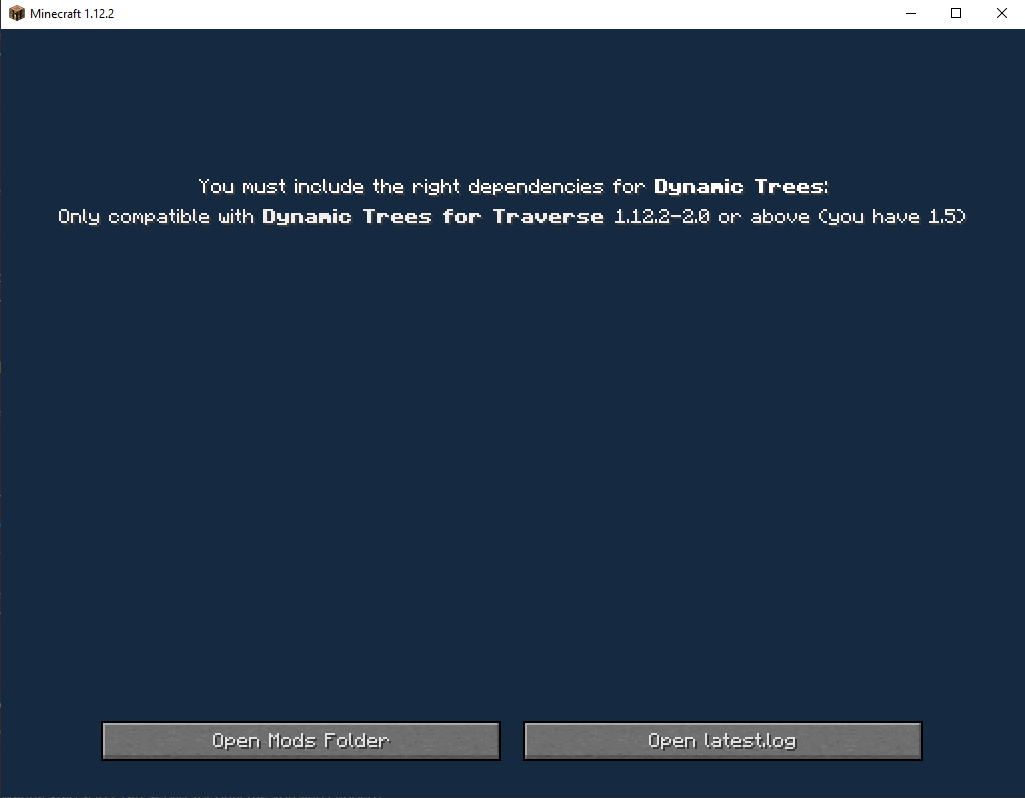
I need help I updated the mod dynamic trees in rlcraft now this pops up when i launch
 vital abyss
when i try downloading curseforge i just keep getting this message https://gyazo.com/63a0a82b9086ac7227c40ae465ff46b8?token=25e864df71c5b56b3b810d5a0fabb513
 autumn agate
twin granite
I need help I updated the mod dynamic trees in rlcraft now this pops up when i l...
autumn agate
twin granite
I need help I updated the mod dynamic trees in rlcraft now this pops up when i l...
update the dynamic trees for traverse mod
vital abyss
when i click retry it just says network issue yet my internet is running fine
torn sun
All I am trying to do is install Rl Craft but CurseForge makes it so difficult, and they want me to download their "program" which won't even install.
Does anyone know a workaround?
last parcel
torn sun
Also why is it I can’t download the files directly from the website?
last parcel
you can
torn sun
I can't tho, it won't download
twin granite
autumn agate
update the dynamic trees for traverse mod
How?
autumn agate
twin granite
How?
installing the mod and deleting the old version?
twin granite
can u show me
autumn agate
torn sun
All I am trying to do is install Rl Craft but CurseForge makes it so difficult, ...
that is so difficult oh my g-
autumn agate
twin granite
can u show me
its really easy
if you're on the app
just search for the mod
twin granite
i am
autumn agate
and download it
autumn agate
try looking for beta versions
twin granite
Wdym
autumn agate
like
sometimes mods arent fully released so they are on beta
i suppose the mod is on beta
twin granite
Anddddddddddddddd
autumn agate
thats why it didnt automatically download
twin granite
How do I restart the rlcraft thing on the curse forge app and save my world
@autumn agate
autumn agate
open the instance folder
copy your save inside the saves folder
and paste it in the desktop
autumn agate
its simple stuff
go to the modpack
click settings
"open folder"
find the saves folder
copy your save
and paste it your desktop
 prime spruce
why does it say this, I cant possibly not have an account since my username is right there
coarse elm
prime spruce
why does it say this, I cant possibly not have an account since my username is r...
The account you logged into doesn't own the game.
coarse elm
twin granite
You make this so fucking complicated
Whats wrong?
twin granite
 coarse elm
!mc-log
golden muskBOT
How to get a Minecraft log file.
Where to find the log on the CurseForge Client.
Right-click the modpack profile icon OR click the button in the modpack profile.
Click Open Folder.
Open the logs folder.
Find the file called latest.log and drag it into discord.
twin granite
whats that
coarse elm
Follow the instructions.
golden muskBOT
Minecraft Files should NOT be installed inside the .minecraft folder or inside OneDrive folders. If this shows up in the path at all you need to move it by following the instructions below!
If Minecraft is not installed, start here.
Click the in the top right.
Select Minecraft.
Click "Edit".
Move to the "Continue here:" section below.
If Minecraft is installed, follow these steps.
Click the in the bottom left.
Select the Minecraft tab.
Click "Change".
Move to the "Continue here:" section below.
Continue here:
Make a folder in the root directory called CurseForge.
Select the folder you just made.
The text box should show something like the following:
For Windows: C:\CurseForge
For Mac: /CurseForge
coarse elm
Follow this
Also, you will need to copy the Instances folder from the current location to the new one
that will copy your modpacks and worlds over
twin granite
what
coarse elm
"what"
You need to explain what you don't understand.
 coarse elm
You follow the instructions?
You start with the "If Minecraft is installed follow these steps" part as you currently have the game installed.
 night peak
my mods wont even launch
fringe shard
Hey, would anyone know why I keep getting exit code 1 and I just factory reset
coarse elm
night peak
my mods wont even launch
explain
coarse elm
fringe shard
Hey, would anyone know why I keep getting exit code 1 and I just factory reset
!mc-logs
golden muskBOT
How to get a Minecraft log file.
Where to find the log on the CurseForge Client.
Right-click the modpack profile icon OR click the button in the modpack profile.
Click Open Folder.
Open the logs folder.
Find the file called latest.log and drag it into discord.
prime spruce
coarse elm
The account you logged into doesn't own the game.
im sure i have java on my acc and I launched it and it worked without an issue, weird
twin granite
Clay what am I supposed to do??????????????????????
autumn agate
Hi when I try to install curseforge and run it nothing happenes
coarse elm
twin granite
Clay what am I supposed to do??????????????????????
mate you read and then do what it says.
All the information is right there
night peak
i have minecraft java edition and i downloaded curseforge today and i downloaded my modpacks and i hit the play button and it keeps saying that my files are corrupted and i should try reinstalling minecraft
twin granite
I don't understanddddddddddddddddddddddddddddddddddddddddddddddddddddd
coarse elm
twin granite
I don't understanddddddddddddddddddddddddddddddddddddddddddddddddddddd
You don't know how to click buttons?
tribal sparrow
can anyone tell me why the galactic craft moon terrain isnt loading? Its glitched.
coarse elm
night peak
i have minecraft java edition and i downloaded curseforge today and i downloaded...
!mc-installfix
golden muskBOT
- Click on the icon in the bottom left.
- Click the
MinecraftTab. - Click
Changenext to theMinecraft Modding FolderOption. - Select the folder named
Install. - Delete it.
- Restart CurseForge App.
- It will ask to install MC again, do so.
- Play game.
NOTE: You will not lose any modpacks or worlds, These are saved in the Instances folder. DO NOT TOUCH THIS FOLDER OR YOU WILL LOSE EVERYTHING
coarse elm
autumn agate
Hi when I try to install curseforge and run it nothing happenes
Explain please.
You didn't follow the instructions.
twin granite
show me the stuff again to fix my problem
coarse elm
fringe shard
Can you take a picture of the error you get?
fringe shard
sure
autumn agate
coarse elm
Explain please.
So I click on the install link and it downloads the file but when I run the file and let it make changes nothing happens
tribal sparrow
Id like some help when your finished with these people please
fringe shard
coarse elm
autumn agate
So I click on the install link and it downloads the file but when I run the file...
!knownissues
golden muskBOT
Known Issues with solutions or status of the issue.
Overwolf maintains a known list of issues here, some with solutions, others without.
http://support.curseforge.com/en/support/solutions/articles/9000196615-known-issues
coarse elm
Look under the Installation section.
coarse elm
tribal sparrow
Id like some help when your finished with these people please
feel free to jump into the group with whatever the problem is
tribal sparrow
Can u tell me why the galactic craft moon terrain isnt loading? Its glitched.
tribal sparrow
coarse elm
feel free to jump into the group with whatever the problem is
^ this
fringe shard
what modpack are you using?
tribal sparrow
Custom modpack
fringe shard
it happend to me at one point too i cant remember what i did to fix it tho
coarse elm
Ask the galacticraft support cause I have no clue.
tribal sparrow
Ok
fringe shard
coarse elm
Can you take a picture of the error you get?
also
idk if thats what you needed
coarse elm
yeah i know i'm trying to figure out what to do
coarse elm
your JVM is crashing
fringe shard
yeah thought so
coarse elm
can you post that first thing you posted again?
fringe shard
sure
i need a new pc either way
i just wanna figure out what it is so i can fix it in the future
twin granite
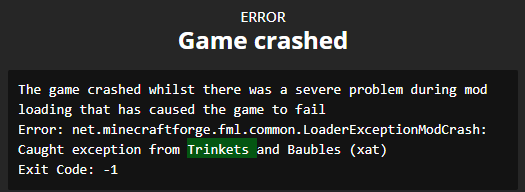
clay so i updated every single mod in the mod pack rlcraft then hen i launched i got like a error thing of the dynamic tree then this guy tried to help me and screwed everything up and made it worse
what do i do
now when i launch i get this
 coarse elm
fringe shard
i just wanna figure out what it is so i can fix it in the future
coarse elm
fringe shard
i just wanna figure out what it is so i can fix it in the future
Does any pack work or is it only this one that's broke?
coarse elm
Ok so then you have a corrupt java install i'm going to assume.
fringe shard
it stops working
coarse elm
!mc-installfix
golden muskBOT
- Click on the icon in the bottom left.
- Click the
MinecraftTab. - Click
Changenext to theMinecraft Modding FolderOption. - Select the folder named
Install. - Delete it.
- Restart CurseForge App.
- It will ask to install MC again, do so.
- Play game.
NOTE: You will not lose any modpacks or worlds, These are saved in the Instances folder. DO NOT TOUCH THIS FOLDER OR YOU WILL LOSE EVERYTHING
coarse elm
do this, and it will get a new one
fringe shard
yeah see ive already done that huh
coarse elm
Really?
coarse elm
eahy
fringe shard
it works but when i restart my pc it stops working
so its gonna be annoying if i gotta do that everytime my pc crashes
coarse elm
Sounds like you might be having harddrive issues?
your pc is crashing...?
Yeah, that's an issue greater than CF itself.
twin granite
Please help
coarse elm
Either you have an infected PC or the hardware is faling.
fringe shard
see i just upgraded aswell
tried the same thing on my old pc
same thing as my new one
hardware failing on a new pc is sus
idk i need to get the pc looked at either way, thanks for the help
coarse elm
Bad drives are a thing
fringe shard
true
 waxen pine
stupid question - is java up to date?
coarse elm
twin granite
clay so i updated every single mod in the mod pack rlcraft then hen i launched i...
Why are you updating mods in a modpack to start with??
Also you need to fix the thing i pointed out or you will forever have issues.
twin granite
I wanted the new armor dragon steel armor but it didn't work so i updated the ice and fire mod and it worked but then i wanted to see what stuff i get with all the updated mods
how do i revert this and keep my world
coarse elm
waxen pine
stupid question - is java up to date?
has nothing to do with java being updated or not. It's the built in version that ships with minecraft.
coarse elm
fringe shard
true
You could try more ram
noticed your only using 4g and trying to load RLCraft.
coarse elm
work doesn't mean good.
fringe shard
i just booked an appointment with a computer repair company ill see whats up
coarse elm
twin granite
how do i revert this and keep my world
you need to move your install folder.
I refuse to help you further until you do so.
twin granite
how do i do that i need a better explanation than that other crap
coarse elm
There is no other way to explain it.
If you can't click buttons or tell me exactly what step you are stuck on I can't help.
coarse elm
what was it....?
fringe shard
had 15 drives out of date and my fucking HDD is broken
thats greatttt
one of them was causing crashes on cold war
so that might have been the one
 fringe shard
coarse elm
that sucks but see, clay knows his stuff 😛
fringe shard
coarse elm
that sucks but see, clay knows his stuff 😛
lmao
twin granite
!mc-path
golden muskBOT
Minecraft Files should NOT be installed inside the .minecraft folder or inside OneDrive folders. If this shows up in the path at all you need to move it by following the instructions below!
If Minecraft is not installed, start here.
Click the in the top right.
Select Minecraft.
Click "Edit".
Move to the "Continue here:" section below.
If Minecraft is installed, follow these steps.
Click the in the bottom left.
Select the Minecraft tab.
Click "Change".
Move to the "Continue here:" section below.
Continue here:
Make a folder in the root directory called CurseForge.
Select the folder you just made.
The text box should show something like the following:
For Windows: C:\CurseForge
For Mac: /CurseForge
 coarse elm
I don't know what you are even doing
You really can't follow the video or the instructions?
twin granite
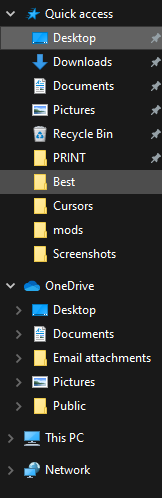
I don't have the same stuff shown in the video
waxen pine
click clay's animataed picture and do exactly what it says, not what you want to do or think
 waxen pine
are you using the curseforge launcher app? that is exactly what you see...
twin granite
app
waxen pine
follow the mouse cursor with your eyes? lol
twin granite
I DONT HAV ETHE SAME STUFF
coarse elm
you don't have WHAT stuff
The launcher is the same for everyone.
So I don't know what you don't have
twin granite
 twin granite
 waxen pine
wow
coarse elm
Click This PC
 hasty dust
coarse elm
***the whole thing, no edits***
hasty dust
coarse elm
***the whole thing, no edits***
bro he said no edits
twin granite
 coarse elm
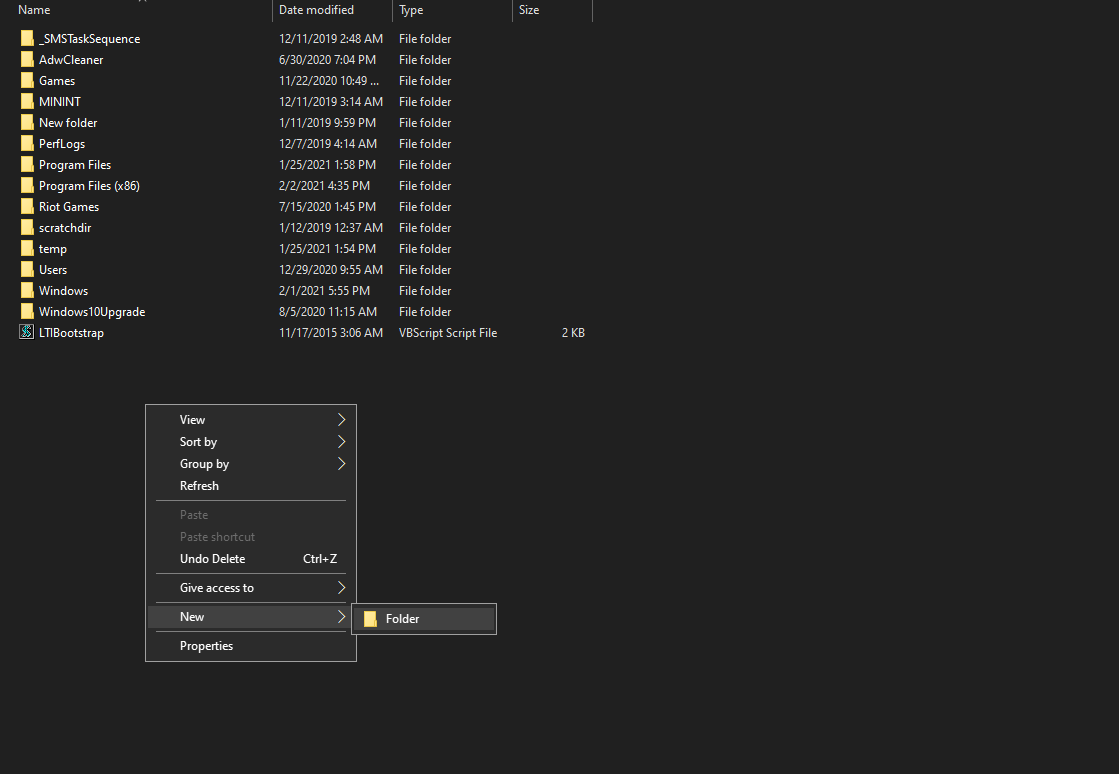
Click on Windows (C:)
Then continue with the video
twin granite
 gaunt plover
hi does anyone know how to deal with ticking entities
coarse elm
explain the problem you have
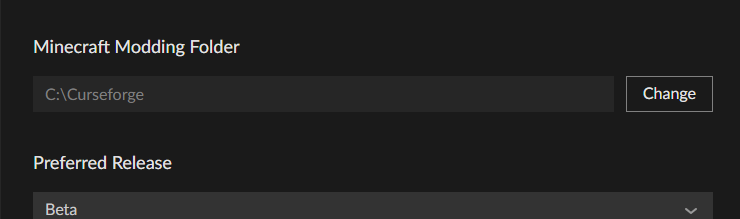 autumn agate
Clay i've found a new way to spell curseforge incorrectly
coarse elm
Open the minecraft game again
coarse elm
🤦
autumn agate
incredible
twin granite
coarse elm
Open the minecraft game again
wdym why i just made a empty folder
twin granite
all it did is lead me back to thishttps://prnt.sc/ycjr8k+
 twin granite
no
waxen pine
@gaunt plover you should give yourself the minecraft role in roles channel and post your issue or logs there
twin granite
i havent
waxen pine
you need to because the cf app is like oldschool software that can't figure out anything for itself
twin granite
so do i restart
waxen pine
yes...
twin granite
ok
coarse elm

twin granite
 coarse elm
Restart the app
coarse elm
restart your computer then
coarse elm
You just now restarted your computer?
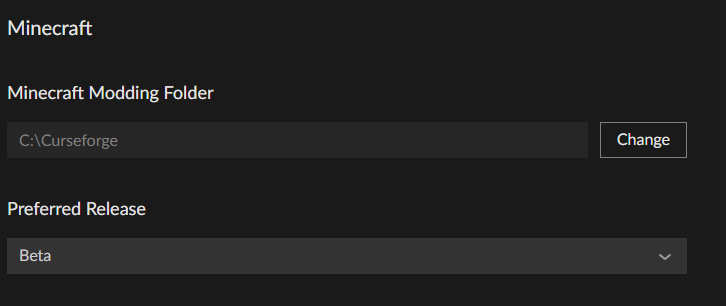
 coarse elm
Open the settings and show me the path
gaunt plover
waxen pine
<@!304837390844035073> you should give yourself the minecraft role in roles chan...
thank you!
twin granite
 coarse elm
Ok, everything should be correct then
you can't download any modpack without getting the missing install error?
twin granite
it keeps crashing
coarse elm
what's crashing
coarse elm
Still in the old place...
you need to copy the saves folder from the old install to the new one
coarse elm
You copy paste them or drag them
 shrewd path
whenever i try and use the app to play a modpack, it makes me log in every time i boot and then when i try and play it crashes saying im in "demo mode"
its a legit account, the official launcher works fine, idk why curseforge hates me xD
coarse elm
because you are logging into an account that doesn't own the game
sage pier
Do you like.. own Bedrock, but not Java?
shrewd path
using the same account on the official minecraft launcher works fine...
i own java edition
this only started happening like a week ago or smth
same account worked fine before that
coarse elm
Well clearly it's not
shrewd path
so.... NotCxmplicated exists only on the laucher i download from minecraft.net and not the version i launch from curseforge...
that makes total complete sense
coarse elm
You can argue all you want but you are logging into the wrong account or via the wrong method.
It's the same launcher you get from the site
Curseforge doesn't handle the minecraft account at all
shrewd path
so then why doesnt it work from there but works fine from just like normally launching...
coarse elm
because you are using the wrong details or login method
shrewd path
if i am using the wrong login details how am i getting to the "logged in" screen to launch
coarse elm
because you have connected/shared/whatever accounts?
shrewd path
w h a t
coarse elm
You used an account that has a windows account associated with a minecraft account.
sage pier
Next step would be showing Clay a screenshot of the vanilla launcher, with your logged in account.
 woeful nimbus
what does it mean by no java executable found... what do i do?
coarse elm
like this isn't rocket science
There's no ifs ands or buts about you doing something wrong as the launcher is EXACTLY the same as what you download from the minecraft website.
coarse elm
woeful nimbus
what does it mean by no java executable found... what do i do?
!mc-java
golden muskBOT
Forge & Fabric currently only officially support Java 8 as this is what the game downloads, Download java 8 from here.
https://adoptopenjdk.net/?variant=openjdk8&jvmVariant=hotspot
coarse elm
install that
woeful nimbus
where
coarse elm
on your computer...?
shrewd path
golden musk
Forge & Fabric currently only officially support Java 8 as this is what the game...
here?
coarse elm
you click the link, then click download and install that java.
woeful nimbus
where is the link
 shrewd path
are you blind?
woeful nimbus
yes
shrewd path

AdoptOpenJDK provides prebuilt OpenJDK binaries from a fully open source set of build scripts and infrastructure. Supported platforms include Linux, macOS, Windows, ARM, Solaris, and AIX.
sage pier
woeful nimbus
where is the link
woeful nimbus
oh
coarse elm
yeah
woeful nimbus
now i can download mods?
shrewd path
coarse elm
like this isn't rocket science
There's no ifs ands or buts about you doing somet...
well then... what am i doing wrong..?
coarse elm
once you restart the client yes.
coarse elm
shrewd path
well then... what am i doing wrong..?
you are using the wrong account or login method
shrewd path
what other login methods are there than... putting in your email and password....
 tiny glacier
im trying to dlownload pixelmon but its stuck at 3/7 mods 42 percent
shrewd path
thats how i login to the "official" launcher and it works fine
coarse elm
tiny glacier
im trying to dlownload pixelmon but its stuck at 3/7 mods 42 percent
does it give an error? One of the mods is ~430MB so it's going to take a while
coarse elm
then you need to wait
tiny glacier
k
coarse elm
it will either make an error or just stop
tiny glacier
it went up to 84 percent ty
coarse elm
shrewd path
thats how i login to the "official" launcher and it works fine
I don't get what you don't understand about the whole it's the same launcher.
Exactly the same, no changes, you can run it without CF and it will work exactly like every other install.
shrewd path
then why on earth doesnt it work when i go thru CF but it does when i dont
coarse elm
because you are using the wrong account details or the wrong login method
shrewd path
HOW
coarse elm
It's not my account! I can't tell you how....
All i can tell you is you are doing something wrong.
shrewd path
according to me opening the launcher myself, the account is fine, according to minecraft.net, the account is fine
if i dont use CF i can use it just fine on online severs
just
i d o n t g e t i t
woeful nimbus
i finished download the thing you told me to do but it is still saying the same thing
coarse elm
did you install it
sage pier
woeful nimbus
i finished download the thing you told me to do but it is still saying the same ...
Did you install it?
woeful nimbus
yes
coarse elm
did you restart overwolf and curseforge
sage pier
Can you launch vanilla minecraft?
sage pier
Remember to open the tray down in the right of the screen by pressing the arrow, and right clicking on Overwolf and exiting the application entirely
Sometimes it requires a full restart of the application.
coarse elm
shrewd path
if i dont use CF i can use it just fine on online severs
The CF launcher is exactly the same as the vanilla one. CF does nothing other than start the program with some extra arguments to make the profiles.
shrewd path
so basically it has no reason not to work, it just doesnt
coarse elm
your like the 15th person to come here and argue that CF is doing something wrong and it's always because they messed up something.
No, you are logging into the wrong account
shrewd path
how
so this login works fine for if i open launcher
doesnt work fine if CF opens the launcher
coarse elm
because you think you are using the correct details/method and you are not. that's how
shrewd path
then why does it log me in?
it shows in the top left corner that im logged in as NotCxmplicated
shrewd path
thats also the login to log in on minecraft.net
coarse elm
I don't work for mojang.
shrewd path
w h y is support so hard to find for this stupid bug
minecraft fourms told me it was ur fault
you think its my fault
coarse elm
The minecraft forums clearly don't know anything about CurseForge
sage pier
I think it's the fault of Covid-19
shrewd path
not surprised by that
sage pier
Clearly infected the launcher
shrewd path
Minecraft-19
coarse elm
Like if you really think it's a bug with CF you can delete the whole install of MC and have it install a new one
sage pier
But, if you (hang with me here), create a custom profile in CurseForge, don't add any mods yet. Just launch it. Does it still say "Play demo"?
coarse elm
!mc-installfix
golden muskBOT
- Click on the icon in the bottom left.
- Click the
MinecraftTab. - Click
Changenext to theMinecraft Modding FolderOption. - Select the folder named
Install. - Delete it.
- Restart CurseForge App.
- It will ask to install MC again, do so.
- Play game.
NOTE: You will not lose any modpacks or worlds, These are saved in the Instances folder. DO NOT TOUCH THIS FOLDER OR YOU WILL LOSE EVERYTHING
coarse elm
sage pier
But, if you (hang with me here), create a custom profile in CurseForge, don't ad...
has nothing to do with CF profiles.
They all share the same instance of the launcher.
sage pier
coarse elm
has nothing to do with CF profiles.
Ah.
woeful nimbus
ok
sage pier
Well, then it's probably the instance that is broken
coarse elm
It's always someone using the wrong details.
sage pier
Launch it, do you get the error?
shrewd path
yes
sage pier
.. then it's something with Minecraft and the instance o.O
Do the install-fix that Clay posted
woeful nimbus
ok
coarse elm
woeful nimbus
ok
why do you keep saying ok?
shrewd path
delete this?
coarse elm
yes
sage pier
*looks at clock and goes "but it's the 5th and 7:31 am"*
shrewd path
39000 items o.O
sage pier
Then I remember, timezones.
woeful nimbus
i dont know what to do
sage pier
woeful nimbus
i dont know what to do
Did you restart Overwolf and CurseForge?
woeful nimbus
how
sage pier
Try restarting your computer.. or do like we said, click the X in the upper right on the application
sage pier
Yes, that sounds good. And then try installing a modpack and playing it.
coarse elm
restart your computer then
woeful nimbus
ok
sage pier
Sometimes the easy fix is to start from the beginning. ^^
 viral cosmos
Hey guys, can someone be kind enough to explain me how to share my mod pack to my friends?
sage pier
!mc-packshare
golden muskBOT
There are two ways to share a modpack you've made with others...
Export and Share - For Friends to Small Groups.
- Click the Icon for the modpack.
- Click the button next to play.
- Click

Export. - Select the files that should be included.
- Send the zip to the people that want it! They can follow the instructions in
!mc-installpackto install the pack!
Upload to Curseforge - For Public Release to Everyone.
This options will make your pack public to EVERYONE, it comes with extra requirements and will take some effort to set up.
- Go to here: https://www.curseforge.com/project/432/4471/create
- Fill out the information with a proper description of the pack. This should allow anyone to understand what the pack is.
- Click the Icon for the modpack in the CurseForge app.
- Click the button next to play.
- Click
Export. - Select the files that should be included.
- Open your Project you made on the CurseForge site and Upload the file you just made.
- Wait for Moderation & Sync so it can show up in the client! (See
!syncfor limitations)
 icy relic
Anybody know how to fix "An exception occurred during a webclient request"?
woeful nimbus
it now says unable to install due to a missing install path
coarse elm
!knownissues
golden muskBOT
Known Issues with solutions or status of the issue.
Overwolf maintains a known list of issues here, some with solutions, others without.
http://support.curseforge.com/en/support/solutions/articles/9000196615-known-issues
coarse elm
woeful nimbus
it now says unable to install due to a missing install path
What's the path you are using for minecraft? You can find it in the settings
coarse elm
in CurseForge
golden muskBOT
Minecraft Files should NOT be installed inside the .minecraft folder or inside OneDrive folders. If this shows up in the path at all you need to move it by following the instructions below!
If Minecraft is not installed, start here.
Click the in the top right.
Select Minecraft.
Click "Edit".
Move to the "Continue here:" section below.
If Minecraft is installed, follow these steps.
Click the in the bottom left.
Select the Minecraft tab.
Click "Change".
Move to the "Continue here:" section below.
Continue here:
Make a folder in the root directory called CurseForge.
Select the folder you just made.
The text box should show something like the following:
For Windows: C:\CurseForge
For Mac: /CurseForge
sage pier
!mc-path
 main ruin
When did overwolf stop supporting windows insider?
woeful nimbus
guys what do i do after i did to thge bot above
coarse elm
main ruin
When did overwolf stop supporting windows insider?
This is CurseForge, You would need to ask In the Overwolf discord.
coarse elm
woeful nimbus
guys what do i do after i did to thge bot above
try playing the game
sage pier
woeful nimbus
guys what do i do after i did to thge bot above
Either search for a modpack you want to play, or create a custom profile and install some mods you want to play.
woeful nimbus
i cant create a profile
its says
ofference referrance not set to an istance of an object
coarse elm
reinstall the Curseforge app
woeful nimbus
oh
coarse elm
just the app
woeful nimbus
what if i just download a mod
coarse elm
nothing
coarse elm
you can do that from the site
viral cosmos
guys
i tried uloading my file on curseforge
but it does not let me
can someone call me and help me?
i might just be to dumb
too*
wild jewel
Define "Does not let me"
viral cosmos
ok
so it says this category is mandatory
but i did select it
and then it says that the file is not valid
let me copy paste
application/x-zip-compressed is not a supported file type.
it says that
 indigo sonnet
what I can do with it?
wild jewel
viral cosmos
application/x-zip-compressed is not a supported file type.
What are you trying to upload then?
Mod or modpack?
wild jewel
indigo sonnet
what I can do with it?
What does it translate to?
indigo sonnet
"This App won't work on this PC"
wild jewel
indigo sonnet
"This App won't work on this PC"
!ticket-site
golden muskBOT
:bug: Reporting via Website :bug:
Can't open the app or would rather use the website? You can do so here: https://support.curseforge.com/en/support/tickets/new
Fill out the form with accurate detailed information, "It doesn't work" isn't helpful! What exactly doesn't work and why doesn't it work should be easy to answer!
Make sure to upload your Overwolf logs with the Upload File option on the ticket, information on how to get these logs can be found here https://support.overwolf.com/en/support/solutions/articles/9000176827-how-to-get-your-overwolf-logs
indigo sonnet
ok thx
viral cosmos
wild jewel
What are you trying to upload then?
Mod or modpack?
modpack
wild jewel
viral cosmos
modpack
How did you export it?
wild jewel
Post the link of the project where you are trying to upload it
autumn agate
@viral cosmos nice profile picture
obsidian urchin
!status
golden muskBOT
It is 01:40PM on Friday for CurseForge my dudes.
Project Moderation Time
Project/File moderation is done on Sunday - Thursday from 10am - 6pm GMT+2
This process is First in, First out. Thus files submitted late in the work day may not be checked until the next work day.
 elfin ridge
hey, i have a problem with my private pack, its making survival pretty annoying, its a simple stupid thing i guess but just really makes it unplayable
when i crit a mob or any living creature it become unkillable, its health bar becomes black hearts/ disappears and just gets god mode.
any help?
heavy flower
please help
last parcel
heavy flower
please help
?ticket-site
golden muskBOT
:bug: Reporting via Website :bug:
Can't open the app or would rather use the website? You can do so here: https://support.curseforge.com/en/support/tickets/new
Fill out the form with accurate detailed information, "It doesn't work" isn't helpful! What exactly doesn't work and why doesn't it work should be easy to answer!
Make sure to upload your Overwolf logs with the Upload File option on the ticket, information on how to get these logs can be found here https://support.overwolf.com/en/support/solutions/articles/9000176827-how-to-get-your-overwolf-logs
 hard torrent
Guys i have a problem i newly transfered from twitch. I first time using Curse and when i tried to open a modpack this error appears and it says this application wont compatiable for your pc pls communicate with the author. It is windows 10 x64 and original minecraft works perfectly what is the problem. (I know screenshot couldnt give any information bcs of it is not english but i want to add it maybe gives a little bit clue about what is going on)
fringe shard
coarse elm
You could try more ram
never ended up fixing it btw i 100% know its curseforge now, just tried several other launchers and they all work fine even after a computer crash so
last parcel
fringe shard
never ended up fixing it btw i 100% know its curseforge now, just tried several ...
?MC-INSTALLFIX you try this?
golden muskBOT
- Click on the icon in the bottom left.
- Click the
MinecraftTab. - Click
Changenext to theMinecraft Modding FolderOption. - Select the folder named
Install. - Delete it.
- Restart CurseForge App.
- It will ask to install MC again, do so.
- Play game.
NOTE: You will not lose any modpacks or worlds, These are saved in the Instances folder. DO NOT TOUCH THIS FOLDER OR YOU WILL LOSE EVERYTHING
last parcel
?ticket-app
golden muskBOT
:bug: Reporting via the CurseForge App :bug:
-
Click the
icon in the bottom left. -
Select
Open a Ticket. -
Fill out the form with accurate detailed information, "It doesn't work" isn't helpful! What exactly doesn't work and why doesn't it work should be easy to answer!
-
Make sure to upload your Overwolf logs with the
Upload Fileoption on the ticket, information on how to get these logs can be found here https://support.overwolf.com/en/support/solutions/articles/9000176827-how-to-get-your-overwolf-logs -
Submit!
last parcel
okay
 timid nimbus
im trying to install rlcraft but it says there's a missing install path
fringe shard
thanks for your help tho
timid nimbus
uhhh dd you press enter..
night portal
wild jewel
No it is not, get the game. Then we can talk.
Now stop talking about it, it is p...
ye, now u can talk with me.
how to add custom icon for modpack?
 misty herald
is there a tutorial on how to install a modpack on a linux server? with the server pack