#👽︱game-support
1 messages · Page 62 of 1
 wintry harbor
 wild jewel
Nice to hear, have fun 😉
wild jewel
wintry harbor
<@!525950791710801921> sorry for the bother man
That is why I am here 😉
 round sail
i will give in dm msg beacuse of soo much msges here i am confused solve me problem then u can block me from dm msg
wild jewel
round sail
i will give in dm msg beacuse of soo much msges here i am confused solve me prob...
No
wild jewel
I don't do DM.
People stopped talking here anyways
 hardy dome
lol
round sail
k my epic fight mod not working when i make world there i didnot seen my mod working there
why
@wild jewel why this happens
wild jewel
round sail
k my epic fight mod not working when i make world there i didnot seen my mod wor...
Show that you installed it.
 soft copper
@hardy dome So now im getting this. I know you said you were testing it but im also trying to fix the issue
wild jewel
round sail
https://www.curseforge.com/minecraft/mc-mods/epic-fight-mod
No, that you installed it
round sail
wild jewel
No, that you installed it
this is i installed
wild jewel
and stop with the aternos stuff
round sail
wild jewel
and stop with the aternos stuff
k
wild jewel
round sail
this is i installed
Show that it is! Screenshot
hardy dome
I couldn't even get Forge to install. I'm clueless. Maybe try asking for support on the official Forge server. (tell me admin if this is against the rules I may have forgot) https://discord.gg/UvedJ9m
wild jewel
hardy dome
I couldn't even get Forge to install. I'm clueless. Maybe try asking for support...
Not against the rules, you are just trying to help here 😉
hardy dome
wild jewel
Not against the rules, you are just trying to help here 😉
I know some servers outlaw that. Cross-linking servers.
round sail
@wild jewel i have unistalled mod i am installing again
wild jewel
hardy dome
I know some servers outlaw that. Cross-linking servers.
It is fine as long as it is to get help and directed
round sail
@wild jewel first watch this video then i can explain my issue clearly i swearhttps://www.youtube.com/watch?v=RxzuYR_4GNg
wild jewel
round sail
<@!525950791710801921> first watch this video then i can explain my issue clearl...
No, you need to show that it is installed
round sail
wild jewel
No, you need to show that it is installed
i cant explain beacause u dont no this mod wht it does
hardy dome
In other words, what Timtower is saying, give us a screenshot of your CurseForge profile. Also, we can tell what the mod does by the video thumbnail/title lol
wild jewel
round sail
i cant explain beacause u dont no this mod wht it does
I don't care what it does, you are not showing that it is in your instance. Till I see that I won't look at anything else
 autumn agate
hardy dome
I couldn't even get Forge to install. I'm clueless. Maybe try asking for support...
autumn agate
hardy dome
I couldn't even get Forge to install. I'm clueless. Maybe try asking for support...
I think they no more support/lts the 1.12 forge, but idk.
soft copper
You aren't showing the errors it gives @round sail ..
round sail
i didnot understand sorry
round sail
soft copper
You aren't showing the errors it gives <@!776126460179382312> ..
oh let me
screen shot
after installing it again
hardy dome
For an even simpler explanation, show us this (but with the mod in the list)
For a simple screenshot, on Windows, use Windows+Shift+S
It'll automatically copy to your clipboard so you can paste directly into Discord
round sail
issue is that i cant see my thir person character when i click to f5 i cant see my charater means tpp
autumn agate
hardy dome
For a simple screenshot, on Windows, use `Windows`+`Shift`+`S`
It'll automatical...
Or search snipping tool
wild jewel
round sail
issue is that i cant see my thir person character when i click to f5 i cant see...
Show that it is installed first!
hardy dome
autumn agate
Or search snipping tool
Sure. I just prefer Snip & Sketch because it's newer and a UWP app
round sail
wild jewel
Show that it is installed first!
k let me install and i will screen shot
soft copper
hardy dome
Sure. I just prefer Snip & Sketch because it's newer and a UWP app
I'm just going to try to completely reinstall minecraft
wild jewel
 rustic jungle
why does curse forge not tell u what mods are needed for this mold to be used
rustic jungle
why does curse forge not tell u what mods are needed for this mold to be used
Website does
autumn agate
Its automatically Downloaded the needed apps ( i think)
hardy dome
soft copper
I'm just going to try to completely reinstall minecraft
I couldn't get it to work. I just got my new SSD at Christmas and did a fresh install of Windows. A reinstall of MC (probably) won't fix it.
Stop sharing nationalities. @wild jewel (or another admin) keeps deleting them for a reason. I don't personally know why, but Admins' word is law on their server
rustic jungle
i didnt remove
wild jewel
@round sail Because it is not really support stuff is it?
soft copper
Not very smart to call an admin an idiot. Do you still need help with your mod?
round sail
bye
 flat valley
me and my friends are trying to play rl craft but we are stugaling to get mc forge
wild jewel
flat valley
me and my friends are trying to play rl craft but we are stugaling to get mc for...
!getcf
 golden muskBOT
Looking to install the CurseForge app?
Todo: Place system requirements here.
<:windows:798410728188936222> Windows
<:mac:798410654418862130> Mac
Linux
:person_shrugging:
hardy dome
flat valley
me and my friends are trying to play rl craft but we are stugaling to get mc for...
More info: I need your OS
Also: Get CF (message above)
flat valley
do we not need nomal forge?
hardy dome
flat valley
do we not need nomal forge?
Curse is it's own thing. Curse can install Forge for you.
soft copper
@hardy dome Ok so I asked in the discord you sent me, they said the servers are no longer supported for old versions 😦
Thank you for your help anyways!
hardy dome
soft copper
<@!287674779123712000> Ok so I asked in the discord you sent me, they said the s...
Oh. You're on an older version of MC? lol must've missed it in the #🔥︱curseforge-support channel
soft copper
hardy dome
Oh. You're on an older version of MC? lol must've missed it in the <#78202763525...
1.12.2
autumn agate
Ye, they sadly not lts 1.12.2 :/
flat valley
hardy dome
Curse is it's own thing. Curse can install Forge for you.
so we have curseforge
hardy dome
flat valley
so we have curseforge
Try to figure it out. I would say it's pretty intuitive. If you can't figure it out, keep asking here (be specific!).
soft copper
hardy dome
Try to figure it out. I would say it's pretty intuitive. If you can't figure it ...
Ok so apparently their host or whatecer is down so the servers are messed up. I guess I will have to wait.
autumn agate
soft copper
Thank you for your help anyways!
What if you try install that version of forge? With server, i mean you download manually the 1.12.2-x.x.x.forge? Then install the server
soft copper
autumn agate
What if you try install that version of forge? With server, i mean you download ...
I already tried.
autumn agate
soft copper
Ok so apparently their host or whatecer is down so the servers are messed up. I ...
Oh, so file hosting error. , Then ye, you need to wait
 nocturne grotto
Hey everyone! I'm trying to run CurseForge mod packs for MC and I can't seem to open my MC launcher when I hit play.
I click play and nothing happens
wintry harbor
@wild jewel hey man sorry to bother again I was just wondering something.... we got the optifine working now when we load up minecraft we go to the new "shader settings to apply the shaders ( BSL)" and it causes minecraft to just load before I could even select anything and Im not sure if its PC constraints or something we might have done wrong?
wild jewel
wintry harbor
<@!525950791710801921> hey man sorry to bother again I was just wondering someth...
My knowledge on shaders isn't good enough to help with that
wild jewel
nocturne grotto
I click play and nothing happens
!knownissues Please check this
golden muskBOT
Known Issues with solutions or status of the issue.
Overwolf maintains a known list of issues here, some with solutions, others without.
http://support.curseforge.com/en/support/solutions/articles/9000196615-known-issues
 obsidian urchin
whats this error?
wintry harbor
ah no worries man thank you very much @wild jewel
autumn agate
@obsidian urchin I think thats just a loading error I would asume just load it up again
 lyric hatch
any help on why wen i click install on All the mods 6 it doesnt do anything
autumn agate
lyric hatch
any help on why wen i click install on All the mods 6 it doesnt do anything
You have enough space in your drive to install,unzip it?
lyric hatch
yeah it doesn't even attempt it cause i can download the installer for curseforge, but it doesnt even show up on the downloads thing at the bottom of page in chrome when i try to download the actuall mod
autumn agate
Go to settings and change the number of downloading, and see you set the Download folder
lyric hatch
settingh on chrome or pc?
autumn agate
In Curseforge
lyric hatch
as in im dowloading the mod from chrome
autumn agate
Wait, you try downloading the ATM6 in Curseforge and it doesn't work?
lyric hatch
yes
autumn agate
Hmm, defender not block your web Download things?
lyric hatch
not in curseforge but on chrome on curseforge.com
autumn agate
Click the "Download" button to download the .zip
Or "Install" if you have curseforge app started/downloaded/installed
lyric hatch
ohhh okay thanks
autumn agate
Install is install in Curseforge app, Download is download the <modpack>.zip
lyric hatch
im sorry im kinda a noob once ive got the .zip foulder what do i do now?
autumn agate
Install Curseforge then import the pack
lyric hatch
ahh okay thansk
autumn agate
Importing: Create custom profile (or smth name) then click import and select the .zip
!mc-path if you dont know how to add Download path
golden muskBOT
Minecraft Files should NOT be installed inside the .minecraft folder or inside OneDrive folders. If this shows up in the path at all you need to move it by following the instructions below!
If Minecraft is not installed, start here.
Click the  in the top right.
Select Minecraft.
Click "Edit".
Move to the "Continue here:" section below.
If Minecraft is installed, follow these steps.
Click the  in the bottom left.
Select the Minecraft tab.
Click "Change".
Move to the "Continue here:" section below.
Continue here:
Make a folder in the root directory called CurseForge.
Select the folder you just made.
The text box should show something like the following:
For Windows: C:\CurseForge
For Mac: /CurseForge
 autumn agate
how to dowload voxelmap on forge
wild jewel
!!=
golden muskBOT
Wording is important!
Forge = Minecraft Forge, This is a modloader often just called "Forge".
CurseForge = A Website/App that has content for games.
Mods = Individual mod files.
Modpacks = Multiple mods put into the mods folder or downloaded from CurseForge.
These are not Interchangeable! Please use the correct terms as it allows us to help you faster!
wild jewel
!mc-installmods
golden muskBOT
How to install mods in CurseForge App.
- Click
+ Create Custom Profile - Name it, select the required Minecraft version, select the Forge version (usually the highest number), click
Create. - Click the profile icon.
- Click
Add New Content - Search and install the desired mods.
- Start the game!
How to install mods not on CurseForge.
- Right click the profile picture or Open the profile and click the
 Icon next to the play button.
 - Click

Open Folder. - Drag the mod(s) into the
modsfolder. (Note: Some mods will require others, to run. Make sure to read the instructions for the mod!) - Start the game!
 autumn agate
!mc-voxelmap
wild jewel
Yeah, don't expect it to work for random mod names.
 oak citrus
I made a mod pack for me and my friends and I’ve played on it befire but when I added a few more mods every time I try to launch a world it crashes and gives me this error does anyone know how to fix this?
 serene gulch
im trying to launch the foregoing pack but it crashes after loading up, this is the crash report.
 wheat summit
I cant get any of the mod packs to load... how do I fix this
serene gulch
assign more ram?
wheat summit
I was on them yesterday...
serene gulch
restart the pc and try again
 fluid plinth
help?
 potent tartan
fluid plinth
help?
potent tartan
fluid plinth
help?
?ticket-app
golden muskBOT
:bug: Reporting via the CurseForge App :bug:
-
Click the
 icon in the bottom left.
 -
Select

Open a Ticket. -
Fill out the form with accurate detailed information, "It doesn't work" isn't helpful! What exactly doesn't work and why doesn't it work should be easy to answer!
-
Make sure to upload your Overwolf logs with the
Upload Fileoption on the ticket, information on how to get these logs can be found here https://support.overwolf.com/en/support/solutions/articles/9000176827-how-to-get-your-overwolf-logs -
Submit!
 potent tartan
guess it bugged out
 mild smelt
when i click play on a mod pack it doesn't load it up
 coarse elm
Restart your computer.
mild smelt
that didn't work
coarse elm
!mc-installfix
golden muskBOT
- Click on the icon in the bottom left.
- Click the

MinecraftTab. - Click
Changenext to theMinecraft Modding FolderOption. - Select the folder named
Install. - Delete it.
- Restart CurseForge App.
- It will ask to install MC again, do so.
- Play game.
NOTE: You will not lose any modpacks or worlds, These are saved in the Instances folder. DO NOT TOUCH THIS FOLDER OR YOU WILL LOSE EVERYTHING
mild smelt
it wont ;et me delete the install file because it says it's still open
coarse elm
Then restart the computer and then do it.
mild smelt
its working now thank you
 visual elm
Ummm I'm trying to make modpack but my mod is not in curseforge HELP!
 last parcel
?help
golden muskBOT
╰( ͡° ͜ʖ ͡° )つ──☆*:・゚ *˜”*°•.˜”*°• Many Help •°*”˜.•°*”˜* <:curselit:796985620550385705>
Please provide a description of your issue with as much detail as possible. If you have an issue with a mod or modpack, tell us the name. Explain what you can see happening. Be specific!
 Tell us what is happening, we already know it "doesn't work".
Avoid using words like "it", tell us exactly what "it" is.
Don't assume anyone knows what you are talking about, be specific.
Tell us what you expected to happen.
Provide screenshots or video if possible.
Provide a log if possible. ?mc-log
visual elm
Maqic (GWCJ)
autumn agate
internal exception java.io.ioexception an existing connection was forcibly closed by the remote host this happens when i try to log on a server while on my modpack
last parcel
autumn agate
internal exception java.io.ioexception an existing connection was forcibly close...
one place is enough, quit spamming.
autumn agate
ok
visual elm
https://www.curseforge.com/minecraft/mc-mods/magic-gwcj That Is The Link
last parcel
visual elm
https://www.curseforge.com/minecraft/mc-mods/magic-gwcj That Is The Link
!sync
golden muskBOT
Sync and your Project.
CurseForge REQUIRE a project to have one file marked Released on them for the projects to show up in search. Otherwise only Direct links to the project work.
Files can take a while to show up in the app. If your files still have not shown up either your project is new and you have yet to mark a file as Release or there is issues with the sync system making it slow.
visual elm
Ya It Is Released
last parcel
nope its not
visual elm
oh
 fair lotus
Boosting, as I have the same issue
 main drum
Hey, whenever I try to load up a modpack, it says it could not verify the minecraft version, what should I do?
 marble harbor
is it possible to have my blocks have an effect such as glow ores without using a ressources pack and do the effect directly in my mod? Mc version 1.12.2
 waxen pine
There is a minecraft-dev channel when you go to the #786424115535544350 channel and tag yourself with MC
 crystal reef

why does it do that
i cant install the modpack bc of this
even tho yesterday it worked fine
 twin granite
Hello i need help
So I downloaded forge launcher and I downloaded rl craft on it but I don't get that new update when I play I search dragon steel armour it doesn't popup and There is no dragonforge either
autumn agate
ok
Sorry for the late reply i was asleep
coarse elm
crystal reef
https://gyazo.com/850995fc0b8d628f12f826624e99361b?token=60baefa3fd0444b09b72591...
Restart your computer.
crystal reef
thx
twin granite
@coarse elm can u help me with my problem sorry for ping.
 rose sphinx
The curseforge app broke my minecraft launcher because no matter what I do it doesnt open can anyone help me?
it was only when I downloaded it my minecraft launcher broke
coarse elm
!mc-installfix
golden muskBOT
- Click on the icon in the bottom left.
- Click the
MinecraftTab. - Click
Changenext to theMinecraft Modding FolderOption. - Select the folder named
Install. - Delete it.
- Restart CurseForge App.
- It will ask to install MC again, do so.
- Play game.
NOTE: You will not lose any modpacks or worlds, These are saved in the Instances folder. DO NOT TOUCH THIS FOLDER OR YOU WILL LOSE EVERYTHING
twin granite
I read the rules I am sorry.
Hello I need help
So I downloaded forge launcher and I downloaded RLCraft on it but I don't get that new update when I play I search dragon steel armour it doesn't popup and There is no dragonforge either Can somebody please help me.
autumn agate
I can't find that
last parcel
that?
autumn agate
the ticket thing like you said to do
last parcel
how..?
autumn agate
yes
autumn agate
I can see that but I can't find it
sorry if my words listen angry, my grammar isn't the great 😅
 wide swan
Hey can I get some help? I'm not sure what's going on but my computer is missing a lot of space on my OneDrive for no reason, I'm only using 2.6MB of 5GB I have on it. When I go to my files explorer, the only files that are messed up and I don't have space for are my CurseForge files, does anybody know how to fix this?
autumn agate
is there a way to remove the pro tips on loading screens from the aether mod?
wide swan
Should i just delete the curseforge files?
coarse elm
wide swan
Hey can I get some help? I'm not sure what's going on but my computer is missing...
You shouldn't have CurseForge in a onedrive folder to start with
wide swan
coarse elm
You shouldn't have CurseForge in a onedrive folder to start with
yea definitely starting to realize that, deleting everything now. this is gonna take awhile to do but oh well, i didnt mean to put it on my one drive, mustve been an accident
 glass laurel
I'm having issues loading into any Mod pack in the Curse Forge, it will start the loading into the game but then stop after a bit of loading. Ram doesn't get close of full usage at all.
It loads in the the Java launcher fine, sometimes when I launch a Press play on the curse forge it says it crashed when it beings up the Java launcher, and when I try and launch the game usually I get a message that I already am in a game but when I check task manager it doesn't show any game open even scrolling through
twin granite
Hello I need help
So I downloaded forge launcher and I downloaded RLCraft on it but I don't get that new update when I play I search dragon steel armour it doesn't popup and There is no dragonforge either Can somebody please help me.
Do I somehow need a update I got curse forge today so yeah
 fading moss
Everytime i try to load up a game its in vanilla
An ive try delteing my installer already
 tepid badge
coarse elm
You shouldn't have CurseForge in a onedrive folder to start with
tepid badge
coarse elm
You shouldn't have CurseForge in a onedrive folder to start with
unfortunately i don't know how to move the whole thing out of onedrive
 frozen pebble
Is there a way to delete images from your project's page in the curseforge app? on the website there are no images, but in the app all the old images are still there
coarse elm
tepid badge
unfortunately i don't know how to move the whole thing out of onedrive
?mc-path
golden muskBOT
Minecraft Files should NOT be installed inside the .minecraft folder or inside OneDrive folders. If this shows up in the path at all you need to move it by following the instructions below!
If Minecraft is not installed, start here.
Click the in the top right.
Select Minecraft.
Click "Edit".
Move to the "Continue here:" section below.
If Minecraft is installed, follow these steps.
Click the in the bottom left.
Select the Minecraft tab.
Click "Change".
Move to the "Continue here:" section below.
Continue here:
Make a folder in the root directory called CurseForge.
Select the folder you just made.
The text box should show something like the following:
For Windows: C:\CurseForge
For Mac: /CurseForge
coarse elm
frozen pebble
Is there a way to delete images from your project's page in the curseforge app? ...
its a big
frozen pebble
?
tepid badge
onedrive
twin granite
May someone pleaseeeeeeeee help me
frozen pebble
oh bug, is there an eta on when it will be fixed?
tepid badge
demanding i save word under different names every bloody week
coarse elm
frozen pebble
oh bug, is there an eta on when it will be fixed?
No.
frozen pebble
kk
twin granite
coarse elm
No.
Can you help me with my problem?
coarse elm
Now that pinged me no.
If i knew what the problem was, then I would have replied the first 3 times.
glass laurel
So, is my launcher just fked?
fading moss
Everytime i try to load up a game its in vanilla
glass laurel
I'll take the silence as my launcher is fked
 tender cedar
ayo i need help, when i try to update a modpack to the newest version it'll say's it's deleting the modpack, then starts going through the list of mods then just stops without updating the pack, and if i try to manually delete it then reinstall it, it just deletes my worlds.
tender cedar
tender cedar
ayo i need help, when i try to update a modpack to the newest version it'll say'...
this is for minecraft by the way
 flint notch
i do not know how to get this on the app. it wont appear no matter what version i ue
i dont even know where to ask for help on this
decocraft and animania just arent working i cannot find them
waxen pine
did you read the huge red text on that mod page?
what version are you wanting to actually get?
flint notch
i have no clue i just want to get it working
i searched for all of them and they arent there
waxen pine
you can just download the mods directly from curseforge.com and plunk them into a game instance's 'mods' folder
flint notch
oh
waxen pine
it must be the correct version for the instance
flint notch
there isnt an option for 1.12.2
 dreamy yacht
how long does it take usually to get my modpack accepted-if it is
waxen pine
you may need to head into the profile options and enable editing content or whatever
flint notch
its enabled
waxen pine
so the instance version is 1.12.2 and you click the add content button and search 'animania' and nothing shows?
coarse elm
dreamy yacht
how long does it take usually to get my modpack accepted-if it is
1-3 days
fading moss
Everytime i try to load up a game its in vanilla
coarse elm
fading moss
Everytime i try to load up a game its in vanilla
restart your computer
 wise gate
bro i forgot my mojang account email. so i bought minecraft so i could play curse forge but i cant even play cuz i need a mojang email
is there any way around it?
coarse elm
It's the vanilla launcher, you aren't required to use a mojang account..?
autumn agate
game started loading, and then suddenly crashed. no crash report, only a latest.log: https://pastebin.com/Ni88bj68
coarse elm
autumn agate
game started loading, and then suddenly crashed. no crash report, only a latest....
[22:13:45] [Client thread/ERROR]: Could not load override model thermalfoundation:item/tool/fishing_rod_electrum_cast for model thermalfoundation:models/item/tool/fishing_rod_electrum
net.minecraftforge.client.model.ModelLoaderRegistry$LoaderException: circular model dependencies, stack: [thermalfoundation:item/tool/fishing_rod_electrum_cast]
obsidian urchin
does anyone know how to use the chunk pregenerator
 stone junco
Heya new to Curseforge here: I deleted a Minecraft profile by accident. Any way to restore it?
coarse elm
Nope.
stone junco
Lol sickk
coarse elm
That's a fairly difficult thing to do by accident....
stone junco
I had a duplicate. Got rid of the wrong one.
Seems strange that u couldnt restore it. Where do files go when deleted lol?
coarse elm
gone
stone junco
well thanks for a quick response!
obsidian urchin
/pregen gen startradius square -400 300 100
does this mean its pre generating in the x -400 and y300 and 100 chunks
because it says its doing 40000 chunks
1500/40000 Chunks <Pos: -434, 315> <Average/t: 1.1> Ram: 2463MB
 bright rover
Hello, can I ask if anyone knows how to fix crashes that happens because of interactions between mods? Or a way to edit my minecraft world so that the crash causing bug is removed?
waxen pine
give yourself the minecraft role in #786424115535544350 , post your crash report log in the minecraft help channel
bright rover
Thanks!
 little ivy
Hey guys!
I got my modpack rejected...
The following files belong to CurseForge-hosted projects, and should therefore not be added directly to zip files:
coarse elm
delete the mods and reinstall them via the app
little ivy
Shalt do
coarse elm
!mc-logs
golden muskBOT
How to get a Minecraft log file.
Where to find the log on the CurseForge Client.
Right-click the modpack profile icon OR click the button in the modpack profile.
Click Open Folder.
Open the logs folder.
Find the file called latest.log and drag it into discord.
wild jewel
You can also check the overrides folder in the zip first
coarse elm
^
little ivy
Aye they are not in there anymore
coarse elm
should be empty
wild jewel
They should not be there
little ivy
in the rejection msg
coarse elm
oh your using 3rdparty mods?
wild jewel
Not if they are on curseforge at least
little ivy
GalacticCraft Core
coarse elm
ah yes
wild jewel
Should be
coarse elm
yeah
 random moon
how do i fix this? this is R.A.D Mod Pack btw
little ivy
I've also got Micdoodlecore in the overrides folder
 white rock
hi please can i have some help every time i try to launch a mod (levitated in this instance) it come up with this error message.
 chilly kernel
bruh that happens to me as well idk what it is
white rock
do you know how to fix it or na?
wild jewel
!mc-logs
golden muskBOT
How to get a Minecraft log file.
Where to find the log on the CurseForge Client.
Right-click the modpack profile icon OR click the button in the modpack profile.
Click Open Folder.
Open the logs folder.
Find the file called latest.log and drag it into discord.
chilly kernel
nope sadly
random moon
anyone know how to fix CodeChickenLab crashing?
i got the right version
but idk why its happening
wild jewel
Post that file please
 buoyant light
probably meant the actual crash report..
wild jewel
@random moon Meant the crash report
 runic socket
Hey can someone help me? I have a small Fabric 'modpack' that I'm running on a server. Problem is that sometimes items of the same type don't stack together. They appear to have an empty tag like this "tag:{}"
does anyone know what mod could potentially be doing this?
Picture of the mods that the pack is made up of:
random moon
@wild jewel
sorry took me a minute
@wild jewel
sorry it sent twice for some reason
autumn agate
try install nevest core chicken lib
random moon
already did that
 crisp prairie
does anyone know how to set up a ftb server on windows 10
random moon
download the server pack maybe
 solar haven
Posted this originally in #🔥︱curseforge-support , but realized it probably wasn't the right one, so moving it here
Hey guys: I was trying to use the app for the first time, but I'm having a issue.
Every time I make any kind of profile (both custom or downloaded), it gets stuck at the "Applying Patch 2 of 4" step.
Not only that, but even if I close the application (as in completely off, not just in the background), there is something that slows down the PC until I log off.
Could somebody help me with this issue? I tried so many things: whitelisted the program in my anti malware, updated the java version, made sure minecraft launcher was installed.
I have 0 clue why this is happening
random moon
thats happeningi to me too, ill be half in the download and itll just quit and says something like that
solar haven
Aaa, so i'm not the only one
mine thought I think it's worse
like
it doesn't even give me an error
jusst
gets stuck until I log out of the PC
random moon
what mod pack?
solar haven
any
random moon
like what are u trying to download?
solar haven
downloaded or created from scratch
random moon
at first?
solar haven
Yup
random moon
no what mod pack are u trying to download?
solar haven
It's not just a modpack: any. And even if I try to make my custom profile
It just hangs at that "applying patch 2 of 4"
solar haven
I tested with Valhesia 3
random moon
R.A.D
random moon
nah its alr
https://www.curseforge.com/minecraft/modpacks/valhelsia-3/files
go the this link and download the file, open it and find the folder labled "mods". then put the files in Mods in to your actual minecraft mods folder
@solar haven thats what i been doing
if i cnat download it
solar haven
I know I can do it manually
bu that's not the issue
Just
give a sec and I'll show you
wild jewel
random moon
<@!525950791710801921> have u found the solution yet?
Your config is broken for codechicken
random moon
how do i fix it?
wild jewel
Delete the config
random moon
how do i do that
wild jewel
🤷♂️
random moon
heck
solar haven
Here's a gif of the issue
wild jewel
solar haven
Here's a gif of the issue
And how long did you wait?
wild jewel
solar haven
still hanged
!mc-installfix
golden muskBOT
- Click on the icon in the bottom left.
- Click the
MinecraftTab. - Click
Changenext to theMinecraft Modding FolderOption. - Select the folder named
Install. - Delete it.
- Restart CurseForge App.
- It will ask to install MC again, do so.
- Play game.
NOTE: You will not lose any modpacks or worlds, These are saved in the Instances folder. DO NOT TOUCH THIS FOLDER OR YOU WILL LOSE EVERYTHING
solar haven
Let's see if it works..
I can't help but feel I effed smt myself
but I literally installed everything with default settings
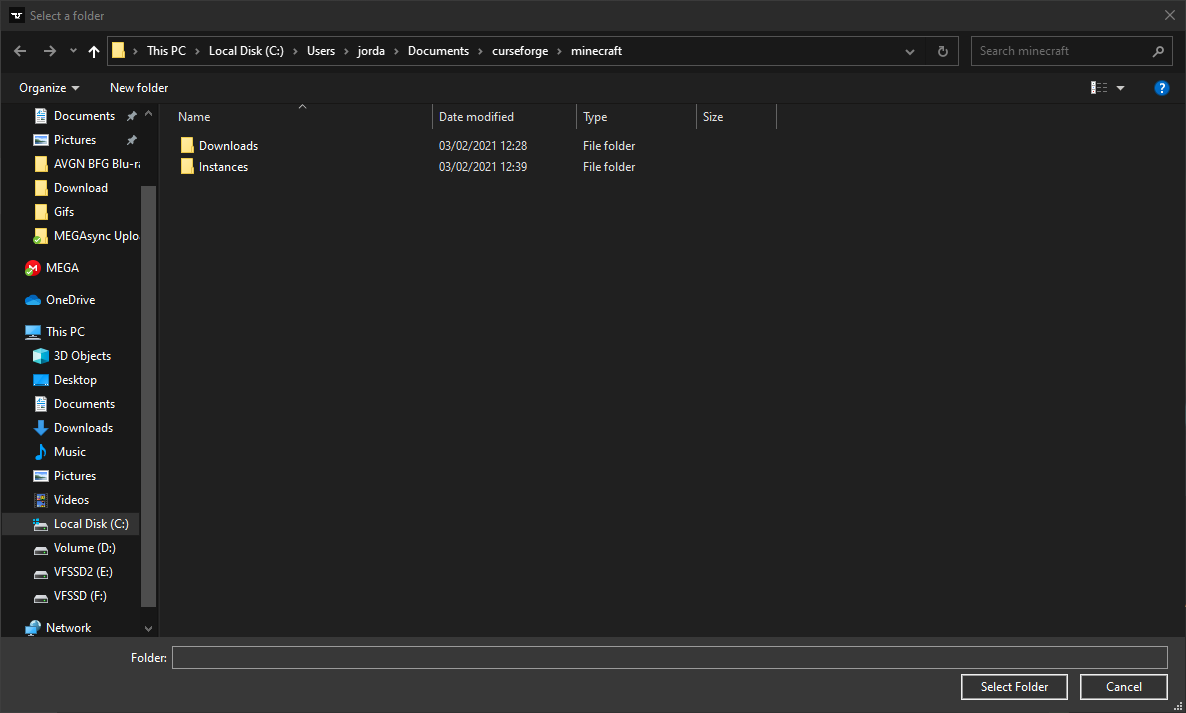
Like, this is the folder it does the whole seperate minecraft thing
And I don't have the minercraft launcher installed since I think I don't need that one
But to make sure, I also tested with that installed
still hanged
...
aaaand it's still hanging
god damint it..
am I just bloody cursed or smt?
oh... it moved now.
Finally!
Thank you!
I have no idea why all of this kept happening
 knotty timber
anyway
solar haven
wild jewel
!mc-installfix
Thank you again!
runic socket
I was wondering if someone could help me? My question got buried..
runic socket
runic socket
Hey can someone help me? I have a small Fabric 'modpack' that I'm running on a s...
This is the question.
knotty timber
:\
any clue why this happens?
for instance, I was creating a new custom modpack on MacOs
coarse elm
!mc-installfix
golden muskBOT
- Click on the icon in the bottom left.
- Click the
MinecraftTab. - Click
Changenext to theMinecraft Modding FolderOption. - Select the folder named
Install. - Delete it.
- Restart CurseForge App.
- It will ask to install MC again, do so.
- Play game.
NOTE: You will not lose any modpacks or worlds, These are saved in the Instances folder. DO NOT TOUCH THIS FOLDER OR YOU WILL LOSE EVERYTHING
knotty timber
Ok, I am trying it
F
ok done
Nice
Thank you for the help
no
Same error again
Same error when I try to install new instances
coarse elm
!bug-app include your logs, mention me and send unedited pictures.
golden muskBOT
:bug: Reporting via the CurseForge App :bug:
-
Click the
icon in the bottom left. -
Select
Open a Ticket. -
Fill out the form with accurate detailed information, "It doesn't work" isn't helpful! What exactly doesn't work and why doesn't it work should be easy to answer!
-
Make sure to upload your Overwolf logs with the
Upload Fileoption on the ticket, information on how to get these logs can be found here https://support.overwolf.com/en/support/solutions/articles/9000176827-how-to-get-your-overwolf-logs -
Submit!
knotty timber
coarse elm
!bug-app include your logs, mention me and send unedited pictures.
There is my name on unedited pictures
knotty timber
golden musk
I'll try
coarse elm
Well, the people helping at overwolf need to see everything.
Dont name things you dont want programs to see...
knotty timber
I don't think my home directory name is important
coarse elm
It's not your problem to say it is or isnt.
knotty timber
coarse elm
Dont name things you dont want programs to see...
this is not...
knotty timber
coarse elm
It's not your problem to say it is or isnt.
I am gonna send unedited pictures with my name blurred
 native meadow
hey guys i need help
golden muskBOT
╰( ͡° ͜ʖ ͡° )つ──☆*:・゚ *˜”*°•.˜”*°• Many Help •°*”˜.•°*”˜* <:curselit:796985620550385705>
Please provide a description of your issue with as much detail as possible. If you have an issue with a mod or modpack, tell us the name. Explain what you can see happening. Be specific!
Tell us what is happening, we already know it "doesn't work".
Avoid using words like "it", tell us exactly what "it" is.
Don't assume anyone knows what you are talking about, be specific.
Tell us what you expected to happen.
Provide screenshots or video if possible.
Provide a log if possible. ?mc-log
native meadow
@coarse elm ? can you help me pleas?
coarse elm
Now that you mentioned me, nope
knotty timber
F
 knotty timber
You need to update Java
autumn agate
How?
knotty timber
Mhhhhh
Native launcher caused problem even before, so I suggest to use the Jar one
last parcel
no
autumn agate
mac only workas with native though
knotty timber
You are from mac?
autumn agate
mhm
last parcel
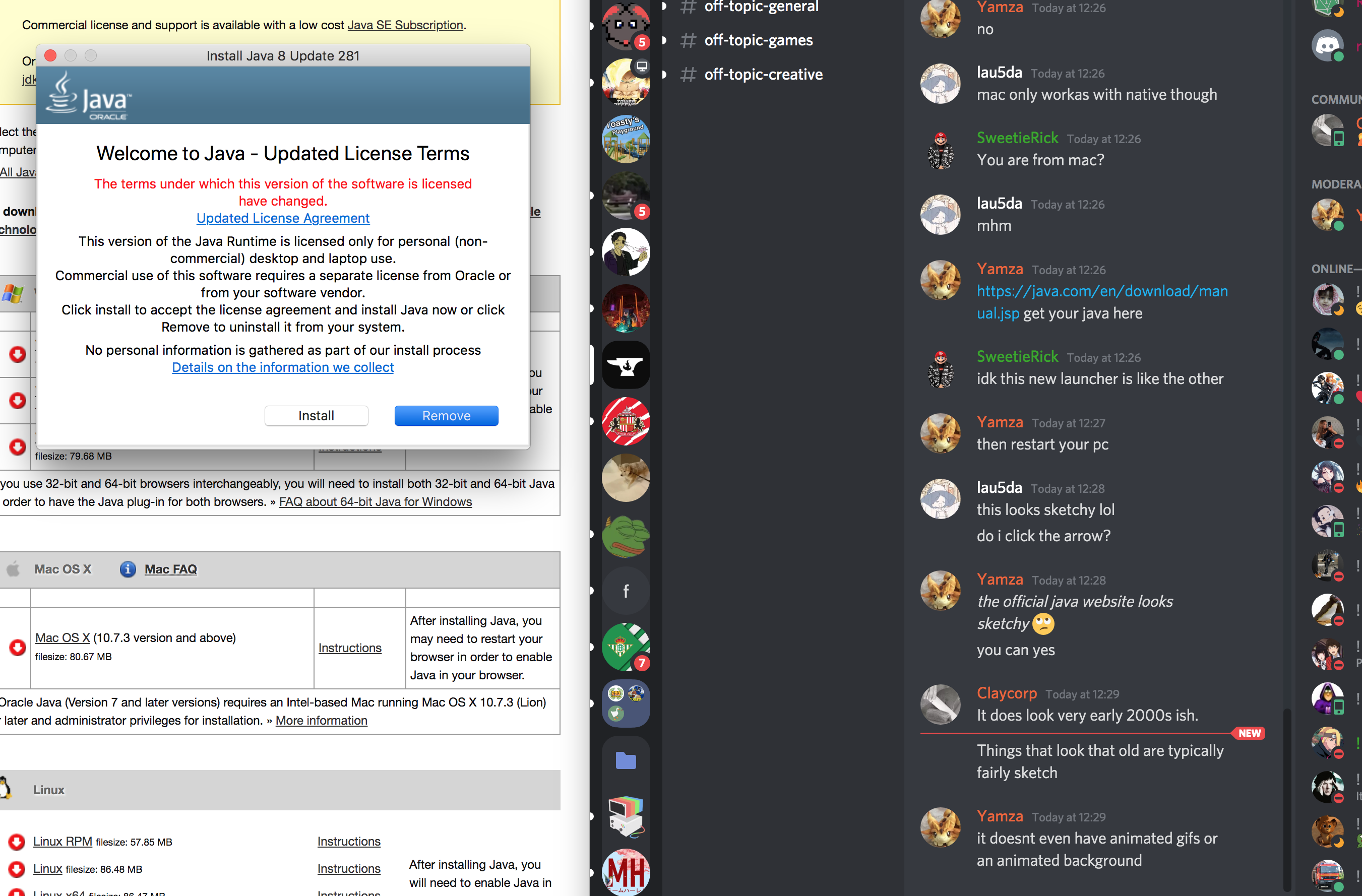
https://java.com/en/download/manual.jsp get your java here
knotty timber
idk this new launcher is like the other
last parcel
then restart your pc
coarse elm
It does look very early 2000s ish.
Things that look that old are typically fairly sketch
last parcel
it doesnt even have animated gifs or an animated background
 knotty timber
yes
coarse elm
hey look ma, I'm on the picture device!
knotty timber
lol
autumn agate
ok i installed do i reset pc now or wait
wild jewel
You try again
coarse elm
90% chance it will complain unless they restart overwolf.
flat valley
can i get some help. i do not if this is the right place but i don't know what im doing. every time i try to open a .jar file that i have downloaded it trys to open it using internet explorer instead for taking me to the luncher.
wild jewel
flat valley
can i get some help. i do not if this is the right place but i don't know what i...
You don't open a jar
autumn agate
wild jewel
You try again
It worked thanks alot for all the help
 knotty timber
ight
last parcel
when i want to open a jar i run the lid under hot water for a bit
wild jewel
What even is that? Why do you want it?
wild jewel
Then you right click it and open it with java
flat valley
but thats the thing i cant
knotty timber
Ight I found a way not to use the launcer adios bois
wild jewel
flat valley
but thats the thing i cant
Then install java
golden muskBOT
Forge & Fabric currently only officially support Java 8 as this is what the game downloads, Download java 8 from here.
https://adoptopenjdk.net/?variant=openjdk8&jvmVariant=hotspot
flat valley
ohhhh
thank you so much
you are a godsend
q. what vershon+JVM?
also sorry for bad spelling i am deslexic
wild jewel
Just the one that is selected already
wild jewel
Very vague description
 vocal sable
Hello, I’m having issues when I try to update one of my Minecraft mod packs. I use the change version button like normal and it goes through the motions of what seems to be updating/verifying all mods, but when it is done nothing has updated and it gives me the option to change version just like before. I’ve tried creating a duplicate profile without any saves and it does the same thing. Any advice?
wild jewel
flat valley
Restarted pc?
flat valley
will try
 stray prairie
Hello, my minecraft modpack isn't showing on the search area, I already uploaded it on "Release" and it got approved, can somebody help me out?
wild jewel
stray prairie
Hello, my minecraft modpack isn't showing on the search area, I already uploaded...
How long ago did it got approved?
stray prairie
I think that is why, it got aproved in 1 hour.
wild jewel
Sync takes 1-24 hours
stray prairie
Thanks.
 visual aspen
flat valley
help?
visual aspen
flat valley
help?
yeah i had that aswell but just did it manually in the file explorer
flat valley
visual aspen
yeah i had that aswell but just did it manually in the file explorer
yep its not woking
visual aspen
are you trying to download optifine?
wild jewel
flat valley
ill try to get java again
Where are you right clicking the file?
wild jewel
Are you right clicking it in the browser or on the actual file?
wild jewel
Show the options that you have there
wild jewel
No, don't double click it, right click
flat valley
wild jewel
No, don't double click it, right click
is that what you wanted
wild jewel
Now hover over "open with" and show again
flat valley
wild jewel
windows key+r, type "cmd", hit enter
Then type there "java", hit enter
wild jewel
Now go to your downloads folder, hold shift, right click in the folder, "open shell terminal"
wild jewel
powershell thingy
wild jewel
flat valley
java -jar forge-<blablabla>
flat valley
to type?
wild jewel
Yes
flat valley
with spaces?
autumn agate
wait do you actually put blablabla there, if so thats hilarious
autumn agate
flat valley
with spaces?
Well theres spaces there doesnt it
wild jewel
flat valley
with spaces?
java -jar part: yes
forge: no
flat valley
wild jewel
java -jar part: yes
forge: no
that right? if to what next
wild jewel
Use the actual filename instead of <blablabla
flat valley
this?
 native quarry
How long does it take before an update becomes visible in the app?
flat valley
think this?
 sick ether
Does it happen only to me, or the CurseForge window stops responding after you export a profile?
wild jewel
Patience much?
flat valley
nope
wild jewel
Remove the < and >
You need the actual file name there
wild jewel
java -jar forge-1.12.2-14.23.5.28.54-installer.jar
flat valley
i have no idea what im doing
wild jewel
Missing a dot there linx
native quarry
yeah, do as Tim wrote
flat valley
k
autumn agate
ok why does it say "could not verify minecraft version"?
wild jewel
autumn agate
ok why does it say "could not verify minecraft version"?
!mc-installfix
golden muskBOT
- Click on the icon in the bottom left.
- Click the
MinecraftTab. - Click
Changenext to theMinecraft Modding FolderOption. - Select the folder named
Install. - Delete it.
- Restart CurseForge App.
- It will ask to install MC again, do so.
- Play game.
NOTE: You will not lose any modpacks or worlds, These are saved in the Instances folder. DO NOT TOUCH THIS FOLDER OR YOU WILL LOSE EVERYTHING
flat valley
space with jarforge or not?
wild jewel
flat valley
space with jarforge or not?
You can copy paste it 🤦♂️
native quarry
Is there someone that could answer me why an update of my mod pack wouldn't show in the CurseForge app nor in the list of recently updated mod packs on the webpage?
wild jewel
You hit enter
wild jewel
native quarry
Is there someone that could answer me why an update of my mod pack wouldn't show...
Link it please
flat valley
problem
wild jewel
native quarry
https://www.curseforge.com/minecraft/modpacks/nti-modded
Sync takes 1-24 hours
wild jewel
flat valley
problem
Wrong filename maybe?
native quarry
wild jewel
Sync takes 1-24 hours
Oh! Wasn't aware of that.
native quarry
flat valley
problem
write dir and press enter
wild jewel
flat valley
Ditch the 13 duplicates, send new screenshot
flat valley
there
native quarry
rather wierd Tim, why does some packs get updated in the list of recent updated packs sooner?
Dogo: java -jar forge-1.12.2-14.23.5.2854-installer.jar
as I wrote earlier...
flat valley
YAY
native quarry
well there u go
wild jewel
native quarry
rather wierd Tim, why does some packs get updated in the list of recent updated ...
Time that you see is time uploaded. Not time approved
native quarry
wild jewel
Time that you see is time uploaded. Not time approved
Approved of the file or what? My file is approved...
wild jewel
Sync is just very broken. Lets keep it with that.
Not understanding this one fully either: #👽︱game-support message
native quarry
Well, maybe u could explain to me what the difference is? If my file is uploaded, and I can see after a couple of minutes, it is approved, I do not know what u are talking about.
And, saying sync is broken, yes, I can get that. But even if I delete the uploaded, and approved file, and upload it again, and the file gets approved in a couple of minutes (again), it still won't show, either in the app or in the list of recent updated mod packs.
and, english aint my main language...
wild jewel
Website != app
Website is instant, always.
App is using a very slow updating API
native quarry
If it is instant on website then, why wouldn't it show in the latest updated mod packs then?
wild jewel
Link where you are looking please
native quarry
wild jewel
You said what?
wild jewel
Is used to this stuff
 proven crow
Is this the right place to get support regarding ingame trouble or is this just the curse launcher support chat?
native quarry
wild jewel
_Is used to this stuff_
I can understand that. Thanks though
wild jewel
proven crow
Is this the right place to get support regarding ingame trouble or is this just ...
Might be better to pick the correct role in #786424115535544350 first and pick the game related channel there
proven crow
Thx
 signal pier
https://www.curseforge.com/minecraft/texture-packs/moobloom-styled-cats
as you can see the link says Mooobloom styled cats, but its cows, I didnt pay attention and misspelled
And I dont really get the project deletion process, I dont think theres a way for me to change the link and the fact it says cats really bothers me
but when I go to where you delete projects it says I cant upload this again, Im not really sure what it means
can I really not just delete the project and start over so the link will display the correct name?
 primal hollow
what do I do in this situation? I leave it out of the mods but then it still has to be downloaded client side in addition to the modpack, is there any way to include it in the mods? "The following files belong to CurseForge-hosted projects, and should therefore not be added directly to zip files"
last parcel
signal pier
https://www.curseforge.com/minecraft/texture-packs/moobloom-styled-cats
as you ...
just change the slug
last parcel
primal hollow
what do I do in this situation? I leave it out of the mods but then it still has...
delete any mods it says, reinstall them with the app, then export again. open the zip and check for overrides/mods before you upload. if anything is in there you need to repeat until it's not.
primal hollow
last parcel
delete any mods it says, reinstall them with the app, then export again. open th...
fixed it now, thank you!
signal pier
last parcel
just change the slug
I have, but the link stayed the same
little ivy
Question
I have mantle vesrion 3.49
on the server
On the modpack, how do I put in the same mantle version
autumn agate
why dont you install the newest version
autumn agate
that doesnt explain anything
little ivy
can I not install another version of a mod on a modpack?
without it not being rejected
is my question
autumn agate
its because its easier, better and causes less issues?
well to install that one version of the mod you just
find it
and install it
coarse elm
signal pier
I have, but the link stayed the same
Slugs take time to update as the cdn cashes needs to clear.
 indigo hollow
I switched minecraft accounts and now curseforge won't launch the mod. It start loading but never opens the launcher. How do I fix?
 tropic lance
I got a problem when I try to start Curseforge " Oops, that was not supposed to happend!" "seems like we could not load Curseforge. Lets try this one more time!" anyone else had this before?
signal pier
coarse elm
Slugs take time to update as the cdn cashes needs to clear.
wait, will the link change eventually?
signal pier
oh thats perfect, thanks guys!
indigo hollow
@coarse elm awhile back you told me to delete the install folder to fix the problem Im having. does that mean these to
or just the install folder
coarse elm
Why is are the files in an iCloud folder...?
indigo hollow
lmao
coarse elm
Get them outta there
indigo hollow
lmao i dont know how
indigo hollow
do u just want me to move that folder to trash? But then my instances get deleted and I have no worlds
i dont have permission to view bot spam btw
coarse elm
Oh yeah that's right...
indigo hollow
haha
coarse elm
Minecraft Files should NOT be installed inside the .minecraft folder or inside OneDrive folders. If this shows up in the path at all you need to move it by following the instructions below!
Oh ffs
indigo hollow
Its never been a problem before tho
it happened when i switched minecraft accounts
coarse elm
coarse elm
I dont have a mac.
indigo hollow
lol ffs
coarse elm
Read over the directions as it has an example of what the path should look like.
indigo hollow
is it supposed to launch in my normal minecraft launcher
indigo hollow
no my path is /user/myname/CurseForge
coarse elm
Ok. Does it work if you open a modpack?
 lost goblet
can anyone hellp me i cant download or create modpacks i get ''Object refrence has not set to an instance of a oject""
coarse elm
lost goblet
can anyone hellp me i cant download or create modpacks i get ''Object refrence h...
Reinstall curseforge
lost goblet
ok
 austere karma
can someone help me ?
 heady venture
anyone having this message?
autumn agate
everytime i launch a modpack, my minecraft launcher doesnt even open, but its in my task manager
last parcel
restart your pc and try again
last parcel
do you also have issues with vanilla?
autumn agate
i can open 1.16 easily
no
you dont
youre just clicking the wrong download button
dont click the forge icon with the download
click the actual modpack
scroll down til you see the right side of the screen says versions
click the version you need
and it should be the picture that i just sent
last parcel
autumn agate
and i also deleted my launcher
only thing i can think of, but if vanilla works then idk #👽︱game-support message
last parcel
you need the app to play modpacks but you do not need the app to use mods
autumn agate
im sorry
last parcel
you asked about mods, not their fault
last parcel
try opening overwolf first, and running curseforge through that
you what
what you said doesnt make sense
you're going to manually install that.. okay.. good luck with that
autumn agate
is there anyway to factory reset your minecraft launcher?
like, basically makes it like you first downloaded it
last parcel
?mc-installfix
golden muskBOT
- Click on the icon in the bottom left.
- Click the
MinecraftTab. - Click
Changenext to theMinecraft Modding FolderOption. - Select the folder named
Install. - Delete it.
- Restart CurseForge App.
- It will ask to install MC again, do so.
- Play game.
NOTE: You will not lose any modpacks or worlds, These are saved in the Instances folder. DO NOT TOUCH THIS FOLDER OR YOU WILL LOSE EVERYTHING
potent tartan
restart your pc
last parcel
need to clear it from task manager or restart
autumn agate
clear what?
last parcel
java
autumn agate
i dont see java in my manager
wait
gimme a se
fixed it
what file do i change it to?
last parcel
dont need to change it
last parcel
malware strikes again
last parcel
oh so deleting the install folder fixed it?
autumn agate
yeah
 scenic bay
hello. if i am asking to get my curseforge account unbanned, where should i go for
wild jewel
scenic bay
hello. if i am asking to get my curseforge account unbanned, where should i go f...
How did you get it banned?
last parcel
how
scenic bay
i am not banned on wowace but on curseforge
scenic bay
they said i took other people
's code
import them as library
not allowed
I think what they were trying to say is that i created load on demand addons for raider.io's db lua files
tbh, i would like to just stop developing addons. However, people still frequently ask me for continuing the project since they do need it
there are no other solutions that can block spams in LFG, particularly in Chinese region
wild jewel
Now it is 1.3 years, keeps getting less.
https://support.curseforge.com/en/support/tickets/new
Give them the entire story
If your account is even valid that is 🤷♂️
scenic bay
my curseforge account is banned. I could not even login in to download addons
wild jewel
scenic bay
my curseforge account is banned. I could not even login in to download addons
You don't need to login to download addons.
scenic bay
Now they have transferred to overwolf?
wild jewel
They have, but only if you gave consent or didn't need to.
wild jewel
You can stop talking here, follow that link, make a ticket.
 leaden holly
syncing is way slower than usual, does an admin know about it? 🙂
wild jewel
Yeah, they know
 lucid torrent
ugg, whats with the addon not displaying when you click it from the sys tray now? 2nd straight day ive had to close it and reopen and works fine until at some later time you click from sys tray again and same behavior?
wild jewel
lucid torrent
ugg, whats with the addon not displaying when you click it from the sys tray now...
What are you talking about? The addon being curseforge?
leaden holly
thanks tim 🙂
lucid torrent
yep
wild jewel
lucid torrent
yep
Please make a ticket for that
lucid torrent
It attempts to display but only shows a blank white screen
 uncut pecan
why does it keep saying no download path when I added it
 uneven cloud
Does anyone know how to fix this?
It just says "Cyclic failed to load correctly"
It seems like it loads fine then it loads and says "Cyclic failed to load"
 little crown
pressing start on a modpack doesnt do anything
 late mason
Is it just me, but addon loading and mod loading in app is not working at all? Loading time into “more content” is super long and it return an error, asking to restart the app
 last pendant
Hmm, I haven't had any issues today... Try rebooting your system and see if that helps? Or your modem/router if it's an internet issue?
 stark wing
hey
can someone help me?
i try to join a server and it says connection closed - mismatched channel list.
i have reinstalled curseforge countless of times.
uninstalled minecraft, deleted my modding folder
idk what else i can do.
dreamy yacht
is this a good summary
wild jewel
dreamy yacht
is this a good summary
Instant reject
dreamy yacht
hmm
dreamy yacht
why
wild jewel
Does not explain features, tells nothing to be honest
 delicate jacinth
Has anyone here gotten an Enigmatica6 install working in Docker?
I'm encountering the error message contained in the text file.
last parcel
What is docker?
delicate jacinth
It's a cool system for running "containers" for all of the things you want to host. It's sorta like having a virtual server rack, and it's (theoretically) lighter weight than virtual machines.
This is my docker-compose file (sanitized of my domain name).
last parcel
try reinstalling forge
https://github.com/AllTheMods/ATM-6/issues/879 similar to this
delicate jacinth
My host system does not have forge, or Java, or any of the dependencies to run the server. Those are installed within the virtual environment by the "image", which is basically a set of instructions to install the server.
I'm using Itzg's minecraft-server image, which works great with the vanilla instance, but neither of my CF modded servers launch correctly.
last parcel
🤷♂️
delicate jacinth
Yeah, I should probably be seeking assistance in a Docker-specific forum. Thanks for your effort though!
 sweet folio
Hey guys, I rebooted curseforge and my mod disappeared + now I cant reinstall it, says this:
any help?
last parcel
is it still in the instance folder?
 fervent lion
there any addon to move anything in wow classic? iused to use moveanything on nrmal wow
sweet folio
@last parcel it was, I deleted the entire folder and am reinstalling it rn
It didnt work after I only deleted the instance folder tho for anyone trying
last parcel
?mc-path
golden muskBOT
Minecraft Files should NOT be installed inside the .minecraft folder or inside OneDrive folders. If this shows up in the path at all you need to move it by following the instructions below!
If Minecraft is not installed, start here.
Click the in the top right.
Select Minecraft.
Click "Edit".
Move to the "Continue here:" section below.
If Minecraft is installed, follow these steps.
Click the in the bottom left.
Select the Minecraft tab.
Click "Change".
Move to the "Continue here:" section below.
Continue here:
Make a folder in the root directory called CurseForge.
Select the folder you just made.
The text box should show something like the following:
For Windows: C:\CurseForge
For Mac: /CurseForge
last parcel
try that
autumn agate
im trying to download mods from the website still but it keeps referring me to the app do i have to use the app now or is there a way i can still use the sight
last parcel
?mc-installmods
golden muskBOT
How to install mods in CurseForge App.
- Click
+ Create Custom Profile - Name it, select the required Minecraft version, select the Forge version (usually the highest number), click
Create. - Click the profile icon.
- Click
Add New Content - Search and install the desired mods.
- Start the game!
How to install mods not on CurseForge.
- Right click the profile picture or Open the profile and click the Icon next to the play button.
- Click
Open Folder. - Drag the mod(s) into the
modsfolder. (Note: Some mods will require others, to run. Make sure to read the instructions for the mod!) - Start the game!
last parcel
you can only use the site if you plan to install them manually
autumn agate
i typically do it from the sight but when i hit the download it keeps bringing me to the download the app page and i dont see a on the sight to download it
last parcel
cuz you're pressing install, not download
autumn agate
nvm im the one being slow sorry i didnt give no insight but i was tryng to install craft to exile dissonance and it only had the forge app download not a full download besides for server packs
my bad
dreamy yacht
wild jewel
Does not explain features, tells nothing to be honest
i give up
 lime monolith
So i am getting a denial whenever i try to load up any mod packs, yet i cant find a reason why
fervent lion
im looking for an addon that can move anything inside of world of warcraft classic
 lone aspen
um there is inapropriat conntent on some of the moders pages my friend has reported him multible times .
last parcel
lime monolith
So i am getting a denial whenever i try to load up any mod packs, yet i cant fin...
what does that mean..?
lime monolith
last parcel
what does that mean..?
When i try to load a modpack to play it says access is denied
last parcel
lone aspen
um there is inapropriat conntent on some of the moders pages my friend has repor...
use the report feature on the mod page
lone aspen
i did
last parcel
lime monolith
When i try to load a modpack to play it says access is denied
screenshot
lone aspen
i did do u want it
last parcel
sure, link it
lone aspen
the screen shot ?
last parcel
the mod
lone aspen
o
lime monolith
last parcel
screenshot
lone aspen
there u go its all the way at the bottom
lone aspen
last parcel
the mod
this is it
 finite flame
uuhhh does anyone know how i could get 1 singular mod and not a whole modpack?
last parcel
or just wait
last parcel
finite flame
uuhhh does anyone know how i could get 1 singular mod and not a whole modpack?
?mc-installfix
golden muskBOT
- Click on the icon in the bottom left.
- Click the
MinecraftTab. - Click
Changenext to theMinecraft Modding FolderOption. - Select the folder named
Install. - Delete it.
- Restart CurseForge App.
- It will ask to install MC again, do so.
- Play game.
NOTE: You will not lose any modpacks or worlds, These are saved in the Instances folder. DO NOT TOUCH THIS FOLDER OR YOU WILL LOSE EVERYTHING
last parcel
@lime monolith try this ⬆️
lime monolith
last parcel
<@!537456832550273065> try this ⬆️
same response
lone aspen
btw if u cant see it its because ur loged it that happend to my friend when he reported it he couldent see it any more
last parcel
lime monolith
same response
?mc-path
golden muskBOT
Minecraft Files should NOT be installed inside the .minecraft folder or inside OneDrive folders. If this shows up in the path at all you need to move it by following the instructions below!
If Minecraft is not installed, start here.
Click the in the top right.
Select Minecraft.
Click "Edit".
Move to the "Continue here:" section below.
If Minecraft is installed, follow these steps.
Click the in the bottom left.
Select the Minecraft tab.
Click "Change".
Move to the "Continue here:" section below.
Continue here:
Make a folder in the root directory called CurseForge.
Select the folder you just made.
The text box should show something like the following:
For Windows: C:\CurseForge
For Mac: /CurseForge
last parcel
i see it
lone aspen
ok
finite flame
uuhhh does anyone know how i could get 1 singular mod and not a whole modpack?
lone aspen
he said the link doesent work but it should still be taken down
lone aspen
he didint
last parcel
finite flame
uuhhh does anyone know how i could get 1 singular mod and not a whole modpack?
?mc-installmods
golden muskBOT
How to install mods in CurseForge App.
- Click
+ Create Custom Profile - Name it, select the required Minecraft version, select the Forge version (usually the highest number), click
Create. - Click the profile icon.
- Click
Add New Content - Search and install the desired mods.
- Start the game!
How to install mods not on CurseForge.
- Right click the profile picture or Open the profile and click the Icon next to the play button.
- Click
Open Folder. - Drag the mod(s) into the
modsfolder. (Note: Some mods will require others, to run. Make sure to read the instructions for the mod!) - Start the game!
lone aspen
i didint either he reported it to the atorites and then he was tolt it was taken down ...
that is how he and i know
last parcel
anyways, i passed it on.
lone aspen
ok thank you
fervent lion
there any addon to move anything in wow classic? i used to use moveanything on normal wow
lime monolith
last parcel
?mc-path
It still gives the same denial
golden muskBOT
:bug: Reporting via the CurseForge App :bug:
-
Click the
icon in the bottom left. -
Select
Open a Ticket. -
Fill out the form with accurate detailed information, "It doesn't work" isn't helpful! What exactly doesn't work and why doesn't it work should be easy to answer!
-
Make sure to upload your Overwolf logs with the
Upload Fileoption on the ticket, information on how to get these logs can be found here https://support.overwolf.com/en/support/solutions/articles/9000176827-how-to-get-your-overwolf-logs -
Submit!
finite flame
when i try to create a custom profile an error pops up saying "No java executeable found"... what should i do?
last parcel
install java https://java.com/en/download/manual.jsp
 viral yoke
Do you mean minecraft java or the actual java platform?
finite flame
i have the minecraft java and minecraft java launcher...
last parcel
?ticket-app then
golden muskBOT
:bug: Reporting via the CurseForge App :bug:
-
Click the
icon in the bottom left. -
Select
Open a Ticket. -
Fill out the form with accurate detailed information, "It doesn't work" isn't helpful! What exactly doesn't work and why doesn't it work should be easy to answer!
-
Make sure to upload your Overwolf logs with the
Upload Fileoption on the ticket, information on how to get these logs can be found here https://support.overwolf.com/en/support/solutions/articles/9000176827-how-to-get-your-overwolf-logs -
Submit!
 flat drum
Ive added 41 1.12.2 mods into the mods folder and its only added 1 why is this>
last parcel
lone aspen
ok thank you
ya'll can just delete the comment
 sage basin
Whenever I try updating my modpack it says "Cancelling Installation" and "Removing Failed Update" why is this?
coarse elm
Uhhhh
now only if I knew what all the new error codes where....
Not your fault.
They just added the error codes and we dont have a lookup table for em yet.
!mc-path
golden muskBOT
Minecraft Files should NOT be installed inside the .minecraft folder or inside OneDrive folders. If this shows up in the path at all you need to move it by following the instructions below!
If Minecraft is not installed, start here.
Click the in the top right.
Select Minecraft.
Click "Edit".
Move to the "Continue here:" section below.
If Minecraft is installed, follow these steps.
Click the in the bottom left.
Select the Minecraft tab.
Click "Change".
Move to the "Continue here:" section below.
Continue here:
Make a folder in the root directory called CurseForge.
Select the folder you just made.
The text box should show something like the following:
For Windows: C:\CurseForge
For Mac: /CurseForge
coarse elm
Yes.
last parcel
ooo error codes
coarse elm
Above.
Yeah no more guessing what error someone has when they are using Russian, French, or whatever other language we see here often.
Lawl
last parcel
other right
last parcel
well you've got the right right and the wrong right
coarse elm
Your following the wrong instructions.
That's for if minecraft isnt installed in the app
Has nothing to do with techsavy, it's all about reading.
Well I cant do anything about that.
last parcel
there's already a video...
coarse elm
I'm not screen sharing when theres a video of how to do it..
And we are back to reading...
last parcel
it's below the message you didnt read

 lone aspen
last parcel
ya'll can just delete the comment
lone aspen
last parcel
ya'll can just delete the comment
it wouldent let him
last parcel
what it do?
lone aspen
i dont know but the user just keeps creating alts and posting it
lone aspen
last parcel
what it do?
he cant see it when he is loged in but when he is loged out he can but sence he is loged out he can not delete it
last parcel
what if you turn off comments and turn it back on?
fading moss
Everytime i try to load up a game its in vanilla
autumn agate
hi. im looking for mods for WoW classic. i can only find for World of warcraft. anyone know where i could find them?
coarse elm
fading moss
Everytime i try to load up a game its in vanilla
Restart your computer
coarse elm
autumn agate
hi. im looking for mods for WoW classic. i can only find for World of warcraft. ...
Where? Site or app.
autumn agate
i went onm the app. at first i was told twitch. then twitch sent me there
coarse elm
You need to select the appropriate install of the game.
 native lichen
i need help with these mods not loading
coarse elm
!help
golden muskBOT
╰( ͡° ͜ʖ ͡° )つ──☆*:・゚ *˜”*°•.˜”*°• Many Help •°*”˜.•°*”˜* <:curselit:796985620550385705>
Please provide a description of your issue with as much detail as possible. If you have an issue with a mod or modpack, tell us the name. Explain what you can see happening. Be specific!
Tell us what is happening, we already know it "doesn't work".
Avoid using words like "it", tell us exactly what "it" is.
Don't assume anyone knows what you are talking about, be specific.
Tell us what you expected to happen.
Provide screenshots or video if possible.
Provide a log if possible. ?mc-log
native lichen
i need help with these mods not loading
coarse elm
It tells you right there what the problem is
native lichen
I'm not that good with english
coarse elm
You cant use fabric and forge mods at the same time
autumn agate
so i need both wow and wow classic for it to work?
coarse elm
autumn agate
so i need both wow and wow classic for it to work?
No, you likely have multiple installs of wow and you need to select what install is being managed.
fading moss
coarse elm
Restart your computer
Ive tried that
native lichen
So what do I do to be able to play with the origins mod
last parcel
?mc-fabric
golden muskBOT
Fabric modpacks or the use Fabric mods require you to install a mod called Jumploader.
Fabric mods do not work with Forge.
Forge mods do not work with Fabric.
Fabric mods should be marked with a Fabric Icon like this: 
native lichen
O
last parcel
"or the use fabric"?
coarse elm
fading moss
Ive tried that
Is the modpack in the profile selection?
fading moss
What that mean
coarse elm
Where the game version is in the minecraft launcher click it.
fading moss
Oh let me ckeck
autumn agate
thanks man. i checked for which game version. it should work. and i was told as soon as i downloaded a mod it goes straight to the game?
native lichen
1.16.4
fading moss
coarse elm
Where the game version is in the minecraft launcher click it.
Its 1.12.2
native lichen
No
fading moss
No im not talking to you
 valid flint
It wont let me run all the mobs 6 I need help
coarse elm
autumn agate
thanks man. i checked for which game version. it should work. and i was told as ...
Yep, as long as you have the correct game install selected it will do so. You might need to do whatever reloading or restarting depending on what you install though.
autumn agate
thanks a lot
fading moss
What about me?
coarse elm
Did you click the profile menu?
coarse elm
All I want to know is if you have the screen open or not.
fading moss
Yes
coarse elm
Does it list a forge install?
coarse elm
Then you didn't follow instructions.
fading moss
?
coarse elm
In the minecraft launcher, not in curseforge.
coarse elm
Ok, what's wrong with it?
coarse elm
Then install it again.
fading moss
then all 80 hour in he game wil lbe deleted
coarse elm
Back up the files.
fading moss
i dnot know is there any other way
coarse elm
Well if you load the world and it works fine then you dont need to do anything.
fading moss
no ok look have you ever played skyfactory
its in vaniila
like i cant ru nthe mods
its just messes up
coarse elm
Then you need to reinstall the modpack...
fading moss
ya ok whats the best way to back it up
coarse elm
Copy the saves folder somewhere else.
fading moss
im goign to said if i loss my world ok thanks for the help
 boreal abyss
i keep getting a play demo glitch when i try to play mods, i have minecraft installed
coarse elm
Buy the game.
boreal abyss
ok i'll try that
 rich aurora
im currently playing skyfactory 4, would I be able to 5x ore process with mekanism?
boreal abyss
i didn't work
autumn agate
fading moss
the main menu dosent look like this
It says the mods are loaded
Its just a main menu
Doesnt affect gameplay
 near hedge
someone can help me?
autumn agate
near hedge
someone can help me?
well saying the word help wont help us help your in need of help issue
whats the issue
near hedge
why some of mods show to me exit code:0?